Torproject Sysadmin Team
The Torproject System Administration Team is the team that keeps
torproject.org's infrastructure going. This is the internal team
wiki. It has mostly documentation mainly targeted for the team
members, but also has useful information for people with
torproject.org accounts.
The documentation is split into the following sections:
- Introduction to the team, what it does, key services and policies
- Support - in case of fire, press this button
- User documentation - aimed primarily at non-technical users and the general public
- Sysadmin how-to's - procedures specifically written for sysadmins
- Service list - service list and documentation
- Machine list - the full list of machines managed by TPA (in LDAP)
- Policies - major decisions and how they are made
- Providers - info about service and infrastructure providers
- Meetings - minutes from our formal meetings
- Roadmaps - documents our plans for the future (and past successes of course)
Our source code is all hosted on GitLab.
This is a wiki. We welcome changes to the content! If you have the right permissions -- which is actually unlikely, unfortunately -- you can edit the wiki in GitLab directly. Otherwise you can submit a pull request on the wiki replica. You can also clone the git repository and send us a patch by email.
To implement a similar merge request workflow on your GitLab wiki, see TPA's documentation about Accepting merge requests on wikis.
This documentation is primarily aimed at users.
Note: most of this documentation is a little chaotic and needs to be merged with the service listing. You might interested in one of the following quick links instead:
Other documentation:
- accounts
- admins
- bits-and-pieces
- extra
- hardware-requirements
- lektor-dev-macos
- naming-scheme
- reporting-email-problems
- services
- ssh-jump-host
- static-sites
- svn-accounts
- torproject.org Accounts
Note that this documentation needs work, as it overlaps with user creation procedures, see issue 40129.
torproject.org Accounts
The Tor project keeps all user information in a central LDAP database which governs access to shell accounts, git (write) access and lets users configure their email forwards.
It also stores group memberships which in turn affects which users can log into which hosts.
This document should be consistent with the Tor membership policy, in case of discrepancy between the two documents, the membership policy overrules this document.
Decision tree: LDAP account or email alias?
Here is a simple decision tree to help you decide if a new contributor needs an LDAP account, or if an email alias will do. (All things being equal, it's better to set people up with only an email alias if that's all they need, since it reduces surface area which is better for security.)
LDAP account reasons
Regardless of whether they are a Core Contributor:
- Are they a maintainer for one of our official software projects, meaning
they need to push commits (write) to one of our git repos?
- They should get an LDAP account.
- Do they need to access (read) a private git repo, like "dirauth-conf"?
- They should get an LDAP account.
Are they a Core Contributor?
- Do they want to make their own personal clones of our git repos, for example to propose patches and changes?
- They don't need an LDAP account for just this case anymore, since gitlab can host git repos. (They are also welcome to put their personal git repos on external sites if they prefer.)
- Do they need to log in to our servers to use our shared irc host?
- They should get an LDAP account.
- If they're not a Core Contributor, they should put their IRC somewhere else, like pastly's server.
- Do they need to log in to our servers to maintain one of our websites or
services?
- An existing Core Contributor should request an LDAP account.
- If they're not a Core Contributor, but they are a staff member who needs to maintain services, then Tor Project Inc should request an LDAP account.
- If they are not a staff member, then an existing Core Contributor should request an LDAP account, and explain why they need access.
- Do they need to be able to send email using an @torproject.org address?
- In our 2022/2023 process of locking down email, it's increasingly necessary for people to have a full ldap account in order to deliver their tor mail to the internet properly.
See New LDAP accounts for details.
Email alias reasons
If none of the above cases apply:
- Are they a Core Contributor?
- An existing Core Contributor should request an email alias.
- Are they a staff member?
- Tor Project Inc should request an email alias.
See Changing email aliases for details.
New LDAP accounts
New accounts have to be sponsored by somebody who already has a torproject.org account. If you need an account created, please find somebody in the project who you are working with and ask them to request an account for you.
Step 1
The sponsor will collect all required information:
- name,
- initial forwarding email address (the user can change that themselves later),
- OpenPGP key fingerprint,
- desired username.
The sponsor is responsible for verifying the information's accuracy, in particular establishing some confidence that the key in question actually belongs to the person that they want to have access.
The user's OpenPGP key should be available from the public keyserver network.
The sponsor will create a ticket in GitLab:
- The ticket should include a short rationale as to why the account is required,
- contain all the pieces of information listed above, and
- should be OpenPGP signed by the sponsor using the OpenPGP key we have on
file for them. Please enclose the OpenPGP clearsigned blob using
{{{and}}}.
username policy
Usernames are allocated on a first-come, first-served basis. Usernames
should be checked for conflict with commonly used administrative
aliases (root, abuse, ...) or abusive names (killall*, ...). In
particular, the following have special meaning for various services
and should be avoided:
root
abuse
arin-admin
certmaster
domainadmin
hostmaster
mailer-daemon
postmaster
security
webmaster
That list, taken from the leap project is not exhaustive and your own judgement should be used to spot possibly problematic aliases. See also those other possible lists:
Step n+1
Once the request has been filed it will be reviewed by Roger or Nick and either approved or rejected.
If the board indicates their assent, the sysadmin team will then create the account as requested.
Retiring accounts
If you won't be using your LDAP account for a while, it's good security hygiene to have it disabled. Disabling an LDAP account is a simple operation, and reenabling an account is also simple, so we shouldn't be shy about disabling accounts when people stop needing them.
To simplify the review process for disable requests, and because disabling by mistake has less impact than creating a new LDAP account by mistake, the policy here is "any two of {Roger, Nick, Shari, Isabela, Erin, Damian} are sufficient to confirm a disable request."
(When we disable an LDAP account, we should be sure to either realize and accept that email forwarding for the person will stop working too, or add a new line in the email alias so email keeps working.)
Getting added to an existing group/Getting access to a specific host
Almost all privileges in our infrastructure, such as account on a particular host, sudo access to a role account, or write permissions to a specific directory, come from group memberships.
To know which group has access to an specific host, FIXME.
To get added to some unix group, it has to be requested by a member of that group. This member has to create a new ticket in GitLab, OpenPGP-signed (as above in the new account creation section), requesting who to add to the group.
If a new group needs to be created, FIXME.
The reasons why a new group might need to be created are: FIXME.
Should the group be orphaned or have no remaining active members, the same set of people who can approve new account requests can request you be added.
To find out who is on a specific group you can ssh to perdulce:
ssh perdulce.torproject.org
Then you can run:
getent group
See also: the "Host specific passwords" section below
Changing email aliases
Create a ticket specifying the alias, the new address to add, and a brief motivation for the change.
For specifics, see the "The sponsor will create a ticket" section above.
Adding a new email alias
Personal Email Aliases
Tor Project Inc can request new email aliases for staff.
An existing Core Contributor can request new email aliases for new Core Contributors.
Group Email Aliases
Tor Project Inc and Core Contributors can request group email aliases for new functions or projects.
Getting added to an existing email alias
Similar to being added to an LDAP group, the right way to get added to an existing email alias is by getting somebody who is already on that alias to file a ticket asking for you to be added.
Changing/Resetting your passwords
LDAP
If you've lost your LDAP password, you can request that a new one be generated. This is done by sending the phrase "Please change my Debian password" to chpasswd@db.torproject.org. The phrase is required to prevent the daemon from triggering on arbitrary signed email. The best way to invoke this feature is with
echo "Please change my Debian password" | gpg --armor --sign | mail chpasswd@db.torproject.org
After validating the request the daemon will generate a new random password,
set it in the directory and respond with an encrypted message containing the
new password. This new password can then be used to
login (click the "Update my info"
button), and use the "Change password" fields to create a new LDAP
password.
Note that LDAP (and sudo passwords, below) changes are not instantaneous: they can take between 5 to 8 minutes to propagate to any given host.
More specifically, the password files are generated on the master LDAP server every five minutes, starting at the third minute of the hour, with a cron schedule like this:
3,8,13,18,23,28,33,38,43,48,53,58
Then those files are synchronized on a more standard 5 minutes schedule to all hosts.
There are also delays involved in the mail loop, of course.
Host specific passwords / sudo passwords
Your LDAP password can not be used to authenticate to sudo on
servers. It can only allow to log you in through SSH, but you need a
different password to get sudo access, which we call the "sudo
password".
To set the sudo password:
- go to the user management website
- pick "Update my info"
- set a new (strong) sudo password
If you want, you can set a password that works for all the hosts that are managed by torproject-admin, by using the "wildcard ("*"). Alternatively, or additionally, you can have per-host sudo passwords -- just select the appropriate host in the pull-down box.
Once set on the web interface, you will have to confirm the new settings by sending a signed challenge to the mail interface. The challenge is a single line, without line breaks, provided by the web interface. With the challenge first you will need to produce an openpgp signature:
echo 'confirm sudopassword ...' | gpg --armor --sign
With it you can compose an email to changes@db.torproject.org, sending the challenge in the body followed by the openpgp signature.
Note that setting a sudo password will only enable you to use sudo to configured accounts on configured hosts. Consult the output of "sudo -l" if you don't know what you may do. (If you don't know, chances are you don't need to nor can use sudo.)
Do mind the delays in LDAP and sudo passwords change, mentioned in the previous section.
Changing/Updating your OpenPGP key
If you are planning on migrating to a new OpenPGP key and you also want to change your key in LDAP, or if you just want to update the copy of your key we have on file, you need to create a new ticket in GitLab:
- The ticket should include your username, your old OpenPGP fingerprint and your new OpenPGP fingerprint (if you're changing keys).
- The ticket should be OpenPGP signed with your OpenPGP key that is currently stored in LDAP.
Revoked or lost old key
If you already revoked or lost your old OpenPGP key and you migrated to a new one before updating LDAP, you need to find a sponsor to create a ticket for you. The sponsor should create a new ticket in GitLab:
- The ticket should include your username, your old OpenPGP fingerprint and your new OpenPGP fingerprint.
- Your OpenPGP key needs to be on a public keyserver and be signed by at least one Tor person other than your sponsor.
- The ticket should be OpenPGP signed with the current valid OpenPGP key of your sponsor.
Actually updating the keyring
See the new-user HOWTO.
Moved to policy/tpa-rfc-2-support.
Bits and pieces of Tor Project infrastructure information
A collection of information looking for a better place, perhaps after being expanded a bit to deserve their own page.
Backups
- We use Bacula to make backups, with one host running a director (currently bacula-director-01.tpo) and another host for storage (currently brulloi.tpo).
- There are
BASEfiles andWALfiles, the latter for incremental backups. - The logs found in
/var/log/bacula-main.logand/var/log/bacula/seem mostly empty, just like the systemd journals.
Servers
-
There's one
directorand onestorage node. -
The director runs
/usr/local/sbin/dsa-bacula-schedulerwhich reads/etc/bacula/dsa-clientsfor a list of clients to back up. This file is populated by puppet (puppetdb$bacula::tag_bacula_dsa_client_list) and will list clients until they're being deactivated in puppet.
Clients
tor-puppet/modules/bacula/manifests/client.ppgives an idea of where things are at on backup clients.- Clients run the Bacula File Daemon,
bacula-fd(8).
Onion sites
-
Example from a vhost template
<% if scope.function_onion_global_service_hostname(['crm-2018.torproject.org']) -%> <Virtualhost *:80> ServerName <%= scope.function_onion_global_service_hostname(['crm-2018.torproject.org']) %> Use vhost-inner-crm-2018.torproject.org </VirtualHost> <% end -%> -
Function defined in
tor-puppet/modules/puppetmaster/lib/puppet/parser/functions/onion_global_service_hostname.rbparses/srv/puppet.torproject.org/puppet-facts/onionbalance-services.yaml. -
onionbalance-services.yamlis populated throughonion::balance(tor-puppet/modules/onion/manifests/balance.pp) -
onion:balanceuses theonion_balance_service_hostnamefact fromtor-puppet/modules/torproject_org/lib/facter/onion-services.rb
Puppet
See service/puppet.
Extra is one of the sites hosted by "the www rotation". The www rotation uses several computers to host its websites and it is used within tpo for redundancy.
Extra is used to host images that can be linked in blog posts and the like. The idea is that you do not need to link images from your own computer or people.tpo.
Extra is used like other static sites within tpo. Learn how to write to extra
So you want to give us hardware? Great! Here's what we need...
Physical hardware requirements
If you want to donate hardware, there are specific requirements for machine we manage that you should follow. For other donations, please see the donation site.
This list is not final, and if you have questions, please contact us. Also note that we also accept virtual machine "donations" now, for which requirements are different, see below.
Must have
- Out of band management with dedicated network port, preferably a something standard (like serial-over-ssh, with BIOS redirection), or failing that, serial console and networked power bars
- No human intervention to power on or reboot
- Warranty or post-warranty hardware support, preferably provided by the sponsor
- Under the 'ownership' of Tor, although long-term loans can also work
- Rescue system (PXE bootable OS or remotely loadable ISO image)
Nice to have
- Production quality rather than pre-production hardware
- Support for multiple drives (so we can do RAID) although this can be waived for disposable servers like build boxes
- Hosting for the machine: we do not run our own data centers or rack, so it would be preferable if you can also find a hosting location for the machine, see the hosting requirements below for details
To avoid
- proprietary Java/ActiveX remote consoles
- hardware RAID, unless supported with open drivers in the mainline Linux kernel and userland utilities
Hosting requirements
Those are requirements that apply to actual physical / virtual hosting of machines.
Must have
- 100-400W per unit density, depending on workload
- 1-10gbit, unmetered
- dual stack (IPv4 and IPv6)
- IPv4 address space (at least one per unit, typically 4-8 per unit)
- out of band access (IPMI or serial)
- rescue systems (e.g. PXE booting)
- remote hands SLA ("how long to replace a broken hard drive?")
Nice to have
- "clean" IP addresses (for mail delivery, etc)
- complete /24 IPv4, donated to the Tor project
- private VLANs with local network
- BGP announcement capabilities
- not in europe or northern america
- free, or ~ 150$/unit
Virtual machines requirements
Must have
Without those, we will have to be basically convinced to accept those machines:
- Debian OS
- Shell access (over SSH)
- Unattended reboots or upgrades
The latter might require more explanations. It means the machine can be rebooted without intervention of an operator. It seems trivial, but some setups make that difficult. This is essential so that we can apply Linux kernel upgrades. Alternatively, manual reboots are acceptable if such security upgrades are automatically applied.
Nice to have
Those we would have in an ideal world, but are not deal breakers:
- Full disk encryption
- Rescue OS boot to install our own OS
- Remote console
- Provisioning API (cloud-init, OpenStack, etc)
- Reverse DNS
- Real IP address (no NAT)
To avoid
Those are basically deal breakers, but we have been known to accept those situations as well, in extreme cases:
- No control over the running kernel
- Proprietary drivers
Overview
The aim of this document is to explain the steps required to set up a local Lektor development environment suitable for working on Tor Project websites based on the Lektor platform.
We'll be using the Sourcetree git GUI to provide a user-friendly method of working with the various website's git repositories.
Prerequisites
First we'll install a few prerequisite packages, including Sourcetree.
You must have administrator privileges to install these software packages.
First we'll install the Xcode package.
Open the Terminal app and enter:
xcode-select --install
Click Install on the dialog that appears.
Now, we'll install the brew package manager, again via the Terminal:
/bin/bash -c "$(curl -fsSL
https://raw.githubusercontent.com/Homebrew/install/HEAD/install.sh)"
Now we're ready to install a few more tools:
brew install coreutils git git-lfs python3.8
And lastly we need to download and install Sourcetree. This can be done from the app's website: https://www.sourcetreeapp.com/
Follow the installer prompts, entering name and email address so that the git commits are created with adequate identifying information.
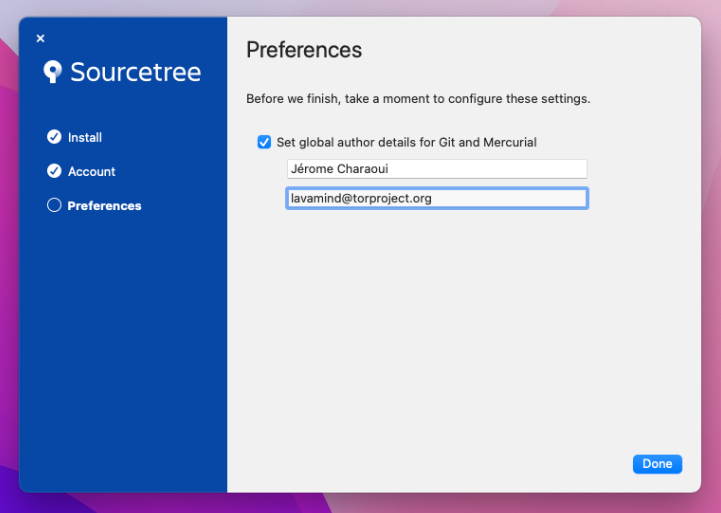
Connect GitLab account
This step is only required if you want to create Merge Requests in GitLab.
Next, we'll create a GitLab token to allow Sourcetree to retrieve and update projects.
- Navigate to https://gitlab.torproject.org/-/profile/personal_access_tokens
- Enter
sourcetreeunder Token name - Choose an expiration date, ideally not more than a few months
- Check the box next to
api - Click Create personal access token
- Copy the token into your clipboard
Now, open Sourcetree and click the Connect... button on the main windows, then Add..., and fill in the dialog as below. Paste the token in the Password field.
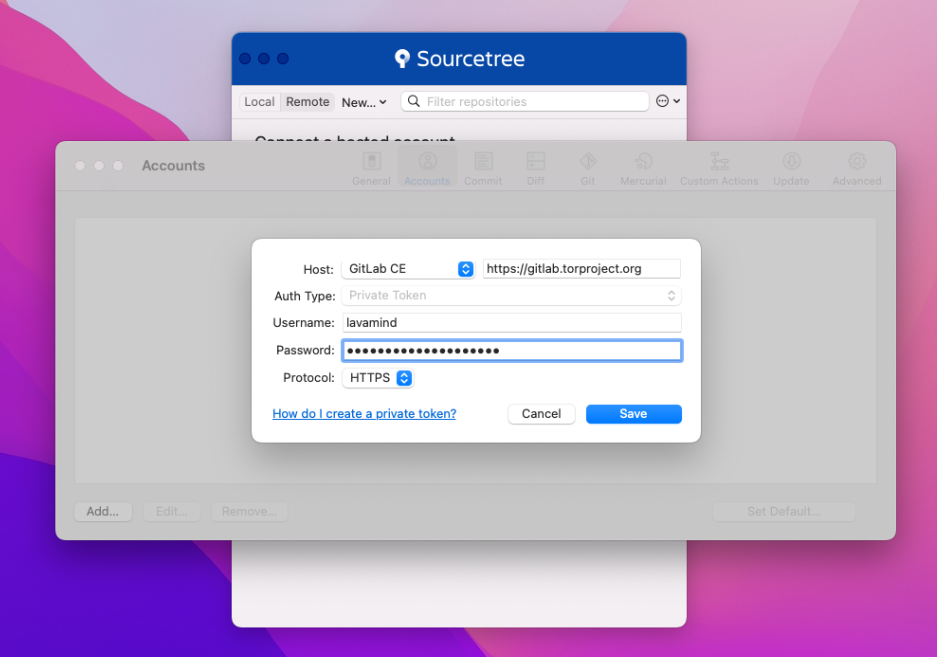
Click the Save button.
The Remote tab on the main window should now show a list of git repositories available on the Tor Project GitLab.
To clone a project, enter its name (eg. tpo or blog) in the Filter
repositories input box and click the Clone link next to it.
Depending on the project, a dialog titled Git LFS: install required may then appear. If so, click Yes to ensure all the files in the project are downloaded from GitLab.
Page moved to TPA-RFC-6: Naming Convention.
Email delivery problems are unfortunately quite common but there are often simple solutions to the problems once we know exactly what is going on.
When reporting delivery problems on Email infrastructure, make sure you include at least the following information in your report:
- originating email address (e.g.
Alice <alice@torproject.org>) - destination email address (e.g.
Bob <bob@torproject.org>) - date and time the email was sent, with timezone, to the second
(e.g.
2019-06-03 13:52:30 +0400) - how the email was sent (e.g. from my laptop, over SMTP+TLS to my
email provider,
riseup.net) - what error did you get (e.g. a bounce, message not delivered)
Ideally, if you can, provide us with the Message-ID header, if you
know what that is and can find it. Otherwise, don't worry about it and
provide us with the above details.
If you do get a bounced message, do include the entire bounce, with headers. The simplest way to do so is forward it as an attachment or "view source" and copy-paste it somewhere safe (like https://share.riseup.net/).
Ideally, also include a copy of the original message in your report, also with full headers.
If you can't send a copy of the original message for privacy reasons, at least include the headers of the email.
Send us the message using the regular methods, as appropriate, see the support guide for details.
Service on TPO machines are often run as regular users, from normal
sessions, instead of the usual /etc/init.d or systemd
configuration provided by Debian packages. This is part of our
service vs system admin distinction.
This page aims at documenting how such services are started and
managed. There are many ways this can be done: many services have been
started as a @reboot cronjob in the past, but we're looking at using
systemd --user as a more reasonable way to do this in the future.
systemd startup
Most Debian machines now run systemd which allows all sorts of
neat tricks. In particular, it allows us to start programs as a normal
user through a systemd --user session that gets started
automatically at boot.
Adding a new service
User-level services are deployed in ~/.config/systemd/user/. Let's
say we're deploying a service called $SERVICE. You'd need to craft a
.service file and drop it in
~/.config/systemd/user/$SERVICE.service:
[Unit]
Description=Run a program forever that does not fork
[Service]
Type=simple
ExecStart=/home/role/bin/service start
[Install]
WantedBy=default.target
Then you can run:
systemctl --user daemon-reload
For the new file to be notified.
If you're getting an error like this:
Failed to connect to bus: No such file or directory
It's because your environment is not setup correctly and systemctl
can't find the correct sockets. Try to set the XDG_RUNTIME_DIR
environment to the right user directory:
export XDG_RUNTIME_DIR=/run/user/$(id -u)
Then the service can be enabled:
systemctl --user enable $SERVICE
And then started:
systemctl --user start $SERVICE
sysadmin stuff
On the sysadmin side, to enable systemd --user session, we need to
run loginctl enable-linger $USER. For example, this will enable the
session for the user $USER:
loginctl_user { $USER: linger => enabled }
This will create an empty file for the user in
/var/lib/systemd/linger/ but it will also start the systemd --user session immediately, which can already be used to start other
processes.
cron startup
This method is now discouraged, but is still in use for older services.
Failing systemd or admin support, you might be able to start
services at boot time with a cron job.
The trick is to edit the role account crontab with sudo -u role crontab -e and then adding a line like:
@reboot /home/role/bin/service start
It is deprecated because cron is not a service manager and has no
way to restart the service easily on upgrades. It also lacks features
like socket activation or restart on failure that systemd
provides. Plus it won't actually start the service until the machine
is rebooted, that's just plain silly.
The correct way to start the above service is to use the .service
file documented in the previous section.
You need to use an ssh jump host to access internal machines at tpo.
If you have a recent enough ssh (>= 2016 or so), then you can use the ProxyJump directive. Else, use ProxyCommand.
ProxyCommand automatically executes the ssh command on the host to jump to the next host and forward all traffic through.
With recent ssh versions:
Host *.torproject.org !ssh.torproject.org !people.torproject.org !gitlab.torproject.org
ProxyJump ssh.torproject.org
Or with old ssh versions (before OpenSSH 7.3, or Debian 10 "buster"):
Host *.torproject.org !ssh.torproject.org !people.torproject.org !gitlab.torproject.org
ProxyCommand ssh -l %r -W %h:%p ssh.torproject.org
Note that there are multiple ssh-like aliases that you can use,
depending on your location (or the location of the target host). Right
now there are two:
ssh-dal.torproject.org- in Dallas, TX, USAssh-fsn.torproject.org- in Falkenstein, Saxony, Germany
The canonical list for this is searching for ssh in the purpose
field on the machines database.
Note: It is perfectly acceptable to run
pingagainst the server to determine the closest to your location, and you can also run ping from the server to a target server as well. The shortest path will be the one that has the lowest sum for those two, naturally.
This naming convention was announced in TPA-RFC-59.
Host authentication
It is also worth keeping the known_hosts file in sync to avoid
server authentication warnings. The server's public keys are also
available in DNS. So add this to your .ssh/config:
Host *.torproject.org
UserKnownHostsFile ~/.ssh/known_hosts.torproject.org
VerifyHostKeyDNS ask
And keep the ~/.ssh/known_hosts.torproject.org file up to date by
regularly pulling it from a TPO host, so that new hosts are
automatically added, for example:
rsync -ctvLP ssh.torproject.org:/etc/ssh/ssh_known_hosts ~/.ssh/known_hosts.torproject.org
Note: if you would prefer the above file to not contain the shorthand hostname
notation (i.e. alberti for alberti.torproject.org), you can get rid of those
with the following command after the file is on your computer:
sed -i 's/,[^,.: ]\+\([, ]\)/\1/g' .ssh/known_hosts.torproject.org
Different usernames
If your local username is different from your TPO username, also set
it in your .ssh/config:
Host *.torproject.org
User USERNAME
Root access
Members of TPA might have a different configuration to login as root by default, but keep their normal user for key services:
# interact as a normal user with Puppet, LDAP, jump and gitlab servers by default
Host puppet.torproject.org db.torproject.org ssh.people.torproject.org people.torproject.org gitlab.torproject.org
User USERNAME
Host *.torproject.org
User root
Note that git hosts are not strictly necessary as you should normally
specify a git@ user in your git remotes, but it's a good practice
nevertheless to catch those scenarios where that might have been
forgotten.
When not to use the jump host
If you're going to do a lot of batch operations on all hosts (for example with Cumin), you definitely want to add yourself to the adding yourself to the allow list so that you can skip using the jump host.
For this, anarcat uses a special trusted-network command that fails
unless the network is on that allow list. Therefore, the above jump
host exception list becomes:
# use jump host if the network is not in the trusted whitelist
Match host *.torproject.org, !host ssh.torproject.org, !host ssh-dal.torproject.org, !host ssh-fsn.torproject.org, !host people.torproject.org, !host gitlab.torproject.org, !exec trusted-network
ProxyJump anarcat@ssh-dal.torproject.org
The trusted-network command checks for the default gateway on
the local machine and checks if it matches an allow list. It could
also just poke at the internet to see "what is my IP address", like:
- https://check.torproject.org/
- https://wtfismyip.com/text
- https://ifconfig.me/ip
- https://ip.me/
- https://test.anarc.at/
Sample configuration
Here is a redacted copy of anarcat's ~/.ssh/config file:
Host *
# disable known_hosts hashing. it provides little security and
# raises the maintenance cost significantly because the file
# becomes inscrutable
HashKnownHosts no
# this defaults to yes in Debian
GSSAPIAuthentication no
# set a path for the multiplexing stuff, but do not enable it by
# default. this is so we can more easily control the socket later,
# for processes that *do* use it, for example git-annex uses this.
ControlPath ~/.ssh/control-%h-%p-%r
ControlMaster no
# ~C was disabled in newer OpenSSH to facilitate sandboxing, bypass
EnableEscapeCommandline yes
# taken from https://trac.torproject.org/projects/tor/wiki/doc/TorifyHOWTO/ssh
Host *-tor *.onion
# this is with netcat-openbsd
ProxyCommand nc -x 127.0.0.1:9050 -X 5 %h %p
# if anonymity is important (as opposed to just restrictions bypass), you also want this:
# VerifyHostKeyDNS no
# interact as a normal user with certain symbolic names for services (e.g. gitlab for push, people, irc bouncer, etc)
Host db.torproject.org git.torproject.org git-rw.torproject.org gitlab.torproject.org ircbouncer.torproject.org people.torproject.org puppet.torproject.org ssh.torproject.org ssh-dal.torproject.org ssh-fsn.torproject.org
User anarcat
# forward puppetdb for cumin by default
Host puppetdb-01.torproject.org
LocalForward 8080 127.0.0.1:8080
Host minio*.torproject.org
LocalForward 9090 127.0.0.1:9090
Host prometheus2.torproject.org
# Prometheus
LocalForward 9090 localhost:9090
# Prometheus Pushgateway
LocalForward 9091 localhost:9091
# Prometheus Alertmanager
LocalForward 9093 localhost:9093
# Node exporter is 9100, but likely running locally
# Prometheus blackbox exporter
LocalForward 9115 localhost:9115
Host dal-rescue-02.torproject.org
Port 4622
Host *.torproject.org
UserKnownHostsFile ~/.ssh/known_hosts.d/torproject.org
VerifyHostKeyDNS ask
User root
# use jump host if the network is not in the trusted whitelist
Match host *.torproject.org, !host ssh.torproject.org, !host ssh-dal.torproject.org, !host ssh-fsn.torproject.org, !host people.torproject.org, !host gitlab.torproject.org, !exec trusted-network
ProxyJump anarcat@ssh-dal.torproject.org
How to change the main website
The Tor website is managed via its git repository.
It is usually advised to get changes validated via a merge request on the project.
Once changes are merged to the main branch, , if the changes pass validation checks they get deployed automatically to staging.
If after the auto-deploy to staging everything looks as expected, changes can
be deployed to prod by manually launching the CI job deploy prod.
How to change other static websites
A handful of other static websites -- like extra.tp.o, dist.tp.o, and more -- are hosted at several computers for redundancy, and these computers are together called "the www rotation".
How do you edit one of these websites? Let's say you want to edit extra.
-
First you ssh in to
staticiforme(using an ssh jump host if needed) -
Then you make your edits as desired to
/srv/extra-master.torproject.org/htdocs/ -
When you're ready, you run this command to sync your changes to the www rotation:
sudo -u mirroradm static-update-component extra.torproject.org
Example: You want to copy image.png from your Desktop to your blog
post indexed as 2017-01-01-new-blog-post:
scp /home/user/Desktop/image.png staticiforme.torproject.org:/srv/extra-master.torproject.org/htdocs/blog/2017-01-01-new-blog-post/
ssh staticiforme.torproject.org sudo -u mirroradm static-update-component extra.torproject.org
Which sites are static?
The complete list of websites served by the www rotation is not easy to figure out, because we move some of the static sites around from time to time. But you can learn which websites are considered "static", i.e. you can use the above steps to edit them, via:
ssh staticiforme cat /etc/static-components.conf
How does this work?
If you're a sysadmin and wondering how that stuff work or do anything back there, look at service/static-component.
SVN accounts
We still use SVN in some places. All public SVN repositories are available at svn.torproject.org. We host our presentations, check.torproject.org, website, and an number of older codebases in it. The most frequently updated directories are the website and presentations. SVN is not tied to LDAP in any way.
SVN Repositories available
The following SVN repositories are available:
- android
- arm
- blossom
- check
- projects
- todo
- torctl
- torflow
- torperf
- translation
- weather
- website
Steps to SVN bliss
-
Open a trac ticket per user account desired.
-
The user needs to pick a username and which repository to access (see list above)
-
SVN access requires output from the following command:
htdigest -c password.tmp "Tor subversion repository" <username> -
The output should be mailed to the subversion service maintainer (See Infrastructure Page on trac) with Trac ticket reference contained in the email.
-
The user will be added and emailed when access is granted.
-
The trac ticket is updated and closed.
This documentation is primarily aimed at sysadmins and establishes various procedures not necessarily associated with a specific service.
Pages are grouped by some themes to make them easier to find in this page.
Accessing servers:
User access management:
Machine management:
- DRBD
- incident-response
- lvm
- nftables
- raid
- rename-a-host
- retire-a-host
- new-machine-cymru
- new-machine-hetzner-cloud
- new-machine-hetzner-robot
- new-machine
- new-machine-mandos
- new-machine-ovh-cloud
- reboots
- upgrades
Other misc. documentation:
The APUs are neat little devices from PC Engines. We use them as jump hosts and, generally, low-power servers where we need them.
This documentation was written with a APU3D4, some details may vary with other models.
Tutorial
How to
Console access
The APU comes with a DB-9 serial port. You can connect to that port
using, typically, a null modem cable and a serial-to-USB
adapter. Once properly connected, the device will show up as
/dev/ttyUSB0 on Linux. You can connect to it with GNU screen
with:
screen /dev/ttyUSB0 115200
... or with plain cu(1):
cu -l /dev/ttyUSB0 -s 115200
If you fail to connect, PC Engines actually has minimalist but good documentation on the serial port.
BIOS
When booting, you should be able to see the APU's BIOS on the serial console. It looks something like this after a few seconds:
PCEngines apu3
coreboot build 20170302
4080 MB ECC DRAM
SeaBIOS (version rel-1.10.0.1)
Press F10 key now for boot menu
The boot menu then looks something like that:
Select boot device:
1. USB MSC Drive Kingston DataTraveler 3.0
2. SD card SD04G 3796MiB
3. ata0-0: SATA SSD ATA-9 Hard-Disk (111 GiBytes)
4. Payload [memtest]
5. Payload [setup]
Hitting 4 puts you in a Memtest86 memory test (below). The setup screen looks like this:
### PC Engines apu2 setup v4.0.4 ###
Boot order - type letter to move device to top.
a USB 1 / USB 2 SS and HS
b SDCARD
c mSATA
d SATA
e iPXE (disabled)
r Restore boot order defaults
n Network/PXE boot - Currently Disabled
t Serial console - Currently Enabled
l Serial console redirection - Currently Enabled
u USB boot - Currently Enabled
o UART C - Currently Disabled
p UART D - Currently Disabled
x Exit setup without save
s Save configuration and exit
i.e. it basically allows you to change the boot order, enable network booting, disable USB booting, disable the serial console (probably ill-advised), and mess with the other UART ports.
The network boot actually drops you in iPXE which is nice (version 1.0.0+ (f8e167) from 2016) as it allows you to bootstrap one rescue host with another (see the installation section below).
Memory test
The boot menu (F10 then 4) provides a built-in memory test which runs Memtest86 5.01+ and looks something like this:
Memtest86+ 5.01 coreboot 001| AMD GX-412TC SOC
CLK: 998.3MHz (X64 Mode) | Pass 6% ##
L1 Cache: 32K 15126 MB/s | Test 67% ##########################
L2 Cache: 2048K 5016 MB/s | Test #5 [Moving inversions, 8 bit pattern]
L3 Cache: None | Testing: 2048M - 3584M 1536M of 4079M
Memory : 4079M 1524 MB/s | Pattern: dfdfdfdf | Time: 0:03:49
------------------------------------------------------------------------------
Core#: 0 (SMP: Disabled) | CPU Temp | RAM: 666 MHz (DDR3-1333) - BCLK: 100
State: - Running... | 48 C | Timings: CAS 9-9-10-24 @ 64-bit Mode
Cores: 1 Active / 1 Total (Run: All) | Pass: 0 Errors: 0
------------------------------------------------------------------------------
PC Engines APU3
(ESC)exit (c)configuration (SP)scroll_lock (CR)scroll_unlock (l)refresh
Pager playbook
Disaster recovery
If the server in the datacenter (currently dal-rescue-01, soon to be
replaced by dal-rescue-02) dies, the plan is to ship the
spare. anarcat holds a running copy of the production server at home
for experiments and shipping.
Unfortunately, since Trump implemented tariffs with Canada, shipping has become more complex and we are considering a change in that approach, as shipping has become prohibitively expensive. Out of a depreciated 150$ value, we had to pay about 70$CAD for shipping: 40$CAD for postage with Canada Post, and 30$ for duties. One also has to install an app (Zonos Prepay) to pay for duties.
Next step here is likely to pick an alternative platform (see Other alternatives below) and ship that directly to the datacenter, performing the install with a KVM, serial from another existing jump host, or by remote hands.
See tpo/tpa/team#42438 for examples on what that looked like the last time we did this.
Reference
Installation
The current APUs were ordered directly from the PC Engines shop, specifically the USD section. The build was:
2 apu3d4 144.00 USD 288.00 HTS 8471.5000 TW Weight 470g
APU.3D4 system board 4GB
2 case1d2redu 10.70 USD 21.40 HTS 8473.3000 CN Weight 502g
Enclosure 3 LAN, red, USB
2 ac12vus2 4.40 USD 8.80 HTS 8504.4000 KH Weight 266g
AC adapter 12V US plug for IT equipment
2 msata120c 15.50 USD 31.00 HTS 8523.5100 CN Weight 14g
SSD M-Sata 120GB TLC
2 sd4b 6.90 USD 13.80 HTS 8523.5100 TW Weight 4g
SD card 4GB pSLC Phison
2 assy2 7.50 USD 15.00 HTS 8471.5000 CH Weight 120g
assembly + box
Shipping TBD !!! USD 0.00 Weight 1376g
VAT USD 0.00
Total USD 378.00
Note how the price is for two complete models. The devices shipped promptly; it was basically shipped in 3 days, but customs added an additional day of delay over the weekend, which led to a 6 days (4 business days) shipping time.
One of the machine was connected over serial (see above) and booted with a GRML "96" (64 and 32 bit) image over USB. Booting GRML from USB is tricky, however, because you need to switch from 115200 to 9600 once grub finishes loading, as GRML still defaults to 9600 baud instead of 115200. It may be possible to tweak the GRUB commandline to change the speed, but since it's in the middle of the kernel commandline and that the serial console editing capabilities are limited, it's actually pretty hard to get there.
The other box was chain-loaded with iPXE from the first box, as a
stress-test. This was done by enabling the network boot in the BIOS
(F10 to enter the BIOS in the serial console, then
5 to enter setup and n to enable network boot
and s to save). Then hit n to enable network
boot and choose "iPXE shell" when prompted. Assuming both hosts are
connected over their eth1 storage interfaces, you should then do:
iPXE> dhcp net1
iPXE> chain autoexec.ipxe
This will drop you in another DHCP sequence, which will try to
configure each interface. You can control-c to skip net0
and then the net1 interface will self-configure and chain-load the
kernel and GRML. Because the autoexec.ipxe stores the kernel
parameters, it will load the proper serial console settings and
doesn't suffer from the 9600 bug mentioned earlier.
From there, SSH was setup and key was added. We had DHCP in the lab so we just reused that IP configuration.
service ssh restart
cat > ~/.ssh/authorized_keys
...
Then the automated installer was fired:
./install -H root@192.168.0.145 \
--fingerprint 3a:4d:dd:91:79:af:4e:c4:17:e5:c8:d2:d6:b5:92:51 \
hetzner-robot \
--fqdn=dal-rescue-01.torproject.org \
--fai-disk-config=installer/disk-config/dal-rescue \
--package-list=installer/packages \
--post-scripts-dir=installer/post-scripts/ \
--ipv4-address 204.8.99.100 \
--ipv4-subnet 24 \
--ipv4-gateway 204.8.99.1
WARNING: the dal-rescue disk configuration is incorrect. The 120GB
disk gets partitioned incorrectly, as its RAID-1 partition is bigger
than the smaller SD card.
Note that IP configuration was actually performed manually on the node, the above is just an example of the IP address used by the box.
Next, the new-machine procedure was followed.
Finally, the following steps need to be performed to populate /srv:
-
GRML image, note that we won't be using the
grml.ipxefile, so:apt install debian-keyring && wget https://download.grml.org/grml64-small_2022.11.iso && wget https://download.grml.org/grml64-small_2022.11.iso.asc && gpg --verify --keyring /usr/share/keyrings/debian-keyring.gpg grml64-small_2022.11.iso.asc && echo extracting vmlinuz and initrd from ISO... && mount grml64-small_2022.11.iso /mnt -o loop && cp /mnt/boot/grml64small/* . && umount /mnt && ln grml64-small_2022.11.iso grml.iso -
build the iPXE image but without the floppy stuff, basically:
apt install build-essential &&
git clone git://git.ipxe.org/ipxe.git &&
cd ipxe/src &&
mkdir config/local/tpa/ &&
cat > config/local/tpa/general.h <<EOF
#define DOWNLOAD_PROTO_HTTPS /* Secure Hypertext Transfer Protocol */
#undef NET_PROTO_STP /* Spanning Tree protocol */
#undef NET_PROTO_LACP /* Link Aggregation control protocol */
#undef NET_PROTO_EAPOL /* EAP over LAN protocol */
#undef CRYPTO_80211_WEP /* WEP encryption (deprecated and insecure!) */
#undef CRYPTO_80211_WPA /* WPA Personal, authenticating with passphrase */
#undef CRYPTO_80211_WPA2 /* Add support for stronger WPA cryptography */
#define NSLOOKUP_CMD /* DNS resolving command */
#define TIME_CMD /* Time commands */
#define REBOOT_CMD /* Reboot command */
#define POWEROFF_CMD /* Power off command */
#define PING_CMD /* Ping command */
#define IPSTAT_CMD /* IP statistics commands */
#define NTP_CMD /* NTP commands */
#define CERT_CMD /* Certificate management commands */
EOF
make -j4 CONFIG=tpa bin-x86_64-efi/ipxe.efi bin-x86_64-pcbios/undionly.kpxe
-
copy the iPXE files in
/srv/tftp:cp bin-x86_64-efi/ipxe.efi bin-x86_64-pcbios/undionly.kpxe /srv/tftp/ -
create a
/srv/tftp/autoexec.ipxe:
#!ipxe
dhcp
kernel http://172.30.131.1/vmlinuz
initrd http://172.30.131.1/initrd.img
initrd http://172.30.131.1/grml.iso /grml.iso
imgargs vmlinuz initrd=initrd.magic boot=live config fromiso=/grml.iso live-media-path=/live/grml64-small noprompt noquick noswap console=tty0 console=ttyS1,115200n8
boot
Upgrades
SLA
Design and architecture
Services
Storage
The APUs we have setup are using two disks:
- a SD card (previously generic 4GB, now 128GB Samsung PRO Plus MicroSD XC I, U3 A2 V30 micro-SD)
- a mSATA 120GB SSD drive which failed in dal-rescue-01 and was replaced with a Transcend 128GB drive, anarcat has a spare
Queues
Interfaces
Serial console
The APU should provide a serial console access over the DB-9 serial port, standard 115200 baud. The install is configured to offer the bootloader and a login prompt over the serial console, and a basic BIOS is also available.
LEDs
The APU has no graphical interface (only serial, see above), but there are LEDs in the front that have been configured from Puppet to make systemd light them up in a certain way.
From left to right, when looking at the front panel of the APU (not the one with the power outlets and RJ-45 jacks):
- The first LED lights up when the machine boots, and should be on
when the LUKS prompt waits. then it briefly turns off when the
kernel module loads and almost immediately turns back on when
filesystems are mounted (
DefaultDependencies=noandAfter=local-fs.target) - The second LED lights up when systemd has booted and has quieted
(
After=multi-user.targetandType=idle) - The third LED should blink according to the "activity" trigger which is defined in ledtrig_activity kernel module
Network
The three network ports should be labeled according to which VLAN they are supposed to be configured for, see the Quintex network layout for details on that configuration.
From left to right, when looking at the back panel of the APU (the one with the network ports, after the DB-9 serial port):
-
eth0 public: public network interface, to be hooked up to thepublicVLAN, mapped toeth0in Linux -
eth1 storage: private network interface, to be hooked up to thestorageVLAN and where DHCP and TFTP is offered, mapped toeth1in Linux -
eth2 OOB: private network interface, to be hooked up to theOOB("Out Of Band" management) VLAN, to allow operators to access the OOB interfaces of the other servers
Authentication
Implementation
Related services
Issues
There is no issue tracker specifically for this project, File or search for issues in the team issue tracker with the label ~Foo.
Maintainer
Users
Upstream
Monitoring and metrics
Tests
Logs
Backups
Other documentation
Discussion
Overview
Security and risk assessment
Technical debt and next steps
Proposed Solution
Other alternatives
APU hardware
We also considered a full 1U case but that seemed really costly. We have also considered a HDD enclosure but that didn't seem necessary either.
APU EOL and alternatives
As of 2023-04-18, the PC Engines website has a stronger EOL page that explicitly states that "The end is near!" and that:
Despite having used considerable quantities of AMD processors and Intel NICs, we don't get adequate design support for new projects. In addition, the x86 silicon currently offered is not very appealing for our niche of passively cooled boards. After about 20 years of WRAP, ALIX and APU, it is time for me to move on to different things.
It therefore seems unlikely that new PC Engines product will be made in the future, and that platform should be considered dead.
In our initial research (tpo/tpa/team#41058) we found two other options (the SolidRun and Turris, below), but since then we've expanded the search and we're keeping a list of alternatives here.
The specification is, must have:
- small (should fit in a 1U)
- low power (10-50W max)
- serial port or keyboard and monitor support
- at least three network ports
- 3-4GB storage for system (dal-rescue-02 uses 2.1GB as of this writing)
- 1-5GB storage for system images (dal-rescue-02 uses 1GB)
Nice to have:
- faster than the APU3 (AMD GX-412TC SOC 600MHz)
- rack-mountable
- coreboot
- "open hardware"
- 12-24 network ports (yes, that means it's a switch, and that we don't need an extra OOB switch)
Other possibilities:
- SolidRun Honeycomb: can fit two ARM servers in a 1U case, SFP ports, 64GB RAM, 16-core NXP 2GHz, a bit overkill
- Turris Shield: SOHO firewall appliance, not sure about Debian compatibility
- Qotom: rugged devices, has a 1U form factor, no coreboot, no price listing
- Protectli: rugged, coreboot, fanless, 2-6 2.5gbps NICs, Intel quad core, 8-64GB RAM, DP port option
- OPNsense: "network appliances", rackmountable, costly (700$+)
- Fitlet: really rugged, miniature, fanless, lock-in power input, 4x 2.5gbps, 2 mini-HDMI, serial port, quad core Intel Atom, mSATA SSD, coreboot, 400$ without RAM (DDR3L-1600)
- Ten64: crowdfunding project, shipping, 8 gigabit ports, 2 SFP, 8 core ARM, 10W, up to 32GB DDR SO-DIMM, 256MB onboard flash, 700$ before RAM 2xNVMe, mini PCIe for wifi, LTE, SATA, SIM tray, 700$USD before RAM
- NUCs like the Gigabyte's Brix, Beelink could be an option as well, no coreboot, slightly thicker (more than 1U?)
- there's of course a whole cornucopia of SBC (Single Board Computers) out there, e.g. Minnowboard, EspressoBIN, Banana PI, MACCHIATObin, O-DROID, Olimex, Pine64, protectli, UP, and many more (see hackboards.com for a database and this HN discussion for other comments)
- see also this list from anarcat
Update: anarcat and ahf have both good experience running Protectli machines in their home labs, look like good candidates. See also tpo/tpa/team#41666. After talking with the Protectli folks, it seems the options are:
- FW4B: 4-port gbit, Intel Celeron® J3160 Quad Core 1.6 GHz / 2.24 GHz, AES-SNI, 4-8GB RAM, 120GB mSATA SSD, 345$CAD, no room for an extra drive, although there's a SATA connector so a SATA DOM module could be used
- V1410: 4-port 2.5Gbit, Intel N5105 Quad Core 2.0 GHz / 2.9 GHz, 8GB onboard RAM, 32gb eMMC, M.2 NVMe slot, 418$CAD with a 256GB NVMe drive
Neither support our traditional "everything on RAID-1" model. We might
want to reconsider for such "appliances" and instead minimize the
amount of writes on the system (since this is, after all, a mostly
static system) by having all writes to /tmp and the system mostly
read-only except for upgrades. Then the eMMC becomes a rescue system
that's not on RAID-1 but periodically synced somehow.
Or we just treat the eMMC as failible and keep a spare machine, which reduces the unit cost to 370$.
This procedure documents various benchmarking procedures in use inside TPA.
HTTP load testing
Those procedures were quickly established to compare various caching software as part of the cache service setup.
Common procedure
-
punch a hole in the firewall to allow the test server to access tested server, in case it is not public yet
iptables -I INPUT -s 78.47.61.104 -j ACCEPT ip6tables -I INPUT -s 2a01:4f8:c010:25ff::1 -j ACCEPT -
point the test site (e.g.
blog.torproject.org) to the tested server on the test server, in/etc/hosts:116.202.120.172 blog.torproject.org 2a01:4f8:fff0:4f:266:37ff:fe26:d6e1 blog.torproject.org -
disable Puppet on the test server:
puppet agent --disable 'benchmarking requires /etc/hosts override' -
launch the benchmark on the test server
Siege
Siege configuration sample:
verbose = false
fullurl = true
concurrent = 100
time = 2M
url = http://www.example.com/
delay = 1
internet = false
benchmark = true
Might require this, which might work only with varnish:
proxy-host = 209.44.112.101
proxy-port = 80
Alternative is to hack /etc/hosts.
apachebench
Classic commandline:
ab2 -n 1000 -c 100 -X cache01.torproject.org https://example.com/
-X also doesn't work with ATS, modify /etc/hosts instead.
bombardier
We tested bombardier as an alternative to go-wrk in previous
benchmarks. The goal of using go-wrk was that it supported HTTP/2
(while wrk didn't), but go-wrk had performance issues, so we went
with the next best (and similar) thing.
Unfortunately, the bombardier package in Debian is not the HTTP benchmarking tool but a commandline game. It's still possible to install it in Debian with:
export GOPATH=$HOME/go
apt install golang
go get -v github.com/codesenberg/bombardier
Then running the benchmark is as simple as:
./go/bin/bombardier --duration=2m --latencies https://blog.torproject.org/
wrk
Note that wrk works similarly to bombardier, sampled above, and has
the advantage of being already packaged in Debian. Simple cheat sheet:
sudo apt install wrk
echo "10.0.0.0 target.example.com" >> /etc/hosts
wrk --latency -c 100 --duration 2m https://target.example.com/
The main disadvantage is that it doesn't (seem to) support HTTP/2 or similarly advanced protocols.
Other tools
Siege has trouble going above ~100 concurrent clients because of its design (and ulimit) limitations. Its interactive features are also limited, here's a set of interesting alternatives:
| Project | Lang | Proto | Features | Notes | Debian |
|---|---|---|---|---|---|
| ali | golang | HTTP/2 | real-time graph, duration, mouse support | unsearchable name | no |
| bombardier | golang | HTTP/2 | better performance than siege in my 2017 tests | RFP | |
| boom | Python | HTTP/2 | duration | rewrite of apachebench, unsearchable name | no |
| drill | Rust | scriptable, delay, stats, dynamic | inspired by JMeter and friends | no | |
| go-wrk | golang | no duration | rewrite of wrk, performance issues in my 2017 tests | no | |
| hey | golang | rewrite of apachebench, similar to boom, unsearchable name | yes | ||
| Jmeter | Java | interactive, session replay | yes | ||
| k6.io | JMeter rewrite with "cloud" SaaS | no | |||
| Locust | distributed, interactive behavior | yes | |||
| oha | Rust | TUI | inspired by hey | no | |
| Tsung | Erlang | multi | distributed | yes | |
| wrk | C | multithreaded, epoll, Lua scriptable | yes |
Note that the Proto(col) and Features columns are not exhaustive: a tool might support (say) HTTPS, HTTP/2, or HTTP/3 even if it doesn't explicitly mention it, although it's unlikely.
It should be noted that very few (if any) benchmarking tools seem to
support HTTP/3 (or even QUIC) at this point. Even HTTP/2 support is
spotty: for example, while bombardier supports HTTP/2, it only does so
with the slower net/http library at the time of writing (2021). It's
unclear how many (if any) other projects to support HTTP/2 as well.
More tools, unreviewed:
Builds can be performed on dixie.torproject.org.
Uploads must be go to palmeri.torproject.org.
Preliminary setup
In ~/.ssh/config:
Host dixie.torproject.org
ProxyCommand ssh -4 perdulce.torproject.org -W %h:%p
In ~/.dput.cf:
[tor]
login = *
fqdn = palmeri.torproject.org
method = scp
incoming = /srv/deb.torproject.org/incoming
Currently available distributions
- Debian:
lenny-backportexperimental-lenny-backportsqueeze-backportexperimental-squeeze-backportwheezy-backportexperimental-wheezy-backportunstableexperimental
- Ubuntu:
hardy-backportlucid-backportexperimental-lucid-backportnatty-backportexperimental-natty-backportoneiric-backportexperimental-oneiric-backportprecise-backportexperimental-precise-backportquantal-backportexperimental-quantal-backportraring-backportexperimental-raring-backport
Create source packages
Source packages must be created for the right distributions.
Helper scripts:
Build packages
Upload source packages to dixie:
dcmd rsync -v *.dsc dixie.torproject.org:
Build arch any packages:
ssh dixie.torproject.org
for i in *.dsc; do ~weasel/bin/sbuild-stuff $i && linux32 ~weasel/bin/sbuild-stuff --binary-only $i || break; done
Or build arch all packages:
ssh dixie.torproject.org
for i in *.dsc; do ~weasel/bin/sbuild-stuff $i || break; done
Packages with dependencies in deb.torproject.org must be built using
$suite-debtpo-$arch-sbuild, e.g. by running:
DIST=wheezy-debtpo ~weasel/bin/sbuild-stuff $DSC
Retrieve build results:
rsync -v $(ssh dixie.torproject.org dcmd '*.changes' | sed -e 's/^/dixie.torproject.org:/') .
Upload first package with source
Pick the first changes file and stick the source in:
changestool $CHANGES_FILE includeallsources
Sign it:
debsign $CHANGES_FILE
Upload:
dput tor $CHANGES_FILE
Start a first dinstall:
ssh -t palmeri.torproject.org sudo -u tordeb /srv/deb.torproject.org/bin/dinstall
Move changes file out of the way:
dcmd mv $CHANGES_FILE archives/
Upload other builds
Sign the remaining changes files:
debsign *.changes
Upload them:
dput tor *.changes
Run dinstall:
ssh -t palmeri.torproject.org sudo -u tordeb /srv/deb.torproject.org/bin/dinstall
Archive remaining build products:
dcmd mv *.changes archives/
Uploading admin packages
There is a separate Debian archive, on db.torproject.org, which can
be used to upload packages specifically designed to run on
torproject.org infrastructure. The following .dput.cf should allow
you to upload built packages to the server, provided you have the
required accesses:
[tpo-admin]
fqdn = db.torproject.org
incoming = /srv/db.torproject.org/ftp-archive/archive/pool/tpo-all/
method = sftp
post_upload_command = ssh root@db.torproject.org make -C /srv/db.torproject.org/ftp-archive
This might require fixing some permissions. Do a chmod g+w on the
broken directories if this happens. See also ticket 34371 for
plans to turn this into a properly managed Debian archive.
- Configuration
- Creating a new user
- Creating a role
- Sudo configuration
- Update a user's GPG key
- Other documentation
This document explains how to create new shell (and email) accounts. See also doc/accounts to evaluate new account requests.
Note that this documentation needs work, as it overlaps with user-facing user management procedures (doc/accounts), see issue 40129.
Configuration
This should be done only once.
git clone db.torproject.org:/srv/db.torproject.org/keyrings/keyring.git account-keyring
It downloads the git repository that manages the OpenPGP keyring. This keyring is essential as it allows users to interact with the LDAP database securely to perform password changes and is also used to send the initial password for new accounts.
When cloning, you may get the following message (see tpo/tpa/team#41785):
fatal: detected dubious ownership in repository at '/srv/db.torproject.org/keyrings/keyring.git'
If this happens, you need to run the following command as your user on
db.torproject.org:
git config --global --add safe.directory /srv/db.torproject.org/keyrings/keyring.git
Creating a new user
This procedure can be used to create a real account for a human being. If this is for a machine or another automated thing, create a role account (see below).
To create a new user, specific information need to be provided by the requester, as detailed in doc/accounts.
The short version is:
-
Import the provided key to your keyring. That is necessary for the script in the next point to work.
-
Verify the provided OpenPGP key
It should be signed by a trusted key in the keyring or in a message signed by a trusted key. See doc/accounts when unsure.
-
Add the OpenPGP key to the
account-keyring.gitrepository and create the LDAP account:FINGERPRINT=0123456789ABCDEF0123456789ABCDEF01234567 && NEW_USER=alice && REQUESTER="bob in ticket #..." && ./NEW "$FINGERPRINT" "$NEW_USER" && git add torproject-keyring/"${NEW_USER}-${FINGERPRINT}.gpg" && git commit -m"new user ${NEW_USER} requested by ${REQUESTER}" && git push && ssh -tt $USER@alberti.torproject.org "ud-useradd -n && sudo -u sshdist ud-generate && sudo -H ud-replicate"
The last line will create the user on the LDAP server. See below for detailed information on that magic instruction line, including troubleshooting.
Note that $USER, in the above, shouldn't be explicitly expanded
unless your local user is different from your alberti user. In my
case, $USER, locally, is anarcat and that is how I login to
alberti as well.
Notice that when prompted for whom to add (a GPG search), enter the
full $FINGERPRINT verified above
What followed are detailed, step-by-step instructions, to be performed
after the key was added to the account-keyring.git repository (up
to the git push step above).
on the LDAP server
Those instructions are a copy of the last step of the above instructions, provided to clarify what each step does. Do not follow this procedure and instead follow the above.
The LDAP server is currently alberti. Those steps are supposed to be
ran as a regular user with LDAP write access.
-
create the user:
ud-useradd -nThis command asks a bunch of questions interactively that have good defaults, mostly taken from the OpenPGP key material, but it's important to review them anyways. in particular:
-
when prompted for whom to add (
a GPG search), enter the full$FINGERPRINTverified above -
the email forward is likely to be incorrect if the key has multiple email address as UIDs
-
the user might already be present in the Postfix alias file (
tor-puppet/modules/postfix/files/virtual) - in that case, use that email as theEmail forwarding addressif present and remove it from Puppet
-
-
synchronize the change:
sudo -u sshdist ud-generate && sudo -H ud-replicate
on other servers
This step is optional and can be used to force replication of the change to another server manually.
-
synchronize the change:
sudo -H ud-replicate -
run puppet:
sudo puppet agent -t
Creating a user without a PGP key
In most cases we want to use the person's PGP key to associate with their new LDAP account, but in some cases it may be difficult to get a person to generate a PGP key (and most importantly, keep managing that key effectively afterwards) and we might still want to grant the person an email account.
For those cases, it's possible to create an LDAP account without associating it to a PGP key.
First, generate a password and note it down somewhere safe temporarily. Then generate a hash for that password and noted it down. If you don't have this command on your computer, you can run that on alberti:
mkpasswd -m bcrypt-a
On alberti, find a free user ID with fab user.list-gaps (more information on
that command in the creating a role section)
Then, on alberti, connect to ldapvi and at the end of the file add something
like the following. Make sure to modify uid=[...] and all UID and GID numbers
and then the user's cn and sn fields to values that make sense for your case
and replace the value of mailPassword with the password hash you noted down
earlier. Keep the userPassword as-is since it will tell LDAP to lock the LDAP
account:
add gid=exampleuser,ou=users,dc=torproject,dc=org
gid: exampleuser
gidNumber: 15xx
objectClass: top
objectClass: debianGroup
add uid=exampleuser,ou=users,dc=torproject,dc=org
uid: exampleuser
objectClass: top
objectClass: inetOrgPerson
objectClass: debianAccount
objectClass: shadowAccount
objectClass: debianDeveloper
uidNumber: 15xx
gidNumber: 15xx
gecos: exampleuser,,,,
cn: Example
sn: User
userPassword: {crypt}$LK$
mailPassword: <REDACTED>
emailForward: <address>
loginShell: /bin/bash
mailCallout: FALSE
mailContentInspectionAction: reject
mailGreylisting: FALSE
mailDefaultOptions: FALSE
Save and exit and you should get prompted about adding two entries.
Lastly, refresh and resync the user database:
- On alberti:
sudo -u sshdist ud-generate && sudo -H ud-replicate - On submit-01 as root:
ud-replicate
The final step is then to contact the person on Signal and send them the password in a disappearing message.
troubleshooting
If the ud-useradd command fails with this horrible backtrace:
Updating LDAP directory..Traceback (most recent call last):
File "/usr/bin/ud-useradd", line 360, in <module>
lc.add_s(Dn, Details)
File "/usr/lib/python3/dist-packages/ldap/ldapobject.py", line 236, in add_s
return self.add_ext_s(dn,modlist,None,None)
^^^^^^^^^^^^^^^^^^^^^^^^^^^^^^^^^^^^
File "/usr/lib/python3/dist-packages/ldap/ldapobject.py", line 222, in add_ext_s
resp_type, resp_data, resp_msgid, resp_ctrls = self.result3(msgid,all=1,timeout=self.timeout)
^^^^^^^^^^^^^^^^^^^^^^^^^^^^^^^^^^^^^^^^^^^^^^
File "/usr/lib/python3/dist-packages/ldap/ldapobject.py", line 543, in result3
resp_type, resp_data, resp_msgid, decoded_resp_ctrls, retoid, retval = self.result4(
^^^^^^^^^^^^^
File "/usr/lib/python3/dist-packages/ldap/ldapobject.py", line 553, in result4
ldap_result = self._ldap_call(self._l.result4,msgid,all,timeout,add_ctrls,add_intermediates,add_extop)
^^^^^^^^^^^^^^^^^^^^^^^^^^^^^^^^^^^^^^^^^^^^^^^^^^^^^^^^^^^^^^^^^^^^^^^^^^^^^^^^^^^^^^^^
File "/usr/lib/python3/dist-packages/ldap/ldapobject.py", line 128, in _ldap_call
result = func(*args,**kwargs)
^^^^^^^^^^^^^^^^^^^^
ldap.INVALID_SYNTAX: {'msgtype': 105, 'msgid': 6, 'result': 21, 'desc': 'Invalid syntax', 'ctrls': [], 'info': 'sn: value #0 invalid per syntax'}
... it's because you didn't fill the form properly. In this case, the
sn field ("Last name" in the form) was empty. If you don't have a
second name, just reuse the first name.
Creating a role
A "role" account is like a normal user, except it's for machines or services, not real people. It's useful to run different services with different privileges and isolation.
Here's how to create a role account:
-
Do not use
ud-groupaddandud-roleadd. They are partly broken. -
Run
fab user.list-gapsfrom a clone of thefabric-tasksrepository on alberti.tpo to find an unuseduidNumber/gidNumberpair.- Make sure the numbers match. If you are unsure, find the highest
uidNumber/gidNumberpair, increment that and use it as a number. You must absolutely make sure the number is not already in use. - the fabric task connects directly to ldap, which is firewalled from the exterior, so you won't be able to run the task from your computer.
- Make sure the numbers match. If you are unsure, find the highest
-
On LDAP host (currently alberti.tpo), as a user with LDAP write access, do:
ldapvi -ZZ --encoding=ASCII --ldap-conf -h db.torproject.org -D uid=${USER},ou=users,dc=torproject,dc=org -
Create a new
grouprole for the new account:- Copy-paste a previous
gidthat is also adebianGroup - Change the first word of the copy-pasted block to
addinstead of the integer - Change the
cn(first line) to the new group name - Change the
gid:field (last line) to the new group name - Set the
gidNumberto the number found in step 2
- Copy-paste a previous
-
Create the actual
userrole:- Copy-paste a previous
uidrole entry (with aobjectClass: debianRoleAccount). - Change the first word of the copy-pasted block to
addinstead of the integer - Change the
uid=,uid:,gecos:andcn:lines. - Set the
gidNumberanduidNumberto the number found in step 2 - If you need to set a mail password you can generate a blowcrypt password
with python (search for example of how to do this). Change the hash
identifier to
$2y$instead of$2b$.
- Copy-paste a previous
-
Add the role to the right host:
- Add a
allowedGroups: NEW-GROUPline to host entries that should have this role account deployed. - If the role account will only be used for sending out email by connecting to submission.torproject.org, the account does not need to be added to a host.
- Add a
-
Save the file, and accept the changes
-
propagate the changes from the LDAP host:
sudo -u sshdist ud-generate && sudo -H ud-replicate -
(sometimes) create the home directory on the server, in Puppet:
file { '/home/bridgescan': ensure => 'directory', mode => '0755', owner => 'bridgescan', group => 'bridgescan'; }
Sometimes a role account is made to start services, see the doc/services page for instructions on how to do that.
Sudo configuration
A user will often need to more permissions than its regular scope. For example, a user might need to be able to access a specific role account, as above, or run certain commands as root.
We have sudo configuration that enable us to give piecemeal accesses
like this. We often give accesses to groups instead of specific
users for easier maintenance.
Entries should be added by declaring a sudo::conf resource in the
relevant profile class in Puppet. For example:
sudo::conf { 'onbasca':
content => @(EOT)
# This file is managed by Puppet.
%onbasca ALL=(onbasca) ALL
| EOT
}
An alternative to this which avoids the need to create a profile class
containing a single sudo::conf resource is to add the configuration to
Hiera data. The equivalent for the above would be placing this YAML
snippet at the role (preferably) or node hierarchy:
profile::sudo::configs:
onbasca:
content: |
# This file is managed by Puppet.
%onbasca ALL=(onbasca) ALL
Sudo primer
As a reminder, the sudoers file syntax can be distilled to this:
FROMWHO HOST=(TOWHO) COMMAND
For example, this allows the group wheel (FROMWHO) to run the
service apache reload COMMAND as root (TOWHO) on the HOST
example:
%wheel example=(root) service apache reload
The HOST, TOWHO and COMMAND entries can be set to ALL. Aliases
can also be defined and many more keywords. In particular, the
NOPASSWD: prefix before a COMMAND will allow users to sudo
without entering their password.
Granting access to a role account
That being said, you can simply grant access to a role account by
adding users in the role account's group (through LDAP) then adding a
line like this in the sudoers file:
%roleGroup example=(roleAccount) ALL
Multiple role accounts can be specified. This is a real-world example
of the users in the bridgedb group having full access to the
bridgedb and bridgescan user accounts:
%bridgedb polyanthum=(bridgedb,bridgescan) ALL
Another real-world example, where members of the %metrics group can
run two different commands, without password, on the STATICMASTER
group of machines, as the mirroradm user:
%metrics STATICMASTER=(mirroradm) NOPASSWD: /usr/local/bin/static-master-update-component onionperf.torproject.org, /usr/local/bin/static-update-component onionperf.torproject.org
Update a user's GPG key
The account-keyring repository contains an update script ./UPDATE which takes
the ldap username as argument and automatically updates the key.
If you /change/ a user's key (to a new primary key), you also need to update
the user's keyFingerPrint attribute in LDAP.
After updating a key in the repository, the changes must be pushed to the remote hosted on the LDAP server.
Other documentation
Note that a lot more documentation about how to manage users is available in the LDAP documentation.
Cumin
Cumin is a tool to operate arbitrary shell commands on service/puppet hosts that match a certain criteria. It can match classes, facts and other things stored in the PuppetDB.
It is useful to do adhoc or emergency changes on a bunch of machines at once. It is especially useful to run Puppet itself on multiple machines at once to do progressive deployments.
It should not be used as a replacement for Puppet itself: most configuration on server should not be done manually and should instead be done in Puppet manifests so they can be reproduced and documented.
- Installation
- Avoiding spurious connection errors by limiting batch size
- Example commands
- Mangling host lists for Cumin consumption
- Disabling touch confirmation
- Discussion
Installation
Debian package
cumin has been available through debian archives since boorkworm, so you can simply:
sudo apt install cumin
If your distro does not have packages available, you can also install with a python virtualenv. See the section below for how to achieve this.
Initial configuration
cumin is relatively useless for us if it doesn't poke puppetdb to resolve
which hosts to run commands on. So we want to get it to talk to puppetdb. Also,
it gets pretty annoying to have to manually setup the ssh tunnel after getting
an error printed out by cumin, so we can get the tunnel setup automatically.
Once cumin is installed drop the following configuration in
~/.config/cumin/config.yaml:
transport: clustershell
puppetdb:
host: localhost
scheme: http
port: 6785
api_version: 4 # Supported versions are v3 and v4. If not specified, v4 will be used.
clustershell:
ssh_options:
- '-o User=root'
log_file: cumin.log
default_backend: puppetdb
Now you can simply use an alias like the following:
alias cumin="cumin --config ~/.config/cumin/config.yaml"
while making sure that you setup an ssh tunnel manually before calling cumin like the following:
ssh -L6785:localhost:8080 puppetdb-01.torproject.org
Or instead of the alias and the ssh command, you can try setting up an
automatic tunnel upon calling cumin. See the following section to set that
up.
Automatic tunneling to puppetdb with bash + systemd unit
This trick makes sure that you never forget to setup the ssh tunnel to puppedb
before running cumin. This section will replace cumin by a bash function,
so if you created a simple alias like mentioned in the previous section, you
should start by getting rid of that alias. Lastly, this trick requires nc in
order to verify if the tunnel port is open so, install it with:
sudo apt install nc
To get the automatic tunnel, we'll create a systemd unit that can bring the
tunnel up for us. Create the file
~/.config/systemd/user/puppetdb-tunnel@.service, making sure to create the
missing directories in the path:
[Unit]
Description=Setup port forward to puppetdb
After=network.target
[Service]
ExecStart=-/usr/bin/ssh -W localhost:8080 puppetdb-01.torproject.org
StandardInput=socket
StandardError=journal
Environment=SSH_AUTH_SOCK=%t/gnupg/S.gpg-agent.ssh
The Environment variable is necessary for the ssh command to be able
to request the key from your YubiKey, this may vary according to your
authentication system. It's only there because systemd might not have
the right variables from your environment, depending on how it's started.
And you'll need the following for socket activation, in
~/.config/systemd/user/puppetdb-tunnel.socket:
[Unit]
Description=Socket activation for PuppetDB tunnel
After=network.target
[Socket]
ListenStream=127.0.0.1:6785
Accept=yes
[Install]
WantedBy=graphical-session.target
With this in place, make sure that systemd has loaded this unit file:
systemctl --user daemon-reload
systemctl --user enable --now puppetdb-tunnel.socket
Note: if you already have a line like LocalForward 8080 127.0.0.1:8080 under a block for host puppetdb-01.torproject.org in
your ssh configuration, it will cause problem as ssh will try to
bind to the same socket as systemd. That configuration should be
removed.
The above can be tested by hand without creating any systemd configuration with:
systemd-socket-activate -a --inetd -E SSH_AUTH_SOCK=/run/user/1000/gnupg/S.gpg-agent.ssh -l 127.0.0.1:6785 \
ssh -o BatchMode=yes -W localhost:8080 puppetdb-01.torproject.org
The tunnel will be shutdown as soon as it's done, and fired up as needed. You will need to tap your YubiKey, as normal, to get it to work of course.
This is different from a -N "daemon" configuration where the daemon
stays around for a long-lived connection. This is the only way we've
found to make it work with socket activation. The alternative to that
is to use a "normal" service that is not socket activated and start
it by hand:
[Unit]
Description=Setup port forward to puppetdb
After=network.target
[Service]
ExecStart=/usr/bin/ssh -nNT -o ExitOnForwardFailure=yes -o BatchMode=yes -L 6785:localhost:8080 puppetdb-01.torproject.org
Environment=SSH_AUTH_SOCK=/run/user/1003/gnupg/S.gpg-agent.ssh
Virtualenv / pip
If Cumin is not available from your normal packages (see bug 924685 for Debian), you must install it in a Python virtualenv.
First, install dependencies, Cumin and some patches:
sudo apt install python3-clustershell python3-pyparsing python3-requests python3-tqdm python3-yaml
python3 -m venv --system-site-packages ~/.virtualenvs/cumin
~/.virtualenvs/cumin/bin/pip3 install cumin
~/.virtualenvs/cumin/bin/pip3 uninstall tqdm pyparsing clustershell # force using trusted system packages
Now if you follow the initial setup section above, then you can either create an alias in the following way:
alias cumin="~/.virtualenvs/cumin/bin/cumin --config ~/.config/cumin/config.yaml"
Or you can instead use the automatic ssh tunnel trick above, making sure to change the path to cumin in the bash function.
Avoiding spurious connection errors by limiting batch size
If you use cumin to run ad-hoc commands on many hosts at once, you'll most probably want to look into setting yourself up for direct connection to the hosts, instead of passing through a jump host.
Without the above-mentioned setup, you'll quickly hit a problem where hosts give
you seemingly random ssh connection errors for a variable percentage of the host
list. This is because you are hitting ssh server limitations imposed on you on
the jump host. The ssh server uses the default value for its MaxStartups
option, which means once you have 10 simultaneous open connections you'll start
seeing connections dropped with a 30% chance.
Again, it's recommended in this case to set yourself up for direct ssh connection to all of the hosts. But if you are not in a position where this is possible and you still need to go through the jump host, you can avoid weird issues by limiting your batch size to 10 or lower, e.g.:
cumin -b 10 'F:os.distro.codename=bookworm' 'apt update'
Note however that doing this will have the following effects:
- execution of the command on all hosts will be much slower
- if some hosts see command failures, cumin will stop processing your requested commands after reaching the batch size. so your command will possibly only run on 10 of all of the hosts.
Example commands
This will run the uptime command on all hosts:
cumin '*' uptime
To run against only a subset, you need to use the Cumin grammar, which is briefly described in the Wikimedia docs. For example, this will run the same command only on physical hosts:
cumin 'F:virtual=physical' uptime
You can invert a condition by placing 'not ' in front of it. Also for facts, you can retrieve structured facts using puppet's dot notation (e.g. 'networking.fqdn' to check the fqdn fact). Using these two techniques the following example will run a command on all hosts that have not yet been upgraded to bookworm:
cumin 'not F:os.distro.codename=bookworm' uptime
To run against all hosts that have an ssl::service resource in their latest
built catalog:
cumin 'R:ssl::service' uptime
To run against only the dal ganeti cluster nodes:
cumin 'C:role::ganeti::dal' uptime
Or, the same command using the O: shortcut:
cumin 'O:ganeti::dal' uptime
To query any host that applies a certain profile:
cumin 'P:opendkim' uptime
And to query hosts that apply a certain profile with specific parameters:
cumin 'P:opendkim%mode = sv' uptime
Any Puppet fact or class can be queried that way. This also serves as
a ad-hoc interface to query PuppetDB for certain facts, as you don't
have to provide a command. In that case, cumin runs in "dry mode"
and will simply show which hosts match the request:
$ cumin 'F:virtual=physical'
16 hosts will be targeted:
[...]
Mangling host lists for Cumin consumption
Say you have a list of hosts, separated by newlines. You want to run a command on all those hosts. You need to pass the list as comma-separated words instead.
Use the paste command:
cumin "$(paste -sd, < host-list.txt)" "uptime"
Disabling touch confirmation
If running a command that takes longer than a few seconds, the cryptographic token will eventually block future connections and prompt for physical confirmation. This typically is not too much of a problem for short commands, but for long-running jobs, this can lead to timeouts if the operator is distracted.
The best way to workaround this problem is to temporarily disable touch confirmation, for example with:
ykman openpgp keys set-touch aut off
cumin '*' ': some long running command'
ykman openpgp keys set-touch aut on
Discussion
Alternatives considered
- Choria - to be evaluated
- Ansible?
- Puppet mcollective?
- simple SSH loop from LDAP output
- parallel-ssh
- see also the list in the Puppet docs
See also fabric.
DRBD is basically "RAID over the network", the ability to replicate block devices over multiple machines. It's used extensively in our service/ganeti configuration to replicate virtual machines across multiple hosts.
How-to
Checking status
Just like mdadm, there's a device in /proc which shows the status
of the RAID configuration. This is a healthy configuration:
# cat /proc/drbd
version: 8.4.10 (api:1/proto:86-101)
srcversion: 9B4D87C5E865DF526864868
0: cs:Connected ro:Secondary/Primary ds:UpToDate/UpToDate C r-----
ns:0 nr:10821208 dw:10821208 dr:0 al:8 bm:0 lo:0 pe:0 ua:0 ap:0 ep:1 wo:f oos:0
1: cs:Connected ro:Secondary/Primary ds:UpToDate/UpToDate C r-----
ns:0 nr:10485760 dw:10485760 dr:0 al:8 bm:0 lo:0 pe:0 ua:0 ap:0 ep:1 wo:f oos:0
2: cs:Connected ro:Secondary/Primary ds:UpToDate/UpToDate C r-----
ns:0 nr:1048580 dw:1048580 dr:0 al:8 bm:0 lo:0 pe:0 ua:0 ap:0 ep:1 wo:f oos:0
Keyword: UpToDate. This is a configuration that is being resync'd:
version: 8.4.10 (api:1/proto:86-101)
srcversion: 9B4D87C5E865DF526864868
0: cs:SyncTarget ro:Secondary/Primary ds:Inconsistent/UpToDate C r-----
ns:0 nr:9352840 dw:9352840 dr:0 al:8 bm:0 lo:1 pe:3 ua:0 ap:0 ep:1 wo:f oos:1468352
[================>...] sync'ed: 86.1% (1432/10240)M
finish: 0:00:36 speed: 40,436 (38,368) want: 61,440 K/sec
1: cs:SyncTarget ro:Secondary/Primary ds:Inconsistent/UpToDate C r-----
ns:0 nr:8439808 dw:8439808 dr:0 al:8 bm:0 lo:1 pe:3 ua:0 ap:0 ep:1 wo:f oos:2045952
[===============>....] sync'ed: 80.6% (1996/10240)M
finish: 0:00:52 speed: 39,056 (37,508) want: 61,440 K/sec
2: cs:Connected ro:Secondary/Primary ds:UpToDate/UpToDate C r-----
ns:0 nr:1048580 dw:1048580 dr:0 al:8 bm:0 lo:0 pe:0 ua:0 ap:0 ep:1 wo:f oos:0
See the upstream documentation for details on this output.
The drbdmon command also provides a similar view but, in my opinion, less readable.
Because DRBD is built with kernel modules, you can also see activity
in the dmesg logs
Finding device associated with host
In the drbd status, devices are shown by their minor identifier. For
example, this is device minor id 18 having a trouble of some sort:
18: cs:SyncSource ro:Primary/Secondary ds:UpToDate/Inconsistent C r-----
ns:1237956 nr:0 dw:11489220 dr:341910 al:177 bm:0 lo:0 pe:0 ua:0 ap:0 ep:1 wo:f oos:0
[===================>] sync'ed:100.0% (0/10240)M
finish: 0:00:00 speed: 764 (768) K/sec (stalled)
Finding which host is associated with this device is easy: just call
list-drbd:
root@fsn-node-01:~# gnt-node list-drbd fsn-node-01 | grep 18
fsn-node-01.torproject.org 18 gettor-01.torproject.org disk/0 primary fsn-node-02.torproject.org
It's the host gettor-01. In this specific case, you can either try
to figure out what's wrong with DRBD or (more easily) just change the
secondary with:
gnt-instance replace-disks -n fsn-node-03 gettor-01
Finding device associated with traffic
If there's a lot of I/O (either disk or network) on a host and you're looking for the device (and therefore virtual machine, see above) associated with it, look in the DRBD dashboard, in the "Disk I/O device details" row, which will show the exact device associated with the I/O.
Then you can use the device number to find the associated virtual machine, see above.
Deleting a stray device
If Ganeti tried to create a device on one node but couldn't reach the other node (for example if the secondary IP on the other node wasn't set correctly), you will see this error in Ganeti:
- ERROR: node chi-node-03.torproject.org: unallocated drbd minor 0 is in use
You can confirm this by looking at the /proc/drbd there:
root@chi-node-03:~# cat /proc/drbd
version: 8.4.10 (api:1/proto:86-101)
srcversion: 473968AD625BA317874A57E
0: cs:StandAlone ro:Secondary/Unknown ds:Inconsistent/DUnknown r-----
ns:0 nr:0 dw:0 dr:0 al:8 bm:0 lo:0 pe:0 ua:0 ap:0 ep:1 wo:f oos:10485504
And confirm the device does not exist on the other side:
root@chi-node-04:~# cat /proc/drbd
version: 8.4.10 (api:1/proto:86-101)
srcversion: 473968AD625BA317874A57E
The device can therefore be deleted on the chi-node-03 side. First
detach it:
drbdsetup detach /dev/drbd0
Then delete it:
drbdsetup del-minor 0
If you get errors because the device is busy, see if you can see what
is holding on to it /sys/devices/virtual/block/drbd0/holders, for
example:
# ls -l /sys/devices/virtual/block/drbd3/holders/
total 0
lrwxrwxrwx 1 root root 0 Aug 26 16:03 dm-34 -> ../../dm-34
Then that device map can be removed with:
# dmsetup remove dm-34
Deleting a device after it was manually detached
After manually detaching a disk from a Ganeti instance, Prometheus alerts something like this: "DRBD has 2 out of date disks on dal-node-01.torproject.org". If you really don't need that disk anymore, you can manually delete it from drbd.
First, query
Prometheus
to learn the device number. In my case, device="drbd34".
After making sure that that device really corresponds to the one you want to delete, run:
drbdsetup detach --force=yes 34
drbdsetup down resource34
Pager playbook
Resyncing disks
A DRBDDegraded alert looks like this:
DRBD has 1 out of date disks on fsn-node-04.torproject.org
It means that, on that host (in this case
fsn-node-04.torproject.org), disks are desynchronized for some
reason. You can confirm that on the host:
# ssh fsn-node-04.torproject.org cat /proc/drbd
[...]
9: cs:WFConnection ro:Primary/Unknown ds:UpToDate/DUnknown C r-----
ns:13799284 nr:0 dw:272704248 dr:15512933 al:1331 bm:0 lo:0 pe:0 ua:0 ap:0 ep:1 wo:f oos:8343096
10: cs:WFConnection ro:Primary/Unknown ds:UpToDate/DUnknown C r-----
ns:2097152 nr:0 dw:2097192 dr:2102652 al:9 bm:0 lo:0 pe:0 ua:0 ap:0 ep:1 wo:f oos:40
[...]
You need to find which instance this disk is associated with (see also
above), by asking the Ganeti master for the DRBD disk listing with
gnt-node list-drbd $NODE:
$ ssh fsn-node-01.torproject.org gnt-node list-drbd fsn-node-04
[...]
Node Minor Instance Disk Role PeerNode
[...]
fsn-node-04.torproject.org 9 onionoo-frontend-01.torproject.org disk/0 primary fsn-node-03.torproject.org
fsn-node-04.torproject.org 10 onionoo-frontend-01.torproject.org disk/1 primary fsn-node-03.torproject.org
[...]
Then you can "reactivate" the disks simply by telling ganeti:
ssh fsn-node-01.torproject.org gnt-instance activate-disks onionoo-frontend-01.torproject.org
And then the disk will resync.
It's also possible a disk was detached and improperly removed. In that case, you might want to delete a device after it was manually detached.
Upstream documentation
Reference
Installation
The ganeti Puppet module takes care of basic DRBD configuration, by
installing the right software (drbd-utils) and kernel
modules. Everything else is handled automatically by Ganeti itself.
TODO: this section is out of date since the Icinga replacement, see tpo/tpa/prometheus-alerts#16.
There's a Nagios check for the DRBD service that ensures devices are
synchronized. It will yield an UNKNOWN status when no device is
created, so it's expected that new nodes are flagged until they host
some content. The check is shipped as part of tor-nagios-checks, as
dsa-check-drbd, see dsa-check-drbd.
Fabric is a Python module, built on top of Invoke that could be described as "make for sysadmins". It allows us to establish "best practices" for routine tasks like:
- installing a server (TODO)
- retiring a server
- migrating machines (e.g. ganeti)
- retiring a user (TODO)
- reboots
- ... etc
Fabric makes easy things reproducible and hard things possible. It is not designed to handle larger-scale configuration management, for which we use service/puppet.
- Tutorial
- How-to
- Reference
- Discussion
Tutorial
All of the instructions below assume you have a copy of the TPA fabric library, fetch it with:
git clone https://gitlab.torproject.org/tpo/tpa/fabric-tasks.git &&
cd fabric-tasks
Don't trust the GitLab server! This should be done only once, in TOFU (Trust On First Use) mode: further uses of the repository should verify OpenPGP signatures or Git hashes from a known source.
Normally, this is done on your laptop, not on the servers. Servers
including the profile::fabric will have the code deployed globally
(/usr/local/lib/fabric-tasks as of this writing), with the actual
fabric package (and fab binary) available if manage_package is
true. See tpo/tpa/team#41484 for the plans with that
(currently progressive) deployment.
Running a command on hosts
Fabric can be used from the commandline to run arbitrary commands on servers, like this:
fab -H hostname.example.com -- COMMAND
For example:
$ fab -H perdulce.torproject.org -- uptime
17:53:22 up 24 days, 19:34, 1 user, load average: 0.00, 0.00, 0.07
This is equivalent to:
ssh hostname.example.com COMMAND
... except that you can run it on multiple servers:
$ fab -H perdulce.torproject.org,chives.torproject.org -- uptime
17:54:48 up 24 days, 19:36, 1 user, load average: 0.00, 0.00, 0.06
17:54:52 up 24 days, 17:35, 21 users, load average: 0.00, 0.00, 0.00
Listing tasks and self-documentation
The fabric-tasks repository has a good library of tasks that can be ran
from the commandline. To show the list, use:
fab -l
Help for individual tasks can also be inspected with --help, for
example:
$ fab -h host.fetch-ssh-host-pubkey
Usage: fab [--core-opts] host.fetch-ssh-host-pubkey [--options] [other tasks here ...]
Docstring:
fetch public host key from server
Options:
-t STRING, --type=STRING
The name of the server to run the command against is implicit in the
usage: it must be passed with the -H (short for --hosts)
argument. For example:
$ fab -H perdulce.torproject.org host.fetch-ssh-host-pubkey
b'ssh-ed25519 AAAAC3NzaC1lZDI1NTE5AAAAIGOnZX95ZQ0mliL0++Enm4oXMdf1caZrGEgMjw5Ykuwp root@perdulce\n'
How-to
A simple Fabric function
Each procedure mentioned in the introduction above has its own
documentation. This tutorial aims more to show how to make a simple
Fabric program inside TPA. Here we will create a uptime task which
will simply run the uptime command on the provided hosts. It's a
trivial example that shouldn't be implemented (it is easier to just
tell fab to run the shell command) but it should give you an idea of
how to write new tasks.
-
edit the source
$EDITOR fabric_tpa/host.pywe pick the "generic" host library (
host.py) here, but there are other libraries that might be more appropriate, for exampleganeti,libvirtorreboot. Fabric-specific extensions, monkeypatching and other hacks should live in__init__.py. -
add a task, which is simply a Python function:
@task def uptime(con): return con.run('uptime')The
@taskstring is a decorator which indicates to Fabric the function should be exposed as a command-line task. In that case, it gets a Connection object passed which we can run stuff from. In this case, we run theuptimecommand over SSH. -
the task will automatically be loaded as it is part of the
hostmodule, but if this is a new module, add it tofabfile.pyin the parent directory -
the task should now be available:
$ fab -H perdulce.torproject.org host.uptime 18:06:56 up 24 days, 19:48, 1 user, load average: 0.00, 0.00, 0.02
Pager playbook
N/A for now. Fabric is an ad-hoc tool and, as such, doesn't have monitoring that should trigger a response. It could however be used for some oncall work, which remains to be determined.
Disaster recovery
N/A.
Reference
Installation
Fabric is available as a Debian package:
apt install fabric
See also the upstream instructions for other platforms (e.g. Pip).
To use tpa's fabric code, you will most likely also need at least python ldap support:
apt install python3-ldap
Fabric code grew out of the installer and reboot scripts in the
fabric-tasks repository. To get access to the code, simply clone the
repository and run from the top level directory:
git clone https://gitlab.torproject.org/tpo/tpa/fabric-tasks.git &&
cd fabric-tasks &&
fab -l
This code could also be moved to its own repository altogether.
Installing Fabric on Debian buster
Fabric has been part of Debian since at least Debian jessie, but you should install the newer, 2.x version that is only available in bullseye and later. The bullseye version is a "trivial backport" which means it can be installed directly in stable with:
apt install fabric/buster-backports
This will also pull invoke (from unstable) and paramiko (from stable). The latter will show a lot of warnings when running by default, however, so you might want to upgrade to backports as well:
apt install python3-paramiko/buster-backports
SLA
N/A
Design
TPA's fabric library lives in the fabric-tasks repository and consists
of multiple Python modules, at the time of writing:
anarcat@curie:fabric-tasks(master)$ wc -l fabric_tpa/*.py
463 fabric_tpa/ganeti.py
297 fabric_tpa/host.py
46 fabric_tpa/__init__.py
262 fabric_tpa/libvirt.py
224 fabric_tpa/reboot.py
125 fabric_tpa/retire.py
1417 total
Each module encompasses Fabric tasks that can be called from the
commandline fab tool or Python functions, both of which can be
reused in other modules as well. There are also wrapper scripts for
certain jobs that are a poor fit for the fab tool, especially
reboot which requires particular host scheduling.
The fabric functions currently only communicate with the rest of the
infrastructure through SSH. It is assumed the operator will have
direct root access on all the affected servers. Server lists are
provided by the operator but should eventually be extracted from
PuppetDB or LDAP. It's also possible scripts will eventually edit
existing (but local) git repositories.
Most of the TPA-specific code was written and is maintained by
anarcat. The Fabric project itself is headed by Jeff Forcier AKA
bitprophet it is, obviously, a much smaller community than Ansible
but still active. There is a mailing list, IRC channel, and GitHub
issues for upstream support (see contact) along with commercial
support through Tidelift.
There are no formal releases of the code for now.
Those are the main jobs being automated by fabric:
Issues
There is no issue tracker specifically for this project, File or search for issues in the team issue tracker component.
Monitoring and testing
There is no monitoring of this service, as it's not running continuously.
Fabric tasks should implement some form of unit testing. Ideally, we would have 100% test coverage.
We use pytest to write unit tests. To run the test suite, use:
pytest-3 fabric_tpa
Discussion
Problem overview
There are multiple tasks in TPA that require manual copy-pasting of
code from documentation to the shell or, worse, to grep backwards in
history to find the magic command (e.g. ldapvi). A lot of those jobs
are error-prone and hard to do correctly.
In case of the installer, this leads to significant variation and chaos in the installs, which results in instability and inconsistencies between servers. It was determined that the installs would be automated as part of ticket 31239 and that analysis and work is being done in new-machine.
It was later realised that other areas were suffering from a similar problem. The upgrade process, for example, has mostly been manual until adhoc shell scripts were written. But unfortunately now we have many shell scripts, none of which work correctly. So work started on automating reboots as part of ticket 33406.
And then it was time to migrate the second libvirt server to service/ganeti (unifolium/kvm2, ticket 33085) and by then it was clear some more generic solution was required. An attempt to implement this work in Ansible only led to frustration at the complexity of the task and tests were started on Fabric instead, which were positive. A few weeks later, a library of functions was available and the migration procedure was almost entirely automated.
LDAP notes
LDAP integration might be something we could consider, because it's a
large part of the automation that's required in a lot of our work. One
alternative is to talk with ldapvi or commandline tools, the other
is to implement some things natively in Python:
- Python LDAP could be used to automate talking with ud-ldap, see in particular the Python LDAP functions, in particular add and delete
- The above docs are very limited, and they suggest external
resources also:
- https://hub.packtpub.com/python-ldap-applications-extra-ldap-operations-and-ldap-url-library/
- https://hub.packtpub.com/configuring-and-securing-python-ldap-applications-part-2/
- https://www.linuxjournal.com/article/6988
Goals
Must have
-
ease of use - it should be easy to write new tasks and to understand existing ones
-
operation on multiple servers - many of the tricky tasks we need to do operate on multiple servers synchronously something that, for example, is hard to do in Puppet
-
lifecycle management in an heterogeneous environment: we need to be able to:
-
provision bare-metal on our leased machines at Cymru, on rented machines at Hetzner, on Hetzner cloud, in Openstack (currently done by hand, with shell scripts, and Fabric)
-
reboot the entire infrastructure, considering mirrors and ganeti clusters (currently done with Fabric)
-
do ad-hoc operations like "where is php-fpm running?" (currently done with Cumin) or "grub exploded, i need to load a rescue and rebuild the boot loader" (currently done by hand) or "i need to resize a filesystem" (currently done by copy-pasting from the wiki)
-
retire machines (currently done by hand and Fabric)
-
Nice to have
- long term maintenance - this should not be Legacy Code and must be unit tested, at least for parts that are designed to stay in the long term (e.g. not the libvirt importer)
Non-Goals
-
sharing with the community - it is assumed that those are tasks too site-specific to be reused by other groups, although the code is still shared publicly. shared code belongs to Puppet.
-
performance - this does not need to be high performance, as those tasks are done rarely
Approvals required
TPA. Approved in meeting/2020-03-09.
Proposed Solution
We are testing Fabric.
Fabric was picked mostly over Ansible because it allowed more flexibility in processing data from remote hosts. The YAML templating language of Ansible was seen as too limiting and difficult to use for the particular things we needed to do (such as host migration).
Furthermore, we did not want to introduce another configuration management system. Using Ansible could have led to a parallel configuration management interface "creeping in" next to Puppet. The intention of this deployment is to have the absolute minimal amount of code needed to do things Puppet cannot do, not to replace it.
One major problem with Fabric is that it creates pretty terrible code: it is basically a glorified Makefile, because we cannot actually run Python code on the remote servers directly. (Well, we could, but we'd first need to upload the code and call it a shell command, so it is not real IPC.) In that sense, Mitogen is a real eye-opener and game-changer.
Cost
Time and labor.
Alternatives considered
We have concerns about the future of Fabric, discussed in issue 11. This section aims at documenting possible alternatives.
ansible
Ansible makes easy things easy, but it can make it hard to do hard stuff.
For example, how would you do a disk inventory and pass it to another host to recreate those disk? for an Ansible ignorant like me, it's far from trivial, but in Fabric, it's:
json.loads(con.run('qemu-img info --output=json %s' % disk_path).stdout)
Any person somewhat familiar with Python can probably tell what this does. In Ansible, you'll need to first run the command and have a second task to parse the result, both of which involves slow round-trips with the server:
- name: gather information about disk
shell: "qemu-img info --output=json {{disk_path}}"
register: result
- name: parse disk information as JSON
set_fact:
disk_info: "{{ result.stdout | from_json }}"
That is much more verbose and harder to discover unless you're already deeply familiar with Ansible's processes and data structures.
Compared with Puppet, Ansible's "collections" look pretty chaotic. The official collections index is weirdly disparate and incomplete while Ansible Galaxy is a wild jungle.
For example, there are 677 different Prometheus collections at the time of writing. The most popular Prometheus collection one has lots of issues, namely:
-
no support for installation through Debian packages (but you can "skip installation")
-
even if you do, incompatible service names for exporters (e.g.
blackbox-exporter), arguably a common problem that was also plaguing the Puppet module until @anarcat worked on it -
the module's documentation is kind of hidden inside the source code, for example here is the source docs which show use cases and actual configurations, compared to the actual role docs, which just lists supported variables
Another example is the nginx collection. In general, collections are pretty confusing coming from Puppet, where everything is united under a "module". A Collection is actually closer to a module than a role is, but collections and roles are sometimes, as is the case for nginx, split in separate git repositories, which can be confusing (see the nginx role.
Taking a look at the language in general, Ansible's variable are all
globals, which means they all get "scoped" by using a prefix
(e.g. prometheus_alert_rules).
Documentation is sparse and confusing. For example, I eventually
figured out how to pull data from a host using a lookup function,
but that wasn't because of the lookup documentation or the pipe
plugin documentation, neither of which show this simple example:
- name: debug list hosts
debug: msg="{{ lookup('pipe', '/home/anarcat/src/prometheus.debian.net/list-debian.net.sh')}}"
YAML is hell. I could not find a way to put the following shell
pipeline in a pipe lookup above, hence the shell script:
ldapsearch -u -x -H ldap://db.debian.org -b dc=debian,dc=org '(dnsZoneEntry=*)' dnsZoneEntry | grep ^dnsZoneEntry | grep -e ' A ' -e ' AAAA ' -e ' CNAME ' | sed -s 's/dnsZoneEntry: //;s/ .*/.debian.net/' | sort -u
For a first time user, the distinction between a lookup() function
and a shell task is really not obvious, and the documentation
doesn't make it exactly clear that the former runs on the "client" and
the latter runs on the "server" (although even the latter can be
fuzzy, through delegation).
And since this is becoming a "Ansible crash course for Puppet developers", might as well add a few key references:
-
the working with playbooks section is possibly the most important and useful part of the Ansible documentation
-
that includes variables and filters, critical and powerful functions that allow processing data from variables, files, etc
-
tags can be used to run a subset of a playbook but also skip certain parts
Finally, Ansible is notoriously slow. A relatively simple Ansible playbook to deploy Prometheus runs in 44 seconds while a fully-fledged Puppet configuration of a production server runs in 20 seconds, and this includes a collection of slow facts that takes 10 of those 18 seconds, actual execution is nearer to 7 seconds. The Puppet configuration manages 757 resources while the Ansible configuration manages 115 resources. And that is with ansible-mitogen: without that hack, the playbook takes nearly two minutes to run.
In the end, the main reason we use Fabric instead of Ansible is that we use Puppet for high-level configuration management, and Ansible conflicts with that problem space, leading to higher cognitive load. It's also easier to just program custom processes in Python than in Ansible. So far, however, Fabric has effectively been creating more legacy code as it has been proven hard to effectively unit test unless a lot of care is given to keeping functions small and locally testable.
Overall, Ansible might be a good strategy especially if we reconsider the adoption of Puppet as a whole, which is not currently in the cards. Moving from Fabric to Ansible would require a massive port and doesn't seem realistic.
mcollective
- MCollective was (it's deprecated) a tool that could be used to fire jobs on Puppet nodes from the Puppet master
- Not relevant for our use case because we want to bootstrap Puppet (in which case Puppet is not available yet) or retire Puppet (in which case it will go away).
bolt
Bolt is interesting because it can be used to bootstrap Puppet
Unfortunately, it does not reuse the Puppet primitives and instead Bolt "tasks" are just arbitrary commands, usually shell commands (e.g. this task) along with a copious amount of JSON metadata
Does not have much privileged access to PuppetDB or the Puppet CA infrastructure, that needs to be bolted on by hand
It doesn't seem to be an attractive alternative to Ansible and would also require a massive porting effort.
Doing things by hand
- timing is sometimes critical
- sets best practices in code instead of in documentation
- makes recipes easily reusable
Another custom Python script
- is it
subprocess.check_output? orcheck_call? orrun? what if you want both the output and the status code? can you remember? - argument parsing code built-in, self-documenting code
- exposes Python functions as commandline jobs
Shell scripts
- hard to reuse
- hard to read, audit
- missing a lot of basic programming primitives (hashes, objects, etc)
- no unit testing out of the box
Perl
- notoriously hard to read
mitogen
Mitogen is a tool to run Python code on remote servers, we
already experimented with it in find-crontabs.py. It is also an
Ansible backend, but Ansible deprecated their entry point, which
was a little concerning at first. mitogen still plans on supporting
Ansible by hooking into whatever new interface Ansible provides in the
future. So far, the latest Ansible (13 as of 2026-02-03) hasn't
removed the entrypoint yet.
anarcat found out about Mitogen after Fabric was adopted and a significant amount of code written for it (about 2000 SLOC).
A major problem with Fabric, I discovered, is that it only allows executing commands on remote servers. That is, it's a glorified shell script. Yes, it allows things like SFTP file transfers, but that's about it: it's not possible to directly execute Python code on the remote node. This limitation makes it hard to implement more complex business logic on the remote server. It also makes error control in Fabric less intuitive as normal Python code reflexes (like exception handling) cannot be used. Exception handling, in Fabric, is particularly tricky, see for example issue 2061 but generally: exceptions don't work well inside Fabric.
Basically, I wish I had found out about mitogen before I wrote all
this code. It would make code like the LDAP connector much easier to
write (as it could run directly on the LDAP server, bypassing the
firewall issues). A rewrite of the post-install grml-deboostrap hooks
would also be easier to implement than right now.
The biggest challenge in Mitogen is it's lower-level, and
documentation is not seriously lacking. We have tested Mitogen in the
the find-crontab script where we tried to follow the scatter-gather
docs we found on the homepage, but it doesn't actually provide a
real async interface. Did we do it wrong? Who knows! The API
documentation is essentially empty...
The "makefile" (fabfile, really) approach is also not supported at
all by mitogen. So all the nice "self-documentation" and "automatic
usage" goodness brought to use by the Fabric decorator would need to
be rebuilt by hand. There are existing dispatchers (say like
click or fire) which could be used to work around that.
And obviously, the dispatcher (say: run this command on all those hosts) is not directly usable from the commandline, out of the box. But it seems like a minor annoyance considering we're generally rewriting that on top of Fabric right now because of serious limitations in the current scheduler.
Mitogen is also a serious hack, with ugly internals. It has no type hints although that might be considered for 0.4, and this is also an issue with Fabric (one which prompted this new audit, in fact).
Finally, mitogen seems to be better maintained than fabric: at the time of writing (last update 2026-02-03):
| Stat | Mitogen | Fabric |
|---|---|---|
| Last commit | 2026-01-27 (one week) | 2025-07-20 (5 months) |
| Last release | 2026-01-27 (one week) | 2023-08-30 (~3 years) |
| Open issues | 304 | 442 |
| Open PRs | 45 | 54 |
| Contributors | 46 | 17 |
Those numbers are based on the GitHub current statistics. Another comparison is the openhub dashboard comparing Fabric, Mitogen and pyinvoke (the Fabric backend). It should be noted that:
- both fabric and invoke have "low activity", mitogen is "moderate"
- the code size is in a similar range: when added together, Fabric and invoke are about 21k SLOC, while mitogen is 38k SLOC. but this does show that mitogen is more complex than Fabric
- there has been more activity in mitogen in the past 12 months
- but more contributors in Fabric (pyinvoke, specifically) over the lifetime
Mitogen still seems to be a one-person show, first dw, now moreati. The original Mitogen author (dw) seems to have moved onto other things. He hasn't committed to the project since 2019, shortly after announcing a "private-source" (GPL, but no public code release) rewrite of the Ansible engine, called Operon. At first it was unclear what the fate of mitogen will be, but utlimatly maintenance was picked up.
Porting to Mitogen would be a big challenge and require extra tooling, but could be a viable way out of Fabric. Transilience could help.
transilience
Enrico Zini has created something called transilience which sites on top of Mitogen that is somewhat of a Ansible replacement, but without the templatized YAML. Fast, declarative, yet Python. Might be exactly what we need, and certainly better than starting on top of mitogen only.
The biggest advantage of transiliance is that it builds on top of mitogen, because we can run Python code remotely, transparently. Zini was also especially careful about creating a somewhat simple API.
The biggest flaw is that it is basically just a prototype with limited documentation and no stability promises. It's not exactly clear how to write new actions, for example, unless you count this series of blog posts. It might also suffer second-system syndrome in the sense that it might become also complicated as it tries to replicate more of Ansible's features. It could still offer a good source of library items to do common tasks like install packages and so on.
(Note: the above was written around 2021, since then the project seems to have gone dormant, with no change since 2023. It still might be better to start from there than from scratch?)
spicerack and cumin
The Wikimedia Foundation (WMF, the organisation running Wikipedia) created a set of tools called spicerack (gerrit repo, GitHub mirror). It is a framework of Python code built on top of Cumin, on top of which they wrote a set of cookbooks. To quote their documentation:
Spicerack provides an entry point to all the libraries needed to automate and orchestrate tasks inside the Wikimedia Foundation's (WMF) production infrastructure. It provides also an entry point script cookbook to list and run the available cookbooks, both one by one or via an interactive menu.
It's pretty similar to fabric. Fabric Tasks are "cookbooks" in spicerack parlance. Here's an example cookbook to renew a cert, from which you can notice a couple of things:
- a cookbook is a set of two subclasses of a
CookbookBaseandCookbookRunnerBasebase classes - it supports running a task across multiple hosts pretty cleanly
- WMF already has a lot of code we could reuse, although it's unclear how we would reuse it (vendor? submodule? it's possible to support multiple cookbooks, so presumably we could just import them), it has code for:
- alertmanager
- ganeti (builtin) and cookbook
- rolling reboots of DNS hosts
- gitlab upgrades
- puppet
- etc
Like Fabric, it doesn't ship Python code on the remote servers: it merely executes shell commands. No complex business logic can be carried over to the remote side, or, in other words, we can't run Python code remotely.
It does reuse the Cumin syntax to access host inventories from Puppet. It also provides good examples of how Cumin can be used as a library for certain operations.
It is also very WMF-specific, and could be difficult to use outside of that context. Specifically, there might be a lot of hardcoded assumptions in the code that we'd need to patch out (example, Ganeti instance creation code, which would then therefore require a fork. Fortunately, spicerack has regular releases which makes tracking forks easier. Collaboration with upstream is possible, but requires registering and contributing to their Gerrit instance (see for example the work anarcat did on Cumin).
There are unofficial Debian packages provided by upstream.
Porting to Spicerack would be a challenge, and wouldn't resolve our issues with testing and running code remotely.
Other Python tools
This article reviews a bunch of Ansible alternatives in Python, let's take a look:
-
Bundlewrap: Python-based DSL, push over SSH, needs password-less sudo over SSH for localhost operation, defers to SSH multiplexing for performance (!), uses mako templates, unclear how to write new extend with new "items", active
-
Pulumi: lots of YAML, somewhat language agnostic (support for TypeScript, JavaScript, Python, Golang, C#), lots of YAML, requires a backend, too complicated, unclear how to write new backends, active
-
Nuka: asyncio + SSH, unclear scoping ("how does
shell.commandknow whichhostto talk with?"), minimal documentation, not active -
pyinfra: lots of facts, operations, control flow can be unclear, performance close to Fabric, popular, active
-
Nornir: no DSL: just Python, plugins, YAML inventory, active
Other discarded alternatives
- FAI: might resolve installer scenario (and maybe not in all cases), but does not resolve ad-hoc tasks or host retirement. we can still use it for parts of the installer, as we currently do, obviously.
Other ideas
One thing that all of those solutions could try to do is the do nothing scripting approach. The idea behind this is that, to reduce toil in complex task, you break it down in individual steps that are documented in a script, split in many functions. This way it becomes possible to automate parts of that script, possibly with reusable code across many tasks.
That, in turns, make automating really complex tasks possible in an incremental fashion...
Git
TPA uses Git in several places in its infra. Several services are managed via repos hosted in GitLab, but some services are managed by repos stored directly in the target systems, such as Puppet, LDAP, DNS, TLS, and probably others.
Commit signature verification
In order to resist tampering attempts such as GitLab compromise, some key
repositories are configured to verify commit signatures before accepting ref
updates. For that, TPA uses sequoia-git to authenticate operations against
certificates and permissions stored in a centralized OpenPGP policy file. See
TPA-RFC-90: Signed commits for the initial proposal.
Terminology
Throughout this section, we use the term "certificate" to refer to OpenPGP Transferable Public Keys (see section 11.1 of RFC 4880).
sequoia-git basics
In order to authenticate changes in a Git repository, sequoia-git uses two
pieces of information:
- an OpenPGP policy file, containing authorized certificates and a list of permissions for each certificate, and
- a "trust-root", which is the ID of a commit that is considered trusted.
With these, sequoia-git goes through commit by commit checking whether the
signature is valid and authorized to perform operations.
By default, sequoia-git uses the openpgp-policy.toml file in the root of
the repo being checked, but a path to an external policy file can be passed
instead. In TPA, we do the former on the client side and the latter on the
server side, as we'll see in the next section.
The TPA setup
In TPA we use one OpenPGP policy file to authenticate changes for all our
repositories, namely the openpgp-policy.toml file in the root of the
Puppet repository. Using one centralized file allows for updating certificates
and permissions in only one place and have it deployed to the relevant places.
For authenticating changes on the server-side:
- the TPA OpenPGP policy file is deployed to
/etc/openpgp-policy/policies/tpa.toml, - trust-roots for the Puppet repos (stored in hiera data for the puppetserver
role in the Puppet repo) are deployed to
/etc/openpgp-policy/gitconfig/${REPO}.conf, and - per-repo Git hooks use the above info to authenticate changes.
On the client-side:
- we use the TPA OpenPGP policy file in the root of the Puppet repo,
- trust-roots are stored in the
.mrconfigfile in tpo/tpa/repos> and set as Git configs in the relevant repos bymr update(see doc onrepos.git), and - per-repo Git hooks use the above info to authenticate changes.
Note: When the trust-root for a repository changes, it needs to be updated in
the hiera data for the puppetserver role and/or the .mrconfig file,
depending on whether it's supposed to be authenticated on server and/or client
side.
Authentication in the Puppet Server
The Puppet repositories stored in the Puppet server are configured with hooks to verify authentication of the incoming commits before performing ref updates.
Puppet deploys in the Puppet server:
- the TPA OpenPGP policy file (
openpgp-policy.toml) to/etc/openpgp-policy/policies/tpa.toml, - global Git configuration containing per-repo policy file and trust-root
configs to
/etc/openpgp-policy/gitoconfig/, and - Git update-hooks to the Puppet repositories that only allow ref updates if authentication is valid
See the profile::openpgp_policy Puppet profile for the implementation.
With this, ref updates in the Puppet Git repos are only performed if all commits since the trust-root are signed with authorized certificates contained in the installed TPA OpenPGP policy file.
Certificate updates
While a certificate is still valid and has the sign_commit capability,
it's allowed to update any certificate contained in the openpgp-policy.toml
file.
To update one or more certificates, first make sure you have up-to-date
versions in your local store. One way to do that is by using sq to import the
certificate from Tor's Web Key Directory:
sq network wkd search <ADDRESS>
Then use sq-git to update the OpenPGP policy file with certificates from your
local store:
sq-git policy sync --disable-keyservers
Note that, if you don't use --disable-keyservers, expired subkeys may end up
being included by a sync, and you may think that there are updates to the key
when there really aren't. So it's better to just do as suggested above.
You can also edit the openpgp-policy.toml file manually and perform the
needed changes.
Note that, because we use a centralized OpenPGP policy file, when permissions are removed for a certificate, we may need to update the trust-root, otherwise old commits may fail to be authenticated against the new policy file.
Expired certificates
If a certificate expires before it's been updated in the openpgp-policy.toml
file, changes signed by that certificate will not be accepted, and you'll need
to (1) ask another sysadmin with a valid certificate to perform the needed
changes and (2) wait for or force deployment of the new file in the server.
See the above section for instructions on how to update the OpenPGP policy file.
Manual override
There may be extreme situations in which you need to override the authentication check, for example if your certificate expired and you're the only sysadmin in duty. In these cases, you can manually remove/update the corresponding Git hooks in the server and push the needed changes. If you do this, make sure to:
- update the trust root both in the hiera data for the puppetserver role and in tpo/tpa/repos>.
- instruct the other sysadmins to pull tpo/tpa/repos> and run
mr update, so their local Git configs for trust-roots is automatically updated. If you don't do that, their local checks will start failing when they pull commits that can't be authenticated.
Other repositories
Even though we initially deployed this mechanism to Pupper repositories only, the current implementation of the OpenPGP policy profile allows for configuration of the same setup for arbitrary repositories, which can be configured via hiera. See the hiera data for the puppetserver role for an example.
Setting trust-roots is mandatory, while policy files are optional. If no policy file is explicitly set, the Git hook will perform the authentication checks against the policy file in the root of the repository itself.
878 packets transmitted, 0 received, 100% packet loss, time 14031ms
(See tpo/tpa/team#41654 for a discussion and further analysis of that specific issue.)
MTR can help diagnose issues in this case. Vary parameters like IPv6
(-6) or TCP (--tcp). In the above case, the problem could be
reproduced with mtr --tcp -6 -c 10 -w maven.mozilla.org.
Tools like curl can also be useful for quick diagnostics, but note
that it supports the happy eyeballs standard so it might hide
(e.g. IPv6) issues that might otherwise be affecting other clients.
Unexpected reboot
If a host reboots without a manual intervention, there might be different causes for the reboot to happen. Identifying exactly what happened after the fact can be challenging or even in some cases impossible since logs might not have been updated with information about the issues.
But in some cases the logs do have some information. Some things that can be investigated:
- syslog. look particularly for disk errors, OOM kill messages close to the reboot, kernel oops messages
- dmesg from previous boots, e.g.
journaltcl -k -b -1, or seejournalctl --list-bootsfor a list of boot IDs available smartctl -t longandsmartctl -A/nvme [device-self-test|self-test-log]on all devices/proc/mdadmand/proc/drbd: make sure that replication is still all right
Also note that it's possible this is a spurious warning, or that a host took longer than expected to reboot. Normally, our Fabric reboot procedures issue a silence for the monitoring system to ignore those warnings. It's possible those delays are not appropriate for this host, for example, and might need to be tweaked upwards.
Network-level attacks
This section should guide you through network availability issues.
Confirming network-level attacks with Grafana
In case of degraded service availability over the network, it's a good idea to start by looking at metrics in Grafana. Denial of service attacks against a service over the network will often cause a noticeable bump in network activity, both in terms of ingress and egress traffic.
The traffic per class dashboard is a good place to start.
Finding traffic source with iftop
Once you have found there is indeed a spike of traffic, you should try to figure out what it consists of exactly.
A useful tool to investigate this is iftop, which displays network activity
in realtime via the console. Here are some useful keyboard shortcuts when using
it:
ntoggle DNS resolutionDtoggle destination portTtoggle cumulative totalsofreeze current orderPpause display
In addition, the -f command-line argument can be used to filter network
activity. For example, use iftop -f 'port 443' to only monitor HTTPS network
traffic.
Firewall blocking
If you are sure that a specific $IP is mounting a Denial of Service
attack on a server, you can block it with:
iptables -I INPUT -s $IP -j DROP
$IP can also be a network in CIDR notation, e.g. the following drops
a whole Google /16 from the host:
iptables -I INPUT -s 74.125.0.0/16 -j DROP
Note that the above inserts (-I) a rule into the rule chain, which
puts it before other rules. This is most likely what you want, as
it's often possible there's an already existing rule that will allow
the traffic through, making a rule appended (-A) to the chain
ineffective.
This only blocks one network or host, and quite brutally, at the
network level. From a user's perspective, it will look like an
outage. A gentler way way is to use -j REJECT to actually send a
reset packet to let the user know they're blocked.
See also our nftables documentation.
Note that those changes are gone after reboot or firewall reloads, for permanent blocking, see below.
Server blocking
An even "gentler" approach is to block clients at the server level. That way the client application can provide feedback to the user that the connection has been denied, more clearly. Typically, this is done with a web server level block list.
We don't have a uniform way to do this right now. In profile::nginx,
there's a blocked_hosts list that can be used to add CIDR
entries which are passed to the Nginx deny
directive. Typically, you would define an entry in Hiera with
something like this (example from data/roles/gitlab.yaml):
profile::nginx::blocked_hosts:
# alibaba, tpo/tpa/team#42152
- "47.74.0.0/15"
For Apache servers, it's even less standardized. A couple servers
(currently donate and crm) have a blocklist.txt file that's used in
a RewriteMap to deny individual IP addresses.
Extracting IP range lists
A command like this will extract the IP addresses from a webserver log file and group them by number of hits:
awk '{print $1}' /var/log/nginx/gitlab_access.log | grep -v '0.0.0.0' | sort | uniq -c | sort -n
This assumes log redaction has been disabled on the virtual host, of course, which can be done in emergencies like this. The most frequent hosts will show up first.
You can lookup which netblock the relevant IP addresses belong to a
command like ip-info (part of the libnet-abuse-utils-perl Debian
package) or asn (part of the asn package). Or this can be
done by asking the asn.cymru.com service, with, for example:
nc whois.cymru.com 43 <<EOF
begin
verbose
216.90.108.31
192.0.2.1
198.51.100.0/24
203.0.113.42
end
EOF
This can be used to group IP addresses by netblock and AS number, roughly. A much more sophisticated approach is the asncounter project developed by anarcat, which allows AS and CIDR-level counting and can be used to establish a set of networks or entire ASNs to block.
The asncounter(1) manual page has detailed examples for
this. That tool has been accepted in Debian unstable as of 2025-05-28
and should slowly make its way down to stable (probably Debian 14
"forky" or later). It's currently installed on gitlab-02 in
/root/asncounter but may eventually be deployed site-wide through
Puppet.
Filesystem set to readonly
If a filesystem is switched to readonly, it prevents any process from writing to the concerned disk, which can have consequences of differing magnitude depending on which volume is readonly.
If Linux automatically changes a filesystem to readonly, it usually indicates that some serious issues were detected with the disk or filesystem. Those can be:
- physical drive errors
- bad sectors or other detected ongoing data corruption
- hard drive driver errors
- filesystem corruption
Look out for disk- or filesystem-related errors in:
- syslog
- dmesg
- physical console (e.g. IMPI console)
In some cases with ext4, running fsck can fix issues. However, watch out for
files disappearing or being moved to lost+found if the filesystem encounters
serious enough inconsistencies.
If the hard disk seems to be showing signs of breakage. Usually that disk will get ejected from the RAID array without blocking the filesystem. However if disk breakage did impact the filesystem consistency and caused it to switch to readonly, migrate the data away from that drive ASAP for example by moving the instance to its secondary node or by rsync'ing it to another machine.
In such a case, you'll also want to review what other instances are currently using the same drive and possibly move all of those instances as well before replacing the drive.
Web server down
Apache web server diagnostics
If you get an alert like ApacheDown, that is:
Apache web server down on test.example.com
It means the apache exporter cannot contact the local web server
over its control address
http://localhost/server-status/?auto. First, confirm whether this is
a problem with the exporter or the entire service, by checking the
main service on this host to see if users are affected. If that's the
case, prioritize that.
It's possible, for example, that the webserver has crashed for some reason. The best way to figure that out is to check the service status with:
service apache2 status
You should see something like this if the server is running correctly:
● apache2.service - The Apache HTTP Server
Loaded: loaded (/lib/systemd/system/apache2.service; enabled; preset: enabled)
Active: active (running) since Tue 2024-09-10 14:56:49 UTC; 1 day 5h ago
Docs: https://httpd.apache.org/docs/2.4/
Process: 475367 ExecReload=/usr/sbin/apachectl graceful (code=exited, status=0/SUCCESS)
Main PID: 338774 (apache2)
Tasks: 53 (limit: 4653)
Memory: 28.6M
CPU: 11min 30.297s
CGroup: /system.slice/apache2.service
├─338774 /usr/sbin/apache2 -k start
└─475411 /usr/sbin/apache2 -k start
Sep 10 17:51:50 donate-01 systemd[1]: Reloading apache2.service - The Apache HTTP Server...
Sep 10 17:51:50 donate-01 systemd[1]: Reloaded apache2.service - The Apache HTTP Server.
Sep 10 19:53:00 donate-01 systemd[1]: Reloading apache2.service - The Apache HTTP Server...
Sep 10 19:53:00 donate-01 systemd[1]: Reloaded apache2.service - The Apache HTTP Server.
Sep 11 00:00:01 donate-01 systemd[1]: Reloading apache2.service - The Apache HTTP Server...
Sep 11 00:00:01 donate-01 systemd[1]: Reloaded apache2.service - The Apache HTTP Server.
Sep 11 01:29:29 donate-01 systemd[1]: Reloading apache2.service - The Apache HTTP Server...
Sep 11 01:29:29 donate-01 systemd[1]: Reloaded apache2.service - The Apache HTTP Server.
Sep 11 19:50:51 donate-01 systemd[1]: Reloading apache2.service - The Apache HTTP Server...
Sep 11 19:50:51 donate-01 systemd[1]: Reloaded apache2.service - The Apache HTTP Server.
With the first dot (●) in green and the line Active saying active (running). If it isn't, the logs should show why it failed to
start.
It's possible you don't see the right logs in there if the service is stuck in a restart loop. In this case, that use this command instead to see the service logs:
journalctl -b -u apache2
That shows the logs for the server from the last boot.
If the main service is online and it's only the exporter having trouble, try to reproduce the issue with curl from the affected server, for example:
root@test.example.com:~# curl http://localhost/server-status/?auto
Normally, this should work, but it's possible Apache is misconfigured
and doesn't listen to localhost for some reason. Look at the
apache2ctl -S output, and the rest of the Apache configuration in
/etc/apache2, particularly the Ports and Listen directives.
See also the Apache exporter scraping failed instructions in the Prometheus documentation, a related alert.
Disk is full or nearly full
When a disk is filled up to 100% of its capacity, some processes can have issues with continuing to work normally. For example PostgreSQL will purposefully exit when that happens in order to avoid the risk of data corruption. MySQL is not so graceful and it can end up with data corruption in some of its databases.
The first step is to check how long you have. For this, a good tool is the Grafana disk usage dashboard. Select the affected instance, and look at the "change rate" panel, it should show you how much time is left per partition.
To clear up this situation, there are two approaches that can be used in succession:
- find what's using disk space and clear out some files
- grow the disk
The first thing that should be attempted is to identify where disk space is used and remove some big files that occupy too much space. For example, if the root partition is full, this will show you what is taking up space:
ncdu -x /
Examples
Maybe the syslog grew to ridiculous sizes? Try:
logrotate -f /etc/logrotate.d/syslog-ng
Maybe some users have huge DB dumps laying around in their home directory. After confirming that those files can be deleted:
rm /home/flagada/huge_dump.sql
Maybe the systemd journal has grown too big. This will keep only 500MB:
journalctl --vacuum-size=500M
If in the cleanup phase you can't identify files that can be removed, you'll need to grow the disk. See how to grow disks with ganeti.
Note that it's possible a suddenly growing disk might be a symptom of a larger problem, for example bots crawling a website abusively or an attacker running a denial of service attack. This warrants further (and more complex) investigation, of course, but can be delegated to after the disk usage alert has been handled.
Other documentation:
Host clock desynchronized
If a host's clock has drifted and is no longer in sync with the rest of the internet, some really strange things can start happening, like TLS connections failing even though the certificate is still valid.
If a host has time synchronization issues, check that the ntpd service is
still running:
systemctl status ntpd.service
You can gather information about which peer servers are drifting:
ntpq -pun
Logs for this service are sent to syslog, so you can take a look there to see if some errors were mentioned.
If restarting the ntpd service does not work, verify that a firewall is not blocking port 123 UDP.
Support policies
Please see TPA-RFC-2: support.
Creating a tunnel with HE.net
https://tunnelbroker.net/
https://tunnelbroker.net/new_tunnel.php
enter the IP address of your endpoint (your current IP address is shown and can be copy-pasted if you're already on site)
pick a location and hit "Create tunnel"
then you can add the description (optional)
you can copy the configuration which, for Debian, looks like:
auto he-ipv6
iface he-ipv6 inet6 v4tunnel
address 2001:470:1c:81::2
netmask 64
endpoint 216.66.38.58
local 216.137.119.51
ttl 255
gateway 2001:470:1c:81::1
TODO: replace the above with sample IP addresses
Note that, in the above configuration, you do not have access to the
entire /64 the gateway and address live under. They use a /64 for
a point to point link because of RFC2627. The network you will
announce locally will be different, under the "Routed IPv6 Prefixes"
section. For example, in my case it is 2001:470:1d:81::/64 and I
have the option to add a /48 if I need more networks.
If you have a dynamic IP address, you will need to setup a dynamic update of your IP address, so that your endpoint gets update correctly on their end. Information about those parameters is in the "Advanced" tab of your tunnel configuration. There you can also unblock IRC and SMTP access.
Reference
Installation
First, install the iSCSI support tools. This requires loading new kernel modules, so we might need to reboot first to clear the module loading protection:
reboot
apt install open-iscsi
Dealing with messed up consoles
For various reasons, it's possible that, during a rescue operation, you end up on a virtual console that has a keymap set differently than what you might expect.
For excellent and logical historical reasons, different countries have different keyboard layouts and while that's usually not a problem on daily operations using SSH, when you hit a serial console, the remote configuration actually takes effect.
This will manifest itself as you failing to enter the root password on a console, for example. This is especially present on some hosts configured with a German keyboard layout (QWERTZ), or inversely, if you're used to such a keyboard (or the french AZERTY layout), most hosts configured with the english QWERTY layout.
A few tips, for QWERTY users landing on a QWERTZ layout:
-
Y and Z are reversed, otherwise most letters are in the same place
-
- (dash) is left of the right shift key, i.e. in place of / (slash)
-
/ (slash) is above 7 (so shift-seven)
Resetting a system to a US keyboard
Most systems should generally have a US layout, but if you find a system with a German keyboard layout, you can reset it with the following procedure:
dpkg-reconfigure keyboard-configuration
setupcon -k -f
See also the Debian wiki Keyboard page.
Lektor is a static website generator written in Python, we use it to generate most of the websites of the Tor Project.
Tutorial
Build a Lektor project on your machine
See this page on the Web team wiki.
Build a basic Lektor website in GitLab CI
To enable automatic builds of a Lektor project in GitLab CI, add this snippet
in .gitlab.ci-yml, at the root of the project:
include:
- project: tpo/tpa/ci-templates
file:
- lektor.yml
- pages-deploy.yml
The jobs defined in lektor.yml will spawn a container to build the site, and
pages-deploy.yml will deploy the build artifacts to GitLab Pages.
See service/gitlab for more details on publishing to GitLab Pages.
How-to
Submit a website contribution
As an occasional contributor
The first step is to get a GitLab account.
This will allow you to fork the Lektor project in your personal GitLab namespace, where you can push commits with your changes.
As you do this, GitLab CI will continuously build a copy of the website with your changes and publish it to GitLab Pages. The location where these Pages are hosted can be displayed by navigation to the project Settings > Pages.
When you are satisfied, you can submit a Merge Request and one of the website maintainers will evaluate the proposed changes.
As a regular contributor
As someone who expects to submit contributions on a regular basis to one of the
Tor Project websites, the first step is to request access. This can be done by
joining the #tor-www channel on IRC and asking!
The access level granted for website content contributors is normally
Developer. This role grants the ability to push new branches to the GitLab
project and submit Merge Requests to the default main branch.
When a Merge Request is created, a CI pipeline status widget will appear under
the description, above the discussion threads. If GitLab CI succeeds building
the branch, it will publish the build artifacts and display a View app
button. Clicking the button will navigate to the build result hosted on
review.torproject.net.
Project members with the Developer role on the TPO blog and main website have the permission to accept Merge Requests.
Once the branch is deleted, after the Merge Request is accepted, for example, the build artifacts are automatically unpublished.
Pager playbook
Disaster recovery
See #revert-a-deployment-mistake for instruction on how to roll-back an environment to its previous state after an accidental deployment.
Reference
Installation
Creating a new Lektor website is out of scope for this document.
Check out the Quickstart page in the Lektor documentation to get started.
SLA
Design
The workflows around Lektor websites is heavily dependent on GitLab CI: it handles building the sites, running tests and deploying them to various environments including staging and production.
See service/ci for general documentation about GitLab CI.
CI build/test pipelines
The lektor.yml CI template is used to configure pipelines for build and
testing Lektor website projects. Including this into the project's
gitlab-ci.yml is usually sufficient for GitLab CI to "do the right thing".
There are several elements that can be used to customize the build process:
-
LEKTOR_BUILD_FLAGS: this variable accepts a space separated list of flags to append to thelektor buildcommand. For example, setting this variable tonpmwill cause-f npmto be appended to the build command. -
LEKTOR_PARTIAL_BUILD: this variable can be used to alter the build process occurring on non-default branches and l10n-staging jobs. When set (to anything), it will append commands defined in.setup-lektor-partial-buildto the job'sbefore_script. Its main purpose is to pre-process website sources to reduce the build times by trimming less-essential content which contribute a lot to build duration. See the web/tpo project CI for an example. -
TRANSLATION_BRANCH: this variable must contain the name of the translation repository branch used to store localization files. If this variable is absent, the website will be built without l10n.
Another method of customizing the build process is by overriding keys from the
.lektor hash (defined in the lektor.yml template) from their own
.gitlab-ci.yml file.
For example, this hash, added to gitlab-ci.yml will cause the jobs defined in
the template to use a different image, and set GIT_STRATEGY to clone.
.lektor:
image: ubuntu:latest
variables:
GIT_STRATEGY: clone
This is in addition to the ability to override the named job parameters
directly in .gitlab-ci.yml.
CD pipelines and environments
The Tor Project Lektor websites are deployed automatically by GitLab by a process of continuous deployment (CD).
Staging and production
Deployments to staging and production environments are handled by the static-shim-deploy.yml CI template. The service/static-shim wiki page describes the prerequisites for GitLab to be able to upload websites to the static mirror system.
A basic Lektor project that deploys to production would have a .gitlab-ci.yml
set up like this:
---
variables:
SITE_URL: example.torproject.org
include:
project: tpo/tpa/ci-templates
file:
- lektor.yml
- static-shim-deploy.yml
See the #template-variables documentation for details about the variables involved in the deployment process.
See the #working-with-a-staging-environments documentation for details about adding a staging environment to a project's deployment workflow.
Review apps
Lektor projects which include static-shim-deploy.yml and have access to the
REVIEW_STATIC_GITLAB_SHIM_SSH_PRIVATE_KEY CI variable (this includes all
projects in the tpo/web namespace) have Review apps automatically enabled.
See the #working-with-review-apps documentation for details about how to use Review apps.
Localization staging
To support the work of translation contributors who work on the Tor Project
websites, we automatically build and deploy special localized versions of the
projects to reviews.torproject.net.
The workflow can be described as follows:
-
Translations are contributed on Transifex
-
Every 30 minutes, these changes are merged to the corresponding branches in the translation repository and pushed to tpo/translation
-
A project pipeline is triggered and runs the jobs from the lektor-l10n-staging-trigger.yml CI template
-
If the changed files include any
.powhich is >15% translated, a pipeline will be triggered in the Lektor project with the specialL10N_STAGINGvariable added -
In the Lektor project, the presence of the
L10N_STAGINGvariable alters the regular build job: all languages >15% translated are built instead of only the officially supported languages for that project. The result is deployed toreviews.torproject.net/tpo/web/<project-name>/l10n
To enable localization staging for a Lektor project, it's sufficient to add this
snippet in .gitlab-ci.yml in the relevant tpo/translation branch
variables:
TRANSLATION_BRANCH : $CI_COMMIT_REF_NAME
LEKTOR_PROJECT: tpo/web/<project-name>
include:
- project: tpo/tpa/ci-templates
file: lektor-l10n-staging-trigger.yml
Replace <project-name> with the name of the Lektor GitLab project.
Issues
Lektor website projects on GitLab have individual issue trackers, so problems related to specific websites such as typos, bad links, missing content or build problems should be filed in the relevant tracker.
For problems related to deployments or CI templates specifically, File or search for issues in the ci-templates issue tracker.
Maintainer, users, and upstream
Lektor websites are maintained in collaboration by the Web team and TPA.
Monitoring and testing
Currently there is no monitoring beyond the supporting infrastructure (eg. DNS, host servers, httpd, etc.).
Logs and metrics
Backups
There are no backups specific to Lektor.
Source code of our Lektor projects is backed up along with GitLab itself, and the production build artifacts themselves are picked up with those of the hosts comprising the static mirror system.
Other documentation
Discussion
Overview
Goals
Must have
Nice to have
Non-Goals
Approvals required
Proposed Solution
Cost
Alternatives considered
PV Name /dev/sdb
VG Name vg_vineale
PV Size 40,00 GiB / not usable 4,00 MiB
Allocatable yes
PE Size 4,00 MiB
Total PE 10239
Free PE 1279
Allocated PE 8960
PV UUID CXKO15-Wze1-xY6y-rOO6-Tfzj-cDSs-V41mwe
Extend the volume group
The procedures below assume there is free space on the volume group for the operation. If there isn't you will need to add disks to the volume group, and grow the physical volume. For example:
pvcreate /dev/md123
vgextend vg_vineale /dev/md123
If the underlying disk was grown magically without your intervention, which happens in virtual hosting environments, you can also just extend the physical volume:
pvresize /dev/sdb
Note that if there's an underlying crypto layer, it needs to be resized as well:
cryptsetup resize $DEVICE_LABEL
In this case, the $DEVICE_LABEL is the device's name in
/etc/crypttab, not the device name. For example, it would be
/dev/mapper/crypt_sdb, not /dev/sdb.
Note that striping occurs at the logical volume level, not at the volume group level, see those instructions from RedHat and this definition.
Also note that you cannot mix physical volumes with different block sizes in the same volume group. This can between older and newer drives, and will yield a warning like:
Devices have inconsistent logical block sizes (512 and 4096).
This can, technically, be worked around with
allow_mixed_block_sizes=1 in /etc/lvm/lvm.conf, but this can lead
to data loss. It's possible to reformat the underlying LUKS volume
with the --sector-size argument, see this answer as well.
See also the upstream documentation.
online procedure (ext3 and later)
Online resize has been possible ever since ext3 came out and it considered reliable enough for use. If you are unsure that you can trust that procedure, or if you have an ext2 filesystem, do not use this procedure and see the ext2 procedure below instead.
To resize the partition to take up all available free space, you should do the following:
-
extend the partition, in case of a logical volume:
lvextend vg_vineale/srv -L +5GThis might miss some extents, however. You can use the extent notation to take up all free space instead:
lvextend vg_vineale/srv -l +1279If the partition sits directly on disk, use
parted'sresizepartcommand orfdiskto resize that first.To resize to take all available free space:
lvextend vg_vineale/srv -l '+100%FREE' -
resize the filesystem:
resize2fs /dev/mapper/vg_vineale-srv
That's it! The resize2fs program automatically determines the size
of the underlying "partition" (the logical volume, in most cases) and
fixes the filesystem to fill the space.
Note that the resize process can take a while. Growing an active 20TB
partition to 30TB took about 5 minutes, for example. The -p flag
that could show progress only works in the "offline" procedure (below).
If the above fails because of the following error:
Unable to resize logical volumes of cache type.
It's because the logical volume has a cache attached. Follow the above procedure to "uncache" the logical volume and then re-enable the cache.
WARNING: Make sure you remove the physical volume cache from the volume group before you resize, otherwise the logical volume will be extended to also cover that and re-enabling the cache won't be possible! A typical, incorrect session looks like:
root@materculae:~# lvextend -l '+100%FREE' vg_materculae/srv
Unable to resize logical volumes of cache type.
root@materculae:~# lvconvert --uncache vg_materculae/srv
Logical volume "srv_cache" successfully removed
Logical volume vg_materculae/srv is not cached.
root@materculae:~# lvextend -l '+100%FREE' vg_materculae/srv
Size of logical volume vg_materculae/srv changed from <150.00 GiB (38399 extents) to 309.99 GiB (79358 extents).
Logical volume vg_materculae/srv successfully resized.
root@materculae:~# lvs
LV VG Attr LSize Pool Origin Data% Meta% Move Log Cpy%Sync Convert
srv vg_materculae -wi-ao---- 309.99g
root@materculae:~# vgs
VG #PV #LV #SN Attr VSize VFree
vg_materculae 2 1 0 wz--n- 309.99g 0
root@materculae:~# pvs
PV VG Fmt Attr PSize PFree
/dev/sdc vg_materculae lvm2 a-- <10.00g 0
/dev/sdd vg_materculae lvm2 a-- <300.00g 0
A proper procedure is:
VG=vg_$(hostname)
FAST=/dev/sdc
lvconvert --uncache $VG/srv
vgreduce $VG/srv $FAST # remove the cache volume
lvextend -l '+100%FREE' $VG/srv # resize the volume
vgextend $VG $FAST # re-add the cache volume
lvcreate -n cache -l '100%FREE' $VG $FAST
lvconvert --type cache --cachevol cache $VG
And here's a successful run:
root@materculae:~# VG=vg_$(hostname)
root@materculae:~# FAST=/dev/sdc
root@materculae:~# vgreduce $VG $FAST
Removed "/dev/sdc" from volume group "vg_materculae"
root@materculae:~# vgs
VG #PV #LV #SN Attr VSize VFree
vg_materculae 1 1 0 wz--n- <300.00g <10.00g
root@materculae:~# lvextend -l '+100%FREE' $VG
Size of logical volume vg_materculae/srv changed from 150.00 GiB (38400 extents) to <300.00 GiB (76799 extents).
Logical volume vg_materculae/srv successfully resized.
root@materculae:~# vgextend $VG $FAST
Volume group "vg_materculae" successfully extended
root@materculae:~# lvcreate -n cache -l '100%FREE' $VG $FAST
Logical volume "cache" created.
root@materculae:~# lvconvert --type cache --cachevol cache vg_materculae
Erase all existing data on vg_materculae/cache? [y/n]: y
Logical volume vg_materculae/srv is now cached.
Command on LV vg_materculae/cache_cvol requires LV with properties: lv_is_visible .
Note that the above output was edited for correctness: the actual run was much bumpier and involved shrinking the logical volume as the "incorrect" run was actually done in tpo/tpa/team#41258.
offline procedure (ext2)
To resize the partition to take up all available free space, you should do the following:
-
stop services and processes using the partition (will obviously vary):
service apache2 stop -
unmount the filesystem:
umount /srv -
check the filesystem:
fsck -y -f /dev/mapper/vg_vineale-srv -
extend the filesystem using the extent notation to take up all available space:
lvextend vg_vineale/srv -l +1279 -
grow the filesystem (
-pis for "show progress"):resize2fs -p /dev/mapper/vg_vineale-srv -
recheck the filesystem:
fsck -f -y /dev/mapper/vg_vineale-srv -
remount the filesystem and start processes:
mount /srv service apache2 start
Shrinking
Shrinking the filesystem is also possible, but is more risky. Making an error in the commands in this section could incur data corruption or, more likely, data loss.
It is very important to reduce the size of the filesystem before resizing the size of the logical volume, so the order of the steps is critical. In the procedure below, we're enforcing this order by using lvm's ability to also resize ext4 filesystems to the requested size automatically.
-
First, identify which volume needs to be worked on.
WARNING: this step is the most crucial one in the procedure. Make sure to verify what you've typed 3 times to be very certain you'll be launching commands on the correct volume before moving on (i.e. "measure twice, cut once")
VG_NAME=vg_name LV_NAME=lv_name DEV_NAME=/dev/${VG_NAME}/${LV_NAME} -
Unmount the filesystem:
umount "$DEV_NAME"If the above command is not failing because the filesystem is in use, you'll need to stop processes using it. If that's impossible (for example when resizing
/), you'll need to reboot in a separate operating system first, or shutdown the VM and work from the physical node below. -
Forcibly check the filesystem:
e2fsck -fy "$DEV_NAME" -
Shrink both the filesystem and the logical volume at once:
WARNING: make sure you get the size right here before launching the command
Here we reduce to 5G (new absolute size for the volume):
lvreduce -L 5G --resizefs "${VG_NAME}/${LV_NAME}"To reduce by 5G instead:
lvreduce -L -5G --resizefs "${VG_NAME}/${LV_NAME}"TIP: You might want to ask a coworker to check your command right here, because this is a really risky command!
-
check the filesystem again:
e2fsck -fy "$DEV_NAME" -
If you want to resize the underlying device (for example, if this is a LVM inside a virtual machine on top of another LVM), you can also shrink the parent logical volume, physical volume, and crypto device (if relevant) at this point.
lvreduce -L 5G vg/hostname pvresize /dev/sdY cryptsetup resize DEVICE_LABELWARNING: this last step has not been tested.
Renaming
Rename volume group containing root
Assuming a situation where a machine was deployed successfully but the volume
group name is not adequate and should be changed. In this example, we'll change
vg_ganeti to vg_tbbuild05.
This operation requires at least one reboot, and a live rescue system if the root filesystem is encrypted.
First, rename the LVM volume group:
vgrename vg_ganeti vg_tbbuild05
Then adjust some configuration files and regenerate the initramfs to replace the old name:
sed -i 's/vg_ganeti/vg_tbbuild05/g' /etc/fstab
sed -i 's/vg_ganeti/vg_tbbuild05/g' /boot/grub/grub.cfg
update-initramfs -u -k all
The next step depends on whether the root volume is encrypted or not. If it's encrypted, the last command will output an error like:
update-initramfs: Generating /boot/initrd.img-5.10.0-14-amd64
cryptsetup: ERROR: Couldn't resolve device /dev/mapper/vg_ganeti-root
cryptsetup: WARNING: Couldn't determine root device
If this happens, boot the live rescue system and follow the remount
procedure to chroot into the root
filesystem of the machine. Then, inside the chroot, execute these two commands
to ensure GRUB and the initramfs use the new root LV path/name:
update-grub
update-initramfs -u -k all
Then exit the chroot, cleanup and reboot back into the normal system.
If the root volume is not encrypted, the last steps should be enough to
ensure the system boots. To ensure everything works as expected, run the
update-grub command after rebooting and ensure grub.cfg retains the new
volume group name.
Snapshots
This creates a snapshot for the "root" logical volume, with a 1G capacity:
lvcreate -s -L1G vg/root -n root-snapshot
Note that the "size" here needs to take into account not just the data written to the snapshot, but also data written to the parent logical volume. You can also specify the size as a percentage of the parent volume, for example this assumes you'll only rewrite 10% of the parent:
lvcreate -s -l 10%ORIGIN vg/root -n root-snapshot
If you're performing, for example, a major upgrade, you might want to have that be a fully replica of the parent volume:
lvcreate -s -l 100%ORIGIN vg/root -n root-snapshot
Make sure you destroy the snapshot when you're done with it, as keeping a snapshot around has an impact on performance and will cause issues when full:
lvremove vg/root-snapshot
You can also roll back to a previous snapshot:
lvconvert --merge vg/root-snapshot
Caching
WARNING: those instructions are deprecated. There's a newer, simpler way of setting up the cache that doesn't require two logical volumes, see the rebuild instructions for instructions that need to be adapted here. See also the lvmcache(7) manual page for further instructions.
Create the VG consisting of 2 block devices (a slow and a fast)
apt install lvm2 &&
vg="vg_$(hostname)_cache" &&
lsblk &&
echo -n 'slow disk: ' && read slow &&
echo -n 'fast disk: ' && read fast &&
vgcreate "$vg" "$slow" "$fast"
Create the srv LV, but leave a few (like 50?) extents empty on the slow disk. (lvconvert needs this extra free space later. That's probably a bug.)
pvdisplay &&
echo -n "#extents: " && read extents &&
lvcreate -l "$extents" -n srv "$vg" "$slow"
The -cache-meta disk should be 1/1000 the size of the -cache LV. (if it is slightly more that also shouldn't hurt.)
lvcreate -L 100MB -n srv-cache-meta "$vg" "$fast" &&
lvcreate -l '100%FREE' -n srv-cache "$vg" "$fast"
setup caching
lvconvert --type cache-pool --cachemode writethrough --poolmetadata "$vg"/srv-cache-meta "$vg"/srv-cache
lvconvert --type cache --cachepool "$vg"/srv-cache "$vg"/srv
Disabling / Recovering from a cache failure
If for some reason the cache LV is destroyed or lost (typically by naive operator error), it might be possible to restore the original LV functionality with:
lvconvert --uncache vg_colchicifolium/srv
Rebuilding the cache after removal
If you've just --uncached a volume, for example to resize it, you
might want to re-establish the cache. For this, you can't follow the
same procedure above, as that requires recreating a VG from
scratch. Instead, you need to extend the VG and then create new
volumes for the cache. It should look something like this:
-
extend the VG with the fast storage:
VG=vg_$(hostname) FAST=/dev/sdc vgextend $VG $FAST -
create a LV for the cache:
lvcreate -n cache -l '100%FREE' $VG $FAST -
add the cache to the existing LV to be cached:
lvconvert --type cache --cachevol cache $VG
Example run:
root@colchicifolium:~# vgextend vg_colchicifolium /dev/sdc
Volume group "vg_colchicifolium" successfully extended
root@colchicifolium:~# lvcreate -n cache -l '100%FREE' vg_colchicifolium /dev/sdc
Logical volume "cache" created.
root@colchicifolium:~# lvconvert --type cache --cachevol cache vg_colchicifolium
Erase all existing data on vg_colchicifolium/cache? [y/n]: y
Logical volume vg_colchicifolium/srv is now cached.
Command on LV vg_colchicifolium/cache_cvol requires LV with properties: lv_is_visible .
You can see the cache in action with the lvs command:
root@colchicifolium:~# lvs
LV VG Attr LSize Pool Origin Data% Meta% Move Log Cpy%Sync Convert
srv vg_colchicifolium Cwi-aoC--- <1.68t [cache_cvol] [srv_corig] 0.01 13.03 0.00
You might get a modprobe error on the last command:
root@colchicifolium:~# lvconvert --type cache --cachevol cache vg_colchicifolium
Erase all existing data on vg_colchicifolium/cache? [y/n]: y
modprobe: ERROR: could not insert 'dm_cache_smq': Operation not permitted
/sbin/modprobe failed: 1
modprobe: ERROR: could not insert 'dm_cache_smq': Operation not permitted
/sbin/modprobe failed: 1
device-mapper: reload ioctl on (254:0) failed: Invalid argument
Failed to suspend logical volume vg_colchicifolium/srv.
Command on LV vg_colchicifolium/cache_cvol requires LV with properties: lv_is_visible .
That's because the kernel module can't be loaded. Reboot and try again.
See also the lvmcache(7) manual page for further instructions.
Troubleshooting
Recover previous lv configuration after wrong operation
You've just made a mistake and resized the wrong LV, or maybe resized the LV without resizing the filesystem first. Here's what you can do:
-
Stop all processes reading and writing from the volume that was mistakenly resized as soon as possible
- Note that you might need to forcibly kill the processes. However, forcibly killing a database is generally not a good idea.
-
Look into
/etc/lvm/archiveand find the latest archive. Inspect the file in that latest archive to confirm that the sizes and names of all LVs are correct and match the state prior to the modification. -
Unmount all volumes from all LVs in the volume group if that's possible. Don't forget bind mounts as well.
- If your "/" partition is in one of the LVs you might need to reboot into a rescue system to perform the recovery.
-
Deactivate all volumes in the group:
vgchange -a n vg_name -
Restore the lvm config archive:
vgcfgrestore -f /etc/lvm/archive/vg_name_00007-745337126.vg vg_name -
Re-enable the LVs:
vgchange -a y vg_name -
You'll probably want to run a filesystem check on the volume that was wrongly resized. Watch out for what errors happen during the fsck: if it's encountering many issues and especially with unknown or erroneous files, you might want to consider restoring data from backup.
fsck /dev/vg_name/lv-that-was-mistakenly-resized -
Once that's done, if the state of all things seems ok, you can mount all of the volumes back up:
mount -a -
Finally, you can now start the processes that use the LVs.
This page documents the Cymru machines we have and how to (re)install them.
- How-to
- Reference
- Discussion
How-to
Creating a new machine
If you need to create a new machine (from metal) inside the cluster, you should probably follow this procedure:
- Get access to the virtual console by:
- getting Management network access
- get the nasty Java-based Virtual console running
- boot a rescue image, typically grml
- Bootstrap the installer
- Follow the automated install procedure - be careful to follow all the extra steps as the installer is not fully automated and still somewhat flaky
If you want to create a Ganeti instance, you should really just follow the Ganeti documentation instead, as this page mostly talks about Cymru- and metal-specific things.
Bootstrapping installer
To get Debian installed, you need to bootstrap some Debian SSH server to allow our installer to proceed. This must be done by loading a grml live image through the Virtual console (booting a rescue image, below).
Once an image is loaded, you should do a "quick network configuration"
in the grml menu (n key, or type grml-network in a
shell). This will fire up a dialog interface to enter the server's IP
address, netmask, gateway, and DNS. The first three should be
allocated from DNS (in the 82.229.38.in-addr.arpa. file of the
dns/domains.git repository). The latter should be set to some public
nameserver for now (e.g. Google's 8.8.8.8).
Alternatively, you can use this one-liner to set IP address, DNS servers and start SSH with your SSH key in root's list:
echo nameserver 8.8.8.8 >> /etc/resolv.conf &&
ip link set dev eth0 up &&
ip addr add dev eth0 $address/$prefix &&
ip route add default via $gateway &&
mkdir -p /root/.ssh/ &&
echo "$PUBLIC_KEY" >> /root/.ssh/authorized_keys &&
service ssh restart
If you have booted with a serial console (which you should have), you should also be able to extract the SSH public keys at this point, with:
sed "s/^/$address /" < /etc/ssh/ssh_host_*.pub
This can be copy-pasted into your ~/.ssh/known_hosts file, or, to be
compatible with the installer script below, you should instead use:
for key in /etc/ssh/ssh_host_*_key; do
ssh-keygen -E md5 -l -f $key
done
TODO: make the fabric installer accept non-md5 keys.
Phew! Now you have a shell you can use to bootstrap your installer.
Automated install procedure
To install a new machine in the Cymru cluster, you first need to:
- configure the BIOS to display in the serial console (see Serial console access)
- get SSH access to the RACDM
- change the admin iDRAC password
- bootstrap the installer through the virtual console and (optionally, because it's easier to copy-paste and debug) through the serial console
From there on, the machine can be bootstrapped with a basic Debian
installer with the Fabric code in the fabric-tasks git
repository. Here's an example of a commandline:
./install -H root@38.229.82.112 \
--fingerprint c4:6c:ea:73:eb:94:59:f2:c6:fb:f3:be:9d:dc:17:99 \
hetzner-robot \
--fqdn=chi-node-09.torproject.org \
--fai-disk-config=installer/disk-config/gnt-chi-noraid \
--package-list=installer/packages \
--post-scripts-dir=installer/post-scripts/
Taking that apart:
-H root@IP: the IP address picked from the zonefile--fingerprint: the ed25519 MD5 fingerprint from the previous setuphetzner-robot: the install job type (only robot supported for now)--fqdn=HOSTNAME.torproject.org: the Fully Qualified Domain Name to set on the machine, it is used in a few places, but thehostnameis correctly set to theHOSTNAMEpart only--fai-disk-config=installer/disk-config/gnt-chi-noraid: the disk configuration, in fai-setup-storage(8) format--package-list=installer/packages: the base packages to install--post-scripts-dir=installer/post-scripts/: post-install scripts, magic glue that does everything
The last two are passed to grml-debootstrap and should rarely be
changed (although they could be converted in to Fabric tasks
themselves).
Note that the script will show you lines like:
STEP 1: SSH into server with fingerprint ...
Those correspond to the manual install procedure, below. If the procedure stops before the last step (currently STEP 12), there was a problem in the procedure, but the remaining steps can still be performed by hand.
If a problem occurs in the install, you can login to the rescue shell with:
ssh -o FingerprintHash=md5 -o UserKnownHostsFile=~/.ssh/authorized_keys.hetzner-rescue root@88.99.194.57
... and check the fingerprint against the previous one.
See new-machine for post-install configuration steps, then follow new-machine-mandos for setting up the mandos client on this host.
IMPORTANT: Do not forget the extra configuration steps, below.
Note that it might be possible to run this installer over an existing,
on-disk install. But in my last attempts, it failed during
setup-storage while attempting to wipe the filesystems. Maybe a
pivot_root and unmounting everything would fix this, but at that
point it becomes a bit too complicated.
remount procedure
If you need to do something post-install, this should bring you a
working shell in the chroot.
First, set some variables according to the current environment:
export BOOTDEV=/dev/sda2 CRYPTDEV=/dev/sda3 ROOTFS=/dev/mapper/vg_ganeti-root
Then setup and enter the chroot:
cryptsetup luksOpen "$CRYPTDEV" "crypt_dev_${CRYPTDEV##*/}" &&
vgchange -a y ; \
mount "$ROOTFS" /mnt &&
for fs in /run /sys /dev /proc; do mount -o bind $fs "/mnt${fs}"; done &&
mount "$BOOTDEV" /mnt/boot &&
chroot /mnt /bin/bash
This will rebuild grub from within the chroot:
update-grub &&
grub-install /dev/sda
And this will cleanup after exiting chroot:
umount /mnt/boot &&
for fs in /dev /sys /run /proc; do umount "/mnt${fs}"; done &&
umount /mnt &&
vgchange -a n &&
cryptsetup luksClose "crypt_dev_${CRYPTDEV##*/}"
Extra firmware
TODO: make sure this is automated somehow?
If you're getting this error on reboot:
failed to load bnx2-mips-09-6.2.1b.fw firmware
Make sure firmware-bnx2 is installed.
IP address
TODO: in the last setup, the IP address had to be set in
/etc/network/interfaces by hand. The automated install assumes DHCP
works, which is not the case here.
TODO: IPv6 configuration also needs to be done by hand. hints in new-machine.
serial console
Add this to the grub config to get the serial console working, in
(say) /etc/default/grub.d/serial.cfg:
# enable kernel's serial console on port 1 (or 0, if you count from there)
GRUB_CMDLINE_LINUX="$GRUB_CMDLINE_LINUX console=tty0 console=ttyS1,115200n8"
# same with grub itself
GRUB_TERMINAL="serial console"
GRUB_SERIAL_COMMAND="serial --speed=115200 --unit=0 --word=8 --parity=no --stop=1"
initramfs boot config
TODO: figure out the best way to setup the initramfs. So far we've
dumped the IP address in /etc/default/grub.d/local-ipaddress.cfg
like so:
# for dropbear-initramfs because we don't have dhcp
GRUB_CMDLINE_LINUX="$GRUB_CMDLINE_LINUX ip=38.229.82.111::38.229.82.1:255.255.255.0::eth0:off"
... but it seems it's also possible to specify the IP by configuring
the initramfs itself, in /etc/initramfs-tools/conf.d/ip, for example
with:
echo 'IP="${ip_address}::${gateway_ip}:${netmask}:${optional_fqdn}:${interface_name}:none"'
Then rebuild grub:
update-grub
iSCSI access
Make sure the node has access to the iSCSI cluster. For this, you need
to add the node on the SANs, using SMcli, using this magic script:
create host userLabel="chi-node-0X" hostType=1 hostGroup="gnt-chi";
create iscsiInitiator iscsiName="iqn.1993-08.org.debian:01:chi-node-0X" userLabel="chi-node-0X-iscsi" host="chi-node-0X" chapSecret="[REDACTED]";
Make sure you set a strong password in [REDACTED]! That password
should already be set by Puppet (from Trocla) in
/etc/iscsi/iscsid.conf, on the client. See:
grep node.session.auth.password /etc/iscsi/iscsid.conf
You might also need to actually login to the SAN. First make sure you
can see the SAN controllers on the network, with, for example, chi-san-01:
iscsiadm -m discovery -t st -p chi-san-01.priv.chignt.torproject.org
Then you need to login on all of those targets:
for s in chi-san-01 chi-san-03 chi-san-03; do
iscsiadm -m discovery -t st -p ${s}.priv.chignt.torproject.org | head -n1 | grep -Po "iqn.\S+" | xargs -n1 iscsiadm -m node --login -T
done
TODO: shouldn't this be done by Puppet?
Then you should see the devices in lsblk and multipath -ll, for
example, here's one disk on multiple controllers:
root@chi-node-08:~# multipath -ll
tb-build-03-srv (36782bcb00063c6a500000f88605b0aac) dm-6 DELL,MD32xxi
size=600G features='3 queue_if_no_path pg_init_retries 50' hwhandler='1 rdac' wp=rw
|-+- policy='service-time 0' prio=14 status=active
| |- 9:0:0:7 sds 65:32 active ready running
| |- 6:0:0:7 sdaa 65:160 active ready running
| `- 4:0:0:7 sdz 65:144 active ready running
`-+- policy='service-time 0' prio=9 status=enabled
|- 3:0:0:7 sdg 8:96 active ready running
|- 10:0:0:7 sdw 65:96 active ready running
`- 11:0:0:7 sdx 65:112 active ready running
See the storage servers section for more information.
SSH RACDM access
Note: this might already be enabled. Try to connect to the host over SSH before trying this.
Note that this requires console access, see the idrac consoles section below for more information.
It is important to enable the SSH server in the iDRAC so we have a more reasonable serial console interface than the outdated Java-based virtual console. (The SSH server is probably also outdated, but at least copy-paste works without running an old Ubuntu virtual machine.) To enable the SSH server, head for the management web interface and then:
- in
iDRAC settings, chooseNetwork - pick the
Servicestab in the top menu - make sure the
Enabledcheckmark is ticked in theSSHsection
Then you can access the RACDM interface over SSH.
iDRAC password reset
WARNING: note that the password length is arbitrarily limited, and the limit is not constant across different iDRAC interfaces. Some have 20 characters, some less (16 seems to work).
Through the RACDM SSH interface
-
locate the root user:
racadm getconfig -u root -
modify its password, changing
$INDEXwith the index value found above, in thecfgUserAdminIndex=$INDEXfieldracadm config -g cfgUserAdmin -o cfgUserAdminPassword -i $INDEX newpassword
An example session:
/admin1-> racadm getconfig -u root
# cfgUserAdminIndex=2
cfgUserAdminUserName=root
# cfgUserAdminPassword=******** (Write-Only)
cfgUserAdminEnable=1
cfgUserAdminPrivilege=0x000001ff
cfgUserAdminIpmiLanPrivilege=4
cfgUserAdminIpmiSerialPrivilege=4
cfgUserAdminSolEnable=1
RAC1168: The RACADM "getconfig" command will be deprecated in a
future version of iDRAC firmware. Run the RACADM
"racadm get" command to retrieve the iDRAC configuration parameters.
For more information on the get command, run the RACADM command
"racadm help get".
/admin1-> racadm config -g cfgUserAdmin -o cfgUserAdminPassword -i 2 [REDACTED]
Object value modified successfully
RAC1169: The RACADM "config" command will be deprecated in a
future version of iDRAC firmware. Run the RACADM
"racadm set" command to configure the iDRAC configuration parameters.
For more information on the set command, run the RACADM command
"racadm help set".
Through the web interface
Before doing anything, the password should be reset in the iDRAC. Head for the management interface, then:
- in
iDRAC settings, chooseUser Authentication - click the number next to the
rootuser (normally2) - click
Next - tick the
Change passwordbox and set a strong password, saved in the password manager - click
Apply
Note that this requires console access, see the idrac consoles section below for more information.
Other BIOS configuration
- disable
F1/F2 Prompt on ErrorinSystem BIOS Settings > Miscellaneous Settings
This can be done via SSH on a relatively recent version of iDRAC:
racadm set BIOS.MiscSettings.ErrPrompt Disabled
racadm jobqueue create BIOS.Setup.1-1
See also the serial console access documentation.
idrac consoles
"Consoles", in this context, are interfaces that allows you to connect to a server as if you you were there. They are sometimes called "out of band management", "idrac" (Dell), IPMI (SuperMicro and others), "KVM" (Keyboard, Video, Monitor) switches, or "serial console" (made of serial ports).
Dell servers have a management interface called "IDRAC" or DRAC ("Dell Remote Access Controller"). Servers at Cymru use iDRAC 7 which has upstream documentation (PDF, web archive).
There is a Python client for DRAC which allows for changing BIOS settings, but not much more.
Management network access
Before doing anything, we need access to the management network, which is isolated from the regular internet (see the network topology for more information).
IPsec
This can be done by configuring a "client" (i.e. a roaming IPsec
node) inside the cluster. Anarcat did so with such a config in the
Puppet profile::ganeti::chi class with a configuration
detailed in the IPsec docs.
The TL;DR: once configured, this is, client side:
ip a add 172.30.141.242/32 dev br0
ipsec restart
On the server side (chi-node-01):
sysctl net.ipv4.ip_forward=1
Those are the two settings that are not permanent and might not have survived a reboot or a network disconnect.
Once that configuration is enabled, you should be able to ping inside
172.30.140.0/24 from the client, for example:
ping 172.30.140.110
Note that this configuration only works between chi-node-13 and
chi-node-01. The IP 172.30.140.101 (currently eth2 on
chi-node-01) is special and configured as a router only for the
iDRAC of chi-node-13. The router on the other nodes is
172.30.140.1 which is incorrect, as it's the iDRAC of
chi-node-01. All this needs to be cleaned up and put in Puppet more
cleanly, see issue 40128.
An alternative to this is to use sshuttle to setup routing, which
avoids the need to setup a router (net.ipv4.ip_forward=1 - although
that might be tightened up a bit to restrict to some interfaces?).
SOCKS5
Another alternative that was investigated in the setup (in issue
40097) is to "simply" use ssh -D to setup a SOCKS proxy, which
works for most of the web interface, but obviously might not work with
the Java consoles. This simply works:
ssh -D 9099 chi-node-03.torproject.org
Then setup localhost:9099 as a SOCKS5 proxy in Firefox, that makes
the web interface directly accessible. For newer iDRAC consoles, there
is no Java stuff, so that works as well, which removes the need for
IPsec altogether.
Obviously, it's possible to SSH directly into the RACADM management
interfaces from the chi-node-X machines as well,.
Virtual console
Typically, users will connect to the "virtual console" over a web server. The "old" iDRAC 7 version we have deployed uses a Java applet or ActiveX. In practice, the former Java applets just totally fail in my experiments (even after bypassing security twice) so it's somewhat of a dead end. Apparently, this actually works on Internet Explorer 11, presumably on Windows.
Note: newer iDRAC versions (e.g. on chi-node-14) work natively in
the web browser, so you do not need the following procedure at all.
An alternative is to boot an older Ubuntu release (e.g. 12.04, archive) and run a web browser inside of that session. On Linux distributions, the GNOME Boxes application provides an easy, no-brainer way to run such images. Alternatives include VirtualBox, virt-manager and others, of course. (Vagrant might be an option, but only has a 12.04 image (hashicorp/precise64) for VirtualBox, which isn't in Debian (anymore).
-
When booted in the VM, do this:
sudo apt-get update sudo apt-get install icedtea-plugin -
start Firefox and connect to the management interface.
-
You will be prompted for a username and password, then you will see the "Integrated Dell Remote Access Controller 7" page.
-
Pick the
Consoletab, and hit theLaunch virtual consolebutton -
If all goes well, this should launch the "Java Web Start" command which will launch the Java applet.
-
This will prompt you for a zillion security warnings, accept them all
-
If all the stars align correctly, you should get a window with a copy of the graphical display of the computer.
Note that in my experience, the window starts off being minuscule. Hit the "maximize" button (a square icon) to make it bigger.
Fixing arrow keys in the virtual console
Now, it's possible that an annoying bug will manifest itself at this stage: because the Java applet was conceived to work with an old X11 version, the keycodes for the arrow keys may not work. Without these keys, choosing an alternative boot option cannot be done.
To fix this we can use a custom library designed to fix this exact problem with iDRAC web console:
https://github.com/anchor/idrac-kvm-keyboard-fix
The steps are:
-
First install some dependencies:
sudo apt-get install build-essential git libx11-dev -
Clone the repository:
cd ~ git clone https://github.com/anchor/idrac-kvm-keyboard-fix.git cd idrac-kvm-keyboard-fix -
Review the contents of the repository.
-
Compile and install:
make PATH="${PATH}:${HOME}/bin" make install -
In Firefox, open
about:preferences#applications -
Next to "JNLP File" click the dropdown menu and select "Use other..."
-
Select the executable at
~/bin/javaws-idrac -
Close and launch the Virtual Console again
Virtual machine basics
TODO: move this section (and the libvirt stuff above) to another page, maybe service/kvm?
TODO: automate this setup.
Using the virt-manager is a fairly straightforward way to get a
Ubuntu Precise box up and running.
It might also be good to keep an installed Ubuntu release inside a virtual machine, because the "boot from live image" approach works only insofar as the machine doesn't crash.
Somehow the Precise installer is broken and tries to setup a 2GB partition for /, which fails during the install. You may have to redo the partitioning by hand to fix that.
You will also need to change the sources.list to point all hosts at
old-releases.ubuntu.com instead of (say) ca.archive.ubuntu.com or
security.ubuntu.com to be able to get the "latest" packages
(including spice-vdagent, below). This may get you there, untested:
sed -i 's/\([a-z]*\.archive\|security\)\.ubuntu\.com/old-releases.ubuntu.com/' /etc/apt/sources.list
Note that you should install the spice-vdagent (or is it
xserver-xorg-video-qxl?) package to get proper resolution. In
practice, I couldn't make this work and instead hardcoded the
resolution in /etc/default/grub with:
GRUB_GFXMODE=1280x720
GRUB_GFXPAYLOAD_LINUX=keep
Thanks to Louis-Philippe Veronneau for the tip.
If using virt-manager, make sure the gir1.2-spiceclientgtk-3.0
(package name may have changed) is installed otherwise you will get
the error "SpiceClientGtk missing".
Finally, note that libvirt and virt-manager do not seem to properly
configure NAT to be compatible with ipsec. The symptom of that problem
is that the other end of the IPsec tunnel can be pinged from the host,
but not the guest. A tcpdump will show that packets do not come out of
the external host interface with the right IP address, for example
here they come out of 192.168.0.177 instead of 172.30.141.244:
16:13:28.370324 IP 192.168.0.117 > 172.30.140.100: ICMP echo request, id 1779, seq 19, length 64
It's unclear why this is happening: it seems that the wrong IP is
being chosen by the MASQUERADE rule. Normally, it should pick the ip
that ip route get shows and that does show the right route:
# ip route get 172.30.140.100
172.30.140.100 via 192.168.0.1 dev eth1 table 220 src 172.30.141.244 uid 0
cache
But somehow it doesn't. A workaround is to add a SNAT rule like this:
iptables -t nat -I LIBVIRT_PRT 2 -s 192.168.122.0/24 '!' -d '192.168.122.0/24' -j SNAT --to-source 172.30.141.244
Note that the rules are stateful, so this won't take effect for an existing route (e.g. for the IP you were pinging). Change to a different target to confirm it works.
It might have been able to hack at ip xfrm policy instead, to be
researched further. Note that those problems somehow do not occur in
GNOME Boxes.
Booting a rescue image
Using the virtual console, it's possible to boot the machine using an ISO or floppy image. This is useful for example when attempting to boot the Memtest86 program, when the usual Memtest86+ crashes or is unable to complete tests.
Note: It is also possible to load an ISO or floppy image (say for rescue) through the DRAC interface directly, in
Overview -> Server -> Attached media. Unfortunately, only NFS and CIFS shares are supported, which is... not great. But we could, in theory, leverage this to rescue machines from each other on the network, but that would require setting up redundant NFS servers on the management interface, which is hardly practical.
It is possible to load an ISO through the virtual console, however.
This assumes you already have an ISO image to boot from locally (that means inside the VM if that is how you got the virtual console above). If not, try this:
wget https://download.grml.org/grml64-full_2021.07.iso
PRO TIP: you can mount an ISO image through the virtual image by presenting it as a CD/DVD driver. Then the Java virtual console will notice it and that will save you from copying this file into the virtual machine.
First, get a virtual console going (above). Then, you need to navigate the menus:
-
Choose the
Launch Virtual Mediaoption from theVirtual Mediamenu in the top left -
Click the
Add imagebutton -
Select the ISO or IMG image you have downloaded above
-
Tick the checkbox of the image in the
Mappedcolumn -
Keep that window open! Bring the console back into focus
-
If available, choose the
Virtual CD/DVD/ISOoption in theNext Bootmenu -
Choose the
Reset system (warm boot)option in thePowermenu
If you haven't been able to change the Next Boot above, press
F11 during boot to bring up the boot menu. Then choose
Virtual CD if you mapped an ISO, or Virtual Floppy for a IMG.
If those menus are not familiar, you might have a different iDRAC version. Try those:
-
Choose the
Map CD/DVDfrom theVirtual mediamenu -
Choose the
Virtual CD/DVD/ISOoption in theNext Bootmenu -
Choose the
Reset system (warm boot)option in thePowermenu
The BIOS should find the ISO image and download it from your computer (or, rather, you'll upload it to the server) which will be slow as hell, yes.
If you are booting a grml image, you should probably add the following
options to the Linux commandline (to save some typing, select the
Boot options for grml64-full -> grml64-full: Serial console:
console=tty1 console=ttyS0,115200n8 ssh grml2ram
This will:
- activate the serial console
- start an SSH server with a random password
- load the grml squashfs image to RAM
Some of those arguments (like ssh grml2ram) are in the grml
cheatcodes page, others (like console) are builtin to the Linux
kernel.
Once the system boots (and it will take a while, as parts of the disk image will need to be transferred): you should be able to login through the serial console instead. It should look something like this after a few minutes:
[ OK ] Found device /dev/ttyS0.
[ OK ] Started Serial Getty on ttyS0.
[ OK ] Started D-Bus System Message Bus.
grml64-full 2020.06 grml ttyS0
grml login: root (automatic login)
Linux grml 5.6.0-2-amd64 #1 SMP Debian 5.6.14-2 (2020-06-09) x86_64
Grml - Linux for geeks
root@grml ~ #
From there, you have a shell and can do magic stuff. Note that the ISO
is still necessary to load some programs: only a minimal squashfs is
loaded. To load the entire image, use toram instead of grml2ram,
but note this will transfer the entire ISO image to the remote
server's core memory, which can take a long time depending on your
local bandwidth. On a 25/10mbps cable connection, it took over 90
minutes to sync the image which, clearly, is not as practical as
loading the image on the fly.
Boot timings
It takes about 4 minutes for the Cymru machines to reboot and get to the LUKS password prompt.
- POST check ("Checking memory..."): 0s
- iDRAC setup: 45s
- BIOS loading: 55s
- PXE initialization: 70s
- RAID controller: 75s
- CPLD: 1m25s
- Device scan ("Initializing firmware interfaces..."): 1m45
- Lifecycle controller: 2m45
- Scanning devices: 3m20
- Starting bootloader: 3m25
- Linux loading: 3m33
- LUKS prompt: 3m50
This is the time it takes to reach each step in the boot with a "virtual media" (a grml ISO) loaded:
- POST check ("Checking memory..."): 0s
- iDRAC setup: 35s
- BIOS loading: 45s
- PXE initialization: 60s
- RAID controller: 67s
- CPLD: 1m20s
- Device scan ("Initializing firmware interfaces..."): 1m37
- Lifecycle controller: 2m44
- Scanning devices: 3m15
- Starting bootloader: 3m30
Those timings were calculated in "wall clock" time, using a manually operated stopwatch. The error is estimated to be around plus or minus 5 seconds.
Serial console access
It's possible to connect to DRAC over SSH, telnet, with IPMItool (see all the interfaces). Note that documentation refers to VNC access as well, but it seems that feature is missing from our firmware.
BIOS configuration
The BIOS needs to be configured to allow serial redirection to the iDRAC BMC.
On recent versions on iDRAC:
racadm set BIOS.SerialCommSettings.SerialComm OnConRedirCom2
racadm jobqueue create BIOS.Setup.1-1
On older versions, eg. PowerEdge R610 systems:
racadm config -g cfgSerial -o cfgSerialConsoleEnable 1
racadm config -g cfgSerial -o cfgSerialCom2RedirEnable 1
racadm config -g cfgSerial -o cfgSerialBaudRate 115200
See also the Other BIOS configuration section.
Usage
Typing connect in the SSH interface connects to the serial
port. Another port can be picked with the console command, and the
-h option will also show backlog (limited to 8kb by default):
console -h com2
That size can be changed with this command on the console:
racadm config -g cfgSerial -o cfgSerialHistorySize 8192
There are many more interesting "RAC" commands visible in the racadm help output.
The BIOS can also display in the serial console by entering the
console (F2 in the BIOS splash screen) and picking System BIOS settings -> Serial communications -> Serial communication -> On with serial redirection via COM2 and Serial Port Address: Serial Device1=COM1,Serial Device2=COM2.
Pro tip. When the machine reboots, the following screen flashes really quickly:
Press the spacebar to pause...
KEY MAPPING FOR CONSOLE REDIRECTION:
Use the <ESC><1> key sequence for <F1>
Use the <ESC><2> key sequence for <F2>
Use the <ESC><0> key sequence for <F10>
Use the <ESC><!> key sequence for <F11>
Use the <ESC><@> key sequence for <F12>
Use the <ESC><Ctrl><M> key sequence for <Ctrl><M>
Use the <ESC><Ctrl><H> key sequence for <Ctrl><H>
Use the <ESC><Ctrl><I> key sequence for <Ctrl><I>
Use the <ESC><Ctrl><J> key sequence for <Ctrl><J>
Use the <ESC><X><X> key sequence for <Alt><x>, where x is any letter
key, and X is the upper case of that key
Use the <ESC><R><ESC><r><ESC><R> key sequence for <Ctrl><Alt><Del>
So this can be useful to send the dreaded F2 key through the serial
console, for example.
To end the console session, type ^\ (Control-backslash).
Power management
The next boot device can be changed with the cfgServerBootOnce. To
reboot a server, use racadm serveraction, for example:
racadm serveraction hardreset
racadm serveraction powercycle
Current status is shown with:
racadm serveraction powerstatus
This should be good enough to get us started. See also the upstream documentation.
Resetting the iDRAC
It can happen that the management interface gets hung. In my case it happened when I left a virtual machine disappear while connected to the iDRAC console overnight. The problem was that the web console login would just hang on "Verifying credentials".
The workaround is to reset the RAC with:
racadm racreset soft
If that's not good enough, try hard instead of soft, see also the
(rather not much more helpful, I'm afraid) upstream
documentation.
IP address change
To change the IP address of the iDRAC itself, you can use the racadm setniccfg command:
racadm setniccfg -s 172.30.140.13 255.255.255.0 172.30.140.101
It takes a while for the changes to take effect. In the latest change we actually lost access to the RACADM interface after 30 seconds, but it's unclear if that is because the VLAN was changed or it is because the change took 30 seconds to take effect.
More practically, it could be useful to use IPv6 instead of renumbering that interface, since access is likely to be over link-local addresses anyways. This will enable IPv6 on the iDRAC interface and set a link-local address:
racadm config -g cfgIPv6LanNetworking -o cfgIPv6Enable 1
The current network configuration (including the IPv6 link-local address) can be found in:
racadm getniccfg
See also this helpful guide for more network settings, as the official documentation is rather hard to parse.
Other documentation
- Integrated Dell Remote Access Controller (PDF)
- iDRAC 8/7 v2.50.50.50 RACADM CLI Guide (PDF)
- DSA also has some tools to talk to DRAC externally, but they are not public
Hardware RAID
The hardware RAID documentation lives in raid, see that document on how to recover from RAID failures and so on.
Storage servers
To talk to the storage servers, you'll need first to install the
SMcli commandline tool, see the install instructions for more
information on that.
In general, commands are in the form of:
SMcli $ADDRESS -c -S "$SCRIPT;"
Where:
$ADDRESSis the management address (in172.30.40.0/24) of the storage server$SCRIPTis a command, with a trailing semi-colon
All the commands are documented in the upstream manual (chapter
12 has all the commands listed alphabetically, but earlier chapters
have topical instructions as well). What follows is a subset of
those, with only the $SCRIPT part. So, for example, this script:
show storageArray profile;
Would be executed with something like:
SMcli 172.30.140.16 -c 'show storageArray profile;'
Be careful with quoting here: some scripts expect certain arguments to be quoted, and those quotes should be properly escaped (or quoted) in the shell.
Some scripts will require a password (for example to modify
disks). That should be provided with the -p argument. Make sure you
prefix the command with a "space" so it does not end up in the shell
history:
SMcli 172.30.140.16 -p $PASSWORD -c 'create virtualDisk [...];'
Note the leading space. A safer approach is to use the set session password command inside a script. For example, the equivalent command
to the above, with a script, would be this script:
set session password $PASSWORD;
create virtualDisk [...];
And then call this script:
SMcli 172.30.140.16 -f script
Dump all information about a server
This will dump a lot of information about a server.
show storageArray profile;
Listing disks
Listing virtual disks, which are the ones visible from other nodes:
show allVirtualDisks;
Listing physical disks:
show allPhysicalDisks summary;
Details (like speed in RPMs) can also be seen with:
show allPhysicalDisks;
Host and group management
The existing machines in the gnt-chi cluster were all added at once,
alongside a group, with this script:
show "Creating Host Group gnt-chi.";
create hostGroup userLabel="gnt-chi";
show "Creating Host chi-node-01 with Host Type Index 1 (Linux) on Host Group gnt-chi.";
create host userLabel="chi-node-01" hostType=1 hostGroup="gnt-chi";
show "Creating Host chi-node-02 with Host Type Index 1 (Linux) on Host Group gnt-chi.";
create host userLabel="chi-node-02" hostType=1 hostGroup="gnt-chi";
show "Creating Host chi-node-03 with Host Type Index 1 (Linux) on Host Group gnt-chi.";
create host userLabel="chi-node-03" hostType=1 hostGroup="gnt-chi";
show "Creating Host chi-node-04 with Host Type Index 1 (Linux) on Host Group gnt-chi.";
create host userLabel="chi-node-04" hostType=1 hostGroup="gnt-chi";
show "Creating iSCSI Initiator iqn.1993-08.org.debian:01:chi-node-01 with User Label chi-node-01-iscsi on host chi-node-01";
create iscsiInitiator iscsiName="iqn.1993-08.org.debian:01:chi-node-01" userLabel="chi-node-01-iscsi" host="chi-node-01";
show "Creating iSCSI Initiator iqn.1993-08.org.debian:01:chi-node-02 with User Label chi-node-02-iscsi on host chi-node-02";
create iscsiInitiator iscsiName="iqn.1993-08.org.debian:01:chi-node-02" userLabel="chi-node-02-iscsi" host="chi-node-02";
show "Creating iSCSI Initiator iqn.1993-08.org.debian:01:chi-node-03 with User Label chi-node-03-iscsi on host chi-node-03";
create iscsiInitiator iscsiName="iqn.1993-08.org.debian:01:chi-node-03" userLabel="chi-node-03-iscsi" host="chi-node-03";
show "Creating iSCSI Initiator iqn.1993-08.org.debian:01:chi-node-04 with User Label chi-node-04-iscsi on host chi-node-04";
create iscsiInitiator iscsiName="iqn.1993-08.org.debian:01:chi-node-04" userLabel="chi-node-04-iscsi" host="chi-node-04";
For new machines, only this should be necessary:
create host userLabel="chi-node-0X" hostType=1 hostGroup="gnt-chi";
create iscsiInitiator iscsiName="iqn.1993-08.org.debian:01:chi-node-04" userLabel="chi-node-0X-iscsi" host="chi-node-0X";
The iscsiName setting is in /etc/iscsi/initiatorname.iscsi, which
is configured by Puppet to be derived from the hostname, so it can be
reliably guessed above.
To confirm the iSCSI initiator name, you can run this command on the host:
iscsiadm -m session -P 1 | grep 'Iface Initiatorname' | sort -u
Note that the above doesn't take into account CHAP authentication, covered below.
CHAP authentication
While we trust the local network (iSCSI is, after all, in the clear),
as a safety precaution, we do have password-based (CHAP)
authentication between the clients and the server. This is configured
on the iscsiInitiator object on the SAN, with a setting like:
set iscsiInitiator ["chi-node-01-iscsi"] chapSecret="[REDACTED]";
The password comes from Trocla, in Puppet. It can be found in:
grep node.session.auth.password /etc/iscsi/iscsid.conf
The client's "username" is the iSCSI initiator identifier, which maps
to the iscsiName setting on the SAN side. For chi-node-01, it
looks something like:
iqn.1993-08.org.debian:01:chi-node-01
See above for details on the iSCSI initiator setup.
We do one way CHAP authentication (the clients authenticate to the
server). We do not do it both ways, because we have multiple SAN
servers and we haven't figured out how to make iscsid talk to
multiple SANs at once (there's only one
node.session.auth.username_in, and it's the iSCSI target identifier,
so it can't be the same across SANs).
Creating a disk
This will create a disk:
create virtualDisk physicalDiskCount=3 raidLevel=5 userLabel="anarcat-test" capacity=20GB;
Map that group to a Logical Unit Number (LUN):
set virtualDisk ["anarcat-test"] logicalUnitNumber=3 hostGroup="gnt-chi";
Important: the LUN needs to be greater than 1, LUNs 0 and 1 are special. It should be the current highest LUN plus one.
TODO: we should figure out if the LUN can be assigned automatically, or how to find what the highest LUN currently is.
At this point, the device should show up on hosts in the hostGroup,
as multiple /dev/sdX (for example, sdb, sdc, ..., sdg, if
there are 6 "portals"). To work around that problem (and ensure high
availability), the device needs to be added with multipath -a on the
host:
root@chi-node-01:~# multipath -a /dev/sdb && sleep 3 && multipath -r
wwid '36782bcb00063c6a500000aa36036318d' added
To find the actual path to the device, given the LUN above, look into
/dev/disk/by-path/ip-$ADDRESS-iscsi-$TARGET-lun-$LUN, for example:
root@chi-node-02:~# ls -al /dev/disk/by-path/*lun-3
lrwxrwxrwx 1 root root 9 Mar 4 20:18 /dev/disk/by-path/ip-172.30.130.22:3260-iscsi-iqn.1984-05.com.dell:powervault.md3200i.6782bcb00063c6a5000000004ed6d655-lun-3 -> ../../sde
lrwxrwxrwx 1 root root 9 Mar 4 20:18 /dev/disk/by-path/ip-172.30.130.23:3260-iscsi-iqn.1984-05.com.dell:powervault.md3200i.6782bcb00063c6a5000000004ed6d655-lun-3 -> ../../sdg
lrwxrwxrwx 1 root root 9 Mar 4 20:18 /dev/disk/by-path/ip-172.30.130.24:3260-iscsi-iqn.1984-05.com.dell:powervault.md3200i.6782bcb00063c6a5000000004ed6d655-lun-3 -> ../../sdf
lrwxrwxrwx 1 root root 9 Mar 4 20:18 /dev/disk/by-path/ip-172.30.130.26:3260-iscsi-iqn.1984-05.com.dell:powervault.md3200i.6782bcb00063c6a5000000004ed6d655-lun-3 -> ../../sdc
lrwxrwxrwx 1 root root 9 Mar 4 20:18 /dev/disk/by-path/ip-172.30.130.27:3260-iscsi-iqn.1984-05.com.dell:powervault.md3200i.6782bcb00063c6a5000000004ed6d655-lun-3 -> ../../sdb
lrwxrwxrwx 1 root root 9 Mar 4 20:18 /dev/disk/by-path/ip-172.30.130.28:3260-iscsi-iqn.1984-05.com.dell:powervault.md3200i.6782bcb00063c6a5000000004ed6d655-lun-3 -> ../../sdd
Then the device can be formatted, read and written to as a normal device, in:
/dev/mapper/36782bcb00063c6a500000aa36036318d
For example:
mkfs.ext4 -j /dev/mapper/36782bcb00063c6a500000aa36036318d
mount /dev/mapper/36782bcb00063c6a500000aa36036318d /mnt
To have a meaningful name in the device mapper, we need to add an
alias in the multipath daemon. First, you need to find the device
wwid:
root@chi-node-01:~# /lib/udev/scsi_id -g -u -d /dev/sdl
36782bcb00063c6a500000d67603f7abf
Then add this to the multipath configuration, with an alias, say in
/etc/multipath/conf.d/web-chi-03-srv.conf:
multipaths {
multipath {
wwid 36782bcb00063c6a500000d67603f7abf
alias web-chi-03-srv
}
}
Then reload the multipath configuration:
multipath -r
Then add the device:
multipath -a /dev/sdl
Then reload the multipathd configuration (yes, again):
multipath -r
You should see the new device name in multipath -ll:
root@chi-node-01:~# multipath -ll
36782bcb00063c6a500000bfe603f465a dm-15 DELL,MD32xxi
size=20G features='5 queue_if_no_path pg_init_retries 50 queue_mode mq' hwhandler='1 rdac' wp=rw
web-chi-03-srv (36782bcb00063c6a500000d67603f7abf) dm-20 DELL,MD32xxi
size=500G features='5 queue_if_no_path pg_init_retries 50 queue_mode mq' hwhandler='1 rdac' wp=rw
|-+- policy='round-robin 0' prio=6 status=active
| |- 11:0:0:4 sdi 8:128 active ready running
| |- 12:0:0:4 sdj 8:144 active ready running
| `- 9:0:0:4 sdh 8:112 active ready running
`-+- policy='round-robin 0' prio=1 status=enabled
|- 10:0:0:4 sdk 8:160 active ghost running
|- 7:0:0:4 sdl 8:176 active ghost running
`- 8:0:0:4 sdm 8:192 active ghost running
root@chi-node-01:~#
And lsblk:
# lsblk
[...]
sdh 8:112 0 500G 0 disk
└─web-chi-03-srv 254:20 0 500G 0 mpath
sdi 8:128 0 500G 0 disk
└─web-chi-03-srv 254:20 0 500G 0 mpath
sdj 8:144 0 500G 0 disk
└─web-chi-03-srv 254:20 0 500G 0 mpath
sdk 8:160 0 500G 0 disk
└─web-chi-03-srv 254:20 0 500G 0 mpath
sdl 8:176 0 500G 0 disk
└─web-chi-03-srv 254:20 0 500G 0 mpath
sdm 8:192 0 500G 0 disk
└─web-chi-03-srv 254:20 0 500G 0 mpath
See issue 40131.
Resizing a disk
To resize a disk, see the documentation at service/ganeti#resizing-an-iscsi-lun.
Deleting a disk
Before you delete a disk, you should make sure nothing uses it
anymore. Where $ALIAS is the name of the device as seen from the
Linux nodes (either a multipath alias or WWID):
gnt-cluster command "ls -l /dev/mapper/$ALIAS*"
# and maybe:
gnt-cluster command "kpartx -v -p -part -d /dev/mapper/$ALIAS"
Then you need to flush the multipath device somehow. The DSA ganeti
install docs have ideas, grep for "Remove LUNs". They basically do
blockdev --flushbufs on the multipath device, then multipath -f
the device, then blockdev --flushbufs on each underlying device. And
then they rescan the SCSI bus, using a sysfs file we don't have,
great.
TODO: see how (or if?) we need to run blockdev --flushbufs on the
multipath device, and how to guess the underlying block devices for
flushing.
To Unmap a LUN, which will stop making a disk available to a specific host group:
remove virtualDisks ["anarcat-test"] lunMapping;
This will actually not show up on the clients until they run:
iscsiadm -m node --rescan
TODO: last time we tried this, the devices disappeared from lsblk,
but they were still in /dev. Only a --logout cleanly removed the
devices, which is obviously not practical.
To actually delete a disk:
delete virtualDisk ["anarcat-test"];
... this will obviously complete the catastrophe, and lose all data associated with the disk.
Password change
This will set the password for the admin interface to password:
set storageArray password="password";
Health check
show storageArray healthStatus;
IP address dump
This will show the IP address configuration of all the controllers:
show allControllers
A configured entry looks like this:
RAID Controller Module in Enclosure 0, Slot 0
Status: Online
Current configuration
Firmware version: 07.80.41.60
Appware version: 07.80.41.60
Bootware version: 07.80.41.60
NVSRAM version: N26X0-780890-001
Pending configuration
Firmware version: None
Appware version: None
Bootware version: None
NVSRAM version: None
Transferred on: None
Model name: 2650
Board ID: 2660
Submodel ID: 143
Product ID: MD32xxi
Revision: 0780
Replacement part number: A00
Part number: 0770D8
Serial number: 1A5009H
Vendor: DELL
Date of manufacture: October 5, 2011
Trunking supported: No
Data Cache
Total present: 1744 MB
Total used: 1744 MB
Processor cache:
Total present: 304 MB
Cache Backup Device
Status: Optimal
Type: SD flash physical disk
Location: RAID Controller Module 0, Connector SD 1
Capacity: 7,639 MB
Product ID: Not Available
Part number: Not Available
Serial number: a0106234
Revision level: 10
Manufacturer: Lexar
Date of manufacture: August 1, 2011
Host Interface Board
Status: Optimal
Location: Slot 1
Type: iSCSI
Number of ports: 4
Board ID: 0501
Replacement part number: PN 0770D8A00
Part number: PN 0770D8
Serial number: SN 1A5009H
Vendor: VN 13740
Date of manufacture: Not available
Date/Time: Thu Feb 25 19:52:53 UTC 2021
Associated Virtual Disks (* = Preferred Owner): None
RAID Controller Module DNS/Network name: 6MWKWR1
Remote login: Disabled
Ethernet port: 1
Link status: Up
MAC address: 78:2b:cb:67:35:fd
Negotiation mode: Auto-negotiate
Port speed: 1000 Mbps
Duplex mode: Full duplex
Network configuration: Static
IP address: 172.30.140.15
Subnet mask: 255.255.255.0
Gateway: 172.30.140.1
Physical Disk interface: SAS
Channel: 1
Port: Out
Status: Up
Maximum data rate: 6 Gbps
Current data rate: 6 Gbps
Physical Disk interface: SAS
Channel: 2
Port: Out
Status: Up
Maximum data rate: 6 Gbps
Current data rate: 6 Gbps
Host Interface(s): Unable to retrieve latest data; using last known state.
Host interface: iSCSI
Host Interface Card(HIC): 1
Channel: 1
Port: 0
Link status: Connected
MAC address: 78:2b:cb:67:35:fe
Duplex mode: Full duplex
Current port speed: 1000 Mbps
Maximum port speed: 1000 Mbps
iSCSI RAID controller module
Vendor: ServerEngines Corporation
Part number: ServerEngines SE-BE4210-S01
Serial number: 782bcb6735fe
Firmware revision: 2.300.310.15
TCP listening port: 3260
Maximum transmission unit: 9000 bytes/frame
ICMP PING responses: Enabled
IPv4: Enabled
Network configuration: Static
IP address: 172.30.130.22
Configuration status: Configured
Subnet mask: 255.255.255.0
Gateway: 0.0.0.0
Ethernet priority: Disabled
Priority: 0
Virtual LAN (VLAN): Disabled
VLAN ID: 1
IPv6: Disabled
Auto-configuration: Enabled
Local IP address: fe80:0:0:0:7a2b:cbff:fe67:35fe
Configuration status: Unconfigured
Routable IP address 1: 0:0:0:0:0:0:0:0
Configuration status: Unconfigured
Routable IP address 2: 0:0:0:0:0:0:0:0
Configuration status: Unconfigured
Router IP address: 0:0:0:0:0:0:0:0
Ethernet priority: Disabled
Priority: 0
Virtual LAN (VLAN): Disabled
VLAN ID: 1
Hop limit: 64
Neighbor discovery
Reachable time: 30000 ms
Retransmit time: 1000 ms
Stale timeout: 30000 ms
Duplicate address detection transmit count: 1
A disabled port would looks like:
Host interface: iSCSI
Host Interface Card(HIC): 1
Channel: 4
Port: 3
Link status: Disconnected
MAC address: 78:2b:cb:67:36:01
Duplex mode: Full duplex
Current port speed: UNKNOWN
Maximum port speed: 1000 Mbps
iSCSI RAID controller module
Vendor: ServerEngines Corporation
Part number: ServerEngines SE-BE4210-S01
Serial number: 782bcb6735fe
Firmware revision: 2.300.310.15
TCP listening port: 3260
Maximum transmission unit: 9000 bytes/frame
ICMP PING responses: Enabled
IPv4: Enabled
Network configuration: Static
IP address: 172.30.130.25
Configuration status: Unconfigured
Subnet mask: 255.255.255.0
Gateway: 0.0.0.0
Ethernet priority: Disabled
Priority: 0
Virtual LAN (VLAN): Disabled
VLAN ID: 1
IPv6: Disabled
Auto-configuration: Enabled
Local IP address: fe80:0:0:0:7a2b:cbff:fe67:3601
Configuration status: Unconfigured
Routable IP address 1: 0:0:0:0:0:0:0:0
Configuration status: Unconfigured
Routable IP address 2: 0:0:0:0:0:0:0:0
Configuration status: Unconfigured
Router IP address: 0:0:0:0:0:0:0:0
Ethernet priority: Disabled
Priority: 0
Virtual LAN (VLAN): Disabled
VLAN ID: 1
Hop limit: 64
Neighbor discovery
Reachable time: 30000 ms
Retransmit time: 1000 ms
Stale timeout: 30000 ms
Duplicate address detection transmit count: 1
Other random commands
Show how virtual drives map to specific LUN mappings:
show storageArray lunmappings;
Save config to (local) disk:
save storageArray configuration file="raid-01.conf" allconfig;
iSCSI manual commands
Those are debugging commands that were used to test the system, and
should normally not be necessary. Those are basically managed
automatically by iscsid.
Discover storage units interfaces:
iscsiadm -m discovery -t st -p 172.30.130.22
Pick one of those targets, then login:
iscsiadm -m node -T iqn.1984-05.com.dell:powervault.md3200i.6782bcb00063c6a5000000004ed6d655 -p 172.30.130.22 --login
This will show details about the connection, including your iSCSI initiator name:
iscsiadm -m session -P 1
This will also show recognized devices:
iscsiadm -m session -P 3
This will disconnect from the iSCSI host:
iscsiadm -m node -T iqn.1984-05.com.dell:powervault.md3200i.6782bcb00063c6a5000000004ed6d655 -p 172.30.130.22 --logout
And this will... rescan the host? Not actually sure what this does:
iscsiadm -m node -T iqn.1984-05.com.dell:powervault.md3200i.6782bcb00063c6a5000000004ed6d655 -p 172.30.130.22 --rescan
Some of those commands were cargo-culted from this guide.
Note that the deployment guide has more information about network topology and such configuration.
Reference
Points of presence
We actually have two points of presence at cymru: wherever the moly
machine is (and is deprecated, see issue 29974) and the gnt-chi
cluster. This documentation mostly concerns the latter.
Hardware inventory
There are two main cluster of machines at the main PoP:
- 13 old servers (mostly Dell R610 or R620 2xXeon with a maximum of 386GB RAM per node and 2x500GB SAS disks)
- 8 storage arrays (Dell MD1220 or MD3200 21TB)
- 1 "newer" server(Dell PowerEdge R640 2 Xeon Gold 6230 CPU @ 2.10GHz (40 cores total), 1536 GB of RAM, 2x900GB SSD Intel(R) X550 4-port 10G Ethernet NIC)
Servers
The "servers" are named chi-node-X, where X is a digit from 01
to 13. They are generally used for the gnt-chi Ganeti
cluster, except for the last machine(s), assigned to bare-metal GitLab
services (see issue 40095 and CI documentation).
chi-node-01: Ganeti node (#40065) (typically master)chi-node-02: Ganeti node (#40066)chi-node-03: Ganeti node (#40067)chi-node-04: Ganeti node (#40068)chi-node-05: kept for spare parts because of hardware issues (#40377)chi-node-06: Ganeti node (#40390)chi-node-07: Ganeti node (#40670)chi-node-08: Ganeti node (#40410)chi-node-09: Ganeti node (#40528)chi-node-10: Ganeti node (#40671)chi-node-11: Ganeti node (#40672)chi-node-12: shadow-small simulator node (tpo/tpa/team#40557)chi-node-13: first test CI node (tpo/tpa/team#40095)chi-node-14: shadow simulator node (tpo/tpa/team#40279)
Memory capacity varies between nodes:
- Nodes 1-4: 384GB (24x16GB)
- 5-7: 96GB (12x8GB)
- 8-13: 192GB (12x16GB)
SAN cluster specifications
There are 4 Dell MD3220i iscsi hardware raid units. Each MD3220i has a MD1220 expansion unit attached for a total of 48 900GB disks per unit (head unit + expansion unit). This provides roughly 172 TB of raw storage ((900GB x 192 disk)/1000) = 172 TB. These storage arrays are quite flexible and provide the ability to create numerous independent volume groups per unit. They also are capable of tagging spare disks for auto disk replacement of failed hard drives.
Upstream has a technical guide book with more complete specifications.
The machines do not run a regular operating system (like, say Linux), or at least does not provide traditional commandline-based interfaces like telnet, SSH or even a web interface. Operations are performed through a proprietary tool called "SMcli", detailed below.
Here's the exhaustive list of the hardware RAID units -- which we call SAN:
chi-san-01: ~28TiB total: 28 1TB 7200 RPM driveschi-san-02: ~40TiB total: 40 1TB 7200 RPM driveschi-san-03: ~36TiB total: 47 800GB 10000 RPM driveschi-san-04: ~38TiB total, 48 800GB 10000 RPM drives- Total: 144TiB, not counting mirrors (around 72TiB total in RAID-1, 96TiB in RAID-5)
A node that is correctly setup has the correct host groups, hosts, and iSCSI initiators setup, with CHAP passwords.
All SANs were checked for the following during the original setup:
- batteries status ("optimal")
- correct labeling (
chi-san-0X) - disk inventory (replace or disable all failing disks)
- setup spares
Spare disks can easily be found at harddrivesdirect.com, but are fairly expensive for this platform (115$USD for 1TB 7.2k RPM, 145$USD for 10kRPM). It seems like the highest density per drive they have available is 2TB, which would give us about 80TiB per server, but at the whopping cost of 12,440$USD ($255 per unit in a 5-pack)!
It must be said that this site takes a heavy markup... The typical drive used in the array (Seagate ST9900805SS, 1TB 7.2k RPM) sells for 186$USD right now, while it's 154$USD at NewEgg and 90$USD at Amazon. Worse, a typical Seagate IronWolf 8TB SATA sells for 516$USD while Newegg lists them at 290$USD. That "same day delivery" has a cost... And it's actually fairly hard to find those old drives in other sites, so we probably pay a premium there as well.
SAN management tools setup
The access the iSCSI servers, you need to setup the (proprietary) SMCli utilities from Dell. First, you need to extract the software from a ISO:
apt install xorriso
curl -o dell.iso https://downloads.dell.com/FOLDER04066625M/1/DELL_MDSS_Consolidated_RDVD_6_5_0_1.iso
osirrox -indev dell.iso -extract /linux/mdsm/SMIA-LINUXX64.bin dell.bin
./dell.bin
Click through the installer, which will throw a bunch of junk
(including RPM files and a Java runtime!) inside /opt. To generate
and install a Debian package:
alien --scripts /opt/dell/mdstoragemanager/*.rpm
dpkg -i smruntime* smclient*
The scripts shipped by Dell assume that /bin/sh is a bash shell
(or, more precisely, that the source command exists, which is not
POSIX). So we need to patch that:
sed -i '1s,#!/bin/sh,#!/bin/bash,' /opt/dell/mdstoragemanager/client/*
Then, if the tool works, at all, a command like this should yield some output:
SMcli 172.30.140.16 -c "show storageArray profile;"
... assuming there's a server on the other side, of course.
Note that those instructions derive partially from the upstream documentation. The ISO can also be found from the download site. See also those instructions.
iSCSI initiator setup
The iSCSI setup on the Linux side of things is handled automatically
by Puppet, in the profile::iscsi class, which is included in the
profile::ganeti::chi class. That will setup packages, configuration,
and passwords for iSCSI clients.
There still needs to be some manual configuration for the SANs to be found.
Discover the array:
iscsiadm -m discovery -t sendtargets -p 172.30.130.22
From there on, the devices exported to this initiator should show up
in lsblk, fdisk -l, /proc/partitions, or lsscsi, for example:
root@chi-node-01:~# lsscsi | grep /dev/
[0:2:0:0] disk DELL PERC H710P 3.13 /dev/sda
[5:0:0:0] cd/dvd HL-DT-ST DVD-ROM DU70N D300 /dev/sr0
[7:0:0:3] disk DELL MD32xxi 0780 /dev/sde
[8:0:0:3] disk DELL MD32xxi 0780 /dev/sdg
[9:0:0:3] disk DELL MD32xxi 0780 /dev/sdb
[10:0:0:3] disk DELL MD32xxi 0780 /dev/sdd
[11:0:0:3] disk DELL MD32xxi 0780 /dev/sdf
[12:0:0:3] disk DELL MD32xxi 0780 /dev/sdc
Next you need to actually add the disk to multipath, with:
multipath -a /dev/sdb
For example:
# multipath -a /dev/sdb
wwid '36782bcb00063c6a500000aa36036318d' added
Then the device is available as a unique device in:
/dev/mapper/36782bcb00063c6a500000aa36036318d
... even though there are multiple underlying devices.
Benchmarks
Overall, the hardware in the gnt-chi cluster is dated, mainly because it lacks fast SSD disks. It can still get respectable performance, because the disks were top of the line when they were setup. In general, you should expect:
- local (small) disks:
- read: IOPS=1148, BW=4595KiB/s (4706kB/s)
- write: IOPS=2213, BW=8854KiB/s (9067kB/s)
- iSCSI (network, large) disks:
- read: IOPS=26.9k, BW=105MiB/s (110MB/s) (gigabit network saturation, probably cached by the SAN)
- random write: IOPS=264, BW=1059KiB/s (1085kB/s)
- sequential write: 11MB/s (dd)
In other words, local disks can't quite saturate network (far from it: they don't even saturate a 100mbps link). Network disks seem to be able to saturate gigabit at first glance, but that's probably a limitation of the benchmark. Writes are much slower, somewhere around 8mbps.
Compare this with a more modern setup:
- NVMe:
- read: IOPS=138k, BW=541MiB/s (567MB/s)
- write: IOPS=115k, BW=448MiB/s (470MB/s)
- SATA:
- read: IOPS=5550, BW=21.7MiB/s (22.7MB/s)
- write: IOPS=199, BW=796KiB/s (815kB/s)
Notice how the large disk writes are actually lower than the iSCSI store in this case, but this could be a fluke because of the existing load on the gnt-fsn cluster.
Onboard SAS disks, chi-node-01
root@chi-node-01:~/bench# fio --name=stressant --group_reporting <(sed /^filename=/d /usr/share/doc/fio/examples/basic-verify.fio) --runtime=1m --filename=test --size=100m
stressant: (g=0): rw=read, bs=(R) 4096B-4096B, (W) 4096B-4096B, (T) 4096B-4096B, ioengine=psync, iodepth=1
write-and-verify: (g=0): rw=randwrite, bs=(R) 4096B-4096B, (W) 4096B-4096B, (T) 4096B-4096B, ioengine=libaio, iodepth=16
fio-3.12
Starting 2 processes
stressant: Laying out IO file (1 file / 100MiB)
Jobs: 1 (f=1): [_(1),V(1)][94.3%][r=104MiB/s][r=26.6k IOPS][eta 00m:21s]
stressant: (groupid=0, jobs=1): err= 0: pid=13409: Wed Mar 24 17:40:23 2021
read: IOPS=150k, BW=585MiB/s (613MB/s)(100MiB/171msec)
clat (nsec): min=980, max=1033.1k, avg=6290.36, stdev=46177.07
lat (nsec): min=1015, max=1033.1k, avg=6329.40, stdev=46177.22
clat percentiles (nsec):
| 1.00th=[ 1032], 5.00th=[ 1048], 10.00th=[ 1064], 20.00th=[ 1096],
| 30.00th=[ 1128], 40.00th=[ 1144], 50.00th=[ 1176], 60.00th=[ 1192],
| 70.00th=[ 1224], 80.00th=[ 1272], 90.00th=[ 1432], 95.00th=[ 1816],
| 99.00th=[244736], 99.50th=[428032], 99.90th=[618496], 99.95th=[692224],
| 99.99th=[774144]
lat (nsec) : 1000=0.03%
lat (usec) : 2=97.01%, 4=0.84%, 10=0.07%, 20=0.47%, 50=0.13%
lat (usec) : 100=0.12%, 250=0.35%, 500=0.68%, 750=0.29%, 1000=0.01%
lat (msec) : 2=0.01%
cpu : usr=8.82%, sys=27.65%, ctx=372, majf=0, minf=12
IO depths : 1=100.0%, 2=0.0%, 4=0.0%, 8=0.0%, 16=0.0%, 32=0.0%, >=64=0.0%
submit : 0=0.0%, 4=100.0%, 8=0.0%, 16=0.0%, 32=0.0%, 64=0.0%, >=64=0.0%
complete : 0=0.0%, 4=100.0%, 8=0.0%, 16=0.0%, 32=0.0%, 64=0.0%, >=64=0.0%
issued rwts: total=25600,0,0,0 short=0,0,0,0 dropped=0,0,0,0
latency : target=0, window=0, percentile=100.00%, depth=1
write-and-verify: (groupid=0, jobs=1): err= 0: pid=13410: Wed Mar 24 17:40:23 2021
read: IOPS=1148, BW=4595KiB/s (4706kB/s)(1024MiB/228181msec)
slat (usec): min=5, max=547, avg=21.60, stdev= 8.70
clat (usec): min=22, max=767720, avg=13899.92, stdev=26025.10
lat (usec): min=42, max=767773, avg=13921.96, stdev=26027.93
clat percentiles (usec):
| 1.00th=[ 42], 5.00th=[ 51], 10.00th=[ 56], 20.00th=[ 65],
| 30.00th=[ 117], 40.00th=[ 200], 50.00th=[ 4146], 60.00th=[ 8029],
| 70.00th=[ 13566], 80.00th=[ 21890], 90.00th=[ 39060], 95.00th=[ 60031],
| 99.00th=[123208], 99.50th=[156238], 99.90th=[244319], 99.95th=[287310],
| 99.99th=[400557]
write: IOPS=2213, BW=8854KiB/s (9067kB/s)(1024MiB/118428msec); 0 zone resets
slat (usec): min=6, max=104014, avg=36.98, stdev=364.05
clat (usec): min=62, max=887491, avg=7187.20, stdev=7152.34
lat (usec): min=72, max=887519, avg=7224.67, stdev=7165.15
clat percentiles (usec):
| 1.00th=[ 157], 5.00th=[ 383], 10.00th=[ 922], 20.00th=[ 1909],
| 30.00th=[ 2606], 40.00th=[ 3261], 50.00th=[ 4146], 60.00th=[ 7111],
| 70.00th=[10421], 80.00th=[13042], 90.00th=[15795], 95.00th=[18220],
| 99.00th=[25822], 99.50th=[32900], 99.90th=[65274], 99.95th=[72877],
| 99.99th=[94897]
bw ( KiB/s): min= 4704, max=95944, per=99.93%, avg=8847.51, stdev=6512.44, samples=237
iops : min= 1176, max=23986, avg=2211.85, stdev=1628.11, samples=237
lat (usec) : 50=2.27%, 100=11.27%, 250=10.32%, 500=1.76%, 750=1.19%
lat (usec) : 1000=0.86%
lat (msec) : 2=5.57%, 4=15.85%, 10=17.35%, 20=21.25%, 50=8.72%
lat (msec) : 100=2.72%, 250=0.82%, 500=0.04%, 750=0.01%, 1000=0.01%
cpu : usr=1.67%, sys=4.52%, ctx=296808, majf=0, minf=7562
IO depths : 1=0.1%, 2=0.1%, 4=0.1%, 8=0.1%, 16=100.0%, 32=0.0%, >=64=0.0%
submit : 0=0.0%, 4=100.0%, 8=0.0%, 16=0.0%, 32=0.0%, 64=0.0%, >=64=0.0%
complete : 0=0.0%, 4=100.0%, 8=0.0%, 16=0.1%, 32=0.0%, 64=0.0%, >=64=0.0%
issued rwts: total=262144,262144,0,0 short=0,0,0,0 dropped=0,0,0,0
latency : target=0, window=0, percentile=100.00%, depth=16
Run status group 0 (all jobs):
READ: bw=5044KiB/s (5165kB/s), 4595KiB/s-585MiB/s (4706kB/s-613MB/s), io=1124MiB (1179MB), run=171-228181msec
WRITE: bw=8854KiB/s (9067kB/s), 8854KiB/s-8854KiB/s (9067kB/s-9067kB/s), io=1024MiB (1074MB), run=118428-118428msec
Disk stats (read/write):
dm-1: ios=262548/275002, merge=0/0, ticks=3635324/2162480, in_queue=5799708, util=100.00%, aggrios=262642/276055, aggrmerge=0/0, aggrticks=3640764/2166784, aggrin_queue=5807820, aggrutil=100.00%
dm-0: ios=262642/276055, merge=0/0, ticks=3640764/2166784, in_queue=5807820, util=100.00%, aggrios=262642/267970, aggrmerge=0/8085, aggrticks=3633173/1921094, aggrin_queue=5507676, aggrutil=99.16%
sda: ios=262642/267970, merge=0/8085, ticks=3633173/1921094, in_queue=5507676, util=99.16%
iSCSI load testing, chi-node-01
root@chi-node-01:/mnt# fio --name=stressant --group_reporting <(sed /^filename=/d /usr/share/doc/fio/examples/basic-verify.fio; echo size=100m) --runtime=1m --filename=test --size=100m
stressant: (g=0): rw=read, bs=(R) 4096B-4096B, (W) 4096B-4096B, (T) 4096B-4096B, ioengine=psync, iodepth=1
write-and-verify: (g=0): rw=randwrite, bs=(R) 4096B-4096B, (W) 4096B-4096B, (T) 4096B-4096B, ioengine=libaio, iodepth=16
fio-3.12
Starting 2 processes
write-and-verify: Laying out IO file (1 file / 100MiB)
Jobs: 1 (f=0): [_(1),f(1)][100.0%][r=88.9MiB/s][r=22.8k IOPS][eta 00m:00s]
stressant: (groupid=0, jobs=1): err= 0: pid=18332: Wed Mar 24 17:56:02 2021
read: IOPS=26.9k, BW=105MiB/s (110MB/s)(100MiB/952msec)
clat (nsec): min=1214, max=7423.1k, avg=35799.85, stdev=324182.56
lat (nsec): min=1252, max=7423.2k, avg=35889.53, stdev=324181.89
clat percentiles (nsec):
| 1.00th=[ 1400], 5.00th=[ 2128], 10.00th=[ 2288],
| 20.00th=[ 2512], 30.00th=[ 2576], 40.00th=[ 2608],
| 50.00th=[ 2608], 60.00th=[ 2640], 70.00th=[ 2672],
| 80.00th=[ 2704], 90.00th=[ 2800], 95.00th=[ 3440],
| 99.00th=[ 782336], 99.50th=[3391488], 99.90th=[4227072],
| 99.95th=[4358144], 99.99th=[4620288]
bw ( KiB/s): min=105440, max=105440, per=55.81%, avg=105440.00, stdev= 0.00, samples=1
iops : min=26360, max=26360, avg=26360.00, stdev= 0.00, samples=1
lat (usec) : 2=3.30%, 4=92.34%, 10=2.05%, 20=0.65%, 50=0.08%
lat (usec) : 100=0.01%, 250=0.11%, 500=0.16%, 750=0.28%, 1000=0.11%
lat (msec) : 2=0.11%, 4=0.67%, 10=0.13%
cpu : usr=4.94%, sys=12.83%, ctx=382, majf=0, minf=12
IO depths : 1=100.0%, 2=0.0%, 4=0.0%, 8=0.0%, 16=0.0%, 32=0.0%, >=64=0.0%
submit : 0=0.0%, 4=100.0%, 8=0.0%, 16=0.0%, 32=0.0%, 64=0.0%, >=64=0.0%
complete : 0=0.0%, 4=100.0%, 8=0.0%, 16=0.0%, 32=0.0%, 64=0.0%, >=64=0.0%
issued rwts: total=25600,0,0,0 short=0,0,0,0 dropped=0,0,0,0
latency : target=0, window=0, percentile=100.00%, depth=1
write-and-verify: (groupid=0, jobs=1): err= 0: pid=18333: Wed Mar 24 17:56:02 2021
read: IOPS=23.6k, BW=92.2MiB/s (96.7MB/s)(100MiB/1084msec)
slat (nsec): min=6524, max=66741, avg=15619.91, stdev=6159.27
clat (usec): min=331, max=52833, avg=658.14, stdev=1305.45
lat (usec): min=355, max=52852, avg=674.08, stdev=1305.57
clat percentiles (usec):
| 1.00th=[ 420], 5.00th=[ 469], 10.00th=[ 502], 20.00th=[ 537],
| 30.00th=[ 570], 40.00th=[ 594], 50.00th=[ 619], 60.00th=[ 644],
| 70.00th=[ 676], 80.00th=[ 709], 90.00th=[ 758], 95.00th=[ 799],
| 99.00th=[ 881], 99.50th=[ 914], 99.90th=[ 1188], 99.95th=[52691],
| 99.99th=[52691]
write: IOPS=264, BW=1059KiB/s (1085kB/s)(100MiB/96682msec); 0 zone resets
slat (usec): min=15, max=110293, avg=112.91, stdev=1199.05
clat (msec): min=3, max=593, avg=60.30, stdev=52.88
lat (msec): min=3, max=594, avg=60.41, stdev=52.90
clat percentiles (msec):
| 1.00th=[ 12], 5.00th=[ 15], 10.00th=[ 17], 20.00th=[ 23],
| 30.00th=[ 29], 40.00th=[ 35], 50.00th=[ 44], 60.00th=[ 54],
| 70.00th=[ 68], 80.00th=[ 89], 90.00th=[ 126], 95.00th=[ 165],
| 99.00th=[ 259], 99.50th=[ 300], 99.90th=[ 426], 99.95th=[ 489],
| 99.99th=[ 592]
bw ( KiB/s): min= 176, max= 1328, per=99.67%, avg=1055.51, stdev=127.13, samples=194
iops : min= 44, max= 332, avg=263.86, stdev=31.78, samples=194
lat (usec) : 500=4.96%, 750=39.50%, 1000=5.42%
lat (msec) : 2=0.08%, 4=0.01%, 10=0.27%, 20=7.64%, 50=20.38%
lat (msec) : 100=13.81%, 250=7.34%, 500=0.56%, 750=0.02%
cpu : usr=0.88%, sys=3.13%, ctx=34211, majf=0, minf=628
IO depths : 1=0.1%, 2=0.1%, 4=0.1%, 8=0.1%, 16=99.9%, 32=0.0%, >=64=0.0%
submit : 0=0.0%, 4=100.0%, 8=0.0%, 16=0.0%, 32=0.0%, 64=0.0%, >=64=0.0%
complete : 0=0.0%, 4=100.0%, 8=0.0%, 16=0.1%, 32=0.0%, 64=0.0%, >=64=0.0%
issued rwts: total=25600,25600,0,0 short=0,0,0,0 dropped=0,0,0,0
latency : target=0, window=0, percentile=100.00%, depth=16
Run status group 0 (all jobs):
READ: bw=185MiB/s (193MB/s), 92.2MiB/s-105MiB/s (96.7MB/s-110MB/s), io=200MiB (210MB), run=952-1084msec
WRITE: bw=1059KiB/s (1085kB/s), 1059KiB/s-1059KiB/s (1085kB/s-1085kB/s), io=100MiB (105MB), run=96682-96682msec
Disk stats (read/write):
dm-28: ios=22019/25723, merge=0/1157, ticks=16070/1557068, in_queue=1572636, util=99.98%, aggrios=4341/4288, aggrmerge=0/0, aggrticks=3089/259432, aggrin_queue=262419, aggrutil=99.79%
sdm: ios=0/0, merge=0/0, ticks=0/0, in_queue=0, util=0.00%
sdk: ios=0/0, merge=0/0, ticks=0/0, in_queue=0, util=0.00%
sdi: ios=8686/8573, merge=0/0, ticks=6409/526657, in_queue=532844, util=99.79%
sdl: ios=8683/8576, merge=0/0, ticks=6091/513333, in_queue=519120, util=99.75%
sdj: ios=8678/8580, merge=0/0, ticks=6036/516604, in_queue=522552, util=99.77%
sdh: ios=0/0, merge=0/0, ticks=0/0, in_queue=0, util=0.00%
Raw DD test, iSCSI disks, chi-node-04
dd fares much better, possibly because we're doing sequential writing:
root@chi-node-04:/var/log/ganeti/os# dd if=/dev/zero of=/dev/disk/by-id/dm-name-tb-builder-03-root status=progress
10735108608 bytes (11 GB, 10 GiB) copied, 911 s, 11.8 MB/s
dd: writing to '/dev/disk/by-id/dm-name-tb-builder-03-root': No space left on device
20971521+0 records in
20971520+0 records out
10737418240 bytes (11 GB, 10 GiB) copied, 914.376 s, 11.7 MB/s
Comparison, NVMe disks, fsn-node-07
root@fsn-node-07:~# fio --name=stressant --group_reporting <(sed /^filename=/d /usr/share/doc/fio/examples/basic-verify.fio; echo size=100m) --runtime=1m --filename=test --size=100m
stressant: (g=0): rw=read, bs=(R) 4096B-4096B, (W) 4096B-4096B, (T) 4096B-4096B, ioengine=psync, iodepth=1
write-and-verify: (g=0): rw=randwrite, bs=(R) 4096B-4096B, (W) 4096B-4096B, (T) 4096B-4096B, ioengine=libaio, iodepth=16
fio-3.12
Starting 2 processes
write-and-verify: Laying out IO file (1 file / 100MiB)
stressant: (groupid=0, jobs=1): err= 0: pid=31809: Wed Mar 24 17:49:48 2021
read: IOPS=138k, BW=541MiB/s (567MB/s)(100MiB/185msec)
clat (nsec): min=522, max=2651.8k, avg=6848.59, stdev=57695.32
lat (nsec): min=539, max=2651.8k, avg=6871.47, stdev=57695.33
clat percentiles (nsec):
| 1.00th=[ 540], 5.00th=[ 556], 10.00th=[ 572],
| 20.00th=[ 588], 30.00th=[ 596], 40.00th=[ 612],
| 50.00th=[ 628], 60.00th=[ 644], 70.00th=[ 692],
| 80.00th=[ 764], 90.00th=[ 828], 95.00th=[ 996],
| 99.00th=[ 292864], 99.50th=[ 456704], 99.90th=[ 708608],
| 99.95th=[ 864256], 99.99th=[1531904]
lat (nsec) : 750=77.95%, 1000=17.12%
lat (usec) : 2=2.91%, 4=0.09%, 10=0.21%, 20=0.12%, 50=0.09%
lat (usec) : 100=0.04%, 250=0.32%, 500=0.77%, 750=0.28%, 1000=0.06%
lat (msec) : 2=0.03%, 4=0.01%
cpu : usr=10.33%, sys=10.33%, ctx=459, majf=0, minf=11
IO depths : 1=100.0%, 2=0.0%, 4=0.0%, 8=0.0%, 16=0.0%, 32=0.0%, >=64=0.0%
submit : 0=0.0%, 4=100.0%, 8=0.0%, 16=0.0%, 32=0.0%, 64=0.0%, >=64=0.0%
complete : 0=0.0%, 4=100.0%, 8=0.0%, 16=0.0%, 32=0.0%, 64=0.0%, >=64=0.0%
issued rwts: total=25600,0,0,0 short=0,0,0,0 dropped=0,0,0,0
latency : target=0, window=0, percentile=100.00%, depth=1
write-and-verify: (groupid=0, jobs=1): err= 0: pid=31810: Wed Mar 24 17:49:48 2021
read: IOPS=145k, BW=565MiB/s (592MB/s)(100MiB/177msec)
slat (usec): min=2, max=153, avg= 3.28, stdev= 1.95
clat (usec): min=23, max=740, avg=106.23, stdev=44.45
lat (usec): min=25, max=743, avg=109.56, stdev=44.52
clat percentiles (usec):
| 1.00th=[ 56], 5.00th=[ 70], 10.00th=[ 73], 20.00th=[ 77],
| 30.00th=[ 82], 40.00th=[ 87], 50.00th=[ 93], 60.00th=[ 101],
| 70.00th=[ 115], 80.00th=[ 130], 90.00th=[ 155], 95.00th=[ 182],
| 99.00th=[ 269], 99.50th=[ 343], 99.90th=[ 486], 99.95th=[ 537],
| 99.99th=[ 717]
write: IOPS=115k, BW=448MiB/s (470MB/s)(100MiB/223msec); 0 zone resets
slat (usec): min=4, max=160, avg= 6.10, stdev= 2.02
clat (usec): min=31, max=15535, avg=132.13, stdev=232.65
lat (usec): min=37, max=15546, avg=138.27, stdev=232.65
clat percentiles (usec):
| 1.00th=[ 76], 5.00th=[ 90], 10.00th=[ 97], 20.00th=[ 102],
| 30.00th=[ 106], 40.00th=[ 113], 50.00th=[ 118], 60.00th=[ 123],
| 70.00th=[ 128], 80.00th=[ 137], 90.00th=[ 161], 95.00th=[ 184],
| 99.00th=[ 243], 99.50th=[ 302], 99.90th=[ 4293], 99.95th=[ 6915],
| 99.99th=[ 6980]
lat (usec) : 50=0.28%, 100=36.99%, 250=61.67%, 500=0.89%, 750=0.04%
lat (usec) : 1000=0.01%
lat (msec) : 2=0.02%, 4=0.03%, 10=0.06%, 20=0.01%
cpu : usr=22.11%, sys=57.79%, ctx=8799, majf=0, minf=623
IO depths : 1=0.1%, 2=0.1%, 4=0.1%, 8=0.1%, 16=99.9%, 32=0.0%, >=64=0.0%
submit : 0=0.0%, 4=100.0%, 8=0.0%, 16=0.0%, 32=0.0%, 64=0.0%, >=64=0.0%
complete : 0=0.0%, 4=100.0%, 8=0.0%, 16=0.1%, 32=0.0%, 64=0.0%, >=64=0.0%
issued rwts: total=25600,25600,0,0 short=0,0,0,0 dropped=0,0,0,0
latency : target=0, window=0, percentile=100.00%, depth=16
Run status group 0 (all jobs):
READ: bw=1081MiB/s (1134MB/s), 541MiB/s-565MiB/s (567MB/s-592MB/s), io=200MiB (210MB), run=177-185msec
WRITE: bw=448MiB/s (470MB/s), 448MiB/s-448MiB/s (470MB/s-470MB/s), io=100MiB (105MB), run=223-223msec
Disk stats (read/write):
dm-1: ios=25869/25600, merge=0/0, ticks=2856/2388, in_queue=5248, util=80.32%, aggrios=26004/25712, aggrmerge=0/0, aggrticks=2852/2380, aggrin_queue=5228, aggrutil=69.81%
dm-0: ios=26004/25712, merge=0/0, ticks=2852/2380, in_queue=5228, util=69.81%, aggrios=26005/25712, aggrmerge=0/0, aggrticks=0/0, aggrin_queue=0, aggrutil=0.00%
md1: ios=26005/25712, merge=0/0, ticks=0/0, in_queue=0, util=0.00%, aggrios=13002/25628, aggrmerge=0/85, aggrticks=1328/1147, aggrin_queue=2752, aggrutil=89.35%
nvme0n1: ios=12671/25628, merge=0/85, ticks=1176/496, in_queue=1896, util=89.35%
nvme1n1: ios=13333/25628, merge=1/85, ticks=1481/1798, in_queue=3608, util=89.35%
Comparison, SATA disks, fsn-node-02
root@fsn-node-02:/mnt# fio --name=stressant --group_reporting <(sed /^filename=/d /usr/share/doc/fio/examples/basic-verify.fio; echo size=100m) --runtime=1m --filename=test --size=100m
stressant: (g=0): rw=read, bs=(R) 4096B-4096B, (W) 4096B-4096B, (T) 4096B-4096B, ioengine=psync, iodepth=1
write-and-verify: (g=0): rw=randwrite, bs=(R) 4096B-4096B, (W) 4096B-4096B, (T) 4096B-4096B, ioengine=libaio, iodepth=16
fio-3.12
Starting 2 processes
write-and-verify: Laying out IO file (1 file / 100MiB)
Jobs: 1 (f=0): [_(1),f(1)][100.0%][r=348KiB/s][r=87 IOPS][eta 00m:00s]
stressant: (groupid=0, jobs=1): err= 0: pid=9635: Wed Mar 24 17:50:32 2021
read: IOPS=5550, BW=21.7MiB/s (22.7MB/s)(100MiB/4612msec)
clat (nsec): min=500, max=273948k, avg=179390.97, stdev=4673600.03
lat (nsec): min=515, max=273948k, avg=179471.70, stdev=4673600.38
clat percentiles (nsec):
| 1.00th=[ 524], 5.00th=[ 580], 10.00th=[ 692],
| 20.00th=[ 1240], 30.00th=[ 1496], 40.00th=[ 2320],
| 50.00th=[ 2352], 60.00th=[ 2896], 70.00th=[ 2960],
| 80.00th=[ 3024], 90.00th=[ 3472], 95.00th=[ 3824],
| 99.00th=[ 806912], 99.50th=[ 978944], 99.90th=[ 60030976],
| 99.95th=[110624768], 99.99th=[244318208]
bw ( KiB/s): min= 2048, max=82944, per=100.00%, avg=22296.89, stdev=26433.89, samples=9
iops : min= 512, max=20736, avg=5574.22, stdev=6608.47, samples=9
lat (nsec) : 750=11.57%, 1000=3.11%
lat (usec) : 2=23.35%, 4=58.17%, 10=1.90%, 20=0.16%, 50=0.15%
lat (usec) : 100=0.03%, 250=0.03%, 500=0.04%, 750=0.32%, 1000=0.69%
lat (msec) : 2=0.17%, 4=0.04%, 10=0.11%, 20=0.02%, 50=0.02%
lat (msec) : 100=0.05%, 250=0.07%, 500=0.01%
cpu : usr=1.41%, sys=1.52%, ctx=397, majf=0, minf=13
IO depths : 1=100.0%, 2=0.0%, 4=0.0%, 8=0.0%, 16=0.0%, 32=0.0%, >=64=0.0%
submit : 0=0.0%, 4=100.0%, 8=0.0%, 16=0.0%, 32=0.0%, 64=0.0%, >=64=0.0%
complete : 0=0.0%, 4=100.0%, 8=0.0%, 16=0.0%, 32=0.0%, 64=0.0%, >=64=0.0%
issued rwts: total=25600,0,0,0 short=0,0,0,0 dropped=0,0,0,0
latency : target=0, window=0, percentile=100.00%, depth=1
write-and-verify: (groupid=0, jobs=1): err= 0: pid=9636: Wed Mar 24 17:50:32 2021
read: IOPS=363, BW=1455KiB/s (1490kB/s)(100MiB/70368msec)
slat (usec): min=2, max=4401, avg=46.08, stdev=38.17
clat (usec): min=101, max=1002.5k, avg=43920.61, stdev=49423.03
lat (usec): min=106, max=1002.5k, avg=43967.49, stdev=49419.62
clat percentiles (usec):
| 1.00th=[ 188], 5.00th=[ 273], 10.00th=[ 383], 20.00th=[ 3752],
| 30.00th=[ 8586], 40.00th=[ 16319], 50.00th=[ 28967], 60.00th=[ 45351],
| 70.00th=[ 62129], 80.00th=[ 80217], 90.00th=[106431], 95.00th=[129500],
| 99.00th=[181404], 99.50th=[200279], 99.90th=[308282], 99.95th=[884999],
| 99.99th=[943719]
write: IOPS=199, BW=796KiB/s (815kB/s)(100MiB/128642msec); 0 zone resets
slat (usec): min=4, max=136984, avg=101.20, stdev=2123.50
clat (usec): min=561, max=1314.6k, avg=80287.04, stdev=105685.87
lat (usec): min=574, max=1314.7k, avg=80388.86, stdev=105724.12
clat percentiles (msec):
| 1.00th=[ 3], 5.00th=[ 5], 10.00th=[ 6], 20.00th=[ 7],
| 30.00th=[ 12], 40.00th=[ 45], 50.00th=[ 51], 60.00th=[ 68],
| 70.00th=[ 111], 80.00th=[ 136], 90.00th=[ 167], 95.00th=[ 207],
| 99.00th=[ 460], 99.50th=[ 600], 99.90th=[ 1250], 99.95th=[ 1318],
| 99.99th=[ 1318]
bw ( KiB/s): min= 104, max= 1576, per=100.00%, avg=822.39, stdev=297.05, samples=249
iops : min= 26, max= 394, avg=205.57, stdev=74.29, samples=249
lat (usec) : 250=1.95%, 500=4.63%, 750=0.69%, 1000=0.40%
lat (msec) : 2=1.15%, 4=3.47%, 10=18.34%, 20=7.79%, 50=17.56%
lat (msec) : 100=20.45%, 250=21.82%, 500=1.27%, 750=0.23%, 1000=0.10%
cpu : usr=0.60%, sys=1.79%, ctx=46722, majf=0, minf=627
IO depths : 1=0.1%, 2=0.1%, 4=0.1%, 8=0.1%, 16=99.9%, 32=0.0%, >=64=0.0%
submit : 0=0.0%, 4=100.0%, 8=0.0%, 16=0.0%, 32=0.0%, 64=0.0%, >=64=0.0%
complete : 0=0.0%, 4=100.0%, 8=0.0%, 16=0.1%, 32=0.0%, 64=0.0%, >=64=0.0%
issued rwts: total=25600,25600,0,0 short=0,0,0,0 dropped=0,0,0,0
latency : target=0, window=0, percentile=100.00%, depth=16
Run status group 0 (all jobs):
READ: bw=2910KiB/s (2980kB/s), 1455KiB/s-21.7MiB/s (1490kB/s-22.7MB/s), io=200MiB (210MB), run=4612-70368msec
WRITE: bw=796KiB/s (815kB/s), 796KiB/s-796KiB/s (815kB/s-815kB/s), io=100MiB (105MB), run=128642-128642msec
Disk stats (read/write):
dm-48: ios=26004/27330, merge=0/0, ticks=1132284/2233896, in_queue=3366684, util=100.00%, aggrios=28026/41435, aggrmerge=0/0, aggrticks=1292636/3986932, aggrin_queue=5288484, aggrutil=100.00%
dm-56: ios=28026/41435, merge=0/0, ticks=1292636/3986932, in_queue=5288484, util=100.00%, aggrios=28027/41436, aggrmerge=0/0, aggrticks=0/0, aggrin_queue=0, aggrutil=0.00%
md125: ios=28027/41436, merge=0/0, ticks=0/0, in_queue=0, util=0.00%, aggrios=13768/36599, aggrmerge=220/4980, aggrticks=622303/1259843, aggrin_queue=859540, aggrutil=61.10%
sdb: ios=13271/36574, merge=193/5009, ticks=703823/1612782, in_queue=1077576, util=61.10%
sda: ios=14265/36624, merge=248/4951, ticks=540784/906905, in_queue=641504, util=51.08%
Keep in mind the machine was not idle at the time of testing, quite the contrary (under about 4-5 load).
Glossary
- SAN: storage area network
- iSCSI: SCSI over "internet", allows block devices to be mounted over TCP/IP
- iSCSI initiator: an iSCSI "client"
- iSCSI target: an iSCSI "server", typically a SAN with redundant disks, exposing block devices to iSCSI initiators
- multipath: "a technique whereby there is more than one physical path between the server and the storage", typically this means multiple network interfaces on the initiator, target, running over distinct network switches (or at least VLANs)
Network topoloy
The network at Cymru is split into different VLANs:
-
"public": VLAN 82 - 38.229.82.0/24, directly on the internet (behind the cymru router),
eth0on all nodes. -
"storage": VLAN 801 - 172.30.130.0/24. access to the iSCSI servers and also used by Ganeti and DRBD for inter-node communications. not directly accessible by the router,
eth1on all nodes. -
"management": VLAN 802 - 172.30.140.0/24, access to the iDRACs and IPMI management interfaces, not directly accessible by the router, but accessible from
eth2on all the nodes but normally not configured.
This is summarized by this diagram:
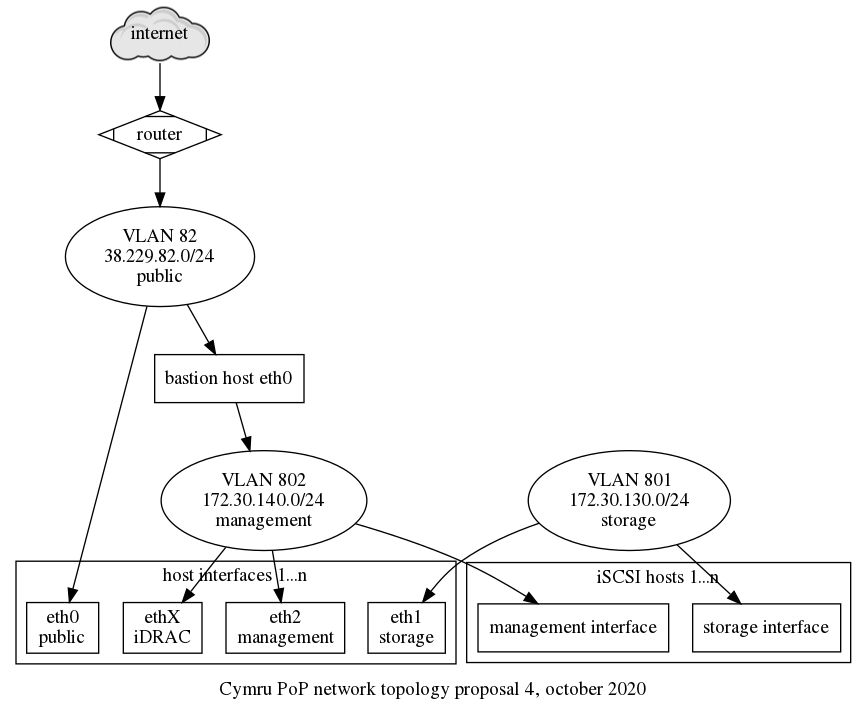
Note that the bastion host configured above is not currently
configured: it can be configured by hand on one of the chi-node-X
machines since they have access to VLAN 802, but this should
eventually be fixed.
Discussion
Disabling the builtin RAID controller
We tried to disable the built-in RAID controller in order to use software RAID. Hardware RAID is always a headache as it requires proprietary drivers that are hard or impossible to find. By using software RAID, we have the same uniform interface on all servers.
To disable hardware RAID on Cymru hardware (PowerEdge R610 or R620 machines), you have access to the BIOS. This can be done through a Virtual console or serial port, if Serial redirection is first enabled in the BIOS (which requires a virtual console). Then:
- reboot the server to get into the BIOS dialogs
- let the BIOS do its thing and wait for the controller to start initializing
- hit control-r when the controller dialog shows up
This will bring you in the RAID controller interface, which should have a title like:
PERC H710P Mini BIOS Configuration Utility 4.03-0002
WARNING: the following steps will destroy all the data on the disks!!
In the VD Mgmt tab:
- press F2 ("operations")
- select "Clear Config" and confirm
Another way to do this is to:
- select the "virtual disk"
- press F2 ("operations")
- choose "Delete VD" and confirm
press <Control-R>: to enter configuration utility
For good measure, it seems you can also disable the controller
completely in the Ctrl Mgmt tab (accessed by pressing
control-n twice), by unticking the Enable controller BIOS
and Enable BIOS Stop on Error.
To exit the controller, hit Esc ("Escape"). Then you need
to send control-alt-delete somehow. This can be done in the
Macros menu in the virtual console, or, in the serial console,
exiting with control-backslash and then issuing the command:
racadm serveraction powercycle
Unfortunately, when the controller is disabled, the disks just do not show up at all. We haven't been able to bypass the controller so those instructions are left only as future reference.
For systems equipped with the PERC H740P Mini controller (eg.
chi-node-14), it's possible to switch it to "Enhanced HBA" mode
using the iDrac interface (requires reboot). This mode allows the
individual disks to be seen by the operating system, allowing the
possibility to use software RAID.
See also raid.
Design
Storage
The iSCSI cluster provides roughly 172TiB of storage in the management network, at least in theory. Debian used this in the past with ganeti, but that involves creating, resizing, and destroying volumes by hand before/after creating, and destroying VMs. While that is not ideal, it is the first step in getting this infrastructure used.
We also use the "normal" DRBD setup with the local SAS disks available on the servers. This is used for the primary disks for Ganeti instances, but provides limited disk space (~350GiB per node) so it should be used sparingly.
Another alternative that was considered is to use CLVM ("The Clustered Logical Volume Manager") which makes it possible to run LVM on top of shared SAN devices like this. This approach was discarded for a few reasons:
- it's unclear whether CLVM is correctly packaged in Debian
- we are not familiar with this approach at all, which requires us to get familiar both with iSCSI and CLVM (we already will need to learn the former), and this might be used only for this PoP
- it's unclear whether CLVM is production ready
We also investigated whether Ceph could use iSCSI backends. It does not: it can provide an iSCSI "target" (a storage server) but it can't be an iSCSI "initiator". We did consider using Ceph instead of DRBD for the SAS disks, but decided against it to save research time in the cluster setup.
multipath configuration
We have tested this multipath.conf from Gabriel Beaver and
proxmox on chi-node-01:
# from https://pve.proxmox.com/wiki/ISCSI_Multipath#Dell
defaults {
polling_interval 2
path_selector "round-robin 0"
path_grouping_policy multibus
rr_min_io 100
failback immediate
no_path_retry queue
}
devices {
# from https://pve.proxmox.com/wiki/ISCSI_Multipath#Dell
device {
vendor "DELL"
product "MD32xxi"
path_grouping_policy group_by_prio
prio rdac
path_checker rdac
path_selector "round-robin 0"
hardware_handler "1 rdac"
failback immediate
features "2 pg_init_retries 50"
no_path_retry 30
rr_min_io 100
}
device {
vendor "SCST_FIO|SCST_BIO"
product "*"
path_selector "round-robin 0"
path_grouping_policy multibus
rr_min_io 100
}
}
# from https://gabrielbeaver.me/2013/03/centos-6-x-and-dell-md3000i-setup-guide/
# Gabriel Beaver 03/27/2013
blacklist {
devnode "^(ram|raw|loop|fd|md|dm-|sr|scd|st)[0-9]*"
devnode "^hd[a-z]"
devnode "^sda"
devnode "^sda[0-9]"
device {
vendor DELL
product "PERC|Universal|Virtual"
}
}
# END GB
It seems that configuration is actually optional: multipath will still work fine without it, so it's not deployed consistently across nodes at the moment.
Ganeti iSCSI integration
See Ganeti storage reference and Ganeti iSCSI integration.
Private network access considerations
We considered a few ideas to provide access to the management network:
- OpenVPN
- IPsec
- SSH SOCKS proxying
- sshuttle
We somehow expected cymru to provide us with a jump host for this
purpose, like they did with peninsulare for the moly server, but
this turned out to not happen.
We never really considered OpenVPN seriously: we already use ipsec elsewhere and it seemed like a bad idea to introduce another VPN technology when we were already using another one. This meant more struggles with IPsec, but that, in turn, meant the staff gets more familiar with it. In other words, if IPsec doesn't work, let's get rid of it everywhere, and not make a special case here.
SSH SOCKS proxying (-D) was the idea of using one of the jump hosts
as an SSH proxy. It kind of worked: web browsers were able to access
the iDRAC web interfaces by manually configured a SOCKS5 proxy in the
settings (at least in Firefox). But that, in turn, did not necessarily
work across virtual machine boundaries (so that the Java stuff
worked), let alone insite the Java JVM itself. So this approach was
never seriously considered either, although it worked for the web UI.
sshuttle could have worked as well: it does provide routing somewhat
elegantly. Apart from the concerns established in the OpenVPN option
above (yet another VPN solution), it added the problem that it needs
to run as root on the client side. That makes it difficult to access
regular ssh-agent credentials (e.g. using a Yubikey). There are ways
to use ssh -A root@localhost to forward agent credentials, but that
seemed to hacky.
VLAN allocations
The VLAN allocations described in the network topology above were suggested by Cymru and slightly modified to fit our use case. See issue 40097 for the gory details of that discussion.
There is flexibility upstream on VLAN allocation and possibly bundling network interfaces together. All hosts have 8 interfaces so there's lots of potential there.
It would be possible, for example, to segregate DRBD, iSCSI and Ganeti traffic in three different VLANs. For now, we've adopted the path of simplicity and all those live in the same private VLAN.
Go to the Heztner console and clikety on the web interface to get
a new instance. Credentials are in tor-passwords.git in
hosts-extra-info under hetzner.
TODO: consider using the hcloud command instead.
Pick the following settings:
- Location: depends on the project, a monitoring server might be better in a different location than the other VMs
- Image: Debian 9
- Type: depends on the project
- Volume: only if extra space is required
- Additional features: nothing (no user data or backups)
- SSH key: enable all configured keys
- Name: FQDN picked from the doc/naming-scheme
- Create the server
Then, since we actually want our own Debian install, and since we want the root filesystem to be encrypted, continue with:
- Continue on Hetzner's web interface, select the server.
- Reboot into the rescue system ("Rescue, Enable rescue & Power cycle", pick linux64 and your SSH key). this will give you a root password
- open the console (the icon is near the top right) and login with the root password
- get the
ssh-keygen -l -f /etc/ssh/ssh_host_*.puboutput. NOTE: the Hetzner consoles use a different keyboard mapping than "US". Hint:-is on the/key,/is on shift-7 and*is on shift-] - login to the new host:
ssh root@$IPADDRESS, check the fingerprint matches above - start a
screensession - clone
fabric-tasksto the new host:git clone https://gitlab.torproject.org/tpo/tpa/fabric-tasks.git - run
./fabric-tasks/installer/tor-install-hetzner(the ipv6 address prefix you find on the web interface. Make it end in::1) TODO: merge script with the new-machine-hetzner-robot procedure. WARNING: this procedure has been known to leavepingnon-functional for regular users, see ticket 31781 - once done, note down all the info and reboot the VM:
reboot ssh -o FingerprintHash=sha1 root@<ipaddr>to unlock the host, (to compare ssh's base64 output to dropbear's b16, you can useperl -MMIME::Base64 -e '$h = unpack("H*", decode_base64(<>)); $h =~ s/(..)(?=.)/\1:/g; print $h, "\n"'to convert base64 to base16.ssh root@<ipaddr>to access it once booted
Then
- Set the reverse DNS using hetzner's website. It's in the networking section for each virtual server. Set both ipv4 and ipv6 reverse entries.
- Document the LUKS passphrase and root password in tor-passwords,
- follow the rest of new-machine.
See new-machine-mandos for setting up the mandos client on this host.
How to install a new bare metal server at Hetzner
This is for setting up physical metal at Hetzner.
Order
-
get approval for the server, picking the specs from the main website
-
head to the order page and pick the right server. pay close attention to the location, you might want to put it alongside other TPO servers (or not!) depending on redundancy or traffic requirements. Click
Add to shopping cart, leaving all other fields as default. -
in the
Server login detailspage, you should leaveTypeset toPublic key. If you do not recognize your public SSH key in there, head to the server list and click on key management to add your public keys -
when you're certain of everything, click
Checkoutin the cart, review the order again and clickOrder in obligation.
A confirmation email will be sent by Hetzner at the TPA alias when the order is filed. Then you wait for the order to complete before being able to proceed with the install.
Ordering physical servers from Hetzner can be very fast: we've seen 2 minutes turn around times, but it can also take a lot more time in some situations, see their status page for estimates.
Automated install procedure
At this point you should have received an email from Hetzner with a subject like:
Subject: Your ordered SX62 server
It should contain the SSH fingerprint, and IP address of the new host
which we'll use below. The machine can be bootstrapped with a basic
Debian installer with the Fabric code in the fabric-tasks git
repository. Here's an example of a commandline:
./install -H root@88.99.194.57 \
--fingerprint 0d:4a:c0:85:c4:e1:fe:03:15:e0:99:fe:7d:cc:34:f7 \
hetzner-robot \
--fqdn=HOSTNAME.torproject.org \
--fai-disk-config=installer/disk-config/gnt-fsn-NVMe \
--package-list=installer/packages \
--post-scripts-dir=installer/post-scripts/ \
--mirror=https://mirror.hetzner.de/debian/packages/
Taking that apart:
-H root@88.99.194.57: the IP address provided by Hetzner in the confirmation email--fingerprint: the ed25519 MD5 fingerprint from the same emailhetzner-robot: the install job type (only robot supported for now)--fqdn=HOSTNAME.torproject.org: the Fully Qualified Domain Name to set on the machine, it is used in a few places, but thehostnameis correctly set to theHOSTNAMEpart only--fai-disk-config=installer/disk-config/gnt-fsn-NVMe: the disk configuration, in fai-setup-storage(8) format--package-list=installer/packages: the base packages to install--post-scripts-dir=installer/post-scripts/: post-install scripts, magic glue that does everything
The last two are passed to grml-debootstrap and should rarely be
changed (although they could be converted in to Fabric tasks
themselves).
Note that the script will show you lines like:
STEP 1: SSH into server with fingerprint ...
Those correspond to the manual install procedure, below. If the procedure stops before the last step (currently STEP 12), there was a problem in the procedure, but the remaining steps can still be performed by hand.
If a problem occurs in the install, you can login to the rescue shell with:
ssh -o FingerprintHash=md5 -o UserKnownHostsFile=~/.ssh/authorized_keys.hetzner-rescue root@88.99.194.57
... and check the fingerprint against the email provided by Hetzner.
Do a reboot before continuing with the install:
reboot
You will need to enter the LUKS passphrase generated by the installer
through SSH and the dropbear-initramfs setup. The LUKS password and
the SSH keys should be available in the installer backlog. If that
fails, then you can either try to recover from the out of band
management (KVM, or serial if available), or scrutinize the logs for
errors that could hint at a problem, and try a reinstall.
See new-machine for post-install configuration steps, then follow new-machine-mandos for setting up the mandos client on this host.
Manual install procedure
WARNING: this procedure is kept for historical reference, and in case the automatic procedure above fails for some reason. It should not be used.
At this point you should have received an email from Hetzner with a subject like:
Subject: Your ordered SX62 server
It should contain the SSH fingerprint, and IP address of the new host which we'll use below.
-
login to the server using the IP address and host key hash provided above:
ssh -o FingerprintHash=md5 -o UserKnownHostsFile=~/.ssh/authorized_keys.hetzner-rescue root@159.69.63.226Note: the
FingerprintHashparameter above is to make sure we match the hashing algorithm used by Hetzner in their email, which is, at the time of writing, MD5 (!). Newer versions of SSH will also encode the hash as base64 instead of hexadecimal, so you might want to decode the base64 into the latter using this: TheUserKnownHostsFileis to make sure we don't store the (temporary) SSH host key.perl -MMIME::Base64 -e '$h = unpack("H*", decode_base64(<>)); $h =~ s/(..)(?=.)/\1:/g; print $h, "\n"' -
Set a hostname (short version, not the FQDN):
echo -n 'New hostname: ' && read hn && hostname "$hn" && exec bashTODO: merge this with wrapper script below.
-
Partition disks. This might vary wildly between hosts, but in general, we want:
- GPT partitioning, with space for a 8MB grub partition and
cleartext
/boot - software RAID (RAID-1 for two drives, RAID-5 for 3, RAID-10 for 4)
- crypto (LUKS)
- LVM, with separate volume groups for different medium (SSD vs HDD)
We are experimenting with FAI's setup-storage to partition disks instead of rolling our own scripts. You first need to checkout the installer's configuration:
apt install git git clone https://gitlab.torproject.org/tpo/tpa/fabric-tasks.git cd fabric-tasks/installer git show-ref masterCheck that the above hashes match a trusted copy.
Use the following to setup a Ganeti node, for example:
apt install fai-setup-storage setup-storage -f "disk-config/gnt-fsn-NVMe" -XTODO: merge this with wrapper script below.
TODO: convert the other existing
tor-install-format-disks-4HDDsscript into asetup-storageconfiguration.And finally mount the filesystems:
. /tmp/fai/disk_var.sh && mkdir /target && mount "$ROOT_PARTITION" /target && mkdir /target/boot && mount "$BOOT_DEVICE" /target/bootTODO: test if we can skip that test by passing
$ROOT_PARTITIONas a--targettogrml-debootstrap. Probably not.TODO: in any case, this could be all wrapper up in a single wrapper shell script in
fabric-tasksinstead of this long copy-paste. Possibly merge withtor-install-hetznerfrom new-machine-hetzner-cloud. - GPT partitioning, with space for a 8MB grub partition and
cleartext
-
Install the system. This can be done with
grml-debootstrapwhich will also configure grub, a root password and so on. This should get you started, assuming the formatted root disk is mounted on/targetand that the boot device is defined by$BOOT_DEVICE(populated above by FAI). Note thatBOOT_DISKis the disk as opposed to the partition which is$BOOT_DEVICE.BOOT_DISK=/dev/nvme0n1 && mkdir -p /target/run && mount -t tmpfs tgt-run /target/run && mkdir /target/run/udev && mount -o bind /run/udev /target/run/udev && apt-get install -y grml-debootstrap && \ grml-debootstrap \ --grub "$BOOT_DISK" \ --target /target \ --hostname `hostname` \ --release trixie \ --mirror https://mirror.hetzner.de/debian/packages/ \ --packages /root/fabric-tasks/installer/packages \ --post-scripts /root/fabric-tasks/installer/post-scripts/ \ --nopassword \ --remove-configs \ --defaultinterfaces && umount /target/run/udev /target/run -
setup dropbear-initramfs to unlock the filesystem on boot. this should already have been done by the
50-tor-install-luks-setuphook deployed in the grml-debootstrap stage.TODO: in an install following the above procedure, a keyfile was left unprotected in
/etc. Make sure we have strong mechanisms to avoid that ever happening again. For example:chmod 0 /etc/luks/TODO: the keyfiles deployed there can be used to bootstrap mandos. Document how to do this better.
-
Review the crypto configuration:
cat /target/etc/crypttabIf the backing device is NOT an SSD, remove the
,discardoption.TODO: remove this step, it is probably unnecessary.
-
Review the network configuration, since it will end up in the installed instance:
cat /target/etc/network/interfacesAn example safe configuration is:
auto lo iface lo inet loopback allow-hotplug eth0 iface eth0 inet dhcpThe latter two lines usually need to be added as they are missing from Hetzner rescue shells:
cat >> /etc/network/interfaces <<EOF allow-hotplug eth0 iface eth0 inet dhcp EOFTODO: fix this in a post-install debootstrap hook, or in grml-debootstrap already, see also upstream issue 105 and issue 136.
Add the hostname, IP address and domain to
/etc/hostsand/etc/resolv.conf:grep torproject.org /etc/resolv.conf || ( echo 'domain torproject.org'; echo 'nameserver 8.8.8.8' ) >> /etc/resolv.conf if ! hostname -f 2>/dev/null || [ "$(hostname)" = "$(hostname -f)" ]; then IPADDRESS=$(ip -br -color=never route get to 8.8.8.8 | head -1 | grep -v linkdown | sed 's/.* *src *\([^ ]*\) *.*/\1/') echo "$IPADDRESS $(hostname).torproject.org $(hostname)" >> /etc/hosts fiTODO: add the above as a post-hook. possibly merge with
tor-puppet/modules/ganeti/files/instance-debootstrap/hooks/gnt-debian-interfacesTODO: add IPv6 address configuration. look at how
tor-install-generate-ldapguesses as well. -
If any of those latter things changed, you need to regenerate the initramfs:
chroot /target update-initramfs -u chroot /target update-grubTODO: remove this step, if the above extra steps are removed.
-
umount things:
umount /target/run/udev || true && for fs in dev proc run sys ; do umount /target/$fs || true done && umount /target/boot && cd / && umount /targetTODO: merge this with wrapper script.
-
close things
vgchange -a n cryptsetup luksClose crypt_dev_md1 cryptsetup luksClose crypt_dev_md2 mdadm --stop /dev/md*
TODO: merge this with wrapper script.
-
Document the LUKS passphrase and root password in
tor-passwords -
Cross fingers and reboot:
reboot
See new-machine for post-install configuration steps, then follow new-machine-mandos for setting up the mandos client on this host.
Mandos is a means to give LUKS keys to machines that want to boot but have an encrypted rootfs.
Here's how you add a new client to our setup:
-
make sure the machine's clock in the BIOS is set correctly, as an incorrect clock may prevent the LUKS key from being decrypted.
-
add a new key to the LUKS partition and prepare mandos snippet:
lsblk --fs && read -p 'encrypted (root/lvm/..) device (e.g. /dev/sda2 or /dev/mb/pv_nvme): ' DEVICE && apt install -y haveged mandos-client && (grep 116.203.128.207 /etc/mandos/plugin-runner.conf || echo '--options-for=mandos-client:--connect=116.203.128.207:16283' | tee -a /etc/mandos/plugin-runner.conf) && umask 077 && t=`tempfile` && dd if=/dev/random bs=1 count=128 of="$t" && cryptsetup luksAddKey $DEVICE "$t" && mandos-keygen --passfile "$t"Note that there may be the need to instruct
mandos-clientto use a specific network interface. If that's the case, set something like this in/etc/mandos/plugins-running.conf:--options-for=mandos-client:--connect=116.203.128.207:16283,--interface=eno2Replace
eno2with the appropriate interface name and note the comma separating the options passed to mandos-client (i.e. don't use spaces there!). -
add the
roles::fdeclass to new host in Puppet and run puppet there:puppet agent -tIf the class was already applied on a previous Puppet run, ensure the initramfs image is updated at this point:
update-initramfs -u -
on the mandos server, add the output of
mandos-keygenfrom above to/etc/mandos/clients.confand restart the service:service mandos restart -
on the mandos server, update the firewall after you added the host to ldap:
puppet agent -t -
on the mandos server, enable the node:
mandos-ctl --enable $FQDN -
reboot the new host to test unlocking
TODO: Mandos setups should be automatic, see issue 40096.
Billing and ordering
This is kind of hell.
You need to register on their site and pay with a credit card. But you can't be from the US to order in Canada and vice-versa, which makes things pretty complicated if you want to have stuff in one country or the other.
Also, the US side of things can trip over itself and flag you as a compromised account, at which point they will ask you for a driver's license and so on. A workaround is to go on the other site.
Once you have ordered the server, they will send you a confirmation email, then another email when the order is fulfilled, with the username and password to login to the server. Next step is to setup the server.
Preparation
We assume we are creating a new server named
test-01.torproject.org. You should have, at this point, received a
email with the username and password. Ideally, you'd login through the
web interface's console, which they call the "KVM".
-
immediately change the password so the cleartext password sent by email cannot be reused, document in the password manager
-
change the hostname on the server and in the web interface to avoid confusion:
hostname test-01 exec bashIn the OVH dashboard, you need to:
- navigate to the "product and services" (or "bare metal cloud" then "Virtual private servers")
- click on the server name
- click on the "..." menu next to the server name
- choose "change name"
-
setting up reverse DNS doesn't currently work ("An error has occurred updating the reverse path."), pretend this is not a problem
-
add your SSH key to the root account
-
then follow the normal new-machine procedure, with the understanding reverse DNS is broken and that we do not have full disk encryption
In particular, you will have to:
-
reset the
/etc/hostsfile (with fabric works) -
hack at
/etc/resolv.confto change thesearchdomain -
delete the
debianaccount
See issue tpo/tpa/team#40904 for an example run.
How to
Burn-in
Before we even install the machine, we should do some sort of stress-testing or burn-in so that we don't go through the lengthy install process and put into production fautly hardware.
This implies testing the various components to see if they support a moderate to high load. A tool like stressant can be used for that purpose, but a full procedure still needs to be established.
Example stressant run:
apt install stressant
stressant --email torproject-admin@torproject.org --overwrite --writeSize 10% --diskRuntime 120m --logfile $(hostname)-sda.log --diskDevice /dev/sda
This will wipe parts of /dev/sda, so be careful. If instead you
want to test inside a directory, use this:
stressant --email torproject-admin@torproject.org --diskRuntime 120m --logfile fsn-node-05-home-test.log --directory /home/test --writeSize 1024M
Stressant is still in development and currently has serious limitations (e.g. it tests one disk at a time and clunky UI) but should be a good way to get started.
Installation
This document assumes the machine is already installed with a Debian operating system. We preferably install stable or, when close to the release, testing. Here are site-specific installs:
- Hetnzer Cloud
- Hetzner Robot
- Ganeti clusters:
- new virtual machine: new instance procedure
- new nodes (which host virtual machines) new node procedure, normally done as a post-install configuration
- Sunet, Linaro and OSUOSL: service/openstack
- Cymru
- OVH cloud
- Quintex
The following sites are not documented yet:
- eclips.is: our account is marked as "suspended" but oddly enough we have 200 credits which would give us (roughly) 32GB of RAM and 8 vCPUs (yearly? monthly? how knows). it is (separately) used by the metrics team for onionperf, that said
The following sites are deprecated:
- KVM/libvirt (really at Hetzner) - replaced by Ganeti
- scaleway - see ticket 32920
Post-install configuration
The post-install configuration mostly takes care of bootstrapping Puppet and everything else follows from there. There are, however, still some unrelated manual steps but those should eventually all be automated (see ticket #31239 for details of that work).
Pre-requisites
The procedure below assumes the following steps have already been taken by the installer:
-
Any new expenses for physical hosting, cloud services and such, need to be approved by accounting and ops before we can move with the creation.
-
a minimal Debian install with security updates has been booted (note that Puppet will deploy unattended-upgrades later, but it's still a good idea to do those updates as soon as possible)
-
partitions have been correctly setup, including some (>=512M) swap file (or swap partition) and a
tmpfsin/tmpconsider expanding the swap file if memory requirements are expected to be higher than usual on this system, such a large database servers, GitLab instances, etc. the steps below will recreate a 1GiB
/swapfilevolume instead of the default (512MiB):swapoff -a && dd if=/dev/zero of=/swapfile bs=1M count=1k status=progress && chmod 0600 /swapfile && mkswap /swapfile && swapon -a -
a hostname has been set, picked from the doc/naming-scheme and the short hostname (e.g.
test) resolves to a fully qualified domain name (e.g.test.torproject.org) in thetorproject.orgdomain (i.e./etc/hostsis correctly configured). this can be fixed with:fab -H root@204.8.99.103 host.rewrite-hosts dal-node-03.torproject.org 204.8.99.103WARNING: The short hostname (e.g.
fooinfoo.example.com) MUST NOT be longer than 21 characters, as that will crash the backup server because its label will be too long:Sep 24 17:14:45 bacula-director-01 bacula-dir[1467]: Config error: name torproject-static-gitlab-shim-source.torproject.org-full.${Year}-${Month:p/2/0/r}-${Day:p/2/0/r}_${Hour:p/2/0/r}:${Minute:p/2/0/r} length 130 too long, max is 127TODO: this could be replaced by libnss-myhostname if we wish to simplify this, although that could negatively impact things that expect a real IP address from there (e.g. bacula).
-
a public IP address has been set and the host is available over SSH on that IP address. this can be fixed with:
fab -H root@204.8.99.103 host.rewrite-interfaces 204.8.99.103 24 --ipv4-gateway=204.8.99.254 --ipv6-address=2620:7:6002::3eec:efff:fed5:6ae8 --ipv6-subnet=64 --ipv6-gateway=2620:7:6002::1If the IPv6 address is not known, it might be guessable from the MAC address. Try this:
ipv6calc --action prefixmac2ipv6 --in prefix+mac --out ipv6 $SUBNET $MAC... where
$SUBNETis the (known) subnet from the upstream provider and$MACis the MAC address as found inip link show up.If the host doesn't have a public IP, reachability has to be sorted out somehow (eg. using a VPN) so Prometheus, our monitoring system, is able to scrape metrics from the host.
-
ensure reverse DNS is set for the machine. this can be done either in the upstream configuration dashboard (e.g. Hetzner) or in our zone files, in the
dns/domains.gitrepositoryTip:
sipcalc -rwill show you the PTR record for an IPv6 address. For example:$ sipcalc -r 2620:7:6002::466:39ff:fe3d:1e77 -[ipv6 : 2604:8800:5000:82:baca:3aff:fe5d:8774] - 0 [IPV6 DNS] Reverse DNS (ip6.arpa) - 4.7.7.8.d.5.e.f.f.f.a.3.a.c.a.b.2.8.0.0.0.0.0.5.0.0.8.8.4.0.6.2.ip6.arpa. -dig -xwill also show you an SOA record pointing at the authoritative DNS server for the relevant zone, and will even show you the right record to create.For example, the IP addresses of
chi-node-01are38.229.82.104and2604:8800:5000:82:baca:3aff:fe5d:8774, so the records to create are:$ dig -x 2604:8800:5000:82:baca:3aff:fe5d:8774 38.229.82.104 [...] ;; QUESTION SECTION: ;4.7.7.8.d.5.e.f.f.f.a.3.a.c.a.b.2.8.0.0.0.0.0.5.0.0.8.8.4.0.6.2.ip6.arpa. IN PTR ;; AUTHORITY SECTION: 2.8.0.0.0.0.0.5.0.0.8.8.4.0.6.2.ip6.arpa. 3552 IN SOA nevii.torproject.org. hostmaster.torproject.org. 2021020201 10800 3600 1814400 3601 [...] ;; QUESTION SECTION: ;104.82.229.38.in-addr.arpa. IN PTR ;; AUTHORITY SECTION: 82.229.38.in-addr.arpa. 2991 IN SOA ns1.cymru.com. noc.cymru.com. 2020110201 21600 3600 604800 7200 [...]In this case, you should add this record to
82.229.38.in-addr.arpa.:104.82.229.38.in-addr.arpa. IN PTR chi-node-01.torproject.org.And this to
2.8.0.0.0.0.0.5.0.0.8.8.4.0.6.2.ip6.arpa.:4.7.7.8.d.5.e.f.f.f.a.3.a.c.a.b.2.8.0.0.0.0.0.5.0.0.8.8.4.0.6.2.ip6.arpa. IN PTR chi-node-01.torproject.org.Inversely, say you need to add an IP address for Hetzner (e.g.
88.198.8.180), they will already have a dummy PTR allocated:180.8.198.88.in-addr.arpa. 86400 IN PTR static.88-198-8-180.clients.your-server.de.The
your-server.dedomain is owned by Hetzner, so you should update that record in their control panel. Hint: try https://robot.hetzner.com/vswitch/index -
DNS works on the machine (i.e.
/etc/resolv.confis configured to talk to a working resolver, but not necessarily ours, which Puppet will handle) -
a strong root password has been set in the password manager, this implies resetting the password for Ganeti instance installs the installed password was written to disk (TODO: move to trocla? #33332)
-
grub-pc/install_devicesdebconf parameter is correctly set, to allow unattended upgrades ofgrub-pcto function. The command below can be used to bring up an interactive prompt in case it needs to be fixed:debconf-show grub-pc | grep -qoP "grub-pc/install_devices: \K.*" || dpkg-reconfigure grub-pcWarning: this doesn't actually work for EFI deployments.
Main procedure
All commands to be run as root unless otherwise noted.
IMPORTANT: make sure you follow the pre-requisites checklist above! Some installers cover all of those steps, but most do not.
Here's a checklist you can copy in an issue to make sure the following procedure is followed:
- BIOS and OOB setup
- burn-in and basic testing
- OS install and security sources check
- partitions check
- hostname check
- ip address allocation
- reverse DNS
- DNS resolution
- root password set
- grub check
- Nextcloud spreadsheet update
-
hosters.yamlupdate (rare) - fabric-tasks install
- puppet bootstrap
- dnswl
-
/srvfilesystem - upgrade and reboot
- silence alerts
- restart bacula-sd
-
if the machine is not inside a ganeti cluster (which has its own inventory), allocate and document the machine in the Nextcloud spreadsheet, and the services page, if it's a new service
-
add the machine's IP address to
hiera/common/hosters.yamlif this is a machine in a new network. This is rare; Puppet will crash its catalog with this error when that's the case:Could not retrieve catalog from remote server: Error 500 on SERVER: Server Error: \ Evaluation Error: Error while evaluating a Function Call, \ IP 195.201.139.202 not found among hosters in hiera data! (file: /etc/puppet/code/environments/production/modules/profile/manifests/facter/hoster.pp, line: 13, column: 5) on node hetzner-nbg1-01.torproject.orgThe error was split over multiple lines to outline the IP address more clearly. When this happens, add the IP address and netmask from the main interface to the
hosters.yamlfile.In this case, the sole IP address (
195.201.139.202/32) was added to the file. -
make sure you have the
fabric-tasksgit repository on your machine, and verify its content. the repos meta-repository should have the necessary trust anchors. -
bootstrap puppet: on your machine, run the
puppet.bootstrap-clienttask from thefabric-tasksgit repository cloned above -
add the host to LDAP
The Puppet bootstrap script will show you a snippet to copy-paste to the LDAP server (
db.torproject.org). This needs to be done inldapvi, with:ldapvi -ZZ --encoding=ASCII --ldap-conf -h db.torproject.org -D "uid=$USER,ou=users,dc=torproject,dc=org"If you lost the blob, it can be generated from the
ldap.generate-entrytask in Fabric.Make sure you review all fields, in particular
location(l),physicalHost,descriptionandpurposewhich do not have good defaults. See the service/ldap page for a description on those, but, generally:physicalHost: where is this machine hosted, either parent host or cluster (e.g.gnt-fsn) or hoster (e.g.hetznerorhetzner-cloud)description: free form description of the hostpurpose: similar, but can[[link]]to a URL, also added to SSH known hosts, should be added to DNS as welll: physical location,
See the reboots section for information about the
rebootPolicyfield. See also the ldapvi manual for more information.IMPORTANT: the
ldap.generate-entrycommand needs to be ran after all the SSH keys on the host (and particularly the dropbear keys in the initramfs) have been generated, otherwise unlocking LUKS keys at boot might fail because the known hosts files will be missing those. -
... and if the machine is handling mail, add it to dnswl.org (password in tor-passwords,
hosts-extra-info) -
you will probably want to create a
/srvfilesystem to hold service files and data unless this is a very minimal system. Typically, installers may create the partition, but will not create the filesystem and configure it in/etc/fstab:mkfs -t ext4 -j /dev/sdb && printf 'UUID=%s\t/srv\text4\tdefaults\t1\t2\n' $(blkid --match-tag UUID --output value /dev/sdb) >> /etc/fstab && mount /srv -
once everything is done, reboot the new machine to make sure that still works. Before that you may want to run package upgrades in order to avoid getting a newer kernel the next day and needing to reboot again:
apt update && apt upgrade reboot -
if the machine was not installed from the Fabric installer (the
install.hetzner-robottask), schedule a silence for backup alerts with:fab silence.create \ --comment="machine waiting for first backup" \ --matchers job=bacula \ --matchers alias=test-01.torproject.org \ --ends-at "in 2 days"TODO: integrate this in other installers.
-
consider running
systemctl restart bacula-sdon the backup storage host so that it'll know about the new machine's backup volume- On
backup-storage-01.torproject.orgif the new machine is in Falkenstein - On
bungei.torproject.orgif the new machine is anywhere else then Falkenstein (so for example in Dallas)
- On
At this point, the machine has a basic TPA setup. You will probably need to assign it a "role" in Puppet to get it to do anything.
Rescuing a failed install
If the procedure above fails but in a way that didn't prevent it from completing the setup on disk -- for example if the install goes through to completion but after a reboot you're neither able to login via the BMC console nor able to reach the host via network -- here are some tricks that can help in making the install work correctly:
- on the grub menu, edit the boot entry and remove the kernel parameter
quietto see more meaningful information on screen during boot time. - in the boot output (without
quiet) take a look at what the network interface names are set to and which ones are reachable or not. - try exchanging the VLANs of the network interfaces to align the interface configured by the installer to where the public network is reachable
- if there's no meaningful output on the BMC console after just a handful of
kernel messages, try to remove all
console=kernel parameters. this sometimes brings back the output and prompt for crypto from dropbear onto the console screen. - if you boot into grml via PXE to modify files on disk (see below) and if you
want to update the initramfs, make sure that the device name used for the luks
device (the name supplied as last argument to
cryptsetup open) corresponds to what's set in the file/etc/crypttabinside the installed system.- When the device name differs, update-initramfs might fail to really update and only issue a warning about the device name.
- The device name usually looks like the example commands below, but if you're
unsure what name to use, you can unlock crypto, check the contents of
/etc/crypttaband then close things up again and reopen with the device name that's present in there.
- if you're unable to figure out which interface name is being used for the
public network but if you know which one it is from grml, you can try removing
the
net.ifnames=0kernel parameter and also changing the interface name in theip=kernel parameter, for example by modifying the entry in the grub menu during boot.- That might bring dropbear online. Note that you may also need to change the network configuration on disk for the installed system (see below) so that the host stays online after the crypt device was unlocked.
To change things on the installed system, mainly for fixing initramfs, grub config and network configuration, first PXE-boot into grml. Then open and mount the disks:
mdadm --assemble --scan
cryptsetup open /dev/md1 crypt_dev_md1
vgchange -a y
mount /dev/mapper/vg_system-root /mnt
grml-chroot /mnt
After the above, you should be all set for doing changes inside the disk and
then running update-initramfs and update-grub if necessary.
Reference
Design
If you want to understand better the different installation procedures there is a install flowchart that was made on Draw.io.
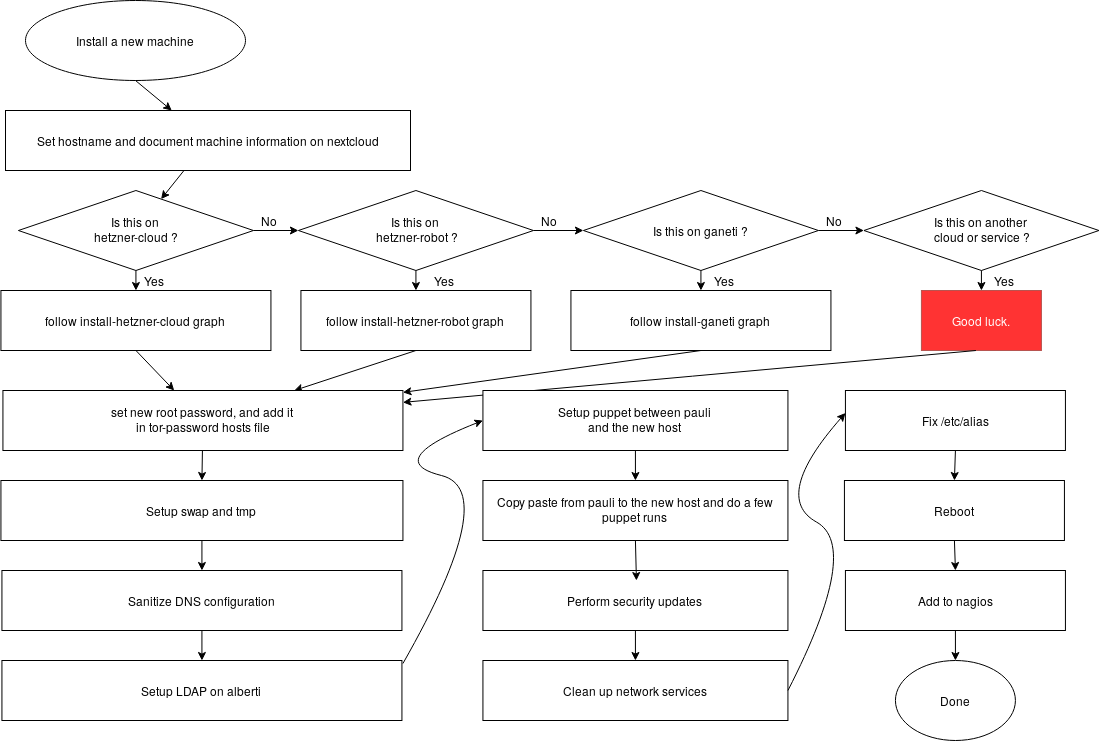
There are also per-site install graphs:
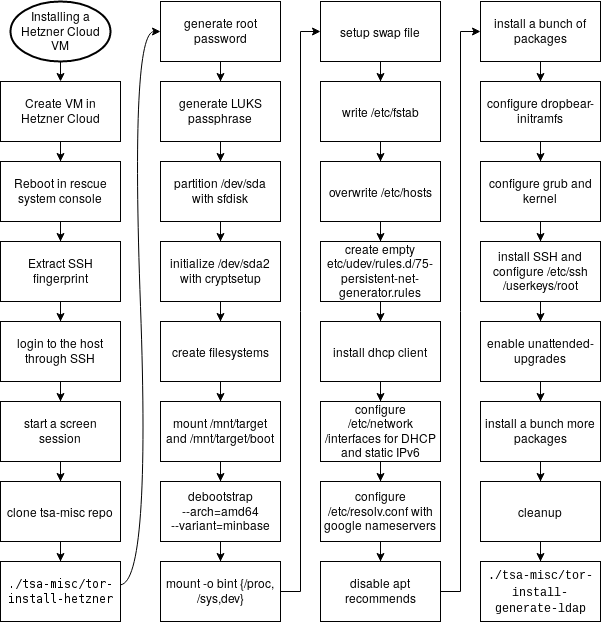
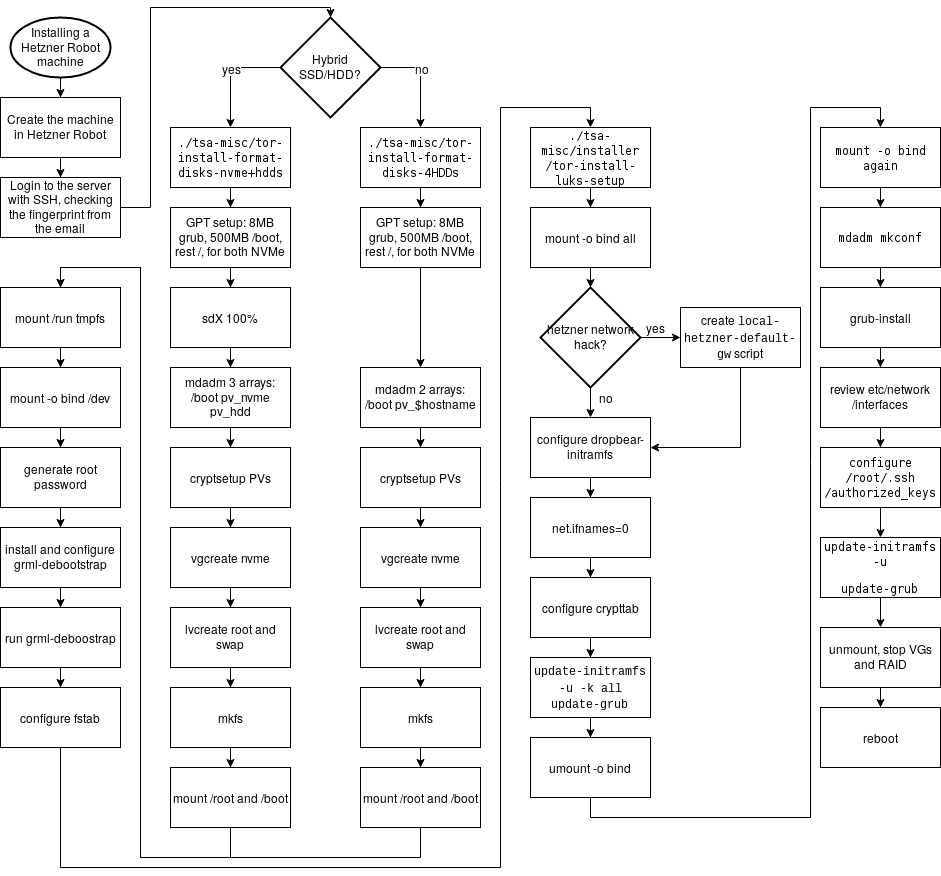
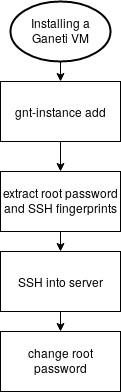
To edit those graphics, head to the https://draw.io website (or install their Electron desktop app) and load the install.drawio file.
Those diagrams were created as part of the redesign of the install process, to better understand the various steps of the process and see how they could be refactored. They should not be considered an authoritative version of how the process should be followed.
The text representation in this wiki remains the reference copy.
Issues
Issues regarding installation on new machines are far ranging and do not have a specific component.
The install system is manual and not completely documented for all sites. It needs to be automated, which is discussed below and in ticket 31239: automate installs.
A good example of the problems that can come up with variations in the install process is ticket 31781: ping fails as a regular user on new VMs.
Discussion
This section discusses background and implementation details of installation of machines in the project. It shouldn't be necessary for day to day operation.
Overview
The current install procedures work, but have only recently been formalized, mostly because we rarely setup machines. We do expect, however, to setup a significant number of machines in 2019, or at least significant enough to warrant automating the install process better.
Automating installs is also critical according to Tom Limoncelli, the author of the Practice of System and Network Administration. In their Ops report card, question 20 explains:
If OS installation is automated then all machines start out the same. Fighting entropy is difficult enough. If each machine is hand-crafted, it is impossible.
If you install the OS manually, you are wasting your time twice: Once when doing the installation and again every time you debug an issue that would have been prevented by having consistently configured machines.
If two people install OSs manually, half are wrong but you don't know which half. Both may claim they use the same procedure but I assure you they are not. Put each in a different room and have them write down their procedure. Now show each sysadmin the other person's list. There will be a fistfight.
In that context, it's critical to automate a reproducible install process. This gives us a consistent platform that Puppet runs on top of, with no manual configuration.
Goals
The project of automating the install is documented in ticket 31239.
Must have
- unattended installation
- reproducible results
- post-installer configuration (ie. not full installer, see below)
- support for running in our different environments (Hetzner Cloud, Robot, bare metal, Ganeti...)
Nice to have
- packaged in Debian
- full installer support:
- RAID, LUKS, etc filesystem configuration
- debootstrap, users, etc
Non-Goals
- full configuration management stack - that's done by service/puppet
Approvals required
TBD.
Proposed Solution
The solution being explored right now is assume the existence of a rescue shell (SSH) of some sort and use fabric to deploy everything on top of it, up to puppet. Then everything should be "puppetized" to remove manual configuration steps. See also ticket 31239 for the discussion of alternatives, which are also detailed below.
Cost
TBD.
Alternatives considered
- Ansible - configuration management that duplicates service/puppet but which we may want to use to bootstrap machines instead of yet another custom thing that operators would need to learn.
- cloud-init - builtin to many cloud images (e.g. Amazon), can
do rudimentary filesystem setup (no RAID/LUKS/etc but ext4
and disk partitioning is okay), config can be fetched over
HTTPS, assumes it runs on first boot, but could be coerced to
run manually (e.g.
fgrep -r cloud-init /lib/systemd/ | grep Exec), ganeti-os-interface backend - cobbler - takes care of PXE and boot, delegates to kickstart the autoinstall, more relevant to RPM-based distros
- curtin - "a "fast path" installer designed to install Ubuntu quickly. It is blunt, brief, snappish, snippety and unceremonious." ubuntu-specific, not in Debian, but has strong partitioning support with ZFS, LVM, LUKS, etc support. part of the larger MAAS project
- FAI - built by a debian developer, used to build live images since buster, might require complex setup (e.g. an NFS server), setup-storage(8) is used inside our fabric-based installer. uses tar archives hosted by FAI, requires a "server" (the fai-server package), control over the boot sequence (e.g. PXE and NFS) or a custom ISO, not directly supported by Ganeti, although there are hacks to make it work and there is a ganeti-os-interface backend now, basically its own Linux distribution
- himblick has some interesting post-install configure bits in Python, along with pyparted bridges
- list of debian setup tools, see also AutomatedInstallation
- livewrapper is also one of those installers, in a way
- vmdb2 - a rewrite of vmdeboostrap, which uses a YAML file to describe a set of "steps" to take to install Debian, should work on VM images but also disks, no RAID support and a significant number of bugs might affect reliability in production
- bdebstrap - yet another one of those tools, built on top of mmdebstrap, YAML
- MAAS - PXE-based, assumes network control which we don't have and has all sorts of features we don't want
- service/puppet - Puppet could bootstrap itself, with
puppet applyran from a clone of the git repo. could be extended as deep as we want. - terraform - config management for the cloud kind of thing,
supports Hetzner Cloud, but not
Hetzner Robot orGaneti (update: there is a Hetzner robot plugin now) - shoelaces - simple PXE / TFTP server
Unfortunately, I ruled out the official debian-installer because of the complexity of the preseeding system and partman. It also wouldn't work for installs on Hetzner Cloud or Ganeti.
Hi X!
First of all, congratulations and welcome to TPI (Tor Project, Inc.) and the TPA (Admin) team. Exciting times!
We'd like you to join us on your first orientation meeting on TODO Month day, TODO:00 UTC (TODO:00 your local time), in this BBB room:
TODO: fill in room
Also note that we have our weekly check-in on Monday at 18:00UTC as well.
Make sure you can attend the meeting and pen it down in your calendar. If you cannot make it for some reason, please do let us know as soon as possible so we can reschedule.
Here is the agenda for the meeting:
TODO: copy paste from the OnBoardingAgendaTemplate, and append:
- Stakeholders for your work:
- TPA
- web team
- consultants
- the rest of Tor...
- How the TPA team works:
- TPA systems crash course through the new-person wiki page
Note that the "crash course" takes 20 to 30 minutes, so if you ran out of time doing the rest of the page, reschedule, don't rush.
Please have a look at the security policy. Don't worry if you don't comply yet, that will be part of your onboarding.
You will shortly receive the following credentials, in an OpenPGP encrypted email, if you haven't already:
- an LDAP account
- a Nextcloud account
- a GitLab account
If you believe you already have one of those account (GitLab, in particular), do let us know.
You should do the following with these accesses:
- hook your favorite calendar application with your Nextcloud account
- configure an SSH key in LDAP
- login to
people.torproject.org(akaperdulce) and download the known hosts, see the jump host documentation on how to partially automate this - if you need an IRC bouncer, login to
chives.torproject.organd setup a screen/tmux session, or ask@pastlyon IRC to get access to the ZNC bouncer - provide a merge request on about/people to add your bio and
picture, see the documentation on the people page, add
yourself to
introductionin the wiki
So you also have a lot of reading to do already! The new-person page is a good reference to get started.
But take it slowly! It can be overwhelming to join a new organisation and it will take you some time to get acquainted with everything. Don't hesitate to ask if you have any questions!
See you soon, and welcome aboard!
IMPORTANT NOTE: most Tor servers do not currently use nftables, as we still use the Ferm firewall wrapper, which only uses iptables. Still, we sometimes end up on machines that might have nftables and those instructions will be useful for that brave new future. See tpo/tpa/team#40554 for a followup on that migration.
- Listing rules
- Checking and applying a ruleset
- Inserting a rule to bypass a restriction
- Blocking a host
- Deleting a rule
- Other documentation
Listing rules
nft -a list ruleset
The -a flag shows the handles which is useful to delete a specific
rule.
Checking and applying a ruleset
This checks the ruleset of Puppet rule files as created by the puppet/nftables modules before applying it:
nft -c -I /etc/nftables/puppet -f /etc/nftables/puppet.nft
This is done by Puppet before actually applying the ruleset, which is done with:
nft -I /etc/nftables/puppet -f /etc/nftables/puppet.nft
The -I parameter stands for --includepath and tells nft to look
for rules in that directory.
You can try to load the ruleset but flush it afterwards in case it crashes your access with:
nft -f /etc/nftables.conf ; sleep 30 ; nft flush ruleset
Inserting a rule to bypass a restriction
Say you have the chain INPUT in the table filter which looks like
this:
table inet filter {
chain INPUT {
type filter hook input priority filter; policy drop;
iifname "lo" accept
ct state established,related accept
ct state invalid drop
tcp dport 22 accept
reject
}
}
.. and you want to temporarily give access to the web server on port 443. You would do a command like:
nft insert rule inet filter INPUT 'tcp dport 443 accept'
Or if you need to allow a specific IP, you could do:
nft insert rule inet filter INPUT 'ip saddr 192.0.2.0/24 accept'
Blocking a host
Similarly, assuming you have the same INPUT chain in the filter
table, you could do this to block a host from accessing the server:
nft insert rule inet filter INPUT 'ip saddr 192.0.2.0/24 reject'
That will generate an ICMP response. If this is a DOS condition, you might rather avoid that and simply drop the packet with:
nft insert rule inet filter INPUT 'ip saddr 192.0.2.0/24 drop'
Deleting a rule
If you added a rule by hand in the above and now want to delete it,
you first need to find the handle (with the -a flag to nft list ruleset) and then delete the rule:
nft delete rule inet filter INPUT handle 39
Be VERY CAREFUL with this step as using the wrong handle might lock you out of the server.
Other documentation
- nftables wiki, and especially:
- RHEL nftables reference
- Debian wiki
- Arch wiki
OpenPGP is an encryption and authentication system which is extensively used at Tor.
- Tutorial
- How-to
- Reference
- Discussion
Tutorial
This documentation assumes minimal technical knowledge, but it should be noted that OpenPGP is notoriously hard to implement correctly, and that user interfaces have been known to be user-hostile in the past. This documentation tries to alleviate those flaws, but users should be aware that there are challenges in using OpenPGP safely.
If you're looking for documentation on how to use OpenPGP with a YubiKey, that lives in the YubiKey documentation.
OpenPGP with Thunderbird training
Rough notes for the OpenPGP training to be given at the 2023 Tor meeting in Costa Rica.
- Upgrade Thunderbird to version 78.2.1 or later at https://www.thunderbird.net/ (Mac, Windows, Linux) or through you local package manager (Linux), if you do not have Thunderbird installed, you will need to install it and follow the email setup instructions to setup the Tor mail server
- Set a
Primary PasswordinEdit->Settings->Privacy & Security- Check
Use a primary password - Enter the password and click OK
- Check
- Select the
@torproject.orguser identity asDefaultinEdit->Account Settings->Manage Identities - Generate key with expiration date in
Tools->OpenPGP Key Manager->Generate->New Key Pair- Make sure you select an expiration date, can be somewhere between one to 3 years, preferably one year
- Optionally, select
ECC (Elliptic Curve)as aKey typeinAdvanced Settings - Click
Generate Keyand confirm - Make a backup:
File->Backup secret key(s) to File
- Send a signed email to another user, have another user send you such an email as well
- Send an encrypted mail to a new recipient:
- click
Encrypt - big yellow warning, click
Resolve... Discover public keys online...A key is available, but hasn't been accepted yet, clickResolve...- Select the first key
- click
- Setting up a submission server account, see the email
tutorial which involves a LDAP password reset (assuming
you already have an LDAP account, otherwise getting TPA to make
you one) and sending a signed OpenPGP mail to
chpasswd@db.torproject.orgwith the contentPlease change my Tor password - send your key to TPA:
Tools->OpenPGP Key Manager- select the key
File->Export public key(s) to File- in a new ticket, attach the file
- Verifying incoming mail:
- OpenPGP menu:
This message claims to contain the sender's OpenPGP public key, clickImport... - Click
accepted (unverified) - You should now see a little "seal" logo with a triangle
"warning sign", click on it and then
View signer's key - There you can verify the key
- OpenPGP menu:
- Renewing your OpenPGP key:
Edit->Account Settings->End-to-End encryption- on the affected key, click
Change Expiration Date - send your key to TPA, as detailed above
- Verifying and trusting keys, a short discussion on "TOFU" and the web of trust, WKD and autocrypt
Notes:
- we do not use key servers and instead rely on WKD and Autocrypt for key discovery
- it seems like Thunderbird and RNP do not support generating revocation certificates, only revoking the key directly
- sequoia-octopus-librnp can provide a drop-in replacement for Thunderbird's RNP library and give access to a normal keyring, but is more for advanced users and not covered here
- openpgp.org is a good entry point, good list of software for example, website source on GitHub
- we must set a master password in thunderbird, it's the password that protects the keyring (to be verified)
Other tutorials:
- How-to geek has a good reference which could be used as a basis, but incorrectly suggests to not have an expiry date, and does not suggest doing a backup
- Tails: uses Kleopatra and Thunderbird, but with the Enigmail stuff, outdated, Linux-specific
- boum's guide: french, but otherwise good reference
- Thunderbird's documentation is a catastrophe. basic, cryptic wiki page that points to a howto and FAQ that is just a pile of questions, utterly useless, other than as a FAQ, their normal guide is still outdated and refers to Enigmail
- the EFF Surveillance Self-Defense guide is also outdated, their Linux, Windows and Mac are marked as "retired"
How-to
Diffing OpenPGP keys, signatures and encrypted files from Git
Say you store OpenPGP keyrings in git. For example, you track package repositories public signing keys or you have a directory of user keys. You need to update those keys but want to make sure the update doesn't add untrusted key material.
This guide will setup your git commands to show a meaningful diff of binary or ascii-armored keyrings.
-
add this to your
~/.gitconfig(or, if you want to restrict it to a single repository, in.git/config:# handler to parse keyrings [diff "key"] textconv = gpg --batch --no-tty --with-sig-list --show-keys < # handler to verify signatures [diff "sig"] textconv = gpg --batch --no-tty --verify < # handler to decrypt files [diff "pgp"] textconv = gpg --batch --no-tty --decrypt < -
add this to your
~/.config/git/attributes(or, the per repository.gitattributesfile), so that those handlers are mapped to file extensions:*.key diff=key *.sig diff=sig *.pgp diff=pgp.key,.sig, and.pgpare "standard" extensions (as per/etc/mime.types), but people frequently use other extensions, so you might want to have this too:*.gpg diff=key *.asc diff=key
Then, when you change a key, git diff will show you something like
this, which is when the GitLab package signing key was renewed:
commit c29047357669cb86cf759ecb8a44e14ca6d5c130
Author: Antoine Beaupré <anarcat@debian.org>
Date: Wed Mar 2 15:31:36 2022 -0500
renew gitlab's key which expired yesterday
diff --git a/modules/profile/files/gitlab/gitlab-archive-keyring.gpg b/modules/profile/files/gitlab/gitlab-archive-keyring.gpg
index e38045da..3e57c8e0 100644
--- a/modules/profile/files/gitlab/gitlab-archive-keyring.gpg
+++ b/modules/profile/files/gitlab/gitlab-archive-keyring.gpg
@@ -1,7 +1,7 @@
-pub rsa4096/3F01618A51312F3F 2020-03-02 [SC] [expired: 2022-03-02]
+pub rsa4096/3F01618A51312F3F 2020-03-02 [SC] [expires: 2024-03-01]
F6403F6544A38863DAA0B6E03F01618A51312F3F
uid GitLab B.V. (package repository signing key) <packages@gitlab.com>
-sig 3 3F01618A51312F3F 2020-03-02 GitLab B.V. (package repository signing key) <packages@gitlab.com>
-sub rsa4096/1193DC8C5FFF7061 2020-03-02 [E] [expired: 2022-03-02]
-sig 3F01618A51312F3F 2020-03-02 GitLab B.V. (package repository signing key) <packages@gitlab.com>
+sig 3 3F01618A51312F3F 2022-03-02 GitLab B.V. (package repository signing key) <packages@gitlab.com>
+sub rsa4096/1193DC8C5FFF7061 2020-03-02 [E] [expires: 2024-03-01]
+sig 3F01618A51312F3F 2022-03-02 GitLab B.V. (package repository signing key) <packages@gitlab.com>
[...]
The reasoning behind each file extension goes as follows:
.key- OpenPGP key material. process it with --show-keys < file.sig- OpenPGP signature. process it with --verify < file.pgp- OpenPGP encrypted material. process it with --decrypt < file.gpg- informal. can be anything, but generally assumed to be binary. we treat those as OpenPGP keys, because that's the safest thing to do.asc- informal. can be anything, but generally assumed to be ASCII-armored, assumed to be the same as.gpgotherwise.
We also use those options:
--batchis, well, never sure what--batchis for, but seems reasonable?--no-ttyis to force GnuPG to not assume a terminal which may make it prompt the user for things, which could break the pager
Note that, you might see the advice to run gpg < file (without any
arguments) elsewhere, but we advise against it. In theory, gpg < file can do anything, but it will typically:
- decrypt encrypted material, or;
- verify signed material, or;
- show public key material
From what I can tell in the source code, it will also process private
key material and other nasty stuff, so it's unclear if it's actually
safe to run at all. See do_proc_packets() that is called with
opt.list_packets == 0 in the GnuPG source code.
Also note that, without <, git passes a the payload to gpg through
a binary file, and GnuPG then happily decrypts it and puts in publicly
readable in /tmp. boom. This behavior was filed in 2017 as a bug
upstream (T2945) but was downgraded to a "feature request" by the
GnuPG maintainer a few weeks later. No new activity at the time of
writing (2022, five years later).
All of this is somewhat brittle: gpg < foo is not supposed to work
and may kill your cat. Bugs should be filed to have something that
does the right thing, or at least not kill defenseless animals.
Generate a Curve25519 key
Here we're generating a new OpenPGP key as we're transitioning from an old RSA4096 key. DO NOT follow those steps if you wish to keep your old key, of course.
Note that the procedure below generates the key in a temporary,
memory-backed, filesystem (/run is assumed to be a tmpfs). The key
will be completely lost on next reboot unless it's moved to a security
key or to an actual home. See the YubiKey documentation for how
to move it to a YubiKey, for example, and see the Airgapped
systems for a discussion on that approach.
GnuPG (still) requires --expert mode to generate Curve25519 keys,
unfortunately. Note that you could also accomplish this by sending a
"batch" file, for example drduh has this example for ed25519
keys, see also GnuPG's guide.
Here's the transcript of a Curve25519 key generation with an encryption and authentication subkey:
export GNUPGHOME=${XDG_RUNTIME_DIR:-/nonexistent}/.gnupg/
anarcat@angela:~[SIGINT]$ gpg --full-gen-key --expert
gpg (GnuPG) 2.2.40; Copyright (C) 2022 g10 Code GmbH
This is free software: you are free to change and redistribute it.
There is NO WARRANTY, to the extent permitted by law.
Please select what kind of key you want:
(1) RSA and RSA (default)
(2) DSA and Elgamal
(3) DSA (sign only)
(4) RSA (sign only)
(7) DSA (set your own capabilities)
(8) RSA (set your own capabilities)
(9) ECC and ECC
(10) ECC (sign only)
(11) ECC (set your own capabilities)
(13) Existing key
(14) Existing key from card
Your selection? 11
Possible actions for a ECDSA/EdDSA key: Sign Certify Authenticate
Current allowed actions: Sign Certify
(S) Toggle the sign capability
(A) Toggle the authenticate capability
(Q) Finished
Your selection? q
Please select which elliptic curve you want:
(1) Curve 25519
(3) NIST P-256
(4) NIST P-384
(5) NIST P-521
(6) Brainpool P-256
(7) Brainpool P-384
(8) Brainpool P-512
(9) secp256k1
Your selection? 1
Please specify how long the key should be valid.
0 = key does not expire
<n> = key expires in n days
<n>w = key expires in n weeks
<n>m = key expires in n months
<n>y = key expires in n years
Key is valid for? (0) 1y
Key expires at mer 29 mai 2024 15:27:14 EDT
Is this correct? (y/N) y
GnuPG needs to construct a user ID to identify your key.
Real name: Antoine Beaupré
Email address: anarcat@anarc.at
Comment:
You are using the 'utf-8' character set.
You selected this USER-ID:
"Antoine Beaupré <anarcat@anarc.at>"
Change (N)ame, (C)omment, (E)mail or (O)kay/(Q)uit? o
We need to generate a lot of random bytes. It is a good idea to perform
some other action (type on the keyboard, move the mouse, utilize the
disks) during the prime generation; this gives the random number
generator a better chance to gain enough entropy.
gpg: directory '/home/anarcat/.gnupg/openpgp-revocs.d' created
gpg: revocation certificate stored as '/home/anarcat/.gnupg/openpgp-revocs.d/D0D396D08E761095E2910413DDE8A0D1D4CFEE10.rev'
public and secret key created and signed.
pub ed25519/DDE8A0D1D4CFEE10 2023-05-30 [SC] [expires: 2024-05-29]
D0D396D08E761095E2910413DDE8A0D1D4CFEE10
uid Antoine Beaupré <anarcat@anarc.at>
anarcat@angela:~$
Let's put this fingerprint aside, as we'll be using it over and over again:
FINGERPRINT=D0D396D08E761095E2910413DDE8A0D1D4CFEE10
Let's look at this key:
anarcat@angela:~$ gpg --edit-key $FINGERPRINT
gpg (GnuPG) 2.2.40; Copyright (C) 2022 g10 Code GmbH
This is free software: you are free to change and redistribute it.
There is NO WARRANTY, to the extent permitted by law.
Secret key is available.
gpg: checking the trustdb
gpg: marginals needed: 3 completes needed: 1 trust model: pgp
gpg: depth: 0 valid: 1 signed: 0 trust: 0-, 0q, 0n, 0m, 0f, 1u
gpg: next trustdb check due at 2024-05-29
sec ed25519/02293A6FA4E53473
created: 2023-05-30 expires: 2024-05-29 usage: SC
trust: ultimate validity: ultimate
ssb cv25519/0E1C0B264FC7ADEA
created: 2023-05-30 expires: 2024-05-29 usage: E
[ultimate] (1). Antoine Beaupré <anarcat@anarc.at>
gpg>
As we can see, this created two key pairs:
-
"primary key" which is a public/private key with the
S(Signing) andC(Certification) purposes. that key can be used to sign messages, certify other keys, new identities, and subkeys (see why we use both in Separate certification key) -
an
E(encryption) "sub-key" pair which is used to encrypt and decrypt messages
Note that the encryption key expires here, which can be annoying. You can delete the key and recreate it this way:
anarcat@angela:~[SIGINT]$ gpg --expert --edit-key $FINGERPRINT
gpg (GnuPG) 2.2.40; Copyright (C) 2022 g10 Code GmbH
This is free software: you are free to change and redistribute it.
There is NO WARRANTY, to the extent permitted by law.
Secret key is available.
sec ed25519/02293A6FA4E53473
created: 2023-05-30 expires: 2024-05-29 usage: SC
trust: ultimate validity: ultimate
ssb cv25519/0E1C0B264FC7ADEA
created: 2023-05-30 expires: 2024-05-29 usage: E
[ultimate] (1). Antoine Beaupré <anarcat@anarc.at>
gpg> addkey
Please select what kind of key you want:
(3) DSA (sign only)
(4) RSA (sign only)
(5) Elgamal (encrypt only)
(6) RSA (encrypt only)
(7) DSA (set your own capabilities)
(8) RSA (set your own capabilities)
(10) ECC (sign only)
(11) ECC (set your own capabilities)
(12) ECC (encrypt only)
(13) Existing key
(14) Existing key from card
Your selection? 12
Please select which elliptic curve you want:
(1) Curve 25519
(3) NIST P-256
(4) NIST P-384
(5) NIST P-521
(6) Brainpool P-256
(7) Brainpool P-384
(8) Brainpool P-512
(9) secp256k1
Your selection? 1
Please specify how long the key should be valid.
0 = key does not expire
<n> = key expires in n days
<n>w = key expires in n weeks
<n>m = key expires in n months
<n>y = key expires in n years
Key is valid for? (0)
Key does not expire at all
Is this correct? (y/N) y
Really create? (y/N) y
We need to generate a lot of random bytes. It is a good idea to perform
some other action (type on the keyboard, move the mouse, utilize the
disks) during the prime generation; this gives the random number
generator a better chance to gain enough entropy.
sec ed25519/02293A6FA4E53473
created: 2023-05-30 expires: 2024-05-29 usage: SC
trust: ultimate validity: ultimate
ssb cv25519/0E1C0B264FC7ADEA
created: 2023-05-30 expires: 2024-05-29 usage: E
ssb cv25519/9456BA69685EAFFB
created: 2023-05-30 expires: never usage: E
[ultimate] (1). Antoine Beaupré <anarcat@anarc.at>
gpg> key 1
sec ed25519/02293A6FA4E53473
created: 2023-05-30 expires: 2024-05-29 usage: SC
trust: ultimate validity: ultimate
ssb* cv25519/0E1C0B264FC7ADEA
created: 2023-05-30 expires: 2024-05-29 usage: E
ssb cv25519/9456BA69685EAFFB
created: 2023-05-30 expires: never usage: E
[ultimate] (1). Antoine Beaupré <anarcat@anarc.at>
gpg> delkey
Do you really want to delete this key? (y/N) y
sec ed25519/02293A6FA4E53473
created: 2023-05-30 expires: 2024-05-29 usage: SC
trust: ultimate validity: ultimate
ssb cv25519/9456BA69685EAFFB
created: 2023-05-30 expires: never usage: E
[ultimate] (1). Antoine Beaupré <anarcat@anarc.at>
See also the Expiration dates discussion.
We'll also add a third key here, which is an A (Authentication) key,
which will be used for SSH authentication:
gpg> addkey
Please select what kind of key you want:
(3) DSA (sign only)
(4) RSA (sign only)
(5) Elgamal (encrypt only)
(6) RSA (encrypt only)
(7) DSA (set your own capabilities)
(8) RSA (set your own capabilities)
(10) ECC (sign only)
(11) ECC (set your own capabilities)
(12) ECC (encrypt only)
(13) Existing key
(14) Existing key from card
Your selection? 11
Possible actions for a ECDSA/EdDSA key: Sign Authenticate
Current allowed actions: Sign
(S) Toggle the sign capability
(A) Toggle the authenticate capability
(Q) Finished
Your selection? a
Possible actions for a ECDSA/EdDSA key: Sign Authenticate
Current allowed actions: Sign Authenticate
(S) Toggle the sign capability
(A) Toggle the authenticate capability
(Q) Finished
Your selection? s
Possible actions for a ECDSA/EdDSA key: Sign Authenticate
Current allowed actions: Authenticate
(S) Toggle the sign capability
(A) Toggle the authenticate capability
(Q) Finished
Your selection? q
Please select which elliptic curve you want:
(1) Curve 25519
(3) NIST P-256
(4) NIST P-384
(5) NIST P-521
(6) Brainpool P-256
(7) Brainpool P-384
(8) Brainpool P-512
(9) secp256k1
Your selection? 1
Please specify how long the key should be valid.
0 = key does not expire
<n> = key expires in n days
<n>w = key expires in n weeks
<n>m = key expires in n months
<n>y = key expires in n years
Key is valid for? (0)
Key does not expire at all
Is this correct? (y/N) y
Really create? (y/N) y
We need to generate a lot of random bytes. It is a good idea to perform
some other action (type on the keyboard, move the mouse, utilize the
disks) during the prime generation; this gives the random number
generator a better chance to gain enough entropy.
sec ed25519/02293A6FA4E53473
created: 2023-05-30 expires: 2024-05-29 usage: SC
trust: ultimate validity: ultimate
ssb cv25519/9456BA69685EAFFB
created: 2023-05-30 expires: never usage: E
ssb ed25519/9FF21704D101630D
created: 2023-05-30 expires: never usage: A
[ultimate] (1)* Antoine Beaupré <anarcat@anarc.at>
At this point, you should have a functional and valid set of OpenPGP
certificates! It's a good idea to check the key with with hokey lint, from hopenpgp-tools:
gpg --export $FINGERPRINT | hokey lint
Following the above guide, I ended up with a key that is all green
except for the authentication key having False in embedded cross-cert. According to drduh's guide, that doesn't matter:
hokey may warn (orange text) about cross certification for the authentication key. GPG's Signing Subkey Cross-Certification documentation has more detail on cross certification, and gpg v2.2.1 notes "subkey does not sign and so does not need to be cross-certified".
Also make sure you generate a revocation certificate, see below.
Generating a revocation certificate
If you do not have one already, you should generate a revocation certificate with:
gpg --generate-revocation $FINGERPRINT
This should be stored in a safe place.
The point of a revocation certificate is to provide a last safety measure if you lose control of your key. It allows you to mark your key as unusable to the outside world, which will make it impossible for a compromised key to be used to impersonate you, provided the certificate is distributed properly, of course.
It will not keep an attacker from reading your encrypted material, nor will it allow you to read encrypted material for a key you have lost, however. It will keep people from encrypting new material to you, however.
A good practice is to print this on paper (yes, that old thing) and store it among your other precious papers. The risk to that document is that someone could invalidate your key if they lay their hands on it. But the reverse is that losing it might make you unable to decrypt some messages sent to you if you lost your original key material.
When printing the key, you can optionally add a more "scannable" version by embedding a QR code in the document. One of those tools might be able to help:
Make sure you can recover from the QR codes before filing them away. Also make sure the printer is plugged in, has toner or ink, no paper jam, and use a fresh ream of paper as used paper tends to jam more. Also send a donation to your local anarchist bookstore, pet your cat, or steal a book to please the printer gods.
Revoking a key
Note: this assumes you generated a revocation certificate when you created the key. If you still have access to the private key material and have not generated a revocation certificate, go ahead and do that right now, see above.
To revoke an OpenPGP key, you first need to find the revocation certificate and, if on paper, digitize it in a text file. Then import the document:
gpg --import < revocation.key
The key can then be published as normal, say:
gpg --send-keys $FINGERPRINT
Rotating keys
First, generate a key as detailed above.
When you are confident the new key can be put in use, sign the the new key with old key:
gpg --default-key $OLDKEY --sign-key $FINGERPRINT
And revoke the old key:
gpg --generate-revocation $OLDKEY
Then you need to publish the new key and retire the old one everywhere. This will vary wildly according to how you have used the old key and intend to use the new one.
In my case, this implied:
-
change the default key in GnuPG:
sed -i "s/default-key.*/default-key $FINGERPRINT/" ~/.gnupg/gpg.conf -
changing the
PASSWORD_STORE_SIGNING_KEYenvironment:export PASSWORD_STORE_SIGNING_KEY=$FINGERPRINT echo PASSWORD_STORE_SIGNING_KEY=$FINGERPRINT >> ~/.config/environment.d/shenv.conf -
re-encrypt the whole password manager:
pass init $FINGERPRINT -
change the fingerprint in my WKD setup, which means changing the
FINGERPRINTin this Makefile and calling:make -C ~/wikis/anarc.at/.well-known/openpgpkey/ hu -
upload the new key everywhere which, in my case, means:
gpg --keyserver keyring.debian.org --send-keys $FINGERPRINT gpg --keyserver keys.openpgp.org --send-keys $FINGERPRINT gpg --keyserver pool.sks-keyservers.net --send-keys $FINGERPRINT... and those sites:
* <https://gitlab.torproject.org/-/profile/gpg_keys> * <https://gitlab.com/-/profile/gpg_keys> * <https://github.com/settings/keys> -
change my OpenPGP SSH key in a lot of
authorized_keysfiles, namely:- home network (Puppet)
- work (Puppet)
- https://gitlab.torproject.org/-/profile/keys
- https://gitlab.com/-/profile/keys
- https://github.com/settings/keys
-
change your Git signing key:
git config --global user.signingkey $FINGERPRINT -
follow the Debian.org key replacement procedure
-
consider publishing a full "key transition statement" (example), signed with both keys:
gpg --local-user $FINGERPRINT --local-user $OLD_FINGERPRINT --clearsign openpgp-transition-2023.txt
You may also want to backup your old encryption key, also removing
the password! Otherwise you will likely not remember the password. To
do this, first enter the --edit-key mode:
gpg --edit-key $OLD_FINGERPRINT
Then remove the password on the old keyring:
toggle
passwd
Then export the private keys and encrypt them with your key:
gpg --export-secret-keys $OLD_FINGERPRINT | gpg --encrypt -r $FINGERPRINT
Then you can delete the old secret subkeys:
gpg --delete-secret-keys $OLD_FINGERPRINT
Note that the above exports all secret subkeys associated with the
$OLD_FINGERPRINT. If you only want to export the encryption subkey,
you need to remove the other keys first. You can remove keys by using
the "keygrip", which should look something like this:
$ gpg --with-keygrip --list-secret-keys
/run/user/1000/ssss/gnupg/pubring.kbx
-------------------------------------
sec ed25519 2023-05-30 [SC] [expires: 2024-05-29]
BBB6CD4C98D74E1358A752A602293A6FA4E53473
Keygrip = 23E56A5F9B45CEFE89C20CD244DCB93B0CAFFC73
uid [ unknown] Antoine Beaupré <anarcat@anarc.at>
ssb cv25519 2023-05-30 [E]
Keygrip = 74D517AB0466CDF3F27D118A8CD3D9018BA72819
$ gpg-connect-agent "DELETE_KEY 23E56A5F9B45CEFE89C20CD244DCB93B0CAFFC73" /bye
$ gpg --list-secret-keys BBB6CD4C98D74E1358A752A602293A6FA4E53473
sec# ed25519 2023-05-30 [SC] [expires: 2024-05-29]
BBB6CD4C98D74E1358A752A602293A6FA4E53473
uid [ unknown] Antoine Beaupré <anarcat@anarc.at>
ssb cv25519 2023-05-30 [E]
In the above, the first line of the second gpg output shows that the
primary ([SC]) key is "unusable" (#).
Backing up an OpenPGP key
OpenPGP keys can typically be backed up normally, unless they are in really active use. For example, an OpenPGP-backed CA that would see a lot of churn in its keyring might have an inconsistent database if a normal backup program is ran while a key is added. This is highly implementation-dependent of course...
You might also want to do a backup for other reasons, for example with a scheme like Shamir's secret sharing to delegate this responsibility to others in case you are somewhat incapacitated.
Therefore, here is a procedure to make a full backup of an OpenPGP key pair stored in a GnuPG keyring, in an in-memory temporary filesystem:
export TMP_BACKUP_DIR=${XDG_RUNTIME_DIR:-/nonexistent}/openpgp-backup-$FINGERPRINT/ &&
(
umask 0077 &&
mkdir $TMP_BACKUP_DIR &&
gpg --export-secret-keys $FINGERPRINT > $TMP_BACKUP_DIR/openpgp-backup-$FINGERPRINT-secret.key &&
gpg --export $FINGERPRINT > $TMP_BACKUP_DIR/openpgp-backup-public-$FINGERPRINT.key &&
)
The files in $TMP_BACKUP_DIR can now be copied to a safe
location. They retain their password encryption, which is fine for
short-term backups. If you are doing a backup that you might only use
in the far future or want to share with others (see secret sharing
below), however, you will probably want to remove the password
protection on the secret keys, so that you use some other mechanism
to protect the keys, for example with a shared secret or encryption
with a security token.
This procedure, therefore, should probably happen in a temporary keyring:
umask 077 &&
TEMP_DIR=${XDG_RUNTIME_DIR:-/run/user/$(id -u)}/gpg-unsafe/ &&
mkdir $TEMP_DIR &&
export GNUPGHOME=$TEMP_DIR/gnupg &&
cp -Rp ~/.gnupg/ $GNUPGHOME
Then remove the password protection on the keyring:
gpg --edit-key $FINGERPRINT
... then type the passwd command and just hit enter when prompted
for the password. Ignore the warnings.
Then export the entire key bundle into a temporary in-memory directory, tar all those files and self-encrypt:
BACKUP_DIR=/mnt/...
export TMP_BACKUP_DIR=${XDG_RUNTIME_DIR:-/nonexistent}/openpgp-backup-$FINGERPRINT/ &&
(
umask 0077 &&
mkdir $TMP_BACKUP_DIR &&
gpg --export-secret-keys $FINGERPRINT > $TMP_BACKUP_DIR/openpgp-backup-$FINGERPRINT-secret.key &&
gpg --export $FINGERPRINT > $TMP_BACKUP_DIR/openpgp-backup-public-$FINGERPRINT.key &&
tar -C ${XDG_RUNTIME_DIR:-/nonexistent} -c -f - openpgp-backup-$FINGERPRINT \
| gpg --encrypt --recipient $FINGERPRINT - \
> $BACKUP_DIR/openpgp-backup-$FINGERPRINT.tar.pgp &&
cp $TMP_BACKUP_DIR/openpgp-backup-public-$FINGERPRINT.key $BACKUP_DIR
)
Next, test decryption:
gpg --decrypt $BACKUP_DIR/openpgp-backup-$FINGERPRINT.tar.pgp | file -
Where you store this backup ($BACKUP_DIR above) is up to you. See
the OpenPGP backups discussion for details.
Also note how we keep a plain-text copy of the public key. This is an important precaution, especially if you're the paranoid type that doesn't public their key anywhere. You can recover a working setup from a backup secret key only (for example from a YubiKey), but it's much harder if you don't have the public key, so keep that around.
Secret sharing
A backup is nice, but it still assumes you are alive and able to operate your OpenPGP keyring or security key. If you go missing or lose your memory, you're in trouble. To protect you and your relatives from the possibility of total loss of your personal data, you may want to consider a scheme like Shamir's secret sharing.
The basic idea is that you give a symmetrically encrypted file to multiple, trusted people. The decryption key is split among a certain number (N) of tokens, out of which a smaller number (say K) tokens is required to reassemble the secret.
The file contains the private key material and public key. In our specific case, we're only interested in the encryption key: the logic behind this is that this is the important part that cannot be easily recovered from loss. Signing, authentication or certification key can all be revoked and recreated, but the encryption key, if lost, leads to more serious problems as the encrypted data cannot be recovered.
So, in this procedure, we'll take an OpenPGP key, strip out the primary secret key material, export the encryption subkey into an encrypted archive, and split its password into multiple parts. We'll also remove the password on the OpenPGP key so that our participants can use the key without having to learn another secret, the rationale here is that the symmetric encryption is sufficient to protect the key.
-
first, work on a temporary, in-memory copy of your keyring:
umask 077 TEMP_DIR=${XDG_RUNTIME_DIR:-/run/user/$(id -u)}/ssss/ mkdir $TEMP_DIR export GNUPGHOME=$TEMP_DIR/gnupg cp -Rp ~/.gnupg/ $GNUPGHOMEThis simply copies your GnuPG home into a temporary location, an in-memory filesystem (
/run). You could also restore from the backup created in the previous section with:umask 077 TEMP_DIR=${XDG_RUNTIME_DIR:-/run/user/$(id -u)}/ssss/ mkdir $TEMP_DIR $TEMP_DIR/gnupg gpg --decrypt $BACKUP_DIR/openpgp-backup-$FINGERPRINT.tar.pgp | tar -x -f - --to-stdout | gpg --homedir $TEMP_DIR/gnupg --import export GNUPGHOME=$TEMP_DIR/gnupgAt this point, your
GNUPGHOMEvariable should point at/run, make sure it does:echo $GNUPGHOME gpgconf --list-dir homedirIt's extremely important that GnuPG doesn't start using your normal keyring, as you might delete the key in the wrong keyring. Feel free to move
~/.gnupgout of the way to make sure it doesn't destroy private key material there. -
remove the passwword on the key with:
gpg --edit-key $FINGERPRINTthen type the
passwdcommand and just hit enter when prompted for the password. Ignore the warnings. -
(optional) delete the primary key, for this we need to manipulate the key in a special way, using the "keygrip":
$ gpg --with-keygrip --list-secret-keys /run/user/1000/ssss/gnupg/pubring.kbx ------------------------------------- sec# ed25519 2023-05-30 [SC] [expires: 2024-05-29] BBB6CD4C98D74E1358A752A602293A6FA4E53473 Keygrip = 23E56A5F9B45CEFE89C20CD244DCB93B0CAFFC73 uid [ unknown] Antoine Beaupré <anarcat@anarc.at> ssb cv25519 2023-05-30 [E] Keygrip = 74D517AB0466CDF3F27D118A8CD3D9018BA72819 $ gpg-connect-agent "DELETE_KEY 23E56A5F9B45CEFE89C20CD244DCB93B0CAFFC73" /bye $ gpg --list-secret-keys BBB6CD4C98D74E1358A752A602293A6FA4E53473 sec# ed25519 2023-05-30 [SC] [expires: 2024-05-29] BBB6CD4C98D74E1358A752A602293A6FA4E53473 uid [ unknown] Antoine Beaupré <anarcat@anarc.at> ssb cv25519 2023-05-30 [E] -
create a password and split it in tokens:
tr -dc '[:alnum:]' < /dev/urandom | head -c 30 ; echo ssss-split -t 3 -n 5Note: consider using SLIP-0039 instead, see below.
-
export the secrets and create the encrypted archive:
mkdir openpgp-ssss-backup-$FINGERPRINT gpg --export $FINGERPRINT > openpgp-ssss-backup-$FINGERPRINT/openpgp-backup-public-$FINGERPRINT.key gpg --export-secret-keys $FINGERPRINT > openpgp-ssss-backup-$FINGERPRINT/openpgp-ssss-backup-$FINGERPRINT-secret.key tar -c -f - openpgp-ssss-backup-$FINGERPRINT | gpg --symmetric - > openpgp-ssss-backup-$FINGERPRINT.tar.pgp rm -rf openpgp-ssss-backup-$FINGERPRINTNote that if you expect your peers to access all your data, the above might not be sufficient. It is, for example, typical to store home directories on full disk encryption. The above will therefore not be sufficient to access (say) your OpenPGP-encrypted password manager or emails. So you might want to also include a password for one of the LUKS slots in the directory as well.
-
send a
README, the.pgpfile and one token for each person
Dry runs
You might want to periodically check in with those people. It's perfectly natural for people to forget or lose things. Ensure they still have control of their part of the secrets and the files, know how to use it and can still contact each other, possibly as a yearly event.
This is a message I send everyone in the group once a year:
Hi!
You're in this group and receiving this message because you
volunteered to be one of my backups. At about this time of the year in
2023, I sent you a secret archive encrypted with a secret spread among
you, that 3 out of 5 people need to share to recover.
Now we're one year later and i'd like to test that this still
works. please try to find the encrypted file, the instructions (which
should be stored in a README along side the encrypted file) and the
sharded secret, and then come back here to confirm that you still have
access to those.
DO NOT share the secret, i am not dead and still fully functional,
this is just a drill.
If anyone fails to reply after 6 weeks, or around mid-august, I'll
start the procedure to reroll the keys to a new group without that
person.
If you want out of the group, now is a good time to say so as well.
If you don't understand what this is about, it's an excellent time to
ask, don't be shy, it's normal to forget that kind of stuff after a
year, it's why i run those drills!
so TL;DR: confirm that you still have:
1. the secret archive, should be named `openpgp-ssss-backup-BBB6CD4C98D74E1358A752A602293A6FA4E53473.tar.gpg`
2. the instructions (optional), should be named `README.md`
3. the shared secret (should be in your password manager)
thanks!
Sample README file
The README file needs to explain how to recover from all of this. Consider that your peers (or yourself!) might not actually remember any of how this works, so it should be detailed more than less, and should be available in clear text.
Here's an example:
# About this file
You are receiving this information because you are deemed trustworthy
to carry out the instructions in this file.
Some of the data you've been given is secret and must be handled with
care. It is important that it is not lost. Your current
operational security and procedures are deemed sufficient to handle
this data. It is expected, for example, that you store those secrets
in your password manager, and that the password manager is backed up.
You can use any name to store the secret token, but I suggest you file
that secret under the name "anarcat-openpgp-ssss-token".
You are among 5 other persons to receive this data. Those people are:
* [redacted name, email, phone, etc]
* [redacted name, email, phone, etc]
* [...]
Three of you are necessary to recover this data. See below for
instructions on how to do so.
It is expected that if you end up in a position to not be able to
recover those secrets, you will notify me or, failing that, the other
participants so that appropriate measures be taken.
It is also expected that, if you completely lose contact with me and
are worried about my disappearance, you will contact next of kin. You
can reach my partner and family at:
* [redacted name, email, phone, etc]
* [...]
Those people are the ones responsible for making decisions on
sensitive issues about my life, and should be reached in the event of
my death or incapacity.
Those instructions were written on YYYY-MM-DD and do not constitute a
will.
# Recovery instructions
What follows describes the recovery of anarcat's secrets in case of
emergency, written by myself, anarcat.
## Background
I own and operate a handful of personal servers dispersed around the
globe. Some documentation of those machines is available on the
website:
<https://anarc.at/hardware>
and:
<https://anarc.at/services>
If all goes well, `marcos` is the main server where everything
is. There's a backup server named `tubman` currently hosted at
REDACTED by REDACTED.
Those instructions aim at being able to recover the data on those
servers if I am incapacitated, dead, or somehow loses my memory.
## Recovery
You are one of five people with a copy of those instructions.
Alongside those instructions, you should have received two things:
* a secret token
* an encrypted file
The secret token, when assembled with two of the other parties in this
group, should be able to recover the full decryption key for the
OpenPGP-encrypted file. This is done with Shamir's Secret Sharing
Scheme (SSSS):
<https://en.wikipedia.org/wiki/Shamir%27s_secret_sharing>
The encrypted file, in turn, contains two important things:
1. a password to decrypt the LUKS partition on any of my machines
2. a password-less copy of my OpenPGP keyring
The latter allows you to access my password manager, typically stored
in `/home/anarcat/.password-store/` on the main server (or my laptop).
So the exact procedure is:
1. gather three of the five people together
2. assemble the three tokens with the command `ssss-combine -t 3`
3. decrypt the file with `gpg --decrypt anarcat-rescue.tar.pgp`
4. import the OpenPGP secret key material with `gpg --import
openpgp-BBB6CD4C98D74E1358A752A602293A6FA4E53473-secret.key`
5. the LUKS decryption key is in the `luks.gpg` file
## Example
Here, three people are there to generate the secret. They call the
magic command and type each their token in turn, it should look
something like this:
$ ssss-combine -t 3
Enter 3 shares separated by newlines:
Share [1/3]: 2-e9b89a7bd56abf0164e57a7e9a0629a268f57e1d1b0475ff5062e101
Share [2/3]: 5-869c193144bcc58ed864d6648661ab83c7ce5b0751d649d5c54f77a9
Share [3/3]: 1-039c2941fb73620acf9be7eabb2191160b7474a7cdebc405e612beb0
Resulting secret: YXtJpJwzCqd1ELh3KQCEuJSvu84d
(Obviously, the above is just an example and not the actual secret.)
Then the "Resulting secret" can be used to decrypt the file:
$ gpg --decrypt openpgp-ssss-backup-BBB6CD4C98D74E1358A752A602293A6FA4E53473.tar.gpg > openpgp-ssss-backup-BBB6CD4C98D74E1358A752A602293A6FA4E53473.tar
gpg: AES256.CFB encrypted data
gpg: encrypted with 1 passphrase
Then from there, the `tar` archive can be extracted:
$ tar xfv openpgp-ssss-backup-BBB6CD4C98D74E1358A752A602293A6FA4E53473.tar
openpgp-ssss-backup-BBB6CD4C98D74E1358A752A602293A6FA4E53473/
openpgp-ssss-backup-BBB6CD4C98D74E1358A752A602293A6FA4E53473/openpgp-ssss-backup-BBB6CD4C98D74E1358A752A602293A6FA4E53473-secret.key
openpgp-ssss-backup-BBB6CD4C98D74E1358A752A602293A6FA4E53473/luks.gpg
The encryption subkey should be importable with:
gpg --import < anarcat-secrets/openpgp-backup-BBB6CD4C98D74E1358A752A602293A6FA4E53473-secret-subkeys.key
To get access to more resources, you might need to unlock a LUKS (on
the main server, currently `marcos`) or encrypted ZFS (on the
backup server, currently `tubman`) partition. The key should be
readable in the `luks.gpg` file:
gpg --decrypt luks.gpg
From there you should be able to access either the backup or main
server and, from there, access the password manager in
`.password-store`.
For example, this will show the unlock code for my phone:
gpg --decrypt < ~/.password-store/phone-lock.gpg
You will need to adapt this to your purposes.
Other approaches
I am considering a more standard secret sharing scheme based on SLIP-039, established in the Bitcoin community, but that is applicable everywhere. The python-shamir-mnemonic implementation, for example, provides human-readable secrets:
anarcat@angela:~> shamir create 3of5
Using master secret: 608e920fc59a6cf2d23bcfe6cb889771
Group 1 of 1 - 3 of 5 shares required:
yield pecan academic acne body teacher elder twin detect vegan solution maiden home switch dryer member purple voice acquire username
yield pecan academic agree ajar cause critical leader admit viral taxi puny curious sled often satoshi lips afraid stadium froth
yield pecan academic amazing blanket decision crystal vexed trial fitness shaped timber helpful beard strategy curious episode sniff object heat
yield pecan academic arcade alcohol vampire employer package tactics extra window sympathy darkness adapt laundry genius laser closet example ruler
yield pecan academic axle aquatic have racism debris spew dive human thumb weapon satoshi curly lobe lecture visitor example alarm
Notice how the first three words are the same in all tokens? That's also useful to identify the secret itself...
Note that if you are comfortable sharing all your secret keys with those peers, a simpler procedure is to re-encrypt your own backup with a symmetric key instead of your Yubikey encryption key. This is much simpler:
gpg --decrypt $BACKUP_DIR/gnupg-backup.tar.pgp | gpg --symmetric - > anarcat-secrets.tar.pgp
Note that a possibly simpler approach to this would be to have an OpenPGP key generated from a passphrase, which itself would then be the shared secret. Software like passphrase2pgp can accomplished this but haven't been reviewed or tested. See also this blog post for background.
Pager playbook
Disaster recovery
Reference
Installation
SLA
Design
OpenPGP is standardized as RFC4880, which defines it as such:
OpenPGP software uses a combination of strong public-key and symmetric cryptography to provide security services for electronic communications and data storage.
The most common OpenPGP implementation is GnuPG, but there are others.
Issues
There is no issue tracker specifically for this project, File or search for issues in the team issue tracker.
Maintainer, users, and upstream
Monitoring and testing
Logs and metrics
Backups
Other documentation
Discussion
Overview
Goals
Must have
Nice to have
Non-Goals
Approvals required
Proposed Solution
Cost
Alternatives considered
Expiration dates
Note that we set an expiration date on generated key. This is to protect against total loss of all backups and revocation certificates, not getting the key stolen, as the thief could extend the expiration key on their own.
This does imply that you'll need to renew your key every time the expiration date comes. I set a date in my planner and typically don't miss the renewals.
Separate certification key
Note that some guides favor separating the signing (S) subkey from
the certification (C) key. In this guide, we keep the default which
is to have both together. This is mostly because we use a YubiKey
as storage and it only supports three key slots.
But even if there would be four, the point of having a separate certification key is that it can be stored offline. In my experience, this is risky: the key could be lost and will be less often used so memory of how do use it could be lost. Having an expiration date will help with this in the sense that the user will have to reuse the certification key regularly.
One approach could be to have a separate YubiKey for certification, stored offline and used only for renewals and third-party certifications.
Airgapped systems
In the key generation procedure, we do not explicitly say where the key should be generated, this is left as a precaution to the reader.
Some guides like drduh's guide says this:
To create cryptographic keys, a secure environment that can be reasonably assured to be free of adversarial control is recommended. Here is a general ranking of environments most to least likely to be compromised:
- Daily-use operating system
- Virtual machine on daily-use host OS (using virt-manager, VirtualBox, or VMware)
- Separate hardened Debian or OpenBSD installation which can be dual booted
- Live image, such as Debian Live or Tails
- Secure hardware/firmware (Coreboot, Intel ME removed)
- Dedicated air-gapped system with no networking capabilities
This guide recommends using a bootable "live" Debian Linux image to provide such an environment, however, depending on your threat model, you may want to take fewer or more steps to secure it.
This is good advice, but in our experience adding complexity to guides makes the user more likely to completely fail to follow the instructions altogether, at worst. At best, they will succeed, but could still trip on one tiny step that makes the whole scaffolding fall apart.
A strong focus on key generation also misses the elephant in the room which is that it's basically impossible to establish a trusted cryptographic system on a compromised host. Key generation is only one part in a long chain of operations that must happen on a device for the outputs to be trusted.
The above advice could be applied to your daily computing environment and, indeed, many people use environments like Qubes OS to improve their security.
See also just disconnect the internet for more in-depth critique of the rather broad "airgapped" concept.
About ECC (elliptic curve cryptography)
In the key generation procedures, we're going to generate an Elliptic Curve (ECC) key using Curve25519. It was chosen because the curve has been supported by OpenSSH since 2014 (6.5) and GnuPG since 2021 (2.1) and is the de-facto standard since the revelations surrounding possibly the back-doored NIST curves.
Some guides insist on still using RSA instead of ECC based on this post detailing problems with ECDSA. But that post explicitly says that:
Further, Ed25519, which is EdDSA over Curve25519, is designed to overcome the side-channel attacks that have targeted ECDSA, and it is currently being standardized by NIST.
... and that "ECDSA is fragile, but it is not broken".
ECC is faster than RSA, which is particularly important if cryptographic operations are shifted away from the powerful CPU towards a security key that is inherently slower.
ECC keys are also much smaller, which makes them easier to transfer and copy around. This is especially useful if you need to type down an SSH key on some weird console (which does happen to me surprisingly regularly).
Why GnuPG
A lot of OpenPGP's bad reputation comes from the particularly byzantine implementation that has become the ad-hoc reference implementation, GnuPG.
GnuPG's implementation of the OpenPGP standard is arcane, buggy, and
sometimes downright insecure. It has bad defaults, a horrible user
interface, the API is a questionable C library running on top of a
nightmarish command-line file-descriptors based dialect, and will eat
your cat if you don't watch it carefully. (Yes, I know, {{citation needed}}, you'll have to trust me on all of those for now, but I'm
pretty sure I can generate a link for each one of those in time.)
Unfortunately, it's the only implementation that can fully support smart cards. So GnuPG it is for now.
Other OpenPGP implementations
Sequoia (Rust)
Sequoia, an alternative OpenPGP implementation written in Rust, has a much better user interface, security, and lots of promises.
It has a GnuPG backwards compatibility layer and a certificate store, but, as of June 2023, it doesn't have private key storage or smart card support.
Sequoia published (in 2022), a comparison with GnuPG that might be of interest and they maintain a comparison in the sq guide as well. They are working on both problems, see the issue 6 and openpgp-card crates.
Update (2024): the OpenPGP card work is progressing steadily. There's
now a minimalist, proof-of-concept, ssh-agent implementation. It
even supports notifying the user when a touch is required (!). The
0.10 release of the crate also supports signature generation, PIN
prompting, and "file-based private key unlocking". Interestingly, this
is actually a separate commandline interface from the sq binary in
Sequoia, although it does use Sequoia as a library.
RNP (C++)
RNP is the C++ library the Mozilla Thunderbird mail client picked to implement native OpenPGP support. It's not backwards-compatible with GnuPG's key stores.
There's a drop in replacement for RNP by the Sequoia project called octopus which allows one to share the key store with GnuPG.
PGPainless (Java)
The other major OpenPGP library is PGPainless, written in Java, and mainly used on Android implementations.
Others
The OpenPGP.org site maintains a rather good list of OpenPGP implementations.
OpenPGP backups
Some guides propose various solutions for OpenPGP private key backups. drduh's guide, for example, suggests doing a paper backup, as per the Linux Kernel maintainer PGP guide.
Some people might prefer a LUKS-encrypted USB drive hidden under their bed, but I tend to distrust inert storage since it's known to lose data in the long term, especially when unused for a long time.
Full disk encryption is also highly specific to the operating system in use. It assumes a Linux user is around to decrypt a LUKS filesystem (and knows how as well). It also introduces another secret to share or remember.
I find that this is overkill: GnuPG keyring are encrypted with a passphrase, and that should be enough for most purposes.
Another approach is to backup your key on paper. Beware that this approach is time-consuming and exposes your private key to an attacker with physical access. The hand-written approach is also possibly questionable, as you basically need to learn typography for that purpose. The author, here, basically designs their own font, essentially.
Software RAID
Replacing a drive
If a drive fails in a server, the procedure is essentially to open a
ticket, wait for the drive change, partition and re-add it to the RAID
array. The following procedure assumes that sda failed and sdb is
good in a RAID-1 array, but can vary with other RAID configurations or
drive models.
This procedure also applies if you want to replace a healthy drive, for example to swap it with a bigger one.
-
if the drive is still present in the array, fail and remove the drive from the RAID array, you need to do this for each partition:
mdadm --fail /dev/md0 /dev/sda2 mdadm --remove /dev/md0 /dev/sda2 mdadm --fail /dev/md1 /dev/sda3 mdadm --remove /dev/md1 /dev/sda3 -
file a ticket upstream
Hetzner Support, for example, has an excellent service which asks you the disk serial number (available in the SMART email notification) and the SMART log (output of
smartctl -x /dev/sda). Then they will turn off the machine, replace the disk, and start it up again. -
wait for the server to return with the new disk
Hetzner will send an email to the tpa alias when that is done.
-
partition the new drive (
sda) to match the old (sdb):sgdisk --replicate=/dev/sda /dev/sdb sgdisk --randomize-guids /dev/sda -
re-add the new disk to the RAID array, again for each partition:
mdadm --add /dev/md0 /dev/sda2 mdadm --add /dev/md1 /dev/sda3
Note that Hetzner also has pretty good documentation on how to deal with SMART output.
Building a new array
Assume our new drives are /dev/sdc and /dev/sdd, and the highest array we have is
md1, so we're creating a new md2 array:
-
Partition the drive. Easiest is to reuse an existing drive, as above:
sgdisk --replicate=/dev/sdc /dev/sda sgdisk --randomize-guids /dev/sdc sgdisk --replicate=/dev/sdd /dev/sda sgdisk --randomize-guids /dev/sddOr, for a fresh new drive in a different configuration, partition the whole drive by hand:
for disk in /dev/sde /dev/sdd ; do parted -s $disk mklabel gpt && parted -s $disk -a optimal mkpart primary 0% 100% done -
Create a RAID-1 array:
mdadm --create --verbose --level=1 --raid-devices=2 \ /dev/md2 \ /dev/sde1 /dev/sdd1Create a RAID-10 array with 6 drives:
mdadm --create --verbose --level=10 --raid-devices=6 \ /dev/md2 \ /dev/sda1 \ /dev/sdb1 \ /dev/sdc1 \ /dev/sdd1 \ /dev/sde1 \ /dev/sdf1 -
Setup full disk encryption:
cryptsetup luksFormat /dev/md2 && cryptsetup luksOpen /dev/md2 crypt_dev_md2 && echo crypt_dev_md2 UUID=$(lsblk -n -o UUID /dev/md2 | head -1) none luks,discard | tee -a /etc/crypttab && update-initramfs -uWith an on-disk secret key:
dd if=/dev/random bs=64 count=128 of=/etc/luks/crypt_dev_md2 && chmod 0 /etc/luks/crypt_dev_md2 && cryptsetup luksFormat --key-file=/etc/luks/crypt_dev_md2 /dev/md2 && cryptsetup luksOpen --key-file=/etc/luks/crypt_dev_md2 /dev/md2 crypt_dev_md2 && echo crypt_dev_md2 UUID=$(lsblk -n -o UUID /dev/md2 | head -1) /etc/luks/crypt_dev_md2 luks,discard | tee -a /etc/crypttab && update-initramfs -u -
Disable dm-crypt work queues (solid state devices only). If you've setup with an on-disk secret key you'll want to add
--key-file /etc/luks/crypt_dev_md2to the options:cryptsetup refresh --perf-no_read_workqueue --perf-no_write_workqueue --persistent crypt_dev_md2
From here, the array is ready for use in
/dev/mapper/crypt_dev_md2. It will be resyncing for a while, you can
see the status with:
watch -d cat /proc/mdstat
You can either use it as is with:
mkfs -t ext4 -j /dev/mapper/crypt_dev_md2
... or add it to LVM, see LVM docs. You should at least
add it to the /etc/fstab file:
echo UUID=$(lsblk -n -o UUID /dev/mapper/crypt_dev_md2 | head -1) /srv ext4 rw,noatime,errors=remount-ro 0 2 >> /etc/fstab
Then you can test the configuration by unmounting/closing everything:
umount /srv
cryptsetup luksClose crypt_dev_md2
And restarting it again:
systemctl start systemd-cryptsetup@crypt_dev_md2.service srv.mount
Note that this doesn't test the RAID assembly. TODO: show how to disassemble the RAID array and tell systemd to reassemble it to test before reboot.
TODO: consider ditching fstab in favor of whatever systemd is smoking these days.
Assembling an existing array
This typically does the right thing:
mdadm --assemble --scan
Example run that finds two arrays:
# mdadm --assemble --scan
mdadm: /dev/md/0 has been started with 2 drives.
mdadm: /dev/md/2 has been started with 2 drives.
And of course, you can check the status with:
cat /proc/mdstat
Hardware RAID
Note: we do not have hardware RAID servers, nor do we want any in the future.
This documentation is kept only for historical reference, in case we end up with hardware RAID arrays again.
MegaCLI operation
Some TPO machines --particularly at cymru -- have hardware RAID with megaraid
controllers. Those are controlled with the MegaCLI command that is
... rather hard to use.
First, alias the megacli command because the package (derived from the upstream RPM by Alien) installs it in a strange location:
alias megacli=/opt/MegaRAID/MegaCli/MegaCli
This will confirm you are using hardware raid:
root@moly:/home/anarcat# lspci | grep -i megaraid
05:00.0 RAID bus controller: LSI Logic / Symbios Logic MegaRAID SAS 2108 [Liberator] (rev 05)
This will show the RAID levels of each enclosure, for example this is RAID-10:
root@moly:/home/anarcat# megacli -LdPdInfo -aALL | grep "RAID Level"
RAID Level : Primary-1, Secondary-0, RAID Level Qualifier-0
This is an example of a simple RAID-1 setup:
root@chi-node-04:~# megacli -LdPdInfo -aALL | grep "RAID Level"
RAID Level : Primary-1, Secondary-0, RAID Level Qualifier-0
This lists a summary of all the disks, for example the first disk has failed here:
root@moly:/home/anarcat# megacli -PDList -aALL | grep -e '^Enclosure' -e '^Slot' -e '^PD' -e '^Firmware' -e '^Raw' -e '^Inquiry'
Enclosure Device ID: 252
Slot Number: 0
Enclosure position: 0
PD Type: SAS
Raw Size: 558.911 GB [0x45dd2fb0 Sectors]
Firmware state: Failed
Inquiry Data: SEAGATE ST3600057SS [REDACTED]
Enclosure Device ID: 252
Slot Number: 1
Enclosure position: 0
PD Type: SAS
Raw Size: 558.911 GB [0x45dd2fb0 Sectors]
Firmware state: Online, Spun Up
Inquiry Data: SEAGATE ST3600057SS [REDACTED]
Enclosure Device ID: 252
Slot Number: 2
Enclosure position: 0
PD Type: SAS
Raw Size: 558.911 GB [0x45dd2fb0 Sectors]
Firmware state: Online, Spun Up
Inquiry Data: SEAGATE ST3600057SS [REDACTED]
Enclosure Device ID: 252
Slot Number: 3
Enclosure position: 0
PD Type: SAS
Raw Size: 558.911 GB [0x45dd2fb0 Sectors]
Firmware state: Online, Spun Up
Inquiry Data: SEAGATE ST3600057SS [REDACTED]
This will make the drive blink (slot number 0 in enclosure 252):
megacli -PdLocate -start -physdrv[252:0] -aALL
Take the disk offline:
megacli -PDOffline -PhysDrv '[252:0]' -a0
Mark the disk as missing:
megacli -PDMarkMissing -PhysDrv '[252:0]' -a0
Prepare the disk for removal:
megacli -PDPrpRmv -PhysDrv '[252:0]' -a0
Reboot the machine, replace the disk, then inspect status again, you may see "Unconfigured(good)" as a status:
root@moly:~# megacli -PDList -aALL | grep -e '^Enclosure Device' -e '^Slot' -e '^Firmware'
Enclosure Device ID: 252
Slot Number: 0
Firmware state: Unconfigured(good), Spun Up
[...]
Then you need to re-add the disk to the array:
megacli -PdReplaceMissing -PhysDrv[252:0] -Array0 -row0 -a0
megacli -PDRbld -Start -PhysDrv[252:0] -a0
Example output:
root@moly:~# megacli -PdReplaceMissing -PhysDrv[252:0] -Array0 -row0 -a0
Adapter: 0: Missing PD at Array 0, Row 0 is replaced.
Exit Code: 0x00
root@moly:~# megacli -PDRbld -Start -PhysDrv[252:0] -a0
Started rebuild progress on device(Encl-252 Slot-0)
Exit Code: 0x00
Then the rebuild should have started:
root@moly:~# megacli -PDList -aALL | grep -e '^Enclosure Device' -e '^Slot' -e '^Firmware'
Enclosure Device ID: 252
Slot Number: 0
Firmware state: Rebuild
[...]
To follow progress:
watch /opt/MegaRAID/MegaCli/MegaCli64 -PDRbld -ShowProg -PhysDrv[252:0] -a0
Rebuilding the Debian package
The Debian package is based on a binary RPM provided by upstream (LSI
corporation). Unfortunately, upstream was acquired by
Broadcom in 2014, after which their MegaCLI software development
seem to have stopped. Since then the lsi.com domain redirects to
broadcom.com and those packages -- that were already hard to find --
are getting even harder to find.
It seems the broadcom search page is the best place to find the megaraid stuff. In that link you should get "search results" and under "Management Software and Tools" there should be a link to some "MegaCLI". The latest is currently (as of 2021) 5.5 P2 (dated 2014-01-19!). Note that this version number differs from the actual version number of the megacli binary (8.07.14). A direct link to the package is currently:
https://docs.broadcom.com/docs-and-downloads/raid-controllers/raid-controllers-common-files/8-07-14_MegaCLI.zip
Obviously, it seems like upstream does not mind breaking those links at any time, so you might have to redo the search to find it. In any case, the package is based on a RPM buried in the ZIP file. So this should get you a package:
unzip 8-07-14_MegaCLI.zip
fakeroot alien Linux/MegaCli-8.07.14-1.noarch.rpm
This gives you a megacli_8.07.14-2_all.deb package which normally
gets upload to the proprietary archive on alberti.
An alternative is to use existing packages like the ones from
le-vert.net. In particular, megactl is a free software
alternative that works on chi-node-13, yet not packaged in Debian so
currently not in use:
root@chi-node-13:~# megasasctl
a0 PERC 6/i Integrated encl:1 ldrv:1 batt:good
a0d0 465GiB RAID 1 1x2 optimal
a0e32s0 465GiB a0d0 online errs: media:0 other:819
a0e32s1 465GiB a0d0 online errs: media:0 other:819
root@chi-node-13:~# megasasctl
a0 PERC 6/i Integrated encl:1 ldrv:1 batt:good
a0d0 465GiB RAID 1 1x2 optimal
a0e32s0 465GiB a0d0 online errs: media:0 other:819
a0e32s1 465GiB a0d0 online errs: media:0 other:819
References
Here are some external documentation links regarding hardware RAID setups:
- https://cs.uwaterloo.ca/twiki/view/CF/MegaRaid
- https://raid.wiki.kernel.org/index.php/Hardware_Raid_Setup_using_MegaCli
- https://sysadmin.compxtreme.ro/how-to-replace-an-lsi-raid-disk-with-megacli/
- https://wikitech.wikimedia.org/wiki/MegaCli
SMART monitoring
Some servers will fail to properly detect disk drives in their SMART
configuration. In particular, smartd does not support:
- virtual disks (e.g.
/dev/nbd0) - MMC block devices (e.g.
/dev/mmcblk0, commonly found on ARM devices) - out of the box, CCISS raid devices (e.g.
/dev/cciss/c0d0)
The latter can be configured with the following snippet in
/etc/smartd.conf:
#DEVICESCAN -d removable -n standby -m root -M exec /usr/share/smartmontools/smartd-runner
DEFAULT -n standby -m root -M exec /usr/share/smartmontools/smartd-runner
/dev/cciss/c0d0 -d cciss,0
/dev/cciss/c0d0 -d cciss,1
/dev/cciss/c0d0 -d cciss,2
/dev/cciss/c0d0 -d cciss,3
/dev/cciss/c0d0 -d cciss,4
/dev/cciss/c0d0 -d cciss,5
Notice how the DEVICESCAN is commented out to be replaced by the
CCISS configuration. One line for each drive should be added (and no,
it does not autodetect all drives unfortunately). This hack was
deployed on listera which uses that hardware RAID.
Other hardware RAID controllers are better supported. For example, the
megaraid controller on moly was correctly detected by smartd
which accurately found a broken hard drive.
Pager playbook
Prometheus should be monitoring hardware RAID on servers that support it. This is normally auto-detected by the Prometheus node exporter.
NOTE: those instructions are out of date and need to be rewritten for Prometheus, see tpo/tpa/prometheus-alerts#16.
Failed disk
A normal RAID-1 Nagios check output looks like this:
OK: 0:0:RAID-1:2 drives:465.25GB:Optimal Drives:2
A failed RAID-10 check output looks like this:
CRITICAL: 0:0:RAID-10:4 drives:1.089TB:Degraded Drives:3
It actually has the numbers backwards: in the above situation, there was only one degraded drive, and 3 healthy ones. See above for how to restore a drive in a MegaRAID array.
Disks with "other" errors
The following warning may seem innocuous but actually reports that drives have "errors:
WARNING: 0:0:RAID-1:2 drives:465.25GB:Optimal Drives:2 (1530 Errors: 0 media, 0 predictive, 1530 other)
The 1530 Errors part is the key here. They are "other" errors. This
can be reproduced with the megacli command:
# megacli -PDList -aALL | grep -e '^Enclosure Device' -e '^Slot' -e '^Firmware' -e "Error Count"
Enclosure Device ID: 32
Slot Number: 0
Media Error Count: 0
Other Error Count: 765
Firmware state: Online, Spun Up
Enclosure Device ID: 32
Slot Number: 1
Media Error Count: 0
Other Error Count: 765
Firmware state: Online, Spun Up
The actual error should also be visible in the logs:
megacli -AdpEventLog -GetLatest 100 -f events.log -aALL
... then in events.log, the key part is:
Event Description: Unexpected sense: PD 00(e0x20/s0) Path 1221000000000000, CDB: 4d 00 4d 00 00 00 00 00 20 00, Sense: 5/24/00
The Sense field is Key Code Qualifier ("an error-code returned
by a SCSI device") which, for 5/24/00 means "Illegal Request - invalid
field in CDB (Command Descriptor Block) ". According to this
discussion it seems that newer versions of the megacli binary
trigger those errors when older drives are in use. Those errors can be
safely ignored.
Other documentation
See also:
Reboots
Sometimes it is necessary to perform a reboot on the hosts, when the
kernel is updated. Prometheus will warn about this with the
NeedsReboot alert, which looks like:
Servers running trixie needs to reboot
Sometimes a newer kernel can have been released between the last apt update and apt metrics refresh. So before running reboots, make sure all servers are up to date and have the latest kernel downloaded:
cumin '*' 'apt-get update && unattended-upgrades -v && systemctl start tpa-needrestart-prometheus-metrics.service'
Note that the above triggers an update of metrics for prometheus but you'll need
them to get polled before the list of hosts from the fab command below is
fully up to date, so wait for 1 minute or two before launching that command to
get the full list of hosts.
You can see the list of pending reboots with this Fabric task:
fab fleet.pending-reboots
See below for how to handle specific situations.
Full fleet reboot
This is the most likely scenario, especially when we were able to upgrade all of the servers to the same, stable, release of debian.
In this case, the faster way to run reboots is to reboot ganeti nodes with all of their contained instances in order to clear out reboots for many servers at once, then reboot the hosts that are not in ganeti.
The fleet.reboot-fleet command will tell you whether it's worth it,
and might eventually be able to orchestrate the entire reboot on its
own. For now, this reboot is only partly automated.
Note that to make the reboots run more smoothly, you can temporarily modify your yubikey touch policy to remove the need to always confirm by touching the key.
So, typically, you'd do a Ganeti fleet reboot, then reboot remaining nodes. See below.
Testing reboots
A good reflex is to test rebooting a single "canary" host as a test:
fab -H idle-fsn-01.torproject.org fleet.reboot-host --delay-shutdown-minutes=1
Rebooting Ganeti nodes
See the Ganeti reboot procedures for this procedure. Essentially, you run those two batches in parallel, paying close attention to the host list:
-
gnt-dalcluster:fab -H dal-node-03.torproject.org,dal-node-02.torproject.org,dal-node-01.torproject.org fleet.reboot-host --no-ganeti-migrate -
gnt-fsncluster:fab -H fsn-node-08.torproject.org,fsn-node-07.torproject.org,fsn-node-06.torproject.org,fsn-node-05.torproject.org,fsn-node-04.torproject.org,fsn-node-03.torproject.org,fsn-node-02.torproject.org,fsn-node-01.torproject.org fleet.reboot-host --no-ganeti-migrate
You want to avoid rebooting mirrors at once. Ideally, the
fleet.reboot-fleet script here would handle this for you, but it
doesn't right now. This can be done ad-hoc: reboot the host, and pay
attention to which instances are rebooted. If too many mirrors are
rebooted at once, you can abort the reboot before the timeout
(control-c) and cancel the reboot by rerunning the reboot-host command
with the --kind cancel flag.
Note that the above assumes only two clusters are present, the host list might have changed since this documentation was written.
Remaining nodes
The Karma alert dashboard will show remaining hosts that might have been missed by the above procedure after a while, but you can already get ahead of that by detecting physical hosts that are not covered by the Ganeti reboots with:
curl -s -G http://localhost:6785/pdb/query/v4 --data-urlencode 'query=inventory[certname] { facts.virtual = "physical" }' | jq -r '.[].certname' | grep -v -- -node- | sort
The above assumes you have the local "Cumin hack" to forward port 6785 to PuppetDB's localhost:8080 automatically, use this otherwise:
ssh -n -L 6785:localhost:8080 puppetdb-01.torproject.org &
You can also look for the virtual machines outside of Ganeti clusters:
ssh db.torproject.org \
"ldapsearch -H ldap://db.torproject.org -x -ZZ -b 'ou=hosts,dc=torproject,dc=org' \
'(|(physicalHost=hetzner-cloud)(physicalHost=safespring))' hostname \
| grep ^hostname | sed 's/hostname: //'"
You can list both with this LDAP query:
ssh db.torproject.org 'ldapsearch -H ldap://db.torproject.org -x -ZZ -b "ou=hosts,dc=torproject,dc=org" "(!(physicalHost=gnt-*))" hostname' | sed -n '/hostname/{s/hostname: //;p}' | grep -v ".*-node-[0-9]\+\|^#" | paste -sd ','
This, for example, will reboot all of those hosts in series:
fab -H $(ssh db.torproject.org 'ldapsearch -H ldap://db.torproject.org -x -ZZ -b "ou=hosts,dc=torproject,dc=org" "(!(physicalHost=gnt-*))" hostname' | sed -n '/hostname/{s/hostname: //;p}' | grep -v ".*-node-[0-9]\+\|^#" | paste -sd ',') fleet.reboot-host
We show how to lists those hosts separately because you can also
reboot a select number of hosts in parallel with the
fleet.reboot-parallel command, and then you need to think more about
which hosts to reboot than when you do a normal, serial reboot.
Do not reboot the entire fleet or all hosts blindly with the
reboot-parallel method, as it can be pretty confusing, especially
with a large number of hosts, as all the output is shown in
parallel. It will also possibly reboot multiple components that are
redundant mirrors, which we try to avoid.
The reboot-parallel command works a little differently than other
reboot commands because the instances are passed as an argument. Here
are two examples:
fab fleet.reboot-parallel --instances ci-runner-x86-14.torproject.org,tb-build-03.torproject.org,dal-rescue-01.torproject.org,cdn-backend-sunet-02.torproject.org,hetzner-nbg1-01.torproject.org
Here, the above is safe because there's only a handful (5) of servers and they don't have overlapping tasks (they're not mirrors of each other).
A "safe" parallel reboot performed by anarcat to cover most non-ganeti, but also non-redundant hosts hosts was:
fab fleet.reboot-parallel --instances archive-01.torproject.org,tb-build-02.torproject.org,tb-build-03.torproject.org,collector-02.torproject.org,metricsdb-03.torproject.org,bungei.torproject.org,hetzner-hel1-03.torproject.org,hetzner-nbg1-02.torproject.org,ci-runner-x86-03.torproject.org,ci-runner-x86-14.torproject.org,backup-storage-01.torproject.org,cdn-backend-sunet-02.torproject.org
That's essentially the output of the ldapsearch above minus the
mandos-01 and name servers (ns5, hetzner-hel1-02). Those were
rebooted separately with:
fab -H ns5.torproject.org,hetzner-hel1-02.torproject.org fleet.reboot-host --no-ganeti-migrate
And mandos is always rebooted last.
Rebooting a single host
If this is only a virtual machine, and the only one affected, it can
be rebooted directly. This can be done with the fabric-tasks task
fleet.reboot-host:
fab -H test-01.torproject.org,test-02.torproject.org fleet.reboot-host
By default, the script will wait 2 minutes before hosts: that should
be changed to 30 minutes if the hosts are part of a mirror network
to give the monitoring systems (mini-nag) time to rotate the hosts
in and out of DNS:
fab -H mirror-01.torproject.org,mirror-02.torproject.org fleet.reboot-host --delay-hosts 1800
If the host has an encrypted filesystem and is hooked up with Mandos, it
will return automatically. Otherwise it might need a password to be
entered at boot time, either through the initramfs (if it has the
profile::fde class in Puppet) or manually, after the boot. That is
the case for the mandos-01 server itself, for example, as it
currently can't unlock itself, naturally.
Note that you can cancel a reboot with --kind=cancel. This also
cascades down Ganeti nodes.
Batch rebooting multiple hosts
NOTE: this section has somewhat bit-rotten. It's kept only to document
the rebootPolicy but, in general, you should do a fleet-wide reboot
or single-host reboots.
IMPORTANT: before following this procedure, make sure that only a subset of the hosts need a restart. If all hosts need a reboot, it's likely going to be faster and easier to reboot the entire clusters at once, see the Ganeti reboot procedures instead.
NOTE: Reboots will tend to stop for user confirmation whenever packages get upgraded just before the reboot. To prevent the process from waiting for your manual input, it is suggested that upgrades are run first, using cumin. See how to run upgrades in the section above.
LDAP hosts have information about how they can be rebooted, in the
rebootPolicy field. Here are what the various fields mean:
justdoit- can be rebooted any time, with a 10 minute delay, possibly in parallelrotation- part of a cluster where each machine needs to be rebooted one at a time, with a 30 minute delay for DNS to updatemanual- needs to be done by hand or with a special tool (fabric in case of ganeti, reboot-host in the case of KVM, nothing for windows boxes)
Therefore, it's possible to selectively reboot some of those hosts in batches. Again, this is pretty rare: typically, you would either reboot only a single host or all hosts, in which case a cluster-wide reboot (with Ganeti, below) would be more appropriate.
This routine should be able to reboot all hosts with a rebootPolicy
defined to justdoit or rotation:
echo "rebooting 'justdoit' hosts with a 10-minute delay, every 2 minutes...."
fab -H $(ssh db.torproject.org 'ldapsearch -H ldap://db.torproject.org -x -ZZ -b ou=hosts,dc=torproject,dc=org -LLL "(rebootPolicy=justdoit)" hostname | awk "\$1 == \"hostname:\" {print \$2}" | sort -R' | paste -sd ',') fleet.reboot-host --delay-shutdown-minutes=10 --delay-hosts-seconds=120
echo "rebooting 'rotation' hosts with a 10-minute delay, every 30 minutes...."
fab -H $(ssh db.torproject.org 'ldapsearch -H ldap://db.torproject.org -x -ZZ -b ou=hosts,dc=torproject,dc=org -LLL "(rebootPolicy=rotation)" hostname | awk "\$1 == \"hostname:\" {print \$2}" | sort -R' | paste -sd ',') fleet.reboot-host --delay-shutdown-minutes=10 --delay-hosts-seconds=1800
Another example, this will reboot all hosts running Debian bookworm,
in random order:
fab -H $(ssh puppetdb-01.torproject.org "curl -s -G http://localhost:8080/pdb/query/v4 --data-urlencode 'query=inventory[certname] { facts.os.distro.codename = \"bookworm\" }'" | jq -r '.[].certname' | sort -R | paste -sd ',') fleet.reboot-host
And this will reboot all hosts with a pending kernel upgrade (updates only when puppet agent runs), again in random order:
fab -H $(ssh puppetdb-01.torproject.org "curl -s -G http://localhost:8080/pdb/query/v4 --data-urlencode 'query=inventory[certname] { facts.apt_reboot_required = true }'" | jq -r '.[].certname' | sort -R | paste -sd ',') fleet.reboot-host
And this is the list of all physical hosts with a pending upgrade, alphabetically:
fab -H $(ssh puppetdb-01.torproject.org "curl -s -G http://localhost:8080/pdb/query/v4 --data-urlencode 'query=inventory[certname] { facts.apt_reboot_required = true and facts.virtual = \"physical\" }'" | jq -r '.[].certname' | sort | paste -sd ',') fleet.reboot-host
Userland reboots
systemd 254 (Debian 13 trixie and above) has a special command:
systemctl soft-reboot
That will "shut down and reboot userspace". As the manual page explains:
systemd-soft-reboot.service is a system service that is pulled in by soft-reboot.target and is responsible for performing a userspace-only reboot operation. When invoked, it will send the SIGTERM signal to any processes left running (but does not follow up with SIGKILL, and does not wait for the processes to exit). If the /run/nextroot/ directory exists (which may be a regular directory, a directory mount point or a symlink to either) then it will switch the file system root to it. It then reexecutes the service manager off the (possibly now new) root file system, which will enqueue a new boot transaction as in a normal reboot.
This can therefore be used to fix conditions where systemd itself needs to be restarted, or a lot of processes need to, but not the kernel.
This has not been tested, but could speed up some restart conditions.
Notifying users
Users should be notified when rebooting hosts. Normally, the
shutdown(1) command noisily prints warnings on terminals which will
give a heads up to connected users, but many services do not rely on
interactive terminals. It is therefore important to notify users over
our chat rooms (currently IRC).
The reboot script can send notifications when rebooting hosts. For
that, credentials must be supplied, either through the HTTP_USER and
HTTP_PASSWORD environment, or (preferably) through a ~/.netrc
file. The file should look something like this:
machine kgb-bot.torproject.org login TPA password REDACTED
The password (REDACTED in the above line) is available on the bot
host (currently chives) in
/etc/kgb-bot/kgb.conf.d/client-repo-TPA.conf or in trocla, with the
profile::kgb_bot::repo::TPA.
To confirm this works before running reboots, you should run this fabric task directly:
fab kgb.relay "test"
For example:
anarcat@angela:fabric-tasks$ fab kgb.relay "mic check"
INFO: mic check
... should result in:
16:16:26 <KGB-TPA> mic check
When rebooting, the users will see this in the #tor-admin channel:
13:13:56 <KGB-TPA> scheduled reboot on host web-fsn-02.torproject.org in 10 minutes
13:24:56 <KGB-TPA> host web-fsn-02.torproject.org rebooted
A heads up should be (manually) relayed in the #tor-project channel,
inviting users to follow that progress in #tor-admin.
Ideally, we would have a map of where each server should send
notifications. For example, the tb-build-* servers should notify
#tor-browser-dev. This would require a rather more convoluted
configuration, as each KGB "account" is bound to a single channel for
the moment...
How to
This page contains the procedure to rename a host. It hasn't been tested very much, so proceed with caution.
Remove host from Puppet
Start by stopping the puppet-run timer and disabling Puppet on the machine:
systemctl stop puppet.timer && \
puppet agent --disable "renaming in progress"
Then, in tor-puppet, remove references to the host. At the very least the
node's classification yaml should be removed from
tor-puppet-hiera-enc.git/nodes.
Revoke its certificates from the Puppet server using the retirement script:
fab -H foo.torproject.org retire.revoke-puppet
Change the hostname
On the host being renamed, change the hostname:
hostnamectl set-hostname bar.torproject.org && \
sed -i 's/foo/bar/g' /etc/hosts
Then adjust the SSH host keys. Generating new keys isn't mandatory:
sed -i 's/foo/bar/' /etc/ssh/ssh_host_*.pub
We also need to fix the thishost symlink in ud-ldap data:
ud-replicate
cd /var/lib/misc && ln -sf bar.torproject.org thishost
rm -rf foo.torproject.org
Rename the machine in the infrastructure
Ganeti
ganeti-instance rename foo.torproject.org bar.torproject.org
LDAP
Run a search/replace with the old and new hostname in the host's stanza.
Mandos
We need to let the mandos server know about the new hostname:
sed -i 's/foo/bar/' /etc/mandos/clients.conf && \
systemctl restart mandos.service
DNS
Both forward and reverse DNS should be adjusted to use the new hostname.
DNSWL
External hoster platform
If the host is a machine host at Hetzner or another provider, the name should be changed there as well.
Re-bootstrap Puppet
Now the host is ready to be added back to Puppet. A new certificate will be generated in this step. This should be ran from your computer, in Fabric:
fab -H bar.torproject.org puppet.enable
fab -H bar.torproject.org puppet.bootstrap-client
Schedule backups removal
This will schedule the removal of backups under the old hostname:
fab -H foo.torproject.org retire.remove-backups
Adjust documentation
Adjust documentation that may refer to the old hostname, including the tor-passwords, the wiki and the Tor "VM Hosts" spreadsheet.
This document explains how to handle requests to rename a user account.
Requirements
- the new LDAP username
- the new "full name"
- a new or updated GPG key with the new email
- a new mail forwarding address, if needed
Main procedure
-
Update
account-keyring.gitwith the new (or updated) GPG key -
With
ldapvi, update the user and group names in the LDAP database (including the DN), along with the new GPG fingerprint if a new key is to be associated with the account and forwarding address if applicable -
Using
cumin, rename home directories on hosts -
Optionally, add the previous forwarding to
profile::mx::aliasesintor-puppet:data/common/mail.yaml -
Update the information on the main website
GitLab
GitLab users may rename their own accounts with the User Settings panel.
Nextcloud
Changing the login name is not supported at all in Nextcloud, only the display name can be changed.
If a new account is created as part or the renaming process, it's possible to "transfer" files and shares from one account to the other using the files:transfer-ownership command via the CLI. This particular option is however untested, and TPA doesn't have access to the hosted Nextcloud CLI.
Other
It's a good idea to grep the tor-puppet.git repository, this can catch
instances of the old username existing in places like /etc/subuid.
Decommissioning a host
Note that this procedure is relevant only to TPA hosts. For Tails hosts, follow the Tails server decommission procedure, which should eventually be merged here.
Retirement checklist to copy-paste in retirement tickets:
- announcement
- retire the host in fabric
-
remove from LDAP with
ldapvi - power-grep
- remove from tor-passwords
- remove from DNSwl
-
remove from docs
- wiki pages
- nextcloud server list if not a VM
- if an entire service is taken offline with the machine, remove the service page and links to it
- remove from racks
- remove from reverse DNS
- notify accounting if needed
The detailed procedure:
-
long before (weeks or months) the machine is retired, make sure users are aware it will go away and of its replacement services
-
retire the host from its parent, backups and Puppet. Before launching retirement you will need to know:
- for a ganeti instance, the ganeti parent (primary) host
- the backup storage server. if the machine in in the fsn cluster, then
backup-storage-01.torproject.org. Otherwise,bungei.torproject.org
for example:
fab -H $INSTANCE retire.retire-all --parent-host=$PARENT_HOST --backup-host=$BACKUP_HOSTCopy the output of the script in the retirement ticket. Adjust delay for more sensitive hosts with:
--retirement-delay-vm=30 --retirement-delay-backups=90Above is 30 days for the destruction of disks, 90 for backups. Default is 7 days for disks, 30 for backups.
TODO:
$PARENT_HOSTshould be some ganeti node (e.g.fsn-node-01.torproject.org) but could be auto-detected...TODO: the backup storage host could be auto-detected
TODO: cover physical machines
-
remove from LDAP with
ldapvi(STEP 6 above), copy-paste it in the ticket -
do one huge power-grep and find over all our source code, for example with unifolium that was:
grep -nHr --exclude-dir .git -e 148.251.180.115 -e 2a01:4f8:211:6e8::2 -e kvm2.torproject.org -e unifolium.torproject.org -e unifolium -e kvm2 find -iname unifolium\*TODO: extract those values from LDAP (e.g. purpose) and run the grep in Fabric
-
remove from tor-passwords (TODO: put in fabric). magic command (not great):
pass rm root/unifolium.torproject.org # look for traces of the host elsewhere for f in ~/.password-store/*/*; do if gpg -d < $f 2>/dev/null | \ grep -i -e 148.251.180.115 -e 2a01:4f8:211:6e8::2 -e kvm2.torproject.org -e unifolium.torproject.org -e unifolium -e kvm2 then echo match found in $f fi done -
remove from DNSwl
-
remove from the machine from this wiki (if present in documentation), the Nextcloud spreadsheet (if it is not in Ganeti), and, if it's an entire service, the services page
-
if it's a physical machine or a virtual host we don't control, schedule removal from racks or hosts with upstream
-
remove from reverse DNS
-
If retiring the machine took out a recurring expense (e.g. physical machines, cloud hosting), contact accounting to tell them about the expected change.
Wiping disks
To wipe disks on servers without a serial console or management
interface, you need to be a little more creative. We do this with the
nwipe(1) command, which should be installed before anything:
apt install nwipe vmtouch
Run in a screen:
screen
If there's a RAID array, first wipe one of the disks by taking it offline and writing garbage:
mdadm --fail /dev/md0 /dev/sdb1 &&
mdadm --remove /dev/md0 /dev/sdb1 &&
mdadm --fail /dev/md1 /dev/sdb2 &&
mdadm --remove /dev/md1 /dev/sdb2 &&
: etc, for the other RAID elements in /proc/mdstat &&
nwipe --autonuke --method=random --verify=off /dev/sdb
This will take a long time. Note that it will start a GUI which is useful because it will give you timing estimates, which the command-line version does not provide.
WARNING: this procedure doesn't cover the case where the disk is an SSD. See this paper for details on how classic data scrubbing software might not work for SSDs. For now we use this:
nwipe --autonuke --method=random --rounds=2 --verify=off /dev/nvme1n1
TODO: consider hdparm and the "secure erase" procedure for SSDs:
hdparm --user-master u --security-set-pass Eins /dev/sdc
time hdparm --user-master u --security-erase Eins /dev/sdc
See also stressant documentation abnout this.
When you return:
-
start a
screensession with a staticbusyboxas yourSHELLthat will survive disk wiping:# make sure /tmp is on a tmpfs first! cp -av /root /tmp/root && mount -o bind /tmp/root /root && cp /bin/busybox /tmp/root/sh && export SHELL=/tmp/root/sh && exec screen -s $SHELL -
lock down busybox and screen in memory
vmtouch -dl /usr/bin/screen /bin/busybox /tmp/root/sh /usr/sbin/nwipeTODO: the above aims at making busybox survive the destruction, so that it's cached in RAM. It's unclear if that actually works, because typically SSH is also busted and needs a lot more to bootstrap, so we can't log back in if we lose the console. Ideally, we'd run this in a serial console that would have more reliable access... See also vmtouch.
-
kill all processes but the SSH daemon, your SSH connection and shell. this will vary from machine to machine, but a good way is to list all processes with
systemctl statusandsystemctl stopthe services one by one. Hint: multiple services can be passed on the samestopcommand, for example:systemctl stop \ acpid \ acpid.path \ acpid.socket \ apache2 \ atd \ bacula-fd \ bind9 \ cron \ dbus \ dbus.socket \ fail2ban \ ganeti \ haveged \ irqbalance \ ipsec \ iscsid \ libvirtd \ lvm2-lvmetad.service \ lvm2-lvmetad.socket \ mdmonitor \ multipathd.service \ multipathd.socket \ ntp \ openvswitch-switch \ postfix \ prometheus-bind-exporter \ prometheus-node-exporter \ smartd \ strongswan \ syslog-ng.service \ systemd-journald \ systemd-journald-audit.socket \ systemd-journald-dev-log.socket \ systemd-journald.socket \ systemd-logind.service \ systemd-udevd \ systemd-udevd \ systemd-udevd-control.socket \ systemd-udevd-control.socket \ systemd-udevd-kernel.socket \ systemd-udevd-kernel.socket \ timers.target \ ulogd2 \ unbound \ virtlogd \ virtlogd.socket \ -
disable swap:
swapoff -a -
un-mount everything that can be unmounted (except
/proc):umount -a -
remount everything else read-only:
mount -o remount,ro / -
sync disks:
sync -
wipe the remaining disk and shutdown:
# hit control-a control-g to enable the bell in screen wipefs -af /dev/noop3 && wipefs -af /dev/noop && \ nwipe --autonuke --method=random --rounds=2 --verify=off /dev/noop ; \ printf "SHUTTING DOWN FOREVER IN ONE MINUTE\a\n" ; \ sleep 60 ; \ echo o > /proc/sysrq-trigger ; \ sleep 60 ; \ echo b > /proc/sysrq-trigger ; \Note: as a safety precaution, the above device has been replaced by
noop, that should be (say)sdainstead.
A few tricks if nothing works in the shell which might work in a case of an emergency:
cat PATHcan be expressed asmapfile -C "printf %s" < PATHin bashecho *can be used as a rough approximation ofls
Deprecated manual procedure
Warning: this procedure is difficult to follow and error-prone. A new procedure was established in Fabric, above. It should really just be completely avoided.
-
long before (weeks or months) the machine is retired, make sure users are aware it will go away and of its replacement services
-
if applicable, stop the VM in advance:
-
If the VM is on a KVM host:
virsh shutdown $host, or at least stop the primary service on the machine -
If the machine is on ganeti:
gnt-instance stop $host
-
-
On KVM hosts, undefine the VM:
virsh undefine $host -
wipe host data, possibly with a delay:
-
On some KVM hosts, remove the LVM logical volumes:
echo 'lvremove -y vgname/lvname' | at now + 7 daysUse
lvswill list the logical volumes on the machine. -
Other KVM hosts use file-backed storage:
echo 'rm -r /srv/vmstore/gayi.torproject.org/' | at now + 7 days -
On Ganeti hosts, remove the actual instance with a delay, from the Ganeti master:
echo "gnt-instance remove $host" | at now + 7 days -
for a normal machine or a machine we do not own the parent host for, wipe the disks using the method described below
-
-
remove it from LDAP: the host entry and any
@<host>group memberships there might be as well as anysudopasswords users might have configured for that host -
if it has any associated records in
tor-dns/domainsorauto-dns, or upstream's reverse dns thing, remove it from there too. e.g.grep -r -e build-x86-07 -e 78.47.38.230 -e 2a01:4f8:211:6e8:0:823:6:1... and check upstream reverse DNS.
-
on the puppet server (
pauli):read host ; puppet node clean $host.torproject.org && puppet node deactivate $host.torproject.orgTODO: That procedure is incomplete, use theretire.revoke-puppetjob in fabric instead. -
grep the
tor-puppetrepository for the host (and maybe its IP addresses) and clean up; also look for files with hostname in their name -
clean host from
tor-passwords -
remove any certs and backup keys from
letsencrypt-domains.gitandletsencrypt-domains/backup-keys.gitrepositories that are no longer relevant:git -C letsencrypt-domains grep -e $host -e storm.torproject.org # remove entries found above git -C letsencrypt-domains commit git -C letsencrypt-domains push find letsencrypt-domains/backup-keys -name "$host.torproject.org" -o -name 'storm.torproject.org*' -delete git -C letsencrypt-domains/backup-keys commit git -C letsencrypt-domains/backup-keys pushAlso clean up the relevant files on the letsencrypt master (currently
nevii), for example:ssh nevii rm -rf /srv/letsencrypt.torproject.org/var/certs/storm.torproject.org ssh nevii find /srv/letsencrypt.torproject.org/ -name 'storm.torproject.org.*' -delete -
if the machine is handling mail, remove it from dnswl.org (password in tor-passwords,
hosts-extra-info) - consider that it can take a long time (weeks? months?) to be able to "re-add" an IP address in that service, so if that IP can eventually be reused, it might be better to keep it there in the short term -
schedule a removal of the host's backup, on the backup server (currently
bungei):cd /srv/backups/bacula/ mv $host.torproject.org $host.torproject.org-OLD echo rm -rf /srv/backups/bacula/$host.torproject.org.OLD/ | at now + 30 days -
remove from the machine from this wiki (if present in documentation), the Nextcloud spreadsheet (if it is not in ganeti), and, if it's an entire service, the services page
-
if it's a physical machine or a virtual host we don't control, schedule removal from racks or hosts with upstream
-
after 30 days delay, retire from Bacula catalog, on the director (currently
bacula-director-01), runbconsolethen:delete client=$INSTANCE-fd
for example:
delete client=archeotrichon.torproject.org-fd
-
after 30 days delay, remove PostgreSQL backups on the storage server (currently
/srv/backups/pgonbungi), if relevant
"Retiring" a user can actually mean two things:
-
"retired", which disables their access to Tor hosts but keeps email working and then automatically stops after 186 days
-
"disabled", which immediately disables everything
At least, that's in theory: in practice, the userdir-ldap code seems to just immediately disable a user when we "lock" it, so that distinction doesn't actually exist and it is unclear where the above actually is coming from.
Note that this documentation is incomplete. Our user management procedures are poorly documented (tpo/tpa/team#40129) and authentication is rather messy as of 2025. TPA-RFC-86 was designed to improve this.
How to retire a user
Typically, the first step in retiring a user is to "lock" their user account, which keeps them from logging in. But the user still lives in the LDAP database, and it might be better to delete it completely.
The user also needs to be checked against all other services that might have their own account database.
Locking an account
So the first step is to lock the account (as in service/ldap):
ssh db.torproject.org ud-lock account
A ticket number can be provided with -r and another state (than
"retired") can be specified with -s, for example:
ud-lock -r 'tpo/tpa/team#666' -s inactive account
Note that this only keeps the user from accessing servers, it does
not remove the actual account from LDAP nor does it remove it from
the passwd database on servers. This is because the user might still
own files and we do not want to have files un-owned.
It also does not remove the email alias (the emailForward field in
LDAP), for that you need to delete the account altogether.
Deleting an account
You may also want to delete the user and all of its group memberships if it's
clear they are unlikely to come back again. For this, the actual LDAP entries
for the user must be removed with ldapvi, but only after the files for that
user have been destroyed or given to another user.
Note that it's unclear if we should add an email alias in the
virtual file when the account expires, see ticket #32558 for
details.
Retiring from other services
Then you need to go through the service list and pay close attention to the services that have "authentication" enabled in the list.
In particular, you will want to:
- Login as admin to GitLab, disable the user account, and remove them from critical groups. another option is to block or ban a user as well.
- Remove the user from aliases in the virtual alias map
(
modules/postfix/files/virtualintor-puppet.git) - remove the user from mailing lists, visit
https://lists.torproject.org/mailman3/postorius/users. - grep for the username in
tor-puppet.git, typically you may find a sudo entry - remove the key from
acccount-keyring.git
There are other manual accounts that are not handled by LDAP. Make sure you check:
The service list is the canonical reference for this. The
membership-retirements-do-nothing.py from fabric-tasks should be
used to go through the list.
How to un-retire a user
To reverse the above, if the user was just "locked", you might be able to re-enable it by doing the following:
- delete the
accountStatus,shadowExpirefields - add the
keyFingerprintfield matching the (trusted) fingerprint (fromaccount-keyring.git) - change the user's password to something that is not locked
To set a password, you need to find a way to generate a salted UNIX hashed password, and there are many ways to do that, but if you have a copy of the userdir-ldap source code lying around, this could just do it:
>>> from userdir_ldap.ldap import HashPass, GenPass
>>> print("{crypt}" + HashPass(GenPass()))
If the user was completely deleted from the LDAP database, you need to
restore those LDAP fields the way they were before. You can do this by
either restoring from the LDAP database (no, that is not
fun at all -- be careful to avoid duplicate fields when you re-add
them in ldapvi) OR just create a new user.
Time is a complicated concept and it's hard to implement properly in computers.
This page aims at documenting some bits that we have to deal with in TPA.
Daylight saving handling
For some reason, anarcat ended up with the role of "time lord" which consists of sending hilarious reminders describing the chaos that, bi-yearly, we inflict upon ourselves by going through the daylight saving time change routine.
This used to be done as a one-off, but people really like those announcements, so we're trying to make those systematic.
For that purpose, a calendar was created in Nextcloud. First attempts at creating the calendar by hand through the web interface failed. It's unclear why: events would disappear, the end date would shift by a day. I suspect Nextcloud has lots of issues dealing with the uncertain time during which daylight savings occur, particularly when managing events.
So a calendar was crafted, by hand, using a text editor, and stored in
time/dst.ics. It was imported in Nextcloud under the Daylight saving times calendar, but perhaps it would be best to add it as a
web calendar. Unfortunately, that might not make it visible (does it?)
to everyone, so it seems better that way. The calendar was shared with
TPI.
Future changes to the calendar will be problematic: perhaps NC will deal with duplicate events and a new ICS can just be imported as is?
The following documentation was consulted to figure things out:
- iCalendar on Wikipedia
- RFC5545 ("Internet Calendaring and Scheduling Core Object
Specification (iCalendar)"), which is massive, so I also used the
icalendar.org HTML version in particular:
- Recurrence rules and the rule generator which didn't actually cover the cases we needed ("last Sunday of the month")
- 3.3.5 Date time
- 3.8.4.7. Unique Identifier
- the iCalendar.org validator must be used before uploading new files, it's easy to make mistakes
Curses found
Doing this research showed a number of cursed knowledge in the iCal specification:
- if you specify a timezone to an event, you need to ship the entire timezone data inside the .ICS file, including offsets, daylight savings, etc. this effectively makes any calendar file created with a local time eventually outdated if time zone rules change for that zone (and they do), see 3.8.3.1. Time Zone Identifier and 3.6.5. Time Zone Component
- blank lines are not allowed in ICS files, it would make it too readable
- events can have
SUMMARY,DESCRIPTIONandCOMMENTfields, the latter two which look strikingly similar and 3.8.1.4. Comment - alarms are defined using ISO8601 durations which are actually not defined in a IETF standard, making iCal not fully referenced inside IETF documents
- events MUST have a 3.8.7.2. Date-Time Stamp (
DTSTAMP) field that is the "date and time that the instance of the iCalendar object was created" or "last revised" that may differ (or not!) from 3.8.7.1. Date-Time Created (CREATED) and 3.8.7.3. Last Modified (LAST-MODIFIED) depending on the 3.7.2. Method (METHOD), we've elected to use onlyDTSTAMPsince it's mandatory (and the others don't seem to be)
This page documents how upgrades are performed across the fleet in the Tor project. Typically, we're talking about Debian package upgrades, both routine and major upgrades. Service-specific upgrades notes are in their own service, in the "Upgrades" section.
Note that reboot procedures have been moved to a separate page, in the reboot documentation.
Major upgrades
Major upgrades are done by hand, with a "cheat sheet" created for each major release. Here are the currently documented ones:
Upgrades have been automated using Fabric, but that could also have been done through Puppet Bolt, Ansible, or be built into Debian, see AutomedUpgrade in the Debian Wiki.
Team-specific upgrade policies
Before we perform a major upgrade, it might be advisable to consult with the team working on the box to see if it will interfere for their work. Some teams might block if they believe the major upgrade will break their service. They are not allowed to indefinitely block the upgrade, however.
Team policies:
- anti-censorship: TBD
- metrics: one or two work-day advance notice (source)
- funding: schedule a maintenance window
- git: TBD
- gitlab: TBD
- translation: TBD
Some teams might be missing from the list.
All time version graph

The above graph currently covers 5 different releases:
| Version | Suite | Start | End | Lifetime |
|---|---|---|---|---|
| 8 | jessie | N/A | 2020-04-15 | N/A |
| 9 | stretch | N/A | 2021-11-17 | 2 years (28 months) |
| 10 | buster | 2019-08-15 | 2024-11-14 | 5 years (63 months) |
| 11 | bullseye | 2021-08-26 | 2024-12-10 | 3 years (40 months) |
| 12 | bookworm | 2023-04-08 | TBD | 30 months and counting |
| 13 | trixie | 2025-04-16 | TBD | 6 months and counting |
We can also count the stretches of time we had to support multiple releases at once:
| Releases | Count | Date | Duration | Triggering event |
|---|---|---|---|---|
| 8 9 10 | 3 | 2019-08-15 | 8 months | Debian 10 start |
| 9 10 | 2 | 2020-04-15 | 18 months | Debian 8 retired |
| 9 10 11 | 3 | 2021-08-26 | 3 months | Debian 11 start |
| 10 11 | 2 | 2021-11-17 | 17 months | Debian 9 retired |
| 10 11 12 | 3 | 2023-04-08 | 19 months | Debian 12 start |
| 11 12 | 2 | 2024-11-14 | 1 month | Debian 10 retired |
| 12 | 1 | 2024-12-10 | 5 months | Debian 11 retired |
| 12 13 | 2 | 2025-04-16 | 6 months and counting | Debian 13 start |
| 13 | 1 | TBD | TBD | Debian 12 retirement |
Or, in total, as of 2025-10-09:
| Count | Duration |
|---|---|
| 3 | 30 months |
| 2 | 39 months and counting |
| 1 | 11 months and counting |
In other words, since we've started tracking those metrics, we've spend 30 months supporting 3 Debian releases in parallel, and 42 months with less, and only about 6 months with one.
We've supported at least two Debian releases for the overwhelming majority of time we've been performing upgrades, which means we're, effectively, constantly upgrading Debian. This is something we're hoping to fix starting in 2025, by upgrading only every other year (e.g. not upgrading at all in 2026).
Another way to view this is how long it takes to retire a release, which is, how long a release lives once we start installing a the release after:
| Releases | Date | Milestone | Duration | Triggering event |
|---|---|---|---|---|
| 8 9 10 | 2019-08-15 | N/A | N/A | Debian 10 start |
| 9 10 11 | 2021-08-26 | N/A | N/A | Debian 11 start |
| 10 11 | 2021-11-17 | Debian 10 upgrade | 27 months | Debian 9 retired |
| 10 11 12 | 2023-04-08 | N/A | N/A | Debian 12 start |
| 11 12 | 2024-11-14 | Debian 11 upgrade | 37 months | Debian 10 retirement |
| 12 | 2024-12-10 | Debian 12 upgrade | 32 months | Debian 11 retirement |
| 12 13 | 2025-04-16 | N/A | N/A | Debian 13 start |
| 13 | TBD | Debian 13 upgrade | < 12 months? | Debian 12 retirement |
If all goes to plan, the bookworm retirement (or trixie upgrade) will have been one of the shortest on record, at less than a year. It feels like having less releases maintained in parallel shortens that duration as well, although the data above doesn't currently corroborate that feeling.
Minor upgrades
Unattended upgrades
Most of the packages upgrades are handled by the unattended-upgrades package which is configured via puppet.
Unattended-upgrades writes logs to /var/log/unattended-upgrades/ but
also /var/log/dpkg.log.
The default configuration file for unattended-upgrades is at
/etc/apt/apt.conf.d/50unattended-upgrades.
Upgrades pending for too long are noticed by monitoring which warns loudly about them in its usual channels.
Note that unattended-upgrades is configured to upgrade packages
regardless of their origin (Unattended-Upgrade::Origins-Pattern { "origin=*" }). If a new sources.list entry is added, it
will be picked up and applied by unattended-upgrades unless it has a
special policy (like Debian's backports). It is strongly recommended
that new sources.list entries be paired with a "pin" (see
apt_preferences(5)). See also tpo/tpa/team#40771 for a
discussion and rationale of that change.
Blocked upgrades
If you receive an alert like:
Packages pending on test.example.com for a week
It's because unattended upgrades have failed to upgrade packages on the given host for over a week, which is a sign that the upgrade failed or, more likely, the package is not allowed to upgrade automatically.
The list of affected hosts and packages can be inspected with the following fabric command:
fab fleet.pending-upgrades --query='ALERTS{alertname="PackagesPendingTooLong",alertstate="firing"}'
Look at the list of packages to be upgraded, and inspect the output from
unattended-upgrade -v on the hosts themselves. In the output, watch out for
lines mentioning conffile prompt since those often end up blocking more
packages that depend on the one requiring a manual intervention because of the
prompt.
Consider upgrading the packages manually, with Cumin (see below), or individually, by logging into the host over SSH directly.
Once package upgrades have been dealt with on a host, the alert will clear after
the timer prometheus-node-exporter-apt.timer triggers. It currently runs every
15 minutes, so it's probably not necessary to trigger it by hand to speed things
up.
Alternatively, if you would like to list pending packages from all hosts, and
not just the ones that triggered an alert, you can use the --query parameter
to restrict to the alerting hosts instead:
fab fleet.pending-upgrades
Note that this will also catch hosts that have pending upgrade that may be upgraded automatically by unattended-upgrades, as it doesn't check for alerts, but for the metric directly.
Obsolete packages
Outdated packages are packages that don't currently relate to one of the configured package archives. Some causes for the presence of outdated packages might be:
- leftovers from an OS upgrade
- apt source got removed but not packages installed from it
- patched package was installed locally
If you want to know which packages are marked as obsolete and is triggering the
alert, you can call the command that exports the metrics for the apt_info
collector to get more information:
DEBUG=1 /usr/share/prometheus-node-exporter-collectors/apt_info.py >/dev/null
You can also use the following two commands to get more details on packages:
apt list "?obsolete"
apt list "?narrow(?installed, ?not(?codename($(lsb_release -c -s | tail -1))))"
Check the state of each package with apt policy $package to determine what
needs to be done with it. If most cases, the packages can just be purged, but
maybe not if they are obsolete because an apt source was lost.
In that latter case, you may want to check out why the source was
removed and make sure to bring it back. Sometimes it means downgrading
the package to an earlier version, in case we used an incorrect
backport (apt.postgresql.org packages, suffixed with pgdg are in
that situation, as their version is higher than debian.org
packages).
Out of date package lists
The AptUpdateLagging looks like this:
Package lists on test.torproject.org are out of date
It means that apt-get update has not ran recently enough. This could
be an issue with the mirrors, some attacker blocking updates, or more
likely a misconfiguration error of some sort.
You can reproduce the issue by running, by hand, the textfile collector responsible for this metrics:
/usr/share/prometheus-node-exporter-collectors/apt_info.py
Example:
root@perdulce:~# /usr/share/prometheus-node-exporter-collectors/apt_info.py
# HELP apt_upgrades_pending Apt packages pending updates by origin.
# TYPE apt_upgrades_pending gauge
apt_upgrades_pending{origin="",arch=""} 0
# HELP apt_upgrades_held Apt packages pending updates but held back.
# TYPE apt_upgrades_held gauge
apt_upgrades_held{origin="",arch=""} 0
# HELP apt_autoremove_pending Apt packages pending autoremoval.
# TYPE apt_autoremove_pending gauge
apt_autoremove_pending 21
# HELP apt_package_cache_timestamp_seconds Apt update last run time.
# TYPE apt_package_cache_timestamp_seconds gauge
apt_package_cache_timestamp_seconds 1727313209.2261558
# HELP node_reboot_required Node reboot is required for software updates.
# TYPE node_reboot_required gauge
node_reboot_required 0
The apt_package_cache_timestamp_seconds is the one triggering the
alert. It's the number of seconds since "epoch", compare it to the
output of date +%s.
Try to run apt update by hand to see if it fixes the issue:
apt update
/usr/share/prometheus-node-exporter-collectors/apt_info.py | grep timestamp
If it does, it means a job is missing or failing. The metrics
themselves are updated with a systemd unit (currently
prometheus-node-exporter-apt.service, provided by the Debian
package), so you can see the status of that with:
systemctl status prometheus-node-exporter-apt.service
If that works correctly (i.e. the metric in
/var/lib/prometheus/node-exporter/apt.prom matches the
apt_info.py output), then the problem is the package lists are not
being updated.
Normally, unattended upgrades should update the package list regularly, check if the service timer is properly configured:
systemctl status apt-daily.timer
You can see the latest output of that job with:
journalctl -e -u apt-daily.service
Normally, the package lists are updated automatically by that job, if
the APT::Periodic::Update-Package-Lists setting (typically in
/etc/apt/apt.conf.d/10periodic, but it could be elsewhere in
/etc/apt/apt.conf.d) is set to 1. See the config dump in:
apt-config dump | grep APT::Periodic::Update-Package-Lists
Note that 1 does not mean "true" in this case, it means "one day",
which could introduce extra latency in the reboot procedure. Use
always to run the updates every time the job runs. See issue
22.
Before the transition to Prometheus, NRPE checks were also running updates on package lists, it's possible the retirement might have broken this, see also #41770.
Manual upgrades with Cumin
It's also possible to do a manual mass-upgrade run with Cumin:
cumin -b 10 '*' 'apt update ; unattended-upgrade ; TERM=doit dsa-update-apt-status'
The TERM override is to skip the jitter introduced by the script
when running automated.
The above will respect the unattended-upgrade policy, which may
block certain upgrades. If you want to bypass that, use regular apt:
cumin -b 10 '*' 'apt update ; apt upgrade -yy ; TERM=doit dsa-update-apt-status'
Another example, this will upgrade all servers running bookworm:
cumin -b 10 'F:os.distro.codename=bookworm' 'apt update ; unattended-upgrade ; TERM=doit dsa-update-apt-status'
Special cases and manual restarts
The above covers all upgrades that are automatically applied, but some are blocked from automation and require manual intervention.
Others do upgrade automatically, but require a manual restart. Normally, needrestart runs after upgrades and takes care of restarting services, but it can't actually deal with everything.
Our alert in Alertmanager only shows a sum of how much hosts have pending restarts. To check the entire fleet and simultaneously discover which hosts are triggering the alert, run this command in Fabric:
fab fleet.pending-restarts
Note that you can run the above in debug mode with fab -d fleet.pending-restarts to learn exactly which service is affected on each host.
If you cannot figure out why the warning happens, you might want to
run needrestart on a particular host by hand:
needrestart -v
Important notes:
-
Some hosts get blocked from restarting certain services but they are known special cases:
- Ganeti instance (VM) processes (kvm) might show up as running with an
outdated library and
needrestartwill try to restart theganeti.serviceunit but that will not fix the issue. In this situation, you can reboot the whole node, which will cause a downtime for all instances on it.- An alternative that can limit the downtimes on instances but takes longer
to operate is to issue a series of instance migrations to their secondaries
and then back to their primaries. However, some instances with disks of
type 'plain' cannot be migrated and need to be rebooted instead with
gnt-instance stop $instance && gnt-instance start $instanceon the cluster's main server (issuing a reboot from within the instance e.g. with therebootfabric script might not stop the instance's KVM process on the ganeti node so is not enough)
- An alternative that can limit the downtimes on instances but takes longer
to operate is to issue a series of instance migrations to their secondaries
and then back to their primaries. However, some instances with disks of
type 'plain' cannot be migrated and need to be rebooted instead with
- carinatum.tpo runs some punctual jobs that can take a long time to run.
the
cronservice will then be blocked from restarting while those tasks are still running. If finding a gap in execution is too hard, a server reboot can clear out the alert. - forum-01 runs services in containers managed by containerd. If the
containers themselves are requiring a restart, you can either figure out
how to restart services using
ctr container ...or you can simply reboot the machine.
- Ganeti instance (VM) processes (kvm) might show up as running with an
outdated library and
-
Some services are blocked from automatic restarts in the needrestart configuration file. (look for
$nrconf{override_rc}inneedrestart.conf) Some of those are blocked in order to avoid killing needrestart itself, likecronandunattended-upgrades. Those services show up in the "deferred" service restart list in the output fromneedrestart -v. Those need to be manually restarted. If this touches many or most of the hosts you can do this service restart with cumin. -
There's a false alarm that occurs regularly here because there's lag between
needrestartrunning after upgrades (which is on adpkgpost-invoke hook) and the metrics updates (which are on a timer running daily and 2 minutes after boot).If a host is showing up in an alert and the above fabric task says:
INFO: no host found requiring a restartIt might be the timer hasn't ran recently enough, you can diagnose that with:
systemctl status tpa-needrestart-prometheus-metrics.timer tpa-needrestart-prometheus-metrics.serviceAnd, normally, fix it with:
systemctl start tpa-needrestart-prometheus-metrics.serviceSee issue
prometheus-alerts#20to get rid of that false positive.
Packages are blocked from upgrades when they cause significant
breakage during an upgrade run, enough to cause an outage and/or
require significant recovery work. This is done through Puppet, in the
profile::unattended_upgrades class, in the blacklist setting.
Packages can be unblocked if and only if:
- the bug is confirmed as fixed in Debian
- the fix is deployed on all servers and confirmed as working
- we have good confidence that future upgrades will not break the system again
This section documents how to do some of those upgrades and restarts by hand.
cron.service
This is typically services that should be ran under systemd --user
but instead are started with a @reboot cron job.
For this kind of service, reboot the server or ask the service admin to restart their services themselves. Ideally, this service should be converted to a systemd unit, see this documentation.
ud-replicate special case
Sometimes, userdir-ldap's ud-replicate leaves a multiplexing SSH
process lying around and those show up as part of
cron.service.
We can close all of those connections up at once, on one host, by logging into
the LDAP server (currently alberti) and killing all the ssh processes running
under the sshdist user:
pkill -u sshdist ssh
That should clear out all processes on other hosts.
systemd user manager services
The needrestart tool lacks
the ability to restart user-based systemd daemons and services. Example
below, when running needrestart -rl:
User sessions running outdated binaries:
onionoo @ user manager service: systemd[853]
onionoo-unpriv @ user manager service: systemd[854]
To restart these services, this command may be executed:
systemctl restart user@$(id -u onionoo) user@$(id -u onionoo-unpriv)
Sometimes an error message similar to this is shown:
Job for user@1547.service failed because the control process exited with error code.
The solution here is to run the systemctl restart command again, and
the error should no longer appear.
You can use this one-liner to automatically restart user sessions:
eval systemctl restart $(needrestart -r l -v 2>&1 | grep -P '^\s*\S+ @ user manager service:.*?\[\d+\]$' | awk '{ print $1 }' | xargs printf 'user@$(id -u %s) ')
Ganeti
The ganeti.service warning is typically an OpenSSL upgrade that
affects qemu, and restarting ganeti (thankfully) doesn't restart
VMs. to Fix this, migrate all VMs to their secondaries and back, see
Ganeti reboot procedures, possibly the instance-only restart
procedure.
Open vSwitch
This is generally the openvswitch-switch and openvswitch-common
services, which are blocked from upgrades because of bug 34185
To upgrade manually, empty the server, restart, upgrade OVS, then migrate the machines back. It's actually easier to just treat this as a "reboot the nodes only" procedure, see the Ganeti reboot procedures instead.
Note that this might be fixed in Debian bullseye, bug 961746 in Debian is marked as fixed, but will still need to be tested on our side first. Update: it hasn't been fixed.
Grub
grub-pc (bug 40042) has been known to have issues as well, so
it is blocked. to upgrade, make sure the install device is defined, by
running dpkg-reconfigure grub-pc. this issue might actually have
been fixed in the package, see issue 40185.
Update: this issue has been resolved and grub upgrades are now automated. This section is kept for historical reference, or in case the upgrade path is broken again.
user@ services
Services setup with the new systemd-based startup system documented in doc/services may not automatically restart. They may be (manually) restarted with:
systemctl restart user@1504.service
There's a feature request (bug #843778) to implement support for those services directly in needrestart.
Reboots
This section was moved to the reboot documentation.
Debian 12 bookworm entered freeze in January 19th 2023. TPA is in the process of studying the procedure and hopes to start immediately after the bullseye upgrade is completed. We have a hard deadline of one year after the stable release, which gives us a few years to complete this process. Typically, however, we try to upgrade during the freeze to report (and contribute to) issues we find during the upgrade, as those are easier to fix during the freeze than after. In that sense, the deadline is more like the third quarter of 2023.
It is an aggressive timeline, which will like be missed. It is tracked in the GitLab issue tracker under the % Debian 12 bookworm upgrade milestone. Upgrades will be staged in batches, see TPA-RFC-20 for details on how that was performed in bullseye.
As soon as when the bullseye upgrade is completed, we hope to phase out the bullseye installers so that new machines are setup with bullseye.
This page aims at documenting the upgrade procedure, known problems and upgrade progress of the fleet.
- Procedure
- Service-specific upgrade procedures
- Notable changes
- Issues
- Troubleshooting
- References
- Fleet-wide changes
- Per host progress
Procedure
This procedure is designed to be applied, in batch, on multiple servers. Do NOT follow this procedure unless you are familiar with the command line and the Debian upgrade process. It has been crafted by and for experienced system administrators that have dozens if not hundreds of servers to upgrade.
In particular, it runs almost completely unattended: configuration changes are not prompted during the upgrade, and just not applied at all, which will break services in many cases. We use a clean-conflicts script to do this all in one shot to shorten the upgrade process (without it, configuration file changes stop the upgrade at more or less random times). Then those changes get applied after a reboot. And yes, that's even more dangerous.
IMPORTANT: if you are doing this procedure over SSH (I had the privilege of having a console), you may want to upgrade SSH first as it has a longer downtime period, especially if you are on a flaky connection.
See the "conflicts resolution" section below for how to handle
clean_conflicts output.
-
Preparation:
echo reset to the default locale && export LC_ALL=C.UTF-8 && echo install some dependencies && sudo apt install ttyrec screen debconf-utils deborphan apt-forktracer && echo create ttyrec file with adequate permissions && sudo touch /var/log/upgrade-bookworm.ttyrec && sudo chmod 600 /var/log/upgrade-bookworm.ttyrec && sudo ttyrec -a -e screen /var/log/upgrade-bookworm.ttyrec -
Backups and checks:
( umask 0077 && tar cfz /var/backups/pre-bookworm-backup.tgz /etc /var/lib/dpkg /var/lib/apt/extended_states /var/cache/debconf $( [ -e /var/lib/aptitude/pkgstates ] && echo /var/lib/aptitude/pkgstates ) && dpkg --get-selections "*" > /var/backups/dpkg-selections-pre-bookworm.txt && debconf-get-selections > /var/backups/debconf-selections-pre-bookworm.txt ) && : lock down puppet-managed postgresql version && ( if jq -re '.resources[] | select(.type=="Class" and .title=="Profile::Postgresql") | .title' < /var/lib/puppet/client_data/catalog/$(hostname -f).json; then echo "tpa_preupgrade_pg_version_lock: '$(/usr/share/postgresql-common/supported-versions)'" > /etc/facter/facts.d/tpa_preupgrade_pg_version_lock.yaml; fi ) && : pre-upgrade puppet run ( puppet agent --test || true ) && apt-mark showhold && dpkg --audit && echo look for dkms packages and make sure they are relevant, if not, purge. && ( dpkg -l '*dkms' || true ) && echo look for leftover config files && /usr/local/sbin/clean_conflicts && echo make sure backups are up to date in Bacula && printf "End of Step 2\a\n" -
Enable module loading (for ferm) and test reboots:
systemctl disable modules_disabled.timer && puppet agent --disable "running major upgrade" && shutdown -r +1 "bookworm upgrade step 3: rebooting with module loading enabled" -
Perform any pending upgrade and clear out old pins:
export LC_ALL=C.UTF-8 && sudo ttyrec -a -e screen /var/log/upgrade-bookworm.ttyrec apt update && apt -y upgrade && echo Check for pinned, on hold, packages, and possibly disable && rm -f /etc/apt/preferences /etc/apt/preferences.d/* && rm -f /etc/apt/sources.list.d/backports.debian.org.list && rm -f /etc/apt/sources.list.d/backports.list && rm -f /etc/apt/sources.list.d/bookworm.list && rm -f /etc/apt/sources.list.d/bullseye.list && rm -f /etc/apt/sources.list.d/*-backports.list && rm -f /etc/apt/sources.list.d/experimental.list && rm -f /etc/apt/sources.list.d/incoming.list && rm -f /etc/apt/sources.list.d/proposed-updates.list && rm -f /etc/apt/sources.list.d/sid.list && rm -f /etc/apt/sources.list.d/testing.list && echo purge removed packages && apt purge $(dpkg -l | awk '/^rc/ { print $2 }') && apt purge '?obsolete' && apt autoremove -y --purge && echo possibly clean up old kernels && dpkg -l 'linux-image-*' && echo look for packages from backports, other suites or archives && echo if possible, switch to official packages by disabling third-party repositories && apt-forktracer && printf "End of Step 4\a\n" -
Check free space (see this guide to free up space), disable auto-upgrades, and download packages:
systemctl stop apt-daily.timer && sed -i 's#bullseye-security#bookworm-security#' $(ls /etc/apt/sources.list /etc/apt/sources.list.d/*) && sed -i 's/bullseye/bookworm/g' $(ls /etc/apt/sources.list /etc/apt/sources.list.d/*) && apt update && apt -y -d full-upgrade && apt -y -d upgrade && apt -y -d dist-upgrade && df -h && printf "End of Step 5\a\n" -
Actual upgrade run:
echo put server in maintenance && sudo touch /etc/nologin && env DEBIAN_FRONTEND=noninteractive APT_LISTCHANGES_FRONTEND=none APT_LISTBUGS_FRONTEND=none UCF_FORCE_CONFFOLD=y \ apt full-upgrade -y -o Dpkg::Options::='--force-confdef' -o Dpkg::Options::='--force-confold' && printf "End of Step 6\a\n" -
Post-upgrade procedures:
apt-get update --allow-releaseinfo-change && puppet agent --enable && puppet agent -t --noop && printf "Press enter to continue, Ctrl-C to abort." && read -r _ && (puppet agent -t || true) && echo deploy upgrades after possible Puppet sources.list changes && apt update && apt upgrade -y && rm -f /etc/default/bacula-fd.ucf-dist /etc/apache2/conf-available/security.conf.dpkg-dist /etc/apache2/mods-available/mpm_worker.conf.dpkg-dist /etc/default/puppet.dpkg-dist /etc/ntpsec/ntp.conf.dpkg-dist /etc/puppet/puppet.conf.dpkg-dist /etc/apt/apt.conf.d/50unattended-upgrades.dpkg-dist /etc/bacula/bacula-fd.conf.ucf-dist /etc/ca-certificates.conf.dpkg-old /etc/cron.daily/bsdmainutils.dpkg-remove /etc/default/prometheus-apache-exporter.dpkg-dist /etc/default/prometheus-node-exporter.dpkg-dist /etc/ldap/ldap.conf.dpkg-dist /etc/logrotate.d/apache2.dpkg-dist /etc/nagios/nrpe.cfg.dpkg-dist /etc/ssh/ssh_config.dpkg-dist /etc/ssh/sshd_config.ucf-dist /etc/sudoers.dpkg-dist /etc/syslog-ng/syslog-ng.conf.dpkg-dist /etc/unbound/unbound.conf.dpkg-dist /etc/systemd/system/fstrim.timer && printf "\a" && /usr/local/sbin/clean_conflicts && systemctl start apt-daily.timer && echo 'workaround for Debian bug #989720' && sed -i 's/^allow-ovs/auto/' /etc/network/interfaces && rm /etc/nologin && printf "End of Step 7\a\n" && shutdown -r +1 "bookworm upgrade step 7: removing old kernel image" -
Service-specific upgrade procedures
If the server is hosting a more complex service, follow the right Service-specific upgrade procedures
-
Post-upgrade cleanup:
export LC_ALL=C.UTF-8 && sudo ttyrec -a -e screen /var/log/upgrade-bookworm.ttyrec apt-mark manual bind9-dnsutils puppet-agent && apt purge apt-forktracer && echo purging removed packages && apt purge $(dpkg -l | awk '/^rc/ { print $2 }') && apt autopurge && apt purge $(deborphan --guess-dummy) && while deborphan -n | grep -q . ; do apt purge $(deborphan -n); done && apt autopurge && echo review obsolete and odd packages && apt purge '?obsolete' && apt autopurge && apt list "?narrow(?installed, ?not(?codename($(lsb_release -c -s | tail -1))))" && apt clean && echo review installed kernels: && dpkg -l 'linux-image*' | less && printf "End of Step 9\a\n" && shutdown -r +1 "bookworm upgrade step 9: testing reboots one final time"
IMPORTANT: make sure you test the services at this point, or at least notify the admins responsible for the service so they do so. This will allow new problems that developed due to the upgrade to be found earlier.
Conflicts resolution
When the clean_conflicts script gets run, it asks you to check each
configuration file that was modified locally but that the Debian
package upgrade wants to overwrite. You need to make a decision on
each file. This section aims to provide guidance on how to handle
those prompts.
Those config files should be manually checked on each host:
/etc/default/grub.dpkg-dist
/etc/initramfs-tools/initramfs.conf.dpkg-dist
The grub config file, in particular, should be restored to the
upstream default and host-specific configuration moved to the grub.d
directory.
If other files come up, they should be added in the above decision
list, or in an operation in step 2 or 7 of the above procedure, before
the clean_conflicts call.
Files that should be updated in Puppet are mentioned in the Issues section below as well.
Service-specific upgrade procedures
PostgreSQL upgrades
Note: before doing the entire major upgrade procedure, it is worth
considering upgrading PostgreSQL to "backports". There are no officiel
"Debian backports" of PostgreSQL, but there is an
https://apt.postgresql.org/ repo which is supposedly compatible
with the official Debian packages. The only (currently known) problem
with that repo is that it doesn't use the tilde (~) version number,
so that when you do eventually do the major upgrade, you need to
manually upgrade those packages as well.
PostgreSQL is special and needs to be upgraded manually.
-
make a full backup of the old cluster:
ssh -tt bungei.torproject.org 'sudo -u torbackup postgres-make-one-base-backup $(grep ^meronense.torproject.org $(which postgres-make-base-backups ))'The above assumes the host to backup is
meronenseand the backup server isbungei. See service/postgresql for details of that procedure. -
Once the backup completes, on the database server, possibly stop users of the database, because it will have to be stopped for the major upgrade.
on the Bacula director, in particular, this probably means waiting for all backups to complete and stopping the director:
service bacula-director stopthis will mean other things on other servers! failing to stop writes to the database will lead to problems with the backup monitoring system. an alternative is to just stop PostgreSQL altogether:
service postgresql@13-main stopThis also involves stopping Puppet so that it doesn't restart services:
puppet agent --disable "PostgreSQL upgrade" -
On the storage server, move the directory out of the way and recreate it:
ssh bungei.torproject.org "mv /srv/backups/pg/meronense /srv/backups/pg/meronense-13 && sudo -u torbackup mkdir /srv/backups/pg/meronense" -
on the database server, do the actual cluster upgrade:
export LC_ALL=C.UTF-8 && printf "about to stop and destroy cluster main on postgresql-15, press enter to continue" && read _ && port15=$(grep ^port /etc/postgresql/15/main/postgresql.conf | sed 's/port.*= //;s/[[:space:]].*$//') if psql -P $port15 --no-align --tuples-only \ -c "SELECT datname FROM pg_database WHERE datistemplate = false and datname != 'postgres';" \ | grep .; then echo "ERROR: database cluster 15 not empty" else pg_dropcluster --stop 15 main && pg_upgradecluster -m upgrade -k 13 main && rm -f /etc/facter/facts.d/tpa_preupgrade_pg_version_lock.yaml fiYes, that implies DESTROYING the NEW version but the point is we then recreate it from the old one.
TODO: this whole procedure needs to be moved into fabric, for sanity.
-
run puppet on the server and on the storage server to update backup configuration files; this should also restart any services stopped at step 1
puppet agent --enable && pat ssh bungei.torproject.org pat -
make a new full backup of the new cluster:
ssh -tt bungei.torproject.org 'sudo -u torbackup postgres-make-one-base-backup $(grep ^meronense.torproject.org $(which postgres-make-base-backups ))' -
make sure you check for gaps in the write-ahead log, see tpo/tpa/team#40776 for an example of that problem and the
WAL-MISSING-AFTERPostgreSQL playbook for recovery. -
purge the old backups directory after 3 weeks:
ssh bungei.torproject.org "echo 'rm -r /srv/backups/pg/meronense-13/' | at now + 21day"
The old PostgreSQL packages will be automatically cleaned up and purged at step 9 of the general upgrade procedure.
It is also wise to read the release notes for the relevant
release to see if there are any specific changes that are needed at
the application level, for service owners. In general, the above
procedure does use pg_upgrade so that's already covered.
RT upgrades
Request Tracker was upgraded from version 4.4.6 (bullseye) to 5.0.3. The Debian
package is now request-tracker5. To implement this transition, a manual
database upgrade was executed, and the Puppet profile was updated to reflect the
new package and executable names, and configuration options.
https://docs.bestpractical.com/rt/5.0.3/UPGRADING-5.0.html
Ganeti upgrades
So far it seems there is no significant upgrade on the Ganeti clusters, at least as far as Ganeti itself is concerned. In fact, there hasn't been a release upstream since 2022, which is a bit concerning.
There was a bug with the newer Haskell code in bookworm but the 3.0.2-2 package already has a patch (really a workaround) to fix that. Also, there was a serious regression in the Linux kernel which affected Haskell programs (1036755). The fix for this issue was released to bookworm in July 2023, in kernel 6.1.38.
No special procedure seems to be required for the Ganeti upgrade this time around, follow the normal upgrade procedures.
Puppet server upgrade
In my (anarcat) home lab, I had to apt install postgresql puppetdb puppet-terminus-puppetdb and follow the connect instructions, as
I was using the redis terminus before (probably not relevant for TPA).
I also had to adduser puppetdb puppet for it to be able to access
the certs, and add the certs to the jetty config. Basically:
certname="$(puppet config print certname)"
hostcert="$(puppet config print hostcert)"
hostkey="$(puppet config print hostprivkey)"
cacert="$(puppet config print cacert)"
adduser puppetdb puppet
cat >>/etc/puppetdb/conf.d/jetty.ini <<-EOF
ssl-host = 0.0.0.0
ssl-port = 8081
ssl-key = ${hostkey}
ssl-cert = ${hostcert}
ssl-ca-cert = ${cacert}
EOF
echo "Starting PuppetDB ..."
systemctl start puppetdb
cp /usr/share/doc/puppet-terminus-puppetdb/routes.yaml.example /etc/puppet/routes.yaml
cat >/etc/puppet/puppetdb.conf <<-EOF
[main]
server_urls = https://${certname}:8081
also:
apt install puppet-module-puppetlabs-cron-core puppet-module-puppetlabs-augeas-core puppet-module-puppetlabs-sshkeys-core
puppetserver gem install trocla:0.4.0 --no-document
Notable changes
Here is a list of notable changes from a system administration perspective:
- Podman upgraded to 4.3 means we can use it to make GitLab CI runners, see TPA-RFC-58 and issue tpo/tpa/team#41296
See also the wiki page about bookworm for another list.
New packages
This is a curated list of packages that were introduced in bookworm. There are actually thousands of new packages in the new Debian release, but this is a small selection of projects I found particularly interesting:
- OpenSnitch - interactive firewall inspired by Little Snitch (on Mac)
Updated packages
This table summarizes package changes that could be interesting for our project.
| Package | Bullseye | Bookworm | Notes |
|---|---|---|---|
| Ansible | 2.10 | 2.14 | |
| Bind | 9.16 | 9.18 | DoT, DoH, XFR-over-TLS, |
| GCC | 10 | 12 | see GCC 11 and GCC 12 release notes |
| Emacs | 27.1 | 28.1 | native compilation, seccomp, better emoji support, 24-bit true color support in terminals, C-x 4 4 to display next command in a new window, xterm-mouse-mode, context-menu-mode, repeat-mode |
| Firefox | 91.13 | 102.11 | 91.13 already in buster-security |
| Git | 2.30 | 2.39 | rebase --update-refs, merge ort strategy, stash --staged, sparse index support, SSH signatures, help.autoCorrect=prompt, maintenance start, clone.defaultRemoteName, git rev-list --disk-usage |
| Golang | 1.15 | 1.19 | generics, fuzzing, SHA-1, TLS 1.0, and 1.1 disabled by default, performance improvements, embed package, Apple ARM support |
| Linux | 5.10 | 6.1 | mainline Rust, multi-generational LRU, KMSAN, KFENCE, maple trees, guest memory encryption, AMD Zen performance improvements, C11, Blake-2 RNG, NTFS write support, Samba 3, Landlock, Apple M1, and much more |
| LLVM | 13 | 15 | see LLVM 14 and LLVM 15 release notes |
| OpenJDK | 11 | 17 | see this list for release notes |
| OpenLDAP | 2.4 | 2.5 | 2FA, load balancer support |
| OpenSSL | 1.1.1 | 3.0 | FIPS 140-3 compliance, MD2, DES disabled by default, AES-SIV, KDF-SSH, KEM-RSAVE, HTTPS client, Linux KTLS support |
| OpenSSH | 8.4 | 9.2 | scp now uses SFTP, NTRU quantum-resistant key exchange, SHA-1 disabled EnableEscapeCommandline |
| Podman | 3.0 | 4.3 | GitLab runner, sigstore support, Podman Desktop, volume mount, container clone, pod clone, Netavark network stack rewrite, podman-restart.service to restart all containers, digest support for pull, and lots more |
| Postgresql | 13 | 15 | stats collector optimized out, UNIQUE NULLS NOT DISTINCT, MERGE, zstd/lz4 compression for WAL files, also in pg_basebackup, see also feature matrix |
| Prometheus | 2.24 | 2.42 | keep_firing_for alerts, @ modifier, classic UI removed, promtool check service-discovery command, feature flags which include native histograms, agent mode, snapshot-on-shutdown for faster restarts, generic HTTP service discovery, dark theme, Alertmanager v2 API default |
| Python | 3.9.2 | 3.11 | exception groups, TOML in stdlib, "pipe" for Union types, structural pattern matching, Self type, variadic generatics, major performance improvements, Python 2 removed completely |
| Puppet | 5.5.22 | 7.23 | major work from colleagues and myself |
| Rustc | 1.48 | 1.63 | Rust 2021, I/O safety, scoped threads, cargo add, --timings, inline assembly, bare-metal x86, captured identifiers in format strings, binding @ pattern, Open range patterns, IntoIterator for arrays, Or patterns, Unicode identifiers, const generics, arm64 tier-1 incremental compilation turned off and on a few times |
| Vim | 8.2 | 9.0 | Vim9 script |
See the official release notes for the full list from Debian.
Removed packages
TODO
Python 2 was completely removed from Debian, a long-term task that had already started with bullseye, but not completed.
See also the noteworthy obsolete packages list.
Deprecation notices
TODO
Issues
See also the official list of known issues.
sudo -i stops working
Note: This issue has been resolved
After upgrading to bookworm, sudo -i started rejecting valid passwords on many machines. This is
because bookworm introduced a new /etc/pam.d/sudo-i file. Anarcat fixed this in puppet with a
new sudo-i file that TPA vendors.
If you're running into this issue, check that puppet has deployed the correct file in
/etc/pamd./sudo-i
Pending
-
there's a regression in the bookworm Linux kernel (1036755) which causes crashes in (some?) Haskell programs which should be fixed before we start deploying Ganeti upgrades, in particular
-
Schleuder (and Rails, in general) have issues upgrading between bullseye and bookworm (1038935)
See also the official list of known issues.
grub-pc failures
On some hosts, grub-pc failed to configure correctly:
Setting up grub-pc (2.06-13) ...
grub-pc: Running grub-install ...
/dev/disk/by-id/scsi-0QEMU_QEMU_HARDDISK_disk-7f3a5ef1-b522-4726 does not exist, so cannot grub-install to it!
You must correct your GRUB install devices before proceeding:
DEBIAN_FRONTEND=dialog dpkg --configure grub-pc
dpkg --configure -a
dpkg: error processing package grub-pc (--configure):
installed grub-pc package post-installation script subprocess returned error exit status 1
The fix is, as described, to run dpkg --configure grub-pc and pick
the disk with a partition to install grub on. It's unclear what a
preemptive fix for that is.
NTP configuration to be ported
We have some slight diffs in our Puppet-managed NTP configuration:
Notice: /Stage[main]/Ntp/File[/etc/ntpsec/ntp.conf]/content:
--- /etc/ntpsec/ntp.conf 2023-09-26 14:41:08.648258079 +0000
+++ /tmp/puppet-file20230926-35001-x7hntz 2023-09-26 14:47:56.547991158 +0000
@@ -4,13 +4,13 @@
# /etc/ntp.conf, configuration for ntpd; see ntp.conf(5) for help
-driftfile /var/lib/ntpsec/ntp.drift
+driftfile /var/lib/ntp/ntp.drift
# Leap seconds definition provided by tzdata
leapfile /usr/share/zoneinfo/leap-seconds.list
# Enable this if you want statistics to be logged.
-#statsdir /var/log/ntpsec/
+#statsdir /var/log/ntpstats/
statistics loopstats peerstats clockstats
filegen loopstats file loopstats type day enable
Notice: /Stage[main]/Ntp/File[/etc/ntpsec/ntp.conf]/content: content changed '{sha256}c5d627a596de1c67aa26dfbd472a4f07039f4664b1284cf799d4e1eb43c92c80' to '{sha256}18de87983c2f8491852390acc21c466611d6660083b0d0810bb6509470949be3'
Notice: /Stage[main]/Ntp/File[/etc/ntpsec/ntp.conf]/mode: mode changed '0644' to '0444'
Info: /Stage[main]/Ntp/File[/etc/ntpsec/ntp.conf]: Scheduling refresh of Exec[service ntpsec restart]
Info: /Stage[main]/Ntp/File[/etc/ntpsec/ntp.conf]: Scheduling refresh of Exec[service ntpsec restart]
Notice: /Stage[main]/Ntp/File[/etc/default/ntpsec]/content:
--- /etc/default/ntpsec 2023-07-29 20:51:53.000000000 +0000
+++ /tmp/puppet-file20230926-35001-d4tltp 2023-09-26 14:47:56.579990910 +0000
@@ -1,9 +1 @@
-NTPD_OPTS="-g -N"
-
-# Set to "yes" to ignore DHCP servers returned by DHCP.
-IGNORE_DHCP=""
-
-# If you use certbot to obtain a certificate for ntpd, provide its name here.
-# The ntpsec deploy hook for certbot will handle copying and permissioning the
-# certificate and key files.
-NTPSEC_CERTBOT_CERT_NAME=""
+NTPD_OPTS='-g'
Notice: /Stage[main]/Ntp/File[/etc/default/ntpsec]/content: content changed '{sha256}26bcfca8526178fc5e0df1412fbdff120a0d744cfbd023fef7b9369e0885f84b' to '{sha256}1bb4799991836109d4733e4aaa0e1754a1c0fee89df225598319efb83aa4f3b1'
Notice: /Stage[main]/Ntp/File[/etc/default/ntpsec]/mode: mode changed '0644' to '0444'
Info: /Stage[main]/Ntp/File[/etc/default/ntpsec]: Scheduling refresh of Exec[service ntpsec restart]
Info: /Stage[main]/Ntp/File[/etc/default/ntpsec]: Scheduling refresh of Exec[service ntpsec restart]
Notice: /Stage[main]/Ntp/Exec[service ntpsec restart]: Triggered 'refresh' from 4 events
Note that this is a "reverse diff", that is Puppet restoring the old bullseye config, so we should apply the reverse of this in Puppet.
sudo configuration lacks limits.conf?
Just notice this diff on all hosts:
--- /etc/pam.d/sudo 2021-12-14 19:59:20.613496091 +0000
+++ /etc/pam.d/sudo.dpkg-dist 2023-06-27 11:45:00.000000000 +0000
@@ -1,12 +1,8 @@
-##
-## THIS FILE IS UNDER PUPPET CONTROL. DON'T EDIT IT HERE.
-##
#%PAM-1.0
-# use the LDAP-derived password file for sudo access
-auth requisite pam_pwdfile.so pwdfile=/var/lib/misc/thishost/sudo-passwd
+# Set up user limits from /etc/security/limits.conf.
+session required pam_limits.so
-# disable /etc/password for sudo authentication, see #6367
-#@include common-auth
+@include common-auth
@include common-account
@include common-session-noninteractive
Why don't we have pam_limits setup? Historical oddity? To investigatte.
Resolved
libc configuration failure on skip-upgrade
The alberti upgrade failed with:
/usr/bin/perl: error while loading shared libraries: libcrypt.so.1: cannot open shared object file: No such file
or directory
dpkg: error processing package libc6:amd64 (--configure):
installed libc6:amd64 package post-installation script subprocess returned error exit status 127
Errors were encountered while processing:
libc6:amd64
perl: error while loading shared libraries: libcrypt.so.1: cannot open shared object file: No such file or direct
ory
needrestart is being skipped since dpkg has failed
E: Sub-process /usr/bin/dpkg returned an error code (1)
The solution is:
dpkg -i libc6_2.36-9+deb12u1_amd64.deb libpam0g_1.5.2-6_amd64.deb libcrypt1_1%3a4.4.33-2_amd64.deb
apt install -f
This happened because I mistakenly followed this procedure instead of the bullseye procedure when upgrading it to bullseye, in other words, doing a "skip upgrade", directly upgrading from buster to bookworm, see this ticket for more context.x
Could not enable fstrim.timer
During and after the upgrade to bookworm, this error may be shown during Puppet runs:
Error: Could not enable fstrim.timer
Error: /Stage[main]/Torproject_org/Service[fstrim.timer]/enable: change from 'false' to 'true' failed: Could not enable fstrim.timer: (corrective)
The solution is to run:
rm /etc/systemd/system/fstrim.timer
systemctl reload-daemon
This removes an obsolete symlink which systemd gets annoyed about.
unable to connect via ssh with nitrokey start token
Connecting to, or via, a bookworm server fails when using a Nitrokey Start token:
sign_and_send_pubkey: signing failed for ED25519 "(none)" from agent: agent refused operation
This is caused by an incompatibility introduced in recent versions of OpenSSH.
The fix is to upgrade the token's firmware. Several workarounds are documented in this ticket: https://dev.gnupg.org/T5931
Troubleshooting
Upgrade failures
Instructions on errors during upgrades can be found in the release notes troubleshooting section.
Reboot failures
If there's any trouble during reboots, you should use some recovery system. The release notes actually have good documentation on that, on top of "use a live filesystem".
References
- Official guide (TODO: review)
- Release notes (TODO: review)
- DSA guide (TODO: review)
- anarcat guide (WIP, last sync 2023-04-06)
- Solution proposal to automate this
Fleet-wide changes
The following changes need to be performed once for the entire fleet, generally at the beginning of the upgrade process.
installer changes
The installer need to be changed to support the new release. This includes:
- the Ganeti installers (add a
gnt-instance-debootstrapvariant,modules/profile/manifests/ganeti.ppintor-puppet.git, see commit 4d38be42 for an example) - the (deprecated) libvirt installer
(
modules/roles/files/virt/tor-install-VM, intor-puppet.git) - the wiki documentation:
- create a new page like this one documenting the process, linked from howto/upgrades
- make an entry in the
data.csvto start tracking progress (see below), copy theMakefileas well, changing the suite name - change the Ganeti procedure so that the new suite is used by default
- change the Hetzner robot install procedure
fabric-tasksand the fabric installer (TODO)
Debian archive changes
The Debian archive on db.torproject.org (currently alberti) need to
have a new suite added. This can be (partly) done by editing files
/srv/db.torproject.org/ftp-archive/. Specifically, the two following
files need to be changed:
apt-ftparchive.config: a new stanza for the suite, basically copy-pasting from a previous entry and changing the suiteMakefile: add the new suite to the for loop
But it is not enough: the directory structure need to be crafted by hand as well. A simple way to do so is to replicate a previous release structure:
cd /srv/db.torproject.org/ftp-archive
rsync -a --include='*/' --exclude='*' archive/dists/bullseye/ archive/dists/bookworm/
Per host progress
Note that per-host upgrade policy is in howto/upgrades.
When a critical mass of servers have been upgraded and only "hard" ones remain, they can be turned into tickets and tracked in GitLab. In the meantime...
A list of servers to upgrade can be obtained with:
curl -s -G http://localhost:8080/pdb/query/v4 --data-urlencode 'query=nodes { facts { name = "lsbdistcodename" and value != "bullseye" }}' | jq .[].certname | sort
Or in Prometheus:
count(node_os_info{version_id!="11"}) by (alias)
Or, by codename, including the codename in the output:
count(node_os_info{version_codename!="bullseye"}) by (alias,version_codename)

The above graphic shows the progress of the migration between major releases. It can be regenerated with the predict-os script. It pulls information from puppet to update a CSV file to keep track of progress over time.
WARNING: the graph may be incorrect or missing as the upgrade procedure ramps up. The following graph will be converted into a Grafana dashboard to fix that, see issue 40512.
Debian 11 bullseye was released on August 14 2021). Tor started the upgrade to bullseye shortly after and hopes to complete the process before the buster EOL, one year after the stable release, so normally around August 2022.
It is an aggressive timeline, which might be missed. It is tracked in the GitLab issue tracker under the % Debian 11 bullseye upgrade milestone. Upgrades will be staged in batches, see TPA-RFC-20 for details.
Starting from now on however, no new Debian 10 buster machine will be created: all new machines will run Debian 11 bullseye.
This page aims at documenting the upgrade procedure, known problems and upgrade progress of the fleet.
- Procedure
- Service-specific upgrade procedures
- Notable changes
- Issues
- Troubleshooting
- References
- Fleet-wide changes
- Per host progress
- Post-mortem
Procedure
This procedure is designed to be applied, in batch, on multiple servers. Do NOT follow this procedure unless you are familiar with the command line and the Debian upgrade process. It has been crafted by and for experienced system administrators that have dozens if not hundreds of servers to upgrade.
In particular, it runs almost completely unattended: configuration changes are not prompted during the upgrade, and just not applied at all, which will break services in many cases. We use a clean-conflicts script to do this all in one shot to shorten the upgrade process (without it, configuration file changes stop the upgrade at more or less random times). Then those changes get applied after a reboot. And yes, that's even more dangerous.
IMPORTANT: if you are doing this procedure over SSH (I had the privilege of having a console), you may want to upgrade SSH first as it has a longer downtime period, especially if you are on a flaky connection.
See the "conflicts resolution" section below for how to handle
clean_conflicts output.
-
Preparation:
: reset to the default locale export LC_ALL=C.UTF-8 && : put server in maintenance && touch /etc/nologin && : install some dependencies apt install ttyrec screen debconf-utils apt-show-versions deborphan && : create ttyrec file with adequate permissions && touch /var/log/upgrade-bullseye.ttyrec && chmod 600 /var/log/upgrade-bullseye.ttyrec && ttyrec -a -e screen /var/log/upgrade-bullseye.ttyrec -
Backups and checks:
( umask 0077 && tar cfz /var/backups/pre-bullseye-backup.tgz /etc /var/lib/dpkg /var/lib/apt/extended_states /var/cache/debconf $( [ -e /var/lib/aptitude/pkgstates ] && echo /var/lib/aptitude/pkgstates ) && dpkg --get-selections "*" > /var/backups/dpkg-selections-pre-bullseye.txt && debconf-get-selections > /var/backups/debconf-selections-pre-bullseye.txt ) && ( puppet agent --test || true )&& apt-mark showhold && dpkg --audit && : look for dkms packages and make sure they are relevant, if not, purge. && ( dpkg -l '*dkms' || true ) && : look for leftover config files && /usr/local/sbin/clean_conflicts && : make sure backups are up to date in Nagios && printf "End of Step 2\a\n" -
Enable module loading (for ferm) and test reboots:
systemctl disable modules_disabled.timer && puppet agent --disable "running major upgrade" && shutdown -r +1 "bullseye upgrade step 3: rebooting with module loading enabled" export LC_ALL=C.UTF-8 && sudo ttyrec -a -e screen /var/log/upgrade-bullseye.ttyrec -
Perform any pending upgrade and clear out old pins:
apt update && apt -y upgrade && : Check for pinned, on hold, packages, and possibly disable && rm -f /etc/apt/preferences /etc/apt/preferences.d/* && rm -f /etc/apt/sources.list.d/backports.debian.org.list && rm -f /etc/apt/sources.list.d/backports.list && rm -f /etc/apt/sources.list.d/bullseye.list && rm -f /etc/apt/sources.list.d/buster-backports.list && rm -f /etc/apt/sources.list.d/experimental.list && rm -f /etc/apt/sources.list.d/incoming.list && rm -f /etc/apt/sources.list.d/proposed-updates.list && rm -f /etc/apt/sources.list.d/sid.list && rm -f /etc/apt/sources.list.d/testing.list && : purge removed packages && apt purge $(dpkg -l | awk '/^rc/ { print $2 }') && apt autoremove -y --purge && : possibly clean up old kernels && dpkg -l 'linux-image-*' && : look for packages from backports, other suites or archives && : if possible, switch to official packages by disabling third-party repositories && dsa-check-packages | tr -d , && printf "End of Step 4\a\n" -
Check free space (see this guide to free up space), disable auto-upgrades, and download packages:
systemctl stop apt-daily.timer && sed -i 's#buster/updates#bullseye-security#' $(ls /etc/apt/sources.list /etc/apt/sources.list.d/*) && sed -i 's/buster/bullseye/g' $(ls /etc/apt/sources.list /etc/apt/sources.list.d/*) && apt update && apt -y -d full-upgrade && apt -y -d upgrade && apt -y -d dist-upgrade && df -h && printf "End of Step 5\a\n" -
Actual upgrade run:
env DEBIAN_FRONTEND=noninteractive APT_LISTCHANGES_FRONTEND=none APT_LISTBUGS_FRONTEND=none UCF_FORCE_CONFFOLD=y \ apt full-upgrade -y -o Dpkg::Options::='--force-confdef' -o Dpkg::Options::='--force-confold' && printf "End of Step 6\a\n" -
Post-upgrade procedures:
apt-get update --allow-releaseinfo-change && puppet agent --enable && (puppet agent -t --noop || puppet agent -t --noop || puppet agent -t --noop ) && printf "Press enter to continue, Ctrl-C to abort." && read -r _ && (puppet agent -t || true) && (puppet agent -t || true) && (puppet agent -t || true) && rm -f /etc/apt/apt.conf.d/50unattended-upgrades.dpkg-dist /etc/bacula/bacula-fd.conf.ucf-dist /etc/ca-certificates.conf.dpkg-old /etc/cron.daily/bsdmainutils.dpkg-remove /etc/default/prometheus-apache-exporter.dpkg-dist /etc/default/prometheus-node-exporter.dpkg-dist /etc/ldap/ldap.conf.dpkg-dist /etc/logrotate.d/apache2.dpkg-dist /etc/nagios/nrpe.cfg.dpkg-dist /etc/ssh/ssh_config.dpkg-dist /etc/ssh/sshd_config.ucf-dist /etc/sudoers.dpkg-dist /etc/syslog-ng/syslog-ng.conf.dpkg-dist /etc/unbound/unbound.conf.dpkg-dist && printf "\a" && /usr/local/sbin/clean_conflicts && systemctl start apt-daily.timer && echo 'workaround for Debian bug #989720' && sed -i 's/^allow-ovs/auto/' /etc/network/interfaces && printf "End of Step 7\a\n" && shutdown -r +1 "bullseye upgrade step 7: removing old kernel image" -
Post-upgrade checks:
export LC_ALL=C.UTF-8 && sudo ttyrec -a -e screen /var/log/upgrade-bullseye.ttyrec apt-mark manual bind9-dnsutils apt purge libgcc1:amd64 gcc-8-base:amd64 apt purge $(dpkg -l | awk '/^rc/ { print $2 }') # purge removed packages apt autoremove -y --purge apt purge $(deborphan --guess-dummy | grep -v python-is-python2) while deborphan -n | grep -v python-is-python2 | grep -q . ; do apt purge $(deborphan -n | grep -v python-is-python2); done apt autoremove -y --purge apt clean # review and purge older kernel if the new one boots properly dpkg -l 'linux-image*' # review obsolete and odd packages dsa-check-packages | tr -d , printf "End of Step 8\a\n" shutdown -r +1 "bullseye upgrade step 8: testing reboots one final time"
Conflicts resolution
When the clean_conflicts script gets run, it asks you to check each
configuration file that was modified locally but that the Debian
package upgrade wants to overwrite. You need to make a decision on
each file. This section aims to provide guidance on how to handle
those prompts.
Those config files should be manually checked on each host:
/etc/default/grub.dpkg-dist
/etc/initramfs-tools/initramfs.conf.dpkg-dist
If other files come up, they should be added in the above decision
list, or in an operation in step 2 or 7 of the above procedure, before
the clean_conflicts call.
Files that should be updated in Puppet are mentioned in the Issues section below as well.
Service-specific upgrade procedures
PostgreSQL upgrades
Note: before doing the entire major upgrade procedure, it is worth
considering upgrading PostgreSQL to "backports". There are no officiel
"Debian backports" of PostgreSQL, but there is an
https://apt.postgresql.org/ repo which is supposedly compatible
with the official Debian packages. The only (currently known) problem
with that repo is that it doesn't use the tilde (~) version number,
so that when you do eventually do the major upgrade, you need to
manually upgrade those packages as well.
PostgreSQL is special and needs to be upgraded manually.
-
make a full backup of the old cluster:
ssh -tt bungei.torproject.org 'sudo -u torbackup postgres-make-one-base-backup $(grep ^meronense.torproject.org $(which postgres-make-base-backups ))'The above assumes the host to backup is
meronenseand the backup server isbungei. See service/postgresql for details of that procedure. -
Once the backup completes, on the database server, possibly stop users of the database, because it will have to be stopped for the major upgrade.
on the Bacula director, in particular, this probably means waiting for all backups to complete and stopping the director:
service bacula-director stopthis will mean other things on other servers! failing to stop writes to the database will lead to problems with the backup monitoring system. an alternative is to just stop PostgreSQL altogether:
service postgresql@11-main stopThis also involves stopping Puppet so that it doesn't restart services:
puppet agent --disable "PostgreSQL upgrade" -
On the storage server, move the directory out of the way and recreate it:
ssh bungei.torproject.org "mv /srv/backups/pg/meronense /srv/backups/pg/meronense-11 && sudo -u torbackup mkdir /srv/backups/pg/meronense" -
on the database server, do the actual cluster upgrade:
export LC_ALL=C.UTF-8 && printf "about to drop cluster main on postgresql-13, press enter to continue" && read _ && pg_dropcluster --stop 13 main && pg_upgradecluster -m upgrade -k 11 main && for cluster in `ls /etc/postgresql/11/`; do mv /etc/postgresql/11/$cluster/conf.d/* /etc/postgresql/13/$cluster/conf.d/ done -
change the cluster target in the backup system, in
tor-puppet, for example:--- a/modules/postgres/manifests/backup_source.pp +++ b/modules/postgres/manifests/backup_source.pp @@ -30,7 +30,7 @@ class postgres::backup_source { # this block is to allow different cluster versions to be backed up, # or to turn off backups on some hosts case $::hostname { - 'materculae': { + 'materculae', 'bacula-director-01': { postgres::backup_cluster { $::hostname: pg_version => '13', }... and run Puppet on the server and the storage server (currently
bungei). -
if services were stopped on step 3, restart them, e.g.:
service bacula-director startor:
service postgresql@13-main start -
change the postgres version in
tor-nagiosas well:--- a/config/nagios-master.cfg +++ b/config/nagios-master.cfg @@ -387,7 +387,7 @@ servers: materculae: address: 49.12.57.146 parents: gnt-fsn - hostgroups: computers, syslog-ng-hosts, apache2-hosts, apache-https-host, hassrvfs, postgres11-hosts + hostgroups: computers, syslog-ng-hosts, apache2-hosts, apache-https-host, hassrvfs, postgres13-hosts # bacula storage -
make a new full backup of the new cluster:
ssh -tt bungei.torproject.org 'sudo -u torbackup postgres-make-one-base-backup $(grep ^meronense.torproject.org $(which postgres-make-base-backups ))' -
make sure you check for gaps in the write-ahead log, see tpo/tpa/team#40776 for an example of that problem and the
WAL-MISSING-AFTERPostgreSQL playbook for recovery. -
once everything works okay, remove the old packages:
apt purge postgresql-11 postgresql-client-11 -
purge the old backups directory after a week:
ssh bungei.torproject.org "echo 'rm -r /srv/backups/pg/meronense-11/' | at now + 7day"
It is also wise to read the release notes for the relevant
release to see if there are any specific changes that are needed at
the application level, for service owners. In general, the above
procedure does use pg_upgrade so that's already covered.
RT upgrades
The version of RT shipped in bullseye, 4.4.4, requires no database upgrades
when migrated from the previous version released in buster, 4.4.3.
Ganeti upgrades
Ganeti has a major version change, from 2.16.0-5 in Debian 10 "buster" to 3.0.1-2 in Debian 11 "bullseye". There's a backport of 3.x in "buster-backports", so we can actually perform the upgrade to 3.0 prior to the bullseye upgrade, which allows cluster to add bullseye nodes without first having to upgrade all nodes in the cluster to bullseye.
Update: it might be mandatory to first upgrade to
bullseye-backports, then purge the old packages, before upgrading to
bullseye, see bug 993559.
Release notes
We upgrade from 2.15 to 3.0.1, the 3.0.1 NEWS file has the relevant release notes (including 2.16 changes). Notable changes:
- Automatic postcopy migration handling for KVM guests (AKA: execution switches over the other node immediately, memory is copied after!)
- Improved support for DRBD >= 8.4
- VLAN-aware bridging: support for multiple VLANs in a single bridge (previously possible only with Open vSwitch)
- Updated X.509 certificate signing algorithm (SHA-256)
- Python 3 support (see the Ganeti 3.0 design document)
- 2.16 design documents, specifically:
- support for "location tags" in the cluster rebalancer (hbal), see the design document Improving location awareness of Ganeti
- N+1 redundancy for shared storage and Redundancy for the plain disk template
- partial implementation of the Ganeti OS installation redesign
Procedure
This procedure should (ideally) MUST (see bug 993559) be
performed before the upgrade to bullseye, but can also be performed
after:
-
on all nodes, upgrade Ganeti to backports (obviously only necessary on buster):
apt install -y ganeti/buster-backportsOn the
gnt-chicluster, this was done by hand onchi-node-04, and then automatically on the other nodes, with clustershell:clush -w chi-node-01.torproject.org,chi-node-02.torproject.org,chi-node-03.torproject.orgThen type the
apt installcommand to interactively perform the upgrade.An alternative would have been to use
cumin:cumin 'C:roles::ganeti::chi' "apt install -y ganeti/buster-backports"but this actually FAILED in recent attempts, with:
E: The value 'buster-backports' is invalid for APT::Default-Release as such a release is not available in the sourcesThere may be a change on the
/etc/default/ganetifile. The diff was checked with:cumin 'C:roles::ganeti::chi' 'diff -u /etc/default/ganeti.dpkg-dist /etc/default/ganeti'And applied with:
cumin 'C:roles::ganeti::chi' 'mv /etc/default/ganeti.dpkg-dist /etc/default/ganeti' -
then, on the master server, run the cluster upgrade program:
gnt-cluster upgrade --to 3.0 -
on the master, renew the node certificates to switch from SHA-1 to SHA-256 in certificate signatures:
gnt-cluster renew-crypto --new-cluster-certificateThis step may fail to start daemons on the other nodes, something about the pid file not being owned by
root. We haven't figured out exactly what happens there but the current theory is that something may be starting the Ganeti daemons behind that process' back, which confuses the startup script. The workaround is to run the exact same command again. -
on the master, verify the cluster
gnt-cluster verify
That's it!
Important caveats:
-
as long as the entire cluster is not upgraded, live migrations will fail with a strange error message, for example:
Could not pre-migrate instance static-gitlab-shim.torproject.org: Failed to accept instance: Failed to start instance static-gitlab-shim.torproject.org: exited with exit code 1 (qemu-system-x86_64: -enable-kvm: unsupported machine type Use -machine help to list supported machines )note that you can generally migrate to the newer nodes, just not back to the old ones. but in practice, it's safer to just avoid doing live migrations between Ganeti releases, state doesn't carry well across major Qemu and KVM versions, and you might also find that the entire VM does migrate, but is hung. For example, this is the console after a failed migration:
root@chi-node-01:~# gnt-instance console static-gitlab-shim.torproject.org Instance static-gitlab-shim.torproject.org is paused, unpausingie. it's hung. the
qemuprocess had to be killed to recover from that failed migration, on the node.a workaround for this issue is to use
failoverinstead ofmigrate, which involves a shutdown. another workaround might be to upgrade qemu to backports. -
gnt-cluster verifymight warn about incompatible DRBD versions. if it's a minor version, it shouldn't matter and the warning can be ignored.
upgrade discussion
On the other hand, the upgrade instructions seem pretty confident that the upgrade should just go smoothly. The koumbit upgrade procedures (to 2.15, ie. to Debian buster) mention the following steps:
- install the new packages on all nodes
service ganeti restarton all nodesgnt-cluster upgrade --to 2.15on the master
I suspect we might be able to just do this instead:
- install the new packages on all nodes
gnt-cluster upgrade --to 3.0on the master
The official upgrade guide does say that we need to restart ganeti on all nodes, but I suspect that might be taken care of by the Debian package so the restart might be redundant. Still, it won't hurt: that doesn't restart the VMs.
It used to be that live migration between different versions of QEMU
would fail, but apparently that hasn't been a problem since 2018
(according to #ganeti on OFTC).
Notable changes
Here is a list of notable changes from a system administration perspective:
- new: driverless scanning and printing
- persistent systemd journal, which might have some privacy issues
(
rm -rf /var/log/journalto disable, see journald.conf(5)) - last release to support non-merged /usr
- security archive changed to
deb https://deb.debian.org/debian-security bullseye-security main contrib(covered by script above, also requires a change in unattended-upgrades) - password hashes have changed to yescrypt (recognizable
from its
$y$prefix), a major change from the previous default, SHA-512 (recognizable from its$6$prefix), see also crypt(5) (in bullseye), crypt(3) (in buster), andmkpasswd -m helpfor a list of supported hashes on whatever
There is a more exhaustive review of server-level changes from mikas as well. Notable:
kernel.unprivileged_userns_cloneenabled by default (bug 898446)- Prometheus hardering, initiated by anarcat
- Ganeti has a major upgrade! there were concerns about the upgrade path, not sure how that turned out
New packages
- podman, a Docker replacement
Updated packages
This table summarizes package version changes I find interesting.
| Package | Buster | Bullseye | Notes |
|---|---|---|---|
| Docker | 18 | 20 | Docker made it for a second release |
| Emacs | 26 | 27 | JSON parsing for LSP? ~/.config/emacs/? harfbuzz?? oh my! details |
| Ganeti | 2.16.0 | 3.0.1 | breaking upgrade? |
| Linux | 4.19 | 5.10 | |
| MariaDB | 10.3 | 10.5 | |
| OpenSSH | 7.9 | 8.4 | FIDO/U2F, Include, signatures, quantum-resistant key exchange, key fingerprint as confirmation |
| PHP | 7.3 | 7.4 | release notes, incompatibilities |
| Postgresql | 11 | 13 | |
| Python | 3.7 | 3.9 | walrus operator, importlib.metadata, dict unions, zoneinfo |
| Puppet | 5.5 | 5.5 | Missed the Puppet 6 (and 7!) releases |
Note that this table may not be up to date with the current bullseye release. See the official release notes for a more up to date list.
Removed packages
- most of Python 2 was removed, but not Python 2 itself
See also the noteworthy obsolete packages list.
Deprecation notices
usrmerge
It might be important to install usrmerge package as well,
considering that merged /usr will be the default in bullseye +
1. This, however, can be done after the upgrade but needs to be
done before the next major upgrade (Debian 12, bookworm).
In other words, in the bookworm upgrade instructions, we should
prepare the machines by doing:
apt install usrmerge
This can also be done at any time after the bullseye upgrade (and can even be done in buster, for what that's worth).
slapd
OpenLDAP dropped support for all backends but slapd-mdb. This will require a migration on the LDAP server.
apt-key
The apt-key command is deprecated and should not be used. Files
should be dropped in /etc/apt/trusted.gpg.d or (preferably) into an
outside directory (we typically use /usr/share/keyrings). It is
believed that we already do the correct thing here.
Python 2
Python 2 is still in Debian bullseye, but severely diminished: almost all packages outside of the standard library were removed. Most scripts that use anything outside the stdlib will need to be ported.
We clarified our Python 2 policy in TPA-RFC-27: Python 2 end of life.
Issues
See also the official list of known issues.
Pending
-
some config files should be updated in Puppet to reduce the diff with bullseye, see issue tpo/tpa/team#40723
-
many hosts had issues with missing Python 2 packages, as most of those were removed from bullseye, TPA-RFC-27: Python 2 end of life was written in response, and many scripts were ported to Python 3 on the fly, more probably remain, examples:
-
virtualenvs that have an hardcoded Python version (e.g.
lib/python3.7) must be rebuilt with the newer version (3.9), see for example tpo/anti-censorship/bridgedb#40049 -
there are concerns about performance regression in PostgreSQL, see materculae, rude
-
The official list of known issues
Resolved
Ganeti packages fail to upgrade
This was reported as bug 993559, which is now marked as
resolved. We nevertheless took care of upgrading to
bullseye-backports first in the gnt-fsn cluster, which worked fine.
Puppet configuration files updates
The following configuration files were updated in Puppet to follow the Debian packages more closely:
/etc/bacula/bacula-fd.conf
/etc/ldap/ldap.conf
/etc/nagios/nrpe.cfg
/etc/ntp.conf
/etc/ssh/ssh_config
/etc/ssh/sshd_config
Some of those still have site-specific configurations, but they were reduced as much as possible.
tor-nagios-checks tempfile
this patch was necessary to port from tempfile to mktemp in
that TPA-specific Debian package.
LVM failure on web-fsn-01
Systemd fails to bring up /srv on web-fsn-01:
[ TIME ] Timed out waiting for device /dev/vg_web-fsn-01/srv.
And indeed, LVM can't load the logical volumes:
root@web-fsn-01:~# vgchange -a y
/usr/sbin/cache_check: execvp failed: No such file or directory
WARNING: Check is skipped, please install recommended missing binary /usr/sbin/cache_check!
1 logical volume(s) in volume group "vg_web-fsn-01" now active
Turns out that binary is missing! Fix:
apt install thin-provisioning-tools
Note that we also had to start unbound by hand as the rescue shell
didn't have unbound started, and telling systemd to start it brings us
back to the /srv mount timeout:
unbound -d -p &
onionbalance backport
lavamind had to upload a backport of onionbalance because we had it
patched locally to follow an upstream fix that wasn't shipped in
bullseye. Specifically, he uploaded onionbalance 0.2.2-1~bpo11+1 to bullseye-backports.
GitLab upgrade failure
During the upgrade of gitlab-02, we ran into problems in step 6
"Actual upgrade run".
The GitLab omnibus package was unexpectedly upgraded, and the upgrade failed at the "unpack" stage:
Preparing to unpack .../244-gitlab-ce_15.0.0-ce.0_amd64.deb ...
gitlab preinstall:
gitlab preinstall: This node does not appear to be running a database
gitlab preinstall: Skipping version check, if you think this is an error exit now
gitlab preinstall:
gitlab preinstall: Checking for unmigrated data on legacy storage
gitlab preinstall:
gitlab preinstall: Upgrade failed. Could not check for unmigrated data on legacy storage.
gitlab preinstall:
gitlab preinstall: Waiting until database is ready before continuing...
Failed to connect to the database...
Error: FATAL: Peer authentication failed for user "gitlab"
gitlab preinstall:
gitlab preinstall: If you want to skip this check, run the following command and try again:
gitlab preinstall:
gitlab preinstall: sudo touch /etc/gitlab/skip-unmigrated-data-check
gitlab preinstall:
dpkg: error processing archive /tmp/apt-dpkg-install-ODItgL/244-gitlab-ce_15.0.0-ce.0_amd64.deb (--unpack):
new gitlab-ce package pre-installation script subprocess returned error exit status 1
Errors were encountered while processing:
/tmp/apt-dpkg-install-ODItgL/244-gitlab-ce_15.0.0-ce.0_amd64.deb
Then, any attempt to connect to the Omnibux PostgreSQL instance yielded the error:
psql: FATAL: Peer authentication failed for user "gitlab-psql"
We attempted the following workarounds, with no effect:
- restore the Debian
/etc/postgresql/directory, which was purged in step 4: no effect - fix unbound/DNS resolution (restarting unbound,
dpkg --configure -a, adding1.1.1.1ortrust-adtoresolv.conf): no effect - run "gitlab-ctl reconfigure": also aborted with a pgsql connection failure
Note that the Postgresql configuration files were eventually
re-removed, alongside /var/lib/postgresql, as the production
database is vendored by gitlab-omnibus, in
/var/opt/gitlab/postgresql/.
This is what eventually fixed the problem: gitlab-ctl restart postgresql. Witness:
root@gitlab-02:/var/opt/gitlab/postgresql# gitlab-ctl restart postgresql
ok: run: postgresql: (pid 17501) 0s
root@gitlab-02:/var/opt/gitlab/postgresql# gitlab-psql
psql (12.10)
Type "help" for help.
gitlabhq_production=# ^D\q
Then when we attempted to resume the package upgrade:
Malformed configuration JSON file found at /opt/gitlab/embedded/nodes/gitlab-02.torproject.org.json.
This usually happens when your last run of `gitlab-ctl reconfigure` didn't complete successfully.
This file is used to check if any of the unsupported configurations are enabled,
and hence require a working reconfigure before upgrading.
Please run `sudo gitlab-ctl reconfigure` to fix it and try again.
dpkg: error processing archive /var/cache/apt/archives/gitlab-ce_15.0.0-ce.0_amd64.deb (--unpack):
new gitlab-ce package pre-installation script subprocess returned error exit status 1
Errors were encountered while processing:
/var/cache/apt/archives/gitlab-ce_15.0.0-ce.0_amd64.deb
needrestart is being skipped since dpkg has failed
After running gitlab-ctl reconfigure and apt upgrade once more,
the package was upgraded successfully and the procedure was resumed.
Go figure.
major Open vSwitch failures
The Open vSwitch upgrade completely broke the vswitches. This was
reported in Debian bug 989720. The workaround is to use auto
instead of allow-ovs but this is explicitly warned against in the
README.Debian file because of a race condition. It's unclear what
the proper fix is at this point, but a patch was provided to warn
about this in the the release notes and to tweak the README a
little.
The service names also changed, which led needrestart to coldly restart Open vSwitch on the entire gnt-fsn cluster. That brought down the host networking but, strangely, not the instances. The fix was to reboot of the nodes, see tpo/tpa/team#40816 for details.
Troubleshooting
Upgrade failures
Instructions on errors during upgrades can be found in the release notes troubleshooting section.
Reboot failures
If there's any trouble during reboots, you should use some recovery system. The release notes actually have good documentation on that, on top of "use a live filesystem".
References
- Official guide
- Release notes
- Koumbit guide (WIP, reviewed 2021-08-26)
- DSA guide (WIP, reviewed 2021-08-26)
- anarcat guide (WIP, last sync 2021-08-26)
- Solution proposal to automate this
Fleet-wide changes
The following changes need to be performed once for the entire fleet, generally at the beginning of the upgrade process.
installer changes
The installer need to be changed to support the new release. This includes:
- the Ganeti installers (add a
gnt-instance-debootstrapvariant,modules/profile/manifests/ganeti.ppintor-puppet.git, see commit 4d38be42 for an example) - the (deprecated) libvirt installer
(
modules/roles/files/virt/tor-install-VM, intor-puppet.git) - the wiki documentation:
- create a new page like this one documenting the process, linked from howto/upgrades
- make an entry in the
data.csvto start tracking progress (see below), copy theMakefileas well, changing the suite name - change the Ganeti procedure so that the new suite is used by default
- change the Hetzner robot install procedure
fabric-tasksand the fabric installer (TODO)
Debian archive changes
The Debian archive on db.torproject.org (currently alberti) need to
have a new suite added. This can be (partly) done by editing files
/srv/db.torproject.org/ftp-archive/. Specifically, the two following
files need to be changed:
apt-ftparchive.config: a new stanza for the suite, basically copy-pasting from a previous entry and changing the suiteMakefile: add the new suite to the for loop
But it is not enough: the directory structure need to be crafted by hand as well. A simple way to do so is to replicate a previous release structure:
cd /srv/db.torproject.org/ftp-archive
rsync -a --include='*/' --exclude='*' archive/dists/buster/ archive/dists/bullseye/
Per host progress
Note that per-host upgrade policy is in howto/upgrades.
When a critical mass of servers have been upgraded and only "hard" ones remain, they can be turned into tickets and tracked in GitLab. In the meantime...
A list of servers to upgrade can be obtained with:
curl -s -G http://localhost:8080/pdb/query/v4 --data-urlencode 'query=nodes { facts { name = "lsbdistcodename" and value != "bullseye" }}' | jq .[].certname | sort
Or in Prometheus:
count(node_os_info{version_id!="11"}) by (alias)
Or, by codename, including the codename in the output:
count(node_os_info{version_codename!="bullseye"}) by (alias,version_codename)
Update: situation as of 2023-06-05, after moly's retirement. 6 machines to upgrade, including:
Sunet cluster, to rebuild (3, tpo/tpa/team#40684)- High complexity upgrades (4):
- alberti (tpo/tpa/team#40693)
- eugeni (tpo/tpa/team#40694)
- hetzner-hel1-01 (tpo/tpa/team#40695)
- pauli (tpo/tpa/team#40696)
- to retire (TPA-RFC-36, tpo/tpa/team#40472)
- cupani
- vineale

The above graphic shows the progress of the migration between major releases. It can be regenerated with the predict-os script. It pulls information from puppet to update a CSV file to keep track of progress over time.
WARNING: the graph may be incorrect or missing as the upgrade procedure ramps up. The following graph will be converted into a Grafana dashboard to fix that, see issue 40512.
Post-mortem
Note that the approach taken for bullseye was to "do the right thing" on many fronts, for example:
- for Icinga, we entered into a discussion about replacing it with Prometheus
- for the Sunet cluster, we waited to rebuild the VMs in a new location
- for Puppet, we actually updated the Debian packaging, even though that was going to be only usable in bookworm
- for gitolite/gitweb, we proposed a retirement instead
This wasn't the case for all servers, for example we just upgraded gayi and did not wait for the SVN retirement. But in general, this upgrade dragged on longer than the previous jessie to buster upgrade.
This can be seen in the following all-time upgrade graph:

Here we see the buster upgrades we performed over a little over 14 months with a very long tail of 3 machines upgraded over another 14 months or so.
In comparison, the bulk of the bullseye upgrades were faster (10 months!) but then stalled at 12 machines for 10 more months. In terms of machines*time product, it's worse as we had 10 outdated machines over 12 months as opposed to 3 over 14 months... And it's not over yet.
That said, the time between the min and the max for bullseye was much shorter than buster. Taken this way, we could count the upgrade as:
| suite | start | end | diff |
|---|---|---|---|
| buster | 2019-03-01 | 2020-11-01 | 20 months |
| bullseye | 2021-08-01 | 2022-07-01 | 12 months |
In both cases, machines from the previous release remained to be upgraded, but the bulk of the machines was upgraded quickly, which is a testament to the "batch" system that was adopted for the bullseye upgrade.
In this upgrade phase, we also hope to spend less time with three suites to maintain at once, but that remains to be confirmed.
To sum up:
- the batch system and "work party" approach works!
- the "do it right" approach works less well: just upgrade and fix things, do the hard "conversion" things later if you can (e.g. SVN)
Debian 10 buster was released on July 6th 2019. Tor started the upgrade to buster during the freeze and hopes to complete the process before the stretch EOL, one year after the stable release, so normally around July 2020.
Procedure
Before upgrading a box, it might be preferable to coordinate with the service admins to see if the box will survive the upgrade. See howto/upgrades for the list of teams and how they prefer to handle that process.
-
Preparation:
: reset to the default locale export LC_ALL=C.UTF-8 && sudo apt install ttyrec screen debconf-utils apt-show-versions deborphan && sudo ttyrec -e screen /var/log/upgrade-buster.ttyrec -
Backups and checks:
( umask 0077 && tar cfz /var/backups/pre-buster-backup.tgz /etc /var/lib/dpkg /var/lib/apt/extended_states $( [ -e /var/lib/aptitude/pkgstates ] && echo /var/lib/aptitude/pkgstates ) /var/cache/debconf && dpkg --get-selections "*" > /var/backups/dpkg-selections-pre-buster.txt && debconf-get-selections > /var/backups/debconf-selections-pre-buster.txt ) && apt-mark showhold && dpkg --audit && : look for dkms packages and make sure they are relevant, if not, purge. && ( dpkg -l '*dkms' || true ) && : make sure backups are up to date in Nagios && printf "End of Step 2\a\n" -
Enable module loading (for ferm) and test reboots:
systemctl disable modules_disabled.timer && puppet agent --disable "running major upgrade" && shutdown -r +1 "rebooting with module loading enabled" export LC_ALL=C.UTF-8 && sudo ttyrec -a -e screen /var/log/upgrade-buster.ttyrec -
Perform any pending upgrade and clear out old pins:
: Check for pinned, on hold, packages, and possibly disable && rm -f /etc/apt/preferences /etc/apt/preferences.d/* && rm -f /etc/apt/sources.list.d/testing.list && rm -f /etc/apt/sources.list.d/stretch-backports.list && rm -f /etc/apt/sources.list.d/backports.debian.org.list && apt update && apt -y upgrade && : list kernel images and purge unused packages && dpkg -l 'linux-image-*' && : look for packages from backports, other suites or archives && : if possible, switch to official packages by disabling third-party repositories && apt-show-versions | grep -v /stretch | grep -v 'not installed$' && printf "End of Step 4\a\n" -
Check free space (see this guide to free up space), disable auto-upgrades, and download packages:
systemctl stop apt-daily.timer && sed -i 's/stretch/buster/g' /etc/apt/sources.list.d/* && (apt update && apt -o APT::Get::Trivial-Only=true dist-upgrade || true ) && df -h && apt -y -d upgrade && apt -y -d dist-upgrade && printf "End of Step 5\a\n" -
Actual upgrade run:
apt install -y dpkg apt && apt install -y ferm && apt dist-upgrade -y && printf "End of Step 6\a\n" -
Post-upgrade procedures:
apt-get update --allow-releaseinfo-change && apt-mark manual git && apt --purge autoremove && apt purge $(for i in apt-transport-https dh-python emacs24-nox gnupg-agent libbind9-140 libcryptsetup4 libdns-export162 libdns162 libevent-2.0-5 libevtlog0 libgdbm3 libicu57 libisc-export160 libisc160 libisccc140 libisccfg140 liblvm2app2.2 liblvm2cmd2.02 liblwres141 libmpfr4 libncurses5 libperl5.24 libprocps6 libpython3.5 libpython3.5-minimal libpython3.5-stdlib libruby2.3 libssl1.0.2 libunbound2 libunistring0 python3-distutils python3-lib2to3 python3.5 python3.5-minimal ruby-nokogiri ruby-pkg-config ruby-rgen ruby-safe-yaml ruby2.3 sgml-base xml-core git-core gcc-6-base:amd64 nagios-plugins-basic perl-modules-5.24 libsensors4:amd64 grub2 iproute libncursesw5 libustr-1.0-1; do dpkg -l "$i" 2>/dev/null | grep -q '^ii' && echo "$i"; done) && dpkg --purge libsensors4:amd64 syslog-ng-mod-json || true && puppet agent --enable && (puppet agent -t || true) && (puppet agent -t || true) && systemctl start apt-daily.timer && printf "End of Step 7\a\n" && shutdown -r +1 "rebooting to get rid of old kernel image..." -
Post-upgrade checks:
export LC_ALL=C.UTF-8 && sudo ttyrec -a -e screen /var/log/upgrade-buster.ttyrec # review and purge old packages, including kernels apt --purge autoremove dsa-check-packages | tr -d , while deborphan -n | grep -q . ; do apt purge $(deborphan -n); done apt --purge autoremove dpkg -l '*-dbg' # look for dbg package and possibly replace with -dbgsym apt clean # review packages that are not in the new distribution apt-show-versions | grep -v /buster printf "End of Step 8\a\n" shutdown -r +1 "testing reboots one final time" -
Change the hostgroup of the host to buster in Nagios (in
tor-nagios/config/nagios-master.cfgongit@git-rw.tpo)
Service-specific upgrade procedures
PostgreSQL
PostgreSQL is special and needs to be upgraded manually.
-
make a full backup of the old cluster:
ssh -tt bungei.torproject.org 'sudo -u torbackup postgres-make-one-base-backup $(grep ^meronense.torproject.org $(which postgres-make-base-backups ))'The above assumes the host to backup is
meronenseand the backup server isbungei. See service/postgresql for details of that procedure. -
Once the backup completes, move the directory out of the way and recreate it:
ssh bungei.torproject.org "mv /srv/backups/pg/meronense /srv/backups/pg/meronense-9.6 && sudo -u torbackup mkdir /srv/backups/pg/meronense" -
do the actual cluster upgrade, on the database server:
export LC_ALL=C.UTF-8 && printf "about to drop cluster main on postgresql-11, press enter to continue" && read _ && pg_dropcluster --stop 11 main && pg_upgradecluster -m upgrade -k 9.6 main && for cluster in `ls /etc/postgresql/9.6/`; do mv /etc/postgresql/9.6/$cluster/conf.d/* /etc/postgresql/11/$cluster/conf.d/ done -
make sure the new cluster isn't backed up by bacula:
touch /var/lib/postgresql/11/.nobackupTODO: put in Puppet.
-
change the cluster target in the backup system, in
tor-puppet, for example:--- a/modules/postgres/manifests/backup_source.pp +++ b/modules/postgres/manifests/backup_source.pp @@ -30,7 +30,7 @@ class postgres::backup_source { case $hostname { 'gitlab-01': { } - 'subnotabile', 'bacula-director-01': { + 'meronense', 'subnotabile', 'bacula-director-01': { postgres::backup_cluster { $::hostname: pg_version => '11', } -
change the postgres version in
tor-nagiosas well:--- a/config/nagios-master.cfg +++ b/config/nagios-master.cfg @@ -354,7 +354,7 @@ servers: meronense: address: 94.130.28.195 parents: kvm4 - hostgroups: computers, buster, syslog-ng-hosts, hassrvfs, apache2-hosts, apache-https-host, postgres96-hosts, hassrvfs90 + hostgroups: computers, buster, syslog-ng-hosts, hassrvfs, apache2-hosts, apache-https-host, postgres11-hosts, hassrvfs90 # db.tpo alberti: address: 94.130.28.196 -
once everything works okay, remove the old packages:
apt purge postgresql-9.6 postgresql-client-9.6 -
purge the old backups directory after a week:
ssh bungei.torproject.org "echo 'rm -r /srv/backups/pg/meronense-9.6/' | at now + 7day" -
make a new full backup of the new cluster:
ssh -tt bungei.torproject.org 'sudo -u torbackup postgres-make-one-base-backup $(grep ^meronense.torproject.org $(which postgres-make-base-backups ))'
RT
RT is not managed by dbconfig, or at least it needs a kick for some upgrades. In the 4.4.1 to 4.4.3 buster upgrade (4.4.2, really), the following had to be ran:
rt-setup-database-4 --action upgrade --upgrade-from 4.4.1 --upgrade-to 4.4.2 --dba rtuser
The password was in
/etc/request-tracker4/RT_SiteConfig.d/51-dbconfig-common.pm. See
issue 40054 for an example problem that happened when that was
forgotten.
Notable changes
Here is a subset of the notable changes in this release, along with our risk analysis and notes:
| Package | Stretch | Buster | Notes |
|---|---|---|---|
| Apache | 2.4.25 | 2.4.38 | |
| Bind | 9.10 | 9.11 | |
| Cryptsetup | 1.7 | 2.1 | |
| Docker | N/A | 18 | Docker back in Debian? |
| Git | 2.11 | 2.20 | |
| Gitolite | 3.6.6 | 3.6.11 | |
| GnuPG | 2.1 | 2.2 | |
| Icinga | 1.14.2 | 2.10.3 | major upgrade |
| Linux kernel | 4.9 | 4.19 | |
| MariaDB | 10.1 | 10.3 | |
| OpenJDK | 8 | 11 | major upgrade, TBD |
| OpenLDAP | 2.4.47 | 2.4.48 | |
| OpenSSH | 7.4 | 7.8 | |
| Perl | 5.24 | 5.28 | |
| Postfix | 3.1.12 | 3.4.8 | |
| PostgreSQL | 9.6 | 11 | two major upgrades, release notes: 10 11 |
| RT | 4.4.1 | 4.4.3 | requires a DB upgrade, see above |
| Rustc | N/A | 1.34 | Rust enters Debian |
Many packages were removed from Buster. Anarcat built an exhaustive list on May 16th 2019, but it's probably changed since then. See also the noteworthy obsolete packages list.
Python 2 is unsupported upstream since January 1st 2020. We have a significant number of Python scripts that will need to be upgraded. It is unclear what will happen to Python 2 in Debian in terms of security support for the buster lifetime.
Issues
Pending
-
upgrading restarts openvswitch will mean all guests lose network
-
At least on
kvm5,brpubwas having issues. Either ipv4 or ipv6 address was missing, or the v6 route to the guests was missing. Probably because the ipv6 route setting failed since we set a prefsrc and that was only brought up later?Rewrote
/etc/network/interfacesto set things up more manually. On your host, check ifbrpubhas both ipv4 and ipv6 addresses after boot before launching VMs, and that is has an ipv6 route intobrpubwith the configuredprefsrcaddress. If not, fiddle likewise.See ticket #31083 for followup on possible routing issues.
-
On physical hosts witch
/etc/sysfs.d/local-io-schedulers.conf, note thatdeadlineno longer existsts. Probably it is also not necessary as Linux might pick the right scheduler anyhow. -
the following config files had conflicts but were managed by Puppet so those changes were ignored for now. eventually they should be upgraded in Puppet as well.
/etc/bacula/bacula-fd.conf /etc/bind/named.conf.options /etc/default/stunnel4 /etc/ferm/ferm.conf /etc/init.d/stunnel4 /etc/nagios/nrpe.cfg /etc/ntp.conf /etc/syslog-ng/syslog-ng.conf -
ferm fails to reload during upgrade, with the following error:
Couldn't load match `state':No such file or directory -
Puppet might try to downgrade the
sources.listfiles tostretchorn/afor some reason, just re-run Puppet after fixing thesources.listfiles, it will eventually figure it out. -
The official list of known issues
Resolved
-
apt-getcomplains like this after upgrade (bug #929248):E: Repository 'https://mirrors.wikimedia.org/debian buster InRelease' changed its 'Suite' value from 'testing' to 'stable'the following workaround was added to the upgrade instructions, above, but might be necessary on machines where this procedure was followed before the note was added:
apt-get update --allow-releaseinfo-change -
the following config files were updated to buster:
/etc/logrotate.d/ulogd2 /etc/ssh/sshd_config -
Puppet was warning with the following when running against a master running stretch, harmlessly:
Warning: Downgrading to PSON for future requests
References
Note: the official upgrade guide and release notes not available at the time of writing (2019-04-08) as the documentation is usually written during the freeze and buster is not there yet.
Per host progress
To followup on the upgrade, search for "buster upgrade" in the GitLab boards, which is fairly reliable.
List of servers to upgrade can be obtained with:
curl -s -G http://localhost:8080/pdb/query/v4 --data-urlencode 'query=nodes { facts { name = "lsbdistcodename" and value = "stretch" }}' | jq .[].certname | sort
Policy established in howto/upgrades.

The above graphic shows the progress of the migration between major releases. It can be regenerated with the predict-os script. It pulls information from service/puppet to update a CSV file to keep track of progress over time.
This page aims at documenting the upgrade procedure, known problems and upgrade progress of the fleet. Progress is mainly tracked in the %Debian 13 trixie upgrade milestone, but there's a section at the end of this document tracking actual numbers over time.
- Procedure
- Service-specific upgrade procedures
- Issues
- Notable changes
- Troubleshooting
- References
- Fleet-wide changes
- Per host progress
Procedure
This procedure is designed to be applied, in batch, on multiple servers. Do NOT follow this procedure unless you are familiar with the command line and the Debian upgrade process. It has been crafted by and for experienced system administrators that have dozens if not hundreds of servers to upgrade.
In particular, it runs almost completely unattended: configuration changes are not prompted during the upgrade, and just not applied at all, which will break services in many cases. We use a clean-conflicts script to do this all in one shot to shorten the upgrade process (without it, configuration file changes stop the upgrade at more or less random times). Then those changes get applied after a reboot. And yes, that's even more dangerous.
See the "conflicts resolution" section below for how to handle
clean_conflicts output.
Preparation
- Ensure that there are up-to-date backups for the host. This means you should
manually run:
- a system-wide backup for the host
- any other relevant backups such as, for example, a PostgreSQL backup
- Check the release notes for the services running in the host
- Check whether there are debian bugs or relevant notes on the
README.Debianfile for important packages that are specific to the host
Automated procedure
Starting from Trixie, TPA started scripting the upgrade procedure
altogether, which now lives in Fabric, under the upgrade.major
task, and is being tested.
In general, you should be able to run this from your workstation:
cd fabric-tasks
ttyrec -a -e tmux major-upgrade.log
fab -H test-01.torproject.org upgrade.major
If a step fails, you can resume from that step with:
fab -H test-01.torproject.org upgrade.major --start=4
By default, the script will be more careful: it will run upgrades in
two stages, and prompt for NEWS items (but not config file diffs). You
can skip those (and have the NEWS items logged instead) by using the
--reckless flag. The --autopurge flag also cleans up stale
packages at the end automatically.
Legacy procedure
IMPORTANT NOTE: This procedure is currently being rewritten as a Fabric job, see above.
-
Preparation:
echo reset to the default locale && export LC_ALL=C.UTF-8 && echo install some dependencies && sudo apt install ttyrec screen debconf-utils && echo create ttyrec file with adequate permissions && sudo touch /var/log/upgrade-trixie.ttyrec && sudo chmod 600 /var/log/upgrade-trixie.ttyrec && sudo ttyrec -a -e screen /var/log/upgrade-trixie.ttyrec -
Backups and checks:
( umask 0077 && tar cfz /var/backups/pre-trixie-backup.tgz /etc /var/lib/dpkg /var/lib/apt/extended_states /var/cache/debconf $( [ -e /var/lib/aptitude/pkgstates ] && echo /var/lib/aptitude/pkgstates ) && dpkg --get-selections "*" > /var/backups/dpkg-selections-pre-trixie.txt && debconf-get-selections > /var/backups/debconf-selections-pre-trixie.txt ) && : lock down puppet-managed postgresql version && ( if jq -re '.resources[] | select(.type=="Class" and .title=="Profile::Postgresql") | .title' < /var/lib/puppet/client_data/catalog/$(hostname -f).json; then echo "tpa_preupgrade_pg_version_lock: '$(ls /var/lib/postgresql | grep '[0-9][0-9]*' | sort -n | tail -1)'" > /etc/facter/facts.d/tpa_preupgrade_pg_version_lock.yaml; fi ) && : pre-upgrade puppet run ( puppet agent --test || true ) && apt-mark showhold && dpkg --audit && echo look for dkms packages and make sure they are relevant, if not, purge. && ( dpkg -l '*dkms' || true ) && echo look for leftover config files && /usr/local/sbin/clean_conflicts && echo make sure backups are up to date in Bacula && printf "End of Step 2\a\n" -
Enable module loading (for Ferm), disable Puppet and test reboots:
systemctl disable modules_disabled.timer && puppet agent --disable "running major upgrade" && shutdown -r +1 "trixie upgrade step 3: rebooting with module loading enabled"To put server in maintenance here, you need to silence the alerts related to that host, for example with this Fabric task, locally:
fab silence.create -m 'alias=idle-fsn-01.torproject.org' --comment "performing major upgrade"You can do all of this with the reboot job:
fab -H test-01.torproject.org fleet.reboot-host \ --delay-shutdown-minutes=1 \ --reason="bookworm upgrade step 3: rebooting with module loading enabled" \ --force \ --silence-ends-at="in 1 hour" -
Perform any pending upgrade and clear out old pins:
export LC_ALL=C.UTF-8 && sudo ttyrec -a -e screen /var/log/upgrade-trixie.ttyrec apt update && apt -y upgrade && echo Check for pinned, on hold, packages, and possibly disable && rm -f /etc/apt/preferences /etc/apt/preferences.d/* && rm -f /etc/apt/sources.list.d/backports.debian.org.list && rm -f /etc/apt/sources.list.d/backports.list && rm -f /etc/apt/sources.list.d/trixie.list && rm -f /etc/apt/sources.list.d/bookworm.list && rm -f /etc/apt/sources.list.d/*-backports.list && rm -f /etc/apt/sources.list.d/experimental.list && rm -f /etc/apt/sources.list.d/incoming.list && rm -f /etc/apt/sources.list.d/proposed-updates.list && rm -f /etc/apt/sources.list.d/sid.list && rm -f /etc/apt/sources.list.d/testing.list && echo purge removed packages && apt purge $(dpkg -l | awk '/^rc/ { print $2 }') && echo purge obsolete packages && apt purge '?obsolete' && echo autoremove packages && apt autoremove -y --purge && echo possibly clean up old kernels && dpkg -l 'linux-image-*' && echo look for packages from backports, other suites or archives && echo if possible, switch to official packages by disabling third-party repositories && apt list "?narrow(?installed, ?not(?codename($(lsb_release -c -s | tail -1))))" && printf "End of Step 4\a\n" -
Check free space (see this guide to free up space), disable auto-upgrades, and download packages:
systemctl stop apt-daily.timer && sed -i 's#bookworm-security#trixie-security#' $(ls /etc/apt/sources.list /etc/apt/sources.list.d/*) && sed -i 's/bookworm/trixie/g' $(ls /etc/apt/sources.list /etc/apt/sources.list.d/*) && apt update && apt -y -d full-upgrade && apt -y -d upgrade && apt -y -d dist-upgrade && df -h && printf "End of Step 5\a\n" -
Actual upgrade step.
Optional, minimal upgrade run (avoids new installs or removals):
sudo touch /etc/nologin && env DEBIAN_FRONTEND=noninteractive APT_LISTCHANGES_FRONTEND=log APT_LISTBUGS_FRONTEND=none UCF_FORCE_CONFFOLD=y \ apt upgrade --without-new-pkgs -y -o Dpkg::Options::='--force-confdef' -o Dpkg::Options::='--force-confold'Full upgrade:
sudo touch /etc/nologin && env DEBIAN_FRONTEND=noninteractive APT_LISTCHANGES_FRONTEND=log APT_LISTBUGS_FRONTEND=none UCF_FORCE_CONFFOLD=y \ apt full-upgrade -y -o Dpkg::Options::='--force-confdef' -o Dpkg::Options::='--force-confold' && printf "End of Step 6\a\n"If this is a sensitive server, consider
APT_LISTCHANGES_FRONTEND=pagerand reviewing the NEWS files before continuing. -
Post-upgrade procedures:
: review the NEWS items && if [ -f /var/log/apt/listchanges.log ] ; then less /var/log/apt/listchanges.log; fi && apt-get update --allow-releaseinfo-change && puppet agent --enable && puppet agent -t --noop && printf "Press enter to continue, Ctrl-C to abort." && read -r _ && (puppet agent -t || true) && echo deploy upgrades after possible Puppet sources.list changes && apt update && apt upgrade -y && rm -f \ /etc/ssh/ssh_config.dpkg-dist \ /etc/syslog-ng/syslog-ng.conf.dpkg-dist \ /etc/ca-certificates.conf.dpkg-old \ /etc/cron.daily/bsdmainutils.dpkg-remove \ /etc/systemd/system/fstrim.timer \ /etc/apt/apt.conf.d/50unattended-upgrades.ucf-dist \ /etc/bacula/bacula-fd.conf.ucf-dist \ && printf "\a" && /usr/local/sbin/clean_conflicts && systemctl start apt-daily.timer && rm /etc/nologin && printf "End of Step 7\a\n"Reboot the host from Fabric:
fab -H test-01.torproject.org fleet.reboot-host \ --delay-shutdown-minutes=1 \ --reason="major upgrade: removing old kernel image" \ --force \ --silence-ends-at="in 1 hour" -
Service-specific upgrade procedures
If the server is hosting a more complex service, follow the right Service-specific upgrade procedures
IMPORTANT: make sure you test the services at this point, or at least notify the admins responsible for the service so they do so. This will allow new problems that developed due to the upgrade to be found earlier.
-
Post-upgrade cleanup:
export LC_ALL=C.UTF-8 && sudo ttyrec -a -e screen /var/log/upgrade-trixie.ttyrec echo consider apt-mark minimize-manual apt-mark manual bind9-dnsutils && apt purge apt-forktracer && echo purging removed packages && apt purge '~c' && apt autopurge && echo trying a deborphan replacement && apt-mark auto '~i !~M (~slibs|~soldlibs|~sintrospection)' && apt-mark auto $(apt search 'transition(|n)($|ing|al|ary| package| purposes)' | grep '^[^ ].*\[installed' | sed 's,/.*,,') && apt-mark auto $(apt search dummy | grep '^[^ ].*\[installed' | sed 's,/.*,,') && apt autopurge && echo review obsolete and odd packages && apt purge '?obsolete' && apt autopurge && apt list "?narrow(?installed, ?not(?codename($(lsb_release -c -s | tail -1))))" && apt clean && echo review installed kernels: && dpkg -l 'linux-image*' | less && printf "End of Step 9\a\n"One last reboot, with Fabric:
fab -H test-01.torproject.org fleet.reboot-host \ --delay-shutdown-minutes=1 \ --reason="last major upgrade step: testing reboots one final time" \ --force \ --silence-ends-at="in 1 hour"On PostgreSQL servers that have the
apt.postgresql.orgsources.list, you also need to downgrade to the trixie versions:apt install \ postgresql-17=17.4-2 \ postgresql-client-17=17.4-2 \ postgresql=17+277 \ postgresql-client-common=277 \ postgresql-common=277 \ postgresql-common-dev=277 \ libpq5=17.4-2 \ pgbackrest=2.54.2-1 \ pgtop=4.1.1-1 \ postgresql-client=17+277 \ python3-psycopg2=2.9.10-1+b1Note the above should be better done with pins (and that's done in the Fabric task).
Conflicts resolution
When the clean_conflicts script gets run, it asks you to check each
configuration file that was modified locally but that the Debian
package upgrade wants to overwrite. You need to make a decision on
each file. This section aims to provide guidance on how to handle
those prompts.
Those config files should be manually checked on each host:
/etc/default/grub.dpkg-dist
/etc/initramfs-tools/initramfs.conf.dpkg-dist
The grub config file, in particular, should be restored to the
upstream default and host-specific configuration moved to the grub.d
directory.
All of the following files can be kept as current (choose "N" when asked) because they are all managed by Puppet:
/etc/puppet/puppet.conf
/etc/default/puppet
/etc/default/bacula-fd
/etc/ssh/sshd_config
/etc/syslog-ng/syslog-ng.conf
/etc/ldap/ldap.conf
/etc/ntpsec/ntp.conf
/etc/default/ntpsec
/etc/ssh/ssh_config
/etc/bacula/bacula-fd.conf
/etc/apt/apt.conf.d/50unattended-upgrades
The following files should be replaced by the upstream version (choose "Y" when asked):
/etc/ca-certificates.conf
If other files come up, they should be added in the above decision
list, or in an operation in step 2 or 7 of the above procedure, before
the clean_conflicts call.
Files that should be updated in Puppet are mentioned in the Issues section below as well.
Service-specific upgrade procedures
In general, each service MAY require special considerations when upgrading. Each service page should have an "upgrades" section that documents such procedure.
Those were previously documented here, in the major upgrade procedures, but in the future should be in the service pages.
Here is a list of particularly well known procedures:
- Ganeti
- PostgreSQL
- Puppet (see bookworm, to be moved in service page)
- RT
Issues
See the list of issues in the milestone and also the official list of known issues. We used to document issues here, but now create issues in GitLab instead.
Resolved
needrestart failure
The following error may pop up during execution of apt but will get resolved later on:
Error: Problem executing scripts DPkg::Post-Invoke 'test -x /usr/sbin/needrestart && /usr/sbin/needrestart -o -klw | sponge /var/lib/prometheus/node-exporter/needrestart.prom'
Error: Sub-process returned an error code
Notable changes
Here is a list of notable changes from a system administration perspective:
- TODO
See also the wiki page about trixie for another list.
New packages
TODO
Updated packages
This table summarizes package changes that could be interesting for our project.
| Package | 12 (bookworm) | 13 (trixie) |
|---|---|---|
| Ansible | 7.7 | 11.2 |
| Apache | 2.4.62 | 2.4.63 |
| Bash | 5.2.15 | 5.2.37 |
| Bind | 9.18 | 9.20 |
| Emacs | 28.2 | 30.1 |
| Firefox | 115 | 128 |
| Fish | 3.6 | 4.0 |
| Git | 2.39 | 2.45 |
| GCC | 12.2 | 14.2 |
| Golang | 1.19 | 1.24 |
| Linux kernel | 6.1 | 6.12 |
| LLVM | 14 | 19 |
| MariaDB | 10.11 | 11.4 |
| Nginx | 1.22 | 1.26 |
| OpenJDK | 17 | 21 |
| OpenLDAP | 2.5.13 | 2.6.9 |
| OpenSSL | 3.0 | 3.4 |
| OpenSSH | 9.2 | 9.9 |
| PHP | 8.2 | 8.4 |
| Podman | 4.3 | 5.4 |
| PostgreSQL | 15 | 17 |
| Prometheus | 2.42 | 2.53 |
| Puppet | 7 | 8 |
| Python | 3.11 | 3.13 |
| Rustc | 1.63 | 1.85 |
| Vim | 9.0 | 9.1 |
See the official release notes for the full list from Debian.
Removed packages
- deborphan was removed (1065310), which led to changes in our upgrade procedure, but it's incomplete, see anarcat's notes
See also the noteworthy obsolete packages list.
Deprecation notices
TODO
Troubleshooting
Upgrade failures
Instructions on errors during upgrades can be found in the release notes troubleshooting section.
Reboot failures
If there's any trouble during reboots, you should use some recovery system. The release notes actually have good documentation on that, on top of "use a live filesystem".
References
- Official guide (TODO: review)
- Release notes (TODO: review)
- DSA guide (WIP, last checked 2025-04-16)
- anarcat guide (last sync 2025-04-16)
- Solution proposal to automate this
Fleet-wide changes
The following changes need to be performed once for the entire fleet, generally at the beginning of the upgrade process.
installer changes
The installer need to be changed to support the new release. This includes:
- the Ganeti installers (add a
gnt-instance-debootstrapvariant,modules/profile/manifests/ganeti.ppintor-puppet.git, see commit 4d38be42 for an example) - the wiki documentation:
- create a new page like this one documenting the process, linked from howto/upgrades
- make an entry in the
data.csvto start tracking progress (see below), copy theMakefileas well, changing the suite name - change the Ganeti procedure so that the new suite is used by default
- change the Hetzner robot install procedure
fabric-tasksand the fabric installer
Debian archive changes
The Debian archive on db.torproject.org (currently alberti) need to
have a new suite added. This can be (partly) done by editing files
/srv/db.torproject.org/ftp-archive/. Specifically, the two following
files need to be changed:
apt-ftparchive.config: a new stanza for the suite, basically copy-pasting from a previous entry and changing the suiteMakefile: add the new suite to the for loop
But it is not enough: the directory structure need to be crafted by hand as well. A simple way to do so is to replicate a previous release structure:
cd /srv/db.torproject.org/ftp-archive
rsync -a --include='*/' --exclude='*' archive/dists/bookworm/ archive/dists/trixie/
Then you also need to modify the Release file to point at the new
release code name (in this case trixie).
Those were completed as of 2025-04-16.
Per host progress
Note that per-host upgrade policy is in howto/upgrades.
When a critical mass of servers have been upgraded and only "hard" ones remain, they can be turned into tickets and tracked in GitLab. In the meantime...
A list of servers to upgrade can be obtained with:
curl -s -G http://localhost:8080/pdb/query/v4 --data-urlencode 'query=nodes { facts { name = "lsbdistcodename" and value != "bookworm" }}' | jq .[].certname | sort
Or in Prometheus:
count(node_os_info{version_id!="11"}) by (alias)
Or, by codename, including the codename in the output:
count(node_os_info{version_codename!="bookworm"}) by (alias,version_codename)

The above graphic shows the progress of the migration between major releases. It can be regenerated with the predict-os script. It pulls information from puppet to update a CSV file to keep track of progress over time.
Note that this documentation is a convenience guide for TPA members. The actual, authoritative policy for "Leave" is in thee employee handbook (currently TPI Team Handbook v2 - Fall 2025 Update.docx-2.pdf)), in the "5.1 Leave" section.
Planning your leave
Long before taking a leave (think "months"), you should:
- plan the leave with your teammates to ensure service continuity and delegation
- for personal time off (as opposed to all-hands holidays):
- consult the handbook to see how much of a leave you can take, and how far in advance you need to notify
- for a week or more, fill in the correct form (currently the task delegation form) and send it in time to your team lead/director for approval, and teammates for information
- once approved, register your leave in the AFK calendar in Nextcloud
- cancel and or reschedule your recurring meetings in the calendar for the period you leave
Special tips for team leads
For all hands holidays:
- consider sending an email to tor-project@ to ask for last minute requests long before the holidays, see this thread for a good example
- remind the team that they should plan their vacations and consider which projects they want to complete before then
- reschedule team meetings
Preparing to leave
That's it, your leave was approved (or it's a all-hands closure), and you need to prepare your stuff.
On your last week:
- ensure your tasks and projects are completed, put on hold, or properly delegated, inform or consult stakeholders
- clean up your inbox, GitLab todo list, etc, if humanly possible
- review your GitLab dashboards: make sure your "Doing" queue is empty before your leave and the "Next" issues have received updates that will keep the triage-bot happy for your holidays
- remind people of your leave and pending issues, explicitly delegate issues that require care!
- double-check the rotation calendar to make sure it works with your plan
- renew your OpenPGP key if it will expire during your vacation
- resolve pending alarms or silence ones you know are harmless and might surprise people while you're away, consider checking the disk usage dashboard to see if any disk will fill up while you're gone
Special tips for stars and leads
For all hands holidays, you might be on leave, but still in rotation. To ensure a quiet rotation holiday (ideally handled by the star before the holiday):
-
start tracking alerts: try to reduce noise as much as possible, especially look for flapping, recurring alerts that should be silenced to keep things quiet for the holidays, see
-
review the main Grafana dashboard and Karma: look for OOM errors, pending upgrades or reboots, and other pending alerts
-
look for non-production Puppet environment deployments, see this dashboard or the Fabric command:
fab prometheus.query-to-series -e 'count(count(puppet_status{environment!="production"}) without (state)) by (environment)' -
finish triaging unanswered issues
-
review the team's dashboards for "needs information", "needs review", and "doing" labels, those should either be empty or handled
When you leave
On your last day:
- fill in all time sheets to cover the time before your leave as normal
- pre-fill your time sheets for your leave time, typically as "RPTO" for normal leave, "Other FF" for closures and "Holiday" for bank holidays, but refer to the handbook for specifics
- set an auto-reply on your email, if you can
- set yourself as busy in GitLab
Take your leave
While you're away:
- stop reading IRC / Matrix / email, except perhaps once a week to avoid build-up
- have cake (or pie), enjoy a cold or hot beverage
- look at the stars, the sky, the sea, the mountains, the trains; hangout with your friends, family, pets; write, sing, shout, think, sleep, walk, sleepwalk; or whatever it is you planned (or not) for your holidays
When you return
On your first day:
- make sure you didn't forget to fill your time sheets
- remove the auto-reply
- unset yourself as busy in GitLab
- say hi on IRC / Matrix
- catch up with email (this might take multiple days for long leaves, it's okay)
- check for alerts in monitoring, see if you can help your colleagues in case of fire
sec> ed25519 2023-05-30 [SC] [expires: 2024-05-29]
BBB6CD4C98D74E1358A752A602293A6FA4E53473
Card serial no. = 0006 23638206
uid [ultimate] Antoine Beaupré <anarcat@anarc.at>
ssb> cv25519 2023-05-30 [E]
ssb> ed25519 2023-05-30 [A]
In the above, we can see the secret keys are not present because they
are marked sec> and ssb>, not sec and ssb.
At this point you can try removing the key to confirm that the secret key is not available, for example with the command:
gpg --clear-sign < /dev/null
This should ask you to insert the key. Inserting the key should GnuPG to output a valid signature.
Touch policy
This is optional.
You may want to change the touch policy. This requires you to touch the YubiKey to consent to cryptographic operation. Here is a full touch policy:
ykman openpgp keys set-touch sig cached
ykman openpgp keys set-touch enc cached
ykman openpgp keys set-touch aut cached
NOTE: the above didn't work before the OpenPGP keys were created, that is normal.
The above means that touch is required to confirm signature, encryption and authentication operations, but is cached 15 seconds. The rationale is this:
sig onis absolutely painful if you go through a large rebase and need to re-sign a lot of commitsenc onis similarly hard if you are decrypting a large thread of multiple messagesautis crucial when running batch jobs on multiple servers, as tapping for every one of those would lead to alert fatigue, and in fact I sometimes just flip backaut offfor some batches that take longer than 15 seconds
Another policy could be:
ykman openpgp keys set-touch sig on
ykman openpgp keys set-touch enc on
ykman openpgp keys set-touch aut cached
That means:
- touch is required to confirm signatures
- touch is required to confirm decryption
- touch is required to confirm authentication, but is cached 15 seconds
You can see the current policies with ykman openpgp info, for
example:
$ ykman openpgp info
OpenPGP version: 3.4
Application version: 5.4.3
PIN tries remaining: 3
Reset code tries remaining: 0
Admin PIN tries remaining: 3
Touch policies
Signature key On
Encryption key On
Authentication key Cached
Attestation key Off
If you get an error running the info command, maybe try to
disconnect and reconnect the YubiKey.
The default is to not require touch confirmations.
Do note that touch confirmation is a little counter-intuitive: the operation (sign, authenticate, decrypt) will hang without warning until the button is touched. The only indication is the blinking LED, there's no other warning from the user interface.
Also note that the PIN itself is cached by the YubiKey, not the
agent. There is a wishlist item on GnuPG to expire the password
after a delay, respecting the default-cache-ttl and max-cache-ttl
settings from gpg-agent.conf, but alas this do not currently take
effect.
It should also be noted that the cache setting is a 15 seconds delay
total: it does not reset when a new operation is done. This means
that the entirety of the job needs to take less than 15 seconds, which
is why I sometimes completely disable it for larger runs.
Making a second YubiKey copy
At this point, we have a backup of the keyring that is encrypted with itself. We obviously can't recover this if we lose the YubiKey, so let's exercise that disaster recovery by making a new key, completely from the backups.
-
first, go through the preparation steps above, namely setting the CCID mode, disabling NFC, setting a PIN and so on. you also should have a backup of your secret keys at this point, if not (and you still have a copy of your secret keys in some other keyring), follow the OpenPGP guide to export a backup that we assume to be present in
$BACKUP_DIR. -
create a fresh new GnuPG home:
OTHER_GNUPGHOME=${XDG_RUNTIME_DIR:-/nonexistent}/.gnupg-restore ( umask 0077 && mkdir OTHER_GNUPGHOME ) -
make sure you kill
gpg-agentand related daemons, they can get confused when multiple home directories are involved:killall scdaemon gpg-agent -
restore the public key:
gpg --homedir=$OTHER_GNUPGHOME --import $BACKUP_DIR/openpgp-backup-public-$FINGERPRINT.key -
confirm GnuPG can not see any secret keys:
gpg --homedir=$OTHER_GNUPGHOME --list-secret-keysyou should not see any result from this command.
-
then, crucial step, restore the private key and subkeys:
gpg --decrypt $BACKUP_DIR/openpgp-backup-$FINGERPRINT.tar.pgp | tar -x -f - --to-stdout | gpg --homedir $OTHER_GNUPGHOME --importYou need the first, main key to perform this operation.
-
confirm GnuPG can see the secret keys: you should not see any
Card serial no.,sec>, orssb>in there. If so, it might be because GnuPG got confused and still thinks the old key is plugged in. -
then go through the
keytocardprocess again, which is basically:gpg --homedir $OTHER_GNUPGHOME --edit-key $FINGERPRINTthen remove the main key and plug in the backup yubikey to move the keys to that key:
keytocard 1 key 1 keytocard 2 key 1 key 2 keytocard 3 saveIf that fails with "No such device", you might need to kill gpg-agent again as it's very likely confused:
killall scdaemon gpg-agentOr you might need to plug the key out and back in again.
At this point the new key should be a good copy of the previous YubiKey. If you are following this procedure because you have lost your previous YubiKey, you should actually make another copy of the YubiKey at this stage, to be able to recover when this key is lost.
Agent setup
At this point, GnuPG is likely working well enough for OpenPGP
operations. If you want to use it for OpenSSH as well, however, you'll
need to replace the built-in SSH agent with gpg-agent.
The right configuration for this is tricky, and may vary wildly depending on your operating system, graphical and desktop environment.
The Ultimate Yubikey Setup Guide with ed25519! suggests adding this to your environment:
export "GPG_TTY=$(tty)"
export "SSH_AUTH_SOCK=${HOME}/.gnupg/S.gpg-agent.ssh"
... and this in ~/.gnupg/gpg-agent.conf:
enable-ssh-support
If you are running a version before GnuPG 2.1 (and you really shouldn't), you will also need:
use-standard-socket
Then you can restart gpg-agent with:
gpgconf --kill gpg-agent
gpgconf --launch gpg-agent
If you're on a Mac, you'll also need:
pinentry-program /usr/local/bin/pinentry-mac
In GNOME, there's a keyring agent which also includes an SSH agent, see this guide for how to turn it off.
At this point, SSH should be able to see the key:
ssh-add -L
If not, make sure SSH_AUTH_SOCK is pointing at the GnuPG agent.
Exporting SSH public keys from GnuPG
Newer GnuPG has this:
gpg --export-ssh-key $FINGERPRINT
You can also use the more idiomatic:
ssh-add -L
... assuming the key is present.
Signed Git commit messages
To sign Git commits with OpenPGP, you can use the following configuration:
git config --global user.signingkey $FINGERPRINT
git config --global commit.gpgsign true
Git should be able to find GnuPG and will transparently use the YubiKey to sign commits
Using the YubiKey on a new computer
One of the beauties of using a YubiKey is that you can somewhat easily use the same secret key material material across multiple machines without having to copy the secrets around.
This procedure should be enough to get you started on a new machine.
-
install the required software:
apt install gnupg scdaemon -
restore the public key:
gpg --import $BACKUP_DIR/public.keyNote: this assumes you have a backup of that public key in
$BACKUP_DIR. If that is not the case, you can also fetch the key from key servers or another location, but you must have a copy of the public key for this to work.If you have lost even the public key, you may want to read this guide: recovering lost GPG public keys from your YubiKey – Nicholas Sherlock create, untested.
-
confirm GnuPG can see the secret keys:
gpg --list-secret-keysyou should not see any
Card serial no.,sec>, orssb>in there. If so, it might be because GnuPG got confused and still thinks the old key is plugged in. -
set the trust of the new key to
ultimate:gpg --edit-key $FINGERPRINTThen, in the
gpg>shell, call:trustThen type
5for "I trust ultimately". -
test signing and decrypting a message:
gpg --clearsign < /dev/null gpg --encrypt -r $FINGERPRINT < /dev/null | gpg --decrypt
Preliminary performance evaluation
Preparation:
dd if=/dev/zero count=1400 | gpg --encrypt --recipient 8DC901CE64146C048AD50FBB792152527B75921E > /tmp/test-rsa.pgp
dd if=/dev/zero count=1400 | gpg --encrypt --recipient BBB6CD4C98D74E1358A752A602293A6FA4E53473 > /tmp/test-ecc.pgp
RSA native (non-Yubikey) performance:
$ time gpg --decrypt < /tmp/test-rsa.pgp
gpg: encrypted with 4096-bit RSA key, ID A51D5B109C5A5581, created 2009-05-29
"Antoine Beaupré <anarcat@orangeseeds.org>"
0.00user 0.00system 0:00.03elapsed 18%CPU (0avgtext+0avgdata 6516maxresident)k
0inputs+8outputs (0major+674minor)pagefaults 0swaps
ECC security key (YubiKey 5) performance:
$ time gpg --decrypt < /tmp/test-ecc.pgp
gpg: encrypted with 255-bit ECDH key, ID 9456BA69685EAFFB, created 2023-05-30
"Antoine Beaupré <anarcat@torproject.org>"
0.00user 0.03system 0:00.12elapsed 30%CPU (0avgtext+0avgdata 7672maxresident)k
0inputs+8outputs (0major+1834minor)pagefaults 0swaps
That is, 120ms vs 30ms, the YubiKey is 4 times slower than the normal configuration. An acceptable compromise, perhaps.
Troubleshooting
If an operation fails, check if GnuPG can see the card with:
gpg --card-status
You can also try this incantation, which should output the key's firmware version:
gpg-connect-agent --hex "scd apdu 00 f1 00 00" /bye
For example, this is the output when successfully connecting to an old Yubikey NEO running the 1.10 firmware:
gpg-connect-agent --hex "scd apdu 00 f1 00 00" /bye
D[0000] 01 00 10 90 00 .....
OK
The OK means it can talk to the key correctly. Here's an example
with a Yubikey 5:
$ gpg-connect-agent --hex "scd apdu 00 f1 00 00" /bye
D[0000] 05 04 03 90 00 .....
OK
A possible error is:
ERR 100663404 Card error <SCD>
That could be because of a permission error. Normally, udev rules
are in place to keep this from happening.
See also drduh's troubleshooting guide.
Resetting a YubiKey
If everything goes south and you locked yourself out of your key, you can completely wipe the OpenPGP applet with:
ykman openpgp reset
WARNING: that will WIPE all the keys on the device, make sure you have a backup or that the keys are revoked!
Incorrect TTY
If GnuPG doesn't pop up a dialog prompting you for a password, you
might have an incorrect TTY variable. Try to kick gpg-agent with:
gpg-connect-agent updatestartuptty /bye
Incorrect key grip
If you somehow inserted your backup key and now GnuPG absolutely wants nothing to do with your normal key, it's because GnuPG silently replaced your "key grips". Those are little text files that it uses to know which physical key has a copy of your private key.
You can see the key grip identifiers in GnuPG's output with:
gpg -K --with-keygrip
They look like key fingerprint, but for some reason (WHY!?) are not. You can then move those files out of the way with:
cd ~/.gnupg/private-keys-v1.d
mkdir ../private-keys-v1.d.old
mv 23E56A5F9B45CEFE89C20CD244DCB93B0CAFFC73.key 74D517AB0466CDF3F27D118A8CD3D9018BA72819.key 9826CAB421E15C852DBDD2AB15A866CD0E81D68C.key ../private-keys-v1.d.old
gpg --card-status
You might need to run that --card-status a few times.
We're not instructing you to delete those files because, if you get the identifier wrong, you can destroy precious private key material here. But if you're confident those are actual key grips, you can remove them as well. They should look something like this:
Token: [...] OPENPGP.2 - [SERIAL]
Key: (shadowed-private-key [...]
As opposed to private keys, which start with something like this:
(11:private-key[...]
Pager playbook
Disaster recovery
Reference
Installation
When you receive your YubiKey, you need to first inspect the "blister" package to see if it has been tampered with.
Then, open the package, connect the key to a computer and visit this page in a web browser:
https://www.yubico.com/genuine/
This will guide you through verifying the key's integrity.
Out of the box, the key should work for two-factor authentication with FIDO2 on most websites. It is imperative that you keep a copy of the backup or "scratch" codes that are usually provided when you setup 2FA on the site, as you may lose the key and that is the only way to recover from that.
For other setups, see the following how-to guides:
Upgrades
YubiKeys cannot be upgraded, the firmware is read-only.
SLA
N/A
Design and architecture
A YubiKey is an integrated circuit that performs cryptographic operations on behalf of a host. In a sense, it is a tiny air-gapped computer that you connect to a host, typically over USB but Yubikeys can also operate over NFC.
Services
N/A
Storage
The YubiKeys keep private cryptographic information embedded in the key, for example RSA keys for the SSH authentication mechanism. Those keys are supposed to be impossible to extract from the YubiKey, which means they are also impossible to backup.
Queues
N/A
Interfaces
YubiKeys use a few standards for communication:
- FIDO2 for 2FA
- PIV for SSH authentication
- OpenPGP "smart card" applet for OpenPGP signatures, authentication and encryption
Authentication
It's possible to verify the integrity of a key by visiting:
https://www.yubico.com/genuine/
Implementation
The firmware on YubiKeys is proprietary and closed source, a major downside to this platform.
Related services
YubiKeys can be used to authenticate with the following services:
Issues
There is no issue tracker specifically for this project, File or search for issues in the team issue tracker with the label ~Foo.
Maintainer
anarcat worked on getting a bunch of YubiKeys shipped to a Tor meeting in 2023, and is generally the go-to person for this, with a fallback on TPA.
Users
All tor-internal people are expected to have access to a YubiKey and know how to use it.
Upstream
YubiKeys are manufactured by Yubico, a company headquartered in Palo Alto in California, but with Swedish origins. It has merged with a holding company from Stockholm in April 2023.
Monitoring and metrics
N/A
Tests
N/A
Logs
N/A
Backups
YubiKeys backups are complicated by the fact that you can't actually extract the secret key from a YubiKey.
FIDO2 keys
For 2FA, there's no way around it: the secret is generated on the key and stays on the key. The mitigation is to keep a copy of the backup codes in your password manager.
OpenPGP keys
For OpenPGP, you may want to generate the key outside the YubiKey and copy it in, that way you can backup the private key somewhere. A robust and secure backup system for this would be made in three parts:
- the main YubiKey, which you use every day
- a backup YubiKey, which you can switch to if you lose the first one
- a copy of the OpenPGP secret key material, encrypted with itself, so you can create a second key when you lose a key
The idea of the last backup is that you can recover the key material from the first key with the second key and make a new key that way. It may seem strange to encrypt a key with itself, but it is actually relevant in this specific use case, because another copy of the secret key material is available on the backup YubiKey.
Other documentation
- A YubiKey cheatsheet: U2F, keepass, LUKS, PIV and age support
- Yubikey + OpenPGP guide, another: basic configuration from Yubico
- Ultimate Yubikey Setup Guide with ed25519!: simple and straightforward guide, Mac-oriented
- drduh's YubiKey Guide: excellent guide, very (too?) detailed, includes instructions on air-gapped systems, LUKS-encrypted backups
- Yubikey + GnuPG + SSH howto: good guide, but also confusingly drifts into PIV
- Artizik: OpenPGP SSH access with Yubikey and GnuPG: recommends
pcscdneedlessly, drifts into other GnuPG configuration but used for ideas on how to turn off GNOME keyring, might be relevant for Estonians needing to have their key work in parallel with the national key ID - Anarcat's old (2015) YubiKey howto: GnuPG, SSH, OATH
- Recovering lost GPG public keys from your YubiKey – Nicholas Sherlock create - untested
- TPA-RFC-53 and discussion ticket
Discussion
While we still have to make an all-encompassing security policy (TPA-RFC-18), we have decided in April 2023 to train our folks to use YubiKeys as security keys, see TPA-RFC-53 and discussion ticket. This was done following a survey posted to tor-internal, the results of which are available in this GitLab comment.
Requirements
The requirements checklist was:
- FIDO2/U2F/whatever this is called now
- physical confirmation button (ideally "touch")
- OpenPGP applet should be available as an option
- USB A or USB-C?
- RSA, and ed5519 or equivalent?
It should cover the following use cases:
- SSH (through the SK stuff or gpg-agent + openpgp auth keys)
- OpenPGP
- web browsers (e.g. gitlab, discourse, nextcloud, etc)
Security and risk assessment
Background
TPA (Tor Project system Administrators) is looking at strengthening our security by making sure we have stronger two-factor authentication (2FA) everywhere. We have mandatory 2FA on some services, but this can often take the form of phone-based 2FA which is prone to social engineering attacks.
This is important because some high profile organizations like ours were compromised by hacking into key people's accounts and destroying critical data or introducing vulnerabilities in their software. Those organisations had 2FA enabled, but attackers were able to bypass that security by hijacking their phones, which is why having a cryptographic token like a YubiKey is important.
We also don't necessarily provide people with the means to more securely store their (e.g. SSH) private keys, used commonly by developers to push and sign code. So we are considering buying a bunch of YubiKeys, bringing them to the next Tor meeting, and training people to use them.
There's all sorts of pitfalls and challenges in deploying 2FA and YubiKeys (e.g. "i lost my YubiKey" or "omg GnuPG is hell"). We're not going to immediately solve all of those issues. We're going to get hardware into people's hands and hopefully train them with U2F/FIDO2 web 2FA, and maybe be able to explore the SSH/OpenPGP side of things as well.
Threat model
The main threat model is phishing, but there's another threat actor to take into account: powerful state-level adversaries. Those have the power to intercept and manipulate packages as they ship for example. For that reason, we were careful in how the devices were shipped, and they were handed out in person at an in-person meeting.
Users are also encouraged to authenticate their YubiKey using the Yubico website, which should provide a reliable attestation that the key was really made by Yubico.
That assumes trust in the corporation, of course. The rationale there is the reputation cost for YubiKey would be too high if they allowed backdoors in their services, but it is of course a possibility that a rogue employee (or Yubico itself) could leverage those devices to successfully attack the Tor project.
Future work
Ideally, there would be a rugged and open-hardware device that could simultaneously offer the tamper-resistance of the YubiKey while at the same time providing an auditable hardware platform.
Technical debt and next steps
At this point, we need to train users on how to use those devices, and factor this in a broader security policy (TPA-RFC-18).
Proposed Solution
This was adopted in TPA-RFC-53, see also the discussion ticket.
Other alternatives
- tillitis.se: not ready for end-user adoption yet
- Passkeys are promising, but have their own pitfalls. They certainly do not provide "2FA" in the sense that they do not add an extra authentication mechanism on top of your already existing passwords. Maybe that's okay? It's still early to tell how well passkeys will be adopted and whether they will displace traditional mechanisms or not.
- Nitrokey: not rugged enough
- Solokey: 2FA only, see also the tomu family
- FST-01: EOL, hard to find, gniibe is working on a smartcard reader
- Titan keys: FIDO2 only, but ships built-in with Pixel phones
- Trezor Safe 3: Crypto coin cold wallet, with built-in security key support. With a screen on the device to display verify what site is actually being logging in to, this device is more safe in the way that it does not require blind sign thus reducing the need to trust the host device is not compromised when the key is used. It comes with some usability issue such as the need to input pin on device before any usage, and when more than one key is inserted at the same time, it is unable to assist the discovery of the security key associated with key handle provided, making it necessary to insert and insert only the right security key when authentication happens. More suitable to be used in unowned and unverified device like someone else's computer or device running proprietary(someone else's) software.
The New York Times Wirecutters recommend the Yubikey, for what it's worth.
TPA stands for Tor Project Administrators. It is the team responsible for administering most of the servers and services used by the community developing and using Tor software.
Role
Our tasks include:
- monitoring
- service availability and performance
- capacity planning
- incident response and disaster recovery planning
- change management and automation
- access control
- assisting other teams in service maintenance
As of 2025, the team is in the process of transitioning from a more traditional "sysadmin" and "handcrafted" approach to a more systemic, automated, testable and scalable approach that favors collaboration across teams and support.
The above task list therefore corresponds roughly to the Site Reliability Engineer role in organizations like Google, and less like the traditional task description of a systems administrators.
Staff
Most if not all TPA team members are senior programmers, system administrators (or both) with years if not decades of experience in open source systems. The team currently (as of December 2025) consists of:
anarcat(Antoine Beaupré), team leadgroentelavamind(Jérôme Charaoui)LeLutinzen-fu
Notable services
TPA operates dozens of services, all of which should be listed in the service page. Some notable services include:
- Email and mailing lists
- Forum (Discourse)
- GitLab and CI
- Nextcloud
- Survey
- Websites
TPA also operates a large number of internal services not immediately visible by users like:
- Backups (Bacula)
- CDN
- DNS
- Monitoring through Prometheus and Grafana
Points of presence and providers
Services are hosted in various locations and providers across the world. Here is a map of the current points of presence as of 2025-10-28:
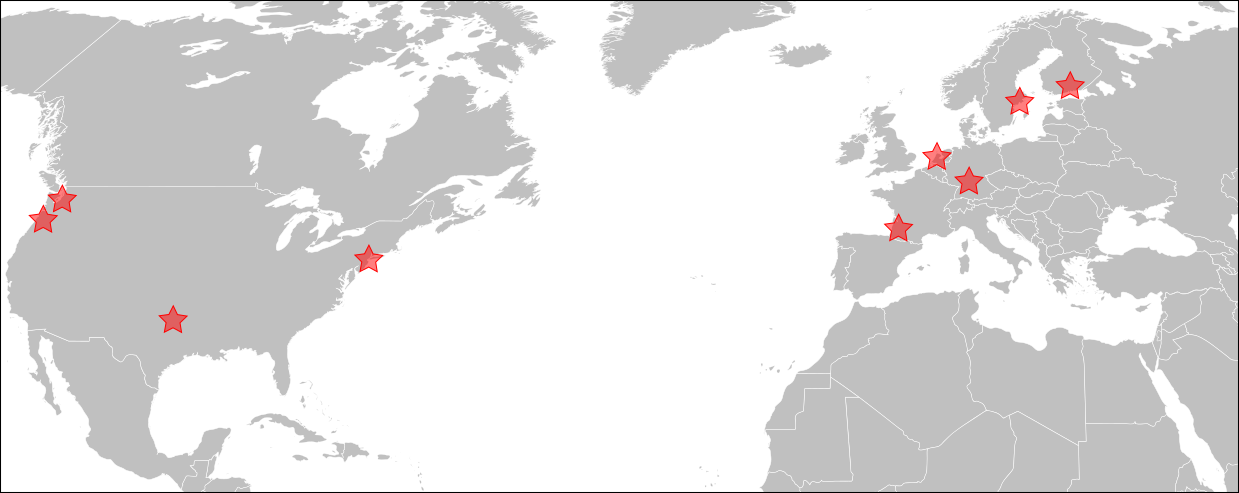
As of October 2025, the team was managing around:
- 100 servers
- 200 terabyte of storage
- 7200 gigabyte of memory
- between 20 to 60 issues per month
Support
Support from the team is mostly provided through GitLab but email can also be used, see the support documentation for more details.
Policies and operations
TPA has implemented a growing body of policies that establish how the term operates, which services are maintained and how.
Those policies are discussed and recorded through the ADR process which aim at involving stakeholders in the decision-making process.
The team holds meetings about once a month, with weekly informal checkins and office hours.
It operates on a yearly roadmap reviewed on a quarterly basis.
The Great Tails Merge
It should also be noted that Tor is in the process of merging with Tails. This work is tracked in the Tails Merge Roadmap and will be affecting the team significantly in the merge window (2025-2030), as multiple services will be severely refactored, retired, or merge.
In the meantime, we might have duplicate or oddball services. Don't worry, it will resolve shortly, sorry for the confusion.
This map is derived from the Wikipedia BlankMap-World.svg file commonly used on Wikipedia to show world views. In our case, the original map is enclosed in a locked "base map" layer, and we added stars designating our points of presence, aligned by hand.

We have considered using this utility script that allows one to add points based on a coordinates list, found in the instructions, but the script is outdated: it hasn't been ported to Python 3 and hasn't sen an update in a long time.

The map uses the Robinson projection which is not ideal because somewhat distorted, considering the limited view of the world it presents. A better view might be an orthogonal projection like this OSCE map (but Europe is somewhat compressed there) or that NATO map (but then it's NATO)...
.svg)

We keep minutes of our meetings here.
We hold the following regular meetings:
- office hours: an open (to tor-internal) videoconferencing hangout every Monday during business hours
- weekly check-in: see the TPA calendar (web, caldav) for the source of truth
- monthly meetings: every first check-in (that is, every first Monday) of the month is a formal meeting with minutes, listed below
Those are just for TPA, there are broader notes on meetings in the organization Meetings page.
2026
2025
- 2025-12-15
- 2025-11-17
- 2025-11-10
- 2025-10
- 2025-10-06
- 2025-09-08
- 2025-07-07
- 2025-06-16
- 2025-05-12
- 2025-05-05
- 2025-04-07
- 2025-03-10
- 2025-02-10
- 2025-01-13
2024
2023
2022
- 2022-12-06
- 2022-11-07
- 2022-10-03
- 2022-08-29
- 2022-07-24
- 2022-06-21
- 2022-06-06
- 2022-05-09
- 2022-04-04
- 2022-03-14
- 2022-02-14
- 2022-01-24
- 2022-01-11
2021
- 2021-12-06
- 2021-11-01
- 2021-10-07
- 2021-09-07
- 2021-06-14
- 2021-06-02 (report only)
- 2021-05-03 (report only)
- 2021-04-07 (report only)
- 2021-03-02
- 2021-02-02
- 2021-01-26
- 2021-01-19
2020
2019
Templates and scripts
Agenda
- Introductions
- Pointers for new peopple
- https://gitlab.torproject.org/anarcat/wikitest/-/wikis/
- nagios https://nagios.torproject.org/cgi-bin/icinga/status.cgi?allunhandledproblems&sortobject=services
- open tickets
- git repos
- https://gitweb.torproject.org/admin
- ssh://pauli.torproject.org/srv/puppet.torproject.org/git/tor-puppet
- What we've been working on in Feb
- What's up for March
- Any other business
- the cymru hw
- Onboarding tasks
- trying to answer a gazillion questions from anarcat
- Next meeting is April 1, 16:00 UTC
- Ending meeting no later than 17:00 UTC
Report
Posted on the tor-project mailing list.
What happened in feb
- roger: would like prios from team and people and project manage it
- ln5: upgrading stuff, gitlab setup, civicrm, ticketing
- hiro: website redesign, prometheus test (munin replacement)
- weasel: FDE on hetzner hosts, maybe with mandos
- qbi: website translation, trac fixing
Anarcat Q&A
Main pain points
- trac gets overwhelmed
- cymru doesn't do tech support well
- nobody knows when services stop working
Machine locations
- cymru (one machine with multiple and one VM in their cluster)
- hetzner
- greenhost
- linus' org (sunet.se)
What has everyone been up to
anarcat
- lots of onboarding work, mostly complete
- learned a lot of stuff
- prometheus research and deployment as munin replacement, mostly complete
- started work on puppet code cleanup for public release
lots more smaller things:
- deployed caching on vineale to fix load issues
- silenced lots of cron job and nagios warnings, uninstalled logwatch
- puppet run monitoring, batch job configurations with cumin
- moly drive replacement help
- attended infracon 2019 meeting in barcelona (see report on ML)
hiro
- website redesign and deploy
- gettor refactoring and test
- on vacation for about 1 week
- IFF last week
- many small maintenance things
ln5
- nextcloud evaluation setup
[wrapping up the setup] - gitlab vm
[complete] - trying to move "put donated hw in use" forward
[stalled] - onboarding
[mostly done i think]
weasel
- brulloi decommissionning
[continued] - worked on getting encrypted VMs at hetzner
- first buster install for Mandos, made a buster dist on db.tpo, cleaned up the makefile
- ... which required rotating our CAs
- security updates
- everyday fixes
What we're up to in April
anarcat
- finishing the munin replacement with grafana, need to write some dashboards and deploy some exporters (trac #30028). not doing Nagios replacement in short term.
- puppet code refactoring for public release (trac #29387)
- hardware / cost inventory (trac #29816)
hiro
- community.tpo launch
- followup on tpo launch
- replace gettor with the refactored version
- usual small things: blog/git...
ln5
- nextcloud evaluation on Riseup server
- whatever people need help with?
weasel
- buster upgrades
- re-encrypt hetzner VMs
- finish brulloi decommissionning, canceled for april 25th
- mandos monitoring
- move spreadsheets from Google to Nextcloud
Other discussion topics
Nextcloud status
We are using Riseup's Nextcloud as a test instance for replacing Google internally. Someone raised the question of backups and availability: it was recognized that it's possible Riseup might be less reliable than Google, but that wasn't seen as a big limitation. The biggest concern is whether we can meaningfully backup the stuff that is hosted there, especially with regards to how we could migrate that data away in our own instance eventually.
For now we'll treat this as being equivalent to Google in that we're tangled into the service and it will be hard to migrate away but the problem is limited in scope because we are testing the service only with some parts of the team for now.
Weasel will migrate our Google spreadsheets to the Nextcloud for now and we'll think more about where to go next.
Gitlab status
Migration has been on and off, sometimes blocked on TPA giving access (sudo, LDAP) although most of those seem to be resolved. Expecting service team to issue tickets if new blockers come up.
Not migrating TPA there yet, concerns about fancy reports missing from new site.
Prometheus third-party monitoring
Two tickets about monitoring external resources with Prometheus (#29863 and #30006). Objections raised to monitoring third party stuff with the core instance so it was suggested to setup a separate instance for monitoring infrastructure outside of TPO.
Concerns also expressed about extra noise on Trac about that instance, no good solution for Trac generated noise yet, there are hopes that GitLab might eventually solve that because it's easier to create Gitlab projects than Trac components.
Next meeting
Meeting concluded within the planned hour. Notes for next meeting:
- first item on agenda should be the roll call
- think more about the possible discussion topics to bring up (prometheus one could have been planned in advance)
- Roll call: who's there and emergencies
- What has everyone been up to
- What we're up to next
- Transferring ln5's temporary lead role to anarcat
- Hardware inventory and followup
- Other discussions
- Next meeting
Roll call: who's there and emergencies
Present:
- anarcat
- hiro
- weasel
ln5 announced he couldn't make it.
What has everyone been up to
Hiro
- websites (Again)
- dip.tp.o setup finished
- usual maintenance stuff
Weasel
- upgraded to buster bungei and hetzner-hel1-02 (also reinstalled with an encrypted /), post-install config now all in Puppet, both booting via Mandos now
- finished brulloi retirement, billing cleared up and back at the expected monthly rate
- moved the hetzner kvm host list from google drive to NC and made a TPA calendar in NC
- noticed issues with NC: no confitional formatting, TPA group not available in calendar app, no per calendar timezone option
Anarcat
- prometheus + grafana completed: tweaked last dashboards and exporters, rest of the job is in my backlog
- merge of Puppet Prometheus module patches upstream continued
- cleaned up remaining traces of munin in Puppet
- Hiera migration about 50% done
- hardware / cost inventory in spreadsheet (instead of Hiera, Trac 29816)
- misc support things ("break the glass" on a mailing list, notably, documented WebDAV + Nextcloud + 2FA operation)
What we're up to next
Hiro
- community portal website
- document how to contribute to websites
- moving websites from Trac to Dip (just the git part), as separate projects (see web)
- Grafana inside Docker
- more Puppet stuff
Weasel
- replace textile with newer hardware
- test smaller MTUs on Hetzner vswitch stuff to see if it would work for publicly routed addresses
- more buster upgrades
Anarcat
- upstream merge of puppet code
- hiera migration completion, hopefully
- 3rd party monitoring server setup, blocked on approval
- grafana tor-guest auth
- pick up team lead role formally (more meetings, mostly)
- log host?
Transferring ln5's temporary lead role to anarcat
This point on the agenda was a little awkward because ln5 wasn't here to introduce it, but people felt comfortable going anyways, so we did.
First, some context: ln5 had taken on the "team lead" (from TPI's perspective) inside the nascent "sysadmin team" last November. He didn't want to participate in the vegas team meetings because he was only part time and it would not make sense to take like a fifth of his time in meetings. The team has been mostly leaderless so far, although weasel did serve as a de-facto leader because he was the most busy. Then ln5 showed up and became the team leader.
But now that anarcat is there full time, it may make sense to have a team lead in those meetings and delegate that responsibility from ln5 to anarcat. This was discussed during the hiring process and anarcat was open to the idea. For anarcat, leadership is not telling people what to do, it's showing the way and summarizing, helping people do things.
Everyone supported the change. If there are problems with the move, there are resources in TPI (HR) and the community (CC) to deal with those problems, and they should be used. In any case, talk with anarcat if you feel there are problems, he's open. He'll continue using ln5 as a mentor.
We don't expect much changes to come out of this, as anarcat has already taken on some of that work (like writing those minutes and coordinating meetings). It's possible more things come up from the Vegas team or we can bring them down issues as well. It could help us unblock funding problems, for example. In any case, anarcat will keep the rest of the team in the loop, of course. Hiro also had some exchanges with ln5 about formalizing her work in the team, which anarcat will followup on.
Hardware inventory and followup
There's now a spreadsheet in Nextcloud that provides a rough inventory of the machines. It used to be only paid hardware hosting virtual machines, but anarcat expanded this to include donated hardware in the hope to get a clearer view of the hardware we're managing. This should allow us to better manage the life cycle of machines, depreciation and deal with failures.
The spreadsheet was originally built to answer the "which machine do
we put this new VM on" question and since moly was already too full
and old by the time the spreadsheet was created, there was no sheet
for moly. So anarcat added a sheet for moly and also entries for
the VMs in Hetzner cloud and Scaleway to get a better idea of the
costs and infrastructure present. There's also a
"per-hosting-provider" sheet that details how much we pay to each
entity.
The spreadsheet should not provide a full inventory of all machines:
this is better served by LDAP or Hiera (or both), but it should
provide an inventory of all "physical" hosts we have (e.g. moly) or
the VMs that we do not control the hardware underneath
(e.g. hetzner-nbg1-01).
Some machines were identified as missing from the spreadsheet:
- ipnet/sunet cloud
- nova
- listera
- maybe others
Next time a machine is setup, it should generally be added to that sheet in some sense or another. If it's a standalone VM we do not control the host of (e.g. in Hetzner cloud), it goes in the first sheet. If it's a new KVM host, it desserves its own sheet, and if it's a VM in one of our hosts, it should be added to that host's sheet.
WThe spreadsheet has been useful to figure out "where do we put that stuff now", but it's also useful for "where is that stuff and what stuff do we need next".
Other discussions
None identified.
Next meeting
June 3 2019, 1400UTC, in the Nextcloud / CalDAV calendar.
- Roll call: who's there and emergencies
- What has everyone been up to
- What we're up to next
- Cymru followup?
- New mail service requests
- Stockholm meeting planning
- Other discussions
- Next meeting
Roll call: who's there and emergencies
No emergencies, anarcat, hiro, ln5 and weasel present, qbi joined halfway through the meeting.
What has everyone been up to
anarcat
-
screwed up and exposed Apache's /server-status to the public, details in #30419. would be better to have that on a separate port altogether, but that was audited on all servers and should be fixed for now.
-
moved into a new office which meant dealing with local hardware issues like a monitors and laptops and so on (see a review of the Purism Librem 13v4 and the politics of the company)
-
did some research on docker container security and "docker content trust" which we can think of "Secure APT" for containers. the TL;DR: is that it's really complicated, hard to use, and the tradeoffs are not so great
-
did a bunch of vegas meetings
-
brought up the idea of establishing a TPI-wide infrastructure budget there as well, so i'll be collecting resource expenses from other teams during the week to try and prepare something for those sessions
-
rang the bell on archive.tpo overflowing in #29697 but it seems i'll be the one coordinating the archival work
-
pushed more on the hiera migration, now about 80% done, depending on how you count (init.pp or local.yaml) 13/57 or 6/50 roles left
-
tried to get hiro more familiar with puppet as part of the hiera migration
-
deployed and documented a better way to deploy user services for the bridgesdb people using
systemd --userandloginctl --enable-lingerinstead of starting fromcron -
usual tickets triage, support and security upgrades
hiro
-
been helping a bit anarcat with Puppet to understand it better
-
setup https://community.torproject.org from Puppet using that knowledge and weasel's help
-
busy with the usual website tasks, new website version going live today (!)
-
researched builds on Jenkins, particularly improved scripts and jobs for Hugo and onionperf documentation
-
deployed new version of gettor in production
-
putting together website docs on dip
-
setup synchronization of TBB packages to with GitlabCI downloading from www.torproject.org/dist/ and pushing to the gitlab and github repositories
weasel
-
usual helping out
-
day-to-day stuff like security things
-
can't really go forward with any of the upgrades/migrations/testing without new hw.
ln5
-
on vacation half of may
-
decided, with Sue and Isa, to end the contract early which should free up resources for our projects
qbi
-
mostly trac tickets (remove attachments, adding people, etc.)
-
list maintainership - one new list was created
What we're up to next
anarcat
-
expense survey across the teams to do a project-wide infrastructure budget/planning and long term plan
-
finish the hiera migration
-
need to get more familiar with backups, test restore of different components to see how they behave, to not have to relearn how to use bacula in an emergency
-
talk with Software Heritage, OSL, and IA to see if they can help us with archive.tpo, as i don't see us getting short-term "throw hardware at the problem" fix for this
weasel
-
somewhat busy again in June, at least a week away with limited access
-
work on Ganeti/KVM clustering when we get the money
ln5
-
Stockholm meeting prepatations
-
Tor project development, unrelated to TPA
hiro
-
planning to get more involved with puppet
-
more gettor tasks to finish and websites as usual
-
finish the websites documentation in time for mandatory Lektor training at the dev-meeting so that it's easy enough for people to send PR via their preferred git provider, which includes for example people responsible for the newsletter as lektor also have a Mac app!
qbi
-
react on new tickets or try to close some older tickets
-
happy to do bite-sized tasks (<30min)
Cymru followup?
Point skipped, no new movement.
New mail service requests
We discussed the request to run an outbound mailserver for TPO users. Some people have trouble getting their email accepted at third party servers (in particular google) using their @torproject.org email address. However, specific problems have not been adequately documented yet.
While some people felt the request was reasonable, there were concerns that providing a new email service will introduce a new set of (hidden and not-so-hidden) issues, for instance possible abuse when people lose their password.
Some also expressed the principle that e-mail is built with federation in mind, so we should not have to run a mail-server as people should be able to just use their own (provider's) mailserver to send mail, even if Google, Microsoft, and those who nowadays try to own the e-mail market, would like to disagree.
Even if users don't have a reasonable outgoing mailserver to use, maybe it need not be TPA who provide this service. It was proposed that the service would be better handled by some trustworthy 3rd party, and TPO users may, but need not, use it.
We all agree that people need their emails to work. For now, we should try to properly document concrete failures. Anarcat will gently push back on the ticket to request more concrete examples
One way to frame this is whether TPI wants to provide email services or not, and if so, if that should be done internally or not. Anarcat will bring this up at the next Vegas meeting.
Stockholm meeting planning
By july, anarcat should have produced an overview of our project-wide expenses to get a global view of our infrastructure needs. The idea would then be to do some real-time, in-person planning during the Tor meeting in July and make some longer-term plans. Questions like email hosting, GitLab vs Trac, Nextcloud, how many servers we want or need, etc.
It was proposed we do like in Brussels, where we had a full day focused on the TPA team. We still have to figure out if we have the space for that, which anarcat will followup on. There's a possibility of hosting at Sunet's offices, but the 10 minutes walk would make this a little impractical. It's likely we'll be able to find space, fortunately, and we'll try to figure this out this week.
Other discussions
No other discussion was brought up.
Next meeting
Next meeting will be held on monday july 1st, same hour (1400UTC, 1000 east coast, 1600 europe).
Meeting agrees minutes will be sent without approval from now on.
- Roll call: who's there and emergencies
- What has everyone been up to
- What we're up to next
- Holidays and availability
- Stockholm meeting prep
- Other discussions
- Next meeting
Roll call: who's there and emergencies
Anarcat, Hiro, Qbi and Weasel present. No emergencies.
What has everyone been up to
anarcat
- scraping collection patch was merged in prometheus puppet module, finally! still 3 pending patches that need unit tests, mostly
- more vegas meeting and followup, in particular with email. discussions punted to stockholm for now
- reviewed the hardware inventory survey results, not very effective, as people just put what we already know and didn't provide specs
- more hiera migration, static sync stuff left
- documented possible gitlab migration path and opened #30857 to discuss the next steps
- expanded storage for prometheus to 30 days (from 15) landed at 80% disk usage (from 50%) so doubling up the retention only added 30% of disk usage, which is pretty good.
- archive.tpo ran out of space, reached out to software heritage and archive.org to store our stuff, both which responded well, but requires more engineering to move our stuff off to IA. heritage are now crawling our git repos. and setup a new machine with larger disks (archive-01) to handle the service. tried to document install procedures in the hope to eventually automate this or at least get consistent setups for new machines
- usbguard and secureboot on local setup to ensure slightly better security in my new office
- started reading up on the PSNA (see below)
- regular tickets and security upgrades work
qbi
Created a new list and other list admin stuff, also some trac tickets.
hiro
- continued documenting and developing websites. we now have a secondary repository with shared assets that can be imported at build time
- almost done with setting up a second monitoring server
- did some hiera migrations
- finished torbrowser packages syncing on github and gitlab for gettor
- went to rightscon
weasel
Was busy with work and work trips a lot. Haven't really gotten to any big projects.
What we're up to next
anarcat
- Vacation! Mostly unavailable all of july, but will work sporadically just to catchup, mostly around Stockholm. Will also be available for emergencies in the last week of july. Availabilities in the Nextcloud calendar.
- Need to delegate bungei resize/space management (#31051) and security updates. archive-01 will need some oversight, as I haven't had time to make sure it behaves.
- Will keep on reading the PSNA book and come up with recommendations.
hiro
- more website mainteinance
- would like to finish setup this second monitoring server
- documentation updates about setting up new machines
- need to cleanup logging on dip
- need to figure out how to manage guest users and a possibly anonymous shared account
- following up the migration discussion, but unsure if we're still on the same goal as the three-year-old survey we did back then
- need to post july/august vacations
qbi
Mostly traveling and on holidays in july and beginning of august
weasel
Maybe july will finally see ganeti stuff, now that we have funding. Will be in Stockholm.
Holidays and availability
We've reviewed the various holidays and made sure we don't have overlap so we have people available to respond to emergencies if they come up. We're not sure if the vacations should be announced in pili's "Vacation tracker" calendar or in weasel's "TPA" calendar.
Stockholm meeting prep
We managed to get a full roadmapping day set aside for us. We can make a spreadsheet to brainstorm what we'll talk about or we can just do it ad-hoc on the first day.
There's also a "Email or not email" session that we should attend, hosted by anarcat and gaba.
Finally, anarcat can present our work to the "State of the onion" session on the first day.
Other discussions
Weasel noted the meeting was a bit long, with lots of time spent waiting for people to comment or respond, and asked if we could speed it up by reducing that latency.
Hiro also proposed to dump our "previous/next" sections in a pad before the meeting so we don't have to waste synchronized time to collectively write those up. This is how vegas proceeds and it's very effective, so we'll try that next time.
Next meeting
August 5th, 1400UTC (canceled, moved to september). We will try to make the meeting faster and prepare the first two points in a pad beforehand.
- Roll call: who's there and emergencies
- What has everyone been up to
- What we're up to next
- Answering the 'ops report card'
- Email next steps
- Do we want to run Nextcloud?
- Other discussions
- Next meeting
- Metrics of the month
Roll call: who's there and emergencies
Anarcat, Hiro, Linus, weasel, and Roger attending.
What has everyone been up to
anarcat
July
- catchup with Stockholm and tasks
- ipsec puppet module completion (should we publish it?)
- fixed civicrm tunneling issues, hopefully (#30912)
- published blog post with updates from the previous email: https://anarc.at/blog/2019-07-30-pgp-flooding-attacks/
- struggled with administrative/accounting stuff
- contacted greenhost about DNS: they have anycast DNS with an API, but not GeoDNS, what should we do?
- RT access granting and audit (#31249, #31248), various LDAP access tickets and cleaned up gettor group
- backup documentation (#30880)
- tested bacula and postgresql restore procedures, specifically, you might want to get familiar with those before a catastrophe
- cleaned up services inventory (#31261) all in https://gitlab.torproject.org/legacy/trac/-/wikis/org/operations/services now
- worked on getting ganeti into puppet with weasel
August
- on vacation the last week, it was awesome
- published a summary of the KNOB attack against Bluetooth (TL;DR: don't trust your BT keyboards) https://anarc.at/blog/2019-08-19-is-my-bluetooth-device-insecure/
- ganeti merge almost completed
- first part of the hiera transition completed, yaaaaay!
- tested a puppet validation hook (#31226) you should install it locally, but our codebase is maybe not ready to run this server-side
- retired labs.tpo (#24956)
- retired nova.tpo (#29888) and updated the host retirement docs, especially the hairy procedure where we don't have remote console to wipe disks
hiro - Collecting all my snippets here https://dip.torproject.org/users/hiro/snippets
- catchup with Stockholm discussions and future tasks
- fixed some prometheus puppet-fu
- some website dev and maintenance
- some blog fixes and updates
- gitlab updates and migration planning
- gettor service admin via ansible
weasel, for september, actually
- Finished doing ganeti stuff. We have at least one VM now, see next point
- We have a loghost now, it's called loghost01. There is a /var/log/hosts that has logs per host, and some /var/log/all files that contain log lines from all the hosts. We don't do backups of this host's /var/log because it's big and all the data should be elsewhere anyway.
- started doing new onionoo infra, see #31659.
- debian point releases
What we're up to next
anarcat
- figure out the next steps in hiera refactoring (#30020)
- ops report card, see below (#30881)
- LDAP sudo transition plan (#6367)
- followup with snowflake + TPA? (#31232)
- send root@ emails to RT, and start using it more for more things? (#31242)
- followup with email services improvements (#30608)
- continue prometheus module merges
- followup on SVN decomissionning (#17202)
hiro
- on vacation first two weeks of August
- followup and planning for search.tp.o
- websites and gettor tasks
- more prometheus and puppet
- review services documentation
- monitor anti-censorship services
- followup with gettor tasks
- followup with greenhost
weasel
- want to restructure how we do web content distribution:
- Right now, we rsync the static content to ~5-7 nodes that directly offer http to users and/or serve as backends for fastly.
- The big number of rsync targets makes updating somewhat slow at times (since we want to switch to the new version atomically).
- I'd like to change that to ship all static content to 2, maybe 3, hosts.
- These machines would not be accessed directly by users but would serve as backends for a) fastly, and b) our own varnish/haproxy frontends.
- split onionoo backends (that run the java stuff) from frontends (that run haproxy/varnish). The backends might also want to run a varnish. Also, retire the stunnel and start doing ipsec between frontends and backends. (that's already started, cf. #31659)
- start moving VMs to gnt-fsn
ln5
- help deciding things about a tor nextcloud instance
- help getting such a tor nextcloud instance up and running
- help migrating data from the nc instance at riseup into a tor instance
- help migrating data from storm into a tor instance
Answering the 'ops report card'
See https://bugs.torproject.org/30881
anarcat introduced the project and gave a heads up that this might mean more ticket and organizational changes. for example, we don't define "what's an emergency" and "what's supported" clearly enough. anarcat will use this process as a prioritization tool as well.
Email next steps
Brought up "the plan" to Vegas: https://gitlab.torproject.org/legacy/trac/-/wikis/org/meetings/2019Stockholm/Notes/EmailNotEmail
Response was: why don't we just give everyone LDAP accounts? Everyone has PGP...
We're still uncomfortable with deploying the new email service but that was agreed upon in Stockholm. We don't see a problem with granting more people LDAP access, provided vegas or others can provide support and onboarding.
Do we want to run Nextcloud?
See also the discussion in https://bugs.torproject.org/31540
The alternatives:
A. Hosted on Tor Project infrastructure, operated by Tor Project.
B. Hosted on Tor Project infrastructure, operated by Riseup.
C. Hosted on Riseup infrastructure, operated by Riseup.
We're good with B or C for now. We can't give them root so B would need to be running as UID != 0, but they prefer to handle the machine themselves, so we'll go with C for now.
Other discussions
weasel played with prom/grafana to diagnose onionoo stuff, and found interesting things. Wonders if we can hookup varnish, anarcat will investigate yet.
we don't want to keep storm running if we switch to nextcloud, make a plan.
Next meeting
october 7th 1400UTC
Metrics of the month
I figured I would bring back this tradition that Linus had going before I started doing the reports, but that I omitted because of lack of time and familiarity with the infrastructure. Now I'm a little more comfortable so I made a script in the wiki which polls numbers from various sources and makes a nice overview of what our infra looks like. Access and transfer rates are over the last 30 days.
- hosts in Puppet: 76, LDAP: 79, Prometheus exporters: 121
- number of apache servers monitored: 32, hits per second: 168
- number of self-hosted nameservers: 5, mail servers: 10
- pending upgrades: 0, reboots: 0
- average load: 0.56, memory available: 357.18 GiB/934.53 GiB, running processes: 441
- bytes sent: 126.79 MB/s, received: 96.13 MB/s
Those metrics should be taken with a grain of salt: many of those might not mean what you think they do, and some others might be gross mischaracterizations as well. I hope to improve those reports as time goes on.
- Roll call: who's there and emergencies
- What has everyone been up to
- What we're up to next
- Other discussions
- Next meeting
- Metrics of the month
Roll call: who's there and emergencies
anarcat, hiro, ln5, qbi and weasel are here.
What has everyone been up to
anarcat
- announced LDAP sudo transition plan (#6367)
- finished first phase of the hiera transition (#30020)
- deployed trocla in test (#30009)
- coordinate textile shutdown (#31686)
- announced jabber service shutdown (#31700)
- closed snowflake -> TPA transition ticket for now, external monitoring is sufficient (#31232)
- improvements on grafana dashboards
- gitlab, nextcloud transitions coordination and oversight
- ooni.tpo to ooni.io transition coordination (#31718)
- bugtracking on networking issues (#31610, #31805, #31916)
- regular janitorial work (security upgrades, reboots, crashes, disk space management, etc)
- started needrestart deployment to reduce that work (#31957)
- completed the "reports card" questionnaire (#30881)
- continued work on the upstream prometheus module
- tested puppetboard as a Puppet Dashboard (#31969)
weasel
- Started with new onionoo hosts. Currently there's just one backend on fsn, irl is doing the service part (cf. #31659)
- puppet cleanup: nameserver/hoster info
- new static master on fsn
- staticsync and bacula puppet cleanups/major-rework/syncs with debian
- new fsn web frontends. only one is currently rotated
- retire togashii, started retiring saxatile
- moved windows VM away from textile
- random updates/reboots/fixes
- upgraded polyanthum to Debian 10
Hiro
- Setup dip so that it can be easily rebased with debian upstream
- Migrated gettor from getulum to gettor-01
- Random upgrades and reboots
- Moving all my services to ansible or packages (no ad - hoc
configuration):
- Gettor can be deployed and updated via ansible
- Survey should be deployed and updated via ansible
- Gitlab (dip) is already on ansible
- Schleuder should be maintained via packages
- Nagios checks for gettor
ln5
Didn't do much. :(
qbi
Didn't do volunteering due to private stuff
What we're up to next
anarcat
New:
- LDAP sudo transition (#6367)
- jabber service shutdown (#31700)
- considering unattended-upgrades or at least automated needrestart deployment (#31957)
- followup on the various ops report card things (#30881)
- maybe deploy puppetboard as a Puppet Dashboard (#31969), possibly moving puppetdb to a separate machine
- nbg1/prometheus stability issues, ipsec seems to be the problem (#31916)
Continuing/stalled:
- director replacement (#31786)
- taking a break on hiera refactoring (#30020)
- send root@ emails to RT (#31242)
- followup with email services improvements (#30608)
- continue prometheus module merges
- followup on SVN decomissionning (#17202)
weasel
- more VMs should move to gnt-fsn
- more VMs should be upgraded
- maybe get some of the pg config fu from dsa-puppet since the 3rd party pg module sucks
Hiro
- Nagios checks for bridgedb
- decommissioning getulum
- ansible recipe to manage survey.tp.o
- dev portal coding in lektor
- finishing moving gettor to gettor-01 includes gettor-web via lektor
- do usual updates and rebots
ln5
Nextcloud migration.
Other discussions
configuration management systems
We discussed the question of the "double tools problem" that seems to be coming up with the configuration management system: most systems are managed with Puppet, but some services are deployed with Puppet. It was argued it might be preferable to use Puppet everywhere to ease onboarding, since it would be one less tool to learn. But that might require giving people root, or managing services ourselves, which is currently out of the question. So it was agreed it's better to have services managed with ansible than not managed at all...
Next meeting
We're changing the time because 1400UTC would be too early for anarcat because of daylight savings. We're pushing to 1500UTC, which is 1600CET and 1000EST.
Metrics of the month
Access and transfer rates are an average over the last 15 days.
- hosts in Puppet: 79, LDAP: 82, Prometheus exporters: 106
- number of apache servers monitored: 26, hits per second: 177
- number of self-hosted nameservers: 4, mail servers: 10
- pending upgrades: 0, reboots: 0
- average load: 0.51, memory available: 318.82 GiB/871.81 GiB, running processes: 379
- bytes sent: 134.28 MB/s, received: 94.38 MB/s
Now also available as the main Grafana dashboard. Head to https://grafana.torproject.org/, change the time period to 7 days, and wait a while for results to render.
Note that the retention period of the Prometheus server has been reduced from 30 to 15 days to address stability issues with the server (ticket #31916), so far without luck.
- Roll call: who's there and emergencies
- What has everyone been up to
- What we're up to next
- Other discussions
- Next meeting
- Metrics of the month
Roll call: who's there and emergencies
anarcat, hiro, qbi present, ln5 and weasel couldn't make it but still sent updates.
What has everyone been up to
anarcat
- blog service damage control (#32090)
- new caching service (#32239)
- try to kick cymru back into life (#29397)
- jabber service shutdown (#31700)
- prometheus/ipsec reliability issues (#31916)
- bumped prometheus retention to 5m/365d, bumped back to 1m/365d after i realized it broke the graphs (#31244)
- LDAP sudo transition (#6367)
- finished director replacement (#31786)
- archived public SVN (#15948)
- shutdown SVN internal (#15949)
- fix "ping on new VMs" bug on ganeti hosts (#31781)
- review Fastly contracts and contacts
- became a blog maintainer (#23007)
- clarified hardware donation policy in FAQ (#32044)
- tracking major upgrades progress (fancy graphs!), visible at https://gitlab.torproject.org/anarcat/wikitest/-/wikis/howto/upgrades/ - current est: april 2020
- joined a call with giant rabbit about finances, security and cost, hiro also talked with them about upgrading their CiviCRM, some downtimes to be announced soon-ish
- massive (~20%) trac ticket cleanup in the "trac" component
- worked sysadmin onboarding process docs (ticket #29395)
- drafted a template for service documentation in https://gitlab.torproject.org/anarcat/wikitest/-/wikis/service/template/
- daily grind: email aliases, pgp key updates, full disks, security upgrades, reboots, performance problems
hiro
- website maintenance and eoy campaign
- retire getulum
- make a new machine for gettor
- crm stuff with giant rabbit
- some security updates and service documentation. Testing out ansible for scripts. Happy with the current setup used for gettor with everything else in puppet.
- some gettor updates and maintenance
- started creating the dev website
- survey update
- nagios gettor status check
- dip updates and maintenance
weasel
- moving onionoo forward to new VMs (#31659 and linked)
- moved more things off metal we want to get rid of
- includes preparing a new IRC host (#32281); the old one is not yet gone
qbi
- created tor-moderators@
- updated some machines (apt upgrade)
linus
- followed up with nextcloud launch
What we're up to next
anarcat
New:
- caching server launch and followup, missing stats (#32239)
Continued/stalled:
- followup on SVN shutdown, only corp missing (#17202)
- upstreaming ganeti installer fix and audit of the others (#31781)
- followup with email services improvements (#30608)
- followup on SVN decomissionning (#17202)
- send root@ emails to RT (#31242)
- continue prometheus module merges
hiro
- Lektor package upgrade
- More website maintenance
- nagios bridgedb status check
- investigating occasional websites build failures
- move translations / majus out of moly
- finish prometheus tasks w/ anticensorship-team
- why is gitlab giving an error when creating a MR from a forked repository?
ln5
- nextcloud migration
qbi
- Upgrade some hosts (<5) to buster
Other discussions
No planned discussion.
Next meeting
qbi can't on dec 2nd and we missed two people this time, so it make sense to do it a week earlier...
november 25th 1500UTC, which is 1600CET and 1000EST
Metrics of the month
Access and transfer rates are an average over the last 30 days.
- hosts in Puppet: 75, LDAP: 79, Prometheus exporters: 120
- number of apache servers monitored: 32, hits per second: 203
- number of self-hosted nameservers: 5, mail servers: 10
- pending upgrades: 5, reboots: 0
- average load: 0.94, memory available: 303.76 GiB/946.18 GiB, running processes: 387
- bytes sent: 200.05 MB/s, received: 132.90 MB/s
Now also available as the main Grafana dashboard. Head to https://grafana.torproject.org/, change the time period to 30 days, and wait a while for results to render.
- Roll call: who's there and emergencies
- What has everyone been up to
- Hiro
- What we're up to next
- Winter holidays
- prometheus server resize
- Other discussions
- Next meeting
- Metrics of the month
Roll call: who's there and emergencies
anarcat, gaba, hiro present, weasel and linus couldn't make it, no news from qbi.
What has everyone been up to
anarcat
- followup with cymru (#29397)
- OONI.tpo now moved out of TPO infrastructure (hosted at netlify) and closed some related accounts (#31718) - implied documenting how to retire a static component
- identified that we need to work on onboarding/offboarding procedures (#32519) and especially "what happens to email when people leave" (#32558)
- new caching service tweaks, now 88% hit ratio, will hopefully go down to 300$/mth costs in november! see the shiny graphs
- worked more on Nginx status dashboards to ensure we have good response latency and rates in the caching system
- reconfirmed mailing list problems as related to DMARC, can we fix this now? (#29770)
- wrote a Postfix mail log parser (in lnav) to diagnose email issues in the mail server
- helped with the deployment of a ZNC bouncer for IRC users (#32532) along with fixes to the "mosh" configuration
- getting started on the new email service project, reconfirmed the "Goals" section with vegas
- lots of work on puppet cleanup and refactoring
- NMU'd upstream ganeti installer fix, proposed stable update
- build-arm-* box retirement and ipsec config cleanup
- fixed prometheus/ipsec reliability issues (#31916, it was ipsec!)
Hiro
- Some work on donate.tpo with giant rabbit
- Updates and debug on dip.tp.o
- Security updates and reboots
- Work on the websites
- Git maintenance
- Decommissioning Getulum
- Started running the website meeting and coordinating dev portal for december
linus
Some coordination work around Nextcloud.
weasel
Nothing to report.
What we're up to next
anarcat
New:
- varnish -> nginx conversion? (#32462)
- review cipher suites? (#32351)
- release our custom installer for public review? (#31239)
- publish our puppet source code (#29387)
Continued/stalled:
- followup on SVN shutdown, only corp missing (#17202)
- audit of the other installers for ping/ACL issue (#31781)
- followup with email services improvements (#30608)
- send root@ emails to RT (#31242)
- continue prometheus module merges
Hiro
- Clean up websites bugs
- needrestart automation (#31957)
- CRM upgrades coordination for january? (#32198)
- translation move (#31784)
linus
Will try to followup with Nextcloud again.
weasel
Nothing to report.
Winter holidays
Who's online when in December? Can we look at continuity during that merry time?
hiro will be online during the holidays. anarcat will be moderately online until january, but will take a week offline some time early january. to be clarified.
Need to clarify how much support we provide, see #31243 for the discussion.
prometheus server resize
Can i double the size of the prometheus server to cover for extra disk space? See #31244 for the larger project.
Will rise the cost from 4.90EUR to 8.90EUR. Everyone is go on this, anarcat updated the budget to reflect the new expense.
Other discussions
Blog status? Anarcat got a quote back and will bring it up at the next vegas meeting.
Next meeting
Unclear. jan 6th is a holiday in europe ("the day of the kings"), so we might postpone until january 13th. we are considering having shorter, weekly meetings.
Update: was held on meeting/2020-01-13.
Metrics of the month
- hosts in Puppet: 76, LDAP: 79, Prometheus exporters: 123
- number of apache servers monitored: 32, hits per second: 195
- number of nginx servers: 109, hits per second: 1, hit ratio: 0.88
- number of self-hosted nameservers: 5, mail servers: 10
- pending upgrades: 0, reboots: 0
- average load: 0.62, memory available: 334.59 GiB/957.91 GiB, running processes: 414
- bytes sent: 176.80 MB/s, received: 118.35 MB/s
- planned buster upgrades completion date: 2020-05-01
Now also available as the main Grafana dashboard. Head to https://grafana.torproject.org/, change the time period to 30 days, and wait a while for results to render.
The Nginx cache ratio stats are not (yet?) in the main dashboard. Upgrade prediction graph still lives at https://gitlab.torproject.org/anarcat/wikitest/-/wikis/howto/upgrades/ but the prediction script has been rewritten and moved to GitLab.
- Roll call: who's there and emergencies
- What has everyone been up to
- What we're up to next
- Server replacements
- Oncall policy
- Other discussions
- Next meeting
- Metrics of the month
Roll call: who's there and emergencies
anarcat, hiro, gaba, qbi present, arma joined in later
What has everyone been up to
anarcat
- unblocked hardware donations (#29397)
- finished investigation of the onionoo performance, great team work with the metrics led to significant optimization
- summarized the blog situation with hiro (#32090)
- ooni load investigation (#32660)
- disk space issues for metrics team (#32644)
- more puppet code sync with upstream, almost there
- built test server for mail service, R&D postponed to january (#30608)
- postponed DMARC mailing list fixes to january (#29770)
- dealt with major downtime at moly, which mostly affected the translation server (majus), good contacts with cymru staff
- dealt with kvm4 crash (#32801) scheduled decom (#32802)
- deployed ARM VMs on Linaro openstack
- gitlab meeting
- untangled monitoring requirements for anti-censorship team (#32679)
- finalized iranicum decom (#32281)
- went on two week vacations
- automated install solutions evaluation and analysis (#31239)
- got approval for using emergency ganeti budget
- usual churn: sponsor Lektor debian package, puppet merge work, email aliases, PGP key refreshes, metrics.tpo server mystery crash (#32692), DNSSEC rotation, documentation, OONI DNS, NC DNS, etc
hiro
- Tried to debug what's happening on gitlab (a.k.a. dip.torproject.org)
- Usual maintenance and upgrades to services (dip, git, ...)
- Run security updates
- summarized the blog situation (#32090) with anarcat. Fixed the blog template
- www updates
- Issue with KVM4 not coming back after reboot (#32801)
- Following up for the anticensorhip team monitoring issues (#31159)
- Working on nagios checks for bridgedb
- Oncall during xmas
qbi
- disabled some trac components
- deleted a mailing list
- created a new mailing list
- tried to familiarize with puppet API queries
What we're up to next
anarcat
Probably too ambitious...
New:
- varnish -> nginx conversion? (#32462)
- review cipher suites? (#32351)
- publish our puppet source code (#29387)
- setup extra ganeti node to test changes to install procedures and especially setup-storage
- kvm4 decom (#32802)
- install automation tests and refactoring (#31239)
- SLA discussion (see below, #31243)
Continued/stalled:
- followup on SVN shutdown, only corp missing (#17202)
- audit of the other installers for ping/ACL issue (#31781)
- email services R&D (#30608)
- send root@ emails to RT (#31242)
- continue prometheus module merges
Hiro
- Updates -- migration for the CRM and planning future of donate.tp.o
- Lektor + styleguide documentation for GR
- Prepare for blog migration
- Review build process for the websites
- Status of monitoring needs for the anti-censorship team
- Status of needrestart and automatic updates (#31957)
- Moving on with dip or find out why is having these issues with MRs
qbi
- DMARC mailing list fixes (#29770)
Server replacements
The recent crashes of kvm4 (#32801) and moly (#32762) have been scary (e.g. mail, lists, jenkins, puppet and LDAP all went away, translation server went down for a good while). Maybe we should focus our energies on more urgent server replacements, that is specifically kvm4 (#32802) and moly (#29974) for now, but eventually all old KVM hosts should be decommissisoned.
We have some budget to expand the Ganeti setup, let's push this ahead and assign tasks and timelines.
Consider we need a new VM for GitLab and CRM machines, among other projects.
Timeline:
- end of week: setup fsn-node-03 (anarcat)
- end of january: setup duplicate CRM nodes and test FS snapshots (hiro)
- end of january: kvm1/textile migration to the cluster and shutdown
- end of january: rabbits test new CRM setup and upgrade tests?
- mid february: CRM upgraded and boxes removed from kvm3?
- end of Q1 2020: kvm3 migration and shutdown, another gnt-fsn node?
We want to streamline the KVM -> Ganeti migration process.
We might need extra budget to manage the parallel hosting of gitlab and git.tpo and trac. It's a key blocker in the kvm3 migration, in terms of costs.
Oncall policy
We need to answer the following questions:
- How do users get help? (partly answered by https://gitlab.torproject.org/tpo/tpa/team/-/wikis/support)
- What is an emergency?
- What is supported?
(This is part of #31243.)
From there, we should establish how we provide support for those machines without having to be oncall all the time. We could equally establish whether we should setup rotation schedules for holidays, as a general principle.
Things generally went well during the vacations for hiro and arma, but we would like to see how to better handle this during the next vacations. We need to think about how much support we want to offer and how.
Anarcat will bring the conversation with vegas to see how we define the priorities, and we'll make sure to better balance the next vacation.
Other discussions
N/A.
Next meeting
Feb 3rd.
Metrics of the month
- hosts in Puppet: 77, LDAP: 80, Prometheus exporters: 123
- number of apache servers monitored: 32, hits per second: 175
- number of nginx servers: 2, hits per second: 2, hit ratio: 0.87
- number of self-hosted nameservers: 5, mail servers: 10
- pending upgrades: 0, reboots: 0
- average load: 0.61, memory available: 351.90 GiB/958.80 GiB, running processes: 421
- bytes sent: 148.75 MB/s, received: 94.70 MB/s
- planned buster upgrades completion date: 2020-05-22 (20 days later than last estimate, 49 days ago)
- Roll call: who's there and emergencies
- What has everyone been up to
- What we're up to next
- Roadmap review
- TPA-RFC-1: RFC process
- TPA-RFC-2: support policies
- Other discussions
- Next meeting
- Metrics of the month
Roll call: who's there and emergencies
anarcat, gaba, hiro, linus and weasel present
What has everyone been up to
anarcat
- worked on evaluating automated install solutions since we'd possibly have to setup multiple machines if the donation comes through
- setup new ganeti node in the cluster (fsn-node-03, #32937)
- dealt with disk problems with said ganeti node (#33098)
- switched our install process to setup-storage(8) to standardize disk formatting in our install automation work (#31239)
- decom'd a ARM build box that was having trouble at scaleway (#33001), future of other scaleway boxes uncertain, delegated to weasel
- looked at the test Discourse instance hiro setup
- new RT queue ("training") for the community folks (#32981)
- upgraded meronense to buster (#32998) surprisingly tricky
- started evaluating the remaining work for the buster upgrade and contacting teams
- established first draft of a sysadmin roadmap with hiro and gaba
- worked on a draft "support policy" with hiro (#31243)
- deployed (locally) a Trac batch client to create tickets for said roadmap
- sent and received feedback requests
- other daily upkeed included scaleway/ARM boxes problems, disk usage warnings, security upgrades, code reviews, RT queue config and debug (#32981), package install (#33068), proper headings in wiki (#32985), ticket review, access control (irl in #32999, old role in #32787, key problems), logging issues on archive-01 (#32827), cleanup old rc.local cruft (#33015), puppet code review (#33027)
hiro
- Run system updates (probably twice)
- Documenting install process workflow visually on #32902
- Handled request from GR #32862
- Worked on prometheus blackbox exporter #33027
- Looked at the test Discourse instance
- Talked to discourse people about using discourse for our blog comments
- Preparing to migrate the blog to static (#33115)
- worked on a draft "support policy" with anarcat (#31243)
- working on a draft policy regarding services (#33108)
weasel
- build-arm-10 is now building arm64 binaries. We build arm32 binaries on the scaleway host in paris still.
What we're up to next
Note that we're adopting a roadmap in this meeting which should be merged with this step, once we have agreed on the process. So this step might change in the next meetings, but let's keep it this way for now.
anarcat
I pivoting towards stabilisation work and postponed all R&D and other tweaks.
New:
- new gnt-fsn node (fsn-node-04) -118EUR=+40EUR (#33081)
- unifolium decom (after storm), 5 VMs to migrate, #33085 +72EUR=+158EUR
- buster upgrade 70% done: 53 buster (+5), 23 stretch (-5)
- automate upgrades: enable unattended-upgrades fleet-wide (#31957)
Continued:
Postponed:
- kvm4 decom (#32802)
- varnish -> nginx conversion (#32462)
- review cipher suites (#32351)
- publish our puppet source code (#29387)
- followup on SVN shutdown, only corp missing (#17202)
- audit of the other installers for ping/ACL issue (#31781)
- email services R&D (#30608)
- send root@ emails to RT (#31242)
- continue prometheus module merges
Hiro
- storm shutdown #32390
- enable needrestart fleet-wide (#31957)
- review website build errors (#32996)
- migrate gitlab-01 to a new VM (gitlab-02) and use the omnibus package instead of ansible (#32949)
- migrate CRM machines to gnt and test with Giant Rabbit (#32198)
- prometheus blackbox exporter (#33027)
Roadmap review
Review the roadmap and estimates.
We agreed to use trac for roadmapping for february and march but keep the wiki for soft estimates and longer-term goals for now, until we know what happens with gitlab and so on.
Useful references:
- temporal pad where we are sorting out roadmap: https://pad.riseup.net/p/CYOUx21kpxLL_5Eui61J-tpa-roadmap-2020
- tickets marked for february and march: https://gitlab.torproject.org/legacy/trac/-/wikis/org/teams/SysadminTeam
TPA-RFC-1: RFC process
One of the interesting takeaways I got from reading the guide to distributed teams was the idea of using technical RFCs as a management tool.
They propose using a formal proposal process for complex questions that:
- might impact more than one system
- define a contract between clients or other team members
- add or replace tools or languages to the stack
- build or rewrite something from scratch
They propose the process as a proposal with minimum of two days and a maximum of a week discussion delay.
In the team this could take many forms, but what I would suggest would
be a text proposal that would be a (currently Trac) ticket with a
special tag, which would also be explicitly forwarded to the "mailing
list" (currently tpa alias) with the RFC subject to outline it.
Examples of ideas relevant for process:
- replacing Munin with grafana and prometheus #29681
- setting default locale to C.UTF-8 #33042
- using Ganeti as a clustering solution
- using setup-storage as a disk formatting system
- setting up a loghost
- switching from syslog-ng to rsyslog
Counter examples:
- setting up a new Ganeti node (part of the roadmap)
- performing security updates (routine)
- picking a different machine for the new ganeti node (process wasn't documented explicitly, we accept honest mistake)
The idea behind this process would be to include people for major changes so that we don't get into a "hey wait we did what?" situation later. It would also allow some decisions to be moved outside of meetings and quicker decisions. But we also understand that people can make mistakes and might improvise sometimes, especially if something is not well documented or established as a process in the documentation. We already have the possibility of doing such changes right now, but it's unclear how that process works or if it works at all. This is therefore a formalization of this process.
If we agree on this idea, anarcat will draft a first meta-RFC documenting this formally in trac and we'd adopt it using itself, bootstrapping the process.
We agree on the idea, although there are concerns about having too much text to read through from some people. The first RFC documenting the process will be submitted for discussion this week.
TPA-RFC-2: support policies
A second RFC would be a formalization of our support policy, as per: https://gitlab.torproject.org/legacy/trac/-/issues/31243#note_2330904
Postponed to the RFC process.
Other discussions
No other discussions, although we worked more on the roadmap after the meeting, reassigning tasks, evaluating the monthly capacity, and estimating tasks.
Next meeting
March 2nd, same time, 1500UTC (which is 1600CET and 1000EST).
Metrics of the month
- hosts in Puppet: 77, LDAP: 80, Prometheus exporters: 124
- number of apache servers monitored: 32, hits per second: 158
- number of nginx servers: 2, hits per second: 2, hit ratio: 0.88
- number of self-hosted nameservers: 5, mail servers: 10
- pending upgrades: 110, reboots: 0
- average load: 0.34, memory available: 328.66 GiB/1021.56 GiB, running processes: 404
- bytes sent: 160.29 MB/s, received: 101.79 MB/s
- completion time of stretch major upgrades: 2020-06-06
- Roll call: who's there and emergencies
- What has everyone been up to
- What we're up to next
- Roadmap review
- Policies review
- Other discussions
- Next meeting
- Metrics of the month
Roll call: who's there and emergencies
anarcat, gaba, hiro, and linus present.
What has everyone been up to
hiro
- migrate gitlab-01 to a new VM (gitlab-02) and use the omnibus package instead of ansible (#32949)
- automate upgrades (#31957 )
- anti-censorship monitoring (external prometheus setup assistance) (#31159)
- blog migration planning and setting up expectations
anarcat
AKA:
Major work:
- retire textile #31686
- new gnt-fsn node (fsn-node-04) #33081
- fsn-node-03 disk problems #33098
- fix up /etc/aliases with puppet #32283
- decomission storm / bracteata on February 11, 2020 #32390
- review the puppet bootstrapping process #32914
- ferm: convert BASE_SSH_ALLOWED rules into puppet exported rules #33143
- decomission savii #33441
- decomission build-x86-07 #33442
- adopt puppetlabs apt module #33277
- provision a VM for the new exit scanner #33362
- started work on unifolium decom #33085
- improved installer process (reduced the number of steps by half)
- audited nagios puppet module to work towards puppetization (#32901)
Routine tasks:
- Add aliases to apache config on check-01 #33536
- New RT queue and alias iff@tpo #33138
- migrate sysadmin roadmap in trac wiki #33141
- Please update karsten's new PGP subkey #33261
- Please no longer delegate onionperf-dev.torproject.net zone to AWS #33308
- Please update GPG key for irl #33492
- peer feedback work
- taxes form wrangling
- puppet patch reviews
- znc irc bouncer debugging #33483
- CiviCRM mail rate expansion monitoring #33189
- mail delivery problems #33413
- meta-policy process adopted
- package installs (#33295)
- RT root noises (#33314)
- debian packaging and bugtracking
- SVN discussion
- contacted various teams to followup on buster upgrades (translation #33110 and metrics #33111) - see also progress followup
- nc.riseup.net retirement coordination #32391
qbi
- created several new trac components (for new sponsors)
- disabled components (moved to archive)
- changed mailing list settings on request of moderators
What we're up to next
I suggest we move this to the systematic roadmap / ticket review instead in the future, but that can be discussed in the roadmap review section below.
For now:
anarcat
- unifolium retirement (cupani, polyanthum, omeiense still to migrate)
- chase cymru and replace moly?
- retire kvm3
- new ganeti node
hiro
- retire gitlab-01
- TPA-RFC-2: define how users get support, what's an emergency and what is supported (#31243)
- Migrating the blog to a static website with lektor. Make a test with discourse as comment platform.
Roadmap review
We keep on using this system for march:
https://gitlab.torproject.org/legacy/trac/-/wikis/org/teams/SysadminTeam
Many things have been rescheduled to march and april because we ran out of time to do what we wanted. In particular, the libvirt/kvm migrations are taking more time than expected.
Policies review
TPA-RFC-1: policy; marked as adopted
TPA-RFC-2; support; hiro to write up a draft.
TPA-RFC-3: tools; to be brainstormed here
The goal of the new RFC is to define which tools we use in TPA. This does not concern service admins, at least not in the short term, but only sysadmin stuff. "Tools", in this context, are programs we use to implement a "service". For example, the "mailing list" service is being ran by the "mailman" tool (but could be implemented with another). Similarly, the "web cache proxy" service is implemented by varnish and haproxy, but is being phased out in favor of Varnish.
Another goal is to limit the number of tools team members should know to be functional in the team, and formalize past decisions (like "we use debian").
We particularly discussed the idea of introducing Fabric as an "ad-hoc changes tool" to automate host installation, retirement, and reboots. It's already in use to automate libvirt/ganeti migrations and is serving us well there.
Other discussions
A live demo of the Fabric code was performed some time after the meeting and no one raised objections to the new project.
Next meeting
No discussed, but should be on april 6th 2020.
Metrics of the month
- hosts in Puppet: 77, LDAP: 81, Prometheus exporters: 124
- number of apache servers monitored: 31, hits per second: 148
- number of nginx servers: 2, hits per second: 2, hit ratio: 0.89
- number of self-hosted nameservers: 6, mail servers: 10
- pending upgrades: 174, reboots: 0
- average load: 0.63, memory available: 308.91 GiB/1017.79 GiB, running processes: 411
- bytes sent: 169.04 MB/s, received: 101.53 MB/s
- planned buster upgrades completion date: 2020-06-24
Roll call: who's there and emergencies
anarcat, hiro and weasel are present (gaba late)
Roadmap review
We changed our meeting template to just do a live roadmap review from Trac instead of listing all the little details of all the things we did in the last month. The details are in Trac.
So we reviewed the roadmap at:
https://gitlab.torproject.org/legacy/trac/-/wikis/org/teams/SysadminTeam
SVN, Solr got postponed to april. kvm3 wasn't completed either but should be by the end of the week. hopefully kvm4 will be done by the end of the month but is also likely to be postponed.
We might need to push on the buster upgrade schedule if we don't want to miss the "pre-LTS" window.
We also note that we don't have a good plan for the GitLab deployment, on the infrastructure side of things. We'll need to spend some time to review the infra before anarcat leaves.
Voice meetings
Anarcat and hiro have started doing weekly checkups, kind of informally, on the last two mondays, and it was pretty amazing. We didn't want to force a voice meeting on everyone without first checking in, but maybe we could just switch to that model it's mostly just hiro and anarcat every week anyways.
The possibilities considered were:
- we keep this thing where some people check-in by voice every week, but we keep a monthly text meeting
- we switch everything to voice
- we end the voice experiment completely and go back to text-monthly-only meetings
Anarcat objected to option 3, naturally, and favored 2. Hiro agreed to try, and no one else objected.
A little bit of the rationale behind the discussion was discussed in the meeting. IRC has the advantage that people can read logs if they don't come. But we will keep minutes of the monthly meetings even if they are by voice, so people can read those, which is better than reading a backlog, because it's edited (by yours truly). And if people miss the meeting, it's their responsibility: there are announcements and multiple reminders before the meeting, and they seem to have little effect on attendance. So meetings are mostly hiro and anarcat, with gaba and weasel sometimes joining in. So it makes little sense to force IRC on those two workers to accommodate people that don't get involved as much. Anarcat also feels the IRC meetings are too slow: this meeting took 30 minutes to evaluate the roadmap, and did not get much done. He estimates this would have taken only 10 minutes by voice and the end result would have been similar, if not better: the tickets would have been updated anyways.
So the plan for meetings is to have weekly checkins and a monthly meeting, by voice, on Mumble.
- weekly checkins: timeboxed to 15 minutes, with an optional 45 minutes worksession after if needed
- monthly meetings: like the current IRC meetings, except by voice. timeboxed to 60 minutes still, replacing the weekly check-in for that week
We use Mumble for now, but we could consider other platforms. (Somewhat off-topic: Anarcat wrote a review of the Mumble UX that was somewhat poorly received by the Mumble team, so don't get your hopes up about the Mumble UI improving.)
Other discussions
No other discussion was brought up.
Next meeting
Next "first monday of the month", which is 2020-05-04 15:00UTC (11:00:00EDT, 17:00CET).
Metrics of the month
- hosts in Puppet: 76, LDAP: 80, Prometheus exporters: 123
- number of apache servers monitored: 31, hits per second: 168
- number of nginx servers: 2, hits per second: 2, hit ratio: 0.89
- number of self-hosted nameservers: 6, mail servers: 10
- pending upgrades: 1, reboots: 0
- average load: 1.03, memory available: 322.57 GiB/1017.81 GiB, running processes: 460
- bytes sent: 211.97 MB/s, received: 123.01 MB/s
- completion time of stretch major upgrades: 2020-07-16
Upgrade prediction graph still lives at https://gitlab.torproject.org/anarcat/wikitest/-/wikis/howto/upgrades/
Now also available as the main Grafana dashboard. Head to https://grafana.torproject.org/, change the time period to 30 days, and wait a while for results to render.
- Roll call: who's there and emergencies
- Part-time work schedule
- Roadmap review
- Next meeting
- Metrics of the month
Roll call: who's there and emergencies
anarcat and hiro, tons of emergencies:
- trac spam (#34175)
- ganeti crash (#34185)
Part-time work schedule
We're splitting the week in two, so far anarcat takes the beginning and hiro the end, for now. This might vary from one week to the next.
The handover, or "change of guard" happens during our weekly mumble meeting, which has been moved to 1400UTC, on Wednesdays.
Roadmap review
We reviewed the sysadmin roadmap at:
https://gitlab.torproject.org/legacy/trac/-/wikis/org/teams/SysadminTeam
Since we're in reduced capacity, the following things were removed from the roadmap:
- website migration to lektor (#33115) -- should be handled by the "web team"
- solr search (#33106) -- same, although it does need support from the sysadmin team, we don't have enough cycles for this
- puppetize nagios (#32901) -- part of the installer automation, not enough time
- automate installs (#31239) -- same, but moved to october so we can check in progress then
The ganeti cluster work got delayed one month, but we have our spare month to cover for that. We'll let anarcat do the install of fsn-node-06 to get that back on track, but hiro will learn how to setup a new node with (hopefully) fsn-node-07 next.
The listera retirement (#33276), moly migration (#29974) and cymru hardware setup (#29397) are similarly postponed, but hopefully to june (although this will likely carry over to october, if ever).
Next meeting
Change of guard on 1400UTC wednesday May 20th, no minutes.
Formal meetings are switched to the first wednesday of the month, at 1400. So the next formal meeting will be on Wenesday June 3rd at 1400UTC.
Metrics of the month
- hosts in Puppet: 74, LDAP: 78, Prometheus exporters: 120
- number of apache servers monitored: 30, hits per second: 164
- number of nginx servers: 2, hits per second: 2, hit ratio: 0.88
- number of self-hosted nameservers: 6, mail servers: 10
- pending upgrades: 0, reboots: 33
- average load: 0.55, memory available: 358.27 GiB/949.25 GiB, running processes: 383
- bytes sent: 210.09 MB/s, received: 121.47 MB/s
- planned buster upgrades completion date: 2020-08-01
Upgrade prediction graph still lives at https://gitlab.torproject.org/anarcat/wikitest/-/wikis/howto/upgrades/
Now also available as the main Grafana dashboard. Head to https://grafana.torproject.org/, change the time period to 30 days, and wait a while for results to render.
Roll call: who's there and emergencies
Present: anarcat, hiro, weasel.
Small emergency with Gitlab.
Gitlab
We realized that the GitLab backups were not functioning properly because GitLab omnibus runs its own database server, separate from the one ran by TPA. In the long term, we want to fix this, but in the short term, the following should be done:
- that it works without filling up the disk ;) (probably just a matter of rotating the backups)
- that it backs up everything (including secrets)
- that it stores the backup files offsite (maybe using bacula)
- that it is documented
The following actions were undertaken:
- make new (rotating disk) volume to store backups, mount it some place (weasel; done)
- tell bacula to ignore the rest of gitlab /var/opt/.nobackup in puppet (hiro; done)
- make the (rotating) cronjob in puppet, including the secrets in ./gitlab-rails/etc (hiro, anarcat; done)
- document ALL THE THINGS (anarcat) - specifically in a new page somewhere under backup, along with more generic gitlab documentation (34425)
Roadmap review
We proceeded with a review of the May and June roadmap.
We note that this roadmap system will go away after the gitlab migration, after which point we will experiment with various gitlab tools (most notably the "Boards" feature) to organize work.
alex will ask hiro or weasel to put trac offline, we keep filing tickets in Trac until then.
weasel has taken on the kvm/ganeti migration:
hiro will try creating the next ganeti node to get experience on that 34304.
anarcat should work on documentation, examples:
- how to add a disk on a ganeti node (done)
- LDAP / ud-ldap
- gitlab
Availability planning
We are thinking of setting up an alternating schedule where hiro would be available Monday to Wednesday and anarcat from Wednesday to Friday, but we're unsure this will be possible. We might just do it on a week by week basis instead.
We also note that anarcat will become fully unavailable for two months starting anywhere between now and mid-july, which deeply affects the roadmap above. Mainly, anarcat will focus on documentation and avoid large projects.
Other discussions
We discussed TPA-RFC-2, "support policy" (policy/tpa-rfc-2-support), during the meeting, because someone asked if they could contact us over signal (the answer is "no").
The policy seemed to be consistent with what people in the meeting expected and it will be sent for approval to tor-internal shortly.
Next meeting
TBD. First wednesday in July is a bank holiday in Canada so it's not a good match.
Metrics of the month
- hosts in Puppet: 74, LDAP: 77, Prometheus exporters: 128
- number of apache servers monitored: 29, hits per second: 163
- number of nginx servers: 2, hits per second: 2, hit ratio: 0.88
- number of self-hosted nameservers: 6, mail servers: 12
- pending upgrades: 35, reboots: 48
- average load: 0.55, memory available: 346.14 GiB/952.95 GiB, running processes: 428
- bytes sent: 207.17 MB/s, received: 111.78 MB/s
- planned buster upgrades completion date: 2020-08-18
Upgrade prediction graph still lives at https://gitlab.torproject.org/anarcat/wikitest/-/wikis/howto/upgrades/
Now also available as the main Grafana dashboard. Head to https://grafana.torproject.org/, change the time period to 30 days, and wait a while for results to render.
- Roll call: who's there and emergencies
- Roadmap review
- Hand-off
- Other discussions
- Next meeting
- Metrics of the month
Roll call: who's there and emergencies
Hiro and anarcat present in the meeting. Quick chat by mumble do to a check-in and resolve some issues with the installer to setup fsn-node-07 and check overall priorities.
Roadmap review
We looked at the issue board which excludes GitLab, because that board was processed in the gitlab meeting yesterday.
We went through the tickets and did some triage, moving some tickets
from Open to Backlog and some tickets into Next. anarcat has no
tickets left in Backlog because he's going away for a two months
leave. hiro will review her ticket priorities within the week.
GitLab workflow changes
We tried to get used to the new GitLab workflow.
We decided on using the "Next" label to follow the global @tpo convention, although we have not adopted the "Icebox" label yet. The gitlab policy was changed to:
Issues first land into a "triage" queue (
Open), then get assigned to a specific milestone as the ticket gets planned. We use theBacklog,Next, andDoingof the global "TPO" group board labels. With theOpenandClosedlist, this gives us the following policy:
Open: untriaged ticket, "ice box"Backlog: planned workNext: work to be done in the next iteration or "sprint" (e.g. currently a month)Doing: work being done right now (generally during the day or week)Closed: completed workThat list can be adjusted in the future without formally reviewing this policy.
Priority of items in the lists are determined by the order of items in the stack. Tickets should not stay in the
NextorDoinglists forever and should instead actively be closed or moved back into theOpenorBacklogboard.
Note that those policies are still being discussed in the GitLab project, see issue 28 for details.
Exciting work that happened in June
- Trac migrated to GitLab
- TPA wiki migrated to GitLab
- kvm4 and kvm5 were retired, signaling the end of the "libvirt/KVM" era of our virtual hosting: all critical services now live in Ganeti
- lots of buster upgrades happened
Hand-off
During the mumble check-in, hiro and anarcat established there was not any urgent issue requiring training or work.
anarcat will continue working on the documentation tickets as much as he can before leaving (Puppet, LDAP, static mirrors) but will otherwise significantly reduce his work schedule.
Other discussions
No other discussions were held.
Next meeting
No next meeting is currently planned, but the next one should normally be held on Wednesday August 5th, according to our normal schedule.
Metrics of the month
- hosts in Puppet: 72, LDAP: 75, Prometheus exporters: 126
- number of apache servers monitored: 29, hits per second: 176
- number of nginx servers: 2, hits per second: 2, hit ratio: 0.87
- number of self-hosted nameservers: 6, mail servers: 12
- pending upgrades: 1, reboots: 0
- average load: 0.67, memory available: 271.44 GiB/871.88 GiB, running processes: 400
- bytes sent: 211.50 MB/s, received: 113.43 MB/s
- GitLab tickets: 171 issues including...
- open: 125
- backlog: 26
- next: 13
- doing: 7
- (closed: 2075)
- number of Trac tickets migrated to GitLab: 32401
- last Trac ticket ID created: 34451
- planned buster upgrades completion date: 2020-08-11
Only 3 nodes left to upgrade to buster: troodi (trac), gayi (svn) and rude (RT).
Upgrade prediction graph still lives at https://help.torproject.org/tsa/howto/upgrades/
Now also available as the main Grafana dashboard. Head to https://grafana.torproject.org/, change the time period to 30 days, and wait a while for results to render.
Roll call: who's there and emergencies
gaba, hiro and anarcat on mumble, weasel (briefly) checked in on IRC.
No emergencies.
BTCPayServer hosting
https://gitlab.torproject.org/tpo/tpa/team/-/issues/33750
We weren't receiving donations so hiro setup this service on Lunanode because we were in a rush. We're still not receiving donations, but that's because of troubles with the wallet that hiro will resolve out of band.
So this issue is about where we host this service: at Lunanode, or within TPA? The Lunanode server is already a virtual machine running Docker (and not a "pure container" thing) so we need to perform upgrades, create users and so on in the virtual machine.
Let's host it, because we kind of already do anyways: it's just that only hiro has access for now.
Let's host this in a VM in the new Ganeti cluster at Cymru. If the performance is not good enough (because the spec mentions SSD, which we do not have at Cymru: we have SAS), make some room at Hetzner by migrating some other machines to Cymru and then create the VM at Hetzner.
hiro is lead on the next steps.
Tor browser build VM - review requirements
https://gitlab.torproject.org/tpo/tpa/team/-/issues/34122
Brief discussion about the security implications of enabling user namespaces in a Debian server. By default this is disabled in Debian because of concerns that the possible elevated privileges ("root" inside a namespace) can be leveraged to get root outside of the namespace. In the Debian bug report discussing this, anarcat asked why exactly this was still disabled and Ben Hutchings responded by giving a few examples of security issues that were mitigated by this.
But because, in our use case, the alternative is to give root directly, it seems that enabling user namespaces is a good mitigation. Worst case our users get root access, but that's not worse than giving them root directly. So we are go on granting user namespace access.
The virtual machine will be created in the new Cymru cluster, assuming disk performance is satisfactory.
TPA-RFC-7: root access policy
https://gitlab.torproject.org/tpo/tpa/team/-/wikis/policy/tpa-rfc-7-root
Anarcat presented the proposal draft as sent to the team on November 9th. A few questions remained in the draft:
- what is the process to allow/revoke access to the TPA team?
- is the new permissions (to grant limited
sudorights to some service admins) acceptable?
In other services, we use a vetting process: a sponsor that already has access should file the ticket for the person, the person doesn't request access. That is basically how it works for TPA as well. The revocation procedure was not directly discussed and still needs to be drafted.
It was noted that other teams have servers outside of TPA (karsten, phw and cohosh for example) because of the current limitations, so other people might use those accesses as well. It will be worth talking with other stakeholders about this proposal to make sure it is attuned to the other teams' requirements. Think about the issue with Prometheus right now which is a good counter-example of when service admins do not require root on the servers (issue 40089).
Another example is the onionperf servers that were setup elsewhere
because they needed custom iptables rules. this might not require
root but just iptables access, or at least special iptables rules
configured by TPA.
In general, the spirit of the proposal is to bring more flexibility with what changes we allow on servers to the TPA team. We want to help teams host their servers with us but that also comes with the understanding that we need the capacity (in terms of staff and hardware resources) to do so as well. This was agreed upon by the people present in the mumble meeting, so anarcat will finish the draft and propose it formally to the team later.
Roadmap review
Did not have time to review the team board.
anarcat ranted about people not updating their ticket and was (rightly) corrected that people are updating their tickets. So keep up the good work!
We noted that the top-level TPA board is not used for triage because it picks up too many tickets, outside of the core TPA team, that we cannot do anything about (e.g. the outreachy stuff in the GitLab lobby).
Other discussions
Should we rotate triage responsibility bi-weekly or monthly?
Will be discussed on IRC, email, or in a later meeting later, as we ran out of time.
Next meeting
We should resume our normal schedule of doing a meeting the first Wednesday of the month, which brings us to December 2nd 2020, at 1500UTC, which is equivalent to: 07:00 US/Pacific, 10:00 US/Eastern, 16:00 Europe/Paris
Metrics of the month
- hosts in Puppet: 78, LDAP: 81, Prometheus exporters: 132
- number of apache servers monitored: 28, hits per second: 199
- number of nginx servers: 2, hits per second: 2, hit ratio: 0.87
- number of self-hosted nameservers: 6, mail servers: 12
- pending upgrades: 36, reboots: 0
- average load: 0.64, memory available: 1.43 TiB/2.02 TiB, running processes: 480
- bytes sent: 243.83 MB/s, received: 138.97 MB/s
- planned buster upgrades completion date: 2020-09-16
- GitLab tickets: 126 issues including...
- open: 1
- icebox: 84
- backlog: 32
- next: 5
- doing: 4
- (closed: 2119)
Note that only two "stretch" machines remain and the "buster" upgrade is considered mostly complete: those two machines are the SVN and Trac servers which are both scheduled for retirement.
Upgrade prediction graph (which is becoming a "how many machines do we have graph") still lives at https://help.torproject.org/tsa/howto/upgrades/
Now also available as the main Grafana dashboard. Head to https://grafana.torproject.org/, change the time period to 30 days, and wait a while for results to render.
Agenda
- Roll call: who's there and emergencies
- Roadmap review
- Triage rotation
- Holiday planning
- TPA survey review
- Other discussions
- Next meeting
- Metrics of the month
Roll call: who's there and emergencies
anarcat, hiro, gaba, no emergencies
The meeting took place on IRC because anarcat had too much noise.
Roadmap review
Did a lot of cleanup in the dashboard:
https://gitlab.torproject.org/tpo/tpa/team/-/boards
In general, the following items were priotirized:
- GitLab CI
- finish setting up the Cymru network, especially the VPN
- BTCpayserver
- tor browser build boxes
- small tickets like the git stuff and triage (see below)
The following items were punted to the future:
- SVN retirement (to January)
- password management (specs in January?)
- Puppet role account and verifications
We briefly discussed Grafana authentication, because of a request to create a new account on grafana2. anarcat said the current model of managing the htpasswd file in Puppet doesn't scale so well because we need to go through this process every time we need to grant access (or do a password reset) and identified 3 alternative authentication mechanisms:
- htpasswd managed in Puppet (status quo)
- Grafana users (disabling the htpasswd, basically)
- LDAP authentication
The current authentication model was picked because we wanted to automate user creation in Puppet, and because it's hard to create users in Grafana from Puppet. When a new Grafana server is setup, there's a small window during which an attacker could create an admin account, which we were trying to counter. But maybe those concerns are moot now.
We also discussed password management but that will be worked on in January. We'll try to set a roadmap for 2021 in January, after the results of the survey have come in.
Triage rotation
Hiro brought up the idea of rotating the triage work instead of having always the same person doing it. Right now, anarcat looks at the board at the beginning of every week and deals with tickets in the "Open" column. Often, he just takes the easy tickets, drops them in ~Next, and just does them, other times, they end up in ~Backlog or get closed or at least have some response of some sort.
We agreed to switch that responsibility every two weeks
Holiday planning
anarcat off from 14th to the 26th, hiro from 30th to jan 14th
TPA survey review
anarcat is working on a survey to get information from our users to plan the 2021 roadmap.
People like the survey in general, but the "services" questions were just too long. It was suggested to remove services TPA has nothing to do with (like websites or metrics stuff like check.tpo). But anarcat pointed out that we need to know which of those services are important: for example right now we "just know" that check.tpo is important, but it would be nice to have hard data that confirms it.
Anarcat agreed to separate the table into teams so that it doesn't look that long and will submit the survey back for review again by the end of the week.
Other discussions
New intern
MariaV just started as an Outreachy intern to work on Anonymous
Ticket System. She may be joining the #tpo-admin channel and may
join the gitlab/tooling meetings.
Welcome MariaV!
Next meeting
Quick check-in on December 29th, same time.
Metrics of the month
- hosts in Puppet: 79, LDAP: 82, Prometheus exporters: 133
- number of apache servers monitored: 28, hits per second: 205
- number of nginx servers: 2, hits per second: 3, hit ratio: 0.86
- number of self-hosted nameservers: 6, mail servers: 12
- pending upgrades: 1, reboots: 0
- average load: 0.34, memory available: 1.80 TiB/2.39 TiB, running processes: 481
- bytes sent: 245.34 MB/s, received: 139.99 MB/s
- GitLab tickets: 129 issues including...
- open: 0
- icebox: 92
- backlog: 20
- next: 9
- doing: 8
- (closed: 2130)
The upgrade prediction graph has been retired since it keeps predicting the upgrades will be finished in the past, which no one seems to have noticed from the last report (including me).
Metrics also available as the main Grafana dashboard. Head to https://grafana.torproject.org/, change the time period to 30 days, and wait a while for results to render.
- Roll call: who's there and emergencies
- Dashboard review
- Roadmap 2021 proposal
- Other discussions
- Next meeting
- Metrics of the month
Roll call: who's there and emergencies
present: hiro, gaba, anarcat
GitLab backups are broken: it might need more disk space than we need. just bump disk space in the short term, consider changing the backups system, in the long term.
Dashboard review
We reviewed the dashboard, too much stuff in January, but we'll review in February.
Roadmap 2021 proposal
We discussed the roadmap project anarcat worked on. We reviewed the 2020 retrospective, talked about the services survey, and discussed goals for 2021.
2020 retrospective
We reviewed and discussed the 2020 roadmap evaluation that anarcat prepared:
- what worked? we did the "need to have" even through the apocalypse, staff reduction and all the craziness of 2020! success!
- what was a challenge?
- monthly tracking was not practical, and hard to do in Trac. things are a lot easier with GitLab's dashboard.
- it was hard to work through the pandemic.
- what can we change?
- do quarterly-based planning
- estimates were off because so many things happened that we did not expect. reserve time for the unexpected, reduce expectations.
- ticket triage is rotated now.
Services survey
We discussed the survey results analysis briefly, and how it is used as a basis for the roadmap brainstorm. The two major services people use are GitLab and email, and those will be the focus of the roadmap for the coming year.
Goals for 2021
- email services stabilisation ("submission server", "my email end up in spam", CiviCRM bounce handling, etc) - consider outsourcing email services
- gitlab migration continues (Jenkins, gitolite)
- simplify / improve puppet code base
- stabilise services (e.g. gitlab, schleuder)
Next steps for the roadmap:
- try to make estimates
- add need to have, nice to have
- anarcat will work on a draft based on the brainstorm
- we meet again in one week to discuss it
Other discussions
Postponed: metrics services to maintain until we hire new person
Next meeting
Same time, next week.
Metrics of the month
Fun fact: we crossed the 2TiB total available memory back in November 2020, almost double from the previous report (in July), even with the number of hosts in Puppet remained mostly constant (78 vs 72). This is due (among other things) to the new Cymru Ganeti cluster that added a whopping 1.2TiB of memory to our infrastructure!
- hosts in Puppet: 82, LDAP: 85, Prometheus exporters: 134
- number of Apache servers monitored: 27, hits per second: 198
- number of Nginx servers: 2, hits per second: 3, hit ratio: 0.86
- number of self-hosted nameservers: 6, mail servers: 12
- pending upgrades: 3, reboots: 0
- average load: 0.29, memory available: 2.00 TiB/2.61 TiB, running processes: 512
- bytes sent: 265.07 MB/s, received: 155.20 MB/s
- GitLab tickets: 113 tickets including...
- open: 0
- icebox: 91
- backlog: 20
- next: 12
- doing: 10
- (closed: 2165)
Now also available as the main Grafana dashboard. Head to https://grafana.torproject.org/, change the time period to 30 days, and wait a while for results to render.
TL;DR: the 2021 roadmap was adopted, see the details here:
https://gitlab.torproject.org/tpo/tpa/team/-/wikis/roadmap/2021
Followup of the last meeting to complete the work on the 2021 roadmp.
Roll call: who's there and emergencies
anarcat, gaba, hiro
Problem with gmail, not a rush but priority.
Roadmap review
We looked at the draft 2021 roadmap proposal anarcat sent last week.
Need to have / nice to have / non-goals
- need to prioritise fixing the blog (formatting, moderation), but those fixes will probably not come before Q3, because of capacity
- we decided to not retire schleuder: hiro fixed a bunch of stuff yesterday, it should work better now. no need to retire it as we will still want encrypted mailing lists in the future
- service admins; let's not reopen that discussion
- added the bullseye upgrade to "nice to have", but not a hard priority for 2021 (and will be, along with the python3 upgrade, for 2022)
- search.tpo (#33106) and "web metrics" (#32996) are postponed to 2022
- people suggested retiring "testnet" in the survey, but we don't quite know what that is, so we presumably need to talk with the network team about this
- we agreed to cover for some metrics: we updated ticket 40125 with the remaining services to reallocate. covering for a service means that TPA will reboot services and allocate disk/ram as needed, but we are not in a position to make major reengineering changes
Quarterly prioritization
- there's a lot in Q1, but a lot of it is actually already done
- sponsor 9 requires work from hiro, so we might have capacity problems
We added a few of the "needs to have" in the quarterly allocation to make sure those are covered. We agreed we'd review the global roadmap every quarter, and continue doing the monthly "kanban board" review for the more daily progress.
Next meeting
Going back to our regular programming, i have set a recurring meeting on tuesdays, 1500UTC on the first tuesday of the month, for TPA.
Metrics of the month
Skipped because last meeting was a week ago. ;)
Roll call: who's there and emergencies
anarcat, gaba, hiro
- hiro will be doing security reboots for DSA-483
Dashboard review
We reviewed the dashboard to prioritise the work in February.
anarcat is doing triage for the next two weeks, as now indicated in the IRC channel topic.
Communications discussion
We wanted to touch base on how we organise and communicate, but didn't have time to do so. Postponed to next meeting.
Reminder:
- Documentation about documentation: https://gitlab.torproject.org/tpo/tpa/team/-/wikis/service/documentation
- Policies: https://gitlab.torproject.org/tpo/tpa/team/-/wikis/policy
Next meeting
March 2nd, 2021, same time
Metrics of the month
- hosts in Puppet: 83, LDAP: 86, Prometheus exporters: 135
- number of Apache servers monitored: 27, hits per second: 182
- number of Nginx servers: 2, hits per second: 3, hit ratio: 0.83
- number of self-hosted nameservers: 6, mail servers: 12
- pending upgrades: 11, reboots: 71
- average load: 0.41, memory available: 1.94 TiB/2.67 TiB, running processes: 520
- bytes sent: 281.62 MB/s, received: 163.47 MB/s
- GitLab tickets: 130 tickets including...
- open: 0
- icebox: 96
- backlog: 18
- next: 10
- doing: 7
- (closed: 2182)
I've been collecting those dashboard metrics for a while, and while I don't have pretty graphs to show you yet, I do have this fancy table:
| date | open | icebox | backlog | next | doing | closed |
|---|---|---|---|---|---|---|
| 2020-07-01 | 125 | 0 | 26 | 13 | 7 | 2075 |
| 2020-11-18 | 1 | 84 | 32 | 5 | 4 | 2119 |
| 2020-12-02 | 0 | 92 | 20 | 9 | 8 | 2130 |
| 2021-01-19 | 0 | 91 | 20 | 12 | 10 | 2165 |
| 2021-02-02 | 0 | 96 | 18 | 10 | 7 | 2182 |
Some observations:
- the "Icebox" keeps piling up
- we are closing tens and tens of tickets (about 20-30 a month)
- we are getting better at keeping Backlog/Next/Doing small
- triage is working: the "Open" queue is generally empty after the meeting
As usual, some of those stats are available in the main Grafana dashboard. Head to https://grafana.torproject.org/, change the time period to 30 days, and wait a while for results to render.
- Roll call: who's there and emergencies
- Roadmap review
- Documentation and communication
- Triage
- On call
- Other discussions
- Next meeting
- Metrics of the month
- Grafana dashboards of the month
Roll call: who's there and emergencies
- anarcat
- hiro
- gaba
No emergencies.
Roadmap review
Review and prioritize the board.
- CiviCRM setup discussion. gaba will look at plan
- anarcat sent a formal proposal to the tor-internal mailing list with jenkins retirement plan (issue 40167), will be proposed to tor-internal soon
- SMTP out only server is resuming in ~Next
- Discourse situation: wait for a few months until hiro can take it back (issue 40183)
Documentation and communication
Are the current processes to document our work okay? Do we have communication problems? Let's clarify expectations on how to manage work and tickets.
What is working
- anarcat's docs work great, but could use a TL;DR (:+1:)
- monthly meetings in voice calls
- jump on a call when there is an issue or misunderstanding (:+1:)
What can be improved
- irc can be frustrating when communicating, jump on a voice call when necessary!
- wiki is good for documentation, but not great to get feedback, because we don't want to delete other people's stuff and things get lost. better to use issues with comments for proposals.
- hard time understanding what is going on some tickets, because of the lack of updates. We can write more comments in the tickets.
- when triaging: if you assign to someone, then that person needs to know. when assigning an active queue (~Next or ~Doing), make sure the ticket is assigned.
Triage
Is our current triage system working? How can others (AKA gaba) prioritize our work?
Note that ahf is also working on triage, automation, more specifically, through the triage ops project.
We might want to include the broader TPA dashboard eventually, but this requires serious triage work first.
Discussion postponed.
On call
Which services/issues we can call TPA about when nobody is working?
Review and discuss the current support policy, which is basically "none, things may be down until we return"...
Discussion postponed.
Other discussions
Anonymous ticket system
Postponed.
Next meeting
April 6th, 15:00UTC, equivalent to: 08:00 US/Pacific, 12:00 America/Montevideo, 11:00 US/Eastern, 17:00 Europe/Paris.
Metrics of the month
- hosts in Puppet: 85, LDAP: 88, Prometheus exporters: 139
- number of Apache servers monitored: 28, hits per second: 50
- number of Nginx servers: 2, hits per second: 2, hit ratio: 0.87
- number of self-hosted nameservers: 6, mail servers: 7
- pending upgrades: 4, reboots: 0
- average load: 0.93, memory available: 1.98 TiB/2.73 TiB, running processes: 627
- bytes sent: 267.74 MB/s, received: 160.59 MB/s
- GitLab tickets: ? tickets including...
- open: 0
- icebox: 107
- backlog: 15
- next: 9
- doing: 7
- (closed: 2213)
Grafana dashboards of the month
The Postfix dashboard was entirely rebuilt and now has accurate "acceptance ratios" per host. It was used to manage the latest newsletter mailings. We still don't have great ratios, but at least now we know.
The GitLab dashboard now has a "CI jobs" panel which shows the number of queued and running jobs, which should help you figure out when your precious CI job will get through!
This is a short email to let people know that TPA meetings are suspended for a while, as we are running under limited staff. I figured I would still send you those delicious metrics of the month and short updates like this to keep people informed of the latest.
Metrics of the month
- hosts in Puppet: 87, LDAP: 90, Prometheus exporters: 141
- number of Apache servers monitored: 28, hits per second: 0
- number of Nginx servers: 2, hits per second: 2, hit ratio: 0.87
- number of self-hosted nameservers: 6, mail servers: 7
- pending upgrades: 0, reboots: 1
- average load: 1.04, memory available: 1.98 TiB/2.74 TiB, running processes: 569
- bytes sent: 269.96 MB/s, received: 162.58 MB/s
- GitLab tickets: 138 tickets including...
- open: 0
- icebox: 106
- backlog: 22
- next: 7
- doing: 4
- (closed: 2225)
Note that the Apache exporter broke because of a fairly dumb error introduced in february, so we do not have the right "hits per second" stats there. Gory details of that bug live in:
https://github.com/voxpupuli/puppet-prometheus/pull/541
Quote of the week
"Quoting. It's hard."
Okay, I just made that one up, but yeah, that was a silly one.
As with the previous month, I figured I would show a sign of life here and try to keep you up to date with what's happening in sysadmin-land, even though we're not having regular meetings. I'm still experimenting with structure here, and this is totally un-edited, so please bear with me.
Important announcements
You might have missed this:
- Jenkins will be retired in December 2021, and it's time to move your jobs away
- if you want old Trac wiki redirects to go to the right place, do let us know, see ticket 40233
- we do not have ARM 32 builders anymore, the last one was shut down recently (ticket 32920) and they had been removed from CI (Jenkins) anyways before that. the core team is looking at alternatives for building Tor on armhf in the future, see ticket 40347
- we have setup a Prometheus Alertmanager during the hack week, which means we can do alerting based on Prometheus metrics, see the altering documentation for more information
As usual, if you have any questions, comments, or issues, please do contact us following this "how to get help" procedure:
https://gitlab.torproject.org/tpo/tpa/team/-/wikis/policy/tpa-rfc-2-support#how-to-get-help
Yes, that's a terrible URL. Blame GitLab. :)
Crash of the month
Your sysadmin crashed a Ganeti node, creating a split-brain scenario (ticket 40229). He would love to say that was planned and a routine exercise to test the documentation but (a) it wasn't and (b) the document had to be made up as he went, so that was actually a stressful experience.
Remember kids: never start a migration before the weekend or going to bed unless you're willing and ready to stay up all night (or weekend).
Metrics of the month
- hosts in Puppet: 86, LDAP: 89, Prometheus exporters: 140
- number of Apache servers monitored: 28, hits per second: 147
- number of Nginx servers: 2, hits per second: 2, hit ratio: 0.86
- number of self-hosted nameservers: 6, mail servers: 7
- pending upgrades: 1, reboots: 0
- average load: 0.68, memory available: 2.00 TiB/2.77 TiB, running processes: 552
- bytes sent: 276.43 MB/s, received: 162.75 MB/s
- GitLab tickets: ? tickets including...
- open: 0
- icebox: 109
- backlog: 15
- next: 2
- doing: 2
- (closed: 2266)
Ticket analysis
Here's an update of the ticket table, which we last saw in February:
| date | open | icebox | backlog | next | doing | closed | delta | sum | new | spill |
|---|---|---|---|---|---|---|---|---|---|---|
| 2020-11-18 | 1 | 84 | 32 | 5 | 4 | 2119 | NA | 2245 | NA | NA |
| 2020-12-02 | 0 | 92 | 20 | 9 | 8 | 2130 | 11 | 2259 | 14 | -3 |
| 2021-01-19 | 0 | 91 | 20 | 12 | 10 | 2165 | 35 | 2298 | 39 | -4 |
| 2021-02-02 | 0 | 96 | 18 | 10 | 7 | 2182 | 17 | 2313 | 15 | 2 |
| 2021-03-02 | 0 | 107 | 15 | 9 | 7 | 2213 | 31 | 2351 | 38 | -7 |
| 2021-04-07 | 0 | 106 | 22 | 7 | 4 | 2225 | 12 | 2364 | 13 | -1 |
| 2021-05-03 | 0 | 109 | 15 | 2 | 2 | 2266 | 41 | 2394 | 30 | 11 |
| ------------ | ------ | -------- | --------- | ------ | ------- | -------- | ------- | -------- | ------ | ------- |
| total | NA | NA | NA | NA | NA | NA | 147 | NA | 149 | -2 |
| ------------ | ------ | -------- | --------- | ------ | ------- | -------- | ------- | -------- | ------ | ------- |
| mean | 0.1 | 97.9 | 20.3 | 7.7 | 6.0 | 2185.7 | 21.0 | 2317.7 | 21.3 | -0.3 |
I added a "delta" column which shows how many additional tickets were closed since the previous period. April is our record so far, with a record of 41 tickets closed in less than 30 days, more than one ticket per day!
I also added a "new" column that shows how many new tickets, in total, were created in the period. And the "spill" is the difference between the two. If positive, we're winning the ticket game, if negative, we're losing ground and more tickets are being created than we are closing. Overall, we're slightly behind (-2), but that's only because of the epic month of April.
And while I'm here, I went crazy with Emacs' orgtbl-mode and added
totals and averages.
In other news, the Icebox keeps growing, which should keep us cool and breezy during the northern hemisphere summer that's coming up. ;) At least the Backlog is not growing too wildly, and the actual current queue (Next/Doing) is pretty reasonable. So things seem to be under control, but the new hiring process is taking significant time so this might upset our roadmap a little.
Regardless of those numbers: don't hesitate to make new tickets!
Ticket of the month
Ticket 40218 tracks the progress of the CI migration from Jenkins to GitLab CI. Jenkins is scheduled for retirement in December 2021, and progress has been excellent, with the network team actually asking for the Jenkins jobs to be disabled (ticket 40225) which, if it gets completed, will means the retirement of 4 virtual machines already.
Exciting cleanup!
There was no meeting this month, here's a short technical report.
Important announcements
Those are important announcements you might have missed:
- fpcentral will be retired on October 20th 2021, you are encouraged to use EFF's Cover Your Tracks or TorZillaPrint instead, see ticket 40009 for background
- if you have a precious wiki page from Trac that redirects to some place no one can edit, we welcome proposals on proper places to redirect those pages
- we have a reliable procedure to rename Git branches (e.g. to
rename from
mastertomain) globally - we set up a new onionbalance server so we can provide also v3 onion (balanced) services for all of our static websites. See https://onion.torproject.org/ / http://xao2lxsmia2edq2n5zxg6uahx6xox2t7bfjw6b5vdzsxi7ezmqob6qid.onion/ for a full list
Metrics of the month
- hosts in Puppet: 86, LDAP: 89, Prometheus exporters: 140
- number of Apache servers monitored: 28, hits per second: 162
- number of Nginx servers: 2, hits per second: 2, hit ratio: 0.86
- number of self-hosted nameservers: 6, mail servers: 7
- pending upgrades: 1, reboots: 0
- average load: 0.61, memory available: 1.94 TiB/2.77 TiB, running processes: 565
- bytes sent: 246.89 MB/s, received: 147.97 MB/s
- GitLab tickets: 132 tickets including...
- open: 0
- icebox: 114
- backlog: 15
- next: 2
- doing: 1
- (closed: 2296)
Ticket analysis
| date | open | icebox | backlog | next | doing | closed | delta | sum | new | spill |
|---|---|---|---|---|---|---|---|---|---|---|
| 2020-11-18 | 1 | 84 | 32 | 5 | 4 | 2119 | NA | 2245 | NA | NA |
| 2020-12-02 | 0 | 92 | 20 | 9 | 8 | 2130 | 11 | 2259 | 14 | -3 |
| 2021-01-19 | 0 | 91 | 20 | 12 | 10 | 2165 | 35 | 2298 | 39 | -4 |
| 2021-02-02 | 0 | 96 | 18 | 10 | 7 | 2182 | 17 | 2313 | 15 | 2 |
| 2021-03-02 | 0 | 107 | 15 | 9 | 7 | 2213 | 31 | 2351 | 38 | -7 |
| 2021-04-07 | 0 | 106 | 22 | 7 | 4 | 2225 | 12 | 2364 | 13 | -1 |
| 2021-05-03 | 0 | 109 | 15 | 2 | 2 | 2266 | 41 | 2394 | 30 | 11 |
| 2021-06-02 | 0 | 114 | 14 | 2 | 1 | 2297 | 31 | 2428 | 34 | -3 |
| ------------ | ------ | -------- | --------- | ------ | ------- | -------- | ------- | ------ | ------ | ------- |
| mean | 0.1 | 99.9 | 19.5 | 7.0 | 5.4 | NA | 22.2 | NA | 22.9 | -0.6 |
Yes, the Icebox is still filling up. Hopefully this will get resolved soon-ish.
Legend:
- date: date of the report
- open: untriaged tickets
- icebox: tickets triaged in the "icebox" ("stalled")
- backlog: triaged, planned work for the "next" iteration (e.g. "next month")
- next: work to be done in the current iteration or "sprint" (e.g. currently a month, so "this month")
- doing: work being done right now (generally during the day or week)
- closed: completed work
- delta: number of new closed tickets from last report
- sum: total number of tickets
- new: tickets created since the last report
- spill: difference between "delta" and "new", whether we closed more or less tickets than were created
Two new sysadmins were hired, so we're holding meetings again! Welcome again to kez and lavamind, who joined us last week.
Here are the minutes from the meeting we held on June 14 and 16.
Roll call: who's there and emergencies
- anarcat
- gaba
- kez
- lavamind
No emergencies.
Triage & schedules
- Introduce the triage system
- the "triage star of the weeks" rotates every two weeks
- the star triages the boards regularly, making sure there are no "Open" tickets, and assigning tickets or dealing with small tickets
- see also TPA-RFC-5 for the labeling nomenclature
- we were doing weekly checkins with hiro during the handover on wednesday, since we were both part time
- work schedules:
- j: monday, tuesday - full day; wednesday - partially
- kez: flexible - TBD
- anarcat: monday to thursday - full day
Communication in the team
What is expected? When to bring it in IRC versus email versus ticket? Acknowledgements.
- we expect people to update tickets when they work on them
- we expect acknowledgements when people see their names mentions on IRC
Short term planning: anarcat going AFK
This basically involves making sure our new hires have enough work while they are gone.
We reviewed the Doing/Next columns and assign issues in the TPA board and web board.
We also reviewed the letter anarcat later sent to tor-internal@
(private, not linked here).
Then the meeting paused after one hour.
When we returned on wednesday, we jumped to the roadmap review (below), and then returned here to briefly review the Backlog.
We reviewed anarcat's queue to make sure things would be okay after he left, and also made sure kez and lavamind had enough work. gaba will make sure they are assigned work from the Backlog as well.
Roadmap review
Review and prioritize:
Web priorities allocations (sort out by priorities)
We reviewed the priorities page and made sure we had most of the stuff covered. We don't assign tasks directly in the wiki page, but we did a tentative assignation pass here:
- Donations page redesign (support to Openflows) - kez
- Onion Services v2 deprecation support - lavamind
- Improves bridges.torproject.org - kez
- Remove outdated documentation from the header - kez & gus
- Migrate blog.torproject.org from Drupal To Lektor: it needs a milestone and planning - lavamind
- Support forum - lavamind
- Developer portal - lavamind & kez
- Get website build from jenkins into to gitlabCI for the static mirror pool (before December) - kez
- Get up to speed on maintenance tasks:
- Bootstrap upgrade - lavamind
- browser documentation update (this is content and mostly is on gus's plate) gus
- get translation stats available - kez
- rename 'master' branch as 'main' - lavamind
- fix wiki for documentation - gaba
- get onion service tooling into tpo gitlab namespace - lavamind
TPA roadmap review
We reviewed the TPA roadmap for the first time since the beginning of the year, which involved going through the first two quarters to identify what was done and missed. We also established the priorities for Q3 and Q4. Those changes are mostly contained in this commit on the wiki.
Other discussions
No new item came up in the meeting, which already was extended an extra hour to cover for the extra roadmap work.
Next meeting
- we do quick check-in on monday 14 UTC 10 eastern, at the beginning of the office hours (UPDATE: we're pushing that to later in the day, to 10:00 US/Pacific, 14:00 America/Montevideo, 13:00 US/Eastern, 17:00 UTC, 19:00 Europe/Paris)
- we do monthly meetings instead of checkins on the first monday of the month
Metrics of the month
Those were sent on June 2nd, it would be silly to send them again.
- Roll call: who's there and emergencies
- Milestones for TPA projects
- Roadmap review
- Triage
- Routine tasks review
- Other discussions
- Next meeting
- Metrics of the month
- Ticket analysis
Roll call: who's there and emergencies
anarcat, kez, lavamind, gaba
No emergencies.
Milestones for TPA projects
Question: we're going to use the milestones functionality to sort large projects in the roadmap, which projects should go in there?
We're going to review the roadmap before finishing off the other items on the checklist, if anything. Many of those are a little too vague to have clear deadlines and objective tasks. But we agree that we want to use milestones to track progress in the roadmap.
Milestones may be created outside of the TPA namespace if we believe they will affect other projects (e.g. Jenkins). Milestones will be linked from the Wiki page for tracking.
Roadmap review
Quarterly roadmap review: review priorities of the 2021 roadmap to establish everything that we will do this year. Hint: this will require making hard choices and postponing a certain number of things to 2022.
We did this in three stages:
- Q3: what we did (or did not) do last quarter (and what we need to bring to Q4)
- Q4: what we'll do in the final quarter
- Must have: what we really need to do by the end of the year (really the same as Q4 at this point)
Q3
We're reviewing Q3 first. Vacations and onboarding happened, and so did making a plan for the blog.
Removed the "improve communications/monitoring" item: it's too vague and we're not going to finish it off in Q4.
We kept the RT stuff, but moved it to Q4.
Q4 review
- blog migration is going well, we added the discourse forum as an item in the roadmap
- the gitolite/gitweb retirement plan was removed from Q4, we're postponing to 2022
- jenkins migration is going well. websites are the main blocker. anarcat is bottomlining it, jerome will help with the webhook stuff, migrating status.tpo and then blog.tpo
- moving the email submission server ticket to the end of the list, as it is less of a priority than the other things
- we're not going to fix btcpayserver hosting yet, but we'll need to pay for it
- kez' projects were not listed in the roadmap so we've added them:
- donate react.js rewrite
- rewrite bridges.torproject.org templates as part of Sponsor 30's project
Must have review
- email delivery improvements: postponed to 2022, in general, and
will need a tighter/clearer plan, including mail standards
- we keep that at the top of the list, "continued email improvements", next year
- service retirements: SVN/fpcentral will be retired!
- scale GitLab with ongoing and surely expanding usage. this
happened:
- we resized the VM (twice?) and provided more runners, including the huge shadow runner
- we can deploy runners with very specific docker configurations
- we discussed implementing a better system for caching (shared caching) and artifacts (an object storage system with minio/s3, which could be reused by gitlab pages)
- scaling the runners and CI infrastructure will be a priority in 2022
- provide reliable and simple continuous integration services: working well! jenkins will be retired!
- fixing the blog: happening
- improve communications and monitoring
- moving root@ and noise to RT is still planned
- Nagios is going to require a redesign in 2022, even if just for upgrading it, because it is a breaking upgrade. maybe rebuild a new server with puppet or consider replacing with Prometheus + alert manager
Triage
Go through the web and TPA team board and:
- reduce the size of the Backlog
- establish correctly what will be done next
Discussion postponed to next weekly check-in.
Routine tasks review
A number of routine tasks have fallen by the wayside during my vacations. Do we want to keep doing them? I'm thinking of:
- monthly reports: super useful
- weekly office hours: also useful, maybe do a reminder?
- "star of the weeks" and regular triage, also provides an interruption shield: does not work so well because two people are part-time. other teams do triage with gaba once a week, half an hour. important to rotate to share the knowledge. a triage-howto page would be helpful to have on the wiki to make rotation as seamless as possible (see ticket 40382)
Other discussions
No other discussion came up during the meeting.
Next meeting
In one month, usual time, to be scheduled.
Metrics of the month
- hosts in Puppet: 88, LDAP: 91, Prometheus exporters: 142
- number of Apache servers monitored: 28, hits per second: 145
- number of Nginx servers: 2, hits per second: 2, hit ratio: 0.82
- number of self-hosted nameservers: 6, mail servers: 7
- pending upgrades: 15, reboots: 0
- average load: 0.33, memory available: 3.39 TiB/4.26 TiB, running processes: 647
- bytes sent: 277.79 MB/s, received: 166.01 MB/s
- GitLab tickets: ? tickets including...
- open: 0
- icebox: 119
- backlog: 17
- next: 6
- doing: 5
- needs information: 3
- needs review: 0
- (closed: 2387)
Ticket analysis
| date | open | icebox | backlog | next | doing | closed | delta | sum | new | spill |
|---|---|---|---|---|---|---|---|---|---|---|
| 2020-11-18 | 1 | 84 | 32 | 5 | 4 | 2119 | NA | 2245 | NA | NA |
| 2020-12-02 | 0 | 92 | 20 | 9 | 8 | 2130 | 11 | 2259 | 14 | -3 |
| 2021-01-19 | 0 | 91 | 20 | 12 | 10 | 2165 | 35 | 2298 | 39 | -4 |
| 2021-02-02 | 0 | 96 | 18 | 10 | 7 | 2182 | 17 | 2313 | 15 | 2 |
| 2021-03-02 | 0 | 107 | 15 | 9 | 7 | 2213 | 31 | 2351 | 38 | -7 |
| 2021-04-07 | 0 | 106 | 22 | 7 | 4 | 2225 | 12 | 2364 | 13 | -1 |
| 2021-05-03 | 0 | 109 | 15 | 2 | 2 | 2266 | 41 | 2394 | 30 | 11 |
| 2021-06-02 | 0 | 114 | 14 | 2 | 1 | 2297 | 31 | 2428 | 34 | -3 |
| 2021-09-07 | 0 | 119 | 17 | 6 | 5 | 2397 | 100 | 2544 | 116 | -16 |
| ------------ | ------ | -------- | --------- | ------ | ------- | -------- | ------- | ------ | ------ | ------- |
| mean | 0.1 | 102.0 | 19.2 | 6.9 | 5.3 | NA | 30.9 | NA | 33.2 | -2.3 |
We have knocked out an average of 33 tickets per month during the vacations, which is pretty amazing. Still not enough to keep up with the tide, so the icebox is still filling up.
Also note that there are 3 tickets ("Needs review") that are not listed in the last month.
Legend:
- date: date of the report
- open: untriaged tickets
- icebox: tickets triaged in the "icebox" ("stalled")
- backlog: triaged, planned work for the "next" iteration (e.g. "next month")
- next: work to be done in the current iteration or "sprint" (e.g. currently a month, so "this month")
- doing: work being done right now (generally during the day or week)
- closed: completed work
- delta: number of new closed tickets from last report
- sum: total number of tickets
- new: tickets created since the last report
- spill: difference between "delta" and "new", whether we closed more or less tickets than were created
Roll call: who's there and emergencies
anarcat, gaba, kez, lavamind
OKRs and 2022 roadmap
Each team has been establishing their own Objectives and Key Results (OKRs), and it's our turn. Anarcat has made a draft of five OKRs that will be presented at the October 20th all hands meeting.
We discussed switching to this process for 2022 and ditch the previous roadmap process we had been using. The OKRs would then become a set of objectives for the first half of 2022 and be reviewed mid-year.
The concerns raised were that the OKRs lack implementation details (e.g. linked tickets) and priorities (ie. "Must have", "Need to have", "Non-objectives"). Anarcat argued that implementation details will be tracked in GitLab Milestones linked from the OKRs. Priorities can be expressed by ordering the Objectives in the list.
We observed that the OKRs didn't have explicit objectives for the web part of TPA, and haven't found a solution to the problem yet. We have tried adding an objective like this:
Integrate web projects into TPA
- TPA is triaging the projects lego, ...?
- increase the number of projects that deploy from GitLab
- create and use gitlab-ci templates for all web projects
... but then realised that this should actually happen in 2021-Q4.
At this point we ran out of time. anarcat submitted TPA-RFC-13 to followup.
Can we add those projects under TPA's umbrella?
Make sure we have maintainers for, and that those projects are triaged:
- lego project (? need to find a new maintainer, kez/lavamind?)
- research (Roger, mike, gus, chelsea, tariq, can be delegated)
- civicrm (OpenFlows, and anarcat)
- donate (OpenFlows, duncan, and kez)
- blog (lavamind and communications)
- newsletter (anarcat with communications)
- documentation
Not for tpa:
- community stays managed by gus
- tpo stays managed by gus
- support stays managed by gus
- manual stays managed by gus
- styleguides stays managed by duncan
- dev still being developed
- tor-check : arlo is the maintainer
The above list was reviewed between gaba and anarcat before the meeting, and this wasn't explicitly reviewed during the meeting.
Dashboard triage
Delegated to the star of the weeks.
Other discussions
Those discussion points were added during the meeting.
post-mortem of the week
We had a busy two weeks, go over how the emergencies went and how we're doing.
We unfortunately didn't have time to do a voice check-in on that, but we will do one at next week's check-in.
Q4 roadmap review
We discussed re-reviewing the priorities for Q4 2022, because there was some confusion that the OKRs would actually apply there; they do not: the previous work we did on prioritizing Q4 still stands and this point doesn't need to be discussed.
Next meeting
We originally discussed bringing those points back on Tuesday oct 19th, 19:00 UTC, but after clarification it is not required and we can meet next month as usual which, according to the Nextcloud calendar, would be Monday November 1st, 17:00UTC, which equivalent to: 10:00 US/Pacific, 13:00 US/Eastern, 14:00 America/Montevideo, 18:00 Europe/Paris.
Metrics of the month
Numbers and tickets
- hosts in Puppet: 91, LDAP: 94, Prometheus exporters: 145
- number of Apache servers monitored: 28, hits per second: 147
- number of Nginx servers: 2, hits per second: 2, hit ratio: 0.82
- number of self-hosted nameservers: 6, mail servers: 7
- pending upgrades: 2, reboots: 0
- average load: 0.82, memory available: 3.63 TiB/4.54 TiB, running processes: 592
- bytes sent: 283.86 MB/s, received: 169.12 MB/s
- planned bullseye upgrades completion date: ???
- GitLab tickets: 156 tickets including...
- open: 0
- icebox: 127
- backlog: 13
- next: 7
- doing: 4
- needs information: 5
- needs review: 0
- (closed: 2438)
Compared to last month, we have reduced our backlog and kept "next" and "doing" quite tidy. Our "needs information" is growing a bit too much to my taste, not sure how to handle that growth other than to say: if TPA puts your ticket in the "needs information" state, it's typically that you need to do something before it gets resolved.
Bullseye upgrades
We started tracking bullseye upgrades! The upgrade prediction graph now lives at:
https://gitlab.torproject.org/tpo/tpa/team/-/wikis/howto/upgrades/bullseye#per-host-progress
I concede it looks utterly ridiculous right now, and the linear predictor gives ... "suspicious" results:
anarcat@angela:bullseye(master)$ make
predict-os refresh
predict-os predict graph -o predict.png --path data.csv --source buster
/home/anarcat/bin/predict-os:123: RankWarning: Polyfit may be poorly conditioned
date = guess_completion_time(records, args.source, now)
suspicious completion time in the past, data may be incomplete: 1995-11-09
completion time of buster major upgrades: 1995-11-09
In effect, we have not upgraded a single box to bullseye, but we have created 4 new machines, and those are all running bullseye.
An interesting data point: about two years ago, we had 79 machines
(compared to 91 today), 1 running jessie (remember the old
check.tpo?), 38 running stretch, and 40 running buster. We never
quite completed the stretch upgrade (we still have one left!), but we
reached that around a year ago. So, in two years, we added 12 new
machines to the fleet, for an average of a new machine every other
month.
If we look at the buster upgrade process, we will completely miss the summer milestone, when Debian buster will reach EOL itself. But do not worry, we do have a plan, stay tuned!
- Roll call: who's there and emergencies
- "Star of the weeks" rotation
- Q4 roadmap review
- Dashboard triage
- Other discussions
- Next meeting
- Metrics of the month
Roll call: who's there and emergencies
anarcat, kez, lavamind present. no emergencies.
"Star of the weeks" rotation
anarcat has been the "star of the weeks" all of the last two months, how do we fix this process?
We talked about a few options, namely having per-day schedules and per-week schedules. We settled on the latter because it gives us a longer "interrupt shield" and allows support to deal with a broader range, possibly more than short-term, set of issues.
Let's set a schedule until the vacations:
- Nov 1st, W45: lavamind
- W46: kez
- W47: anarcat
- W48: lavamind
- W49: kez
- W50: etc
So this week is lavamind, we need to remember to pass the buck at the end of the week.
Let's talk about holidays at some point. We'll figure out what people have for a holiday and see if we can avoid overlapping holidays during the winter period.
Q4 roadmap review
We did a quick review of the quarterly roadmap to see if we're still on track to close our year!
We are clearly in a crunch:
- Lavamind is prioritizing the blog launch because that's mid-november
- Anarcat would love to finish the Jenkins retirement as well
- Kez has been real busy with the year end campaign but hopes to complete the bridges rewrite by EOY as well
There's also a lot of pressure on the GitLab infrastructure. So far we're throwing hardware at the problem but it will need a redesign at some point. See the gitlab scaling ticket and storage brainstorm.
Dashboard triage
We reviewed only this team dashboard, in a few minutes at the end of our meeting:
- https://gitlab.torproject.org/tpo/tpa/team/-/boards/117
We didn't have time to process those:
- https://gitlab.torproject.org/groups/tpo/web/-/boards (still overflowing)
- https://gitlab.torproject.org/groups/tpo/tpa/-/boards (if time permits)
Other discussions
The holidays discussion came up and should be addressed in the next meeting.
Next meeting
First monday of the month in December is December 6th. Warning: 17:00UTC might mean a different time for you then, it then is equivalent to: 09:00 US/Pacific, 14:00 America/Montevideo, 12:00 US/Eastern, 18:00 Europe/Paris.
Metrics of the month
- hosts in Puppet: 89, LDAP: 92, Prometheus exporters: 140
- number of Apache servers monitored: 27, hits per second: 161
- number of Nginx servers: 2, hits per second: 2, hit ratio: 0.81
- number of self-hosted nameservers: 6, mail servers: 8
- pending upgrades: 15, reboots: 0
- average load: 1.40, memory available: 3.52 TiB/4.47 TiB, running processes: 745
- bytes sent: 293.16 MB/s, received: 183.02 MB/s
- GitLab tickets: ? tickets including...
- open: 0
- icebox: 133
- backlog: 22
- next: 5
- doing: 3
- needs information: 8
- (closed: 2484)
Our backlog and needs information queues are at a record high since
April, which confirms the crunch.
Roll call: who's there and emergencies
- anarcat
- gaba
- gus
- kez
- lavamind
- nah
Final roadmap review before holidays
What are we actually going to do by the end of the year?
See the 2021 roadmap, which we'll technically be closing this month:
https://gitlab.torproject.org/tpo/tpa/team/-/wikis/roadmap/2021#q4
Here are the updates:
- blog migration done!
- discourse instance now in production!
- jenkins (almost) fully retired (just needs to pull rouyi and the last builder off, waiting for the Debian package tests)
- tpa mailing list will be created
- submission server ready, waiting for documentation for launch
- donate website rewrite postponed to after the year-end campaign
- bridges.torproject.org not necessarily deployed before the holidays, but a priority
Website redesign retrospective
Gus gave us a quick retrospective on the major changes that happened on the websites in the past few years.
The website migration started in 2018, based on a new design made by Antonela. In Tor Dev Meeting Rome, we discussed how to do the migration. The team was antonela (design), hiro (webdev), alison and gus (content), steph (comms), pili (pm), and emmapeel (l10n).
The main webpage totally redesigned, and support.tpo created as a new portal. Some docs from Trac and RT articles imported in support.tpo.
Lektor was chosen because:
- localisation support
- static site generator
- written in Python
- can provide a web interface for editors
But dev.tpo was never launched. We have a spreadsheet (started with duncan at an All Hands meeting in early 2021) with content that still needs to be migrated. We didn't have enough people to do this so we prioritized the blog migration instead.
Where we are now
We're using lektor mostly everywhere, except metrics, research, and status.tpo:
- metrics and research portal was separate, developed in hugo. irl made a bootstrap template following the styleguide
- status was built by anarcat using hugo because there was a solid "status site" template that matched
A lot of content was copied to the support and community portals, but some docs are only available in the old site (2019.www.tpo). We discussed creating a docs.tpo for documentation that doesn't need to be localized and not for end-users, more for advanced users and developers.
So what do we do with docs.tpo and dev.tpo next? dev.tpo just needs to happen. It was part of sponsor9, and was never completed. docs.tpo was for technical documentation. dev.tpo was a presentation of the project. dev.tpo is like a community portal for devs, not localized. It seems docs.tpo could be part of dev.tpo, as the distinction is not very clear.
web OKR 2022 brainstorm
To move forward, we did a quick brainstorm of a roadmap for the web side of TPA for 2022. Here are the ideas that came out:
- check if bootstrap needs an upgrade for all websites
- donation page launch
- sponsor 9 stuff: collected UX feedback for portals, which involves web to fix issues we found, need to prioritise
- new bridge website (sponsor 30)
- dev portal, just do it (see issue 6)
We'll do another meeting in jan to make better OKRs for this.
We also need to organise with the new people:
- onion SRE: new OTF project USAGM, starting in february
- new community person
The web roadmap should live somewhere under the web wiki and be cross-referenced from the TPA roadmap section.
Systems side
We didn't have time to review the TPA dashboards, and have delegated this to the next weekly check-in, on December 13th.
- https://gitlab.torproject.org/tpo/tpa/team/-/boards/117
- https://gitlab.torproject.org/groups/tpo/tpa/-/boards
Holidays
Who's AFK when?
- normal TPI: dec 22 - jan 5 (incl.)
- anarcat: dec 22 - jan 10th, will try to keep a computer around and not work, which is hard
- kez: normal TPI, will be near a computer, checking on things from time to time
- lavamind: normal TPI (working on monday or tuesday 20/21, friday 7th), will be near a computer, checking on things from time to time
TPA folks can ping each other on signal if you see something and need help or take care of it.
Let's keep doing the triage rotation, which means the following weeks:
- week 50 (dec 5-11): lavamind
- week 51 (dec 12-18): anarcat
- week 52 (dec 19-25): kez
- week 1 2022 (dec 26 - jan 1 2022): anarcat
- week 2 (jan 2-9 2022): lavamind
- week 3 (jan 10-17 2022): kez
anarcat and lavamind swapped the two last weeks, normal schedule (anarcat/kez/lavamind) should resume after.
The idea is not to work as much as we currently do, but only check for emergencies or "code red". As a reminder, this policy is defined in TPA-RFC-2, support levels. The "code red" example does not currently include GitLab CI, but considering the rise in that service and the pressure on the shadow simulations, we may treat major outages on runners as a code red during the vactions.
Other discussions
We need to review the dashboards during the next check-in.
We need to schedule a OKR session for the web team in January.
Next meeting
No meeting was scheduled for next month. Normally, it would fall on January 3rd 2022, but considering we'll be on vacation during that time, we should probably just schedule the next meeting on January 10th.
Metrics of the month
- hosts in Puppet: 88, LDAP: 88, Prometheus exporters: 139
- number of Apache servers monitored: 27, hits per second: 176
- number of Nginx servers: 2, hits per second: 0, hit ratio: 0.81
- number of self-hosted nameservers: 6, mail servers: 8
- pending upgrades: 0, reboots: 0
- average load: 1.68, memory available: 3.97 TiB/4.88 TiB, running processes: 694
- disk free/total: 84.64 TiB/35.46 TiB
- bytes sent: 340.91 MB/s, received: 202.82 MB/s
- planned bullseye upgrades completion date: ???
- GitLab tickets: 164 tickets including...
- open: 0
- icebox: 142
- backlog: 10
- next: 8
- doing: 2
- (closed: 2540)
We're already progressing towards our Debian bullseye upgrades: 11 out of those 88 machines have been upgraded. We did retire a few buster boxes however, which helped: we had a peak of 91 machines, in October and early December, which implies we have quite a bit of churn in the number of machines created and destroyed, which is interesting in its own right.
Roll call: who's there and emergencies
- anarcat
- kez
- lavamind
No emergencies.
Holidays debrief
Holidays went fine, some minor issues, but nothing that needed to be urgently dealt with (e.g. 40569, 40567, commit, runner bug). Rotation worked well.
anarcat went cowboy and setup two new nodes before the holidays, which is not great because it's against our general "don't launch on a friday". (It wasn't on a friday, but it was close enough to the holidays to be a significant risk.) Thankfully things worked out fine: one of the runners ended up failing just as lavamind was starting work again last week. (!)
2021 roadmap review
sysadmin
We did a review directly in the wiki page. Notable changes:
- jenkins is marked as completed, as rouyi will be retired this week (!)
- the blog migration was completed!
- we consider we managed to deal with the day-to-day while still reserving time for the unexpected (e.g. the rushed web migration from Jenkins to GitLab CI)
- we loved that team work and should plan to do it again
- we were mostly on budget: we had an extra 100EUR/mth at hetzner for a new Ganeti node in the gnt-fsn cluster, and extra costs (54EUR/mth!) for the Hetzner IPv4 billing changes, and more for extra bandwidth use
web
Did a review of the 2021 web roadmap (from the wiki homepage), copied below:
- Donations page redesign - 10-50%
- Improves bridges.torproject.org - 80% done!
- Remove outdated documentation from the header - the "docs.tpo ticket", considering using dev.tpo instead, focus on launching dev.tpo next instead
- Migrate blog.torproject.org from Drupal To Lektor: it needs a milestone and planning
- Support forum
- Developer portal AKA dev.tpo
- Get website build from Jenkins into to GitLabCI for the static mirror pool (before December)
-
Get up to speed on maintenance tasks:
- Bootstrap upgrade - uh god.
- browser documentation update - what is this?
- get translation stats available - what is this?
- rename 'master' branch as 'main'
- fix wiki for documentation - what is this?
- get onion service tooling into TPO GitLab namespace - what is this?
Syadmin+web OKRs for 2022 Q1
We want to take more time to plan for the web team, in particular, and especially focused on this in the meeting.
web team
We did the following brainstorm. Anarcat will come up with a proposal for a better-formatted OKR set for next week, at which point we'll prioritize this and the sysadmin OKRs for Q1.
- OKR: rewrite of the donate page (milestone 22)
- OKR: make it easier for translators to contribute
- help the translation team to switch to Weblate
- it is easier for translators to find their built copy of the website
- bring build time to 15 minutes to accelerate feedback to translators
- allow the web team to trigger manual builds for reviews
- OKR: documentation overhaul:
- launch dev.tpo
- "Remove outdated documentation from the header", stop pointing to dead docs
- come with ideas on how to manage the wiki situation
- cleanup the queues and workflow
- OKR: resurrect bridge port scan
- do not scan private IP blocks
- make it pretty
Missed from the last meeting:
- sponsor 9 stuff: collected UX feedback for portals, which involves web to fix issues we found, need to prioritise
We also need to organise with the new people:
- onion SRE: new OTF project USAGM, starting in February
- new community person
Other discussions
Next meeting
We're going to hold another meeting next week, same time, to review the web OKRs and prioritize Q1.
Metrics of the month
- hosts in Puppet: 89, LDAP: 91, Prometheus exporters: 139
- number of Apache servers monitored: 27, hits per second: 185
- number of Nginx servers: 0, hits per second: 0, hit ratio: 0.00
- number of self-hosted nameservers: 6, mail servers: 8
- pending upgrades: 7, reboots: 0
- average load: 0.35, memory available: 4.01 TiB/5.13 TiB, running processes: 643
- disk free/total: 84.95 TiB/39.99 TiB
- bytes sent: 325.45 MB/s, received: 190.66 MB/s
- planned bullseye upgrades completion date: 2024-09-07
- GitLab tickets: 159 tickets including...
- open: 2
- icebox: 143
- backlog: 8
- next: 2
- doing: 2
- needs information: 2
- (closed: 2573)
Upgrade prediction graph now lives at:
https://gitlab.torproject.org/tpo/tpa/team/-/wikis/howto/upgrades/bullseye/
... with someone accurate values, although the 2024 estimate above should be taken with a grain of salt, as we haven't really started the upgrade at all.
Number of the month
5. We just hit the 5TiB of deployed memory, kind of neat.
Another number of the month
0. We have zero Nginx servers left, as we turned off our two Nginx
servers (ignoring the Nginx server in the GitLab instance, which is not
really monitored correctly), when we migrated the blog to a static
site. Those two servers were the caching server sitting in front of the
Drupal blog for cost savings. They served us well but are now retired
since they are not necessary for the static version.
At our first meeting of the year, we didn't have time to complete the web team OKRs and prioritization for the first quarter, so we scheduled another meeting to do this. Here are the minutes.
We might have more of those emails in the weeks to come, as we have a bunch of brainstorms and planning sessions coming up. Let me know if this is too noisy...
Roll call: who's there and emergencies
anarcat, kez, lavamind, linus joined us.
2022 Q1/Q2 web OKRs
gaba and anarcat previously established a proposal for a set of OKRs for the web team, which were presented during the meeting, and copied below:
Proposal
- OKR: make the donate page easier to maintain and have it support .onion donations (milestone 22)
- OKR: make it easier for translators to contribute (almost done! not
ambitious enough?)
- translators can find their own copy of the website without help
- bring build time to 15 minutes to accelerate feedback to translators
- allow the web team to trigger manual builds for reviews
- OKR: improve documentation across the organization
- launch dev.tpo (Q2)
- "Remove outdated documentation from the header", stop pointing to dead docs
- we have a plan to fix the wiki situation so that people can find and search documentation easily
Progress update
The translation CI work is already going steadily and could be finished in early Q1.
We are probably going to keep prioritizing the donate page changes because if we postpone, it will be more work as updates are still happening on the current site, which means more rebasing to keep things in sync.
Things that need to happen regardless of the OKRs
We have identified some things that need to happen, regardless of the objectives.
This key result, for example, was part of the "documentation" OKR, but seemed relevant to all teams anyways:
- teams have less than 20 tickets across the three lists (backlog, next, doing), almost zero open (untriaged) tickets
We also need to support those people as part of sponsored work:
-
s9 usability - Q1/Q2
-
support web maintenance based on the UX feedback
-
Work on torproject.org usabilty issues based on user feedback
-
Work on community.torproject.org usabilty issues based on user feedback
-
Work on dev.torproject.org usabilty issues based on user feedback
-
phase 6 may bring more TPA work but we need to make the schedule for it with TPA
-
-
s30 - anti-censorship - Q1
- bridges.torproject.org - Q1
-
s61 network performance - whole year
- support the work on network simulation
-
s96 - china censorship - whole year
-
support snowflake scaling
-
support rdsys deployment
-
support moat distribution
-
support HTTP PT creation
-
support monitoring bridge health
-
support creation and publication of documentation
-
support localization
-
-
s123 - USAGM sites - Q1/Q2
-
support the project on onion sites deployments
-
most of the work will be from February to April/May
-
new onion SRE and community person starting in February
-
Non-web stuff:
- resurrect bridge port scan
- do not scan private IP blocks: kez talked with cohosh/meskio to get it fixed, they're okay if kez takes maintainership
- make it pretty: done
Some things were postponed altogether:
- decide if we switch to Weblate is postponed to Q3/Q4, as we have funding then
We observed that some of those tasks are already done, so we may need to think more on the longer term. On the other hand, we have a lot of work to be done on the TPA side of things, so no human cycles will be wasted.
Prioritise the two set of OKRs
Next we looked at the above set of OKRs and the 2022 TPA OKRs to see if it was feasible to do both.
Clearly, there was too much work, so we're considering ditching an OKR or two on TPA's side. Most web OKRs seem attainable, although some are for Q2 (identified above).
For TPA's OKRs, anarcat's favorites are mail services and retire old services, at least come up with proposals in Q1. lavamind suggested we also prioritize the bullseye upgrades, and noted that we might not want to focus directly on RT as we're unsure of its fate.
We're going to prioritise mail, retirements and upgrades. New cluster and cleanup can still happen, but we're at least pushing that to Q2. We're going to schedule work sessions to work on the mail and upgrades plans, specifically, and we're hoping to have an "upgrade work party" where we jointly work on upgrading a bunch machines at once.
Other discussions
No other discussion took place.
Next meeting
TPA mail plan brainstorm, 2022-01-31 15:00 UTC, 16:00 Europe/Stockholm, 10:00 Canada/Eastern
Roll call: who's there and emergencies
No emergencies: we have an upcoming maintenance about chi-san-01 which will require a server shutdown at the end of the meeting.
Present: anarcat, gaba, kez, lavamind
Storage brainstorm
The idea is to just throw ideas for this ticket:
https://gitlab.torproject.org/tpo/tpa/team/-/issues/40478
anarcat went to explain the broad strokes around the current storage problems (lack of space, performance issues) and solutions we're looking for (specific to some service, but also possibly applicable everywhere without creating new tools to learn)
We specifically focused on the storage problems on gitlab-02, naturally, since that's where the problem is most manifest.
lavamind suggested that there were basically two things we could do:
-
go through each project one at a time to see how changing certain options would affect retention (e.g. "keep latest artifacts")
-
delete all artifacts older than 30 or 60 days, regardless of policy about retention (e.g. keep latest), could or could not include job logs
other things we need to do:
- encourage people to: "please delete stale branches if you do have that box checked"
- talk with jim and mike about the 45GB of old artifacts
- draft new RFC about artifact retention about deleting old artifacts and old jobs (option two above)
We also considered unchecking the "keep latest artifacts" box at the admin level, but this would disable the feature in all projects with no option to opt-in, so it's not really an option.
We considered the following technologies for the broader problem:
- S3 object storage for gitlab
- ceph block storage for ganeti
- filesystem snapshots for gitlab / metrics servers backups
We'll look at setting up a VM with minio for testing. We could first test the service with the CI runners image/cache storage backends, which can easily be rebuilt/migrated if we want to drop that test.
This would disregard the block storage problem, but we could pretend this would be solved at the service level eventually (e.g. redesign the metrics storage, split up the gitlab server). Anyways, migrating away from DRBD to Ceph is a major undertaking that would require a lot of work. It would also be part of the largest "trusted high performance cluster" work that we recently de-prioritized.
Other discussions
We should process the pending TPA-RFCs, particularly TPA-RFC-16, about the i18 lektor plugin rewrite.
Next meeting
Our regular schedule would bring us to March 7th, 18:00UTC.
Metrics of the month
- hosts in Puppet: 88, LDAP: 88, Prometheus exporters: 143
- number of Apache servers monitored: 25, hits per second: 253
- number of self-hosted nameservers: 6, mail servers: 8
- pending upgrades: 0, reboots: 0
- average load: 2.10, memory available: 3.98 TiB/5.07 TiB, running processes: 722
- disk free/total: 35.81 TiB/83.21 TiB
- bytes sent: 296.17 MB/s, received: 182.11 MB/s
- planned bullseye upgrades completion date: 2024-12-01
- GitLab tickets: 166 tickets including...
- open: 1
- icebox: 149
- needs information: 2
- backlog: 7
- next: 5
- doing: 2
- (closed: 2613)
Upgrade prediction graph lives at https://gitlab.torproject.org/tpo/tpa/team/-/wikis/howto/upgrades/bullseye/
Number of the month
-3 months. Since the last report, our bullseye upgrade completion date moved backwards by three months, from 2024-09-07 to 2024-12-01. That's because we haven't started yet, but it's interesting that it's seems to be moving back faster than time itself... We'll look at deploying a perpetual movement time machine on top of this contraption in the next meeting.
Roll call: who's there and emergencies
anarcat, kez, lavamind, gaba are present. colchicifolium backups are broken, and we're looking into it, but that's not really an emergency, as it is definitely not new. see issue 40650.
TPA-RFC-15: email services
We discussed the TPA-RFC-15 proposal.
The lack of IMAP services is going to be a problem for some personas and should probably be considered part of the propsoal.
For approval, we should first send to tor-internal for comments, then a talk at all hands in april, then isa/sue for financial approval.
Dashboard review
We went through the dashboards:
- https://gitlab.torproject.org/tpo/tpa/team/-/boards/117
- https://gitlab.torproject.org/groups/tpo/web/-/boards
- https://gitlab.torproject.org/groups/tpo/tpa/-/boards
We moved a bunch of stuff to the icebox (particularly in the gitlab-lobby and anon_ticket projects), and also made sure to assign every ~Next ticket to someone in the web team. Generally, we only looked at tickets associated with a Milestone in the web dashboard because it's otherwise too crowded.
Upcoming work parties
We're going to have those work parties coming up:
-
ganeti gnt-chi: on Tuesday, finish setting up the gnt-chi cluster, to train people with out of band access and ipsec
-
bullseye upgrades: in a week or two, to upgrade a significant chunk of the fleet to bullseye, see ticket 40662 where we'll make a plan and send announcements
Holidays
anarcat is planning some off time during the first weeks of august, do let him know if you plan to take some time off this summer.
future of media.tpo
We discussed the future of media.tpo (tpo/web/team#30), since it mentions rsync and could be a place to store things like assets for the blog and other sites.
anarcat said we shouldn't use it as a CDN because it's really just an archive, and only a single server. if we need a place like that, we should find some other place. we should probably stop announcing the rsync service instead of fixing it, I doubt anyone is using that.
Other discussions
We briefly talked about colchicifolium, but that will be reviewed at the next check-in.
Next meeting
April 4th.
Metrics of the month
- hosts in Puppet: 87, LDAP: 87, Prometheus exporters: 143
- number of Apache servers monitored: 25, hits per second: 301
- number of self-hosted nameservers: 6, mail servers: 8
- pending upgrades: 22, reboots: 1
- average load: 0.92, memory available: 4.11 TiB/5.13 TiB, running processes: 646
- disk free/total: 31.96 TiB/84.70 TiB
- bytes sent: 331.59 MB/s, received: 201.29 MB/s
- planned bullseye upgrades completion date: 2024-12-01
- GitLab tickets: 177 tickets including...
- open: 0
- icebox: 151
- backlog: 9
- next: 9
- doing: 5
- needs information: 3
- (closed: 2643)
Upgrade prediction graph lives at:
https://gitlab.torproject.org/tpo/tpa/team/-/wikis/howto/upgrades/bullseye/
Now also available as the main Grafana dashboard. Head to https://grafana.torproject.org/, change the time period to 30 days, and wait a while for results to render.
Roll call: who's there and emergencies
First few minutes of the meeting were spent dealing with blocking issues with office.com, which ultimately led to disabling sender verification. See tpo/tpa/team#40627 for details.
Present: anarcat, gaba, kez, lavamind, linus.
Roadmap / OKR review
We reviewed our two roadmaps:
TPA OKRs
We didn't do much in the TPA roadmap, unfortunately. Hopefully this week will get us started with the bullseye upgrades, and some initiatives have been started but it looks like we will probably not fulfill most (let alone all) of our objectives for the roadmap inside TPA.
web OKRs
More progress was done on the web side of things:
-
donate: lektor frontend needs to be cleaned up, some of the settings are still set in react instead of with lektor's
contents.lr. Vanilla JS rewrite mostly complete, possibly enough that the rest can be outsourced. Still no .onion since production is running the react version (doesn't run in tbb) and .onion might also break on the backend. We also don't have an HTTPS certificate for the backend! -
translators: good progress on this front, build time blocking on the i18n plugin status (TPA-RFC-16), stuck on Python 3.8 land, we are also going to make changes to the workflow to allow developers to merge MRs (but not push)
-
documentation: removed some of the old docs, dev.tpo for Q2?
The TPA-RFC-16 proposal (rewriting the lektor-i18n plugin) was discussed a little more in depth. We will get more details about the problems kez found with the other CMSes and a rough comparison of the time that would be required to migrate to another CMS vs rewriting the plugin. See tpo/web/team#28 for details.
Dashboard review
- https://gitlab.torproject.org/tpo/tpa/team/-/boards/117
- https://gitlab.torproject.org/groups/tpo/web/-/boards
- https://gitlab.torproject.org/groups/tpo/tpa/-/boards
Skipped for lack of time
Holidays
Skipped for lack of time
Other discussions
Skipped for lack of time
Next meeting
May 2nd, same time. We should discuss phase 3 of bullseye upgrades next meeting, so that we can make a decision about the stickiest problems like Icinga 2 vs Prometheus, Schleuder, Mailman, Puppet 6/7, etc.
Metrics of the month
- hosts in Puppet: 91, LDAP: 91, Prometheus exporters: 149
- number of Apache servers monitored: 26, hits per second: 314
- number of self-hosted nameservers: 6, mail servers: 8
- pending upgrades: 1, reboots: 23
- average load: 3.62, memory available: 4.58 TiB/5.70 TiB, running processes: 749
- disk free/total: 29.72 TiB/85.33 TiB
- bytes sent: 382.46 MB/s, received: 244.51 MB/s
- planned bullseye upgrades completion date: 2025-01-30
- GitLab tickets: 185 tickets including...
- open: 0
- icebox: 157
- backlog: 12
- next: 8
- doing: 5
- needs review: 1
- needs information: 2
- (closed: 2680)
Upgrade prediction graph lives at https://gitlab.torproject.org/tpo/tpa/team/-/wikis/howto/upgrades/bullseye/
Now also available as the main Grafana dashboard. Head to https://grafana.torproject.org/, change the time period to 30 days, and wait a while for results to render.
Roll call: who's there and emergencies
materculae is doing OOM errors: see tpo/tpa/team#40750. anarcat is looking into it, no other emergencies
present: anarcat, gaba, kez, lavamind
product deployment workflow question
Gaba created an issue to provide feedback from the community team in tpo/tpa/team#40746:
Something that came up from one of the project's retrospective this month is about having a space in TPI for testing new tools. We need space where we can quickly test things if needed. It could be a policy of getting the service/tool/testing automatically destroyed after a specific amount of time.
Prior art: out of the Brussels meeting, came many tasks about server lifecycle, see in particular tpo/tpa/team#29398 (a template for requesting resources) and tpo/tpa/team#29379 (automatically shutdown).
We acknowledge that it was hard to communicate with TPA during the cdr.link testing. The cdr.link issue actually took 9 days to complete between open and close. But once requirements were clarified and we agreed on deployment, it took less than 24 hours to actually setup the machine.
In general, our turnaround time for new VMs is currently one business day. That's actually part of our OKRs for this quarter, but so far it's typically how long it takes to provision a VM. It can take longer, especially when we are requested odd services we do not understand or that overlap with existing services.
We're looking at at setting up templates to improve communication when setting up new resources, inspired from the service cookbooks idea. The idea behind this mechanism is that the template helps answering common question we have when people ask for services, but it's also a good way to identify friction points. For example, if we get a lot of requests for VMs and those take a long time, then we can focus on automating that service. At first the template serves as an input for a manual operation, but eventually it could be a way to automate the creation and destruction of resources as well.
Issue tpo/tpa/team#29398 was put back in the backlog to start working on this. One of the problems is that, to have issue templates, we need a Git repository in the project and, right now, the tpo/tpa/team project deliberately doesn't have one so that it "looks" like a wiki. But maybe we can just bite that bullet and move the wiki-replica in there.
bullseye upgrade: phase 3
A quick update on the phase 2 progress (tpo/tpa/team#40692): slower than phase 1, because those servers are more complicated. We had to had to deprecate python 2 (see TPA-RFC-27), so far network health and TPA affected. Both were able to quickly port their scripts to Python 3 so far. Also had difficulties with the PostgreSQL upgrade (see above materculae issue).
Let's talk about the difficult problems left in TPA-RFC-20: bullseye upgrades.
Extract from the RFC, discuss each individually:
alberti:userdir-ldapis, in general, risky and needs special attention, but should be moderately safe to upgrade, see ticket tpo/tpa/team#40693
Tricky server, to be very careful around, but no controversy around it.
eugeni: messy server, with lots of moving parts (e.g. Schleuder, Mailman), Mailman 2 EOL, needs to decide whether to migrate to Mailman 3 or replace with Discourse (and self-host), see tpo/tpa/team#40471, followup in tpo/tpa/team#40694, Schleuder discussion in tpo/tpa/team#40564
One of the ideas behind the Discourse setup was that we would eventually mirror many lists to Discourse. If we want to use Discourse, we need to start adding a Discourse category for each mailing list.
The Mailman 3 upgrade procedure, that said, is not that complicated: each list is migrated by hand, but the migration is pretty transparent for users. But if we switch to Discourse, it would be a major change: people would need to register, all archive links would break, etc.
We don't hear a lot of enthusiasm around migrating from Mailman to Discourse at this point. We will therefore upgrade from Mailman 2 to Mailman 3, instead of migrating everything to Discourse.
As an aside, anarcat would rather avoid self-hosting Discourse unless it allows us to replace another service, as Discourse is a complex piece of software that would take a lot of work to maintain (just like Mailman 3). There are currently no plans to self-host discourse inside TPA.
There was at least one vote for removing schleuder. It seems people are having both problems using and managing it, but it's possible that finding new maintainers for the service could help.
pauli: Puppet packages are severely out of date in Debian, and Puppet 5 is EOL (with Puppet 6 soon to be). doesn't necessarily block the upgrade, but we should deal with this problem sooner than later, see tpo/tpa/team#33588, followup in tpo/tpa/team#40696
Lavamind made a new puppet agent 7 package that should eventually land in Debian experimental. He will look into the Puppet server and Puppet DB packages with the Clojure team this weekend, has a good feeling that we should be able to use Puppet 7 in Debian bookworm. We need to decide what to do with the current server WRT bullseye.
Options:
- use upstream puppet 7 packages in bullseye, for bookworm move back to Debian packages
- use our in-house Puppet 7 packages before upgrading to bookworm
- stick with Puppet 5 for bullseye, upgrade the server to bookworm and puppet server 7 when we need to (say after the summer), follow puppet agent to 7 as we jump in the bookworm freeze
Lavamind will see if it's possible to use Puppet agent 7 in bullseye, which would make it possible to upgrade only the server to bookworm and keep the fleet upgraded to bookworm progressively (option 3, above, favorite for now).
hetzner-hel1-01: Nagios AKA Icinga 1 is end-of-life and needs to be migrated to Icinga 2, which involves fixing our git hooks to generate Icinga 2 configuration (unlikely), or rebuilding a Icinga 2 server, or replacing with Prometheus (see tpo/tpa/team#29864), followup in tpo/tpa/team#40695
Anarcat proposed to not upgrade Icinga and instead replace it with Prometheus and Alert Manager. We had a debate here: on the one hand, lavamind believes that Alert manager doesn't have all the bells and whistles that Icinga 2 provides. Icinga2 has alert history, a nice and intuitive dashboard where you ack alerts and see everything, while alert manager is just a dispatcher and doesn't actually come with a UI.
Anarcat, however, feels that upgrading to Icinga2 will be a lot of work. We'll need to hook up all the services in Puppet. This is already all done in Prometheus: the node exporter is deployed on all machines, and there are service specific exporters deployed for many services: apache, bind, postgresql (partially) are all monitored. Plus, service admins have widely adopted the second Prometheus server and are actually already using for alerting.
We have a service duplication here, so we need to make a decision on which service we are going to retire: either Alert Manager or Icinga2. The discussion is to be continued.
Other major upgrade tasks remaining, informative, to be done progressively in may:
- upgrades, batch 2: tpo/tpa/team#40692 (probably done by this point?)
- gnt-fsn upgrade: tpo/tpa/team#40689 (involves an upgrade to backports, then bullseye)
- sunet site move: tpo/tpa/team#40684 (involves rebuilding 3 machines)
Dashboard review
Skipped for lack of time.
- https://gitlab.torproject.org/tpo/tpa/team/-/boards/117
- https://gitlab.torproject.org/groups/tpo/web/-/boards
- https://gitlab.torproject.org/groups/tpo/tpa/-/boards
Holidays planning
Skipped for lack of time, followup by email.
Other discussions
We need to review the dashboards at the next check-in, possibly discuss the Icinga vs Prometheus proposal again.
Next meeting
Next meeting should be on Monday June 6th.
Metrics of the month
- hosts in Puppet: 93, LDAP: 93, Prometheus exporters: 154
- number of Apache servers monitored: 27, hits per second: 295
- number of self-hosted nameservers: 6, mail servers: 8
- pending upgrades: 0, reboots: 0
- average load: 0.64, memory available: 4.67 TiB/5.83 TiB, running processes: 718
- disk free/total: 34.14 TiB/88.48 TiB
- bytes sent: 400.82 MB/s, received: 266.83 MB/s
- planned bullseye upgrades completion date: 2022-12-05
- GitLab tickets: 178 tickets including...
- open: 0
- icebox: 153
- backlog: 10
- next: 4
- doing: 6
- needs information: 2
- needs review: 3
- (closed: 2732)
Upgrade prediction graph lives at https://gitlab.torproject.org/tpo/tpa/team/-/wikis/howto/upgrades/bullseye/
Now also available as the main Grafana dashboard. Head to https://grafana.torproject.org/, change the time period to 30 days, and wait a while for results to render.
Number of the month
4 issues. We have somehow managed to bring the number of tickets in the icebox from 157 to 153, that's a 4 issues gain! It's the first time since we're tracking those numbers that we managed to get that number to go down at all, so this is really motivating.
We also closed a whopping 53 tickets since the last report, not quite a record, but certainly on the high range.
Also: we managed to bring back the estimated bullseye upgrades completion date back two years, into a more reasonable date. This year, even! We still hope to complete most upgrades by this summer, so hopefully that number will keep going down as we continue the upgrades.
Another fun fact: we now have more Debian bullseye (54) than buster (39) machines.
Roll call: who's there and emergencies
Anarcat, Kez, and Lavamind present.
No emergencies.
Roadmap / OKR review
Only one month left to the quarter! Where are we? As a reminder, we generally hope to accomplish 60-70% of OKRs, by design, so they're not supposed to be all done.
TPA OKRs: roughly 17% done
- mail services work has not started, the RFC proposal took longer than expected and we're waiting on a decision before starting any work
- Retirements might progress with a gitolite/gitweb retirement RFC spearheaded by anarcat
- codebase cleanup work has progressed only a little, often gets pushed to the side by emergencies
- Bullseye upgrades has only 6 machines left in the second batch. We need to close 3 more tickets to get at 60% on that OKR, and that's actually likely: the second batch is likely to finish by the end of the month, the primary ganeti cluster upgrade is planned, and the PostgreSQL warnings will be done today
- High-performance cluster: "New Relic" is giving away money, we need to write a grant proposal in 3 days though, possibly not going to happen
Web OKRs: 42% done overall!
- The donate OKR is about 25% complete
- translation OKR seems complete, no one has any TODO items on that anyways, so considered done (100%!)
- docs OKR:
- dev.tpo work hasn't started yet, might be possible to start depending on kez availability?
- documentation improvement might be good for hack week
Holidays
Update on holiday dates, everyone agrees with the plan. Details are private, see tor-internal emails, and the Nextcloud calendars for the authoritative dates.
This week's All-Hands
-
lavamind will talk about the blog
-
if there is still time after, we can open for comments or questions about the mail proposal
Dashboard review
We looked at the global dashboards:
- https://gitlab.torproject.org/tpo/tpa/team/-/boards/117
- https://gitlab.torproject.org/groups/tpo/web/-/boards
- https://gitlab.torproject.org/groups/tpo/tpa/-/boards
... and per-user dashboards, not much to reshuffle.
Icinga vs Prometheus again
Validate requirements, discuss the alternatives. Requirements weren't ready, postponed.
Other discussions
No other discussion came up.
Next meeting
Next meeting is on a tuesday because of the holiday, we should talk about OKRs again, and the Icinga vs Prometheus question.
Metrics of the month
- hosts in Puppet: 96, LDAP: 96, Prometheus exporters: 160
- number of Apache servers monitored: 29, hits per second: 299
- number of self-hosted nameservers: 6, mail servers: 8
- pending upgrades: 0, reboots: 0
- average load: 2.65, memory available: 4.32 TiB/5.91 TiB, running processes: 933
- disk free/total: 37.10 TiB/92.61 TiB
- bytes sent: 411.24 MB/s, received: 289.26 MB/s
- planned bullseye upgrades completion date: 2022-10-14
- GitLab tickets: 183 tickets including...
- open: 0
- icebox: 151
- backlog: 14
- next: 9
- doing: 5
- needs review: 1
- needs information: 3
- (closed: 2755)
Upgrade prediction graph lives at https://gitlab.torproject.org/tpo/tpa/team/-/wikis/howto/upgrades/bullseye/
We have managed to still speed up our upgrades progression from last time, moving from December to October as a predicted completion date. That's not as fast as last estimate (2 years acceleration!) but it's still quite satisfying.
Roll call: who's there and emergencies
- anarcat
- gaba
- lavamind
We had two emergencies, both incidents were resolved in the morning:
OKR / roadmap review
TPA OKRs: roughly 19% done
- mail services: 20%. TPA-RFC-15 was rejected, we're going to go external, need to draft TPA-RFC-31
- Retirements: 20%. no progress foreseen before end of quarter
- codebase cleanup: 6%. often gets pushed to the side by emergencies, lots of good work done to update Puppet to the latest version in Debian, see https://wiki.debian.org/Teams/Puppet/Work
- Bullseye upgrades: 48%. still promising, hoping to finish by end of summer!
- High-performance cluster: 0%. no grant, nothing moving for now, but at least it's on the fundraising radar
Web OKRs: 42% done overall!
- The donate OKR: is about 25% complete still, to start in next quarter
- Translation OKR: still done
- Docs OKR: no change since last meeting:
- dev.tpo work hasn't started yet, might be possible to start depending on kez availability? @gaba needs to call for a meeting, followup in tpo/web/dev#6
- documentation improvement might be good for hack week
Dashboard review
We looked at the team dashboards:
- https://gitlab.torproject.org/tpo/tpa/team/-/boards/117
- https://gitlab.torproject.org/groups/tpo/web/-/boards
- https://gitlab.torproject.org/groups/tpo/tpa/-/boards
... and per user dashboards:
- https://gitlab.torproject.org/groups/tpo/-/boards?scope=all&utf8=%E2%9C%93&assignee_username=anarcat
- https://gitlab.torproject.org/groups/tpo/-/boards?scope=all&utf8=%E2%9C%93&assignee_username=kez
- https://gitlab.torproject.org/groups/tpo/-/boards?scope=all&utf8=%E2%9C%93&assignee_username=lavamind
Things seem to be well aligned for the vacations. We put in "backlog" the things that will not happen in June.
Vacation planning
Let's plan 1:1 and meetings for july and august.
Let's try to schedule 1:1s during the 2 week where anarcat is available, anarcat will arrange those by email. he will also schedule the meetings that way.
We'll work on a plan for Q3 in mid-july, gaba will clean the web board. In the meantime, we're in "vacation mode" until anarcat comes back from vacation, which means we mostly deal with support requests and emergencies, along with small projects that are already started.
Icinga vs Prometheus
anarcat presented a preliminary draft of TPA-RFC-33, presenting the background, history, current setup, and requirements of the monitoring system.
lavamind will take some time to digest it and suggest changes. No further work is expected to happen on monitoring for a few weeks at least.
Other discussions
We should review the Icinga vs Prometheus discussion at the next meeting. We also need to setup a new set of OKRs for Q3/Q4 or at least prioritize Q3 at the next meeting.
Next meeting
Some time in July, to be determined.
Metrics of the month
N/A we're not at the end of the month yet.
Ticket filing star of the month
It has been suggested that people creating a lot of tickets in our issue trackers are "annoying". We strongly deny those claims and instead propose we spend some time creating a mechanism to determine the "ticket filing star" of the month, the person who will have filed the most (valid) tickets with us in the previous month.
Right now, this is pretty hard to extract from GitLab, so it will require a little bit of wrangling with the GitLab API, but it's a simple enough task. If no one stops anarcat, he may come up with something like this in the Hackweek. Or something.
Roll call: who's there and emergencies
anarcat, gaba, kez, lavamind, no emergencies.
Dashboard review
We didn't have time to do a full quarterly review (of Q2), and people are heading out to vacations anyways so there isn't much we can do about late things. But we reviewed the dashboards to make sure nothing drops to the floor with the vacations. We started with the per user dashboards:
- https://gitlab.torproject.org/groups/tpo/-/boards?scope=all&utf8=%E2%9C%93&assignee_username=anarcat
- https://gitlab.torproject.org/groups/tpo/-/boards?scope=all&utf8=%E2%9C%93&assignee_username=kez
- https://gitlab.torproject.org/groups/tpo/-/boards?scope=all&utf8=%E2%9C%93&assignee_username=lavamind
... as we usually do during our weekly checkins ("what are you working on this week, do you need help"). Then moved on to the more general dashboards:
- https://gitlab.torproject.org/tpo/tpa/team/-/boards/117
- https://gitlab.torproject.org/groups/tpo/web/-/boards
- https://gitlab.torproject.org/groups/tpo/tpa/-/boards
Normally we should be making new OKRs for Q3/Q4 at this time, but it doesn't look like we have the cycles to build that system right now, and it doesn't look like anyone else is doing so either in other teams. We are aware of the problem and will work on figuring out how to do roadmapping later.
Anarcat nevertheless did a quick review of the roadmap and found that the bullseye upgrade might be a priority. He opened issue tpo/tpa/team#40837 to make sure the 13 machines remaining to upgrade are properly covered by Debian LTS while we finish the upgrades.
The other big pending change is the email services improvements, but that has been deferred to TPA-RFC-31, the outsourcing of email services, which is still being drafted.
TPA-RFC-33: monitoring requirements adoption
Anarcat had already read aloud the requirements in the last meeting, so he spared us from this exercise. Instead we reviewed the changes proposed by lavamind which mostly seem good. Kez still has to look at the proposal, and their input would be crucial as someone less familiar with our legacy stuff: new pair of eyes will be useful!
Otherwise the requirements seem to be mostly agreed on, and anarcat will move ahead with a proposal for the monitoring system that will try to address those.
Vacations and next meeting
As anarcat and lavamind both have vacations during the month of August, there's no overlap when we can do a 3-way meeting, apart at the very end of the month, a week before what will be the september meeting. So we cancel the meeting for august, next meeting is in september.
Regarding holidays, it should be noted that only one person of the team is out at a time, unless someone is out sick. And that can happen, but we can usually withstand a temporary staff outage. So we'll have two people around all August, just at reduced capacity.
For triage of the week rotation, rotation will be changed to keep anarcat on rotation an extra week this week, so that things even out during the vacations (two weeks each):
- week 31 (this week): anarcat
- week 32 (next week): kez, anarcat on vacation
- week 33: lavamind, anarcat on vacation
- week 34: anarcat, lavamind on vacation
- week 35: kez, lavamind on vacation
- week 36 (september): lavamind, everyone back
Metrics of the month
- hosts in Puppet: 96, LDAP: 96, Prometheus exporters: 164
- number of Apache servers monitored: 30, hits per second: 298
- number of self-hosted nameservers: 6, mail servers: 9
- pending upgrades: 0, reboots: 0
- average load: 2.16, memory available: 4.72 TiB/5.86 TiB, running processes: 883
- disk free/total: 29.47 TiB/91.36 TiB
- bytes sent: 420.66 MB/s, received: 298.98 MB/s
- planned bullseye upgrades completion date: 2022-09-27
- GitLab tickets: 184 tickets including...
- open: 0
- icebox: 151
- backlog: 20
- next: 9
- doing: 2
- needs review: 1
- needs information: 1
- (closed: 2807)
Upgrade prediction graph lives at https://gitlab.torproject.org/tpo/tpa/team/-/wikis/howto/upgrades/bullseye/
Date of the month
September 27! We moved back the estimated Debian bullseye completion date by almost three weeks, from 2022-10-14, to 2022-09-27. This is bound to slow down however, with the vacations coming up, and all the remaining server needing an upgrade being the "hard" ones. Still, we can dream, can we?
Roll call: who's there and emergencies
anarcat, kez, lavamind.
Dashboard review
Normal per-user check-in:
- https://gitlab.torproject.org/groups/tpo/-/boards?scope=all&utf8=%E2%9C%93&assignee_username=anarcat
- https://gitlab.torproject.org/groups/tpo/-/boards?scope=all&utf8=%E2%9C%93&assignee_username=kez
- https://gitlab.torproject.org/groups/tpo/-/boards?scope=all&utf8=%E2%9C%93&assignee_username=lavamind
General dashboards:
- https://gitlab.torproject.org/tpo/tpa/team/-/boards/117
- https://gitlab.torproject.org/groups/tpo/web/-/boards
- https://gitlab.torproject.org/groups/tpo/tpa/-/boards
We have decided we transfer the OKRs from a bi-quaterly roadmap to a yearly objective. It seems realistic that we manage to accomplish a significant part of the OKRs by the end of the year, even if only a plan for retirements, mail migration, and finish almost all the bullseye upgrades.
TPA-RFC-33: monitoring requirements adoption
Still one pending MR here to review / discuss, postponed.
Ireland meeting
Review the sessions anarcat proposed. There's a concern about one of the team members not being able to attend. We discussed how we have some flexibility on scheduling so that some sessions arrive at the right time and how we could stream sessions.
Next meeting
Next meeting should be in early October.
Metrics of the month
- hosts in Puppet: 96, LDAP: 96, Prometheus exporters: 164
- number of Apache servers monitored: 29, hits per second: 468
- number of self-hosted nameservers: 6, mail servers: 10
- pending upgrades: 17, reboots: 0
- average load: 0.72, memory available: 4.74 TiB/5.87 TiB, running processes: 793
- disk free/total: 31.06 TiB/91.86 TiB
- bytes sent: 396.67 MB/s, received: 268.32 MB/s
- planned bullseye upgrades completion date: 2022-10-02
- GitLab tickets: 180 tickets including...
- open: 0
- icebox: 144
- backlog: 17
- next: 11
- doing: 4
- needs information: 3
- needs review: 1
- (closed: 2847)
Upgrade prediction graph lives at https://gitlab.torproject.org/tpo/tpa/team/-/wikis/howto/upgrades/bullseye/
Roll call: who's there and emergencies
anarcat, kez, lavamind, no emergencies.
Dashboard review
We did our normal per-user check-in:
- https://gitlab.torproject.org/groups/tpo/-/boards?scope=all&utf8=%E2%9C%93&assignee_username=anarcat
- https://gitlab.torproject.org/groups/tpo/-/boards?scope=all&utf8=%E2%9C%93&assignee_username=kez
- https://gitlab.torproject.org/groups/tpo/-/boards?scope=all&utf8=%E2%9C%93&assignee_username=lavamind
And reviewed the general dashboards:
- https://gitlab.torproject.org/tpo/tpa/team/-/boards/117
- https://gitlab.torproject.org/groups/tpo/web/-/boards
- https://gitlab.torproject.org/groups/tpo/tpa/-/boards
Estimates workshop
We worked on what essentially became TPA-RFC-40. Some notes were taken in a private issue, but most of the work should be visible in the above.
Next meeting
We should look at OKRs in November to see if we use them for 2023. A bunch of TPA-RFC (especially TPA-RFC-33) should be discussed eventually as well. Possibly make another meeting next week.
Metrics of the month
- hosts in Puppet: 98, LDAP: 98, Prometheus exporters: 168
- number of Apache servers monitored: 31, hits per second: 704
- number of self-hosted nameservers: 6, mail servers: 10
- pending upgrades: 59, reboots: 1
- average load: 1.21, memory available: 4.55 TiB/5.88 TiB, running processes: 737
- disk free/total: 35.19 TiB/93.28 TiB
- bytes sent: 405.23 MB/s, received: 264.06 MB/s
- planned bullseye upgrades completion date: 2022-10-15
- GitLab tickets: 186 tickets including...
- open: 0
- icebox: 144
- backlog: 23
- next: 8
- doing: 4
- needs information: 6
- needs review: 1
- (closed: 2882)
Upgrade prediction graph lives at https://gitlab.torproject.org/tpo/tpa/team/-/wikis/howto/upgrades/bullseye/
Now also available as the main Grafana dashboard. Head to https://grafana.torproject.org/, change the time period to 30 days, and wait a while for results to render.
Roll call: who's there and emergencies
anarcat, gaba, kez, lavamind
Dashboard review
We did our normal per-user check-in:
- https://gitlab.torproject.org/groups/tpo/-/boards?scope=all&utf8=%E2%9C%93&assignee_username=anarcat
- https://gitlab.torproject.org/groups/tpo/-/boards?scope=all&utf8=%E2%9C%93&assignee_username=kez
- https://gitlab.torproject.org/groups/tpo/-/boards?scope=all&utf8=%E2%9C%93&assignee_username=lavamind
... and briefly reviewed the general dashboards:
- https://gitlab.torproject.org/tpo/tpa/team/-/boards/117
- https://gitlab.torproject.org/groups/tpo/web/-/boards
- https://gitlab.torproject.org/groups/tpo/tpa/-/boards
We need to rethink the web board triage, as mentioned in the last point of this meeting.
TPA-RFC-42: 2023 roadmap
Gaba brought up a few items we need to plan for, and schedule:
- donate page rewrite (kez)
- sponsor9:
- self-host discourse (Q1-Q2 < june 2023)
- RT and cdr.link evaluation (Q1-Q2, gus): "improve our frontdesk tool by exploring the possibility of migrating to a better tool that can manage messaging apps with our users"
- download page changes (kez? currently blocked on nico)
- weblate transition (CI changes pending, lavamind following up)
- developer portal (dev.torproject.org), in Hugo, from ura.design (tpo/web/dev#6)
Those are tasks that either TPA will need to do themselves or assist other people in. Gaba also went through the work planned for 2023 in general to see what would affect TPA.
We then discussed anarcat's roadmap proposal (TPA-RFC-42):
- do the bookworm upgrades, this includes:
- puppet server 7
- puppet agent 7
- plan would be:
- Q1-Q2: deploy new machines with bookworm
- Q1-Q4: upgrade existing machines to bookworm
- email services migration (e.g. execute TPA-RFC-31, still need to decide the scope, proposal coming up)
- possibly retire schleuder (e.g. execute TPA-RFC-41, currently waiting for feedback from the community council)
- complete the cymru migration (e.g. execute TPA-RFC-40)
- retire gitolite/gitweb (e.g. execute TPA-RFC-36)
- retire SVN (e.g. execute TPA-RFC-11)
- monitoring system overhaul (TPA-RFC-33)
- deploy a Puppet CI
- e.g. make the Puppet repo public, possibly by removing private content and just creating a "graft" to have a new repository without old history (as opposed to rewriting the entire history, because then we don't know if we have confidential stuff in the old history)
- there are disagreements on whether or not we should make the repository public in the first place, as it's not exactly "state of the art" puppet code, which could be embarrassing
- there's also a concern that we don't need CI as long as we don't have actual tests to run (but it's also kind of pointless to have CI without tests to run...), but for now we already have the objective of running linting checks on push (tpo/tpa/team#31226)
- plan for summer vacations
Web team organisation
Postponed to next meeting. anarcat will join Gaba's next triage session with gus to see how that goes.
Next meeting
Confirm holidays dates, tentative dates currently set in Nextcloud calendar.
Metrics of the month
- hosts in Puppet: 95, LDAP: 95, Prometheus exporters: 163
- number of Apache servers monitored: 29, hits per second: 715
- number of self-hosted nameservers: 6, mail servers: 10
- pending upgrades: 0, reboots: 4
- average load: 0.64, memory available: 4.61 TiB/5.74 TiB, running processes: 736
- disk free/total: 32.50 TiB/92.28 TiB
- bytes sent: 363.66 MB/s, received: 215.11 MB/s
- planned bullseye upgrades completion date: 2022-11-01
- GitLab tickets: 175 tickets including...
- open: 0
- icebox: 144
- backlog: 17
- next: 4
- doing: 7
- needs review: 1
- needs information: 2
- (closed: 2934)
Upgrade prediction graph lives at:
https://gitlab.torproject.org/tpo/tpa/team/-/wikis/howto/upgrades/bullseye/
Now also available as the main Grafana dashboard. Head to https://grafana.torproject.org/, change the time period to 30 days, and wait a while for results to render.
Number of the month: 12
Progress on bullseye upgrades mostly flat-lined at 12 machines since August. We actually have three less bullseye servers now, down to 83 from 86.
Roll call: who's there and emergencies
the usual fires. anarcat, kez, lavamind present.
Dashboard review
Normal per-user check-in:
- https://gitlab.torproject.org/groups/tpo/-/boards?scope=all&utf8=%E2%9C%93&assignee_username=anarcat
- https://gitlab.torproject.org/groups/tpo/-/boards?scope=all&utf8=%E2%9C%93&assignee_username=kez
- https://gitlab.torproject.org/groups/tpo/-/boards?scope=all&utf8=%E2%9C%93&assignee_username=lavamind
General dashboards:
- https://gitlab.torproject.org/tpo/tpa/team/-/boards/117
- https://gitlab.torproject.org/groups/tpo/web/-/boards
- https://gitlab.torproject.org/groups/tpo/tpa/-/boards
2023 roadmap discussion
Discuss and adopt TPA-RFC-42:
https://gitlab.torproject.org/tpo/tpa/team/-/wikis/policy/tpa-rfc-42-roadmap-2023
https://gitlab.torproject.org/tpo/tpa/team/-/issues/40924
Revised proposal:
- do the bookworm upgrades, this includes:
- puppet server 7
- puppet agent 7
- plan would be:
- Q1-Q2: deploy new machines with bookworm
- Q1-Q4: upgrade existing machines to bookworm
- email services improvements (TPA-RFC-44 2nd generation)
- upgrade Schleuder and Mailman
- self-hosting Discourse?
- complete the cymru migration (e.g. execute TPA-RFC-40)
- retire gitolite/gitweb (e.g. execute TPA-RFC-36)
- retire SVN (e.g. execute TPA-RFC-11)
- monitoring system overhaul (TPA-RFC-33)
- deploy a Puppet CI
Meeting on wednesday for the web stuff.
Proposal adopted. Worries about our capacity at hosting email, some of the concerns are shared inside the team, but there doesn't seem to be many other options for the scale we're working at.
Holidays confirmation
Confirmed people's dates of availability for the holidays.
Next meeting
January 9th.
Metrics of the month
- hosts in Puppet: 94, LDAP: 94, Prometheus exporters: 163
- number of Apache servers monitored: 31, hits per second: 744
- number of self-hosted nameservers: 6, mail servers: 9
- pending upgrades: 0, reboots: 4
- average load: 0.83, memory available: 4.46 TiB/5.74 TiB, running processes: 745
- disk free/total: 33.12 TiB/92.27 TiB
- bytes sent: 404.70 MB/s, received: 230.86 MB/s
- planned bullseye upgrades completion date: 2022-11-16, AKA "suspicious completion time in the past, data may be incomplete"
- GitLab tickets: 183 tickets including...
- open: 0
- icebox: 152
- backlog: 14
- next: 9
- doing: 5
- needs information: 3
- (closed: 2954)
Upgrade prediction graph lives at https://gitlab.torproject.org/tpo/tpa/team/-/wikis/howto/upgrades/bullseye/
Now also available as the main Grafana dashboard. Head to https://grafana.torproject.org/, change the time period to 30 days, and wait a while for results to render.
Number of the month
Three hundred thousand. The number of subscribers to the Tor newsletter (!).
Roll call: who's there and emergencies
There was a failed drive in fsn-node-03, handled before the meeting, see tpo/tpa/team#41060.
Dashboard review
Normal per-user check-in:
- https://gitlab.torproject.org/groups/tpo/-/boards?scope=all&utf8=%E2%9C%93&assignee_username=anarcat
- https://gitlab.torproject.org/groups/tpo/-/boards?scope=all&utf8=%E2%9C%93&assignee_username=kez
- https://gitlab.torproject.org/groups/tpo/-/boards?scope=all&utf8=%E2%9C%93&assignee_username=lavamind
General dashboards, were not reviewed:
- https://gitlab.torproject.org/tpo/tpa/team/-/boards/117
- https://gitlab.torproject.org/groups/tpo/web/-/boards
- https://gitlab.torproject.org/groups/tpo/tpa/-/boards
Q1 prioritisation
We discussed the priorities for the coming two months, which will be, in order:
- new gnt-dal cluster setup, see milestone 2
- self-hosting the forum (@lavamind? march? project ends in July, needs to be setup and tested before! created issue tpo/tpa/team#41063)
- donate page overhaul (meeting this week, @kez, could be Q1, may overflow into Q2 - download page in Q2 will need kez as well)
- email changes and proposals (TPA-RFC-45, TPA-RFC-47)
- bullseye upgrades (milestone 5)
- considered lektor-18n update for Google Summer of Code but instead we will try to figure out if we keep Lektor at all (TPA-RFC-37), then maybe next year depending on the timeline
- developer portal people might need help, gaba will put anarcat in touch
OOB / jumpstart
Approved a ~200$USD budget for a jumphost, see tpo/tpa/team#41058.
Next meeting
March 6th 1900UTC (no change)
Metrics of the month
- hosts in Puppet: 95, LDAP: 95, Prometheus exporters: 163
- number of Apache servers monitored: 31, hits per second: 675
- number of self-hosted nameservers: 6, mail servers: 9
- pending upgrades: 13, reboots: 59
- average load: 0.79, memory available: 4.50 TiB/5.74 TiB, running processes: 722
- disk free/total: 33.42 TiB/92.30 TiB
- bytes sent: 513.16 MB/s, received: 266.79 MB/s
- planned bullseye upgrades completion date: 2022-12-08 (!!)
- GitLab tickets: 192 tickets including...
- open: 0
- icebox: 148
- backlog: 20
- next: 9
- doing: 11
- needs information: 5
- (closed: 3024)
Upgrade prediction graph lives at https://gitlab.torproject.org/tpo/tpa/team/-/wikis/howto/upgrades/bullseye/
Now also available as the main Grafana dashboard. Head to https://grafana.torproject.org/, change the time period to 30 days, and wait a while for results to render.
Roll call: who's there and emergencies
anarcat, gaba, kez, lavamind
Q1 prioritisation
Discuss the priorities for the remaining month, consider Q2.
Donate page, Ganeti "dal" cluster and the Discourse self-hosting are the priorities.
Completing the bullseye upgrades and converting the installers to bookworm would be nice, alongside pushing some proposals ahead (email, gitolite, etc).
Dashboard review
We reviewed the dashboards like in our usual per-user check-in:
- https://gitlab.torproject.org/groups/tpo/-/boards?scope=all&utf8=%E2%9C%93&assignee_username=anarcat
- https://gitlab.torproject.org/groups/tpo/-/boards?scope=all&utf8=%E2%9C%93&assignee_username=kez
- https://gitlab.torproject.org/groups/tpo/-/boards?scope=all&utf8=%E2%9C%93&assignee_username=lavamind
General dashboards:
- https://gitlab.torproject.org/tpo/tpa/team/-/boards/117
- https://gitlab.torproject.org/groups/tpo/web/-/boards
- https://gitlab.torproject.org/groups/tpo/tpa/-/boards
Early vacation planning
We went over people's planned holidays and things look okay, not too much overlap. Don't forget to ask for your holidays in advance as per the handbook.
Metrics of the month
- hosts in Puppet: 97, LDAP: 98, Prometheus exporters: 167
- number of Apache servers monitored: 32, hits per second: 658
- number of self-hosted nameservers: 6, mail servers: 9
- pending upgrades: 0, reboots: 0
- average load: 0.58, memory available: 5.92 TiB/7.04 TiB, running processes: 783
- disk free/total: 34.43 TiB/92.96 TiB
- bytes sent: 354.56 MB/s, received: 211.38 MB/s
- planned bullseye upgrades completion date: 2022-12-29 (!)
- GitLab tickets: 177 tickets including...
- open: 1
- icebox: 141
- backlog: 22
- next: 4
- doing: 7
- needs information: 2
- (closed: 3070)
Upgrade prediction graph lives at:
https://gitlab.torproject.org/tpo/tpa/team/-/wikis/howto/upgrades/bullseye/
Obviously, the planned date is incorrect. We are lagging behind on the hard core of ~10 machines that are trickier to upgrade.
Roll call: who's there and emergencies
anarcat, gaba, kez, lavamind, no emergency apart from CiviCRM hogging a CPU but that has been happening for the last month or so
Dashboard review
We went through our normal per-user, weekly, check-in:
- https://gitlab.torproject.org/groups/tpo/-/boards?scope=all&utf8=%E2%9C%93&ssignee_username=anarcat
- https://gitlab.torproject.org/groups/tpo/-/boards?scope=all&utf8=%E2%9C%93&assignee_username=kez
- https://gitlab.torproject.org/groups/tpo/-/boards?scope=all&utf8=%E2%9C%93&assignee_username=lavamind
We do not go through the general dashboards anymore as those are done in triage (by the star of the week for TPA, with gaba and anarcat for web).
Q2 prioritisation
We looked at the coming deliverables, mostly on the web side of things:
- developer portal
- repo: force-push new HUGO site into https://gitlab.torproject.org/tpo/web/dev
- staging: use pages for it until build pipeline is ready
- triage/clean issues in web/dev (gaba)
- edit/curate content (gaba)
- review by TPO
- send to production (maybe Q4 2023)
- donation page (next project meeting is on May 17th) ~ kez working on it
- self-host forum ~ wrapping up by the end of June
- download page when ux team is done with it
We also looked at the TPA milestones.
Out of those milestones, we hope for the gnt-dal migration to be completed shortly. It's technically done, but there's still a bunch of cleanup work to be completed to close the milestone completely.
Another item we want to start completing but that has a lot of collateral is the bullseye upgrade, as that includes upgrading Puppet, LDAP (!), Mailman (!!), possibly replacing Nagios, and so on.
Anarcat also wants to push the gitolite retirement forward as that has been discussed in Costa Rican corridors and there's momentum on this now that a set of rewrite rules has been built...
Holidays planning
We reviewed the summer schedule to make sure everything is up to date and there is not too much overlap.
Metrics of the month
- hosts in Puppet: 85, LDAP: 86, Prometheus exporters: 155
- number of Apache servers monitored: 33, hits per second: 658
- number of self-hosted nameservers: 6, mail servers: 9
- pending upgrades: 0, reboots: 2
- average load: 1.17, memory available: 3.31 TiB/4.45 TiB, running processes: 580
- disk free/total: 35.92 TiB/105.25 TiB
- bytes sent: 306.33 MB/s, received: 198.85 MB/s
- planned bullseye upgrades completion date: 2023-01-21 (!)
- GitLab tickets: 192 tickets including...
- open: 0
- icebox: 143
- backlog: 22
- next: 16
- doing: 6
- needs information: 4
- needs review: 1
- (closed: 3121)
Upgrade prediction graph lives at:
https://gitlab.torproject.org/tpo/tpa/team/-/wikis/howto/upgrades/bullseye/
Note that we're late in the bullseye upgrade procedure, but for the first time in months we've had significant progress with the retirement of a bunch of machines and rebuilding of existing ones.
We're also starting to deploy our first bookworm machines now, although that is done only on a need-to basis as we can't actually install bookworm machines yet: they need to be installed with bullseye to get Puppet bootstrapped and then we immediately upgrade to bookworm.
A more detailed post-mortem of the upgrade process is under discussion in the wiki:
https://gitlab.torproject.org/tpo/tpa/team/-/wikis/howto/upgrades/bullseye#post-mortem
Roll call: who's there and emergencies
anarcat, gaba, lavamind. kez AFK.
https://gitlab.torproject.org/tpo/tpa/team/-/issues/incident/41176
Dashboard cleanup
Normal per-user check-in:
- https://gitlab.torproject.org/groups/tpo/-/boards?scope=all&utf8=%E2%9C%93&ssignee_username=anarcat
- https://gitlab.torproject.org/groups/tpo/-/boards?scope=all&utf8=%E2%9C%93&assignee_username=kez (not checked)
- https://gitlab.torproject.org/groups/tpo/-/boards?scope=all&utf8=%E2%9C%93&assignee_username=lavamind
General dashboards:
- https://gitlab.torproject.org/tpo/tpa/team/-/boards/117
- https://gitlab.torproject.org/groups/tpo/web/-/boards
- https://gitlab.torproject.org/groups/tpo/tpa/-/boards
Delegated web dashboard review to gaba/anarcat sync on Thursday. We noticed we don't have the sponsor work in the roadmap page, we'll try to fix this shortly.
Vacations planning
Discussed the impact of the unlimited PTO policy which, counter-intuitively, led some team member to schedule less vacation time. There are concerns that the overlap between anarcat and lavamind during the third week of july could lead to service degradation or delays in other deliverables. Both lavamind and anarcat have only scheduled "PTO" (as opposed to "AFK") time, so will be available if problems come up.
There should probably be a discussion surrounding how emergencies and availabilities are managed, because right now it falls on individuals to manage this pressure and it can lead to people taking up more load than they can tolerate.
Metrics of the month
- hosts in Puppet: 86, LDAP: 85, Prometheus exporters: 156
- number of Apache servers monitored: 35, hits per second: 652
- number of self-hosted nameservers: 6, mail servers: 8
- pending upgrades: 111, reboots: 2
- average load: 0.74, memory available: 3.39 TiB/4.45 TiB, running processes: 588
- disk free/total: 36.98 TiB/110.79 TiB
- bytes sent: 316.32 MB/s, received: 206.46 MB/s
- planned bullseye upgrades completion date: 2023-02-11 (!)
- GitLab tickets: 193 tickets including...
- open: 0
- icebox: 147
- backlog: 22
- next: 9
- doing: 10
- needs review: 1
- needs information: 4
- (closed: 3164)
Upgrade prediction graph lives at https://gitlab.torproject.org/tpo/tpa/team/-/wikis/howto/upgrades/bullseye/
The completion date is still incorrect, but at least it moved ahead in time (but is still passed).
Roll call: who's there and emergencies
onionoo-backend running out of disk space (tpo/tpa/team#41343)
Dashboard cleanup
Normal per-user check-in:
- https://gitlab.torproject.org/groups/tpo/-/boards?scope=all&utf8=%E2%9C%93&ssignee_username=anarcat
- https://gitlab.torproject.org/groups/tpo/-/boards?scope=all&utf8=%E2%9C%93&assignee_username=kez
- https://gitlab.torproject.org/groups/tpo/-/boards?scope=all&utf8=%E2%9C%93&assignee_username=lavamind
General dashboards:
- https://gitlab.torproject.org/tpo/tpa/team/-/boards/117
- https://gitlab.torproject.org/groups/tpo/web/-/boards
- https://gitlab.torproject.org/groups/tpo/tpa/-/boards
Nextcloud roadmap / spreadsheet.
Overall, it seems we are as you would expect when returning from a rather chaotic vacation. Backlog is large, but things seem to be under control.
We added SVN back on the roadmap after one too many tickets asking for setup.
Metrics of the month
- hosts in Puppet: 89, LDAP: 89, Prometheus exporters: 166
- number of Apache servers monitored: 37, hits per second: 626
- number of self-hosted nameservers: 6, mail servers: 10
- pending upgrades: 1, reboots: 0
- average load: 0.69, memory available: 3.58 TiB/4.98 TiB, running processes: 424
- disk free/total: 53.19 TiB/126.72 TiB
- bytes sent: 403.47 MB/s, received: 269.04 MB/s
- planned bullseye upgrades completion date: 2024-08-02
- GitLab tickets: 196 tickets including...
- open: 0
- icebox: 163
- needs information: 5
- backlog: 13
- next: 9
- doing: 4
- needs review: 2
- (closed: 3301)
Upgrade prediction graph lives at:
https://gitlab.torproject.org/tpo/tpa/team/-/wikis/howto/upgrades/bookworm/
Now also available as the main Grafana dashboard. Head to https://grafana.torproject.org/, change the time period to 30 days, and wait a while for results to render.
Number of the month: 42
34 machines were upgraded from bullseye to bookworm in the two first days of last week! We calculated this was an average of 20 minutes per host to upgrade.
The trick, of course, is that things often break after the upgrade, and that "fixing" time is not counted here. That said, last estimate for this was one hour per machine, and we're doing a whole fleet upgrade every 2-3 years, which means about ten hours of work saved per year.
But the number of the month is, of course, 42, as we now have an equal number of bookworm and bullseye machine, after the upgrade. And that number is, naturally, 42.
See also https://xkcd.com/1205/ which, interestingly, we fall out of scope of.
Roll call: who's there and emergencies
anarcat, kez, lavamind
Roadmap review
Everything postponed, to focus on fixing alerts and preparing for the holidays. A discussion of the deluge and a list of postponed issues has been documented in issue 41411.
Holidays
We've looked at the coming holidays and allocated schedules for rotation, documented in the "TPA" Nextcloud calendar. A handoff should occur on December 30th.
Next meeting
Planned for January 15th, when we'll hopefully be able to schedule a roadmap for the coming 2024 year.
Anarcat has ordered 2024 to be better than 2023 or else.
Metrics of the month
- hosts in Puppet: 88, LDAP: 88, Prometheus exporters: 165
- number of Apache servers monitored: 35, hits per second: 602
- number of self-hosted nameservers: 6, mail servers: 10
- pending upgrades: 0, reboots: 36
- average load: 0.56, memory available: 3.40 TiB/4.80 TiB, running processes: 420
- disk free/total: 68.51 TiB/131.80 TiB
- bytes sent: 366.92 MB/s, received: 242.77 MB/s
- planned bookworm upgrades completion date: 2024-08-03
- GitLab tickets: 206 tickets including...
- open: 0
- icebox: 159
- backlog: 21
- next: 11
- doing: 5
- needs review: 4
- (closed: 3383)
Upgrade prediction graph lives at https://gitlab.torproject.org/tpo/tpa/team/-/wikis/howto/upgrades/bookworm/
Now also available as the main Grafana dashboard. Head to https://grafana.torproject.org/, change the time period to 30 days, and wait a while for results to render.
Roll call: who's there and emergencies
no emergency. anarcat and lavamind online.
Dashboard cleanup
Normal per-user check-in:
- https://gitlab.torproject.org/groups/tpo/-/boards?scope=all&utf8=%E2%9C%93&ssignee_username=anarcat
- https://gitlab.torproject.org/groups/tpo/-/boards?scope=all&utf8=%E2%9C%93&assignee_username=kez
- https://gitlab.torproject.org/groups/tpo/-/boards?scope=all&utf8=%E2%9C%93&assignee_username=lavamind
General dashboards:
- https://gitlab.torproject.org/tpo/tpa/team/-/boards/117
- https://gitlab.torproject.org/groups/tpo/web/-/boards
- https://gitlab.torproject.org/groups/tpo/tpa/-/boards
Had a long chat about metrics requirements, comments in https://gitlab.torproject.org/tpo/tpa/team/-/issues/41449
2024 roadmap
We reviewed the proposed roadmap. All seem well, although there was some surprise in the team at the reversal of the decision taken in Costa Rica regarding migrating from SVN to Nextcloud.
Metrics of the month
- hosts in Puppet: 88, LDAP: 88, Prometheus exporters: 169
- number of Apache servers monitored: 35, hits per second: 759
- number of self-hosted nameservers: 6, mail servers: 10
- pending upgrades: 0, reboots: 0
- average load: 0.58, memory available: 3.34 TiB/4.81 TiB, running processes: 391
- disk free/total: 64.37 TiB/131.80 TiB
- bytes sent: 380.84 MB/s, received: 252.72 MB/s
- planned bookworm upgrades completion date: 2024-08-22
- GitLab tickets: 206 tickets including...
- open: 0
- icebox: 163
- backlog: 23
- next: 8
- doing: 4
- needs information: 4
- needs review: 4
- (closed: 3434)
Upgrade prediction graph lives at https://gitlab.torproject.org/tpo/tpa/team/-/wikis/howto/upgrades/bookworm/
Now also available as the main Grafana dashboard. Head to https://grafana.torproject.org/, change the time period to 30 days, and wait a while for results to render.
Roll call: who's there and emergencies
anarcat, gaba, lavamind, lelutin
Dashboard cleanup
Normal per-user check-in:
- https://gitlab.torproject.org/groups/tpo/-/boards?scope=all&utf8=%E2%9C%93&assignee_username=anarcat
- https://gitlab.torproject.org/groups/tpo/-/boards?scope=all&utf8=%E2%9C%93&assignee_username=lavamind
- https://gitlab.torproject.org/groups/tpo/-/boards?scope=all&utf8=%E2%9C%93&assignee_username=lelutin
General dashboards:
- https://gitlab.torproject.org/tpo/tpa/team/-/boards/117
- https://gitlab.torproject.org/groups/tpo/web/-/boards
- https://gitlab.torproject.org/groups/tpo/tpa/-/boards
We dispatched more to lelutin!
Holidays plan and roadmapping
https://gitlab.torproject.org/tpo/tpa/team/-/wikis/policy/tpa-rfc-61-roadmap-2024
We organized the rotation and meetings until September, shifts are documented in the "TPA team" Nextcloud calendar.
This was our last roadmap meeting until September 9th.
metrics of the month
- hosts in Puppet: 89, LDAP: 89, Prometheus exporters: 184
- number of Apache servers monitored: 34, hits per second: 687
- number of self-hosted nameservers: 6, mail servers: 10
- pending upgrades: 0, reboots: 0
- average load: 0.63, memory available: 3.57 TiB/4.96 TiB, running processes: 303
- disk free/total: 67.82 TiB/134.27 TiB
- bytes sent: 416.70 MB/s, received: 278.77 MB/s
- planned bookworm upgrades completion date: 2024-07-18
- GitLab tickets: 205 tickets including...
- open: 0
- icebox: 149
- future: 14
- backlog: 24
- next: 9
- doing: 4
- needs review: 5
- needs info: 4
- (closed: 3572)
Upgrade prediction graph lives at https://gitlab.torproject.org/tpo/tpa/team/-/wikis/howto/upgrades/bookworm/
Now also available as the main Grafana dashboard. Head to https://grafana.torproject.org/, change the time period to 30 days, and wait a while for results to render.
Roll call: who's there and emergencies
No fires.
anarcat, gaba, lavamind, and two guests.
Dashboard review
Normal per-user check-in:
- https://gitlab.torproject.org/groups/tpo/-/boards?scope=all&utf8=%E2%9C%93&assignee_username=anarcat
- https://gitlab.torproject.org/groups/tpo/-/boards?scope=all&utf8=%E2%9C%93&assignee_username=lavamind
- https://gitlab.torproject.org/groups/tpo/-/boards?scope=all&utf8=%E2%9C%93&assignee_username=lelutin
General dashboards:
- https://gitlab.torproject.org/tpo/tpa/team/-/boards/117
- https://gitlab.torproject.org/groups/tpo/web/-/boards
- https://gitlab.torproject.org/groups/tpo/tpa/-/boards
Security policy
We had a discussion about the new security policy, details in confidential issue tpo/tpa/team#41727.
Roadmap review
We reviewed priorities for September.
We decided prioritize the web fixes lavamind was assigned over the Puppet server upgrades as it should be quick and people have been waiting for this. Those upgrades have been rescheduled to October.
We will also prioritize the donate-neo launch (happening this week), retiring nagios, and upgrading mail servers. For the latter, we wish to expedite the work and focus on upgrading over TPA-RFC-45, AKA "fix all of email", which is too complex of a project to block the critical upgrade path for now.
Other discussions
Some conversations happened in private about other priorities, documented in confidential issue tpo/tpa/team#41721.
Next meeting
Currently scheduled for October 7th 2024 at 15:00UTC.
Metrics of the month
- hosts in Puppet: 90, LDAP: 90, Prometheus exporters: 323
- number of Apache servers monitored: 35, hits per second: 581
- number of self-hosted nameservers: 6, mail servers: 10
- pending upgrades: 0, reboots: 0
- average load: 1.00, memory available: 3.43 TiB/4.96 TiB, running processes: 299
- disk free/total: 63.64 TiB/135.88 TiB
- bytes sent: 423.94 MB/s, received: 274.55 MB/s
- planned bookworm upgrades completion date: 2024-08-14 (yes, in the past)
- GitLab tickets: 244 tickets including...
- open: 0
- icebox: 159
- future: 28
- needs information: 3
- backlog: 30
- next: 11
- doing: 6
- needs review: 9
- (closed: 3660)
Upgrade prediction graph lives at https://gitlab.torproject.org/tpo/tpa/team/-/wikis/howto/upgrades/bookworm/
Now also available as the main Grafana dashboard. Head to https://grafana.torproject.org/, change the time period to 30 days, and wait a while for results to render.
Roll call: who's there and emergencies
No emergencies, some noises in Karma because of TLS monitoring misconfigurations.
- anarcat
- groente
- lavamind
- lelutin (late)
- zen
Note: we could have the star of the week responsible for calling and facilitating meetings, instead of always having anarcat do it.
Dashboard review
Normal per-user check-in:
- https://gitlab.torproject.org/groups/tpo/-/boards?scope=all&utf8=%E2%9C%93&assignee_username=anarcat
- https://gitlab.torproject.org/groups/tpo/-/boards?scope=all&utf8=%E2%9C%93&assignee_username=groente
- https://gitlab.torproject.org/groups/tpo/-/boards?scope=all&utf8=%E2%9C%93&assignee_username=lavamind
- https://gitlab.torproject.org/groups/tpo/-/boards?scope=all&utf8=%E2%9C%93&assignee_username=lelutin
- https://gitlab.torproject.org/groups/tpo/-/boards?scope=all&utf8=%E2%9C%93&assignee_username=zen
General dashboards:
- https://gitlab.torproject.org/tpo/tpa/team/-/boards/117
- https://gitlab.torproject.org/groups/tpo/web/-/boards
- https://gitlab.torproject.org/groups/tpo/tpa/-/boards
Note: ~"First contribution" labels issues that are good for people
looking for small, bite-sized chunks of easy work. It is used across
GitLab, but especially in the tpo/web namespace.
Roadmap review
Review priorities for October and the quarter. Here are the focuses of people in the team:
- lavamind: web issues (build times, search boxes, share buttons), then Puppet 7 server upgrade, possibly Ganeti cluster upgrades after
- anarcat and groente will focus on mail (mailman 3 and SRS, respectively)
- lelutin will focus on finishing high priority work in the phase B of the Prometheus roadmap
- zen will focus on the Nextcloud work and merge roadmap
Next meeting
In the next meeting, we'll need to work on:
- holidays shift rotations planning
- roadmap 2025 brainstorming and elaboration
Metrics of the month
- hosts in Puppet: 90, LDAP: 90, Prometheus exporters: 536
- number of Apache servers monitored: 34, hits per second: 594
- number of self-hosted nameservers: 6, mail servers: 10
- pending upgrades: 0, reboots: 0
- average load: 0.66, memory available: 3.51 TiB/4.98 TiB, running processes: 300
- disk free/total: 67.69 TiB/140.19 TiB
- bytes sent: 469.78 MB/s, received: 305.60 MB/s
- planned bookworm upgrades completion date: 2024-09-09
- GitLab tickets: 259 tickets including...
- open: 0
- icebox: 164
- future: 20
- needs information: 6
- backlog: 43
- next: 10
- doing: 8
- needs review: 9
- (closed: 3716)
Upgrade prediction graph lives at https://gitlab.torproject.org/tpo/tpa/team/-/wikis/howto/upgrades/bookworm/
Now also available as the main Grafana dashboard. Head to https://grafana.torproject.org/, change the time period to 30 days, and wait a while for results to render.
Roll call: who's there and emergencies
anarcat, gaba, groente, lavamind, lelutin, zen.
There's significant noise in monitoring, but nothing that makes it worth canceling this meeting.
Dashboard review
Normal per-user check-in
Tried to make this section quick, but there were some discussions to be had:
- https://gitlab.torproject.org/groups/tpo/-/boards?scope=all&utf8=%E2%9C%93&assignee_username=anarcat
- https://gitlab.torproject.org/groups/tpo/-/boards?scope=all&utf8=%E2%9C%93&assignee_username=groente
- https://gitlab.torproject.org/groups/tpo/-/boards?scope=all&utf8=%E2%9C%93&assignee_username=lavamind
- https://gitlab.torproject.org/groups/tpo/-/boards?scope=all&utf8=%E2%9C%93&assignee_username=lelutin
- https://gitlab.torproject.org/groups/tpo/-/boards?scope=all&utf8=%E2%9C%93&assignee_username=zen
General dashboards
Skipped this section.
- https://gitlab.torproject.org/tpo/tpa/team/-/boards/117
- https://gitlab.torproject.org/groups/tpo/web/-/boards
- https://gitlab.torproject.org/groups/tpo/tpa/-/boards
Tails merge discussion
Let's review the work Zen did. Our rough plan was:
- confirm already identified consensus
- try to establish consensus on remaining items, or at least detail controversies and blockers
- establish what should be done in 2025, 2026, < 2030, > 2030
We followed the TPA-RFC-73 Draft as it was at the time the meeting started.
We figured that today, we would agree on strategy (e.g. puppet merge), on the colors (e.g. which services are retired), and postpone the "what happens when" discussion. We also identified that most services above "low complexity" will require their own discussions (e.g. "how do we manage the Puppet control repo", "how do we merge weblate") that will happen later.
Per service notes
-
Alternative to puppet merge: migrate services to TPA before moving Puppet, but not a good idea because some services can't be easily migrated.
-
registrars and colo could just depend on password store and not be otherwise changed.
-
website depends on powerdns
-
agreement of merging puppet codebases first
-
eyaml: merge for now, until people get familiar with both trocla and eyaml, but we probably should have a single system for this
-
virtualization: proposal: treat the old stuff as legacy and don't create new VMs there or make new hosts like those, if we need to replace hardware we create a ganeti box
-
weblate:
- option 1: move the tor weblate to the self-hosted instance, need approval from emmapeel, check what reasons there were for not self-hosting
- option 2: move tails translation to tor's weblate and rethink the translation workflow of tails
We didn't have time to establish a 2025 plan, and postponed the rest of the discussions here.
2025 roadmap brainstorm
Throw ideas in the air and see what sticks about what we're going to do in 2025. Following, of course, priorities established in the Tails roadmap.
Postponed.
What we promised OTF
For Tails:
- B.2: Keep infrastructure up-to-date and secure
As in Year 1, this will involve the day-to-day work needed to keep the infrastructure we use to develop and distribute Tails up-to-date. This includes our public website, our development servers for automatic builds and tests, the translation platform used by volunteers to translate Tails, the repositories used for our custom Debian packages and reproducible builds, etc. Progressively over Year 2 of this contract with OTF, as Tails integrates within the Tor Project, our sysadmins will also start maintaining non-Tails-specific infrastructure and integrate internal services offered by Tails within Tor’s sysadmin workflow
https://nc.torproject.net/s/eAa88JwNAxL5AZd?path=%2FGrants%2FOTF%2F2024%20-%20FOSS%20Sustainability%20Fund%20%5BTails%5D
For TPA:
-
I didn't find anything specific for TPA.
https://nc.torproject.net/s/eAa88JwNAxL5AZd?path=%2FGrants%2FOTF%2F2024%20-%20FOSS%20Sustainability%20Fund%20%5BTor%5D%2F2024.09.10%20-%20proposal_v3%20-%20MOST%20RECENT%20DOCS
Metrics of the month
- hosts in Puppet: 90, LDAP: 90, Prometheus exporters: 504
- number of Apache servers monitored: 34, hits per second: 612
- number of self-hosted nameservers: 6, mail servers: 11
- pending upgrades: 0, reboots: 77
- average load: 1.03, memory available: 3.50 TiB/4.96 TiB, running processes: 321
- disk free/total: 65.69 TiB/139.85 TiB
- bytes sent: 423.32 MB/s, received: 270.22 MB/s
- planned bookworm upgrades completion date: 2024-10-02
- GitLab tickets: 256 tickets including...
- open: 2
- icebox: 162
- future: 39
- needs information: 4
- backlog: 27
- next: 11
- doing: 5
- needs review: 7
- (closed: 3760)
Upgrade prediction graph lives at https://gitlab.torproject.org/tpo/tpa/team/-/wikis/howto/upgrades/bookworm/#per-host-progress
Note that we have only a single "buster" machine left to upgrade after the Mailman 3 upgrade, and also hope to complete the bookworm upgrades by the end of the year. The above "in 3 weeks" date is unrealistic and will be missed.
The "all time" graph was also rebuilt with histograms, making it a little more readable, with the caveat that the X axis is not to scale:
https://gitlab.torproject.org/tpo/tpa/team/-/wikis/howto/upgrades/#all-time-version-graph
Roll call: who's there and emergencies
anarcat, groente, lelutin, zen
Dashboard review
Normal per-user check-in
- https://gitlab.torproject.org/groups/tpo/-/boards?scope=all&utf8=%E2%9C%93&assignee_username=anarcat
- https://gitlab.torproject.org/groups/tpo/-/boards?scope=all&utf8=%E2%9C%93&assignee_username=groente
- https://gitlab.torproject.org/groups/tpo/-/boards?scope=all&utf8=%E2%9C%93&assignee_username=lavamind
- https://gitlab.torproject.org/groups/tpo/-/boards?scope=all&utf8=%E2%9C%93&assignee_username=lelutin
- https://gitlab.torproject.org/groups/tpo/-/boards?scope=all&utf8=%E2%9C%93&assignee_username=zen
Tails merge 2025 roadmap
In the previous meeting, we found consensus on a general plan. Now we nailed down the things we actually do in 2025 in the Tails merge timeline.
We made those changes:
- move monitoring up to 2025: retire tails' Icinga!
- start thinking about authentication in 2025, start brainstorming about next steps
Otherwise adopt the timeline as proposed for 2025.
2025 roadmap brainstorm
Throw ideas in the air and see what sticks about what we're going to do in 2025. Following, of course, priorities established in the Tails roadmap.
Tails: What we promised OTF
For Tails:
As in Year 1, this will involve the day-to-day work needed to keep the infrastructure we use to develop and distribute Tails up-to-date. This includes our public website, our development servers for automatic builds and tests, the translation platform used by volunteers to translate Tails, the repositories used for our custom Debian packages and reproducible builds, etc. Progressively over Year 2 of this contract with OTF, as Tails integrates within the Tor Project, our sysadmins will also start maintaining non-Tails-specific infrastructure and integrate internal services offered by Tails within Tor’s sysadmin workflow
TL;DR: maintenance work. Very few hours allocated for sysadmin work in that project.
TPA
We made a roadmap based on a brain dump from anarcat in tpo/tpa/team#41821:
- Web things already scheduled this year, postponed to 2025
- Improve websites for mobile
- Create a plan for migrating the GitLab wikis to something else
- Improve web review workflows, reuse the donate-review machinery for other websites (new)
- Make a plan for SVN, consider keeping it
- MinIO in production, moving GitLab artifacts, and collector to object storage, also for network-health team (contact @hiro) (Q1 2025)
- Prometheus phase B: inhibitions, self-monitoring, merge the two servers, authentication fixes and (new) autonomous delivery
- Debian trixie upgrades during freeze
- Puppet CI (see also merge with Tails below)
- Possibly take over USAGM s145 from @rhatto if he gets funded elsewhere
- Development environment for anti-censorship team (contact @meskio), AKA "rdsys containers" (tpo/tpa/team#41769)
- Possibly more hardware resources for apps team (contact @morganava)
- Tails 2025 merge roadmap, from the Tails merge timeline
- Puppet repos and server:
- Upgrade Tor's Puppet Server to Puppet 7
- Upgrade and converge Puppet modules
- Implement commit signing
- EYAML (keep)
- Puppet server (merge)
- Bitcoin (retire)
- LimeSuvey (merge)
- Website (merge)
- Monitoring (migrate)
- Come up with a plan for authentication
- Puppet repos and server:
Removed items:
- Evaluate replacement of Lektor and create a clear plan for migration: performance issues are being resolved, and we're building a new Lektor site (download.tpo!), so we propose to keep Lektor for the foreseeable future
- TPA-RFC-33-C, high availability moved to later, we moved autonomous delivery to Phase B
Note that the roadmap will be maintained in roadmap/2025.
Roll call: who's there and emergencies
anarcat, groente, lavamind, lelutin, zen
Dashboard review
We did our normal weekly check-in.
Last minute December coordination
We're going to prioritize the converging the email stuff, ganeti and puppet upgrades, and security policy, although that might get delayed to 2025.
Holidays planning
Confirmed shifts discussed in the 1:1s
2025 roadmap validation
No major change, pauli upgraded before 2025, and anarcat will unsubscribe from Tails nagios notifications.
Metrics of the month
- hosts in Puppet: 90, LDAP: 90, Prometheus exporters: 505
- number of Apache servers monitored: 33, hits per second: 669
- number of self-hosted nameservers: 6, mail servers: 11
- pending upgrades: 20, reboots: 0
- average load: 1.02, memory available: 3.73 TiB/4.99 TiB, running processes: 380
- disk free/total: 65.44 TiB/139.91 TiB
- bytes sent: 395.69 MB/s, received: 248.31 MB/s
- planned bookworm upgrades completion date: 2024-10-23
- GitLab tickets: 257 tickets including...
- open: 0
- icebox: 157
- future: 39
- needs information: 10
- backlog: 21
- next: 12
- doing: 11
- needs review: 8
- (closed: 3804)
Obviously, the completion date is incorrect here, as it's in the past. As mentioned above, we're hoping to complete the bookworm upgrade before 2025.
Upgrade prediction graph lives at:
https://gitlab.torproject.org/tpo/tpa/team/-/wikis/howto/upgrades/bookworm/
Note that the all-time graph was updated to be more readable, see the gorgeous result in:
https://gitlab.torproject.org/tpo/tpa/team/-/wikis/howto/upgrades/#all-time-version-graph
Roll call: who's there and emergencies
- anarcat
- groente
- lavamind
- lelutin
- zen
Dashboard review
Normal per-user check-in:
- https://gitlab.torproject.org/groups/tpo/-/boards?scope=all&utf8=%E2%9C%93&assignee_username=anarcat
- https://gitlab.torproject.org/groups/tpo/-/boards?scope=all&utf8=%E2%9C%93&assignee_username=groente
- https://gitlab.torproject.org/groups/tpo/-/boards?scope=all&utf8=%E2%9C%93&assignee_username=lavamind
- https://gitlab.torproject.org/groups/tpo/-/boards?scope=all&utf8=%E2%9C%93&assignee_username=lelutin
- https://gitlab.torproject.org/groups/tpo/-/boards?scope=all&utf8=%E2%9C%93&assignee_username=zen
General dashboards:
- https://gitlab.torproject.org/tpo/tpa/team/-/boards/117
- https://gitlab.torproject.org/groups/tpo/web/-/boards
- https://gitlab.torproject.org/groups/tpo/tpa/-/boards
2025Q1 Roadmap review
Review priorities for January and the first quarter of 2025. Pick from the 2025 roadmap.
Possibilities for Q1:
- Puppet CI and improvements: GitLab MR workflow, etc
- Prometheus
- MinIO
- web stuff: download page coordination and deployment
- email stuff: eugeni retirement, puppet cleanup, lists server (endless stream of work?), re-examining open issues to see if we fixed anything
- discussions about SVN?
- tails merge:
- password stores
- security policy
- rotations
- Puppet: start to standardize and merge codebases, update TPA modules, standardize code layout, maybe switch to nftables on both sides?
Hoping not for Q1:
- rdsys containerization (but we need to discuss and confirm the roadmap with meskio)
- network team test network (discussions about design maybe?)
- upgrading to trixie
Discuss and adopt the long term Tails merge roadmap
https://gitlab.torproject.org/tpo/tpa/team/-/wikis/policy/tpa-rfc-73-tails-infra-merge-roadmap
In the last discussion about the tails merge roadmap, we have:
postpone[d] the "what happens when" discussion. We also identified that most services above "low complexity" will require their own discussions (e.g. "how do we manage the Puppet control repo", "how do we merge weblate") that will happen later.
So we try to schedule those items across the 5 years. And we can also discuss specific roadmap items to see if we can settle some ideas already.
Or we postpone all of this to the 2026 roadmap.
Results of the discussion: We won't have time to discuss all of these, so maybe we want to sort based on priority, and pick one or two to go more in depth. Output should be notes to add to tpa-rfc-73 and a reviewed 2025 roadmap, then we can call this done for the time being and come back closer to end of 2025. We will adopt TPA-RFC-73 as a general guide / rough plan and review as we go.
Here are all the medium and high complexity items we might want to discuss:
2025
See also the milestone: %"TPA-RFC-73: Tails merge (2025)"
- Security Policy (merge, discussion delegated to anarcat)
- Shifts (merge, brainstorm a plan)
- Puppet merge (merge, brainstorm of a plan):
- deploy dynamic environments (in progress)
- we can't use environments to retire one of the two puppet servers, because of exported resources
- Upgrade and converge Puppet modules
- lots of default stuff get deployed by TPA when you hook up a server, we could try turning everything off by default, move the defaults to a profile
- maybe prioritize things, prioritize A/B/C, example:
- A: "noop TPA": Kill switch on both sides, merged ENC, g10k, review exported resources, have one codebase but 2 implementations, LDAP integration vs tails?
- B: "priority merge start": one codebase, but different implementations. start merging services piecemeal, e.g. two backup systems, but single monitoring system?
- C: lower priority services (e.g. backusp?)
- D: etc
- Implement commit signing
- EYAML (2029, keep?) (migrate to trocla?)
- A plan for Authentication (postpone discussion to later in 2025)
- LimeSuvey (merge) (just migrate from tails to TPA?)
- Monitoring (migrate, brainstorm a plan)
We mostly talked about Puppet. groente and zen are going to start drafting up a plan for Puppet!
2026
- Basic system functionality:
- Backups (migrate) (migrate to bacula or test borg on backup-storage-01?)
- Authentication (merge) (to be discussed in 2025)
- DNS (migrate) (migrate to PowerDNS?)
- Firewall (migrate) (migrate to nftables)
- TLS (migrate, brainstorm a plan)
- Web servers (merge, no discussion required, part of the Puppet merge)
- Mailman (merge, just migrate to lists-01?)
- XMPP / XMPP bot (migrate, delegate to tails, postponed: does Tails have plans to ditch XMPP?)
2027
- APT repository (keep, nothing to discuss?)
- APT snapshots (keep)
- MTA (merge) (brainstorm a plan)
- Mirror pool (migrate, brainstorm)
- GitLab (merge)
- close the tails/sysadmin gitlab project?
- brainstorm of a plan for the rest?
- Gitolite (migrate, retire Tails' Gitolite and puppetize TPA's?)
2028
- Weblate (news from emmapeel?)
2029
Metrics of the month
- hosts in Puppet: 91, LDAP: 90, Prometheus exporters: 512
- number of Apache servers monitored: 33, hits per second: 618
- number of self-hosted nameservers: 6, mail servers: 11
- pending upgrades: 5, reboots: 90
- average load: 0.56, memory available: 3.11 TiB/4.99 TiB, running processes: 169
- disk free/total: 60.95 TiB/142.02 TiB
- bytes sent: 434.13 MB/s, received: 282.53 MB/s
- planned bookworm upgrades completion date: was completed in 2024-12!
- GitLab tickets: 257 tickets including...
- open: 0
- icebox: 160
- roadmap::future: 48
- needs information: 2
- backlog: 21
- next: 6
- doing: 12
- needs review: 8
- (closed: 3867)
Upgrade prediction graph lives at https://gitlab.torproject.org/tpo/tpa/team/-/wikis/howto/upgrades/bookworm/
Now also available as the main Grafana dashboard. Head to https://grafana.torproject.org/, change the time period to 30 days, and wait a while for results to render.
- Roll call: who's there and emergencies
- Dashboard review
- FYI: tpo/tpa/tails/sysadmin moved to tpo/tpa/tails-sysadmin
- February capacity review
- g10k decision
- Next meeting
- Metrics of the month
Roll call: who's there and emergencies
anarcat, groente, lavamind, lelutin and zen
Dashboard review
Normal per-user check-in:
- https://gitlab.torproject.org/groups/tpo/-/boards?scope=all&utf8=%E2%9C%93&assignee_username=anarcat
- https://gitlab.torproject.org/groups/tpo/-/boards?scope=all&utf8=%E2%9C%93&assignee_username=groente
- https://gitlab.torproject.org/groups/tpo/-/boards?scope=all&utf8=%E2%9C%93&assignee_username=lavamind
- https://gitlab.torproject.org/groups/tpo/-/boards?scope=all&utf8=%E2%9C%93&assignee_username=lelutin
- https://gitlab.torproject.org/groups/tpo/-/boards?scope=all&utf8=%E2%9C%93&assignee_username=zen
General dashboards:
- https://gitlab.torproject.org/tpo/tpa/team/-/boards/117
- https://gitlab.torproject.org/groups/tpo/web/-/boards
- https://gitlab.torproject.org/groups/tpo/tpa/-/boards
FYI: tpo/tpa/tails/sysadmin moved to tpo/tpa/tails-sysadmin
Just that.
February capacity review
We reviewed the "everything everywhere all the time" capacity spreadsheet and confirmed the various people's allocations for February:
- anarcat: coordination, security policy, pgBackRest, MinIO backups
- groente: email wrap up, start work on a plan for merging authentication services
- lavamind: Puppet packaging and deployments, rdsys contenainerization, GitLab MinIO migration
- lelutin: Prometheus phase B, MinIO backups
- zen: Tails' Bitcoin retirement, LimeSurvey merge, Icinga retirement plan, Puppet merge plan proposal
g10k decision
we're going to go ahead with the original g10k control repo plan (no git modules, no monorepo, yes Puppetfile, yes git/package hashes), this will require replacing the current environments deployment hook provided by the puppet module and investigating how to deploy the environments with g10k directly.
Next meeting
March 3rd, as per regular scheduling.
Metrics of the month
- hosts in Puppet: 90, LDAP: 90, Prometheus exporters: 584
- number of Apache servers monitored: 33, hits per second: 609
- number of self-hosted nameservers: 6, mail servers: 18
- pending upgrades: 0, reboots: 84
- average load: 1.17, memory available: 3.26 TiB/5.11 TiB, running processes: 238
- disk free/total: 58.89 TiB/142.92 TiB
- bytes sent: 475.80 MB/s, received: 304.62 MB/s
- GitLab tickets: 257 tickets including...
- open: 1
- future: 47
- icebox: 156
- needs information: 4
- backlog: 21
- next: 16
- doing: 6
- needs review: 11
- (closed: 3919)
We do not have an upgrade prediction graph as there are no major upgrades in progress.
- Roll call: who's there and emergencies
- Check-in
- Roadmap review
- Puppet merge broad plan
- Next meeting
- Metrics of the month
Roll call: who's there and emergencies
anarcat, groente, lavamind, lelutin and zen. lavamind and groente star.
Tails pipelines are failing because of issues with the debian APT servers, zen and groente will look into it.
Check-in
Normal per-user check-in:
- https://gitlab.torproject.org/groups/tpo/-/boards?scope=all&utf8=%E2%9C%93&assignee_username=anarcat
- https://gitlab.torproject.org/groups/tpo/-/boards?scope=all&utf8=%E2%9C%93&assignee_username=groente
- https://gitlab.torproject.org/groups/tpo/-/boards?scope=all&utf8=%E2%9C%93&assignee_username=lavamind
- https://gitlab.torproject.org/groups/tpo/-/boards?scope=all&utf8=%E2%9C%93&assignee_username=lelutin
- https://gitlab.torproject.org/groups/tpo/-/boards?scope=all&utf8=%E2%9C%93&assignee_username=zen
General dashboards:
- https://gitlab.torproject.org/tpo/tpa/team/-/boards/117
- https://gitlab.torproject.org/groups/tpo/web/-/boards
- https://gitlab.torproject.org/groups/tpo/tpa/-/boards
Roadmap review
We reviewed the spreadsheet with plans for March.
Puppet merge broad plan
Work is starting in March, there doesn't seem to be objections to the plan. We'll need volunteers to start work on TPA's side as well. anarcat will start haggling people near the end of March, hopefully.
Next meeting
As usual.
Metrics of the month
- hosts in Puppet: 89, LDAP: 89, Prometheus exporters: 583
- number of Apache servers monitored: 33, hits per second: 679
- number of self-hosted nameservers: 6, mail servers: 19
- pending upgrades: 0, reboots: 0
- average load: 1.57, memory available: 2.95 TiB/5.11 TiB, running processes: 187
- disk free/total: 58.40 TiB/143.90 TiB
- bytes sent: 467.62 MB/s, received: 296.47 MB/s
- GitLab tickets: 246 tickets including...
- open: 0
- icebox: 148
- future: 46
- needs information: 6
- backlog: 24
- next: 7
- doing: 9
- needs review: 7
- (closed: 3980)
Roll call: who's there and emergencies
anarcat, groente, lavamind, lelutin and zen present, no emergency warranting a change in schedule.
Dashboard review
We reviewed our dashboards as per our weekly checking.
Normal per-user check-in
- https://gitlab.torproject.org/groups/tpo/-/boards?scope=all&utf8=%E2%9C%93&assignee_username=anarcat
- https://gitlab.torproject.org/groups/tpo/-/boards?scope=all&utf8=%E2%9C%93&assignee_username=groente
- https://gitlab.torproject.org/groups/tpo/-/boards?scope=all&utf8=%E2%9C%93&assignee_username=lavamind
- https://gitlab.torproject.org/groups/tpo/-/boards?scope=all&utf8=%E2%9C%93&assignee_username=lelutin
- https://gitlab.torproject.org/groups/tpo/-/boards?scope=all&utf8=%E2%9C%93&assignee_username=zen
General dashboards
- https://gitlab.torproject.org/tpo/tpa/team/-/boards/117
- https://gitlab.torproject.org/groups/tpo/web/-/boards
- https://gitlab.torproject.org/groups/tpo/tpa/-/boards
First quarter recap
We reviewed our plan for Q1 and observed we've accomplished a lot of work:
- Puppet Gitlab MR workflow
- MinIO RFC
- Prometheus work
- download page work stalled
- lots of email work done
- good planning on the tails merge as well
All around a pretty successful, if really busy, quarter.
Second quarter priorities and coordination
We evaluated what we're hoping to do in the second quarter, and there's again a lot to be done:
- upgrade to trixie, batch 1 (last week of april, first week of may!), batch 2 in may/june if all goes well
- rdsys and snowflake containerization (VM setup in progress for the latter)
- network team test network (VM setup in progress)
- mail monitoring improvements
- authentication merge plan
- minio in production (RFC coming up)
- puppet merge work starting
- weblate and jenkins upgrades at the end of the quarter?
Holidays planning
We have started planning for the northern hemisphere "summer" holidays, as people have already started booking things up for July and August.
So far, it looks like we'll have one week with a 3-person overlap, leaving still 2 people on shifts. We've shuffled shifts around to keep the number of shifts over the year constant but avoid having people on shifts while on vacations and maxmizing the period between shifts to reduce the pain.
As usual, we're taking great care to not leave everyone, all at once, on vacation in high risk activities. ;)
Metrics of the month
- hosts in Puppet: 94, LDAP: 94, Prometheus exporters: 606
- number of Apache servers monitored: 33, hits per second: 760
- number of self-hosted nameservers: 6, mail servers: 20
- pending upgrades: 0, reboots: 0
- average load: 1.41, memory available: 3.76 TiB/5.86 TiB, running processes: 166
- disk free/total: 59.67 TiB/147.48 TiB
- bytes sent: 568.24 MB/s, received: 387.83 MB/s
- GitLab tickets: 244 tickets including...
- open: 1
- icebox: 138
- future: 52
- needs information: 6
- backlog: 22
- next: 8
- doing: 10
- needs review: 8
- (closed: 4017)
- ~Technical Debt: 14 open, 33 closed
Roll call: who's there and emergencies
anarcat, groente, lavamind, lelutin and zen, as usual
There's kernel regression in Debian stable that triggers lockups when fstrim runs on RAID-10 servers that we're investigating.
Dashboard review
We did our normal check-in.
Monthly roadmap
We have to prioritize sponsor work, otherwise trixie upgrades are coming up.
In May, we have a sequence of holidays starting until August, at which point we'll be looking at the Year End Campaign in September, so things are going to slide by fast.
Metrics of the month
- hosts in Puppet: 95, LDAP: 95, Prometheus exporters: 609
- number of Apache servers monitored: 33, hits per second: 705
- number of self-hosted nameservers: 6, mail servers: 16
- pending upgrades: 45, reboots: 1
- average load: 1.84, memory available: 4.8 TB/6.4 TB, running processes: 238
- disk free/total: 63.9 TB/163.4 TB
- bytes sent: 532.3 MB/s, received: 366.1 MB/s
- GitLab tickets: 235 tickets including...
- open: 0
- icebox: 132
- future: 45
- needs information: 3
- backlog: 26
- next: 9
- doing: 13
- needs review: 8
- (closed: 4061)
- ~Technical Debt: 14 open, 34 closed
Debian 13 ("trixie") upgrades have started! An analysis of past upgrade work has been performed in:
https://gitlab.torproject.org/tpo/tpa/team/-/wikis/howto/upgrades/#all-time-version-graph
Quote:
Since we've started tracking those metrics, we've spent 30 months supporting 3 Debian releases in parallel, and 42 months with less, and only 6 months with one. We've supported at least two Debian releases for the overwhelming majority of time we've been performing upgrades, which means we're, effectively, constantly upgrading Debian.
Hopefully, we'll break this trend with the Debian 13 upgrade phase: our goal is to not be performing major upgrade at all in 2026.
Roll call: who's there and emergencies
- zen
- assisting with debian upgrades
- working on some code in fabric tasks to help out with puppet module upgrades
- switch security apt repos on tails machines to go through something else than fastly
- planning to wrap up ongoing discussion about tails mirrors
- groente
- Started separating work from personal -- new OpenPGP key, adventures ahead
- Stanby to help with Tails upgrades
- lavamind
- Star!
- Activating GitLab pack-objects cache (lo-prio)
- Spring donation campaign
- Renew certificate, need to talk to accounting
- lelutin
- Sick! :<
- Last week before vacation
- Upgrade of Tails machines
- MinIO stuff/case/thing (adding a new server to the cluster)
emergencies:
- tb-build-02 was out of commission before the meeting, but it was brought back
- a couple of alerts, but nothing much that seems urgent
Tails Debian upgrades
first round on tuesday. we'll work in a bbb call with zen
there's a pending MR for updating the profile::tails::apt class to account for trixie AND installing systemd-cryptsetup https://gitlab.tails.boum.org/tails/puppet-code/-/merge_requests/23
tomorrow 13 UTC → OK!
Roll call: who's there and emergencies
anarcat, lavamind, lelutin and zen present
Dashboard review
Normal per-user check-in
- https://gitlab.torproject.org/groups/tpo/-/boards?scope=all&utf8=%E2%9C%93&assignee_username=anarcat
- https://gitlab.torproject.org/groups/tpo/-/boards?scope=all&utf8=%E2%9C%93&assignee_username=groente
- https://gitlab.torproject.org/groups/tpo/-/boards?scope=all&utf8=%E2%9C%93&assignee_username=lavamind
- https://gitlab.torproject.org/groups/tpo/-/boards?scope=all&utf8=%E2%9C%93&assignee_username=lelutin
- https://gitlab.torproject.org/groups/tpo/-/boards?scope=all&utf8=%E2%9C%93&assignee_username=zen
General dashboards
- https://gitlab.torproject.org/tpo/tpa/team/-/boards/117
- https://gitlab.torproject.org/groups/tpo/web/-/boards
- https://gitlab.torproject.org/groups/tpo/tpa/-/boards
Second quarter wrap up
https://gitlab.torproject.org/tpo/tpa/team/-/wikis/meeting/2025-04-07#first-quarter-recap
so we have two weeks left to wrap up that plan! it's been a heck of a quarter:
- trixie batch 2 is wrapping up, maybe not in june for tails
- rdsys and snowflake containerization (wrapping up!)
- network team test network (VM done, still "needs review")
- mail monitoring improvements (stalled)
- authentication merge plan (still being developed)
- minio cluster in production (currently in development)
- puppet merge work has definitely started, steps A-D done, E-K next?
- weblate and jenkins upgrades done by next week
- confidential tickets encryption
- card testing defense work on donate
- gitlab crawler bots defense (and publication of asncounter)
Holidays planning
We reviewed the overlaps of the vacations, and we're still okay with the planning.
We want to prioritize:
- trixie upgrades, batch 2
- trixie upgrades, some of batch 3 (say, maybe puppet and ganeti?)
- puppet merge (zen will look at a plan / estimates)
Metrics of the month
- host count: 96
- number of Apache servers monitored: 33, hits per second: 694
- number of self-hosted nameservers: 6, mail servers: 20
- pending upgrades: 98, reboots: 55
- average load: 1.77, memory available: 4.3 TB/6.5 TB, running processes: 149
- disk free/total: 68.1 TB/168.8 TB
- bytes sent: 542.9 MB/s, received: 378.4 MB/s
- GitLab tickets: 241 tickets including...
- open: 0
- icebox: 131
- roadmap::future: 45
- needs information: 4
- backlog: 25
- next: 13
- doing: 12
- needs review: 11
- (closed: 4115)
- ~Technical Debt: 13 open, 35 closed
- projected completion time of trixie major upgrades: 2025-07-13
Upgrade prediction graph lives at https://gitlab.torproject.org/tpo/tpa/team/-/wikis/howto/upgrades/trixie/
Note that this is a project based on the current (fast) rate of upgrade, this will slow down and we are still aiming at completing the upgrades before the end of 2025, and certainly not by 2025-07-13.
Number of the month: 4000
We have crossed the 4000-closed-tickets mark in April! It wasn't noticed back then for some reason, but it's pretty neat! This is 2000 closed issues since we started tracking those numbers, 5 years ago.
Roll call: who's there and emergencies
anarcat, groente, lelutin and zen present
Dashboard review
Normal per-user check-in
- https://gitlab.torproject.org/groups/tpo/-/boards?scope=all&utf8=%E2%9C%93&assignee_username=anarcat
- https://gitlab.torproject.org/groups/tpo/-/boards?scope=all&utf8=%E2%9C%93&assignee_username=groente
- https://gitlab.torproject.org/groups/tpo/-/boards?scope=all&utf8=%E2%9C%93&assignee_username=lavamind
- https://gitlab.torproject.org/groups/tpo/-/boards?scope=all&utf8=%E2%9C%93&assignee_username=lelutin
- https://gitlab.torproject.org/groups/tpo/-/boards?scope=all&utf8=%E2%9C%93&assignee_username=zen
General dashboards
- https://gitlab.torproject.org/tpo/tpa/team/-/boards/117
- https://gitlab.torproject.org/groups/tpo/web/-/boards
- https://gitlab.torproject.org/groups/tpo/tpa/-/boards
Third quarter priorities and coordination
https://gitlab.torproject.org/tpo/tpa/team/-/wikis/meeting/2025-06-16#second-quarter-wrap-up
Planned work:
- vacations! anarcat and lavamind are AFK for 3 weeks each in the quarter
- YEC is coming up
- trixie batch two, some of batch 3 (puppet/ganeti?)
- rdsys and snowflake containerization
- authentication merge plan (still being developed)
- minio cluster in production (currently in development)
- puppet merge work has definitely started, steps A-D done, E-K next
Metrics of the month
- host count: 96
- number of Apache servers monitored: 33, hits per second: 659
- number of self-hosted nameservers: 6, mail servers: 15
- pending upgrades: 172, reboots: 72
- average load: 1.34, memory available: 4.3 TB/6.5 TB, running processes: 165
- disk free/total: 66.9 TB/169.5 TB
- bytes sent: 530.9 MB/s, received: 355.2 MB/s
- GitLab tickets: 241 tickets including...
- open: 0
- icebox: 132
- roadmap::future: 44
- needs information: 6
- backlog: 28
- next: 17
- doing: 6
- needs review: 8
- (closed: 4136)
- ~Technical Debt: 12 open, 36 closed
Upgrade prediction graph lives at https://gitlab.torproject.org/tpo/tpa/team/-/wikis/howto/upgrades/trixie/
Now also available as the main Grafana dashboard. Head to https://grafana.torproject.org/, change the time period to 30 days, and wait a while for results to render.
Roll call: who's there and emergencies
all team present, no emergencies
Normal per-user check-in
we went through our normal check-in
- https://gitlab.torproject.org/groups/tpo/-/boards?scope=all&utf8=%E2%9C%93&assignee_username=anarcat
- https://gitlab.torproject.org/groups/tpo/-/boards?scope=all&utf8=%E2%9C%93&assignee_username=groente
- https://gitlab.torproject.org/groups/tpo/-/boards?scope=all&utf8=%E2%9C%93&assignee_username=lavamind
- https://gitlab.torproject.org/groups/tpo/-/boards?scope=all&utf8=%E2%9C%93&assignee_username=lelutin
- https://gitlab.torproject.org/groups/tpo/-/boards?scope=all&utf8=%E2%9C%93&assignee_username=zen
General dashboards
We noticed a lot of untriaged issues in the web boards, and @lelutin is a little overloaded, so we picked issues off his board.
- https://gitlab.torproject.org/tpo/tpa/team/-/boards/117
- https://gitlab.torproject.org/groups/tpo/web/-/boards
- https://gitlab.torproject.org/groups/tpo/tpa/-/boards
Roadmap review
anarcat mentioned that we need to review Q3 and plan Q4 in the next monthly meeting.
keep in mind that what we don't do from the 2025 roadmap in q4 will get postponed to 2026, and that has an influence on the tails merge roadmap!
we would really like to finish the puppet merge this year, at least.
we hope to start brainstorming a proper 2026 roadmap in october.
Other discussions
state of the onion
do we do it? what do we want to present?
we haven't presented for the last two years, didn't seem to cause an issue for the grand public, no one asked us for it...
maybe we could do a talk to TPI/TPO directly instead of at the SOTO?
But then again, not talking contributes to an invisibilisation of our work... It's important for the world to know that developers need help to do their work and sysadmins are important: this organization wouldn't immediately collapse if we would go away, but it would certainly collapse soon. It's also important for funders to understand (and therefore fund) our work!
Ideas of things to talk about:
- roadmap review? we've done a lot of work this year, lots of things we could talk about
- asncounter?
- interactions with upstreams (debian, puppet, gitlab, etc)
- people like anecdotes: wrong gitlab shrink? mailman3 memory issues and fix
anarcat will try to answer the form and talk with pavel for some help on next steps.
Next meeting
as usual, first monday of october.
Metrics of the month
- host count: 99
- number of Apache servers monitored: 33, hits per second: 696
- number of self-hosted nameservers: 6, mail servers: 20
- pending upgrades: 0, reboots: 99
- average load: 1.62, memory available: 4.6 TB/7.2 TB, running processes: 240
- disk free/total: 88.7 TB/204.3 TB
- bytes sent: 514.4 MB/s, received: 334.0 MB/s
- GitLab tickets: 244 tickets including...
- open: 0
- ~Roadmap::Icebox: 130
- ~Roadmap::Future: 44
- ~Needs Information: 3
- ~Roadmap::Backlog: 38
- ~Roadmap::Next: 12
- ~Roadmap::Doing: 15
- ~Needs Review: 3
- (closed: 4198)
- ~Technical Debt: 12 open, 36 closed
Upgrade prediction graph lives at https://gitlab.torproject.org/tpo/tpa/team/-/wikis/howto/upgrades/trixie/
We've past our estimated finish date for the trixie upgrades (2025-08-06), which means we've slowed down quite a bit in our upgrade batches. But we're close to completion! We're still hoping to finish in 2025, but it's possible this drags into 2026.
Roll call: who's there and emergencies
all folks on the team present
Normal check-in
Went through the normal per person check-in.
Roadmap review (Q4)
postponed to next week
Other discussions
incident response proposal
feedback:
- good to have procedure, nice that we can keep it simple and the complexity is optional
- do we want to document when we need to start the procedure? some incidents are not documented right now... yes.
- unclear exactly what happens, when roles get delegated... current phrasing implies the original worker is the only one who can delegate
- people can bump in and join the team, e.g. "seems like you need someone on comms, i'll start doing that, ok?"
- add examples of past or theoretical incidents to the proposal to clarify the process
- residual command position, once all roles have been delegated, should default to team lead? it's typically the team lead's role to step in those situation, and rotate into that role
- no pager escalation
- define severity
- discomfort at introducing military naming, we can call it incident lead
anarcat will work on improvements to the proposal following the discussion.
Next meeting
Next week, we'll try to work again on the roadmap review.
Metrics of the month
- host count: 99
- number of Apache servers monitored: 33, hits per second: 659
- number of self-hosted nameservers: 6, mail servers: 12
- pending upgrades: 0, reboots: 0
- average load: 3.40, memory available: 4.1 TB/7.2 TB, running processes: 276
- disk free/total: 106.2 TB/231.7 TB
- bytes sent: 564.3 MB/s, received: 382.2 MB/s
- GitLab tickets: 248 tickets including...
- open: 1
- ~Roadmap::Icebox: 126
- ~Roadmap::Future: 43
- ~Needs Information: 3
- ~Roadmap::Backlog: 38
- ~Roadmap::Next: 16
- ~Roadmap::Doing: 15
- ~Needs Review: 6
- (closed: 4227)
- ~Technical Debt: 12 open, 38 closed
TPA in-person meetup
We held an in-person meet up in Montreal! It was awesome, and here are the notes.
schedule
- 20: people arriving, day off
- 21: at anarcat's
- 22: at the rental apartment
- 23: at ATSE (aka la balise)
- 24: back at the rental
- 25-26: weekend, days off
- 27: rental
- 28: people leaving, day off
actual sessions
Those are notes from sessions that were actually held.
BBB hot take
anarcat presented the facts and the team decided to go with Maadix.
groente and anarcat worked on importing the users and communicating with the upstream and tor-internal, the migration was completed some time during the meeting.
Details in tpo/tpa/team#41059.
SOTO ideas
anarcat got enrolled in the "State of the onion" (SOTO) presentation... What should he talk about?
The idea is to present:
- “Chaos management”: upgrades, monitoring, Tails merge.
- Anecdote: preventing outages, invisible work that enables all the rest.
See also the issue around planning that session.
The DNSSEC outage was approved as an example outage example.
Roadmapping
Q4
Legend:
- :thumbsup: 2025 Q4
- :star: 2026
- :cloud: ~2030
crosseddone
Review from the 2025 roadmap:
- Web things already scheduled this year, postponed to 2025
Improve websites for mobile (needs discussion / clarification, @gaba will check with @gus / @donuts)- Create a plan for migrating (and execute?) the gitlab wikis to something else (TPA-RFC-38) :star:
Improve web review workflows, reuse the donate-review machinery for other websites (new)this can use the new multi-version GitLab pages machinery in Ultimate- Deploy and adopt new download page and VPN sites :thumbsup:
Search box on blog- Improve mirror coordination (e.g. download.torproject.org) especially support for multiple websites, consider the Tails mirror merge, currently scheduled for 2027, possible to squeeze in a 2025 grant, @gaba will check with the fundraising team :star:
- marble on download and support portal :thumbsup:
- Make a plan for SVN, consider keeping it :star:
- NetSuite adoption?
- MinIO in production, moving GitLab artifacts, and collector to
object storage, also for network-health team (contact @hiro) (Q1 2025) :star:
- no backups yet
- other than the need of Network Health team, the main reasons to have implemented this were GitLab Runner cache and centralize storage in the organization (including other GitLab artifacts)
- still need to move GitLab artifacts: CI and uploads (images, attachments)
- the Network Team will likely not use object storage for collector anymore
- no container images published by upstream anymore
- upstream slowly pushing to proprietary "AI Store", abandoning FLOSS minio
- upstream removed the web dashboard
- maybe replace with Garage (no dashboard now, but upstream wants to have in the future)
- Prometheus phase B:
inhibitions,self-monitoring, merge the two servers,authentication fixesand(new) autonomous delivery- Make a plan for Q4 to expand the storage capacity of the Prometheus cluster, unblock the monitoring merge for Tails :thumbsup:
- Merge the two servers :star:
- Debian trixie upgrades during freeze :thumbsup: but maybe :star:
Puppet CI (see also merge with Tails below)Development environment for anti-censorship team (contact @meskio), AKA "rdsys containers" (tpo/tpa/team#41769)Possibly more hardware resources for apps team (contact @morganava)Test network for the Arti release for the network team (contact @ahf)- Tails 2025 merge roadmap, from the Tails merge timeline
- Puppet repos and server:
Upgrade Tor's Puppet Server to Puppet 7Upgrade and converge Puppet modulesImplement commit signing- Puppet server (merge) + EYAML (merge) :thumbsup:
Bitcoin (retire)LimeSuvey (merge)- Website (merge) :cloud: not a priority, we prefer to finish the puppet merge and start on monitoring
- Monitoring (migrate) :thumbsup: or :star:: make a plan by EOY, perhaps hook node exporter everywhere and evaluate what else is missing for 2026
- shift merge :star: (depends on monitoring)
Come up with a plan for authentication
- Puppet repos and server:
Pending discussions:
- How to deal with web planning. we lack capacity to implement proper web development, perhaps other teams should get involved which are more familiar with web (e.g. apps team build a browser!). need to evaluate cost of past projects vs a hire
2026
We split the 2026 roadmap in "must have", "nice to have" and "won't do":
Must have
- peace in Gaza
- YEC
- tails moving to Prometheus, requires TPA prometheus server merge (because we need the space, mostly)
- shift merge, which requires tails moving to prometheus
- authentication merge phase 1
- completed trixie upgrades
- SVN retirement or migration
- mailman merge (maybe delegate to tails team?)
- MinIO migration / conversion to Garage?
- marble on main, community and blog websites :star:
- donate-neo CAPTCHA fixes
- TPA-RFC-38 wikis, perhaps just for TPA's wiki for starters?
Nice to have
- RFC reform
- firewall merge, requires TPA and Tails to migrate to nftables
- mailboxes
- Tails websites merge
- Tails mirror coordination (postpone to 2027?)
- Tails DNS merge
- Tails TLS merge
- reform deb.tpo, further idea for a roadmap to fix the tor debian package
- merge (MR) the resulting
debian/directory from the generated source package to the upstreamtpo/core/torgit repository - hook package build into that repo's CI
- have CI upload the package to a "proposed updates" suite of some sort on deb.tpo
- archive the multitude of old git repos used for the debian package
- upload a real package to sid, changing maintainership
- wait for testing to upload to backports or upload to fasttrack
- merge (MR) the resulting
Won't do
- backups merge (postponed to 2027)
long term (2030) roadmap
-
review the tails merge roadmap
-
what's next for tpa?
documentation split
Quick discussion: split documentation between service (administrativia) and software (technicalities)?
Additional idea about this: the switch in the wiki should not be scheduled as a priority task though. we can change as we work on pages...
It is hard to find documentation because the split between service, howto is not very clear and some pages are named after the software (eg. Git) and others after the kind of service (eg. backups).
Maybe have separate pages for the service and the software?
It's good to have some commands for the scenarios we need.
Agreements:
- move service pages from
howto/toservice/(gitlab, ganeti, cache, conference, etc) (done!) - move obsolete pages to an archive section (nagios, trac, openstack, etc)
- make new sections
- merge doc and howto sections
- move to a static site generator
tails replacement servers
- riseup: SPOF, issues with reliability and BGP/RPKI, only accepts 1U, downside to leave is to stop giving that money to riseup
- coloclue: relies on an individual as SPOF as well
missing data on server usage
- possible to host the tails servers (but not TPA web mirrors, so low bandwidth) in mtl (HIVE, see this note) (50TB/mth is 150mbps) for 110CAD, but not mirrors, would replace riseup, only /30 IPv4 though, /64 IPv6
- we could buy a /24 or ask for a donation
- anarcat should talk with graeber again
- we could host tpa / high bw mirrors at coloclue (ams) to get off hetzner and save costs there
- then we can get Supermicro servers from Elco systems which lavamind was dealing with who's in Canada, lavamind will put tails folks in touch
- EPYC 5GHz servers should be fine
team leads and roles
We held a session to talk about the team lead role and roles in general. We evaluated the following as being part of the team lead role:
- meeting facilitation
- architectural / design decisions
- the big picture
- management
- HR
- "founder's syndrome"
- translating business requirements into infrastructure design
- present metrics to operations
- mental load
the following roles are or should be rotated:
- incident lead
- shifts
- security officer
we also identified the team role itself might be ambiguous, in tension between "IT" and "SRE" roles.
the team lead expressed some fatigue about the role, some frustrations were also expressed around communication...
we evaluated a few solutions that could help:
- real / better delegation, so that people feel they have the authority in their tasks
- have training routines where we regularly share knowledge inside the team, perhaps with mandatory graphs
- fuck oracle
- shutting down services
- a new director is coming
- rotating the team lead role entirely
communications
we also had a session about communications, the human side (e.g. not matrix vs IRC), where we felt there were some tensions.
some of the problems that were outlined:
- working alone vs lack of agency
- some proposals (e.g. RFC) take too long to read
solutions include:
- reforming the RFC process, perhaps converting to ADR (Architecture Decision Records), see also this issue
- changeable RFCs
- user stories
- better focus on the process for creating the proposal
- discuss RFCs at meetings
- in-person meetings
- nomic
a few ways the meetings/checkins could be improved:
- start the meeting with a single round table "how are you"
- move office hours to Tuesdays so everyone can attend
wrap up
what went well
- relaxed, informal way
- seemed fun, because we want to do it again (in Brazil next?)
- we did a lot of the objectives we set in this pad and at the beginning of the week
- good latitude on expenses / budget was okay?
- free time to work together
- changing space from day to day
- cycling together
- post-its
what could be improved
- flexibility meant we couldn't plan stuff like babysitters
- would have been nice to quiet things down before the meeting, lots of things happening (BBB switch, onboarding, etc)
- post-its glue
what sucks and can't be improved
- jetlag and long flights
other work performed during the week
While we were meeting, we still had real work to perform. The following were knowns things done during the week:
- unblocking each other
- puppet merge work
- trixie upgrades (only 3 tails machine left!)
- web development
- onboarding
- mkdocs wiki conversaion simulation
We also ate a fuckload of indian food, poutine, dumplings and maple syrup, and yes, that was work.
other ideas
large scale network diagrams
let's print all the diagrams we have and glue them together and draw the rest!
time not found.
making TPA less white male
at tails we used to have sessions discussing chapters from this book, could be nice to do that with TPA as well
time not found.
long term roadmapping
We wanted to review the Tails merge roadmap and reaffirm the roadmap until 2030, but didn't have time to do so. Postponed to our regular monthly meetings.
- Roll call: who's there and emergencies
- Express check-in
- 2026 Roadmap review
- holidays vacation planning
- skill-share proposals
- RFC to ADR conversion
- long term (2030) roadmap
- Next meeting
- Metrics of the month
Roll call: who's there and emergencies
All hands present. Dragon died, but situation stable, not requiring us to abort the meeting.
Express check-in
We tried a new format for the check-in for our monthly meeting, to speed things up to leave more room for the actual discussions.
How are you doing, and are there any blockers? Then pass the mic to the next person.
2026 Roadmap review
This is a copy of the notes from the TPA meetup. Review and amend to get a final version.
Things to add already:
- add hardware replacement plan to yearly roadmap, to solve the manage the lifecycle of systems issue
- OpenVox packaging
We split the 2026 roadmap in "must have", "nice to have" and "won't do":
Must have
Recurring:
- YEC (@lavamind)
- regular upgrades and reboots, and other chores (stars)
- no hardware replacements than the ones already planned with tails (dragon etc)
Non-recurring:
- tails moving to Prometheus, requires TPA prometheus server merge (because we need the space, mostly, @zen)
- shift merge, which requires tails moving to prometheus (stars)
- email mailboxes (TPA-RFC-45, @groente)
- authentication merge phase 1 (after mailboxes, @groente)
- completed trixie upgrades (stars)
- SVN retirement or migration (@anarcat)
- mailman merge (maybe delegate to tails team? @groente can followup)
- MinIO migration / conversion to Garage? (@lelutin)
- marble on community, blog, and www.tpo websites (@lavamind)
- donate-neo CAPTCHA fixes (@anarcat / @lavamind)
- TPA-RFC-38 wikis, perhaps just for TPA's wiki for starters? (@anarcat)
- OpenVox packaging (@lavamind)
Nice to have
- RFC reform (maybe already done in 2025, @anarcat)
- firewall merge, requires TPA and Tails to migrate to nftables (@zen)
- Tails websites merge
- Tails mirror coordination (postpone to 2027?)
- Tails DNS merge
- Tails TLS merge
- (TPA?) in-person meeting (@anarcat)
- reform deb.tpo, further idea for a roadmap to fix the tor debian package (@lelutin / @lavamind, filed as tpo/tpa/team#42374)
Let's move that deb.tpo item list to an epic or issue.
Won't do
- backups merge (postponed to 2027)
Observations
- lots of stuff, hard to tell whether we'll be able to pull it off
- we assigned names, but that's flexible
- we don't know exactly when those things will be done, will be allocated in quarterly reviews
- this is our wishlist, we need to get feedback from other teams, web team and perhaps team leads / ops meeting coming up about that
holidays vacation planning
- zen AFK Jan 5 - 23 (3 weeks)
- zen takes the two weeks holidays for tails
- lelutin and lavamind share them for TPA
- vacation calendar currently lost, but TPO closing weeks expected to be from dec 22nd to jan 2nd
- announce your AFK times and add them to the calendar!
skill-share proposals
We talked about doing skill-shares/trainings/presentations at our meetup. We still don't know when: during office hours, after check-ins?
- Offer (zen): Tails Translation Platform setup (i.e. weblate + staging website + integration scripts)
"What's new in TPA" kind of billboard.
Presenter decides if it's mandatory, if it is, make it part of the regular meeting schedule.
RFC to ADR conversion
Short presentation of the ADR-95 proposal.
postponed
long term (2030) roadmap
- review the tails merge roadmap
- what's next for tpa?
postponed
Next meeting
Next week, to tackle the other two conversations we skipped above.
Metrics of the month
- host count: 99
- number of Apache servers monitored: 33, hits per second: 705
- number of self-hosted nameservers: 6, mail servers: 12
- pending upgrades: 0, reboots: 0
- average load: 1.98, memory available: 4.4 TB/7.2 TB, running processes: 294
- disk free/total: 122.4 TB/228.4 TB
- bytes sent: 545.6 MB/s, received: 354.9 MB/s
- GitLab tickets: 249 tickets including...
- open: 0
- ~Roadmap::Icebox: 128
- ~Roadmap::Future: 42
- ~Needs Information: 3
- ~Roadmap::Backlog: 41
- ~Roadmap::Next: 20
- ~Roadmap::Doing: 12
- ~Needs Review: 4
- (closed: 4277)
- ~Technical Debt: 12 open, 39 closed
Upgrade prediction graph lives at https://gitlab.torproject.org/tpo/tpa/team/-/wikis/howto/upgrades/trixie/
Now also available as the main Grafana dashboard. Head to https://grafana.torproject.org/, change the time period to 30 days, and wait a while for results to render.
Roll call: who's there and emergencies
all hands present
Express check-in
How are you doing, and are there any blockers? Then pass the mic to the next person.
Server decision
- decisions
- 3 supermicro servers instead of 2 lenovos (amd, newer arch, but lower single threaded performance)
- converging over those specifications:
- memory: 128GB DDR5 4800 ECC
- CPU: EPYC 4484P
- disks:
- 2xM2 2TB
- 2x2.5" 8TB (this is larger than the current specs)
- frame/board: supermicro AS-1015A-MT
- which colo?
- graber's personal colo?
- next steps
- questions for graber
- space for 3U?
- can we go when he's on holiday?
- get numbers from elco:
- ETA
- price
- ask for 2 different brands or batches of disks?
- make sure to double the size of sata disks (see above)
- get approval from accounting using elco and HIVE numbers
- decide on which colo
- order from elco, shipping to colo
- draw the rest of the fucking owl
- questions for graber
RFC to ADR conversion
Short presentation of the ADR-100 proposal.
Feedback:
- good change
- good to separate things in multiple documents
- should they be mutable?
- anarcat worried about losing history in the object-storage RFC, but lelutin doesn't feel that's an issue
- lavamind would prefer to keep proposals immutable, because it can be hard to dig back in history, could be overlooked if kept only in git, feels strange to modify RFCs, worried about internal consistency
- ADR process includes a "superseded" state
next steps:
- keep ADRs immutable, apart from small changes
- two more ADRs for deliberations and comms
- file all of those together?
long term (2030) roadmap
- review the tails merge roadmap
- what's next for tpa?
postponed to December
Next meeting
In two weeks, December 1st.
Roll call: who's there and emergencies
all hands present
Express check-in
How are you doing, and are there any blockers? Then pass the mic to the next person.
ADR approval
Introduction to the three-document model, and last chance for objections.
https://gitlab.torproject.org/tpo/tpa/team/-/issues/41428
The ADR process was adopted!
tails server replacement
https://gitlab.torproject.org/tpo/tpa/tails-sysadmin/-/issues/18238
Option 2 (2 servers rented at Hetzner with 108.60 USD setup, monthly cost: 303.52$/mth) was approved, do we go ahead with this?
We shouldn't be working on this during the holidays, but having the servers available for emergencies might be good. We might be able to get an isoworker ready by the end of the week.
Tails 7.4 is scheduled for January 15, that gives us about a week to prepare after the break. Speed tests performed showed: 16MB/s fsn -> riseup, 6MB/s -> riseup -> fsn. Ultimately we need to migrate the orchestrator next to the workers to optimize this.
New servers will have less disks.
This move must be communicated to the Tails team today.
Next meeting
Next year!
Metrics of the month
- host count: 98, LDAP 127 (!), Puppet 126 (!)
- number of Apache servers monitored: 33, hits per second: 665
- number of self-hosted nameservers: 6, mail servers: 12
- pending upgrades: 0, reboots: 0
- average load: 1.03, memory available: 4.6 TB/7.2 TB, running processes: 185
- disk free/total: 100.5 TB/224.6 TB
- bytes sent: 451.6 MB/s, received: 289.3 MB/s
- GitLab tickets: 253 tickets including...
- open: 0
- ~Roadmap::Icebox: 126
- ~Roadmap::Future: 40
- ~Needs Information: 2
- ~Roadmap::Backlog: 55
- ~Roadmap::Next: 15
- ~Roadmap::Doing: 5
- ~Needs Review: 10
- (closed: 4329)
- ~Technical Debt: 11 open, 41 closed
Roll call: who's there and emergencies
@zen is AFK, otherwise everyone is there: anarcat, groente, lavamind and lelutin.
We do have an emergency and had to spend a bit of the meeting discussing next steps on how to fix the new backup server that has ran out of disk space again, eating 4TB over the weekend. See issue tpo/tpa/team#42446.
Normal check in
We did our normal full-length per person check-in.
Roadmap discussion
We discussed the 2026 roadmap.
The situation with the roadmap is a bit unclear as some other stakeholders have brought up concerns that they wanted to have input in the roadmap and couldn't quite figure out a way to bring it up.
For background, TPA has been doing roadmaps since 2020. Between 2020 and 2023, proposals were done informally, in wiki pages, but in 2024, RFCs were used for the 2024 roadmap and the tails merge roadmap. In 2025, a more informal approach was again taken because comments on the 2024 roadmap seemed to indicate no approval was necessary.
Before end of 2025, the 2026 roadmap was first put on hold, but the STF grant was submitted around that time which solidified some projects (like self-hosting email) which were challenged in the original roadmap. According to Isabela, if the grant is approved, then all the projects in the grant will be considered approved. For other projects, we are to continue with the roadmap until further notice.
For self-hosted email, even if the grant doesn't automatically approve the work, we can still prepare a narrative and argument for (or against!) it, as basis for discussion if the grant doesn't go through.
There's a web meeting tomorrow, where the roadmap will be discussed, alongside long-standing, stalled issues that we need to move ahead on. @lavamind will send a reminder about this.
@anarcat will discuss the roadmap with @nadya at their check-in tomorrow as well. For now we keep working on the work as planned, but we might have an amended roadmap to discuss at our next meeting, in February.
Next meeting
In 3 weeks, on February 2nd.
Metrics of the month
- host count: 98, LDAP 143 (!), Puppet 137 (!)
- number of Apache servers monitored: 32, hits per second: 696
- number of self-hosted nameservers: 6, mail servers: 12
- pending upgrades: 0, reboots: 97
- average load: 0.84, memory available: 4.7 TB/7.2 TB, running processes: 192
- disk free/total: 85.3 TB/230.2 TB
- bytes sent: 421.7 MB/s, received: 257.7 MB/s
- GitLab tickets: 252 tickets including...
- open: 0
- ~Roadmap::Icebox: 123
- ~Roadmap::Future: 38
- ~Needs Information: 3
- ~Roadmap::Backlog: 52
- ~Roadmap::Next: 20
- ~Roadmap::Doing: 8
- ~Needs Review: 8
- (closed: 4347)
- ~Technical Debt: 11 open, 41 closed
Upgrade prediction graph lives at https://gitlab.torproject.org/tpo/tpa/team/-/wikis/howto/upgrades/trixie/
Roll call: who's there and emergencies
Roadmap review
Other discussions
Next meeting
The policies below document major architectural decisions taken in the history of the team.
Those decisions were previously defined in a process called "TPA-RFCs" defined in TPA-RFC-1: policy but they are now managed using a lighter, standard ADR (Architecture Decision Record) process defined in ADR-101.
To add a new policy, create the page using the template and add it to the above list. See the Writing a ADR section if you're wondering how to write a policy document or if you should.
Draft
- TPA-RFC-3: tools
- TPA-RFC-11: SVN retirement
- TPA-RFC-17: Disaster recovery
- TPA-RFC-37: Lektor replacement
- TPA-RFC-38: Setting Up a Wiki Service
- TPA-RFC-45: Mail architecture
- TPA-RFC-47: Email account retirement
- TPA-RFC-86: Identity and Access Management
- TPA-RFC-88: DNS Registrars
- ADR-0107: Move lizard.tails.net to Hetzner
Proposed
Approved
- TPA-RFC-2: Support
- TPA-RFC-6: Naming Convention
- TPA-RFC-7: root access
- TPA-RFC-8: GitLab CI libvirt exception
- TPA-RFC-14: GitLab artifacts expiry
- TPA-RFC-18: Security policy
- TPA-RFC-19: GitLab labels
- TPA-RFC-22: rename TPA IRC channel and Matrix bridge
- TPA-RFC-24: Extend merge permissions for web projects
- TPA-RFC-30: Changing how lego plugins are used
- TPA-RFC-32: Nextcloud root-level shared folders migration
- TPA-RFC-33: Monitoring
- TPA-RFC-39: Nextcloud account policy
- TPA-RFC-44: Email emergency recovery, phase A
- TPA-RFC-46: GitLab 2FA
- TPA-RFC-48: Enable new GitLab Web IDE
- TPA-RFC-50: private GitLab pages
- TPA-RFC-51: Improve l10n review ci workflow
- TPA-RFC-55: Swap file policy
- TPA-RFC-56: large file storage
- TPA-RFC-58: Podman CI runner deployment, help needed
- TPA-RFC-59: ssh jump host aliases
- TPA-RFC-60: GitLab 2-factor authentication enforcement
- TPA-RFC-62: TPA password manager
- TPA-RFC-63: Storage server budget
- TPA-RFC-64: Puppet TLS certificates
- TPA-RFC-65: PostgreSQL backups
- TPA-RFC-66: Migrate to Gitlab Ultimate Edition
- TPA-RFC-68: Idle canary servers
- TPA-RFC-70: Move Tails sysadmin issues
- TPA-RFC-71: Emergency email deployments, phase B
- TPA-RFC-73: Tails infra merge roadmap
- TPA-RFC-74: GitLab CI retention policy
- TPA-RFC-76: Puppet Merge request workflow
- TPA-RFC-77: Puppet merge
- TPA-RFC-79: General merge request workflows
- TPA-RFC-80: Debian trixie upgrade schedule
- TPA-RFC-81: Gitlab Access
- TPA-RFC-82: Merge Tails and Tor support policies
- TPA-RFC-83: Mail log retention
- TPA-RFC-84: MinIO backups and scaling
- TPA-RFC-85: invite-only internal IRC channels
- TPA-RFC-87: Container image lifecycle
- TPA-RFC-89: GitLab encrypted confidential notifications
- TPA-RFC-90: Enforcing signed commits for Puppet
- TPA-RFC-91: Incident response
- TPA-RFC-92: Emergency BBB hosting provider change
- TPA-RFC-94: Security liaison role rotation
- ADR-0100: Replace the TPA-RFC template with ADR Nygard
- ADR-0101: Adopt the ADR process in replacement of TPA-RFCs
- ADR-0102: ADR communications
- ADR-0103: Replace MinIO with GarageHQ
- ADR-0104: GitLab issue tracking
- ADR-0105: Standardise support cipher suites and protocols
- ADR-0106: Move all of Jenkins to Hetzner and retire dragon.tails.net
Rejected
- TPA-RFC-16: Replacing lektor-i18n-plugin (put on hold while we consider the Lektor replacement in TPA-RFC-37)
- TPA-RFC-25: BTCpay replacement
- TPA-RFC-29: Lektor SCSS Plugin
- TPA-RFC-41: Schleuder retirement (kept for the community council)
- TPA-RFC-69: switch to HTTP basic auth on CiviCRM server (in favor of TPA-RFC-86)
Obsolete
- TPA-RFC-4: Prometheus disk space change (one-time change)
- TPA-RFC-9: "proposed" status and small process changes (merged in TPA-RFC-1)
- TPA-RFC-10: Jenkins retirement (one-time change)
- TPA-RFC-12: triage and office hours (merged in TPA-RFC-2)
- TPA-RFC-13: Use OKRs for the 2022 roadmap (2022 past, OKRs not used in 2023)
- TPA-RFC-20: bullseye upgrade schedule (one-time change)
- TPA-RFC-21: uninstall SVN (one-time change)
- TPA-RFC-23: retire ipv6only.torproject.net (one-time change)
- TPA-RFC-26: LimeSurvey upgrade (one-time change)
- TPA-RFC-27: Python 2 end of life (one-time change)
- TPA-RFC-28: Alphabetical triage star of the week (merged in TPA-RFC-2)
- TPA-RFC-34: End of office hours (merged in TPA-RFC-2)
- TPA-RFC-35: GitLab email address changes (one-time change)
- TPA-RFC-36: Gitolite, GitWeb retirement (one-time change)
- TPA-RFC-42: 2023 roadmap (recurring proposal)
- TPA-RFC-43: Cymru migration plan (one-time change)
- TPA-RFC-49: document the ganeti naming convention (modified TPA-RFC-6)
- TPA-RFC-52: Cymru migration timeline (one-time change)
- TPA-RFC-53: Security keys give away (one-time change)
- TPA-RFC-54: build boxes retirement (one-time change)
- TPA-RFC-57: Debian bookworm upgrade schedule
- TPA-RFC-61: 2024 roadmap (recurring proposal)
- TPA-RFC-67: Retire mini-nag (one-time change)
- TPA-RFC-72: Migrate donate-01 to gnt-dal cluster (one-time change)
- TPA-RFC-75: new office hours (merged in TPA-RFC-2)
- TPA-RFC-78: Dangerzone retirement (one-time change)
- TPA-RFC-93: Gitaly migration (one-time change)
- TPA-RFC-95: Retire the tor-team mailing list (one-time change)
Superseded
- TPA-RFC-1: RFC process (replaced with ADR-0100: template, ADR-0101: process, and ADR-0102: communications)
- TPA-RFC-5: GitLab migration (superseded by ADR-0104: GitLab issue tracking)
- TPA-RFC-15: Email services (replaced with TPA-RFC-31)
- TPA-RFC-31: outsource email services (in favor of TPA-RFC-44 and following)
- TPA-RFC-40: Cymru migration budget (replaced by TPA-RFC-43)
Replace the TPA-RFC template with ADR Nygard
Context
As discussed in ADR-101: process, the TPA-RFC process leads to documents that are too long and encourages exhaustiveness which leads to exhaustion.
Decision
We're switching from the TPA-RFC template to an ADR template using a modified Nygard template.
The current TPA-RFC template and TPA-RFC-1 are therefore obsolete. Some of their components will be reused in a "announcement" template that will be defined later.
Existing TPA-RFC are unchanged and will not be converted. Draft RFCs can be published as is without change, but the old template is obsolete and should not be used anymore.
We also suggest using the adr-tools system to manage the
directory of proposals, although that is optional.
The deliberation process mechanisms are described in ADR-101: process and ADR-0102: ADR communications, respectively.
Consequences
Tooling in GitLab CI and the wiki will have to be fixed to take the new file naming and numbering into account.
More information
Note that this proposal is part of a set of 3 complementary proposals:
- ADR-0100: Replace the TPA-RFC template with ADR Nygard
- ADR-0101: Adopt the ADR process in replacement of TPA-RFCs
- ADR-0102: ADR communications
Considered Options
As part of reviewing the process, we stumbled upon the ADR process which is used at Thunderbird. The process is loosely defined but outlines a couple of templates that can be used to write such records:
We originally picked the MADR template, but it turned out to be too complicated, and encouraged more detailed and exhaustive documents, which we're explicitly trying to avoid.
Changes from the TPA-RFC template
The following sections are changed like so:
- Background: essentially becomes "Context"
- Proposal: "Decision"
- Goals: generally introduced in "Context"
- Tasks, Scope, Affected users, Timeline, Costs, Alternatives considered: all optional parts of "More information"
The YAML frontmatter fields are replaced with a section at the end of the template and renamed for clarification:
- title: moved to the first heading
- costs: moved to "More information"
- approval: renamed to "decision-makers"
- affected users: "informed"
- deadline: "decision-date"
- status: "standard" is renamed to "approved", and added "superseded", state transitions are documented in ADR-101: process
- discussion: "forum-url"
The "consulted" field is added as well.
Metadata
- status: approved
- decision-date: 2025-12-01
- decision-makers: TPA team lead
- consulted: tpa-team@lists.torproject.org
- informed: tor-project@lists.torproject.org
- forum-url: https://gitlab.torproject.org/tpo/tpa/team/-/issues/41428
ADR process
Context
TPA has been using the TPA-RFC process since 2020 to discuss and document policy decisions. The process has stratified into a process machinery that feels too heavy and cumbersome.
Jacob Kaplan-Moss's review of the RFC process in general has identified a set of problems that also affect our TPA-RFC process:
- RFCs "doesn’t include any sort of decision-making framework"
- "RFC processes tend to lead to endless discussion"
- RFCs "rewards people who can write to exhaustion"
- "these processes are insensitive to expertise", "power dynamics and power structures"
As described in ADR-100: template, the TPA-RFC process doesn't work so well for us. ADR-100 describes a new template that should be used to record decisions, but this proposal here describes how we reach that decision and communicate it to affected parties.
Decision
Major decisions are introduced to stakeholders in a meeting, smaller ones by email. A delay allows people to submit final comments before adoption.
More Information
Discussion process
Major proposals should generally be introduced in a meeting including the decision maker and "consulted" people. Smaller proposals can be introduced with a simple email.
After the introduction, the proposal can be adjusted based on feedback, and there is a delay during which more feedback can be provided before the decision is adopted.
In any case, an issue MUST be created in the issue tracker (currently GitLab) to welcome feedback. Feedback must be provided in the issue, even if the proposal is sent by email, although feedback can of course be discussed in a meeting.
In case a proposal is discussed in a meeting, a comment should be added to the issue summarizing the arguments made and next steps, or at least have a link to the meeting minutes.
Stakeholders definitions
Each decision has three sets of people, roughly following the RACI matrix (Responsible, Accountable, Consulted, Informed):
- decision-makers: who makes the call. is generally the team lead, but can (and sometimes must) include more decision makers
- consulted: who can voice their concerns or influence the decision somehow. generally the team, but can include other stakeholders outside the team
- informed: affected parties that are merely informed of the decision
Possible statuses
The statuses from TPA-RFC-1: RFC process (draft, proposed, standard, rejected, obsolete) have been changed. The new set of statuses is:
- draft
- proposed
- rejected
- approved (previously standard)
- obsolete
- superseded by ... (new)
This was the state transition flowchart in TPA-RFC-1:
flowchart TD
draft --> proposed
proposed --> rejected(((rejected)))
proposed --> standard
draft --> obsolete(((obsolete)))
proposed --> obsolete
standard --> obsolete
Here is what it looks like in the ADR process:
flowchart TD
draft --> proposed
proposed --> rejected(((rejected)))
proposed --> approved
draft --> obsolete(((obsolete)))
proposed --> obsolete
approved --> obsolete
approved --> superseded(((superseded)))
Mutability
In general, ADRs are immutable, in that once they have been decided, they should not be changed, within reason.
Small changes like typographic errors or clarification without changing the spirit of the proposal are fine, but radically changing a decision from one solution to the next should be done in a new ADR that supersedes the previous one.
This does not apply to transitional states like "draft" or "proposed", during which major changes can be made to the ADR as long as they reflect the stakeholder's deliberative process.
Review of past proposals
Here's a review of past proposals and how they would have been made differently in the ADR process.
- at first, we considered amending TPA-RFC-56: large file storage to document the switch from MinIO to GarageHQ (see tpo/tpa/wiki-replica!103), but ultimately (and correctly) a new proposal was made, TPA-RFC-96: Migrating from MinIO to GarageHQ
- TPA-RFC-1 was amended several times, for example TPA-RFC-9: "proposed" status and small process changes introduced the "proposed" state, that RFCs are mutable, and so on. in the future, a new proposal should be made instead of amending a past proposal like this, although a workflow graph could have been added without making a proposal and the "obsolete" clarification was a fine amendment to make on the fly
- TPA-RFC-12: triage and office hours modified TPA-RFC-2 to introduce office hours and triage. those could have been made in two distinct, standalone ADRs and TPA-RFC-2 would have been amended to refer to those
- TPA-RFC-28: Alphabetical triage star of the week modified TPA-RFC-2 to clarify the order of triage, it could have simply modified the ADR (as it was in the spirit of the original proposal) and communicated that change separately
- TPA-RFC-80: Debian trixie upgrade schedule and future "upgrade schedules" should have separate "communications" (most of the RFC including "affected users", "notable changes", "upgrade schedule", "timeline") and "ADR" documents (the rest: "alternatives considered", "costs", "approvals")
- mail proposals have been a huge problem in the RFC process; TPA-RFC-44: Email emergency recovery, phase A, for example, is 5000 words long and documents various implementation details, cost estimates and possible problems, while at the same time trying to communicate all those changes to staff. those two aspects would really have benefited from being split apart in two different documents.
- TPA-RFC-91: Incident response led to somewhat difficult conversations by email, should have been introduced in a meeting and, indeed, when it was discussed in a meeting, issues were better clarified and resolved
Related proposals
Note that this proposal is part of a set of 3 complementary proposals:
- ADR-0100: Replace the TPA-RFC template with ADR Nygard
- ADR-0101: Adopt the ADR process in replacement of TPA-RFCs
- ADR-0102: ADR communications
This proposal supersedes TPA-RFC-1: RFC process.
Metadata
- status: approved
- decision-date: 2025-12-08 (in two weeks)
- decision-makers: TPA team lead
- consulted: tpa-team@lists.torproject.org, director
- informed: tor-project@lists.torproject.org
- forum-url: https://gitlab.torproject.org/tpo/tpa/team/-/issues/41428
ADR communications
Context
The TPA-RFC process was previously trying to address both the decision-making process, the documentation around the decisions, and communicating the decision to affected parties, an impossible task.
Decision
Communications to affected parties should now be produced and sent separately from the decision record.
More Information
In the new ADR process, communications to affected parties (the "informed" in the template) is separate from the decision record. The communication does not need to be recorded in the documentation system: a simple email can be sent to the right mailing list, forum, or, in case of major maintenance, the status site.
Decision makers are strongly encouraged to have a third-party review and edit their communications before sending.
There is no strict template for outgoing communications, but writers are strongly encouraged to follow the Five Ws method (Who? What? When? Where? Why?) and keep things simple.
Note that this proposal is part of a set of 3 complementary proposals:
- ADR-0100: Replace the TPA-RFC template with ADR Nygard
- ADR-0101: Adopt the ADR process in replacement of TPA-RFCs
- ADR-0102: ADR communications
Metadata
- status: approved
- decision-date: 2025-12-08 (in two weeks)
- decision-makers: TPA team lead
- consulted: tpa-team@lists.torproject.org
- informed: tor-project@lists.torproject.org
- forum-url: https://gitlab.torproject.org/tpo/tpa/team/-/issues/41428
Replace MinIO with GarageHQ
Context
We've been using minio for about two years now and it's working fine in daily usage.
MinIO, the company, has abandoned their free software option and are instead promoting their new closed-source product named AIStore. See tpo/tpa/team#42352 for more details about this.
Before the final abandonment mentioned above, we've also witnessed other prior decisions that already put us on edge with regards to the future of the free software:
In September 2025 they decided to unexpectedly remove the management web UI leaving our users out of ways to manage their buckets independently.
Later, upstream has suddenly stopped publishing docker images for minio without communicating this clearly with the community. This means that we're currently running a version that's affected by at least one CVE and surely more will come with time.
Decision
Because of those events, we've decided to migrate away to a different alternative to avoid being stuck with an abandonware.
Thus, we will create a new GarageHQ-based object storage cluster inside VMs on
our ganeti cluster, then move all objects to it and have the new cluster replace
the minio-based one. After a while and if we're satisfied, we will decommission
the minio VMs minio-01.torproject.org and minio-fsn-02.torproject.org.
Consequences
Since Garage also implements a portion of the S3 API, we don't expect the change to have important consequences on the different current users of the service.
Affected users
Currently only the gitlab service is affected.
The network health team also used to have a bucket that was planned to host files for the team, but this has been abandoned for now after Tor received the donation of a new server. The network team may still want to use the object service in the future, for example to host backups, but currently they are not affected by this change.
More Information
On their side the GrageHQ project has started scheduling regular major releases since their 2.0 release in order to acknowledge that it might be necessary for them to create API-breaking changes once in a while.
Garage is still lacking some of the features we had originally wanted in TPA-RFC-56 and TPA-RFC-84 like bucket versioning, bucket replication and bucket encryption. However, since the needs of the network health team have changed, we believe that we can deprioritize those features for now.
Operations for the service with this different software will need to be updated in documentation.
Metadata
- status: approved
- decision-date: 2026-01-27
- decision-makers: TPA team lead, @lelutin
- consulted:
tpa-team@lists.torproject.org,network-health@lists.torproject.org - informed:
tor-project@lists.torproject.org - forum-url: https://gitlab.torproject.org/tpo/tpa/team/-/issues/42352
GitLab issue tracking
Context
Our policies on using GitLab for issue tracking were previously buried in TPA-RFC-5: GitLab migration. Everyone on GitLab has switched from using labels to using Work Item Status to triage issues, and we need to follow suite.
It feels better to write a new ADR for this than to try to retrofit this in the old RFC.
Decision
We use GitLab for issue tracking, "work item statuses" for sorting issues and Kanban boards to for triage. Roadmaps are now in "epics".
Consequences
A couple of migration tasks will happen over a couple of days, detailed in tpo/tpa/team#42451.
This is mostly a cosmetic change: we were previously using ~Roadmap
labels and now we'll use the "work item status" field instead.
Epics, instead of wiki pages, should be used to plan long-term roadmaps. The issue description should be treated as a wiki page that has a overall logical view of the roadmap. Issues, sometimes multiple issues or even sub-epics, should be created for each project.
A variation of this ADR will be sent to the team to inform them of the change.
More Information
The Kanban mechanism might require a little more information. We use the GitLab issue boards as Kanban boards to triage issues.
The Work Item Status values currently defined are:
- Needs Triage
- Not Scheduled
- Backlog
- Next
- Doing
- Done
- Won't do
- Duplicate
Each of those is a separate column in the board, except "Done", "Won't do" and "Duplicate" which are regrouped in a single column. Tickets flow from top to bottom in the list (which is arranged left to right in the boards).
Steps can be skipped entirely, for example an issue can easily go directly from Needs Triage to Done (which is what closing an issue will do), or from Needs Triage to Doing (which should be done explicitly).
Bot policies
There is a bot named "triage-bot" that goes through our issues and flags problematic ones. It implement the current policies, which will be updated to match the new status field:
warn-unlabeled:- warn about issues without a label for 5 days: will now warn (and label as ~Stale) about issues in "Needs Triage" for the same delay
- move unlabeled, stale issues to icebox after 2 days (or 7 days total): similar but with "Needs Triage" and "Not Scheduled"
stale:- warn about issues in "Needs Review, Needs Information, Roadmap::Next, Roadmap::Doing" without activity for 2 weeks: same about "Next" and "Doing" statuses, no special handling of "Needs review" and "Needs information" anymore
- "freeze ancient issues"; move two weeks old "Needs information" issues to icebox: will be removed
unassigned-next-doing:- automatically assigns issues in Next or Doing to a random person, will be ported to the new statuses
stale-mrs: unchangedmr-random-assign-team-member: unchanged
Mapping from old labels
This is the mapping with the old roadmap labels:
Open(unlabeled): Needs Triage- ~Roadmap::Icebox: Not Scheduled
- ~Roadmap::Future: Not Scheduled
- ~Roadmap::Backlog: Backlog
- ~Roadmap::Next: Next
- ~Roadmap::Doing: Doing
Closed(possibly unlabeled): Done, Won't do, or Duplicate- ~"Needs Information": Next, label kept
- ~"Needs Review": Next, label deprecated
In other words, instead of "moving" an issue from (say) "Doing" to "Needs information", one would now move it to "Next" and add the "Needs information" label.
All existing labels will be untouched but are deprecated. It is assumed their use will slowly stop and disappear as we close issues.
Documentation and wikis
Note that this decision explicitly does not cover documentation. TPA-RFC-5: GitLab migration was designating GitLab wikis as our documentation tool but a separate conversation about this is happening in TPA-RFC-48 and is now out of scope here.
Note about proprietary software
The GitLab Work Item Status and epics are proprietary features available only GitLab Premium and Ultimate.
Those changes are part of the GitLab Ultimate rollout decided by the directors of TPI. That specific decision was not made by the TPA team lead, which instead believes that free software needs free tools.
Metadata
- status: approved
- decision-date: 2026-01-14
- decision-makers: TPA team lead
- consulted: team, informally, over IRC
- informed: tpa-team@lists.torproject.org
- forum-url: https://gitlab.torproject.org/tpo/team/-/issues/419
Standardise support cipher suites and protocols
Context
Currently our services support different cipher suites and SSL/TLS protocols with no clear rationale behind them. Not only does this incoherence make it hard to audit whether the cipher suite and protocol choices have withstood the test of time, it also generates extra work with every new service that needs to make yet another decision on what to support.
Decision
We're switching to three sets of cipher suites and protocols, each applicable to specific security requirements. These should be reviewed every year as well as with the publication of every new cipher or protocol weakness.
Standard
This is the standard set. It excludes all known weak cipher suites and ensures perfect forward secrecy. This should be used for everything requiring confidentiality and/or every service with a login.
- security requirements: confidentiality and integrity
- protocols:
TLSv1.2TLSv1.3
- ciphers:
TLS_AES_128_GCM_SHA256TLS_AES_256_GCM_SHA384TLS_CHACHA20_POLY1305_SHA256TLS_ECCPWD_WITH_AES_128_GCM_SHA256TLS_ECCPWD_WITH_AES_256_GCM_SHA384TLS_ECDHE_ECDSA_WITH_AES_128_GCM_SHA256TLS_ECDHE_ECDSA_WITH_AES_256_GCM_SHA384TLS_ECDHE_ECDSA_WITH_ARIA_128_GCM_SHA256TLS_ECDHE_ECDSA_WITH_ARIA_256_GCM_SHA384TLS_ECDHE_ECDSA_WITH_CAMELLIA_128_GCM_SHA256TLS_ECDHE_ECDSA_WITH_CAMELLIA_256_GCM_SHA384TLS_ECDHE_ECDSA_WITH_CHACHA20_POLY1305_SHA256TLS_ECDHE_PSK_WITH_AES_128_GCM_SHA256TLS_ECDHE_PSK_WITH_AES_256_GCM_SHA384TLS_ECDHE_PSK_WITH_CHACHA20_POLY1305_SHA256TLS_AES_128_CCM_8_SHA256TLS_AES_128_CCM_SHA256TLS_ECCPWD_WITH_AES_128_CCM_SHA256TLS_ECCPWD_WITH_AES_256_CCM_SHA384TLS_ECDHE_ECDSA_WITH_AES_128_CCMTLS_ECDHE_ECDSA_WITH_AES_128_CCM_8TLS_ECDHE_ECDSA_WITH_AES_256_CCMTLS_ECDHE_ECDSA_WITH_AES_256_CCM_8TLS_ECDHE_PSK_WITH_AES_128_CCM_8_SHA256TLS_ECDHE_PSK_WITH_AES_128_CCM_SHA256TLS_ECDHE_RSA_WITH_AES_128_GCM_SHA256TLS_ECDHE_RSA_WITH_AES_256_GCM_SHA384TLS_ECDHE_RSA_WITH_ARIA_128_GCM_SHA256TLS_ECDHE_RSA_WITH_ARIA_256_GCM_SHA384TLS_ECDHE_RSA_WITH_CAMELLIA_128_GCM_SHA256TLS_ECDHE_RSA_WITH_CAMELLIA_256_GCM_SHA384TLS_ECDHE_RSA_WITH_CHACHA20_POLY1305_SHA256
Public
This is a compromise of the standard set that supports the weak
TLS_RSA_WITH_AES_128_CBC_SHA cipher suite. As this cipher is mandatory
to implement according to RFC5246, this will ensure compatibility with
any client supporting TLSv1.2, including things like IE11 on Windows 7.
It does not ensure perfect forward secrecy and may be vulnerable to
timing attacks. While it can not ensure long-term confidentiality,
there are no known attacks that would allow an attacker to inject
malicious data, so the integrity can still be guaranteed. This set can
be used for services that only require integrity, but do not serve
anything confidential, such as public websites and software download
pages.
- security requirements: integrity only
- protocols:
TLSv1.2TLSv1.3
- ciphers:
TLS_AES_128_GCM_SHA256TLS_AES_256_GCM_SHA384TLS_CHACHA20_POLY1305_SHA256TLS_ECCPWD_WITH_AES_128_GCM_SHA256TLS_ECCPWD_WITH_AES_256_GCM_SHA384TLS_ECDHE_ECDSA_WITH_AES_128_GCM_SHA256TLS_ECDHE_ECDSA_WITH_AES_256_GCM_SHA384TLS_ECDHE_ECDSA_WITH_ARIA_128_GCM_SHA256TLS_ECDHE_ECDSA_WITH_ARIA_256_GCM_SHA384TLS_ECDHE_ECDSA_WITH_CAMELLIA_128_GCM_SHA256TLS_ECDHE_ECDSA_WITH_CAMELLIA_256_GCM_SHA384TLS_ECDHE_ECDSA_WITH_CHACHA20_POLY1305_SHA256TLS_ECDHE_PSK_WITH_AES_128_GCM_SHA256TLS_ECDHE_PSK_WITH_AES_256_GCM_SHA384TLS_ECDHE_PSK_WITH_CHACHA20_POLY1305_SHA256TLS_AES_128_CCM_8_SHA256TLS_AES_128_CCM_SHA256TLS_ECCPWD_WITH_AES_128_CCM_SHA256TLS_ECCPWD_WITH_AES_256_CCM_SHA384TLS_ECDHE_ECDSA_WITH_AES_128_CCMTLS_ECDHE_ECDSA_WITH_AES_128_CCM_8TLS_ECDHE_ECDSA_WITH_AES_256_CCMTLS_ECDHE_ECDSA_WITH_AES_256_CCM_8TLS_ECDHE_PSK_WITH_AES_128_CCM_8_SHA256TLS_ECDHE_PSK_WITH_AES_128_CCM_SHA256TLS_ECDHE_RSA_WITH_AES_128_GCM_SHA256TLS_ECDHE_RSA_WITH_AES_256_GCM_SHA384TLS_ECDHE_RSA_WITH_ARIA_128_GCM_SHA256TLS_ECDHE_RSA_WITH_ARIA_256_GCM_SHA384TLS_ECDHE_RSA_WITH_CAMELLIA_128_GCM_SHA256TLS_ECDHE_RSA_WITH_CAMELLIA_256_GCM_SHA384TLS_ECDHE_RSA_WITH_CHACHA20_POLY1305_SHA256TLS_RSA_WITH_AES_128_CBC_SHA
Insecure legacy
This is a legacy and insecure set, which supports many old and insecure cipher suites. It aims at being compatible with every SSL/TLS client. In doing so, it does not even ensure encryption at all, but it will talk to just about any old machine out there.
This should only be used for services that also have plain text counterparts and where there is no reasonable expectation of confidentiality or integrity. Unauthenticated communication between mailservers is a current example, where we choose to favour deliverability over any pretense of confidentiality or integrity.
This is the public set, plus TLS_DHE_DSS_WITH_3DES_EDE_CBC_SHA and
TLS_RSA_WITH_3DES_EDE_CBC_SHA, which are mandatory to implement
according to RFC 2246 (TLS 1.0) and RFC 4346 (TLS 1.1), plus
the RSA and Diffie-Hellman based suites mentioned in RFC 6101
(SSL 3.0), plus the suites mentioned in the draft specification of
SSL.
- security requirements: none
- protocols:
SSL2.0SSL3.0TLSv1.0TLSv1.1TLSv1.2TLSv1.3
- ciphers:
TLS_AES_128_GCM_SHA256TLS_AES_256_GCM_SHA384TLS_CHACHA20_POLY1305_SHA256TLS_ECCPWD_WITH_AES_128_GCM_SHA256TLS_ECCPWD_WITH_AES_256_GCM_SHA384TLS_ECDHE_ECDSA_WITH_AES_128_GCM_SHA256TLS_ECDHE_ECDSA_WITH_AES_256_GCM_SHA384TLS_ECDHE_ECDSA_WITH_ARIA_128_GCM_SHA256TLS_ECDHE_ECDSA_WITH_ARIA_256_GCM_SHA384TLS_ECDHE_ECDSA_WITH_CAMELLIA_128_GCM_SHA256TLS_ECDHE_ECDSA_WITH_CAMELLIA_256_GCM_SHA384TLS_ECDHE_ECDSA_WITH_CHACHA20_POLY1305_SHA256TLS_ECDHE_PSK_WITH_AES_128_GCM_SHA256TLS_ECDHE_PSK_WITH_AES_256_GCM_SHA384TLS_ECDHE_PSK_WITH_CHACHA20_POLY1305_SHA256TLS_AES_128_CCM_8_SHA256TLS_AES_128_CCM_SHA256TLS_ECCPWD_WITH_AES_128_CCM_SHA256TLS_ECCPWD_WITH_AES_256_CCM_SHA384TLS_ECDHE_ECDSA_WITH_AES_128_CCMTLS_ECDHE_ECDSA_WITH_AES_128_CCM_8TLS_ECDHE_ECDSA_WITH_AES_256_CCMTLS_ECDHE_ECDSA_WITH_AES_256_CCM_8TLS_ECDHE_PSK_WITH_AES_128_CCM_8_SHA256TLS_ECDHE_PSK_WITH_AES_128_CCM_SHA256TLS_ECDHE_RSA_WITH_AES_128_GCM_SHA256TLS_ECDHE_RSA_WITH_AES_256_GCM_SHA384TLS_ECDHE_RSA_WITH_ARIA_128_GCM_SHA256TLS_ECDHE_RSA_WITH_ARIA_256_GCM_SHA384TLS_ECDHE_RSA_WITH_CAMELLIA_128_GCM_SHA256TLS_ECDHE_RSA_WITH_CAMELLIA_256_GCM_SHA384TLS_ECDHE_RSA_WITH_CHACHA20_POLY1305_SHA256TLS_RSA_WITH_AES_128_CBC_SHATLS_RSA_WITH_3DES_EDE_CBC_SHATLS_DHE_DSS_WITH_3DES_EDE_CBC_SHASSL_RSA_WITH_NULL_MD5SSL_RSA_WITH_NULL_SHASSL_RSA_EXPORT_WITH_RC4_40_MD5SSL_RSA_WITH_RC4_128_MD5SSL_RSA_WITH_RC4_128_SHASSL_RSA_EXPORT_WITH_RC2_CBC_40_MD5SSL_RSA_WITH_IDEA_CBC_SHASSL_RSA_EXPORT_WITH_DES40_CBC_SHASSL_RSA_WITH_DES_CBC_SHASSL_RSA_WITH_3DES_EDE_CBC_SHASSL_DH_DSS_EXPORT_WITH_DES40_CBC_SHASSL_DH_DSS_WITH_DES_CBC_SHASSL_DH_DSS_WITH_3DES_EDE_CBC_SHASSL_DH_RSA_EXPORT_WITH_DES40_CBC_SHASSL_DH_RSA_WITH_DES_CBC_SHASSL_DH_RSA_WITH_3DES_EDE_CBC_SHASSL_DHE_DSS_EXPORT_WITH_DES40_CBC_SHASSL_DHE_DSS_WITH_DES_CBC_SHASSL_DHE_DSS_WITH_3DES_EDE_CBC_SHASSL_DHE_RSA_EXPORT_WITH_DES40_CBC_SHASSL_DHE_RSA_WITH_DES_CBC_SHASSL_DHE_RSA_WITH_3DES_EDE_CBC_SHASSL_CK_RC4_128_WITH_MD5SSL_CK_RC4_128_EXPORT40_WITH_MD5SSL_CK_RC2_128_CBC_WITH_MD5SSL_CK_RC2_128_CBC_EXPORT40_WITH_MD5SSL_CK_IDEA_128_CBC_WITH_MD5SSL_CK_DES_64_CBC_WITH_MD5SSL_CK_DES_192_EDE3_CBC_WITH_MD5
Consequences
Traffic (and notably credentials) on our forum, gitlab, etc. will be better protected against eavesdropping.
Users on Windows 7 / IE 11 may no longer be able to use our forum, gitlab, etc. Windows 7 user could still use chrome or firefox to access these. They would still be able to access the public website and download torbrowser using IE11.
More information
More information on specific cipher suites can be found on https://ciphersuite.info/
Metadata
- status: approved
- decision-date: 2026-02-17
- decision-makers: TPA team lead
- consulted: tpa-team@lists.torproject.org, security@torproject.org, Applications team lead, Product manager, Community team lead
- informed: tor-project@lists.torproject.org
- forum-url: https://gitlab.torproject.org/tpo/tpa/team/-/issues/32351
Move all of Jenkins to Hetzner and retire dragon.tails.net
Context
The Jenkins service used by the Tails Team for development has been suffering from hardware issues since 2021, when the newly acquired hardware needed to have its capacity tweaked down to prevent it from overheating.
In mid-2025, one of the physical machines that used to host parts of the service started failing with crashes and disks disappearing from the OS. The first hypothesis of disk failure was ruled out because issues persisted after disk replacement. Another hypothesis related to overheating was also ruled out because the issues also happened with a cool, freshly booted machine. That scenario led TPA to consider that machine broken and decide to retire it.
Meanwhile, TPA made a budget request for replacement of three physical servers that host Tails services: the one described above is broken (dragon.tails.net), another one is already 13 years-old (lizard.tails.net), and the 3rd one has been operating with disabled cores since it was deployed 3.5 years ago, as a workaround to avoid overheating (iguana.tails.net). The requested budget was unfeasible at the time, and the alternative solution was to rent 2 physical servers at Hetzner as a stopgap solution.
At the moment, the Jenkins service is split in two different points of presence (Riseup in the US and Hetzner in Germany), but now the CI jobs suffer from a network transfer speed bottleneck, most probably due to multiple causes such as routing issues and VPN overhead.
Decision
TPA will move all of Jenkins to the two rented Hetzner physical machines. This will remove the need for data transfer between different points of presence, and allow for retirement of the broken machine (dragon.tails.net) as well as for repurposing one physical machine (iguana.tails.net).
More concretely, TPA will:
- move the Jenkins controller and its supporting mail service to Hetzner
- retire dragon.tails.net and its virtual machines
- retire the Jenkins agents in iguana.tails.net
- request that iguana.tails.net is moved to a better case with more fans, and check whether that allows for more CPU cores to be enabled
- repurpose iguana.tails.net and use it to run GitLab Runners for Tails
Consequences
The retired machine will be removed from the datacenter, which will save hosting cost of 75 USD/month.
More Information
The work will be done during Jan/Feb 2026 and expected to be completed on time for the release of Tails 7.5 on Feb 26th.
The retired machine will be offered to the Tails Team in case they want to experiment with it somehow else.
Metadata
- status: approved
- decision-date: 2026-02-02
- decision-makers: TPA team lead
- consulted: tpa-team@lists.torproject.org, foundations@tails.net, taggart@riseup.net
- informed: tor-project@lists.torproject.org
- forum-url: https://gitlab.torproject.org/tpo/tpa/tails-sysadmin/-/issues/18238
Move services hosted on lizard.tails.net to a rented machine at Hetzner
Context
Since mid-2025, TPA has been discussing the renewal of the whole fleet of Tails physical servers because of age depreciation or hardware failures. The failing physical machines have already been dealt with (see ADR-0106 and #42402).
lizard.tails.net is a physical machine that hosts several services for Tails
and will complete 12 years of age in 2026 and is far passed our normal
depreciation policies (5-6 years).
Decision
Since the whole of Tails Jenkins CI is in the process of being moved to rented machines at Hetzner, TPA will move all services currently hosted in Lizard to a new rented machine also hosted at Hetzner.
Consequences
This will eliminate network bottlenecks between the CI and other Tails services with which it integrates, while fitting into the current budgetary restrictions.
After this move, all Tails services used for development and distribution of the product will live in rented machines in the same datacenter in EU. This will:
- eliminate potential network issues caused by the need to transfer large amounts of data between continents,
- ensure all services will be running on newer hardware whose maintenance will be covered by the rental costs, and
- allow for the retirement of a 12 years-old machine.
More Information
Cost estimate:
- one time setup fee of 99 EUR.
- 90 EUR / month.
Metadata
- status: proposed
- decision-date: 2026-03-09
- decision-makers: ISS director
- consulted: tpa-team@lists.torproject.org, foundations@tails.net
- informed: tor-project@lists.torproject.org
- forum-url: https://gitlab.torproject.org/tpo/tpa/tails-sysadmin/-/issues/1821a 8
TITLE
Context
What is the issue that we're seeing that is motivating this decision or change?
Decision
What is the change that we're proposing and/or doing?
Consequences
What becomes easier or more difficult to do because of this change?
More Information
What else should we know? For larger projects, consider including a timeline and cost estimate, along with the impact on affected users (perhaps including existing Personas).
Generally, this includes a short evaluation of various alternatives considered.
Metadata
- status: STATUS
- decision-date: DATE
- decision-makers: TPA team lead
- consulted: tpa-team@lists.torproject.org
- informed: tor-project@lists.torproject.org
- forum-url:
Summary: policy decisions should be made in an online consensus building process with a 2 days to 2 weeks delay, and formally documented in this wiki.
Background
In the sysadmin team (AKA "TPA"), decisions can be made by individuals in their daily work, in the regular online or in-person meetings, or through an asynchronous online decision making process. This proposal documents the latter decision making process and also serves as an example of such proposal.
The idea behind this process is to include people for major changes so that we don't get into a "hey wait we did what?" situation later. It also allows decisions to be moved outside of meetings to have a faster decision making process.
We already have the possibility of doing such changes right now, but it's unclear how that process works or if it works at all. This is therefore a formalization of this process.
We do understand that people can make mistakes and might improvise sometimes, especially if process is not currently documented.
Proposal
Scope
This procedure aims to provide process for complex questions that:
- might impact more than one system
- define a contract between clients or other team members
- add or replace tools or languages to the stack
- build or rewrite something from scratch
When in doubt, use the process.
It is not designed for day-to-day judgement calls and regular operations that do not fundamentally change our work processes.
It also does not cover the larger Tor Project policies as a whole. When there is a conflict between the policies defined here and the larger Tor policies, the latter policies overrule.
Communication
Decisions in the above scope should be written as a formal proposal, explaining the purpose and a formal deadline, along with any relevant background information. Such proposals are brought up to seek feedback from peers in good faith, and assume trust between team members.
Proposals should be written in a Markdown document in a wiki with revision history (currently this wiki).
A notification of the proposal must also be sent by email to the team
alias (currently tpa-team@lists.torproject.org). If the proposal
affects other teams outside of TPA, it should also be created as a
"ticket" in the ticket tracking software (currently "GitLab") so that
other teams can provide feedback.
Each proposal has a unique identifier made up of the string TPA-RFC-
and a unique, incremental number. This proposal, for example, is
TPA-RFC-1 and the next one would be TPA-RFC-2.
Process
When the proposal is first written, the proposal is considered a
draft. When a notification is sent, the proposal is in the
proposed state and then enters a discussion period during which
changes can be proposed and objections can be raised. That period
ranges from 2 business days and two weeks and is picked in good faith
by the proposer based on the urgency of the changes proposed.
Objections must be formulated constructively and justified with reasonable technical or social explanations. The goal of this step is to communicate potential negative impacts and evaluate if they outweigh the possible benefits of the proposal.
If the negative impacts outweigh the benefits, a constructive objection must also propose changes that can be made to the proposal to mitigate those problems.
States
A proposal is in any of the following states:
draftproposedstandardrejectedobsolete
Here is a graph of the possible state transitions:
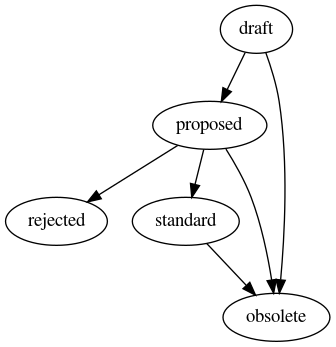
Once the discussion period has passed and no objection is raised, the
proposed RFC is adopted and becomes a standard.
If objections are raised and no solution is found, the proposal is
rejected.
Some policies can be completely overridden using the current policy
process, including this policy, in which case the old policy becomes
obsolete. Old, one-time decisions can also be marked as obsolete
when it's clear they do not need to be listed in the main policy
standards.
A policy can also be modified (instead of overridden by later
proposals or decisions taken in meetings, in which case it stays a
standard.
For TPA-RFC process changes, the older policy is modified only when
the new one becomes standard. For example, say TPA-RFC-X proposes
changes to a previous TPA-RFC-N proposal. In that case, the text of
TPA-RFC-N would be modified when and only if TPA-RFC-X is adopted
as a standard. The older TPA-RFC-N would also stay a standard,
although the newer TPA-RFC-X would actually become obsolete as
soon as the older TPA-RFC-N is modified.
Examples
Examples of ideas relevant for the RFC process:
- replacing Munin with Grafana and prometheus #29681
- setting default locale to C.UTF-8 #33042
- using Ganeti as a clustering solution
- using setup-storage as a disk formatting system
- setting up a loghost
- switching from syslog-ng to rsyslog
- changes to the RFC process
Counter examples:
- setting up a new Ganeti node (part of the roadmap)
- performing security updates (routine)
- picking a different hardware configuration for the new Ganeti node (process wasn't documented explicitly, we accept honest mistakes)
Examples of obsolete proposals:
- TPA-RFC-4: prometheus disk was marked as obsolete a while after the change was implemented.
Deadline
Considering that the proposal was discussed and informally approved at the February 2020 team meeting, this proposal will be adopted within one week unless an objection is raised, which is on 2020-02-14 20:00UTC.
References
This proposal is one of the takeaways anarcat got from reading the guide to distributed teams was the idea of using technical RFCs as a management tool.
This process is similar to the Network Team Meta Policy except it doesn't require a majority "+1" votes to go ahead. In other words, silence is consent.
This process is also similar to the RFC process discussed here which also introduces the idea of "the NABC model from Stanford [which defines] the Need, followed by Approach, Benefits, and lastly, Competitors" and could eventually be added to this policy.
Summary: to get help, open a ticket, ask on IRC for simple things, or send us an email for private things. TPA doesn't manage all services (service admin definition). Criterion for supported services and support levels.
Background
It is important to define how users get help from, what is an emergency for, and what is supported by the sysadmin team (AKA "TPA"). So far, only the former has been defined, rather informally, but has yet to be collectively agreed within the larger team.
This proposal aims to document the current situation and propose new support levels and a support policy that will provide clear guidelines and expectations for the various teams inside TPO.
This first emerged during an audit of the TPO infrastructure by anarcat in July 2019 (ticket 31243), itself taken from section 2 of the "ops report card", which is Are "the 3 empowering policies" defined and published? Those policies are defined as:
- How do users get help?
- What is an emergency?
- What is supported?
Which we translate in the following policy proposals:
- Support channels
- Support levels
- Supported services, which includes the service admins definition and how service transition between the teams (if at all)
Proposal
Support channels
Support requests and questions are encouraged to be documented and communicated to the team.
Those instructions concern mostly internal Tor matters. For users of Tor software, you will be better served by visiting support.torproject.org or mailing lists.
Quick question: chat
If you have "just a quick question" or some quick thing we can help
you with, ask us on IRC: you can find us in #tor-admin on
irc.oftc.net and in other tor channels.
It's possible we ask you to create a ticket if we're in a pinch. It's also a good way to bring your attention to some emergency or ticket that was filed elsewhere.
Bug reports, feature requests and others: issue tracker
Most requests and questions should go into the issue tracker, which is currently GitLab (direct link to a new ticket form). Try to find a good label describing the service you're having a problem with, but in doubt, just file the issue with as much details as you can.
You can also mark an issue as confidential, in which case only members of the team (and the larger "tpo" organisation on GitLab) will be able to read it. It is up to the submitter to decide whether an issue should be marked as confidential, but TPA might also mark tickets as confidential if they feel the information contained should not be public.
As a rule of thumb, privately identifiable information like IP
addresses, addresses, or email addresses should not be
public. Information relevant only to tor-internal should also be
handled only in confidential tickets.
Real-time support: office hours
Once a week, there's a 2 hours time slot when TPA work together in a videoconferencing platform (currently Big Blue Button, room https://tor.meet.coop/ana-ycw-rfj-k8j). Team members are encouraged (but don't have to) join to work together.
The space can be used for problems that cannot be easily worded, more controversial discussions that could just use a phone call to clear the air, audio tests, or just to hang out with the crew or say hi.
Some office hours might be reserved to some topics, for example "let's all test your audio!" If you have a particularly complex issue in a ticket, TPA might ask you to join the office hours for a debugging session as well.
The time slot is on Wednesday, 2 hours starting at 14:00 UTC, equivalent to 06:00 US/Pacific, 11:00 America/Sao_Paulo, 09:00 US/Eastern, 15:00 Europe/Amsterdam during normal hours. UTC is the reference time here, so local time will change according to daylight savings.
This is the two hours before the all hands, essentially.
Private question and fallback: email
If you want to discuss a sensitive matter that requires privacy or are unsure how to reach us, you can always write to us by email, at torproject-admin@torproject.org.
Support levels
We consider there are three "support levels" for problems that come up with services:
- code red: immediate emergency, fix ASAP
- code yellow: serious problem that doesn't require immediate attention but that could turn into a code red if nothing is down
- routine: file a bug report, we'll get to it soon!
We do not have 24/7 on-call support, so requests are processed during work times of available staff. We do try to provide continuous support as much as possible, but it's possible that some weekends or vacations are unattended for more than a day. This is the definition of a "business day".
The TPA team is currently small and there might be specific situations where a code RED might require more time than expected and as a organization we need to do an effort in understanding that.
Code red
A "code red" is a critical condition that requires immediate action. It's what we consider an "emergency". Our SLA for those is 24h business days, as defined above. Services qualifying for a code red are:
- incoming email and forwards
- main website
- donation website
Other services fall under "routine" or "code yellow" below, which can be upgraded in priority.
Examples of problems falling under code red include:
- website unreachable
- emails to torproject.org not reaching our server
Some problems fall under other teams and are not the responsibility of TPA, even if they can be otherwise considered a code red.
So, for example, those are not code reds for TPA:
- website has a major design problem rendering it unusable
- donation backend failing because of a problem in CiviCRM
- gmail refusing all email forwards
- encrypted mailing lists failures
- gitolite refuses connections
Code yellow
A "code yellow" is a situation where we are overwhelmed but there isn't exactly an immediate emergency to deal with. A good introduction is this SRECON19 presentation (slides). The basic idea is that a code yellow is a "problem [that] creeps up on you over time and suddenly the hole is so deep you can’t find the way out".
There's no clear timeline on when such a problem can be resolved. If the problem is serious enough, it may eventually be upgraded to a code red by the approval of a team lead after a week's delay, regardless of the affected service. In that case, a "hot fix" (some hack like throwing hardware at the problem) may be deployed instead of fixing the actual long term issue, in which case the problem becomes a code yellow again.
Examples of a code yellow include:
- Trac gets overwhelmed (ticket 29672)
- Gitweb performance problems (ticket 32133)
- upgrade metrics.tpo to buster in the hope of fixing broken graphs (ticket 32998)
Routine
Routine tasks are normal requests that are not an emergency and can be processed as part of the normal workflow.
Example of routine tasks include:
- account creation
- group access changes (i.e. update ACLs)
- email alias changes
- static web component changes
- examine disk usage warning
- security upgrades
- server reboots
- periodic upgrades:
- Jenkins (quarterly)
- LimeSurvey (at least whenever there's a security update)
- Weblate (periodicity currentlty undetermined)
- Debian (upgrade to new major versions)
- include/remove Tails mirrors operated by volunteers
- train the antispam system
- interface with upstream infrastructure providers
- process abuse reports
Triage
One member of TPA is assigned the "star of the week" every other week. The star is responsible for triage, which occurs in GitLab, as per the TPA-RFC-5: GitLab migration policy.
But the star also handles routine tasks and interruptions. In that sense, it acts as a "interruption shield" by taking care of small, distracting tasks to let others focus on more long-term projects.
In that sense, the star takes care of the above routine tasks like server reboots, security upgrades and spam runs. It is also expected to keep an eye on the monitoring system and organise incident response when a more serious issue occurs. It is NOT responsible for fixing all the issues and it is expected the star will assign work or ask for help in an emergency or if it is overwhelmed.
Each active TPA member should take triage for a one week rotation, in alphabetical order. For example, this currently means "anarcat, kez, lavamind", in order. We use nicknames instead of real name for sorting.
Supported services
Services supported by TPA must fulfill the following criteria:
- The software needs to have an active release cycle
- It needs to provide installation instructions, debugging procedures
- It needs to maintain a bug tracker and/or some means to contact upstream
- Debian GNU/Linux is the only supported operating system, and TPA supports only the "stable" and "oldstable" distributions, until the latter becomes EOL
- At least two person from the Tor community should be willing to help to maintain the service
Note that TPA does not support Debian LTS.
Also note that it is the responsibility of service admins (see below) to upgrade services not supported by TPA to keep up with the Debian release schedule.
Service admins
(Note: this section used to live in doc/admins and is the current "service admin" definition, mostly untouched.)
Within the admin team we have system admins (also known as sysadmins, TSA or TPA) and services admins. While the distinction between the two might seem blurry, the rule of thumb is that sysadmins do not maintain every service that we offer. Rather, they maintain the underlying computers -- make sure they get package updates, make sure they stay on the network, etc.
Then it's up to the service admins to deploy and maintain their services (onionoo, atlas, blog, etc) on top of those machines.
For example, "the blog is returning 503 errors" is probably the responsibility of a service admin, i.e. the blog service is experiencing a problem. Instead, "the blog doesn't ping" or "i cannot open a TCP connection" is a sysadmin thing, i.e. the machine running the blog service has an issue. More examples:
Sysadmin tasks:
- installing a Debian package
- deploy a firewall rule
- add a new user (or a group, or a user to a group, etc)
Service admin tasks:
- the donation site is not handling credit cards correctly
- a video on media.torproject.org is returning 403 because its permissions are wrong
- the check.tp.o web service crashed
Service adoption
The above distinction between sysadmins and service admins is often weak since Tor has trouble maintaining a large service admin team. There are instead core Tor people that are voluntarily responsible for a service, for a while.
If a service is important for the Tor community the sysadmin team might adopt it even when there aren't designated services admins.
In order for a service to be adopted by the sysadmin team, it needs to fulfill the criteria established for "Supported services" by TPA, above.
When a service is adopted by the sysadmin team, the sysadmins will make an estimation of costs and resources required to maintain the service over time. The documentation should follow the service documentation template.
There needs to be some commitment by individuals Tor project contributors and also by the project that the service will receive funding to keep it working.
Deadline
Policy was submitted to the team on 2020-06-03 and adopted by the team on 2020-06-10, at which point it was submitted to tor-internal for broader approval. It will be marked as "standard" on 2020-06-17 if there are no objections there.
References
- ticket 31243
- section 2 of the Ops report card
Summary: we try to restrict the number of tools users and sysadmins need to learn to operate in our environment. This policy documents which tools we use.
Background
A proliferation of tools can easily creep up into an organisation. By limiting the number of tools in use, we can keep training and documentation to a more reasonable size. There's also the off chance that someone might already know all or a large proportion the tools currently in use if the set is smaller and standard.
Proposal
This proposal formally defines which tools are used and offered by TPA for various things inside of TPO.
We try to have one and only one tool for certain services, but sometimes we have many. In that case, we try to deprecate one of the tools in favor of the other.
Scope
This applies to services provided by TPA, but not necessarily to all services available inside TPO. Service admins, for example, might make different decisions than the ones described here for practical reasons.
Tools list
This list consists of the known policies we currently have established.
- version control: git, gitolite
- operating system: Debian packages (official, backports, third-party and TPA)
- host installation: debootstrap, FAI
- ad-hoc tools: SSH, Cumin
- directory servers: OpenLDAP, BIND, ud-ldap, Hiera
- authentication servers: OpenLDAP, ud-ldap
- time synchronisation: NTP (
ntpDebian package, from ntp.org) - Network File Servers: DRBD
- File Replication Servers: static mirror system
- Client File Access: N/A
- Client OS Update: unattended-upgrades, needrestart
- Client Configuration Management: Puppet
- Client Application Management: Debian packages, systemd
lingering, cron
@reboottargets (deprecated) - Mail: SMTP/Postfix, Mailman, ud-ldap, dovecot (on gitlab)
- Printing: N/A
- Monitoring: syslog-ng central host, Prometheus, Grafana, no paging
- password management: pwstore
- help desk: Trac, email, IRC
- backup services: bacula, postgresql hot sync
- web services: Apache, Nginx, Varnish (deprecated), haproxy (deprecated)
- documentation: ikiwiki, Trac wiki
- datacenters: Hetzner cloud, Hetzner robot, Cymru, Sunet, Linaro, Scaleway (deprecated)
- Programming languages: Python, Perl (deprecated), shell (for short programs), also in use at Tor: Ruby, Java, Golang, Rust, C, PHP, Haskell, Puppet, Ansible, YAML, JSON, XML, CSV
TODO
- figure out scope... list has grown big already
- are server specs part of this list?
- software raid?
- add Gitlab issues to help desk, deprecate Trac
- add Fabric to host installs and ad-hoc tools
- consider Gitlab wiki as a ikiwiki replacement?
- add RT to help desk?
Examples
- all changes to servers should be performed through Puppet, as much as possible...
- ... except for services not managed by TPA ("service admin stuff"), which can be deployed by hand, Ansible, or any other tool
References
Drafting this policy was inspired by the limiting tool dev choices blog post from Chris Siebenmann from the University of Toronto Computer Science department.
The tool classification is a variation of the http://www.infrastructures.org/ checklist, with item 2 changed from "Gold Server" to "Operating System". The naming change is rather dubious, but I felt that "Gold Server" didn't really apply anymore in the context of configuration management tools like Puppet (which is documented in item 13). Debian is a fundamental tool at Tor and it feels critical to put it first and ahead of everything else, because it's one thing that we rely on heavily. It also does somewhat acts as a "Gold Server" in that it's a static repository of binary code. We also do not have uniform "Client file access" (item 10) and "Printing" (item 16). Item 18 ("Password management") was also added.
Our Prometheus monitoring server is running out of space again. 6 months ago, we bumped it to 80GB in the hope that it would be enough to cover for a year of samples, but that turned out to be underestimated by about 25%, and we're going to run out of space in a month if we don't take action.
I would like to propose to increase this by another 80GB, which would cost 7EUR/mth. We have room in our discretionary budget for such an eventuality.
This proposal is done in the spirit of our RFC policy:
https://gitlab.torproject.org/anarcat/wikitest/-/wikis/policy/tpa-rfc-1-policy/
Deadline
Given that we will run out of space in 11 days if no action is taken, I propose a 7 days deadline for this proposal, which I will enact next tuesday if no one objects.
title: "TPA-RFC-5: GitLab migration" costs: staff approval: TPA affected users: TPA deadline: 2020-06-18 status: superseded by ADR-0104: GitLab issue tracking discussion: https://bugs.torproject.org/34437
Summary: the TPA team will migrate its bugtracker and wiki to GitLab, using Kanban as a planning tool.
Background
TPA has a number of tools at its disposal for documentation and project tracking. We currently use email, Trac and ikiwiki. Trac will be shutdown by the end of the week (at the time of writing) so it's time to consider other options.
Proposal
This document proposes to switch to GitLab to track issues and project management. It also suggests converting from ikiwiki to GitLab wiki in the mid- to long-term.
Scope
The scope of this proposal is only within the Tor sysadmin team (TPA) but could serve as a model for other teams stuck in a similar situation.
This does not cover migration of Git repositories which remain hosted under gitolite for this phase of the GitLab migration.
Tickets: GitLab issues
As part of the grand GitLab migration, Trac will be put read-only and we will no longer be able to track our issues there. Starting with the GitLab migration, all issues should be submitted and modified on GitLab, not Trac.
Even though it is technically possible for TPA members to bypass the readonly lock on Trac, this exception will not be done. We also wish to turn off this service and do not want to have two sources of truth!
Issues will be separated by sub-projects under the tpo/tpa GitLab
group, with one project per Trac component. But new sub-projects could
eventually be created for specific projects.
Roadmap: GitLab boards
One thing missing from GitLab is the equivalent of the Trac inline reports. We use those to organise our monthly roadmap within the team.
There are two possible alternatives for this. We could use the GitLab "milestones" feature designed to track software releases. But it is felt we do not really issue "releases" of our software, since we have too many moving parts to cohesively release those as a whole.
Instead, it is suggested we adopt the Kanban development strategy which is implemented in GitLab as issue boards.
Triage
Issues first land into a queue (Open), then get assigned to
a specific queue as the ticket gets planned.
We use the ~Icebox, ~Backlog, ~Next, and ~Doing of the global
"TPO" group board labels. With the Open and Closed queues, this
gives us the following policy:
Open: un-triaged ticket- ~Icebox: ticket that is stalled, but triaged
- ~Backlog: planned work for the "next" iteration (e.g. "next month")
- ~Next: work to be done in the current iteration or "sprint" (e.g. currently a month, so "this month")
- ~Doing: work being done right now (generally during the day or week)
Closed: completed work
That list can be adjusted in the future without formally reviewing this policy.
The Open board should ideally be always empty: as soon as a ticket
is there, it should be processed into some other queue. If the work
needs to be done urgently, it can be moved into the ~Doing queue, if
not, it will typically go into the ~Next or ~Backlog queues.
Tickets should not stay in the ~Next or ~Doing queues for long and
should instead actively be closed or moved back into the ~Icebox or
~Backlog board. Tickets should not be moved back to the Open
board once they have been triaged.
Tickets moved to the ~Next and ~Doing queues should normally be assigned to a person. The person doing triage should make sure the assignee has availability to process the ticket before assigning.
Items in a specific queue can be prioritized in the dashboard by
dragging items up and down. Items on top should be done before items
at the bottom. When created in the Open queue, tickets are processed
in FIFO (First In, First Out) order, but order in the other queues is
typically managed manually.
Triage should happen at least once a week. The person responsible for triage should be documented in the topic of the IRC channel and rotate every other week.
Documentation: GitLab wiki
We are currently using ikiwiki to host our documentation. That has served us well so far: it's available as a static site in the static mirror system and allows all sysadmins to have a static, offsite copy of the documentation when everything is down.
But ikiwiki is showing its age. it's an old program written in Perl, difficult to theme and not very welcoming to new users. for example, it's impossible for a user unfamiliar with git to contribute to the documentation. It also has its own unique Markdown dialect that is not used anywhere else. and while Markdown itself is not standardized and has lots of such dialects, there is /some/ convergence around CommonMark and GFM (GitHub's markdown) as de-facto standards at least, which ikiwiki still has to catchup with. It also has powerful macros which are nice to make complex websites, but do not render in the offline documentation, making us dependent on the rendered copy (as opposed to setting up client-side tools to peruse the documentation).
GitLab wikis, in contrast, have a web interface to edit pages. It doesn't have the macros ikiwiki has, but that's nothing a few commandline hacks can't fix... or at least we should consider it. They don't have macros or any more powerful features that ikiwiki has, but maybe that's exactly what we want.
Deadline
The migration to GitLab issues has already been adopted in the June TPA meeting.
The rest of this proposal will be adopted in one week unless there are any objections (2020-06-18).
Note that the issue migration will be actually done during the GitLab migration itself, but the wiki and kanban migration do not have an established timeline and this proposal does not enforce one.
References
- old ikiwiki
- new TPA group
- GitLab wiki migration issue 34437
- GitLab upstream documentation:
- Wikipedia article about Kanban development
- No bullshit article about issue trackers which inspired the switch to Kanban
- TPA-RFC-19: GitLab labels: policy on service-specific labels
Summary: naming things is hard, but should at least be consistent. This policy documents how domain names are used, how to name machines, services, networks and might eventually document IP addressing as well.
Domain names
Tor uses two main domain names for things:
torproject.orgtorproject.net
There might be other domains managed by us or registered in the DNS,
but they should eventually point to one of those, generally
torproject.org. Exceptions to this rule are the Tails nodes, which have
their own naming scheme.
All TPA-managed machines and services on those machines should be
under torproject.org. The naming scheme of the individual machines
is detailed below. This is managed by TPA directly through
service/dns.
External services and machines can be hosted under
torproject.net. In that case, the only association is a CNAME or
A record pointing to the other machine. To get such a record,
contact TPA using the normal communication channels detailed in
support.
Machine names
There are multiple naming schemes in use:
- onion species
- role-based
- location-based
- Tails names
We are trying to phase out the onion-based names, in favor of more descriptive names. It kind of takes the soul out of the infrastructure, but it makes things much easier to figure out for newcomers. It also scales better.
Onion species
Note that this naming scheme is deprecated. Favor role-based names, see below.
Wikipedia list of onion species, preferably picking a first letter matching purpose (e.g. "m" for monitoring, "b" for backups, "p" for puppet) and ideally not overlapping with existing machines at debian.org in the first three letters or at least the short hostname part
Example: monticola.torproject.org was picked as a "monitoring" ("mon") server to run the experimental Prometheus server. no machine is named "monticola" at Debian.org and no machine has "mon" or smaller as its first three letters there either.
Roles
Another naming scheme is role-ID, where:
roleis what the server is for, for examplegitlab,monfor monitoring,crm, etc. try to keep it short and abbreviate to at most three letters if role is longer than five.rolemight have a dash (-) in it to describe the service better (crm-extvscrm-int)IDis a two-character number, padded with zero, starting from one, to distinguish between multiple instances of the same server (e.g.mon-01,mon-02)
Some machines do include a location name, when their location is
actually at least as important as their function. For example, the
Ganeti clusters are named like gnt-LOC where LOC is the location
(example, gnt-fsn is in Falkenstein, Germany). Nodes inside the
cluster are named LOC-node-ID (e.g. fsn-node-01 for the first
Ganeti node in the gnt-fsn cluster).
Other servers may be named using that convention, for example,
dal-rescue-01 is a rescue box hosted near the gnt-dal cluster.
Location
Note that this naming scheme is deprecated. Favor role-based names, see above.
Another naming scheme used for virtual machines is hoster-locN-ID
(example hetzner-hel1-01), where:
hoster: is the hosting provider (examplehetzner)locN: is the three-letter code of the city where the machine is located, followed by a digit in case there are multiple locations in the same city (e.g.hel1)ID: is an two-character number, padded with zero, starting from one, to distinguish multiple instances at the same location
This is used for virtual machines at Hetzner that are bound to a specific location.
Tails names
Tails machines were inherited by TPA on mid-2024 and their naming scheme was kept as-is. We currently don't have plans to rename them, but we may give preference to the role-based naming scheme when possible (for example, when installing new servers or VMs for Tails).
Tails machines are named as such:
- Physical machines are named after reptiles and use the
tails.netTLD (eg.chameleon.tails.net,lizard.tails.net, etc). - VMs are names after their role and use the physical machine hostname as their
(internal) TLD (eg.
mta.chameleon,www.lizard, etc).
Network names
Networks also have names. The network names are used in reverse DNS to designate network, gateway and broadcast addresses, but also in service/ganeti, where networks are managed automatically for virtual machines.
Future networks should be named FUN-LOCNN-ID (example
gnt-fsn13-02) where:
FUNis the function (e.g.gntfor service/ganeti)LOCNNis the location (e.g.fsn13for Falkenstein)IDis a two-character number, padded with zero, starting from one, to distinguish multiple instances at the same function/location pair
The first network was named gnt-fsn, for Ganeti in the Falkenstein datacenter. That naming convention is considered a legacy exception
and should not be reused. It might be changed in the future.
Deadline
Considering this documentation has been present in the wiki for a while, it is already considered adopted. The change to deprecate the location and onions names was informally adopted some time in 2020.
References
- RFC1178: "Choosing a Name for Your Computer", August 1990
- RFC2100: "The Naming of Hosts", 1 April 1997
- Wikipedia: Computer network naming scheme
- https://namingschemes.com/
- Another naming scheme
- Location code names from the UN
Summary: who should get administrator privileges, where, how and when? How do those get revoked?
Background
Administrator privileges on TPO servers is reserved to a small group, currently the "members of TPA", a loose group of sysadmins with no clearly defined admission or exit rules.
There are multiple possible access levels, often conflated:
rooton servers: user has access to therootuser on some or all UNIX servers, either because they know the password, or have their SSH keys authorized to the root user (through Puppet, in theprofile::admins::keysHiera field)sudoto root: user has access to therootuser throughsudo, using theirsudoPassworddefined in LDAP. Puppet access: by virtue of being able to push to the Puppet git repository, an admin necessarily getsrootaccess everywhere, because Puppet runs as root everywhere- LDAP admin: a user member of the
admgroup in LDAP also gets access everywhere throughsudo, but also through being able to impersonate or modify other users in LDAP (although that requires shell access to the LDAP server, which normally requires root) - password manager access: a user's OpenPGP encryption key is added
to the
tor-passwords.gitrepository, which grants access to various administrative sites, root passwords and cryptographic keys
This approach is currently all-or-nothing: either a user has access to all of the above, or nothing. That list might not be exhaustive. It certainly does not include the service admin access level.
The current list of known administrators is:
- anarcat
- groente
- lavamind
- lelutin
- zen
This is not the canonical location of that list. Effectively, the
reference for this is the tor-passwords.git encryption as it grants
access to everything else.
Unless otherwise mentioned, those users have all the access mentioned above.
Note that this list might be out of date with the current status, which is maintained in the
tor-puppet.gitrepository, inhiera/common/authorized_keys.yaml. The password manager also has a similar access list. The three lists must be kept in sync, and this page should be regularly updated to reflect such changes.
Another issue that currently happens is the problems service admins (which do not have root access) have in managing some services. In particular, Schleuder and GitLab service admins have had trouble debugging problems with their service because they do not have the necessary access levels to restart their service, edit configuration file or install packages.
Proposal
This proposal aims at clarifying the current policy, but also introduces an exception for service admins to be able to become root on the servers they manage (and only those). It also tries to define a security policy for access tokens, as well as admission and revocation policies.
In general, the spirit of the proposal is to bring more flexibility with what changes we allow on servers to the TPA team. We want to help teams host their servers with us but that also comes with the understanding that we need the capacity (in terms of staff and hardware resources) to do so as well.
Scope
This policy complements the Tor Core Membership policy but concerns only membership to the TPA team and access to servers.
Access levels
Members of TPA SHOULD have all access levels defined above.
Service admins MAY have some access to some servers. In general, they
MUST have sudo access to a role account to manage their own
service. They MAY be granted LIMITED root access (through sudo)
only on the server(s) which host their service, but this should be
granted only if there are no other technical way to implement the
service.
In general, service admins SHOULD use their root access in
"read-only" mode for debugging, as much as possible. Any "write"
changes MUST be documented, either in a ticket or in an email to the
TPA team (if the ticket system is down). Common problems and their
resolutions SHOULD be documented in the service documentation
page.
Service admins are responsible for any breakage they cause to systems while they use elevated privileges.
Security
Service admins SHOULD take extreme care with private keys: authentication keys (like SSH keys or OpenPGP encryption keys) MUST be password-protected and ideally SHOULD reside on hardware tokens, or at least SHOULD be stored offline.
Members of TPA MUST adhere to the TPA-RFC-18: security policy.
Admission and revocation
Service admins and system administrators are granted access through a vetting process by which an existing administrator requests access for the new administrator. This is currently done by opening a ticket in the issue tracker with an OpenPGP-signed message, but that is considered an implementation detail as far as this procedure is concerned.
A service admin or system administrator MUST be part of the "Core team" as defined by the Tor Core Membership policy to keep their privileges.
Access revocation should follow the termination procedures in the Tor Core Membership policy, which, at the time of writing, establish three methods for ending the membership:
- voluntary: members can resign by sending an email to the team
- inactivity: members accesses can be revoked after 6 months of inactivity, after consent from the member or a decision of the community team
- involuntary: a member can be expelled following a decision of the community team and membership status can be temporarily revoked in the case of a serious problem while the community team makes a decision
Examples
- ahf should have root access on the GitLab server, which would have helped diagnosing the problem following the 13.5 upgrade
- the
onionperfservices were setup outside of TPA because they required customiptablesrules, which wasn't allowed before but would be allowed under this policy: TPA would deploy the requested rule or, if they were dynamic, allow write access to the configuration somehow
Counter examples
- service admins MUST NOT be granted root access on all servers
- dgoulet should have root access on the Schleuder server but cannot have it right now because Schleuder is on a server that also hosts the main email and mailing lists services
- service admins do not need root access to the monitoring server to have their services monitored: they can ask TPA to setup a scrape or we can configure a server which would allow collaboration on the monitoring configuration (issue 40089)
Addendum
We want to acknowledge that the policy of retiring inactive users has the side effect of penalizing volunteers in the team. This is an undesirable and unwanted side-effect of this policy, but not one we know how to operate otherwise.
We also realize that it's a good thing to purge inactive accounts, especially for critical accesses like root, so we are keeping this policy as is. See the discussion in issue #41962.
Summary: create two bare metal servers to deploy Windows and Mac OS runners for GitLab CI, using libvirt.
Background
Normally, we try to limit the number of tools we use inside TPA (see TPA-RFC-3: tools). We are currently phasing out the use of libvirt in favor of Ganeti, so new virtual machines deployments should normally use Ganeti on all new services.
GitLab CI (Continuous Integration) is currently at the testing stages on our GitLab deployment. We have Docker-based "shared" runners provided by the F-Droid community which can be used by projects on GitLab, but those only provide a Linux environment. Those environments are used by various teams, but for Windows and Mac OS builds, commercial services are used instead. By the end of 2020, those services will either require payment (Travis CI) or are extremely slow (Appveyor) and so won't be usable anymore.
Travis CI, in particular, has deployed a new "points" system that basically allows teams to run at most 4 builds per month, which is really not practical and therefore breaks MacOS builds for tor. Appveyor is hard to configure, slow and is a third party we would like to avoid.
Proposal
GitLab CI provides a custom executor which allows operators to run arbitrary commands to setup the build environment. @ahf figured out a way to use libvirt to deploy Mac OS and Windows virtual machines on the fly.
The proposal is therefore to build two (bare metal) machines (in the
Cymru cluster) to manage those runners. The machines would grant the
GitLab runner (and also ahf) access to the libvirt environment
(through a role user).
ahf would be responsible for creating the base image and deploying the first machine, documenting every step of the way in the TPA wiki. The second machine would be built with Puppet, using those instructions, so that the first machine can be rebuilt or replaced. Once the second machine is built, the first machine should be destroyed and rebuilt, unless we are absolutely confident the machines are identical.
Scope
The use of libvirt is still discouraged by TPA, in order to avoid the cognitive load of learning multiple virtualization environments. We would rather see a Ganeti-based custom executor, but it is considered to be too time-prohibitive to implement this at the current stage, considering the Travis CI changes are going live at the end of December.
This should not grant @ahf root access to the servers, but, as per TPA-RFC-7: root access, this might be considered, if absolutely necessary.
Deadline
Given the current time constraints, this proposal will be adopted urgently, by Monday December 7th.
References
title: "TPA-RFC-9: "proposed" status and small process changes" deadline: 2020-12-17 status: obsolete
Summary: add a proposed state to the TPA-RFC process, clarify the
modification workflow, the obsolete state, and state changes.
Background
The TPA-RFC-1 policy established a workflow to bring
proposals inside the team, but doesn't clearly distinguish between a
proposal that's currently being written (a draft) and a proposal
that's actually been proposed (also a draft right now).
Also, it's not clear how existing proposal can be easily changed without having too many "standards" that pile up on top of each other. For example, this proposal is technically necessary to change TPA-RFC-1, yet if the old process was followed, it would remain "standard" forever. A more logical state would be "obsolete" as soon as it is adopted, and the relevant changes be made directly in the original proposal.
The original idea of this process was to keep the text of the original RFC static and never-changing. In practice, this is really annoying: it means duplicating the RFCs and changing identifiers all the time. Back when the original RFC process was established by the IETF, that made sense: there was no version control and duplicating proposal made sense. But now it seems like a better idea to allow a bit more flexibility in that regard.
Proposal
- introduce a new
proposedstate into TPA-RFC-1, which is the next state afterdraft. a RFC gets into theproposedstate when it is officially communicated to other team members, with a deadline - allow previous RFCs to be modified explicitly, and make the status of the modifying RFC be "obsolete" as soon as it is adopted
- make a nice graph of the state transitions
- be more generous with the
obsoletestate: implemented decisions might be marked as obsolete when it's no longer relevant to keep them as a running policy
Scope
This only affects workflow of proposals inside TPA and obsessive-compulsive process nerds.
Actual proposed diff
modified policy/tpa-rfc-1-policy.md
@@ -70,12 +70,12 @@ and a unique, incremental number. This proposal, for example, is
## Process
-When the proposal is first written and the notification is sent, the
-proposal is considered a `draft`. It then enters a discussion period
-during which changes can be proposed and objections can be
-raised. That period ranges from 2 business days and two weeks and is
-picked in good faith by the proposer based on the urgency of the
-changes proposed.
+When the proposal is first written, the proposal is considered a
+`draft`. When a notification is sent, the proposal is in the
+`proposed` state and then enters a discussion period during which
+changes can be proposed and objections can be raised. That period
+ranges from 2 business days and two weeks and is picked in good faith
+by the proposer based on the urgency of the changes proposed.
Objections must be formulated constructively and justified with
reasonable technical or social explanations. The goal of this step is
@@ -91,26 +91,38 @@ mitigate those problems.
A proposal is in any of the following states:
1. `draft`
+ 2. `proposed`
2. `standard`
3. `rejected`
4. `obsolete`
+Here is a graph of the possible state transitions:
+
+\
+
Once the discussion period has passed and no objection is raised, the
-`draft` is adopted and becomes a `standard`.
+`proposed` RFC is adopted and becomes a `standard`.
If objections are raised and no solution is found, the proposal is
`rejected`.
Some policies can be completely overridden using the current policy
process, including this policy, in which case the old policy because
-`obsolete`.
-
-Note that a policy can be modified by later proposals. The older
-policy is modified only when the new one becomes `standard`. For
-example, say `TPA-RFC-X` proposes changes to a previous `TPA-RFC-N`
-proposal. In that case, the text of `TPA-RFC-N` would be modified when
-and only if `TPA-RFC-X` becomes a `standard`. The older `TPA-RFC-N`
-would also stay a `standard`.
+`obsolete`. Old, one-time decisions can also be marked as `obsolete`
+when it's clear they do not need to be listed in the main policy
+standards.
+
+A policy can also be **modified** (instead of **overridden** by later
+proposals or decisions taking in meetings, in which case it stays a
+`standard`.
+
+For TPA-RFC process changes, the older policy is modified only when
+the new one becomes `standard`. For example, say `TPA-RFC-X` proposes
+changes to a previous `TPA-RFC-N` proposal. In that case, the text of
+`TPA-RFC-N` would be modified when and only if `TPA-RFC-X` is adopted
+as a `standard`. The older `TPA-RFC-N` would also stay a `standard`,
+although the *newer* `TPA-RFC-X` would actually become `obsolete` as
+soon as the older `TPA-RFC-N` is modified.
# Examples
@@ -134,6 +146,12 @@ Counter examples:
* picking a different hardware configuration for the new ganeti node
(process wasn't documented explicitly, we accept honest mistakes)
+Examples of obsolete proposals:
+
+ * [TPA-RFC-4: prometheus disk](../tpa-rfc-4-prometheus-disk.md) was marked as obsolete a while
+ after the change was implemented.
+
+
# Deadline
Considering that the proposal was discussed and informally approved at
Workflow graph
The workflow graph will also be attached to TPA-RFC-1.
Examples
Examples:
- TPA-RFC-4: prometheus disk was marked as obsolete when the change was implemented.
- this proposal will be marked as obsolete as soon as the changes are implemented in TPA-RFC-1
- this proposal would be in the
proposedstate if it was already adopted
References
Summary: Jenkins will be retired in 2021, replaced by GitLab CI, with special hooks to keep the static site mirror system and Debian package builds operational. Non-critical websites (e.g. documentation) will be built by GitLab CI and served by GitLab pages. Critical websites (e.g. main website) will be built by GitLab CI and served by the static mirror system. Teams are responsible for migrating their jobs, with assistance from TPA, by the end of the year (December 1st 2021).
Background
Jenkins was a fine piece of software when it came out: builds! We can easily do builds! On multiple machines too! And a nice web interface with weird blue balls! It was great. But then Travis CI came along, and then GitLab CI, and then GitHub actions, and it turns out it's much, much easier and intuitive to delegate the build configuration to the project as opposed to keeping it in the CI system.
The design of Jenkins, in other words, feels dated now. It imposes an unnecessary burden on the service admins, which are responsible for configuring and monitoring builds for their users. Introducing a job (particularly a static website job) involves committing to four different git repositories, an error-prone process that rarely works on the first try.
The scripts used to build Jenkins has some technical debt: there's at least one Python script that may or may not have been ported to Python 3. There are, as far as we know, no other emergencies in the maintenance of this system.
In the short term, Jenkins can keep doing what it does, but in the long term, we would greatly benefit from retiring yet another service, since it basically duplicates what GitLab CI already does.
Note that the 2020 user survey also had a few voices suggesting that Jenkins be retired in favor of GitLab CI. Some users also expressed "sadness" with the Jenkins service. Those results were the main driver behind this proposal.
Goals
The goal of this migration is to retire the Jenkins service and
servers (henryi but also the multiple build-$ARCH-$NN servers)
with minimal disruption to its users.
Must have
- continuous integration: run unit tests after a push to a git repository
- continuous deployment of static websites: build and upload static websites, to the existing static mirror system, or to GitLab pages for less critical sites
Nice to have
- retire all the existing
build-$ARCH-$NNmachines in favor of the GitLab CI runners architecture
Non-Goals
- retiring the gitolite / gitweb infrastructure is out of scope, even though it is planned as part of the 2021 roadmap. therefore solutions here should not rely too much on gitolite-specific features or hooks
- replacing the current static mirror system is out of scope, and is not planned in the 2021 roadmap at all, so the solution proposed must still be somewhat compatible with the static site mirror system
Proposal
Replacing Jenkins will be done progressively, over the course of 2021, by the different Jenkins users themselves. TPA will coordinate the effort and progressively remove jobs from the Jenkins configuration until none remain, at which point the server -- along with the build boxes -- will be retired.
No archive of the service will be kept.
GitLab Ci as main option, and alternatives
GitLab will be suggested as an alternative for Jenkins users, but users will be free to implement their own build system in other ways if they do not feel GitLab CI is a good fit for their purpose.
In particular, GitLab has a powerful web hook system that can be used to trigger builds on other infrastructure. Alternatively, external build systems could periodically pull Git repositories for changes.
Stakeholders and responsibilities
We know of the following teams currently using Jenkins and affected by this:
- web team: virtually all websites are built in Jenkins, and heavily depend on the static site mirror for proper performance
- network team: the core tor project is also a heavy user of Jenkins, mostly to run tests and checks, but also producing some artefacts (Debian packages and documentation)
- TPA: uses Jenkins to build the status website
- metrics team: onionperf's documentation is built in Jenkins
When this proposal is adopted, a ticket will be created to track all the jobs configured in Jenkins and each team will be responsible to migrate their jobs before the deadline. It is not up to TPA to rebuild those pipelines, as this would be too time-consuming and would require too much domain-specific knowledge. Besides, it's important that teams become familiar with the GitLab CI system so this is a good opportunity to do so.
A more detailed analysis of the jobs currently configured in Jenkins is available in the Configured Jobs section of the Jenkins service documentation.
Specific job recommendations
With the above in mind, here are some recommendation on specific group of jobs currently configured on the Jenkins server and how they could be migrated to the GitLab CI infrastructure.
Some jobs will be harder to migrate than others, so a piecemeal approach will be used.
Here's a breakdown by job type, from easiest to hardest:
Non-critical websites
Non-critical websites should be moved to GitLab Pages. A redirect in the static mirror system should ensure link continuity until GitLab pages is capable of hosting its own CNAMEs (or it could be fixed to do so, but that is optional).
Proof-of-concept jobs have already been done for this. the
status.torproject.org site has a pipeline that publishes a GitLab
pages, for example, under:
https://tpo.pages.torproject.net/tpa/status-site/
The GitLab pages domain may still change in the future and should not be relied upon just yet.
Linux CI tests
Test suites running on Linux machines should be progressively migrated to GitLab CI. Hopefully this should be a fairly low-hanging fruit, and that effort has already started, with jobs already running in GitLab CI with a Docker-based runner.
Windows CI tests
GitLab CI will eventually gain Windows (and Mac!) based runners (see issue 40095) which should be able to replace the Windows CI jobs from Jenkins.
Critical website builds
Critical websites should be built by GitLab CI just like non-critical sites, but must be pushed to the static mirror system somehow. The GitLab Pages data source (currently the main GitLab server) should be used as a "static source" which would get triggered by a GitLab web hook after a successful job.
The receiving end of that web hook would be a new service, also running on the GitLab Pages data source, which would receive hook notifications and trigger the relevant static component updates to rsync the files to the static mirror system.
As an exception to the "users migrate their own jobs" rule, TPA and the web team will jointly oversee the implementation of the integration between GitLab CI and the static mirror system. Considering the complexity of both systems, it is unlikely the web team or TPA will be in a position to individually implement this solution.
Debian package builds
Debian packages pose a challenge similar to the critical website
builds in that there is existing infrastructure, external to GitLab,
which we need to talk with. In this case, it's the
https://deb.torproject.org server (currently palmeri).
There are two possible solutions:
-
build packages in GitLab CI and reuse the "critical website webhook" discussed above to trigger uploads of the artifact to the Debian archive from outside GitLab
-
build packages on another system, triggered using a new web hook
Update: see ticket 40241 for followup.
Retirement checklist
Concretely, the following will be removed on retirement:
-
windows build boxes retirement (VMs starting with
w*,weissi,woronowii,winklerianum,Windows buildboxpurpose in LDAP) -
Linux build boxes retirement (
build-$ARCH-$NN.torproject.org,build boxpurpose in LDAP) -
NAT box retirement (
nat-fsn-01.torproject.org) -
Jenkins box retirement (
rouyi.torproject.org) - Puppet code cleanup (retire buildbox and Jenkins code)
- git code cleanup (archive Jenkins repositories)
Update: follow ticket 40218 for progress.
Examples
Examples:
- the network team is migrating their CI jobs to GitLab CI
- the https://research.torproject.org/ site would end up as a GitLab pages site
- the https://www.torproject.org/ site -- and all current Lektor sites -- would stay in the static mirror system, but would be built in GitLab CI
- a new Lektor site may not necessarily be hosted in the static mirror system, if it's non-critical, it just happens that the current set of Lektor sites are all considered critical
Deadline
This proposal will be adopted by TPA by March 9th unless there are any objections. It will be proposed to tor-internal after TPA's adoption, where it will be adopted (or rejected) on April 15th unless there are any objections.
All Jenkins jobs SHOULD be migrated to other services by the end of 2021. The Jenkins server itself will be shut down on December 1st, unless a major problem comes up, in which case extra delays could be given for teams.
References
See the GitLab, GitLab CI, and Jenkins service documentation for more background on how Jenkins and GitLab CI work.
Discussions and feedback on this RFC can be sent in issue 40167.
Summary: SVN will be retired by the end of 2021, in favor of Nextcloud.
Background
SVN (short for Subversion) is a version control system that is currently used inside the Tor Project to manage private files like contacts, accounting data, forms. It was also previously used to host source code but that has all been archived and generally migrated to the git service.
Issues to be addressed
The SVN server (called gayi) is not very well maintained, and has
too few service admins (if any? TBD) to be considered
well-maintained. Its retirement has been explicitly called for many
times over the years:
- 2012: migrate SVN to git
- 2015: shut down SVN... by 2016, no explicit solution proposed
- 2015: move to Sparkleshare
- 2019: move to Nextcloud
- 2020: user survey (3% of respondents want to retire SVN)
An audit of the SVN server has documented the overly complex access control mechanisms of the server as well.
For all those reasons, the TPA team wishes to retire the SVN server, as was proposed (and adopted) in the 2021 roadmap.
Possible replacements
Many replacement services are considered for SVN:
- git or GitLab: GitLab has private repositories and wikis, but it is generally considered that its attack surface is too broad for private content, and besides, it is probably not usable enough compared to the WebDAV/SVN interface currently in use
- Nextcloud: may solve usability requirements, may have privacy concerns (ie. who is a Nextcloud admin?)
- Google Docs: currently in use for some document writing because of limitation of the Nextcloud collaborative editor
- Granthub: currently in use for grant writing?
Requirements
In issue 32273, a set of requirements was proposed:
- permanence - there should be backups and no data loss in the event of an attack or hardware failure
- archival - old data should eventually be pruned, for example personal information about past employees should not be kept forever, financial records can be destroyed after some legal limit, etc.
- privilege separation - some of the stuff is private from the public, or even to tor-internal members. we need to clearly define what those boundaries are and are strongly they need to be (e.g. are Nextcloud access controls? sufficient? can we put stuff on Google Docs? what about share.riseup.net or pad.riseup.net? etc)
Proposal
The proposal is to retire the SVN service by December 1st 2021. All documents hosted on the server shall be migrated to another service before that date.
TPA suggests SVN users adopt Nextcloud as the replacement platform, but other platforms may be used as deemed fit by the users. Users are strongly encouraged to consult with TPA before picking alternate platforms.
Nextcloud access controls
A key aspect of the SVN replacement is the access controls over the sensitive data hosted there. The current access control mechanisms could be replicated, to a certain extent, but probably without the web-server layer: Nextcloud, for example, would be responsible for authentication and not Apache itself.
The proposed access controls would include the following stakeholders:
- "Share link": documents can be shared publicly if a user with access publish the document with the "Share link" feature, otherwise a user needs to have an account on the Nextcloud server to get access to any document.
- Group and user sharing: documents can be shared with one or many users or groups
- Nextcloud administrators: they can add and remove members to groups and can add or remove groups, those are (currently) anarcat, gaba, hiro, linus, and micah.
- Sysadmins: Riseup networks manages the virtual server and the Nextcloud installation and has all accesses to the server.
The attack surface might be reduced (or at least shifted) by hosting the Nextcloud instance inside TPA.
Another option might be to use Nextcloud desktop client which supports client-side encryption, or use another client-side encryption program. OpenPGP, for example, is broadly used inside the Tor Project and could be used to encrypt files before they are sent to the server. OpenPGP programs typically suffer from serious usability flaws which may make this impractical.
Authentication improvements
One major improvement between the legacy SVN authentication system and Nextcloud is that the latter supports state of the art two-factor authentication (2FA, specifically U2F) which allows authentication with physical security tokens like the Yubikey.
Another improvement is that Nextcloud delegates the access controls to non-technical users: instead of relying solely on sysadmins (which have access anyways) to grant access, non-sysadmin users can be granted administrator access and respond to authorization requests, possibly more swiftly than our busy sysadmins. This also enables more transparency and a better representation of the actual business logic (e.g. the executive director has the authority) instead of technical logic (e.g. the system administrator has the authority).
This also implies that Nextcloud is more transparent than the current SVN implementation: it's easy for an administrator to see who has access to what in Nextcloud, whereas that required a lengthy, complex, and possibly inaccurate audit to figure out the same in SVN.
Usability improvements
Nextcloud should be easier to use than SVN. While both Nextcloud and SVN have desktop applications for Windows, Linux and MacOS, Nextcloud also offers iOS (iphone) and Android apps, alongside a much more powerful and intuitive web interface that can basically be used everywhere.
Nextcloud, like SVN, also supports the WebDAV standard, which allows for file transfers across a wide variety of clients and platforms.
Migration process
SVN users would be responsible for migrating their content out of the server. Data that would not be migrated would be lost forever, after an extended retirement timeline, detailed below.
Timeline
- November 1st 2021: reminder sent to SVN users to move their data out.
- December 1st 2021: SVN server (
gayi) retired with an extra 60 days retention period (ie. the server can be restarted easily for 2 months) - ~February 1st 2022: SVN server (
gayi) destroyed, backups kept for another 60 days - ~April 1st 2022: all SVN data destroyed
References
- SVN documentation
- issue 17202: "Shut down SVN and decomission the host (gayi)",
main ticket to track the host retirement, includes:
- issue 32273: "archive private information from SVN", includes:
- corpsvn data inventory, including "currently" used file management tools and alternatives
- issue 32025: "Stop using corpsvn and disable it as a service"
- issue 40260: "TPA-RFC-11: SVN retirement", discussion ticket
- issue 32273: "archive private information from SVN", includes:
Summary: this RFC changes TPA-RFC-2 to formalize the triage and office hours process, among other minor support policy changes.
Background
Since we have migrated to GitLab (~June 2021), we have been using GitLab dashboards as part of our ticket processing pipeline. The triage system was somewhat discussed in TPA-RFC-5: GitLab migration but it seems this policy could use more visibility or clarification.
Also, since April 2021, TPA has been running an unofficial "office hours", where we try to occupy a Big Blue Button room more or less continuously during the day. Those have been hit and miss, in general, but we believe it is worth formalizing this practice as well.
Proposal
The proposal is to patch TPA-RFC-2 to formalize office hours as a support channel but also document the triage process more clearly, which includes changing the GitLab policy in TPA-RFC-5.
It also clarifies when to use confidential issues.
Scope
This affects the way TPA interacts with users and will, to a certain extent, augment our workload. We should, however, consider that the office hours (in particular) are offered on a "best-effort" basis and might not be continually operated during the entire day.
Actual changes
Merge request 18 adds "Office hours" and "Triage" section to TPA-RFC-2: support. It also clarifies the ticket triage process in TPA-RFC-5 along with confidential issues in TPA-RFC-2.
References
- TPA-RFC-2 documents our support policies
- TPA-RFC-5 documents the GitLab migration and ticket workflow
- this book introduced the concept of an "interruption shield": Limoncelli, T. A., Hogan, C. J., Chalup, S. R. 2007. The Practice of System and Network Administration, 2nd edition. Addison-Wesley.
- tpo/tpa/team#40354: issue asking to clarify confidential issues
- tpo/tpa/team#40382: issue about triage process
Summary: switch to OKRs and GitLab milestones to organise the 2022 TPA roadmap. Avoid a 2022 user survey. Delegate the OKR design to the team lead.
Background
For the 2021 roadmap, we have established a roadmap made of "Must have", "Need to have", and "Non-goals", along with a quarterly breakdown. Part of the roadmap was also based on a user survey.
Recently, TPI started a process of setting OKRs for each team. Recently, the TPA team lead was asked to provide OKRs for the team and is working alongside other team leads to learn how to establish those, in peer-review meetings happening weekly. The TPA OKRs need to be presented at the October 20th, 2021 all hands.
Concerns with the roadmap process
The 2021 roadmap is big. Even looking at the top-level checklist items, there are 7 "Must have" and "11 need to have". Those are a lot of bullet points, and it is hard to wrap your head around.
The document is 6000 words long (although that includes the survey results analysis).
The survey takes a long time to create, takes time for users to fill up, and takes time to analyse.
Concerns with the survey
The survey is also big. It takes a long time to create, fill up, and even more to process the results. It was a big undertaking the last time.
Proposal
Adopt the OKR process for 2022-Q1 and 2022-Q2
For 2022, we want to try something different. Instead of the long "to-do list of death", we try to follow the "Objectives and Key-results" process (OKR) which basically establishes three to five broad objectives and, under each one, 3 key results.
Part of the idea of using OKRs is that there are less of them: 3 to 5 fits well in working memory.
Key results also provide clear, easy to review items to see if the objectives has been filled. We should expect 60 to 70% of the key results to be completed by the end of the timeline.
Skip the survey for 2022
We also skip the survey process (issue 40307) this year. We hope this will save some time for other productive work. We can always do another survey later in 2022.
Delegate the OKR design to the team lead
Because the OKRs need to be presented at the all hands on October 20th, the team lead (anarcat) will make the call of the final list that will be presented there. The OKRs have already been presented to the team and most concerns have been addressed, but ultimately the team lead will decide what the final OKRs will look like.
Timeline
- 2021-10-07: OKRs discussed within TPA
- 2021-10-12: OKRs peer review, phase 2
- 2021-10-14: this proposal adopted, unless objections
- 2021-10-19: OKRs peer review, phase 3
- 2021-10-20: OKRs presented at the all hands
- 2021-Q4: still organised around the 2021 Q4 roadmap
- 2022-Q1, 2022-Q2: scope of the OKRs
- mid-2022: OKR reviews, second round of 2022 OKRs
References
See those introductions to OKRs and how they work:
- https://rework.withgoogle.com/guides/set-goals-with-okrs/steps/introduction/
- https://rework.withgoogle.com/guides/set-goals-with-okrs/steps/set-objectives-and-develop-key-results/
- issue 40439: make the OKRs
- issue 40307: 2022 user survey
Summary: GitLab artifacts used to be deleted after 30 days. Now they
will be deleted after 14 days. Latest artifacts are always kept. That
expiry period can be changed with the artifacts:expire_in field in
.gitlab-ci.yml.
What
We will soon change the retention period for artifacts produced by GitLab CI jobs. By default, GitLab keeps artifacts to 30 days (~four weeks), but we will lower this to 14 days (two weeks).
Latest artifacts for all pipelines are kept indefinitely regardless of
this change. Artifacts marked Keep on a job page will also still be
kept.
For individual projects, GitLab doesn't display how much space is
consumed only by CI artifacts, but the Storage value on the landing
page can be used as an indicator since their size is included in this
total.
Why
Artifacts are using a lot of disk space. At last count we had 300GB of artifacts and were gaining 3GB per day.
We have already grown the GitLab server's disk space to accommodate that growth, but it has already filled up.
It is our hope that this change will allow us to avoid growing the disk indefinitely and will make it easier for TPA to manage the growing GitLab infrastructure in the short term.
How
The default artifacts expiration timeout will be changed from 30
days to 14 days in the GitLab administration panel. If you wish to
override that setting, you can add a artifacts:expire_in setting
in your .gitlab-ci.yml file.
This will only affect new jobs. Artifacts of jobs created before the change will expire after 30 days, as before.
Note that you are also encouraged to set a lower setting for artifacts that do not need to be kept. For example, if you only keep artifacts for a deployment job, it's perfectly fine to use:
expire_in: 1 hour
It is speculated that the Jenkins migration is at least partly responsible for the growth in disk usage. It is our hope that the disk usage growth will slow down as that migration completes, but we are conscious that GitLab is being used more and more by all teams and that it's entirely reasonable that the artifacts storage will keep growing indefinitely.
We also looking at long-term storage problems and GitLab scalability issues in parallel to this problem. We have disk space available in the mid-term, but we are considering using that disk space to change filesystems which would simplify our backup policies and give us more disk space. The artifacts policy change is mostly to give us some time to breathe before we throw all the hardware we have left at the problem.
If your project is unexpectedly using large amounts of storage and CI artifacts is suspected as the cause, please get in touch with TPA so we can work together to fix this. We should be able to manually delete these extraneous artifacts via the GitLab administrator console.
References
- ticket 40516: bug report about artifacts filling up disks
- GitLab scalability issues
- long-term storage problems
- artifacts:expire_in setting
- default artifacts expiration setting
title: "TPA-RFC-15: email services"
costs: setup 32k EUR staff, 200EUR hardware, yearly: 5k-20k EUR staff, 2200EUR hardware
approval: TPA, tor-internal
affected users: @torproject.org email users
deadline: all hands after 2022-04-12
status: rejected
discussion: https://gitlab.torproject.org/tpo/tpa/team/-/issues/40363
- Background
- Proposal
- Examples
- Other alternatives
- Deadline
- Approval
- References
- Appendix
Summary: deploy incoming and outgoing SPF, DKIM, DMARC, and (possibly) ARC checks and records on torproject.org infrastructure. Deploy an IMAP service, alongside enforcement of the use of the submission server for outgoing mail. Establish end-to-end deliverability monitoring. Rebuild mail services to get rid of legacy infrastructure.
Background
In late 2021, the TPA team adopted the following first Objective and Key Results (OKR):
- David doesn't complain about "mail getting into spam" anymore
- RT is not full of spam
- we can deliver and receive mail from state.gov
This seemingly simple objective actually involves major changes to the
way email is handled on the torproject.org domain. Specifically, we
believe we will need to implement standards like SPF, DKIM, and DMARC
to have our mail properly delivered to large email providers, on top
of keeping hostile parties from falsely impersonating us.
Current status
Email has traditionally been completely decentralised at Tor: while we
would support forwarding emails @torproject.org to other mailboxes,
we have never offered mailboxes directly, nor did we offer ways for
users to send emails themselves through our infrastructure.
This situation led to users sending email with @torproject.org email
addresses from arbitrary locations on the internet: Gmail, Riseup, and
other service providers (including personal mail servers) are
typically used to send email for torproject.org users.
This changed at the end of 2021 when the new submission service came online. We still, however, have limited adoption of this service, with only 16 users registered compared to the ~100 users in LDAP.
In parallel, we have historically not adopted any modern email standards like SPF, DKIM, or DMARC. But more recently, we added SPF records to both the Mailman and CiviCRM servers (see issue 40347).
We have also been processing DKIM headers on incoming emails on the
bridges.torproject.org server, but that is an exception. Finally, we
are running Spamassassin on the RT server to try to deal with the
large influx of spam on the generic support addresses (support@,
info@, etc) that the server processes. We do not process SPF records
on incoming mail in any way, which has caused problems with Hetzner
(issue 40539).
We do not have any DMARC headers anywhere in DNS, but we do have workarounds setup in Mailman for delivering email correctly when the sender has DMARC records, since September 2021 (see issue 19914).
We do not offer mailboxes, although we do have Dovecot servers deployed for specific purposes. The GitLab and CiviCRM servers, for example, use it for incoming email processing, and the submission server uses it for authentication.
Processing mail servers
Those servers handle their own outgoing email (ie. they do not go
through eugeni) and handle incoming email as well, unless otherwise
noted:
- BridgeDB (
polyanthum) - CiviCRM (
crm-int-01, Dovecot) - Gettor (
gettor-01) - GitLab (
gitlab-02) - LDAP (
alberti) - MTA (
eugeni) - Nagios/Icinga (
hetzner-hel1-01, no incoming) - Prometheus (
prometheus-02, no incoming) - RT (
rude) - Submission (
submit-01)
Surprisingly, the Gitolite service (cupani) does not relay mail
through the MTA (eugeni).
Known issues
The current email infrastructure has many problems. In general, people feel like their emails are not being delivered or "getting into spam". And sometimes, in the other direction, people simply cannot get mail from certain domains.
Here are the currently documented problems:
- deliverability issues: Yahoo, state.gov, Gmail, Gmail again
- reception issues: state.gov
- complaints about lists.tpo lacking SPF/DKIM (issue 40347)
- submission server incompatible with Apple Mail/Outlook (see issue 40586)
- email infrastructure has multiple single points of failure (issue 40604)
Interlocking issues:
- outgoing SPF deployment requires everyone to use the submission mail server, or at least have their server added to SPF
- outgoing DKIM deployment requires testing and integration with DNS (and therefore possibly ldap)
- outgoing DMARC deployment requires submission mail server adoption as well
- SPF and DKIM require DMARC to properly function
- DMARC requires a monitoring system to be effectively enabled
In general, we lack end-to-end deliverability tests to see if any measures we take have an impact (issue 40494).
Previous evaluations
As part of the submission service launch, we did an evaluation that is complementary to this one. It evaluated the costs of hosting various levels of our mail from "none at all" to "everything including mailboxes", before settling on only the submission server as a compromise.
It did not touch on email standards like this proposal does.
Proposal
After a grace period, we progressively add "soft", then "hard" SPF,
DKIM, and DMARC record to the lists.torproject.org,
crm.torproject.org, rt.torproject.org, and, ultimately,
torproject.org domains.
This deployment will be paired with end to end deliverability tests alongside "reports" analysis (from DMARC, mainly).
An IMAP server with a webmail is configured on a new server. A new mail exchanger and relay are setup.
This assumes that, during the grace period, everyone eventually adopts
the submission server for outgoing email, or stop using their
@torproject.org email address for outgoing mail.
Scope
This proposal affects SPF, DKIM, DMARC, and possibly ARC record for
outgoing mail, on all domains managed by TPA, specifically the domain
torproject.org and its subdomains. It explicitly does not cover the
torproject.net domain.
It also includes offering small mailboxes with IMAP and webmail services to our users that desire one, and enforces the use of the already deployed submission server. Server-side mailbox encryption (Riseup's TREES or Dovecot's encryption) is out of scope at first.
It also affects incoming email delivery on all torproject.org
domains and subdomains, which will be filtered for SPF, DKIM, and
DMARC record alongside spam filtering.
This proposal doesn't address the fate of Schleuder or Mailman (or, for that matter, Discourse, RT, or other services that may use email unless explicitly mentioned).
It also does not address directly phishing and scamming attacks (issue 40596), but it is hoped that stricter enforcement of email standards will reduce those to a certain extent. The rebuild of certain parts of the legacy infrastructure will also help deal with such attacks in the future.
Affected users
This affects all users which interact with torproject.org and its
subdomains over email. It particularly affects all "tor-internal"
users, users with LDAP accounts or forwards under @torproject.org.
It especially affects users which send email from their own provider
or another provider than the submission service. Those users will
eventually be unable to send mail with a torproject.org email
address.
Actual changes
The actual changes proposed here are divided in smaller chunks, described in detail below:
- End-to-end deliverability checks
- DMARC reports analysis
- DKIM and ARC signatures
- IMAP deployment
- SPF/DMARC records
- Incoming mail filtering
- New mail exchangers
- New mail relays
- Puppet refactoring
End-to-end deliverability checks
End-to-end deliverability monitoring involves:
- actual delivery roundtrips
- block list checks
- DMARC/MTA-STS feedback loops (covered below)
This may be implemented as Nagios or Prometheus checks (issue 40539). This also includes evaluating how to monitor metrics offered by Google postmaster tools and Microsoft (issue 40168).
DMARC reports analysis
DMARC reports analysis are also covered by issue 40539, but are implemented separately because they are considered to be more complex (e.g. RBL and e2e delivery checks are already present in Nagios).
This might also include extra work for MTA-STS feedback loops.
IMAP deployment
This consists of an IMAP and webmail server deployment.
We are currently already using Dovecot in a limited way on some servers, so we will reuse some of that Puppet code for the IMAP server. The webmail will likely be deployed with Roundcube, alongside the IMAP server. Both programs are packaged and well supported in Debian. Alternatives like Rainloop or Snappymail could be considered.
Mail filtering is detailed in another section below.
Incoming mail filtering
Deploy a tool for inspection of incoming mail for SPF, DKIM, DMARC records, affecting either "reputation" (e.g. add a marker in mail headers) or just downright rejection (e.g. rejecting mail before queue).
We currently use Spamassassin for this purpose, and we could consider collaborating with the Debian listmasters for the Spamassassin rules. rspamd should also be evaluated as part of this work to see if it is a viable alternative.
New mail exchangers
Configure new "mail exchanger" (MX) server(s) with TLS certificates
signed by a public CA, most likely Let's Encrypt for incoming mail,
replacing a part of eugeni.
New mail relays
Configure new "mail relay" server(s) to relay mails from servers that
do not send their own email, replacing a part of eugeni. Those are
temporarily called submission-tls but could be named something else,
see the Naming things Challenge below.
This is similar to current submission server, except with TLS authentication instead of password.
DKIM and ARC signatures
Implement outgoing DKIM signatures, probably with OpenDKIM. This will actually involve deploying that configuration on any server that produces outgoing email. Each of those servers (listed in "Processing mail servers" above) will therefore require its own DKIM records and running a copy of the DKIM configuration.
SPF/DMARC records
Deploy of SPF and DMARC DNS records to a strict list of allowed
servers. This list should include any email servers that send their
own email (without going through the relay, currently eugeni),
listed in the "Processing mail servers" section.
This will impact users not on the submission and IMAP servers. This includes users with plain forwards and without an LDAP account.
Possible solutions for those users include:
- users adopt the submission server for outgoing mail,
- or aliases are removed,
- or transformed into LDAP accounts,
- or forwards can't be used for outgoing mail,
- or forwarded emails are rewritten (e.g. SRS)
This goes in hand with the email policy problem which is basically the question of what service can be used for (e.g. forwards vs lists vs RT). In general, email forwarding causes all sorts of problems and we may want to consider, in the long term, other options for many aliases, either mailing lists or issue trackers. That question is out of scope of this proposal for now. See also the broader End of Email discussion.
Puppet refactoring
Refactor the mail-related code in Puppet, and reconfigure all servers according to the mail relay server change above, see issue 40626 for details. This should probably happen before or during all the other tasks.
Architecture diagram
Those diagrams detail the infrastructure before and after the changes detailed above.
Legend:
- red: legacy hosts, mostly eugeni services, no change
- orange: hosts that manage and/or send their own email, no change
except the mail exchanger might be the one relaying the
@torproject.orgmail to it instead of eugeni - green: new hosts, might be multiple replicas
- rectangles: machines
- triangle: the user
- ellipse: the rest of the internet, other mail hosts not managed by tpo
Before
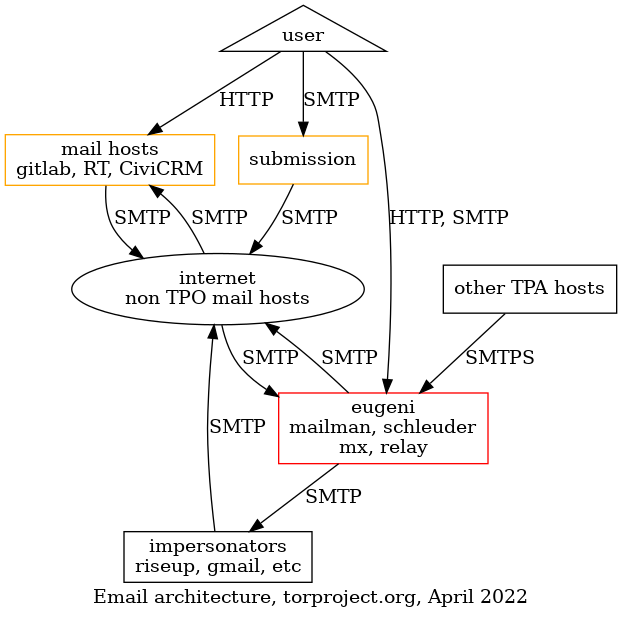
After
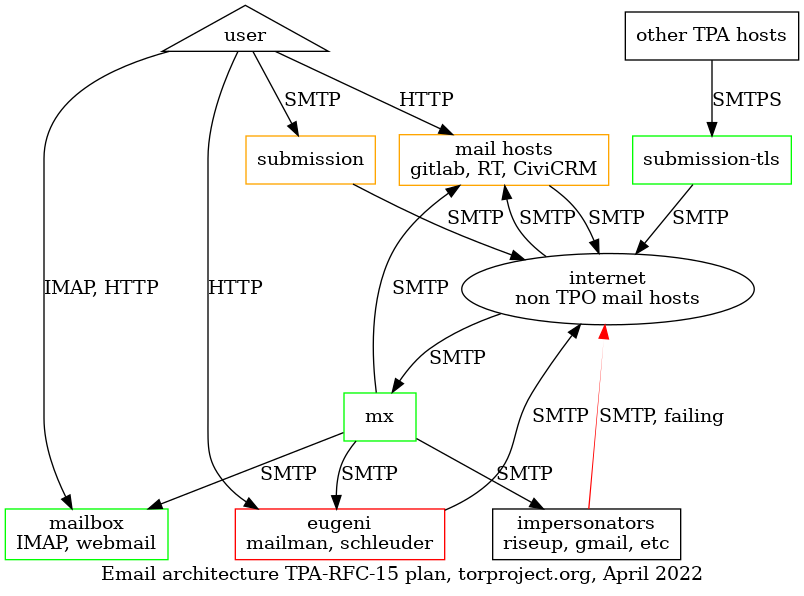
Changes in this diagram:
- added:
submission-tls,mx,mailbox, the hosts defined in steps e, g, and h above - changed:
eugenistops relaying email for all the hosts and stops receiving mail for thetorproject.orgdomain, but keeps doing mailman and schleuder work- other TPA hosts: start relaying mail through
relayinstead ofeugeni - "impersonators": those are external mail relays like gmail or
riseup, or individual mail servers operated by TPO personnel
which previously could send email as
@torproject.orgbut will likely be unable to. they can still receive forwards for those emails, but those will come from themxinstead ofeugeni. - users will start submitting email through the
submissionserver (already possible, now mandatory) and read email through themailboxserver
Timeline
The changes will be distributed over a year, and the following is a per-quarter breakdown, starting from when the proposal is adopted.
Obviously, the deployment will depend on availability of TPA staff and the collaboration of TPO members. It might also be reordered to prioritize more urgent problems that come up. The complaints we received from Hetzner, for example should probably be a priority (issue 40539).
- 2022 Q2:
- End-to-end deliverability checks
- DMARC reports analysis (DMARC record
p=none) - partial incoming mail filtering (bridges, lists, tpo, issue 40539)
- progressive adoption of submission server
- Puppet refactoring
- 2022 Q3:
- IMAP and webmail server deployment
- mail exchanger deployment
- relay server deployment
- global incoming mail filtering
- deadline for adoption of the submission server
- 2022 Q4:
- DKIM and ARC signatures
- SPF records, "soft" (
~all)
- 2023 Q1:
- hard DMARC (
p=reject) and SPF (-all) records
- hard DMARC (
Challenges
Aging Puppet code base
This deployment will require a lot of work on the Puppet modules, since our current codebase around email services is a little old and hard to modify. We will need to spend some time to refactor and cleanup that codebase before we can move ahead with more complicated solutions like incoming SPF checks or outgoing DKIM signatures, for example. See issue 40626 for details.
Incoming filtering implementation
Some research work will need to be done to determine the right tools to use to deploy the various checks on incoming mail.
For DKIM, OpenDKIM is a well established program and standard used in many locations, and it is not expected to cause problems in deployment, software wise.
Our LDAP server already has support for per-user DKIM records, but we will probably ignore that functionality and setup separate DKIM records, maintained manually.
It's currently unclear how ARC would be implemented, as the known implementations (OpenARC and Fastmail's authentication milter) were not packaged in Debian at the time of writing. ARC can help with riseup -> TPO -> riseup forwarding trips, which can be marked as spam by riseup.
(Update: OpenARC is now in Debian.)
Other things to be careful about:
-
watch out for DKIM replay attacks
-
decide key rotation policy (how frequently, should we publish private keys, see also this guide)
Security concerns
The proposed architecture does not offer users two-factor authentication (2FA) and could therefore be considered less secure than other commercial alternatives. Implementing 2FA in the context of our current LDAP service would be a difficult challenge.
Hosting people's email contents adds a new security concern. Typically, we are not very worried about "leaks" inside TPA infrastructure, except in rare situations (like bridgedb). Most of the data we host is public, in other words. If we start hosting mailboxes, we suddenly have a much higher risk of leaking personal data in case of compromise. This is a trade-off with the privacy we gain from not giving that data to a third party.
Naming things
Throughout this document, the term "relay" has been used liberally to talk about a new email server processing email for other servers. That terminology, unfortunately, clashes with the term "relay" used extensively in the Tor network to designate "Tor relays", which create circuits that make up the Tor network.
As a stopgap measure, the new relays were called submission-tls in
the architecture diagram, but that is also problematic because it
might be confused with the current submission server, which serves a
very specific purpose of relaying mail for users.
Technically, the submission server and the submission-tls servers
are both MTA, or a Message Transfer Agent. Maybe that terminology
could be used for the new "relay" servers to disambiguate them from
the submission server, for example the first relay would be called mta-01.torproject.org.
Or, inversely, we might want to consider both servers to be the same
and both name them submission and have the submission service also
accept mail from other TPO servers over TLS. So far that approach has
been discarded to separate those tasks, as it seemed simpler
architecturally.
Cost estimates
Summary:
- setup: about four months, about 32,000EUR staff, 200EUR hardware
- ongoing: unsure, between one day a week or a month, so about 5,000-20,000EUR/year in staff
- hardware costs: possibly up to 2200EUR/year
Staff
This is an estimate of the time it will take to complete this project, based on the tasks established in the actual changes section. The process follows the Kaplan-Moss estimation technique.
| Task | Estimate | Uncertainty | Note | Total (days) |
|---|---|---|---|---|
| 1. e2e deliver. checks | 3 days | medium | access to other providers uncertain | 4.5 |
| 2. DMARC reports | 1 week | high | needs research | 10 |
| 3. DKIM signing | 3 days | medium | expiration policy and per-user keys uncertain | 4.5 |
| 4. IMAP deployment | 2 weeks | high | may require training to onboard users | 20 |
| 5. SPF/DMARC records | 3 days | high | impact on forwards unclear, SRS | 7 |
| 6. incoming mail filtering | 1 weeks | high | needs research | 10 |
| 7. new MX | 1 weeks | high | key part of eugeni, might be hard | 10 |
| 8. new mail relays | 3 days | low | similar to current submission server | 3.3 |
| 9. Puppet refactoring | 1 weeks | high | 10 | |
| Total | 8 weeks | high | 80 |
This amounts to a total estimate time of 80 days, or about 16 weeks or four months, full time. At 50EUR/hr, that's about 32,000EUR of work.
This estimate doesn't cover for ongoing maintenance costs and support associated with running the service. So far, the submission server has yielded little support requests. After a bumpy start requiring patches to userdir-ldap and a little documentation, things ran rather smoothly.
It is possible, however, that the remaining 85% of users that do not currently use the submission server might require extra hand-holding, so that's one variable that is not currently considered. Furthermore, we do not have any IMAP service now and this will require extra onboarding, training and documentation
We should consider at least one person-day per month, possibly even per week, which gives us a range of 12 to 52 days of work, for an extra cost of 5,000-20,000EUR, per year.
Hardware
In the submission service hosting cost evaluation, the hardware costs related to mailboxes were evaluated at about 2500EUR/year with a 200EUR setup fee, hardware wise. Those numbers are from 2019, however, so let's review them.
Assumptions are similar:
- each mailbox is on average, a maximum of 10GB
- 100 mailboxes maximum at first (so 1TB of storage required)
- LUKS full disk encryption
- IMAP and basic webmail (Roundcube or Rainloop)
We account for two new boxes, in the worst case, to cover for the service:
- Hetzner px62nvme 2x1TB RAID-1 64GB RAM 74EUR/mth, 888EUR/yr (1EUR/mth less)
- Hetzner px92 2x1TB SSD RAID-1 128GB RAM 109EUR/mth, 1308EUR/yr (6EUR/mth less)
- Total hardware: 2196EUR/yr, ~200EUR setup fee
This assumes hosting the server on a dedicated server at Hetzner. It might be possible (and more reliable) to ensure further cost savings by hosting it on our shared virtualized infrastructure.
Examples
Here we collect a few "personas" and try to see how the changes will affect them.
We have taken the liberty of creating mostly fictitious personas, but they are somewhat based on real-life people. We do not mean to offend. Any similarity that might seem offensive is an honest mistake on our part which we will be happy to correct. Also note that we might have mixed up people together, or forgot some. If your use case is not mentioned here, please do report it. We don't need to have exactly "you" here, but all your current use cases should be covered by one or many personas.
Ariel, the fundraiser
Ariel does a lot of mailing. From talking to fundraisers through their normal inbox to doing mass newsletters to thousands of people on CiviCRM, they get a lot of shit done and make sure we have bread on the table at the end of the month. They're awesome and we want to make them happy.
Email is absolutely mission critical for them. Sometimes email gets lost and that's a huge problem. They frequently tell partners their personal Gmail account address to workaround those problems. Sometimes they send individual emails through CiviCRM because it doesn't work through Gmail!
Their email is forwarded to Google Mail and they do not have an LDAP account.
They will need to get an LDAP account, set a mail password, and either use the Webmail service or configure a mail client like Thunderbird to access the IMAP server and submit email through the submission server.
Technically, it would also be possible to keep using Gmail to send email as long as it is configured to relay mail through the submission server, but that configuration will be unsupported.
Gary, the support guy
Gary is the ticket master. He eats tickets for breakfast, then files 10 more before coffee. A hundred tickets is just a normal day at the office. Tickets come in through email, RT, Discourse, Telegram, Snapchat and soon, TikTok dances.
Email is absolutely mission critical, but some days he wishes there could be slightly less of it. He deals with a lot of spam, and surely something could be done about that.
His mail forwards to Riseup and he reads his mail over Thunderbird and sometimes webmail.
He will need to reconfigure his Thunderbird to use the submission and IMAP server after setting up an email password. The incoming mail checks should improve the spam situation. He will need, however, to abandon Riseup for TPO-related email, since Riseup cannot be configured to relay mail through the submission server.
John, the external contractor
John is a freelance contractor that's really into privacy. He runs his own relays with some cools hacks on Amazon, automatically deployed with Terraform. He typically run his own infra in the cloud, but for email he just got tired of fighting and moved his stuff to Microsoft's Office 365 and Outlook.
Email is important, but not absolutely mission critical. The submission server doesn't currently work because Outlook doesn't allow you to add just an SMTP server.
He'll have to reconfigure his Outlook to send mail through the submission server and use the IMAP service as a backend.
Nancy, the fancy sysadmin
Nancy has all the elite skills in the world. She can configure a Postfix server with her left hand while her right hand writes the Puppet manifest for the Dovecot authentication backend. She knows her shit. She browses her mail through a UUCP over SSH tunnel using mutt. She runs her own mail server in her basement since 1996.
Email is a pain in the back and she kind of hates it, but she still believes everyone should be entitled to run their own mail server.
Her email is, of course, hosted on her own mail server, and she have an LDAP account.
She will have to reconfigure her Postfix server to relay mail through
the submission or relay servers, if she want to go fancy. To read
email, she will need to download email from the IMAP server, although
it will still be technically possible to forward her @torproject.org
email to her personal server directly, as long as the server is
configured to send email through the TPO servers.
Mallory, the director
Mallory also does a lot of mailing. She's on about a dozen aliases and mailing lists from accounting to HR and other obscure ones everyone forgot what they're for. She also deals with funders, job applicants, contractors and staff.
Email is absolutely mission critical for her. She often fails to contact funders and critical partners because state.gov blocks our email (or we block theirs!). Sometimes, she gets told through LinkedIn that a job application failed, because mail bounced at Gmail.
She has an LDAP account and it forwards to Gmail. She uses Apple Mail to read their mail.
For her Mac, she'll need to configure the submission server and the IMAP server in Apple Mail. Like Ariel, it is technically possible for her to keep using Gmail, but that is unsupported.
The new mail relay servers should be able to receive mail state.gov properly. Because of the better reputation related to the new SPF/DKIM/DMARC records, mail should bounce less (but still may sometimes end up in spam) at Gmail.
Orpheus, the developer
Orpheus doesn't particular like or dislike email, but sometimes has to
use it to talk to people instead of compilers. They sometimes have to
talk to funders (#grantlife) and researchers and mailing lists, and
that often happens over email. Sometimes email is used to get
important things like ticket updates from GitLab or security
disclosures from third parties.
They have an LDAP account and it forwards to their self-hosted mail server on a OVH virtual machine.
Email is not mission critical, but it's pretty annoying when it doesn't work.
They will have to reconfigure their mail server to relay mail through the submission server. They will also likely start using the IMAP server.
Blipblop, the bot
Blipblop is not a real human being, it's a program that receives mails from humans and acts on them. It can send you a list of bridges (bridgedb), or a copy of the Tor program (gettor), when requested. It has a brother bot called Nagios/Icinga who also sends unsolicited mail when things fail. Both of those should continue working properly, but will have to be added to SPF records and an adequate OpenDKIM configuration should be deployed on those hosts as well.
There's also a bot which sends email when commits get pushed to gitolite. That bot is deprecated and is likely to go away.
In general, attention will be given to those precious little bots we have everywhere that send their own email. They will be taken care of, as much as humanely possible.
Other alternatives
Those are other alternatives that were considered as part of drafting this proposal. None of those options is considered truly viable from a technical perspective, except possibly external hosting, which remains to be investigated and discussed further.
No mailboxes
An earlier draft of this proposal considered changing the infrastructure to add only a mail exchanger and a relay, alongside all the DNS changes (SPF, DKIM, DMARC).
We realized the IMAP was a requirement requirement because the SPF records will require people to start using the submission server to send mail. And that, in turn requires an IMAP server because of clients limitations. For example, it's not possible to configure Apple mail of Office 365 with a remote SMTP server unless they also provide an IMAP service, see issue 40586 for details.
It's also possible that implementing mailboxes could help improve spam filtering capabilities, which are after all necessary to ensure good reputation with hosts we currently relay mail to.
Finally, it's possible that we will not be able to make "hard" decisions about policies like SPF, DKIM, or DMARC and would be forced to implement a "rating" system for incoming mail, which would be difficult to deploy without user mailboxes, especially for feedback loops.
There's a lot of uncertainty regarding incoming email filtering, but that is a problem we need to solve in the current setup anyways, so we don't believe the extra costs of this would be significant. At worst, training would require extra server resources and staff time for deployment. User support might require more time than with a plain forwarding setup, however.
High availability setup
We have not explicitly designed this proposal for high availability situations, which have been explicitly requested in issue 40604. The current design is actually more scalable than the previous legacy setup, because each machine will be setup by Puppet and highly reproducible, with minimal local state (except for the IMAP server). So while it may be possible to scale up the service for higher availability in the future, it's not a mandatory part of the work described here.
In particular, setting up new mail exchanger and submission servers is somewhat trivial. It consists of setting up new machines in separate locations and following the install procedure. There is no state replicated between the servers other than what is already done through LDAP.
The IMAP service is another problem, however. It will potentially have large storage requirements (terabytes) and will be difficult to replicate using our current tool set. We may consider setting it up on bare metal to avoid the performance costs of the Ganeti cluster, which, in turn, may make it vulnerable to outages. Dovecot provides some server synchronisation mechanisms which we could consider, but we may also want to consider filesystem-based replication for a "warm" spare.
Multi-primary setups would require "sharding" the users across multiple servers and is definitely considered out of scope.
Personal SPF/DKIM records and partial external hosting
At Debian.org, it's possible for members to configure their own DKIM records which allows them to sign their personal, outgoing email with their own DKIM keys and send signed emails out to the world from their own email server. We will not support such a configuration, as it is considered too complex to setup for normal users.
Furthermore, it would not easily help people currently hosted by Gmail or Riseup: while it's technically possible for users to individually delegate their DKIM signatures to those entities, those keys could change without notice and break delivery.
DMARC has similar problems, particularly with monitoring and error reporting.
Delegating SPF records might be slightly easier (because delegation is
built into the protocol), but has also been rejected for now. It is
considered risky to grant all of Gmail the rights to masquerade as
torproject.org (even though that's currently the status quo). And
besides delegating SPF alone wouldn't solve the more general problem
of partially allowing third parties to send mail as
@torproject.org (because of DKIM and DMARC).
Status quo
The current status quo is also an option. But it is our belief that it will lead to further and further problem in deliverability. We already have a lot of problems delivering mail to various providers, and it's hard to diagnose issues because anyone can currently send mail masquerading as us from anywhere.
There might be other solutions than the ones proposed here, but we haven't found any good ways of solving those issues without radically changing the infrastructure so far.
If anything, if things continue as they are, people are going to use
their @torproject.org email address less and less, and we'll
effectively be migrating to external providers, but delegating that
workload to individual volunteers and workers. The mailing list and,
more critically, support and promotional tools (RT and CiviCRM)
services will become less and less effective in actually delivering
emails in people's inbox and, ultimately, this will hurt our capacity
to help our users and raise funds that are critical to the future of
the project.
The end of email
One might also consider that email is a deprecated technology from another millennia, and it is not the primary objective of the Tor Project to continue using it, let alone host the infrastructure.
There are actually many different alternatives to email emerging, many of which are already in use in the community.
For example, we already have a Discourse server that is generating great community participation and organisation.
We have also seen a good uptake on the Matrix bridges to our IRC channels. Many places are seeing increase use of chat tools like Slack as a replacement for email, and we could adopt Matrix more broadly as such an alternative.
We also use informal Signal groups to organise certain conversations as well.
Nextcloud and Big Blue Button also provide us with asynchronous and synchronous coordination mechanisms.
We may be able to convert many of our uses of email right now to some other tools:
-
"role forwards" like "accounting" or "job" aliases could be converted to RT or cdr.link (which, arguably, are also primarily email-based, but could be a transition to a web or messaging ticketing interface)
-
Mailman could be replaced by Discourse
-
Schleuder could be replaced by Matrix and/or Discourse?
That being said, we doubt all of our personas would be in a position to abandon email completely at this point. We suspect many of our personas, particularly in the fundraising team, would absolutely not be able to do their work without email. We also do recurring fundraising campaigns where we send emails to thousands of users to raise money.
Note that if we do consider commercial alternatives, we could use a mass-mailing provider service like Mailchimp or Amazon SES for mass mailings, but this raises questions regarding the privacy of our users. This is currently considered to be an unacceptable compromise.
There is therefore not a clear alternative to all of those problems right now, so we consider email to be a mandatory part of our infrastructure for the time being.
External hosting
Other service providers have been contacted to see if it would be reasonable to host with them. This section details those options.
All of those service providers come with significant caveats:
-
most of those may not be able to take over all of our email services. services like RT, GitLab, Mailman, CiviCRM or Discourse require their own mail services and may not necessarily be possible to outsource, particularly for mass mailings like Mailman or CiviCRM
-
there is a privacy concern in hosting our emails elsewhere: unless otherwise noted, all email providers keep mail in clear text which makes it accessible to hostile or corrupt staff, law enforcement, or external attackers
Therefore most of those solutions involve a significant compromise in terms of privacy.
The costs here also do not take into account the residual maintenance cost of the email infrastructure that we'll have to deal with if the provider only offers a partial solution to our problems, so all of those estimates are under-estimates, unless otherwise noted.
Greenhost: ~1600€/year, negotiable
We had a quote from Greenhost for 129€/mth for a Zimbra frontend with a VM for mailboxes, DKIM, SPF records and all that jazz. The price includes an office hours SLA.
Riseup
Riseup already hosts a significant number of email accounts by virtue
of being the target of @torproject.org forwards. During the last
inventory, we found that, out of 91 active LDAP accounts, 30 were
being forwarded to riseup.net, so about 30%.
Riseup supports webmail, IMAP, and, more importantly, encrypted mailboxes. While it's possible that an hostile attacker or staff could modify the code to inspect a mailbox's content, it's leagues ahead of most other providers in terms of privacy.
Riseup's prices are not public, but they are close to "market" prices quoted below.
Gandi: 480$-2400$/year
Gandi, the DNS provider, also offers mailbox services which are priced at 0.40$/user-month (3GB mailboxes) or 2.00$/user-month (50GB).
It's unclear if we could do mass-mailing with this service.
Google: 10,000$/year
Google were not contacted directly, but their promotional site says it's "Free for 14 days, then 7.80$ per user per month", which, for tor-internal (~100 users), would be 780$/month or ~10,000USD/year.
We probably wouldn't be able to do mass mailing with this service.
Fastmail: 6,000$/year
Fastmail were not contacted directly but their pricing page says about 5$USD/user-month, with a free 30-day trial. This amounts to 500$/mth or 6,000$/year.
It's unclear if we could do mass-mailing with this service.
Mailcow: 480€/year
Mailcow is interesting because they actually are based on a free software stack (based on PHP, Dovecot, Sogo, rspamd, postfix, nginx, redis, memcached, solr, Oley, and Docker containers). They offer a hosted service for 40€/month, with a 100GB disk quota and no mailbox limitations (which, in our case, would mean 1GB/user).
We also get full admin access to the control panel and, given their infrastructure, we could self-host if needed. Integration with our current services would be, however, tricky.
It's there unclear if we could do mass-mailing with this service.
Mailfence: 2,500€/year, 1750€ setup
The mailfence business page doesn't have prices but last time we looked at this, it was a 1750€ setup fee with 2.5€ per user-year.
It's unclear if we could do mass-mailing with this service.
Deadline
This proposal will be brought up to tor-internal and presented at a all-hands meeting, and followed by a four-week feedback delay, after which a decision will be taken.
Approval
This decision needs the approval of tor-internal, TPA and TPI, the latter of which will likely make the final call based on input from the former.
References
- this work is part of the improve mail services OKR, part of the 2022 roadmap, Q1/Q2
- specifically, the draft of this proposal was established and discussed in make a plan regarding mail standards (DKIM,SPF, DMARC)
- the submission service is the previous major undertaking to fix related issues to this project, and has a proposal that touches on some of those issues as well
- somewhat less relevant, Obituary, for Ray Tomlinson and Email (J. B. Crawford)
Appendix
Other experiences from survey
anarcat did a survey of an informal network he's a part of, and here are the anonymized feedback. Out 9 surveyed groups, 3 are outsourcing to either Mailcow, Gandi, or Fastmail. Of the remaining 6:
- filtering:
- Spamassassin: 3
- rspamd: 3
- DMARC: 3
- outgoing:
- SPF: 3
- DKIM: 2
- DMARC: 3
- ARC: 1
- SMTPS: 4
- Let's Encrypt: 4
- MTA-STS: 1
- DANE: 2
- mailboxes: 4, mostly recommending Dovecot
here's a detailed listing
Org A
- Spamassassin: x
- RBL: x
- DMARC: x (quarantine, not reject)
- SMTPS: LE
- Cyrus: x (but suggests dovecot)
Org B
- used to self-host, migrated to
Org C
- SPF: x
- DKIM: soon
- Spamassassin: x (also grades SPF, reject on mailman)
- ClamAV: x
- SMTPS: LE, tries SMTPS outgoing
- Dovecot: x
Org D
- used to self-host, migrated to Gandi
Org E
- SPF, DKIM, DMARC, ARC, outbound and inbound
- rspamd
- SMTPS: LE + DANE
- Dovecot
Org F
- SPF, DKIM
- DMARC on lists
- Spamassassin
- SMTPS: LE + DANE (which triggered some outages)
- MTA-STS
- Dovecot
Org G
- no SPF/DKIM/etc
- rspamd
Org H
- migrated to fastmail
Org I
- self-hosted in multiple locations
- rspamd
- no SPF/DKIM/DMARC outgoing
Proposal
The proposal is for TPA/web to develop and maintain a new lektor translation plugin tentatively with the placeholder name of "new-translation-plugin". This new plugin will replace the current lektor-i18n-plugin
Background
A note about terminology: This proposal will refer to a lektor plugin currently used by TPA named "lektor-i18n-plugin", as well as a proposed new plugin. Due to the potential confusion between these names, the currently-in-use plugin will be referred to exclusively as "lektor-i18n-plugin", and the proposed new plugin will be referred to exclusively as "new-translation-plugin", though this name is not final.
The tpo/web repos use the lektor-i18n-plugin to provide gettext-style translation for both html templates and contents.lr files. Translation is vital to our sites, and lektor-i18n-plugin seems to be the only plugin providing translation (if others exist, I haven't found them). lektor-i18n-plugin is also the source of a lot of trouble for web and TPA:
- Multiple builds are required for the plugin to work
- Python versions > 3.8.x make the plugin produce garbled POT files. For context, the current Python version at time of writing is 3.10.2, and 3.8.x is only receiving security updates.
Several attempts have been made to fix these pain points:
- Multiple builds: tpo/web/lego#30 shows an attempt to refactor the plugin to provide an easily-usable interface for scripts. It's had work on and off for the past 6 months, with no real progress being made.
- Garbled POT files: tpo/web/team#21 details the bug, where it occurs, and a workaround. The workaround only prevents bad translations from ending up in the site content, it doesn't fix the underlying issue of bad POT files being created. This fix hasn't been patched or upstreamed yet, so the web team is stuck on python 3.8.
Making fixes like these is hard. The lektor-i18n-plugin is one massive file, and tracing the logic and control flow is difficult. In the case of tpo/web/lego#30, the attempts at refactoring the plugin were abandoned because of the massive amount of work needed to debug small issues. lektor-i18n-plugin also seems relatively unmaintained, with only a handful of commits in the past two and a half years, many made by tor contributors.
After attempting to workaround and fix some of the issues with the plugin, I've come to the conclusion that starting from scratch would be easier than trying to maintain lektor-i18n-plugin. lektor-i18n-plugin is fairly large and complex, but I don't think it needs to be. Using Lektor's VirtualSourceObject class should completely eliminate the need for multiple builds without any additional work, and using PyBabel directly (instead of popening gettext) will give us a more flexible interface, allowing for out-of-the-box support for things like translator comments and ignoring html tags that lektor-i18n-plugin seemingly doesn't support.
Using code and/or ideas from lektor-i18n-plugin will help ease the development of a new-translation-plugin. Many of the concepts behind lektor-i18n-plugin (marking contents.lr fields as translatable, databag translation, etc.) are sound, and already implemented. Even if none of the code is reused, there's already a reference for those concepts.
By using PyBabel, VirtualSourceObject, and referencing lektor-i18n-plugin, new-translation-plugin's development and maintenance should be far easier than continuing to work around or fix lektor-i18n-plugin.
Alternatives Considered
During the draft phase of this RFC, several alternatives were brought up and considered. Here's the conclusion I came to for each of them:
Fix the existing plugin ourselves
Unfortunately, fixing the original plugin ourselves would take a large amount of time and effort. I've spent months on-and-off trying to refactor the existing plugin enough to let us do what we need to with it. The current plugin has no tests or documentation, so patching it means spending time getting familiar with the code, changing something, running it to see if it breaks, and finally trying to figure out what went wrong without any information about what happened. We would have to start almost from scratch any way, so starting with the existing plugin would mostly just eat more time and energy.
Paying the original/external developers to fix our issues with the plugin
This solution would at least free up a tpa member during the entire development process, but it still comes with a lot of the issues of fixing the plugin ourselves. The problem I'm most concerned with is that at the end of the new plugin's development, we won't have anyone familiar with it. If something breaks in the future, we're back in the same place we are now. Building the new plugin in-house means that at least one of us knows how the plugin works at a fundamental level, and we can take care of any problems that might arise.
Replacing lektor entirely
The most extreme solution to our current problems is to drop lektor entirely, and look into a different static site generator. I've looked into some popular alternative SSGs, and haven't found any that match our needs. Most of them have their own translation system that doesn't use GNU gettext translations. We currently do our translations with transifex, and are considering weblate; both of those sites use gettext translation templates "under-the-hood" meaning that if an SSG doesn't have a gettext translation plugin, we'd have to write one or vastly change how we do our translations. So even if porting the site to a different SSG was less work than developing a new lektor plugin, we'd still need to write a new plugin for the new SSG, or change how we do translations.
- Jekyll:
- jekyll-multiple-languages-plugin seems to be the most-used plugin based on github stars. It doesn't support gettext translations, making it incompatible with our current workflow.
- I spent about 1.5 to 2 hours trying to "port" the torproject.org homepage to Jekyll. Jekyll's templating system (liquid) works very differently than Lektor's templating system (Jinja 2). I gave up trying to port it when I realized that a simple 1:1 translation of the templates wouldn't be possible, and the way our templates work would need to be re-thought from the ground up to work in Liquid. Keep in mind that I spent multiple hours trying to port a single page, and was unable to do it.
- Pelican:
- Built-in translation, no support for gettext translation. See above why we need gettext.
- Hexo:
- Built-in translation, no support for gettext translation.
- Hugo:
- Built-in translation, no support for gettext translation.
Given the amount of work that would need to go into changing the SSG (not to mention changing the translation system), I don't think replacing Lektor is feasible. With the SSGs listed we would need to either re-do our translation setup or write a new plugin (both of which would take as much effort as a new lektor translation plugin), and we'd also need to spend enormous amount of time porting our existing content to the new SSG. I wasn't able to work in the SSGs listed enough to be able to give a proper estimate, but I think it's safe to say that moving our content to a new SSG would be more effort than a new plugin.
Plugin Design
The planned outline of the plugin looks something like this
- The user clones a web repo, initializes submodules, and clones the correct
translation.gitbranch into the/i18nfolder (path relative to the repo root), and installs all necessary dependencies to build the lektor site - The user runs
lektor buildfrom the repo root - Lektor emits the
setup-envevent, which is hooked by new-translation-plugin to add the_function to templates - Lektor emits the
before-build-allevent, which is hooked by new-translation-plugin - new-translation-plugin regenerates the translation POT file
- new-translation-plugin updates the PO files with the newly-regenerated POT file
- new-translation-plugin generates a new
TranslationSourcevirtual page for each page's translations, then adds the pages to the build queue
Impact on Related Roadmaps/OKRs
The development of a new plugin could take quite a while. As a rough estimate, it could take at least a month as a minimum for the plugin to be completed, assuming everything goes well. Taking time away from our OKRs to work exclusively on this plugin could setback our OKR timelines by a lot. On the other hand, if we're able to complete the plugin quickly we can streamline some of our web objectives by removing issues with the current plugin.
This plugin would also greatly reduce the build time of lektor sites, since they wouldn't need to be built three times. This would make the web "OKR: make it easier for translators to contribute" about 90% complete.
TODO: integrate this into template
TODO: this is not even a draft, turn this into something a human can read
reading notes from the PSNA 3ed ch 22 (Disaster recovery)
- risk analysis
-
which disasters
-
what risk
-
cost = budget (B)
B = (D-M)xR D: cost of disaster M: cost after mitigation R: risk
-
plan for media response
- who
- what to say (and not to say)
-
summary
- find critical services
- simple ways
- automation (e.g. integrity checks)
questions
- which components to restore first?
- how fast?
- what is most likely to fail?
Also consider "RPO" (Recovery Point Objective, how much stuff can we afford to lose, time wise) and "RTO" (Recovery Time Objective, how long it will take to recover it). Wikipedia has a good introduction on this, and especially this diagram:

Establishing a DR plan for TPA/TPI/TPO (?)
-
"send me your disasters" cf 22.1 (above)
(ie. which risk & cost) + what to restore first, how fast?
-
derive security policy from DR plan
e.g.
- check your PGP keys
- FDE?
- signal
- password policy
- git integrity
- separate access keys (incl. puppet) for backups
References
Summary: this policy establishes a security policy for members of the TPA team.
This RFC de facto proposes the adoption of the current Tails security policies. The existing Tails policies have been refactored using the TPI templates for security policies. Minor additions have been made based on existing policies within TPI and results of Tails' risk assessment.
Scope
Note that this proposal applies only inside of TPA, and doesn't answer the need of a broader Tor-wide security policy, discussed in tpo/team#41.
Introduction
This document contains the baseline security procedures for protecting both an organization, its employees, it's contributors and the community in general.
It's based on the Security Policies Template from the OPSEC Templates project version 0.0.2, with small cosmetic modifications for readability.
The key words "MUST", "MUST NOT", "REQUIRED", "SHALL", "SHALL NOT", "SHOULD", "SHOULD NOT", "RECOMMENDED", "MAY", and "OPTIONAL" in this document are to be interpreted as described in BCP 14.
Threat Levels
A level informs the threat level someone is exposed to by performing some role in a given context.
Levels are cumulative, which means that someone working in a threat level 1 MUST adopt procedures from levels 0 and 1, and MAY also adopt procedures from level 2.
- Level 0 - GREEN (LOW RISK): that's the baseline level: everyone is on this level by default.
- Level 1 - YELLOW (MEDIUM RISK): increased level.
- Level 2 - RED (HIGH RISK): the highest threat level.
The specific level a team members is under for a given role performed should be assigned during a security assessment.
If a person has many different roles in different threat levels, and with possibly conflicting procedures, always assume the overall procedures with the greatest security level, just to be sure.
This threat level system is loosely based on the Traffic Light Protocol.
Information status
These are the currently defined Information Security (INFOSEC) classification status:
- PUBLIC, such as:
- Public repositories.
- Public sites.
- Released source code.
- Public interviews, talks and workshops.
- Public mailing list archives.
- Public forums.
- Public chat channels.
- PRIVATE: anything meant only to tor-internal, loss of confidentiality would not cause great harm
- SECRET: meant only for TPA, with need-to-know access, loss of
confidentiality cause great harm or at least significant logistical
challenges (e.g. mass password rotations)
- Only on encrypted media (such as a passwordstore wallet on GitLab).
Declassification MUST be decided in a case-by-case basis and never put people in danger.
It's RECOMMENDED that each document has a version and an INFOSEC status on it's beginning. This MAY be a application-specific status like a GitLab issue that's marked as "confidential".
Roles
Each member of the TPA Team can have many roles. The current defined roles are for the Team are:
- TPA System Administrator (SA): basically everyone within TPA
- TPA "admin": a SA might be a normal user or, in certain cases, have
elevated privileges on a system (for example, using a
gitlab-adminaccount or operating withrootprivileges on a server)
TPA System Administrators (SA)
Level 0 - GREEN - LOW
-
Organization-wide policies (REQUIRED). Follow any existing organization-wide, baseline security policies.
-
Pseudonyms authorization (RECOMMENDED). When joining the organization or a team, tell people that they can use pseudonyms.
-
Policy reviews (RECOMMENDED). During onboard, make the newcomers to be the reviewers of the security policies, templates and HOWTOs for one month, and encourage them to submit merge requests to fix any issues and outdated documentation.
-
Full Disk Encryption (FDE) for Workstations (REQUIRED):
- Use an acceptable Full Disk Encryption technology in your workstation (be it a laptop or a desktop).
- Encryption passphrase SHOULD be considered strong and MUST NOT be used for other purposes.
-
Physical access constraints (REQUIRED). To protect your data from getting stolen offline:
- be careful about the physical security of your hardware.
- do not leave your workstation unlocked and unattended.
-
Handling of cryptography material (REQUIRED). Adopt safe procedures for handling key material (Onion Service keys, HTTPS certificates, SSH keys etc), including generation, storage, transmission, sharing, rollover, backing up and destruction.
-
Password manager (REQUIRED).
- Use a secure password manager to store all credentials related to your work at Tor.
- Generate unique long random strings to use as passwords.
- Do not reuse passwords across services.
- To prevent phishing attacks, use a browser plugin for your password manager.
-
Screensaver (REQUIRED): Use a locking screensaver on your workstation.
-
Device Security for Travels (REQUIRED):
- Turn off all your device before any border crossings or security checkpoints. It will take some time for DRAM to lose its content.
- Do not input information into any device touched by a bad actor even if you got the device back, it might have been backdoored. You could try to get your information out of it, but do not input any new information into it. Full disk encryption have limited protection for the data integrity.
- Make sure the devices you don't bring stay protected (at home or in good hands) so it's hard to physically compromise them while you're away.
-
Firewall (REQUIRED):
- Use a firewall on workstations to block incoming traffic;
- You MAY make an exception to allow SSH-ing from another machine that implements the same security level.
- Use a "soft" firewall (like OpenSnitch) to check outgoing traffic (OPTIONAL)
-
Software isolation (OPTIONAL):
- Use desktop isolation/sandboxing whenever possible (such as Qubes) (which threat models and roles it would apply etc), but not imposing this as a requirement.
- Use a Mandatory Access Control system such as AppArmor.
Level 1 - YELLOW - MEDIUM
-
Hardware Security Tokens (REQUIRED). Use a Hardware Security Token, for Yubikeys, refer to the Yubikey documentation.
-
Secure software (REQUIRED): Ensure all the software that you run in your system, and all firmware that you install is trusted, either:
- Free software installed from trustworthy repositories via mechanisms
that have good cryptographic properties. Such software should also
come with:
- A similarly secure automatic update mechanism
- A similarly secure update notification mechanism for you to keep it up-to-date manually.
- Non-free firmware shipped by Debian packages that are included in the non-free-firmware repository.
- Isolated using either a virtual machine, a different user without admin privileges, containers like Podman, Flatpak or Snap with proper sandboxing enabled
- Audited by yourself when you install it and on every update.
Examples:
- Acceptable:
apt install emacs vimwithunattended-upgradeson Debian stable keeping your desktop up to date. - Not acceptable: running Debian testing, unless you have special provisions in place to pull security updates from unstable, as testing is not supported for security updates.
- Not acceptable: running an unsupported (past its end-of-life date) operating system or not pulling updates on a regular basis.
- Not acceptable:
go getrecursively pulls code from places that are probably not all trustworthy. The security of the mechanism entirely relies purely on HTTPS. So, isolate the software or audit the dependency tree. If you choose "audit", then set up something to ensure you'll keep it up-to-date, then audit every update. Same goes forpip,gem,npm, and others, unless you show that the one you use behaves better. - Acceptable: a Firefox add-on from addons.mozilla.org come from a trustworthy repository with cryptographic signatures on top of HTTPS, and you get notified of updates.
- Acceptable: Some software installed via Git. Checking signed tags made by people/projects you trust is OK but then you must either set up something to regularly check yourself for updates, or isolate. If verifying signed tags is not possible, then isolate or audit the software.
- Free software installed from trustworthy repositories via mechanisms
that have good cryptographic properties. Such software should also
come with:
-
Travel avoidances (REQUIRED): You MUST NOT take your workstation, nor your security hardware token, to any country where association with circumvention technology may get you in legal trouble. This includes any country that blocks or has blocked Tor traffic.
Level 2 - RED - HIGH
N/A
TPA "admin"
In this role, a TPA member is working with elevated privileges and must take special care in working with machines.
Level 0 - GREEN - LOW
Same as normal TPA and:
- Least privilege: limit the amount of time spent in "admin"
mode. Log off
sudoandgitlab-adminsessions as soon as necessary and do not use privileged access for routine operation
Level 1 - YELLOW - MEDIUM
Same as normal TPA.
Level 2 - RED - HIGH
Same as normal TPA.
References
Internal:
- TPA-RFC-18: discussion ticket
- Tor-wide security policy discussion
- NetworkTeam/SecurityPolicy page (Legacy)
- TPA-RFC-7: root access
- TPA-RFC-17: Establish a global disaster recovery plan (#40628)
External:
Summary: create a bunch of labels or projects to regroup issues for all documented services, clarify policy on labels (mostly TPA services) vs projects (git, external consultants) usage.
Background
Inside TPA, we have used, rather inconsistently, projects for certain
things (e.g. tpo/tpa/gitlab) and labels for others
(e.g. ~Nextcloud). It's unclear when to use which and why. There's
also a significant number of services that don't have any project or
label associated with them.
This proposal should clarify this.
Goals
Must have
- we should know whether we should use a label or project when reporting a bug or creating a service
Nice to have
- every documented service in the service list should have a label or project associated with it
Proposal
Use a project when:
- the service has a git repository
(e.g.
tpo/tpa/dangerzone-webdav-processor, most web sites) - the service is primarily managed by service admins
(e.g.
tpo/tpa/schleuder) or external consultants (e.g.tpo/web/civicrm) who are actively involved in the GitLab server and issue queues
Use a label when:
- the service is only (~DNS) or primarily (~Gitlab) managed by TPA
- it is not a service (e.g. ~RFC)
Scope
This applies only to TPA services and services managed by "service admins".
Current labels
TODO: should we add an "issues" column to the service list with this data?
Those are the labels that are currently in use inside tpo/tpa/team:
| Label | Fate | Note |
|---|---|---|
| ~Cache | keep | deprecated, but shouldn't be removed |
| ~DNS | keep | need reference in doc |
| ~Deb.tpo | keep | |
| ~Dist | keep | |
| keep | needs documentation page! | |
| ~Git | keep | |
| ~Gitlab | keep | |
| ~Gitweb | keep | |
| ~Jenkins | keep | |
| ~LDAP | keep | |
| ~Lists | keep | |
| ~Nextcloud | move | external service, move to project |
| ~RFC | keep | |
| ~RT | keep | |
| ~Schleuder | move? | move issues to existing project |
| ~Service admin | remove? | move issues to other project/labels |
| ~Sysadmin | remove | everything is sysadmin, clarify |
| ~incident | keep | internally used by GitLab for incident tracking |
New labels
Those are labels that would need to be created inside tpo/tpa/team
and linked in their service page.
| Label | Description | Note |
|---|---|---|
| ~Backup | backup services | |
| ~BBB | Video and audio conference system | external consultants not on GitLab |
| ~BTCpayserver | TBD | TODO: is that a TPA service now? |
| ~CI | issues with GitLab runners, CI | |
| ~DRBD | is that really a service? | |
| ~Ganeti | ||
| ~Grafana | ||
| ~IRC | TODO: should that be external? | |
| ~IPsec | ||
| ~kvm | deprecated, don't create? | |
| ~Logging | centralized logging server | maybe expand to include all logging and PII issues? |
| ~Nagios | Nagios/Icinga monitoring server | rename to Icinga? |
| ~Openstack | Openstack deployments | |
| ~PostgreSQL | PostgreSQL database services | |
| ~Prometheus | ||
| ~Puppet | ||
| ~static-component | ||
| ~static-shim | static site / GitLab shim | |
| ~SVN | ||
| ~TLS | X509 certificate management | |
| ~WKD | OpenPGP certificates distribution |
Note that undocumented and retired projects do not currently have explicit labels or projects associated with them.
Current projects
Those are services which currently have a project associated with them:
| Service | Project | Fate | Note |
|---|---|---|---|
| GitLab | tpo/tpa/gitlab | retire | primarily maintained by TPA move all issues to ~Gitlab |
| status | tpo/tpa/status-site | keep | git repository |
| blog | tpo/web/blog | keep | git repository |
| bridgedb | ? | ? | anti-censorship team |
| bridgestrap | ? | ? | idem |
| check | ? | ? | network health team? |
| CRM | tpo/web/civicrm | keep | external consultants |
| collector | ? | ? | network health team |
| dangerzone | tpo/tpa/dangerzone-webdav-processor | keep | git repository |
| metrics | ? | ? | metrics team |
| moat | ? | ? | anti-censorship |
| newsletter | tpo/web/newsletter | keep | git repository |
| onionperf | ? | ? | metrics team |
| schleuder | tpo/tpa/schleuder | keep | schleuder service admins? |
| rdsys | ? | ? | anti-censorship team |
| snowflake | ? | ? | idem |
| styleguide | tpo/web/styleguide | keep | git repository |
| support | tpo/web/support | keep | git repository |
| survey | ??? | ??? | ??? |
| website | tpo/web/tpo | keep | git repository |
New projects
Those are services that should have a new project created for them:
| Project | Description | Note |
|---|---|---|
tpo/tpa/nextcloud | to allow Riseup to manage tickets? |
Personas
Anathema: the sysadmin
Anathema manages everything from the screws on the servers to the CSS on the websites. Hands in everything, jake-of-all-trades-master-of-none, that's her name. She is a GitLab admin, but normally uses GitLab like everyone else. She files a boatload of tickets, all over the place. Anathema often does triage before the triage star of the week even wakes up in the morning.
Changes here won't change her work much: she'll need to remember to assign issues to the right label, and will have to do a bunch of documentation changes if that proposal passes.
Wouter: the webmaster
Wouter works on many websites and knows Lektor inside and out. He doesn't do issues much except when he gets beat over the head by the PM to give estimates, arghl.
Changes here will not affect his work: his issues will mostly stay in his project, because most of them already have a Git repository assigned.
Petunia: the project manager
Petunia has a global view of all the projects at Tor. She's a GitLab admin and her mind holds more tickets in her head than you ever will even imagine.
Changes here will not affect her much because she already has a global view. She should be able to help move tickets around and label everything properly after the switch.
Charlie, the external consultant
Charlie was hired to deal with CiviCRM but also deals with the websites.
Their work won't change much because all of those services already have projects associated.
Mike, the service provider
Mike provides us with our Nextcloud service, and he's awesome. He can debug storage problem while hanging by his toes off a (cam)bridge while simultaneously fighting off DDOS attacks from neonazi trolls.
He typically can't handle the Nextcloud tickets because they are often confidential, which is annoying. He has a GitLab account so he will be possibly happy to be able to do triage in a new Nextcloud project, and see confidential issues there. He will also be able to watch those issues specifically.
George, the GitLab service admin
George is really busy with dev work, but really wanted to get GitLab off the ground so they helped with deploying GitLab, and now they're kind of stuck with it. They helped an intern develop code for anonymous tickets, and triaged issues there. They also know a lot about GitLab CI and try to help where they can.
Closing down the GitLab subproject means they won't be able to do triage unless they are added to the TPA team, something TPA has been secretly conspiring towards for months now, but that, no way in hell, will not happen.
Alternatives considered
All projects
In this approach, all services would have a project associated with them. In issue tpo/tpa/gitlab#10, we considered that approach, arguing that there were too many labels to chose from so it was hard to figure out which one to pick. It was also argued that users can't pick labels so that we'd have to do the triage anyways. And it is true that we do not necessarily assign the labels correctly right now.
Ultimately, however, having a single project to see TPA-specific issues turned out to be critical to survive the onslaught of tickets in projects like GitLab lobby, Anon ticket and others. If every single service had its own project, it would mean we'd have to triage all those issues at once, which is currently overwhelming.
All labels
In this approach, all services would be labels. This is simply not possible, if only because some service absolutely do require a separate project to host their git repository.
Both project and label
We could also just have a label and a project, e.g. keep the status
quo between tpo/tpa/gitlab and ~Gitlab. But then we can't really
tell where to file issues, and even less where to see the whole list
of issues.
References
This proposal is discussed in issue tpo/tpa/team#40649. Previous discussion include:
- issue tpo/tpa/gitlab#10, "move tpa issues into subprojects or cleanup labels"; ended up in the status quo: current labels kept, no new subproject created
- issue tpo/tpa/gitlab#55, "move gitlab project back into tpo/tpa/team"; ended up deciding to keep the project and create subprojects for everything (ie. reopening tpo/tpa/gitlab#10 above, which was ultimately closed)
See also the TPA-RFC-5: GitLab migration proposal which sets the policy on other labels like ~Doing, ~Next, ~Backlog, ~Icebox and so on.
title: "TPA-RFC-20: bullseye upgrade schedule" costs: staff: 1-2 month approval: TPA, service admins affected users: TPA users deadline: 2022-04-04 status: obsolete
Summary: bullseye upgrades will roll out starting the first weeks of April and May, and should complete before the end of August 2022. Let us know if your service requires special handling.
Background
Debian 11 bullseye was released on August 14 2021). Tor started the upgrade to bullseye shortly after and hopes to complete the process before the buster EOL, one year after the stable release, so normally around August 2022.
In other words, we have until this summer to upgrade all of TPA's machine to the new release.
New machines that were setup recently have already been installed in bullseye, as the installers were changed shortly after the release. A few machines were upgraded manually without any ill effects and we do not consider this upgrade to be risky or dangerous, in general.
This work is part of the %Debian 11 bullseye upgrade milestone, itself part of the OKR 2022 Q1/Q2 plan.
Proposal
The proposal, broadly speaking, is to upgrade all servers in three batches. The first two are somewhat equally sized and spread over April and May, and the rest will happen at some time that will be announced later, individually, per server.
Affected users
All service admins are affected by this change. If you have shell access on any TPA server, you want to read this announcement.
Upgrade schedule
The upgrade is split in multiple batches:
- low complexity (mostly TPA): April
- moderate complexity (service admins): May
- high complexity (hard stuff): to be announced separately
- to be retired or rebuilt servers: not upgraded
- already completed upgrades
The free time between the first two will also allow us to cover for unplanned contingencies: upgrades that could drag on and other work that will inevitably need to be performed.
The objective is to do the batches in collective "upgrade parties" that should be "fun" for the team (and work parties have generally been generally fun in the past).
Low complexity, batch 1: April
A first batch of servers will be upgraded in the first week of April.
Those machines are considered to be somewhat trivial to upgrade as they are mostly managed by TPA or that we evaluate that the upgrade will have minimal impact on the service's users.
archive-01
build-x86-05
build-x86-06
chi-node-12
chi-node-13
chives
ci-runner-01
ci-runner-arm64-02
dangerzone-01
hetzner-hel1-02
hetzner-hel1-03
hetzner-nbg1-01
hetzner-nbg1-02
loghost01
media-01
metrics-store-01
perdulce
static-master-fsn
submit-01
tb-build-01
tb-build-03
tb-tester-01
tbb-nightlies-master
web-chi-03
web-cymru-01
web-fsn-01
web-fsn-02
27 machines. At a worst case 45 minutes per machine, that is 20 hours of work. At three people, this might be doable in a day.
Feedback and coordination of this batch happens in issue tpo/tpa/team#40690.
Moderate complexity, batch 2: May
The second batch of "moderate complexity servers" happens in the first week of May. The main difference with the first batch is that the second batch regroups services mostly managed by service admins, who are given a longer heads up before the upgrades are done.
bacula-director-01
bungei
carinatum
check-01
crm-ext-01
crm-int-01
fallax
gettor-01
gitlab-02
henryi
majus
mandos-01
materculae
meronense
neriniflorum
nevii
onionbalance-02
onionoo-backend-01
onionoo-backend-02
onionoo-frontend-01
onionoo-frontend-02
polyanthum
rude
staticiforme
subnotabile
25 machines. If the worst case scenario holds, this is another day of work, at three people.
Not mentioned here is the gnt-fsn Ganeti cluster upgrade, which is
covered by ticket tpo/tpa/team#40689. That alone could be a few
day-person of work.
Feedback and coordination of this batch happens in issue tpo/tpa/team#40692
High complexity, individually done
Those machines are harder to upgrade, due to some major upgrades of their core components, and will require individual attention, if not major work to upgrade.
alberti
eugeni
hetzner-hel1-01
pauli
Each machine could take a week or two to upgrade, depending on the situation and severity. To detail each server:
alberti:userdir-ldapis, in general, risky and needs special attention, but should be moderately safe to upgrade, see ticket tpo/tpa/team#40693eugeni: messy server, with lots of moving parts (e.g. Schleuder, Mailman), Mailman 2 EOL, needs to decide whether to migrate to Mailman 3 or replace with Discourse (and self-host), see tpo/tpa/team#40471, followup in tpo/tpa/team#40694hetzner-hel1-01: Nagios AKA Icinga 1 is end-of-life and needs to be migrated to Icinga 2, which involves fixing our git hooks to generate Icinga 2 configuration (unlikely), or rebuilding a Icinga 2 server, or replacing with Prometheus (see tpo/tpa/team#29864), followup in tpo/tpa/team#40695pauli: Puppet packages are severely out of date in Debian, and Puppet 5 is EOL (with Puppet 6 soon to be). doesn't necessarily block the upgrade, but we should deal with this problem sooner than later, see tpo/tpa/team#33588, followup in tpo/tpa/team#40696
All of those require individual decision and design, and specific announcements will be made for upgrades once a decision has been made for each service.
To retire
Those servers are possibly scheduled for removal and may not be upgraded to bullseye at all. If we miss the summer deadline, they might be upgraded as a last resort.
cupani
gayi
moly
peninsulare
vineale
onionbalance-01
Specifically:
- cupani/vineale is covered by tpo/tpa/team#40472
- gayi is TPA-RFC-11: SVN retirement, tpo/tpa/team#17202
- moly/peninsulare is tpo/tpa/team#29974
- onionbalance-01 was retired as part of the v2 service retirement in tpo/tpa/team#40710
To rebuild
Those machines are planned to be rebuilt and should therefore not be upgraded either:
cdn-backend-sunet-01
colchicifolium
corsicum
nutans
Some of those machines are hosted at a Sunet and need to be migrated
elsewhere, see tpo/tpa/team#40684 for details. colchicifolium will
is planned to be rebuilt in the gnt-chi cluster, no ticket created
yet.
They will be rebuilt in new bullseye machines which should allow for a safer transition that shouldn't require specific coordination or planning.
Completed upgrades
Those machines have already been upgraded to (or installed as) Debian 11 bullseye:
btcpayserver-02
chi-node-01
chi-node-02
chi-node-03
chi-node-04
chi-node-05
chi-node-06
chi-node-07
chi-node-08
chi-node-09
chi-node-10
chi-node-11
chi-node-14
ci-runner-x86-05
palmeri
relay-01
static-gitlab-shim
tb-pkgstage-01
Other related work
There is other work related to the bullseye upgrade that is mentioned in the %Debian 11 bullseye upgrade milestone.
Alternatives considered
We have not set aside time to automate the upgrade procedure any further at this stage, as this is considered to be a too risky development project, and the current procedure is fast enough for now.
We could also move to the cloud, Kubernetes, serverless, and Ethereum and pretend none of those things exist, but so far we stay in the real world of operating systems.
Also note that this doesn't cover Docker container images upgrades. Each team is responsible for upgrading their image tags in GitLab CI appropriately and is strongly encouraged to keep a close eye on those in general. We may eventually consider enforcing stricter control over container images if this proves to be too chaotic to self-manage.
Costs
It is estimates this will take one or two person-month to complete, full time.
Approvals required
This proposal needs approval from TPA team members, but service admins can request additional delay if they are worried about their service being affected by the upgrade.
Comments or feedback can be provided in issues linked above, or the general process can be commented on in issue tpo/tpa/team#40662.
Deadline
Upgrades will start in the first week of April 2022 (2022-04-04) unless an objection is raised.
This proposal will be considered adopted by then unless an objection is raised within TPA.
References
Summary: remove the Subversion package on all servers but Gayi.
Background
Today Debian released a new version of the 'subversion' package with new security updates, and I noticed its installed on all our hosts.
Proposal
Does anyone object to only having it installed by default on gayi.tpo, which is our one (hopefully soon-to-be decommissioned) subversion server?
References
See also the TPA-RFC-11: SVN retirement proposal.
Summary: rename #tpo-admin to #tor-admin and add to the Matrix/IRC bridge.
Background
It's unclear exactly why, but the IRC channel where TPA people meet
and offer realtime support for people is called #tpo-admin,
presumably for "torproject.org administrators". All other Tor-related
channels are named with a #tor- prefix (e.g. #tor, #tor-dev,
#tor-project, etc).
Proposal
Let's follow the naming convention and rename the channel
#tor-admin. While we're there, add it to the Matrix bridge so people
can find us there as well.
The old channel will forward to the new one with the magic
+f#tor-admin (Forward) and +l1 (limit to 1), and have ChanServ
occupy the old channel. Documentation in the wiki will be updated to
match, and the new channel settings will be modified to match the old
one.
Update: OFTC doesn't actually support the +f mode nor for ChanServ
to "guard" a channel. The channel will be set
Alternatives considered
Other ideas include:
#tor-sysadmins- too long, needlessly different from#tpo-admin#tor-support- too generic,#toris the support channel#tor-tpa- too obscure?#tor-sre- would love to do SRE, but we're not really there yet
References
At least those pages will need an update:
... but we'll grep for that pattern everywhere just in case.
Work on this proposal is tracked in tpo/tpa/team#40731.
Summary: delete the ipv6only.torproject.net virtual machine on 2022-04-27
AKA: does anyone know what that thing even is?
Background
While doing some cleanup, we noticed this host named ipv6only.torproject.net in the Sunet cluster. It seems unused and is actually shutdown, and has been for weeks.
We are migrating the boxes in this cluster to a new site, and that box is blocking migration.
Proposal
Formally retire ipv6only.torproject.net, which basically involves deleting the virtual machine.
Deadline
The machine will be destroyed in two weeks, on 2022-04-27, unless someone manifests themselves.
References
See:
- tpo/tpa/team#40727: ipv6only retirement issue
- tpo/tpa/team#40684: cluster migration issue
Background
Currently, when members of other teams such as comms or applications want to publish a blog post or a new software release, they need someone from the web team (who have Maintainer permissions in tpo/web projects) to accept (merge) their Merge Request and also to push the latest CI build to production.
This process puts extra load on the web team, as their intervention is required on all web changes, even though some changes are quite trivial and should not require any manual review of MRs. Furthermore, it also puts extra load on the other teams as they need to follow-up at different moments of the publishing process to ensure someone from the web team steps in, otherwise the process is blocked.
In an effort to work around these issues, several contributors were granted the
Maintainer role in the tpo/web/blog and tpo/web/tpo repositories.
Proposal
I would like to propose to grant the members of web projects who regularly submit contributions the power to accept Merge requests.
This change would also allow them to trigger manual deployment to production. This way, we will avoid blocking on the web team for small, common and regular website updates. Of course, the web team will remain available to review all the other, more substantial or unusual website updates.
To make this change, under each project's Settings -> Repository -> Protected branches, for the main branch, the Allowed to merge option would change
from Maintainers to Maintainers + Developers. Allowed to push would
remain set to Maintainers (so Developers would still always need to submit
MRs).
In order to ensure no one is granted permissions they should not have, we should, at the same time, verify that only core contributors of the Tor Project are assigned Developer permissions on these projects.
Contributors who were granted the Maintainer role solely for the purpose of
streamlining content publication will be switched to the Developer role, and
current members with the Developer role will be switched to Reporter.
Scope
Web projects under tpo/web which have regular contributors outside the web team:
Alternatives considered
An alternative approach would be to instead grant the Maintainer role to members of other teams on the web projects.
There are some inconveniences to this approach, however:
-
The Maintainer role grants several additional permissions that we should not or might not want to grant to members of other teams, such as the permission to manage Protected Branches settings
-
We will end up in a situation where a number of users with the Maintainer role in these web projects will not be true maintainers, in the sense that they will not become responsible for the repository/website in any sense. It will be a little more complicated to figure out who are the true maintainers of some key web projects.
Timeline
There is no specific timeline for this decision.
References
- issue tpo/web/team#37: ongoing discussion
Summary: BTCpay has major maintenance issues that are incompatible with TPA's policy. TODO: find a replacement
Background
BTCpay has a somewhat obscure and complicated history at Tor, and is in itself a rather complicated project. A more in-depth discussion of the problems with the project are available in the discussion section of the internal documentation.
But a summary of the problems found during deployment are the following:
- PII retention and GDPR-compliance concerns (nginx logs, invoices in PostgreSQL)
- upgrades require manual, periodic intervention
- complicated design, with multiple containers and sidecars, with configuration generators and lots of shell scripts
- C#/.net codebase
- no integration with CiviCRM/donate site
Proposal
TODO: make a proposal after evaluating different alternatives
Requirements
TODO: clearly define the requirements, this is just a draft
Must have
- must accept Bitcoin payments, with confirmation
- must not accumulate indefinitely PII
- GDPR compliance
- must not divulge a single cryptocurrency address to all visitors (on-the-fly generation)
- automated upgrades
- backup/restore procedures
- monitoring system
Nice to have
- integration with CiviCRM so that payments are recorded there
- reasonable deployment strategy
- Prometheus integration
Non-Goals
- we're not making a new cryptocurrency
- we're not offering our own "payment gateway" service (which BTCpay can actually provide)
Scope
This proposal affects the processing of cryptocurrency donations from the Tor project.
It does not address the fundamental problems with cryptocurrencies regarding environmental damage, ponzis schemes, fraud, and the various security problems with cryptocurrencies, which are considered out of scope of this proposal.
Personas
TODO: personas
Examples:
- ...
Counter examples:
- ...
Alternatives considered
Status quo: BTCpay
TODO: expand on pros and cons of btcpay
Simple BTC address rotation
This approach has been used by Riseup for a while. They generate a bunch of bitcoin addresses periodically and store them on the website. There is a button that allows visitors to request a new one. When the list is depleted, it stops working.
TODO: expand on pros and cons of the riseup system
Other payment software?
TODO: are there software alternatives to BTCpay?
Commercial payment gateways
TODO: evaluate bitpay, coinbase, nowpayments.io, etc
References
- internal BTCpay documentation: https://gitlab.torproject.org/tpo/tpa/team/-/wikis/service/BTCpayserver
- launch ticket: https://gitlab.torproject.org/tpo/tpa/team/-/issues/33750
- discussion ticket: https://gitlab.torproject.org/tpo/web/donate-static/-/issues/75
Summary: survey.torproject.org will be retired and rebuilt with a new version, review the new instance between July 13 and 22th to avoid data loss.
Background
The survey.torproject.org service has been unmaintained for a long time,
during which multiple security vulnerabilities were disclosed and fixed by the
upstream LimeSurvey project.
Furthermore, our current deployment is based on LimeSurvey 3.x which is end-of-life soon, although no specific announcement has been made yet in that regard by the upstream developers.
Proposal
TPA will deploy a new server with a clean LimeSurvey 5.x installation
TPA will take care of transferring the configuration (question structure only) of previous surveys (40 total) to the new LimeSurvey instance, as well as the creation of user accounts.
Survey authors who wish to keep user responses for one or more of their surveys have two options:
-
Export those responses to their workstation before the retirement deadline (preferred)
-
Request from TPA, before July 6, in the GitLab issue, that the full survey, including user responses, is migrated to the new server
Survey authors who do not wish to migrate at all one or more of surveys in the current LimeSurvey instance (eg. test surveys and such) are kindly asked to log on to survey.torproject.org and delete these surveys before July 6.
Timeline
-
July 5 to 12: new LimeSurvey 5 instance deployed by TPA
-
July 13: the new instance available
-
July 22: deadline to review the surveys migrated by TPA
-
August 1st: old (LimeSurvey 3) instance shutdown
-
August 8th: old instance destroyed
-
September 1st: old instance backups destroyed
The retirement of the LimeSurvey 3 instance will destroy all survey data, configuration and responses which have not been exported or migrated to the new instance.
Goals
Must have
- Clean LimeSurvey instance
- Import of question structure for past surveys
Nice to have
- Migrate to next LTS branch before EOL
Non-Goals
- Audit the current LimeSurver 3.x code base and data
Alternatives considered
One alternative would be to abandon self-hosting LimeSurvey and purchasing cloud hosting for this service. According to LimeSurvey.org pricing this would cost around 191 EUR per year for the "Expert" plan which seems best suited to our use-case, and includes the 30% discount offered to non-profits. An important caveat with this solution is that LimeSurvey does not appear to provide an onion service to access the surveys.
Costs
The cost of this migration is expressed here in terms of TPA labor:
| Task | Estimate | Uncertainty | Note | Total (days) |
|---|---|---|---|---|
| 1. deploy limesurvey 5.x | 2 days | high | needs research | 4 |
| 2. survey transfer | 1 day | high | possible compatibility issues | 2 |
3. retire survey-01 | 1 hour | low | 0.2 | |
| Total | 3 days | high | 6.2 |
Deadline
There is no specific deadline for this proposal but it should be processes ASAP due to the security concerns raised by TPA about the outdated state of the current service.
References
- GitLab discussion issue: tpo/tpa/team#40808
- original issue: tpo/tpa/team#40721
Summary: Python 2 is officially unsupported by TPA. Major breakage to unfixed code is expected after the Debian bullseye upgrade completes (May-July 2022), and definite breakage will occur when Python 2 support is completely dropped in Debian bookworm (some time in 2023).
Background
Python 2.7.18 was released on April 20th 2020. It was the last Python 2 release that will ever happen, and Python 2 is now unsupported, end of life, dead.
Status of Python 2 in Debian
It was originally thought that the Debian 11 "bullseye" release (on August 14th 2021) would not support Python 2 at all, but it was actually released with some Python 2 support.
However, an analysis from anarcat about the Python 2 modules shipped
in bullseye shows that a large number of Python 2 modules were
actually removed from Debian 11. Out of the 2699 "python 2" packages
in Debian buster (packages starting with python2?-, excluding -doc
and -dbg), 2616 were removed. Therefore, only 90 such packages
remain in Debian bullseye, a 97% reduction.
As a consequence, odds are that your Python 2 code will just stop working after the bullseye upgrade, if it uses one of the modules missing from bullseye. Which, really, means if it uses anything outside the standard library that is not vendored with your code (e.g. in a "virtualenv"), because the odds of that module being one of the few 90 modules are pretty low.
The next Debian stable release (12, code name "bookworm") doesn't yet have a clear plan to remove Python 2, but it's likely to shrink the list of Python 2 modules even further. It is currently down to 79 packages.
Bookworm also does not currently ship the magic python-is-python2
package, which ensures the existence of /usr/bin/python. This means
any script with such a header will start breaking in Debian bookworm:
#!/usr/bin/python
Status of Python 2 in TPA
We currently are in the middle of a the Debian 11 bullseye upgrade, so we have both Debian 10 and Debian 11 machines, which means we have actually Python 2.7.16 and 3.7.3 (buster) and Python 2.7.18 and 3.9.2 (bullseye) currently deployed.
In any case, we have two "reasonable" versions of Python 2 (2.7+) and Python 3 (3.5+) available everywhere, it should be fairly easy to target Python 3 for ports, without having to concern ourselves with Python 2 support any longer.
We do not currently knowingly deploy any Python 2 module in the above list, although it's possible some packages are manually installed on some host.
The TPA code base still has a lot of Python 2 code, particularly on the LDAP server, but there's a lot of Python 2 code floating around the infrastructure. We haven't performed an audit of the code and are fixing issues as they come up as part of the Python 2 upgrade procedure.
Other services have not been examined. So far, most services actually run under Python 3, or have been found to be already ported and just needing a redeployment (see tpo/network-health/metrics/exit-scanner#40004 for an example).
Proposal
After the Debian 11 "bullseye" upgrade, TPA will not support Python
2 modules that were removed from Debian. Any program using such a
module will need to be ported to Python 3, as the packages shipping
those modules will be removed as part of the upgrade procedure. The
/usr/bin/python binary will remain, for now, as the 2.7.18
executable.
After the Debian 12 "bookworm" upgrade, Python 2 will be completely
removed from servers. Any program using Python 2 will likely stop
working completely as the /usr/bin/python command will be removed.
The /usr/bin/python command may eventually be replaced by the
Python 3 interpreter, but that will not be before the bookworm upgrade
procedure begins, and only if the lack of a python binary is too
problematic for users.
Timeline
Debian 11 bullseye upgrades should complete by July 1st 2022, but most upgrades should complete by the second week of May 2022, that is next week, starting on May 9th 2022 and continuing during the week.
A grace period may be given to certain projects that cannot immediately port their code to Python 3, by keeping Python 2 modules from Debian buster installed, even after the bullseye upgrade. Those modules will definitely be removed by July 1st 2022, however.
Debian 12 bookworm upgrades are currently scheduled to begin some time in 2023 and should be completed before July 2024. An actual schedule will be proposed in a future announcement. When this change will be deployed, Python 2 will be gone from TPA servers.
Alternatives considered
We have considered just ignoring this problem, and in fact that was the approach with the original Debian 11 bullseye upgrade proposal. Although it didn't state it explicitly, it didn't have any plan for the Python 2 upgrade.
And indeed, the issue about the Python end of life was postponed to the Debian 12 bookworm upgrade milestone, because it was believed Python 2 would just keep working in Debian 11. Unfortunately, the second batch of upgrades showed the situation was much more severe than we expected, and required a more radical approach.
Another alternative to porting your code to Python 3 is actually to
use the PyPy interpreter, which still supports Python 2 (and is
actually still struggling with its Python 3 port). However, we
strongly discourage this approach, and pypy is not currently
installed on any TPA server.
GitLab CI users may be able to ignore this issue by using containers that do ship Python 2. Note that we may, in the future, implement controls on the container images deployed from GitLab CI to avoid using old, unsupported software in this way, exactly for this kind of situation. But for now there are no such controls. We strongly discourage the use of outdated software, including containers, inside your tool chain, in general.
Costs
Staff.
There is no estimate on the volume of Python 2 code left to upgrade. A study of this should probably be performed at some point, but so far we have assumed this wasn't a problem, so we are dealing with this on a case-by-case basis.
Deadline
This proposal will welcome comments until Tuesday May 10th, at which point it will be considered adopted and the Debian bullseye upgrades will resume.
We acknowledge this is an extremely short deadline (~5 days), but we have actually planned those Debian bullseye upgrade for a while, and somehow expected there wouldn't be much Python 2 code lying around. We hope that the exception for Python 2 modules (until July 1st) will be sufficient mitigation for us to continue with the bullseye upgrades in a timely manner.
References
- Discussions about this proposal, comments welcome here!
- Debian 11 bullseye upgrade milestone
- Debian 12 bookworm upgrade milestone
Summary: sort the triage star of the week alphabetically
Background
We currently refer to the November 1 2021 meeting whenever we fail to remember the order of those names from one week to the next. That is a waste of time and should be easier.
Proposal
Make the order alphabetical, based on the IRC nicknames.
This is actually a patch to TPA-RFC-2, as detailed in this MR:
https://gitlab.torproject.org/tpo/tpa/wiki-replica/-/merge_requests/29
Therefore, when the MR is merged, this proposal will become obsolete.
Examples or Personas
Example: anarcat, kez, lavamind.
Counter-example: antoine, jerome, kez.
This also means that this week is anarcat's turn instead of kez. Kez will take next week.
References
What?
This is a proposal to add the lektor-scss plugin to lego that automatically builds SASS/SCSS files as part of the lektor build process and dev server. The intended outcome will be a lower barrier of entry for contributors, and an easier and less complex build process for each site's SCSS.
How?
The plugin wraps the python libsass library. When the lektor project is built, the plugin calls libsass to compile the source directory to the output directory. Our current SCSS build process of sass lego/assets/scss:lego/assets/static/css does the same thing, just with the dart SASS compiler.
When the build server is running, lektor-scss creates a dependency list of SCSS source files, and on rebuilds checks the modification time on source files and only rebuilds when needed.
Why?
Sites using lego (usually) use lego's SCSS bundle. The source for this bundle is in lego/assets/scss, and the build bundles are in lego/assets/static/css. Sites use these by symlinking the bundle directory, and including the custom-built bootstrap.css. When a site wants to update, change, or add to its styles, the SCSS is changed and rebuilt with sass lego/assets/scss:lego/assets/static/css. Both of these directories are in lego, which means changing and rebuilding SCSS both require making an MR to lego.
This greatly increases the barrier to entry for contributing. A new contributor (hypothetically) wants to fix a tiny CSS bug on torproject.org. They have to figure out that the CSS is actually stored in lego, clone lego, make their changes, manually install the sass binary and rebuild, then commit to lego, then update lego and commit in the tpo repo. With this plugin, the process becomes "clone the tpo repo, make changes to SCSS, and commit"
The plugin also gives us the opportunity to rethink how we use SCSS and lego. If SCSS is built automatically with no dependencies, we won't need to symlink the entire SCSS directory; that lets sites have additional SCSS that doesn't need to be added to lego and doesn't pollute the main bundle used by all the other sites. We also wouldn't need track the built CSS bundles in git; that stops the repo from inflating too much, and reduces noise in commits and merge requests.
How does this affect lego and existing sites?
None of the sites will be affected by this plugin being merged. Each site would have to enable the plugin with a build flag (-f scss). Once enabled, the plugin will only update SCSS as needed, using no extra build time unless an SCSS file has changed (which would need to be re-compiled manually anyway).
I ran a few benchmarks; one with the plugin enabled and set to "compact" output, one with the plugin enabled and set to "compressed" output, and one with the plugin installed but disabled. Compressed and disabled were within a second of each other. Compact took an additional 20 seconds, though I'm not sure why.
All of these benchmarks were run in a fresh clone of the tpo repo, with both the repo and lektor build directory in tmpfs. All benchmarks were built twice to deal with translations.
lektor clean --yes
rm -rf public
find . -type f -iname 'contents+*.lr' -delete
time bash -c 'lektor b -O public &> /dev/null && lektor b -O public &> /dev/null'
benchmark results:
enabled, compact:
real 6m53.257s
user 6m18.245s
sys 0m31.810s
enabled, compressed:
real 6m31.341s
user 6m0.905s
sys 0m29.421s
disabled:
real 6m32.028s
user 6m0.510s
sys 0m29.469s
A second run of just compact gave similar results as the others, so I think the first run was a fluke:
real 6m30.299s
user 6m0.094s
sys 0m29.328s
What's next?
After this plugin is merged, sites that use lego can take advantage of it by creating a config/scss.ini, and adding the -f scss flag to lektor b or lektor s. Sites can incorporate it into CI by adding scss to the LEKTOR_BUILD_FLAGS CI variable.
# scss/config.ini
output_dir=assets/static/css
output_style=compact
Summary: this RFC seeks to change the way plugins in lektor projects are structured and symlinked.
Background
Currently, new and existing lektor projects consume and install lektor plugins from lego by symlinking packages -> lego/packages/. As we add new plugins to lego, this means that every single lektor project will install and use the plugin. This isn't much of an issue for well-behaved plugins that require a lektor build flag to activate. However, many smaller plugins (and some larger ones) don't use a build flag at all; for instance @kez wrote the lektor-md-tag plugin that doesn't use a build flag, and the lektor-i18n-plugin we use has caused issues by not using a build flag tpo/web/team#16
Proposal
The proposed change to how lego packages are used is not to symlink the entire packages -> lego/packages/, but to create a packages/ directory in each lektor project, and symlink individual plugins i.e. packages/envvars -> ../lego/packages/envvars/ and packages/i18n -> ../lego/packages/envvars/.
Goals
- All existing lektor sites change the way they symlink packages
- All existing lektor sites only symlink what they need
- The tpo/web/template repository doesn't symlink any packages, and the README explicitly states how to use packages
- This change is documented in the tpo/web/documentation wiki
Scope
This RFC only affects how plugins are linked within a project. New plugins, and how assets are linked are out of scope for this RFC.
Examples or Personas
Examples:
-
Johnny WebDeveloper: Johnny wants to add a new plugin to every lego site. Johnny will have to add the plugin to lego, and then update lego and symlink the plugin for each lektor site. Without this RFC, Johnny would've had to do the same thing, just without the last symlink step.
-
Bonny WebDeveloper (no relation): Bonny wants to add a new plugin to a single site. Bonny may add this plugin to lego and then only symlink it for one repo, or Bonny may decide to add it directly to the repo without touching lego. Without this RFC Bonny wouldn't be able to add it to just one repo, and would need to enable it for all sites.
Alternatives considered
Not applicable.
- Background
- Proposal
- Personas
- Other alternatives
- References
Summary: outsource as much email as we can to an external provider with IMAP mailboxes and webmail, proper standards and inbound spam filtering. optionally retire Schleuder, Mailman. delegate mass mailings (e.g. CiviCRM) to external provider.
Background
In late 2021, the TPA team adopted the following first Objective and Key Results (OKR):
- David doesn't complain about "mail getting into spam" anymore
- RT is not full of spam
- we can deliver and receive mail from state.gov
There were two ways of implementing solutions to this problem. One way was to complete the implementation of email services internally, adding standard tools like DKIM, SPF, and so on to our services and hosting mailboxes. This approach was investigated fully in TPA-RFC-15 but was ultimately rejected as too risky.
Instead, we are looking at the other solution to this problem which is to outsource all or a part of our mail services to some external provider. This proposal aims at clarifying which services we should outsource, and to whom.
Current status
Email has traditionally been completely decentralised at Tor: while we
would support forwarding emails @torproject.org to other mailboxes,
we have never offered mailboxes directly, nor did we offer ways for
users to send emails themselves through our infrastructure.
This situation led to users sending email with @torproject.org email
addresses from arbitrary locations on the internet: Gmail, Riseup, and
other service providers (including personal mail servers) are
typically used to send email for torproject.org users.
This changed at the end of 2021 when the new submission service came online. We still, however, have limited adoption of this service, with only 22 users registered compared to the ~100 users in LDAP (as of 2022-10-31, up ~30%, from 16 in April 2022).
In parallel, we have historically not adopted any modern email standards like SPF, DKIM, or DMARC. But more recently, we added SPF records to both the Mailman and CiviCRM servers (see issue 40347).
We have also been processing DKIM headers on incoming emails on the
bridges.torproject.org server, but that is an exception. Finally, we
are running Spamassassin on the RT server to try to deal with the
large influx of spam on the generic support addresses (support@,
info@, etc) that the server processes. We do not process SPF records
on incoming mail in any way, which has caused problems with Hetzner
(issue 40539).
We do not have any DMARC headers anywhere in DNS, but we do have workarounds setup in Mailman for delivering email correctly when the sender has DMARC records, since September 2021 (see issue 19914).
We do not offer mailboxes, although we do have Dovecot servers deployed for specific purposes. The GitLab and CiviCRM servers, for example, use it for incoming email processing, and the submission server uses it for authentication.
Processing mail servers
Those servers handle their own outgoing email (ie. they do not go
through eugeni) and handle incoming email as well, unless otherwise
noted:
- BridgeDB (
polyanthum) - CiviCRM (
crm-int-01, Dovecot) - GitLab (
gitlab-02, Dovecot) - LDAP (
alberti) - MTA (
eugeni) - rdsys (
rdsys-frontend-01, Dovecot) - RT (
rude) - Submission (
submit-01)
This list was generated from Puppet, by grepping for profile::postfix::mail_processing.
Requirements
Those are the requirements the external service provider must fulfill before being considered for this proposal.
Email interfaces
We have users currently using Gmail, Thunderbird, Apple Mail, Outlook, and other email clients. Some people keep their mail on the server, some fetch it once and never keep a copy. Some people read their mail on their phone.
Therefore, the new provider MUST offer IMAP and POP mailboxes, alongside a modern and mobile-friendly Webmail client.
It MUST be possible for users (and machines) to submit emails using a username/password combination through a dedicated SMTP server (also known as a "submission port"). Ideally, this could be done with TLS certificates, especially for client machines.
Some users are unlikely to leave Gmail, and should be able to forward their email there. This will require the hosting provider to implement some sender rewriting scheme to ensure delivery from other providers with a "hard" SPF policy. Inversely, they should be able to send mail from Gmail through a submission address.
Deliverability
Provider SHOULD be able to reliably deliver email to both large
service providers like Gmail and Outlook, but also government sites
like state.gov or other, smaller mail servers.
Therefore, modern email standards like SPF, DKIM, DMARC, and hopefully ARC SHOULD be implemented by the new provider.
We also often perform mass mailings to announce software releases (through Mailman 2, soon 3) but also larger fundraising mailings through CiviCRM, which contact almost 300,000 users every month. Provisions must therefore be made for those services to keep functioning, possibly through a dedicated mail submission host as well. Servers which currently send regular emails to end users include:
- CiviCRM: 270,000 emails in June 2021
- Mailman: 12,600 members on tor-announce
- RT: support tracker, ~1000 outgoing mails per month
- GitLab: ~2,000 active users
- Discourse: ~1,000 monthly active users
Part of our work involves using email to communicate to fundraiser but
also people in censored country, so censorship resistance is
important. Ideally, a Tor .onion service should be provided for
email submission, for example.
Also, we have special email services like gettor.torproject.org which send bridges or download links for accessing the Tor network. Those should also keep functioning properly, but should also be resistant to attacks aiming to list all bridges, for example. This is currently done by checking incoming DKIM signature and limiting the service to certain providers.
Non-mail machines will relay their mail through a new internal relay server that will then submit its mail to the new provider. This will help us automate configuration of "regular" email server to avoid having to create an account in the new provider's control panel every time we setup a new server.
Mailing lists (optional)
We would prefer to outsource our mailing list services. We are currently faced with the prospect of upgrading from Mailman 2 to Mailman 3 and if we're going to outsource email services, it would seem reasonable to avoid such a chore and instead migrate our subscribers and archives to an external service as well.
Spam control
State of the art spam filtering software MUST be deployed to keep the bulk of spam from reaching user's mail boxes, or hopefully triage them in a separate "Spam folder".
Bayesian training MAY be used to improve the accuracy of those filters and the user should be able to train the algorithm to allow certain emails to go through.
Privacy
We are an organisation that takes user privacy seriously. Under absolutely no circumstances should email contents or metadata be used in other fashion than for delivering mail to its destination or aforementioned spam control. Ideally, mail boxes would be encrypted with a user-controlled key so that the provider may not be able to read the contents of mailboxes at all.
Strong log file anonymization is expected or at least aggressive log rotation should be enforced.
Privately identifiable information (e.g. client IP address) MUST NOT leak through email headers.
We strongly believe that free and open source software is the only way to ensure privacy guarantees like these are enforceable. At least the services provided MUST be usable with standard, free software email clients (for example, Thunderbird).
Service level
Considering that email is a critical service at the Tor Project, we want to have some idea of how long problems would take to get resolved.
Availability
We expect the service to be generally available 24/7, with outages limited to one hour or less per month (~99.9% availability).
We also expect the provider to be able to deliver mail to major providers, see the deliverability section, above, for details.
Support
TPI staff should be able to process level 1 support requests about email like password resets, configuration assistance, and training. Ideally, those could be forwarded directly to support staff at the service provider.
We expect same-day response for reported issues, with resolution within a day or a week (business hours), depending on the severity of the problem reported.
Backups
We do not expect users to require mailbox recovery, that will remain the responsibility of users.
But we do expect the provider to set clear RTO (Recovery Time Objective) and PTO (Point-in-Time Objective).
For example, we would hope a full system failure would not lose more than a day of work, and should be restored within less than a week.
Proposal
Progressively migrate all @torproject.org email aliases and forwards
to a new, external, email hosting provider.
Retire the "submission service" and destroy of the submit-01
server, after migration of all users to the new provider.
Replacement of all in-house "processing mail servers" with an outsourced counterpart, with some rare exceptions.
Optionally, retirement or migration offsite of Mailman 2.
Scope
This proposal affects the all inbound and outbound email services
hosted under torproject.org. Services hosted under torproject.net
are not affected.
It also does not address directly phishing and scamming attacks (issue 40596), but it is hoped that stricter enforcement of email standards will reduce those to a certain extent.
Affected users
This affects all users which interact with torproject.org and its
subdomains over email. It particularly affects all "tor-internal"
users, users with LDAP accounts or forwards under @torproject.org.
The personas section below gives more examples of what exactly will happen to various users and services.
Architecture diagram
Those diagrams detail the infrastructure before and after the changes detailed in this proposal.
Legend:
- red: legacy hosts, mostly eugeni services, no change
- orange: hosts that manage and/or send their own email, now relaying
except the mail exchanger might be the one relaying the
@torproject.orgmail to it instead of eugeni - green: new hosts, might be multiple replicas
- purple: new hosting provider
- rectangles: machines
- triangle: the user
- ellipse: the rest of the internet, other mail hosts not managed by tpo
Before
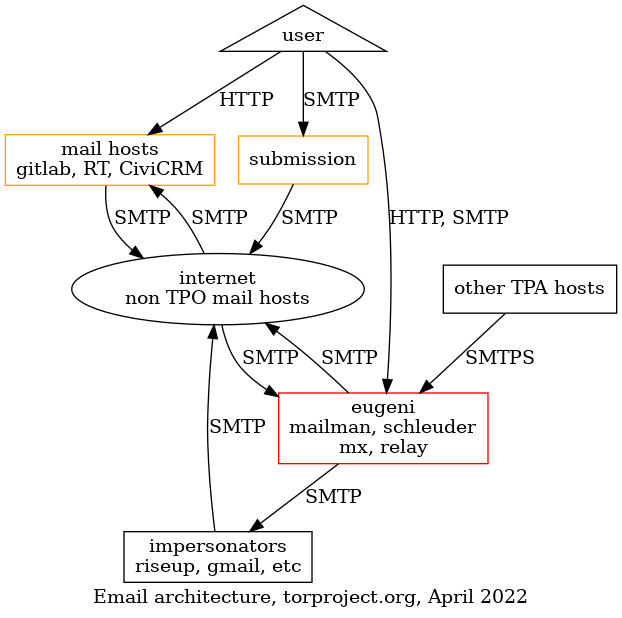
In the above diagram, we can see how most TPA-managed servers relay
email over SMTPS through the eugeni email server, which also hosts
Mailman, Schleuder, and incoming email from the rest of the
Internet. Users are allowed to send email through TPA infrastructure
by using a submission server. There are also mail hosts like GitLab,
RT, and CiviCRM who send and receive mail on their own. Finally, the
diagram also shows other hosts like Riseup or Gmail who are
currently allowed to send mail as torproject.org. Those are called
"impersonators".
After
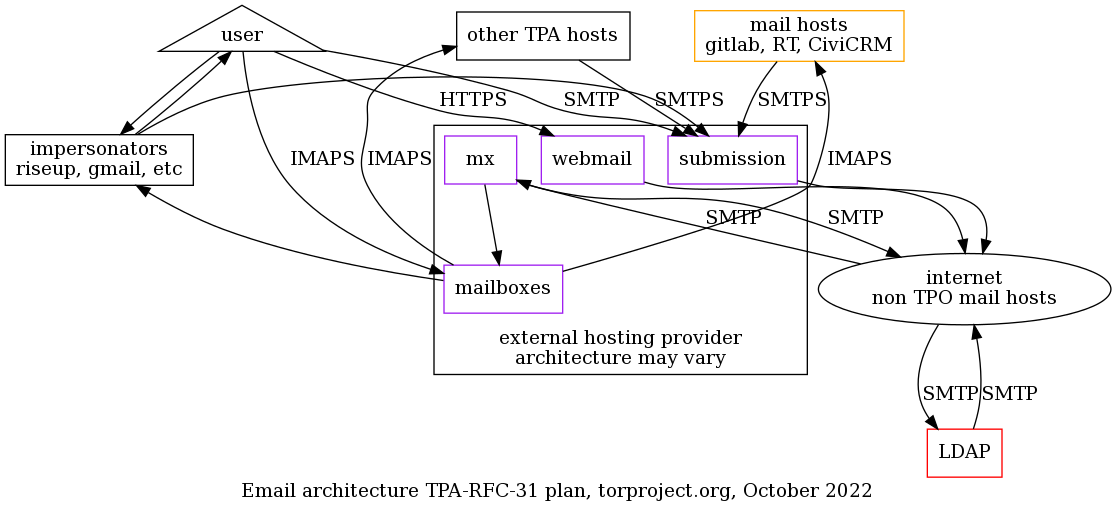
In this new diagram, all incoming and outgoing mail with the internet go through the external hosting provider. The only exception is the LDAP server, although it might be possible to work around that problem by using forwarding for inbound email and SMTP authentication for outbound.
In the above diagram, the external hosting provider also handles mailing lists, or we self-host Discourse in which case it behaves like another "mail host".
Also note that in the above diagram, some assumptions are made about the design of the external service provider. This might change during negotiations with the provider, and should be not considered part of the proposal itself.
Actual changes
The actual changes proposed here are broken down in different changes detailed below. A cost estimate of each one is detailed in the costs section.
New mail transfer agent
Configure new "mail transfer agent" server(s) to relay mails from
servers that do not send their own email, replacing a part of
eugeni.
This host would remain as the last email server in operation by TPA. It is require because we want to avoid the manual overhead of creating accounts for each server on the external mail submission server unless absolutely necessary.
All servers would submit email through this server using mutual TLS
authentication the same way eugeni currently does this service. It
would then relay those emails to the external service provider.
This server will be called mta-01.torproject.org and could be
horizontally scaled up for availability. See also the Naming
things challenge below.
Schleuder retirement
Schleuder is likely going to be retired completely from our infrastructure, see TPA-RFC-41: Schleuder retirement.
Mailing lists migration
The new host should be in a position to host mailing lists for us, which probably involves migrating from Mailman 2 to some other software, either Mailman 3 or some other mailing list manager.
Another option here is to self-host a Discourse instance that would replace mailing lists, but that would be done in a separate proposal.
A fallback position would be to keep hosting our mailing lists, which involves upgrading from Mailman 2 to Mailman 3, on a new host. See issue tpo/tpa/team#40471.
User account creation
On-boarding and off-boarding procedures will be modified to add an extra step to create a user account on the external email provider. Ideally, they could delegate authentication for our LDAP server so that the step is optional, but that is not a hard requirement.
For the migration, each user currently in LDAP will have an account created on the external service provider by TPA, and be sent an OpenPGP-encrypted email with their new credentials at their current forwarding address.
Machine account creation
Each mail server not covered by the new transfer agent above will need an account created in the external mail provider.
TPA will handle manually creating an account for each server and configure the server for SMTP-based authenticated submission and incoming IMAP-based spools. Dovecot servers will be retired after the migration, once their folders are confirmed empty and the email communication is confirmed functional.
The following operations will be required, specifically:
| Service | Server | Fate |
|---|---|---|
| BridgeDB | polyanthum | external SMTP/IMAP, IMAP service conversion |
| CiviCRM | crm-int-01, Dovecot | external SMTP/IMAP, Dovecot retirement |
| GitLab | gitlab-02, Dovecot | external SMTP/IMAP, Dovecot retirement |
| LDAP | alberti | added to SPF records, @db.tpo kept active as legacy |
| MTA | eugeni | retirement |
| rdsys | rdsys-frontend-01, Dovecot | external SMTP/IMAP, Dovecot retirement |
| RT | rude | external SMTP/IMAP, forward cleanups |
| Submission | submit-01 | retirement |
Discourse wouldn't need modification as they handle email themselves in their own domain and mail server. If we would be to self-host, it is assumed Discourse could use an existing SMTP and IMAP configuration as well.
RT is likely to stick around for at least 2023. There are plans to
review its performance when compared to the cdr.link instance, but
any change will not happen before this proposal needs to be
implemented, so we need to support RT for the foreseeable future.
Eugeni retirement
The current, main, mail server (eugeni) deserves a little more
attention than the single line above. Its retirement is a complex
manner involving many different services and components and is rather
risky.
Yet it's a task that is already planned, in some sense, as part of the Debian bullseye upgrade, since we plan to rebuild it in multiple, smaller servers anyways. The main difference here is whether or not some services (mailing lists, mostly) would be rebuilt or not.
The "mail transfer agent" service that eugeni currently operates would still continue operating in a new server, as all mail servers would relay mails through that new host.
See also the mailing lists migration and Schleuder retirement
tasks above, since those two services are also hosted on eugeni and
would be executed before the retirement.
alberti case
Alberti is a special case because it uses a rather complex piece of
software called userdir-ldap (documented in the LDAP service
page). It is considered too complicated for us to add an IMAP spool
support for that software, so it would still need to accept incoming
email directed at @db.torproject.org.
For outgoing mail, however, it could relay mail using the normal mail transfer agent or an account specifically for that service with the external provider, therefore not requiring changes to the SPF, DKIM, or DMARC configurations.
polyanthum case
Polyanthum, AKA https://bridges.torproject.org currently processes incoming email through a forward. It is believe it should be possible to migrate this service to use an incoming IMAP mail spool.
If it is, then it becomes a mail host like CiviCRM or GitLab.
If it isn't possible, then it becomes a special case like alberti.
RT/rude conversion
RT will need special care to be converted to an IMAP based workflow. Postfix could be retained to deal with the SMTP authentication, or that could be delegated to RT itself.
The old queue forwards and the spam filtering system will be retired in favor of a more standard IMAP-based polling and the upstream spam filtering system.
Puppet refactoring
Refactor the mail-related code in Puppet, and reconfigure all servers according to the mail relay server change above, see issue 40626 for details. This should probably happen before or during all the other tasks, not after.
Cost estimates
Summary:
- setup staff: 35-62 days, 2-4 months full time
- ongoing staff: unsure, at most a day a month
- TODO: add summary of hosting costs from below
Staff
This is an estimate of the time it will take to complete this project, based on the tasks established in the actual changes section. The process follows the Kaplan-Moss estimation technique.
| Task | Estimate | Uncertainty | Total (days) | Note |
|---|---|---|---|---|
| New mail transfer agent | 3 days | low | 3.3 | similar to current submission server |
| Schleuder retirement | 3 days | high | 6 | might require hackery |
| Mailing list migration | 2 weeks | high | 20 | migration or upgrade |
| User account creation | 1 week | medium | 7.5 | |
| Machine account creation | ||||
| - bridgedb | 3 days | low | 3.3 | |
| - CiviCRM | 1 day | low | 1.1 | |
| - LDAP | 1 day | extreme | 5 | |
| - MTA | 1 day | extreme | 5 | |
| - rdsys | 1 day | low | 1.1 | |
| - RT | 1 day | low | 1.1 | |
| - submission | 1 day | low | 1.1 | |
| Puppet refactoring | 1 week | medium | 7.5 | |
| Total | 35 days | ~high | 62 |
Interestingly, the amount of time required to do the migration is in the same magnitude of the estimates behind TPA-RFC-15 (40-80 days), which resulted in us running our own mail infrastructure.
The estimate above could be reduce by postponing mailing list and Schleuder retirements, but this would go against the spirit of this proposal, which requires us to stop hosting our own email...
A large chunk of the estimate (2 weeks, high uncertainty) is around the fate of those two mailing list servers (Mailman and Schleuder, between 13 and 26 days of work, or about a third of the staff costs). Deciding on that fate earlier could help reduce the uncertainty of this proposal.
Ongoing costs
The above doesn't cover ongoing maintenance costs and the overhead of processing incoming questions or complaints and forwarding them upstream, or of creating or removing new accounts for machines or people during on-boarding and retirement.
We can certainly hope this will be much less work than self-hosting our mail services ourselves, however. Let's cap this at one person-day per month, which is 12 days of work, or 5,000EUR, per year.
Hosting
TODO: estimate hosting costs
Timeline
TODO: when are we going to do this? and how?
Challenges
Delays
In early June 2021, it became apparent that we were having more problems delivering mail to Gmail, possibly because of the lack of DKIM records (see for example tpo/tpa/team#40765). We may have had time to implement some countermeasures, had TPA-RFC-15 been adopted, but alas, we decided to go with an external provider.
It is unclear, at this point, whether this will speed things up or not. We may take too much time deliberating on the right service provider, or this very specification, or find problems during the migrations, which may make email even more unreliable.
Naming things
In TPA-RFC-15, it became apparent that the difficulty of naming things did not escape those proposals. For example, in TPA-RFC-15, the term "relay" has been used liberally to talk about a new email server processing email for other servers. That terminology, unfortunately, clashes with the term "relay" used extensively in the Tor network to designate "Tor relays", which create circuits that make up the Tor network.
This is the reason why the mta-01 server is named a "MTA" and not a
"relay" or "submission" server. The former is reserved for Tor relays,
and the latter for "email submission servers" provided by
upstream. Technically, the difference between the "MTA" and the
"submission" server is that the latter is expected to deliver the
email out of the responsibility of the torproject.org domain, to its
final destination, while the MTA is allowed to transfer to another MTA
or submission server.
Aging Puppet code base and other legacy
This deployment will still need some work on the Puppet code, since we will need to rewire email services on all hosts for email to keep being operational.
We should spend some time to refactor and cleanup that code base before we can do things like SMTP authentication. The work here should be simpler than the one originally involved in TPA-RFC-15, however, so uncertainty around that task's cost was reduced. See also issue 40626 for the original discussion on this issue.
Security and privacy issues
Delegating email services to a third party implies inherent security risks. We would entrust privacy of a sensitive part of our users to a third party provider.
Operators at that provider would likely be in a position to read all of our communications, unless those are encrypted client-side. But given the diminishing interest in OpenPGP inside the team, it seems unlikely we could rely on this for private communications.
Server-side mailbox encryption might mitigate some of those issues, but would require trust in the provider.
On the upside, a well-run service might offer security improvements like two-factor authentication logins, which would have been harder to implement ourselves.
Duplication of services with LDAP
One issue with outsourcing email services is that it will complicate on-boarding and off-boarding processes, because it introduces another authentication system.
As mentioned in the User account creation section, it might be possible for the provider to delegate authentication to our LDAP server, but that would be exceptional.
Upstream support burden
It is unclear how we will handle support requests: will users directly file issues upstream, or will this be handled by TPA first?
How will password resets be done, for example?
Sunk costs
There has been a lot of work done in the current email
infrastructure. In particular, anarcat spent a significant amount of
time changing the LDAP services to allow the addition of an "email
password" and deploying those to a "submission server" to allow people
to submit email through the torproject.org infrastructure. The
TPA-RFC-15 design and proposal will also go to waste with this
proposal.
Partial migrations
With this proposal, we might end up in a "worst case scenario" where we both have the downsides of delegating email hosting (e.g. the privacy issues) and still having deliverability issues (e.g. because we cannot fully outsource all email services, or because the service provider is having its own deliverability issues).
In particular, there is a concern we might have to maintain a significant part of email infrastructure, even after this proposal is implemented. We already have, as part of the spec, a mail transfer agent and the LDAP server as mail servers to maintain, but we might also have to maintain a full mailing list server (Mailman), complete with its (major) Debian bullseye upgrade.
Personas
Here we collect a few "personas" and try to see how the changes will affect them.
We have taken the liberty of creating mostly fictitious personas, but they are somewhat based on real-life people. We do not mean to offend. Any similarity that might seem offensive is an honest mistake on our part which we will be happy to correct. Also note that we might have mixed up people together, or forgot some. If your use case is not mentioned here, please do report it. We don't need to have exactly "you" here, but all your current use cases should be covered by one or many personas.
The personas below reuse the ones from TPA-RFC-15 but, of course, adapted to the new infrastructure.
Ariel, the fundraiser
Ariel does a lot of mailing. From talking to fundraisers through their normal inbox to doing mass newsletters to thousands of people on CiviCRM, they get a lot of shit done and make sure we have bread on the table at the end of the month. They're awesome and we want to make them happy.
Email is absolutely mission critical for them. Sometimes email gets lost and that's a huge problem. They frequently tell partners their personal Gmail account address to workaround those problems. Sometimes they send individual emails through CiviCRM because it doesn't work through Gmail!
Their email is forwarded to Google Mail and they do not have an LDAP account.
TPA will make them an account that forwards to their current Gmail account. This might lead to emails bouncing when sent from domains with a "hard" SPF policy unless the external service provider has some mitigations in place to rewrite the sender. In that case incoming email addresses might be mangled to ensure delivery, which may lead to replies failing.
Ariel will still need an account with the external provider, which will be provided over Signal, IRC, snail mail, or smoke signals. Ariel will promptly change the password upon reception and use it to configure their Gmail account to send email through the external service provider.
Gary, the support guy
Gary is the ticket master. He eats tickets for breakfast, then files 10 more before coffee. A hundred tickets is just a normal day at the office. Tickets come in through email, RT, Discourse, Telegram, Snapchat and soon, TikTok dances.
Email is absolutely mission critical, but some days he wishes there could be slightly less of it. He deals with a lot of spam, and surely something could be done about that.
His mail forwards to Riseup and he reads his mail over Thunderbird and sometimes webmail.
TPA will make an account for Gary and send the credentials in an encrypted email to his Riseup account.
He will need to reconfigure his Thunderbird to use the new email provider. The incoming mail checks from the new provider should, hopefully, improve the spam situation across the board, but especially for services like RT. It might be more difficult, however, for TPA to improve spam filtering capabilities on services like RT since spam filtering will be delegated to the upstream provider.
He will need, however, to abandon Riseup for TPO-related email, since Riseup cannot be configured to relay mail through the external service provider.
John, the external contractor
John is a freelance contractor that's really into privacy. He runs his own relays with some cools hacks on Amazon, automatically deployed with Terraform. He typically run his own infra in the cloud, but for email he just got tired of fighting and moved his stuff to Microsoft's Office 365 and Outlook.
Email is important, but not absolutely mission critical. The submission server doesn't currently work because Outlook doesn't allow you to add just an SMTP server.
John will have to reconfigure his Outlook to send mail through the external service provider server and use the IMAP service as a backend.
Nancy, the fancy sysadmin
Nancy has all the elite skills in the world. She can configure a Postfix server with her left hand while her right hand writes the Puppet manifest for the Dovecot authentication backend. She knows her shit. She browses her mail through a UUCP over SSH tunnel using mutt. She runs her own mail server in her basement since 1996.
Email is a pain in the back and she kind of hates it, but she still believes everyone should be entitled to run their own mail server.
Her email is, of course, hosted on her own mail server, and she has an LDAP account.
She will have to reconfigure her Postfix server to relay mail through
the external service provider. To read email, she will need to
download email from the IMAP server, although it will still be
technically possible to forward her @torproject.org email to her
personal server directly, as long as the server is configured to send
email through the external service provider.
Mallory, the director
Mallory also does a lot of mailing. She's on about a dozen aliases and mailing lists from accounting to HR and other obscure ones everyone forgot what they're for. She also deals with funders, job applicants, contractors and staff.
Email is absolutely mission critical for her. She often fails to
contact funders and critical partners because state.gov blocks our
email (or we block theirs!). Sometimes, she gets told through LinkedIn
that a job application failed, because mail bounced at Gmail.
She has an LDAP account and it forwards to Gmail. She uses Apple Mail to read their mail.
For her Mac, she'll need to configure the submission server and the IMAP server in Apple Mail. Like Ariel, it is technically possible for her to keep using Gmail, but with the same caveats about forwarded mail from SPF-hardened hosts.
The new mail relay servers should be able to receive mail state.gov
properly. Because of the better reputation related to the new
SPF/DKIM/DMARC records, mail should bounce less (but still may
sometimes end up in spam) at Gmail.
Orpheus, the developer
Orpheus doesn't particular like or dislike email, but sometimes has to
use it to talk to people instead of compilers. They sometimes have to
talk to funders (#grantlife) and researchers and mailing lists, and
that often happens over email. Sometimes email is used to get
important things like ticket updates from GitLab or security
disclosures from third parties.
They have an LDAP account and it forwards to their self-hosted mail server on a OVH virtual machine.
Email is not mission critical, but it's pretty annoying when it doesn't work.
They will have to reconfigure their mail server to relay mail through the external provider. They should also start using the provider's IMAP server.
Blipblop, the bot
Blipblop is not a real human being, it's a program that receives mails from humans and acts on them. It can send you a list of bridges (bridgedb), or a copy of the Tor program (gettor), when requested. It has a brother bot called Nagios/Icinga who also sends unsolicited mail when things fail. Both of those should continue working properly, but will have to be added to SPF records and an adequate OpenDKIM configuration should be deployed on those hosts as well.
There's also a bot which sends email when commits get pushed to gitolite. That bot is deprecated and is likely to go away.
Most bots will be modified to send and receive email through the external service providers. Some bots will need to be modified to fetch mail over IMAP instead of being pushed mail over SMTP.
Any bot that requests it will be able to get their own account to send and receive email at the external service provider.
Other alternatives
Those are other alternatives than this proposal that were considered while or before writing it.
Hosting our own email
We have first proposed to host our own email completely and properly, through the TPA-RFC-15 proposal. That proposal was rejected
The rationale here is that we prefer to outsource the technical and staff risks to the outside, because the team is already overloaded. It was felt that email was a service too critical to be left to the already overloaded team to improve, and that we should consider external hosting instead for now.
Status quo
The status quo situation is similar (if not worse) than the status quo
described in TPA-RFC-15: email services are suffering from major
deliverability problems and things are only going to get worse over
time, up to a point when no one will use their @torproject.org email
address.
The end of email
This is similar to the discussion mentioned in TPA-RFC-15: email is still a vital service and we cannot at the moment consider completely replacing it with other tools.
Generic providers evaluation
TODO: update those numbers, currently taken directly from TPA-RFC-15, without change
Fastmail: 5,000$/year, no mass mailing
Fastmail were not contacted directly but their pricing page says about 5$USD/user-month, with a free 30-day trial. This amounts to 500$/mth or 6,000$/year.
It's unclear if we could do mass-mailing with this service. Do note that they do not use their own service to send their own newsletter (!?):
In 2018, we closed Listbox, our email marketing service. It no longer fit into our suite of products focused on human-to-human connection. To send our own newsletter, and to give you the best experience reading newsletters, it made sense to move on to one of the many excellent paid email marketing services, as long as customer privacy could be maintained.
So it's quite likely we would have trouble sending mass mailings through Fastmail.
They do not offer mailing lists services.
Gandi: 480$-2400$/year
Gandi, the DNS provider, also offers mailbox services which are priced at 0.40$/user-month (3GB mailboxes) or 2.00$/user-month (50GB).
It's unclear if we could do mass-mailing with this service.
They do not offer mailing lists services.
Google: 10,000$/year
Google were not contacted directly, but their promotional site says it's "Free for 14 days, then 7.80$ per user per month", which, for tor-internal (~100 users), would be 780$/month or ~10,000USD/year.
We probably wouldn't be able to do mass mailing with this service. Unclear.
Google offers "Google groups" which could replace our mailing list services.
Greenhost: ~1600€/year, negotiable
We had a quote from Greenhost for 129€/mth for a Zimbra frontend with a VM for mailboxes, DKIM, SPF records and all that jazz. The price includes an office hours SLA.
TODO: check if Greenhost does mailing lists TODO: check if Greenhost could do mass mailings
Mailcow: 480€/year
Mailcow is interesting because they actually are based on a free software stack (based on PHP, Dovecot, Sogo, rspamd, postfix, nginx, redis, memcached, solr, Oley, and Docker containers). They offer a hosted service for 40€/month, with a 100GB disk quota and no mailbox limitations (which, in our case, would mean 1GB/user).
We also get full admin access to the control panel and, given their infrastructure, we could self-host if needed. Integration with our current services would be, however, tricky.
It's unclear if we could do mass-mailing with this service.
Mailfence: 2,500€/year, 1750€ setup
The mailfence business page doesn't have prices but last time we looked at this, it was a 1750€ setup fee with 2.5€ per user-year.
It's unclear if we could do mass-mailing with this service.
Riseup
Riseup already hosts a significant number of email accounts by virtue
of being the target of @torproject.org forwards. During the last
inventory, we found that, out of 91 active LDAP accounts, 30 were
being forwarded to riseup.net, so about 30%.
Riseup supports webmail, IMAP, and, more importantly, encrypted mailboxes. While it's possible that an hostile attacker or staff could modify the code to inspect a mailbox's content, it's leagues ahead of most other providers in terms of privacy.
Riseup's prices are not public, but they are close to "market" prices quoted above.
We might be able to migrate our mailing lists to Riseup, but we'd need
to convert our subscribers over to their mailing list software (Sympa)
and the domain name of the lists would change (to
lists.riseup.net).
We could probably do mass mailings at Riseup, as long as our opt-out correctly work and we ramp up outgoing properly.
Transactional providers evaluation
Those providers specialize in sending mass mailings. Those do not cover all use cases required by our email hosting needs; in particular, they do provide IMAP or Webmail services, any sort of mailboxes, and not manage inbound mail beyond bounce handling.
This list is based on the recommended email providers from Discourse. As a reminder, we send over 250k emails during our mass mailings, with 270,000 sent in June 2021, so the prices below are based on those numbers, roughly.
Mailgun: 200-250$/mth
- Free plan: 5,000 mails per month, 1$/1,000 mails extra (about 250$/mth)
- 80$/mth: 100,000 mails per month, 0.80$/1,000 extra (about 200$/mth)
All plans:
- hosted in EU or US
- GDPR policy: message bodies kept for 7 days, metadata for 30 days, email addresses fully suppressed after 30 days when unsubscribed
- sub-processors: Amazon Web Services, Rackspace, Softlayer, and Google Cloud Platform
- privacy policy: uses google analytics and many more
- AUP: maybe problematic for Tor, as:
You may not use our platform [...] to engage in, foster, or promote illegal, abusive, or irresponsible behavior, including (but not limited to):
[...]
2b – Any activity intended to withhold or cloak identity or contact information, including the omission, deletion, forgery or misreporting of any transmission or identification information, such as return mailing and IP addresses;
SendGrid: 250$/mth
- Free plan: 40k mails on a 30 day trial
- Pro 100k plan: 90$/mth estimated, 190,000 emails per month
- Pro 300k plan: 250$/mth estimated, 200-700,000 emails per month
- about 3-6$/1k extra
Details:
- security policy: security logs kept for a year, metadata kept for 30 days, random content sampling for 61 days, aggregated stats, suppression lists (bounces, unsubscribes), spam reports kept indefinitely
- privacy policy: Twilio's. Long and hard to read.
Owned by Twilio now.
Mailjet: 225$/mth
- Free plan: 6k mails per month
- Premium: 250,000 mails at 225$/mth
- around 1$/1k overage
Note, same corporate owner than Mailgun, so similar caveats but, interestingly, no GDPR policy.
Elastic email: 25-500$/mth
https://elasticemail.com/email-marketing-pricing
- 500$/mth for 250k contacts
https://elasticemail.com/email-api-pricing
- 0.10$/1000 emails + 0.50$/day, so, roughly, 25$ per mailing
Mailchimp: 1300$/mth
Those guys are kind of funny. When you land on their pricing page, they preset you with 500 contacts and charge you 23$/mth for "Essential", and 410$/mth for "Premium". But when you scroll your contacts up to 250k+, all boxes get greyed out and the "talk to sales" phone number replaces the price. The last quoted price, at 200k contacts, is 1300$USD per month.
- GDPR policy seems sound
- Security policy
- couldn't immediately find data retention policies
References
- this work is part of the improve mail services OKR, part of the 2022 roadmap, Q1/Q2
- this proposal is specifically discussed in tpo/tpa/team#40798
Background
In the Tor Project Nextcloud instance, most root-level shared folders currently exist in the namespace of a single Nextcloud user account. As such, the management of these folders rests in the hands of a single person, instead of the team of Nextcloud administrators.
In addition, there is no folder shared across all users of the Nextcloud instance, and incoming file and folder shares are created directly in the root of each user's account, leading to a cluttering of users' root folders. This clutter is increasingly restricting the users' ability to use Nextcloud to its full potential.
Proposal
Move root-level shared folders to external storage
The first step is to activate the External storage support Nextcloud app.
This app is among those shipped and maintained by the Nextcloud core
developers.
Then, in the Administration section of Nextcloud, we'll create a series of "Local" external storage folders and configure sharing as described in the table below:
| Source namespace | Source folder | New folder name | Share with |
|---|---|---|---|
| gaba | Teams/Anti-Censorship | Anti-censorship Team | Anti-censorship Team |
| gaba | Teams/Applications | Applications Team | Applications Team |
| gaba | Teams/Communications | Communications Team | Communications |
| gaba | Teams/Community | Community Team | Community Team |
| Al | Fundraising | Fundraising Team | Fundraising Team (new) |
| gaba | Teams/Grants | Fundraising Team/Grants | (inherited) |
| gaba | Teams/HR (hiring, etc) | HR Team | HR Team |
| gaba | Teams/Network | Network Team | Network Team |
| gaba | Teams/Network Health | Network Health Team | Network Health |
| gaba | Teams/Sysadmin | TPA Team | TPA Team |
| gaba | Teams/UX | UX Team | UX Team |
| gaba | Teams/Web | Web Team | Web Team (new) |
Create "TPI" and "Common" shared folders
We'll create a shared folder named "Common", shared with all Nextcloud users, and a "TPI" folder shared with all TPI employees and contractors.
-
Common would serve as a repository for documents of general interest, accessible to all TPO Nextcloud accounts, and a common space to share documents that have no specific confidentiality requirements
-
TPI would host documents of interest to TPI personnel, such as holiday calendars and the employee handbook
Set system-wide default incoming shared folder to "Incoming"
Currently when a Nextcloud user shared documents or folders with another user or group of users, those appear in the share recipients' root folder.
By making this change in the Nextcloud configuration (share_folder
parameter), users who have not already changed this in their personal
preferences will receive new shares in that subfolder, instead of the root
folder. It will not move existing files and folders, however.
Reorganise shared folders and documents
Once the preceding changes are implemented, we'll ask Nextcloud users to examine their list of "shared with others" files and folders and move those items to one of the new shared folders, where appropriate.
This should lead to a certain degree of consolidation into the new team and common folders.
Goals
- Streamline the administration of team shared folders
- De-clutter users' Nextcloud root folder
Scope
The scope of this proposal is the Nextcloud instance at https://nc.torproject.net
Summary: retire the secondary Prometheus server, merging into a private, high availability cluster completed in 2025, retire Icinga in September 2024.
- Background
- Personas
- Proposal
- Challenges
- Alternatives considered
- Costs
- References
- Appendix
Background
As part of the fleet-wide Debian bullseye upgrades, we are evaluating whether it is worth upgrading from the Debian Icinga 1 package to Icinga 2, or if we should switch to Prometheus] instead.
Icinga 1 is not available in Debian bullseye and this is therefore a mandatory upgrade. Because of the design of the service, it cannot just be converted over easily, so we are considering alternatives.
This has become urgent as of May 2024, as Debian buster will stop being supported by Debian LTS in June 2024.
History
TPA's monitoring infrastructure has been originally setup with Nagios and Munin. Nagios was eventually removed from Debian in 2016 and replaced with Icinga 1. Munin somehow "died in a fire" some time before anarcat joined TPA in 2019.
At that point, the lack of trending infrastructure was seen as a serious problem, so Prometheus and Grafana were deployed in 2019 as a stopgap measure.
A secondary Prometheus server (prometheus2) was setup with stronger
authentication for service admins. The rationale was that those
services were more privacy-sensitive and the primary TPA setup
(prometheus1) was too open to the public, which could allow for
side-channels attacks.
Those tools has been used for trending ever since, while keeping Icinga for monitoring.
During the March 2021 hack week, Prometheus' Alertmanager was deployed on the secondary Prometheus server to provide alerting to the Metrics and Anti-Censorship teams.
Current configuration
The Prometheus configuration is almost fully Puppetized, using the Voxpupuli Prometheus module, with rare exceptions: the PostgreSQL exporter needs some manual configuration, and the secondary Prometheus servers has a Git repository where teams can submit alerts and target definitions.
Prometheus is currently scraping 160 exporters, including 88 distinct hosts. It is using about 100GB of disk space, scrapes metrics every minute, and keeps those metrics for a year. This implies that it does about 160 "checks" per minute, although each check generates much more than a single metric. We previously estimated (2020) an average of 2000 metrics per host.
The Icinga server's configuration is semi-automatic: configuration is kept in a YAML file the tor-nagios.git repository. That file, in turn, gets turned into Nagios (note: not Icinga 2!) configuration files by a Ruby script, inherited from the Debian System Administrator (DSA) team.
Nagios's NRPE probes configuration get generated by that same script and then copied over to the Puppet server, which then distributes those scripts to all nodes, regardless of where the script is supposed to run. Nagios NRPE checks often have many side effects. For example, the DNSSEC checks automatically renew DNSSEC anchors.
Icinga is currently monitoring 96 hosts and 4400 services, it using 2GiB of disk space. It scrapes about 5% of services every minute, takes 15 minutes to scrape 80% and an hour to scrape 93% of services. The 100 hosts are typically tested for reachability within 5 minutes. It processes about 250 checks per minute.
Problem statement
The current Icinga deployment cannot be upgraded to Bullseye as is.
At the very least the post-receive hook in git would need to be rewritten to
support the Icinga 2 configuration files, since Icinga 2 has dropped
support for Nagios configurations.
The Icinga configuration is error-prone: because of the way the script
is deployed (post-receive hook), an error in the configuration can
go un-detected and not being deployed for extended periods of time,
which had lead some services to stay unmonitored.
Having Icinga be a separate source of truth for host information was originally a deliberate decision: it allowed for external verification of configurations deployed by Puppet. But since new services must be manually configured in Icinga, this leads to new servers and services not being monitored at all, and in fact many services do not have any form of monitoring.
The way the NRPE configuration is deployed is also problematic: because the files get deployed asynchronously, it's common for warnings to pop up in Icinga because the NRPE definitions are not properly deployed everywhere.
Furthermore, there is some overlap between the Icinga and Prometheus/Grafana services. In particular:
-
Both Icinga and Prometheus deploy remote probes (Prometheus "exporters" and Nagios NRPE)
-
Both Icinga and Grafana (and Prometheus) provide dashboards (although Prometheus' dashboard is minimal)
-
Both Icinga and Prometheus retain metrics about services
-
Icinga, Prometheus, and Grafana can all do alerting, both Icinga and Prometheus are currently used for alerting, TPA and service admins in the case of Icinga, only service admins for Prometheus right now
Note that weasel has started on rewriting the DSA Puppet configuration to automatically generate Icinga 2 configurations using a custom Puppet module, ditching the "push to git" design. This has the limitation that service admins will not have access to modifying the alerting configuration unless they somehow get access to the Puppet repository. We have the option of automate Icinga configuration of course, either with DSA's work or another Icinga module.
Definitions
-
"system" metrics: directly under the responsibility of TPA, for example: memory, CPU, disk usage, TCP/IP reachability, TLS certificates expiration, DNS, etc
-
"user" metrics: under the responsibility of service admins, for example: number of overloaded relays,
bridges.torproject.orgaccessibility -
alerting: checking for a fault related to some metric out of a given specification, for example: unreachable host, expired certificate, too many overloaded relays, unreachable sites
-
notifications: alert delivered to an operator, for example by sending an email (as opposed to just showing alerts on a dashboard)
-
trending: long term storage and rendering of metrics and alerts, for example: Icinga's alert history, Prometheus TSDB, Grafana graphics based on Prometheus
-
TSDB: Time-Series Database, for example: Prometheus block files, Icinga log files, etc
Requirements
This section establishes what constitutes a valid and sufficient monitoring system, as provided by TPA.
Must have
-
trending: it should be possible to look back in metrics history and analyse long term patterns (for example: "when did the disk last fill up, and what happened then?" or "what is the average latency of this service over the last year?")
-
alerting: the system should allow operators to set "normal" operational thresholds outside of which a service is considered in "fault" and an alert is raised (for example: "95 percentile latency above 500 ms", "disk full") and those thresholds should be adjustable per-role
-
user-defined: user-defined metrics must be somehow configurable by the service admins with minimal intervention by TPA
-
status dashboard: it MUST be possible for TPA operators to access an overview dashboard giving the global status of metrics and alerts service admins SHOULD also have access to their own service-specific dashboards
-
automatic configuration: monitoring MUST NOT require a manual intervention from TPA when a new server is provisioned, and new components added during the server lifetime should be picked up automatically (eg. adding apache via Puppet should not require separately modifying monitoring configuration files)
-
reduced alert fatigue: the system must provide ways avoid sending many alerts for the same problem and to minminize non-relevant alerts, such as acknowledging known problems and silencing expected alerts ahead of time (for planned maintenance) or on a schedule (eg. high i/o load during the backup window)
-
user-based alerting: alerts MUST focus on user-visible performance metrics instead of underlying assumptions about architecture (e.g. alert on "CI jobs waiting for more than X hours" not "load too high on runners"), which should help with alert fatigue and auto-configuration
-
timely service checks: the monitoring system should notice issues promptly (within a minute or so), without having to trigger checks manually to verify service recovery, for example
-
alert notifications: it SHOULD be possible for operators to receive notifications when a fault is found in the collected metrics (as opposed to having to consult a dashboard), the exact delivery mechanism is left as a "Nice to have" implementation detail
-
notification groups: service admins SHOULDN'T receive notification from system-level faults and TPA SHOULDN'T receive notifications from service-level faults, service A admin should only receive alerts for service A and not service B
Nice to have
-
Email notifications: alerts should be sent by email
-
IRC notifications: alerts should be transmitted in an IRC channel, for example the current
nsabot in#tor-nagios -
Matrix notifications: alerts may be transmitted over Matrix instead of IRC, assuming this will not jeopardize the reliability of notifications compared to the current IRC notifications
-
predictive alerting: instead of raising an alert after a given threshold (e.g. "disk 90% full"), notify operators about planned outage date (e.g. "disk will be full in 5 days")
-
actionable notifications: alert dashboards or notifications should have a clear resolution path, preferably embedded in the notification or, alternatively, possible to lookup in a pager playbook (example: "expand this disk before 5 days", "renew the DNSSEC records by following this playbook"; counter-example: "disk 80% full", "security delegations is WARNING")
-
notification silences: operators should be able to silence ongoing alerts or plan silences in advance
-
long term storage: it should be possible to store metrics indefinitely, possibly with downsampling, to make long term (multi-year) analysis
-
automatic service discovery: it should be possible for service admins to automatically provide monitoring targets to the monitoring server without having to manually make changes to the monitoring system
-
tool deduplication: duplication of concern should be reduced so that only one tool is used for a specific tasks, for example only one tool should be collecting metrics, only one tool should be issuing alerts, and there should be a single, unified dashboard
-
high availability: it should be possibly for the monitoring system to survive the failure of one of the monitoring nodes and keep functioning, without alert floods, duplicated or missed alerts
-
distributed monitoring endpoints: the system should allow operators to optionally configure checks from multiple different endpoints (eg. check gnt-fsn-based web server latency from a machine in gnt-chi)
Out of scope
- SLA: we do not plan on providing any specific Service Level Agreement through this proposal, those are still defined in TPA-RFC-2: Support.
-
on-call rotation: we do not provide 24/7 on-call services, nor do we ascribe to an on-call schedule - there is a "star of the weeks" that's responsible for checking the status of things and dealing with interruptions, but they do so during work hours, in their own time, in accordance with TPA-RFC-2: Support
In particular, we do not introduce notifications that "page" operators on their mobile devices, instead we keep the current "email / IRC" notifications with optional integration with GitLab.
We will absolutely not wake up humans at night for servers. If we desire 24/7 availability, shifts should be implemented with staff in multiple time zones instead.
-
escalation: we do not need to call Y when X person fails to answer, mainly because we do not expect either X or Y to answer alerts immediately
-
log analysis: while logging might eventually be considered part of our monitoring systems, the questions of whether we use syslog-ng, rsyslog, journald, or loki are currently out of scope of this proposal
-
exporter policy: we need to clarify how new exporters are setup, but this is covered by another issue, in tpo/tpa/team#41280
- incident response: we need to improve our incident response procedures, but those are not covered by this policy, see tpo/tpa/team#40421 for that discussion
- public dashboards: we currently copy-paste screenshots into GitLab when we want to share data publicly and will continue to do so, see the Authentication section for more details
- unsupported services: even though we do monitor the underlying infra, we don't monitor services listed in unsupported services, as this is the responsibility of their own Service admins.
Personas
Here we collect some "personas", fictitious characters that try to cover most of the current use cases. The goal is to see how the changes will affect them. If you are not represented by one of those personas, please let us know and describe your use case.
Ethan, the TPA admin
Ethan is a member of the TPA team. He has access to the Puppet repository, and all other Git repositories managed by TPA. He has access to everything and the kitchen sink, and has to fix all of this on a regular basis.
He sometimes ends rotating as the "star of the week", which makes him responsible for handling "interruptions", new tickets, and also keeping an eye on the monitoring server. This involves responding to alerts like, by order of frequency in the 12 months before 2022-06-20:
- 2805 pending upgrades (packages blocked from unattended upgrades)
- 2325 pending restarts (services blocked from needrestart) or reboots
- 1818 load alerts
- 1709 disk usage alerts
- 1062 puppet catalog failures
- 999 uptime alerts (after reboots)
- 843 reachability alerts
- 602 process count alerts
- 585 swap usage alerts
- 499 backup alerts
- 484 systemd alerts e.g. systemd says "degraded" and you get to figure out what didn't start
- 383 zombie alerts
- 199 missing process (e.g. "0 postgresql processes")
- 168 unwanted processes or network services
- numerous warnings about service admin specific things:
- 129 mirror static sync alert storms (15 at a time), mostly host unreachability warnings
- 69 bridgedb
- 67 collector
- 26 out of date chroots
- 14 translation cron - stuck
- 17 mail queue (polyanthum)
- 96 RAID - DRBD warnings, mostly false alerts
- 95 SSL cert warnings about db.torproject.org, all about the same problem
- 94 DNS SOA synchronization alerts
- 88 DNSSEC alerts (81 delegation and signature expiry, 4 DS expiry, 2 security delegations)
- 69 hardware RAID warnings
- 69 Ganeti cluster verification warnings
- numerous alerts about NRPE availability, often falsely flagged as an error in a specific service (e.g. "SSL cert - host")
- 28 unbound trust alerts
- 24 alerts about unexpected software RAID
- 19 SAN health alerts
- 5 false (?) alerts about mdadm resyncing
- 3 expiring Let's Encrypt X509 certificates alerts
- 3 redis liveness alerts
- 4 onionoo backend reachability alerts
Ethan finds that is way too much noise.
The current Icinga dashboard, that said, is pretty useful in the sense that he can ignore all of those emails and just look at the dashboard to see what's actually going on right now. This sometimes causes him to miss some problems, however.
Ethan uses Grafana to diagnose issues and see long term trends. He builds dashboards by clicking around Grafana and saving the resulting JSON in the grafana-dashboards git repository.
Ethan would love to monitor user endpoints better, and particularly wants to have better monitoring for webserver response times.
The proposed changes will mean Ethan will completely stop using Icinga for monitoring. New alerts will come from Alertmanager instead and he will need to get familiar with Karma's dashboard to browse current alerts.
There might be a little bit of a bumpy ride as we transition between both services, and outages might go on unnoticed.
Note
The alert list was created with the following utterly horrible shell pipeline:
notmuch search --format=sexp tag:nagios date:1y.. \
| sed -n '/PROBLEM/{s/.*:subject "//;s/" :query .*//;s/.*Alert: [^\/ ]*[\/ ]//;p}' \
| sed -e 's/ is UNKNOWN.*//' -e 's/ is WARNING.*//' -e 's/ is CRITICAL.*//' \
-e 's/disk usage .*/disk usage/'\
-e 's/mirror static sync.*/mirror static sync/' \
-e 's/unwanted.*/unwanted/' \
-e '/DNS/s/ - .*//' \
-e 's/process - .*/process/' \
-e 's/network service - .*/network service/' \
-e 's/backup - .*/backup/' \
-e 's/mirror sync - .*/mirror sync/' \
| sort | uniq -c | sort -n
Then the alerts were parsed by anarcat's brain to make them human-readable.
Jackie, the service admin
Jackie manages a service deployed on TPA servers, but doesn't have administrative access on the servers or the monitoring servers, either Icinga or Prometheus. She can, however, submit merge requests to the prometheus-alerts repository to deploy targets and alerting rules. She also has access to the Grafana server with a shared password that someone passed along. Jackie's primary role is not as a sysadmin: she is an analyst and/or developer and might actually be using other monitoring systems not managed by TPA at all.
Jackie manages everything through her email right now: all notifications end up there and can be correlated regardless of the monitoring system.
She would love to use a more normal authentication method than sharing the password, because that feels wrong. She wonders how exporters should be setup: all on different ports, or subpaths on the same domain name? Should there be authentication and transport-layer security (TLS)?
She also feels clicking through Grafana to build dashboards is suboptimal and would love to have a more declarative mechanism to build dashboards and has, in fact, worked on such a system based on Python and grafanalib. She directly participates in the discussion to automate deployment of Grafana dashboards.
She would love to get alerts over Matrix, but currently receives notifications by email, sometimes to a Mailman mailing list.
Jackie absolutely needs to have certain dashboards completely private, but would love if some dashboards can be made public. She can live with those being accessible only to tor-internal.
Jackie will have to transition to the central Prometheus / Grafana server and learn to collaborate with TPA on the maintenance of that server. She will copy all dashboards she needs to the new server, either by importing them in the Git repository (ideally) or by copying them by hand.
The metrics currently stored in prometheus2 will not be copied over
to the new server, but the old prometheus2 server will be kept
around as long as necessary to avoid losing data.
Her alerts will continue being delivered by email to match external monitoring systems, including for warnings. She might consider switching all monitoring systems to TPA's Prometheus services to have one central dashboard to everything, keeping notifications only for critical issues.
Proposal
The current Icinga server is retired and replaced by a pair of Prometheus servers accomplishing a similar goal, but significantly reducing alert fatigue by paging only on critical, user-visible service outages.
Architecture overview
The plan is to have a pair of Prometheus servers monitoring the entire TPA infrastructure but also external services. Configuration is performed using a mix of Puppet and GitLab repositories, pulled by Puppet.
Current
This is the current architecture:
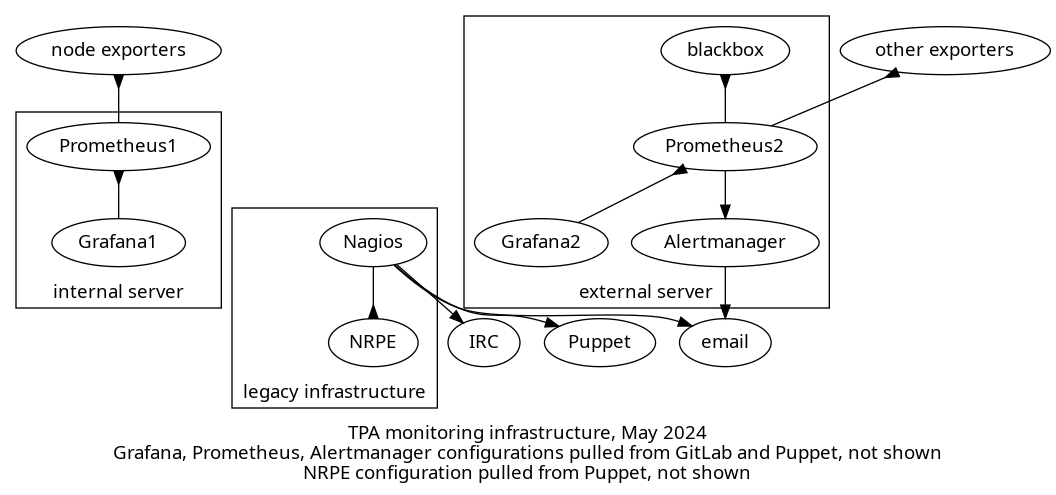
The above shows a diagram consisting of three different group of services:
-
legacy infrastructure: this is the Icinga server that pulls data from the NRPE servers and all sorts of other targets. the Icinga server pushes notifications by email and IRC, and also pushes NRPE configurations through Puppet
-
internal server: this server is managed solely by and for TPA and scrapes a node exporter on each TPA server, which provides system-level metrics like disk usage, memory, etc. It also scrapes other exporters like bind, apache, PostgreSQL and so on, not shown on the graph. A Grafana server allows browsing those time series, and its dashboard configuration is pulled from GitLab. Everything not in GitLab is managed by Puppet.
-
external server: this so-called "external server" is managed jointly by TPA and service admins, and scrapes data from a blackbox exporter and also other various exporters, depending on the services. It also has its own Grafana server, which also pulls dashboards from GitLab (not shown) but most dashboards are managed manually by service admins. It also has an Alertmanager server that pushes notifications over email. Everything not in GitLab is managed by Puppet.
Planned
The eventual architecture for the system might look something like this:
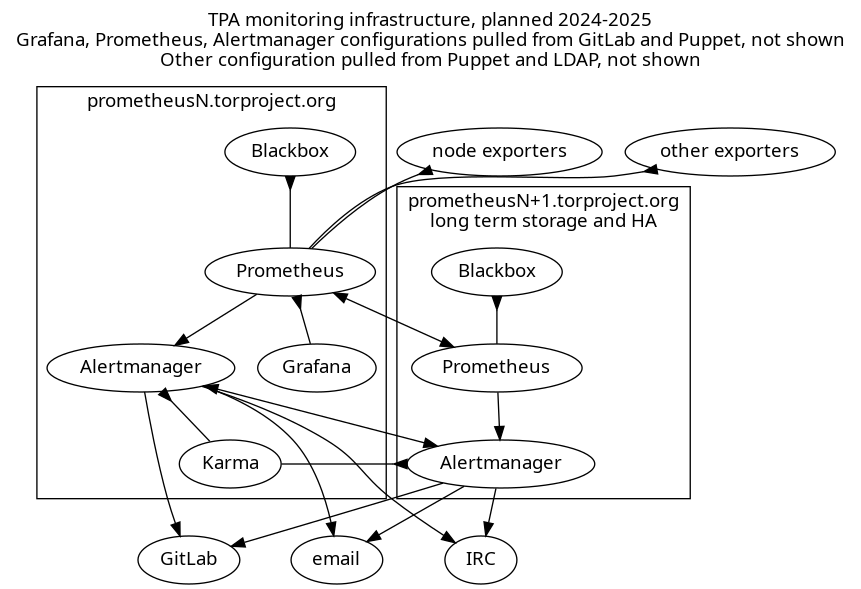
The above shows a diagram of a highly available Prometheus server setup. Each server has its own set of services running:
-
Prometheus: both servers pull metrics from exporters including a node exporter on every machine but also other exporters defined by service admins, for which configuration is a mix of Puppet and a GitLab repository pulled by Puppet.
The secondary server keeps longer term metrics, and the primary server has a "remote read" functionality to pull those metrics as needed. Both Prometheus servers monitor each other.
-
blackbox exporter: one exporter runs on each Prometheus servers and is scraped by its respective Prometheus server for arbitrary metrics like ICMP, HTTP or TLS response times
-
Grafana: the primary server runs a Grafana service which should be fully configured in Puppet, with some dashboards being pulled from a GitLab repository. Local configuration is completely ephemeral and discouraged.
It pulls metrics from the local Prometheus server at first, but eventually, with a long term storage server, will pull from a proxy.
In the above diagram, it is shown as pulling directly from Prom2, but that's a symbolic shortcut, it would only use the proxy as an actual data source.
-
Alertmanager: each server also runs its own Alertmanager which fires off notifications to IRC, email, or (eventually) GitLab, deduplicating alerts between the two servers using its gossip protocol.
-
Karma: the primary server runs this alerting dashboard which pulls alerts from Alertmanager and can issue silences.
Metrics: Prometheus
The core of the monitoring system is the Prometheus server. It is responsible for scraping targets on a regular interval, and write metrics to a time series database, keeping samples reliably, for as long as possible.
It has a set of alerting rules that determine error conditions, and pushes those alerts to the Alertmanager for notifications.
Configuration
The Prometheus server is currently configured mostly through Puppet, where modules define exporters and "export resources" that get collected on the central server, which then scrapes those targets.
Only the external Prometheus server does alerting right now, but that will change with the merge, as both servers will do alerting.
Configuration therefore needs to be both in Puppet (for automatic module configuration, e.g. "web server virtual host? then we check for 500 errors and latency") and GitLab (for service admins).
The current prometheus-alerts repository will remain as the primary source of truth for service admins alerts and targets, but we may eventually deploy another service discovery mechanism. For example, teams may be interested in exporting a Prometheus HTTP service discovery endpoint to list their services themselves.
Metrics targets are currently specified in the targets.d directory
for all teams.
It should be investigated whether it is worth labeling each target so
that, for example, a node exporter monitored by the network-health
team is not confused with the normal node exporter managed by
TPA. This might be possible through some fancy relabeling based
on the __meta_filepath from the file_sd_config parameter.
In any case, we might want to have a separate targets directory for TPA services than service admins. Some work is clearly necessary to clean up this mess.
Metrics types
In monitoring distributed systems, Google defines 4 "golden signals", categories of metrics that need to be monitored:
- Latency: time to service a request
- Traffic: transactions per second or bandwidth
- Errors: failure rates, e.g. 500 errors in web servers
- Saturation: full disks, memory, CPU utilization, etc
In the book, they argue all four should issue pager alerts, but we believe warnings for saturation, except for extreme cases ("disk actually full") might be sufficient.
The Metrics and alerts overview appendix gives an overview of the services we want to monitor along those categories.
Icinga metrics conversion
We assign each Icinga check an exporter and a priority:
- A: must have, should be completed before Icinga is shutdown, as soon as possible
- B: should have, would ideally be done before Icinga is shutdown, but we can live without it for a while
- C: nice to have, we can live without it
- D: drop, we wouldn't even keep checking this in Icinga if we kept it
- E: what on earth is this thing and how do we deal with it, to review
In the appendix, the Icinga checks inventory lists every Icinga check and what should happen with it.
Summary:
| Kind | Checks | A | B | C | D | E | Exporters |
|---|---|---|---|---|---|---|---|
| existing | 8 | 4 | 4 | 1 | |||
| missing, existing exporter | 8 | 5 | 3 | 3 | |||
| missing, new exporters | 8 | 4 | 4 | 8 | |||
| DNS | 7 | 1 | 6 | 3? | |||
| To investigate | 4 | 2 | 1 | 1 | 1 existing, 2 new? | ||
| dropped | 8 | 8 | 0 | ||||
| delegated to service admins | 4 | 4 | 4? | ||||
| new exporters | 0 | 14 (priority C) |
Checks by alerting levels:
- warning: 31
- critical: 3
- dropped: 12
Retention
We have been looking at longer-term metrics retention. This could be accomplished in a highly available setup, different servers have different retention policies and scrape interval. The primary server would have a short retention policy, similar or shorter to the current server (one year, 1 minute scrape interval) while the other has a longer retention policy (10 years, 5 minutes) and a larger disk, for longer term queries.
We have considered using the remote read functionality, which enables the primary server to read metrics from a secondary server, but it seems that might not work with different scrape intervals.
The last time we made an estimate, in May 2020, we had the following calculation for 1 minute polling interval over a year:
> 365d×1.3byte/(1min)×2000×78 to Gibyte
99,271238 gibibytes
At the time of writing (May 2024), the retention period and scrape intervals were unchanged (365 days, 15 seconds) and the disk usage (100GiB) roughly matched the above, so this seems to be a pretty reliably estimate. Note that the secondary server had much lower disk usage (3GiB).
This implies that we could store about 5 years of metrics with a 5 minute polling interval, using the same disk usage, obviously:
> 5*365d×1.3byte/(5min)×2000×78 to Gibyte
99,271238 gibibytes
... or 15 years with 15 minutes, etc... As a rule of thumb, as long as we multiple the scrape interval, we can multiply the retention period as well.
On the other side, we might be able to increase granularity quite a bit by lowering the retention to (say) 30 days and 5 seconds polling interval, which would give us:
> 30d*1.3byte/(5 second)*2000*78 to Gibyte
97,911358 gibibytes
That might be a bit aggressive though: the default Prometheus
scrape_interval is 15 seconds, not 5 seconds... With the defaults
(15 seconds scrape interval, 30 days retention), we'd be at about
30GiB disk usage, which makes for a quite reasonable and easy to
replicate primary server.
A few more samples calculations:
| Interval | Retention | Storage |
|---|---|---|
| 5 second | 30 days | 100 GiB |
| 15 second | 30 days | 33 GiB |
| 15 second | 1 year | 400 GiB |
| 15 second | 10 year | 4 TiB |
| 15 second | 100 year | 40 TiB |
| 1 min | 1 year | 100 GiB |
| 1 min | 10 year | 1 TiB |
| 1 min | 100 year | 10 TiB |
| 5 min | 1 year | 20 GiB |
| 5 min | 5 year | 60 GiB |
| 5 min | 10 year | 100 GiB |
| 5 min | 100 year | 1 TiB |
Note that scrape intervals close to 5 minutes are unlikely to work at all, as that will trigger Prometheus' stale data detection.
Naturally, those are going to scale up with service complexity and fleet size, so they should be considered to be just an order of magnitude.
For the primary server, a 30 day / 15 second retention policy seems lean and mean, while for the secondary server, a 1 minute interval would use 1TiB of data after one year, with the option of scaling by 100GiB per year almost indefinitely.
A key challenge is how to provide a unified interface with multiple servers with different datasets and scrape intervals. Normally, with a remote write / remote read interface, that is transparent, but it's not clear that it works if the other server has its own scraping. It might work with a "federate" endpoint... Others use the federate endpoint to pull data from short-term servers into a long term server, and use thanos to provide a single coherent endpoint.
Deploying Thanos is tricky, however, as it needs its own sidecars next to Prometheus to make things work, see this blurb. This is kept as an implementation detail to be researched later. Thanos is not packaged in Debian which would probably mean deploying it with a container.
There are other proxies too, like promxy and trickster which might be easier to deploy because their scope is more limited than Thanos, but neither are packaged in Debian either.
Self-monitoring
Prometheus should monitor itself and its Alertmanager for outages,
by scraping their metrics endpoints and checking for up metrics,
but, for Alertmanager, possibly also
alertmanager_config_last_reload_successful and
alertmanager_notifications_failed_total (source).
Prometheus calls this metamonitoring, which also includes the "monitoring server is up, but your configuration is empty" scenario. For example, they suggest a blackbox test that a metric pushed to the PushGateway will trigger an outgoing alert.
Some mechanism may be set to make sure alerts can and do get delivered, probably through a "dead man's switch" that continuously sends alerts and makes sure they get delivered. Karma has support for such alerts, for example, and prommsd is a standalone daemon that's designed to act as a webhook receiver for Alertmanager that will raise an alert back into the Alertmanager if it doesn't receive alerts.
Authentication
To unify the clusters as we intend to, we need to fix authentication on the Prometheus and Grafana servers.
Current situation
Authentication is currently handled as follows:
- Icinga: static
htpasswdfile, not managed by Puppet, modified manually when onboarding/off-boarding - Prometheus 1: static
htpasswdfile with dummy password managed by Puppet - Grafana 1: same, with an extra admin password kept in Trocla, using the auth proxy configuration
- Prometheus 2: static htpasswd file with real admin password deployed, extra password generated for prometheus-alerts continuous integration (CI) validation, all deployed through Puppet
- Grafana 2: static htpasswd file with real admin password for "admin" and "metrics", both of which are shared with an unclear number of people
Originally, both Prometheus servers had the same authentication system but that was split in 2019 to protect the external server.
Proposed changes
The plan was originally to just delegate authentication to
Grafana but we're concerned this is going to introduce yet another
authentication source, which we want to avoid. Instead, we should
re-enable the webPassword field in LDAP, which has been
mysteriously in userdir-ldap-cgi's 7cba921 (drop many fields from
update form, 2016-03-20), a trivial patch.
This would allow any tor-internal person to access the dashboards. Access levels would be managed inside the Grafana database.
Prometheus servers would reuse the same password file, allowing tor-internal users to issue "raw" queries, browse and manage alerts.
Note that this change will negatively impact the prometheus-alerts
CI which will require another way to validate its rulesets.
We have briefly considered making Grafana dashboards publicly available, but ultimately rejected this idea, as it would mean having two entirely different time series datasets, which would be too hard to separate reliably. That would also impose a cardinal explosion of servers if we want to provide high availability.
Trending: Grafana
We are already using Grafana to draw graphs from Prometheus metrics, on both servers. This would be unified on the single, primary server. The rationale is that Grafana does keep a lot of local state: access levels, dashboards, extra datasources are currently managed by hand on the secondary Grafana server, for example. Those local changes are hard to replicate, even though we actually want to avoid them in the long term...
Dashboard provisioning
We do intend to fully manage dashboards in the grafana-dashboards repository. But sometimes it's nice to just create a quick dashboard on the fly and not have to worry about configuration management in the short term. With multiple Grafana servers, this could get confusing quickly.
The grafana-dashboards repository currently gets deployed by Puppet from GitLab. That wouldn't change, except if we need to raise the deployment frequency in which case a systemd timer unit could be deployed to pull more frequently.
The foldersFromFilesStructure setting and current folder hierarchy will remain, to regroup dashboards into folders on the server.
We will keep the allowUiUpdates will remain disabled as we consider the risk of losing work is just too great then: if you're allowed to save, users will think Grafana will keep their changes, and rightly so.
An alternative to this approach would be to enable allowUiUpdates
and have a job that actually pulls live, saved changes to dashboards
and automatically commit them to the git repository, but at that point
it seems redundant to keep the dashboards in git in the first place,
as we lose the semantic meaning of commit logs.
Declarative dashboard maintenance
We may want to merge juga/grafhealth which uses grafanalib to generate dashboards from Python code. This would make it easier to review dashboard changes, as the diff would be in (hopefully) readable Python code instead of garbled JSON code, which often includes needless version number changes.
It still remains to be seen how the compiled JSON would be deployed on the servers. For now, the resulting build is committed into git, but we could also build the dashboards in GitLab CI and ship the resulting artifacts instead.
For now, such approach is encouraged, but the intermediate JSON form should be committed into the grafana-dashboards repository until we progressively convert to the new system.
Development server
We may setup a development Grafana server where operators can experiment on writing new dashboards, to keep the production server clean. It could also be a target of CI jobs that would deploy proposed changes to dashboards to see how they look like.
Alerting: Alertmanager, Karma
Alerting will be performed by Alertmanager, ideally in a high-availability cluster. Fully documenting Alertmanager is out of scope of this document, but a few glossary items seem worth defining here:
- alerting rules: rules defined, in PromQL, on the Prometheus
server that fire if they are true (e.g.
node_reboot_required > 0for a host requiring a reboot) - alert: an alert sent following an alerting rule "firing" from a Prometheus server
- grouping: grouping multiple alerts together in a single notification
- inhibition: suppressing notification from an alert if another is already firing, configured in the Alertmanager configuration file
- silence: muting an alert for a specific amount of time, configured through the Alertmanager web interface
- high availability: support for receiving alerts from multiple Prometheus servers and avoiding duplicate notifications between multiple Alertmanager servers
Configuration
Alertmanager configurations are trickier, as there is no "service discovery" option. Configuration is made of two parts:
- alerting rules: PromQL queries that define error conditions that trigger an alert
- alerting routes: a map of label/value matches to notification receiver that defines who gets an alert for what
Technically, the alerting rules are actually defined inside the Prometheus server but, for sanity's sake, they are discussed here.
Those are currently managed solely through the prometheus-alerts Git repository. TPA will start adding its own alerting rules through Puppet modules, but the GitLab repository will likely be kept for the foreseeable future, to keep things accessible to service admins.
The rules are currently stored in the rules.d folder in the Git
repository. They should be namespaced by team name so that, for
example, all TPA rules are prefixed tpa_, to avoid conflicts.
Alert levels
The current noise levels in Icinga are unsustainable and makes alert fatigue such a problem that we often miss critical issues before it's too late. And while Icinga operators (anarcat, in particular, has experience with this) have previously succeeded in reducing the amount of noise from Nagios, we feel a different approach is necessary here.
Each alerting rule MUST be tagged with at least labels:
severity: how important the alert isteam: which teams it belongs to
Here are the severity labels:
warning(new): non-urgent condition, requiring investigation and fixing, but not immediately, no user-visible impact; example: server needs to be rebootedcritical: serious condition with disruptive user-visible impact which requires prompt response; example: donation site gives a 500 error
This distinction is partly inspired from Rob Ewaschuk's Philosophy on Alerting which form the basis of Google's monitoring distributed systems chapter of the Site Reliability Engineering book.
Operators are strongly encourage to drastically limit the number and
frequency of critical alerts. If no label is provided, warning
will be used.
The team labels should be something like:
anti-censorshipmetrics(ornetwork-health?)TPA(new)
If no team label is defined, CI should yield an error, there will
NOT be a default fallback to TPA.
Dashboard
We will deploy a Karma dashboard to expose Prometheus alerts to operators. It features:
- silencing alerts
- showing alert inhibitions
- aggregate alerts from multiple alert managers
- alert groups
- alert history
- dead man's switch (an alert always firing that signals an error when it stops firing)
There is a Karma demo available although it's a bit slow and crowded, hopefully ours will look cleaner.
Silences & Inhibitions
Alertmanager supports two different concepts for turning off notifications:
-
silences: operator issued override that turns off notifications for a given amount of time
-
inhibitions: configured override that turns off notifications for an alert if another alert is already firing
We will make sure we can silence alerts from the Karma dashboard, which should work out of the box. It should also be possible to silence alerts in the built-in Alertmanager web interface, although that might require some manual work to deploy correctly in the Debian package.
By default, silences have a time limit in Alertmanager. If that becomes a problem, we could deploy kthxbye to automatically extend alerts.
The other system, inhibitions, needs configuration to be effective. Micah said it is worth spending at least some time configuring some basic inhibitions to keep major outages from flooding operators with alerts, for example turning off alerts on reboots and so on. There are also ways to write alerting rules that do not need inhibitions at all.
Notifications: IRC / Email
TPA will aggressively restrict the kind and number of alerts that will actually send notifications. This is done mainly by creating two different alerting levels ("warning" and "critical", above), and drastically limiting the number of critical alerts.
The basic idea is that the dashboard (Karma) has "everything": alerts (both with "warning" and "critical" levels) show up there, and it's expected that it is "noisy". Operators will be expected to look at the dashboard while on rotation for tasks to do. A typical example is pending reboots, but anomalies like high load on a server or a partition to expand in a few weeks is also expected.
Actual "critical" notifications will get sent out by email and IRC at first, to reproduce the current configuration. It is expected that operators look at their emails or the IRC channels regularly and will act upon those notifications promptly.
Some teams may opt-in to receiving warning notifications by email as well, but this is actually discouraged by this proposal.
No mobile
Like others we do not intend on having on-call rotation yet, and will not ring people on their mobile devices at first. After all exporters have been deployed (priority "C", "nice to have") and alerts properly configured, we will evaluate the number of notifications that get sent out and, if levels are acceptable (say, once a month or so), we might implement push notifications during business hours to consenting staff.
We have been advised to avoid Signal notifications as that setup is often brittle, Signal.org frequently changing their API and leading to silent failures. We might implement alerts over Matrix depending on what messaging platform gets standardized in the Tor project.
IRC
IRC notifications will be sent to the #tor-bots and
#tor-monitoring channels. At first we'll experiment with only
sending critical notifications there, but if we're missing out on
notifications, we might send warning notifications to those channels
and send critical notifications to the main #tor-admin channel.
The alertmanager-irc-relay endpoint is currently in testing in anarcat's lab, and the results are not fantastic, more research and tuning is required to get an acceptable level.
GitLab
It would be nice to have alerts show up in GitLab as issues so that work can be tracked alongside the rest of our kanban boards. The translation team has experimented with GitLab alerts and this serves as a good example of how that workflow could work if Alertmanager opens alerts in GitLab. TPA also uses incidents to track outages, so this would be a nice fit.
Typically, critical alerts would open alerts in GitLab and part of triage would require operators to make sure this queue is cleared up by the end of the week, or an incident created to handle the alert.
GitLab has a tool called helicopter to add notifications to issues when they reference a specific silence, repeatedly pinging operators for open issues, but we do not believe this is necessary.
Autonomous delivery
Prometheus servers currently do not have their own mail delivery system and relay mail through the central mail exchanger (currently eugeni). We probably should fix this and let the Alertmanager servers deliver mail directly to their targets, by adding them to SPF and DKIM records.
Pager playbook responses
One key difference between Nagios-style checks and Prometheus alerting
is that Nagios check results are actually text strings with lots of
meaning embedded into them. Checks for needrestart, for example,
might include the processes that need a kick, or dsa-check-packages
will list which packages need an upgrade.
Prometheus doesn't give us anything like this: we can have counts and labels, so we could know, for example, how many packages are "obsolete" or "pending upgrade" but not which.
So we'll need a mechanism to allow operators to easily extract that information. We believe this might be implemented using a Fabric script that replicates parts of what the NRPE checks currently do, which would also have the added benefit of more easily running those scripts in batch on multiple hosts.
Alerts should also include references to the "Pager playbook" sections of the service documentation, as much as possible, so that tired operators that deal with an emergency can follow a quick guide directly instead of having to search documentation.
Timeline
We will deploy this in three phase:
-
Phase A: short term conversion to retire Icinga to avoid running buster out of support for too long
-
Phase B: mid-term work to expand the number of exporters, high availability configuration
-
Phase C: further exporter and metrics expansion, long terms metrics storage
Phase A: emergency Icinga retirement, September 2024
In this phase we prioritize emergency work to replace core components of the Icinga server, so the machine can be retired.
Those are the tasks required here:
- deploy Alertmanager and email notifications on
prometheus1 - deploy alertmanager-irc-relay on
prometheus1 - deploy blackbox exporter on
prometheus1 - priority A metrics and alerts deployment
- Icinga server retirement
- deploy Karma on
prometheus1
We're hoping to start this work in June and finish by August or September 2024.
Phase B: merging servers, more exporters, October 2024
In this phase, we integrate more exporters and services in the infrastructure, which includes merging the second Prometheus server for the service admins.
We may retire the existing servers and build two new servers
instead, but the more likely outcome is to progressively integrate the
targets and alerting rules from prometheus2 into prometheus1 and then
eventually retire prometheus2, rebuilding a copy of prometheus1 in its
place.
Here are the tasks required here:
- LDAP web password addition
- new authentication deployment on
prometheus1 - cleanup
prometheus-alerts: add CI check for team label and regroup alerts/targets by team prometheus2merged intoprometheus1- priority B metrics and alerts deployment
- self-monitoring: Prometheus scraping Alertmanager, dead man's switch in Karma
- inhibitions
- port NRPE checks to Fabric
- once
prometheus1has all the data fromprometheus2, retire the latter
We hope to continue with this work promptly following phase A, in October 2024.
Phase C: high availability, long term metrics, other exporters, 2025
At this point, the vast majority of checks has been converted into Prometheus and we have reached feature parity. We are looking for "nice to have" improvements.
- prometheus3 server built for high availability
- autonomous delivery
- GitLab alert integration
- long term metrics: high retention, lower scrape interval on secondary server
- additional proxy setup as data source for Grafana (promxy or Thanos)
- faster dashboard deployments (systemd timer instead of Puppet pulling)
- convert dashboards to Grafanalib
- development Grafana server setup
- Matrix notifications
This work can wait for a while, probably starting and hopefully ending in 2025.
Challenges
Naming
Naming things, as usual, is hard. In this case, it's unclear what to
do with the current server names, which are already poorly named, as
prometheus1 and prometheus2 to not reflect the difference between
the two servers.
We're currently going with the assertion that prometheus1 will
remain and prometheus2 will be retired, and a new server will be
built in its place, which would logically be named prometheus3,
although we could also name it prometheus0 or prometheus-03.
Nagios and Icinga are sometimes used interchangeably even though we've
been running Icinga for years, for example the Git repository is named
tor-nagios.git while the target is clearly an Icinga server.
Alternatives considered
Designs
Keeping Icinga
We had a detailed back-and-forth about keeping Icinga for alerting but that was abandoned for a few reasons:
-
we had to rebuild the whole monitoring system anyway to switch to Inciga 2, and while there were existing Puppet modules for that, they were not actually deployed in our codebase (while Prometheus is fully integrated)
-
Incinga 2 requires running extra agents on all monitored servers, while we already have the node exporter running everywhere
-
Icinga is noisy by default, warning on all sorts of problems (like load) instead of forcing operators to define their own user-visible metrics
The main advantages of Icinga 2 were:
- Icingaweb is solid, featureful and really useful, with granular access controls
- Icinga checks ship with built-in thresholds that make defining alerts easier
Progressive conversion timeline
We originally wrote this timeline, a long time ago, when we had more time to do the conversion:
- deploy Alertmanager on prometheus1
- reimplement the Icinga alerting commands (optional?)
- send Icinga alerts through the alertmanager (optional?)
- rewrite (non-NRPE) commands (9) as Prometheus alerts
- scrape the NRPE metrics from Prometheus (optional)
- create a dashboard and/or alerts for the NRPE metrics (optional)
- review the NRPE commands (300+) to see which one to rewrite as Prometheus alerts
- turn off the Icinga server
- remove all traces of NRPE on all nodes
In that abandoned approach, we progressively migrate from Icinga to Prometheus by scraping Icinga from Prometheus. The progressive nature allowed for a possible rollback in case we couldn't make things work in Prometheus. This was ultimately abandoned because it seemed to take more time and we had mostly decided to do the migration, without the need for a rollback.
Fully redundant Grafana/Karma instances
We have also briefly considered setting up the same, complete stack on both servers:
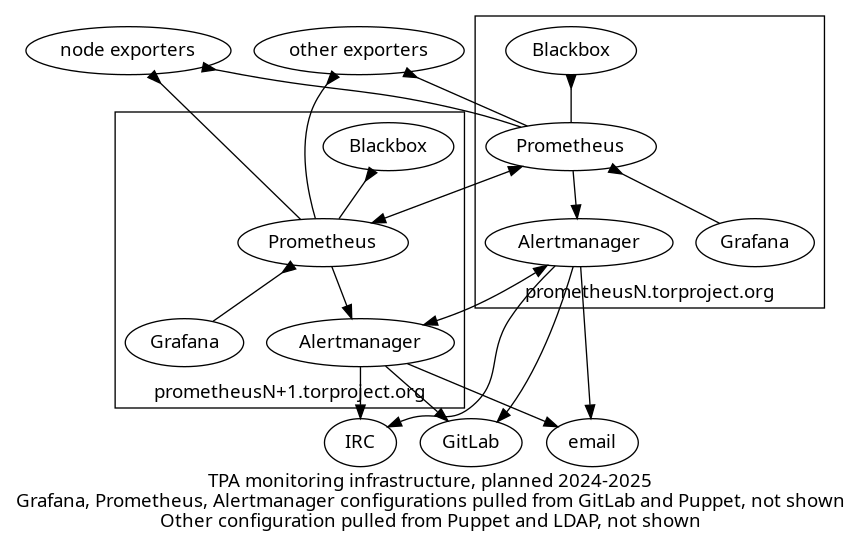
The above shows a diagram of a highly available Prometheus/Grafana server setup. Each server has its own set of services running:
-
Prometheus: both servers pulls metrics from all exporters including a node exporter on every machine but also other exporters defined by service admins
-
blackbox exporter: this exporter runs on every Prometheus server and is scraped by that Prometheus server for arbitrary metrics like ICMP, HTTP or TLS response times
-
Grafana: each server runs its own Grafana service, each Grafana server browses metrics from the local Prometheus database.
-
Alertmanager: each server also runs its own Alertmanager which fires off notifications to IRC, email, or (eventually) GitLab, deduplicating alerts between the two servers using its gossip protocol.
This feels impractical and overloaded. Grafana, in particular, would be tricky to configure as there is necessarily a bit of manual configuration on the server. Having two different retention policies would make it annoying as you would never quite know which server to use to browse data.
The idea of having a single Grafana/Karma pair is that if they are down, you have other things to worry about anyways. Besides: the Alertmanager will let operators know of the problem in any case.
If this becomes a problem over time, the setup could be expanded to replicate Karma, or even Grafana, but it feels superfluous for now.
Grafana for alerting
Grafana was tested to provide an unified alerting dashboard, but seemed insufficient. There's a builtin "dashboard" for alerts it finds already with the existing prometheus data source
It doesn't support silencing alerts.
It's possible to make grafana dashboards with queries as well, I found only a couple that only use the prometheus stats, most of the better ones use the Alertmanager metrics themselves. It also seems dashboards rely on Prometheus scraping metrics off the Alertmanager.
Grafana (the company) also built a Python-based incident response tool called oncall that seems interesting but a bit over-engineered for our needs.
Grafana also has its own alerting system and threshold, which can be baked in dashboards, but we have rejected this approach due to the difficulty of managing dashboards right now and the concern of depending on such a large stack for alerts. Alertmanager since like a much cleaner and simpler design, which less potential for failure.
Features
SLA and notifications improvements
We MAY introduce push notifications (e.g. with ntfy.sh or Signal) if we significantly trim down the amount of noise emanating from the monitoring server, and only if we send notifications during business hours of the affected parties.
If we do want to improve on SLA metrics, we should consider using Sloth, an "easy and simple Prometheus SLO (service level objectives) generator" which generates Grafana dashboards and alerts.
Sachet could be used to send SMS notifications.
Flap detection
Almost a decade ago, Prometheus rejected the idea of implementing
flap detection. The solutions proposed then were not fully
satisfactory, but now in Prometheus 2.42, there is a keep_firing_for
setting to further tweak alerts to avoid false positives, see also
this discussion.
We have therefore rejected flap detection as a requirement.
Dashboard variables consistency
One of the issues with dashboards right now is the lack of consistency
in variable names. Some dashboards use node, instance, alias or
host to all basically refer to the same thing, the frigging machine
on which the metrics are. That variability makes it hard to cross-link
dashboards and reuse panels.
We would love to fix this, but it's out of scope of this proposal.
Alerting rules unit tests
It's possible to write unit tests for alerting rules but this seems a little premature and overkill at this stage.
Other software
Cortex and TimescaleDB
Another option would be to use another backend for prometheus metrics, something like TimescaleDB, see this blog post for more information.
Cortex is also another Prometheus-compatible option.
Neither are packaged in Debian and our community has limited experience with both of those, so they were not seriously considered.
InfluxDB
In this random GitHub project, a user reports using InfluxDB instead of Prometheus for long term, "keep forever" metrics storage. it's tricky though: in 2017, InfluxDB added remote read/write support but then promptly went ahead and removed it from InfluxDB 2.0 in 2021. That functionality still seems available through Telegraf, which is not packaged in Debian (but is in Ubuntu).
After a quick chat with GPT-4, it appears that InfluxDB is somewhat of an "open core" model, with the multi-server, high availability features part of the closed-source software. This is based on a controversy documented on Wikipedia that dates from 2016. There's influxdb-relay now but it seems a tad more complicated than Prometheus' high availability setups.
Also, InfluxDB is a fundamentally different architecture, with a different querying system: it would be hard to keep the same alerts and Grafana dashboards across the two systems.
We have therefore completely excluded InfluxDB for now.
Grafana dashboard libraries
We have also considered options other than Grafanalib for Grafana dashboard management.
- grafana-dashboard-manager: doesn't seem very well maintained, with a bunch of bugfix PRs waiting in the queue for more than a year, with possible straight out incompatibility with recent Grafana versions
-
gdg: similar dashboard manager, could allow maintaining the grafana-dashboards repository manually, by syncing changes back and forth with the live instance
-
grizzly is based on JSONNET which we don't feel comfortable writing and reviewing as much as Python
Costs
Following the Kaplan-Moss estimation technique, as a reminder, we first estimate each task's complexity:
| Complexity | Time |
|---|---|
| small | 1 day |
| medium | 3 days |
| large | 1 week (5 days) |
| extra-large | 2 weeks (10 days) |
... and then multiply that by the uncertainty:
| Uncertainty Level | Multiplier |
|---|---|
| low | 1.1 |
| moderate | 1.5 |
| high | 2.0 |
| extreme | 5.0 |
Phase A: emergency Icinga retirement (4-6 weeks)
| Task | Estimate | Uncertainty | Total (days) |
|---|---|---|---|
| Alertmanager deployment | 1 day | low | 1.1 |
| alertmanager-irc-relay notifications | 3 days | moderate | 4.5 |
| blackbox deployment | 1 day | low | 1.1 |
| priority A metrics and alerts | 2 weeks | moderate | 15 |
| Icinga server retirement | 1 day | low | 1.1 |
| karma dashboard | 3 days | moderate | 4.5 |
| Total | 4 weeks | moderate | 27.5 |
Phase B: merging servers, more exporters (6-11 weeks)
| Task | Estimate | Uncertainty | Total (days) | Note |
|---|---|---|---|---|
| new authentication deployment | 1 day | low | 1.1 | trivial, includes LDAP changes |
prometheus-alerts cleanup | 1 day | moderate | 1.5 | |
| merge prometheus2 | 3 days | high | 6 | |
| priority B metrics and alerts | 1 week | moderate | 7.5 | |
| self-monitoring | 1 week | high | 10 | |
| inhibitions | 1 week | high | 10 | |
| port NRPE checks to Fabric | 2 weeks | high | 20 | could be broken down by check |
| Total | 6 weeks | ~high | 55 |
Phase C: high availability, long term metrics, other exporters (10-17 weeks)
| Task | Estimate | Uncertainty | Total (days) | Note |
|---|---|---|---|---|
| High availability | 3 weeks | high | 30 | |
| Autonomous delivery | 1 day | low | 1.1 | |
| GitLab alerts | 3 days | low | 3.3 | |
| Long term metrics | 1 week | moderate | 7.5 | includes proxy setup |
| Grafanalib conversion | 3 weeks | high | 30 | |
| Grafana dev server | 1 week | moderate | 7.5 | |
| Matrix notifications | 3 days | moderate | 4.5 | |
| Total | ~10 weeks | ~high | 17 weeks |
References
This proposal is discussed in tpo/tpa/team#40755.
Related issues
- Icinga server retirement issue
- automate deployment of Grafana dashboards
- exporter policy
- improve incident response procedures
- better monitoring for webserver response times
- longer-term metrics retention
Appendix
Icinga checks inventory
Here we inventory all Icinga checks and see how or if they will be
converted into Prometheus metrics and alerts. This was done by
reviewing config/nagios-master.cfg file in the tor-nagios.git
repository visually and extracting common checks.
Existing metrics
Those checks are present in Icinga and have a corresponding metric in Prometheus, and an alerting rule might need to be created.
| Name | Command | Type | P | Exporter | Metric | Rule level | Note |
|---|---|---|---|---|---|---|---|
| disk usage - * | check_disk | NRPE | A | node | node_filesystem_avail_bytes | warning / critical | disk full, critical when < 24h to full |
| load | check_load | NRPE | B | node | node_load1 or node_pressure_cpu_waiting_seconds_total | warning | sanity check, if using load, compare against CPU count |
| uptime check | dsa-check-uptime | NRPE | B | node | node_boot_time_seconds | warning | time()-node_boot_time_seconds (source), reboots per day: changes(process_start_time_seconds[1d]), alerting on crash loops |
| swap usage - * | check_swap | NRPE | B | node | node_memory_SwapFree_bytes | warning | sanity check, reuse checks from memory dashboard |
| network service - nrpe | check_tcp!5666 | local | A | node | up | warning | |
| network service - ntp peer | check_ntp_peer | NRPE | B | node | node_ntp_offset_seconds | warning | see also /usr/share/doc/prometheus-node-exporter/TIME.md |
| RAID -DRBD | dsa-check-drbd | NRPE | A | node | node_drbd_out_of_sync_bytes, node_drbd_connected | warning | DRBD 9 not supported, alternatives: ha_cluster_exporter, drbd-reactor |
| RAID - sw raid | dsa-check-raid-sw | NRPE | A | node | node_md_disks / node_md_state | warning | warns about inconsistent arrays, see this post |
| apt - security updates | dsa-check-statusfile | NRPE | A/B | node | apt_upgrades_* | warning | generated by dsa-check-packages, apt_info.py partial replacement existing (priority A), work remains (priority B) |
8 checks, 4 A, 4 B, 1 exporter.
Missing metrics requiring tweaks to existing exporters
| Name | Command | Type | P | Exporter | Metric | Rule level | Note |
|---|---|---|---|---|---|---|---|
| PING | check_ping | local | B | blackbox | probe_success | warning | critical after 1h? inhibit other errors? |
| needrestart | needrestart -p | NRPE | A | textfile | kernel_status, microcode_status | warning | not supported upstream, alternative implementation lacking |
| all services running | systemctl is-system-running | NRPE | B | systemd exporter | systemd_unit_state or node_systemd_unit_state | warning | sanity check, checks for failing timers and services, node exporter might do it but was removed in tpo/tpa/team#41070 |
| network service - sshd | check_ssh --timeout=40 | local | A | blackbox | probe_success | warning | sanity check, overlaps with systemd check, but better be safe |
| network service - smtp | check_smtp | local | A | blackbox | probe_success | warning | incomplete, need end-to-end deliverability checks |
| network service - submission | check_smtp_port!587 | local | A | blackbox? | probe_success | warning | |
| network service - smtps | dsa_check_cert!465 | local | A | blackbox? | ? | warning | |
| ud-ldap freshness | dsa-check-udldap-freshness | NRPE | B | textfile | TBD | warning | make a "timestamp of file $foo" metric, in this case /var/lib/misc/thishost/last_update.trace |
| network service - http | check_http | local | A | blackbox | probe_success, probe_duration_seconds | warning/critical | critical only for key sites, after significant delay, see also tpo/tpa/team#40568 |
| network service - https | check_https | local | A | idem | idem | idem | idem |
8 checks, 5 A, 3 B, 3 exporters.
Missing metrics requiring new upstream exporters
| Check | Type | P | Exporter | Metric | Rule level | Note |
|---|---|---|---|---|---|---|
dsa-check-cert-expire | NRPE | A | cert-exporter | TBD | warning | checks local CA for expiry, on disk, /etc/ssl/certs/thishost.pem and db.torproject.org.pem on each host |
check_ganeti_cluster | NRPE | B | ganeti-exporter | TBD | warning | runs a full verify, costly |
check_ganeti_instances | NRPE | B | idem | TBD | warning | currently noisy: warns about retired hosts waiting for destruction, drop? |
dsa_check_cert | local | A | cert-exporter | warning | check for cert expiry for all sites, the above will check for real user-visible failures, this is about "pending renewal failed", nagios checks for 14 days | |
dsa-check-unbound-anchors | NRPE | B | ??? | ? | warning? | checks if /var/lib/unbound files have the string VALID and are newer than 5 days, catches bug in unbound that writes empty files on full disk, fix bug? |
| "redis liveness" | NRPE | A | blackbox | TBD | warning? | checks that the Redis tunnel works, might require blackbox exporter, possibly better served by end-to-end donation testing? |
dsa-check-backuppg | NRPE | A | barman-exporter | TBD | warning | tricky dependency on barman rebuild, maybe builtin? |
check_puppetdb_nodes | NRPE | B | puppet-exporter | TBD | warning | |
dsa-check-bacula | NRPE | A | bacula-exporter | TBD | warning | see also WMF's check_bacula.py |
The "redis liveness" check is particularly tricky to implement, here is the magic configuration right now:
-
name: "redis liveness"
nrpe: "if echo PING | nc -w 1 localhost 6379 | grep -m 1 -q +PONG; then echo 'OK: redis seems to be alive.'; else echo 'CRITICAL: Did not get a PONG from redis.'; exit 2; fi"
hosts: crm-int-01
-
name: "redis liveness on crm-int-01 from crm-ext-01"
nrpe: "if echo PING | nc -w 1 crm-int-01-priv 6379 | grep -m 1 -q +PONG; then echo 'OK: redis seems to be alive.'; else echo 'CRITICAL: Did not get a PONG from redis.'; exit 2; fi"
hosts: crm-ext-01
9 checks, 5 A, 4 B, 8 possible exporters.
DNS and static system metrics
Those are treated specially because they are completely custom checks with lots of business logic embedded and, in the case of DNSSEC, actual side effects like automatic rotation and renewal.
| Name | Check | Type | P | Exporter | Rule level | Note |
|---|---|---|---|---|---|---|
| mirror (static) sync - * | dsa_check_staticsync | NRPE | C | textfile? | warning | runs on all mirrors, see if components are up to date, to rewrite? |
| DNS SOA sync - * | dsa_check_soas_add | NRPE | E | ??? | warning | checks that zones are in sync on secondaries |
| DNS - delegation and signature expiry | dsa-check-zone-rrsig-expiration-many | NRPE | E | dnssec-exporter | warning | TODO, drop DNSSEC? see also check_zone_rrsig_expiration which may be related |
| DNS - zones signed properly | dsa-check-zone-signature-all | NRPE | E | ??? | warning | idem |
| DNS - security delegations | dsa-check-dnssec-delegation | NRPE | E | ??? | warning | idem |
| DNS - key coverage | dsa-check-statusfile | NRPE | E | ??? | warning | idem, dsa-check-statusfile /srv/dns.torproject.org/var/nagios/coverage on nevii, could be converted as is |
| DNS - DS expiry | dsa-check-statusfile | NRPE | E | ??? | warning | idem, dsa-check-statusfile /srv/dns.torproject.org/var/nagios/ds on nevii |
7 checks, 1 C, 6 E, 3 resulting exporters?
To investigate
| Name | Command | Type | P | Possible exporter | Rule level | Note |
|---|---|---|---|---|---|---|
| system - filesystem check | dsa-check-filesystems | NRPE | B | node | warning | checks for fsck errors with tune2fs |
| network service - ntp time | check_ntp_time | NRPE | E | node | warning | unclear how that differs from check_ntp_peer |
2 checks, 1 B, 1 E, probably 1 existing exporter, 1 new.
Dropped checks
| Name | Command | Type | Rationale |
|---|---|---|---|
| users | check_users | NRPE | who has logged-in users?? |
| processes - zombies | check_procs -s Z | NRPE | useless |
| processes - total | check_procs 620 700 | NRPE | too noisy, needed exclusions for builders |
| processes - * | check_procs $foo | NRPE | better to check systemd |
| unwanted processes - * | check_procs $foo | NRPE | basically the opposite of the above, useless |
| LE - chain - see tpo/tpa/team#40052 | checks for flag file | NRPE | see below |
| CPU - intel ucode | dsa-check-ucode-intel | NRPE | overlaps with needrestart check |
| unexpected sw raid | checks for /proc/mdstat | NRPE | needlessly noisy, just means an extra module is loaded, who cares |
| unwanted network service - * | dsa_check_port_closed | local | needlessly noisy, if we really want this, use lzr |
| network - v6 gw | dsa-check-ipv6-default-gw | NRPE | useless, see tpo/tpa/team#41714 for analysis |
check_procs, in particular, was generating a lot of noise in
Icinga, as we were checking dozens of different processes, which would
all explode at once when a host would go down and Icinga didn't notice
the host being down.
In tpo/tpa/team#40052, weasel implemented a NRPE check like this:
-
name: "LE - chain - see tpo/tpa/team#40052"
nrpe: "if [ -e /home/letsencrypt/non-X3-cert-encountered ]; then echo 'CRITICAL: found flag file'; exit 1; else echo 'OK: flag-file not found (good)'; fi"
hosts: nevii
It's unclear what it does or why it is necessary, assuming sanity and dropping check.
8 checks, all priority "D", no new exporter.
Dropped checks to delegate to service admins
| Check | Type | P | Note |
|---|---|---|---|
| "bridges.tpo web service" | local | B | check_http on bridges.tpo |
| "mail queue" | NRPE | B | check_mailq on polyanthum |
tor_check_collector | NRPE | B | ??? |
tor-check-onionoo | NRPE | B | ??? |
4 checks, 4 B, possible 4 exporter.
Metrics and alerts overview
Priority A
- node exporter:
up, disk usage, RAID, DRBD, APT updates - blackbox: SSH, SMTP, HTTP(S) latency checks, Redis liveness
- textfile: needrestart (see above)
- cert-exporter: cert expiry for private CA and LE certs, see also tpo/tpa/team#41385 for alternatives
- barman-exporter: PostgreSQL backups validity
- bacula-exporter
Priority B
- node exporter: load, uptime, swap, NTP, systemd, filesystem checks
- blackbox: ping
- textfile: LDAP freshness
- ganeti exporter: running instances, cluster verification?
- unbound resolvers: ?
- puppet exporter: last run time, catalog failures
Priority C
- static mirrors freshness
- error detection and correction (EDAC) checks in the node exporter (
node_edac_correctable_errors_total) - fail2ban
- git exporter - latency for push/pull
- gitlab issue counts
- gitlab mail processing
- haproxy exporter
- hetzner exporter and hcloud exporter to monitor costs
- ipmi dashboard
- multiple viewpoint fingerprint checking
- network interfaces
- php-fpm exporter
- spamassassin: ham/spam/total counts, looks for
spamd: ((processing|checking) message|identified spam|clean message)in mail.log, could be replaced with mtail - technical debt
Priority D
Those Icinga checks were all dropped and have no equivalent.
Priority E
Those are all DNSSEC checks that we need to decide what to do with,
except check_ntp_time which seems to overlap with another check.
Icinga checks by priority
This duplicates the icinga inventory above, but sorts them by priority instead.
Priority A
| Check | Exporter | Metric | Rule level | Note |
|---|---|---|---|---|
check_disk | node | node_filesystem_avail_bytes | warning / critical | disk full, critical when < 24h to full |
check_nrpe | node | up | warning | |
dsa-check-drbd | node | node_drbd_out_of_sync_bytes, node_drbd_connected | warning | DRBD 9 not supported, alternatives: ha_cluster_exporter, drbd-reactor |
dsa-check-raid-sw | node | node_md_disks / node_md_state | warning | warns about inconsistent arrays, see this post |
needrestart -p | textfile | kernel_status, microcode_status | warning | not supported upstream, alternative implementation lacking |
check_ssh --timeout=40 | blackbox | probe_success | warning | sanity check, overlaps with systemd check, but better be safe |
check_smtp | blackbox | probe_success | warning | incomplete, need end-to-end deliverability checks |
check_smtp_port | blackbox | probe_success | warning | incomplete, need end-to-end deliverability checks |
check_http | blackbox | probe_success, probe_duration_seconds | warning/critical | critical only for key sites, after significant delay, see also tpo/tpa/team#40568 |
check_https | idem | idem | idem | idem |
dsa-check-cert-expire | cert-exporter | TBD | warning | checks local CA for expiry, on disk, /etc/ssl/certs/thishost.pem and db.torproject.org.pem on each host |
dsa_check_cert | cert-exporter | warning | check for cert expiry for all sites, the above will check for real user-visible failures, this is about "pending renewal failed", nagios checks for 14 days | |
| "redis liveness" | blackbox | TBD | warning? | checks that the Redis tunnel works, might require blackbox exporter, possibly better served by end-to-end donation testing? |
dsa-check-backuppg | barman-exporter | TBD | warning | tricky dependency on barman rebuild, maybe builtin? |
dsa-check-bacula | bacula-exporter | TBD | warning | see also WMF's check_bacula.py |
| "apt - security updates" | node | apt_upgrades_* | warning | partial, see priority B for remaining work |
Priority B
| Check | Exporter | Metric | Rule level | Note |
|---|---|---|---|---|
check_load | node | node_load1 or node_pressure_cpu_waiting_seconds_total | warning | sanity check, if using load, compare against CPU count |
dsa-check-uptime | node | node_boot_time_seconds | warning | time()-node_boot_time_seconds (source), reboots per day: changes(process_start_time_seconds[1d]), alerting on crash loops |
check_swap | node | node_memory_SwapFree_bytes | warning | sanity check, reuse checks from memory dashboard |
check_ntp_peer | node | node_ntp_offset_seconds | warning | see also /usr/share/doc/prometheus-node-exporter/TIME.md |
check_ping | blackbox | probe_success | warning | critical after 1h? inhibit other errors? |
systemctl is-system-running | systemd exporter | systemd_unit_state or node_systemd_unit_state | warning | sanity check, checks for failing timers and services, node exporter might do it but was removed in tpo/tpa/team#41070 |
dsa-check-udldap-freshness | textfile | TBD | warning | make a "timestamp of file $foo" metric, in this case /var/lib/misc/thishost/last_update.trace |
check_ganeti_cluster | ganeti-exporter | TBD | warning | runs a full verify, costly |
check_ganeti_instances | idem | TBD | warning | currently noisy: warns about retired hosts waiting for destruction, drop? |
dsa-check-unbound-anchors | ??? | ? | warning? | checks if /var/lib/unbound files have the string VALID and are newer than 5 days, catches bug in unbound that writes empty files on full disk, fix bug? |
check_puppetdb_nodes | puppet-exporter | TBD | warning | |
dsa-check-filesystems | node | TBD | warning | checks for fsck errors with tune2fs |
| "apt - security updates" | node | apt_upgrades_* | warning | apt_info.py implementation incomplete, so work remains |
Priority C
| Check | Exporter | Metric | Rule level | Note |
|---|---|---|---|---|
dsa_check_staticsync | textfile? | warning | runs on all mirrors, see if components are up to date, to rewrite? |
Priority D (dropped)
| Check | Rationale |
|---|---|
check_users | who has logged-in users?? |
check_procs -s Z | useless |
check_procs 620 | too noisy, needed exclusions for builders |
check_procs $foo | better to check systemd |
| weird Let's Encrypt X3 check | see below |
dsa-check-ucode-intel | overlaps with needrestart check |
| "unexpected sw raid" | needlessly noisy, just means an extra module is loaded, who cares |
dsa_check_port_closed | needlessly noisy, if we really want this, use lzr |
check_mailq on polyanthum | replace with end-to-end testing, not wanted by anti-censorship team |
tor_check_collector | delegated to service admins |
tor-check-onionoo | delegated to service admins |
check_http on bridges.tpo | delegate to service admins |
Priority E (to review)
| Check | Exporter | Rule level | Note |
|---|---|---|---|
dsa_check_soas_add | ??? | warning | checks that zones are in sync on secondaries |
dsa-check-zone-rrsig-expiration-many | dnssec-exporter | warning | TODO, drop DNSSEC? |
dsa-check-zone-signature-all | ??? | warning | idem |
dsa-check-dnssec-delegation | ??? | warning | idem |
| "DNS - key coverage" | ??? | warning | idem, dsa-check-statusfile /srv/dns.torproject.org/var/nagios/coverage on nevii, could be converted as is |
| "DNS - DS expiry" | ??? | warning | idem, dsa-check-statusfile /srv/dns.torproject.org/var/nagios/ds on nevii |
check_ntp_time | node | warning | unclear how that differs from check_ntp_peer |
Other queries ideas
- availability:
- how many hosts are online at any given point:
sum(count(up==1))/sum(count(up)) by (alias) - percentage of hosts available over a given period:
avg_over_time(up{job="node"}[7d])(source)
- how many hosts are online at any given point:
- memory pressure:
# PSI alerts - in testing mode for now.
- alert: HostMemoryPressureHigh
expr: rate(node_pressure_memory_waiting_seconds_total[10m]) > 0.2
for: 10m
labels:
scope: host
severity: warn
annotations:
summary: "High memory pressure on host {{$labels.host}}"
description: |
PSI metrics report high memory pressure on host {{$labels.host}}:
{{$value}} > 0.2.
Processes might be at risk of eventually OOMing.
Similar pressure metrics could be used to alert for I/O and CPU usage.
Other implementations
Wikimedia Foundation
The Wikimedia foundation use Thanos for metrics storage and unified querying. They also have an extensive Grafana server setup. Those metrics are automatically uploaded to their Atlassian-backed status page with a custom tool called statograph.
They are using a surprisingly large number of monitoring tools. They seemed to be using Icinga, Prometheus, Shinken and LibreNMS, according to this roadmap, which plans to funnel all alerting through Prometheus' Alert Manager. As of 2021, they had retired LibreNMS, according to this wiki page, with "more services to come". As of 2024, their "ownership" page still lists Graphite, Thanos, Grafana, statsd, Alertmanager, Icinga, and Splunk On-Call.
They use karma as an alerting dashboard and Google's alertmanager-irc-relay to send notifications to IRC.
See all their docs about monitoring:
- https://wikitech.wikimedia.org/wiki/Prometheus
- https://wikitech.wikimedia.org/wiki/Alertmanager
- https://wikitech.wikimedia.org/wiki/Grafana.wikimedia.org
- https://wikitech.wikimedia.org/wiki/Thanos
- https://wikitech.wikimedia.org/wiki/Wikimediastatus.net
- https://wikitech.wikimedia.org/wiki/Icinga
- https://wikitech.wikimedia.org/wiki/SRE/Observability/Ownership
They also have a bacula dashboard.
A/I
Autistici built float to address all sorts of issues and have a good story around monitoring and auto-discovery. They have Ansible playboks to configure N non-persistent Prometheus servers in HA, then a separate "LTS" (Long Term Storage, not Support) server that scrapes all samples from the former over the "federation" endpoint and downsamples to one minute.
They use Thanos as proxy (and not for storage or compaction!) to provide a unified interface to both servers.
They also use Karma and Grafana as dashboards as well.
Riseup have deployed a similar system.
sr.ht
Sourcehut have a monitoring system based on Prometheus and Alertmanger. Their Prometheus is publicly available, and you can see their alerting rules and alerts, which are defined in this git repository.
Alerts are sorted in three categories.
Summary: office hours have already ended, this note makes it official.
Background
In September 2021, we established "office hours" as part of TPA-RFC-12, to formalize the practice of occupying a Big Blue Button (BBB) room every Monday. The goal was to help people with small things or resolve more complex issues but also to create a more sympathetic space than the coldness of space offered by IRC and issue trackers.
This practice didn't last long, however. As early at December 2021, we noted that some of us didn't really have time to tend to the office hours or when we did, no one actually showed up. When people would show up, it was generally planned in advance.
At this point, we have basically given up on the practice.
Proposal
We formalize the end of TPA office hours. Concretely, this means removing the "Office hours" section from TPA-RFC-2.
Instead, we encourage our staff to pick up the phone and just call each other if they need to carry information or a conversation that doesn't happen so well over other medium. This extends to all folks in tor-internal that need our help.
The "office hours" room will remain in BBB (https://tor.meet.coop/ana-ycw-rfj-k8j) but will be used on a need-to basis. Monday is still a good day to book such appointments, during America/Eastern or America/Pacific "business hours", depending on who is "star of the week".
Approval
This is assumed to be approved by TPA already, since, effectively, no one has been doing office hours for months already.
References
Summary: headers in GitLab email notifications are changing, you may need to update your email filters
Background
I am working on building a development server for GitLab, where we can go wild testing things without breaking the production environment. For email to work there, I need a configuration that is separate from the current production server.
Unfortunately, the email address used by the production GitLab server
doesn't include the hostname of the server (gitlab.torproject.org)
and only the main domain name (torproject.org) which makes it
needlessly difficult to add new configurations.
Finally, using the full service name (gitlab.torproject.org)
address means that the GitLab server will be able to keep operating
email services even if the main email service goes down.
It's also possible the change will give outgoing email better
reputation with external spam filters, because the domain part of the
From: address will actually match the machine actually sending the
email, which wasn't the case when sending from torproject.org.
Proposal
This changes the headers:
From: gitlab@torproject.org
Reply-To: gitlab-incoming+%{key}@torproject.org
to:
From: git@gitlab.torproject.org
Reply-To: git+%{key}@gitlab.torproject.org
If you are using the From headers in your email client filters, for
example to send all GitLab email into a separate mailbox, you WILL
need to make a change for that filter to work again. I know I had to
make such a change, which was simply to replace
gitlab@torproject.org by git@gitlab.torproject.org in my filter.
The Reply-To change should not have a real impact. I suspected
emails sent before the change might not deliver properly, but I tested
this, and both the old emails and the new ones work correctly, so that
change should be transparent to everyone.
(The reason for that is that the previous
gitlab-incoming@torproject.org address is still forwarding to
git@torproject.org so that will work for the foreseeable future.)
Alternatives considered
Reusing the prod email address
The main reason I implemented this change is that I want to have a GitLab development server, as mentioned in the background. But more specifically, we don't want the prod and dev servers to share email addresses, because then people could easily get confused as to where a notification is coming from. Even worse, a notification from the dev server could yield a reply that would end up in the prod server.
Adding a new top-level address
So, clearly, we need two different email addresses. But why change the
current email address instead of just adding a new one? That's
trickier. One reason is that I didn't want to add a new alias on the
top-level torproject.org domain. Furthermore, the old configuration
(using torproject.org) is officially discouraged upstream as it
can lead to some security issues.
Deadline
This will be considered approved tomorrow (2022-06-30) at 16:00 UTC unless there are any objections, in which case it will be rolled back for further discussion.
The reason there is such a tight deadline is that I want to get the development server up and running for the Hackweek. It is proving less and less likely that the server will actually be usable during the Hackweek, but if we can get the server up as a result of the Hackweek, it will already be a good start.
Summary: Gitolite (git-rw.torproject.org) and GitWeb
(git.torproject.org and https://gitweb.torproject.org) will be
fully retired within 9 to 12 months (by the end of Q2 2024). TPA will
implement redirections on the web interfaces to maintain limited
backwards compatibility for the old URLs. Start migrating your
repositories now by following the migration procedure.
- Background
- Proposal
- Personas
- Alternatives considered
- References
Background
We migrated from Trac to GitLab in June 2020. Since then, we have progressively mirrored or migrated repositories from Gitolite to GitLab. Now, after 3 years, it's time to migrate from Gitolite and GitWeb to GitLab as well.
Why migrate?
As a reminder, we migrated from Trac to GitLab because:
-
GitLab allowed us to consolidate engineering tools into a single application: Git repository handling, wiki, issue tracking, code reviews, and project management tooling.
-
GitLab is well-maintained, while Trac is not as actively maintained; Trac itself hadn't seen a release for over a year (in 2020; there has been a stable release in 2021 and a preview in 2023).
-
GitLab enabled us to build a more modern CI platform.
The migration was a resounding success: no one misses Jenkins, for example and people have naturally transitioned to GitLab. It currently host 1,468 projects, including 888 forks, with 76,244 issues, 8,029 merge requests, and 2,686 users (including 325 "Owners," 152 "Maintainers," 18 "Developers," and 15 "Reporters"). GitLab stores a total of 100 GiB of git repositories.
Besides, the migration is currently underway regardless of this proposal but in a disorganized manner. Some repositories have been mirrored, others have been moved, and too many repositories exist on both servers. Locating the canonical copy can be challenging in some cases. There are very few references from Gitolite to GitLab, and virtually no redirection exists between the two. As a result, downstream projects like Debian have missed new releases produced on GitLab for projects that still existed on Gitolite.
Finally, when we launched GitLab, we agreed that:
It is understood that if one of those features gets used more heavily in GitLab, the original service MUST be eventually migrated into GitLab and turned off. We do not want to run multiple similar services at the same time (for example, run both Gitolite and gitaly on all git repositories, or run Jenkins and GitLab runners).
We have been running Gitolite and GitLab in parallel for over three years now, so it's time to move forward.
Gitolite and GitWeb inventory
As of 2023-05-11, there are 566 Git repositories on disk on the
Gitolite server (cupani), but oddly only 539 in the Gitolite
configuration file. 358 of those repositories are in the user/
namespace, which leaves us 208 "normal" repositories. Out of those, 65
are in the Attic category, which gives us a remaining 143 active
repositories on Gitolite.
All the Gitolite repositories take up 32.4GiB of disk space on the
Gitolite server, 23.7GiB occupied by user/ repositories, and
tor-browser.git taking another 4.2GiB. We suspect Tor Browser and
its user forks are using a crushing majority of disk space on the
Gitolite server.
The last repository was created in January 2021
(project/web/status-site.git), over two years ago.
Another server (vineale) handles the Git web interface, colloquially
called GitWeb (https://gitweb.torproject.org) but which actually
runs cgit. That server has a copy of all the repositories on the
main Gitolite server, synchronized through Git hooks running over SSH.
For the purposes of this proposal, we put aside the distinction between "GitWeb" and "cgit". So we refer to the "GitWeb" service unless we explicitly need to refer to "cgit" (the software), even though we do not technically run the actual gitweb software anymore.
Proposal
TPA proposes an organized retreat from Gitolite to GitLab, to conclude in Q2 2024. At first, we encourage users to migrate on their own, with TPA assisting by creating redirections from Gitolite to GitLab. In the last stages of the migration (Q1-Q2 2024), TPA will migrate the remaining repositories itself. Then the old Gitolite and GitWeb services will be shutdown and destroyed.
Migration procedure
Owners migrate their repositories using GitLab to import the repositories from Gitolite. TPA then takes over and creates redirections on the Gitolite side, as detailed in the full migration procedure.
Any given repository will have one of three state after the migration:
-
migrated: the repository is fully migrated from Gitolite to GitLab, redirections send users to GitLab and the repository is active on GitLab
-
archived: like migrated, but "archived" in GitLab, which means the repository hidden in a different tab and immutable
-
destroyed: the repository is not worth migrating at all and will be permanently destroyed
Unless requested otherwise in the next 9 months, TPA will migrate all remaining repositories.
As of May 2023, no new repository may be created on Gitolite infrastructure, all new repositories MUST be created on GitLab.
Redirections
For backwards compatibility, web redirections will permanently set in the static mirror system.
This will include a limited set of URLs that GitLab can support in a meaningful way, but some URLs will break. The following cgit URLs notably do not have an equivalence in GitLab:
| cgit | note |
|---|---|
atom | needs a feed token, user must be logged in |
blob | no direct equivalent |
info | not working on main cgit website? |
ls_cache | not working, irrelevant? |
objects | undocumented? |
snapshot | pattern too hard to match on cgit's side |
The supported URLs are:
| cgit | note |
|---|---|
summary | |
about | |
commit | |
diff | incomplete: cgit can diff arbitrary refs and not GitLab, hard to parse |
patch | |
rawdiff | incomplete: which GitLab can't diff individual files |
log | |
atom | |
refs | incomplete: GitLab has separate pages tags and branches, redirecting to tags |
tree | incomplete: has no good default in GitLab, defaulting to HEAD |
plain | |
blame | incomplete: same default as tree above |
stats |
Redirections also do not include SSH (ssh://) remotes, which will
start failing at the end of the migration.
Per-repository particularities
This section documents the fate of some repositories we are aware of. If you can think of specific changes that need to happen to repositories that are unusual, please do report them to TPA so they can be included in this proposal.
idle repositories
Repositories that did not have any new commit in the last two years
are considered "idled" and should be migrated or archived to GitLab by
their owners. Failing that, TPA will archive the repositories in the
GitLab legacy/ namespace before final deadline.
user repositories
There are 358 repositories under the user/ namespace, owned by 70
distinct users.
Those repositories must be migrated to their corresponding user on the GitLab side.
If the Gitolite user does not have a matching user on GitLab, their
repositories will be moved under the legacy/gitolite/user/ namespace
in GitLab, owned by the GitLab admin doing the migration.
"mirror" and "extern" repositories
Those repositories will be migrated to, and archived in, GitLab within a month of the adoption of this proposal.
Applications team repositories
In December 2022, the applications team announced, and that "all future code updates will only be pushed to our various gitlab.torproject.org (Gitlab) repos."
The following redirections will be deployed shortly:
| Gitolite | gitlab | fate |
|---|---|---|
builders/tor-browser-build | tpo/applications/tor-browser-build | migrate |
builders/rbm | tpo/applications/rbm | migrate |
tor-android-service | tpo/applications/tor-android-service | migrate |
tor-browser | tpo/applications/tor-browser/ | migrate |
tor-browser-spec | tpo/applications/tor-browser-spec | migrate |
tor-launcher | tpo/applications/tor-launcher | archive |
torbutton | tpo/applications/torbutton | archive |
See tpo/tpa/team#41181 for the ticket tracking this work.
This is a good example of how a team can migrate to GitLab and submit a list of redirections to TPA.
TPA repositories
Note: this section is only relevant to TPA.
TPA is still a heavy user of Gitolite, with most (24) of its repositories still hosted there at the time of writing (2023-05-11).
Many of those repositories have hooks that trigger all sorts of actions on the infrastructure and will need to be converted in GitLab CI actions or similar.
The following repositories are particularly problematic and will need special work to migrate. Here's the list of repositories and their proposed fate.
| Repository | data | Problem | Fate |
|---|---|---|---|
account-keyring | OpenPGP keyrings | hooks into the static mirror system | convert to GitLab CI |
buildbot-conf | old buildbot config? | obsolete | archive |
dip | GitLab ansible playbooks? | duplicate of services/gitlab/dip? | archive? |
dns/auto-dns | DNS zones source used by LDAP server | security | check OpenPGP signatures |
dns/dns-helpers | DNSSEC generator used on DNS master | security | check OpenPGP signatures |
dns/domains | DNS zones source used by LDAP server | security | check OpenPGP signatures |
dns/mini-nag | monitoring on DNS primary | security | check OpenPGP signatures |
letsencrypt-domains | TLS certificates generation | security | move to Puppet? |
puppet/puppet-ganeti | puppet-ganeti fork | misplaced | destroy |
services/gettor | ansible playbook for gettor | obsolete | archive |
services/gitlab/dip-configs | GitLab ansible playbooks? | obsolete | archive |
services/gitlab/dip | GitLab ansible playbooks? | duplicate of dip? | archive? |
services/gitlab/ldapsync | LDAP to GitLab script, unused | obsolete | archive |
static-builds | Jenkins static sites build scripts | obsolete | archive |
tor-jenkins | Jenkins build scripts | obsolete | archive |
tor-nagios | Icinga configuration | confidentiality? | abolish? see also TPA-RFC-33 |
tor-passwords | password manager | confidentiality | migrate? |
tor-virt | libvirt VM configuration | obsolete | destroy |
trac/TracAccountManager | Trac tools | obsolete | archive |
trac/trac-email | Trac tools | obsolete | archive |
tsa-misc | miscellaneous scripts | none | migrate |
userdir-ldap-cgi | fork of DSA's repository | none | migrate |
userdir-ldap | fork of DSA's repository | none | migrate |
The most critical repositories are the ones marked security. A
solution will be decided on a case-by-case basis. In general, the
approach taken will be to pull changes from GitLab (maybe with a
webhook to kick the pull) and check the integrity of the repository
with OpenPGP signatures as a trust anchor.
Note that TPA also has Git repositories on the Puppet server
(tor-puppet.git) and LDAP server (account-keyring.git), but those
are not managed by Gitolite and are out of scope for this proposal.
Hooks
There are 11 Git hooks are currently deployed on the Gitolite server.
| hook | GitLab equivalence |
|---|---|
post-receive.d/00-sync-to-mirror | Static shim |
post-receive.d/git-multimail | No equivalence, see issue gitlab#71 |
post-receive.d/github-push | Native mirroring |
post-receive.d/gitlab-push | N/A |
post-receive.d/irc-message | Web hooks |
post-receive.d/per-repo-hook | N/A, trigger for later hooks |
post-receive-per-repo.d/admin%dns%auto-dns | TPA-specific, see above |
post-receive-per-repo.d/admin%dns%domains/trigger-dns-server | TPA-specific, see above |
post-receive-per-repo.d/admin%letsencrypt-domains/trigger-letsencrypt-server | TPA-specific, see above |
post-receive-per-repo.d/admin%tor-nagios/trigger-nagios-build | TPA-specific, see above |
post-receive-per-repo.d/tor-cloud/trigger-staticiforme-cloud | ignored, discontinued in 2015 |
Timeline
The migration will happen in four stages:
- now and for the next 6 months: voluntary migration
- 6 months later: evaluation and idle repositories locked down
- 9 months later: TPA enforced migration
- 12 months later: Gitolite and GitWeb server retirements
T: proposal adopted, voluntary migration encouraged
Once this proposal is standard (see the deadline below), Gitolite users are strongly advised to migrate to GitLab, following the migration procedure (#41212, #41219 for TPA repositories, old service retirement 2023 milestone for the others).
Some modification will be done on the gitweb interface to announce its
deprecation. Ideally, a warning would also show up in a global
pre-receive hook to warn people on push as well (#41211).
T+6 months: evaluation and idle repositories locked down
After 6 months, TPA will evaluate the migration progress and send reminders to users still needing to migrate (#41214).
TPA will lock Gitolite repositories without any changes in the last two years, preventing any further change (#41213).
T+9 months: TPA enforces migration
After 9 months, the migration will be progressively enforced: repositories will be moved or archived to GitLab by TPA itself, with a completion after 12 months (#41215).
Once all repositories are migrated, the redirections will be moved to the static mirror system (#41216).
The retirement procedure for the two hosts (cupani for Gitolite and
vineale for GitWeb) will be started which involves shutting down the
machines and removing them from monitoring (#41217, #41218).
Disks will not be destroyed for three more months.
T+12 months: complete Gitolite and GitWeb server retirement
After 12 months, the Gitolite (cupani) and GitWeb (vineale)
servers will be fully retired which implies physical destruction of
the disks.
T+24 months: Gitolite and GitWeb backups retirement
Server backups will be destroyed another 12 months later.
Requirements
In July 2022, TPA requested feedback from tor-internal about requirements for the GitLab migration. Out of this, only one hard requirement came out:
- HTTPS-level redirections for
.gitURLs. For example,https://git.torproject.org/tor.gitMUST redirect tohttps://gitlab.torproject.org/tpo/core/tor.git
Personas
Here we collect some "personas", fictitious characters that try to cover most of the current use cases. The goal is to see how the changes will affect them. If you are not represented by one of those personas, please let us know and describe your use case.
Arthur, the user
Arthur, the average Tor user, will likely not notice any change from this migration.
Arthur rarely interacts with our Git servers: if at all, it would be through some link to a specification hidden deep inside one of our applications documentation or a website. Redirections will ensure those will keep working at least partially.
Barbara, the drive-by contributor
Barbara is a drive-by contributor, who finds and reports bugs in our software or our documentation. Previously, Barbara would sometimes get lost when she would find Git repositories, because it was not clear where or how to contribute to those projects.
Now, if Barbara finds the old Git repositories, she will be redirected to GitLab where she can make awesome contributions, by reporting issues or merge requests in the right projects.
Charlie, the old-timer
Charlie has been around the Tor project since before it was called Tor. He knows by heart proposal numbers and magic redirections like https://spec.torproject.org/.
Charlie will be slightly disappointed because some deep links to line numbers in GitWeb will break. In particular, line number anchors might not work correctly. Charlie is also concerned about the attack surface in GitLab, but will look at the mitigation strategies to see if something might solve that concern.
Otherwise Charlie should be generally unaffected by the change.
Alternatives considered
Those are other alternatives to this proposal that were discussed but rejected in the process.
Keeping Gitolite and GitWeb
One alternative is to keep Gitolite and GitWeb running indefinitely. This has been the de-facto solution for almost three years now.
In a October 2020 tools meeting, it was actually decided to replace Gitolite with GitLab by 2021 or 2022. The alternative of keeping both services running forever is simply not possible as it imposes too much burden on the TPA team while draining valuable resources away from improving GitLab hosting, all the while providing a false sense of security.
That said, we want to extend a warm thank you to the good people who setup and managed those (c)git(web) and Gitolite servers for all that time: thanks!
Keeping Gitolite only for problem repositories
One suggestion is to keep Gitolite for problematic repositories and keep a mirror to avoid having to migrate those to GitLab.
It seems like only TPA is affected by those problems. We're taking it upon ourselves to cleanup this legacy and pivot to a more neutral, less powerful Git hosting system that relies less on custom (and legacy) Git hooks. Instead, we'll design a more standard system based on web hooks or other existing solutions (e.g. Puppet).
Concerns about GitLab's security
During the discussions surrounding the GitLab migration, one of the concerns raised was, in general terms, "how do we protect our code against the larger attack surface of GitLab?
A summary of those discussions that happened in tpo/tpa/gitlab#36 and tpo/tpa/gitlab#81 was posted in the Security Concerns section of our internal Gitolite documentation.
The conclusion of that discussion was:
In the end, it came up to a trade-off: GitLab is much easier to use. Convenience won over hardened security, especially considering the cost of running two services in parallel. Or, as Nick Mathewson put it:
I'm proposing that, since this is an area where the developers would need to shoulder most of the burden, the development teams should be responsible for coming up with solutions that work for them on some reasonable timeframe, and that this shouldn't be admin's problem assuming that the timeframe is long enough.
For now, the result of that discussion is a summary of git repository integrity solutions, which is therefore delegated to teams.
git:// protocol redirections
We do not currently support cloning repositories over the git://
protocol and therefore do not have to worry about redirecting those,
thankfully.
GitWeb to cgit redirections
Once a upon a time, the web interface to the Git repositories was running GitWeb. It was, at some point, migrated to cgit, which changed a bunch of URLs and broke many URLs in the process. See this discussion for examples.
Those URLs have been broken for years and will not be fixed in this migration. TPA is not opposed to fixing them, but we find our energy is best spent redirecting currently working URLs to GitLab than already broken ones.
GitLab hosting improvement plans
This proposal explicitly does not cover possible improvements to GitLab hosting.
That said, GitLab will need more resources, both in terms of hardware and staff. The retirement of the old Git infrastructure might provide a little slack for exactly that purpose.
Other forges
There are many other "forges" like GitLab around. We have used Trac in the past (see our Trac documentation) and projects like Gitea or Sourcehut are around as well.
Other than Trac, no serious evaluation of alternative Git forges was performed before we migrated to GitLab in 2020. Now, we feel it's too late to put that put that into question.
Migrating to other forges is therefore considered out of scope as far as Gitolite's retirement is concerned. But TPA doesn't permanently exclude evaluating other solutions than GitLab in the future.
References
This proposal was established in issue tpo/tpa/team#40472 but further discussions should happen in tpo/tpa/team#41180.
Summary: TODO
Background
Lektor is the static site generator (SSG) that is used across almost all sites hosted by the Tor Project. We are having repeated serious issues with Lektor, to a point where it is pertinent to evaluate whether it would be easier to convert to another SSG rather than try to fix those issues.
Requirements
TODO: set requirements, clearly state bugs to fix
Must have
Nice to have
Non-Goals
Personas
TODO: write a set of personas and how they are affected by the current platform
Alternatives considered
TODO: present the known alternatives and a thorough review of them.
Proposal
TODO: After the above review, propose a change (or status quo).
References
- TPA-RFC-16: Replacing Lektor 18n plugin is related, see also tpo/web/team#28
- discussion ticket
Summary: This RFC aims to identify problems with our current gitlab wikis, and the best solution for those issues.
Background
Currently, our projects that require a wiki use GitLab wikis. GitLab wikis are rendered with a fork of gollum and editing is controlled by GitLab's permission system.
Problem statement
GitLab's permission system only allows maintainers to edit wiki pages, meaning that normal users (anonymous or signed in) don't have the permissions required to actually edit the wiki pages.
One solution adopted by TPA was to create a separate wiki-replica repository so that people without edit permission can at least propose edits for TPA maintainers to accept. The problem with that approach is that it's done through a merge request workflow which adds much more friction to the editing process, so much that the result cannot really be called a wiki anymore.
GitLab wikis are not searchable in the community edition. Wikis require advanced search to be searchable which is not part of the free edition. This makes it extremely hard to find content in the wiki, naturally, but could be mitigated by the adoption of GitLab Ultimate.
The wikis are really disorganized. There are a lot of wikis in GitLab. Out of 1494 publicly accessible projects:
- 383 are without wikis
- 1053 have empty wikis
- 58 have non-empty wikis
They collectively have 3516 pages in total, but almost the majority of
this is the 1619 pages of the legacy/trac wiki. The top 10 of wikis
by size:
| wiki | page count |
|---|---|
| legacy/trac | 1619 |
| tpo/team | 1189 |
| tpo/tpa/team | 216 |
| tpo/network-health/team | 56 |
| tpo/core/team | 39 |
| tpo/anti-censorship/team | 35 |
| tpo/operations/team | 32 |
| tpo/community/team | 30 |
| tpo/applications/tor-browser | 29 |
| tpo/applications/team | 29 |
Excluding legacy/trac, more than half (63%) the wiki pages are in the
tpo/team wiki. If we count only the first three wikis, that ratio goes
up to 77% and if 85% of all pages live in the top 10 wikis, again
excluding legacy/trac.
In other words, there's a very long tail of wikis (~40) that account for less than 15% of the page count. We should probably look at centralizing this, as it will make all further problems easier to solve.
Goals
The goals of this proposal are as follows:
- Identify requirements for a wiki service
- Proposal modifications or a new implementation of the wiki service to fits these requirements
Requirements
Must have
-
Users can edit wiki pages without being given extra permissions ahead of time
-
Content must be searchable
-
Users should be able to read and edit pages over a hidden service
-
High-availablity for some documentation: if GitLab or the wiki website is unavailable, administrators should still be able to access the documentation needed to recover the service
-
A clear transition plan from GitLab to this new wiki: markup must continue to work as is (or be automatically converted links must not break during the transition
-
Folder structure: current GitLab wikis have a page/subpage structure (e.g. TPA's
howto/has all the howto,service/has all the service documentation, etc) which need to be implemented as well, this includes having "breadcrumbs" to walk back up the hierarchy, or (ideally) automatic listing of sub-pages -
Single dynamic site, if not static (e.g. we have a single MediaWiki or Dokuwiki, not one MediaWiki per team because applications need constant monitoring and maintenance to function properly, so we need to reduce the maintenance burden
Nice to have
-
Minimal friction for contribution, for example a "merge request" might be too large a barrier for entry
-
Namespaces: different groups under TPO (i.e. TPA, anti-censorship, comms) must have their own namespace, for example:
/tpo/tpa/wiki_page_1,/tpo/core/tor/wiki_page_2or Mediawiki's namespace systems where each team could have their own namespace (e.g.TPA:,Anti-censorship:,Community:, etc) -
Search must work across namespaces
-
Integration with anon_ticket
-
Integration with existing systems (GitLab, ldap, etc) as an identity provider
-
Support offline reading and editing (e.g. with a git repository backend)
Non-Goals
-
Localization: more important for user-facing, and https://support.torproject.org is translated
-
Confidential content: best served by Nextcloud (eg. TPI folder) or other services, content for the "wiki" is purely public data
-
Software-specific documentation: e.g. Stem, Arti, little-t-tor documentation (those use their own build systems like a static site generator although we might still want to recommend a single program for documentation (e.g. settle on MkDocs or Hugo or Lektor)
Proposals
Separate wiki service
The easiest solution to GitLab's permission issues is to use a wiki service separately from GitLab. This wiki service can be one that we host, or a service hosted for us by another organization.
Examples or Personas
Examples:
Bob: non-technical person
Bob is a non-technical person who wants to fix some typos and add some resources to a wiki page.
With the current wiki, Bob needs to make a GitLab account, and be
given developer permissions to the wiki repository, which is
unlikely. Alternatively, Bob can open a ticket with the proposed
changes, and hope a developer gets around to making them. If the wiki
has a wiki-replica repository then Bob could also git clone the
wiki, make the changes, and then create a PR, or edit the wiki through
the web interface. Bob is unlikely to want to go through such a
hassle, and will probably just not contribute.
With a new wiki system fulfilling the "must-have" goals: Bob only needs to make a wiki account before being able to edit a wiki page.
Alice: a developer
Alice is a developer who helps maintain a TPO repository.
With current wiki: Alice can edit any wiki they have permissions for. However if alice wants to edit a wiki they don't have permission for, they need to go through the same PR or issue workflow as Bob.
With the new wiki: Alice will need to make a wiki account in addition to their GitLab account, but will be able to edit any page afterward.
Anonymous cypherpunk
The "cypherpunk" is a person who wants to contribute to a wiki anonymously.
With current wiki, the cypherpunk will need to follow the same procedure as Bob.
With a new wiki: with only the must-have features, cypherpunks can only contribute pseudonymously. If the new wiki supports anonymous contributions, cypherpunks will have no barrier to contribution.
Spammer
1337_spamlord is a non-contributor who likes to make spam edits for
fun.
spamlord will also need to follow the same procedure as bob. This makes spamlord unlikely to try to spam much, and any attempts to spam are easily stopped.
With new wiki: with only must-have features, spamlord will have the same barriers, and will most likely not spam much. If anonymous contributions are supported, spamlord will have a much easier time spamming, and the wiki team will need to find a solution to stop spamlord.
Potential Candidates
- MediaWiki: PHP/Mysql wiki platform, supports markdown via extension, used by Wikipedia
- MkDocs: python-based static-site generator, markdown, built-in dev server
- Hugo: popular go-based static site generator, documentation-specific themes exist such as GeekDocs
- ikiwiki: a git-based wiki with a CGI web interface
mediawiki
Advantages
Polished web-based editor (VisualEditor).
Supports sub-pages but not in the Main namespace by default. We could use namespaces for teams and subpages as needed in each namespace?
Possible support for markdown with this extension: https://www.mediawiki.org/wiki/Extension:WikiMarkdown status unknown
"Templating", eg. for adding informative banners to pages or sections
Supports private pages (per-user or per-group permissions).
Basic built-in search and supports advanced search plugins (ElasticSearch, SphinxSearch).
packaged in debian
Downsides:
- limited support for our normal database server, PostgreSQL: https://www.mediawiki.org/wiki/Manual:PostgreSQL key quotes:
- second-class support, and you may likely run into some bugs
- Most of the common maintenance scripts work with PostgreSQL; however, some of the more obscure ones might have problems.
- While support for PostgreSQL is maintained by volunteers, most core functionality is working.
- migrating from MySQL to PostgreSQL is possible the reverse is harder
- they are considering removing the plugin from core, see https://phabricator.wikimedia.org/T315396
- full-text search requires Elasticsearch which is ~non-free software
- one alternative is SphinxSearch which is considered unmaintained but works in practice (lavamind has maintained/deployed it until recently)
- no support for offline workflow (there is a git remote, but it's not well maintained and does not work for authenticated wikis)
mkdocs
internationalization status unclear, possibly a plugin, untested
used by onion docs, could be useful as a software-specific documentation project
major limitation is web-based editing, which require either a GitLab merge request workflow or a custom app.
hugo
used for research.tpo, the developer portal.
same limitation as mkdocs for web-based editing
mdbook
used by arti docs, to be researched.
ikiwiki
Not really active upstream anymore, build speed not great, web interface is plain CGI (slow, editing uses a global lock).
Summary: This policy defines who is entitled to a user account on the Tor Project Nextcloud instance.
Background
As part of proper security hygiene we must limit who has access to the Tor Project infrastructure.
Proposal
Nextcloud user accounts are available for all Core Contributors. Other accounts may be created on a case-by-case basis. For now, bots are the only exception, and the dangerzone-bot is the only known bot to be in operation.
title: "TPA-RFC-40: Cymru migration budget pre-approval" costs: 12k$/year hosting, 5-7 weeks staff approval: TPA, accounting, ED deadline: ASAP, accounting/ed: end of week/month status: obsolete discussion: https://gitlab.torproject.org/tpo/tpa/team/-/issues/40897
Summary: broadly approve the idea of buying three large servers to migrate services from Cymru to a trusted colocation facility. hardware: 40k$ ± 5k$ for 5-7 years, colocation fees: 600$/mth.
Note: this is a huge document. The executive summary is above, to see more details of the proposals, jump to the "Proposal" section below. A copy of this document is available in the TPA wiki:
https://gitlab.torproject.org/tpo/tpa/team/-/wikis/policy/tpa-rfc-40-cymru-migration
Here's a table of contents as well:
- Background
- Proposal
- Costs
- Status
- References
Background
We have decided to move all services away from Team Cymru infrastructure.
This proposal discusses various alternatives which can be regrouped in three big classes:
- self-hosting: we own hardware (buy it or donated) and have someone set it up in a colo facility
- dedicated hosting: we rent hardware, someone else manages it to our spec
- cloud hosting: we don't bother with hardware at all and move everything into virtual machine hosting managed by someone else
Some services (web mirrors) were already moved (to OVH cloud) and might require a second move (back into an eventual new location). That's considered out of scope for now, but we do take into account those resources in the planning.
Inventory
gnt-chi
In the Ganeti (gnt-chi) cluster, we have 12 machines hosting about
17 virtual machines, of which 14 much absolutely be migrated.
Those machines count for:
- memory: 262GB used out of 474GB allocated to VMs, including 300GB for a single runner
- CPUs: 78 vcores allocated
- Disk: 800GB disk allocated on SAS disks, about 400GB allocated on the SAN
- SAN: basically 1TB used, mostly for the two mirrors
- a /24 of IP addresses
- unlimited gigabit
- 2 private VLANs for management and data
This does not include:
- shadow simulator: 40 cores + 1.5TB RAM (
chi-node-14) - moly: another server considered negligible in terms of hardware (3 small VMs, one to rebuild)
gnt-fsn
While we are not looking at replacing the existing gnt-fsn cluster, it's still worthwhile to look at the capacity and usage there, in case we need to replace that cluster as well, or grow the gnt-chi cluster to similar usage.
-
gnt-fsn has 4x10TB + 1x5TB HDD and 8x1TB NVMe (after raid), according to
gnt-nodes list-storage, for a total of 45TB HDD, 8TB NVMe after RAID -
out of that, around 17TB is in use (basically:
ssh fsn-node-02 gnt-node list-storage --no-header | awk '{print $5}' | sed 's/T/G * 1000/;s/G/Gbyte/;s/$/ + /' | qalc), 13TB of which on HDD -
memory: ~500GB (8*62GB = 496GB), out of this 224GB is allocated
-
cores: 48 (8*12 = 96 threads), out of this 107 vCPUs are allocated
Colocation specifications
This is the specifications we are looking for in a colocation provider:
- 4U rack space
- enough power to feed four machines, the three specified below and
chi-node-14 (
Dell PowerEdge R640) - 1 or ideally 10gbit uplink unlimited
- IPv4: /24, or at least a /27 in the short term
- IPv6: we currently only have a /64
- out of band access (IPMI or serial)
- rescue systems (e.g. PXE booting)
- remote hands SLA ("how long to replace a broken hard drive?")
- private VLANs
- ideally not in Europe (where we already have lots of resources)
Proposal
After evaluating the costs, it is the belief of TPA that infrastructure hosted at Cymru should be rebuilt in a new Ganeti cluster hosted in a trusted colocation facility which still needs to be determined.
This will require a significant capital expenditure (around 40,000$, still to be clarified) that could be subsidized. Amortized over 7 to 8 years, it is actually cheaper, per month, than moving to the cloud.
Migration labor costs are also smaller; we could be up and running in as little as two weeks of full time work. Lead time for server delivery and data transfers will prolong this significantly, with total migration times from 4 to 8 weeks.
The actual proposal here is, formally, to approve the acquisition of three physical servers, and the monthly cost of hosting them at a colocation facility.
The price breakdown is as follows:
- hardware: 40k$ ±5k$, 8k$/year over 5 years, 6k$/year over 7 years, or about 500-700$/mth, most likely 600$/mth (about 6 years amortization)
- colo: 600$/mth (4U at 150$/mth)
- total: 1100-1300$/mth, most likely 1200$/mth
- labor: 5-7 weeks full time
Scope
This proposal doesn't detail exactly how the migration will happen, or exactly where. This discussion happens in a subsequent RFC, TPA-RFC-43.
This proposal was established to examine quickly various ideas and validate with accounting and the executive director a general direction to take.
Goals
No must/nice/non-goals were actually set in this proposal, because it was established in a rush.
Risks
Costs
This is the least expensive option, but possibly more risky in terms of costs in the long term, as there are risks that a complete hardware failure brings the service down and requires a costly replacement.
There's also a risk of extra labor required in migrating the services around. We believe the risk of migrating to the cloud or another hosted service is actually higher, however, because we wouldn't control the mechanics of the hosting as well as with the proposed colo providers.
In effect, we are betting that the cloud will not provide us with the cost savings it promises, because we have massive CPU/memory (shadow), and storage (GitLab, metrics, mirrors) requirements.
There is the possibility we are miscalculating because we are calculating on the worst case scenario of full time shadow simulation and CPU/memory usage, but on the other hand, we haven't explicitly counted for storage usage in the cloud solution, so we might be underestimating costs there as well.
Censorship and surveillance
There is a risk we might get censored more easily at a specialized provider than at a general hosting provider like Hetzner, Amazon, or OVH.
We balance that risk with the risk of increased surveillance and lack of trust in commercial providers.
If push comes to shove, we can still spin up mirrors or services in the cloud. And indeed, the anti-censorship and metrics teams are already doing so.
Costs
This section evaluates the cost of the three options, in broad terms. More specific estimates will be established as we go along. For now, this broad budget in the proposal is the actual proposal, and the costs below should be considered details of the above proposal.
Self-hosting: ~12k$/year, 5-7 weeks
With this option, TPI buys hardware and has it shipped to a colocation facility (or has the colo buy and deploy the hardware).
A new Ganeti cluster is built from those machines, and the current virtual machines are mass-migrated to the new cluster.
The risk of this procedure is that the mass-migration fails and that virtual machines need to be rebuilt from scratch, in which case the labor costs are expanded.
Hardware: ~10k/year
We would buy 3 big servers, each with:
- at least two NICs (one public, one internal), 10gbit
- 25k$ AMD ryzen 64 cores, 512GB RAM, chassis, 20 bays 16 SATA 4 NVMe
- 2k$ 2xNVMe 1TB, 2 free slots
- 6k$ 6xSSD 2TB, 12 free slots
- hyper-convergent (e.g. we keep the current DRBD setup)
- total storage per node, post-RAID, 7TB 1TB NVMe, 6TB SSD
- total per server: ~33k$CAD or 25k$USD +- 5k$
- total for 3 servers: 75k$USD +- 15k$
- total capacity:
- CPUs 192 cores (384 threads)
- 1.5TB RAM
- 21TB storage, half of those for redundancy
We would amortize this expense over 7-8 years, so around 10k$/year for hardware, assuming we would buy something similar (but obviously probably better by then) every 7 to 8 years.
Updated server spec: 42k$USD, ~8k$/yr over 5 years, 6k$/yr for 7yrs
Here's a more precise quote established on 2022-10-06 by lavamind:
Based on the server builder on http://interpromicro.com which is a supplier Riseup has used in the past. Here's what I was able to find out. We're able to cram our base requirements into a SuperMicro 1U package with the following specs :
- SuperMicro 1114CS-THR 1U
- AMD Milan (EPYC) 7713P 64C/128T @ 2.00Ghz 256M cache
- 512G DDR4 RAM (8x64G)
- 6x Intel S4510 1.92T SATA3 SSD
- 2x Intel DC P4610 1.60T NVMe SSD
- AOC NIC 2x10GbE SFP+
- Quote: 13,645.25$USD
For three such servers, we have:
- 192 cores, 384 threads
- 1536GB RAM (1.5TB)
- 34.56TB SSD storage (17TB after RAID-1)
- 9.6TB NVMe storage (4.8TB after RAID-1)
- Total: 40,936$USD
At this price range we could likely afford to throw in a few extras:
- Double amount of RAM (1T total) +2,877
- Double SATA3 SSD capacity with 3.84T drives +2,040
- Double NVMe SSD capacity with 3.20T drives +814
- Switch to faster AMD Milan (EPYC) 75F3 32C/64T @ 2.95Ghz +186
There are also comparable 2U chassis with 3.5" drive bays, but since we use only 2.5" drives it doesn't make much sense unless we really want a system with 2 CPU sockets. Such a system would cost an additional ~6,000$USD depending on the model of CPU we end up choosing, bringing us closer to initial ballpark number, above.
Considering that the base build would have enough capacity to host both gnt-chi (800GB) and gnt-fsn (17TB, including 13TB on HDD and 4TB on NVMe), it seems like a sufficient build.
Note that none of this takes into account DRBD replication, but neither those the original specification anyways, so that is abstracted away.
Actual quotes
We have established prices from three providers:
- Provider D: 35 334$ (48,480$ CAD = 3 x 16,160$CAD for SuperMicro 1114CS-THR 1U, AMD Milan (EPYC) 7713P 64C/128T @ 2.00Ghz 256M cache, 512G DDR4 RAM, 6x 1.92T SATA3 SSD, 2x 1.60T NVMe SSD, NIC 2x10GbE SFP+0)
- Provider E: 36,450$ (3 x 12,150$ USD for Super 1114CS-TNR, AMD Milan 7713P-2.0Ghz/64C/128T, 512GB DDR4 RAM, 6x 1.92T SATA3 SSD, 2x 1.60T NVMe SSD, NIC 2x 10GB/SFP+)
- Provider F: 35,470$ (48,680$ CAD = 3 x 16,226$CAD for Supermicro 1U AS -1114CS-TNR, Milan 7713P UP 64C/128T 2.0G 256M, 8x 64GB DDR4-3200 RAM, 6x Intel D3 S4520 1.92TB SSD, 2x IntelD7-P5520 1.92TB NVMe, NIC 2-port 10G SFP+)
Colocation: 600$/mth
Exact prices are still to be determined. 150$/U/mth (900$/mth for 6U, 600$mth for 4U) figure is from this source (confidential). There's another quote at 350$/U/mth (1400$/mth) that was brought down to match the other.
See also this comment for other colo resources.
Actual quotes
We have established prices from three providers:
- Provider A: 600$/mth (4 x 150$ per 1U, discounted from 350$)
- Provider B: 900$/mth (4 x 225$ per 1U)
- Provider C: 2300$/mth (20 x a1.xlarge + 1 x r6g.12xlarge at Amazon AWS, public prices extracted from https://calculator.aws, includes hardware)
Initial setup: one week
Ganeti cluster setup costs:
| Task | Estimate | Uncertainty | Total | Notes |
|---|---|---|---|---|
| Node setup | 3 days | low | 3.3d | 1 d / machine |
| VLANs | 1 day | medium | 1.5d | could involve IPsec |
| Cluster setup | 0.5 day | low | 0.6d | |
| Total | 4.5 days | 5.4d |
This gets us a basic cluster setup, into which virtual machines can be imported (or created).
Batch migration: 1-2 weeks, worst case full rebuild (4-6w)
We assume each VM will take 30 minutes of work to migrate which, if all goes well, means that we can basically migrate all the machines in one day of work.
| Task | Estimate | Uncertainty | Total | Notes |
|---|---|---|---|---|
| research and testing | 1 day | extreme | 5d | half a day of this already spent |
| total VM migration time | 1 day | extreme | 5d | |
| Total | 2 day | extreme | 10 days |
It might take more time to do the actual transfers, but the assumption is the work can be done in parallel and therefore transfer rates are non-blocking. So that "day" of work would actually be spread over a week of time.
There is a lot of uncertainty in this estimate. It's possible the migration procedure doesn't work at all, and in fact has proven to be problematic in our first tests. Further testing showed it was possible to migrate a virtual machine so it is believed we will be able to streamline this process.
It's therefore possible that we could batch migrate everything in one fell swoop. We would then just have to do manual changes in LDAP and inside the VM to reset IP addresses.
Worst case: full rebuild, 3.5-4.5 weeks
The worst case here is a fall back to the full rebuild case that we computed for the cloud, below.
To this, we need to add a "VM bootstrap" cost. I'd say 1h hour per VM, medium uncertainty in Ganeti, so 1.5h per VM or ~22h (~3 days).
Dedicated hosting: 2-6k$/mth, 7+ weeks
In this scenario, we rent machines from a provider (probably a commercial provider). It's unclear we will be able to reproduce the Ganeti setup the way we need to, as we do not always get the private VLAN we need to setup the storage backend. At Hetzner, for example, this setup is proving costly and complex.
OVH cloud: 2.6k$/mth
The Scale 7 server seem like it could fit well for both simulations and general-purpose hosting:
- AMD Epyc 7763 - 64c/128t - 2.45GHz/3.5GHz
- 2x SSD SATA 480GB
- 512GB RAM
- 2× 1.92TB SSD NVMe + 2× 6TB HDD SATA Soft RAID
- 1Gbit/s unmetered and guaranteed
- 6bit/s local
- back order in americas
- 1 192,36$CAD/mth (871USD) with a 12mth commit
- total, for 3 servers: 3677CAD or 2615USD/mth
Data packet: 6k$/mth
Data Packet also has AMD EPYC machines, see their pricing page:
- AMD EPYC 7702P 64 Cores, 128 Threads, 2 GHz
- 2x2TB NVME
- 512GB RAM
- 1gbps unmetered
- 2020$USD / mth
- ashburn virginia
- total, for 3 servers: 6000USD/mth
Scaleway: 3k$/mth
Scaleway also has EPYC machines, but only in Europe:
- 2x AMD EPYC 7532 32C/64T - 2.4 GHz
- 1024 GB RAM
- 2 x 1.92 TB NVMe
- Up to 1 Gbps
- €1,039.99/month
- only europe
- total, for 3 servers: ~3000USD/mth
Migration costs: 7+ weeks
We haven't estimated the migration costs specifically for this scenario, but we assume those will be similar to the self-hosting scenario, but on the upper uncertainty margin.
Cloud hosting: 2-4k$/mth, 5-11 weeks
In this scenario, each virtual machine is moved to cloud. It's unclear how that would happen exactly, which is the main reason behind the far ranging time estimates.
In general, large simulations seem costly in this environment as well, at least if we run them full time.
Hardware costs: 2k-4k$/mth
Let's assume we need at minimum 80 vcores and 300GB of memory, with 1TB of storage. This is likely an underestimation, as we don't have proper per-VM disk storage details. This would require a lot more effort in estimation that is not seen as necessary.
Note that most providers do not provide virtual machines large enough for the Shadow simulations, or if they do, are too costly (e.g. Amazon), with Scaleway being an exception.
Amazon: 2k$/mth
- 20x a1.xlarge (4 cores, 8GB memory) 998.78 USD/mth
- large runners are ridiculous: 1x r6g.12xlarge (48 CPUs, 384GB) 1317.39USD (!!)
Extracted from https://calculator.aws/.
OVH cloud: 1.2k$/mth, small shadow
- 20x "comfort" (4 cores, 8GB, 28CAD/mth) = 80 cores, 160GB RAM, 400USD/mth
- 2x r2-240 (16 cores, 240GB, 1.1399$CAD/h) = 32 cores, 480GB RAM, 820USD/mth
- cannot fully replace large runners, missing CPU cores
Gandi VPS: 600$/mth, no shadow
- 20xV-R8 (4 cores, 8GB, 30EUR/mth) = 80 cores, 160GB RAM, ~600USD/mth
- cannot replace large runners at all
Scaleway: 3500$/mth
- 20x GP1-XS, 4 vCPUs, 16 GB, NVMe Local Storage or Block Storage on demand, 500 Mbit/s, From €0.08/hour, 1110USD/mth
- 1x ENT1-2XL: 96 cores, 384 GB RAM, Block Storage backend, Up to 20 Gbit/s BW, From €3.36/hour, 2333$USD/mth
Infomaniak, 950USD/mth, no shadow
https://www.infomaniak.com/en/hosting/dedicated-and-cloud-servers/cloud-server
- 20x 4-CPU cloud servers, 12GB each, 100GB SSD, no caps, 49,00 €/mth: 980€/mth, ~950USD/mth
- max: 32 cores, 96GB CPU, 230,00 €/mth
- cannot fully replace large runners, missing CPU cores and memory
Base setup 1-5 weeks
This involves creating 15 virtual machines in the cloud, so learning a new platform and bootstrapping new tools. It could involve things like Terraform or click-click-click in a new dashboard? Full unknown.
Let's say 2 hours per machine, 28 hours, which means is 4 days of 7 hours of work, with extreme uncertainty, so five times which is about 5 weeks.
This might be an over-estimation.
Base VM bootstrap cost 2-10 days
We estimate setting up a machine takes a ground time of 1 hour per VM, extreme uncertainty, which means 1-5 hours, so 15-75 hours, or 2 to 10 days.
Full rebuild: 3-4 weeks
In this scenario, we need to reinstall the virtual machines from scratch, as we cannot use the export/import procedures Ganeti provides us. It's possible we could use a more standard export mechanism in Ganeti and have that adapted to the cloud, but this would also take some research and development time.
| machine | estimate | uncertainty | total | notes |
|---|---|---|---|---|
| btcpayserver-02 | 1 day | low | 1.1 | |
| ci-runner-01 | 0.5 day | low | 0.55 | |
| ci-runner-x86-05 | 0.5 day | low | 0.55 | |
| dangerzone-01 | 0.5 day | low | 0.55 | |
| gitlab-dev-01 | 1 day | low | 1.1 | optional |
| metrics-psqlts-01 | 1 day | high | 2 | |
| moria-haven-01 | N/A | to be retired | ||
| onionbalance-02 | 0.5 day | low | 0.55 | |
| probetelemetry-01 | 1 day | low | 1.1 | |
| rdsys-frontend-01 | 1 day | low | 1.1 | |
| static-gitlab-shim | 0.5 day | low | 0.55 | |
| survey-01 | 0.5 day | low | 0.55 | |
| tb-pkgstage-01 | 1 day | high | 2 | (unknown) |
| tb-tester-01 | 1 day | high | 2 | (unknown) |
| telegram-bot-01 | 1 day | low | 1.1 | |
| web-chi-03 | N/A | to be retired | ||
| web-chi-04 | N/A | to be retired | ||
| fallax | 3 days | medium | 4.5 | |
| build-x86-05 | N/A | to be retired | ||
| build-x86-06 | N/A | to be retired | ||
| Total | 19.3 |
That's 15 VMs to migrate, 5 to be destroyed (total 20).
This is almost four weeks of full time work, generally low uncertainty. This could possibly be reduced to 14 days (about three weeks) if jobs are parallelized and if uncertainty around tb* machines is reduced.
Status
This proposal is currently in the obsolete state. It has been
broadly accepted but the details of the budget were not accurate
enough and will be clarified in TPA-RFC-43.
References
See tpo/tpa/team#40897 for the discussion ticket.
gnt-chi detailed inventory
Hosted VMs
root@chi-node-01:~# gnt-instance list --no-headers -o name | sed 's/.torproject.org//'
btcpayserver-02
ci-runner-01
ci-runner-x86-05
dangerzone-01
gitlab-dev-01
metrics-psqlts-01
moria-haven-01
onionbalance-02
probetelemetry-01
rdsys-frontend-01
static-gitlab-shim
survey-01
tb-pkgstage-01
tb-tester-01
telegram-bot-01
web-chi-03
web-chi-04
root@chi-node-01:~# gnt-instance list --no-headers | wc -l
17
Resources used
root@chi-node-01:~# gnt-instance list -o name,be/vcpus,be/memory,disk_usage,disk_template
Instance ConfigVCPUs ConfigMaxMem DiskUsage Disk_template
btcpayserver-02.torproject.org 2 8.0G 82.4G drbd
ci-runner-01.torproject.org 8 64.0G 212.4G drbd
ci-runner-x86-05.torproject.org 30 300.0G 152.4G drbd
dangerzone-01.torproject.org 2 8.0G 12.2G drbd
gitlab-dev-01.torproject.org 2 8.0G 0M blockdev
metrics-psqlts-01.torproject.org 2 8.0G 32.4G drbd
moria-haven-01.torproject.org 2 8.0G 0M blockdev
onionbalance-02.torproject.org 2 2.0G 12.2G drbd
probetelemetry-01.torproject.org 8 4.0G 62.4G drbd
rdsys-frontend-01.torproject.org 2 8.0G 32.4G drbd
static-gitlab-shim.torproject.org 2 8.0G 32.4G drbd
survey-01.torproject.org 2 8.0G 32.4G drbd
tb-pkgstage-01.torproject.org 2 8.0G 112.4G drbd
tb-tester-01.torproject.org 2 8.0G 62.4G drbd
telegram-bot-01.torproject.org 2 8.0G 0M blockdev
web-chi-03.torproject.org 4 8.0G 0M blockdev
web-chi-04.torproject.org 4 8.0G 0M blockdev
root@chi-node-01:~# gnt-node list-storage | sort
Node Type Name Size Used Free Allocatable
chi-node-01.torproject.org lvm-vg vg_ganeti 464.7G 447.1G 17.6G Y
chi-node-02.torproject.org lvm-vg vg_ganeti 464.7G 387.1G 77.6G Y
chi-node-03.torproject.org lvm-vg vg_ganeti 464.7G 457.1G 7.6G Y
chi-node-04.torproject.org lvm-vg vg_ganeti 464.7G 104.6G 360.1G Y
chi-node-06.torproject.org lvm-vg vg_ganeti 464.7G 269.1G 195.6G Y
chi-node-07.torproject.org lvm-vg vg_ganeti 1.4T 239.1G 1.1T Y
chi-node-08.torproject.org lvm-vg vg_ganeti 464.7G 147.0G 317.7G Y
chi-node-09.torproject.org lvm-vg vg_ganeti 278.3G 275.8G 2.5G Y
chi-node-10.torproject.org lvm-vg vg_ganeti 278.3G 251.3G 27.0G Y
chi-node-11.torproject.org lvm-vg vg_ganeti 464.7G 283.6G 181.1G Y
SAN storage
root@chi-node-01:~# tpo-show-san-disks
Storage Array chi-san-01
|- Total Unconfigured Capacity (20.911 TB)
|- Disk Groups
| |- Disk Group 2 (RAID 5) (1,862.026 GB)
| | |- Virtual Disk web-chi-03 (500.000 GB)
| | |- Free Capacity (1,362.026 GB)
Storage Array chi-san-02
|- Total Unconfigured Capacity (21.820 TB)
|- Disk Groups
| |- Disk Group 1 (RAID 1) (1,852.026 GB)
| | |- Virtual Disk telegram-bot-01 (150.000 GB)
| | |- Free Capacity (1,702.026 GB)
| |- Disk Group 2 (RAID 1) (1,852.026 GB)
| | |- Virtual Disk gitlab-dev-01 (250.000 GB)
| | |- Free Capacity (1,602.026 GB)
| |- Disk Group moria-haven-01 (RAID 1) (1,852.026 GB)
| | |- Virtual Disk moria-haven-01 (1,024.000 GB)
| | |- Free Capacity (828.026 GB)
Storage Array chi-san-03
|- Total Unconfigured Capacity (32.729 TB)
|- Disk Groups
| |- Disk Group 0 (RAID 1) (1,665.726 GB)
| | |- Virtual Disk web-chi-04 (500.000 GB)
| | |- Free Capacity (1,165.726 GB)
moly inventory
| instance | memory | vCPU | disk |
|---|---|---|---|
| fallax | 512MiB | 1 | 4GB |
| build-x86-05 | 14GB | 6 | 90GB |
| build-x86-06 | 14GB | 6 | 90GB |
gnt-fsn inventory
root@fsn-node-02:~# gnt-instance list -o name,be/vcpus,be/memory,disk_usage,disk_template
Instance ConfigVCPUs ConfigMaxMem DiskUsage Disk_template
alberti.torproject.org 2 4.0G 22.2G drbd
bacula-director-01.torproject.org 2 8.0G 262.4G drbd
carinatum.torproject.org 2 2.0G 12.2G drbd
check-01.torproject.org 4 4.0G 32.4G drbd
chives.torproject.org 1 1.0G 12.2G drbd
colchicifolium.torproject.org 4 16.0G 734.5G drbd
crm-ext-01.torproject.org 2 2.0G 24.2G drbd
crm-int-01.torproject.org 4 8.0G 164.4G drbd
cupani.torproject.org 2 2.0G 144.4G drbd
eugeni.torproject.org 2 4.0G 99.4G drbd
gayi.torproject.org 2 2.0G 74.4G drbd
gettor-01.torproject.org 2 1.0G 12.2G drbd
gitlab-02.torproject.org 8 16.0G 1.2T drbd
henryi.torproject.org 2 1.0G 32.4G drbd
loghost01.torproject.org 2 2.0G 61.4G drbd
majus.torproject.org 2 1.0G 32.4G drbd
materculae.torproject.org 2 8.0G 174.5G drbd
media-01.torproject.org 2 2.0G 312.4G drbd
meronense.torproject.org 4 16.0G 524.4G drbd
metrics-store-01.torproject.org 2 2.0G 312.4G drbd
neriniflorum.torproject.org 2 1.0G 12.2G drbd
nevii.torproject.org 2 1.0G 24.2G drbd
onionoo-backend-01.torproject.org 2 16.0G 72.4G drbd
onionoo-backend-02.torproject.org 2 16.0G 72.4G drbd
onionoo-frontend-01.torproject.org 4 4.0G 12.2G drbd
onionoo-frontend-02.torproject.org 4 4.0G 12.2G drbd
palmeri.torproject.org 2 1.0G 34.4G drbd
pauli.torproject.org 2 4.0G 22.2G drbd
perdulce.torproject.org 2 1.0G 524.4G drbd
polyanthum.torproject.org 2 4.0G 84.4G drbd
relay-01.torproject.org 2 8.0G 12.2G drbd
rude.torproject.org 2 2.0G 64.4G drbd
static-master-fsn.torproject.org 2 16.0G 832.5G drbd
staticiforme.torproject.org 4 6.0G 322.5G drbd
submit-01.torproject.org 2 4.0G 32.4G drbd
tb-build-01.torproject.org 8 16.0G 612.4G drbd
tbb-nightlies-master.torproject.org 2 2.0G 142.4G drbd
vineale.torproject.org 4 8.0G 124.4G drbd
web-fsn-01.torproject.org 2 4.0G 522.5G drbd
web-fsn-02.torproject.org 2 4.0G 522.5G drbd
root@fsn-node-02:~# gnt-node list-storage | sort
Node Type Name Size Used Free Allocatable
fsn-node-01.torproject.org lvm-vg vg_ganeti 893.1G 469.6G 423.5G Y
fsn-node-01.torproject.org lvm-vg vg_ganeti_hdd 9.1T 1.9T 7.2T Y
fsn-node-02.torproject.org lvm-vg vg_ganeti 893.1G 495.2G 397.9G Y
fsn-node-02.torproject.org lvm-vg vg_ganeti_hdd 9.1T 4.4T 4.7T Y
fsn-node-03.torproject.org lvm-vg vg_ganeti 893.6G 333.8G 559.8G Y
fsn-node-03.torproject.org lvm-vg vg_ganeti_hdd 9.1T 2.5T 6.6T Y
fsn-node-04.torproject.org lvm-vg vg_ganeti 893.6G 586.3G 307.3G Y
fsn-node-04.torproject.org lvm-vg vg_ganeti_hdd 9.1T 3.0T 6.1T Y
fsn-node-05.torproject.org lvm-vg vg_ganeti 893.6G 431.5G 462.1G Y
fsn-node-06.torproject.org lvm-vg vg_ganeti 893.6G 446.1G 447.5G Y
fsn-node-07.torproject.org lvm-vg vg_ganeti 893.6G 775.7G 117.9G Y
fsn-node-08.torproject.org lvm-vg vg_ganeti 893.6G 432.2G 461.4G Y
fsn-node-08.torproject.org lvm-vg vg_ganeti_hdd 5.5T 1.3T 4.1T Y
Summary: replace Schleuder with GitLab or regular, TLS-encrypted mailing lists
Background
Schleuder is a mailing list software that uses OpenPGP to encrypt incoming and outgoing email. Concretely, it currently hosts five (5) mailing lists which include one for the community council, three for security issues, and one test list.
There are major usability and maintenance issues with this service and TPA is considering removing it.
Issues
-
Transitions within teams are hard. When there are changes inside the community council, it's difficult to get new people in and out.
-
Key updates are not functional, partly related to the meltdown of the old OpenPGP key server infrastructure
-
even seasoned users can struggle to remember how to update their key or do basic tasks
-
Some mail gets lost. some users write email that never gets delivered, the mailing list admin gets the bounce, but not the list members which means critical security issues can get misfiled
-
Schleuder only has one service admin
-
the package is actually deployed by TPA, so service admins only get limited access to the various parts of the infrastructure necessary to make it work (e.g. they don't have access to Postfix)
-
Schleuder doesn't actually provide "end-to-end" encryption: emails are encrypted to the private key residing on the server, then re-encrypted to the current mailing list subscribers
-
Schleuder attracts a lot of spam and encryption makes it possibly harder to filter out spam
Proposal
It is hereby proposed that Schleuder is completely retired from TPA's services. Two options are given by TPA as replacement services:
-
the security folks migrate to GitLab confidential issues, with the understanding we'll work on the notifications problems in the long term
-
the community council migrates to a TLS-enforced, regular Mailman mailing list
Rationale
The rationale for the former is that it's basically what we're going to do anyways; it looks like we're not going to continue using Schleuder for security stuff anyways, which leaves us with a single consumer for Schleuder: the community council. There, I propose we setup a special mailman mailing list that will have similar properties to Schleuder:
- no archives
- no moderation (although that could be enabled of course)
- subscriptions requires approval from list admins
- transport encryption (by enforced TLS at the mail server level)
- possibility of leakage when senders improperly encrypt email
- email available in cleartext on the mailserver while in transit
The main differences from Schleuder would be:
- no encryption at rest on the clients
- no "web of trust" trust chain; a compromised CA could do an active "machine in the middle" attack to intercept emails
- there may be gaps in the transport security; even if all our incoming and outgoing mail uses TLS, a further hop might not use it
That's about it: that's all Schleuder gives us compared to an OpenPGP based implementation.
Personas
TODO: make personas for community council, security folks, and the peers that talk with them.
Alternatives considered
Those are the current known alternatives to Schleuder that are currently under consideration.
Discourse
We'd need to host it, and even then we only get transport encryption, no encryption at rest
GitLab confidential issues
In tpo/team#73, the security team is looking at using GitLab issues to coordinate security work. Right now, confidential issues are still sent in cleartext (tpo/tpa/gitlab#23), but this is something we're working on fixing (by avoiding sending a notification at all, or just redacting the notification).
This is the solution that seems the most appropriate for the security team for the time being.
Improving Schleuder
-
install the schleuder web interface, which makes some operations easier
-
possibly integrate Schleuder into GitLab
-
do not encrypt incoming cleartext email
Mailman with mandatory TLS
A mailing list could be downgraded to a plain, unencrypted Mailman mailing list. It should be a mailing list without archives, un-moderated, but with manual approval for new subscribers, to best fit the current Schleuder implementation.
We could enforce TLS transport for incoming and outgoing mail on that particular mailing list. According to Google's current transparency report (as of 2022-10-11), between 77% and 89% of Google's outbound mail is encrypted and between 86% to 93% of their inbound mail is encrypted. This is up from about 30-40% and 30% (respectively) when they started tracking those numbers in January 2014.
Email would still be decrypted at rest but it would be encrypted in transit.
Mailman 3 and OpenPGP plugin
Unfinished, probably unrealistic without serious development work in Python
Matrix
Use encrypted matrix groups
RT
it supports OpenPGP pretty well, but stores stuff in cleartext, so also only transport encryption.
Role key and home-made Schleuder
This is some hack with a role email + role OpenPGP key that remails encrypted email, kind of a poor-man's schleuder. Could be extremely painful in the long term. I believe there are existing remailer solutions for this like this in Postfix.
A few solutions for this, specifically:
- kuvert - sendmail wrapper to encrypt email to a given OpenPGP key, Perl/C
- koverto - similar, written in Rust with a Sequoia backend
- jak: Encrypted Email Storage, or DIY ProtonMail - uses Dovecot Sieve filters to encrypt a mailbox
- Perot: Encrypt specific incoming emails using Dovecot and Sieve - similar
Shared OpenPGP key alias
Another option here will be to have an email alias and to share the private key between all the participants of the alias. No technology involved in the server or private material there. But a bit more complicated to rotate people (mostly if you stop trusting them) and a lot of trust in place for the members of the alias.
Signal groups
This implies "not email", leaking private phone numbers, might be great for internal discussions, but probably not an option for public-facing contact addresses.
Maybe a front phone number could be used as a liaison to get encrypted content from the world?
Alternatives not considered
Those alternatives came after this proposal was written and evaluated..
GnuPG's ADSK
In March 2023, the GnuPG projected announced ADSK, a way to tell other clients to encrypt to multiple of your keys. It doesn't actually answer the requirement of a "mailing list" per se, but could make role keys easier to manage in the future, as each member could have their own subkey.
Summary: simple roadmap for 2023.
Background
We've used OKRs for the 2022 roadmap, and the results are mixed. On the one hand, we had ambitious, exciting goals, but on the other hand we completely underestimated how much work was required to accomplish those key results. By the end of the year or so, we were not even at 50% done.
So we need to decide whether we will use this process again for 2023. We also need to figure out how to fit "things that need to happen anyways" inside the OKRs, or just ditch the OKRs in favor of a regular roadmap, or have both side by side.
We also need to determine specifically what the goals for 2023 will be.
Proposal
2023 Goals
Anarcat brainstorm:
- bookworm upgrades, this includes:
- puppet server 7
- mail migration (e.g. execute TPA-RFC-31)
- cymru migration (e.g. execute TPA-RFC-40, if not already done)
- retire gitolite/gitweb (e.g. execute TPA-RFC-36)
- retire schleuder (e.g. execute TPA-RFC-41)
- retire SVN (e.g. execute TPA-RFC-11)
- deploy a Puppet CI
- make the Puppet repo public, possibly by removing private content and just creating a "graft" to have a new repository without old history (as opposed to rewriting the entire history, because then we don't know if we have confidential stuff in the old history)
- plan for summer vacations
- self-host discourse?
References
- tpo/tpa/team#40924: discussion issue
- roadmap/2022: previous roadmap
Summary: creation of a new, high-performance Ganeti cluster in a
trusted colocation facility in the US (600$), with the acquisition of
servers to host at said colo (42,000$); migration of the existing
"shadow simulation" server (chi-node-14) to that new colo; and
retirement of the rest of the gnt-chi cluster.
- Background
- Proposal
- Alternatives considered
- Timeline
- Deadline
- References
- Appendix
Background
In TPA-RFC-40, we established a rough budget for migrating away from Cymru, but not the exact numbers of the budget or a concreate plan on how we would do so. This proposal aims at clarifying what we will be doing, where, how, and for how much.
Colocation specifications
This is the specifications we are looking for in a colocation provider:
- 4U rack space
- enough power to feed four machines, the three specified below and
chi-node-14 (
Dell PowerEdge R640) - 1 or ideally 10gbit uplink unlimited
- IPv4: /24, or at least a /27 in the short term
- IPv6: we currently only have a /64
- out of band access (IPMI or serial)
- rescue systems (e.g. PXE booting)
- remote hands SLA ("how long to replace a broken hard drive?")
- private VLANs
- ideally not in Europe (where we already have lots of resources)
- reverse DNS
This is similar to the specification detailed in TPA-RFC-40, but modified slight as we found out issues when evaluating providers.
Goals
Must have
- full migration away from team Cymru infrastructure
- compatibility with the colo specifications above
- enough capacity to cover the current services hosted at Team Cymru
(see
gnt-chiandmolyin the Appendix for the current inventory)
Nice to have
- enough capacity to cover the services hosted at the Hetzner Ganeti
cluster (
gnt-fsn, in the appendix)
Non-Goals
- reviewing the architectural design of the services hosted at Team Cymru and elsewhere
Proposal
The proposal is to migrate all services off of Cymru to a trusted colocation provider.
Migration process
The migration process will happen with a few things going off in parallel.
New colocation facility access
In this step, we pick the colocation provider and establish contact.
- get credentials for OOB management
- get address to ship servers
- get emergency/support contact information
This step needs to happen before the following steps are completed (at least the "servers shipping" step.
chi-node-14 transfer
This is essentially the work to transfer chi-node-14 to the new colocation facility.
- maintenance window announced to shadow people
- server shutdown in preparation for shipping
- server is shipped
- server is racked and connected
- server is renumbered and brought back online
- end of the maintenance window
This can happen in parallel with the following tasks.
new hardware deployment
- budget approval (TPA-RFC-40 is standard)
- server selection is confirmed
- servers are ordered
- servers are shipped
- servers are racked and connected
- burn-in
At the end of this step, the three servers are build, shipped, connected, and remotely available for install, but not installed just yet.
This step can happen in parallel with the chi-node-14 transfer and the software migration preparation.
Software migration preparation
This can happen in parallel with the previous tasks.
- confirm a full instance migration between
gnt-fsnandgnt-chi - send notifications for migrated VMs, see table below
- confirm public IP allocation for the new Ganeti cluster
- establish private IP allocation for the backend network
- establish reverse DNS delegation
Cluster configuration
This needs all the previous steps (but chi-node-14) to be done before it can go ahead.
- install first node
- Ganeti cluster initialization
- install second node, confirm DRBD networking and live migrations are operational
- VM migration "wet run" (try to migrate one VM and confirm it works)
- mass VM migration setup (the move-instance command)
- mass migration and renumbering
The third node can be installed in parallel with step 4 and later.
Single VM migration example
A single VM migration may look something like this:
- instance stopped on source node
- instance exported on source node
- instance imported on target node
- instance started
- instance renumbered
- instance rebooted
- old instance destroyed after 7 days
If the mass-migration process works, steps 1-4 possibly happen in parallel and operators basically only have to renumber the instances and test.
Costs
Colocation services
TPA proposes we go with colocation provider A, at 600$ per month for 4U.
Hardware acquisition
This is a quote established on 2022-10-06 by lavamind for TPA-RFC-40. It's from http://interpromicro.com which is a supplier used by Riseup, and it has been updated last on 2022-11-02.
- SuperMicro 1114CS-TNR 1U
- AMD Milan (EPYC) 7713P 64C/128T @ 2.00Ghz 256M cache
- 512G DDR4 RAM (8x64G)
- 2x Micron 7450 PRO, 480GB PCIe 4.0 NVMe*, M.2 SSD
- 6x Intel S4510 1.92T SATA3 SSD
- 2x Intel DC P4610 1.60T NVMe SSD
- Subtotal: 12,950$USD
- Spares:
- Micron 7450 PRO, 480GB PCIe 4.0 NVMe*, M.2 SSD: 135$
- Intel® S4510, 1.92TB, 6Gb/s 2.5" SATA3 SSD(TLC), 1DWPD: 345$
- Intel® P4610, 1.6TB NVMe* 2.5" SSD(TLC), 3DWPD: 455$
- DIMM (64GB): 275$
- labour: 55$/server
- Total: 40,225$USD
- TODO: final quote to be confirmed
- Extras, still missing:
- shipping costs: was around 250$ by this shipping estimate, provider is charging 350$
- Grand total: 41,000$USD (estimate)
Labor
Initial setup: one week
Ganeti cluster setup costs:
| Task | Estimate | Uncertainty | Total | Notes |
|---|---|---|---|---|
| Node setup | 3 days | low | 3.3d | 1 d / machine |
| VLANs | 1 day | medium | 1.5d | could involve IPsec |
| Cluster setup | 0.5 day | low | 0.6d | |
| Total | 4.5 days | 5.4d |
This gets us a basic cluster setup, into which virtual machines can be imported (or created).
Batch migration: 1-2 weeks, worst case full rebuild (4-6w)
We assume each VM will take 30 minutes of work to migrate which, if all goes well, means that we can basically migrate all the machines in one day of work.
| Task | Estimate | Uncertainty | Total | Notes |
|---|---|---|---|---|
| research and testing | 1 day | extreme | 5d | half a day of this already spent |
| total VM migration time | 1 day | extreme | 5d | |
| Total | 2 day | extreme | 10 days |
It might take more time to do the actual transfers, but the assumption is the work can be done in parallel and therefore transfer rates are non-blocking. So that "day" of work would actually be spread over a week of time.
There is a lot of uncertainty in this estimate. It's possible the migration procedure doesn't work at all, and in fact has proven to be problematic in our first tests. Further testing showed it was possible to migrate a virtual machine so it is believed we will be able to streamline this process.
It's therefore possible that we could batch migrate everything in one fell swoop. We would then just have to do manual changes in LDAP and inside the VM to reset IP addresses.
Worst case: full rebuild, 3.5-4.5 weeks
The worst case here is a fall back to the full rebuild case that we computed for the cloud, below.
To this, we need to add a "VM bootstrap" cost. I'd say 1h hour per VM, medium uncertainty in Ganeti, so 1.5h per VM or ~22h (~3 days).
Instance table
This table is an inventory of the current machines, at the time of writing, that needs to be migrated away from Cymru. It details what will happen to each machine, concretely. This is a preliminary plan and might change if problems come up during migration.
| machine | location | fate | users |
|---|---|---|---|
| btcpayserver-02 | gnt-chi, drbd | migrate | none |
| ci-runner-x86-01 | gnt-chi, blockdev | rebuild | GitLab CI |
| dangerzone-01 | gnt-chi, drbd | migrate | none |
| gitlab-dev-01 | gnt-chi, blockdev | migrate or rebuild | none |
| metrics-psqlts-01 | gnt-chi, drbd | migrate | metrics |
| onionbalance-02 | gnt-chi, drbd | migrate | none |
| probetelemetry-01 | gnt-chi, drbd | migrate | anti-censorship |
| rdsys-frontend-01 | gnt-chi, drbd | migrate | anti-censorship |
| static-gitlab-shim | gnt-chi, drbd | migrate | none |
| survey-01 | gnt-chi, drbd | migrate | none |
| tb-pkgstage-01 | gnt-chi, drbd | migrate | applications |
| tb-tester-01 | gnt-chi, drbd | migrate | applications |
| telegram-bot-01 | gnt-chi, blockdev | migrate | anti-censorship |
| fallax | moly | rebuild | none |
| build-x86-05 | moly | retire | weasel |
| build-x86-06 | moly | retire | weasel |
| moly | Chicago? | retire | none |
| chi-node-01 | Chicago | retire | none |
| chi-node-02 | Chicago | retire | none |
| chi-node-03 | Chicago | retire | none |
| chi-node-04 | Chicago | retire | none |
| chi-node-05 | Chicago | retire | none |
| chi-node-06 | Chicago | retire | none |
| chi-node-07 | Chicago | retire | none |
| chi-node-08 | Chicago | retire | none |
| chi-node-09 | Chicago | retire | none |
| chi-node-10 | Chicago | retire | none |
| chi-node-11 | Chicago | retire | none |
| chi-node-12 | Chicago | retire | none |
| chi-node-13 | Chicago | retire | ahf |
| chi-node-14 | Chicago | ship | GitLab CI / shadow |
The columns are:
machine: which machine to managelocation: where the machine is currently hosted, examples:Chicago: a physical machine in a datacenter somewhere in Chicago, Illinois, United States of Americamoly: a virtual machine hosted on the physical machinemolygnt-chi: a virtual machine hosted on the Ganetichicluster, made of thechi-node-Xphysical machinesdrbd: a normal VM backed by two DRBD devicesblockdeva VM backed by a SAN, may not be migratable
fate: what will happen to the machine, either:retire: the machine will not be rebuilt and instead just retiredmigrate: machine will be moved and renumbered with either the massmove-instancecommand orexport/importmechanismsrebuild: the machine will be retired a new machine will be rebuilt in its place in the new clustership: the physical server will be shipped to the new colo
users: notes which users are affected by the change, mostly because of the IP renumbering or downtime, and which should be notified. some services are marked asnoneeven though they have users; in that case it is assume that the migration will not cause a downtime, or at worst a short down time (DNS TTL propagation) during the migration.
Affected users
Some services at Cymru will be have their IP addresses renumbered, which may affect access control lists. A separate communication will be addressed to affected parties before and after the change.
The affected users are detailed in the instance table above.
Alternatives considered
In TPA-RFC-40, other options were considered instead of hosting new servers in a colocation facility. Those options are discussed below.
Dedicated hosting
In this scenario, we rent machines from a provider (probably a commercial provider).
The main problem with this approach is that it's unclear whether we will be able to reproduce the Ganeti setup the way we need to, as we do not always get the private VLAN we need to setup the storage backend. At Hetzner, for example, this setup has proven to be costly and brittle.
Monthly costs are also higher than in the self-hosting solution. The migration costs were not explicitly estimated, but were assumed to be within the higher range of the self-hosting option. In effect, dedicated hosting is the worst of both world: we get to configure a lot, like in the self-hosting option, but without its flexibility, and we get to pay the cloud premium as well.
Cloud hosting
In this scenario, each virtual machine is moved to cloud. It's unclear how that would happen exactly, which is the main reason behind the far ranging time estimates.
In general, large simulations seem costly in this environment as well, at least if we run them full time.
The uncertainty around cloud hosting is large: the minimum time estimate is similar to the self-hosting option, but the maximum time is 50% longer than the self-hosting worst case scenario. Monthly costs are also higher.
The main problem with migrating to the cloud is that each server basically needs to be rebuilt from scratch, as we are unsure we can easily migrate server images into a proprietary cloud provider. If we could have a cloud provider offering Ganeti hosting, we might have been able to do batch migration procedures.
That, in turn, shows that our choice of Ganeti impairs our capacity at quickly evacuating to another provider, as the software isn't very popular, let alone standard. Using tools like OpenStack or Kubernetes might help alleviate that problem in the future, but that is a major architectural change that is out of scope of this discussion.
Provider evaluation
In this section, we summarize the different providers that were evaluated for colocation services and hardware acquisition.
Colocation
For privacy reasons, the provider evaluation is performed in a confidential GitLab issue, see this comment in issue 40929.
But we can detail that, in TPA-RFC-40, we have established prices from three providers:
- Provider A: 600$/mth (4 x 150$ per 1U, discounted from 350$)
- Provider B: 900$/mth (4 x 225$ per 1U)
- Provider C: 2,300$/mth (20 x a1.xlarge + 1 x r6g.12xlarge at Amazon AWS, public prices extracted from https://calculator.aws, includes hardware)
The actual provider chosen and its associated costs are detailed in costs, in the colocation services section.
Other providers
Other providers were found after this project was completed and are documented in this section.
- Deft: large commercial colo provider, no public pricing, used by 37signals/Basecamp
- Coloclue: community colo, good prices, interesting project, public weather map, looking glass, peering status, status page, MANRS member, relatively cheap, (EUR 0,4168/kWh is €540,17/mth for a 15A*120V circuit, unmetered gbit included), reasonable OOB management
Hardware
In TPA-RFC-40, we have established prices from three providers:
- Provider D: 35,334$ (48 480$ CAD = 3 x 16,160$CAD for SuperMicro 1114CS-THR 1U, AMD Milan (EPYC) 7713P 64C/128T @ 2.00Ghz 256M cache, 512G DDR4 RAM, 6x 1.92T SATA3 SSD, 2x 1.60T NVMe SSD, NIC 2x10GbE SFP+)
- Provider E: 36,450$ (3 x 12,150$ USD for Super 1114CS-TNR, AMD Milan 7713P-2.0Ghz/64C/128T, 512GB DDR4 RAM, 6x 1.92T SATA3 SSD, 2x 1.60T NVMe SSD, NIC 2x 10GB/SFP+)
- Provider F: 35,470$ (48,680$ CAD = 3 x 16,226$CAD for Supermicro 1U AS -1114CS-TNR, Milan 7713P UP 64C/128T 2.0G 256M, 8x 64GB DDR4-3200 RAM, 6x Intel D3 S4520 1.92TB SSD, 2x IntelD7-P5520 1.92TB NVMe, NIC 2-port 10G SFP+)
The costs of the hardware picked are detailed in costs, in the hardware acquisition section.
For three such servers, we have:
- 192 cores, 384 threads
- 1536GB RAM (1.5TB)
- 34.56TB SSD storage (17TB after RAID-1)
- 9.6TB NVMe storage (4.8TB after RAID-1)
- Total: 40,936$USD
Other options were proposed in TPA-RFC-40: doubling the RAM (+3k$), doubling the SATA3 SSD capacity (+2k$), doubling the NVMe capacity (+800$), or faster CPUs with less cores (+200$). But the current build seems sufficient, given that it would have enough capacity to host both gnt-chi (800GB) and gnt-fsn (17TB, including 13TB on HDD and 4TB on NVMe).
Note that none of this takes into account DRBD replication, but neither those the original specification anyways, so that is abstracted away.
We also considered using fiber connections, with SFP modules it is for $570 extra (2 per servers, so 6x$95, AOM-TSR-FS, 10G/1G Ethernet 10GBase-SR/SW 1000Base-SX Dual Rate SFP+ 850nm LC Transceiver) on top of the quotes with AOC NIC 2x10GbE SFP+ NICs.
Timeline
Some basic constraints:
- we want to leave as soon as humanely possible
- the quote with provider A is valid until June 2023
- hardware support is available with Cymru until the end of December 2023
Tentative timeline:
- November 2022
- W47: adopt this proposal
- W47: order servers
- W47: confirm colo contract
- W47: New colocation facility access
- W48-W49: chi-node-14 transfer (outage)
- December 2022
- waiting for servers
- W52: end of hardware support from Cymru
- W52: holidays
- January 2023
- W1: holidays
- W2: ideal: servers shipped (5 weeks)
- W2: new hardware deployment
- W3: Software migration preparation
- W3-W4: Cluster configuration and batch migration
- February 2023:
- W1: gnt-chi cluster retirement, ideal date
- W7: worst case: servers shipped (10 weeks, second week of February)
- March 2023:
- W12: worst case: full build
- W13: worst case: gnt-chi cluster retirement (end of March)
This timeline will evolve as the proposal is adopted and contracts are confirmed.
Deadline
This is basically as soon as possible, with the understanding we do not have the (human) resources to rebuild everything in the cloud or (hardware) resources to rebuild everything elsewhere, immediately.
The most pressing migrations (the two web mirrors) were already migrated to OVH cloud.
This actual proposal will be considered adopted by TPA on Monday November 14th, unless there are oppositions before then, or during check-in.
The proposal will then be brought to accounting and the executive director, and they decide the deadline.
References
- TPA-RFC-40: Cymru migration budget
- discussion ticket
Appendix
Inventory
This is from TPA-RFC-40, copied here for convenience.
gnt-chi
In the Ganeti (gnt-chi) cluster, we have 12 machines hosting about
17 virtual machines, of which 14 much absolutely be migrated.
Those machines count for:
- memory: 262GB used out of 474GB allocated to VMs, including 300GB for a single runner
- CPUs: 78 vcores allocated
- Disk: 800GB disk allocated on SAS disks, about 400GB allocated on the SAN
- SAN: basically 1TB used, mostly for the two mirrors
- a /24 of IP addresses
- unlimited gigabit
- 2 private VLANs for management and data
This does not include:
- shadow simulator: 40 cores + 1.5TB RAM (
chi-node-14) - moly: another server considered negligible in terms of hardware (3 small VMs, one to rebuild)
Those machines are:
root@chi-node-01:~# gnt-instance list --no-headers -o name | sed 's/.torproject.org//'
btcpayserver-02
ci-runner-01
ci-runner-x86-01
ci-runner-x86-05
dangerzone-01
gitlab-dev-01
metrics-psqlts-01
onionbalance-02
probetelemetry-01
rdsys-frontend-01
static-gitlab-shim
survey-01
tb-pkgstage-01
tb-tester-01
telegram-bot-01
root@chi-node-01:~# gnt-instance list --no-headers -o name | sed 's/.torproject.org//' | wc -l
15
gnt-fsn
While we are not looking at replacing the existing gnt-fsn cluster, it's still worthwhile to look at the capacity and usage there, in case we need to replace that cluster as well, or grow the gnt-chi cluster to similar usage.
-
gnt-fsn has 4x10TB + 1x5TB HDD and 8x1TB NVMe (after raid), according to
gnt-nodes list-storage, for a total of 45TB HDD, 8TB NVMe after RAID -
out of that, around 17TB is in use (basically:
ssh fsn-node-02 gnt-node list-storage --no-header | awk '{print $5}' | sed 's/T/G * 1000/;s/G/Gbyte/;s/$/ + /' | qalc), 13TB of which on HDD -
memory: ~500GB (8*62GB = 496GB), out of this 224GB is allocated
-
cores: 48 (8*12 = 96 threads), out of this 107 vCPUs are allocated
moly
| instance | memory | vCPU | disk |
|---|---|---|---|
| fallax | 512MiB | 1 | 4GB |
| build-x86-05 | 14GB | 6 | 90GB |
| build-x86-06 | 14GB | 6 | 90GB |
title: "TPA-RFC-44: Email emergency recovery, phase A" costs: 1 week to 4 months staff approval: Executive director, TPA affected users: torproject.org email users deadline: "monday", then 2022-12-23 status: standard discussion: https://gitlab.torproject.org/tpo/tpa/team/-/issues/40981
Summary: scrap the idea of outsourcing our email services and just implement as many fixes to the infrastructure as we can in the shortest time possible, to recover the year-end campaign and CiviCRM deliverability. Also consider a long term plan, compatible with the emergency measures, to provide quality email services to the community in the long term.
- Background
- Proposal
- Personas
- Alternatives considered
- Deadline
- Status
- References
Background
In late 2021, TPA adopted OKRs to improve mail services. At first, we took the approach of fixing the mail infrastructure with an ambitious, long term plan of incrementally deploying new email standards like SPF, DKIM, and DMARC across the board. This approach was investigated fully in TPA-RFC-15 but was ultimately rejected as requiring too much time and labour.
So, in TPA-RFC-31, we investigated the other option: outsourcing email services. The idea was to outsource as much mail services as possible, which seemed realistic especially since we were considering Schleuder's retirement (TPA-RFC-41) and that we might migrate from Mailman to Discourse to avoid the possibly painful Mailman upgrade. A lot of effort was poured into TPA-RFC-31 to design what would be the boundaries of our email services and what would be outsourced.
A few things came up that threw a wrench in this plan.
Current issues
This proposal reconsiders the idea of outsourcing email for multiple reasons.
-
We have an urgent need to fix the mail delivery system backing CiviCRM. As detailed in Bouncing Emails Crisis ticket, we have gone from 5-15% bounce rate to nearly 60% in October and November.
-
The hosting providers that were evaluated in TPA-RFC-15 and TPA-RFC-31 seem incapable of dealing either with the massive mailings we require or the mailbox hosting.
-
Rumors of Schleuder's and Mailman's demise were grossly overstated. It seems like we will have to both self-host Discourse and Mailman 3 and also keep hosting Schleuder for the foreseeable future, which makes full outsourcing impossible.
Therefore, we wish to re-evaluate the possibility of implementing some emergency fixes to stabilize the email infrastructure, addressing the immediate issues facing us.
Current status
Current status is unchanged from the one current status in TPA-RFC-31, technically speaking. A status page update was posted on November 30th 2022.
Proposal
The proposal is to roll back the decision to reject TPA-RFC-15, but instead of re-implementing it as is, focus on emergency measures to restore CiviCRM mass mailing services.
Therefore, the proposal is split into two sections:
We may adopt only one of those options, obviously.
TPA strongly recommends adopting at least the emergency changes section
We also believe it is realistic to implement a modest, home-made email service in the long term. Email is a core service in any organisation, and it seems reasonable that TPI might be able to self-host this service for a humble number of users (~100 on tor-internal).
See also the alternatives considered section for other options.
Scope
This proposal affects the all inbound and outbound email services
hosted under torproject.org. Services hosted under torproject.net
are not affected.
It also does not address directly phishing and scamming attacks (issue 40596), but it is hoped that stricter enforcement of email standards will reduce those to a certain extent.
Affected users
This affects all users which interact with torproject.org and its
subdomains over email. It particularly affects all "tor-internal"
users, users with LDAP accounts, or forwards under @torproject.org.
It especially affects users which send email from their own provider
or another provider than the submission service. Those users will
eventually be unable to send mail with a torproject.org email
address.
Emergency changes
In this stage, we focus on a set of short-term fixes which will hopefully improve deliverability significantly in CiviCRM.
At this stage, we'll have adopted standards like SPF, DKIM, and DMARC across the entire infrastructure. Sender rewriting will be used to mitigate the lack of a mailbox server.
SPF (hard), DKIM and DMARC (soft) records on CiviCRM
-
Deploy DKIM signatures on outgoing mail on CiviCRM
-
Deploy a "soft" DMARC policy with postmaster@ as a reporting endpoint
-
Harden the SPF policy for to restrict it to the CRM servers and eugeni
This would be done immediately.
Deploy a new, sender-rewriting, mail exchanger
Configure new "mail exchanger" (MX) server(s) with TLS certificates
signed by a public CA, most likely Let's Encrypt for incoming mail,
replacing that part of eugeni.
This would take care of forwarding mail to other services (e.g. mailing lists) but also end-users.
To work around reputation problems caused by SPF records (below), deploy a Sender Rewriting Scheme (SRS) with postsrsd (packaged in Debian) and postforward (not packaged in Debian, but zero-dependency Golang program).
Having it on a separate mail exchanger will make it easier to swap in and out of the infrastructure if problems would occur.
The mail exchangers should also sign outgoing mail with DKIM.
DKIM signatures on eugeni
As a stopgap measure, deploy DKIM signatures for egress mail on eugeni. This will ensure that the DKIM records and DMARC policy added for the CRM will not impact mailing lists too bad.
This is done separately from the other mail hosts because of the complexity of the eugeni setup.
DKIM signature on other mail hosts
Same, but for other mail hosts:
- BridgeDB
- CiviCRM
- GitLab
- LDAP
- MTA
- rdsys
- RT
- Submission
Deploy SPF (hard), DKIM, and DMARC records for all of torproject.org
Once the above work is completed, deploy SPF records for all of
torproject.org pointing to known mail hosts.
Long-term improvements
In the long term, we want to cleanup the infrastructure and setup proper monitoring.
Many of the changes described here will be required regardless of whether or not this proposal is adopted.
WARNING: this part of the proposal was not adopted as part of TPA-RFC-44 and is deferred to a later proposal.
CiviCRM bounce rate monitoring
We should hook CiviCRM into Prometheus to make sure we have visibility on the bounce rate that is currently manually collated by mattlav.
New mail transfer agent
Configure new "mail transfer agent" server(s) to relay mails from
servers that do not send their own email, replacing a part of
eugeni.
All servers would submit email through this server using mutual TLS
authentication the same way eugeni currently does this service. It
would then relay those emails to the external service provider.
This is similar to current submission server, except with TLS authentication instead of password.
This server will be called mta-01.torproject.org and could be
horizontally scaled up for availability. See also the Naming
things challenge below.
IMAP and webmail server deployment
We are currently already using Dovecot in a limited way on some servers, so we will reuse some of that Puppet code for the IMAP server.
The webmail will likely be deployed with Roundcube, alongside the IMAP server. Both programs are packaged and well supported in Debian. Alternatives like Rainloop or Snappymail could be considered.
Mail filtering is detailed in another section below.
Incoming mail filtering
Deploy a tool for inspection of incoming mail for SPF, DKIM, DMARC records, affecting either "reputation" (e.g. add a marker in mail headers) or just downright rejection (e.g. rejecting mail before queue).
We currently use Spamassassin for this purpose, and we could consider collaborating with the Debian listmasters for the Spamassassin rules. rspamd should also be evaluated as part of this work to see if it is a viable alternative. It has been used to deploy the new mail filtering service at koumbit.org recently.
Mailman 3 upgrade
On a new server, build a new Mailman 3 server and migrate mailing lists over. The new server should be added to SPF and have its own DKIM signatures recorded in DNS.
Schleuder bullseye upgrade
Same, but for Schleuder.
End-to-end deliverability checks
End-to-end deliverability monitoring involves:
- actual delivery roundtrips
- block list checks
- DMARC/MTA-STS feedback loops (covered below)
This may be implemented as Nagios or Prometheus checks (issue 40539). This also includes evaluating how to monitor metrics offered by Google postmaster tools and Microsoft (issue 40168).
DMARC and MTA-STS reports analysis
DMARC reports analysis are also covered by issue 40539, but are implemented separately because they are considered to be more complex (e.g. RBL and e2e delivery checks are already present in Nagios).
This might also include extra work for MTA-STS feedback loops.
eugeni retirement
Once the mail transfer agents, mail exchangers, mailman and schleuder servers have been created and work correctly, eugeni is out of work. It can be archived and retired, with a extra long grace period.
Puppet refactoring
Refactor the mail-related code in Puppet, and reconfigure all servers according to the mail relay server change above, see issue 40626 for details. This should probably happen before or at least during all the other long-term improvements.
Cost estimates
Staff
This is an estimate of the time it will take to complete this project, based on the tasks established in the actual changes section. The process follows the Kaplan-Moss estimation technique.
Emergency changes: 10-25 days, 1 day for CiviCRM
| Task | Estimate | Uncertainty | Total (days) | Note |
|---|---|---|---|---|
| CiviCRM records | 1 day | high | 2 | |
| New MX | 1 week | high | 10 | key part of eugeni, might be hard |
| eugeni records | 1 day | extreme | 5 | |
| other records | 2 day | medium | 3 | |
| SPF hard | 1 day | extreme | 5 | |
| Total | 10 days | ~high | 25 |
Long term improvements: 2-4 months, half mandatory
| Task | Estimate | Uncertainty | Total (days) | Note |
|---|---|---|---|---|
| CiviCRM bounce monitoring | 2 days | medium | 3 | |
| New mail transfer agent | 3 days | low | 3.3 | similar to current submission server |
| IMAP/webmail deployment | 2 weeks | high | 20 | may require training to onboard users |
| incoming mail filtering | 1 week | high | 10 | needs research |
| Mailman upgrade | 1 week | high | 10 | |
| Schleuder upgrade | 1 week | high | 10 | |
| e2e deliver. checks | 3 days | medium | 4.5 | access to other providers uncertain |
| DMARC/MTA-STS reports | 1 week | high | 10 | needs research |
| eugeni retirement | 1 day | low | 1.1 | |
| Puppet refactoring | 1 week | high | 10 | |
| Total | 44 days | ~high | ~82 |
Note that many of the costs listed above will be necessary regardless of whether this proposal is adopted or not. For example, those tasks are hard requirements:
| Task | Estimate | Uncertainty | Total (days) |
|---|---|---|---|
| CiviCRM bounce monitoring | 2 days | medium | 3 |
| Mailman upgrade | 1 week | high | 10 |
| Schleuder upgrade | 1 week | high | 10 |
| eugeni retirement or upgrade | 1 day | extreme | 5 |
| Puppet refactoring | 1 week | high | 10 |
| Total | 18 days | ~high | 38 days |
Hardware: included
In TPA-RFC-15, we estimated costs to host the mailbox services on dedicated hardware at Hetzner, which added up (rather quickly) to ~22000EUR per year.
Fortunately, in TPA-RFC-43, we adopted a bold migration plan that will provide us with a state of the art, powerful computing cluster in a new location. It should be more than enough to host mailboxes, so hardware costs for this project are already covered by that expense.
Timeline
Ideal
This timeline reflects an ideal (and non-realistic) scenario where one full time person is assigned continuously on this work, and that the optimistic cost estimates are realized.
- W50: emergency fixes, phase 1: DKIM records
- W51: emergency fixes, phase 2: mail exchanger rebuild
- W52-W53: monitoring, holidays
- 2023 W1: monitoring, holidays
- W2: CiviCRM bounce rate monitoring
- W3: new MTA
- W4: e2e deliverability checks
- W5 (February): DMARC/MTA-STS reports
- W6-W7: IMAP/webmail deployment
- W8: incoming mail filtering
- W9 (March): Mailman upgrade
- W10: Schleuder upgrade
- W11: eugeni retirement
- W12 (April): Puppet refactoring
Realistic
In practice, the long term improvements would probably be delayed until June, possible even July or August, especially since part of this work overlaps with the new cluster deployment.
However, this more realistic timeline still rushes the emergency fixes in two weeks and prioritizes monitoring work after the holidays.
- W50: emergency fixes, phase 1: DKIM records
- W51: emergency fixes, phase 2: mail exchanger rebuild
- W52-W53: monitoring, holidays
- 2023 W1: monitoring, holidays
- W2: CiviCRM bounce rate monitoring
- W3: new MTA
- W4, W5-W8 (February): DMARC/MTA-STS reports, e2e deliverability checks
- W9 (March):
- incoming mail filtering
- IMAP/webmail deployment
- April:
- Schleuder upgrade
- May:
- Mailman upgrade
- June:
- eugeni retirement
- Throughout: Puppet refactoring
Challenges
Staff resources and work overlap
We are already a rather busy team, and the work planned in this proposal overlaps with the work planned in TPA-RFC-43.
It is our belief, however, that we could split the difference in a way that we could allocate some resources (e.g. lavamind) to building the new cluster and other resources (e.g. anarcat, kez) to deploying emergency measures and the new mail services.
TPA-RFC-15 challenges
The infrastructure planned here recoups many of the challenges described in the TPA-RFC-15 proposal, namely:
-
Aging Puppet code base: this is mitigated by focusing on monitoring and emergency (non-Puppet) fixes at first, but issue 40626 remains, of course; note that this is an issue that needs to be dealt with regardless of the outcome of this proposal
-
Incoming filtering implementation: still somewhat of an unknown, although TPA operators have experience setting up spam filtering system, we're hoping to setup a new tool (rspamd) for which we have less experience; this is mitigated by delaying the deployment of the inbox system to later, and using sender rewriting (or possibly ARC)
-
Security concerns: those remain an issue
-
Naming things: somewhat mitigated in TPA-RFC-31 by using "MTA" or "transfer agent" instead of "relay"
TPA-RFC-31 challenges
Some of the challenges in TPA-RFC-31 also apply here as well, of course. In particular:
-
sunk costs: we spent, again, a long time making TPA-RFC-31, and that would go to waste... but on the up side: time spent on TPA-RFC-15 and previous work on the mail infrastructure would be useful again!
-
Partial migrations: we are in the "worst case scenario" that was described in that section, more or less, as we have tried to migrate to an external provider, but none of the ones we had planned for can fix the urgent issue at hand; we will also need to maintain Schleuder and Mailman services regardless of the outcome of this proposal
More delays
As foretold by TPA-RFC-31: Challenges, Delays, we are running out of time. Making this proposal takes time, and deploying yet another strategy will take more time.
It doesn't seem like there is much of an alternative here, however; no clear outsourcing solution seems to be available to us at this stage, and even if they would, they would also take time to deploy.
The key aspect here is that we have a very quick fix we can deploy on CiviCRM to see if our reputation will improve. Then a fast-track strategy allows us, in theory, to deploy those fixes everywhere without rebuilding everything immediately, giving us a 2 week window during which we should be able to get results.
If we fail, then we fall back to outsourcing again, but at least we gave it one last shot.
Architecture diagram
The architecture of the final system proposed here is similar to the one proposed in the TPA-RFC-15 diagram, although it takes it a step further and retires eugeni.
Legend:
- red: legacy hosts, mostly eugeni services, no change
- orange: hosts that manage and/or send their own email, no change
except the mail exchanger might be the one relaying the
@torproject.orgmail to it instead of eugeni - green: new hosts, might be multiple replicas
- rectangles: machines
- triangle: the user
- ellipse: the rest of the internet, other mail hosts not managed by tpo
Before
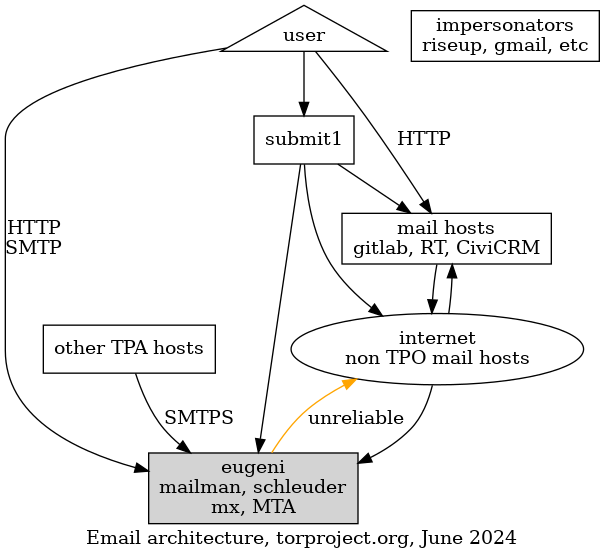
After emergency changes
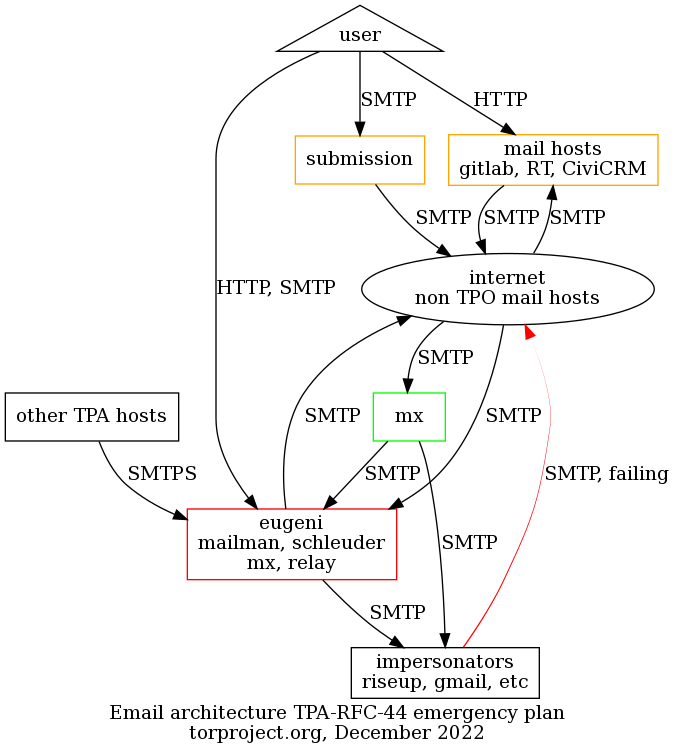
Changes in this diagram:
- added: new mail exchanger
- changed:
- "impersonators" now unable to deliver mail as
@torproject.orgunless they use the submission server
- "impersonators" now unable to deliver mail as
After long-term improvements
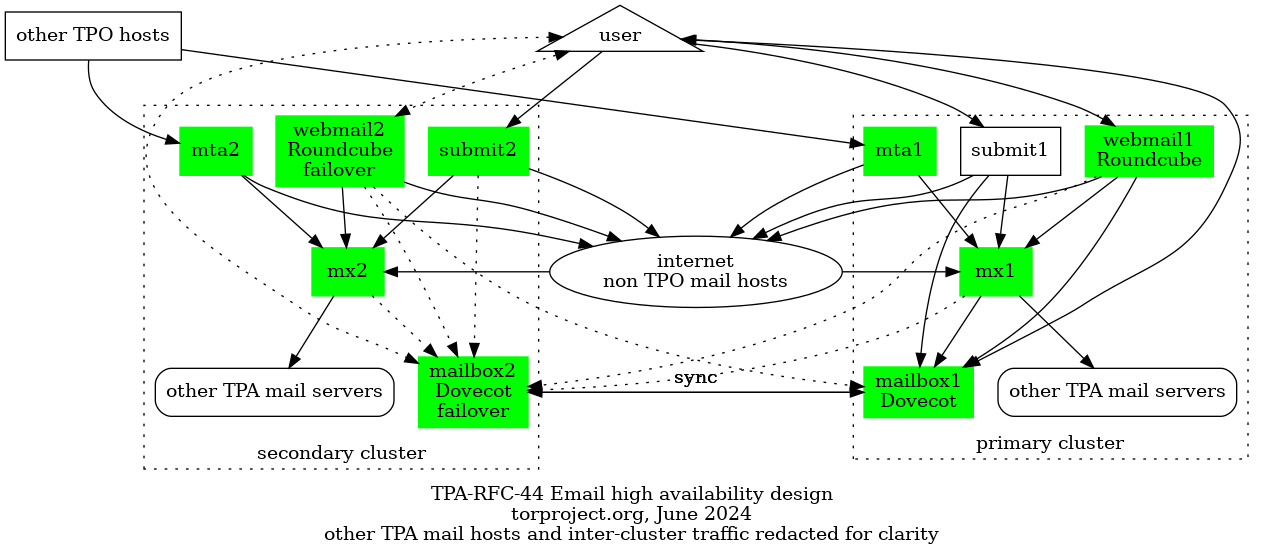
Changes in this diagram:
- added:
- MTA server
- mailman, schleuder servers
- IMAP / webmail server
- changed:
- users forced to use the submission and/or IMAP server
- removed: eugeni, retired
Personas
Here we collect a few "personas" and try to see how the changes will affect them.
Ariel, the fundraiser
Ariel does a lot of mailing. From talking to fundraisers through their normal inbox to doing mass newsletters to thousands of people on CiviCRM, they get a lot of shit done and make sure we have bread on the table at the end of the month. They're awesome and we want to make them happy.
Email is absolutely mission critical for them. Sometimes email gets lost and that's a huge problem. They frequently tell partners their personal Gmail account address to workaround those problems. Sometimes they send individual emails through CiviCRM because it doesn't work through Gmail!
Their email is forwarded to Google Mail and they do not have an LDAP account.
TPA will make them an account that forwards to their current Gmail account, with sender rewriting rules. They will be able to send email through the submission server from Gmail.
They will have the option of migrating to the new IMAP / Webmail service as well.
Gary, the support guy
Gary is the ticket master. He eats tickets for breakfast, then files 10 more before coffee. A hundred tickets is just a normal day at the office. Tickets come in through email, RT, Discourse, Telegram, Snapchat and soon, TikTok dances.
Email is absolutely mission critical, but some days he wishes there could be slightly less of it. He deals with a lot of spam, and surely something could be done about that.
His mail forwards to Riseup and he reads his mail over Thunderbird and sometimes webmail.
TPA will make an account for Gary and send the credentials in an encrypted email to his Riseup account.
He will need to reconfigure his Thunderbird to use the submission and IMAP server after setting up an email password. The incoming mail checks should improve the spam situation across the board, but especially for services like RT.
He will need, however, to abandon Riseup for TPO-related email, since Riseup cannot be configured to relay mail through the submission server.
John, the external contractor
John is a freelance contractor that's really into privacy. He runs his own relays with some cools hacks on Amazon, automatically deployed with Terraform. He typically run his own infra in the cloud, but for email he just got tired of fighting and moved his stuff to Microsoft's Office 365 and Outlook.
Email is important, but not absolutely mission critical. The submission server doesn't currently work because Outlook doesn't allow you to add just an SMTP server.
John will have to reconfigure his Outlook to send mail through the submission server and use the IMAP service as a backend.
The first emergency measures will be problematic for John as he won't be able to use the submission service until the IMAP server is setup, due to limitations in Outlook.
Nancy, the fancy sysadmin
Nancy has all the elite skills in the world. She can configure a Postfix server with her left hand while her right hand writes the Puppet manifest for the Dovecot authentication backend. She knows her shit. She browses her mail through a UUCP over SSH tunnel using mutt. She runs her own mail server in her basement since 1996.
Email is a pain in the back and she kind of hates it, but she still believes everyone should be entitled to run their own mail server.
Her email is, of course, hosted on her own mail server, and she has an LDAP account.
She will have to reconfigure her Postfix server to relay mail through
the submission or relay servers, if she want to go fancy. To read
email, she will need to download email from the IMAP server, although
it will still be technically possible to forward her @torproject.org
email to her personal server directly, as long as the server is
configured to send email through the TPO servers.
Mallory, the director
Mallory also does a lot of mailing. She's on about a dozen aliases and mailing lists from accounting to HR and other obscure ones everyone forgot what they're for. She also deals with funders, job applicants, contractors and staff.
Email is absolutely mission critical for her. She often fails to
contact funders and critical partners because state.gov blocks our
email (or we block theirs!). Sometimes, she gets told through LinkedIn
that a job application failed, because mail bounced at Gmail.
She has an LDAP account and it forwards to Gmail. She uses Apple Mail to read their mail.
For her Mac, she'll need to configure the submission server and the IMAP server in Apple Mail. Like Ariel, it is technically possible for her to keep using Gmail, but with the same caveats about forwarded mail from SPF-hardened hosts.
Like John, this configuration will be problematic after the emergency measures are deployed and before the IMAP server is online, during which time it will be preferable to keep using Gmail.
The new mail relay servers should be able to receive mail state.gov
properly. Because of the better reputation related to the new
SPF/DKIM/DMARC records, mail should bounce less (but still may
sometimes end up in spam) at Gmail.
Orpheus, the developer
Orpheus doesn't particular like or dislike email, but sometimes has to
use it to talk to people instead of compilers. They sometimes have to
talk to funders (#grantlife) and researchers and mailing lists, and
that often happens over email. Sometimes email is used to get
important things like ticket updates from GitLab or security
disclosures from third parties.
They have an LDAP account and it forwards to their self-hosted mail server on a OVH virtual machine.
Email is not mission critical, but it's pretty annoying when it doesn't work.
They will have to reconfigure their mail server to relay mail through the submission server. They will also likely start using the IMAP server, but in the meantime the forwards will keep working, with the sender rewriting caveats mentioned above.
Blipblop, the bot
Blipblop is not a real human being, it's a program that receives mails from humans and acts on them. It can send you a list of bridges (bridgedb), or a copy of the Tor program (gettor), when requested. It has a brother bot called Nagios/Icinga who also sends unsolicited mail when things fail. Both of those should continue working properly, but will have to be added to SPF records and an adequate OpenDKIM configuration should be deployed on those hosts as well.
There's also a bot which sends email when commits get pushed to gitolite. That bot is deprecated and is likely to go away.
Most bots will be modified to send and receive email through the mail transfer agent, although that will be transparent to the bot and handled by TPA at the system level. Those systems will be modified to implement DKIM signing.
Some bots will need to be modified to fetch mail over IMAP instead of being pushed mail over SMTP.
Alternatives considered
Let's see what we could do instead of this proposal.
Multiple (community) providers
In TPA-RFC-31, we evaluated a few proposals to outsource email services to external service providers. We tend to favor existing partners and groups from our existing community, where we have an existing trust relationship. It seems that, unfortunately, none of those providers will do the job on their own.
It may be possible to combine a few providers together, for example by doing mass mailings with Riseup, and hosting mailboxes at Greenhost. It is felt, however, that this solution would be difficult to deploy reliably, and split the support costs between two organisations.
It would also remove a big advantage of outsourcing email, which is that we have one place to lay the blame if problems occur. If we have two providers, then it's harder to diagnose issues with the service.
Commercial transactional mail providers
We have evaluated a handful of commercial transactional mail providers in TPA-RFC-31 as well. Those are somewhat costly: 200-250$/mth and up, with Mailchimp at the top with 1300$/mth, although to be fair with Mailchimp, they could probably give us a better price if we "contact sales".
Most of those providers try to adhere to the GDPR in one sense or the other. However, when reviewing other privacy policies (e.g. for tpo/tpa/team#40957, I've had trouble figuring out the properties of "processors" and "controllers" of data. In this case, a provider will more likely be a "processor" which puts us in charge of clients' data, but also means they can have "sub-processors" that also have access to the data, and that list can change.
In other words, it's never quite clear who has access to what once we start hosting our data elsewhere. Each of those potential providers have detailed privacy policies and their sub-processors have their own policies.
If we, all of a sudden, start using a commercial transactional mail provider to send all CiviCRM mailings, we would have forcibly opted all those 300+ thousand people into all of those privacy policies.
This feels like a serious breach of trust for our organisation, and a possible legal liability. It would at least be a public relations risk, as our reputation could be negatively affected if we make such a move, especially in an emergency, without properly reviewing the legal implications of it.
TPA recommends to at least try to fix the problem in house, then a community provider before ultimately deferring to a commercial provider. Ideally, some legal advice from the board should be sought before going ahead with this, at least.
Deadline
Emergency work based on this proposal will be started on Monday unless an opposition is expressed before then.
Long term work will start in January unless an opposition is expressed before the holidays (December 23rd).
Status
This proposal is currently in the standard state. Only the emergency
part of this proposal is considered adopted, the rest is postponed to
a further RFC.
References
- TPA-RFC-44 and discussion ticket
- Bouncing Emails Crisis
- TPA-RFC-31 and discussion ticket
- TPA-RFC-15 and discussion ticket
- Background
- Proposal
- Personas
- Alternatives considered
- References
- Appendix
Summary: TODO
Background
Just like for the monitoring system (see TPA-RFC-33), we are now faced with the main mail server becoming unsupported by Debian LTS in June 2024. So we are in need of an urgent operation to upgrade that server.
But, more broadly, we still have all sorts of email delivery problems,
mainly due to new provider requirements for deliverability. Email
forwarding, the primary mechanism by which we provide email services
@torproject.org right now, is particularly unreliable as we fail to
deliver email from Gmail to email accounts forwarding to Gmail, for
example (tpo/tpa/team#40632, tpo/tpa/team#41524).
We need a plan for email.
History
It's not the first time we look at this problem.
In late 2021, TPA adopted OKRs to improve mail services. At first, we took the approach of fixing the mail infrastructure with an ambitious, long term plan (TPA-RFC-15) to deploy new email standards like SPF, DKIM, and DMARC. The proposal was then rejected as requiring too much time and labour.
So, in TPA-RFC-31, we proposed the option of outsourcing email services as much as possible, including retiring Schleuder (TPA-RFC-41) and migrating from Mailman to Discourse to avoid the possibly painful Mailman upgrade. Those proposals were rejected as well (see tpo/tpa/team#40798) as we had too many services to self-host to have a real benefit in outsourcing.
Shortly after this, we had to implement emergency changes (TPA-RFC-44) to make sure we could still deliver email at all. This split the original TPA-RFC-15 proposal in two, a set of emergency changes and a long term plan. The emergency changes were adopted (and mostly implemented) but the long term plan was postponed to a future proposal.
This is that proposal.
Proposal
Requirements
Those are the requirements that TPA has identified for the mail services architecture.
Must have
-
Debian upgrades: we must upgrade our entire fleet to a supported Debian release urgently
-
Email storage: we currently do not offer actual mailboxes for people, which is confusing for new users and impractical for operations
-
Improved email delivery: we have a large number of concerns with email delivery, which often fails in part due to our legacy forwarding infrastructure, in part
-
Heterogeneous environment: our infrastructure is messy, made of dozens of intermingled services that each have their own complex requirements (e.g. CiviCRM sends lots of emails, BridgeDB needs to authenticate senders), and we cannot retire or alter those services enough to provide us with a simpler architecture, our email services therefore need to be flexible to cover all the current use cases
Nice to have
-
Minimal user disruption: we want to avoid disrupting user's workflows too much, but we want to stress that our users workflow is currently so diverse that it's hard to imagine providing a unified, reliable service without significant changes to a significant part of the user base
-
"Zero-knowledge" email storage: TPA and TPI currently do not have access to emails at rest, and it would be nice to keep it that way, possibly with mailboxes encrypted with a user-controlled secret, for example
-
Cleaner architecture: our mail systems are some of the oldest parts of the infrastructure and we should use this opportunity to rebuild things cleanly, or at least not worsen the situation
-
Improved monitoring: we should be able to tell when we start failing to deliver mail, before our users
Non-Goals
-
authentication improvements: a major challenge in onboarding users right now is the way our authentication systems is an arcane LDAP server that is hard to use. this proposal doesn't aim to change this, as it seems we've been able to overcome this challenge for the submission server so far. we acknowledge this is a serious limitation, however, and do hope to eventually solve this.
We should also mention that we've been working on improving userdir-ldap so it can parse emails sent by Thunderbird. In our experience, this has been a terrible onboarding challenge for new users as they simply couldn't operate the email gateway with their email client. The LDAP server remains a significant usability problem, however.
Scope
This proposal affects the all inbound and outbound email services
hosted under torproject.org. Services hosted under torproject.net
are not affected.
It also does not address directly phishing and scamming attacks (issue 40596), but it is hoped that stricter enforcement of email standards will reduce those to a certain extent.
Affected users
This affects all users which interact with torproject.org and its
subdomains over email. It particularly affects all "tor-internal"
users, users with LDAP accounts, or forwards under @torproject.org.
It especially affects users which send email from their own provider
or another provider than the submission service. Those users will
eventually be unable to send mail with a torproject.org email
address.
Users on other providers will also be affected, as email they currently receive as forwards will change.
See the Personas section for details.
Emergency changes
Some changes we cannot live without. We strongly recommend prioritizing this work so that we have basic mail services supported by Debian security.
We would normally just do this work, but considering we lack a long term plan, we prefer to fit this in the larger picture, with the understanding some of this work is wasted as (for example) eugeni is planned on being retired.
Mailman 3 upgrade
Build a new mailing list server to host the upgraded Mailman 3 service. Move old lists over and convert them, keeping the old archives available for posterity.
This includes lots of URL changes and user-visible disruption, little can be done to work around that necessary change. We'll do our best to come up with redirections and rewrite rules, but ultimately this is a disruptive change.
We are hoping to hook the authentication system with the existing email authentication password, but this is a "nice to have". The priority is to complete the upgrade in a timely manner.
Eugeni in-place upgrade
Once Mailman has been safely moved aside and is shown to be working correctly, upgrade Eugeni using the normal procedures. This should be a less disruptive upgrade, but is still risky because it's such an old box with lots of legacy.
Medium term changes
Those are changes that should absolutely be done, but that can be done after the LTS deadline.
Deploy a new, sender-rewriting, mail exchanger
This step is carried over from TPA-RFC-44, mostly unchanged.
Configure new "mail exchanger" (MX) server(s) with TLS certificates
signed by a public CA, most likely Let's Encrypt for incoming mail,
replacing that part of eugeni (tpo/tpa/team#40987), which will
hopefully resolve issues with state.gov (tpo/tpa/team#41073,
tpo/tpa/team#41287, tpo/tpa/team#40202) and possibly others
(tpo/tpa/team#33413).
This would take care of forwarding mail to other services (e.g. mailing lists) but also end-users.
To work around reputation problems with forwards (tpo/tpa/team#40632, tpo/tpa/team#41524), deploy a Sender Rewriting Scheme (SRS) with postsrsd (packaged in Debian, but not in the best shape) and postforward (not packaged in Debian, but zero-dependency Golang program). It's possible deploying ARC headers with OpenARC, Fastmail's authentication milter (which apparently works better), or rspamd's arc module might be sufficient as well, to be tested.
Having it on a separate mail exchanger will make it easier to swap in and out of the infrastructure if problems would occur.
The mail exchangers should also sign outgoing mail with DKIM.
Long term changes
Those changes are not purely mandatory, but will make our lives easier in lots of ways. In particular, it will give TPA the capacity to actually provide email services to people we onboard, something which is currently left to the user. It should also make it easier to deliver emails for users, especially internally, as we will control both ends of the mail delivery system.
We might still have trouble delivering email to the outside world, but that should normally improve as well. That is because we will not be forwarding mail to the outside, which basically makes use masquerade as other mail servers, triggering all sorts of issues.
Controlling our users' mailboxes will also allow us to implement stricter storage policies like on-disk encryption and stop leaking confidential data to third parties. It will also allow us to deal with situations like laptop seizures or security intrusions better as we will be able to lock down access to a compromised or vulnerable user, something which is not possible right now.
Mailboxes
We are currently already using Dovecot in a limited way on some servers, but in this project we would deploy actual mailboxes for user.
We should be able to reuse some of our existing Puppet code for this deployment. The hard part is to provide high availability for this service.
High availability mailboxes
In a second phase, we'll take extra care to provide a higher quality of service for mailboxes than our usual service level agreements (SLA). In particular, the mailbox server should be replicated, in near-realtime, to a secondary cluster in an entirely different location. We'll experiment with the best approach for this, but here are the current possibilities:
- DRBD replication (real-time, possibly large performance impact)
- ZFS snapshot replication (periodic sync, less performance impact)
- periodic sync job (
doveadm syncor other mailbox sync clients, low frequency periodic sync, moderate performance impact)
The goal is to provide near zero-downtime service (tpo/tpa/team#40604) having special rotation procedures so that reboots provide a routine procedure for rotating the servers, so that a total cluster failure is recovered easily.
Three replicas (two in-cluster, one outside) could allow for IP-based redundancy with near-zero downtimes, while DNS would provide cross-cluster migrations with a few minutes downtime.
Mailbox encryption
We should provide at-rest mailbox encryption, so that TPA cannot access people's emails. This could be implemented in Dovecot with the trees plugin written by a core Tor contributors (dgoulet). Alternatively, Stalwart supports OpenPGP-based encryption as well.
Webmail
The webmail will likely be deployed with Roundcube, alongside the IMAP server. Alternatives like Snappymail could be considered.
Webmail HA
Like the main mail server, the webmail server (which should be separate) will be replicated in a "hot-spare" configuration, although that will be done with PostgreSQL replication instead of disk-based configuration.
An active-active configuration might be considered.
Incoming mail filtering
Deploy a tool for inspection of incoming mail for SPF, DKIM, DMARC records, affecting either "reputation" (e.g. add a marker in mail headers) or just downright rejection (e.g. rejecting mail before queue).
We currently use Spamassassin for this purpose (only on RT), and we could consider collaborating with the Debian listmasters for the Spamassassin rules.
However, rspamd should also be evaluated as part of this work to see if it is a viable alternative. It has been used to deploy the new mail filtering service at koumbit.org recently, and seems generally to gain a lot of popularity as the new gold standard. It is particularly interesting that it could serve as a policy daemon in other places that do not actually need to filter incoming mail for deliver, instead signing outgoing mail with ARC/DMARC headers.
End-to-end deliverability checks
End-to-end deliverability monitoring involves:
- actual delivery roundtrips
- block list checks
- DMARC/MTA-STS feedback loops (covered below)
This will be implemented as Prometheus checks (issue 40539). This also includes evaluating how to monitor metrics offered by Google postmaster tools and Microsoft (issue 40168).
DMARC and MTA-STS reports analysis
DMARC reports analysis are also covered by issue 40539, but are implemented separately because they are considered to be more complex.
This might also include extra work for MTA-STS feedback loops.
Hardened DNS records
We should consider hardening our DNS records. This is a minor, quick change but that we can deploy only after monitoring is in place, which is not currently the case.
This should improve our reputation a bit as some providers treat a negative or neutral policy as "spammy".
CiviCRM bounce rate monitoring
We should hook CiviCRM into Prometheus to make sure we have visibility on the bounce rate that is currently manually collated by mattlav.
New mail transfer agent
Configure new "mail transfer agent" server(s) to relay mails from
servers that do not send their own email, replacing a part of
eugeni.
All servers would submit email through this server using mutual TLS
authentication the same way eugeni currently does this service. It
would then relay those emails to the external service provider.
This is similar to current submission server, except with TLS authentication instead of password.
This server will be called mta-01.torproject.org and could be
horizontally scaled up for availability. See also the Naming
things challenge below.
eugeni retirement
Once the mail transfer agents, mail exchangers, mailman and schleuder servers have been created and work correctly, eugeni is out of work. It can be archived and retired, with a extra long grace period.
Puppet refactoring
Refactor the mail-related code in Puppet, and reconfigure all servers according to the mail relay server change above, see issue 40626 for details. This should probably happen before or at least during all the other long-term improvements.
Cost estimates
Most of the costs of this project are in staff hours, with estimates ranging from 3 to 6 months of work.
Staff
This is an estimate of the time it will take to complete this project, based on the tasks established in the proposal.
Following the Kaplan-Moss estimation technique, as a reminder, we first estimate each task's complexity:
| Complexity | Time |
|---|---|
| small | 1 day |
| medium | 3 days |
| large | 1 week (5 days) |
| extra-large | 2 weeks (10 days) |
... and then multiply that by the uncertainty:
| Uncertainty Level | Multiplier |
|---|---|
| low | 1.1 |
| moderate | 1.5 |
| high | 2.0 |
| extreme | 5.0 |
Emergency changes: 3-6 weeks
| Task | Estimate | Uncertainty | Total |
|---|---|---|---|
| Mailman 3 upgrade | 1 week | high | 2 weeks |
| eugeni upgrade | 1 week | high | 2 weeks |
| Sender-rewriting mail exchanger | 1 week | high | 2 weeks |
| Total | 3 weeks | ~high | 6 weeks |
Mailboxes for alpha testers: 5-8 weeks
| Task | Estimate | Days | Uncertainty | Total | days | Note |
|---|---|---|---|---|---|---|
| Mailboxes | 1 week | 5 | low | 1 week | 5.5 | |
| Webmail | 3 days | 3 | low | 3.3 days | 3.3 | |
| incoming mail filtering | 1 week | 5 | high | 2 weeks | 10 | needs research |
| e2e delivery checks | 3 days | 3 | medium | 4.5 days | 4.5 | access to other providers uncertain |
| DMARC/MTA-STS reports | 1 week | 5 | high | 2 weeks | 10 | needs research |
| CiviCRM bounce monitoring | 1 day | 1 | medium | 1.5 days | 1.5 | |
| New mail transfer agent | 3 days | 3 | low | 3.3 days | 3.3 | similar to current submission server |
| eugeni retirement | 1 day | 1 | low | 1.1 days | 1.1 | |
| Total | 5 weeks | 26 | medium | 8 weeks | 39.2 |
High availability and general availability: 5-9 weeks
| Task | Estimate | Days | Uncertainty | Total | Days |
|---|---|---|---|---|---|
| Mailbox encryption | 1 week | 5 | medium | 7.5 days | 7.5 |
| Mailboxes HA | 2 weeks | 10 | high | 4 weeks | 20 |
| Webmail HA | 3 days | 3 | high | 1 week | 6 |
| Puppet refactoring | 1 week | 5 | high | 2 weeks | 10 |
| Total | 5 weeks | 19 | high | 9 weeks | 43.5 |
Hardware: included
In TPA-RFC-15, we estimated costs to host the mailbox services on dedicated hardware at Hetzner, which added up (rather quickly) to ~22000EUR per year.
Fortunately, in TPA-RFC-43, we adopted a bold migration plan that provided us with a state of the art, powerful computing cluster in a new location. It is be more than enough to host mailboxes, so hardware costs for this project are already covered by that expense, assuming we still fit inside 1TB of storage (10GB mailbox size on average, with 100 mailboxes).
Timeline
The following section details timelines of how this work could be performed over time. A "utopian" timeline is established just to be knocked down, and then a more realistic (but still somewhat optimistic) scenario is proposed.
Utopian
This timeline reflects an ideal (and non-realistic) scenario where one full time person is assigned continuously on this work, starting in August 2024, and that the optimistic cost estimates are realized.
- W31: emergency: Mailman 3 upgrade
- W32: emergency: eugeni upgrade
- W33-34: sender-rewriting mail exchanger
- end of August 2024: critical mid-term changes implemented
- W35: mailboxes
- W36 (September 2024): webmail, end-to-end deliverability checks
- W37: incoming mail filtering
- W38: DMARC/MTA-STS reports
- W39: new MTA, CiviCRM bounce rate monitoring
- W40: eugeni retirement
- W41 (October 2024): Puppet refactoring
- W42: Mailbox encryption
- W43-W44: Webmail HA
- W45-W46 (November 2024): Mailboxes HA
Having the Puppet refactoring squeezed in at the end there is particularly unrealistic.
More realistic
In practice, the long term mailbox project will most likely be delayed to somewhere in 2025.
This more realistic timeline still rushes in emergency and mid-term changes to improve quality of life for our users.
In this timeline, the most demanding users will be able to migrate to TPA-hosted email infrastructure by June 2025, while others will be able to progressively adopt the service earlier, in September 2024 (alpha testers) and April 2025 (beta testers).
Emergency changes: Q3 2024
- W31: emergency: Mailman 3 upgrade
- W32: emergency: eugeni upgrade
- W33-34: sender-rewriting mail exchanger
- end of August 2024: critical mid-term changes implemented
Mailboxes for alpha testers: Q4 2024
- September-October 2024:
- W35: mailboxes
- W36: webmail
- W37: end-to-end deliverability checks
- W38-W39: incoming mail filtering
- W40-W44: monitoring, break for other projects
- November-December 2024:
- W45-W46: DMARC/MTA-STS reports
- W47: new MTA, CiviCRM bounce rate monitoring
- W48: eugeni retirement
- W49-W1: monitoring, break for holidays
- Throughout: Puppet refactoring
HA and general availability: 2025
- January-Marc 2025: break
- April 2025: Mailbox encryption
- May 2025: Webmail HA in testing
- June 2025: Mailboxes HA in testing
- September/October 2025: Mailboxes/Webmail HA general availability
Challenges
This proposal brings a number of challenges and concerns that we have considered before bringing it forward.
Staff resources and work overlap
We are already a rather busy team, and the work planned in this proposal overlaps with the work planned in TPA-RFC-33. We've tried to stage the work over the course of a year (or more, in fact) but the emergency work is already too late and will compete with the other proposal.
We do, however, have to deal with this emergency, and we would much rather have a clear plan on how to move forward with email, even if that means we can't execute this for months, if not years, until things calm down and we get capacity. We have designed the tasks to be independent form each other as much as possible and much of the work can be done incrementally.
TPA-RFC-15 challenges
The infrastructure planned recoups many of the challenges described in the TPA-RFC-15 proposal, namely:
-
Aging Puppet code base: this is mitigated by focusing on monitoring and emergency (non-Puppet) fixes at first, but issue 40626 ("cleanup the postfix code in puppet") remains, of course; note that this is an issue that needs to be dealt with regardless of the outcome of this proposal
-
Incoming filtering implementation: still somewhat of an unknown, although TPA operators have experience setting up spam filtering system, we're hoping to setup a new tool (rspamd) for which we have less experience; this is mitigated by delaying the deployment of the inbox system to later, and using sender rewriting (or possibly ARC)
-
Security concerns: those remain an issue. those are two-folder: lack of 2FA and extra confidentiality requirements due to hosting people's emails, which could be mitigated with mailbox encryption
-
Naming things: somewhat mitigated in TPA-RFC-31 by using "MTA" or "transfer agent" instead of "relay"
TPA-RFC-31 challenges
Some of the challenges in TPA-RFC-31 also apply here as well, of course. In particular:
-
sunk costs: we spent, again, a long time making TPA-RFC-31, and that would go to waste... but on the up side: time spent on TPA-RFC-15 and previous work on the mail infrastructure would be useful again!
-
Partial migrations: we are in the "worst case scenario" that was described in that section, more or less, as we have tried to migrate to an external provider, but none of the ones we had planned for can fix the urgent issue at hand; we will also need to maintain Schleuder and Mailman services regardless of the outcome of this proposal
Still more delays
As foretold by TPA-RFC-31: Challenges, Delays and TPA-RFC-44: More delays, we're now officially late.
We don't seem to have much of a choice, at least for the emergency work. We must perform this upgrade to keep our machines secure.
For the long term work, it will take time to rebuild our mail infrastructure, but we prefer to have a clear, long-term plan to the current situation where we are hesitant in deploying any change whatsoever because we don't have a design. This hurts our users and our capacity to help them.
It's possible we fail at providing good email services to our users. If we do, then we fall back to outsourcing mailboxes, but at least we gave it one last shot and we don't feel the costs are so prohibitive that we should just not try.
User interface changes
Self-hosting, when compared to commercial hosting services like Gmail, suffer from significant usability challenges. Gmail, in particular, has acquired a significant mind-share of how email should even work in the first place. Users will be somewhat jarred by the change and frustrated by the unfamiliar interface.
One mitigation for this is that we still allow users to keep using Gmail. It's not ideal, because we keep a hybrid design and we still leak data to the outside, but we prefer this to forcing people into using tools they don't want.
Architecture diagram
TODO: rebuild architecture diagrams, particularly add a second HA stage and show the current failures more clearly, e.g. forwards
The architecture of the final system proposed here is similar to the one proposed in the TPA-RFC-15 diagram, although it takes it a step further and retires eugeni.
Legend:
- gray: legacy host, mostly eugeni services, split up over time and retired
- orange: delivery problems with the current infrastructure
- green: new hosts, MTA and mx can be trivially replicated
- rectangles: machines
- triangle: the user
- ellipse: the rest of the internet, other mail hosts not managed by tpo
Before
After long-term improvements
Changes in this diagram:
- added:
- MTA server
- mailman, schleuder servers
- IMAP / webmail server
- changed:
- users forced to use the submission and/or IMAP server
- removed: eugeni, retired
TODO: ^^ redo summary
TODO: dotted lines are warm failovers, not automatic, might have some downtime, solid lines are fully highly available, which means mails like X will always go through and mails like Y might take a delay during maintenance operations or catastrophic downtimes
TODO: redacted hosts include...
TODO: HA failover workflow TODO: spam and non-spam flows cases
Personas
Here we collect a few "personas" and try to see how the changes will affect them, largely derived from TPA-RFC-44.
We sort users in three categories:
- alpha tester
- beta tester
- production user
We assigned personas to each of those categories, but individual users could opt in our out of any category as they wish. By default, everyone is a production user unless otherwise mentioned.
In italic is the current situation for those users, and what follows are the changes they will go through.
Note that we assume all users have an LDAP account, which might be inaccurate, but this is an evolving situation we've been so far dealing with successfully, by creating accounts for people that lack them and doing basic OpenPGP training. So that is considered out of scope of this proposal for now.
Alpha testers
Those are technical user who are ready to test development systems and even help fix issues. They can tolerate email loss and delays.
Nancy, the fancy sysadmin
Nancy has all the elite skills in the world. She can configure a Postfix server with her left hand while her right hand writes the Puppet manifest for the Dovecot authentication backend. She browses her mail through a UUCP over SSH tunnel using mutt. She runs her own mail server in her basement since 1996.
Email is a pain in the back and she kind of hates it, but she still believes entitled to run their own mail server.
Her email is, of course, hosted on her own mail server, and she has an LDAP account. She has already reconfigured her Postfix server to relay mail through the submission servers.
She might try hooking up her server into the TLS certificate based relay servers.
To read email, she will need to download email from the IMAP server,
although it will still be technically possible to forward her
@torproject.org email to her personal server directly.
Orpheus, the developer
Orpheus doesn't particular like or dislike email, but sometimes has
to use it to talk to people instead of compilers. They sometimes have
to talk to funders (#grantlyfe), external researchers, teammates or
other teams, and that often happens over email. Sometimes email is
used to get important things like ticket updates from GitLab or
security disclosures from third parties.
They have an LDAP account and it forwards to their self-hosted mail server on a OVH virtual machine. They have already reconfigured their mail server to relay mail over SSH through the jump host, to the surprise of the TPA team.
Email is not mission critical, and it's kind of nice when it goes down because they can get in the zone, but it should really be working eventually.
They will likely start using the IMAP server, but in the meantime the forwards should keep working, although with some header and possibly sender mangling.
Note that some developers may instead be beta testers or even production users, we're not forcibly including all developers into testing this system, this is opt-in.
Beta testers
Those are power user who are ready to test systems before launch, but can't necessarily fix issues themselves. They can file good bug reports. They can tolerate email delays and limited data loss, but hopefully all will go well.
Gary, the support guy
Gary is the ticket overlord. He eats tickets for breakfast, then files 10 more before coffee. A hundred tickets is just a normal day at the office. Tickets come in through email, RT, Discourse, Telegram, Snapchat and soon, TikTok dances.
Email is absolutely mission critical, but some days he wishes there could be slightly less of it. He deals with a lot of spam, and surely something could be done about that.
His mail forwards to Riseup and he reads his mail over Thunderbird and sometimes webmail. Some time after TPA-RFC_44, Gary managed to finally get an OpenPGP key setup and TPA made him a LDAP account so he can use the submission server. He has already abandoned the Riseup webmail for TPO-related email, since it cannot relay mail through the submission server.
He will need to reconfigure his Thunderbird to use the new IMAP server. The incoming mail checks should improve the spam situation across the board, but especially for services like RT.
John, the external contractor
John is a freelance contractor that's really into privacy. He runs his own relays with some cools hacks on Amazon, automatically deployed with Terraform. He typically run his own infra in the cloud, but for email he just got tired of fighting and moved his stuff to Microsoft's Office 365 and Outlook.
Email is important, but not absolutely mission critical. The submission server doesn't currently work because Outlook doesn't allow you to add just an SMTP server. John does have an LDAP account, however.
John will have to reconfigure his Outlook client to use the new IMAP service which should allow him to send mail through the submission server as well.
He might need to get used to the new Roundcube webmail service or an app when he's not on his desktop.
Blipblop, the bot
Blipblop is not a real human being, it's a program that receives mails and acts on them. It can send you a list of bridges (bridgedb), or a copy of the Tor program (gettor), when requested. It has a brother bot called Nagios/Icinga who also sends unsolicited mail when things fail.
There are also bots that sends email when commits get pushed to some secret git repositories.
Bots should generally continue working properly, as long as they use the system MTA to deliver email.
Some bots currently performing their own DKIM validation will delegate this task to the new spam filter, which will optionally reject mail unless they come from an allow list of domains with a valid DKIM signature.
Some bots will fetch mail over IMAP instead getting email piped in standard input.
Production users
Production users can tolerate little down time and certainly no data loss. Email is mission critical and has high availability requirement. They're not here to test systems, but to work on other things.
Ariel, the fundraiser
Ariel does a lot of mailing. From talking to fundraisers through their normal inbox to doing mass newsletters to thousands of people on CiviCRM, they get a lot done and make sure we have bread on the table at the end of the month. They're awesome and we want to make them happy.
Email is absolutely mission critical for them. Sometimes email gets lost and that's a major problem. They frequently tell partners their personal Gmail account address to work around those problems. Sometimes they send individual emails through CiviCRM because it doesn't work through Gmail!
Their email forwards to Google Mail and they now have an LDAP account to do that mysterious email delivery thing now that Google requires ... something.
They should still be able to send email through the submission server from Gmail, as they currently do, but this might be getting harder and harder.
They will have the option of migrating to the new IMAP / Webmail service as well, once TPA deploys high availability. If they do not, they will use the new forwarding system, possibly with header and sender mangling which might be a little confusing.
They might receive a larger amount of spam than what they were used to at Google. They will need to install another app on their phone to browse the IMAP server to replace the Gmail app. They will also need to learn how to use the new Roundcube Webmail service.
Mallory, the director
Mallory also does a lot of mailing. She's on about a dozen aliases and mailing lists from accounting to HR and other unfathomable things. She also deals with funders, job applicants, contractors, volunteers, and staff.
Email is absolutely mission critical for her. She often fails to
contact funders and critical partners because state.gov blocks our
email -- or we block theirs! Sometimes, she gets told through LinkedIn
that a job application failed, because mail bounced at Gmail.
She has an LDAP account and it forwards to Gmail. She uses Apple Mail to read their mail.
For her Mac, she'll need to configure the IMAP server in Apple Mail. Like Ariel, it is technically possible for her to keep using Gmail, but with the same caveats about forwarded mail.
The new mail relay servers should be able to receive mail state.gov
properly. Because of the better reputation related to the new
SPF/DKIM/DMARC records, mail should bounce less (but still may
sometimes end up in spam) at Gmail.
Like Ariel and John, she will need to get used to the new Roundcube webmail service and mobile app.
Alternatives considered
External email providers
When rejecting TPA-RFC-31, anarcat wrote:
I currently don't see any service provider that can serve all of our email needs at once, which is what I was hoping for in this proposal. the emergency part of TPA-RFC-44 (#40981) was adopted, but the longer part is postponed until we take into account the other requirements that popped up during the evaluation. those requirements might or might not require us to outsource email mailboxes, but given that:
we have more mail services to self-host than I was expecting (schleuder, mailman, possibly CiviCRM), and...
we're in the middle of the year end campaign and want to close project rather than start them
... I am rejecting this proposal in favor of a new RFC that will discuss, yes, again, a redesign of our mail infrastructure, taking into account the schleuder and mailman hosting, 24/7 mailboxes, mobile support, and the massive requirement of CiviCRM mass mailings.
The big problem we have right now is that we have such a large number of mail servers that hosting mailboxes seems like a minor challenge in comparison. The biggest challenge is getting the large number of emails CiviCRM requires delivered reliably, and for that no provider has stepped up to help.
Hosting email boxes reliably will be a challenge, of course, and we might eventually start using an external provider for this, but for now we're going under the assertion that most of our work is spent dealing with all those small services anyways, and adding one more on top will not significantly change this pattern.
The TPA-RFC-44: alternatives considered section actually went into details for each external hosting provider (community and commercial), and those comments are still considered valid.
In-place Mailman upgrade
We have considered upgrading Mailman directly on eugeni, by upgrading the entire box to bullseye at once. This feels too risky: if there's a problem with the upgrade, all lists go down and recovery is difficult.
It feels safer to start with a new host and import the lists there, which is how the upgrade works anyways, even when done on the same machine. It also allows us to separate that service, cleaning up the configuration a little bit and moving more things into Puppet.
Postfix / Dovecot replacements
We are also aware of a handful of mail software stack emerging as replacements to the ad-hoc Postfix / Dovecot standard.
We know of the following:
- maddy - IMAP/SMTP server, mail storage is "beta", recommends Dovecot
- magma - SMTP/IMAP, lavabit.com backend, C
- mailcow - wrapper around Dovecot/Postfix, not relevant
- mailinabox - wrapper around Dovecot/Postfix, not relevant
- mailu - wrapper
- postal - SMTP-only sender
- sympl.io - wrapper around Dovecot/Exim, similar
- sovereign - yet another wrapper
- Stalwart - JMAP, IMAP, Rust, built-in spam filtering, OpenPGP/SMIME encryption, DMARC, SPF, DKIM, ARC, Sieve, web-based control panel, promising, maybe too much so? no TPA staff has experience, could be used for high a availability setup as it can use PostgreSQL and S3 for storage, not 1.x yet but considered production ready
- xmox - no relay support or 1.x release, seems like one-man project
Harden mail submission server
The mail submission server currently accepts incoming from any user,
with any From header, which is probably a mistake. It's currently
considered out of scope for this proposal, but could be implemented if
it fits conveniently with other tasks (the spam filter, for example).
References
Appendix
Current issues and their solutions
TODO go through the improve mail services milestone and extra classes of issues, document their solutions here
Summary: enforce 2FA in the TPA group in GitLab on Tuesday, 2 day grace period
Background
GitLab groups have a setting to force users in the group to use 2FA authentication. The actual setting is labeled "All users in this group must set up two-factor authentication".
It's not exactly clear what happens when a user is already a member and the setting is enabled, but it is assumed it will keep the user from accessing the group.
Proposal
Enable the "enforce 2FA" setting for the tpo/tpa group in GitLab on
Tuesday January 17th, with a 48h grace period, which means that users
without 2FA will not be able to access the group with privileges on
Thursday January 19th.
References
- GitLab documentation about the feature
- discussion ticket: tpo/tpa/team#40892
Summary: delete email accounts after a delay when a user is retired
Background
As part of working on improving the on-boarding and off-boarding process, we have come up with a proposal to set a policy on what happens with user's email after they leave. A number of discussions happened on this topic in the past, but have mostly stalled.
Proposal
When someone is fired or leaves the core team, we setup an auto-reply with a bounce announcing the replacement email (if any). This gives agency to the sender, which is better entitled to determine whether the email should be forwarded to the replacement or another contact should be found for the user.
The auto-reply expires 12 months later, at which point the email simply bounces with a generic error. We also remove existing forwards older than 12 months that we already have.
Impact
For staff
We also encourage users to setup and use role accounts instead of using their personal accounts for external communications. Mailing lists, RT queues, and email forwards are available from TPA.
This implies that individual users MUST start using role accounts in
their communications as much as possible. Typically, this means having
a role account for your team and keeping it in "CC" in your
communications. For example, if John is part of the accounting team,
all his professional communications should Cc: accounting@torproject.org to make sure the contacts have a way to
reach accounting if john@torproject.org disappears.
Users are also encouraged to use the myriad of issue trackers and communication systems at their disposal including RT, GitLab, and Mailman mailing lists, to avoid depending on their individual address being available in the long term.
For long time core contributors
Long time core contributors might be worried this proposal would
impact their future use of their @torproject.org email address. For
example, say Alice is one of the core contributors who's been around
for the longest, not a founder, but almost. Alice might worry that
alice@torproject.org might disappear if they become inactive, and
might want to start using an alternate email address in their
communications...
The rationale here is that long time core contributors are likely to remain core contributors for a long time as well, and therefore keep their email address for an equally long time. It is true, however, that a core contributor might lose their identity if they get expelled from the project or completely leave. This is by design: if the person is not a contributor to the project anymore, they should not hold an identity that allows them to present themselves as being part of the project.
Alternatives considered
Those are other options that were considered to solve the current challenges with managing off-boarding users.
Status quo
Right now, when we retire a user, their account is first "locked" which means their access to various services is disabled. But their email still works for 186 days (~6 months). After that date, the email address forward is removed from servers and email bounces.
We currently let people keep their email address (and, indeed, their LDAP account) when they resign or are laid off from TPI, as long as they remain core contributors. Eventually, during the core membership audit, those users may have their LDAP account disabled but can keep their email address essentially forever, as we offer users to be added to the forward alias.
For some users, their personal email forward is forwarded to a role account. This is the case for some past staff, especially in accounting.
Dual policy
We could also two policies, one for core members and another for TPI employees.
References
Summary: enable the new VSCode-based GitLab Web IDE, currently in beta, as the default in our GitLab instance
Background
The current Web IDE has been the cause of some of the woes when working with the blog. The main problem was that is was slow to load some of the content of the in the project repository, and in some cases even crashing the browser.
The new Web IDE announced a few months ago is now available in the version of GitLab we're running, and initial tests with it seem very promising. The hope is that it will be much faster than its predecessor, and using it will eliminate one of the pain points identified by Tor people who regularly work on the blog.
Proposal
Make the new Web IDE the default by enabling the vscode_web_ide feature flag
in GitLab.
Affected users
All GitLab users.
Alternatives
Users who wish to continue using the old version of the Web IDE may continue to do so, by adjusting their preferences.
The removal of the old Web IDE is currently planned for the 16.0 release, which is due in May 2023.
Approval
Needs approval from TPA.
Deadline
The setting is currently enabled. Feedback on this RFC is welcome until Tuesday,
February 28, at which point this RFC will transition to the standard state
unless decided otherwise.
Status
This proposal is currently in the standard state.
It will transition naturally to the obsolete status once the legacy Web IDE is
removed from GitLab, possibly with the release of GitLab 16.0.
References
- GitLab documentation about the new Web IDE
- discussion ticket: tpo/web/lego#51
Summary: allow GitLab users to publish private GitLab pages
Background
In our GitLab instance, all GitLab pages are public, that is sites published by GitLab CI outside of the static-component system have no access control whatsoever.
GitLab pages does support enabling authentication to hide pages under GitLab authentication. This was not enabled in our instance.
Proposal
Enable the GitLab access control mechanisms under the read_api
scope.
Note that this might make your GitLab pages inaccessible if your
project was configured to hide them. If that's not something you want,
head to Settings -> General -> Visibility -> Pages and make
them public.
Deadline
This was implemented on 2023-02-16, and this proposal was written to retroactively inform people of the change.
Summary: adopt a new l10n review workflow that removes the need for the
weblate bot/user to have the Maintainer role on all of our translated website
repositories.
Background
We recently switched from Transifex to Weblate as the official translation platform for our multi-language Lektor websites. As part of the transition, a new bot account was created on GitLab, weblate. The purpose of this account is to allow the Weblate platform to push commits containing new or updated strings to our GitLab's translation repository.
When this occurs, GitLab CI builds a special "l10n-review" version of the website that has all minimally-translated languages enabled. This allows two things: the ability for translators to view their work in context and for localization coordinator to evaluate the quality of unpublished translations.
Unfortunately, because the builds occur on the main branch, the weblate user
account must be granted the Maintainer role, which isn't ideal because this
grants a third party (Weblate) significant permissions over several important
GitLab projects.
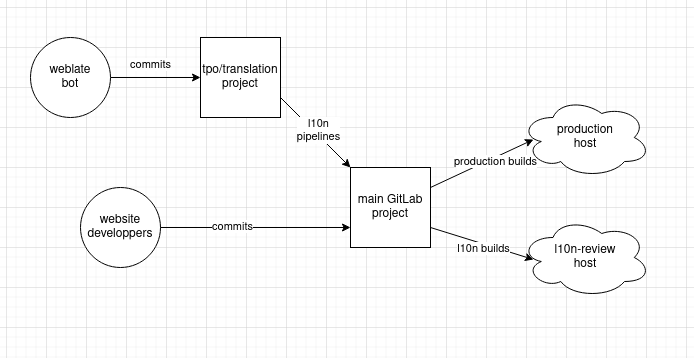
Proposal
The proposal here is to effect the following changes:
- Create new projects/repositories for all l10n-enabled websites under the
tpo/web/l10nnamespace (all features disabled except Repository and CI) - Configure push mirroring between the "main" and "l10n" repos using SSH keys
- Modify the build, test and deploy Lektor CI job templates to ensure they don't execute on the mirror's CI
- Change each website's
*-contentspotbranch to make.gitlab-ci.ymltrigger pipelines in the mirror project instead of the main one - Grant the
Maintainerrole to theweblateuser account on the mirror and remove it from the main project
As a proof of concept, this has been done for the gettor-web project. The mirror project for l10n reviews is located at tpo/web/l10n/gettor-web.
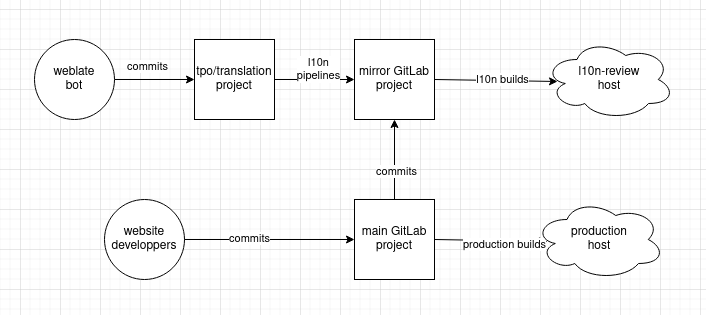
Goals
The goal is for the weblate user to be able to run its CI pipelines
successfully, deploying l10n-review builds to review.torproject.net, without
the need for the account to have Maintainer role in the main project.
As a nice-to-have goal, CI pipelines for l10n review builds and deployments
would be separate from the development and MR-preview pipelines. This means the
list of CI pipelines in each project would no longer be cluttered with l10n
frequent related pipelines (as seen currently) but would only contain MR and
main-branch CI pipelines.
Scope
The scope for this RFC is all l10n-enabled Lektor websites under tpo/web.
Alternatives considered
The main alternative here would be to accept the security risk: the Weblate bot might go haywire and wreck havoc on our websites. While dealing with this would be highly annoying, there's no reason to think we couldn't recover relatively quickly from backups.
Another alternative here would be to wait for GitLab to eventually roll out the
ability for non-Maintainer accounts to execute pipelines on protected
branches. The problem is, according to GitLab's own issue tracker, this
isn't happening anytime soon.
Summary: migration of the remaining Cymru services in the coming week, help needed to test new servers.
What?
TPA will be migrating a little over a dozen virtual machines (VM) off of the old Cymru cluster in Chicago to a shiny new cluster in Dallas. This is the list of affected VMs:
- btcpayserver-02
- ci-runner-x86-01
- dangerzone-01
- gitlab-dev-01
- metrics-psqlts-01
- onionbalance-02
- probetelemetry-01
- rdsys-frontend-01
- static-gitlab-shim
- survey-01
- tb-pkgstage-01
- tb-tester-01
- telegram-bot-01
- tpa-bootstrap-01
Members of the anticensorship and metrics teams are particularly affected, but services like BTCpayserver, dangerzone, onionbalance, and static site deplyements from GitLab (but not GitLab itself) will also be affected.
When?
We hope to start migrating the VMs on Monday 2023-03-20, but this is likely to continue during the rest of the week, as we may stop the migration process if we encounter problems.
How?
Each VM is migrated one by one, following roughly this process:
- A snapshot is taken on the source cluster, then copied to the target
- the VM is shutdown on the source
- the target VM is renumbered so it's networked, but DNS still points to the old VM
- the service is tested
- if it works, then DNS records are changed to point to the new VM
- after a week, the old VMs are destroyed
The TTL ("Time To Live") in DNS is currently an hour so the outage will last at least that long, for each VM. Depending on the size of the VM, the transfer could actually take much longer as well. So far a 20GB VM is transferred in about 10 minutes.
Affected team members are encouraged to coordinate with us over chat (#tor-admin on irc.OFTC.net or #tor-admin:matrix.org) during the maintenance window to test the new service (step 4 above).
You may also ask for a longer before the destruction of the old VM in step 6.
Why?
The details of that move are discussed briefly in this past proposal:
https://gitlab.torproject.org/tpo/tpa/team/-/wikis/policy/tpa-rfc-40-cymru-migration
The migration took longer than expected partly because I hit a snag in the VM migration routines, which required some serious debugging and patching.
Now we finally have an automated job to batch-migrate VMs between Ganeti clusters. This means that not only will we be evacuating the Cymru cluster very soon, but we also have a clean mechanism to do this again, much faster, the next time we're in such a situation.
References
Comments welcome in tpo/tpa/team#40972, see also:
- TPA-RFC-40: Cymru migration budget pre-approval
- TPA-RFC-43: Cymru migration plan
Summary: provide staff and core contributors with cryptographic security keys at the next Tor meeting.
Background
The Tor Project has been slowly adopting two-factor authentication (2FA) in many of our services. This, however, has been done haphazardly so far; there's no universal policy of whether or not 2FA should be used or how it should be implemented.
In particular, in some cases 2FA means phone-based (or "TOTP") authentication systems (like Google Authenticator). While those are better than nothing, they are somewhat not as secure as the alternative, which is to use a piece of hardware dedicated to cryptographic operations. Furthermore, TOTP systems are prone to social engineering attacks.
This matters because some high profile organizations like ours were compromised by hacking into key people's accounts and destroying critical data or introducing vulnerabilities in their software. Those organisations had 2FA enabled, but attackers were able to bypass that security by hijacking their phones or flooding it with notifications, which is why having a cryptographic token like a Yubikey is important.
In addition, we do not have any policy regarding secrets storage: in theory, someone could currently store their OpenPGP or SSH keys, on-disk, in clear-text, and wouldn't be in breach of an official, written down policy.
Finally, even if we would be to develop such a policy, we don't currently provide the tools or training to our staff and volunteers to actually implement this properly.
Survey results
In March 2023, a survey was conducted on tor-internal to probe people's interest in the matter. Everyone who didn't already have a "Yubikey" wanted one, which confirmed the theory this is something that strongly interests people.
The survey also showed people are interested in the devices not just for 2FA but also for private key storage, including SSH (72%) and OpenPGP (62%!). There was also some interest in donating keys to volunteers (26%).
Proposal
Ensure that everyone who wants to has access to industry-standard, high quality cryptographic tokens that allow for web-based 2FA (through FIDO2) but also SSH and OpenPGP operations.
Technically, this consists of getting a sponsorship from Yubico to get a batch of Yubikeys shipped at the coming Tor meeting. Those will consist of normal-sized Yubikey 5 NFC (USB-A) and Yubikey 5C NFC (USB-C) keys.
We will also provide basic training on how to use the keys, particularly how to onboard the keys on Nextcloud, Discourse, and GitLab, alongside recovery code handling.
An optional discussion will also be held around cryptographic key storage and operations with SSH and OpenPGP. There are significant pitfalls in moving cryptographic keys to those tokens that should be taken into account (what to do in case of loss, etc), particularly for encryption keys.
Why FIDO2?
Why do we propose FIDO2 instead of TOTP or other existing standards? FIDO2 has stronger promises regarding phishing protection, as secrets are cryptographically bound to the domain name of the site in use.
This means that an attacker that would manage to coerce a user into logging in to a fraudulent site would still not be able to extract the proper second factor from the FIDO2 token, something that solutions like TOTP (Google Authenticator, etc) do not provide.
Why now?
We're meeting in person! This seems like a great moment to physically transmit security sensitive hardware, but also and especially train people on how to use them.
Also, GitHub started enforcing 2FA for some developers in a rollout starting from March 2023.
Affected users
This affects all core contributors. Not everyone will be forced to use those tokens, but everyone interested in improving their security and that of the organisation are encouraged to join the program. People in key positions with privileged access are strongly encouraged to adopt those technologies in one form or another.
Alternatives considered
General security policy
The idea here is not to force anything on the organisation: there is a separate discussion to establish a security policy in TPA-RFC-18.
Nitrokey, Solokey, Titan key and other devices
There are a number of other cryptographic tokens out there. Back in 2017, anarcat produced a review of various tokens. The Nitrokey was interested, but was found to be too bulky and less sturdy than the Yubikey.
Solokey was also considered but is not quite ready for prime time yet.
Google's Titan key was also an option, but the contact at this point was made with Yubico people.
That said, contributors are free to use the tokens of their choice.
Getting rid of passwords
Passkeys are an emerging standard that goes beyond what we are planning here. To quote the website, they are "a replacement for passwords that provide faster, easier, and more secure sign-ins to websites and apps across a user’s devices."
We are not getting rid of passwords, at least not yet. While passwords are indeed a problem, we're taking a more short-term approach of "harm reduction" by reducing the attack surface using technologies we know and understand now. One out of six people in the survey already have Yubikeys so the inside knowledge for that technology is well established, we are just getting tools in people's hands right now.
Single sign on
The elephant in the room in this proposal is how all our authentication systems are disconnected. It's something that should probably be fixed in time, but is not covered by this proposal.
Individual orders
We are getting lots of keys at once because we hope to bypass possible interdiction as we hope to get the keys in person. While it is possible for Yubico itself to be compromised, the theory is that going directly to them does not raise the risk profile, while removing an attack vector.
That said, contributors are free to get keys on their own, if they think they have a more secure way to get those tokens.
Deadline
In one week I will finalize the process with Yubico unless an objection is raised on tor-internal.
Summary: old Jenkins build boxes are getting retired
Background
As part of the moly retirement (tpo/tpa/team#29974), we need to
retire or migrate the build-x86-05 and build-x86-06 machines.
Another VM on moly, fallax was somewhat moved into the new Ganeti
cluster (gnt-dal), but we're actually having trouble putting it in
production as it's refusing to convert into a proper DRBD node. We
might have to rebuild fallax from scratch.
No one has logged into build-x86-05 in over 2 years according to
last(1). build-x86-06 was used more recently by weasel, once in February
and January but before that in July.
Proposal
Retire the build-x86-05 and build-x86-06 machines.
It's unclear if we'd be able to easily import the build boxes in the new cluster, so it seems better to retire the build boxes than fight the process to try to import them.
It seems like, anyways, whatever purpose those boxes serve would be better served by (reproducible!) CI jobs. Alternatively, if we do want to have such a service, it seems to me easier to rebuild them from scratch.
Deadline
The VMs have already been halted and the retirement procedure started. They will be deleted from moly in 7 days and their backups removed in 30 days.
This policy aims to define the use of swap space on TPA-administered systems.
Background
Currently, our machine creation procedures in the wiki recommend the creation of swap partitions of various sizes: 2GB for Ganeti instances and ">= 1GB" for physical machines.
In the case of Ganeti instances, because there is one such volume per instance, this leads to an unnecessary clutter of DRBD devices, LVM volumes and Ganeti disks.
Swap partitions have historically been recommended because swap files were not well supported in old Linux versions (pre-2.6), and because swap performance on rotational hard drives is best when the swap space is contiguous; disk partitions were a convenient way to ensure this contiguity.
Today, however, the abundance of solid-state disk space and improvements to the kernel have made this advantage obsolete, and swap files perform virtually identically to swap partitions, while being much more convenient to administer: operations such as resizing do not require any modifications to the system's partition or volume manager.
Metrics
This is a portrait of swap space usage for 102 systems for which we have gathered system metrics over the last 30 days:
- No swap usage at all: 40
- Maximum usage under 100M: 49
- Maximum usage between 100M and 1G: 10
- Maximum usage over 1G: 2
The two heaviest swap consumers are GitLab and Request Tracker. Some build machines (tb-build-01 and tb-build-05), the mail exchanger (eugeni), metrics team machines (corsicum, meronense and polyanthum) and the GitLab development instance (gitlab-dev-01) are among the moderate consumers of swap space.
Although these machines have the most swap space of all (tens of gigabytes),
almost all Ganeti nodes have no record of using any swap at all. Only
dal-node-02 has been using a whopping 1M of swap recently.
Proposal
In order to reduce this clutter and improve flexibility around swap space, we proposed adjusting our machine creation policies and tools to use file-backed swap instead of swap partitions.
In the absence of a partition named "swap", our Ganeti installer will automatically configure a 512MB swap file on the root filesystem, which is adequate for the majority of systems.
The fabric installer used for setting up physical nodes should be modified to create a 1GB swap file instead of a swap partition. A ticket will be created to track the progress on this work once the RFC is standard.
For systems with increased memory requirements such as database servers, our procedures should include documentation related to expanding the existing swap file, or adding an extra swap file. A separate ticket will be created to ensure this documentation is added once the RFC is standard.
Scope
All new systems created after this proposal is adopted, including virtual and physical machines.
Currently deployed systems are not to be automatically converted from swap partitions to swap files, although this may be done on a case-by-case basis in the future.
Alternatives considered
Swapspace is a system daemon, currently packaged in Debian, which monitors swap usage and dynamically provisions additional swap space when needed, and deallocates it when it's not.
Because deploying swapspace in our infrastructure is a more involved process which would require additional Puppet code and possibly tweaks to our monitoring, it is considered out of scope for this proposal. It may be brought up in a future proposal, however.
Summary: setup a new, 1TiB SSD object storage in the gnt-dal cluster using MinIO. Also includes in-depth discussion of alternatives and storage expansion costs in gnt-dal, which could give us an extra 20TiB of storage for 1800$USD.
Background
We've had multiple incident with servers running out of disk space in the past. This RFC aims at collecting a summary of those issues and giving a proposal of a solution that should cover most of them.
Those are the issues that were raised in the past with servers running out of disk space:
-
GitLab; #40475 (closed), #40615 (closed), #41139: "
gitlab-02running out of disk space". CI artifacts, and non-linear growth events. -
GitLab CI; #40431 (closed): "
ci-runner-01invalid ubuntu package signatures"; gitlab#95 (closed): "Occasionally clean-up Gitlab CI storage". Non-linear, possibly explosive and unpredictable growth. Cache sharing issues between runners. Somewhat under control now that we have more runners, but current aggressive cache purging degrades performance. -
Backups; #40477 (closed): "backup failure: disk full on
bungei". Was non-linear, mostly due toarchive-01but also GitLab. A workaround good for ~8 months (from October 2021, so until June 2022) was deployed and usage seems stable since September 2022. -
Metrics; #40442 (closed): "
meronenserunning out of disk space". Linear growth. Current allocation (512GB) seem sufficient for a few more years, conversion to a new storage backend planned (see below). -
Collector; #40535 (closed): "
colchicifoliumdisk full". Linear growth, about 200GB used per year, 1TB allocated in June 2023, therefore possibly good for 5 years. -
Archives; #40779 (closed): "
archive-01running out of disk space". Added 2TB in May 2022, seem to be using about 500GB per year, good for 2-3 more years. -
Legacy Git; #40778 (closed): "
vinealeout of disk space", May 2022. Negligible (64GB), scheduled for retirement (see TPA-RFC-36).
There are also design and performance issues that are relevant in this discussion:
-
Ganeti virtual machines storage. A full reboot of all nodes in the cluster takes hours, because all machines need to be migrated between the nodes (which is fine) and do not migrate back to their original pattern (which is not). Improvements have been made to the migration algorithm, but it could also be fixed by changing storage away from DRBD to another storage backend like Ceph.
-
Large file storage. We were asked where to put large VM images (3x8GB), and we answered "git(lab) LFS" with the intention of moving to object storage if we run out of space on the main VM, see #40767 (closed) for the discussion. We also were requested to host a container registry in tpo/tpa/gitlab#89.
-
Metrics database. tpo/network-health/metrics/collector#40012 (closed): "Come up with a plan to make past descriptors etc. easier available and queryable (giant database)" (in onionoo/collector storage). This is currently being rebuilt as a Victoria Metrics server (tpo/tpa/team#41130).
-
Collector storage. #40650 (closed): "colchicifolium backups are barely functional". Backups take days to complete, possible solution is to "Move collector storage from file based to object storage" (tpo/network-health/metrics/collector#40023 (closed), currently on hold).
-
GitLab scalability. GitLab needs to be scaled up for performance reasons as well, which primarily involves splitting it in multiple machines, see #40479 for that discussion. It's partly in scope of this discussion in the sense that a solution chosen here should be compatible with GitLab's design.
Much of the above and this RFC come from the brainstorm established in issue tpo/tpa/team#40478.
Storage usage analysis
According to Grafana, TPA manages over 60TiB of storage with a capacity of over 160TiB, which includes 60TiB of un-allocated space on LVM volume groups.
About 40TiB of storage is used by the backup storage server and 7TiB by the archive servers, which puts our normal disk usage at less than 15TiB spread over a little over 60 virtual machines.
Top 10 largest disk consumers are:
- Backups: 41TiB
- archive-01: 6TiB
- Tor Browser builders: 4TiB
- metrics: 3.6TiB
- mirrors: ~948GiB total, ~100-200GiB each mirror/source
- people.torproject.org: 743GiB
- GitLab: 700GiB (350GiB for main instance, 90GiB per runner)
- Prometheus: 150GiB
- Gitolite & GitWeb: 175GiB
- BTCPayserver: 125GiB
The remaining servers all individually use less than 100GiB and are negligible compared to the above mastodons.
The above is important because it shows we do not have that much storage to handle: all of the above could probably fit in a couple of 8TiB hard drives (HDD) that cost less than 300$ a piece. The question is, of course, how to offer good and reliability performance for that data, and for that HDDs don't quite cut it.
Ganeti clusters capacity
In terms of capacity, the two Ganeti clusters have vastly different specifications and capacity.
The new, high performance gnt-dal cluster has limited disk space,
for a total of 22TiB and 9TiB in use, including an unused 5TiB of
NVMe storage.
The older gnt-fsn cluster has more than double that capacity, at
48TiB with 19TiB in use, but ~40TiB out of that is made of hard
disk drives. The remaining 7TiB of NVMe storage is more than 50% used,
at 4TiB.
So we do have good capacity for fast storage on the new cluster, and also good archive capacity on the older cluster.
Proposal
Create a virtual machine to test MinIO as an object storage backend,
called minio-01.torproject.org. The VM will deploy MinIO using
podman on Debian bookworm and will hold about 1TB of disk space, on
the new gnt-dal cluster.
We'll start by using the SSD (vg_ganeti, default) volume group but
may provision an extra NVMe volume if MinIO allows it (and if we need
lower-latency buckets). We may need to provision extra SSDs to cover
for the additional storage needs.
The first user of this cache will be the GitLab registry, which will be enabled using the cache as a storage backend, with the understanding that the service may become unavailable if the object storage system fails somewhat.
Backups will be done using our normal backup procedures which might mean inconsistent backups. An alternative would be to periodically export a snapshot of the object storage to the storage server or locally, but this means duplicating the entire object storage pool.
If this experiment is successful, GitLab runners will start using the object storage server as a cache, using a separate bucket.
More and more services will be migrated to object storage as time goes on and the service is seen as reliable. The full list of services is out of scope of this, but we're thinking of migrating first:
- job artifacts and logs
- backups
- LFS objects
- everything else
Each service should be setup with its own bucket for isolation, where possible. Bucket-level encryption will be enabled, if possible.
Eventually, TPA may be able to offer this service outside the team, of other teams express an interest.
We do not consider this a permanent commitment to MinIO. Because the object storage protocol is relatively standard, it's typically "easy" to transfer between two clusters, even if they have different backends. The catch is, of course, the "weight" of the data, which needs to be duplicated to migrated between two solutions. But it should still be possible thanks to bucket replication or even just plain and simple tools like rclone.
Alternatives considered
The above was is proposed following a lengthy evaluation of different alternatives, detailed below.
It should be noted, however, that TPA previously brainstormed this in a meeting , where we said:
We considered the following technologies for the broader problem:
- S3 object storage for gitlab
- ceph block storage for ganeti
- filesystem snapshots for gitlab / metrics servers backups
We'll look at setting up a VM with MinIO for testing. We could first test the service with the CI runners image/cache storage backends, which can easily be rebuilt/migrated if we want to drop that test.
This would disregard the block storage problem, but we could pretend this would be solved at the service level eventually (e.g. redesign the metrics storage, split up the gitlab server). Anyways, migrating away from DRBD to Ceph is a major undertaking that would require a lot of work. It would also be part of the largest "trusted high performance cluster" work that we recently de-prioritized.
This is partly why MinIO was picked over the other alternatives (mainly Ceph and Garage).
Ceph
Ceph is (according to Wikipedia) a "software-defined storage platform that provides object storage, block storage, and file storage built on a common distributed cluster foundation. Ceph provides completely distributed operation without a single point of failure and scalability to the exabyte level, and is freely available."
It's kind of a beast. It's written in C++ and Python and is packaged in Debian. It provides a lot of features we are looking for here:
- redundancy ("a la" DRBD)
- load-balancing (read/write to multiple servers)
- far-ranging object storage compatibility
- native Ganeti integration with an iSCSI backend
- Puppet module
- Grafana and Prometheus dashboards, both packaged in Debian
More features:
- block device snapshots and mirroring
- erasure coding
- self-healing
- used at CERN, OVH, and Digital Ocean
- yearly release cycle with two-year support lifetime
- cache tiering (e.g. use SSDs as caches)
- also provides a networked filesystem (CephFS) with an optional NFS frontend
Downsides:
- complexity: at least 3-4 daemons to manager a cluster, although this could might be easier to live with thanks to the Debian packages
- high hardware requirements (quad-core, 64-128GB RAM, 10gbps), although their minimum requirements are actually quite attainable
Rejected because of its complexity. If we do reconsider our use of DRBD, we might reconsider Ceph again, as we would then be able to run a single storage cluster for all nodes. But then it feels a little dangerous to share object storage access to the block storage system, so that's actually a reason against Ceph.
Scalability promises
CERN started with a 3PB Ceph deployment around 2015. It seems it's still in use:
... although, as you can see, it's not exactly clear to me how much data is managed by ceph. they seem to have a good experience with Ceph in any case, with three active committers, and they say it's a "great community", which is certainly a plus.
On the other hand, managing lots of data is part of their core mission, in a sense, so they can probably afford putting more people on the problem than we can.
Complexity and other concerns concerns
GitLab tried to move from the cloud to bare metal. Issue 727 and issue #1 track their attempt to migrate to Ceph which failed. They moved back to the cloud. A choice quote from this deployment issue:
While it's true that we lean towards PostgreSQL, our usage of CephFS was not for the database server, but for the git repositories. In the end we abandoned our usage of CephFS for shared storage and reverted back to a sharded NFS design.
Jeff Atwood also described his experience, presumably from StackOverflow's attempts:
We had disastrous experiences with Ceph and Gluster on bare metal. I think this says more about the immaturity (and difficulty) of distributed file systems than the cloud per se.
This was a Hacker News comment in response to the first article from GitLab.com above, which ended up being correct as GitLab went back to the cloud.
One key thing to keep in mind is that GitLab were looking for an NFS replacement, but we don't use NFS anywhere right now (thank god) so that is not a requirement for us. So those issues might be less of a problem, as the above "horror stories" might not be the same with other storage mechanisms. Indeed, there's a big difference between using Ceph as a filesystem (ie. CephFS) and an object storage (RadosGW) or block storage (RBD), which might be better targets for us.
In particular, we could use Ceph as a block device -- for Ganeti instance disks, which Ganeti has good support for -- or object storage -- for GitLab's "things", which it is now also designed for. And indeed, "NFS" (ie. real filesystem) is now (14.x?) deprecated in GitLab, so shared data storage is expected to go through S3-like "object storage" APIs from here on.
Some more Ceph war stories:
- A Ceph war story - a major outage and recovery due to XFS and firmware problems
- File systems unfit as distributed storage backends: lessons from ten years of Ceph evolution - how Ceph migrated from normal filesystem backends to their own native block device store ("BlueStore"), an approach also used by recent MinIO versions
Garage
Garage is another alternative, written in Rust. They provide a Docker image and binaries. It is not packaged in Debian.
It was written from scratch by a french association called deuxfleurs.fr. The first release was funded by a NLNet grant and has been renewed for a year in May 2023.
Features:
- apparently faster than MinIO on higher-latency links (100ms+)
- Prometheus monitoring (see metrics list) and Grafana dashboard
- regular releases with actual release numbers, although not yet 1.0 (current is 0.8.2, released 4 months ago as of June 2023, apparently stable enough for production, "Improvements to the recovery behavior and the layout algorithm are planned before v1.0 can come out")
- read-after-write consistency (stronger than Amazon S3's eventual consistency)
- support for asynchronous replicas (so-called "dangerous" mode that returns to the client as soon as the local write finishes), see the replication mode for details
- static website hosting
Missing and downsides:
- possibly slower (-10%) than MinIO in raw bandwidth and IOPS, according to this self-benchmark
- purposefully no erasure coding, which implies full data duplication across nodes
- designed for smaller, "home lab" distributed setups, might not be our target
- no built-in authentication system, no support for S3 policies or ACLs
- non-goals also include "extreme performance" and features above the S3 API
- uses a CRDT and Dynamo instead of Raft, see this discussion for tradeoffs and the design page
- no live migration, upgrade procedure currently imply short downtimes
- backups require live filesystem snapshots or shutdown, example backup script
- no bucket versioning
- no object locking
- no server-side encryption, they argue for client-side encryption, full disk encryption, and transport encryption instead in their encryption section
- no HTTPS support out of the box, can be easily fixed with a proxy
See also their comparison with other software including MinIO. A lot of the information in this section was gleaned from this Hacker News discussion and this other one.
Garage was seriously considered for adoption, especially with our multi-site, heterogeneous environment.
That said, it didn't seem quite mature enough: the lack of bucket encryption, in particular, feels like a deal-breaker. We do not accept the theory that server-side encryption is useless, on the contrary: there's been many cases of S3 buckets being leaked for botched access policies, something that might very well happen to us as well. Adding bucket encryption adds another layer of protection on top of our existing transport (TLS) and at-rest (LUKS) encryption. The latter particularly doesn't address the "leaked bucket" attack vector.
The backup story is also not much better than MinIO, which could have been a deal-breaker giving Garage a win. Unfortunately, it also doesn't keep its own filesystem clean, but it might be cleaner than MinIO, as the developers indicate filesystem snapshots could provide a clean copy, something that's not offered by MinIO.
Still, we might reconsider Garage if we do need a more distributed, high-availability setup. This is currently not part of the GitLab SLA so not a strong enough requirement to move forward with a less popular alternative.
MinIO
MinIO is suggested/shipped by gitlab omnibus now? It is not packaged in Debian. Container deployment probably the only reasonable solution, but watch out for network overhead. no release numbers, unclear support policy. Written in Golang.
Features:
- active-active replication, although with low latency (<20ms) and loss requirements (< 0.01%), requires a load balancer for HA
- asynchronous replication, can survive replicas going down (data gets cached and resynced after)
- bucket replication
- erasure coding
- rolling upgrades with "a few seconds" downtime (presumably compensated by client-side retries)
- object versioning, immutability
- Prometheus and InfluxDB monitoring, also includes bucket event notifications
- audit logs
- external identity providers: LDAP, OIDC (Keycloak specifically)
- object server-side encryption through external Key Management Services (e.g. Hashicorp Vault)
- built-in TLS support
- recommended hardware setups although probably very expensive
- self-diagnostics and hardware tests
- lifecycle management
- FTP/SFTP/FTPS support
- has detailed instructions for Linux, MacOS, Windows, Kubernetes and Docker/Podman
Missing and downsides:
- only two-node replication
- possible licensing issues (see below)
- upgrades and pool expansions require all servers to restart at once
- cannot resize existing server pools, in other words, a resize means building a new larger server and retiring the old one (!) (note that this only affects multi-node pools, for single-node "test" setups, storage can be scaled from the underlying filesystem transparently)
- very high hardware requirements (4 nodes with each 32 cores, 128GB RAM, 8 drives, 25-100GbE for 2-4k clients)
- backups need to be done through bucket replication or site replication, difficult to backup using our normal backup systems
- some "open core", features are hidden behind a paywall even in the free version, for example profiling, health diagnostics and performance tests
- docker version is limited to setting up a "Single-Node Single-Drive MinIO server onto Docker or Podman for early development and evaluation of MinIO Object Storage and its S3-compatible API layer"
- that simpler setup, in turn, seems less supported for production and has lots of warnings around risk of data loss
- no cache tiering (can't use SSD as a cache for HDDs...)
- other limitations
Licensing dispute
MinIO are involved in a licensing dispute with commercial storage providers (Weka and Nutanix) because the latter used MinIO in their products without giving attribution. See also this hacker news discussion.
It should also be noted that they switched to the AGPL relatively recently.
This is not seen as a deal-breaker in using MinIO for TPA.
First run
The quickstart guide is easy enough to follow to get us started, for example:
PASSWORD=$(tr -dc '[:alnum:]' < /dev/urandom | head -c 32)
mkdir -p ~/minio/data
podman run \
-p 9000:9000 \
-p 9090:9090 \
-v ~/minio/data:/data \
-e "MINIO_ROOT_USER=root" \
-e "MINIO_ROOT_PASSWORD=$PASSWORD" \
quay.io/minio/minio server /data --console-address ":9090"
... will start with an admin interface on https://localhost:9090 and the API on https://localhost:9000 (even though the console messages will say otherwise).
You can use the web interface to create the buckets, or the mc client which is also available as a Docker container.
We tested this procedure and it seemed simple enough, didn't even require creating a configuration file.
OpenIO
The openio project mentioned in one of the GitLab threads. The
main website (https://www.openio.io/) seems down
(SSL_ERROR_NO_CYPHER_OVERLAP) but some information can be gleamed
from the documentation site.
It is not packaged in Debian.
Features:
- Object Storage (S3)
- OpenStack Swift support
- minimal hardware requirements (1 CPU, 512MB RAM, 1 NIC, 4GB storage)
- no need to pre-plan cluster size
- dynamic load-balancing
- multi-tenant
- progressive offloading to avoid rebalancing
- lifecycle management, versioning, snapshots
- no single point of failure
- geo-redundancy
- metadata indexing
Downsides, missing features:
- partial S3 implementation, notably missing:
- encryption? the above S3 compatibility page says it's incompatible, but this page says it is implemented, unclear
- website hosting
- bucket policy
- bucket replication
- bucket notifications
- a lot of "open core" features ("part of our paid plans", which is difficult to figure out because said plans are not visible in latest Firefox because of aforementioned "SSL" issue)
- design seems awfully complicated
- requires disabling apparmor (!?)
- supported OS page clearly out of date or not supporting stable Debian releases
- no release in almost a year (as of 2023-06-28, last release is from August 2022)
Not seriously considered because of missing bucket encryption, the weird apparmor limitation, the "open core" business model, the broken website, and the long time without releases.
SeaweedFS
"SeaweedFS is a fast distributed storage system for blobs, objects, files, and data lake, for billions of files!" according to their GitHub page. Not packaged in Debian, written in Golang.
Features:
- Blob store has O(1) disk seek, cloud tiering
- cross-DC active-active replication
- Kubernetes
- POSIX FUSE mount
- S3 API
- S3 Gateway
- Hadoop
- WebDAV
- encryption
- Erasure Coding
- optimized for small files
Not considered because of focus on small files.
Kubernetes
In Kubernetes, storage is typically managed by some sort of operator that provides volumes to the otherwise stateless "pods" (collections of containers). Those, in turn, are then designed to offer large storage capacity that automatically scales as well. Here are two possible options:
- https://longhorn.io/ - Kubernetes volumes, native-only, no legacy support?
- https://rook.io/ - Ceph operator
Those were not evaluated any further. Kubernetes itself is quite a beast and seems overkill to fix the immediate problem at hand, although it could be interesting to manage our growing fleet of containers eventually.
Other ideas
Those are other, thinking outside the box ideas, also rejected.
Throw hardware at it
One solution to the aforementioned problem is to "just throw hardware at it", that is scaling up our hardware resources to match the storage requirements, without any redesign.
We believe this is impractical because of the non-linear expansion of the storage systems. Those patterns make it hard to match the expansion on generic infrastructure.
By picking a separate system for large file storage, we are able to isolate this problem in a separate service which makes it easier to scale.
To give a concrete example, we could throw another terabyte or two at the main GitLab server, but that wouldn't solve the problems the metrics team is suffering from. It would also not help the storage problem the GitLab runners are having, as they wouldn't be able to share a cache, which something that can be solved with shared object storage cache.
Storage Area Network (SAN)
We could go with a SAN, home-grown or commercial, but i would rather avoid proprietary stuff, which means we'd have to build our own, and i'm not sure how we would do that. ZFS replication maybe? and that would only solve the Ganeti storage problems. we'd still need an S3 storage, but we could use something like MinIO for that specifically.
Upstream provider
According to this, one of our upstream provider has terabytes of storage where we could run a VM to have a secondary storage server for Bacula. This requires a bit too much trust in them that we'd like to avoid for now, but could be considered later.
Backup-specific solutions
We could fix the backup problems by ditching Bacula and switching to something like borg. We'd need an offsite server to "pull" the backups, however (because borg is push, which means a compromised backup server can trash its own backups). We could build this with ZFS/BTRFS replication, for example.
Another caveat with borg is that restores are kind of slow. Bacula seems to be really fast at restores, at least in our experience restoring websites in issue #40501 (closed).
This is considered out of scope for this proposal and kept for future evaluation.
Costs
Probably less, in the long term, than keeping all storage distributed.
Extra storage requirements could be fulfilled by ordering new SSDs. The current model is the Intel® SSD D3-S4510 Series which goes for around 210$USD at Newegg or 180$USD at Amazon. Therefore, expanding the fleet with 6 of those drives would gain us 11.5TB (6 × 1.92TB, or 10.4TIB, 5.2TiB after RAID) at a cost of about 1200$USD before tax. With a cold spare, it goes up to around 1400$USD.
Alternatively, we could add higher capacity drives. 3.84TB drives are getting cheaper (per byte) than 1.92TB drives. For example, at the time of writing, there's a Intel D3-S4510 3.84TB drive for sale at 255$USD at Amazon. Expanding with 6 such drive would give us an extra 23TB (3.84TB × 6 or 20.9TiB, 10.5TiB after RAID) of storage at a cost of about 1530$USD, 1800$USD with a spare.
Summary: bookworm upgrades will start in the first weeks of September 2023, with the majority of servers upgraded by the end of October 2023, and should complete before the end of June 2024. Let us know if your service requires special handling. Beware that this includes a complete Python 2 removal, as announced in TPA-RFC-27.
Background
Debian 12 bookworm was released on on June 10th 2023). The previous stable release (Debian bullseye) will be supported until June 2024, so we hope to complete the migration before that date, or sooner.
We typically start upgrading our boxes when testing enter freeze, but unfortunately, we haven't been able to complete the bullseye upgrade in time for the freeze, as complex systems required more attention. See the bullseye post-mortem for a review of that approach.
Some of the new machines that were setup recently have already been installed in bookworm, as the installers were changed shortly after the release (tpo/tpa/team#41244). A few machines were upgraded manually without any ill effects and we do not consider this upgrade to be risky or dangerous, in general.
This work is part of the %Debian 12 bookworm upgrade milestone, itself part of the 2023 roadmap.
Proposal
The proposal, broadly speaking, is to upgrade all servers in three batches. The first two are somewhat equally sized and spread over September and October 2023. The remaining servers will happen at some time that will be announced later, individually, per server, but should happen no later than June 2024.
Affected users
All service admins are affected by this change. If you have shell access on any TPA server, you want to read this announcement.
Python 2 retirement
Developers still using Python 2 should especially be aware that Debian has completely removed all Python 2 versions from bookworm.
If you still are running code that is not compatible with Python 3, you will need to upgrade your scripts when this upgrade completes. And yes, there are still Python 2 programs out there, including inside TPA. We have already ported some, and the work is generally not hard. See the porting guide for more information.
Debian 12 bookworm ships with Python 3.11. From Debian 11
bullseye's Python 3.9, there are many exciting changes including
exception groups, TOML in stdlib, "pipe" (|) for Union types,
structural pattern matching, Self type, variadic generics, and major
performance improvements.
Other notable changes
TPA keeps a page detailing notable changes that might be interesting to you, on top of the bookworm release notes in particular the known issues and what's new sections.
Upgrade schedule
The upgrade is split in multiple batches:
- low complexity (mostly TPA services): 34 machines, September 2023 (issue 41251)
- moderate complexity (service admins): 31 machines, October 2023 (issue 41252)
- high complexity (hard stuff): 15 machines, to be announced
separately, before June 2024 (issue 41321, issue 41254 for
gnt-fsnand issue 41253 forgnt-dal) - to be retired or rebuilt servers: upgraded like any others
- already completed upgrades: 4 machines
- buster machines: high complexity or retirement for
cupani(tpo/tpa/team#41217) andvineale(tpo/tpa/team#41218), 6 machines
The free time between the first two batches will also allow us to cover for unplanned contingencies: upgrades that could drag on and other work that will inevitably need to be performed.
The objective is to do the batches in collective "upgrade parties" that should be "fun" for the team. This policy has proven to be effective in the bullseye upgrade and we are eager to repeat it again.
Low complexity, batch 1: September 2023
A first batch of servers will be upgraded around the second or third week of September 2023, when everyone will be back from vacation. Hopefully most fires will be out at that point.
It's also long enough before the Year-End Campaign (YEC) to allow us to recover if critical issues come up during the upgrade.
Those machines are considered to be somewhat trivial to upgrade as they are mostly managed by TPA or that we evaluate that the upgrade will have minimal impact on the service's users.
archive-01.torproject.org
cdn-backend-sunet-02.torproject.org
chives.torproject.org
dal-rescue-01.torproject.org
dal-rescue-02.torproject.org
hetzner-hel1-02.torproject.org
hetzner-hel1-03.torproject.org
hetzner-nbg1-01.torproject.org
hetzner-nbg1-02.torproject.org
loghost01.torproject.org
mandos-01.torproject.org
media-01.torproject.org
neriniflorum.torproject.org
ns3.torproject.org
ns5.torproject.org
palmeri.torproject.org
perdulce.torproject.org
relay-01.torproject.org
static-gitlab-shim.torproject.org
static-master-fsn.torproject.org
staticiforme.torproject.org
submit-01.torproject.org
tb-build-04.torproject.org
tb-build-05.torproject.org
tb-pkgstage-01.torproject.org
tb-tester-01.torproject.org
tbb-nightlies-master.torproject.org
web-dal-07.torproject.org
web-dal-08.torproject.org
web-fsn-01.torproject.org
web-fsn-02.torproject.org
In the first batch of bullseye machines, we estimated this work to be 45 minutes per machine, that is 20 hours of work. It turned out taking about one hour per machine, so 27 hours.
The above is 34 machines, so it is estimated to take 34 hours, or about a full work week for one person. It should be possible to complete it in a single work week "party".
Other notable changes include staticiforme that is treated as low
complexity instead of moderate complexity. The Tor Browser builders
have been moved to moderate complexity as they are managed by service
admins.
Feedback and coordination of this batch happens in issue 41251.
Moderate complexity, batch 2: October 2023
The second batch of "moderate complexity servers" happens in the last week of October 2023. The main difference with the first batch is that the second batch regroups services mostly managed by service admins, who are given a longer heads up before the upgrades are done.
The date was picked to be far enough away from the first batch to recover from problems with it, but also after the YEC (scheduled for the end of October).
Those are the servers which will be upgraded in that batch:
bacula-director-01.torproject.org
btcpayserver-02.torproject.org
bungei.torproject.org
carinatum.torproject.org
check-01.torproject.org
colchicifolium.torproject.org
collector-02.torproject.org
crm-ext-01.torproject.org
crm-int-01.torproject.org
dangerzone-01.torproject.org
donate-review-01.torproject.org
gayi.torproject.org
gitlab-02.torproject.org
henryi.torproject.org
majus.torproject.org
materculae.torproject.org
meronense.torproject.org
metrics-store-01.torproject.org
nevii.torproject.org
onionbalance-02.torproject.org
onionoo-backend-01.torproject.org
onionoo-backend-02.torproject.org
onionoo-frontend-01.torproject.org
onionoo-frontend-02.torproject.org
polyanthum.torproject.org
probetelemetry-01.torproject.org
rdsys-frontend-01.torproject.org
rude.torproject.org
survey-01.torproject.org
telegram-bot-01.torproject.org
weather-01.torproject.org
31 machines. Like the first batch of machines, the second batch of bullseye upgrades was slightly underestimated and should also take one hour per machine, so about 31 hours, again possible to fit in a work week.
Feedback and coordination of this batch happens in issue 41252.
High complexity, individually done
Those machines are harder to upgrade, due to some major upgrades of their core components, and will require individual attention, if not major work to upgrade.
All of those require individual decision and design, and specific announcements will be made for upgrades once a decision has been made for each service.
Those are the affected servers:
alberti.torproject.org
eugeni.torproject.org
hetzner-hel1-01.torproject.org
pauli.torproject.org
Most of those servers are actually running buster at the moment, and are scheduled to be upgraded to bullseye first. And as part of that process, they might be simplified and turned into moderate complexity projects.
See issue 41321 to track the bookworm upgrades of the high-complexity servers.
The two Ganeti clusters also fall under the "high complexity" umbrella. Those are the following 11 servers:
dal-node-01.torproject.org
dal-node-02.torproject.org
dal-node-03.torproject.org
fsn-node-01.torproject.org
fsn-node-02.torproject.org
fsn-node-03.torproject.org
fsn-node-04.torproject.org
fsn-node-05.torproject.org
fsn-node-06.torproject.org
fsn-node-07.torproject.org
fsn-node-08.torproject.org
Ganeti cluster upgrades are tracked in issue 41254 (gnt-fsn) and
issue 41253 (gnt-dal). We may want to upgrade only one cluster
first, possibly the smaller gnt-dal cluster.
Looking at the gnt-fsn upgrade ticket it seems like it took around 12 hours of work, so the estimate here is about two days.
Completed upgrades
Those machines have already been upgraded to (or installed as) Debian 12 bookworm:
forum-01.torproject.org
metricsdb-01.torproject.org
tb-build-06.torproject.org
Buster machines
Those machines are currently running buster and are either
considered for retirement or will be "double-upgraded" to bookworm,
either as part of the bullseye upgrade process, or separately.
alberti.torproject.org
cupani.torproject.org
eugeni.torproject.org
hetzner-hel1-01.torproject.org
pauli.torproject.org
vineale.torproject.org
In particular:
-
albertiis part of the "high complexity" batch and will be double-upgraded -
cupani(tpo/tpa/team#41217) andvineale(tpo/tpa/team#41218) will be retired in early 2024, see TPA-RFC-36 -
eugeniis part of the "high complexity" batch, and its future is still uncertain, depends on the email plan -
hetzner-hel1-01(Icinga/Nagios) is possibly going to be retired, see TPA-RFC-33 -
pauliis part of the high complexity batch and should be double-upgraded
Other related work
There is other work related to the bullseye upgrade that is mentioned in the %Debian 12 bookworm upgrade milestone.
Alternatives considered
Container images
This doesn't cover Docker container images upgrades. Each team is responsible for upgrading their image tags in GitLab CI appropriately and is strongly encouraged to keep a close eye on those in general. We may eventually consider enforcing stricter control over container images if this proves to be too chaotic to self-manage.
Upgrade automation
No specific work is set aside to further automate upgrades.
Retirements or rebuilds
We do not plan on dealing with the bookworm upgrade by retiring or rebuilding any server. This policy has not worked well for the bullseye upgrades and has been abandoned.
If a server is scheduled to be retired or rebuilt some time in the future and its turn in the batch comes, it should either be retired or rebuilt in time or just upgraded, unless it's a "High complexity" upgrade.
Costs
The first and second batches of work should take TPA about two weeks of full time work.
The remaining servers are a wild guess, probably a few weeks altogether, but probably more. They depend on other RFCs and their estimates are out of scope here.
Approvals required
This proposal needs approval from TPA team members, but service admins can request additional delay if they are worried about their service being affected by the upgrade.
Comments or feedback can be provided in issues linked above, or the general process can be commented on in issue tpo/tpa/team#41245.
References
Summary: I deployed a new GitLab CI runner backed by Podman instead of Docker, we hope it will improve the stability and our capacity at building images, but I need help testing it.
Background
We've been having stability issues with the Docker runners for a while now. We also started looking again at container image builds, which are currently failing without Kaniko.
Proposal
Testers needed
I need help testing the new runner. Right now it's marked as not running "untagged jobs", so it's unlikely to pick your CI jobs and run them. It would be great if people could test the new runner.
See the GitLab tag documentation for how to add tags to your
configuration. It's basically done by adding a tags field to the
.gitlab-ci.yml file.
Note that in TPA's ci-test gitlab-ci.yaml file, we use a
TPA_TAG_VALUE variable to be able to pass arbitrary tags down into
the jobs without having to constantly change the .yaml file, which
might be a useful addition to your workflow.
The tag to use is podman.
You can send any job you want to the podman runner, but we'd like to
test a broad variety of things before we put it in production, but
especially image buildings. Upstream even has a set of instructions
to build packages inside podman.
Long term plan
If this goes well, we'd like to converge towards using podman for
all workloads. It's better packaged in Debian, and better designed,
than Docker. It also allows us to run containers as non-root.
That, however, is not part of this proposal. We're already running
Podman for another service (MinIO) but we're not proposing to
convert all existing services to podman. If things work well
enough for a long enough period (say 30 days), we might turn off the
older Docker running instead.
Alternatives considered
To fix the stability issues in Docker, it might be possible to upgrade to the latest upstream package and abandon the packages from Debian.org. We're hoping that will not be necessary thanks to Podman.
To build images, we could create a "privileged" runner. For now, we're hoping Podman will make building container images easier. If we do create a privileged runner, it needs to take into account the long term tiered runner approach.
Deadline
The service is already available, and will be running untagged jobs in two weeks unless an objection is raised.
Summary: new aliases were introduced to use as jump hosts, please
start using ssh.torproject.org, ssh-dal.torproject.org, or
ssh-fsn.torproject.org, depending on your location.
Background
Since time immemorial, TPA has restricted SSH access to an allow list
of servers for all servers. A handful of servers had an exception for
this, and those could be used to connect or "jump" to the other hosts,
with the ssh -J command-line flag or the ProxyJump SSH
configuration option.
Traditionally, the people.torproject.org host has been used for this
purpose, although this is just a convention.
Proposal
New aliases have been introduced:
ssh-dal.torproject.org- in Dallas, TX, USAssh-fsn.torproject.org- in Falkenstein, Saxony, Germany, that is currently provided byperdulce, also known aspeople.torproject.org, but this could change in the futuressh.torproject.org- alias forssh-dal, but that will survive any data center migration
You should be able to use those new aliases as a more reliable way to
control latency when connecting over SSH to your favorite hosts. You
might want, for example, to use the ssh-dal jump host for machines
in the gnt-dal cluster, as the path to those machines will be
shorter (even if the first hop is longer).
We unfortunately do not have a public listing of where each machine is
hosted, but when you log into a server, you should see where it is,
for example, the /etc/motd file shown during login on chives says:
This virtual server runs on the physical host gnt-fsn.
You are welcome to use the ping command to determine the best
latency, including running ping on the jump host itself, although we
MAY actually remove shell access on the jump host themselves to
restrict access to only port forwarding.
Deadline
This is more an announcement than a proposal: the changes have already been implemented. Your feedback on naming is still welcome and we will take suggestions on correcting possible errors for another two weeks.
References
Documentation on how to use jump hosts has been modified to include this information, head to the doc/ssh-jump-host for more information.
Credits to @pierov for suggesting a second jump host, see tpo/tpa/team#41351 where your comments are also welcome.
Summary: This RFC seeks to enable 2-factor authentication (2fa) enforcement on
the GitLab tpo group and subgroups. If your Tor Project GitLab account
already has 2fa enabled, you will be unaffected by this policy.
Background
On January 11 2024, GitLab released a security update to address a vulnerability (CVE-2023-7028) allowing malicious actors to take over a GitLab account using the password reset mechanism. Our instance was immediately updated and subsequently audited for exploits of this flaw and no evidence of compromise was found.
Accounts configured for 2-factor authentication were never susceptible to this vulnerability.
Proposal
Reinforce the security of our GitLab instance by enforcing 2-factor
authentication for all project members under the tpo namespace.
This means changing these two options under the groups Settings / Permissions and group features section:
- Check
All users in this group must set up two-factor authentication - Uncheck
Subgroups can set up their own two-factor authentication rules
Goals
Improve the security of privileged GitLab contributor accounts.
Scope
All GitLab accounts that are members of projects under the tpo namespace,
including projects in sub-groups (eg. tpo/web/tpo).
Affected users
The vast majority of affects users already have 2-factor authentication enabled. This will affect those that haven't yet set it up, and accounts that may be created and granted privileges in the future.
An automated listing of tpo sub-group and sub-project members not being
available, a manual count of users without 2fa enabled was done for all direct
subgroups of tpo: 17 accounts were found with 2fa disabled.
References
See discussion ticket at https://gitlab.torproject.org/tpo/tpa/team/-/issues/41473
The GitLab feature allowing 2-factor authentication enforcement for groups is documented at https://gitlab.torproject.org/help/security/two_factor_authentication#enforce-2fa-for-all-users-in-a-group
Summary: a roadmap for 2024
Proposal
Priorities for 2024
Must have
- Debian 12 bookworm upgrade completion
(50% done) before July 2024 (so Q1-Q2 2024), which includes:
- puppet server 7 upgrade: Q2 2024? (tpo/tpa/team#41321)
- mailman 3 and schleuder upgrade (probably on a new mail server), hopefully Q2 2024 (tpo/tpa/team#40471)
- inciga retirement / migration to Prometheus Q3-Q4 2024? (tpo/tpa/team#40755)
- old services retirement
- SVN retirement (or not): proposal in Q2, execution Q3-Q4? (tpo/tpa/team#40260) Nextcloud will not work after all because of major issues with collaborative editing, need to go back to the drawing board.
- legacy Git infrastructure retirement (TPA-RFC-36), which includes:
- 12 TPA repos to migrate, some complicated (tpo/tpa/team#41219)
- archiving all other repositories (tpo/tpa/team#41215)
- lockdown scheduled for Q2 2024 (tpo/tpa/team#41213)
- email services? includes:
- draft TPA-RFC-45, which may include:
- mailbox hosting in HA
- minio clustering and backups
- make a decision on gitlab ultimate (tpo/team#202)
nice to have
- Puppet CI
- review TPA-RFC process (tpo/tpa/team#41428)
- tiered gitlab runners (tpo/tpa/team#41436)
- improve upgrade (tpo/tpa/team#41485) and install (tpo/tpa/team#31239) automation
- disaster recovery planning (tpo/tpa/team#40628)
- monitor technical debt (tpo/tpa/team#41456)
- review team function and scope (TPA? web? SRE?)
black swans
A black swan event is "an event that comes as a surprise, has a major effect, and is often inappropriately rationalized after the fact with the benefit of hindsight" (Wikipedia). In our case, it's typically an unexpected and unplanned emergency that derails the above plans.
Here are possible changes that are technically not black swans (because they are listed here!) but that could serve as placeholders for the actual events we'll have this year:
- Hetzner evacuation (plan and estimates) (tpo/tpa/team#41448)
- outages, capacity scaling (tpo/tpa/team#41448)
- in general, disaster recovery plans
- possible future changes for internal chat (IRC onboarding?) or sudden requirement to self-host another service currently hosted externally
- some guy named Jerry, who knows!
THE WEB - how we organize it this year
This still need to be discussed and reviewed with isa.
- call for a "web team meeting"
- discuss priorities with that team
- discuss how we are going to organize ourselves
- announce the hiring this year of a web dev
Reviews
This section is used to document what happened in 2024. It has been established (too) late in 2024 but aims at outlining major events that happened during the year:
- legacy Git infrastructure retirement (TPA-RFC-36): repositories have been massively migrated to GitLab's legacy/gitolite namespace
- Debian 12 bookworm upgrade: currently incomplete (12 hosts left or about 13% of the fleet), but hoping to complete before the end of 2024
- work started on upgrading the legacy mail server and improving deliverability of mail forwards (TPA-RFC-71: emergency email deployments, phase B)
- includes a major upgrade from Mailman 2 to Mailman 3
- Improved by 66% build performance on Lektor websites with i18n (https://gitlab.torproject.org/tpo/web/lego/-/issues/30)
- Retired Nagios in favor of a Prometheus-based alerting setup, with less noises, faster detection, and better coverage (TPA-RFC-33-A: emergency Icinga retirement)
- new donate site!! + dashboard
Other notable RFCs:
- TPA-RFC-60: GitLab 2-factor authentication enforcement: enable 2-factor authentication (2fa) enforcement on the GitLab tpo group and subgroups
- TPA-RFC-62: TPA password manager : switch from pwstore to password-store for (and only for) TPA passwords
- TPA-RFC-63: buy a new backup storage server: a new 80TB (4 drives, expandable to 8) backup server in the secondary location for disaster recovery and the new metrics storage service
- TPA-RFC-64: Puppet TLS certificates: Move from letsencrypt-domains.git to Puppet to manage TLS certificates
- TPA-RFC-68: Idle canary servers: provision test servers that sit idle to monitor infrastructure and stage deployments
- TPA-RFC-67: Retire mini-nag, a legacy extra monitoring system that became unnecessary thanks to "happy eyeballs" implementations, see tpo/tpa/team#41766 for details
Next steps:
- 2025 roadmap still in progress, input welcome, likely going to include putting MinIO in production and figuring out what to do with SVN, alongside cleaning up and publishing our Puppet codebase
- Started merge with Tails! Some services were retired or merged already, but we're mostly at the planning stage, see https://gitlab.torproject.org/tpo/tpa/team/-/issues/41721
- bookworm upgrade completion, considering trixie upgrades in 2025
References
Previous roadmap established in TPA-RFC-42 and is in roadmap/2023.
Discussion about this proposal are in tpo/tpa/team#41436.
See also the week-by-week planning spreadsheet.
Summary: switch from pwstore to password-store for (and only for) TPA passwords
Background
TPA has been using a password manager called pwstore for a long time now. It's time to evaluate how it has served us. An evaluation of all password needs is being performed in issue 29677 but this proposal discusses only standalone passwords managed by TPA.
That specifically excludes:
- passwords managed by other teams or users
- moving root or LUKS password out of the password manager (could be accomplished separately)
Current problems
In any case, during a recent offboarding process (tpo/tpa/team#41519), it became very clear that our current password manager (pwstore) has major flaws:
-
key management: there's a separate keyring to manage renewals and replacement; it is often forgotten and duplicates the separate
.usersmetadata that designates user groups -
password rotation: because multiple passwords are stored in the same file, it's hard or impossible to actually see the last rotation on a single password
-
conflicts: because multiple passwords are stored in the same file, we frequently get conflicts when making changes, which is particularly painful if we need to distribute the "rotation" work
-
abandonware: a pull request to fix Debian bookworm / Ruby 3.1 support has been ignored for more than a year at this point
-
counter-intuitive interface: there's no command to extract a password, you're presumably supposed to use
gpg -dto read the password files, yet you can't use other tools to directly manipulate the password files because the target encryption keys are specified in a meta file -
not packaged: pwstore is not in Debian, flatpak, or anything else
-
limited OTP support: for sites that require 2FA, we need to hard-code a shell command with the seed to get anything working, like
read -s s && oathtool --totp -b $s
Proposal
The proposal is to adopt a short-term solution to some of the problems by switching to passwordstore. It has the following advantages:
-
conflict isolation: each password is in a separate file (although they can be store all in one file), resolving conflict issues
-
rotation support extensions like pass-update make it easier to rotate passwords (ideally, sites would support the change-password-url endpoint and pass would too, but that standard has seen little adoption, as far as we know)
-
OTP support: pass-otp is an extension that manages OTP secrets automatically, as opposed to the command-line cut-and-paste approach we have now
-
audit support: pass-audit can review a password store and look for weak passphrases
Limitations
Pass is not without problem:
-
key management is also limited: key expiry, for example, would still be an issue, except that the keyid file is easier to manage, as its signature is managed automatically by
pass init, provided that thePASSWORD_STORE_SIGNING_KEYvariable is set -
optional store verification: it's possible that operators forget to set the
PASSWORD_STORE_SIGNING_KEYvariable which will make pass accept unsigned changes to thegpg-idfile which could lead a compromise on the Git server be leveraged to extract secrets -
limited multi-store support: the
PASSWORD_STORE_SIGNING_KEYis global and therefore makes it complicated to have multiple, independent key stores -
global, uncontrolled trust store: pass relies on the global GnuPG key store although in theory it should be possible to rely on another keyring by passing different options to GnuPG
-
account names disclosure: by splitting secrets into different files, we disclose which accounts we have access to, but this is considered a reasonable tradeoff for the benefits it brings
Issues shared with pwstore
Those issues are not specific to pass, and also exist in pwstore:
-
mandatory client use: if another, incompatible, client (e.g. Emacs) is used to decrypt and re-encrypt the secrets, it might not use the right keys
-
GnuPG/OpenPGP: pass delegates cryptography to OpenPGP, and more specifically GnuPG, which is suffering from major usability and security issues
-
permanent history: using git leverages our existing infrastructure for file-sharing, but means that secrets are kept in history forever, which makes revocation harder
-
difficult revocation: a consequence of having client-side copies of passwords means that revoking passwords is more difficult as they need to be rotated at the source
Layout
This is what the pwstore repository currently looks like:
anarcat@angela:tor-passwords$ ls
000-README entroy-key.pgp external-services-git.pgp external-services.pgp hosts-extra-info.pgp hosts.pgp lists.pgp ssl-contingency-keys.pgp win7-keys.pgp
I propose we use the following layout in the new repository:
dns/- registrars and DNS providers access keys: joker.com, netnod, etchosting/- hosting providers: OSUOSL, Hetzner, etclists/- mailing list passwords (eventually deprecated by Mailman 3)luks/- disk encryption passwords (eventually moved to Arver or Trocla)misc/- whatever doesn't fit anywhere elseroot/- root passwords (eventually moved to Trocla)services/- external services: GitHub, Gitlab.com, etc
The mapping would be as such:
| pwstore | extra | pass |
|---|---|---|
entropy-key | misc/ | |
external-services-git | @gitadm | services/ |
external-services | dns/ hosting/ services/ | |
hosts-extra-info | dns/ hosting/ luks/ services/ | |
hosts | root/ | |
lists | @list | lists/ |
ssl-contingency-keys | misc/ | |
win7-keys | misc/ |
The groups are:
@admins = anarcat, lavamind, weasel
@list = arma, atagar, qbi, @admins
@gitadm = ahf
Affected users
This only concerns passwords managed by TPA, no other users should be affected.
Alternatives considered
The following were previously discussed or considered while writing this proposal.
Bitwarden
Bitwarden is the obvious, "larger" alternative here. It was not selected for this project because we want a short-term solution. We are also not sure we want to host the more sensitive TPA passwords alongside everyone else's passwords.
While Bitwarden does have an "offline" mode, it seems safer to just keep things simple for now. But we do keep that service in mind for future, organisation-wide improvements.
Alternative pass implementations
Pass is a relatively simple shell script, with a fairly simple design:
each file is encrypted with OpenPGP encryption, and a .gpg-id lists
encryption keys, one per line, for files inside the (sub)directory.
Therefore, other implementations have naturally crept up to provide
alternative implementations. Those are not detailed here because they
are mostly an implementation detail: since they are compatible, they
share the same advantages and limitations of pass, and we are not
aware of any implementation with significant enough differences to
warrant explicit analysis here. We'll just mention gopass and
ripasso as alternative implementations.
OpenPGP alternatives
Keepass, or probably more KeepassXC is an obvious, local-first alternative as well. It has a number of limitations that make it less usable for us: everything is stored in a single file, with not built-in mechanism for file-sharing. It's strongly geared towards a GUI usage as well. It is more suitable to individual than teams.
Another alternative is Age encryption, which is a "simple, modern and secure encryption tool (and Go library) with small explicit keys, no config options, and UNIX-style composability". It uses X25519 keys for encryption and is generally compatible only with other Age clients, but does support encryption to SSH keys (RSA and ED25519). Their authors have forked pass to provide a password manager with similar features, but lacking authentication (as age only provides encryption). Minisign might be somehow integrated in there but that that point, you're wondering what's so bad about OpenPGP that you're reinventing it from scratch. Gopass has an experimental age backend that could be used to transition to age, if we ever need to.
In theory, it's possible to use SSH keys to encrypt and decrypt files, but there are not, as far as we know (and apart from Age's special SSH mode), password managers based on SSH.
Alternative synchronisation mechanisms
The "permanent history" problem mentioned above could be solved by using some other synchronisation mechanism. Syncthing, in particular, could be used to synchronise those files securely, in a peer-to-peer manner.
We have concerns, however, about the reliability of the synchronisation mechanism: while Syncthing is pretty good at noticing changes and synchronising things on the fly, it can be quirky. Sometimes, it's not clear if files have finished syncing, or if we really have the latest copy. Operators would need to simultaneously be online for their stores to keep updating, or a relay server would need to be used, at which point we now have an extra failure point...
At that point, it might be simpler to host the password manager on a more "normal" file sharing platform like Nextcloud.
This issue is currently left aside for future considerations.
Approval
This has already been approved during a brief discussion between lavamind and anarcat. This document mostly aims at documenting the reasoning for posterity.
References
- issue 29677 discusses password management more broadly
- issue 41522 aims at implementing this proposal
Summary: 5k budget amortized over 6 years, with 100$/mth hosting, so 170$USD/mth, for a new 80TB (4 drives, expandable to 8) backup server in the secondary location for disaster recovery and the new metrics storage service. Comparable to the current Hetzner backup storage server (190USD/mth for 100TB).
Background
Our backup system relies on a beefy storage server with a 90TB raw disk capacity (72.6TiB). That server currently costs us 175EUR (190USD) per month at Hetzner, on a leased server. That server is currently running out of disk space. We've been having issues with it as early as 2021, but have continuously been able to work around the issues.
Lately, however, this work has been getting more difficult, wasting more and more engineering time as we try to fit more things on this aging server. The last incident, in October 2023, used up all the remaining spare capacity on the server, and we're at risk of seeing new machines without backups, or breaking backups of other machines because we run out of disk space.
This is particularly a concern for new metrics services, which are pivoting towards a new storage solution. This will centralize storage on one huge database server (5TiB with 0.5TiB growth per year), which the current architecture cannot handle at all, especially at the software level.
There was also a scary incident in December 2023 where parts of the main Ganeti cluster went down, taking down the GitLab server and many other services for an hour long outage. The recovery prospects for this were dim, as an estimate for a GitLab migration says it would have taken 18 hours, just to copy data over between the two data centers.
So having a secondary storage server that would be responsible for backing up Hetzner outside of Hetzner seems like a crucial step to handle such disaster recovery scenarios.
Proposal
The proposal is to buy a new bare metal storage server from InterPRO provider, where we recently bought the Tor Browser build machines and Ganeti cluster.
We had an estimate of about 5000$USD for a 80TB server (four 20 TB drives, expandable to eight). Amortized over 6 years, this adds up to a 70$USD/mth expense.
Our colocation provider in the US has nicely offered us a 100$/mth deal for this, which adds up to 170$/mth total.
The server would be built with the same software stack as the current storage server, with the exception of the PostgreSQL database backups, for which we'd experiment with pgbarman.
Alternatives considered
Here are other options that were evaluated before proposing this solution. We have not evaluated other hardware providers as we are currently satisfied with the current provider.
Replacement from Hetzner
An alternative to the above would be to completely replace the storage server at Hetzner by the newer generation they offer, which is the SX134 (the current server being a SX132). That server offers 160TiB of disk space for 208EUR/mth or 227USD/mth.
That would solve the storage issue, but would raise monthly costs by 37USD/mth. It would also not address the vulnerability in the disaster recovery plan, where the backup server is in the same location as the main cluster.
Resizing partitions
One problem with the current server is that we have two separate partitions: one for normal backups, and another, separate partition, for database backups.
The normal backups partition is actually pretty healthy, at 63% disk usage, at the moment. But it did run out in the October 2021 incident, after which we've allocated the last available space from the disks. But for normal backups, the situation is stable.
For databases, it's a different story: the new metrics servers take up a lot of space, and we're struggling to keep up. It could be possible to resize partitions and move things around to allocate more space for the database backups, but this is a time-consuming and risky operation, as disk shrinks are more dangerous than growth operations.
Resizing disks would also not solve the disaster recover vulnerability.
Usage diet
We could also just try to tell people to use less disk space and be frugal in their use of technology. In our experience, this doesn't work so well, as it is patronizing, and, broadly, just ineffective at effecting real change.
It also doesn't solve the disaster recovery vulnerability, obviously.
References
title: "TPA-RFC-64: Puppet TLS certificates" costs: None, weasel is volunteering. approval: @anarcat verbally approved at the Lisbon meeting affected users: TPA status: standard discussion: https://gitlab.torproject.org/tpo/tpa/team/-/issues/41610
Proposal
Move from letsencrypt-domains.git to Puppet to manage TLS
certificates.
Migration Plan
Phase I
add a new boolean param to ssl::service named "dehydrated".
If set to true, it will cause ssl::service to create a key
and request a cert via Puppet dehydrated.
It will not install the key or cert in any place we previously used, but the new key will be added to the TLSA set in DNS.
This will enable us to test cert issuance somewhat.
Phase II
For instances where ssl::service dehydrated param is true
and we have a cert, we will use the new key and cert and install
it in the place that previously got the data from puppet/LE.
Phase III
Keep setting dehydrated to true for more things. Once all are true,
retire all letsencrypted-domains.git certs.
Phase IV
profit
Phase XCIX
Long term, we may retire ssl::service and just use dehydrated::certificate
directly. Or not, as ssl::service also does TLSA and onion stuff.
Summary: switch to barman for PostgreSQL backups, rebuild or resize bungei as needed to cover for metrics needs
Background
TPA currently uses a PostgreSQL backup system that uses point-in-time recovery (PITR) backups. This is really nice because it gives us full, incremental backup history with also easy "full" restores at periodic intervals.
Unfortunately, that is built using a set of scripts only used by TPA and DSA, which are hard to use and to debug.
We want to consider other alternatives and make a plan for that migration. In tpo/tpa/team#41557, we have setup a new backup server in the secondary point of presence and should use this to backup PostgreSQL servers from the first point of presence so we could more easily survive a total site failure as well.
In TPA-RFC-63: Storage server budget, we've already proposed using barman, but didn't mention geographic distribution or a migration plan.
The plan for that server was also to deal with the disk usage
explosion on the network health team which is causing the current
storage server to run out of space (tpo/tpa/team#41372) but we
didn't realize the largest PostgreSQL server was in the same location
as the new backup server, which means the new server might not
actually solve the problem, as far as databases are concerned. For
this, we might need to replace our existing storage server (bungei)
which is anyways getting past its retirement age, as it was setup in
March 2019 (so it is 5 years old at the time of writing).
Proposal
Switch to barman as our new PostgreSQL backups system. Migrate all servers in the gnt-fsn cluster to the new system on the new backup server, then convert the legacy on the old backup server.
If necessary, resize disks on the old backup server to make room for the metrics storage, or replace that aging server with a new rental server.
Goals
Must have
-
geographic redundancy: have database backups in a different provider and geographic location than their primary storage
-
solve space issues: we're constantly having issues with the storage server filling up, we need to solve this in the long term
Nice to have
- well-established code base: use a more standard backup software
not developed and maintained only by us and
debian.org
Non-Goals
-
global backup policy review: we're not touching bacula or retention policies
-
high availability: we're not setting up extra database servers for high availability, this is only for backups
Migration plan
We're again pressed for time so we need to come up with a procedure that will give us some room on the backup server while simultaneously minimizing the risk to the backup integrity.
To do this, we're going to migrate a mix of small (at first) and large (quickly than we'd like) database servers at first
Phase I: alpha testing
Migrate the following backups from bungei to backup-storage-01:
- weather-01 (12.7GiB)
- rude (35.1GiB)
- materculae (151.9GiB)
Phase II: beta testing
After a week, retire the above backups from bungei, then migrate the following servers:
- gitlab-02 (34.9GiB)
- polyanthum (20.3GiB)
- meronense (505.1GiB)
Phase III: production
After another week, migrate the last backups from bungei:
- bacula-director-01 (180.8GiB)
At this point, we should hopefully have enough room on the backup server to survive the holidays.
Phase IV: retire legacy, bungei replacement
At this point, the only backups using the legacy system are the ones from the gnt-dal cluster (4 servers). Rebuild those with the new service. Do not keep a copy of the legacy system on bungei (to save space, particularly for metricsdb-01) but possibly archive a copy of the legacy backups on backup-storage-01:
- metricsdb-01 (1.6TiB)
- puppetdb-01 (20.2GiB)
- survey-01 (5.7GiB)
- anonticket-01 (3.9GiB)
If we still run out of disk space on bungei, consider replacing the server entirely. The server is now 5 years old which is getting close to our current amortization time (6 years) and it's a rental server so it's relatively easy to replace, as we don't need to buy new hardware.
Alternatives considered
See the alternatives considered in our PostgreSQL documentation.
Costs
Staff estimates (3-4 weeks)
| Task | Time | Complexity | Estimate | Days | Note |
|---|---|---|---|---|---|
| pgbarman testing and manual setup | 3 days | high | 1 week | 6 | |
| pgbarman puppetization | 3 days | medium | 1 week | 4.5 | |
| migrate 12 servers | 3 days | high | 1 week | 4.5 | assuming we can migrate 4 servers per day |
| legacy code cleanup | 1 day | low | ~1 day | 1.1 | |
| Sub-total | 2 weeks | ~medium | 3 weeks | 16.1 | |
| bungei replacement | 3 days | low | ~3 days | 3.3 | optional |
| bungei resizing | 1 day | low | ~1 day | 1.1 | optional |
| Total | ~3 weeks | ~medium | ~4 weeks | 20.5 |
Hosting costs (+70EUR/mth, optional)
bungei is a SX132 server, billed monthly at 175EUR. It has the
following specifications:
- Intel Xeon E5-1650 (12 Core, 3.5GHz)
- RAM: 128GiB DDR4
- Storage: 10x10TB SAS drives (100TB, HGST HUH721010AL)
A likely replacement would be the SX135 server, at 243EUR and a 94EUR setup fee:
- AMD Ryzen 9 3900 (12 core, 3.1GHz)
- RAM: 128GiB
- Storage: 8x22TB SATA drives (176TB)
There's a cheaper server, the SX65 at 124EUR/mth, but it has less disk space (4x22TB, 88TB). It might be enough, that said, if we do not need to grow bungei and simply need to retire it.
References
Appendix
Backups inventory
here's the list of current psql databases on the storage server and their locations:
| server | location | size | note |
|---|---|---|---|
| anonticket-01 | gnt-dal | 3.9GiB | |
| bacula-director-01 | gnt-fsn | 180.8GiB | |
| gitlab-02 | gnt-fsn | 34.9GiB | move to gnt-dal considered, #41431 |
| materculae | gnt-fsn | 151.9GiB | |
| meronense | gnt-fsn | 505.1GiB | |
| metricsdb-01 | gnt-dal | 1.6TiB | huge! |
| polyanthum | gnt-fsn | 20.3GiB | |
| puppetdb-01 | gnt-dal | 20.2GiB | |
| rude | gnt-fsn | 35.1GiB | |
| survey-01 | gnt-dal | 5.7GiB | |
| weather-01 | gnt-fsn | 12.7GiB |
gnt-fsn servers
Same, but only for the servers at Hetzner, sorted by size:
| server | size |
|---|---|
| meronense | 505.1GiB |
| bacula-director-01 | 180.8GiB |
| materculae | 151.9GiB |
| rude | 35.1GiB |
| gitlab-02 | 34.9GiB |
| polyanthum | 20.3GiB |
| weather-01 | 12.7GiB |
gnt-dal
Same for Dallas:
| server | size |
|---|---|
| metricsdb-01 | 1.6TiB |
| puppetdb-01 | 20.2GiB |
| survey-01 | 5.7GiB |
| anonticket-01 | 3.9GiB |
title: "TPA-RFC-66: Migrate to Gitlab Ultimate Edition " costs: None approval: Executive Director affected users: Tor community deadline: N/A status: standard discussion: https://gitlab.torproject.org/tpo/team/-/issues/202
- Background
- Proposal
- Affected users
- Costs
- Timeline
- References
- Appendix
Summary: in June 2025, switch Gitlab from the Community Edition (CE) to the Entreprise Edition (EE) with a Ultimate license, to improve project management at Tor.
Background
In June 2020, we migrated from the bug tracking system Trac to Gitlab. At that time we considered to use Gitlab Enterprise but the decision of moving to Gitlab was a big one already and we decided to go one step at a time.
As a reminder, we migrated from Trac to GitLab because:
-
GitLab allowed us to consolidate engineering tools into a single application: Git repository handling, wiki, issue tracking, code reviews, and project management tooling.
-
GitLab is well-maintained, while Trac was not as actively maintained; Trac itself hadn't seen a release for over a year (in 2020; there has been a stable release in 2021 and 2023 since).
-
GitLab enabled us to build a more modern CI platform.
So moving to Gitlab was a good decision and we have been improving how we work in projects and maintain the tools we developed. It has been good for tackling old tickets, requests and bugs.
Still, there are limitations that we hope we can overcome with the features in the premium tier of Gitlab. This document explains how we are working on projects as well as trying to understand which new features Gitlab Ultimate has and how we can use them. Not all the features listed in this document will be used but it will be up to project managers and teams to agree on how to use the features available.
It assumes familiarity of the project life cycle at Tor.
Proposal
We will switch from Gitlab Community Edition to use Gitlab Ultimate, still as a self-managed deployment but with a non-free license. We'd use a free (as in "money") option GitLab offers for non-profit and open source projects.
Goals
To improve how we track activities and projects from the beginning to the end.
Features comparison
This section reviews the features from Gitlab Ultimate in comparison with Gitlab Community Edition.
Multiple Reviewers in Code Reviews
Definition: It is the activity we do with all code that will be merged into the tools that Tor Project maintains. For each merge request we have at least one person reading through all the changes in the code.
In Gitlab Ultimate, we will have
- multiple-reviewers merge requests
- push-rules that enable more control over what can and can’t be pushed to your repository through a user-friendly interface
How we are using them now: We have a ‘triage bot’ in some of the projects that assigns a code reviewer once a merge request is ready to be reviewed.
The free edition only allows a single reviewer to be assigned a merge request, and only GitLab administrators can manage server-side hooks.
Custom Permissions
Definition: In Gitlab we have roles with different permissions. When the user is added to the project or group they need to have a specific role assigned. The role defines which actions they can take in that Gitlab project or group.
Right now we have the following roles:
- guest
- reporter
- developer
- maintainer
- owner
In Gitlab Ultimate, we could create custom roles to give specific permissions to users that are different from the default roles.
We do not have a specific use case for this feature at Tor right now.
How we are using them now: In the top level group “tpo” we have people (e.g. @anarcat-admin, @micah and @gaba) with the owner role and others (e.g. @gus, @isabela and @arma) with reporter role. Then each sub-group has the people of their team and collaborators.
Epics
Definition: Gitlab Ultimate offers ‘epics’ to group together issues across projects and milestones. You can assign labels, and a start/end date to the epic as well as to have child epics. In that way it creates a visual, tree-like, representation of the road map for that epic.
How we are using them now: Epics do not exist in Gitlab Community Edition.
What problem we are solving: It will bring a representation of the roadmap into GitLab. Right now we have the ‘all teams planning’ spreadsheet (updated manually) in NextCloud that shows the roadmap per team and the assignments.
(We used to do this only with pads and wiki pages before.)
We may still need to have an overview (possible in a spreadsheet) of the roadmap with allocations to be able to understand capacity of each team.
Epics can be used for roadmapping a specific projects. An epic is a “bucket of issues” for a specific deliverable. We will not have an epic open ‘forever’ but it will be done when all the issues are done and the objective for the epic is accomplished. Epics and issues can have Labels. In that case we use the labels to mark the project number.
For example we can use one epic with multiple child-epics to roadmap the work that needs to be done to complete the development of Arti relays and the transition of the network. We will have issues for all the different tasks that need to happen in the project and all of them will be part of the different epics in the ‘Arti relays’ project. The milestones will be used for planning specific releases.
Difference between Epics and Milestones
Milestones are better suited for planning release timelines and tracking specific features, allowing teams to focus on deadlines and delivery goals.
Epics, on the other hand, are ideal for grouping related issues across multiple milestones, enabling high-level planning and tracking for larger project goals or themes.
Milestones are timeline-focused, while epics organize broader, feature-related goals.
For example, we could have a milestone to track the connect assist implementation in Tor Browser for Android until we are ready to include it in a release.
Burndown and Burnup charts for milestones
Definition: In Gitlab, milestones are a way to track issues and merge requests to achieve something over a specific amount of time.
In Gitlab Ultimate, we will have burndown and burnup charts. A burndown chart visualizes the number of issues remaining over the course of a milestone. A burnup chart visualizes the assigned and completed work for a milestone.
How we are using them now: When we moved from Trac into Gitlab we started using milestones to track some projects. Then we realized that it was not working so well as we may also need to use milestones for specific releases. Now we are using milestones to track releases as well for tracking specific features or goals on a project.
What problem we are solving: We will be able to understand better the progress of a specific milestone. GitLab Ultimate's burndown and burnup charts enable better milestone tracking by offering real-time insights into team progress. These tools help to identify potential bottlenecks, measure progress accurately, and support timely adjustments to stay aligned with project goals. Without such visual tools, it’s challenging to see completion rates or the impact of scope changes, which can delay deliverables. By using these charts, teams can maintain momentum, adjust resource allocation effectively, and ensure alignment with the project's overall timeline.
Burndown charts help track progress toward milestone completion by showing work remaining versus time, making it easy to see if the team is on track or at risk of delays. They provide visibility into progress, enabling teams to address issues proactively.
In tracking features like the connect assist implementation in Tor Browser for Android, a burndown chart would highlight any lags in progress, allowing timely adjustments to meet release schedules.
GitLab Ultimate provides burndown charts for epics, aiding in tracking larger, multi-milestone goals.
Iterations
Definition: Iterations are a way to track several issues over a period of time. For example they could be used for sprints for specific projects (2 weeks iterations). Iteration cadences are containers for iterations and can be used to automate iteration scheduling.
How we are using them now: It does not exist in Gitlab Community Edition
What problem we are solving: Represent and track in Gitlab the iterations we are having in different projects.
Difference between Epics and Iterations
While Epics group related issues to track high-level goals over multiple milestones, Iterations focus on a set timeframe (e.g., two-week sprints) for completing specific tasks within a project. Iterations help teams stay on pace by emphasizing regular progress toward smaller, achievable goals, rather than focusing solely on broad outcomes as Epics do.
Using iterations enables GitLab to mirror Agile sprint cycles directly, adding a cadence to project tracking that can improve accountability and deliverable predictability.
Proposal
For projects, we will start planning and tracking issues on iterations if we get all tickets estimated.
Example: For the VPN project, we have been simulating iterations by tracking implemented features in milestones as we move towards the MVP. This is helpful, but it does not provide the additional functionality that GitLab Iterations provides over milestones. Iterations introduces structured sprint cycles with automated scheduling and cadence tracking. This setup promotes consistent, periodic work delivery, aligning well with development processes. While milestones capture progress toward a major release, iterations allow more granular tracking of tasks within each sprint, ensuring tighter alignment on specific objectives. Additionally, iteration reporting shows trends over time (velocity, backlog management), which milestones alone don't capture.
Scoped Labels
Definition: Scoped labels are the ones that have a specific domain and are mutually exclusive. “An issue, merge request, or epic cannot have two scoped labels, of the form key::value, with the same key. If you add a new label with the same key but a different value, the previous key label is replaced with the new label.”
How we are using them now: Gitlab Community Edition does not have scoped labels. For Backlog/Next/Doing workflows, we manually add/remove labels.
What problem we are solving: We can represent more complex workflows. Example: We can use scoped labels to represent workflow states. workflow::development, workflow::review and workflow:deployed for example. TPA could use this to track issues per service better, and all teams could use this for the Kanban Backlog/Next/Doing workflow.
Issue Management features
Issue weights, linked issues and multiple assignees all enhance the management of epics by improving clarity, collaboration, and prioritization, ultimately leading to more effective project outcomes.
Issue Weights We can assign weight to an issue to represent value, complexity or anything else that may work for us. We would use issue weights to quantify the complexity or value of tasks, aiding in prioritization and resource allocation. This helps teams focus on high-impact tasks and balance workloads, addressing potential bottlenecks in project execution.
Weights assigned to issues can help prioritize tasks within an epic based on complexity or importance. This allows teams to focus on high-impact issues first, ensuring that the most critical components of the epic are addressed promptly. By using issue weights, teams can also better estimate the overall effort required to complete an epic, aiding in resource allocation and planning.
Linked Issues Linked issues enhance clarity by showing dependencies and relationships, improving project tracking within Epics. This ensures teams are aware of interdependencies, which aids in higher level project management. Linked issues can be marked as block by or blocks or related to. Because linked issues can show dependencies between tasks that is particularly useful in the context of epics. Epics often encompass multiple issues, and linking them helps teams understand how the completion of one task affects another, facilitating better project planning and execution. For example, if an epic requires several features to be completed, linking those issues allows for clear visibility into which tasks are interdependent
Multiple Assignees The ability to assign multiple team members to a single issue can foster collaboration within epics. However, it can also complicate accountability, as it may lead to confusion over who is responsible for what. In the context of an epic, where many issues contribute to a larger goal, it's important to balance shared responsibility with clear ownership to ensure that tasks are completed efficiently
The option for multiple assignees could lead to ambiguity about responsibility. It may be beneficial to limit this feature to ensure clear accountability. The multiple assignees feature in GitLab can be turned off at the instance-wide or group-wide level.
Health Status
Definition: health status is a feature on issues to mark if an issue is progressing as planned, needs attention to stay on schedule or is at risk. This will help us mark specific issues that needs more attention to not block or delay deliverables of a specific project.
Wiki in groups
Definition: Groups have a wiki that can be edited by all group members.
How we are using them now: We keep a ‘team’ project in each group to have general documentation related to the group/team.
What problem we are solving: The team project usually gets lost inside of each group. A wiki that belongs to the group would give more visibility to the general documentation of the team.
It is unclear if this feature is something that we may want to use right away. It may need more effort in the migration of the wikis that we have right now and it may not resolve the problems we have with wikis.
User count evaluation
GitLab license costs depend on the number of seats (more or less, it's complicated). In March 2024, anarcat and gaba evaluated about 2000 users, but those do not accurately represent the number of seats GitLab actually bills for.
In tpo/team#388, micah attempted to apply their rules to evaluate the number of 'seats' we would actually have, distinct from users, based on their criteria. After evaluation, and trimming some access and users, the number of 'seats' came out to be 140.
Switching to Ultimate enables an API to filter users according to the "seat" system so we will not need do that evaluation by hand anymore.
We will periodically audit our users and their access to remove unused accounts or reduce their access levels. Note that this is different from group access controls, which are regulated by TPA-RFC-81: GitLab access.
Affected users
It affects the whole Tor community and anybody that wants to report an issue or contribute by tools maintained by the Tor project.
Personas
All people interacting with Gitlab (Tor project's staff and volunteers) will have to start using a non-free platform for their work and volunteering time. The following list is the different roles that use Gitlab.
Developer at Tor project
Developers at the Tor project maintain different repositories. They need to:
- understand priorities for the project they are working on as well as the tool they are maintaining.
- get their code reviewed by team members.
With Gitlab Ultimate they:
- will be able to have more than 1 person reviewing the MR if needed.
- understand how what they are working on fits into the big picture of the project or new feature.
- understand the priorities of the issues they have been assigned to.
Team lead at Tor Project
Team leads at the Tor project maintain different repositories and coordinate the work that their team is doing. They need to:
- maintain the roadmap for their team.
- track that the priorities that were set for each person and their team is being followed.
- maintain the team's wiki with the right info on what the team does, the priorities as well as how volunteers can contribute to it.
- do release management.
- work on allocations with the PM.
- encode deliverables into gitlab issues.
With Gitlab Ultimate, they:
- won't have to maintain a separate wiki project for their team's wiki.
- can keep track of the projects that their teams are in without having to maintain a spreadsheet outside of Gitlab.
- have more than one reviewer for specific MRs.
- have iterations for the work that is happening in projects.
Project manager at Tor Project
PMs manage the projects that Tor Project gets funding (or not) for. They need to:
- collect the indicators that they are tracking for the project's success.
- track progress of the project.
- be aware of any blocker when working on deliverables.
- be aware on any change of the timeline that was setup for the project.
- decide if the deliverable is done.
- understand the reconciliation between projects and teams roadmap.
- work on allocations with the team lead.
With Gitlab Ultimate they:
- track progress of projects in a more efficient way
Community contributor to Tor
Volunteers want to:
- report issues to Tor.
- collaborate by writing down documentation or processes in the wiki.
- contribute by sending merge requests.
- see what is the roadmap for each tool being maintained.
- comment on issues.
There will be no change on how they use Gitlab.
Anonymous cypherpunk
Anonymous volunteers want to:
- report issues to Tor in an anonymous way.
- comment on issues
- see what is the roadmap for each tool being maintained
There will be no change on how they use Gitlab.
Sysadmins at the Tor project (TPA)
Sysadmins will start managing non-free software after we migrate to Gitlab Ultimate, something that had only been necessary to handle proprietary hardware (hardware RAID arrays and SANs, now retired) in the past.
Costs
We do not expect this to have a significant cost impact. GitLab.com is providing us with a free ultimate license exception, through the "GitLab OpenSource program license".
Paying for GitLab Ultimate
But if we stop getting that exception, there's a significant cost we would need to absorb if we wish to stay on Ultimate.
In January 2024, anarcat made an analysis on the number of users active then and tried to estimate how much it would cost to cover for that, using the official calculator. It added up to 3,8610$/mth for 390 "seats" and 3,000 "guest" users, that is 463k$/year.
If we somehow manage to trim our seat list down to 100, it's still 9,900$/mth or 120,000$/year.
Estimating the number of users (and therefore cost) has been difficult, as we haven't been strict in allocating new users account (because they were free). Estimates range from 200 to 1000 seats, depending on how you count.
In practice, however, if we stop getting the Ultimate version for free, we'd just downgrade to the community edition back again.
Reverting GitLab Ultimate
Reverting GitLab Ultimate changes are much more involved. By using Epics, scoped labels and so on, we are creating a dependency on closed-source features that we can't easily pull out of.
Fortunately, according to GitLab.com folks, rolling back to the free edition will not mean any data loss. Existing epics, for example, will remain, but in read-only mode.
If we do try to convert things (for example Epics into Milestones), it will require a significant of time to write conversion scripts. The actual time for that work wasn't estimated.
Staff estimates
Labour associated to the switch to GitLab ultimate is generally assumed to be trivial. TPA needs to upgrade to the entreprise package, and deploy a license key. It's possible some extra features require more support work from TPA, but we don't expect much more work in general.
No immediate changes will be required from any team. Project managers will begin evaluating and discussing how we might take advantage of the new functionality over time. Our goal is to reduce manual overhead and improve project coordination, while allowing teams to adapt at a comfortable pace.
Timeline
- November 2024: This proposal was discussed between anarcat, micah, gaba, and isa
- Early 2025: Discussions held with GitLab.com about sponsorship, decision made to go forward with Ultimate by Isa
- June 18rd 2025: GitLab Ultimate flag day; TPA deploys the new software and license keys
References
- Trac to Gitlab migration plan
- GitLab feature comparison
- How we do project management at Tor
- Overview of how a project get funded
- Tor's project life cycle
Appendix
Gitlab Programs
There are three possible programs that we could be applying for in Gitlab:
1. Program Gitlab for Nonprofits
The GitLab for Nonprofit Program operates on a first come-first served basis each year. Once they reach their donation limit, the application is no longer be available. This licenses must be renewed annually. Program requirements may change from time to time.
Requirements
- Nonprofit registered as 501c3
- Align with Gitlab Values
- Priorities on organizations that help advance Gitlab’s social and environmental key topics (diversity, inclusion and belonging, talent management and engagement, climate action and greenhouse gas emissions)
- Organization is not registered in China
- Organization is not political or religious oriented.
Benefits from the ‘nonprofit program’ at Gitlab
- Free ultimate license for ONE year (SaaS or self-managed) up to 20 seats. Additional seats may be requested by may not be granted.
Note: we will add the number of users we have in the request form and Gilab will reach out if there is any issue.
How to apply
Follow the nonprofit program application form
2. Program Gitlab for Open Source
Gitlab’s way to support open source projects.
Requirements
- Use OSI-approved licenses for their projects. Every project in the applying namespace must be published under an OSI-approved open source license.
- Not seek profit. An organization can accept donations to sustain its work, but it can’t seek to make a profit by selling services, by charging for enhancements or add-ons, or by other means.
- Be publicly visible. Both the applicant’s self-managed instance and source code must be publicly visible and publicly available.
- Agree with the GitLab open source program agreement
Benefits from the ‘nonprofit program’ at Gitlab
- Free ultimate license for ONE year (SaaS or self-managed) with 50,000 compute minutes calculated at the open source program cost factor (zero for public projects in self-manage instances). The membership must be renewed annually.
Note: we will add the number of users we have in the request form and Gilab will reach out if there is any issue.
How to apply
Follow the open source program application form.
3. Program Gitlab for Open Source Partners
The GitLab Open Source Partners program exists to build relationships with prominent open source projects using GitLab as a critical component of their infrastructure. By building these relationships, GitLab hopes to strengthen the open source ecosystem.
Requirements
- Engage in co-marketing efforts with GitLab
- Complete a public case study about their innovative use of GitLab
- Plan and participate in joint initiatives and events
- Members of the open source program
Benefits from the ‘nonprofit program’ at Gitlab
- Public recognition as a GitLab Open Source Partner
- Direct line of communication to GitLab
- Assistance migrating additional infrastructure to GitLab
- Exclusive invitations to participate in GitLab events
- Opportunities to meet with and learn from other open source partners
- Visibility and promotion through GitLab marketing channels
How to apply
It is by invitation only. Gitlab team members can nominate projects as partners by opening an issue in the open source partners program.
Summary: retire mini-nag, degradation in availability during unplanned outages expected
Background
mini-nag is a bespoke script that runs every two minutes on the primary DNS server. It probes the hosts backing the mirror system (defined in the auto-dns repository) to check if they are unavailable or pending a shutdown and, if so, takes them out of the DNS rotation.
To perform most checks, it uses checks from the
monitoring-plugins repository (essentially Nagios checks), ran
locally (e.g. check_ping, check_http) except the shutdown check,
which runs over NRPE.
NRPE is going to be fully retired as part of the Nagios retirement (tpo/tpa/team#40695) and this will break the shutdown checks.
In-depth static code analysis of the script seem to indicate it might also be vulnerable to catastrophic failure in case of a partial network disturbance on the primary DNS server, which could knock off all mirrors off line.
Note that mini-nag (nor Nagios?) did not detect a critical outage (tpo/tpa/team#41672) until it was too late. So current coverage of this monitoring tool is flawed, at best.
Proposal
Disable the mini-nag cron job on the primary DNS server (currently
nevii) to keep it from taking hosts out of rotation altogether.
Optionally, modify the fabric-tasks reboot job to post a "flag file"
in auto-dns to take hosts out of rotation while performing reboots.
This work will start next week, on Wednesday September 11th 2024, unless an objection is raised.
Impact
During unplanned outages, some mirrors might be unavailable to users, causing timeouts and connection errors, that would need manual recovery from TPA.
During planned outages, if the optional fabric-tasks modification isn't performed, similar outages could occur for a couple of minutes while the hosts reboot.
Normally, RFC8305 ("Happy Eyeballs v2") should mitigate such situations, as it prescribes an improved algorithm for HTTP user agents to fallback through round robin DNS records during such outages. Unfortunately, our preliminary analysis seem to indicate low adoption of that standard, even in modern browsers, although the full extent of that support is still left to be determined.
At the moment, our reboot procedures are not well tuned enough to mitigate such outages in the first place. Our DNS TTL is currently at one hour, and we would need to wait at least that delay during rotations to ensure proper transitions, something we're currently not doing anyways.
So we estimate impact to be non-existent from the current procedures, in normal operating conditions.
Alternatives considered
We've explored the possibility of hooking up mini-nag to Prometheus, so that it takes hosts out of rotation depending on monitored availability.
This has the following problems:
-
it requires writing a new check to probe Prometheus (moderately hard) and patching mini-nag to support it (easy)
-
it requires patching the Prometheus node exporter to support shutdown metrics (hard, see node exporter issue 3110) or adding our own metrics through the fabric job
-
it carries forward a piece of legacy infrastructure, with its own parallel monitoring system and status database, without change
A proper solution would be to rewrite mini-nag with Prometheus in mind, after the node exporter gets support for this metric, to properly monitor the mirror system and adjust DNS accordingly.
Summary: provision test servers that sit idle to monitor infrastructure and stage deployments
Background
In various recent incidents, it became apparent that we don't have a good place to test deployments or "normal" behavior on servers.
Examples:
-
While deploying the
needrestartpackage (tpo/tpa/team#41633), we had to deploy onperdulce(AKApeople.tpo) and test there. This had no negative impact. -
While testing a workaround to mini-nag's deprecation (tpo/tpa/team#41734),
perdulcewas used again, but an operator error destroyed/dev/null, and the operator failed to recreate it. Impact was minor: some errors during a nightly job, which a reboot promptly fixed. -
While diagnosing a network outage (e.g. tpo/tpa/team#41740), it can be hard to tell if issues are related to a server's exotic configuration or our baseline (in that case, single-stack IPv4 vs IPv6)
-
While diagnosing performance issues in Ganeti clusters, we can sometimes suffer from the "noisy neighbor" syndrome, where another VM in the cluster "pollutes" the server and causes bad performance
-
Rescue boxes were setup with not enough disk space, because we actually have no idea what our minimum space requirements are (tpo/tpa/team#41666)
We previously had a ipv6only.torproject.org server, which was
retired in TPA-RFC-23 (tpo/tpa/team#40727) because it was
undocumented and blocking deployment. It also didn't seem to have any
sort of configuration management.
Proposal
Create a pair of "idle canary servers", one per cluster, named
idle-fsn-01 and idle-dal-02.
Optionally deploy an idle-dal-ipv6only-03 and idle-dal-ipv4only-04
pair to test single-stack configuration for eventual dual-stack
monitoring (tpo/tpa/team#41714).
Server specifications and usage
- zero configuration in Puppet, unless specifically required for the role (e.g. an IPv4-only or IPv6 stack might be an acceptable configuration)
- some test deployments are allowed, but should be reverted cleanly as much as possible. on total failure, a new host should be reinstalled from scratch instead of letting it drift into unmanaged chaos
- files in
/homeand/tmpcleared out automatically on a weekly basis,motdclearly stating that fact
Hardware configuration
| component | current minimum | proposed spec | note |
|---|---|---|---|
| CPU count | 1 | 1 | |
| RAM | 960MiB | 512MiB | covers 25% of current servers |
| Swap | 50MiB | 100MiB | covers 90% of current servers |
| Total Disk | 10GiB | ~5.6GiB | |
| / | 3GiB | 5GiB | current median used size |
| /boot | 270MiB | 512MiB | /boot often filling up on dal-rescue hosts |
| /boot/efi | 124MiB | N/A | no EFI support in Ganeti clusters |
| /home | 10GiB | N/A | /home on root filesystem |
| /srv | 10GiB | N/A | same |
Goals
- identify "noisy neighbors" in each Ganeti cluster
- keep a long term "minimum requirements" specification for servers, continuously validated throughout upgrades
- provide a impact-less testing ground for upgrades, test deployments and environments
- trace long-term usage trends, for example electric power usage (tpo/tpa/team#40163) or recurring jobs like unattended upgrades (tpo/tpa/team#40934) basic CPU usage cycles
Timeline
No fixed timeline. Those servers can be deployed in our precious free time, but it would be nice to actually have them deployed eventually. No rush.
Appendix
Some observations on current usage:
Memory usage
Sample query (25th percentile):
quantile(0.25, node_memory_MemTotal_bytes -
node_memory_MemFree_bytes - (node_memory_Cached_bytes +
node_memory_Buffers_bytes))
≈ 486 MiB
- minimum is currently carinatum, at 228MiB, perdulce and ssh-dal are more around 300MiB
- a quarter of servers use less than 512MiB of RAM, median is 1GiB, 90th %ile is 17GB
- largest memory used is dal-node-01, at 310GiB used (out of 504GiB, 61.5%)
- largest used ratio is colchicifolium at 94.2%, followed by gitlab-02 at 68%
- largest memory size is ci-runner-x86-03 at 1.48TiB, followed by the dal-node cluster at 504GiB each, median is 8GiB, 90%ile is 74GB
Swap usage
Sample query (median used swap):
quantile(0.5, node_memory_SwapTotal_bytes-node_memory_SwapFree_bytes)
= 0 bytes
- Median swap usage is zero, in other words, 50% of servers do not touch swap at all
- median size is 2GiB
- some servers have large swap space (
tb-build-02and-03have 300GiB,-06has 100GiB and gnt-fsn nodes have 64GiB)
| Percentile | Usage | Size |
|---|---|---|
| 50% | 0 | 2GiB |
| 75% | 16MiB | 4GiB |
| 90% | 100MiB | N/A |
| 95% | 400MiB | N/A |
| 99% | 1.2GiB | N/A |
Disk usage
Sample query (median root partition used space):
quantile(0.5,
sum(node_filesystem_size_bytes{mountpoint="/"}) by (alias, mountpoint)
- sum(node_filesystem_avail_bytes{mountpoint="/"}) by (alias,mountpoint)
)
≈ 5GiB
- 90% of servers fit in 10GiB of disk space for the root, median around 5GiB filesystem usage
- median /boot usage is actually much lower than our specification, at 139,4 MiB, but the problem is with edge cases, and we know we're having trouble at the 2^8MiB (256MiB) boundary, so we're simply doubling that
CPU usage
Sample query (median percentage with one decimal):
quantile(0.5,
round(
sum(
rate(node_cpu_seconds_total{mode!="idle"}[24h])
) by (instance)
/ count(node_cpu_seconds_total{mode="idle"}) by (instance) * 1000)
/10
)
≈ 2.5%
Servers sorted by CPU usage in the last 7 days:
sort_desc(
round(
sum(
rate(node_cpu_seconds_total{mode!="idle"}[7d])
) by (instance)
/ count(node_cpu_seconds_total{mode="idle"}) by (instance) * 1000)
/10
)
- Half of servers use only 2.5% of CPU time per day over the last 24h.
- median is, perhaps surprisingly, similar for the last 30 days.
metricsdb-01used 76% of a CPU in the last 24h at the time of writing- over the last week, results vary more,
relay-01using 45%,colchicifoliumandcheck-0140%,metricsdb-0133%...
| Percentile | last 24h usage ratio |
|---|---|
| 50th (median) | 2.5% |
| 90th | 22% |
| 95th | 32% |
| 99th | 45% |
Summary: switch authentication method for CiviCRM server, which implies a password reset for all users.
You are receiving this because you are TPA or because you have such a password.
Background
The CiviCRM server is currently protected by two layers of authentication:
-
webserver-level authentication, a first username/password managed by TPA, using a mechanism called "HTTP Digest"
-
application-level authentication, a second username/password managed by the Drupal/CiviCRM administrators (and also TPA)
While trying to hook up the CiviCRM server to the Prometheus monitoring system (tpo/web/civicrm#78,), we blocked on Prometheus' lack of support for HTTP Digest authentication, that first layer.
Security digression
One major downside of htdigest that i didn't realize before is that the password is stored on disk as a MD5 checksum of the user, realm and password. This is what's used to authenticate the user and is essentially the secret token used by the client to authenticate with the server.
In other words, if someone grabs that htdigest file, they can replay those passwords as they want. With basic auth, we don't have that problem: the passwords are hashed, and the hash is not used in authentication: the client sends the plain text password (which can be sniffed, of course, but that requires an active MITM), and that's checked against the hashed password.
The impact of this change, security wise, is therefore considered to be an improvement to the current system.
Proposal
Switch the first password authentication layer to regular HTTP authentication.
This requires resetting everyone's passwords, which will be done by TPA, and passwords will be communicated to users individually, encrypted.
For what it's worth, there are 18 users in that user database now (!),
including at least 4 bots (prefixed cron- and one called
frontendapi). Now that we switched to donate-neo, it might be good
to kick everyone out and reset all of this anyways.
Alternatives considered
For now, we've worked around the issue by granting the monitoring server password-less access to the CiviCRM application (although Drupal-level authentication is still required).
We have tried to grant access to only the monitoring endpoint, but
this failed because of the way Drupal is setup, through the
.htaccess, which makes such restrictions impossible at the server
level.
References
See the discussion in tpo/web/civicrm#147.
Summary: move the Tails sysadmin issues from Tails' Gitlab to Tor's Gitlab.
Background
With the merge between Tails and Tor, Tails sysadmins are now part of TPA. Issues for the Tails sysadmins are now spread across two different Gitlab instances. This is quite a nuisance for triaging and roadmapping.
Proposal
This proposal aims to migrate the tails/sysadmin and tails/sysadmin-private projects from Tails' Gitlab instance to Tor's Gitlab instance in the tpo/tpa/tails namespace.
To preserve authorship, users who have created, were assigned to, or commented on issues in these projects will be migrated as well. Users who have not contributed anything for more than a year will be deactivated on Tor's Gitlab instance.
Goals
The goal is to have all sysadmin issues on one single Gitlab instance.
Must have
- all sysadmin issues in one Gitlab instance
- preserved authorship
- preserved labels
Nice to have
- redirection of affected Tails' Gitlab projects to Tor's Gitlab
Non-Goals
- migrating code repositories
Scope
The migration concerns the tails/sysadmin project, the tails/sysadmin-private project, and all users who created, were assigned to, or commented on issues in these projects. The rest of the Tails Gitlab, including any sysadmin owned code repositories, are out of scope for this proposal.
Plan
- Wait for the merge to go public
- Freeze tails/sysadmin on Tails' Gitlab
- As root on Tails' Gitlab, make an export of the tails/sysadmin project
- Wait for the export to complete, download it, and unpack the tgz
- Archive the tails/sysadmin project on Tails' Gitlab
-
Retrieve all the user id's that have been active in the project issues:
cat tree/project/issues.ndjson |jq ''|grep author_id|sed -e 's/^ *"author_id": //'|sed -e 's/,//' |sort |uniq > uids.txt -
for each uid:
- check if their username and/or email exists in tor's gitlab
- if only one of the two exists or both exist but they do not match:
- contact the user and ask how they want to resolve this
- proceed accordingly
- if both exist and match:
- add the user details to tree/project/project_members.ndjson
- use tails' user_id and set their public_email attribute
- set access_level to 10 (guest)
- if they do not exist:
- create an account for them on tor's gitlab
- check if they had recent activity on tails' gitlab, if so:
- send them an email explaining the merge and providing activation instructions
- else:
- block their account
- add the user details to tree/project/project_members.ndjson
- use tails' user_id and set their public_email attribute
- set access_level to 10 (guest)
- tar and gzip the export again
- On Tor's Gitlab, enable imports from other gitlab instances
- On Tor's Gitlab, create the tails/sysadmin project by importing the new tgz file
- On Tor's Gitlab, move the tails/sysadmin project to tpo/tpa/tails/sysadmin
- Raise access levels as needed
- Repeat for sysadmin-private
Once migrated, ask immerda to redirect gitlab.tails.boum.org/tails/sysadmin to gitlab.torproject.org/tails/sysadmin , ditto for sysadmin-private.
Finally, edit all wikis and code repositories that link to the sysadmin project as issue tracker and replace with the Tor Gitlab.
Timeline
The migration should be performed in one day, as soon as the RFC is approved (ideally in the second week of October).
Affected users
This proposal primarily affects TPA and the Tails team. To a lesser degree Tails contributors who have interacted with sysadmins in the past are affected as they will receive accounts on Tor's Gitlab.
The main technical implication of this migration is that it will no longer be possible to link directly between tails issues and sysadmin issues. This will be resolved if/when the rest of the Tails Gitlab is migrated to Tor's Gitlab.
Summary: deploy a new sender-rewriting mail forwarder, migrate mailing
lists off the legacy server to a new machine, migrate the remaining
Schleuder list to the Tails server, upgrade eugeni.
Background
In #41773, we had yet another report of issues with mail delivery, particularly with email forwards, that are plaguing Gmail-backed aliases like grants@ and travel@.
This is becoming critical. It has been impeding people's capacity of using their email at work for a while, but it's been more acute since google's recent changes in email validation (see #41399) as now hosts that have adopted the SPF/DKIM rules are bouncing.
On top of that, we're way behind on our buster upgrade schedule. We
still have to upgrade our primary mail server, eugeni. The plan for
that (TPA-RFC-45, #41009) was to basically re-architecture
everything. That won't happen fast enough for the LTS retirement which
we have crossed two months ago (in July 2024) already.
So, in essence, our main mail server is unsupported now, and we need to fix this as soon as possible
Finally, we also have problems with certain servers (e.g. state.gov)
that seem to dislike our bespoke certificate authority (CA) which
makes receiving mails difficult for us.
Proposal
So those are the main problems to fix:
- Email forwarding is broken
- Email reception is unreliable over TLS for some servers
- Mail server is out of date and hard to upgrade (mostly because of Mailman)
Actual changes
The proposed solution is:
-
Mailman 3 upgrade (#40471)
-
New sender-rewriting mail exchanger (#40987)
-
Schleuder migration
-
Upgrade legacy mail server (#40694)
Mailman 3 upgrade
Build a new mailing list server to host the upgraded Mailman 3 service. Move old lists over and convert them while retaining the old archives available for posterity.
This includes lots of URL changes and user-visible disruption, little can be done to work around that necessary change. We'll do our best to come up with redirections and rewrite rules, but ultimately this is a disruptive change.
This involves yet another authentication system being rolled out, as Mailman 3 has its own user database, just like Mailman 2. At least it's one user per site, instead of per list, so it's a slight improvement.
This is issue #40471.
New sender-rewriting mail exchanger
This step is carried over from TPA-RFC-45, mostly unchanged.
Configure a new "mail exchanger" (MX) server with TLS certificates
signed by our normal public CA (Let's Encrypt). This replaces that
part of eugeni, will hopefully resolve issues with state.gov and
others (#41073, #41287, #40202, #33413).
This would handle forwarding mail to other services (e.g. mailing lists) but also end-users.
To work around reputation problems with forwards (#40632, #41524, #41773), deploy a Sender Rewriting Scheme (SRS) with postsrsd (packaged in Debian, but not in the best shape) and postforward (not packaged in Debian, but zero-dependency Golang program).
It's possible deploying ARC headers with OpenARC, Fastmail's authentication milter (which apparently works better), or rspamd's arc module might be sufficient as well, to be tested.
Having it on a separate mail exchanger will make it easier to swap in and out of the infrastructure if problems would occur.
The mail exchangers should also sign outgoing mail with DKIM, and may start doing better validation of incoming mail.
Schleuder migration
Migrate the remaining mailing list left (the Community Council) to the Tails Shleuder server, retiring our Schleuder server entirely.
This requires configuring the Tails server to accept mail for
@torproject.org.
Note that this may require changing the addresses of the existing
Tails list to @torproject.org if Schleuder doesn't support virtual
hosting (which is likely).
Upgrade legacy mail server
Once Mailman has been safely moved aside and is shown to be working correctly, upgrade Eugeni using the normal procedures. This should be a less disruptive upgrade, but is still risky because it's such an old box with lots of legacy.
One key idea of this proposal is to keep the legacy mail server,
eugeni, in place. It will continue handling the "MTA" (Mail Transfer
Agent) work, which is to relay mail for other hosts, as a legacy
system.
The full eugeni replacement is seen as too complicated and unnecessary at this stage. The legacy server will be isolated from the rewriting forwarder so that outgoing mail is mostly unaffected by the forwarding changes.
Goals
This is not an exhaustive solution to all our email problems, TPA-RFC-45 is that longer-term project.
Must have
-
Up to date, supported infrastructure.
-
Functional legacy email forwarding.
Nice to have
- Improve email forward deliverability to Gmail.
Non-Goals
-
Clean email forwarding: email forwards may be mangled and rewritten to appear as coming from
@torproject.orginstead of the original address. This will be figured out at the implementation stage. -
Mailbox storage: out of scope, see TPA-RFC-45. It is hoped, however, that we eventually are able to provide such a service, as the sender-rewriting stuff might be too disruptive in the long run.
-
Technical debt: we keep the legacy mail server,
eugeni. -
Improved monitoring: we won't have a better view in how well we can deliver email.
-
High availability: the new servers will not add additional "single point of failures", but will not improve our availability situation (issue #40604)
Scope
This proposal affects the all inbound and outbound email services
hosted under torproject.org. Services hosted under torproject.net
are not affected.
It also does not address directly phishing and scamming attacks (#40596), but it is hoped the new mail exchanger will provide a place where it is easier to make such improvements in the future.
Affected users
This affects all users which interact with torproject.org and its
subdomains over email. It particularly affects all "tor-internal"
users, users with LDAP accounts, or forwards under @torproject.org,
as their mails will get rewritten on the way out.
Personas
Here we collect a few "personas" and try to see how the changes will affect them, largely derived from TPA-RFC-45, but without the alpha/beta/prod test groups.
For all users, a common impact is that emails will be rewritten by
the sender rewriting system. As mentioned above, the impact of this
still remains to be clarified, but at least the hidden Return-Path
header will be changed for bounces to go to our servers.
Actual personas are in the Reference section, see Personas descriptions.
| Persona | Task | Impact |
|---|---|---|
| Ariel | Fundraising | Improved incoming delivery |
| Blipbot | Bot | No change |
| Gary | Support | Improved incoming delivery, new moderator account on mailing list server |
| John | Contractor | Improved incoming delivery |
| Mallory | Director | Same as Ariel |
| Nancy | Sysadmin | No change in delivery, new moderator account on mailing list server |
| Orpheus | Developer | No change in delivery |
Timeline
Optimistic timeline
- Late September (W39): issue raised again, proposal drafted (now)
- October:
- W40: proposal approved, installing new rewriting server
- W41: rewriting server deployment, new mailman 3 server
- W42: mailman 3 mailing list conversion tests, users required for testing
- W43: mailman 2 retirement, mailman 3 in production
- W44: Schleuder mailing list migration
- November:
- W45:
eugeniupgrade
- W45:
Worst case scenario
- Late September (W39): issue raised again, proposal drafted (now)
- October:
- W40: proposal approved, installing new rewriting server
- W41-44: difficult rewriting server deployment
- November:
- W44-W48: difficult mailman 3 mailing list conversion and testing
- December:
- W49: Schleuder mailing list migration vetoed, Schleuder stays on
eugeni - W50-W51:
eugeniupgrade postponed to 2025
- W49: Schleuder mailing list migration vetoed, Schleuder stays on
- January 2025:
- W3:
eugeniupgrade
- W3:
Alternatives considered
We decided to not just run the sender-rewriting on the legacy mail server because too many things are tangled up in that server. It is just too risky.
We have also decided to not upgrade Mailman in place for the same reason: it's seen as too risky as well, because we'd first need to upgrade the Debian base system and if that fails, rolling back is too hard.
References
History
This is the the fifth proposal about our email services, here are the previous ones:
- TPA-RFC-15: Email services (rejected, replaced with TPA-RFC-31)
- TPA-RFC-31: outsource email services (rejected, in favor of TPA-RFC-44 and following)
- TPA-RFC-44: Email emergency recovery, phase A (standard, and mostly implemented except the sender-rewriting)
- TPA-RFC-45: Mail architecture (still draft)
Personas descriptions
Ariel, the fundraiser
Ariel does a lot of mailing. From talking to fundraisers through their normal inbox to doing mass newsletters to thousands of people on CiviCRM, they get a lot done and make sure we have bread on the table at the end of the month. They're awesome and we want to make them happy.
Email is absolutely mission critical for them. Sometimes email gets lost and that's a major problem. They frequently tell partners their personal Gmail account address to work around those problems. Sometimes they send individual emails through CiviCRM because it doesn't work through Gmail!
Their email forwards to Google Mail and they now have an LDAP account to do email delivery.
Blipblop, the bot
Blipblop is not a real human being, it's a program that receives mails and acts on them. It can send you a list of bridges (bridgedb), or a copy of the Tor program (gettor), when requested. It has a brother bot called Nagios/Icinga who also sends unsolicited mail when things fail.
There are also bots that sends email when commits get pushed to some secret git repositories.
Gary, the support guy
Gary is the ticket overlord. He eats tickets for breakfast, then files 10 more before coffee. A hundred tickets is just a normal day at the office. Tickets come in through email, RT, Discourse, Telegram, Snapchat and soon, TikTok dances.
Email is absolutely mission critical, but some days he wishes there could be slightly less of it. He deals with a lot of spam, and surely something could be done about that.
His mail forwards to Riseup and he reads his mail over Thunderbird and sometimes webmail. Some time after TPA-RFC_44, Gary managed to finally get an OpenPGP key setup and TPA made him a LDAP account so he can use the submission server. He has already abandoned the Riseup webmail for TPO-related email, since it cannot relay mail through the submission server.
John, the contractor
John is a freelance contractor that's really into privacy. He runs his own relays with some cools hacks on Amazon, automatically deployed with Terraform. He typically run his own infra in the cloud, but for email he just got tired of fighting and moved his stuff to Microsoft's Office 365 and Outlook.
Email is important, but not absolutely mission critical. The submission server doesn't currently work because Outlook doesn't allow you to add just an SMTP server. John does have an LDAP account, however.
Mallory, the director
Mallory also does a lot of mailing. She's on about a dozen aliases and mailing lists from accounting to HR and other unfathomable things. She also deals with funders, job applicants, contractors, volunteers, and staff.
Email is absolutely mission critical for her. She often fails to
contact funders and critical partners because state.gov blocks our
email -- or we block theirs! Sometimes, she gets told through LinkedIn
that a job application failed, because mail bounced at Gmail.
She has an LDAP account and it forwards to Gmail. She uses Apple Mail to read their mail.
Nancy, the fancy sysadmin
Nancy has all the elite skills in the world. She can configure a Postfix server with her left hand while her right hand writes the Puppet manifest for the Dovecot authentication backend. She browses her mail through a UUCP over SSH tunnel using mutt. She runs her own mail server in her basement since 1996.
Email is a pain in the back and she kind of hates it, but she still believes entitled to run their own mail server.
Her email is, of course, hosted on her own mail server, and she has an LDAP account. She has already reconfigured her Postfix server to relay mail through the submission servers.
Orpheus, the developer
Orpheus doesn't particular like or dislike email, but sometimes has
to use it to talk to people instead of compilers. They sometimes have
to talk to funders (#grantlyfe), external researchers, teammates or
other teams, and that often happens over email. Sometimes email is
used to get important things like ticket updates from GitLab or
security disclosures from third parties.
They have an LDAP account and it forwards to their self-hosted mail server on a OVH virtual machine. They have already reconfigured their mail server to relay mail over SSH through the jump host, to the surprise of the TPA team.
Email is not mission critical, and it's kind of nice when it goes down because they can get in the zone, but it should really be working eventually.
Summary: donation site will be down for maintenance on Wednesday around 14:00 UTC, equivalent to 07:00 US/Pacific, 11:00 America/Sao_Paulo, 10:00 US/Eastern, 16:00 Europe/Amsterdam.
Background
We're having latency issues with the main donate site. We hope that migrating it from our data center in Germany to the one in Dallas will help fix those issues as it will be physically closer to the rest of the cluster.
Proposal
Move the donate-01.torproject.org virtual machine, responsible for
the production https://donate.torproject.org/ site, between the two
main Ganeti clusters, following the procedure detailed in #41775.
Outage is expected to take no more than two hours, but no less than 15 minutes.
References
See the discussion issue for more information and feedback:
https://gitlab.torproject.org/tpo/tpa/team/-/issues/41775
- Background
- Proposal
- Timeline
- Alternatives considered
- References
Summary: Tails infra merge roadmap.
Note that the actual future work on this is tracked in milestones:
There, the work is broken down in individual issues and "as-built" plans might change. The page here details the original plan agreed upon at the end of 2024, the authoritative version is made of the various milestones above.
Background
In 2023, Tor and Tails started discussing the possibility of a merge and, in that case, how the future of the two infrastructures would look like. The organizational merge happened in July 2024 with a rough idea of the several components that would have to be taken care of and the clarity that merging infrastructures would be a several-years plan. This document intends to build on the work previously done and describe dependencies, milestones and a detailed timeline containing all services to serve as a basis for future work.
Proposal
Goals
Must have
- A list of all services with:
- a description of the service and who are the stakehoders
- the action to take
- the complexity
- a list of dependencies or blocks
- a time estimation
- A plan to merge the Puppet codebases and servers
- A list of milestones with time estimates and and indication of ordering
Non-Goals
- We don't aim to say exactly who will work on what and when
Scope
This proposal is about:
- all services that the Tails Sysadmins currently maintain: each of these will either be kept, retired, merged with or migrated to existing TPA services (see the terminology below), depending on several factors such as convenience, functionality, security, etc.
- some services maintained by TPA that may act as a source or target of a merge, or migration.
Terminology
Actions
- Keep: Services that will be kept and maintained. They are all impacted by Puppet repo/codebase merge as their building blocks will eventually be replaced (eg. web server, TLS, etc), but they'll nevertheless be kept as fundamental for the work of the Tails Team.
- Merge: Services that will be kept, are already provided by Tails and TPA using the same software/system, and for which keeping only depends on migration of data and, eventually, configuration.
- Migrate: Services that are already provided by TPA with a different software/system and need to be migrated.
- Retire: Services that will be shutdown completely.
Complexity
- Low: Services that will either be kept as is or for which merging with a Tor service is fairly simple
- Medium: Services that require either a lot more discussion and analysis or more work than just flipping a switch
- High: Core services that are already complex on one or both sides but that we still can't manage separately in the long term, so we need to make some hard choices and lots of work to merge
Keep
APT snapshots
- Summary: Snapshots of the Debian archive, used for development, releases and reproducible builds.
- Interest-holders: Tails Team
- Action: Keep
- Complexity: High
- Constraints:
- Blocked by the merge of Puppet Server.
- References:
BitTorrent
- Summary: Transmission server used to seed images.
- Interest-holders: Tails Team
- Action: Keep
- Complexity: Low
- Constraints:
- Blocked by the merge of Puppet Server.
- References:
HedgeDoc
- Summary: Collaborative pads with several useful features out of the box.
- Interest-holders: Tails Team
- Action: Keep
- Complexity: Low
- Constraints:
- Blocked by the merge of Puppet Server.
- References:
- https://pad.tails.net
ISO history
- Summary: Archive of all Tails ISO images, useful for reproducible builds.
- Interest-holders: Tails Team
- Action: Keep
- Complexity: Low
- Constraints:
- Blocked by the merge of Puppet Server.
- References:
Schleuder
- Summary: Tails' and Tor's Schleuder lists.
- Interest-holders: Tails Team, Community Council
- Action: Keep
- Complexity: Low
- Constraints:
- Blocked by the merge of Puppet Server.
- References:
Tor Browser archive
- Summary: Archive of Tor Browser binaries, used for development and release management.
- Interest-holders: Tails Team
- Action: Keep
- Complexity: Low
- Constraints:
- Blocked by the merge of Puppet Server.
- References: ∅
Whisperback
- Summary: Postfix Onion service used to receive bug reports sent directly from the Tails OS.
- Interest-holders: Tails Team
- Action: Keep
- Complexity: Low
- Constraints:
- Blocked by the merge of Puppet Server.
- References:
Merge
APT repository
- Summary: Contains Tails-specific packages, used for development and release management.
- Interest-holders: Tails Team
- Action: Merge
- Complexity: Medium
- Constraints: ∅
- References:
Authentication
- Summary: puppet-rbac for access control, users defined in hiera, mandatory 2FA for some private GitLab projects.
- Interest-holders: TPA
- Action: Merge
- Integrate puppet-rbac with:
- Tor's LDAP
- Tails' GitLab configuration
- Implement puppet-rbac in Tor's infra
- Extend the Tails' GitLab configuration to Tor's GitLab
- Enable 2FA requirement for relevant projects
- Integrate puppet-rbac with:
- Complexity: High
- Constraints:
- Blocked by the merge of Puppet Server.
- References:
- tpo/tpa/team#41839
- puppet-rbac
- Tails' GitLab configuration
Colocations
- Summary:
- SEACCP: 3 main physical servers (general services and Jenkins CI), USA.
- Coloclue: 2 small physical servers for backups and some redundancy, Netherlands.
- PauLLA: dev server, France.
- Puscii: VM for secondary DNS, Netherlands.
- Tachanka!: VMs for monitoring and containerized services, USA, somewhere else.
- Interest-holders: TPA
- Action: Keep
- No big changes initially: we'll keep all current PoPs
- Credentials will be stored in the merged Password Store
- Documentation and onboarding process will will be consolidated
- We'll keep a physical machine for development and testing
- Maybe retire some PoPs if they become empty with retirements/merges
- Complexity: Low
- Constraints:
- Blocked by the merge of Password Store.
- References: ∅
Documentation
- Summary: Public and private Sysadmins' documentation
- Interest-holders: TPA
- Action: Merge
- Get rid of
git-remote-gcrypt:- Move public info as is to the
tpo/tpa/tails/sysadminwiki - Examples of private info that should not be made public:
meetings/,planning/, `processes/hiring - Archive
tpo/tpa/tails/sysadmin-private:- What remains there is private history that shouldn't be publicly shared
- The last people with access to that repo will continue to have access, as long as they still have their private keys
- Move public info as is to the
- Move sysadmin doc from the Tails website to
tpo/tpa/tails/sysadmin - Rewrite what's left on the fly into Tor's doc as we merge
- Get rid of
- Complexity: Low
- Constraints: ∅
- References:
GitLab
- Summary: Tails has a GitLab instance hosted by a 3rd-party. Some sysadmins' repositories have already been migrated, at this point.
- Interest-holders: TPA
- Action: Merge
- Not before Jan 2025 (due to Tails internal merge timeline)
- Make sure to somehow archive and not move some obsolete historic projects (eg. accounting, fundraising, summit)
- Adopt gitlabracadabra to manage Tor's GitLab
- Complexity: Medium
- Constraints: ∅
- References: ∅
LimeSurvey
- Summary: Mainly used by the UX Team.
- Interest-holders: UX Team
- Action: Merge
- Complexity: Medium
- Constraints: ∅
- References:
Mailman
- Summary: Public mailing listsm, hosted at autistici/inventati.
- amnesia-news@boum.org
- tails-dev@boum.org
- tails-testers@boum.org
- tails-l10n@boum.org
- Interest-holders: Tails Team, Community Team
- Action: Merge
- Migrate away from the boum.org domain
- Merge into Tor's Mailman 3
- Complexity: Medium
- Constraints: ∅
- References:
- https://tails.net/about/contact/index.en.html#public-mailing-lists
MTA
- Summary: Postfix and Schleuder
- Interest-holders: TPA
- Action: Merge
- Merge Postfix into Tor's MTA
- Schleuder will be kept
- Complexity: Medium
- Constraints: ∅
- References:
Password Store
- Summary: Password store containing Sysadmins credentials and secrets.
- Interest-holders: TPA
- Action: Merge
- Complexity: Low
- Constraints: ∅
- References: ∅
Puppet Server
- Summary: Puppet 7, OpenPGP signed commits, published repositories, EYAML for secrets.
- Interest-holders: TPA
- Action: Merge
- Complexity: High
- Constraints:
- Blocked by Tor upgrade to Puppet 7
- Blocks everything we'll "keep", plus Backups, TLS, Monitoring, Firewall, Authentication
- References:
- tpo/tpa/team#41948
- TPA-RFC-77: Tails and TPA Puppet codebase merge
Registrars
- Summary: Njal.la
- Interest-holders: TPA, Finances
- Action: Keep
- No big changes initially: we'll keep all current registrars
- Credentials will be stored in the merged Password Store
- Documentation needs to be consolidated
- Complexity: Low
- Constraints:
- Blocked by the merge of Password Store.
- References: ∅
Shifts
- Summary: Tails Sysadmin shifts and TPA Star of the week
- Interest-holders: TPA
- Action: Merge
- TPA:
- Triage
- Routine tasks
- Interruption handling
- Monitoring alerts
- Incident response
- Tails:
- Handle requests from devs
- Keep systems up-to-date, reboot when needed
- Communicate with upstream providers
- Manage GitLab: create users, update configs, process abuse reports, etc
- TPA:
- Complexity: Medium
- Constraints: ∅
- References:
Web servers
- Summary: Mostly Nginx (voxpupuli module) and some Apache (custom implementation)
- Interest-holders: TPA
- Action: Merge
- Complexity: Medium
- Constraints:
- Blocked by the merge of Puppet Server.
- References: ∅
Security Policy
- Summary: Ongoing adoption by TPA
- Interest-holders: TPA
- Action: Merge
- Complexity: High
- Constraints: ∅
- References: tpo/tpa/team#41727
Weblate
- Summary: Translations are currently made by volunteers and the process is tightly coupled with automatic updating of PO files in the Tails repository (done by IkiWiki and custom code).
- Interest-holders: Tails Team, Community Team
- Action: Merge
- May help mitigate certain risks (eg. Tails Issue 20455, Tails Issue 20456)
- Tor already has community and translation management processes in place
- Pending decision:
- Option 1: Move Tor's Weblate to Tails' self-hosted instance (need to check with Tor's community/translation team for potential blockers for self-hosting)
- Option 2: Move Tails Weblate to Tor's hosted instance (needs a plan to change the current Translation platform design, as it depends on Weblate being self-hosted)
- Whether to move the staging website build to GitLab CI and use the same mechanism as the main website build.
- Complexity: High
- Constraints: ∅
- References:
Website
- Summary: Lives in the main Tails repository and is built and deployed by the GitLab CI using a patched IkiWiki.
- Interest-holders: Tails Team
- Action: Merge
- Change deployment to the Tor's CDN
- Retire the mirror VMs in Tails infra.
- Postpone retirement of IkiWiki to a future discussion (see reference below)
- Consider splitting the website from the main Tails repository
- Complexity: Medium
- Constraints:
- Blocks migration of DNS
- Requires po4a from Bullseye
- Requires ikiwiki from https://deb.tails.boum.org (relates to the merge of the APT repository)
- References:
- https://gitlab.tails.boum.org/tails/tails/-/issues/18721
- https://gitlab.tails.boum.org/sysadmin-team/container-images/-/blob/main/ikiwiki/Containerfile
Migrate
Backups
- Summary: Borg backup into an append-only Masterless Puppet client.
- Interest-holders: TPA
- Action: Migrate one side to either Borg or Bacula
- Experiment with Borg in Tor
- Choose either Borg or Bacula and migrate everything to one of them
- Create a plan for compromised servers scenario
- Complexity: Medium
- Constraints:
- Blocked by the merge of Puppet Server.
- Blocks the migration of Monitoring
- References:
Calendar
- Summary: Only the Sysadmins calendar is left to retire.
- Interest-holders: TPA, Tails Team
- Action: Migrate to Nextcloud
- Complexity: Low
- Constraints: ∅
- References:
- tpo/tpa/team#41836
DNS
- Summary: PowerDNS:
- Primary:
dns.lizard - Secondary:
teels.tails.net(at Puscii) - MySQL replication
- LUA records to only serve working mirrors
- Primary:
- Interest-holders: TPA
- Action: Migrate
- Migrate into a simpler design
- Migrate to either tor's configuration or, if impractical, use tails' PowerDNS as primary
- Blocked by the merge of Puppet Server.
- Complexity: High
- Constraints:
- Blocked by the Website merge.
- References:
EYAML
- Summary: Secrets are stored encrypted in EYAML files in the Tails Puppet codebase.
- Interest-holders: TPA
- Action: Keep for now, then decide whether to Migrate
- We want to have experience with both before deciding what to do
- Complexity: Medium
- Constraints:
- Blocks the merge of Puppet Server.
- References: ∅
Firewall
- Summary: Custom Puppet module built on top of a 3rd-party module.
- Interest-holders: TPA
- Action: Migrate
- Migrate both codebases to puppetized nftables
- Complexity: High
- Constraints:
- Blocked by the merge of Puppet Server.
- References:
git-annex
- Summary: Currently used as data backend for https://torbrowser-archive.tails.net and https://iso-history.tails.net, blocker for Gitolite retirement.
- Interest-holders: Tails Team
- Action: Migrate to GitLab's Git LFS
- Complexity: Low
- Constraints:
- Blocks the retirement of Gitolite
- References:
Gitolite
- Summary: Provides repositories used by the Tails Team for development and release management, as well as data sources for the website.
- Interest-holders: TPA, Tails Team
- Action: Migrate to GitLab
etcher-binary: Obsolete (already migrated to GitLab)gitlab-migration-private: Migrate to GitLab and archivegitolite-admin: Obsolete (after migration of other repos)isos: Migrate to GitLab and Git LFSjenkins-jobs: Migrate to GitLab (note: has hooks)jenkins-lizard-config: Obsoletemirror-pool-dispatcher: Obsoletemyprivatekeyispublic/testing: Obsoletepromotion-material: Obsolete (already migrated to GitLab)tails: Migrate to GitLab (note: has hooks)test: Obsoletetorbrowser-archive: Migrate to GitLab and Git LFSweblate-gatekeeper: Migrate to GitLab (note: has hooks)
- Complexity: Medium
- Constraints:
- Blocked by the migration of git-annex
- References:
- tpo/tpa/team#41837
Jenkins
- Summary: One Jenkins Controller and 12 Jenkins Agents.
- Interest-holders: Tails Team
- Action: Migrate to GitLab CI
- Complexity: High
- Constraints:
- Blocks the retirement of VPN
- References:
Mirror pool
- Summary: Tails currently distributes images and updates via volunteer mirrors that pull from an Rsync server. Selection of the closest mirror is done using Mirrorbits.
- Interest-holders: TPA
- Action: Migrate to Tor's CDN:
- Advantages:
- Can help mitigate certain risks
- Improves the release management process if devs can push to the mirrors (as opposed to wait for 3rd-party mirrors to sync)
- Disadvantages:
- Bandwidth costs
- Less global coverage
- Less volunteer participation
- Advantages:
- Complexity: Medium
- Constraints: ∅
- References:
- https://tails.net/contribute/design/mirrors/
- https://gitlab.torproject.org/tpo/tpa/tails/sysadmin/-/issues/18117
- Tor's CDN
- Other options discussed while dealing with router overload caused by Tails mirrors
Monitoring
- Summary: Icinga2 and Icingaweb2.
- Interest-holders: TPA
- Action: Migrate to Prometheus
- Complexity: High
- Constraints:
- Blocked by the merge of Puppet Server.
- References:
TLS
- Summary: Let's Encrypt managed by Puppet.
- Interest-holders: TPA
- Action: Migrate to Tor's implementation
- Complexity: Medium
- Constraints:
- Blocks the migration of Monitoring
- Blocked by the merge of Puppet Server.
- References:
XMPP bot
- Summary: It's only feature is to paste URLs and titles on issue mentions.
- Interest-holders: Tails Team
- Action: Migrate to the same bot used by TPA
- Complexity: Low
- Constraints:
- Blocked by the migration of XMPP
- References:
- Kind of broken because of this upstream bug.
- tpo/tpa/tails-sysadmin#18214+
XMPP
- Summary: Dev and support channels in Disroot XMPP server.
- Interest-holders: Tails Team
- Action: Migrate to IRC
- Complexity: Medium
- Constraints:
- Blocks the migration of XMPP bot
- References:
Virtualization
- Summary: Libvirt config is managed by Puppet, VM definitions not, custom deploy script.
- Interest-holders: TPA
- Action: Keep, as legacy
- Complexity: Low
- Treat Tails' VMs as legacy and do not create new ones.
- New hosts and VMs will be created in Ganeti.
- If/when hosts become empty, consider whether to retire them or make them part of Ganeti clusters
- Constraints:
- Blocked by the migration of Jenkins
- Blocked by the merge of Puppet Server.
- References: ∅
Retire
Bitcoin
- Summary: Tails' Bitcoin wallet.
- Interest-holders: Finances
- Action: Retire, hand-over to Tor accounting
- Complexity: Low
- Constraints: ∅
- References:
Tor Bridge
- Summary: Not used for dev, but rather to "give back to the community".
- Interest-holders: Tor Users
- Action: Retire
- Complexity: Low
- Constraints: ∅
- References:
VPN
- Summary: Tinc connecting VMs hosted by 3rd-parties and physical servers.
- Interest-holders: TPA
- Action: Retire
- Depending on timeline, could be replaced by Wireguard mesh (if Tor decides to implement it)
- Complexity: High
- Constraints:
- Blocked by the migration of Jenkins
- References:
Dependency graph
flowchart TD
classDef keep fill:#9f9,stroke:#090,color:black;
classDef merge fill:#adf,stroke:#00f,color:black;
classDef migrate fill:#f99,stroke:#f00,color:black;
classDef white fill:#fff,stroke:#000;
subgraph Captions [Captions]
Keep; class Keep keep
Merge; class Merge merge
Migrate; class Migrate migrate
Retire; class Retire retire
Low([Low complexity])
Medium>Medium complexity]
High{{High complexity}}
end
subgraph Independent [Independent of Puppet]
Calendar([Calendar]) ~~~
Documentation([Documentation]) ~~~
PasswordStore([Password Store]) --> Colocations([Colocations]) & Registrars([Registrars]) ~~~
Mailman>Mailman lists] ~~~
GitLab>GitLab] ~~~
Shifts>Shifts] ~~~
SecurityPolicy{{Security Policy}}
end
subgraph Parallelizable
AptRepository>APT repository] ~~~
LimeSurvey>LimeSurvey] ~~~
Weblate{{Weblate}} ~~~
git-annex([git-annex]) -->
Gitolite([Gitolite]) ~~~
Jenkins{{Jenkins}} -->
VPN{{VPN}}
MTA>MTA] ~~~
Website>Website] ~~~
MirrorPool{{Mirror pool}} ~~~
XMPP>XMPP] -->
XmppBot([XMPP bot]) ~~~
Bitcoin([Bitcoin]) ~~~
TorBridge([Tor Bridge])
end
subgraph Puppet [Puppet repo and server]
direction TB
TorPuppet7>Upgrade Tor's Puppet Server to Puppet 7] --> PuppetModules & CommitSigning & Eyaml
PuppetModules>Puppet modules] --> HybridPuppet
Eyaml([EYAML]) --> HybridPuppet
CommitSigning>Commit signing] --> HybridPuppet
HybridPuppet{{Puppet Server}}
end
subgraph Basic [Basic system functionality]
WebServer>Web servers] ~~~
Authentication{{Authentication}} ~~~
Backups([Backups]) --> Monitoring{{Monitoring}}
TLS([TLS]) --> Monitoring ~~~
DNS{{DNS}} ~~~
Firewall{{Firewall}}
Authentication ~~~ TLS
end
subgraph ToKeep [Services to keep]
direction TB;
HedgeDoc([HedgeDoc]) ~~~
IsoHistory([ISO history]) ~~~
TbArchive([Tor Browser archive]) ~~~
BitTorrent([BitTorrent]) ~~~
WhisperBack([WhisperBack]) ~~~
Schleuder([Schleuder]) ~~~
AptSnapshots{{APT snapshots}}
end
subgraph Deferred
EyamlTrocla>EYAML or Trocla]
end
Captions ~~~ Puppet & Independent & Parallelizable
Independent ~~~~~ PuppetCodebase
Puppet --> ToKeep & Basic --> Deferred
Deferred --> PuppetCodebase{{Consolidated Puppet codebase}}
Parallelizable ----> PuppetCodebase
PuppetCodebase --> Virtualization([Virtualization])
class AptRepository merge
class AptSnapshots keep
class Authentication merge
class Backups migrate
class BitTorrent keep
class Bitcoin retire
class Calendar migrate
class Colocations keep
class CommitSigning keep
class DNS migrate
class DNS migrate
class Documentation merge
class Eyaml keep
class EyamlTrocla migrate
class Firewall migrate
class GitLab merge
class Gitolite migrate
class HedgeDoc keep
class HybridPuppet merge
class IsoHistory keep
class Jenkins migrate
class LimeSurvey merge
class MTA merge
class Mailman merge
class MirrorPool migrate
class Monitoring migrate
class PasswordStore merge
class PuppetCodebase merge
class PuppetModules merge
class Registrars keep
class Schleuder keep
class SecurityPolicy merge
class Shifts merge
class TLS migrate
class TbArchive keep
class TorBridge retire
class TorPuppet7 keep
class VPN retire
class Virtualization keep
class WebServer merge
class Weblate merge
class Website merge
class WhisperBack keep
class XMPP migrate
class XmppBot migrate
class git-annex migrate
Timeline
2024
Milestone: %"TPA-RFC-73: Tails merge (2024)"
- Documentation (merge)
- Calendar (migrate)
- Colocations (keep)
- Registrars (keep)
- Password store (merge)
- Security Policy (merge)
- Tor bridge (retire)
2025
Milestone: %"TPA-RFC-73: Tails merge (2025)"
- Shifts (merge)
- Puppet repos and server:
- Upgrade Tor's Puppet Server to Puppet 7
- Upgrade and converge Puppet modules
- Implement commit signing
- EYAML (keep)
- Puppet server (merge)
- A plan for Authentication
- Bitcoin (retire)
- LimeSuvey (merge)
- Monitoring (migrate)
- Website (merge)
- XMPP / XMPP bot (migrate)
2026
- Basic system functionality:
- Authentication (merge)
- Backups (migrate)
- DNS (migrate)
- Firewall (migrate)
- TLS (migrate)
- Web servers (merge)
- Mailman (merge)
2027
- APT repository (keep)
- APT snapshots (keep)
- BitTorrent (keep)
- HedgeDoc (keep)
- ISO history (keep)
- MTA (merge)
- Mirror pool (migrate)
- Schleuder (keep)
- Tor browser archive (keep)
- Whisperback (keep)
- GitLab (merge)
- git-annex / Gitolite (migrate)
2028
2029
Alternatives considered
Converge both codebases before merging repositories and Puppet Servers
This approach would have the following disadvantages:
- keeping two different Puppet codebase repositories in sync is more prone to errors and regressions,
- no possibility of using exported resources would make some migrations more difficult (eg. Backups, Monitoring, TLS, etc)
References
See the TPA/Tails sysadmins overview document that was used to inform the decision about the merger.
Summary: a proposal to limit the retention of GitLab CI data to 1 year
Background
As more and more Tor projects moved to GitLab and embraced its continuous integration features, managing the ensuing storage requirements has been a challenge.
We regularly deal with near filesystem saturation incidents on the GitLab server, especially involving CI artifact storage, such as tpo/tpa/team#41402 and recently, tpo/tpa/team#41861
Previously, TPA-RFC-14 was implemented to reduce the default artifact retention period from 30 to 14 days. This, and CI optimization of individual projects has provided relief, but the long-term issue has not been definitively addressed since the retention period doesn't apply to some artifacts such as job logs, which are kept indefinitely by default.
Proposal
Implement a daily GitLab maintenance task to delete CI pipelines older than 1 year in all projects hosted on our instance. This will:
- Purge old CI pipeline and job records for the GitLab database
- Delete associated CI job artifacts, even those "kept" either:
- When manually prevented from expiring ("Keep" button on CI job pages)
- When they're the latest successful pipeline artifact
- Delete old CI job log artifacts
Goals
This is expected to significantly reduce the growth rate of CI-related storage usage, and of the GitLab service in general.
Affected users
All users of GitLab CI will be impacted by this change.
But more specifically, some projects have "kept" artifacts, which were manually set not to expire. We'll ensure the concerned users and projects will be notified of this proposal. GitLab's documentation has the instructions to extract this list of non-expiring artifacts.
Timeline
Barring the need to further discussion, this will be implemented on Monday, December 16.
Costs estimates
Hardware
This is expected to reduce future requirements in terms of storage hardware.
Staff
This will reduce the amount of TPA labor needed to deal with filesystem saturation incidents.
Alternatives considered
A "CI housekeeping" script is already in place, which scrubs job logs daily in a hard-coded list of key projects such as c-tor packaging, which runs an elaborate CI pipeline on a daily basis, and triage-bot, which runs it CI pipeline on a schedule, every 15 minutes.
Although it has helped up until now, this approach is not able to deal with the increasing use of personal fork projects which are used for development.
It's possible to define a different retention policy based on a project's
namespace. For example, projects under the tpo namespace could have a longer
retention period, while others (personal projects) could have a shorter one.
This isn't part of the proposal currently as it could violate the principle of
least surprise.
References
- Discussion ticket: tpo/tpa/team#41874
- Make It Ephemeral: Software Should Decay and Lose Data
Summary: revive the "office hours", in a more relaxed way, 2 hours on Wednesday (14:00-16:00UTC, before the all hands).
Background
In TPA-RFC-34 we declared the "End of TPA office hours", arguing that:
This practice didn't last long, however. As early at December 2021, we noted that some of us didn't really have time to tend to the office hours or when we did, no one actually showed up. When people would show up, it was generally planned in advance.
At this point, we have basically given up on the practice.
Proposal
Some team members have expressed the desired to work together more, instead of just crossing paths in meetings.
Let's assign a 2 hours time slot on Wednesday, where team members are encouraged (but don't have to) join to work together.
The proposed time slot is on Wednesday, 2 hours starting at 14:00 UTC, equivalent to 06:00 US/Pacific, 11:00 America/Sao_Paulo, 09:00 US/Eastern, 15:00 Europe/Amsterdam.
This is the two hours before the all hands, essentially.
The room would be publicly available as well, with other people free to join in to ask for help, although they might be broken out to break out rooms for more involved sessions.
Technical details
Concretely, this involves:
-
Creating a recurring event in the TPA calendar for that time slot
-
Modifying TPA-RFC-2 to mention office hours again, partly reverting commit tpo/tpa/wiki-replica@9c4d600a5616025d9b452bc19048959a99ea9997
-
Trying to attend for a couple of weeks, see how it goes
Deadline
Let's try next week, on November 27th.
If we don't have fun or forget that we even wanted to do this, revert this in 2025.
References
See also TPA-RFC-34 and the discussion issue.
Summary: let's make a mirror of the Puppet repo on GitLab to enable a MR workflow.
Background
In the dynamic environment work, @lavamind found over a dozen
branches in the tor-puppet.git repository.
In cleanup branches in tor-puppet.git, we tried to clean them up. I deleted a couple of old branches but there's a solid core of patches that just Must Be Merged eventually, or at least properly discussed. Doing so with the current setup is really and needlessly hard.
The root access review also outlined that our lack of merge request workflow is severely impeding our capacity at accepting outside contributions as well.
Proposal
Mirror the tor-puppet.git repository from the Puppet server
(currently pauli) to a new "Puppet code" private and readonly
repository the GitLab server.
Project parameters
-
Path:
tpo/tpa/puppet-code(to reflect the Tails convention) -
Access:
privateto TPA, extra "reporter" access granted on a case-by-case basis (at least @hiro) -
Merge policy: "fast-forward only", to force developers to merge locally and avoid accidentally trusting GitLab
-
Branch rules: disallow anyone to "merge" or "push and merge" to the default branch, except a deploy key for the mirror
Rationale
Each setting above brings us the following properties:
-
Establish a
puppet-*namespace intpo/tpathat is flat (i.e. we do not call thistpo/tpa/puppet/codeor have modules namedtpo/tpa/puppet/sshdfor example, that would be insteadtpo/tpa/puppet-sshd -
Avoid a long and risky audit of the Puppet codebase for PII while providing ways for contributors outside of TPA (but at least core contributors) to contribute
-
Not trusting GitLab. By forcing "fast-forward", we make sure we never mistakenly click the "merge" button in GitLab, which makes GitLab create a merge commit which then extends our attack surface to GitLab
-
Same as (3), another safeguard. This covers the case where someone mistakenly pushes to the production branch. In this case, they are simply not allowed to push at all. The mirror is updated with a deploy key that lives on the Puppet server.
Best practices
In general, the best practice we want to establish here is this:
-
Don't push directly to GitLab, unless for rare exceptions (e.g. if you don't have write access to the repository, in which case you should push to your fork anyways)
-
If you do manage to push to GitLab's production branch (which shouldn't be possible), make sure you sync that branch with the one on the Puppet server, then push everywhere so the mirroring does not break
-
If you push another branch, push it first to the Puppet server and let it mirror to GitLab, then make a Merge Request on GitLab to seek reviews
-
Don't pull from GitLab, again unless exception (external merge requests being an example)
-
If you do pull from GitLab (either by accident or in exceptional cases), do systematically review the patch pulled from GitLab before pushing back to the Puppet server
-
To merge a feature branch, pull it locally, then review the changes in detail, merge locally (i.e. not on GitLab), then push back to the Puppet server. Again, ideally pull from the Puppet server, but if it's on GitLab only, then from GitLab.
Alternatives
Making repository public
Note that this is different from Publish our puppet repository: to fix our immediate issues, we do not have to make the repository public to the world.
We still want to do this eventually, but it feels better to cleanup our act first (and perhaps merge with tails).
Trusting GitLab
The mistake we are trying to avoid is to end up (accidentally) trusting GitLab. It would be easy, for example, to create a merge request, merge it, and have someone pull from GitLab by mistake, updating their default branch with code managed by GitLab.
This would widen the attack surface on the critical Puppet infrastructure too much.
Instead, we forbid merges altogether on that repository.
We might be able to improve on that workflow and start trusting GitLab when we setup commit signing, but this is out of scope for now.
Deadline
Please comment before the end of the coming week, 2025-01-16 AoE (UTC-12).
References
Background
TPA-RFC-73 identified Puppet as a bottleneck for the merge between TPA and Tails infrastructure, as it blocks keeping, migrating and merging several other services. Merging codebases and ditching one of the Puppet servers is a complex move, so in this document we detail how that will be done.
Proposal
Goals
Must have
- One Puppet Server to rule them all
- Adoption of TPA's solution for handling Puppet modules and ENC
- Convergence in Puppet modules versions
- Commit signing (as it's fundamental for Tails' current backup solution)
Non-goals
This proposal is not about:
- Completely refactoring and deduplicating code, as that will be done step-by-step while we handle each services individually after the Puppet Server merge
- Ditching one way to store secrets in favor of another, as that will be done separately in the future, after both teams had the chance to experience Trocla and hiera-eyaml
- Tackling individual service merges, such as backups, dns, monitoring and firewall; these will be tackled individually once all infra is under one Puppet Server
- Applying new code standards everywhere; at most, we'll come up with general guidelines that could (maybe should) be used for new code and, in the future, for refactoring
Phase 1: Codebase preparation
This phase ensures that, once Tails code is copied to Tor's Puppet Control repo:
- Code structure will match and be coherent
- Tails code will not affect Tor's infra and Tor's code will not affect Tails infra
Note: Make sure to freeze all Puppet code refactoring on both sides before starting.
Converge in structure
Tails:
- (1.1) Switch from Git submodules to using g10k (#41974)
- (1.2) Remove ENC configuration, Tails don't really use it and the Puppet server switch will implement Tor's instead
- (1.3) Move node definitions under
manifests/nodes.ppto roles and prefix role names withtails_(this will be useful on Phasse 2) - (1.4) Switch to the directory structure used by Tor:
- Move custom non-profile modules (
bitcoind,borgbackup,etckeeper,gitolite,rbac,reprepro,rss2email,tails,tirewallandyapgp) tolegacy/. Note: there are no naming conflicts in this case. - Make sure to leave only 3rd party modules under
modules/. There are 2 naming conflicts here (unboundandnetwork): Tails uses these from voxpupuli and Tor uses custom ones inlegacy/, so in these cases we deprecate the Tor ones in favor of voxpupuli's. - Rename
hieradatatodata - Rename
profilestosite
- Move custom non-profile modules (
- (1.5) Move default configuration to a new
profile::tailsclass and include it in all nodes
Converge in substance
Tails:
- (1.6) Rename all profiles from
tails::profiletoprofile::tails - (1.7) Ensure all exported resources' tags are prefixed with tails_
- (1.8) Upgrade 3rd-party modules to match TPA versions
Tor:
- (1.9) Install all 3rd-party modules that are used by Tails but not by Tor
- (1.10) Isolate all exported resources and collectors using tags
- (1.11) Move default configuration to a new
profile::commonclass and include it in all nodes (aim to mergelegacy/torproject_organdlegacy/basethere) - (1.12) Enforce signed commits
- (1.13) Ensure all private data is moved to Trocla and publish the repo (tpo/tpa/team#29387)
- (1.14) Import the
tails::profile::puppet::eyamlprofile into TPA'sprofile::puppet::server - (1.15) Copy the EYAML keys from the Tails to the Tor puppet server, and adapt
hiera.yamlto use them - (1.16) Upgrade 3rd-party modules to match Tails versions
When we say "upgrade", we don't mean to upgrade to the latest upstream version of a module, but to the latest release that is highest version between the two codebases while also satisfying dependency requirements.
In other words, we don't "upgrade everything to latest", we "upgrade to Tails", or "upgrade to TPA", depending on the module. It's likely going to be "upgrade to Tails versions" everywhere, that said, considering the Tails codebase is generally tidier.
Phase 2: Puppet server switch
This phase moves all nodes from one Puppet server to the other:
- (2.1) Copy code (
legacymodules and profiles) from Tails to Tor - (2.2) Include the corresponding base class (
profile::tailsorprofile::common) depending on whether the node's role starts withtails_or not. - (2.3) Point Tails nodes to the Tor Puppet server
- (2.4) Retire the Tails' Puppet server
Phase 3: Codebase homogeneity
This phase paves the way towards a cleaner future:
- (3.1) Remove all
tails::profile::puppetprofiles - (3.2) Merge the 8 conflicting Tails and TPA profiles:
grublimesurveymtanginxpodmanrspamdsudosysctl
- (3.3) Move the remaining 114 non-conflicting Tails profiles to
profile(without::tails)
At this point, we'll have 244 profiles.
Next steps
From here on, there's a single code base on a single Puppet server, and nodes from both fleets (Tails and TPA) use the same environment.
The code base is not, however, fully merged just yet, of course. A possible way forward to merge services might be like this:
- To "merge" a service, a class existing in one profile (say
profile::prometheusfromprofile::common) is progressively added to all nodes on the other side, and eventually to the other profile (sayprofile::tails)
So while we don't have a detailed step-by-step plan to merge all services, the above should give us general guidelines to merge services on a need-to basis, and progress in the merge roadmap.
Costs
To estimate costs of tasks in days of work, We use the same parameters as proposed in Jacob Kaplan-Moss' estimation technique.
"Complexity" estimates the size of a task in days, accounting for all other things a worker has to deal with during a normal workday:
| Complexity | Time |
|---|---|
| small | 1 day |
| medium | 3 days |
| large | 1 week (5 days) |
| extra-large | 2 weeks (10 days) |
"Uncertainty" is a scale factor applied to the length to get a pessimistic estimate if things go wrong:
| Uncertainty Level | Multiplier |
|---|---|
| low | 1.1 |
| moderate | 1.5 |
| high | 2.0 |
| extreme | 5.0 |
Per-task worst-case duration estimate
| Task | Codebase | Complexity | Uncertainty | Expected (days) | Worst case (days) |
|---|---|---|---|---|---|
| (1.1) Switch to g10k | Tails | small | high | 2 | 4 |
| (1.2) Remove ENC | Tails | small | low | 1 | 1.1 |
| (1.3) Move nodes do roles | Tails | medium | low | 3 | 3.3 |
| (1.4) Switch directory structure | Tails | small | moderate | 1 | 1.5 |
| (1.5) Create default profile | Tails | small | moderate | 1 | 1.5 |
| (1.6) Rename Tails profiles | Tails | small | low | 1 | 1.1 |
| (1.7) Prefix exported resources | Tails | medium | low | 3 | 3.3 |
| (1.8) Upgrade 3rd party modules | Tails | large | moderate | 5 | 7.5 |
| (1.9) Install missing 3rd party modules | Tor | small | low | 1 | 1.1 |
| (1.10) Prefix exported resources | Tor | medium | low | 3 | 3.3 |
| (1.11) Create default profile | Tor | small | moderate | 1 | 1.5 |
| (1.12) Enforce signed commits | Tor | medium | moderate | 3 | 4.5 |
| (1.13) Move private data to Trocla | Tor | large | moderate | 5 | 7.5 |
| (1.14) Publish repository | Tor | large | moderate | 5 | 7.5 |
| (1.15) Enable EYAML | Tor | small | low | 1 | 1.1 |
| (1.16) Upgrade 3rd party modules | Tor | x-large | high | 10 | 20 |
| (2.1) Copy code | Tor | small | low | 1 | 1.1 |
| (2.2) Differentiate Tails and Tor nodes | Tor | small | moderate | 1 | 1.5 |
| (2.3) Switch Tails' nodes to Tor's Puppet server | Tor | large | extreme | 5 | 25 |
| (2.4) Retire the Tails Puppet server | Tor | small | low | 1 | 1.1 |
| (3.1) Ditch the Tails' Puppet profile | Tor | small | low | 1 | 1.1 |
| (3.2) Merge conflicting profiles | Tor | large | extreme | 5 | 25 |
(3.3) Ditch the profile::tails namespace | Tor | small | low | 1 | 1.1 |
Per-phase worst-case time estimate
| Task | Worst case (days) | Worst case (weeks) |
|---|---|---|
| Phase 1: Codebase preparation | 69.8 | 17.45 |
| Phase 2: Puppet server switch | 28.7 | 7.2 |
| Phase 3: Codebase homogeneity | 27.2 | 6.8 |
Worst case duration: 125.7 days =~ 31.5 weeks
Timeline
The following parallel activities will probably influence (i.e. delay) this plan:
- Upgrade to Debian Trixie: maybe start on March, ideally finish by the end of 2025
- North-hemisphere summer vacations
Base on the above estimates, taking into account the potential delays, and stretching it a bit for a worst case scenario, here is a rough per-month timeline:
- March:
- (1.1) Switch to g10k (Tails)
- (1.2) Remove ENC (Tails)
- (1.3) Move nodes to roles (Tails)
- (1.4) Switch directory structure (Tails)
- April:
- (1.5) Create default profile (Tails)
- (1.6) Rename Tails profiles (Tails)
- (1.7) Prefix exported resources (Tails)
- (1.8) Upgrade 3rd party modules (Tails)
- May:
- (1.8) Upgrade 3rd party modules (Tails) (continuation)
- (1.9) Install missing 3rd party modules (Tor)
- (1.10) Prefix exported resources (Tor)
- (1.11) Create default profile (Tor)
- June:
- (1.12) Enforce signed commits (Tor)
- (1.13) Move private data to Trocla (Tor)
- July:
- (1.14) Publish repository (Tor)
- (1.15) Enable EYAML (Tor)
- (1.16) Upgrade 3rd party modules (Tor)
- August:
- (1.16) Upgrade 3rd party modules (Tor) (continuation)
- September:
- (2.1) Copy code (from Tails to Tor)
- (2.2) Differentiate Tails and Tor nodes (Tor)
- (2.3) Switch Tails' nodes to Tor's Puppet server (Tor)
- October:
- (2.3) Switch Tails' nodes to Tor's Puppet server (Tor) (continuation)
- November:
- (2.4) Retire the Tails Puppet server (Tor)
- (3.1) Ditch the Tails' Puppet profile (Tor)
- December:
- (3.2) Merge conflicting profiles (Tor)
- January:
- (3.2) Merge conflicting profiles (Tor) (continuation)
- (3.3) Ditch the
profile::tailsnamespace (Tor)
Alternatives considered
- Migrate services to TPA before moving Puppet: some of the Tails services heavily depend on others and/or on the network setup. For example, Jenkins Agents on different machines talk to a Jenkins Orchestrator and a Gitolite server hosted on different VMs, then build nightly ISOs that are copied to the web VM and published over HTTP. Migrating all of these over to TPA's infra would be much more complex than just merging Puppet.
References
- TPA-RFC-77: Discussion ticket #41948
- TPA-RFC-73: Tails infra merge roadmap - Puppet Server
- Merge Tails' and Tor's Puppet servers (tpo/tpa/team#41948)
- Puppet CI milestone on Tor's GitLab
- TPA-RFC-76: Puppet Merge Request workflow
- 2025Q1 Roadmap review
Summary: TPA is planning to retire the Dangerzone WebDAV processor service. It's the bot you can share files with on Nextcloud to sanitize documents. It has already been turned off and the service will be fully retired in a month.
Background
The dangerzone service was established in 2021 to avoid hiring committees to open untrusted files from the internet.
We've had numerous problems with this, including reliability and performance issues, the latest of which were possibly us hammering the Nextcloud server needlessly.
The service seems largely unused: in the past year, only five files or folders were processed by the service.
Since the service was deployed, the original need has largely been supplanted, as we now use a third-party service (Manatal) to process job applications.
Today, the service was stopped, partly to confirm it's not being used.
Proposal
Fully retire the Dangerzone service. In one month from now, the virtual machine would be shutdown and the backups deleted another month after that.
Timeline
- 2025-01-28 (today): service stopped
- 2025-02-28 (in a month): virtual machine destroyed
- 2025-03-28 (in two months): backups destroyed
Alternatives considered
Recovering the service after retirement
If we change our mind, it's possible to restore the service, to a certain extent.
The machine setup is mostly automated: restoring the service involves creating a virtual machine, a bot account in Nextcloud, and sharing the credentials with our configuration management.
But the service would need lots of work to be restored to proper working order, however, and we do not have the resources to do so at the moment.
References
Comments welcome by email or in https://gitlab.torproject.org/tpo/tpa/dangerzone-webdav-processor/-/issues/25.
Summary: how to use merge requests, assignees, reviewers, draft and threads on GitLab projects
Background
There seems to be different views on how to use the various merge request mechanisms in GitLab to review and process merge requests (MR). It seems to be causing some confusion (at least for me), so let's see if we can converge over a common understanding.
This document details the various mechanisms that can be used in merge requests and how we should use merge requests themselves.
Assignee
The "author" of a merge request, typically the person that wrote the code and is proposing to merge it in the codebase, but it could be another person shepherding someone else's code.
In any case, it's the person that's responsible for responding for reviews and making sure the merge request eventually gets dealt with.
A person is assigned to a merge request when it's created. You can reassign a merge request if someone is available to actually work on the code to complete it.
For example, it's a good idea to reassign your MR if you're leaving on vacation or you're stuck and want to delegate the rest of the work to someone else.
Reviewers
Reviewers are people who are tasked with reviewing a merge request, obviously. Those are typically assigned by the assignee, but could self-elect to review a piece of code they find interesting.
You can request a review from a specific person with the
/assign_reviewer @foo quick action or the "reviewer" menu.
Whenever you are reviewing your fellow's work, be considerate and kind in your review. Assume competence and good will, and demonstrate the same. Provide suggestions or ideas for problems you discover.
If you don't have time to review a piece of code properly, or feel out of your depth, say so explicitly. Either approve and drop a "looks good to me!" (LGTM!) as a comment, or reassign to another reviewer, again with a comment explaining yourself.
It's fine to "LGTM" code that you have only given a cursory glance, as long as you state that clearly.
Drafts
A merge request is a "draft" when it is, according to its author, still a "work in progress". This signals actual or possible reviewers that the merge request is not yet ready to be reviewed.
Obviously, a draft MR shouldn't be merged either, but that's implicit: it's not because it's draft, it's because it hasn't been reviewed (and then approved).
The "draft" status is the prerogative of the MR author. You don't mark someone else's MR as "draft".
You can also use checklists in the merge request descriptions to outline a list of things that still need to be done before the merge request is complete. You should still mark the MR as draft then.
Approval and threads
A MR is "approved" when a reviewer has reviewed it and is happy with it. When you "approve" a MR, you are signaling "I think this is ready to be merged".
If you do not want a MR to be merged, you add a "thread" to the merge request, ideally on a specific line of the diff, outlining your concern and, ideally, suggesting an improvement.
(Technically, a thread is a sort of "comment", you actually need to "start a thread", which makes one "unresolved thread" that then shows up in a count at the top of the merge request in GitLab's user interface.)
That being said, you can actually mark a MR as "approved" even if there are unresolved threads. That means "there are issues with this, but I'm okay to merge anyways, we can fix those later".
Those unresolved threads can easily be popped in a new issue through the "three dots" menu in GitLab.
Either way, all threads SHOULD be resolved when merging, either by marking them as resolved, or by deferring them in a separate issue.
You can add unresolved threads on your own MR to keep it from being merged, of course, or you can mark your own MR as "draft", which would make more sense. I do the former when I am unsure about something and want someone else to review that piece: that way, someone can resolve my comment. I do the latter when my MR is actually not finished, as it's not ready for review.
When and how to use merge requests
You don't always need to use all the tools at your disposal here. Often, a MR will not need to go through the draft stage, have threads, or even be approved before being merged. Indeed, sometimes you don't even need a merge request and, on some projects, can push directly to the main branch without review.
We adhere to Martin Fowler's Ship / Show / Ask branching strategy which is, essentially:
Ship: no merge request
Just push to production!
Good for documentation fixes, trivial or cosmetic fixes, simple changes using existing patterns.
In this case, you don't use merge requests at all. Note that some projects simply forbid this entirely, and you are forced to use a merge request workflow.
Not all hope is lost, though.
Show: self-approved merge requests
In this scenario, you make a merge request, essentially to run CI but also allowing some space for conversation.
Good for changes you're confident on, sharing novel ideas, and scope-limited, non-controversial changes. Also relevant for emergency fixes you absolutely need to get out the door as soon as possible, breakage be damned.
This should still work in all projects that allow it. In this scenario, either don't assign a reviewer or (preferably) assign yourself as your own reviewer to make it clear you don't expect anyone else's review.
Ask: full merge request workflow
Here you enable everything: not only make a MR and wait for CI to pass, but also assign a reviewer, and do respond to feedback.
This is important for changes that might be more controversial, that you are less confident in, or that you feel might break other things.
Those are the big MRs that might lead to complicated discussions! Remember the reviewer notes above and be kind!
title: "TPA-RFC-80: Debian 13 ("trixie") upgrade schedule" costs: staff, 4+ weeks approval: TPA, service admins affected users: TPA, service admins deadline: 2 weeks, 2025-04-01 status: standard discussion: https://gitlab.torproject.org/tpo/tpa/team/-/issues/41990
Summary: start upgrading servers during the Debian 13 ("trixie") freeze, if it goes well, complete most of the fleet upgrade in around June 2025, with full completion by the end of 2025, with a 2026 year free of major upgrades entirely. Improve automation and cleanup old code.
Background
Debian 13 ("trixie"), currently "testing", is going into freeze soon, which means we should have a new Debian stable release in 2025. It has been a long-standing tradition at TPA to collaborate in the Debian development process and part of that process is to upgrade our servers during the freeze. Upgrading during the freeze makes it easier for us to fix bugs as we find them and contribute them to the community.
The freeze dates announced by the debian.org release team are:
2025-03-15 - Milestone 1 - Transition and toolchain freeze
2025-04-15 - Milestone 2 - Soft Freeze
2025-05-15 - Milestone 3 - Hard Freeze - for key packages and
packages without autopkgtests
To be announced - Milestone 4 - Full Freeze
We have entered the "transition and toolchain freeze" which locks changes on packages like compilers and interpreters unless exceptions. See the Debian freeze policy for an explanation of each step.
Even though we've just completed the Debian 11 ("bullseye") and 12 ("bookworm") upgrades in late 2024, we feel it's a good idea to start and complete the Debian 13 upgrades in 2025. That way, we can hope of having a year or two (2026-2027?) without any major upgrades.
This proposal is part of the Debian 13 trixie upgrade milestone, itself part of the 2025 TPA roadmap.
Proposal
As usual, we perform the upgrades in three batches, in increasing order of complexity, starting in 2025Q2, hoping to finish by the end of 2025.
Note that, this year, this proposal also includes upgrading the Tails infrastructure as well. To help with merging rotations in the two teams, TPA staff will upgrade Tails machines, with Tails folks assistance, and vice-versa.
Affected users
All service admins are affected by this change. If you have shell access on any TPA server, you want to read this announcement.
In the past, TPA has typically kept a page detailing notable changes and a proposal like this one would link against the upstream release notes. Unfortunately, at the time writing, upstream hasn't yet produced release notes (as we're still in testing).
We're hoping the documentation will be refined by the time we're ready to coordinate the second batch of updates, around May 2025, when we will send reminders to affected teams.
We do expect the Debian 13 upgrade to be less disruptive than bookworm, mainly because Python 2 is already retired.
Notable changes
For now, here are some known changes that are already in Debian 13:
| Package | 12 (bookworm) | 13 (trixie) |
|---|---|---|
| Ansible | 7.7 | 11.2 |
| Apache | 2.4.62 | 2.4.63 |
| Bash | 5.2.15 | 5.2.37 |
| Emacs | 28.2 | 30.1 |
| Fish | 3.6 | 4.0 |
| Git | 2.39 | 2.45 |
| GCC | 12.2 | 14.2 |
| Golang | 1.19 | 1.24 |
| Linux kernel image | 6.1 series | 6.12 series |
| LLVM | 14 | 19 |
| MariaDB | 10.11 | 11.4 |
| Nginx | 1.22 | 1.26 |
| OpenJDK | 17 | 21 |
| OpenLDAP | 2.5.13 | 2.6.9 |
| OpenSSL | 3.0 | 3.4 |
| PHP | 8.2 | 8.4 |
| Podman | 4.3 | 5.4 |
| PostgreSQL | 15 | 17 |
| Prometheus | 2.42 | 2.53 |
| Puppet | 7 | 8 |
| Python | 3.11 | 3.13 |
| Rustc | 1.63 | 1.85 |
| Vim | 9.0 | 9.1 |
Most of those, except "tool chains" (e.g. LLVM/GCC) can still change, as we're not in the full freeze yet.
Upgrade schedule
The upgrade is split in multiple batches:
-
automation and installer changes
-
low complexity: mostly TPA services and less critical Tails servers
-
moderate complexity: TPA "service admins" machines and remaining Tails physical servers and VMs running services from the official Debian repositories only
-
high complexity: Tails VMs running services not from the official Debian repositories
-
cleanup
The free time between the first two batches will also allow us to cover for unplanned contingencies: upgrades that could drag on and other work that will inevitably need to be performed.
The objective is to do the batches in collective "upgrade parties" that should be "fun" for the team. This policy has proven to be effective in the previous upgrades and we are eager to repeat it again.
Upgrade automation and installer changes
First, we tweak the installers to deploy Debian 13 by default to avoid installing further "old" systems. This includes the bare-metal installers but also and especially the virtual machine installers and default container images.
Concretely, we're planning on changing the stable container image
tag to point to trixie in early April. We will be working on a
retirement policy for container images later, as we do not want to
bury that important (and new) policy here. For now, you should assume
that bullseye images are going to go away soon
(tpo/tpa/base-images#19), but a separate announcement will be
issued for this (tpo/tpa/base-images#24).
New idle canary servers will be setup in Debian 13 to test
integration with the rest of the infrastructure, and future new
machine installs will be done in Debian 13.
We also want to work on automating the upgrade procedure further. We've had catastrophic errors in the PostgreSQL upgrade procedure in the past, in particular, but the whole procedure is now considered ripe for automation, see tpo/tpa/team#41485 for details.
Batch 1: low complexity
This is scheduled during two weeks: TPA boxes will be upgraded in the last week of April, and Tails in the first week of May.
The idea is to start the upgrade long enough before the vacations to give us plenty of time to recover, and some room to start the second batch.
In April, Debian should also be in "soft freeze", not quite a fully "stable" environment, but that should be good enough for simple setups.
36 TPA machines:
- [ ] archive-01.torproject.org
- [ ] cdn-backend-sunet-02.torproject.org
- [ ] chives.torproject.org
- [ ] dal-rescue-01.torproject.org
- [ ] dal-rescue-02.torproject.org
- [ ] gayi.torproject.org
- [ ] hetzner-hel1-02.torproject.org
- [ ] hetzner-hel1-03.torproject.org
- [ ] hetzner-nbg1-01.torproject.org
- [ ] hetzner-nbg1-02.torproject.org
- [ ] idle-dal-02.torproject.org
- [ ] idle-fsn-01.torproject.org
- [ ] lists-01.torproject.org
- [ ] loghost01.torproject.org
- [ ] mandos-01.torproject.org
- [ ] media-01.torproject.org
- [ ] metricsdb-01.torproject.org
- [ ] minio-01.torproject.org
- [ ] mta-dal-01.torproject.org
- [ ] mx-dal-01.torproject.org
- [ ] neriniflorum.torproject.org
- [ ] ns3.torproject.org
- [ ] ns5.torproject.org
- [ ] palmeri.torproject.org
- [ ] perdulce.torproject.org
- [ ] srs-dal-01.torproject.org
- [ ] ssh-dal-01.torproject.org
- [ ] static-gitlab-shim.torproject.org
- [ ] staticiforme.torproject.org
- [ ] static-master-fsn.torproject.org
- [ ] submit-01.torproject.org
- [ ] vault-01.torproject.org
- [ ] web-dal-07.torproject.org
- [ ] web-dal-08.torproject.org
- [ ] web-fsn-01.torproject.org
- [ ] web-fsn-02.torproject.org
4 Tails machines:
ecours.tails.net
puppet.lizard
skink.tails.net
stone.tails.net
In the first batch of bookworm machines, we ended up taking 20 minutes per machine, done in a single day, but warned that the second batch took longer.
It's probably safe to estimate 20 hours (30 minutes per machine) for this work, in a single week.
Feedback and coordination of this batch happens in issue batch 1.
Batch 2: moderate complexity
This is scheduled for the last week of may for TPA machines, and the first week of June for Tails.
At this point, Debian testing should be in "hard freeze", which should be more stable.
39 TPA machines:
- [ ] anonticket-01.torproject.org
- [ ] backup-storage-01.torproject.org
- [ ] bacula-director-01.torproject.org
- [ ] btcpayserver-02.torproject.org
- [ ] bungei.torproject.org
- [ ] carinatum.torproject.org
- [ ] check-01.torproject.org
- [ ] ci-runner-x86-02.torproject.org
- [ ] ci-runner-x86-03.torproject.org
- [ ] colchicifolium.torproject.org
- [ ] collector-02.torproject.org
- [ ] crm-int-01.torproject.org
- [ ] dangerzone-01.torproject.org
- [ ] donate-01.torproject.org
- [ ] donate-review-01.torproject.org
- [ ] forum-01.torproject.org
- [ ] gitlab-02.torproject.org
- [ ] henryi.torproject.org
- [ ] materculae.torproject.org
- [ ] meronense.torproject.org
- [ ] metricsdb-02.torproject.org
- [ ] metrics-store-01.torproject.org
- [ ] onionbalance-02.torproject.org
- [ ] onionoo-backend-03.torproject.org
- [ ] polyanthum.torproject.org
- [ ] probetelemetry-01.torproject.org
- [ ] rdsys-frontend-01.torproject.org
- [ ] rdsys-test-01.torproject.org
- [ ] relay-01.torproject.org
- [ ] rude.torproject.org
- [ ] survey-01.torproject.org
- [ ] tbb-nightlies-master.torproject.org
- [ ] tb-build-02.torproject.org
- [ ] tb-build-03.torproject.org
- [ ] tb-build-06.torproject.org
- [ ] tb-pkgstage-01.torproject.org
- [ ] tb-tester-01.torproject.org
- [ ] telegram-bot-01.torproject.org
- [ ] weather-01.torproject.org
17 Tails machines:
apt-proxy.lizard
apt.lizard
bitcoin.lizard
bittorrent.lizard
bridge.lizard
dns.lizard
dragon.tails.net
gitlab-runner.iguana
iguana.tails.net
lizard.tails.net
mail.lizard
misc.lizard
puppet-git.lizard
rsync.lizard
teels.tails.net
whisperback.lizard
www.lizard
The second batch of bookworm upgrades took 33 hours for 31 machines, so about one hour per box. Here we have 57 machines, so it will likely take us 60 hours (or two weeks) to complete the upgrade.
Feedback and coordination of this batch happens in issue batch 2.
Batch 3: high complexity
Those machines are harder to upgrade, or more critical. In the case of TPA machines, we typically regroup the Ganeti servers and all the "snowflake" servers that are not properly Puppetized and full of legacy, namely the LDAP, DNS, and Puppet servers.
That said, we waited a long time to upgrade the Ganeti cluster for bookworm, and it turned out to be trivial, so perhaps those could eventually be made part of the second batch.
15 TPA machines:
- [ ] alberti.torproject.org
- [ ] dal-node-01.torproject.org
- [ ] dal-node-02.torproject.org
- [ ] dal-node-03.torproject.org
- [ ] fsn-node-01.torproject.org
- [ ] fsn-node-02.torproject.org
- [ ] fsn-node-03.torproject.org
- [ ] fsn-node-04.torproject.org
- [ ] fsn-node-05.torproject.org
- [ ] fsn-node-06.torproject.org
- [ ] fsn-node-07.torproject.org
- [ ] fsn-node-08.torproject.org
- [ ] nevii.torproject.org
- [ ] pauli.torproject.org
- [ ] puppetdb-01.torproject.org
It seems like the bookworm Ganeti upgrade took roughly 10h of work. We ballpark the rest of the upgrade to another 10h of work, so possibly 20h.
11 Tails machines:
- [ ] isoworker1.dragon
- [ ] isoworker2.dragon
- [ ] isoworker3.dragon
- [ ] isoworker4.dragon
- [ ] isoworker5.dragon
- [ ] isoworker6.iguana
- [ ] isoworker7.iguana
- [ ] isoworker8.iguana
- [ ] jenkins.dragon
- [ ] survey.lizard
- [ ] translate.lizard
The challenge with Tails upgrades is the coordination with the Tails team, in particular for the Jenkins upgrades.
Feedback and coordination of this batch happens in issue batch 3.
Cleanup work
Once the upgrade is completed and the entire fleet is again running a single OS, it's time for cleanup. This involves updating configuration files to the new versions and removing old compatibility code in Puppet, removing old container images, and generally wrapping things up.
This process has been historically neglected, but we're hoping to wrap this up, worst case in 2026.
Timeline
- 2025-Q2
- W14 (first week of April): installer defaults changed and first tests in production
- W19 (first week of May): Batch 1 upgrades, TPA machines
- W20 (second week of May): Batch 1 upgrades, Tails machines
- W23 (first week of June): Batch 2 upgrades, TPA machines
- W24 (second week of June): Batch 2 upgrades, Tails machines
- 2025-Q3 to Q4: Batch 3 upgrades
- 2026+: cleanup
Deadline
The community has until the beginning of the above timeline to manifest concerns or objections.
Two weeks before performing the upgrades of each batch, a new announcement will be sent with details of the changes and impacted services.
Alternatives considered
Retirements or rebuilds
We do not plan any major upgrade or retirements in the third phase this time.
In the future, we hope to decouple those as much as possible, as the Icinga retirement and Mailman 3 became blockers that slowed down the upgrade significantly for bookworm. In both cases, however, the upgrades were challenging and had to be performed one way or another, so it's unclear if we can optimize this any further.
We are clear, however, that we will not postpone an upgrade for a server retirement. Dangerzone, for example, is scheduled for retirement (TPA-RFC-78) but is still planned as normal above.
Costs
| Task | Estimate | Certainty | Worst case |
|---|---|---|---|
| Automation | 20h | extreme | 100h |
| Installer changes | 4h | low | 4.4h |
| Batch 1 | 20h | low | 22h |
| Batch 2 | 60h | medium | 90h |
| Batch 3 | 20h | high | 40h |
| Cleanup | 20h | medium | 30h |
| Total | 144h | ~high | ~286h |
The entire work here should consist of over 140 hours of work, or 18 days, or about 4 weeks full time. Worst case doubles that.
The above is done in "hours" because that's how we estimated batches in the past, but here's an estimate that's based on the Kaplan-Moss estimation technique.
| Task | Estimate | Certainty | Worst case |
|---|---|---|---|
| Automation | 3d | extreme | 15d |
| Installer changes | 1d | low | 1.1d |
| Batch 1 | 3d | low | 3.3d |
| Batch 2 | 10d | medium | 20d |
| Batch 3 | 3d | high | 6d |
| Cleanup | 3d | medium | 4.5d |
| Total | 23d | ~high | ~50d |
This is roughly equivalent, if a little higher (23 days instead of 18), for example.
It should be noted that automation is not expected to drastically reduce the total time spent in batches (currently 16 days or 100 hours). The main goal of automation is more to reduce the likelihood of catastrophic errors, and make it easier to share our upgrade procedure with the world. We're still hoping to reduce the time spent in batches, hopefully by 10-20%, which would bring the total number of days across batches from 16 days to 14d, or from 100 h to 80 hours.
Approvals required
This proposal needs approval from TPA team members, but service admins can request additional delay if they are worried about their service being affected by the upgrade.
Comments or feedback can be provided in issues linked above, or the general process can be commented on in issue tpo/tpa/team#41990.
References
Summary: adopt a gitlab access policy to regulate roles, permissions and access to repositories in https://gitlab.torproject.org
Background
The Tor Project migrated from Trac (bug tracker) into its own Gitlab Instance in 2020. We migrated all users from Trac into Gitlab and disabled the ones that were not used. For Tor Project to use Gitlab we mirrored the teams structure we have in the organization. There is a main "TPO Group" that contains all sub-groups. Each sub-group is a team at the Tor project. We also created an 'organization' project that hosts the main wiki from Tor. We started adding people from each team to their group in Gitlab. The main "TPO" group gets full access from the executive director, the project managers, the director of engineers, the community team lead and the network product manager. But there has not been an official policy to regulates who should have access, who controls who has access and how we go about approving that access. This policy is a first attempt to write down that Gitlab access policy. This policy has only been approved by engineering teams and only affects the groups ux, core, network-health, anti-censorship and applications in Gitlab.
Proposal
These guidelines outline best practices for managing access to GitLab projects and groups within our organization. They help ensure proper handling of permissions, secure access to projects, and adherence to our internal security standards, while allowing flexibility for exceptions as needed.
These guidelines follow the Principle of Least Privilege: All users should only be granted the minimum level of access necessary to perform their roles. Team leads and GitLab administrators should regularly assess access levels to ensure adherence to this principle.
- Group Membership and Access Control
Each team lead is generally responsible for managing the membership and access levels within their team's GitLab group. They should ensure that team members have appropriate permissions based on their roles.
Default Group Membership: Typically, team members are added to their team’s top-level group, inheriting access to all projects under that group, based on their assigned roles (e.g., Developer, Maintainer).
Exceptions: In some cases, there are users who are not team members but require access to the entire group. These instances are exceptions and should be carefully evaluated. When justified, these users can be granted group-level access, but this should be handled cautiously to prevent unnecessary access to other projects. These cases are important to be included in a regular audit so that this broad project level access is not maintained after such a person is no longer involved.
2FA Requirement for Group Access: All users with access to a team's Gitlab group, including those granted exceptional group-level access, must have two-factor authentication (2FA) enabled on their Gitlab account. This applies to both employees and external collaborators who are granted access to the group. Team leads are responsible for ensuring that users with group-level access have 2FA enabled.
- Limiting Project-Specific Access
If a user requires access to a specific project within a team's group, they should be added directly to that project instead of the team’s group. This ensures they only access the intended project and do not inherit access to other projects unnecessarily.
- Handling Sensitive Projects
For projects requiring more privacy or heightened security, GitLab administrators may create a separate top-level group outside the main team group. These groups can be made private, with access being tightly controlled to fit specific security needs. This option should be considered for projects involving sensitive data or security concerns.
- Periodic Access Reviews
Team leads should periodically review group memberships and project-specific access levels to ensure compliance with these guidelines. Any discrepancies, such as over-privileged access, should be corrected promptly.
During periodic access reviews, compliance with the 2FA requirement should be verified. Any users found without 2FA enabled should have their access revoked until they comply with this requirement.
- Dispute Resolution
In cases where access disputes arise (e.g., a user being denied access to a project or concerns over excessive permissions), the team lead should first attempt to resolve the issue directly with the user.
If the issue cannot be resolved at the team level, it should be escalated to include input from relevant stakeholders (team leads, project managers, GitLab administrators). A documented resolution should be reached, especially if the decision impacts other team members or future access requests.
Affected users
All Tor Project's Gitlab users and Tor's community in general.
Approvals required
This proposal has been approved by engineering team leads. The engineering teams at TPI are network team, network health team, anti-censorship team, ux team and applications team.
Summary: merge Tails rotations with TPA's star of the week into a single role, merge Tails and TPA's support policies.
Background
The Tails and Tor merge process created a situation in which there are now two separate infrastructures as well as two separate support processes and policies. The full infrastructure merge is expected to take 5 years to complete, but we want to prioritize merging the teams into a single entity.
Proposal
As much as reasonably possible, every team member should be able to handle issues on both TPA and Tails infrastructure. Decreasing the level of specialization will allow for sharing support workload in a way that is more even and spaced out for all team members.
Goals
Must have
- A list of tasks that should be handled during rotations that includes triage, routine tasks and interruption handling and comprises all expectations for both the TPA "star of the week" and the Tails "sysadmin on shift"
- A process to make sure every TPA members is able to support both infrastructures
- Guidelines for directing users to the correct place or process to get support
Non-Goals
Merging the following is not a goal of this policy:
- Tools used by each team
- Mailing lists
- Technical workflows
The goal is really just to make everyone comfortable to work on both sides of the infra and to merge rotation shifts.
Support tasks
TPA-RFC-2: Support defines different support levels, but in the context of this proposal we use the tasks that are the responsibility of the "star of the week" as a basis for the merge of rotation shifts:
- Triage of new issues
- Routine tasks
- Keep an eye on the monitoring system (karma
and
#tor-alertson IRC) - Organise incident response
Tails processes are merged into each of the items above, even though with different timelines.
Triage of new issues
For triage of new issues, we abolish the previous processes used by Tails, and users of Tails services should now:
- Stop creating new issues in the tpo/tpa/tails-sysadmin> project, and instead start using the tpo/tpa/team> project or dedicated projects when available (eg. tpo/tpa/puppet-weblate>).
- Stop using the ~"To Do" label, and start using per-service labels, when available, or the generic ~"Tails" label when the relevant Tails service doesn't have a specific label.
Triage of Tails issues will follow the same triage process as other TPA issues and, apart from the changes listed above, the process should be the same for any user requesting support.
Routine tasks
The following routine tasks are expected from the Tails Sysadmin on shift:
- update ACLs upon request (eg. Gitolite, GitLab, etc)
- major upgrades of operating systems
- manual upgrades (such as Jenkins, Weblate, etc)
- reboot and restart systems for security issues or faults
- interface with providers
- update GitLab configuration (using gitlab-config)
- process abuse reports in Tails' GitLab
Most of these were already described in TPA's "routine" tasks and the ones that were not are now also explicitly included there. Note that, until the infra merge is complete, these tasks will have to be operated in both infras.
The following processes were explicitly mentioned as expectations Tails Sysadmins (not necessarily on shift), and are either superseded by the current processes TPA has in place to organize its work or just made obsolete:
| task | action |
|---|---|
| avoid work duplication | superseded by TPA's triage process and check-ins |
| support the sysadmin on shift | superseded by TPA's triage process and check-ins |
| cover for the sysadmin on shift after 48h of MIA | obsolete |
| self-evaluation of work | obsolete |
| shift schedule | eventually replaced by TPA rotations ("star of the week") |
| Jenkins upgrade (including plugins) | absorbed by TPA as a new task |
| LimeSurvey upgrade | absorbed by TPA with the LimeSurvey merge |
| Weblate upgrade | absorbed by TPA as a new task |
Monitoring system
As per TPA-RFC-73, the plan is to ditch Tails' Icinga2 in favor of Tor's Prometheus, which is blocked by significant part of the Puppet merge.
Asking the TPA crew to get used to Tails Icinga2 in the meantime is not a good option because:
- Tor has recently ditched Icinga, and asking them to adopt something like it once again would be demotivating
- The system will eventually change anyway and using people's time to adopt it would not be a good investment of resources.
Because of the above, we choose to delay the merge of tasks that depend on the monitoring system until after Puppet is merged and the Tails infra has been been migrated to Prometheus. The estimate is we could start working on the migration of the monitoring system on November 2025, so we should probably not count on having that finished before the end of 2025.
This decision impacts some of the routine tasks (eg. examine disk usage, check for the need of server reboots) and "keeping an eye in the monitoring system" in general. In the meantime, we can merge triage, routine tasks that don't depend on the monitoring system and organization of incident response.
Incident response
Tails doesn't have a formal incident response process, so in this case the TPA process is just adopted as is.
Support merge process
The merge process is incremental:
- Phase 0: Separate shifts (this is what happens now)
- Phase 1: Triage and organization of incident response
- Phase 2: Routine tasks
- Phase 3: Merged support
Phase 0 - Separate shifts
This phase corresponds to what happens now: there are 2 different support teams essentially giving support for 2 different infras.
Phase 1 - Triage and organization of incident response
During this period, the TPA star of the week works in conjunction with the Tails Sysadmin on shifts in triage of new issues and organisation of incident response, when needed.
Each week there'll be two people looking at the relevant dashboards, and they should communicate to resolve questions that may arise about triage. Similarly, if there are incidents, they'll coordinate to handle together the organization of responses.
Phase 2 - Routine tasks
Once Tails monitoring has been migrated to Prometheus, the TPA star of the week and the Tails Sysadmin on shift can start collaborating on routine tasks and, when possible, start working on issues related to "each other's infra".
In this phase we still maintain 2 different support calendars, and Tails+Tor support pairs are changed every week according to these calendars.
Note that there are much more support requests on the TPA side, and much less sysadmin hours on the Tails side, so this should be done proportionately. The idea is to allow for smooth onboarding of both teams on both infras, so they should support each other to make sure any questions are answered and any blocks are removed.
Some routine tasks that are not related to monitoring may start earlier than the date we set for Phase 2 in the timeline below. Upgrades to Debian Trixie are one example of activity that will help both teams getting comfortable with each other's infra: "To help with merging rotations in the two teams, TPA staff will upgrade Tails machines, with Tails folks assistance, and vice-versa."
Phase 3 - Merged support
Every TPA member is now able to conduct all routine tasks and handle triage and interrupts in both infrastructures. We abolish the "Tails Sysadmin Shifts" calendar and incorporate all TPA members in the "Star of the week" rotation calendar.
Scope
Affected users
This policy mainly affects TPA members and any user of Tails services that needs to make a support request. Most impacted users are members of the Tails Team, as they are the main users of the Tails services, and, eventually, members of the Community and Fundraising teams, as they're probable users of some of Tails services such as the Tails website and Weblate.
Timeline
| Phase | Timeline |
|---|---|
| Phase 0 - Separate shifts | now - mid-April 2025 |
| Phase 1 - Triage and organization of incident response | mid-April - December 2025 |
| Phase 2 - Routine tasks | January 2026 |
| Phase 3 - Merged support | April 2026 |
References
Summary: extend the retention limit for mail logs to 10 days
Background
We currently rotate mail logs daily and keep them for 5 days. That's great for privacy, but not so great for people having to report mail trouble in time. In particular, when there are failures with mail sent just before the weekend, it gives users a very short time frame to report issues.
Proposal
Extend the retention limit for mail (postfix and rspamd) logs to
10 days: one week, plus "flexible Friday", plus "weekend".
Goals
Being able to debug mail issues when users notice and/or report them after five days.
Tasks
Adjust logrotate configuration for syslog-ng and rspamd.
Scope
All TPA servers.
Affected users
Sysadmins and email users, which is pretty much everyone.
Timeline
Logging policies will be changed on Wednesday March 19th.
References
TPA has various log policies for various services, which we have been meaning to document for a while. This policy proposal doesn't cover for that, see tpo/tpa/team#40960 for followup on that more general task.
See also the discussion issue.
Summary: deploy a 5TiB MinIO server on gnt-fsn, possible future
expansion in gnt-dal, MinIO bucket quota sizes enforcement.
Background
Back in 2023, we've drafted TPA-RFC-56 to deploy a 1TiB SSD object
storage server running MinIO, in the gnt-dal cluster.
Storage capacity limitations
Since then, the server filled up pretty much as soon as network health started using it seriously (incident #42077). In the post-mortem of that incident, we realized we needed much more storage than the MinIO server could provide, likely more along the lines of 5TiB with a yearly growth.
Reading back the TPA-RFC-56 background, we note that we had already identified metrics was already using at least 3.6TiB of storage, but we were assuming we could expand the storage capacity of the cluster to cover for future expansion. This has turned out to be too optimistic and deteriorating global economic climate has led to a price hike we are unable to follow.
Lack of backups
In parallel, we've found that we want to use MinIO for more production workloads, as the service is working well. This includes services that will require backups. The current service does not offer backups whatsoever, so we need to figure out a backup strategy.
Storage use and capacity analysis
As of 2025-03-26, we have about 30TiB available for allocation in
physical volumes on gnt-fsn, aggregated across all servers, but the
minimal available is closer to 4TiB, with two servers with more
available (5TiB and 7TiB).
gnt-dal has 9TiB available, including 4TiB in costly NVMe
storage. Individual capacity varies wildly: the smallest is 300GiB,
the largest is 783GiB for SSD, 1.5TiB for NVMe.
The new backup-storage-01 server at the gnt-dal point of presence
(PoP) has 34TiB available for allocation and 1TiB used, currently only
for PostgreSQL backups. The old backup server (bungei) at the
gnt-fsn PoP has an emergency 620GiB allocation capacity, with 50TiB
used out of 67TiB in the Bacula backups partition.
In theory, some of that space should be reserved for normal backups, but considering a large part of the backup service is used by the network-health team in the first place, we might be able to allocate at least a third or a half of that capacity (10-16TiB) for object storage, on a hunch.
MinIO bucket disk usage
As of 2025-03-26, this is the per-bucket disk usage on the MinIO server:
root@minio-01:~# mc du --depth=2 admin
225GiB 1539 objects gitlab-ci-runner-cache
5.5GiB 142 objects gitlab-dependency-proxy
78GiB 29043 objects gitlab-registry
0B 0 objects network-health
309GiB 30724 objects
During the outage on 2025-03-11, it was:
gitlab-ci-runner-cache 216.6 GiB
gitlab-dependency-proxy 59.7 MiB
gitlab-registry 442.8 GiB
network-health 255.0 GiB
That is:
- the CI runner cache is essentially unchanged
- the dependency proxy is about 10 times larger
- the GitLab registry was about 5 times larger; it has been cleaned up in tpo/tpa/team#42078, from 440GiB to 40GiB, and has doubled since then, but is getting regularly cleaned up
- the network-health bucket was wiped, but could likely have grown to 1 if not 5TiB (see above)
Proposal
The proposal is to setup two new MinIO services backed by hard drives, to provide extra storage space. Backups would be covered by MinIO's native bucket versioning, with optional extraction in the standard Bacula backups for more sensitive workloads.
"Warm" hard disk storage
MinIO clusters support a tiered approach which they also call lifecycle management, where objects can be automatically moved between "tiers" of storage. The idea would be to add new servers with "colder" storage. We'd have two tiers:
- "hot": the current
minio-01server, backed by SSD drives, 1TiB - "warm": a new
minio-fsn-02server, backed by HDD drives. 4TiB
The second tier would be a little "tight" in the gnt-fsn
cluster. It's possible we might have to split it up in smaller 2TiB
chunks or use a third tier altogether, see below.
MinIO native backups with possible exceptions
We will also explore the possibility of the third tier used for
archival/backups and geographical failover. Because the only HDD
storage we have in gnt-dal, that would have to be a MinIO service
running on backup-storage-01 (possibly labeled minio-dal-03). That
approach would widen the attack surface on that server, unfortunately,
so we're not sure we're going to take that direction.
In any case, the proposal is to use the native server-side bucket replication. The risk with that approach is in the case of catastrophic application logic failure in MinIO: this risks propagating catastrophic data loss across the cluster.
For that reason, we would offer, on demand, the option to pull more sensitive data into Bacula, possibly through some tool like s3-fuse. We'd like to hear from other teams whether this would be a requirement for you so we can evaluate whether we need to research this topic any further.
As mentioned above, a MinIO service on the backup server could allow for an extra 10-16TiB storage for backups.
This part is what will require the most research and experimentation. We need to review and test the upstream deployment architecture, distributed design, and the above tiered approach/lifecycle management
Quotas
We're considering setting up bucket quotas to set expectations on bucket sizes. The goal of this would be to reduce the scope of outages for runaway disk usage processes.
The idea would be for bucket users to commit to a certain size. The total size of quotas across all buckets may be larger than the global allocated capacity for the MinIO cluster, but each individual quota size would need to be smaller than the global capacity, of course.
A good rule of thumb could be that, when a bucket is created, its quota is smaller than half of the current capacity of the cluster. When that capacity is hit, half of the leftover capacity could be allocated again. This is just a heuristic, however: exceptions will have to be made in some cases.
For example, if a hungry new bucket is created and we have 10TiB of capacity in the cluster, its quota would be 5TiB. When it hits that quota, half of the leftover capacity (say 5TiB is left if no other allocation happened) is granted (2.5TiB, bringing the new quota to 7.5TiB).
We would also like to hear from other teams about this. We are proposing the following quotas on existing buckets:
gitlab-ci-runner-cache: 500GiB (double current size)gitlab-dependency-proxy: 10GiB (double current size)gitlab-registry: 200GiB (roughly double current size)network-health: 5TiB (previously discussed number)- total quota allocation: ~5.4TiB
This assumes a global capacity of 6TiB: 5TiB in gnt-fsn and 1TiB in
gnt-dal.
And yes, this violates the above rule of thumb, because
network-health is so big. Eventually, we want to develop the
capacity for expansion here, but we need to start somewhere and do not
have the capacity to respect the actual quota policy for
starters. We're also hoping the current network-health quota will be
sufficient: if it isn't, we'll need to grow the cluster capacity
anyways.
Affected users
This proposal mainly affects TPA and the Network Health team.
The Network Health team future use of the object storage server is particularly affected by this and we're looking for feedback from the team regarding their future disk usage.
GitLab users may also be indirectly affected by expanded use of the object storage mechanisms. Artifacts, in particular, could be stored in object storage which could improve latency in GitLab Continuous Integration (CI) by allowing runners to push their artifacts to object storage.
Timeline
- April 2025:
- setup minio-fsn-02 HDD storage server
- disk quotas deployment and research
- clustering research:
- bucket versioning experiments
- disaster recovery and backup/restore instructions
- replication setup and research
- May 2025 or later: (optional) setup secondary storage server in
gnt-dal cluster (on
gnt-dalorbackup-storage-01)
Costs estimates
| Task | Complexity | Uncertainty | Estimate |
|---|---|---|---|
minio-fsn-02 setup | small (1d) | low | 1.1d |
| disk quotas | small (1d) | low | 1.1d |
| clustering research | large (5d) | high | 10d |
minio-dal-03 setup | medium (3d) | moderate | 4.5d |
| Total | extra-large (10d) | ~moderate | 16.7d |
Alternatives considered
This appendix documents a few options we have discussed in our research but ended up discarding for various reasons.
Storage expansion
Back in TPA-RFC-56, we discussed the possibility of expanding the
gnt-dal cluster with extra storage. Back then (July 2023), we
estimated the capital expenditures to be around 1800$USD for 20TiB of
storage. This was based on the cost of the Intel® SSD D3-S4510
Series being around 210$USD for 1.92TB and 255$USD for 3.84TB.
As we found out while researching this possibility again in 2025 (issue 41987), the prices of the 3.84TB doubled to 520$ on Amazon. The 1.92TB price raise was more modest, but it's still more expensive, at 277$USD. This could be related to an availability issue of those specific drives, however. A similar D3-S4520 is 235$USD for 1.92TB and 490$USD for 3.84TB.
Still, we're talking about at least double the original budget for this
expansion, so at least 4000$USD for a 10TiB expansion (after RAID), so
it's considered too expensive for now. We might still want to
consider getting a couple of 3.84TB drives to give us some breathing
room in the gnt-dal cluster, but this proposal doesn't rely on this
to resolve the primary issues set in this proposal.
Inline filesystem backups
We looked into other solutions for backups. We considered using LVM, BTRFS or ZFS snapshots but MinIO folks are pretty adamant that you shouldn't use snapshots underneath MinIO for performance reasons, but also because they consider MinIO itself to be the "business continuity" tool.
In other words, you're not supposed to need backups with a proper MinIO deployment, you're supposed to use replication, along with versioning on the remote server, see the How to Backup and Restore 100PB of Data with Zero RPO and RTO post.
The main problem to such setups (which also affect, e.g. filesystem based backups like ZFS snapshots) is what happens when a software failure propagates across the snapshot boundary. In this case, MinIO says:
These are reasonable things to plan for - and you can.
Some customers upgrade independently, leaving one side untouched until they are comfortable with the changes. Others just have two sites and one of them is the DR site with one way propagation.
Resiliency is a choice and a tradeoff between budget and SLAs. Customers have a range of choices that protect against accidents.
That is disconcertingly vague. Stating "a range of options" without clearly spelling them out sounds like a cop-out to us. One of the options proposed ("two sites and one of them is the DR site with one way propagation") doesn't address the problem at all. The other option proposed ("upgrade independently") is actually incompatible with the site replication requirement of "same server version" which explicitly states:
All sites must have a matching and consistent MinIO Server version. Configuring replication between sites with mismatched MinIO Server versions may result in unexpected or undesired replication behavior.
We've asked the MinIO people to clarify this in an email. They responded pretty quickly with an offer for a real-time call, but we failed to schedule a call, and they failed to followup by email.
We've also looked at LVM-less snapshots with fsfreeze(1) and dmsetup(8), but that requires the filesystem to be unmounted first. But that, in turn, could be actually interesting as it allows for minimal downtime backups of a secondary MinIO cluster, for example.
We've also considered bcachefs as a supposedly performant BTRFS replacement, but performance results from phoronix were disappointing, showed usability, and another reviewer had data loss issues, so clearly not ready for production either.
Other object storage implementation
We have considered setting up a second block storage cluster with a different software (e.g. Garage) can help with avoiding certain faults.
This was rejected because it adds a fairly sizeable load on the team, to maintain not just one but two clusters with different setups and different administrative commands.
We acknowledge that our proposed setup means a catastrophic server failure implies a complete data loss.
Do note that other implementations do not prevent catastrophic operator errors from destroying all data, however.
We are going to make the #tor-internal and #cakeorpie
"invite-only" (mode +i in IRC) and bridge them with the Matrix
side.
This requires a slight configuration change in IRC clients to
automatically send a command (e.g. INVITE #tor-internal) when
connecting to the server. In irssi, for example, it's the following:
chatnets = {
OFTC = {
type = "IRC";
autosendcmd = "^msg ChanServ invite #tor-internal; ^msg ChanServ invite #cakeorpie ; wait 100";
};
Further documentation on how to do this for other clients will be published in the TPA IRC documentation at the precise moment anyone will require it for their particular client. Your help in coming up with such examples so precisely for all possible IRC clients in its ~40 year of history is of course already welcome.
Users of the bouncer on chives.torproject.org will be exempted from
this through an "invite-only exception" (a +I mode). More exceptions
can be granted for other servers used by multiple users and other
special cases.
Matrix users will also be exempted from this through another +I mode
covering the IP addresses used by the Matrix bridge. On the Matrix
side, we implemented a mechanism (a private space) where we grant
access to users on a need-to basis, similar to how the
@tor-tpomember group operates on IRC.
Approval and timeline
Those changes will be deployed on Monday April 14th. This has already been reviewed internally between various IRC/Matrix stakeholders (namely micah and ahf) and TPA.
It's not really open for blockers at this point, considering the tight timeline we're under with the bridge migration. We do welcome constructive feedback but encourage you to catch up with the numerous experiments and approaches we've looked in tpo/tpa/team#42053.
Background
The internal IRC channels #tor-internal and #cakeorpie are
currently protected from the public through a mechanism called
RESTRICTED mode, which "bans" users that are not explicitly allowed
in the channel (the @tor-tpomember group). This can be confusing and
scary for new users as they often get banned when trying to join Tor,
for example.
All other (non-internal) channels are currently bridged with Matrix
and function properly. But Matrix users, to join internal channels,
need to register through NickServ. This has been a huge barrier for
entry to many people who simply can't join our internal channels at
the moment. This is blocking on-boarding of new users, which is de
facto happening over Matrix nowadays.
Because of this, we believe an "invite-only" (+i) mode is going to
be easier to use for both Matrix and IRC users.
We're hoping this will make the journey of our Matrix users more pleasant and boost collaboration between IRC and Matrix users. Right now there's a huge divide between old-school IRC users and new-school Matrix users, and we want to help those two groups collaborate better.
Finally, it should be noted that this was triggered by the upcoming retirement of the old Matrix.org IRC bridge. We've been working hard at switching to another bridge, and this is the last piece of the puzzle we need to deploy to finish this transition smoothly. Without this, there are Matrix users currently in the internal channels that will be kicked out when the old Matrix bridge is retired because the new bridge doesn't allow "portaled rooms" to be federated.
If you do not know what that means, don't worry about it: just know that this is part of a larger plan we need to execute pretty quickly. Details are in tpo/tpa/team#42053.
Summary: implementation of identity and access management, as well as
single sign on for web services with mandatory multi-factor
authentication, replacing the legacy userdir-ldap system.
- Background
- Proposal
- Goals
- Tasks
- Affected users
- Costs estimates
- Timeline
- Alternatives considered
- References
Background
As part of the Tails Merge roadmap, we need to evaluate how to merge our authentication systems. This requires evaluating both authentication systems and establishing a long-term plan that both infrastructures will converge upon.
Multiple acronyms will be used in this document. We try to explain them as we go, but you can refer to the Glossary when in doubt.
Tails authentication systems
Tails has a role-based access control (RBAC) system implemented in Puppet that connects most of its services together, but provides little access for users to self-service. SSH keys, PGP fingerprints, and password hashes are stored in puppet, by means of encrypted yaml files. Any change requires manual sysadmin work, which does not scale to a larger organisation like TPO.
Tails' Gitlab and gitolite permissions are also role-based. The roles and users there can be mapped to those in puppet, but are not automatically kept in sync.
Tails lacks multi-factor authentication in many places, it is only available in Gitlab.
TPA authentication systems
TPA has an LDAP server that's managed by a piece of software called
userdir-ldap (ud-ldap), inherited from Debian.org and the Debian sysadmins
(DSA). This system is documented in the service/ldap page, and is
quite intricate. We run a fork of the upstream that's customized for
Tor, and it's been a struggle to keep that codebase up to date and
functional.
The overview documents many of the problems with the system, and we've been considering replacement for a while. Back in 2020, a three-phase plan was considered to migrate away from "LDAP":
- stopgap: merge with upstream, port to Python 3 if necessary
- move hosts to Puppet, replace ud-ldap with another user dashboard
- move users to Puppet (sysadmins) or Kubernetes / GitLab CI / GitLab Pages (developers), remove LDAP and replace with SSO dashboard
The proposal here builds on top of those ideas and clarifies such a future plan.
TPA has historically been reticent in hooking up new services to LDAP out of a (perhaps misplaced) concern about the security of the LDAP server, which means we have multiple, concurrent user database. For example Nextcloud, GitLab, Discourse and others all have their own user database, with distinct usernames and passwords. Onboarding is therefore extremely tedious and offboarding is unreliable, at best, and a security liability at worse.
We also lack two-factor authentication in many places: some services like Nextcloud and GitLab enforce it, some don't, and, again, each have their own enrolment. Crucially, LDAP itself doesn't support 2FA, a major security limitation.
There is no single-sign on, which creates "password fatigue": users are constantly primed to enter their passwords each time they visit a new site which makes them vulnerable to phishing attacks.
Proposal
This RFC proposes major changes in the way we do Identity and Access Management. Concretely, it proposes:
- implementing rudimentary identity management (IdM)
- implementing single sign on (SSO)
- implementing role based access control (RBAC)
- switching mail authentication
- removing
ud-ldap - implementing a self-service portal
This is a long-term plan. We do not expect all of those to be executed in the short term. It's more of a framework under which we will operate for the coming years, effectively merging the best bits and improving upon the TPA and Tails infrastructures.
Architecture
This will result in an architecture that looks like this:
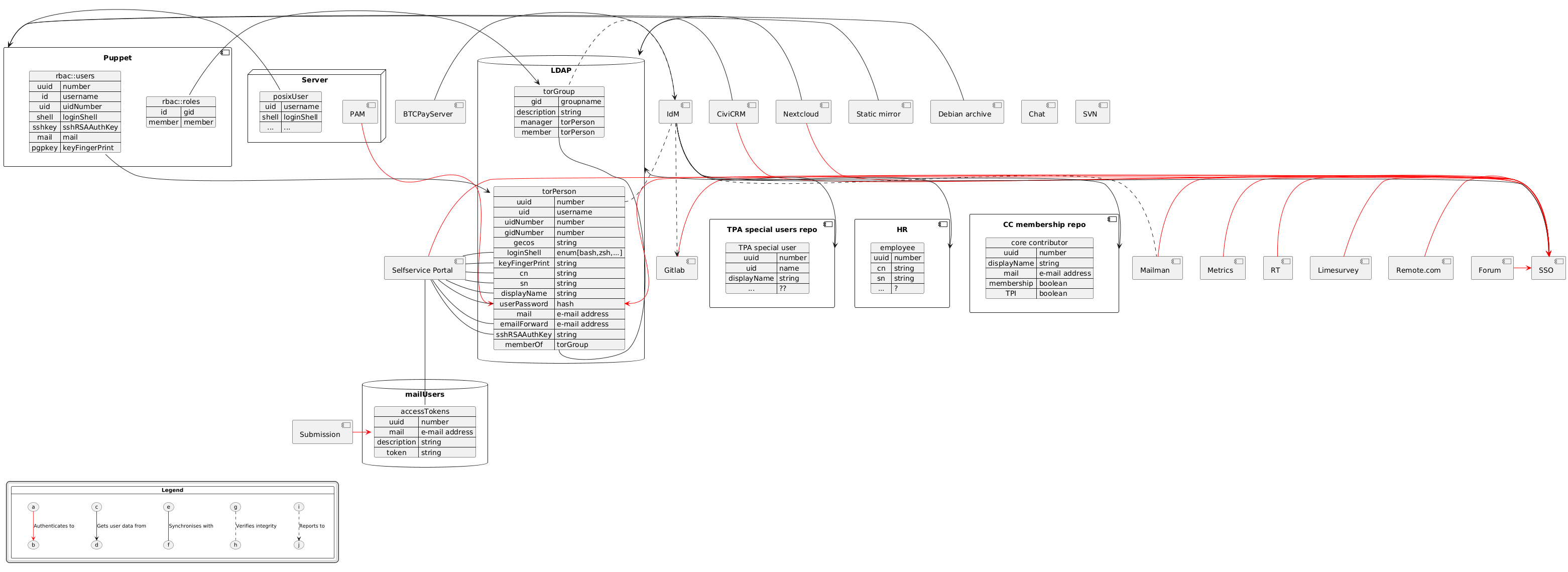
This diagram was rendered using PlantUML with this source file, for editing use the online editor.
Identity Management
The implementation of Identity Management (IdM) is meant to ensure our userbase matches the people actually involved in our organisation. It will automate parts of the on- and off-boarding process.
Our IdM will consist of a number of scripts that pull identity data from sources (e.g., the core contributor membership list, the HR spreadsheet, at some point our future human resources (HR) system, etc.) and verify if the known identities based on our sources match the userbase we have in our LDAP. In case of any mismatch, an issue will automatically be created in Gitlab, so TPA can manually fix the situation. A mismatch could be a user existing in LDAP but not in any of the sources or vice versa. It could also be a mismatch in attribute data, for instance when someone's surname differs between HR and LDAP or a nickname differs between HR and the core contributor membership list.
For this to work, identity sources need to be machine readable (this could be as simple as a YAML file in a git repository) and include a unique ID for every identity that can be used to match identities across sources and identities. This will prevent issues when people change names, PGP keys, email addresses, or whatever other attribute may be misassumed to be immutable.
Apart from identity data, sources may also (explicitly as well as implicitly) provide group membership data. For instance, a user can be part of the 'core contributors' group because they are included in the core contributor membership list. Or the employee group because they are marked as employee in our HR system. These group memberships are considered attribute data (the memberOf attribute in LDAP) and treated as such for determining mismatches.
Finally, some systems cannot lookup user data from LDAP and their userbase needs to be manually maintained. For these systems the IdM scripts will also monitor whether group data in LDAP matches the userbase of certain destination systems. For instance, all members of the employee group in LDAP should be members of the tor-employees mailing list, etc.
Considering the cost of maintaining custom software like this and security considerations regarding automated access to our LDAP, resolving mismatches will not be automated. The IdM system merely monitors and creates Gitlab issues. The actual resolving will still be done by humans.
Next to the IdM scripts, we will enforce auditability on all changes to user data. This means sources must leave an audit log (either an application log or something like the history from a git repository, preferably with signed commits) and our LDAP server will maintain a transaction log.
The IdM scripts should be written in such a way to reduce future
technical debt. The scripts should be written with best practices in
mind, like test driven development (ideally with 100% test coverage),
good linting coverage (e.g. mypy --strict if Python). Exceptions can
be made for rare exceptions where churn from APIs outside our control
will cause too much work.
Single Sign On
Single Sign On is meant to replace the separate username/password authentication on all our web services with one centralised multifactor login. All our web services are to use OIDC or SAML to authenticate to our Identity Provider. The Identity Provider will authenticate to LDAP for password authentication, as well as demand a second factor (WebAuthn) for complete authentication. For each service, the Identity Provider only allows access if the user is fully authenticated and is member of an appropriate group, de facto implementing RBAC.
The most likely candidate for implementing Single Sign On seems to be lemonldap-ng, which provides all the functional requirements (OIDC support, SAML support, MFA, LDAP backend, group-based access control) and is packaged in debian.
Centralising all our separate username/passwords into one login comes with the security concern that the impact of a password leak is far higher, since that one password is now used for all our services. This is mitigated by mandatory MFA using WebAuthn.
For SSO authentication to succeed, users must exist on the services we authenticate to. To ensure this is the case, for each service we will have to choose between:
- Synchronising the userbase with LDAP. Some services (e.g., Nextcloud) provide the ability to synchronise their users with an external LDAP server. This is the preferred approach.
- Just In Time (JIT) provisioning. Some services provide the ability to automatically create an account if it does not yet exist upon successful authentication. This requires our IdM scripts to monitor the userbase, since users that have left the organisation may keep lingering.
- Manually create and remove users. This requires our IdM scripts to monitor the userbase.
Some webservices may not natively support SSO, but most can delegate authentication to the webserver. For these cases, we can use mod-auth-openidc or mod-auth-mellon to have Apache perform the SSO authentication and pass the user data on to the backend using HTTP headers.
We will connect the following services:
| Service | Native SSO support | User Provisioning |
|---|---|---|
| Nextcloud | OIDC and SAML | LDAP-based |
| Mailman | OIDC | Manual |
| LimeSurvey | No, use webserver | JIT |
| Metrics | No, use webserver (but keep it accessible for bots) | ? |
| Gitlab | OIDC and SAML | JIT, no need for deprovisioning |
| Forum | OIDC and SAML | JIT, no need for deprovisioning |
| RT | SAML | ? |
| CiviCRM | OIDC and SAML, additional web server authentication | LDAP-based |
| Weblate | OIDC and SAML | JIT, no need for deprovisioning |
| Jenkins | OIDC and SAML, additional web server authentication | Manual? |
| Hedgedoc | OIDC | JIT, no need for deprovisioning |
| Remote.com | SAML | ? |
TPA will need to experiment which protocol is easier to implement and maintain, but will likely default to using OIDC for authentication. There are, however, services that only support SAML and vice versa.
Servers with "additional web server authentication" mean that those
servers will have authentication at the application level
(e.g. CiviCRM doing OIDC) and web server level (e.g. Apache with
mod-auth-oidc).
BTCPayServer cannot be connected to SSO and will continue with separate username/password authentication, albeit with an IdM-monitored userbase.
Chat and SVN are left out of scope for this proposal. Their future is too unclear to plan ahead for these services.
Role Based Access Control
Role Based Access Control (RBAC) is meant to ensure that authorisation happens based on roles (or group membership), which match actual organisational roles. This prevents long access control lists with numerous individuals that are hard to manage and even harder to audit. It also prevents pseudo-solutions like roles called 'nextcloud-users'. An individual changing roles within the organisation should be a matter of changing their group membership and all the required/no longer required access should be granted/revoked based on that.
For our webservices, our SSO will restrict access based on group membership. Access control within the services are left out of scope for this proposal, but service admins are encouraged to adopt RBAC (the user's roles will be provided by as memberOf attributes by the Identity Provider).
For access to servers, TPA will adopt the puppet-rbac module that Tails already uses. All UNIX users, sudo rights, and ssh-based access will be managed using this module. Instead of using ud-ldap, puppet will read the user and group data from LDAP and create the appropriate resources. SSH keys will be stored in LDAP and distributed through puppet. Password authentication for sudo will be done through pam-ldap, but we will not be using LDAP for NSS. This means that sudo authentication will be based on the same LDAP password as your SSO login and people will no longer have separate password for separate servers. It also means users' SSH keys providing access will be the same on every server. While this may be a slight regression security-wise, it vastly simplifies administration. In cases where security requirements really call for separate SSH keys or passwords for specific server access, a separate identity could be created to facilitate this (similar to the -admin accounts we have on Gitlab).
As mentioned before, some group memberships are based on data from the identity source. All other groups will have a manager (typically a team lead), who will be able to manage the group's members.
Mail authentication
Currently people can set an emailPassword in ud-ldap, which is synced to a file on the mailserver. This password can be used to configure their mail client to send mail from @torproject.org addresses. This doesn't fit easily into our SSO setup: mail clients generally do not support SSO protocols or MFA and because this password will be stored in configuration files and/or on phones, we don't want to use people's regular LDAP password here.
Sadly, LDAP doesn't have proper ways to deal with users having multiple passwords. Instead of recreating a ud-ldap-like mechanism of synchronising ldap attributes to a local file on the mailserver, we should store password hashes in an SQL database. Users can then manage their email passwords (tokens may be a better name) in the selfservice portal and dovecot-sasl can authenticate to the SQL database instead of a local file. This has the advantage that multiple tokens can be created, one for each mail client, and that changes are active immediately instead of having to wait for a periodic sync.
We introduce a new (SQL) database here because LDAP doesn't handle multiple passwords very well, so implementing this purely in LDAP would mean developing all sorts of complicated hacks for this (multiple entries, description fields for passwords, etc).
usedir-ldap retirement
We will retire ud-ldap entirely. Host and user provisioning will be replaced by puppet. The machines list will be replaced by a static web page generated by puppet.
The Developers LDAP search will be removed in favour of Nextcloud contacts.
The self-service page at db.torproject.org will be replaced by a dedicated self-service portal.
Self-service Portal
We will extend the lemonldap-ng portal to provide a self-service portal where users will be able to log in and manage:
- their password
- their MFA tokens
- their mail access tokens
- their external e-mail address
- personal data like name, nickname, etc.
Users will initially also be able to request changes to their SSH and PGP keys. These changes will be verified and processed by TPA. In the future we may be able to allow users to change their keys themselves, but this requires a risk assessment.
Furthermore, group managers (e.g., team leads) should be able to use this portal to edit the members of the groups they manage.
Goals
- Identity Management
- Aggregation of all identities from their sources (HR, Core Contributor membership, etc.)
- Verification of and alerting on userbase integrity (are LDAP accounts in sync with our identity sources)
- Partial verification of and alerting on group memberships (does the employee LDAP group match the employees from the HR system)
- Audit logs for every change to an identity
- RBAC
- Authorisation to all services is based on roles / group membership
- Groups should correspond to actual organisational roles
- Audit logs for every change in group membership
- SSO
- Web-based services authenticate to an Identity Provider using OIDC or SAML
- The Identity Provider verifies against LDAP credentials and enforces FIDO2
- Self-service Portal
- Users can change their password, MFA tokens, mail tokens, and possibly other attributes like displayname and/or SSH/PGP keys
- Team leads can manage membership of their team-related roles
ud-ldapretirement
Must have
- auditable user database
- role based access to services
- MFA
Nice to have
- lifecycle management (i.e., keeping track of an accounts end-date, automatically sending mails, keeping usernames reserved, etc.)
Non-Goals
- Full automation of user (de-)provisioning
- RBAC within services
- Solutions for chat and SVN
- Improvements in OpenPGP keyring maintenance
Tasks
IdM
- make HR and CC sources machine readable and auditable
- ensure the HR system maintains an audit log
- ensure the HR system has a usable API
- convert the CC membership list into a YAML file in a git repository or something similar
- introduce UUID's for identities
- design and update processes for HR and the CC secretary (and anyone else updating identity sources) to ensure they use the same UUID (a unique quasi-random string) for everyone
- create attribute mappings
- define which attributes in which identity source correspond to which LDAP attributes and which LDAP attributes are needed and correspond to which attributes in our services and systems
- role/group inventory
- make an inventory of all functional roles within the organisation
- for all roles, determine whether they are monitored through IdM scripts and who their manager is
- for all roles, determine to which systems and services they need access
- design and implement the IdM scripts
LDAP
- manage LDAP through puppet
- make an inventory of what needs LDAP access and adjust the ACL to match the actual needs
- adjust the LDAP schema to support all the required attributes
- ensure all LDAP connections use TLS
- set up read-only LDAP replicas for high availability across our entire infrastructure, ensuring each point of presence has at least one replica.
- replacing
ud-ldapwith puppet:- replace host definitions and management in LDAP with puppet-based host management
- have puppet generate a machine list static HTML file on a webserver
- expand the puppet LDAP integration to read user and group data
- replace
ud-ldapbased user creation withpuppet-rbac - replace
ud-ldapbased ssh access withpuppet-rbac - configure
nss-ldapfor SSH authentication - configure
pam-ldapfor sudo authentication - sift through our puppet codebase and replace all privileges assigned to specific users with role-based privileges
- remove
ud-ldap
SSO
- deploy
lemonldap-ng - configure SAML and OIDC
- configure the LDAP backend
- configure MFA to enforce FIDO2
- connect services:
- configure attribute mappings
- restrict access to appropriate groups/roles
- configure service to use OIDC/SAML/webserver-based authentication
- set up user provisioning/deprovisioning
- work out how to merge existing userbase
SASL
- create an SQL database
- grant read access to dovecot-sasl and write-access to the self-service
- reconfigure dovecot-sasl to authenticate to the SQL database
Self-service
- decide which attributes users can manage
- implement password management
- implement MFA management
- implement mail token management
- implement attribute management
- implement SSH/PGP key change requests
- implement group membership management
- consider automated SSH/PGP key management
TPA
All the tasks described above apply to TPA.
For each TPA (web)service, we need to create and execute a migration plan to move from a local userbase to SSO-based authentication.
Tails
The Tails infra already uses puppet-rbac, but would need Puppet/LDAP integration
deprecating the current hiera-based user and role management.
For each Tails service we need to establish whether to connect it to SSO or rather focus on merging it with a TPA counterpart.
Affected users
Everyone at Tor.
Personas impact
Wren from HR
Wren takes care of on- and offboarding folks. They use remote.com a lot and manage quite some documents in Nextcloud. They only use Gitlab to create issues when accounts need to be created or removed. Wren doesn't use SSH.
When Wren starts the working day by logging in to remote.com. They now need to use their Yubikey to do so. Once they're logged in, though, they no longer need to type in passwords for the other TPI services, they are automatically logged in everywhere.
When onboarding a new employee, Wren will have to explicitly check if they were already a core contributor. If so, the existing UUID for this person needs to be reused. If not, Wren can use a macro in the spreadsheet to generate a new UUID.
Wren no longer needs to create Gitlab issues to ask for accounts to be created for new employees (or removed for folks who are leaving). Once the employee data is entered in the spreadsheet, TPA will automatically be informed of all the account changes that need to happen.
When Wren wants to change their password and/or second factor, they only have to do so in one place now.
Corey, the core contributor secretary
Corey manages core contributor membership. That's all we know about Corey.
Corey used to maintain the list of core contributors in a txt file that they mailed to the list every so once in a while. This file is now structured in YAML and Corey pushes changes to a git repository instead of only mailing them.
Sasha, the sysadmin
Sasha has root access everywhere. They mostly use Gitlab and Metrics. Sometimes they log in to Nextcloud or remote.com. Sasha deals with user management, but mostly writes puppet code.
Sasha has a fair bit to learn about SAML and OIDC, but at least they don't have to maintain various different userbases anymore.
Sasha automatically gets notified if changes to the userbase need to be made. These notifications follow a standard format, so Sasha is tempted to write some scripts to automate these operations.
Sasha can write such scripts, but they are not part of the IdM system and must act with Sasha's authentication tokens, to retain audit log integrity. They could, for example, be a Fabric job that uses Sasha's LDAP credentials.
When users want to change their SSH or PGP key, Sasha needs to manually verify that these are legit changes and subsequently process them. Sasha is never quite sure how strict they need to be with this.
Sasha is happy they no longer need to worry about various access lists that are probably incredibly outdated, since permissions are now granted based on organisational role.
Devin, the service admin
Devin is a gitlab admin. That's all we know about Devin.
Devin can use their regular TPI account to log into Gitlab through SSO. That gets them logged in on their normal use account. For admin access, they still need to log in using their separate admin account, which doesn't go through SSO.
Devin no longer needs to create accounts for new employees. Instead, the new employee needs to log in through SSO once TPA has created their account. Devin does still need to make sure the new employee gets the right permissions (and said permissions are revoked when appropriate). Devin is encouraged to think of a way in which granting gitlab permissions can piggyback on the existing organisational roles.
Team lead Charlie
Charlie is lead of one of the development teams. They have root access on a few machines and regular shell accounts on a few others. They use Gitlab a lot and just discovered Hedgedoc being pretty neat. They use Nextcloud a fair bit, have two mailing lists that they manage, and look at the metrics every so once in a while.
Charlie used to have different passwords to use sudo on the machines they had root access on, but now they just use the same password everywhere. They do still need an SSH key to log in to servers in the first place.
Charlie no longer needs separate usernames, passwords, and 2FA tokens for Gitlab, Nextcloud, Mailman, Metrics, etc. Once logged into the first service, the rest goes automatically.
Charlie no longer needs to have an account on the Tails Gitlab to use Hedgedoc, but instead can use their regular SSO account.
Charlie no longer has to bother TPA to create user accounts for team members on the team's servers. Instead, Charlie can edit who has which role within the team. If a user has the right role, an account will be created for them. Vice versa, when a member leaves the team or gets different tasks within the team, Charlie need only remove their role and the account will be removed.
Kennedy, the contractor
Kennedy is a freelance contractor. They're working with Gitlab and Nextcloud, but don't really use any of the other TPI services.
Kennedy needs to get a WebAuthn device (like a Yubikey) to be able to log in. They're not used to this and the beginning of their work was delayed by a few days waiting for one, but now it works quite easily.
Sullivan, the consultant
Sullivan just does one small job for TPI, but needs shell access to one of our servers for this.
Sullivan probably gets access to the server a bit late, because it's unclear if they should be added in HR's spreadsheet or be hacked in by TPA. TPA wants to know the end-date for Sullivan's access, but that's unclear. The team lead for whom Sullivan works tries to bypass the problem and use their root access to create an account for Sullivan. The account automatically gets removed during the next puppet run. In the end, an end-date for Sullivan's access is made up and TPA creates their account. Sullivan receives an automated e-mail notification when their account is close to its end-date.
Blipblop, the bot
Blipblop is not a real human being, it's a program that interacts with TPI services.
Blipblop used to log in to services with a username and password. Blipblop doesn't understand SAML or OIDC, let alone WebAuthn. TPA has to create some loopholes so Blipblop can still access services without going through the SSO authentication.
Costs estimates
Hardware
- servers:
- SSO server (
lemonldap-ng) - IdM server ("the scripts")
- one LDAP replica (OpenLDAP) per point of presence
- SSO server (
- FIDO2/WebAuthn tokens for all our personas
Staff
Phase 1, removing ud-ldap: 31 - 56 days
| Task | Estimate | Uncertainty | Total (days) | Note |
|---|---|---|---|---|
| LDAP ACL update | 1 day | high | 2 | |
| LDAP schema update | 1 day | medium | 1.5 | |
| puppetise LDAP | 2 days | medium | 3 | this includes enforcing TLS |
| deploy LDAP replicas | 2 days | medium | 3 | |
| deploy lemonldap-ng | 4 days | high | 8 | |
| password selfservice | 1 day | high | 2 | |
| attribute selfservice | 2 days | high | 4 | |
| move hosts to hiera | 2 days | high | 4 | |
| generate machine list | 1 day | low | 1.1 | |
| puppet/LDAP integration | 2 days | medium | 3 | |
| deploy puppet-rbac | 4 days | high | 8 | this still has puppet-rbac use the old LDAP groups |
| configure pam-ldap | 1 day | low | 1.1 | |
| SQL pass selfservice | 1 week | high | 10 | |
| dovecot-sasl to SQL | 1 day | low | 1.1 | |
| remove ud-ldap | 2 days | high | 4 |
Phase 2, RBAC proper: 20 - 40 days
| Task | Estimate | Uncertainty | Total (days) | Note |
|---|---|---|---|---|
| inventory of roles | 1 week | high | 10 | |
| implement roles in puppet | 1 week | high | 10 | |
| group management in selfservice | 2 weeks | high | 20 | this may be quicker if we outsource it |
Once phase 2 is completed, the Tails and TPA authentication systems will have been effectively merged. Phases 3 and 4 add further improvements.
Phase 3, Identity Management: 22 - 40 days
| Task | Estimate | Uncertainty | Total (days) | Note |
|---|---|---|---|---|
| ensure access to sources | 2 days | high | 4 | assuming there is no HR system, just a spreadsheet |
| introduce UUIDs | 2 days | medium | 3 | |
| create attribute mappings | 1 day | high | 2 | |
| write parsers for sources | 3 days | high | 6 | assuming there is no HR system, just a spreadsheet |
| mechanism comparing sources to LDAP | 3 days | medium | 4.5 | |
| alerting to Gitlab issues | 3 days | medium | 4.5 | |
| comparing sources to mailing list | 2 days | high | 4 | |
| comparing sources to limesurvey | 2 days | high | 4 | |
| comparing sources to weblate | 2 days | high | 4 | |
| comparing sources to btcpayserver | 2 days | high | 4 |
Phase 4, SSO: 37 - 72 days
| Task | Estimate | Uncertainty | Total (days) | Note |
|---|---|---|---|---|
| lemonldap-ng as SAML & OIDC IdP | 2 days | medium | 3 | |
| enforcing FIDO2 WebAuthn | 2 days | medium | 3 | |
| ensure everybody has a FIDO2 key | 1 week | high | 10 | |
| connect Nextcloud to SSO | 1 day | high | 2 | |
| connect mailman to SSO | 1 day | high | 2 | |
| connect limesurvey to SSO | 1 day | high | 2 | |
| connect metrics to SSO | 2 days | high | 4 | |
| connect Gitlab to SSO | 2 weeks | high | 20 | this requires extensive testing beforehand |
| connect forum to SSO | 1 day | high | 2 | |
| connect RT to SSO | 2 days | high | 4 | |
| connect civicrm to SSO | 3 days | high | 6 | |
| connect weblate to SSO | 2 days | high | 4 | |
| connect jenkins to SSO | 1 days | high | 2 | |
| connect hedgedoc to SSO | 1 days | high | 2 | |
| connect remote to SSO | 3 days | high | 6 |
Connecting the various systems to SSO are mini-projects in their own right. Some, especially Gitlab, may even require their own RFC.
Timeline
Ideal
This timeline reflects an ideal (and non-realistic) scenario where one full time person is assigned continuously on this work, starting in September 2025, and that the optimistic cost estimates are realized.
- W32-41: phase 1, removing ud-ldap
- W42-47: phase 2, RBAC proper
- W48-51: phase 3, identity management
- end of year break
- W2-3: phase 3, identity management continued
- W4-W12: phase 4, SSO
More realistic
The more realistic timeline assumes this RFC will cause some discussion and work won't start until 2026Q2. Pessimistic cost estimates are used for this planning: being a bit overly pessimistic here keeps some space for other priorities and not continuously devoting 1FTE to this project.
- W14-26: phase 1, removing ud-ldap
- july break
- W28-29: phase 2, RBAC proper
- holidays
- W34-41: phase 2, continued
- W42-51: phase 3, identity management
- december break
- W2-17: phase 4, SSO
Alternatives considered
We considered existing IdM frameworks like:
- OpenIDM
- OpenText Identity Manager
- Okta
However, those are generally too heavy and enterprisey for our needs and our available resources. They start to make sense once organisations have thousands of identities to manage. On top of that, cloud-based frameworks like Okta would enable a third party to completely compromise the organisation.
We considered the various SSO frameworks discussed in discussion on LDAP. The main contenders based on provided functionality were Casdoor, Keycloak, Lemonldap-ng and Zitadel. Casdoor was deemed risky due to it being open-core and not properly FLOSS, Keycloak is a bit of a java monster, and Zitadel is optimised for Kubernetes, which we do not run. On the contrary, lemonldap-ng is already packaged in Debian, which makes it a far easier fit in our infra.
References
Glossary
-
DSA: Debian SysAdmin team. The sysadmins operating many base services on
debian.org -
FIDO2: Fast IDentity Online, second version. Web standard defining how servers and clients authenticate MFA, typically with a security key like a YubiKey.
-
IdM: Identity Management. Systems and processes that manage user accounts and their life cycles (creation, status, removal).
-
LDAP: Lightweight Directory Access Protocol. An object database that's often used for user authentication. Used by TPA with
userdir-ldapas a middleware. -
MFA: Multi Factor Authentication. Authentication through multiple credentials, for example with one-time codes generated by a mobile app or delivered over a side channel (email or text messages), or with a security key like a YubiKey.
-
NSS: Name Service Switch. The component in UNIX that abstracts name resolutions mechanisms, defaulting to
/etc/passwd,/etc/hostsand so on. -
OIDC: OpenID Connect. SSO protocol built on top of OAuth 2.0.
-
PAM: Pluggable Access Modules. The UNIX component responsible for setting up login sessions and checking passwords, typically used for
sudoand SSH authentication. -
RBAC: Role Based Access Control. Systems and processes that manage and provide authorization based on a user's role / group membership.
-
SAML: Security Assertion Markup Language. SSO protocol built on top of XML.
-
SSO: Single Sign On. Centralised authentication based on protocols like OpenID-Connect and SAML, where you login with credentials only once across a fleet of services.
-
UUID: Universally Unique Identifier. A 128-bit label used to uniquely identify objects in computer systems, defined in RFC 9562. For example,
f81d4fae-7dec-11d0-a765-00a0c91e6bf6is a UUID. -
WebAuthn: part of the FIDO2 standard that defines the API websites use to authenticate users with MFA, for example with a YubiKey.
Summary: TPA container images will follow upstream OS support schedules
Proposal
Container image versions published by TPA as part of the base-images
repository will be supported following upstream (Debian and Ubuntu)
support policies, including "LTS" releases.
In other words, we will not retire the images in lockstep with the normal "major release" upgrade policy, which typically starts the upgrade during the freeze and aims to retire the previous release within a year.
This is to give our users a fallback if they have trouble with the major upgrades, and to simplify our upgrade policy.
This implies supporting 4 or 5 Debian build per image, per architecture, depending on how long upstream live, including testing and unstable.
We can make exceptions in case our major upgrades take an extremely long time (say, past the LTS EOL date), but we strongly encourage all container image users to regularly follow the latest "stable" release (if not "testing") to keep their things up to date, regardless of TPA's major upgrades schedules.
Before image retirements, we'll send an announcement, typically about a year in advance (when the new stable is released, which is typically a year before the previous LTS drops out of support) and a month before the actual retirement.
Debian images
Those are the Debian images currently supported and their scheduled retirement date.
| codename | version | end of support |
|---|---|---|
bullseye | 11 | 2026-08-31 |
bookworm | 12 | 2028-06-30 |
trixie | 13 | likely 2030 |
sid | N/A | N/A |
Note that bullseye was actually retired already, before this
proposal was adopted (tpo/tpa/base-images#19).
Ubuntu images
Ubuntu releases are tracked separately, as we do not actually perform Ubuntu major upgrades. So we currently have those images:
| codename | version | end of support |
|---|---|---|
focal | 20.04 LTS | 2025-05-29 |
jammy | 22.04 LTS | 2027-06-01 |
noble | 24.04 LTS | 2029-05-31 |
oracular | 24.10 | 2025-07 |
Concretely, it means we're supporting a relatively constant number (4) of upstream releases.
Note that we do not currently build other images on top of Ubuntu images, and would discourage such an approach, as Ubuntu is typically not supported by TPA, except to build third-party software (in this case, "C" Tor).
Alternatives considered
Those approaches were discussed but ultimately discarded.
Different schedules according to image type
We've also considered having different schedules for different image types, for example having only "stable" for some less common images.
This, however, would be confusing for users: they would need to guess what exactly we consider to be a "common" image.
This implies we build more images than we might truly need (e.g. who
really needs the redis-server image from testing and
unstable?) but this seems like a small cost to pay for the tradeoff.
We currently do not feel the number of built images is a problem in our pipelines.
Upgrades in lockstep with our major upgrades
We've also considered retiring container images in lockstep with the major OS upgrades as performed by TPA. For Debian, this would have not include LTS releases, unless our upgrades are delayed. For Ubuntu, it includes LTS releases and supported rolling releases.
For Debian, it meant we generally supported 3 releases (including testing and unstable), except during the upgrade, when we support 4 versions of the container images for however long it takes to complete the upgrade after the stable release.
This was confusing, as the lifetime of an image depended upon the speed at which major upgrades were performed. Those are highly variable, as they depend on the team's workload and the difficulties encountered (or not) during the procedure.
It could mean that support for a container image would abruptly be dropped if the major upgrade crossed the LTS boundary, although this is also a problem with the current proposal, alleviated by pre-retirement announcements.
Upgrade completes before EOL
In this case, we complete the Debian 13 upgrade before the EOL:
- 2025-04-01: Debian 13 upgrade starts, 12 and 13 images supported
- 2025-06-10: Debian 13 released, Debian 14 becomes
testing, 12, 13 and 14 images supported - 2026-02-15: Debian 13 upgrade completes
- 2026-06-10: Debian 12 becomes LTS, 12 support dropped, 13 and 14 supported
In this case, "oldstable" images (Debian 12) images are supported 4 months after the major upgrade completion, and 14 months after the upgrades start.
Upgrade completes after EOL
In this case, we complete the Debian 13 upgrade after the EOL:
- 2025-04-01: Debian 13 upgrade starts, 12 and 13 images supported
- 2025-06-10: Debian 13 released, Debian 14 becomes
testing, 12, 13 and 14 images supported - 2026-06-10: Debian 12 becomes LTS, 12, 13 and 14 supported
- 2027-02-15: Debian 13 upgrade completes, Debian 12 images support dropped, 13 and 14 supported
- 2028-06-30: Debian 12 LTS support dropped upstream
In this case, "oldstable" (Debian 12) images are supported zero months after the major upgrades completes, and 22 months after the upgrade started.
References
- discussion issue
- Debian release support schedule
- Ubuntu and Debian release timelines at Wikipedia
- Debian major upgrades progress and history
Background
Tor currently uses Joker.com to handle domain registrations. While it's cheap, it hasn't served us well and we're looking at alternatives, mostly because of billing issues.
We've been having trouble with billing where we're not able to keep domains automatically renewed in the long term. It seems like we can't just "top-up" the account, especially not from billing, as they each have their own balance that doesn't carry around.
Current (renewal) prices for the 4 top-level domains (TLDs) at Joker are:
.network: €38.03.com: €15.98.org: €14.84.net: €17.54
Requirements
Must have
- distributed contacts: billing should be able to receive bills and pay invoices
- automated payments: we should be able to either store our credit card on file or top up the account
- glue records and DNSSEC support: we should have an interface through which can update glue and DS records
- reliable: must not be some random shady website
- support for all four TLDs
Nice
- cheap-ish: should be similar or cheaper than joker
- API: provide an API to change DS records and others
Options
Mythic Beasts
.network: 34.50£ (41.39€).com: 14.50£ (17.40€).org: 15.0£ (18.00€).net: 17.00£ (20.40€)
Porkbun
Joker
Summary: GitLab now encrypts outgoing email notifications on confidential issues, if your key is in LDAP, OpenPGP keys stored in GitLab will be used soon.
Announcement
Anyone who has dealt with GitLab confidential issues will know this message:
A comment was added to a confidential issue and its content was redacted from this email notification.
If you found that irritating, you're not alone! Rejoice, its time is coming to an end.
Starting today (around 2025-06-10 19:00UTC), we have deployed a new encryption system in the GitLab notification pipeline. If your OpenPGP certificate (or "PGP key") is properly setup in LDAP, you will instead receive a OpenPGP-encrypted email with the actual contents.
No need to click through anymore!
If your key is not available, nothing changes: you will still get the "redacted" messages. If you do not control your key, yet it's still valid and in the keyring, you will get encrypted email you won't be able to read.
In any case, if any of those new changes cause any problems or if you need to send us an OpenPGP certificate (or update it), file an issue or reach out to our usual support channels.
We also welcome constructive feedback on the implementation, relieved thanks and other comments, either here, through the above support channels, or in the discussion issue.
Affected users
Any GitLab user subscribed to confidential issues and who is interested in not getting "redacted" emails from GitLab.
Future work
OpenPGP certificates in GitLab
Right now, only "LDAP keys" (technically, the OpenPGP certificates
account-keyring.git project) are considered for encryption.
Only mail delivered to @torproject.org are considered as well.
In the future, we hope to implement a GitLab API lookup that will allow other users to upload OpenPGP certificates through GitLab to use OpenPGP encryption for outgoing mail.
This has not been implemented yet because implementing the current backend was vastly easier, but we still hope to implement the GitLab backend.
OpenPGP signatures
Mails are currently encrypted, without signature, which is actually discouraged. We are considering signing outgoing mail, but this needs to be done carefully because we must handle yet another secret, rotation, expiry and so on.
This means, among other things, that the OpenPGP messages do not provide any sort of authentication that the message really comes from GitLab. It's still entirely possible for an attacker to introduce "fake" GitLab notifications through this system, so you should still consider notifications to be advisory. The source of truth here is the GitLab web interface.
OpenPGP signatures were seen as not absolutely necessary for a first implementation of the encryption system, but may be considered in the future. Note that we do not plan on implementing signatures for all outgoing mail at the time.
Background
History of the confidential issue handling
GitLab supports "confidential issues" that are accessible only to the issue creator and users with the "reporter" role on a project. It is used to manage security-sensitive issues and any issue that contains privately identifiable information (PII).
When someone creates or modifies an issue on GitLab, it sends a notification to users watching the issue. Unfortunately, those notifications are sent by email without any sort of protection. This is a long-standing issue in GitLab (e.g. gitlab-org/gitlab#19056, 2017) that doesn't seem to have gotten any interest upstream.
We realized this problem shortly after the GitLab migration, in 2020 (tpo/tpa/gitlab#23), at which time it wasn't clear what we could do about it.
But a few years later (September 2022), Micah actually bit the bullet and started work on patching GitLab itself to at least identify confidential issues with a special header.
He also provided a prototype filtering script that would redact (but not encrypt!) messages on the way out, which anarcat improved on and deployed in production. That was deployed in October 2023 and there were actual fireworks to celebrate this monumental change, which has been working reliably for almost two years at this point.
TPA handling of OpenPGP certificates
We acknowledge our handling of OpenPGP keys (or "certificates") is far from optimal. Key updates require manual work and the whole thing is pretty arcane and weird, even weirder than what OpenPGP actually is, if that's even possible. We have an issue to address that technical debt (tpo/tpa/team#29671) and we're considering this system to be legacy.
We are also aware that the keyring is severely out of date and requires a serious audit.
The hope, at the moment, is we can ignore that problem and rely on the GitLab API for users to provide key updates for this system, with the legacy keyring only used as a fallback.
OpenPGP implementation details
Programmers might be interested to know this was implemented in an existing Python script, by encrypting mail with a SOP interface (Stateless OpenPGP), which simplified OpenPGP operations tremendously.
While SOP is not yet an adopted standards and implementations are completely solid yet, it has provided a refreshing experience in OpenPGP interoperability that actually shows great promise in the standard and its future.
PGP/MIME is another story altogether: that's still an horrible mess that required crafting MIME parts by hammering butterflies into melting anvils with deprecated Python blood. But that's just a normal day at the TPA office, don't worry, everything was PETA approved.
The implementation is available in TPA's fabric-tasks repository, currently as merge request !40 but will be merged into the main branch once GitLab API support is implemented.
Follow the progress on this work in the discussion issue.
Summary: implement a mechanism to enforce signed commits verification and switch to GitLab as a canonical source, for Puppet repositories
Background
Checking the authenticity of Git commits has been considered before in the context of the switch from Gitolite to GitLab, when the attack surface of Tor's Git repositories increased significantly (1, 2). With the upcoming merge of Tor and Tails Puppet codebases and servers, allowing for the verification of commit signatures becomes more important, as the Tails backup server relies on that to resist potential compromise of the Puppet server.
TPA will take this opportunity to implement code signing and verification more broadly. This will not only allow TPA to continue using the Tails backup infra as-is after the merge of Puppet codebases and servers but will also help to create strategies to mitigate potential issues with GitLab or attempts to tamper with our code in general.
Proposal
The general goal is to allow for the verification of authenticity of commits in Git repositories. In particular, we want to ease and increase the use of GitLab CI and merge request workflows without having to increase our attack surface on critical infrastructure (for Puppet, in particular).
The system will be based in sequoia-git, so:
- Authorization info and OpenPGP certificates will be stored in a policy file.
- Authentication can be checked against either an
openpgp-policy.tomlpolicy file stored in the root of repositories (default) or some other external file. - Updates to remote refs will be accepted when there exists an authenticated path from a designated "trust-root" to the tip of the reference being updated (a.k.a. the "Gerwitz method").
On the server side, TPA will initially deploy:
- a "TPA policy file" (at
/etc/openpgp-policy/policies/tpa.toml) - Git update hooks (or GitLab server hooks in case of repositories hosted in GitLab) for the repositories in scope. These hooks will fetch values for trust-root and policy file from Git config and will prevent ref updates when authentication fails.
The verification mechanism will be available for deployment to any other Git repository upon request.
On the client-side, users can use different Git hooks to get notification about authentication status.
See Verifying commits for more details on client and server-side implementations.
Scope
TPA
Phase 1: Puppet
TPA will initially deploy this mechanism to protect all references of its Puppet Git repositories, which currently means:
puppet.torproject.org:/srv/puppet.torproject.org/git/tor-puppet.gitpuppet.torproject.org:/srv/puppet.torproject.org/git/tor-puppet-hiera-enc.git
The reason for enforcing verification for all references in the TPA Puppet repositories is that all branches are automatically deployed as Puppet environments, so any branch/tag can end up being used to compile a catalog that is applied to a node.
Phase 2: Other TPA repositories
With the mechanism in place, TPA may implement, in the future, authentication of ref updates to some or all branches of:
- repositories under the
tpo/tpanamespace in GitLab - repositories in the TPA infrastructure that are managed via Puppet
Other teams
Any team can request deployment of the authentication mechanism to repositories owned by them and managed by TPA.
For each repository in which the mechanism is to be deployed, the following information is needed:
- the list of references (branches/tags) to be protected (can be
all) - a commit ID that represents the
trust-rootagainst which authentication will be checked
Known issues
Reference rebinding vulnerability
This mechanism does not bind signatures to references, so it can't verify, by itself, whether a commit is authorized to be referenced by a specific branch or tag. This means that reference updates will be accepted for any commit that is successfully authenticated, and repository reference structure/hierarchy is not verified by this mechanism. We may introduce other mechanisms to deal with this later on (for example, signed pushes).
Also, enforcing signed commits can (and most probably will) result in users signing every commit they produce, which then generates lots of signed commits that should not end up in production. Again, we will not deal with this issue in this proposal.
To be clear, this mechanism allows one to verify whether a commit was produced by an authorized certificate, but does not allow one to verify whether a specific reference to a commit is intended.
See git signed commits are a bad idea for more context on these and other issues.
Concretely, this would allow a hostile GitLab server to block updates to references, deploy draft changes to production, or roll-back changes to previous versions. This is considered to be an acceptable compromise, given that GitLab does not support signed pushes and we do not regularly use (sign) tags on TPA repositories.
Possible authentication improvements
This proposal also does not integrate with LDAP or the future authentication system.
Tasks
This is a draft of the steps required to implement this policy:
- Add a policy file to the TPA Puppet repository and deploy it to the GitLab and Puppet Server nodes
- Create a Git update hook using sq-git update-hook that can be pinned to a policy file and a trust root
- For each of the repositories in scope, find the longest path that can be authenticated with the TPA policy file and store that as that repo's trust root
- Deploy the update hook to the repositories in scope
- Add a CI job that checks the existence of an authenticated path between the
trust root and
HEAD. This job should always pass, as we protect all reference updates in the Puppet repositories. - Switch the "canonical" Puppet repository to be the one in GitLab, and configure mirroring to the repository in the Puppet server
- Provide instructions and templates of client-side hooks so that users can authenticate changes on the client-side.
This should be done for each of the repositories listed in the Scope section.
Affected users
Initially, affected users are only TPA members, as the initial deployment will be made only to some TPA repositories.
In the future, the server-side hook can be deployed by TPA to any other repositories, upon request from the team owning the repository. Then more and more users would be subject to commit-signing enforcement.
Timeline
- Phase 1: Puppet: September 2025
- Phase 2: Other TPA repositories: 2026
Starting from November 2025, other team's repositories can be protected upon request.
Alternatives considered
- Signed pushes. GitLab does not support signed pushes out of the box and does its own authorization checks using SSH keys and user permissions. Even if it would, signed push checks would be stored and enforced by GitLab, which wouldn't resolve our attack surface broadening issue.
- Signed tags. In the case of the TPA Puppet repositories, which this proposal initially aims to address, enforcing signed tags would be impractical as several changes are pushed all the time and we rarely publish tags on our repositories.
- Enforcing signatures in all commits. This option would create a usability issue for repositories that allow for external contributions, as third-party commits would have to be (re-)signed by authorized users, thus breaking Merge Requests and adding churn for our developers.
- GitLab push rules. Relying on this mechanism would increase our trust in GitLab even more, which is contrary to what this proposal intends. It's also a non-free feature which we generally try to avoid depending on, particularly for security-critical, load-bearing policies.
Appendix
This section expands on how verification works in sequoia-git.
Bootstrap
Trust root
It is always necessary to bootstrap trust in a given repository by defining a "trust root", which is a commit that is considered trusted. The trust root info can't be distributed in the repository itself, otherwise an attacker that can modify the repository can also modify the trust root, and then no real authentication is provided.
The trust root can be passed in the command line for sq-git log (using the
--trust-root param) or set as a Git configuration, like this:
git config sequoia.trustRoot $COMMIT_ID
Policy file
The default behavior of sq-git is to authenticate changes using an
openpgp-policy.toml policy file that lives in the root of the repository
itself: each commit is verified against authorization set in the policy file of
its parent(s). If this is the case, just define a trust root and run sq-git log.
Alternatively, repositories can be authenticated against an external arbitrary policy file. In this case, the same policy file is used to authenticate all commits.
In the case of TPA, changes for all repositories are authenticated against one unique policy file, which lives in the Puppet repository. On the client side, the tpo/tpa/repos> repository can be used to bootstrap trust in all other repositories. For that, one needs to define a trust root for the tpo/tpa/repos> repository, and then follow the bootstrap instructions in the repository to automatically set trust roots for all other repositories. If needed, confirm a sane trust root with your team mates.
Important: when using a policy file external to a repository, revoking privileges requires updating trust roots for all repositories, because changes that were valid with the old policy may fail to authenticate under the new policy.
Verifying commits
An openpgp-policy.toml file in a repository contains the OpenPGP
certificates allowed to perform operations in the repository and the list of
authorized operations each certificate is able to perform.
A user can verify the path between a "trust root" and the current HEAD by
running:
sq-git log --trust-root $COMMIT_ID
The tree will be traversed and commits will be checked one by one against the
policy file of its parents. Verification succeeds if there is an authenticated
path between the trust root and the HEAD.
Note that the definition of the trust root is delegated to each user and not stored in the policy file (otherwise any new commit could point to itself as a trust root).
Alternatively, a commit range can be passed. See sq-git log --help for more
info.
Server-side
We will leverage the sq-git update-hook subcommand to implement
server-side hooks to prevent the update of refs when authentication fails.
Info about trust-roots and OpenPGP policy files will be stored in Git config.
Client-side
Even though authentication of updates is enforced on the server side, being able to authenticate on the client side is also useful to help with auditing and detecting tampering.
First, make sure to configure a trust root for each of your repositories:
git config sequoia.trustRoot $COMMIT_ID
Git doesn't provide a general way to reject commits when pulling from remotes, but we can use Git hooks to, at least, get notified about authentication status of the incoming changes.
For example, a pull generally consists of a fetch followed by a merge, so we
can use something like the following post-merge hook:
cat > .git/hooks/post-merge <<EOF
#!/bin/sh
sq-git log
EOF
chmod a+x .git/hooks/post-merge
Note that this runs after a successful merge and will not prevent the merge from happening.
Example of successful pull with merge:
$ git pull origin openpgp-policy
From puppet.torproject.org:/srv/puppet.torproject.org/git/tor-puppet
* branch openpgp-policy -> FETCH_HEAD
Updating 95929f769..a4a5430c0
Fast-forward
.gitlab-ci.yml | 7 +++++++
1 file changed, 7 insertions(+)
95929f7691d214d45adb70a4f43c7a1879d16db4..a4a5430c09c156815b7c275a15c836c5258b6596:
Cached positive verification
Verified that there is an authenticated path from the trust root
95929f7691d214d45adb70a4f43c7a1879d16db4 to a4a5430c09c156815b7c275a15c836c5258b6596.
Example of unsuccessful pull with merge:
$ git pull origin openpgp-policy
From puppet.torproject.org:/srv/puppet.torproject.org/git/tor-puppet
* branch openpgp-policy -> FETCH_HEAD
Updating 95929f769..a4a5430c0
Fast-forward
.gitlab-ci.yml | 7 +++++++
1 file changed, 7 insertions(+)
95929f7691d214d45adb70a4f43c7a1879d16db4..a4a5430c09c156815b7c275a15c836c5258b6596:
Cached positive verification
Error: Authenticating 95929f7691d214d45adb70a4f43c7a1879d16db4 with 2a3753442fc31c23e6fa9cd7aee4074b07c78a8d
Caused by:
Commit 2a3753442fc31c23e6fa9cd7aee4074b07c78a8d has no policy
TPA will provide templates and automatic configuration where possible, for
example by adding "fixups" to the .mrconfig file where appropriate.
Handling external contributions
For repositories that allow some branches to be pushed without enforcement of signed commits, external contributions can be merged by signing the merge commit, which creates an authenticated path from the trust root to tip of the branch.
In those cases, signing of the merge commit must be done locally and merging must be done by pushing to the repository, as opposed to clicking the "Merge" button in the GitLab interface.
References
- Git repository integrity solutions
- Evaluate mitigation strategies to work around GitLab's attack surface for git hosting
Summary: adopt an incident response procedure and templates, use them more systematically.
Background
Since essentially forever, our incident response procedures have been quite informal, based mostly on hunches and judgement of staff during high stress situations.
This makes those situations more difficult and stressful than they already are. It's also hard to followup on issues in a consistent manner.
Last week, we had three more incidents that spurred anarcat into action into formalizing this process a little bit. The first objective was to make a post-mortem template that could be used to write some notes after an incident, but it grew to describe a more proper incident response procedure.
Proposal
The proposal consists of:
-
A template
This is a GitLab issue template (
.gitlab/issue_templates/Incident.md) that gets used when you create an incident in GitLab or when you pick theIncidenttemplate when reporting an issue.It reuses useful ideas from previous incidents like having a list of dashboards to check and a checklist of next steps, but also novel ideas like clearer roles of who does what.
It also includes a full post-mortem template while still trying to keep the whole thing lightweight.
This template is not set in stone by this proposal, we merely state, here, that we need such a template. Further updates can be made to the template without going through a RFC process, naturally. The first draft of this template is in merge request tpo/tpa/team!1.
-
A process:
The process is the companion document to the template. It expands on what each role does, mostly, and spells out general principles. It lives in the
howto/incident-responsepage which is the generic "in case of fire" entry point in our documentation.The first draft of this process is in merge request !86 in the wiki. It includes:
- the principle of filing and documenting issues as we go
- getting help
- Operations, Communications, Planning and Commander roles imported from the Google SRE book.
- writing a post-mortem for larger incidents
This is made into a formal proposal to bring attention to those new mechanisms, offer a space for discussion, and make sure we at least try to use those procedures during the next incidents, in particular the issue template.
Feedback is welcome either in the above merge requests, in the discussion issue, or by email.
Examples
Those are examples of incidents that happened before this proposal was adopted, but have more or less followed the proposed procedure.
GitLab downtime incident
In tpo/tpa/team#42218, anarcat was working on an outage with GitLab when he realized the situation was so severe that it warranted a status site update. He turned to lelutin and asked him to jump on communications.
Ultimately, the documentation around that wasn't sufficient, and because GitLab was down, updates to the site were harder, but lelutin learned how to post updates to the status site without GitLab and the incident resolved nicely.
DNSSEC outage
In tpo/tpa/team#42308, a DNSSEC rotation went wrong and caused widespread outages in internal DNS resolvers, which affected many services and caused a lot of confusion.
groente was, at first, in lead with anarcat doing planning, but eventually anarcat stepped in to delegate communications to lelutin and take over lead while groente kept hacking at the problem in the background.
lelutin handled communications with others on IRC and issues, anarcat kept the list of "next steps" up to date and wrote most of the post-mortem, which was amended by groente. Many issues were opened or linked in followup to improve the situation next time.
Alternatives considered
Other policies
There are of course many other incident response policies out there. We were inspired at least partly by some of those:
- Google SRE book: roles come from here, general principles quoted directly
- Got game? Secrets of great incident management
- Pager Duty incident response documentation
Other post-mortem examples and ideas
We were also inspired by other examples:
- GitHub - danluu/post-mortems: A collection of postmortems
- GitLab example post-mortem (2017, might be newer / better examples)
- Cloudflare example post-mortem (2019)
- Galileo post-mortem
- Amazon example post-mortem
- Root cause analysis ideas
We have also considered the following headings for the post-mortem:
- What happened?
- Where did it happen?
- Who was impacted by the incident?
- When did problem and resolution events occur?
- Why did the incident occur?
But we found them more verbose than the current headings, and lacking the "next steps" aspect of the current post mortem ("What went well?", "What could have gone better?" and "Recommendations and related issues").
No logs, no master, no commander?
A lot of consideration has been given to the title "Commander". The term was first proposed as is from the Google SRE book. But according to Wikipedia:
Commander [...] is a common naval officer rank as well as a job title in many armies. Commander is also used as a [...] title in other formal organizations, including several police forces. In several countries, this naval rank is termed as a frigate captain.
Commander is also a generic term for an officer commanding any armed forces unit, such as "platoon commander", "brigade commander" and "squadron commander". In the police, terms such as "borough commander" and "incident commander" are used.
We therefore need to acknowledge the fact that the term originally comes from the military, which is not typically how we like to organize our work. This raise a lot of eyebrows in the review of this proposal, as we prefer to work by consensus, leading by example and helping each other.
But we recognized that, in an emergency, deliberation and consensus building might be impossible. We must to delegate power to someone who will do the tough decisions, and it's necessary to have a single person at the helm, a bit like you have a single person on "operations", changing the systems at once, or you have a single person driving a car or a bus in real life.
The commander, however, is also useful because they are typically a person already in a situation of authority in relation with other political units, either inside or outside the organisation. This makes the commander in a better position to remove blockers than others. Note that this often means the person for the role is the Team Lead, especially if politics are involved, but we do not want the Team Lead handling all incidents.
In fact, the best person in Operations (and therefore, by default, Lead) is likely to be the person available that is the most familiar with the system at hand. It also must be clear that the roles can and should be rotated, especially if they become tired or seem to be causing more trouble than worth, just like an aggressive or dangerous driver should be taken off the wheel.
Furthermore, it must be understood that the Incident Lead is not supposed to continuously interfere with Operations, once that role has been delegated: this is not a micro-management facility, it's a helper, un-blocker, tie-breaker role.
We have briefly considered using a more modest term like captain of a ship. Having had some experience sailing on ships, anarcat has in particular developed a deeper appreciation of that role in life-threatening situation, where the Captain (or Skipper) not only has authority but also the skills and thorough knowledge of the ship.
Other terms we considered were:
-
"coordinator": can too easily be confused with the Planning role, and hides the fact that the person needs to actually makes executive decisions at times
-
"facilitator": similar problems than coordinator, but worse: even "softer" naming that removes essentially all power from the role, while we must delegate some power to the role
We liked the term Incident Commander because it is a well known terminology used inside (for example at Google) and outside our industry (at FEMA, fire fighters, medical emergencies and so on). The term was therefore not used in its military sense, but in a civilian context.
We also had concerns that, if someone would onboard in TPA and find the "Incident Command" terminology during an emergency, they would be less likely to understand what is going on that if they find another site-specific term.
The term also maps to a noun and a verb (a "Commander" is in "Command" and "Commands") than "Captain" (which would map, presumably, to the verb "Captain" and not really any name but "Command").
Ultimately, the discomfort with the introduction of a military term was too great to be worth it, and we picked the "Incident Lead" role, with the understanding it's not necessarily the Team Lead that inherits the residual Lead role after all delegations, and even less the Team Lead that handles all incidents from the start, naturally.
References
- discussion issue
- merge request tpo/tpa/team!1
- merge request !86 in the wiki
- discussion about this proposal in the October TPA meeting and resulting merge request
Summary: the BBB service is now hosted at
https://bbb.torproject.net, perform a password reset to get
access. Rooms must be recreated, small changes to account policy. Stop
using tor.meet.coop entirely.
Background
We've been using Big Blue Button since around 2021, when we started using meet.coop for that service. This has served us relatively well for a couple of years, but in recent times, service has degraded to a point where it's sometimes difficult to use BBB at all.
We've also found out that BBB has some serious security issues with recordings which likely affect our current provider but, more seriously, our current server has been severely unmaintained for years.
Since 2023, meet.coop has effectively shutdown. The original plan
was to migrate services away to another coop. Services were supposed
to be adopted by webtv.coop, but they have declined to offer support
for the service on 2025-10-15 as they were not involved in the project
anymore. In July 2025, there's been an attempt to revive
things. The last assessment identified serious security issues
with the servers that "have not been maintained for years".
It seems the BBB servers run Ubuntu 18.04, which has been out of support from Canonical for more than two years, for example. A new person has started working to resolve the problem, but it will take weeks to resolve those issues, so we've migrated to another provider.
Proposal
Migrate our existing BBB server to Maadix. After evaluating half a dozen providers, they were the most responsive and were the ones that brought the security issues with recordings in the first place.
The new server is available at:
All core contributors with an LDAP account have an account on the new server and should be able to reset their password using the password reset form.
The BBB account policy is changed: only core contributors have an account by default. Guest users are still possible, but are discouraged and have not been migrated. TPA members and the upstream provider (currently Maadix) are now the only administrators of the server.
Feedback and comments on the proposal are welcome by email or in the discussion issue, but beware that most of the changes described here have already been implemented. We are hoping this deployment will be in place for at least a couple of months to a year, during which time a broader conversation can be held in the organization regarding communication tools, see also the Other communication platforms section below.
Goals
Those are the requirements that were set in the conference documentation as of 2025-10-15, and the basis for evaluating the providers.
Must have
- video/audio communication for groups about 80 people
- specifically, work session for teams internal to TPI
- also, training sessions for people outside of TPI
- host partner organizations in a private area in our infrastructure
- a way for one person to mute themselves
- long term maintenance costs covered
- good tech support available
- minimal mobile support (e.g. web app works on mobile)
Nice to have
- Reliable video support. Video chat is nice, but most video chat systems usually require all participants to have video off otherwise the communication is sensibly lagged.
- allow people to call in by regular phone
- usable to host a Tor meeting, which means more load (because possibly > 100 people) and more tools (like slide sharing or whiteboarding)
- multi-party lightning talks, with ways to "pass the mic" across different users (currently done with Streamyard and Youtube)
- respecting our privacy, peer to peer encryption or at least encrypted with keys we control
- free and open source software
- tor support
- have a mobile app
- inline chat
- custom domain name
- Single-sign on integration (SAML/OIDC)
Non-Goals
- replace BBB with some other service: time is too short to evaluate other software alternatives or provide training and transition
Tasks
As it turns out, the BBB server is shared among multiple clients so we can't perform a clean migration.
A partial migration involved the following tasks:
- new server provisioning (Maadix)
- users creation (Maadix, based on a LDAP database dump from TPA)
- manual room creation (everyone)
In other words:
- rooms are not migrated automatically
- recordings are not be migrated automatically
If you want to copy over your room configuration and recordings, you need to do so as soon as possible.
Costs estimates
The chosen provider charges us 110EUR per month, with a one-time 220EUR setup fee. Major upgrades will be charged 70 euros.
Timeline
Normally, such a proposal would be carefully considered and providers carefully weighted and evaluated. Unfortunately, there is an emergency, and a more executive approach was necessary.
Accounting has already approved the expense range, and TPA has collectively agreed Maadix is the right approach, so this is considered already approved as of 2025-10-21.
As of 2025-10-23, a new server was setup at Maadix and was confirmed as ready on 2025-10-24.
At some unknown time in the future, the old tor.meet.coop will be
retired, or at least our data will be wiped from it. We're hoping the
DNS record be removed within a week or so.
Affected users
All BBB users are affected by this, including users without accounts. The personas below explain the various differences.
Visitors
Visitors, that is, users without BBB accounts that were joining rooms
without authenticating are the least impacted. The only difference
they will notice is the URL change from tor.meet.coop to
bbb.torproject.net.
They might also feel a little safer knowing proper controls are implemented over the recorded sessions.
Regular BBB users who are core contributors
Existing users which are also core contributors are similar to visitors, mostly unchanged, although their account will be password reset.
Users need to use the password reset form to set a new password for the service.
Rooms configurations have to be recreated by the users.
Rooms recording should be downloaded from the old server as soon as possible for archival, or be deleted.
Regular BBB users without LDAP accounts
Those users were not migrated to the new server, to clean up the user database.
People who do need an account to create new rooms may ask for an account by contacting TPA for support, although it is preferable to ask an existing core contributor to create a dedicated room instead.
Note that this is a slight adjustment of previous BBB account policy which was more open to non-core contributors.
Core contributors who were not granted access to the old BBB
As part of the audit of the user database, we noticed a significant number of core contributors (~50) who had valid accounts in our authentication server (LDAP) but did not have a BBB account.
Those users were granted access to the server, as part of an effort of harmonizing our user databases.
Old admins
All existing BBB admins accounts were revoked or downgraded to regular users. Administrator access is now restricted to TPA, which will grant accesses as part of normal onboarding procedures, or upon request.
TPA
TPA will have a slightly improved control over the service, by having
a domain name (bbb.torproject.net) that can be redirected or
disabled to control access to the server.
TPA now has a more formal relationship with the upstream, as a normal
supplier. Previously, the relationship with meet.coop was a little
fuzzier, as anarcat participated to the coop's organisation by sitting
on the board.
Alternatives considered
Providers evaluation
For confidentiality reasons, the detailed provider evaluation is not shared publicly in this wiki. The details are available in GitLab internal notes, starting from this comment.
Other communication platforms
In the discussion issue, many different approaches were discussed, in particular Matrix calls and Jitsi.
But at this point, we have a more urgent and immediate issue: our service quality is bad, and we have security issues to resolve. We're worried that the server is out of date and poorly managed, and we need to fix this urgently.
We're hoping to look again at alternative platforms in the future: this proposal does not set in stone BBB as the sole videoconferencing platform forever. But we hope the current configuration will stay in place for a couple of months if not a year, and give us time to think about alternatives. See issue tpo/team#223 for previous discussions and followup on this broader topic.
Copying the current user list
We could have copied the current user list, but we did not trust it. It had three accounts named "admin", over a dozen accounts with the admin roles, users that were improperly retired and, in general, lots of users inconsistent with our current user base.
We also considered granting more people administrator access to the server, but in practice, it seems like TPA is actually responsible for this service now. TPA is the team that handled the emergency and ultimately handles authentication systems at Tor, along with onboarding on technical tools. It is only logical that it is TPA that is administering the new instance.
References
Summary: migrate all Git storage to the new gitaly-01 back-end, each
Git repository read-only during its migration, in the coming week.
Proposal
Move all Git repositories to the new Gitaly server during Week 29, progressively, which means it will be impossible to push new commits to a repository while it is migrated.
This should be a series of short (seconds to minutes), scoped outage, as each repository is marked as read-only one at a time when it's migrated, see "impact" below on what that means more precisely.
The Gitaly migration procedure seems well test and robust, as each repository is checkedsummed before and after migration.
We are hoping this will improve overall performance on the GitLab server, and is part of the design upstream GitLab suggests in scaling an installation of our size.
Affected projects
We plan on migrating the following name spaces in order:
alpha phase, day one (2025-07-14)
This is mostly dogfooding and automation:
anarcat(already done)tpo/tpatpo/web
beta phase, day two (2025-07-15)
This is to include testers outside of TPA yet on projects that are less mission critical and could survive some issues with their Git repositories.
tpo/communitytpo/onion-servicestpo/anti-censorshiptpo/network-health
production phase, day two or three (2025-07-15+)
This is essentially all remaining projects:
tpo/core(includes c-tor and Arti!)tpo/applications(includes Tor Browser and Mullvad Browser)- all remaining projects
Objections and exceptions
If you do not want any such disruption in your project, please let us know before the deadline (2025-07-15) so we can skip your project. But we would rather migrate all projects off of the server to simplify the architecture and better understand the impact of the change.
We would like, in particular, to migrate all of tpo/applications
repositories in the coming week.
Inversely, if you want your project to be prioritized (it might mean a performance improvement!), let us know and you can jump the queue!
Impact
Projects read-only during migration
While a project is migrated, it is "read-only", that is no change can be done to the Git repository.
We believe that other features in projects (like issues and comments) should still work, but the upstream documentation on this is not exactly clear:
To ensure data integrity, projects are put in a temporary read-only state for the duration of the move. During this time, users receive a The repository is temporarily read-only. Please try again later. message if they try to push new commits.
So far our test migrations have been so fast (a couple of seconds per project) that we have not really been able to test this properly.
Effectively, we don't expect users to actually notice this migration. In our tests, a 120MB repository was migrated in a couple of seconds, so apart from very large repositories, most read-only situations should be limited to less than a minute.
It is estimated that our largest repositories (the Firefox forks) will take a 5 to 10 minutes to migrate, and that the entire migration will take, in total, less than 2 hours to shift between the two servers if it would performed in one shot.
Additional complexity for TPA
TPA will need to get familiar with this new service. Installation documentation is available and all the code developed to deploy the service is visible in an internal merge request.
I understand this is a big change right before going on vacation, so any TPA member can veto this and switch to the alternative, a partial or on-demand migration.
Timeline
We plan on starting this work on July 15th, the coming Tuesday.
Hardware
Like the current git repositories on gitlab-02 the git repositories
on gitaly-01 will be hosted on NVMe disks.
Background
GitLab has been having performance problems for a long time now. And for almost as long, we've had the project to "scale GitLab to 2,000 users" (tpo/tpa/team#40479). And while we believe bots (and now, in particular Large Language Models (LLM) bot nets) are responsible for a lot of that load, our last performance incident concluded by observing that there seems to be a correlation between real usage and performance issues.
Indeed, during the July break, GitLab's performance was stellar and, on Monday, as soon as Europe woke up from the break, GitLab's performance collapsed again. And while it's possible that bots are driven by the same schedule as Tor people, we now feel it's simply time to scale the resources associated with one of our most important services.
Gitaly is GitLab's implementation of a Git server. It's basically a web interface to translate (GRPC) requests into Git. It's currently running on the same server as the main GitLab app, but a new server has been built. New servers could be built as needed as well.
Anarcat performed benchmarks showing equivalent or better performance of the new Gitaly server, even when influenced by the load of the current GitLab server. It is expected the new server should reduce the load on the main GitLab server, but it's not clear by how much just yet.
We're hoping this new architecture will give us more flexibility to deploy new such backends in the future and isolate performance issues to improve diagnostics. It's part of the normal roadmap in scaling a large GitLab installation such as ours.
Alternatives considered
Full read-only backups
We have considered performing a full backup of the entire git repositories before the migration. Unfortunately, this would require setting a read-only mode on all of GitLab for the duration of the backup which, according to our test, could take anywhere from 20 to 60 minutes, which seemed like an unacceptable downtime.
Note that we have nightly backups of the GitLab server of course, which is also backed by RAID-10 disk arrays on two different servers. We're only talking about a fully-consistent Git backup here, our normal backups (which, rarely, can be inconsistent and require manual work to reconnect some refs) are typically sufficient anyways. See tpo/tpa/team#40518 for a discussion on GitLab backups.
Partial or on-demand migration
We have also considered doing a more piecemeal approach and just migrating some repositories. We worry that this approach would lead to confusion about the real impact of the migration.
Still, if any TPA member feels strongly enough about this to put a veto on this proposal, we can take this path and instead migrate a few repositories instead.
We could, for example, migrate only the "alpha" targets and a few key
repositories in the tpo/applications and tpo/core groups (since
they're prime crawler targets), and leave the mass migration to a
later time, with a longer test period.
References and discussions
See the discussion issue for comments and more background.
Summary: rotate the TPA "security liaison" role from anarcat to groente on 2025-11-19, after confirmation with TPA and the rest of the security team
Background
The security@torproject.org email alias is made up of a couple of
folks from various teams that deal with security issues reporting to
the project as a whole.
Anarcat has been doing that work for TPA since its inception. However, following the TPA meetup discussion about reducing the load on the team lead and centralisation of the work, we identified this as a role that could, and should, be rotated.
groente has been taking up more of that role in recent weeks, seems to be a good candidate for the job, and agrees to take it on.
Proposal
Communicate with the security team proposing the change, waiting a week for an objection, then perform the rotation.
This consists of changing the email alias, and sharing the OpenPGP secret key with groente.
It would mean that, in theory, i could still intercept and read messages communicated here, which I think is a perfectly acceptable compromise. But if that's not okay, we could also rotate the encryption key.
Timeline
- 2025-11-05: proposed to TPA
- 2025-11-12: proposed to the security team
- 2025-11-19: change implemented
References
Summary: retire the mysterious and largely unused tor-team mailing list
Background
The tor-team mailing list is this mysterious list that is an "Internal discussion list" (like tor-internal) but "externally reachable" according to our list documentation.
Proposal
Retire the tor-team@lists.torproject.org mailing list. This means
simply deleting the mailing list from Mailman, as there are no
archives.
This will be done in two weeks (2025-11-24) unless an objection is raised, here or in the discussion issue.
More information
"Externally reachable", in this case, probably means that mails from people not on the mailing list are accept instead of rejected outright, although it's unclear what that actually meant at the time.
Actually, the list is configured to allow mails from non-members, but those mails are held for moderation. It's unclear why we would allow outside email to tor-internal; there are many and better mechanisms to communicate with the core team, ranging from GitLab, the Discourse Forum, RT, and so on.
Concretely, as far as we can tell, the list is unused. We noticed the existence of the list while doing the rotation of the human resources director.
Also, the lists memberships have wildly diverged (144 members on tor-internal, 102 on tor-team), so we're not onboarding people properly on both lists.
Here are other stats about the list:
- Created at: 15 Apr 2016, 11 a.m.
- Last post at: 3 Jun 2025, 6:38 p.m.
- Digest last sent at: 4 Jun 2025, noon
- Volume: 66
In other words, the list hasn't sent any email in over 5 months at this point. Before that email from gus, the last email was from 2022.
Compare that to the "normal" tor-internal list:
- Created at: 25 Mar 2011, 6:14 p.m.
- Last post at: 6 Nov 2025, 11:20 a.m.
- Digest last sent at: 6 Nov 2025, noon
- Volume: 177
Providers
This page points to doc for the infrastructure and service providers we use. Note that part of the documentation (eg. emergency contacts and info for oob access) lives in the password-manager.
| provider | service/infra | system-specific doc |
|---|---|---|
| Autistici | email and DNS for Tails | |
| Coloclue | colocation for Tails | chameleon, stone |
| Hetzner | gnt-fsn cluster nodes | Cloud, Robot |
| Paulla | dev server for Tails | |
| Puscii | virtual machines and email for Tails | teels |
| SEACCP | physical machines for Tails | dragon, iguana, lizard |
| Quintex | gnt-dal cluster nodes | |
| Tachanka! | virtual machines for Tails | ecours, gecko |
Autistici / Inventati
A/I hosts:
- the boum.org DNS (still used by Tails, eg. gitlab.tails.boum.org)
- the boum.org MX servers
- Tails' Mailman mailing lists
Contact
- E-mail: info@autistici.org
- IRC: #ai on irc.autistici.org
PUSCII
PUSCII hosts:
teels.tails.net, a VM for Tails secondary dns- several of Tails' Schleuder lists
Contact
- E-mail: admin@puscii.nl
- IRC:
#pusciion irc.indymedia.org
This page documents the Quintex PoP.
- Tutorial
- How-to
- Reference
- Discussion
Tutorial
How-to
Out of band access
OOB access happens over the dal-rescue-01 host, a APU server
hooked up to the main switch (dal-sw-01) and a special OOB
management switch that interconnects all the other OOB interfaces. You can
find the OOB IP address(es) of each host in the corresponding oob/ entry
in the password store.
The host can be accessed over SSH normally by TPA members. From there, there are various ways of accessing the other hosts' management interfaces.
SSH jump host
The simplest way to access a server is by using dal-rescue-01 as a
jump host and connecting to the management interface over SSH. For
example, this will connect to the management interface on
dal-node-01:
ssh -J dal-rescue-01.torproject.org ADMIN@172.30.141.101 -o HostKeyAlgorithms=+ssh-rsa -oMACs=+hmac-sha2-256
Note the -o HostKeyAlgorithms=+ssh-rsa -oMACs=+hmac-sha2-256,
required for clients running later OpenSSH versions that have those
algorithms disabled.
HTTP over SSH (port forwarding)
The SSH management interface is limited and undocumented, it's better to connect to the web interface as this also provides a graphical console. For this, you can use port forwarding:
ssh -L 8043:172.30.141.101:443 dal-rescue-01.torproject.org
The URL to connect to the management interface, in this case, would be https://localhost:8043/.
SSH SOCKS proxy
You can also use OpenSSH's SOCKS proxy support:
ssh -D9092 dal-rescue-01.torproject.org
And point your web browser to the SOCKS proxy on localhost:9092 to
connect to the remote host with (say) https://172.30.141.101/. You
can have a conditional proxy configuration in Firefox by creating a
PAC file, for example:
function FindProxyForURL(url, host) {
if (isInNet(host, "172.30.141.0", "255.255.255.0")) {
return "PROXY localhost:9092";
}
return "DIRECT";
}
Save that file in a known location (say
~/.mozilla/tpa-gnt-dal-proxy.pac). That file can be fed in the
"Automatic proxy configuration URL" with by setting that field to
(say) file:///home/anarcat/.mozilla/tpa-gnt-dal-proxy.pac.
sshuttle VPN
Finally, sshuttle can also act as a proxy or ad-hoc VPN in a similar way:
sshuttle -r dal-rescue-01.torproject.org 172.30.141.0/24
... but requires more privileges.
Remote console
The Supermicro firmware offers a web and Serial Over IPMI consoles on the servers.
Web console
To open the web ("HTML5") console, simply open the IP address in your browser, compare the self-signed certificate fingerprint with the one stored in the password database (only needed upon first access) and login to the BMC.
Once inside, click the console screenshot image to bring up the a new browser window containing the interactive web console.
If the browser offers you a .jnlp instead, you need to configure the BMC
to offer the HTML5 console instead of the Java-based version. To do so,
navigate to Remote control -> Remote console, click here where it shows
To set the Remote Console default interface, please click. here and
select HTML5.
IPMI console
The other option is the IPMI or "Serial Over LAN" (SOL) console. That provides an easier console for technical users as things like copy-paste actually work correctly. That needs to be setup in the BIOS however, so if everything goes south, the web console might be a better option, even if only to power-cycle the machine to rescue it from a freeze.
To access the SOL console, you first need the ipmitool package:
sudo apt install ipmitool
Then the following command will give you a serial console on 192.168.200.1:
ipmitool -I lanplus -H 192.168.200.1 -U $USERNAME sol activate
That should prompt for a password. That password and the $USERNAME
should be available in the tor-passwords.git repository, in
hosts-extra-info. The lanplus argument tells ipmitool the remote
server is compatible with the IPMI v2.0 RMCP+ LAN Interface, see
also the Intel specification for IPMI v2.
The ipmitool(1) manual page has more information, but some quick tips:
~.will end the session~Bsends a break (so presumably you can send a magic sysrq key to reset a CPU that way)~?shows other supported commands
Note that the escape sequence is recognized only after a newline, as in SSH.
BIOS setup
To access the BIOS, press Del during the boot process.
When a machine is provisioned, a few BIOS settings need to be adjusted:
-
go to
Save & Exitand selectRestore Optimized Defaults -
Advanced->Boot Feature->Quiet Bootset toDisabled -
Advanced->Boot Feature->Power Button Functionset to4 second override -
Advanced->PCIe/PCI/PnP Configuration->NVME2/3 SATA0-7set toSATA -
go to
Save & Exitand selectSave Changes and Reset
Alternatives
Supermicro offers a multi-platform utility that provides the ability to export/import BIOS configuration: Supermicro Update Manager
Since we don't have very many Supermicro nodes to manage at this point, the benefit isn't considered the trouble of deploying it.
## Network bootMachines at the Quintex PoP should be able to boot off the network in the "storage" VLAN. The boot is configured in a TFTP server that's offered by the DHCP server, so as long as a PXE-enabled network card is correctly connected on the VLAN, it should be able to boot over the network.
At the time of writing (this might change!) the interface layout in the iPXE environment is like this:
- net0: management LAN
- net1: public network
- not detected: extra Intel gigabit network
First, connect to the OOB management interface (see above).
Then you need to somehow arrange the machine to boot from the
network. On some Supermicro servers, this consists of pressing
F11 to bring up the boot menu and selecting the UEFI: ATEN Virtual Floppy 3000 entry at the Please select the boot device:
menu.
The boot offers a menu with a couple of options, the first option
should overwhelmingly be the right one, unless there is a pressing
need to use serial consoles. The menu is configured in Puppet, in the
autoexec.ipxe.epp template, and should look like:
GRML boot
GRML boot with ttyS0 serial console
GRML boot with ttyS1 serial console
GRML fromiso= boot (legacy)
Drop to iPXE shell
Reboot computer
Configure settings
Retry getting a DHCP lease
Exit iPXE and continue BIOS boot
It might take a while (a minute?) to load the GRML image into memory. There should be a percentage that slowly goes up.
Some iPXE troubleshooting tricks
You can get into a iPXE shell by frantically hitting
control-b while it loads, or by selecting Drop to iPXE shell in the menu.
You will see ok when the initialization completes and then the
following prompt:
iPXE 1.21.1+ (g4e456) -- Open Source Network Boot Firmware -- https://ipxe.org
Features: DNS HTTP HTTPS iSCSI TFTP VLAN SRP AoE EFI Menu
iPXE>
At the prompt, configure the network, for example:
set net0/ip 204.8.99.99
set net0/netmask 255.255.255.0
set net0/gateway 204.8.99.254
The net0 is hooked to the public VLAN, so this will make the machine
publicly visible, and able to access the public network.
Typically, however, it's better to configure only the internal network
(storage VLAN), which is typically on the net1 interface:
set net1/ip 172.30.131.99
set net1/netmask 255.255.255.0
set net1/gateway 172.30.131.1
You might need to enable an interface before it works with:
ifopen net0
You can check the open/closed status of the interfaces with:
ifstat
And the IP configuration with:
route
Set a DNS server:
set dns 1.1.1.1
Make sure that iPXE can ping and resolve hosts on the Internet:
ping one.one
control c to stop.
If you ended up in the iPXE shell from the menu, you can return to the
menu by typing exit, but if you have entered the shell directly
without loading the menu, you can load it with:
chain http://172.30.131.1/autoexec.ipxe
If iPXE encounters a problem it will show you an error code which you
can load in a web browser. For example, error code 3e1162 is
available at https://ipxe.org/err/3e1162 and is "Error: No DNS
servers available". That was caused by a missing DNS server (fix: set dns 1.1.1.1).
The transfer can also hang mysteriously. If a few minutes pass at the same percentage, you will need to do a power cycle on the machine and try again, see this bug report for a possible source of this problem.
GRML network setup
Once the image is loaded, you should do a "quick network
configuration" in the grml menu (n key, or type
grml-network in a shell). This will fire up a dialog interface to
enter the server's IP address, netmask, gateway, and DNS. The first
three should be allocated from DNS (in the 99.8.204.in-addr.arpa
file of the dns/domains.git repository). The latter should be set to
some public nameserver for now (e.g. Google's 8.8.8.8).
Alternatively, you can use this one-liner to set IP address, DNS servers and start SSH with your SSH key in root's list:
PUBLIC_KEY="ssh-ed25519 AAAAC3NzaC1lZDI1NTE5AAAAIKozLxDafID8L7eV804vNDho3pAmpvc43nYhXAXeH7wH openpgp:0xD101630D" &&
address=204.8.99.114 &&
prefix=24 &&
gateway=204.8.99.254 &&
interface=eno1 &&
echo nameserver 8.8.8.8 >> /etc/resolv.conf &&
ip link set dev $interface up &&
ip addr add dev $interface $address/$prefix &&
ip route add default via $gateway &&
mkdir -p /root/.ssh/ &&
echo "$PUBLIC_KEY" >> /root/.ssh/authorized_keys &&
service ssh restart
If you have booted with a serial console (which you should have), you should also be able to extract the SSH public keys at this point, with:
cat /etc/ssh/ssh_host_*.pub | sed "s/^/$address /"
This can be copy-pasted into your ~/.ssh/known_hosts file, or, to be
compatible with the installer script below, you should instead use:
for key in /etc/ssh/ssh_host_*_key; do
ssh-keygen -E md5 -l -f $key
ssh-keygen -l -f $key
done
Phew! Now you have a shell you can use to bootstrap your installer.
Automated install procedure
To install a new machine in this PoP, you first need to:
- connect to the Out of band access network
- connect to the Remote console
- boot the rescure system from the network
- configure the network
From there on, the machine can be bootstrapped with a basic Debian
installer with the Fabric code in the fabric-tasks git
repository. Here's an example of a commandline:
fab -H root@204.8.99.103 \
install.hetzner-robot \
--fqdn=dal-node-03.torproject.org \
--console-idx=1 \
--ipv4-address 204.8.99.103 \
--ipv4-subnet 24 \
--ipv4-gateway 204.8.99.254 \
--fai-disk-config=installer/disk-config/gnt-dal-NVMe \
--package-list=installer/packages \
--post-scripts-dir=installer/post-scripts/
TODO: It also doesn't setup the canonical vg_ganeti group that
further steps in the installer expect.
If the install fails, you can retry after remounting:
cd / ; \
for fs in boot/efi boot dev proc run/udev run sys/firmware/efi/efivars sys ; do
umount /target/$fs
done &&
umount /target ; \
umount /target ; \
vgchange -a n ; \
(
cd /dev/mapper ; \
for cryptdev in crypt* ; do
cryptsetup luksClose $cryptdev
done
)
mdadm --stop /dev/md*
TODO: stop copy-pasting that shit and make that into a fabric job already.
See new-machine for post-install configuration steps, then follow new-machine-mandos for setting up the mandos client on this host.
Pager playbook
Upstream routing issue
If there's a routing issue with Quintex, contact the support numbers
documented in hosts-extra-info in tor-passwords.git.
Cold reboots and power management
The following commands assume you first opened a shell with:
ipmitool -I lanplus -H $HOST -U $USERNAME shell
-
show the power state of the device:
power statusexample of a working server:
Chassis Power is on -
equivalent of a control-alt-delete:
power reset -
cold reboot (power off and power on)
power cycle -
show the error log:
sel list -
show sensors:
sdr list
See also the IBM documentation on common IPMI commands.
Disaster recovery
TODO: disaster recovery plan for the Quintex PoP
If one machine becomes unbootable or unreachable, first try the out
of band access. If the machine that failed is the OOB jump host
(currently dal-rescue-01), a replacement box need to be shipped. One
currently (2023-05-16) sits in @anarcat's office (dal-rescue-02) and
should be able to act as a spare, with minimal testing beforehand.
If not, a new spare needs to be built, see apu.
Reverse DNS
Reverse DNS is configured by modifying zone files in dns/domains.git (see
tpo/tpa/repos> for info on how to access that repository).
Reference
Installation
Installing a new machine at Quintex should be done by following those steps:
- connect to the Out of band access network
- connect to the Remote console
- boot a rescue system (currently GRML) with the modified iPXE image
- automated install procedure
Upgrades
TODO: document how to do firmware upgrades on the switch, the machines.
SLA
Quintex provides us with a 45min SLA (source).
Design and architecture
The Quintex PoP is at the Infomart, a gigantic datacenter in Dallas, Texas. We have our own switch there donated by Quintex, a D-Link DGS-1250-52X switch. The servers are connected through the different VLANs on that switch. The OOB management network is on a separate "dumb" switch.
Network topology
This is the planned network topology, not fully implemented yet.
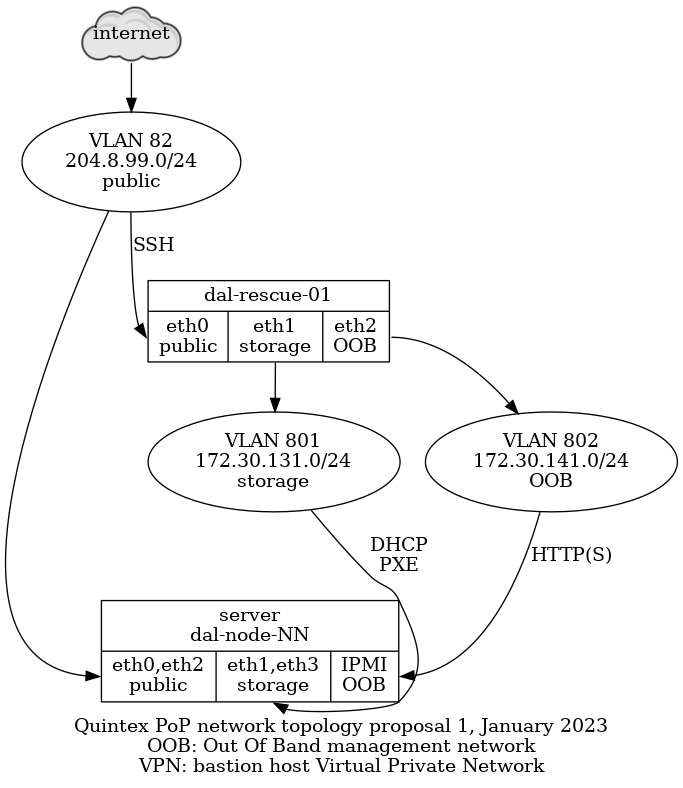
This network is split in those VLANs:
-
"public": VLAN 82 - 204.8.99.0/24, directly accessible on the global network, behind a Quintex router,
eth0on all nodes, could eventually be aggregated witheth2 -
"storage": VLAN 801 - 172.30.131.0/24, used by the Ganeti cluster for DRBD replication, not accessible by the internet,
eth1on all nodes, could eventually be aggregated witheth3 -
"OOB": VLAN 802 - 172.30.141.0/24, access to the "out of band" (OOB) management interfaces, not accessible by the internet, connected to the OOB or "IPMI" interface on all nodes, except on the
dal-rescue-01host, where it iseth2
Note that the above use the non-"predictable" interface names,
i.e. eth0 and eth1 instead of eno1np0 and eno1np1 or
enp129s0f0 and enp129s0f1.
Also note that have the public and storage VLANs on the same NIC
(i.e. public on eth0 and storage on eth1). This is because we plan
on doing aggregation in the long term and that will allow us to
survive a NIC failure. Assuming NIC one has eth0 and eth1 and NIC
two has eth2 and eth3, if the public VLAN is on eth0 and eth2,
it will survive a failure of one NIC.
It physically looks like this:
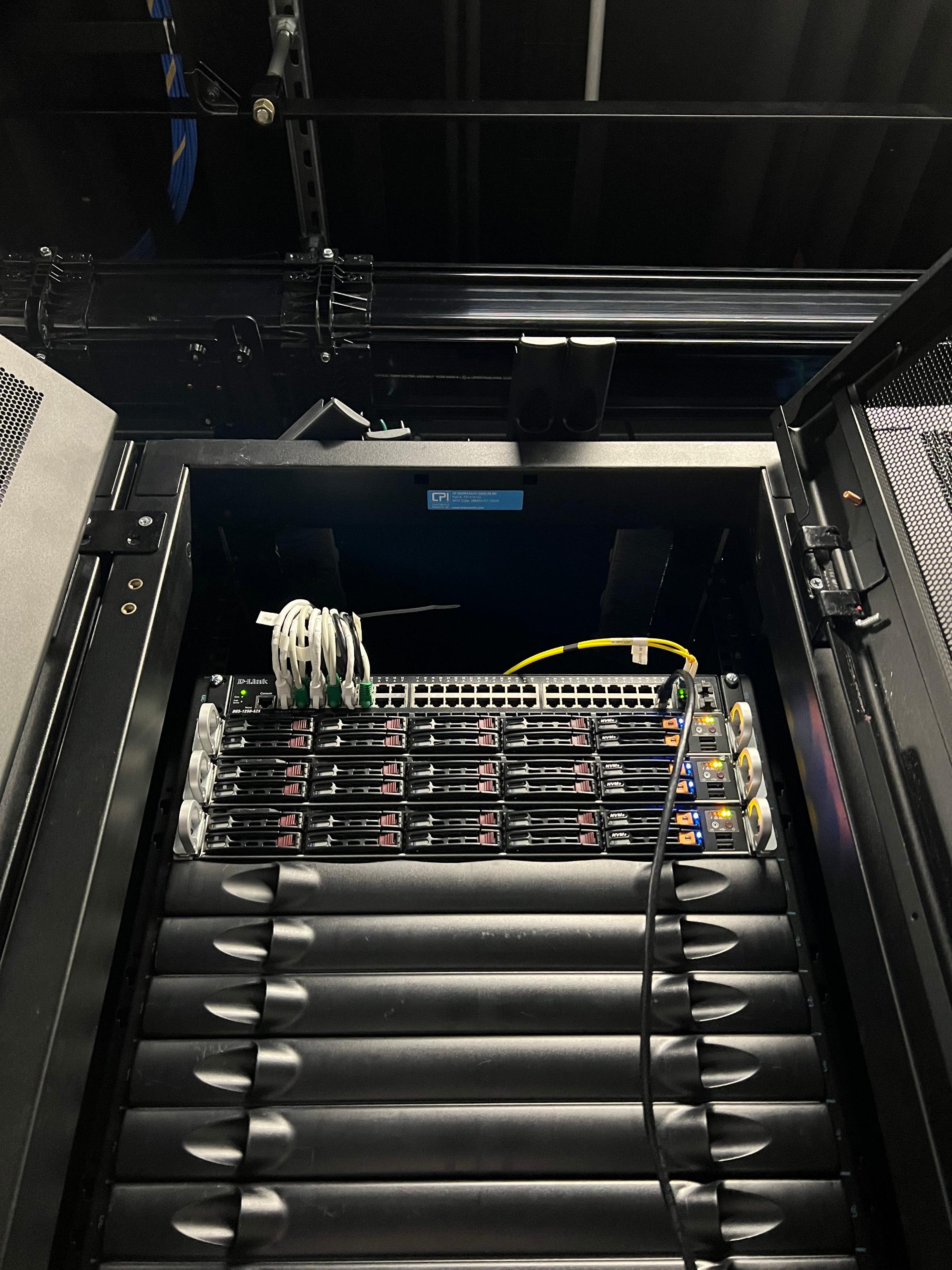
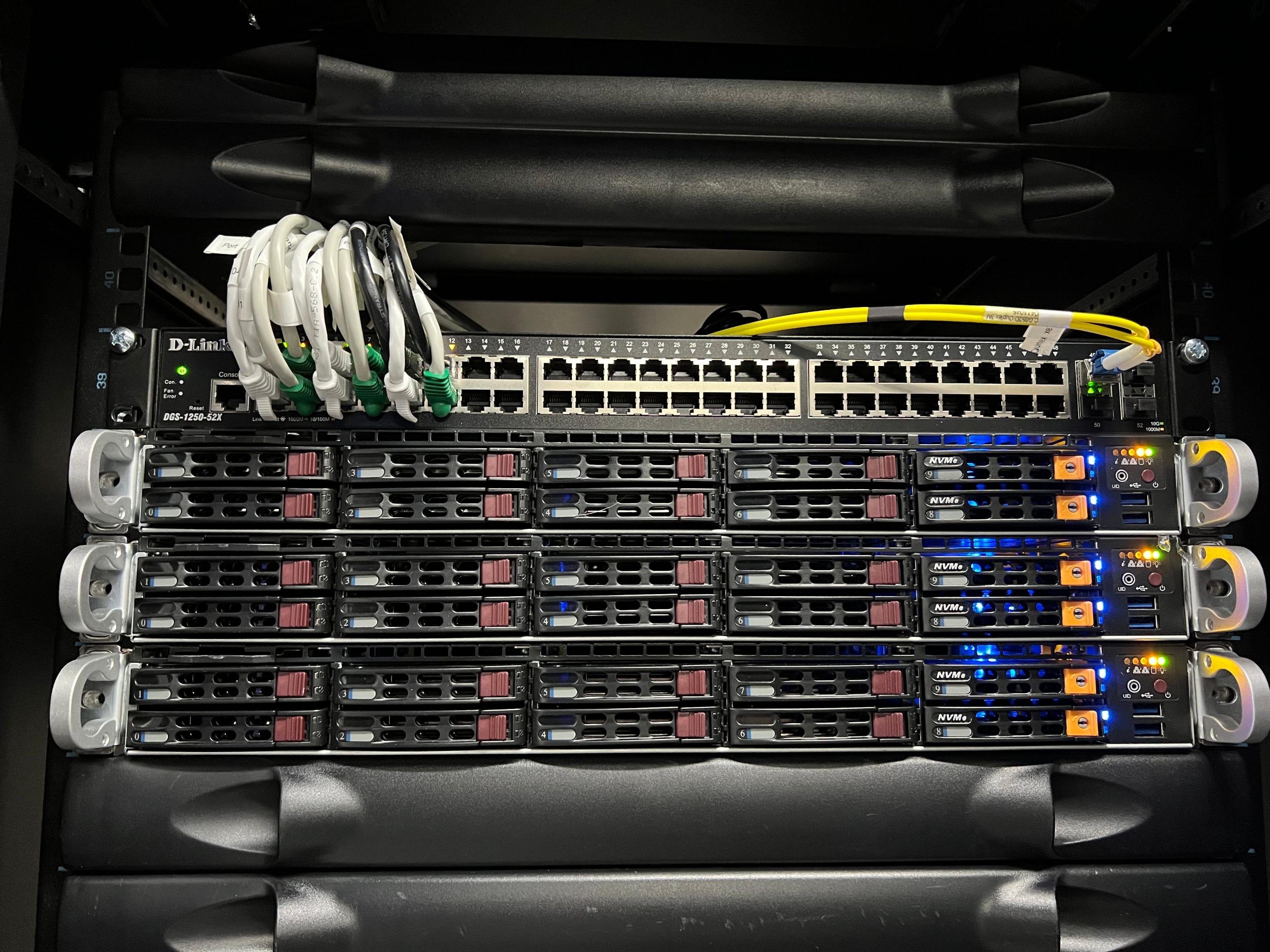
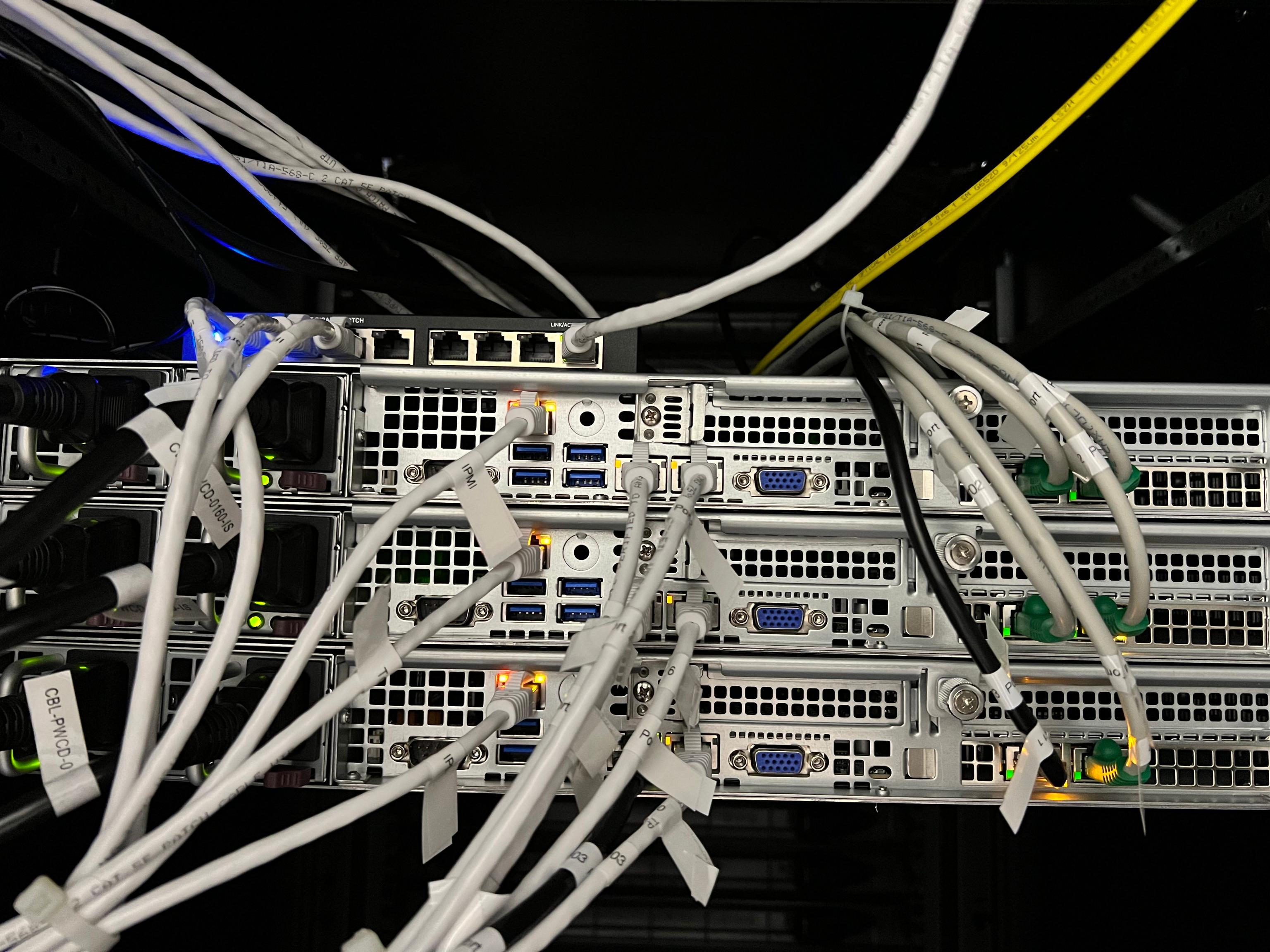
The above pictures don't show the actual running switch, which has been replaced since those pictures were taken.
The machines are connected to a Dell N3048 switch that has 48 gigabit ports and two SFP ports. The SFP ports are 10gbit uplinks to the Quintex switch fabric.
Each machine's interfaces are connected to the switch in order, from left to right, of their interface ports, excluding the IPMI port. So, assuming the ports are numbered in order, the ports are actually mapped like this:
Switch <----------> Server
Port 1 <----------> dal-node-01, port 1 (eth0)
Port 2 <----------> dal-node-01, port 2 (eth1)
Port 3 <----------> dal-node-01, port 3 (eth2)
Port 4 <----------> dal-node-01, port 4 (eth3)
Port 5 <----------> dal-node-02, port 1 (eth0)
Port 6 <----------> dal-node-02, port 2 (eth1)
Port 7 <----------> dal-node-02, port 3 (eth2)
Port 8 <----------> dal-node-02, port 4 (eth3)
Port 9 <----------> dal-node-03, port 1 (eth0)
Port 10 <----------> dal-node-03, port 2 (eth1)
Port 11 <----------> dal-node-03, port 3 (eth2)
Port 12 <----------> dal-node-03, port 4 (eth3)
The ports were manually mapped to the right VLANs through the switch web interface. There's an issue open to make sure we have some backups and better configuration management on the switch, see tpo/tpa/team#41089.
Services
The main service at this point of presence is a 3-machine Ganeti
cluster called gnt-dal.
gnt-dal Hardware
Each machine is identical:
- SuperMicro 1114CS-TNR 1U
- AMD Milan (EPYC) 7713P 64C/128T @ 2.00Ghz 256M cache
- 512G DDR4 RAM (8x64G)
- 2x Micron 7450 PRO, 480GB PCIe 4.0 NVMe*, M.2 SSD
- 6x Intel S4510 1.92T SATA3 SSD
- 2x Intel DC P4610 1.60T NVMe SSD
- Subtotal: 12,950$USD
- Spares:
- Micron 7450 PRO, 480GB PCIe 4.0 NVMe*, M.2 SSD: 135$
- Intel® S4510, 1.92TB, 6Gb/s 2.5" SATA3 SSD(TLC), 1DWPD: 345$
- Intel® P4610, 1.6TB NVMe* 2.5" SSD(TLC), 3DWPD: 455$
- DIMM (64GB): 275$
- labour: 55$/server
- Total: 40,225$USD
- TODO: final cost to be confirmed
- Extras: shipping, 350$ (estimate)
- Grand total: 41,000$USD (estimate)
For three such servers, we have:
- 192 cores, 384 threads
- 1536GB RAM (1.5TB)
- 34.56TB SSD storage (17TB after RAID-1)
- 9.6TB NVMe storage (4.8TB after RAID-1)
See TPA-RFC-43 for a more in-depth discussion of the chosen hardware and location.
Storage
Data in this cluster is stored on SSD and NVMe drive and should be fast. We have about 20TB of storage total, not counting DRBD redundancy.
Queues
Interfaces
Authentication
Implementation
Related services
Issues
There is no issue tracker specifically for this project, File or search for issues in the team issue tracker with the label ~Foo.
Maintainer
Users
Upstream
Monitoring and metrics
Tests
Logs
Backups
RANCID
The rancid package is installed on dal-rescue-01, and configured to
download the running-config and other interesting bits from dal-sw-01 on a
daily basis and store them in a git repository at /var/lib/rancid/dal/configs.
This is managed using the profile::rancid Puppet class.
Other documentation
Discussion
Overview
Security and risk assessment
Technical debt and next steps
Proposed Solution
A battery of proposals were made when migrating to Quintex, see:
Other alternatives
We are not fully satisfied with this hosting, see this comment for details.
Legacy iPXE configuration
We were previously using a custom iPXE image to boot off HTTPS in the network boot rescue environment. This is not required anymore as we boot over the local network in plain HTTP, but notes about how this was configured are kept here in case we need them again in the future.
We needed a special virtual host with a minimal certificate chain for iPXE to load it correctly. The certificate should be created with:
certbot --preferred-chain "ISRG Root X1" [...]
In our Dehydrated configuration, concretely, it meant adding an
override in per-domain-config/dal-rescue.torproject.org with:
PREFERRED_CHAIN="ISRG Root X1"
Another workaround is to embed the certs in the iPXE trust chain.
This has been configured in the https://dal-rescue.torproject.org/ site already.
Note that we usually want the "full" variant. The "small" variant can also work
but you'll have to adjust the path inside the mounted image from where vmlinux
and initrd.img are extracted and also the live-media-path in the .ipxe file
below.
On dal-rescue-01, download the GRML ISO and verify its signature:
IMAGE_NAME="grml-full-2025.08-amd64.iso"
apt install debian-keyring &&
cd /srv/www/dal-rescue.torproject.org/htdocs/ &&
wget "https://download.grml.org/${IMAGE_NAME}.asc" &&
wget "https://download.grml.org/${IMAGE_NAME}" &&
gpg --verify --keyring /usr/share/keyrings/debian-keyring.gpg "${IMAGE_NAME}.asc"
The last command above should identify a good signature from someone (for example Michael Prokop). It might not be able to verify a trust relationship to that key but at least identifying a good signature from a debian dev should be good enough.
Extract the vmlinuz and initrd.img boot files, and modify the
latter as follows:
echo extracting vmlinuz and initrd from ISO... &&
mount "${IMAGE_NAME}" /mnt -o loop &&
cp /mnt/boot/grmlfullamd64/* . &&
umount /mnt &&
rm grml.iso && ln "${IMAGE_NAME}" grml.iso
In the above procedure, the files vmlinuz, initrd.img and grml.iso were
placed in a directory that is currently exposed on a public HTTPS
endpoint.
Note: we now loop-mount the ISO instead of doing this extraction.
If that fails at the first step on a torproject.org server, it's
likely because the kernel cannot load the loop module:
mount: /mnt: mount failed: Operation not permitted.
Reboot and try again before the kernel lockdown
happens. Alternatively, try to add loop, isofs and cdrom to
/etc/modules.
If it does not already exist, create the file /srv/tftp/autoload.ipxe with the
following contents:
#!ipxe
kernel https://dal-rescue.torproject.org/vmlinuz
initrd https://dal-rescue.torproject.org/initrd.img
initrd https://dal-rescue.torproject.org/grml.iso /grml.iso
imgargs vmlinuz initrd=initrd.magic boot=live config fromiso=/grml.iso live-media-path=/live/grml-full-amd64 noprompt noquick noswap console=tty0 console=ttyS1,115200n8 ssh netconfig=http://172.30.131.1/ssh-keys.tgz
boot
Note: we now deploy a more elaborate file from Puppet directly. We
also load the .squashfs file instead of the ISO, which delegates the
loading to the GRML init system instead of TFTP, so it has a better
progress bar, and seems faster.
Modified iPXE image
To be able to load images over HTTPS, we had to rebuild iPXE with
DOWNLOAD_PROTO_HTTPS and UEFI support:
git clone git://git.ipxe.org/ipxe.git &&
cd ipxe/src &&
mkdir config/local/tpa/ &&
cat > config/local/tpa/general.h <<EOF
#define DOWNLOAD_PROTO_HTTPS /* Secure Hypertext Transfer Protocol */
#undef NET_PROTO_STP /* Spanning Tree protocol */
#undef NET_PROTO_LACP /* Link Aggregation control protocol */
#undef NET_PROTO_EAPOL /* EAP over LAN protocol */
#undef CRYPTO_80211_WEP /* WEP encryption (deprecated and insecure!) */
#undef CRYPTO_80211_WPA /* WPA Personal, authenticating with passphrase */
#undef CRYPTO_80211_WPA2 /* Add support for stronger WPA cryptography */
#define NSLOOKUP_CMD /* DNS resolving command */
#define TIME_CMD /* Time commands */
#define REBOOT_CMD /* Reboot command */
#define POWEROFF_CMD /* Power off command */
#define PING_CMD /* Ping command */
#define IPSTAT_CMD /* IP statistics commands */
#define NTP_CMD /* NTP commands */
#define CERT_CMD /* Certificate management commands */
EOF
make -j4 bin-x86_64-efi/ipxe.efi CONFIG=tpa &&
dd if=/dev/zero of=./ipxe.img bs=512 count=2880 &&
sudo losetup loop0 ./ipxe.img &&
sudo mkfs.msdos /dev/loop0 &&
sudo mount /dev/loop0 /mnt &&
sudo mkdir -p /mnt/EFI/BOOT &&
sudo cp bin-x86_64-efi/ipxe.efi /mnt/EFI/BOOT/BOOTX64.EFI &&
sudo umount /mnt &&
sudo losetup -d /dev/loop0
Here we use named configurations instead of patching the
global.h file. To be verified.
If we need to do this again, we might be able to rely on UEFI HTTP
boot support and bypass iPXE altogether. Such a setup might be able to
boot the ISO directly, from
http://172.30.131.1/grml-full-2025.08-amd64.iso.
We keep our plans for the future (and the paste) here.
- roadmap/2020
- roadmap/2021
- roadmap/2022
- roadmap/2023
- roadmap/tails-merge
- TPA-RFC-61: 2024 roadmap
- roadmap/2025
- from 2026 onwards, roadmaps are managed as epics, see:
- https://gitlab.torproject.org/groups/tpo/tpa/-/epics/2+
Quarterly reviews are posted as comments in the epic.
This page documents a possible roadmap for the TPA team for the year 2020.
Items should be SMART, that is:
- specific
- measurable
- achievable
- relevant
- time-bound
Main objectives (need to have):
- decommissining of old machines (moly in particular)
- move critical services in ganeti
- buster upgrades before LTS
- within budget
Secondary objectives (nice to have):
- new mail service
- conversion of the kvm* fleet to ganeti for higher reliability and availability
- buster upgrade completion before anarcat vacation
Non-objective:
- service admin roadmapping?
- kubernetes cluster deployment?
Assertions:
- new gnt-fsn nodes with current hardware (PX62-NVMe, 118EUR/mth), cost savings possible with the AX line (-20EUR/mth) or by reducing disk space requirements (-39EUR/mth) per node
- cymru actually delivers hardware and is used for moly decom
- gitlab hardware requirements covered by another budget
- we absorb the extra bandwidth costs from the new hardware design (currently 38EUR per month but could rise when new bandwidth usage comes in) - could be shifted to TBB team or at least labeled as such
TODO
- nextcloud roadmap
- identify critical services and realistic improvements #31243 (done)
- (anarcat & gaba) sort out each month by priority (mostly done for feb/march)
- (gaba) add keywords #tpa-roadmap- for each month (doing for february and march to test how this would work) (done)
- (anarcat) create missing tickets for february/march (partially done, missing some from hiro)
- (at tpa meeting) estimate tickets! (1pt = 1 day)
- (gaba) reorganize budget file per month
- (gaba) create a roadmap for gitlab migration
- (gaba) find service admins for gitlab (nobody for trac in services page) - gaba to talk with isa and alex and look for service admins (sent a mail to las vegas but nobody replied... I will talk with each team lead)
- have a shell account in the server
- restart/stop service
- upgrade services
- problems with the service
Monthly reports
January
- catchup after holidays
- agree internally on a roadmap for 2020
- first phase of installer automation (setup-storage and friends) #31239
- new FSN node in the Ganeti cluster (fsn-node-03) #32937
- textile shutdown and VM relocation, 2 VMs to migrate #31686 (+86EUR)
- enable needrestart fleet-wide (#31957)
- review website build errors (#32996)
- evaluate if discourse can be used as comments platform for the blog (#33105) <-- can we move this further down the road (not february) until gitlab is migrated? -->
- communicate buster upgrade timeline to service admins DONE
- buster upgrade 63% done: 48 buster, 28 stretch machines
February
capacity around 15 days (counting 2.5 days per week for anarcat and 5 days per month for hiro)
ticket list (11 closed)
- 2020 roadmap officially adopted - done
- second phase of installer automation #31239 (esp. puppet automation, e.g. #32901, #32914) - done
- new gnt-fsn node (fsn-node-04) -118EUR=+40EUR (#33081) - done
- storm shutdown #32390 - done
- unifolium decom (after storm), 5 VMs to migrate, #33085 +72EUR=+158EUR - not completed
- buster upgrade 70% done: 53 buster (+5), 23 stretch (-5) - done: 54 buster (+6), 22 stretch (-6), 1 jessie
- migrate gitlab-01 to a new VM (gitlab-02) and use the omnibus package instead of ansible (#32949) - done
- migrate CRM machines to gnt and test with Giant Rabbit #32198 (priority) - not done
- automate upgrades: enable unattended-upgrades fleet-wide (#31957 ) - not done
- anti-censorship monitoring (external prometheus setup assistance) #31159 - not done
March
capacity around 15 days (counting 2.5 days per week for anarcat and 5 days per month for hiro)
ticket list (12 closed)
High possibility of overload here (two major decoms and many machines setup). Possible to push moly/cymru work to april?
- 2021 budget proposal?
- possible gnt-cymru cluster setup (~6 machines) #29397
- moly decom #29974, 5 VMs to migrate
- kvm3 decom, 7 VMs to migrate (inc. crm-int and crm-ext), #33082 +72EUR=+112EUR
- new gnt-fsn node (fsn-node-05) #33083 -118EUR=-6EUR
- eugeni VM migration to gnt-fsn #32803
- buster upgrade 80% done: 61 buster (+8), 15 stretch (-8)
- solr deployment (#33106)
- anti-censorship monitorining (external prometheus setup assistance) #31159
- nc.riseup.net cleanup #32391
- SVN shutdown? #17202
April
ticket list (22 closed)
- kvm4 decom, 9 VMs to migrate #32802 (w/o eugeni), +121EUR=+115EUR
- new gnt-fsn node (fsn-node-06) -118EUR=-3EUR
- buster upgrade 90% done: 68 buster (+7), 8 stretch (-7)
- solr configuration
May
ticket list (16 closed)
- kvm5 decom, 9 VMs to migrate #33084, +111EUR=+108EUR
- new gnt-fsn node (fsn-node-07) -118EUR=-10EUR
- buster upgrade 100% done: 76 buster (+8), 0 stretch (-8)
- current planned completion date of Buster upgrades
- start ramping down work, training and documentation
- solr text updates and maintenance
June
ticket list (25 closed)
- Debian jessie LTS EOL, chiwui forcibly shutdown #29399
- finish ramp-down, final bugfixing and training before vacation
- search.tp.o soft launch
July
(Starting from here, we have migrated to GitLab and have stopped tracking tickets in milestones (which became labels in GitLab) so there are no ticket lists anymore.)
- Debian stretch EOL, final deadline for buster upgrades
- anarcat vacation
- tor meeting?
- hiro tentative vacations
August
- anarcat vacation
- web metrics R&D (investigate a platform for web metrics) (#32996)
September
- plan contingencies for christmas holidays
- catchup following vacation
- web metrics deployment
October
- puppet work (finish prometheus module development, puppet environments, trocla, Hiera, publish code #29387)
- varnish to nginx conversion #32462
- web metrics soft launch (in time for eoy campaign)
- submit service R&D #30608
November
- first submit service prototype? #30608
December
- stabilisation & bugfixing
- 2021 roadmapping
- one or two week xmas holiday
- CCC?
2021 preview
Objectives:
- complete puppetization
- experiment with containers/kubernetes?
- close and merge more services
- replace nagios with prometheus? #29864
- new hire?
Monthly goals:
- january: roadmap approval
- march/april: anarcat vacation
See the 2021 roadmap for a review of this roadmap and a followup.
This page documents a general plan for the year 2021.
A first this year, we did a survey at the end of the year 2020 to help us identify critical services and pain points so that we can focus our work in the coming year.
- Overall goals
- Quarterly breakdown
- 2020 roadmap evaluation
- Survey results
Overall goals
Those goals are based on the user survey performed in December 2020 and are going to be discussed in the TPA team in January 2021. This was formally adopted as a guide for TPA in the 2021-01-26 meeting.
As a reminder, the priority suggested by the survey is "service stabilisation" before "new services". Furthermore, some services are way more popular than others, so those services should get special attention. In general, the over-arching goals are therefore:
- stabilisation (particularly email but also GitLab, Schleuder, blog, service retirements)
- better communication (particularly with developers)
Must have
-
email delivery improvements: generally postponed to 2022, and needs better architecture. some work was still done.- handle bounces in CiviCRM (issue 33037)
- systematically followup on and respond to abuse complaints (https://gitlab.torproject.org/tpo/tpa/team/-/issues/40168)
-
diagnose
and resolvedelivery issues (e.g. Yahoo, state.gov, Gmail, Gmail again) - provide reliable delivery for users ("my email ends up in spam!"), possibly by following newer standards like SPF, DKIM, DMARC... (issue 40363)
-
possible implementations:
- setup a new MX server to receive incoming email, with "real" (Let's encrypt) TLS certificates, routing to "legacy" (eugeni) mail server
- setup submit-01 to deliver people's emails (issue 30608)
- split mailing lists out of eugeni (build a new mailman 3 mail server?)
- split schleuder out of eugeni (or retire?) (issue)
- stop using eugeni as a smart host (each host sends its own email, particularly RT and CiviCRM)
- retire eugeni (if there is really nothing else left on it)
-
retire old services:
- SVN (issue 17202)
- fpcentral (issue 40009)
-
scale GitLab with ongoing and surely expanding usage
- possibly split in multiple server (#40479)
- throw more hardware at it: resized VM twice
- monitoring? we should monitor the runners, as they have Prometheus exporters
-
provide reliable and simple continuous integration services
- retire Jenkins (https://gitlab.torproject.org/tpo/tpa/team/-/issues/40218)
-
replace with GitLab CI, with Windows, Mac and Linux runnersdelegated to the network team (yay! self-managed runners!) - deployed more runners, some with very specific docker configurations
-
fix the blog formatting and comment moderation, possible solutions:
- migrate to a static website and Discourse https://gitlab.torproject.org/tpo/tpa/team/-/issues/40183 https://gitlab.torproject.org/tpo/tpa/team/-/issues/40297
-
improve communications and monitoring:
- document "downtimes of 1 hour or longer", in a status page issue 40138
-
reduce alert fatigue in NagiosNagios is going to require a redesign in 2022, even if just for upgrading it, because it is a breaking upgrade. maybe rebuild a new server with puppet or consider replacing with Prometheus + alert manager - publicize debugging tools (Grafana, user-level logging in systemd services)
- encourage communication and ticket creation
- move root@ and tpa "noise" to RT (ticket 31242),
- make a real mailing list for admins so that gaba and non-tech can join (ticket)
-
be realistic:
- cover for the day-to-day routine tasks
- reserve time for the unexpected (e.g. GitLab CI migration, should schedule team work)
- reduce expectations
- on budget: hosting expenses shouldn't rise outside of budget (January 2020: 1050EUR/mth, January 2021: 1150EUR/mth, January 2022: 1470EUR/mth, ~100EUR rise approved, rest is DDOS, IPv4 billing change)
Nice to have
-
improve sysadmin code base
- implement an ENC for Puppet (issue 40358)
- avoid YOLO commits in Puppet (possibly: server-side linting, CI)
- publish our Puppet repository (ticket 29387)
- reduce dependency on Python 2 code (see short term LDAP plan)
- reduce dependency on LDAP (move hosts to Puppet? see mid term LDAP plan)
-
avoid duplicate git hosting infrastructure
- retire gitolite, gitweb (issue 36)
-
retire more old services:
- testnet? talk to network team
- gitolite (replaced with GitLab, see above)
- gitweb (replaced with GitLab, see above)
- provide secure, end-to-end authentication of Tor source code (issue 81)
- finish retiring old hardware (moly, ticket 29974)
- varnish to nginx conversion (#32462)
- GitLab pages hosting (see issue tpo/tpa/gitlab#91)
- experiment with containers/kubernetes for CI/CD
- upgrade to bullseye - a few done, 12 out of 90!
- cover for some metrics services (issue 40125)
- help other teams integrate their monitoring with Prometheus/Grafana (e.g. Matrix alerts, tpo/tpa/team#40089, tpo/tpa/team#40080, tpo/tpa/team#31159)
Non-goals
- complete email service: not enough time / budget (or delegate + pay Riseup)
- "provide development/experimental VMs": would be possible through GitLab CD, to be investigated once we have GitLab CI solidly running
- "improve interaction between TPA and developers when new services are setup": see "improve communications" above, and "experimental VMs". The endgame here is people will be able to deploy their own services through Docker, but this will likely not happen in 2021
- static mirror network retirement / re-architecture: we want to test out GitLab pages first and see if it can provide a decent alternative (update: some analysis performed in the static site documentation)
- web development stuff: goals like "finish main website transition", "broken links on website"... should be covered in the web team, but the capacity of TPA is affected by hiro working on the web stuff
- are service admins still a thing? should we cover for things like the metrics team? update: discussion postponed
- complete puppetization: old legacy services are not in Puppet. that is fine: we keep maintaining them by hand when relevant, but new services should all be built in Puppet
- replace Nagios with Prometheus: not a short term goal, no clear benefit. reduce the noise in Nagios instead
- solr/search.tpo deployment (#33106), postponed to 2022
- web metrics (#32996), postponed to 2022
Quarterly breakdown
Q1
First quarter of 2021 is fairly immediate, short term work, as far as this roadmap is concerned. It should include items we are fairly certain to be able to complete within the next few months or so. Postponing those could cause problems.
-
email delivery improvements:
- handle bounces in CiviCRM (issue 33037)
- followup on abuse complaints (https://gitlab.torproject.org/tpo/tpa/team/-/issues/40168) - we do a systematic check of incoming bounces and actively remove people from the CiviCRM newsletter or mailing lists when we receive complaints
-
diagnose
and resolvedelivery issue (e.g. yahoo delivery problems, https://gitlab.torproject.org/tpo/tpa/team/-/issues/40168) problems seem to be due to the lack of SPF and DMARC records, which we can't add until we setup submit-01. also, we need real certs for accepting mails over TLS for some servers, so we should setup an MX that supports that
- GitLab CI deployment (issue 40145)
- Jenkins retirement plan (https://gitlab.torproject.org/tpo/tpa/team/-/issues/40167)
- setup a long-term/sponsored discourse instance?
- document "downtimes of 1 hour or longer", in a status page issue 40138
Q2
Second quarter is a little more vague, but should still be "plannable". Those are goals that are less critical and can afford to wait a little longer or that are part of longer projects that will take longer to complete.
-
retire old services:postponed-
SVN (issue 17202)postponed to Q4/2022 - fpcentral retirement plan (issue 40009)
-
establish plan for gitolite/gitweb retirement (issue 36)postponed to Q4
-
-
improve sysadmin code basepostponed to 2022 or drive-by fixes -
scale/split gitlab?seems to be working fine and we setup new builders already - onion v3 support for TPA services (https://gitlab.torproject.org/tpo/tpa/team/-/issues/32824)
Update: many of those tasks were not done because of lack of staff due to an unplanned leave.
Q3
From our experience, after three quarters, things get difficult to predict reliably. Last year, the workforce was cut by a third some time before this time, which totally changed basic assumptions about worker availability and priorities.
Also, a global pandemic basically tore the world apart, throwing everything in the air, so obviously plans kind of went out the window. Hopefully this won't happen again and the pandemic will somewhat subside, but we should plan for the worst.
- establish solid blog migration plan, see blog service and https://gitlab.torproject.org/tpo/tpa/team/-/issues/40183 tpo/tpa/team#40297
- vacations
- onboarding new staff
Update: this quarter and the previous one, as expected, has changed radically from what was planned, because of the staff changes. Focus will be on training and onboarding, and a well-deserved vacation.
Q4
Obviously, the fourth quarter is sheer crystal balling at this stage, but it should still be an interesting exercise to perform.
- blog retirement before Drupal 8 EOL (November 2021)
- migrate to a static website and Discourse https://gitlab.torproject.org/tpo/tpa/team/-/issues/40183 https://gitlab.torproject.org/tpo/tpa/team/-/issues/40297
-
gitolite/gitweb retirement plan (issue 36)postponed to 2022 - jenkins retirement
- SVN retirement plan (issue 17202)
- fpcentral retirement (issue 40009)
-
redo the user survey and 2022 roadmapabandoned (https://gitlab.torproject.org/tpo/tpa/team/-/issues/40307) -
BTCpayserver hosting (https://gitlab.torproject.org/tpo/tpa/team/-/issues/33750)pay for BTCpayserver hosting (tpo/tpa/team#40303) - move root@ and tpa "noise" to RT (tpo/tpa/team#31242), make a real mailing list for admins so that gaba and non-tech can join
- setup submit-01 to deliver people's emails (tpo/tpa/team#30608)
-
donate website React.js vanilla JS rewritepostponed to 2022, but postponed (tpo/web/donate-static#45) - rewrite bridges.torproject.org templates as part of Sponsor 30's project (https://gitlab.torproject.org/tpo/anti-censorship/bridgedb/-/issues/34322)
2020 roadmap evaluation
The following is a review of the 2020 roadmap.
Must have
- retiring old machines (moly in particular)
- move critical services in ganeti
- buster upgrades before LTS
- within budget: Hetzner invoices went from ~1050EUR/mth on January 2019 to 1200EUR/mth on January 2020, so more or less on track
Comments:
- critical services were swiftly moved into Ganeti
- moly has not been retired, but it is redundant so less of a concern
- a lot of the buster upgrades work was done by a volunteer (thanks @weasel!)
- the budget was slashed by half, but was still mostly respected
Nice to have
-
new mail service - conversion of the kvm* fleet to ganeti for higher reliability and availability
-
buster upgrade completion before anarcat vacation
Comments:
- the new mail service was postponed indefinitely due to workforce reduction, it was seen as a lesser priority project than stabilising the hardware layer
- buster upgrades were a bit later than expected, but still within the expected timeframe
- most of the KVM fleet was migrated (apart from moly) so that's still considered to be a success
Non-goal
- service admin roadmapping?
-
kubernetes cluster deployment?
Comments:
- we ended up doing a lot more service admin work than we usually do, or at least that we say we do, or at least that we say we want to do
- it might be useful to include service admin roadmapping in this work in order to predict important deployments in 2021: the GitLab migration, for example, took a long time and was underestimated
Missed goals
The following goals, set in the monthly roadmap, were not completed:
- moly retirement
- solr/search.tpo deployment
- SVN retirement
- web metrics (#32996)
- varnish to nginx conversion (#32462)
- submit service (#30608)
2021 preview
Those are the ideas that were brought up in 2020 for 2021:
Objectives
-
complete puppetization - complete Puppetization does not seem like a priority at this point. We would prefer to improve the CI/CD story of Puppet instead
-
experiment with containers/kubernetes? - not a priority, but could be a tool for GitLab CI
-
close and merge more services - still a goal
-
replace nagios with prometheus?- not a short term goal -
new hire?- definitely not a possibility in the short term, although we have been brought back full time
Monhtly goals
- january: roadmap approval - still planned
- march/april: anarcat vacation - up in the air
Survey results
This roadmap benefits from a user survey sent to tor-internal@ in
December. This section discusses the results of that survey and tries
to draw general (qualitative) conclusions from that (quantitative)
data.
This was done in issue 40061, and data analysis in issue 40106.
Respondents information
- 26 responses: 12 full, 14 partial
- all paid workers: 9 out of 10 respondents were paid by TPI, the other was paid by another entity to work on Tor
- roles: of the 16 people that filled the "who are you section":
- programmers: 9 (75%)
- management: 4 (33%) included a free-formed "operations" here, which should probably be used in the next survey)
- documentation: 1 (8%)
- community: 1 (8%)
- "yes": 1 (as in: "yes I participate")
- (and yes, those add up to more than 100%, obviously, there is some overlap, but we can note that sysadmins did not respond to their own survey)
The survey should be assumed to represent mostly TPI employees, and not the larger tor-internal or Tor-big-t community.
General happiness
No one is sad with us! People are either happy (15, 58% of total, 83% responding), exuberant (3, 12%, 17% responding), or didn't answer.
Of those 18 people, 10 said the situation has improved in the last year (56%) as well.
General prioritization
The priority for 2021 should be, according to the 12 people who answered:
- Stability: 6 (50%)
- New services: 3 (25%)
- Remove cruft: 1 (8%)
- "Making the interaction between TPA/dev smoother when new services are set up": 1 (8%)
- No answer: 1 (8%)
Services to add or retire
People identified the following services as missing:
- Discord
- a full email stack, or at least outbound email
- discourse
- development/experimental VMs
- a "proper blog platform"
- "Continued enhancements to gitlab-lobby"
The following services had votes for retirement:
- git-rw (4, 33%)
- gitweb (4, 33%)
- SVN (3, 25%)
- blog (2, 17%)
- jenkins (2, 17%)
- fpcentral (1, 8%)
- schleuder (1, 8%)
- testnet (1, 8%)
Graphs
Those graphs were built from the results of the gigantic "service usage details" group, from the spreadsheet which will also provide more detailed information, a summary and detailed narrative of which is provided below.
Usage
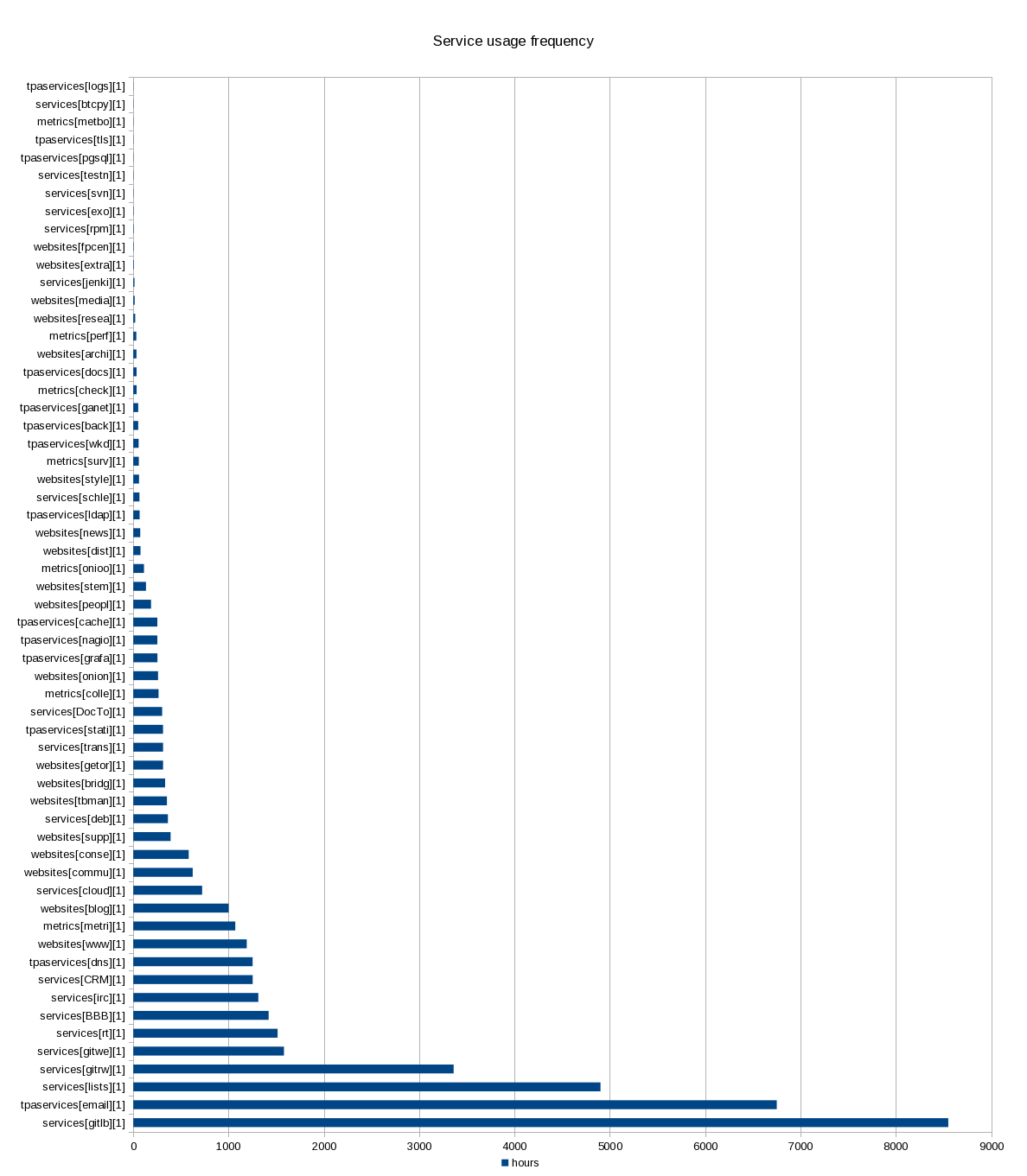
The X axis is not very clear, but it's the cumulative estimate of the number of hours a service is used in the last year, with 11 respondents. From there we can draw the following guesses of how often a service is used on average:
- 20 hours: yearly (about 2 hours per person per year)
- 100 hours: monthly (less than 1 hours per person per month)
- 500 hours: weekly (about 1 hour per person per week)
- 2500 hours: daily (assuming about 250 work days, 1 hour per person per day)
- 10000 hours: hourly (assuming about 4 hours of solid work per work day available)
Based on those metrics, here are some highlights of this graph:
- GitLab is used almost hourly (8550 hours, N=11, about 3 hours per business day on average)
- Email and lists are next, say about 1-2 hours a day on average
- Git is used about daily (through either Gitolite or Gitweb)
- other services are used "more than weekly", but not quite daily:
- RT
- Big Blue Button
- IRC
- CiviCRM
- DNS is, strangely, considered to be used "weekly", but that question was obviously not clear enough
- many websites sit in the "weekly" range
- a majority of services are used more than monthly ($
X > 100$) on average - there's a long tail of services that are not used often: 27
services are used less than monthly ($
X \le 100$), namely:- onionperf
- archive.tpo
- the TPA documentation wiki (!)
- check.tpo
- WKD
- survey.tpo
- style.tpo
- schleuder
- LDAP
- newsletter.tpo
- dist.tpo
- ... and 13 services are used less than yearly! ($
X \le 20$), namely:- bitcoin payment system
- metrics bot
- test net
- SVN
- exonerator
- rpm archive
- fpcentral
- extra.tpo
- jenkins
- media.tpo
- some TPA services are marked as not frequently used, but that is
probably due to a misunderstanding, as they are hidden or not
directly accessible:
- centralized logging system (although with no sysadmin responding, that's expected, since they're the only ones with access)
- TLS (which is used to serve all websites and secure more internal connections, like email)
- PostgreSQL (database which backs many services)
- Ganeti (virtualization layer on which almost all our services run)
- Backups (I guess low usage is a good sign?)
Happiness
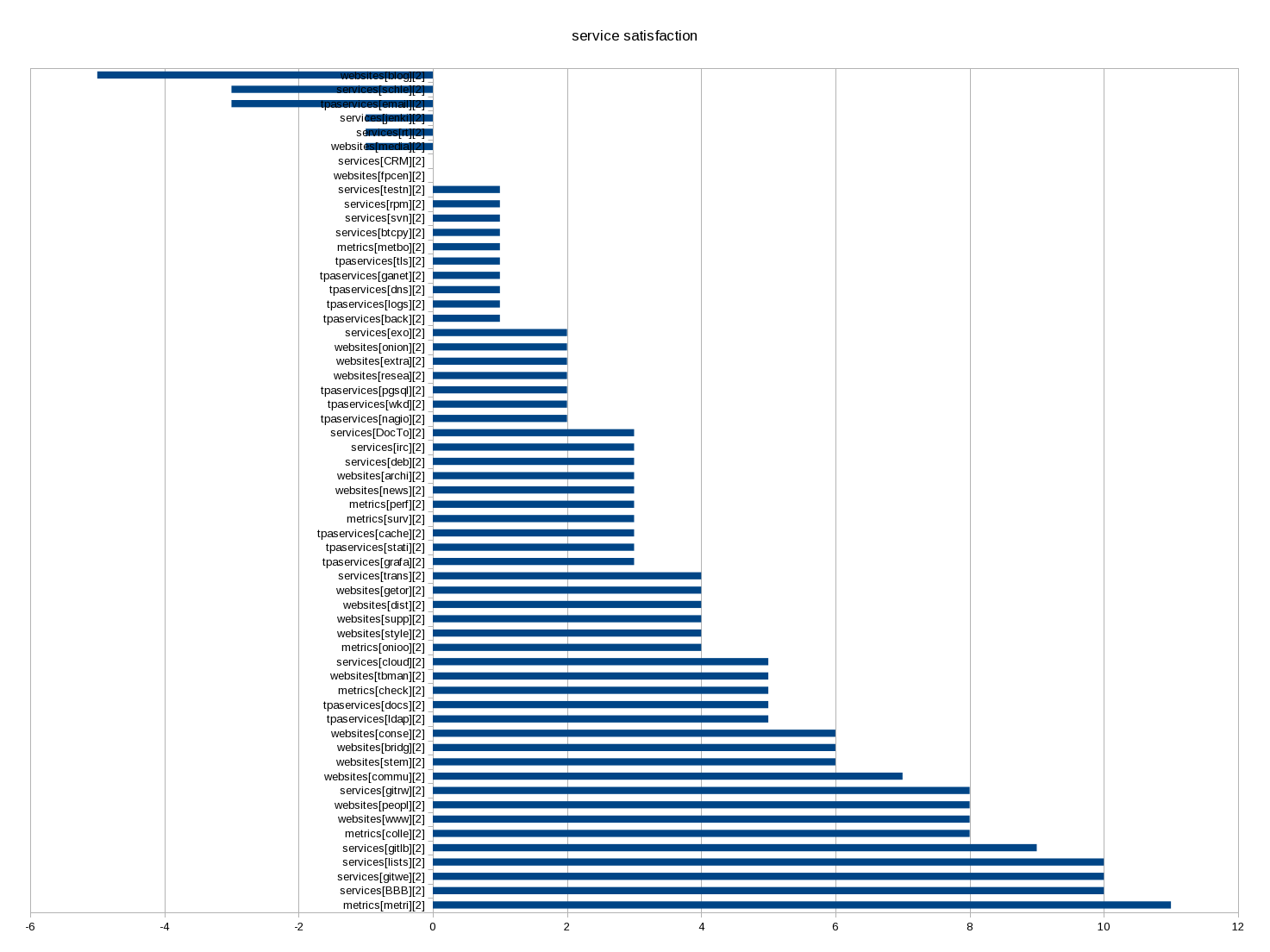
The six "unhappy" or "sad" services on top are:
- blog; -5 = 3 happy minus 8 sad
- schleuder; -3 = just 3 sad
- email; -3 = 2 - 5
- jenkins: -1 = just 1 sad
- RT: -1 = 2 - 3
- media.tpo: -1 = 1 - 2
But those are just the services with a negative "happiness" score. There are other services with "sad" votes:
- CRM: 0 = 1 - 1
- fpcentral: 0 = 1 - 1
- backups (?): +1 = 2 - 1
- onion.tpo: +2 = 4 - 2
- research: +2 = 3 -1
- irc: +3 = 4 - 1
- deb.tpo: +3 = 4 - 1
- support.tpo: +4 = 5 - 1
- nextcloud: +5 = 7 - 2
- tbmanual: +5 = 6 - 1
- the main website: +8 = 9 - 1
- gitlab: +9 = 10 - 1
Summary of service usage details
This is a summary of the section below, detailing which services have been reviewed in details.
Actionable items
Those are suggestions that could be done in 2021:
- GitLab is a success, people want it expanded to replace git-rw/gitweb (Git hosting) and Jenkins (CI)
- email is a major problem: people want a Gmail replacement, or at least a way to deliver email without being treated as spam
- CiviCRM is a problem: it needs to handle bounces and we have frustrations with our consultants here
- the main website is a success, but there are concerns it still links to the old website
- some people would like to use the IRC bouncer but don't know how
- the blog is a problem: formatting issues and moderation cause significant pain, people suggest migrating to Discourse and a static blog
- people want a v3 onion.tpo which is planned already
In general, a lot of the problems related to email would benefit from splitting the email services into multiple servers, something that was previously discussed but should be prioritized in this year's roadmap. In general, it seems the delivery service should be put back on the roadmap this year as well.
Unactionable items
Those do not have a clear path to resolution:
- RT receives a lot of spam and makes people unhappy
- schleuder is a problem: tedious to use, unreliable, not sure what the solution is, although maybe splitting the service to a different machine could help
- people are extremely happy with metrics.tpo, and happy with Big Blue Button
- NextCloud is a success, but the collaborative edition is not working for key people who stay on other (proprietary/commercial) services for collaboration. unclear what the solution is here.
Service usage details and happiness
This section drills down into each critical service. A critical service here is one that either:
- has at least one sad vote
- has a comment
- is used more than "monthly" on average
We have a lot of services: it's basically impossible to process all of those in a reasonable time frame, and might not give us a lot more information anyways, as far as this roadmap is concerned.
GitLab
GitLab is a huge accomplishment. It's the most used service, which is exceptional considering it has been deployed only in the last few months. Out of 11 respondents, everyone uses it at least weekly, and most (6), hourly. So it has already become a critical service!
Yet people are extremely happy with it. Out of those 11 people, everyone but a single soul has said they were happy with it which gives it one of the best happiness score of all services (rank #5)!
Most comments about GitLab were basically asking to move more stuff to it (git-rw/gitweb and Jenkins, namely), someone even suggesting we "force people to migrate to GitLab". In particular, it seems we should look at retiring Jenkins in 2021: only one user (monthly), and an unhappy comment suggesting to migrate...
The one critic about the service is "too much URL nesting" and that it is hard to find things, since they do not map to the git-rw project hierarchy.
So GitLab is a win. We need to make sure it keeps running and probably expand it in 2021.
It should be noted, however, that Gitweb and Gitolite (git-rw), as a service, are one of the most frequently used (4th and 5th place, respectively) and one that makes people happy (10/10, 3rd place and 8/8, 9th place) so if/when we replace those service, we should be very careful that the web interface remains useful. One comment that may summarize the situation is:
Happy with gitolite and gitweb, but hope they will also be migrated to gitlab.
Email and lists
Email services are pretty popular: email and lists come second and third, right after GitLab! People are unanimously happy with the mailing lists service (which may be surprising), but the happiness degrades severely when we talk about "email" in general. Most people (5 out 7 respondants) are "sad" about the email service.
Comments about email are:
- "I don’t know enough to get away from Gmail"
- "Majority of my emails sent from my @tpo ends up in SPAM"
- "would like to have outgoing DKIM email someday"
So "fixing email" should probably be the top priority for 2021. In particular, we should be better at not ending up in spam filters (which is hard), provide an alternative to Gmail (maybe less hard), or at least document alternatives to Gmail (not hard).
RT
While we're talking about email, let's talk about Request Tracker, a lesser-known service (only 4 people use it, and 4 declared never using it), yet intensively used by those people (one person uses it hourly!), so it deserves special attention. Most of its users (3 out of 5) are unhappy with it. The concerns are:
- "Some automated ticket handling or some other way to manage the high level of bounce emails / tickets that go to donations@ would make my sadness go away"
- "Spam": presumably receiving too much spam in the queues
CiviCRM
Let's jump the queue a little (we'll come back to BBB and IRC below) and talk about the 9th most used service: CiviCRM. This is one of those services that is used by few of our staff, but done so intensively (one person uses it hourly). And considering how important its service is (donations!), it probably deserves to be higher priority. 2 people responded on the happiness scale, strangely, one happy and one unhappy.
A good summary of the situation is:
The situation with Civi, and our donate.tpo portal, is a grand source of sadness for me (and honestly, our donors), but I think this issue lies more with the fact that the control of this system and architecture has largely been with Giant Rabbit and it’s been like pulling teeth to make changes. Civi is a fairly powerful tool that has a lot of potential, and I think moving away from GR control will make a big difference.
Generally, it seems the spam, bounce handling and email delivery issues mentioned in the email section apply here as well. Migrating CiviCRM to start handling bounces and deliver its own emails will help delivery for other services, reduce abuse complaints, make CiviCRM work better, and generally improve everyone's life so it should definitely be prioritized.
Big Blue Button
One of those intensively used service by many people (rank #7): 10 people use it, 2 monthly, 3 weekly and 5 daily! It's also one of those most "happy" services: 10 people responded they were happy with the service, which makes it the second-most happy service!
No negative comments, great idea, great new deployment (by a third party, mind you), nothing to fix here, it seems.
IRC
The next service in popularity is IRC (rank #8), used by 3 people (hourly, weekly and monthly, somewhat strangely). The main comment was about the lack of usability:
IRC Bouncer: I’d like to use it! I don’t know how to get started, and I am sure there is documentation somewhere, but I just haven’t made time for it and now it’s two years+ in my Tor time and I haven’t done it yet.
I'll probably just connect that person with the IRC bouncer maintainer and pretend there is nothing else to fix here. I honestly expected someone to request us to setup Matrix server (and someone did suggest setting up a "Discord" server, so that might be it), but it didn't get explicitly mentioned, so not a priority, even if it's heavily used.
Main website
The new website is a great success. It's the 7th most used service according to our metrics, and also one that makes people the happiest (7th place).
The single negative comment on the website was "transition still not complete: links to old site still prominent (e.g. Documentation at the top)".
Maybe we should make sure more resources are transitioned to the new website (or elsewhere) in 2021.
Metrics
The metrics.torproject.org site is the service that makes people the happiest, in all the services surveyed. Of the 11 people that answered, all of them were happy with it. It's one of the most used services all around, at place #4.
Blog
People are pretty frustrated by the blog. of all people that answered the "happiness" question, all said they were "sad" about the service. in the free-form, comments mentioned:
- "comment formatting still not fixed", "never renders properly"
- [needs something to] produce link previews (in a privacy preserving way)
- "The comment situation is totally unsustainable but I feel like that’s a community decision vs. sysadmin thing", "comments are awful", "Comments can get out of hand and it's difficult to have productive conversations there"
- "not intuitive, difficult to follow"
- "difficult to find past blog posts[...]: no [faceted search or sort by date vs relevance]"
A positive comment:
- I like Drupal and it’s easy to use for me
A good summary has been provided: "Drupal: everyone is unhappy with the solution right now: hard to do moderation, etc. Static blog + Discourse would be better."
I outline the blog first because it's one of the most frequently used service, yet it's one of the "saddest", so it should probably be made a priority in 2021.
NextCloud
People are generally (77% of 9 respondents) happy with this popular service (rank 14, used by 9 people, 1 yearly, 2 monthly, 4 weekly, 2 daily).
Pain points:
-
discovery problems:
Discovering what documents there are is not easy; I wish I had a view of some kind of global directory structure. I can follow links onto nextcloud, but I never ever browse to see what's there, or find anything there on my own.
-
shared documents are too unreliable:
I want to love NextCloud because I understand the many benefits, but oh boy, it’s a problem for me, particularly in shared documents. I constantly lose edits, so I do not and cannot rely on NextCloud to write anything more serious than meeting notes. Shared documents take 3-5 minutes to load over Tor, and 2+ minutes to load outside of Tor. The flow is so clunky that I just can’t use it regularly other than for document storage.
I've ran into sync issues with a lot of users using the same pad at once. These forced us to not use nextcloud for collab in my team except when really necessary.
So overall NextCloud is heavily used, but has serious reliability problems that keep it from correctly replacing Google Docs for collaboration. It is unclear which way forward we can take here without getting involved into hosting the service or upstream development, neither of which are likely to be an option for 2021.
onion.tpo
Somewhat averagely popular service (rank 26), mentioned here because two people were unhappy with it as it "seems not maintained" and "would love to have v3 onions, I know the reason we don't have yet, but still, this should be a priority".
And thankfully, the latter is a priority that was originally aimed at 2020, but should be delivered in 2021 for sure. Unclear what to do about that other concern.
Schleuder
3 people responded on the happiness scale, and all were sad. Those three (presumably) use the service yearly, monthly and weekly, respectively, so it's not as important (27th service in popularity) as the blog (3rd service!), yet I mention it here because of the severity of the unhappiness.
Comments were:
- "breaks regularly and tedious to update keys, add or remove people"
- "GPG is awful and I wish we could get rid of it"
- "tracking who has responded and who hasn't (and how to respond!) is nontrivial"
- "applies encryption to unencrypted messages, which have already gone over the wire in the clear. This results in a huge amount of spam in my inbox"
In general, considering no one is happy with the service, we should consider looking for alternatives, plain retirement, or really fixing those issues. Maybe making it part of a "big email split" where the service runs on a different server (with service admins having more access) would help?
Ignored services
I stopped looking at services below the 500 hours threshold or so (technically: after the first 20 services, which puts the mark at 350 hours). I made an exception for any service with a "sad" comment.
So those services were above the defined thresholds but were ignored above.
- DNS: one person uses it "hourly", and is "happy", nothing to changes
- Community portal: largely used, users happy, no change suggested
- consensus-health: same
- support portal and tb manual: generally happy, well used, except "FAQ answers don't go into why enough and only regurgitate the surface-level advice. Moar links to support claims made" - should be communicated to the support team
- debian package repository: "debian package not usable", otherwise people are happy
- someone was unhappy about backups, but did not seem to state why
- research: very little use, comment: "whenever I need to upload something to research.tpo, it seems like I need to investigate how to do so all over again. This is probably my fault for not remembering? "
- media: people are unhappy about it: "it would be nice to have something better than what we have now, which is an old archive" and "unmaintained", but it's unclear how to move forward on this from TPA's perspective
- fpcentral: one yearly user, one unhappy person suggested to retire it, which is already planned (https://gitlab.torproject.org/tpo/tpa/team/-/issues/40009)
Every other service not mentioned here should consider itself "happy". In particular, people are generally happy with websites, TPA and metrics services overall, so congratulations to every sysadmin and service admin out there and thanks for your feedback for those who filled in the survey!
Notes for the next survey
- average time: 16 minutes (median: 14 min). much longer than the estimated 5-10 minutes.
- unsurprisingly, the biggest time drain was the service group,
taking between 10 and 20 minutes
- maybe remove or merge some services next time?
- remove the "never" option for the service? same as not answering...
- the service group responses are hard to parse - each option ends up being a separate question and required a lot more processing than can just be done directly in Limesurvey
- worse: the data is mangled up together: the "happiness" and "frequency" data is interleaved which required some annoying data massaging after - might be better to split those in two next time?
- consider an automated Python script to extract the data from the survey next time? processing took about 8 hours this time around, consider xkcd 1205 of course
- everyone who answered that question (8 out of 12, 67%) agreed to do the survey again next year
Obviously, at least one person correctly identified that the "survey could use some work to make it less overwhelming." Unfortunately, no concrete suggestion on how to do so was provided.
How the survey data was processed
Most of the questions were analyzed directly in Limesurvey by:
- visiting the admin page, then responses and statistics, then the statistics page
- in the stats page, check the following:
- Data selection: Include "all responses"
- Output options:
- Show graphs
- Graph labels: Both
- In the "Response filters", pick everything but the "Services satisfaction and usage" group
- click "View statistics" on top
Then we went through the results and described those manually here. We could also have exported a PDF but it seemed better to have a narrative.
The "Services satisfaction and usage" group required more work. On top of the above "statistics" page (just select that group, and group in one column for easier display), which is important to verify things (and have access to the critical comments section!), the data was exported as CSV with the following procedure:
- in responses and statistics again, pick Export -> Export responses
- check the following:
- Headings:
- Export questions as: Question code
- Responses:
- Export answers as: Answer codes
- Columns:
- Select columns: use shift-click to select the right question set
- Headings:
- then click "export"
The resulting CSV file was imported in a LibreOffice spreadsheet and mangled with a bunch of formulas and graphs. Originally, I used this logic:
- for the happy/sad questions, I assigned one point to "Happy" answers and -1 points to "Sad" answers.
- for the usage, I followed the question codes:
- A1: never
- A2: Yearly
- A3: Monthly
- A4: Weekly
- A5: Daily
- A6: Hourly
For usage the idea is that a service still gets a point if someone answered "never" instead of just skipping it. It shows acknowledgement of the service's existence, in some way, and is better than not answering at all, but not as good as "once a year", obviously.
I changed the way values are computed for the frequency scores. The above numbers are quite meaningless: GitLab was at "60" which could mean 10 people using it hourly or 20 people using it weekly, which is a vastly different usage scenario.
Instead, I've come up with a magic formula:
H = 10*5^{(A-3)}
Where $H$ is a number of hours and $A$ is the value of the suffix to the answer code (e.g. $1$ for A1, $2$ for A2, ...).
This gives us the following values, which somewhat fit a number of hours a year for the given frequency:
- A1 ("never"): 0.4
- A2 ("yearly"): 2
- A3 ("monthly"): 10
- A4 ("weekly"): 50
- A5 ("daily"): 250
- A6 ("hourly"): 1250
Obviously, there are more than 250 days and 1250 hours in a year, but if you count for holidays and lost cycles, and squint a little, it kind of works. Also, "Never" should probably be renamed to "rarely" or just removed in the next survey, but it still reflects the original idea of giving credit to the "recognition" of the service.
This gives us a much better approximation of the number of hours-person each service is used per year and therefore which service should be prioritized. I also believe it better reflects actual use: I was surprised to see that gitweb and git-rw are used equally by the team, which the previous calculation told us. The new ones seem to better reflect actual use (3 monthly, 1 weekly, 6 daily vs 1 monthly, 2 weekly, 3 daily, 2 hourly, respectively).
This page documents the mid-term plan for TPA in the year 2022.
Previous roadmaps were done in a quarterly and yearly basis, but starting this year we are using the OKR system to establish, well, Objectives and Key Results. Those objectives are set for a 6 months period, so they cover two quarters and are therefore established reviewed twice a year.
Objectives and Key Results
Each heading below here is an objective and the items below are key results that will allow us to measure whether the objectives were met mid-year 2022. As a reminder, those are supposed to be ambitious: we do not expect to do everything here and instead aim for the 60-70% mark.
Note that TPA also manages another set of OKRs, the web team OKRs which are also relevant here, in the sense that the same team is split between the two sets of OKRs.
Improve mail services
- David doesn't complain about "mail getting into spam" anymore
- RT is not full of spam
- we can deliver and receive mail from state.gov
Retire old services
- SVN is retired and people are happy with the replacement
- establish a plan for gitolite/gitweb retirement
- retire schleuder in favor of ... official Signal groups? ... mailman-pgp? RFC2549 with one-time pads?
Cleanup and publish the sysadmin code base
- sanitize and publish the Puppet git repository
- implement basic CI for the Puppet repository and use a MR workflow
- deploy dynamic environments on the Puppet server to test new features
Upgrade to Debian 11 "bullseye"
- all machines are upgraded to bullseye
- migrate to Prometheus for monitoring (or upgrade to Inciga 2)
- upgrade to Mailman 3 or retire it in favor of Discourse (!)
Provision a new, trusted high performance cluster
- establish a new PoP on the US west coast with trusted partners and hardware ($$)
- retire moly and move the DNS server to the new cluster
- reduce VM deployment time to one hour or less (currently 2 hours)
Non-objectives
Those things will not be done during the specified time frame:
- LDAP retirement
- static mirror system retirement
- new offsite backup server
- complete email services (e.g. mailboxes)
- search.tpo/SolR
- web metrics
- user survey
- stop global warming
Quarterly reviews
Q1
We didn't do much in the TPA roadmap, unfortunately. Hopefully this week will get us started with the bullseye upgrades, and some initiatives have been started but it looks like we will probably not fulfill most (let alone all) of our objectives for the roadmap inside TPA.
(From the notes of the 2022-04-04 meeting.)
Q3-Q4
This update was performed by anarcat over email on 2022-10-11, and covers work done over Q1 to Q3 and part of Q4. It also tries to venture a guess as to how much of the work could actually be completed by the end of the year.
Improve mail services: 30%
We're basically stalled on this. The hope is that TPA-RFC-31 comes through and we can start migrating to an external email service provider at some point in 2023.
We did do a lot of work on improving spam filtering in RT, however. And a lot of effort was poured into implementing a design that would fix those issues by self-hosting our email (TPA-RFC-15), but that design was ultimately rejected.
Let's call this at 30% done.
Retire old services: 50%, 66% possible
SVN hasn't been retired, and we couldn't meet in Ireland to discuss how it could be. It's likely to get stalled until the end of the year; maybe a proposal could come through, but SVN will likely not get retired in 2022.
For gitolite/gitweb, I started TPA-RFC-36 and started establishing requirements. The next step is to propose a draft, and just move it forward.
For schleuder, the only blocker is the community team, there is hope we can retire this service altogether as well.
Calling this one 50% done, with hope of getting to 2/3 (66%).
Cleanup and publish the sysadmin code base: 0%
This is pretty much completely stalled, still.
Upgrade to Debian 11 "bullseye": 87.5% done, 100% possible
- all machines are upgraded to bullseye
- migrate to Prometheus for monitoring (or upgrade to Inciga 2)
- upgrade to Mailman 3 or retire it in favor of Discourse (!)
Update: we're down to 12 buster machines, out of about 96 boxes total, which is 87.5% done. The problem is we're left with those 12 hard machines to upgrade:
- sunet cluster rebuild (4)
- moly machines retirement / rebuild (4)
- "hard" machines: alberti, eugeni, nagios, puppet (4)
There can be split into buckets:
- just do it (7):
- sunet
- alberti
- eugeni (modulo schleuder retirement, probably a new VM for mailman? or maybe all moved to external, based on TPA-RFC-31 results)
- puppet (yes, keeping Puppet 5 for now)
- policy changes (2):
- nagios -> prometheus?
- schleuder/mailman retirements or rebuilds
- retirements (3):
- build-x86-XX (2)
- moly
So there's still hope to realize at least the first key result here, and have 100% of the upgrades done by the end of year, assuming we can get the policy changes through.
Provision a new, trusted high performance cluster: 0%, 60% possible
This actually unblocked recently, "thanks" to the mess at Cymru. If we do manage to complete this migration in 2022, it would get us up to 60% of this OKR.
Non-objectives
None of those unplanned things were done, except the "complete email services" is probably going to be part of the TPA-RFC-31 spec.
Editorial note
Another thing to note is that some key results were actually split between multiple objectives.
For example, the "retire moly and move the DNS server to a new cluster" key result is also something that's part of the bullseye upgrade objectives.
Not that bad, but something to keep in mind when we draft the next ones.
How those were established
The goals were set based on a brainstorm by anarcat but that was also based on roadmap items from the 2021 roadmap that were not completed. We have not ran a survey this year around, because we still haven't responded to everything that was told the last time. It was also felt that the survey takes a long time to process (for us) and respond to (for everyone else).
The OKRs were actually approved in TPA-RFC-13 after a discussion in a meeting as well. See also issue 40439 and the establish the 2022 roadmap milestone.
External Documentation
This page documents the mid-term plan for TPA in the year 2022.
Previous roadmaps were done in a quarterly and yearly basis, but in 2022, we used the OKR system instead. This was not done again this year and we have a simpler set of milestones we'll try to achieve during the year.
The roadmap is still ambitious, possibly too much so, and like the OKRs, it's unlikely we complete them all. But we agree those are things we want to do in 2023, given time.
Those are the big projects for 2023:
sysadmin
- do the bookworm upgrades, this includes:
- bullseye upgrades (!)
- puppet server 7
- puppet agent 7
- plan would be:
- Q1-Q2: deploy new machines with bookworm
- Q1-Q4: upgrade existing machines to bookworm
- Status: 50% complete. Scheduled for 2024 Q1/Q2.
- email services improvements (TPA-RFC-45, milestone to create), includes:
- upgrade Schleuder and Mailman 2: not done yet, hopefully 2024 Q2
- self-hosting Discourse: done!
- hosting/improving email service in general: hasn't moved forward, hopefully planned in q2 2024
- complete the cymru migration: done! working well, no performance issues, more services hosted there than we started, still have capacity 🎉 but took more time to deploy than expected
- old service retirements
- retire gitolite/gitweb (e.g. execute TPA-RFC-36, now its own milestone)" did progress a bit, most people have moved off, no push to any repository since announcement. Probably will lock-down in the next month or two, hope to be retired in Q3 2024
- retire SVN (e.g. execute TPA-RFC-11): no progress. plan adopted in Costa Rica to have a new Nextcloud, but reconsidered at the ops meeting (nc will not work as an alternative because of major issues with collaborative editing), need to go back to the drawing board
- monitoring system overhaul (TPA-RFC-33): rough consensus in place, proposal/eval of work to be done
- deploy a Puppet CI: no work done
We were overwhelmed in late 2023 which delayed many projects, particularly the mail services overhaul.
web
The following was accomplished:
- transifex / weblate migration
- blog improvement
- developer portal
- user stories
per quarter reviews
Actual quarterly allocations are managed in a Nextcloud spreadsheet.
Priorities for 2025
- Web things already scheduled this year, postponed to 2025
- Improve websites for mobile (needs discussion / clarification, @gaba will check with @gus / @donuts)
- Create a plan for migrating the gitlab wikis to something else (TPA-RFC-38)
- Improve web review workflows, reuse the donate-review machinery for other websites (new)
- Deploy and adopt new download page and VPN sites
- Search box on blog
- Improve mirror coordination (e.g. download.torproject.org) especially support for multiple websites, consider the Tails mirror merge, currently scheduled for 2027, possible to squeeze in a 2025 grant, @gaba will check with the fundraising team
- Make a plan for SVN, consider keeping it
- MinIO in production, moving GitLab artifacts, and collector to object storage, also for network-health team (contact @hiro) (Q1 2025)
- Prometheus phase B: inhibitions, self-monitoring, merge the two servers, authentication fixes and (new) autonomous delivery
- Debian trixie upgrades during freeze
- Puppet CI (see also merge with Tails below)
- Development environment for anti-censorship team (contact @meskio), AKA "rdsys containers" (tpo/tpa/team#41769)
- Possibly more hardware resources for apps team (contact @morganava)
- Test network for the Arti release for the network team (contact @ahf)
- Tails 2025 merge roadmap, from the Tails merge timeline
- Puppet repos and server:
- Upgrade Tor's Puppet Server to Puppet 7
- Upgrade and converge Puppet modules
- Implement commit signing
- EYAML (keep)
- Puppet server (merge)
- Bitcoin (retire)
- LimeSuvey (merge)
- Website (merge)
- Monitoring (migrate)
- Come up with a plan for authentication
- Puppet repos and server:
Note that the web roadmap is not fully finalized and will be discussed on 2024-11-19.
Removed items
- Evaluate replacement of lektor and create a clear plan for migration: performance issues are being resolved, and we're building a new lektor site (download.tpo!), so we propose to keep Lektor for the foreseeable future
- TPA-RFC-33-C, high availability moved to later, we moved autononmous delivery to Phase B
Black swans
A black swan event is "an event that comes as a surprise, has a major effect, and is often inappropriately rationalized after the fact with the benefit of hindsight" (Wikipedia). In our case, it's typically an unexpected and unplanned emergency that derails the above plans.
Here are possible changes that are technically not black swans (because they are listed here!) but that could serve as placeholders for the actual events we'll have this year:
- Possibly take over USAGM s145 from @rhatto if he gets funded elsewhere
- Hetzner evacuation (plan and estimates) (tpo/tpa/team#41448)
- outages, capacity scaling (tpo/tpa/team#41448)
- in general, disaster recovery plans
- possible future changes for internal chat (IRC onboarding?) or sudden requirement to self-host another service currently hosted externally
Some of those were carried over from the 2024 roadmap. Most notably, we've merged with Tails, which was then a "black swan" event, but is now part of our roadmap.
Quarterly reviews
- 2025-Q1: plan was made in 2025-01-13, reviewed in 2025-04-07
- 2025-Q2: plan was made in 2025-04-07, reviewed in 2025-06-16
- 2025-Q3: plan was made in 2025-07-07
Yearly reviews
This section was put together to answer the question "what has TPA done in 2025" for the "state of the onion".
- Prometheus phase B: reduced noise in our monitoring system, finished the migration from legacy, domain name checks, dead man's switch, see https://gitlab.torproject.org/groups/tpo/tpa/-/milestones/14 which was mostly done since october 2024 until now
- MinIO clustering research and deployment https://gitlab.torproject.org/tpo/tpa/team/-/issues/41415
- download page and VPN launch web overhaul https://gitlab.torproject.org/tpo/web/tpo/-/issues/248 and lots of others
- massive amount of work on the email systems, with new spam filters, mailman upgrade, and general improvements on deliverability https://gitlab.torproject.org/groups/tpo/tpa/-/milestones/16
- tails merge, year 2/6 https://gitlab.torproject.org/groups/tpo/tpa/-/milestones/18
- puppet merge
- new design for a centralized authentication system
- merged limesurvey
- moved from XMPP to Matrix/IRC
- trained each other on both infra
- trixie upgrades: batches 1 and 2 completed, 82% done, funky graph at https://gitlab.torproject.org/tpo/tpa/team/-/wikis/howto/upgrades#all-time-version-graph, hoping to converge towards batch upgrades every three years instead of two parallel upgrade batches for three years https://gitlab.torproject.org/groups/tpo/tpa/-/milestones/12
- service containerization experiments for anticensorship and network-health teams https://gitlab.torproject.org/tpo/tpa/team/-/issues/41769 https://gitlab.torproject.org/tpo/tpa/team/-/issues/42080
- confidential GitLab issues encryption https://gitlab.torproject.org/tpo/tpa/gitlab/-/issues/151
- asncounter and GitLab AI crawlers defense https://gitlab.torproject.org/tpo/tpa/team/-/issues/42152
- survived vacations
- started tracking technical debt more formally in internal reports https://gitlab.torproject.org/tpo/tpa/team/-/issues/41456
- crossed the 4k closed issue in April, crunching on average 40+ issues per month, or a little over one per day
Capacity tracking
Actual quarterly allocations are managed in a Nextcloud spreadsheet.
References
This roadmap was discussed in November 2024 in two meetings, 2024-11-18 and 2024-11-11. It was also worked on in an issue.
NOTE: this document was a preliminary roadmap designed in the early days of the Tor / Tails merge, as part of a wider organizational feasibility study. It is kept for historical reference, the actual roadmap is now in TPA-RFC-73.
TPA/Tails sysadmins Overview
Deadlines:
- May 15th: soft deadline.
- May 30th: hard deadline, whatever is here will be merged on that day!
Minutes pad: https://pad.riseup.net/p/tortailsysadmin-3-T_hKBBTFwlnw6lieXO-keep
- Executive Summary
- Resources and Infrastructure: Overview of resources, and an understanding of how resources will be handled
- Roadmaps: Review of each team's open roadmaps, and outlook of the steps needed for the merger
- Timeline: Identify timelines for adjusting to convergences of resources and responsibilities
- Questions: Document open questions
- Collaboration: Build a picture of how collaboration would work
- Risks: Identify risks (and potential mitigations)
Executive Summary
The Tails sysadmins and Tor sysadmins (TPA) have been meeting weekly since April 9th to build a shared overview and establish a mutual working relationship. The weekly meeting has served as a knowledge sharing of each organization's resources, infrastructure, roadmaps, and policies. Once a baseline understanding of fundamentals was established, discussions oriented around building a timeline for how a convergence of resources and responsibilities could work, as well as assessments of associated risks.
A collaborative and living document was created to document these details and is being iteratively improved for greater clarity, cohesion and understanding between the two groups: https://pad.tails.net/n7fKF9JjRhq7HkgN1z4uEQ
Timeline
We plan on operating as a single sysadmin team for both projects, starting first in separate operations but progressively merging over the course of multiple years, here's a high-level view of the timeline:
- July 2024 (first month): Tails integrates in TPI at the administrative level, no systems change, anarcat on holiday
- August 2024 (second month): Tails sysadmins integrate in TPA meetings
- September 2024 (third month): Tails and TPA cross-train, merge shifts and admin access
- Q4 2024 (fourth to sixth month): start reversible merges and retirements, policy review and finalize roadmap
- January 2025 (after 6 months): Tails' exit strategy point of no return, irreversible merges start
- 2025 (first year): mixed operations, at the end of the year, everyone can handle both systems
- 2025-2030 (5 years): rough guesstimate of the time required to complete mergers
Service merges
Services and infrastructure will be either merged or retired, each time picking the best solution for a specific problem. For example, TPA has been considering switching to Borg as a backup system, which Tails is already using, so a solution here would be for TPA to retire its aging Bacula backup system in favor of Borg. In reverse, Tails has a GitLab instance that could be usefully merged inside TPA's.
Costs
Tails currently has around $333.33 of monthly hardware expenses, $225.00/month of which are currently handled by TPI. Some of those costs could go down due to the merger.
TPA currently has around $2,250 of monthly hardware expenses, without amortization. Some of those costs could rise because of the merger.
Collaboration
Tails will adopt Tor's team lead structure, working inside TPA under anarcat's leadership.
Risks
TODO: just import the table here?
Resources and Infrastructure: Overview of resources, and an understanding of how resources will be handled
Tor
A bird eye view of everything can be seen in:
- Tor Service list, which includes:
- non-TPA services which are managed by other teams which we call "service admins" (but notice some of those are managed by TPA folks, e.g. GitLab)
- Tor Machine list: ~90 machines, including about a dozen physical servers
The new-person guide has a good primer on services and infra as well (and, heck, much of the stuff here could be merged there).
History
Tor infrastructure was initially a copy of Debian's, build mostly by weasel (Peter Palfrader) who did that voluntarily from 2004 to about 2020. Paid staff started with hiro a little bit before that, with hiro doing part time work until she switched to metrics. Anarcat joined in March 2019, lavamind in 2021.
There's lots of legacy things lying: service not well documented, disconnected authentication, noisy or no monitoring.
But things also work: we push out ~2gbps steady on the mirrors, host hundreds (if not thousands) of accounts in GitLab, the Tor network is alive and relatively well, and regularly publish Tor Browser releases to multiple platforms.
Authentication
There's an LDAP server but its design is rather exotic. Not many things are plugged into it, right now basically it's shell accounts and email. Git used to be plugged in, but we're retiring Gitolite and the replacement (GitLab) isn't.
We use OpenPGP extensively, it's the root of trust for new LDAP accounts, which are the basis for shell and email access, so essential.
All TPA members are expected to use cryptographic tokens (e.g. Yubikeys) to store their secret keys.
DNS
Everything is under torproject.org except third-party stuff that's under torproject.net, itself in the public suffix list to avoid cross-domain attacks. DNS managed in a git repository, with reboot-detection to rotate hosts in DNS automatically. Managed DNSSEC, extensive TLSA and similar records.
IP addressing
No registered IP blocks, all delegated by upstreams (Hetzner, Quintex). Allocations managed in upstream control panels or DNS reverse zones when delegated.
RFC1918 space allocation is all within 172.30.0.0/16 with 172.30.131/24, 172.30.135/24, and 172.30.136/24 currently in use. Those used reserved for private storage networks (e.g. DRBD), management interfaces, and VPN endpoints.
Monitoring
We're using Icinga but are switching over to Prometheus/Grafana, which is already deployed.
https://grafana.torproject.org/ user: tor-guest, no password.
Points of presence
- Hetzner: Ganeti cluster in rented hardware, virtual machines, Germany, Finland
- Quintex: Ganeti cluster on owned hardware, 2 build machines for the apps team, Texas, USA
- Netnod: DNS secondary
- Safespring (ex sunet): virtual machines in an OpenStack cluster, Sweden
Both sysadmins currently operate from Montreal, Canada.
Hardware
TPA manages a heterogeneous set of machines that is essentially running on an untrusted and unmanaged network. We have two Ganeti clusters:
gnt-dal: Dallas, Texas, hosted at Quintex, 3 beefy AMD machines, 15TiB memory, 24TiB NVMe and SSD storage, 384 cores, 150$USD/month per node, 450$ + 300$ for two tor browser build machines, so 750$/mthgnt-fsn: Falskenstein, Germany (Hetzner), 8 aging Intel machines, 512GiB memory, 48TiB NVMe and HDD storage, 96 cores, ~1500EUR/month
See also the Ganeti health Grafana dashboard.
There are also VMs hosted here and there and of course a relatively large fleet of virtual machines hosted in the above Ganeti clusters.
Total costs: about 2250$/month.
- gnt-dal: 40k / 667$/mth
- backup server: 5k / 100$/mth
- apps build servers: 11k / 200$/mth
- total: 1000$/mth amortization
Costs overview
- quintex: 150$ /U with unlimited gbit included, 5 machines so roughly 750$USD/mth
- hetzner: 1600EUR/mth+ should be double-checked
- total about ~2-3k/mth, not including other services like tails, riseup, domain fronting, and so on managed by other teams
- not including free services Fastly, significant donation in kind, used only for tor browser upgrades (which go over tor, of course)
Secrets
- passwords: stored in a git repository on the Puppet server, managed by password-store / OpenPGP / GnuPG, see password manager
- TLS: multiple CAs, mostly let's encrypt but also internal, see service/tls
- SSH: keys managed in LDAP and Puppet
Tails
History
Tails was first released in 2009, and our first physical server (Lizard) exists since more than 10 years. For quite some time the infra was tightly integrated with servers self-hosted in the houses of some Tails folks, but we finally ditched those on 2022.
In 2019 we acquired a small and power-efficient backups server, in 2021 a dev server and two CI machines and, more recently another small and power-efficient server for redundancy of some servers.
In Tails, development and sysadmin are fairly integrated, there has been work to separate things, but more work needs to be done. For example, the Tails website lives in the main Tails repository, and the Weblate integration automatically feeds translations to the website via the main repository.
Authentication
- shell access to our infra is granted solely through puppet-rbac
- permissions on gitlab are role-based and managed solely through gitlabracadabra (we still need to sync these roles with the ones in puppet-rbac)
- 2FA is mandatory for access to private gitlab projects
DNS
For several years Tails always used tails.boum.org and subdomains for applications and @boum.org for email, then bought tails.net on 2022. So far, only the website was moded there, and we have plans to start using it for email soon.
We have 2 PowerDNS servers, zones are managed manually via pdnsutil edit-zone ZONE in the primary server, and the database is repicated to the secondary server.
IP addressing
No registered IP blocks, all delegated by upstreams (SEACCP, Coloclue, Tachanka, PauLLA, Puscii). We have no control over allocation.
RFC1918 allocations are within 192.168.0.0/16, with the blocks 192.168.122.0/24, 192.168.126.0/24, 192.168.127.0/24, 192.168.132.0/24, 192.168.133.00/24, and 10.10.0.0/24 currently in use.
Monitoring
We use Icinga2 and email, but some of us would love to have nice Grafana dashboards and log centralization.
Points of presence
- SEACCP: 3 main physical servers (general services and Jenkins CI), USA.
- Coloclue: 2 small physical servers for backups and some redundancy, Netherlands.
- PauLLA: dev server, France.
- Puscii: VM for secondary DNS, Netherlands.
- Tachanka!: VMs for monitoring and containerized services, USA, somewhere else.
Sysadmins currently operate from the Netherlands and Brazil.
Infrastructure map

Hardware
At SEACCP (US):
lizard: Intel Xeon, 256 GiB memory, 6TiB disk, 48 coresiguana: AMD Ryzen, 128 GiB memory, 1.8TiB disk, 16 coresdragon: AMD Ryzen, 128 GiB memory, 1.8TiB disk, 24 cores
At Coloclue (Netherlands):
stone: AMD low power, 4GiB memory, 14.55TiB disk, 4 coreschameleon: ?
Costs overview
Tails has a mix of physical machines, virtual machines, and services hosted by trusted third parties:
| Name | Type | Purpose | Hosted by | Cost/year | Paid by |
|---|---|---|---|---|---|
| dragon | physical | Jenkins executor | SeaCCP | $900 | Tor |
| iguana | physical | Jenkins executor and GitLab Runner | SeaCCP | $900 | Tor |
| lizard | physical | main server | SeaCCP | $900 | Tor |
| ecours | virtual | monitoring | Tachanka! | 180€ | Tails |
| gecko | virtual | run containerized apps | Tachanka! | 180€ | Tails |
| skink | physical | test server | PauLLA | 0 | n/a |
| stone | physical | backups | ColoClue | 500€ | Tails |
| chameleon | physical | mail and fallback server | ColoClue | 600€ | Tails |
| teels | virtual | secondary DNS | PUSCII | 180€ | Tails |
| Schleuder | service | encrypted mailing lists | PUSCII | 60€ | Tails |
| GitLab | service | code hosting & project management | immerda.ch | 300€ | Tails |
| Mailman | service | cleartext mailing lists | Autistici | 0 | n/a |
| BitTorrent | service | tracker | torrent.eu.org | 240€ | Tails |
Total cost:
- currently paid by Tor: $2,700
- currently paid by Tails: 1,320 EUR
Amortization: 333.33$/mth, one server to replace already.
Secrets
Infra-related secrets are stored in either:
- hiera-eyaml (public, PKCS7 encrypted)
- password-store (private, OpenPGP encrypted)
TLS managed through a Puppet module and Let's Encrypt HTTP-01 authentication.
Main self-hosted services
Highly specific to Tails' needs:
- Reprepro: APT repositories with:
- snapshots of the Debian archive: release and reproducible builds
- tails-specific packages
- Weblate: translation of our website
- Jenkins: automated builds and tests
- Gitolite: Mostly CI-related repositories and some legacy stuff
- Ikiwiki, NGINX: website
- Whisperback: onion service running an MTA to receive tails whisperback reports
Mostly generic:
- Bitcoind
- Transmission: seeding image torrents
- Icinga2: infrastructure monitoring
- LimeSurvey: surveys
- Schleuder: encrypted mailing lists
- Mirrorbits: download redirector to mirrors
- Hedgedoc
- PowerDNS
- XMPP bot
TPA / Tails service mapping
See roadmap below.
Policies
We have a data storage policy. We're in the process of doing a risk assessment to determine further policy needs.
Sysadmins are required to adhere to security policies Level A and Level B.
There are quite a few de facto policies that are not explicitly documented in one place, such as:
- we try to adhere to the roles & profiles paradigm
- all commits to our main Puppet repository are PGP signed
Roadmaps: Review of each team's open roadmaps, and outlook of the steps needed for the merger
TPA Roadmap
Big things this year:
- mail services rebuild
- nagios retirement
- gitolite retirement (should be completed soon)
- Debian bookworm upgrades
- 2 new staff onboarding (sysadmin and web)
- figure out how we organize web work
- possible sponsor work for USAGM to get onion services deployed and monitored
- might still be lacking capacity because of the latter and the merger
Tails Roadmap
Our roadmap is a bit fuzzy because of the potential merge, but this is some of the more important stuff:
- the periodic upgrading of Jenkins and Puppet modules
- secrets rotation
- finalising risk assessment, establishing policies, emergency protocols, and working on mitigations
- adding redundancy to critical services (website, APT repositories, DNS, Rsync, etc)
- migrate e-mail and other web applications from
tails.boum.orgtotails.net - various improvements to dev experience in Jenkins and GitLab CI, including some automation of workflows and integration between both (a complete migration to GitLab CI has not yet been decided)
- improve internal collaboration by increasing usage of "less techy" tools
Wishlist that could maybe benefit from merging infras:
- Migrating backups to borg2 (once it's released)
- Building and deploying the Tails website from GitLab CI (ongoing, taking into account Tor's setup)
- Several improvements to monitoring, including nice grafana dashboards and log centralization
- Building and storing container images
Merger roadmap
Tails services are split into three groups:
- low complexity: those services are no-brainers. either we keep the Tails service as is (and even start using it inside TPA/Tor!) or it gets merged with a Tor service (or vice-versa)
- medium complexity: those are trickier: either they require a lot more discussion and analysis to decide, or Tails has already decided, but it's more work than just flipping a switch
- high complexity: those are core services that are already complex on one or both sides but that we still can't manage separately in the long term, so we need to make some hard choices and lots of work to merge
The timeline section details when each will happen as we get experience and onboard Tails services and staff. The further along we move in the roadmap, the more operations become merged.
The low/medium/high complexity pattern is from TPA's Debian major upgrade procedures and allows us to batch things together. The bulk of that work, of course, is "low" and "medium" work, so it's possible it doesn't map as well here, but hopefully we'll still have at least a couple of "low" complexity services we can quickly deal with.
It also matches the adjectives used in the Jacob Kaplan-Moss estimation techniques, and that is not a coincidence either.
The broad plan is to start by onboarding Tails inside TPI, then TPA, then getting access to each other's infrastructure, learning how things work, and slowly start merging and retiring services, over the course of multiple years. For the first month, nothing will change for Tails at the systems level, after that Tails sysadmins will onboard inside TPA and progressively start taking up TPA work (and vice versa). Tails will naturally start by prioritising Tails infra (and same for TPA), with the understanding that we will eventually merge those priorities. Until 6 months, only reversible changes will be made, but after that, more drastic changes will start.
Low complexity
- bitcoind: retire (move to btcpayserver)
- more a finance than a sysadmin issue
- maybe empty Tails' wallet and then migrate the private key to whatever Tor uses
- rationale: taking care of money won't be our job anymore
- bittorrent: keep (Tails uses that for seeding images for the first time)
- calendars: move from zimbra to nextcloud
- tor: nextcloud
- tails: zimbra
- git-annex: migrate to GitLab LFS or keep?
- FT needs to decide what to do here
- rationale: gitlab doesn't support git-annex
- careful here: LFS doesn't support partial checkouts!
- Documentation: merge
- tails:
- single ikiwiki site?
- public stuff is mostly up to date, some of it points to Puppet code
- private stuff needs some love but should be quick to update
- rewrite on the fly into tor's doc as we merge
- tor:
- multiple GitLab wikis spread around teams among different projects (also known as "the wiki problem")
- multiple static site generators (lektor, hugo, mkdocs) in use for various sites
- see also documentation on documentation
- TPA wiki used to be a ikiwiki, but was dropped to reduce the number of tools in use, considering switching to mkdocs, hugo, or (now) ikiwiki as a replacement because GitLab wikis are too limited (not publicly writable, no search without GitLab Ultimate, etc)
- tails:
- hedgedoc: keep as is!
- IP space: keep as is (there's no collision), depends on colo
- meeting reminder: retire
- rationale: all current reminders would either become obsolete (CoC, Reimbusements) or could be handled via calendar (FT meeting)
- password management: merge into TPA's password-store
- tor:
- password store for TPA
- vault warden in testing for the rest of the org
- tails: password-store
- tor:
- schleuder: TPA merged into tails server (currently admined by non-TPA)
- tor bridge: retire?
- to discuss with FT (they may use it for testing)
- issue is TPA/TPI can't run tor network infra like this, there are some rare exceptiosn (e.g. network team has relay-01.torproject.org, a middle relay research node)
- whisperback: keep
- it's fundamental for the Tails product and devs love it
- xmpp bot: keep?
- depends on discussion about IM below
Medium complexity
-
APT (public) repositories (reprepro): merge
- tor
- deb.torproject.org (hosts tor-little-t packages, maybe tor browser eventually)
- tails
- deb.tails.boum.org
- Notes:
- we're explicitly not including db.torproject.org in this proposal as it serves a different purpose then the above
- there are details to discuss (as for example whether Tor is happy to include patched Ikiwiki in their repo
- will need a separate component or separate domain for tails since many packages are patched versions specifically designed for tails (ikiwiki, cryptsetsup, network-manager)
- tor
-
backups: migrate to borg?
- tor:
- aging bacula infrastructure
- puppetized
- concerns about backup scalability, some servers have millions of files and hundreds of gigabytes of data
- tails:
- shiny new borg things
- puppetized
- first test borg for a subset of Tor server to see how it behaves, using tails' puppet code, particularly collector/onionoo servers
- need a plan for compromised servers scenarios
- tor:
-
colocation: merge, maybe retire some Tails points of presence if they become empty with retirements/merges
- tor: hetzner, quintex, sunet
- tails: seaccp, coloclue, tachanka, paulla, puscii
- Notes:
- tails not too happy about the idea of ditching solidatiry hosting (and thus funding comrades) in favor of commercial entities
- it's pretty nice to have a physical machine for testing (the one at paulla)
- TPA open to keeping more PoPs, the more the merrier, main concern is documentation, general challenge of onboarding new staff, and redundant services (e.g. we might want to retire the DNS server at puscii or the backup server at coloclue, keep in mind DNS servers sometimes get attacked with massive traffic, so puscii might want us out of there)
-
domain registration: merge (to njalla? to discuss)
- tor: joker.com
- tails: njalla
-
GitLab: merge into TPA, adopt gitlabracadabra for GitLab admins?
- Tor:
- self-hosted GitLab omnibus instance
- discussions of switching to GitLab Ultimate
- scalability challenges
- storage being split up in object storage, multiple servers
- multiple GitLab CI runners, also to be scaled up eventually
- system installation managed through Puppet, projects, access control, etc manually managed
- Tails:
- hosted at immerda
- no shell access
- managed through gitlabracadabra
- Notes:
- tails has same reservations wrt. ditching solidarity collectives as with colocation
- Tor:
-
gitolite: retire
- Tor:
- retirement of public gitolite server completed
- private repositories that could not be moved to GitLab (Nagios, DNS, Puppet remaining) were moved to isolated git repos on those servers, with local hooks, without gitolite
- Tails
- some private repo's that can easily be migrated
- some repo's that use git-annex (see above)
- some repo's that have git-hooks we have yet to replace with gitlab-ci stuff
- Tor:
-
instant messaging: merge into whatever new platform will come out of the lisbon session
- tails: jabber
- tor: IRC, some Matrix, session in Lisbon to discuss next steps
-
limesurvey: merge into Tails (or vice versa)?
- tails uses it for mailing, but we would ditch that functionality in favor of Tor's CRM
-
mail: merge
- tor:
- MTA only (no mailboxes for now, but may change)
- Mailman 2 (to upgrade!!)
- Schleuder
- monthly CiviCRM mass mailings (~200-300k recipients)
- core mail server still running buster because of mailman
- see TPA-RFC-44 for the last architecture plan, to be redone (TPA-RFC-45)
- tails
- boum.org mailrouting is a fucking mess, currently switching to tails.net
- MTA only
- schleuder at puscii
- mailman at autistici
- tor:
-
rsync: keep until mirror pools are merged, then retire
-
TLS: merge, see puppet
- tor:
- multiple CAs
- mostly LE, through git
- tails: LE, custom puppet module
- tor:
-
virtualization: keep parts and/or slowly merge into ganeti?
- tor:
- ganeti clusters
- was previously using libvirt, implemented some mass-migration script that could be reused to migrate away from libvirt again
- tails:
- libvirt with a custom deploy script
- strict security requirements for several VMs (jenkins builders, www, rsync, weblate, ...):
- no deployment of systems where contributors outside of core team can run code (eg. CI runners) for some VMs
- no TCP forwarding over SSH (even though we want to revisit this decision)
- only packages from Debian (main) and Tails repositories, with few exceptions
- build machines that run jenkins agents are full and don't have spare resources
- possibility: first move to GitLab CI, then wipe our 2 jenkins agents machines, then add them to Ganeti cluster (:+1:)
- this will take long to happen (maybe high complexity?)
- tor:
-
web servers: merge into TPA? to discuss
- tor:
- mix of apache and nginx
- voxpupuli nginx puppet module + profiles
- custom apache puppet module
- tails:
- mix of apache and nginx
- voxpupuli nginx puppet module
- complexity comes from Ikiwiki: ours is patched and causes a feedback loop back to tails.git
- tor:
High complexity
-
APT (snapshot) repositories (reprepro): keep
- tails
- time-based.snapshots.deb.tails.boum.org
- tagged.snapshots.deb.tails.boum.org
- used for development
- tails
-
authentication: merge, needs a plan, blocker for puppetserver merge
- tor: LDAP, mixed
- tails: puppet-rbac, gitlabracadabra
-
DNS: migrate everything into a new simpler setup, blocker for puppetserver merge
- tails: powerdns with lua scripts for downtime detection
- tor: bind, git, auto-dns, convoluted design based on Debian, not well documented, see this section
- migrate to either tor's configuration or, if impractical, use tails' powerdns as primary
-
firewalls: merge, migrate both codebases to puppetized nftables, blocker for puppetserver merge
- tor: ferm, want to migrate to nftables
- tails: iptables with puppet firewall module
-
icinga: retirement, migration to Prometheus, blocker for puppetserver merge
- tails merges tor's puppet code
-
ikiwiki: keep? to discuss
- tails:
- automation of translation is heavily dependent on ikiwiki right now
- templating would need to be migrated
- we're unsure about what to replace it with and potential benefits.
- splitting the website from tails.git seems more important as it would allow to give access to the website independently of the product
- it'd be good to be able to grant people with untrusted machines access to post news items on the site and/or work on specific pages
- tails:
-
jenkins: retire, move to GitLab CI, blocker for VPN retirement
- tails
- moving very slowly towards gitlab-ci, this is mostly an FT issue
- probably a multi-year projuect
- tor
- jenkins retired in 2021, all CI in GitLab
- tails
-
mirror pool: merge? to discuss
- tor: complex static mirror system
- tails:
- mirrorbits and volunteer-run mirrors
- would like to move to mirrors under our own control because people often don't check signatures
- groente is somewhat scared of tor's complex system
-
puppet: merge, high priority, needs a plan
- tor:
- complex puppet server deeply coupled with icinga, DNS, git
- puppet 5.5 server, to be upgraded to 7 shortly
- aging codebase
- puppetfile, considering migrating to submodules
- trocla
- tails:
- puppet 7 codebase
- lots of third-party modules (good)
- submodules
- hiera-eyaml
- signed commits
- masterless backup server
- how to merge the two puppet servers?! ideas
- puppet in dry run against the new puppet server?
- TPA needs to upgrade their puppet server and cleanup their code base first? including:
- submodules
- signed commits + verification?
- depends tightly on decisions around authentication
- step by step refactor both codebases to use the same modules, then merge codebases, then refactor to use the same base profiles
- most tails stuff is already under the ::tails namespace, this makes it a bit easier to merge into 1 codebase
- make a series of blockers (LDAP, backups, TLS, monitoring) to operate a codebase merge on first
- roadmap is: merge code bases first, then start migrating servers over to a common, merged puppetserver (or tor's, likely the latter unless miracles happen in LDAP world)
- tor:
-
Security policies: merge, high priority as guidelines are needed what can be merged/integrated and what not
- tails:
- currently doing risk-assessment on the entire infra, will influence current policies
- groente to be added to security@tpo alias, interested in a security officer role
- tor:
- no written security policies, TPA-RFC-18: security policy, in discussion, depends on TPA-RFC-17: disaster recovery
- security@torproject.org alias with one person from each team
- micah somewhat bottomlines
- outcome
- TPA and tails need to agree on a server access security policy
- tails:
-
weblate: merge
- Tails:
- tails weblate has some pretty strict security requirements as it can push straight into tails.git!
- weblate automatically feeds the website via integration scripts using weblate Python API...
- ... which automatically feeds back weblate after Ikiwiki has done its things (updating .po files)
- the setup currently depends on Weblate being self-hosted
- tor: https://hosted.weblate.org/projects/tor/
- sync'd with GitLab CI
- needs a check-in with emmapeel but should be mergeable with tails?
- Tails:
-
VPN: retire tails' VPN, blocker for jenkins retirement
- tor:
- couple of ipsec tunnels
- mostly migrated to SSH tunnels and IP-based limits
- considering wireguard mesh
- tails:
- tinc mesh
- used to improve authentication on Puppet, monitoring
- critical for Jenkins
- chicken and egg re. Puppet merge
- tor:
Timeline: Identify timelines for adjusting to convergences of resources and responsibilities
- Early April: TPA informed of Tails merge project
- April 15: start of weekly TPA/Tails meetings, draft of this document begins, established:
- designate lead contact point on each side (anarcat and sysadmins@tails.net)
- make network map and inventory of both sides
- establish decision-making process and organisational structure
- review RFC1918 IP space
- May 15: soft deadline for delivering a higher level document to the Tor Board
- May: meeting in Lisbon
- 19-24: zen-fu
- 20-25: anarcat
- 20-29: lavamind
- 21-23: Tor meeting
- 23: actual tails/tor meeting scheduled in lisbon, end of day?
- May 30: hard deadline, whatever is here will be merged in the main document on that day!
- July: tentative date for merger, Tails integrates in TPI
- anarcat on holiday
- integration in TPI, basic access grants (LDAP, Nextcloud, GitLab user accounts, etc), no systems integration yet
- during this time, the Tails people operate as normal, but start integrating into TPI (timetracking, all hands meetings, payroll, holidays, reporting (to gaba while anarcat is away), etc, since anarcat is on holiday)
- August (second month): onboarding, more access granted
- lavamind on holiday
- Begin 1:1s with Anarcat
- 5-19 ("first two weeks"): soft integration, onboarding
- integration in TPA meetings
- new-person crash course
- GitLab access grants:
- tails get maintainer access to TPA/Web GitLab repositories?
- TPA gets access to Tails' GitLab server? (depends on when/if they get merged too)
- September (end of first quarter): training, merging rotations and admin access
- review security and privacy policies: merge tails security policies for TPA/servers (followup in tpo/tpa/team#41727)
review TPA root access listwe are asking root users for compliance instead
- access grants:
- merge password managers
- get admin access shared across both teams
- ongoing tails training to TPA infra (and vice-versa)
- tails start work on TPA infra, and vice versa
- tails enters rotation of the "star of the week"
- TPA includes tails services in "star of the week" rotation
- make a plan for GitLab Tails merge, possibly migrate the projects
tails/sysadminandtails/sysadmin-private
- review security and privacy policies: merge tails security policies for TPA/servers (followup in tpo/tpa/team#41727)
- Q4 2024: policy review, finalize roadmap, start work on some merges
- review namespaces and identities (domain names in use, username patterns, user management, zone management)
- review access control policies (VPN, account names, RBAC)
- review secrets management (SSH keys, OpenPGP keys, TLS certs)
- review process and change management
- review firewall
/ VPN policiesdone in https://gitlab.torproject.org/tpo/tpa/team/-/issues/41721 - by the end of the year (2024), adopt the final service (merge/retirement) roadmap and draft timeline
- work on reversible merges can begin as segments of the roadmap are agreed upon
- Q4 2024 - Q3 2025 (first year): mixed operations
- tails and TPA progressively training each other on their infra, at the end of the year, everyone can handle both infras
- January 2025 (6 months): exit strategy limit, irreversible merges can start
- Q4 2025 - Q3 2030 (second to fifth year): merged operations
- service merges and retirements completion, will take multiple years
Questions: Document open questions
- exact merger roadmap and final state remains to be determined, specifically:
- which services will be merged with TPA infrastructure?
- will (TPA or Tails) services be retired? which?
- there is a draft of those, but no timeline, this will be clarified after the merger is agreed upon
- what is tails' exit strategy, specifically: how long do we hold off from merging critical stuff like Puppet before untangling becomes impossible? see the "two months mark" above (line 566)
- 6 months (= job security period)
- TODO: make an executive summary (on top)
- layoff mitigation? (see risk section below)
- how do we prioritize tails vs non-tails work? (wrote a blurb at line 298, at the end of the merger roadmap introduction)
- OTF grants can restrict what tails folks can work on, must reframe timeline to take into account the grant timeline (ops or tails negotiators will take care of this)
- TODO: any other open questions?
Collaboration: Build a picture of how collaboration would work
First, we want to recognize that we're all busy and that an eventual merge is an additional work load that might be difficult to accomplish in the current context. It will take years to complete and we do not want to pressure ourselves to unrealistic goals just for the sake of administrative cohesion.
We acknowledge that there is a different institutional cultures between the sysadmins at Tails and TPA. While the former has grown into an horizontal structure, without any explicit authority figure, the latter has a formal "authoritative" structure, with anarcat serving as the "team lead" and reporting to isabela, the TPI executive director.
Tails will comply with the "team lead" structure, with the understanding we're not building a purely "top down" team where incompetent leaders micromanage their workers. On the contrary, anarcat sees his role as an enabler, keeping things organized, diffusing conflicts before they happen, and generally helping team members getting work done. A leader, in this sense, is someone who helps the team and individual accomplish their goals. There is a part of the leader's work that is to transmit outside constraints to the team; this often translates into new projects being parachuted in the team, particularly sponsored projects, and there is little the team can do against this. The team lead sometimes has the uncomfortable role of imposing this on the rest of the team as well. Ultimately, the team lead also might make arbitrary calls to resolve conflicts or technical direction.
We want to keep things "fun" as much as possible. While there are a lot of "chores" in our work, we will try as best as we can to share those equally. Both Tails and TPA already have weekly rotation schedules for "interrupts": Tails calls those shifts and TPA "star of the week", a term Tails has expressed skepticism about. We could rename this role "mutual interrupt shield" or just "shield" to reuse Limoncelli's vocabulary.
We also acknowledge that we are engineers first, and this is particularly a challenge for the team lead, who has no formal training in management. This is a flaw anarcat is working on, through personal research and soon future ongoing training inside TPI. For now, his efforts center around "psychological safety" (see building compassionate software) which currently manifest as showing humility and recognizing his mistakes. A strong emphasis is made on valuing everyone's contributions, recognizing other people's ideas and letting go of decisions that are less important, and delegating as much as possible.
Ultimately, all of us were friends before (and through!) working together elsewhere, and we want to keep things that way.
Risks: Identify risks (and potential mitigations)
| risk | mitigation |
|---|---|
| institutional differences (tails more horizontal) may lead to friction and conflict | salary increases, see collaboration section |
| existing personal friendships could be eroded due to conflicts inside the new team | get training and work on conflict resolution, separate work and play |
| tails infra is closely entangled with the tails product | work in close coordination with the tails product team, patience, flexibility, disentangling |
| TPA doesn't comply with tails security and data policies and vice versa | document issues, isolate certain servers, work towards common security policies |
| different technical architectures could lead to friction | pick the best solution |
| overwork might make merging difficult | spread timeline over multiple years, sufficient staff, timebox |
| Tails workers are used to more diversity than just sysadmin duties and may get bored | keep possibility of letting team members get involved in multiple teams |
| 5-person sysadmin team might be too large, and TPI might want to layoff people | get guarantees from operations that team size can be retained |
Glossary
Tor
- TPA: Tor Project sysAdmins, the sysadmin team
- TPO:
torproject.org - TPN:
torproject.net, rarely used - TPI: Tor Project, Inc. the company employing Tor staff
Tails
- FT: Foundations Team, Tails developers
A.10 Dealing with Mergers and Acquisitions
This is an excerpt from the Practice of System and Network Administration, a book about sysadmin things. I include it here because I think it's useful to our discussion and, in general my (anarcat's) go-to book when I'm in a situation like this where i have no idea what i'm doing.
If mergers and acquisitions will be frequent, make arrangements to get information as early as possible, even if this means that designated people will have information that prevents them from being able to trade stock for certain windows of time.
If the merger requires instant connectivity to the new business unit, set expectations that this will not be possible without some prior warning (see the previous item). If connection is forbidden while the papers are being signed, you have some breathing room—but act quickly!
If you are the chief executive officer (CEO), involve your chief information officer (CIO) before the merger is even announced.
If you are an SA, try to find out who at the other company has the authority to make the big decisions.
Establish clear, final decision processes.
Have one designated go-to lead per company.
Start a dialogue with the SAs at the other company. Understand their support structure, service levels, network architecture, security model, and policies. Determine what the new support model will be.
Have at least one initial face-to-face meeting with the SAs at the other company. It’s easier to get angry at someone you haven’t met.
Move on to technical details. Are there namespace conflicts? If so, determine how you will resolve them—Chapter 39.
Adopt the best processes of the two companies; don’t blindly select the processes of the bigger company.
Be sensitive to cultural differences between the two groups. Diverse opinions can be a good thing if people can learn to respect one another—Sections 52.8 and 53.5.
Make sure that both SA teams have a high-level overview diagram of both networks, as well as a detailed map of each site’s local area network (LAN)—Chapter 24.
Determine what the new network architecture should look like — Chapter 23. How will the two networks be connected? Are some remote offices likely to merge? What does the new security model or security perimeter look like?
Ask senior management about corporate-identity issues, such as account names, email address format, and domain name. Do the corporate identities need to merge or stay separate? Which implications does this have for the email infrastructure and Internet-facing services?
Learn whether any customers or business partners of either company will be sensitive to the merger and/or want their intellectual property protected from the other company.
Compare the security policies, looking, in particular, for differences in privacy policy, security policy, and means to interconnect with business partners.
Check the router tables of both companies, and verify that the Internet Protocol (IP) address space in use doesn’t overlap. (This is particularly a problem if you both use RFC 1918 address space.)
Consider putting a firewall between the two companies until both have compatible security policies.
This page is a "sandbox", a mostly empty page to test things in the wiki.
It's a good page to modify in order to send fake commits on markdown
files to trigger the mdlint checks or other builds.
Test.
Service documentation
This documentation covers all services hosted at TPO.
Every service hosted at TPO should have a documentation page, either in this wiki, or elsewhere (but linked here). Services should ideally follow this template to ensure proper documentation. Corresponding onion services are listed on https://onion.torproject.org/.
Supported services
Those are services managed and supported by TPA directly.
| Service | Purpose | URL | Maintainers | Documented | Auth |
|---|---|---|---|---|---|
| backup | Backups | N/A | TPA | 75% | N/A |
| blog | Weblog site | https://blog.torproject.org/ | TPA gus | 90% | GitLab |
| btcpayserver | BTCpayserver | https://btcpay.torproject.org/ | TPA sue | 90% | yes |
| CDN | content-distribution network | varies | TPA | 80% | yes |
| ci | Continuous Integration testing | N/A | TPA | 90% | yes |
| CRM | Donation management | https://crm.torproject.org | symbiotic TPA | 5% | yes |
| debian archive | Debian package repository | https://deb.torproject.org | TPA weasel | 20% | LDAP |
| dns | domain name service | N/A | TPA | 10% | N/A |
| dockerhub-mirror | Docker Hub pull-through cache | https://dockerhub-mirror.torproject.org | TPA | 100% | N/A (read-only mirror of upstream service) |
| documentation | documentation (this wiki) | https://help.torproject.org/ | TPA | 10% | see GitLab |
| donate | donation site AKA donate-neo | donate.torproject.org | TPA lavamind | 30% | N/A |
| @torproject.org emails services | N/A | TPA | 0% | LDAP Puppet | |
| forum | Tor Project community forums | https://forum.torproject.net | TPA hiro gus duncan | 50% | yes |
| ganeti | virtual machine hosting | N/A | TPA | 90% | no |
| gitlab | Issues, wikis, source code | https://gitlab.torproject.org/ | TPA ahf gaba | 90% | yes |
| grafana | metrics dashboard | https://grafana.torproject.org | TPA anarcat | 10% | Puppet |
| ipsec | VPN | N/A | TPA | 30% | Puppet |
| irc | IRC bouncer and network | ircbouncer.torproject.org | TPA pastly | 90% | yes (ZNC and @groups on OFTC) |
| ldap | host and user directory | https://db.torproject.org | TPA | 90% | yes |
| lists | Mailing lists | https://lists.torproject.org | TPA arma atagar qbi | 20% | yes |
| logging | centralized logging | N/A | TPA | 10% | no |
| newsletter | Tor Newsletter | https://newsletter.torproject.org | TPA gus | ? | LDAP |
| onion | Tor's onion services | https://onion.torproject.org/ | TPA rhatto | 0% | no |
| object-storage | S3-like object storage | N/A | TPA | 100% | access keys |
| openstack | virtual machine hosting | N/A | TPA | 30% | yes |
| password-manager | password management | N/A | TPA | 30% | Git |
| postgresql | database service | N/A | TPA | 80% | no |
| prometheus | metrics collection and monitoring | https://prometheus.torproject.org | TPA | 90% | no |
| puppet | configuration management | puppet.torproject.org | TPA | 100% | yes |
| rt | Email support with Request Tracker | https://rt.torproject.org/ | TPA gus gaba | 50% | yes |
| schleuder | Encrypted mailing lists | TPA | 30% | yes | |
| static-component | static site mirroring | N/A | TPA | 90% | LDAP |
| static-shim | static site / GitLab shim | N/A | TPA | no | |
| status | status dashboard | N/A | TPA anarcat | 100% | no |
| support portal | Support portal | https://support.torproject.org | TPA gus | 30% | LDAP |
| survey | survey application | https://survey.torproject.org/ | TPA lavamind | 50% | yes |
| svn | Document storage | https://svn.torproject.org/ | unmaintained | 10% | yes |
| tls | X509 certificate management | N/A | TPA | 50% | no |
| website | main website | https://www.torproject.org | TPA gus | ? | LDAP |
| wkd | OpenPGP certificates distribution | N/A | TPA | 10% | yes |
The Auth column documents whether the service should be audited for
access when a user is retired. If set to "LDAP", it means it should be
revoked to a LDAP group membership change. In the case of "Puppet",
it's because the user might have access through that as well.
It is estimated that, on average, 42% of the documentation above is complete. This does not include undocumented services, below.
Tails services
The services below were inherited by TPA with the Tails merge but their processes and infra have not been merged yet. For more information, see:
| Service | Purpose | URL | Maintainers | Documented | Auth |
|---|---|---|---|---|---|
| t/apt-repositories | Repository of Debian packages | https://deb.tails.net, https://tagged.snapshots.deb.tails.net, https://time-based.snapshots.deb.tails.net | TPA | ? | no |
| t/backups | Survive disasters | TPA | ? | ||
| t/dns | Resolve domain names | TPA | ? | ||
| t/git-annex | Storage of large files | TPA | ? | yes | |
| t/gitlab-runners | Continuous integration | TPA | ? | ||
| t/gitlab | Issue tracker and wiki | https://gitlab.tails.boum.org/ | TPA | ? | yes |
| t/gitolite | Git repositories with ACL via SSH | ssh://git.tails.net:3004 | TPA | ? | yes |
| t/icinga2 | Monitoring | https://icingaweb2.tails.boum.org/ | TPA | ? | RBAC |
| t/jenkins | Continuous integration | https://jenkins.tails.boum.org/ | TPA | ? | RBAC |
| t/mail | MTA and Schleuder | TPA | ? | ||
| t/mirror-pool | Distribute Tails | https://download.tails.net/tails/?mirrorstats | TPA | ? | no |
| t/puppet-server | Configuration management | TPA | ? | ||
| t/rsync | Distribute Tails | rsync://rsync.tails.net/amnesia-archive | TPA | ? | no |
| t/vpn | Secure connection between servers | TPA | ? | ||
| t/weblate | Translation of the documentation | https://translate.tails.net | TPA | ? | yes |
| t/website | Contact info, blog and documentation | https://tails.net/ | TPA | ? | no |
| t/whisperback | Bug reporting | TPA | ? | no |
Unsupported services
The services below run on infrastructure managed and supported by TPA but are themselves deployed, maintained and supported by their corresponding Service admins.
| Service | Purpose | URL | Maintainers | Documented | Auth |
|---|---|---|---|---|---|
| anon_ticket | Anonymous ticket lobby for GitLab | https://anonticket.torproject.org/ | ahf juga | 10% | no |
| apps team builders | build Tor Browser and related | N/A | morgan | 10% | LDAP |
| BBB | Video and audio conference system | https://bbb.torproject.net | gaba gus | - | yes (see policy) |
| bridgedb | web app and email responder to learn bridge addresses | https://bridges.torproject.org/ | cohosh meskio | 20% | no |
| bridgestrap | service to tests bridges | https://bridges.torproject.org/status | cohosh meskio | 20% | no |
| check | Web app to check if we're using tor | https://check.torproject.org | arlolra | 90% | LDAP |
| collector | Collects Tor network data and makes it available | collector{1,2}.torproject.org | hiro | ? | ? |
| gettor | email responder handing out packages | https://gettor.torproject.org | cohosh meskio | 10% | no |
| matrix | IRC replacement | https://matrix.org | micah anarcat | 10% | yes |
| metrics | Network descriptor aggregator and visualizer | https://metrics.torproject.org | hiro | ? | ? |
| moat | Distributes bridges over domain fronting | cohosh | ? | no | |
| nextcloud | NextCloud | https://nc.torproject.net/ | anarcat gaba | 30% | yes |
| onionperf | Tor network performance measurements | ? | hiro acute ahf | ? | ? |
| ooni | Open Observatory of Network Interference | https://ooni.torproject.org | hellais | ? | no |
| rdsys | Distribution system for circumvention proxies | N/A | cohosh meskio | 20% | no |
| snowflake | Pluggable Transport using WebRTC | https://snowflake.torproject.org/ | cohosh meskio | 20% | no |
| styleguide | Style Guide | https://styleguide.torproject.org | antonela | 1% | LDAP |
| vault | Secrets storage | https://vault.torproject.org/ | micah | 10% | yes |
| weather | Relay health monitoring | https://weather.torproject.org/ | sarthikg gk | ? | yes |
The Auth column documents whether the service should be audited for
access when a user is retired. If set to "LDAP", it means it should be
revoked to a LDAP group membership change. In the case of "Puppet",
it's because the user might have access through that as well.
Every service listed here must have some documentation, ideally following the documentation template. As a courtesy, TPA allows teams to maintain their documentation in a single page here. If the documentation needs to expand beyond that, it should be moved to its own wiki, but still linked here.
There are more (undocumented) services, listed below. Of the 20
services listed above, 6 have an unknown state because the
documentation is external (marked with ?). Of the remaining 14
services, it is estimated that 38% of the documentation is complete.
Undocumented service list
WARNING: this is an import of an old Trac wiki page, and no documentation was found for those services. Ideally, each one of those services should have a documentation page, either here or in their team's wiki.
| Service | Purpose | URL | Maintainers | Auth |
|---|---|---|---|---|
| archive | package archive | https://archive.torproject.org/ | boklm | LDAP? |
| community | Community Portal | https://community.torproject.org | Gus | no |
| consensus-health | periodically checks the Tor network for consensus conflicts and other hiccups | https://consensus-health.torproject.org | tom | no? |
| dist | packages | https://dist.torproject.org | arma | LDAP? |
| DocTor | DirAuth health checks for the tor-consensus-health@ list | https://gitweb.torproject.org/doctor.git | GeKo | no |
| exonerator | website that tells you whether a given IP address was a Tor relay | https://exonerator.torproject.org/ | hiro | ? |
| extra | static web stuff referenced from the blog (create trac ticket for access) | https://extra.torproject.org | tpa | LDAP? |
| media | ? | https://media.torproject.org | LDAP | |
| onion | list of onion services run by the Tor project | https://onion.torproject.org | weasel | no |
| onionoo | web-based protocol to learn about currently running Tor relays and bridges | hiro | ? | |
| people | content provided by Tor people | https://people.torproject.org | tpa | LDAP |
| research | website with stuff for researchers including tech reports | https://research.torproject.org | arma | LDAP |
| rpm archive | RPM package repository | https://rpm.torproject.org | kushal | LDAP |
| stem | stem project website and tutorial | https://stem.torproject.org/ | atagar | LDAP? |
| tb-manual | Tor Browser User Manual | https://tb-manual.torproject.org/ | gus | LDAP? |
| testnet | Test network services | ? | dgoulet | ? |
The Auth column documents whether the service should be audited for
access when a user is retired. If set to "LDAP", it means it should be
revoked to a LDAP group membership change. In the case of "Puppet",
it's because the user might have access through that as well.
Research
Those services have not been implemented yet but are at the research phase.
| Service | Purpose | URL | Maintainers |
|---|---|---|---|
| N/A |
Retired
Those services have been retired.
| Service | Purpose | URL | Maintainers | Fate |
|---|---|---|---|---|
| Atlas | Tor relay discover | https://atlas.torproject.org | irl | Replaced by metrics.tpo |
| cache | Web caching/accelerator/CDN | N/A | TPA | Cached site (blog) migrated to TPO infra |
| Compass | AS/country network diversity | https://compass.torproject.org | karsten | ? |
| fpcentral.tbb | browser fingerprint analysi | https://fpcentral.tbb.torproject.org | boklm | Abandoned for better alternatives |
| dangerzone | Sanitize untrusted documents | N/A | TPA | Outsourced |
| gitolite | Source control system | https://git.torproject.org | ahf, nickm, Sebastian | Replaced by GitLab |
| Globe | https://globe.torproject.org | Replaced by Atlas | ||
| Help.tpo | TPA docs and support helpdesk | https://help.torproject.org | tpa | Replaced by this GitLab wiki |
| jenkins | continuous integration, autobuilding | https://jenkins.torproject.org | weasel | Replaced with GitLab CI |
| kvm | virtual machine hosting | N/A | weasel | Replaced by Ganeti |
| nagios | alerting | https://nagios.torproject.org | TPA | Replaced by Prometheus |
| oniongit | test GitLab instance | https://oniongit.eu | hiro | Eventually migrated to GitLab |
| pipeline | ? | https://pipeline.torproject.org | ? | |
| Prodromus | Web chat for support team | https://support.torproject.org | phoul, lunar, helix | ? |
| Trac | Issues, wiki | https://trac.torproject.org | hiro | Migrated to GitLab, archived |
| translation | Transfifex bridge | majus.torproject.org | emmapeel | Replaced with Weblate |
| Tails XMPP | User support and development channel | Tails Sysadmins | Moved to Matrix and IRC, respectively | |
| XMPP | Chat/messaging | dgoulet | Abandoned for lack of users |
Documentation assessment
- Internal: 20 services, 42% complete
- External: 20 services, 14 documented, of which 38% are complete complete, 6 unknown
- Undocumented: 23 services
- Total: 20% of the documentation completed as of 2020-09-30
A web application that allows users to create anonymous tickets on the Tor Project's GitLab instance by leveraging the GitLab API.
The project is developed in-house and hosted on GitLab at tpo/tpa/anon_ticket.
Tutorial
How-to
Pager playbook
Disaster recovery
If the PostgreSQL database isn't lost, see the installation procedure.
If having to install from scratch, see also anon_ticket Quickstart
Reference
Installation
Prerequisite for installing this service is an LDAP role account.
The service is mainly deployed via the profile::anonticket Puppet class,
which takes care of installing dependencies, configuring a postgresql
user/database, an nginx reverse proxy and systemd user service unit file.
A Python virtual environment must then be manually provisioned in $HOME/.env,
and the ticketlobby.service user service unit file must then be enabled and
activated.
Upgrades
$ source .env/bin/activate # To activate the python virtual environment
$ cd anon_ticket
$ git fetch origin main
$ git merge origin/main
$ python manage.py migrate # To apply new migrations
$ python manage.py collectstatic # To generate new static files
$ systemctl --user reload/restart ticketlobby.service
SLA
There is no SLA established for this service.
Design and architecture
anon_ticket is a Django application and
project. Frontend is served by gunicorn and nginx as proxy and nginx for
static files. It uses TPA's postgresql for storage and
Gitlab API to create users, issues and notes on issues.
Services
The nginx reverse proxy listens on the standard HTTP and HTTPS ports, handles TLS termination, and forwards requests to the ticketlobby service unit that launches gunicorn, which handles the anon_ticket Django project (call ticketlobby) containing the application WSGI.
Storage
Persistent data is stored in a PostgreSQL database.
Queues
None.
Interfaces
This service uses the Gitlab REST API.
The application can be managed via its Web interface or via Django cli
Authentication
standalone plus Gitlab API tokens, see tpo/tpa/team#41510.
Implementation
Python, Django >= 3.1 licensed under BSD 3-Clause "New" or "Revised" license.
Related services
Gitlab, PostgreSQL, nginx
Issues
This project has its own issue tracker at https://gitlab.torproject.org/tpo/tpa/anon_ticket/-/issues
Maintainer
Service deployed by @lavamind, @juga and @ahf.
Users
Any user that wish to report/comment an issue in https://gitlab.torproject.org, without having an account.
Upstream
Upstream are volunteers and some TPI persons, see Contributor analytics
Upstream is not very active.
To report Issues, see Issues.
Monitoring and metrics
No known monitoring nor metrics.
To keep up to date, see Upgrades.
Tests
The service has to be tested manually, going to https://anonticket.torproject.org and check that you can:
-
create identifier -
login with identifierSee a list of all projectsSearch for an issueCreate an issue- Create a
noteon an existing issue See My Landing Page
-
request gitlab account
To test the code, see anon_ticket Tests
Logs
Logs are sent to journal. Gunicorn access and error logs are also saved at
$HOME/log without IP (proxy's one) nor User-Agent.
Backups
Other documentation
Discussion
This service was initially deployed by @ahf at https://anonticket.onionize.space/ and has been migrated here, see tpo/tpa/team#40577.
In the long term, this service will deprecate https://gitlab.onionize.space/
service, deployed by @ahf, from the Gitlab Lobby code, because its functionality has already been integrated in
anon_ticket.
Overview
Security and risk assessment
Technical debt and next steps
Nothing urgent.
Next steps: anon_ticket Issues
Proposed Solution
Other alternatives
I | f | 2015-12-03 09:57:02 | 2015-12-03 09:57:02 | 00:00:00 | 0 | 0
D | f | 2017-12-09 00:35:08 | 2017-12-09 00:35:08 | 00:00:00 | 0 | 0
D | f | 2019-03-05 18:15:28 | 2019-03-05 18:15:28 | 00:00:00 | 0 | 0
F | f | 2019-07-22 14:06:13 | 2019-07-22 14:06:13 | 00:00:00 | 0 | 0
I | f | 2019-09-07 20:02:52 | 2019-09-07 20:02:52 | 00:00:00 | 0 | 0
I | f | 2020-12-11 02:06:57 | 2020-12-11 02:06:57 | 00:00:00 | 0 | 0
F | T | 2021-10-30 04:18:48 | 2021-10-31 05:32:59 | 1 day 01:14:11 | 2973523 | 409597402632
F | T | 2021-12-10 06:06:18 | 2021-12-12 01:41:37 | 1 day 19:35:19 | 3404504 | 456273938172
D | E | 2022-01-12 15:03:53 | 2022-01-14 21:57:32 | 2 days 06:53:39 | 5029124 | 123658942337
D | T | 2022-01-15 01:57:38 | 2022-01-17 17:24:20 | 2 days 15:26:42 | 5457677 | 130269432219
F | T | 2022-01-19 22:33:54 | 2022-01-22 14:41:49 | 2 days 16:07:55 | 4336473 | 516207537019
I | T | 2022-01-26 14:12:52 | 2022-01-26 16:25:40 | 02:12:48 | 185016 | 7712392837
I | T | 2022-01-27 14:06:35 | 2022-01-27 16:47:50 | 02:41:15 | 188625 | 8433225061
D | T | 2022-01-28 06:21:56 | 2022-01-28 18:13:24 | 11:51:28 | 1364571 | 28815354895
I | T | 2022-01-29 06:41:31 | 2022-01-29 10:12:46 | 03:31:15 | 178896 | 33790932680
I | T | 2022-01-30 04:46:21 | 2022-01-30 07:10:41 | 02:24:20 | 177074 | 7298789209
I | T | 2022-01-31 04:19:19 | 2022-01-31 13:18:59 | 08:59:40 | 203085 | 37604120762
I | T | 2022-02-01 04:11:16 | 2022-02-01 07:11:08 | 02:59:52 | 195922 | 41592974842
I | T | 2022-02-02 04:30:15 | 2022-02-02 06:39:15 | 02:09:00 | 190243 | 8548513453
I | T | 2022-02-03 02:55:37 | 2022-02-03 06:25:57 | 03:30:20 | 186250 | 6138223644
I | T | 2022-02-04 01:06:54 | 2022-02-04 04:19:46 | 03:12:52 | 187868 | 8892468359
I | T | 2022-02-05 01:46:11 | 2022-02-05 04:09:50 | 02:23:39 | 194623 | 8754299644
I | T | 2022-02-06 01:45:57 | 2022-02-06 08:02:29 | 06:16:32 | 208416 | 9582975941
D | T | 2022-02-06 21:07:00 | 2022-02-11 12:31:37 | 4 days 15:24:37 | 3428690 | 57424284749
I | T | 2022-02-11 12:38:30 | 2022-02-11 18:52:52 | 06:14:22 | 590289 | 18987945922
I | T | 2022-02-12 14:03:10 | 2022-02-12 16:36:49 | 02:33:39 | 190798 | 6760825592
I | T | 2022-02-13 13:45:42 | 2022-02-13 15:34:05 | 01:48:23 | 189130 | 7132469485
I | T | 2022-02-14 15:19:05 | 2022-02-14 18:58:24 | 03:39:19 | 199895 | 6797607219
I | T | 2022-02-15 15:25:05 | 2022-02-15 19:40:27 | 04:15:22 | 199052 | 8115940960
D | T | 2022-02-15 20:24:17 | 2022-02-19 06:54:49 | 3 days 10:30:32 | 4967994 | 77854030910
I | T | 2022-02-19 07:02:32 | 2022-02-19 18:23:59 | 11:21:27 | 496812 | 24270098875
I | T | 2022-02-20 07:45:46 | 2022-02-20 10:45:13 | 02:59:27 | 174086 | 7179666980
I | T | 2022-02-21 06:57:49 | 2022-02-21 11:51:18 | 04:53:29 | 182035 | 15512560970
I | T | 2022-02-22 05:10:39 | 2022-02-22 07:57:01 | 02:46:22 | 172397 | 7210544658
I | T | 2022-02-23 06:36:44 | 2022-02-23 13:17:10 | 06:40:26 | 211809 | 29150059606
I | T | 2022-02-24 05:39:43 | 2022-02-24 09:57:25 | 04:17:42 | 179419 | 7469834934
I | T | 2022-02-25 05:30:58 | 2022-02-25 12:32:09 | 07:01:11 | 202945 | 30792174057
D | f | 2022-02-25 12:33:48 | 2022-02-25 12:33:48 | 00:00:00 | 0 | 0
D | R | 2022-02-27 18:37:53 | | 4 days 03:04:58.45685 | 0 | 0
(39 rows)
Here's another query showing the last 25 "Full" jobs regardless of the host:
SELECT name, jobstatus, starttime, endtime,
(CASE WHEN endtime IS NULL THEN NOW()
ELSE endtime END)-starttime AS duration,
jobfiles, pg_size_pretty(jobbytes)
FROM job
WHERE level='F'
ORDER by starttime DESC
LIMIT 25;
Listing files from backups
To see which files are in a given host, you can use:
echo list files jobid=210810 | bconsole > list
Note that sometimes, for some obscure reason, the file list is not actually generated and the job details are listed instead:
*list files jobid=206287
Automatically selected Catalog: MyCatalog
Using Catalog "MyCatalog"
+---------+--------------------------------+---------------------+------+-------+----------+-----------------+-----------+
| jobid | name | starttime | type | level | jobfiles | jobbytes | jobstatus |
+---------+--------------------------------+---------------------+------+-------+----------+-----------------+-----------+
| 206,287 | hetzner-nbg1-01.torproject.org | 2022-08-31 12:42:46 | B | F | 81,173 | 133,449,382,067 | T |
+---------+--------------------------------+---------------------+------+-------+----------+-----------------+-----------+
*
It's unclear why this happens. It's possible that inspecting the PostgreSQL database directly would work. Meanwhile, try the latest full backup instead, which, in this case, did work:
root@bacula-director-01:~# echo list files jobid=206287 | bconsole | wc -l
11
root@bacula-director-01:~# echo list files jobid=210810 | bconsole | wc -l
81599
root@bacula-director-01:~#
This query will list the jobs having the given file:
SELECT jobid, job.name,type,level,starttime, path.path || filename.name AS path FROM path
JOIN file USING (pathid)
JOIN filename USING (filenameid)
JOIN job USING (jobid)
WHERE path.path='/var/log/gitlab/gitlab-rails/'
AND filename.name LIKE 'production_json.log%'
ORDER BY starttime DESC
LIMIT 10;
This would list 10 files out of the backup job 251481:
SELECT jobid, job.name,type,level,starttime, path.path || filename.name AS path FROM path
JOIN file USING (pathid)
JOIN filename USING (filenameid)
JOIN job USING (jobid)
WHERE jobid=251481
ORDER BY starttime DESC
LIMIT 10;
This will list the 10 oldest files backed up on host submit-01.torproject.org:
SELECT jobid, job.name,type,level,starttime, path.path || filename.name AS path FROM path
JOIN file USING (pathid)
JOIN filename USING (filenameid)
JOIN job USING (jobid)
WHERE job.name='submit-01.torproject.org'
ORDER BY starttime ASC
LIMIT 10;
Excluding files from backups
Bacula has a list of files excluded from backups, mostly things like
synthetic file systems (/dev, /proc, etc), cached files
(e.g. /var/cache/apt), and so on.
Other files or directories can be excluded in two ways:
-
drop a
.nobackupfile in a directory to exclude the entire directory (and subdirectories) -
add the file(s) to the
/etc/bacula/local-excludeconfiguration file (lines that start with#are comments, one file per line)
The latter is managed by Puppet, use a file_line resource to add
entries in there, for example see the profile::discourse class which
does something like:
file_line { "discourse_exclude_logs":
path => '/etc/bacula/local-exclude',
line => "/srv/discourse/shared/standalone/logs",
}
The .nobackup file should also be managed by Puppet. Use a
.nobackup file when you are deploying a host where you control the
directory, and a local-exclude when you do not. In the above
example, Discourse manages the /srv/discourse/shared/standalone
directory so we cannot assume a .nobackup file will survive upgrades
and reconfiguration by Discourse.
How include/exclude patterns work
The exclude configuration is made in the
modules/bacula/templates/bacula-dir.conf.erb Puppet template,
deployed in /etc/bacula/bacula-dir.conf on the director.
The files to be included in the backups are basically "any mounted
filesystem that is not a bind mount and one of ext{2,3,4}, xfs or
jfs". That logic is defined in the
modules/bacula/files/bacula-backup-dirs Puppet file, deployed in
/usr/local/sbin/bacula-backup-dirs on backup clients.
Retiring a client
Clients are managed by Puppet and their configuration will be automatically removed from the host is removed from Puppet. This is normally part of the host retirement procedure.
The procedure also takes care of removing the data from the backup
storage server (in /srv/backups/bacula/, currently on bungei), but
not PostgreSQL backups or the catalog on the director.
Incredibly, it seems like no one really knows how to remove a client
from the catalog on the director, once they are gone. Removing the
configuration is one thing, but the client is then still in the
database. There are many, many, many, many,
questions about this everywhere, and everyone gets it
wrong or doesn't care. Recommendations range from "doing
nothing" (takes a lot of disk space and slows down PostgreSQL) to
"dbcheck will fix this" (it didn't), neither of which worked in our
case.
Amazingly, the solution is simply to call this command in
bconsole:
delete client=$FQDN-fd
For example:
delete archeotrichon.torproject.org-fd
This will remove all jobs related to the client, and then the client itself. This is now part of the host retirement procedure.
Pager playbook
Hint: see also the PostgreSQL pager playbook documentation for the backup procedures specific to that database.
Out of disk scenario
The storage server disk space can (and has) filled up, which will lead to backup jobs failing. A first sign of this is Prometheus warning about disk about to fill up.
Note that the disk can fill up quicker than alerting can pick up. In October 2023, 5TB was filled up in less than 24 hours (tpo/tpa/team#41361), leading to a critical notification.
Then jobs started failing:
Date: Wed, 18 Oct 2023 17:15:47 +0000
From: bacula-service@torproject.org
To: bacula-service@torproject.org
Subject: Bacula: Intervention needed for archive-01.torproject.org.2023-10-18_13.15.43_59
18-Oct 17:15 bungei.torproject.org-sd JobId 246219: Job archive-01.torproject.org.2023-10-18_13.15.43_59 is waiting. Cannot find any appendable volumes.
Please use the "label" command to create a new Volume for:
Storage: "FileStorage-archive-01.torproject.org" (/srv/backups/bacula/archive-01.torproject.org)
Pool: poolfull-torproject-archive-01.torproject.org
Media type: File-archive-01.torproject.org
Eventually, an email with the following first line goes out:
18-Oct 18:15 bungei.torproject.org-sd JobId 246219: Please mount append Volume "torproject-archive-01.torproject.org-full.2023-10-18_18:10" or label a new one for:
At this point, space need to be made on the backup server. Normally,
there's extra space on the volume group available in LVM that can be
allocated to deal with such situation. See the output of the vgs
command and follow the resize procedures in the LVM docs in that
case.
If there isn't any space available on the volume group, it may be acceptable to manually remove old, large files from the storage server, but that is generally not recommended. That said, old
archive-01full backups were purged from the storage server in November 2021, without ill effects (see tpo/tpa/team/-/issues/40477), with a command like:find /srv/backups/bacula/archive-01.torproject.org-OLD -mtime +40 -delete
One disk space is available again, there will be pending jobs listed
in bconsole's status director:
JobId Type Level Files Bytes Name Status
======================================================================
246219 Back Full 723,866 5.763 T archive-01.torproject.org is running
246222 Back Incr 0 0 dangerzone-01.torproject.org is waiting for a mount request
246223 Back Incr 0 0 ns5.torproject.org is waiting for a mount request
246224 Back Incr 0 0 tb-build-05.torproject.org is waiting for a mount request
246225 Back Incr 0 0 crm-ext-01.torproject.org is waiting for a mount request
246226 Back Incr 0 0 media-01.torproject.org is waiting for a mount request
246227 Back Incr 0 0 weather-01.torproject.org is waiting for a mount request
246228 Back Incr 0 0 neriniflorum.torproject.org is waiting for a mount request
246229 Back Incr 0 0 tb-build-02.torproject.org is waiting for a mount request
246230 Back Incr 0 0 survey-01.torproject.org is waiting for a mount request
In the above, the archive-01 job was the one which took up all free
space. The job was restarted and was then running, above, but all the
other ones were waiting for a mount request. The solution there is
to just do that mount, with their job ID, for example, for the
dangerzone-01 job above:
bconsole> mount jobid=24622
This should resume all jobs and eventually fix the warnings from monitoring.
Note that when that available space becomes too low (say less than 10% of the volume size), plans should be made to order new hardware, so in the emergency subsides, a ticket should be created for followup.
Out of date backups
If a job is behaving strangely, you can inspect its job log to see what's going on. First, you'll need to listing latest backups from a host for that host:
list job=FQDN
Then you can list the job log with (bconsole can output the JOBID values
with commas every 3 digits. you need to remove those in the command below):
list joblog jobid=JOBID
If this is a new server, it's possible the storage server doesn't know about it. In this case, the jobs will try to run but fail, and you will get warnings by email, see the unavailable storage scenario for details.
See below for more examples.
Slow jobs
Looking at the Bacula director status, it says this:
Console connected using TLS at 10-Jan-20 18:19
JobId Type Level Files Bytes Name Status
======================================================================
120225 Back Full 833,079 123.5 G colchicifolium.torproject.org is running
120230 Back Full 4,864,515 218.5 G colchicifolium.torproject.org is waiting on max Client jobs
120468 Back Diff 30,694 3.353 G gitlab-01.torproject.org is running
====
Which is strange because those JobId numbers are very low compared to
(say) the GitLab backup job. To inspect the job log, you use the
list command:
*list joblog jobid=120225
+----------------------------------------------------------------------------------------------------+
| logtext |
+----------------------------------------------------------------------------------------------------+
| bacula-director-01.torproject.org-dir JobId 120225: Start Backup JobId 120225, Job=colchicifolium.torproject.org.2020-01-07_17.00.36_03 |
| bacula-director-01.torproject.org-dir JobId 120225: Created new Volume="torproject-colchicifolium.torproject.org-full.2020-01-07_17:00", Pool="poolfull-torproject-colchicifolium.torproject.org", MediaType="File-colchicifolium.torproject.org" in catalog. |
[...]
| bacula-director-01.torproject.org-dir JobId 120225: Fatal error: Network error with FD during Backup: ERR=No data available |
| bungei.torproject.org-sd JobId 120225: Fatal error: append.c:170 Error reading data header from FD. n=-2 msglen=0 ERR=No data available |
| bungei.torproject.org-sd JobId 120225: Elapsed time=00:03:47, Transfer rate=7.902 M Bytes/second |
| bungei.torproject.org-sd JobId 120225: Sending spooled attrs to the Director. Despooling 14,523,001 bytes ... |
| bungei.torproject.org-sd JobId 120225: Fatal error: fd_cmds.c:225 Command error with FD msg="", SD hanging up. ERR=Error getting Volume info: 1998 Volume "torproject-colchicifolium.torproject.org-full.2020-01-07_17:00" catalog status is Used, but should be Append, Purged or Recycle. |
| bacula-director-01.torproject.org-dir JobId 120225: Fatal error: No Job status returned from FD. |
[...]
| bacula-director-01.torproject.org-dir JobId 120225: Rescheduled Job colchicifolium.torproject.org.2020-01-07_17.00.36_03 at 07-Jan-2020 17:09 to re-run in 14400 seconds (07-Jan-2020 21:09). |
| bacula-director-01.torproject.org-dir JobId 120225: Error: openssl.c:68 TLS shutdown failure.: ERR=error:14094123:SSL routines:ssl3_read_bytes:application data after close notify |
| bacula-director-01.torproject.org-dir JobId 120225: Job colchicifolium.torproject.org.2020-01-07_17.00.36_03 waiting 14400 seconds for scheduled start time. |
| bacula-director-01.torproject.org-dir JobId 120225: Restart Incomplete Backup JobId 120225, Job=colchicifolium.torproject.org.2020-01-07_17.00.36_03 |
| bacula-director-01.torproject.org-dir JobId 120225: Found 78113 files from prior incomplete Job. |
| bacula-director-01.torproject.org-dir JobId 120225: Created new Volume="torproject-colchicifolium.torproject.org-full.2020-01-10_12:11", Pool="poolfull-torproject-colchicifolium.torproject.org", MediaType="File-colchicifolium.torproject.org" in catalog. |
| bacula-director-01.torproject.org-dir JobId 120225: Using Device "FileStorage-colchicifolium.torproject.org" to write. |
| bacula-director-01.torproject.org-dir JobId 120225: Sending Accurate information to the FD. |
| bungei.torproject.org-sd JobId 120225: Labeled new Volume "torproject-colchicifolium.torproject.org-full.2020-01-10_12:11" on File device "FileStorage-colchicifolium.torproject.org" (/srv/backups/bacula/colchicifolium.torproject.org). |
| bungei.torproject.org-sd JobId 120225: Wrote label to prelabeled Volume "torproject-colchicifolium.torproject.org-full.2020-01-10_12:11" on File device "FileStorage-colchicifolium.torproject.org" (/srv/backups/bacula/colchicifolium.torproject.org) |
| bacula-director-01.torproject.org-dir JobId 120225: Max Volume jobs=1 exceeded. Marking Volume "torproject-colchicifolium.torproject.org-full.2020-01-10_12:11" as Used. |
| colchicifolium.torproject.org-fd JobId 120225: /run is a different filesystem. Will not descend from / into it. |
| colchicifolium.torproject.org-fd JobId 120225: /home is a different filesystem. Will not descend from / into it. |
+----------------------------------------------------------------------------------------------------+
+---------+-------------------------------+---------------------+------+-------+----------+---------------+-----------+
| jobid | name | starttime | type | level | jobfiles | jobbytes | jobstatus |
+---------+-------------------------------+---------------------+------+-------+----------+---------------+-----------+
| 120,225 | colchicifolium.torproject.org | 2020-01-10 12:11:51 | B | F | 77,851 | 1,759,625,288 | R |
+---------+-------------------------------+---------------------+------+-------+----------+---------------+-----------+
So that job failed three days ago, but now it's actually running. In this case, it might be safe to just ignore the warnings from monitoring and hope that the rescheduled backup will eventually go through. The duplicate job is also fine: worst case there is it will just run after the first one does, resulting in a bit more I/O than we'd like.
"waiting to reserve a device"
This can happen in two cases: if a job is hung and blocking the storage daemon, or if the storage daemon is not aware of the host to backup.
If the job is repeatedly outputting:
waiting to reserve a device
It's the first, "hung job" scenario.
If you have the error:
Storage daemon didn't accept Device "FileStorage-rdsys-test-01.torproject.org" command.
It's the second, "unavailable storage" scenario.
Hung job scenario
If a job is continuously reporting an error like:
07-Dec 16:38 bungei.torproject.org-sd JobId 146833: JobId=146833, Job colchicifolium.torproject.org.2020-12-07_15.18.44_05 waiting to reserve a device.
It is because the backup volume is already used by a job. Normally our scheduler should avoid overlapping jobs like this, but it can happen that a job is left over when the director is rebooted while jobs are still running.
In this case, we looked at the storage status for more information:
root@bacula-director-01:~# bconsole
Connecting to Director bacula-director-01.torproject.org:9101
1000 OK: 103 bacula-director-01.torproject.org-dir Version: 9.4.2 (04 February 2019)
Enter a period to cancel a command.
*status
Status available for:
1: Director
2: Storage
3: Client
4: Scheduled
5: Network
6: All
Select daemon type for status (1-6): 2
Automatically selected Storage: File-alberti.torproject.org
Connecting to Storage daemon File-alberti.torproject.org at bungei.torproject.org:9103
bungei.torproject.org-sd Version: 9.4.2 (04 February 2019) x86_64-pc-linux-gnu debian 10.5
Daemon started 21-Nov-20 17:58. Jobs: run=1280, running=2.
Heap: heap=331,776 smbytes=3,226,693 max_bytes=943,958,428 bufs=1,008 max_bufs=5,349,436
Sizes: boffset_t=8 size_t=8 int32_t=4 int64_t=8 mode=0,0 newbsr=0
Res: ndevices=79 nautochgr=0
Running Jobs:
Writing: Differential Backup job colchicifolium.torproject.org JobId=146826 Volume="torproject-colchicifolium.torproject.org-diff.2020-12-07_04:52"
pool="pooldiff-torproject-colchicifolium.torproject.org" device="FileStorage-colchicifolium.torproject.org" (/srv/backups/bacula/colchicifolium.torproject.org)
spooling=0 despooling=0 despool_wait=0
Files=585,044 Bytes=69,749,764,302 AveBytes/sec=1,691,641 LastBytes/sec=2,204,539
FDReadSeqNo=4,517,231 in_msg=3356877 out_msg=6 fd=10
Writing: Differential Backup job corsicum.torproject.org JobId=146831 Volume="torproject-corsicum.torproject.org-diff.2020-12-07_15:18"
pool="pooldiff-torproject-corsicum.torproject.org" device="FileStorage-corsicum.torproject.org" (/srv/backups/bacula/corsicum.torproject.org)
spooling=0 despooling=0 despool_wait=0
Files=2,275,005 Bytes=99,866,623,456 AveBytes/sec=25,966,360 LastBytes/sec=30,624,588
FDReadSeqNo=15,048,645 in_msg=10505635 out_msg=6 fd=13
Writing: Differential Backup job colchicifolium.torproject.org JobId=146833 Volume="torproject-corsicum.torproject.org-diff.2020-12-07_15:18"
pool="pooldiff-torproject-colchicifolium.torproject.org" device="FileStorage-colchicifolium.torproject.org" (/srv/backups/bacula/colchicifolium.torproject.org)
spooling=0 despooling=0 despool_wait=0
Files=0 Bytes=0 AveBytes/sec=0 LastBytes/sec=0
FDSocket closed
====
Jobs waiting to reserve a drive:
3611 JobId=146833 Volume max jobs=1 exceeded on File device "FileStorage-colchicifolium.torproject.org" (/srv/backups/bacula/colchicifolium.torproject.org).
====
[...]
The last line is the error we're getting (in the messages output of
the console, but also, more annoyingly, by email). The Running jobs
list is more interesting: it's telling us there are three jobs running
for the server, two of which are for the same host (JobId=146826 and
JobId=146833). We can look at those jobs' logs in more detail to
figure out what is going on:
*list joblog jobid=146826
+----------------------------------------------------------------------------------------------------+
| logtext |
+----------------------------------------------------------------------------------------------------+
| bacula-director-01.torproject.org-dir JobId 146826: Start Backup JobId 146826, Job=colchicifolium.torproject.org.2020-12-07_04.45.53_42 |
| bacula-director-01.torproject.org-dir JobId 146826: There are no more Jobs associated with Volume "torproject-colchicifolium.torproject.org-diff.2020-10-13_09:54". Marking it purged. |
| bacula-director-01.torproject.org-dir JobId 146826: New Pool is: poolgraveyard-torproject-colchicifolium.torproject.org |
| bacula-director-01.torproject.org-dir JobId 146826: All records pruned from Volume "torproject-colchicifolium.torproject.org-diff.2020-10-13_09:54"; marking it "Purged" |
| bacula-director-01.torproject.org-dir JobId 146826: Created new Volume="torproject-colchicifolium.torproject.org-diff.2020-12-07_04:52", Pool="pooldiff-torproject-colchicifolium.torproject.org", MediaType="File-colchicifolium.torproject.org" in catalog. |
| bacula-director-01.torproject.org-dir JobId 146826: Using Device "FileStorage-colchicifolium.torproject.org" to write. |
| bacula-director-01.torproject.org-dir JobId 146826: Sending Accurate information to the FD. |
| bungei.torproject.org-sd JobId 146826: Labeled new Volume "torproject-colchicifolium.torproject.org-diff.2020-12-07_04:52" on File device "FileStorage-colchicifolium.torproject.org" (/srv/backups/bacula/colchicifolium.torproject.org). |
| bungei.torproject.org-sd JobId 146826: Wrote label to prelabeled Volume "torproject-colchicifolium.torproject.org-diff.2020-12-07_04:52" on File device "FileStorage-colchicifolium.torproject.org" (/srv/backups/bacula/colchicifolium.torproject.org) |
| bacula-director-01.torproject.org-dir JobId 146826: Max Volume jobs=1 exceeded. Marking Volume "torproject-colchicifolium.torproject.org-diff.2020-12-07_04:52" as Used. |
| colchicifolium.torproject.org-fd JobId 146826: /home is a different filesystem. Will not descend from / into it. |
| colchicifolium.torproject.org-fd JobId 146826: /run is a different filesystem. Will not descend from / into it. |
+----------------------------------------------------------------------------------------------------+
+---------+-------------------------------+---------------------+------+-------+----------+----------+-----------+
| jobid | name | starttime | type | level | jobfiles | jobbytes | jobstatus |
+---------+-------------------------------+---------------------+------+-------+----------+----------+-----------+
| 146,826 | colchicifolium.torproject.org | 2020-12-07 04:52:15 | B | D | 0 | 0 | f |
+---------+-------------------------------+---------------------+------+-------+----------+----------+-----------+
This job is strange, because it is considered to be running in the
storage server, but marked as failed (jobstatus=f) on the
director. It doesn't have the normal trailing information logs get
when a job completes, so it was possibly interrupted. And indeed,
there was a reboot of the director on that day:
reboot system boot 4.19.0-13-amd64 Mon Dec 7 15:14 still running
As far as the director is concerned, the job failed and is completed:
*llist jobid=146826
jobid: 146,826
job: colchicifolium.torproject.org.2020-12-07_04.45.53_42
name: colchicifolium.torproject.org
purgedfiles: 0
type: B
level: D
clientid: 55
clientname: colchicifolium.torproject.org-fd
jobstatus: f
schedtime: 2020-12-07 04:45:53
starttime: 2020-12-07 04:52:15
endtime: 2020-12-07 04:52:15
realendtime:
jobtdate: 1,607,316,735
volsessionid: 0
volsessiontime: 0
jobfiles: 0
jobbytes: 0
readbytes: 0
joberrors: 0
jobmissingfiles: 0
poolid: 221
poolname: pooldiff-torproject-colchicifolium.torproject.org
priorjobid: 0
filesetid: 1
fileset: Standard Set
hasbase: 0
hascache: 0
comment:
That leftover job is what makes the next job hang. We can see the errors in that other job's logs:
*list joblog jobid=146833
+----------------------------------------------------------------------------------------------------+
| logtext |
+----------------------------------------------------------------------------------------------------+
| bacula-director-01.torproject.org-dir JobId 146833: Start Backup JobId 146833, Job=colchicifolium.torproject.org.2020-12-07_15.18.44_05 |
| bacula-director-01.torproject.org-dir JobId 146833: Created new Volume="torproject-colchicifolium.torproject.org-diff.2020-12-07_15:18", Pool="pooldiff-torproject-colchicifolium.torproject.org", MediaType="File-colchicifolium.torproject.org" in catalog. |
| bungei.torproject.org-sd JobId 146833: JobId=146833, Job colchicifolium.torproject.org.2020-12-07_15.18.44_05 waiting to reserve a device. |
| bungei.torproject.org-sd JobId 146833: JobId=146833, Job colchicifolium.torproject.org.2020-12-07_15.18.44_05 waiting to reserve a device. |
| bungei.torproject.org-sd JobId 146833: JobId=146833, Job colchicifolium.torproject.org.2020-12-07_15.18.44_05 waiting to reserve a device. |
| bungei.torproject.org-sd JobId 146833: JobId=146833, Job colchicifolium.torproject.org.2020-12-07_15.18.44_05 waiting to reserve a device. |
| bungei.torproject.org-sd JobId 146833: JobId=146833, Job colchicifolium.torproject.org.2020-12-07_15.18.44_05 waiting to reserve a device. |
| bungei.torproject.org-sd JobId 146833: JobId=146833, Job colchicifolium.torproject.org.2020-12-07_15.18.44_05 waiting to reserve a device. |
| bungei.torproject.org-sd JobId 146833: JobId=146833, Job colchicifolium.torproject.org.2020-12-07_15.18.44_05 waiting to reserve a device. |
| bungei.torproject.org-sd JobId 146833: JobId=146833, Job colchicifolium.torproject.org.2020-12-07_15.18.44_05 waiting to reserve a device. |
| bungei.torproject.org-sd JobId 146833: JobId=146833, Job colchicifolium.torproject.org.2020-12-07_15.18.44_05 waiting to reserve a device. |
| bungei.torproject.org-sd JobId 146833: JobId=146833, Job colchicifolium.torproject.org.2020-12-07_15.18.44_05 waiting to reserve a device. |
| bungei.torproject.org-sd JobId 146833: JobId=146833, Job colchicifolium.torproject.org.2020-12-07_15.18.44_05 waiting to reserve a device. |
| bungei.torproject.org-sd JobId 146833: JobId=146833, Job colchicifolium.torproject.org.2020-12-07_15.18.44_05 waiting to reserve a device. |
| bungei.torproject.org-sd JobId 146833: JobId=146833, Job colchicifolium.torproject.org.2020-12-07_15.18.44_05 waiting to reserve a device. |
| bungei.torproject.org-sd JobId 146833: JobId=146833, Job colchicifolium.torproject.org.2020-12-07_15.18.44_05 waiting to reserve a device. |
| bungei.torproject.org-sd JobId 146833: JobId=146833, Job colchicifolium.torproject.org.2020-12-07_15.18.44_05 waiting to reserve a device. |
| bungei.torproject.org-sd JobId 146833: JobId=146833, Job colchicifolium.torproject.org.2020-12-07_15.18.44_05 waiting to reserve a device. |
| bungei.torproject.org-sd JobId 146833: JobId=146833, Job colchicifolium.torproject.org.2020-12-07_15.18.44_05 waiting to reserve a device. |
+----------------------------------------------------------------------------------------------------+
+---------+-------------------------------+---------------------+------+-------+----------+----------+-----------+
| jobid | name | starttime | type | level | jobfiles | jobbytes | jobstatus |
+---------+-------------------------------+---------------------+------+-------+----------+----------+-----------+
| 146,833 | colchicifolium.torproject.org | 2020-12-07 15:18:46 | B | D | 0 | 0 | R |
+---------+-------------------------------+---------------------+------+-------+----------+----------+-----------+
Curiously, the fix here is to cancel the job generating the warnings,
in bconsole:
cancel jobid=146833
It's unclear why this works: normally, the other blocking job should be stopped and cleaned up. But in this case, canceling the blocked job resolved the problem and the warning went away. It is assumed the problem will not return on the next job run. See issue 40110 for one example of this problem.
Unavailable storage scenario
If you see an error like:
Storage daemon didn't accept Device "FileStorage-rdsys-test-01.torproject.org" command.
It's because the storage server (currently bungei) doesn't know
about the host to backup. Restart the storage daemon on the storage
server to fix this:
service bacula-sd restart
Normally, Puppet is supposed to take care of those restarts, but it can happen the restarts don't work (presumably because the storage server doesn't do a clean restart when there's a backup already running.
Job disappeared
Another example is this:
*list job=metricsdb-01.torproject.org
Using Catalog "MyCatalog"
+---------+-----------------------------+---------------------+------+-------+-----------+----------------+-----------+
| jobid | name | starttime | type | level | jobfiles | jobbytes | jobstatus |
+---------+-----------------------------+---------------------+------+-------+-----------+----------------+-----------+
| 277,014 | metricsdb-01.torproject.org | 2024-09-08 09:00:26 | B | F | 240,183 | 66,850,988,860 | T |
[...]
| 286,148 | metricsdb-01.torproject.org | 2024-12-11 19:15:46 | B | I | 0 | 0 | R |
+---------+-----------------------------+---------------------+------+-------+-----------+----------------+-----------+
In this case, the job has been running since 2024-12-11 but we're a week after that, so it's probably just disappeared.
The first step to fix this is to cancel this job:
cancel jobid=JOBID
This, however, is likely to tell you the disappointing:
*cancel jobid=286148
Warning Job JobId=286148 is not running.
In that case, try to just run a new backup.
This should get rid of the alert, but not of the underlying problem, as the scheduler will still be confused by the stale job. For that you need to do some plumbing in the PostgreSQL database:
root@bacula-director-01:~# sudo -u postgres psql bacula
could not change directory to "/root": Permission denied
psql (15.10 (Debian 15.10-0+deb12u1))
Type "help" for help.
bacula=# BEGIN;
BEGIN
bacula=# update job set jobstatus='A' where name='metricsdb-01.torproject.org' and jobid=286148;
UPDATE 1
bacula=# COMMIT;
COMMIT
bacula=#
Then, in bconsole, you should see the backup job running within a
couple minutes at most:
Running Jobs:
Console connected using TLS at 21-Dec-24 15:52
JobId Type Level Files Bytes Name Status
======================================================================
287086 Back Diff 0 0 metricsdb-01.torproject.org is running
====
Bacula GDB traceback / Connection refused / Cannot assign requested address: Retrying
If you get an email from the directory stating that it can't connect to the file server on a machine:
09-Mar 04:45 bacula-director-01.torproject.org-dir JobId 154835: Fatal error: bsockcore.c:209 Unable to connect to Client: scw-arm-par-01.torproject.org-fd on scw-arm-par-01.torproject.org:9102. ERR=Connection refused
You can even receive an error like this:
root@forrestii.torproject.org (1 mins. ago) (rapports root tor) Subject: Bacula GDB traceback of bacula-fd on forrestii To: root@forrestii.torproject.org Date: Thu, 26 Mar 2020 00:31:44 +0000
/usr/sbin/btraceback: 60: /usr/sbin/btraceback: gdb: not found
In any case, go on the affected server (in the first case,
scw-arm-par-01.torproject.org) and look at the bacula-fd.service:
service bacula-fd status
If you see an error like:
Warning: Cannot bind port 9102: ERR=Cannot assign requested address: Retrying ...
It's Bacula that's being a bit silly and failing to bind on the
external interface. It might be an incorrect /etc/hosts. This
particularly happens "in the cloud", where IP addresses are in the
RFC1918 space and change unpredictably.
In the above case, it was simply a matter of adding the IPv4 and IPv6
addresses to /etc/hosts, and restarting bacula-fd:
vi /etc/hosts
service bacula-fd restart
The GDB errors were documented in issue 33732.
Disaster recovery
Restoring the directory server
If the storage daemon disappears catastrophically, there's nothing we can do: the data is lost. But if the director disappears, we can still restore from backups. Those instructions should cover the case where we need to rebuild the director from backups. The director is, essentially, a PostgreSQL database. Therefore, the restore procedure is to restore that database, along with some configuration.
This procedure can also be used to rotate a replace a still running director.
-
if the old director is still running, star a fresh backup of the old database cluster from the storage server:
sudo -tt bungei sudo -u torbackup postgres-make-base-backups dictyotum.torproject.org:5433 & -
disable puppet on the old director:
ssh dictyotum.torproject.org puppet agent --disable 'disabling scheduler -- anarcat 2019-10-10' -
disable scheduler, by commenting out the cron job, and wait for jobs to complete, then shutdown the old director:
sed -i '/dsa-bacula-scheduler/s/^/#/' /etc/cron.d/puppet-crontab watch -c "echo 'status director' | bconsole " service bacula-director stopTODO: this could be improved:
<weasel> it's idle when there are no non-idle 'postgres: bacula bacula' processes and it doesn't have any open tcp connections? -
create a new-machine run Puppet with the
roles::backup::directorclass applied to the node, say inhiera/nodes/bacula-director-01.yaml:classes: - roles::backup::director bacula::client::director_server: 'bacula-director-01.torproject.org'This should restore a basic Bacula configuration with the director acting, weirdly, as its own director.
-
Run Puppet by hand on the new director and the storage server a few times, so their manifest converge:
ssh bungei.torproject.org puppet agent -t ssh bacula-director-01.torproject.org puppet agent -t ssh bungei.torproject.org puppet agent -t ssh bacula-director-01.torproject.org puppet agent -t ssh bungei.torproject.org puppet agent -t ssh bacula-director-01.torproject.org puppet agent -t ssh bungei.torproject.org puppet agent -t ssh bacula-director-01.torproject.org puppet agent -tThe Puppet manifests will fail because PostgreSQL is not installed. And even if it would be, it will fail because it doesn't have the right passwords. For now, PostgreSQL is configured by hand.
TODO: Do consider deploying it with Puppet, as discussed in service/postgresql.
-
Install the right version of PostgreSQL.
It might be the case that backups of the director are from an earlier version of PostgreSQL than the version available in the new machine. In that case, an older
sources.listneeds to be added:cat > /etc/apt/sources.list.d/stretch.list <<EOF deb https://deb.debian.org/debian/ stretch main deb http://security.debian.org/ stretch/updates main EOF apt updateActually install the server:
apt install -y postgresql-9.6 -
Once the base backup from step one is completed (or if there is no old director left), restore the cluster on the new host, see the PostgreSQL Backup recovery instructions
-
You will also need to restore the file
/etc/dsa/bacula-reader-databasefrom backups (see "Getting files without a director", below), as that file is not (currently) managed through service/puppet (TODO). Alternatively, that file can be recreated by hand, using a syntax like this:user=bacula-dictyotum-reader password=X dbname=bacula host=localhostThe matching user will need to have its password modified to match
X, obviously:sudo -u postgres psql -c '\password bacula-dictyotum-reader' -
reset the password of the Bacula director, as it changed in puppet:
grep dbpassword /etc/bacula/bacula-dir.conf | cut -f2 -d\" sudo -u postgres psql -c '\password bacula'same for the
tor-backupuser:ssh bungei.torproject.org grep director /home/torbackup/.pgpass ssh bacula-director-01 -tt sudo -u postgres psql -c '\password bacula' -
copy over the
pg_hba.confandpostgresql.conf(nowconf.d/tor.conf) from the previous director cluster configuration (e.g./var/lib/postgresql/9.6/main) to the new one (TODO: put in service/puppet). Make sure that:- the cluster name (e.g.
mainorbacula) is correct in thearchive_command1 - the
ssl_cert_fileandssl_key_filepoint to valid SSL certs
- the cluster name (e.g.
-
Once you have the PostgreSQL database cluster restored, start the director:
systemctl start bacula-director -
Then everything should be fairies and magic and happiness all over again. Check that everything works with:
bconsoleRun a few of the "Basic commands" above, to make sure we have everything. For example,
list jobsshould show the latest jobs ran on the director. It's normal thatstatus directordoes not show those, however. -
Enable puppet on the director again.
puppet agent -tThis involves (optionally) keeping a lock on the scheduler so it doesn't immediately start at once. If you're confident (not tested!), this step might be skipped:
flock -w 0 -e /usr/local/sbin/dsa-bacula-scheduler sleep infinity -
to switch a single node, configure its director in
tor-puppet/hiera/nodes/$FQDN.yamlwhere$FQDNis the fully qualified domain name of the machine (e.g.tor-puppet/hiera/nodes/perdulce.torproject.org.yaml):bacula::client::director_server: 'bacula-director-01.torproject.org'Then run puppet on that node, the storage, and the director server:
ssh perdulce.torproject.org puppet agent -t ssh bungei.torproject.org puppet agent -t ssh bacula-director-01.torproject.org puppet agent -tThen test a backup job for that host, in
bconsole, callrunand pick that server which should now show up. -
switch all nodes to the new director, in
tor-puppet/hiera/common.yaml:bacula::client::director_server: 'bacula-director-01.torproject.org' -
run service/puppet everywhere (or wait for it to run):
cumin -b 5 -p 0 -o txt '*' 'puppet agent -t'Then make sure the storage and director servers are also up to date:
ssh bungei.torproject.org puppet agent -t ssh bacula-director-01.torproject.org puppet agent -t -
if you held a lock on the scheduler, it can be removed:
killall sleep
-
you will also need to restore the password file for the Nagios check in
/etc/nagios/bacula-database -
switch the director in
/etc/dsa/bacula-reader-databaseor/etc/postgresql-common/pg_service.confto point to the new host
The new scheduler and director should now have completely taken over the new one, and backups should resume. The old server can now be decommissioned, if it's still around, when you feel comfortable the new setup is working.
TODO: some psql users still refer to host-specific usernames like
bacula-dictyotum-reader, maybe they should refer to role-specific
names instead?
Troubleshooting
If you get this error:
psycopg2.OperationalError: definition of service "bacula" not found
It's probably the scheduler failing to connect to the database server,
because the /etc/dsa/bacula-reader-database refers to a non-existent
"service", as defined in
/etc/postgresql-common/pg_service.conf. Either add something like:
[bacula]
dbname=bacula
port=5433
to that file, or specify the dbname and port manually in the
configuration file.
If the scheduler is sending you an email every three minutes with this error:
FileNotFoundError: [Errno 2] No such file or directory: '/etc/dsa/bacula-reader-database'
It's because you forgot to create that file, in step 8. Similar errors may occur if you forgot to change that password.
If the director takes a long time to start and ultimately fails with:
oct 10 18:19:41 bacula-director-01 bacula-dir[31276]: bacula-dir JobId 0: Fatal error: Could not open Catalog "MyCatalog", database "bacula".
oct 10 18:19:41 bacula-director-01 bacula-dir[31276]: bacula-dir JobId 0: Fatal error: postgresql.c:332 Unable to connect to PostgreSQL server. Database=bacula User=bac
oct 10 18:19:41 bacula-director-01 bacula-dir[31276]: Possible causes: SQL server not running; password incorrect; max_connections exceeded.
It's because you forgot to reset the director password, in step 9.
Recovering deleted files
This is not specific to the backup server, but could be seen as a (no)backup/restore situation, and besides, not sure where else this would fit.
If a file was deleted by mistake and it is gone from the backup server, not all is lost. This is the story of how an entire PostgreSQL cluster was deleted in production, then, 7 days later, from the backup servers. Files were completely gone from the filesystem, both on the production server and on the backup server, see issue 41388.
In the following, we'll assume you're working on files deleted multiple days in the past. For files deleted more recently, you might have better luck with ext4magic, which can tap into the journal to find recently deleted files more easily. Example commands you might try:
umount /srv/backup/pg
extundelete --restore-all /dev/mapper/vg_bulk-backups--pg
ext4magic /dev/vg_bulk/backups-pg -f weather-01-13
ext4magic /dev/vg_bulk/backups-pg -RQ -f weather-01-13
ext4magic /dev/vg_bulk/backups-pg -Lx -f weather-01-13
ext4magic /dev/mapper/vg_bulk-backups--pg -b $(date -d "2023-11-01 12:00:00" +%s) -a $(date -d "2023-10-30 12:00:00" +%s) -l
In this case, we're actually going to scrub the entire "free space" area of the disk to hunt for file signatures.
-
unmount the affected filesystem:
umount /srv/backup/pg -
start
photorec, part of the testdisk package:photorec /dev/mapper/vg_bulk-backups--pg -
this will get you into an interactive interface, there you should chose to inspect free space and leave most options as is, although you should probably only select
tarandgzfiles to restore. pick a directory with a lot of free space to restore to. -
start the procedure.
photorecwill inspect the entire disk looking for signatures. in this case we're assuming we will be able to restore the "BASE" backups. -
once
photorecstarts reporting it found.gzfiles, you can already start inspecting those, for example with this shell rune:for file in recup_dir.*/*gz; do tar -O -x -z -f $file backup_label 2>/dev/null \ | grep weather && ls -alh $file donehere we're iterating over all restored files in the current directory (
photorecputs files inrecup_dir.Ndirectories, whereNis some arbitrary-looking integer), trying to decompress the file, ignoring errors because restored files are typically truncated or padded with garbage, then extracting only thebackup_labelfile to stdout, and looking for the hostname (in this caseweather) and, if it match, list the file size (phew!) -
once the recovery is complete, you will end up with a ton of recovered files. using the above pipeline, you might be lucky and find a base backup that makes sense. copy those files over to the actual server (or a new one), e.g. (assuming you setup SSH keys right):
rsync --progress /srv/backups/bacula/recup_dir.20/f3005349888.gz root@weather-01.torproject.org:/srv -
then, on the target server, restore that file to a directory with enough disk space:
mkdir f1959051264 cd f1959051264/ tar zfx ../f1959051264.gz -
inspect the backup to verify its integrity (postgresql backups have a manifest that can be checked):
/usr/lib/postgresql/13/bin/pg_verifybackup -n .Here's an example of a working backup, even if
gzipandtarcomplain about the archive itself:root@weather-01:/srv# mkdir f1959051264 root@weather-01:/srv# cd f1959051264/ root@weather-01:/srv/f1959051264# tar zfx ../f1959051264.gz gzip: stdin: decompression OK, trailing garbage ignored tar: Child returned status 2 tar: Error is not recoverable: exiting now root@weather-01:/srv/f1959051264# cd ^C root@weather-01:/srv/f1959051264# du -sch . 39M . 39M total root@weather-01:/srv/f1959051264# ls -alh ../f1959051264.gz -rw-r--r-- 1 root root 3.5G Nov 8 17:14 ../f1959051264.gz root@weather-01:/srv/f1959051264# cat backup_label START WAL LOCATION: E/46000028 (file 000000010000000E00000046) CHECKPOINT LOCATION: E/46000060 BACKUP METHOD: streamed BACKUP FROM: master START TIME: 2023-10-08 00:51:04 UTC LABEL: bungei.torproject.org-20231008-005104-weather-01.torproject.org-main-13-backup START TIMELINE: 1 and it's quite promising, that thing, actually: root@weather-01:/srv/f1959051264# /usr/lib/postgresql/13/bin/pg_verifybackup -n . backup successfully verified -
disable Puppet. you're going to mess with stopping and starting services and you don't want it in the way:
puppet agent --disable 'keeping control of postgresql startup -- anarcat 2023-11-08 tpo/tpa/team#41388'
TODO split here?
-
install the right PostgreSQL server (we're entering the actual PostgreSQL restore procedure here, getting out of scope):
apt install postgresql-13
-
move the cluster out of the way:
mv /var/lib/postgresql/13/main{,.orig}
-
restore files:
rsync -a ./ /var/lib/postgresql/13/main/ chown postgres:postgres /var/lib/postgresql/13/main/ chmod 750 /var/lib/postgresql/13/main/
-
create a recovery.conf file and tweak the postgres configuration:
echo "restore_command = 'true'" > /etc/postgresql/13/main/conf.d/recovery.conf touch /var/lib/postgresql/13/main/recovery.signal rm /var/lib/postgresql/13/main/backup_label
echo max_wal_senders = 0 > /etc/postgresql/13/main/conf.d/wal.conf echo hot_standby = no >> /etc/postgresql/13/main/conf.d/wal.conf
-
reset the WAL (Write Ahead Log) since we don't have those (this implies possible data loss, but we're already missing a lot of WALs since we're restoring to a past base backup anyway):
sudo -u postgres /usr/lib/postgresql/13/bin/pg_resetwal -f /var/lib/postgresql/13/main/
-
cross your fingers, pray to the flying spaghetti monster, and start the server:
systemctl start postgresql@13-main.service & journalctl -u postgresql@13-main.service -f
-
if you're extremely lucky, it will start and then you should be able to dump the database and restore in the new cluster:
sudo -u postgres pg_dumpall -p 5433 | pv > /srv/dump/dump.sql sudo -u postgres psql < /srv/dump/dump.sql
DO NOT USE THE DATABASE AS IS! Only dump the content and restore in a new cluster.
-
if all goes well, clear out the old cluster, and restart Puppet
Reference
Installation
Upgrades
Bacula is packaged in Debian and automatically upgraded. Major Debian upgrades involve a PostgreSQL upgrade, however.
SLA
Design and architecture
This section documents how backups are setup at Tor. It should be useful if you wish to recreate or understand the architecture.
Backups are configured automatically by Puppet on all nodes, and use Bacula with TLS encryption over the wire.
Backups are pulled from machines to the backup server, which means a compromise on a machine shouldn't allow an attacker to delete backups from the backup server.
Bacula splits the different responsibilities of the backup system among multiple components, namely:
- Director (
bacula::directorin Puppet, currentlybacula-director-01, with a PostgreSQL server configured in Puppet), schedules jobs and tells the storage daemon to pull files from the file daemons - Storage daemon (
bacula::storagein Puppet, currentlybungei), pulls files from the file daemons - File daemon (
bacula::client, on all nodes), serves files to the storage daemon, also used to restore files to the nodes
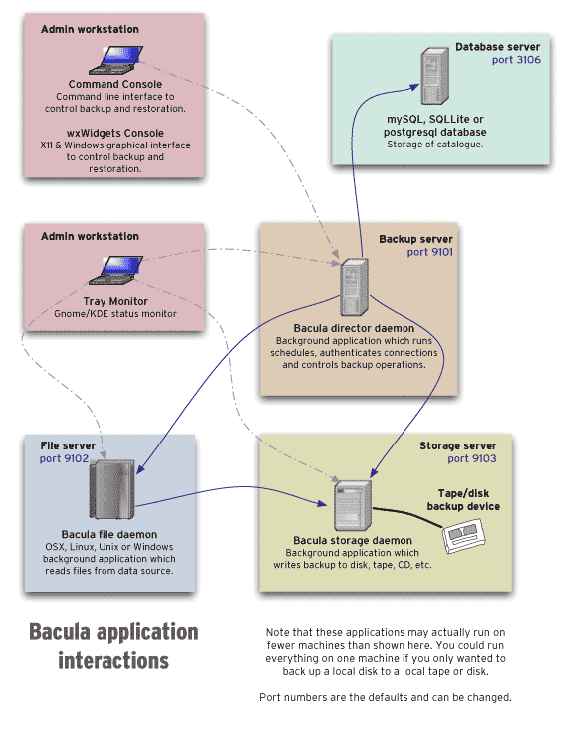
In our configuration, the Admin workstation, Database serverand
Backup server are all on the same machine, the bacula::director.
Servers are interconnected over TCP connections authenticated with TLS
client certificates. Each FD, on all servers, regularly pushes backups
to the central SD. This works because the FD has a certificate
(/etc/ssl/torproject-auto/clientcerts/thishost.crt) signed by the
auto-ca TLS certificate authority
(in/etc/ssl/torproject-auto/servercerts/ca.crt).
Volumes are stored in the storage daemon, in
/srv/backups/bacula/. Each client stores its volumes in a separate
directory, which makes it easier to purge offline clients and evaluate
disk usage.
We do not have a bootstrap file as advised by the upstream
documentation because we do not use tapes or tape libraries, which
make it harder to find volumes. Instead, our catalog is backed up in
/srv/backups/bacula/Catalog and each backup contains a single file,
the compressed database dump, which is sufficient to re-bootstrap the
director.
See the introduction to Bacula for more information on those distinctions.
PostgreSQL backup system
Database backups are handled specially. We use PostgreSQL everywhere apart from a few rare exceptions (currently only CiviCRM) and therefore use postgres-specific configurations to do backups of all our servers.
See PostgreSQL backups reference for those server's specific backup/restore instructions.
MySQL backup system
MySQL also requires special handling, and it's done in the
mariadb::server Puppet class. It deploys a script (tpa-backup-mysql-simple)
which runs every day and calls mysqldump to store plain text copies
of all databases in /var/backups/mysql.
Those backups then get included in the normal Bacula backups.
A more complicated backup system with multiple generations and expiry was previously implemented, but found to be too complicated, using up too much disk space, and duplicating the retention policies implemented in Bacula. It was retired in tpo/tpa/team#42177, in June 2025.
Scheduler
We do not use the builtin Bacula scheduler because it had
issues. Instead, jobs are queued by the dsa-bacula-scheduler started
from cron in /etc/cron.d/puppet-crontab.
TODO: expand on the problems with the original scheduler and how ours work.
Volume expiry
There is a /etc/bacula/scripts/volume-purge-action script which runs
daily (also from puppet-crontab) which will run the truncate allpools storage=%s command on all mediatype entities found in the
media table. TODO: what does that even mean?
Then the /etc/bacula/scripts/volumes-delete-old (also runs daily,
also from puppet-crontab which will:
- delete volumes with errors (
volstatus=Error), created earlier than two weeks and without change for 6 weeks - delete all volumes in "append" mode (
volstatus=Append) which are idle - delete purged volumes (
volstatus=Purged) without files (volfiles=0andvolbytes<1000), marked to be recycled (recycle=1) and older than 4 months
It doesn't actually seem to purge old volumes per say: something else
seems to be responsible from marking them as Purged. This is
(possibly?) accomplished by the Director, thanks to the Volume Retention settings in the storage jobs configurations.
All the above run on the Director. There's also a cron job
bacula-unlink-removed-volumes which runs daily on the storage server
(currently bungei) and will garbage-collect volumes that are not
referenced in the database. Volumes are removed from the storage
servers 60 days after they are removed from the director.
This seem to imply that we have a backup retention period of 6 months.
Issues
There is no issue tracker specifically for this project, File or search for issues in the team issue tracker with the ~Backup label.
Maintainer
This service is maintained by TPA, mostly by anarcat.
Monitoring and metrics
Tests
Logs
The Bacula director logs to /var/log/bacula/bacula.log. Logs can
take up a lot of space when a restore job fails. If that happens,
cancel the job and try to rotate logs with:
logrotate -f /etc/logrotate.d/bacula-common
Backups
This is the backup service, so it's a bit circular to talk about backups. But the Bacula director server is backed up to the storage server like any other server, disaster recovery procedures explain how to restore in catastrophic failure cases.
An improvement to the backup setup would be two have two storage servers, see tpo/tpa/team#41557 for followup.
Other documentation
- upstream manual (has formatting problems, the PDF looks better)
- console command manual (PDF)
- other bacula documentation
- bacula cheat sheet
Discussion
TODO: populate Discussion section.
Overview
Security and risk assessment
Bacula is pretty good, security-wise, as it "pulls" backups from servers. So even if a server is compromised, an attacker cannot move laterally to destroy the backups.
It is, however, vulnerable to a cluster-wide compromise: if, for example, the Puppet or Bacula director servers are compromised, all backups can be destroyed or tampered with, and there's no clear workaround for this problem.
There are concerns about the consistency of backups. During a GitLab incident, it was found that some log files couldn't be restored properly (tpo/tpa/team#41474). It's unclear what the cause of this problem was.
Technical debt and next steps
Bacula has been lagging behind upstream, in Debian, where we have been stuck with version 9 for three major releases (buster on 9.4 and bullseye/bookworm on 9.6). Version 13 was uploaded to unstable in January 2024 and may ship with Debian trixie (13). But Bacula 15 already came out, so it's possible we might lag behind.
Bacula was forked in 2013 into a project called BareOS but that was never widely adopted. BareOS is not, for example, packaged in Debian.
We have a significant amount of legacy built on top of Bacula. For example, we have our own scheduler, because the Bacula scheduler was perceived to be inadequate. It might be worth reconsidering this.
Bacula is old software, designed for when the state of the art in backups was tape archival. We do not use tape (see below) and are unlikely ever to. This tape-oriented design makes working with normal disks a bit awkward.
Bacula doesn't deduplicate between archives the way more modern backup software (e.g. Borg, Restic) do, which leads to higher disk usage, particularly when keeping longer retention periods.
Proposed Solution
Other alternatives
Tape medium
Last I (anarcat) checked, the latest (published) LTO tape standard stored a whopping 18TB of data, uncompressed, per cartridge and writes 400MB/s which means it takes 12h30m to fill up one tape.
LTO tapes are pretty cheap, e.g. here is a 12TB LTO8 tape from Fuji for 80$CAD. The LTO tape drives are however prohibitively expensive. For example, an "upgrade kit" for an HP tape library sells for a whopping 7k$CAD here. I can't actually find any LTO-8 tape drives on newegg.ca.
As a comparison, you can get a 18TB Seagate IronWolf drive for 410$CAD, which means for the price of that upgrade kit you can get a whopping 300TB worth of HDDs for the price of the tape drive. And you don't have any actual tape yet, you'd need to shell out another 2k$CAD to get 300TB of 12TB tapes.
(Of course, that abstracts away the cost of running those hard drives. You might dodge that issue by pretending you can use HDD "trays" and hot-swap those drives around though, since that is effectively how tapes work. So maybe for the cost of that 2k$ of tapes, you could buy a 4U server with a bunch of slots for the hard drive, which you would still need to do to host the tape drive anyway.)
### List of categories
In the process of migrating the blog from Drupal to Lektor, the number of tags
has been reduced to 20 (from over 970 in Drupal). For details about this work,
see tpo/web/blog#40008
The items below may now be used in the `categories` field:
| areas of work | topics | operations |
|---------------|----------------|---------------|
| circumvention | advocacy | jobs |
| network | releases | fundraising |
| applications | relays | announcements |
| community | human rights | financials |
| devops | usability | |
| research | reports | |
| metrics | onion services | |
| tails | localization | |
| | global south | |
| | partners | |
When drafting a new blog post, a minimum of one category must be chosen, with a
suggested maximum of three.
### Compress PNG files
When care is taken to minimize the size of web assets, accessibility and
performance is improved, especially for visitors accessing the site from
low bandwidth connections or low-powered devices.
One method to achieve this goal is to use a tool to compress lossless PNG files
using `zopflipng`. The tool can be installed via `apt install zopfli`. To
compress a PNG image, the command may be invoked as such:
zopflipng --filters=0me -m --prefix lead.png
This command will process the input file and save it as `zopfli_lead.png`. The
output message will indicate if the image size was reduced and if so, by what
percentage.
### Comments embedding
When a new blog post is published, a javascript snippet included on the page will
trigger the Discourse forum to create a new topic in the `News` category with the
contents of the new post. In turn, replies to the forum topic will appear
embedded below the blog post.
The configuration for this feature on the Discourse side is located in the Admin
section under **Customize** -> [Embedding][]
The key configuration here is **CSS selector for elements that are allowed in
embeds**. Without the appropriate CSS selectors listed here, some parts of the
blog post may not be imported correctly. There is no documentation of how this
parameter works, but through trial and error we figured out that selectors must
be one or two levels "close" to the actual HTML elements that we need to appear
in the topic. In other words, specifying `main article.blog-post` as a selector
and hoping that all sub-elements will be imported in the topic doesn't work: the
sub-elements themselves must be targeted explicitly.
[Embedding]:https://forum.torproject.net/admin/customize/embedding
## Issues
There is the [tpo/web/blog project](https://gitlab.torproject.org/tpo/web/blog/) for this service, [File][] or
[search][] for issues in the [issue tracker][search].
[File]: https://gitlab.torproject.org/tpo/web/blog//-/issues/new
[search]: https://gitlab.torproject.org/tpo/web/blog//-/issues
## Maintainer, users, and upstream
This website is maintained collaboratively between the TPA web team and the
community team. Users of this service are the general public.
## Monitoring and testing
For monitoring, see [service/static-component#monitoring-and-testing](https://gitlab.torproject.org/tpo/tpa/team/-/wikis/service/static-component#monitoring-and-testing).
Apart of spell checking via GitLab CI, there are no automated tests such as dead link checking for this
service. In case of malformed Lektor content files, the build job will fail.
## Logs and metrics
See [service/static-component#logs-and-metrics](https://gitlab.torproject.org/tpo/tpa/team/-/wikis/service/static-component#logs-and-metrics).
## Backups
Backups of this website exist both in the Bacula backups of the GitLab
server (as artifacts) and backups of the
`static-gitlab-shim.torproject.org` server. See the [static components
disaster recovery procedures](static-component.md#disaster-recovery) for how to restore a site.
## Other documentation
* [service/static-component](https://gitlab.torproject.org/tpo/tpa/team/-/wikis/service/static-component)
* [service/static-shim](https://gitlab.torproject.org/tpo/tpa/team/-/wikis/service/static-shim)
* [Lektor documentation](https://www.getlektor.com/docs/)
# Discussion
## Drupal to Lektor migration
The Tor Project runs a [blog](https://blog.torproject.org/) since 2007. It's used to provide an official source of news to the community regarding software releases, fundraising, events and general Tor Project updates. However, there are several outstanding [issues](https://gitlab.torproject.org/tpo/web/blog-trac/-/issues/33115) with the current site, including problems with comment moderation which are not easily fixed using Drupal:
* Hosting the Drupal site at a third party is a significant expense
* Technical maintenance of the blog is a challenge because upstream upgrades frequently cause breakage
* Posts must be drafted with a clunky Javascript HTML editor instead of Markdown
* Moderation is a chore for port authors, causing comments to sometimes linger in the moderation queue
It has been decided to migrate the site to a SSG (static site generator). This is currently listed as [Need to have](https://gitlab.torproject.org/tpo/tpa/team/-/wikis/roadmap/2021#need-to-have) in the 2021 TPA roadmap. (The option to fix the Drupal site was on the table for a short while, but is now abandoned.)
### Goals
We should migrate the site to an SSG as soon as possible.
#### Must have
* Migration of existing blog post and events content (title, author, date, images)
* Preservation of existing URLs (both aliases and node/\* paths)
* RSS/Atom feed for blog posts and events
* Ability to edit migrated content if required (posts and events)
* Ability to comment blog posts (externally)
#### Nice to have
* Migration and continued use of existing blog post tags
* Straightforward content migration
* Archive of existing blog post comments (see rationale [here](https://gitlab.torproject.org/tpo/web/blog-trac/-/issues/33115 at bottom))
* Web-based "admin" interface
* RSS/Atom feeds per-tag and per-author
* [Styleguide](https://styleguide.torproject.org/) compliant template already exists ([Lektor](https://gitlab.torproject.org/tpo/web/template), [Hugo](https://github.com/irl/torproject-hugo))
#### Non-goals
* Author or admin-moderated comments
### Proposed solution
Migrate the site to Lektor, which is already used for https://www.torproject.org, and implement a Discourse instance for discussions, as a replacement for blog comments. This was the solution retained by @hiro for this project, as documented in https://gitlab.torproject.org/tpo/web/blog-trac/-/issues/33115.
There are two options for using Discourse as a blog comments platform:
#### Embedded
Using an embedded-Javascript snippet added in the site template, as documented [here](https://meta.discourse.org/t/embedding-discourse-comments-via-javascript/31963). When a blog post page is opened, the Javascript loads the corresponding topic on the Discourse site. New topics are added to Discourse automatically when new posts are created.
* Pro: comments are visible on the blog, no need to visit/open another site
* Pro: comments can be posted to the Discourse topic directly from within the blog
* Con: posting comments requires a Discourse account
* Con: requires Javascript
#### RSS/Atom feed polling
A Discourse plugin can be configured to poll the blog website RSS/Atom feed at regular intervals and create new topics automatically when a new post is published. It's possible we can predict Discouse topic URLs so that Lektor can generate the required link in the template and insert it at the bottom of blog posts (eg. a "Click here to join the discussion"-type link)
* Pro: no Javascript required on the blog
* Pro: comments not visible directly on the blog
* Con: comments not visible directly on the blog
### Alternatives considered
Note that we settled on using Lektor for the blog, and Discourse as a
comment backend. Those options are therefore not relevant anymore.
* **Hugo** is another friendly SSG, and a [Tor styleguide](https://github.com/irl/torproject-hugo) has been made for it, however its preferable to avoid using different web stacks unless there's a compelling reason for it. There's only one known [Drupal migration script](https://gohugo.io/tools/migrations/#drupal) by it appears to have been created for Drupal 7 and seems unmaintained. In any case it's "assembly required" which isn't much different from hacking a quick script to migrate to Lektor instead.
* **Discourse** might also be an option to completely replace the blog: we could configure https://blog.torproject.org to show content from a specific topic on Discourse. The challenge is that importing content is not as straightforward compared to a SSG where we just need to write text files. Maintaining existing URLs could also be a challenge and would require some form of redirect mapping on `blog.torproject.org`. We would also lose the flexibility to add standalone pages or other forms of content on the blog, ~~such as a calendar view of events~~ [event calendar plugin](https://meta.discourse.org/t/discourse-calendar/97376). ([example](https://www.daemon.com.au/))
btcpayserver is a collection of Docker containers that enables us to process cryptocurrency (currently only Bitcoin) payment.
This page shouldn't be misconstrued as an approval of the use of the BTCpayserver project or, indeed, any cryptocurrency whatsoever. In fact, our experience with BTCpayserver makes us encourage you to look at alternatives instead, including not taking cryptocurrency payments at all, see TPA-RFC-25: BTCpayserver replacement for that discussion.
- Tutorial
- How-to
- Reference
- Discussion
Tutorial
TODO: think of a few basic use cases
How-to
Creating a user
BTCPayserver has two levels of user management: server-wide users and store users. The latter depends on the former.
When adding a user, you'll first want to head over to Server settings in the
left menu and add a new user there. Leave the password field empty so that a
password reset URL will be sent to the new user's email address. By default, new
users are created without full server admin capabilities, which is usually what
we want.
Only if you need the new user to have full admin access, edit the user in the list and set the "admin" flag there. Note that this is not necessary for handling operations on the cryptocurrency store.
Once the server-wide user is created, head over to Settings in the left menu
and then to the tab Users. There, enter the email address of the system-wide
user you just created, select Owner and click on Add User. The only other
role that's present is Guest, which does not let one change store settings.
Upgrades
Upgrades work by updating all container images and restarting the right one. The upstream procedure recommends using a wrapper script that takes care of this. It does some weird stuff with git, so the way to run it is better:
cd /root/BTCPayServer/btcpayserver-docker &&
git pull --ff-only &&
./btcpay-update.sh --skip-git-pull
This will basically:
- pull a new version of the repository
- rebuild the configuration files (by calling
build.sh, but also by calling ahelper.shfunction to regenerate the env file) - reinstall dependencies if missing (docker,
/usr/local/binsymlinks, etc) - run
docker-compose upto reload the running containers, if their images changed - cleanup old container images
We could, in theory, do something like this to do the upgrade instead:
./build.sh # to generate the new docker-compose file
docker-compose -f $BTCPAY_DOCKER_COMPOSE up -d
... but that won't take into account all the ... uh... subtleties of the full upgrade process.
Restart
Restarting BTCpayserver shouldn't generally be necessary. It is hooked with systemd on boot and should start normally on reboots. It has, however, been necessary to restart the server to generate a new TLS certificate, for example.
Since the server is hooked into systemd, this should be sufficient:
systemctl restart btcpayserver
Given that this is managed through docker-compose, it's also
possible to restart the containers directly, with:
docker-compose -f $BTCPAY_DOCKER_COMPOSE restart
That gives better progress information than the systemd restart.
Inspecting status
This will show the running containers:
docker-compose -f $BTCPAY_DOCKER_COMPOSE ps
This will tail the logs of all the containers:
docker-compose -f $BTCPAY_DOCKER_COMPOSE logs -f --tail=10
Manual backup and restore
A manual backup/restore procedure might look like this:
systemctl stop btcpayserver
tar cfz backup.tgz /var/lib/docker/volumes/
systemctl start btcpayserver
A restore, then, would look like this:
systemctl stop btcpayserver
mv /var/lib/docker/volumes/ /var/lib/docker/volumes.old # optional
tar -C / -x -f -z backup.tgz
systemctl start btcpayserver
If you're worried about the backup clobbering other files on restore (for example you're not sure about the backup source or file structure), this should restore only
volumes/in the/var/lib/dockerdirectory:systemctl stop btcpayserver mv /var/lib/docker/volumes/ /var/lib/docker/volumes.old # optional tar -C /var/lib/docker/ -x -f backup.tar.gz -z --strip-components=3 systemctl start btcpayserver
The mv step should be turned into a rm -rf /var/lib/docker/volumes/ command if we are likely to run out of disk
space on restore and we're confident in the backup's integrity.
Note that the upstream backup procedure does not keep a copy of the blockchain, so this will be regenerated on startup. That, in turn, can take a long time (30 hours on last count). In that case, keeping a copy of the blockchain on restore might make sense, it is stored in:
/var/lib/docker/volumes/generated_bitcoin_datadir/_data/
Finally, also note that if you rename the server (e.g. we moved from btcpay.torproject.net to btcpayserver.torproject.org in the past), you also need to perform a rename procedure, which is basically:
/root/BTCPayServer/btcpayserver-docker/changedomain.sh btcpay.torproject.org
Full migration procedure
Back from the top, migrating from server A to server B, with a rename, should be like this. This assumes server B followed the installation procedure and has an up to date blockchain.
On server A:
systemctl stop btcpayserver
tar -c -z -f backup.tgz /var/lib/docker/volumes/
Copy backup.tgz to server B.
On server B:
systemctl stop btcpayserver
tar -C / -x -f -z backup.tgz
systemctl start btcpayserver
Note that this is likely to run out of disk space because it (deliberately) includes the blockchain.
Another option is to stream the content between the two servers, if you have a fast link:
ssh old.example.net 'systemctl stop btcpayserver'
ssh new.example.net 'systemctl stop btcpayserver'
ssh old.example.net 'tar cf - /var/lib/docker/volumes/' | pv -s 49G | ssh new.example.net tar -C / -x -f -
ssh new.example.net 'systemctl start btcpayserver'
Or, alternatively, you can also create an SSH key on the new server,
copy it on the old one, and just use rsync, which is what ended up
being used in the actual migration:
ssh old.example.net 'systemctl stop btcpayserver'
ssh new.example.net 'systemctl stop btcpayserver'
ssh new.example.net 'ssh-keygen -t ed25519'
ssh new.example.net 'cat .ssh/id_ed25519.pub' | ssh old.example.net 'cat >> .ssh/authorized_keys'
ssh new.example.net 'rsync -a --info=progress2 --delete old.example.net:/var/lib/docker/volumes/ /var/lib/docker/volumes/'
It's important that the Docker volumes are synchronized: for example, if the NBXplorer volume is ahead or behind the bitcoind volume, it will get confused and will not be able to synchronize with the blockchain. This is why we copy the full blockchain which, anyways, is faster than copying it from the network.
Also, if you are changing to a new hostname, do not forget to change it on the new server:
ssh new.example.net /root/BTCPayServer/btcpayserver-docker/changedomain.sh btcpay.torproject.org
In any case, make sure to update the target of the donation form on
donate.torproject.org. See for example merge request
tpo/web/donate-static!76.
Faulty upstream procedure
Upstream has a backup procedure but, oddly, no restore procedure. It seems like, anyways, what the backup script does is:
- dump the database (in
$backup_volume/postgres.sql) - stops the server
- tar the Docker volumes (
/var/lib/docker/volumes/) into a tar file in the backup directory ($backup_volume/backup.tar.gz), excluding thegenerated_bitcoin_datadirvolume,generated_litecoin_datadirand the$backup_volume(?!) - start the server
- delete the database dump
In the above, $backup_volume is
/var/lib/docker/volumes/backup_datadir/_data/. And no, the
postgres.sql database dump is not in the backups. I filed upstream
issue 628 about this as well.
We do not recommend using the upstream backup procedures in their current state.
Pager playbook
When you're lost, look at the variables in
/etc/profile.d/btcpay-env.sh. Three important settings:
export BTCPAY_DOCKER_COMPOSE="/root/BTCPayServer/btcpayserver-docker/Generated/docker-compose.generated.yml"
export BTCPAY_BASE_DIRECTORY="/root/BTCPayServer"
export BTCPAY_ENV_FILE="/root/BTCPayServer/.env"
Spelling those out:
-
BTCPAY_DOCKER_COMPOSEfile can be used to talk withdocker-compose(see above for examples) -
BTCPAY_BASE_DIRECTORYis where the source code was checked out (basically) -
BTCPAY_ENV_FILEis the environment file passed to docker-compose
containers not starting
If the containers fail to start with this error:
btcpayserver_1 | fail: PayServer: Error on the MigrationStartupTask
btcpayserver_1 | System.Net.Internals.SocketExceptionFactory+ExtendedSocketException (00000005, 0xFFFDFFFF): Name or service not known
Take a look at disk space. We've had situations like this where the containers would fail with the above error when running out of disk space.
Stuck at "node is starting"
If you get this message in the web UI:
Your nodes are synching...
Your node is synching the entire blockchain and validating the consensus rules... BTC
NBXplorer headers height: 0 The node is starting...
Look at the logs of the containers. If you see this:
NBXplorer.Indexer.BTC: Unhandled exception in the indexer, retrying in 40 seconds
That's a known problem with NBXplorer corrupting its database when it runs out of disk space. The fix is to stop the container, delete the data, and restart:
docker-compose -f $BTCPAY_DOCKER_COMPOSE stop nbxplorer
rm -r /var/lib/docker/volumes/generated_nbxplorer_datadir/_data/Main
docker-compose -f $BTCPAY_DOCKER_COMPOSE start nbxplorer
Incorrect certificate
Note: that procedure is out of date and kept for historical purposes only (if we ever rotate back to this old mechanism). Since tpo/tpa/team#41549, We now use standard HTTPS certificate issuance processes and this shouldn't occur anymore.
If you try to connect to https://btcpayserver.torproject.org/ and get a self-signed cert, that is because it's not the right server. Connect to https://btcpay.torproject.org/ instead.
If you connected to the right name and still get the wrong certificate, try to see if the Let's Encrypt companion is misbehaving, see:
docker-compose -f $BTCPAY_DOCKER_COMPOSE logs -f --tail=10 letsencrypt-nginx-proxy-companion
Normal output looks like:
letsencrypt-nginx-proxy-companion | Creating/renewal btcpay.torproject.org certificates... (btcpay.torproject.org btcpayserver-02.torproject.org)
letsencrypt-nginx-proxy-companion | 2022-12-20 02:00:40,463:INFO:simp_le:1546: Certificates already exist and renewal is not necessary, exiting with status code 1.
Disaster recovery
In theory, it should be possible to rebuild this service from scratch by following our install procedures and then hooking up the hardware wallet to the server. In practice, that is undocumented and hasn't been tested.
Normally, you should be able to restore parts (or the entirety) of this service using the normal backup procedures. But those backups may be inconsistent. If an emergency server migration is possible (ie. the old server is still online), follow the manual backup and restore procedure.
Reference
Installation
TPA deployment
Before the install, a CNAME must be added to the DNS to point to the
actual machine, for example, in dns.git's domains/torproject.org
file:
btcpayserver IN CNAME btcpayserver-02.torproject.org
We are following the full installation manual, which is basically this questionable set of steps:
mkdir BTCPayServer
cd BTCPayServer
git clone https://github.com/btcpayserver/btcpayserver-docker
cd btcpayserver-docker
Then the procedure wants us to declare those:
export BTCPAY_HOST="btcpayserver.torproject.org"
export BTCPAY_ADDITIONAL_HOSTS="btcpayserver-02.torproject.org"
export NBITCOIN_NETWORK="mainnet"
export BTCPAYGEN_CRYPTO1="btc"
export BTCPAYGEN_ADDITIONAL_FRAGMENTS="opt-save-storage-s"
export BTCPAYGEN_LIGHTNING=""
export BTCPAY_ENABLE_SSH=false
export BTCPAYGEN_REVERSEPROXY="nginx"
Update: we eventually went with our own reverse proxy deployment, which required this as well:
export BTCPAYGEN_REVERSEPROXY="none"
export BTCPAYGEN_EXCLUDE_FRAGMENTS="$BTCPAYGEN_EXCLUDE_FRAGMENTS;nginx-https"
export NOREVERSEPROXY_HTTP_PORT=127.0.0.1:8080
export BTCPAYGEN_REVERSEPROXY="none"
This was done because of recurring issues with the container-based Nginx proxy and the HTTPS issuance process, see tpo/tpa/team#41549 for details.
We explicitly changed those settings from upstream:
BTCPAY_HOSTandBTCPAY_ADDITIONAL_HOSTSBTCPAY_ENABLE_SSH(WTF?!)BTCPAYGEN_LIGHTNING="clightning"disabled, see tpo/web/donate-static#63
Then we launch the setup script, skipping the docker install because that's already done by Puppet:
root@btcpayserver-02:~/BTCPayServer/btcpayserver-docker# . btcpay-setup.sh --docker-unavailable
-------SETUP-----------
Parameters passed:
BTCPAY_PROTOCOL:https
BTCPAY_HOST:btcpayserver.torproject.org
BTCPAY_ADDITIONAL_HOSTS:btcpayserver-02.torproject.org
REVERSEPROXY_HTTP_PORT:80
REVERSEPROXY_HTTPS_PORT:443
REVERSEPROXY_DEFAULT_HOST:none
LIBREPATRON_HOST:
ZAMMAD_HOST:
WOOCOMMERCE_HOST:
BTCTRANSMUTER_HOST:
CHATWOOT_HOST:
BTCPAY_ENABLE_SSH:false
BTCPAY_HOST_SSHKEYFILE:
LETSENCRYPT_EMAIL:
NBITCOIN_NETWORK:mainnet
LIGHTNING_ALIAS:
BTCPAYGEN_CRYPTO1:btc
BTCPAYGEN_CRYPTO2:
BTCPAYGEN_CRYPTO3:
BTCPAYGEN_CRYPTO4:
BTCPAYGEN_CRYPTO5:
BTCPAYGEN_CRYPTO6:
BTCPAYGEN_CRYPTO7:
BTCPAYGEN_CRYPTO8:
BTCPAYGEN_CRYPTO9:
BTCPAYGEN_REVERSEPROXY:nginx
BTCPAYGEN_LIGHTNING:none
BTCPAYGEN_ADDITIONAL_FRAGMENTS:opt-save-storage-s
BTCPAYGEN_EXCLUDE_FRAGMENTS:
BTCPAY_IMAGE:
ACME_CA_URI:production
TOR_RELAY_NICKNAME:
TOR_RELAY_EMAIL:
PIHOLE_SERVERIP:
FIREFLY_HOST:
----------------------
Additional exported variables:
BTCPAY_DOCKER_COMPOSE=/root/BTCPayServer/btcpayserver-docker/Generated/docker-compose.generated.yml
BTCPAY_BASE_DIRECTORY=/root/BTCPayServer
BTCPAY_ENV_FILE=/root/BTCPayServer/.env
BTCPAYGEN_OLD_PREGEN=false
BTCPAY_SSHKEYFILE=
BTCPAY_SSHAUTHORIZEDKEYS=
BTCPAY_HOST_SSHAUTHORIZEDKEYS:
BTCPAY_SSHTRUSTEDFINGERPRINTS:
BTCPAY_CRYPTOS:btc
BTCPAY_ANNOUNCEABLE_HOST:btcpayserver.torproject.org
----------------------
BTCPay Server environment variables successfully saved in /etc/profile.d/btcpay-env.sh
BTCPay Server docker-compose parameters saved in /root/BTCPayServer/.env
Adding btcpayserver.service to systemd
Setting limited log files in /etc/docker/daemon.json
BTCPay Server systemd configured in /etc/systemd/system/btcpayserver.service
Created symlink /etc/systemd/system/multi-user.target.wants/btcpayserver.service → /etc/systemd/system/btcpayserver.service.
Installed bitcoin-cli.sh to /usr/local/bin: Command line for your Bitcoin instance
Installed btcpay-clean.sh to /usr/local/bin: Command line for deleting old unused docker images
Installed btcpay-down.sh to /usr/local/bin: Command line for stopping all services related to BTCPay Server
Installed btcpay-restart.sh to /usr/local/bin: Command line for restarting all services related to BTCPay Server
Installed btcpay-setup.sh to /usr/local/bin: Command line for restarting all services related to BTCPay Server
Installed btcpay-up.sh to /usr/local/bin: Command line for starting all services related to BTCPay Server
Installed btcpay-admin.sh to /usr/local/bin: Command line for some administrative operation in BTCPay Server
Installed btcpay-update.sh to /usr/local/bin: Command line for updating your BTCPay Server to the latest commit of this repository
Installed changedomain.sh to /usr/local/bin: Command line for changing the external domain of your BTCPay Server
Then starting the server with systemctl start btcpayserver pulls a lot more docker containers (which takes time). and things seem to work:
systemctl restart btcpayserver
and now the server is up. it asks me to create an account (!) so I did and stored the password in the password manager. now it's doing:
Your nodes are synching...
Your node is synching the entire blockchain and validating the consensus rules... BTC
NBXplorer headers height: 732756 Node headers height: 732756 Validated blocks: 1859820%
Watch this video to understand the importance of blockchain synchronization.
If you really don't want to sync and you are familiar with the command line, check FastSync.
In theory, the blocks should now sync and the node is ready to go.
TODO: document how to hook into the hardware wallet, possibly see: https://docs.btcpayserver.org/ConnectWallet/
Last time we followed this procedure, instead of hooking up the wallet, we restored from backup. See this comment and following and the full migration procedure.
Lunanode Deployment
The machine was temporarily hosted at Lunanode before being moved to TPA. This procedure was followed:
- https://docs.btcpayserver.org/LunaNodeWebDeployment/
Lunanode was chosen as a cheap and easy temporarily solution, but was eventually retired in favor of a normal TPA machines so that we would have it hooked in Puppet to have the normal system-level backups, monitoring, and so on.
SLA
There is no official SLA for this service, but it should generally be up so that we can take donations.
Design
According to the upstream website, "BTCPay Server is a self-hosted, open-source cryptocurrency payment processor. It's secure, private, censorship-resistant and free."
In practice, BTCpay is a rather complicated stack made of Docker, Docker Compose, C# .net, bitcoin, PostgreSQL, Nginx, lots of shell scripts and more, through plugins. It's actually pretty hard to understand how all those pieces fit together.
This audit was performed by anarcat in the beginning of 2022.
General architecture
The Docker install documentation (?) has an architecture overview that has this image:

Upstream says:
As you can see, BTCPay depends on several pieces of infrastructure, mainly:
- A lightweight block explorer (NBXplorer),
- A database (PostgreSQL or SQLite),
- A full node (eg. Bitcoin Core)
There can be more dependencies if you support more than just standard Bitcoin transactions, including:
- C-Lightning
- LitecoinD
- and other coin daemons
And more...
Docker containers
BTCpayserver is a bunch of shell scripts built on top of a bunch of
Docker images. At the time of writing (~2022), we seemed to have the
following components setup (looking at
/root/BTCPayServer/btcpayserver-docker/Generated/docker-compose.generated.yml):
- nginx 1.16 (from the official docker image)
- nginx-gen (which is some container based on docker-gen, which ... generates config files?)
- btcpayserver (from their image of course)
- bitcoind (from their btcpayserver/bitcoin Docker image)
- NBXplorer 2.2.5 (from the nicolasdorier/nbxplorer Docker image)
- postgresql 13.6 (from their btcpayserver/postgres image)
- btcpayserver/letsencrypt-nginx-proxy-companion (presumably to generate LE certs automatically?)
- btcpayserver/tor (yes, they have a tor container image)
- tor-gen, also based on docker-gen to generate a config for the above container
Update: in March 2024, the nginx, nginx-gen and letsencrypt-nginx-proxy-companien containers were removed, see tpo/tpa/team#41549.
On the previous server, this also included:
- lnd_bitcoin (for the "lighting network", based on their image)
- bitcoin_rtl (based on shahanafarooqui/rtl, a webapp for the lightning network)
- postgresql 9.6.20 (severely out of date!)
In theory, it should be possible to operate this using standard Docker
(or docker-compose to be more precise) commands. In practice,
there's a build.sh shell script that generate the
docker-compose.yml file from scratch. That process is itself done
through another container
btcpayserver/letsencrypt-nginx-proxy-companion.
Basically, BTCpayserver folks wrote something like a home-made Kubernetes operator for people familiar with that concept. Except it doesn't run in Kubernetes, and it only partly runs inside containers, being mostly managed through shell (and Powershell!) scripts.
Programming languages
Moving on, it seems like the BTCpayserver server itself and NBXplorer are mostly written in C# (oh yes).
Their docker-gen thing is actually a fork of nginx-proxy/docker-gen, obviously out of date. That's written in Golang. Same with btcpayserver/docker-letsencrypt-nginx-proxy-companion, an out of date fork of nginx-proxy/acme-companion, built with docker-gen and lots of shell glue.
Nginx, PostgreSQL, bitcoin, and Tor are, of course, written in C.
Services
It's hard to figure out exactly how this thing works at all, but it seems there are at those major components working underneath here:
- an Nginx web proxy with TLS support managed by a sidecar container
(
btcpayserver/letsencrypt-nginx-proxy-companion) - btcpayserver, the web interface which processes payments
- NBXplorer, "A minimalist UTXO tracker for HD Wallets. The goal is to have a flexible, .NET based UTXO tracker for HD wallets. The explorer supports P2SH,P2PKH,P2WPKH,P2WSH and Multi-sig derivation." I challenge any cryptobro to explain this to me without a single acronym, from first principles, in a single sentence that still makes sense. Probably strictly internal?
- an SQL database (PostgreSQL), presumably to keep track of administrator accounts
- bitcoind, the bitcoin daemon which actually records transactions in the global ledger that is the blockchain, eventually, maybe, if you ask nicely?
There's a bunch of Docker containers around this that generate configuration and glue things together, see above.
Update: we managed to get rid of the Nginx container and its associated sidecars, in tpo/tpa/team#41549.
Storage and queues
It's unclear what is stored where. Transactions, presumably, get recorded in the blockchain, but they are also certainly recorded in the PostgreSQL database.
Transactions can be held in PostgreSQL for a while until a verification comes in, presumably through NBXplorer. Old transactions seem to stick around, presumably forever.
Authentication
A simple username and password gives access to the administrative
interface. An admin password is stored in tor-passwords.git, either
in external-services (old server) or hosts-extra-info (new
server). There's support for 2FA, but it hasn't been enabled.
Integration with CiviCRM/donate.tpo
The cryptocurrency donations page on donate.torproject.org
actually simply does a POST request to either the hidden service or
the normal site. The form has a hidden storeId tag that matches it
to the "store" on the BTCpayserver side, and from there the
btcpayserver side takes over.
The server doesn't appear to do anything special with the payment: users are supposed to report their donations themselves.
Issues
There is no issue tracker specifically for this project, File or search for issues in the team issue tracker with the ~BTCpayserver label.
Upstream has set of GitHub repositories with its own issues.
Maintainer, users, and upstream
hiro did the first deployment of this service at lunanode, anarcat did the second deployment, managed by TPA.
The finance team is fundamentally the people responsible or at least dependent on this service, alongside anyone who needs to donate cryptocurrency to the Tor project.
Upstream is the BTCpayserver project itself (GitHub org) and are fairly active. Their support channel is on Mattermost and they eventually answer (~24h latency last time).
Monitoring and testing
There is no application-specific monitoring of this service. Users are expected to try to make a donation with Bitcoin (!) to see if payments go through. Money machine team is responsible for testing.
Rudimentary tests can be performed by going to the main domain website (https://btcpay.torproject.org) and logging in with the credentials from the TPA password manager. When someone does a payment, it should show up as an invoice.
Logs and metrics
BTCpay actually configures the Docker daemon to keep only 5m (5MB?) of
logs in /etc/docker/daemon.json:
{
"log-driver": "json-file",
"log-opts": {"max-size": "5m", "max-file": "3"}
}
Container logs can be inspected with:
docker-compose -f $BTCPAY_DOCKER_COMPOSE logs -f --tail=10
Those include PII information like IP addresses, recorded by the Nginx webserver. It is unclear how long that configuration will actually keep data for, considering it's size-based.
Backups
This service is made up of multiple Docker containers that are technically hard to backup. Upstream has the approach of just stopping the server (i.e. all containers) then performing the backup (badly, see below).
So we're going to just pretend this is not a problem and let Bacula
backup /var/lib/docker as is. Yes, including the blockchain crap,
because that actually takes a long time to recover. Consistency might
be a problem. Sorry.
Full backup restore procedures are visible in the backup and restore section.
Other documentation
Upstream has documentation.
Discussion
This section aims at documenting more in-depth issues with the current setup and possible solutions.
Overview
BTCpay has a somewhat obscure and complicated history at Tor, and is in itself a rather complicated project, as explained above in the design section.
Deployment history
The BTCpay server was originally setup, hosted, and managed by the BTCpay people themselves. Back in March 2020, they suggested we host it ourselves and, in November 2020, hiro had it deployed on a Lunanode.com VM, at the recommendation of the BTCPay people.
Since then, an effort was made to move the VM inside TPA-managed infrastructure, which is the setup that is documented in this page. That effort is tracked in the above ticket, tpo/tpa/team#33750.
The VM at Lunanode was setup with Ubuntu 16.04 which became EOL (except for extended support) on 2021-04-30 (extended support stops in 2026). A quick audit in February 2022 showed that it didn't actually have the extended support enabled, so that was done with anarcat's personal Ubuntu credentials (it's not free).
Around April 2022, more effort was done to finally move the VM to TPA infrastructure, but in doing so, significant problems were found with BTCpay in particular, but also with our cryptocurrency handling in general.
In March 2024, the Nginx configuration was split out of the container-based setup and replaced with our standard Puppet-based configuration, see tpo/tpa/team#41549.
Security review
There was never a security review performed on BTCpay by Tor people. As far as we can tell, there was no security audit performed on BTCpay by anyone.
The core of BTCpayserver is written in C# should should generally be a safer language than some others, that said.
The state of the old VM is concerning, as it's basically EOL. We also don't have good mechanisms for automating upgrades. We need to remember to go in the machine and run the magic commands to update the containers. It's unclear if this could be automated, considering the upgrade procedure upstream proposes actually involves dynamically regenerating the docker-compose file. It's also noisy so not a good fit for a cron job.
Part of the reason this machine was migrated to TPA infrastructure was to at least resolve the OS part of that technical debt, so that OS upgrades, backups, and basic security (e.g. firewalls) would be covered. This still leaves a gaping hole for the update and maintenance of BTCpay itself.
Update: the service is now hosted on TPA infrastructure and a cron job regularly pulls new releases.
PII concerns
There are no efforts in BTCpay to redact PII from logs. It's unclear how long invoices are retained in the PostgreSQL database nor what information they contain. The Nginx webserver configuration has our standard data redaction policies in place since March 2024.
BTCpay correctly generates a one-time Bitcoin address for transactions, so that is done correctly at least. But right next to the BTCpay button on https://donate.torproject.org/cryptocurrency, there are static addresses for various altcoins (including bitcoin) that are a serious liability, see tpo/web/donate-static#74 for details.
Alternatives considered
See TPA-RFC-25: BTCpay replacement for an evaluation of alternatives.
A caching service is a set of reverse proxies keeping a smaller cache of content in memory to speed up access to resources on a slower backend web server.
RETIRED
WARNING: This service was retired in early 2022 and this documentation is now outdated. It is kept for historical purposes.
This documentation is kept for historical reference.
- Tutorial
- How-to
- Reference
- Discussion
Tutorial
To inspect the current cache hit ratio, head over to the cache health dashboard in service/grafana. It should be at least 75% and generally over or close to 90%.
How-to
Traffic inspection
A quick way to see how much traffic is flowing through the cache is to
fire up slurm on the public interface of the caching server
(currently cache01 and cache-02):
slurm -i eth0
This will display a realtime graphic of the traffic going in and out of the server. It should be below 1Gbit/s (or around 120MB/s).
Another way to see throughput is to use iftop, in a similar way:
iftop -i eth0 -n
This will show per host traffic statistics, which might allow
pinpointing possible abusers. Hit the L key to turn on the
logarithmic scale, without which the display quickly becomes
unreadable.
Log files are in /var/log/nginx (although those might eventually go
away, see ticket #32461). The lnav program can be used to
show those log files in a pretty way and do extensive queries on
them. Hit the i button to flip to the "histogram" view and z
multiple times to zoom all the way into a per-second hit rate
view. Hit q to go back to the normal view, which is useful to
inspect individual hits and diagnose why they fail to be cached, for
example.
Immediate hit ratio can be extracted from lnav thanks to our custom
log parser shipped through Puppet. Load the log file in lnav:
lnav /var/log/nginx/ssl.blog.torproject.org.access.log
then hit ; to enter the SQL query mode and issue this query:
SELECT count(*), upstream_cache_status FROM logline WHERE status_code < 300 GROUP BY upstream_cache_status;
See also service/logging for more information about lnav.
Pager playbook
The only monitoring for this service is to ensure the proper number of nginx processes are running. If this gets triggered, the fix might be to just restart nginx:
service nginx restart
... although it might be a sign of a deeper issue requiring further traffic inspection.
Disaster recovery
In case of fire, head to the torproject.org zone in the
dns/domains and flip the DNS record of the affected service back to
the backend. See ticket #32239 for details on that.
TODO: disaster recovery could be improved. How to deal with DDOS? Memory, disk exhaustion? Performance issues?
Reference
Installation
Include roles::cache in Puppet.
TODO: document how to add new sites in the cache. See ticket#32462 for that project.
SLA
Service should generally stay online as much as possible, because it fronts critical web sites for the Tor project, but otherwise shouldn't especially differ from other SLA.
Hit ratio should be high enough to reduce costs significantly on the backend.
Design
The cache service generally constitutes of two or more servers in geographically distinct areas that run a webserver acting as a reverse proxy. In our case, we run the Nginx webserver with the proxy module for the https://blog.torproject.org/ website (and eventually others, see ticket #32462). One server is in the service/ganeti cluster, and another is a VM in the Hetzner Cloud (2.50EUR/mth).
DNS for the site points to cache.torproject.org, an alias for the
caching servers, which are currently two: cache01.torproject.org
[sic] and cache-02. An HTTPS certificate for the site was
issued through letsencrypt. Like the Nginx configuration, the
certificate is deployed by Puppet in the roles::cache class.
When a user hits the cache server, content is served from the cache
stored in /var/cache/nginx, with a filename derived from the
proxy_cache_key and proxy_cache_path settings. Those
files should end up being cached by the kernel in virtual memory,
which should make those accesses fast. If the cache is present and
valid, it is returned directly to the user. If it is missing or
invalid, it is fetched from the backend immediately. The backend is
configured in Puppet as well.
Requests to the cache are logged to the disk in
/var/log/nginx/ssl.$hostname.access.log, with IP address and user
agent removed. Then mtail parses those log files and increments
various counters and exposes those as metrics that are then scraped by
Prometheus. We use Grafana to display that hit ratio which, at
the time of writing, is about 88% for the blog.
Puppet architecture
Because the Puppet code isn't public yet (ticket #29387, here's a quick overview of how we set things up for others to follow.
The entry point in Puppet is the roles::cache class, which
configures an "Nginx server" (like an Apache vhost) to do the caching
of the backend. It also includes our common Nginx configuration in
profile::nginx which in turns delegates most of the configuration to
the Voxpupuli Nginx Module.
The role is essentially consists of:
include profile::nginx
nginx::resource::server { 'blog.torproject.org':
ssl_cert => '/etc/ssl/torproject/certs/blog.torproject.org.crt-chained',
ssl_key => '/etc/ssl/private/blog.torproject.org.key',
proxy => 'https://live-tor-blog-8.pantheonsite.io',
# no servicable parts below
ipv6_enable => true,
ipv6_listen_options => '',
ssl => true,
# part of HSTS configuration, the other bit is in add_header below
ssl_redirect => true,
# proxy configuration
#
# pass the Host header to the backend (otherwise the proxy URL above is used)
proxy_set_header => ['Host $host'],
# should map to a cache zone defined in the nginx profile
proxy_cache => 'default',
# start caching redirects and 404s. this code is taken from the
# upstream documentation in
# https://nginx.org/en/docs/http/ngx_http_proxy_module.html#proxy_cache_valid
proxy_cache_valid => [
'200 302 10m',
'301 1h',
'any 1m',
],
# allow serving stale content on error, timeout, or refresh
proxy_cache_use_stale => 'error timeout updating',
# allow only first request through backend
proxy_cache_lock => 'on',
# purge headers from backend we will override. X-Served-By and Via
# are merged into the Via header, as per rfc7230 section 5.7.1
proxy_hide_header => ['Strict-Transport-Security', 'Via', 'X-Served-By'],
add_header => {
# this is a rough equivalent to Varnish's Age header: it caches
# when the page was cached, instead of its age
'X-Cache-Date' => '$upstream_http_date',
# if this was served from cache
'X-Cache-Status' => '$upstream_cache_status',
# replace the Via header with ours
'Via' => '$server_protocol $server_name',
# cargo-culted from Apache's configuration
'Strict-Transport-Security' => 'max-age=15768000; preload',
},
# cache 304 not modified entries
raw_append => "proxy_cache_revalidate on;\n",
# caches shouldn't log, because it is too slow
#access_log => 'off',
format_log => 'cacheprivacy',
}
There are also firewall (to open the monitoring, HTTP and HTTPS ports) and mtail (to read the log fields for hit ratios) configurations but those are not essential to get Nginx itself working.
The profile::nginx class is our common Nginx configuration that also
covers non-caching setups:
# common nginx configuration
#
# @param client_max_body_size max upload size on this server. upstream
# default is 1m, see:
# https://nginx.org/en/docs/http/ngx_http_core_module.html#client_max_body_size
class profile::nginx(
Optional[String] $client_max_body_size = '1m',
) {
include webserver
class { 'nginx':
confd_purge => true,
server_purge => true,
manage_repo => false,
http2 => 'on',
server_tokens => 'off',
package_flavor => 'light',
log_format => {
# built-in, according to: http://nginx.org/en/docs/http/ngx_http_log_module.html#log_format
# 'combined' => '$remote_addr - $remote_user [$time_local] "$request" $status $body_bytes_sent "$http_referer" "$http_user_agent"'
# "privacy" censors the client IP address from logs, taken from
# the Apache config, minus the "day" granularity because of
# limitations in nginx. we remove the IP address and user agent
# but keep the original request time, in other words.
'privacy' => '0.0.0.0 - $remote_user [$time_local] "$request" $status $body_bytes_sent "$http_referer" "-"',
# the "cache" formats adds information about the backend, namely:
# upstream_addr - address and port of upstream server (string)
# upstream_response_time - total time spent talking to the backend server, in seconds (float)
# upstream_cache_status - state of the cache (MISS, HIT, UPDATING, etc)
# request_time - total time spent answering this query, in seconds (float)
'cache' => '$server_name:$server_port $remote_addr - $remote_user [$time_local] "$request" $status $body_bytes_sent "$http_referer" "$http_user_agent" $upstream_addr $upstream_response_time $upstream_cache_status $request_time', #lint:ignore:140chars
'cacheprivacy' => '$server_name:$server_port 0.0.0.0 - $remote_user [$time_local] "$request" $status $body_bytes_sent "$http_referer" "-" $upstream_addr $upstream_response_time $upstream_cache_status $request_time', #lint:ignore:140chars
},
# XXX: doesn't work because a default is specified in the
# class. doesn't matter much because the puppet module reuses
# upstream default.
worker_rlimit_nofile => undef,
accept_mutex => 'off',
# XXX: doesn't work because a default is specified in the
# class. but that doesn't matter because accept_mutex is off so
# this has no effect
accept_mutex_delay => undef,
http_tcp_nopush => 'on',
gzip => 'on',
client_max_body_size => $client_max_body_size,
run_dir => '/run/nginx',
client_body_temp_path => '/run/nginx/client_body_temp',
proxy_temp_path => '/run/nginx/proxy_temp',
proxy_connect_timeout => '60s',
proxy_read_timeout => '60s',
proxy_send_timeout => '60s',
proxy_cache_path => '/var/cache/nginx/',
proxy_cache_levels => '1:2',
proxy_cache_keys_zone => 'default:10m',
# XXX: hardcoded, should just let nginx figure it out
proxy_cache_max_size => '15g',
proxy_cache_inactive => '24h',
ssl_protocols => 'TLSv1 TLSv1.1 TLSv1.2 TLSv1.3',
# XXX: from the apache module see also https://bugs.torproject.org/32351
ssl_ciphers => 'ECDHE-ECDSA-CHACHA20-POLY1305:ECDHE-RSA-CHACHA20-POLY1305:ECDHE-ECDSA-AES128-GCM-SHA256:ECDHE-RSA-AES128-GCM-SHA256:ECDHE-ECDSA-AES256-GCM-SHA384:ECDHE-RSA-AES256-GCM-SHA384:DHE-RSA-AES128-GCM-SHA256:DHE-RSA-AES256-GCM-SHA384:ECDHE-ECDSA-AES128-SHA256:ECDHE-RSA-AES128-SHA256:ECDHE-ECDSA-AES128-SHA:ECDHE-RSA-AES256-SHA384:ECDHE-RSA-AES128-SHA:ECDHE-ECDSA-AES256-SHA384:ECDHE-ECDSA-AES256-SHA:ECDHE-RSA-AES256-SHA:DHE-RSA-AES128-SHA256:DHE-RSA-AES128-SHA:DHE-RSA-AES256-SHA256:DHE-RSA-AES256-SHA:ECDHE-ECDSA-DES-CBC3-SHA:ECDHE-RSA-DES-CBC3-SHA:EDH-RSA-DES-CBC3-SHA:AES128-GCM-SHA256:AES256-GCM-SHA384:AES128-SHA256:AES256-SHA256:AES128-SHA:AES256-SHA:DES-CBC3-SHA:!DSS', # lint:ignore:140chars
}
# recreate the default vhost
nginx::resource::server { 'default':
server_name => ['_'],
www_root => "/srv/www/${webserver::defaultpage::defaultdomain}/htdocs/",
listen_options => 'default_server',
ipv6_enable => true,
ipv6_listen_options => 'default_server',
# XXX: until we have an anonymous log format
access_log => 'off',
ssl => true,
ssl_redirect => true,
ssl_cert => '/etc/ssl/torproject-auto/servercerts/thishost.crt',
ssl_key => '/etc/ssl/torproject-auto/serverkeys/thishost.key';
}
}
There are lots of config settings there, but they are provided to reduce the diff between the upstream debian package and the Nginx module from the forge. This was filed upstream as a bug.
Issues
Only serious issues, or issues that are not in the cache component but still relevant to the service, are listed here:
- the cipher suite is an old hardcoded copy derived from Apache, see ticket #32351
- the Nginx puppet module diverges needlessly from upstream and Debian package configuration see puppet-nginx-1359
The service was launched as part of improvements to the blog infrastructure, in ticket #32090. The launch checklist and progress was tricket in ticket #32239.
File or search for issues in the services - cache component.
Monitoring and testing
The caching servers are monitored like other servers by the monitoring service. The Nginx cache manager and the blog endpoint are also monitored for availability.
Logs and metrics
Nginx logs are currently kept in a way that violates typical policy (tpo/tpa/team#32461). They do not contain IP addresses, but do contain accurate time records (granularity to the second) which might be exploited for correlation attacks.
Nginx logs are fed into mtail to extract hit rate information, which
is exported to Prometheus, which, in turn, is used to create a
Grafana dashboard which shows request and hit rates on the
caching servers.
Other documentation
- NGINX Alphabetical index of variables
- NGINX Module ngx_http_proxy_module
- NGINX Content Caching
- NGINX Reverse Proxy
- perusio@github.com: Nginx configuration for running Drupal - interesting snippet for cookies handling, not required
- NGINX: Maximizing Drupal 8 Performance with NGINX, Part 2: Caching and Load Balancing
Discussion
This section regroups notes that were gathered during the research, configuration, and deployment of the service. That includes goals, cost, benchmarks and configuration samples.
Launch was done in the first week of November 2019 as part of ticket#32239, to front the https://blog.torproject.org/ site.
Overview
The original goal of this project is to create a pair of caching servers in front of the blog to reduce the bandwidth costs we're being charged there.
Goals
Must have
- reduce the traffic on the blog, hosted at a costly provider (#32090)
- HTTPS support in the frontend and backend
- deployment through Puppet
- anonymized logs
- hit rate stats
Nice to have
- provide a frontend for our existing mirror infrastructure, a home-made CDN for TBB and other releases
- no on-disk logs
- cute dashboard or grafana integration
- well-maintained upstream Puppet module
Approvals required
- approved and requested by vegas
Non-Goals
- global CDN for users outside of TPO
- geoDNS
Cost
Somewhere between 11EUR and 100EUR/mth for bandwidth and hardware.
We're getting apparently around 2.2M "page views" per month at Pantheon. That is about 1 hit per second and 12 terabyte per month, 36Mbit/s on average:
$ qalc
> 2 200 000 ∕ (30d) to hertz
2200000 / (30 * day) = approx. 0.84876543 Hz
> 2 200 000 * 5Mibyte
2200000 * (5 * mebibyte) = 11.534336 terabytes
> 2 200 000 * 5Mibyte/(30d) to megabit / s
(2200000 * (5 * mebibyte)) / (30 * day) = approx. 35.599802 megabits / s
Hetzner charges 1EUR/TB/month over our 1TB quota, so bandwidth would cost 11EUR/month on average. If costs become prohibitive, we could switch to a Hetzner VM which includes 20TB of traffic per month at costs ranging from 3EUR/mth to 30EUR/mth depending on the VPS size (between 1 vCPU, 2GB ram, 20GB SSD and 8vCPU, 32GB ram and 240GB SSD).
Dedicated servers start at 34EUR/mth (EX42, 64GB ram 2x4TB HDD) for
unlimited gigabit.
We first go with a virtual machine in the service/ganeti cluster and also a VM in Hetzner Cloud (2.50EUR/mth).
Proposed Solution
Nginx will be deployed on two servers. ATS was found to be somewhat difficult to configure and debug, while Nginx has a more "regular" configuration file format. Furthermore, performance was equivalent or better in Nginx.
Finally, there is the possibility of converging all HTTP services towards Nginx if desired, which would reduce the number of moving parts in the infrastructure.
Benchmark results overview
Hits per second:
| Server | AB | Siege | Bombardier | B. HTTP/1 |
|---|---|---|---|---|
| Upstream | n/a | n/a | 2800 | n/a |
| ATS, local | 800 | 569 | n/a | n/a |
| ATS, remote | 249 | 241 | 2050 | 1322 |
| Nginx | 324 | 269 | 2117 | n/a |
Throughput (megabyte/s):
| Server | AB | Siege | Bombardier | B. HTTP/1 |
|---|---|---|---|---|
| Upstream | n/a | n/a | 145 | n/a |
| ATS, local | 42 | 5 | n/a | n/a |
| ATS, remote | 13 | 2 | 105 | 14 |
| Nginx | 17 | 14 | 107 | n/a |
Launch checklist
See #32239 for a followup on the launch procedure.
Benchmarking procedures
See the benchmark procedures.
Baseline benchmark
Baseline benchmark of the actual blog site, from cache02:
anarcat@cache-02:~$ ./go/bin/bombardier --duration=2m --latencies https://blog.torproject.org/ -c 100
Bombarding https://blog.torproject.org:443/ for 2m0s using 100 connection(s)
[================================================================================================================================================================] 2m0s
Done!
Statistics Avg Stdev Max
Reqs/sec 2796.01 716.69 6891.48
Latency 35.96ms 22.59ms 1.02s
Latency Distribution
50% 33.07ms
75% 40.06ms
90% 47.91ms
95% 54.66ms
99% 75.69ms
HTTP codes:
1xx - 0, 2xx - 333646, 3xx - 0, 4xx - 0, 5xx - 0
others - 0
Throughput: 144.79MB/s
This is strangely much higher, in terms of throughput, and faster, in terms of latency, than testing against our own servers. Different avenues were explored to explain that disparity with our servers:
- jumbo frames? nope, both connexions see packets larger than 1500 bytes
- protocol differences? nope, both go over IPv6 and (probably) HTTP/2 (at least not over UDP)
- different link speeds
The last theory is currently the only one standing. Indeed, 144.79MB/s should not be possible on regular gigabit ethernet (GigE), as it is actually more than 1000Mbit/s (1158.32Mbit/s). Sometimes the above benchmark even gives 152MB/s (1222Mbit/s), way beyond what a regular GigE link should be able to provide.
Alternatives considered
Four alternatives were seriously considered:
- Apache Traffic Server
- Nginx proxying + caching
- Varnish + stunnel
- Fastly
Other alternatives were not:
- Apache HTTPD caching - performance expected to be sub-par
- Envoy - not designed for caching, external cache support planned in 2019
- HAproxy - not designed to cache large objects
- H2O - HTTP/[123], written from scratch for HTTP/2+, presumably faster than Nginx, didn't find out about it until after the project launched
- Ledge - caching extension to Nginx with ESI, Redis, and cache purge support, not packaged in Debian
- Nuster - new project, not packaged in Debian (based on HAproxy), performance comparable with nginx and varnish according to upstream, although impressive improvements
- Polipo - not designed for production use
- Squid - not designed as a reverse proxy, unfixed security issues
- Traefik - not designed for caching
Apache Traffic Server
Summary of online reviews
Pros:
- HTTPS
- HTTP/2
- industry leader (behind cloudflare)
- out of the box clustering support
Cons:
- load balancing is an experimental plugin (at least in 2016)
- no static file serving? or slower?
- no commercial support
Used by Yahoo, Apple and Comcast.
First impressions
Pros:
- Puppet module available
- no query logging by default (good?)
- good documentation, but a bit lacking in tutorials
- nice little dashboard shipped by default (
traffic_top) although it could be more useful (doesn't seem to show hit ratio clearly)
Cons:
- configuration spread out over many different configuration file
- complex and arcane configuration language (e.g. try to guess what
this actually does::
CONFIG proxy.config.http.server_ports STRING 8080:ipv6:tr-full 443:ssl ip-in=192.168.17.1:80:ip-out=[fc01:10:10:1::1]:ip-out=10.10.10.1) - configuration syntax varies across config files and plugins
couldn't decouple backend hostname and passedbad random tutorial found on the internetHostheader- couldn't figure out how to make HTTP/2 work
- no prometheus exporters
Configuration
apt install trafficserver
Default Debian config seems sane when compared to the Cicimov tutorial. On thing we will need to change is the default listening port, which is by default:
CONFIG proxy.config.http.server_ports STRING 8080 8080:ipv6
We want something more like this:
CONFIG proxy.config.http.server_ports STRING 80 80:ipv6 443:ssl 443:ssl:ipv6
We also need to tell ATS to keep the original Host header:
CONFIG proxy.config.url_remap.pristine_host_hdr INT 1
It's clearly stated in the tutorial, but mistakenly in Cicimov's.
Then we also need to configure the path to the SSL certs, we use the self-signed certs for benchmarking:
CONFIG proxy.config.ssl.server.cert.path STRING /etc/ssl/torproject-auto/servercerts/
CONFIG proxy.config.ssl.server.private_key.path STRING /etc/ssl/torproject-auto/serverkeys/
When we have a real cert created in let's encrypt, we can use:
CONFIG proxy.config.ssl.server.cert.path STRING /etc/ssl/torproject/certs/
CONFIG proxy.config.ssl.server.private_key.path STRING /etc/ssl/private/
Either way, we need to tell ATS about those certs:
#dest_ip=* ssl_cert_name=thishost.crt ssl_key_name=thishost.key
ssl_cert_name=blog.torproject.org.crt ssl_key_name=blog.torproject.org.key
We need to add trafficserver to the ssl-cert group so it can read
those:
adduser trafficserver ssl-cert
Then we setup this remapping rule:
map https://blog.torproject.org/ https://backend.example.com/
(backend.example.com is the prod alias of our backend.)
And finally curl is able to talk to the proxy:
curl --proxy-cacert /etc/ssl/torproject-auto/servercerts/ca.crt --proxy https://cache01.torproject.org/ https://blog.torproject.org
Troubleshooting
Proxy fails to hit backend
curl: (56) Received HTTP code 404 from proxy after CONNECT
Same with plain GET:
# curl -s -k -I --resolve *:443:127.0.0.1 https://blog.torproject.org | head -1
HTTP/1.1 404 Not Found on Accelerator
It seems that the backend needs to respond on the right-side of the
remap rule correctly, as ATS doesn't reuse the Host header
correctly, which is kind of a problem because the backend wants to
redirect everything to the canonical hostname for SEO purposes. We
could tweak that and make backend.example.com the canonical host,
but then it would make disaster recovery much harder, and could make
some links point there instead of the real canonical host.
I tried the mysterious regex_remap plugin:
map http://cache01.torproject.org/ http://localhost:8000/ @plugin=regex_remap.so @pparam=maps.reg @pparam=host
with this in maps.reg:
.* $s://$f/$P/
... which basically means "redirect everything to the original scheme, host and path", but that (obviously, maybe) fails with:
# curl -I -s http://cache01.torproject.org/ | head -1
HTTP/1.1 400 Multi-Hop Cycle Detected
It feels it really doesn't want to act as a transparent proxy...
I also tried a header rewrite:
map http://cache01.torproject.org/ http://localhost:8000/ @plugin=header_rewrite.so @pparam=rules1.conf
with rules1.conf like:
set-header host cache01.torproject.org
set-header foo bar
... and the Host header is untouched. The rule works though because
the Foo header appears in the request.
The solution to this is the proxy.config.url_remap.pristine_host_hdr
documented above.
HTTP/2 support missing
Next hurdle: no HTTP/2 support, even when using proto=http2;http
(falls back on HTTP/1.1) and proto=http2 only (fails with
WARNING: Unregistered protocol type 0).
Benchmarks
Same host tests
With blog.tpo in /etc/hosts, because proxy-host doesn't work, and
running on the same host as the proxy (!), cold cache:
root@cache01:~# siege https://blog.torproject.org/
** SIEGE 4.0.4
** Preparing 100 concurrent users for battle.
The server is now under siege...
Lifting the server siege...
Transactions: 68068 hits
Availability: 100.00 %
Elapsed time: 119.53 secs
Data transferred: 654.47 MB
Response time: 0.18 secs
Transaction rate: 569.46 trans/sec
Throughput: 5.48 MB/sec
Concurrency: 99.67
Successful transactions: 68068
Failed transactions: 0
Longest transaction: 0.56
Shortest transaction: 0.00
Warm cache:
root@cache01:~# siege https://blog.torproject.org/
** SIEGE 4.0.4
** Preparing 100 concurrent users for battle.
The server is now under siege...
Lifting the server siege...
Transactions: 65953 hits
Availability: 100.00 %
Elapsed time: 119.71 secs
Data transferred: 634.13 MB
Response time: 0.18 secs
Transaction rate: 550.94 trans/sec
Throughput: 5.30 MB/sec
Concurrency: 99.72
Successful transactions: 65953
Failed transactions: 0
Longest transaction: 0.62
Shortest transaction: 0.00
And traffic_top looks like this after the second run:
CACHE INFORMATION CLIENT REQUEST & RESPONSE
Disk Used 77.8K Ram Hit 99.9% GET 98.7% 200 98.3%
Disk Total 268.1M Fresh 98.2% HEAD 0.0% 206 0.0%
Ram Used 16.5K Revalidate 0.0% POST 0.0% 301 0.0%
Ram Total 352.3K Cold 0.0% 2xx 98.3% 302 0.0%
Lookups 134.2K Changed 0.1% 3xx 0.0% 304 0.0%
Writes 13.0 Not Cache 0.0% 4xx 2.0% 404 0.4%
Updates 1.0 No Cache 0.0% 5xx 0.0% 502 0.0%
Deletes 0.0 Fresh (ms) 8.6M Conn Fail 0.0 100 B 0.1%
Read Activ 0.0 Reval (ms) 0.0 Other Err 2.8K 1 KB 2.0%
Writes Act 0.0 Cold (ms) 26.2G Abort 111.0 3 KB 0.0%
Update Act 0.0 Chang (ms) 11.0G 5 KB 0.0%
Entries 2.0 Not (ms) 0.0 10 KB 98.2%
Avg Size 38.9K No (ms) 0.0 1 MB 0.0%
DNS Lookup 156.0 DNS Hit 89.7% > 1 MB 0.0%
DNS Hits 140.0 DNS Entry 2.0
CLIENT ORIGIN SERVER
Requests 136.5K Head Bytes 151.6M Requests 152.0 Head Bytes 156.5K
Req/Conn 1.0 Body Bytes 1.4G Req/Conn 1.1 Body Bytes 1.1M
New Conn 137.0K Avg Size 11.0K New Conn 144.0 Avg Size 8.0K
Curr Conn 0.0 Net (bits) 12.0G Curr Conn 0.0 Net (bits) 9.8M
Active Con 0.0 Resp (ms) 1.2
Dynamic KA 0.0
cache01 (r)esponse (q)uit (h)elp (A)bsolute
ab:
# ab -c 100 -n 1000 https://blog.torproject.org/
[...]
Server Software: ATS/8.0.2
Server Hostname: blog.torproject.org
Server Port: 443
SSL/TLS Protocol: TLSv1.2,ECDHE-RSA-AES256-GCM-SHA384,2048,256
Server Temp Key: X25519 253 bits
TLS Server Name: blog.torproject.org
Document Path: /
Document Length: 52873 bytes
Concurrency Level: 100
Time taken for tests: 1.248 seconds
Complete requests: 1000
Failed requests: 0
Total transferred: 53974000 bytes
HTML transferred: 52873000 bytes
Requests per second: 801.43 [#/sec] (mean)
Time per request: 124.776 [ms] (mean)
Time per request: 1.248 [ms] (mean, across all concurrent requests)
Transfer rate: 42242.72 [Kbytes/sec] received
Connection Times (ms)
min mean[+/-sd] median max
Connect: 8 47 20.5 46 121
Processing: 6 75 16.2 76 116
Waiting: 1 13 6.8 12 49
Total: 37 122 21.6 122 196
Percentage of the requests served within a certain time (ms)
50% 122
66% 128
75% 133
80% 137
90% 151
95% 160
98% 169
99% 172
100% 196 (longest request)
Separate host
Those tests were performed from one cache server to the other, to avoid the benchmarking tool fighting for resources with the server.
In .siege/siege.conf:
verbose = false
fullurl = true
concurrent = 100
time = 2M
url = https://blog.torproject.org/
delay = 1
internet = false
benchmark = true
Siege:
root@cache-02:~# siege
** SIEGE 4.0.4
** Preparing 100 concurrent users for battle.
The server is now under siege...
Lifting the server siege...
Transactions: 28895 hits
Availability: 100.00 %
Elapsed time: 119.73 secs
Data transferred: 285.18 MB
Response time: 0.40 secs
Transaction rate: 241.33 trans/sec
Throughput: 2.38 MB/sec
Concurrency: 96.77
Successful transactions: 28895
Failed transactions: 0
Longest transaction: 1.26
Shortest transaction: 0.05
Load went to about 2 (Load average: 1.65 0.80 0.36 after test), with
one CPU constantly busy and the other at about 50%, memory usage was
low (~800M).
ab:
# ab -c 100 -n 1000 https://blog.torproject.org/
[...]
Server Software: ATS/8.0.2
Server Hostname: blog.torproject.org
Server Port: 443
SSL/TLS Protocol: TLSv1.2,ECDHE-RSA-AES256-GCM-SHA384,4096,256
Server Temp Key: X25519 253 bits
TLS Server Name: blog.torproject.org
Document Path: /
Document Length: 53320 bytes
Concurrency Level: 100
Time taken for tests: 4.010 seconds
Complete requests: 1000
Failed requests: 0
Total transferred: 54421000 bytes
HTML transferred: 53320000 bytes
Requests per second: 249.37 [#/sec] (mean)
Time per request: 401.013 [ms] (mean)
Time per request: 4.010 [ms] (mean, across all concurrent requests)
Transfer rate: 13252.82 [Kbytes/sec] received
Connection Times (ms)
min mean[+/-sd] median max
Connect: 23 254 150.0 303 549
Processing: 14 119 89.3 122 361
Waiting: 5 105 89.7 105 356
Total: 37 373 214.9 464 738
Percentage of the requests served within a certain time (ms)
50% 464
66% 515
75% 549
80% 566
90% 600
95% 633
98% 659
99% 675
100% 738 (longest request)
Bombardier results are much better and almost max out the gigabit connection:
anarcat@cache-02:~$ ./go/bin/bombardier --duration=2m --latencies https://blog.torproject.org/ -c 100
Bombarding https://blog.torproject.org:443/ for 2m0s using 100 connection(s)
[=========================================================================] 2m0s
Done!
Statistics Avg Stdev Max
Reqs/sec 2049.82 533.46 7083.03
Latency 49.75ms 20.82ms 837.07ms
Latency Distribution
50% 48.53ms
75% 57.98ms
90% 69.05ms
95% 78.44ms
99% 128.34ms
HTTP codes:
1xx - 0, 2xx - 241187, 3xx - 0, 4xx - 0, 5xx - 0
others - 0
Throughput: 104.67MB/s
It might be because it supports doing HTTP/2 requests and, indeed, the
Throughput drops down to 14MB/s when we use the --http1 flag,
along with rates closer to ab:
anarcat@cache-02:~$ ./go/bin/bombardier --duration=2m --latencies https://blog.torproject.org/ --http1 -c 100
Bombarding https://blog.torproject.org:443/ for 2m0s using 100 connection(s)
[=========================================================================] 2m0s
Done!
Statistics Avg Stdev Max
Reqs/sec 1322.21 253.18 1911.21
Latency 78.40ms 18.65ms 688.60ms
Latency Distribution
50% 75.53ms
75% 88.52ms
90% 101.30ms
95% 110.68ms
99% 132.89ms
HTTP codes:
1xx - 0, 2xx - 153114, 3xx - 0, 4xx - 0, 5xx - 0
others - 0
Throughput: 14.22MB/s
Inter-server communication is good, according to iperf3:
[ ID] Interval Transfer Bitrate
[ 5] 0.00-10.04 sec 1.00 GBytes 859 Mbits/sec receiver
So we see the roundtrip does add significant overhead to ab and
siege. It's possible this is due to the nature of the virtual server,
much less powerful than the server. This seems to be confirmed by
bombardieer's success, since it's possibly better designed than the
other two to maximize resources on the client side.
Nginx
Summary of online reviews
Pros:
- provides full webserver stack means much more flexibility, possibility of converging over a single solution across the infrastructure
- very popular
- load balancing (but no active check in free version)
- can serve static content
- HTTP/2
- HTTPS
Cons:
- provides full webserver stack (!) means larger attack surface
- no ESI or ICP?
- does not cache out of the box, requires config which might imply lesser performance
- opencore model with paid features, especially "active health checks", "Cache Purging API" (although there are hackish ways to clear the cache and a module), and "session persistence based on cookies"
- most plugins are statically compiled in different "flavors", although it's possible to have dynamic modules
Used by Cloudflare, Dropbox, MaxCDN and Netflix.
First impressions
Pros:
- "approved" Puppet module
- single file configuration
- config easy to understand and fairly straightforward
- just frigging works
- easy to serve static content in case of problems
- can be leveraged for other applications
- performance comparable or better than ATS
Cons:
- default caching module uses MD5 as a hashing algorithm
- configuration refers to magic variables that are documented all
over the place (e.g. what is
$proxy_hostvs$host?) - documentation mixes content from the commercial version which makes it difficult to tell what is actually possible
- reload may crash the server (instead of not reloading) on config errors
- no shiny dashboard like ATS
- manual cache sizing?
- detailed cache stats are only in the "plus" version
Configuration
picking the "light" debian package. The modules that would be interesting in others would be "cache purge" (from extras) and "geoip" (from full):
apt install nginx-light
Then drop this config file in /etc/nginx/sites-available and symlink
into sites-enabled:
server_names_hash_bucket_size 64;
proxy_cache_path /var/cache/nginx/ levels=1:2 keys_zone=blog:10m;
server {
listen 80;
listen [::]:80;
listen 443 ssl;
listen [::]:443 ssl;
ssl_certificate /etc/ssl/torproject/certs/blog.torproject.org.crt-chained;
ssl_certificate_key /etc/ssl/private/blog.torproject.org.key;
server_name blog.torproject.org;
proxy_cache blog;
location / {
proxy_pass https://live-tor-blog-8.pantheonsite.io;
proxy_set_header Host $host;
# cache 304
proxy_cache_revalidate on;
# add cookie to cache key
#proxy_cache_key "$host$request_uri$cookie_user";
# not sure what the cookie name is
proxy_cache_key $scheme$proxy_host$request_uri;
# allow serving stale content on error, timeout, or refresh
proxy_cache_use_stale error timeout updating;
# allow only first request through backend
proxy_cache_lock on;
# add header
add_header X-Cache-Status $upstream_cache_status;
}
}
... and reload nginx.
I tested that logged in users bypass the cache and things generally work well.
A key problem with Nginx is getting decent statistics out. The upstream nginx exporter supports only (basically) hits per second through the stub status module a very limited module shipped with core Nginx. The commercial version, Nginx Plus, supports a more extensive API which includes the hit rate, but that's not an option for us.
There are two solutions to work around this problem:
- create our own metrics using the Nginx Lua Prometheus module: this can have performance impacts and involves a custom configuration
- write and parse log files, that's the way the munin plugin
works - this could possibly be fed directly into mtail to
avoid storing logs on disk but still get the date (include
$upstream_cache_statusin the logs) - use a third-party module like vts or sts and the exporter to expose those metrics - the vts module doesn't seem to be very well maintained (no release since 2018) and it's unclear if this will work for our use case. Update: the vts module seems better maintained now and has Prometheus metrics support, the nginx-vts-exporter is marked as deprecated. A RFP for the module was filed. There is also a lua-based exporter.
Here's an example of how to do the mtail hack. First tell nginx to write to syslog, to act as a buffer, so that parsing doesn't slow processing, excerpt from the nginx.conf snippet:
# Log response times so that we can compute latency histograms
# (using mtail). Works around the lack of Prometheus
# instrumentation in NGINX.
log_format extended '$server_name:$server_port '
'$remote_addr - $remote_user [$time_local] '
'"$request" $status $body_bytes_sent '
'"$http_referer" "$http_user_agent" '
'$upstream_addr $upstream_response_time $request_time';
access_log syslog:server=unix:/dev/log,facility=local3,tag=nginx_access extended;
(We would also need to add $upstream_cache_status in that format.)
Then count the different stats using mtail, excerpt from the mtail config snippet:
# Define the exported metrics.
counter nginx_http_request_total
counter nginx_http_requests by host, vhost, method, code, backend
counter nginx_http_bytes by host, vhost, method, code, backend
counter nginx_http_requests_ms by le, host, vhost, method, code, backend
/(?P<hostname>[-0-9A-Za-z._:]+) nginx_access: (?P<vhost>[-0-9A-Za-z._:]+) (?P<remote_addr>[0-9a-f\.:]+) - - \[^\](../^\.md)+\] "(?P<request_method>[A-Z]+) (?P<request_uri>\S+) (?P<http_version>HTTP\/[0-9\.]+)" (?P<status>\d{3}) ((?P<response_size>\d+)|-) "[^"]*" "[^"]*" (?P<upstream_addr>[-0-9A-Za-z._:]+) ((?P<ups_resp_seconds>\d+\.\d+)|-) (?P<request_seconds>\d+)\.(?P<request_milliseconds>\d+)/ {
nginx_http_request_total++
# [...]
}
We'd also need to check the cache statuf in that parser.
A variation of the mtail hack was adopted in our design.
Benchmarks
ab:
root@cache-02:~# ab -c 100 -n 1000 https://blog.torproject.org/
[...]
Server Software: nginx/1.14.2
Server Hostname: blog.torproject.org
Server Port: 443
SSL/TLS Protocol: TLSv1.2,ECDHE-RSA-AES256-GCM-SHA384,4096,256
Server Temp Key: X25519 253 bits
TLS Server Name: blog.torproject.org
Document Path: /
Document Length: 53313 bytes
Concurrency Level: 100
Time taken for tests: 3.083 seconds
Complete requests: 1000
Failed requests: 0
Total transferred: 54458000 bytes
HTML transferred: 53313000 bytes
Requests per second: 324.31 [#/sec] (mean)
Time per request: 308.349 [ms] (mean)
Time per request: 3.083 [ms] (mean, across all concurrent requests)
Transfer rate: 17247.25 [Kbytes/sec] received
Connection Times (ms)
min mean[+/-sd] median max
Connect: 30 255 78.0 262 458
Processing: 18 35 19.2 28 119
Waiting: 7 19 7.4 18 58
Total: 81 290 88.3 291 569
Percentage of the requests served within a certain time (ms)
50% 291
66% 298
75% 303
80% 306
90% 321
95% 533
98% 561
99% 562
100% 569 (longest request)
About 50% faster than ATS.
Siege:
Transactions: 32246 hits
Availability: 100.00 %
Elapsed time: 119.57 secs
Data transferred: 1639.49 MB
Response time: 0.37 secs
Transaction rate: 269.68 trans/sec
Throughput: 13.71 MB/sec
Concurrency: 99.60
Successful transactions: 32246
Failed transactions: 0
Longest transaction: 1.65
Shortest transaction: 0.23
Almost an order of magnitude faster than ATS. Update: that's for the throughput. The transaction rate is actually similar, which implies the page size might have changed between benchmarks.
Bombardier:
anarcat@cache-02:~$ ./go/bin/bombardier --duration=2m --latencies https://blog.torproject.org/ -c 100
Bombarding https://blog.torproject.org:443/ for 2m0s using 100 connection(s)
[=========================================================================] 2m0s
Done!
Statistics Avg Stdev Max
Reqs/sec 2116.74 506.01 5495.77
Latency 48.42ms 34.25ms 2.15s
Latency Distribution
50% 37.19ms
75% 50.44ms
90% 89.58ms
95% 109.59ms
99% 169.69ms
HTTP codes:
1xx - 0, 2xx - 247827, 3xx - 0, 4xx - 0, 5xx - 0
others - 0
Throughput: 107.43MB/s
Almost maxes out the gigabit connection as well, but only marginally faster (~3%?) than ATS.
Does not max theoretical gigabit maximal performance, which is apparently at around 118MB/s without jumbo frames (and 123MB/s with).
Angie
Nginx has been forked into Angie in 2022 by former core developers (compare with Nginx contributors).
Interestingly, they added an api module that provide stats that could be useful for this project, and that are proprietary in the Nginx version.
Varnish
Pros:
- specifically built for caching
- very flexible
- grace mode can keep objects even after TTL expired (when backends go down)
- third most popular, after Cloudflare and ATS
Cons:
- no HTTPS support on frontend or backend in the free version, would require stunnel hacks
- configuration is compiled and a bit weird
- static content needs to be generated in the config file, or sidecar
- no HTTP/2 support
Used by Fastly.
Fastly itself
We could just put Fastly in front of all this and shove the costs on there.
Pros:
- easy
- possibly free
Cons:
- might go over our quotas during large campaigns
- sending more of our visitors to Fastly, non-anonymously
Sources
Benchmarks:
- Bizety: Nginx vs Varnish vs Apache Traffic Server - High Level Comparison - "Each proxy server has strengths and weakness"
- ScaleScale: Nginx vs Varnish: which one is better? - nginx + tmpfs good alternative to varnish
- garron.me: Nginx + Varnish compared to Nginx - equivalent
- Uptime Made Easy: Nginx or Varnish Which is Faster? - equivalent
- kpayne.me: Apache Traffic Server as a Reverse Proxy - "According to blitz.io, Varnish and Traffic Server benchmark results are close. According to ab, Traffic Server is twice as fast as Varnish"
- University of Oslo: Performance Evaluation of the Apache Traffic Server and Varnish Reverse Proxies - "Varnish seems the more promising reverse proxy server"
- Loggly: Benchmarking 5 Popular Load Balancers: Nginx, HAProxy, Envoy, Traefik, and ALB
- SpinupWP: Page Caching: Varnish Vs Nginx FastCGI Cache 2018 Update - "Nginx FastCGI Cache is the clear winner when it comes to outright performance. It’s not only able to handle more requests per second, but also serve each request 55ms quicker on average."
Tutorials and documentation:
- Apache.org: Why Apache Traffic Server - upstream docs
- czerasz.com: Nginx Caching Tutorial - You Can Run Faster - tutorial
- Igor Cicimov: Apache Traffic Server as Caching Reverse Proxy - tutorial, "Apache TS presents a stable, fast and scalable caching proxy platform"
- Datanyze.com: Web Accelerators Market Share Report
A CDN is a "Content delivery network", "a geographically distributed network of proxy servers and their data centers. The goal is to provide high availability and performance by distributing the service spatially relative to end users." -- (Wikipedia)
Tor operates its own CDN in the form of the static-component system, but also uses external providers for certain edge cases like domain fronting and Tor browser upgrades (but not installs), since they are delivered over Tor.
This page documents mostly the commercial provider, see the static-component page for our own CDN.
Tutorial
For managing web sites in our own CDN, see doc/static-sites.
How-to
Changing components in the static site system
See the static-component documentation.
Domain fronting
The basic idea here is that you setup Fastly as a proxy for a service
that is being censored. Let's call that service
example.torproject.net for the purpose of this demonstration.
In the Fastly control panel (password in tor-passwords.git,
hosts-extra-info):
-
Press "Create a Delivery service"
-
Choose
example.torproject.netas the "Domain", so that requests with that domain in theHost:will route to this configuration, add name of the service and ticket reference number as a comment -
then add a "host" (a backend, really) named
example.torproject.net(yes, again), so that requests to this service will go to the backend (those are also called "origins" in Fastly) -
"Activate" the configuration, this will give you a URL the domain fronting client should be able to use (the "test domain link"), which should be something like
example.torproject.net.global.prod.fastly.net
Note that this does not support subpaths
(e.g. example.torproject.net/foo), make a new virtual host for the
service instead of using a subpath.
Also note that there might be other URLs you can use to reach the service in Fastly, see choosing the right hostname in Fastly's documentation.
Pager playbook
For problems with our own system, see the static-component playbook.
Disaster recovery
For problems with our own system, see the static-component disaster recovery.
Reference
We have two main CDNs systems that are managed by TPA. The first and more elaborate one is the static-component system, and the other is a commercial CDN provider, Fastly.
We have both for privacy reasons: we do not want to send our users to an external provider, where we do not control what they do with the user data, specifically their logging (retention) policies, law enforcement collaboration policies and, generally, we want to retain control over that data.
We have two main exceptions: one is for Tor browser upgrades, which are performed over Tor so should not cause any security issues to end users, and the other is domain fronting, which is specifically designed to use commercial CDNs to work around censorship.
Most of the following documentation pertains to the commercial CDN provider, see the static-component documentation for the reference guide on the other CDN.
Installation
For static site components, see the static-component installation documentation.
TODO: document how a site gets added into Fastly's CDN.
Upgrades
Not relevant for external CDNs.
SLA
There is no SLA specifically written for this service, but see also the static-component SLA.
Design and architecture
TODO: make a small architecture diagram of how Fastly works for TB upgrades and another for domain fronting
Services
Fastly provides services mostly over the web, so HTTPS all the way. It communicates with backends over HTTPS as well.
Storage
N/A
Queues
N/A
Interfaces
Fastly has an administrative interface over HTTPS and also an API that we leverage to configure services through the cdn-config-fastly.git. There we define the domains managed by Fastly and their backends.
Unfortunately, that code has somewhat bitrotten, is hard to deploy and to use, and has been abandoned.
The domain fronting stuff is manually configured through the https://manage.fastly.com/ interface.
Authentication
Fastly credentials are available in the TPA password manager, in
tor-passwords.git.
Implementation
Fastly is a mostly proprietary service, but apparently uses Varnish (as of 2020).
Related services
Depends on TLS, DNS and relates to the static-component services.
Issues
There is no issue tracker specifically for this project, File or search for issues in the team issue tracker with the label ~Fastly or ~static-component label.
Fastly support is at https://support.fastly.com/.
Maintainer
Weasel setup the connection with Fastly in the first place, through his contacts at Debian.org. Anarcat is the current service admin.
Users
This service is used by the anti-censorship and applications teams.
Upstream
Fastly.com is our provider. The deal was negotiated in 2016
thanks to our Debian connections. Confirmation was in the Message-Id
<CANeg4+d1St_bwU0JNbihhRMzniZnAhakX2O9Ha5b7b13D1pcvQ@mail.gmail.com>.
We have 20k$/mth credits. Effectively, we are billed bandwidth at 0$ per month so it's hard to estimate how much of that we currently use, but according to the latest invoice (in April 2021), we were using about 186,000GB (so ~180TB) per month through 1300 requests (!?). According to their calculator that would be ~15000$/mth. So, back in April 2021, we had about 5k$/mth extra.
Monitoring and metrics
No monitoring of the Fastly service, see also tpo/tpa/team#21303.
Tests
Unclear. TODO: document how to test if Fastly works for TB and domain fronting.
Logs
TODO: document where the fastly logs are.
Backups
No backups, ephemeral service.
Other documentation
Discussion
Overview
The CDN service is stable in the sense that it doesn't see much change.
Its main challenge at this point is the duality between Fastly and our bespoke static-component system, with a lot of technical debt in the latter.
Security and risk assessment
There hasn't been a official security review done of the Fastly hosting service or its privacy policy, but it is rumoured that Fastly's privacy policies are relatively innocuous.
In principle, Varnish doesn't keep logs which, out of the box, should expose our users less, but Varnish is probably severely modified from the upstream. They do provide dashboards and statistics which show they inject some VCL in their configuration to at least add those analytics.
TODO: explicitly review the Fastly privacy policies and terms of service
Technical debt and next steps
The biggest technical debt is on the site of the static-component system, which will not be explicitly discussed here.
There is also no automation done for domain fronting, the cdn-config-fastly.git framework covering only the static-component parts.
Proposed Solution
No change is being proposed to the CDN service at this time.
Other alternatives
See static-component.
Continuous Integration is the system that allows tests to be ran and packages to be built, automatically, when new code is pushed to the version control system (currently git).
Note that the CI system is implemented with GitLab, which has its own documentation. This page, however, documents the GitLab CI things specific to TPA.
This service was setup as a replacement to the previous CI system, Jenkins, which has its own documentation, for historical purposes.
- Tutorial
- How-to
- Reference
- Discussion
Tutorial
GitLab CI has good documentation upstream. This section documents frequent questions we might get about the work.
Getting started
The GitLab CI quickstart should get you started here. Note that
there are some "shared runners" you can already use, and which should
be available to all projects. So your main task here is basically to
write a .gitlab-ci.yml file.
How-to
Why is my CI job not running?
There might be too many jobs in the queue. You can monitor the queue in our Grafana dashboard.
Enabling/disabling runners
If a runner is misbehaving, it might be worth "pausing" it while we investigate, so that jobs don't all fail on that runner. For this, head for the runner admin interface and hit the "pause" button on the runner.
Registering your own runner
While we already have shared runners, in some cases it can be useful to set up a personal runner in your own infrastructure. This can be useful to experiment with a runner with a specialized configuration, or to supplement the capacity of TPA's shared runners.
Setting up a personal runner is fairly easy. Gitlab's runners poll the gitlab instance rather than vice versa, so there is generally no need to deal with firewall rules, NAT traversal, etc. The runner will only run jobs for your project. In general, a personal runner set up on your development machine can work well.
For this you need to first install a runner and register it in GitLab.
You will probably want to configure your runner to use a Docker executor, which is what TPA's runners are. For this you will also need to install Docker engine.
Example (after installing gitlab-runner and docker):
# Get your project's registration token. See
# https://docs.gitlab.com/runner/register/
REGISTRATION_TOKEN="mytoken"
# Get the tags that your project uses for their jobs.
# Generally you can get these by inspecting `.gitlab-ci.yml`
# or inspecting past jobs in the gitlab UI.
# See also
# https://gitlab.torproject.org/tpo/tpa/team/-/wikis/service/ci#runner-tags
TAG_LIST="amd64"
# Example runner setup with a basic configuration.
# See `gitlab-runner register --help` for more options.
sudo gitlab-runner register \
--non-interactive \
--url=https://gitlab.torproject.org/ \
--registration-token="$REGISTRATION_TOKEN" \
--executor=docker \
--tag-list="$TAG_LIST" \
--docker-image=ubuntu:latest
# Start the runner
sudo service gitlab-runner start
Converting a Jenkins job
See static-shim for how to migrate jobs from Jenkins.
Finding largest volumes users
See Runner disk fills up.
Running a job locally
It used to be possible to run pipelines locally using gitlab-runner exec but
this was deprecated a while ago and the feature is now removed from latest
versions of the runner.
According to the GitLab issue tracker the feature is currently redesigned to be more complete, as the above method had important limitations.
An alternative that's reported to be working reasonably well is the 3rd-party gitlab-ci-local project.
Build Docker images with kaniko
It is possible do build Docker images in our Gitlab CI without requiring user namespace support using kaniko. The Gitlab documentation has examples to get started with that task. There are some caveats, though, at the moment:
-
One needs to pass
--forceto kaniko's executor or use a different workaround due to a bug in kaniko -
Pushing images to the Docker hub is not working out of the box. One rather needs to use the v1 endpoint at the moment due to a bug. Right now passing something like
--destination "index.docker.io/gktpo/${CI_REGISTRY_IMAGE}:oldstable"to kaniko's executor does the trick for me.
Additionally, as we want to build our images reproducibly, passing
--reproducible to the executor is recommended as well.
One final note: the Gitlab CI examples show that a debug image is used as a base image in Gitlab CI. That is important as the non-debug flavor does not come with a shell which is a requirement for Gitlab CI.
This work came out of issue #90 which may have more background
information or alternative implementations. In particular, it
documents attempts at building containers with buildah and Docker.
TPA-maintained images
Consider using the TPA-maintained
images for your CI jobs, in
cases where there is one that suits your needs. e.g. consider setting image
to something like
containers.torproject.org/tpo/tpa/base-images/debian:bookworm instead of just
debian:bookworm.
In contrast, "bare" image names like debian:bookworm implicitly pull from the
runner's default container registry, which is currently
dockerhub. This can be problematic due to dockerhub
applying rate-limiting, causing some image-pull requests to fail. Using the
TPA-maintained images instead both avoids image-pull failures for your own job,
and reduces the CI runner's request-load on dockerhub, thus reducing the
incidence of such failures for other jobs that do still pull from there (e.g.
for images for which there aren't TPA-maintained alternatives).
FAQ
- do runners have network access? yes, but that might eventually change
- how to build from multiple git repositories? install
gitand clone the extra repositories. using git submodules might work around eventual network access restrictions - how do I trust runners? you can setup your own runner for your own project in the GitLab app, but in any case you need to trust the GitLab app. we are considering options for this, see security
- how do i control the image used by the runners? the docker image is
specified in the
.gitlab-ci.ymlfile. but through Docker image policies, it might be possible for specific runners to be restricted to specific, controlled, Docker images. - do we provide, build, or host our own Docker images? not
yet (but see how to build Docker images with kaniko
below). ideally, we would never use images straight from
hub.docker.com and build our own ecosystem of images, built
FROM scratchor fromdebootstrap
Finding a runner
Runners are registered with the GitLab rails app under a given
code name. Say you're running a job on "#356 (bkQZPa1B) TPA-managed
runner groups, includes ci-runner-x86-02 and ci-runner-x86-03, maybe
more". That code name (bkQZPa1B) should be present in the runner, in
/etc/gitlab-runner/config.toml:
root@ci-runner-x86-02:~# grep bkQZPa1B /etc/gitlab-runner/config.toml
token = "glrt-t1_bkQZPa1Bf5GxtcyTQrbL"
Inversely, if you're on a VM and are wondering which runner is
associated with that configuration, you need to look at a substring
of the token variable, specifically the first 8 characters following
the underscore.
Also note that multiple runners, on different machines, can be registered with the same token.
Pager playbook
A runner fails all jobs
Jobs pile up
If too many jobs pile up in the queue, consider inspecting which jobs those are in the job admin interface. Jobs can be canceled there by GitLab admins. For really long jobs, consider talking with the project maintainers and see how those jobs can be optimized.
Runner disk fills up
If you see a warning like:
DISK WARNING - free space: /srv 6483 MB (11% inode=82%):
It's because the runner is taking up all the disk space. This is usually containers, images, or caches from the runner. Those are normally purged regularly but some extra load on the CI system might use up too much space all of a sudden.
To diagnose this issue better, you can see the running containers
with (as the gitlab-runner user):
podman ps
... and include stopped or dead containers with:
podman ps -a
Images are visible with:
podman images
And volumes with:
podman volume ls
... although that output is often not very informative because GitLab runner uses volumes to cache data and uses opaque volume names.
If there are any obvious offenders, they can be removed with docker rm (for containers), docker image rm (for images) and docker volume rm (for volumes). But usually, you should probably just run
the cleanup jobs by hand, in order:
podman system prune --filter until=72h
The time frame can be lowered for a more aggressive cleanup. Volumes can be cleaned with:
podman system prune --volumes
And images can be cleaned with:
podman system prune --force --all --filter until=72h
Those commands mostly come from the profile::podman::cleanup class,
which might have other commands already. Other cleanup commands are
also set in profile::gitlab::runner::docker.
The tpa-du-gl-volumes script can also be used to analyse which
project is using the most disk space:
tpa-du-gl-volumes ~gitlab-runner/.local/share/containers/storage/volumes/*
Then those pipelines can be adjusted to cache less.
Disk full on GitLab server
Similar to the above, but typically happens on the GitLab server. Documented in the GitLab documentation, see Disk full on GitLab server.
DNS resolution failures
Under certain circumstances (upgrades?) Docker loses DNS resolution (and possibly all of networking?). A symptom is that it simply fails to clone the repository at the start of the job, for example:
fatal: unable to access 'https://gitlab-ci-token:[MASKED]@gitlab.torproject.org/tpo/network-health/sbws.git/': Could not resolve host: gitlab.torproject.org
A workaround is to reboot the runner's virtual machine. It might be that we need to do some more configuration of Docker, see upstream issue 6644, although it's unclear why this problem is happening right now. Still to be more fully investigated, see tpo/tpa/gitlab#93.
"unadvertised object" error
If a project's pipeline fails to clone submodules with this error:
Updating/initializing submodules recursively with git depth set to 1...
Submodule 'lego' (https://git.torproject.org/project/web/lego.git) registered for path 'lego'
Cloning into '/builds/tpo/web/tpo/lego'...
error: Server does not allow request for unadvertised object 0d9efebbaec064730fba8438dda2d666585247a0
Fetched in submodule path 'lego', but it did not contain 0d9efebbaec064730fba8438dda2d666585247a0. Direct fetching of that commit failed.
that is because the depth configuration is too shallow. In the above, we see:
Updating/initializing submodules recursively with git depth set to 1...
In this case, the submodule is being cloned with only the latest commit attached. If the project refers to a previous version of that submodule, this will fail.
To fix this, change the Git shallow clone value to a higher one. The
default is 50, but you can set it to zero or empty to disable shallow
clones. See also "Limit the number of changes fetched during
clone" in the upstream documentation.
gitlab-runner package upgrade
See upgrades#gitlab-runner-upgrades.
CI templates checks failing on 403
If the test job in the ci-templates project fails with:
ERROR: failed to call API endpoint: 403 Client Error: Forbidden for url: https://gitlab.torproject.org/api/v4/projects/1156/ci/lint, is the token valid?
It's probably because the access token used by the job expired. To fix this:
-
go to the project's access tokens page
-
select
Add new tokenand make a token with the following parameters:- name:
tpo/tpa/ci-templates#17 - expiration: "cleared" (will never expire)
- role: Maintainer
- scope:
api
- name:
-
copy the secret and paste it in the CI/CD "Variables" section, in the
GITLAB_PRIVATE_TOKENvariable
See the gitlab-ci.yml templates section for a discussion.
Job failed because the runner picked an i386 image
Some jobs may fail to run due to tpo/tpa/team#41656 even though the CI
configuration didn't request an i386 and would be instead expected to run
with an amd64 image. This issue is tracked in tpo/tpa/team#41621.
The workaround is to configure jobs to pull an architecture-specific version of
the image instead of one using a multi-arch manifest. For Docker Official
Images, this can be done by prefixing with amd64/; e.g. amd64/debian:stable
instead of debian:stable. See GitHub's "Architectures other than
amd64".
When trying to check what arch the current container is built for, uname -m
doesn't work, since that gives the arch of the host kernel, which can still
be amd64 inside of an i386 container. You can instead use dpkg --print-architecture (for debian-based images), or apk --print-arch (for
alpine-based images).
Disaster recovery
Runners should be disposable: if a runner is destroyed, at most the jobs it is currently running will be lost. Otherwise artifacts should be present on the GitLab server, so to recover a runner is as "simple" as creating a new one.
Reference
Installation
Since GitLab CI is basically GitLab with external runners hooked up to it, this section documents how to install and register runners into GitLab.
Docker on Debian
A first runner (ci-runner-01) was setup by Puppet in the gnt-chi
cluster, using this command:
gnt-instance add \
-o debootstrap+buster \
-t drbd --no-wait-for-sync \
--net 0:ip=pool,network=gnt-chi-01 \
--no-ip-check \
--no-name-check \
--disk 0:size=10G \
--disk 1:size=2G,name=swap \
--disk 2:size=60G \
--backend-parameters memory=64g,vcpus=8 \
ci-runner-01.torproject.org
The role::gitlab::runner Puppet class deploys the GitLab runner code
and hooks it into GitLab. It uses the
gitlab_ci_runner
module from Voxpupuli to avoid reinventing the wheel. But before
enabling it on the instance, the following operations need to be
performed:
-
setup the large partition in
/srv, and bind-mount it to cover for Docker:mkfs -t ext4 -j /dev/sdc1 echo "UUID=$(blkid /dev/sdc1 -s PARTUUID -o value) /srv ext4 defaults 1 2" >> /etc/fstab echo "/srv/docker /var/lib/docker none bind 0 0" >> /etc/fstab mount /srv mount /var/lib/docker -
disable module loading:
touch /etc/no_modules_disabled reboot... otherwise the Docker package will fail to install because it will try to load extra kernel modules.
-
the default
gitlab::runnerrole deploys a single docker runner on the host. For group- or project-specific runners which need special parameters (eg. for Docker), then a new role may be created to pass those to theprofile::gitlab::runnerclass using Hiera. Seehiera/roles/gitlab::runner::shadow.yamlfor an example. -
ONLY THEN the Puppet agent may run to configure the executor, install
gitlab-runnerand register it with GitLab.
NOTE: we originally used the Debian packages (docker.io and gitlab-runner) instead of the upstream official packages, because those have a somewhat messed up installer and weird key deployment policies. In other words, we would rather avoid having to trust the upstream packages for runners, even though we use them for the GitLab omnibus install. The Debian packages are both somewhat out of date, and the latter is not available in Debian buster (current stable), so it had to be installed from bullseye.
UPDATE: the above turned out to fail during the bullseye freeze (2021-04-27), as gitlab-runner was removed from bullseye, because of an unpatched security issue. We have switched to the upstream Debian packages, since they are used for GitLab itself anyways, which is unfortunate, but will have to do for now.
We also avoided using the puppetlabs/docker module because we "only" need to setup Docker, and not specifically deal with containers, volumes and so on right now. All that is (currently) handled by GitLab runner.
IMPORTANT: when installing a new runner, it is likely to run into rate limiting if it is put into the main rotation immediately. Either slowly add it to the pool by not allowing it to "run untagged jobs" or pre-fetch them from a list generated on another runner.
Podman on Debian
A Podman runner was configured to see if we could workaround limitations in image building (currently requiring Kaniko) and avoid possible issues with Docker itself, specifically those intermittent failures.
The machine was built with less disk space than ci-runner-x86-01 (above), but more or less the same specifications, see this ticket for details on the installation.
After installation, the following steps were taken:
-
setup the large partition in
/srv, and bind-mount it to cover for GitLab Runner's home which includes the Podman images:mkfs -t ext4 -j /dev/sda echo "/dev/sda /srv ext4 defaults 1 2" >> /etc/fstab echo "/srv/gitlab-runner /home/gitlab-runner none bind 0 0" >> /etc/fstab mount /srv mount /home/gitlab-runner -
disable module loading:
touch /etc/no_modules_disabled reboot... otherwise Podman will fail to load extra kernel modules. There is a post-startup hook in Puppet that runs a container to load at least part of the module stack, but some jobs failed to start with
failed to create bridge "cni-podman0": could not add "cni-podman0": operation not supported (linux_set.go:105:0s). -
add the
role::gitlab::runnerclass to the node in Puppet -
add the following blob in
tor-puppet.git'shiera/nodes/ci-runner-x86-02.torproject.org.yaml:profile::user_namespaces::enabled: true profile::gitlab::runner::docker::backend: "podman" profile::gitlab::runner::defaults: executor: 'docker' run_untagged: false docker_host: "unix:///run/user/999/podman/podman.sock" docker_tlsverify: false docker_image: "quay.io/podman/stable" -
run Puppet to deploy
gitlab-runner,podman -
reboot to get the user session started correctly
-
run a test job on the host
The last step, specifically, was done by removing all tags from the
runner (those were tpa, linux, amd64, kvm, x86_64, x86-64, 16 CPU, 94.30 GiB, debug-terminal, docker), adding a podman tag, and
unchecking the "run untagged jobs" checkbox in the UI.
Note that this is currently in testing, see issue 41296 and TPA-RFC-58.
IMPORTANT: when installing a new runner, it is likely to run into rate limiting if it is put into the main rotation immediately. Either slowly add it to the pool by not allowing it to "run untagged jobs" or pre-fetch them from a list generated on another runner.
MacOS/Windows
A special machine (currently chi-node-13) was built to allow builds
to run on MacOS and Windows virtual machines. The machine was
installed in the Cymru cluster (so following
new-machine-cymru). On top of that procedure, the following extra
steps were taken on the machine:
- a bridge (
br0) was setup - a basic libvirt configuration was built in Puppet (within
roles::gitlab::ci::foreign)
The gitlab-ci-admin role user and group have access to the
machine.
TODO: The remaining procedure still needs to be implemented and documented, here, and eventually converted into a Puppet manifest, see issue 40095. @ahf document how MacOS/Windows images are created and runners are setup. don't hesitate to create separate headings for Windows vs MacOS and for image creation vs runner setup.
Pre-seeding container images
pre-seed the images by fetching them from a list generated from another runner.
Here's how to generate a list of images from an existing runner:
docker images --format "{{.Repository}}:{{.Tag}}" | sort -u | grep -v -e '<none>' -e registry.gitlab.com > images
Note that we skipped untagged images (<none>) and runner-specific
images (from registry.gitlab.com). The latter might match more
images than needed but it was just a quick hack. The actual image we
are ignoring is
registry.gitlab.com/gitlab-org/gitlab-runner/gitlab-runner-helper.
Then that images file can be copied on another host and then read to pull all images at once:
while read image ; do
if podman images --format "{{.Repository}}:{{.Tag}}" | grep "$image" ; then
echo "$image already present"
else
while ! podman pull "$image"; do
printf "failed to pull image, sleeping 240 seconds, now is: "; date
sleep 240
done
fi
done < images
This will probably run into rate limiting, but should gently retry once it hits it to match the 100 queries / 6h (one query every 216 seconds, technically) rate limit.
Distributed cache
In order to increase the efficiency of the GitLab CI caching mechanism, job
caches configured via the cache: key in .gitlab-ci.yml are uploaded to
object storage at the end of jobs, in the
gitlab-ci-runner-cache bucket. This means that it doesn't matter on which
runner a job is run, it will always get the latest copy of its cache.
This feature is enabled via the runner instance configuration located in
/etc/gitlab-runner/config.toml, and is also configured on the OSUOSL-hosted
runners.
More details about caching in GitLab CI can be found here: https://docs.gitlab.com/ee/ci/caching/
SLA
The GitLab CI service is offered on a "best effort" basis and might not be fully available.
Design
The CI service was served by Jenkins until the end of the 2021 roadmap. This section documents how the new GitLab CI service is built. See Jenkins section below for more information about the old Jenkins service.
GitLab CI architecture
GitLab CI sits somewhat outside of the main GitLab architecture, in that it is not featured prominently in the GitLab architecture documentation. In practice, it is a core component of GitLab in that the continuous integration and deployment features of GitLab have become a key feature and selling point for the project.
GitLab CI works by scheduling "pipelines" which are made of one or
many "jobs", defined in a project's git repository (the
.gitlab-ci.yml file). Those jobs then get picked up by one of
many "runners". Those runners are separate processes, usually running
on a different host than the main GitLab server.
GitLab runner is a program written in Golong which clocks at about 800,000 SLOC, including vendored dependencies, 80,000 SLOC without.
Runners regularly poll the central GitLab for jobs and execute those inside an "executor". We currently support only "Docker" as an executor but are working on different ones, like a custom "podman" (for more trusted runners, see below) or KVM executor (for foreign platforms like MacOS or Windows).
What the runner effectively does is basically this:
- it fetches the git repository of the project
- it runs a sequence of shell commands on the project inside the executor (e.g. inside a Docker container) with specific environment variables populated from the project's settings
- it collects artifacts and logs and uploads those back to the main GitLab server
The jobs are therefore affected by the .gitlab-ci.yml file but also
the configuration of each project. It's a simple yet powerful design.
Types of runners
There are three types of runners:
- shared: "shared" across all projects, they will pick up any job from any project
- group: those are restricted to run jobs only within a specific group
- project: those will only run job within a specific project
In addition, jobs can be targeted at specific runners by assigning them a "tag".
Runner tags
Whether a runner will pick a job depends on a few things:
- if it is a "shared", "project" or "group-"specific runner (above)
- if it has a tag matching the
tagsfield in the configuration
We currently use the following tags:
- architecture:
amd64: popular 64-bit Intel/AMD architecture (equivalents:x86_64andx86-64)aarch64: the 64-bit ARM extension (equivalents:arm64andarm64-v8a)i386: 32-bit Intel/AMD architecture (equivalents:x86)ppc64le: IBM Power architectures390x: Linux on IBM Z architecture
- OS:
linuxis usually implicit but other tags might eventually be added for other OS - executor type:
docker,KVM, etc.dockerare the typical runners,KVMrunners are possibly more powerful and can, for example, run Docker-inside-Docker (DinD), note thatdockercan also mean apodmanrunner, which is tagged on top ofdocker, as a feature - hosting provider:
tpa: runners managed by the sysadmin teamosuosl: runners provided by the OSUOSL
- features:
privileged: those containers have actual root access and should explicitly be able to run "Docker in Docker"debug-terminal: supports interactively debugging jobslarge: have access to 100% system memory via/dev/shmbut only one such job may run at a time on a given runnerverylarge: same aslarge, with sysctl tweaks to allow high numbers of processes (runners with >1TB memory)
- runner name: for debugging purposes only! allows pipelines to target a specific runner, do not use as runners can come and go without prior warning
Use tags in your configuration only if your job can be fulfilled by only some of those runners. For example, only specify a memory tag if your job requires a lot of memory.
If your job requires the amd64 architecture, specifying this tag by itself is
redundant because only runners with this architecture are configured to run
untagged jobs. Jobs without any tags will only run on amd64 runners.
Upstream release schedules
GitLab CI is an integral part of GitLab itself and gets released along with the core releases. GitLab runner is a separate software project but usually gets released alongside GitLab.
Security
We do not currently trust GitLab runners for security purposes: at most we trust them to correctly report errors in test suite, but we do not trust it with compiling and publishing artifacts, so they have a low value in our trust chain.
This might eventually change: we may eventually want to build artefacts (e.g. tarballs, binaries, Docker images!) through GitLab CI and even deploy code, at which point GitLab runners could actually become important "trust anchors" with a smaller attack surface than the entire GitLab infrastructure.
The tag-, group-, and project- based allocation of runners is based on a secret token handled on the GitLab server. It is technically possible for an attacker to compromise the GitLab server and access a runner, which makes those restrictions depend on the security of the GitLab server as a whole. Thankfully, the permission model of runners now actually reflects the permissions in GitLab itself, so there are some constraints in place.
Inversely, if a runner's token is leaked, it could be used to impersonate the runner and "steal" jobs from projects. Normally, runners do not leak their own token, but this could happen through, for example, a virtualization or container escape.
Runners currently have full network access: this could be abused by an hostile contributor to use the runner as a start point for scanning or attacking other entities on the network, and even without our network. We might eventually want to firewall runners to prevent them from accessing certain network resources, but that is currently not implemented.
The runner documentation has a section on security which this section is based on.
We are considering a tiered approach to container configuration and access to limit the impact of those security issues.
Image, volume and container storage and caching
GitLab runner creates quite a few containers, volumes and images in the course of its regular work. Those tend to pile up, unless they get cleaned. Upstream suggests a fairly naive shell script to do this cleanup, but it has a number of issues:
- it is noisy (tried to patch this locally with this MR, but was refused upstream)
- it might be too aggressive
Also note that documentation on this inside GitLab runner is inconsistent at best, see this other MR and this issue.
So we're not using the upstream cleanup script, and we suspect
upstream itself is not using it at all (i.e. on gitlab.com) because
it's fundamentally ineffective.
Instead, we have a set of cron jobs (in
profile::gitlab::runner::docker) which does the following:
- clear all volumes and dead containers, daily (equivalent of the upstream clear-docker-cache for volumes, basically)
- clear images older than 30 days, daily (unless used by a running container)
- clear all dangling (ie. untagged) images, daily
- clear all "nightly" images, daily
Note that this documentation might be out of date and the Puppet code should be considered authoritative on this policy, as we've frequently had to tweak this to deal with out of disk issues.
rootless containers
We are testing podman for running containers more securely: because they can run containers "rootless" (without running as root on the host), they are generally thought to be better immune against container escapes.
This could also possibly make it easier to build containers inside GitLab CI, which would otherwise require docker-in-docker (DinD), unsupported by upstream. See those GitLab instructions for details.
Current services
GitLab CI, at TPO, currently runs the following services:
- continuous integration: mostly testing after commit
- static website building and deployment
- shadow simulations, large and small
This is currently used by many teams and is a critical service.
Possible services
It could eventually also run those services:
- web page hosting through GitLab pages or the existing static site system. this is a requirement to replace Jenkins
- continuous deployment: applications and services could be deployed directly from GitLab CI/CD, for example through a Kubernetes cluster or just with plain Docker
- artifact publication: tarballs, binaries and Docker images could be built by GitLab runners and published on the GitLab server (or elsewhere). this is a requirement to replace Jenkins
gitlab-ci.yml templates
TPA offers a set of CI templates files that can be used to do tasks common to multiple projects. It is currently mostly used to build websites and deploy them to the static mirror system but could be expanded for other things.
Each template is validated through CI itself when changes are
proposed. This is done through a Python script shipped inside the
repository which assumes the GITLAB_PRIVATE_TOKEN variable contains
a valid access token with privileges (specifically Maintainer role
with api scope).
That access token is currently a project-level access token that needs
to be renewed yearly, see tpo/tpa/ci-templates#17 for an incident
where that expired. Ideally, the ephemeral CI_JOB_TOKEN should be
usable for this, see upstream gitlab-org/gitlab#438781 for that
proposal.
Docker Hub mirror
To workaround issues with Docker Hub's pull rate limit
(eg. #40335, #42245), we deployed a container registry that acts as a
read-only pull-through proxy cache (#42181), effectively serving as a
mirror of Docker Hub. All our Docker GitLab Runners are automatically
configured to transparently pull from the mirror when trying to
fetch container images from the docker.io namespace.
The service is available at https://dockerhub-mirror.torproject.org (initially
deployed at dockerhub-mirror-01.torproject.org) but only Docker GitLab
Runners managed by TPA are allowed to connect.
The service is managed via the role::registry_mirror role and
profile::registry_mirror profile and deploys:
- an Nginx frontend with a Let's Encrypt TLS certificate that listens on the public addresses and acts as a reverse-proxy to the backend,
- a registry mirror backend that is provided by the
docker-registrypackage in Debian, and - configuration for storing all registry data (i.e. image metadata and layers) in the MinIO object storage.
The registry mirror expires the cache after 7 days, by default, and periodically removes old content to save disk space.
Issues
File or search for issues in our GitLab issue tracker with the ~CI label. Upstream has of course an issue tracker for GitLab runner and a project page.
Known upstream issues
-
job log files (
job.log) do not get automatically purged, even if their related artifacts get purged (see upstream feature request 17245). -
the web interface might not correctly count disk usage of objects related to a project (upstream issue 228681) and certainly doesn't count container images or volumes in disk usage
-
GitLab doesn't track wait times for jobs, we approximate this by tracking queue size and with runner-specific metrics like concurrency limit hits
-
Runners in a virtualised environment such as Ganeti are unable to run
i386container images for an unknown reason, this is being tracked in issue tpo/tpa/team#41656
Monitoring and metrics
CI metrics are aggregated in the GitLab CI Overview Grafana dashboard. It features multiple exporter sources:
- the GitLab rails exporter which gives us the queue size
- the GitLab runner exporters, which show many jobs are running in parallel (see the upstream documentation)
- a home made exporter that queries the GitLab database to extract queue wait times
- and finally the node exporter to show memory usage, load and disk usage
Note that not all runners registered on GitLab are directly managed by TPA, so they might not show up in our dashboards.
Tests
To test a runner, it can be registered only with a project, to run non-critical jobs against it. See the installation section for details on the setup.
Logs and metrics
GitLab runners send logs to syslog and systemd. They contain minimal
private information: the most I could find were Git repository and
Docker image URLs, which do contain usernames. Those end up in
/var/log/daemon.log, which gets rotated daily, with a one-week
retention.
Backups
This service requires no backups: all configuration should be performed by Puppet and/or documented in this wiki page. A lost runner should be rebuilt from scratch, as per disaster recover.
Other documentation
Discussion
Tor currently previously used Jenkins to run tests, builds and various automated jobs. This discussion was about if and how to replace this with GitLab CI. This was done and GitLab CI is now the preferred CI tool.
Overview
Ever since the GitLab migration, we have discussed the possibility of replacing Jenkins with GitLab CI, or at least using GitLab CI in some way.
Tor currently utilizes a mixture of different CI systems to ensure some form of quality assurance as part of the software development process:
- Jenkins (provided by TPA)
- Gitlab CI (currently Docker builders kindly provided by the FDroid project via Hans from The Guardian Project)
- Travis CI (used by some of our projects such as tpo/core/tor.git for Linux and MacOS builds)
- Appveyor (used by tpo/core/tor.git for Windows builds)
By the end of 2020 however, pricing changes at Travis
CI made it difficult for the network team to continue running the
Mac OS builds there. Furthermore, it was felt that Appveyor was too
slow to be useful for builds, so it was proposed (issue 40095) to
create a pair of bare metal machines to run those builds, through a
libvirt architecture. This is an exception to TPA-RFC 3: tools
which was formally proposed in TPA-RFC-8.
Goals
In general, the idea here is to evaluate GitLab CI as a unified platform to replace Travis, and Appveyor in the short term, but also, in the longer term, Jenkins itself.
Must have
- automated configuration: setting up new builders should be done through Puppet
- the above requires excellent documentation of the setup procedure in the development stages, so that TPA can transform that into a working Puppet manifest
- Linux, Windows, Mac OS support
- x86-64 architecture ("64-bit version of the x86 instruction set", AKA x64, AMD64, Intel 64, what most people use on their computers)
- Travis replacement
- autonomy: users should be able to setup new builds without intervention from the service (or system!) administrators
- clean environments: each build should run in a clean VM
Nice to have
- fast: the runners should be fast (as in: powerful CPUs, good disks, lots of RAM to cache filesystems, CoW disks) and impose little overhead above running the code natively (as in: no emulation)
- ARM64 architecture
- Apple M-1 support
- Jenkins replacement
- Appveyor replacement
- BSD support (FreeBSD, OpenBSD, and NetBSD in that order)
Non-Goals
- in the short term, we don't aim at doing "Continuous Deployment". this is one of the possible goal of the GitLab CI deployment, but it is considered out of scope for now. see also the LDAP proposed solutions section
Approvals required
TPA's approbation required for the libvirt exception, see TPA-RFC-8.
Proposed Solution
The original proposal from @ahf was as follows:
[...] Reserve two (ideally) "fast" Debian-based machines on TPO infrastructure to build the following:
- Run Gitlab CI runners via KVM (initially with focus on Windows x86-64 and macOS x86-64). This will replace the need for Travis CI and Appveyor. This should allow both the network team, application team, and anti-censorship team to test software on these platforms (either by building in the VMs or by fetching cross-compiled binaries on the hosts via the Gitlab CI pipeline feature). Since none(?) of our engineering staff are working full-time on MacOS and Windows, we rely quite a bit on this for QA.
- Run Gitlab CI runners via KVM for the BSD's. Same argument as above, but is much less urgent.
- Spare capacity (once we have measured it) can be used a generic Gitlab CI Docker runner in addition to the FDroid builders.
- The faster the CPU the faster the builds.
- Lots of RAM allows us to do things such as having CoW filesystems in memory for the ephemeral builders and should speed up builds due to faster I/O.
All this would be implemented through a GitLab custom executor using libvirt (see this example implementation).
This is an excerpt from the proposal sent to TPA:
[TPA would] build two (bare metal) machines (in the Cymru cluster) to manage those runners. The machines would grant the GitLab runner (and also @ahf) access to the libvirt environment (through a role user).
ahf would be responsible for creating the base image and deploying the first machine, documenting every step of the way in the TPA wiki. The second machine would be built with Puppet, using those instructions, so that the first machine can be rebuilt or replaced. Once the second machine is built, the first machine should be destroyed and rebuilt, unless we are absolutely confident the machines are identical.
Cost
The machines used were donated, but that is still an "hardware opportunity cost" that is currently undefined.
Staff costs, naturally, should be counted. It is estimated the initial runner setup should take less than two weeks.
Alternatives considered
Ganeti
Ganeti has been considered as an orchestration/deployment platform for the runners, but there is no known integration between GitLab CI runners and Ganeti.
If we find the time or an existing implementation, this would still be a nice improvement.
SSH/shell executors
This works by using an existing machine as a place to run the jobs. Problem is it doesn't run with a clean environment, so it's not a good fit.
Parallels/VirtualBox
Note: couldn't figure out what the difference is between Parallels and VirtualBox, nor if it matters.
Obviously, VirtualBox could be used to run Windows (and possibly MacOS?) images (and maybe BSDs?) but unfortunately, Oracle has made of mess of VirtualBox which keeps it out of Debian so this could be a problematic deployment as well.
Docker
Support in Debian has improved, but is still hit-and-miss. no support for Windows or MacOS, as far as I know, so not a complete solution, but could be used for Linux runners.
Docker machine
This was abandoned upstream and is considered irrelevant.
Kubernetes
@anarcat has been thinking about setting up a Kubernetes cluster for GitLab. There are high hopes that it will help us not only with GitLab CI, but also the "CD" (Continuous Deployment) side of things. This approach was briefly discussed in the LDAP audit, but basically the idea would be to replace the "SSH + role user" approach we currently use for service with GitLab CI.
As explained in the goals section above, this is currently out of scope, but could be considered instead of Docker for runners.
Jenkins
See the Jenkins replacement discussion for more details about that alternative.
Documentation on video- or audo-conferencing software like Mumble, Jitsi, or Big Blue Button.
con·fer·ence | \ ˈkän-f(ə-)rən(t)s1a : a meeting ("an act or process of coming together") of two or more persons for discussing matters of common concern. Merriam-Webster
While service/irc can also be used to hold a meeting or conference, it's considered out of scope here.
- Tutorial
- How-to
- Reference
- Discussion
Tutorial
Note that this documentation doesn't aim at fully replacing the upstream BBB documentation. See also the BBB tutorials if below does not suffice.
Connecting to Big Blue Button with a web browser
The Tor Big Blue Button (BBB) server is currently hosted at https://bbb.torproject.net/. Normally, someone will start a conference and send you a special link for you to join. You should be able to open that link in any web browser (including mobile phones) and join the conference.
The web interface will ask you if you want to "join the audio" through "Microphone" or "Listen only". You will typically want "Microphone" unless you really never expect to talk via voice (would still be possible), for example if your microphone is broken or if this is a talk which you are just attending.
Then you will arrive at an "echo test": normally, you should hear yourself talk. The echo test takes a while to load, you will see "Connecting to the echo test..." for a few seconds. When the echo test start, you will see a dialog that says:
This is a private echo test. Speak a few words. Did you hear audio?
Typically, you will hear yourself speak with a slight delay, if so, click "Yes", and then you will enter the conference. If not, click "No" and check your audio settings. You might need to reload the web page to make audio work again.
When you join the conference, you may be muted: click on the "crossed" microphone at the bottom of the screen to unmute yourself. If you have a poor audio setup and/or if your room is noisy, you should probably mute yourself when not talking.
See below for tips on improving your audio setup.
Sharing your camera
Once you are connected with a web browser, you can share your camera by clicking the crossed camera icon in the bottom row. See below for tips on improving your video setup.
Sharing your screen or presentation
To share your screen, you must be a "presenter". A moderator (indicated by a square in the user list on the left), can grant you presenter rights. Once you have those privileges, you can enable screen sharing with the right-most icon in the bottom row, which looks like a black monitor.
Note that Firefox in Linux cannot share a specific monitor: only your entire display, see bug 1412333. Chromium on Linux does not have that problem.
Also note that if you are sharing a presentation, it might be more efficient to upload the presentation. Click on the "plus" ("+"), leftmost icon in the bottom row. PDFs will give best results, but that feature actually supports converting any "office" (Word, Excel, etc) document.
Such presentations are actually whiteboards that you can draw on. A moderator can also enable participants to collaboratively draw over it as well, using the toolbar on the right.
The "plus" icon can also enable sharing external videos or conduct polls.
Connecting with a phone
It was previously possible to join BBB sessions over regular phone calls, but that feature has been discontinued as of 2025-10-25 during the server migration.
How-to
Hosting a conference
To host a conference in BBB, you need an account. Ask a BBB admin to grant you one (see the service list to find one) if you do not already have one. Then head to https://bbb.torproject.net/ and log in.
You should end up in your "Home room". It is fine to host ad-hoc meetings there, but for regular meetings (say like your team meetings), you may want to create a dedicated room.
Each room has its own settings where you can, for example, set a special access code, allow recordings, mute users on join, etc. You can also share a room with other users to empower them to have the same privileges as you.
Once you have created the conference, you can copy-paste the link to others to invite them.
Example rooms
Here are a couple of examples of room settings you might want to reuse.
"Home" room
This is the first room created by default in BBB. It's named after your user's first name. In my case it's named "Antoine's Room", for example.
You can leave this room as is and use it as a "scratch" room for random calls that don't fit anywhere else.
It can also be simply deleted, as new rooms can be created relatively easily.
Meetings room
This is where your team holds its recurring meetings. It should be set like this:
- mostly default settings except:
- All users join as moderators, useful to allow your teammates to have presentation powers by default
- share access with your team (needs to be done one by one, unfortunately)
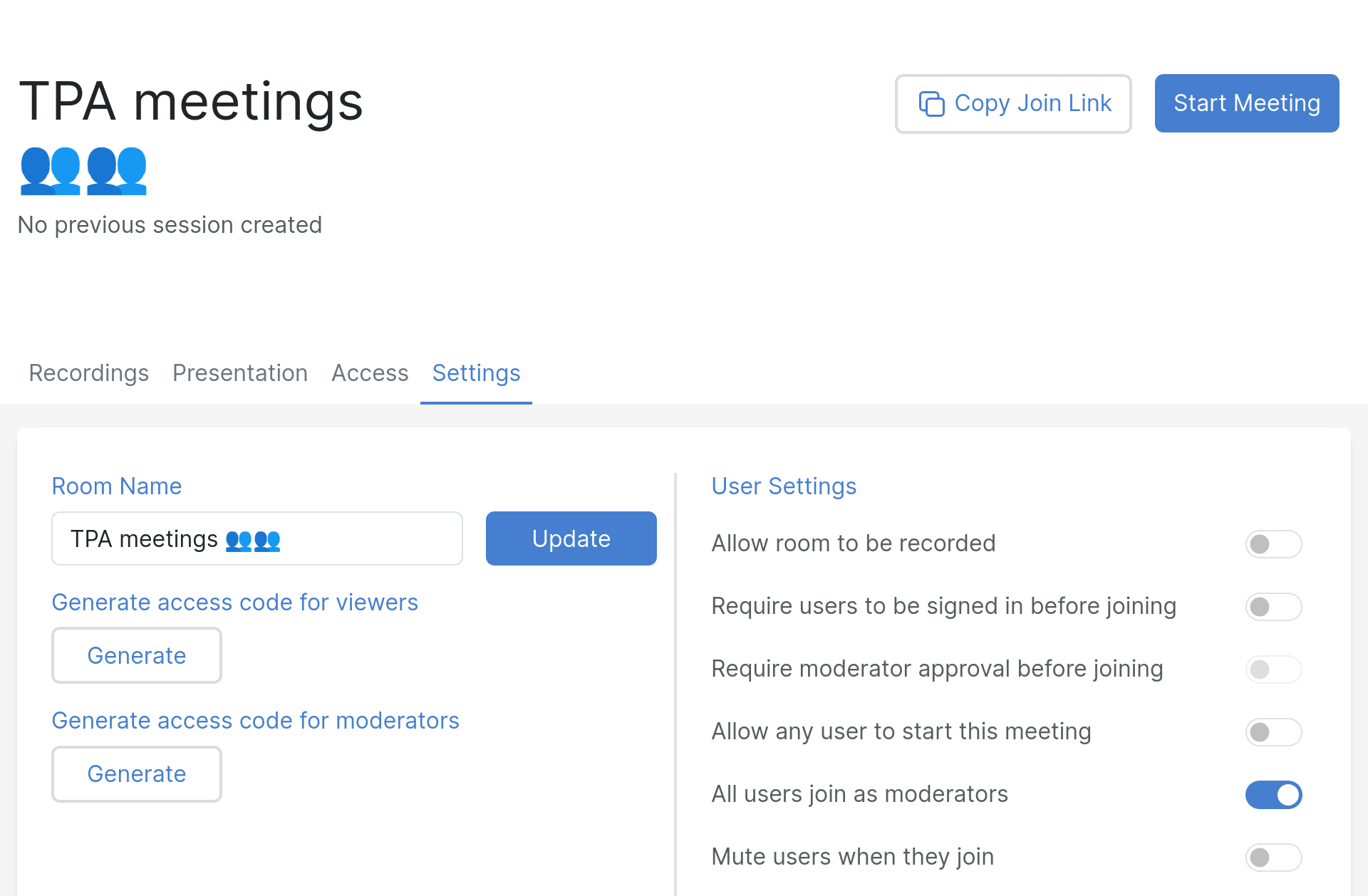
Office hours
This is a more informal room than the meeting room, where you meet to just hangout together, or provide support to others at specific time windows.
- mostly default settings:
- no recordings
- no sign-in required
- no moderator approval (although this could be enabled if you want to support external users and don't want them to see each other, but perhaps breakout rooms are best for that)
- disable "mute users as they join"
- ... except:
- "Allow any user to start this meeting", so that your teammates can start the office hours even when you're not there
- share access with your team (needs to be done one by one, unfortunately)
- suggested iconography: TEAMNAME office hours ☕
- upload a default presentation
(e.g.
meta/tpa-office-hours.svgfor TPA) that explains the room and gives basic tips to visitors
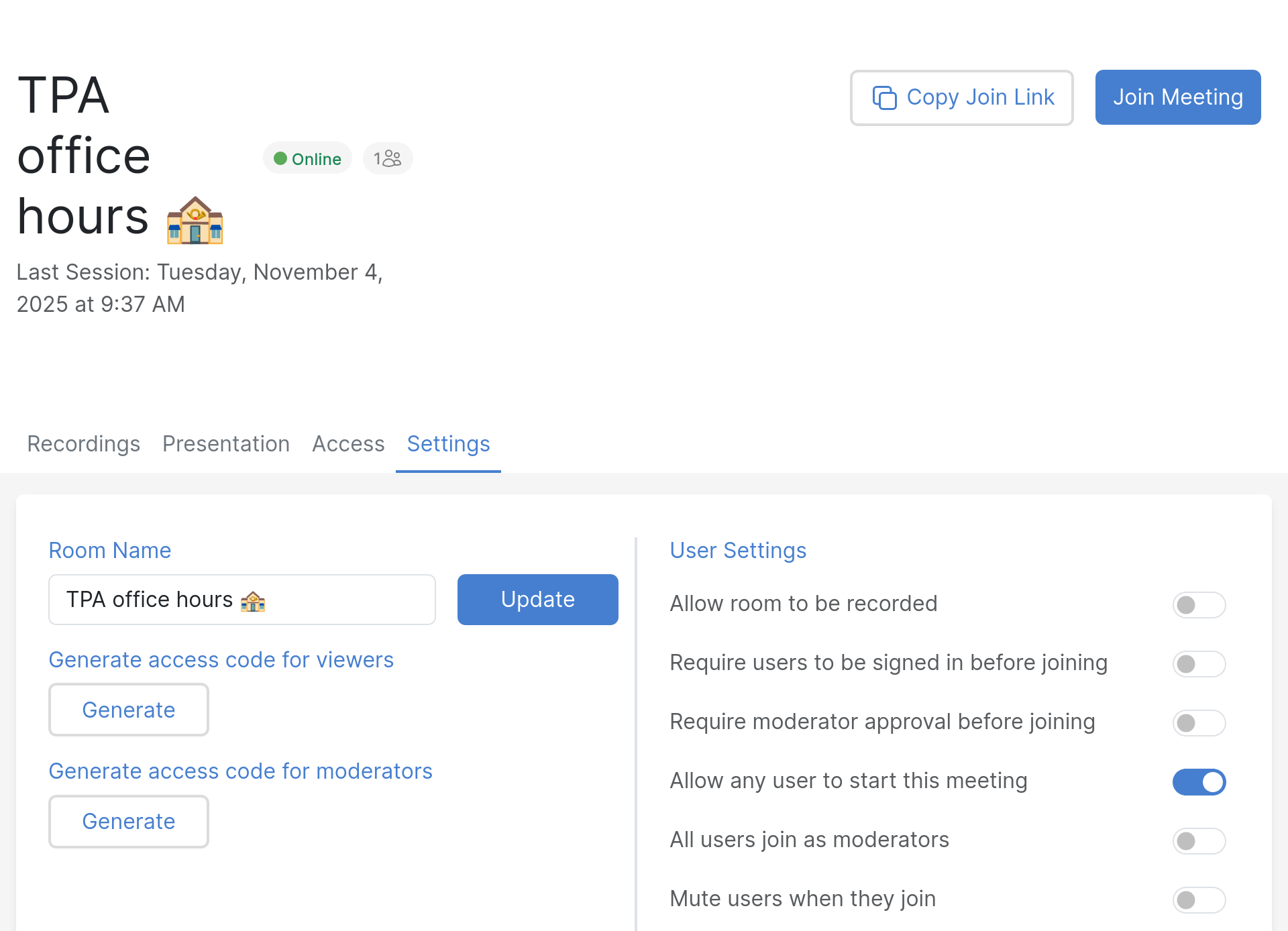
1:1 room
A 1:1 room is essentially the opposite: it needs to be more restricted, and is designed to have 1:1 calls.
- default settings except:
- Require moderator approval before joining, to keep conversation with your peer private in case your meeting goes longer and steps over another scheduled 1:1
- suggested iconography: 1:1 calls 👥 🔔
Interviews
Interviews rooms are designed to interview candidates for job postings, so they require approval (like a 1:1 room) but also allow for recordings, in case someone on your panel missed the interview. It should be configured as such:
- default settings except:L
- recordable: you might want to enable recordings in that room. be careful with recordings, see Privacy issues with recordings for background, but essentially, consider the room recorded as soon as that setting is enabled, even if the "record this room" button is not pressed. Download recordings for safeguarding and delete them when done.
- require moderator approval before joining (keeps the interviewed in a waiting room until approval, extremely important to avoid interviewed folks to see each other!)
- make users unmuted by default (keeps newcomers from stumbling upon the "you're muted, click on the mic big blue button at the bottom" trap, should be default)
- share access with your interview panel so it works even when you're not there
- consider creating a room per interview process and destroying it when done
- suggested iconography: Interviews 📝 🎤 🔴
Breakout rooms
As a moderator, you also have the capacity of creating "breakout rooms" which will send users in different rooms for a pre-determined delay. This is useful for brainstorming sessions, but can be confusing for users, so make sure to explain clearly what will happen beforehand, and remind people before the timer expires.
A common issue that occurs when breakout room finish is that users may not automatically "rejoin" the audio, so they may need to click the "phone" button again to rejoin the main conference.
Improving your audio and video experience
Remote work can be hard: you simply don't have the same "presence" as when you are physically in the same place. But we can help you get there.
Ben S. Kuhn wrote this extraordinary article called "How to make video calls almost as good as face-to-face" and while a lot of its advice is about video (which we do not use as much), the advice he gives about audio is crucial, and should be followed.
This section is strongly inspired by that excellent article, which we recommend you read in its entirety anyways.
Audio tips
Those tips are critical in having a good audio conversation online. They apply whether or not you are using video of course, but should be applied first, before you start going into a fancy setup.
All of this should cost less than 200$, and maybe as little as 50$.
Do:
-
ensure a quiet work environment: find a quiet room, close the door, and/or schedule quiet times in your shared office for your meetings, if you can't have your own office
-
if you have network issues, connect to the network with cable cable instead of WiFi, because the problem is more likely to be flaky wifi than your uplink
- buy comfortable headphones that let you hear your own voice, that is: normal headphones without noise reduction, also known as open-back headphones
- use a headset mic -- e.g. BoomPro (35$), ModMic (50$) -- which will sound better and pick up less noise (because closer to your mouth)
You can combine items 3 and 4 and get a USB headset with a boom mic. Something as simple as the Jabra EVOLVE 20 SE MS (65$) should be good enough until you need professional audio.
Things to avoid:
-
avoid wireless headsets because they introduce a lot of latency
-
avoid wifi because it will introduce reliability and latency issues
Then, as Ben suggests:
You can now leave yourself unmuted! If the other person also has headphones, you can also talk at the same time. Both of these will make your conversations flow better.
This idea apparently comes from Matt Mullenweg -- Wordpress founder -- who prominently featured the idea on his blog: "Don't mute, get a better headset".
Video tips
Here are, directly from from Ben's article, notes specifically about video conferencing. I split it up in a different section because we mostly do audio-only meeting and rarely open our cameras.
So consider this advice purely optional, and mostly relevant if you actually stream video of yourself online regularly.
(~$200) Get a second monitor for notes so that you can keep Zoom full-screen on your main monitor. It’s easier to stay present if you can always glance at people’s faces. (I use an iPad with Sidecar for this; for a dedicated device, the right search term is “portable monitor”. Also, if your meetings frequently involve presentations or screensharing, consider getting a third monitor too.)
($0?) Arrange your lighting to cast lots of diffuse light on your face, and move away any lights that shine directly into your camera. Lighting makes a bigger difference to image quality than what hardware you use!
(~$20-80 if you have a nice camera) Use your camera as a webcam. There’s software for Canon, Fujifilm, Nikon, and Sony cameras. (You will want to be able to plug your camera into a power source, which means you’ll probably need a “dummy battery;” that’s what the cost is.)
(~$40 if you have a smartphone with a good camera) Use that as a webcam via Camo.
(~$350) If you don’t own a nice camera but want one, you can get a used entry-level mirrorless camera + lens + dummy battery + boom arm. See buying tips.
This section is more involved as well, so I figured it would be better to prioritise the audio part (above), because it is more important anyways.
Of the above tips, I found most useful to have a second monitor: it helps me be distracted less during meetings, or at least it's easier to notice when something is happening in the conference.
Testing your audio
Big Blue Button actually enforces an echo test on connection, which can be annoying (because it's slow, mainly), but it's important to give it a shot, just to see if your mic works. It will also give you an idea of the latency between you and the audio server, which, in turn, will give you a good idea of the quality of the call and its interactions.
But it's not as good as a real mic check. For that, you need to record your voice and listen to it later, which an echo test is not great for. There's a site called miccheck.me, built with free software, which provides a client-side (in-browser) application to do an echo test. But you can also use any recorder for this purpose, for example Audacity or any basic sound recorder.
You should test a few sentences with specific words that "pop" or "hiss". Ben (see above) suggests using one of the Harvard sentences (see also wikipedia). You would, for example, read the following list of ten sentences:
- A king ruled the state in the early days.
- The ship was torn apart on the sharp reef.
- Sickness kept him home the third week.
- The wide road shimmered in the hot sun.
- The lazy cow lay in the cool grass.
- Lift the square stone over the fence.
- The rope will bind the seven books at once.
- Hop over the fence and plunge in.
- The friendly gang left the drug store.
- Mesh wire keeps chicks inside.
To quote Ben again:
If those consonants sound bad, you might need a better windscreen, or to change how your mic is positioned. For instance, if you have a headset mic, you should position it just beside the corner of your mouth—not directly in front—so that you’re not breathing/spitting into it.
Testing your audio and video
The above allows for good audio tests, but a fuller test (including video) is the freeconference.com test service, a commercial service, but that provides a more thorough test environment.
Pager playbook
Disaster recovery
Reference
Installation
TPI is currently using Big Blue Button hosted by Maadix at https://bbb.torproject.net/ for regular meetings.
SLA
N/A. Maadix has a cookie policy and terms of service.
Design
Account policy
-
Any Tor Core Contributor can request a BBB account, and it can stay active as long as they remain a core contributor.
-
Organizations and individuals, who are active partners of the Tor Project can request an account and use for their activities, but this is only used in rare exceptions. It is preferable to ask for a core contributor to create a room instead.
-
We encourage everybody with an active BBB account to use this platform instead of third parties or closed source platforms.
-
To limit security surface area, we will disable accounts that haven't logged in during the past 6 months. Accounts can always be re-enabled when people want to use them again.
-
Every member can have maximum 5 conference rooms, and this limit is enforced by the platform. Exceptions to this rule include the Admin and Manager roles which have a limit of 100 rooms. Users requiring such an exception should be promoted to the Admin role, not Manager.
-
The best way to arrange a user account is to get an existing Tor Core Contributor to vouch for the partner. New accounts should be requested contacting TPA.
-
An account will be closed in the case of:
- a) end of partnership between Tor Project and the partner,
- b) or violation of Tor Project’s code of conduct,
- c) or violation of this policy,
- d) or end of the sponsorship of this platform
-
The account member is responsible for keeping the platform secure and a welcome environment. Therefore, the platform shall not be used by others third parties without the explicit consent of the account holder.
-
Every member is free to run private meetings, training, meetups and small conferences.
-
As this is a shared service, we might adapt this policy in the future to better accommodate all the participants and our limited resource.
Issues
There is no issue tracker specifically for this project, File or search for issues in the team issue tracker with the ~BBB label.
Be warned that TPA does not manage this service and therefore is not in a position to fix most issues related with this service. Big Blue Button's issue tracker is on GitHub and Maadix can be contacted for support by TPA at support@maadix.net.
Known issues
Those are the issues with Big Blue Button we are aware of:
- mute button makes a sound when pressed
- has no global remote keyboard control (e.g. Mumble has a way to set a global keyboard shortcut that works regardless of the application in focus, for example to mute/unmute while doing a demo)
- you have to log back in about every week, see tpo/tpa/team#42384 and upstream
Privacy issues with recordings
Recordings have significant security issues documented by Maadix. There are two issues: the "Record" button does not work as expected and room recordings are publicly available in default BBB instances (but not ours).
Some details:
-
as soon as a room is set to "Allow room to be recorded" in the settings, a recording is stored to disk as soon as the room starts, even if the "record" button in the room is not pressed. the "record" button merely "marks" which times that should be recorded, see upstream documentation for details.
This is mitigated by Maadix by cleaning up those source recordings on a regular basis.
-
Access control to rooms is poor: the recordings are normally publicly available, protected only by a checksum and timestamp that are easily guessable (see upstream issue 9443).
This is mitigated by Maadix which implements proper access controls at the web server level, so that only authenticated users can see recordings.
A good rule of thumb is to regularly inspect your recordings, download what you need, and delete everything that is not designed for public consumption.
Resolved issues
Those were fixed:
- breakout rooms do not re-enable audio in main room when completed
Monitoring and testing
TPA does not monitor this instance.
Logs and metrics
N/A. Maadix has a terms of conditions and cookies policy.
Backups
N/A.
Other documentation
Discussion
Overview
With the rise of the SARS-COV-2 pandemic, even Tor, which generally works remotely, is affected because we were still having physical meetings from time to time, and we'll have to find other ways to deal with this. At the start of the COVID-19 pandemic -- or, more precisely, when isolation measures became so severe that normal in-person meetings became impossible -- Tor started looking into deploying some sort of interactive, real-time, voice and ideally video conferencing platform.
This was originally discussed in the context of internal team operations, but actually became a requirement for a 3-year project in Africa and Latin America. It's part of the 4th phase, to support for partners online. Tor has been doing training in about 11 countries, but has been trying to transition into partners on the ground, for them to do the training. Then the pandemic started and orgs are moving online for training. We reached out to partners to see how they're doing it. Physical meetings are not going to happen. We have a year to figure out what to do with the funder and partners. Two weeks ago gus talked with trainers in brazil, tried jitsi which works well but facing problems for trainings (cannot mute people, cannot share presentations). They tried BBB and it's definitely better than Jitsi for training as it's more like an online classroom.
Discussions surrounding this project started in ticket 33700 and should continue there, with decisions and facts gathered in this wiki page.
Goals
Must have
- video/audio communication for groups about 80 people
- specifically, work session for teams internal to TPI
- also, training sessions for people outside of TPI
- host partner organizations in a private area in our infrastructure
- a way for one person to mute themselves
- long term maintenance costs covered, in particular upgrades
- good tech support available
- minimal mobile support (e.g. web app works on mobile)
- recordings privacy: recordings must be private and/or expired properly (see this post about BBB)
Nice to have
- Migration from existing provider
- Reliable video support. Video chat is nice, but most video chat systems usually require all participants to have video off otherwise the communication is sensibly lagged.
- usable to host a Tor meeting, which means more load (because possibly > 100 people) and more tools (like slide sharing or whiteboarding)
- allow people to call in by regular phone
- multi-party lightning talks, with ways to "pass the mic" across different users (currently done with Streamyard and Youtube)
- respecting our privacy, peer to peer encryption or at least encrypted with keys we control
- free and open source software
- tor support
- have a mobile app
- inline chat
- custom domain name
- Single-sign on integration (SAML/OIDC)
Non-goals
- land a man on the moon
Approvals required
- grant approvers
- TPI (vegas?)
The budget will be submitted for a grant proposal, which will be approved by donors. But considering that it's unlikely such a platform would stay unused within the team, the chosen tool should also be approved by the TPI team as well. In fact, it would seem unreasonable to deploy such a tool for external users without first testing it ourselves.
Timeline
- april 2020: budget
- early may 2020: proposal to funders
- june 2020 - june 2021: fourth phase of the training project
Proposed Solution
Cost
Pessimistic estimates for the various platforms.
Each solution assumes it requires a dedicated server or virtual server to be setup, included in the "initial setup". Virtual servers require less work than physical servers to setup.
The actual prices are quoted from Hetzner but virtual servers would probably be hosted in our infrastructure which might or might not incur additional costs.
Summary
| Platform | One time | Monthly | Other |
|---|---|---|---|
| Mumble | 20 hours | €13 | 2h/person + 100$/person for headset |
| Jitsi | 74 hours | €54 + 10 hours | |
| Big Blue Button | 156 hours | €54 + 8 hours |
Caveats
- Mumble is harder to use and has proven to absolutely require a headset to function reliably
- it is assumed that Jitsi and BBB will have similar hardware requirements. this is based on the experience that BBB seems to scale better than Jitsi but since it has more features might require comparatively more resources
- BBB is marked as having a lesser monthly cost because their development cycle seems slower than Jitsi. that might be too optimistic: we do not actually know how reliable BBB will be in production. preliminary reports of BBB admins seem to say it's fairly stable and doesn't require much work after the complex install procedure
- BBB will take much more time to setup. it's more complex than Jitsi, but it also requires an Ubuntu, which we do not currently support in our infrastructure (and an old version too, so upgrade costs were counted in the setup)
- current TPA situation is that we will be understaffed by 50% starting on May 1st 2020, and by 75% for two months during the summary. this project is impossible to realize if that situation is not fixed, and would still be difficult to complete with the previous staff availability.
A safe way to ensure funding for this project without threatening the sability of the team would be to hire at least part time worker especially for the project, which is 20 hours a month, indefinitely.
Mumble
Assumed configuration
- minimal Mumble server
- no VoIP
- no web configuration
One time costs:
- initial setup: 4 hours
- puppet programming: 6 hours
- maintenance costs: near zero
- Total: 10 hours doubled to 20 hours for safety
Recurring costs:
- onboarding training: 2 hours per person
- mandatory headset: 100$USD per person
- CPX31 virtual server: €13 per month
Jitsi
Assumed configuration:
- single server install on Debian
- max 14 simultaneous users
- dial-in capability
One time:
- initial setup: 8 hours
- Puppet one-time programming: 6 hours
- Puppet Jigasi/VoIP integration: 6 hours
- VoIP provider integration: 16 hours
- Total: 36 hours, doubled to 72 hours for safety
Running costs:
- Puppet maintenance: 1 hour per month
- Jitsi maintenance: 4 hours per month
- AX51-NVMe physical server: €54 per month
- Total: 5 hours per month, doubled to 10 hours for safety, +€54 per month
Big Blue Button
Assumed configuration:
- single server install on Ubuntu
- max 30 simultaneous users
- VoIP integration
One time fee:
- initial setup: 30 hours
- Ubuntu installer and auto-upgrade configuration: 8 hours
- Puppet manifests Ubuntu port: 8 hours
- VoIP provider integration: 8 hours
- One month psychotherapy session for two sysadmins: 8 hours
- Ubuntu 16 to 18 upgrade: 16 hours
- Total: 78 hours, doubled to 156 hours for safety
Running costs:
- BBB maintenance: 4 hours per month
- AX51-NVMe physical server: €54 per month
- Total: 4 hours per month, doubled to 8 hours for safety, +€54 per month
Why and what is a SFU
Note that, below, "SFU" means "Selective Forwarding Unit", a way to scale out WebRTC deployments. To quote this introduction:
SFU architecture advantages
- Since there is only one outgoing stream, the client does not need a wide outgoing channel.
- The incoming connection is not established directly to each participant, but to the media server.
- SFU architecture is less demanding to the server resources as compared to other video conferencing architectures.
I think SFUs are particularly important for us because of our distributed nature...
In a single server architecture, everyone connects to the same server. So if that server is in, say, Europe, things are fine if everyone on the call is in Europe, but once one person joins from the US or South America, they have a huge latency cost involved with that connection. And that scales badly: every additional user far away is going to add latency to the call. This can be particularly acute if everyone is on the wrong continent in the call, naturally.
In a SFU architecture, instead of everyone connecting to the same central host, you connect to the host nearest you, and so does everyone else near you. This makes it so people close to you have much lower latency. People farther away have higher latency, but that's something we can't work around without fixing the laws of physics anyways.
But it also improves latency even for those farther away users because instead of N streams traveling across the atlantic, you multiplex that one stream into a single one that travels between the two SFU servers. That reduces latency and improves performance as well.
Obviously, this scales better as you add more local instances, distributed to wherever people are.
Note that determining if a (say) Jitsi instance supports SFU is not trivial. The frontend might be a single machine, but it's the videobridge backend that is distributed, see the architecture docs for more information.
Alternatives considered
mumble
features
- audio-only
- moderation
- multiple rooms
- native client for Linux, Windows, Mac, iOS, Android
- web interface (usable only for "listening")
- chat
- dial-in, unmaintained, unstable
Lacks video. Possible alternatives for whiteboards and screensharing:
- http://deadsimplewhiteboard.herokuapp.com/
- https://awwapp.com/
- https://www.webwhiteboard.com/
- https://drawpile.net/
- https://github.com/screego/server / https://app.screego.net/
installation
there are two different puppet modules to setup mumble:
- https://github.com/voxpupuli/puppet-mumble
- https://0xacab.org/riseup-puppet-recipes/mumble
still need to be evaluated, but i'd be tempted to use the voxpupuli module because they tend to be better tested and it's more recent
jitsi
installation
ansible roles: https://code.immerda.ch/o/ansible-jitsi-meet/ https://github.com/UdelaRInterior/ansible-role-jitsi-meet https://gitlab.com/guardianproject-ops/jitsi-aws-deployment
notes: https://gitlab.com/-/snippets/1964410
puppet module: https://gitlab.com/shared-puppet-modules-group/jitsimeet
there's also a docker container and (messy) debian packages
prometheus exporter: https://github.com/systemli/prometheus-jitsi-meet-exporter
Mayfirst is testing a patch for simultaneous interpretation.
Other Jitsi instances
See Fallback conferencing services.
Nextcloud Talk
systemli is using this ansible role to install coturn: https://github.com/systemli/ansible-role-coturn
BBB
features
- audio, video conferencing support
- accessible with live closed captionning and support for screen readers
- whiteboarding and "slideshow" mode (to show PDF presentations)
- moderation tools
- chat box
- embedded etherpad
- dial-in support with Freeswitch
- should scale better than jitsi and NC, at least according to their FAQ: "As a rule of thumb, if your BigBlueButton server meets the minimum requirements, the server should be able to support 150 simultaneous users, such as 3 simultaneous sessions of 50 users, 6 x 25, etc. We recommend no single sessions exceed one hundred (100) users."
i tested an instance setup by a fellow sysadmin and we had trouble after a while, even with two people, doing a screenshare. it's unclear what the cause of the problem was: maybe the server was overloaded. more testing required.
installation
based on unofficial Debian packages, requires Freeswitch for dial-in, which doesn't behave well under virtualization (so would need a bare metal server). Requires Ubuntu 16.04, packages are closed source (!), doesn't support Debian or other distros
anadahz setup BBB using a ansible role to install BBB.
Update: BBB is now (2.3 and 2.4, end of 2021) based on Ubuntu 18.04, a slightly more up to date release, supported until 2023 (incl.), which is much better. There's also a plan to drop Kurento which will make it easier to support other distributions.
Also, we are now using an existing BBB instance, at https://bbb.torproject.net/, hosted by Maadix. We were previously hosted at meet.coop but switched in October 2025, see TPA-RFC-92.
Rejected alternatives
This list of alternatives come from the excellent First Look Media procedure:
- Apple Facetime - requires Apple products, limited to 32 people and multiple parties only works with the very latest hardware, but E2EE
- Cisco Webex - non-opensource, paid, cannot be self-hosted, but E2EE
- Google Duo - requires iOS, Android, or web client, non-free, limited to 12 participants, but E2EE
- Google Hangouts, only 10 people, Google Meet supports 250 people with a paid subscription, both proprietary
- Jami - unstable but free software and E2EE
- Keybase - chat only
- Signal - chat only
- Vidyo - paid service
- Zoom - paid service, serious server and client-side security issues, not E2EE, but very popular and fairly reliable
Other alternatives
Those alternatives have not been explicitly rejected but are somewhat out of scope, or have come up after the evaluation was performed:
- bbb-scale - scale Big Blue Button to thousands of users
- Boltstream - similar to Owncast, RTMP, HLS, WebVTT sync, VOD
- Galene - single-binary, somewhat minimalist, breakout groups, recordings, screen sharing, chat, stream from disk, authentication, 20-40 participants for meetings, 400+ participants for lectures, no simulcasting, no federation
- Lightspeed - realtime streaming
- Livekit - WebRTC, SFU, based on Pion, used by Matrix in Element Call
- Mediasoup - backend framework considered by BBB developers
- Medooze - backend framework considered by BBB developers
- OpenCast - for hosting classes, editing, less interactive
- OpenVidu - a thing using the same backend as BBB
- Owncast - free software Twitch replacement: streaming with storage, packaged in Debian 14 (forky) and later
- Venueless - BSL, specialized in hosting conferences
- Voctomix and vogol are used by the Debian video team to stream conferences online. requires hosting and managing our own services, although Carl Karsten @ https://nextdayvideo.com/ can provide that paid service.
Fallback conferencing services
Jitsi (defaults to end-to-end encryption):
- https://meet.jit.si/ - official instance, geo-distributed, SFU
- https://vc.autistici.org/ - autistici instance, frontend at Hetzner FSN1, unclear if SFU
- https://meet.mullvad.net/ - Mullvad instance, frontend in Malmo, Sweden, unclear if SFU
- https://meet.mayfirst.org - Mayfirst, frontend in NYC, unclear if SFU
- https://meet.greenhost.net - Greenhost, infrared partners, frontend in Amsterdam, unclear if SFU
- https://jitsi.meet.coop - meet.coop fallback server, hosted at Autonomic
Livekit (optional end-to-end encryption):
- https://meet.livekit.io/ - demo server from the Livekit project, SFU
BBB:
Note that, when using those services, it might be useful to document why you felt the need to not use the official BBB instance, and how the experience went in the evaluation ticket.
Conference organisation
This page is perhaps badly named, as it might suggest it is about organising actual, in person conferences as opposed to audio- or video-conferencing.
Failing a full wiki page about this, we're squatting this space to document software alternatives for organising and managing actual in-person conferences.
Status quo: ad-hoc, pads, Nextcloud and spreadsheets
Right now, we're organising conferences using Etherpads and a spreadsheet. When the schedule is completed, it's posted in a Nextcloud calendar.
This is hard. We got about 52 proposals in a pad for the Lisbon meeting, it was time-consuming to copy-paste those into a spreadsheet. Then it was hard to figure out how to place those in a schedule, as it wasn't clear how much over-capacity we were.
Lots of manual steps, and communication was all out-of-band, by email.
Pretalx / Pretix
Pretalx is a free software option with a hosted service that seems to have it all: CFP management, rooms, capacity scheduling. A demo was tested and is really promising.
With a "tor meeting scale" type of event (< 100 attendees, 0$ entry fee), the pricing is 200EUR per event, unless we self-host.
They also have a ticketing software called pretix which we would probably not need.
Pretalx was used by Pycon US 2023, Mozilla Festival 2022, Nsec, and so on.
Others
-
Wafer is a "wafer-thin web application for running small conferences, built using Django". It's used by the Debian conference (Debconf) to organise talks and so on. It doesn't have a demo site and it's unclear how easy it is to use. Debconf folks implemented a large amount of stuff on top of it to tailor it to their needs, which is a little concerning.
-
summit is the code used by Canonical to organise the Ubuntu conferences, which Debian used before switching to Wafer
-
indico was developed by CERN and is used at many large (think UN) organisations
CRM stands for "Customer Relationship Management" but we actually use it to manage contacts and donations. It is how we send our massive newsletter once in a while.
Tutorial
Basic access
The main website is at:
It is protected by basic authentication and the site's login as well, so you actually need two sets of password to get in.
To set up basic authentication for a new user, the following command must be executed on the CiviCRM server:
htdigest /etc/apache2/htdigest 'Tor CRM' <username>
Once basic authentication is in place, the Drupal/CiviCRM login page can be accessed at: https://crm.torproject.org/user/login
Howto
Updating premiums
From time to time, typically around the annual year-end campaign (YEC), the donation gift/perks offered on https://donate.torproject.org need to be updated.
The first step is to update the data in CiviCRM.
Create the perks
- Go to: Contributions > Premiums (Thank-you Gifts
- Edit each product as follows:
- Name: Name displayed for the premium
- Description: subtext under the title, ex: "Get this year’s Tor Onions T-shirt"
- SKU: SKU of the product, or if it’s a t-shirt with variants, the common part of the SKU for all sizes of the product (with no dash at the end)
- Image: A PNG image can be uploaded using the "upload from my computer" option
- Minimum contribution amount: minimum for non-recurring donations
- Market value: not used, can be "1.00"
- Actual cost of Product: not used, ignore
- Financial Type: not used, ignore
- Options: comma-delimited "SKU=label" for size selection and corresponding
SKUs. For example:
T22-RCF-C01=Small,T22-RCF-C02=Medium,T22-RCF-C03=Large,T22-RCF-C04=XL,T22-RCF-C05=2XL,T22-RCF-C06=3XL,T22-RCF-C07=4XLThis field cannot be blank, at least one option is required! (eg.HAT-00=Hat) - Enabled?: checked (uncheck if the perk is not used anymore)
- Subscription or Service Settings: ignore, not used
- Minimum Recurring Amount: Enter the recurring donation amount that makes this premium available
- Sort: decimal number that helps sort the items on the list of perks (in ascending order, i.e. a lower order/weight is displayed first)
- Image alt text: alt text for the perk image html tag
New perks: disable the old perk instead of updating the SKU to avoid problems with older data.
Associate with contributions
Perks must be associated with the CiviCRM "contribution page". TPA does not use these Contribution Pages directly, but that is where the settings are stored for donate-neo, such as the ThankYou message displayed on transaction receipts.
- Go to: Contributions > Manage Contribution Pages
- Find the "Your donation to the Tor Project" list item and on right right side, click the "configure" link
- On the contribution page settings form, click the "Premiums" tab
Here you can then associate the perks (premiums) created in the previous section with the page.
If the "add new" link is not displayed, it’s because all available premiums have already been added.
Export the JSON data for donate-neo
When done, export the data in JSON format using the tpa-perks-json CiviCRM page.
The next steps are detailed on the donate wiki page.
Monitoring mailings
The CiviCRM server can generate large mailings, in the order of hundreds of thousands of unique email addresses. Those can create significant load on the server if mishandled, and worse, trigger blocking at various providers if not correctly rate-limited.
For this, we have various knobs and tools:
- Grafana dashboard watching the two main mail servers
- Place to enable/disable mailing (grep for
Send sched...) - Where the batches are defined
- The Civimail interface should show the latest mailings (when clicking twice on "STARTED", from there click the Report button to see how many mails have been sent, bounced, etc
The Grafana dashboard is based on metrics from Prometheus, which can be inspected live with the following command:
curl -s localhost:3903/metrics | grep -v -e ^go_ -e '^#' -e '^mtail' -e ^process -e _tls_; postfix-queues-sizes
Using lnav can also be useful to monitor logs in real time, as it
provides per-queue ID navigation, marks warnings (deferred messages)
in yellow and errors (bounces) in red.
A few commands to inspect the email queue:
-
List the queue, with more recent entries first
postqueue -j | jq -C .recipients[] | tac -
Find how many emails in the queue, per domain:
postqueue -j | jq -r .recipients[].address | sed 's/.*@//' | sort | uniq -c | sort -nNote that the
qshape deferredcommand gives a similar (and actually better) output.
In case of a major problem, you can stop the mailing in CiviCRM and put all emails on hold with:
postsuper -h ALL
Then the postfix-trickle script can be used to slowly release
emails:
postfix-trickle 10 5
When an email bounces, it should go to civicrm@crm.torproject.org,
which is an IMAP mailbox periodically checked by CiviCRM. It will
ingest bounces landing in that mailbox and disable them for the next
mailings. It's also how users can unsubscribe from those mailings, so
it is critical that this service runs correctly.
A lot of those notes come from the issue where we enabled CiviCRM to receive its bounces.
Handling abuse complains
Our postmaster alias can receive emails like this:
Subject: Abuse Message [AbuseID:809C16:27]: AbuseFBL: UOL Abuse Report
Those emails usually contain enough information to figure out which email address filed a complaint. The action to take is to remove them from the mailing. Here's an example email sample:
Received: by crm-int-01.torproject.org (Postfix, from userid 33)
id 579C510392E; Thu, 4 Feb 2021 17:30:12 +0000 (UTC)
[...]
Message-Id: <20210204173012.579C510392E@crm-int-01.torproject.org>
[...]
List-Unsubscribe: <mailto:civicrm+u.2936.7009506.26d7b951968ebe4b@crm.torproject.org>
job_id: 2936
Precedence: bulk
[...]
X-CiviMail-Bounce: civicrm+b.2936.7009506.26d7b951968ebe4b@crm.torproject.org
[...]
Your bounce might have only some of those. Possible courses of action to find the victim's email:
- Grep for the queue ID (
579C510392E) in the mail logs - Grep for the Message-Id
(
20210204173012.579C510392E@crm-int-01.torproject.org) in mail logs (withpostfix-trace)
Once you have the email address:
- Head for the CiviCRM search interface to find that user
- Remove the from the "Tor News" group, in the
Grouptab
Another option is to go in Donor record > Edit communication preferences > check do not email.
Alternatively, you can just send an email to the List-Unsubscribe
address or click the "unsubscribe" links at the bottom of the email.
The handle-abuse.py script in fabric-tasks.git automatically
handles the CiviCRM bounces that way. Support for other bounces should
be added there as we can.
Special cases should be reported to the CiviCRM admin by forwarding
the email to the Giving queue in RT.
Sometimes complaints come in about Mailman lists. Those are harder to handle because they do not have individual bounce addresses...
Granting access to the CiviCRM backend
The main CiviCRM is protected by Apache-based authentication,
accessible only by TPA. To add a user, on the backend server
(currently crm-int-01):
htdigest /etc/apache2/htdigest 'Tor CRM' $USERNAME
A Drupal user also needs to be created for that person. For that, visit the user creation form.
If you yourself don't have access to the Drupal interface yet, you can get access to the admin user through root access to the server with:
sudo -i -u torcivicrm
cd /srv/crm.torproject.org/htdocs-prod && drush uli toradmin
Once logged in a personal account should be created with administrator privileges to facilitate future logins.
Notes:
- The URL produced by drush needs to be manually modified for it to lead to the
right place.
httpsshould be used indead ofhttp, and the hostname needs to be changed fromdefaulttocrm.torproject.org drush uliwithout a user will produce URLs that give out an Access Denied error since the user with uid 1 is disabled.
Rotating API tokens
See the donate site docs for this.
Pager playbook
Security breach
If there's a major security breach on the service, the first thing to
do is probably to shutdown the CiviCRM server completely. Halt the
crm-int-01 and donate-01 machines completely, and remove access
to the underlying storage from the attacker.
Then API keys secrets should probably be rotated, follow the Rotating API tokens procedure.
Job failures
If you get an alert about a "CiviCRM job failure", for example:
The CiviCRM job send_scheduled_mailings on crm-int-01.torproject.org
has been marked as failed for more than 4h. This could be that
it has not run fast enough, or that it failed.
... it means a CiviCRM job (in this case send_scheduled_mailings)
has either failed or has not run in its configured time frame. (Note
that we currently can't distinguish those states, but hopefully will
have metrics to do so soon.)
The "scheduled job failures" section will also show more information about the error:

To debug this, first find the "Scheduled Job Logs":
- Go to Administer > System Settings > Scheduled Jobs
- Find the affected job (above
send_scheduled_mailings) - Click "view log"
Here's a screenshot of such a log:
This will show the error that triggered the alert:
-
If it's an exception, it should be investigated in the source code.
-
If the job just hasn't ran in a timely manner, the systemd timer should be investigated with
systemctl status civicron@prod.timer
There's also the global CiviCRM on-disk log. It's not perfect, because on this server there are sometimes 2 different logs. It can also rather noisy, with deprecation alerts, civirules chatter, etc.
Those are also available in "Administer > Administration Console > View Log" in the web interface and stored on disk, in:
ls -altr /srv/crm.torproject.org/htdocs-prod/sites/default/files/civicrm/ConfigAndLog/CiviCRM.1.*.log
Note that it's also possible to run the jobs by hand, but we don't have specific examples on how to do this for all jobs. See the Resque process job, below, for a more specific example.
Kill switch enabled
If the Resque Processor Job gets stuck because it failed to process an item, it will stop processing completely (assuming it's a bug, or something is wrong). It raises a "kill switch" that will show up as a red "Resque Off" message in Administer > Administration Console > System Status. Here's a screenshot of an enabled kill switch:

Note that this is a special case of the more general job failure above. It's documented explicitly and separately here because it's such an important part that it warrants its own documentation.
The "scheduled job failures" section will also show more information about the error:
To debug this, first find the "Scheduled Job Logs":
- Go to Administer > System Settings > Scheduled Jobs
- Find "TorCRM Resque Processing"
- Click "view log"
Here's a screenshot of such a log:
This will show the error (typically a PHP exception) that triggered the kill switch. This should be investigated in the source code.
There's also the global CiviCRM on-disk log. It's not perfect, because on this server there are sometimes 2 different logs (it's in my pipeline to debug that). It can also rather noisy, with deprecation alerts, civirules chatter, etc.
Those are also available in "Administer > Administration Console > View Log" in the web interface and stored on disk, in:
ls -altr /srv/crm.torproject.org/htdocs-prod/sites/default/files/civicrm/ConfigAndLog/CiviCRM.1.*.log
The items in the queue can be seen by searching for "TorCRM - Resque"
in the above status page, or with the Redis command: LRANGE "resque:queue:prod_web_donations" 0 -1, in the redis-cli shell.
The job can be ran from the command-line manually with:
sudo -i -u torcivicrm
cd /srv/crm.torproject.org/htdocs-prod/
cv api setting.create torcrm_resque_off=0
cv api Job.Torcrm_Resque_Process
You can also get a backtrace with:
cv api Job.Torcrm_Resque_Process -vvv
Once the problem is fixed, the kill switch can be reset by going to "CiviCRM > Administer > Tor CRM Settings" in the web interface. Note that there's somewhat of a double-negative in the kill switch configuration. The form is:
Resque Off Switch [0]
Set to 0 to disable the off/kill switch. This gets set to 1 by the "Resque" Scheduled Job when an error is detected. When that happens, check the CiviCRM "ConfigAndLog" logs, or under Administer > Console > View Log
The "Resque Off Switch" is the kill switch. When it's set to zero ("0", as above), it's disabled, which means normal operation and the queue is processed. It's set to "1" when an error is raised, and should be set back to "0" when the issue is fixed.
See tpo/web/civicrm#144 for an example of such a kill switch debugging session.
Disaster recovery
If Redis dies, we might lose in-process donations. But otherwise, it is disposable and data should be recreated as needed.
If the entire database gets destroyed, it needs to be restored from backups, by TPA.
Reference
Installation
Full documentation on the installation of this system is somewhat out of scope for TPA: sysadmins only installed the servers and setup basic services like a VPN (using IPsec) and an Apache, PHP, MySQL stack.
The Puppet classes used on the CiviCRM server is role::civicrm_int. That
naming convention reflects the fact that, before donate-neo, there used to
be another role named roles::civicrm_ext for the frontend, retired in
tpo/tpa/team#41511.
Upgrades
As stated above, a new donation campaign involves changes to both the
donate-neo site (donate.tpo) and the CiviCRM server.
Changes to the CiviCRM server and donation middleware can be deployed progressively through the test/staging/production sites, which all have their own databases. See the donate-neo docs for deployments of the frontend.
TODO: clarify the deployment workflow. They seem to have one branch per environment, but what does that include? Does it matter for us?
There's a drush script that edits the dev/stage databases to
replace PII in general, and in particular change the email of everyone
to dummy aliases so that emails sent by accident wouldn't end up in
real people's mail boxes.
Upgrades are typically handled by the CiviCRM consultant.
See also the CiviCRM upgrade guide.
SLA
This service is critical, as it is used to host donations, and should be as highly available as possible. Unfortunately, its design has multiple single point of failures, which, in practice, makes this target difficult to fulfill at this point.
Design and architecture
CiviCRM is a relatively "classic" PHP application: it's made of a
collection of .php files scattered cleverly around various
directories. There's one catch: it's actually built as a drop-in
module for other CMSes. Traditionally, Joomla, Wordpress and Drupal
are supported, and our deployment uses Drupal.
(There's actually a standalone version in development we are interested in as well, as we do not need the features from the Drupal site.)
Most code lives in a torcrm module that processes Redis messages
through CiviCRM jobs.
CiviCRM is isolated from the public internet through HTTP authentication. Communication with the donation frontend happens through a Redis queue. See also the donation site architecture for more background.
Services
The CiviCRM service runs on the crm-int-01 server, with the
following layer:
- Apache: TLS decapsulation, HTTP authentication and reverse proxy
- PHP FPM: PHP runtime which Apache connects to over FastCGI
- Drupal: PHP entry point, loads CiviCRM code as a module
- CiviCRM: core of the business logic
- MariaDB (MySQL) database (Drupal and CiviCRM storage backend)
- Redis server: communication between CiviCRM and the donate frontend
- Dovecot: IMAP server to handle bounces
Apache answers to the following virtual hosts:
crm.torproject.org: production CiviCRM sitestaging.crm.torproject.org: staging sitetest.crm.torproject.org: testing site
The monthly newsletter is configured on CiviCRM and archived on the https://newsletter.torproject.org static site.
Storage
CiviCRM stores most of its data in a MySQL database. There are separate databases for the dev/staging/prod sites.
TODO: does CiviCRM also write to disk?
Queues
CiviCRM can hold a large queue of emails to send, when a new newsletter is generated. This, in turn, can turn in large Postfix email queues when CiviCRM releases those mails in the email system.
The donate-neo frontend uses Redis to queue up transactions for CiviCRM. See the queue documentation in donate-neo. Queued jobs are de-queued by CiviCRM's Resque Scheduled Job, and crons, logs, monitoring, etc, all use standard CiviCRM tooling.
See also the kill switch enabled playbook.
Interfaces
Most operations with CiviCRM happen over a web interface, in a web browser. There is a CiviCRM API but it's rarely used by Tor's operators.
Users that are administrators can also access the drupal admin menu, but it's not shown in the civicrm web interface. You can change the URL in your browser to any drupal section (for example https://crm.torproject.org/admin/user) to get the drupal admin menu to appear.
The torcivicrm user has a command-line CiviCRM tool called cv
in its $PATH which talks to that API to perform various functions.
Drupal also has its own shell tool called drush.
Authentication
The crm-int-01 server doesn't talk to the outside internet and can
be accessed only via HTTP Digest authentication. We are considering
changing this to basic auth.
Users that need to access the CRM must be added to the Apache htdigest file
on crm-int-01.tpo and have a CiviCRM account created from them.
To extract a list of CiviCRM accounts and their roles, the following drush
command may be executed at the root of the Drupal installation:
drush uinf $(drush sqlq "SELECT GROUP_CONCAT(uid) FROM users")
The SSH server is firewalled (rules defined in Puppet,
profile::civicrm). To get access to the port, ask TPA.
Implementation
CiviCRM is a PHP application licensed under the AGPLv3, supporting
PHP 8.1 and later at the time of writing. We are currently
running CiviCRM 5.73.4, released in May 30th 2024 (as of 2024-08-28),
the current version can be found in
/srv/crm.torproject.org/htdocs-prod/sites/all/modules/civicrm/release-notes.md
on the production server (crm-int-01). See also the upstream release
announcements, the GitHub
tags page and the release management policy.
Upstream also has their own GitLab instance.
CiviCRM has a torcrm extension under
sites/all/civicrm_extensions/torcrm which includes most of the CiviCRM
customization, including the Resque Processor job. It replaces the
old tor_donate Drupal module, which is being phased out.
Related services
CiviCRM only holds donor information, actual transactions are processed by the donation site, donate-neo.
Issues
Since there are many components, here's a table outlining the known projects and issue trackers for the different sites.
| Site | Project | Issues |
|---|---|---|
| https://crm.torproject.org | project | issues |
| https://donate.torproject.org | project | issues |
| https://newsletter.torproject.org | project | issues |
Issues with the server-level issues should be filed or in the TPA team issue tracker.
Upstream CiviCRM has their own StackExchange site and use GitLab issue queues
Maintainer
CiviCRM, the PHP application and the Javascript component on
donate-static are all maintained by the external CiviCRM
contractors.
Users
Direct users of this service are mostly the fundraising team.
Upstream
Upstream is a healthy community of free software developers producing regular releases. Our consultant is part of the core team.
Monitoring and metrics
As other TPA servers, the CRM servers are monitored by
Prometheus. The Redis server (and the related IPsec tunnel) is
particularly monitored, using a blackbox check, to make sure both
ends can talk to each other.
There's also graphs rendered by Grafana. This includes an elaborate Postfix dashboard watching to two mail servers.
We started working on monitoring the CiviCRM health better. So far we collect metrics that look like this:
# HELP civicrm_jobs_timestamp_seconds Timestamp of the last CiviCRM jobs run
# TYPE civicrm_jobs_timestamp_seconds gauge
civicrm_jobs_timestamp_seconds{jobname="civicrm_update_check"} 1726143300
civicrm_jobs_timestamp_seconds{jobname="send_scheduled_mailings"} 1726203600
civicrm_jobs_timestamp_seconds{jobname="fetch_bounces"} 1726203600
civicrm_jobs_timestamp_seconds{jobname="process_inbound_emails"} 1726203600
civicrm_jobs_timestamp_seconds{jobname="clean_up_temporary_data_and_files"} 1725821100
civicrm_jobs_timestamp_seconds{jobname="rebuild_smart_group_cache"} 1726203600
civicrm_jobs_timestamp_seconds{jobname="process_delayed_civirule_actions"} 1726203600
civicrm_jobs_timestamp_seconds{jobname="civirules_cron"} 1726203600
civicrm_jobs_timestamp_seconds{jobname="delete_unscheduled_mailings"} 1726166700
civicrm_jobs_timestamp_seconds{jobname="call_sumfields_gendata_api"} 1726201800
civicrm_jobs_timestamp_seconds{jobname="update_smart_group_snapshots"} 1726166700
civicrm_jobs_timestamp_seconds{jobname="torcrm_resque_processing"} 1726203600
# HELP civicrm_jobs_status_up CiviCRM Scheduled Job status
# TYPE civicrm_jobs_status_up gauge
civicrm_jobs_status_up{jobname="civicrm_update_check"} 1
civicrm_jobs_status_up{jobname="send_scheduled_mailings"} 1
civicrm_jobs_status_up{jobname="fetch_bounces"} 1
civicrm_jobs_status_up{jobname="process_inbound_emails"} 1
civicrm_jobs_status_up{jobname="clean_up_temporary_data_and_files"} 1
civicrm_jobs_status_up{jobname="rebuild_smart_group_cache"} 1
civicrm_jobs_status_up{jobname="process_delayed_civirule_actions"} 1
civicrm_jobs_status_up{jobname="civirules_cron"} 1
civicrm_jobs_status_up{jobname="delete_unscheduled_mailings"} 1
civicrm_jobs_status_up{jobname="call_sumfields_gendata_api"} 1
civicrm_jobs_status_up{jobname="update_smart_group_snapshots"} 1
civicrm_jobs_status_up{jobname="torcrm_resque_processing"} 1
# HELP civicrm_torcrm_resque_processor_status_up Resque processor status
# TYPE civicrm_torcrm_resque_processor_status_up gauge
civicrm_torcrm_resque_processor_status_up 1
Those show the last timestamp of various jobs, the status of those
jobs (1 means OK), and whether the "kill switch" has been raised
(1 means OK, that is: not raised).
Authentication to the CiviCRM server was particularly problematic: there's an open issue to convert the HTTP-layer authentication system to basic authentication (tpo/web/civicrm#147).
We're hoping to get more metrics from CiviCRM, like detailed status of job failures, mailing run times and other statistics, see tpo/web/civicrm#148. Other options were discussed in this comment as well.
Only the last metric above is hooked up to alerting for now, see tpo/web/donate-neo#75 for a deeper discussion.
Note that the donate front-end also exports its own metrics, see the Donate Monitoring and metrics documentation for details.
Tests
TODO: what to test on major CiviCRM upgrades, specifically in CiviCRM?
There's a test procedure in donate.torproject.org that should
likely be followed when there are significant changes performed on
CiviCRM.
Logs
The CRM side (crm-int-01.torproject.org) has a similar configuration
and sends production environment errors via email.
The logging configuration is in:
crm-int-01:/srv/crm.torproject.org/htdocs-prod/sites/all/modules/custom/tor_donation/src/Donation/ErrorHandler.php.
Resque processor logs are in the CiviCRM Scheduled Jobs logs under Administer > System Settings > Scheduled Jobs, then find the "Torcrm Resque Processing" job, then view the logs. There may also be fatal errors logged in the general CiviCRM log, under Administer > Admin Console > View Log.
Backups
Backups are done with the regular backup procedures except for
the MariaDB/MySQL database, which are backed up in
/var/backups/mysql/. See also the MySQL section in the backup
documentation.
Other documentation
Upstream has a documentation portal where our users will find:
Discussion
This section is reserved for future large changes proposed to this infrastructure. It can also be used to perform an audit on the current implementation.
Overview
CiviCRM's deployment has simplified a bit since the launch of the new donate-neo frontend. We inherited a few of the complexities of the original design, in particular the fragility of the coupling between frontend and backend through the Redis / IPsec tunnel.
We also inherited the "two single points of failure" design from the original implementation, and actually made that worse by removing the static frontend.
The upside is that software has been updated to use more upstream, shared code, in the form of Django. We plan on using renovate to keep dependencies up to date. Our deployment workflow has improved significantly as well, by hooking up the project with containers and GitLab CI, although CiviCRM itself has failed to benefit from those changes unfortunately.
Next steps include improvements to monitoring and perhaps having a proper dev/stage/prod environments, with a fully separate virtual server for production.
Original "donate-paleo" review
The CiviCRM deployment is complex and feels a bit brittle. The separation between the CiviCRM backend and the middleware API evolved from an initial strict, two-server setup, into the current three-parts component after the static site frontend was added around 2020. The original two-server separation was performed out of a concern for security. We were worried about exposing CiviCRM to the public, because we felt the attack surface of both Drupal and CiviCRM was too wide to be reasonably defended against a determined attacker.
The downside is, obviously, a lot of complexity, which also makes the
service more fragile. The Redis monitoring, for example, was added
after we discovered the ipsec tunnel would sometimes fail, which
would completely break donations.
Obviously, if either the donation middleware or CiviCRM fails, donations go down as well, so we have actually two single point of failures in that design.
A security review should probably be performed to make sure React, Drupal, its modules, CiviCRM, and other dependencies, are all up to date. Other components like Apache, Redis, or MariaDB are managed through Debian package, and supported by the Debian security team, so should be fairly up to date, in terms of security issues.
Note that this section refers to the old architecture, based on a custom middleware now called "donate-paleo".
Security and risk assessment
Technical debt and next steps
Proposed Solution
Goals
Must have
Nice to have
Non-Goals
Approvals required
Proposed Solution
Cost
Other alternatives
The "dangerzone" service was a documentation sanitization system based on the Dangerzone project, using Nextcloud as a frontend.
RETIRED
It was retired in 2025 because users had moved to other tools, see TPA-RFC-78.
This documentation is kept for historical reference.
Tutorial
Sanitizing untrusted files in Nextcloud
Say you receive resumes or other untrusted content and you actually need to open those files because that's part of your job. What do you do?
-
make a folder in Nextcloud
-
upload the untrusted file in the folder
-
share the folder with the
dangerzone-botuser
-
after a short delay, the file disappears (gasp! do not worry, they actually are moved to the
dangerzone/processing/folder!) -
then after another delay, the sanitized files appear in a
safe/folder and the original files are moved into adangerzone/processed/folder -
if that didn't work, the original files end up in
dangerzone/rejected/and no new file appear in thesafe/folder
A few important guidelines:
-
files are processed every minute
-
do NOT upload files directly in the
safe/folder -
only the files in
safe/are sanitized -
the files have been basically converted into harmless images, a bit as if you had open the files on another computer, taken a screenshot, and copied the files over back to your computer
-
some files cannot be processed by dangerzone,
.txtfiles in particular, are known to end up indangerzone/rejected -
the bot recreates the directory structure you use in your shared folder, so, for example, you could put your
resume.pdffile inCandidate 42/resume.pdfand the bot will put it insafe/Candidate 42/resume.pdfwhen done -
files at the top-level of the share are processed in one batch: if one of the files fails to process, the entire folder is moved to
dangerzone/rejected
How-to
This section is mostly aimed at service administrators maintaining the service. It will be of little help for regular users.
Pager playbook
Stray files in processing
The service is known to be slightly buggy, and crash midway, leaving
files in the dangerzone/processing directory (see issue
14). Those files should normally be skipped, but the processing
directory can be flushed if no bot is currently running (see below to
inspect status).
Files should either be destroyed or moved back to the top level
(parent of dangerzone) folder for re-processing, as they are not
sanitized.
Inspecting service status and logs
The service is installed under dangerzone-webdav-processor.service,
to look at the status, use systemd:
systemctl status dangerzone-webdav-processor
To see when the bot will run next:
systemctl status dangerzone-webdav-processor.timer
To see the logs:
journalctl -u dangerzone-webdav-processor
Disaster recovery
Service has little to no non-ephemeral data and should be rebuildable from scratch by following the installation procedure.
It depends on the availability of the WebDAV service (Nextcloud).
Reference
This section goes into how the service is setup in depth.
Installation
The service is deployed using the profile::dangerzone class in Puppet,
and uses data such as the Nextcloud username and access token retrieved
from Hiera.
Puppet actually deploys the source code directly from git, using a
Vcsrepo resource. This means that changes merged to the main
branch on the dangerzone-webdav-processor git repository are
deployed as soon as Puppet runs on the server.
SLA
There are no service level guarantees for the service, but during hiring it is expected to process files before hiring committees meet, so it's possible HR people pressure us to make the service work in those times.
Design
This is built with dangerzone-webdav-processor, a Python script which does this:
-
periodically check a Nextcloud (WebDAV) endpoint for new content
-
when a file is found, move it to a
dangerzone/processingfolder as an ad-hoc locking mechanism -
download the file locally
-
process the file with the
dangerzone-converterDocker container -
on failure, delete the failed file locally, and move it to a
dangerzone/rejectedfolder remotely -
on success, upload the sanitized file to a
safe/folder, move the original todangerzone/processed
The above is copied verbatim from the processor README file.
The processor is written in Python 3 and has minimal dependencies
outside of the standard library and the webdavclient Python
library (python3-webdavclient in Debian). It obviously depends on
the dangerzone-converter Docker image, but could probably be
reimplemented without it somewhat easily.
Queues and storage
In that sense, the WebDAV share acts both as a queue and storage. The
dangerzone server itself (currently dangerzone-01) stores only
temporary copies of the files, and actively attempts to destroy those
on completion (or crash). Files are stored in a temporary directory
and should not survive reboots, at the very least.
Authentication
Authentication is delegated to Nextcloud. Nextcloud users grant
access to the dangerzone-bot through the filesharing interface. The
bot itself authenticates with Nextcloud with an app password token.
Configuration
The WebDAV URL, username, password, and command line parameters are
defined in /etc/default/dangerzone-webdav-processor. Since the
processor is short lived, it does not need to be reloaded to reread
the configuration file.
The timer configuration is in systemd (in
/etc/systemd/system/dangerzone-webdav-processor.timer), which needs
to be reloaded to change the frequency, for example.
Issues
Issues with the processor code should be filed in the project issue tracker
If there is an issue with the running service, however, it is probably better to file or search for issues in the team issue tracker.
Maintainer, users, and upstream
The processor was written and is maintained by anarcat. Upstream is maintained by Micah Lee.
Monitoring and testing
There is no monitoring of this service. Unit tests are planned. There is a procedure to setup a local development environment in the README file.
Logs and metrics
Logs of the service are stored in systemd, and may contain privately identifiable information (PII) in the form of file names, which, in the case of hires, often include candidates names.
There are no metrics for this service, other than the server-level monitoring systems.
Backups
No special provision is made for backing up this server, since it does not keep "authoritative" data and can easily be rebuilt from scratch.
Other documentation
Discussion
The goal of this project is to provide an automated way to sanitize content inside TPA.
Overview
The project was launched as part of issue 40256, which included a short iteration over a possible user story, which has been reused in the Tutorial above (and the project's README file).
Two short security audits were performed after launch (see issue 5) and minor issues were found, some fixed. It is currently assumed that files are somewhat checked by operators for fishy things like weird filenames.
A major flaw with the project is that operators still receive raw, untrusted files instead of having the service receive those files themselves. An improvement over this process would be to offer a web form that would accept uploads directly.
Unit tests and CI should probably be deployed for this project to not become another piece of legacy infrastructure. Merging with upstream would also help: they have been working on improving their commandline interface and are considering rolling out their own web service which might make the WebDAV processor idea moot.
History
I was involved in the hiring of two new sysadmins at the Tor Project in spring 2021. To avoid untrusted inputs (i.e. random PDF files from the internet) being open by the hiring committee, we had a tradition of having someone sanitize those in a somewhat secure environment, which was typically some Qubes user doing ... whatever it is Qubes user do.
Then when a new hiring process started, people asked me to do it again. At that stage, I had expected this to happen, so I partially automated this as a pull request against the dangerzone project, which grew totally out hand. The automation wasn't quite complete though: i still had to upload the files to the sanitizing server, run the script, copy the files back, and upload them into Nextcloud.
But by then people started to think I had magically and fully automated the document sanitization routine (hint: not quite!), so I figured it was important to realize that dream and complete the work so that I didn't have to sit there manually copying files around.
Goals
Those were established after the fact.
Must have
- process files in an isolated environment somehow (previously was done in Qubes)
- automation: TPA should not have to follow all hires
Nice to have
- web interface
- some way to preserve embedded hyperlinks, see issue 16
Non-Goals
- perfect security: there's no way to ensure that
Approvals required
Approved by gaba and vetted (by silence) of current hiring committees.
Proposed Solution
See issue 40256 and the design section above.
Cost
Staff time, one virtual server.
Alternatives considered
Manual Qubes process
Before anarcat got involved, documents were sanitized by other staff using Qubes isolation. It's not exactly clear what that process was, but it was basically one person being added to the hiring email alias and processing the files by hand in Qubes.
The issue with the Qubes workflow is, well, it requires someone to run Qubes, which is not exactly trivial or convenient. The original author of the WebDAV processor, for example, never bothered with Qubes...
Manual Dangerzone process
The partial automation process used by anarcat before automation was:
- get emails in my regular tor inbox with attachments
- wait a bit to have some accumulate
- save them to my local hard drive, in a
dangerzonefolder - rsync that to a remote virtual machine
- run a modified version of the
dangerzone-converterto save files in a "safe" folder (see batch-convert in PR 7) - rsync the files back to my local computer
- upload the files into some Nextcloud folder
This process was slow and error-prone, requiring a significant number of round-trips to get batches of files processed. It would have worked fine if all files came as a single batch, but files are actually trickling in in multiple batches, worst case being they need to be processed one by one.
Email-based process
An alternative, email-based process was also suggested:
- candidates submit their resumes by email
- the program gets a copy by email
- the program sanitizes the attachment
- the program assigns a unique ID and name for that user (e.g. Candidate 10 Alice Doe)
- the program uploads the sanitized attachment in a Nextcloud folder named after the unique ID
My concern with the email-based approach was that it exposes the sanitization routines to the world, which opens the door to Denial of service attacks, at the very least. Someone could flood the disk by sending a massive number of resumes, for example. I could also think of ZIP bombs that could have "fun" consequences.
By putting a user between the world and the script, we have some ad-hoc moderation that alleviates that issues, and also ensures a human-readable, meaningful identity can be attached with each submission (say: "this is Candidate 7 for job posting foo").
The above would also not work with resumes submitted through other platforms (e.g. Indeed.com), unless an operator re-injects the resume, which might make the unique ID creation harder (because the From will be the operator, not the candidate).
The Tor Project runs a public Debian package repository intended for the distribution of Tor experimental packages built from CI pipelines in project tpo/core/tor/debian.
The URL for this service is https://deb.torproject.org
Tutorial
How do I use packages from this repository?
See the tutorial instructions over at: https://support.torproject.org/apt/tor-deb-repo/
How-to
Adding one's PGP key to the keyring allowing uploads
Package releases will only be allowed for users with a pgp public key, in their
gitlab account, that is contained in the TOR_DEBIAN_RELEASE_KEYRING_DEBIAN
CI/CD file variable in the tpo/core/debian/tor project.
First, for all operations below, you'll need to be project maintainer in order
to read and modify the CI/CD variable. Make sure you are listed as a maintainer
in https://gitlab.torproject.org/groups/tpo/core/debian/-/group_members (note
that the tpo/core/debian/tor project will inherit the members from there)
To list who's keys are currently present in the keyring:
- Go to the variables page of the project
- copy the value of the variable from gitlab's web interface and save this to a file
- Now list the keys:
sq keyring list thisfile.asc- or with gpg:
gpg thisfile.asc
- or with gpg:
You'll need to add your key only once as long as you're still using the same key, and it isn't expired. To add your key to the keyring:
- Go to the variables page of the project
- copy the value of the variable from gitlab's web interface and save this to a file
- import public keys from that file, with
gpg --import thatfile.ascif you're missing some of them - produce a new file by exporting each of them again plus your own key:
gpg --export --armor $key1 $key2 $yourkey > newfile.asc - copy the contents of the new file and set that as the new value for the CI/CD variable
Setting up your local clone
These things are only needed once, when setting up:
- Make sure you have sufficient access
- Clone https://gitlab.torproject.org/tpo/core/debian/tor.git
- Add the "upstream" tor repository as a remote (https://gitlab.torproject.org/tpo/core/tor.git)
- Track the
debian-*branch for the version you need to release a package for:git switch debian-0.4.8 - Find the commit hash where the previous version was included: search for
"New upstream version:" in the commit history. Then, create a
debian-merge-*branch from the last upstream merge commit parent, eg.git branch debian-merge-0.4.8 ca1a6573b7df80f40da29a1713c15c4192a8d8f0 - Add a
tor-pristine-upstreamremote and fetch it:git remote add tor-pristine-upstream https://gitlab.torproject.org/tpo/core/debian/tor-pristine-upstream.git - Create a
pristine-tarbranch on the repository:git co -b pristine-tar tor-pristine-upstream/master - Create a
pristine-tar-signaturesbranch on the repository:git co -b pristine-tar-signatures tor-pristine-upstream/pristine-tar-signatures - Configure git (locally to this repository) for easier pushes. The
pristine-tarbranch we've created locally differs in name to the remote branch namedmaster. We want to tell git to push to the different name, the one tracked as upstream branch:git config set push.default upstream
New tor package release
If you didn't just follow setting up your local clone you'll need to get your local clone up to date:
git remote update- switch to
pristine-tarand fast-forward to the remote upstream branch - switch to
pristine-tar-signaturesand fast-forward to the remote upstream branch - switch to the current minor version branch, e.g.
debian-0.4.8, and fast-forward to the remote upstream branch - switch to your local
debian-merge-0.4.8branch. Find the commit hash where the previous version was included: search for "New upstream version:" in the commit history. If it's in a different place than your branch, move your branch to it:git reset --hard 85e3ba4bb3
To make the new deb package release:
- Switch to the
debian-merge-0.4.8branch - Verify the latest release tag's signature with
git verify-tag tor-0.4.8.15 - Extract the commit list with
git log --pretty=oneline tor-0.4.8.14...tor-0.4.8.15 - Merge the upstream tag with
git merge tor-0.4.8.15- Include the upstream commit list in the merge commit message
- Create a new
debian/changelogentry withdch --newversion 0.4.8.15-1 && dch -rand commit with commit message that lets us find where to placedebian-merge-0.4.8:git commit -m "New upstream version: 0.4.8.15 - Switch to the
debian-0.4.8branch and mergedebian-merge-0.4.8into it - Create and PGP-sign a new tag on the
debian-0.4.8branch:git tag -s -m'tag debian-tor-0.4.8.15-1' debian-tor-0.4.8.15-1 - Download the dist tarball including sha256sum and signature
- Verify the signature and sha256sum of the downloaded tarball
- Commit the tarball to
pristine-tar:pristine-tar commit -v tor-0.4.8.15.tar.gz debian-tor-0.4.8.15-1 - Switch to the
pristine-tar-signaturesbranch and commit the sha256sum and its detached signature - Push
pristine-tarandpristine-tar-signaturebranches upstreamgit push tor-pristine-upstream pristine-tar-signaturesgit push tor-pristine-upstream pristine-tar:masterthe strange syntax is needed here since the local branch is not named the same as the remote one.
- Switch back to the
debian-0.4.8branch, then push usinggit push --follow-tagsand wait for the CI pipeline run -- specifically, you want to watch the CI run for the commit that was tagged with the debian package version. - Promote the packages uploaded to
proposed-updates/<suite>to<suite>in reprepro:- Test with:
for i in $(list-suites | grep proposed-updates | grep -v tor-experimental); do echo " " reprepro -b /srv/deb.torproject.org/reprepro copysrc ${i#proposed-updates/} $i tor; done - If it looks good, remove
echo " "to actually run it
- Test with:
- Run
static-update-component deb.torproject.orgto update the mirrors
List all packages
The show-all-packages command will list packages hosted in the repository,
including information about the provided architectures:
tordeb@palmeri:/srv/deb.torproject.org$ bin/show-all-packages
Remove a package
tordeb@palmeri:/srv/deb.torproject.org$ bin/show-all-packages | grep $PACKAGETOREMOVE
tordeb@palmeri:/srv/deb.torproject.org$ reprepro -b /srv/deb.torproject.org/reprepro remove $RELEVANTSUITE $PACKCAGETOREMOVE
Packages are probably in more than one suite. Run show-all-packages again at the end to make sure you got them all.
Add a new suite
In the example below, modifications are pushed to the debian-main branch, from
which the latest nightly builds are made. The same modifications must be pushed
to all the maintenance branches for releases which are currently supported, such
as debian-0.4.8.
Commands run on palmeri must be executed as the tordeb user.
- Make sure you have sufficient access
- On the
debian-mainbranch, enable building a source package for the suite indebian/misc/build-tor-sourcesanddebian/misc/backport - If the new suite is a debian stable release, update the
# BPOsection indebian/misc/build-tor-sources. - On the
debian-cibranch, add the binary build job for the new suite in the job matrix indebian/.debian-ci.yml - On
palmeri, cd to/srv/deb.torproject.org/reprepro/conf, add the suite in thegen-suitesscript and run it - Merge the
debian-cibranch intodebian-mainand also mergedebian-ciinto the latest per-version branch (e.g.debian-0.4.8), then push the changes to the git repository (in thetpo/core/debian/torproject) and let the CI pipeline run. - From this point, nightlies will be built and uploaded to the new suite, but the latest stable release and keyring packages are still missing.
- On
palmeri:- Copy the packages from the previous suite:
reprepro -b /srv/deb.torproject.org/reprepro copysrc <target-suite> <source-suite> deb.torproject.org-keyringreprepro -b /srv/deb.torproject.org/reprepro copysrc <target-suite> <source-suite> tor
- Run
show-all-packagesto ensure the new package was added in the new suite. - Run
static-update-component deb.torproject.orgto update the mirrors.
- Copy the packages from the previous suite:
Add a new architecture
- Add the architecture in the job matrix in
debian/.debian-ci.yml(debian-cibranch) - Add the architecture in
/srv/deb.torproject.org/reprepro/conf/gen-suitesand run the script - Ensure your PGP key is present in the project's
TOR_DEBIAN_RELEASE_KEYRING_DEBIANCI/CD file variable - Merge the
debian-cibranch and run a CI pipeline in thetpo/core/debian/torproject - Run
show-all-packagesonpalmerito ensure the new package was added inproposed-updates - "Flood" the suites in reprepro to populate arch-all packages
- Test with:
for i in $(list-suites | grep -Po "proposed-updates/\K.*" | grep -v tor-experimental); do echo " " reprepro -b /srv/deb.torproject.org/reprepro flood $i; done - If it looks good, remove
echo " "to actually run it
- Test with:
- Run
static-update-component deb.torproject.orgto update the mirrors
Drop a suite
In the example below, modifications are pushed to the debian-main branch, from
which the latest nightly builds are made. The same modifications must be pushed
to all the maintenance branches for releases which are currently supported, such
as debian-0.4.8.
Commands run on palmeri must be executed as the tordeb user.
- On the
debian-mainbranch, disable building a source package for the suite indebian/misc/build-tor-sourcesanddebian/misc/backport - If the new suite is a debian stable release, update the
# BPOsection in - On the
debian-cibranch, add the binary build job for the new suite in the job matrix indebian/.debian-ci.ymland push - Merge the
debian-cibranch intodebian-mainand also mergedebian-ciinto the latest per-version branch (e.g.debian-0.4.8) and push - On
palmeri:- cd to
/srv/deb.torproject.org/reprepro/conf, drop the suite from thegen-suitesscript and run it - Run
reprepro -b /srv/deb.torproject.org/reprepro --delete clearvanishedto cleanup the archive - Run
static-update-component deb.torproject.orgto update the mirrors.
- cd to
Reference
- Host: palmeri.torproject.org
- All the stuff:
/srv/deb.torproject.org - LDAP group: tordeb
The repository is managed using reprepro.
The primary purpose of this repository is to provide a repository with experimental and nightly tor packages. Additionally, it provides up-to-date backports for Debian and Ubuntu suites.
Some backports have been maintained here for other packages, though it is preferred that this happens in Debian proper. Packages that are not at least available in Debian testing will not be considered for inclusion in this repository.
Design
Branches and their meanings
The tpo/core/debian/tor repository uses many branches with slightly different
meanings/usage. Here' what the branches are used for:
debian-ci: contains only changes to the CI configuration file. Changes to CI are then merged into per-version branches as needed.debian-main: packaging for the nightly seriesdebian-0.x.y: packaging for all versions that start with 0.x.y. For example, the package0.4.8.15is expected to be prepared in the branchdebian-0.4.8.debian-lenny*anddebian-squeeze*: legacy, we shouldn't use those branches anymore.
Maintainer, users, and upstream
Packages
The following packages are available in the repository:
deb.torproject.org-keyring
- Maintainer: weasel
- Suites: all regular non-experimental suites
It contains the archive signing key.
tor
- Maintainer: weasel
- Suites: all regular suites, including experimental suites
Builds two binary packages: tor and tor-geoipdb.
Discussion
Other alternatives
You do not need to use deb.torproject.org to be able to make Debian packages available for installation using apt! You could instead host a Debian repository in your people.torproject.org webspace, or alongside releases at dist.torproject.org.
DNS is the Domain Name Service. It is what turns a name like
www.torproject.org in an IP address that can be routed over the
Internet. TPA maintains its own DNS servers and this document attempts
to describe how those work.
TODO: mention unbound and a rough overview of the setup here
- Tutorial
- How to
- Editing a zone
- Adding a zone
- Removing a zone
- DNSSEC key rollover
- Transferring a domain
- Pager playbook
- unbound trust anchors: Some keys are old
- unbound trust anchors: Warning: no valid trust anchors
- DNS - zones signed properly is CRITICAL
- DNS - delegation and signature expiry is WARNING
- DNS - security delegations is WARNING
- DNS SOA sync
- DNS - DS expiry
- DomainExpiring alerts
- DomainExpiryDataStale alerts
- DomainTransferred alerts
- Disaster recovery
- Reference
- Discussion
Tutorial
How to
Most operations on DNS happens in the domains repository
(dnsadm@nevii.torproject.org:/srv/dns.torproject.org/repositories/domains). Those zones contains
the master copy of the zone files, stored as (mostly) standard Bind zonefiles
(RFC 1034), but notably without a SOA.
Tor's DNS support is fully authenticated with DNSSEC, both to the outside world but also internally, where all TPO hosts use DNSSEC in their resolvers.
Editing a zone
Zone records can be added or modified to a zone in the domains git
and a push.
Serial numbers are managed automatically by the git repository hooks.
Adding a zone
To add a new zone to our infrastructure, the following procedure must be followed:
- add zone in
domainsrepository (dnsadm@nevii.torproject.org:/srv/dns.torproject.org/repositories/domains) - add zone in the
modules/bind/templates/named.conf.torproject-zones.erbPuppet template for DNS secondaries to pick up the zone - also add IP address ranges (if it's a reverse DNS zone file) to
modules/torproject_org/misc/hoster.yamlin thetor-puppet.gitrepository - run puppet on DNS servers:
cumin 'C:roles::dns_primary or C:bind::secondary' 'puppet agent -t' - add zone to
modules/postfix/files/virtual, unless it is a reverse zonefile - add zone to nagios: copy an existing
DNS SOA syncblock and adapt - add zone to external DNS secondaries (currently Netnod)
- make sure the zone is delegated by the root servers somehow. for normal zones, this involves adding our nameservers in the registrar's configuration. for reverse DNS, this involves asking our upstreams to delegate the zone to our DNS servers.
Note that this is a somewhat rarer procedure: this happens only when a
completely new domain name (e.g. torproject.net) or IP address
space (so reverse DNS, e.g. 38.229.82.0/24 AKA
82.229.38.in-addr.arpa) is added to our infrastructure.
Removing a zone
-
git grep the domain in the
tor-nagiosgit repository -
remove the zone in the
domainsrepository (dnsadm@nevii.torproject.org:/srv/dns.torproject.org/repositories/domains) -
on nevii, remove the generated zonefiles and keys:
cd /srv/dns.torproject.org/var/ mv generated/torproject.fr* OLD-generated/ mv keys/torproject.fr OLD-KEYS/ -
remove the zone from the secondaries (Netnod and our own servers). this means visiting the Netnod web interface for that side, and Puppet (
modules/bind/templates/named.conf.torproject-zones.erb) for our own -
the domains will probably be listed in other locations, grep Puppet for Apache virtual hosts and email aliases
-
the domains will also probably exist in the
letsencrypt-domainsrepository
DNSSEC key rollover
We no longer rotate DNSSEC keys (KSK, technically) automatically,
but there may still be instances where a manual rollover is
required. This involves new DNSKEY / DS records and requires
manual operation on the registrar (currently https://joker.com).
There are two different scenario's for a manual rollover: (1) where the current keys are no longer trusted and need to be disabled as soon as possible and (2) where the current ZSK can fade out along its automated 120 day cycle. An example of scenario 1 could be a compromise of private key material. An example of scenario 2 could be preemptive upgrading to a stronger cipher without indication of compromise.
Scenario 1
First, we create a new ZSK:
cd /srv/dns.torproject.org/var/keys/torproject.org
dnssec-keygen -I +120d -D +150d -a RSASHA256 -n ZONE torproject.org.
Then, we create a new KSK:
cd /srv/dns.torproject.org/var/keys/torproject.org
dnssec-keygen -f KSK -a RSASHA256 -n ZONE torproject.org.
And restart bind.
Run dnssec-dsfromkey on the newly generated KSK to get the corresponding new DS record.
Save this DS record to a file and propagate it to all our nodes so that unbound has a new trust anchor:
- transfer (e.g.
scp) the file to every node's/var/lib/unbound/torproject.org.key(and no, Puppet doesn't do that because it hasreplaces => falseon that file) - immediately restart unbound (be quick, because unbound can overwrite this file on its own)
- after the restart, check to ensure that
/var/lib/unbound/torproject.org.keyhas the new DS
Puppet ships trust anchors for some of our zones to our unbounds, so make sure
you update the corresponding file ( legacy/unbound/files/torproject.org.key )
in the puppet-control.git repository. You can replace it with only
the new DS, removing the old one.
On nevii, add the new DS record to /srv/dns.torproject.org/var/keys/torproject.org/dsset, while
keeping the old DS record there.
Finally, configure it at our registrar.
To do so on Joker, you need to visit joker.com
and authenticate with the password in dns/joker in
tor-passwords.git, along with the 2FA dance. Then:
- click on the "modify" button next to the domain affected (was first a gear but is now a pen-like icon thing)
- find the DNSSEC section
- click the "modify" button to edit records
- click "more" to add a record
Note that there are two keys there: one (the oldest) should already be in Joker. you need to add the new one.
With the above, you would have the following in Joker:
alg: 8 ("RSA/SHA-256", IANA, RFC5702)digest: ebdf81e6b773f243cdee2879f0d12138115d9b14d560276fcd88e9844777d7e3type: 2 ("SHA-256", IANA, RFC4509)keytag: 57040
And click "save".
After a little while, you should be able to check if the new DS record works on DNSviz.net, for example, the DNSviz.net view of torproject.net should be sane.
After saving the new record, wait one hour for the TTL to expire and delete the old DS record.
Also remove the old DS record in /srv/dns.torproject.org/var/keys/torproject.org/dsset.
Wait another hour before removing the old KSK and ZSK's. To do so:
- stop bind
- remove the keypair files in
/srv/dns.torproject.org/var/keys/torproject.org/ rm /srv/dns.torproject.org/var/generated/torproject.org.signed*rm /srv/dns.torproject.org/var/generated/torproject.org.j*- start bind
That should be your rollover finished.
Scenario 2
In this scenario, we keep our ZSK's and only create a new KSK:
cd /srv/dns.torproject.org/var/keys/torproject.org
dnssec-keygen -f KSK -a RSASHA256 -n ZONE torproject.org.
And restart bind.
Run dnssec-dsfromkey on the newly generated KSK to get the corresponding new DS record.
Puppet ships trust anchors for some of our zones to our unbounds, so make sure
you update the corresponding file ( legacy/unbound/files/torproject.org.key )
in the puppet control repository. You can replace it with only the new DS.
On nevii, add the new DS record to /srv/dns.torproject.org/var/keys/torproject.org/dsset, while
keeping the old DS record there.
Finally, configure it at our registrar.
To do so on Joker, you need to visit joker.com
and authenticate with the password in dns/joker in
tor-passwords.git, along with the 2FA dance. Then:
- click on the "modify" button next to the domain affected (was first a gear but is now a pen-like icon thing)
- find the DNSSEC section
- click the "modify" button to edit records
- click "more" to add a record
Note that there are two keys there: one (the oldest) should already be in Joker. you need to add the new one.
With the above, you would have the following in Joker:
alg: 8 ("RSA/SHA-256", IANA, RFC5702)digest: ebdf81e6b773f243cdee2879f0d12138115d9b14d560276fcd88e9844777d7e3type: 2 ("SHA-256", IANA, RFC4509)keytag: 57040
And click "save".
After a little while, you should be able to check if the new DS record works on DNSviz.net, for example, the DNSviz.net view of torproject.net should be sane.
After saving the new record, wait one hour for the TTL to expire and delete the old DS record.
Also remove the old DS record in /srv/dns.torproject.org/var/keys/torproject.org/dsset.
Do not remove any keys yet, unbound needs 30 days (!) to complete slow, RFC5011-style rolling of KSKs.
After 30 days, remove the old KSK:
Wait another hour before removing the old KSK and ZSK's. To do so:
- stop bind
- remove the old KSK keypair files in
/srv/dns.torproject.org/var/keys/torproject.org/ rm /srv/dns.torproject.org/var/generated/torproject.org.signed*rm /srv/dns.torproject.org/var/generated/torproject.org.j*- start bind
That should be your rollover finished.
Special case: RFC1918 zones
The above is for public zones, for which we have Nagios checks that
warn us about impeding doom. But we also sign zones about reverse IP
looks, specifically 30.172.in-addr.arpa. Normally, recursive
nameservers pick new signatures in that zone automatically, thanks to
rfc 5011.
But if a new host gets provisionned, it needs to get bootstrapped somehow. This is done by Puppet, but those records are maintained by hand and will get out of date. This implies that after a while, you will start seeing messages like this for hosts that were installed after the expiration date:
16:52:39 <nsa> tor-nagios: [submit-01] unbound trust anchors is WARNING: Warning: no valid trust anchors found for 30.172.in-addr.arpa.
The solution is to go on the primary nameserver (currently nevii)
and pick the non-revoked DSSET line from this file:
/srv/dns.torproject.org/var/keys/30.172.in-addr.arpa/dsset
... and inject it in Puppet, in:
tor-puppet/modules/unbound/files/30.172.in-addr.arpa.key
Then new hosts will get the right key and bootstrap properly. Old hosts can get the new key by removing the file by hand on the server and re-running Puppet:
rm /var/lib/unbound/30.172.in-addr.arpa.key ; puppet agent -t
Transferring a domain
Joker
To transfer a domain from another registrar to joker.com, you will need the domain name you want to transfer, and an associated "secret" that you get when you unlock the domain from another registrar, referred below as "secret".
Then follow these steps:
-
login to joker.com
-
in the main view, pick the "Transfer" button
-
enter the domain name to be transferred, hit the "Transfer domain" button
-
enter the secret in the "Auth-ID" field, then hit the "Proceed" button, ignoring the privacy settings
-
pick the
hostmaster@torproject.orgcontact as the "Owner", then for "Billing", uncheck the "Same as" button and pickaccounting@torproject.org, then hit the "Proceed" button -
In the "Domain attributes", keep
joker.comthen check "Enable DNSSEC", and "take over existing nameserver records (zone)", leave "Automatic renewal" checked and "Whois opt-in" unchecked, then hit the "Proceed" button -
In the "Check Domain Information", review the data then hit "Proceed"
-
In "Payment options", pick "Account", then hit "Proceed"
Pager playbook
In general, to debug DNS issues, those tools are useful:
- DNSviz.net, e.g. a DNSSEC Authentication Chain
dig
unbound trust anchors: Some keys are old
This warning can happen when a host was installed with old keys and unbound wasn't able to rotate them:
20:05:39 <nsa> tor-nagios: [chi-node-05] unbound trust anchors is WARNING: Warning: Some keys are old: /var/lib/unbound/torproject.org.key.
The fix is to remove the affected file and rerun Puppet:
rm /var/lib/unbound/torproject.org.key
puppet agent --test
unbound trust anchors: Warning: no valid trust anchors
So this can happen too:
11:27:49 <nsa> tor-nagios: [chi-node-12] unbound trust anchors is WARNING: Warning: no valid trust anchors found for 30.172.in-addr.arpa.
If this happens on many hosts, you will need to update the key, see the Special case: RFC1918 zones section, above. But if it's a single host, it's possible it was installed during the window where the key was expired, and hasn't been properly updated by Puppet yet.
Try this:
rm /var/lib/unbound/30.172.in-addr.arpa.key ; puppet agent -t
Then the warning should have gone away:
# /usr/lib/nagios/plugins/dsa-check-unbound-anchors
OK: All keys in /var/lib/unbound recent and valid
If not, see the Special case: RFC1918 zones section above.
DNS - zones signed properly is CRITICAL
When adding a new reverse DNS zone, it's possible you get this warning from Nagios:
13:31:35 <nsa> tor-nagios: [global] DNS - zones signed properly is CRITICAL: CRITICAL: 82.229.38.in-addr.arpa
16:30:36 <nsa> tor-nagios: [global] DNS - key coverage is CRITICAL: CRITICAL: 82.229.38.in-addr.arpa
That might be because Nagios thinks this zone should be signed (while it isn't and cannot). The fix is to add this line to the zonefile:
; ds-in-parent = no
And push the change. Nagios should notice and stop caring about the zone.
In general, this Nagios check provides a good idea of the DNSSEC chain of a zone:
$ /usr/lib/nagios/plugins/dsa-check-dnssec-delegation overview 82.229.38.in-addr.arpa
zone DNSKEY DS@parent DLV dnssec@parent
--------------------------- -------------------- --------------- --- ----------
82.229.38.in-addr.arpa no(229.38.in-addr.arpa), no(38.in-addr.arpa), yes(in-addr.arpa), yes(arpa), yes(.)
Notice how the 38.in-addr.arpa zone is not signed? This zone can
therefore not be signed with DNSSEC.
DNS - delegation and signature expiry is WARNING
If you get a warning like this:
13:30:15 <nsa> tor-nagios: [global] DNS - delegation and signature expiry is WARNING: WARN: 1: 82.229.38.in-addr.arpa: OK: 12: unsigned: 0
It might be that the zone is not delegated by upstream. To confirm, run this command on the Nagios server:
$ /usr/lib/nagios/plugins/dsa-check-zone-rrsig-expiration 82.229.38.in-addr.arpa
ZONE WARNING: No RRSIGs found; (0.66s) |time=0.664444s;;;0.000000
On the primary DNS server, you should be able to confirm the zone is signed:
dig @nevii -b 127.0.0.1 82.229.38.in-addr.arpa +dnssec
Check the next DNS server up (use dig -t NS to find it) and see if
the zone is delegated:
dig @ns1.cymru.com 82.229.38.in-addr.arpa +dnssec
If it's not delegated, it's because you forgot step 8 in the zone addition procedure. Ask your upstream or registrar to delegate the zone and run the checks again.
DNS - security delegations is WARNING
This error:
11:51:19 <nsa> tor-nagios: [global] DNS - security delegations is WARNING: WARNING: torproject.net (63619,-53722), torproject.org (33670,-28486)
... will happen after rotating the DNSSEC keys at the registrar. The trick is then simply to remove those keys, at the registrar. See DS records expiry and renewal for the procedure.
DNS SOA sync
If nameservers start producing SOA serial numbers that differ from the primary
server (nevii.torproject.org), the alerting system should emit a
DnsZoneSoaMismatch alert.
It means that some updates to the DNS zones did not make it to production on that host.
This happens because the server doesn't correctly transfer the zones
from the primary server. You can confirm the problem by looking at the logs on
the affected server and on the primary server (e.g. with journalctl -u named -f). While you're looking at the logs, restarting the bind service
will trigger a zone transfer attempt.
Typically, this is because a change in tor-puppet.git was forgotten
(in named.conf.options or named.conf.puppet-shared-keys).
DNS - DS expiry
Example:
2023-08-22 16:34:36 <nsa> tor-nagios: [global] DNS - DS expiry is WARNING: WARN: torproject.com, torproject.net, torproject.org : OK: 4
2023-08-26 16:25:39 <nsa> tor-nagios: [global] DNS - DS expiry is CRITICAL: CRITICAL: torproject.com, torproject.net, torproject.org : OK: 4
Full status information is, for example:
CRITICAL: torproject.com, torproject.net, torproject.org : OK: 4
torproject.com: Key 57040 about to expire.
torproject.net: Key 63619 about to expire.
torproject.org: Key 33670 about to expire.
This is Nagios warning you the DS records are about to expire. They will still be renewed so it's not immediately urgent to fix this, but eventually the DS records expiry and renewal procedure should be followed.
The old records that should be replaced are mentioned by Nagios in the extended status information, above.
DomainExpiring alerts
The DomainExpiring looks like:
Domain name tor.network is nearing expiry date
It means the domain (in this case tor.network) is going to expire
soon. It should be renewed at our registrar quickly.
DomainExpiryDataStale alerts
The DomainExpiryDataStale looks like:
RDAP information for domain tor.network is stale
The information about a configured list of domain names is normally fetched by a
daily systemd timer (tpa_domain_expiry) running on the Prometheus server. The
metric indicating the last RDAP refresh date gives us an indication of whether
or not the metrics that we currently hold in prometheus are based on a current
state or not. We don't want to generate alerts with data that's outdated.
If this alert fires, it means that either the job is not running, or the results returned by the RDAP database show issues with the RDAP database itself. We cannot do much about the latter case, but the former we can fix.
Check the status of the job on the Prometheus server with:
systemctl status tpa_domain_expiry
You can try refreshing it with:
systemctl start tpa_domain_expiry
journalctl -e -u tpa_domain_expiry
You can run the query locally with Fabric to check the results:
fab dns.domain-expiry -d tor.network
It should look something like:
anarcat@angela:~/s/t/fabric-tasks> fab dns.domain-expiry -d tor.network
tor.network:
expiration: 2025-05-27T01:09:38.603000+00:00
last changed: 2024-05-02T16:15:48.841000+00:00
last update of RDAP database: 2025-04-30T20:00:08.077000+00:00
registration: 2019-05-27T01:09:38.603000+00:00
transfer: 2020-05-23T17:10:52.960000+00:00
The last update of RDAP database field is the one used in this
alert, and should correspond to the UNIX timestamp in the metric. The
following Python code can convert from the above ISO to the timestamp,
for example:
>>> from datetime import datetime
>>> datetime.fromisoformat("2025-04-30T20:00:08.077000+00:00").timestamp()
1746043208.077
DomainTransferred alerts
The DomainTransferred looks something like:
Domain tor.network recently transferred!
This, like the other domain alerts above, is generated by a cron job that refreshes that data periodically for a list of domains.
If that alert fires, it means the given domain was transferred within the watch window (currently 7 days). Normally, when we transfer domains (which is really rare!), we should silence this alert preemptively to avoid this warning.
Otherwise, if you did mean to transfer this domain, you can silence this alert.
If the domain was really unexpectedly transferred, it's all hands on deck. You need to figure out how to transfer it back under your control, quickly, but even more quickly, you need to make sure the DNS servers recorded for the domain are still ours. If not, this is a real disaster recovery scenario, for which we do not currently have a playbook.
For inspiration, perhaps read the hijacking of perl.com. Knowing people in the registry business can help.
Disaster recovery
Complete DNS breakdown
If DNS completely and utterly fails (for example because of a DS expiry that was mishandled), you will first need to figure out if you can still reach the nameservers.
First diagnostics
Normally, this should give you the list of name servers for the main
.org domain:
dig -t NS torproject.org
If that fails, it means the domain might have expired. Login to the
registrar (currently joker.com) and handle this as a
DomainExpiring alert (above).
If that succeeds, the domain should be fine, but it's possible the DS records are revoked. Check those with:
dig -t DS torproject.org
You can also check popular public resolvers like Google and CloudFlare:
dig -t DS torproject.org @8.8.8.8
dig -t DS torproject.org @1.1.1.1
A DNSSEC error would look like this:
[...]
; EDE: 9 (DNSKEY Missing): (No DNSKEY matches DS RRs of torproject.org)
[...]
;; SERVER: 8.8.4.4#53(8.8.4.4) (UDP)
DNSviz can also help analyzing the situation here.
You can also try to enable or disable the DNS-over-HTTPS feature of Firefox to see if your local resolver is affected.
It's possible you don't see an issue but other users (which respect DNSSEC) do, so it's important to confirm the above.
Accessing DNS servers without DNS
In any case, the next step is to recover access to the nameservers. For this, you might need to login to the machines over SSH, and that will prove difficult without DNS. There's few options to recover from that:
-
existing SSH sessions. if you already have a shell on another
torproject.orgserver (e.g.people.torproject.org) it might be able to resolve other hosts, try to resolvenevii.torproject.orgthere first) -
SSH
known_hosts. you should have a copy of theknown_hosts.d/torproject.orgdatabase, which has an IP associated with each key. This will do a reverse lookup of all the records associated with a given name:grep $(grep nevii ~/.ssh/known_hosts.d/torproject.org | cut -d' ' -f 3 | tail -1) ~/.ssh/known_hosts.d/torproject.orgHere are, for example, all the ED25519 records for
neviiwhich shows the IP address:anarcat@angela:~> grep $(grep nevii ~/.ssh/known_hosts.d/torproject.org | cut -d' ' -f 3 | tail -1) ~/.ssh/known_hosts.d/torproject.org nevii.torproject.org ssh-ed25519 AAAAC3NzaC1lZDI1NTE5AAAAIAFMxtFP4h4s+xX5Or5XGjBgCNW+a6t9+ElflLG7eMLL 2a01:4f8:fff0:4f:266:37ff:fee9:5df8 ssh-ed25519 AAAAC3NzaC1lZDI1NTE5AAAAIAFMxtFP4h4s+xX5Or5XGjBgCNW+a6t9+ElflLG7eMLL 2a01:4f8:fff0:4f:266:37ff:fee9:5df8 ssh-ed25519 AAAAC3NzaC1lZDI1NTE5AAAAIAFMxtFP4h4s+xX5Or5XGjBgCNW+a6t9+ElflLG7eMLL 49.12.57.130 ssh-ed25519 AAAAC3NzaC1lZDI1NTE5AAAAIAFMxtFP4h4s+xX5Or5XGjBgCNW+a6t9+ElflLG7eMLL49.12.57.130isnevii's IPv4 address in this case. -
LDAP. if, somehow, you have a dump of the LDAP database, IP addresses are recorded there.
-
Hetzner. Some machines are currently hosted at Hetzner, which should still be reachable in case of a DNS-specific outage. The control panel can be used to get a console access to the physical host the virtual machine is hosted on (e.g.
fsn-node-01.torproject.org) and, from there, the VM.
Reference
Installation
Secondary name server
To install a secondary nameserver, you first need to create a new machine, of course. Requirements for this service:
- trusted location, since DNS is typically clear text traffic
- DDoS resistant, since those have happened in the past
- stable location because secondary name servers are registered as "glue records" in our zones and those take time to change
- 2 cores, 2GB of ram and a few GBs of disk should be plenty for now
In the following example, we setup a new secondary nameserver in the gnt-dal Ganeti cluster:
-
create the virtual machine:
gnt-instance add -o debootstrap+bullseye -t drbd --no-wait-for-sync --net 0:ip=pool,network=gnt-dal-01 --no-ip-check --no-name-check --disk 0:size=10G --disk 1:size=2G,name=swap --backend-parameters memory=2g,vcpus=2 ns3.torproject.org -
the rest of the new machine procedure
-
add the
bind::secondaryclass to the instance in Puppet, also add it tomodules/bind/templates/named.conf.options.erbandmodules/bind/templates/named.conf.puppet-shared-keys.erb -
generate a tsig secret on the primary server (currently
nevii):tsig-keygen -
add that secret in Trocla with this command on the Puppet server (currently
pauli):trocla set tsig-nevii.torproject.org-ns3.torproject.org plain -
add the server to the
/srv/dns.torproject.org/etc/dns-helpers.yamlconfiguration file (!) -
regenerate the zone files:
sudo -u dnsadm /srv/dns.torproject.org/bin/update -
run puppet on the new server, then on the primary
-
test the new nameserver:
At this point, you should be able to resolve names from the secondary server, for example this should work:
dig torproject.org @ns3.torproject.orgTest some reverse DNS as well, for example:
dig -x 204.8.99.101 @ns3.torproject.orgThe logs on the primary server should not have too many warnings:
journalctl -u named -f -
once the server is behaving correctly, add it to the glue records:
- login to
joker.com - go to "Nameserver"
- "Create a new nameserver" (or, if it already exists, "Change" it)
- login to
Nagios should pick up the changes and the new nameserver
automatically. The affected check is DNS SOA sync - torproject.org
and similar, or the dsa_check_soas_add check command.
Upgrades
SLA
Design and architecture
TODO: This needs to be documented better. weasel made a blog post describing parts of the infrastructure on Debian.org, and that is partly relevant to TPO as well.
Most DNS records are managed in LDAP, see the DNS zone file management documentation about that.
Puppet DNS hooks
Puppet can inject DNS records in the torproject.org zonefile with
dnsextras::entry (of which dnsextras::tlsa_record is a
wrapper). For example, this line:
$vhost = 'gitlab.torproject.org'
$algo = 'ed25519'
$hash = 'sha256'
$record = 'SSHFP 4 2 4e6dedc77590b5354fce011e82c877e03bbd4da3d16bb1cdcf56819a831d28bd'
dnsextras::entry { "sshfp-alias-${vhost}-${algo}-${hash}":
zone => 'torproject.org',
content => "${vhost}. IN ${record}",
}
... will create an entry like this (through a Concat resource) on
the DNS server, in
/srv/dns.torproject.org/puppet-extra/include-torproject.org:
; gitlab-02.torproject.org sshfp-alias-gitlab.torproject.org-ed25519-sha256
gitlab.torproject.org. IN SSHFP 4 2 4e6dedc77590b5354fce011e82c877e03bbd4da3d16bb1cdcf56819a831d28bd
Even though the torproject.org zone file in domains.git has an
$INCLUDE directive for that file, you do not see that in the
generated file on disk on the DNS server.
Instead, it is compiled in the final zonefile, through a hook ran
from Puppet (Exec[rebuild torproject.org zone]) which runs:
/bin/su - dnsadm -c "/srv/dns.torproject.org/bin/update"
That, among many other things, calls
/srv/dns.torproject.org/repositories/dns-helpers/write_zonefile
which, through dns-helpers/DSA/DNSHelpers.pm, calls the lovely
compile_zonefile() function which essentially does:
named-compilezone -q -k fail -n fail -S fail -i none -m fail -M fail -o $out torproject.org $in
... with temporary files. That eventually renames a temporary file
to /srv/dns.torproject.org/var/generated/torproject.org.
This means the records you write from Puppet will not be exactly the same in the generated file, because they are compiled by named-compilezone(8). For example, a record like:
_25._tcp.gitlab-02.torproject.org. IN TYPE52 \# 35 03010129255408eafcfd811854c89404b68467298d3000781dc2be0232fa153ff3b16b
is rewritten as:
_25._tcp.gitlab-02.torproject.org. 3600 IN TLSA 3 1 1 9255408EAFCFD811854C89404B68467298D3000781DC2BE0232FA15 3FF3B16B
Note that this is a different source of truth that the primary source of truth for DNS records, which is LDAP. See the DNS zone file management section about this in particular.
mini-nag operation
mini-nag is a small Python script that performs monitoring of the mirror system to take mirrors out of rotation when they become unavailable or are scheduled for reboot. This section tries to analyze its mode of operation with the Nagios/NRPE retirement in mind (tpo/tpa/team#41734).
The script is manually deployed on the primary DNS server (currently
nevii). There's a mostly empty class called profile:mini_nag in
Puppet, but otherwise the script is manually configured.
The main entry point for regular operation is in the dnsadm user
crontab (/var/spool/cron/crontabs/dnsadm), which calls mini-nag (in
/srv/dns.torproject.org/repositories/mini-nag/mini-nag) every 2
minutes.
It is called first with the check argument, then with update-bad,
checking the timestamp of the status directory
(/srv/dns.torproject.org/var/mini-nag/status), and if there's a
change, it triggers the zone rebuild script
(/srv/dns.torproject.org/bin/update).
The check command does this (function check()):
- load the auto-dns YAML configuration file
/srv/dns.torproject.org/repositories/auto-dns/hosts.yaml - connect to the database
/srv/dns.torproject.org/var/mini-nag/status.db - in separate threads, run checks in "soft" mode, if configured in
the
checksfield ofhosts.yaml:ping-check: local commandcheck_ping -H @@HOST@@ -w 800,40% -c 1500,60% -p 10http-check: local commandcheck_http -H @@HOST@@ -t 30 -w 15
- in separate threads, run checks in "hard" mode, if configured in
the
checksfield ofhosts.yaml:shutdown-check: remote NRPE commandcheck_nrpe -H @@HOST@@ -n -c dsa2_shutdown | grep system-in-shutdowndebianhealth-check: local commandcheck_http -I @@HOST@@ -u http://debian.backend.mirrors.debian.org/_health -t 30 -w 15debughealth-check: local commandcheck_http -I @@HOST@@ -u http://debug.backend.mirrors.debian.org/_health -t 30 -w 15
- wait for threads to complete waiting for a 35 seconds timeout
(function
join_checks()) - insert results in an SQLite database, a row like (function
insert_results()):host: hostname (string)test: check name (string)ts: unix timestamp (integer)soft: if the check failed (boolean)hard: if the check was "hard" and it failedmsg: output of the command, orcheck timeoutif timeout was hit
- does some dependency checks between hosts (function
dependency_checks()), a noop since we don't have anydependsfield inhosts.yaml - commit changes to the database and exit
Currently, only the ping-check, shutdown-check, and http-check
checks are enabled in hosts.yaml.
Essentially, the check command runs some probes and writes the
results in the SQLite database, logging command output, timestamp and
status.
The update_bad command does this (function update_bad()):
-
find bad hosts from the database (function
get_bad()), which does this:-
cleanup old hosts older than an expiry time (900 seconds, function
cleanup_bad_in_db()) -
run this SQL query (function
get_bad_from_db()):SELECT total, soft*1.0/total as soft, hard, host, test FROM (SELECT count(*) AS total, sum(soft) AS soft, sum(hard) AS hard, host, test FROM host_status GROUP BY host, test) WHERE soft*1.0/total > 0.40 OR hard > 0 -
return a dictionary of host => checks list that have failed, where failed is defined "test is 'hard'" or "if soft, then more than 40% of the checks failed"
-
-
cleanup files in the status directory that are not in the
bad_hostslist -
for each bad host above, if the host is not already in the status directory:
-
create an empty file with the hostname in the status directory
-
send an email to the secret
tor-misccommit alias to send notifications over IRC
-
In essence, the update_bad command will look in the database to see
if there are more hosts that have bad check results and will sync the
status directory to reflect that status.
From there, the update command will run the
/srv/dns.torproject.org/repositories/auto-dns/build-services command
from the auto-dns repository which checks the status directory
for the flag file, and skips including that host if the flag is present.
DNSSEC
DNSSEC records are managed automatically by
manage-dnssec-keys in the dns-helpers git repository, through
a cron job in the dnsadm user on the master DNS server (currently
nevii).
There used to be a Nagios hook in
/srv/dns.torproject.org/bin/dsa-check-and-extend-DS that basically
wraps manage-dnssec-keys with some Nagios status codes, but it is
believed this hook is not fired anymore, and only the above cron job
remains.
This is legacy that we aim at converting to BIND's new automation, see tpo/tpa/team#42268.
Services
Storage
mini-nag stores check results in a SQLite database, in
/srv/dns.torproject.org/var/mini-nag/status.db and uses the status
directory (/srv/dns.torproject.org/var/mini-nag/status/) as a
messaging system to auto-dns. Presence of a file there implies the
host is down.
Queues
Interfaces
Authentication
Implementation
Related services
Issues
There is no issue tracker specifically for this project, File or search for issues in the team issue tracker with the label ~DNS.
Maintainer
Users
Upstream
Monitoring and metrics
Tests
Logs
Backups
Other documentation
Discussion
Overview
Security and risk assessment
Technical debt and next steps
Proposed Solution
Other alternatives
Debian registrar scripts
Debian has a set of scripts to automate talking to some providers like Netnod. A YAML file has metadata about the configuration, and pushing changes is as simple as:
publish tor-dnsnode.yaml
That config file would look something like:
---
endpoint: https://dnsnodeapi.netnod.se/apiv3/
base_zone:
endcustomer: "TorProject"
masters:
# nevii.torproject.org
- ip: "49.12.57.130"
tsig: "netnod-torproject-20180831."
- ip: "2a01:4f8:fff0:4f:266:37ff:fee9:5df8"
tsig: "netnod-torproject-20180831."
product: "probono-premium-anycast"
This is not currently in use at TPO and changes are operated manually through the web interface.
zonetool
https://git.autistici.org/ai3/tools/zonetool is a YAML based zone generator with DNSSEC support.
Other resolvers and servers
We currently use bind and unbound as DNS servers and resolvers, respectively. bind, in particular, is a really old codebase and has been known to have security and scalability issues. We've also had experiences with unbound being unreliable, see for example crashes when running out of disk space, but also when used on roaming clients (e.g. anarcat's laptop).
Here are known alternatives:
- hickory-dns: full stack (resolver, server, client), 0.25 (not 1.0) as of 2025-03-27, but used in production at Let's Encrypt, Rust rewrite, packaged in Debian 13 (trixie) and later
- knot: resolver, 3.4.5 as of 2025-03-27, used in production at
Riseup and
nic.cz, C, packaged in Debian - dnsmasq: DHCP server and DNS resolver, more targeted at embedded devices, C
- PowerDNS, authoritative server, resolver, database-backed, used by Tails, C++
Previous monitoring implementation
This section details how monitoring of DNS services was implemented in Nagios.
First, simple DNS (as opposed to DNSSEC) wasn't directly monitored per se. It was assumed, we presume, that normal probes would trigger alerts if DNS resolution would fail. We did have monitoring of a weird bug in unbound, but this was fixed in Debian trixie and the check wasn't ported to Prometheus.
Most of the monitoring was geared towards the more complex DNSSEC setup.
It consisted of the following checks, as per TPA-RFC-33:
| name | command | note |
|---|---|---|
| DNS SOA sync - * | dsa_check_soas_add | checks that zones are in sync on secondaries |
| DNS - delegation and signature expiry | dsa-check-zone-rrsig-expiration-many | |
| DNS - zones signed properly | dsa-check-zone-signature-all | |
| DNS - security delegations | dsa-check-dnssec-delegation | |
| DNS - key coverage | dsa-check-statusfile | dsa-check-statusfile /srv/dns.torproject.org/var/nagios/coverage on nevii, could be converted as is |
| DNS - DS expiry | dsa-check-statusfile | dsa-check-statusfile /srv/dns.torproject.org/var/nagios/ds on nevii |
That said, this is not much information. Let's dig into each of those checks to see precisely what it does and what we need to replicate in the new monitoring setup.
SOA sync
This was configured in the YAML file as:
-
name: DNS SOA sync - torproject.org
check: "dsa_check_soas_add!nevii.torproject.org!torproject.org"
hosts: global
-
name: DNS SOA sync - torproject.net
check: "dsa_check_soas_add!nevii.torproject.org!torproject.net"
hosts: global
-
name: DNS SOA sync - torproject.com
check: "dsa_check_soas_add!nevii.torproject.org!torproject.com"
hosts: global
-
name: DNS SOA sync - 99.8.204.in-addr.arpa
check: "dsa_check_soas_add!nevii.torproject.org!99.8.204.in-addr.arpa"
hosts: global
-
name: DNS SOA sync - 0.0.0.0.2.0.0.6.7.0.0.0.0.2.6.2.ip6.arpa
check: "dsa_check_soas_add!nevii.torproject.org!0.0.0.0.2.0.0.6.7.0.0.0.0.2.6.2.ip6.arpa"
hosts: global
-
name: DNS SOA sync - onion-router.net
check: "dsa_check_soas_add!nevii.torproject.org!onion-router.net"
hosts: global
And that command defined as:
define command{
command_name dsa_check_soas_add
command_line /usr/lib/nagios/plugins/dsa-check-soas -a "$ARG1$" "$ARG2$"
}
That was a Ruby script written in 2006 by weasel, which did the following:
-
parse the commandline,
-a(--add) is an additional nameserver to check (nevii, in all cases),-n(--no-soa-ns) says to not query the "SOArecord" (sic) for a list of nameservers(the script actually checks the
NSrecords for a list of nameservers, not theSOA) -
fail if no
-nis specified without-a -
for each domain on the commandline (in practice, we always process one domain at a time, so this is irrelevant)...
-
fetch the NS record for the domain from the default resolver, add that to the
--addserver for the list of servers to check (names are resolved to IP addresses, possibly multiple) -
for all nameservers, query the
SOArecord found for the checked domain on the given nameserver, raise a warning if resolution fails or we have more or less than oneSOArecord -
record the serial number in a de-duplicated list
-
raise a warning if no serial number was found
-
raise a warning if different serial numbers are found
The output looks like:
> ./dsa-check-soas torproject.org
torproject.org is at 2025092316
A failure looks like:
Nameserver ns5.torproject.org for torproject.org returns 0 SOAs
This script should be relatively easy to port to Prometheus, but we need to figure out what metrics might look like.
delegation and signature expiry
The dsa-check-zone-rrsig-expiration-many command was configured as a
NRPE check in the YAML file as:
-
name: DNS - delegation and signature expiry
hosts: global
remotecheck: "/usr/lib/nagios/plugins/dsa-check-zone-rrsig-expiration-many --warn 20d --critical 7d /srv/dns.torproject.org/repositories/domains"
runfrom: nevii
That is a Perl script written in 2010 by weasel. Interestingly, the
default warning time in the script is 14d, not 20d. There's a check
timeout set to 45 which we presume to be seconds.
The script uses threads and is a challenge to analyze.
-
it parses all files in the given directory (
/srv/dns.torproject.org/repositories/domains), which currently contains the files:0.0.0.0.2.0.0.6.7.0.0.0.0.2.6.2.ip6.arpa 30.172.in-addr.arpa 99.8.204.in-addr.arpa onion-router.net torproject.com torproject.net torproject.org -
For each zone, it checks if the file has a comment that matches
; wzf: dnssec = 0(with tolerance for whitespace), in which case the zone is considered "unsigned". -
For "signed" zones, the
check-initial-refscommand is recorded in a hash keyed -
it does things for "geo" things that we will ignore here
-
it creates a thread for each signed zone which will (in
check_one) run thedsa-check-zone-rrsig-expirationcheck with theinitial-refssaved above -
it collects and prints the result, grouping the zones by status (OK, WARN, CRITICAL, depending on the thresholds)
Note that only one zone has the initial-refs set:
30.172.in-addr.arpa:; check-initial-refs = ns1.torproject.org,ns3.torproject.org,ns4.torproject.org,ns5.torproject.org
No zone has the wzf flag to mark a zone as unsigned.
So this is just a thread executor for each zone, in other words, which
delegates to dsa-check-zone-rrsig-expiration, so let's look at how
that works.
That other script is also a Perl script, "downloaded from http://dns.measurement-factory.com/tools/nagios-plugins/check_zone_rrsig_expiration.html on 2010-02-07 by Peter Palfrader, that script being itself from 2008. It is, presumably, a "nagios plugin to check expiration times of RRSIG records. Reminds you if its time to re-sign your zone."
Concretely, it recurses from the root zones to find the NS records
for the zone, warns about lame nameservers and expired RRSIG records
from any nameserver.
Its overall execution is:
do_recursiondo_queriesdo_analyze
do_recursion is fetches the authoritative NS records from the root
servers, this way:
- iterate randomly over the root servers (
[abcdefghijklm].root-servers.net) - ask for the
NSrecord for the zone on each, stopping when any response is received, exiting with a CRITICAL status if no server is responding, or a server responds with an error - reset the list of servers to the
NSrecords return, go to 2, unless we hit the zone record, in which case we record theNSrecords
At this point we have a list of NS servers for the zone to query,
which we do with do_queries:
- for each
NSrecord - query and record the
SOApacket on that nameserver, with DNSSEC enabled (equivalent todig -t SOA example.com +dnssec)
.. and then, of course, we do_analyze, which is where you have the
core business logic of the check:
- for each
SOArecord fetched from the nameserver found indo_queries - warn about
lamenameservers: not sure how that's implemented,$pkt->header->ancount? (technically, a lame nameserver is when a nameserver recorded in the parent's zoneNSrecords doesn't answer aSOArequest) - count the number of nameservers found, warn if none found
- warn about if no
RRSIGis found - for each
RRSIGrecords found in that packet - check the
sigexpirationfield, parse it as a UTC (ISO?) timestamp - warn/crit if the
RRSIGrecord expires in the past or soon
A single run takes about 12 seconds here, it's pretty slow. It looks like this on success:
> ./dsa-check-zone-rrsig-expiration torproject.org
ZONE OK: No RRSIGs at zone apex expiring in the next 7.0 days; (6.36s) |time=6.363434s;;;0.000000
In practice, I do not remember ever seeing a failure with this.
zones signed properly
This check was defined in the YAML file as:
-
name: DNS - zones signed properly
hosts: global
remotecheck: "/usr/lib/nagios/plugins/dsa-check-zone-signature-all"
runfrom: nevii
The dsa-check-zone-signature-all script essentially performs a
dnssec-verify over the each zone file transferred with a AXFR:
if dig $EXTRA -t axfr @"$MASTER" "$zone" | dnssec-verify -o "$zone" /dev/stdin > "$tmp" 2>&1; then
... and it counts the number of failures.
This reminds me of tpo/tpa/domains#1, where we want to check
SPF records for validity, which the above likely does not do.
security delegations
This check is configured with:
-
name: DNS - security delegations
hosts: global
remotecheck: "/usr/lib/nagios/plugins/dsa-check-dnssec-delegation --dir /srv/dns.torproject.org/repositories/domains check-header"
runfrom: nevii
The dsa-check-dnssec-delegation script was written in 2010 by weasel
and can perform multiple checks, but in practice here it's configured
in check-header mode, which we'll restrict ourselves to here. That
mode is equivalent to check-dlv and check-ds which might mean
"check everything", then.
The script then:
- iterates over all zones
- check for
; ds-in-parent=yesanddlv-submit=yesin the zone, which can be used to disable checks on some zones - fetch the
DNSKEYrecords for the zone - fetch the
DSrecords for the zone, intersect with theDNSKEYrecord, warn for an empty intersect or superfluousDSrecords - also checks DLV records as the ISC, but those have been retired
key coverage
This check is defined in:
-
name: DNS - key coverage
hosts: global
remotecheck: "/usr/lib/nagios/plugins/dsa-check-statusfile /srv/dns.torproject.org/var/nagios/coverage"
runfrom: nevii
So it just outsources to a status file that's piped into that generic
wrapper. This check is therefore actually implemented in
dns-helpers/bin/dsa-check-dnssec-coverage-all-nagios-wrap. This, of
course, is a wrapper for dsa-check-dnssec-coverage-all which
iterates through the auto-dns and domains zones and runs
dnssec-coverage like this for auto-dns zones:
dnssec-coverage \
-c named-compilezone \
-K "$BASE"/var/keys/"$zone" \
-r 10 \
-f "$BASE"/var/geodns-zones/db."$zone" \
-z \
-l "$CUTOFF" \
"$zone"
and like this for domains zones:
dnssec-coverage \
-c named-compilezone \
-K "$BASE"/var/keys/"$zone" \
-f "$BASE"/var/generated/"$zone" \
-l "$CUTOFF" \
"$zone"
Now that script (dnssec-coverage) was apparently written in 2013
by the ISC. Like manage-dnssec-keys (below), it has its own Key
representation of a DNSSEC "key". It checks for:
PHASE 1--Loading keys to check for internal timing problems
PHASE 2--Scanning future key events for coverage failures
Concretely, it:
- "ensure that the gap between Publish and Activate is big enough" and in the right order (Publish before Activate)
- "ensure that the gap between Inactive and Delete is big enough" and in the right order, and for missing Inactive
- some hairy code checks the sequence of events and raises errors like
ERROR: No KSK's are active after this event, it seems to check in the future to see if there are missing active or published keys, and for keys that areboth active and published
DS expiry
-
name: DNS - DS expiry
hosts: global
remotecheck: "/usr/lib/nagios/plugins/dsa-check-statusfile /srv/dns.torproject.org/var/nagios/ds"
runfrom: nevii
Same, but with dns-helpers/bin/dsa-check-and-extend-DS. As mentioned
above, that script is essentially just a wrapper for:
dns-helpers/manage-dnssec-keys --mode ds-check $zones
... with the output as extra information for the Nagios state file.
It is disabled with the ds-disable-checks = yes (note the
whitespace: it matters) either in auto-dns/zones/$ZONE or
domains/$ZONE.
The manage-dnssec-keys script, in ds-check mode does the following
(mostly in the KeySet constructor and KeySet.check_ds)
- load the keys from the
keydir(defined in/etc/dns-helpers.yaml) - loads the timestamps, presumably from the
dssetfile - check the
DSrecord for the zone - check if the
DSkeys (keytag, algo, digest) match an on-disk key - checks for expiry, bumping expiry for some entries, against the loaded timestamps
It's unclear if we need to keep implementing this at all if we stop
expiring DS entries. But it might be good for check for consistency
and, while we're at it, might as well check for expiry.
Summary
So the legacy monitoring infrastructure was checking the following:
- SOA sync, for all zones
- check the local resolver for
NSrecords, all IP addresses - check all
NSrecords respond - check that they all serve the same
SOAserial number
- check the local resolver for
- RRSIG check, for all zones:
- check the root name servers for
NSrecords - check the
SOArecords in DNSSEC mode (which attaches aRRSIGrecord) on that each name server - check for lame nameservers
- check for
RRSIGexpiration or missing record
- check the root name servers for
- whatever it is that
dnssec-verifyis doing, unchecked DS/DNSKEYmatch check, for all zones- pull all
DSrecords from local resolver - compare with local
DNSKEYrecords, warn about missing or superfluous keys
- pull all
dssetexpiration checks:- check that event ordering is correct
- checks the
DSrecords in DNS match the ones on disk (again?) - checks the
dssetrecords for expiration
Implementation ideas
The python3-dns library is already in use in some of the legacy
code.
The prometheus-dnssec-exporter handles the following:
RRSIGexpiry (days left and "earliest expiry")- DNSSEC resolution is functional
Similarly, the dns exporter only checks if records resolves and latency.
We are therefore missing quite a bit here, most importantly:
- SOA sync
- lame nameservers
- missing
RRSIGrecords (although the dnssec exporters somewhat implicitly checks that by not publishing a metric, that's an easy thing to misconfigure) DS/DNSKEYrecords match- local
DSrecord expiration
Considering that the dnssec exporter implements so little, it seems we would need to essentially start from scratch and write an entire monitoring stack for this.
Multiple Python DNS libraries exist in Debian already:
- python3-aiodns (installed locally on my workstation)
- python3-dns (ditto)
- python3-dnspython (ditto, already used on
nevii) - python3-getdns
How we manage documentation inside TPA, but also touch on other wikis and possibly other documentation systems inside TPO.
Note that there is a different service called status for the status page at https://status.torproject.org.
There's also a guide specifically aimed at aiding people write user-facing documentation in the Tor User Documentation Style Guide.
The palest ink is better than the most capricious memory.
-- ancient Chinese proverb
Tutorial
Editing the wiki through the web interface
If you have the right privileges (currently: being part of TPA, but we
hope to improve this), you should have an Edit button at the
top-right of pages in the wiki here:
https://gitlab.torproject.org/tpo/tpa/team/-/wikis/
If not (which is more likely), you need to issue a merge request in the wiki replica. At this URL:
https://gitlab.torproject.org/tpo/tpa/wiki-replica
You will see a list of directories and files that constitute all the pages of the wiki. You need to browse this to find a file you are interested in editing. You are most likely to edit a service page, say you want to edit this very page.
-
Find the documentation.md file in the service directory and click it
-
You should see a "Open in Web IDE" button. If you want the full GitLab experience, click that button and good luck. Otherwise, click the arrow to the right and select "Edit" than click the "Edit" button.
-
You should now see a text editor with the file content. Make a change, say add:
<!-- test -->At the top of the file.
-
Enter a "Commit message" in the field below. Explain why you are making the change.
-
Leave the "Target Branch" unchanged
-
Click "Commit changes". This will send you to a "New merge request" page.
-
Review and expand the merge request description, which is based on the previously filled commit message (optional)
-
Leave all the check boxes as is.
-
Click "Create merge request".
-
The wiki administrators will review your request and approve, reject, or request changes on it shortly. Once approved, your changes should be visible in the wiki.
How-to
Editing the wiki through Git
It is preferable to edit the wiki through the wiki replica. This ensures both the replica and the wiki are in sync, as the replica is configured to mirror its changes to the wiki. (See the GitLab documentation for how this was setup.)
To make changes there, just clone and push to this git repository:
git clone git@gitlab.torproject.org:tpo/tpa/wiki-replica.git
Make changes, and push. Note that a GitLab CI pipeline will check your changes and might warn you if you work on a file with syntax problems. Feel free to ignore those warnings that were already present, but do be careful at not adding new ones.
Ideally, you should also setup linting locally, see below.
Local linting configuration
While the wiki replica has continuous integration checks, it might be good to run those locally, to make sure you don't add any new warnings when making changes.
We currently lint Markdown syntax (with markdownlint) and spell check with codespell.
Markdown linting
You can install markdownlint using the upstream instructions, or run it under docker with a following wrapper:
#!/bin/sh
exec docker run --volume "$PWD:/data/" --rm -i markdownlint/markdownlint "$@"
Drop this somewhere in your path as mdl and it will behave just as
if it was installed locally.
Otherwise markdown lint ships with Debian 13 (trixie) and later.
Then you should drop this in .git/hooks/pre-commit (if you want to
enforce checks):
#!/bin/bash
${GIT_DIR:-.git}/../bin/mdl-wrapper $(git diff --cached --name-only HEAD)
... or .git/hooks/post-commit (if you just want warnings):
#!/bin/sh
${GIT_DIR:-.git}/../bin/mdl-wrapper $(git diff-tree --no-commit-id --name-only -r HEAD)
If you have a document you cannot commit because it has too many errors, you may be able to convert the whole file at once with a formatter, including:
- prettier - multi-format, node/javascript, not in Debian
- mdformat - markdown-only, Python, very opiniated, soon in Debian
- pandoc - multi-format document converter, Haskell, widely packaged
Pandoc, in particular, is especially powerful as it has many flags to control output. This might work for most purposes, including turning all inline links to references:
pandoc --from markdown --to commonmark+smart \
--reference-links --reference-location=section \
foo.md | sponge foo.md
Spell checking
The codespell program checks for spelling mistakes in CI. If you have a CI failure and you just want to get rid of it, try:
apt install codespell
And then:
codespell --interactive 3 --write-changes $affected_file.md
Or just:
codespell -i 3 -w
... to check the entire wiki. There should be no errors in the wiki at the time of writing.
This should yield very few false positives, but it sometimes does
fire needlessly. To skip a line, enter the full line in the
.codespellexclude file at the top of the git repository
(exclude-file = PATH in the .codespellrc).
Some file patterns are skipped in the .codespellrc (currently
*.json, *.csv, and the entire .git directory).
You can also add this to a .git/hooks/pre-commit shell script:
codespell $(git diff --cached --name-only --diff-filter=ACM)
This will warn you before creating commits that fail the codespell check.
Accepting merge requests on wikis
It's possible to work around the limitation of Wiki permissions by creating a mirror of the git wiki backing the wikis. This way more users can suggest changes to the wiki by submitting merge requests. It's not as easy as editing the wiki, but at least provides a way for outside contributors to participate.
To do this, you'll need to create project access tokens in the Wiki and use the repository mirror feature to replicate the wiki into a separate project.
-
in the project that contains the Wiki (for example tpo/tpa/team>), head for the Settings: Access Tokens page and create a new token:
- name:
wiki-replica - expiration date: removed
- role:
Developer - scopes:
write_repository
- name:
-
optionally, create a new project for the wiki, for example called
wiki-replica. you can also use the same project as the wiki if you do not plan to host other source code specific to that project there. we'll call this the "wiki replica" in either case -
in the wiki replica, head for the Settings / Repository / Mirroring repositories section and fill in the details for the wiki HTTPS clone URL:
-
Git repository URL: the HTTPS URL of the Git repository (which you can find in the Clone repository page on the top-right of the wiki) Important: Make sure you add a username to the HTTPS URL, otherwise mirroring will fail. For example, this wiki URL:
https://gitlab.torproject.org/tpo/tpa/team.wiki.gitshould actually be:
https://wiki-replica@gitlab.torproject.org/tpo/tpa/team.wiki.git -
Mirror direction:
push(only "free" option,pullis non-free) -
Authentication method:
Username and Password(default) -
Username: the Access token name created in the first step
-
Password: the Access token secret created in the first step
-
Keep divergent refs: checked (optional, should make sure sync works in some edge cases)
-
Mirror only protected branches: checked (to keep merge requests from being needlessly mirrored to the wiki)
-
When you click the Mirror repository button, a sync will be triggered. Refresh the page to see status, you should see the Last successful update column updated. When you push to the replica, the wiki should be updated.
Because of limitations imposd on GitLab Community Edition, you cannot pull changes from the wiki to the replica. But considering only a limited set of users have access to the wiki in the first place, this shouldn't be a problem as long as everyone pushes to the replica.
Another major caveat is that git repositories and wikis have a
different "home page". In repositories, the README.* or index.*
files get rendered in any directory (including the frontpage). But in
the wiki, it's the home.md page and it is not possible to change
this. It's also not possible to change the landing page on
repositories either, a compromise would be to preview the wiki
home page correctly in repositories.
Note that a GitLab upgrade broke this (issue 41547). This was fixed by allowing web hooks to talk to the GitLab server directly, in the Admin area. In Admin -> Settings -> Network -> Outbound requests:
- check
Allow requests to the local network from webhooks and integrations - check
Allow requests to the local network from system hooks - add
gitlab.torproject.orgtoLocal IP addresses and domain names that hooks and integrations can access
This section documents the ADR process for people that actually want to use it in a practical way. The details of how exactly the process works are defined in ADR-101, this is a more "hands-on" approach.
Should I make an ADR?
Yes. When in doubt, just make a record. The shortest path is:
-
pick a number in the list
-
create a page in policy.md
Note: this can be done with
adr new "TITLE"with the adr-tools andexport ADR_TEMPLATE=policy/template.md -
create a discussion issue in GitLab
-
notify stakeholders
-
adopt the proposal
You can even make a proposal and immediately mark it as accepted to just document a thought process, reasoning behind an emergency change, or something you just need to do now.
Really? It seems too complicated
It doesn't have to be. Take for example, TPA-RFC-64: Puppet TLS certificates. That was originally a short text file weasel pasted on IRC. Anarcat took it, transformed it to markdown, added bits from the template, and voila, we have at least some documentation on the change.
The key idea is to have a central place where decisions and designs are kept for future reference. You don't have to follow the entire template, write requirements, personas, or make an issue! All you need is claim a number in the wiki page.
So what steps are typically involved?
In general, you write a proposal when you have a sticky problem to solve, or something that needs funding or some sort of justification. So the way to approach that problem will vary, but an exhaustive procedure might look something like this:
-
describe the context; brainstorm on the problem space: what do you actually want to fix? this is where you describe requirements, but don't go into details, keep those for the "More information" section
-
propose an decision: at this point, you might not even have made the decision, this could merely be the proposal. still, make up your mind here and try one out. the decision-maker will either confirm it or overrule, but at least try to propose one.
-
detail consequences: use this to document possible positive/negative impacts of the proposals that people should be aware of
-
more information: this section holds essentially anything else that doesn't fit in the rest of the proposal. if this is a project longer than a couple of days work, try to evaluate costs. for that, break down the tasks in digestible chunks following the Kaplan-Moss estimation technique (see below), this may also include a timeline for complex proposals, which can be reused in communicating with "informed" parties
-
summarize and edit: at this point, you have a pretty complete document. think about who will read this, and take time to review your work before sending. think about how this will look in an email, possible format things so that links are not inline and make sure you have a good title that summarizes everything in a single line
-
send document for approval: bring up the proposal in a meeting with the people that should be consulted for the proposal, typically your team, but can include other stakeholders. this is not the same as your affected users! it's a strict subset and, in fact, can be a single person (e.g. your team lead). for smaller decisions, this can be done by email, or, in some case, can be both: you can present a draft at a meeting, get feedback, and then send a final proposal by email.
either way, a decision will have a deadline for discussion (typically not more than two weeks) and grant extensions, if requested and possible. make it clear who makes the call ("decision-makers" field) and who can be involved ("consulted" field) however. don't forget to mark the proposal as such ("Proposed" status) and mark a date in your calendar for when you should mark it as accepted or rejected.
-
reject or accept! this is it! either people liked it or not, but now you need to either mark the proposal as rejected (and likely start thinking about another plan to fix your problem) or as "standard" and start doing the actual work, which might require creating GitLab issues or, for more complex projects, one or multiple milestones and a billion projects.
-
communicate! the new ADR process is not designed to be sent as is to affected parties. Make a separate announcement, typically following the Five Ws method (Who? What? When? Where? Why?) to inform affected parties
Estimation technique
As a reminder, we first estimate each task's complexity:
| Complexity | Time |
|---|---|
| small | 1 day |
| medium | 3 days |
| large | 1 week (5 days) |
| extra-large | 2 weeks (10 days) |
... and then multiply that by the uncertainty:
| Uncertainty Level | Multiplier |
|---|---|
| low | 1.1 |
| moderate | 1.5 |
| high | 2.0 |
| extreme | 5.0 |
This is hard! If you feel you want to write "extra-large" and "extreme" everywhere, that's because you haven't broken down your tasks well enough, break them down again.
See the Kaplan-Moss estimation technique for details.
Pager playbook
Wiki unavailable
If the GitLab server is down, the wiki will be unavailable. For that reason, it is highly preferable to keep a copy of the git repository backing the wiki on your local computer.
If for some reason you do not have such a copy, it is extremely unlikely you will be able to read this page in the first place. But, if for some reason you are able to, you should find the gitlab documentation to restore that service and then immediately clone a copy of this repository:
git@gitlab.torproject.org:tpo/tpa/team.wiki.git
or:
https://gitlab.torproject.org/tpo/tpa/team.wiki.git
If you can't find the GitLab documentation in the wiki, you can try to read the latest copy in the wayback machine.
If GitLab is down for an extended period of time and you still want to
collaborate over documentation, push the above git repository to
another mirror, for example on gitlab.com. Here are the
currently known mirrors of the TPA wiki:
Disaster recovery
If GitLab disappears in a flaming ball of fire, it should be possible to build a static copy of this website somehow. Originally, GitLab's wiki was based on Gollum, a simple Git-based wiki. In practice, GitLab's design has diverged wildly and is now a separate implementation.
The GitLab instructions still say you can run gollum to start a
server rendering the source git repository to HTML. Unfortunately,
that is done dynamically and cannot be done as a one-time job, or as a
post-update git hook, so you would have to setup gollum as a
service in the short term.
In the long term, it might be possible to migrate back to ikiwiki or another static site generator.
Reference
Installation
"Installation" was trivial insofar as we consider the GitLab
step to be abstracted away: just create a wiki inside the team and
start editing/pushing content.
In practice, the wiki was migrated from ikiwiki (see issue 34437) using anarcat's ikiwiki2hugo converter, which happened to be somewhat compatible with GitLab's wiki syntax.
The ikiwiki repository was archived inside GitLab in the wiki-archive and wiki-infra-archive repositories. History of those repositories is, naturally, also available in the history of the current wiki.
SLA
This service should be as available as GitLab or better, assuming TPA members keep a copy of the documentation cloned on their computers.
Design
Documentation for TPA is hosted inside a git repository, which is hosted inside a GitLab wiki. It is replicated inside a git repository at GitLab to allow external users to contribute by issuing pull requests.
GitLab wikis support Markdown, RDoc, AsciiDoc, and Org formats.
Scope
This documentation mainly concerns the TPA wiki, but there are other wikis on GitLab which are not directly covered by this documentation and may have a different policy.
Structure
The wiki has a minimalist structure: we try to avoid deeply nested pages. Any page inside the wiki should be reachable within 2 or 3 clicks from the main page. Flat is better than tree.
All services running at torproject.org MUST have a documentation page in the service directory which SHOULD at least include a "disaster recovery" and "pager playbook" section. It is strongly encouraged to follow the documentation template for new services.
This documentation is based on the Grand Unified Theory of Documentation, by Daniele Procida. To quote that excellent guide (which should, obviously, be self-documenting):
There is a secret that needs to be understood in order to write good software documentation: there isn’t one thing called documentation, there are four.
They are: tutorials, how-to guides, technical reference and explanation. They represent four different purposes or functions, and require four different approaches to their creation. Understanding the implications of this will help improve most documentation - often immensely.
We express this structure in a rather odd way: each service page has that structure embedded. This is partly due to limitations in the tools we use to manage the documentation -- GitLab wikis do not offer much in terms of structure -- but also because we have a large variety of services being documented. To give a concrete example, it would not make much sense to have a top-level "Tutorials" section with tutorials for GitLab, caching, emails, followed by "How to guides" with guides for... exactly the same list! So instead we flip that structure around and the top-level structure is by service: within those pages we follow the suggested structure.
Style
Writing style in the documentation is currently lose and not formally documented. But we should probably settle on some english-based, official, third-party style guide to provide guidance and resources. The Vue documentation has a great writing & grammar section which could form a basis here, as well as Jacob Kaplan-Moss's Technical Style article.
Authentication
The entire wiki is public and no private or sensitive information should be committed to it.
People
Most of the documentation has been written by anarcat, which may be considered the editor of the wiki, but any other contributors is strongly encouraged to contribute to the knowledge accumulating in the wiki.
Linting
There is a basic linting check deployed in GitLab CI on the wiki replica, which will run on pull requests and normal pushes. Naturally, it will not run when someone edits the wiki directly, as the replica does not pull automatically from the wiki (because of limitations in the free GitLab mirror implementation).
Those checks are setup in the .gitlab-ci.yml file. There is a basic
test job that will run whenever a Markdown (.md) file gets
modified. There is a rather convoluted pipeline to ensure that it runs
only on those files, which requires a separate Docker image and job
to generate that file list, because the markdownlint/markdownlint
Docker image doesn't ship with git (see this discussion for
details).
There's a separate job (testall) which runs every time and checks
all markdown files.
Because GitLab has this... unusual syntax for triggering the
automatic table of contents display ([[_TOC_]]), we need to go
through some hoops to silence those warnings. This implies that the
testall job will always fail, as long as we use that specific macro.
Those linting checks could eventually be expanded to do more things, like spell-checking and check for links outside of the current document. See the alternatives considered section for a broader discussion on the next steps here.
Issues
There is no issue tracker specifically for this project, File or search for issues in the team issue tracker with the ~Documentation label.
Notable issues:
See also the limitations section below.
Monitoring and testing
There is not monitoring of this service, outside of the main GitLab monitoring systems.
There are no continuous tests of the documentation.
See the "alternatives considered" section for ideas on tests that could be ran.
Logs and metrics
No logs or metrics specific to the wiki are kept, other than what GitLab already does.
Backups
Backed up alongside GitLab, and hopefully in git clones on all TPA members machines.
Other documentation
Discussion
Documentation is a critical part of any project. Without documentation, things lose their meaning, training is impossible, and memories are lost. Updating documentation is also hard: things change after documentation is written and keeping documentation in sync with reality is a constant challenge.
This section talks about the known problems with the current documentation (systems) and possible solutions.
Limitations
Redundancy
The current TPA documentation system is a GitLab wiki, but used to be a fairly old ikiwiki site, part of the static site system.
As part of the ikiwiki migration, that level of redundancy was lost: if GitLab goes down, the wiki goes down, along with the documentation. This is mitigated by the fact that the wiki is backed by a Git repository. So TPA members are strongly encouraged to keep a copy of the Git repository locally to not only edit the content (which makes sure the copy is up to date) but also consult it in case of an infrastructure failure.
Unity
We have lots of documentation spaces. There's this wiki for TPA, but there are also different wikis for different teams. There's a proposal to create a community hub which could help. But that idea assumes people will know about the hub, which adds an extra layer of indirection.
It would be better if we could have group wikis, which were published as part of the 13.5 release but, unfortunately, only in the commercial version. So we're stuck with our current approach of having the "team" projects inside each group to hold the wiki.
It should also be noted that we have documentation scattered outside the wiki as well: some teams have documentation in text files, others are entire static websites. The above community hub could benefit from linking to those other resources as well.
Testing
There is no continuous testing/integration of the documentation. Typos frequently show up in documentation, and probably tons of broken links as well. Style is incoherent at best, possibly unreadable at worst. This is a tough challenge in any documentation system, due to the complexity and ambiguity of language, but it shouldn't deter us from running basic tests on the documentation.
This would require hooking up the wiki in GitLab CI, which is not currently possible within GitLab wikis. We'd need to switch the wiki to a full Git repository, possibly pushing to the wiki using a deploy key on successful runs. But then why would we keep the wiki?
Structure
Wikis are notorious for being hard to structure. They can quickly become a tangled mess with oral tradition the only memory to find your way inside of the forest. The GitLab wikis are especially vulnerable to this as they do not offer many tools to structure content: no includes, limited macros and so on.
The is a mechanism to add a sidebar in certain sections, that said, which can help quite a bit in giving a rough structure. But restructuring the wiki is hard: renaming pages breaks all links pointing to it and there is no way to do redirects which is a major regression from ikiwiki. Note that we can inject redirections at the Nginx level, see tpo/web/team#39 for an example, but this requires administrator access.
Using a static site generator (SSG) could help here: many of them support redirections (and so does GitLab Pages, although in a very limited way). Many SSGs also support more "structure" features like indexes, hierarchical (and automatic) sidebars (based on structure, e.g. Sphinx or mkdocs), paging, per-section RSS feeds (for "blog" or "news" type functionality) and so on.
The "Tutorial/Howto/Reference/Discussion" structure is not as intuitive as one author might like to think. We might be better reframing this in the context of a service, for example merging the "Discussion" and "Reference" section, and moving the "Goals/alternatives considered" section into an (optional?) "Migration" section, since that is really what the discussion section is currently used for (planning major service changes and improvements).
The "Howto" section could be more meaningfully renamed "Guides", but this might break a lot of URLs.
Syntax
Markdown is great for jotting down notes, filing issues and so on, but it has been heavily criticised for use in formal documentation. One of the problem with Markdown is its lack of standardized syntax: there is CommonMark but it has yet to see wider adoption.
This makes Markdown not portable across different platforms supposedly supporting markdown.
It also lacks special mechanisms for more elaborate markups like admonitions (or generally: "semantic meanings") or "quick links" (say: bug#1234 pointing directly to the bug tracker). (Note that there are special extensions to handle this in Markdown, see markdown-callouts and the admonition extension.
It has to be said, however, that Markdown is widely used, much more than the alternatives (e.g. asciidoc or rst), for better or for worse. So it might be better to stick with it than to force users to learn a new markup language, however good it is supposed to be.
Editing
Since few people are currently contributing to the documentation, few people review changes done to it. As Jacob Kaplan-Moss quipped:
All good writers have a dirty little secret: they’re not really that good at writing. Their editors just make it seem that way.
In other words, we'd need a technical writer to review our docs, or at least setup a self-editing process the way Kaplan-Moss suggests above.
Templating
The current "service template" has one major flaw: when it is updated, the editor needs to manually go through all services and update those. It's hard to keep track of which service has the right headings (and is up to date with the template).
One thing that would be nice would be to have a way to keep the service pages in sync with the template. I asked for suggestions in the Hugo forum, where a simple suggestion was to version the template and add that to the instances, so that we can quickly see when a dependency needs to be updated.
To do a more complete comparison between templates and instances, I suspect I will have to roll my own, maybe something like mdsaw but using a real parse tree.
Note that there's also emd which is a "Markdown template processor", which could prove useful here (untested).
See also scaraplate and cookiecutter.
Goals
Note: considering we just migrated from ikiwiki to GitLab wikis, it is unlikely we will make any major change on the documentation system in the short term, unless one of the above issues becomes so critical it needs to immediately be fixed.
That said, improvements or replacements to the current system should include...
Must have
-
highly available: it should be possible to have readonly access to the documentation even in case of a total catastrophe (global EMP catastrophe excluded)
-
testing: the documentation should be "testable" for typos, broken links and other quality issues
-
structure: it should be possible to structure the documentation in a way that makes things easy to find and new users easily orient themselves
-
discoverability: our documentation should be easy to find and navigate for new users
-
minimal friction: it should be easy to contribute to the documentation (e.g. the "Edit" button on a wiki is easier than "make a merge request", as a workflow)
Nice to have
-
offline write: it should be possible to write documentation offline and push the changes when back online. a git repository is a good example of such functionality
-
nice-looking, easily themable
-
coherence: documentation systems should be easy to cross-reference between each other
-
familiarity: users shouldn't have to learn a new markup language or tool to work on documentation
Non-Goals
- repeat after me: we should not write our own documentation system
Approvals required
TPA, although it might be worthwhile to synchronize this technology with other teams so we have coherence across the organisation.
Proposed Solution
We currently use GitLab wikis.
Cost
Staff hours, hosting costs shadowed by GitLab.
Alternatives considered
Static site generators
- 11ty: picked by mozilla, javascript
- antora: used by the Emacs projectile project, multiple project support, asciidoc, javascript
- docusaurus: React, MDX, made by Meta/Facebook, single-page app, used for Arti docs
- hugo: golang, multiple themes, plugins, see for example geekdocs for a docs oriented theme and docsy for one heavily used around Google projects like kubernetes, grpc or protobufs
- ikiwiki: previously used, old, Perl, hard to setup, occult templating system, slow
- lektor: used at Tor for other public websites
- mdBook: useful to build user manuals, used by the Rust community, considered by the network team
- Mkdocs: also supported by Read the docs, similar to Sphinx, but uses Markdown instead of RST, mike can be used to support multiple versions in GitHub Pages
- MyST: Markdown-based advanced formatting for Sphinx
- Nanoc: used by GitLab
- pelican: watch out for pelican, another user reports that, with caching, generating a 500 page site takes 30 seconds, 2 minutes without caching
- Sphinx: used by Read the docs, enforces more structure and more formal (if less familiar) markup (ReStructured Text, RST), has plugin for redirections, see also rstfmt a linter/formatter for RST
- zensical: mkdocs rewrite (rust)
- zola: rust
Tools currently in use
- Docusaurus: arti docs
- GitLab wikis
- Hugo: https://status.torproject.org https://research.torproject.org
- Lektor: most websites, see the site list
- mdBook: https://spec.torproject.org
- mkdocs: hackweek and onion-mkdocs template
mkdocs
I did a quick test of mkdocs to see if it could render the TPA wiki without too many changes. The result (2021) (2025) is not so bad! I am not a fan of the mkdocs theme, but it does work, and has prev/next links like a real book which is a nice touch (although maybe not useful for us, outside of meetings maybe). Navigation is still manual (defined in the configuration file instead of a sidebar).
Syntax is not entirely compatible, unfortunately. The GitLab wiki has this unfortunate habit of expecting "semi-absolute" links everywhere, which means that to link to (say) this page, we do:
[documentation service](documentation.md)
... from anywhere in the wiki. It seems like mkdocs expects relative links, so this would be the same from the homepage, but from the service list it should be:
[documentation service](../documentation.md)
... and from a sibling page:
[documentation service](../documentation)
Interestingly, mkdocs warns us about broken links directly, which is a nice touch. It found this:
WARNING - Documentation file 'howto.md' contains a link to 'old/new-machine.orig' which is not found in the documentation files.
WARNING - Documentation file 'old.md' contains a link to 'old/new-machine.orig' which is not found in the documentation files.
WARNING - Documentation file 'howto/new-machine.md' contains a link to 'howto/install.drawio' which is not found in the documentation files.
WARNING - Documentation file 'service/rt.md' contains a link to 'howto/org/operations/Infrastructure/rt.torproject.org' which is not found in the documentation files.
WARNING - Documentation file 'policy/tpa-rfc-1-policy.md' contains a link to 'policy/workflow.png' which is not found in the documentation files.
WARNING - Documentation file 'policy/tpa-rfc-9-proposed-process.md' contains a link to 'policy/workflow.png' which is not found in the documentation files.
WARNING - Documentation file 'service/forum.md' contains a link to 'service/team@discourse.org' which is not found in the documentation files.
WARNING - Documentation file 'service/lists.md' contains a link to 'service/org/operations/Infrastructure/lists.torproject.org' which is not found in the documentation files.
A full rebuild of the site takes 2.18 seconds. Incremental rebuilds are not faster, which is somewhat worrisome.
Another problem with mkdocs is that the sidebar table of contents is not scrollable. It also doesn't seem to outline nested headings below H2 correctly.
hugo
Tests with hugo were really inconclusive. We had to do hugo new site --force . for it to create the necessary plumbing to have it run at
all. And then it failed to parse many front matter, particularly in
the policy section, because they are not quite valid YAML blobs
(because of the colons). After fixing that, it ran, but completely
failed to find any content whatsoever.
Lektor
Lektor is similarly challenging: all files would need to be re-written
to add a body: tag on top and renamed to .lr.
mdBook
mdBook has the same linking issues as mkdocs, but at least it seems like the same syntax.
A more serious problem is that all pages need to listed explicitly in the SUMMARY.md file, otherwise they don't render at all, even if another page links to it.
This means, for example, that service.md would need to be entirely
rewritten (if not copied) to follow the much stricter syntax
SUMMARY.md adheres to, and that new page would fail to build if they
are not automatically added.
In other words, I don't think it's practical to use mdBook unless we start explicitly enumerating all pages in the site, and i'm not sure we want that.
Testing
To use those tests, wikis need to be backed by a GitLab project (see Accepting merge requests on wikis), as it is not (currently) possible to run CI on changes in GitLab wikis.
- GitLab has a test suite for their documentation which:
- runs the nodejs markdownlint: checks that Markdown syntax
- runs vale: grammar, style, and word usage linter for the English language
- checks the internal anchors and links using Nanoc
- codespell checks for typos in program source code, but also happens to handle Markdown nicely, it can also apply corrections for errors it finds, an alternative is typos, written in Rust
- textlint: pluggable text linting approach recognizing markdown
- proselint: grammar and style checking
- languagetool: Grammar, Style and Spell Checker
- anorack: spots errors based on phonemes
- harper: realtime, rust-based spell checker, still young
- redpen: huge JAR, can be noisy
- Danger systems has a bunch of plugins which could be used to check documentation (lefthook, precious, pre-commit (in Debian), quickhook, treefmt are similar wrappers)
- linkchecker: can check links in HTML (anarcat is one of the maintainers), has many alternatives, see for example lychee, muffet, hyperlink, more)
- forspell: wrapper for hunspell, can deal with (Ruby, C, C++) source code, local dictionaries
- ls-lint: linter for filenames
See also this LWN article.
Note that we currently use markdownlint, the Ruby version, not the Node version. This was primarily because anarcat dislikes Node more than Ruby, but it turns out the Ruby version also has more features. Notably, it can warn about Kramdown compilation errors, for example finding broken Markdown links.
We also do basic spell checking with codespell mostly because it was simple to setup (it's packaged in Debian while, say, vale isn't) but also because it has this nice advantage of supporting Markdown and it's able to make changes inline.
Vale
Vale is interesting: it's used by both GitLab and Grafana to lint their documentation. Here are their (extensive) rule sets:
- Grafana
- GitLab (only one of the configurations, their guide has more)
In a brief test against a couple of pages in TPA's wiki, it finds a
lot of spelling issues, mostly false positives (like GitLab, or
Grafana), so we'd have to build a dictionary to not go bonkers. But
it does find errors that codespell missed. We could bootstrap from
GitLab's dictionary, hooked from their spelling rule.
mlc
mlc was tested briefly as part of the check links issue and found to not handle internal GitLab wiki links properly (although that might be a problem for all link checkers that operate on the source code). It also doesn't handle anchors, so it was discarded.
Charts and diagrams
We currently use Graphviz to draw charts, but have also used
Diagrams.net (formerly draw.io). Other alternatives:
- Mermaid - builtin to GitLab and GitHub
- Knotend
- Flowchart
- Kroki does basically all of those, and niolesk is a web app on top of that
- C4 model - kind of a watered-down version of UML, they have a great checklist
- typograms
- gaphor - not in Debian
- wirewiz - cabling diagrams
- Excalidraw - has been seen in the wild in the GitLab issue queue
TODO: make a section about diagrams, how to make them, why they are useful, etc. See this for inspiration. Also consider DRAKON diagrams, found through this visual guide on when to shut up.
Normal graphic design tools like Inkscape, Dia, Krita and Gimp can of course be used for this purpose. Ideally, an editable and standard vector format (e.g. SVG) should be used for future proofing.
For this, clipart and "symbols" can be useful to have reusable components in graphs. A few sources:
- inkscape-open-symbols (Debian package): ships a bunch of icons from multiple sources (e.g. Font Awesome) directly usable in Inkscape, lacking a few which are suggested IMKL, OSA, Visio-like
- Free SVG: SVG vector files CC0
- Feather icons: more icons than symbols or clipart, MIT
- SVG repo
- Lucide: Icons, ISC license
- Icon Buddy: icons, various licenses
- Hero icons: icons
- AWS icons
- Google icons
Note that Inkscape has rudimentary routing with the connector tool.
Donate-neo is the new Django-based donation site that is the frontend for https://donate.torproject.org.
- Tutorial
- Starting a review app
- Testing the donation site
- Pushing to production
- Tracing payments from Donate to Stripe
- How-to
- Reference
- Discussion
Tutorial
Starting a review app
Pushing a commit on a non-main branch in the project repository will trigger a
CI pipeline that includes deploy-review job. This job will deploy a review
app hosted at <branchname>.donate-review.torproject.net.
Commits to the main branch will be deployed to a review app by the
deploy-staging job. The deployment process is similar except the app will be
hosted at staging.donate-review.torproject.net.
All review apps are automatically stopped and cleaned up once the associated branch is deleted.
Testing the donation site
This is the DONATE PAGE TESTING PLAN, START TESTING 26 AUGUST 2024 (except crypto any time). It was originally made in a Google docs but was converted into this wiki page for future-proofing in August 2024, see tpo/web/donate-neo#14.
The donation process can be tested without a real credit card. When
the frontend (donate.torproject.org) is updated, GitLab CI builds
and deploys a staging version at
<https://staging.donate-review.torproject.net/.
It's possible to fill in the donation form on this page, and use Stripe test credit card numbers for the payment information. When a donation is submitted on this form, it should be processed by the PHP middleware and inserted into the staging CiviCRM instance. It should also be visible in the "test" Stripe interface.
Note that it is not possible to test real credit card numbers on sites using the "test" Stripe interface, just like it is not possible to use testing card numbers on sites using the "real" Stripe interface.
The same is true for Paypal: A separate "sandbox" application is created for testing purposes, and a test user is created and attached that application for the sake of testing. Said user is able to make both one-time and recurring transactions, and the states of those transactions are visible in the "sandbox" Paypal interface. And as with Stripe, it is not possible to make transactions with that fake user outside of that sandbox environment.
The authentication for that fake, sandboxed user should be available in the password store. (TODO: Can someone with access confirm/phrase better?)
NAIVE USER SITE TESTS
| # | What are we proving | Who's Testing? | Start when? | How are we proving it |
|---|---|---|---|---|
| 1 | Basic tire-kicking testing of non-donation pages and links | Tor staff (any) | 27 August | FAQ, Crypto page, header links, footer links; note any nonfunctional link(s) - WRITE INSTRUCTIONS |
| 2 | Ensure test-card transactions are successful - this is a site navigation / design test | Tor staff | 27 August | Make payment with test cards; take screenshot(s) of final result OR anything that looks out of place, noting OS and browser; record transactions in google sheet - MATT WRITES INSTRUCTIONS |
Crypto tests
| # | What are we proving | Who's Testing? | Start when? | How are we proving it |
|---|---|---|---|---|
| 3 | Ensure that QR codes behave as expected when scanned with wallet app | Al, Stephen | ASAP | Someone with a wallet app should scan each QR code and ensure that the correct crypto address for the correct cryptocurrency is populated in the app, in whichever manner is expected - this should not require us to further ensure that the wallet app itself acts as intended, unless that is desired |
| 4 | Post-transaction screen deemed acceptable (and if we have to make one, we make it) | Al, Stephen | ASAP (before sue's vacation) | Al? makes a transaction, livestreams or screenshots result |
| 5 | Sue confirms that transaction has gone through to Tor wallet | Al, Sue | ASAP | Al/Stephen make a transaction, Sue confirms receipt |
Mock transaction testing
| # | What are we proving | Who's Testing? | Start when? | How are we proving it |
|---|---|---|---|---|
| 6 | Ensure credit card one-time payments are tracked | Matt, Stephen | ~27 August | Make payment with for-testing CC# and conspicuous donor name, then check donation list in CiviCRM |
| 7 | Ensure credit card errors are not tracked | Matt, Stephen | ~27 August | Make payment with for-testing intentionally-error-throwing CC# (4000 0000 0000 0002) and ensure CiviCRM does not receive data. Ideally, ensure event is logged |
| 8 | Ensure Paypal one-time payments are tracked | Matt, Stephen | ~27 August | Make payment with for-testing Paypal account, then check donation list in CiviCRM |
| 9 | Ensure Stripe recurring payments are tracked | Matt, Stephen | ~27 August | Make payment with for-testing CC# and conspicuous donor name, then check donation list in CiviCRM (and ensure type is "recurring") |
| 10 | Ensure Paypal recurring payments are tracked | Matt, Stephen | ~27 August | Make payment with for-testing Paypal account, then check donation list in CiviCRM (and ensure type is "recurring") |
Stripe clock testing
Note: Stripe does not currently allow for clock tests to be performed with preseeded invoice IDs, so it is currently not possible to perform clock tests in a way which maps CiviCRM user data or donation form data to the donation. Successful Stripe clock tests will appear in CiviCRM Staging as anonymous.
| # | What are we proving | Who's Testing? | Start when? | How are we proving it |
|---|---|---|---|---|
| 11 | Ensure future credit card recurring payments are tracked | Matt, Stephen | ~27 August | Set up clock testing suite in Stripe backend with dummy user and for-testing CC# which starts on ~27 June or July, then advance clock forward until it can be rebilled. Observe behavior in CiviCRM (the donation will be anonymous as noted above). |
Stripe and Paypal recurring transaction webhook event testing
| # | What are we proving | Who's Testing? | Start when? | How are we proving it |
|---|---|---|---|---|
| 12 | Ensure future credit card errors are tracked | Matt, Stephen | ~27 August | Trigger relevant webhook event with Stripe testing tools, inspect result as captured by CiviCRM |
| 13 | Ensure future Paypal recurring payments are tracked | Matt, Stephen | ~27 August | Trigger relevant webhook event with Paypal testing tools, inspect result as captured by CiviCRM |
| 14 | Ensure future Paypal errors are tracked | Matt, Stephen | ~27 August | Trigger relevant webhook event with Stripe testing tools, inspect result as captured by CiviCRM |
NEWSLETTER SIGNUP
| # | What are we proving | Who's Testing? | Start when? | How are we proving it |
|---|---|---|---|---|
| 15 | Test standalone subscription form | Matt, Stephen | ~27 August | CiviCRM receives intent to subscribe and generates - and sends - a confirmation email |
| 16 | Test confirmation email link | Matt, Stephen | ~27 August | Donate-staging should show a success/thank-you page; user should be registered as newsletter subscriber in CiviCRM |
| 17 | Test donation form subscription checkbox | Matt, Stephen | ~27 August | Should generate and send confirmation email just like standalone form |
| 18 | Test "newsletter actions" | Matt, Stephen | ~27 August | Should be able to unsub/resub/cancel sub from bespoke endpoints & have change in status reflected in subscriber status in CiviCRM |
POST LAUNCH transaction tests
| # | What are we proving | Who's Testing? | Start when? | How are we proving it |
|---|---|---|---|---|
| 19 | Ensure gift card transactions are successful | Matt, Stephen | 10 September | Make payment with gift card and conspicuous donor name, then check donation list in CiviCRM |
| 20 | Ensure live Paypal transactions are successful | Matt, Stephen | 10 September | Make payments with personal Paypal accounts, then check donation list in CiviCRM |
Here's the test procedure for steps 15-17:
- https://staging.donate-review.torproject.net/subscribe/ (
tor-www/ blank) - fill in and submit the form
- Run the Scheduled Job: https://staging.crm.torproject.org/civicrm/admin/joblog?reset=1&jid=23
- Remove the kill-switch, if necessary: https://staging.crm.torproject.org/civicrm/admin/setting/torcrm
- View the email sent: https://staging.crm.torproject.org/civicrm/admin/mailreader?limit=20&order=DESC&reset=1
- Click on the link to confirm
- Run the Scheduled Job again: https://staging.crm.torproject.org/civicrm/admin/joblog?reset=1&jid=23
- Find the contact record (search by email), and confirm that the email was added to the "Tor News" group.
Issue checklist
To be copy-pasted in an issue:
TODO: add newsletter testing
This is a summary of the checklist available in the TPA wiki:
Naive user site testing
- 1 Basic tire-kicking testing of non-donation pages and links (Tor staff (any))
- 2 Donation form testing with test Stripe CC number (Tor staff (any))
BTCPay tests
- 3 Ensure that QR codes behave as expected when scanned with wallet app (Al?, Stephen)
- 4 Post-transaction screen deemed acceptable (and if we have to make one, we make it) (Al, Stephen)
- 5 Someone with Tor wallet access confirms receipt of transaction (Al, Sue)
Mock transaction testing
- 6 Ensure credit card one-time payments are tracked (Matt, Stephen)
- 7 Ensure credit card errors are not tracked (Matt, Stephen)
- 8 Ensure Paypal one-time payments are tracked (Matt, Stephen)
- 9 Ensure credit card recurring payments are tracked
- 10 Ensure Paypal recurring payments are tracked
Stripe clock testing
Note: Stripe does not currently allow for clock tests to be performed with preseeded invoice IDs, so it is currently not possible to perform clock tests in a way which maps CiviCRM user data or donation form data to the donation. Successful Stripe clock tests will appear in CiviCRM Staging as anonymous.
- 11 Ensure future credit card recurring payments are tracked
Stripe and Paypal recurring transaction webhook event testing
Neither Stripe nor Paypal allow for proper testing against recurring payments
failing billing, and Paypal itself doesn't even allow for proper testing of
recurring payments as Stripe does above. Therefore, we rely on a combination of
manual webhook event generation - which won't allow us to map CiviCRM user data
or donation form data to the donation, but which will allow for anonymous
donation events to be captured in CiviCRM - and unit testing, both in donate-neo
and civicrm.
- 12 Ensure future credit card errors are tracked
- 13 Ensure future Paypal recurring payments are tracked
- 14 Ensure future Paypal errors are tracked
Newsletter infra testing
- 15 Test standalone subscription form (Matt, Stephen)
- 16 Test confirmation email link (Matt, Stephen)
- 17 Test donation form subscription checkbox (Matt, Stephen)
- 18 Test "newsletter actions" (Matt, Stephen)
Site goes live
Live transaction testing
- 19 Ensure gift card credit card transactions are successful (Matt, Stephen)
- 20 Ensure live Paypal transactions are successful (Matt, Stephen)
Pushing to production
If you have to make a change to the donate site, the most reliable way is to follow the normal review apps procedure.
-
Make a merge request against donate-neo. This will spin up a container and the review app.
-
Review: once all CI checks pass, test the review app, which can be done in a limited way (e.g. it doesn't have payment processor feedback). Ideally, another developer reviews and approves the merge request.
-
Merge the branch: that other developer can merge the code once all checks have been done and code looks good.
-
Test staging: the merge will trigger a deployment to "staging" (https://staging.donate-review.torproject.net/). This can be more extensively tested with actual test credit card numbers (see the full test procedure for major changes).
-
Deploy to prod: the container built for staging is now ready to be pushed to production. In the latest pipeline generated from the merge in step 3 will have a "manual step" (
deploy-prod) with a "play" button. This will run a CI job that will tell the production server to pull the new container and reload prod.
For hotfixes, steps 2 can be skipped, and the same developer can do all operations.
In theory, it's possible to enter the production container and make changes directly there, but this is strongly discouraged and deliberately not documented here.
Tracing payments from Donate to Stripe
When someone donates, donate-neo creates a payment intent at Stripe with POST request. In the Stripe dashboards, that payment intent should be visible in the "Logs" section as something like:
POST /v1/payment_intents
To this, Stripe responds with a unique, one-time, client_secret that
they then use to issue a request to stripe themselves, again as a
POST. That second transaction should also be visible in the logs,
under a line like:
POST/v1/payment_intents/pi_REDACTED/confirm
This is where the payment details like the user's address are communicated to Stripe.
Some of this lore was found while investigating suspicious transactions in tpo/web/donate-neo#207.
How-to
Rotating API tokens
If we feel our API tokens might have been exposed, or staff leaves and we would feel more comfortable replacing those secrets, we need to rotate API tokens. There are two to replace: Stripe and PayPal keys.
Both staging and production sets of Paypal and Stripe API tokens are stored in
Trocla on the Puppet server. To rotate them, the general procedure is to
generate a new token, add it to Trocla, the run Puppet on either donate-01
(production) or donate-review-01 (staging).
Stripe rotation procedure
Stripe has an excellent Stripe roll key procedure. You first need to have a developer account (ask accounting) then head over to the test API keys page to manage API keys used on staging.
PayPal rotation procedure
A similar procedure can be followed for PayPal, but has not been documented thoroughly.
To the best of our best knowledge right now, if you log in to the developer dashboard and select "apps & credentials" there should be a section labeled "REST API Apps" which contains the application we're using for the live site - it should have a listing for the client ID and app secret (as well as a separate section somewhere for the sandbox client id and app secret)."
Updating perk data
The perk data is stored in the perks.json file at the root of the project.
Updating the contents of this file should not be done manually as it requires strict synchronization between the tordonate app and CiviCRM.
Instead, the data should be updated first in CiviCRM, then exported using the dedicated JSON export page.
This generated data can directly replace the existing perks.json file.
To do this using the GitLab web interface, follow these instructions:
- Go to: https://gitlab.torproject.org/tpo/web/donate-neo/-/blob/main/perks.json
- Click "Edit (single file)"
- Delete the text (click in the text box, select all, delete)
- Paste the text copied from CiviCRM
- Click "Commit changes"
- Commit message: Adapt the commit message to be a bit more descriptive (eg: "2025 YEC perks", and include the issue number if one exists)
- Branch: commit to a new branch, call it something like "yec2025"
- Check "create a merge request for this change"
- Then click "commit changes" and continue with the merge-request.
Once the changes are merged, they will be deployed to staging automatically. To deploy the changes to production, after testing, trigger the manual "deploy-prod" CI job.
Pager playbook
High latency
If the site is experiencing high latency, check
metrics to look for CPU or I/O contention. Live
monitoring (eg. with htop) might be helpful to track down the cause.
If the app is serving a lot of traffic, gunicorn workers may simply be
overwhelmed. In that case, consider increasing the number of workers at least
temporarily to see if that helps. See the $gunicorn_workers parameter on the
profile::donate Puppet class.
Errors and exceptions
If the application is misbehaving, it's likely an error message or stack trace will be found in the logs. That should provide a clue as to which parts of the app is involved in the error, and how to reproduce it.
Stripe card testing
A common problem for non-profits that accept donations via Stripe is "card testing". Card testing is the practice of making small transactions with stolen credit card information to check that the card information is correct and the card is still working. Card testing impacts organizations negatively in several ways: in addition to the bad publicity of taking money from the victims of credit card theft, Stripe will automatically block transactions they deem to be suspicious or fraudulent. Stripe's automated fraud-blocking costs a very small amount of money per blocked transaction, when tens of thousands of transactions start getting blocked, tens of thousands of dollars can suddenly disappear. It's important for the safety of credit card theft victims and for the safety of the organization to crush card testing as fast as possible.
Most of the techniques used to stop card testing are also antithetical to Tor's mission. The general idea is that the more roadblocks you put in the way of a donation, the more likely it is that card testers will pick someone else to card test. These techniques usually result in blocking users of the tor network or tor browser, either as a primary or side effect.
- Using cloudflare
- Forcing donors to create an account
- Unusable captchas
- Proof of work
However, we have identified some techniques that do work, with minimal impact to our legitimate donors.
- Rate limiting donations
- preemptively blocking IP ranges in firewalls
- Metrics
An example of rate limiting looks something like this: Allow users to make no more than 10 donation attempts in a day. If a user makes 5 failed attempts within 3 minutes, block them for a period of several days to a week. The trick here is to catch malicious users without losing donations from legitimate users who might just be bad at typing in their card details, or might be trying every card they have before they find one that works. This is where metrics and visualization comes in handy. If you can establish a pattern, you can find the culprits. For example: the IP range 123.256.0.0/24 is making one attempt per minute, with a 99% failure rate. Now you've established that there's a card testing attack, and you can go into EMERGENCY CARD-TESTING LOCKDOWN MODE, throttling or disabling donations, and blocking IP ranges.
Blocking IP ranges is not a silver bullet. The standard is to block all non-residential Ip addresses; after all, why would a VPS IP address be donating to the Tor Project? It turns out that some people who like tor want to donate over the tor network, and their traffic will most likely be coming from VPS providers - not many people run exit nodes from their residential network. So while blocking all of Digital Ocean is a bad idea, it's less of a bad idea to block individual addresses. Card testers also occasionally use VPS providers that have lax abuse policies, but strict anti-tor/anti-exit policies; in these situations it's much more acceptable to block an entire AS, since it's extremely unlikely an exit node will get caught in the block.
As mentioned above, metrics are the biggest tool in the fight against card testing. Before you can do anything or even realize that you're being card tested, you'll need metrics. Metrics will let you identify card testers, or even let you know it's time to turn off donations before you get hit with a $10,000 from Stripe. Even if your card testing opponents are smart, and use wildly varying IP ranges from different autonomous systems, metrics will show you that you're having abnormally large/expensive amounts of blocked donations.
Sometimes, during attacks, log analysis is performed on the
ratelimit.og file (below) to ban certain botnets. The block list is
maintained in Puppet (modules/profile/files/crm-blocklist.txt) and
deployed in /srv/donate.torproject.org/blocklist.txt. That file is
hooked in the webserver which gives a 403 error when an entry is
present. A possible improvement to this might be to proactively add
IPs to the list once they cross a certain threshold and then redirect
users to a 403 page instead of giving a plain error code like this.
donate-neo implements IP rate limiting through django-ratelimit.
It should be noted that while this library does allow rate limiting by IP,
as well as by various other methods, it has a known limitation wherein
information about the particular rate-limiting event is not passed outside
of the application core to the handlers of these events - so while it is
possible to log or generate metrics from a user hitting the rate limit,
those logs and metrics do not have access to why the rate-limit event
was fired, or what it fired upon. (The IP address can be scraped from the
originating HTTP request, at least.)
Redis is unreachable from the frontend server
The frontend server depends on being able to contact Redis on the CiviCRM server. Transactions need to interact with Redis in order to complete successfully.
If Redis is unreachable, first check if the VPN is disconnected:
root@donate-01:~# ipsec status
Routed Connections:
civicrm::crm-int-01{1}: ROUTED, TUNNEL, reqid 1
civicrm::crm-int-01{1}: 49.12.57.139/32 172.30.136.4/32 2a01:4f8:fff0:4f:266:37ff:fe04:d2bd/128 === 172.30.136.1/32 204.8.99.142/32 2620:7:6002:0:266:37ff:fe4d:f883/128
Security Associations (1 up, 0 connecting):
civicrm::crm-int-01[10]: ESTABLISHED 2 hours ago, 49.12.57.139[49.12.57.139]...204.8.99.142[204.8.99.142]
civicrm::crm-int-01{42}: INSTALLED, TUNNEL, reqid 1, ESP SPIs: c644b828_i cd819116_o
civicrm::crm-int-01{42}: 49.12.57.139/32 172.30.136.4/32 2a01:4f8:fff0:4f:266:37ff:fe04:d2bd/128 === 172.30.136.1/32 204.8.99.142/32 2620:7:6002:0:266:37ff:fe4d:f883/128
If the command shows something else than the status above, then try to reconnect the tunnel:
ipsec up civicrm::crm-int-01
If still unsuccessful, check the output from that command, or logs from strongSwan. See also the IPsec documentation for more troubleshooting tricks.
If the tunnel is up, you can check that you can reach the service from the frontend server. Redis uses a simple text-based protocol over TCP, and there's a PING command you can use to test availability:
echo PING | nc -w 1 crm-int-01-priv 6379
Or you can try reproducing the blackbox probe directly, with:
curl 'http://localhost:9115/probe?target=crm-int-01-priv:6379&module=redis_banner&debug=true'
If you can't reach the service, check on the CiviCRM server
(currently crm-int-01.torproject.org) that the Redis service is
correctly running.
Disaster recovery
A disaster, for the donation site, can take two major forms:
- complete hardware failure or data loss
- security intrusion or leak
In the event that the production donation server (currently
donate-01) server or the "review server" (donate-review-01) fail,
they must be rebuilt from scratch and restored from backups. See
Installation below.
If there's an intrusion on the server, that is a much more severe situation. The machine should immediately be cut off from the network, and a full secrets rotation (Stripe, Paypal) should be started. An audit of the backend CiviCRM server should also be started.
If the Redis server dies, we might lose donations that were currently processing, but otherwise it is disposable and data should be recreated as required by the frontend.
Reference
Installation
main donation server
To build a new donation server:
- bootstrap a new virtual machine (see new-machine up to Puppet
- add the
role: donateparameter to the new machine inhiera-encontor-puppet.git - run Puppet on the machine
This will pull the containers.torproject.org/tpo/web/donate-neo/main container
image from the GitLab registry and deploy it, along with Apache, TLS
certificates and the onion service.
For auto-deployment from GitLab CI to production, the CI variables
PROD_DEPLOY_SSH_HOST_KEY (prod server ssh host key), and
PROD_DEPLOY_SSH_PRIVATE_KEY (ssh key authorized to login with tordonate
user) must be configured in the project's CI/CD settings.
donate review server
To setup a new donate-review server
- bootstrap a new virtual machine (see new-machine up to Puppet
- add the
role: donate_reviewparameter to the new machine intor-puppet-hiera-enc.git - run puppet on the machine
This should register a new runner in GitLab and start processing jobs.
Upgrades
Most upgrades are performed automatically through Debian packages.
On the staging servers (currently donate-review-01), gitlab-runner
is excluded from unattended-upgrades and must be upgraded manually.
The review apps are upgraded when new commits appear in their branch,
triggering a rebuild and deployment. Similarly, commits to main are
automatically built and deployed to the staging instance.
The production instance is only ever upgraded when a deploy-prod job in the
project's pipeline is manually triggered.
SLA
There is not formal SLA for this service, but it's one of the most critical services in our fleet, and outages should probably be prioritized over any other task.
Design and architecture
The donation site is built of two main parts:
- a django frontend AKA donate-neo
- a CiviCRM backend
Those two are interconnected with a Redis server protected by an IPsec tunnel.
The documentation here covers only the frontend, and barely the Redis tunnel.
The frontend is a Django site that's also been called "donate-neo" in the past. Inversely, the old site has been called "donate paleo" as well, to disambiguate the "donate site" name.
The site is deployed with containers ran by podman and built in GitLab.
The main donate site is running on a production server (donate-01),
where the containers and podman are deployed by Puppet.
There is a staging server and development "review apps"
(donate-review-01) that is managed by a gitlab-runner and driven
by GitLab CI.
The Django app is designed to be simple: all it's really doing is some templating, validating a form, implementing the payment vendor APIs, and sending donation information to CiviCRM.
This simplicity is powered, in part, by a dependency injection framework which more straightforwardly allows Django apps to leverage data or methods from parallel apps without constantly instantiating transient instances of those other apps.
Here is a relationship diagram by @stephen outlining this dependency tree:
erDiagram
Redis ||--|{ CiviCRM : "Redis/Resque DAL"
CiviCRM ||--|{ "Main app (donation form model & view)": "Perk & minimum-donation data"
CiviCRM ||--|{ "Stripe app": "Donation-related CRM methods"
CiviCRM ||--|{ "PayPal app": "Donation-related CRM methods"
Despite this simplicity, donate-neo's final design is more complex than its
original thumbnailed design. This is largely due to the differential between
donate-paleo's implementation of Stripe and PayPal payments, which have
changed and become more strictly implemented over time.
In particular, earlier designs for the donate page treated the time-of-transaction
result of a donation attempt as canonical. However, both Stripe and PayPal
now send webhook messages post-donation intended to serve as the final word on
whether a transaction was accepted or rejected. donate-neo therefore requires
confirmation of a transaction via webhook before sending donation data to CiviCRM.
Also of note is the way CiviCRM-held perk information and donation minimums
are sent to donate-neo. In early design discussions between @mathieu and @kez,
this data was intended to be retrieved via straightforward HTTP requests to
CiviCRM's API. However, this turned out to be at cross-purposes with the server
architecture design, in which communication between the Django server and the
CiviCRM server would only occur via IPsec tunnel.
As a result, perk and donation minimum data is exported from CiviCRM and stored
in the donate-neo repository as a JSON file. (Note that as of this writing,
the raw export of that data by CiviCRM is not valid JSON and must be massaged
by hand before donate-neo can read it, see tpo/web/donate-neo#53.)
Following is a sequence diagram by @stephen describing the donation flow from user-initiated page request to receipt by CiviCRM:
sequenceDiagram
actor user
participant donate as donate tpo
participant pp as payment processor
participant civi as civicrm
civi->>donate: Perk data manually pulled
user->>donate: Visits the donation site
donate->>user: Responds with a fully-rendered donation form
pp->>user: Embeds payment interface on page via vendor-hosted JS
user->>donate: Completes and submits donation form
donate->>donate: Validates form, creates payment contract with Stripe/PayPal
donate->>pp: Initiates payment process
donate->>user: Redirects to donation thank you page
pp->>donate: Sends webhook confirming results of transaction
donate->>civi: Submits donation and perk info
Original design
The original sequence diagram built by @kez in January 2023 (tpo/web/donate-static#107) looked like this but shouldn't be considered valid anymore:
sequenceDiagram
user->>donate.tpo: visits the donation site
donate.tpo->>civicrm: requests the current perks, and prices
civicrm->>donate.tpo: stickers: 25, t-shirt: 75...
donate.tpo->>user: responds with a fully-rendered donation form
user->>donate.tpo: submits the donation form with stripe/paypal details
donate.tpo->>donate.tpo: validates form, creates payment contract with stripe/paypal
donate.tpo->>civicrm: submits donation and perk info
donate.tpo->>user: redirects to donation thank you page
Another possible implementation was this:
graph TD
A(user visits donate.tpo)
A --> B(django backend serves the donation form, with the all the active perks)
B --> C(user submits form)
C --> D(django frontend creates payment contract with paypal/stripe)
D --> E(django backend validates form)
E --> F(django backend passes donation info to civi)
F --> G(django backend redirects to donation thank you page)
F --> H(civi gets the donation info from the django backend, and adds it to the civi database without trying to validate the donation amount or perks/swag)
See tpo/web/donate-neo#79 for the task of clarifying those docs.
Review apps
Those are made of three parts:
- the donate-neo .gitlab-ci.yml file
- the
review-app.confapache2 configuration file - the
ci-reviewapp-generate-vhostsscript
When a new feature branch is pushed to the project repository, the CI pipeline will build a new container and store it in the project's container registry.
If tests are successful, the pipeline will then run a job on the shell executor
to create (or update) a rootless podman container in the gitlab-runner user
context. This container is set up to expose its internal port 8000 to a random
outside port on the host.
Finally, the ci-reviewapp-generate-vhosts script is executed via sudo. It
will inspect all the running review app containers and create a configuration
file where each line will instantiate a virtual host macro. These virtual hosts
will proxy incoming connections to the appropriate port where the container is
listening.
Here's a diagram of the, which is a test and deployment pipeline based on containers:

A wildcard certificate for *.donate-review.torproject.net is used for all
review apps virtual host configurations.
Services
- apache acts as a reverse proxy for TLS termination and basic authentication
- podman containers deploy the code, one container per review app
gitlab-runnerdeploys review apps
Storage
Django stores data in SQLite database, in
/home/tordonate/app/db.sqlite3 inside the container. In typical
Django fashion, it stores information about user sessions, users,
logs, and CAPTCHA tokens.
At present, donate-neo barely leverages Django's database; the
django-simple-captcha stores CAPTCHA images it generates there
(in captcha_captchastore), and that's all that's kept there beyond
what Django creates by default. Site copy is hardcoded into the templates.
donate-neo does leverage the Redis pool, which it shares with CiviCRM,
for a handful of transient get-and-set-like operations related to
confirming donations and newsletter subscriptions. While this was by design -
the intent being to keep all user information as far away from the front end
as possible - it is worth mentioning that the Django database layer could
also perform this work, if it becomes desirable to keep these operations out of Redis.
Queues
Redis is used as a queue to process transactions from the frontend to the CiviCRM backend. It handles those types of transactions:
- One-time donations (successful)
- Recurring donations (both successful and failed, in order to track when recurring donations lapse)
- Mailing list subscriptions (essentially middleware between https://newsletter.torproject.org and CiviCRM, so users have a way to click a "confirm subscription" URL without exposing CiviCRM to the open web)
- Mailing list actions, such as "unsubscribe" and "optout" (acting as middleware, as above, so that newsletters can link to these actions in the footer)
The Redis server runs on the CiviCRM server, and is accessed through an IPsec tunnel, see the authentication section below as well. The Django application reimplements the resque queue (originally written in Ruby, ported to PHP by GiantRabbit, and here ported to Python) to pass messages to the CiviCRM backend.
Both types of donations and mailing list subscriptions are confirmed before
they are queued for processing by CiviCRM. In both cases, unconfirmed data
notionally bound for CiviCRM is kept temporarily as a key-value pair in Redis.
(See Storage above.) The keys for such data are created using information
unique to that transaction; payment-specific IDs are generated by payment providers,
whereas donate-neo creates its own unique tokens for confirming
newsletter subscriptions.
Donations are confirmed via incoming webhook messages from payment providers (see Interfaces below), who must first confirm the validity of the payment method. Webhook messages themselves are validated independently with the payment provider; pertinent data is then retrieved from the message, which includes the aforementioned payment-specific ID used to create the key which the form data has been stored under.
Recurring donations which are being rebilled will generate incoming webhook messages,
but they will not pair with any stored form data, so they are passed along to CiviCRM
with a recurring_billing_id that CiviCRM uses to group them with a
recurring donation series.
Recurring PayPal donations first made on donate-paleo also issue legacy IPN messages,
and have a separate handler and validator from webhooks, but contain data conforming
to the Resque handler and so are passed to CiviCRM and processed in the same manner.
Confirming mailing list subscriptions works similarly to confirming donations,
but we also coordinate the confirmation process ourselves.
Donors who check the "subscribe me!" box in the donation form generate
an initial "newsletter subscription requested" message (bearing the subscriber's
email address and a unique token), which is promptly queued as a Resque message;
upon receipt, CiviCRM generates a simple email to that user with a donate-neo
URL (containing said token) for them to click.
Mailing list actions have query parameters added to the URL by CiviCRM which
donate-neo checks for and passes along; those query parameters and their
values act as their own form of validation (which is CiviCRM-y, and therefore
outside of the purview of this writeup).
Interfaces
Most of the interactions with donate happen over HTTP. Payment providers
ping back the site with webhook endpoints (and, in the case of legacy
donate-paleo NVP/SOAP API recurring payments, a PayPal-specific "IPN" endpoint)
which have to bypass CSRF protections.
The views handling these endpoints are designed to only reply with HTTP status codes (200 or 400). If the message is legitimate but was malformed for some reason, the payment providers have enough context to know to try resending the message; in other cases, we keep from leaking any useful data to nosy URL-prodders.
Authentication
donate-neo does not leverage the Django admin interface, and the
/admin path has been excluded from the list of paths in tordonate.url;
there is therefore no front-end user authentication at all, whether for
users or administrators.
The public has access to the donate Django app, but not the
backend CiviCRM server. The app and the CiviCRM server talk to each
other through a Redis instance, accessible only through an IPsec
tunnel (as a 172.16/12 private IP address).
In order to receive contribution data and provide endpoints reachable by Stripe/PayPal, the Django server is configured to receive those requests and pass specific messages using Redis over a secure tunnel to the CRM server
Both servers have firewalled SSH servers (rules defined in Puppet,
profile::civicrm). To get access to the port, ask TPA.
CAPTCHAs
There are two separate CAPTCHA systems in place on the donation form:
- django-simple-captcha, a four-character text CAPTCHA which sits
in the form just above the Stripe or Paypal interface and submit
button. It integrates with Django's forms natively and failing to
fill it out properly will invalidate the form submission even if all
other fields are correct. It has an
<audio>player just below the image and text field, to assist those who might have trouble reading the characters. CAPTCHA images and audio are generated on the fly and stored in the Django database (and they are the only things used bydonate-neowhich are so stored). - altcha, a challenge-based CAPTCHA in the style of Google
reCAPTCHA or Cloudflare Turnstile. When a user interacts with the
donation form, the ALTCHA widget makes a request to
/challenge/and receives a proof-of-work challenge (detailed here, in the ALTCHA documentation). Once done, it passes its result to/verifychallenge/, and the server confirms that the challenge is correct (and that its embedded timestamp isn't too old). If correct, the widget calls the Stripe SDK function which embeds the credit card payment form. We re-validate the proof-of-work challenge when the user attempts to submit the donation form as well; it is not sufficient to simply brute force one's way past the ALTCHA via malicious Javascript, as passing that re-validation is necessary for thedonate-neobackend to return the donation-specific client secret, which itself is necessary for the Stripe transaction to be made.
django-simple-captcha works well to prevent automated form submission regardless
of payment processor, whereas altcha's role is more specifically to prevent
automated card testing using the open Stripe form; their roles overlap but
including only one or the other would not be sufficient protection against
everything that was being thrown at the old donate site.
review apps
The donate-review runner uses token authentication to pick up jobs from
GitLab. To access the review apps, HTTP basic authentication is required to
prevent passers-by from stumbling onto the review apps and to keep indexing
bots at bay. The username is tor-www and the password is blank.
The Django-based review apps don't handle authentication, as there are no management users created by the app deployed from feature branches.
The staging instance deployed from main does have a superuser with access to
the management interface. Since the staging instance database is persistent,
it's only necessary to create the user account once, manually. The command to
do this is:
podman exec --interactive --tty donate-neo_main poetry run ./manage.py createsuperuser
Implementation
Donate is implemented using Django, version 4.2.13 at the time of writing (2024-08-22). A relatively small number of dependencies are documented in the pyproject.toml file and the latest poetry.lock file contains actual versions currently deployed.
Poetry is used to manage dependencies and builds. The frontend CSS / JS code is managed with NPM. The README file has more information about the development setup.
Related services
See mainly the CiviCRM server, which provides the backend for this service, handling perks, memberships and mailings.
Issues
File or search for issues in the donate-neo repository.
Maintainer
Mostly TPA (especially for the review apps and production server). A consultant (see upstream below) developed the site but maintenance is performed by TPA.
Users
Anyone doing donations to the Tor Project over the main website is bound to use the donate site.
Upstream
Django should probably be considered the upstream here. According to Wikipedia, "is a free and open-source, Python-based web framework that runs on a web server. It follows the model–template–views (MTV) architectural pattern. It is maintained by the Django Software Foundation (DSF), an independent organization established in the US as a 501(c)(3) non-profit. Some well-known sites that use Django include Instagram, Mozilla, Disqus, Bitbucket, Nextdoor and Clubhouse."
LTS releases are supported for "typically 3 years", see their release process for more background.
Support mostly happens over the community section of the main website, and through Discord, a forum, and GitHub issues.
We had a consultant (stephen) who did a lot of the work on developing the Django app after @kez had gone.
Monitoring and metrics
The donate site is monitored from Prometheus, both at the system level (normal metrics like disk, CPU, memory, etc) and at the application level.
There are a couple of alerts set in the Alertmanager, all "warning", that will pop alerts on IRC if problems come up with the service. All of them have playbooks that link to the pager playbook section here.
The donate neo donations dashboard is the main view of the service in Grafana. It shows the state of the CiviCRM kill switch, transaction rates, errors, the rate limiter, and exception counts. It also has an excerpt of system-level metrics from related servers to draw correlations if there are issues with the service.
There are also links, on the top-right, to Django-specific dashboards that can be used to diagnose performance issues.
Also note that the CiviCRM side of things has its own metrics, see the CiviCRM monitoring and metrics documentation.
Tests
To test donations after upgrades or to confirm everything works, see the Testing the donation site section.
The site's test suite is ran in GitLab CI when a merge request is sent, and a full review app is setup to test the site before the branch is merged. Then staging must be tested as well.
The pytest test suite can be run by entering a poetry shell and running:
coverage run manage.py test
This assumes a local development setup with Poetry, see the project's README file for details.
Code is linted with flake8, mypy and test coverage with
coverage.
Logs
The logs may be accessed using the podman logs <container> command, as the
user running the container. For the review apps, that user is gitlab-runner
while for production, the user is tordonate.
Example command for staging:
sudo -u gitlab-runner -- sh -c "cd ~; podman logs --timestamps donate-neo_staging"
Example command on production:
sudo -u tordonate -- sh -c "cd ~; podman logs --timestamps donate"
On production, the logs are also available in the systemd journal, in the user's context.
Backups
This service has no special backup needs. In particular, all of the donate-review instances are ephemeral, and a new system can be bootstrapped solely from puppet.
Other documentation
Discussion
Overview
donate-review was created as part of tpo/web/donate-neo#6, tpo/tpa/team#41108 and refactored as part of tpo/web/donate-neo#21.
Donate-review's purpose is to provide a review app deploy target for donate-neo. Most of the other tpo/web sites are static lektor sites, and can be easily deployed to a review app target as simple static sites fronted by Apache. But because donate-neo is a Django application, it needs a specially-created deploy target for review apps.
No formal proposal (i.e. TPA-RFC) was established to build this service, but a discussion happened for the first prototype.
Here is the pitch @kez wrote to explain the motivation behind rebuilding the site in Django:
donate.tpo is currently implemented as a static lektor site that communicates with a "middleware" backend (tpo/web/donate) via javascript. this is counter-intuitive; why are the frontend and backend kept so separate? if we coupled the frontend and the backend a bit more closely, we could drop most of the javascript (including the javascript needed for payment processing), and we could create a system that doesn't need code changes every time we want to update donation perks
with the current approach, the static mirror system serves static html pages built by lektor. these static pages use javascript to make requests to donate-api.tpo, our "middleware" server written in php. the middleware piece then communicates with our civicrm instance; this middleware -> civicrm communication is fragile, and sometimes silently breaks
now consider a flask or django web application. a user visits donate.tpo, and is served a page by the web application server. when the user submits their donation form, it's processed entirely by the flask/django backend as opposed to the frontend javascript validating the forum and submitting it to paypal/stripe. the web application server could even request the currently active donation perks, instead of a developer having to hack around javascript and lektor every time the donation perks change
of course, this would be a big change to donate, and would require a non-trivial time investment for planning and building a web application like this. i figured step 1 would be to create a ticket, and we can go from there as the donate redesign progresses
The idea of using Django instead of the previous custom PHP code split in multiple components was that a unified application would be more secure and less error-prone. In donate paleo, all of our form validation happened on the frontend. The middleware piece just passed the donation data to CiviCRM and hopes it's correct. CiviCRM seems to drop donations that don't validate, but I wouldn't rely on that to always drop invalid donations (and it did mean we silently lose "incorrect" donations instead of letting the user correct them).
There was a debate between a CiviCRM-only implementation and the value of adding yet another "custom" layer in front of CiviCRM that we would have to maintain seemingly forever. In the end, we ended up keeping the Redis queue as an intermediate with CiviCRM, partly on advice from our CiviCRM consultant.
Security and risk assessment
django
Django has a relatively good security record and a good security team. Our challenge will be mainly to keep it up to date.
production site
The production server is separate from the review apps to isolate it from the GitLab attack surface. It was felt that doing full "continuous deployment" was dangerous, and we require manual deployments and reviews before GitLab-generated code can be deployed in that sensitive environment.
donate-review
donate-review is a shell executor, which means each CI job is executed with no real sandboxing or containerization. There was an attempt to set up the runner using systemd-nspawn, but it was taking too long and we eventually decided against it.
Currently, project members with Developer permission or above in the
donate-neo project may edit the CI configuration to execute arbitrary commands
as the gitlab-runner user on the machine. Since these users are all trusted
contributors, this should pose no problem. However, care should be taken to
ensure no untrusted party is allowed to gain this privilege.
Technical debt and next steps
PII handling and Stripe Radar
donate-neo is severely opinionated about user PII; it attempts to handle
it as little as is necessary and discard it as soon as possible. This is
at odds with Stripe Radar's fraud detection algorithm, which weights
a given transaction as "less fraudulent" the more user PII is attached to it.
This clash is compounded by the number of well-intended donors using Tor
exit node IPs - some of which which bear low reputation scores with Stripe
due to bad behavior by prior users. This results in some transactions
being rejected due to receiving insufficient signals of legitimacy.
See Stripe's docs here and here.
Dependencies chase
The renovate-cron project should be used on the donate-neo codebase
to ensure timely upgrades to the staging and production
deployments. See tpo/web/donate-neo#46. The upgrades section
should be fixed when that is done.
Django upgrades
We are running Django 4, released in April 2023, an LTS release supported until April 2026. The upgrade to Django 5 will carefully require reviewing release notes for deprecations and removals, see how to upgrade for details.
donate-review
The next step here is to make the donate-review service fully generic to allow other web projects with special runtime requirements to deploy review apps in the same manner.
Proposed Solution
No upcoming major changes are currently on the table for this service. As of August 2023, we're launching the site and have our hands full with that.
Other alternatives
A Django app is not the only way this could have gone. Previously, we were using a custom PHP-based implementation of a middle ware, fronted by the static mirror infrastructure.
We could also consider using CiviCRM more directly, with a thinner layer in front.
This section describes such alternatives.
CiviCRM-only implementation
In January 2023, during donate-neo's design phase, our CiviCRM consultant suggested looking at a CiviCRM extension called inlay, "a framework to help CiviCRM extension developers embed functionality on external websites".
A similar system is civiproxy, which provides some "bastion host" approach in front of CiviCRM. This approach is particularly interesting because it is actually in use by the Wikimedia Foundation (WMF) to handle requests like "please take me off your mailing list" (see below for more information on the WMF setup).
Civiproxy might eventually replace some parts or all of the Django
app, particularly things like (e.g. newsletter.torproject.org). The
project hasn't reached 1.0 yet, and WMF doesn't solely rely on it.
Both of those typically assume some sort of CMS lives in front of the system, in our case that would need to be Lektor or some other static site generator, otherwise we'd probably be okay staying with the Django design.
WMF implementation
As mentioned above, the Wikimedia Foundation (WMF) also uses CiviCRM to handle donations.
Talking with the #wikimedia-fundraising (on irc.libera.chat),
anarcat learn that they have a setup relatively similar to ours:
- their civicrm is not publicly available
- they have a redis queue to bridge a publicly facing site with the civicrm backend
- they process donations on the frontend
But they also have differences:
- their frontend is a wikimedia site (they call it donorwiki, it's https://donate.wikimedia.org/)
- they extensively use queues to do batch processing as CiviCRM is too slow to process entries, their database is massive, with millions of entries
This mediawiki plugin is what runs on the frontend. An interesting thing with their frontend is that it supports handling multiple currencies. For those who remember this, the foundation got some flak recently for soliciting disproportionate donations for users in "poorer" countries, so this is part of that...
It looks like the bits that process the redis queue on the other end are somewhere in this code that eileen linked me to. This is the CiviCRM extension at least, which presumably contains the code which processes the donations.
They're using Redis now, but were using STOMP before, for what that's worth.
They're looking at using coworker to process queues on the CiviCRM side, but I'm not sure that's relevant for us, given our lesser transaction rate. I suspect Tor and WMF have an inverse ratio of foundation vs individual donors, which means we have less transactions to process than they do (and we're smaller anyway).
Donate paleo legacy architecture
The old donate frontend was retired in tpo/tpa/team#41511.
Services
The old donate site was built on a server named
crm-ext-01.torproject.org, AKA crm-ext-01, which ran:
- software:
- Apache with PHP FPM
- sites:
donate-api.torproject.org: production donation API middlewarestaging.donate-api.torproject.org: staging APItest.donate-api.torproject.org: testing APIapi.donate.torproject.org: not live yetstaging-api.donate.torproject.org: not live yettest-api.donate.torproject.org: test site to rename the API middleware (see issue 40123)- those sites live in
/srv/donate.torproject.org
There was also the https://donate.torproject.org static site hosted in our static hosting mirror network. A donation campaign had to be setup both inside the static site and CiviCRM.
Authentication
The https://donate.torproject.org website was built with Lektor like all the other torproject.org static websites. It doesn't talk to CiviCRM directly. Instead it talks with with the donation API middleware through Javascript, through a React component (available in the donate-static repository). GiantRabbit called that middleware API "slim".
In other words, the donate-api PHP app was the component that allows
communications between the donate.torproject.org site and
CiviCRM. The public has access to the donate-api app, but not the
backend CiviCRM server. The middle and the CiviCRM server talk to each
other through a Redis instance, accessible only through an IPsec
tunnel (as a 172.16/12 private IP address).
In order to receive contribution data and provide endpoints reachable by Stripe/PayPal, the API server is configured to receive those requests and pass specific messages using Redis over a secure tunnel to the CRM server
Both servers have firewalled SSH servers (rules defined in Puppet,
profile::civicrm). To get access to the port, ask TPA.
Once inside SSH, regular users must use sudo to access the
tordonate (on the external server) and torcivicrm (on the internal
server) accounts, e.g.
crm-ext-01$ sudo -u tordonate git -C /srv/donate.torproject.org/htdocs-stag/ status
Logs
The donate side (on crm-ext-01.torproject.org) uses the Monolog
framework for logging. Errors that take place on the production
environment are currently configured to send errors via email to to a
Giant Rabbit email address and the Tor Project email address
donation-drivers@.
The logging configuration is in:
crm-ext-01:/srv/donate.torproject.org/htdocs-prod/src/dependencies.php.
Other CAPTCHAs
Tools like anubis, while targeted more at AI scraping bots, could be (re)used as a PoW system if our existing one doesn't work.
Email submission services consist of a server that accepts email using
authenticated SMTP for LDAP users of the torproject.org domain. This
page also documents how DKIM signatures, SPF records, and DMARC
records are setup.
- Tutorial
- How-to
- Reference
- Discussion
Tutorial
In general, you can configure your email client with the following SMTP settings:
- Description:
torproject.org - Server name:
submission.torproject.org - Port:
465 - Connection security:
TLS - Authentication method:
Normal password - User Name: your LDAP username without the
@torproject.orgpart, e.g. in my case it isanarcat - Password: LDAP email password set on the LDAP dashboard
If your client fails to connect in the above configuration, try
STARTTLS security on port 587 which is often open when port 465 is
blocked.
Setting an email password
To use the email submission service, you first need to set a "mail password". For this, you need to update your account in LDAP:
- head towards https://db.torproject.org/update.cgi
- login with your LDAP credentials (here's how to do a password reset if you lost that)
- be careful to hit the "Update my info" button (not the "Full search")
- enter a new, strong password in the
Change mail password:field (and save it in your password manager)
- hit the
Update...button
What this will do is set a "mail password" in your LDAP account. Within a few minutes, this should propagate to the submission server, which will then be available to relay your mail to the world. Then the next step is to configure your email client, below.
Thunderbird configuration
In Thunderbird, you will need to add a new SMTP account in "Account", "Account settings", "Outgoing Server (SMTP)". Then click "Add" and fill the form with:
- Server name:
submission.torproject.org - Port:
465 - Connection security:
SSL/TLS - Authentication method:
Normal password - User Name: (your LDAP username, e.g. in my case it is
anarcat, without the@torproject.orgpart)
If your client fails to connect in the above configuration, try
STARTTLS security on port 587 which is often open when port 465 is
blocked.
Then you can set that account as the default by hitting the "Set
default" button, if only your torproject.org identity is configured
on the server.
If not, you need to pick your torproject.org account from the
"Account settings" page, then at the bottom pick the tor SMTP server
you have just configured.
Then on first email send you will be prompted for your email
password. This password usually differs from the one used for logging in to
db.torproject.org. See how to set the email password. You should NOT get
a certificate warning, a real cert (signed by Let's Encrypt) should be presented
by the server.
Use torproject.org identity when replying
In most cases Thunderbird will select the correct identity when replying to messages that are addressed to your "@torproject.org" address. But in some other cases such as the Tor Project mailing lists, where the recipient address is not yours but the mailing list, replying to a list message may cause a warning to appear in the bottom of the compose window: "A unique identity matching the From address was not found. The message will be sent using the current From field and settings from identity username@torproject.org."
This problem can be fixed by going into "Account settings", "Manage
identities", clicking "Edit..." after selecting the torproject.org identity.
In the dialog shown, check the box next to "Reply from this identity when
delivery headers match" and in the input field, enter "torproject.org".
Apple Mail configuration
These instructions are known to be good for OSX 14 (Sonoma). Earlier versions of Apple Mail may not expose the same settings.
Before configuring the outgoing SMTP server, you need to have an existing email account configured and working, which the steps below assume is the case.
-
Open the
Mail > Settings > Accountsdialog -
On the left-hand side, select the account to associate with your
@torproject.orgaddress -
Add your
@torproject.orgaddress in the "Email Addresses" input field -
Open the "Server Settings" tab
-
Click the "Outgoing Mail Account" drop-down menu and select "Edit SMTP Server List"
-
Click the "+" sign to create a new entry:
- Description: Tor Project Submission
- User Name: (your LDAP username, e.g. in my case it is
anarcat, without the@torproject.orgpart) - Password: the correct one.
- This password usually differs from the one used for logging in to
db.torproject.org. See how to set the email password.
- This password usually differs from the one used for logging in to
- Host Name:
submission.torproject.org - Automatically manage connection settings: unchecked
- Port: 587
- Use TLS/SSL: checked
- Authentication:
Password
-
Click OK, close the "Accounts" dialog
-
Send a test email, ensuring to select your
@torproject.orgaddress is selected in theFrom:field
Gmail configuration
Follow those steps to configure an existing Gmail account to send
email through the Tor Project servers, to be able to send email with a
@torproject.org identity.
-
Log in to your Gmail account in a web browser
-
Click on "Settings", that should be the big gear icon towards the top right of your window
-
A "quick settings" menu should open. Click on the "See all settings" button at the top of that menu.
-
This will take you to a "Settings" page. Click on the "Accounts and Import" tab at the top of the page.
-
Under "Send mail as", click "Add another email address" and add the yourname@torproject.org address there. Keep the "treat as an alias" box checked.
-
Click the "edit info" link to the right of that account
-
A new "Edit email address" popup should open. Click "Next step" on it.
-
Finally, you'll be at a window that says "Edit email address". Fill it out like this:
- Select "Send through torproject.org SMTP servers".
- Set "SMTP Server:" to
submission.torproject.org, notmx-dal-01.torproject.org - Set "Port:" to 465.
- Set "Username:" to your username (without
@torproject.org). - Set "Password:" to the email submission password that you configured.
- This password is not the same as the one used for logging in
to
db.torproject.org. See how to set the email password.
- This password is not the same as the one used for logging in
to
- Keep "Secured connection using SSL (recommended)" selected, the other one "Secured connection using TLS"
Double-check everything, then click "Save Changes". Gmail will try authenticating to the SMTP server; if it's successful, then the popup window will close and your account will be updated.
-
A confirmation email will be sent to the yourname@torproject.org which should forward back to your Gmail mailbox.
-
Try sending a mail with your
@torproject.orgidentity.When you compose a new message, on the "From" line, there will now be a drop-down menu, where you can pick your normal Gmail account or the new
@torproject.orgaccount as your identity.It might take a while to propagate.
How-to
Glossary
- SMTP: Simple Mail Transfer Protocol. The email protocol spoken between servers to deliver email. Consists of two standards, RFC821 and RFC5321 which defined SMTP extensions, also known as ESMTP.
- MTA: Mail Transport Agent. A generic SMTP server. mta-dal-01 is such a server.
- MUA: Mail User Agent. An "email client", a program used to receive, manage and send email for users.
- MSA : Mail Submission Agent. An SMTP server specifically designed to only receive email.
- MDA: Mail Delivery Agent. The email service actually writing the email to the user's mailbox. Out of scope.
This document describes the implementation of a MSA, although the service will most likely also include a MTA functionality in that it will actually deliver emails to targets.
More obscure clients configuration
This section regroups email client configurations that might be a little more exotic than commonly used software. The rule of thumb here is that if there's a GUI to configure things, then it's not obscure.
Also, if you know what an MTA is and are passionate about standards, you're in the obscure category, and are welcomed to this dark corner of the internet.
msmtp configuration
"msmtp is an SMTP client" which "transmits a mail to an SMTP server which takes care of further delivery". It is particularly interesting because it supports SOCKS proxies, so you can use it to send email over Tor.
This is how dgoulet configured his client:
# Defaults for all accounts.
defaults
auth on
protocol smtp
tls on
port 465
# Account: dgoulet@torproject.org
account torproject
host submission.torproject.org
from dgoulet@torproject.org
user dgoulet
passwordeval pass mail/dgoulet@torproject.org
Postfix client configuration
If you run Postfix as your local Mail Transport Agent (MTA), you'll need to do something special to route your emails through the submission server.
First, set the following configuration in main.cf, by running the
following commands:
postconf -e smtp_sasl_auth_enable=yes
postconf -e smtp_sasl_password_maps=hash:/etc/postfix/sasl/passwd
postconf -e smtp_sasl_security_options=
postconf -e relayhost=[submission.torproject.org]:submission
postconf -e smtp_tls_security_level=secure
postconf -e smtp_tls_CAfile=/etc/ssl/certs/ca-certificates.crt
postfix reload
The /etc/postfix/sasl/passwd file holds hostname user:pass
configurations, one per line:
touch /etc/postfix/sasl/passwd
chown root:root /etc/postfix/sasl/passwd && chmod 600 /etc/postfix/sasl/passwd
echo "submission.torproject.org user:pass" >> /etc/postfix/sasl/passwd
Then rehash that map:
postmap /etc/postfix/sasl/passwd
Note that this method stores your plain text password on disk. Make sure permissions on the file are limited and that you use full disk encryption.
You might already have another security_level configured for other
reasons, especially if that host already delivers mail to the internet
at large (for example: dane or may). In that case, do make
sure that mails are encrypted when talking to the relayhost, for
example through a smtp_tls_policy_maps (see below). You want at least the
verify (if you trust DNS to return the right MX records) or secure
(if you don't). dane can work (for now) because we do support
DNSSEC, but that might change in the future.
If you want to use Tor's submission server only for mail sent from a
@torproject.org address, you'll need an extra step. This should
be in main.cf:
postconf -e smtp_sender_dependent_authentication=yes
postconf -e sender_dependent_relayhost_maps=hash:/etc/postfix/sender_relay
Then in the /etc/postfix/sender_relay file:
# Per-sender provider; see also /etc/postfix/sasl_passwd.
anarcat@torproject.org [submission.torproject.org]:submission
Then rehash that map as well:
postmap /etc/postfix/sender_relay
If you are setting smtp_sender_dependent_authentication,
do not set the relayhost (above).
If you have changed your default_transport,
you'll also need a sender_dependent_default_transport_maps as
well:
postconf -e sender_dependent_default_transport_maps=hash:/etc/postfix/sender_transport
With /etc/postfix/sender_transport looking like:
anarcat@torproject.org smtp:
Hash that file:
postmap /etc/postfix/sender_transport
For debugging, you can make SMTP client sessions verbose in Postfix:
smtp unix - - - - - smtp -v
To use a tls_policy_map for just the mails you're delivering via Tor's
mail server (assuming you want to use security level dane-only,
otherwise change it to verify or secure as described above), put the
below into /etc/postfix/tls_policy:
submission.torproject.org:submission dane-only
Hash that file as well and use it in your config:
postmap /etc/postfix/tls_policy
postconf -e smtp_tls_policy_maps=hash:/etc/postfix/tls_policy
smtp_sasl_mechanism_filter is also very handy for debugging. For
example, you can try to force the authentication mechanism to
cram-md5 this way.
If you can't send mail after this configuration and get an error like this in your logs:
Sep 26 11:54:19 angela postfix/smtp[220243]: warning: SASL authentication failure: No worthy mechs found
Try installing the libsasl2-modules Debian package.
Exim4 client configuration
You can configure your Exim to send mails which you send From: your torproject.org email via the TPI submission service, while leaving your other emails going whichever way they normally do.
These instructions assume you are using Debian (or a derivative), and have the Debian semi-automatic exim4 configuration system enabled, and have selected "split configuration into small files". (If you have done something else, then hopefully you are enough of an Exim expert to know where the pieces need to go.)
- Create
/etc/exim4/conf.d/router/190_local_torprojectcontaining
smarthost_torproject:
debug_print = "R: Tor Project smarthost"
domains = ! +local_domains
driver = manualroute
transport = smtp_torproject
route_list = * submission.torproject.org
same_domain_copy_routing = yes
condition = ${if match{$h_From:}{torproject\.org}{true}{false}}
no_more
- Create
/etc/exim4/conf.d/transport/60_local_torprojectcontaining (substituting your TPI username):
smtp_torproject:
driver = smtp
port = 465
return_path = USERNAME@torproject.org
hosts_require_auth = *
hosts_require_tls = *
- In
/etc/exim4/passwd.clientadd a line like this (substituting your TPI username and password):
*.torproject.org:USERNAME:PASSWORD
-
Run
update-exim4.conf(as root). -
Send a test email. Either examine the
Receivedlines to see where it went, or look at your local/var/log/exim4/mainlog, which will hopefully say something like this:
2022-07-21 19:17:37 1oEajx-0006gm-1r => ...@torproject.org R=smarthost_torproject T=smtp_torproject H=submit-01.torproject.org [2a01:4f8:fff0:4f:266:37ff:fe18:2abe] X=TLS1.3:ECDHE_RSA_AES_256_GCM_SHA384:256 CV=yes DN="CN=submit-01.torproject.org" A=plain K C="250 2.0.0 Ok: 394 bytes queued as C3BC3801F9"
By default authentication failures are treated as temporary failures. You can use exim -M ... to retry messages. While debugging, don't forget to update-exim4.conf after making changes.
Testing outgoing mail
Multiple services exist to see if mail is going out correctly, or if a given mail is "spammy". Three are recommended by TPA as being easy to use and giving good technical feedback.
In general, mail can be sent directly from the server using a command like:
echo "this is a test email" | mail -r postmaster@crm.torproject.org -s 'test email from anarcat' -- target@example.com
DKIM validator
Visit https://dkimvalidator.com/ to get a one-time email address, send a test email there, and check the results on the web site.
Will check SPF, DKIM, and run Spamassassin.
Mail tester
Visit https://www.mail-tester.com/ to get a one-time email address, send a test email there, and check the results on the website.
Will check SPF, DKIM, DMARC, Spamassassin, email formatting, list unsubscribe, block lists, pretty complete. Has coconut trees.
Limit of 3 per day for free usage, 10EUR/week after.
verifier.port25.com
Send an email check-auth@verifier.port25.com, will check SPF, DKIM, and reverse IP configuration and reply with a report by email.
Interestingly, ran by sparkpost.
Other SPF validators
Those services also provide ways to validate SPF records:
- https://www.kitterman.com/spf/validate.html - by a Debian developer
- pyspf: a Python library and binary to test SPF records
- learndmarc.com: has a Matrix (the movie) vibe and more explanations
- vamsoft's SPF checker
Testing the submission server
The above applies if you're sending mail from an existing TPA-managed server. If you're trying to send mail through the submission server, you should follow the above tutorial to configure your email client and send email normally.
If that fails, you can try using the command-line swaks tool to
test delivery. This will try to relay an email through server
example.net to the example.com domain using TLS over the submission
port (587) with user name anarcat and a prompted password (-ap -pp).
swaks -f anarcat@torproject.org -t anarcat@torproject.org -s submission.torproject.org -tls -p 587 -au anarcat -ap -pp
If you do not have a password set in LDAP, follow the [setting an email password](#setting an email password) instructions (for your own user) or (if you are an admin debugging for another user) the Resetting another user mail password instructions.
New user onboarding
When onboarding new folks onto email, it is often necessary to hold their hand a little bit.
Thunderbird and PGP setup
This guide is for advanced users who will be using PGP:
- if not already done, reset their LDAP password or create a new LDAP account
- set a new email password
- if they use Thunderbird for emails, set a primary password (in order to keep their imported PGP key stored as encrypted)
- import their PGP private key into thunderbird
- configure thunderbird to send emails via Tor's server
- test sending an email to your address
- verify that they were able to obtain access to Gitlab and Nextcloud.
If not, help them get access by resetting their password.
Non-PGP / gmail setup
This guide is for more "beginner" users who will not use PGP. In that case, follow the create a new user without a PGP key guide guide.
Resetting another user mail password
To set a new password by hand in LDAP, you can use doveadm to
generate a salted password. This will create a bcrypt password, for
example:
doveadm pw -s BLF-CRYPT
Then copy-paste the output (minus the {} prefix) into the
mailPassword field in LDAP (if you want to bypass the web interface)
or the /etc/dovecot/private/mail-passwords file on the submission
server (if you want to bypass ud-replicate altogether). Note that manual
changes on the submission server will be overwritten fairly quickly.
Note that other schemes can be used as well.
Pager playbook
A limited number of pager playbooks have written, much more needs to be done. See the tests section below for ideas on how to debug the submission server.
Blocking a sender
To block a sender from mailing us entirely, you can add their address
(the header From) to profile::rspamd::denylist. This list is defined
in puppet-code:data/common/mail.yaml.
Files are present in /var/mail
The FilesInVarMail alert looks like this:
Files are present in /var/mail on mx-dal-01.torproject.org
This happens when Postfix doesn't find a proper alias to deliver mail
for a user and ends up writing to a mailbox in /var/mail. Normally,
this shouldn't happen: emails should be forwarded to a service admin
or TPA, or be routed to Dovecot, which then writes mailboxes in
~/Maildir, not /var/mail.
This is not urgent, it's just a misconfiguration.
The solution is to add a postfix::alias entry for that user,
pointing either at TPA or the responsible service admin. Ideally,
check the file size and the number of messages in it with:
du -sch /var/mail/*
grep -c ^From /var/mail/*
It's possible those are errors from a daemon or cron job that could
easily be fixed as well, without even having to redirect mail to an
alias. Another possibility is to convert a cron job to a
systemd::timer in Puppet.
Those metrics are themselves generated by a systemd timer. You can reproduce the metric by running the command:
/usr/local/bin/directory-size-inodes /var/mail
Once you've fixed the error, the alert should recover after the metrics refresh, which happens only daily. To expedite the process, run the timer by hand:
systemctl start directory-size-inodes
Note that the normal value is 1, not 0, as the script counts
/var/mail itself as a file.
Deal with blocklists
Sometimes we end up on blocklists. That always sucks. What to do depends on who's blocking. Sometimes there'll be a contact address in the bounce message. Let's try to collect our experiences per provider here:
Microsoft
You can request delisting here: https://olcsupport.office.com/ , you need a microsoft account to do so. They should get back to you soon to resolve the situation, if needed you can contact them on outlooksupport@microsoftsupport.com
T-online.de
You can mail tobr@rx.t-online.de to request delisting, they usually respond pretty fast.
Disaster recovery
N/A. The server should be rebuildable from scratch using the Puppet directive and does not have long-term user data. All user data is stored in DNS or LDAP.
If email delivery starts failing, users are encouraged to go back to the email providers they were using before this service was deployed and use their personal address instead of user@torproject.org.
Reference
Installation
The new mail server setup is fully Puppetized. See the design and architecture section for more information about the various components and associated Puppet classes in use.
Submission server
To setup a new submission mail server, create a machine with the
email::submission role in Puppet. Ideally, it should be on a network
with a good IP reputation.
In letsencrypt.git, add an entry for that host's specific TLS
certificate. For example, the submit-01.torproject.org server has a
line like this:
submit-01.torproject.org submit.torproject.org
Those domains are glued together in DNS with:
submission IN CNAME submit-01
_submission._tcp IN SRV 0 1 465 submission
This implies there is only one submission.torproject.org, because
one cannot have multiple CNAME records, of course. But it should
make replacing the server transparent for end-users.
The latter SRV record is actually specified in RFC6186, but may not be sufficient for all automatic configuration. We do not go deeper into auto-discovery, because that typically implies IMAP servers and so on. But if we would, we could consider using this software which tries to support all of them (e.g. Microsoft, Mozilla, Apple). For now, we'll only stick with the SRV record.
Mailman server
See the mailman documentation.
Upgrades
Upgrades should generally be covered by the normal Debian package workflow.
SLA
There is no SLA specific to this service, but mail delivery is generally considered to be high priority. Complaints about delivery failure should be filed as issues in our ticket tracker and addressed.
Design and architecture
Mail servers
Our main mail servers (mx-dal-01, srs-dal-01, mta-dal-01, and submit-01) try to fit into the picture presented in TPA-RFC-44:

srs-dal-01 handles e-mail forwards to external providers and would classify as 'other TPA mail server' in this picture. It notably does send mail to internet non-TPO mail hosts.
Our main domain name is torproject.org. There are numerous subdomains and domain variants (e.g., nevii.torproject.org, torproject.net, etc.). These are all alias domains, meaning all addresses will be aliased to their torproject.org counterpart.
Lacking an implementation of mailboxes, a torproject.org e-mail address can either be defined as an alias or as a forward.
Aliases are defined in Hiera.
Domain aliases are defined in Hiera and through puppet exported resources.
Forwards are defined in Hiera and in LDAP.
The MX resolves all aliases. It does not resolve forwards, but transports them to the SRS server(s). It does not deliver mail to internet non-TPO mail servers.
The SRS server resolves all forwards, applies sender rewriting when necessary, and sends the mail out into the world.
Mail exchangers
Our MX servers, currently only mx-dal-01, are managed by the profile::mx manifest.
They provide the following functionality:
- receive incoming mail
- spamfiltering
- resolving of aliases and forwards
MX servers generally do not send mail to external non-TPO hosts, the only exception being bounces.
MX servers need a letsencrypt certificate, so be sure to add them to the letsencrypt-domains repo.
MX servers need to be manually added to the torproject.org MX record and have a matching PTR record.
MX servers run rspamd and clamav for spam filtering, see the spam filtering section below.
Aliases and forwards
Aliases are defined in data/common/mail.yaml and end up in /etc/postfix/maps/alias.
Forwards are defined in two places:
- in
data/common/mail.yaml, eventually ending up in/etc/postfix/maps/transport, - in LDAP. MX runs a local LDAP replica which it queries, according to
/etc/postfix/maps/ldap_local
To test if an LDAP forward is configured properly, you can run:
postmap -q user@torproject.org ldap:/etc/postfix/maps/transport_local
This should return smtp:srs.torproject.org.
Individual hosts may also define aliases with a
postfix::profile::alias define for local, backwards-compatibility
purposes. This should be considered legacy and typically will not work
if there is a virtual map override (a common configuration). In that
case, a local alias may be defined with (say):
postfix::map { 'virtual':
map_dir => $postfix::map_dir,
postmap_command => $postfix::postmap_command,
owner => $postfix::owner,
group => $postfix::group,
mode => $postfix::mode,
type => 'hash',
contents => [
'postmaster@example.torproject.org postmaster@torproject.org',
'do-not-reply@example.torproject.org nobody',
],
}
SRS
Our SRS servers, currently only srs-dal-01, are managed by the profile::srs manifest.
They provide the following functionality:
- sender address rewriting
- DKIM signing
- resolving and sending of forwards
SRS servers only receive mail from our MX servers.
SRS servers need a letsencrypt certificate, so be sure to add them to the letsencrypt-domains repo.
SRS servers need to be manually added to:
- the srs.torproject.org MX record
- the torproject.org SPF record
and must have a matching PTR record.
Sender address rewriting
The sender address rewriting ensures forwarded mail originating from other domains doesn't break SPF by rewriting the from address to @torproject.org. This only affects the envelope-from address, not the header from.
DKIM signing
Anything with a header from @torproject.org will be DKIM signed by the SRS server. This is done by rspamd. The required DNS record is automatically created by puppet.
Submission
Our submission server, submit-01, is managed by the profile::submission manifest.
It provides the following functionality:
- relaying authenticated mail
- DKIM signing
The submission server only receives mail on smtps and submission ports and it only accepts authenticated mail.
Submission servers need a letsencrypt certificate for both their fqdn and submission.torproject.org, so be sure to add them to the letsencrypt-domains repo as follows:
submit-01.torproject.org submit.torproject.org
The submission server needs to manually have:
- an MX record for submission.torproject.org
- an A record for submission.torproject.org
- an SRV record for _submission._tcp.torproject.org
- an entry in the torproject.org SPF record
and must have a matching PTR record.
There is currently no easy way to turn this into a highly available / redundant service, we'd have to research how different clients support failover mechanisms.
Authentication
SASL authentication is delegated to a dummy
Dovecot server which is only used for authentication (i.e. it
doesn't provide IMAP or POP storage). Username/password pairs are
deployed by ud-ldap into /etc/dovecot/private/mail-passwords.
The LDAP server stores those passwords in a mailPassword field and
the web interface is used to modify those passwords. Passwords are
(currently) encrypted with a salted MD5 hash because of compatibility
problems between the Perl/ud-ldap implementation and Dovecot which
haven't been resolved yet.
This horrid diagram describes the way email passwords are set from LDAP to the submission server:
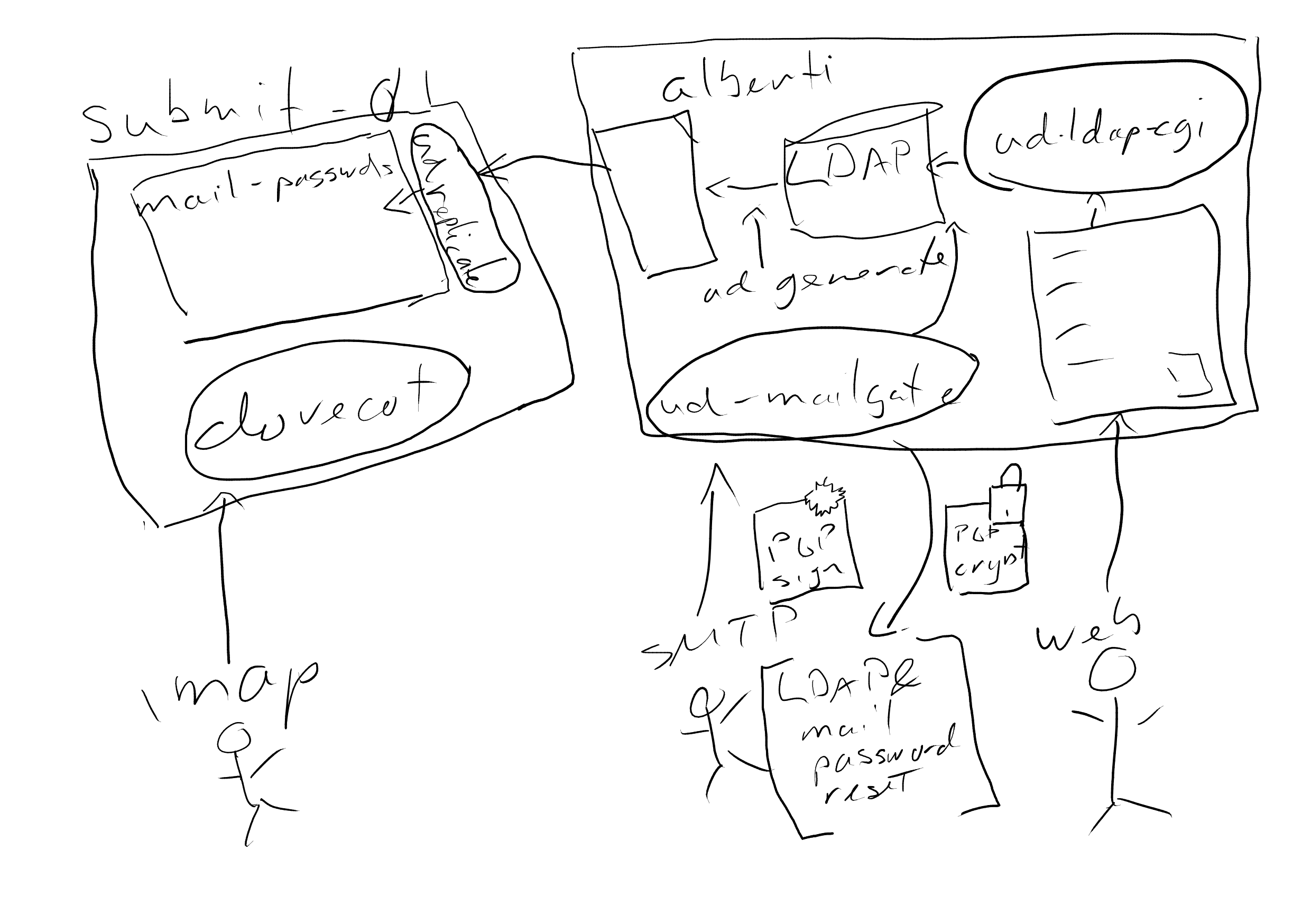
DKIM signing
Anything with a header from @torproject.org will be DKIM signed by the submission server. This is done by rspamd. The required DNS record is automatically created by puppet.
MTA
Our MTA servers, currently only mta-dal-01, are managed by the profile::mta manifest.
It provides the following functionality:
- relaying authenticated mail
- DKIM signing
The submission server only receives mail on the submission port from other TPO nodes and it only accepts authenticated mail.
MTA servers need a letsencrypt certificate, so be sure to add them to the letsencrypt-domains repo.
MTA servers need to be manually added to:
- the mta.torproject.org MX record
- the torproject.org SPF record
and must have a matching PTR record.
Authentication
Other TPO nodes are authenticated using client certificates. Distribution is done through puppet, the fingerprints are exported in the profile::postfix manifest and collected in the profile::mta manifest.
DKIM signing
Anything with a header from @torproject.org will be DKIM signed by the submission server. This is done by rspamd. The required DNS record is automatically created by puppet.
Regular nodes
Regular nodes have no special mail needs and just need to be able to deliver mail. They can be recognised in puppet by having profile::postfix::independent set to false (the default value). They use our MTA servers as relayhost. This is taken care of by the profile::postfix manifest, which is included on all TPO nodes.
Currently regular nodes have no local mail delivery whatsoever, though this is subject to change, see #42024.
By default, system users will mail as @hostname.torproject.org . This has two disadvantages:
- Replying will result in mail sent to user@hostname.torproject.org , which is an alias for user@torproject.org. This may cause collisions between mail needs from different servers
- Mails from @hostname.torproject.org do not get any DKIM signature, which may cause them to be rejected by gmail and the likes.
We should ideally ensure an @torproject.org address is used for outgoing mail.
Independent mailers
Independent mailers are nodes that receive mail on their own subdomain (which should be different from the node's fqdn) and/or deliver mail themselves without using our MTA. They can be recognised in puppet by having profile::postfix::independent set to true.
There are several things to take into consideration when setting up an independent mailer. In nearly all cases you need to make sure to include profile::rspamd.
If your node is going to accept mail, you need to:
- ensure there's an entry in the
letsencypt-domains.gitrepo - ensure there's an ssl::service with the appropriate
tlsaportnotifyingService['postfix'] - add appropriate postfix configuration for handling the incoming mail in
profile::postfix::extra_params - open up firewalling
- potentially adjust the
profile::postfix::monitor_portsandmonitor_tls_ports - set an MX record
- ensure there's a PTR record
- add it to dnswl.org
If your node is going to deliver its own mail, you need to:
- if you're mailing as something other than @fqdn or @torproject.org, set an MX record (yes, an MX record is needed, it doesn't need to actually receive mail, but other mailers hate receiving mail from domains that don't have any MX)
- set / add to the appropriate SPF records
- set
profile::rspamd::dkimdomain - consider setting
profile::rspamd::antispamto false if you're not receiving mail or don't care about spam
Examples of independent mailers are: lists-01.torproject.org, crm-int-01.torproject.org, rt.torproject.org
DMARC
DMARC records glue together SPF and DKIM to tell which policy to apply once the rules defined above check out (or not). It is defined in RFC7489 and has a friendly homepage with a good introduction. Note that DMARC usage has been growing steadily since 2018 and more steeply since 2021, see the usage stats. See also the Alex top site usage.
Our current DMARC policy is:
_dmarc IN TXT "v=DMARC1;p=none;pct=100;rua=mailto:postmaster@torproject.org"
That is a "soft" policy (p= is none instead of quarantine or
reject) that applies to all email (pct=100) and sends reports to
the postmaster@ address.
Note that this applies to all subdomains by default, to change the
subdomain policy, the sp= mechanism would be used (same syntax as
p=, e.g. sp=quarantine would apply the quarantine policy to
subdomains, independently of the top domain policy). See RFC 7489
section 6.6.3 for more details on discovery.
We currently have DMARC policy set to none, but this should be changed.
DKIM signing and verification is done by rspamd. The profile::rspamd::dkimdomain can be set to ensure all mail from those domains are signed. The profile automatically ensures the appropriate DNS record is created.
SPF verification is done by rspamd. SPF records for all TPO node fqdn's are automatically created in profile::postfix. The records for torproject.org itself and subdomains like rt.torproject.org and lists.torproject.org are managed manually.
In tpo/tpa/team#40990, anarcat deployed "soft" SPF records
for all outgoing mail servers under torproject.org. The full
specification of SPF is in RFC7208, here's a condensed
interpretation of some of our (current, 2025) policies:
torproject.org
@ IN TXT "v=spf1 a:crm-int-01.torproject.org a:submit-01.torproject.org a:rdsys-frontend-01.torproject.org a:polyanthum.torproject.org a:srs-dal-01.torproject.org a:mta-dal-01.torproject.org ~all"
This is a "soft" (~all) record that will tell servers to downgrade
the reputation of mail send with a From: *@torproject.org header
when it doesn't match any of the preceding mechanisms.
We use the a: mechanism to point at 6 servers that normally should
be sending mail as torproject.org:
crm-int-01, the CRM serversubmit-01, the submission mail serverrdsys-frontend-01, the rdsys serverpolyanthum, the bridges serversrs-dal-01, the sender-rewriting servermta-dal-01, our MTA
The a mechanism tells SPF-compatible servers to check the A and
AAAA records of the given server to see if it matches with the
connecting server.
We use the a: mechanism instead of the (somewhat more common) ip4:
mechanism because we do not want to add both the IPv4 and IPv6
records.
db.torproject.org: a
Some servers have a record like that:
db IN A 49.12.57.132 ; alberti
IN AAAA 2a01:4f8:fff0:4f:266:37ff:fea1:4d3 ; alberti
IN MX 0 alberti
IN TXT "v=spf1 a a:alberti.torproject.org ~all"
This is also a "soft" record that tells servers to check the A or
AAAA records (a) to see if it matches the connecting server. It
will match only if the connecting server has an IP matching the A or
AAAA record for db.torproject.org or alberti.torproject.org.
lists.torproject.org: mx
lists IN TXT "v=spf1 mx a:mta.tails.net a:lists-01.torproject.org a ~all"
This is also a "soft" record that tells servers to check the Mail
Exchanger record (MX) to see if it matches the connecting server.
It also allows the Tails schleuder server to send as lists.torproject.org using the a: record.
The a and a:lists-01.torproject.org are redundant here, but it might actually be possible that the MX for lists is in a
different location than the web interface, for example.
CRM: hard record
Finally, one last example is the CiviCRM records:
crm IN A 116.202.120.186 ; crm-int-01
IN AAAA 2a01:4f8:fff0:4f:266:37ff:fe4d:f883
IN TXT "v=spf1 a -all"
IN MX 0 crm
Those are similar to the db.torproject.org records except they are
"hard" (-all) which should, in theory, make other servers completely
reject attempts from servers not in the A or AAAA record of
crm.torproject.org. Note that -all is rarely enforced this strictly.
DANE
TLSA records are created through puppet using the tlsaport parameter of the ssl::service resource.
We enforce DANE on all outgoing connections, except for stanford (what the hell, stanford?). This is defined in the tls_policy map in profile::postfix.
Spamfiltering
We use rspamd and clamav for spamfiltering.
Viruses and very obvious spam get rejected straight away.
Suspicion of possible spam results in grey listing, with spam results added as headers when the mail does go through.
In case of false positives or negatives, you can check the logs in /var/log/rspamd/rspamd.log
You can tweak the configuration in the profile::rspamd manifest. You can manually train the bayes classifier by running:
/usr/bin/rspamc -h localhost learn_spam
or
/usr/bin/rspamc -h localhost learn_ham
Services
The "submission" port (587) was previously used in the documentation by default because it is typically less blocked by ISP firewalls than the "smtps" port (465), but both are supported. Lately, the documentation has been changed for suggest port 465 first instead.
The TLS server is authenticated using the regular Let's Encrypt CA (see TLS documentation).
Storage
Mail services currently do not involve any sort of storage other than mail queues (below).
Queues
Mail servers typically transfer emails into a queue on reception, and
flush them out of the queue when the email is successfully
delivered. Temporary delivery failures are retried for 5 days
(bounce_queue_lifetime and maximal_queue_lifetime).
We use the Postfix defaults for those settings, which may vary from the above.
Interfaces
Most of Postfix and Dovecot operations are done through the commandline interface.
Authentication
On the submission server, SASL authentication is delegated to a dummy
Dovecot server which is only used for authentication (i.e. it
doesn't provide IMAP or POP storage). Username/password pairs are
deployed by ud-ldap into /etc/dovecot/private/mail-passwords.
The LDAP server stores those passwords in a mailPassword field and
the web interface is used to modify those passwords. Passwords are
(currently) encrypted with a salted MD5 hash because of compatibility
problems between the Perl/ud-ldap implementation and Dovecot which
haven't been resolved yet.
Implementation
Most software in this space is written in C (Postfix, Dovecot, OpenDKIM).
Related services
The submission and mail forwarding services both rely on the LDAP service, for secrets and aliases, respectively.
The mailing list service and schleuder both depend on basic email services for their normal operations. The CiviCRM service is also a particularly large mail sender.
Issues
There is no issue tracker specifically for this project, File or search for issues in the team issue tracker with the ~Email label.
When reporting email issues, do mind the reporting email problems documentation.
The submission project was coordinated and launched in ticket #30608.
The emergency changes to the infrastructure (including DKIM, DMARC, and SPF records) were done as part of TPA-RFC-44 (tpo/tpa/team#40981).
Known issues
Maintainer
This service is mostly written as a set of Puppet manifests. It was built by anarcat, and is maintained by TPA.
Some parts of the mail services (the submission service, in
particular) depends on patches on userdir-ldap that were partially
merged in the upstream, see LDAP docs for details.
Users
Users of this service are mostly core tor members. But effectively, any email user on the internet can interact with our mail servers in one way or another.
Upstream
Upstreams vary.
Most of the work done in our mail services is performed by Postfix, which is an active project and de-facto standard for new mail servers out there. Postfix was written by Wietse Venema while working at IBM research.
The Dovecot mail server was written by Timo Sirainen and is one of the most widely used IMAP servers out there. It is an active upstream as well.
OpenDKIM is not in such good shape: it hasn't had a commit orrelease in over 4 years (as of late 2022). We have stopped using OpenDKIM and instead use rspamd for DKIM signing and verification.
TODO: document rspamd upstream.
Monitoring and metrics
By default, all servers with profile::postfix::independent set to true are monitored by Prometheus.
This only checks that the SMTP port (or optionally whatever you set in profile::postfix::monitor_ports or monitor_tls_ports) is open. We do
not have end to end delivery monitoring just yet, that is part of the
improve mail services milestone, specifically issue 40494.
All servers that have profile::postfix::mtail_monitor enabled (which is the default) have the mtail exporter
(profile::prometheus::postfix_mtail_exporter). The Grafana
dashboard should provide shiny graphs.
Tests
Submission server
See Testing the submission server.
Logs
Mail logs are in /var/log/mail.log and probably systemd
journals. They contain PII like IP addresses and usernames and are
regularly purged.
Mails incoming on the submission server are scanned by fail2ban to ban IP addresses trying to bruteforce account passwords.
Backups
No special backup of this service is required.
If we eventually need to host mailboxes, those may require special handling as large Maildir folders are known to create problems with backup software.
Other documentation
This service was setup following some or all of those documents:
- Anarcat's home email setup
- Postfix SASL howto
- Dovecot configuration
- RFC821 (SMTP, 1982) and RFC5321 (SMTP, 2008)
- RFC6409 (Email submission, 2011)
- RFC8314 ("Cleartext Considered Obsolete: Use of Transport Layer Security (TLS) for Email Submission and Access, makes port 465 legitimate for submission)
- RFC5598 (Internet Mail Architecture, 2009)
- RFC6186 (SRV auto-discovery)
- ticket 30608, the original request for the submission service
- first discussion of the submission service, the project was actually agreed upon at the Stockholm meeting in 2019
Discussion
The mail services at Tor have been rather neglected, traditionally. No effort was done to adopt modern standards (SPF, DKIM, DMARC) which led to significant deliverability problems in late 2022. This has improved significantly since then, with those standards being mostly adopted in 2025, although with a "soft" SPF fail policy.
Overview
Security and risk assessment
No audit was ever performed on the mail services.
The lack of SPF records and DKIM signatures mean that users must rely
on out-of-band mechanisms (like OpenPGP) to authenticate incoming
emails. Given that such solutions (especially OpenPGP) are not widely
adopted, in effect it means that anyone can easily impersonate
torproject.org users.
We have heard regular reports of phishing attempts against our users as well (tpo/tpa/team#40596), sometimes coming from our own domain. Inbound mail filters improved that situation significantly in 2025 (tpo/tpa/team#40539).
Technical debt and next steps
The next step in this project is to rebuild a proposal to followup on the long term plan from TPA-RFC-44 (TPA-RFC-45, issue tpo/tpa/team#41009). This will mean either outsourcing mail services or building a proper mail hosting service.
High availability
We currently have no high availability/redundancy.
Since SMTP conveniently has failover mechanisms built in, it would be easy to add redundancy for our MX, SRS, and MTA servers by simply deploying copies of them.
If we do host our own IMAP servers eventually, we would like them to be highly available, without human intervention. That means having an "active-active" mirror setup where the failure of one host doesn't affect users at all and doesn't require human intervention to restore services.
We already know quite well how to do an active/passive setup: DRBD allows us to replicate entire disks between machines. It might be possible to do the same with active/active setups in DRBD, in theory, but in practice this quickly runs into filesystem limitations, as (e.g.) ext4 is not designed to be accessed by multiple machines simultaneously.
Dovecot has a replication system called dsync that replicates mailboxes over a pipe. There are examples for TCP, TLS and SSH. This blog post explains the design as well. A pair of director processes could be used to direct users to the right server. This tutorial seems to have been useful for people.
Dovecot also shows a HAProxy configuration. A script called poolmon seems to be used by some folks to remove/re-add backends to the director when the go unhealthy. Dovecot now ships a dovemon program that works similarly, but it's only available in the non-free "Pro" version.
There's also a ceph plugin to store emails in a Ceph backend.
It also seems possible to store mailbox and index objects in an object storage backend, a configuration documented in the Dovecot Cluster Architecture. It seems that, unfortunately, this is part of the "Pro" version of Dovecot, not usable in the free version (see mailbox formats). There's also someone who implemented a syncthing backend.
Proposed Solutions
We went through a number of proposals to improve mail services over time:
- TPA-RFC-15: Email services: DKIM/SPF/DMARC records, mailboxes, refactoring, legacy upgrades (rejected in 2022, replaced with TPA-RFC-31)
- TPA-RFC-31: outsource email services (rejected in 2022 as well, in favor of TPA-RFC-44 and following)
- TPA-RFC-44: Email emergency recovery: DKIM, SPF, DMARC records (implemented in 2022, long term plan postponed)
- TPA-RFC-45: Mail architecture: long term plans spun off from TPA-RFC-44, mostly mailboxes left to implement (draft since 2023, needs rewrite after TPA-RFC-71)
- TPA-RFC-71: Emergency email deployments, phase B: sender-rewriting, refactoring, legacy upgrades (mostly completed as of 2025Q1)
- Enabling local delivery for regular nodes
- Email deliverability monitoring
Submission server proposal
Note: this proposal was discussed inline in the email page, before the TPA-RFC process existed. It is kept here for historical reference.
The idea is to create a new server to deal with delivery problems
torproject.org email users are currently seeing. While they can
receive email through their user@torproject.org forwards without too
much problem, their emails often get dropped to the floor when
sending from that email address.
It is suspected that users are having those problems because the
originating servers are not in the torproject.org domain. The hope
is that setting up a new server inside that domain would help with
delivery. There's anecdotal evidence (see this comment for
example) that delivery emails from existing servers (over SSH to
iranicum, in that example) improves reliability of email delivery
significantly.
This project came out of ticket #30608, which has the launch checklist.
Note: this article has a good overview of deliverability issues faced by autonomous providers, which we already face on eugeni, but might be accentuated by this project.
Goals
Must have
- basic compatibility with major clients (Thunderbird, Mail.app, Outlook, Gmail?)
- delivery over secure (TLS + password) SMTP
- credentials stored in LDAP
Nice to have
- automatic client configuration
- improved delivery over current federated configuration
- delivery reliability monitoring with major providers (e.g. hotmail, gmail, yahoo)
- pretty graphs
- formalized SSH-key delivery to avoid storing cleartext passwords on clients
Non-Goals
- 100%, infaillable, universal delivery to all providers (ie. emails will still be lost)
- mailbox management (ie. no incoming email, IMAP, POP, etc)
- spam filtering (ie. we won't check outgoing emails)
- no DKIM, SPF, DMARC, or ARC for now, although maybe a "null" SPF record if it helps with delivery
Approvals required
Approved by vegas, requested by network team, agreed with TPA at the Stockholm meeting.
Proposed Solution
The proposed design is to setup a new email server in the service/ganeti
cluster (currently gnt-fsn) with the user list synchronized from
LDAP, using a new password field (named mailPassword). The access
would therefore be granted only to LDAP users, and LDAP accounts would
be created as needed. In the short term, LDAP can be used to modify
that password but in the mid-term, it would be modifiable through the
web interface like the webPassword or rtcPassword fields.
Current inventory
- active LDAP accounts: 91
- non-LDAP forwards (to real people): 24
- role forwards (to other @torproject.org emails): 76
Forward targets:
- riseup.net: 30
- gmail.com: 21
- other: 93 (only 4 domains have more than one forward)
Delivery rate: SMTP, on eugeni, is around 0.5qps, with a max of 8qps in the last 7 days (2019-06-06). But that includes mailing lists as well. During that period, around 27000 emails were delivered to @torproject.org aliases.
Cost
Labor and gnt-fsn VM costs. To be detailed.
Below is an evaluation of the various Alternatives that were considered.
External hosting cost evaluation
- Google: 8$/mth/account? (to be verified?)
- riseup.net: anarcat requested price quotation
- koumbit.org: default pricing: 100$/year on shared hosting and 50GB total, possibly no spam filter. 1TB disk: 500$/year. disk encryption would need to be implemented, quoted 2000-4000$ setup fee to implement it in the AlternC opensource control panel.
- self-hosting: ~4000-500EUR setup, 5000EUR-7500EUR/year, liberal estimate (will probably be less)
- mailfence 1750 setup cost and 2.5 euros per user/year
Note that the self-hosting cost evaluation is for the fully-fledged service. Option 2, above, of relaying email, has overall negligible costs although that theory has been questioned by members of the sysadmin team.
Internal hosting cost evaluation
This is a back-of-the-napkin calculation of what it would cost to host actual email services at TPA infrastructure itself. We consider this to be a “liberal” estimate, ie. costs would probably be less and time estimates have been padded (doubled) to cover for errors.
Assumptions:
- each mailbox is on average, a maximum of 10GB
- 100 mailboxes maximum at first (so 1TB of storage required)
- LUKS full disk encryption
- IMAP and basic webmail (Roundcube or Rainloop)
- “Trees” mailbox encryption out of scope for now
Hardware:
- Hetzner px62nvme 2x1TB RAID-1 64GB RAM 75EUR/mth, 900EUR/yr
- Hetzner px92 2x1TB SSD RAID-1 128GB RAM 115EUR/mth, 1380EUR/yr
- Total hardware: 2280EUR/yr, ~200EUR setup fee
This assumes hosting the server on a dedicated server at Hetzner. It might be possible (and more reliable) to ensure further cost savings by hosting it on our shared virtualized infrastructure. Calculations for this haven’t been performed by the team, but I would guess we might save around 25 to 50% of the above costs, depending on the actual demand and occupancy on the mail servers.
Staff:
- LDAP password segregation: 4 hours*
- Dovecot deployment and LDAP integration: 8 hours
- Dovecot storage optimization: 8 hours
- Postfix mail delivery integration: 8 hours
- Spam filter deployment: 8 hours
- 100% cost overrun estimate: 36 hours
- Total setup costs: 72 hours @ 50EUR/hr: 3600EUR one time
This is the most imprecise evaluation. Most email systems have been built incrementally. The biggest unknown is the extra labor associated with running the IMAP server and spam filter. A few hypothesis:
- 1 hour a week: 52 hours @ 50EUR/hr: 2600EUR/yr
- 2 hours a week: 5200EUR/yr
I would be surprised if the extra work goes beyond one hour a week, and will probably be less. This also does not include 24/7 response time, but no service provider evaluated provides that level of service anyways.
Total:
- One-time setup: 3800EUR (200EUR hardware, 3600EUR staff)
- Recurrent: roughly between 5000EUR and 7500EUR/year, majority in staff
Alternatives considered
There are three dimensions to our “decision tree”:
- Hosting mailboxes or only forwards: this means that instead of just forwarding emails to some other providers, we actually allow users to store emails on the server. Current situation is we only do forwards
- SMTP authentication: this means allowing users to submit email using a username and password over the standard SMTP (technically “submission”) port. This is currently not allowed also some have figured out they can do this over SSH already.
- Self-hosted or hosted elsewhere: if we host the email service ourselves right now or not. The current situation is we allow inbound messages but we do not store them. Mailbox storage is delegated to each individual choice of email provider, which also handles SMTP authentication.
Here are is the breakdown of pros and cons of each approach. Note that there are multiple combinations of those possible, for example we could continue not having mailboxes but allow SMTP authentication, and delegate this to a third party. Obviously, some combinations (like no SMTP authentication and mailboxes) are a little absurd and should be taken with a grain of salt.
TP full hosting: mailboxes, SMTP authentication
Pros:
- Easier for TPA to diagnose email problems than if email is hosted by an undetermined third party
- People’s personal email is not mixed up with Tor email.
- Easier delegation between staff on rotations
- Control over where data is stored and how
- Full control of our infrastructure
- Less trust issues
Cons:
- probably the most expensive option
- requires more skilled staff
- high availability harder to achieve
- high costs
TP not hosting mailboxes; TP hosting outgoing SMTP authentication server
Pros:
- No data retention issues: TP not responsible for legal issues surrounding mailboxes contents
- Solves delivery problem and nothing else (minimal solution)
- We’re already running an SMTP server
- SSH tunnels already let our lunatic-fringe do a version of this
- Staff keeps using own mail readers (eg gmail UI) for receiving mail
- Federated solution
- probably the cheapest option
- Work email cannot be accessed by TP staff
Cons:
- SMTP-AUTH password management (admin effort and risk)
- Possible legal requests to record outgoing mail? (SSH lunatic-fringe already at risk, though)
- DKIM/SPF politics vs “slippery slope”
- Forces people to figure out some good ISP to host their email
- Shifts the support burden to individuals
- Harder to diagnose email problems
- Staff or “role” email accounts cannot be shared
TP pays third party (riseup, protonmail, mailfence, gmail??) for full service (mailboxes, delivery)
Pros:
- Less admin effort
- Less/no risk to TP infrastructure (legal or technical)
- Third party does not hold email data hostage; only handles outgoing
- We know where data is hosted instead of being spread around
Cons:
- Not a federated solution
- Implicitly accepts email cartel model of “trusted” ISPs
- Varying levels of third party data management trust required
- Some third parties require custom software (protonmail)
- Single point of failure.
- Might force our users to pick a provider they dislike
- All eggs in the same basket
Status quo (no mailboxes, no authentication)
Pros:
- Easy. Fast. Cheap. Pick three.
Cons:
- Shifts burden of email debugging to users, lack of support
Details of the chosen alternative (SMTP authentication):
- Postfix + offline LDAP authentication (current proposal)
- Postfix + direct LDAP authentication: discarded because it might fail when the LDAP server goes down. LDAP server is currently not considered to be critical and can be restarted for maintenance without affecting the rest of the infrastructure.
- reusing existing field like
webPasswordorrtcPasswordin LDAP: considered a semantic violation.
See also internal Nextcloud document.
No benchmark considered necessary.
Discourse is a web platform for hosting and moderating online discussion.
The Tor forum is currently hosted free of charge by Discourse.org for the benefit of the Tor community.
- Tutorial
- How-to
- Reference
Tutorial
Enable new topics by email
Topic creation by email is the ability to create a new forum topic in a category simply by sending an email to a specific address.
This feature is enabled per-category. To enable it for a category, navigate to it, click the "wrench" icon (top right), open the Settings tab and scroll to the Email header.
Enter an email address under Custom incoming email address. The address to
use should be in the format <categoryname>+discourse@forum.torproject.org.
Per the forum's settings, only users with trust level 2 (member) or higher are allowed to post new topics by email.
Use the app
The official companion app for Discourse is DiscourseHub.
Unfortunately, it doesn't appear to be available from the F-Droid repository at the moment.
Mirror a mailing list
The instructions to set up a forum category that mirrors for a mailing list can be found here.
The address that needs to be subscribed to the mailing list is
discourse@forum.torproject.org.
How-to
Launch the Discourse Rails console
Log-in to the server's console as root and run:
cd /srv/discourse
./launcher enter app
rails c
Reset a user's two-factor auth settings
In case a user can't log-in anymore due to two-factor authentication parameters, it's possible to reset those using the Rails console.
First, load the user object by email, username or id:
user=User.find_by_email('email')
user=User.find_by_username('username')
user=User.find(id)
Then, simply run these two commands:
user.user_second_factors.destroy_all
user.security_keys.destroy_all
These instructions are copied from this post on the Discourse Meta forum.
Reset a user account password
Usually when there is a need to reset a user's password, the user can self-service through the forgotten password forum.
In case of issues with email, the password can also be reset from the Rails console:
First, load the user object by email, username or id:
user=User.find_by_email('email')
user=User.find_by_username('username')
user=User.find(id)
Then:
user.password='passwordstring'
user.save!
These instructions are copied from this post on the Discourse Meta forum.
Adding or removing plugins
The plugins installed on our Discourse instance are configured using Puppet, in
hiera/role/forum.yaml.
To add or remove a plugin, simply add/remove the repository URL to the
profile::discourse::plugins key, run the Puppet agent and rebuild the
container:
./launcher rebuild app
This process can take a few minutes, during which the forum is unavailable.
Discourse has a plugins directory here: https://www.discourse.org/plugins
Un-delete a topic
As an admin user, the list of all deleted topics may be shown by navigating to https://forum.torproject.org/latest?status=deleted
Tu un-delete a topic, open it, click the wrench icon and select
Un-delete topic.
Permanently destroy a topic
If a topic needs to be purged from Discourse, this can be accomplished using the Rails console as follows, using the numeric topic identifier:
Topic.find(topic_id).destroy
These instructions are copied from this post on the Discourse Meta forum.
Enter the Discourse container
It's possible to enter the Discourse container to look around, make modifications, and restart the Discourse daemon itself.
cd /srv/discourse
./launcher enter app
Any changes made in the container will be lost on upgrades, or when the
container is rebuilt using ./launcher rebuild app.
Within the container its possible to restart the Discourse daemon using:
sv restart unicorn
Read-only mode
It's possible to enable "read-only" mode on the forum, which will prevent any changes and will block and new topic, replies, messages, settings changes, etc.
To enable it, navigate to the Admin section, then Backups and click the
button labeled Enable read-only.
It's also possible to enable a "partial read-only" mode which is like normal "read-only" except it allows administrators to make changes. Enabling this mode must be done via the rails console:
Discourse.enable_readonly_mode(Discourse::STAFF_WRITES_ONLY_MODE_KEY)
To disable it:
Discourse.disable_readonly_mode(Discourse::STAFF_WRITES_ONLY_MODE_KEY)
The documentation for this feature is found at https://meta.discourse.org/t/partial-read-only-mode/210401/18
Access database
After entering the container, this command can be used to open a psql shell to
the discourse PostgreSQL database:
sudo -u postgres psql discourse
Mass-disable email digests
If a user's account email address stops working (eg. domain becomes unregistered), and email digests are enabled (the default) Discourse will keep attempting to send those emails forever, and the delivery of each single email will be retried dozens of times, even if the chance of delivery is zero.
To disable those emails, this code can be used in the rails console:
users=User.all.select { |u| u.email.match('example.com') }
users.each do |u|
u.user_option.email_digests = false
u.user_option.save
end
Pager playbook
Email issues
If mail is not going out or some recurring background job doesn't work, see the Sidekiq dashboard in:
https://forum.torproject.org/sidekiq/
Email failures, in particular, are retried for a while, you should be able to see those failures in:
https://forum.torproject.org/sidekiq/retries
Dashboard warns about failed email jobs
From time to time the Discourse dashboard will show a message like this:
There are 859 email jobs that failed. Check your app.yml and ensure that the mail server settings are correct. See the failed jobs in Sidekiq.
In the Sidekiq logs, all the failed job error messages contain
Recipient address rejected: Domain not found.
This is caused by some user's email domain going dark, but Discourse keeps trying to send them the daily email digest. See the Mass-disable email digests section for instructions how to disable the automatic email digests for these users.
Upgrade failure
When upgrading using the web interface, it's possible for the process to fail
with a Docker Manager: FAILED TO UPGRADE message in the logs.
The quickest way to recover from this is to rebuild the container from the command-line:
cd /srv/discourse
git pull
./launcher rebuild app
PostgreSQL upgrade not working
The upgrade script may not succeed when upgrading to a newer version of PostgreSQL, even though it reports success. In the upgrade log, this message is logged:
mv: cannot move '/shared/postgres_data' to '/shared/postgres_data_old': Device or resource busy
This is caused by a particularity in our deployment because postgres_data is
a mount point, so attempts to move the directory fails.
A patch to workaround this was submitted upstream and merged.
Disaster recovery
In case the machine is lost, it's possible to restore the forum from backups.
The first step is to install a new machine following the installation steps in
the Installation section below.
Once a blank installation is done, restore the Discourse backup directory,
/srv/discourse/shared/standalone/backups/default, from Bacula backups.
The restoration process is then:
cd /srv/discourse
./launcher enter app
discourse enable_restore
discourse restore <backupfilename>.tar.gz
exit
Once that's done, rebuild the Discourse app using:
./launcher rebuild app
Reference
Installation
Our installation is modeled after upstream's recommended procedure for deploying a single-server Docker-based instance of Discourse.
First, a new machine is required, with the following parameters:
- an 80GB SSD-backed volume for container images and user uploads
- a 20GB NVMe-backed volume for the database
Directories and mounts should be configured in the following manner:
- the SSD volume mounted on
/srv /srv/dockerbind mounted onto/var/lib/docker
When this is ready, the role::forum Puppet class may be deployed onto the
machine. This will install Discourse's Docker manager software to
/srv/discourse along with the TPO-specific container templates for the main
application (app.yml) and the mail bridge (mail-receiver.yml).
Once the catalog is applied, a few more steps are needed:
- Bootstrap and start Discourse with these commands:
cd /srv/discourse
./launcher bootstrap app
./launcher start app
-
Login to https://forum.torproject.org and create a new admin account
-
Create an API key using the instructions below
-
Run the Puppet agent on the machine to deploy the mail-receiver
API key for incoming mail
Our Discourse setup relies on Postfix to transport incoming and outgoing mail,
such as notifications. For incoming mail, Postfix submits it to a
special mail-receiver container that is used to deliver email into Discourse
via its web API. A key is needed to authenticate the daemon running inside the
container.
To create and configure the API key:
-
Login to Discourse using the administrator account
-
Navigate to https://forum.torproject.org/admin/api/keys
-
Click the
New API Keybutton -
In the Description write
Incoming mail, for User Level selectAll Usersand for Scope selectGranular -
Locate
emailundertopicsand check the box next toreceive emails -
Click
Save -
Copy the generated key, then logon to the Puppet server run this command to enter the API key into the database:
trocla set forum.torproject.org::discourse::mail_apikey plain
Upgrades
When versioned updates are available, an email is sent automatically by
Discourse to torproject-admin@torproject.org.
These upgrades must be triggered manually. In theory it would be possible to upgrade automatically, but this is discouraged by community members because it can throw up some excitement every now and again depending on what plugins you have.
To trigger an upgrade, simply navigate to the Upgrade page in the Discourse
admin section and hit Upgrade all, then Start Upgrade.
Sometimes, this button is greyed out because an upgrade for docker_manager
is available, and it must be installed before the other components are
upgraded. Click the Upgrade button next to it.
Discourse can also be upgraded via the command-line:
cd /srv/discourse
./launcher rebuild
Onion service
An onion service is configured on the machine using Puppet, listening on ports 80 and 443.
Internally, Discourse has a force_https setting which determines whether
links are generated using the http or https scheme, and affects CSP URLs.
When this is enabled, the forum does not work using the onion service because
CSP URLs in the headers sent by Discourse are generated with the https
scheme. When the parameter is disabled, the main issue is that the links in
notifications all use the http scheme.
So the most straightforward fix is simply to serve the forum via https on the
onion service, that way we can leave the force_https setting enabled, and the
CSP headers don't prevent forum pages from loading.
Another element to take into account is that Discourse forces the hostname as a security feature. This was identified as an issue specifically affecting forums hosted behind .onion services in this meta.discourse.org forum post.
While the solution suggested in that forum discussion involves patching
Discourse, another workaround was added later on in the form of the
DISCOURSE_BACKUP_HOSTNAME container config environment variable. When set to
the .onion hostname, the forum works under both hostnames without issue.
Directory structure
The purpose of the various directories under /srv/discourse is described in
the discourse_docker README.
The most important directories are:
containers: contains our Docker container setup configurationsshared: contains the logs, files and Postgresql database of the forum
Social login configuration
GitHub
To enable GitHub authentication, you will need the github_client_id and
github_client_secret codes. Please refer to the the official Configuring
GitHub login for Discourse documentation
for up to date instructions.
Follow these steps to enable GitHub authentication:
-
Visit
https://github.com/organizations/torproject/settings/applications. -
Click on "New Org OAuth App" or edit the existing "Tor Forum" app.
-
Follow the official instructions: https://meta.discourse.org/t/13745, or add the following configuration:
Application name: Tor Forum Homepage URL: https://forum.torproject.org/ Authorization callback URL: https://forum.torproject.org/auth/github/callback
-
Copy the
github_client_idandgithub_client_secretcodes and paste them into the corresponding fields for GitHub client ID and GitHub client secret in https://forum.torproject.org/admin/site_settings/category/login
Design
Docker manager
The Discourse Docker manager is installed under /srv/discourse and is
responsible for setting up the containers making up the Discourse installation.
The containers themselves are stateless, which means that they can be destroyed
and rebuilt without any data loss. All of the Discourse data is stored under
/srv/discourse/shared, including the Postgresql database.
Issues
There is no issue tracker specifically for this project, File or search for issues in the team issue tracker.
Maintainer, users, and upstream
Upstream is Discourse.org.
This service is available publicly for the benefit of the entire Tor community.
The forum hosted on TPA infrastructure and administered by the service admins which are lavamind, hiro, gus and duncan.
Monitoring and testing
Only general monitoring is in place on the instance, there is no Discourse-specific monitoring in place.
Logs and metrics
Logs for the main Discourse container (app) are located under
/srv/discourse/shared/standalone/log.
The mail-receiver container logs can be consulted with:
/srv/discourse/launcher logs mail-receiver
Note that this is strictly for incoming mail. Outgoing mail is
delivered normally through the Postfix email server, logging in
/var/log/mail.log*.
In addition, some logs are accessible via the browser at https://forum.torproject.org/logs (administrators-only).
An overview of all logging is available on this page: Where does Discourse store and show logs?
Backups
Backups containing the database and uploads are generated daily by Discourse
itself in /srv/discourse/shared/standalone/backups.
All other directories under /srv/discourse/shared/standalone are excluded from
Bacula backups configured from /etc/bacula/local-exclude.
It's possible to manually trigger Discourse to create a backup immediately by
entering the container and entering discourse backup on the command-line.
Other documentation
- https://meta.discourse.org/
Ganeti is software designed to facilitate the management of virtual machines (KVM or Xen). It helps you move virtual machine instances from one node to another, create an instance with DRBD replication on another node and do the live migration from one to another, etc.
- Tutorial
- How-to
- Glossary
- Adding a new instance
- Modifying an instance
- Destroying an instance
- Getting information
- Disk operations (DRBD)
- Evaluating cluster capacity
- Moving instances and failover
- Importing external libvirt instances
- Importing external libvirt instances, manual
- Rebooting
- Rebalancing a cluster
- Adding and removing addresses on instances
- Job inspection
- Open vSwitch crash course and debugging
- Accessing the QEMU control ports
- Instance backup and migration
- Cross-cluster migrations
- Pager playbook
- I/O overload
- Node failure
- Master node failure
- Split brain recovery
- Bridge configuration failures
- Cleaning up orphan disks
- Cleaning up ghost disks
- Fixing inconsistent disks
- Not enough memory for failovers
- Can't assemble device after creation
- SSH key verification failures
- Other troubleshooting
- Mass migrating instances to a new cluster
- Reboot procedures
- Slow disk sync after rebooting/Broken migrate-back
- Failed disk on node
- Disaster recovery
- Reference
- Discussion
- Old libvirt cluster retirement
Tutorial
Listing virtual machines (instances)
This will show the running guests, known as "instances":
gnt-instance list
Accessing serial console
Our instances do serial console, starting in grub. To access it, run
gnt-instance console test01.torproject.org
To exit, use ^] -- that is, Control-<Closing Bracket>.
How-to
Glossary
In Ganeti, we use the following terms:
- node a physical machine is called a node and a
- instance a virtual machine
- master: a node where on which we issue Ganeti commands and that supervises all the other nodes
Nodes are interconnected through a private network that is used to communicate commands and synchronise disks (with DRBD). Instances are normally assigned two nodes: a primary and a secondary: the primary is where the virtual machine actually runs and the secondary acts as a hot failover.
See also the more extensive glossary in the Ganeti documentation.
Adding a new instance
This command creates a new guest, or "instance" in Ganeti's vocabulary with 10G root, 512M swap, 20G spare on SSD, 800G on HDD, 8GB ram and 2 CPU cores:
gnt-instance add \
-o debootstrap+trixie \
-t drbd --no-wait-for-sync \
--net 0:ip=pool,network=gnt-fsn13-02 \
--disk 0:size=10G \
--disk 1:size=20G \
--disk 2:size=800G,vg=vg_ganeti_hdd \
--backend-parameters memory=8g,vcpus=2 \
test-01.torproject.org
What that does
This configures the following:
- redundant disks in a DRBD mirror
- two additional partitions: one on the default VG (SSD), one on another
(HDD). A 512MB swapfile is created in
/swapfile. TODO: configure disk 2 and 3 automatically in installer. (/varand/srv?) - 8GB of RAM with 2 virtual CPUs
- an IP allocated from the public gnt-fsn pool:
gnt-instance addwill print the IPv4 address it picked to stdout. The IPv6 address can be found in/var/log/ganeti/os/on the primary node of the instance, see below. - with the
test-01.torproject.orghostname
Next steps
To find the root password, ssh host key fingerprints, and the IPv6 address, run this on the node where the instance was created, for example:
egrep 'root password|configured eth0 with|SHA256' $(ls -tr /var/log/ganeti/os/* | tail -1) | grep -v $(hostname)
We copy root's authorized keys into the new instance, so you should be able to
log in with your token. You will be required to change the root password immediately.
Pick something nice and document it in tor-passwords.
Also set reverse DNS for both IPv4 and IPv6 in hetzner's robot (Check under servers -> vSwitch -> IPs) or in our own reverse zone files (if delegated).
Then follow new-machine.
Known issues
-
allocator failures: Note that you may need to use the
--nodeparameter to pick on which machines you want the machine to end up, otherwise Ganeti will choose for you (and may fail). Use, for example,--node fsn-node-01:fsn-node-02to usenode-01as primary andnode-02as secondary. The allocator can sometimes fail if the allocator is upset about something in the cluster, for example:Can's find primary node using iallocator hail: Request failed: No valid allocation solutions, failure reasons: FailMem: 2, FailN1: 2This situation is covered by ticket 33785. If this problem occurs, it might be worth rebalancing the cluster.
The following dashboards can help you choose the less busy nodes to use:
-
ping failure: there is a bug in
ganeti-instance-debootstrapwhich misconfiguresping(among other things), see bug 31781. It's currently patched in our version of the Debian package, but that patch might disappear if Debian upgrade the package without shipping our patch. Note that this was fixed in Debian bullseye and later.
Other examples
Dallas cluster
This is a typical server creation in the gnt-dal cluster:
gnt-instance add \
-o debootstrap+trixie \
-t drbd --no-wait-for-sync \
--net 0:ip=pool,network=gnt-dal-01 \
--disk 0:size=10G \
--disk 1:size=20G \
--backend-parameters memory=8g,vcpus=2 \
test-01.torproject.org
Do not forget to follow the next steps, above.
No DRBD, test machine
A simple test machine, with only 1G of disk, ram, and 1 CPU, without DRBD, in the FSN cluster:
gnt-instance add \
-o debootstrap+trixie \
-t plain --no-wait-for-sync \
--net 0:ip=pool,network=gnt-fsn13-02 \
--disk 0:size=10G \
--backend-parameters memory=1g,vcpus=1 \
test-01.torproject.org
Do not forget to follow the next steps, above.
Don't be afraid to create plain machines: they can be easily
converted to drbd (with gnt-instance modify -t drbd) and the
node's disk are already in RAID-1. What you lose is:
- High availability during node reboots
- Faster disaster recovery in case of a node failure
What you gain is:
- Improved performance
- Less (2x!) disk usage
iSCSI integration
To create a VM with iSCSI backing, a disk must first be created on the
SAN, then adopted in a VM, which needs to be reinstalled on top of
that. This is typically how large disks are provisionned in the (now defunct)
gnt-chi cluster, in the Cymru POP.
The following instructions assume you are on a node with an iSCSI
initiator properly setup, and the SAN cluster management tools
setup. It also assumes you are familiar with the SMcli tool, see
the storage servers documentation for an introduction on that.
-
create a dedicated disk group and virtual disk on the SAN, assign it to the host group and propagate the multipath config across the cluster nodes:
/usr/local/sbin/tpo-create-san-disks --san chi-node-03 --name test-01 --capacity 500 -
confirm that multipath works, it should look something like this":
root@chi-node-01:~# multipath -ll test-01 (36782bcb00063c6a500000d67603f7abf) dm-20 DELL,MD32xxi size=500G features='5 queue_if_no_path pg_init_retries 50 queue_mode mq' hwhandler='1 rdac' wp=rw |-+- policy='round-robin 0' prio=6 status=active | |- 11:0:0:4 sdi 8:128 active ready running | |- 12:0:0:4 sdj 8:144 active ready running | `- 9:0:0:4 sdh 8:112 active ready running `-+- policy='round-robin 0' prio=1 status=enabled |- 10:0:0:4 sdk 8:160 active ghost running |- 7:0:0:4 sdl 8:176 active ghost running `- 8:0:0:4 sdm 8:192 active ghost running root@chi-node-01:~# -
adopt the disk in Ganeti:
gnt-instance add \ -n chi-node-01.torproject.org \ -o debootstrap+trixie \ -t blockdev --no-wait-for-sync \ --net 0:ip=pool,network=gnt-chi-01 \ --disk 0:adopt=/dev/disk/by-id/dm-name-test-01 \ --backend-parameters memory=8g,vcpus=2 \ test-01.torproject.orgNOTE: the actual node must be manually picked because the
hailallocator doesn't seem to know about block devices.NOTE: mixing DRBD and iSCSI volumes on a single instance is not supported.
-
at this point, the VM probably doesn't boot, because for some reason the
gnt-instance-debootstrapdoesn't fire when disks are adopted. so you need to reinstall the machine, which involves stopping it first:gnt-instance shutdown --timeout=0 test-01 gnt-instance reinstall test-01HACK one: the current installer fails on weird partionning errors, see upstream bug 13. We applied this patch as a workaround to avoid failures when the installer attempts to partition the virtual disk.
From here on, follow the next steps above.
TODO: This would ideally be automated by an external storage provider, see the storage reference for more information.
Troubleshooting
If a Ganeti instance install fails, it will show the end of the install log, for example:
Thu Aug 26 14:11:09 2021 - INFO: Selected nodes for instance tb-pkgstage-01.torproject.org via iallocator hail: chi-node-02.torproject.org, chi-node-01.torproject.org
Thu Aug 26 14:11:09 2021 - INFO: NIC/0 inherits netparams ['br0', 'bridged', '']
Thu Aug 26 14:11:09 2021 - INFO: Chose IP 38.229.82.29 from network gnt-chi-01
Thu Aug 26 14:11:10 2021 * creating instance disks...
Thu Aug 26 14:12:58 2021 adding instance tb-pkgstage-01.torproject.org to cluster config
Thu Aug 26 14:12:58 2021 adding disks to cluster config
Thu Aug 26 14:13:00 2021 * checking mirrors status
Thu Aug 26 14:13:01 2021 - INFO: - device disk/0: 30.90% done, 3m 32s remaining (estimated)
Thu Aug 26 14:13:01 2021 - INFO: - device disk/2: 0.60% done, 55m 26s remaining (estimated)
Thu Aug 26 14:13:01 2021 * checking mirrors status
Thu Aug 26 14:13:02 2021 - INFO: - device disk/0: 31.20% done, 3m 40s remaining (estimated)
Thu Aug 26 14:13:02 2021 - INFO: - device disk/2: 0.60% done, 52m 13s remaining (estimated)
Thu Aug 26 14:13:02 2021 * pausing disk sync to install instance OS
Thu Aug 26 14:13:03 2021 * running the instance OS create scripts...
Thu Aug 26 14:16:31 2021 * resuming disk sync
Failure: command execution error:
Could not add os for instance tb-pkgstage-01.torproject.org on node chi-node-02.torproject.org: OS create script failed (exited with exit code 1), last lines in the log file:
Setting up openssh-sftp-server (1:7.9p1-10+deb10u2) ...
Setting up openssh-server (1:7.9p1-10+deb10u2) ...
Creating SSH2 RSA key; this may take some time ...
2048 SHA256:ZTeMxYSUDTkhUUeOpDWpbuOzEAzOaehIHW/lJarOIQo root@chi-node-02 (RSA)
Creating SSH2 ED25519 key; this may take some time ...
256 SHA256:MWKeA8vJKkEG4TW+FbG2AkupiuyFFyoVWNVwO2WG0wg root@chi-node-02 (ED25519)
Created symlink /etc/systemd/system/sshd.service \xe2\x86\x92 /lib/systemd/system/ssh.service.
Created symlink /etc/systemd/system/multi-user.target.wants/ssh.service \xe2\x86\x92 /lib/systemd/system/ssh.service.
invoke-rc.d: could not determine current runlevel
Setting up ssh (1:7.9p1-10+deb10u2) ...
Processing triggers for systemd (241-7~deb10u8) ...
Processing triggers for libc-bin (2.28-10) ...
Errors were encountered while processing:
linux-image-4.19.0-17-amd64
E: Sub-process /usr/bin/dpkg returned an error code (1)
run-parts: /etc/ganeti/instance-debootstrap/hooks/ssh exited with return code 100
Using disk /dev/drbd4 as swap...
Setting up swapspace version 1, size = 2 GiB (2147479552 bytes)
no label, UUID=96111754-c57d-43f2-83d0-8e1c8b4688b4
Not using disk 2 (/dev/drbd5) because it is not named 'swap' (name: )
root@chi-node-01:~#
Here the failure which tripped the install is:
Errors were encountered while processing:
linux-image-4.19.0-17-amd64
E: Sub-process /usr/bin/dpkg returned an error code (1)
But the actual error is higher up, and we need to go look at the logs
on the server for this, in this case in
chi-node-02:/var/log/ganeti/os/add-debootstrap+buster-tb-pkgstage-01.torproject.org-2021-08-26_14_13_04.log,
we can find the real problem:
Setting up linux-image-4.19.0-17-amd64 (4.19.194-3) ...
/etc/kernel/postinst.d/initramfs-tools:
update-initramfs: Generating /boot/initrd.img-4.19.0-17-amd64
W: Couldn't identify type of root file system for fsck hook
/etc/kernel/postinst.d/zz-update-grub:
/usr/sbin/grub-probe: error: cannot find a device for / (is /dev mounted?).
run-parts: /etc/kernel/postinst.d/zz-update-grub exited with return code 1
dpkg: error processing package linux-image-4.19.0-17-amd64 (--configure):
installed linux-image-4.19.0-17-amd64 package post-installation script subprocess returned error exit status 1
In this case, oddly enough, even though Ganeti thought the install had failed, the machine can actually start:
gnt-instance start tb-pkgstage-01.torproject.org
... and after a while, we can even get a console:
gnt-instance console tb-pkgstage-01.torproject.org
And in that case, the procedure can just continue from here on: reset the root password, and just make sure you finish the install:
apt install linux-image-amd64
In the above case, the sources-list post-install hook was buggy: it
wasn't mounting /dev and friends before launching the upgrades,
which was causing issues when a kernel upgrade was queued.
And if you are debugging an installer and by mistake end up with half-open filesystems and stray DRBD devices, do take a look at the LVM and DRBD documentation.
Modifying an instance
CPU, memory changes
It's possible to change the IP, CPU, or memory allocation of an instance using the gnt-instance modify command:
gnt-instance modify -B vcpus=4,memory=8g test1.torproject.org
gnt-instance reboot test1.torproject.org
Note that the --hotplug-if-possible setting might make the reboot
unnecessary. Test and update this section to remove this note or the
reboot entry. Ganeti 3.1 makes hotplugging default.
Note that this can be more easily done with a Fabric task which will handle wall warnings, delays, silences and so on, using the standard reboot procedures:
fab -H idle-fsn-01.torproject.org ganeti.modify vcpus=4,memory=8g
If you get a cryptic failure (TODO: add sample output) about policy being violated while you're not actually violating the stated policy, it's possible this VM was already violating the policy and the changes you proposed are okay.
In that case (and only in that case!) it's okay to bypass the policy
with --ignore-ipolicy. Otherwise, discuss this with a fellow
sysadmin, and see if that VM really needs that many resources or if
the policies need to be changed.
IP address change
IP address changes require a full stop and will require manual changes
to the /etc/network/interfaces* files:
gnt-instance modify --net 0:modify,ip=116.202.120.175 test1.torproject.org
gnt-instance stop test1.torproject.org
The renumbering can be done with Fabric, with:
./ganeti -H test1.torproject.org renumber-instance --ganeti-node $PRIMARY_NODE
Note that the $PRIMARY_NODE must be passed here, not the "master"!
Alternatively, it can also be done by hand:
gnt-instance start test1.torproject.org
gnt-instance console test1.torproject.org
Resizing disks
The gnt-instance grow-disk command can be used to change the size of the underlying device:
gnt-instance grow-disk --absolute test1.torproject.org 0 16g
gnt-instance reboot test1.torproject.org
The number 0 in this context, indicates the first disk of the
instance. The amount specified is the final disk size (because of the
--absolute flag). In the above example, the final disk size will be
16GB. To add space to the existing disk, remove the --absolute
flag:
gnt-instance grow-disk test1.torproject.org 0 16g
gnt-instance reboot test1.torproject.org
In the above example, 16GB will be ADDED to the disk. Be careful
with resizes, because it's not possible to revert such a change:
grow-disk does support shrinking disks. The only way to revert the
change is by exporting / importing the instance.
Note the reboot, above, will impose a downtime. See upstream bug 28 about improving that. Note that Ganeti 3.1 has support for reboot-less resizes.
Then the filesystem needs to be resized inside the VM:
ssh root@test1.torproject.org
Resizing under LVM
Use pvs to display information about the physical volumes:
root@cupani:~# pvs
PV VG Fmt Attr PSize PFree
/dev/sdc vg_test lvm2 a-- <8.00g 1020.00m
Resize the physical volume to take up the new space:
pvresize /dev/sdc
Use lvs to display information about logical volumes:
# lvs
LV VG Attr LSize Pool Origin Data% Meta% Move Log Cpy%Sync Convert
var-opt vg_test-01 -wi-ao---- <10.00g
test-backup vg_test-01_hdd -wi-ao---- <20.00g
Use lvextend to add space to the volume:
lvextend -l '+100%FREE' vg_test-01/var-opt
Finally resize the filesystem:
resize2fs /dev/vg_test-01/var-opt
See also the LVM howto, particularly if the lvextend
step fails with:
Unable to resize logical volumes of cache type.
Resizing without LVM, no partitions
If there's no LVM inside the VM (a more common configuration
nowadays), the above procedure will obviously not work. If this is a
secondary disk (e.g. /dev/sdc) there is a good chance a partition
was created directly on it and that you do not need to repartition the
drive. This is an example of a good configuration if we want to resize
sdc:
root@bacula-director-01:~# lsblk
NAME MAJ:MIN RM SIZE RO TYPE MOUNTPOINT
fd0 2:0 1 4K 0 disk
sda 8:0 0 10G 0 disk
└─sda1 8:1 0 10G 0 part /
sdb 8:16 0 2G 0 disk [SWAP]
sdc 8:32 0 250G 0 disk /srv
Note that if we would need to resize sda, we'd have to follow the
other procedure, in the next section.
If we check the free disk space on the device we will notice it has not changed yet:
# df -h /srv
Filesystem Size Used Avail Use% Mounted on
/dev/sdc 196G 160G 27G 86% /srv
The resize is then simply:
# resize2fs /dev/sdc
resize2fs 1.44.5 (15-Dec-2018)
Filesystem at /dev/sdc is mounted on /srv; on-line resizing required
old_desc_blocks = 25, new_desc_blocks = 32
The filesystem on /dev/sdc is now 65536000 (4k) blocks long.
Note that for XFS filesystems, the above command is simply:
xfs_growfs /dev/sdb
Read on for the most complicated scenario.
Resizing without LVM, with partitions
If the filesystem to resize is not directly on the device, you will
need to resize the partition manually, which can be done using
fdisk. In the following example we have a sda1 partition that we
want to extend from 10G to 20G to fill up the free space on
/dev/sda. Here is what the partition layout looks like before the
resize:
# lsblk
NAME MAJ:MIN RM SIZE RO TYPE MOUNTPOINT
fd0 2:0 1 4K 0 disk
sda 8:0 0 40G 0 disk
└─sda1 8:1 0 20G 0 part /
sdb 8:16 0 4G 0 disk [SWAP]
We use sfdisk to resize the partition to take up all available
space, in this case, with the magic:
echo ", +" | sfdisk -N 1 --no-act /dev/sda
Note the --no-act here, which you'll need to remove to actually make
the change, the above is just a preview to make sure you will do the
right thing:
echo ", +" | sfdisk -N 1 --no-reread /dev/sda
TODO: next time, test with --force instead of --no-reread to see
if we still need a reboot.
Here's a working example:
# echo ", +" | sfdisk -N 1 --no-reread /dev/sda
Disk /dev/sda: 40 GiB, 42949672960 bytes, 83886080 sectors
Disk model: QEMU HARDDISK
Units: sectors of 1 * 512 = 512 bytes
Sector size (logical/physical): 512 bytes / 512 bytes
I/O size (minimum/optimal): 512 bytes / 512 bytes
Disklabel type: dos
Disk identifier: 0x00000000
Old situation:
Device Boot Start End Sectors Size Id Type
/dev/sda1 * 2048 41943039 41940992 20G 83 Linux
/dev/sda1:
New situation:
Disklabel type: dos
Disk identifier: 0x00000000
Device Boot Start End Sectors Size Id Type
/dev/sda1 * 2048 83886079 83884032 40G 83 Linux
The partition table has been altered.
Calling ioctl() to re-read partition table.
Re-reading the partition table failed.: Device or resource busy
The kernel still uses the old table. The new table will be used at the next reboot or after you run partprobe(8) or kpartx(8).
Syncing disks.
Note that the partition table wasn't updated:
# lsblk
NAME MAJ:MIN RM SIZE RO TYPE MOUNTPOINT
fd0 2:0 1 4K 0 disk
sda 8:0 0 40G 0 disk
└─sda1 8:1 0 20G 0 part /
sdb 8:16 0 4G 0 disk [SWAP]
So we need to reboot:
reboot
Note: a previous version of this guide was using fdisk instead, but
that guide was destroying and recreating the partition, which seemed
too error-prone. The above procedure is more annoying (because of the
reboot below) but should be less dangerous.
Now we check the partitions again:
# lsblk
NAME MAJ:MIN RM SIZE RO TYPE MOUNTPOINT
fd0 2:0 1 4K 0 disk
sda 8:0 0 40G 0 disk
└─sda1 8:1 0 40G 0 part /
sdb 8:16 0 4G 0 disk [SWAP]
If we check the free space on the device, we will notice it has not changed yet:
# df -h /
Filesystem Size Used Avail Use% Mounted on
/dev/sda1 20G 16G 2.8G 86% /
We need to resize it:
# resize2fs /dev/sda1
resize2fs 1.44.5 (15-Dec-2018)
Filesystem at /dev/sda1 is mounted on /; on-line resizing required
old_desc_blocks = 2, new_desc_blocks = 3
The filesystem on /dev/sda1 is now 10485504 (4k) blocks long.
The resize is now complete.
Resizing an iSCSI LUN
All the above procedures detail the normal use case where disks are hosted as "plain" files or with the DRBD backend. However, some instances (most notably in the, now defunct, gnt-chi cluster) have their storage backed by an iSCSI SAN.
Growing a disk hosted on a SAN like the Dell PowerVault MD3200i
involves several steps beginning with resizing the LUN itself. In the
example below, we're going to grow the disk associated with the
tb-build-03 instance.
It should be noted that the instance was setup in a peculiar way: it has one LUN per partition, instead of one big LUN partitioned correctly. The instructions below therefore mention a LUN named
tb-build-03-srv, but normally there should be a single LUN named after the hostname of the machine, in this case it should have been named simplytb-build-03.
First, we identify how much space is available on the virtual disks' diskGroup:
# SMcli -n chi-san-01 -c "show allVirtualDisks summary;"
STANDARD VIRTUAL DISKS SUMMARY
Number of standard virtual disks: 5
Name Thin Provisioned Status Capacity Accessible by Source
tb-build-03-srv No Optimal 700.000 GB Host Group gnt-chi Disk Group 5
This shows that tb-build-03-srv is hosted on Disk Group "5":
# SMcli -n chi-san-01 -c "show diskGroup [5];"
DETAILS
Name: 5
Status: Optimal
Capacity: 1,852.026 GB
Current owner: RAID Controller Module in slot 1
Data Service (DS) Attributes
RAID level: 5
Physical Disk media type: Physical Disk
Physical Disk interface type: Serial Attached SCSI (SAS)
Enclosure loss protection: No
Secure Capable: No
Secure: No
Total Virtual Disks: 1
Standard virtual disks: 1
Repository virtual disks: 0
Free Capacity: 1,152.026 GB
Associated physical disks - present (in piece order)
Total physical disks present: 3
Enclosure Slot
0 6
1 11
0 7
Free Capacity indicates about 1,5 TB of free space available. So we can go
ahead with the actual resize:
# SMcli -n chi-san-01 -p $PASSWORD -c "set virtualdisk [\"tb-build-03-srv\"] addCapacity=100GB;"
Next, we need to make all nodes in the cluster to rescan the iSCSI LUNs and have
multipathd resize the device node. This is accomplished by running this command
on the primary node (eg. chi-node-01):
# gnt-cluster command "iscsiadm -m node --rescan; multipathd -v3 -k\"resize map tb-build-srv\""
The success of this step can be validated by looking at the output of lsblk:
the device nodes associated with the LUN should now display the new size. The
output should be identical across the cluster nodes.
In order for ganeti/qemu to make this extra space available to the instance, a reboot must be performed from outside the instance.
Then the normal resize procedure can happen inside the virtual machine, see resizing under LVM, resizing without LVM, no partitions, or Resizing without LVM, with partitions, depending on the situation.
Removing an iSCSI LUN
Use this procedure before to a virtual disk from one of the iSCSI SANs.
First, we'll need to gather a some information about the disk to remove.
-
Which SAN is hosting the disk
-
What LUN is assigned to the disk
-
The WWID of both the SAN and the virtual disk
/usr/local/sbin/tpo-show-san-disks SMcli -n chi-san-03 -S -quick -c "show storageArray summary;" | grep "Storage array world-wide identifier" cat /etc/multipath/conf.d/test-01.conf
Second, remove the multipath config and reload:
gnt-cluster command rm /etc/multipath/conf.d/test-01.conf
gnt-cluster command "multipath -r ; multipath -w {disk-wwid} ; multipath -r"
Then, remove the iSCSI device nodes. Running iscsiadm --rescan does not remove
LUNs which have been deleted from the SAN.
Be very careful with this command, it will delete device nodes without prejudice and cause data corruption if they are still in use!
gnt-cluster command "find /dev/disk/by-path/ -name \*{san-wwid}-lun-{lun} -exec readlink {} \; | cut -d/ -f3 | while read -d $'\n' n; do echo 1 > /sys/block/\$n/device/delete; done"
Finally, the disk group can be deleted from the SAN (all the virtual disks it contains will be deleted):
SMcli -n chi-san-03 -p $SAN_PASSWORD -S -quick -c "delete diskGroup [<disk-group-number>];"
Adding disks
A disk can be added to an instance with the modify command as
well. This, for example, will add a 100GB disk to the test1 instance
on the vg_ganeti_hdd volume group, which is "slow" rotating disks:
gnt-instance modify --disk add:size=100g,vg=vg_ganeti --no-wait-for-sync test-01.torproject.org
gnt-instance reboot test1.torproject.org
Changing disk type
If you have, say, a test instance that was created with a plain disk
template but we actually want it in production, with a drbd disk
template. Switching to drbd is easy:
gnt-instance shutdown test-01
gnt-instance modify -t drbd test-01
gnt-instance start test-01
The second command will use the allocator to find a secondary node. If
that fails, you can assign a node manually with -n.
You can also switch back to plain to make the instance
non-redundant, although you should only do that in rare cases where
you don't need the high availability requirements provided by
DRBD. Make sure the service admins on the machine are aware of the
consequences of the changes, which are essentially a longer recovery
time in case of server failure, and lower availability due to node
reboots also affecting the instance.
Essentially, plain instances are only for:
- large disks (e.g. multi-terabyte) for which the 4x (2x for RAID-1, 2x for DRBD) disk usage is too much
- large IOPS requirements (e.g. lots of writes) for which the wear on the drives is too much
See also the upstream procedure and design document.
Removing or detaching a disk
If you need to destroy a volume from an instance, you can use the
remove flag to the gnt-instance modify command. First, you must
identify the disk's UUID using gnt-instance info, then:
gnt-instance modify --disk <uuid>:remove test-01
But maybe you just want to detach the disk without destroying data,
it's possible to detach it. For this, use the detach keyword:
gnt-instance modify --disk <uuid>:detach test-01
Once a disk is detached, it will show up as an "orphan" disk in
gnt-cluster verify until it's actually removed. On the secondary,
this can be done with lvremove. But on the primary, it's trickier
because the DRBD device might still be layered on top of it, see
Deleting a device after it was manually detached for those
instructions.
Adding a network interface on the rfc1918 vlan
We have a vlan that some VMs that do not have public addresses sit on. Its vlanid is 4002 and its backed by Hetzner vswitch vSwitch #11973 "fsn-gnt-rfc1918-traffic". Note that traffic on this vlan will travel in the clear between nodes.
To add an instance to this vlan, give it a second network interface using
gnt-instance modify --net add:link=br0,vlan=4002,mode=openvswitch test1.torproject.org
Destroying an instance
This totally deletes the instance, including all mirrors and everything, be very careful with it:
gnt-instance remove test01.torproject.org
Getting information
Information about an instances can be found in the rather verbose
gnt-instance info:
root@fsn-node-01:~# gnt-instance info tb-build-02.torproject.org
- Instance name: tb-build-02.torproject.org
UUID: 8e9f3ca6-204f-4b6c-8e3e-6a8fda137c9b
Serial number: 5
Creation time: 2020-12-15 14:06:41
Modification time: 2020-12-15 14:07:31
State: configured to be up, actual state is up
Nodes:
- primary: fsn-node-03.torproject.org
group: default (UUID 8c32fd09-dc4c-4237-9dd2-3da3dfd3189e)
- secondaries: fsn-node-04.torproject.org (group default, group UUID 8c32fd09-dc4c-4237-9dd2-3da3dfd3189e)
Operating system: debootstrap+buster
A quick command that can be done is this, which shows the primary/secondary for a given instance:
gnt-instance info tb-build-02.torproject.org | grep -A 3 Nodes
An equivalent command will show the primary and secondary for all instances, on top of extra information (like the CPU count, memory and disk usage):
gnt-instance list -o pnode,snodes,name,be/vcpus,be/memory,disk_usage,disk_template,status | sort
It can be useful to run this in a loop to see changes:
watch -n5 -d 'gnt-instance list -o pnode,snodes,name,be/vcpus,be/memory,disk_usage,disk_template,status | sort'
Disk operations (DRBD)
Instances should be setup using the DRBD backend, in which case you should probably take a look at DRBD if you have problems with that. Ganeti handles most of the logic there so that should generally not be necessary.
Identifying volumes of an instance
As noted above, ganeti handles most of the complexity around managing DRBD and LVM volumes. Sometimes though it might be interesting to know which volume is associated with which instance, especially for confirming an operation before deleting a stray device.
Ganeti maintains that information handy. On the cluster master you can extract information about all volumes on all nodes:
gnt-node volumes
If you're already connected to one node, you can check which LVM volumes correspond to which instance:
lvs -o+tags
Evaluating cluster capacity
This will list instances repeatedly, but also show their assigned memory, and compare it with the node's capacity:
gnt-instance list -o pnode,name,be/vcpus,be/memory,disk_usage,disk_template,status | sort &&
echo &&
gnt-node list
The latter does not show disk usage for secondary volume groups (see upstream issue 1379), for a complete picture of disk usage, use:
gnt-node list-storage
The gnt-cluster verify command will also check to see if there's enough space on secondaries to account for the failure of a node. Healthy output looks like this:
root@fsn-node-01:~# gnt-cluster verify
Submitted jobs 48030, 48031
Waiting for job 48030 ...
Fri Jan 17 20:05:42 2020 * Verifying cluster config
Fri Jan 17 20:05:42 2020 * Verifying cluster certificate files
Fri Jan 17 20:05:42 2020 * Verifying hypervisor parameters
Fri Jan 17 20:05:42 2020 * Verifying all nodes belong to an existing group
Waiting for job 48031 ...
Fri Jan 17 20:05:42 2020 * Verifying group 'default'
Fri Jan 17 20:05:42 2020 * Gathering data (2 nodes)
Fri Jan 17 20:05:42 2020 * Gathering information about nodes (2 nodes)
Fri Jan 17 20:05:45 2020 * Gathering disk information (2 nodes)
Fri Jan 17 20:05:45 2020 * Verifying configuration file consistency
Fri Jan 17 20:05:45 2020 * Verifying node status
Fri Jan 17 20:05:45 2020 * Verifying instance status
Fri Jan 17 20:05:45 2020 * Verifying orphan volumes
Fri Jan 17 20:05:45 2020 * Verifying N+1 Memory redundancy
Fri Jan 17 20:05:45 2020 * Other Notes
Fri Jan 17 20:05:45 2020 * Hooks Results
A sick node would have said something like this instead:
Mon Oct 26 18:59:37 2009 * Verifying N+1 Memory redundancy
Mon Oct 26 18:59:37 2009 - ERROR: node node2: not enough memory to accommodate instance failovers should node node1 fail
See the ganeti manual for a more extensive example
Also note the hspace -L command, which can tell you how many
instances can be created in a given cluster. It uses the "standard"
instance template defined in the cluster (which we haven't configured
yet).
Moving instances and failover
Ganeti is smart about assigning instances to nodes. There's also a
command (hbal) to automatically rebalance the cluster (see
below). If for some reason hbal doesn’t do what you want or you need
to move things around for other reasons, here are a few commands that
might be handy.
Make an instance switch to using it's secondary:
gnt-instance migrate test1.torproject.org
Make all instances on a node switch to their secondaries:
gnt-node migrate test1.torproject.org
The migrate commands does a "live" migrate which should avoid any
downtime during the migration. It might be preferable to actually
shutdown the machine for some reason (for example if we actually want
to reboot because of a security upgrade). Or we might not be able to
live-migrate because the node is down. In this case, we do a
failover
gnt-instance failover test1.torproject.org
The gnt-node evacuate command can also be used to "empty" a given node altogether, in case of an emergency:
gnt-node evacuate -I . fsn-node-02.torproject.org
Similarly, the gnt-node failover command can be used to hard-recover from a completely crashed node:
gnt-node failover fsn-node-02.torproject.org
Note that you might need the --ignore-consistency flag if the
node is unresponsive.
Importing external libvirt instances
Assumptions:
-
INSTANCE: name of the instance being migrated, the "old" one being outside the cluster and the "new" one being the one created inside the cluster (e.g.chiwui.torproject.org) -
SPARE_NODE: a ganeti node with free space (e.g.fsn-node-03.torproject.org) where theINSTANCEwill be migrated -
MASTER_NODE: the master ganeti node (e.g.fsn-node-01.torproject.org) -
KVM_HOST: the machine which we migrate theINSTANCEfrom -
the
INSTANCEhas onlyrootandswappartitions -
the
SPARE_NODEhas space in/srv/to host all the virtual machines to import, to check, use:fab -H crm-ext-01.torproject.org,crm-int-01.torproject.org,forrestii.torproject.org,nevii.torproject.org,rude.torproject.org,troodi.torproject.org,vineale.torproject.org libvirt.du -p kvm3.torproject.org | sed '/-swap$/d;s/ .*$//' <f | awk '{s+=$1} END {print s}'You will very likely need to create a
/srvbig enough for this, for example:lvcreate -L 300G vg_ganeti -n srv-tmp && mkfs /dev/vg_ganeti/srv-tmp && mount /dev/vg_ganeti/srv-tmp /srv
Import procedure:
-
pick a viable SPARE NODE to import the INSTANCE (see "evaluating cluster capacity" above, when in doubt) and find on which KVM HOST the INSTANCE lives
-
copy the disks, without downtime:
./ganeti -H $INSTANCE libvirt-import --ganeti-node $SPARE_NODE --libvirt-host $KVM_HOST -
copy the disks again, this time suspending the machine:
./ganeti -H $INSTANCE libvirt-import --ganeti-node $SPARE_NODE --libvirt-host $KVM_HOST --suspend --adopt -
renumber the host:
./ganeti -H $INSTANCE renumber-instance --ganeti-node $SPARE_NODE -
test services by changing your
/etc/hosts, possibly warning service admins:Subject: $INSTANCE IP address change planned for Ganeti migration
I will soon migrate this virtual machine to the new ganeti cluster. this will involve an IP address change which might affect the service.
Please let me know if there are any problems you can think of. in particular, do let me know if any internal (inside the server) or external (outside the server) services hardcodes the IP address of the virtual machine.
A test instance has been setup. You can test the service by adding the following to your /etc/hosts:
116.202.120.182 $INSTANCE 2a01:4f8:fff0:4f:266:37ff:fe32:cfb2 $INSTANCE -
destroy test instance:
gnt-instance remove $INSTANCE -
lower TTLs to 5 minutes. this procedure varies a lot according to the service, but generally if all DNS entries are
CNAMEs pointing to the main machine domain name, the TTL can be lowered by adding adnsTTLentry in the LDAP entry for this host. For example, this sets the TTL to 5 minutes:dnsTTL: 300Then to make the changes immediate, you need the following commands:
ssh root@alberti.torproject.org sudo -u sshdist ud-generate && ssh root@nevii.torproject.org ud-replicateWarning: if you migrate one of the hosts ud-ldap depends on, this can fail and not only the TTL will not update, but it might also fail to update the IP address in the below procedure. See ticket 33766 for details.
-
shutdown original instance and redo migration as in step 3 and 4:
fab -H $INSTANCE reboot.halt-and-wait --delay-shutdown 60 --reason='migrating to new server' && ./ganeti -H $INSTANCE libvirt-import --ganeti-node $SPARE_NODE --libvirt-host $KVM_HOST --adopt && ./ganeti -H $INSTANCE renumber-instance --ganeti-node $SPARE_NODE -
final test procedure
TODO: establish host-level test procedure and run it here.
-
switch to DRBD, still on the Ganeti MASTER NODE:
gnt-instance stop $INSTANCE && gnt-instance modify -t drbd $INSTANCE && gnt-instance failover -f $INSTANCE && gnt-instance start $INSTANCEThe above can sometimes fail if the allocator is upset about something in the cluster, for example:
Can's find secondary node using iallocator hail: Request failed: No valid allocation solutions, failure reasons: FailMem: 2, FailN1: 2This situation is covered by ticket 33785. To work around the allocator, you can specify a secondary node directly:
gnt-instance modify -t drbd -n fsn-node-04.torproject.org $INSTANCE && gnt-instance failover -f $INSTANCE && gnt-instance start $INSTANCETODO: move into fabric, maybe in a
libvirt-import-liveorpost-libvirt-importjob that would also do the renumbering below -
change IP address in the following locations:
-
LDAP (
ipHostNumberfield, but also change thephysicalHostandlfields!). Also drop the dnsTTL attribute while you're at it. -
Puppet (grep in tor-puppet source, run
puppet agent -t; ud-replicateon pauli) -
DNS (grep in tor-dns source,
puppet agent -t; ud-replicateon nevii) -
reverse DNS (upstream web UI, e.g. Hetzner Robot)
-
grep for the host's IP address on itself:
grep -r -e 78.47.38.227 -e 2a01:4f8:fff0:4f:266:37ff:fe77:1ad8 /etc grep -r -e 78.47.38.227 -e 2a01:4f8:fff0:4f:266:37ff:fe77:1ad8 /srv -
grep for the host's IP on all hosts:
cumin-all-puppet cumin-all 'grep -r -e 78.47.38.227 -e 2a01:4f8:fff0:4f:266:37ff:fe77:1ad8 /etc'
TODO: move those jobs into fabric
-
-
retire old instance (only a tiny part of retire-a-host):
fab -H $INSTANCE retire.retire-instance --parent-host $KVM_HOST -
update the Nextcloud spreadsheet to remove the machine from the KVM host
-
warn users about the migration, for example:
To: tor-project@lists.torproject.org Subject: cupani AKA git-rw IP address changed
The main git server, cupani, is the machine you connect to when you push or pull git repositories over ssh to git-rw.torproject.org. That machines has been migrated to the new Ganeti cluster.
This required an IP address change from:
78.47.38.228 2a01:4f8:211:6e8:0:823:4:1to:
116.202.120.182 2a01:4f8:fff0:4f:266:37ff:fe32:cfb2DNS has been updated and preliminary tests show that everything is mostly working. You will get a warning about the IP address change when connecting over SSH, which will go away after the first connection.
Warning: Permanently added the ED25519 host key for IP address '116.202.120.182' to the list of known hosts.That is normal. The SSH fingerprints of the host did not change.
Please do report any other anomaly using the normal channels:
https://gitlab.torproject.org/tpo/tpa/team/-/wikis/support
The service was unavailable for about an hour during the migration.
Importing external libvirt instances, manual
This procedure is now easier to accomplish with the Fabric tools written especially for this purpose. Use the above procedure instead. This is kept for historical reference.
Assumptions:
INSTANCE: name of the instance being migrated, the "old" one being outside the cluster and the "new" one being the one created inside the cluster (e.g.chiwui.torproject.org)SPARE_NODE: a ganeti node with free space (e.g.fsn-node-03.torproject.org) where theINSTANCEwill be migratedMASTER_NODE: the master ganeti node (e.g.fsn-node-01.torproject.org)KVM_HOST: the machine which we migrate theINSTANCEfrom- the
INSTANCEhas onlyrootandswappartitions
Import procedure:
-
pick a viable SPARE NODE to import the instance (see "evaluating cluster capacity" above, when in doubt), login to the three servers, setting the proper environment everywhere, for example:
MASTER_NODE=fsn-node-01.torproject.org SPARE_NODE=fsn-node-03.torproject.org KVM_HOST=kvm1.torproject.org INSTANCE=test.torproject.org -
establish VM specs, on the KVM HOST:
-
disk space in GiB:
for disk in /srv/vmstore/$INSTANCE/*; do printf "$disk: " echo "$(qemu-img info --output=json $disk | jq '."virtual-size"') / 1024 / 1024 / 1024" | bc -l done -
number of CPU cores:
sed -n '/<vcpu/{s/[^>]*>//;s/<.*//;p}' < /etc/libvirt/qemu/$INSTANCE.xml -
memory, assuming from KiB to GiB:
echo "$(sed -n '/<memory/{s/[^>]*>//;s/<.*//;p}' < /etc/libvirt/qemu/$INSTANCE.xml) /1024 /1024" | bc -lTODO: make sure the memory line is in KiB and that the number makes sense.
-
on the INSTANCE, find the swap device UUID so we can recreate it later:
blkid -t TYPE=swap -s UUID -o value
-
-
setup a copy channel, on the SPARE NODE:
ssh-agent bash ssh-add /etc/ssh/ssh_host_ed25519_key cat /etc/ssh/ssh_host_ed25519_key.pubon the KVM HOST:
echo "$KEY_FROM_SPARE_NODE" >> /etc/ssh/userkeys/root -
copy the
.qcowfile(s) over, from the KVM HOST to the SPARE NODE:rsync -P $KVM_HOST:/srv/vmstore/$INSTANCE/$INSTANCE-root /srv/ rsync -P $KVM_HOST:/srv/vmstore/$INSTANCE/$INSTANCE-lvm /srv/ || trueNote: it's possible there is not enough room in
/srv: in the base Ganeti installs, everything is in the same root partition (/) which will fill up if the instance is (say) over ~30GiB. In that case, create a filesystem in/srv:(mkdir /root/srv && mv /srv/* /root/srv true) || true && lvcreate -L 200G vg_ganeti -n srv && mkfs /dev/vg_ganeti/srv && echo "/dev/vg_ganeti/srv /srv ext4 rw,noatime,errors=remount-ro 0 2" >> /etc/fstab && mount /srv && ( mv /root/srv/* ; rmdir /root/srv )This partition can be reclaimed once the VM migrations are completed, as it needlessly takes up space on the node.
-
on the SPARE NODE, create and initialize a logical volume with the predetermined size:
lvcreate -L 4GiB -n $INSTANCE-swap vg_ganeti mkswap --uuid $SWAP_UUID /dev/vg_ganeti/$INSTANCE-swap lvcreate -L 20GiB -n $INSTANCE-root vg_ganeti qemu-img convert /srv/$INSTANCE-root -O raw /dev/vg_ganeti/$INSTANCE-root lvcreate -L 40GiB -n $INSTANCE-lvm vg_ganeti_hdd qemu-img convert /srv/$INSTANCE-lvm -O raw /dev/vg_ganeti_hdd/$INSTANCE-lvmNote how we assume two disks above, but the instance might have a different configuration that would require changing the above. The above, common, configuration is to have an LVM disk separate from the "root" disk, the former being on a HDD, but the HDD is sometimes completely omitted and sizes can differ.
Sometimes it might be worth using pv to get progress on long transfers:
qemu-img convert /srv/$INSTANCE-lvm -O raw /srv/$INSTANCE-lvm.raw pv /srv/$INSTANCE-lvm.raw | dd of=/dev/vg_ganeti_hdd/$INSTANCE-lvm bs=4kTODO: ideally, the above procedure (and many steps below as well) would be automatically deduced from the disk listing established in the first step.
-
on the MASTER NODE, create the instance, adopting the LV:
gnt-instance add -t plain \ -n fsn-node-03 \ --disk 0:adopt=$INSTANCE-root \ --disk 1:adopt=$INSTANCE-swap \ --disk 2:adopt=$INSTANCE-lvm,vg=vg_ganeti_hdd \ --backend-parameters memory=2g,vcpus=2 \ --net 0:ip=pool,network=gnt-fsn \ -o debootstrap+default \ $INSTANCE -
cross your fingers and watch the party:
gnt-instance console $INSTANCE -
IP address change on new instance:
edit
/etc/hostsand/etc/network/interfacesby hand and add IPv4 and IPv6 ip. IPv4 configuration can be found in:gnt-instance show $INSTANCELatter can be guessed by concatenating
2a01:4f8:fff0:4f::and the IPv6 local local address withoutfe80::. For example: a link local address offe80::266:37ff:fe65:870f/64should yield the following configuration:iface eth0 inet6 static accept_ra 0 address 2a01:4f8:fff0:4f:266:37ff:fe65:870f/64 gateway 2a01:4f8:fff0:4f::1TODO: reuse
gnt-debian-interfacesfrom the ganeti puppet module script here? -
functional tests: change your
/etc/hoststo point to the new server and see if everything still kind of works -
shutdown original instance
-
resync and reconvert image, on the Ganeti MASTER NODE:
gnt-instance stop $INSTANCEon the Ganeti node:
rsync -P $KVM_HOST:/srv/vmstore/$INSTANCE/$INSTANCE-root /srv/ && qemu-img convert /srv/$INSTANCE-root -O raw /dev/vg_ganeti/$INSTANCE-root && rsync -P $KVM_HOST:/srv/vmstore/$INSTANCE/$INSTANCE-lvm /srv/ && qemu-img convert /srv/$INSTANCE-lvm -O raw /dev/vg_ganeti_hdd/$INSTANCE-lvm -
switch to DRBD, still on the Ganeti MASTER NODE:
gnt-instance modify -t drbd $INSTANCE gnt-instance failover $INSTANCE gnt-instance startup $INSTANCE -
redo IP address change in
/etc/network/interfacesand/etc/hosts -
final functional test
-
change IP address in the following locations:
- LDAP (
ipHostNumberfield, but also change thephysicalHostandlfields!) - Puppet (grep in tor-puppet source, run
puppet agent -t; ud-replicateon pauli) - DNS (grep in tor-dns source,
puppet agent -t; ud-replicateon nevii) - reverse DNS (upstream web UI, e.g. Hetzner Robot)
- LDAP (
-
decomission old instance (retire-a-host)
Troubleshooting
-
if boot takes a long time and you see a message like this on the console:
[ *** ] A start job is running for dev-disk-by\x2duuid-484b5...26s / 1min 30s)... which is generally followed by:
[DEPEND] Dependency failed for /dev/disk/by-…6f4b5-f334-4173-8491-9353d4f94e04. [DEPEND] Dependency failed for Swap.it means the swap device UUID wasn't setup properly, and does not match the one provided in
/etc/fstab. That is probably because you missed themkswap -Ustep documented above.
References
-
Upstream docs have the canonical incantation:
gnt-instance add -t plain -n HOME_NODE ... --disk 0:adopt=lv_name[,vg=vg_name] INSTANCE_NAME -
DSA docs also use disk adoption and have a procedure to migrate to DRBD
-
Riseup docs suggest creating a VM without installing, shutting down and then syncing
Ganeti supports importing and exporting from the Open Virtualization Format (OVF), but unfortunately it doesn't seem libvirt supports exporting to OVF. There's a virt-convert tool which can import OVF, but not the reverse. The libguestfs library also has a converter but it also doesn't support exporting to OVF or anything Ganeti can load directly.
So people have written their own conversion tools or their own conversion procedure.
Ganeti also supports file-backed instances but "adoption" is specifically designed for logical volumes, so it doesn't work for our use case.
Rebooting
Those hosts need special care, as we can accomplish zero-downtime
reboots on those machines. The reboot script in fabric-tasks takes
care of the special steps involved (which is basically to empty a
node before rebooting it).
Such a reboot should be ran interactively.
Full fleet reboot
This process is long and rather disruptive. Notifications should be posted on
IRC, in #tor-project, as instances are rebooted.
A full fleet reboot can take about 2 hours, if all goes well. You'll however need to keep your eyes on the process since sometimes fabric will intercept the host before its LUKS crypto has been unlocked by mandos and it will sit there waiting for you to press enter before trying again.
This command will reboot the entire Ganeti fleet, including the hosted VMs, use this when (for example) you have kernel upgrades to deploy everywhere:
fab -H $(echo fsn-node-0{1,2,3,4,5,6,7,8}.torproject.org | sed 's/ /,/g') fleet.reboot-host --no-ganeti-migrate
In parallel, you can probably also run:
fab -H $(echo dal-node-0{1,2,3}.torproject.org | sed 's/ /,/g') fleet.reboot-host --no-ganeti-migrate
Watch out for nodes that hold redundant mirrors however.
Cancelling reboots
Note that you can cancel a node reboot with --kind cancel. For
example, say you were currently rebooting node fsn-node-05, you can
hit control-c and do:
fab -H fsn-node-05.torproject.org fleet.reboot-host --kind=cancel
... to cancel the reboot of the node and its instances. This can be done when the following message is showing:
waiting 10 minutes for reboot to complete at ...
... as long as there's still time left of course.
Node-only reboot
In certain cases (Open vSwitch restarts, for example), only the nodes need a reboot, and not the instances. In that case, you want to reboot the nodes but before that, migrate the instances off the node and then migrate it back when done. This incantation should do so:
fab -H $(echo fsn-node-0{1,2,3,4,5,6,7,8}.torproject.org | sed 's/ /,/g') fleet.reboot-host --reason 'Open vSwitch upgrade'
This should cause no user-visible disruption.
See also the above note about canceling reboots.
Instance-only restarts
An alternative procedure should be used if only the ganeti.service
requires a restart. This happens when a Qemu dependency that has been
upgraded, for example libxml or OpenSSL.
This will only migrate the VMs without rebooting the hosts:
fab -H $(echo fsn-node-0{1,2,3,4,5,6,7,8}.torproject.org | sed 's/ /,/g') \
fleet.reboot-host --kind=cancel --reason 'qemu flagged in needrestart'
This should cause no user-visible disruption, as it migrates all the VMs around and back.
That should reset the Qemu processes across the cluster and refresh the libraries Qemu depends on.
If you actually need to restart the instances in place (and not
migrate them), you need to use the --skip-ganeti-empty flag instead:
fab -H $(echo dal-node-0{1,2,3}.torproject.org | sed 's/ /,/g') \
fleet.reboot-host --skip-ganeti-empty --kind=cancel --reason 'qemu flagged in needrestart'
Rebalancing a cluster
After a reboot or a downtime, all nodes might end up on the same machine. This is normally handled by the reboot script, but it might be desirable to do this by hand if there was a crash or another special condition.
This can be easily corrected with this command, which will spread instances around the cluster to balance it:
hbal -L -C -v -p
The above will show the proposed solution, with the state of the
cluster before, and after (-p) and the commands to get there
(-C). To actually execute the commands, you can copy-paste those
commands. An alternative is to pass the -X argument, to tell hbal
to actually issue the commands itself:
hbal -L -C -v -p -X
This will automatically move the instances around and rebalance the cluster. Here's an example run on a small cluster:
root@fsn-node-01:~# gnt-instance list
Instance Hypervisor OS Primary_node Status Memory
loghost01.torproject.org kvm debootstrap+buster fsn-node-02.torproject.org running 2.0G
onionoo-backend-01.torproject.org kvm debootstrap+buster fsn-node-02.torproject.org running 12.0G
static-master-fsn.torproject.org kvm debootstrap+buster fsn-node-02.torproject.org running 8.0G
web-fsn-01.torproject.org kvm debootstrap+buster fsn-node-02.torproject.org running 4.0G
web-fsn-02.torproject.org kvm debootstrap+buster fsn-node-02.torproject.org running 4.0G
root@fsn-node-01:~# hbal -L -X
Loaded 2 nodes, 5 instances
Group size 2 nodes, 5 instances
Selected node group: default
Initial check done: 0 bad nodes, 0 bad instances.
Initial score: 8.45007519
Trying to minimize the CV...
1. onionoo-backend-01 fsn-node-02:fsn-node-01 => fsn-node-01:fsn-node-02 4.98124611 a=f
2. loghost01 fsn-node-02:fsn-node-01 => fsn-node-01:fsn-node-02 1.78271883 a=f
Cluster score improved from 8.45007519 to 1.78271883
Solution length=2
Got job IDs 16345
Got job IDs 16346
root@fsn-node-01:~# gnt-instance list
Instance Hypervisor OS Primary_node Status Memory
loghost01.torproject.org kvm debootstrap+buster fsn-node-01.torproject.org running 2.0G
onionoo-backend-01.torproject.org kvm debootstrap+buster fsn-node-01.torproject.org running 12.0G
static-master-fsn.torproject.org kvm debootstrap+buster fsn-node-02.torproject.org running 8.0G
web-fsn-01.torproject.org kvm debootstrap+buster fsn-node-02.torproject.org running 4.0G
web-fsn-02.torproject.org kvm debootstrap+buster fsn-node-02.torproject.org running 4.0G
In the above example, you should notice that the web-fsn instances both
ended up on the same node. That's because the balancer did not know
that they should be distributed. A special configuration was done,
below, to avoid that problem in the future. But as a workaround,
instances can also be moved by hand and the cluster re-balanced.
Also notice that -X does not show the job output, use
ganeti-watch-jobs for that, in another terminal. See the job
inspection section for more details on that.
Redundant instances distribution
Some instances are redundant across the cluster and should not end up
on the same node. A good example are the web-fsn-01 and web-fsn-02
instances which, in theory, would serve similar traffic. If they end
up on the same node, it might flood the network on that machine or at
least defeats the purpose of having redundant machines.
The way to ensure they get distributed properly by the balancing algorithm is to "tag" them. For the web nodes, for example, this was performed on the master:
gnt-cluster add-tags htools:iextags:service
gnt-instance add-tags web-fsn-01.torproject.org service:web-fsn
gnt-instance add-tags web-fsn-02.torproject.org service:web-fsn
This tells Ganeti that web-fsn is an "exclusion tag" and the
optimizer will not try to schedule instances with those tags on the
same node.
To see which tags are present, use:
# gnt-cluster list-tags
htools:iextags:service
You can also find which nodes are assigned to a tag with:
# gnt-cluster search-tags service
/cluster htools:iextags:service
/instances/web-fsn-01.torproject.org service:web-fsn
/instances/web-fsn-02.torproject.org service:web-fsn
IMPORTANT: a previous version of this article mistakenly indicated that a new cluster-level tag had to be created for each service. That method did not work. The hbal manpage explicitly mentions that the cluster-level tag is a prefix that can be used to create multiple such tags. This configuration also happens to be simpler and easier to use...
HDD migration restrictions
Cluster balancing works well until there are inconsistencies between how nodes are configured. In our case, some nodes have HDDs (Hard Disk Drives, AKA spinning rust) and others do not. Therefore, it's not possible to move an instance from a node with a disk allocated on the HDD to a node that does not have such a disk.
Yet somehow the allocator is not smart enough to tell, and you will get the following error when doing an automatic rebalancing:
one of the migrate failed and stopped the cluster balance: Can't create block device: Can't create block device <LogicalVolume(/dev/vg_ganeti_hdd/98d30e7d-0a47-4a7d-aeed-6301645d8469.disk3_data, visible as /dev/, size=102400m)> on node fsn-node-07.torproject.org for instance gitlab-02.torproject.org: Can't create block device: Can't compute PV info for vg vg_ganeti_hdd
In this case, it is trying to migrate the gitlab-02 server from
fsn-node-01 (which has an HDD) to fsn-node-07 (which hasn't),
which naturally fails. This is a known limitation of the Ganeti
code. There has been a draft design document for multiple storage
unit support since 2015, but it has never been
implemented. There has been multiple issues reported upstream on
the subject:
- 208: Bad behaviour when multiple volume groups exists on nodes
- 1199: unable to mark storage as unavailable for allocation
- 1240: Disk space check with multiple VGs is broken
- 1379: Support for displaying/handling multiple volume groups
Unfortunately, there are no known workarounds for this, at least not
that fix the hbal command. It is possible to exclude the faulty
migration from the pool of possible moves, however, for example in the
above case:
hbal -L -v -C -P --exclude-instances gitlab-02.torproject.org
It's also possible to use the --no-disk-moves option to avoid disk
move operations altogether.
Both workarounds obviously do not correctly balance the
cluster... Note that we have also tried to use htools:migration tags
to workaround that issue, but those do not work for secondary
instances. For this we would need to setup node groups
instead.
A good trick is to look at the solution proposed by hbal:
Trying to minimize the CV...
1. tbb-nightlies-master fsn-node-01:fsn-node-02 => fsn-node-04:fsn-node-02 6.12095251 a=f r:fsn-node-04 f
2. bacula-director-01 fsn-node-01:fsn-node-03 => fsn-node-03:fsn-node-01 4.56735007 a=f
3. staticiforme fsn-node-02:fsn-node-04 => fsn-node-02:fsn-node-01 3.99398707 a=r:fsn-node-01
4. cache01 fsn-node-07:fsn-node-05 => fsn-node-07:fsn-node-01 3.55940346 a=r:fsn-node-01
5. vineale fsn-node-05:fsn-node-06 => fsn-node-05:fsn-node-01 3.18480313 a=r:fsn-node-01
6. pauli fsn-node-06:fsn-node-07 => fsn-node-06:fsn-node-01 2.84263128 a=r:fsn-node-01
7. neriniflorum fsn-node-05:fsn-node-02 => fsn-node-05:fsn-node-01 2.59000393 a=r:fsn-node-01
8. static-master-fsn fsn-node-01:fsn-node-02 => fsn-node-02:fsn-node-01 2.47345604 a=f
9. polyanthum fsn-node-02:fsn-node-07 => fsn-node-07:fsn-node-02 2.47257956 a=f
10. forrestii fsn-node-07:fsn-node-06 => fsn-node-06:fsn-node-07 2.45119245 a=f
Cluster score improved from 8.92360196 to 2.45119245
Look at the last column. The a= field shows what "action" will be
taken. A f is a failover (or "migrate"), and a r: is a
replace-disks, with the new secondary after the semi-colon (:). In
the above case, the proposed solution is correct: no secondary node is
in the range of nodes that lacks HDDs (fsn-node-0[5-7]). If one of
the disk replaces hits one of the nodes without HDD, then it's when
you use --exclude-instances to find a better solution. A typical
exclude is:
hbal -L -v -C -P --exclude-instance=bacula-director-01,tbb-nightlies-master,winklerianum,woronowii,rouyi,loghost01,materculae,gayi,weissii
Another option is to specifically look for instances that do not have
a HDD and migrate only those. In my situation, gnt-cluster verify
was complaining that fsn-node-02 was full, so I looked for all the
instances on that node and found the ones which didn't have a HDD:
gnt-instance list -o pnode,snodes,name,be/vcpus,be/memory,disk_usage,disk_template,status \
| sort | grep 'fsn-node-02' | awk '{print $3}' | \
while read instance ; do
printf "checking $instance: "
if gnt-instance info $instance | grep -q hdd ; then
echo "HAS HDD"
else
echo "NO HDD"
fi
done
Then you can manually migrate -f (to fail over to the secondary) and
replace-disks -n (to find another secondary) the instances that
can be migrated out of the four first machines (which have HDDs) to
the last three (which do not). Look at the memory usage in gnt-node list to pick the best node.
In general, if a given node in the first four is overloaded, a good trick is to look for one that can be failed over, with, for example:
gnt-instance list -o pnode,snodes,name,be/vcpus,be/memory,disk_usage,disk_template,status | sort | grep '^fsn-node-0[1234]' | grep 'fsn-node-0[5678]'
... or, for a particular node (say fsn-node-04):
gnt-instance list -o pnode,snodes,name,be/vcpus,be/memory,disk_usage,disk_template,status | sort | grep ^fsn-node-04 | grep 'fsn-node-0[5678]'
The instances listed there would be ones that can be migrated to their
secondary to give fsn-node-04 some breathing room.
Adding and removing addresses on instances
Say you created an instance but forgot to need to assign an extra IP. You can still do so with:
gnt-instance modify --net -1:add,ip=116.202.120.174,network=gnt-fsn test01.torproject.org
Job inspection
Sometimes it can be useful to look at the active jobs. It might be, for example, that another user has queued a bunch of jobs in another terminal which you do not have access to, or some automated process did. Ganeti has this concept of "jobs" which can provide information about those.
The command gnt-job list will show the entire job history, and
gnt-job list --running will show running jobs. gnt-job watch can
be used to watch a specific job.
We have a wrapper called ganeti-watch-jobs which automatically shows
the output of whatever job is currently running and exits when all
jobs complete. This is particularly useful while rebalancing the
cluster as hbal -X does not show the job output...
Open vSwitch crash course and debugging
Open vSwitch is used in the gnt-fsn cluster to connect the multiple
machines with each other through Hetzner's "vswitch" system.
You will typically not need to deal with Open vSwitch, as Ganeti takes care of configuring the network on instance creation and migration. But if you believe there might be a problem with it, you can consider reading the following:
Accessing the QEMU control ports
There is a magic warp zone on the node where an instance is running:
nc -U /var/run/ganeti/kvm-hypervisor/ctrl/$INSTANCE.monitor
This drops you in the QEMU monitor which can do all sorts of things including adding/removing devices, save/restore the VM state, pause/resume the VM, do screenshots, etc.
There are many sockets in the ctrl directory, including:
.serial: the instance's serial port.monitor: the QEMU monitor control port.qmp: the same, but with a JSON interface that I can't figure out (the-qmpargument toqemu).kvmd: same as the above?
Instance backup and migration
The export/import mechanism can be used to export and import VMs one at a time. This can be used, for example, to migrate a VM between clusters or backup a VM before a critical change.
Note that this procedure is still a work in progress. A simulation was performed in tpo/tpa/team#40917, a proper procedure might vary from this significantly. In particular, there are some optimizations possible through things like zerofree and compression...
Also note that this migration has a lot of manual steps and is better
accomplished using the move-instance command, documented in the
Cross-cluster migrations section.
Here is the procedure to export a single VM, copy it to another cluster, and import it:
-
find nodes to host the exported VM on the source cluster and the target cluster; it needs enough disk space in
/var/lib/ganeti/exportto keep a copy of a snapshot of the VM:df -h /var/lib/ganeti/exportTypically, you'd make a logical volume to fit more data in there:
lvcreate -n export vg_ganeti -L200g && mkfs -t ext4 /dev/vg_ganeti/export && mkdir -p /var/lib/ganeti/export && mount /dev/vg_ganeti/export /var/lib/ganeti/exportMake sure you do that on both ends of the migration.
-
have the right kernel modules loaded, which might require a reboot of the source node:
modprobe dm_snapshot -
on the master of the source Ganeti cluster, export the VM to the source node, also use
--noshutdownif you cannot afford to have downtime on the VM and you are ready to lose data accumulated after the snapshot:gnt-backup export -n chi-node-01.torproject.org test-01.torproject.org gnt-instance stop test-01.torproject.orgWARNING: this step is currently not working if there's a second disk (or swap device? to be confirmed), see this upstream issue for details. for now we're deploying the "nocloud" export/import mechanisms through Puppet to workaround that problem which means the whole disk is copied (as opposed to only the used parts)
-
copy the VM snapshot from the source node to node in the target cluster:
mkdir -p /var/lib/ganeti/export rsync -ASHaxX --info=progress2 root@chi-node-01.torproject.org:/var/lib/ganeti/export/test-01.torproject.org/ /var/lib/ganeti/export/test-01.torproject.org/Note that this assumes the target cluster has root access on the source cluster. One way to make that happen is by creating a new SSH key:
ssh-keygen -P "" -C 'sync key from dal-node-01'And dump that public key in
/etc/ssh/userkeys/root.moreon the source cluster. -
on the master of the target Ganeti cluster, import the VM:
gnt-backup import -n dal-node-01:dal-node-02 --src-node=dal-node-01 --src-dir=/var/lib/ganeti/export/test-01.torproject.org --net 0:ip=pool,network=gnt-dal-01 -t drbd --no-wait-for-sync test-01.torproject.org -
enter the restored server console to change the IP address:
gnt-instance console test-01.torproject.org -
if everything looks well, change the IP in LDAP
-
destroy the old VM
Cross-cluster migrations
If an entire cluster needs to be evacuated, the move-instance command can be used to automatically propagate instances between clusters.
Notes about issues and patches applied to move-instance script
Some serious configuration needs to be accomplished before the
move-instance command can be used.
Also note that this procedure depends on a patched version of
move-instance, which was changed after the 3.0 Ganeti release, see
this comment
for details. We also have patches on top of that which fix various issues we
have found during the gnt-chi to gnt-dal migration, see
this comment
for a discussion.
On 2023-03-16, @anarcat uploaded a patched version of Ganeti to our
internal repositories (on db.torproject.org) with a debdiff documented in
this comment
and featuring the following three patches.
- GitHub ganeti#1697 -- Python 3 tweak, optional (merged, not released)
- GitHub ganeti#1698 -- network configuration hack, mandatory (merged, not released)
- GitHub ganeti#1699 -- OpenSSL verification hack, mandatory
An extra optimisation was reported as
issue 1702
and patched on dal-node-01 and fsn-node-01 manually (see
PR 1703, merged,
not released).
move-instance configuration
Note that the script currently migrates only one VM at a time, because of the
--net argument, a limitation which could eventually be waived.
Before you can launch an instance migration, use the following procedure to
prepare the cluster. In this example, we migrate from the gnt-fsn cluster to
gnt-dal.
-
Run
gnt-cluster verifyon both clusters.(this is now handled by puppet) ensure a
move-instanceuser has been deployed to/var/lib/ganeti/rapi/usersand that the cluster domain secret is identical across all nodes of both source and destination clusters. -
extract the public key from the RAPI certificate on the source cluster:
ssh fsn-node-01.torproject.org sed -n '/BEGIN CERT/,$p' /var/lib/ganeti/rapi.pem -
paste that in a certificate file on the target cluster:
ssh dal-node-01.torproject.org tee gnt-fsn.crt -
enter the RAPI passwords from
/var/lib/ganeti/rapi/userson both clusters in two files on the target cluster, for example:cat > gnt-fsn.password cat > gnt-dal.password -
disable Puppet on all ganeti nodes, as we'll be messing with files it manages:
ssh fsn-node-01.torproject.org gnt-cluster command "puppet agent --disable 'firewall opened for cross-cluster migration'" ssh dal-node-01.torproject.org gnt-cluster command "puppet agent --disable 'firewall opened for cross-cluster migration'" -
open up the firewall on all destination nodes to all nodes from the source:
for n in fsn-node-0{1..8}; do nodeip=$(dig +short ${n}.torproject.org); gnt-cluster command "iptables-legacy -I ganeti-cluster -j ACCEPT -s ${nodeip}/32"; done
Actual VM migration
Once the above configuration is completed, the following procedure will move
one VM, in this example the fictitious test-01.torproject.org VM from the
gnt-fsn to the gnt-dal cluster:
-
stop the VM, on the source cluster:
gnt-instance stop test-01Note that this is necessary only if you are worried changes will happen on the source node and not be reproduced on the target cluster. If the service is fully redundant and ephemeral (e.g. a DNS secondary), the VM can be kept running.
-
move the VM to the new cluster:
/usr/lib/ganeti/tools/move-instance \ fsn-node-01.torproject.org \ dal-node-01.torproject.org \ test-01.torproject.org \ --src-ca-file=gnt-fsn.crt \ --dest-ca-file=/var/lib/ganeti/rapi.pem \ --src-username=move-instance \ --src-password-file=gnt-fsn.password \ --dest-username=move-instance \ --dest-password-file=gnt-dal.password \ --src-rapi-port=5080 \ --dest-rapi-port=5080 \ --net 0:ip=pool,network=gnt-dal-01,mode=,link= \ --keep-source-instance \ --dest-disk-template=drbd \ --compress=lzop --verboseNote that for the
--compressoption to work the compression tool needs to be configured for clusters on both sides. See ganeti cluster configuration. This configuration was already done for the fsn and dal clusters. -
change the IP address inside the VM:
fabric-tasks$ fab -H test-01.torproject.org ganeti.renumber-instance dal-node-02.torproject.orgNote how we use the name of the Ganeti node where the VM resides, not the master.
Also note that this will give you a bunch of instructions on how to complete the renumbering. Do not follow those steps yet! Wait for confirmation that the new VM works before changing DNS so we have a chance to catch problems.
-
test the new VM
-
reconfigure
grub-pcpackage to account for new disk iddpkg-reconfigure grub-pcOnce this is done, reboot the instance to test that grub-pc did the right thing and the instance comes back online correctly.
-
if satisfied, change DNS to new VM in LDAP, and everywhere else the above
renumber-instancecommand suggests looking. -
schedule destruction of the old VM (7 days)
fabric-tasks$ fab -H test-01.torproject.org ganeti.retire --master-host=fsn-node-01.torproject.org -
If you're all done with instance migrations, remove the password and certificate files that were created in the previous section.
Troubleshooting
The above procedure was tested on a test VM migrating from gnt-chi to gnt-dal (tpo/tpa/team#40972). In that process, many hurdles were overcome. If the above procedure is followed again and somewhat fails, this section documents workarounds for the issues we have encountered so far.
Debugging and logs
If the above procedure doesn't work, try again with --debug instead
of --verbose, you might see extra error messages. The import/export
logs can also be visible in /var/log/ganeti/os/ on the node where
the import or export happened.
Missing patches
This error:
TypeError: '>' not supported between instances of 'NoneType' and 'int'
... is upstream bug 1696 fixed in master with PR 1697. An
alternative is to add those flags to the move-instance command:
--opportunistic-tries=1 --iallocator=hail
This error:
ganeti.errors.OpPrereqError: ('If network is given, no mode or link is allowed to be passed', 'wrong_input')
... is also documented in upstream bug 1696 and fixed with PR 1698.
This mysterious failure:
Disk 0 failed to receive data: Exited with status 1 (recent output: socat: W ioctl(9, IOCTL_VM_SOCKETS_GET_LOCAL_CID, ...): Inappropriate ioctl for device\n0+0 records in\n0+0 records out\n0 bytes copied, 12.2305 s, 0.0 kB/s)
Is probably a due to a certification verification bug in Ganeti's
import-export daemon. It should be confirmed in the logs in
/var/log/ganeti/os on the relevant node. The actual confirmation log
is:
Disk 0 failed to send data: Exited with status 1 (recent output: socat: E certificate is valid but its commonName does not match hostname "ganeti.example.com")
That is upstream bug 1681 that should have been fixed in PR 1699.
Not enough space on the volume group
If the export fail on the source cluster with:
WARNING: Could not snapshot disk/2 on node chi-node-10.torproject.org: Error while executing backend function: Not enough free space: required 20480, available 15364.0
That is because the volume group doesn't have enough room to make a snapshot. In this case, there was a 300GB swap partition on the node (!) that could easily be removed, but an alternative would be to evacuate other instances off of the node (even as secondaries) to free up some space.
Snapshot failure
If the procedure fails with:
ganeti.errors.OpExecError: Not all disks could be snapshotted, and you did not allow the instance to remain offline for a longer time through the --long-sleep option;
aborting
... try again with the VM stopped.
Connectivity issues
If the procedure fails during the data transfer with:
pycurl.error: (7, 'Failed to connect to chi-node-01.torproject.org port 5080: Connection refused')
or:
Disk 0 failed to send data: Exited with status 1 (recent output: dd: 0 bytes copied, 0.996381 s, 0.0 kB/s\ndd: 0 bytes copied, 5.99901 s, 0.0 kB/s\nsocat: E SSL_connect(): Connection refused)
... make sure you have the firewalls opened. Note that Puppet or other things might clear out the temporary firewall rules established in the preparation step.
DNS issues
This error:
ganeti.errors.OpPrereqError: ('The given name (metrics-psqlts-01.torproject.org.2.8.0.0.0.0.0.5.0.0.8.8.4.0.6.2.ip6.arpa) does not resolve: Name or service not known', 'resolver_error')
... means the reverse DNS on the instance has not been properly
configured. In this case, the fix was to add a trailing dot to the
PTR record:
--- a/2.8.0.0.0.0.0.5.0.0.8.8.4.0.6.2.ip6.arpa
+++ b/2.8.0.0.0.0.0.5.0.0.8.8.4.0.6.2.ip6.arpa
@@ -55,7 +55,7 @@ b.c.b.7.0.c.e.f.f.f.8.3.6.6.4.0 IN PTR ci-runner-x8
6-01.torproject.org.
; 2604:8800:5000:82:466:38ff:fe3c:f0a7
7.a.0.f.c.3.e.f.f.f.8.3.6.6.4.0 IN PTR dangerzone-01.torproject.org.
; 2604:8800:5000:82:466:38ff:fe97:24ac
-c.a.4.2.7.9.e.f.f.f.8.3.6.6.4.0 IN PTR metrics-psqlts-01.torproject.
org
+c.a.4.2.7.9.e.f.f.f.8.3.6.6.4.0 IN PTR metrics-psqlts-01.torproject.org.
; 2604:8800:5000:82:466:38ff:fed4:51a1
1.a.1.5.4.d.e.f.f.f.8.3.6.6.4.0 IN PTR onion-test-01.torproject.org.
; 2604:8800:5000:82:466:38ff:fea3:7c78
Capacity issues
If the procedure fails with:
ganeti.errors.OpPrereqError: ('Instance allocation to group 64c116fc-1ab2-4f6d-ba91-89c65875f888 (default) violates policy: memory-size value 307200 is not in range [128, 65536]', 'wrong_input')
It's because the VM is smaller or bigger than the cluster
configuration allow. You need to change the --ipolicy-bounds-specs
in the cluster, see, for example, the gnt-dal cluster
initialization instructions.
If the procedure fails with:
ganeti.errors.OpPrereqError: ("Can't compute nodes using iallocator 'hail': Request failed: Group default (preferred): No valid allocation solutions, failure reasons: FailMem: 6", 'insufficient_resources')
... you may be able to workaround the problem by specifying a
destination node by hand, add this to the move-instance command, for
example:
--dest-primary-node=dal-node-02.torproject.org \
--dest-secondary-node=dal-node-03.torproject.org
The error:
ganeti.errors.OpPrereqError: Disk template 'blockdev' is not enabled in cluster. Enabled disk templates are: drbd,plain
... means that you should pass a supported --dest-disk-template
argument to the move-instance command.
Rerunning failed migrations
This error obviously means the instance already exists in the cluster:
ganeti.errors.OpPrereqError: ("Instance 'rdsys-frontend-01.torproject.org' is already in the cluster", 'already_exists')
... maybe you're retrying a failed move? In that case, delete the target instance (yes, really make sure you delete the target, not the source!!!):
gnt-instance remove --shutdown-timeout-0 test-01.torproject.org
Other issues
This error is harmless and can be ignored:
WARNING: Failed to run rename script for dal-rescue-01.torproject.org on node dal-node-02.torproject.org: OS rename script failed (exited with exit code 1), last lines in the log file:\nCannot rename from dal-rescue-01.torproject.org to dal-rescue-01.torproject.org:\nInstance has a different hostname (dal-rescue-01)
It's probably a flaw in the ganeti-instance-debootstrap backend that
doesn't properly renumber the instance. We have our own renumbering
procedure in Fabric instead, but that could be merged inside
ganeti-instance-debootstrap eventually.
Tracing executed commands
Finally, to trace which commands are executed (which can be
challenging in Ganeti), the execsnoop.bt command (from the bpftrace
package) is invaluable. Make sure the debugfs is loaded first
and the package installed:
mount -t debugfs debugfs /sys/kernel/debug
apt install bpftrace
Then simply run:
execsnoop.bt
This will show every execve(2) system call executed on the
system. Filtering is probably a good idea, in my case I was doing:
execsnoop.bt | grep socat
The execsnoop command (from the libbpf-tools package) may also
work but it truncates the command after 128 characters (Debian
1033013, upstream 740).
This was used to troubleshoot the certificate issues with socat in
upstream bug 1681.
Pager playbook
I/O overload
In case of excessive I/O, it might be worth looking into which machine is in cause. The DRBD page explains how to map a DRBD device to a VM. You can also find which logical volume is backing an instance (and vice versa) with this command:
lvs -o+tags
This will list all logical volumes and their associated tags. If you already know which logical volume you're looking for, you can address it directly:
root@fsn-node-01:~# lvs -o tags /dev/vg_ganeti_hdd/4091b668-1177-41ac-9310-1eac45b46620.disk2_data
LV Tags
originstname+bacula-director-01.torproject.org
Node failure
Ganeti clusters are designed to be self-healing. As long as only one machine disappears, the cluster should be able to recover by failing over other nodes. This is currently done manually, however.
WARNING: the following procedure should be considered a LAST RESORT. In the vast majority of cases, it is simpler and less risky to just restart the node using a remote power cycle to restore the service than risking a split brain scenario which this procedure can case when not followed properly.
WARNING, AGAIN: if for some reason the node you are failing over from actually returns on its own without you being able to stop it, it may run those DRBD disks and virtual machines, and you may end up in a split brain scenario. Normally, the node asks the master for which VM to start, so it should be safe to failover from a node that is NOT the master, but make sure the rest of the cluster is healthy before going ahead with this procedure.
If, say, fsn-node-07 completely fails and you need to restore
service to the virtual machines running on that server, you can
failover to the secondaries. Before you do, however, you need to be
completely confident it is not still running in parallel, which could
lead to a "split brain" scenario. For that, just cut the power to the
machine using out of band management (e.g. on Hetzner, power down the
machine through the Hetzner Robot, on Cymru, use the iDRAC to cut the
power to the main board).
Once the machine is powered down, instruct Ganeti to stop using it altogether:
gnt-node modify --offline=yes fsn-node-07
Then, once the machine is offline and Ganeti also agrees, switch all the instances on that node to their secondaries:
gnt-node failover fsn-node-07.torproject.org
It's possible that you need --ignore-consistency but this has caused
trouble in the past (see 40229). In any case, it is not used at
the WMF, for example, they explicitly say that never needed the
flag.
Note that it will still try to connect to the failed node to shutdown the DRBD devices, as a last resort.
Recovering from the failure should be automatic: once the failed server is repaired and restarts, it will contact the master to ask for instances to start. Since the machines the instances have been migrated, none will be started and there should not be any inconsistencies.
Once the machine is up and running and you are confident you do not have a split brain scenario, you can re-add the machine to the cluster with:
gnt-node add --readd fsn-node-07.torproject.org
Once that is done, rebalance the cluster because you now have an empty node which could be reused (hopefully). It might, obviously, be worth exploring the root case of the failure, however, before re-adding the machine to the cluster.
Recoveries could eventually be automated if such situations occur more often, by scheduling a harep cron job, which isn't enabled in Debian by default. See also the autorepair section of the admin manual.
Master node failure
A master node failure is a special case, as you may not have access to the node to run Ganeti commands. The Ganeti wiki master failover procedure has good documentation on this, but we also include scenarios specific to our use cases, to make sure this is also available offline.
There are two different scenarios that might require a master failover:
-
the master is expected to fail or go down for maintenance (looming HDD failure, planned maintenance) and we want to retain availability
-
the master has completely failed (motherboard fried, power failure, etc)
The key difference between scenario 1 and 2 here is that in scenario 1, the master is still available.
Scenario 1: preventive maintenance
This is the best case scenario, as the master is still available. In
that case, it should simply be a matter of doing the master-failover
command and marking the old master as offline.
On the machine you want to elect as the new master:
gnt-cluster master-failover
gnt-node modify --offline yes OLDMASTER.torproject.org
When the old master is available again, re-add it to the cluster with:
gnt-node add --readd OLDMASTER.torproject.org
Note that it should be safe to boot the old master normally, as long as it doesn't think it's the master before reboot. That is because it's the master which tells nodes which VMs to start on boot. You can check that by running this on the OLDMASTER:
gnt-cluster getmaster
It should return the NEW master.
Here's an example of a routine failover performed on fsn-node-01,
the nominal master of the gnt-fsn cluster, falling over to a
secondary master (we picked fsn-node-02 here) in prevision for a
disk replacement:
root@fsn-node-02:~# gnt-cluster master-failover
root@fsn-node-02:~# gnt-cluster getmaster
fsn-node-02.torproject.org
root@fsn-node-02:~# gnt-node modify --offline yes fsn-node-01.torproject.org
Tue Jun 21 14:30:56 2022 Failed to stop KVM daemon on node 'fsn-node-01.torproject.org': Node is marked offline
Modified node fsn-node-01.torproject.org
- master_candidate -> False
- offline -> True
And indeed, fsn-node-01 now thinks it's not the master anymore:
root@fsn-node-01:~# gnt-cluster getmaster
fsn-node-02.torproject.org
And this is how the node was recovered, after a reboot, on the new master:
root@fsn-node-02:~# gnt-node add --readd fsn-node-01.torproject.org
2022-06-21 16:43:52,666: The certificate differs after being reencoded. Please renew the certificates cluster-wide to prevent future inconsistencies.
Tue Jun 21 16:43:54 2022 - INFO: Readding a node, the offline/drained flags were reset
Tue Jun 21 16:43:54 2022 - INFO: Node will be a master candidate
And to promote it back, on the old master:
root@fsn-node-01:~# gnt-cluster master-failover
root@fsn-node-01:~#
And both nodes agree on who the master is:
root@fsn-node-01:~# gnt-cluster getmaster
fsn-node-01.torproject.org
root@fsn-node-02:~# gnt-cluster getmaster
fsn-node-01.torproject.org
Now is a good time to verify the cluster too:
gnt-cluster verify
That's pretty much it! See tpo/tpa/team#40805 for the rest of that incident.
Scenario 2: complete master node failure
In this scenario, the master node is completely unavailable. In this case, the Ganeti wiki master failover procedure should be followed pretty much to the letter.
WARNING: if you follow this procedure and skip step 1, you will probably end up with a split brain scenario (recovery documented below). So make absolutely sure the old master is REALLY unavailable before moving ahead with this.
The procedure is, at the time of writing (WARNING: UNTESTED):
-
Make sure that the original failed master won't start again while a new master is present, preferably by physically shutting down the node.
-
To upgrade one of the master candidates to the master, issue the following command on the machine you intend to be the new master:
gnt-cluster master-failover -
Offline the old master so the new master doesn't try to communicate with it. Issue the following command:
gnt-node modify --offline yes oldmaster -
If there were any DRBD instances on the old master node, they can be failed over by issuing the following commands:
gnt-node evacuate -s oldmaster gnt-node evacuate -p oldmaster -
Any plain instances on the old master need to be recreated again.
If the old master becomes available again, re-add it to the cluster with:
gnt-node add --readd OLDMASTER.torproject.org
The above procedure is UNTESTED. See also the Riseup master failover procedure for further ideas.
Split brain recovery
A split brain occurred during a partial failure, failover, then
unexpected recovery of fsn-node-07 (issue 40229). It might
occur in other scenarios, but this section documents that specific
one. Hopefully the recovery will be similar in other scenarios.
The split brain was the result of an operator running this command to failover the instances running on the node:
gnt-node failover --ignore-consistency fsn-node-07.torproject.org
The symptom of the split brain is that the VM is running on two
machines. You will see that in gnt-cluster verify:
Thu Apr 22 01:28:04 2021 * Verifying node status
Thu Apr 22 01:28:04 2021 - ERROR: instance palmeri.torproject.org: instance should not run on node fsn-node-07.torproject.org
Thu Apr 22 01:28:04 2021 - ERROR: instance onionoo-backend-02.torproject.org: instance should not run on node fsn-node-07.torproject.org
Thu Apr 22 01:28:04 2021 - ERROR: instance polyanthum.torproject.org: instance should not run on node fsn-node-07.torproject.org
Thu Apr 22 01:28:04 2021 - ERROR: instance onionbalance-01.torproject.org: instance should not run on node fsn-node-07.torproject.org
Thu Apr 22 01:28:04 2021 - ERROR: instance henryi.torproject.org: instance should not run on node fsn-node-07.torproject.org
Thu Apr 22 01:28:04 2021 - ERROR: instance nevii.torproject.org: instance should not run on node fsn-node-07.torproject.org
In the above, the verification finds an instance running on an
unexpected server (the old primary). Disks will be in a similar
"degraded" state, according to gnt-cluster verify:
Thu Apr 22 01:28:04 2021 * Verifying instance status
Thu Apr 22 01:28:04 2021 - WARNING: instance onionoo-backend-02.torproject.org: disk/0 on fsn-node-07.torproject.org is degraded; local disk state is 'ok'
Thu Apr 22 01:28:04 2021 - WARNING: instance onionoo-backend-02.torproject.org: disk/1 on fsn-node-07.torproject.org is degraded; local disk state is 'ok'
Thu Apr 22 01:28:04 2021 - WARNING: instance onionoo-backend-02.torproject.org: disk/2 on fsn-node-07.torproject.org is degraded; local disk state is 'ok'
Thu Apr 22 01:28:04 2021 - WARNING: instance onionoo-backend-02.torproject.org: disk/0 on fsn-node-06.torproject.org is degraded; local disk state is 'ok'
Thu Apr 22 01:28:04 2021 - WARNING: instance onionoo-backend-02.torproject.org: disk/1 on fsn-node-06.torproject.org is degraded; local disk state is 'ok'
Thu Apr 22 01:28:04 2021 - WARNING: instance onionoo-backend-02.torproject.org: disk/2 on fsn-node-06.torproject.org is degraded; local disk state is 'ok'
We can also see that symptom on an individual instance:
root@fsn-node-01:~# gnt-instance info onionbalance-01.torproject.org
- Instance name: onionbalance-01.torproject.org
[...]
Disks:
- disk/0: drbd, size 10.0G
access mode: rw
nodeA: fsn-node-05.torproject.org, minor=29
nodeB: fsn-node-07.torproject.org, minor=26
port: 11031
on primary: /dev/drbd29 (147:29) in sync, status *DEGRADED*
on secondary: /dev/drbd26 (147:26) in sync, status *DEGRADED*
[...]
The first (optional) thing to do in a split brain scenario is to stop the damage made by running instances: stop all the instances running in parallel, on both the previous and new primaries:
gnt-instance stop $INSTANCES
Then on fsn-node-07 just use kill(1) to shutdown the qemu
processes running the VMs directly. Now the instances should all be
shutdown and no further changes will be done on the VM that could
possibly be lost.
(This step is optional because you can also skip straight to the hard decision below, while leaving the instances running. But that adds pressure to you, and we don't want to do that to your poor brain right now.)
That will leave you time to make a more important decision: which node will be authoritative (which will keep running as primary) and which one will "lose" (and will have its instances destroyed)? There's no easy good or wrong answer for this: it's a judgement call. In any case, there might already been data loss: for as long as both nodes were available and the VMs running on both, data registered on one of the nodes during the split brain will be lost when we destroy the state on the "losing" node.
If you have picked the previous primary as the "new" primary, you will need to first revert the failover and flip the instances back to the previous primary:
for instance in $INSTANCES; do
gnt-instance failover $instance
done
When that is done, or if you have picked the "new" primary (the one the instances were originally failed over to) as the official one: you need to fix the disks' state. For this, flip to a "plain" disk (i.e. turn off DRBD) and turn DRBD back on. This will stop mirroring the disk, and reallocate a new disk in the right place. Assuming all instances are stopped, this should do it:
for instance in $INSTANCES ; do
gnt-instance modify -t plain $instance
gnt-instance modify -t drbd --no-wait-for-sync $instance
gnt-instance start $instance
gnt-instance console $instance
done
Then the machines should be back up on a single machine and the split brain scenario resolved. Note that this means the other side of the DRBD mirror will be destroyed in the procedure, that is the step that drops the data which was sent to the wrong part of the "split brain".
Once everything is back to normal, it might be a good idea to rebalance the cluster.
References:
- the
-t plainhack comes from this post on the Ganeti list - this procedure suggests using
replace-disks -nwhich also works, but requires us to pick the secondary by hand each time, which is annoying - this procedure has instructions on how to recover at the DRBD level directly, but have not required those instructions so far
Bridge configuration failures
If you get the following error while trying to bring up the bridge:
root@chi-node-02:~# ifup br0
add bridge failed: Package not installed
run-parts: /etc/network/if-pre-up.d/bridge exited with return code 1
ifup: failed to bring up br0
... it might be the bridge cannot find a way to load the kernel
module, because kernel module loading has been disabled. Reboot with
the /etc/no_modules_disabled file present:
touch /etc/no_modules_disabled
reboot
It might be that the machine took too long to boot because it's not in mandos and the operator took too long to enter the LUKS passphrase. Re-enable the machine with this command on mandos:
mandos-ctl --enable chi-node-02.torproject
Cleaning up orphan disks
Sometimes gnt-cluster verify will give this warning, particularly
after a failed rebalance:
* Verifying orphan volumes
- WARNING: node fsn-node-06.torproject.org: volume vg_ganeti/27dd3687-8953-447e-8632-adf4aa4e11b6.disk0_meta is unknown
- WARNING: node fsn-node-06.torproject.org: volume vg_ganeti/27dd3687-8953-447e-8632-adf4aa4e11b6.disk0_data is unknown
- WARNING: node fsn-node-06.torproject.org: volume vg_ganeti/abf0eeac-55a0-4ccc-b8a0-adb0d8d67cf7.disk1_meta is unknown
- WARNING: node fsn-node-06.torproject.org: volume vg_ganeti/abf0eeac-55a0-4ccc-b8a0-adb0d8d67cf7.disk1_data is unknown
This can happen when an instance was partially migrated to a node (in
this case fsn-node-06) but the migration failed because (for
example) there was no HDD on the target node. The fix here is simply
to remove the logical volumes on the target node:
ssh fsn-node-06.torproject.org -tt lvremove vg_ganeti/27dd3687-8953-447e-8632-adf4aa4e11b6.disk0_meta
ssh fsn-node-06.torproject.org -tt lvremove vg_ganeti/27dd3687-8953-447e-8632-adf4aa4e11b6.disk0_data
ssh fsn-node-06.torproject.org -tt lvremove vg_ganeti/abf0eeac-55a0-4ccc-b8a0-adb0d8d67cf7.disk1_meta
ssh fsn-node-06.torproject.org -tt lvremove vg_ganeti/abf0eeac-55a0-4ccc-b8a0-adb0d8d67cf7.disk1_data
Cleaning up ghost disks
Under certain circumstances, you might end up with "ghost" disks, for example:
Tue Oct 4 13:24:07 2022 - ERROR: cluster : ghost disk 'ed225e68-83af-40f7-8d8c-cf7e46adad54' in temporary DRBD map
It's unclear how this happens, but in this specific case it is believed the problem occurred because a disk failed to add to an instance being resized.
It's possible this is a situation similar to the one above, in which case you must first find where the ghost disk is, with something like:
gnt-cluster command 'lvs --noheadings' | grep 'ed225e68-83af-40f7-8d8c-cf7e46adad54'
If this finds a device, you can remove it as normal:
ssh fsn-node-06.torproject.org -tt lvremove vg_ganeti/ed225e68-83af-40f7-8d8c-cf7e46adad54.disk1_data
... but in this case, the DRBD map is not associated with a logical
volume. You can also check the dmsetup output for a match as well:
gnt-cluster command 'dmsetup ls' | grep 'ed225e68-83af-40f7-8d8c-cf7e46adad54'
According to this discussion, it's possible that restarting ganeti on all nodes might clear out the issue:
gnt-cluster command 'service ganeti restart'
If all the "ghost" disks mentioned are not actually found anywhere in the cluster, either in the device mapper or logical volumes, it might just be stray data leftover in the data file.
So it looks like the proper way to do this is to remove the temporary file where this data is stored:
gnt-cluster command 'grep ed225e68-83af-40f7-8d8c-cf7e46adad54 /var/lib/ganeti/tempres.data'
ssh ... service ganeti stop
ssh ... rm /var/lib/ganeti/tempres.data
ssh ... service ganeti start
gnt-cluster verify
That solution was proposed in this discussion. Anarcat toured the
Ganeti source code and found that the ComputeDRBDMap function, in
the Haskell codebase, basically just sucks the data out of that
tempres.data JSON file, and dumps it into the Python side of
things. Then the Python code looks for those disks in its internal
disk list and compares. It's pretty unlikely that the warning would
happen with the disks still being around, therefore.
Fixing inconsistent disks
Sometimes gnt-cluster verify will give this error:
WARNING: instance materculae.torproject.org: disk/0 on fsn-node-02.torproject.org is degraded; local disk state is 'ok'
... or worse:
ERROR: instance materculae.torproject.org: couldn't retrieve status for disk/2 on fsn-node-03.torproject.org: Can't find device <DRBD8(hosts=46cce2d9-ddff-4450-a2d6-b2237427aa3c/10-053e482a-c9f9-49a1-984d-50ae5b4563e6/22, port=11177, backend=<LogicalVolume(/dev/vg_ganeti/486d3e6d-e503-4d61-a8d9-31720c7291bd.disk2_data, visible as /dev/, size=10240m)>, metadev=<LogicalVolume(/dev/vg_ganeti/486d3e6d-e503-4d61-a8d9-31720c7291bd.disk2_meta, visible as /dev/, size=128m)>, visible as /dev/disk/2, size=10240m)>
The fix for both is to run:
gnt-instance activate-disks materculae.torproject.org
This will make sure disks are correctly setup for the instance.
If you have a lot of those warnings, pipe the output into this filter, for example:
gnt-cluster verify | grep -e 'WARNING: instance' -e 'ERROR: instance' |
sed 's/.*instance//;s/:.*//' |
sort -u |
while read instance; do
gnt-instance activate-disks $instance
done
If you see an error like this:
DRBD CRITICAL: Device 28 WFConnection UpToDate, Device 3 WFConnection UpToDate, Device 31 WFConnection UpToDate, Device 4 WFConnection UpToDate
In this case, it's warning that the node has device 4, 28, and 31 in
WFConnection state, which is incorrect. This might not be detected
by Ganeti and therefore requires some hand-holding. This is documented
in the resyncing disks section of out DRBD documentation. Like in
the above scenario, the solution is basically to run activate-disks
on the affected instances.
Not enough memory for failovers
Another error that gnt-cluster verify can give you is, for example:
- ERROR: node fsn-node-04.torproject.org: not enough memory to accommodate instance failovers should node fsn-node-03.torproject.org fail (16384MiB needed, 10724MiB available)
The solution is to rebalance the cluster.
Can't assemble device after creation
It's possible that Ganeti fails to create an instance with this error:
Thu Jan 14 20:01:00 2021 - WARNING: Device creation failed
Failure: command execution error:
Can't create block device <DRBD8(hosts=d1b54252-dd81-479b-a9dc-2ab1568659fa/0-3aa32c9d-c0a7-44bb-832d-851710d04765/0, port=11005, backend=<LogicalVolume(/dev/vg_ganeti/3f60a066-c957-4a86-9fae-65525fe3f3c7.disk0_data, not visible, size=10240m)>, metadev=<LogicalVolume(/dev/vg_ganeti/3f60a066-c957-4a86-9fae-65525fe3f3c7.disk0_meta, not visible, size=128m)>, visible as /dev/disk/0, size=10240m)> on node chi-node-03.torproject.org for instance build-x86-13.torproject.org: Can't assemble device after creation, unusual event: drbd0: timeout while configuring network
In this case, the problem was that chi-node-03 had an incorrect
secondary_ip set. The immediate fix was to correctly set the
secondary address of the node:
gnt-node modify --secondary-ip=172.30.130.3 chi-node-03.torproject.org
Then gnt-cluster verify was complaining about the leftover DRBD
device:
- ERROR: node chi-node-03.torproject.org: unallocated drbd minor 0 is in use
For this, see DRBD: deleting a stray device.
SSH key verification failures
Ganeti uses SSH to launch arbitrary commands (as root!) on other
nodes. It does this using a funky command, from node-daemon.log:
ssh -oEscapeChar=none -oHashKnownHosts=no \
-oGlobalKnownHostsFile=/var/lib/ganeti/known_hosts \
-oUserKnownHostsFile=/dev/null -oCheckHostIp=no \
-oConnectTimeout=10 -oHostKeyAlias=chignt.torproject.org
-oPort=22 -oBatchMode=yes -oStrictHostKeyChecking=yes -4 \
root@chi-node-03.torproject.org
This has caused us some problems in the Ganeti buster to bullseye upgrade, possibly because of changes in host verification routines in OpenSSH. The problem was documented in issue 1608 upstream and tpo/tpa/team#40383.
A workaround is to synchronize Ganeti's known_hosts file:
grep 'chi-node-0[0-9]' /etc/ssh/ssh_known_hosts | grep -v 'initramfs' | grep ssh-rsa | sed 's/[^ ]* /chignt.torproject.org /' >> /var/lib/ganeti/known_hosts
Note that the above assumes only a < 10 nodes cluster.
Other troubleshooting
The walkthrough also has a few recipes to resolve common problems.
See also the common issues page in the Ganeti wiki.
Look into logs on the relevant nodes (particularly
/var/log/ganeti/node-daemon.log, which shows all commands ran by
ganeti) when you have problems.
Mass migrating instances to a new cluster
If an entire cluster needs to be evacuated, the move-instance
command can be used to automatically propagate instances between
clusters. It currently migrates only one VM at a time (because of the
--net argument, a limitation which could eventually be waived), but
should be easier to do than the export/import procedure above.
See the detailed cross-cluster migration instructions.
Reboot procedures
NOTE: this procedure is out of date since the Inciga retirement, see tpo/tpa/prometheus-alerts#16 for a rewrite.
If you get this email in Nagios:
Subject: ** PROBLEM Service Alert: chi-node-01/needrestart is WARNING **
... and in the detailed results, you see:
WARN - Kernel: 5.10.0-19-amd64, Microcode: CURRENT, Services: 1 (!), Containers: none, Sessions: none
Services:
- ganeti.service
You can try to make needrestart fix Ganeti by hand:
root@chi-node-01:~# needrestart
Scanning processes...
Scanning candidates...
Scanning processor microcode...
Scanning linux images...
Running kernel seems to be up-to-date.
The processor microcode seems to be up-to-date.
Restarting services...
systemctl restart ganeti.service
No containers need to be restarted.
No user sessions are running outdated binaries.
root@chi-node-01:~#
... but it's actually likely this didn't fix anything. A rerun will yield the same result.
That is likely because the virtual machines, running inside a qemu
process, need a restart. This can be fixed by rebooting the entire
host, if it needs a reboot, or, if it doesn't, just migrating the VMs
around.
See the Ganeti reboot procedures for how to proceed from here on. This is likely a case of an Instance-only restart.
Slow disk sync after rebooting/Broken migrate-back
After rebooting a node with high-traffic instances, the node's disks may take several minutes to sync. While the disks are syncing, the reboot script's --ganeti-migrate-back option can fail
Wed Aug 10 21:48:22 2022 Migrating instance onionbalance-02.torproject.org
Wed Aug 10 21:48:22 2022 * checking disk consistency between source and target
Wed Aug 10 21:48:23 2022 - WARNING: Can't find disk on node chi-node-08.torproject.org
Failure: command execution error:
Disk 0 is degraded or not fully synchronized on target node, aborting migration
unexpected exception during reboot: [<UnexpectedExit: cmd='gnt-instance migrate -f onionbalance-02.torproject.org' exited=1>] Encountered a bad command exit code!
Command: 'gnt-instance migrate -f onionbalance-02.torproject.org'
When this happens, gnt-cluter verify may show a large amount of errors for node status and instance status
Wed Aug 10 21:49:37 2022 * Verifying node status
Wed Aug 10 21:49:37 2022 - ERROR: node chi-node-08.torproject.org: drbd minor 0 of disk 1e713d4e-344c-4c39-9286-cb47bcaa8da3 (attached in instance 'probetelemetry-01.torproject.org') is not active
Wed Aug 10 21:49:37 2022 - ERROR: node chi-node-08.torproject.org: drbd minor 1 of disk 1948dcb7-b281-4ad3-a2e4-cdaf3fa159a0 (attached in instance 'probetelemetry-01.torproject.org') is not active
Wed Aug 10 21:49:37 2022 - ERROR: node chi-node-08.torproject.org: drbd minor 2 of disk 25986a9f-3c32-4f11-b546-71d432b1848f (attached in instance 'probetelemetry-01.torproject.org') is not active
Wed Aug 10 21:49:37 2022 - ERROR: node chi-node-08.torproject.org: drbd minor 3 of disk 7f3a5ef1-b522-4726-96cf-010d57436dd5 (attached in instance 'static-gitlab-shim.torproject.org') is not active
Wed Aug 10 21:49:37 2022 - ERROR: node chi-node-08.torproject.org: drbd minor 4 of disk bfd77fb0-b8ec-44dc-97ad-fd65d6c45850 (attached in instance 'static-gitlab-shim.torproject.org') is not active
Wed Aug 10 21:49:37 2022 - ERROR: node chi-node-08.torproject.org: drbd minor 5 of disk c1828d0a-87c5-49db-8abb-ee00ccabcb73 (attached in instance 'static-gitlab-shim.torproject.org') is not active
Wed Aug 10 21:49:37 2022 - ERROR: node chi-node-08.torproject.org: drbd minor 8 of disk 1f3f4f1e-0dfa-4443-aabf-0f3b4c7d2dc4 (attached in instance 'onionbalance-02.torproject.org') is not active
Wed Aug 10 21:49:37 2022 - ERROR: node chi-node-08.torproject.org: drbd minor 9 of disk bbd5b2e9-8dbb-42f4-9c10-ef0df7f59b85 (attached in instance 'onionbalance-02.torproject.org') is not active
Wed Aug 10 21:49:37 2022 * Verifying instance status
Wed Aug 10 21:49:37 2022 - WARNING: instance static-gitlab-shim.torproject.org: disk/0 on chi-node-04.torproject.org is degraded; local disk state is 'ok'
Wed Aug 10 21:49:37 2022 - WARNING: instance static-gitlab-shim.torproject.org: disk/1 on chi-node-04.torproject.org is degraded; local disk state is 'ok'
Wed Aug 10 21:49:37 2022 - WARNING: instance static-gitlab-shim.torproject.org: disk/2 on chi-node-04.torproject.org is degraded; local disk state is 'ok'
Wed Aug 10 21:49:37 2022 - ERROR: instance static-gitlab-shim.torproject.org: couldn't retrieve status for disk/0 on chi-node-08.torproject.org: Can't find device <DRBD8(hosts=0d8b8663-e2bd-42e7-9e8d-e4502fa621b8/3-3aa32c9d-c0a7-44bb-832d-851710d04765/8, port=11040, backend=<LogicalVolume(/dev/vg_ganeti/b1913b02-14f4-4c0e-9d78-970bd34f5291.disk0_data, visible as /dev/, size=10240m)>, metadev=<LogicalVolume(/dev/vg_ganeti/b1913b02-14f4-4c0e-9d78-970bd34f5291.disk0_meta, visible as /dev/, size=128m)>, visible as /dev/disk/0, size=10240m)>
Wed Aug 10 21:49:37 2022 - ERROR: instance static-gitlab-shim.torproject.org: couldn't retrieve status for disk/1 on chi-node-08.torproject.org: Can't find device <DRBD8(hosts=0d8b8663-e2bd-42e7-9e8d-e4502fa621b8/4-3aa32c9d-c0a7-44bb-832d-851710d04765/11, port=11041, backend=<LogicalVolume(/dev/vg_ganeti/5fc54069-ee70-499a-9987-8201a604ee77.disk1_data, visible as /dev/, size=2048m)>, metadev=<LogicalVolume(/dev/vg_ganeti/5fc54069-ee70-499a-9987-8201a604ee77.disk1_meta, visible as /dev/, size=128m)>, visible as /dev/disk/1, size=2048m)>
Wed Aug 10 21:49:37 2022 - ERROR: instance static-gitlab-shim.torproject.org: couldn't retrieve status for disk/2 on chi-node-08.torproject.org: Can't find device <DRBD8(hosts=0d8b8663-e2bd-42e7-9e8d-e4502fa621b8/5-3aa32c9d-c0a7-44bb-832d-851710d04765/12, port=11042, backend=<LogicalVolume(/dev/vg_ganeti/5d092bcf-d229-47cd-bb2b-04dfe241fb68.disk2_data, visible as /dev/, size=20480m)>, metadev=<LogicalVolume(/dev/vg_ganeti/5d092bcf-d229-47cd-bb2b-04dfe241fb68.disk2_meta, visible as /dev/, size=128m)>, visible as /dev/disk/2, size=20480m)>
Wed Aug 10 21:49:37 2022 - WARNING: instance probetelemetry-01.torproject.org: disk/0 on chi-node-06.torproject.org is degraded; local disk state is 'ok'
Wed Aug 10 21:49:37 2022 - WARNING: instance probetelemetry-01.torproject.org: disk/1 on chi-node-06.torproject.org is degraded; local disk state is 'ok'
Wed Aug 10 21:49:37 2022 - WARNING: instance probetelemetry-01.torproject.org: disk/2 on chi-node-06.torproject.org is degraded; local disk state is 'ok'
Wed Aug 10 21:49:37 2022 - ERROR: instance probetelemetry-01.torproject.org: couldn't retrieve status for disk/0 on chi-node-08.torproject.org: Can't find device <DRBD8(hosts=e2efd223-53e1-44f4-b84d-38f6eb26dcbb/3-0d8b8663-e2bd-42e7-9e8d-e4502fa621b8/0, port=11035, backend=<LogicalVolume(/dev/vg_ganeti/4b699f8a-ebde-4680-bfda-4e1a2e191b8f.disk0_data, visible as /dev/, size=10240m)>, metadev=<LogicalVolume(/dev/vg_ganeti/4b699f8a-ebde-4680-bfda-4e1a2e191b8f.disk0_meta, visible as /dev/, size=128m)>, visible as /dev/disk/0, size=10240m)>
Wed Aug 10 21:49:37 2022 - ERROR: instance probetelemetry-01.torproject.org: couldn't retrieve status for disk/1 on chi-node-08.torproject.org: Can't find device <DRBD8(hosts=e2efd223-53e1-44f4-b84d-38f6eb26dcbb/4-0d8b8663-e2bd-42e7-9e8d-e4502fa621b8/1, port=11036, backend=<LogicalVolume(/dev/vg_ganeti/e5f56f72-1492-4596-8957-ce442ef0fcd5.disk1_data, visible as /dev/, size=2048m)>, metadev=<LogicalVolume(/dev/vg_ganeti/e5f56f72-1492-4596-8957-ce442ef0fcd5.disk1_meta, visible as /dev/, size=128m)>, visible as /dev/disk/1, size=2048m)>
Wed Aug 10 21:49:37 2022 - ERROR: instance probetelemetry-01.torproject.org: couldn't retrieve status for disk/2 on chi-node-08.torproject.org: Can't find device <DRBD8(hosts=e2efd223-53e1-44f4-b84d-38f6eb26dcbb/5-0d8b8663-e2bd-42e7-9e8d-e4502fa621b8/2, port=11037, backend=<LogicalVolume(/dev/vg_ganeti/ee280ecd-78cb-46c6-aca4-db23a0ae1454.disk2_data, visible as /dev/, size=51200m)>, metadev=<LogicalVolume(/dev/vg_ganeti/ee280ecd-78cb-46c6-aca4-db23a0ae1454.disk2_meta, visible as /dev/, size=128m)>, visible as /dev/disk/2, size=51200m)>
Wed Aug 10 21:49:37 2022 - WARNING: instance onionbalance-02.torproject.org: disk/0 on chi-node-09.torproject.org is degraded; local disk state is 'ok'
Wed Aug 10 21:49:37 2022 - WARNING: instance onionbalance-02.torproject.org: disk/1 on chi-node-09.torproject.org is degraded; local disk state is 'ok'
Wed Aug 10 21:49:37 2022 - ERROR: instance onionbalance-02.torproject.org: couldn't retrieve status for disk/0 on chi-node-08.torproject.org: Can't find device <DRBD8(hosts=0d8b8663-e2bd-42e7-9e8d-e4502fa621b8/8-86e465ce-60df-4a6f-be17-c6abb33eaf88/4, port=11022, backend=<LogicalVolume(/dev/vg_ganeti/3b0e4300-d4c1-4b7c-970a-f20b2214dab5.disk0_data, visible as /dev/, size=10240m)>, metadev=<LogicalVolume(/dev/vg_ganeti/3b0e4300-d4c1-4b7c-970a-f20b2214dab5.disk0_meta, visible as /dev/, size=128m)>, visible as /dev/disk/0, size=10240m)>
Wed Aug 10 21:49:37 2022 - ERROR: instance onionbalance-02.torproject.org: couldn't retrieve status for disk/1 on chi-node-08.torproject.org: Can't find device <DRBD8(hosts=0d8b8663-e2bd-42e7-9e8d-e4502fa621b8/9-86e465ce-60df-4a6f-be17-c6abb33eaf88/5, port=11021, backend=<LogicalVolume(/dev/vg_ganeti/ec75f295-1e09-46df-b2c2-4fa24f064401.disk1_data, visible as /dev/, size=2048m)>, metadev=<LogicalVolume(/dev/vg_ganeti/ec75f295-1e09-46df-b2c2-4fa24f064401.disk1_meta, visible as /dev/, size=128m)>, visible as /dev/disk/1, size=2048m)>
This is usually a false alarm, and the warnings and errors will disappear in a few minutes when the disk finishes syncing. Re-check gnt-cluster verify every few minutes, and manually migrate the instances back when the errors disappear.
If such an error persists, consider telling Ganeti to "re-seat" the disks (so to speak) with, for example:
gnt-instance activate-disks onionbalance-02.torproject.org
Failed disk on node
If a disk fails on a node, we should get it replaced as soon as possible. Here are the steps one can follow to achieve that:
- Open an incident-type issue in gitlab in the TPA/Team project. Set its priority to High.
- empty the node of its instances. in the
fabric-tasksrepository:./ganeti -H $cluster-node-$number.torproject.org empty-node- Take note in the issue of which instances were migrated by this operation.
- Open a support ticket with Hetzner and then once the machine is back online with the new disk, replace the it in the appropriate RAID arrays. See the RAID documentation page
- Finally, bring back the instances on the node with the list of instances
noted down at step 1. Still in
fabric-tasks:fab -H $cluster_master ganeti.migrate-instances -i instance1 -i instance2
Disaster recovery
If things get completely out of hand and the cluster becomes too unreliable for service but we still have access to all data on the instance volumes, the only solution is to rebuild another one elsewhere. Since Ganeti 2.2, there is a move-instance command to move instances between clusters that can be used for that purpose. See the mass migration procedure above, which can also be used to migrate only a subset of the instances since the script operates one instance at a time.
The mass migration procedure was used to migrate all virtual machines
from Cymru (gnt-chi) to Quintex (gnt-dal) in 2023 (see issue
tpo/tpa/team#40972), and worked relatively well. In 2024, the
gitlab-02 VM was migrated from Hetzner (gnt-fsn) to Quintex which
required more fine-tuning (like zero'ing disks and compression)
because it was such a large VM (see tpo/tpa/team#41431).
Note that you can also use the export/import mechanism (see instance backup and
migration section above), but now that
move-instance is well tested, we recommend rather using that script instead.
If Ganeti is completely destroyed and its APIs don't work anymore, the last resort is to restore all virtual machines from backup. Hopefully, this should not happen except in the case of a catastrophic data loss bug in Ganeti or DRBD.
Reference
Installation
Ganeti is typically installed as part of the bare bones machine installation process, typically as part of the "post-install configuration" procedure, once the machine is fully installed and configured.
Typically, we add a new node to an existing cluster. Below are cluster-specific procedures to add a new node to each existing cluster, alongside the configuration of the cluster as it was done at the time (and how it could be used to rebuild a cluster from scratch).
Make sure you use the procedure specific to the cluster you are working on.
Note that this is not about installing virtual machines (VMs) inside a Ganeti cluster: for that you want to look at the new instance procedure.
New gnt-fsn node
-
To create a new box, follow new-machine-hetzner-robot but change the following settings:
- Server: PX62-NVMe
- Location:
FSN1 - Operating system: Rescue
- Additional drives: 2x10TB HDD (update: starting from fsn-node-05, we are not ordering additional drives to save on costs, see ticket 33083 for rationale)
- Add in the comment form that the server needs to be in the same datacenter as the other machines (FSN1-DC13, but double-check)
-
follow the new-machine post-install configuration
-
Add the server to the two
vSwitchsystems in Hetzner Robot web UI -
install openvswitch and allow modules to be loaded:
touch /etc/no_modules_disabled reboot apt install openvswitch-switch -
Allocate a private IP address in the
30.172.in-addr.arpazone (and thetorproject.orgzone) for the node, in theadmin/dns/domains.gitrepository -
copy over the
/etc/network/interfacesfrom another ganeti node, changing theaddressandgatewayfields to match the local entry. -
knock on wood, cross your fingers, pet a cat, help your local book store, and reboot:
reboot -
Prepare all the nodes by configuring them in Puppet, by adding the class
roles::ganeti::fsnto the node -
Re-enable modules disabling:
rm /etc/no_modules_disabled -
run puppet across the ganeti cluster to ensure ipsec tunnels are up:
cumin -p 0 'C:roles::ganeti::fsn' 'puppet agent -t' -
reboot again:
reboot -
Then the node is ready to be added to the cluster, by running this on the master node:
gnt-node add \ --secondary-ip 172.30.135.2 \ --no-ssh-key-check \ --no-node-setup \ fsn-node-02.torproject.orgIf this is an entirely new cluster, you need a different procedure, see the cluster initialization procedure instead.
-
make sure everything is great in the cluster:
gnt-cluster verifyIf that takes a long time and eventually fails with errors like:
ERROR: node fsn-node-03.torproject.org: ssh communication with node 'fsn-node-06.torproject.org': ssh problem: ssh: connect to host fsn-node-06.torproject.org port 22: Connection timed out\'r\n... that is because the service/ipsec tunnels between the nodes are failing. Make sure Puppet has run across the cluster (step 10 above) and see service/ipsec for further diagnostics. For example, the above would be fixed with:
ssh fsn-node-03.torproject.org "puppet agent -t; service ipsec reload" ssh fsn-node-06.torproject.org "puppet agent -t; service ipsec reload; ipsec up gnt-fsn-be::fsn-node-03"
gnt-fsn cluster initialization
This procedure replaces the gnt-node add step in the initial setup
of the first Ganeti node when the gnt-fsn cluster was setup:
gnt-cluster init \
--master-netdev vlan-gntbe \
--vg-name vg_ganeti \
--secondary-ip 172.30.135.1 \
--enabled-hypervisors kvm \
--nic-parameters mode=openvswitch,link=br0,vlan=4000 \
--mac-prefix 00:66:37 \
--no-ssh-init \
--no-etc-hosts \
fsngnt.torproject.org
The above assumes that fsngnt is already in DNS. See the MAC
address prefix selection section for information on how the
--mac-prefix argument was selected.
Then the following extra configuration was performed:
gnt-cluster modify --reserved-lvs vg_ganeti/root,vg_ganeti/swap
gnt-cluster modify -H kvm:kernel_path=,initrd_path=
gnt-cluster modify -H kvm:security_model=pool
gnt-cluster modify -H kvm:kvm_extra='-device virtio-rng-pci\,bus=pci.0\,addr=0x1e\,max-bytes=1024\,period=1000 -global isa-fdc.fdtypeA=none'
gnt-cluster modify -H kvm:disk_cache=none
gnt-cluster modify -H kvm:disk_discard=unmap
gnt-cluster modify -H kvm:scsi_controller_type=virtio-scsi-pci
gnt-cluster modify -H kvm:disk_type=scsi-hd
gnt-cluster modify -H kvm:migration_bandwidth=950
gnt-cluster modify -H kvm:migration_downtime=500
gnt-cluster modify -H kvm:migration_caps=postcopy-ram
gnt-cluster modify -H kvm:user_shutdown=true
gnt-cluster modify --user-shutdown=true
gnt-cluster modify -D drbd:c-plan-ahead=0,disk-custom='--c-plan-ahead 0'
gnt-cluster modify --uid-pool 4000-4019
gnt-cluster modify --compression-tools=gzip,gzip-fast,gzip-slow,lzop
The network configuration (below) must also be performed for the address blocks reserved in the cluster.
Cluster limits were changed to raise the disk usage to 2TiB:
gnt-cluster modify --ipolicy-bounds-specs \
max:cpu-count=16,disk-count=16,disk-size=2097152,\
memory-size=32768,nic-count=8,spindle-use=12\
/min:cpu-count=1,disk-count=1,disk-size=512,\
memory-size=128,nic-count=1,spindle-use=1
New gnt-dal node
-
To create a new box, follow the quintex tutorial
-
follow the new-machine post-install configuration
-
Allocate a private IP address for the node in the
30.172.in-addr.arpazone andtorproject.orgzone, in theadmin/dns/domains.gitrepository -
add the private IP address to the
eth1interface, for example in/etc/network/interfaces.d/eth1:auto eth1 iface eth1 inet static address 172.30.131.101/24Again, this IP must be allocated in the reverse DNS zone file (
30.172.in-addr.arpa) and thetorproject.orgzone file in thedns/domains.gitrepository. -
enable the interface:
ifup eth1 -
setup a bridge on the public interface, replacing the
eth0blocks with something like:auto eth0 iface eth0 inet manual auto br0 iface br0 inet static address 204.8.99.101/24 gateway 204.8.99.254 bridge_ports eth0 bridge_stp off bridge_fd 0 # IPv6 configuration iface br0 inet6 static accept_ra 0 address 2620:7:6002:0:3eec:efff:fed5:6b2a/64 gateway 2620:7:6002::1 -
allow modules to be loaded, cross your fingers that you didn't screw up the network configuration above, and reboot:
touch /etc/no_modules_disabled reboot -
configure the node in Puppet by adding it to the
roles::ganeti::dalclass, and run Puppet on the new node:puppet agent -t -
re-disable module loading:
rm /etc/no_modules_disabled -
run puppet across the Ganeti cluster so firewalls are correctly configured:
cumin -p 0 'C:roles::ganeti::dal 'puppet agent -t' -
partition the extra disks, SSD:
for disk in /dev/sd[abcdef]; do parted -s $disk mklabel gpt; parted -s $disk -a optimal mkpart primary 0% 100%; done && mdadm --create --verbose --level=10 --metadata=1.2 \ --raid-devices=6 \ /dev/md2 \ /dev/sda1 \ /dev/sdb1 \ /dev/sdc1 \ /dev/sdd1 \ /dev/sde1 \ /dev/sdf1 && dd if=/dev/random bs=64 count=128 of=/etc/luks/crypt_dev_md2 && chmod 0 /etc/luks/crypt_dev_md2 && cryptsetup luksFormat --key-file=/etc/luks/crypt_dev_md2 /dev/md2 && cryptsetup luksOpen --key-file=/etc/luks/crypt_dev_md2 /dev/md2 crypt_dev_md2 && pvcreate /dev/mapper/crypt_dev_md2 && vgcreate vg_ganeti /dev/mapper/crypt_dev_md2 && echo crypt_dev_md2 UUID=$(lsblk -n -o UUID /dev/md2 | head -1) /etc/luks/crypt_dev_md2 luks,discard >> /etc/crypttab && update-initramfs -u
NVMe:
for disk in /dev/nvme[23]n1; do
parted -s $disk mklabel gpt;
parted -s $disk -a optimal mkpart primary 0% 100%;
done &&
mdadm --create --verbose --level=1 --metadata=1.2 \
--raid-devices=2 \
/dev/md3 \
/dev/nvme2n1p1 \
/dev/nvme3n1p1 &&
dd if=/dev/random bs=64 count=128 of=/etc/luks/crypt_dev_md3 &&
chmod 0 /etc/luks/crypt_dev_md3 &&
cryptsetup luksFormat --key-file=/etc/luks/crypt_dev_md3 /dev/md3 &&
cryptsetup luksOpen --key-file=/etc/luks/crypt_dev_md3 /dev/md3 crypt_dev_md3 &&
pvcreate /dev/mapper/crypt_dev_md3 &&
vgcreate vg_ganeti_nvme /dev/mapper/crypt_dev_md3 &&
echo crypt_dev_md3 UUID=$(lsblk -n -o UUID /dev/md3 | head -1) /etc/luks/crypt_dev_md3 luks,discard >> /etc/crypttab &&
update-initramfs -u
Normally, this would have been done in the `setup-storage`
configuration, but we were in a rush. Note that we create
partitions because we're worried replacement drives might not have
exactly the same size as the ones we have. The above gives us a
1.4MB buffer at the end of the drive, and avoids having to
hard code disk sizes in bytes.
-
Reboot to test the LUKS configuration:
reboot -
Then the node is ready to be added to the cluster, by running this on the master node:
gnt-node add \ --secondary-ip 172.30.131.103 \ --no-ssh-key-check \ --no-node-setup \ dal-node-03.torproject.org
If this is an entirely new cluster, you need a different
procedure, see [the cluster initialization procedure](#gnt-fsn-cluster-initialization) instead.
-
make sure everything is great in the cluster:
gnt-cluster verify
If the last step fails with SSH errors, you may need to re-synchronise
the SSH known_hosts file, see SSH key verification failures.
gnt-dal cluster initialization
This procedure replaces the gnt-node add step in the initial setup
of the first Ganeti node when the gnt-dal cluster was setup.
Initialize the ganeti cluster:
gnt-cluster init \
--master-netdev eth1 \
--nic-parameters link=br0 \
--vg-name vg_ganeti \
--secondary-ip 172.30.131.101 \
--enabled-hypervisors kvm \
--mac-prefix 06:66:39 \
--no-ssh-init \
--no-etc-hosts \
dalgnt.torproject.org
The above assumes that dalgnt is already in DNS. See the MAC
address prefix selection section for information on how the
--mac-prefix argument was selected.
Then the following extra configuration was performed:
gnt-cluster modify --reserved-lvs vg_system/root,vg_system/swap
gnt-cluster modify -H kvm:kernel_path=,initrd_path=
gnt-cluster modify -H kvm:security_model=pool
gnt-cluster modify -H kvm:kvm_extra='-device virtio-rng-pci\,bus=pci.0\,addr=0x1e\,max-bytes=1024\,period=1000 -global isa-fdc.fdtypeA=none'
gnt-cluster modify -H kvm:disk_cache=none
gnt-cluster modify -H kvm:disk_discard=unmap
gnt-cluster modify -H kvm:scsi_controller_type=virtio-scsi-pci
gnt-cluster modify -H kvm:disk_type=scsi-hd
gnt-cluster modify -H kvm:migration_bandwidth=950
gnt-cluster modify -H kvm:migration_downtime=500
gnt-cluster modify -H kvm:migration_caps=postcopy-ram
gnt-cluster modify -H kvm:cpu_type=host
gnt-cluster modify -H kvm:user_shutdown=true
gnt-cluster modify --user-shutdown=true
gnt-cluster modify -D drbd:c-plan-ahead=0,disk-custom='--c-plan-ahead 0'
gnt-cluster modify -D drbd:net-custom='--verify-alg sha1 --max-buffers 8k'
gnt-cluster modify --uid-pool 4000-4019
gnt-cluster modify --compression-tools=gzip,gzip-fast,gzip-slow,lzop
The upper limit for CPU count and memory size changed with:
gnt-cluster modify --ipolicy-bounds-specs \
max:cpu-count=32,disk-count=16,disk-size=2097152,\
memory-size=307200,nic-count=8,spindle-use=12\
/min:cpu-count=1,disk-count=1,disk-size=512,\
memory-size=128,nic-count=1,spindle-use=1
NOTE: watch out for whitespace here. The original source for this command had too much whitespace, which fails with:
Failure: unknown/wrong parameter name 'Missing value for key '' in option --ipolicy-bounds-specs'
The network configuration (below) must also be performed for the address blocks reserved in the cluster. This is the actual initial configuration performed:
gnt-network add --network 204.8.99.128/25 --gateway 204.8.99.254 --network6 2620:7:6002::/64 --gateway6 2620:7:6002::1 gnt-dal-01
gnt-network connect --nic-parameters=link=br0 gnt-dal-01 default
Note that we reserve the first /25 (204.8.99.0/25) for future
use. The above only uses the second half of the network in case we
need the rest of the network for other operations. A new network will
need to be added if we run out of IPs in the second half. This also
No IP was reserved as the gateway is already automatically reserved by Ganeti. The node's public addresses are in the other /25 and also do not need to be reserved in this allocation.
Network configuration
IP allocation is managed by Ganeti through the gnt-network(8)
system. Say we have 192.0.2.0/24 reserved for the cluster, with
the host IP 192.0.2.100 and the gateway on 192.0.2.1. You will
create this network with:
gnt-network add --network 192.0.2.0/24 --gateway 192.0.2.1 example-network
If there's also IPv6, it would look something like this:
gnt-network add --network 192.0.2.0/24 --gateway 192.0.2.1 --network6 2001:db8::/32 --gateway6 fe80::1 example-network
Note: the actual name of the network (example-network) above, should
follow the convention established in doc/naming-scheme.
Then we associate the new network to the default node group:
gnt-network connect --nic-parameters=link=br0,vlan=4000,mode=openvswitch example-network default
The arguments to --nic-parameters come from the values configured in
the cluster, above. The current values can be found with gnt-cluster info.
For example, the second ganeti network block was assigned with the following commands:
gnt-network add --network 49.12.57.128/27 --gateway 49.12.57.129 gnt-fsn13-02
gnt-network connect --nic-parameters=link=br0,vlan=4000,mode=openvswitch gnt-fsn13-02 default
IP addresses can be reserved with the --reserved-ips argument to the
modify command, for example:
gnt-network modify --add-reserved-ips=38.229.82.2,38.229.82.3,38.229.82.4,38.229.82.5,38.229.82.6,38.229.82.7,38.229.82.8,38.229.82.9,38.229.82.10,38.229.82.11,38.229.82.12,38.229.82.13,38.229.82.14,38.229.82.15,38.229.82.16,38.229.82.17,38.229.82.18,38.229.82.19 gnt-chi-01 gnt-chi-01
Note that the gateway and nodes IP addresses are automatically reserved, this is for hosts outside of the cluster.
The network name must follow the naming convention.
Upgrades
Ganeti upgrades need to be handled specially. They are hit and miss: sometimes they're trivial, sometimes they fail.
Nodes should be upgraded one by one. Before upgrading the node, the node should be emptied as we're going to reboot it a couple of times, which would otherwise trigger outages in the hosted VMs. Then the package is updated (either through backports or a major update), and finally the node is checked, instances are migrated back, and we move to the next node to progressively update the entire cluster.
So, the checklist is:
- Checking and emptying node
- Backports upgrade
- Major upgrade
- Post-upgrade procedures
Here's each of those steps in details.
Checking and emptying node
First, verify the cluster to make sure things are okay before going ahead, as you'll rely on that to make sure things worked after the upgrade:
gnt-cluster verify
Take note of (or, ideally, fix!) warnings you see here.
Then, empty the node, say you're upgrading fsn-node-05:
fab ganeti.empty-node -H fsn-node-05.torproject.org
Do take note of the instances that were migrated! You'll need this later to migrate the instances back.
Once the node is empty, the Ganeti package needs to be updated. This can be done through backports (safer) or by doing the normal major upgrade procedure (riskier).
Backports upgrade
Typically, we try to upgrade the packages to backports before upgrading the entire box to the newer release, if there's a backport available. That can be done with:
apt install -y ganeti/bookworm-backports
If you're extremely confident in the upgrade, this can be done on an entire cluster with:
cumin 'C:roles::ganeti::dal' "apt install -y ganeti/bookworm-backports"
Major upgrade
Then the Debian major upgrade procedure (for example, bookworm) is followed. When that procedure is completed (technically, on step 8), perform the post upgrade procedures below.
Post-upgrade procedures
Make sure configuration file changes are deployed, for example the
/etc/default/ganeti was modified in bullseye. This can be checked
with:
clean_conflicts
If you've done a batch upgrade, you'll need to check the output of the
upgrade procedure and check the files one by one, effectively
reproducing what clean_conflicts does above:
cumin 'C:roles::ganeti::chi' 'diff -u /etc/default/ganeti.dpkg-dist /etc/default/ganeti'
And applied with:
cumin 'C:roles::ganeti::chi' 'mv /etc/default/ganeti.dpkg-dist /etc/default/ganeti'
Major upgrades may also require to run the gnt-cluster upgrade
command, the release notes will let you know. In general, this
should be safe to run regardless:
gnt-cluster upgrade
Once the upgrade has completed, verify the cluster on the Ganeti master:
gnt-cluster verify
If the node is in good shape, the instances should be migrated back to
the upgraded node. Note that you need to specify the Ganeti master
node here as the -H argument, not the node you just upgraded. Here
we assume that only two instances were migrated in the empty-node
step:
fab -H fsn-node-01.torproject.org ganeti.migrate-instances -i idle-fsn-01.torproject.org -i test-01.torproject.org
After the first successful upgrade, make sure to choose as the next a node that is the secondary of an instance whose primary is the first upgraded node.
Then, after the second upgrade, test live migrations between the two upgraded nodes and fix any issues that arise (eg. tpo/tpa/team#41917) before proceeding with more upgrades.
Important caveats
-
as long as the entire cluster is not upgraded, live migrations will fail with a strange error message, for example:
Could not pre-migrate instance static-gitlab-shim.torproject.org: Failed to accept instance: Failed to start instance static-gitlab-shim.torproject.org: exited with exit code 1 (qemu-system-x86_64: -enable-kvm: unsupported machine type Use -machine help to list supported machines )note that you can generally migrate to the newer nodes, just not back to the old ones. but in practice, it's safer to just avoid doing live migrations between Ganeti releases, state doesn't carry well across major Qemu and KVM versions, and you might also find that the entire VM does migrate, but is hung. For example, this is the console after a failed migration:
root@chi-node-01:~# gnt-instance console static-gitlab-shim.torproject.org Instance static-gitlab-shim.torproject.org is paused, unpausingie. it's hung. the
qemuprocess had to be killed to recover from that failed migration, on the node.a workaround for this issue is to use
failoverinstead ofmigrate, which involves a shutdown. another workaround might be to upgrade qemu to backports. -
gnt-cluster verifymight warn about incompatible DRBD versions. if it's a minor version, it shouldn't matter and the warning can be ignored.
Past upgrades
SLA
As long as the cluster is not over capacity, it should be able to survive the loss of a node in the cluster unattended.
Justified machines can be provisionned within a few business days without problems.
New nodes can be provisioned within a week or two, depending on budget and hardware availability.
Design and architecture
Our first Ganeti cluster (gnt-fsn) is made of multiple machines
hosted with Hetzner Robot, Hetzner's dedicated server hosting
service. All machines use the same hardware to avoid problems with
live migration. That is currently a customized build of the
PX62-NVMe line.
Network layout
Machines are interconnected over a vSwitch, a "virtual layer 2
network" probably implemented using Software-defined Networking
(SDN) on top of Hetzner's network. The details of that implementation
do not matter much to us, since we do not trust the network and run an
IPsec layer on top of the vswitch. We communicate with the vSwitch
through Open vSwitch (OVS), which is (currently manually)
configured on each node of the cluster.
There are two distinct IPsec networks:
-
gnt-fsn-public: the public network, which maps to thefsn-gnt-inet-vlanvSwitch at Hetzner, thevlan-gntinetOVS network, and thegnt-fsnnetwork pool in Ganeti. it provides public IP addresses and routing across the network. instances get IP allocated in this network. -
gnt-fsn-be: the private ganeti network which maps to thefsn-gnt-backend-vlanvSwitch at Hetzner and thevlan-gntbeOVS network. it has no matchinggnt-networkcomponent and IP addresses are allocated manually in the 172.30.135.0/24 network through DNS. it provides internal routing for Ganeti commands and DRBD storage mirroring.
MAC address prefix selection
The MAC address prefix for the gnt-fsn cluster (00:66:37:...) seems
to have been picked arbitrarily. While it does not conflict with a
known existing prefix, it could eventually be issued to a manufacturer
and reused, possibly leading to a MAC address clash. The closest is
currently Huawei:
$ grep ^0066 /var/lib/ieee-data/oui.txt
00664B (base 16) HUAWEI TECHNOLOGIES CO.,LTD
Such a clash is fairly improbable, because that new manufacturer would need to show up on the local network as well. Still, new clusters SHOULD use a different MAC address prefix in a locally administered address (LAA) space, which "are distinguished by setting the second-least-significant bit of the first octet of the address". In other words, the MAC address must have 2, 6, A or E as a its second quad. In other words, the MAC address must look like one of those:
x2 - xx - xx - xx - xx - xx
x6 - xx - xx - xx - xx - xx
xA - xx - xx - xx - xx - xx
xE - xx - xx - xx - xx - xx
We used 06:66:38 in the (now defunct) gnt-chi cluster for that reason. We picked
the 06:66 prefix to resemble the existing 00:66 prefix used in
gnt-fsn but varied the last quad (from :37 to :38) to make them
slightly more different-looking.
Obviously, it's unlikely the MAC addresses will be compared across clusters in the short term. But it's technically possible a MAC bridge could be established if an exotic VPN bridge gets established between the two networks in the future, so it's good to have some difference.
Hardware variations
We considered experimenting with the new AX line (AX51-NVMe) but in the past DSA had problems live-migrating (it wouldn't immediately fail but there were "issues" after). So we might need to failover instead of migrate between those parts of the cluster. There are also doubts that the Linux kernel supports those shiny new processors at all: similar processors had trouble booting before Linux 5.5 for example, so it might be worth waiting a little before switching to that new platform, even if it's cheaper. See the cluster configuration section below for a larger discussion of CPU emulation.
CPU emulation
Note that we might want to tweak the cpu_type parameter. By default,
it emulates a lot of processing that can be delegated to the host CPU
instead. If we use kvm:cpu_type=host, then each node will tailor the
emulation system to the CPU on the node. But that might make the live
migration more brittle: VMs or processes can crash after a live
migrate because of a slightly different configuration (microcode, CPU,
kernel and QEMU versions all play a role). So we need to find the
lowest common denominator in CPU families. The list of available
families supported by QEMU varies between releases, but is visible
with:
# qemu-system-x86_64 -cpu help
Available CPUs:
x86 486
x86 Broadwell Intel Core Processor (Broadwell)
[...]
x86 Skylake-Client Intel Core Processor (Skylake)
x86 Skylake-Client-IBRS Intel Core Processor (Skylake, IBRS)
x86 Skylake-Server Intel Xeon Processor (Skylake)
x86 Skylake-Server-IBRS Intel Xeon Processor (Skylake, IBRS)
[...]
The current PX62 line is based on the Coffee Lake Intel
micro-architecture. The closest matching family would be
Skylake-Server or Skylake-Server-IBRS, according to wikichip.
Note that newer QEMU releases (4.2, currently in unstable) have more
supported features.
In that context, of course, supporting different CPU manufacturers (say AMD vs Intel) is impractical: they will have totally different families that are not compatible with each other. This will break live migration, which can trigger crashes and problems in the migrated virtual machines.
If there are problems live-migrating between machines, it is still
possible to "failover" (gnt-instance failover instead of migrate)
which shuts off the machine, fails over disks, and starts it on the
other side. That's not such of a big problem: we often need to reboot
the guests when we reboot the hosts anyways. But it does complicate
our work. Of course, it's also possible that live migrates work fine
if no cpu_type at all is specified in the cluster, but that needs
to be verified.
Nodes could also grouped to limit (automated) live migration to a subset of nodes.
Update: this was enabled in the gnt-dal cluster.
References:
- https://dsa.debian.org/howto/install-ganeti/
- https://qemu.weilnetz.de/doc/qemu-doc.html#recommendations_005fcpu_005fmodels_005fx86
Installer
The ganeti-instance-debootstrap package is used to install instances. It is configured through Puppet with the shared ganeti module, which deploys a few hooks to automate the install as much as possible. The installer will:
- setup grub to respond on the serial console
- setup and log a random root password
- make sure SSH is installed and log the public keys and fingerprints
- create a 512MB file-backed swap volume at
/swapfile, or a swap partition if it finds one labeledswap - setup basic static networking through
/etc/network/interfaces.d
We have custom configurations on top of that to:
- add a few base packages
- do our own custom SSH configuration
- fix the hostname to be a FQDN
- add a line to
/etc/hosts - add a tmpfs
There is work underway to refactor and automate the install better, see ticket 31239 for details.
Services
TODO: document a bit how the different Ganeti services interface with each other
Storage
TODO: document how DRBD works in general, and how it's setup here in particular.
See also the DRBD documentation.
The Cymru PoP has an iSCSI cluster for large filesystem storage. Ideally, this would be automated inside Ganeti, some quick links:
- search for iSCSI in the ganeti-devel mailing list
- in particular a discussion of integrating SANs into ganeti seems to say "just do it manually" (paraphrasing) and this discussion has an actual implementation, gnt-storage-eql
- it could be implemented as an external storage provider, see the documentation
- the DSA docs are in two parts: iscsi and export-iscsi
- someone made a Kubernetes provisionner for our hardware which could provide sample code
For now, iSCSI volumes are manually created and passed to new virtual machines.
Queues
TODO: document gnt-job
Interfaces
TODO: document the RAPI and ssh commandline
Authentication
TODO: X509 certs and SSH
Implementation
Ganeti is implemented in a mix of Python and Haskell, in a mature codebase.
Related services
Ganeti relies heavily on DRBD for live migrations.
Issues
There is no issue tracker specifically for this project, File or search for issues in the team issue tracker with the ~Ganeti label.
Upstream Ganeti has of course its own issue tracker on GitHub.
Users
TPA are the main direct operators of the services, but most if not all TPI teams use its services either directly or indirectly.
Upstream
Ganeti used to be a Google project until it was abandoned and spun off to a separate, standalone free software community. Right now it is maintained by a mixed collection of organisations and non-profits.
Monitoring and metrics
Anarcat implemented a Prometheus metrics exporter that writes stats in
the node exporter "textfile" collector. The source code is available
in tor-puppet.git, as
profile/files/ganeti/tpa-ganeti-prometheus-metrics.py. Those metrics
are in turn displayed in the Ganeti Health Grafana dashboard.
The WMF worked on a proper Ganeti exporter we should probably switch to, once it is packaged in Debian.
Tests
To test if a cluster is working properly, the verify command can be
ran:
gnt-cluster verify
Creating a VM and migrating it between machines is also a good test.
Logs
Ganeti logs a significant amount of information in
/var/log/ganeti/. Those logs are of particular interest:
node-daemon.log: all low-level commands and HTTP requests on the node daemon, includes, for example, LVM and DRBD commandsos/*$hostname*.log: installation log for machine$hostname, this also includes VM migration logs for themove-instanceorgnt-instance exportcommands
Backups
There are no backups of virtual machines directly from Ganeti: each machine is expected to perform its own backups. The Ganeti configuration should be backed up as normal by our backup systems.
Other documentation
Discussion
The Ganeti cluster has served us well over the years. This section aims at discussing the current limitations and possible future.
Overview
Ganeti works well for our purposes, which is hosting generic virtual machine. It's less efficient at managing mixed-usage or specialized setups like large file storage or high performance database, because of cross-machine contamination and storage overhead.
Security and risk assessment
No in-depth security review or risk assessment has been done on the Ganeti clusters recently. It is believe the cryptography and design of Ganeti cluster is sound. There's a concern with the server host keys reuse and, in general, there's some confusion over what goes over TLS and what goes over SSH.
Deleting VMs is relatively too easy in Ganeti. You just need one confirmation, and a VM is completely wiped, so there's always a risk of accidental removal.
Technical debt and next steps
The ganeti-instance-debootstrap installer is slow and almost abandoned upstream. It required significant patching to get cross-cluster migrations working.
There are concerns that the DRBD and memory redundancy required by the Ganeti allocators lead to resource waste, that is to be investigated in tpo/tpa/team#40799.
Proposed Solution
No recent proposal was done for the Ganeti clusters, although the Cymru migration is somewhat relevant:
Other alternatives
Proxmox is probably the biggest contender here. OpenStack is also marginally similar.
Old libvirt cluster retirement
The project of creating a Ganeti cluster for Tor has appeared in the summer of 2019. The machines were delivered by Hetzner in July 2019 and setup by weasel by the end of the month.
Goals
The goal was to replace the aging group of KVM servers (kvm[1-5], AKA
textile, unifolium, macrum, kvm4 and kvm5).
Must have
- arbitrary virtual machine provisionning
- redundant setup
- automated VM installation
- replacement of existing infrastructure
Nice to have
- fully configured in Puppet
- full high availability with automatic failover
- extra capacity for new projects
Non-Goals
- Docker or "container" provisionning - we consider this out of scope for now
- self-provisionning by end-users: TPA remains in control of provisionning
Approvals required
A budget was proposed by weasel in may 2019 and approved by Vegas in June. An extension to the budget was approved in january 2020 by Vegas.
Proposed Solution
Setup a Ganeti cluster of two machines with a Hetzner vSwitch backend.
Cost
The design based on the PX62 line has the following monthly cost structure:
- per server: 118EUR (79EUR + 39EUR for 2x10TB HDDs)
- IPv4 space: 35.29EUR (/27)
- IPv6 space: 8.40EUR (/64)
- bandwidth cost: 1EUR/TB (currently 38EUR)
At three servers, that adds up to around 435EUR/mth. Up to date costs are available in the Tor VM hosts.xlsx spreadsheet.
Alternatives considered
Note that the instance install is possible also through FAI, see the Ganeti wiki for examples.
There are GUIs for Ganeti that we are not using, but could, if we want to grant more users access:
- Ganeti Web manager is a "Django based web frontend for managing Ganeti virtualization clusters. Since Ganeti only provides a command-line interface, Ganeti Web Manager’s goal is to provide a user friendly web interface to Ganeti via Ganeti’s Remote API. On top of Ganeti it provides a permission system for managing access to clusters and virtual machines, an in browser VNC console, and vm state and resource visualizations"
- Synnefo is a "complete open source cloud stack written in Python that provides Compute, Network, Image, Volume and Storage services, similar to the ones offered by AWS. Synnefo manages multiple Ganeti clusters at the backend for handling of low-level VM operations and uses Archipelago to unify cloud storage. To boost 3rd-party compatibility, Synnefo exposes the OpenStack APIs to users."
GitLab is a web-based DevOps lifecycle tool that provides a Git-repository manager providing wiki, issue-tracking and continuous integration/continuous deployment pipeline features, using an open-source license, developed by GitLab Inc (Wikipedia). Tor uses GitLab for issue tracking, source code and wiki hosting, at https://gitlab.torproject.org, after migrating from Trac and gitolite.
Note that continuous integration is documented separately, in the CI page.
- Tutorial
- How-to
- Continuous Integration (CI)
- Container registry operations
- Email interactions
- How to migrate a Git repository from legacy to GitLab?
- How to mirror a Git repository from legacy to GitLab?
- How to mirror a Git repository from GitLab to GitHub
- How to find the right emoji?
- Publishing notifications on IRC
- Setting up two-factor authentication (2FA)
- Deleting sensitive attachments
- Publishing GitLab pages
- Accepting merge requests on wikis
- Renaming a branch globally
- Find the Git repository of a project
- Find the project associated with a project ID
- Find the project associated with a hashed repository name
- Counting projects
- Connect to the PostgreSQL server
- Moving projects between Gitaly servers
- Running Git on the Gitaly server
- Searching through the repositories
- Pager playbook
- Troubleshooting
- Filtering through json logs
- GitLab pages not found
- PostgreSQL debugging
- Disk full on GitLab server
- Incoming email routing
- Outgoing email
- Sidekiq jobs stuck
- Gitlab registry troubleshooting
- Gitaly is unavailable
- Gitaly unit failure
- Gitaly not enabled
- 500 error on Gitaly admin interface
- 500 error on CI joblogs pages
- Disaster recovery
- How to scrub data from a project
- Reference
- Discussion
- Meetings
- Overview
- Goals
- Approvals required
- Proposed Solution
- Cost
- Alternatives considered
- Git repository integrity solutions
- Guix: sign all commits
- Arista: sign all commits in Gerrit
- Gerwitz: sign all commits or at least merge commits
- Torvalds: signed tags
- Vick: git signatures AKA git notes
- Walters: extended validation tags
- Ryabitsev: b4 and patch attestations
- Ryabitsev: Secure Scuttlebutt
- Stelzer: ssh signatures
- Lorenc: sigstore
- Sirish: gittuf
- Other caveats
- Related
- Migration from Trac
Tutorial
How to get an account?
If want a new account, you should request a new one at https://anonticket.torproject.org/user/gitlab-account/create/.
But you might already have an account! If you were active on Trac, your account was migrated with the same username and email address as Trac, unless you have an LDAP account, in which case that was used. So head over to the password reset page to get access to your account.
How to report an issue in Tor software?
You first need to figure out which project the issue resides in. The project list is a good place to get started. Here are a few quick links for popular projects:
If you do not have a GitLab account or can't figure it out for any reason, you can also use the mailing lists. The tor-dev@lists.torproject.org mailing list is the best for now.
How to report an issue in the bugtracker itself?
If you have access to GitLab, you can file a new issue after you have searched the GitLab project for similar bugs.
If you do not have access to GitLab, you can email gitlab-admin@torproject.org.
Note about confidential issues
Note that you can mark issues as "confidentials" which will make them private to the members of the project the issue is reported on (the "developers" group and above, specifically).
Keep in mind, however, that it is still possible issue information gets leaked in cleartext, however. For example, GitLab sends email notifications in cleartext for private issue, an known upstream issue.
We have deployed a workaround for this which redacts outgoing mail, by replacing the email's content with a notification that looks like:
A comment was added to a confidential issue and its content was redacted from this email notification.
If you have an OpenPGP key in the account-keyring repository and a
@torproject.org email associated with your GitLab account, the
contents will instead be encrypted to that key. See
tpo/tpa/gitlab#151 for that work and How do I update my OpenPGP
key?
Note that there's still some metadata leaking there:
- the issue number
- the reporter
- the project name
- the reply token (allowing someone to impersonate a reply)
This could be (partly) fixed by using "protected headers" for some of those headers.
Some repositories might also have "web hooks" that notify IRC bots in clear text as well, although at the time of writing all projects are correctly configured. The IRC side of things, of course, might also leak information.
Note that internal notes are currently not being redacted, unless they are added to confidential issues, see issue 145.
How to contribute code?
As reporting an issue, you first need to figure out which project you are working on in the GitLab project list. Then, if you are not familiar with merge requests, you should read the merge requests introduction in the GitLab documentation. If you are unfamiliar with merge requests but familiar with GitHub's pull requests, those are similar.
Note that we do not necessarily use merge requests in all teams yet, and Gitolite still has the canonical version of the code. See issue 36 for a followup on this.
Also note that different teams might have different workflows. If a team has a special workflow that diverges from the one here, it should be documented here. Those are the workflows we know about:
- Network Team
- Web Team
- Bridge DB: merge requests
If you do not have access to GitLab, please use one of the mailing lists: tor-dev@lists.torproject.org would be best.
How to quote a comment in a reply?
The "Reply" button only creates a new comment without any quoted text
by default. It seems the solution to that is currently highlighting
the text to quote and then pressing the r-key. See also the other
keyboard shortcuts.
Alternatively, you can copy-paste the text in question in the comment
form, select the pasted text, and hit the Insert a quote button
which look like a styled, curly, and closing quotation mark ”.
GitLab 101 training: login and issues
This GitLab training is a short (30-45min) hands-on training to get you up to speed with:
- accessing GitLab
- finding projects and documentation
- filing issues
GitLab is a powerful collaboration platform widely used by our engineering teams to develop and maintain software. It is also an essential organizational tool for coordinating work across teams — including operations, fundraising, and communications. It’s very important that everyone at Tor feels included in the same system and not working in parallel ones.
When you use GitLab, you’ll see features designed for software development, but your primary focus will be on GitLab’s task-tracking and collaboration capabilities. GitLab is our shared platform for tracking work, collaborating across teams, and keeping projects organized.
This onboarding guide will help you become comfortable using GitLab in your day-to-day work, ensuring that we maintain a unified workflow and shared visibility across the organization. It will help you manage tasks, track progress, and stay connected with your teammates.
In other words, GitLab is not only a development platform — it is a shared system that supports teamwork and transparency for everyone.
Get Familiar with GitLab
Start by logging into GitLab and exploring the main areas of the interface.
This might requiring going through the password reset and two-factor authentication onboarding!
The dashboard shows your projects, assigned issues, and recent activity, there won't be much here in the beginning, but this is your entry point.
You can also find here your Todo items. Its important to stay on top of these, as this is where people will raise an issue that needs your attention.
Spend a few minutes clicking around to get a sense of how GitLab is organized — don’t worry, you can’t break anything!
Understanding Groups and Projects
Projects in GitLab are containers for related work — think of them like folders for tasks and discussions.
A Group is a collection of related projects, users, and subgroups that share common settings, permissions, and visibility to simplify collaboration and management.
- Each team or initiative (e.g., Operations, Fundraising, Events) will has its own project.
- Inside a project, you’ll find Issues, Boards, and sometimes Milestones that help track work.
- Use the Project overview to see what’s active and where your work fits in.
Filing your first issue
Issues are the heart of GitLab’s task management system.
We will be using anarcat's Markdown training project as a test project. In this exercise, you'll learn how to file an issue:
- Click on the "Issues" under "Plan"
- Click on the "New Item" button
- Write a clear title and description so others understand the context
- Learn about filing confidential issues and their importance
- Use comments to share updates, ask questions, or add attachments
You can think of issues as living task — they hold everything about a piece of work in one place.
Closing the Loop
When a task or project is complete:
- Close the issue to mark it as done.
- Add a short comment summarizing the outcome or linking to any relevant materials.
Closing the issue, and providing details about the resolution helps us in the future when we need to go back and see what happened with an issue, it provides visibility into completed work, and it keeps the issue queue tidy.
Explore Collaboration and Notification Features
GitLab makes teamwork easy and transparent.
- Use @mentions to tag teammates and bring them into the conversation.
- Add attachments (like documents or images) or link to shared files in Nextcloud.
- Keep discussions in issues so updates and decisions are visible to everyone.
- Learn about notifications
Finding issues and projects again
Now that you've filed an issue, you might close the tab and have trouble finding it again. It can be hard to find what you are looking for in GitLab.
Sometimes, as well, you might not know where to file your issue. When lost, you should ask TPA for help (bookmark this link!).
A few tricks:
- the GitLab home page will have information about your latest tasks and to-do items
- the Main wiki (which is the main home page when you are not logged-in) has links to lots of documentation, places and teams inside GitLab
Exercise:
- try to close the tab and find your issue again
- when lost, file an issue with TPA
- bookmark the Main wiki and the TPA support page
GitLab 102 training
See the GitLab 101 training for an introduction to GitLab.
Issue assignments
In GitLab, issues are assigned to a specific person. This ensures that tasks gets done, but it also
Exercise:
- create an issue and assign it to yourself or a teammate responsible for completing it.
- note about multiple assignees and too many cooks
Staying Up to Date: Notifications and To-Dos
Stay informed without getting overwhelmed.
- Notifications: Watch projects or specific issues to receive updates when changes happen.
- To-Do list: Use your GitLab To-Do list to see items awaiting your attention (e.g., mentions or assignments).
- Adjust your notification settings to control how and when you receive alerts.
Labels, Milestones, and Epics
These tools help organize and track larger bodies of work.
- Labels categorize issues by topic, department, or status.
- Milestones group issues around a deadline or event (e.g., Annual Fundraiser).
- Epics (if your group uses them) collect related issues across projects, giving a big-picture view of multi-step initiatives.
Dashboards and kanban charts
A more advanced way to organize your issues is to use the Dashboard feature in GitLab. Many teams use this to organise their work. Once you pass a dozen issues, it becomes difficult to have a good view of all the issues managed inside your team or assigned to you, and dashboards help processing those issues step by step.
Try to create a link like this, but replacing USERNAME with your
user:
https://gitlab.torproject.org/groups/tpo/-/boards/2675?assignee_username=anarcat
This will show you a "waterfall" model of what tasks you're doing "next" or "right now". The different states are:
- Needs Triage: untriaged issue, move it to one of the states below!
- Doing: what you're actually working on now
- Next: will be done in the next iteration (next month, next week, depending on your time scale), move things there from Doing when you're waiting for feedback, add ~"Needs information" or ~"Needs review" here as well
- Backlog: what will come Next once your Next is empty, move things there from Doing or Next if you're too busy
- Not Scheduled: not planned, will be done at some point, but we don't know exactly when, move things there from the Backlog if your backlog becomes too large
Markdown training
Anarcat gave a training on Markdown at a TPI all hands in September 2025, see anarcat's markdown-training project for the self-documenting course material.
How-to
Continuous Integration (CI)
All CI documentation resides in a different document see service/ci.
Container registry operations
Enabling
The container registry is disabled by default in new GitLab projects.
It can be enabled via the project's settings, under "Visibility, project features, permissions".
Logging in
To upload content to the registry, you first need to login. This can
be done with the login command:
podman login
This will ask you for your GitLab username and a password, for which you should use a personal access token.
Uploading an image
Assuming you already have an image built (below we have it labeled
with containers.torproject.org/anarcat/test/airsonic-test), you can
upload it with:
podman push containers.torproject.org/anarcat/test/airsonic-test containers.torproject.org/anarcat/test
Notice the two arguments: the first is the label of the image to
upload and the second is where to upload it, or "destination". The
destination is made of two parts, the first component is the host name
of the container registry (in our case containers.torproject.org)
and the second part is the path to the project to upload into (in our
case anarcat/test.
The uploaded container image should appear under Deploy -> Container Registry in your project. In the above case, it is in:
https://gitlab.torproject.org/anarcat/test/container_registry/4
Cleanup policy
If your project builds container images and upload them to the registry in CI jobs, it's important to consider setting up a registry cleanup policy.
This is especially important if the uploaded image name or tag is based on a variable property like branch names or commit IDs. Failure to set up a cleanup policy will result in container images accumulating indefinitely and wasting valuable container storage space.
Email interactions
You can interact with GitLab by email too.
Creating a new issue
Clicking on the project issues gives a link at the bottom of the page, which says say "Email a new issue to this project".
That link should go into the "To" field of your email. The email
subject becomes the title of the issue and the body the
description. You can use shortcuts in the body, like /assign @foo,
/estimate 1d, etc.
See the upstream docs for more details.
Commenting on an issue
If you just reply to the particular comment notification you received by email, as you would reply to an email in a thread, that comment will show up in the issue.
You need to have email notifications enabled for this to work, naturally.
You can also add a new comment to any issue by copy-pasting the issue-specific email address in the right sidebar (labeled "Issue email", introduced in GitLab 13.8).
This also works with shortcuts like /estimate 1d or /spend -1h. Note: for those you won't get notification emails back, though,
while for others like /assign @foo you would.
See the upstream docs for more details.
Quick status updates by email
There are a bunch of quick actions available which are handy to
update an issue. As mentioned above they can be sent by email as well,
both within a comment (be it as a reply to a previous one or in a new
one) or just instead of it. So, for example, if you want to update the
amount of time spent on ticket $foo by one hour, find any notification
email for that issue and reply to it by replacing any quoted text with
/spend 1h.
How to migrate a Git repository from legacy to GitLab?
See the git documentation for this procedure.
How to mirror a Git repository from legacy to GitLab?
See the git documentation for this procedure.
How to mirror a Git repository from GitLab to GitHub
Some repositories are mirrored to the torproject organization on
GitHub. This section explains how that works and how to create a
new mirror from GitLab. In this example, we're going to mirror the
tor browser manual.
-
head to the "Mirroring repositories" section of the settings/repository part of the project
-
as a Git repository URL, enter:
ssh://git@github.com/torproject/manual.git -
click "detect host keys"
-
choose "SSH" as the "Authentication method"
-
don't check any of the boxes, click "Mirror repository"
-
the page will reload and show the mirror in the list of "Mirrored repositories". click the little "paperclip" icon which says "Copy SSH public key"
-
head over to the settings/keys section of the target GitHub project and click "Add deploy key"
Title: https://gitlab.torproject.org/tpo/web/manual mirror key Key: <paste public key here> -
check the "Allow write access" checkbox and click "Add key"
-
back in the "Mirroring repositories" section of the GitLab project, click the "Update now" button represented by circling arrows
If there is an error, it will show up as a little red "Error" button. Hovering your mouse over the button will show you the error.
If you want retry the "Update now" button, you need to let the update interval pass (1 minute for protected branch mirroring, 5 minutes for all branches) otherwise it will have no effect.
How to find the right emoji?
It's possible to add "reaction emojis" to comments and issues and merge requests in GitLab. Just hit the little smiley face and a dialog will pop up. You can then browse through the list and pick the right emoji for how you feel about the comment, but remember to be nice!
It's possible you get lost in the list. You can type the name of the
emoji to restrict your search, but be warned that some emojis have
particular, non-standard names that might not be immediately
obvious. For example, 🎉, U+1F389 PARTY POPPER, is found as
tada in the list! See this upstream issue for more details.
Publishing notifications on IRC
By default, new projects do not have notifications setup in
#tor-bots like all the others. To do this, you need to configure a
"Webhook", in the Settings -> Webhooks section of the project. The
URL should be:
https://kgb-bot.torproject.org/webhook/
... and you should select the notifications you wish to see in
#tor-bots. You can also enable notifications to other channels by
adding more parameters to the URL, like (say)
?channel=tor-foo.
Important note: do not try to put the # in the channel name, or if
you do, URL-encode it (e.g. like %23tor-foo), otherwise this will
silently fail to change the target channel.
Other parameters are documented the KGB documentation. In
particular, you might want to use private=yes;channel=tor-foo if you
do not want to have the bot send notifications in #tor-bots, which
is also does by default.
IMPORTANT: Again, even if you tell the bot to send a notification to the channel
#tor-foo, the bot still defaults to also sending to#tor-bots, unless you use thatprivateflag above. Be careful to not accidentally leak sensitive information to a public channel, and test with a dummy repository if you are unsure.
The KGB bot can also send notifications to channels that require a password.
In the /etc/kgb.conf configuration file, add a secret to a channel so the
bot can access a password-protected channel. For example:
channels:
-
name: '#super-secret-channel
network: 'MyNetwork'
secret: 'ThePasswordIsPassw0rd'
repos:
- SecretRepo
Note: support for channel passwords is not implemented in the upstream KGB bot. There's an open merge request for it and the patch has been applied to TPA's KGB install, but new installs will need to manually apply that patch.
Note that GitLab admins might be able to configure system-wide
hooks in the admin section, although it's not entirely clear
how does relate to the per-project hooks so those have not been
enabled. Furthermore, it is possible for GitLab admins with root
access to enable webhooks on all projects, with the webhook rake
task. For example, running this on the GitLab server (currently
gitlab-02) will enable the above hook on all repositories:
sudo gitlab-rake gitlab:web_hook:add URL='https://kgb-bot.torproject.org/webhook/'
Note that by default, the rake task only enables Push events. You
need the following patch to enable others:
modified lib/tasks/gitlab/web_hook.rake
@@ -10,7 +10,19 @@ namespace :gitlab do
puts "Adding webhook '#{web_hook_url}' to:"
projects.find_each(batch_size: 1000) do |project|
print "- #{project.name} ... "
- web_hook = project.hooks.new(url: web_hook_url)
+ web_hook = project.hooks.new(
+ url: web_hook_url,
+ push_events: true,
+ issues_events: true,
+ confidential_issues_events: false,
+ merge_requests_events: true,
+ tag_push_events: true,
+ note_events: true,
+ confidential_note_events: false,
+ job_events: true,
+ pipeline_events: true,
+ wiki_page_events: true,
+ )
if web_hook.save
puts "added".color(:green)
else
See also the upstream issue and our GitLab issue 7 for details.
You can also remove a given hook from all repos with:
sudo gitlab-rake gitlab:web_hook:rm URL='https://kgb-bot.torproject.org/webhook/'
And, finally, list all hooks with:
sudo gitlab-rake gitlab:web_hook:list
The hook needs a secret token to be operational. This secret is stored
in Puppet's Trocla database as profile::kgb_bot::gitlab_token:
trocla get profile::kgb_bot::gitlab_token plain
That is configured in profile::kgb_bot in case that is not working.
Note that if you have a valid personal access token, you can manage
the hooks with the gitlab-hooks.py script in gitlab-tools
script. For example, this created a webhook for the tor-nagios project:
export HTTP_KGB_TOKEN=$(ssh root@puppet.torproject.org trocla get profile::kgb_bot::gitlab_token plain)
./gitlab-hooks.py -p tpo/tpa/debian/deb.torproject.org-keyring create --no-releases-events --merge-requests-events --issues-events --push-events --url https://kgb-bot.torproject.org/webhook/?channel=tor-admin
Note that the bot is poorly documented and is considered legacy, with no good replacement, see the IRC docs.
Setting up two-factor authentication (2FA)
We strongly recommend you enable two-factor authentication on GitLab. This is well documented in the GitLab manual, but basically:
-
first, pick a 2FA "app" (and optionally a hardware token) if you don't have one already
-
head to your account settings
-
register your 2FA app and save the recovery codes somewhere. if you need to enter a URL by hand, you can scan the qrcode with your phone or create one by following this format:
otpauth://totp/$ACCOUNT?secret=$KEY&issuer=gitlab.torproject.orgwhere...
$ACCOUNTis theAccountfield in the 2FA form$KEYis theKeyfield in the 2FA form, without spaces
-
register the 2FA hardware token if available
GitLab requires a 2FA "app" even if you intend to use a hardware token. The 2FA "app" must implement the TOTP protocol, for example the Google Authenticator or a free alternative (for example free OTP plus, see also this list from the Nextcloud project). The hardware token must implement the U2F protocol, which is supported by security tokens like the YubiKey, Nitrokey, or similar.
Deleting sensitive attachments
If a user uploaded a secret attachment by mistake, just deleting the issue is not sufficient: it turns out that doesn't remove the attachments from disk!
To fix this, ask a sysadmin to find the file in the
/var/opt/gitlab/gitlab-rails/uploads/ directory. Assuming the
attachment URL is:
https://gitlab.torproject.org/anarcat/test/uploads/7dca7746b5576f6c6ec34bb62200ba3a/openvpn_5.png

There should be a "hashed" directory and a hashed filename in there, which looks something like:
./@hashed/08/5b/085b2a38876eeddc33e3fbf612912d3d52a45c37cee95cf42cd3099d0a3fd8cb/7dca7746b5576f6c6ec34bb62200ba3a/openvpn_5.png
The second directory (7dca7746b5576f6c6ec34bb62200ba3a above) is the
one visible in the attachment URL. The last part is the actual
attachment filename, but since those can overlap between issues, it's
safer to look for the hash. So to find the above attachment, you
should use:
find /var/opt/gitlab/gitlab-rails/uploads/ -name 7dca7746b5576f6c6ec34bb62200ba3a
And delete the file in there. The following should do the trick:
find /var/opt/gitlab/gitlab-rails/uploads/ -name 7dca7746b5576f6c6ec34bb62200ba3a | sed 's/^/rm /' > delete.sh
Verify delete.sh and run it if happy.
Note that GitLab is working on an attachment manager that should allow web operators to delete old files, but it's unclear how or when this will be implemented, if ever.
Publishing GitLab pages
GitLab features a way to publish websites directly from the continuous
integration pipelines, called GitLab pages. Complete
documentation on how to publish such pages is better served by the
official documentation, but creating a .gitlab-ci.yml should get you
rolling. For example, this will publish a hugo site:
image: registry.gitlab.com/pages/hugo/hugo_extended:0.65.3
pages:
script:
- hugo
artifacts:
paths:
- public
only:
- main
If .gitlab-ci.yml already contains a job in the build stage that
generates the required artifacts in the public directory, then
including the pages-deploy.yml CI template should be sufficient:
include:
- project: tpo/tpa/ci-templates
file: pages-deploy.yml
GitLab pages are published under the *.pages.torproject.org wildcard
domain. There are two types of projects hosted at the TPO GitLab:
sub-group projects, usually under the tpo/ super-group, and user
projects, for example anarcat/myproject. You can also publish a page
specifically for a user. The URLs will look something like this:
| Type of GitLab page | Name of the project created in GitLab | Website URL |
|---|---|---|
| User pages | username.pages.torproject.net | https://username.pages.torproject.net |
| User projects | user/projectname | https://username.pages.torproject.net/projectname |
| Group projects | tpo/group/projectname | https://tpo.pages.torproject.net/group/projectname |
Accepting merge requests on wikis
Wiki permissions are not great, but there's a workaround: accept merge requests for a git replica of the wiki.
This documentation was moved to the documentation section.
Renaming a branch globally
While git supports renaming branches locally with the git branch --move $to_name command, this doesn't actually rename the remote
branch. That process is more involved.
Changing the name of a default branch both locally and on remotes can be partially automated with the use of anarcat's branch rename script. The script basically renames the branch locally, pushes the new branch and deletes the old one, with special handling of GitLab remotes, where it "un-protects" and "re-protects" the branch.
You should run the script with an account that has "Maintainer" or
"Owner" access to GitLab, so that it can do the above GitLab API
changes. You will then need to provide an access token through
the GITLAB_PRIVATE_TOKEN environment variable, which should have the
scope api.
So, for example, this will rename the master branch to main on the
local and remote repositories:
GITLAB_PRIVATE_TOKEN=REDACTED git-branch-rename-remote
If you want to rename another branch or remote, you can specify those
on the commandline as well. For example, this will rename the
develop branch to dev on the gitlab remote:
GITLAB_PRIVATE_TOKEN=REDACTED git-branch-rename-remote --remote gitlab --from-branch develop --to-branch dev
The command can also be used to fix other repositories so that they correctly rename their local branch too. In that case, the GitLab repository is already up to date, so there is no need for an access token.
Other users, then can just run this command will rename master to
main on the local repository, including remote tracking branches:
git-branch-rename-remote
Obviously, users without any extra data in their local repository can just destroy their local repository and clone a new one to get the correct configuration.
Keep in mind that there may be a few extra steps and considerations to make when changing the name of a heavily used branch, detailed below.
Modifying open Merge Requests
A merge request that is open against the modified branch may be bricked as a result of deleting the old branch name from the Gitlab remote. To avoid this, after creating and pushing the new branch name, edit each merge request to target the new branch name before deleting the old branch.
Updating gitolite
Many GitLab repositories are mirrored or maintained manually on
Gitolite (git-rw.torproject.org) and Gitweb. The ssh step for
the above automation script will fail for Gitolite and these steps
need to be done manually by a sysadmin. Open a TPA ticket with a
list of the Gitolite repositories you would like to update and a
sysadmin will perform the following magic:
cd /srv/git.torproject.org/repositories/
for repo in $list; do
git -C "$repo" symbolic-ref HEAD refs/heads/$to_branch
done
This will update Gitolite, but it won't update Gitweb until the repositories have been pushed to. To update Gitweb immediately, ask your friendly sysadmin to run the above command on the Gitweb server as well.
Updating Transifex
If your repository relies on Transifex for translations, make sure to update the Transifex config to pull from the new branch. To do so, open a l10n ticket with the new branch name changes.
Find the Git repository of a project
Normally, you can browse, clone, and generally operate Git
repositories as normal through the usual https:// and git://
URLs. But sometimes you need access to the repositories on-disk
directly.
You can find the repository identifier by clicking on the three dots menu on the top-right of a project's front page. For example, the arti project says:
Project ID: 647
Then, from there, the path to the Git repository is the SHA256 hash of that project identifier:
> printf 647 | sha256sum
86bc00bf176c8b99e9cbdd89afdd2492de002c1dcce63606f711e0c04203c4da -
In that case, the hash is
86bc00bf176c8b99e9cbdd89afdd2492de002c1dcce63606f711e0c04203c4da. Take
the first 4 characters of that, split that in two, and those are the
first two directory components. The full path to the repository
becomes:
/var/opt/gitlab/git-data/repositories/@hashed/86/bc/86bc00bf176c8b99e9cbdd89afdd2492de002c1dcce63606f711e0c04203c4da.git
or, on gitaly-01:
/home/git/repositories/@hashed/86/bc/86bc00bf176c8b99e9cbdd89afdd2492de002c1dcce63606f711e0c04203c4da.git
Finding objects common to forks
Note that forks are "special" in the sense that they store some of their objects outside of their repository. For example, the ahf/arti fork (project ID 744) is in:
/var/opt/gitlab/git-data/repositories/@hashed/a1/5f/a15faf6f6c7e4c11d7956175f4a1c01edffff6e114684eee28c255a86a8888f8.git
has a file (objects/info/alternates) that points to a "pool" in:
../../../../../@pools/59/e1/59e19706d51d39f66711c2653cd7eb1291c94d9b55eb14bda74ce4dc636d015a.git/objects
or:
/var/opt/gitlab/git-data/repositories/@pools/59/e1/59e19706d51d39f66711c2653cd7eb1291c94d9b55eb14bda74ce4dc636d015a.git/objects
Therefore, the space used by a repository is not only in the @hashed
repository, but needs to take into account the shared @pool part. To
take another example, tpo/applications/tor-browser is:
/var/opt/gitlab/git-data/repositories/@hashed/b6/cb/b6cb293891dd62748d85aa2e00eb97e267870905edefdfe53a2ea0f3da49e88d.git
yet that big repository is not actually there:
root@gitlab-02:~# du -sh /var/opt/gitlab/git-data/repositories/@hashed/b6/cb/b6cb293891dd62748d85aa2e00eb97e267870905edefdfe53a2ea0f3da49e88d.git
252M /var/opt/gitlab/git-data/repositories/@hashed/b6/cb/b6cb293891dd62748d85aa2e00eb97e267870905edefdfe53a2ea0f3da49e88d.git
... but in the @pool repository:
root@gitlab-02:~# du -sh /var/opt/gitlab/git-data/repositories/@pools/ef/2d/ef2d127de37b942baad06145e54b0c619a1f22327b2ebbcfbec78f5564afe39d.git/objects
6.1G /var/opt/gitlab/git-data/repositories/@pools/ef/2d/ef2d127de37b942baad06145e54b0c619a1f22327b2ebbcfbec78f5564afe39d.git/objects
Finding the right Gitaly server
Repositories are stored on a Gitaly server, which is currently
gitaly-01.torproject.org (but could also be on gitlab-02 or
another gitaly-NN server). So typically, just look on
gitaly-01. But if you're unsure, to find which server a repository
is on, use the get a single project API endpoint:
curl"https://gitlab.torproject.org/api/v4/projects/647" | jq .repository_storage
The convention is that storage1 is gitaly-01, storage2 would be
gitaly-02, but that is currently gitlab-02 and that is currently
default.
Find the project associated with a project ID
Sometimes you'll find a numeric project ID instead of a human-readable one. For example, you can see on the arti project that it says:
Project ID: 647
So you can easily find the project ID of a project right on the project's front page. But what if you only have the ID and need to find what project it represents? You can talk with the API, with a URL like:
https://gitlab.torproject.org/api/v4/projects/<PROJECT_ID>
For example, this is how I found the above arti project from the
Project ID 647:
$ curl -s 'https://gitlab.torproject.org/api/v4/projects/647' | jq .web_url
"https://gitlab.torproject.org/tpo/core/arti"
Find the project associated with a hashed repository name
Git repositories are not stored under the project name in GitLab anymore, but under a hash of the project ID. The easiest way to get to the project URL from a hash is through the rails console, for example:
sudo gitlab-rails console
then:
ProjectRepository.find_by(disk_path: '@hashed/b1/7e/b17ef6d19c7a5b1ee83b907c595526dcb1eb06db8227d650d5dda0a9f4ce8cd9').project
... will return the project object. You probably want the
path_with_namespace from there:
ProjectRepository.find_by(disk_path: '@hashed/b1/7e/b17ef6d19c7a5b1ee83b907c595526dcb1eb06db8227d650d5dda0a9f4ce8cd9').project.path_with_namespace
You can chain those in the console to display multiple repos:
['@hashed/e0/b0/e0b08ad65f5b6f6b75d18c8642a041ca1160609af1b7dfc55ab7f2d293fd8758',
'@hashed/f1/5a/f15a3a5d34619f23d79d4124224e69f757a36d8ffb90aa7c17bf085ceb6cd53a',
'@hashed/09/dc/09dc1bb2b25a72c6a5deecbd211750ba6f81b0bd809a2475eefcad2c11ab9091',
'@hashed/a0/bd/a0bd94956b9f42cde97b95b10ad65bbaf2a8d87142caf819e4c099ed75126d72',
'@hashed/32/71/32718321fcedd1bcfbef86cac61aa50938668428fddd0e5810c97b3574f2e070',
'@hashed/7d/a0/7da08b799010a8dd3e6071ef53cd8f52049187881fbb381b6dfe33bba5a8f8f0',
'@hashed/26/c1/26c151f9669f97e9117673c9283843f75cab75cf338c189234dd048f08343e69',
'@hashed/92/b6/92b690fedfae7ea8024eb6ea6d53f64cd0a4d20e44acf71417dca4f0d28f5c74',
'@hashed/ff/49/ff49a4f6ed54f15fa0954b265ad056a6f0fdab175ac8a1c3eb0a98a38e46da3d',
'@hashed/9a/0d/9a0d49266d4f5e24ff7841a16012f3edab7668657ccaee858e0d55b97d5b8f9a',
'@hashed/95/9d/959daad7593e37c5ab21d4b54173deb4a203f4071db42803fde47ecba3f0edcd'].each do |hash| print( ProjectRepository.find_by(disk_path: hash).project.path_with_namespace, "\n") end
Finally, you can also generate a rainbow table of all possible hashes to get the project ID, and from there, find the project using the API above. Here's a Python blob that will generate a hash for every project ID up to 2000:
import hashlib
for i in range(2000):
h = hashlib.sha256()
h.update(str(i).encode('ascii'))
print(i, h.hexdigest())
Given a list of hashes, you can try to guess the project number on
all of them with:
import hashlib
for i in range(20000):
h = hashlib.sha256()
h.update(str(i).encode('ascii'))
if h.hexdigest() in hashes:
print(i, "is", h.hexdigest())
For example:
>>> hashes = [
... "085b2a38876eeddc33e3fbf612912d3d52a45c37cee95cf42cd3099d0a3fd8cb",
... "1483c82372b98e6864d52a9e4a66c92ac7b568d7f2ffca7f405ea0853af10e89",
... "23b0cc711cca646227414df7e7acb15e878b93723280f388f33f24b5dab92b0b",
... "327e892542e0f4097f90d914962a75ddbe9cb0577007d7b7d45dea310086bb97",
... "54e87e2783378cd883fb63bea84e2ecdd554b0646ec35a12d6df365ccad3c68b",
... "8952115444bab6de66aab97501f75fee64be3448203a91b47818e5e8943e0dfb",
... "9dacbde326501c9f63debf4311ae5e2bc047636edc4ee9d9ce828bcdf4a7f25d",
... "9dacbde326501c9f63debf4311ae5e2bc047636edc4ee9d9ce828bcdf4a7f25d",
... "a9346b0068335c634304afa5de1d51232a80966775613d8c1c5a0f6d231c8b1a",
... ]
>>> import hashlib
...
... for i in range(20000):
... h = hashlib.sha256()
... h.update(str(i).encode('ascii'))
... if h.hexdigest() in hashes:
... print(i, "is", h.hexdigest())
518 is 8952115444bab6de66aab97501f75fee64be3448203a91b47818e5e8943e0dfb
522 is a9346b0068335c634304afa5de1d51232a80966775613d8c1c5a0f6d231c8b1a
570 is 085b2a38876eeddc33e3fbf612912d3d52a45c37cee95cf42cd3099d0a3fd8cb
1088 is 9dacbde326501c9f63debf4311ae5e2bc047636edc4ee9d9ce828bcdf4a7f25d
1265 is 23b0cc711cca646227414df7e7acb15e878b93723280f388f33f24b5dab92b0b
1918 is 54e87e2783378cd883fb63bea84e2ecdd554b0646ec35a12d6df365ccad3c68b
2619 is 327e892542e0f4097f90d914962a75ddbe9cb0577007d7b7d45dea310086bb97
2620 is 1483c82372b98e6864d52a9e4a66c92ac7b568d7f2ffca7f405ea0853af10e89
Then you can poke around the GitLab API to see if they exist with:
while read id is hash; do curl -s https://gitlab.torproject.org/api/v4/projects/$id | jq .; done
For example:
$ while read id is hash; do curl -s https://gitlab.torproject.org/api/v4/projects/$id | jq .; done <<EOF
518 is 8952115444bab6de66aab97501f75fee64be3448203a91b47818e5e8943e0dfb
522 is a9346b0068335c634304afa5de1d51232a80966775613d8c1c5a0f6d231c8b1a
570 is 085b2a38876eeddc33e3fbf612912d3d52a45c37cee95cf42cd3099d0a3fd8cb
1088 is 9dacbde326501c9f63debf4311ae5e2bc047636edc4ee9d9ce828bcdf4a7f25d
1265 is 23b0cc711cca646227414df7e7acb15e878b93723280f388f33f24b5dab92b0b
1918 is 54e87e2783378cd883fb63bea84e2ecdd554b0646ec35a12d6df365ccad3c68b
2619 is 327e892542e0f4097f90d914962a75ddbe9cb0577007d7b7d45dea310086bb97
2620 is 1483c82372b98e6864d52a9e4a66c92ac7b568d7f2ffca7f405ea0853af10e89
EOF
{
"message": "404 Project Not Found"
}
{
"message": "404 Project Not Found"
}
{
"message": "404 Project Not Found"
}
{
"message": "404 Project Not Found"
}
{
"message": "404 Project Not Found"
}
{
"message": "404 Project Not Found"
}
{
"message": "404 Project Not Found"
}
{
"message": "404 Project Not Found"
}
... those were all deleted repositories.
Counting projects
While the GitLab API is "paged", which makes you think you need to iterate over all pages to count entries, there are special headers in some requests that show you the total count. This, for example, shows you the total number of projects on a given Gitaly backend:
curl -v -s -H "PRIVATE-TOKEN: $PRIVATE_TOKEN" \
"https://gitlab.torproject.org/api/v4/projects?repository_storage=default&simple=true" \
2>&1 | grep x-total
This, for example, was the spread between the two Gitaly servers during that epic migration:
anarcat@angela:fabric-tasks$ curl -v -s -X GET -H "PRIVATE-TOKEN: $PRIVATE_TOKEN" "https://gitlab.torproject.org/api/v4/projects?repository_storage=default&simple=true" 2>&1 | grep x-total
< x-total: 817
< x-total-pages: 41
anarcat@angela:fabric-tasks$ curl -v -s -X GET -H "PRIVATE-TOKEN: $PRIVATE_TOKEN" "https://gitlab.torproject.org/api/v4/projects?repository_storage=storage1&simple=true" 2>&1 | grep x-total
< x-total: 1805
< x-total-pages: 91
The default server had 817 projects and storage1 had 1805.
Connect to the PostgreSQL server
We previously had instructions on how to connect to the GitLab Omnibus PostgreSQL server, with the upstream instructions but this is now deprecated. Normal PostgreSQL procedures should just work, like:
sudo -u postgres psql
Moving projects between Gitaly servers
If there are multiple Gitaly servers (and there currently aren't:
there's only one, named gitaly-01), you can move repositories
between Gitaly servers through the GitLab API.
They call this project repository storage moves, see also the moving repositories documentation. You can move individual groups, snippets or projects, or all of them.
Moving one project at a time
This procedure only concerns moving a single repository. Do NOT use the batch-migration API that migrates all repositories unless you know what you're doing (see below).
The overall GitLab API is simple, by sending a POST to
/project/:project_id/repository_storage_moves, for example,
assuming you have a GitLab admin personal access token in
$PRIVATE_TOKEN:
curl -X POST -H "PRIVATE-TOKEN: $private_token" -H "Content-Type: application/json" --data '{"destination_storage_name":"storage1"}' --url "https://gitlab.torproject.org/api/v4/projects/1600/repository_storage_moves"
This returns a JSON object with an id that is the unique identifier
for this move. You can see the status of the transfer by polling the
project_repository_storage_moves endpoint, for example for a while
we were doing this:
watch -d -c 'curl -s -X GET -H "PRIVATE-TOKEN: $private_token" --url "https://gitlab.torproject.org/api/v4/project_repository_storage_moves" | jq -C . '
Then you need to wait for the transfer to complete and, ideally, run housekeeping to deduplicate objects.
There is a Fabric task named gitlab.move-repo that does all of this
at once. Here's an example run:
anarcat@angela:fabric-tasks$ fab gitlab.move-repo --dest-storage=default --project=3466
INFO: Successfully connected to https://gitlab.torproject.org
move repository tpo/anti-censorship/connectivity-measurement/uget (3466) from storage1 to default? [Y/n]
INFO: waiting for repository move 3758 to complete
INFO: Successfully connected to https://gitlab.torproject.org
INFO: going to try 15 times over 2 hours
INFO: move completed with status finished
INFO: starting housekeeping task...
If it gets interrupted, you can run the parts as well, for example, to wait for a migration then run housekeeping:
fab gitlab.wait-for-move 3758 && fab gitlab.housekeeping 3466
Note that those are two different integers: the first one is the
move_id returned by the move API call, and the second is the project
ID. Both are visible in the move-repo output.
Note that some repositories just can't be moved. We've found two (out
of thousands) repositories like this during the gitaly-01 migration
that were giving the error invalid source repository. It's unclear
why this happened: in this case the simplest solution was to destroy
the project and recreate it, because the project was small and didn't
have anything but the Git repository.
See also the underlying design of repository moves.
Moving groups of repositories
The move-repo command can be chained, in the sense that you can loop
over multiple repos to migrate a bunch of them.
This untested command might work to migrate a group, for example:
fab gitlab.list-projects --group=tpo/tpa | while read id project; do
fab gitlab.move-repo --dest-storage=default --project=$id
done
Note that projects groups only account for a tiny fraction of repositories on the servers, most repositories are user forks.
Ideally, the move-repos task would be improved to look like the
list-projects command, but that hasn't been implemented yet.
Moving all repositories with rsync
Repositories can be more usefully moved in batches. Typically, this occurs in a disaster recovery situation, when you need to evacuate a Gitaly server in favor of another one.
We are not going to use the API for this, although that procedure (and its caveats) is documented further down.
Note that this procedure uses rsync, which upstream warns against in
their official documentation (gitlab-org/gitlab#270422) but
we believe this procedure is sufficiently safe in a disaster recovery
scenario or with a maintenance window planned.
This procedure is also untested. It's an expanded version of the upstream docs. One unclear part of the upstream procedure is how to handle the leftover repositories on the original project. It is presumed they can either be deleted or left there, but it's currently unclear.
Let's say, for example, say you're migrating from gitaly-01 to
gitaly-03, assuming the gitaly-03 server has been installed
properly and has a weight of "zero" (so no new repository is created
there yet).
-
analyze how much disk space is used by various components on each end:
du -sch /home/git/repositories/* | sort -hFor example:
root@gitaly-01:~# du -sch /home/git/repositories/* | sort -h 704K /home/git/repositories/+gitaly 1.2M /home/git/repositories/@groups 17M /home/git/repositories/@snippets 35G /home/git/repositories/@pools 98G /home/git/repositories/@hashed 132G totalKeep a copy of this to give you a rough idea that all the data was transferred correctly. Using Prometheus metrics is also acceptable here.
-
do a first
rsyncpass between the two server to copy the bulk of the data, even if it's inconsistent:sudo -u git rsync -a /home/git/repositories/ git@gitaly-03:/var/opt/gitlab/git-data/repositories/Notice the different paths here (
/var/opt/gitlab/git-data/repositories/vs/home/git/repositories). Those may differ according to how the server was setup. For example, ongitaly-01, it's the former, as it's a standalone Gitaly server, but ongitlab-02it's the latter because it's a omnibus install. -
set the server in maintenance mode or at least set repositories read-only.
-
rerun the synchronization:
sudo -u git rsync -a --delete /home/git/repositories/ git@gitaly-03:/var/opt/gitlab/git-data/repositories/Note that this is destructive! DO NOT MIX UP THE SOURCE AND TARGETS HERE!
-
reverse the weights: mark
gitaly-01as weight 0 andgitaly-03as 100. -
disable Gitaly on the original server (e.g.
gitaly['enable'] = falsein omnibus) -
turn off maintenance or read-only mode
Batch project migrations
It is NOT recommended to use the "all" endpoint. In the gitaly-01 migration, this approach was used, and it led to an explosion in disk usage, as forks do not automatically deduplicate the space with their parents. A "housekeeping" job is needed before space is regain so, in the case of large fork trees or large repositories, can lead to catastrophic disk usage explosion and an overall migration failure. Housekeeping can be ran and the migration retried, but it's a scary and inconvenient way to move all repos.
In any case, here's how part of that migration was done.
First, you need a personal access token with the Admin privileges on GitLab. Let's say you set it in the environment in PRIVATE_TOKEN from here on.
Let's say you're migrating from the gitaly storage default to
storage1. In the above migration, those were gitlab-02 and
gitaly-01.
-
First, we evaluated the number of repositories on each server with:
curl -v -s -X GET -H "PRIVATE-TOKEN: $PRIVATE_TOKEN" --url "https://gitlab.torproject.org/api/v4/projects?repository_storage=default&simple=true" 2>&1 | grep x-total curl -v -s -X GET -H "PRIVATE-TOKEN: $PRIVATE_TOKEN" --url "https://gitlab.torproject.org/api/v4/projects?repository_storage=storage&simple=true" 2>&1 | grep x-totalIt's also possible to extract the number of repositories with the
gitlab.list-projectstask, but that's much slower as it needs to page through all projects. -
Then we migrated a couple of repositories by hand, again with
curl, to see how things worked. But eventually this was automated with thefab gitlab.move-repofabric task, see above for individual moves. -
We then migrated groups of repositories, by piping list of projects into a script, with this:
fab gitlab.list-projects -g tpo/tpa | while read id path; do echo "moving project $id ($path)" curl -X POST -H "PRIVATE-TOKEN: $PRIVATE_TOKEN" \ -H 'Content-Type: application/json' \ --data '{"destination_storage_name":"storage1"}' --url "https://gitlab.torproject.org/api/v4/projects/$id/repository_storage_moves" | jq . doneThis is went we made the wrong decision. This went extremely well: even when migrating all groups, we were under the impression everything would be fast and smooth. We had underestimated the volume of the work remaining, because we were not checking the repository counts.
For this, you should look at this Grafana panel which shows per server repository counts.
Indeed, there are vastly more user forks than project repositories, so those simulations were only the tip of the iceberg. But we didn't realize that, so we plowed ahead.
-
We then migrated essentially everything at once, by using the all projects endpoint:
curl -X POST -H "PRIVATE-TOKEN: $PRIVATE_TOKEN" \ -H 'Content-Type: application/json' \ --data '{"destination_storage_name":"storage1", "source_storage_name": "default"}' \ --url "https://gitlab.torproject.org/api/v4/project_repository_storage_moves" | jq .This is where things went wrong.
The first thing that happened is that the Sidekiq queue flooded, triggering an alert in monitoring:
15:32:10 -ALERTOR1:#tor-alerts- SidekiqQueueSize [firing] Sidekiq queue default on gitlab-02.torproject.org is too largeThat's because all the migrations are dumped in the default Sidekiq queue. There are notes about tweaking the Sidekiq configuration to avoid this in this issue which might have prevented this flood from blocking other things in GitLab. It's unclear why having a dedicated queue for this is not default, the idea seem to have been rejected upstream.
The other problem is that each repository is copied as is, with all its objects, including a copy of all the objects from the parent in the fork tree. This "reduplicates" the objects between parent and fork on the target server and creates an explosion of disk space. In theory, that
@poolstuff should be handled correctly but it seems it needs maintenance so objects are deduplicated again. -
At this point, we waited for moves to complete, ran housekeeping, and tried again until it worked (see below). Then we also migrated snippets:
curl -s -X POST -H "PRIVATE-TOKEN: $PRIVATE_TOKEN" -H 'Content-Type: application/json' --data '{"destination_storage_name":"storage1", "source_storage_name": "default"}' --url "https://gitlab.torproject.org/api/v4/snippet_repository_storage_moves"and groups:
curl -X POST -H "PRIVATE-TOKEN: $PRIVATE_TOKEN" -H 'Content-Type: application/json' --data '{"destination_storage_name":"storage1", "source_storage_name": "default"}' --url "https://gitlab.torproject.org/api/v4/group_repository_storage_moves" | jq .; dateUltimately, we ended up automating a "one-by-one" migration script with:
fab gitlab.move-repos --source-storage=default --dest-storage=storage1 --no-prompt;... which migrated each repository one by one. It's possible a full server migration could be performed this way, but it's much slower because it doesn't parallelize. An issue should be filed upstream so that housekeeping is scheduled on migrated repositores so the normal API works correctly. The reason why this is not the case is likely because GitLab.com has their own tool called
gitalyctlto perform migrations between Gitaly clusters part of a toolset called woodhouse -
Finally, we checked how many repositories were left on the servers again:
curl -v -s -X GET -H "PRIVATE-TOKEN: $PRIVATE_TOKEN" --url "https://gitlab.torproject.org/api/v4/projects?repository_storage=default&simple=true" 2>&1 | grep x-total curl -v -s -X GET -H "PRIVATE-TOKEN: $PRIVATE_TOKEN" --url "https://gitlab.torproject.org/api/v4/projects?repository_storage=storage&simple=true" 2>&1 | grep x-totalAnd at this point,
list-projectsworked for the origin server as there were so few repositories left:fab gitlab.list-projects --storage=defaultIn the
gitaly-01migration, even after the above returned empty, a bunch of projects were left on disk. It was found they were actually deleted projects, so they were destroyed.
While migration happened, the Grafana panels repository count per server, disk usage, CPU usage and sidekiq were used to keep track of progress. We also keep an eye on workhorse latency.
The fab gitlab.list-moves task was also used (and written!) to keep
track of individual states. For example, this lists the name of
projects in-progress:
fab gitlab.list-moves --since 2025-07-16T19:30 --status=started | jq -rc '.project.path_with_namespace' | sort
... or scheduled:
fab gitlab.list-moves --since 2025-07-16T19:30 --status=scheduled | jq -r -c '.project.path_with_namespace'
Or everything but finished tasks:
fab gitlab.list-moves --since 2025-07-16T19:30 --not-status=finished | jq -c '.'
The --since should be set to when the batch migration was started,
otherwise you get a flood of requests from the beginning of time (yes,
it's weird like that).
You can also list other types of moves:
fab gitlab.list-moves --kind=snippet
fab gitlab.list-moves --kind=group
This was used to list move failures:
fab gitlab.list-moves --since 2025-07-16T19:30 --status=failed | jq -rc '[.project.id, .project.path_with_namespace, .error_message] | join(" ")'
And this, the number of jobs by state:
fab gitlab.list-moves --since 2025-07-16T19:30 | jq -r .state | sort | uniq -c
This was used to collate all failures and check for anomalies:
fab gitlab.list-moves --kind=project --not-status=finished | jq -r .error_message | sed 's,/home/git/repositories/+gitaly/tmp/[^:]*,/home/git/repositories/+gitaly/tmp/XXXX,' | sort | uniq -c | sort -n
Note that, while the failures were kind of scary, things eventually turned out okay. Gitaly, when running out of disk space, handles it gracefully: the job is marked as failed, and it moves on to the next one. Then housekeeping can be ran and the moves can be resumed.
Heuristical housekeeping can be scheduled by tweaking
gitaly's daily_maintenance.start_hour setting. Note that if you see
a message like:
msg="maintenance: repo optimization failure" error="could not repack: repack failed: signal: terminated: context deadline exceeded"
... this means the job was terminated after running out of time. Raise
the duration of the job to fix this.
It might be possible that scheduling a maintenance while doing the migration could resolve the disk space issue.
Note that maintenance logs can be tailed on gitaly-01 with:
journalctl -u gitaly --grep maintenance.daily -f
Or this will show maintenance tasks that take longer than one second:
journalctl -o cat -u gitaly --since 2025-07-17T03:45 -f | jq -c '. | select (.source == "maintenance.daily") | select (.time_ms > 1000)'
Running Git on the Gitaly server
While it's possible to run Git directly on the repositories in
/home/git/repositories, it's actually not recommended. First, git
is not actually shipped inside the Gitaly container (it's embedded in
the binary), so you need to call git through Gitaly to get through
to it. For example:
podman run --rm -it --entrypoint /usr/local/bin/gitaly --user git:git \
-v /home/git/repositories:/home/git/repositories \
-v /etc/gitaly/config.toml:/etc/gitaly/config.toml \
registry.gitlab.com/gitlab-org/build/cng/gitaly:18-2-stable git
But even if you figure out that magic, the Gitlab folks advise you against running Git commands directly on Gitaly-managed repositories, because Gitaly holds its own internal view of the Git repo, and changing the underlying repository might create inconsistencies.
See the direct access to repositories for more background. That
said, it seems like as long as you don't mess with the refs, you
should be fine. If you don't know what that means, don't actually mess
with the Git repos directly until you know what Git refs are. If you
do know, then you might be able to use git directly (as the git
user!) even without going through gitaly git.
The gitaly git command is documented upstream here.
Searching through the repositories
Notwthstanding the above, it's possible to run a simple code search spanning
all the repositories hosted in Gitaly using a git grep command like this:
sudo -u git find /home/git/repositories/@hashed -type d -name \*.git -exec sh -c "git -C {} grep base-images/python HEAD -- .gitlab-ci.yml 2> /dev/null" \; -print
Pager playbook
- Grafana Dashboards:
TODO: document how to handle common problems in GitLab
Troubleshooting
Upstream recommends running this command to self-test a GitLab instance:
sudo gitlab-rake gitlab:check SANITIZE=true
This command also shows general info about the GitLab instance:
sudo gitlab-rake gitlab:env:info
it is especially useful to find on-disk files and package versions.
Filtering through json logs
The most useful log to look into when trying to identify errors or traffic
patterns is /var/log/gitlab-rails/production_json.log. It shows all of the
activity on the web interface.
Since the file is formatted in JSON, to filter through this file, you need to
use jq to filter lines. Here are some useful examples that you can build upon
for your search:
To find requests that got a server error (e.g. 500 http status code) response:
jq 'select(.status==500)' production_json.log
To get lines only from a defined period of time:
jq --arg s '2024-07-16T07:10:00' --arg e '2024-07-16T07:19:59' 'select(.time | . >= $s and . <= $e + "z")' prodcution_json.log
To identify the individual IP addresses with the highest number of requests for the day:
jq -rC '.remote_ip' production_json.log | sort | uniq -c | sort -n | tail -10
GitLab pages not found
If you're looking for a way to track GitLab pages error, know that the
webserver logs are in /var/log/nginx/gitlab_pages_access, but that
only proxies requests for the GitLab Pages engine, which (JSON!) logs
live in /var/log/gitlab/gitlab-pages/current.
If you get a "error":"domain does not exist" problem, make sure the
entire pipeline actually succeeds. Typically, the "pages:deploy" job
can fail with:
Artifacts for pages are too large
In that case, you need to go into the Admin Area -> Settings -> Preferences -> Pages and bump the size limit. It defaults to 100MB and we bumped it to 1024MB at the time of writing. Note that GitLab CI/CD also have a similar setting which might (or might not?) affect such problems.
PostgreSQL debugging
The PostgreSQL configuration in GitLab was particular, but you should now follow our normal PostgreSQL procedures.
Disk full on GitLab server
If the main GitLab server is running out of space (as opposed to runners, see Runner disk fills up for that scenario), then it's projects that are taking up space. We've typically had trouble with artifacts taking up space, for example (tpo/tpa/team#40615, tpo/tpa/team#40517).
You can see the largest disk users in the GitLab admin area in Overview -> Projects -> Sort by: Largest repository.
Note that, although it's unlikely, it's technically possible that an archived project takes up space, so make sure you check the "Show archived projects" option in the "Sort by" drop down.
In the past, we have worked around that problem by reducing the default artifact retention period from 4 to 2 weeks (tpo/tpa/team#40516) but obviously does not take effect immediately. More recently, we have tried to tweak individual project's retention policies and scheduling strategies (details in tpo/tpa/team#40615).
Please be aware of the known upstream issues that affect those diagnostics as well.
To obtain a list of project sorted by space usage, log on to GitLab using an
account with administrative privileges and open the Projects page
sorted by Largest repository. The total space consumed by each project is
displayed and clicking on a specific project shows a breakdown of how this space
is consumed by different components of the project (repository, LFS, CI
artifacts, etc.).
If a project is consuming an unexpected amount of space for artifacts, the scripts from the tpo/tpa/gitlab-tools project can by utilized to obtain a breakdown of the space used by job logs and artifacts, per job or per pipeline. These scripts can also be used to manually remove such data, see the gitlab-tools README. Additional guidance regarding job artifacts on the Job artifacts using too much space upstream documentation page.
It's also possible to compile some CI artifact usage statistics directly on the
GitLab server. To see if expiration policies work (or if "kept" artifacts or
old job.log are a problem), use this command (which takes a while to
run):
find -mtime +14 -print0 | du --files0-from=- -c -h | tee find-mtime+14-du.log
To limit this to job.log, of course, you can do:
find -name "job.log" -mtime +14 -print0 | du --files0-from=- -c -h | tee find-mtime+14-joblog-du.log
If we ran out of space on the object storage because of the GitLab
registry, consider purging untagged manifests by tweaking the
cron job defined in profile::gitlab::app in Puppet.
Incoming email routing
Incoming email may sometimes still get routed through mx-dal-01, but
generally gets delivered directly to the Postfix server on gitlab-02, and from
there, to a dovecot mailbox. You can use postfix-trace to confirm
the message correctly ended up there.
Normally, GitLab should be picking mails from the mailbox
(/srv/mail/git@gitlab.torproject.org/Maildir/) regularly, and
deleting them when done. If that is not happening, look at the
mailroom logs:
tail -f /var/log/gitlab/mailroom/mail_room_json.log | jq -c
A working run will look something like this:
{"severity":"INFO","time":"2022-08-29T20:15:57.734+00:00","context":{"email":"git@gitlab.torproject.org","name":"inbox"},"action":"Processing started"}
{"severity":"INFO","time":"2022-08-29T20:15:57.734+00:00","context":{"email":"git@gitlab.torproject.org","name":"inbox"},"uid":7788,"action":"asking arbiter to deliver","arbitrator":"MailRoom::Arbitration::Redis"}.734+00:00","context":{"email":"git@gitlab.torproject.org","name":"inbox"},"action":"Getting new messages","unread":{"count":1,"ids":[7788]},"to_be_delivered":{"count":1,"ids":[7788]}}ext":{"email":"git@gitlab.torproject.org","name":"inbox"},"uid":7788,"action":"sending to deliverer","deliverer":"MailRoom::Delivery::Sidekiq","byte_size":4162}","delivery_method":"Sidekiq","action":"message pushed"}
{"severity":"INFO","time":"2022-08-29T20:15:57.744+00:00","context":{"email":"git@gitlab.torproject.org","name":"inbox"},"action":"Processing started"}
{"severity":"INFO","time":"2022-08-29T20:15:57.744+00:00","context":{"email":"git@gitlab.torproject.org","name":"inbox"},"action":"Getting new messages","unread":{"count":0,"ids":[]},"to_be_delivered":{"count":0,"ids":[]}}0","context":{"email":"git@gitlab.torproject.org","name":"inbox"},"action":"Idling"}
Emails should be processed every minute or so. If they are not, the
mailroom process might be crashed, you can see if it's running with:
gitlabctl status mailroom
Example running properly:
root@gitlab-02:~# gitlab-ctl status mailroom
run: mailroom: (pid 3611591) 247s; run: log: (pid 2993172) 370149s
Example stopped:
root@gitlab-02:~# gitlab-ctl status mailroom
finish: mailroom: (pid 3603300) 5s; run: log: (pid 2993172) 369429s
Startup failures do not show up in the JSON log file, but instead in another logfile, see:
tail -f /var/log/gitlab/mailroom/current
If you see a crash, it might be worth looking for an upstream regression, also look in omnibus-gitlab.
Outgoing email
Follow the email not sent procedure. TL;DR:
sudo gitlab-rails console
(Yes it takes forever.) Then check if the settings are sane:
--------------------------------------------------------------------------------
Ruby: ruby 3.0.5p211 (2022-11-24 revision ba5cf0f7c5) [x86_64-linux]
GitLab: 15.10.0 (496a1d765be) FOSS
GitLab Shell: 14.18.0
PostgreSQL: 12.12
------------------------------------------------------------[ booted in 28.31s ]
Loading production environment (Rails 6.1.7.2)
irb(main):003:0> ActionMailer::Base.delivery_method
=> :smtp
irb(main):004:0> ActionMailer::Base.smtp_settings
=>
{:user_name=>nil,
:password=>nil,
:address=>"localhost",
:port=>25,
:domain=>"localhost",
:enable_starttls_auto=>false,
:tls=>false,
:ssl=>false,
:openssl_verify_mode=>"none",
:ca_file=>"/opt/gitlab/embedded/ssl/certs/cacert.pem"}
Then test an email delivery:
Notify.test_email('noreply@torproject.org', 'Hello World', 'This is a test message').deliver_now
A working delivery will look something like this, with the last line in green:
irb(main):001:0> Notify.test_email('noreply@torproject.org', 'Hello World', 'This is a test message').deliver_now
Delivered mail 64219bdb6e919_10e66548d042948@gitlab-02.mail (20.1ms)
=> #<Mail::Message:296420, Multipart: false, Headers: <Date: Mon, 27 Mar 2023 13:36:27 +0000>, <From: GitLab <git@gitlab.torproject.org>>, <Reply-To: GitLab <noreply@torproject.org>>, <To: noreply@torproject.org>, <Message-ID: <64219bdb6e919_10e66548d042948@gitlab-02.mail>>, <Subject: Hello World>, <Mime-Version: 1.0>, <Content-Type: text/html; charset=UTF-8>, <Content-Transfer-Encoding: 7bit>, <Auto-Submitted: auto-generated>, <X-Auto-Response-Suppress: All>>
A failed delivery will also say Delivered mail but will
include an error message as well. For example, in issue 139 we had
this error:
irb(main):006:0> Notify.test_email('noreply@torproject.org', 'Hello World', 'This is a test message').deliver_now
Delivered mail 641c797273ba1_86be948d03829@gitlab-02.mail (7.2ms)
/opt/gitlab/embedded/lib/ruby/gems/3.0.0/gems/net-protocol-0.1.3/lib/net/protocol.rb:46:in `connect_nonblock': SSL_connect returned=1 errno=0 state=error: certificate verify failed (self signed certificate in certificate chain) (OpenSSL::SSL::SSLError)
Sidekiq jobs stuck
If merge requests don't display properly, email notifications don't go
out, and, in general, GitLab is being weird, it could be Sidekiq
having trouble. You are likely going to see a SidekiqQueueSize alert
that looks like this:
Sidekiq queue default on gitlab-02.torproject.org is too large
The solution to this is unclear. During one incident (tpo/tpa/team#42218), the server was running out of disk space (but did not actually run out completely, it still had about 1.5GB of disk available), so the disk was resized, GitLab was upgraded, and the server rebooted a couple of times. Then Sidekiq was able to go through its backlog in a couple of minutes and service was restored.
Look for lack of disk space, and in all of GitLab's logs:
tail -f /var/log/gitlab/*.log
Try to restart sidekiq:
gitlab-ctl restart sidekiq
... or all of GitLab:
gitlab-ctl restart
... or rebooting the server.
Update this section with future incidents as you find them.
Gitlab registry troubleshooting
If something goes with the GitLab Registry feature, you should first look at the logs in:
tail -f /var/log/gitlab/registry/current /var/log/gitlab/nginx/gitlab_registry_*.log /var/log/gitlab/gitlab-rails/production.log
The first one might be the one with more relevant information, but is the hardest to parse, as it's this weird "date {JSONBLOB}" format that no human or machine can parse.
You can restart just the registry with:
gitlab-ctl restart registry
A misconfiguration of the object storage backend will look like this when uploading a container:
Error: trying to reuse blob sha256:61581d479298c795fa3cfe95419a5cec510085ec0d040306f69e491a598e7707 at destination: pinging container registry containers.torproject.org: invalid status code from registry 503 (Service Unavailable)
The registry logs might have something like this:
2023-07-18_21:45:26.21751 time="2023-07-18T21:45:26.217Z" level=info msg="router info" config_http_addr="127.0.0.1:5000" config_http_host= config_http_net= config_http_prefix= config_http_relative_urls=true correlation_id=01H5NFE6E94A566P4EZG2ZMFMT go_version=go1.19.8 method=HEAD path="/v2/anarcat/test/blobs/sha256:61581d479298c795fa3cfe95419a5cec510085ec0d040306f69e491a598e7707" root_repo=anarcat router=gorilla/mux vars_digest="sha256:61581d479298c795fa3cfe95419a5cec510085ec0d040306f69e491a598e7707" vars_name=anarcat/test version=v3.76.0-gitlab
2023-07-18_21:45:26.21774 time="2023-07-18T21:45:26.217Z" level=info msg="authorized request" auth_project_paths="[anarcat/test]" auth_user_name=anarcat auth_user_type=personal_access_token correlation_id=01H5NFE6E94A566P4EZG2ZMFMT go_version=go1.19.8 root_repo=anarcat vars_digest="sha256:61581d479298c795fa3cfe95419a5cec510085ec0d040306f69e491a598e7707" vars_name=anarcat/test version=v3.76.0-gitlab
2023-07-18_21:45:26.30401 time="2023-07-18T21:45:26.303Z" level=error msg="unknown error" auth_project_paths="[anarcat/test]" auth_user_name=anarcat auth_user_type=personal_access_token code=UNKNOWN correlation_id=01H5NFE6CZBE49BZ6KBK4EHSJ1 detail="SignatureDoesNotMatch: The request signature we calculated does not match the signature you provided. Check your key and signing method.\n\tstatus code: 403, request id: 17731468F69A0F79, host id: dd9025bab4ad464b049177c95eb6ebf374d3b3fd1af9251148b658df7ac2e3e8" error="unknown: unknown error" go_version=go1.19.8 host=containers.torproject.org method=HEAD remote_addr=64.18.183.94 root_repo=anarcat uri="/v2/anarcat/test/blobs/sha256:a55f9a4279c12800590169f7782b956e5c06ec88ec99c020dd111a7a1dcc7eac" user_agent="containers/5.23.1 (github.com/containers/image)" vars_digest="sha256:a55f9
If you suspect the object storage backend to be the problem, you
should try to communicate with the MinIO server by configuring the
rclone client on the GitLab server and trying to manipulate the
server. Look for the access token in /etc/gitlab/gitlab.rb and use
it to configure rclone like this:
rclone config create minio s3 provider Minio endpoint https://minio.torproject.org:9000/ region dallas access_key_id gitlab-registry secret_access_key REDACTED
Then you can list the registry bucket:
rclone ls minio:gitlab-registry/
See how to Use rclone as an object storage client for more ideas.
The above may reproduce the above error from the registry:
SignatureDoesNotMatch: The request signature we calculated does not match the signature you provided. Check your key and signing method.
That is either due to an incorrect access key or bucket. An error that
was made during the original setup was to treat gitlab/registry as a
bucket, while it's a subdirectory... This was fixed by switching to
gitlab-registry as a bucket name. Another error we had was to use
endpoint instead of regionendpoint.
Another tweak that was done was to set a region in MinIO. Before the right region was set and matching in the configuration, we had this error in the registry logs:
2023-07-18_21:04:57.46099 time="2023-07-18T21:04:57.460Z" level=fatal msg="configuring application: 1 error occurred:\n\t* validating region provided: dallas\n\n"
As a last resort, you can revert back to the filesystem storage
by commenting out the storage => { ... 's3' ... } block in
profile::gitlab::app and adding a line in the gitlab_rails blob
like:
registry_path => '/var/opt/gitlab/gitlab-rails/shared/registry',
Note that this is a risky operation, as you might end up with a "split brain" where some images are on the filesystem, and some on object storage. Warning users with maintenance announcement on the GitLab site might be wise.
In the same section, you can disable the registry by default on all projects with:
gitlab_default_projects_features_container_registry => false,
... or disable it site-wide with:
registry => {
enable => false
# [...]
}
Note that the registry configuration is stored inside the Docker
Registry config.yaml file as a single line that looks like JSON. You
may think it's garbled and the reason why things don't work, but it
isn't, that is valid YAML, just harder to parse. Blame gitlab-ctl's
Chef cookbook on that... A non-mangled version of the working config
would look like:
storage:
s3:
accesskey: gitlab-registry
secretkey: REDACTED
region: dallas
regionendpoint: https://minio.torproject.org:9000/
bucket: gitlab-registry
Another option that was explored while setting up the registry is enabling the debug server.
HTTP 500 Internal Server Error
If pushing an image to the registry fails with a HTTP 500 error, it's possible
one of the image's layers is too large and exceeding the Nginx buffer. This can
be confirmed by looking in /var/log/gitlab/nginx/gitlab_registry_error.log:
2024/08/07 14:10:58 [crit] 1014#1014: *47617170 pwritev() "/run/nginx/client_body_temp/0000090449" has written only 110540 of 131040, client: [REDACTED], server: containers.torproject.org, request: "PATCH /v2/lavamind/ci-test/torbrowser/blobs/uploads/df0ee99b-34cb-4cb7-81d7-232640881f8f?_state=HMvhiHqiYoFBC6mZ_cc9AnjSKkQKvAx6sZtKCPSGVZ97Ik5hbWUiOiJsYXZhbWluZC9jaS10ZXN0L3RvcmJyb3dzZXIiLCJVVUlEIjoiZGYwZWU5OWItMzRjYi00Y2I3LTgxZDctMjMyNjQwODgxZjhmIiwiT2Zmc2V0IjowLCJTdGFydGVkQXQiOiIyMDI0LTA4LTA3VDEzOjU5OjQ0Ljk2MTYzNjg5NVoifQ%3D%3D HTTP/1.1", host: "containers.torproject.org"
This happens because Nginx buffers such uploads under /run, which is a tmpfs
with a default size of 10% of server's total memory. Possible solutions include
increasing the size of the tmpfs, or disabling buffering (but this is untested
and might not work).
HTTP 502 Bad Gateway
If such an error occurs when pushing an image that takes a long time (eg. because of a slow uplink) it's possible the authorization token lifetime limit is being exceeded.
By default the token lifetime is 5 minutes. This setting can be changed via the GitLab admin web interface, in the Container registry configuration section.
Gitaly is unavailable
If you see this error when browsing GitLab:
Error: Gitaly is unavailable. Contact your administrator.
Run this rake task to see what's going on:
gitlab-rake gitlab:gitaly:check
You might, for example, see this error:
root@gitlab-02:~# gitlab-rake gitlab:gitaly:check
Checking Gitaly ...
Gitaly: ... default ... FAIL: 14:connections to all backends failing; last error: UNKNOWN: ipv4:204.8.99.149:9999: Failed to connect to remote host: Connection refused. debug_error_string:{UNKNOWN:Error received from peer {grpc_message:"connections to all backends failing; last error: UNKNOWN: ipv4:204.8.99.149:9999: Failed to connect to remote host: Connection refused", grpc_status:14, created_time:"2025-07-18T01:25:42.139054855+00:00"}}
storage1 ... FAIL: 14:connections to all backends failing; last error: UNKNOWN: ipv6:%5B2620:7:6002:0:466:39ff:fe74:2f50%5D:9999: Failed to connect to remote host: Connection refused. debug_error_string:{UNKNOWN:Error received from peer {created_time:"2025-07-18T01:25:44.578932647+00:00", grpc_status:14, grpc_message:"connections to all backends failing; last error: UNKNOWN: ipv6:%5B2620:7:6002:0:466:39ff:fe74:2f50%5D:9999: Failed to connect to remote host: Connection refused"}}
Checking Gitaly ... Finished
In this case, the firewall on gitaly-01 was broken by an error in
the Puppet configuration. Fixing the error and running Puppet on both
nodes (gitaly-01 and gitlab-02) a couple times fixed the issue.
Check if you can open a socket to the Gitaly server. In this case, for
example, you'd run something like this from gitlab-02:
nc -zv gitaly-01.torproject.org 9999
Example success:
root@gitlab-02:~# nc -zv gitaly-01.torproject.org 9999
Connection to gitaly-01.torproject.org (2620:7:6002:0:466:39ff:fe74:2f50) 9999 port [tcp/*] succeeded!
Example failure:
root@gitlab-02:~# nc -zv gitaly-01.torproject.org 9999
nc: connect to gitaly-01.torproject.org (2620:7:6002:0:466:39ff:fe74:2f50) port 9999 (tcp) failed: Connection refused
nc: connect to gitaly-01.torproject.org (204.8.99.167) port 9999 (tcp) failed: Connection refused
Connection failures could be anything from the firewall causing issues or Gitaly itself being stopped or refusing connections. Check that the service is running on the Gitaly side:
systemctl status gitaly
... and the latest logs:
journalctl -u gitaly -e
Check the load on the server as well.
You can inspect the disk usage of the Gitaly server with:
Gitlab::GitalyClient::ServerService.new("default").storage_disk_statistics
Note that, as of this writing, the gitlab:gitaly:check job actually
raises an error:
root@gitlab-02:~# gitlab-rake gitlab:gitaly:check
Checking Gitaly ...
Gitaly: ... default ... FAIL: 14:connections to all backends failing; last error: UNKNOWN: ipv4:204.8.99.149:9999: Failed to connect to remote host: Connection refused. debug_error_string:{UNKNOWN:Error received from peer {grpc_message:"connections to all backends failing; last error: UNKNOWN: ipv4:204.8.99.149:9999: Failed to connect to remote host: Connection refused", grpc_status:14, created_time:"2025-07-18T01:34:28.590049422+00:00"}}
storage1 ... OK
Checking Gitaly ... Finished
This is normal: the default storage backend is the legacy Gitaly
server on gitlab-02 which was disabled in the gitaly-01
migration. The configuration was kept because GitLab requires a
default repository storage, a known (and 2019) issue. See
anarcat's latest comment on this.
Finally, you can run gitaly check to see what Gitaly itself thinks
of its status, with:
podman run -it --rm --entrypoint /usr/local/bin/gitaly \
--network host --user git:git \
-v /home/git/repositories:/home/git/repositories \
-v /etc/gitaly/config.toml:/etc/gitaly/config.toml \
-v /etc/ssl/private/gitaly-01.torproject.org.key:/etc/gitlab/ssl/key.pem \
-v /etc/ssl/torproject/certs/gitaly-01.torproject.org.crt-chained:/etc/gitlab/ssl/cert.pem \
registry.gitlab.com/gitlab-org/build/cng/gitaly:18-2-stable check /etc/gitaly/config.toml
Here's an example of a successful check:
root@gitaly-01:/# podman run --rm --entrypoint /usr/local/bin/gitaly --network host --user git:git -v /home/git/repositories:/home/git/repositories -v /etc/gitaly/config.toml:/etc/gitaly/config.toml -v /etc/ssl/private/gitaly-01.torproject.org.key:/etc/gitlab/ssl/key.pem -v /etc/ssl/torproject/certs/gitaly-01.torproject.org.crt-chained:/etc/gitlab/ssl/cert.pem registry.gitlab.com/gitlab-org/build/cng/gitaly:18-1-stable check /etc/gitaly/config.toml
Checking GitLab API access: OK
GitLab version: 18.1.2-ee
GitLab revision:
GitLab Api version: v4
Redis reachable for GitLab: true
OK
See also the upstream Gitaly troubleshooting guide and unit failures, below.
Gitaly unit failure
If there's a unit failure on Gitaly, it's likely because of a health check failure.
The Gitaly container has a health check which essentially checks that
a process named gitaly listens on the network inside the
container. This overrides the upstream checks which only checks on the
plain text port, which we have disabled, as we use our normal Let's
Encrypt certificates for TLS to communicate between Gitaly and its
clients. You can run the health check manually with:
podman healthcheck run systemd-gitaly; echo $?
If it prints nothing and returns zero, it's healthy, otherwise it will
print unhealthy.
You can do a manual check of the configuration with:
podman run --rm --entrypoint /usr/local/bin/gitaly --network host --user git:git -v /home/git/repositories:/home/git/repositories -v /etc/gitaly/config.toml:/etc/gitaly/config.toml -v /etc/ssl/private/gitaly-01.torproject.org.key:/etc/gitlab/ssl/key.pem -v /etc/ssl/torproject/certs/gitaly-01.torproject.org.crt-chained:/etc/gitlab/ssl/cert.pem registry.gitlab.com/gitlab-org/build/cng/gitaly:18-1-stable check /etc/gitaly/config.toml
The commandline is derived from the ExecStart you can find in:
systemctl cat gitaly | grep ExecStart
Unit failures are a little weird, because they're not obviously
associated with the gitaly.service unit. They're an opaque service
name. Here's an example failure:
root@gitaly-01:/# systemctl reset-failed
root@gitaly-01:/# systemctl --failed
UNIT LOAD ACTIVE SUB DESCRIPTION
0 loaded units listed.
root@gitaly-01:/# systemctl restart gitaly
root@gitaly-01:/# systemctl --failed
UNIT LOAD ACTIVE SUB DESCRIPTION >
● 03c9d594fe7f8d88b3a95e7c96bad3f6c77e7db2ea3ae094a5528eaa391ccbe5-5a87694937278ce9.service loaded failed failed [systemd-run] /usr/bin>
Legend: LOAD → Reflects whether the unit definition was properly loaded.
ACTIVE → The high-level unit activation state, i.e. generalization of SUB.
SUB → The low-level unit activation state, values depend on unit type.
1 loaded units listed.
root@gitaly-01:/# systemctl status 03c9d594fe7f8d88b3a95e7c96bad3f6c77e7db2ea3ae094a5528eaa391ccbe5-5a87694937278ce9.service | cat
× 03c9d594fe7f8d88b3a95e7c96bad3f6c77e7db2ea3ae094a5528eaa391ccbe5-5a87694937278ce9.service - [systemd-run] /usr/bin/podman healthcheck run 03c9d594fe7f8d88b3a95e7c96bad3f6c77e7db2ea3ae094a5528eaa391ccbe5
Loaded: loaded (/run/systemd/transient/03c9d594fe7f8d88b3a95e7c96bad3f6c77e7db2ea3ae094a5528eaa391ccbe5-5a87694937278ce9.service; transient)
Transient: yes
Active: failed (Result: exit-code) since Thu 2025-07-10 14:26:44 UTC; 639ms ago
Duration: 180ms
Invocation: ad6b3e2068cb42ac957fc43968a8a827
TriggeredBy: ● 03c9d594fe7f8d88b3a95e7c96bad3f6c77e7db2ea3ae094a5528eaa391ccbe5-5a87694937278ce9.timer
Process: 111184 ExecStart=/usr/bin/podman healthcheck run 03c9d594fe7f8d88b3a95e7c96bad3f6c77e7db2ea3ae094a5528eaa391ccbe5 (code=exited, status=1/FAILURE)
Main PID: 111184 (code=exited, status=1/FAILURE)
Mem peak: 13.4M
CPU: 98ms
Jul 10 14:26:44 gitaly-01 podman[111184]: 2025-07-10 14:26:44.42421901 +0000 UTC m=+0.121253308 container health_status 03c9d594fe7f8d88b3a95e7c96bad3f6c77e7db2ea3ae094a5528eaa391ccbe5 (image=registry.gitlab.com/gitlab-org/build/cng/gitaly:18-1-stable, name=systemd-gitaly, health_status=starting, health_failing_streak=2, health_log=, build-url=https://gitlab.com/gitlab-org/build/CNG/-/jobs/10619101696, io.openshift-min-memory=200Mi, io.openshift.non-scalable=false, io.openshift.tags=gitlab-gitaly, io.k8s.description=GitLab Gitaly service container., io.openshift.wants=gitlab-webservice, io.openshift.min-cpu=100m, PODMAN_SYSTEMD_UNIT=gitaly.service, build-job=gitaly, build-pipeline=https://gitlab.com/gitlab-org/build/CNG/-/pipelines/1915692529)
Jul 10 14:26:44 gitaly-01 systemd[1]: 03c9d594fe7f8d88b3a95e7c96bad3f6c77e7db2ea3ae094a5528eaa391ccbe5-5a87694937278ce9.service: Main process exited, code=exited, status=1/FAILURE
Jul 10 14:26:44 gitaly-01 systemd[1]: 03c9d594fe7f8d88b3a95e7c96bad3f6c77e7db2ea3ae094a5528eaa391ccbe5-5a87694937278ce9.service: Failed with result 'exit-code'.
root@gitaly-01:/# podman healthcheck run systemd-gitaly
unhealthy
In that case, the problem was that the health check script was hardcoding the plain text port number. This was fixed in our container configuration.
Gitaly not enabled
If Gitaly is marked as "not enabled" in the Gitaly servers admin interface, it is generally because GitLab can't connect to it.
500 error on Gitaly admin interface
It's also possible that entire page gives a 500 server error page. In
that case, look at /var/log/gitlab/gitlab-rails/production.log.
If you get a permission denied: wrong hmac signature, it's because
the auth.token Gitaly setting doesn't match the secret configured on
the GitLab server, see this question. Note that the secret needs
to be configured in the repositories_storages setting, not the
gitaly['configuration'] = { auth: ... } section.
500 error on CI joblogs pages
The upgrade to 18.4.0 caused 500 errors on joblogs pages. The problem was reported upstream in https://gitlab.com/gitlab-org/gitlab/-/issues/571158 . Hopefully gitlab will implement an official fix soon.
Until such a fix exists, we can work around the issue by doing the following:
- make sure you have enough privilege to change the project's settings, either project admin, or global admin
- on the left menu go to Secure > Security Configuration
- under the Security testing tab, find the option "Secret push protection" and enable it. then disable it again. the problem should now be fixed
Disaster recovery
In case the entire GitLab machine is destroyed, a new server should be provisionned in the service/ganeti cluster (or elsewhere) and backups should be restored using the below procedure.
Running an emergency backup
A full backup can be ran as root with:
/usr/bin/gitlab-rake gitlab:backup:create
Backups are stored as a tar file in /srv/gitlab-backup and do not
include secrets, which are backed up separately, for example with:
umask 0077 && tar -C /var/opt/gitlab -czf /srv/gitlab-backup/config_backup$(date +"\%Y\%m\%dT\%H\%M").tar.gz
See /etc/cron.d/gitlab-config-backup, and the gitlab::backup and
profile::gitlab::app classes for the actual jobs that runs nightly.
Recovering this wiki from backups
If you need to immediately restore the wiki from backups, you can head to the backup server and restore the directory:
/var/opt/gitlab/git-data/repositories/@hashed/11/f8/11f8e31ccbdbb7d91589ecf40713d3a8a5d17a7ec0cebf641f975af50a1eba8d.git
The hash above is the SHA256 checksum of the wiki-replica project id (695):
$ printf 695 | sha256sum
11f8e31ccbdbb7d91589ecf40713d3a8a5d17a7ec0cebf641f975af50a1eba8d -
On the backup server, that would be something like:
bconsole
restore
5
46
cd /var/opt/gitlab/git-data/repositories/@hashed/11/f8
mark 11f8e31ccbdbb7d91589ecf40713d3a8a5d17a7ec0cebf641f975af50a1eba8d.git
done
yes
The files will end up in /var/tmp/bacula-restore on
gitlab-02. Note that the number 46, above, will vary according to
other servers backed up on the backup server, of course.
This should give you a copy of the git repository, which you can then use, presumably, to read this procedure and restore the rest of GitLab.
(Although then, how did you read this part of the procedure? Anyways, I thought this could save your future self one day. You'll thank me later.)
Restoring from backups
The upstream documentation has a fairly good restore procedure, but because our backup procedure is non-standard -- we exclude repositories and artifacts, for example -- you should follow this procedure instead.
TODO: note that this procedure was written before upstream reorganized their documentation to create a dedicated migration manual that is similar to this procedure. The following procedure should be reviewed and possibly updated in comparison.
Note that the procedure assumes some familiarity with the general backup and restore procedures, particularly how to restore a bunch of files from the backup server (see the restore files section.
This entire procedure will take many hours to complete. In our tests, it took:
- an hour or two to setup a VM
- less than an hour to do a basic GitLab install
- 20 minutes to restore the basic system (database, tickets are visible at this point)
- an hour to restore repositories
- another hour to restore artifacts
This gives a time to recovery of about 5 to 6 hours. Most of that time is spent waiting for files to be copied, interspersed with a few manual commands.
So here's the procedure that was followed to deploy a development server, from backups, in tpo/tpa/team#40820 (run everything as root):
-
install GitLab using Puppet: basically create a server large enough for everything, apply the Puppet
role::gitlabThat includes creating new certificates and DNS records, if not already present (those may be different if you are created a dev server from backups, for example, which was the case for the the above ticket).
Also note that you need to install the same GitLab version as the one from the backup. If you are unsure of the GitLab version that's in the backup (bad day uh?), try to restore the
/var/opt/gitlab/gitlab-rails/VERSIONfile from the backup server first. -
at this point, a blank GitLab installation should be running. verify that you can reach the login page, possibly trying to login with the root account, because a working GitLab installation is a pre-requisite for the rest of the restore procedure.
(it might be technically possible to restore the entire server from scratch using only the backup server, but that procedure has not been established or tested.)
-
on the backup server (currently
bacula-director-01), restore the latest GitLab backup job from the/srv/gitlab-backupand the secrets from/etc/gitlab:# bconsole *restore To select the JobIds, you have the following choices: [...] 5: Select the most recent backup for a client [...] Select item: (1-13): 5 Defined Clients: [...] 47: gitlab-02.torproject.org-fd [...] Select the Client (1-98): 47 Automatically selected FileSet: Standard Set [...] Building directory tree for JobId(s) 199535,199637,199738,199847,199951 ... ++++++++++++++++++++++++++++++++ 596,949 files inserted into the tree. [...] cwd is: / $ cd /etc cwd is: /etc/ $ mark gitlab 84 files marked. $ cd /srv cwd is: /srv/ $ mark gitlab-backup 12 files marked. $ doneThis took about 20 minutes in a simulation done in June 2022, including 5 minutes to load the file list.
-
move the files in place and fix ownership, possibly moving pre-existing backups out of place, if the new server has been running for more than 24 hours:
mkdir /srv/gitlab-backup.blank mv /srv/gitlab-backup/* /srv/gitlab-backup.blank cd /var/tmp/bacula-restores/srv/gitlab-backup mv *.tar.gz backup_information.yml db /srv/gitlab-backup/ cd /srv/gitlab-backup/ chown git:git *.tar.gz backup_information.yml -
stop GitLab services that talk with the database (those might have changed since the time of writing, review upstream documentation just in case:
gitlab-ctl stop puma gitlab-ctl stop sidekiq -
restore the secrets files (note: this wasn't actually tested, but should work):
chown root:root /var/tmp/bacula-restores/etc/gitlab/* mv /var/tmp/bacula-restores/etc/gitlab/{gitlab-secrets.json,gitlab.rb} /etc/gitlab/Note that if you're setting up a development environment, you do not want to perform that step, which means that CI/CD variables and 2FA tokens will be lost, which means people will need to reset those and login with their recovery codes. This is what you want for a dev server, because you do not want a possible dev server compromise to escalate to the production server, or the dev server to have access to the prod deployments.
Also note that this step was not performed on the dev server test and this lead to problems during login: while it was possible to use a recovery code to bypass 2FA, it wasn't possible to reset the 2FA configuration afterwards.
-
restore the files:
gitlab-backup restoreThis last step will ask you to confirm the restore, because it actually destroys the existing install. It will also ask you to confirm the rewrite of the
authorized_keysfile, which you want to accept (unless you specifically want to restore that from backup as well). -
restore the database: note that this was never tested. Now you should follow the direct backup recovery procedure.
-
restart the services and check everything:
gitlab-ctl reconfigure gitlab-ctl restart gitlab-rake gitlab:check SANITIZE=true gitlab-rake gitlab:doctor:secrets gitlab-rake gitlab:lfs:check gitlab-rake gitlab:uploads:check gitlab-rake gitlab:artifacts:checkNote: in the simulation, GitLab was started like this instead, which just worked as well:
gitlab-ctl start puma gitlab-ctl start sidekiqWe did try the "verification" tasks above, but many of them failed, especially in the
gitlab:doctor:secretsjob, possibly because we didn't restore the secrets (deliberately).
At this point, basic functionality like logging-in and issues should
be working again, but not wikis (because they are not restored
yet). Note that it's normal to see a 502 error message ("Whoops,
GitLab is taking too much time to respond.") when GitLab restarts: it
takes a long time to start (think minutes)... You can follow its
progress in /var/log/gitlab/gitlab-rails/*.log.
Be warned that the new server will start sending email
notifications, for example for issues with an due date, which might be
confusing for users if this is a development server. If this is a
production server, that's a good thing. If it's a development server,
you may want to disable email altogether in the GitLab server, with
this line in Hiera data (eg. hiera/roles/gitlab_dev.yml) in the
tor-puppet.git repository:
profile::gitlab::app::email_enabled: false
Note that GitLab 16.6 also ships with a silent mode that could significantly improve on the above.
So the above procedure only restores a part of the system, namely what is covered by the nightly backup job. To restore the rest (at the time of writing: artifacts and repositories, which includes wikis!), you also need to specifically restore those files from the backup server.
For example, this procedure will restore the repositories from the backup server:
$ cd /var/opt/gitlab/git-data
cwd is: /var/opt/gitlab
$ mark repositories
113,766 files marked.
$ done
The files will then end up in
/var/tmp/bacula-restores/var/opt/gitlab/git-data. They will need to
be given to the right users and moved into place:
chown -R git:root /var/tmp/bacula-restores/var/opt/gitlab/git-data/repositories
mv /var/opt/gitlab/git-data/repositories /var/opt/gitlab/git-data/repositories.orig
mv /var/tmp/bacula-restores/var/opt/gitlab/git-data/repositories /var/opt/gitlab/git-data/repositories/
During the last simulation, restoring repositories took an hour.
Restoring artifacts is similar:
$ cd /srv/gitlab-shared
cwd is: /srv/gitlab-shared/
$ mark artifacts
434,788 files marked.
$ done
Then the files need to be given and moved as well, notice the
git:git instead of git:root:
chown -R git:git /var/tmp/bacula-restores/srv/gitlab-shared/artifacts
mv /var/opt/gitlab/gitlab-rails/shared/artifacts/ /var/opt/gitlab/gitlab-rails/shared/artifacts.orig
mv /var/tmp/bacula-restores/srv/gitlab-shared/artifacts /var/opt/gitlab/gitlab-rails/shared/artifacts/
Restoring the artifacts took another hour of copying.
And that's it! Note that this procedure may vary if the subset of files backed up by the GitLab backup job changes.
Emergency Gitaly migrations
If for some weird reason, you need to move away from Gitaly, and back to the main GitLab server, follow this procedure.
-
enable Gitaly in
profile::gitlab::app::gitaly_enabledThis will deploy a TLS cert, configure Gitaly and setup monitoring.
-
If it's not done already (but it should, unless it was unconfigured), configure the secrets on the other Gitaly server (see the Gitaly installatino
-
Proceed with the Moving all repositories with
rsyncprocedure
Gitaly running out of disk space
If the Gitaly server is full, it can be resized. But it might be better to make a new one and move some repositories over. This could be done by migrating repositories in batch, see Moving groups of repositories.
Note that most repositories are user repositories, so moving a group
might not be enough: it is probably better to match patterns (like
tor-browser) but be careful when moving those because of disk space.
How to scrub data from a project
In tpo/tpa/team#42407, we had to delete a private branch that was mistakenly pushed to a public repository.
We tried 2 solutions that did not work:
- deleting the branch and all pipelines referring to it, then running housekeeping tasks and pruning of unreachable objects
- exporting the project, deleting it, and then recreating it from the exported file
Unfortunately, none of these removed the offending commits themselves, which were still accessible via the commits endpoint, even though we checked via the API and there were no branches containing them or pipelines referring to them.
The solution we found was to delete the project, recreate it from scratch, and push a fresh copy of the repository making sure the previous branches/blobs were not in the local repo before pushing. That was OK in our case, because the project was only a mirror and its configuration was stored in a separate repo and could just be re-deployed. We lost all MRs and pipeline data, but that was not a problem in this case.
There are other approaches documented in the upstream doc to remove data from a repository, but those were not practical for our case.
Reference
Installation
Main GitLab installation
The current GitLab server was setup in the service/ganeti cluster in a
regular virtual machine. It was configured with service/puppet with the
roles::gitlab. That, in turn, includes a series of profile
classes which configure:
profile::gitlab::web: nginx vhost and TLS cert, which depends onprofile::nginxbuilt for the service/cache service and relying on the puppet/nginx module from the Forgeprofile::gitlab::app: the core of the configuration of gitlab itself, uses the puppet/gitlab module from the Forge, with Prometheus, Grafana, PostgreSQL and Nginx support disabled, but Redis, and some exporters enabledprofile::gitlab::db: the PostgreSQL serverprofile::dovecot::private: a simple IMAP server to receive mails destined to GitLab
This installs the GitLab Omnibus distribution which duplicates a lot of resources we would otherwise manage elsewhere in Puppet, mostly Redis now.
The install takes a long time to complete. It's going to take a few minutes to download, unpack, and configure GitLab. There's no precise timing of this procedure yet, but assume each of those steps takes about 2 to 5 minutes.
Note that you'll need special steps to configure the database during the install, see below.
After the install, the administrator account details are stored in
/etc/gitlab/initial_root_password. After logging in, you most likely
want to disable new signups as recommended, or possibly restore
from backups.
Note that the first gitlab server (gitlab-01) was setup using the Ansible recipes used by the Debian.org project. That install was not working so well (e.g. 503 errors on merge requests) so we migrated to the omnibus package in March 2020, which seems to work better. There might still be some leftovers of that configuration here and there, but some effort was done during the 2022 hackweek (2022-06-28) to clean that up in Puppet at least. See tpo/tpa/gitlab#127 for some of that cleanup work.
PostgreSQL standalone transition
In early 2024, PostgreSQL was migrated to its own setup, outside of GitLab Omnibus, to ease maintenance and backups (see issue 41426). This is how that was performed.
First, there are two different documents upstream explaining how to do this, one is Using a non-packaged PostgreSQL database management server, and the other is Configure GitLab using an external PostgreSQL service. This discrepancy was filed as a bug.
In any case, the profile::gitlab::db Puppet class is designed to
create a database capable of hosting the GitLab service. It only
creates the database and doesn't actually populate it, which is
something the Omnibus package normally does.
In our case, we backed up the production "omnibus" cluster and restored to the managed cluster using the following procedure:
-
deploy the
profile::gitlab::dbprofile, make sure the port doesn't conflict with the omnibus database (e.g. use port5433instead of5432), note that the postgres export will fail to start, that's normal because it conflicts with the omnibus one:pat -
backup the GitLab database a first time, note down the time it takes:
gitlab-backup create SKIP=tar,artifacts,repositories,builds,ci_secure_files,lfs,packages,registry,uploads,terraform_state,pages -
restore said database into the new database created, noting down the time it took to restore:
date ; time pv /srv/gitlab-backup/db/database.sql.gz | gunzip -c | sudo -u postgres psql -q gitlabhq_production; dateNote that the last step (
CREATE INDEX) can take a few minutes on its own, even after thepvprogress bar completed. -
drop the database and recreate it:
sudo -u postgres psql -c 'DROP DATABASE gitlabhq_production'; pat -
post an announcement of a 15-60 minute downtime (adjust according to the above test)
-
change the parameters in
gitlab.rbto point to the other database cluster (in our case, this is done inprofile::gitlab::app), make sure you also turn offpostgresandpostgres_exporter, with:postgresql['enable'] = false postgresql_exporter['enable'] = false gitlab_rails['db_adapter'] = "postgresql" gitlab_rails['db_encoding'] = "utf8" gitlab_rails['db_host'] = "127.0.0.1" gitlab_rails['db_password'] = "[REDACTED]" gitlab_rails['db_port'] = 5433 gitlab_rails['db_user'] = "gitlab"... or, in Puppet:
class { 'gitlab': postgresql => { enable => false, }, postgres_exporter => { enable => false, }, gitlab_rails => { db_adapter => 'postgresql', db_encoding => 'utf8', db_host => '127.0.0.1', db_user => 'gitlab', db_port => '5433', db_password => trocla('profile::gitlab::db', 'plain'), # [...] } }That configuration is detailed in this guide.
-
stop GitLab, but keep postgres running:
gitlab-ctl stop gitlab-ctl start postgresql -
do one final backup and restore:
gitlab-backup create SKIP=tar,artifacts,repositories,builds,ci_secure_files,lfs,packages,registry,uploads,terraform_state,pages date ; time pv /srv/gitlab-backup/db/database.sql.gz | gunzip -c | sudo -u postgres psql -q gitlabhq_production; date -
apply the above changes to
gitlab.rb(or just run Puppet):pat gitlab-ctl reconfigure gitlab-ctl start -
make sure only one database is running, this should be empty:
gitlab-ctl status | grep postgresqlAnd this should show only the Debian package cluster:
ps axfu | grep postgresql
GitLab CI installation
See the CI documentation for documentation specific to GitLab CI.
GitLab pages installation
To setup GitLab pages, we followed the GitLab Pages administration manual. The steps taken were as follows:
- add
pages.torproject.netto the public suffix list (issue 40121 and upstream PR) (although that takes months or years to propagate everywhere) - add
*.pages.torproject.netandpages.torproject.netto DNS (dns/domains.gitrepository), as A records so that LE DNS-01 challenges still work, along with a CAA record to allow the wildcard onpages.torproject.net - get the wildcard cert from Let's Encrypt (in
letsencrypt-domains.git) - deploy the TLS certificate, some GitLab config and a nginx vhost to gitlab-02 with Puppet
- run the status-site pipeline to regenerate the pages
The GitLab pages configuration lives in the profile::gitlab::app
Puppet class. The following GitLab settings were added:
gitlab_pages => {
ssl_certificate => '/etc/ssl/torproject/certs/pages.torproject.net.crt-chained',
ssl_certificate_key => '/etc/ssl/private/pages.torproject.net.key',
},
pages_external_url => 'https://pages.torproject.net',
The virtual host for the pages.torproject.net domain was configured
through the profile::gitlab::web class.
GitLab registry
The GitLab registry was setup first by deploying an object storage server (see object-storage). An access key was created with:
mc admin user svcacct add admin gitlab --access-key gitlab-registry
... and the secret key stored in Trocla.
Then the config was injected in the profile::gitlab::app class,
mostly inline. The registry itself is configured through the
profile::gitlab::registry class, so that it could possibly be moved
onto its own host.
That configuration was filled with many perils, partly documented in
tpo/tpa/gitlab#89. One challenge was to get everything working at
once. The software itself is the Docker Registry shipped with
GitLab Omnibus, and it's configured through Puppet, which passes
the value to the /etc/gitlab/gitlab.rb file which then writes the
final configuration into /var/opt/gitlab/registry/config.yml.
We take the separate bucket approach in that each service using
object storage has its own bucket assigned. This required a special
policy to be applied to the gitlab MinIO user:
{
"Version": "2012-10-17",
"Statement": [
{
"Sid": "BucketAccessForUser",
"Effect": "Allow",
"Action": [
"s3:*"
],
"Resource": [
"arn:aws:s3:::gitlab/*",
"arn:aws:s3:::gitlab"
]
},
{
"Sid": "BucketAccessForUser",
"Effect": "Allow",
"Action": [
"s3:*"
],
"Resource": [
"arn:aws:s3:::gitlab*"
]
}
]
}
That is the policy called gitlab-star-bucket-policy which grants
access to all buckets prefixed with gitlab (as opposed to only the
gitlab bucket itself).
Then we have an access token specifically made for this project called
gitlab-registry and that restricts the above policy to only the
gitlab-registry bucket.
{
"Version": "2012-10-17",
"Statement": [
{
"Action": [
"s3:*"
],
"Effect": "Allow",
"Resource": [
"arn:aws:s3:::gitlab-registry",
"arn:aws:s3:::gitlab-registry/*"
],
"Sid": "BucketAccessForUser"
}
]
}
It might be possible to manage the Docker registry software and configuration directly from Puppet, with Debian package, but that configuration is actually deprecated since 15.8 and unsupported in GitLab 16. I explained our rationale on why this could be interesting in the relevant upstream issue.
We have created a registry user on the host because that's what
GitLab expects, but it might be possible to use a different, less
generic username by following this guide.
A cron job runs every Saturday to clean up unreferenced layers. Untagged manifests are not purged even if invisible, as we feel maybe those would result in needless double-uploads. If we do run out of disk space on images, that is a policy we could implement.
Upstream documentation on how to manage the registry is available here:
https://docs.gitlab.com/ee/administration/packages/container_registry.html
Gitaly
Gitaly is GitLab's Git frontend server. It's a GRPC API that allows for sharding and high availability (with Praefect), although we only plan on using the sharding for now. Again, we have decided to not use the full high-availability solution, called Gitaly Cluster as its architecture is way to complicated: it involves a load balancer (Praefect) with a PostgreSQL database cluster to keep track of state.
A new server (gitaly-01.torproject.org) was configured
(tpo/tpa/team#42225) to reduce the load on the main GitLab
server, as part of scaling GitLab to more users.
Gitaly is installed with The profile::gitaly Puppet class. It should
support installing a new server, but it was not tested on a second
server yet.
It's running inside a podman container, deployed
podman-systemd.unit so that the container definition is shipped
inside a unit file, which takes care of supervising the service and
upgrades. A container was chosen because the other options were to
deploy the huge Omnibus Debian package, the Omnibus Docker
container or building from source at each release. The
former seemed to add too much administrative overhead, and we wanted
to experiment with running that service inside a container (without
having to jump fully in Kubernetes and the Helm chart just
yet).
This led to some oddities like having to chase minor releases in the tag (see upstream issue gitlab-org/build/CNG#2223). The source of the container image is in the upstream CNG project.
Configuration on the host is inside /etc/gitaly/config.toml, which
includes secrets. Each Gitaly server has one or more storage entries
which MUST match the entries defined on the Gitaly clients (typically
GitLab Rails). For example, gitaly-01 has a storage1 configuration
in its config.toml file and is referred to as storage1 on GitLab's
gitlab.rb file. Multiple storage backends could be used to have
different tiers of storage (e.g. NVMe, SSD, HDD) for different
repositories.
The configuration file and /home/git/repositories are bind-mounted
inside the container, which runs as the git user inside the
container and on the host (but not in rootless mode), in "host"
network mode (so ports are exposed directly inside the VM).
Once configured, make sure the health checks are okay, see Gitaly unit failure for details.
Gitaly has multiple clients: the GitLab rails app, Sidekiq, and so
on. From our perspective, there's "the gitlab server" (gitlab-02)
and "Gitaly" (gitaly-01), however. More details on the architecture
we're using are available in the network architecture section of
the upstream Gitaly configuration documentation.
GitLab authenticates to Gitaly using what we call the
gitaly_auth_token (auth.token in Gitaly's config.toml and
gitlab_rails.repositories_storage.$STORAGE.gitaly_token in
/etc/gitlab/gitlab.rb on GitLab) and Gitaly authenticates to GitLab
using the gitlab_shell_secret_token (gitlab.secret in Gitaly's
config.toml and gitlab_shell.secret_token in
/etc/gitlab/gitlab-secrets.json on GitLab).
The gitlab_shell_secret_token is (currently) global to all GitLab
rails instances, but the gitaly_auth_token is unique per Gitaly
instance.
Once a Gitaly server has been configured in GitLab, look in the gitaly section of the admin interface to see if it works correctly. If it fails, see 500 error on Gitaly admin interface.
Use gitlab-rake gitlab:gitaly:check on the GitLab server to check
the Gitaly configuration, here's an example of a working configuration:
root@gitlab-02:~# gitlab-rake gitlab:gitaly:check
Checking Gitaly ...
Gitaly: ... default ... OK
storage1 ... OK
Checking Gitaly ... Finished
Repositories are sharded across servers, that is a repository is
stored only on one server and not replicated across the fleet. The
repository weight determines the odds of a repository ending up
on a given Gitaly server. As of this writing, the default server is
now legacy, so its weight is 0, which means repositories are not
automatically assigned to it, but repositories can be moved
individually or in batch, through the GitLab API. Note that the
default server has been turned off, so any move will result in a
failure.
Weights can be configured in the repositories section of the GitLab admin interface.
The performance impact of moving to an external Gitaly server was found to be either negligible or an improvement during benchmarks.
Upgrades
GitLab upgrades are generally done automatically through unattended-upgrades, but major upgrades are pinned in a preferences file, so they need to be manually approved.
That is done in tor-puppet.git, in the hiera/roles/gitlab.yaml
file, the profile::gitlab::app::major_version variable.
Do not let Puppet upgrade the package: change the pin by hand on
disk after changing it in Puppet, then run the upgrade in a tmux.
Once the new version of the package is installed, it's recommended to reboot the machine or just restart all services using:
gitlab-ctl restart
In addition, after major upgrades, you might need to run migrations for the GitLab Registry metadata database with:
# gitlab-ctl registry-database migrate up
Otherwise containers.torproject.org will return a 502 error status
code.
If you have trouble during the upgrade, follow the upstream troubleshooting guide.
Gitaly requires special handling, see below.
Gitaly
Gitaly's container follows a minor release and needs to be updated when new minor releases come out. We've asked upstream to improve on this, but for now this requires some manual work.
We have a tracking issue with periodically shifting reminders that's manually tracking this work.
Podman should automatically upgrade containers on that minor release branch, however.
To perform the upgrade, assuming we're upgrading from 18.1 to 18.2:
-
look for the current image in the
Imagefield of thesite/profile/files/gitaly/gitaly.containerunit, for example:Image=registry.gitlab.com/gitlab-org/build/cng/gitaly:18-1-stable -
check if the new image is available by pulling it from any container runtime (this can be done on your laptop or
gitaly-01, does not matter):podman pull registry.gitlab.com/gitlab-org/build/cng/gitaly:18-2-stable -
check the release notes for anything specific to Gitaly (for example, the 18.2 release notes do not mention Gitaly at all, so it's likely a noop upgrade)
-
change the container to chase the new stable release:
Image=registry.gitlab.com/gitlab-org/build/cng/gitaly:18-2-stable -
commit and push to a feature branch
-
run Puppet on the Gitaly server(s):
cumin 'P:gitaly' 'patc --environment gitaly'You can confirm the right container was started with:
journalctl -u gitaly.service -I -
test Gitaly, for example browse the source code of
ci-test -
merge the feature branch on success
-
update the due date to match the next expected release on the tracking issue, currently the third Thursday of the month, see the versioning docs upstream. the upgrade can run late in the day though, so schedule the upgrade for the following Monday.
-
assign the tracking issue to whoever will be star that week
SLA
Design
Architecture
GitLab is a fairly large program with multiple components. The upstream documentation has a good details of the architecture but this section aims at providing a shorter summary. Here's an overview diagram, first:
%%{init: {"flowchart": { "useMaxWidth": false } }}%%
graph TB
%% Component declarations and formatting
HTTP((HTTP/HTTPS))
SSH((SSH))
GitLabPages(GitLab Pages)
GitLabWorkhorse(GitLab Workhorse)
GitLabShell(GitLab Shell)
Gitaly(Gitaly)
Puma("Puma (Gitlab Rails)")
Sidekiq("Sidekiq (GitLab Rails)")
PostgreSQL(PostgreSQL)
Redis(Redis)
HTTP -- TCP 80,443 --> NGINX
SSH -- TCP 22 --> GitLabShell
NGINX -- TCP 8090 --> GitLabPages
NGINX --> GitLabWorkhorse
GitLabShell --> Gitaly
GitLabShell --> GitLabWorkhorse
GitLabWorkhorse --> Gitaly
GitLabWorkhorse --> Puma
GitLabWorkhorse --> Redis
Sidekiq --> PostgreSQL
Sidekiq --> Redis
Puma --> PostgreSQL
Puma --> Redis
Puma --> Gitaly
Gitaly --> GitLabWorkhorse
Note: the above image was copy-pasted from upstream on 2025-05-07 but may have changed since then. An up to date view should be visible in the Simplified component overview of the architecture documentation.
The web frontend is Nginx (which we incidentally also use in our service/cache system) but GitLab wrote their own reverse proxy called GitLab Workhorse which in turn talks to the underlying GitLab Rails application, served by the Unicorn application server. The Rails app stores its data in a service/postgresql database. GitLab also offloads long-term background tasks to a tool called sidekiq.
Those all server HTTP(S) requests but GitLab is of course also
accessible over SSH to push/pull git repositories. This is handled by
a separate component called gitlab-shell which acts as a shell
for the git user.
Workhorse, Rails, sidekiq and gitlab-shell all talk with Redis to store temporary information, caches and session information. They can also communicate with the Gitaly server which handles all communication with the git repositories themselves.
Continuous integration
GitLab also features Continuous Integration (CI). CI is handled by GitLab runners which can be deployed by anyone and registered in the Rails app to pull CI jobs. This is documented in the service/ci page.
Spam control
TODO: document lobby.
Discuss alternatives, e.g. this hackernews discussion about mediawiki moving to gitlab. Their gitlab migration documentation might give us hints on how to improve the spam situation on our end.
A few ideas on tools:
- Tornevall blocklist
- Mediawiki spam control tricks
- Friendly CAPTCHA, considered for inclusion in GitLab
Scalability
We have not looked a lot into GitLab scalability. Upstream has reference architectures which explain how to scale for various user sizes. We have not yet looked into this, and so far have just thrown hardware at GitLab when performance issues come up.
GitLab pages
GitLab pages is "a simple HTTP server written in Go, made to serve GitLab Pages with CNAMEs and SNI using HTTP/HTTP2". In practice, the way this works is that artifacts from GitLab CI jobs get sent back to the central server.
GitLab pages is designed to scale horizontally: multiple pages servers can be deployed and fetch their content and configuration through NFS. They are rearchitecturing this with Object storage (ie. S3 through minio by default, or external existing providers) which might simplify running this but this actually adds complexity to a previously fairly simple design. Note that they have tried using CephFS instead of NFS but that did not work for some reason.
The new pages architecture also relies on the GitLab rails API for configuration (it was a set of JSON files before), which makes it dependent on the Rails API for availability, although that part of the design has exponential back-off time for unavailability of the rails API, so maybe it would survive a downtime of the rails API.
GitLab pages is not currently in use in our setup, but could be used as an alternative to the static mirroring system. See the discussion there for more information about how that compares with the static mirror system.
Update: some tests of GitLab pages were performed in January 2021, with moderate success. There are still concerns about the reliability and scalability of the service, but the service could be used for small sites at this stage. See the GitLab pages installation instructions for details on how this was setup.
Note that the pages are actually on disk, in
/var/opt/gitlab/gitlab-rails/shared/pages/GROUP/.../PROJECT, for
example the status site pipeline publishes to:
/var/opt/gitlab/gitlab-rails/shared/pages/tpo/tpa/status-site/
Maybe this could be abused to act as a static source in the static mirror system?
Update: see service/static-shim for the chosen solution to deploy websites built in GitLab CI to the static mirror system.
Redacting GitLab confidential issues
Back in 2022, we embarked in the complicated affair of making GitLab stop sending email notifications in cleartext for private issue. This involved MR 101558 and MR 122343, merged in GitLab 16.2 for the GitLab application side. Those add a header like:
X-GitLab-ConfidentialIssue: true
To outgoing email when a confidential issue is created or commented on. Note that internal notes are currently not being redacted, unless they are added to confidential issues, see issue 145.
That header, in turn, is parsed by the outgoing Postfix server to
redact those emails. This is done through a header_checks(5) in
/etc/postfix/header_filter_check:
/^X-GitLab-ConfidentialIssue:\ true/ FILTER confidential_filter:
That, in turn, sends the email through a pipe(8) transport
defined in master.cf:
confidential_filter unix - n n - 10 pipe
flags=Rq user=gitlab-confidential null_sender=
argv=/usr/local/sbin/gitlab_confidential_filter --from ${sender} -- ${recipient}
... which, in turn, calls the gitlab_confidential_filter Python
program which does the following:
- parse the email
- if it does not have a
X-GitLab-ConfidentialIssue: trueheader, resend the email as is (this should never happen, but is still present as a safety check) - look for an encryption key for the user in
account-keyring(and possibly eventually, the GitLab API) - if an encryption key is found, resend the message wrapped in PGP/MIME encryption, if not, continue
- parse the email to find the "signature" which links to the relevant GitLab page
- prepend a message to that signature
- replace the body of the original message with that redaction
- resend the message after changing the
X-GitLab-ConfidentialIssueheader toredactedto avoid loops
The filter sends its logs to syslog with the mail facility, so you can find
logs on the gitlab server in /var/log/mail.log for example if you grep for
gitlab_confiden.
The canonical copy of the script is in our fabric-tasks
repository, in gitlab_confidential_filter.py.
The filter also relies on other GitLab headers to find the original issue and synthesize a replacement body for the redaction.
The replacement message is:
A new confidential issue was reported and its content was redacted
from this email notification.
... followed by the standard boilerplate GitLab normally appends to outgoing email:
Reply to this email directly or view it on GitLab: $URL
New comments on issues see a slightly different message:
A comment was added to a confidential issue and its content was
redacted from this email notification.
... followed by the same standard boilerplate.
All of this is deployed by Puppet in the profile::gitlab::app class
and some hacks buried in the profile::postfix class and its templates.
Note that this doesn't work with external participants, which can be used to CC arbitrary email addresses that do not have a GitLab account. If such an email gets added, confidential contents will leak through clear text email, see the discussion in tpo/tpa/gitlab#157.
Note that emails are signed with a key for git@gitlab.torproject.org
that never expires, but the revocation certificate is TPA's password
manager, under
misc/git@gitlab.torproject.org-revocation-cert.gpg. The key is
published in WKD directly on the GitLab server.
The account-keyring repository is checked out with a project-level
access token with the Reporter role and read_repository access. It
is stored in Trocla and configured through Git's credentials system.
Issues
File or search for issues in the gitlab project.
Upstream manages its issue queue in GitLab, naturally. You may want to look for upstream regression, also look in omnibus-gitlab.
Known
- Wikis:
- Issues:
- Confidential issues leak cleartext by email (see the Note about confidential issues above, now redacted by a custom Postfix extension)
- Cannot move issues to projects I do not maintain
- (lacking the) Ability to invite users to a confidential issue
- No pinned issues
- Merge requests:
- in general, dealing with large number of merge requests is hard, as it's hard to tell what the status of each individual one is, see upstream issues
- General:
- fails to detect fr-CA locale, workaround: use
en-GBor set date to 24-hour format (starting in 16.6), now a dedicated epic - search sucks
- fails to detect fr-CA locale, workaround: use
See also issues YOU have voted on.
Resolved
- Wikis:
- Issues:
- incident checklists cannot be checked (fixed in 16.7)
- Issues warn about LFS
- General:
- keep gitlab artifacts disk space usage under control, resolved through a home-made script (gitlab-pipeline-vacuum) but also upstream, partially: Clean up old expired artifacts for self-managed instances is done, but not:
- Does not allow users to select 12 vs 24-hour format, fixed in 16.6
- regressions (non-exhaustive list, listing started after 16.6
release, see also this upstream list):
- mailroom fails to start (16.6, hot-patched, fixed in 16.6.1)
- Expired artifacts are not deleted although they should have been (16.5), internal incident, fixed in 16.6.1
- Files in
pages_deploymentsare not deleted on disk whendeactivated_pages_deployments_delete_cron_workerruns, 16.5, fixed in 16.6.1 - copy reference shortcut disappeared (16.6, worked around by providing a keybinding, c r)
Monitoring and metrics
Monitoring right now is minimal: normal host-level metrics like disk space, CPU usage, web port and TLS certificates are monitored by with our normal infrastructure, as a black box.
Prometheus monitoring is built into the GitLab Omnibus package, so it is not configured through our Puppet like other Prometheus targets. It has still been (manually) integrated in our Prometheus setup and Grafana dashboards (see pager playbook) have been deployed.
Another problem with the current monitoring is that some GitLab exporters are currently hardcoded.
We could also use the following tools to integrate alerting into GitLab better:
- moosh3/gitlab-alerts: autogenerate issues based from Prometheus Alert Manager (with the webhook)
- FUSAKLA/prometheus-gitlab-notifier: similar
- 11.5 shipped a bunch of alerts which we might want to use directly
- the "Incident management" support has various integrations including Prometheus (starting from 13.1) and Pagerduty (which is supported by Prometheus)
We also lack visibility on certain key aspects of GitLab. For example, it would be nice to monitor issue counts in Prometheus or have better monitoring of GitLab pipelines like wait time, success/failure rates and so on. There was an issue open about monitoring individual runners but the runners do not expose (nor do they have access to) that information, so that was scrapped.
There used to be a development server called gitlab-dev-01 that
could be used to test dangerous things if there is a concern a change
could break the production server, but it was retired, see
tpo/tpa/team#41151 for details.
Tests
When we perform important maintenance on the service, like for example when moving the VM from one cluster to another, we want to make sure that everything is still working as expected. This section is a checklist of things to test in order to gain confidence that everything is still working:
- logout/login
- check if all the systemd services are ok
- running gitlab-ctl status
- repository interactions
- cloning
- pushing a commit
- running a ci pipeline with build artifacts
- pulling an image from containers.tpo
- checking if the api is responsive (TODO add example test command)
- look at the web dashboard in the admin section
Logs
GitLab keeps an extensive (excessive?) amount of logs, in
/var/log/gitlab, which includes PII, including IP addresses.
To see live logs, you can type the handy command:
gitlab-ctl tail
... but that is sort of like drinking from a fire hose. You can inspect the logs of a specific component by passing it as an argument, for example to inspect the mail importer:
gitlab-ctl tail mailroom
Each component is in his own directory, so the equivalent to the above is:
tail -f /var/log/gitlab/mailroom/{current,mail_room_json.log}
Notice how both regular and JSON logs are kept.
Logs seem to be kept for a month.
Backups
There is a backup job ( tpo-gitlab-backup, in the root user
crontab) that is a simple wrapper script which calls gitlab-backup
to dump some components of the GitLab installation in the backup
directory (/srv/gitlab-backup).
The backup system is deployed by Puppet and (at the time of writing!) skips the database, repositories and artifacts. It contains:
- GitLab CI build logs (
builds.tar.gz) - Git Large Files (Git LFS,
lfs.tar.gz) - packages (
packages.tar.gz) - GitLab pages (
pages.tar.gz) - some terraform thing (
terraform_state.tar.gz) - uploaded files (
uploads.tar.gz)
The backup job is ran nightly. GitLab also creates a backup on upgrade. Jobs are purged daily, and are assumed to be covered by regular Bacula backups.
The backup job does NOT contain those components because they take up a tremendous amount of disk space, and are already backed up by Bacula. Those need to be restored from the regular backup server, separately:
- Git repositories (found in
/var/opt/gitlab/git-data/repositories/) - GitLab CI artifacts (normally found in
/var/opt/gitlab/gitlab-rails/shared/artifacts/, in our case bind-mounted over/srv/gitlab-shared/artifacts)
It is assumed that the existing backup system
will pick up those files, but also the actual backup files in
/srv/gitlab-backup and store them for our normal rotation
periods. For repositories, this is actually not completely clear, see
upstream issue 432743 for that discussion.
This implies that some of the files covered by the gitlab-backup job
are also already backed up by Bacula and are therefore duplicated on
the backup storage server. Ultimately, we need to make sure everything
is covered by our normal backup system and possibly retire the rake
task, see issue 40518 to track that work.
Note that, since 16.6 (late 2023), GitLab has slightly better documentation about how backups work. We have experimenting server-side backups in late 2023, and found many issues:
- lacking documentation about server-side backups
- backups are never pruned (!)
- incremental support is unclear
- runaway backup size
The backup size is particularly problematic. In the 2023 test, we
found that our 90GiB of repositories were generating a new 200GiB of
object storage data at every backup. It seems like shared @pool
repositories are not backed up correctly, which begs the question of
the backups' integrity in the first place.
Other documentation
- GitLab has a built-in help system and online documentation
- Support forum
Discussion
Meetings
Some meetings about tools discussed GitLab explicitly. Those are the minutes:
Overview
The GitLab project at Tor has been a long time coming. If you look at the Trac history section, you'll see it has been worked on since at least 2016, at which point an external server was setup for the "network team" to do code review. This server was ultimately retired.
The current server has been worked on since 2019, with the master ticket, issue 29400, created in the footsteps of the 2019 Brussels meeting. The service launched some time in June 2020, with a full migration of Trac tickets.
Goals
Must have
- replacement of the Trac issue tracking server
- rough equivalent of Trac features in GitLab
Nice to have
- identical representation of Trac issues in GitLab, including proper issue numbering
Non-Goals
- replacement of Gitolite (git hosting)
- replacement of Gitweb (git hosting)
- replacement of Jenkins (CI) -- although that was eventually done
- replacement of the static site hosting system
Those are not part of the first phase of the project, but it is understood that if one of those features gets used more heavily in GitLab, the original service MUST be eventually migrated into GitLab and turned off. We do not want to run multiple similar services at the same time (for example run both gitolite and gitaly on all git repositories, or run Jenkins and GitLab runners).
Approvals required
The GitLab migration was approved at the 2019 Brussels dev meeting.
Proposed Solution
The solution to the "code review" and "project management" problems are to deploy a GitLab instance which does not aim at managing all source code, in the first stage.
Cost
Staff not evaluated.
In terms of hardware, we start with a single virtual machine and agree that, in the worst case, we can throw a full Hetzner PX62-NVMe node at the problem (~70EUR/mth).
Alternatives considered
GitLab is such a broad project that multiple alternatives exist for different components:
- GitHub
- Pros:
- widely used in the open source community
- Good integration between ticketing system and code
- Cons
- It is hosted by a third party (Microsoft!)
- Closed source
- Pros:
- GitLab:
- Pros:
- Mostly free software
- Feature-rich
- Cons:
- Complex software, high maintenance
- "Opencore" - some interesting features are closed-source
GitLab command line clients
If you want to do batch operations or integrations with GitLab, you might want to use one of those tools, depending on your environment or preferred programming language:
- bugwarrior (Debian) - support for GitLab, GitHub and other bugtrackers for the taskwarrior database
- git-lab - python commandline client, lists, pulls MR; creates snippets
- GitLab-API-v4 (Debian) - perl library and commandline client
- GitLabracadabra (Debian) - configure a GitLab instance from a YAML configuration, using the API: project settings like labels, admins, etc
- glab (Debian) - inspired by GitHub's official
ghclient - python-gitlab (also known as
gitlab-cliin Debian) - ruby-gitlab (Debian), also includes a commandline client
- salsa (in Debian devscripts) is specifically built for salsa but might be coerced into talking to other GitLab servers
GitLab upstream has a list of third-party commandline tools that is interesting as well.
Migration tools
ahf implemented the GitLab migration using his own home-made tools that talk to the GitLab and Trac API. but there's also tracboat which is designed to migrate from trac to GitLab.
We did not use Tracboat because it uses gitlab's DB directly and thus only works with some very specific version. Each time the database schema changes at GitLab, Tracboat needs to port to it. We preferred to use something that talked with the GitLab API.
We also didn't like the output entirely, so we modified it but still used some of its regular expressions and parser.
We also needed to implement the "ticket movement" hack (with the legacy project) which wasn't implemented in Tracboat.
Finally, we didn't want to do complete user migration, but lazily transfer only some users.
Git repository integrity solutions
This section is a summary of the discussion in ticket tpo/tpa/gitlab#81. A broader discussion of the security issues with GitLab vs Gitolite and the choices made during that migration are available in Gitolite: security concerns.
Some developers expressed concerns about using GitLab as a canonical location for source code repositories, mainly because of the much broader attack surface GitLab provides, compared to the legacy, gitolite-based infrastructure, especially considering that the web application basically has write access to everything.
One solution to this problem is to use cryptographic signatures. We already use OpenPGP extensively in the Tor infrastructure, and it's well integrated in git, so it's an obvious candidate. But it's not necessarily obvious how OpenPGP would be used to sign code inside Tor, so this section provides a short review of existing solutions in that space.
Guix: sign all commits
Guix uses OpenPGP to sign commits, using an approach that is basically:
- The repository contains a .guix-authorizations file that lists the OpenPGP key fingerprints of authorized committers.
- A commit is considered authentic if and only if it is signed by one of the keys listed in the .guix-authorizations file of each of its parents. This is the authorization invariant.
[...] Since .guix-authorizations is a regular file under version control, granting or revoking commit authorization does not require special support.
Note the big caveat:
It has one downside: it prevents pull-request-style workflows. Indeed, merging the branch of a contributor not listed in .guix-authorizations would break the authorization invariant. It’s a good tradeoff for Guix because our workflow relies on patches carved into stone tablets (patch tracker), but it’s not suitable for every project out there.
Also note there's a bootstrapping problem in their design:
Which commit do we pick as the first one where we can start verifying the authorization invariant?
They solve this with an out of band "channel introduction" mechanism which declares a good hash and a signing key.
This also requires a custom client. But it serves as a good example of an extreme approach (validate everything) one could take.
Note that GitLab Premium (non-free) has support for push rules and in particular a "Reject unsigned commits" rule.
Another implementation is SourceWare's gitsigur which verifies all commits (200 lines Python script), see also this discussion for a comparison. A similar project is Gentoo's update-02-gpg bash script.
Arista: sign all commits in Gerrit
Arista wrote a blog post called Commit Signing with Git at Enterprise Scale (archive) which takes a radically different approach.
- all OpenPGP keys are centrally managed (which solves the "web of trust" mess) in a Vault
- Gerrit is the gatekeeper: for patches to be merged, they must be signed by a trusted key
It is a rather obtuse system: because the final patches are rebased on top of the history, the git signatures are actually lost so they have a system to keep a reference to the Gerrit change id in the git history, which does have a copy of the OpenPGP signature.
Gerwitz: sign all commits or at least merge commits
Mike Gerwitz wrote an article in 2012 (which he warns is out of date) but which already correctly identified the issues with merge and rebase workflows. He argues there is a way to implement the desired workflow by signing merges: because maintainers are the one committing merge requests to the tree, they are in a position to actually sign the code provided by third-parties. Therefore it can be assume that if a merge commit is signed, then the code it imported is also signed.
The article also provides a crude checking script for such a scenario.
Obviously, in the case of GitLab, it would make the "merge" button less useful, as it would break the trust chain. But it's possible to merge "out of band" (in a local checkout) and push the result, which GitLab generally correctly detect as closing the merge request.
Note that sequoia-git implements this pattern, according to this.
Torvalds: signed tags
Linus Torvalds, the original author and maintainer of the Linux
kernel, simply signs the release tags. In an article called "what
does a pgp signature on a git commit prove?", Konstantin Ryabitsev
(the kernel.org sysadmin), provides a good primer on OpenPGP signing
in git. It also shows how to validate Linux releases by checking the
tag and argues this is sufficient to ensure trust.
Vick: git signatures AKA git notes
The git-signatures project, authored by Lance R. Vick, makes it possible to "attach an arbitrary number of GPG signatures to a given commit or tag.":
Git already supports commit signing. These tools are intended to compliment that support by allowing a code reviewer and/or release engineer attach their signatures as well.
Downside: third-party tool not distributed with git and not packaged in Debian.
The idea of using git-notes was also proposed by Owen Jacobsen.
Walters: extended validation tags
The git-evtag projects from Colin Walters tries to address the perceived vulnerability of the SHA-1 hash by implementing a new signing procedure for tags, based on SHA-512 and OpenPGP.
Ryabitsev: b4 and patch attestations
Konstantin Ryabitsev (the kernel.org sysadmin, again) proposed a new cryptographic scheme to sign patches in Linux, he called "patch attestation". The protocol is designed to survive mailing list transports, rebases and all sorts of mangling. It does not use GnuPG and is based on a Trust On First Use (TOFU) model.
The model is not without critics.
Update, 2021-06-04: there was another iteration of that concept, this time based on DKIM-like headers, with support for OpenPGP signatures but also "native" ed25519.
One key takeaway from this approach, which we could reuse, is the way public keys are stored. In patatt, the git repository itself holds the public keys:
On the other hand, within the context of git repositories, we already have a suitable mechanism for distributing developer public keys, which is the repository itself. Consider this:
- git is already decentralized and can be mirrored to multiple locations, avoiding any single points of failure
- all contents are already versioned and key additions/removals can be audited and “git blame’d”
- git commits themselves can be cryptographically signed, which allows a small subset of developers to act as “trusted introducers” to many other contributors (mimicking the “keysigning” process)
The idea of using git itself for keyring management was originally suggested by the did:git project, though we do not currently implement the proposed standard itself.
<https://github.com/dhuseby/did-git-spec/blob/master/did-git-spec.md>
It's unclear, however, why the latter spec wasn't reused. To be investigated.
Update, 2022-04-20: someone actually went through the trouble of auditing the transparency log, which is an interesting exercise in itself. The verifier source code is available, but probably too specific to Linux for our use case. Their notes are also interesting. This is also in the kernel documentation and the logs themselves are in this git repository.
Ryabitsev: Secure Scuttlebutt
A more exotic proposal is to use the Secure Scuttlebutt (SSB) protocol instead of emails to exchange (and also, implicitly) sign git commits. There is even a git-ssb implementation, although it's hard to see because it's been migrated to .... SSB!
Obviously, this is not quite practical and is shown only as a more radical example, as a stand-in for the other end of the decentralization spectrum.
Stelzer: ssh signatures
Fabian Stelzer made a pull request for git which was actually merged in October 2021 and therefore might make it to 2.34. The PR adds support for SSH signatures on top of the already existing OpenPGP and X.509 systems that git already supports.
It does not address the above issues of "which commits to sign" or "where to store keys", but it does allow users to drop the OpenPGP/GnuPG dependency if they so desire. Note that there may be compatibility issues with different OpenSSH releases, as the PR explicitly says:
I will add this feature in a follow up patch afterwards since the released 8.7 version has a broken ssh-keygen implementation which will break ssh signing completely.
We do not currently have plans to get rid of OpenPGP internally, but it's still nice to have options.
Lorenc: sigstore
Dan Lorenc, an engineer at Google, designed a tool that allows users to sign "artifacts". Typically, those are container images (e.g. cosign is named so because it signs "containers"), but anything can be signed.
It also works with a transparency log server called rekor. They run a public instance, but we could also run our own. It is currently unclear if we could have both, but it's apparently possible to run a "monitor" that would check the log for consistency.
There's also a system for signing binaries with ephemeral keys which seems counter-intuitive but actually works nicely for CI jobs.
Seems very promising, maintained by Google, RedHat, and supported by the Linux foundation. Complementary to in-toto and TUF. TUF is actually used to create the root keys which are controlled, at the time of writing, by:
- Bob Callaway (Google)
- Dan Lorenc (Google)
- Luke Hinds (RedHat)
- Marina Moore (NYU)
- Santiago Torres (Purdue)
Update: gitsign is specifically built to use this infrastructure for Git. GitHub and GitLab are currently lacking support for verifying those signatures. See tutorial.
Similar projects:
- SLSA, which has a well documented threat model
- Trillian (Google)
- sigsum, similar to sigstore, but more minimal
Sirish: gittuf
Aditya Sirish, a PhD student under TUF's Cappos is building gittuf a "security layer for Git repositories" which allows things like multiple signatures, key rotation and in-repository attestations of things like "CI ran green on this commit".
Designed to be backend agnostic, so should support GPG and sigstore, also includes in-toto attestations.
Other caveats
Also note that git has limited security guarantees regarding checksums, since it uses SHA-1, but that is about to change. Most Git implementations also have protections against collisions, see for example this article from GitHub.
There are, of course, a large number of usability (and some would say security) issues with OpenPGP (or, more specifically, the main implementation, GnuPG). There has even been security issues with signed Git commits, specifically.
So I would also be open to alternative signature verification schemes. Unfortunately, none of those are implemented in git, as far as I can tell.
There are, however, alternatives to GnuPG itself. This article from Saoirse Shipwreckt shows how to verify commits without GnuPG, for example. That still relies on OpenPGP keys of course...
... which brings us to the web of trust and key distribution problems. The OpenPGP community is in this problematic situation right now where the traditional key distribution mechanisms (the old keyserver network) has been under attack and is not as reliable as it should be. This brings the question of keyring management, but that is already being discussed in tpo/tpa/team#29671.
Finally, note that OpenPGP keys are not permanent: they can be revoked, or expired. Dealing with this problem has its specific set of solutions as well. GitHub marks signatures as verified for expired or revoked (but not compromised) keys, but has a special mouse-over showing exactly what's going on with that key, which seems like a good compromise.
Related
- gitid: easier identity management for git
- signed git pushes
- TUF: generic verification mechanism, used by Docker, no known Git implementation just yet (update: gittuf in pre-alpha as of dec 2023)
- SLSA: "security framework, a check-list of standards and controls to prevent tampering, improve integrity, and secure packages and infrastructure", built on top of in-toto
- jcat: used by fwupd
- git-signify: using signify, a non-OpenPGP alternative
- crev: Code REView system, used by Rust (and Cargo) to vet dependencies, delegates sharing signatures to git, but cryptographically signs them so should be resilient against a server compromise
- arch linux upstream tag verifications
- Linux kernel OpenPGP keys distribution repository
- sequoia authenticate commits - to be evaluated
Migration from Trac
GitLab was put online as part of a migration from Trac, see the Trac documentation for details on the migration.
RETIRED
The Gitolite and Gitweb have been retired and repositories migrated to GitLab. See TPA-RFC-36 for the decision and the legacy Git infrastructure retirement milestone for progress.
This documentation is kept for historical reference.
Original documentation
Our git setup consists of three interdependent services:
git-rw.torproject.org: ssh accessible and writeable git repositories- https://git.torproject.org: read-only anonymous access
- https://gitweb.torproject.org/: web browsing repositories
When a developer pushes to git-rw, the repository is mirrored to git and so made available via the gitweb service.
- Howto
- Regular repositories
- User repositories
- Learning what git repos you can read/write
- Commit hooks
- Migrating a repository to GitLab
- Migration to other servers
- Destroying a repository
- Mirroring a gitolite repository to GitLab
- Mirroring a private git repository to GitLab's
- Archiving a repository
- GitHub and GitLab Mirrors implementation details
- Pager playbook
- Reference
Howto
Regular repositories
Creating a new repository
Creating a new top-level repository is not something that should be done often. The top-level repositories are all shown on the gitweb, and we'd like to keep the noise down. If you're not sure if you need a top-level repository then perhaps request a user repository first, and use that until you know you need a top-level repository.
Some projects, for example pluggable-transports, have a path hierarchy for their repositories. This should be encouraged to help keep this organised.
A request for a new top-level repository should include: the users that should have access to it, the repository name (including any folder it should live in), and a short description. If the users that should have access to this repository should be kept in sync with some other repository, a group might be created or reused as part of the request.
For example:
Please create a new repository metrics/awesome-pipeline.git.
This should be accessible by the same set of users that have access to the
metrics-cloud repository.
The description for the repository is: Tor Metrics awesome pipeline repository.
This message was signed for trac.torproject.org on 2018-10-16 at 19:00:00 UTC.
The git team may ask for additional information to clarify the request if necessary, and may ask for replies to that information to be signed if they would affect the access to the repository. In the case that replies are to be signed, include the ticket number in the signed text to avoid replay attacks.
The git team member will edit the gitolite configuration to add a new block (alphabetically sorted within the configuration file) that looks like the following:
repo metrics-cloud
RW = @metrics-cloud
config hooks.email-enabled = true
config hooks.mailinglist = tor-commits@lists.torproject.org
config hooks.irc-enabled = true
config hooks.ircproject = or
config hooks.githuburl = torproject/metrics-cloud
config hooks.gitlaburl = torproject/metrics/metrics-cloud
metrics-cloud "The Tor Project" = "Configurations for Tor Metrics cloud orchestration"
Deconstructing this:
repo metrics-cloud
Starts a repository block.
RW = @metrics-cloud
Allows non-destructive read/write but not branch/tag deletion or non-fast-forward pushes. Alternatives would include "R" for read-only, or "RW+" to allow for destructive actions. We only allow destructive actions for user's personal repositories.
In this case, the permissions are delegated to a group (starting with @) and not an individual user.
config hooks.email-enabled = true
config hooks.mailinglist = tor-commits@lists.torproject.org
This enables the email hook to send one email per commit to the commits list. For all top-level repositories, the mailing list should be tor-commits@lists.torproject.org.
config hooks.irc-enabled = true
config hooks.ircproject = or
This enables the IRC hook to send one message per commit to an IRC channel. If the project is set to "or" the messages will be sent to #tor-bots.
config hooks.githuburl = torproject/metrics-cloud
config hooks.gitlaburl = torproject/metrics/metrics-cloud
These enable pushing a mirror to external services. The external service will have to be configured to accept these pushes, and we should avoid adding mirror URLs where things aren't configured yet so we don't trigger any IPS or abuse detection system by making loads of bad push attempts.
metrics-cloud "The Tor Project" = "Configurations for Tor Metrics cloud orchestration"
The last line of this file is what is used to provide configuration to gitweb. Starting with the path, then the owner, then the short description.
Upon push, the new repository will be created. It may take some minutes to appear on the gitweb. Do not fear, the old list that did not yet include the new repository has just been cached.
Push takes ages. Don't Ctrl-C it or you can end up in an inconsistent state. Just let it run. A future git team member might work on backgrounding the sync task.
Groups are defined at the top of the file, again in alphabetical order (not part of the repository block):
@metrics-cloud = karsten irl
Adding developers to a repository
If you want access to an existing repository please have somebody who already has access to ask that you be added by filing a trac ticket. This should be GPG signed as above.
Request a user be added to an existing repository
The git team member will either add a permissions line to the configuration for the repository or will add a username to the group, depending on how the repository is configured.
Deleting accidentally pushed tags/branches
These requests are for a destructive action and should be signed. You should also sanity check the request and not just blindly copy/paste the list of branch names.
The git team member will need to:
- Edit the gitolite configuration to allow RW+ access for the specified branch or tag.
- Push an empty reference to the remote reference to delete it. In doing this, all the hooks will run ensuring that the gitweb mirror and all other external mirrors are kept in sync.
- Revert the commit that gave the git team member this access.
The additional permission line will look something like:
RW+ refs/heads/travis-ci = irl
RW+ refs/tags/badtag-v1.0 = irl
This is to protect the git team member from accidentally deleting everything,
do not just give yourself RW+ permissions for the whole repository unless you
are feeling brave, even when someone has accidentally pushed their entire
history of personal branches to the canonical repository.
User repositories
Developers who have a tpo LDAP account can request personal git repositories be
created on our git infrastructure. Please file a ticket in Trac using the link
below. User repositories have the path user/<username>/<repository>.git.
This request should contain: username, repository name, and a short description. Here is an example where irl is requesting a new example repository:
Please create a new user repository user/irl/example.git.
The description for the repository is: Iain's example repository.
This message was signed for trac.torproject.org on 2018-10-16 at 19:00:00 UTC.
Please use GPG to clearsign this text, it will be checked against the GPG key that you have linked to you in our LDAP. Additionally, ensure that it is wrapped as a code block (within !{{{ }}}).
There have not yet been any cases where user repositories have allowed access by other users than the owner. Let's keep it that way or this will get complicated.
Users will have full access to their own repos and can therefore delete branches, tags, and perform non-fast-forward pushes.
Learning what git repos you can read/write
Once you have an LDAP account and have an ssh key set up for it, run:
ssh git@git-rw.torproject.org
and it will tell you what bits you have on which repos. The first column is who can read (@ for everybody, R for you, blank for not you), and the second column is who can write (@ for everybody, W for you, blank for not you).
Commit hooks
There are a variety of commit hooks that are easy to add for your git repo, ranging from irc notifications to email notifications to github auto-syncing. Clone the gitolite-admin repo and look at the "config hooks" lines for examples. You can request changes by filing a trac ticket as described above, or just request the hooks when you first ask for your repo to be set up.
Hooks are stored in /srv/git.torproject.org/git-helpers on the
server.
Standard Commit Hooks for Canonical Repositories
Changes to most repositories are reported to:
-
the #tor-bots IRC channel (or #tor-internal for private admin repositories)
-
Some repositories have a dedicated mailing list for commits at https://lists.torproject.org
Migrating a repository to GitLab
Moving a repository from Gitolite to GitLab proceeds in two parts. One part can be done by any user with access to GitLab. The second part needs to be done by TPA.
User part: importing the repository into GitLab
This is the part you need to do as a user to move to GitLab:
-
import the Gitolite repository in GitLab:
- create a new project
- pick the "Import project" button
- pick the "Repo by URL" button
- copy-paste the
https://git.torproject.org/...Git Repository URL - pick a project name and namespace (should ideally match the original project as close as possible)
- add a description (again, matching the original from gitweb/gitolite)
- pick the "Create project" button
This will import the git repository into a new GitLab project.
-
if the repository is to be archived on GitLab, make it so in
Settings->General->Advanced->Archive project -
file a ticket with TPA to request a redirection. make sure you mention both the path to the gitolite and GitLab repositories
That's it, you are done! The remaining steps will be executed by TPA. (Note, if you are TPA, see the next section.)
Note that you can migrate multiple repositories at once by following those steps multiple times. In that case, create a single ticket for TPA with the before/after names, and how they should be handled.
For example, here's the table of repositories migrated by the applications team:
| Gitolite | GitLab | fate |
|---|---|---|
| builders/tor-browser-build | tpo/applications/tor-browser-build | migrated |
| builders/rbm | tpo/applications/rbm | migrated |
| tor-android-service | tpo/applications/tor-android-service | migrated |
| tor-browser | tpo/applications/tor-browser | migrated |
| tor-browser-spec | tpo/applications/tor-browser-spec | migrated |
| tor-launcher | tpo/applications/tor-launcher | archived |
| torbutton | tpo/applications/torbutton | archived |
The above shows 5 repositories that have been migrated to GitLab and are still active, two that have be migrated and archived. There's a third possible fate that is "destroy" in which case TPA will simply mark the repository as inactive and will not migrate it.
Note the verb tense matters here: if the repository is marked as "migrated" or "archived", TPA will assume the repository has already been migrated and/or archived! It is your responsibility to do that migration, unless otherwise noted.
So if you do want TPA to actually migrate the repositories for you, please make that explicit in the issue and use the proper verb tenses.
See issue tpo/tpa/team#41181 for an example issue as well, although that one doesn't use the proper verb tenses
TPA part: lock down the repository and add redirections
This part handles the server side of things. It will import the
repository to GitLab, optionally archive it, install a pre-receive
hook in the Git repository to forbid pushes, redirections in the Git
web interfaces, and document the change in Gitolite.
This one fabric command should do it all:
fab -H cupani.torproject.org \
gitolite.migrate-repo \
--name "$PROJECT_NAME" \
--description "$PROJECT_DESCRIPTION"
--issue-url=$ISSUE_URL
--import-project \
$GITOLITE_REPO \
$GITLAB_PROJECT \
Example:
fab -H cupani.torproject.org \
gitolite.migrate-repo \
--name "letsencrypt-domains" \
--description "torproject letsencrypt domains"
--issue-url=https://gitlab.torproject.org/tpo/tpa/team/-/issues/41574 \
--import-project \
admin/letsencrypt-domains \
tpo/tpa/letsencrypt-domains \
If the repository is to be archived, you can also pass the --archive
flag.
Manual procedures
NOTE: This procedure is deprecated and replaced by the above "all in one" procedure.
The procedure is this simple two-step process:
-
(optional) triage the ticket with the labels ~Git and ~Gitweb, and the milestone %"legacy Git infrastructure retirement (TPA-RFC-36)"
-
run the following Fabric task:
fab -H cupani.torproject.org gitolite.migrate-repo \ $GITOLITE_REPO \ $GITLAB_PROJECT \ --issue-url=$GITLAB_ISSUEFor example, this is how the
gotlibproject was marked as migrated:fab -H cupani.torproject.org gitolite.migrate-repo \ pluggable-transports/goptlib \ tpo/anti-censorship/pluggable-transports/goptlib \ --issue-url=https://gitlab.torproject.org/tpo/tpa/team/-/issues/41182
The following changes are done by the Fabric task:
-
make an (executable)
pre-receivehook ingit-rwwith an exit status of1warning about the new code location -
in Puppet, add a line for this project in
modules/profile/files/git/gitolite2gitlab.txt(intor-puppet.git), for example:pluggable-transports/goptlib tpo/anti-censorship/pluggable-transports/goptlibThis ensures proper redirects are deployed on the Gitolite and GitWeb servers.
-
in Gitolite, mark the project as "Migrated to GitLab", for example
@@ -715,7 +715,7 @@ repo debian/goptlib config hooks.irc-enabled = true config hooks.ircproject = or config hooks.projectname = debian-goptlib - config gitweb.category = Packaging + config gitweb.category = Migrated to GitLab debian/goptlib "The Tor Project" = "Debian packaging for the goptlib pluggable transport library" repo debian/torproject-keyring
We were then manually importing the repository in GitLab with:
fab gitlab.create-project \
-p $GITLAB_PROJECT \
--name "$GITLAB_PROJECT_NAME" \
--import-url https://git.torproject.org/$GITOLITE_REPO.git \
--description "Archive from Gitolite: $GITOLITE_DESCRIPTION"
If the repository is to be archived in GitLab, also provide the
--archive flag.
For example, this is an actual run:
fab gitlab.create-project \
-p tpo/tpa/dip \
--name "dip" \
--import-url https://git.torproject.org/admin/services/gitlab/dip.git \
--archive \
--description "Archive from Gitolite: Ansible recipe for running dip from debian salsa"
Migration to other servers
Some repositories were found to be too sensitive for GitLab. While some of the issues could be mitigated through Git repository integrity tricks, this was considered to be too time-consuming to respect the migration deadline.
So a handful of repositories were migrated directly to the affected servers. Those are:
- DNS services, moved to
nevii, in/srv/dns.torproject.org/repositories/dns/auto-dns: DNS zones source used by LDAP serverdns/dns-helpers: DNSSEC generator used on DNS masterdns/domains: DNS zones source used by LDAP serverdns/mini-nag: monitoring on DNS primary
- Let's Encrypt, moved to
nevii, in/srv/letsencrypt.torproject.org/repositories/admin/letsencrypt-domains: TLS certificates generation
- Monitoring, moved to
nagios:tor-nagios: Icinga configuration
- Passwords, moved to
pauli:tor-passwords: password manager
When the repositories required some action to happen on push (which is
all repositories except the password manager), a post-receive hook
was implemented to match the original configuration.
They are all actual git repositories with working trees (as opposed to
bare repositories) to simplify the configuration (and avoid an
intermediate bare repository). Local changes are strongly discouraged,
the work tree is updated thanks to the
receive.denyCurrentBranch=updateInstead configuration setting.
Destroying a repository
Instead of migrating a repository to GitLab, you might want to simply get rid of it. This can be relevant in case the repository is a duplicate, or it's a fork and all branches were merged, for example.
We generally prefer to archive repositories that said, so in general you should follow the migration procedure instead.
To destroy a repository:
-
file a ticket with TPA to request the destruction of the repository or repositories. make sure to explain why you believe the repositories can be destroyed.
-
if you're not TPA, you're done, wait for a response or requests for clarification. the rest of this procedure is relevant only for TPA
-
if you're TPA, examine the request thoroughly. make sure that:
-
the GitLab user requesting the destruction has access to the Gitolite repository. normally, usernames should generally match as LDAP users were imported when GitLab was created, but it's good to watch out for homograph attacks, for example
-
there's a reasonable explanation for the destruction, e.g. that no important data will actually be lost when the repository is destroyed
-
-
install a redirection and schedule destruction of the repository, with the command:
fab -H cupani.torproject.org gitolite.destroy-repo-scheduled --issue-url=$URL $REPOSITORYfor example, this is how the
user/nickm/githaxrepository was disabled and scheduled for destruction:anarcat@angela:fabric-tasks$ fab -H cupani.torproject.org gitolite.destroy-repo-scheduled --issue-url=https://gitlab.torproject.org/tpo/tpa/team/-/issues/41219 admin/tor-virt.git INFO: preparing destroying of Gitolite repository admin/tor-virt in /srv/git.torproject.org/repositories/admin/tor-virt.git INFO: uploading 468 bytes to /srv/git.torproject.org/repositories/admin/tor-virt.git/hooks/pre-receive INFO: making /srv/git.torproject.org/repositories/admin/tor-virt.git/hooks/pre-receive executable INFO: scheduling destruction of /srv/git.torproject.org/repositories/admin/tor-virt.git in 30 days on cupani.torproject.org INFO: scheduling rm -rf "/srv/git.torproject.org/repositories/admin/tor-virt.git" to run on cupani.torproject.org in 30 days warning: commands will be executed using /bin/sh job 20 at Fri Apr 19 19:01:00 2024 INFO: scheduling destruction of /srv/gitweb.torproject.org/repositories/admin/tor-virt.git in 30 days on vineale.torproject.org INFO: scheduling rm -rf "/srv/gitweb.torproject.org/repositories/admin/tor-virt.git" to run on cupani.torproject.org in 30 days warning: commands will be executed using /bin/sh job 21 at Fri Apr 19 19:01:00 2024 INFO: modifying gitolite.conf to add "config gitweb.category = Scheduled for destruction" INFO: rewriting gitolite config /home/anarcat/src/tor/gitolite-admin/conf/gitolite.conf to change project admin/tor-virt to category Scheduled for destruction diff --git i/conf/gitolite.conf w/conf/gitolite.conf index dd3a79e..822be3e 100644 --- i/conf/gitolite.conf +++ w/conf/gitolite.conf @@ -1420,7 +1420,7 @@ repo admin/tor-virt #RW = @torproject-admin config hooks.irc-enabled = true config hooks.ircproject = tor-admin - config gitweb.category = Attic + config gitweb.category = Scheduled for destruction admin/tor-virt "The Tor Project" = "torproject's libvirt configuration" repo admin/buildbot-conf commit and push above changes in /home/anarcat/src/tor/gitolite-admin? [control-c abort, enter to continue] INFO: committing conf/gitolite.conf [master bd49f71] Repository admin/tor-virt scheduled for destruction 1 file changed, 1 insertion(+), 1 deletion(-) INFO: pushing in /home/anarcat/src/tor/gitolite-admin [...]
The very long gitolite output has been stripped above.
Mirroring a gitolite repository to GitLab
This procedure is DEPRECATED. Instead, consider migrating the repository to GitLab permanently or simply destroying the repository if its data is worthless.
This procedure is kept for historical purposes only.
-
import the Gitolite repository in GitLab:
- create a new project
- pick the "Import project" button
- pick the "Repo by URL" button
- copy-paste the
https://git.torproject.org/...Git Repository URL - pick a project name and namespace (should ideally match the original project as close as possible)
- add a description (again, matching the original from gitweb/gitolite)
- pick the "Create project" button
This will import the git repository into a new GitLab project.
-
grant
Developeraccess to the gitolite-merge-bot user in the project -
in Gitolite, add the GitLab project URL to enable the mirror hook, for example:
modified conf/gitolite.conf @@ -1502,6 +1502,7 @@ repo translation RW+ = emmapeel config hooks.irc-enabled = true config hooks.ircproject = or + config hooks.gitlaburl = tpo/web/translation translation "The Tor Project" = "Translations, one branch per project" repo translation-toolsIn that example, the
translation.gitrepository will push to thetpo/web/translationmirror.
Mirroring a private git repository to GitLab's
If a repository is, for some reason (typically security), not hosted on GitLab, it can still be mirrored there. A typical example is the Puppet repository (see TPA-RFC-76).
The following instructions assume you are mirroring a private
repository from a host (alberti.torproject.org in this case) where
users typically push in a sandbox user (git in this case). We also
assume you have a local clone of the repository you can operate from.
-
Create the repository in GitLab, possibly private itself, this can be done by adding a remote and pushing from the local clone:
git remote add gitlab ssh://git@gitlab.torproject.org/tpo/tpa/account-keyring.git git push gitlab --mirror -
Add the GitLab remote on the private repository (in this case on
alberti, running asgit:git remote add origin ssh://git@gitlab.torproject.org/tpo/tpa/account-keyring.git -
Create a deploy key on the server (again, as
git@alberti):ssh-keygen -t ed25519 -
Add the deploy key to the GitLab repository, in Settings, Repository, Deploy keys, make sure it has write access, and name it after the user on the mirrored host (e.g.
git@alberti.torproject.orgin this case) -
Protect the branch, in Settings, Repository, Protected branches:
- Allowed to merge: no one
- Allowed to push and merge: no one, and add the deploy key
-
Disable merge requests (in Settings, General) or set them to be "fast-forward only" (in Settings, Merge requests)
-
On the mirrored repository, add a
post-receivehook like:
#!/bin/sh
echo "Pushing to GitLab..."
git push --mirror
If there's already a `post-receive` hook, add the `git` command to
the end of it.
- Test pushing to the mirrored repository, commits should end up on the GitLab mirror.
See also #41977 for an example where multiple repos were configured as such.
Archiving a repository
IMPORTANT: this procedure is DEPRECATED. Repositories archived on Gitolite still will be migrated to GitLab, follow the migration procedure instead. Note that even repositories that should be archived in Gitolite MUST be migrated to GitLab and then archived.
If a repository is not to be migrated or mirrored to GitLab (see below) but just archived, use the following procedure.
-
make an (executable)
pre-receivehook ingit-rwwith an exit status of1warning about the new code location, example:$ cat /srv/git.torproject.org/repositories/project/help/wiki.git/hooks/pre-receive #!/bin/sh cat <<EOF This repository has been archived and should not be used anymore. See this issue for details: https://gitlab.torproject.org/tpo/tpa/services/-/issues/TODO EOF exit 1 -
Make sure the hook is executable:
chmod +x hooks/pre-receive -
in Gitolite, make the project part of the "Attic", for example
repo project/foo RW = anarcat - config gitweb.category = Old category -project/foo "The Tor Project" = "foo project" + config gitweb.category = Attic +project/foo "The Tor Project" = "foo project (deprecated)" repo project/bar RW = @jenkins-admins
The description file in the repository should also be updated
similarly.
GitHub and GitLab Mirrors implementation details
Some repositories are mirrored to https://github.com/torproject organization and to the https://gitlab.torproject.org/ server, through gitolite hooks. See above on how to migrate and mirror such repositories to GitLab.
This used to be through a git push --mirror $REMOTE command, but now
we do a git push --force $REMOTE '+refs/*:refs/*', because the
--mirror argument was destroying merge requests on the GitLab
side. This, for example, is what you get with --mirror:
user@tor-dev:~/src/gitlab.torproject.org/xxx/xxx$ git push --mirror git@gitlab.torproject.org:ahf/test-push-mirror.git --dry-run
To gitlab.torproject.org:ahf/test-push-mirror.git
dd75357..964d4c0 master -> master
- [deleted] test-branch
- [deleted] refs/merge-requests/1/head
- [deleted] refs/merge-requests/1/merge
This is exactly what we want to avoid: it correctly moves the master
branch forward, but the mirroring deletes the refs/merge-requests/*
content at the destination.
Instead with just --force:
user@tor-dev:~/src/gitlab.torproject.org/xxx/xxx$ git push --force git@gitlab.torproject.org:ahf/test-push-mirror.git '+refs/*:refs/*' --dry-run
To gitlab.torproject.org:ahf/test-push-mirror.git
dd75357..964d4c0 master -> master
Here master gets moved forward properly, but we do not delete anything at the destination that is unknown at the source.
Adding --prune here would give the same behavior as git push --mirror:
user@tor-dev:~/src/gitlab.torproject.org/xxx/xxx$ git push --prune --force git@gitlab.torproject.org:ahf/test-push-mirror.git '+refs/*:refs/*' --dry-run
To gitlab.torproject.org:ahf/test-push-mirror.git
dd75357..964d4c0 master -> master
- [deleted] test-branch
- [deleted] refs/merge-requests/1/head
- [deleted] refs/merge-requests/1/merge
Since we move everything under refs/* with the refspec we pass, this should include tags as well as branches.
The only downside of this approach is this: if a person pushes to Gitlab a branch that does not not exist on Gitolite, the branch will remain on Gitlab until it's manually deleted. That is fine: if the branch does exist, it will simply be overwritten next time Gitolite pushes to Gitlab.
See also bug 41 for a larger discussion on this solution.
Pager playbook
gitweb out of sync
If vineale is down for an extended period of time, it's a good idea to trigger a re-sync of all the repositories to ensure that the latest version is available to clone from the anonymous endpoints.
Create an empty commit in the gitolite-admin.git repository using:
git commit -m "trigger resync" --allow-empty
and push this commit. This will run through the post-commit hook that includes syncing everything.
Reference
Design
git-rw.torproject.org, the writable git repository hosting, runs on
cupani.torproject.org as the git user. Users in the gitolite (gid
1504) group can become the git user. The gitolite installation is
contained inside /srv/git.torproject.org with the repositories being
found in the repositories folder there.
The gitolite installation itself is not from Debian packages. It's a
manual install, in /srv/git.torproject.org/gitolite/src, of an
extremely old version (v0.95-38-gb0ce84d, december 2009).
Anonymous git and gitweb run on vineale.torproject.org and as the gitweb
user. Users in the gitweb (gid 1505) group can become the gitweb user.
Data for these services can be found in /srv/gitweb.torproject.org.
The gitolite configuration is found at
git@git-rw.torproject.org:gitolite-admin.git and is not mirrored to gitweb.
The gitolite group on the git-rw server defined in LDAP and has
total control of the gitolite installation, as its members can sudo
to git.
The git user gets redirected through the
/srv/git.torproject.org/gitolite/src/gl-auth-command through the
/etc/ssh/userkeys/git authorized_keys file. This, in turn, gets
generated from LDAP, somewhere inside the ud-generate command,
because exportOptions is set to GITOLITE on the cupani host. All
users with a valid LDAP account get their SSH key added to the list
and only gitolite configuration restricts further access.
When a repository is pushed to, it gets synchronised to the gitweb
host on a post-receive hook
(/srv/git.torproject.org/git-helpers/post-receive.d/00-sync-to-mirror),
which calls .../git-helpers/tools/sync-repository which just
rsync's the repository over, if and only if the
git-daemon-export-ok flag file is present. If it isn't, an empty
repository (/srv/git.torproject.org/empty-repository) is
synchronized over, deleting the repository from the gitweb mirror.
Access to push to this repository is controlled by the
gitolite-admin repository entry in the gitolite configuration file,
and not by LDAP groups.
Note that there is a /srv/git.torproject.org/projects.list file that
contains a list of repositories. That file is defined in
/srv/git.torproject.org/etc/gitolite.rc and is, in theory, the
entire list of projects managed by gitolite. In practice, it's not:
some (private?) projects are missing in there, but it's not clear why
exactly (for example, admin/trac/TracAccountManager is not in there
even though it's got the git-daemon-export-ok flag and is listed in
the gitolite.conf file). This might be because of access controls
specifications in the gitolite.conf file.
GitLab migration
As mentioned in the lead, the gitolite/gitweb infrastructure is, as of May 2021, considered legacy and users are encouraged to create new repositories, and migrate old ones to GitLab. In the intermediate period, repositories can be mirrored between gitolite and GitLab as well.
Security concerns
This section is a summary of the discussions that happened in tpo/tpa/gitlab#36 and tpo/tpa/gitlab#81.
Some developers expressed concerns about using GitLab as a canonical location for source code repositories, mainly because of the much broader attack surface GitLab provides, compared to the legacy, gitolite-based infrastructure, especially considering that the web application basically has write access to everything.
Of course, GitLab is larger, and if there's an unauthenticated attack against GitLab, that could compromise our repositories. And there is a stead flow of new vulnerabilities in GitLab (sorted by priority), including remote code execution. And although none of those provide unauthenticated code execution, our anonymous portal provides a bypass to that protection, so this is a real threat that must be addressed.
When we think about authenticated users, however, gitolite has a problem: our current gitolite install is pretty old, and (deliberately) does not follow new upstream releases. Great care has been taken to run a gitolite version that is specifically older, to ensure a smaller attack surface, because it has less features than newer gitolite versions. That's why it's such a weird version.
It is worrisome that we use an old version of the software that is essentially unmaintained. It is technical debt that makes maintenance harder. It's true that this old gitolite has a much smalller attack surface than gitlab (or even more recent gitolite), but the chosen approach to fix this problem has to do with having other mechanisms to ensure code integrity (code signing and supply chain integrity) or secrecy (ie. encrypted repositories) than trusting the transport.
We are actively maintaining gitlab, following upstream releases quite closely. Upstream is actively auditing their code base, and many vulnerabilities published are actually a result of those internal audits.
If we are worried about trust in our supply chain, GitLab security is only part of the problem. It's a problem that currently exists with Gitolite. For example, what happens if a developer's laptop gets compromised? How do we audit changes to gitolite repositories, assuming it's not compromised? GitLab provides actually more possibilities for such audits. Solutions like code reviews, signed commits, reproducible builds, and transparency logs provide better, long-term and service-agnostic solutions to those problems.
In the end, it came up to a trade-off: GitLab is much easier to use. Convenience won over hardened security, especially considering the cost of running two services in parallel. Or, as Nick Mathewson put it:
I'm proposing that, since this is an area where the developers would need to shoulder most of the burden, the development teams should be responsible for coming up with solutions that work for them on some reasonable timeframe, and that this shouldn't be admin's problem assuming that the timeframe is long enough.
For now, the result of that discussion is a summary of git repository integrity solutions, which is therefore delegated to teams.
Migration roadmap
TODO.
Issues
There is no issue tracker specifically for this project, File or search for issues in the team issue tracker, with the ~Git label.
Grafana is a graphing engine and dashboard management tool that processes data from multiple data sources. We use it to trend various metrics collected from servers by Prometheus.
Grafana is installed alongside Prometheus, on the same server. Those are the known instances:
- https://grafana.torproject.org/ - internal server
- https://grafana2.torproject.org/ - external server
See also the Prometheus monitored services to understand the difference between the internal and external servers.
Tutorial
Important dashboards
Typically, working Grafana dashboards are "starred". Since we have many such dashboards now, here's a curated list of the most important dashboards you might need to look at:
- Overview - first panel to show up on login, can filter basic stats (bandwidth, memory, load, etc) per server role (currently "class" field)
- Per-node server stats - basic server stats (CPU, disk, memory usage), with drill down options
- Node comparison dashboard - similar to the above, but can display multiple servers in columns, useful for cluster overview and drawing correlations between servers
- Postfix - to monitor mailings, see monitoring mailings, in the CRM documentation
Other services (e.g. Apache, Bind, PostgreSQL, GitLab), also have their own dashboards, and many dashboards are still work in progress.
The above list doesn't cover the "external" Grafana server
(grafana2) which has its own distinct set of dashboards.
Basic authentication
Access to grafana is now granted via one of the passwords, the "web password" in LDAP accounts.
If you have an LDAP account and need to grant you access to the web interface for this service (or if you need to reset your password to something you know):
- login to https://db.torproject.org/
- set your new password in the row titled "Change web password:" -- you'll need
to enter it once in each of the two fields of that row and then save the
changes with the "Update..." button at the bottom of the form
- if you're only updating the web password, you don't need to change or enter values in the other fields
- note that this "web password" does not need to be the same as your LDAP or email passwords. It is usually considered better to have differing passwords to limit the impact of a leak (this is where your password manager comes in handy!)
- wait for your password to propagate. Normally this can take about 15 minutes. If after 1 or 2h your password has not yet been set, you can contact TPA to look into what's happening. After the delay you should be able to login with your new "web password"
- if you logged in to grafana for the first time, you may need to obtain some additional access in order to view and/or edit some graphs. Check in with TPA to obtain the required access for your user
Granting access to folders
Individual access to folders is determined at the "Team" level. First, a user needs to be added to a Team, then the folder needs to be modified to grant access to the team.
To grant access to a folder:
- head to the folder in the dashboards list
- select the "Folder actions" button on the top-right
- select "Manage permissions"
- wait a while for Grafana to finish loading
- select "Add a permission"
- "choose" the "team" item in the left drop-down, the appropriate permission (View, Edit, Admin, typically Edit or Admin, as View is available by default), then hit Save
You typically need "admin" access to the entire Grafana instance to
manage those things, which require the "fallback" admin password,
stored in Trocla and TPA's password manager. See the authentication
section for details.
How-to
Updating a dashboard
As mentioned in the installation section below, the Grafana dashboards are maintained by Puppet. So while new dashboard can be created and edited in the Grafana web interface, changes to provisioned will be lost when Puppet ships a new version of the dashboard.
You therefore need to make sure you update the Dashboard in git before leaving. New dashboards not in git should be safe, but please do also commit them to git so we have a proper versioned history of their deployment. It's also the right way to make sure they are usable across other instances of Grafana. Finally, they are also easier to share and collaborate on that way.
Folders and tags
Dashboards provisioned by Grafana should be tagged with the
provisioned label, and filed in the appropriate folder:
-
meta: self-monitoring, mostly metrics on Prometheus and Grafana themselves -
network: network monitoring, bandwidth management -
services: service-specific dashboards, for example database, web server, applications like GitLab, etc -
system: system-level metrics, like disk, memory, CPU usage
Non-provisioned dashboards should be filed in one of those folders:
-
broken: dashboards found to be completely broken and useless, might be deleted in the future -
deprecated: functionality overlapping with another dashboard, to be deleted in the future -
inprogrress: currently being built, could be partly operational, must absolutely NOT be deleted
The General folder is special and holds the "home" dashboard, which
is, on grafana1, the "TPO overview" dashboard. It should not be
used by other dashboards.
See the grafana-dashboards repository for instructions on how to export dashboards into git.
Pager playbook
In general, Grafana is not a high availability service and shouldn't "page" you. It is, however, quite useful in emergencies or diagnostics situations. To diagnose server-level issues, head to the per-node server stats, which basic server stats (CPU, disk, memory usage), with drill down options. If that's not enough, look at the list of important dashboards
Disaster recovery
In theory, if the Grafana server dies in a fire, it should be possible to rebuild it from scratch in Puppet, see the installation procedure.
In practice, it's possible (currently most likely) that some data like important
dashboards, users and groups (teams) might not have been saved into git, in
which case restoring /var/lib/grafana/grafana.db from backups might bring them
back. Restoring this file should take only a handful of seconds since it's small.
Reference
Installation
Puppet deployment
Grafana was installed with Puppet using the upstream Debian package, following a debate regarding the merits of Debian packages versus Docker containers when neither are trusted, see this comment for a summary.
Some manual configuration was performed after the install. An admin
password reset on first install, stored in tor-passwords.git, in
hosts-extra-info. Everything else is configured in Puppet.
Grafana dashboards, in particular, the grafana-dashboards
repository. The README.md file there contains more instructions
on how to add and update dashboards. In general, dashboards must not
be modified directly through the web interface, at least not without
being exported back into the repository.
SLA
There is no SLA established for this service.
Design
Grafana is a single-binary daemon written in Golang with a frontend
written in Typescript. It stores its configuration in a INI file (in
/etc/grafana/grafana.ini, managed by Puppet). It doesn't keep
metrics itself and instead delegates time series storage to "data
stores", which we currently use Prometheus for.
It is mostly driven by a web browser interface making heavy use of Javascript. Dashboards are stored in JSON files deployed by Puppet.
It supports doing alerting, but we do not use that feature, instead relying on Prometheus for alerts.
Authentication is delegated to the webserver proxy (currently Apache).
Authentication
The web interface is protected by HTTP basic authentication backed by
userdir-ldap. Users with access to LDAP can set a webPassword password which
gets propagated to the server.
There is a "fallback" user (hardcoded admin username, password in
Trocla (profile::prometheus::server::password_fallback) and the
password manager (under services/prometheus.torproject.org) that can
be used in case the other system fails.
See the basic authentication for more information for users.
Note that only the admin account has full access to everything. The
password is also stored in TPA's password manager under
services/prometheus.torproject.org.
Note that we used to have only static password here, this was changed in June 2024 (tpo/tpa/team#41636)
Access control is given to a "team". Each user is assigned to a team and a team is given access to folders.
We have not used the "Organization" because, according to this blog post, "orgs" fully isolate everything between orgs: data sources, plugins, dashboards, everything is isolated and you can't share stuff between groups. It's effectively a multi-tenancy solution.
We might have given a team access to the entire "org" (say "edit all dashboards" here) but unfortunately that can't be done: we need to grant access on a per-folder basis.
Issues
There is no issue tracker specifically for this project, File or search for issues in the team issue tracker with the ~Grafana label.
Issues with Grafana itself may be browsed or filed on GitHub.
Maintainer, users, and upstream
This service was deployed by anarcat and hiro. The internal server is used by TPA and the external server can be used by any other teams, but is particularly used by the anti-censorship and metrics teams.
Upstream is Grafana Labs, a startup with a few products alongside Grafana.
Monitoring and testing
Grafana itself is monitored by Prometheus and produces graphs for its own metrics.
The test procedure is basically to login to the service and loading a few dashboards.
Logs and metrics
Grafana doesn't hold metrics in itself, and delegates this task to external datasource. We use Prometheus for that purpose, but other backends could be used as well.
Grafana logs incoming requests in /var/log/grafana/grafana.log and
may contain private information like IP addresses and request times.
Backups
No special backup procedure has been established for Grafana, considering the service can be rebuilt from scratch.
Other documentation
Discussion
Overview
The Grafana project was quickly thrown together in 2019 to replace the Munin service who had "died in a fire". Prometheus was first setup to collect metrics and Grafana was picked as a frontend because Prometheus didn't seem sufficient to produce good graphs. There was no elaborate discussion or evaluation of alternatives done at the time.
There hasn't been a significant security audit of the service, but given that authentication is managed by Apache with a limited set of users, it should be fairly safe.
Note that it is assumed the dashboard and Prometheus are public on the internal server. The external server is considered private and shouldn't be publicly accessible.
There are lots of dashboards in the interface, which should probably be cleaned up and renamed. Some are not in Git and might be lost in a reinstall. Some dashboards do not work very well.
Goals
N/A. No ongoing migration or major project.
Must have
Nice to have
Non-Goals
Approvals required
Proposed Solution
N/A.
Cost
N/A.
Alternatives considered
No extensive evaluation of alternatives were performed when Grafana was deployed.
IPsec is deployed with strongswan on multiple servers throughout the architecture. It interconnects many of the KVM hosts but also the monitoring server because it can be used as a NAT bypass mechanism for some machines.
How-to
Hooking up a new node to the IPsec network
TODO: This is the old way of configuring Puppet nodes. There's now an
ipsec module which does that more easily.
This is managed through Puppet, so it's basically a matter of adding
the hostname to the ipsec role in
modules/torproject_org/misc/local.yaml and adding the network
configuration block to modules/ipsec/misc/config.yaml. For example,
this was the diff for the new monitoring server:
diff --git c/modules/ipsec/misc/config.yaml w/modules/ipsec/misc/config.yaml
index e4367c38..3b724e77 100644
--- c/modules/ipsec/misc/config.yaml
+++ w/modules/ipsec/misc/config.yaml
@@ -50,3 +49,9 @@ hetzner-hel1-01.torproject.org:
subnet:
- 95.216.141.241/32
- 2a01:4f9:c010:5f1::1/128
+
+hetzner-nbg1-01.torproject.org:
+ address: 195.201.139.202
+ subnet:
+ - 195.201.139.202/32
+ - 2a01:4f8:c2c:1e17::1/128
diff --git c/modules/torproject_org/misc/local.yaml w/modules/torproject_org/misc/local.yaml
index 703254f4..e2dd9ea3 100644
--- c/modules/torproject_org/misc/local.yaml
+++ w/modules/torproject_org/misc/local.yaml
@@ -163,6 +163,7 @@ services:
- scw-arm-par-01.torproject.org
ipsec:
- hetzner-hel1-01.torproject.org
+ - hetzner-nbg1-01.torproject.org
- kvm4.torproject.org
- kvm5.torproject.org
- macrum.torproject.org
Then Puppet needs to run on the various peers and the new peer should be rebooted, otherwise it will not be able to load the new IPsec kernel modules.
Special case: Mikrotik server
Update: we don't have a microtik server anymore. This documentation is kept for historical reference, in case such a manual configuration is required elsewhere.
The Mikrotik server is a special case that is not configured in Puppet, because Puppet can't run on its custom OS. To configure such a pairing, you first need to configure it on the normal server end, using something like this:
conn hetzner-nbg1-01.torproject.org-mikrotik.sbg.torproject.org
ike = aes128-sha256-modp3072
left = 195.201.139.202
leftsubnet = 195.201.139.202/32
right = 141.201.12.27
rightallowany = yes
rightid = mikrotik.sbg.torproject.org
rightsubnet = 172.30.115.0/24
auto = route
forceencaps = yes
dpdaction = hold
The left part is the public IP of the "normal server". The right
part has the public and private IPs of the Mikrotik server. Then a
secret should be generated:
printf '195.201.139.202 mikrotik.sbg.torproject.org : PSK "%s"' $(base64 < /dev/urandom | head -c 32) > /etc/ipsec.secrets.d/20-local-peers.secrets
In the above, the first field is the IP of the "left" side, the second field is the hostname of the "right" side, and then it's followed by a secret, the "pre-shared key" (PSK) that will be reused below.
That's for the "left" side. The "right" side, the Mikrotik one, is a
little more involved. The first step is to gain access to the Mikrotik
SSH terminal, details of which are stored in tor-passwords, in
hosts-extra-info. A good trick is to look at the output of
/export for an existing peer and copy-paste the good stuff. Here is
how the nbg1 peer was configured on the "right" side:
[admin@mtsbg] /ip ipsec> peer add address=195.201.139.202 exchange-mode=ike2 name=hetzner-nbg1-01 port=500 profile=profile_1
[admin@mtsbg] /ip ipsec> identity add my-id=fqdn:mikrotik.sbg.torproject.org peer=hetzner-nbg1-01 secret=[REDACTED]
[admin@mtsbg] /ip ipsec> policy add dst-address=195.201.139.202/32 proposal=my-ipsec-proposal sa-dst-address=195.201.139.202 sa-src-address=0.0.0.0 src-address=172.30.115.0/24 tunnel=yes
[admin@mtsbg] /ip firewall filter> add action=accept chain=from-tor-hosts comment=hetzner-hel1-01 src-address=195.201.139.202
[admin@mtsbg] /system script> print
Flags: I - invalid
0 name="ping_ipsect_tunnel_peers" owner="admin" policy=ftp,reboot,read,write,policy,test,password,sniff,sensitive,romon
,,
[admin@mtsbg] /system script> remove 0
[admin@mtsbg] /system script> add dont-require-permissions=no name=ping_ipsect_tunnel_peers owner=admin policy=\
\... ftp,reboot,read,write,policy,test,password,sniff,sensitive,romon source="/ping count=1 src-address=172.30.115.1 172.30.134.1 ; \
"\... \n/ping count=1 src-address=172.30.115.1 94.130.28.193 ; \
"\... \n/ping count=1 src-address=172.30.115.1 94.130.38.33 ; \
"\... \n/ping count=1 src-address=172.30.115.1 95.216.141.241 ; \
"\... \n/ping count=1 src-address=172.30.115.1 195.201.139.202 ; \
"\... \n"
[admin@mtsbg] /ip firewall nat> add action=accept chain=srcnat dst-address=195.201.139.202 src-address=172.30.115.0/24
The [REDACTED] part should be the PSK field defined on the left
side (what is between quotes).
More information about how to configure IPsec on Mikrotik routers is available in the upstream documentation.
Special case: roaming clients
To setup a client, you will first need to do part of the ipsec configuration done in Puppet by hand, which involves:
sudo apt install strongswan libstrongswan-standard-plugins
Then you will need to add something like this to a configuration file
in /etc/ipsec.conf.d/ (strings with $ are variables that should be
expanded, see below for an example):
conn $hostname
# left is the client (local)
left = $peer_ipaddress
leftid = $peer_id
leftsubnet = $peer_networks
# right is our peer (remote the server where this resource is used)
right = $local_ipaddress
rightsubnet = $local_networks
rightid = $local_id
auto=route
For example, anarcat configured a tunnel to chi-node-01 successfully by adding this configuration on chi-node-01:
ipsec::client { 'curie.anarc.at':
peer_ipaddress_firewall => '216.137.119.51',
peer_networks => ['172.30.141.242/32'],
}
Note that the following is configured in the resource block above:
local_networks => ['172.30.140.0/24'],
... but will be used as the rightsubnet below.
Then on "curie", the following configuration was added to
/etc/ipsec.conf:
conn chi-node-01
# left is us (local)
left = %any
leftid = curie.anarc.at
leftsubnet = 172.30.141.242/32
# right is our peer (remote, chi-node-03)
right = 38.229.82.104
rightsubnet = 172.30.140.0/24
rightid = chi-node-01
auto=route
authby=secret
keyexchange=ikev2
(Note that you can also add a line like this to ipsec.conf:
include /etc/ipsec.conf.d/*.conf
and store the configurations in
/etc/ipsec.conf.d/20-chi-node-01.torproject.org.conf instead.)
The secret generated on chi-node-01 for the roaming client (in
/etc/ipsec.secrets.d/20-curie.anarc.at.secrets) was copied over to
the roaming client, in /etc/ipsec.secrets (by default, AppArmor
refuses access /etc/ipsecrets.d/ which is why we use the other
path). The rightid name needs to be used here:
chi-node-01 : PSK "[CENSORED]"
Whitespace is important here.
Then the magic IP address (172.30.141.242) was added to the
external interface of curie:
ip a add 172.30.141.242/32 dev br0
Puppet was applied on chi-node-01 and ipsec reloaded on curie, and curie could ping 172.30.140.1 and chi-node-01 could ping 172.30.141.242.
To get access to the management network, forwarding can be enabled with:
sysctl net.ipv4.ip_forward=1
This should only be a temporary solution, obviously, because of the security implications. It is only used for rescue and bootstrap operations.
Debugging
To diagnose problems, you can check the state of a given connection with, for example:
ipsec status hetzner-hel1-01.torproject.org-hetzner-nbg1-01.torproject.org
This will show summary information of the current connection. This shows, for example, an established and working connection:
root@hetzner-nbg1-01:/home/anarcat# ipsec status hetzner-hel1-01.torproject.org-hetzner-nbg1-01.torproject.org
Routed Connections:
hetzner-hel1-01.torproject.org-hetzner-nbg1-01.torproject.org{6}: ROUTED, TUNNEL, reqid 6
hetzner-hel1-01.torproject.org-hetzner-nbg1-01.torproject.org{6}: 195.201.139.202/32 2a01:4f8:c2c:1e17::1/128 === 95.216.141.241/32 2a01:4f9:c010:5f1::1/128
Security Associations (3 up, 2 connecting):
hetzner-hel1-01.torproject.org-hetzner-nbg1-01.torproject.org[4]: ESTABLISHED 9 minutes ago, 195.201.139.202[195.201.139.202]...95.216.141.241[95.216.141.241]
hetzner-hel1-01.torproject.org-hetzner-nbg1-01.torproject.org{7}: INSTALLED, TUNNEL, reqid 6, ESP SPIs: [redacted]_i [redacted]_o
hetzner-hel1-01.torproject.org-hetzner-nbg1-01.torproject.org{7}: 195.201.139.202/32 2a01:4f8:c2c:1e17::1/128 === 95.216.141.241/32 2a01:4f9:c010:5f1::1/128
As a comparison, here is a connection that is failing to complete:
root@hetzner-hel1-01:/etc/ipsec.secrets.d# ipsec status hetzner-hel1-01.torproject.org-hetzner-nbg1-01.torproject.org
Routed Connections:
hetzner-hel1-01.torproject.org-hetzner-nbg1-01.torproject.org{6}: ROUTED, TUNNEL, reqid 6
hetzner-hel1-01.torproject.org-hetzner-nbg1-01.torproject.org{6}: 95.216.141.241/32 2a01:4f9:c010:5f1::1/128 === 195.201.139.202/32 2a01:4f8:c2c:1e17::1/128
Security Associations (7 up, 1 connecting):
hetzner-hel1-01.torproject.org-hetzner-nbg1-01.torproject.org[18]: CONNECTING, 95.216.141.241[%any]...195.201.139.202[%any]
The following messages are then visible in /var/log/daemon.log on
that side of the connection:
Apr 4 21:32:58 hetzner-hel1-01/hetzner-hel1-01 charon[14592]: 12[IKE] initiating IKE_SA hetzner-hel1-01.torproject.org-hetzner-nbg1-01.torproject.org[17] to 195.201.139.202
Apr 4 21:35:44 hetzner-hel1-01/hetzner-hel1-01 charon[14592]: 05[IKE] initiating IKE_SA hetzner-hel1-01.torproject.org-hetzner-nbg1-01.torproject.org[18] to 195.201.139.202
In this case, the other side wasn't able to start the charon daemon
properly because of missing kernel modules:
Apr 4 21:38:07 hetzner-nbg1-01/hetzner-nbg1-01 ipsec[25243]: charon has quit: initialization failed
Apr 4 21:38:07 hetzner-nbg1-01/hetzner-nbg1-01 ipsec[25243]: charon refused to be started
Apr 4 21:38:07 hetzner-nbg1-01/hetzner-nbg1-01 ipsec[25243]: ipsec starter stopped
Note that the ipsec statusall can also be used for more detailed
status information.
The ipsec up <connection> command can also be used to start a
connection manually, ipsec down <connection> for stopping a connection,
naturally. Connexions are defined in /etc/ipsec.conf.d.
The traceroute command can be used to verify a host is well
connected over IPsec. For example, this host is directly connected:
root@hetzner-nbg1-01:/home/anarcat# traceroute hetzner-hel1-01.torproject.org
traceroute to hetzner-hel1-01.torproject.org (95.216.141.241), 30 hops max, 60 byte packets
1 hetzner-hel1-01.torproject.org (95.216.141.241) 23.780 ms 23.781 ms 23.851 ms
Another example, this host is configured through IPsec, but somehow unreachable:
root@hetzner-nbg1-01:/home/anarcat# traceroute kvm4.torproject.org
traceroute to kvm4.torproject.org (94.130.38.33), 30 hops max, 60 byte packets
1 * * *
2 * * *
3 * * *
4 * * *
5 * * *
That was because Puppet hadn't run on that other end. This Cumin recipe fixed that:
cumin 'C:ipsec' 'puppet agent -t'
The first run "failed" (as in, Puppet returned a non-zero status because it performed changes) but another run "succeeded").
If everything connects, and everything seems to work, and if you're using a roaming client, it's very likely that the IP address from your side of the tunnel is not correctly configured. This can happen if NetworkManager cycles your connection or something. The fix for this is simple, just add the IP address locally again. In my case:
ip a add 172.30.141.242/32 dev br0
You also need to down/up the tunnel after adding that IP.
Another error that frequently occurs on the gnt-chi cluster is that
the chi-node-01 server gets rebooted and the IP forwarding setting
gets lost, just run this again to fix it:
sysctl net.ipv4.ip_forward=1
Finally, never forget to "try to turn it off and on again". Simply rebooting the box can sometimes do wonders:
reboot
In my case, it seems the configuration wasn't being re-read by strongswan and rebooting the machine fixed it.
How traffic gets routed to ipsec
It might seem magical, how traffic gets encrypted by the kernel to do
ipsec, but there's actually a system that defines what triggers the
encryption. In the Linux kernel, this is done by the xfrm framework.
The ip xfrm policy command will list the current policies defined,
for example:
root@chi-node-01:~# ip xfrm policy
src 172.30.140.0/24 dst 172.30.141.242/32
dir out priority 371327 ptype main
tmpl src 38.229.82.104 dst 216.137.119.51
proto esp spi 0xc16efcf5 reqid 2 mode tunnel
src 172.30.141.242/32 dst 172.30.140.0/24
dir fwd priority 371327 ptype main
tmpl src 216.137.119.51 dst 38.229.82.104
proto esp reqid 2 mode tunnel
src 172.30.141.242/32 dst 172.30.140.0/24
dir in priority 371327 ptype main
tmpl src 216.137.119.51 dst 38.229.82.104
proto esp reqid 2 mode tunnel
src 0.0.0.0/0 dst 0.0.0.0/0
socket in priority 0 ptype main
src 0.0.0.0/0 dst 0.0.0.0/0
socket out priority 0 ptype main
src 0.0.0.0/0 dst 0.0.0.0/0
socket in priority 0 ptype main
src 0.0.0.0/0 dst 0.0.0.0/0
socket out priority 0 ptype main
src ::/0 dst ::/0
socket in priority 0 ptype main
src ::/0 dst ::/0
socket out priority 0 ptype main
src ::/0 dst ::/0
socket in priority 0 ptype main
src ::/0 dst ::/0
socket out priority 0 ptype main
This will encrypt packets going to or coming from
172.30.141.242.
Specific states can be looked at with the ip xfrm state command:
root@chi-node-01:~# ip xfrm state
src 38.229.82.104 dst 216.137.119.51
proto esp spi 0xc16efcf5 reqid 2 mode tunnel
replay-window 0 flag af-unspec
auth-trunc hmac(sha256) [...] 128
enc cbc(aes) [...]
encap type espinudp sport 4500 dport 4500 addr 0.0.0.0
anti-replay context: seq 0x0, oseq 0x9, bitmap 0x00000000
src 216.137.119.51 dst 38.229.82.104
proto esp spi 0xcf47e426 reqid 2 mode tunnel
replay-window 32 flag af-unspec
auth-trunc hmac(sha256) [...] 128
enc cbc(aes) [...]
encap type espinudp sport 4500 dport 4500 addr 0.0.0.0
anti-replay context: seq 0xc, oseq 0x0, bitmap 0x00000fff
Here we can see the two-way association for that tunnel defined above.
You can also see the routes installed by ipsec in:
ip rule
For example, here it sets up routing table 220:
# ip r show table 220
172.30.140.0/24 via 192.168.0.1 dev eth1 proto static src 172.30.141.244
It's not yet clear to me how to use this to debug problems, but at least it should make it clear what IP addresses are expected by the stack. In my case, I realized I hadn't assigned 172.30.141.242 on the remote end, so packets were never being encrypted, so it's good to double-check the IP addresses defined on the policy are actually allocated on the interfaces otherwise traffic will not flow properly.
Note: those commands were found in this excellent blog post which might have a thing or two to teach us about ipsec routing as well.
Traffic inspection
You may need to legitimately inspect the cleartext of an IPsec connection, for example to diagnose what's taking up all that bandwidth between two nodes. It seems the state of the art on this is doing this by decrypting the ESP packets with Wireshark.
IRC is the original Internet Relay Chat, one the first (1988) protocol created for "chatting" in real-time on the Internet, and the oldest one still in use. It is also one of the oldest protocols still active on the internet, predating the web by a few years.
This page is mostly a discussion of software that runs on top of IRC and operated by end users.
- Tutorial
- Howto
- Reference
- Installation
- Installation: ZNC
- Goals
- Necessary software
- Setup steps
- Obtain necessary software
- Create a special user
- Create a sudo password for yourself
- Choose a FQDN and get a TLS certificate
- Couple nice things
- Create initial ZNC config
- Create TLS cert that ZNC can read
- Create ZNC system service
- Access web interface
- Add TLS listener for ZNC
- Make ZNC reachable without tricks
- Adding a ZNC user
- SLA
- Design
- Issues
- Monitoring and testing
- Logs and metrics
- Backups
- Discussion
Tutorial
Tor makes extensive use of IRC with multiple active channels on the OFTC network. Our user-visible documentation is in the support portal, at irc-help and this FAQ.
There is also more documentation in the Tpo wiki
Joining invite-only channels
Some channels on IRC might be marked with the invite-only mode
(+i). To join such channel, an operator of the channel needs to
invite you. Typically, the way this works is that you are a member of
a group that has MEMBER access to the channel and you can just
nicely ask ChanServ to invite you to the channel. For example, to
get access to #secret, you would tell ChanServ:
invite #secret
Or, in command-line clients:
/msg ChanServ invite #secret
And then join the channel:
/join #secret
That's pretty inconvenient to do every time you rejoin though! To workaround that issue, you can configure your IRC client to automatically send the magic command when you reconnect to the server.
Here are a couple of known examples, more examples are welcome:
irssi
The configuration is done in the chatnet or "network" configuration,
for example, on OFTC, you would do:
chatnets = {
OFTC = {
type = "IRC";
autosendcmd = "^msg chanserv invite #tor-internal; ^msg chanserv invite #cakeorpie ; wait 100";
};
Textual
- Press the 👤 icon or go to "Server > Server Properties"
- Go to "Connect Commands"
- add:
/msg ChanServ invite #tor-internal/msg ChanServ invite #cakeorpie
HexChat
This screenshot shows where to click, in sequence, to configure HexChat to send the right commands when connecting.
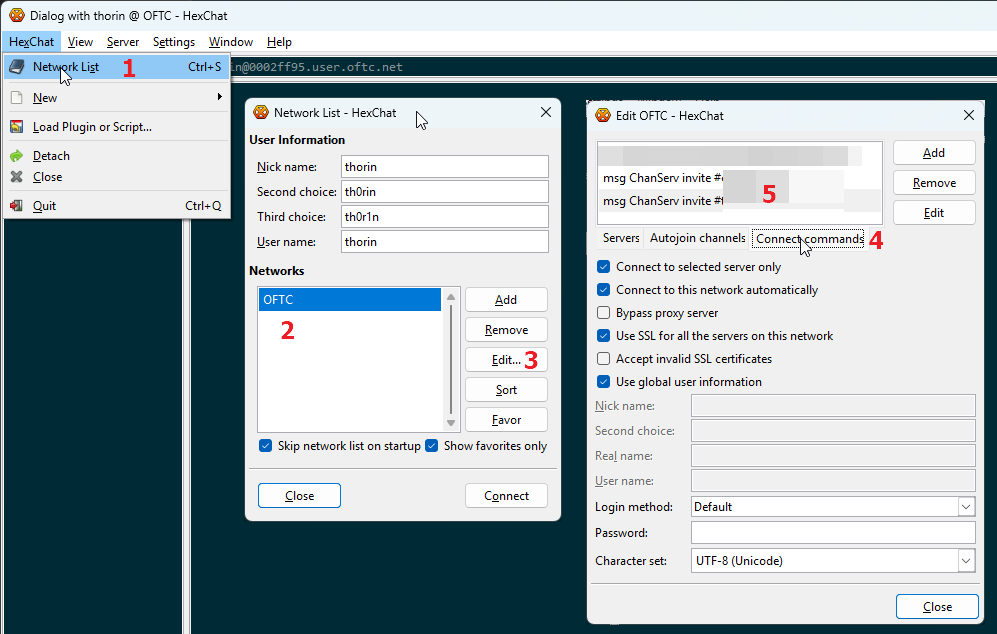
Essentially, it seems to be:
- HexChat > Network List (control-s)
- Select the network name (e.g.
OFTC) - Click "Edit..."
- Select the "Connect commands" tab
- Click "Add"
- set the command to
msg ChanServ invite #cakeorpie - repeat 5-6 for
#tor-internal
Weechat
Apparently, this incantation will set you free:
/set irc.server.oftc.command "/msg nickserv identify $PASSWD;wait 2000;/msg chanserv invite #tor-internal;/msg chanserv invite #cakeorpie"
Ask gman for help if not.
Using the Matrix bridge
Matrix can allow you to access IRC channels which are "bridged" with Matrix channels.
Since mid-April 2021, #tor-* channels are bridged (or
"plumbed") between the OFTC IRC network and the
Matrix.org home server (thanks to the debian.social team
since April 2025).
Tor Matrix rooms are listed in the Matrix #tor-space.
By default, you will appear on IRC as a user like
YourMatrixName[mds] (mds stands for matrix.debian.social, the
debian.social home server).
To access the public channels, you do not need any special configuration other than setting up a Matrix account, joining #tor-space and its related rooms.
Picking a client and home server
Matrix is federated and you can create your Matrix account on the consenting homeserver of your choosing.
However, if you decide to use a homeserver that is not Matrix.org, expect reduced functionality and reliability, see Inconsistencies in the Matrix federation and implementations.
Similarly, not all clients support the same set of features. Instructions on how to do various things will differ between different clients: we typically try to be client agnostic, but often documentation will assume you are using Element or Element X.
For a more consistent user experience, use the Element X client with a Matrix.org account.
Internal channel access
This does not grant you to the two internal channels, #tor-internal
and #cakeorpie. For that, you need to request access to the "Tor
Internal Space". For that, file a ticket in the TPA tracker, with
the ~IRC label, and mention your Matrix user identifier
(e.g. @alice:matrix.org).
Note: in Element, you can find your Matrix ID by clicking on your avatar on the top-left corner.
For TPA: the "moderators" of the internal space (currently @anarcat, @ahf and @micah) have access to grant those permissions. This is done by inviting the user to the private space, simply.
Switching from the legacy bridge
Users from the legacy matrix.org bridge will need to migrate to the
new debian.social bridge. As of 2025-04-15, the matrix.org has
become desperately unreliable and not answering in direct messages,
and will likely be completely retired soon, so it's important people
switch to the new bridge to keep seeing messages. (See also
tpo/tpa/team#42053 for background.)
To switch from the legacy bridge, follow this procedure:
-
First, make sure you have been invited to the "Tor internal space" (see above), which involves sending your Matrix ID (e.g.
@alice:matrix.org) to a moderator of the space (currently @anarcat, @ahf or @micah)In Element, you can find your Matrix ID by clicking on your avatar on the top-left corner.
-
Leave the legacy "cake or pie" Matrix room. in Element, this involves clicking the little "i" icon, then the red "Leave room" button
-
Wait for that to fully complete, it can sometimes take a while.
-
Accept the invitation to the "Tor internal space"
-
You should now see the two internal channels, join "Cake or pie"
-
Send a message to the room (e.g. "Hi! this is a test from the new matrix bridge"), you should see people reply
-
Leave the legacy "tor internal" Matrix room
-
Join the "Tor Internal" Matrix room from the "Tor Internal Space"
If you're lost at that last step, you can find the "Tor Internal" Matrix room in the "Tor Space" and scrolling down, or expanding the space by clicking the arrow next to the "Tor Space" icon, and looking in the "Tor Internal Space"
Those cover the two internal rooms: if you are joined through other
rooms in the old bridge, you will need to leave those rooms as well
and join the new rooms, which should be listed in the "Tor Project
Space" (#tor-space:matrix.org). You should be able to join the rooms
directly with their alias as well, for example, the #tor-project
channel is #tor-project:matrix.org.
As you can see, this can be pretty confusing because there can be multiple "Tor Internal" rooms in Matrix. So, some clarification to avoid confusion:
- "Tor Project Space": public Matrix "space" (alias
#tor-space:matrix.org) which regroups all Matrix rooms operated by Tor, and the "Tor Internal Space" - "Tor Internal Space": internal Matrix space which regroups internal Matrix rooms
#tor-internal: internal IRC channel- "Tor Internal": internal Matrix room bridged with
#tor-internalthrough thedebian.socialbridge, internal ID:!kSemheZJSaMFRYUQMy:matrix.org, alias#tor-internal:matrix.org - legacy "Tor Internal": old matrix room that was "portaled" into
#cakeorpiethrough the legacymatrix.orgbridge, internal ID!azmxAyudExaxpdATpW:matrix.org. that is the "bad" room. #cakeorpie: internal IRC channel for social chatter- "Cake or pie": Matrix room that is bridged to
#cakeorpiethrough thedebian.socialbridge, internal ID!oYgyLUfxcwLccMNubm:matrix.org. that is the "good" room, alias#cakeorpie:matrix.org - legacy "Cake or pie": old matrix room that was "portaled" into
#cakeorpiethrough thematrix.orgbridge, internal ID!HRkvwgoHhxxegkVaQY:matrix.org. that is the "bad" room.
Legacy portaled rooms
Internal IRC channels were previously bridged to Matrix rooms using the Portal rooms functionality.
THIS IS DEPRECATED AND WILL STOP WORKING WHEN THE Matrix.org BRIDGE IS RETIRED! DO NOT USE!
The syntax of portaled room is #_oftc_#channelname:matrix.org which
corresponds to #channelname on OFTC. To access internal channels,
you will need to:
- Choose a stable IRC nick to use instead of the automatic bridged nick, if you haven't already (this is optional! your current nick might actually be fine!)
- Set your bridged nick to that stable nick by sending
!nick <yournick>to @oftc-irc:matrix.org (again, optional) - If your nick is already registered you will get a PM from
NickServ (
@_oftc_NickServ:matrix.org) stating that you need to authenticate. Do so by responding withidentify <yourpassword>. - If your nick isn't registered, you must do so before you'll be granted
access to internal channels. You can do so by sending
register <password> <e-mail>to NickServ (@_oftc_NickServ:matrix.org), and following the instructions. - Join the test channel
#tor-matrix-testchannel by sending!join #tor-matrix-testto@oftc-irc:matrix.org. - Get someone to add you to the corresponding
GroupServlists (see above) and tell you the secret password - Send
!join #tor-internal <channel password>to@oftc-irc:matrix.org. Same with#cakeorpie.
For more information see the general Matrix bridge documentation and the IRC bridge documentation.
If none of this works, file a ticket in the TPA tracker, with the ~IRC label.
Note that this only works through the legacy matrix.org OFTC bridge,
which is scheduled for retirement in March 2025, see
tpo/tpa/team#42053. The matrix.org bridge is also unreliable
and you might miss some messages, see Matrix bridge
disconnections for details.
Howto
We do not operate the OFTC network. The public support channel for
OFTC is #oftc.
Using the ZNC IRC bouncer
The last time this section was updated (or that someone remembered to update the date her) is: 28 Feb 2020. The current ZNC admin is pastly. Find him on IRC or at pastly@torproject.org if you need help.
You need:
- your ZNC username. e.g.
jacob. For simplicity, the ZNC admin should have made sure this is the same as your IRC nick - your existing ZNC password. e.g.
VTGdtSgsQYgJ - a new password
Changing your ZNC password
If you know your existing one, you can do this yourself without the ZNC admin.
Given the assumptions baked into the rest of this document, the correct URL to visit in a browser is https://ircbouncer.torproject.org:2001/. There is also a hidden service at http://eibwzyiqgk6vgugg.onion/.
- log in with your ZNC username and password
- click Your Settings in the right column menu
- enter your password in the two boxes at the top of the page labeled Password and Confirm Password
- scroll all the way down and click Save
Done. You will now need to remember this new password instead of the old one.
Connecting to ZNC from an IRC client
Every IRC client is a little different. This section is going to tell you the information you need to know as opposed to exactly what you need to do with it.
- For a nick, use your desired nick. The assumption in this document is
jacob. Leave alternate nicks blank, or if you must, add an increasing number of underscores to your desired nick for them:jacob_,jacob__... - For the server or hostname, the assumption in this document is
ircbouncer.torproject.org. - Server port is 2001 based on the assumption blah blah blah
- Use SSL/TLS
- For a server password or simply password (not a nickserv password: that's
different and unnecessary) use
jacob/oftc:VTGdtSgsQYgJ.
That should be everything you need to know. If you have trouble, ask your ZNC admin for help or find someone who knows IRC. The ZNC admin is probably the better first stop.
OFTC groups
There are many IRC groups managed by GroupServ on the OFTC network:
@tor-chanops@tor-ircmasters@tor-ops@tor-people@tor-randoms@tor-tpomember@tor-vegas
People generally get access to things through one or many of the above groups. When someone leaves, you might want to revoke their access, for example with:
/msg GroupServ access @tor-ircmasters del OLDADMIN
Typically, you will need to add users to the @tor-tpomember group,
so that they can access the internal channels
(e.g. #tor-internal). This can be done by the "Group Masters", which
can be found by talking with GroupServ:
/msg GroupServ info @tor-tpomember
You can list group members with:
/msg GroupServ access @tor-tpomember list
Adding or removing users from IRC
Typically you would add them to the @tor-tpomember group with:
/msg GroupServ access @tor-tpomember add $USER MEMBER
... where $USER is replaced with the nickname registered to the
user.
To remove a user from the group:
/msg GroupServ access @tor-tpomember del $USER MEMBER
Allow Matrix users to join +R channels
If your channel is +R (registered users only), Matrix users will
have trouble joining your channel. You can add an exception to allow
the bridge access to the channel even if the users are not registered.
To do this, you need to be a channel operator, and do the following:
/mode #tor-channel +e *!*@2a01:4f8:241:ef10::/64
This makes it possible for matrix users to speak in +R rooms, see
ChannelModes by allowing the range of IP addresses Matrix users
show up as from the bridge.
Or you can just tell Matrix users to register on IRC, see the Using the Matrix bridge instructions above.
Adding channels to the Matrix bridge
File a ticket in the TPA tracker, with the ~IRC label. Operators of the Matrix bridge need to add the channel, you can explicitly ping @anarcat, @gus and @ahf since they are the ones managing the bridge.
debian.social
The debian.social team has gracefully agreed to host our bridge following the demise of the matrix.org bridge in March 2025. @anarcat has been granted access to the team and is the person responsible for adding/removing bridged channels. The procedure to follow to add bridged channel is:
- clone the configuration repository if not already done
(
ssh://git@salsa.debian.org/debiansocial-team/sysadmin/config) - add the the room configuration to the bridge, with the opaque ID, for example like this:
--- a/bundles/matrix-appservice-irc/files/srv/matrix-appservice-irc/config.yaml
+++ b/bundles/matrix-appservice-irc/files/srv/matrix-appservice-irc/config.yaml
@@ -884,6 +884,11 @@ ircService:
matrixToIrc:
initial: true
incremental: true
+ #tor-www-bots:
+ - room: "!LpnGViCmMNjJYTXwjF:matrix.org"
+ matrixToIrc:
+ initial: true
+ incremental: true
# Apply specific rules to IRC channels. Only IRC-to-matrix takes effect.
channels:
@@ -1156,6 +1161,8 @@ ircService:
roomIds: ["!BVISXmIJfYibljSXNs:matrix.org"]
"#tor-vpn":
roomIds: ["!VCzbomHQpQuMdsPSWu:matrix.org"]
+ "#tor-www-bots":
+ roomIds: ["!LpnGViCmMNjJYTXwjF:matrix.org"]
"#tor-www":
roomIds: ["!qyImLEShVvoqqhuASk:matrix.org"]
-
push the change to salsa
-
deploy the change with:
ssh config.debian.social 'git pull && bw apply matrix_ds' -
invite
@mjolnir:matrix.debian.socialas moderator in the matrix room: this is important because the bot needs to be able to invite users to the room, for private rooms -
make sure that
@tor-root:matrix.orgis admin -
if the channel is
+R, add a new+Iline:/mode #tor-channel +I *!*@2a01:4f8:241:ef10::/64This makes it possible for matrix users to speak in
+Rrooms, see ChannelModesIf the channel was previously bridged with matrix.org , remove the old exception:
/mode #tor-channel -I *!*@2001:470:1af1:101::/64 -
from IRC, send a ping, same from Matrix, wait for each side to see the message of the other
-
remove yourself from admin, only if
tor-rootis present
To change from the OFTC to the debian.social bridge, it's essentially the same procedure, but first:
-
disconnect the old bridge (send
!unlink !OPAQUE:matrix.org irc.oftc.net #tor-exampleto@oftc-irc:matrix.org, for example#tor-adminwas unlinked with!unlink !SocDtFjxNUUvkWBTIu:matrix.org irc.oftc.net #tor-admin) -
at this point, you should see Matrix users leaving from the IRC side
-
wait for the bridge bot to confirm the disconnection
-
do the above procedure to add the room to the bridge
-
move to the next room
Matrix.org
IMPORTANT: those instructions are DEPRECATED. The Matrix bridge is going away in March 2025 and will stop operating properly.
For those people, you need to use the Element desktop (or web) client to add the "IRC bridge" integration. This is going to require an operator in the IRC channel as well.
To an IRC channel with a Matrix.org room in Element:
-
create the room on Matrix. we currently name rooms with
#CHANNELNAME:matrix.org, so for example#tor-foo:matrix.org. for that you actually need an account onmatrix.org -
invite and add a second admin in case you lose access to your account
-
in Element, open the room information (click the little "Info" button (a
iin a green circle) on the top right) -
click on
Add widgets, bridges & bots -
choose
IRC Bridge (OFTC) -
pick the IRC channel name (e.g.
#tor-foo) -
pick an operator (
+omode in the IRC channel) to validate the configuration -
from IRC, answer the bot's question
Other plumbed bridges
Note that the instructions for Matrix.org's OFTC bridge are based on a
proprietary software integration (fun) in Element. A more "normal" way
to add a plumbed room is to talk to the appservice admin
room
using the !plumb command:
!plumb !tor-foo:example.com irc.oftc.net #tor-foo
There also seems to be a place in the configuration file for such mappings.
Changing bridges
It seems possible to change bridges if they are "plumbed". The above configurations are "plumbed", as opposed to "portaled".
To change the bridge in a "plumbed" room, simply remove the current
bridge and add a new one. In the case of Matrix.org, you need to go in
the integrations and remove the bridge. For the control room, the
command is !unlink and then !plumb again.
"Portaled" rooms look like #oftc_#tor-foo:matrix.org and those
cannot be changed: if the bridge dies, the portal dies with it and
Matrix users need to join another bridge.
Renaming a Matrix room
Getting off-topic here, but if you created a Matrix room by mistake and need to close it and redirect users elsewhere, you need to create a tombstone event, essentially. A few cases where this can happen:
- you made the room and don't like the "internal identifier" (also known as an "opaque ID") created
- the room is encrypted and that's incompatible with the IRC bridge
Pager playbook
Disaster recovery
Reference
We operate a virtual machine for people to run their IRC clients,
called chives.
A volunteer (currently pastly) runs a ZNC bouncer for TPO people on their own infrastructure.
Some people connect to IRC intermittently.
Installation
The new IRC server has been setup with the roles::ircbox by weasel
(see ticket #32281) in october 2019, to replace the older
machine. This role simply sets up the machine as a "shell server"
(roles::shell) and installs irssi.
KGB bot
The kgb bot is rather undocumented. The Publishing notifications on IRC GitLab documentation is the best we've got in terms of user docs, which isn't great.
The bot is also patched to support logging into the #tor-internal
channel, see this patch which missed the trixie merge window and
was lost during the upgrade. Hopefully that won't happen again.
KGB is also a bit overengineered and too complicated. It also doesn't
deal with "mentions" (like, say, tpo/tpa/team#4000 should announce
that issue is in fact the "Gitlab Migration Milestone") - another bot
named tor, managed by ahf outside of TPA, handles that.
There are many IRC bots out there, needless to say, and many of them
support receiving webhooks in particular. Anarcat maintains a list of
Matrix bots, for example, which includes some webhook receivers,
but none that do both what tor and KGB-BOT do.
gitlabIRCed seems to be one promising alternative that does both, as well.
More generic bots like limnoria actually do support providing both a webhook endpoint and details about mentioned issues, through third party plugins.
Might be worth examining further. There's a puppet module.
Installation: ZNC
This section documents how pastly set up ZNC on TPA infra. It was originally written 20 Nov 2019 and the last time someone updated something and remembered to update the date is:
Last updated: 20 Nov 2019
Assumptions
- Your username is
pastly. - The ZNC user is
ircbouncer. - The host is
chives.
Goals
- ZNC bouncer maintaining persistent connections to irc.oftc.net for "Tor people" (those with @torproject.org addresses is pastly's litmus test) and buffering messages for them when they are not online
- Insecure plaintext connections to ZNC not allowed
- Secure TLS connections with valid TLS certificate
- Secure Tor onion service connections
- ZNC runs as non-root, special-purpose, unprivileged user
At the end of this, we will have ZNC reachable in the following ways for both web-based configuration and IRC:
- Securely with a valid TLS certificate on port 2001 at ircbouncer.torproject.org
- Securely via a Tor onion service on port 80 and 2000 at some onion address
Necessary software
-
Debian 10 (Buster)
-
ZNC, tested with
pastly@chives:~$ znc --version ZNC 1.7.2+deb3 - https://znc.in IPv6: yes, SSL: yes, DNS: threads, charset: yes, i18n: no, build: autoconf -
Tor (optional), tested with
pastly@chives:~$ tor --version Tor version 0.3.5.8.
Setup steps
Obtain necessary software
See previous section
Create a special user
Ask your friendly neighborhood Tor sysadmin to do this for you. It needs its
own home directory and you need to be able to sudo -u to it. For example:
pastly@chives:~$ sudo -u ircbouncer whoami
[sudo] password for pastly on chives:
ircbouncer
But to do this you need ...
Create a sudo password for yourself
If you don't have one already.
-
Log in to https://db.torproject.org/login.html with the Update my info button. Use your LDAP password.
-
Use the interface to create a sudo password. It probably can be for just the necessary host (chives, for me), but I did it for all hosts. It will give you a gpg command to run that signs some text indicating you want this change. Email the resulting block of armored gpg output to changes@db.torproject.org.
-
After you get a response email indicating success, want 10 minutes and you should be able to run commands as the
ircbounceruser.pastly@chives:~$ sudo -u ircbouncer whoami [sudo] password for pastly on chives: ircbouncer
Choose a FQDN and get a TLS certificate
Ask your friendly neighborhood Tor sysadmin to do this for you. It could be chives.torproject.org, but to make it easier for users, my Tor sysadmin chose ircbouncer.torproject.org. Have them make you a valid TLS certificate with the name of choice. If using something like Let's Encrypt, assume they are going to automatically regenerate it every ~90 days :)
They don't need to put the cert/keys anywhere special for you as long as the ircbouncer user can access them. See how in this ticket comment ...
root@chives:~# ls -al /etc/ssl/private/ircbouncer.torproject.org.* /etc/ssl/torproject/certs/ircbouncer.torproject.org.crt*
-r--r----- 1 root ssl-cert 7178 nov 18 20:42 /etc/ssl/private/ircbouncer.torproject.org.combined
-r--r----- 1 root ssl-cert 3244 nov 18 20:42 /etc/ssl/private/ircbouncer.torproject.org.key
-r--r--r-- 1 root root 2286 nov 18 20:42 /etc/ssl/torproject/certs/ircbouncer.torproject.org.crt
-r--r--r-- 1 root root 1649 nov 18 20:42 /etc/ssl/torproject/certs/ircbouncer.torproject.org.crt-chain
-r--r--r-- 1 root root 3934 nov 18 20:42 /etc/ssl/torproject/certs/ircbouncer.torproject.org.crt-chained
And the sysadmin made ircbouncer part of the ssl-cert group.
ircbouncer@chives:~$ id
uid=1579(ircbouncer) gid=1579(ircbouncer) groups=1579(ircbouncer),116(ssl-cert)
Couple nice things
-
Create a .bashrc for ircbouncer.
pastly@chives:~$ sudo -u ircbouncer cp /home/pastly/.bashrc /home/ircbouncer/.bashrc
-
Add proper
XDG_RUNTIME_DIRto ircbouncer's .bashrc, only optional if you can remember to do this every time you interact with systemd in the futurepastly@chives:~$ sudo -u ircbouncer bash ircbouncer@chives:/home/pastly$ cd ircbouncer@chives:~$ echo export XDG_RUNTIME_DIR=/run/user/$(id -u) >> .bashrc ircbouncer@chives:~$ tail -n 1 .bashrc export XDG_RUNTIME_DIR=/run/user/1579 ircbouncer@chives:~$ id -u 1579
Create initial ZNC config
If you're rerunning this section for some reason, consider deleting everything and starting fresh to avoid any confusion. If this is your first time, then ignore this code block.
ircbouncer@chives:~$ pkill znc
ircbouncer@chives:~$ rm -r .znc
Now let ZNC guide you through generating an initial config. Important decisions:
-
What port should znc listen on initially? 2000
-
Should it listen on that port with SSL? no
-
Nick for the admin user? I chose pastly. It doesn't have to match your linux username; I just chose it for convenience.
-
Skip setting up a network at this time
-
Don't start ZNC now
ircbouncer@chives:~$ znc --makeconf [ .. ] Checking for list of available modules... [ ** ] [ ** ] -- Global settings -- [ ** ] [ ?? ] Listen on port (1025 to 65534): 2000 [ ?? ] Listen using SSL (yes/no) [no]: [ ?? ] Listen using both IPv4 and IPv6 (yes/no) [yes]: [ .. ] Verifying the listener... [ ** ] Unable to locate pem file: [/home/ircbouncer/.znc/znc.pem], creating it [ .. ] Writing Pem file [/home/ircbouncer/.znc/znc.pem]... [ ** ] Enabled global modules [webadmin] [ ** ] [ ** ] -- Admin user settings -- [ ** ] [ ?? ] Username (alphanumeric): pastly [ ?? ] Enter password: [ ?? ] Confirm password: [ ?? ] Nick [pastly]: [ ?? ] Alternate nick [pastly_]: [ ?? ] Ident [pastly]: [ ?? ] Real name (optional): [ ?? ] Bind host (optional): [ ** ] Enabled user modules [chansaver, controlpanel] [ ** ] [ ?? ] Set up a network? (yes/no) [yes]: no [ ** ] [ .. ] Writing config [/home/ircbouncer/.znc/configs/znc.conf]... [ ** ] [ ** ] To connect to this ZNC you need to connect to it as your IRC server [ ** ] using the port that you supplied. You have to supply your login info [ ** ] as the IRC server password like this: user/network:pass. [ ** ] [ ** ] Try something like this in your IRC client... [ ** ] /server <znc_server_ip> 2000 pastly:<pass> [ ** ] [ ** ] To manage settings, users and networks, point your web browser to [ ** ] http://<znc_server_ip>:2000/ [ ** ] [ ?? ] Launch ZNC now? (yes/no) [yes]: no
Create TLS cert that ZNC can read
There's probably a better way to do this or otherwise configure ZNC to read straight from /etc/ssl for the TLS cert/key. But this is what I figured out.
- Create helper script
Don't copy/paste blindly. Some things in this script might need to change for you.
ircbouncer@chives:~$ mkdir bin
ircbouncer@chives:~$ cat > bin/znc-ssl-copy.sh
#!/usr/bin/env bash
out=/home/ircbouncer/.znc/znc.pem
rm -f $out
cat /etc/ssl/private/ircbouncer.torproject.org.combined /etc/ssl/dhparam.pem > $out
chmod 400 $out
pkill -HUP znc
ircbouncer@chives:~$ chmod u+x bin/znc-ssl-copy.sh
- Run it once to verify it works
It should be many 10s of lines long. It should have more than 1 BEGIN [THING]
sections. The first should be a private key, then one or more certificates,
and finally DH params. If you need help with this, do not share the contents of
this file publicly: it contains private key material.
ircbouncer@chives:~$ ./bin/znc-ssl-copy.sh
ircbouncer@chives:~$ wc -l .znc/znc.pem
129 .znc/znc.pem
ircbouncer@chives:~$ grep -c BEGIN .znc/znc.pem
4
- Make it run periodically
Open ircbouncer's crontab with crontab -e and add the following line
@weekly /home/ircbouncer/bin/znc-ssl-copy.sh
Create ZNC system service
This is our first systemd user service thing, so we have to create the
appropriate directory structure. Then we create a very simple znc.service.
We enable the service (start it automatically on boot) and use --now to
also start it now. Finally we verify it is loaded and actively running.
ircbouncer@chives:~$ mkdir -pv .config/systemd/user
mkdir: created directory '.config/systemd'
mkdir: created directory '.config/systemd/user'
ircbouncer@chives:~$ cat > .config/systemd/user/znc.service
[Unit]
Description=ZNC IRC bouncer service
[Service]
Type=simple
ExecStart=/usr/bin/znc --foreground
[Install]
WantedBy=default.target
ircbouncer@chives:~$ systemctl --user enable --now znc
Created symlink /home/ircbouncer/.config/systemd/user/multi-user.target.wants/znc.service → /home/ircbouncer/.config/systemd/user/znc.service.
ircbouncer@chives:~$ systemctl --user status znc
● znc.service - ZNC IRC bouncer service
Loaded: loaded (/home/ircbouncer/.config/systemd/user/znc.service; enabled; vendor preset: enabled)
Active: active (running) since Wed 2019-11-20 15:14:27 UTC; 5s ago
Main PID: 23814 (znc)
CGroup: /user.slice/user-1579.slice/user@1579.service/znc.service
└─23814 /usr/bin/znc --foreground
Access web interface
The sysadmin hasn't opened any ports for us yet and we haven't configured ZNC to use TLS yet. Luckily we can still access the web interface securely with a little SSH magic.
Running this command on my laptop (named cranium) creates an SSH connection
from my laptop to chives over which it will forward all traffic to
127.0.0.1:2000 on my laptop to 127.0.0.1:2000 on chives.
cranium:~ mtraudt$ ssh -L 2000:127.0.0.1:2000 chives.tpo
[... snip the message of the day ...]
pastly@chives:~$
So now I can visit in a browser on my laptop http://127.0.0.1:2000 and gain
access to ZNC's web interface securely.
Add TLS listener for ZNC
Log in to the web interface using the username and password you created during the initial ZNC config creation.
Visit Global Settings from the menu on the right side of the window.
For listen ports, add:
- Port 2001
- BindHost *
- All boxes (SSL, IPv4, ... HTTP) are checked
- URIPrefix /
Click Add and ZNC will open a TLS listener on 2001.
Make ZNC reachable without tricks
-
Ask your friendly neighborhood Tor sysadmin to allow inbound 2001 in the firewall.
I recommend you do not have 2000 open in the firewall because it would allow insecure web and IRC connections. All IRC clients worth using support TLS. If you're super tech savvy and you absolute must use your favorite IRC client that doesn't support TLS, then I think you're smart enough to make an SSH tunnel for your IRC client or use the onion service.
-
Ask your friendly neighborhood Tor sysadmin to configure an onion service.
I'm trying to convince mine to set the following options in the torrc
Log notice syslog # to use 3 hops instead of 6. not anonymous # can't do this if you want a SocksPort SocksPort 0 HiddenServiceSingleHopMode 1 HiddenServiceNonAnonymousMode 1 # actual interesting config HiddenServiceDir /var/lib/tor/onion/ircbouncer.torproject.org HiddenServiceVersion 3 HiddenServicePort 80 2000 HiddenServicePort 2000This config allows someone to access the web interface simply with http://somelongonionaddress.onion. It also allows them to use somelongonionaddress.onion:2000 in their IRC client like they might expect.
Adding a ZNC user
The last time this section was updated (or that someone remembered to update the date her) is: 28 Feb 2020.
You need:
- the user's desired username (e.g.
jacob). for simplicity, make this the same nick as their desired IRC nick even though this isn't technically required by ZNC. - the user's desired ZNC password, or a junk initial one for them (e.g.
VTGdtSgsQYgJ). This does not have to be the same as their nickserv password, and arguably should not be the same for security reasons. - the user's nickserv password (e.g.
upRcjFmf) if registered with nickserv. If you don't know if they are registered with nickserv, it's important to figure that out now. If yes, it's important to get the password from the user.
IMPORTANT: The user should NOT be logged in to IRC as this nick already. If they are, these instructions will not work out perfectly and someone is going to need to know a bit about IRC/nickserv/etc. to sort it out.
Additional assumptions:
- the user has not enabled fancy nickserv features such as certfp (identify with a TLS cert instead of a password) or connections from specific IPs only. I believe the former is technically possible with ZNC, but I am not going to document it at this time.
- the user wants to connect to OFTC
- the correct host/port for IRC-over-TLS at OFTC is irc.oftc.net:6697. Verify at https://oftc.net.
Have a ZNC admin ...
- log in to the web console, e.g. at
https://ircbouncer.torproject.org:2001 - visit Manage Users in the right column menu
- click Add in the table
- input the username and password into the boxes under Authentication
- leave everything in IRC Information as it is: blank except Realname is
ZNC - https://znc.inand Quit Message is%znc% - leave Modules as they are: left column entirely unchecked except chansaver and controlpanel
- under Channels increase buffer size to a larger number such as 1000
- leave Queries as they are: both boxes at 50
- leave Flags as they are: Auth Clear Chan Buffer, Multi Clients, Prepend Timestamps, and Auto Clear Query Buffer checked all other unchecked
- leave everything in ZNC Behavior as it is
- click Create and continue
The admin should be taken to basically the same page, but now more boxes are filled in and--if they were to look elsewhere to confirm--the user is created. Also The Networks section is available now.
The ZNC admin will ...
- click Add in the Networks table on this user's page
- for network name, input
oftc. For - remove content from Nickname, Alt. Nicname, and Ident.
- for Servers on this IRC network, click Add
- input
irc.oftc.netfor hostname,6697for port, ensureSSLis checked, and password is left blank - if the user has a nickserv password, under Modules check nickserv and type the nickserv password into the box.
- click Add Network and return
The admin should be taken back to the user's page again. Under networks, OFTC
should exist now. If the Nick column is blank, wait a few seconds, refresh,
and repeat a few times until it is populated with the user's desired nick. If
what appears is guestXXXX or is their desired nick and a slight modification
that you didn't intend (i.e. jacob- instead of jacob) then there is a
problem. It could be:
- the user is already connected to IRC, when the instructions stated at the beginning they shouldn't be.
- someone other than the user is already using that nick
- the user told you they do not have a nickserv account, but they actually do and it's configured to prevent people from using their nick without identifying
If there is no problem, the ZNC admin is done.
SLA
No specific SLA has been set for this service
Design
Just a regular Debian server with users from LDAP.
Channel list
This is a list of key channels in use as of 2024-06-05:
| IRC | Matrix | Topic |
|---|---|---|
#tor | #tor:matrix.org | general support channel |
#tor-project | #tor-project:matrix.org | general Tor project channel |
#tor-internal | N/A | channel for private discussions |
#cakeorpie | N/A | private social, off-topic chatter for the above |
#tor-meeting | #tor-meeting:matrix.org | where some meetings are held |
#tor-meeting2 | N/A | fallback for the above |
Note that the private channels (tor-internal and cakeorpie) need
secret password and being added to the @tor-tpomember with
GroupServ, part of the tor-internal@lists.tpo welcome email.
Other interesting channels:
| IRC | Matrix | Topic |
|---|---|---|
#tor-admin | #tor-admin:matrix.org | TPA team and support channel |
#tor-alerts | #tor-alerts:matrix.org | TPA monitoring |
#tor-anticensorship | #tor-anticensorship:matrix.org | anti-censorship team |
#tor-bots | #tor-bots:matrix.org | where a lot of bots live |
#tor-browser-dev | #tor-browser-dev:matrix.org | applications team |
#tor-dev | #tor-dev:matrix.org | network team discussions |
#tor-l10n | #tor-l10n:matrix.org | Tor localization channel |
#tor-network-health | #tor-network-health:matrix.org | N/A |
#tor-relays | #tor-relays:matrix.org | relay operators |
#tor-south | #tor-south:matrix.org | Comunidad Tor del Sur Global |
#tor-ux | #tor-ux:matrix.org | UX team |
#tor-vpn | #tor-vpn:matrix.org | N/A |
#tor-www | #tor-www:matrix.org | Tor websites development channel |
#tor-www-bots | N/A | Tor websites bots |
| N/A | !MGbrtEhmyOXFBzRVRw:matrix.org | Tor GSoC |
Issues
There is no issue tracker specifically for this project, File or search for issues in the team issue tracker with the ~IRC label.
Known issues
Matrix bridge reliability
The bridge between IRC and Matrix has been historically quite
unreliable. Since we switched to the matrix.debian.social bridge,
operation has been much more reliable.
It can still happen, under some circumstances, that the Matrix and IRC side disconnect. Typically, this is when the bridge is upgraded or the server rebooted.
Then it can take multiple hours (if not days) for Matrix rooms and IRC channels to synchronize again.
A symptom of this problem is that some (if not all) Matrix rooms will not see messages posted on the bridged IRC channel and/or vice-versa.
If you're trying to resolve that issues, make sure the matrix_ds
user is allowed to join the IRC channel and that "puppets" are
joining. Make sure the +I flags are set on the IRC channel, see
Adding channels to the Matrix bridge.
Indecision in instant communications implementation
While this page is supposed to document our IRC setup, it is growing to also cover a nascent Matrix configuration, through the IRC bridge. Most users currently get onboarded on Matrix instead of IRC, which is causing extra load on TPA which is currently, informally, managing both of those services.
In general, Tor should eventually figure out what it really wants to use for real-time communications. Traditionally, that has been IRC, but IRC operators and moderators have not been able to provide usable workflows for onboarding and offboarding people, which means people have been, individually, forced to look for more viable alternative, which has led people to converge over Matrix. There's a broad, organisation-wide conversation about this happening in tpo/team#223.
Matrix security and design issues
It does not help that Matrix has serious design and security flaws. Back in 2022, anarcat identified a series of issues with Matrix including serious misgivings about the lack of modern moderation mechanisms, poor data retention defaults, limited availability, usability concerns, poor performance, and cryptographic security issues.
In particular, do not rely on end-to-end encryption in Matrix (or, of course, IRC) the same way you would with Signal, see Security Issues in Matrix’s Olm Library. For performance and architectural issues, see why not matrix.
Finally, you should assume that something said on Matrix will persist forever. By default, Synapse, the flagship Matrix home server, does not enable message expiration (see this setting default) and it can be assumed that most servers do not expire messages. According to this comment, Matrix wouldn't even be GDPR compliant.
Inconsistencies in the Matrix federation and implementations
Implementations of the Matrix protocol(s) vary wildly among different servers and clients, up to a point that one cannot assume the existence or reliability of basic features like "spaces" or end-to-end encryption.
In general, anything outside of matrix.org and their flagship client
(Element X) can fail inexplicably. For example:
- we've had reports of difficulties for others to invite
non-
matrix.orgusers to a private room (tpo/tpa/team#42185), - video and audio calls are unreliable across heterogeneous clients and home servers: Element Call only works on Element and specially configured home servers, and Legacy Call doesn't work consistently across clients
- The URL preview functionality may not work (this is only relevant in rooms with encryption disabled, since URL preview does not work in rooms with encryption enabled).
- the September 2025 v12 room upgrade is supported only by recent Synapse home servers (see tpo/tpa/team#42240)
Matrix bridge mode overrides
The Matrix IRC bridge will override the mode on "restricted" rooms
on the Matrix side. A typical example of this is that the
#tor-internal and #cakeorpie Matrix rooms will see their "Access"
setting (join_rule) change from "Space members" (restricted) to
"Invite only" (invite).
The setting needs to be reset in Matrix, by following Settings -> Security & Privacy -> Access and reset it to "Space members".
See the upstream issue for details.
Resolved issues
Matrix attachments visibility from IRC
It used to be that long messages and attachments sent from Matrix were
not visible from IRC. That has been fixed in September 2025 through a
bridge upgrade on matrix.debian.social.
Legacy Matrix bridge disconnections
On the legacy matrix.org bridge, you may get kicked of internal
channels seemingly at random when the bridge restart. You'll then have
to re-authenticate to NickServ, and send a !join command again.
This is due to a bug in the matrix.org IRC appservice which
can't remember your NickServ password, so when it reconnects, you
have to input that password again.
The impact of this is that you lose access to channels that are
"registered-only". This happens without any visible error on your
side, although NickServ will tell you to authenticate.
Note that other bridges (notably, Debian's matrix.debian.social
server, now used to bridge all public channels) do not suffer from
this issue. The legacy bridge is scheduled for retirement in
March 2025, see tpo/tpa/team#42053 for details.
Monitoring and testing
Logs and metrics
Backups
ZNC does not, as far as we know, require any special backup or restore procedures.
Discussion
This page was originally created to discuss the implementation of "bouncer" services for other staff. While many people run IRC clients on the server over an SSH connection, this is inconvenient for people less familiar with the commandline.
It was therefore suggested we evaluate other systems to allow users to have more "persistence" online without having to overcome the "commandline" hurdle.
Goals
Must have
- user-friendly way to stay connected to IRC
Nice to have
- web interface?
- LDAP integration?
Non-Goals
- replacing IRC (let's not go there please)
Approvals required
Maybe checking with TPA before setting up a new service, if any.
Proposed Solution
Not decided yet. Possible options:
- status quo: "everyone for themselves" on the shell server, znc ran by pastly on their own infra
- services admin: pastly runs the znc service for tpo people inside tpo infra
- TPA runs znc bouncer
- alternative clients (weechat, lounge, kiwiirc)
- irccloud
Cost
Staff. Existing hardware resources can be reused.
Alternatives considered
Terminal IRC clients
- irssi in some terminal multiplexer like tmux screen or dtach
- weechat in the same or with another interface like web (Glowbear), Android or iOS
- senpai is similar except it expects a remote bouncer or server with history, for example soju
Bouncers
- soju is a new-generation (IRCv3) bouncer with history support that allows clients to replay history directly, although precious few clients support this (KiwiIRC, Gamja, and senpai at the time of writing), packaged in Debian
- ZNC, a bouncer, currently ran by @pastly on their own infrastructure for some tpo people
Web chat
- convos.chat
- gamja soju-compatible client, not packaged in Debian, NPM/JS
- Glowing bear (weechat frontend)
- lounge webchat (nodejs, not packaged in Debian), see this list of issues
- KiwiIRC both a service and a web app we could run
- qwebirc
Mobile apps
- goguma soju-compatible client, in F-Droid, Google play store and Apple Store
- weechat frontends: Android or iOS
Matrix bridges
Matrix has bridges to IRC, which we currently use but are unreliable, see the Matrix bridge disconnections discussion.
IRC bridges to Matrix
matrix2051 and matrirc are bridges that allow IRC clients to connect to Matrix.
weechat also has a matrix script that allows weechat to talk with Matrix servers. It is reputed to be slow, and is being rewritten in rust.
Discarded alternatives
Most other alternatives have been discarded because they do not work with IRC and we do not wish to move away from that platform just yet. Other projects (like qwebirc) were discarded because they do not offer persistence.
Free software projects:
- Briar - tor-based offline-first messenger
- Jabber/XMPP - just shutdown the service, never picked up
- Jitsi - audio, video, text chat
- Mattermost - opensource alternative to slack, not federated
- Retroshare - old, complex, not packaged
- Rocket.chat - not federated
- Scuttlebutt - not a great messaging experience
- Signal - in use at Tor, but poor group chat capabilities
- Telegram - doubts about security reliability
- Tox - DHT-based chat system
- Wire - not packaged in Debian
- Zulip - "team chat", not federated
Yes, that's an incredibly long list, and probably not exhaustive.
Commercial services:
- IRCCloud - bridges with IRC, somewhat decent privacy policy
- Slack - poor privacy policy
- Discord - voice and chat app, mostly for gaming
- Hangouts - Google service
- Whatsapp - tied to Facebook
- Skype - Microsoft
- Keybase - OpenPGP-encrypted chat, proprietary server-side
None of the commercial services interoperate with IRC unless otherwise noted.
Jenkins is a Continuous Integration server that we used to build websites and run tests from the legacy git infrastructure.
RETIRED
WARNING: Jenkins was retired at the end of 2021 and this documentation is now outdated.
This documentation is kept for historical reference.
Tutorial
How-to
Removing a job
To remove a job, you first need to build a list of currently available jobs on the Jenkins server:
sudo -u jenkins jenkins-jobs --conf /srv/jenkins.torproject.org//etc/jenkins_jobs.ini list -p /srv/jenkins.torproject.org/jobs > jobs-before
Then remove the job(s) from the YAML file (or the entire YAML file, if the file ends up empty) from jenkins/jobs.git and push the result.
Then, regenerate a list of jobs:
sudo -u jenkins jenkins-jobs --conf /srv/jenkins.torproject.org//etc/jenkins_jobs.ini list -p /srv/jenkins.torproject.org/jobs > jobs-after
And generate the list of jobs that were removed:
comm -23 jobs-before jobs-after
Then delete those jobs:
comm -23 jobs-before jobs-after | while read job; do
sudo -u jenkins jenkins-jobs --conf /srv/jenkins.torproject.org//etc/jenkins_jobs.ini delete $job
done
Pager playbook
Disaster recovery
Reference
Installation
Jenkins is a Java application deployed through the upstream Debian
package repository. The app listens on localhost and is proxied
by Apache, which handles TLS.
Jenkins Job Builder is installed through the official Debian package.
Slaves are installed through the debian_build_box Puppet class and
must be added through the Jenkins web interface.
SLA
Jenkins is currently "low availability": it doesn't have any redundancy in the way it is deployed, and jobs are typically slow to run.
Design
Jenkins is mostly used to build websites but also run tests for certain software project. Configuration and data used for websites and test are stored in Git and, if published, generally pushed to the static site mirror system.
This section aims at explaining how Jenkins works. The following diagram should provide a graphical overview of the various components in play. Note that the static site mirror system is somewhat elided here, see the architecture diagram there for a view from that other end.
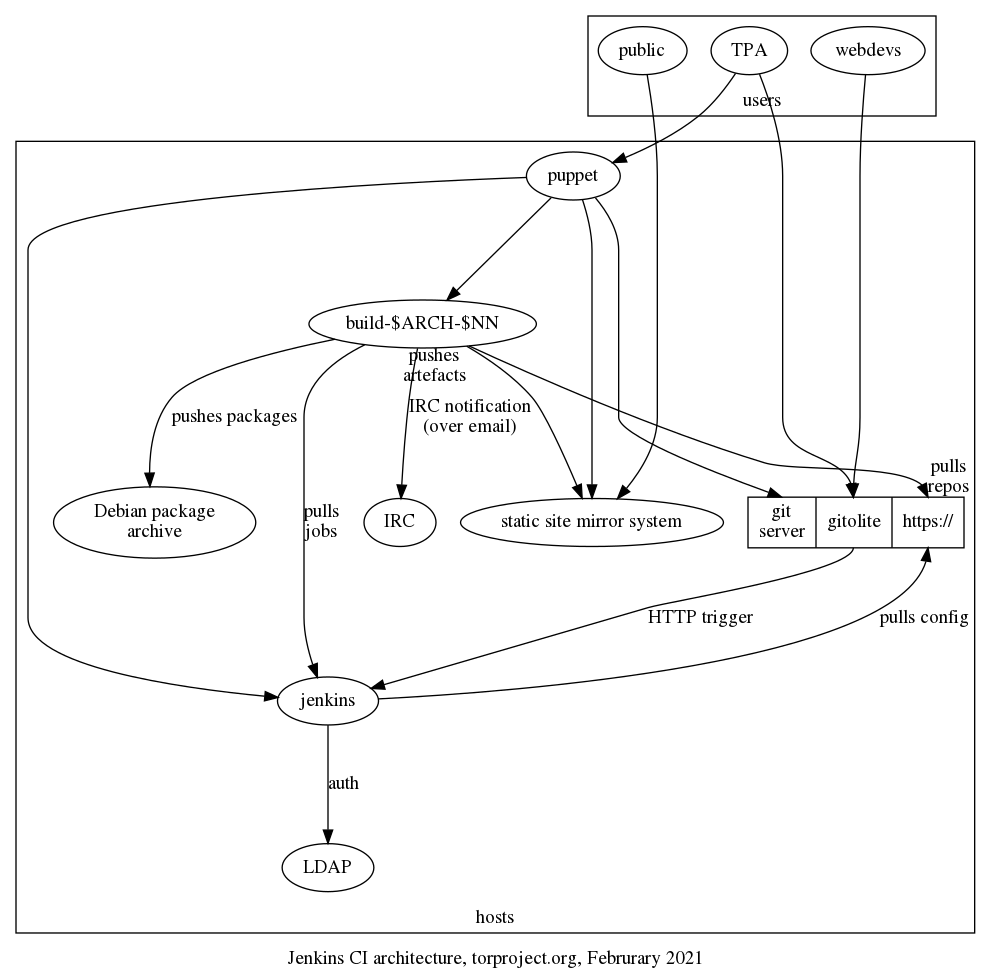
What follows should explain the above in narrative form, with more details.
Jobs configuration
Jenkins is configured using Jenkins Job Builder which is based a set of YAML configuration files. In theory, job definitions are usually written in a Java-based Apache Groovy domain-specific language, but in practice we only operate on the YAML files. Those define "pipelines" which run multiple "jobs".
In our configuration, the YAML files are managed in the
jenkins/jobs.git repository. When commits are pushed there, a
special hook on the git server (in
/srv/git.torproject.org/git-helpers/post-receive-per-repo.d/project%jenkins%jobs/trigger-jenkins)
kicks the /srv/jenkins.torproject.org/bin/update script on the
Jenkins server, over SSH, which, ultimately, runs:
jenkins-jobs --conf "$BASE"/etc/jenkins_jobs.ini update .
.. where the current directory is the root of jenkins/jobs.git
working tree.
This does depend on a jenkins_jobs.ini configuration file stored in
"$BASE"/etc/jenkins_jobs.ini (as stated above, which is really
/srv/jenkins.torproject.org/etc/jenkins_jobs.ini). That file has the
parameters to contact the Jenkins server, like username (jenkins),
password, and URL (https://jenkins.torproject.org/), so that the job
builder can talk to the API.
Storage
Jenkins doesn't use a traditional (ie. SQL) database. Instead, data
like jobs, logs and so on are stored on disk in /var/lib/jenkins/,
inside XML, plain text logfiles, and other files.
Builders also have copies of various Debian and Ubuntu "chroots",
managed through the schroot program. Those chroots are managed
through the debian_build_box Puppet class, which setup the Jenkins
slave but also the various chroots.
In practice, new chroots are managed in the
modules/debian_build_box/files/sbin/setup-all-dchroots script, in
tor-puppet.git.
Authentication
Jenkins authenticates against LDAP directly. That is configured in the
configureSecurity admin panel. Administrators are granted access
by being in the cn=Jenkins Administrator,ou=users,dc=torproject,dc=org groupOfNames.
But otherwise all users with an LDAP account can access the server and run basic commands like trigger and cancel builds, look at their workspace, and delete "Runs".
Queues
Jenkins keeps a queue of jobs to be built by "slaves". Slaves are
build servers (generally named build-$ARCH-$NN, e.g. build-arm-10
or build-x86-12) which run Debian and generally run the configured
jobs in schroots.
The actual data model of the Jenkins job queue is visible in this hudson.model.Queue API documentation. The exact mode of operation of the queue is not exactly clear.
Triggering jobs
Jobs can get triggered in various ways (web hook, cron, other builds), but in our environment, jobs are triggered through this hook, which runs on every push:
/srv/git.torproject.org/git-helpers/post-receive.d/xx-jenkins-trigger
That, in turns, runs this script:
/home/git/jenkins-tools/gitserver/hook "$tmpfile" "https://git.torproject.org/$reponame"
... where $tmpfile has the list of revs updated in the push, and the
latter is the path to the HTTP URL of the git repository being
updated.
The hook script is part of the jenkins-tools.git repository.
It depends on the ~git/.jenkins-config file which defines the
JENKINS_URL variable, which itself includes the username (git),
password, and URL of the jenkins server.
It seems, however, that this URL is not actually used, so in effect,
the hook simply does a curl on the following URL, for each of the
rev defined in the $tmpfile above, and the repo passed as an
argument to the hook above:
https://jenkins.torproject.org/git/notifyCommit?url=$repo&branches=$branch&sha1=$digest
In effect, this implies that the job queue can be triggered by anyone having access to that HTTPS endpoint, which is everyone online.
This also implies that every git repository triggers that
notifyCommit web hook. It's just that the hook is selective on which
repositories it accepts. Typically, it will refuse unknown
repositories with a message like:
No git jobs using repository: https://git.torproject.org/admin/tsa-misc.git and branches: master
No Git consumers using SCM API plugin for: https://git.torproject.org/admin/tsa-misc.git
Which comes straight out of the plain text output of the web hook.
Job execution
The actual job configuration defines what happens next. But in
general, the jenkins/tools.git repository has a lot of common code
that gets ran in jobs. In practice, we generally copy-paste a bunch of
stuff until things work.
NOTE: this is obviously incomplete, but it might not be worth walking
through the entire jenkins/tools.git repository... A job generally
will run a command line:
SUITE=buster ARCHITECTURE=amd64 /home/jenkins/jenkins-tools/slaves/linux/build-wrapper
... which then runs inside a buster_amd64.tar.gz chroot on the
builders. The build-wrapper takes care of unpacking the chroot and
find the right job script to run.
Scripts are generally the build command inside a directory, for
example Hugo websites are built with
slaves/linux/hugo-website/build, because the base name of the job
template is hugo-website.. The build ends up in
RESULT/output.tar.gz, which gets passed to the install job
(e.g. hugo-website-$site-install). That job then ships the files off
to the static source server for deployment.
See the static mirror jenkins docs for more information on how static sites are built.
Interfaces
Most of the work on Jenkins happens through the web interface, at https://jenkins.torproject.org although most of the configuration actually happens through git, see above.
Repositories
To recapitulate, the following Git repositories configure Jenkins job and how they operate:
- jenkins-tools.git: wrapper scripts and glue
- jenkins-jobs.git: YAML job definitions for Jenkins Job Builder
Also note the build scripts that are used to build static websites, as explained in the static site mirroring documentation.
Issues
There is no issue tracker specifically for this project, File or search for issues in the team issue tracker.
Maintainer, users, and upstream
Peter Palfrader setup the Jenkins service and is the main service admin.
Jenkins is an active project upstream, with regular releases. It was originally created by Kohsuke Kawaguchi, who stepped away from the project in 2020. It is a fork of Hudson, which was forked by Oracle, who claimed a trademark on the name and consequently abandoned the software, after donating it to the Eclipse foundation.
Jenkins is mostly written in Java, with about a million lines of code.
The Jenkins packages in Debian are not in a good shape: it was completely removed from Debian in 2016.
Configured jobs
The following jobs are currently configured in jenkins-jobs.git:
- hugo-website.yaml - builds websites with Hugo and
publishes them to the static mirror system. jobs based on this
template:
- hugo-website-research: builds https://research.torproject.org/
- hugo-website-status: builds https://status.torproject.org/ (see also the status service
- lektor-website.yaml - builds websites with Lektor and
publishes them to the static mirror system. jobs based on this
template:
- lektor-website-community: https://community.torproject.org
- lektor-website-donate: https://donate.torproject.org
- lektor-website-gettor: https://gettor.torproject.org
- lektor-website-newsletter: https://newsletter.torproject.org
- lektor-website-styleguide: https://styleguide.torproject.org
- lektor-website-support: https://support.torproject.org
- lektor-website-torbrowser-manual: https://tb-manual.torproject.org
- lektor-website-www: https://www.torproject.org
- lektor-website-dev: code for the future developer portal
- lektor-website-translation: this one is peculiar and holds translations for the above websites, one branch per project, according to the git repo
- onionperf-docs.yaml: builds the onionperf documentation using Sphinx and publishes them to the static mirror system
- stem.yaml: builds https://stem.torproject.org/ and pushes to static
- tor-extra-libs-windows.yaml: TBD
- tor.yaml: lots of jobs for the core tor repository,
notably builds:
tor-ci-linux-$version-$variant: various CI jobs (hardening, rust, basic CI, clang, fuzzing, windows, mingw, etc)- nightly debian package builds, shipped to https://deb.torproject.org
- doxygen docs at https://src-ref.docs.torproject.org
- torsocks.yaml: runs CI for tor socks
- website.yaml: old WebWML website build, deprecated
Another way to analyze this would be to group jobs by type:
- critical website builds: www.torproject.org, gettor.tpo, donate.tpo, status.tpo, etc. mostly lektor builds, but also some hugo (status)
- non-critical websites: mostly documentation sites: research.tpo, onionperf, stem, core tor API docs
- Linux CI tests: mostly core tor tests, but also torsocks
- Windows CI tests: some builds are done on Windows build boxes!
- Debian package builds: core tor
Users
From the above list, we can tentatively conclude the following teams are actively using Jenkins:
- web team: virtually all websites are built in Jenkins, and heavily depend on the static site mirror for proper performance
- network team: the core tor project is also a heavy user of Jenkins, mostly to run tests and checks, but also producing some artefacts (Debian packages and documentation)
- TPA: uses Jenkins to build the status website
- metrics team: onionperf's documentation is built in Jenkins
Monitoring and testing
Chroots are monitored for freshness by Nagios
(dsa-check-dchroots-current), but otherwise the service does not
have special monitoring.
Logs and metrics
There are logs in /var/log/jenkins/ but also in
/var/lib/jenkins/logs and probably elsewhere. Might be some PII like
usernames, IP addresses, email addresses, or public keys.
Backups
No special provision is made for backing up the Jenkins server, since it mostly uses plain text for storage.
Other documentation
- Jenkins home page and user guide
- Jenkins Job Builder documentation
Discussion
Overview
Proposed Solution
See TPA-RFC-10: Jenkins retirement.
Cost
probably just labour.
Alternatives considered
GitLab CI
We have informally started using GitLab CI, just by virtue of deploying GitLab in our infrastructure. It was just a matter of time before someone hooked in some runners and, when they failed, turn to us for help, which meant we actually deployed our own GitLab CI runners.
Installing GitLab runners is somewhat easier than maintaining the current Jenkins/buildbox infrastructure: it relies on Docker and therefore outsources chroot management to Docker, at the cost of security (although we could build, and allow only, our own images).
GitLab CI also has the advantage of being able to easily integrate with GitLab pages, making it easier for people to build static websites than the current combination of Jenkins and our static sites system. See the alternatives to the static site system for more information.
static site building
We currently use Jenkins to build some websites and push them to the static mirror infrastructure, as documented above. To use GitLab CI here, there are a few alternatives.
- trigger Jenkins jobs from GitLab CI: there is a GitLab plugin to trigger Jenkins jobs, but that doesn't actually replace Jenkins
- replace Jenkins by replicating the
sshpipeline: this involves shipping the private SSH key as a private environment variable which then is used by the runner to send the file and trigger the build. this is seen as a too broad security issue - replace Jenkins with a static source which would pull artifacts from GitLab when triggered by a new web hook server
- replace Jenkins with a static source running directly on GitLab and triggered by something to be defined (maybe a new web hook server as well, point is to skip pulling artifacts from GitLab)
The web hook, in particular, would run on "jobs" changes, and would perform the following:
- run as a (Python? WSGI?) web server (wrapped by Apache?)
- listen to webhooks from GitLab, and only GitLab (ip allow list, in Apache?)
- map given project to given static site component (or secret token?)
- pull artifacts from job (do the equivalent to
wgetandunzip) -- or just run on the GitLab server directly rsync -cinto a local static source, to avoid resetting timestamps- triggers
static-update-component
This would mean a new service, but would allow us to retire Jenkins without rearchitecturing the entire static mirroring system.
UPDATE: the above design was expanded in the static component documentation.
KVM is Linux's Kernel-based Virtual Machine (not to be confused with a KVM switch. It's the backing mechanism for our virtualization technologies. This page documents the internals of KVM and the configuration on some of our older nodes. Newer machines should be provisioned with service/ganeti on top and most documentation here should not be necessary in day-to-day Ganeti operations.
RETIRED
This document has been retired since the direct use of KVM was replaced with Ganeti. Ganeti is still using KVM under the hood so the contents here could still be useful.
This documentation is kept for historical reference.
Tutorial
Rebooting
Rebooting should be done with a specific procedure, documented in reboots.
Resizing disks
To resize a disk, you need to resize the QCOW2 image in the parent host.
Before you do this, however, you might also have some wiggle room
inside the guest itself, inside the LVM physical volume, see the
output of pvs and the LVM cheat sheet.
Once you are sure you need to resize the partition on the host, you
need to use the qemu-img command to do the resize.
For example, this will resize (grow!) the image to 50GB, assuming it was smaller before:
qemu-img resize /srv/vmstore/vineale.torproject.org/vineale.torproject.org-lvm 50G
TODO: do we need to stop the host before this? how about repartitionning?
To shrink an image, you need to use the --shrink option but, be
careful: the underlying partitions and filesystems need to first be
resized otherwise you will have data loss.
Note that this only resizes the disk as seen from the VM. The VM itself might have some partitioning on top of that, and you might need to do filesystem resizes underneath there, including LVM if that's setup there as well. See LVM for details. An example of such a "worst case scenario" occurred in ticket #32644 which has the explicit commands ran on the guest and host for an "LVM in LVM" scenario.
Design
Disk allocation
Disks are allocated on a need-to basis on the KVM host, in the
/srv/vmstore. Each disk is a file on the host filesystem, and
underneath the guest can create its own partitions. Here is, for
example, vineale's disk which is currently taking 29GiB:
root@vineale:/srv# df -h /srv
Sys. de fichiers Taille Utilisé Dispo Uti% Monté sur
/dev/mapper/vg_vineale-srv 35G 29G 4,4G 87% /srv
On the parent host, it looks like this:
root@macrum:~# du -h /srv/vmstore/vineale.torproject.org/vineale.torproject.org-lvm
29G /srv/vmstore/vineale.torproject.org/vineale.torproject.org-lvm
ie. only 29GiB is in use. You can also see there's a layer of LVM volumes inside the guest, so the actual allocation is for 40GiB:
root@vineale:/srv# pvs
PV VG Fmt Attr PSize PFree
/dev/sdb vg_vineale lvm2 a-- 40,00g 5,00g
That 40GiB size is allocated inside the QCOW image:
root@macrum:~# file /srv/vmstore/vineale.torproject.org/vineale.torproject.org-lvm
/srv/vmstore/vineale.torproject.org/vineale.torproject.org-lvm: QEMU QCOW Image (v3), 42949672960 bytes
42949672960 bytes is, of course, the 40GiB we see above.
LDAP is a directory service we use to inventory the users, groups, passwords, (some) email forwards and machines. It distributes some configuration and password files to all machines and can reload services.
Note that this documentation needs work, particularly regarding user management procedures, see issue 40129.
- Tutorial
- How-to
- Set a sudo password
- Operate the mail gateway
- Uploading a SSH user key
- SSH host keys verification
- Know when will my change take effect?
- Locking an account
- Connecting to LDAP
- Restoring from backups
- User management
- Searching LDAP
- Modifying the schema
- Deploying new userdir-ldap releases
- Pager playbook
- Disaster recovery
- Reference
- Installation
- SLA
- Design
- Architecture overview
- Configuration file distribution
- Files managed by ud-generate
- How files get distributed by ud-replicate
- Authentication mechanisms
- SSH access controls
- LDAP user fields
- LDAP host fields
- Email gateway
- Web interface
- Interactions with Puppet
- DNS zone file management
- Source file analysis
- Issues
- Maintainer, users, and upstream
- Monitoring and testing
- Logs and metrics
- Backups
- Other documentation
- Discussion
Tutorial
Our LDAP configuration is rather exotic. You will typically use the web interface and the OpenPGP-enabled email interface. This documentation aims at getting you familiar with the basics.
Getting to know LDAP
You should have received an email like this when your LDAP account was created:
Subject: New ud-ldap account for <your name here>
That includes information about how to configure email forwarding and SSH keys. You should follow those steps to configure your SSH key to get SSH access to servers (see ssh-jump-host).
How to change my email forward?
If you use Thunderbird and use it to manage your OpenPGP key, compose a new
plain text (not HTML) message to changes@db.torproject.org, enter any subject
line and write this in the message body:
emailForward: user@example.com
Before sending the email, open the OpenPGP drop-down menu at the top of the
compose window and click Digitally Sign.
If you use GnuPG, send an (inline!) signed OpenPGP email to
changes@db.torproject.org to change your email forward.
A command like this, in a UNIX shell, would do it:
echo "emailForward: user@example.com" | gpg --armor --sign
Then copy-paste that in your email client, making sure to avoid double-signing the email and sending in clear text (instead of HTML).
The email forward can also be changed in the web interface.
Password reset
If you have lost or forgotten your LDAP password or if you are are newly hired by TPI (congratulations!) and don't know your password yet, you can have it reset by sending a PGP signed message to the mail gateway.
The email should:
- be sent to
chpasswd@db.torproject.org - be composed in plain text (not HTML)
- be PGP signed by your key
- have exactly (and just) this text as the message body:
Please change my Tor password
If you use Thunderbird and use it to manage your OpenPGP key, compose a new message in plain text (not HTML). You can configure sending emails in plaintext in your account settings, or if your new messages are usually composed in HTML you can hold the Shift key while clicking on the "+ New Message" button. Enter any subject line and write the message body described above.
Before sending the email, open the OpenPGP drop-down menu at the top of the
compose window and click Digitally Sign.
Or, you can use GnuPG directly and then send an (inline!) email with your client of choice. A command like the following, in a UNIX shell, will create the signed text that you can copy-paste in your email. Make sure to avoid double-signing the email and sending it in clear text (instead of HTML):
echo "Please change my Tor password" | gpg --armor --sign
However you sent your signed email, the daemon will then respond with a new randomized password encrypted with your key. You can then use the update form with your new password to change your it to a strong password, in the "Change password" field, that you can remember or (preferably) a stronger password (longer and more random) stored in your password manager. Note: on that "update form" login page the button you should use to login is, unintuitively, labeled "Update my info"
You cannot set a new password via the mail gateway.
Alternatively, you can do without a password and use PGP to manipulate your LDAP information through the mail gateway, which includes instructions on SSH public key authentication, for example.
How do I update my OpenPGP key?
LDAP requires an OpenPGP key fingerprint in its records and uses that trust anchor to review changes like resetting your password or uploading an SSH key.
You can't, unfortunately, update the OpenPGP key yourself. Setting the key should have been done as part of your on-boarding. If it has not been done or you need to perform changes on the key, you should file an issue with TPA, detailing what change you want. Include a copy of the public key certificate.
To check whether your fingerprint is already stored in LDAP, search for your database entry in https://db.torproject.org/search.cgi and check the "PGP/GPG fingerprint" field.
We acknowledge this workflow is far from ideal, see tpo/tpa/team#40129 and tpo/tpa/team#29671 for further discussion and future work.
How-to
Set a sudo password
See the sudo password user configuration.
Operate the mail gateway
The LDAP directory has a PGP secured mail gateway that allows users to safely and conveniently effect changes to their entries. It makes use of PGP signed input messages to positively identify the user and to confirm the validity of the request. Furthermore it implements a replay cache that prevents the gateway from accepting the same message more than once.
There are three functions logically split into 3 separate email addresses that are implemented by the gateway: ping, new password and changes. The function to act on is the first argument to the program.
Error handling is currently done by generating a bounce message and passing descriptive error text to the mailer. This can generate a somewhat hard to read error message, but it does have all the relevant information.
ping
The ping command simply returns the users public record. It is useful for testing the gateway and for the requester to get a basic dump of their record. In future this address might 'freshen' the record to indicate the user is alive. Any PGP signed message will produce a reply.
New Password
If a user loses their password they can request that a new one be generated for
them. This is done by sending the phrase "Please change my Tor password" to
chpasswd@db.torproject.org. The phrase is required to prevent the daemon from
triggering on arbitrary signed email. The best way to invoke this feature is
with:
echo "Please change my Tor password" | gpg --armor --sign | mail chpasswd@db.torproject.org
After validating the request the daemon will generate a new random password, set it in the directory and respond with an encrypted message containing the new password. The password can be changed using one of the other interface methods.
Changes
An address (changes@db.torproject.org) is provided for making almost arbitrary
changes to the contents of the record. The daemon parses its input line by line
and acts on each line in a command oriented manner. Anything, except for
passwords, can be changed using this mechanism. Note however that because this
is a mail gateway it does stringent checking on its input. The other tools
allow fields to be set to virtually anything, the gateway requires specific
field formats to be met.
-
field: A line of the form
field: valuewill change the contents of the field to value. Some simple checks are performed on value to make sure that it is not set to nonsense. You can't set an empty string as value, usedelinstead (see below). The values that can be changed are:loginShell,emailForward,ircNick,jabberJID,labledURI, andVoIP -
del field: A line of the form
del fieldwill completely remove all occurrences of a field. Useful e.g. to unset your vacation status. -
SSH keys changes, see uploading a SSH user key
-
show: If the single word show appears on a line in a PGP signed mail then a PGP encrypted version of the entire record will be attached to the resulting email. For example:
echo show | gpg --clearsign | mail changes@db.torproject.org
Note that the changes alias does not handle PGP/MIME emails.
After processing the requests the daemon will generate a report which contains each input command and the action taken. If there are any parsing errors processing stops immediately, but valid changes up to that point are processed.
Notes
In this document PGP refers to any message or key that GnuPG is able to generate or parse, specifically it includes both PGP2.x and OpenPGP (aka GnuPG) keys.
Due to the replay cache the clock on the computer that generates the signatures has to be accurate to at least one day. If it is off by several months or more then the daemon will outright reject all messages.
Uploading a SSH user key
To upload a key into your authorized_keys file on all servers,
simply place the key on a line by itself, sign the message and send it
to changes@db.torproject.org. The full SSH key format specification
is supported, see sshd(8). Probably the most common way to use this
function will be
gpg --armor --sign < ~/.ssh/id_rsa.pub | mail changes@db.torproject.org
Which will set your authorized_keys to ~/.ssh/id_rsa.pub on all
servers.
Supported key types are RSA (at least 2048 bits) and Ed25519.
Multiple keys per user are supported, but they must all be sent at
once. To retrieve the existing SSH keys in order to merge existing
keys with new ones, use the show command documented above.
Keys can be exported to a subset of machines by prepending
allowed_hosts=$fqdn,$fqdn2 to the specific key. The allowed machines
must only be separated by a comma. Example:
allowed_hosts=ravel.debian.org,gluck.debian.org ssh-rsa AAAAB3Nz..mOX/JQ== user@machine
ssh-rsa AAAAB3Nz..uD0khQ== user@machine
SSH host keys verification
The SSH host keys are stored in the LDAP database. The key and its fingerprint will be displayed alongside machine details in the machine list.
Developers that have a secure path to a DNSSEC enabled resolver can
verify the existing SSHFP records by adding VerifyHostKeyDNS yes to
their ~/.ssh/config file.
On machines in which are updated from the LDAP database,
/etc/ssh/ssh_known_hosts contains the keys for all hosts in this
domain.
Developers should add StrictHostKeyChecking yes to their
~/.ssh/config file so that they only connect to trusted
hosts. Either with the DNSSEC records or the file mentioned above,
nearly all hosts in the domain can be trusted automatically.
Developers can also execute ud-host -f or ud-host -f -h host on a
server in order to display all host fingerprints or only the
fingerprints of a particular host in order to compare it with the
output of ssh on an external host.
Know when will my change take effect?
Once a change is saved to LDAP, the actual change will take at least 5 minutes and at most 15 minutes to propagate to the relevant host. See the configuration file distribution section for more details on why it is so.
Locking an account
See the user retirement procedures.
Connecting to LDAP
LDAP is not accessible to the outside world, so you need to get behind
the firewall. Most operations are done directly on the LDAP server, by
logging in as a regular user on db.torproject.org (currently
alberti).
Once that's resolved, you can use ldapvi(1) or ldapsearch(1) to inspect the database. User documentation on that process is in doc/accounts and https://db.torproject.org. See also the rest of this documentation.
Restoring from backups
There's no special backup procedures for the LDAP server: it's backed up like everything else in the backup system.
To restore the OpenLDAP database, you need to head over the Bacula director, and enter the console:
ssh -tt bacula-director-01 bconsole
Then call the restore command and select 6: Select backup for a client before a specified time. Then pick the server (currently
alberti.torproject.org) and a date. Then you need to "mark" the
right files:
cd /var/lib/ldap
mark *
done
Then confirm the restore. The files will end up in
/var/tmp/bacula-restores on the LDAP server.
The next step depends on whether this is a partial or total restore.
Partial restore
If you only need to access a specific field or user or part of the
database, you can use slapcat to dump the database from the restored
files even if the server is not running. You first need to "configure"
a "fake" server in the restore directory. You will need to create two
files under /var/tmp/bacula-restores:
/var/tmp/bacula-restores/etc/ldap/slapd.conf/var/tmp/bacula-restores/etc/ldap/userdir-ldap-slapd.conf
They can be copied from /etc, with the following modifications:
diff -ru /etc/ldap/slapd.conf etc/ldap/slapd.conf
--- /etc/ldap/slapd.conf 2011-10-30 15:43:43.000000000 +0000
+++ etc/ldap/slapd.conf 2019-11-25 19:48:57.106055596 +0000
@@ -17,10 +17,10 @@
# Where the pid file is put. The init.d script
# will not stop the server if you change this.
-pidfile /var/run/slapd/slapd.pid
+pidfile /var/tmp/bacula-restores/var/run/slapd/slapd.pid
# List of arguments that were passed to the server
-argsfile /var/run/slapd/slapd.args
+argsfile /var/tmp/bacula-restores/var/run/slapd/slapd.args
# Read slapd.conf(5) for possible values
loglevel none
@@ -57,4 +57,4 @@
#backend <other>
# userdir-ldap
-include /etc/ldap/userdir-ldap-slapd.conf
+include /var/tmp/bacula-restores/etc/ldap/userdir-ldap-slapd.conf
diff -ru /etc/ldap/userdir-ldap-slapd.conf etc/ldap/userdir-ldap-slapd.conf
--- /etc/ldap/userdir-ldap-slapd.conf 2019-11-13 20:55:58.789411014 +0000
+++ etc/ldap/userdir-ldap-slapd.conf 2019-11-25 19:49:45.154197081 +0000
@@ -5,7 +5,7 @@
suffix "dc=torproject,dc=org"
# Where the database file are physically stored
-directory "/var/lib/ldap"
+directory "/var/tmp/bacula-restores/var/lib/ldap"
moduleload accesslog
overlay accesslog
@@ -123,7 +123,7 @@
database hdb
-directory "/var/lib/ldap-log"
+directory "/var/tmp/bacula-restores/var/lib/ldap-log"
suffix cn=log
#
sizelimit 10000
Then slapcat is able to read those files directly:
slapcat -f /var/tmp/bacula-restores/etc/ldap/slapd.conf -F /var/tmp/bacula-restores/etc/ldap
Copy-paste the stuff you need into ldapvi.
Full rollback
Untested procedure.
If you need to roll back the entire server to this version, you first need to stop the LDAP server:
service slapd stop
Then move the files into place (in /var/lib/ldap):
mv /var/lib/ldap{,.orig}
cp -R /var/tmp/bacula-restores/var/lib/ldap /var/lib/ldap
chown -R openldap:openldap /var/lib/ldap
And start the server again:
service slapd start
User management
Listing members of a group
To tell which users are part of a given group (LDAP or otherwise), you
can use the getent(1) command. For example, to see which users
are part of the tordnsel group, you would call this command:
$ getent group tordnsel
tordnsel:x:1532:arlo,arma
In the above, arlo and arma are members of the tordnsel group.
The fields in the output are in the format of the group(5) file.
Note that the group membership will vary according to the machine on which the command is run, as not all users are present everywhere.
Creating users
Users can be created for either individuals or servers (role account). Refer to the sections Creating a new user and Creating a role of the page about creating a new user for procedures to create users of both types.
Adding/removing users in a group
Using this magical ldapvi command on the LDAP server
(db.torproject.org):
ldapvi -ZZ --encoding=ASCII --ldap-conf -h db.torproject.org -D "uid=$USER,ou=users,dc=torproject,dc=org"
... you get thrown in a text editor showing you the entire dump of the LDAP database. Be careful.
To add or remove a user to/from a group, first locate that user with
your editor search function (e.g. in vi, you'd type
/uid=ahf to look for the ahf user). You should see a
block that looks like this:
351 uid=ahf,ou=users,dc=torproject,dc=org
uid: ahf
objectClass: top
objectClass: inetOrgPerson
objectClass: debianAccount
objectClass: shadowAccount
objectClass: debianDeveloper
uidNumber: 2103
gidNumber: 2103
[...]
supplementaryGid: torproject
To add or remove a group, simply add or remove a supplementaryGid
line. For example, in the above, we just added this line:
supplementaryGid: tordnsel
to add ahf to the tordnsel group.
Save the file and exit the editor. ldapvi will prompt you to confirm
the changes, you can review with the v key or save with
y.
Adding/removing an admin
The LDAP administrator group is a special group that is not defined
through the supplementaryGid field, but by adding users into the
group itself. With ldapvi (see above), you need to add a member:
line, for example:
2 cn=LDAP Administrator,ou=users,dc=torproject,dc=org
objectClass: top
objectClass: groupOfNames
cn: LDAP administrator
member: uid=anarcat,ou=users,dc=torproject,dc=org
To remove the user from the admin group, remove the line.
The group grants the user access to administer LDAP directly, for
example making any change through ldapvi.
Typically, admins will also be part of the adm group, with a normal
line:
supplementaryGid: adm
Searching LDAP
This will load a text editor with a dump of all the users (useful to modify an existing user or add a new one):
ldapvi -ZZ --encoding=ASCII --ldap-conf -h db.torproject.org -D "uid=$USER,ou=users,dc=torproject,dc=org"
This dump all known hosts in LDAP:
ldapsearch -ZZ -Lx -H ldap://db.torproject.org -b "ou=hosts,dc=torproject,dc=org"
Note that this will only work on the LDAP host itself or on whitelisted hosts which are few right now. Also note that this uses an "anonymous" connection, which means that some (secret) fields might not show up. For hosts, that's fine, but if you search for users, you will need to use authentication. This, for example, will dump all users with an SSH key:
ldapsearch -ZZ -LxW -H ldap://db.torproject.org -D "uid=$USER,ou=users,dc=torproject,dc=org" -b "ou=users,dc=torproject,dc=org" '(sshRSAAuthKey=*)'
Note how we added a search filter ((sshRSAAuthKey=*)) here. We could
also have parsed the output in a script or bash, but this can actually
be much simpler. Also note that the previous searches dump the entire
objects. Sometimes it might be useful to only list the object
handles or certain fields. For example, this will list all hosts
rebootPolicy attribute:
ldapsearch -H ldap://db.torproject.org -x -ZZ -b ou=hosts,dc=torproject,dc=org -LLL '(objectClass=*)' 'rebootPolicy'
This will list all servers with a manual reboot policy:
ldapsearch -H ldap://db.torproject.org -x -ZZ -b ou=hosts,dc=torproject,dc=org -LLL '(rebootPolicy=manual)' ''
Note here the empty ('') attribute list.
To list hosts that do not have a reboot policy, you need a boolean modifier:
ldapsearch -H ldap://db.torproject.org -x -ZZ -b ou=hosts,dc=torproject,dc=org -LLL '(!(rebootPolicy=manual))' ''
Such filters can be stacked to do complex searches. For example, this filter lists all active accounts:
ldapsearch -ZZ -vLxW -H ldap://db.torproject.org -D "uid=$USER,ou=users,dc=torproject,dc=org" -b "ou=users,dc=torproject,dc=org" '(&(!(|(objectclass=debianRoleAccount)(objectClass=debianGroup)(objectClass=simpleSecurityObject)(shadowExpire=1)))(objectClass=debianAccount))'
This lists users with access to Gitolite:
((allowedGroups=git-tor)|(exportOptions=GITOLITE))
... inactive users:
(&(shadowExpire=1)(objectClass=debianAccount))
Modifying the schema
If you need to add, change or remove a field in the schema of the LDAP database, it is a different, and complex operation. You will only need to do this if you launch a new service that (say) requires a new password specifically for that service.
The schema is maintained in the userdir-ldap.git repository. It
is stored in the userdir-ldap.schema file. Assuming the modified
object is a user, you would need to edit the file in three places:
-
as a comment, in the beginning, to allocate a new field, for example:
@@ -113,6 +113,7 @@ # .45 - rebootPolicy # .46 - totpSeed # .47 - sshfpHostname +# .48 - mailPassword # # .3 - experimental LDAP objectClasses # .1 - debianDeveloper
This is purely informative, but it is important as it serves as a
central allocation point for that numbering system. Also note that
the entire schema lives under a branch of the Debian.org IANA OID
allocation. If you reuse the OID
space of Debian, it's important to submit the change to Debian
sysadmins (dsa@debian.org) so they merge your change and avoid
clashes.
-
create the actual attribute, somewhere next to a similar attribute or after the previous OID, in this case we created an attributed called
mailPasswordright afterrtcPassword, since other passwords were also grouped there:attributetype ( 1.3.6.1.4.1.9586.100.4.2.48 NAME 'mailPassword' DESC 'mail password for SMTP' EQUALITY octetStringMatch SYNTAX 1.3.6.1.4.1.1466.115.121.1.40 ) -
finally, the new attribute needs to be added to the
objectclass. in our example, the field was added alongside the other password fields in thedebianAccountobjectclass, which looked like this after the change:objectclass ( 1.3.6.1.4.1.9586.100.4.1.1 NAME 'debianAccount' DESC 'Abstraction of an account with POSIX attributes and UTF8 support' SUP top AUXILIARY MUST ( cn $ uid $ uidNumber $ gidNumber ) MAY ( userPassword $ loginShell $ gecos $ homeDirectory $ description $ mailDisableMessage $ sudoPassword $ webPassword $ rtcPassword $ mailPassword $ totpSeed ) )
Once that schema file is propagated to the LDAP server, this should
automatically be loaded by slapd when it is restarted (see
below). But the ACL for that field should also be modified. In our
case, we had to add the mailPassword field to two ACLs:
--- a/userdir-ldap-slapd.conf.in
+++ b/userdir-ldap-slapd.conf.in
@@ -54,7 +54,7 @@ access to attrs=privateSub
by * break
# allow users write access to an explicit subset of their fields
-access to attrs=c,l,loginShell,ircNick,labeledURI,icqUIN,jabberJID,onVacation,birthDate,mailDisableMessage,gender,emailforward,mailCallout,mailGreylisting,mailRBL,mailRHSBL,mailWhitelist,mailContentInspectionAction,mailDefaultOptions,facsimileTelephoneNumber,telephoneNumber,postalAddress,postalCode,loginShell,onVacation,latitude,longitude,VoIP,userPassword,sudoPassword,webPassword,rtcPassword,bATVToken
+access to attrs=c,l,loginShell,ircNick,labeledURI,icqUIN,jabberJID,onVacation,birthDate,mailDisableMessage,gender,emailforward,mailCallout,mailGreylisting,mailRBL,mailRHSBL,mailWhitelist,mailContentInspectionAction,mailDefaultOptions,facsimileTelephoneNumber,telephoneNumber,postalAddress,postalCode,loginShell,onVacation,latitude,longitude,VoIP,userPassword,sudoPassword,webPassword,rtcPassword,mailPassword,bATVToken
by self write
by * break
@@ -64,7 +64,7 @@ access to attrs=c,l,loginShell,ircNick,labeledURI,icqUIN,jabberJID,onVacation,bi
##
# allow authn/z by anyone
-access to attrs=userPassword,sudoPassword,webPassword,rtcPassword,bATVToken
+access to attrs=userPassword,sudoPassword,webPassword,rtcPassword,mailPassword,bATVToken
by * compare
# readable only by self
If those are the only required changes, it is acceptable to directly make those changes directly on the LDAP server, as long as the exact same changes are performed in the git repository.
It is preferable, however, to build and
upload userdir-ldap as a Debian package instead.
Deploying new userdir-ldap releases
Our userdir-ldap codebase is deployed through Debian packages built by hand on TPA's members computers, from our userdir-ldap repository. Typically, when we make changes to that repository, we should make sure we send the patches upstream, to the DSA userdir-ldap repository. The right way to do that is to send the patch by email, to mailto:dsa@debian.org, since they do not have merge requests enabled on that repository.
If you are lucky, we will have the latest version of the upstream code and your patch will apply cleanly upstream. If unlucky, you'll actually need to merge with upstream first. This process is generally done through those steps:
git mergethe upstream changes, and resolve the conflicts- update the changelog (make sure you have the upstream version with
~tpo1as a suffix so that upgrades work when if we ever catch up with upstream) - build the Debian package:
git buildpackage - deploy the Debian package
Note that you may want to review our feature branches to see if our changes have been accepted upstream and, if not, update and resend the feature branches. See the branch policy documentation for more ideas.
Note that unless the change is trivial, the Debian package should be
deployed very carefully. Because userdir-ldap is such a critical
piece of infrastructure, it can easily break stuff like PAM and
logins, so it is important to deploy it one machine at a time, and run
ud-replicate on the deployed machine (and ud-generate if the
machine is the LDAP server).
So "deploy the Debian package" should actually be done by copying, by hand, the package to specific servers over SSH, and only after testing there, uploading it to the Debian archive.
Note that it's probably a good idea to update the userdir-ldap-cgi repository alongside userdir-ldap. The above process should similarly apply.
Pager playbook
An LDAP server failure can trigger lots of emails as ud-ldap fails
to synchronize things. But the infrastructure should survive the
downtime, because users and passwords are copied over to all
hosts. In other words, authentication doesn't rely on the LDAP server
being up.
In general, OpenLDAP is very stable and doesn't generally crash, so we
haven't had many emergencies scenarios with it yet. If anything
happens, make sure the slapd service is running.
The ud-ldap software, on the other hand, is a little more
complicated and can be hard to diagnose. It has a large number of
moving parts (Python, Perl, Bash, Shell scripts) and talks over a
large number of protocols (email, DNS, HTTPS, SSH, finger). The
failure modes documented here are far from exhaustive and you should
expect exotic failures and error messages.
LDAP server failure
That said, if the LDAP server goes down, password changes will not work, and the server inventory (at https://db.torproject.org/) will be gone. A mitigation is to use Puppet manifests and/or PuppetDB to get a host list and server inventory, see the Puppet documentation for details.
Git server failure
The LDAP server will fail to regenerate (and therefore update) zone
files and zone records if the Git server is unavailable. This is
described in issue 33766. The fix is to recover the git server. A
workaround is to run this command on the primary DNS server (currently
nevii):
sudo -u dnsadm /srv/dns.torproject.org/bin/update --force
Deadlocks in ud-replicate
The ud-replicate process keeps a "reader" lock on the LDAP
server. If for some reason the network transport fails, that lock
might be held on forever. This happened in the past on hosts with
flaky network or ipsec problems that null-routed packets between ipsec
nodes.
There is a Prometheus metric that will detect stale synchronization.
The fix is to find the offending locked process and kill it. In desperation:
pkill -u sshdist rsync
... but really, you should carefully review the rsync processes before killing them all like that. And obviously, fixing the underlying network issue would be important to avoid such problems in the future.
Also note that the lock file is in
/var/cache/userdir-ldap/hosts/ud-generate.lock, and ud-generate
tries to get a write lock on the file. This implies that a deadlock
will also affect file generation and keep ud-generate from
generating fresh config files.
Finally, ud-replicate also holds a lock on /var/lib/misc on the
client side, but that rarely causes problems.
Troubleshooting changes@ failures
A common user question is that they are unable to change their SSH key. This can happen if their email client somehow has trouble sending a PGP signature correctly. Most often than not, this is because their email client does a line wrap or somehow corrupts the OpenPGP signature in the email.
A good place to start looking for such problems is the log files on
the LDAP server (currently alberti). For example, this has a trace
of all the emails received by the changes@ alias:
/srv/db.torproject.org/mail-logs/received.changes
A common problem is people using --clearsign instead of --sign
when sending an SSH key. When that happens, many email clients
(including Gmail) will word-wrap the SSH key after the comment,
breaking the signature. For example, this might happen:
-----BEGIN PGP SIGNED MESSAGE-----
Hash: SHA512
ssh-rsa AAAAB3NzaC1yc2EAAAADAQABAAABAQDKxqYYEeus8dRXBHhLsp0SjH7ut2X8UM9hdXN=
wJIl89otcJ5qKoXj90K9hq8eBjG2KuAZtp0taGQHqzBOFK+sFm9/gIqvzzQ07Pn0xtkmg10Hunq=
vPKMj4gDFLIqTF0WSPA2E6L/TWaeVJ+IiGuE49j+0Ohd7UFDEquM1H/zno22vIEm/dxWLPWD9gG=
MmwBghvfK/dRyzSEDGlAVeWLzoIvVOG12/ANgic3TlftbhiLKTs52hy8Qhq/aQBqd0McaE4JGxe=
9k71OCg+0WHVS4q7HVdTUqT3VFFfz0kjDzYTYQQcHMqPHvYzZghxMVCmteNdJNwJmGSNPVaUeJG=
MumJ9
anarcat@curie
-----BEGIN PGP SIGNATURE-----
[...]
-----END PGP SIGNATURE-----
Using --sign --armor will work around this problem, as the original
message will all be ASCII-armored.
Dependency loop on new installs
Installing a new server requires granting the new server access various machines, including puppet and the LDAP server itself. This is granted ... by Puppet through LDAP!
So a server cannot register itself on the LDAP server and needs an
operator to first create a host snippet on the LDAP server, and then
run Puppet on the Puppet server. This is documented in the
installation notes.
Server certificate renewal
The LDAP server uses a self-signed CA certificate that clients use to verify TLS connections, both on port 389 (via STARTTLS) and port 636.
When the db.torproject.org.pem certificate nears its expiration
date, Prometheus will spawn warnings.
To renew this certificate, log on to alberti.torproject.org and create a text
file named db.torproject.org.cfg with this content:
ca
signing_key
encryption_key
expiration_days = 730
cn = db.torproject.org
Then the new certificate can be generated using certtool:
puppet agent --disable "updating LDAP certificate"
certtool --generate-self-signed \
--load-privkey /etc/ldap/db.torproject.org.key \
--outfile /etc/ssl/certs/db.torproject.org.pem \
--template db.torproject.org.cfg
systemctl restart slapd.service
puppet agent --enable
You can then verify OpenLDAP is working correctly by running:
ldapsearch -n -v -ZZ -x -H ldap://db.torproject.org
Copy the contents of the certificate into Fabric:
scp alberti.torproject.org:/etc/ssl/certs/db.torproject.org.pem fabric-tasks/
Deploy the certificate manually on pauli (the Puppet server):
puppet agent --disable "updating LDAP certificate"
# replace the old certificate manually
cat > /etc/ssl/certs/db.torproject.org.pem <<EOF
-----BEGIN CERTIFICATE-----
[...]
-----END CERTIFICATE-----
EOF
# fully restart Puppet
systemctl stop apache2
systemctl start apache2
At this point, the new certificate can be replaced on the tor-puppet
repository, in modules/ldap_client_config/files/db.torproject.org.pem.
Lastly, run puppet agent --enable on pauli and trigger a Puppet
run on all nodes so the certificate is distributed everywhere
cumin -b 5 '*' 'paoc'
Disaster recovery
The LDAP server is mostly built by hand and should therefore be restored from backups in case of a catastrophic failure. Care should be taken to keep the SSH keys of the server intact.
The IP address (and name?) of the LDAP server should not be hard-coded
anywhere. When the server was last renumbered (issue 33908), the
only changes necessary were on the server itself, in /etc. So in
theory, a fresh new server could be deployed (from backups) in a new
location (and new address) without having to do much.
Reference
Installation
All ud-ldap components are deployed through Debian packages,
compiled from the git repositories. It is assumed that some manual
configuration was performed on the main LDAP server to get it
bootstrapped, but that procedure was lost in the mists of time.
Only backups keep us from total catastrophe in case of lost. Therefore, this system probably cannot be reinstalled from scratch.
SLA
The LDAP server is designed to be fault-tolerant in the sense that it's database is copied over other hosts. It should otherwise be highly available as it's a key component in managing users authentication and authorization, and machines.
Design
The LDAP setup at Tor is based on the one from Debian.org. It has a long, old and complex history, lost in the mists of time.
Configuration and database files like SSH keys, OpenPGP keyrings, password, group databases, or email forward files are synchronised to various hosts from the LDAP database. Most operations can be performed on the db.torproject.org site or by email.
Architecture overview
This is all implemented by a tool called ud-ldap, inherited from the
Debian project. The project is made of a collection of bash, Python
and Perl scripts which take care of synchronizing various
configuration files to hosts based on the LDAP configuration. Most of
this section aims at documenting how this program works.
ud-ldap is made of two Debian packages: userdir-ldap, which ships
the various server- and client-side scripts (and is therefore
installed everywhere), and userdir-ldap-cgi which ships the web
interface (and is therefore installed only on the LDAP server).
Configuration files are generated on the server by the ud-generate
command, which goes over the LDAP directory and crafts a tree of
configuration files, one directory per host defined in LDAP. Then each
host pulls those configuration files with ud-replicate. A common set
of files is exported everywhere, while the exportOptions field can
override that by disabling some exports or enabling special ones.
An email gateway processes OpenPGP-signed emails which can change a user's fields, passwords or SSH keys, for example.
In general, ud-ldap:
- creates UNIX users and groups on (some or all) machines
- distributes password files for those users or other services
- distributes user SSH public keys
- distributes all SSH host public keys to all hosts
- configures and reload arbitrary services, but particularly handles email, DNS, and git servers
- provides host metadata to Puppet
This diagram covers those inter-dependencies at the time of writing.

Configuration file distribution
An important part of ud-ldap is the ud-generate command, which
generates configuration files for each host. Then the ud-replicate
command runs on each node to rsync those files. Both commands are
ran from cron on regular intervals. ud-replicate is configured by
the userdir-ldap package, at every 5 minutes. ud-generate is also
configured to run every 5 minutes, starting on the third minute of
every hour, in /etc/cron.d/local-ud-generate (so at minute 3, 8, 13,
..., 53, 58).
More specifically, this is what happens:
-
on the LDAP server (currently
alberti),ud-generatewrites various files (detailed below) in one directory per host -
on all hosts,
ud-replicatersync's that host's directory from the LDAP server (as thesshdistuser)
ud-generate will write files only if the LDAP database or keyring
changed since last time, or at most every 24 hours, based on the
timestamp (last_update.trace). The --force option can be used to
bypass those checks.
Files managed by ud-generate
This is a (hopefully) exhaustive list of files generated by
ud-generate as part of userdir-ldap 0.3.97 ("UNRELEASED"). This
might have changed since this was documented, on 2020-10-07.
All files are written in the /var/cache/userdir-ldap/hosts/, with
one subdirectory per host.
| Path | Function | Fields used |
|---|---|---|
all-accounts.json | JSON list of users | uid, uidNumber, userPassword, shadowExpire |
authorized_keys | authorized_keys file for ssh_dist, if AUTHKEYS in exportOptions | ipHostNumber, sshRSAHostKey, purpose, sshdistAuthKeysHost |
bsmtp | ? | ? |
debian-private | debian-private mailing list subscription | privateSub, userPassword (skips inactive) , supplementaryGid (skips guests) |
debianhosts | list of all IP addresses, unused | hostname, ipHostNumber |
disabled-accounts | list of disabled accounts | uid, userPassword (includes inactive) |
dns-sshfp | per-host DNS entries (e.g. debian.org), if DNS in exportOptions | see below |
dns-zone | user-managed DNS entries (e.g. debian.net), if DNS in exportOptions | dnsZoneEntry |
forward.alias | .forward compatibility, unused? | uid, emailForward |
group.tdb | group file template, with only the group that have access to that host | uid, gidNumber, supplementaryGid |
last_update.trace | timestamps of last change to LDAP, keyring and last ud-generate run | N/A |
mail-callout | ? | mailCallout |
mail-contentinspectionaction.cdb | how to process this user's email (blackhole, markup, reject) | mailContentInspectionAction |
mail-contentinspectionaction.db | ||
mail-disable | disabled email messages | uid, mailDisableMessage |
mail-forward.cdb | .forward "CDB" database, see cdbmake(1) | uid, emailForward |
mail-forward.db | .forward Oracle Berkeley DB "DBM" database | uid, emailForward |
mail-greylist | greylist the account or not | mailGreylisting |
mail-rbl | ? | mailRBL |
mail-rhsbl | ? | mailRHSBL |
mail-whitelist | ? | mailWhitelist |
markers | xearth geolocation markers, unless NOMARKERS in extraOptions | latitude, longitude |
passwd.tbd | passwd file template, if loginShell is set and user has access | uid, uidNumber, gidNumber, gecos, loginShell |
mail-passwords | secondary password for mail authentication | uid, mailPassword, userPassword (skips inactive), supplementaryGid (skips guests) |
rtc-passwords | secondary password for RTC calls | uid, rtcPassword, userPassword (skips inactive), supplementaryGid (skips guests) |
shadow.tdb | shadow file template, same as passwd.tdb, if NOPASSWD not in extraOptions | uid, uidNumber, userPassword, shadowExpire, shadowLastChange, shadowMin, shadowMax, shadowWarning, shadowInactive |
ssh-gitolite | authorized_keys file for gitolite, if GITOLITE in exportOptions | uid, sshRSAAuthKey |
ssh-keys-$HOST.tar.gz | SSH user keys, as a tar archive | uid, allowed_hosts |
ssh_known_host | SSH host keys | hostname, sshRSAHostKey, ipHostNumber |
sudo-passwd | shadow file for sudo | uid, sudoPassword |
users.oath | TOTP authentication | uid, totpSeed, userPassword (skips inactive) , supplementaryGid (skips guests) |
web-passwords | secondary password database for web apps, if WEB-PASSWORDS in extraOptions | uid, webPassword |
How files get distributed by ud-replicate
The ud-replicate program runs on all hosts every 5 minutes and logs
in as the sshdist user on the LDAP server. It rsyncs the files from
the /var/cache/userdir-ldap/hosts/$HOST/ directory on the LDAP server to
the /var/lib/misc/$HOST directory.
For example, for a host named example.torproject.org, ud-generate
will write the files in
/var/cache/userdir-ldap/hosts/example.torproject.org/ and
ud-replicate will synchronize that directory, on
example.torproject.org, in the
/var/lib/misc/example.torproject.org/ directory. The
/var/lib/misc/thishost symlink will also point to that directory.
Then ud-replicate those special things with some of those
files. Otherwise consumers of those files are expected to use them
directly in /var/lib/misc/thishost/, as is.
makedb template files
Files labeled with template are inputs for the makedb(1)
command. They are like their regular "non-template" counterparts,
except they have a prefix that corresponds to:
- an incremental index, prefixed by zero (e.g. 01, 02, 03, ... 010...)
- the
uidfield (the username), prefixed by a dot (e.g..anarcat) - the
uidNumberfield (the UNIX UID), prefixed by an equal sign (e.g.=1092)
Those are the fields for the passwd file. The shadow file has only
prefixes 1 and 2. This file format is used to create the databases in
/var/lib/misc/ which are fed into the NSS database with the
libnss-db package. The database files get generated by
makedb(1) from the templates above. It is what allows the passwd
file in /etc/passwd to remain untouched while still allowing ud-ldap
to manage extra users.
self-configuration: sshdist authorized_keys
The authorized_keys file gets shipped if AUTHKEYS is set in
extraOptions. This is typically set on the LDAP server (currently
alberti), so that all servers can login to the server (as the
sshdist user) and synchronise their configuration with
ud-replicate.
This file gets dropped in /var/lib/misc/authorized_keys by
ud-replicate. A symlink in /etc/ssh/userkeys/sshdist ensures those
keys are active for the sshdist user.
other special files
More files are handled specially by ud-replicate:
forward-aliasgets modified (@emailappendappended to each line) and replaces/etc/postfix/debian, which gets rehashed bypostmap. this is done only if/etc/postfixandforward-aliasexist- the
bsmtpconfig file is deployed in/etc/exim4, if both exist - if
dns-sshfpordns-zoneare changed, the DNS server zone files get regenerated and server reloaded (sudo -u dnsadm /srv/dns.torproject.org/bin/update, see "DNS zone file management" below) ssh_known_hostsgets symlinked to/etc/ssh- the
ssh-keys.tar.gztar archive gets decompressed in/var/lib/misc/userkeys - the
web-passwordsfile is given toroot:www-dataand made readable only by the group - the
rtc-passwordsfile is installed in/var/local/as:rtc-passwords.freeradif/etc/freeradiusexistsrtc-passwords.returnif/etc/reTurnexistsrtc-passwords.prosodyif/etc/prosodyexists .. and the appropriate service (freeradius,resiprocate-turn-server,prosody, respectively) get reloaded
Authentication mechanisms
ud-ldap deals uses multiple mechanisms to authenticate users and machines.
- the web interface binds to the LDAP directory anonymously, or as the logged in user, if any. an encrypted copy of the username/password pair is stored on disk, encrypted, and passed around in a URL token
- the email gateway runs as the
sshdistuser and binds to the LDAP directory using thesshdist-specific password. thesshdistuser has full admin rights to the LDAP database through the slapd configuration. commands are authenticated using OpenPGP signatures, checked against the keyring, maintained outside of LDAP, manually, in theaccount-keyring.gitrepository, which needs to be pushed to the LDAP server by hand. ud-generateruns as thesshdistuser and binds as that user to LDAP as wellud-replicateruns as root on all servers. it authenticates with the central LDAP server over SSH using the SSH server host private key as a user key, and logs in to the SSH server as thesshdistuser. theauthorized_keysfile for that user on the LDAP server (/etc/ssh/userkeys/sshdist) determines which files the client has access to using a predefinedrsynccommand which restricts to only/var/cache/userdir-ldap/hosts/$HOST/- Puppet binds to the LDAP server over LDAPS using the custom CA, anonymously
- LDAP admins also have access to the LDAP server directly, provided they can get a shell (or a port forward) to access it
This is not related to ud-ldap authentication itself, but ud-ldap obviously distributes authentication systems all over the place:
- PAM and NSS usernames and passwords
- SSH user authentication keys
- SSH server public keys
webPassword,rtcPassword,mailPassword, and so on- email forwards and email block list checks
- DNS zone files (which may include things like SSH server public keys, for example)
SSH access controls
A user gets granted access if it is part of a group that has been
granted access on the host with the allowedGroups field. An
additional group has access to all host, defined as
allowedgroupspreload (currently adm) in
/etc/userdir-ldap/userdir-ldap.conf on the LDAP server (currently
alberti).
Also note the NOPASSWD value for exportOptions: if set, it marks
the host as not allowing passwords so the shadow database is not
shipped which makes it impossible to login to the host with a
password. In practice this has no effect since password-based
authentication is disabled at the SSH server level, however.
LDAP user fields
Those are the fields in the user LDAP object as of userdir-ldap
0.3.97 ("UNRELEASED"). This might have changed since this was
documented, on 2020-10-07. Some of those fields, but not all, can be
modified or deleted by the user through the email interface
(ud-mailgate).
| User field | Meaning |
|---|---|
cn | "common name" AKA "last name" |
emailForward | address to forward email to |
gecos | GECOS metadata field |
gidNumber | Primary numeric group identifier, the UNIX GID |
homeDirectory | UNIX $HOME location, unused |
ircNick | IRC nickname, informative |
keyFingerprint | OpenPGP fingerprint, grants access to email gateway |
labeledURI | home page? |
loginShell | UNIX login shell, grants user shell access, depending on gidNumber; breaks login if the corresponding package is not installed (ask TPA and see a related discussion in tpo/tpa/team#40854) |
mailCallout | enables Sender Address Verification |
mailContentInspectionAction | how to process user's email detected as spam (reject, blackhole, markup) |
mailDefaultOptions | enables the "normal" set of SMTP checks, e.g. greylisting and RBLs |
mailGreylisting | enables greylisting |
mailRBL | set of RBLs to use |
mailRHSBL | set of RHSBLs to use |
mailWhitelist | sender envelopes to whitelist |
mailDisableMessage | message to bounce messages with to disable an email account |
mailPassword | crypt(3)-hashed password used for email authentication |
rtcPassword | previously used in XMPP authentication, unused |
samba* | many samba fields, unused |
shadowExpire | 1 if the account is expired |
shadowInactive | ? |
shadowLastChange | Last change date, in days since epoch |
shadowMax | ? |
shadowMin | ? |
shadowWarning | ? |
sn | "surname" AKA "first name" |
sshRSAAuthKey | SSH public keys |
sudoPassword | sudo passwords on different hosts |
supplementaryGid | Extra groups GIDs the user is a member of |
uidNumber | Numeric user identifier, the UNIX UID, not to be confused with the above |
uid | User identifier, the user's name |
userPassword | LDAP password field, stripped of the {CRYPT} prefix to be turned into a UNIX password if relevant |
sudoPassword field format
The sudoPassword field is special. It has 4 fields separated by
spaces:
- a UUID
- the status, which is either the string
unconfirmedor the stringconfirmed:followed by a SHA1 (!) HMAC of the stringpassword-is-confirmed,sudo, the UID, the UUID, the host list, and the hashed password, joined by colons (:), primed with a secret key stored in/etc/userdir-ldap/key-hmac-$UIDwhere UID is the numeric identifier of the calling user, generally33(probably the web server?) orsshdist? The secret key can also overridden by theUD_HMAC_KEYenvironment variable - the host list, either
*(meaning all hosts) or a comma (,) separated list of hosts this password applies to - the hashed password, which is restricted to 50 characters: if
longer, it is invalid (
*)
That password field gets validated by email through ud-mailgate.
The field can, of course, have multiple values.
sshRSAAuthKey field format
The sshRSAAuthKey field can have multiple values. Each one should be
a valid authorized_keys(5) file.
Its presence influences whether a user is allowed to login to a host
or not. That is, if it is missing, the user will not be added to the
shadow database.
The GITOLITE hosts treat the field specially: it looks for
allowed_hosts fields and will match only on the right host. If will
skip keys that have other options.
LDAP host fields
Those are the fields in the user LDAP object as of userdir-ldap
0.3.97 ("UNRELEASED"). This might have changed since this was
documented, on 2020-10-07. Those fields are usually edited by hand by
an LDAP admin using ldapvi.
| Group field | Meaning |
|---|---|
description | free-form text field description |
memory | main memory size, with M suffix (unused?) |
disk | main disk size, with G suffixed (unused?) |
purpose | like description but purpose of the host |
architecture | CPU architecture (e.g. amd64) |
access | always "restricted"? |
physicalHost | parent metal or hoster |
admin | always "torproject-admin@torproject.org" |
distribution | always "Debian" |
l | location ("City, State, Country"), unused |
ipHostNumber | IPv4 or IPv6 address, multiple values |
sshRSAHostKey | SSH server public key, multiple values |
rebootPolicy | how to reboot this server: manual, justdoit, rotation) |
rebootPolicy field values
The rebootPolicy is documented in the reboot
procedures.
purpose field values
The purpose field is special in that it supports a crude markup
language which can be used to create links in the web interface, but
is also used to generate SSH known_hosts files. To quote the
ud-generate source code:
In the purpose field,
[[host|some other text]](where some other text is optional) makes a hyperlink on the web [interface]. We now also add these hosts to the sshknown_hostsfile. But so that we don't have to add everything we link, we can add an asterisk and say[[*...to ignore it. In order to be able to add stuff to ssh without http linking it we also support[[-hostname]]entries.
Otherwise the description and purpose fields are fairly similar
and often contain the same value.
Note that there can be multiple purpose values, in case we need
multiple names like that. For example, the prometheus/grafana server
has:
purpose: [[-prometheus1.torproject.org]]
purpose: [[prometheus.torproject.org]]
purpose: [[grafana.torproject.org]]
because:
prometheus1.torproject.org: is an SSH alias but not a web oneprometheus.torproject.org: because the host also runs Prometheus as a web interfacegrafana.torproject.org: and that is the Grafana web interface
Note that those do not (unfortunately) add a CNAME in DNS. That
needs to be done by hand in dns/domains.git.
exportOptions field values
The exportOptions field warrants a more detailed explanation. Its
value determines which files are created by ud-generate for a given
host. It can either enable or inhibit the creation of certain files.
AUTHKEYS: ship theauthorized_keysfile forsshdist, typically on the LDAP server forud-replicateto connect to itBSMTP: ship thebsmtpfileDNS: ships DNS zone files (dns-sshfpanddns-zone)GITOLITE: ship the gitolite-specific SSHauthorized_keysfile. can also be suffixed, e.g.GITOLITE=OPTIONSwhereOPTIONSdoes magic stuff like skip some hosts (?) or change the SSH command restrictionKEYRING: ship thesync_keyringsGnuPG keyring file (.gpg) defined inuserdir-ldap.conf, generated from theadmin/account-keyring.gitrepository (technically: thessh://db.torproject.org/srv/db.torproject.org/keyrings/keyring.gitrepository...)NOMARKERS: inhibits the creation of themarkersfileNOPASSWD: if present, thepasswddatabase has*in the password field,xotherwise. also inhibits the creation of theshadowfile. also marks a host asUNTRUSTED(below)PRIVATE: ship thedebian-privatemailing list registration fileRTC-PASSWORDS: ship thertc-passwordsfileMAIL-PASSWORDS: ship themail-passwordsfileTOTP: ship theusers.oathfileUNTRUSTED: skip sudo passwords for this host unless explicitly setWEB-PASSWORDS: ship theweb-passwordsfile
Of those parameters, only AUTHKEYS, DNS and GITOLITE are used at
TPO, for, respectively, the LDAP server, DNS servers, and the git
server.
Email gateway
The email gateway runs on the LDAP server. There are four aliases,
defined in /etc/aliases, which forward to the sshdist user with an
extension:
change: sshdist+changes
changes: sshdist+changes
chpasswd: sshdist+chpass
ping: sshdist+ping
Then three .forward files in the ~sshdist home directory redirect
this to the ud-mailgate Python program while also appending a copy
of the email into /srv/db.torproject.org/mail-logs/, for example:
# cat ~sshdist/.forward+changes
"| /usr/bin/ud-mailgate change"
/srv/db.torproject.org/mail-logs/received.changes
This is how ud-mailgate processes incoming messages:
-
it parses the email from stdin using Python's
email.parserlibrary -
it tries to find an OpenPGP-signed message and passes it to the
GPGCheckSigfunction to verify the signature against the trusted keyring -
it does a check against replay attacks by checking:
-
if the OpenPGP signature timestamp is reasonable (less than 3 days in the future, or 4 days in the past)
-
if the signature has already been received in the last 7 days
The
ReplayCacheis a dbm database stored in/var/cache/userdir-ldap/mail/replay. -
-
it then behaves differently whether it was called with
ping,chpassorchangeas its argument -
in any case it tries to send a reply to the user by email, encrypted in the case of
chpass
The ping routine just responds to the user with their LDAP entry,
rendered according to the ping-reply template (in
/etc/userdir-ldap/templates).
The chpass routine behaves differently depending on a magic string
in the signed message, which can either be:
- "Please change my Debian password"
- "Please change my Tor password"
- "Please change my Kerberos password"
- "Please change my TOTP seed"
The first two do the same thing. The latter two are not in use at
TPO. The main chpass routine basically does this:
- generate a 15-character random string
- "hash" it with Python's crypt with a MD5 (!) salt
- set the hashed password in the user's LDAP object,
userPasswordfield - bump the
shadowLastChangefield in the user's LDAP object - render the
passwd-changedemail template which will include an OpenPGP encrypted copy of the cleartext email
The change routine does one or many of the following, depending on
the lines in the signed message:
- on
show: send akey: valuelist of parameters of the user's LDAP object, OpenPGP-encrypted - change the user's "position marker" (latitude/longitude) with a
format like
Lat: -10.0 Long: +10.0 - add or replace a
dnsZoneEntryif the line looks likehost IN {A,AAAA,CNAME,MX,TXT} - replace LDAP user object fields if the line looks like
field: value. only some fields are supported - add or replace
sshRSAAuthKeylines when the line looks like an SSH key (note that this routine sends its error email separately). this gets massaged so that it matches the format expected byud-generatein LDAP and is validated by piping inssh-keygen -l -f. theallowed_hostsblock is checked against the existing list of servers and it enforces a minimum RSA key size (2048 bits) - delete an LDAP user field, when provided with a line that looks
like
del FIELD - add or replace
mailrbl,mailrhsblandmailwhiltelistfields, except allow a space separator instead of the normal colon separator for arbitrary fields (??) - if the sudo password is changed, it checks if the HMAC provided
matches the expected one from the database and switched from
unconfirmedtoconfirmed
Note that the change routine only operates if the account is not
locked (if the userPassword does not contain the string *LK* or
starts with the ! string).
Web interface
The web interface is shipped as part of the userdir-ldap-cgi Debian package, built from the userdir-ldap-cgi repository. The web interface is written in Perl, using the builtin CGI module and WML templates. It handles password and settings changes for users, although some settings (like sudo passwords) require an extra confirmation by OpenPGP-signed message through the email gateway. It also lists machines known by LDAP.
The web interface also ships documentation in the form of HTML pages rendered through WML templates.
The web interface binds to the LDAP database as the logged in user (or anonymously, for some listings and searches) and therefore doesn't enjoy any special privilege in itself.
Each "dynamic" page is a standalone CGI script, although it uses some
common code from Util.pm to load settings, format some strings, deal
with authentication tokens and passwords.
The main page is the search.cgi interface, which allows users to
perform a search in the user database, based on a subset of LDAP
fields. This script uses the searchform.wml template.
The login form (login.cgi) binds with the LDAP database using the
provided user/password. A "hack" is present to "upgrade" the user's
passwords to MD5, presumably it was in cleartext
before. Authentication persistence is done through an authentication
token (authtoken in the URL), which consists of a MD5 "encoded
username and a key to decrypt the password stored on disk, the
authtoken is protected from modification by an HMAC". In practice, it
seems the user's password is stored on disk, encrypted with a Blowfish
cipher in CBC mode (from Crypt::CBC), with a 10 bytes (80 bits) key,
while the HMAC is based on SHA1 (from Digest::HMAC_SHA1). The tokens
are stored in /var/cache/userdir-ldap/web-cookies/ with one file per
user, named after a salted MD5 hash of the username. Tokens expire
after 10 minutes by the web interface, but it doesn't seem like old
tokens get removed unless the user is active on the site.
Although the user/password pair is not stored directly in the user's browser cookies or history, the authentication token effectively acts as a valid user/password to make changes to the LDAP user database. It could be abused to authenticate as an LDAP user and change their password, for example.
The login form uses the login.wml template.
The logout.cgi interface, fortunately, allows users to clear this
on-disk data, invalidating possibly leaked tokens.
The update.cgi interface is what processes actual changes requested
by users. It will extract the actual LDAP user and password from the
on-disk encrypted token and bind with that username and password. It
does some processing of the form to massage it into a proper LDAP
update, running some password quality checks using a wrapper around
cracklib called password-qualify-check which, essentially,
looks at a word list, the GECOS fields and the old password. Partial
updates are possible: if (say) the rtcPassword fields don't match
but the userPassword fields do, the latter will be performed because
it is done first. It is here that unconfirmed sudo passwords are set
as well. It's the user's responsibility to send the challenge response
by signed OpenPGP email afterwards. This script uses the update.wml
template.
The machines.cgi script will list servers registered in the LDAP in
a table. It binds to the LDAP server anonymously and searches for all
hosts. It uses the hostinfo.wml template.
Finally the fetchkey.cgi script will load a public key from the
keyrings configuration setting based on the provided fingerprint and
dump it in plain text.
Interactions with Puppet
The Puppet server is closely coupled with LDAP, from which it gathers information about servers.
It specifically uses those fields:
| LDAP field | Puppet use |
|---|---|
hostname | matches with the Puppet node host name, used to load records |
ipHostNumber | Ferm firewall, Bind, Bacula, PostgreSQL backups, static sync access control, backends discovery |
purpose | motd |
physicalHost | motd: shows parent in VM, VM children in host |
The ipHostnumber field is also used to lookup the host in the
hoster.yaml database in order to figure out which hosting provider
hosts the parent metal. This is, in turn, used in Hiera to change
certain parameters, like Debian mirrors.
Note that the above fields are explicitly imported in the
allnodeinfo data structure, along with sshRSAHostKey and
mXRecord, but those are not used. Furthermore, the nodeinfo
data structure imports all of the host's data, so there might be other
fields in use that I haven't found.
Puppet connects to the LDAP server directly over LDAPS (port 636) and therefore requires the custom LDAP host CA, although it binds to the server anonymously.
DNS zone file management
One of the configuration files ud-generate generates are,
critically, the dns-sshfp and dns-zone files.
The dns-sshfp file holds the following records mapped to LDAP
host fields:
| DNS record | LDAP host field | Notes |
|---|---|---|
SSHFP | sshRSAHostKey | extra entries possible with the sshfphostname field |
A, AAAA | ipHostNumber | TTL overridable with the dnsTTL field |
HINFO | architecture and machine | |
MX | mXRecord |
The dns-zone file contains user-specific DNS entries. If a user
object has a dnsZoneEntry field, that entry is written to the file
directly. A TXT record with the user's email address and their PGP
key fingerprint is also added for identification. That file is not in
use in TPO at the moment, but is (probably?) the mechanism behind the
user-editable debian.net zone.
Those files only get distributed to DNS servers (e.g. nevii and
falax), which are marked with the DNS flag in the exportOptions
field in LDAP.
Here is how zones are propagated from LDAP to the DNS server:
-
ud-replicatewill pull the files withrsync, as explained in the previous section -
if the
dns-zoneordns-sshfpfiles change,ud-replicatewill call/srv/dns.torproject.org/bin/update(fromdns_helpers.git) as thednsadmuser, which creates the final zonefile in/srv/dns.torproject.org/var/generated/torproject.org
The bin/update script does the following:
-
pulls the
auto-dns.gitanddomains.gitgit repositories -
updates the DNSSEC keys (with
bin/update-keys) -
update the GeoIP distribution mechanism (with
bin/update-geo) -
builds the service includes from the
auto-dnsdirectory (withauto-dns/build-services), which writes the/srv/dns.torproject.org/var/services-auto/allfile -
for each domain in
domains.git, callswrite_zonefile(fromdns_helpers.git), which in turn:- increments the serial number in the
.serialstate file - generate a zone header with the new serial number
- include the zone from
domains.git - compile it with named-compilezone(8), which is the part
that expands the various
$INCLUDEdirectives
- increments the serial number in the
-
then calls
dns-update(fromdns_helpers.git) which rewrites thenamed.confsnippet and reloads bind, if needed
The various $INCLUDE directives in the torproject.org zonefile are
currently:
/var/lib/misc/thishost/dns-sshfp- generated on the LDAP server byud-generate, contains SSHFP records for each host/srv/dns.torproject.org/puppet-extra/include-torproject.org: generated by Puppet modules which call thednsextrasmodule. This is used, among other things, for TLSA records for HTTPS and SMTP services/srv/dns.torproject.org/var/services-auto/all: generated by thebuild-servicesscript in theauto-dns.gitdirectory/srv/letsencrypt.torproject.org/var/hook/snippet: generated by thebin/le-hookin theletsencrypt-domains.gitrepository, to authenticate against Let's Encrypt and generate TLS certificates.
Note that this procedure fails when the git server is unavailable, see issue 33766 for details.
Source file analysis
Those are the various scripts shipped by userdir-ldap. This table
describes which programming language it's written in and a short
description of its purpose. The ud? column documents whether the
command was considered for implementation in the ud rewrite, and
gives us a hint on whether it is important or not.
| tool | lang | ud? | description |
|---|---|---|---|
ud-arbimport | Python | import arbitrary entries into LDAP | |
ud-config | Python | prints config from userdir-ldap.conf, used by ud-replicate | |
ud-echelon | Python | x | "Watches for email activity from Debian Developers" |
ud-fingerserv | Perl | x | finger(1) server to expose some (public) user information |
ud-fingerserv2.c | C | same in C? | |
ud-forwardlist | Python | convert .forward files into LDAP configuration | |
ud-generate | Python | x | critical code path, generates all configuration files |
ud-gpgimport | Python | seems unused? "Key Ring Synchronization utility" | |
ud-gpgsigfetch | Python | refresh signatures from a keyring? unused? | |
ud-groupadd | Python | x | tries to create a group, possibly broken, not implemented by ud |
ud-guest-extend | Python | "Query/Extend a guest account" | |
ud-guest-upgrade | Python | "Upgrade a guest account" | |
ud-homecheck | Python | audits home directory permissions? | |
ud-host | Python | interactively edits host entries | |
ud-info | Python | same with user entries | |
ud-krb-reset | Perl | kerberos password reset, unused? | |
ud-ldapshow | Python | stats and audit on the LDAP database | |
ud-lock | Python | x | locks many accounts |
ud-mailgate | Python | x | email operations |
ud-passchk | Python | audit a password file | |
ud-replicate | Bash | x | rsync file distribution from LDAP host |
ud-replicated | Python | rabbitmq-based trigger for ud-replicate, unused? | |
ud-roleadd | Python | x | like ud-groupadd, but for roles, possibly broken too |
ud-sshlist | Python | like ud-forwardlist, but for ssh keys | |
ud-sync-accounts-to-afs | Python | sync to AFS, unused | |
ud-useradd | Python | x | create a user in LDAP, possibly broken? |
ud-userimport | Python | imports passwd and group files | |
ud-xearth | Python | generates xearth DB from LDAP entries | |
ud-zoneupdate | Shell | x | increments serial on a zonefile and reload bind |
Note how the ud-guest-upgrade command works. It generates an LDAP
snippet like:
delete: allowedHost
-
delete: shadowExpire
-
replace: supplementaryGid
supplementaryGid: $GIDs
-
replace: privateSub
privateSub: $UID@debian.org
where the guest gid is replaced by the "default" defaultgroup
set in the userdir-ldap.conf file.
Those are other files in the source distribution which are not directly visible to users but are used as libraries by other files.
| libraries | lang | description |
|---|---|---|
UDLdap.py | Python | mainly an Account representation |
userdir_exceptions.py | Python | exceptions |
userdir_gpg.py | Python | yet another GnuPG Python wrapper |
userdir_ldap.py | Python | various functions to talk with LDAP and more |
Those are the configuration files shipped with the package:
| configuration files | lang | description |
|---|---|---|
userdir-ldap.conf | Python | LDAP host, admin user, email, logging, keyrings, web, DNS, MX, and more |
userdir_ldap.pth | ??? | no idea! |
userdir-ldap.schema | LDAP | TPO/Debian-specific LDAP schema additions |
userdir-ldap-slapd.conf.in | slapd | slapd configuration, includes LDAP access control |
Issues
There is no issue tracker specifically for this project, file or search for issues in the team issue tracker, with the ~LDAP label.
Maintainer, users, and upstream
Our userdir-ldap repository is a fork of the DSA userdir-ldap repository. The codebase is therefore shared with the Debian project, which uses it more heavily than TPO. According to GitLab's analysis, weasel has contributed the most to the repository (since 2007), followed closely by Joey Schulze, which wrote most of the code before that, between 1999 and 2007.
The service is mostly in maintenance mode, both at DSA and in TPO, with small, incremental changes being made to the codebase over all those years. Attempts have been made to rewrite it with a Django frontend (ud, 2013-2014 no change since 2017) or Pylons (userdir-ldap-pylons, 2011, abandoned), all have been abandoned.
Our fork is primarily maintained by anarcat and weasel. It is used by everyone at Tor.
Our fork tries to follow upstream as closely as possible, but the Debian project is hardcoded in a lot of places so we (currently) are forced to keep patches on top of upstream.
Branching policy
In the userdir-ldap and userdir-ldap-cgi repository, we have tried to follow the icebreaker branching strategy used at one of Google's kernel teams. Briefly, the idea is to have patches rebased on top of the latest upstream release, with each feature branch based on top of the tag. Those branches get merged in our "master" branch which contains our latest source code. When a new upstream release is done, a new feature branch is created by merging the previous feature branch and the new release.
See page 24 and page 25 of the talk slides for a view of what
that graph looks like. This is what it looks like in userdir-ldap:
$ git log --decorate --oneline --graph --all
* 97c5660 (master) Merge branch 'tpo-scrub-0.3.104-pre'
|\
| * 698da3a (tpo-scrub-0.3.104-pre-dd7f9a3) update changelog after rebase
| * b05f7d0 Set emailappend to torproject.org
| * 407775c Use https:// in welcome email
| * fecc816 Re-apply tpo changes to Debian's repo
| * dd7f9a3 (dsa/master) ud-mailgate: fix SPF verification logic to work correctly with "~all"
| * f991671 Actually ship ud-guest-extend
In this case, there is only one feature branch left, and it's now
identical to master.
This is what it looks like in userdir-ldap-cgi:
* 25cf477 (master) Merge branch 'tpo-scrub-0.3.43-pre-5091066'
|\
| * 0982aa0 (tpo-scrub-0.3.43-pre-5091066) remove debian-specific stylesheets, use TPO
| * 5eb5da8 remove email features not enabled on torproject.org
| * 54c03de remove direct access note, disabled in our install
| * fec1282 Removed lines which mention finger (TPO has no finger services)
| * 18f3aeb drop many fields from update form
| * d1dd377 Replace "debian" with "torproject" as much as possible
| * 7dcc1a1 (clean-series-0.3.43-pre-5091066) add keywords in changes mail commands help
| * aecb3c8 use an absolute path in SSH key upload
| * ca110ab remove another needless use of cat
| * 685f36b use relative link for web form, drop SSL
| * b7bd99d don't document SSH key changes in the password lost page (#33134)
| * 05a10e5 explicitly state that we do not support pgp/mime (#33134)
| * f98bba6 clarify that show requires a signature as well (#33134)
| * e41d911 suggest using --sign for the SSH key as well (#33134)
| * 50933fd improve sudo passwords update confirmation string
| * 2907fc2 add spacing in doc-mail
| * 5091066 (dsa/master) Update now broken links to the naming scheme page to use archive.org
| * c08a063 doc-direct: stop referring to access changes from 2003
In this particular case the tpo-scrub branch is based on top of the
clean-series patch because there would be too many conflicts
otherwise (and we are really, really hoping the patches can be
merged). But typically those would both be branched off dsa/master.
This pattern is designed so that it's easier to send patches
upstream. Unfortunately, upstream releases are somewhat irregular so
this somewhat breaks down because we don't have a solid branch point
to base our feature branches off. This is why the branches are named
like tpo-scrub-0.3.104-pre-dd7f9a3: the pre-dd7f9a3 is to indicate
that we are not branched off a real release.
TODO: consider git's newer --update-refs to see if it may help
maintain those branches, see this post
Update: as of 2025-04-17, we have mostly abandoned trying to merge patches upstream after yet again other releases produced upstream that have not merged our patches. See the 2025 update below.
usedir-ldap-cgi fork status
In the last sync, usedir-ldap-cgi was brought from 27 patches
down to 16, 10 of which were sent upstream. Our diff there is now:
22 files changed, 11661 insertions(+), 553 deletions(-)
The large number of inserted lines is because we included the
styleguide bootstrap.css which is 11561 lines on its own, so
really, this is the diff stat if we ignore that stylesheet:
21 files changed, 100 insertions(+), 553 deletions(-)
If the patches get merged upstream, our current delta is:
21 files changed, 23 insertions(+), 527 deletions(-)
Update: none of our recent patches were merged upstream. We still have the following branches:
auth-status-code-0.3.43: send proper codes on authentication failures, to enablefail2banparsingmailpassword-update-0.3.43: enables mail password edits on the web interfaceclean-series-0.3.43: various cleanupstpo-scrub-0.3.43:s/debian.org/torproject.org/, TPO-specificfeature-pretty-css-0.3.43: CSS cleanups and UI tweaks, TPO-specific
Apart from getting patches merged upstream, the only way forward here is either to make the "Debian" strings "variables" in the WML templates or completely remove the documentation from userdir-ldap-cgi (and move it to the project's respective wikis).
For now, we have changed the navigation to point to our wiki as much as possible. The next step is to remove our patches to the upstream documentation and make sure that documentation is not reachable to avoid confusion.
userdir-ldap fork status
Our diff in userdir-ldap used to be much smaller (in 2021):
6 files changed, 46 insertions(+), 19 deletions(-)
We had 4 patches there, and a handful were merged upstream. The remaining patches could probably live as configuration files in Puppet, reducing the diff to nil.
2023 update
Update, 2023-05-10: some patches were merged, some weren't, and we had to roll new ones. We have the following diff now:
debian/changelog | 22 ++++++++++++++++++++++
debian/compat | 2 +-
debian/control | 5 ++---
debian/rules | 3 +--
debian/ud-replicate.cron.d | 2 +-
templates/passwd-changed | 2 +-
templates/welcome-message | 41 ++++++++++++++++++++++++++++-------------
test/test_pass.py | 10 ++++++++++
ud-mailgate | 5 +++--
ud-replicate | 11 +++++++++--
userdir-ldap.conf | 2 +-
userdir_ldap/UDLdap.py | 5 +++++
userdir_ldap/generate.py | 22 +++++++++++++++++++++-
userdir_ldap/ldap.py | 2 +-
14 files changed, 106 insertions(+), 28 deletions(-)
We now have five branches left:
tpo-scrub-0.3.104:43c67a3fix URL in passwd-changed template to torproject.orgf9f9a67Set emailappend to torproject.orgc77a70bUse https:// in welcome email6966895Re-apply tpo changes to Debian's repo
mailpassword-generate-0.3.104:6b09f95distribute mail-passwords in a location dovecot can read666c050expand mail-password file fields5032f73add simple getter to Account
hashpass-test-0.3.104,7ceb72badd tests for ldap.HashPassbookworm-build-0.3.104:25d89bdfix warning about chown(1) call in bookworm9c49a4afix Depends to support python3-only installs1ece069bump dh compat to 790ef120make this build without python2
ssh-sk-0.3.104,a722f6fAdd support for security key generated ssh public keys (sk- prefix)
The rebase was done with the following steps.
First we laid down a tag because upstream didn't:
git tag 0.3.104 81d0512e87952d75a249b277e122932382b86ff8
Then we created new branches for each old branch and rebased it on that release:
git checkout -b genpass-fix-0.3.104 origin/genpass-fix-0.3.104-pre-dd7f9a3
git rebase 0.3.104
git branch -m hashpass-test-0.3.104
git checkout -b procmail-0.3.104 procmail-0.3.104-pre-dd7f9a3
git rebase 0.3.104
git branch -d procmail-0.3.104
git checkout -b mailpassword-generate-0.3.104 origin/mailpassword-generate-0.3.104-pre-dd7f9a3
git rebase 0.3.104
git checkout -b tpo-scrub-0.3.104 origin/tpo-scrub-0.3.104-pre-dd7f9a3
git rebase 0.3.104
git checkout master
git merge hashpass-test-0.3.104
git merge mailpassword-generate-0.3.104
git merge tpo-scrub-0.3.104
git checkout -b bookworm-build-0.3.104 0.3.104
git merge bookworm-build-0.3.104
Verifications of the resulting diffs were made with:
git diff master dsa
git diff master origin/master
Then the package was built and tested on forum-test-01, chives,
perdulce and alberti:
dpkg-buildpackage
And finally uploaded to db.tpo and git:
git push origin -u hashpass-test-0.3.104
git push origin -u mailpassword-generate-0.3.104
git push origin -u bookworm-build-0.3.104 0.3.104
git push origin -u tpo-scrub-0.3.104
git push
Eventually, we merged with upstream's master branch to be able to use micah's patch (in https://gitlab.torproject.org/tpo/tpa/team/-/issues/41166), so we added an extra branch in there.
2024 update
As of 2024-06-03, the situation has not improved:
anarcat@angela:userdir-ldap$ git diff dsa/master --stat
.gitlab-ci.yml | 18 ------------------
debian/changelog | 22 ++++++++++++++++++++++
debian/rules | 2 +-
debian/ud-replicate.cron.d | 2 +-
misc/ud-update-sudopasswords | 4 ++--
templates/passwd-changed | 2 +-
templates/welcome-message | 41 ++++++++++++++++++++++++++++-------------
test/test_pass.py | 10 ++++++++++
ud-mailgate | 14 ++++++++------
ud-replicate | 4 ++--
userdir-ldap.conf | 2 +-
userdir_ldap/generate.py | 49 ++++++++++++++++++++++++++++++++++++++-----------
12 files changed, 114 insertions(+), 56 deletions(-)
We seem incapable of getting our changes merged upstream at this point. Numerous patches were sent to DSA only to be either ignored, rewritten, or replaced without attribution. It has become such a problem that we have effectively given up on merging the two code bases.
We should acknowledge that some patches were actually merged, but the patches that weren't were so demotivating that it seems easier to just track this as a non-collaborating upstream, with our code as a friendly fork, than pretending there's real collaboration happening.
Our patch set is currently:
tpo-scrub-0.3.104(unchanged, possibly unmergeable):43c67a3fix URL in passwd-changed template to torproject.orgf9f9a67Set emailappend to torproject.orgc77a70bUse https:// in welcome email6966895Re-apply tpo changes to Debian's repo
mailpassword-generate-0.3.104(patch rewritten upstream, unclear if still needed)hashpass-test-0.3.104(unchanged)- 7ceb72b (add tests for ldap.HashPass, 2021-10-27 15:29:30 -0400)
fix-crash-without-exim-0.3.104(new)- 51716ed (ud-replicate: fix crash when exim is not installed, 2023-05-11 13:53:33 -0400)
paramiko-workaround-0.3.104-dff949b(new, not sent upstream consideringssh-openssh-87was rejected)- 6233f8e (workaround SSH host key lookup bug in paramiko, 2023-11-21 14:49:46 -0500)
sshfp-openssh-87(new, rejected)- 651f280 (disable SSHFP record for initramfs keys, 2023-05-10 14:38:56 -0400)
py3_allowed_hosts_unicode-0.3.104)(new, rewritten upstream, conflicting)- 88bb60d (LDAP now returns bytes, fix another comparison in ud-mailgate, 2023-10-12 10:23:53 -0400)
thunderbird-sequoia-pgp-0.3.105(new)- 4cb6d49 (extract PGP/MIME multipart mime message content correctly, 2024-06-03)
- 417f78b (fix Sequoia signature parsing, 2024-06-03)
- ddc8553 (fix Thunderbird PGP/MIME support, 2024-06-03)
Existing patches were not resent or rebased, but were sent upstream unless otherwise noted.
The following patches were actually merged:
bookworm-build-0.3.104:- d0740a9 (fix implicit int to str cast that broke in bookworm (bullseye?) upgrade, 2023-09-13)
25d89bdfix warning about chown(1) call in bookworm9c49a4afix Depends to support python3-only installs1ece069bump dh compat to 790ef120make this build without python2
install-restore-crash-0.3.104:- 4ab5d83 (fix crash: LDAP returns a string, cast it to an integer, 2023-09-14 10:28:41 -0400)
procmail-0.3.104-pre-dd7f9a3:- 661875e (drop procmail from userdir-ldap dependencies, 2022-02-28 21:15:41 -0500)
This patch are still in development:
ssh-sk-0.3.104- a722f6f Add support for security key generated ssh public keys (sk- prefix).
It should also be noted that some changes are sitting naked on
master, without feature branches and have not been submitted
upstream. Those are the known cases but there might be others:
- 91e5b2f (add backtrace to ud-mailgate errors, 2024-06-05)
- 65555da (fix crash in sudo password changes@, 2024-06-05)
- 4315593 (fix changes@ support, 2024-06-05)
- 76a22f0 (note the thunderbird patch merge, 2024-06-04)
- e90f16e (add missing sshpubkeys dependency, 2024-06-04)
- d2cb1d4 (fix passhash test since SHA256 switch, 2024-06-04)
- b566604 (make_hmac expects bytes, convert more callers, 2023-09-28)
- f24a9b5 (remove broken coverage reports, 2023-09-28)
2025 update
We had to do an emergency merge to cover for trixie, which upstream
added support for recently. We were disappointed to see the
thunderbird-sequoia-pgp-0.3.105 and fix-crash-without-exim-0.3.104
ignored upstream, and another patch rejected.
At this point, we're treating our fork as a downstream and are not
trying to contribute back upstream anymore. Concretely, this meant the
thunderbird-sequoia-pgp-0.3.105 patch broke and had to be dropped
from the tree. Other changes were also committed directly to master
and not sent upstream, in particular:
- 9edccfa (fix error on fresh install, 2025-04-17)
- 8c4a9f5 (deal with ud-replicate clients newer than central server, 2025-04-17)
Next step is probably planning for ud-ldap retirement and replacement, see tpo/tpa/team#41839 and TPA-RFC-86.
Monitoring and testing
Prometheus checks the /var/lib/misc/thishost/last_update.trace timestamp
and warns if a host is more than an hour out of date.
The web and mail servers are checked as per normal policy.
Logs and metrics
The LDAP directory holds a list of usernames, email addresses, real names, and possibly even physical locations. This information gets destroyed when a user is completely removed but can be kept indefinitely for locked out users.
ud-ldap keeps a full copy of all emails sent to
changes@db.torproject.org, ping@db.torproject.org and
chpasswd@db.torproject.org in /srv/db.torproject.org/mail-logs/. This
includes personally identifiable information (PII) like Received-by
headers (which may include user's IP addresses), user's email
addresses, SSH public keys, hashed sudo passwords, and junk mail. The
mail server should otherwise follow normal mail server logging
policies.
The web interface keeps authentication tokens in
/var/cache/userdir-ldap/web-cookies, which store encrypted username
and password information. Those get removed when a user logs out or
after 10 minutes of inactivity, when the user returns. It's unclear
what happens when a user forgets to logout and fails to return to the
site. Web server logs should otherwise follow the normal TPO policy,
see the static mirror network for more information on that.
The OpenLDAP server itself (slapd) keeps no logs.
There are no performance metrics recorded for this service.
Backups
There's no special backup procedures for the LDAP server, it is
assumed that the on-disk slapd database can be backed up reliably by
Bacula.
Other documentation
- our (TPA) userdir-ldap repository
- our (TPA) userdir-ldap-cgi repository
- the DSA wiki has some ud-ldap documentation, see in particular:
- upstream (DSA) userdir-ldap source code
- upstream (DSA) userdir-ldap-cgi source code
- ud - a partial ud-ldap rewrite in Django from 2013-2014, no change since 2017, the announcement for the rewrite
- userdir-ldap-pylons - a partial ud-ldap rewrite in Pylons from 2011, abandoned
- LDAP.com has extensive documentation, for example on LDAP filters
Discussion
Overview
This section aims at documenting issues with the software and possible alternatives.
ud-ldap is decades old (the ud-generate manpage mentions 1999, but
it could be older) and is hard to maintain, debug and extend.
It might have serious security issues. It is a liability, in the long term, in particular for those reasons:
-
old cryptographic primitives: SHA-1 is used to hash
sudopasswords, MD5 is used to hash user passwords, those hashes are communicated over OpenPGP_encrypted email but stored in LDAP in clear-text. There is a "hack" present in the web interface to enforce MD5 passwords on logins, and the mail interface also has MD5 hard-coded for password resets. Blowfish and HMAC-SHA-1 are also used to store and authenticate (respectively) LDAP passwords in the web interface. MD5 is used to hash usernames. -
rolls its own crypto:
ud-ldapships its own wrapper around GnuPG, implementing the (somewhat arcane) command-line dialect. it has not been determined if that implementation is either accurate or safe. -
email interface hard to use: it has trouble with standard OpenPGP/MIME messages and is hard to use for users
-
old web interface: it's made of old Perl CGI scripts that uses a custom template format built on top of WML with custom pattern replacement, without any other framework than Perl's builtin
CGImodule. it uses in-URL tokens which could be vulnerable to XSS attacks.
-
large technical debt
- ud-ldap is written in (old) Python 2, Perl and shell. it will at least need to be ported to Python 3 in the short term.
- code reuse is minimal across the project.
- ud-ldap has no test suite, linting or CI of any form.
- opening some files (e.g.
ud-generate) yield so many style warnings that my editor (Emacs with Elpy) disables checks. - it is believed to be impossible or at least impractical to setup a new ud-ldap setup from scratch.
-
authentication is overly complex: as detailed in the authentication section, with 6 different authentication methods with the LDAP server.
-
replicates configuration management: ud-ldap does configuration management and file distribution, as root (
ud-generate/ud-replicate), something which should be reserved to Puppet. this might have been justified when ud-ldap was written, in 1999, since configuration management wasn't very popular back then (Puppet was created in 2005, only cfengine existed back then, which was created in 1993) -
difficult to customize: Tor-specific customizations are made as patches to the git repository and require a package rebuild. they are therefore difficult to merge back upstream and require us to run our own fork.
Our version of ud-ldap has therefore diverged from upstream. The changes are not extensive, but they are still present and require a merge every time we want to upgrade the package. At the time of writing, it is:
anarcat@curie:userdir-ldap(master)$ git diff --stat f1e89a3
debian/changelog | 18 ++++++++++++++++++
debian/rules | 2 +-
debian/ud-replicate.cron.d | 2 +-
templates/welcome-message | 41 ++++++++++++++++++++++++++++-------------
ud-generate | 3 ---
ud-mailgate | 2 ++
ud-replicate | 2 +-
userdir-ldap-slapd.conf.in | 4 ++--
userdir-ldap.conf | 2 +-
userdir-ldap.schema | 9 ++++++++-
10 files changed, 62 insertions(+), 23 deletions(-)
It seems that upstream doesn't necessarily run released code, and we certainly don't: the above merge point had 47 commits on top of the previous release (0.3.96). The current release, as of October 2020, is 0.3.97, and upstream already has 14 commits on top of it.
The web interface is in a similar conundrum, except worse:
22 files changed, 192 insertions(+), 648 deletions(-)
At least the changes there are only on the HTML templates. The merge task is tracked in issue 40062.
Goals
The goal of the current discussion would be to find a way to fix the problems outlined above, either by rewriting or improving ud-ldap, replacing parts of it, or replacing ud-ldap completely with something else, possibly removing LDAP as a database altogether.
Must have
- framework in use must be supported for the foreseeable future (e.g. not Python 2)
- unit tests or at least upstream support must be active
- system must be simpler to understand and diagnose
- single source of truth: overlap with Puppet must be resolved. either Puppet uses LDAP as a source of truth (e.g. for hosts and users) or LDAP goes away. compromises are possible: Puppet could be the source of truth for hosts, and LDAP for users.
Nice to have
- use one language across the board (e.g. Python 3 everywhere)
- reuse existing project's code, for example an existing LDAP dashboard or authentication system
- ditch LDAP. it's hard to understand and uncommon enough to cause significant confusion for users.
Non-Goals
- we should avoid writing our own control panel, if possible
Approvals required
The proposed solution should be adopted unanimously by TPA. A survey might be necessary to confirm our users would be happy with the change as well.
Proposed Solution
TL;DR: three phase migration away from LDAP
- stopgap: merge with upstream, port to Python 3 if necessary
- move hosts to Puppet, replace ud-ldap with another user dashboard
- move users to Puppet (sysadmins) or Kubernetes / GitLab CI / GitLab Pages (developers), remove LDAP and replace with SSO dashboard
The long version...
Short term: merge with upstream, port to Python 3 if necessary
In the short term, the situation with Python 2 needs to be resolved. Either the Python code needs to be ported to Python 3, or it needs to be replaced by something else. That is "urgent" in the sense that Python 2 is already end of life and will likely not be supported by the next Debian release, around summer 2024. Some work in that direction has been done upstream, but it's currently unclear whether ud-ldap is or will be ported to Python 3 in the short term.
The diff with upstream also makes it hard to collaborate. We should make it possible to use directly the upstream package with a local configuration, without having to ship and maintain our own fork.
Update: there has been progress on both of those fronts. Upstream
ported to Python 3 (partially?), but scripts (e.g. ud-generate)
still have the python2 header. Preliminary tests seem to show that
ud-generate might be capable of running under python3 directly as
well (ie. it doesn't error).
The diff with upstream has been reduced, see upstream section for details.
Mid term: move hosts to Puppet, possibly replace ud-ldap with simpler dashboard
In the mid-term, we should remove the duplication of duty
between Puppet and LDAP, at least in terms of actual file
distribution, which should be delegated to Puppet. In practical terms,
this implies replacing ud-generate and ud-replicate with the
Puppet server and agents. It could still talk with LDAP for the host
directory, but at that point it might be better to simply move all
host metadata into Hiera.
It would still be nice to retain a dashboard of sorts to show the different hosts and their configurations. Right now this is accomplished with the machines.cgi web interface, but this could probably be favorably replaced by some static site generator. Gandi implemented hieraviz for this (now deprecated) and still maintain a command-line tool called hieracles that somewhat overlaps with cumin and hieraexplain as well. Finally, a Puppet Dashboard could replace this, see issue tpo/tpa/team#31969 for a discussion on that, which includes the suggestion of moving the host inventory display into Grafana, which has already started.
For users, the situation is less clear: we need some sort of dashboard for users to manage their email forward and, if that project ever sees the light of day, their email (submission, IMAP?) password. It is also needed to manage shell access and SSH keys. So in the mid-term, the LDAP user directory would remain.
At this point, however, it might not be necessary to use ud-ldap at
all: another dashboard could be use to manage the LDAP database. The
ud-mailgate interface could be retired and the web interface
replaced with something simpler, like ldap-user-manager.
So hopefully, in the mid term, it should be possible to completely replace ud-ldap with Puppet for hosts and sysadmins, and an already existing LDAP dashboard for user interaction.
Long term: replace LDAP completely, with Puppet, GitLab and Kubernetes, possibly SSO dashboard
In the long term, the situation is muddier: at this stage, our dependence on ud-ldap is either small (just users) or non-existent (we use a different dashboard). But we still have LDAP, and that might be a database we could get rid of completely.
We could simply stop offering shell access to non-admin users. User
access on servers would be managed completely by Puppet: only sudo
passwords need to be set for sysadmin anyways and those could live
inside Hiera.
Users currently requiring shell access would be encouraged to migrate their service to a container image and workflow. This would be backed by GitLab (for source code), GitLab CI/CD (for deployment) and Kubernetes (for the container backend). Shell access would be limited to sysadmins, which would take on orphan services which would be harder to migrate inside containers.
Because the current shell access provided is very limited, it is believe migration to containers would actually be not only feasible but also beneficial for users, as they would possibly get more privileges than they currently do.
Storage could be provided by Ceph and PostgreSQL clusters.
Those are the current services requiring shell access (as per
allowedGroups in the LDAP host directory), and their possible
replacements:
| Service | Replacement |
|---|---|
| Applications (e.g. bridgedb, onionoo, etc) | GitLab CI, Kubernetes or Containers |
| fpcentral | retirement |
| Debian package archive | GitLab CI, GitLab pages |
| email-specific dashboard | |
| Git(olite) maintenance | GitLab |
| Git(web) maintenance | GitLab |
| Mailing lists | Debian packages + TPA |
| RT | Debian packages + TPA |
| Schleuder maintenance | Debian packages + TPA |
| Shell server (e.g. IRC) | ZNC bouncer in a container |
| Static sites (e.g. mirror network, ~people) | GitLab Pages, GitLab CI, Nginx cache network |
Those services were successfully replaced:
| Service | Replacement |
|---|---|
| Jenkins | GitLab CI |
| Trac | GitLab |
Note that this implies the TPA team takes over certain services (e.g. Mailman, RT and Schleuder, in the above list). It might mean expanding the sysadmin team to grant access to service admins.
It also implies switching the email service to another, hopefully simpler, dashboard. Alternatively, this could be migrated back into Puppet as well: we already manage a lot of email forwards by hand in there and we already get support requests for people to change their email forward because they do not understand the ud-ldap interface well enough to do it themselves (e.g. this ticket). We could also completely delegate email hosting to a third-party provider, as was discussed in the submission project.
Those are the applications that would need to be containerized for this approach to be completed:
- BridgeDB
- Check/tordnsel
- Collector
- Consensus health
- CiviCRM
- Doctor
- Exonerator
- Gettor
- Metrics
- OnionOO
- Survey
- Translation
- ZNC
This is obviously a quite large undertaking and would need to be performed progressively. Thankfully, it can be done in parallel without having to convert everything in one go.
Alternatively, a single-sign-on dashboard like FreeIPA or Keycloak could be considered, to unify service authentication and remove the plethora of user/password pairs we use everywhere. This is definitely not being served by the current authentication system (LDAP) which basically offers us a single password for all services (unless we change the schema to add a password for each new service, which is hardly practical).
Cost
This would be part of the running TPA budget.
Alternatives considered
The LDAP landscape in the free world is somewhat of a wasteland, thanks to the "embrace and extend" attitude Microsoft has taken to the standard (replacing LDAP and Kerberos with their proprietary Active Directory standard).
Replacement web interfaces
- eGroupWare: has an LDAP backend, probably not relevant
- LDAP account manager: self-service interface non-free
- ldap-user-manager: "PHP web-based interface for LDAP user account management and self-service password change", seems interesting
- GOsa: "administration frontend for user administration"
- phpLDAPadmin: like phpMyAdmin but for LDAP, for "power users", long history of critical security issues
- web2ldap: web interface, python, still maintained, not exactly intuitive
- Fusion Directory
It might be simpler to rewrite userdir-ldap-cgi with Django, say
using the django-auth-ldap authentication plugin.
Command-line tools
- cpu: "Change Password Utility", with an LDAP backend, no release since 2004
- ldapvi: currently in use by sysadmins
- ldap-utils: is part of OpenLDAP, has utilities like
ldapaddandldapmodifythat work on LDIF snippets, likeldapvi - shelldap: similar to
ldapvi, but a shell! - splatd: syncs
.forward, SSH keys, home directories, abandoned for 10+ years?
Rewrites
- netauth "can replace LDAP and Kerberos to provide authentication services to a fleet of Linux machines. The Void Linux project uses NetAuth to provide authentication securely over the internet"
Single-sign on
"Single-sign on" (SSO) is "an authentication scheme that allows a user to log in with a single ID to any of several related, yet independent, software systems." -- Wikipedia
In our case, it's something that could allow all our applications that use a single source of truth for usernames and passwords. We could also have a single place to manage the 2FA configurations, so that users wouldn't have to enroll their 2FA setup in each application individually.
Here's a list of the possible applications that could do this that we're aware of:
| Application | MFA | webauthn | OIDC | SAML | SCIM | LDAP | Radius | Notes |
|---|---|---|---|---|---|---|---|---|
| Authelia | 2FA | ✓ | ✓ | ✗ | ✗ | ✓ | ✗ | rate-limiting, password reset, HA, Go/React |
| Authentik | 2FA | ✓ | ✓ | ✗ | ✗ | ✓ | ✓ | proxy, metrics, Python/TypScript, sponsored by DigitalOcean |
| Casdoor | ✓ | ✓ | ✓ | ✓ | ✓ | ✓ | ✓ | CAS, sponsored by Stytch, widely used |
| Dex | ✗ | ✗ | ✓ | ✓ | ✗ | ✓ | ✗ | |
| FreeIPA | ✗ | ✗ | ✗ | ✗ | ✗ | ✓ | ✗ | DNS, web/CLI UI, C?, built on top of 389 DS (Fedora LDAP server) |
| A/I id | 2FA | ✓ | ✗ | ✗ | ✗ | ✓ | ✗ | SASL, PAM, Proxy, SQLite, rate-limiting |
| Kanidm | 2FA | ✗ | ✓ | ✗ | ✗ | ✓ | ✓ | SSH, PAM + offline support, web/CLI UI, Rust |
| Keycloak | 2FA | ✗ | ✓ | 2 | ✗ | ✓ | ✗ | Kerberos, SQL, web UI, HA/clustering, Java, sponsored by RedHat |
| LemonLDAP-ng | 2FA | ✓ | ✓ | ✓ | ✗ | ✓ | ✗ | Kerberos, SQL, Perl, packaged in Debian |
| obligator | ✗ | ✗ | ✓ | ✗ | ✗ | ✗ | ✗ | password less, anonymous OIDC |
| ory.sh | 2FA | ✓ | ✓ | ✗ | ✗ | ✗ | ✗ | multi-tenant, account verification, password resets, HA, Golang, complicated |
| portier | ✗ | ✗ | ✓ | ✗ | ✗ | ✗ | ✗ | mainly proxy, password less/resets, replacement for Mozilla Personas |
| vouch-proxy | ✗ | ✗ | ✓ | ✗ | ✗ | ✗ | ✗ | proxy |
| zitadel | ✓ | ✓ | ✓ | 2 | ✗ | ✓ | ✗ | multi-tenant, passkeys, |
See also mod_auth_openidc for an Apache module supporting OIDC.
A solution could be to deploy Keycloak or some SSO server on top of the current LDAP server to provide other applications with a single authentication layer. Then the underlying backend could be changed to swap ud-ldap out if we need to, replacing bits of it as we go.
Keycloak
Was briefly considered at Debian.org which ended up using GitLab as an identity provider (!). Concerns raised:
- this post mentions "jboss" and:
- no self service for group or even OIDC clients
- no U2F (okay, GitLab also still needs to make the step to webauthn)
See also this discussion and this one. Another HN discussion.
LemonLDAP
https://lemonldap-ng.org/
- has a GPG plugin
Others
- LDAP synchronization connector: "Open source connector to synchronize identities between an LDAP directory and any data source, including any database with a JDBC connector, another LDAP server, flat files, REST API..."
- LDAPjs: pure Javascript LDAP client
- GQLDAP: GTK client, abandoned
- LDAP admin: Desktop interface, written in Lazarus/Pascal (!)
- lldap: rust rewrite, incomplete LDAP implementation, has a control panel
- ldap-git-backup: pull
slapcatbackups in a git repository, useful for auditing purposes, expiration might be an issue
SCIM
LDAP is a "open, vendor-neutral, industry standard application protocol for accessing and maintaining distributed directory information services over an Internet Protocol (IP) network" (Wikipedia). That's quite a mouthful but concretely, many systems have used LDAP as a single source of truth for authentication, relying on it as an external user database (to simplify).
But that's only one way to do centralized authentication, and some folks are reconsidering that approach altogether. A recent player in there is the SCIM standard: "System for Cross-domain Identity Management (SCIM) is a standard for automating the exchange of user identity information between identity domains, or IT systems" (Wikipedia). Again quoting Wikipedia:
One example might be that as a company onboards new employees and separates from existing employees, they are added and removed from the company's electronic employee directory. SCIM could be used to automatically add/delete (or, provision/de-provision) accounts for those users in external systems such as Google Workspace, Office 365, or Salesforce.com. Then, a new user account would exist in the external systems for each new employee, and the user accounts for former employees might no longer exist in those systems.
In other words, instead of treating the user database as an external database, SCIM synchronizes that database to all systems which still retain their own specific user database. This is great because it removes the authentication system as a single point of failure.
SCIM is standardized as RFC7643 and is built on top of REST with data formatted as JSON or XML.
Our mailing list server, https://lists.torproject.org, is running an instance of Mailman.
The "listmaster" team is responsible for configuring all lists as required. They make decisions about which lists to create and which to retire, who should have owner or moderator access to existing lists, if lists are private, restricted, or public, and many other aspects of running mailing lists.
If you want to request a new list or propose a change to existing lists please file a ticket. If "listmaster" approves, they will coordinate with the admin team to have the list added and then configure it as needed. Don't forget to update the list of mailing lists (below) upon changes.
- Tutorial
- How-to
- Reference
- TODO Discussion
Tutorial
What are our most important lists?
New to Tor? If so then welcome! Our most important lists are as follows...
- tor-dev@ - Discussion list for developers, researchers, and other technical discussions.
- tor-relays@ - Discussion list for relay operators.
- tor-project@ - Discussion list for tor contributors. Only active and past tor contributors can post to this list.
For general discussion and user questions, tor-talk@ was used in the past, but it has been retired and replaced by the Tor Project users forum.
How do I get permission to post to tor-project@
Just ask. Anyone is allowed to watch, but posting is restricted to those that actively want to make Tor better. As long as you're willing to keep your posts constructive just contact Damian.
Note that unlike many of our lists this one is pretty actively moderated, so unconstructive comments may lose you posting permissions. Sorry about that, but this is one list we're striving to keep the noise down on. ;)
How do I ask for a new mailing list?
Creating a new list is easy, but please only request one if you have a good reason. Unused lists will periodically be removed to cut down on bloat. With that out of the way, to request a new list simply file a ticket with the following...
- What is the list name?
- What is the email address of the list maintainer? This person will be given the list's Mailman administrator access, be notified of bounces, and emails to the list owner. If this is a closed list then they'll be responsible for maintaining the membership.
- What is a one sentence description of the list? (see lists.torproject.org for examples)
Lists default to being public and archived. If you would prefer something else then you'll need to change its configuration in Mailman.
Creating lists involves at least two people, so please be patient while your list is being created. Be sure to regularly check the ticket you created for questions by list admins.
Members of tor-internal@ do not require approval for their lists. Non-members will need sign-off of Damian or qbi.
Why do we have internal lists?
In additional to our public email lists Tor maintains a handful of communication channels reserved for core contributors. This is not a secret inner cabal, but rather community members (both paid and unpaid) who have been long-time contributors with the project. (See our Core Contributor Guidelines.)
Why do we have these internal discussions? Funding proposals, trip reports, and other things sometimes include details that shouldn't be public. In general though we strongly encourage discussions to happen in public instead.
Note that this is a living document. Policies are not set in stone, and might change if we find something better.
How do I get added to internal lists?
Internal communication channels are open only to core contributors. For information on becoming a core contributor, see the Core Contributor Guidelines.
Mailman 3 migration FAQ
My moderator / admin password doesn't work
See below.
How do I regain access to my mailing list?
One major difference between Mailman 2 and Mailman 3 is that "list passwords" are gone. In Mailman 2, each mailing list has two passwords: a moderator and admin passwords, stored in cleartext and shared among moderators (and laboriously maintained in the TPA password manager).
Mailman 3 cleans all that up: each user now has a normal account, global to the entire site and common across lists, associated with their email account.
If you were a moderator or admin on a mailing list, simply sign up for an account and you should be able to access the list moderation facilities. See also the upstream FAQ about this and the architecture page.
Note that for site-wide administration, there's a different "superuser" concept in the web interface. For this, you need to make a new account just like during the first install, with:
django-admin createsuperuser --pythonpath /usr/share/mailman3-web --settings settings --username USER-admin --email USER+admin@torproject.org
The USER-admin account must not already exist.
What changed?
Mailman 3 is a major upgrade from Mailman 2 and essentially a rewrite. While some concepts (like "invitations", "moderators" and "archives") remain, the entire user interface, archiver, and mail processors were rebuild from scratch.
This implies that things are radically different. The list member manual should help you find your way around the interface.
Why upgrade?
We upgraded to Mailman 3 because Mailman 2 is unsupported upstream and the Debian machine hosting it was running an unsupported version of Debian for this reason. See TPA-RFC-71 for more background. The upstream upgrade guide also has some reasoning.
Password resets do not work
If you can't reset your password to access your list, make sure that you actually have a Mailman 3 account. Those don't get migrated automatically, see How do I regain access to my mailing list? or simply try to sign up for an account as if you were a new user (but with your normal email address).
How-to
Create a list
A list can be created by running mailman-wrapper create on the mailing list server
(currently lists-01):
ssh lists-01.torproject.org mailman-wrapper create LISTNAME
If you do not have root access, proceed with the mailman admin password on the list creation form, which is, however, only accessible to Mailman administrators. This also allows you to pick a different style for the new list, something which is not available from the commandline before Mailman 3.3.10.
Mailman creates the list name with an upper case letter. Usually people like all lower-case more. So log in to the newly created list at https://lists.torproject.org/ and change the list name and the subject line to lower case.
If people want to have specific settings (no archive, no public listing, etc.), can you set them also at this stage.
Be careful that new mailing lists do not have the proper DMARC mitigations set, which will make deliverability problematic. To workaround this, run this mitigation in a shell:
ssh lists-01.torproject.org mailman-wrapper shell -l LISTNAME -r tpa.mm3_tweaks.default_policy
This is tracked in issue 41853.
Note that we don't keep track of the list of mailing lists. If a list needs to be publicly listed, it can be configured as such in Mailman, while keeping the archives private.
Disable a list
- Remove owners and add
devnull@torproject.orgas owner - In Settings, Message Acceptance: set all emails to be rejected (both member and non-member)
- Add
^.*@.*to the ban list - Add to description that this mailing list is disabled like
[Disabled]or[Archived]
This procedure is derived from the Wikimedia Foundation procedure. Note that upstream does not seem to have a procedure for this yet, so this is actually a workaround.
Remove a list
WARNING: do not follow this procedure unless you're absolutely sure you want to entirely destroy a list. This is likely NOT what you want, see disable a list instead.
To remove a list, use the mailman-wrapper remove command. Be careful
because this removes the list without confirmation! This includes
mailing lists archives!
ssh lists-01.torproject.org mailman-wrapper remove LISTNAME
Note that we don't keep track of the list of mailing lists. If a list needs to be publicly listed, it can be configured as such in Mailman, while keeping the archives private.
Changing list settings from the CLI
The shell subcommand is the equivalent of the old withlit
command. By calling:
mailman-wrapper shell -l LISTNAME
... you end up in a Python interpreter with the mlist object
accessible for modification.
Note, in particular, how the list creation procedure uses this to modify the list settings on creation.
Handling PII redaction requests
Below are instructions for handling a request for redaction of personally-identifying information (PII) from the mail archive.
Before starting
The first step is to ensure that the request is lawful and that the requester is the true "owner" of the PII involved in the request. For an email address, send an email containing with a random string to the requester to prove that they control the email address.
Secondly, the redaction request must be precise and not overly broad. For example, redacting all instances of "Joe" from the mail archives would not be acceptable. We usually don't delete entire emails, except if they were not aimed for the mailing list and got sent there by mistake. It is preferred to just redact the actual PII information in the emails.
Once all that is established, the actual redaction can proceed.
Option 1: Removing emails
This option is generally not the preferred one.
If the request is limited to one or few messages, then the first compliance option could be to simply delete the messages from the archives. This can be done using an admin account directly from the web interface.
Note however that we usually refrain from deleting entire emails except if the majority of their content is actual PII or unrelated.
Option 2: Redacting parts of the emails
This option is more complex but it is generally preferred.
If the request involves many messages, then a "surgical" redaction is preferred in order to reduce the collateral damage on the mail archive as a whole. We must keep in mind that these archives are useful sources of information and that widespread deletion of messages is susceptible to harm research and support around the Tor Project.
Such "surgical" redaction is done using SQL statements against the mailman3
database directly, as mailman doesn't offer any similar compliance mechanism.
In this example, we'll pretend to handle a request to redact the name "Foo Bar"
and an associated email address, foo@bar.com:
-
Login to
lists-01, runsudo -u postgres psqland\c mailman3 -
Backup the affected database rows to temporary tables:
CREATE TEMP TABLE hyperkitty_attachment_redact AS SELECT * FROM hyperkitty_attachment WHERE content_type = 'text/html' and email_id IN (SELECT id FROM hyperkitty_email WHERE content LIKE '%Foo Bar%' OR content LIKE '%foo@bar.com%'); CREATE TEMP TABLE hyperkitty_email_redact AS SELECT * from hyperkitty_email WHERE content LIKE '%Foo Bar%' OR content LIKE '%foo@bar.com.com%'; CREATE TEMP TABLE hyperkitty_sender_redact AS SELECT * from hyperkitty_sender WHERE address = 'foo@bar.com'; CREATE TEMP TABLE address_redact AS SELECT * FROM address WHERE display_name = 'Foo Bar' OR email = 'foo@bar.com'; CREATE TEMP TABLE user_redact AS SELECT * from "user" WHERE display_name = 'Foo Bar'; -
Run the actual modifications inside a transaction:
BEGIN; -- hyperkitty_attachment -- -- redact the name and email in html attachments -- (only if found in plaintext email) UPDATE hyperkitty_attachment SET content = convert_to( replace( convert_from(content, 'UTF8'), 'Foo Bar', '[REDACTED]' ), 'UTF8') WHERE content_type = 'text/html' AND email_id IN (SELECT id FROM hyperkitty_email WHERE content LIKE '%Foo Bar%'); UPDATE hyperkitty_attachment SET content = convert_to( replace( convert_from(content, 'UTF8'), 'foo@bar.com', '[REDACTED]' ), 'UTF8') WHERE content_type = 'text/html' AND email_id IN (SELECT id FROM hyperkitty_email WHERE content LIKE '%foo@bar.com%'); -- --- hyperkitty_email --- -- redact the name and email in plaintext emails UPDATE hyperkitty_email SET content = REPLACE(content, 'Foo Bar <foo@bar.com>', '[REDACTED]') WHERE content LIKE '%Foo Bar <foo@bar.com>%'; UPDATE hyperkitty_email SET content = REPLACE(content, 'Foo Bar', '[REDACTED]') WHERE content LIKE '%Foo Bar%'; UPDATE hyperkitty_email SET content = REPLACE(content, 'foo@bar.com', '[REDACTED]') WHERE content LIKE '%foo@bar.com%'; UPDATE hyperkitty_email -- done SET sender_name = '[REDACTED]' WHERE sender_name = 'Foo Bar'; -- obfuscate the sender_id, must be unique -- combines the two updates to satisfy foreign key constraints: WITH sender AS ( UPDATE hyperkitty_sender SET address = encode(sha256(address::bytea), 'hex') WHERE address = 'foo@bar.com' RETURNING address ) UPDATE hyperkitty_email SET sender_id = encode(sha256(sender_id::bytea), 'hex') WHERE sender_id = 'foo@bar.com'; -- address -- -- redact the name and email -- email must match the identifier used in hyperkitty_sender.address UPDATE address -- done SET display_name = '[REDACTED]' WHERE display_name = 'Foo Bar'; UPDATE address -- done SET email = encode(sha256(email::bytea), 'hex') WHERE email = 'foo@bar.com'; -- user -- -- redact the name -- use double quotes around the table name -- redact display_name in user table UPDATE "user" SET display_name = '[REDACTED]' WHERE display_name = 'Foo Bar'; -
Look around the modified tables, do
COMMIT;if all good, otherwiseROLLBACK;- Ending the
psqlsession discards the temporary tables, so keep it open
- Ending the
-
Look at the archives to confirm that everything is ok
-
End the
psqlsession
To rollback changes after the transaction has been committed to the database, using the temporary tables:
UPDATE hyperkitty_attachment hka
SET content = hkar.content
FROM hyperkitty_attachment_redact hkar WHERE hka.id = hkar.id;
UPDATE hyperkitty_email hke
SET content = hker.content,
sender_id = hker.sender_id,
sender_name = hker.sender_name
FROM hyperkitty_email_redact hker WHERE hke.id = hker.id;
UPDATE hyperkitty_sender hks
SET address = hksr.address
FROM hyperkitty_sender_redact hksr WHERE hks.mailman_id = hksr.mailman_id;
UPDATE address a
SET email = ar.email,
display_name = ar.display_name
FROM address_redact ar WHERE a.id = ar.id;
UPDATE "user" u
SET display_name = ur.display_name
FROM user_redact ur WHERE u.id = ur.id;
The next time such a request occur, it might be best to deploy the above formula as a simple "noop" Fabric task.
TODO Pager playbook
Disaster recovery
Data loss
If a server is destroyed or its data partly destroyed, it should be able to recover on-disk files through the normal backup system, with a RTO of about 24h.
Puppet should be able to rebuild a mostly functional Mailman 3 base install, although it might trip upon the PostgreSQL configuration. If that's the case, first try by flipping PostgreSQL off in the Puppet configuration, bootstrap, then run it again with the flip on.
Reference
Installation
NOTE: this section refers to the Mailman 3 installation. Mailman 2's installation was lost in the mists of time.
We currently manage Mailman through the profile::mailman Puppet
class, as the forge modules (thias/mailman and
nwaller/mailman) are both only for Mailman 2.
At first we were relying purely on the Debian package to setup databases, but this kind of broke apart. The profile originally setup the server with a SQLite database, but now it installs PostgreSQL and a matching user. It also configures the Mailman server to use those, which breaks the Puppet run.
To workaround that, the configuration of that database user needs to be redone by hand after Puppet runs:
apt purge mailman3 mailman3-web
rm -rf /var/spool/postfix/mailman3/data /var/lib/mailman3/web/mailman3web.db
apt install mailman3-full
The database password can be found in Trocla, on the Puppet server, with:
trocla get profile::mailman::postgresql_password plain
Note that the mailman3-web configuration is particularly
tricky. Even though Puppet configures Mailman to connect over
127.0.0.1, you must choose the ident method to connect to
PostgreSQL in the debconf prompts, otherwise dbconfig-common will
fail to populate the database. Once this dance is completed, run
Puppet again to propagate the passwords:
pat
The frontend database needs to be rebuilt with:
sudo -u www-data /usr/share/mailman3-web/manage.py migrate
See also the database documentation.
A site admin password was created by hand with:
django-admin createsuperuser --pythonpath /usr/share/mailman3-web --settings settings --username admin --email postmaster@torproject.org
And stored in the TPA password manager in
services/lists.torproject.org. Note that the above command yields
the following warnings before the password prompt:
root@lists-01:/etc/mailman3# django-admin createsuperuser --pythonpath /usr/share/mailman3-web --settings settings --username admin --email postmaster@torproject.org
/usr/lib/python3/dist-packages/django_q/conf.py:139: UserWarning: Retry and timeout are misconfigured. Set retry larger than timeout,
failure to do so will cause the tasks to be retriggered before completion.
See https://django-q.readthedocs.io/en/latest/configure.html#retry for details.
warn(
System check identified some issues:
WARNINGS:
django_mailman3.MailDomain: (models.W042) Auto-created primary key used when not defining a primary key type, by default 'django.db.models.AutoField'.
HINT: Configure the DEFAULT_AUTO_FIELD setting or the DjangoMailman3Config.default_auto_field attribute to point to a subclass of AutoField, e.g. 'django.db.models.BigAutoField'.
django_mailman3.Profile: (models.W042) Auto-created primary key used when not defining a primary key type, by default 'django.db.models.AutoField'.
HINT: Configure the DEFAULT_AUTO_FIELD setting or the DjangoMailman3Config.default_auto_field attribute to point to a subclass of AutoField, e.g. 'django.db.models.BigAutoField'.
hyperkitty.Attachment: (models.W042) Auto-created primary key used when not defining a primary key type, by default 'django.db.models.AutoField'.
HINT: Configure the DEFAULT_AUTO_FIELD setting or the HyperKittyConfig.default_auto_field attribute to point to a subclass of AutoField, e.g. 'django.db.models.BigAutoField'.
hyperkitty.Email: (models.W042) Auto-created primary key used when not defining a primary key type, by default 'django.db.models.AutoField'.
HINT: Configure the DEFAULT_AUTO_FIELD setting or the HyperKittyConfig.default_auto_field attribute to point to a subclass of AutoField, e.g. 'django.db.models.BigAutoField'.
hyperkitty.Favorite: (models.W042) Auto-created primary key used when not defining a primary key type, by default 'django.db.models.AutoField'.
HINT: Configure the DEFAULT_AUTO_FIELD setting or the HyperKittyConfig.default_auto_field attribute to point to a subclass of AutoField, e.g. 'django.db.models.BigAutoField'.
hyperkitty.LastView: (models.W042) Auto-created primary key used when not defining a primary key type, by default 'django.db.models.AutoField'.
HINT: Configure the DEFAULT_AUTO_FIELD setting or the HyperKittyConfig.default_auto_field attribute to point to a subclass of AutoField, e.g. 'django.db.models.BigAutoField'.
hyperkitty.MailingList: (models.W042) Auto-created primary key used when not defining a primary key type, by default 'django.db.models.AutoField'.
HINT: Configure the DEFAULT_AUTO_FIELD setting or the HyperKittyConfig.default_auto_field attribute to point to a subclass of AutoField, e.g. 'django.db.models.BigAutoField'.
hyperkitty.Profile: (models.W042) Auto-created primary key used when not defining a primary key type, by default 'django.db.models.AutoField'.
HINT: Configure the DEFAULT_AUTO_FIELD setting or the HyperKittyConfig.default_auto_field attribute to point to a subclass of AutoField, e.g. 'django.db.models.BigAutoField'.
hyperkitty.Tag: (models.W042) Auto-created primary key used when not defining a primary key type, by default 'django.db.models.AutoField'.
HINT: Configure the DEFAULT_AUTO_FIELD setting or the HyperKittyConfig.default_auto_field attribute to point to a subclass of AutoField, e.g. 'django.db.models.BigAutoField'.
hyperkitty.Tagging: (models.W042) Auto-created primary key used when not defining a primary key type, by default 'django.db.models.AutoField'.
HINT: Configure the DEFAULT_AUTO_FIELD setting or the HyperKittyConfig.default_auto_field attribute to point to a subclass of AutoField, e.g. 'django.db.models.BigAutoField'.
hyperkitty.Thread: (models.W042) Auto-created primary key used when not defining a primary key type, by default 'django.db.models.AutoField'.
HINT: Configure the DEFAULT_AUTO_FIELD setting or the HyperKittyConfig.default_auto_field attribute to point to a subclass of AutoField, e.g. 'django.db.models.BigAutoField'.
hyperkitty.ThreadCategory: (models.W042) Auto-created primary key used when not defining a primary key type, by default 'django.db.models.AutoField'.
HINT: Configure the DEFAULT_AUTO_FIELD setting or the HyperKittyConfig.default_auto_field attribute to point to a subclass of AutoField, e.g. 'django.db.models.BigAutoField'.
hyperkitty.Vote: (models.W042) Auto-created primary key used when not defining a primary key type, by default 'django.db.models.AutoField'.
HINT: Configure the DEFAULT_AUTO_FIELD setting or the HyperKittyConfig.default_auto_field attribute to point to a subclass of AutoField, e.g. 'django.db.models.BigAutoField'.
postorius.EmailTemplate: (models.W042) Auto-created primary key used when not defining a primary key type, by default 'django.db.models.AutoField'.
HINT: Configure the DEFAULT_AUTO_FIELD setting or the PostoriusConfig.default_auto_field attribute to point to a subclass of AutoField, e.g. 'django.db.models.BigAutoField'.
Those are an instance of a bug specific to bookworm, since then fixed
upstream and in trixie, see 1082541.
The default example.com host was modified by going into the django
admin interface, then the lists-01.torproject.org "domain" was
added in the domains list and the test list was created, all
through the web interface.
Eventually, the lists.torproject.org "domain" was added to the
domains list as well, after first trying torproject.org as a domain
name, which led to incorrect Archived-At headers.
Upgrades
Besides the package upgrade, some port-upgrade commands need to be run manually to handle the database schema upgrade and static files.
The Wikimedia foundation guide has instructions that are informative, but not usable as-is in our environment.
Database schema
Static files
After upgrading the package, run this command to refresh the static files:
sudo -u www-data /usr/share/mailman3-web/manage.py collectstatic --noinput --clear --verbosity 1
SLA
There's no SLA specifically associated with this service.
Design and architecture
Mailman 3 has a relatively more complex architecture than Mailman 2. The upstream architecture page does a good job at explaining it, but essentially there is:
- a REST API server ("mailman-core")
- a Django web frontend ("Postorius")
- a archiver ("Hyperkitty", meow)
- a mail and web server
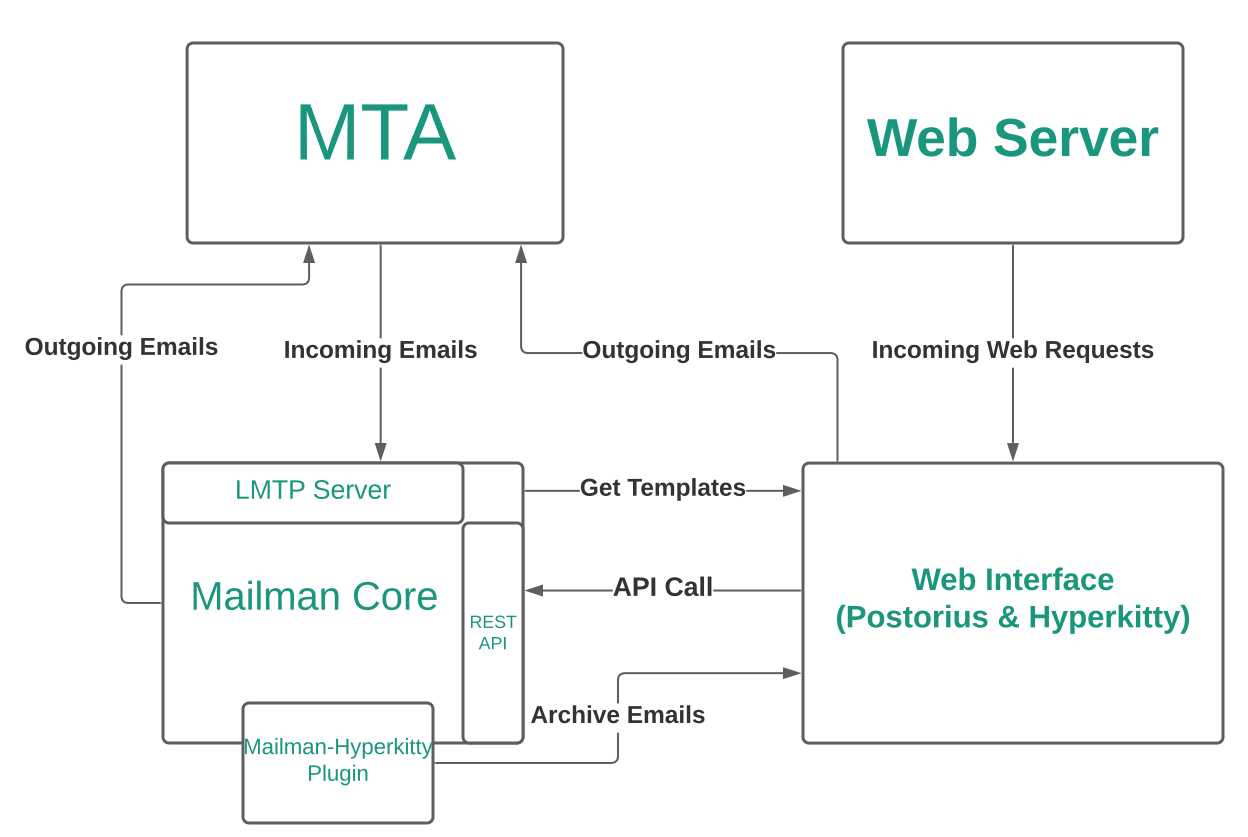
In our email architecture, the mailing list server (lists-01) only
handles mailman lists. It receives mail on lists.torproject.org,
stores it in archives (or not), logs things, normally rewrites the
email and broadcasts it to a list of email addresses, which Postfix
(on lists-01) routes to the wider internet, including other
torproject.org machines.
Services
As mentioned in the architecture, Mailman is made of different components who communicate over HTTP, typically. Cron jobs handle indexing lists for searching.
All configuration files reside in /etc/mailman3, although the
mailman3-web.py configuration file has its defaults in
/usr/share/mailman3-web/settings.py. Note that this configuration is
actually a Django configuration file, see also the upstream Django primer.
The REST API server configuration can be dumped with mailman-wrapper conf, but be careful as it outputs cleartext passwords.
Storage
Most data is stored in a PostgreSQL database, apart from bounces
which somehow seem to exist in Python pickle files in
/var/lib/mailman3/queue/bounces.
A list of addresses is stored in /var/spool/postfix/mailman3 for
Postfix to know about mailing lists. There's the trace of a SQLite
database there, but it is believed to be stale.
Search engine
The search engine shipped with Mailman is built with Django-Haystack, whose default backend is Whoosh.
In February 2025, we've experimented with switching to Xapian,
through the Xapian Haystack plugin instead because of severe
performance problems that were attributed to search
(tpo/tpa/team#41957). This involved changing the configuration
(see puppet-control@f9b0206ff) and rebuilding the index with the
update_index command:
date; time sudo -u www-data nice ionice -c 3 /usr/share/mailman3-web/manage.py update_index ; date
Note how we wrap the call in time(1) (to track resource usage),
date(1) (to track run time), nice(1) and ionice(1) (to reduce server
load). This works because the Xapian index was empty: to rebuild the
index from scratch, we'd need the rebuild_index command.
This also involved patching the python3-xapian-haystack package,
as it would otherwise crash (Hyperkitty issue 408). We used a variation of upstream PR
181.
The index for a single mailing list can be rebuilt with:
sudo -u www-data /usr/share/mailman3-web/manage.py update_index_one_list test@lists.torproject.org
For large lists, a similar approach to the larger indexing should be used.
Queues
Mailman seems to store Python objects of in-flight emails (like
bounces to retry) in /var/lib/mailman3/queue.
TODO REMOVE THE "List of mailing lists"
Note that we don't keep track of the list of mailing lists. If a list needs to be publicly listed, it can be configured as such in Mailman, while keeping the archives private.
This list is therefore only kept for historical reference, and might be removed in the future.
The list of mailing lists should be visible at https://lists.torproject.org/.
Discussion Lists
The following are lists with subscriber generated threads.
| List | Maintainer | Type | Description |
|---|---|---|---|
| tor-project | arma, atagar, gamambel | Public | Moderated discussion list for active contributors. |
| tor-dev | teor, pili, phw, sysrqb, gaba | Public | Development related discussion list. |
| tor-onions | teor, dgoulet, asn, pili, phw, sysrqb, gaba | Public | technical discussion about running Tor onion (hidden) services |
| tor-relays | teor, pili, phw, sysrqb, gaba | Public | Relay operation support. |
| tor-relays-universities | arma, qbi, nickm | Public | Relay operation related to universities (lightly used). |
| tor-mirrors | arma, qbi, nickm | Public | Tor website mirror support. |
| tor-teachers | mrphs | Public | Discussion, curriculum sharing, and strategizing for people who teach Tor around the world. |
| tor-internal | arma, atagar, qbi, nickm | Private | Internal discussion list. |
| onion-advisors | isabela | Private | |
| onionspace-berlin | infinity0, juris, moritz | Private | Discussion list for Onionspace, a hackerspace/office for Tor-affiliated and privacy tools hackers in Berlin. |
| onionspace-seattle | Jon | Private | Discussion list for the Tor-affiliated and privacy tools hackers in Seattle |
| global-south | sukhbir, arma, qbi, nickm, gus | Public | Tor in the Global South |
Notification Lists
The following lists are generally read-only for their subscribers. Traffic is either notifications on specific topics or auto-generated.
| List | Maintainer | Type | Description |
|---|---|---|---|
| anti-censorship-alerts | phw, cohosh | Public | Notification list for anti-censorship service alerts. |
| metrics-alerts | irl | Public | Notification list for Tor Metrics service-related alerts |
| regional-nyc | sysrqb | Public | NYC-area Announcement List |
| tor-announce | nickm, weasel | Public | Announcement of new Tor releases. Here is an RSS feed. |
| tbb-bugs | boklm, sysrqb, brade | Public | Tor Browser Bundle related bugs. |
| tbb-commits | boklm, sysrqb, brade | Public | Tor Browser Bundle related commits to Tor repositories. |
| tor-bugs | arma, atagar, qbi, nickm | Public | Tor bug tracker. |
| tor-commits | nickm, weasel | Public | Commits to Tor repositories. |
| tor-network-alerts | dgoulet | Private | auto: Alerts related to bad relays detection. |
| tor-wiki-changes | nickm, weasel | Public | Changes to the Trac wiki. |
| tor-consensus-health | arma, atagar, qbi, nickm | Public | Alarms for the present status of the Tor network. |
| tor-censorship-events | arma, qbi, nickm | Public | Alarms for if the number of users from a local disappear. |
| ooni-bugs | andz, art | Public | OONI related bugs status mails |
| tor-svninternal | arma, qbi, nickm | Private | Commits to the internal SVN. |
Administrative Lists
The following are private lists with a narrowly defined purpose. Most have a very small membership.
| List | Maintainer | Type | Description |
|---|---|---|---|
| tor-security | dgoulet | Private | For reporting security issues in Tor projects or infrastructure. To get the gpg key for the list, contact tor-security-sendkey@lists.torproject.org or get it from pool.sks-keyservers.net. Key fingerprint = 8B90 4624 C5A2 8654 E453 9BC2 E135 A8B4 1A7B F184 |
| bad-relays | dgoulet | Private | Discussions about malicious and misconfigured Tor relays. |
| board-executive | isabela | Private | |
| board-finance | isabela | Private | |
| board-legal | isabela | Private | |
| board-marketing | isabela | Private | |
| meeting-planners | jon, alison | Public | The list for planning the bi-annual Tor Meeting |
| membership-advisors | atagar | Private | Council advisors on list membership. |
| tor-access | mikeperry | Private | Discussion about improving the ability of Tor users to access Cloudflare and other CDN content/sites |
| tor-employees | erin | Private | Tor employees |
| tor-alums | erin | Private | To support former employees, contractors, and interns in sharing job opportunities |
| tor-board | julius | Private | Tor project board of directors |
| tor-boardmembers-only | julius | Private | Discussions amongst strictly members of the board of directors, not including officers (Executive Director, President, Vice President and possibly more). |
| tor-community-team | alison | Public | Community team list |
| tor-packagers | atagar | Public | Platform specific package maintainers (debs, rpms, etc). |
| tor-research-safety | arma | Private | Discussion list for the Tor research safety board |
| tor-scaling | arma, nickm, qbi, gaba | Private | Internal discussion list for performance metrics, roadmap on scaling and funding proposals. |
| tor-test-network | dgoulet | Private | Discussion regarding the Tor test network |
| translation-admin | sysrqb | Private | Translations administration group list |
| wtf | nickm, sysrqb, qbi | Private | a wise tech forum for warm tech fuzzies |
| eng-leads | micah | Private | Tor leads of engineering |
Team Lists
Lists related to subteams within Tor.
| List | Maintainer | Type | Description |
|---|---|---|---|
| anti-censorship-team | arma, qbi, nickm, phw | Public | Anti-censorship team discussion list. |
| dir-auth | arma, atagar, qbi, nickm | Private | Directory authority operators. |
| dei | TPA | Public | Diversity, equity, & inclusion committee |
| www-team | arma, qbi, nickm | Public | Website development. |
| tbb-dev | boklm, sysrqb, brade | Public | Tor Browser development discussion list. |
| tor-gsoc | arma, qbi, nickm | Private | Google Summer of Code students. |
| tor-qa | boklm, sysrqb, brade | Public | QA and testing, primarily for TBB. |
| ooni-talk | hellais | Public | Ooni-probe general discussion list. |
| ooni-dev | hellais | Public | Ooni-probe development discussion list. |
| ooni-operators | hellais | Public | OONI mailing list for probe operators. |
| network-health | arma, dgoulet, gk | Public | Tor Network Health Team coordination list |
| tor-l10n | arma, nickm, qbi, emmapeel | Public | reporting errors on translations |
| tor-meeting | arma | Private | dev. meetings of the Tor Project. |
| tor-operations | smith | Private | Operations team coordination list |
| tpa-team | TPA | Private | TPA team coordination list |
Internal Lists
We have two email lists (tor-internal@, and bad-relays@), and a private IRC channel on OFTC.
- tor-internal@ is an invite-only list that is not reachable by the outside world. Some individuals that are especially adverse to spam only subscribe to this one.
- bad-relays@ is an invite-only list that is reachable by the outside world. It is also used for email CCs.
- Our internal IRC channel is used for unofficial real time internal communication.
Encrypted Mailing Lists
We have mailing lists handled by Schleuder that we use within different teams.
- tor-security@ is an encrypted list. See its entry under "Administrative Lists".
- tor-community-council@ is used by Community Council members. Anyone can use it to email the community council.
See schleuder for more information on that service.
Interfaces
Mailman 3 has multiple interfaces and entry points, it's actually quite confusing.
REST API
The core of the server is a REST API server with a documented API but operating this is not exactly practical.
CLI
In practice, most interactions with the API can be more usefully done
by using the mailman-wrapper command, with one of the documented
commands.
Note that the documentation around those commands is particularly confusing because it's written in Python instead of shell. Once you understand how it works, however, it's relatively simple to figure out what it means. Take this example:
command('mailman addmembers --help')
This is equivalent to the shell command:
mailman addmembers --help
A more complicated example requires (humanely) parsing Python, like in this example:
command('mailman addmembers ' + filename + ' bee.example.com')
... that actually means this shell command:
mailman addmembers $filename bee.example.com
... where $filename is a text file with a members list.
Web (Postorius)
The web interface to the Mailman REST API is a Django program called "Postorious". It features the usual clicky interface one would expect from a website and, contrary to Mailman 2, has a centralized user database, so that you have a single username and password for all lists.
That user database, however, is unique to the web frontend, and cannot be used to operate the API, rather confusingly.
Authentication
Mailman has its own authentication database, isolated from all the others. Ideally it would reuse LDAP, and it might be possible to hook it to GitLab's OIDC provider.
Implementation
Mailman 3 is one of the flagship projects implemented in Python 3. The web interface is built on top of Django, while the REST API is built on top of Zope.
Debian ships Mailman 3.3.8, a little behind the latest upstream 3.3.10, released in October 2024.
Mailman 3 is GPLv3.
Related services
Mailman requires the proper operation of a PostgreSQL server and functioning email.
It also relates to the forum insofar as the forum mirrors some of the mailing lists.
Issues
There is no issue tracker specifically for this project, File or search for issues in the team issue tracker with the label ~Lists.
Known issues
- DMARC mitigations are not enabled by default and require manual modification after a list is created, the fix for this seems to be to create a plugin, see issue #41853
- Templates cannot be edited from the web interface, see #41855
- Cannot disable signups on lists
- Xapian search engine uses up too much disk space
- Mailman runs out of memory, mitigated by the switch to Xapian which brought this from dozens of times per week to a couple times per week
Maintainer
The original deployment of Mailman was lost to history.
Anarcat deployed the Mailman 3 server and performed the upgrade from Mailman 2
The service is collectively managed by TPA, ask anarcat if lost.
Users
The mailing list server is used by the entire Tor community for various tasks, by various groups.
Some personas for this service were established in TPA-RFC-71.
Upstream
Mailman is an active project with the last release in early October 2024 (at time of writing 2024-12-06, a less than a month ago).
Upstream has been responsive and helpful in the issue queue during the Mailman 2 upgrade.
Mailman has a code of conduct derived from the PSF code of conduct and a privacy policy.
Upstream support and contact is, naturally, done over mailing lists but also IRC (on Libera).
Monitoring and metrics
The service receives basic, standard monitoring from Prometheus which includes the email, database and web services monitoring.
No metrics specifically about Mailman are collected, however, see tpo/tpa/team#41850 for improving that.
Tests
The test@lists.torproject.org mailing list is designed precisely to test mailman. A simple test is to send a mail to the mailing list with Swaks:
swaks -t test@lists.torproject.org -f example@torproject.org -s lists-01.torproject.org
Upstream has a good test suite, which is actually included in the documentation.
There's a single server with no dev or staging.
Logs
Mailman logging is complicated, spread across multiple projects and
daemons. Some services log to disk in /var/log/mailman3, and that's
where you will find details as SMTP transfers. The Postorious and
Hyperkitty (presumably) services log to /var/log/mailman3/web.
There were some PII kept in the files, but it was redacted in #41851. Ultimately, the "web" (uwsgi) level logs were disabled in #41972, but the normal Apache web logs remain, of course.
It's possible IP addresses, names, and especially email addresses to end up in Mailman logs. At least some files are rotated automatically by the services themselves.
Others are rotated by logrotate, for example
/var/log/mailman3/mailman.log is kept fr 5 days.
Backups
No particular backups are performed for Mailman 3. It is assumed we Pickle files can survive crashes and restores, otherwise we also rely on PostgreSQL recovery.
Other documentation
TODO Discussion
Overview
Security and risk assessment
Technical debt and next steps
Proposed Solution
Other alternatives
Discourse
When the forum service became self-hosted, it was briefly considered to retire Mailman 2 to replace it with the Discourse forum. In may 2022, it was noted in a meeting:
We don't hear a lot of enthusiasm around migrating from Mailman to Discourse at this point. We will therefore upgrade from Mailman 2 to Mailman 3, instead of migrating everything to Discourse.
But that was before we self-hosted Discourse:
As an aside, anarcat would rather avoid self-hosting Discourse unless it allows us to replace another service, as Discourse is a complex piece of software that would take a lot of work to maintain (just like Mailman 3). There are currently no plans to self-host discourse inside TPA.
Eventually, the 2022 roadmap planned to "Upgrade to Mailman 3 or retire it in favor of Discourse". The idea of replacing Mailman with Discourse was also brought up in TPA-RFC-31 and adopted as part of the TPA-RFC-20 bullseye upgrade proposal.
That plan ended up being blocked by the Board, who refused to use Discourse for their internal communications, so it was never formally proposed for wider adoption.
Keeping Mailman 2
Besiids upgrading to Mailman 3, it might have been possible to keep Mailman 2 around indefinitely, by running it inside a container or switching to a Python 3 port of Mailman 2.
The problem with running an old container is that it hides technical debt: the old, unsupported and unmaintained operating system (Debian 11 bullseye) and Python version (2.7) are still there underneath, and not covered by security updates. Although there is a fork of Python 2 (tauthon) attempting to cover for that as well, it is not considered sufficiently maintained or mature for our needs in the long run,.
The Python 3 port of Mailman 2 status is unclear. As of this writing, the README file hasn't been updated to explain what the fork is, what its aims are or even that it supports Python 3 at all, so it's unclear how functional it is, or even if it will ever be packaged in Debian.
It therefore seemed impossible to maintain a Mailman 2 in the long run.
Other mailing list software
- listmonk: to evaluate
- sympa is the software used by Riseup, about which they have mixed feelings. it's a similarly old (Perl) codebase that we don't feel confident in.
- mlmmj is used by Gentoo, kernel.org, proxmox and others as a mailing list software, but it seems to handle archiving poorly, to an extent that people use other tools, generally public-inbox (Gentoo, kernel.org) to provide web archives, an NNTP gateway and git support. mlmmj is written in C, Perl, and PHP, which does not inspire confidence either.
- smartlist is used by Debian.org and a lot of customization, probably not usable publicly
If mailing list archives are still an issue (see tpo/tpa/team#41957), we might want to consider switching mailing list archives from Hyperkitty to public-inbox, although we should consider a mechanism for private archives, which might not be well supported in public-inbox.
Mailman 2 migration
The current Mailman 3 server was built from scratch in Puppet, and all
mailing lists were imported from the old Mailman 2 server (eugeni)
in issue 40471, as part of the broader TPA-RFC-71 emergency
email fixes.
This section documents the upgrade procedure, and is kept for historical purpose and to help others upgrade.
List migration procedure (Fabric)
We have established a procedure for migrating a single list, derived
from the upstream migration documentation and Debian bug report
999861. The final business logic was written in a Fabric
called mailman.migrate-mm2-mm3, see fabric_tpa.mailman for
details. To migrate a list, the following was used:
fab mailman.migrate-mm2-mm3 tor-relays
The above assumes a tpa.mm2_mm3_migration_cleanup module in the
Python path, currently deployed in Puppet. Here's a backup copy:
#!/usr/bin/python2
"""Check and cleanup a Mailman 2 mailing list before migration to Mailman 3"""
from __future__ import print_function
import cPickle
import logging
import os.path
from Mailman import Pending
from Mailman import mm_cfg
logging.basicConfig(level="INFO")
def check_bounce_info(mlist):
print(mlist.bounce_info)
def check_pending_reqs(mlist):
if mlist.NumRequestsPending() > 0:
print("list", mlist.internal_name(), "has", mlist.NumRequestsPending(), "pending requests")
if mlist.GetSubscriptionIds():
print("subscriptions:", len(mlist.GetSubscriptionIds()))
if mlist.GetUnsubscriptionIds():
print("unsubscriptions:", len(mlist.GetUnsubscriptionIds()))
if mlist.GetHeldMessageIds():
print("held:", len(mlist.GetHeldMessageIds()))
def list_pending_reqs_owners(mlist):
if mlist.NumRequestsPending() > 0:
print(mlist.internal_name() + "-owner@lists.torproject.org")
def flush_digest_mbox(mlist):
mlist.send_digest_now()
# stolen from fabric_tpa.ui
def yes_no(prompt):
"""ask a yes/no question, defaulting to yes. Return False on no, True on yes"""
while True:
res = raw_input(prompt + "\a [Y/n] ").lower()
if res and res not in "yn":
print("invalid response, must be one of y or n")
continue
if not res or res != "n":
return True
break
return False
def pending(mlist):
"""crude commandline interface to the mailman2 moderation system
Part of this is inspired from:
https://esaurito.net/blog/posts/2010/04/approve_mailman/
"""
full_path = mlist.fullpath()
with open(os.path.join(full_path, "pending.pck")) as fp:
db = cPickle.load(fp)
logging.info("%d requests pending:", len(db))
for cookie,req in db.items():
logging.info("cookie %s is %r", cookie, req)
try:
op = req[0]
data = req[1:]
except KeyError:
logging.warning("skipping whatever the fuck this is: %r", req)
continue
except ValueError:
logging.warning("skipping op-less data: %r", req)
continue
except TypeError:
logging.warning("ignoring message type: %s", req)
continue
if op == Pending.HELD_MESSAGE:
id = data[0]
msg_path = "/var/lib/mailman/data/heldmsg-%s-%s.pck" % (mlist.internal_name(), id)
logging.info("loading email %s", msg_path)
try:
with open(msg_path) as fp:
msg_db = cPickle.load(fp)
except IOError as e:
logging.warning("skipping message %d: %s", id, e)
print(msg_db)
if yes_no("approve?"):
mlist.HandleRequest(id, mm_cfg.APPROVE)
logging.info("approved")
else:
logging.info("skipped")
else:
logging.warning("not sure what to do with message op %s" % op)
It also assumes a mm3_tweaks on the Mailman 3 server, also in
Python, here's a copy:
from mailman.interfaces.mailinglist import DMARCMitigateAction, ReplyToMunging
def mitigate_dmarc(mlist):
mlist.dmarc_mitigate_action = DMARCMitigateAction.munge_from
mlist.dmarc_mitigate_unconditionally = True
mlist.reply_goes_to_list = ReplyToMunging.no_munging
The list owners to contact about issues with pending requests was generated with:
sudo -u list /var/lib/mailman/bin/withlist -l -a -r mm2_mm3_migration_cleanup.list_pending_reqs_owners -q
Others have suggested the bounce_info needs a reset but this
has not proven to be necessary in our case.
Migrating the 60+ lists took the best of a full day of work, with indexing eventually processed the next day, after the mailing lists were put online on the Mailman 3 server.
List migration is CPU bound, spending lots of time in Hyperkitty import and indexing, about 10 minutes per 10k mails on a two core VM. It's unclear if this can be parallelized efficiently.
Interestingly, the new server takes much less space than the old
one: the Mailman 2 server had 35G used in /var/lib/mailman and the
new one manages to cram everything in 3G of disk. This might be
because some lists were discarded in the migration, however.
List migration procedure (manual)
The following procedure was used for the first test list, to figure out how to do this and help establish the Fabric job. It's kept only for historical purposes.
To check for anomalies in the mailing lists migrations, with the above
mm2_mm3_migration_cleanup script, called with, for example:
sudo -u list /var/lib/mailman/bin/withlist -l -a -r mm2_mm3_migration_cleanup.check_pending_reqs
The bounce_info check was done because of a comment found in this
post saying the conversion script had problem with those, that
turned out to be unnecessary.
The pending_reqs check was done because those are not converted by
the script.
Similarly, we check for digest files with:
find /var/lib/mailman/lists -name digest.mbox
But it's simpler to just send the actual digest without checking with:
sudo -u list /usr/lib/mailman/cron/senddigests -l LISTNAME
This essentially does a mlist.send_digest_now so perhaps it would be
simpler to just add that to one script.
This was the final migration procedure used for the test list and
tpa-team:
-
flush digest mbox with:
sudo -u list /var/lib/mailman/bin/withlist -l LISTNAME -r tpa.mm2_mm3_migration_cleanup.flush_digest_mbox -
check for pending requests with:
sudo -u list /var/lib/mailman/bin/withlist -l -r tpa.mm2_mm3_migration_cleanup.check_pending_reqs meeting-plannersWarn list operator one last time if matches.
-
block mail traffic on the mm2 list by adding, for example, the following the eugeni's transport map:
test@lists.torproject.org error:list being migrated to mailman3
test-admin@lists.torproject.org error:list being migrated to mailman3
test-owner@lists.torproject.org error:list being migrated to mailman3
test-join@lists.torproject.org error:list being migrated to mailman3
test-leave@lists.torproject.org error:list being migrated to mailman3
test-subscribe@lists.torproject.org error:list being migrated to mailman3
test-unsubscribe@lists.torproject.org error:list being migrated to mailman3
test-request@lists.torproject.org error:list being migrated to mailman3
test-bounces@lists.torproject.org error:list being migrated to mailman3
test-confirm@lists.torproject.org error:list being migrated to mailman3
-
resync the list data (archives and pickle file at least), from
lists-01:rsync --info=progress2 -a root@eugeni.torproject.org:/var/lib/mailman/lists/test/config.pck /srv/mailman/lists/test/config.pck rsync --info=progress2 -a root@eugeni.torproject.org:/var/lib/mailman/archives/private/test.mbox/ /srv/mailman/archives/private/test.mbox/ -
create the list in mm3:
-
migrate the list pickle file to mm3
mailman-wrapper import21 test@lists.torproject.org /srv/mailman/lists/test/config.pckNote that this can be ran as root, or run the
mailmanscript as thelistuser, it's the same. -
migrate the archives to hyperkitty
sudo -u www-data /usr/share/mailman3-web/manage.py hyperkitty_import -l test@lists.torproject.org /srv/mailman/archives/private/test.mbox/test.mbox -
rebuild the archive index
sudo -u www-data /usr/share/mailman3-web/manage.py update_index_one_list test@lists.torproject.org -
forward the list on eugeni, turning the above transport map into:
test@lists.torproject.org smtp:lists-01.torproject.org
test-admin@lists.torproject.org smtp:lists-01.torproject.org
test-owner@lists.torproject.org smtp:lists-01.torproject.org
test-join@lists.torproject.org smtp:lists-01.torproject.org
test-leave@lists.torproject.org smtp:lists-01.torproject.org
test-subscribe@lists.torproject.org smtp:lists-01.torproject.org
test-unsubscribe@lists.torproject.org smtp:lists-01.torproject.org
test-request@lists.torproject.org smtp:lists-01.torproject.org
test-bounces@lists.torproject.org smtp:lists-01.torproject.org
test-confirm@lists.torproject.org smtp:lists-01.torproject.org
Logging is a pervasive service across all other services. It consist
of writing information to a (usually text) file and is generally
handled by a program called syslog (currently syslog-ng) that
takes logs through a socket or the network and writes them to
files. Other software might also write their own logfiles, for example
webservers do not write log files to syslog for performance reasons.
There's also a logging server that collects all those logfiles in a central location.
How-to
Lnav log parsing
lnav is a powerful log parser that allows you to do interesting things on logfiles.
On any logfile, you can see per-second hit ratio by using the
"histogram" view. Hit the i button to flip to the "histogram" view
and z multiple times to zoom all the way into a per-second hit rate
view. Hit q to go back to the normal view.
The lnav Puppet module can be used to install lnav and
formats. Formats should be stored in the lnav module to make it easier
to collaborate with the community.
Extending lnav formats
Known formats:
- aspiers' formats - many formats: zsh, bash history, alogcat, chef, oslo
- hagfelsh's formats - many formats
- PaulWay's formats - many formats: openldap, exim, strace, squid, etc
- ruby-logger
lnav also ships with its own set of default log formats,
available in the source in src/default-log-formats.json. Those
can be useful to extend existing log formats.
Other alternatives
To lnav:
Welcome to the Matrix: Your Tor real-time chat onboarding guide
Matrix keeps us connected. It is where teams coordinate, where questions get answered, and where we argue about cake versus pie. It is also where we ask questions internally across teams. It is how we engage externally with volunteers, how our engineering teams collaborate, and how we share the day’s cutest pet pictures or funniest links. This guide will take you from zero to fully plugged into Tor’s Matrix spaces.
- What this guide will help you do
- What is Matrix?
- Step 1: Install Element
- Step 2: Create or sign in to a Matrix account
- Step 3: Join the Tor Project Space
- Step 4: Join the Tor Internal Space
- Step 5: Helpful Setup Tweaks
- Where to Ask for Help
What this guide will help you do
- Understand what Matrix is
- Install Element, our recommended Matrix app
- Create or use a Matrix account
- Join the Tor Public Space
- Join the Tor Internal Space for staff communications
- Adjust a few important settings to make your experience smooth
What is Matrix?
Matrix is a free software, encrypted, decentralized chat platform. You can think of it as Slack, if you have used that before, but with more freedom, encryption and privacy.
A Matrix account lets you talk privately with individual people, join rooms where you can talk with groups of people, and join Spaces which are groups of related rooms.
We have a Tor Space, which contains all of our Rooms, some of which are public, and some of which are internal. Rooms are used for topics, teams, work coordination, and general chat.
Step 1: Install Element
Element is the most user-friendly Matrix app. Choose whichever version you prefer:
- Desktop: Windows, macOS, Linux
- Mobile: iOS, Android
Download page: https://element.io/download
Step 2: Create or sign in to a Matrix account
If you already have a Matrix account, go ahead and sign in.
If you do not:
- Open Element
- Select Create Account
- Choose the matrix.org server
- Pick a username you are comfortable being visible to colleagues
- Choose a strong password
- Save your Recovery Key somewhere safe (very important!)
Your Matrix ID will look like:
@username:matrix.org
That is your address in the Matrix world.
Step 3: Join the Tor Project Space
The Tor Project Space is where you join to participate in discussions. Many rooms include volunteers, researchers, and community members from around the world. Treat it as a collaborative public square.
In Element, select + Explore or Join a Space
Enter this space address: #tor-space:matrix.org
Open the space and click Join
Once inside, you can explore rooms, these are public rooms. Try joining the "Tor Project" room - this is a general, non-techical space for discussions about The Tor Project with the broader community. Feel free to say hi!
Step 4: Join the Tor Internal Space
Internal rooms are only for Tor staff core contributors. This is where work discussions happen and where we can have slightly more private conversations.
To join: let your onboarding buddy, team lead, know your Matrix ID. They will add you to the Tor Internal Space and team-specific rooms (e.g. The Money Machine room)
Join the "Cake or Pie" channel and tell people there which you prefer. This is where Tor-only folks go to chat, like a watercooler of a bunch of friendly Tor people.
Once you are in, you can:
- Use @mentions to reach teammates
- Chat with folks in channels
- Send private messages to individuals
- Create your own team channels
If you do not see the right rooms (your team’s channels, etc.), ask! No one expects you to know where everything lives.
Step 5: Helpful Setup Tweaks
A few quick improvements for maximum sanity:
- Enable notifications for mentions and replies
- Set your display name to a recognizable form so people can remember who you are
- Set a profile picture to whatever you'd like
Where to Ask for Help
You will never be alone in this city. If you run into any trouble:
- Contact your team lead
- Ask in the #onboarding room (if available)
- Ping the TPA team
- Ask your onboarding buddy
You are connected! You are now part of our communication backbone. Welcome to Tor. We are glad you are here. For real.
Nagios/Icinga service for Tor Project infrastructure
RETIRED
NOTE: the Nagios server was retired in 2024.
This documentation is kept for historical reference.
See TPA-RFC-33.
How-to
Getting status updates
- Using a web browser: https://nagios.torproject.org/cgi-bin/icinga/status.cgi?allunhandledproblems&sortobject=services&sorttype=1&sortoption=2
- On IRC: /j #tor-nagios
- Over email: Add your email address to
tor-nagios/config/static/objects/contacts.cfg
How to run a nagios check manually on a host (TARGET.tpo)
NCHECKFILE=$(egrep -A 4 THE-SERVICE-TEXT-FROM-WEB | egrep '^ *nrpe:' | cut -d : -f 2 | tr -d ' |"')
NCMD=$(ssh -t TARGET.tpo grep "$NCHECKFILE" /etc/nagios -r)
: NCMD is the command that's being run. If it looks sane, run it. With --verbose if you like more output.
ssh -t TARGET.tpo "$NCMD" --verbose
Changing the Nagios configuration
Hosts and services are managed in the config/nagios-master.cfg YAML
configuration file, kept in the nagiosadm@nagios.torproject.org:/home/nagiosadm/tor-nagios
repository. Make changes with a normal text editor, commit and push:
$EDITOR config/nagios-master.cfg
git commit -a
git push
Carefully watch the output of the git push command! If there is an
error, your changes won't show up (and the commit is still accepted).
Forcing a rebuild of the configuration
If the Nagios configuration seems out of sync with the YAML config, a rebuild of the configuration can be forced with this command on the Nagios server:
touch /home/nagiosadm/tor-nagios/config/nagios-master.cfg && sudo -u nagiosadm make -C /home/nagiosadm/tor-nagios/config
Alternatively, changing the .cfg file and pushing a new commit
should trigger this as well.
Batch jobs
You can run batch commands from the web interface, thanks to Icinga's changes to the UI. But there is also a commandline client called icli which can do this from the commandline, on the Icinga server.
This, for example, will queue recheck jobs on all problem hosts:
icli -z '!o,!A,!S,!D' -a recheck
This will run the dsa-update-apt-status command on all problem
hosts:
cumin "$(ssh hetzner-hel1-01.torproject.org "icli -z'"'!o,!A,!S,!D'"'" | grep ^[a-z] | sed 's/$/.torproject.org or/') false" dsa-update-apt-status
It's kind of an awful hack -- take some time to appreciate the quoting
required for those ! -- which might not be necessary with later
Icinga releases. Icinga 2 has a REST API and its own command
line console which makes icli completely obsolete.
Adding a new admin user
When a user needs to be added to the admin group, follow the steps below in the tor-nagios.git repository
- Create a new contact for the user in
config/static/objects/contacts.cfg:
define contact{
contact_name <username>
alias <username>
service_notification_period 24x7
host_notification_period 24x7
service_notification_options w,u,c,r
host_notification_options d,r
service_notification_commands notify-service-by-email
host_notification_commands notify-host-by-email
email <email>+nagios@torproject.org
}
- Add the user to
authorized_for_full_command_resolutionandauthorized_for_configuration_informationinconfig/static/cgi.cfg:
authorized_for_full_command_resolution=user1,foo,bar,<new user>
authorized_for_configuration_information=user1,foo,bar,<new user>
Pager playbook
What is this alert anyways?
Say you receive a mysterious alert and you have no idea what it's about. Take, for example, tpo/tpa/team#40795:
09:35:23 <nsa> tor-nagios: [gettor-01] application service - gettor status is CRITICAL: 2: b[AUTHENTICATIONFAILED] Invalid credentials (Failure)
To figure out what triggered this error, follow this procedure:
-
log into the Nagios web interface at https://nagios.torproject.org
-
find the broken service, for example by listing all unhandled problems
-
click on the actual service name to see details
-
find the "executed command" field and click on "Command Expander"
-
this will show you the "Raw commandline" that nagios runs to do this check, in this case it is a NRPE check that calls
tor_application_serviceon the other end -
if it's an NRPE check, log on the remote host and run the command, otherwise, the command is ran on the nagios host
In this case, the error can be reproduced with:
root@gettor-01:~# /usr/lib/nagios/plugins/dsa-check-statusfile /srv/gettor.torproject.org/check/status
2: b'[AUTHENTICATIONFAILED] Invalid credentials (Failure)'
In this case, it seems like the status file is under the control of the service administrator, which should be contacted for followup.
Reference
Design
Config generation
The Nagios/Icinga configuration gets generated from the
config/nagios-master.cfg YAML configuration file stored in the
tor-nagios.git repository. The generation works like this:
-
operator pushes changes to the git repository on the Nagios server (in
/home/nagiosadm/tor-nagios) -
the
post-receivehook callsmakein theconfigsub-directory, which calls./build-nagiosto generate the files in~/tor-nagios/config/generated/ -
the hook then calls
make install, which: -
deploys the config file (using
rsync) in/etc/inciga/from-git... -
pushes the NRPE config to the Puppet server in
nagiospush@pauli.torproject.org:/etc/puppet/modules/nagios/files/tor-nagios/generated/nrpe_tor.cfg -
reloads Incinga
-
and finally mirrors the repository to GitLab (https://gitlab.torproject.org/tpo/tpa/tor-nagios)
- Tutorial
- How-to
- Reference
Tor Project is using Nextcloud as a tool for managing and sharing resources and for collaborative editing.
Questions and bug reports are handled by Tor's Nextcloud service admin
team. For bug reports, please create a ticket in the
Service - Nextcloud component in Trac. For questions, find us
on IRC (GeKo, ln5, pospeselr, anarcat, gaba) or send email to
nextcloud-admin@torproject.org.
Tutorial
Training
While in screen share, do a tour of NC (tools & HR-relevant folders)
Go through the tools on the toolbar (in the web UI):
-
Calendar
- Walk through the calendar
- Show them our weekly All-Hands meeting on Wednesdays at 16:00 UTC
- AFK calendar and its importance
- How to share your own calendar
- Setting time zone for calendar
- How to create a calendar event and invite others
- How to set your availability / schedule (in Personal Settings
-> Availability, or
/settings/user/availability)
-
Files
- Show them the shared “TPI” folders, specifically where to find important HR policies (give a short summary reminder of each policy)
- Employee Handbook (mention it has recently been revamped)
- Tor organigram
- Flexible Friday Policy
- Salary Bands docs
- Time Reporting
- Right to Disconnect
- Work expenses reimbursement requests
- Planning for taking leave and notice requirements
-
Polls
- folks may send scheduling polls to get meetings set
-
Forms
- useful when trying to collect info from teams/employees
- employees may be asked to complete forms for meeting planning, etc.
Signing in and setting up two-factor authentication
-
Find an email sent to your personal Tor Project email address from
nc@riseup.netwith a link tohttps://nc.torproject.net/ -
Do not click on the link in the email, clicking on links in emails is dangerous! Instead, use the safe way: copy and paste the link in the email into your web browser.
-
Follow the instructions for changing your passphrase.
-
Enable two-factor authentication (2FA):
- Pick either a TOTP or U2F device as an "second factor". TOTP is often done with an app like Google Authenticator or a free alternative (for example free OTP plus, see also this list from the Nextcloud project). U2F is usually supported by security tokens like the YubiKey, Nitrokey, or similar.
- If you have a TOTP setup, locate it and then:
- Click "Enable TOTP" on the web page.
- Insert your token or start the TOTP application on your handheld device and scan the QR code displayed on the web page.
- Enter the numbers from the token/application into the text field on the web page.
- Log out and log in again, to verify that you got two factor authentication working.
- If you have a U2F setup, locate it and then:
- Click the "Add U2F device" button under the "U2F device" section
- Insert the token and press the button when prompted by your web browser
- Enter a name for the device and click "Add"
- Log out and log in again, to verify that you got two factor authentication working.
- In Nextcloud, select Settings -> Security. The link to your settings can be found by clicking on your "user icon" in the top right corner. Direct link: Settings -> Security.
- Click "Generate Backup codes" in the Two-Factor Authentication section of that page.
- Save your backup codes to a password manager of your choice. These will be needed to regain access to your Nextcloud account if you ever lose your 2FA token/application.
A note on credentials
Don't let other people use your credentials. Not even people you know and like. If you know someone who should have a Nextcloud account, let the service admins know in a ticket.
Don't let other people use your credentials. Never enter your passphrase or two-factor code on any other site than Tor Project's Nextcloud site. Lower the risk of entering your credentials to the wrong site by verifying that there's a green padlock next to the URL and that the URL is indeed correct.
Don't lose your credentials. This is especially important since files are encrypted in a key derived from your passphrase. To help deal with when a phone or hardware token is lost, you should really (really!) generate Backup codes and store those in a safe place, together with your passphrase. Backup codes can be used to restore access to your Nextcloud and encrypted files. There is no other way of accessing encrypted files! Backup codes can be generated from the Settings -> Security page.
Files
In the top left of the header-bar, you should see a "Folder" icon; when moused over a text label should appear beneath it that says Files. When clicked, you will be taken to the Files app and placed in the root of your Nextcloud file directory. Here, you can upload local files to Nextcloud, download remote files to your local storage, and share remote files across the internet. You can also perform the various file management operations (move, rename, copy, etc) you are familiar with in Explorer on Windows or Finder on macOS.
On the left side of the Files app there is a side-bar with a few helpful views of your files.
- All files : takes you to your root folder
- Recent : recently accessed files and folders
- Favorites : bookmarked files and folders
- Shares : files and folders that have been shared with you or you are sharing with others
- Tags : search for files and folders by tag
Upload a file
Local files saved on your computer can be uploaded to Nextcloud. To upload a file:
- In the Nextcloud Files app, navigate to the folder where you want to store the file
- Click on the circular button with a + inside it (to the right of the little house icon)
- Click Upload file entry in the context menu
- Select a file to upload using your system's file browser window
Share a file or directory with another Nextcloud user or a group of users
Files stored in your Nextcloud file directory can be selectively shared with other Nextcloud users.
They can also be shared with a group of users to grant the same permission to more than one user at once. When sharing to a group, it becomes possible to manage who has access to the file or directory by managing members of the group.
To share a file:
- Locate the file you wish to share (either by navigating to the folder it is in, by searching, or by using one of the views in the sidebar).
- Click the file's Share icon (to the right of the file name)
- In the pane that pops out from the right, click on the search box labeled Name, federated cloud ID or email address…
- Search for the user or group you wish to share with by Nextcloud
user id (
pospeselr), email address (richard@torproject.org), or name (Richard Pospesel) and select them from the dropdown. - Optional: click on the meatball menu to the right of the shared
user and edit the sharing options associated with the file or
directory.
- For instance, you may wish to automatically un-share the file at some point in the future
- refer to notes on share options for some further considerations about permissions
Share a file with the internet
Files can also be shared with the internet via a URL. Files shared in this fashion are read-only by default, but be mindful of what you share: by default, anyone who knows the link URL can download the file. To share a file:
- Locate the file you wish to share
- Click the file's Share icon (to the right of the file name)
- In the pane that pops out from the right, click the + icon beside the Share link entry
- Select appropriate sharing options in the context menu (these can be changed later without invalidating the link)
- Optional: A few measures to limit access to a shared file:
- Prevent general access by selecting the Password protect option
- Automatically deactivate the share link at a certain time by selecting the Set expiration date option
- Finally, copy the shared link to your clipboard by clicking on the Clipboard icon
Un-share files or edit their permissions
If you have shared files or folders with either the internet or another Nextcloud user, you can un-share them. To un-share a file:
- Locate the file you wish to un-share in the Files app
- All of your currently shared files and folders can be found from the Shares view
- Click the file's Shared icon (to the right of the file name)
- In the pane that pops out from the right, you get a listing of all of the users and share links associated with this file
- Click the meatball menu to the right of one of these listings to edit share permissions, or to delete the share entirely
Some notes on share options
Here are some gotchas to be aware of when sharing files or folders:
- When sharing PDF files (or folders containing PDF files), if you choose "Custom permissions", make sure to enable "Allow download and sync". If you don't, the people with whom you shared the PDF files will not be able to see them in the Web Browser nor download them.
- Avoid creating different shares for folders and for files within them targeting the same people or groups. Doing so can end up in weird behavior and create problems like the one described above for PDF files.
File management
Search for a file
In the Files application press Ctrl+F, or click the magnifying glass at the upper right of the screen, and type any part of a file name.
Desktop support
Files can be addressed transparently through WebDAV. Most file explorer support the protocol which should enable you to browse the files natively on your desktop computer. Detailed instructions on how to setup various platforms are available in the main Nextcloud documentation site about WebDAV.
But the short version is you can find the URL in the "Settings wheel"
at the bottom right of the files tab, which should look something like
https://nc.torproject.net/remote.php/webdav/. You might have to
change the https:// part to davs:// or webdavs:// depending on
the desktop environment you are running.
If you have setup 2FA (two-factor authentication), you will also need to setup an "app password". To set that up:
- head to your personal settings by clicking on your icon on the top
right and then
Settings - click the
Securitytab on the right - in the
Devices & sessionssection, fill in an "app name" (for example, "Nautilus file manager on my desktop") and clickCreate new app password - copy-paste the password and store it in your password manager
- click
done
The password can now be used in your WebDAV configuration. If you fail
to perform the above configuration, WebDAV connections will fail with
an Unauthorized error message as long as 2FA is configured.
Collaborative editing of a document
Press the plus button at the top of the file browser, it brings you a pull-down menu where you can pick "Document", "Spreadsheet", "Presentation". When you click one of those, it will become an editable field where you should put the name of the file you wish to create and hit enter, or the arrow.
A few gotchas with collaborative editing
Behind the scenes, when a user opens a document for editing, the document is being copied from the Nextcloud server to the document editing server. Once all editing sessions are closed, the document is being copied back to Nextcloud. This behavior makes the following information important.
-
The document editing server copies documents from Nextcloud, so while a document is open for editing it will differ from the version stored in Nextcloud. The effect of this is that downloads from Nextcloud will show a different version than the one currently being edited.
-
A document is stored back to Nextcloud 10 seconds after all editing sessions for that document have finished. This means that as long as there's a session open, active or idle, the versions will differ. If either the document server breaks or the connection between Nextcloud and the document server breaks it is possible that there will be data loss.
-
An idle editing session expires after 1 hour (even though this should be shorter). This helps making sure the document will not hang indefinitely in the document editing server even if a user leaves a browser tab open.
-
Clicking the Save icon (💾) saves the document back to Nextcloud. This helps preventing data loss as it forces writing the contents from the document editing server back to the persistent storage in Nextcloud.
-
If a document is edited locally (i.e. it's synchronized and edited using LibreOffice or MS Office, for example) and collaboratively at the same time, data loss can occur. Using the ONLYOFFICE Desktop Editor is a better alternative, as it avoids parallel edits of the same file. If you really need to edit files locally with something other than the ONLYOFFICE Desktop Editor, then it's better to make a copy of the file or stop/quit the Nextcloud Sync app to force a conflict in case the file is changed in the server at the same time.
Client software for both desktop (Window, macOS,Linux) and handheld (Android and iPhone)
https://nextcloud.com/clients/
Using calendars for appointments and tasks
TODO
Importing a calendar feed from Google
- In your Google calendar go to the "Settings and Sharing" menu (menu appears by hovering over the right hand side of your calendar's name - "Options for " and the calendar name) for the calendar feed you want to import.
- Scroll down to the "Integrate Calendar" section and copy the "Secret address in iCal format" value.
- In Nextcloud, click on "New Subscription" and paste in the calendar link you copied above.
Failures in calendar modifications
The Nextcloud calendar can be a little buggy... One particular failure might be that you can fail to delete or modify certain events. The exact circumstances are not entirely clear, but often affect recurring events in particular.
We've found that trying to find the first event in series of recurring events makes it easier to modify the next events. Failing that, you can:
- create a new event duplicating the first one, starting at the current date
- select "Delete this and all future occurrences" in the "three dots" menu of the old event from the current date
Calendar clients
Nextcloud has extensive support for events and appointments in its Calendar app. It can be used through the web interface, but since it supports the CalDAV standard, it can also be used with other clients. This section tries to guide our users towards some solutions which could be of interest.
Android
First create a Nextcloud "App" password by logging into the Nextcloud web interface, and then go to your profile->Settings->Security->Create a new App Password. Give it a name and then copy the randomly generated password (you cannot see the password again after you are finished!), then click Done.
Install DAVx^5 from F-Droid or the Play store This program will synchronize with Nextcloud your calendars and contacts and is Free. Launch it and press the "+" to add a new account. Pick "Login with URL and username". Set Base URL: "nc.torproject.org", put your Nextcloud username into "Username" and then the App password that you generated previously into the "Password" field, click Login. Under Create Account, make your Account name your email address, then click Create Account. Then click the CalDAV tab and select the calendars you wish to sync and then press the round orange button with the two arrows in the bottom right to begin the synchronization. You can also sync your contacts, if you store them in Nextcloud, by clicking the CardDav tab and selecting things there.
For more information, check the Nextcloud documentation
iOS
This is a specific configuration for those that have two-factor-authentication enabled on their account.
- Go to your Nextcloud account
- Select Settings
- On the left bar, select Security
- A list of topics will appear: “Password, Two-factor Authentication, Password-less Authentication, Devices & Session”
- Go to Devices & Session, on the field “App name” create a name for your phone, like “iPhone Calendar” and click on “Create new app password”
- A specific password will be created to sync your Calendar on your phone, note that this password will only be shown this one time.
Then, you can follow the Nextcloud settings, take your phone:
- Go to your phone Settings
- Select Calendar
- Select Accounts
- Select Add Account
- Select Other as account type
- Select Add CalDAV account
- For server, type the domain name of your server i.e. example.com.
- Enter your user name and the password that was just created to sync your account.
- Select Next.
Done!
Note: the above instructions come from this tutorial.
Mac, Windows, Linux: Thunderbird
Thunderbird, made by the Mozilla foundation, has a built-in calendar. This used to be a separate extension called Lightning, but it is now integrated into Thunderbird itself. Thunderbird also integrated builtin support for CalDAV/CardDAV from version 120 onwards.
It's a good choice if you already use Thunderbird, but you can also use it as a calendar if you do not use Thunderbird.
In order to use the calendar, you need to first generate an App password. Then you'll ask Thunderbird to find your calendars.
Nextcloud "App" password
Log into the Nextcloud web interface, and then go to your profile->Settings->Security->Create a new App Password (at the very bottom of the page). Give it a name and then copy the randomly generated password (you cannot see the password again after you are finished!), then click Done.
Note: if you did this previously for Android, it's not a bad idea to have a separate App Password for Thunderbird. That way you can revoke the Android password if you lose your device and still have access to your Thunderbird calendar.
Calendars
Open up the calendar view in Thunderbird (in versions 120+ it's the calendar
icon on the left vertical bar). Click on "New Calendar" and select "On the
Network". Then enter the user name associated to your app password and for the
URL use the following: https://nc.torproject.net/remote.php/dav
After hitting the "Next" button, you'll be prompted for your app password. Normally after a little while you should be able to subscribe to your calendars (including the ones shared with you by other users).
The above procedure also works well for adding missing calendars (e.g. ones that were created in nextcloud after you subscribed to the calendars).
Note: Nextcloud used to recommend using the Tbsync plugin with its associated
CalDAV/CardDAV backend plugin, but this does not work anymore for Thunderbird
120+. If you're still using an older version, refer to Nextcloud's
documentation
to setup Tbsync.
Contacts
To automatically get all of your contacts from nextcloud, open the Address Book view (in the left vertical bar in versions 120+). Click on the arrow beside "New Address Book" and choose "Add CardDav Address Book". Then enter the username associated to your app password and for the URL, use the same URL as for the calendars: https://nc.torproject.net/remote.php/dav
After hitting "Next" you'll be prompted for your app password and after a while you should be able to choose from the sources of contacts to synchronize from.
Linux: GNOME Calendar, KDE Korganizer
GNOME has a Calendar and KDE has Korganizer, which may be good choices depending on your favorite Linux desktop.
Untested. GNOME Calendar doesn't display time zones which is probably a deal breaker.
Command line tools: vdirsyncer, ikhal, calcurses
vdirsyncer is the hardcore, command line tool to synchronize calendars from a remote CalDAV server to a local directory, and back. It does nothing else. vdirsyncer is somewhat tricky to configure and to use, and doesn't deal well with calendars that disappear.
To read calendars, you would typically use something like khal, which works well. Anarcat sometimes uses ikhal and vdirsyncer to read his calendars.
Another option is calcurses which is similar to ikhal but has "experimental CalDAV support". Untested.
Managing contacts
TODO
How-to
Showing UTC times in weekly calendar view
This TimeZoneChallenged.user.js Greasemonkey script allows you to see the UTC time next to your local time in the left column of the Nextcloud Calendar's "weekly" view.
To install it:
- install the Greasemonkey add-on if not already done
- in the extension, select "new user script"
- copy paste the above script and save
- in the extension, select the script, then "user script options"
- in "user includes", add
https://nc.torproject.net/*
Ideally, this would be builtin to Nextcloud, see this discussion and this issue for followup.
Resetting 2FA for another user
If someone manages to lock themselves out of their two-factor authentication, they might ask you for help.
First, you need to make absolutely sure they are who they say they are. Typically, this happens with an OpenPGP signature of a message that states the current date and the actual desire to reset the 2FA mechanisms. For example, a message like this:
-----BEGIN PGP SIGNED MESSAGE-----
i authorize a Nextcloud admin to reset or disable my 2FA credentials on
nc.torproject.net for at most one week. now is 2022-01-31 9:33UTC
-----BEGIN PGP SIGNATURE-----
[...]
-----END PGP SIGNATURE-----
This is to ensure that such a message cannot be "replayed" by an hostile party to reset 2FA for another user.
Once you have verified the person's identity correctly, you need to "impersonate" the user and reset their 2FA, with the following path:
- log into Nextcloud
- hit your avatar on the top-right
- hit "Users"
- find the user in the list (hint: you can enter the username or email on the first row)
- hit the little "three dots" (
...) button on the right - pick "impersonate", you are now logged in as that person (be careful!)
- hit the avatar on the top-right again
- select "Settings"
- on the left menu, select "Security"
- click the "regenerate backup codes" button and send them one of the codes, encrypted
When you send the recovery code, make sure to advise the user to regenerate the recovery codes and keep a copy somewhere. This is a good template to use:
Hi!
Please use this 2fa recovery code to login to your nextcloud account:
[INSERT CODE HERE]
Once you are done, regenerate the recovery codes (Avatar -> Settings ->
Security) and save a copy somewhere safe so this doesn't happen again!
FAQ
Why do we not use server-side encryption?
Example question:
I saw that we have server-side encryption disabled in our configuration. That seems bad. Isn't encryption good? Don't we want to be good?
Answer:
Server-side encryption doesn't help us with our current setup. We're hosting the Nextcloud server and its files at the same provider.
If we would be (say) hosting the server at provider A and the files at (say) provider B, that would give us some protection because an provider B compromise wouldn't compromise the files. But that's not our configuration, so server-side encryption doesn't give us additional security benefits.
Pager playbook
Disaster recovery
Reference
Authentication
See TPA-RFC-39 for who gets Nextcloud accounts.
Issues
Known issues
-
Calendars are visible by every user they are shared with in Nextcloud by default, this creates a bit of noise when someone adds a new calendar, but normally, by default, calendars are private among users, this might be limited to admins
-
Calendar in 12- hour format despite choosing 24- hour format region and locale, even on locales that should normally be 24h, like "French (Canada)". Workaround: pick a 24h locale in your settings like "French" or "Dutch (Netherlands)", you can still keep the "English" language without having to learn French or Dutch here, the "Locale" setting doesn't affect the interface language
-
Timezone settings are not visible by colleagues, see this long list of remote work improvements, workaround: add your timezone to your "About" or "Headline" field
Resolved issues
- When creating an event in Nextcloud Calendar, if you change the time zone on the start time, it doesn't change the end time by default
Backups
Object Storage actually designates a variety of data storage mechanisms. In our case, we actually refer to the ad-hoc standard developed under the Amazon S3 umbrella.
This page particularly documents the MinIO server
(minio.torproject.org, currently a single-server
minio-01.torproject.org) managed by TPA, mainly for GitLab's
Docker registry, but it could eventually be used for other purposes.
- Tutorial
- How-to
- Reference
- Discussion
Tutorial
Access the web interface
Note: The web interface was crippled by upstream on the community edition, removing all administrative features. The web interface is now only a bucket browser (and it can be used to create new buckets for the logged-in user)
To see if the service works, you can connect to the web interface through https://minio.torproject.org:9090 with a normal web browser.
If that fails, it means your IP address is not explicitly allowed. In that case, you need to port forward through one of the jump hosts, for example:
ssh -L 9090:minio.torproject.org:9090 ssh-fsn.torproject.org
In case you go through a jump host, the interface will be available on localhost, obviously: https://localhost:9090. In that case, web browsers will yield a certification name mismatch warning which can be safely ignored. See Security and risk assessment for a discussion on why that is setup that way.
For TPA, the username is admin and the password is in
/etc/default/minio on the server (currently minio-01). You should
use that account only to create or manage other, normal user accounts
with lesser access policies. See authentication for details.
For others, you should have be given a username and password to access the control panel. If not, ask TPA!
Configure the local mc client
Note: this is necessary only if you are not running mc on the minio
server directly. If you're admin, you should run mc on the minio
server to manage accounts, and this is already configured. Do not
setup the admin credentials on your local machine.
You must use the web interface (above) to create a first access key for the user.
Then record the access key on your account with:
mc alias set minio-01 https://minio-01.torproject.org:9000
This will prompt you for an access key and secret. This is the
username and client provided by TPA, and will be saved in your ~/.mc
directory. Ideally, you should create an access key specifically for
the device you're operating from in the web interface instead of
storing your username and password here.
If you don't already have mc installed, you can run it from
containers. Here's an alias that will configure mc to run that way:
alias mc="podman run --network=host -v $HOME/.mc:/root/.mc --rm --interactive quay.io/minio/mc"
One thing to keep in mind if you use minio-client through a container like the
above, is that any time the client needs to access a file on local disk (for
example a file you would like to put to a bucket or a json policy file that
you wish to import) the files should be accessible from within the container.
With the above command alias the only place where files from the host can be
accessed from within the container is under ~/.mc on the host so you'll have
to move files there and then specify a path starting with /root/.mc/ to the
minio-client.
Further examples below will use the alias. A command like that is
already setup on minio-01, as the admin alias:
mc alias set admin https://minio-01.torproject.org:9000
Note that Debian trixie and later ship the minio-client package
which can be used instead of the above container, with the
minio-client binary. In that case, the alias becomes:
alias mc=minio-client
Note that, in that case, credentials are stored in the
~/.minio-client/ directory.
A note on "aliases"
Above, we define an alias with mc alias set. An alias is
essentially a combination of a MinIO URL and an access token, with
specific privileges. Therefore, multiple aliases can be used to refer
to different privileges on different MinIO servers.
By convention, we currently use the admin alias to refer to a
fully-privileged admin access token on the local server.
In this documentation, we also use the play alias which is
pre-configured to use the https://play.min.io remote, a
demonstration server that can be used for testing.
Create an access key
To create an access key, you should login the web interface with a
normal user (not admin, authentication for details) and
create a key in the "Access Keys" tab.
An access key can be created for another user (below gitlab) on the
commandline with:
mc admin user svcacct add admin gitlab
This will display the credentials in plain text on the terminal, so watch out for shoulder surfing.
The above creates a token with a random name. You might want to use a human-readable one instead:
mc admin user svcacct add admin gitlab --access-key gl-dockerhub-mirror
The key will inherit the policies established above for the user. So
unless you want the access key have the same access as the user, make
sure to attach a policy to the access key. This, for example, is an
access policy that limits the above access key to the
gitlab-dockerhub-mirror bucket:
{
"Version": "2012-10-17",
"Statement": [
{
"Sid": "BucketAccessForUser",
"Effect": "Allow",
"Action": [
"s3:*"
],
"Resource": [
"arn:aws:s3:::gl-dockerhub-mirror",
"arn:aws:s3:::gl-dockerhub-mirror/*"
]
}
]
}
You can attach it on creation with:
minio-client admin user svcacct add admin gitlab --access-key gl-dockerhub-mirror --policy gl-dockerhub-mirror.json
... or modify an existing key to add that policy with:
minio-client admin user svcacct edit admin gl-dockerhub-mirror --policy gl-dockerhub-mirror.json
If you have just created a user, you might want to add an alias for
that user on the server as well, so that future operations can be done
through that user instead of admin, for example:
mc alias set gitlab http://minio-01.torproject.org:9000
Create a bucket
A bucket can be created on a MinIO server using the mc commandline
tool.
WARNING: you should NOT create buckets under the main admin
account. Create a new account for your application as admin, then as
that new account, create a specific access key, as per above.
The following will create a bucket named foo on the play server:
root@minio-01:~# mc mb play/foo
Bucket created successfully `foo`.
Try creating the same bucket again, to confirm it really exists, it should fail like this:
root@minio-01:~# mc mb play/foo
mc: <ERROR> Unable to make bucket `local/foo`. Your previous request to create the named bucket succeeded and you already own it.
You should also see the bucket in the web interface.
Here's another example, where we create a gitlab-registry bucket
under the gitlab account:
mc mb gitlab/gitlab-registry
Listing buckets
You can list the buckets on the server with mc ls $ALIAS:
root@minio-01:~/.mc# mc ls gitlab
[2023-09-18 19:53:20 UTC] 0B gitlab-ci-runner-cache/
[2025-02-19 14:15:55 UTC] 0B gitlab-dependency-proxy/
[2023-07-19 15:23:23 UTC] 0B gitlab-registry/
Note that this only shows the buckets visible to the configured access token!
Adding/removing objects
Objects can be added to a foo bucket with mb put:
mb put /tmp/localfile play/foo
and, of course, removed with rm:
mb rm play/foo/localfile
Remove a bucket
To remove a bucket, use the rb command:
mc rb play/foo
This is relatively safe in that it only supports removing an empty
bucket, unless --force is used. You can also recursively remove
things with --recurse.
Use rclone as an object storage client
The incredible rclone tool can talk to object storage and might be the easiest tools to do manual changes to buckets and object storage remotes in general.
First, You'll need an access key (see above) to configure the remote. This can be done interactively with:
rclone config
Or directly on the commandline with something like:
rclone config create minio s3 provider Minio endpoint https://minio.torproject.org:9000/ access_key_id test secret_access_key [REDACTED]
From there you can do a bunch of things. For example, list existing buckets with:
rclone lsd minio:
Copying a file in a bucket:
rclone copy /etc/motd minio:gitlab
The file should show up in:
rclone ls minio:gitlab
See also the rclone s3 documentation for details.
How-to
Create a user
To create a new user, you can use the mc client configured
above. Here, for example, we create a gitlab user:
mc admin user add admin/gitlab
(The username, above, is gitlab, not admin/gitlab. The string
admin is the "alias" defined in the "Configure the local mc client"
step above.)
By default, a user has no privileges. You can grant it access by attaching a policy, see below.
Typically, however, you might want to create an access key
instead. For example, if you are creating a new bucket for some GitLab
service, you would create an access key under the gitlab account
instead of an entirely new user account.
Define and grant an access policy
The default policies are quite broad and give access to all buckets on the server, which is almost as the admin user except for the admin:* namespace. So we need to make a bucket policy. First create a file with this JSON content:
{
"Version": "2012-10-17",
"Statement": [
{
"Action": [
"s3:*"
],
"Effect": "Allow",
"Resource": [
"arn:aws:s3:::gitlab/*", "arn:aws:s3:::gitlab"
],
"Sid": "BucketAccessForUser"
}
]
}
This was inspired by Jai Shri Ram's MinIO Bucket Policy Notes,
but we actually grant all s3:* privileges on the given gitlab
bucket and its contents:
-
arn:aws:s3:::gitlabgrants bucket operations access, such as creating the bucket or listing all its contents -
arn:aws:s3:::gitlab/*grants permissions on all the bucket's objects
That policy needs to be fed to MinIO using the web interface or mc
with:
mc admin policy create admin gitlab-bucket-policy /root/.mc/gitlab-bucket-policy.json
Then the policy can be attached an existing user with, for example:
mc admin policy attach admin gitlab-bucket-policy --user=gitlab
So far, the policy has been that a user foo has access to a single
bucket also named foo. For example, the network-health user has
this policy:
{
"Version": "2012-10-17",
"Statement": [
{
"Action": [
"s3:*"
],
"Effect": "Allow",
"Resource": [
"arn:aws:s3:::network-health/*", "arn:aws:s3:::network-health"
],
"Sid": "BucketAccessForUser"
}
]
}
Policies like this can also be attached to access tokens (AKA service accounts).
Possible improvements: multiple buckets per user
This policy could be relaxed to allow more buckets to be created for the user, for example by granting access to buckets prefixed with the username, for example:
{
"Version": "2012-10-17",
"Statement": [
{
"Action": [
"s3:*"
],
"Effect": "Allow",
"Resource": [
"arn:aws:s3:::foo/*", "arn:aws:s3:::foo",
"arn:aws:s3:::foo*/*", "arn:aws:s3:::foo*/*"
],
"Sid": "BucketAccessForUser"
}
]
}
But this remains to be tested. For now, one bucket per "user", but of course users should probably set access tokens per application to ease revocation.
Checking access policies
This will list the access tokens available under the gitlab account and
show their access policies:
for accesskey in $(mc admin user svcacct ls admin gitlab --json | jq -r .accessKey); do
mc admin user svcacct info admin $accesskey
done
For example, this might show:
AccessKey: gitlab-ci-osuosl
ParentUser: gitlab
Status: on
Name:
Description: gitlab CI runner object cache for OSUOSL runners, [...]
Policy: embedded
Expiration: no-expiry
The Policy: embedded means there's a policy attached to that access
key. The default is Policy: inherited, which means the access token
inherits the policy of the parent user.
To see exactly which policy is attached to all users, you can use the
--json argument to the info command. This, for example, will list
all policies attached to service accounts of the gitlab user:
for accesskey in $(mc admin user svcacct ls admin gitlab --json | jq -r .accessKey); do
echo $accesskey; mc admin user svcacct info admin $accesskey --json | jq .policy
done
Password resets
MinIO is primarily access through access tokens, issued to users. To create a new access token, you need a user account.
If that password is lost, you should follow one of two procedures,
depending on whether you need access to the main administrator account
(admin, which is the one who can grant access to other accounts) or
a normal user account.
Normal user
To reset the password on a normal user, you must login through the web
interface; it doesn't seem possible to reset the password on a normal
user through the mc command.
Admin user
The admin user password is set in /etc/default/minio. It can be
changed by following a part of the installation instructions,
namely:
PASSWORD=$(tr -dc '[:alnum:]' < /dev/urandom | head -c 32)
echo "MINIO_ROOT_PASSWORD=$PASSWORD" > /etc/default/minio
chmod 600 /etc/default/minio
... and then restarting the service:
systemctl restart container-minio.service
Access keys
Access keys secrets cannot be reset: the key must be deleted and a new one must be created in its place.
A better way to do this is to create a new key and mark the old one
as expiring. To rotate the GitLab secrets, for example, a new key
named gitlab-registry-24 was created (24 being the year, but it
could be anything), and the gitlab-registry key was marked as
expiring 24h after. The new key was stored in Trocla and the key name,
in Puppet.
The runner cache token is more problematic, as the Puppet module doesn't update it automatically once the runner is registered. That needs to be modified by hand.
Setting quota for a bucket
Buckets, without the presence of a policy that limits their usage are unbounded: they can use all of the space available in the cluster.
We can limit the maximum amount of storage used on the cluster for each bucket on a per-bucket manner.
In this section, we use the gitlab-registry bucket in the cluster alias
admin as an example, but any alias/bucket can be used instead.
To see what quota is currently configured on a bucket:
mc quota info admin/gitlab-registry
To set the quota limits for an individual bucket, you can set it with one command:
mc quota set admin/gitlab-registry --size 200gi
Finally you can remove the quota on a bucket:
mc quota clear admin/gitlab-registry
Upstream documentation for mc quota has unfortunately vanished from their new
namespace AIStor as of the writing of this section (2025-08). You can checkout
the deprecated community documentation for
quota
to get more details, or ou can also check out mc quota --help
An important note about this feature is that minio seems to have completely removed it from AIStor in order to only have it in the enterprise (non-free) version: https://github.com/minio/mc/issues/5014
Server naming in a minio cluster
In a multi-server minio cluster, you must use host names that have a sequential number at the end of the short host name. For example a cluster with a 4-machine pool could have host names that look like this:
- storage1.torproject.org
- storage2.torproject.org
- storage3.torproject.org
- storage4.torproject.org
If we suppose that each server only has one disk to expose to minio, the above
would correspond to the minio server argument
https://storage{1...4}.torproject.org/srv/minio
This sequential numbering also needs to be respected when adding new servers
in the cluster. New servers should always start being numbered after the current
highest host number. If we were to add a new 5-machine server pool to the
cluster with the example host names above, we would need to name them
storage5.tpo through storage9.tpo.
Note that it is possible to pad the numbers with leading zeros, so for example
the above pool could be named storage01.tpo up to storage04.tpo. In the
corresponding minio server URL, you then add a leading 0 to tell minio about the
padding, so we'd have https://storage{01...04}.torproject.org/srv/minio. This
needs to be planned in advance when creating the first machines of the cluster
however since their hostnames also need to include the leading 0 in the number.
If you decommission a server pool, then you must not reuse the host names of the
decommissioned servers. To continue the examples above, if we were to
decommission the 4-machine server pool storage[1-4].tpo after having added the
other 5-machine pool, then any new server pool that gets added afterwards needs
to have machine names start at storage10.tpo (so you can never reuse the names
storage1 through storage4 for that cluster)
Expanding storage on a cluster
minio lets you add more storage capacity to a cluster. This is mainly achieved by adding more server pools (a server pool is a group of machines each with the same amount of disks).
Some important notes about cluster expansion:
- Once a server pool is integrated into the cluster it cannot be extended for example to add more disks or more machines in the same pool.
- The only unit of expansion that minio provides is to add an entirely new server pool.
- You can decommission a server pool. So you can, in a way, resize a pool but by first adding a new one with the new desired size, then migrating data to this new pool and finally decommissioning the older pool.
- Single-server minio deployments cannot be expanded. In that case, to expand you need to create a new multi-server cluster (e.g. one server pool with more than one machine, or multiple server pools) and then migrate all objects to this new cluster.
- Each server pool has an independent set of
erasure sets(you can more or less think of anerasure setlike a cross-nodes RAID setup). - If one of the server pools loses enough disks to compromise redundancy of its erasure sets, then all data activity on the cluster is placed on halt until you can resolve the situation. So all server pools must stay consistent at all times.
Add a server pool
When you add a new server pool, minio determines the error coding level depending on how many servers are in the new pool and how many disks each has. This cannot be changed after the pool was added to the cluster, so it is advised to plan the capacity according to redundancy needs before adding the new server pool. See erasure coding in the reference section for more details.
To add a new server pool,
-
first provision all of the new hosts and set their host names following the sequential server naming
-
make sure that all of the old and new servers are able to reach each other on the minio console port (default 9000). If there's any issue, ensure that firewall rules were created accordingly
-
mount all of the drives in directories placed in the same filesystem path and with sequential numbering in the directory names. For example if a server has 3 disks we could mount them in
/mnt/disk[1-3]. Make sure that those mount points will persist across reboots -
create a backup of the cluster configuration with
mc admin cluster bucket exportandmc admin cluster iam export -
prepare all of the current and new servers to have new parameters passed in to the minio server, but do not restart the current servers yet.
-
Each server pool is added as one CLI argument to the server binary.
-
a pool is represented by a URL-looking string that contains two elements glued together: how the minio console should be reached and what paths on the host have the disks mounted on.
- Variation in the pool URL can only be done using tokens like
{1...7}to vary on a range of integers. This explains why hostnames need to look the same but vary only by the number. It also implies that all disks should be mounted in similar paths differing only by numbers. - For example of a 4-machine pool with 3 disks each mounted on
/mnt/disk[1-3], the pool specifier to the minio server could look like this:https://storage{1...4}.torproject.org/mnt/disk{1...3}
- Variation in the pool URL can only be done using tokens like
-
if we continue on with the above example, assuming that the first server pool contained 4 servers with 3 disks each, then to add a new 5-machine server pool each with 2 disks, we could end up with something like this for the CLI arguments:
https://storage{1...4}.torproject.org/mnt/disk{1...3} https://storage{5...9}.torproject.org/mnt/disk{1...2}
-
-
restart the minio service on all servers old and new with all of the server pool URLs as server parameters. At this point, the minio cluster integrates the new servers as a new server pool in the cluster
-
modify the load-balancing reverse proxy in front of all minio servers so that it will load-balance also on all new servers from the new pool.
See: upstream documentation about expansion
Creating a tiered storage
minio supports tiered storage for hosting files from certain buckets out to a different cluster. This can, for example, be used to have your main cluster on faster, SSD+NMVe disks while a secondary cluster would be provisioned with slower but bigger HDDs.
Note that since, as noted above, the remote tier as a different cluster, server pool expansion and replication sets need to be handled separately for that cluster.
This section is based off of the upstream documentation about tiered storage and shows how this setup can be created on your local lab for testing. The upstream documentation has examples but none of them are directly usable, and that makes it pretty difficult to understand what's supposed to happen where. Replicating this on production should just be a matter of adjusting URLs, access keys/user names and secret keys.
We'll mimic the wording that the upstream documentation is using. Namely:
- The "source cluster" is the minio cluster being used directly by users. In our
example procedure below on the local lab, that's represented by the cluster
running in the lab container
miniomainand accessed via the alias namedmain.- In the case of the current production that would be minio-01, accessed via
the mc alias
admin.
- In the case of the current production that would be minio-01, accessed via
the mc alias
- The "remote cluster" is the second tier of minio, a separate cluster where
HDDs are used. In our example procedure below on the local lab, that's
represented by the cluster running in the lab container
miniosecondaryand accessed via the alias namedsecondary.- In the case of the current production that would be minio-fsn-02, accessed
via the mc alias
warm.
- In the case of the current production that would be minio-fsn-02, accessed
via the mc alias
Some important considerations noted in the upstream documentation about object lifecycle (the more general name given to what's being done to achieve a tiered storage) are:
- minio moves objects from one tier to the other when the policy defines it. This means that the second tier cannot be considered by itself as a backup copy! We still need to investigate bucket replication policies and external backup strategies.
- Objects in the remote cluster need to be available exclusively by the source cluster. This means that you should not provide access to objects on the remote cluster directly to users or applications. Access to those should be kept through the source cluster only.
- The remote cluster cannot use transition rules of its own to send data to yet another tier. The source tier assumes that data is directly accessible on the remote cluster
- The destination bucket on the remote cluster must exist before the tier is created on the source cluster
-
On the remote cluster, create user and bucket.
The bucket will contain all objects that were transitioned to the second tier and the user will be used by the source cluster to authenticate on the remote cluster when moving objects and when accessing them:
mc admin user add secondary lifecycle thispasswordshouldbecomplicated mc mb secondary/remotestorageNext, still on the remote cluster, you should make sure that the new user has access to the
remotestoragebucket and all objects under it. See the section about how to grant an access policy -
On the source cluster, create remote storage tier of type
minionamedwarm:mc ilm tier add minio main warm --endpoint http://localhost:9001/ --access-key lifecycle --secret-key thispasswordshouldbecomplicated --bucket remotestorage- Note that in the above command we did not specify a prefix. This means that the entire bucket will contain only objects that get moved from the source cluster. So by extension, the bucket should be empty before the tier is added, otherwise you'll get an error when adding the tier.
- Also note how a remote tier is tied in to a pair of user and bucket on the remote cluster. If this tier is used to transition objects from multiple different source buckets, then the objects all get placed in the same bucket on the remote cluster. minio names objects after some unique id so it should in theory not be a problem, but you might want to consider whether or not mixing objects from different buckets can have an impact on backups, security policies and other such details.
-
Lastly on the source cluster we'll create a transition rule that lets minio know when to move objects from a certain bucket to the remote tier. In this example, we'll make objects (current version and all non-current versions, if bucket revisions are enabled) transition immediately to the second tier, but you can tweak the number of days to have a delayed transition if needed.
-
Here we're assuming that the bucket named
source-bucketon the source cluster already exists. If that's not the case, make sure to create it and create and attach policies to grant access to this bucket to the users that need it before adding a transition rule.mc ilm rule add main/source-bucket --transition-tier warm --transition-days 0 --noncurrent-transition-days 0 --noncurrent-transition-tier warm
-
Setting up a lifecycle policy administrator user
In the previous section, we configured a remote tier and setup a transition rule to move objects from one bucket to the remote tier.
There's one step from the upstream documentation that we've skipped: creating a user that only has permission to administrate lifecycle policies. That wasn't necessary in our example since we were using the admin access key, which has all the rights to all things. If we wish to separate privileges, though, we can create a user that can only administrate lifecycle policies.
Here's how we can achieve this:
First, create a policy on the source cluster. The example below allows managing
lifecycle policies for all buckets in the cluster. You may want to adjust that
policy as needed, for example to permit managing lifecycle policies only on
certain buckets. Save the following to a json file on your computer (ideally in
a directory that mc can reach):
{
"Version": "2012-10-17",
"Statement": [
{
"Action": [
"admin:SetTier",
"admin:ListTier"
],
"Effect": "Allow",
"Sid": "EnableRemoteTierManagement"
},
{
"Action": [
"s3:PutLifecycleConfiguration",
"s3:GetLifecycleConfiguration"
],
"Resource": [
"arn:aws:s3:::*
],
"Effect": "Allow",
"Sid": "EnableLifecycleManagementRules"
}
]
}
Then import the policy on the source cluster and attach this new policy to the
user that should be allowed to administer lifecycle policies. For this example
we'll name the user lifecycleadmin (of course, change the secret key for that
user):
mc admin policy create main warm-tier-lifecycle-admin-policy /root/.mc/warm-tier-lifecycle-admin-policy.json
mc admin user add main lifecycleadmin thisisasecrettoeverybody
mc admin policy attach main warm-tier-lifecycle-admin-policy --user lifecycleadmin
Setting up a local lab
Running some commands can have an impact on the service rendered by minio. In order to test some commands without impacting the production service, we can create a local replica of the minio service on our laptop.
Note: minio can be run in single-node mode, which is simpler to start. But once a "cluster" is created in single-node mode it cannot be extended to multi-node. So even for local dev it is suggested to create at least two nodes in each server pool (group of minio nodes).
Here, we'll use podman to run services hooked up together in a similar manner than what the service is currently using. That means that we'll have:
- A dedicated podman network for the minio containers.
- This makes containers obtain an IP address automatically and container names resolve to the assigned IP addresses.
- Two instances of minio mimicking the main cluster, named
minio1andminio2 - The
mcclient configured to talk to the above cluster via an alias pointing tominio1. Normally the alias should rather point to a hostname that's load-balanced throughout all cluster nodes but we're simplifying the setup for dev.
In all commands below you can change the root password at your convenience.
Create the storage dirs and the podman network:
mkdir -p ~/miniotest/minio{1,2}
mkdir ~/miniotest/mc
podman network create minio
Start main cluster instances:
podman run -d --name minio1 --rm --network minio -v ~/miniotest/minio1:/data -e "MINIO_ROOT_USER=admin" -e "MINIO_ROOT_PASSWORD=testing1234" quay.io/minio/minio server http://minio{1...2}/data --console-address :9090
podman run -d --name minio2 --rm --network minio -v ~/miniotest/minio2:/data -e "MINIO_ROOT_USER=admin" -e "MINIO_ROOT_PASSWORD=testing1234" quay.io/minio/minio server http://minio{1...2}/data --console-address :9090
Configure mc aliases:
alias mc="podman run --network minio -v $HOME/miniotest/mc:/root/.mc --rm --interactive quay.io/minio/mc"
mc alias set minio1 http://minio1:9000 admin testing1234
Now the setup is complete. You can create users, policies, buckets and other artefacts in each different instance.
You can also stop the containers, which will automatically remove them. However
as long as you keep the directory where the storage volumes are, you can start
the containers back up with the same podman run commands above and resume your
work from where you left it.
Note that if your tests involve adding more nodes into a new server pool,
additional nodes in the cluster need to have the same hostname with sequentially
incremented numbers so for example a new pool with two additional nodes should
be named minio3 and minio4. Also, ff you decommission a pool during your
tests, you cannot reuse the same hostnames later and must continue to increment
numbers in hostnames sequentially.
Once your tests are all done, you can simply stop the containers and then remove the files on your disk. If you wish you can also remove the podman network if you don't plan on reusing it:
podman stop minio1
podman stop minio2
# stop any additional nodes in the same manner as above
rm -rf ~/miniotest
podman network rm minio
Note: To fully replicate production, we should also setup an nginx reverse proxy
in the same network, load-balacing through all minio instances, then configure
mc alias to point to the host used by nginx instead. However, the test setup
still works when using just one of the nodes for management.
Pager playbook
Restarting the service
The MinIO service runs under the container-minio.service unit. To
restart it if it crashed, simply run:
systemctl restart container-minio.service
Disk filling up
If the MinIO disk fills up it will either be because one bucket has reached its quota or the overall disk usage has outgrown the available physical medium.
You can get an overview of per-bucket usage with the MinIO Bucket grafana dashboard
You can also drill down with the commandline directly on minio-01:
mc du --depth=2 admin
When an individual bucket is reaching its quota, the first reflex should be to investigate the usage at service level and try and identify whether some of the data needs to be cleaned up. For example:
- the GitLab container registry might need some per-project automatic cleanup to be configured.
- GitLab runner artifacts could need to have some bigger artifacts cleared out faster.
- for buckets used by other teams than TPA, we need to ping their team lead and/or ppl who directly work on the applications using the particular bucket and coordinate the checking of disk usage and possible cleanup.
If nothing can can be cleaned up from the bucket and there is a genuine need for more space, then take a look at growing up the bucket usage quota for that particular bucket, if it can fit on disk.
Another case that can happen is if the entire disk on the object storage server was filled up.
To solve this, similarly to above the first approach is to investigate what used enough disk space to fill up the disk and why and also if it's possible to clear out some data that can be cleaned up.
If noting can be cleared out then, we need to either
- grow the volume for the minio server via ganeti
- add more storage nodes to the object storage cluster
Disaster recovery
If the server is lost with all data, a new server should be rebuilt (see installation and a recovery from backups should be attempted.
See also the upstream Recovery after Hardware Failure documentation.
Reference
Installation
We followed the hardware checklist to estimate the memory
requirement which happily happened to match the default 8g parameter
in our Ganeti VM installation instructions. We also set 2 vCPUs but
that might need to change.
We setup the server with a plain backend to save disk on the nodes,
with the understanding this service has lower availability
requirements than other services. It's especially relevant since, if
we want higher availability, we'll setup multiple nodes, so
network-level RAID is redundant here.
The actual command used to create the VM was:
gnt-instance add \
-o debootstrap+bookworm \
-t plain --no-wait-for-sync \
--net 0:ip=pool,network=gnt-dal-01 \
--no-ip-check \
--no-name-check \
--disk 0:size=10G \
--disk 1:size=1000G \
--backend-parameters memory=8g,vcpus=2 \
minio-01.torproject.org
We assume the above scheme is compatible with the Sequential
Hostnames requirements in the MinIO documentation. They use
minio{1...4}.example.com but we assume the minio prefix is
user-chosen, in our case minio-0.
The profile::minio class must be included in the role (currently
role::object_storage) for the affected server. It configures the
firewall, podman, and sets up the systemd service supervising the
container.
Once the install is completed, you should have the admin password in
/etc/default/minio, which can be used to access the admin
interface and, from there, pretty much do everything you need.
Region configuration
Some manual configuration was done after installation, namely setting access tokens, configuring buckets and the region. The latter is done with:
mc admin config set admin/ region name=dallas
Example:
root@minio-01:~# mc admin config set admin/ region name=dallas
Successfully applied new settings.
Please restart your server 'mc admin service restart admin/'.
root@minio-01:~# systemctl restart container-minio.service
root@minio-01:~# mc admin config get admin/ region
region name=dallas
Manual installation
Those are notes taken during the original installation. That was later
converted with Puppet, in the aforementioned profile::minio class,
so you shouldn't need to follow this to setup a new host, Puppet
should set up everything correctly.
The quickstart guide is easy enough to follow to get us started, but we do some tweaks to:
-
make the
podmancommandline more self-explanatory using long options -
assign a name to the container
-
use
/srvinstead of~ -
explicitly generate a (strong) password, store it in a config file, and use that
-
just create the container (and not start it), delegating the container management to systemd instead, as per this guide
This is the actual command we use to create (not start!) the container:
PASSWORD=$(tr -dc '[:alnum:]' < /dev/urandom | head -c 32)
echo "MINIO_ROOT_PASSWORD=$PASSWORD" > /etc/default/minio
chmod 600 /etc/default/minio
mkdir -p /srv/data
podman create \
--name minio \
--publish 9000:9000 \
--publish 9090:9090 \
--volume /srv/data:/data \
--env "MINIO_ROOT_USER=admin" \
--env "MINIO_ROOT_PASSWORD" \
quay.io/minio/minio server /data --console-address ":9090"
We store the password in a file because it will be used in a systemd unit.
This is how the systemd unit was generated:
podman generate systemd --new --name minio | sed 's,Environment,EnvironmentFile=/etc/default/minio\nEnvironment,' > /etc/systemd/system/container-minio.service
Then the unit was enabled and started with:
systemctl enable container-minio.service && systemctl start container-minio.service
That starts MinIO with a web interface on https://localhost:9090
and the API on https://localhost:9000, even though the console
messages mention addresses in the 10.0.0.0/8 network.
You can use the web interface to create the buckets, or the mc client which is also available as a Docker container.
The installation was done in issue tpo/tpa/team#41257 which may have more details.
The actual systemd configuration was modified since then to adapt to various constraints, for example the TLS configuration, container updates, etc.
We could consider Podman's quadlets, but those shipped only in Podman 4.4, which barely missed the bookworm release. To reconsider in Debian Trixie.
Upgrades
Upgrades are handled automatically through the built-in podman
self-updater, podman-auto-update. The way this works is the
container is ran with --pull=never so that a new image is not
pulled when the container is started.
Instead, the container is labeled with
io.containers.autoupdate=image and that is what makes podman auto-update pull the new image.
The job is scheduled by the podman package under systemd, you can
see the current status with:
systemctl status podman-auto-update
Here are the full logs of an example successful run:
root@minio-01:~# journalctl _SYSTEMD_INVOCATION_ID=`systemctl show -p InvocationID --value podman-auto-update.service` --no-pager
Jul 18 19:28:34 minio-01 podman[14249]: 2023-07-18 19:28:34.331983875 +0000 UTC m=+0.045840045 system auto-update
Jul 18 19:28:35 minio-01 podman[14249]: Trying to pull quay.io/minio/minio:latest...
Jul 18 19:28:36 minio-01 podman[14249]: Getting image source signatures
Jul 18 19:28:36 minio-01 podman[14249]: Copying blob sha256:27aad82ab931fe95b668eac92b551d9f3a1de15791e056ca04fbcc068f031a8d
Jul 18 19:28:36 minio-01 podman[14249]: Copying blob sha256:e87e7e738a3f9a5e31df97ce1f0497ce456f1f30058b166e38918347ccaa9923
Jul 18 19:28:36 minio-01 podman[14249]: Copying blob sha256:5329d7039f252afc1c5d69521ef7e674f71c36b50db99b369cbb52aa9e0a6782
Jul 18 19:28:36 minio-01 podman[14249]: Copying blob sha256:7cdde02446ff3018f714f13dbc80ed6c9aae6db26cea8a58d6b07a3e2df34002
Jul 18 19:28:36 minio-01 podman[14249]: Copying blob sha256:5d3da23bea110fa330a722bd368edc7817365bbde000a47624d65efcd4fcedeb
Jul 18 19:28:36 minio-01 podman[14249]: Copying blob sha256:ea83c9479de968f8e8b5ec5aa98fac9505b44bd0e0de09e16afcadcb9134ceaa
Jul 18 19:28:39 minio-01 podman[14249]: Copying config sha256:819632f747767a177b7f4e325c79c628ddb0ca62981a1a065196c7053a093acc
Jul 18 19:28:39 minio-01 podman[14249]: Writing manifest to image destination
Jul 18 19:28:39 minio-01 podman[14249]: Storing signatures
Jul 18 19:28:39 minio-01 podman[14249]: 2023-07-18 19:28:35.21413655 +0000 UTC m=+0.927992710 image pull quay.io/minio/minio
Jul 18 19:28:40 minio-01 podman[14249]: UNIT CONTAINER IMAGE POLICY UPDATED
Jul 18 19:28:40 minio-01 podman[14249]: container-minio.service 0488afe53691 (minio) quay.io/minio/minio registry true
Jul 18 19:28:40 minio-01 podman[14385]: 09b7752e26c27cbeccf9f4e9c3bb7bfc91fa1d2fc5c59bfdc27105201f533545
Jul 18 19:28:40 minio-01 podman[14385]: 2023-07-18 19:28:40.139833093 +0000 UTC m=+0.034459855 image remove 09b7752e26c27cbeccf9f4e9c3bb7bfc91fa1d2fc5c59bfdc27105201f533545
You can also see when the next job will run with:
systemctl status podman-auto-update.timer
SLA
This service is not provided in high availability mode, which was deemed too complex for a first prototype in TPA-RFC-56, particularly using MinIO with a containers runtime.
Backups, in particular, are not guaranteed to be functional, see backups for details.
Design and architecture
The design of this service was discussed in tpo/tpa/team#40478 and proposed in TPA-RFC-56. It is currently a single virtual machine in the gnt-dal cluster running MinIO, without any backups or redundancy.
This is assumed to be okay because the data stored on the object storage is considered disposable, as it can be rebuilt. For example, the first service which will use the object storage, GitLab Registry, generates artifacts which can normally be rebuilt from scratch without problems.
If the service becomes more popular and is more heavily used, we might setup a more highly available system, but at that stage we'll need to look again more seriously at alternatives from TPA-RFC-56 since MinIO's distributed are much more complicated and hard to manage than their competitors. Garage and Ceph are the more likely alternatives, in that case.
We do not use the advanced distributed capabilities of MinIO, but those are documented in this upstream architecture page and this design document.
Services
The MinIO daemon runs under podman and systemd under the
container-minio.service unit.
Storage
In a single node setup, files are stored directly on the local disk, but with extra metadata mangled with the file content. For example, assuming you have a directory setup like this:
mkdir test
cd test
touch empty
printf foo > foo
... and you copy that directory over to a MinIO server:
rclone copy test minio:test-bucket/test
On the MinIO server's data directory, you will find:
./test-bucket/test
./test-bucket/test/foo
./test-bucket/test/foo/xl.meta
./test-bucket/test/empty
./test-bucket/test/empty/xl.meta
The data is stored in the xl.meta files, and is stored as binary
with a bunch of metadata prefixing the actual data:
root@minio-01:/srv/data# strings gitlab/test/empty/xl.meta | tail
x-minio-internal-inline-data
true
MetaUsr
etag
d41d8cd98f00b204e9800998ecf8427e
content-type
application/octet-stream
X-Amz-Meta-Mtime
1689172774.182830192
null
root@minio-01:/srv/data# strings gitlab/test/foo/xl.meta | tail
MetaUsr
etag
acbd18db4cc2f85cedef654fccc4a4d8
content-type
application/octet-stream
X-Amz-Meta-Mtime
1689172781.594832894
null
StbC
Efoo
It is possible that such data store could be considered consistent if quiescent, but there's no guarantee about that by MinIO.
There's also a whole .minio.sys next to the bucket directories which
contain metadata about the buckets, user policies and configurations,
again using the obscure xl.meta storage. This is also assumed to be
hard to backup.
According to Stack Overflow, there is a proprietary extension to
the mc commandline called mc support inspect that allows
inspecting on-disk files, but it requires a "MinIO SUBNET"
registration, which is a support contract with MinIO, inc.
Erasure coding
In distributed setups, MinIO uses erasure coding to distribute objects across multiple servers and/or sets of drives. According to their documentation:
MinIO Erasure Coding is a data redundancy and availability feature that allows MinIO deployments to automatically reconstruct objects on-the-fly despite the loss of multiple drives or nodes in the cluster. Erasure Coding provides object-level healing with significantly less overhead than adjacent technologies such as RAID or replication.
This implies that the actual files on disk are not readily readable using normal tools in a distributed setup.
An important tool for capacity planning can help you know how much actual storage space will be available and with how much redundancy given a number of servers and disks.
Erasure coding is automatically determined by minio based on the number of servers and drives that's provided upon creating the cluster. See upstream documentation about erasure coding
Additionally to the above note about local storage being unavailable for consistently reading data directly from disk, erasure coding mentions the following important information:
MinIO requires exclusive access to the drives or volumes provided for object storage. No other processes, software, scripts, or persons should perform any actions directly on the drives or volumes provided to MinIO or the objects or files MinIO places on them.
So nobody or nothing (script, cron job) should ever apply modifications to minio's storage files on disk.
To determine the erasure coding that minio currently has set for the cluster, you can look at the output of:
mc admin info alias
This shows information about all nodes and the state of their drives. You also get information towards the end of the output about the stripe size (number of data + parity drives in each erasure set) and the number of parity drives, thus showing how much drives you can lose before risking data loss. For example:
┌──────┬────────────────────────┬─────────────────────┬──────────────┐
│ Pool │ Drives Usage │ Erasure stripe size │ Erasure sets │
│ 1st │ 23.6% (total: 860 GiB) │ 2 │ 1 │
│ 2nd │ 23.6% (total: 1.7 TiB) │ 3 │ 1 │
└──────┴────────────────────────┴─────────────────────┴──────────────┘
58 KiB Used, 1 Bucket, 2 Objects
5 drives online, 0 drives offline, EC:1
In the above output, we have two pools, one with a stripe size of 2 and one with
a stripe size of 3. The cluster has an erasure coding of one (EC:1) which
means that each pool can sustain up to 1 disk failure and still be able to
recover after the drive has been replaced.
The stripe size is roughly equivalent to the number of available disks within a pool up to 16. If a pool has more than 16 drives, minio divides the drives into a number of stripes (groups). Each stripe manages erasure coding separately and the disks for different stripes are chosen spread across machines to minimize the impact of a host going down (so if one host goes down it will affect more stripes simultaneously but with a smaller impact -- less disks go down for each stripe at once)
Setting erasure coding at run time
It is possible to tell minio to change its target for erasure coding while the
cluster is running. For that we use the mc admin config set command.
For example, here we'll set our local lab cluster to 4 parity disks in standard configuration (all hosts up/available) and 3 disks for reduced redundancy:
mc admin config set minio1 storage_class standard=EC:4 rrs=EC:3 optimize=availability
When setting this config, standard should always be 1 more than rrs or equal
to it.
Also importantly, note that the erasure coding configuration applies to all of the cluster at once. So the values chosen for number of parity disks should be able to apply to all pools at once. In that sense, choose the number of parity disks with the smallest pool in mind.
Note that it is possible to set the number of parity drives to 0 with a value of
EC:0 for both standard and rrs. This means that losing a single drive
and/or host will incur data loss! But considering that we currently run minio on
top of RAID, this could be a way to reduce the amount of physical disk space
lost to redundancy. It does increase risks linked to mis-handling things
underneath (e.g. accidentally destroying the VM or just the volume when running
commands in ganeti). Upstream recommends against running minio on top of RAID,
which is probably what we'd want to follow if we were to plan for a very large
object storage cluster.
TODO: it is not yet clear for us how the cluster responds to the config change: does it automatically rearrange disks in pool to fit the new requirements?
See: https://github.com/minio/minio/tree/master/docs/config#storage-class
Queues
MinIO has a built-in lifecycle management where object can be configured to have an expiry date. That is done automatically inside MinIO with a low priority object scanner.
Interfaces
There are two main interfaces, the S3 API on port 9000 and the
MinIO management console on port 9090.
The management console is limited to an allow list including the jump hosts, which might require port forwarding, see Accessing the web interface for details, and Security and risk assessment for a discussion.
The main S3 API is available globally at
https://minio.torproject.org:9000, a CNAME that currently points at
the minio-01 instance.
Note that this URL, if visited in a web browser, redirects to the
9090 interface, which can be blocked.
Authentication
We use the built-in MinIO identity provider. There are two levels of access controls: control panel access (port 9090) is given to users which are in turn issued access tokens, which can access the "object storage" API (port 9000).
Admin account usage
The admin user is defined in /etc/default/minio on minio-01 and has
an access token saved in /root/.mc that can be used with the mc
commandline client, see the tests section for details.
The admin user MUST only be used to manage other user accounts, as
an access key leakage would be catastrophic. Access keys basically
impersonate a user account, and while it's possible to have access
policies per token, we've made the decision to do access controls with
user accounts instead, as that seemed more straightforward.
Tests can be performed with the play alias instead, which uses the
demonstration server from MinIO upstream.
The normal user accounts are typically accessed with tokens saved as
aliases on the main minio-01 server. If that access is lost, you can
use the password reset procedures to recover.
Each user is currently allowed to access only a single bucket. We could relax that by allowing users to access an arbitrary number of buckets, prefixed with their usernames, for example.
A counter-intuitive fact is that when a user creates a bucket, they don't necessarily have privileges over it. To work around this, we could allow users to create arbitrary bucket names and use bucket notifications, probably through a webhook, to automatically grant rights to the bucket to the caller, but there are security concerns with that approach, as it broadens the attack surface to the webhook endpoint. But this is more typical of how "cloud" services like S3 operate.
Monitoring token
Finally, there's a secret token to access the MinIO statistics that's generated on the fly. See the monitoring and metrics section.
Users and access tokens
There are two distinct authentication mechanisms to talk to MinIO, as mentioned above.
- user accounts: those grant access to the control panel (port 9090)
- service accounts: those grant access to the "object storage" API (port 9000)
At least, that was my (anarcat) original understanding. But now that the control panel is gone and that we do everything over the commandline, I suspect those share a single namespace and that they can be used interchangeably.
In other words, the distinction is likely more:
- user accounts: a "group" of service tokens that hold more power
- service accounts: a sub-account that allows users to limit the scope of applications, that inherits the user access policy unless a policy is attached to the service account
In general, we try to avoid the proliferation of user
accounts. Right now, we grant user accounts per team: we have a
network-health user, for example.
We also have per service users, which is a bit counter-intuitive. We
have a gitlab user, for example, but that's only because GitLab is
so huge and full of different components. Going forward, we should
probably create a tpa account and use service accounts per service
to isolate different services.
Each service account SHOULD get its own access policy that limits its access to its own bucket, unless the service is designed to have multiple services use the same bucket, in which case it makes sense to have multiple service accounts sharing the same access policy.
TLS certificates
The HTTPS certificate is managed by our normal Let's Encrypt
certificate rotation, but required us to pull the DH PARAMS, see
this limitation of crypto/tls in Golang and commit
letsencrypt-domains@ee1a0f7 (stop appending DH PARAMS to certificates
files, 2023-07-11) for details.
Implementation
MinIO is implemented in Golang, as a single binary.
Related services
The service is currently used by the Gitlab service. It will also be used by the Network Health team for metrics storage.
Issues
There is no issue tracker specifically for this project, File or search for issues in the team issue tracker with the label ~"Object Storage".
Upstream has an issue tracker on GitHub that is quite clean (22 open issues out of 6628) and active (4 opened, 71 closed issues in the last month as of 2023-07-12).
MinIO offers a commercial support service which provides 24/7 support with a <48h SLA at 10$/TiB/month. Their troubleshooting page also mentions a community Slack channel.
Maintainer
anarcat setup this service in July 2023 and TPA is responsible for managing it. LeLutin did research and deployment of the multiple nodes.
Users
The service is currently used by the Gitlab service but may be expanded to other services upon request.
Upstream
MinIO is a well-known object storage provider. It is not packaged in Debian. It has regular releases, but they do not have release numbers conforming to the semantic versioning standard. Their support policy is unclear.
Licensing dispute
MinIO are involved in a licensing dispute with commercial storage providers (Weka and Nutanix) because the latter used MinIO in their products without giving attribution. See also this hacker news discussion.
It should also be noted that they switched to the AGPL relatively recently.
This is not seen as a deal-breaker in using MinIO for TPA.
Monitoring and metrics
The main Prometheus server is configured to scrape metrics
directly from the minio-01 server. This was done by running the
following command on the server:
mc admin prometheus generate admin
... and copying the bearer token into the Prometheus configuration
(profile::::prometheus::server::internal in Puppet). Look for
minio_prometheus_jwt_secret.
The upstream monitoring metrics do not mention it, but there's a range of Grafana dashboards as well. Unfortunately, we couldn't find a working one in our search; even the basic one provided by MinIO, Inc doesn't work.
We did manage to import this dashboard from micah, but it is currently showing mostly empty graphs. It could be that we don't have enough metrics yet for the dashboards to operate correctly.
Fortunately, our MinIO server is configured to talk with the Prometheus server with the MINIO_PROMETHEUS_URL variable, which makes various metrics visible directly in https://localhost:9090/tools/metrics.
Tests
To make sure the service still works after an upgrade, you can try creating a bucket.
Logs
The logs from the last boot of the container-minio.service can be inspected with:
journalctl -u container-minio.service -b
MinIO doesn't seem to keep PII in its logs but PII may of course be recorded in the buckets by the services and users using it. This is considered not the responsibility of the service.
Backups
MinIO uses a storage backend that possibly requires the whole service to be shutdown before backups are made in order for backups to be consistent.
It is therefore assumed backups are not consistent and a recovery of a complete loss of a host is difficult or impossible.
This clearly needs to be improved, see the upstream data recovery options and their stance on business continuity.
This will be implemented as part of TPA-RFC-84, see tpo/tpa/team#41415.
Other documentation
- Upstream documentation, look for the Docker documentation and Linux documentation
- Documentation in source code holds some more information per different aspects.
- Troubleshooting options
- To talk with other people, there is
Discussion
Overview
This project was started in response to growing large-scale storage problems, particularly the need to host our own GitLab container registry, which culminated in TPA-RFC-56. That RFC discussed various solutions to the problem and proposed using a single object storage server running MinIO as a backend to the GitLab registry.
Security and risk assessment
Track record
No security audit has been performed on MinIO that we know of.
There's been a few security vulnerabilities in the past but none
published there March 2021. There is however a steady stream of
vulnerabilities on CVE Details, including an alarming disclosure
of the MINIO_ROOT_PASSWORD (CVE-2023-28432). It seems like
newer vulnerabilities are disclosed through their GitHub security
page.
They only support the latest release, so automated upgrades are a requirement for this project.
Disclosure risks
There's an inherent risk of bucket disclosure with object storage APIs. There's been numerous incidents of AWS S3 buckets being leaked because of improper access policies. We have tried to establish good practices on this by having scoped users and limited access keys, but those problems are ultimately in the hands of users, which is fundamentally why this is such a big problem.
Upstream has a few helpful guides there:
- MinIO Best Practices - Security and Access Control
- Security checklist
- How to Secure MinIO - Part 1 (and no, there's no "Part 2")
Audit logs and integrity
MinIO supports publishing audit logs to an external server, but we do not believe this is currently necessary given that most of the data on the object storage is supposed to be public GitLab data.
MinIO also has many features to ensure data integrity and authenticity, namely erasure coding, object versioning, and immutability.
Port forwarding and container issues
We originally had problems with our container-based configuration as
the podman run --publish lines made it impossible to firewall using
our normal tools effectively (see incident
tpo/tpa/team#41259). This was due to the NAT tables created by
podman that were forwarding packets before they were hitting our
normal INPUT rules. This made the service globally accessible, while
we actually want to somewhat restrict it, at the very least the
administration interface.
The fix ended up being running the container with relaxed privileges
(--network=host). This could also have been worked around by using
an Nginx proxy in front, and upstream has a guide on how to Use
Nginx, LetsEncrypt and Certbot for Secure Access to MinIO.
UNIX user privileges
The container are ran as the minio user created by Puppet, using
podman --user but not the User= directive in the systemd unit. The
latter doesn't work as podman expects a systemd --user session, see
also upstream issue 12778 for that discussion.
Admin interface access
We're not fully confident that opening up this attack surface is worth it so, for now, we grant access to the admin interface to an allow list of IP addresses. The jump hosts should have access to it. Extra accesses can be granted on a need-to basis.
It doesn't seem like upstream recommends this kind of extra security, that said.
Currently, the user creation procedures and bucket policies should be good enough to allow public access to the management console, that said. If we change this policy, a review of the documentation here will be required, in particular the interfaces, authentication and Access the web interface sections.
Note: Since the initial discussion around this subject, the admin web interface was stripped out of all administrative features. Only bucket creation and browsing is left.
Technical debt and next steps
Some of the Puppet configuration could be migrated to a Puppet module, if we're willing to abandon the container strategy and switch to upstream binaries. This will impact automated upgrades however. We could also integrate our container strategy in the Puppet module.
Another big problem with this service is the lack of appropriate backups, see the backups section for details.
Proposed Solution
This project was discussed in TPA-RFC-56.
Other alternatives
Other object storage options
See TPA-RFC-56 for a thorough discussion.
MinIO Puppet module
The kogitoapp/minio provides a way to configure one or many MinIO servers. Unfortunately it suffers from a set of limitations:
-
it doesn't support Docker as an install method, only binaries (although to its defense it does use a checksum...)
-
it depends on the deprecated puppet-certs module
-
even if it would defend on the newer puppet-certificates module, that module clashes with the way we manage our own certificates... we might or might not want to use this module in the long term, but right now it seems too big of a jump to follow
-
it hasn't been updated in about two years (last release in September 2021, as of July 2023)
We might still want to consider that module if we expand the fleet to multiple servers.
Other object storage clients
In the above guides, we use rclone to talk to the object storage server, as a generic client, but there are obviously many other implementations that can talk with cloud providers such as MinIO.
We picked rclone because it's packaged in Debian, fast, allows us to
store access keys encrypted, and is generally useful for many other
purposes as well.
Other alternatives include:
- s3cmd and aws-cli are both packaged in Debian, but unclear if usable on other remotes than the Amazon S3 service
- boto3 is a Python library that allows one to talk to object storage services, presumably not just Amazon S3 as well, Ruby Fog is the same for Ruby, and actually used in GitLab
- restic can backup to S3 buckets, and so can other backup tools (e.g. on Mac, at least Arq, Cyberduck and Transmit apparently can)
Onion services are the .onion addresses of services hosted by TPA,
otherwise accessible under .torproject.org.
This service is gravely undocumented.
Tutorial
How-to
Pager playbook
Descriptor unreachable
The OnionProbeUnreachableDescriptor looks like:
Onion service unreachable: eweiibe6tdjsdprb4px6rqrzzcsi22m4koia44kc5pcjr7nec2rlxyad.onion
It means the onion service in question (the lovely
eweiibe6tdjsdprb4px6rqrzzcsi22m4koia44kc5pcjr7nec2rlxyad.onion) is
currently inaccessible by the onion monitoring service,
onionprobe.
Typically, it means users accessing the onion service are unable to access the service. It's an outage that should be resolved, but it only affects users accessing the service over Tor, not necessarily other users.
You can confirm the issue by visiting the URL in Tor Browser.
We are currently aware of issues with onion services, see tpo/tpa/team#42054 and tpo/tpa/team#42057. Typically, the short-term fix is to restart Tor:
systemctl restart tor
A bug report should be filed after gathering more data by setting the
ExtendedErrors flags on the SocksPort, which give an error code
that can be looked up in the torrc manual page.
For sites hosted behind onionbalance, however, the issue might lie elsewhere, see tpo/onion-services/onionbalance#9.
Disaster recovery
Reference
Installation
Upgrades
SLA
Design and architecture
Services
Storage
Queues
Interfaces
Authentication
Implementation
Related services
Issues
There is no issue tracker specifically for this project, File or search for issues in the team issue tracker with the label ~Foo.
Maintainer
Users
Upstream
Monitoring and metrics
Tests
Logs
Backups
Other documentation
Discussion
Overview
Security and risk assessment
Technical debt and next steps
Proposed Solution
Other alternatives
Manual web-based OpenStack configuration
Connection quirks
Connecting to safespring is not particularly trivial without all of the required information.
Of course, to login you'll need access credentials. Those are given by another member of TPA only on an as-needed basis.
In order to connect, go to the dashboard for the
swedish cluster and then choose the
Safespring login option. The Domain field should have the value users and
for the rest, enter your own credentials.
Create a security group
The default security group doesn't seem to properly allow inbound
traffic, so a new security group called anything was created. A few
notes:
- there's no menu to select IPv6 vs IPv4, just type
::/0for IPv6 and0.0.0.0for IPv4 - changes take effect immediately
- an instance can be moved between security groups on the fly and even have multiple groups
- we just keep a simple "all open" configuration and rely on host-level firewalls to do their jobs
- safespring network configuration hints
Create an instance
- go to Compute -> Instances -> Launch instance
- pick the FQDN as the "instance name"
- click "Next" to get to the "Sources" type
- click "Yes" below "Create new volume", set it to the desired size (e.g. 30G)
- choose "Yes" to "Delete volume on instance delete"
- below "available", type "debian" to look for a Debian image, there
should be a
debian-11image, click on the arrow to move it up to "Allocated" - click "Next" to get to the "Flavour" tab
- pick an instance "flavour", for instance
b2.c1r4has 2 cores, 4GB of RAM and no built-in disk (which is why we create a volume above, we could also have used existing flavor size if we needed a larger disk - click "Next" to go to the "Networks" tab
- click on the arrow on the
sunet.se-publicline - go to the "Security groups" tab and pick "anything"
- add the anarcat key pair, create a new one for you if missing, but add it too
- click "launch instance"
Then the job will be dispatched and the instance created, which should be very fast (in the order of a few seconds, certainly less than a minute). Console logs show up in the "Log" tab after you click on the instance, and should contain the SSH host keys in their output.
From there follow the normal new-machine procedure. Once that is done, you also need to do a little bit of cleanup:
-
remove the
debianuser:deluser debian -
reconfigure the interfaces(5) file to add the proper IPv6 address, it should look something like this:
auto lo iface lo inet loopback auto ens3 iface ens3 inet static address 89.45.235.46/28 gateway 89.45.235.33 iface ens3 inet6 static address 2001:6b0:5a:4021::37d/64 accept_ra 1 -
purge the
cloud-initpackage:apt purge cloud-init
Resizing an instance
Normally, resizing an instance can be done through the normal OpenStack menus and APIs, but we don't actually have the permissions to do so ourselves in their web interface.
File a ticket with their support (@safespring.com) and ask them
which "flavor" to switch to. That should be visible in the OpenStack
UI, however, follow this path:
- go in the VM listing
- click on the VM dropdown menu (we want to resize collector-02)
- pick "resize instance"
You should then see a menu of "flavors" to choose from.
OpenStack API
We were granted access to Linaro's OpenStack cluster. The following instructions were originally written to create virtual machines in that cluster, but were adapted to also work on OSUOSL's clusters.
We provide command line instructions below because they are easier to document, but an equivalent configuration can be performed through the web interface as well.
Preparation
You first need a adminrc.sh file with the right configuration and
credentials.
In general, the credentials it can be downloaded in API access page of
an OpenStack web UI (/project/api_access/) by clicking on the
Download OpenStack RC File. We call the downloaded file the
adminrc.sh file, but it can be named anything, as long as it's
source in your shell for the following commands.
Here are platform-specific instructions:
- the credentials for Linaro were extracted from ticket 453 and
the password prompted is the
login.linaro.orgSSO password stored intor-passwords.git(note: thedomainislinaro). - the OSUOSL password is in
tor-passwords.git
Then you need to install some OpenStack clients:
apt install openstack-clients
Yes, that installs 74 packages, no kidding.
Add your SSH key to the server:
openstack keypair create --public-key=~/.ssh/id_rsa.pub anarcat
If your key is stored in GnuPG:
openstack keypair create --public-key=<(gpg --export-ssh-key anarcat@debian.org) anarcat
You will probably need to edit the default security group (or create a new one) to allow ingress traffic as well. For example, this will create an "allow all" ingress rule on IPv4:
openstack security group rule create default
During this entire process, it's useful to take a look at the effect of the various steps through the web interface.
Launching an instance
This procedure will create a new VM in the OpenStack cluster. Make
sure you first source the adminrc.sh script you found in the
previous step.
-
list the known flavors and images:
openstack flavor list openstack image listlet's say we deploy a
uk.nanoflavor withdebian-10-openstack-arm64image. -
create the server (known as an "instance" in the GUI):
openstack server create --key-name=anarcat --security-group=default --image=debian-10-openstack-arm64 --flavor=uk.nano build-arm-10.torproject.orgIn the above:
--keypair=anarcatrefers to the keypair created in the preparation--security-groupis taken fromopenstack security group listoutput, which typically has adefaultone. in previous installs, we setup a security group through the web interface possibly to allow the floating IP routing (unclear)--imageand--flavorwere picked from the previous step
-
you can see the status of the process with:
openstack server list -
inspect the server console log to fetch the SSH public keys:
openstack console log show build-arm-10.torproject.org | sed '0,/-----BEGIN SSH HOST KEY KEYS-----/d;/-----END SSH HOST KEY KEYS-----/,$d;s/^/213.146.141.28 /' >> ~/.ssh/known_hostsNote: the above doesn't actually work. In my tests (on OSUOSL) the keys do show up in the web console, but not in the above command. Use this command to load the web console:
openstack console url show build-arm-10.torproject.org -
the VM should be up by now, and you should be able to SSH in:
openstack server ssh -l debian build-arm-10.torproject.orgYou unfortunately have to blindly TOFU (Trust On First Use) the SSH server's public key because it's not visible in the API or web interface. The
debianuser hassudoaccess.
Note that the above might fail on OSUOSL's OpenStack cluster sometimes. The symptom is that the host would be named "unassigned-hostname" (visible in the console) and SSH login would be impossible. Sometimes, the console would also display this message:
no authorized SSH keys fingerprints found for user debian
This is cloud-init failing to fetch the configuration from the
metadata service. This is an upstream issue with OSUOSL, file an issue
with them (aarch64-hosting-request@osuosl.org), documenting the
problem. Our previous ticket for this was [support.osuosl.org #31901] and was resolved upstream by restarting the metadata service.
Floating IP configuration
The above may fail in some OpenStack clusters that allocate RFC1918 private IP addresses to new instances. In those case, you need to allocate a floating IP and route it to the instance.
-
create a floating IP
openstack floating ip create ext-netThe IP address will be shown in the output:
| floating_ip_address | 213.146.141.28 |The network name (
ext-netabove) can be found in the network list:openstack network list -
link the router in the private network if not already done:
openstack router add subnet router-tor 7452852a-8b5c-43f6-97f1-72b1248b2638The subnet UUID comes from the
Subnetcolumn in the output ofopenstack network listfor the "internal network" (the one that is notext-net. -
map the floating IP address to the server:
openstack server add floating ip build-arm-10.torproject.org 213.146.141.28
Renumbering a server
To renumber a server in Openstack, you need to first create a port, associate it with the server, remove the old port, and renumber IP elsewhere.
Those steps were followed for ns5:
-
Make sure you have access to the server through the web console first.
-
add the new port:
openstack port create --network sunet.se-public ns5.torproject.org -
assign it in the right security group:
openstack port set --security-group anything ns5.torproject.org -
attach the port to the instance:
openstack server add port ns5.torproject.org ns5.torproject.org -
remove the old port from the instance:
openstack server remove port ns5.torproject.org dcae4137-03cd-47ae-9b58-de49fb8eecea -
in the console, change the IP in
/etc/network/interfaces... -
up the new interface:
ifup -a -
renumber the instance, see the
ganeti.renumber-instancefabric job for tips, typically it involves grepping around in all git repositories and changing LDAP
References
A password manager is a service that securely stores multiple passwords without the user having to remember them all. TPA uses password-store to keep its secrets, and this page aims at documenting how that works.
Other teams use their own password managers, see issue 29677 for a discussion on that. In particular, we're slowly adopting Bitwarden as a company-wide password manager, see the vault documentation about this.
Tutorial
Basic usage
Once you have a local copy of the repository and have properly configured your environment (see installation), you should be able to list passwords, for example:
pass ls
or, if you are in a subdirectory:
pass ls tor
To copy a password to the clipboard, use:
pass -c tor/services/rt.torproject.org
Passwords are sorted in different folders, see the folder organisation section for details.
One-time passwords
To access certain sites, you'll need a one-time password which is stored in the password manager. This can be done with the pass-otp extension. Once that is installed, you should use the "clipboard" feature to copy-paste the one time code, with:
pass otp -c tor/services/example.com
Adding a new secret
To add a new secret, use the generate command:
pass generate -c services/SECRETNAME
That will generate a strong password and store it in the services/
folder, under the name SECRETNAME. It will also copy it to the
clipboard so you can paste it in a password field elsewhere, for
example when creating a new account.
If you cannot change the secret and simply need to store it, use the
insert command instead:
pass insert services
That will ask you to confirm the password, and supports only entering
a single line. To enter multiple lines, use the -m switch.
Passwords are sorted in different folders, see the folder organisation section for details.
Make sure you push after making your changes! By default, pass
doesn't synchronize your changes upstream:
pass git push
Rotating a secret
To regenerate a password, you can reuse the same mechanism as the adding a new secret procedure, but be warned that this will completely overwrite the entry, including possible comments or extra fields that might be present.
How-to
On-boarding new staff
When a new person comes in, their key needs to be added to the
.gpg-id file. The easiest way to do this is with the init
command. This, for example, will add a new fingerprint to the file:
cd ~/.password-store
pass init $(cat .gpg-id) 0000000000000000000000000000000000000000
The new fingerprint must also be allowed to sign the key store:
echo "export PASSWORD_STORE_SIGNING_KEY=\"$(cat ~/.password-store/.gpg-id)\"" >> ~/.bashrc
The will re-encrypt the password file which will require a lot of touching on your cryptographic token, at just the right time. Most humans can't manage that level of concentration and, anyways, it's a waste of time. So it's actually better to disable touch confirmation for this operation, then re-enable it after, for example:
cd ~/.password-store &&
ykman openpgp keys set-touch sig off &&
ykman openpgp keys set-touch enc off &&
pass init $(cat .gpg-id 0000000000000000000000000000000000000000) &&
printf "reconnect your YubiKey, then press enter: " &&
read _ &&
ykman openpgp keys set-touch sig cached &&
ykman openpgp keys set-touch enc cached
The above assumes ~/.password-store is the TPA password manager, if
it is stored elsewhere, you will need to use the PASSWORD_STORE_DIR
environment for the init to apply to the right store:
env PASSWORD_STORE_DIR=~/src/tor/tor-passwords pass init ...
Off boarding
When staff that has access to the password store leaves, access to the password manager needs to be removed. This is equivalent to the on boarding procedure except instead of adding a person, you remove them. This, for example, will remove an existing user:
pass init $(grep -v 0000000000000000000000000000000000000000 .gpg-id)
See the above notes for YubiKey usage and non-standard locations.
But that might not be sufficient to protect the passwords, as the person will still have a local copy of the passwords (and could have copied them elsewhere anyway). If the person left on good terms, it might be acceptable to avoid the costly rotation procedure, and the above re-encryption procedure is sufficient, provided that the person who left removes all copies of the password manager.
Otherwise, if we're dealing with a bumpy retirement or layoff, all passwords the person had access to must be rotated. See mass password rotation procedures.
Re-encrypting
This typically happens when onboarding or offboarding people, see the on boarding procedure. You shouldn't need to re-encrypt the store if the keys stay the same, and password store doesn't actually support this (although there is a patch available to force re-encryption).
Migrating passwords to the vault
See converting from pass to bitwarden.
Mass password rotation
It's possible (but very time consuming) to rotate multiple passwords in the store. For this, the pass-update tool is useful, as it automates part of the process. It will:
- for all (or a subset of) passwords
- copy the current password to the clipboard (or show it)
- wait for the operator to copy-paste it to the site
- generate and save a new password, and copy it to the clipboard
So a bulk update procedure looks like this:
pass update -c
That will take a long time to proceed those, so it's probably better
to do it one service at a time. Here's documentation specific to each
section of the password manager. You should prioritize the dns and
hosting sections.
See issue 41530 for a mass-password rotation run. It took at least 8h of work, spread over a week, to complete the rotation, and it didn't rotate OOB access, LUKS passwords, GitLab secrets, or Trocla passwords. It is estimated it would take at least double that time to complete a full rotation, at the current level of automation.
DNS and hosting
Those two are similar and give access to critical parts of the infrastructure, so they are worth processing first. Start with current hosting and DNS providers:
pass update -c dns/joker dns/portal.netnod.se hosting/accounts.hetzner.com hosting/app.fastly.com
Then the rest of them:
pass update -c hosting
Services
Those are generally websites with special accesses. They are of a lesser priority, but should nevertheless be processed:
pass update -c services
It might be worth examining the service list to prioritize some of them.
Note that it's impossible to change the following passwords:
- DNSwl: they specifically refuse to allow users to change their passwords (!) ("To avoid any risks of (reused) passwords leaking as the result of a security incident, the dnswl.org team preferred to use passwords generated server-side which can not be set by the user.")
The following need coordination with other teams:
- anti-censorship:
archive.org-gettor,google.com-gettor
root
Next, the root passwords should be rotated. This can be automated with a Fabric task, and should be tested with a single host first:
fab -H survey-01.torproject.org host.password-change --pass-dir=tor/root
Then go on the host and try the generated password:
ssh survey-01.torproject.org
then:
login root
Typing the password should just work there. If you're confident in the procedure, this can be done for all hosts with the delicious:
fab -H $(
echo $(
ssh puppetdb-01.torproject.org curl -s -G http://localhost:8080/pdb/query/v4/facts \
| jq -r ".[].certname" | sort -u \
) | sed 's/ /,/g'
) host.password-change --pass-dir=tor/root
If it fails on one of the host (e.g. typically dal-rescue-02), you can skip past that host with:
fab -H $(
echo $(
ssh puppetdb-01.torproject.org curl -s -G http://localhost:8080/pdb/query/v4/facts \
| jq -r ".[].certname" | sort -u \
| sed '0,/dal-rescue-02/d'
) | sed 's/ /,/g'
) host.password-change --pass-dir=tor/root
Then the password needs to be reset on that host by hand.
OOB
Similarly, out-of band access need to be reset. This involves logging
in to each server's BIOS and changing the password. pass update,
again, should help, but instead of going through a web browser, it's
likely more efficient to do this over SSH:
pass update -c oob
There is a REST API for the Supermicro servers that should make it easier to automate this. We currently only have 7 hosts with such password and it is currently considered more time-consuming to automate this than to manually perform each reset using the above.
LUKS
Next, full disk encryption keys. Those are currently handled manually
(with pass update) as well, but we are hoping to automate this as
well, see issue 41537 for details.
lists
Individual list passwords may be rotated, but that's a lot of trouble and coordination. The site password should be changed, at least. When Mailman 3 is deployed, all those will go away anyway.
misc
Those can probably be left alone; it's unclear if they have any relevance left and should probably be removed.
Trocla
Some passwords are stored in Trocla, on the Puppet server (currently
pauli.torproject.org). If we worry about lateral movement of an
hostile attacker or a major compromise, it might be worth resetting
all some of Trocla's password.
This is currently not automated. In theory, deleting the entire Trocla
database (its path is configured in /etc/troclarc.yaml) and running
Puppet everywhere should reset all passwords, but this hides a lot
of complexity, namely:
-
IPSec tunnels will collapse until Puppet is ran on both ends, which could break lots of things (e.g. CiviCRM, Ganeti)
-
application passwords are sometimes manually set, for example the CiviCRM IMAP and MySQL passwords are not managed by Puppet and would need to be reset by hand
Here's a non-exhaustive list of passwords that need manual resets:
- CiviCRM IMAP and MySQL
- Dangerzone WebDAV
- Grafana user accounts
- KGB bot password (used in GitLab)
- Prometheus CI password (used in GitLab's prometheus-alerts CI)
- metrics DB, Tagtor, victoria metrics, weather
- network health relay
- probetelemetry/v2ray
- rdsys frontend/backend
Run git grep trocla in tor-puppet.git for the list. Note that it
will match secrets that are correctly managed by Puppet.
Automation could be built to incrementally perform those rotations, interactively. Alternatively, some password expiry mechanism could be used, especially for secrets that are managed in one Puppet run (e.g. the Dovecot mail passwords in GitLab).
GitLab secrets
In case of a full compromise, an attacker could have sucked the
secrets out of GitLab projects. The gitlab-tokens-audit.py script in
gitlab-tools provides a view of all the group and project access
tokens and CI/CD variables in a set of groups or projects.
Those tokens are currently rotated manually, but there could be more automation here as well: the above Python script could be improved to allow rotating tokens and resetting the associated CI/CD variable. A lot of CI/CD secret variables are SSH deploy keys, those would need coordination with the Puppet repository, maybe simply modifying the YAML files at first, but eventually those could be generated by Trocla and (why not) automatically populated in GitLab as well.
S3
Object storage uses secrets extensively to provide access to buckets. In case of a compromise, some or all of those tokens need to be reset. The authentication section of the object storage documentation has some more information.
Basically, all access keys need to be rotated, which means expiring the existing one and creating a new one, then copying the configuration over to the right place, typically Puppet, but GitLab runners need manual configuration.
The bearer token also needs to be reset for Prometheus monitoring.
Other services
Each item in the service list is also probably affected and might warrant a review. In particular, you may want to rotate the CRM keys.
Pager playbook
This service is likely not going to alert or require emergency interventions.
Signature invalid
If you get an error like:
Signature for /home/user/.password-store/tor/.gpg-id is invalid.
... that is because the signature in the .gpg-id.sig file is, well,
invalid. This can be verified with gpg --verify, for example in this
case:
$ gpg --verify .gpg-id.sig
gpg: assuming signed data in '.gpg-id'
gpg: Signature made lun 15 avr 2024 11:51:18 EDT
gpg: using EDDSA key BBB6CD4C98D74E1358A752A602293A6FA4E53473
gpg: BAD signature from "Antoine Beaupré <anarcat@orangeseeds.org>" [ultimate]
This is indeed "BAD" because it means the .gpg-id file was changed
without a new signature being made. This could be done by an attacker
to inject their own key in the store to force you to encrypt passwords
to a key under their control.
The first step is to check when the .gpg-id files were changed last,
with git log --stat -p .gpg-id .gpg-id.sig. In this case, we had this
commit on top:
commit 5b12f7f1e140293e20056569dcd7f8b52c426d90
Author: Antoine Beaupré <anarcat@debian.org>
Date: Mon Apr 15 12:53:59 2024 -0400
sort gpg-id files
This will make them easier to merge and manage
---
.gpg-id | 4 ++--
1 file changed, 2 insertions(+), 2 deletions(-)
diff --git a/.gpg-id b/.gpg-id
index 62c4af1..f2fd10c 100644
--- a/.gpg-id
+++ b/.gpg-id
@@ -1,4 +1,4 @@
-BBB6CD4C98D74E1358A752A602293A6FA4E53473
95F341D746CF1FC8B05A0ED5D3F900749268E55E
-E3ED482E44A53F5BBE585032D50F9EBC09E69937
+BBB6CD4C98D74E1358A752A602293A6FA4E53473
DC399D73B442F609261F126D2B4075479596D580
+E3ED482E44A53F5BBE585032D50F9EBC09E69937
That is actually a legitimate change! I just sorted the file and forgot to re-sign it. The fix was simply to re-sign the file manually:
gpg --detach-sign .gpg-id
But a safer approach would be to simply revert that commit:
git revert 5b12f7f1e140293e20056569dcd7f8b52c426d90
Disaster recovery
A total server loss should be relatively easy to recover from. Because the password manager is backed by git, it's "simply" a matter of finding another secure location for the repository, where only the TPA admins have access to the server.
TODO: document a step-by-step procedure to recreate a minimal git server or exchange updates to the store. Or Syncthing or Nextcloud maybe?
If the pass command somehow fails to find passwords, you should be
able to decrypt the passwords with GnuPG directly. Assuming you are in
the password store (e.g. ~/.password-store/tor), this should work:
gpg -d < luks/servername
If that fails, it should tell you which key the file is encrypted to. You need to find a copy of that private key, somehow.
Reference
Installation
The upstream download instructions should get you started with
installing pass itself. But then you need a local copy of the
repository, and configure your environment.
First, you need to get access to the password manager which is currently hosted on the legacy Git repository:
git clone git@puppet.torproject.org:/srv/puppet.torproject.org/git/tor-passwords.git ~/.password-store
If you do not have access, it's because your onboarding didn't happen correctly, or that this guide is not for you.
Note that the above clones the password manager directly under the
default password-store path, in ~/.password-store. If you are
already using pass, there's likely already things there, so you
will probably want to clone it in a subdirectory, like this:
git clone git@puppet.torproject.org:/srv/puppet.torproject.org/git/tor-passwords.git ~/.password-store/tor
You can also clone the password store elsewhere and use a symbolic
link to ~/.password-store to reference it.
If you have such a setup, you will probably want to add a pre-push
(sorry, there's no post-push, which would be more appropriate) hook
so that pass git push will also push to the sub-repository:
cd ~/.password-store &&
printf '#!/bin/sh\nprintf "echo pushing tor repository first... "\ngit -C tor push || true\n' > .git/hooks/pre-push &&
chmod +x .git/hooks/pre-push
Make sure you configure pass to verify signatures. This can be done by
adding a PASSWORD_STORE_SIGNING_KEY to your environment, for
example, in bash:
echo "export PASSWORD_STORE_SIGNING_KEY=\"$(cat ~/.password-store/.gpg-id)\"" >> ~/.bashrc
Note that this takes the signing key from the .gpg-id file. You
should verify those key fingerprints and definitely not
automatically pull them from the .gpg-id file regularly. The above
command will actually write the fingerprints (as opposed to using cat .gpg-id) to the configuration file, which is safer as an attacker
would need to modify your configuration to take over the repository.
Migration from pwstore
The password store was initialized with this:
export PASSWORD_STORE_DIR=$PWD/tor-passwords
export PASSWORD_STORE_SIGNING_KEY="BBB6CD4C98D74E1358A752A602293A6FA4E53473 95F341D746CF1FC8B05A0ED5D3F900749268E55E E3ED482E44A53F5BBE585032D50F9EBC09E69937"
pass init $PASSWORD_STORE_SIGNING_KEY
This created the .gpg-id metadata file that indicates which keys to
use to encrypt the files. It also signed the file (in .gpg-id.sig).
Then the basic categories were created:
mkdir dns hosting lists luks misc root services
misc files were moved in place:
git mv entroy-key.pgp misc/entropy-key.gpg
git mv ssl-contingency-keys.pgp misc/ssl-contingency-keep.gpg
git mv win7-keys.pgp misc/win7-keys.gpg
Note that those files were renamed to .gpg because pass relies on
that unfortunate naming convention (.pgp is the standard file
extension for encrypted files).
The root passwords were converted with:
gpg -d < hosts.pgp | sed '0,/^host/d'| while read host pass date; do
pass insert -m root/$host <<EOF
$pass
date: $date
EOF
done
Integrity was verified with:
anarcat@angela:tor-passwords$ gpg -d < hosts.pgp | sed '0,/^host/d'| wc -l
gpg: encrypted with 2048-bit RSA key, ID 41D1C6D1D746A14F, created 2020-08-31
"Peter Palfrader"
gpg: encrypted with 255-bit ECDH key, ID 16ABD08E8129F596, created 2022-08-16
"Jérôme Charaoui <jerome@riseup.net>"
gpg: encrypted with 255-bit ECDH key, ID 9456BA69685EAFFB, created 2023-05-30
"Antoine Beaupré <anarcat@torproject.org>"
88
anarcat@angela:tor-passwords$ ls root/| wc -l
88
anarcat@angela:tor-passwords$ for p in $(ls root/* | sed 's/.gpg//') ; do if ! pass $p | grep -q date:; then echo $p has no date; fi ; if ! pass $p | wc -l | grep -q '^2$'; then echo $p does not have 2 lines; fi ; done
anarcat@angela:tor-passwords$
The lists passwords were converted by first going through the YAML
to fix lots of syntax errors, then doing the conversion with a Python
script written for the purpose, in lists/parse-lists.py.
The passwords in all the other stores were converted using a mix of manual creation and rewriting the files to turn them into a shell script. For example, an entry like:
foo:
access: example.com
username: root
password: REDACTED
bar:
access: bar.example.com
username: root
password: REDACTED
would be rewritten, either by hand or with a macro (to deal with multiple entries more easily), into:
pass inert -m services/foo <<EOF
REDACTED
url: example.com
user: root
EOF
pass inert -m services/bar <<EOF
REDACTED
url: bar.example.com
user: root
EOF
In the process, fields were reordered and renamed. The following changes were performed manually:
urlinstead ofaccessuserinstead ofusernamepassword:was stripped and the password was put alone on a the first line, as pass would expect- TOTP passwords were turned into
otpauth://URLs, but the previous incantation was kept as a backup, as that wasn't tested withpass-otp
The OOB passwords were split from the LUKS passwords, so that we can have only the LUKS password on its own in a file. This will also possibly allow layered accesses there where some operators could have access to the BIOS but not the LUKS encryption key. It will also make it easier to move the encryption key elsewhere if needed.
History was retained, for now, as it seemed safer that way. The
pwstore tag was laid on the last commit before the migration, if we
ever need an easy way to roll back.
Upgrades
Pass is managed client side, and packaged widely. Upgrades have so far not included any breaking changes and should be safe to automate using normal upgrade mechanisms.
SLA
No specific SLA for this service.
Design and architecture
The password manager is based on passwordstore which itself relies on GnuPG for encrypting secrets. The actual encryption varies, but currently data is encrypted with a AES256 session key itself encrypted with ECDH and RSA keys.
Passwords are stored in a git repository, currently Gitolite. Clients pull and push content from said repository and decrypt and encrypt the files with GnuPG/pass.
Services
No long-running service is necessary for this service, although a Git server is used for sharing the encrypted files.
Storage
Files are stored, encrypted, one password per file, on disk. It's preferable to store those files on a fully-encrypted filesystem as well.
Server-side, files are stored in a Git repository, on a private server (currently the Puppet server).
Queues
N/A.
Interfaces
Mainly interface through the pass commandline client. Decryption is
possible with the plain gpg -d command, but direct operation is
discouraged because it's likely going to miss some pass-specific
constructs like checking signatures or encrypting to the right key.
Authentication
Relies on OpenPGP and Git.
Implementation
Pass is written in bash.
Related services
Issues
There is no issue tracker specifically for this project, File or search for issues in the team issue tracker with the label ~Security.
Maintainer
This service is maintained by TPA and specifically managed by @anarcat.
Users
Pass is used by TPA.
Upstream
pass was written by Jason A. Donenfeld of Wireguard fame.
Monitoring and metrics
There's no monitoring of the password manager.
Tests
N/A.
Logs
No logs are held, although the Git history keeps track of changes to the password store.
Backups
Backups are performed using our normal backup system, with the caveat that it requires a decryption key to operate, see also the OpenPGP docs in that regard.
Other documentation
See the pass(1) manual page (Debian mirror).
Discussion
Historically, TPA password have been managed in a tool called pwstore, written by weasel. We switched to pass in February 2024 in TPA-RFC-62.
Overview
The main issues with the password manager as it stands right now are that it lives on the legacy Git infrastructure, it's based on GnuPG, it doesn't properly hide the account list, and keeps old entries forever.
Security and risk assessment
No audit was performed on pass, as far as we know. OpenPGP itself is a battle-hardened standard but that has seen more and more criticism in the past few years, particularly in terms of usability. An alternative implementation like gopass could be interesting, especially since it supports an alternative backend called age. The age authors have also forked pass to make it work with age directly.
A major risk with the automation work that was done is that an attacker with inside access to the password manager could hijack large parts of the organisation by quickly rotating other operators out of the password store and key services. This could be mitigated by using some sort of secret sharing scheme where two operators would be required to decrypt some secrets.
There are other issues with pass:
-
optional store verification: it's possible that operators forget to set the
PASSWORD_STORE_SIGNING_KEYvariable which will make pass accept unsigned changes to thegpg-idfile which could lead a compromise on the Git server be leveraged to extract secrets -
limited multi-store support: the
PASSWORD_STORE_SIGNING_KEYis global and therefore makes it complicated to have multiple, independent key stores -
global, uncontrolled trust store: pass relies on the global GnuPG key store although in theory it should be possible to rely on another keyring by passing different options to GnuPG
-
account names disclosure: by splitting secrets into different files, we disclose which accounts we have access to, but this is considered a reasonable tradeoff for the benefits it brings
-
mandatory client use: if another, incompatible, client (e.g. Emacs) is used to decrypt and re-encrypt the secrets, it might not use the right keys
-
GnuPG/OpenPGP: pass delegates cryptography to OpenPGP, and more specifically GnuPG, which is suffering from major usability and security issues
-
permanent history: using git leverages our existing infrastructure for file-sharing, but means that secrets are kept in history forever, which makes revocation harder
-
difficult revocation: a consequence of having client-side copies of passwords means that revoking passwords is more difficult as they need to be rotated at the source
-
file renaming attack (CVE-2020-28086): an attacker controlling server
barcould rename filefootobarto get an operator accessingbarto reveal the password tofoo, low probability and low impact for us
At the time of writing (2025-02-11), there is a single CVE filed against pass, see cvedetails.com.
Technical debt and next steps
The password manager is designed squarely for use by TPA and doesn't aim at providing services to non-technical users. As such, this is a flaw that should be remedied, probably by providing a more intuitive interface organization-wide, see tpo/tpa/team#29677 for that discussion.
The password manager is currently hosted in the legacy Gitolite server and need to be moved out of there. It's unclear where; GitLab is probably too big of an attack surface, with too many operators with global access, to host the repository, so it might move to another virtual machine instead.
Proposed Solution
TPA-RFC-62 documents when we switched to pass and why.
Other alternatives
TPA-RFC-62 lists a few alternatives to pass that were evaluated during the migration. The rest of this section lists other alternatives that were added later.
-
Himitsu: key-value store with optional encryption for some fields (like passwords), SSH agent, Firefox plugin, GUI, written in Hare
-
Passbolt: PHP, web-based, open core, PGP based, MFA (closed source), audited by Cure53
-
redoctober: is a two-person encryption system that could be useful for more critical services (see also blog post).
- Tutorial
- How-to
- Checking permissions
- Show running queries
- Killing a slow query
- Diagnosing performance issues
- Find what is taking up space
- Checking for wasted space
- Recovering disk space
- Monitoring the VACUUM processes
- Running a backup manually
- Checking backup health
- Backup recovery
- Deleting backups
- Pager playbook
- Disaster recovery
- Reference
- Discussion
PostgreSQL is an advanced database server that is robust and fast, although possibly less well-known and popular than its eternal rival in the free software world, MySQL.
Tutorial
Those are quick reminders on easy things to do in a cluster.
Connecting
Our PostgreSQL setup is fairly standard so connecting to the database is like any other Debian machine:
sudo -u postres psql
This drops you in a psql shell where you can issue SQL queries and so on.
Creating a user and a database
This procedure will create a user and a database named tor-foo:
sudo -u postgres createuser -D -E -P -R -S tor-foo
sudo -u postgres createdb tor-foo
For read-only permissions:
sudo -u postgres psql -c 'GRANT SELECT ON ALL TABLES IN SCHEMA public TO tor-foo; \
GRANT SELECT ON ALL SEQUENCES IN SCHEMA public TO tor-foo; \
GRANT EXECUTE ON ALL FUNCTIONS IN SCHEMA public TO tor-foo;'
For read-write:
sudo -u postgres psql -c 'GRANT ALL PRIVILEGES ON ALL TABLES IN SCHEMA public TO tor-foo; \
GRANT ALL PRIVILEGES ON ALL SEQUENCES IN SCHEMA public TO tor-foo; \
GRANT EXECUTE ON ALL FUNCTIONS IN SCHEMA public TO tor-foo;'
How-to
Checking permissions
It's surprisingly hard to figure out the privileges of a given user in postgresql. First, it's context-sensitive (per database), and second there's all sorts of places where it can be found.
The simplest way is to use the documented \du command to list
users, which will also show which databases they own, but only
that. To go beyond (e.g. specific GRANTs), you need something
more. This, for example, will show SELECT grants on a table, given
that you're connected to the right database already:
SELECT *
FROM information_schema.role_table_grants
WHERE grantee='USERNAME';
But it won't show access like table ownerships. For that you need:
SELECT *
FROM pg_tables
WHERE tableowner = 'USERNAME';
But that won't show things like "functions" and so on.
This mouthful of SQL might be more exhaustive:
-- Cluster permissions not "on" anything else
SELECT
'cluster' AS on,
NULL AS name_1,
NULL AS name_2,
NULL AS name_3,
unnest(
CASE WHEN rolcanlogin THEN ARRAY['LOGIN'] ELSE ARRAY[]::text[] END
|| CASE WHEN rolsuper THEN ARRAY['SUPERUSER'] ELSE ARRAY[]::text[] END
|| CASE WHEN rolcreaterole THEN ARRAY['CREATE ROLE'] ELSE ARRAY[]::text[] END
|| CASE WHEN rolcreatedb THEN ARRAY['CREATE DATABASE'] ELSE ARRAY[]::text[] END
) AS privilege_type
FROM pg_roles
WHERE oid = quote_ident(:'rolename')::regrole
UNION ALL
-- Direct role memberships
SELECT 'role' AS on, groups.rolname AS name_1, NULL AS name_2, NULL AS name_3, 'MEMBER' AS privilege_type
FROM pg_auth_members mg
INNER JOIN pg_roles groups ON groups.oid = mg.roleid
INNER JOIN pg_roles members ON members.oid = mg.member
WHERE members.rolname = :'rolename'
-- Direct ACL or ownerships
UNION ALL (
-- ACL or owned-by dependencies of the role - global or in the currently connected database
WITH owned_or_acl AS (
SELECT
refobjid, -- The referenced object: the role in this case
classid, -- The pg_class oid that the dependent object is in
objid, -- The oid of the dependent object in the table specified by classid
deptype, -- The dependency type: o==is owner, and might have acl, a==has acl and not owner
objsubid -- The 1-indexed column index for table column permissions. 0 otherwise.
FROM pg_shdepend
WHERE refobjid = quote_ident(:'rolename')::regrole
AND refclassid='pg_catalog.pg_authid'::regclass
AND deptype IN ('a', 'o')
AND (dbid = 0 OR dbid = (SELECT oid FROM pg_database WHERE datname = current_database()))
),
relkind_mapping(relkind, type) AS (
VALUES
('r', 'table'),
('v', 'view'),
('m', 'materialized view'),
('f', 'foreign table'),
('p', 'partitioned table'),
('S', 'sequence')
),
prokind_mapping(prokind, type) AS (
VALUES
('f', 'function'),
('p', 'procedure'),
('a', 'aggregate function'),
('w', 'window function')
),
typtype_mapping(typtype, type) AS (
VALUES
('b', 'base type'),
('c', 'composite type'),
('e', 'enum type'),
('p', 'pseudo type'),
('r', 'range type'),
('m', 'multirange type'),
('d', 'domain')
)
-- Database ownership
SELECT 'database' AS on, datname AS name_1, NULL AS name_2, NULL AS name_3, 'OWNER' AS privilege_type
FROM pg_database d
INNER JOIN owned_or_acl a ON a.objid = d.oid
WHERE classid = 'pg_database'::regclass AND deptype = 'o'
UNION ALL
-- Database privileges
SELECT 'database' AS on, datname AS name_1, NULL AS name_2, NULL AS name_3, privilege_type
FROM pg_database d
INNER JOIN owned_or_acl a ON a.objid = d.oid
CROSS JOIN aclexplode(COALESCE(d.datacl, acldefault('d', d.datdba)))
WHERE classid = 'pg_database'::regclass AND grantee = refobjid
UNION ALL
-- Schema ownership
SELECT 'schema' AS on, nspname AS name_1, NULL AS name_2, NULL AS name_3, 'OWNER' AS privilege_type
FROM pg_namespace n
INNER JOIN owned_or_acl a ON a.objid = n.oid
WHERE classid = 'pg_namespace'::regclass AND deptype = 'o'
UNION ALL
-- Schema privileges
SELECT 'schema' AS on, nspname AS name_1, NULL AS name_2, NULL AS name_3, privilege_type
FROM pg_namespace n
INNER JOIN owned_or_acl a ON a.objid = n.oid
CROSS JOIN aclexplode(COALESCE(n.nspacl, acldefault('n', n.nspowner)))
WHERE classid = 'pg_namespace'::regclass AND grantee = refobjid
UNION ALL
-- Table(-like) ownership
SELECT r.type AS on, nspname AS name_1, relname AS name_2, NULL AS name_3, 'OWNER' AS privilege_type
FROM pg_class c
INNER JOIN pg_namespace n ON n.oid = c.relnamespace
INNER JOIN owned_or_acl a ON a.objid = c.oid
INNER JOIN relkind_mapping r ON r.relkind = c.relkind
WHERE classid = 'pg_class'::regclass AND deptype = 'o' AND objsubid = 0
UNION ALL
-- Table(-like) privileges
SELECT r.type AS on, nspname AS name_1, relname AS name_2, NULL AS name_3, privilege_type
FROM pg_class c
INNER JOIN pg_namespace n ON n.oid = c.relnamespace
INNER JOIN owned_or_acl a ON a.objid = c.oid
CROSS JOIN aclexplode(COALESCE(c.relacl, acldefault('r', c.relowner)))
INNER JOIN relkind_mapping r ON r.relkind = c.relkind
WHERE classid = 'pg_class'::regclass AND grantee = refobjid AND objsubid = 0
UNION ALL
-- Column privileges
SELECT 'table column', nspname AS name_1, relname AS name_2, attname AS name_3, privilege_type
FROM pg_attribute t
INNER JOIN pg_class c ON c.oid = t.attrelid
INNER JOIN pg_namespace n ON n.oid = c.relnamespace
INNER JOIN owned_or_acl a ON a.objid = t.attrelid
CROSS JOIN aclexplode(COALESCE(t.attacl, acldefault('c', c.relowner)))
WHERE classid = 'pg_class'::regclass AND grantee = refobjid AND objsubid != 0
UNION ALL
-- Function and procdedure ownership
SELECT m.type AS on, nspname AS name_1, proname AS name_2, p.oid::text AS name_3, 'OWNER' AS privilege_type
FROM pg_proc p
INNER JOIN pg_namespace n ON n.oid = p.pronamespace
INNER JOIN owned_or_acl a ON a.objid = p.oid
INNER JOIN prokind_mapping m ON m.prokind = p.prokind
WHERE classid = 'pg_proc'::regclass AND deptype = 'o'
UNION ALL
-- Function and procedure privileges
SELECT m.type AS on, nspname AS name_1, proname AS name_2, p.oid::text AS name_3, privilege_type
FROM pg_proc p
INNER JOIN pg_namespace n ON n.oid = p.pronamespace
INNER JOIN owned_or_acl a ON a.objid = p.oid
CROSS JOIN aclexplode(COALESCE(p.proacl, acldefault('f', p.proowner)))
INNER JOIN prokind_mapping m ON m.prokind = p.prokind
WHERE classid = 'pg_proc'::regclass AND grantee = refobjid
UNION ALL
-- Large object ownership
SELECT 'large object' AS on, l.oid::text AS name_1, NULL AS name_2, NULL AS name_3, 'OWNER' AS privilege_type
FROM pg_largeobject_metadata l
INNER JOIN owned_or_acl a ON a.objid = l.oid
WHERE classid = 'pg_largeobject'::regclass AND deptype = 'o'
UNION ALL
-- Large object privileges
SELECT 'large object' AS on, l.oid::text AS name_1, NULL AS name_2, NULL AS name_3, privilege_type
FROM pg_largeobject_metadata l
INNER JOIN owned_or_acl a ON a.objid = l.oid
CROSS JOIN aclexplode(COALESCE(l.lomacl, acldefault('L', l.lomowner)))
WHERE classid = 'pg_largeobject'::regclass AND grantee = refobjid
UNION ALL
-- Type ownership
SELECT m.type, nspname AS name_1, typname AS name_2, NULL AS name_3, 'OWNER' AS privilege_type
FROM pg_type t
INNER JOIN pg_namespace n ON n.oid = t.typnamespace
INNER JOIN owned_or_acl a ON a.objid = t.oid
INNER JOIN typtype_mapping m ON m.typtype = t.typtype
WHERE classid = 'pg_type'::regclass AND deptype = 'o'
UNION ALL
-- Type privileges
SELECT m.type, nspname AS name_1, typname AS name_2, NULL AS name_3, privilege_type
FROM pg_type t
INNER JOIN pg_namespace n ON n.oid = t.typnamespace
INNER JOIN owned_or_acl a ON a.objid = t.oid
CROSS JOIN aclexplode(COALESCE(t.typacl, acldefault('T', t.typowner)))
INNER JOIN typtype_mapping m ON m.typtype = t.typtype
WHERE classid = 'pg_type'::regclass AND grantee = refobjid
UNION ALL
-- Language ownership
SELECT 'language' AS on, l.lanname AS name_1, NULL AS name_2, NULL AS name_3, 'OWNER' AS privilege_type
FROM pg_language l
INNER JOIN owned_or_acl a ON a.objid = l.oid
WHERE classid = 'pg_language'::regclass AND deptype = 'o'
UNION ALL
-- Language privileges
SELECT 'language' AS on, l.lanname AS name_1, NULL AS name_2, NULL AS name_3, privilege_type
FROM pg_language l
INNER JOIN owned_or_acl a ON a.objid = l.oid
CROSS JOIN aclexplode(COALESCE(l.lanacl, acldefault('l', l.lanowner)))
WHERE classid = 'pg_language'::regclass AND grantee = refobjid
UNION ALL
-- Tablespace ownership
SELECT 'tablespace' AS on, t.spcname AS name_1, NULL AS name_2, NULL AS name_3, 'OWNER' AS privilege_type
FROM pg_tablespace t
INNER JOIN owned_or_acl a ON a.objid = t.oid
WHERE classid = 'pg_tablespace'::regclass AND deptype = 'o'
UNION ALL
-- Tablespace privileges
SELECT 'tablespace' AS on, t.spcname AS name_1, NULL AS name_2, NULL AS name_3, privilege_type
FROM pg_tablespace t
INNER JOIN owned_or_acl a ON a.objid = t.oid
CROSS JOIN aclexplode(COALESCE(t.spcacl, acldefault('t', t.spcowner)))
WHERE classid = 'pg_tablespace'::regclass AND grantee = refobjid
UNION ALL
-- Foreign data wrapper ownership
SELECT 'foreign-data wrapper' AS on, f.fdwname AS name_1, NULL AS name_2, NULL AS name_3, 'OWNER' AS privilege_type
FROM pg_foreign_data_wrapper f
INNER JOIN owned_or_acl a ON a.objid = f.oid
WHERE classid = 'pg_foreign_data_wrapper'::regclass AND deptype = 'o'
UNION ALL
-- Foreign data wrapper privileges
SELECT 'foreign-data wrapper' AS on, f.fdwname AS name_1, NULL AS name_2, NULL AS name_3, privilege_type
FROM pg_foreign_data_wrapper f
INNER JOIN owned_or_acl a ON a.objid = f.oid
CROSS JOIN aclexplode(COALESCE(f.fdwacl, acldefault('F', f.fdwowner)))
WHERE classid = 'pg_foreign_data_wrapper'::regclass AND grantee = refobjid
UNION ALL
-- Foreign server ownership
SELECT 'foreign server' AS on, f.srvname AS name_1, NULL AS name_2, NULL AS name_3, 'OWNER' AS privilege_type
FROM pg_foreign_server f
INNER JOIN owned_or_acl a ON a.objid = f.oid
WHERE classid = 'pg_foreign_server'::regclass AND deptype = 'o'
UNION ALL
-- Foreign server privileges
SELECT 'foreign server' AS on, f.srvname AS name_1, NULL AS name_2, NULL AS name_3, privilege_type
FROM pg_foreign_server f
INNER JOIN owned_or_acl a ON a.objid = f.oid
CROSS JOIN aclexplode(COALESCE(f.srvacl, acldefault('S', f.srvowner)))
WHERE classid = 'pg_foreign_server'::regclass AND grantee = refobjid
UNION ALL
-- Parameter privileges
SELECT 'parameter' AS on, p.parname AS name_1, NULL AS name_2, NULL AS name_3, privilege_type
FROM pg_parameter_acl p
INNER JOIN owned_or_acl a ON a.objid = p.oid
CROSS JOIN aclexplode(p.paracl)
WHERE classid = 'pg_parameter_acl'::regclass AND grantee = refobjid
);
Replace :'rolename' with the user, or pass it on the commandline
with:
psql -f show-grants-for-role.sql -v rolename=YOUR_ROLE
Show running queries
If the server seems slow, it's possible to inspect running queries with this query:
SELECT datid,datname,pid,query_start,now()-query_start as age,state,query FROM pg_stat_activity;
If the state is waiting, it might be worth looking at the
wait_event, and wait_event_type columns as well. We're looking for
deadlocks here.
Killing a slow query
This will kill all queries to database_name:
SELECT
pg_terminate_backend(pid)
FROM
pg_stat_activity
WHERE
-- don't kill my own connection!
pid <> pg_backend_pid()
-- don't kill the connections to other databases
AND datname = 'database_name'
;
A more selective approach is to list threads (above) and then kill only one PID, say:
SELECT
pg_terminate_backend(pid)
FROM
pg_stat_activity
WHERE
-- don't kill my own connection!
pid = 1234;
Diagnosing performance issues
Some ideas from the #postgresql channel on Libera:
-
look at
query_startandstate, and ifstateiswaiting,wait_event, andwait_event_type, inpg_stat_activity, possibly looking for locks here. this is done by the query above, in Show running queries -
enable
pg_stat_statementsto see where the time is going, and then dig into the queries/functions found there, possibly withauto_explainandauto_explain.log_nested_statements=on
In general, we have a few Grafana dashboards specific to PostgreSQL (see logs and metrics, below) that might help tracing performance issues as well. Obviously, system-level statistics (disk, CPU, memory usage) can help pinpoint where the bottleneck is as well, so basic node-level Grafana dashboards are useful there as well.
Consider tuning the whole database with pgtune.
Find what is taking up space
This will show all databases with their sizes and description:
\l+
This will report size and count information for all "relations", which includes indexes:
SELECT relname AS objectname
, relkind AS objecttype
, reltuples AS "#entries"
, pg_size_pretty(relpages::bigint*8*1024) AS size
FROM pg_class
WHERE relpages >= 8
ORDER BY relpages DESC;
It might be difficult to track the total size of a table because it doesn't add up index size, which is typically small but can grow quite significantly.
This will report the same, but with aggregated results:
SELECT table_name
, row_estimate
, pg_size_pretty(total_bytes) AS total
, pg_size_pretty(table_bytes) AS TABLE
, pg_size_pretty(index_bytes) AS INDEX
, pg_size_pretty(toast_bytes) AS toast
FROM (
SELECT *, total_bytes-index_bytes-COALESCE(toast_bytes,0) AS table_bytes FROM (
SELECT c.oid,nspname AS table_schema, relname AS TABLE_NAME
, c.reltuples AS row_estimate
, pg_total_relation_size(c.oid) AS total_bytes
, pg_indexes_size(c.oid) AS index_bytes
, pg_total_relation_size(reltoastrelid) AS toast_bytes
FROM pg_class c
LEFT JOIN pg_namespace n ON n.oid = c.relnamespace
WHERE relkind = 'r'
) a
) a ORDER BY total_bytes DESC LIMIT 10;
Same with databases:
SELECT d.datname AS Name, pg_catalog.pg_get_userbyid(d.datdba) AS Owner,
CASE WHEN pg_catalog.has_database_privilege(d.datname, 'CONNECT')
THEN pg_catalog.pg_size_pretty(pg_catalog.pg_database_size(d.datname))
ELSE 'No Access'
END AS SIZE
FROM pg_catalog.pg_database d
ORDER BY
CASE WHEN pg_catalog.has_database_privilege(d.datname, 'CONNECT')
THEN pg_catalog.pg_database_size(d.datname)
ELSE NULL
END DESC -- nulls first
LIMIT 20;
Source: PostgreSQL wiki. See also the upstream manual.
Checking for wasted space
PostgreSQL is particular as a database in the sense that it never
actually returns free space to the operating system unless explicitly
asked for. Modern PostgreSQL releases (8.1+) have an "auto-vacuum"
daemon which takes care of cleaning up DELETE and related operations
to reclaim that disk space, but this only marks those regions of the
database as usable: it doesn't actually returns those blocks to the
operating system.
Because databases typically either stay the same size or grow over
their lifetime, this typically does not matter: the next INSERT will
use that space and no space is actually wasted.
But sometimes that disk space can grow too large. How do we check if our database is wasting space? There are many ways...
check_postgresql
There is a monitoring plugin, which we didn't actually use, which checks for wasted space. It is called check_postgresql and features a bloat check which can run regularly. This could be ported to Prometheus or, perhaps better, we could have something in the PostgreSQL exporter that could check for bloat.
Running bloat query by hand
The above script might be annoying to deploy for an ad-hoc situation. You can just run the query by hand instead:
SELECT
current_database(), schemaname, tablename, /*reltuples::bigint, relpages::bigint, otta,*/
ROUND((CASE WHEN otta=0 THEN 0.0 ELSE sml.relpages::float/otta END)::numeric,1) AS tbloat,
CASE WHEN relpages < otta THEN 0 ELSE bs*(sml.relpages-otta)::BIGINT END AS wastedbytes,
iname, /*ituples::bigint, ipages::bigint, iotta,*/
ROUND((CASE WHEN iotta=0 OR ipages=0 THEN 0.0 ELSE ipages::float/iotta END)::numeric,1) AS ibloat,
CASE WHEN ipages < iotta THEN 0 ELSE bs*(ipages-iotta) END AS wastedibytes
FROM (
SELECT
schemaname, tablename, cc.reltuples, cc.relpages, bs,
CEIL((cc.reltuples*((datahdr+ma-
(CASE WHEN datahdr%ma=0 THEN ma ELSE datahdr%ma END))+nullhdr2+4))/(bs-20::float)) AS otta,
COALESCE(c2.relname,'?') AS iname, COALESCE(c2.reltuples,0) AS ituples, COALESCE(c2.relpages,0) AS ipages,
COALESCE(CEIL((c2.reltuples*(datahdr-12))/(bs-20::float)),0) AS iotta -- very rough approximation, assumes all cols
FROM (
SELECT
ma,bs,schemaname,tablename,
(datawidth+(hdr+ma-(case when hdr%ma=0 THEN ma ELSE hdr%ma END)))::numeric AS datahdr,
(maxfracsum*(nullhdr+ma-(case when nullhdr%ma=0 THEN ma ELSE nullhdr%ma END))) AS nullhdr2
FROM (
SELECT
schemaname, tablename, hdr, ma, bs,
SUM((1-null_frac)*avg_width) AS datawidth,
MAX(null_frac) AS maxfracsum,
hdr+(
SELECT 1+count(*)/8
FROM pg_stats s2
WHERE null_frac<>0 AND s2.schemaname = s.schemaname AND s2.tablename = s.tablename
) AS nullhdr
FROM pg_stats s, (
SELECT
(SELECT current_setting('block_size')::numeric) AS bs,
CASE WHEN substring(v,12,3) IN ('8.0','8.1','8.2') THEN 27 ELSE 23 END AS hdr,
CASE WHEN v ~ 'mingw32' THEN 8 ELSE 4 END AS ma
FROM (SELECT version() AS v) AS foo
) AS constants
GROUP BY 1,2,3,4,5
) AS foo
) AS rs
JOIN pg_class cc ON cc.relname = rs.tablename
JOIN pg_namespace nn ON cc.relnamespace = nn.oid AND nn.nspname = rs.schemaname AND nn.nspname <> 'information_schema'
LEFT JOIN pg_index i ON indrelid = cc.oid
LEFT JOIN pg_class c2 ON c2.oid = i.indexrelid
) AS sml
ORDER BY wastedbytes DESC
Another way
It is rumored, however, that this is not very accurate. A better option seems to be this ... more complicated query:
-- change to the max number of field per index if not default.
\set index_max_keys 32
-- (readonly) IndexTupleData size
\set index_tuple_hdr 2
-- (readonly) ItemIdData size
\set item_pointer 4
-- (readonly) IndexAttributeBitMapData size
\set index_attribute_bm (:index_max_keys + 8 - 1) / 8
SELECT current_database(), nspname, c.relname AS table_name, index_name, bs*(sub.relpages)::bigint AS totalbytes,
CASE WHEN sub.relpages <= otta THEN 0 ELSE bs*(sub.relpages-otta)::bigint END AS wastedbytes,
CASE WHEN sub.relpages <= otta THEN 0 ELSE bs*(sub.relpages-otta)::bigint * 100 / (bs*(sub.relpages)::bigint) END AS realbloat
FROM (
SELECT bs, nspname, table_oid, index_name, relpages, coalesce(
ceil((reltuples*(:item_pointer+nulldatahdrwidth))/(bs-pagehdr::float)) +
CASE WHEN am.amname IN ('hash','btree') THEN 1 ELSE 0 END , 0 -- btree and hash have a metadata reserved block
) AS otta
FROM (
SELECT maxalign, bs, nspname, relname AS index_name, reltuples, relpages, relam, table_oid,
( index_tuple_hdr_bm +
maxalign - CASE /* Add padding to the index tuple header to align on MAXALIGN */
WHEN index_tuple_hdr_bm%maxalign = 0 THEN maxalign
ELSE index_tuple_hdr_bm%maxalign
END
+ nulldatawidth + maxalign - CASE /* Add padding to the data to align on MAXALIGN */
WHEN nulldatawidth::integer%maxalign = 0 THEN maxalign
ELSE nulldatawidth::integer%maxalign
END
)::numeric AS nulldatahdrwidth, pagehdr
FROM (
SELECT
i.nspname, i.relname, i.reltuples, i.relpages, i.relam, s.starelid, a.attrelid AS table_oid,
current_setting('block_size')::numeric AS bs,
/* MAXALIGN: 4 on 32bits, 8 on 64bits (and mingw32 ?) */
CASE
WHEN version() ~ 'mingw32' OR version() ~ '64-bit' THEN 8
ELSE 4
END AS maxalign,
/* per page header, fixed size: 20 for 7.X, 24 for others */
CASE WHEN substring(current_setting('server_version') FROM '#"[0-9]+#"%' FOR '#')::integer > 7
THEN 24
ELSE 20
END AS pagehdr,
/* per tuple header: add index_attribute_bm if some cols are null-able */
CASE WHEN max(coalesce(s.stanullfrac,0)) = 0
THEN :index_tuple_hdr
ELSE :index_tuple_hdr + :index_attribute_bm
END AS index_tuple_hdr_bm,
/* data len: we remove null values save space using it fractionnal part from stats */
sum( (1-coalesce(s.stanullfrac, 0)) * coalesce(s.stawidth, 2048) ) AS nulldatawidth
FROM pg_attribute AS a
JOIN pg_statistic AS s ON s.starelid=a.attrelid AND s.staattnum = a.attnum
JOIN (
SELECT nspname, relname, reltuples, relpages, indrelid, relam, regexp_split_to_table(indkey::text, ' ')::smallint AS attnum
FROM pg_index
JOIN pg_class ON pg_class.oid=pg_index.indexrelid
JOIN pg_namespace ON pg_namespace.oid = pg_class.relnamespace
) AS i ON i.indrelid = a.attrelid AND a.attnum = i.attnum
WHERE a.attnum > 0
GROUP BY 1, 2, 3, 4, 5, 6, 7, 8, 9
) AS s1
) AS s2
LEFT JOIN pg_am am ON s2.relam = am.oid
) as sub
JOIN pg_class c ON c.oid=sub.table_oid
ORDER BY wastedbytes;
It was modified to sort the output by wastedbytes.
Grouped output
One disadvantage of the above query is that tables and indexes are displayed separately. How do we know which belongs to which? It also makes it less obvious what the big tables are, and which ones are important.
This one comes from the pgx_scripts GitHub repo, and is a 130+ line SQL query:
-- new table bloat query
-- still needs work; is often off by +/- 20%
WITH constants AS (
-- define some constants for sizes of things
-- for reference down the query and easy maintenance
SELECT current_setting('block_size')::numeric AS bs, 23 AS hdr, 8 AS ma
),
no_stats AS (
-- screen out table who have attributes
-- which dont have stats, such as JSON
SELECT table_schema, table_name,
n_live_tup::numeric as est_rows,
pg_table_size(relid)::numeric as table_size
FROM information_schema.columns
JOIN pg_stat_user_tables as psut
ON table_schema = psut.schemaname
AND table_name = psut.relname
LEFT OUTER JOIN pg_stats
ON table_schema = pg_stats.schemaname
AND table_name = pg_stats.tablename
AND column_name = attname
WHERE attname IS NULL
AND table_schema NOT IN ('pg_catalog', 'information_schema')
GROUP BY table_schema, table_name, relid, n_live_tup
),
null_headers AS (
-- calculate null header sizes
-- omitting tables which dont have complete stats
-- and attributes which aren't visible
SELECT
hdr+1+(sum(case when null_frac <> 0 THEN 1 else 0 END)/8) as nullhdr,
SUM((1-null_frac)*avg_width) as datawidth,
MAX(null_frac) as maxfracsum,
schemaname,
tablename,
hdr, ma, bs
FROM pg_stats CROSS JOIN constants
LEFT OUTER JOIN no_stats
ON schemaname = no_stats.table_schema
AND tablename = no_stats.table_name
WHERE schemaname NOT IN ('pg_catalog', 'information_schema')
AND no_stats.table_name IS NULL
AND EXISTS ( SELECT 1
FROM information_schema.columns
WHERE schemaname = columns.table_schema
AND tablename = columns.table_name )
GROUP BY schemaname, tablename, hdr, ma, bs
),
data_headers AS (
-- estimate header and row size
SELECT
ma, bs, hdr, schemaname, tablename,
(datawidth+(hdr+ma-(case when hdr%ma=0 THEN ma ELSE hdr%ma END)))::numeric AS datahdr,
(maxfracsum*(nullhdr+ma-(case when nullhdr%ma=0 THEN ma ELSE nullhdr%ma END))) AS nullhdr2
FROM null_headers
),
table_estimates AS (
-- make estimates of how large the table should be
-- based on row and page size
SELECT schemaname, tablename, bs,
reltuples::numeric as est_rows, relpages * bs as table_bytes,
CEIL((reltuples*
(datahdr + nullhdr2 + 4 + ma -
(CASE WHEN datahdr%ma=0
THEN ma ELSE datahdr%ma END)
)/(bs-20))) * bs AS expected_bytes,
reltoastrelid
FROM data_headers
JOIN pg_class ON tablename = relname
JOIN pg_namespace ON relnamespace = pg_namespace.oid
AND schemaname = nspname
WHERE pg_class.relkind = 'r'
),
estimates_with_toast AS (
-- add in estimated TOAST table sizes
-- estimate based on 4 toast tuples per page because we dont have
-- anything better. also append the no_data tables
SELECT schemaname, tablename,
TRUE as can_estimate,
est_rows,
table_bytes + ( coalesce(toast.relpages, 0) * bs ) as table_bytes,
expected_bytes + ( ceil( coalesce(toast.reltuples, 0) / 4 ) * bs ) as expected_bytes
FROM table_estimates LEFT OUTER JOIN pg_class as toast
ON table_estimates.reltoastrelid = toast.oid
AND toast.relkind = 't'
),
table_estimates_plus AS (
-- add some extra metadata to the table data
-- and calculations to be reused
-- including whether we can't estimate it
-- or whether we think it might be compressed
SELECT current_database() as databasename,
schemaname, tablename, can_estimate,
est_rows,
CASE WHEN table_bytes > 0
THEN table_bytes::NUMERIC
ELSE NULL::NUMERIC END
AS table_bytes,
CASE WHEN expected_bytes > 0
THEN expected_bytes::NUMERIC
ELSE NULL::NUMERIC END
AS expected_bytes,
CASE WHEN expected_bytes > 0 AND table_bytes > 0
AND expected_bytes <= table_bytes
THEN (table_bytes - expected_bytes)::NUMERIC
ELSE 0::NUMERIC END AS bloat_bytes
FROM estimates_with_toast
UNION ALL
SELECT current_database() as databasename,
table_schema, table_name, FALSE,
est_rows, table_size,
NULL::NUMERIC, NULL::NUMERIC
FROM no_stats
),
bloat_data AS (
-- do final math calculations and formatting
select current_database() as databasename,
schemaname, tablename, can_estimate,
table_bytes, round(table_bytes/(1024^2)::NUMERIC,3) as table_mb,
expected_bytes, round(expected_bytes/(1024^2)::NUMERIC,3) as expected_mb,
round(bloat_bytes*100/table_bytes) as pct_bloat,
round(bloat_bytes/(1024::NUMERIC^2),2) as mb_bloat,
table_bytes, expected_bytes, est_rows
FROM table_estimates_plus
)
-- filter output for bloated tables
SELECT databasename, schemaname, tablename,
can_estimate,
est_rows,
pct_bloat, mb_bloat,
table_mb
FROM bloat_data
-- this where clause defines which tables actually appear
-- in the bloat chart
-- example below filters for tables which are either 50%
-- bloated and more than 20mb in size, or more than 25%
-- bloated and more than 4GB in size
WHERE ( pct_bloat >= 50 AND mb_bloat >= 10 )
OR ( pct_bloat >= 25 AND mb_bloat >= 1000 )
ORDER BY mb_bloat DESC;
It will show only tables which have significant bloat, which is defined in the last few lines above. It makes the output much more readable.
There's also this other query we haven't evaluated.
Recovering disk space
In some cases, you do need to reclaim actual operating system disk space from the PostgreSQL server (see above to see if you do). This can happen for example,for example if you have removed years of old data from a database).
VACUUM FULL
Typically this is done with the VACUUM FULL command (instead of
plain VACUUM, which the auto-vacuum does, see this discussion for
details). This will actually rewrite all the tables to make sure
only the relevant data is actually stored on this. It's roughly the
equivalent of a dump/restore, except it is faster.
pg_repack
For very large changes (say, a dozens of terabytes) however, VACUUM FULL (and even plain VACUUM) can be prohibitively slow (think
days). And while VACUUM doesn't require an exclusive lock on the
tables it's working on, VACUUM FULL does which implies a
significant outage.
An alternative to that method is the pg_repack extension, which
is packaged in Debian. In Debian 10 buster, the following
procedure was used on bacula-director-01 to purge old data about
removed Bacula clients that hadn't been cleaned up in years:
apt install postgresql-11-repack
Then install the extension on the database, as the postgres user (sudo -u postgres -i), this needs to be done only once:
psql -c "CREATE EXTENSION pg_repack" -d bacula
Then, for each table:
pg_repack -d bacula --table media
It is a good idea to start with a small table we can afford to lose,
just in case something goes wrong. That job took about 2 hours on a
very large table (150GB, file). The entire Bacula database went from
using 161GB to 91GB after that cleanup, see this ticket for
details.
When done, drop the pg_repack extension:
DROP EXTENSION pg_repack;
Also note that, after the repack, VACUUM performance improved
significantly, going from hours (if not days) to minutes.
Note that pg_squeeze is another alternative to pg_repack, but
it isn't available in Debian.
WAL is growing: dangling replication slot
As it is noted down below we currently generally don't (yet) use
PostgreSQL replication. However, some tools can use a replication slot in order
to extract backups like it is the case for barman.
If disk usage is growing linearly and you find out that the pg_wal directory
is the biggest item, take a look at whether there is a replication slot that's
left dangling and keeping PostgreSQL from being able to clear out its WAL:
SELECT slot_name,
pg_wal_lsn_diff(
pg_current_wal_lsn(),
restart_lsn
) AS bytes_behind,
active,
wal_status
FROM pg_replication_slots
WHERE wal_status <> 'lost'
ORDER BY restart_lsn;
If there is one entry listed there, especially if the value in the column bytes_behind is high, then you might have found the source of the issue.
First off, verify that the replication point is really not used by anything anymore. That will be a matter of checking what other tools are running on the host, if the name of the replication slot evokes something that's familiar or not and to check in with services admins about this replication slot if necessary.
If you know that you can remove the replication slot safely, then you can do so with:
select pg_drop_replication_slot('barman');
After that, you'll need to wait for the next checkpoint to happen. By default this is 15 minutes, but some hosts may set a different checkpoint interval. Once the checkpoint is reached, you should see the disk usage go down on the machine.
See this page for information on other cases where the WAL can start growing.
Monitoring the VACUUM processes
In PostgreSQL, the VACUUM command "reclaims storage occupied by dead tuples". To quote the excellent PostgreSQL documentation:
In normal PostgreSQL operation, tuples that are deleted or obsoleted by an update are not physically removed from their table; they remain present until a VACUUM is done. Therefore it's necessary to do VACUUM periodically, especially on frequently-updated tables.
By default, the autovacuum launcher is enabled in PostgreSQL (and in our deployments), which should automatically take care of this problem.
This will show that the autovacuum daemon is running:
# ps aux | grep [v]acuum
postgres 534 0.5 4.7 454920 388012 ? Ds 05:31 3:08 postgres: 11/main: autovacuum worker bacula
postgres 17259 0.0 0.1 331376 10984 ? Ss Nov12 0:10 postgres: 11/main: autovacuum launcher
In the above, the launcher is running, and we can see a worker has
been started to vacuum the bacula table.
If you don't see the launcher, check that it's enabled:
bacula=# SELECT name, setting FROM pg_settings WHERE name='autovacuum' or name='track_counts';
autovacuum | on
track_counts | on
Both need to be on for the autovacuum workers to operate. It's
possible that some tables might have autovacuum disabled, however,
see:
SELECT reloptions FROM pg_class WHERE relname='my_table';
In the above scenario, the autovacuum worker bacula process had been
running for hours, which was concerning. One way to diagnose is to
figure out how much data there is to vacuum.
This query will show the tables with dead tuples that need to be cleaned up by the VACUUM process:
SELECT relname, n_dead_tup FROM pg_stat_user_tables where n_dead_tup > 0 order by n_dead_tup DESC LIMIT 1;
In our case, there were tens of millions of rows to clean:
bacula=# SELECT relname, n_dead_tup FROM pg_stat_user_tables where n_dead_tup > 0 order by n_dead_tup DESC LIMIT 1;
file | 183278595
That is 200 million tuples to cleanup!
We can see details of the vacuum operation with this funky query, taken from this amazing blog post:
SELECT
p.pid,
now() - a.xact_start AS duration,
coalesce(wait_event_type ||'.'|| wait_event, 'f') AS waiting,
CASE
WHEN a.query ~*'^autovacuum.*to prevent wraparound' THEN 'wraparound'
WHEN a.query ~*'^vacuum' THEN 'user'
ELSE 'regular'
END AS mode,
p.datname AS database,
p.relid::regclass AS table,
p.phase,
pg_size_pretty(p.heap_blks_total * current_setting('block_size')::int) AS table_size,
pg_size_pretty(pg_total_relation_size(relid)) AS total_size,
pg_size_pretty(p.heap_blks_scanned * current_setting('block_size')::int) AS scanned,
pg_size_pretty(p.heap_blks_vacuumed * current_setting('block_size')::int) AS vacuumed,
round(100.0 * p.heap_blks_scanned / p.heap_blks_total, 1) AS scanned_pct,
round(100.0 * p.heap_blks_vacuumed / p.heap_blks_total, 1) AS vacuumed_pct,
p.index_vacuum_count,
round(100.0 * p.num_dead_tuples / p.max_dead_tuples,1) AS dead_pct
FROM pg_stat_progress_vacuum p
JOIN pg_stat_activity a using (pid)
ORDER BY now() - a.xact_start DESC
For example, the above vacuum on the Bacula director is in this state at the time of writing:
bacula=# \x
Expanded display is on.
bacula=# SELECT [...]
-[ RECORD 1 ]------+----------------
pid | 534
duration | 10:55:24.413986
waiting | f
mode | regular
database | bacula
table | file
phase | scanning heap
table_size | 55 GB
total_size | 103 GB
scanned | 29 GB
vacuumed | 16 GB
scanned_pct | 52.2
vacuumed_pct | 29.3
index_vacuum_count | 1
dead_pct | 93.8
This is a lot of information, but basically the worker with PID 513
has been running for 10h55m on the bacula database. It is in the
scanning heap phase, second out of 8 phases of the vacuuming
process. It's working on the file table which has has 55GB of
data on the "heap" and a total size of 103 GB (including indexes). It
scanned 29 GB of data (52%), vacuumed 16GB out of that (29%). The
dead_pct indicates that the maintenance_work_mem buffer is
94% full, which could indicate raising that buffer could improve
performance. I am not sure what the waiting and index_vacuum_count
fields are for.
Naturally, this will return information for very large VACUUM operations, which typically do not take this long. This one VACUUM operation was especially slow because we suddenly removed almost half of the old clients in the Bacula database, see ticket 40525 for more information.
One more trick: this will show last VACUUM dates on tables:
SELECT relname, last_vacuum, last_autovacuum FROM pg_stat_user_tables WHERE last_vacuum IS NOT NULL or last_autovacuum IS NOT NULL ORDER BY relname;
Some of the ideas above were found on this datadog post.
Finally, note that the Debian 10 ("buster") version of PostgreSQL (11) does
not support reporting on "FULL" VACUUM, that feature was introduced in
PostgreSQL 12. Debian 11 ("bullseye") has PostgreSQL 13, but progress
there is reported in the pg_stat_progress_cluster table, so the
above might not work even there.
Running a backup manually
In pgBackRest, there is a systemd unit for each full or diff backup, so this is as simple as:
systemctl start pgbackrest-backup-full@materculae.service
You'd normally do a "diff" backup though:
systemctl start pgbackrest-backup-diff@materculae.service
You can follow the logs with:
journalctl -u pgbackrest-backup-diff@materculae -f
And check progress with:
watch -d sudo -u pgbackrest-materculae pgbackrest --stanza=materculae.torproject.org info
Checking backup health
The backup configuration can be tested on a client with:
sudo -u postgres pgbackrest --stanza=`hostname -f` check
For example, this was done to test weather-01:
root@weather-01:~# sudo -u postgres pgbackrest --stanza=weather-01.torproject.org check
You should be able to see information about that backup with the
info command on the client:
sudo -u postgres pgbackrest --stanza=`hostname -f` info
For example:
root@weather-01:~# sudo -u postgres pgbackrest --stanza=`hostname -f` info
stanza: weather-01.torproject.org
status: ok
cipher: none
db (current)
wal archive min/max (15): 000000010000001F00000004/00000001000000210000002F
full backup: 20241118-202245F
timestamp start/stop: 2024-11-18 20:22:45 / 2024-11-18 20:28:43
wal start/stop: 000000010000001F00000009 / 000000010000001F00000009
database size: 40.3MB, database backup size: 40.3MB
repo1: backup set size: 7.6MB, backup size: 7.6MB
This will run the check command on all configured backups:
for stanza in $( ls /var/lib/pgbackrest/backup ); do
hostname=$(basename $stanza .torproject.org)
sudo -u pgbackrest-$hostname pgbackrest --stanza=$stanza check
done
This can be used to check the status of all backups in batch:
for stanza in $( ls /var/lib/pgbackrest/backup ); do
hostname=$(basename $stanza .torproject.org)
sudo -u pgbackrest-$hostname pgbackrest --stanza=$stanza info | tail -12
done
It's essentially the same as the first, but with info instead of
check.
See also the upstream FAQ.
Backup recovery
pgBackRest is our new PostgreSQL backup system. It features restore procedure and restore command, and detailed restore procedures, which includes instructions on how to restore a specific database in a cluster, do point in time recovery, to go back to a specific time in the past.
pgBackRest uses a variation of the official recovery procedure, which can also be referred to for more information.
Simple latest version restore
The procedure here assumes you are restoring to the latest version in the backups, overwriting the current server. It assumes PostgreSQL is installed, if not, see the installation procedure.
-
visit the right cluster version:
cd /var/lib/postgresql/15/ -
stop the server:
service postgresql stop -
move or remove all files from the old cluster, alternatively:
mv main main.old && sudo -u postgres mkdir --mode 700 mainor to remove all files:
find main -mindepth 1 -deleteYou should typically move files aside unless you don't have enough room to restore while keeping the bad data in place.
-
Run the restore command:
sudo -u postgres pgbackrest --stanza=`hostname -f` restoreBackup progress can be found in the log files, in:
/var/log/pgbackrest/`hostname -f`-restore.logIt takes a couple of minutes to start, but eventually you should see lines like:
2024-12-05 19:22:52.582 P01 DETAIL: restore file /var/lib/postgresql/15/main/base/16402/852859.4 (1GB, 11.39%) checksum 8a17b30a73a1d1ea9c8566bd264eb89d9ed3f35cThe percentage there (
11.39%above) is how far in the restore you are. Note that this number, like all progress bar, lies. In particular, we've seen in the wild a long tail of 8KB files that seem to never finish:2024-12-05 19:34:53.754 P01 DETAIL: restore file /var/lib/postgresql/15/main/base/16400/14044 (8KB, 100.00%) checksum b7a66985a1293b00b6402bfb650fa22c924fd893It will finish eventually.
-
Start the restored server:
sudo service postgresql start -
You're not done yet. This will replay log files from archives. Monitor the progress in
/var/log/postgresql/postgresql-15-main.log, you will see:database system is ready to accept connectionsWhen recovery is complete. Here's an example of a recovery:
starting PostgreSQL 15.10 (Debian 15.10-0+deb12u1) on x86_64-pc-linux-gnu, compiled by gcc (Debian 12.2.0-14) 12.2.0, 64-bit listening on IPv4 address "0.0.0.0", port 5432 listening on IPv6 address "::", port 5432 listening on Unix socket "/var/run/postgresql/.s.PGSQL.5432" database system was interrupted; last known up at 2024-12-05 16:28:52 UTC starting archive recovery starting backup recovery with redo LSN 12B/410000C8, checkpoint LSN 12B/41000100, on timeline ID 2 restored log file "000000020000012B00000041" from archive redo starts at 12B/410000C8 restored log file "000000020000012B00000042" from archive completed backup recovery with redo LSN 12B/410000C8 and end LSN 12B/410B3930 consistent recovery state reached at 12B/410B3930 database system is ready to accept read-only connections restored log file "000000020000012B00000043" from archive restored log file "000000020000012B00000044" from archive redo in progress, elapsed time: 10.63 s, current LSN: 12B/43087E50 restored log file "000000020000012B00000045" from archive redo done at 12B/452747D8 system usage: CPU: user: 0.00 s, system: 0.01 s, elapsed: 19.77 s last completed transaction was at log time 2024-12-05 19:20:38.375101+00 restored log file "000000020000012B00000045" from archive selected new timeline ID: 3 archive recovery complete checkpoint starting: end-of-recovery immediate wait checkpoint complete: wrote 840 buffers (5.1%); 0 WAL file(s) added, 0 removed, 5 recycled; write=0.123 s, sync=0.009 s, total=0.153 s; sync files=71, longest=0.004 s, average=0.001 s; distance=81919 kB, estimate=81919 kB database system is ready to accept connectionsNote that the date and
LOGparts of the log entries were removed to make it easier to read.
This procedure also assumes that the pgbackrest command is
functional. This should normally be the case on an existing server,
but if pgBackRest is misconfigured or the server is los or too
damaged, you might not be able to perform a restore with the normal
procedure.
In that case, you should treat the situation as a bare-bones recovery, below.
Restoring on a new server
The normal restore procedure assumes the server is properly configured for backups (technically with a proper "stanza").
If that's not the case, for example if you're recovering the database to a new server, you first need to do a proper PostgreSQL installation which should setup the backups properly.
The only twist is that you will need to tweak the stanza names to match the server you are restoring from and will also likely need to add extra SSH keys.
TODO: document exact procedure, should be pretty similar to the bare bones recovery below
Bare bones restore
This assumes the host is configured with Puppet. If this is a real catastrophe (e.g. the Puppet server is down!), you might not have that luxury. In that case, you need to need to manually configure pgBackRest, except steps:
- 2.b: user and SSH keys are probably already present on server
- 4.b: server won't be able to connect to client
- 5: don't configure the pgbackrest server, it's already done
- stop at step seven:
- 7: don't create the stanza on the server, already present
- 8: no need to configure backups on the client, we're restoring
- 9: the check command will fail if the server is stopped
- 10: server configuration talks to the old server
- 11: we're doing a restore, not a backup
Essentially, once you have a new machine to restore on, you will:
-
Install required software:
apt install sudo pgbackrest postgresql -
Create SSH keys on the new VM:
sudo -u postgres ssh-keygen -
Add that public to the repository server, in
/etc/ssh/userkeys/pgbackrest-weather-01:echo 'no-agent-forwarding,no-X11-forwarding,no-port-forwarding,command="/usr/bin/pgbackrest ${SSH_ORIGINAL_COMMAND#* }" ssh-ed25519 AAAAC3NzaC1lZDI1NTE5AAAAIJrOnnOpX0cyzQ/lqvNLQt2mcJUziiJ0MdubSf/c1+2g postgres@test-01' \ > /etc/ssh/userkeys/pgbackrest-weather-01 -
Configure the repository on the client, in
/etc/pgbackrest.conf:
[weather-01.torproject.org]
lock-path = /var/lock/pgbackrest/weather-01.torproject.org
pg1-host = weather-01.torproject.org
pg1-path = /var/lib/postgresql/15/main
log-path = /var/log/pgbackrest/weather-01.torproject.org
repo1-path = /var/lib/pgbackrest
-
Restore with:
sudo -u postgres pgbackrest --stanza=weather-01.torproject.org restore
Once this is done, make sure to reconfigure the machine with Puppet properly so that it's again hooked up with the backup system.
Note that if the machine has been gone long enough, it's possible the user and configuration is gone from the server as well, in which case you'll need to create those as well (step 2.b in the manual procedure).
Restoring without pgBackRest
This is likely not the procedure you want, and should be used only in extreme cases where pgBackRest is completely failing ro restore from backups.
This procedure assumes you have already a server installed with enough
disk space to hold the data to recover. We assume you are restoring
the server testdb-01, which is hardcoded in this procedure.
-
First, disable Puppet so you have control on when PostgreSQL is running:
puppet agent --disable 'keeping control of postgresql startup -- anarcat 2019-10-09' -
Then install the right PostgreSQL version and stop the server:
apt install postgresql-13 service postgresql stopMake sure you run the SAME MAJOR VERSION of PostgreSQL than the backup! You cannot restore across versions. This might mean installing from backports or an older version of Debian.
-
On that new PostgreSQL server, show the
postgresserver public key, creating it if missing:( [ -f ~postgres/.ssh/id_rsa.pub ] || sudo -u postgres ssh-keygen )&& cat ~postgres/.ssh/*.pub -
Then on the backup server, allow the user to access backups of the old server:
echo "restrict $HOSTKEY" > /etc/ssh/userkeys/pgbackrest-testdb-01.moreThe
$HOSTKEYis the public key found on the postgres server above.NOTE: the above will not work if the key is already present in
/etc/ssh/userkeys/torbackup, as the key will override the one in.more. Edit the key in there instead in that case. -
Then you need to find the right
BASEfile to restore from. EachBASEfile has a timestamp in its filename, so just sorting them by name should be enough to find the latest one.Decompress the
BASEfile in place, as thepostgresuser:sudo -u postgres -i rsync -a pgbackrest-testdb-01@$BACKUPSERVER:/srv/backups/pg/backup/testdb-01.torproject.org/20250604-170509F/pg_data /var/lib/postgresql/13/main/ -
Make sure the
pg_waldirectory doesn't contain any files.rm -rf -- /var/lib/postgresql/13/main/pg_wal/*Note: this directory was called
pg_walin earlier PostgreSQL versions (e.g. 9.6). -
Tell the database it is okay to restore from backups:
touch /var/lib/postgresql/13/main/recovery.signal -
At this point, you're ready to start the database based on that restored backup. But you will probably also want to restore WAL files to get the latest changes.
-
Create add a configuration parameter in
/etc/postgresql/13/main/postgresql.confthat will tell postgres where to find the WAL files. At least therestore_commandneed to be specified. Something like this may work:restore_command = '/usr/bin/ssh $OLDSERVER cat /srv/backups/pg/backup/anonticket-01.torproject.org/13-1/%f'You can specify a specific recovery point in the
postgresql.conf, see the upstream documentation for more information. This, for example, will recovermeronensefrom backups of themaincluster up to October 1st, and then start accepting connections (promote, other options arepauseto stay in standby to accept more logs orshutdownto stop the server):restore_command = '/usr/local/bin/pg-receive-file-from-backup meronense main.WAL.%f %p' recovery_target_time = '2022-10-01T00:00:00+0000' recovery_target_action = 'promote' -
Then start the server and look at the logs to follow the recovery process:
service postgresql start tail -f /var/log/postgresql/*You should see something like this this in
/var/log/postgresql/postgresql-13-main.log:2019-10-09 21:17:47.335 UTC [9632] LOG: database system was interrupted; last known up at 2019-10-04 08:12:28 UTC 2019-10-09 21:17:47.517 UTC [9632] LOG: starting archive recovery 2019-10-09 21:17:47.524 UTC [9633] [unknown]@[unknown] LOG: incomplete startup packet 2019-10-09 21:17:48.032 UTC [9639] postgres@postgres FATAL: the database system is starting up 2019-10-09 21:17:48.538 UTC [9642] postgres@postgres FATAL: the database system is starting up 2019-10-09 21:17:49.046 UTC [9645] postgres@postgres FATAL: the database system is starting up 2019-10-09 21:17:49.354 UTC [9632] LOG: restored log file "00000001000005B200000074" from archive 2019-10-09 21:17:49.552 UTC [9648] postgres@postgres FATAL: the database system is starting up 2019-10-09 21:17:50.058 UTC [9651] postgres@postgres FATAL: the database system is starting up 2019-10-09 21:17:50.565 UTC [9654] postgres@postgres FATAL: the database system is starting up 2019-10-09 21:17:50.836 UTC [9632] LOG: redo starts at 5B2/74000028 2019-10-09 21:17:51.071 UTC [9659] postgres@postgres FATAL: the database system is starting up 2019-10-09 21:17:51.577 UTC [9665] postgres@postgres FATAL: the database system is starting up 2019-10-09 21:20:35.790 UTC [9632] LOG: restored log file "00000001000005B20000009F" from archive 2019-10-09 21:20:37.745 UTC [9632] LOG: restored log file "00000001000005B2000000A0" from archive 2019-10-09 21:20:39.648 UTC [9632] LOG: restored log file "00000001000005B2000000A1" from archive 2019-10-09 21:20:41.738 UTC [9632] LOG: restored log file "00000001000005B2000000A2" from archive 2019-10-09 21:20:43.773 UTC [9632] LOG: restored log file "00000001000005B2000000A3" from archive... and so on. Note that you do see some of those notices in the normal syslog/journald logs, but, critically, not the following recovery one.
Then the recovery will complete with something like this, again in
/var/log/postgresql/postgresql-13-main.log:2019-10-10 01:30:55.460 UTC [16953] LOG: redo done at 5B8/9C5BE738 2019-10-10 01:30:55.460 UTC [16953] LOG: last completed transaction was at log time 2019-10-10 01:04:23.238233+00 2019-10-10 01:31:03.536 UTC [16953] LOG: restored log file "00000001000005B80000009C" from archive 2019-10-10 01:31:06.458 UTC [16953] LOG: selected new timeline ID: 2 2019-10-10 01:31:17.485 UTC [16953] LOG: archive recovery complete 2019-10-10 01:32:11.975 UTC [16953] LOG: MultiXact member wraparound protections are now enabled 2019-10-10 01:32:12.438 UTC [16950] LOG: database system is ready to accept connections 2019-10-10 01:32:12.439 UTC [26501] LOG: autovacuum launcher startedThe server is now ready for use.
-
Remove the temporary SSH access on the backup server, either by removing the
.morekey file or restoring the previous key configuration:rm /etc/ssh/userkeys/torbackup.more
-
re-enable Puppet:
puppet agent -t
Troubleshooting restore failures
could not locate required checkpoint record
If you find the following error in the logs:
FATAL: could not locate required checkpoint record
It's because postgres cannot find the WAL logs to restore from. There could be many causes for this, but the ones I stumbled upon were:
- wrong permissions on the archive (put the WAL files in
~postgres, not~root) - wrong path or pattern for
restore_command(double-check the path and make sure to include the right prefix, e.g.main.WAL)
missing "archive recovery complete" message
Note: those instructions were copied from the legacy backup system documentation. They are, however, believed to be possibly relevant to certain failure mode of PostgreSQL recovery in general, but should be carefully reviewed.
A block like this should show up in the
/var/log/postgresql/postgresql-13-main.log file:
2019-10-10 01:30:55.460 UTC [16953] LOG: redo done at 5B8/9C5BE738
2019-10-10 01:30:55.460 UTC [16953] LOG: last completed transaction was at log time 2019-10-10 01:04:23.238233+00
2019-10-10 01:31:03.536 UTC [16953] LOG: restored log file "00000001000005B80000009C" from archive
2019-10-10 01:31:06.458 UTC [16953] LOG: selected new timeline ID: 2
2019-10-10 01:31:17.485 UTC [16953] LOG: archive recovery complete
2019-10-10 01:32:11.975 UTC [16953] LOG: MultiXact member wraparound protections are now enabled
2019-10-10 01:32:12.438 UTC [16950] LOG: database system is ready to accept connections
2019-10-10 01:32:12.439 UTC [26501] LOG: autovacuum launcher started
The key entry is archive recovery complete here.
It should show this in the logs. If it is not, it might just be
still recovering a WAL file, or it might be paused.
You can confirm what the server is doing by looking at the processes, for example, this is still recovering a WAL file:
root@meronense-backup-01:~# systemctl status postgresql@13-main.service
● postgresql@13-main.service - PostgreSQL Cluster 13-main
Loaded: loaded (/lib/systemd/system/postgresql@.service; enabled-runtime; vendor preset: enabled)
Active: active (running) since Thu 2022-10-27 15:06:40 UTC; 1min 0s ago
Process: 67835 ExecStart=/usr/bin/pg_ctlcluster --skip-systemctl-redirect 13-main start (code=exited, status=0/SUCCESS)
Main PID: 67840 (postgres)
Tasks: 5 (limit: 9510)
Memory: 50.0M
CPU: 626ms
CGroup: /system.slice/system-postgresql.slice/postgresql@13-main.service
├─67840 /usr/lib/postgresql/13/bin/postgres -D /var/lib/postgresql/13/main -c config_file=/etc/postgresql/13/main/postgresql.conf
├─67842 postgres: 13/main: startup recovering 0000000100000600000000F5
├─67851 postgres: 13/main: checkpointer
├─67853 postgres: 13/main: background writer
└─67855 postgres: 13/main: stats collector
... because there's a process doing:
67842 postgres: 13/main: startup recovering 0000000100000600000000F5
In that case, it was stuck in "pause" mode, as the logs indicated:
2022-10-27 15:08:54.882 UTC [67933] LOG: starting PostgreSQL 13.8 (Debian 13.8-0+deb11u1) on x86_64-pc-linux-gnu, compiled by gcc (Debian 10.2.1-6) 10.2.1 20210110, 64-bit
2022-10-27 15:08:54.882 UTC [67933] LOG: listening on IPv6 address "::1", port 5432
2022-10-27 15:08:54.882 UTC [67933] LOG: listening on IPv4 address "127.0.0.1", port 5432
2022-10-27 15:08:54.998 UTC [67933] LOG: listening on Unix socket "/var/run/postgresql/.s.PGSQL.5432"
2022-10-27 15:08:55.236 UTC [67939] LOG: database system was shut down in recovery at 2022-10-27 15:08:54 UTC
2022-10-27 15:08:55.911 UTC [67939] LOG: starting point-in-time recovery to 2022-10-01 00:00:00+00
2022-10-27 15:08:56.764 UTC [67939] LOG: restored log file "0000000100000600000000F4" from archive
2022-10-27 15:08:57.316 UTC [67939] LOG: redo starts at 600/F4000028
2022-10-27 15:08:58.497 UTC [67939] LOG: restored log file "0000000100000600000000F5" from archive
2022-10-27 15:08:59.119 UTC [67939] LOG: consistent recovery state reached at 600/F50051F0
2022-10-27 15:08:59.119 UTC [67933] LOG: database system is ready to accept read only connections
2022-10-27 15:08:59.120 UTC [67939] LOG: recovery stopping before commit of transaction 12884886, time 2022-10-01 08:40:35.735422+00
2022-10-27 15:08:59.120 UTC [67939] LOG: pausing at the end of recovery
2022-10-27 15:08:59.120 UTC [67939] HINT: Execute pg_wal_replay_resume() to promote.
The pg_wal_replay_resume() is not actually the right statement to
use here, however. That would put the server back into recovery mode,
where it would start fetching WAL files again. It's useful for
replicated setups, but this is not such a case.
In the above scenario, a recovery_target_time was added but without
a recovery_target_action, which led the server to be paused instead
of resuming normal operation.
The correct way to recover here is to issue a pg_promote statement:
sudo -u postgres psql -c 'SELECT pg_promote();'
Deleting backups
If, for some reason, you need to purge an old backup (e.g. some PII
made it there that should not have), you can manual expire backups
with the expire --set command.
This, for example, will delete a specific backup regardless of retention policies:
sudo -u pgbackrest-weather-01 pgbackrest --stanza=weather-01.torproject.org expire --set 20241205-162349F_20241207-162351D
Logs for this operation will show up in the (e.g.)
/var/log/pgbackrest/weather-01.torproject.org/weather-01.torproject.org-expire.log
directory.
You can also expire incremental backups associated only with the oldest full backup with:
host=weather-01
cd /srv/backups/pg/backup/$host.torproject.org
for set in $(ls -d *F | sort | head -1)*I ; do
sudo -u pgbackrest-$host pgbackrest --stanza=$host.torproject.org --dry-run expire --set $set;
done
Remove --dry-run when you're confident this will work.
To remove all incremental backups:
host=weather-01
cd /srv/backups/pg/backup/$host.torproject.org
for set in *I ; do
sudo -u pgbackrest-$host pgbackrest --stanza=$host.torproject.org --dry-run expire --set $set;
done
To remove all incremental backups from all hosts:
cd /srv/backups/pg/backup &&
ls | sed 's/\..*//'| while read host; do
cd $host.torproject.org &&
echo $host &&
for set in *I ; do
[ -d $set ] && sudo -u pgbackrest-$host pgbackrest --stanza=$host.torproject.org --dry-run expire --set $set
done
cd ..
done
Pager playbook
OOM (Out Of Memory)
We have had situations where PostgreSQL ran out of memory a few times (tpo/tpa/team#40814, tpo/tpa/team#40482, tpo/tpa/team#40815). You can confirm the problem by looking at the node exporter graphs, for example this link will show you the last 4 months of memory usage on materculae:
The blue "dots" (if any) show the number of times the OOM-killer was called. If there are no dots, it wasn't called, obviously. You can see examples of graphs like this in the history of tpo/tpa/team#40815.
If you are not sure PostgreSQL is responsible, you should be able to confirm by looking at the per-process memory graphs established in July 2022. Here's, for example, a graph of the per-process memory usage on materculae for the past 60 days:
... or a similar graph for processes with more than 2GB of usage:
This was especially prominent after the Debian bullseye upgrades where there is a problem with the JIT compiler enabled in PostgreSQL 13 (Debian bug 1019503, upstream thread). So the first thing to do if a server misbehaves is to disabled the JIT:
sudo -u psql -c 'SET jit TO OFF';
This is specifically what fixed a recurring OOM on Materculae in September 2022 (tpo/tpa/team#40815).
If that fails, another strategy is to try to avoid using the OOM killer altogether. By default, the Linux kernel over commits memory, which means it actually allows processes to allocate more memory than is available on the system. When that memory is actually used is when problems can occur, and when the OOM killer intervenes to kill processes using "heuristics" to hopefully kill the right one.
The PostgreSQL manual actually recommends disabling that feature with:
sysctl -w vm.overcommit_memory=2
sysctl -w vm.overcommit_ratio=90
To make this permanent, add the setting in /etc/sysctl.d/:
echo vm.overcommit_memory=2 > /etc/sysctl.d/no-overcommit.conf
echo vm.overcommit_ratio=90 >> /etc/sysctl.d/no-overcommit.conf
This will keep the kernel from over-allocating memory, limiting the
total memory usage to the swap size plus 90% of the main memory
(default is 50%). Note that the comments about the oom_score_adj do
not apply to the Debian package as it already sets a proper score for
the PostgreSQL server.
Concretely, avoiding overcommit will make the caller fail when it tries to allocate memory. This can still lead to PostgreSQL crashing, but at least it will give a more useful stack trace that will show what was happening during that allocation.
Another thing to look into is possible bad behavior on the client
side. A client could abuse memory usage by doing multiple PREPARE
statements and never executing them. "HOLD cursors" are also
something, apparently.
Finally, PostgreSQL itself can be tweaked, see this part of the upstream documentation, again:
In some cases, it may help to lower memory-related configuration parameters, particularly
shared_buffers,work_mem, andhash_mem_multiplier. In other cases, the problem may be caused by allowing too many connections to the database server itself. In many cases, it may be better to reducemax_connectionsand instead make use of external connection-pooling software.
Exporter failures
If you get a PgExporterScrapeErrors alert like:
PostgreSQL exporter failure on weather-01.torproject.org
It's because the PostgreSQL exporter cannot talk to database server.
First, look at the exporter logs, which should show the error, for example in our case:
root@weather-01:~# journalctl -u prometheus-postgres-exporter.service -n 3 | cat
Sep 24 15:04:20 weather-01 prometheus-postgres-exporter[453]: ts=2024-09-24T15:04:20.670Z caller=collector.go:196 level=error msg="collector failed" name=bgwriter duration_seconds=0.002675663 err="pq: Peer authentication failed for user \"prometheus\""
Sep 24 15:04:20 weather-01 prometheus-postgres-exporter[453]: ts=2024-09-24T15:04:20.673Z caller=collector.go:196 level=error msg="collector failed" name=database duration_seconds=0.005719853 err="pq: Peer authentication failed for user \"prometheus\""
Sep 24 15:04:21 weather-01 prometheus-postgres-exporter[453]: ts=2024-09-24T15:04:21.670Z caller=postgres_exporter.go:714 level=error err="Error opening connection to database (user=prometheus%20host=/var/run/postgresql%20database=postgres%20sslmode=disable): pq: Peer authentication failed for user \"prometheus\""
Then you can turn to the PostgreSQL server logs to see the other side of that error:
root@weather-01:~# tail -3 /var/log/postgresql/postgresql-15-main.log
2024-09-24 15:05:20.672 UTC [116289] prometheus@postgres LOG: no match in usermap "torweather" for user "prometheus" authenticated as "prometheus"
2024-09-24 15:05:20.672 UTC [116289] prometheus@postgres FATAL: Peer authentication failed for user "prometheus"
2024-09-24 15:05:20.672 UTC [116289] prometheus@postgres DETAIL: Connection matched pg_hba.conf line 11: "local all all ident map=torweather"
In this case, it is a misconfiguration of the authentication
layer. The fix was to correct the pg_hba.conf file to avoid
overriding the configuration for the prometheus user in the
username map, see tor-puppet.git@123d79c19 (restrict the weather pg_ident map to the right user, 2024-09-24).
But a more typical scenario is that the database server is down, make sure it is running correctly with:
systemctl status postgresql@15-main.service
Archiver failure
A PgArchiverFailed alert looks like:
Increased PostgreSQL archiver failure rate on test.example.com
It means the archive_command (from postgresql.conf) has been
failing for too long. A failure or two (say when the backup server is
rebooting) is normal, but the alert is specifically designed to alert
after a longer period of time.
This means the "point in time recovery" backups have stopped working, and changes since the failures started are not mirrored on the backup server.
Check the server log file (currently
/var/log/postgresql/postgresql-15-main.log) for errors. The most
typical scenario here is that the backup server is down, or there's a
configuration problem in the archive_command.
Here's a pgBackRest failure, for example:
2025-02-25 23:06:22.117 UTC [648720] DETAIL: The failed archive command was: pgbackrest --stanza=weather-01.torproject.org archive-push pg_wal/00000001000000280000009B
ERROR: [103]: unable to find a valid repository:
repo1: [FileOpenError] raised from remote-0 ssh protocol on 'backup-storage-01.torproject.org': unable to get info for path/file '/var/lock/pgbackrest/weather-01.torproject.org/weather-01.torproject.org.stop': [13] Permission denied
2025-02-25 23:06:25.287 UTC [648720] LOG: archive command failed with exit code 103
2025-02-25 23:06:25.287 UTC [648720] DETAIL: The failed archive command was: pgbackrest --stanza=weather-01.torproject.org archive-push pg_wal/00000001000000280000009B
2025-02-25 23:06:25.287 UTC [648720] WARNING: archiving write-ahead log file "00000001000000280000009B" failed too many times, will try again later
You can try running the archive command by hand, for pgBackRest servers, this would be:
cd /var/lib/postgresql/15/main/
sudo -u postgres pgbackrest --stanza=weather-01.torproject.org archive-push pg_wal/00000001000000280000009B
There used to be an issue where a reboot of the repository server would lead to the lock directory being missing, and therefore errors in the archiver. This was fixed in tpo/tpa/team#42058.
A more typical reason for those failures is a discrepancy between the pgBackRest version on the server and client, a known issue with pgBackRest:
status: error (other)
[ProtocolError] expected value '2.x' for greeting key 'version' but got '2.y'
HINT: is the same version of pgBackRest installed on the local and remote host?
The solution is to harmonize those versions across the fleet, see the upgrades section for details.
Once the archiver is fixed, you can force a write with:
sudo -u postgres psql -c CHECKPOINT
Watch the log file for failures, the alert should be fixed within a couple of minutes.
Archiver lag
A PgArchiverAge alert looks something like:
PostgreSQL archiver lagging on test.torproject.org
It means the archive_command (from postgresql.conf) has been
struggling to keep up with changes in the database. Check the server
log file (currently /var/log/postgresql/postgresql-15-main.log) for
errors, otherwise look at the backup server for disk saturation.
Once the archiver is fixed, you can force a write with:
sudo -u postgres psql -c CHECKPOINT
Watch the log file for failures, the alert should be fixed within a couple of minutes.
If this keeps occurring, settings could be changed in PostgreSQL to
commit changes to WAL files more frequently, for example by changing
the max_wal_size or checkpoint_timeout settings. Normally, a daily
job does a CHECKPOINT, you can check if it's running with:
systemctl status pg-checkpoint.timer pg-checkpoint.service
Resetting archiver statistics
This is not usually a solution that one should use for archive errors.
But if you're disabling postgresql archives and you end up with the
PgArchiverAge alert even though no archive is being done, intentionally, then
to clear out the alert you'll want to reset the archiver statistics.
To do this, connect to the database with the administrator account and then run one query, as follows:
# sudo -u postgres psql
[...]
postgres=# select pg_stat_reset_shared('archiver');
Connection saturation
A PgConnectionsSaturation looks like:
PostgreSQL connection count near saturation on test.torproject.org
It means the number of connected clients is close to the maximum number of allowed clients. It leaves the server unlikely to respond properly to higher demand.
A few ideas:
- look into the Diagnosing performance issue section
- look at the long term trend, by plotting the
pg_stat_activity_countmetric over time - consider bumping the
max_connectionssetting (inpostgresql.conf) if this is a long term trend
Stale backups
The PgBackRestStaleBackups alert looks like:
PostgreSQL backups are stale on weather-01.torproject.org
This implies that scheduled (normally, daily) backups are not running on that host.
The metric behind that alert
(pgbackrest_backup_since_last_completion_seconds) is generated by
the pgbackrest_exporter (see backups monitoring), based on the
output of the pgbackrest command.
You can inspect the general health of this stanza with this command on
the repository server (currently backup-storage-01):
sudo -u pgbackrest-weather-01 pgbackrest check --stanza=weather-01.torproject.org
This command takes a dozen seconds to complete, that is normal. It should return without any output. Otherwise it will tell you if there's a problem for the repository server to reach the client.
If that works, next up is to check the last backups with the info
command:
sudo -u pgbackrest-weather-01 pgbackrest info --stanza=weather-01.torproject.org
This should show something like:
root@backup-storage-01:~# sudo -u pgbackrest-weather-01 pgbackrest --stanza=weather-01.torproject.org info | head -12
stanza: weather-01.torproject.org
status: ok
cipher: none
db (current)
wal archive min/max (15): 000000010000001F00000004/000000010000002100000047
full backup: 20241118-202245F
timestamp start/stop: 2024-11-18 20:22:45 / 2024-11-18 20:28:43
wal start/stop: 000000010000001F00000009 / 000000010000001F00000009
database size: 40.3MB, database backup size: 40.3MB
repo1: backup set size: 7.6MB, backup size: 7.6MB
The oldest backups are shown first, and here we're showing the first
one (head -12), let's see the last one:
root@backup-storage-01:~# sudo -u pgbackrest-weather-01 pgbackrest --stanza=weather-01.torproject.org info | tail -6
diff backup: 20241209-183838F_20241211-001900D
timestamp start/stop: 2024-12-11 00:19:00 / 2024-12-11 00:19:20
wal start/stop: 000000010000002100000032 / 000000010000002100000033
database size: 40.7MB, database backup size: 10.3MB
repo1: backup set size: 7.7MB, backup size: 3.5MB
backup reference list: 20241209-183838F
If the backups are not running, check the systemd timer to see if it's properly enabled and running:
systemctl status pgbackrest-backup-incr@weather-01.timer
You can see the state of all pgBackRest timers with:
systemctl list-timers | grep -e NEXT -e pgbackrest
In this case, the backup is fresh enough, but if that last backup is
not recent enough, you can try to run a backup manually to see if you
can reproduce the issue, through the systemd unit. For example, a
incr backup:
systemctl start pgbackrest-backup-incr@weather-01
See the Running a backup manually instructions for details.
Note that the pgbackrest_exporter only pulls metrics from pgBackRest
once per --collect.interval which defaults to 600 seconds (10
minutes), so it might take unexpectedly long for an alert to resolve.
It used to be that we would rely solely on OnCalendar and
RandomizedDelaySec (for example, OnCalendar=weekly and
RandomizedDelaySec=7d for diff backups) to spread that load, but
that introduced issues when provisionning new servers or rebooting the
repository server, see tpo/tpa/team#42043. We consider this to be
a bug in systemd itself, and worked around it by setting the
randomization in Puppet (see puppet-control@227ddb642).
Backup checksum errors
The PgBackRestBackupErrors alert looks like:
pgBackRest stanza weather-01.torproject.org page checksum errors
It means that the backup (in the above example, for weather-01
stanza) contains one or more page checksum errors.
To display the list of errors, you need manually run the command like:
sudo -u pgbackrest-HOSTNAME pgbackrest info --stanza FQDN --set backup_name --repo repo_key.
For example:
sudo -u pgbackrest-weather-01 pgbackrest info --stanza weather-01.torproject.org --set 20241209-183838F_20241211-001900D
This will, presumably, give you more information about the checksum errors. It's unclear how those can be resolved, we've never encountered such errors so far.
Backups misconfigurations
A certain number of conditions can be raised by the backups monitoring system that will raise an alert. Those are, at the time of writing:
| Alert name | Metric | Explanation |
|---|---|---|
PgBackRestExporterFailure | pgbackrest_exporter_status | exporter can't talk to pgBackRest |
PgBackRestRepositoryError | pgbackrest_repo_status | misconfigured repository |
PgBackRestStanzaError | pgbackrest_stanza_status | misconfigured stanza |
We have never encountered those errors so far, so it is currently unclear how to handle those. The exporter README file has explanations on what the metrics mean as well.
It is likely that the exporter will log more detailed error messages in its logs, which should be visible with:
journalctl -u prometheus-pgbackrest-exporter.service -e
In all case, another idea is to check backup health. This will confirm (or not) that stanzas are properly configured, and outline misconfigured stanza or errors in the global repository configuration.
The status code 99 means "other". This generally means that some external reason is causing things to not run correctly. For example permission errors that make the exporter unable to read from the backup directories.
Disk is full or nearly full
It's possible that pgBackRest backups are taking up all disk space on the backup server. This will generate an alert like this on IRC:
17:40:07 -ALERTOR1:#tor-alerts- DiskWillFillSoon [firing] Disk /srv/backups/pg on backup-storage-01.torproject.org is almost full
The first step is to inspect the directory with:
ncdu -x /srv/backups/pg
The goal of this is to figure out if there's a specific host that's
using more disk space than usual, or if there's a specific kind of
backups that's using more disk space. The files in backup/, for
example, are full/diff/incr backups, while the files in archive/ are
the WAL logs.
You can see the relative size of the different backup types with:
for f in F D I ; do printf "$f: " ; du -ssch *$f | grep total ; done
For example:
root@backup-storage-01:/srv/backups/pg/backup/rude.torproject.org# for f in F D I ; do printf "$f: " ; du -ssch *$f | grep total ; done
F: 9.6G total
D: 13G total
I: 65G total
In the above incident #41982, disk space was used overwhelmingly
by incr backups, which were actually disabled to workaround the
problem. This, however, means WAL files will take up more space, so a
balance must be found in this.
If a specific host is using more disk space, it's possible there's an explosion in disk use on the originating server, which can be investigated with the team responsible for the service.
It might be possible to recover disk space by deleting or expiring backups as well.
In any case, depending on how long it will take for the disk to fill up, the best strategy might be to resize the logical volume.
Disaster recovery
If a PostgreSQL server is destroyed completely or in part, we need to restore from backups, using the backup recovery procedure.
This requires Puppet to be up and running. If the Puppet infrastructure is damaged, a manual recovery procedure is required, see Bare bones restore.
Reference
Installation
The profile::postgresql Puppet class should be used to deploy and manage
PostgreSQL databases on nodes. It takes care of installation, configuration and
setting up the required role and permissions for backups.
One the class is deployed, run the Puppet agent on both the server and storage server, then make a make a full backup. See also the backups section for a discussion about backups configuration.
You will probably want to bind-mount /var/lib/postgresql to
/srv/postgresql, unless you are certain you have enough room in
/var for the database:
systemctl stop postgresql &&
echo /srv/postgresql /var/lib/postgresql none bind 0 0 >> /etc/fstab &&
mv /var/lib/postgresql /srv/ &&
mkdir /var/lib/postgresql &&
mount /var/lib/postgresql &&
systemctl start postgresql
This assumes /srv is already formatted and properly mounted, of
course, but that should have been taken care of as part of the new
machine procedure.
Manual installation
To test PostgreSQL on a server not managed by Puppet, you can probably get away with installing Puppet by hand from Debian packages with:
apt install postgresql
Do NOT do this on a production server managed by TPA, as you'll be missing critical pieces of infrastructure, namely backups and monitoring.
Prometheus PostgreSQL exporter deployment
Prometheus metrics collection is configured automatically when the Puppet class
profile::postgresql is deployed on the node.
Manual deployment
NOTE: This is now done automatically by the Puppet profile. Those instructions are kept for historical reference only.
First, include the following line in pg_hba.conf:
local all prometheus peer
Then run the following SQL queries as the postgres user, for example
after sudo -u postgres psql, you first create the monitoring user to
match the above:
-- To use IF statements, hence to be able to check if the user exists before
-- attempting creation, we need to switch to procedural SQL (PL/pgSQL)
-- instead of standard SQL.
-- More: https://www.postgresql.org/docs/9.3/plpgsql-overview.html
-- To preserve compatibility with <9.0, DO blocks are not used; instead,
-- a function is created and dropped.
CREATE OR REPLACE FUNCTION __tmp_create_user() returns void as $$
BEGIN
IF NOT EXISTS (
SELECT -- SELECT list can stay empty for this
FROM pg_catalog.pg_user
WHERE usename = 'prometheus') THEN
CREATE USER prometheus;
END IF;
END;
$$ language plpgsql;
SELECT __tmp_create_user();
DROP FUNCTION __tmp_create_user();
This will make the user connect to the right database by default:
ALTER USER prometheus SET SEARCH_PATH TO postgres_exporter,pg_catalog;
GRANT CONNECT ON DATABASE postgres TO prometheus;
... and grant the required accesses to do the probes:
GRANT pg_monitor to prometheus;
Note the procedure was modified from the upstream procedure to
use the prometheus user (instead of postgres_exporter), and to
remove the hardcoded password (since we rely on the "peer"
authentication method).
A previous version of this documentation mistakenly recommended creating views and other complex objects that were only required in PostgreSQL < 10, and were never actually necessary. Those can be cleaned up with the following:
DROP SCHEMA postgres_exporter CASCADE;
DROP FUNCTION get_pg_stat_replication;
DROP FUNCTION get_pg_stat_statements;
DROP FUNCTION get_pg_stat_activity;
... and it wouldn't hurt then to rerun the above install procedure to
grant the correct rights to the prometheus user.
Then restart the exporter to be sure everything still works:
systemctl restart prometheus-postgres-exporter.service
Upgrades
PostgreSQL upgrades are a delicate operation that typically require downtime if there's no (logical) replication.
This section generally documents the normal (pgBackRest) procedure. The legacy backup system has been retired and so has its documentation.
Preparation
Before starting the fleet upgrade, read the release notes for the
relevant release (e.g. 17.0 to see if there are any specific
changes that are needed at the application level, for service
owners. In general, the procedure below does use pg_upgrade so
that's already covered.
Also note that the PostgreSQL server might need a fleet-wide
pgBackRest upgrade, as an old pgBackRest might not be compatible with
the newer PostgreSQL server or, worse, a new pgbackrest might not be
compatible with the one from the previous stable. During the Debian
12 to 13 (bookworm to trixie) upgrade, both of those were a problem
and the pgbackrest package was updated across the fleet, using the
apt.postgresql.org repository.
The upstream backports repository can be enabled in the
profile::postgresql::backports class. It's actually included by
default in the profile::postgresql but enabled only on older
releases. This can be tweaked from Hiera.
Procedure
This is the procedure for pgBackRest-backed servers.
-
Make a full backup of the old cluster or make sure a recent one is present:
fab -H testdb-01.torproject.org postgresql.backup --no-wait -
Make sure the pgBackRest versions on the client and server are compatible. (See note about fleet-wide upgrades above.)
-
Simulate the cluster upgrade:
fab -H testdb-01.torproject.org --dry postgresql.upgradeLook at the version numbers and make sure you're upgrading and dropping the right clusters.
This assumes the newer PostgreSQL packages are already available and installed, but that the upgrade wasn't performed. The normal "major upgrade" procedures bring you to that state, otherwise the https://apt.postgresql.org sources need to be installed on the server.
-
Run the cluster upgrade:
fab -H testdb-01.torproject.org postgresql.upgradeAt this point, the old cluster is still present, but runs on a different port, and the upgraded cluster is ready for service.
-
Verify service health
Test the service which depends on the database, see if you can read and write to the database.
-
Check that WAL files are still sent to the backup server. After an hour, if the archiver is not working properly, Prometheus will send a
PgArchiverFailedalert, for example. Such errors should be visible intail -f /var/log/postgresql/p*.logbut will silently resolve themselves. You can check the metrics in Prometheus to see if they're being probed correctly with:fab prometheus.query-to-series --expression 'pgbackrest_backup_info{alias="testdb-01.torproject.org"}'
Note that the upgrade procedure takes care of destroying the old
cluster, after 7 days by default, with the at(1) command. Make sure
you check everything is alright before that delay!
SLA
No service level is defined for this service.
Design and architecture
We use PostgreSQL for a handful of services. Each service has its own PostgreSQL server installed, with no high availability or replication, currently, although we use the "write-ahead log" to keep a binary dump of databases on the backup server.
It should be noted for people unfamiliar with PostgreSQL that it (or at least the Debian package) can manage multiple "clusters" of distinct databases with overlapping namespaces, running on different ports. To quote the upstream documentation:
PostgreSQL is a relational database management system (RDBMS). That means it is a system for managing data stored in relations. Relation is essentially a mathematical term for table. [...]
Each table is a named collection of rows. Each row of a given table has the same set of named columns, and each column is of a specific data type. [...]
Tables are grouped into databases, and a collection of databases managed by a single PostgreSQL server instance constitutes a database cluster.
See also the PostgreSQL architecture fundamentals.
TODO Services
TODO Storage
TODO Queues
TODO Interfaces
TODO Authentication
TODO Implementation
TODO Related services
Issues
There is no issue tracker specifically for this project, File or search for issues in the team issue tracker with the ~PostgreSQL label.
Maintainer
PostgreSQL services are part of the core services maintained by
TPA. The postgres Puppet module and associated backup
synchronisation code was written by Peter Palfrader.
TODO: update wrt pgbackrest and new profile, mention lavamind
TODO Users
TODO Upstream
The PostgreSQL project itself is a major database, free software project, which calls itself "The World's Most Advanced Open Source Relational Database, with regular releases and a healthy community.
Monitoring and metrics
Prometheus monitors the PostgreSQL servers through the PostgreSQL
exporter deployed by Puppet through the
profile::prometheus::postgres_exporter class.
The Grafana server has a handful of dashboards in various working states:
- Postgres Overview - basic dashboard with minimal metrics
- PostgreSQL Overview (Percona) - mostly working
- GitLab Omnibus - PostgreSQL - broken
Note that there is a program called pgstatsmon which can provide very detailed information about the state of a PostgreSQL database, see this blog post for details.
Backups monitoring
PostgreSQL backups are monitored through the
pgbackrest_exporter, which pulls metrics from the pgbackrest
binary on the storage server periodically, and exposes them through a
web interface.
The collected metrics can be seen on this Grafana dashboard (grafana.com source).
Alertmanager has a set of alerts that look for out of date backups, see the pager playbook for a reference.
TODO Tests
Logs
PostgreSQL keeps log files in /var/log/postgresql/, one per
"cluster". Since it logs failed queries, logs may contain PII in the
form of SQL queries. The log rotation policy is the one set by the
Debian package and keeps logs for 10 weeks.
The backup system keeps logs of its periodic full/diff backups in systemd's journal files. To consult the logs for the full backups on rude, for example, see:
journalctl -b -u pgbackrest-backup-full@rude.service
Backups
The new backup system is based on pgBackRest. It works by SSH'ing
between the client and server and running pgbackrest commands, which
encapsulates all functionality including backup, and restore.
Backups are retained for (30 days), although the source of truth for
this is not here but in Hiera, in tor-puppet.git's
hiera/common/postgresql.yaml, the
pgbackrest::config:global:repo1-retention-full value. Expiration is
performed when backups are ran, from the systemd timers. See also the
upstream documentation on retention.
pgBackRest considers 3 different backup types, here are schedules for those:
| type | frequency | note |
|---|---|---|
full | 30 days | all database cluster files will be copied and there will be no dependencies on previous backups. |
diff | 7 days | like an incremental backup but always based on the last full backup. |
incr | 24h | incremental from the last successful backup. |
Backups are scheduled using systemd timers exported from each node,
based on a template per backup type, so there's a matrix of
pgbackrest-backup-{diff,full}@.{service,timer} files on the
repository server, e.g.
root@backup-storage-01:~# ls /etc/systemd/system | grep @\\.
pgbackrest-backup-diff@.service
pgbackrest-backup-diff@.timer
pgbackrest-backup-full@.service
pgbackrest-backup-full@.timer
pgbackrest-backup-incr@.service
pgbackrest-backup-incr@.timer
Each server has its own instance of that, a symlink to those, for example weather-01:
root@backup-storage-01:~# ls -l /etc/systemd/system | grep weather-01
lrwxrwxrwx 1 root root 31 Dec 5 02:02 pgbackrest-backup-diff@weather-01.service -> pgbackrest-backup-diff@.service
lrwxrwxrwx 1 root root 49 Dec 4 21:51 pgbackrest-backup-diff@weather-01.timer -> /etc/systemd/system/pgbackrest-backup-diff@.timer
lrwxrwxrwx 1 root root 31 Dec 5 02:02 pgbackrest-backup-full@weather-01.service -> pgbackrest-backup-full@.service
lrwxrwxrwx 1 root root 49 Dec 4 21:51 pgbackrest-backup-full@weather-01.timer -> /etc/systemd/system/pgbackrest-backup-full@.timer
lrwxrwxrwx 1 root root 31 Dec 16 18:32 pgbackrest-backup-incr@weather-01.service -> pgbackrest-backup-incr@.service
lrwxrwxrwx 1 root root 49 Dec 16 18:32 pgbackrest-backup-incr@weather-01.timer -> /etc/systemd/system/pgbackrest-backup-incr@.timer
Retention is configured at the "full" level, with the
repo1-retention-full setting.
Puppet setup
PostgreSQL servers are automatically configured to use pgBackRest to
backup to a central server (called repository), as soon as the
profile::postgresql is included, if
profile::postgresql::pgbackrest is true.
Note that the instructions here also apply if you're converting a legacy host to pgBackRest.
This takes a few times to converge: at first, the catalog on the repository side will fail because of missing SSH keys on the client.
By default, the backup-storage-01.torproject.org server is used as a
repository, but this can be overridden in Hiera with the
profile::postgresql::pgbackrest_repository parameter. This is
normally automatically configured by hoster, however, so you
shouldn't need to change anything.
Manual configuration
Those instructions are for disaster recovery scenarios, when a manual configuration of pgBackRest is required. This typically happens when Puppet is down, for example if the PuppetDB server was destroyed and need to be recovered, it wouldn't be possible to deploy the backup system with Puppet.
Otherwise those instructions should generally not be used, as they
are normally covered by the profile::postgresql class.
Here, we followed the dedicated repository host installation
instructions. Below, we treat the "client" (weather-01) as the
server that's actually running PostgreSQL in production and the
"server" (backup-storage-01) as the backup server that's receiving
the backups.
-
Install package on both the client and the server:
apt install pgbackrestNote: this creates a
postgresqluser instead ofpgbackrest. -
Create an SSH key on the client:
sudo -u postgres ssh-keygenCreate a user and SSH key on the server:
adduser --system pgbackrest-weather-01 sudo -u pgbackrest-weather-01 ssh-keygen -
Those keys were exchanged to the other host by adding them in
/etc/ssh/userkeys/$HOSTNAMEwith the prefix:restrict,command="/usr/bin/pgbackrest ${SSH_ORIGINAL_COMMAND#* }"For example, on the server:
echo 'restrict,command="/usr/bin/pgbackrest ${SSH_ORIGINAL_COMMAND#* }" ssh-ed25519 AAAAC3NzaC1lZDI1NTE5AAAAIJrOnnOpX0cyzQ/lqvNLQt2mcJUziiJ0MdubSf/c1+2g postgres@test-01' \ > /etc/ssh/userkeys/pgbackrest-weather-01On the client, the key should be in
/etc/ssh/userkeys/postgres. -
Test the cross-connect with:
root@weather-01:~# sudo -u postgres ssh pgbackrest-weather-01@backup-storage-01.torproject.orgThis should display the
pgbackrestusage. Also test from the server to the client:root@backup-storage-01:~# sudo -u weather-01 ssh postgres@weather-01.torproject.org -
Configure the client on the server, in
/etc/pgbackrest/conf.d/weather-01.torproject.org.conf:
[weather-01.torproject.org]
lock-path = /var/lock/pgbackrest/weather-01.torproject.org
pg1-host = weather-01.torproject.org
pg1-path = /var/lib/postgresql/15/main
log-path = /var/log/pgbackrest/weather-01.torproject.org
repo1-path = /var/lib/pgbackrest
- Configure the server on the client, in
/etc/pgbackrest/conf.d/server.conf:
[global]
log-level-file = detail
repo1-path = /var/lib/pgbackrest
repo1-host = backup-storage-01.torproject.org
repo1-host-user = pgbackrest-weather-01
[weather-01.torproject.org]
pg1-path = /var/lib/postgresql/15/main
-
Create the "stanza" on the server:
sudo -u pgbackrest-weather-01 pgbackrest --stanza=weather-01 stanza-create -
Modify the PostgreSQL configuration on the client to archive to pgBackRest, in
/etc/postgresql/15/main/postgresql.conf:
archive_command = 'pgbackrest --stanza=main archive-push %p'
wal_level = replica
-
Test the configuration, on the client:
root@weather-01:~# sudo -u postgres pgbackrest --stanza=weather-01 checkNote that this will wait for an archive to be successfully sent to the server. It will wait a full minute before failing with a helpful error message, like:
ERROR: [082]: WAL segment 000000010000001F00000004 was not archived before the 60000ms timeout HINT: check the archive_command to ensure that all options are correct (especially --stanza). HINT: check the PostgreSQL server log for errors. HINT: run the 'start' command if the stanza was previously stopped.In my case, the
--stanzain thepostgresql.conffile was incorrect. -
Test the configuration, on the server:
root@backup-storage-01:~# sudo -u pgbackrest-weather-01 pgbackrest --stanza=weather-01 check
-
Perform a first backup, from the server:
root@backup-storage-01:~# sudo -u postgres pgbackrest --stanza=weather-01 backup
The warning (
WARN: no prior backup exists, incr backup has been changed to full) is expected.The first full backup completed in 6 minutes on
weather-01.
Other documentation
See also:
- PostgreSQL official documentation
- PostgreSQL wiki
- Debian DSA documentation
- postgresqlco.nf: easily accessible parameter documentation
pgBackRest
- Debian setup guide, built with SSH
- RHEL setup guide, built with TLS, see also this TLS guide, TLS considered for performance improvements, but might be premature optimization
- Configuration reference
- FAQ
Discussion
Overview
Technical debt that needs to eventually be addressed:
-
the
pgbackrest_exportercurrently runs as root since it needs to be able to read from backup directories under all of the backup users. We want to implement a better method for the exporter to get access to the files without running as root. -
pgBackRest runs over SSH, while it seems TLS offers better performance and isolation, see this comment and others
-
the
pgbackrestPuppet module has effectively been forked to support automated multiple servers backup, and should be merged back upstream -
PITR restores (e.g. "go back in time") are not well documented, but should be relatively easy to perform in pgBackRest
Goals
Must have
Nice to have
Non-Goals
Approvals required
Proposed Solution
Cost
Alternatives considered
Backup systems
We used to have a legacy system inherited from DSA without any other upstream, with code living here and there in various git repositories.
In late 2024 and early 2025, it was replaced with pgBackRest as part of TPA-RFC-65. It's not perfect: upstream documentation is, as often the case, not quite complete, but it's pretty good. Performance is excellent, it's much simpler and contained, it's well packaged in Debian, and well supported upstream. It seems to be pretty much the standard PG backup tool at this point.
This section document various alternative backup systems, including the legacy backup system.
Barman
Barman presumably makes "taking an online hot backup of PostgreSQL" "as easy as ordering a good espresso coffee". It seems well maintained (last release 3.2.0 on 20 October 20220, 7 days ago), and with a healthy community (45 contributors, 7 with more than 1000 SLOC, 5 pending PRs, 83 open issues).
It is still seeing active development and new features, with a few sponsors and professional support from the company owning the copyright (EntrepriseDB).
It's in Debian, and well maintained there (only day between the 3.2.0 release and upload to unstable). It's licensed under the GPLv3.
The documentation is a little confusing; it's a one page HTML page or a PDF on the release page. The main command and configuration files each have a manual page, and so do some sub-commands, but not all.
Quote from the about page:
Features & Goals
- Full hot physical backup of a PostgreSQL server
- Point-In-Time-Recovery (PITR)
- Management of multiple PostgreSQL servers
- Remote backup via rsync/SSH or pg_basebackup (including a 9.2+ standby)
- Support for both local and remote (via SSH) recovery
- Support for both WAL archiving and streaming
- Support for synchronous WAL streaming (“zero data loss”, RPO=0)
- Incremental backup and recovery
- Parallel backup and recovery
- Hub of WAL files for enhanced integration with standby servers
- Management of retention policies for backups and WAL files
- Server status and information
- Compression of WAL files (bzip2, gzip or custom)
- Management of base backups and WAL files through a catalogue
- A simple INI configuration file
- Totally written in Python
- Relocation of PGDATA and tablespaces at recovery time
- General and disk usage information of backups
- Server diagnostics for backup
- Integration with standard archiving tools (e.g. tar)
- Pre/Post backup hook scripts
- Local storage of metadata
Missing features:
- streaming replication support
- S3 support
The design is actually eerily similar to the existing setup: it uses
pg_basebackup to make a full backup, then the archive_command to
stream WAL logs, at least in one configuration. It actually supports
another configuration which provides zero data loss in case of an
outage, as setups depending on archive_command actually can result
in data loss, because PostgreSQL commits the WAL file only in 16MB
chunks. See the discussion in the Barman WAL archive for more
information on those two modes.
In any case, the architecture is compatible with our current setup and it looked like a good candidate. The WAL file compression is particularly interesting, but all the other extra features and the community, regular releases, and Debian packaging make it a prime candidate for replacing our bespoke scripts.
In September 2024, Barman was tested in tpo/tpa/team#40950, but it did not go well and Barman was ultimately abandoned. Debugging was difficult, documentation was confusing, and it just didn't actually work. See this comment for details.
pg_rman
pg_rman is a "Backup and restore management tool for PostgreSQL". It seems relatively well maintained, with a release in late 2021 (1.3.14, less than a year go), and the last commit in September (about a month ago). It has a smaller community than Barman, with 13 contributors and only 3 with more than a thousand SLOC. 10 pending PRs, 12 open issues.
It's unclear where one would get support for this tool. There doesn't seem to be commercial support or sponsors.
It doesn't appear to be in Debian. It is licensed under an unusual
BSD-like license requiring attribution to the NIPPON TELEGRAPH AND TELEPHONE CORPORATION.
Documentation is a single manpage.
It's not exactly clear how this software operates. It seems like it's a tool to make PITR backups but only locally.
Probably not a good enough candidate.
repmgr
repmgr is a tool for "managing replication and failover in a cluster of PostgreSQL servers. It enhances PostgreSQL's built-in hot-standby capabilities with tools to set up standby servers, monitor replication, and perform administrative tasks such as failover or manual switchover operations".
It does not seem, in itself, to be a backup manager, but could be abused to be one. It could be interesting to operate hot-standby backup servers, if we'd wish to go in that direction.
It is developed by the same company as Barman, EntrepriseDB. It is packaged in Debian.
No other investigation was performed on the program because its designed was seen as compatible with our current design, but also because EntrepriseDB also maintains Barman. And, surely, they wouldn't have two backup systems, would they?
omniptr
omniptr is another such tool I found. Its README is really
lacking in details, but it looks like something like we do, which
hooks into the archive_command to send logs... somewhere.
I couldn't actually figure out its architecture or configuration from
a quick read of the documentation, which is not a good sign. There's a
bunch of .pod files in a doc directory, but it's kind of a mess
in there.
It does not seem to be packaged in Debian, and doesn't seem very active. The last release (2.0.0) is almost 5 years old (November 2017). It doesn't have a large developer community, only 8 developers, none of them with more than a thousand lines of code (omniptr is small though).
It's written in Perl, with a license similar to the PostgreSQL license.
I do not believe it is a suitable replacement for our backup system.
pgBackRest TLS server
pgBackRest has a server command that runs a TLS-enabled server that runs on the PostgreSQL server and the repository. Then the server uses TLS instead of SSH pipes to push WAL files to the repository, and the repository pulls backups over TLS from the servers.
We haven't picked that option because it requires running pgbackrest server everywhere. We prefer to rely on SSH instead.
Using SSH also allows us to use multiple, distinct users for each backup server which reduces lateral movement between backed up hosts.
Legacy DSA backup system
We were previously using a bespoke backup system shared with DSA. It was built with a couple of shell and Perl script deployed with Puppet.
It used upstream's Continuous Archiving and Point-in-Time Recovery
(PITR) which relies on PostgreSQL's "write-ahead log" (WAL) to write
regular "transaction logs" of the cluster to the backup host. (Think
of transaction logs as incremental backups.) This was configured in
postgresql.conf, using a configuration like this:
track_counts = yes
archive_mode = on
wal_level = archive
max_wal_senders = 3
archive_timeout = 6h
archive_command = '/usr/local/bin/pg-backup-file main WAL %p'
The latter was a site-specific script which reads a config file in
/etc/dsa/pg-backup-file.conf where the backup host is specified
(e.g. torbackup@bungei.torproject.org). That command passes the
WAL logs onto the backup server, over SSH. A WAL file is shipped
immediately when it is full (16MB of data by default) but no later
than 6 hours (varies, see archive_timeout on each host) after it was
first written to. On the backup server, the command is set to
debbackup-ssh-wrap in the authorized_keys file and takes the
store-file pg argument to write the file to the right location.
WAL files are written to /srv/backups/pg/$HOSTNAME where $HOSTNAME
(without .torproject.org). WAL files are prefixed with main.WAL.
(where main is the cluster name) with a long unique string after,
e.g. main.WAL.00000001000000A40000007F.
For that system to work, we also needed full backups to happen on a
regular basis. That was done straight from the backup server (again
bungei) which connects to the various PostgreSQL servers and runs a
pg_basebackup to get a complete snapshot of the cluster. This
happens weekly (every 7 to 10 days) in the wrapper
postgres-make-base-backups, which is a wrapper (based on a Puppet
concat::fragment template) that calls
postgres-make-one-base-backup for each PostgreSQL server.
The base files are written to the same directory as WAL file and are named using the template:
$CLUSTER.BASE.$SERVER_FQDN-$DATE-$ID-$CLIENT_FQDN-$CLUSTER-$VERSION-backup.tar.gz
... for example:
main.BASE.bungei.torproject.org-20190804-214510-troodi.torproject.org-main-13-backup.tar.gz
All of this works because SSH public keys and PostgreSQL credentials are
passed around between servers. That is handled in the Puppet
postgresql module for the most part, but some bits might still be
configured manually on some servers.
Backups were checked for freshness in Nagios using the
dsa-check-backuppg plugin with its configuration stored in
/etc/dsa/postgresql-backup/dsa-check-backuppg.conf.d/, per
cluster. The Nagios plugin also took care of expiring backups when
they are healthy.
The actual retention period was defined in the
/etc/nagios/dsa-check-backuppg.conf configuration file on the
storage server:
retention: 1814400
That number, in seconds, was 21 days.
Running backups was a weird affair, this was the command, to run a backup for meronense:
sudo -u torbackup postgres-make-one-base-backup $(grep ^meronense.torproject.org $(which postgres-make-base-backups ))
Indeed, the postgres-make-base-backups file was generated by
Puppet based on Concat exported resources (!) and had its
configuration inline (as opposed to a separate configuration file).
This system was finally and completely retired in June 2025. Most of the code was ripped out of Puppet then, in ad6e74e31 (rip out legacy backup code (tpo/tpa/team#40950), 2025-06-04). Large chunks of documentation about the legacy system were also removed from this page in 67d6000d (postgresql: purge legacy documentation (tpo/tpa/team#40950), 2025-06-17).
Replication
We don't do high availability right now, but if we would, we might want to consider pg_easy_replicate.
Prometheus is our monitoring and trending system. It collects metrics from all TPA-managed hosts and external services, and sends alerts when out-of-bound conditions occur.
Prometheus also supports basic graphing capabilities although those are limited enough that we use a separate graphing layer on top (see Grafana).
This page also documents auxiliary services connected to Prometheus like the Karma alerting dashboard and IRC bots.
- Tutorial
- How-to
- Accessing the web interface
- Queries cheat sheet
- Alert debugging
- Checking for targets changes
- Metric relabeling
- Debugging the blackbox exporter
- Tracing a metric to its source
- Advanced metrics ingestion
- Pager playbook
- Disaster recovery
- Reference
- Discussion
Tutorial
If you're just getting started with Prometheus, you might want to follow the training course or see the web dashboards section.
Training course plan
- Where can I find documentation? In the wiki, in Prometheus service page (this page) but also the Grafana service page
- Where do I reach the different web sites for the monitoring service? See the web dashboards section
- Where do i watch for alerts? Join the
#tor-alertsIRC channel! See also how to access alerting history - How can we use silences to prevent some alerts from firing? See Silencing an alert in advance and following
- Architecture overview
- Alerting philosophy
- Where are we in TPA-RFC-33, show the various milestones:
- %"TPA-RFC-33-A: emergency Icinga retirement"
- %"TPA-RFC-33-B: Prometheus server merge, more exporters"
- %"TPA-RFC-33-C: Prometheus high availability, long term metrics, other exporters"
- If time permits...
- PromQL primer
- (last time we did this training, we crossed the 1h mark here)
- Adding metrics
- Adding alerts
- Alert debugging:
- Alert unit tests
- Alert routing tests
- Ensuring the tags required for routing are there
- Link to prom graphs from prom's alert page
Web dashboards
The main Prometheus web interface is available at:
https://prometheus.torproject.org
It's protected by the same "web password" as Grafana, see the basic authentication in Grafana for more information.
A simple query you can try is to pick any metric in the list and click
Execute. For example, this link will show the 5-minute load
over the last two weeks for the known servers.
The Prometheus web interface is crude: it's better to use Grafana dashboards for most purposes other than debugging.
It also shows alerts, but for that, there are better dashboards, see below.
Note that the "classic" dashboard has been deprecated upstream and, starting from Debian 13, has been failing at some tasks. We're slowly replacing it with Grafana and Fabric scripts, see tpo/tpa/team#41790 for progress.
For general queries, in particular, use the
prometheus.query-to-series task, for example:
fab prometheus.query-to-series --expression 'up!=1'
... will show jobs that are "down".
Alerting dashboards
There are a couple of web interfaces to see alerts in our setup:
- Karma dashboard - our primary view on
currently firing alerts. The alerts are grouped by labels.
- This web interface only shows what's current, not some form of alert history.
- Shows links to "run books" related to alerts
- Useful view:
@state!=suppressedto hide silenced alerts from the dashboard by default.
- Grafana availability dashboard - drills down into alerts and, more importantly shows their past values.
- Prometheus' Alerts dashboard - show all alerting rules and which
file they are from
- Also contains links to graphs based on alerts' PromQL expressions
Normally, all rules are defined in the prometheus-alerts.git
repository. Another view of this is the rules configuration
dump which also shows when the rule was last evaluated and how long
it took.
Each alert should have a URL to a "run book" in its annotations, typically a link to this very wiki, in the "Pager playbook" section, which shows how to handle any particular outage. If it's not present, it's a bug and can be filed as such.
Silencing alerts
With Alertmanager, you can stop alerts from sending notifications by creating a "silence". A silence is an expression matching alerts with tags and other values with a start and end times. Silences can have optional author name and description, and we strongly recommend setting them so that others can refer to you if they have questions.
The main method for managing silences is via the Karma dashboard. You can also manage them on the command line via fabric.
Silencing an alert in advance
Say you are planning some service maintenance and expect an alert to trigger, but you don't want things to be screaming everywhere.
For this, you want to create a "silence", which technically resides in the Alertmanager, but we manage them through the Karma dashboard.
Here is how to set an alert to silence notifications in the future:
-
Head for the Karma dashboard
-
Click on the "bell" on the top right
-
Enter a label name and value matching the expected alert, typically you would pick
alertnameas a key and the name as the value (e.g.JobDownfor a reboot)You will also likely want to select an
aliasto match for a specific host. -
Pick the duration: this can be done through duration (e.g. one hour is the default) or start and end time
-
Enter your name
-
Enter a comment describing why this silence is there, preferably pointing at an issue describing the work.
-
Click
Preview -
It will likely say "No alerts matched", ignore that and click
Submit
When submitting an alert, Karma is quite terse: it only shows a green checkbox and a UUID, which is the unique identifier for this alert, as a link to the Alertmanager. Don't click that link, as it doesn't work and anyways we can do everything we do with alerts in Karma.
Silencing active alerts
Silencing active alerts is slightly easier than planning one in advance. You can just:
- Head for the Karma dashboard
- Click on the "hamburger menu"
- Select "Silence this group"
- Change the comment to link to the incident or who's working on this
- Click
Preview - It will show which alerts are affected, click
Submit
When submitting an alert, Karma is quite terse: it only shows a green checkbox and a UUID, which is the unique identifier for this alert, as a link to the Alertmanager. Don't click that link, as it doesn't work and anyways we can do everything we do with alerts in Karma.
Note that you can replace steps 2 and 3 above with a series of manipulations to get a filter in the top bar that corresponds to what you want to silence (for example clicking on a label in alerts, or manually entering new filtering criteria) and then clicking on the bell icon at the top, just right of the filter bar. This method can help you create a silence for more than just one alert at a time.
Adding and updating silences with fabric
You can use Fabric to manage silences from the command line or via scripts. This is mostly useful for automatically adding a silence from some other, higher-level tasks. But you can use the fabric task either directly or in other scripts if you'd like.
Here's an example for adding a new silence for all backup alerts for the host idle-dal-02.torproject.org with author "wario" and a comment:
fab silence.create --comment="machine waiting for first backup" \
--matchers job=bacula --matchers alias=idle-dal-02.torproject.org \
--ends-at "in 5 days" --created-by "wario"
The author is optional and defaults to the local username. Make sure
you have a valid user set in your configuration and to set a correct
--comment so that others can understand the goal of the silence and
can refer to you for questions. The user comes from the
getpass.getuser Python function, see that documentation on how
to override defaults from the environment.
The matchers option can be specified multiple times. All values of the matchers option must match for the silence to find alerts (so the values have an "and" type boolean relationship)
The --starts-at option is not specified in the example above and
that implies that the silence starts from "now". You can use
--starts-at for example for planning a silence that will only take
effect at the start of a planned maintenance window in the future.
The --starts-at and --ends-at options both accept either ISO 8601
formatted dates or textual dates accepted by the dateparser
Python module.
Finally, if you want to update a silence, the command is slightly different but
the arguments are the same, except for one addition silence-id which specifies
the ID of the alert that needs to be modified:
fab silence.update --silence-id=9732308d-3390-433e-84c9-7f2f0b2fe8fa \
--comment="machine waiting for first backup - tpa/tpa/team#12345678" \
--matchers job=bacula --matchers alias=idle-dal-02.torproject.org \
--ends-at "in 7 days" --created-by "wario"
Adding metrics to applications
If you want your service to be monitored by Prometheus, you need to write or reuse an existing exporter. Writing an exporter is more involved, but still fairly easy and might be necessary if you are the maintainer of an application not already instrumented for Prometheus.
The actual documentation is fairly good, but basically: a
Prometheus exporter is a simple HTTP server which responds to a
specific HTTP URL (/metrics, by convention, but it can be
anything). It responds with a key/value list of entries, one on each
line, in a simple text format more or less following the
OpenMetrics standard.
Each "key" is a simple string with an arbitrary list of "labels" enclosed in curly braces. The value is a float or integer.
For example, here's how the "node exporter" exports CPU usage:
# HELP node_cpu_seconds_total Seconds the cpus spent in each mode.
# TYPE node_cpu_seconds_total counter
node_cpu_seconds_total{cpu="0",mode="idle"} 948736.11
node_cpu_seconds_total{cpu="0",mode="iowait"} 1659.94
node_cpu_seconds_total{cpu="0",mode="irq"} 0
node_cpu_seconds_total{cpu="0",mode="nice"} 516.23
node_cpu_seconds_total{cpu="0",mode="softirq"} 16491.47
node_cpu_seconds_total{cpu="0",mode="steal"} 0
node_cpu_seconds_total{cpu="0",mode="system"} 35893.84
node_cpu_seconds_total{cpu="0",mode="user"} 67711.74
Note that the HELP and TYPE lines look like comments, but they are
actually important, and misusing them will lead to the metric being
ignored by Prometheus.
Also note that Prometheus's actual support for OpenMetrics varies across the ecosystem. It's better to rely on Prometheus' documentation than OpenMetrics when writing metrics for Prometheus.
Obviously, you don't necessarily have to write all that logic yourself, however: there are client libraries (see the Golang guide, Python demo or C documentation for examples) that do most of the job for you.
In any case, you should be careful about the names and labels of the metrics. See the metric and label naming best practices.
Once you have an exporter endpoint (say at
http://example.com:9090/metrics), make sure it works:
curl http://example.com:9090/metrics
This should return a number of metrics that change (or not) at each call. Note that there's a registry of official Prometheus export port numbers that should be respected, but it's full (oops).
From there on, provide that endpoint to the sysadmins (or someone with access to the external monitoring server), which will follow the procedure below to add the metric to Prometheus.
Once the exporter is hooked into Prometheus, you can browse the
metrics directly at: https://prometheus.torproject.org. Graphs
should be available at https://grafana.torproject.org, although
those need to be created and committed into git by sysadmins to
persist, see the grafana-dashboards.git repository for more
information.
Adding scrape targets
"Scrape targets" are remote endpoints that Prometheus "scrapes" (or fetches content from) to get metrics.
There are two ways of adding metrics, depending on whether or not you have access to the Puppet server.
Adding metrics through the git repository
People outside of TPA without access to the Puppet server can
contribute targets through a repo called
prometheus-alerts.git. To add a scrape target:
-
Clone the repository, if not done already:
git clone https://gitlab.torproject.org/tpo/tpa/prometheus-alerts/ cd prometheus-alerts -
Assuming you're adding a node exporter, to add the target:
cat > targets.d/node_myproject.yaml <<EOF # scrape the external node exporters for project Foo --- - targets: - targetone.example.com - targettwo.example.com -
Add, commit, and push:
git checkout -b myproject git add targets.d git commit -m"add node exporter targets for my project" git push origin -u myproject
The last push command should show you the URL where you can submit your merge request.
After being merged, the changes should propagate within 4 to 6 hours. Prometheus automatically reloads those rules when they are deployed.
See also the targets.d documentation in the git repository.
Adding metrics through Puppet
TPA-managed services should define their scrape jobs, and thus targets, via puppet profiles.
To add a scrape job in a puppet profile, you can use the
prometheus::scrape_job defined type, or one of the defined types which are
convenience wrappers around that.
Here is, for example, how the GitLab runners are scraped:
# tell Prometheus to scrape the exporter
@@prometheus::scrape_job { "gitlab-runner_${facts['networking']['fqdn']}_9252":
job_name => 'gitlab_runner',
targets => [ "${facts['networking']['fqdn']}:9252" ],
labels => {
'alias' => $facts['networking']['fqdn'],
'team' => 'TPA',
},
}
The job_name (gitlab_runner above) needs to be added to the
profile::prometheus::server::internal::collect_scrape_jobs list in
hiera/common/prometheus.yaml, for example:
profile::prometheus::server::internal::collect_scrape_jobs:
# [...]
- job_name: 'gitlab_runner'
# [...]
Note that you will likely need a firewall rule to poke a hole for the exporter:
# grant Prometheus access to the exporter, activated with the
# listen_address parameter above
Ferm::Rule <<| tag == 'profile::prometheus::server-gitlab-runner-exporter' |>>
That rule, in turn, is defined with the
profile::prometheus::server::rule define, in
profile::prometheus::server::internal, like so:
profile::prometheus::server::rule {
# [...]
'gitlab-runner': port => 9252;
# [...]
}
Targets for scrape jobs defined in Hiera are however not managed by
puppet. They are defined through files in the prometheus-alerts.git
repository. See the section below for more details on how things
are maintained there. In the above example, we can see that targets
are obtained via files on disk. The prometheus-alerts.git
repository is cloned in /etc/prometheus-alerts on the Prometheus
servers.
Note: we currently have a handful of blackbox_exporter-related targets for TPA
services, namely for the HTTP checks. We intend to move those into puppet
profiles whenever possible.
Manually adding targets in Puppet
Normally, services configured in Puppet SHOULD automatically be
scraped by Prometheus (see above). If, however, you need to manually
configure a service, you may define extra jobs in the
$scrape_configs array, in the
profile::prometheus::server::internal Puppet class.
For example, because the GitLab setup is fully managed by Puppet
(e.g. gitlab#20, but other similar issues remain), we
cannot use this automatic setup, so manual scrape targets are defined
like this:
$scrape_configs =
[
{
'job_name' => 'gitaly',
'static_configs' => [
{
'targets' => [
'gitlab-02.torproject.org:9236',
],
'labels' => {
'alias' => 'Gitaly-Exporter',
},
},
],
},
[...]
]
But ideally those would be configured with automatic targets, below.
Metrics for the internal server are scraped automatically if the
exporter is configured by the puppet-prometheus module. This is
done almost automatically, apart from the need to open a firewall port
in our configuration.
To take the apache_exporter, as an example, in
profile::prometheus::apache_exporter, include the
prometheus::apache_exporter class from the upstream Puppet module,
then we open the port to the Prometheus server on the exporter, with:
Ferm::Rule <<| tag == 'profile::prometheus::server-apache-exporter' |>>
Those rules are declared on the server, in prometheus::prometheus::server::internal.
Adding a blackbox target
Most exporters are pretty straightforward: a service binds to a port and exposes
metrics through HTTP requests on that port, generally on the /metrics URL.
The blackbox exporter is a special case for exporters: it is scraped by Prometheus via multiple scrape jobs and each scrape job has targets defined.
Each scrape job represents one type of check (e.g. TCP connections, HTTP requests, ICMP ping, etc) that the blackbox exporter is launching and each target is a host or URL or other "address" that the exporter will try to reach. The check will be initiated from the host running the blackbox exporter to the target at the moment the Prometheus server is scraping the exporter.
The blackbox exporter is rather peculiar and counter-intuitive, see the how to debug the blackbox exporter for more information.
Scrape jobs
In Prometheus's point of view, two information are needed:
- The address and port of the host where Prometheus can reach the blackbox exporter
- The target (and possibly the port tested) that the exporter will try to reach
Prometheus transfers the information above to the exporter via two labels:
__address__is used to determine how Prometheus can reach the exporter. This is standard, but because of how we create the blackbox targets, it will initially contain the address of the blackbox target instead of the exporter's. So we need to shuffle label values around in order for the__address__label to contain the correct value.__param_targetis used by the blackbox exporter to determine what it should contact when running its test, i.e. what is the target of the check. So that's the address (and port) of the blackbox target.
The reshuffling of labels mentioned above is achieved with the relabel_configs
option for the scrape job.
For TPA-managed services, we define this scrape jobs in Hiera in
common/prometheus.yml under keys named collect_scrape_jobs. Jobs in those
keys expect targets to be exported by other parts of the puppet code.
For example, here's how the ssh scrape job is configured:
- job_name: 'blackbox_ssh_banner'
metrics_path: '/probe'
params:
module:
- 'ssh_banner'
relabel_configs:
- source_labels:
- '__address__'
target_label: '__param_target'
- source_labels:
- '__param_target'
target_label: 'instance'
- target_label: '__address__'
replacement: 'localhost:9115'
Scrape jobs for non-TPA services are defined in Hiera under keys named
scrape_configs in hiera/common/prometheus.yaml. Jobs in those keys expect to
find their targets in files on the Prometheus server, through the
prometheus-alerts repository. Here's one example of such a scrape job
definition:
profile::prometheus::server::external::scrape_configs:
# generic blackbox exporters from any team
- job_name: blackbox
metrics_path: "/probe"
params:
module:
- http_2xx
file_sd_configs:
- files:
- "/etc/prometheus-alerts/targets.d/blackbox_*.yaml"
relabel_configs:
- source_labels: [__address__]
target_label: __param_target
- source_labels: [__param_target]
target_label: instance
- target_label: __address__
replacement: localhost:9115
In both of the examples, the relabel_configs starts by copying the target's
address into the __param_target label. It also populates the instance label
with the same value since that label is used in alerts and graphs to display
information. Finally, the __address__ label is overridden with the address
where Prometheus can reach the exporter.
Known pitfalls with blackbox scrape jobs
Some tests that can be performed with blackbox exporter can have some pitfalls, cases where the monitoring is not doing what you'd expect and thus we're not receiving the information required for proper monitoring. This is a list of some known issues that you should look out for:
- With the
httpmodule, if you let it follow redirections it simplifies some checks. However, this has the potential side-effect that the metrics associated with the SSL certificate for that check does not contain information about the certificate of the domain name of the target, but rather about the certificate for the domain last visited (after following redirections). So certificate expiration alerts will not be alerting about the right thing!
Targets
TPA-managed services use puppet exported resources in the appropriate profiles.
The targets parameter is used to convey information about the blackbox
exporter target (the host being tested by the exporter).
For example, this is how the ssh scrape jobs (in
modules/profile/manifests/ssh.pp) are created:
@@prometheus::scrape_job { "blackbox_ssh_banner_${facts['networking']['fqdn']}":
job_name => 'blackbox_ssh_banner',
targets => [ "${facts['networking']['fqdn']}:22" ],
labels => {
'alias' => $facts['networking']['fqdn'],
'team' => 'TPA',
},
}
For non-TPA services, the targets need to be defined in the prometheus-alerts
repository.
The targets defined this way for blackbox exporter look exactly like normal
Prometheus targets, except that they define what the blackbox exporter will try
to reach. The targets can be hostname:port pairs or URLs, depending on the
nature of the type of check being defined.
See documentation for targets in the repository for more details
PromQL primer
The upstream documentation on PromQL can be a little daunting, so we provide you with a few examples from our infrastructure.
A query, fundamentally, asks the Prometheus server to query its database for a given metric. For example, this simple query will return the status of all exporters, with a value of 0 (down) or 1 (up):
up
You can use labels to select a subset of those, for example this will
only check the node_exporter:
up{job="node"}
You can also match the metric against a value, for example this will list all exporters that are unavailable:
up{job="node"}==0
The up metric is not very interesting because it doesn't change
often. It's tremendously useful for availability of course, but
typically we use more complex queries.
This, for example, is the number of accesses on the Apache web server,
according to the apache_exporter:
apache_accesses_total
In itself, however, that metric is not that useful because it's a
constantly incrementing counter. What we want is actually the rate
of that counter, for which there is of course a function, rate(). We
need to apply that to a vector, however, a series of samples
for the above metric, over a given time period, or a time
series. This, for example, will give us the access rate over 5
minutes:
rate(apache_accesses_total[5m])
That will give us a lot of results though, one per web server. We might want to regroup those, for example, so we would do something like:
sum(rate(apache_accesses_total[5m])) by (classes)
Which would show you the access rate by "classes" (which is our poorly-named "role" label).
Another similar example is this query, which will give us the number of bytes incoming or outgoing, per second, in the last 5 minutes, across the infrastructure:
sum(rate(node_network_transmit_bytes_total[5m]))
sum(rate(node_receive_transmit_bytes_total[5m]))
Finally, you should know about the difference between rate and
increase. The rate() is always "per second", and can be a little
hard to read if you're trying to figure our things like "how many hits
did we have in the last month", or "how much data did we actually
transfer yesterday". For that, you need increase() which will
actually count the changes in the time period. So for example, to
answer those two questions, this is the number of hits in the last
month:
sum(increase(apache_accesses_total[30d])) by (classes)
And the data transferred in the last 24h:
sum(increase(node_network_transmit_bytes_total[24h]))
sum(increase(node_receive_transmit_bytes_total[24h]))
For more complex examples of queries, see the queries cheat sheet,
the prometheus-alerts.git repository, and the
grafana-dashboards.git repository.
Writing an alert
Now that you have metrics in your application and those are scraped by Prometheus, you are likely going to want alert on some of those metrics. Be careful writing alerts that are not too noisy, and alert on user-visible symptoms, not on underlying technical issues you think might affect users, see our Alerting philosophy for a discussion on that.
An alerting rule is a simple YAML file that consists mainly of:
- A name (say
JobDown). - A Prometheus query, or "expression" (say
up != 1). - Extra labels and annotations.
Expressions
The most important part of the alert is the expr field, which is a
Prometheus query that should evaluate to "true" (non-zero) for the
alert to fire.
Here is, for example, the first alert in the rules.d/tpa_node.rules
file:
- alert: JobDown
expr: up < 1
for: 15m
labels:
severity: warning
annotations:
summary: 'Exporter job {{ $labels.job }} on {{ $labels.instance }} is down'
description: 'Exporter job {{ $labels.job }} on {{ $labels.instance }} has been unreachable for more than 15 minutes.'
playbook: "https://gitlab.torproject.org/tpo/tpa/team/-/wikis/service/prometheus/#exporter-job-down-warnings"
In the above, Prometheus will generate an alert if the metric up is
not equal to 1 for more than 15 minutes, hence up < 1.
See the PromQL primer for more information about queries and the queries cheat sheet for more examples.
Duration
The for field means the alert is not immediately passed down to the
Alertmanager until that time has passed. It is useful to avoid
flapping and temporary conditions.
Here are some typical for delays we use, as a rule of thumb:
0s: checks that already have a built-in time threshold in its expression (see below), or critical condition requiring immediate action, immediate notification (default). Examples:AptUpdateLagging(checks forapt updatenot running for more than 24h),RAIDDegraded(failed disk won't come back on its own in 15m)15m: availability checks, designed to ignore transient errors. Examples:JobDown,DiskFull1h: consistency checks, things an operator might have deployed incorrectly but could recover on its own. Examples:OutdatedLibraries, asneedrestartmight recover at the end of the upgrade job, which could take more than 15m1d: daily consistency check. Examples:PackagesPendingTooLong(upgrades are supposed to run daily)
Try to align yourself, but don't obsess over those. If an alert is better suited
to a for delay that differs from the above, simply add a comment to the alert
to explain why the period is being used.
Grouping
At this point, what it effectively does is generate a message that it
passes along to the Alertmanager with the annotations, the labels
defined in the alerting rule (severity="warning"). It also passes
along all other labels that might be attached to the up metric*,
which is important, as the query can modify which labels are
visible. For example, the up metric typically looks like this:
up{alias="test-01.torproject.org",classes="role::ldapdb",instance="test-01.torproject.org:9100",job="node",team="TPA"} 1
Also note that this single expression will generate multiple alerts for multiple matches. For example, if two hosts are down, the metric would look like this:
up{alias="test-01.torproject.org",classes="role::ldapdb",instance="test-01.torproject.org:9100",job="node",team="TPA"} 0
up{alias="test-02.torproject.org",classes="role::ldapdb",instance="test-02.torproject.org:9100",job="node",team="TPA"} 0
This will generate two alerts. This matters, because it can create a lot of noise and confusion on the other end. A good way to deal with this is to use aggregation operators. For example, here is the DRBD alerting rule, which often fires for multiple disks at once because we're mass-migrating instances in Ganeti:
- alert: DRBDDegraded
expr: count(node_drbd_disk_state_is_up_to_date != 1) by (job, instance, alias, team)
for: 1h
labels:
severity: warning
annotations:
summary: "DRBD has {{ $value }} out of date disks on {{ $labels.alias }}"
description: "Found {{ $value }} disks that are out of date on {{ $labels.alias }}."
playbook: "https://gitlab.torproject.org/tpo/tpa/team/-/wikis/howto/drbd#resyncing-disks"
The expression, here, is:
sum(node_drbd_disk_state_is_up_to_date != 1) by (job, instance, alias, team)
This matters because otherwise this would create a lot of alerts,
one per disk! For example, on fsn-node-01, there are 52 drives:
count(node_drbd_disk_state_is_up_to_date{alias=~"fsn-node-01.*"}) == 52
So we use the count() function to count the number of drives per
machine. Technically, we count by (job, instance, alias, team), but
typically, the 4 metrics will be the same for each alert. We still
have to specify all of those because otherwise they get redacted by
the aggregation function.
Note that the Alertmanager does its own grouping as well, see the
group_by setting.
Labels
As mentioned above, labels typically come from the metrics used in the alerting rule itself. It's the job of the exporter and the Prometheus configuration to attach most necessary labels to the metrics for the Alertmanager to function properly. In conjunction with metrics that come from the exporter, we expect the following labels to be produced by either the exporter, the Prometheus scrape configuration, or alerting rule:
| Label | syntax | normal example | backup example | blackbox example |
|---|---|---|---|---|
job | name of the job | node | bacula | blackbox_https_2xx_or_3xx |
team | name of the team | TPA | TPA | TPA |
severity | warning or critical | warning | warning | warning |
instance | host:port | web-fsn-01.torproject.org:9100 | bacula-director-01.torproject.org:9133 | localhost:9115 |
alias | host | web-fsn-01.torproject.org | web-fsn-01.torproject.org | web-fsn-01.torproject.org |
target | target used by blackbox | not produced | not produced | www.torproject.org |
Some notes about the lines of the table above:
-
team: which group to contact for this alert, which affects how alerts get routed. See List of team names -
severity: affects alert routing. Usewarningunless the alert absolutely needs immediate attention. TPA-RFC-33 defines the alert levels as:-
warning(new): non-urgent condition, requiring investigation and fixing, but not immediately, no user-visible impact; example: server needs to be rebooted -
critical: serious condition with disruptive user-visible impact which requires prompt response; example: donation site returns 500 errors
-
-
instance: host name and port that Prometheus used for scraping.For example, for the node exporter it is port 9100 on the monitored host, but for other exporters, it might be another host running the exporter.
Another example, for the blackbox exporter, it is port 9115 on the blackbox exporter (
localhostby default, but there's a blackbox exporter running to monitor the Redis tunnel on the donate service).For backups, the exporter is running on the Bacula director, so the instance is
bacula-director-01.torproject.org:9133, where the bacula exporter runs. -
alias: FQDN of the host concerned by the scraped metrics.For example, for a blackbox check, this would be the host that serves an HTTPS website we're getting information about. For backups, this would be the FQDN of the machine that is getting backed up.
This is not the same as "
instancewithout aport", as this does not point to the exporter. -
target: in the case of a blackbox alert, the actual target being checked. Can be for example the full URL, or the SMTP host name and port, etc.Note that for URLs, we rely on the blackbox module to determine the scheme that's used for HTTP/HTTPS checks, so we set the target without the scheme prefix (e.g. no
https://prefix). This lets us link HTTPS alerts to HTTP ones in alert inhibitions.
Annotations
Annotations are another field that's part of the alert generated by
Prometheus. Those are use to generate messages for the users,
depending on the Alertmanager routing. The summary field ends up in
the Subject field of outgoing email, and the description is the
email body, for example.
Those fields are Golang templates with variables accessible with
curly braces. For example, {{ $value }} is the actual value of the
metric in the expr query. The list of available variables is
somewhat obscure, but some of it is visible in the Prometheus
template reference and the Alertmanager template reference. The
Golang template system also comes with its own limited set of
built-in functions.
Writing a playbook
Every alert in Prometheus must have a playbook annotation. This is
(if done well), a URL pointing at a service page like this one,
typically in the Pager playbook section, that explains how to deal
with the alert.
The playbook must include those things:
-
The actual code name of the alert (e.g.
JobDownorDiskWillFillSoon). -
An example of the alert output (e.g.
Exporter job gitlab_runner on tb-build-02.torproject.org:9252 is down). -
Why this alert triggered, what is its impact.
-
Optionally, how to reproduce the issue.
-
How to fix it.
How to reproduce the issue is optional, but important. Think of yourself in the future, tired and panicking because things are broken:
- Where do you think the error will be visible?
- Can we
curlsomething to see it happening? - Is there a dashboard where you can see trends?
- Is there a specific Prometheus query to run live?
- Which log file can we inspect?
- Which systemd service is running it?
The "how to fix it" can be a simple one line, or it can go into a multiple case example of scenarios that were found in the wild. It's the hard part: sometimes, when you make an alert, you don't actually know how to handle the situation. If so, explicitly state that problem in the playbook, and say you're sorry, and that it should be fixed.
If the playbook becomes too complicated, consider making a Fabric script out of it.
A good example of a proper playbook is the text file collector errors playbook here. It has all the above points, including actual fixes for different actual scenarios.
Here's a template to get started:
### Foo errors
The `FooDegraded` looks like this:
Service Foo has too many errors on test.torproject.org
It means that the service Foo is having some kind of trouble. [Explain
why this happened, and what the impact is, what means for which
users. Are we losing money, data, exposing users, etc.]
[Optional] You can tell this is a real issue by going to place X and
trying Y.
[Ideal] To fix this issue, [inverse the polarity of the shift inverter
in service Foo].
[Optional] We do not yet exactly know how to fix issue, sorry. Please
document here how you fix this next time.
Alerting rule template
Here is an alert template that has most fields you should be using in your alerts.
- alert: FooDegraded
expr: sum(foo_error_count) by (job, instance, alias, team)
for: 1h
labels:
severity: warning
annotations:
summary: "Service Foo has too many errors on {{ $labels.alias }}"
description: "Found {{ $value }} errors in service Foo on {{ $labels.alias }}."
playbook: "https://gitlab.torproject.org/tpo/tpa/team/-/wikis/service/foo#too-many-errors"
Adding alerting rules to Prometheus
Now that you have an alert, you need to deploy it. The Prometheus
servers regularly pull the prometheus-alerts.git repository for
alerting rule and target definitions. Alert rules can be added through
the repository by adding a file in the rules.d directory, see
rules.d directory for more documentation on that.
Note the top of .rules file, for example in the above
tpa_node.rules sample we didn't include:
groups:
- name: tpa_node
rules:
That structure just serves to declare the rest of the alerts in the
file. However, consider that "rules within a group are run
sequentially at a regular interval, with the same evaluation time"
(see the recording rules documentation). So avoid putting all
alerts inside the same file. In TPA, we group alerts by exporter, so
we have (above) tpa_node for alerts pertaining to the
node_exporter, for example.
After being merged, the changes should propagate within 4 to 6 hours. Prometheus does not automatically reload those rules by itself, but Puppet should handle reloading the service as a consequence of the file changes. TPA members can accelerate this by running Puppet on the Prometheus servers, or pulling the code and reloading the Prometheus server with:
git -C /etc/prometheus-alerts/ pull
systemctl reload prometheus
Other expression examples
The AptUpdateLagging alert is a good example of an expression with a
built-in threshold:
(time() - apt_package_cache_timestamp_seconds)/(60*60) > 24
What this does is calculate the age of the package cache (given by the
apt_package_cache_timestamp_seconds metric) by subtracting it from
the current time. It gives us a number of second, which we convert to
hours (/3600) and then check against our threshold (> 24). This
gives us a value (in this case, in hours), we can reuse in our
annotation. In general, the formula looks like:
(time() - metric_seconds)/$tick > $threshold
Where threshold is the order of magnitude (minutes, hours, days, etc)
similar to the threshold. Note the priority of operators here requires
putting the 60*60 tick in parenthesis.
The DiskWillFillSoon alert does a linear regression to try to
predict if a disk will fill in less than 24h:
(node_filesystem_readonly != 1)
and (
node_filesystem_avail_bytes
/ node_filesystem_size_bytes < 0.2
)
and (
predict_linear(node_filesystem_avail_bytes[6h], 24*60*60)
< 0
)
The core of the logic is the magic predict_linear function, but also
note how it also restricts its checks to file systems with only 20%
space left, to avoid warning about normal write spikes.
How-to
Accessing the web interface
Access to prometheus is granted in the same way as for grafana. To obtain access to the prometheus web interface and also to the karma alert dashboard, follow the instructions for accessing grafana
Queries cheat sheet
This section collects PromQL queries we find interesting.
Those are useful, but more complex queries we had to recreate a few times before writing them down.
If you're looking for more basic information about PromQL, see our PromQL primer.
Availability
Those are almost all visible from the availability dashboard.
Unreachable hosts (technically, unavailable node exporters):
up{job="node"} != 1
ALERTS{alertstate="firing"}
How much time was the given service (node job, in this case) up in the past period (30d):
avg(avg_over_time(up{job="node"}[30d]))
How many hosts are online at any given point in time:
sum(count(up==1))/sum(count(up)) by (alias)
How long did an alert fire over a given period of time, in seconds per day:
sum_over_time(ALERTS{alertname="MemFullSoon"}[1d:1s])
HTTP Status code associated with blackbox probe failures
sort((probe_success{job="blackbox_https_200"} < 1) + on (alias) group_right probe_http_status_code)
The latter is an example of vector matching, which allows you to
"join" multiple metrics together, in this case failed probes
(probe_success < 1) with their status code (probe_http_status_code).
Inventory
Those are visible in the main Grafana dashboard.
count(up{job="node"})
Number of machine per OS version:
count(node_os_info) by (version_id, version_codename)
Number of machines per exporters, or technically, number of machines per job:
sort_desc(sum(up{job=~"$job"}) by (job)
Number of CPU cores, memory size, file system and LVM sizes:
count(node_cpu_seconds_total{classes=~"$class",mode="system"})
sum(node_memory_MemTotal_bytes{classes=~"$class"}) by (alias)
sum(node_filesystem_size_bytes{classes=~"$class"}) by (alias)
sum(node_volume_group_size{classes=~"$class"}) by (alias)
See also the CPU, memory, and disk dashboards.
round((time() - node_boot_time_seconds) / (24*60*60))
Disk usage
This is a less strict version of the DiskWillFillSoon alert,
see also the disk usage dashboard.
Find disks that will be full in 6 hours:
predict_linear(node_filesystem_avail_bytes[6h], 24*60*60) < 0
Running commands on hosts matching a PromQL query
Say you have an alert or situation (e.g. high load) affecting multiple servers. Say, for example, that you have some issue that you fixed in Puppet that will clear such an alert, and want to run Puppet on all affected servers.
You can use the Prometheus JSON API to return the host list of the
hosts matching the query (in this case up < 1) and run commands (in
this case, Puppet, or patc) with Cumin:
cumin "$(curl -sSL --data-urlencode='up < 1' 'https://$HTTP_USER@prometheus.torproject.org/api/v1/query | jq -r .data.result[].metric.alias | grep -v '^null$' | paste -sd,)" 'patc'
Make sure to populate the HTTP_USER environment to authenticate with
the Prometheus server.
Alert debugging
We are now using Prometheus for alerting for TPA services. Here's a basic overview of how things interact around alerting:
- Prometheus is configured to create alerts on certain conditions on metrics.
- When the PromQL expression produces a result, an alert is created in state
pending. - If the PromQL keeps on producing a result for the whole
forduration configured in the alert, then the alert changes to statefiringand Prometheus then sends the alert to one or more Alertmanager instance.
- When the PromQL expression produces a result, an alert is created in state
- Alertmanager receives alerts from Prometheus and is responsible for routing
the alert to the appropriate channels. For example:
- A team's or service operator's email address
- TPA's IRC channel for alerts,
#tor-alerts
- Karma and Grafana read alert data from Alertmanager and displays them in a way that can be used by humans.
Currently, the secondary Prometheus server (prometheus2) reproduces this setup
specifically for sending out alerts to other teams with metrics that are not
made public.
This section details how the alerting setup mentioned above works.
In general, the upstream documentation for alerting starts from the Alerting Overview but it can be lacking at times. This tutorial can be quite helpful in better understanding how things are working.
Note that Grafana also has its own alerting system but we are not using that, see the Grafana for alerting section of the TPA-RFC-33 proposal.
Diagnosing alerting failures
Normally, alerts should fire on the Prometheus server and be sent out to the Alertmanager server, and be visible in Karma. See also the alert routing details reference.
If you're not sure alerts are working, head to the Prometheus
dashboard and look at the /alerts, and /rules pages. For example:
- https://prometheus.torproject.org/alerts - should show the configure alerts, and if they are firing
- https://prometheus.torproject.org/rules - should show the configured rules, and whether they match
Typically, the Alertmanager address (currently
http://localhost:9093, but to be exposed) should also be useful
to manage the Alertmanager, but in practice the Debian package does
not ship the web interface, so its interest is limited in that
regard. See the amtool section below for more information.
Note that the /api/v1/targets URL is also useful to diagnose problems
with exporters, in general, see also the troubleshooting section
below.
If you can't access the dashboard at all or if the above seems too complicated, Grafana can be used as a debugging tool for metrics as well. In the Explore section, you can input Prometheus metrics, with auto-completion, and inspect the output directly.
There's also the Grafana availability dashboard, see the Alerting dashboards section for details.
Managing alerts with amtool
Since the Alertmanager web UI is not available in Debian, you need to
use the amtool command. A few useful commands:
amtool alert: show firing alertsamtool silence add --duration=1h --author=anarcat --comment="working on it" ALERTNAME: silence alertALERTNAMEfor an hour, with some comments
Checking alert history
Note that all alerts sent through the Alertmanager are dumped in system logs, through a first "fall through" web hook route:
routes:
# dump *all* alerts to the debug logger
- receiver: 'tpa_http_post_dump'
continue: true
The receiver is configured below:
- name: 'tpa_http_post_dump'
webhook_configs:
- url: 'http://localhost:8098/'
This URL, in turn, runs a simple Python script that just dumps to a JSON log file all POST requests it receives, which provides us with a history of all notifications sent through the Alertmanager.
All logged entries since last boot can be seen with:
journalctl -u tpa_http_post_dump.service -b
This includes other status logs, so if you want to parse the actual
alerts, it's easier to use the logfile in
/var/log/prometheus/tpa_http_post_dump.json.
For example, you can see a prettier version of today's entries with
the jq command, for example:
jq -C . < /var/log/prometheus/tpa_http_post_dump.json | less -r
Or to follow updates in real time:
tail -F /var/log/prometheus/tpa_http_post_dump.json | jq .
The top-level objects are logging objects, you can also restrict the output to only the alerts being sent with:
tail -F /var/log/prometheus/tpa_http_post_dump.json | jq .args
... which is actually alert groups, which is how Alertmanager dispatches alerts. To see individual alerts inside that group, you want:
tail -F /var/log/prometheus/tpa_http_post_dump.json | jq .args.alerts[]
Logs are automatically rotated every day by the script itself, and kept for 30 days. That configuration is hardcoded in the script's source code.
See tpo/tpa/team#42222 for improvements on retention and more lookup examples.
Testing alerts
Prometheus can run unit tests for your defined alerts. See upstream unit test documentation.
We managed to build a minimal unit test for an alert. Note that for a unit test
to succeed, the test must match all the tags and annotations for alerts
that are expected, including ones that are added by rewrite in Prometheus:
root@hetzner-nbg1-02:~/tests# cat tpa_system.yml
rule_files:
- /etc/prometheus-alerts/rules.d/tpa_system.rules
evaluation_interval: 1m
tests:
# NOTE: interval is *necessary* here. contrary to what the documentation
# shows, leaving it out will not default to the evaluation_interval set
# above
- interval: 1m
# Set of fixtures for the tests below
input_series:
- series: 'node_reboot_required{alias="NetworkHealthNodeRelay",instance="akka.0x90.dk:9100",job="relay",team="network"}'
# this means "one sample set to the value 60" or, as a Python
# list: [1, 1, 1, 1, ..., 1] or [1 for _ in range(60)]
#
# in general, the notation here is 'a+bxn' which turns into
# the list [a, a+b, a+(2*b), ..., a+(n*b)], or as a list
# comprehention [a+i*b for i in range(n)]. b defaults to zero,
# so axn is equivalent to [a for i in range(n)]
#
# see https://prometheus.io/docs/prometheus/latest/configuration/unit_testing_rules/#series
values: '1x60'
alert_rule_test:
# NOTE: eval_time is the offset from 0s at which the alert should be
# evaluated. if it is shorter than the alert's `for` setting, you will
# have some missing values for a while (which might be something you
# need to test?). You can play with the eval_time in other test
# entries to evaluate the same alert at different offsets in the
# timeseries above.
#
# Note that the `time()` function returns zero when the evaluation
# starts, and increments by `interval` until `eval_time` is
# reached, which differs from how things work in reality,
# where time() is the number of seconds since the
# epoch.
#
# in other words, this means the simulation starts at the
# Epoch and stops (here) an hour later.
- eval_time: 60m
alertname: NeedsReboot
exp_alerts:
# Alert 1.
- exp_labels:
severity: warning
instance: akka.0x90.dk:9100
job: relay
team: network
alias: "NetworkHealthNodeRelay"
exp_annotations:
description: "Found pending kernel upgrades for host NetworkHealthNodeRelay"
playbook: "https://gitlab.torproject.org/tpo/tpa/team/-/wikis/howto/reboots"
summary: "Host NetworkHealthNodeRelay needs to reboot"
The success result:
root@hetzner-nbg1-01:~/tests# promtool test rules tpa_system.yml
Unit Testing: tpa_system.yml
SUCCESS
A failing test will show you what alerts were obtained and how they compare to what your failing test was expecting:
root@hetzner-nbg1-02:~/tests# promtool test rules tpa_system.yml
Unit Testing: tpa_system.yml
FAILED:
alertname: NeedsReboot, time: 10m,
exp:[
0:
Labels:{alertname="NeedsReboot", instance="akka.0x90.dk:9100", job="relay", severity="warning", team="network"}
Annotations:{}
],
got:[]
The above allows us to confirm that, under a specific set of circumstances (the defined series), a specific query will generate a specific alert with a given set of labels and annotations.
Those labels can then be fed into amtool to test routing. For
example, the above alert can be tested against the Alertmanager
configuration with:
amtool config routes test alertname="NeedsReboot" instance="akka.0x90.dk:9100" job="relay" severity="warning" team="network"
Or really, what matters in most cases are severity and team, so
this also works, and gives out the proper route:
amtool config routes test severity="warning" team="network" ; echo $?
Example:
root@hetzner-nbg1-02:~/tests# amtool config test alertname="NeedsReboot" instance="akka.0x90.dk:9100" job="relay" severity="warning" team="network"
network team
Ignore the warning, it's the difference between testing the live
server and the local configuration. Naturally, you can test what
happens if the team label is missing or incorrect, to confirm
default route errors:
root@hetzner-nbg1-02:~/tests# amtool config routes test severity="warning" team="networking"
fallback
The above, for example, confirms that networking is not the correct
team name (it should be network).
Note that you can also deliver an alert to a web hook receiver synthetically. For example, this will deliver and empty message to the IRC relay:
curl --header "Content-Type: application/json" --request POST --data "{}" http://localhost:8098
Checking for targets changes
If you are making significant changes to the way targets are discovered by Prometheus, you might want to make sure you are not missing anything.
There used to be a targets web interface but it might be broken (1108095) or even retired altogether (tpo/tpa/team#41790) and besides, visually checking for this is error-prone.
It's better to do a stricter check. For that, you can use the API
endpoint and diff the resulting JSON, after some filtering. Here's
an example.
-
fetch the targets before the change:
curl localhost:9090/api/v1/targets > before.json -
make the change (typically by running Puppet):
pat -
fetch the targets after the change:
curl localhost:9090/api/v1/targets > after.json -
diff the two, you'll notice this is way too noisy because the scrape times have changed. you might also get changed paths that you should ignore:
diff -u before.json after.jsonFiles might be sorted differently as well.
-
so instead, created a filtered and sorted JSON file:
jq -S '.data.activeTargets| sort_by(.scrapeUrl)' < before.json | grep -v -e lastScrape -e 'meta_filepath' > before-subset.json jq -S '.data.activeTargets| sort_by(.scrapeUrl)' < after.json | grep -v -e lastScrape -e 'meta_filepath' > after-subset.json -
then diff the filtered views:
diff -u before-subset.json after-subset.json
Metric relabeling
The blackbox target documentation uses a technique called
"relabeling" to have the blackbox exporter actually provide useful
labels. This is done with the relabel_configs configuration,
which changes labels before the scrape is performed, so that the
blackbox exporter is scraped instead of the configured target, and
that the configured target is passed to the exporter.
The site relabeler.promlabs.com can be extremely useful to learn how to use and iterate more quickly over those configurations. It takes in a set of labels and a set of relabeling rules and will output a diff of the label set after each rule is applied, showing you in detail what's going on.
There are other uses for this. In the bacula job, for example, we
relabel the alias label so that it points at the host being backed
up instead of the host where backups are stored:
- job_name: 'bacula'
metric_relabel_configs:
# the alias label is what's displayed in IRC summary lines. we want to
# know which backup jobs failed alerts, not which backup host contains the
# failed jobs.
- source_labels:
- 'alias'
target_label: 'backup_host'
- source_labels:
- 'bacula_job'
target_label: 'alias'
The above takes the alias label (e.g. bungei.torproject.org) and
copies it to a new label, backup_host. It then takes the
bacula_job label and uses that as an alias label. This has the
effect of turning a metric like this:
bacula_job_last_execution_end_time{alias="bacula-director-01.torproject.org",bacula_job="alberti.torproject.org",instance="bacula-director-01.torproject.org:9133",job="bacula",team="TPA"}
into that:
bacula_job_last_execution_end_time{alias="alberti.torproject.org",backup_host="bacula-director-01.torproject.org",bacula_job="alberti.torproject.org",instance="bacula-director-01.torproject.org:9133",job="bacula",team="TPA"}
This configuration is different from the blackbox exporter because it
operates after the scrape, and therefore affects labels coming out
of the exporter (which plain relabel_configs can't do).
This can be really tricky to get right. The equivalent change, for the
Puppet reporter, initially caused problems because it dropped the
alias label on all node metrics. This was the incorrect
configuration:
- job_name: 'node'
metric_relabel_configs:
- source_labels: ['host']
target_label: 'alias'
action: 'replace'
- regex: '^host$'
action: 'labeldrop'
That destroyed the alias label because the first block matches even
if the host was empty. The fix was to match something (anything!) in
the host label, making sure it was present, by changing the regex
field:
- job_name: 'node'
metric_relabel_configs:
- source_labels: ['host']
target_label: 'alias'
action: 'replace'
regex: '(.+)'
- regex: '^host$'
action: 'labeldrop'
Those configurations were done to make it possible to inhibit alerts
based on common labels. Before those changes, the alias field (for
example) was not common between (say) the Puppet metrics and the
normal node exporter, which made it impossible to (say) avoid
sending alerts about a catalog being stale in Puppet because a host is
down. See tpo/tpa/team#41642 for a full discussion on this.
Note that this is not the same as recording rules, which we do not currently use.
Debugging the blackbox exporter
The upstream documentation has some details that can help. We also have examples above for how to configure it in our setup.
One thing that's nice to know in addition to how it's configured is how you can
debug it. You can query the exporter from localhost in order to get more
information. If you are using this method for debugging, you'll most probably
want to include debugging output. For example, to run an ICMP test on host
pauli.torproject.org:
curl http://localhost:9115/probe?target=pauli.torproject.org&module=icmp&debug=true
Note that the above trick can be used for any target, not just for ones currently configured in the blackbox exporter. So you can also use this to test things before creating the final configuration for the target.
Tracing a metric to its source
If you have a metric (say
gitlab_workhorse_http_request_duration_seconds_bucket) that you
don't know where it's coming from, try getting the full metric with
its label, and look at the job label. This can be done in the
Prometheus web interface or with Fabric, for example with:
fab prometheus.query-to-series --expression gitlab_workhorse_http_request_duration_seconds_bucket
For our sample metric, it shows:
anarcat@angela:~/s/t/fabric-tasks> fab prometheus.query-to-series --expression gitlab_workhorse_http_request_duration_seconds_bucket | head
INFO: sending query gitlab_workhorse_http_request_duration_seconds_bucket to https://prometheus.torproject.org/api/v1/query
gitlab_workhorse_http_request_duration_seconds_bucket{alias="gitlab-02.torproject.org",backend_id="rails",code="200",instance="gitlab-02.torproject.org:9229",job="gitlab-workhorse",le="0.005",method="get",route_id="default",team="TPA"} 162
gitlab_workhorse_http_request_duration_seconds_bucket{alias="gitlab-02.torproject.org",backend_id="rails",code="200",instance="gitlab-02.torproject.org:9229",job="gitlab-workhorse",le="0.025",method="get",route_id="default",team="TPA"} 840
The details of those metrics don't matter, what matters is the job
label here:
job="gitlab-workhorse"
This corresponds to a job field in the Prometheus configuration. On
the prometheus-03 server, for example, we can see this in
/etc/prometheus/prometheus.yml:
- job_name: gitlab-workhorse
static_configs:
- targets:
- gitlab-02.torproject.org:9229
labels:
alias: gitlab-02.torproject.org
team: TPA
Then you can go on gitlab-02 and see what listens on port 9229:
root@gitlab-02:~# lsof -n -i :9229
COMMAND PID USER FD TYPE DEVICE SIZE/OFF NODE NAME
gitlab-wo 1282 git 3u IPv6 14159 0t0 TCP *:9229 (LISTEN)
gitlab-wo 1282 git 561u IPv6 2450737 0t0 TCP [2620:7:6002:0:266:37ff:feb8:3489]:9229->[2a01:4f8:c2c:1e17::1]:59922 (ESTABLISHED)
... which is:
root@gitlab-02:~# ps 1282
PID TTY STAT TIME COMMAND
1282 ? Ssl 9:56 /opt/gitlab/embedded/bin/gitlab-workhorse -listenNetwork unix -listenUmask 0 -listenAddr /var/opt/gitlab/gitlab-workhorse/sockets/s
So that's the GitLab Workhorse proxy, in this case.
In other case, you'll more typically find it's the node job, in
which case that's typically the node exporter. But rather exotic
metrics can show up there: typically, those would be written by an
external job to /var/lib/prometheus/node-exporter, also known as the
"textfile collector". To find what generates that, you need to either
watch the file change or grep for the filename in Puppet.
Advanced metrics ingestion
This section documents more advanced metrics injection topics that we rarely need or use.
Back-filling
Starting from Prometheus 2.24, Prometheus now supports back-filling. This is untested, but this guide might provide a good tutorial.
Push metrics to the Pushgateway
The Pushgateway is setup on the secondary Prometheus server
(prometheus2). Note that you might not need to use the Pushgateway,
see the article about pushing metrics before going down this
route.
The Pushgateway is fairly particular: it listens on port 9091 and gets data through a fairly simple curl-friendly command line API. We have found that, once installed, this command just "does the right thing", more or less:
echo 'some_metrics{foo="bar"} 3.14 | curl --data-binary @- http://localhost:9091/metrics/job/jobtest/instance/instancetest
To confirm the data was injected by the Push gateway, this can be done:
curl localhost:9091/metrics | head
The Pushgateway is scraped, like other Prometheus jobs, every minute,
with metrics kept for a year, at the time of writing. This is
configured, inside Puppet, in profile::prometheus::server::external.
Note that it's not possible to push timestamps into the Pushgateway, so it's not useful to ingest past historical data.
Deleting metrics
Deleting metrics can be done through the Admin API. That first needs
to be enabled in /etc/default/prometheus, by adding
--web.enable-admin-api to the ARGS list, then Prometheus needs to
be restarted:
service prometheus restart
WARNING: make sure there is authentication in front of Prometheus because this could expose the server to more destruction.
Then you need to issue a special query through the API. This, for example, will wipe all metrics associated with the given instance:
curl -X POST -g 'http://localhost:9090/api/v1/admin/tsdb/delete_series?match[]={instance="gitlab-02.torproject.org:9101"}'
The same, but only for about an hour, good for testing that only the wanted metrics are destroyed:
curl -X POST -g 'http://localhost:9090/api/v1/admin/tsdb/delete_series?match[]={instance="gitlab-02.torproject.org:9101"}&start=2021-10-25T19:00:00Z&end=2021-10-25T20:00:00Z'
To match only a job on a specific instance:
curl -X POST -g 'http://localhost:9090/api/v1/admin/tsdb/delete_series?match[]={instance="gitlab-02.torproject.org:9101"}&match[]={job="gitlab"}'
Deleted metrics are not necessarily immediately removed from disk but are "eligible for compaction". Changes should show up immediately however. The "Clean Tombstones" should be used to remove samples from disk, if that's absolutely necessary:
curl -XPOST http://localhost:9090/api/v1/admin/tsdb/clean_tombstones
Make sure to disable the Admin API when done.
Pager playbook
This section documents alerts and issues with the Prometheus service
itself. Do NOT document all alerts possibly generated from the
Prometheus here! Document those in the individual services pages, and
link to that in the alert's playbook annotation.
What belong here are only alerts that truly don't have any other place
to go, or that are completely generic to any service (e.g. JobDown
is in its place here). Generic operating system issues like "disk
full" or else must be documented elsewhere, typically in
incident-response.
Troubleshooting missing metrics
If metrics do not correctly show up in Grafana, it might be worth checking in the Prometheus dashboard itself for the same metrics. Typically, if they do not show up in Grafana, they won't show up in Prometheus either, but it's worth a try, even if only to see the raw data.
Then, if data truly isn't present in Prometheus, you can track down
the "target" (the exporter) responsible for it in the
/api/v1/targets listing. If the target is "unhealthy", it will
be marked as "down" and an error message will show up.
This will show all down targets with their error messages:
curl -s http://localhost:9090/api/v1/targets | jq '.data.activeTargets[] | select(.health != "up") | {instance: .labels, scrapeUrl, health, lastError}'
If it returns nothing, it means that all targets are empty. Here's an example of a probe that has not completed yet:
root@hetzner-nbg1-01:~# curl -s http://localhost:9090/api/v1/targets | jq '.data.activeTargets[] | select(.health != "up") | {instance: .labels, scrapeUrl, health, lastError}'
{
"instance": "gitlab-02.torproject.org:9188",
"health": "unknown",
"lastError": ""
}
... and, after a while, an error might come up:
root@hetzner-nbg1-01:~# curl -s http://localhost:9090/api/v1/targets | jq '.data.activeTargets[] | select(.health != "up") | {instance: .labels, scrapeUrl, health, lastError}'
{
"instance": {
"alias": "gitlab-02.torproject.org",
"instance": "gitlab-02.torproject.org:9188",
"job": "gitlab",
"team": "TPA"
},
"scrapeUrl": "http://gitlab-02.torproject.org:9188/metrics",
"health": "down",
"lastError": "Get \"http://gitlab-02.torproject.org:9188/metrics\": dial tcp [2620:7:6002:0:266:37ff:feb8:3489]:9188: connect: connection refused"
}
In that case, there was a typo in the port number, which was
incorrect. The correct port was 9187 and, when changed, the target was
scraped properly. You can directly verify a given target with this
jq incantation:
curl -s http://localhost:9090/api/v1/targets | jq '.data.activeTargets[] | select(.labels.instance == "gitlab-02.torproject.org:9187") | {instance: .labels, health, lastError}'
For example:
root@hetzner-nbg1-01:~# curl -s http://localhost:9090/api/v1/targets | jq '.data.activeTargets[] | select(.labels.instance == "gitlab-02.torproject.org:9187") | {instance: .labels, health, lastError}'
{
"instance": {
"alias": "gitlab-02.torproject.org",
"instance": "gitlab-02.torproject.org:9187",
"job": "gitlab",
"team": "TPA"
},
"health": "up",
"lastError": ""
}
{
"instance": {
"alias": "gitlab-02.torproject.org",
"classes": "role::gitlab",
"instance": "gitlab-02.torproject.org:9187",
"job": "postgres",
"team": "TPA"
},
"health": "up",
"lastError": ""
}
Note that the above is an example of a mis-configuration: in this
case, the target was scraped twice. Once from Puppet (the classes
label is a good hint of that) and the other from the static
configuration. The latter was removed.
If the target is marked healthy, the next step is to scrape the
metrics manually. This, for example, will scrape the Apache exporter
from the host gayi:
curl -s http://gayi.torproject.org:9117/metrics | grep apache
In the case of this bug, the metrics were not showing up at all:
root@hetzner-nbg1-01:~# curl -s http://gayi.torproject.org:9117/metrics | grep apache
# HELP apache_exporter_build_info A metric with a constant '1' value labeled by version, revision, branch, and goversion from which apache_exporter was built.
# TYPE apache_exporter_build_info gauge
apache_exporter_build_info{branch="",goversion="go1.7.4",revision="",version=""} 1
# HELP apache_exporter_scrape_failures_total Number of errors while scraping apache.
# TYPE apache_exporter_scrape_failures_total counter
apache_exporter_scrape_failures_total 18371
# HELP apache_up Could the apache server be reached
# TYPE apache_up gauge
apache_up 0
Notice, however, the apache_exporter_scrape_failures_total, which
was incrementing. From there, we reproduced the work the exporter was
doing manually and fixed the issue, which involved passing the correct
argument to the exporter.
Slow startup times
If Prometheus takes a long time to start, and floods logs with lines like this every second:
Nov 01 19:43:03 hetzner-nbg1-02 prometheus[49182]: level=info ts=2022-11-01T19:43:03.788Z caller=head.go:717 component=tsdb msg="WAL segment loaded" segment=30182 maxSegment=30196
It's somewhat normal. At the time of writing, Prometheus2 takes over a minute to start because of this problem. When it's done, it will show the timing information, which is currently:
Nov 01 19:43:04 hetzner-nbg1-02 prometheus[49182]: level=info ts=2022-11-01T19:43:04.533Z caller=head.go:722 component=tsdb msg="WAL replay completed" checkpoint_replay_duration=314.859946ms wal_replay_duration=1m16.079474672s total_replay_duration=1m16.396139067s
The solution for this is to use the memory-snapshot-on-shutdown feature flag, but that is available only from 2.30.0 onward (not in Debian bullseye), and there are critical bugs in the feature flag before 2.34 (see PR 10348), so thread carefully.
In other words, this is frustrating, but expected for older releases of Prometheus. Newer releases may have optimizations for this, but they need a restart to apply.
Pushgateway errors
The Pushgateway web interface provides some basic information about the metrics it collects, and allow you to view the pending metrics before they get scraped by Prometheus, which may be useful to troubleshoot issues with the gateway.
To pull metrics by hand, you can pull directly from the Pushgateway:
curl localhost:9091/metrics
If you get this error while pulling metrics from the exporter:
An error has occurred while serving metrics:
collected metric "some_metric" { label:<name:"instance" value:"" > label:<name:"job" value:"some_job" > label:<name:"tag" value:"val1" > counter:<value:1 > } was collected before with the same name and label values
It's because similar metrics were sent twice into the gateway, which
corrupts the state of the Pushgateway, a known problems in
earlier versions and fixed in 0.10 (Debian bullseye and later). A
workaround is simply to restart the Pushgateway (and clear the
storage, if persistence is enabled, see the --persistence.file
flag).
Running out of disk space
In #41070, we encountered a situation where disk usage on the main Prometheus server was growing linearly even if the number of targets didn't change. This is a typical problem in time series like this where the "cardinality" of metrics grows without bound, consuming more and more disk space as time goes by.
The first step is to confirm the diagnosis by looking at the Grafana graph showing Prometheus disk usage over time. This should show a "sawtooth wave" pattern where compactions happen regularly (about once every three weeks), but without growing much over longer periods of time. In the above ticket, the usage was growing despite compactions. There are also shorter-term (~4h) and smaller compactions happening. This information is also available in the normal disk usage graphic.
We then headed for the self-diagnostics Prometheus provides at:
https://prometheus.torproject.org/classic/status
The "Most Common Label Pairs" section will show us which job is
responsible for the most number of metrics. It should be job=node,
as that collects a lot of information for all the machines managed
by TPA. About 100k pairs is expected there.
It's also expected to see the "Highest Cardinality Labels" to be
__name__ at around 1600 entries.
We haven't implemented it yet, but the upstream Storage
documentation has some interesting tips, including advice on
long-term storage which suggests tweaking the
storage.local.series-file-shrink-ratio.
This guide from Alexandre Vazquez also had some useful queries and tips we didn't fully investigate. For example, this reproduces the "Highest Cardinality Metric Names" panel in the Prometheus dashboard:
topk(10, count by (__name__)({__name__=~".+"}))
The api/v1/status/tsdb endpoint also provides equivalent statistics. Here are the equivalent fields:
- Highest Cardinality Labels:
labelValueCountByLabelName - Highest Cardinality Metric Names:
seriesCountByMetricName - Label Names With Highest Cumulative Label Value Length:
memoryInBytesByLabelName - Most Common Label Pairs:
seriesCountByLabelValuePair
Out of disk space
The above procedure is useful to deal with "almost out of disk space" issues, but doesn't resolve the "actually out of disk space" scenarios.
In that case, there is no silver bullet: disk space must be somehow
expanded. When Prometheus runs out of disk, it starts writing a log of
log files, so you might be able to get away with removing
/var/log/syslog and daemon.log in an emergency, but fundamentally,
more disk needs to be allocated to Prometheus.
-
First, stop the Prometheus server:
systemctl stop prometheus -
Remove, compress logs, or add a new or grow a volume to make room
-
Restart the server:
systemctl start prometheus
You want to keep an eye on the disk usage dashboards.
Default route errors
If you get an email like:
Subject: Configuration error - Default route: [FIRING:1] JobDown
It's because an alerting rule fired with an incorrect configuration. Instead of being routed to the proper team, it fell through the default route.
This is not an emergency in the sense that it's a normal alert, but it just got routed improperly. It should be fixed, in time. If in a rush, open a ticket for the team likely responsible for the alerting rule.
Finding the responsible party
So the first step, even if just filing a ticket, is to find the responsible party.
Let's take this email for example:
Date: Wed, 03 Jul 2024 13:34:47 +0000
From: alertmanager@hetzner-nbg1-01.torproject.org
To: root@localhost
Subject: Configuration error - Default route: [FIRING:1] JobDown
CONFIGURATION ERROR: The following notifications were sent via the default route node, meaning
that they had no team label matching one of the per-team routes.
This should not be happening and it should be fixed. See:
https://gitlab.torproject.org/tpo/tpa/team/-/wikis/service/prometheus#reference
Total firing alerts: 1
## Firing Alerts
-----
Time: 2024-07-03 13:34:17.366 +0000 UTC
Summary: Job mtail@rdsys-test-01.torproject.org is down
Description: Job mtail on rdsys-test-01.torproject.org has been down for more than 5 minutes.
-----
in the above, the mtail job on rdsys-test-01 "has been down for
more than 5 minutes" and has been routed to root@localhost.
The more likely target for that rule would probably be TPA, which
manages the mtail service and jobs, even though the services on that
host are managed by the anti-censorship team service admins. If the
host was not managed by TPA or this was a notification about a
service operated by the team, then a ticket should be filed there.
In this case, #41667 was filed.
Fixing routing
To fix this issue, you must first reproduce the query that triggered the alert. This can be found in the Prometheus alerts dashboard, if the alert is still firing. In this case, we see this:
| Labels | State | Active Since | Value |
|---|---|---|---|
alertname="JobDown" alias="rdsys-test-01.torproject.org" classes="role::rdsys::backend" instance="rdsys-test-01.torproject.org:3903" job="mtail" severity="warning" | Firing | 2024-07-03 13:51:17.36676096 +0000 UTC | 0 |
In this case, we can see there's no team label on that metric, which
is the root cause.
If we can't find the alert anymore (say it fixed itself), we can
still try to look for the matching alerting rule. Grep for the
alertname above in prometheus-alerts.git. In this case, we find:
anarcat@angela:prometheus-alerts$ git grep JobDown
rules.d/tpa_system.rules: - alert: JobDown
and the following rule:
- alert: JobDown
expr: up < 1
for: 5m
labels:
severity: warning
annotations:
summary: 'Job {{ $labels.job }}@{{ $labels.alias }} is down'
description: 'Job {{ $labels.job }} on {{ $labels.alias }} has been down for more than 5 minutes.'
playbook: "TODO"
The query, in this case, is therefore up < 1. But since the alert
has resolved, we can't actually do the exact same query and expect to
find the same host, we need instead to broaden the query without the
conditional (so just up) and add the right labels. In this case
this should do the trick:
up{instance="rdsys-test-01.torproject.org:3903",job="mtail"}
which, when we query Prometheus directly, gives us the following metric:
up{alias="rdsys-test-01.torproject.org",classes="role::rdsys::backend",instance="rdsys-test-01.torproject.org:3903",job="mtail"}
0
There you can see all the labels associated with the metric. Those match the alerting rule labels, but that may not always be the case, so that step can be helpful to confirm root cause.
So, in this case, the mtail job doesn't have the right team
label. The fix was to add the team label to the scrape job:
commit 68e9b463e10481745e2fd854aa657f804ab3d365
Author: Antoine Beaupré <anarcat@debian.org>
Date: Wed Jul 3 10:18:03 2024 -0400
properly pass team label to postfix mtail job
Closes: tpo/tpa/team#41667
diff --git a/modules/mtail/manifests/postfix.pp b/modules/mtail/manifests/postfix.pp
index 542782a33..4c30bf563 100644
--- a/modules/mtail/manifests/postfix.pp
+++ b/modules/mtail/manifests/postfix.pp
@@ -8,6 +8,11 @@ class mtail::postfix (
class { 'mtail':
logs => '/var/log/mail.log',
scrape_job => $scrape_job,
+ scrape_job_labels => {
+ 'alias' => $::fqdn,
+ 'classes' => "role::${pick($::role, 'undefined')}",
+ 'team' => 'TPA',
+ },
}
mtail::program { 'postfix':
source => 'puppet:///modules/mtail/postfix.mtail',
See also testing alerts to drill down into queries and alert routing, in case the above doesn't work.
Exporter job down warnings
If you see an error like:
Exporter job gitlab_runner on tb-build-02.torproject.org:9252 is down
That is because Prometheus cannot reach the exporter at the given address. The right way forward is to looks at the targets listing and see why Prometheus is failing to scrape the target.
Service down
The simplest and most obvious case is that the service is just
down. For example, Prometheus has this to say about the above
gitlab_runner job:
Get "http://tb-build-02.torproject.org:9252/metrics": dial tcp [2620:7:6002:0:3eec:efff:fed5:6c40]:9252: connect: connection refused
In this case, the gitlab-runner was just not running (yet). It was
being configured and had been added to Puppet, but wasn't yet
correctly setup.
In another scenario, however, it might just be that the service is
down. Use curl to confirm Prometheus' view, restricting to IPv4 and
IPv6:
curl -4 http://tb-build-02.torproject.org:9252/metrics
curl -6 http://tb-build-02.torproject.org:9252/metrics
Try this from the server itself as well.
If you know which service it is (and the job name should be a good hint), check the service on the server, in this case:
systemctl status gitlab-runner
Invalid exporter output
In another case:
Exporter job civicrm@crm.torproject.org:443 is down
Prometheus was failing with this error:
expected value after metric, got "INVALID"
That means there's a syntax error in the metrics output, in this case no value was provided for a metric, like this:
# HELP civicrm_torcrm_resque_processor_status_up Resque processor status
# TYPE civicrm_torcrm_resque_processor_status_up gauge
civicrm_torcrm_resque_processor_status_up
See web/civicrm#149 for further details on this
outage.
Forbidden errors
Another example might be:
server returned HTTP status 403 Forbidden
In which case there's a permission issue on the exporter endpoint. Try to reproduce the issue by pulling the endpoint directly, on the Prometheus server, with, for example:
curl -sSL https://donate.torproject.org:443/metrics
Or whatever URL is visible in the targets listing above. This could be
a web server configuration or lack of matching credentials in the
exporter configuration. Look in tor-puppet.git, the
profile::prometheus::server::internal::collect_scrape in
hiera/common/prometheus.yaml, where credentials should be defined
(although they should actually be stored in Trocla).
Apache exporter scraping failed
If you get the error Apache Exporter cannot monitor web server on test.example.com (ApacheScrapingFailed), Apache is up, but the
Apache exporter cannot pull its metrics from there.
That means the exporter cannot pull the URL
http://localhost/server-status/?auto. To reproduce, pull the URL
with curl from the affected server, for example:
root@test.example.com:~# curl http://localhost/server-status/?auto
This is a typical configuration error in Apache where the
/server-status host is not available to the exporter because the
"default virtual host" was disabled (apache2::default_vhost in
Hiera).
There is normally a workaround for this in the
profile::prometheus::apache_exporter class, which configures a
localhost virtual host to answer properly on this address. Verify that it's
present, consider using apache2ctl -S to see the virtual host
configuration.
See also the Apache web server diagnostics in the incident response docs for broader issues with web servers.
Text file collector errors
The NodeTextfileCollectorErrors looks like this:
Node exporter textfile collector errors on test.torproject.org
It means that the text file collector is having trouble parsing one
or many of the files in its --collector.textfile.directory (defaults
to /var/lib/prometheus/node-exporter).
The error should be visible in the node exporter logs, run the following command to see it:
journalctl -u prometheus-node-exporter -e
Here's a list of issues found in the wild, but your particular issue might be different.
Wrong permissions
Sep 24 20:56:53 bungei prometheus-node-exporter[1387]: ts=2024-09-24T20:56:53.280Z caller=textfile.go:227 level=error collector=textfile msg="failed to collect textfile data" file=tpa_backuppg.prom err="failed to open textfile data file \"/var/lib/prometheus/node-exporter/tpa_backuppg.prom\": open /var/lib/prometheus/node-exporter/tpa_backuppg.prom: permission denied"
In this case, the file was created as a temporary file and moved into place
without fixing the permission. The fix was to simply create the file
without the tempfile Python library, with a .tmp suffix, and just
move it into place.
Garbage in a text file
Sep 24 21:14:41 perdulce prometheus-node-exporter[429]: ts=2024-09-24T21:14:41.783Z caller=textfile.go:227 level=error collector=textfile msg="failed to collect textfile data" file=scheduled_shutdown_metric.prom err="failed to parse textfile data from \"/var/lib/prometheus/node-exporter/scheduled_shutdown_metric.prom\": text format parsing error in line 3: expected '\"' at start of label value, found 'r'"
This was an experimental metric designed in #41734 to keep track of scheduled reboot times, but it was formatted incorrectly. The entire file content was:
# HELP node_shutdown_scheduled_timestamp_seconds time of the next scheduled reboot, or zero
# TYPE node_shutdown_scheduled_timestamp_seconds gauge
node_shutdown_scheduled_timestamp_seconds{kind=reboot} 1725545703.588789
It was missing quotes around reboot, the proper output would have
been:
# HELP node_shutdown_scheduled_timestamp_seconds time of the next scheduled reboot, or zero
# TYPE node_shutdown_scheduled_timestamp_seconds gauge
node_shutdown_scheduled_timestamp_seconds{kind="reboot"} 1725545703.588789
But the file was simply removed in this case.
Disaster recovery
If a Prometheus/Grafana is destroyed, it should be completely re-buildable from Puppet.
Non-configuration data should be restored from backup, with
/var/lib/prometheus/ being sufficient to reconstruct history.
The time to restore data depends on the data size and state of the network, but for a rough indication on 2025-11-19, the dataset was 144Gb large and the transfer took somewhere between 2.5 and 3h.
If even backups are destroyed, history will be lost, but the server should still recover and start tracking new metrics.
As long as prometheus is tracking new metrics values Alertmanager and Karma should both be working as well.
Alertmanager holds information about the current alert silences in place. This
information is held in /var/lib/alertmanager and can be restored from backups.
Restoring the Alertmanager directory from backups should only take a couple of seconds since it contains two very small files.
If those are lost, we can recreate silences on a need-to basis.
Karma polls Alertmanager directly so it does not hold specific state data. Thus, nothing needs to be taken out of backups for it.
Reference
Installation
Puppet implementation
Every TPA server is configured as a node-exporter through the
roles::monitored that is included everywhere. The role might
eventually be expanded to cover alerting and other monitoring
resources as well. This role, in turn, includes the
profile::prometheus::client which configures each client correctly
with the right firewall rules.
The firewall rules are exported from the server, defined in
profile::prometheus::server. We hacked around limitations of the
upstream Puppet module to install Prometheus using backported Debian
packages. The monitoring server itself is defined in
roles::monitoring.
The Prometheus Puppet module was heavily patched to allow scrape job collection and use of Debian packages for installation, among many other patches sent by anarcat.
Much of the initial Prometheus configuration was also documented in ticket 29681 and especially ticket 29388 which investigates storage requirements and possible alternatives for data retention policies.
Pushgateway
The Pushgateway was configured on the external Prometheus server to allow for the metrics people to push their data inside Prometheus without having to write a Prometheus exporter inside Collector.
This was done directly inside the
profile::prometheus::server::external class, but could be moved to a
separate profile if it needs to be deployed internally. It is assumed
that the gateway script will run directly on prometheus2 to avoid
setting up authentication and/or firewall rules, but this could be
changed.
Alertmanager
The Alertmanager is configured on the Prometheus servers and is used to send alerts over IRC and email.
It is installed through Puppet, in
profile::prometheus::server::external, but could be moved to its own
profile if it is deployed on more than one server.
Note that Alertmanager only dispatches alerts, which are actually
generated on the Prometheus server side of things. Make sure the
following block exists in the prometheus.yml file:
alerting:
alert_relabel_configs: []
alertmanagers:
- static_configs:
- targets:
- localhost:9093
Manual node configuration
External services can be monitored by Prometheus, as long as they comply with the OpenMetrics protocol, which is simply to expose metrics such as this over HTTP:
metric{label=label_val} value
A real-life (simplified) example:
node_filesystem_avail_bytes{alias="alberti.torproject.org",device="/dev/sda1",fstype="ext4",mountpoint="/"} 16160059392
The above says that the node alberti has the device /dev/sda mounted
on /, formatted as an ext4 file system which has 16160059392 bytes
(~16GB) free.
System-level metrics can easily be monitored by the secondary Prometheus server. This is usually done by installing the "node exporter", with the following steps:
-
On Debian Buster and later:
apt install prometheus-node-exporter -
On Debian stretch:
apt install -t stretch-backports prometheus-node-exporterAssuming that backports is already configured. If it isn't, such a line in
/etc/apt/sources.list.d/backports.debian.org.listshould suffice, followed by anapt update:deb https://deb.debian.org/debian/ stretch-backports main contrib non-free
The firewall on the machine needs to allow traffic on the exporter
port from the server prometheus2.torproject.org. Then open a
ticket for TPA to configure the target. Make sure to
mention:
- The host name for the exporter
- The port of the exporter (varies according to the exporter, 9100 for the node exporter)
- How often to scrape the target, if non-default (default: 15 seconds)
Then TPA needs to hook those as part of a new node job in the
scrape_configs, in prometheus.yml, from Puppet, in
profile::prometheus::server.
See also Adding metrics to applications, above.
Upgrades
Upgrades are automatically managed by official Debian packages everywhere, except Grafana that's managed by upstream packages and Karma that's managed through a container, still automated.
SLA
Prometheus is currently not doing alerting so it doesn't have any sort of guaranteed availability. It should, hopefully, not lose too many metrics over time so we can do proper long-term resource planning.
Design and architecture
Here is, from the Prometheus overview documentation, the basic architecture of a Prometheus site:
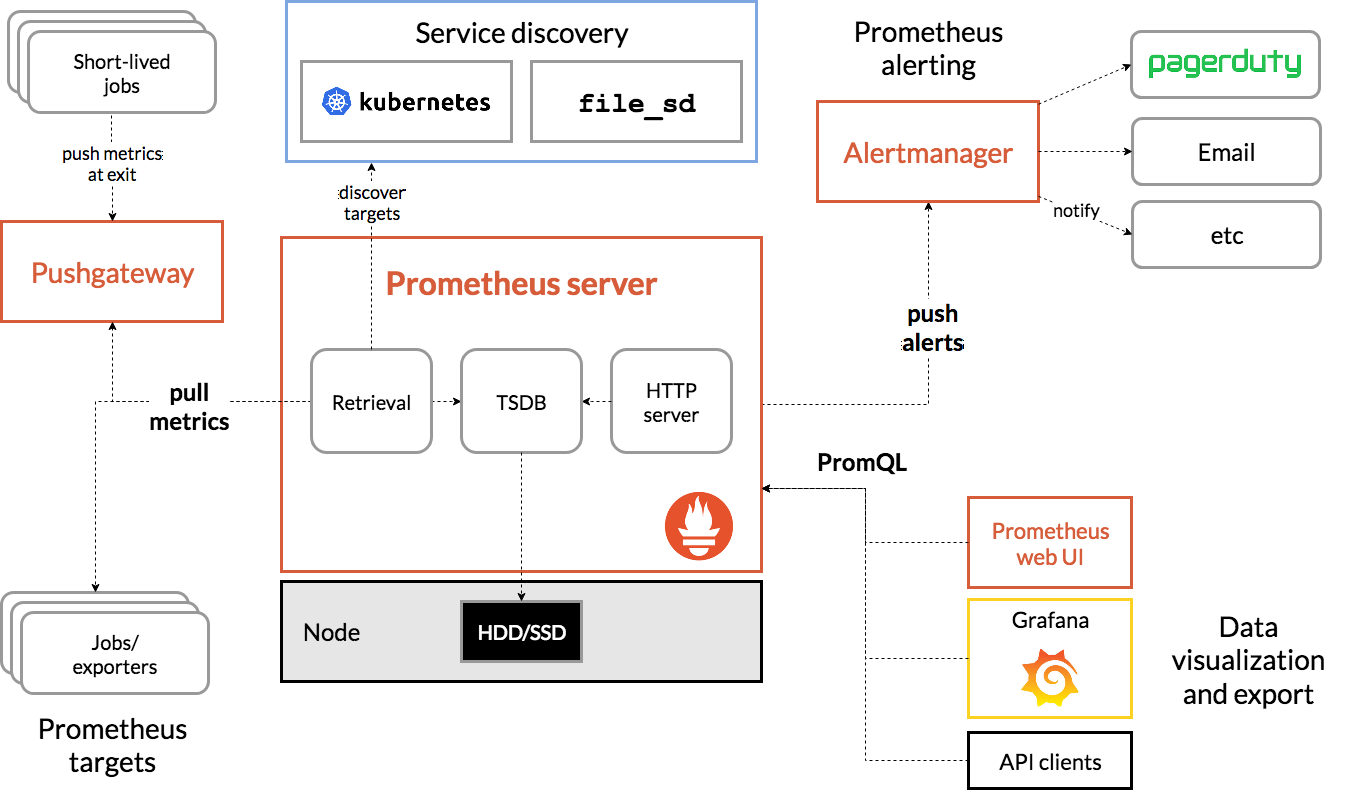
As you can see, Prometheus is somewhat tailored towards
Kubernetes but it can be used without it. We're deploying it with
the file_sd discovery mechanism, where Puppet collects all exporters
into the central server, which then scrapes those exporters every
scrape_interval (by default 15 seconds).
It does not show that Prometheus can federate to multiple instances and the Alertmanager can be configured with High availability. We have a monolithic server setup right now, that's planned for TPA-RFC-33-C.
Metrics types
In monitoring distributed systems, Google defines 4 "golden signals", categories of metrics that need to be monitored:
- Latency: time to service a request
- Traffic: transactions per second or bandwidth
- Errors: failure rates, e.g. 500 errors in web servers
- Saturation: full disks, memory, CPU utilization, etc
In the book, they argue all four should issue pager alerts, but we believe warnings for saturation, except for extreme cases ("disk actually full") might be sufficient.
Alertmanager
The Alertmanager is a separate program that receives notifications generated by Prometheus servers through an API, groups, and deduplicates notifications before sending them by email or other mechanisms.
Here's how the internal design of the Alertmanager looks like:

The first deployments of the Alertmanager at TPO do not feature a "cluster", or high availability (HA) setup.
The Alertmanager has its own web interface to see and silence alerts but it's not deployed in our configuration, we use Karma (previously Cloudflare's unsee) instead.
Alerting philosophy
In general, when working on alerting, keeping the "My Philosophy on Alerting" paper from a Google engineer (now the Monitoring distributed systems chapter of the Site Reliability Engineering O'Reilly book.
Alert timing details
Alert timing can be a hard topic to understand in Prometheus alerting, because there are many components associated with it, and Prometheus documentation is not great at explaining how things work clearly. This is an attempt at explaining various parts of it as I (anarcat) understand it as of 2024-09-19, based the latest documentation available on https://prometheus.io and the current Alertmanager git HEAD.
First, there might be a time vector involved in the Prometheus query. For example, take the query:
increase(django_http_exceptions_total_by_type_total[5m]) > 0
Here, the "vector range" is 5m or five minutes. You might think this
will fire only after 5 minutes have passed. I'm not actually sure. In
my observations, I have found this fires as soon as an increase is
detected, but will stop after the vector range has passed.
Second, there's the for: parameter in the alerting rule. Say this
was set to 5 minutes again:
- alert: DjangoExceptions
expr: increase(django_http_exceptions_total_by_type_total[5m]) > 0
for: 5m
This means that the alert will be considered only pending for that
period. Prometheus will not send an alert to the Alertmanager at all
unless increase() was sustained for the period. If that happens,
then the alert is marked as firing and Alertmanager will start
getting the alert.
(Alertmanager might be getting the alert in the pending state, but
that makes no difference to our discussion: it will not send alerts
before that period has passed.)
Third, there's another setting, keep_firing_for, that will make
Prometheus keep firing the alert even after the query evaluates to
false. We're ignoring this for now.
At this point, the alert has reached Alertmanager and it needs to make a decision of what to do with it. More timers are involved.
Alerts will be evaluated against the alert routes, thus aggregated
into a new group or added to an existing group according to that
route's group_by setting, and then Alertmanager will evaluate the
timers set on the particular route that was matched. An alert group is
created when an alert is received and no other alerts already match
the same values for the group_by criteria. An alert group is removed
when all alerts in a group are in state inactive (e.g. resolved).
Fourth, there's the group_wait setting (defaults to 5 seconds, can
be customized by route). This will keep Alertmanager from
routing any alerts for a while thus allowing it to group the first
alert notification for all alerts in the same group in one batch. It
implies that you will not receive a notification for a new alert
before that timer has elapsed. See also the too short documentation
on grouping.
(The group_wait timer is initialized when the alerting group is
created, see dispatch/dispatch.go, line 415, function
newAggrGroup.)
Now, more alerts might be sent by Prometheus if more metrics match the above expression. They are different alerts because they have different labels (say, another host might have exceptions, above, or, more commonly, other hosts require a reboot). Prometheus will then relay that alert to the Alertmanager, and another timer comes in.
Fifth, before relaying that new alert that's already part of a firing
group, Alertmanager will wait group_interval (defaults to 5m) before
re-sending a notification to a group.
When Alertmanager first creates an alert group, a thread is started
for that group and the route's group_interval acts like a time
ticker. Notifications are only sent when the group_interval period
repeats.
So new alerts merged in a group will wait up to group_interval before
being relayed.
(The group_interval timer is also initialized in dispatch.go, line
460, function aggrGroup.run(). It's done after that function
waits for the previous timer which is normally based on the
group_wait value, but can be switched to group_interval after that
very iteration, of course.)
So, conclusions:
-
If an alert flaps because it pops in and out of existence, consider tweaking the query to cover a longer vector, by increasing the time range (e.g. switch from
5mto1h), or by comparing against a moving average -
If an alert triggers too quickly due to a transient event (say network noise, or someone messing up a deployment but you want to give them a chance to fix it), increase the
for:timer. -
Inversely, if you fail to detect transient outages, reduce the
for:timer, but be aware this might pick up other noises. -
If alerts come too soon and you get a flood of alerts when an outage starts, increase
group_wait. -
If alerts come in slowly but fail to be group because they don't arrive at the same time, increase
group_interval.
This analysis was done in response to a mysterious failure to send notification in a particularly flappy alert.
Another issue with alerting in Prometheus is that you can only silence warnings for a certain amount of time, then you get a notification again. The kthxbye bot works around that issue.
Alert routing details
Once Prometheus has created an alert, it sends it to one or more instances of Alertmanager. This one in turn is responsible for routing the alert to the right communication channel.
That is, if Alertmanager is correctly configured, that is if it's
configured in prometheus.yml, the alerting section, see
Installation section.
Alert routes are set as a hierarchical tree in which the first route that matches gets to handle the alert. The first-matching route may decide to ask Alertmanager to continue processing with other routes so that the same alert can match multiple routes. This is how TPA receives emails for critical alerts and also IRC notifications for both warning and critical.
Each route needs to have one or more receivers set.
Receivers are and routes are defined in Hiera in hiera/common/prometheus.yaml.
Receivers
Receivers are set in the key prometheus::alertmanager::receivers and look like
this:
- name: 'TPA-email'
email_configs:
- to: 'recipient@example.com'
require_tls: false
text: '{{ template "email.custom.txt" . }}'
headers:
subject: '[{{ .Status | toUpper }}{{ if eq .Status "firing" }}:{{ .Alerts.Firing | len }}{{ end }}] {{ .GroupLabels.SortedPairs.Values | join " -- " }}'
Here we've configured an email recipient. Alertmanager can send alerts with a
bunch of other communications channels. For example to send IRC notifications,
we have a daemon binding to localhost on the Prometheus server waiting for
web hook calls, and the corresponding receiver has a section webhook_configs
instead of email_configs.
Routes
Alert routes are set in the key prometheus::alertmanager::route in Hiera. The
default route, the one set at the top level of that key, uses the receiver
fallback and some default options for other routes.
The default route should not be explicitly used by alerts. We always want to explicitly match on a set of labels to send alerts to the correct destination. Thus, the default recipient uses a different message template that explicitly says there is a configuration error. This way we can more easily catch what's been wrongly configured.
The default route has a key routes. This is where additional routes are set.
A route needs to set a recipient and then can match on certain label values,
using the matchers list. Here's an example for the TPA IRC route:
- receiver: 'irc-tor-admin'
matchers:
- 'team = "TPA"'
- 'severity =~ "critical|warning"'
Pushgateway
The Pushgateway is a separate server from the main Prometheus server that is designed to "hold" onto metrics for ephemeral jobs that would otherwise be around long enough for Prometheus to scrape their metrics. We use it as a workaround to bridge Metrics data with Prometheus/Grafana.
Configuration
The Prometheus server is currently configured mostly through Puppet, where modules define exporters and "export resources" that get collected on the central server, which then scrapes those targets.
The prometheus-alerts.git repository contains all alerts and
some non-TPA targets, specified in the targets.d directory for all
teams.
Services
Prometheus is made of multiple components:
- Prometheus: a daemon with an HTTP API that scrapes exporters and targets for metrics, evaluates alerting rules and sends alerts to the Alertmanager
- Alertmanager: another daemon with HTTP APIs that receives alerts from one or more Prometheus daemons, gossips with other Alertmanagers to deduplicate alerts, and send notifications to receivers
- Exporters: HTTP endpoints that expose Prometheus metrics, scraped by Prometheus
- Node exporter: a specific exporter to expose system-level metrics like memory, CPU, disk usage and so on
- Text file collector: a directory read by the node exporter where other tools can drop metrics
So almost everything happens over HTTP or HTTPS.
Many services expose their metrics by running cron jobs or systemd timers that write to the node exporter text file collector.
Monitored services
Those are the actual services monitored by Prometheus.
Internal server (prometheus-03)
The "internal" server scrapes all hosts managed by Puppet for
TPA. Puppet installs a node_exporter on all servers, which
takes care of metrics like CPU, memory, disk usage, time accuracy, and
so on. Then other exporters might be enabled on specific services,
like email or web servers.
Access to the internal server is fairly public: the metrics there are not considered to be security sensitive and protected by authentication only to keep bots away.
External server (prometheus2)
The "external" server, on the other hand, is more restrictive and does not allow public access. This is out of concern that specific metrics might lead to timing attacks against the network and/or leak sensitive information. The external server also explicitly does not scrape TPA servers automatically: it only scrapes certain services that are manually configured by TPA.
Those are the services currently monitored by the external server:
bridgestraprdsys- OnionPerf external nodes'
node_exporter - Connectivity test on (some?) bridges (using the
blackbox_exporter)
Note that this list might become out of sync with the actual
implementation, look into Puppet in
profile::prometheus::server::external for the actual deployment.
This separate server was actually provisioned for the anti-censorship team (see this comment for background). The server was setup in July 2019 following #31159.
Other possible services to monitor
Many more exporters could be configured. A non-exhaustive list was built in ticket #30028 around launch time. Here we can document more such exporters we find along the way:
- Prometheus Onion Service Exporter - "Export the status and latency of an onion service"
hsprober- similar, but also with histogram buckets, multiple attempts, warm-up and error countshaproxy_exporter
There's also a list of third-party exporters in the Prometheus documentation.
Storage
Prometheus stores data in its own custom "time-series database" (TSDB).
Metrics are held for about a year or less, depending on the server. Look at this dashboard for current disk usage of the Prometheus servers.
The actual disk usage depends on:
N: the number of exportersX: the number of metrics they expose- 1.3 bytes: the size of a sample
P: the retention period (currently 1 year)I: scrape interval (currently one minute)
The formula to compute disk usage is this:
N x X x 1.3 bytes x P / I
For example, in ticket 29388, we compute that a simple node exporter setup with 2500 metrics, with 80 nodes, will end up with 137GiB of disk usage:
> 1.3byte/minute * year * 2500 * 80 to Gibyte
(1,3 * (byte / minute)) * year * 2500 * 80 = approx. 127,35799 gibibytes
Back then, we configured Prometheus to keep only 30 days of samples, but that proved to be insufficient for many cases, so it was raised to one year in 2020, in issue 31244.
In the retention section of TPA-RFC-33, there is a detailed discussion on retention periods. We're considering multi-year retention periods for the future.
Queues
There are a couple of places where things happen automatically on a schedule in the monitoring infrastructure:
- Prometheus schedules scrape jobs (pulling metrics) according to rules that can
differ for each scrape job. Each job can define its own
scrape_interval. The default is to scrape each 15 seconds, but some jobs are currently configured to scrape once every minute. - Each alertmanager alert rule can define its own evaluation interval and delay before triggering. See Adding alerts
- Prometheus can automatically discover scrape targets through different means. We currently don't fully use the auto-discovery feature since we create targets through files created by puppet, so any interval for this feature does not affect our setup.
Interfaces
This system has multiple interfaces. Let's take them one by one.
Trending: Grafana
Long term trends are visible in the Grafana dashboards, which taps into the Prometheus API to show graphs for history. Documentation on that is in the Grafana wiki page.
Alerting: Karma
The main alerting dashboard is the Karma dashboard, which shows the currently firing alerts, and allows users to silence alerts.
Technically, alerts are generated by the Prometheus server and relayed through the Alertmanager server, then Karma taps into the Alertmanager API to show those alerts. Karma provides those features:
- Silencing alerts
- Showing alert inhibitions
- Aggregate alerts from multiple alert managers
- Alert groups
- Alert history
- Dead man's switch (an alert always firing that signals an error when it stops firing)
Notifications: Alertmanager
We aggressively restrict the kind and number of alerts that will actually send notifications. This was done mainly by creating two different alerting levels ("warning" and "critical", above), and drastically limiting the number of critical alerts.
The basic idea is that the dashboard (Karma) has "everything": alerts (both with "warning" and "critical" levels) show up there, and it's expected that it is "noisy". Operators are be expected to look at the dashboard while on rotation for tasks to do. A typical example is pending reboots, but anomalies like high load on a server or a partition to expand in a few weeks is also expected.
All notifications are also sent over the IRC channel (#tor-alerts on
OFTC) and logged through the tpa_http_post_dump.service. It is
expected that operators look at their emails or the IRC channels
regularly and will act upon those notifications promptly.
IRC notifications are handled by the alertmanager-irc-relay.
Command-line
Prometheus has a promtool that allows you to query the server
from the command-line, but there's also a HTTP API that we can
use with curl. For example, this shows the hosts with pending
upgrades:
curl -sSL --data-urlencode query='apt_upgrades_pending>0' \
'https://$HTTP_USER@prometheus.torproject.org/api/v1/query \
| jq -r .data.result[].metric.alias \
| grep -v '^null$' | paste -sd,
The output can be passed to a tool like Cumin, for example. This
is actually used in the fleet.pending-upgrades task to show an
inventory of the pending upgrades across the fleet.
Alertmanager also has a amtool tool which can be used to
inspect alerts, and issue silences. It's used in our test suite.
Authentication
Web-based authentication is shared with Grafana, see the Grafana authentication documentation.
Polling from the Prometheus servers to the exporters on servers is permitted by IP address specifically just for the Prometheus server IPs. Some more sensitive exporters require a secret token to access their metrics.
Implementation
Prometheus and Alertmanager are coded in Go and released under the Apache 2.0 license. We use the versions provided by the debian package archives in the current stable release.
Related services
By design, no other service is required. Emails get sent out for some notifications and that might depend on Tor email servers, depending on which addresses receive the notifications.
Issues
There is no issue tracker specifically for this project, File or search for issues in the team issue tracker with the ~Prometheus label.
Known issues
Those are major issues that are worth knowing about Prometheus in general, and our setup in particular:
-
Bind mounts generate duplicate metrics, upstream issue: Way to distinguish bind mounted path?, possible workaround: manually specify known bind mount points (e.g.
node_filesystem_avail_bytes{instance=~"$instance:.*",fstype!='tmpfs',fstype!='shm',mountpoint!~"/home|/var/lib/postgresql"}), but that can hide actual, real mount points, possible fix: thenode_filesystem_mount_infometric, added in PR 2970 from 2024-07-14, unreleased as of 2024-08-28 -
High cardinality metrics from exporters we do not control can fill the disk
-
No long-term metrics storage, issue: multi-year metrics storage
-
The web user interface is really limited, and is actually deprecated, with the new React-based one not (yet?) packaged, alternatives (like Grafana) are also bloated Golang/Javascript projects
-
Alertmanager doesn't sent notifications when silenced alerts are resolved (PR pending since 2022)
-
Alertmanager doesn't send notifications when silences are posted
-
Prometheus uses keep alive HTTP requests to probe targets. This means that DNS changes might take longer to take effect than expected. In particular, some servers (e.g. Nginx) allow a lot of keep alive requests (e.g. 1000) which means Prometheus will take a long time to switch the new host (e.g. 16 hours).
A workaround is to shutdown the previous host to force Prometheus to check the new one during a rotation, or reduce the number of keep alive requests allowed on the server (
keepalive_requestson Nginx,MaxKeepAliveRequestson Apache)See 41902 for further information.
In general, the service is still being launched, see TPA-RFC-33 for the full deployment plan.
Resolved issues
No major issue resolved so far is worth mentioning here.
Maintainers
The Prometheus services have been setup and are managed by anarcat inside TPA.
Users
The internal Prometheus server is mostly used by TPA staff to diagnose issues. The external Prometheus server is used by various TPO teams for their own monitoring needs.
Upstream
The upstream Prometheus projects are diverse and generally active as of early 2021. Since Prometheus is used as an ad-hoc standard in the new "cloud native" communities like Kubernetes, it has seen an upsurge of development and interest from various developers, and companies. The future of Prometheus should therefore be fairly bright.
The individual exporters, however, can be hit and miss. Some exporters are "code dumps" from companies and not very well maintained. For example, Digital Ocean dumped the bind_exporter on GitHub, but it was salvaged by the Prometheus community.
Another important layer is the large amount of Puppet code that is
used to deploy Prometheus and its components. This is all part of a
big Puppet module, puppet-prometheus, managed by the Voxpupuli
collective. Our integration with the module is not yet complete:
we have a lot of glue code on top of it to correctly make it work with
Debian packages. A lot of work has been done to complete that work by
anarcat, but work still remains, see upstream issue 32 for
details.
Monitoring and metrics
Prometheus is, of course, all about monitoring and metrics. It is the thing that monitors everything and keeps metrics over the long term.
The server monitors itself for system-level metrics but also application-specific metrics. There's a long-term plan for high-availability in TPA-RFC-33-C.
See also storage for retention policies.
Tests
The prometheus-alerts.git repository has tests that run in GitLab
CI, see the Testing alerts section on how to write those.
When doing major upgrades, the Karma dashboard should be visited to make sure it works correctly.
There is a test suite in the upstream Prometheus Puppet module as well, but it's not part of our CI.
Logs
Prometheus servers typically do not generate many logs, except when errors and warnings occur. They should hold very little PII. The web frontends collect logs in accordance with our regular policy.
Actual metrics may contain PII, although it's quite unlikely: typically, data is anonymized and aggregated at collection time. It would still be able to deduce some activity patterns from the metrics generated by Prometheus, and use it to leverage side-channel attacks, which is why the external Prometheus server access is restricted.
Alerts themselves are retained in the systemd journal, see Checking alert history.
Backups
Prometheus servers should be fully configured through Puppet and
require little backups. The metrics themselves are kept in
/var/lib/prometheus2 and should be backed up along with our regular
backup procedures.
WAL (write-ahead log) files are ignored by the backups, which can lead to an extra 2-3 hours of data loss since the last backup in the case of a total failure, see #41627 for the discussion. This should eventually be mitigated by a high availability setup (#41643).
Other documentation
- Prometheus home page
- Prometheus documentation
- Prometheus developer blog
- Awesome Prometheus listen
- Blue book - interesting guide
- Robust perception consulting has a series of blog posts on Prometheus
Discussion
Overview
The Prometheus and Grafana services were setup after anarcat realized that there was no "trending" service setup inside TPA after Munin had died (ticket 29681). The "node exporter" was deployed on all TPA hosts in mid-march 2019 (ticket 29683) and remaining traces of Munin were removed in early April 2019 (ticket 29682).
Resource requirements were researched in ticket 29388 and it was originally planned to retain 15 days of metrics. This was expanded to one year in November 2019 (ticket 31244) with the hope this could eventually be expanded further with a down-sampling server in the future.
Eventually, a second Prometheus/Grafana server was setup to monitor external resources (ticket 31159) because there were concerns about mixing internal and external monitoring on TPA's side. There were also concerns on the metrics team about exposing those metrics publicly.
It was originally thought Prometheus could completely replace Nagios as well issue 29864, but this turned out to be more difficult than planned.
The main difficulty is that Nagios checks come with builtin threshold of acceptable performance. But Prometheus metrics are just that: metrics, without thresholds... This made it more difficult to replace Nagios because a ton of alerts had to be rewritten to replace the existing ones.
This was performed in TPA-RFC-33, over the course of 2024 and 2025.
Security and risk assessment
There were no security review yet.
The shared password for accessing the web interface is a challenge. We intend to replace this soon with individual users.
There were no risk assessments done yet.
Technical debt and next steps
In progress projects:
- merging external and internal monitoring servers
- reimplementing some of the alerts that were in icinga
Proposed Solutions
TPA-RFC-33
TPA's monitoring infrastructure has been originally setup with Nagios and Munin. Nagios was eventually removed from Debian in 2016 and replaced with Icinga 1. Munin somehow "died in a fire" some time before anarcat joined TPA in 2019.
At that point, the lack of trending infrastructure was seen as a serious problem, so Prometheus and Grafana were deployed in 2019 as a stopgap measure.
A secondary Prometheus server (prometheus2) was setup with stronger
authentication for service admins. The rationale was that those
services were more privacy-sensitive and the primary TPA setup
(at the time prometheus1, now replaced by prometheus-03) was too open to the
public, which could allow for side-channels attacks.
Those tools has been used for trending ever since, while keeping Icinga for monitoring.
During the March 2021 hack week, Prometheus' Alertmanager was deployed on the secondary Prometheus server to provide alerting to the Metrics and Anti-Censorship teams.
Munin replacement
The primary Prometheus server was decided in the Brussels 2019 developer meeting, before anarcat joined the team (ticket 29389). Secondary Prometheus server was approved in meeting/2019-04-08. Storage expansion was approved in meeting/2019-11-25.
Other alternatives
We considered retaining Nagios/Icinga as an alerting system, separate from Prometheus, but ultimately decided against it in TPA-RFC-33.
Alerting rules in Puppet
Alerting rules are currently stored in an external
prometheus-alerts.git repository that holds not only TPA's
alerts, but also those of other teams. So the rules
are not directly managed by puppet -- although puppet will ensure
that the repository is checked out with the most recent commit on the
Prometheus servers.
The rationale is that rule definitions should appear only once and we already had the above-mentioned repository that could be used to configure alerting rules.
We were concerned we would potentially have multiple sources of truth for alerting rules. We already have that for scrape targets, but that doesn't seem to be an issue. It did feel, however, critical for the more important alerting rules to have a single source of truth.
PuppetDB integration
Prometheus 2.31 and later added support for PuppetDB service
discovery, through the puppetdb_sd_config parameter. The
sample configuration file shows a bit what's possible.
This approach was considered during the bookworm upgrade but ultimately rejected because it introduces a dependency on PuppetDB, which becomes a possible single point of failure for the monitoring system.
We also have a lot of code in Puppet to handle the exported resources necessary for this, and it would take a lot of work to convert over.
Mobile notifications
Like others we do not intend on having on-call rotation yet, and will not ring people on their mobile devices at first. After all exporters have been deployed (priority "C", "nice to have") and alerts properly configured, we will evaluate the number of notifications that get sent out. If levels are acceptable (say, once a month or so), we might implement push notifications during business hours to consenting staff.
We have been advised to avoid Signal notifications as that setup is
often brittle, signal.org frequently changing their API and leading
to silent failures. We might implement alerts over Matrix
depending on what messaging platform gets standardized in the Tor
project.
Migrating from Munin
Here's a quick cheat sheet from people used to Munin and switching to Prometheus:
| What | Munin | Prometheus |
|---|---|---|
| Scraper | munin-update | Prometheus |
| Agent | munin-node | Prometheus, node-exporter and others |
| Graphing | munin-graph | Prometheus or Grafana |
| Alerting | munin-limits | Prometheus, Alertmanager |
| Network port | 4949 | 9100 and others |
| Protocol | TCP, text-based | HTTP, text-based |
| Storage format | RRD | Custom time series database |
| Down-sampling | Yes | No |
| Default interval | 5 minutes | 15 seconds |
| Authentication | No | No |
| Federation | No | Yes (can fetch from other servers) |
| High availability | No | Yes (alert-manager gossip protocol) |
Basically, Prometheus is similar to Munin in many ways:
-
It "pulls" metrics from the nodes, although it does it over HTTP (to http://host:9100/metrics) instead of a custom TCP protocol like Munin
-
The agent running on the nodes is called
prometheus-node-exporterinstead ofmunin-node. It scrapes only a set of built-in parameters like CPU, disk space and so on, different exporters are necessary for different applications (likeprometheus-apache-exporter) and any application can easily implement an exporter by exposing a Prometheus-compatible/metricsendpoint -
Like Munin, the node exporter doesn't have any form of authentication built-in. We rely on IP-level firewalls to avoid leakage
-
The central server is simply called
prometheusand runs as a daemon that wakes up on its own, instead ofmunin-updatewhich is called frommunin-cronand before thatcron -
Graphics are generated on the fly through the crude Prometheus web interface or by frontends like Grafana, instead of being constantly regenerated by
munin-graph -
Samples are stored in a custom "time series database" (TSDB) in Prometheus instead of the (ad-hoc) RRD standard
-
Prometheus performs no down-sampling like RRD and Prom relies on smart compression to spare disk space, but it uses more than Munin
-
Prometheus scrapes samples much more aggressively than Munin by default, but that interval is configurable
-
Prometheus can scale horizontally (by sharding different services to different servers) and vertically (by aggregating different servers to a central one with a different sampling frequency) natively -
munin-updateandmunin-graphcan only run on a single (and same) server -
Prometheus can act as a high availability alerting system thanks to its
alertmanagerthat can run multiple copies in parallel without sending duplicate alerts -munin-limitscan only run on a single server
Migrating from Nagios/Icinga
Near the end of 2024, Icinga was replaced by Prometheus and Alertmanager, as part of TPA-RFC-33.
The project was split into three phases from A to C.
Before Icinga was retired, we performed an audit of the notifications sent from Icinga about our services (#41791) to see if we're missing coverage over something critical.
Overall, phase A covered most critical alerts we were worried about, but left out key components as well, which are not currently covered by monitoring.
In phase B we implemented more alerts, integrated more metrics that were necessary for some new alerts and did a lot of work on ensuring that we wouldn't be getting double alerts for the same problem. It is also planned to merge the external monitoring server in this phase.
Phase C concerns the setup of high availability between two prometheus servers, each with its own alertmanager instance, and to finalize implementing alerts.
Prometheus equivalence for Icinga/Nagios checks
This is an equivalence table between Nagios checks and their equivalent Prometheus metric, for checks that have been explicitly converted into Prometheus alerts and metrics as part of phase A.
| Name | Command | Metric | Severity | Note |
|---|---|---|---|---|
disk usage - * | check_disk | node_filesystem_avail_bytes | warning / critical | Critical when less than 24h to full |
network service - nrpe | check_tcp!5666 | up | warning | |
raid -DRBD | dsa-check-drbd | node_drbd_out_of_sync_bytes, node_drbd_connected | warning | |
raid - sw raid | dsa-check-raid-sw | node_md_disks / node_md_state | warning | Not warning about arrays synchronization |
apt - security updates | dsa-check-statusfile | apt_upgrades_* | warning | Incomplete |
needrestart | needrestart -p | kernel_status, microcode_status | warning | Required patching upstream |
network service - sshd | check_ssh --timeout=40 | probe_success | warning | Sanity check, overlaps with systemd check, but better be safe |
network service - smtp | check_smtp | probe_success | warning | Incomplete, need end-to-end deliverability checks, scheduled for phase B |
network service - submission | check_smtp_port!587 | probe_success | warning | |
network service - smtps | dsa_check_cert!465 | probe_success | warning | |
network service - http | check_http | probe_http_duration_seconds | warning | See also #40568 for phase B |
network service - https | check_https | Idem | warning | Idem, see also #41731 for exhaustive coverage of HTTPS sites |
https cert and smtps | dsa_check_cert | probe_ssl_earliest_cert_expiry | warning | Check for cert expiry for all sites, this is about "renewal failed" |
backup - bacula - * | dsa-check-bacula | bacula_job_last_good_backup | warning | Based on WMF's check_bacula.py |
redis liveness | Custom command | probe_success | warning | Checks that the Redis tunnel works |
postgresql backups | dsa-check-backuppg | tpa_backuppg_last_check_timestamp_seconds | warning | Built on top of NRPE check for now, see TPA-RFC-65 for long term |
Actual alerting rules can be found in the prometheus-alerts.git
repository.
High priority missing checks, phase B
Those checks are all scheduled in phase B, and are considered high priority, or at least specific due dates have been set in issues to make sure we don't miss (for example) the next certificate expiry dates.
| Name | Command | Metric | Severity | Note |
|---|---|---|---|---|
DNS - DS expiry | dsa-check-statusfile | TBD | warning | Drop DNSSEC? See #41795 |
Ganeti - cluster | check_ganeti_cluster | ganeti-exporter | warning | Runs a full verify, costly, was already disabled |
Ganeti - disks | check_ganeti_instances | Idem | warning | Was timing out and already disabled |
Ganeti - instances | check_ganeti_instances | Idem | warning | Currently noisy: warns about retired hosts waiting for destruction, drop? |
SSL cert - LE | dsa-check-cert-expire-dir | TBD | warning | Exhaustively check all certs, see #41731, possibly with critical severity for actual prolonged down times |
SSL cert - db.torproject.org | dsa-check-cert-expire | TBD | warning | Checks local CA for expiry, on disk, /etc/ssl/certs/thishost.pem and db.torproject.org.pem on each host, see #41732 |
puppet - * catalog run(s) | check_puppetdb_nodes | puppet-exporter | warning | |
system - all services running | systemctl is-system-running | node_systemd_unit_state | warning | Sanity check, checks for failing timers and services |
Those checks are covered by the priority "B" ticket (#41639), unless otherwise noted.
Low priority missing checks, phase B
Unless otherwise mentioned, most of those checks are noisy and generally do not indicate an actual failure, so they were not qualified as being priorities at all.
| Name | Command | Metric | Severity | Note |
|---|---|---|---|---|
DNS - delegation and signature expiry | dsa-check-zone-rrsig-expiration-many | dnssec-exporter | warning | |
DNS - key coverage | dsa-check-statusfile | TBD | warning | |
DNS - security delegations | dsa-check-dnssec-delegation | TBD | warning | |
DNS - zones signed properly | dsa-check-zone-signature-all | TBD | warning | |
DNS SOA sync - * | dsa_check_soas_add | TBD | warning | Never actually failed |
PING | check_ping | probe_success | warning | |
load | check_load | node_pressure_cpu_waiting_seconds_total | warning | Sanity check, replace with the better pressure counters |
mirror (static) sync - * | dsa_check_staticsync | TBD | warning | Never actually failed |
network service - ntp peer | check_ntp_peer | node_ntp_offset_seconds | warning | |
network service - ntp time | check_ntp_time | TBD | warning | Unclear how that differs from check_ntp_peer |
setup - ud-ldap freshness | dsa-check-udldap-freshness | TBD | warning | |
swap usage - * | check_swap | node_memory_SwapFree_bytes | warning | |
system - filesystem check | dsa-check-filesystems | TBD | warning | |
unbound trust anchors | dsa-check-unbound-anchors | TBD | warning | |
uptime check | dsa-check-uptime | node_boot_time_seconds | warning |
Those are also covered by the priority "B" ticket (#41639), unless otherwise noted. In particular, all DNS issues are covered by issue #41794.
Retired checks
| Name | Command | Rationale |
|---|---|---|
users | check_users | Who has logged-in users?? |
processes - zombies | check_procs -s Z | Useless |
processes - total | check_procs 620 700 | Too noisy, needed exclusions for builders |
processes - * | check_procs $foo | Better to check systemd |
unwanted processes - * | check_procs $foo | Basically the opposite of the above, useless |
LE - chain | Checks for flag file | See #40052 |
CPU - intel ucode | dsa-check-ucode-intel | Overlaps with needrestart check |
unexpected sw raid | Checks for /proc/mdstat | Needlessly noisy, just means an extra module is loaded, who cares |
unwanted network service - * | dsa_check_port_closed | Needlessly noisy, if we really want this, use lzr |
network - v6 gw | dsa-check-ipv6-default-gw | Useless, see #41714 for analysis |
check_procs, in particular, was generating a lot of noise in
Icinga, as we were checking dozens of different processes, which would
all explode at once when a host would go down and Icinga didn't notice
the host being down.
Service admin checks
The following checks were not audited by TPA but checked by the respective team's service admins.
| Check | Team |
|---|---|
bridges.tpo web service | Anti-censorship |
| "mail queue" | Anti-censorship |
tor_check_collector | Network health |
tor-check-onionoo | Network health |
Other Alertmanager receivers
Alerts are typically sent over email, but Alertmanager also has builtin support for:
There's also a generic web hook receiver which is typically used to send notifications. Many other endpoints are implemented through that web hook, for example:
- Cachet
- Dingtalk
- Discord
- Google Chat
- IRC
- Matrix:
matrix-alertmanager(JavaScript) or knopfler (Python), see also #40216 - Mattermost
- Microsoft teams
- Phabricator
- Sachet supports many messaging systems (Twilio, Pushbullet, Telegram, Sipgate, etc)
- Sentry
- Signal (or Signald)
- Splunk
- SNMP
- Telegram:
nopp/alertmanager-webhook-telegram-pythonormetalmatze/alertmanager-bot - Twilio
- Zabbix:
alertmanager-zabbix-webhookorzabbix-alertmanager
And that is only what was available at the time of writing, the
alertmanager-webhook and alertmanager tags GitHub might
have more.
The Alertmanager web interface is not shipped with the Debian package,
because it depends on the Elm compiler which is not in
Debian. It can be built by hand using the debian/generate-ui.sh
script, but only in newer, post buster versions. Another alternative
to consider is Crochet.
TPA uses Puppet to manage all servers it operates. It handles most of the configuration management of the base operating system and some services. It is not designed to handle ad-hoc tasks, for which we favor the use of fabric.
- Tutorial
- How-to
- Programming workflow
- Puppet tricks
- Deployments
- Troubleshooting
- Pager playbook
- Disaster recovery
- Reference
- Discussion
- Overview
- Goals
- Approvals required
- Proposed Solution
- Publish our repository
- Use a control repository
- Get rid of 3rdparty
- Deploy with g10k
- Authenticate code with checksums
- Deploy to branch-specific environments
- Rename the default branch "production"
- Push directly on the Puppet server
- Use a role account
- Use local test environments
- Develop a test suite
- Hook into continuous integration
- OpenPGP verification and web hook
- Cost
- Alternatives considered
Tutorial
This page is long! This first section hopes to get you running with a simple task quickly.
Adding an "message of the day" (motd) on a server
To post announcements to shell users of a servers, it might be a good
idea to post a "message of the day" (/etc/motd) that will show up on
login. Good examples are known issues, maintenance windows, or service
retirements.
This change should be fairly inoffensive because it should affect only
a single server, and only the motd, so the worst that can happen
here is a silly motd gets displayed (or nothing at all).
Here is how to make the change:
-
To any change on the Puppet server, you will first need to clone the git repository:
git clone git@puppet.torproject.org:/srv/puppet.torproject.org/git/tor-puppetThis needs to be only done once.
-
the messages are managed by the
motdmodule, but to easily add an "extra" entry, you should had to the Hiera data storage for the specific host you want to modify. Let's say you want to add amotdonperdulce, the currentpeople.torproject.orgserver. The file you will need to change (or create!) ishiera/nodes/perdulce.torproject.org.yaml:$EDITOR hiera/nodes/perdulce.torproject.org.yaml -
Hiera stores data in YAML. So you need to create a little YAML snippet, like this:
motd::extra: | Hello world! -
Then you can commit this and push:
git commit -m"add a nice friendly message to the motd" && git push -
Then you should login to the host and make sure the code applies correctly, in dry-run mode:
ssh -tt perdulce.torproject.org sudo puppet agent -t --noop -
If that works, you can do it for real:
ssh -tt perdulce.torproject.org sudo puppet agent -t
On next login, you should see your friendly new message. Do not forget to revert the change!
The next tutorial is about a more elaborate change, performed on multiple servers.
Adding an IP address to the global allow list
In this tutorial, we will add an IP address to the global allow list, on all firewalls on all machines. This is a big deal! It will allow that IP address to access the SSH servers on all boxes and more. This should be an static IP address on a trusted network.
If you have never used Puppet before or are nervous at all about making such a change, it is a good idea to have a more experienced sysadmin nearby to help you. They can also confirm this tutorial is what is actually needed.
-
To any change on the Puppet server, you will first need to clone the git repository:
git clone git@puppet.torproject.org:/srv/puppet.torproject.org/git/tor-puppetThis needs to be only done once.
-
The firewall rules are defined in the
fermmodule, which lives inmodules/ferm. The file you specifically need to change ismodules/ferm/templates/defs.conf.erb, so open that in your editor of choice:$EDITOR modules/ferm/templates/defs.conf.erb -
The code you are looking for is
ADMIN_IPS. Add a@deffor your IP address and add the new macro to theADMIN_IPSmacro. When you exit your editor, git should show you a diff that looks something like this:--- a/modules/ferm/templates/defs.conf.erb +++ b/modules/ferm/templates/defs.conf.erb @@ -77,7 +77,10 @@ def $TPO_NET = (<%= networks.join(' ') %>); @def $linus = (); @def $linus = ($linus 193.10.5.2/32); # kcmp@adbc @def $linus = ($linus 2001:6b0:8::2/128); # kcmp@adbc -@def $ADMIN_IPS = ($weasel $linus); +@def $anarcat = (); +@def $anarcat = ($anarcat 203.0.113.1/32); # home IP +@def $anarcat = ($anarcat 2001:DB8::DEAD/128 2001:DB8:F00F::/56); # home IPv6 +@def $ADMIN_IPS = ($weasel $linus $anarcat); @def $BASE_SSH_ALLOWED = (); -
Then you can commit this and push:
git commit -m'add my home address to the allow list' && git push -
Then you should login to one of the hosts and make sure the code applies correctly:
ssh -tt perdulce.torproject.org sudo puppet agent -t
Puppet shows colorful messages. If nothing is red and it returns correctly, you are done. If that doesn't work, go back to step 2. If that doesn't work, ask for help from your colleague in the Tor sysadmin team.
If this works, congratulations, you have made your first change across
the entire Puppet infrastructure! You might want to look at the rest
of the documentation to learn more about how to do different tasks and
how things are setup. A key "How to" we recommend is the Progressive deployment section below, which will teach you how to make a change
like the above while making sure you don't break anything even if it
affects a lot of machines.
How-to
Programming workflow
Using environments
During ordinary maintenance operations, it's appropriate to work directly on the
default production branch, which deploys to the production environment.
However, for more complex changes, such as when deploying a new service or adding a module (see below), it's recommended to start by working on a feature branch which will deploy as a distinct environment on the Puppet server.
To quickly test a different environment used, you can switch the environment
used by the Puppet agent using the --environment flag or the penv helper
script which simply sets the environment setting in puppet.conf's agent
section. For example, this will switch a node from production to test and
apply the catalog:
penv test
pat
Note that this setting is sticky: further runs will keep the test
environment, as the setting is written in the puppet.conf. To reset to the
production environment, you can simply do this:
penv production
pat
In some cases it's also useful to make a run "non-sticky" (in other words to
avoid applying changes to puppet.conf). For example this can be really useful
to minimize noise and differences when testing a branch on multiple hosts using
cumin. To skip modifying the puppet config, you can use --skip_tags like
this:
puppet agent --test --environment test --skip_tags puppet::config
A node or group of nodes can be forcibly switched to a different environment
using the external node classifier (ENC), by
adding a environment: key, like this in nodes/test.torproject.org.yaml:
---
environment: test
parameters:
role: test
Once the feature branch is satisfactory, it can then be merged to
production and deleted:
git merge test
git branch -d test
git push -d origin test
Branches are not deleted automatically after merge: make sure you cleanup after yourself.
Because environments aren't totally isolated from each other and a compromised
node could choose to apply an environment other than production, care should
be taken with the code pushed to these feature branches. It's recommended to
avoid overly broad debugging statements, if any, and to generally keep an
active eye on feature branches so as to prevent the accumulation of unreviewed
code.
Finally, note that environments are automatically destroyed (alongside their branch) on the Puppet server after 2 weeks since the last commit to the branch. An email warning about this will be sent to the author of that last commit. This doesn't destroy the mirrored branch on GitLab.
When an environment is removed, Puppet agents will revert back to the
production environment automatically.
Modifying an existing configuration
For new deployments, this is NOT the preferred method. For example,
if you are deploying new software that is not already in use in our
infrastructure, do not follow this guide and instead follow the
Adding a new module guide below.
If you are touching an existing configuration, things are much
simpler however: you simply go to the module where the code already
exists and make changes. You git commit and git push the code,
then immediately run puppet agent -t on the affected node.
Look at the File layout section above to find the right piece of
code to modify. If you are making changes that potentially affect more
than one host, you should also definitely look at the Progressive deployment section below.
Adding a new module
This is a broad topic, but let's take the Prometheus monitoring system as an example which followed the role/profile/module pattern.
First, the Prometheus modules on the Puppet forge were evaluated for quality and popularity. There was a clear winner there: the Prometheus module from Vox Populi had hundreds of thousands more downloads than the next option, which was deprecated.
Next, the module was added to the Puppetfile (in
./Puppetfile):
mod 'puppet/prometheus', # 12.5.0
:git => 'https://github.com/voxpupuli/puppet-prometheus.git',
:commit => '25dd701b489fc32c892390fd464e765ebd6f513a' # tag: v12.5.0
Note that:
- Since tpo/tpa/team#41974 we don't import 3rd-party code into our repo and instead deploy the modules dynamically in the server.
- Because of that, modules in the
Puppetfileshould always be pinned to a Git repo and commit, as that's currently the simplest way to avoid some MITM issues. - We currently don't have an automated way of managing module dependencies, so
you'll have to manually and recursively add dependencies to the
Puppetfile. Sorry! - Make sure to manually audit the code for each module, by reading each file and looking for obvious security flaws or back doors.
Then the code was committed into git:
git add Puppetfile
git commit -m'install prometheus module and its dependencies after audit'
Then the module was configured in a profile, in modules/profile/manifests/prometheus/server.pp:
class profile::prometheus::server {
class {
'prometheus::server':
# follow prom2 defaults
localstorage => '/var/lib/prometheus/metrics2',
storage_retention => '15d',
}
}
The above contains our local configuration for the upstream
prometheus::server class. In
particular, it sets a retention period and a different path for the
metrics, so that they follow the new Prometheus 2.x defaults.
Then this profile was added to a role, in
modules/roles/manifests/monitoring.pp:
# the monitoring server
class roles::monitoring {
include profile::prometheus::server
}
Notice how the role does not refer to any implementation detail, like that the monitoring server uses Prometheus. It looks like a trivial, useless, class but it can actually grow to include multiple profiles.
Then that role is added to the Hiera configuration of the monitoring
server, in hiera/nodes/prometheus-03.torproject.org.yaml:
classes:
- roles::monitoring
And Puppet was ran on the host, with:
puppet --enable ; puppet agent -t --noop ; puppet --disable "testing prometheus deployment"
If you need to deploy the code to multiple hosts, see the Progressive deployment section below. To contribute changes back upstream (and
you should do so), see the section right below.
Contributing changes back upstream
Fork the upstream repository and operate on your fork until the changes are eventually merged upstream.
Then, update the Puppetfile, for example:
The module is then forked on GitHub or wherever it is hosted mod 'puppet-prometheus', :git => 'https://github.com/anarcat/puppet-prometheus.git', :commit => '(...)'
Note that the deploy branch here is a merge of all the different
branches proposed upstream in different pull requests, but it could
also be the master branch or a single branch if only a single pull
request was sent.
You'll have to keep a clone of the upstream repository somewhere outside of the
tor-puppet work tree, from which you can push and pull normally with
upstream. When you make a change, you need to commit (and push) the change in
your external clone and update the Puppetfile in the repository.
Running tests
Ideally, Puppet modules have a test suite. This is done with rspec-puppet and rspec-puppet-facts. This is not very well documented upstream, but it's apparently part of the Puppet Development Kit (PDK). Anyways: assuming tests exists, you will want to run some tests before pushing your code upstream, or at least upstream might ask you for this before accepting your changes. Here's how to get setup:
sudo apt install ruby-rspec-puppet ruby-puppetlabs-spec-helper ruby-bundler
bundle install --path vendor/bundle
This installs some basic libraries, system-wide (Ruby bundler and the
rspec stuff). Unfortunately, required Ruby code is rarely all present
in Debian and you still need to install extra gems. In this case we
set it up within the vendor/bundle directory to isolate them from
the global search path.
Finally, to run the tests, you need to wrap your invocation with
bundle exec, like so:
bundle exec rake test
Validating Puppet code
You SHOULD run validation checks on commit locally before pushing your manifests. To install those hooks, you should clone this repository:
git clone https://github.com/anarcat/puppet-git-hooks
... and deploy it as a pre-commit hook:
ln -s $PWD/puppet-git-hooks/pre-commit tor-puppet/.git/hooks/pre-commit
This hook is deployed on the server and will refuse your push if it fails linting, see issue 31226 for a discussion.
Puppet tricks
Password management
If you need to set a password in a manifest, there are special functions to handle this. We do not want to store passwords directly in Puppet source code, for various reasons: it is hard to erase because code is stored in git, but also, ultimately, we want to publish that source code publicly.
We use Trocla for this purpose, which generates random passwords and stores the hash or, if necessary, the clear-text in a YAML file.
Trocla's man page is not very useful, but you can see a list of subcommands in the project's README file.
With Trocla, each password is generated on the fly from a secure
entropy source (Ruby's SecureRandom module) and stored inside a
state file (in /var/lib/trocla/trocla_data.yml, configured
/etc/puppet/troclarc.yaml) on the Puppet master.
Trocla can return "hashed" versions of the passwords, so that the plain text password is never visible from the client. The plain text can still be stored on the Puppet master, or it can be deleted once it's been transmitted to the user or another password manager. This makes it possible to have Trocla not keep any secret at all.
This piece of code will generate a bcrypt-hashed password for the Grafana admin, for example:
$grafana_admin_password = trocla('grafana_admin_password', 'bcrypt')
The plain-text for that password will never leave the Puppet master. it will still be stored on the Puppet master, and you can see the value with:
trocla get grafana_admin_password plain
... on the command-line.
A password can also be set with this command:
trocla set grafana_guest_password plain
Note that this might erase other formats for this password, although those will get regenerated as needed.
Also note that trocla get will fail if the particular password or
format requested does not exist. For example, say you generate a
plain-text password with and then get the bcrypt version:
trocla create test plain
trocla get test bcrypt
This will return the empty string instead of the hashed
version. Instead, use trocla create to generate that password. In
general, it's safe to use trocla create as it will reuse existing
password. It's actually how the trocla() function behaves in Puppet
as well.
TODO: Trocla can provide passwords to classes transparently, without having to do function calls inside Puppet manifests. For example, this code:
class profile::grafana {
$password = trocla('profile::grafana::password', 'plain')
# ...
}
Could simply be expressed as:
class profile::grafana(String $password) {
# ...
}
But this requires a few changes:
- Trocla needs to be included in Hiera
- We need roles to be more clearly defined in Hiera, and use Hiera as an ENC so that we can do per-roles passwords (for example), which is not currently possible.
Getting information from other nodes
A common pattern in Puppet is to deploy resources on a given host with information from another host. For example, you might want to grant access to host A from host B. And while you can hardcode host B's IP address in host A's manifest, it's not good practice: if host B's IP address changes, you need to change the manifest, and that practice makes it difficult to introduce host C into the pool...
So we need ways of having a node use information from other nodes in our Puppet manifests. There are 5 methods in our Puppet source code at the time of writing:
- Exported resources
- PuppetDB lookups
- Puppet Query Language (PQL)
- LDAP lookups
- Hiera lookups
This section walks through how each method works, outlining the advantage/disadvantage of each.
Exported resources
Our Puppet configuration supports exported resources, a key component of complex Puppet deployments. Exported resources allow one host to define a configuration that will be exported to the Puppet server and then realized on another host.
These exported resources are not confined by environments: for example,
resources exported by a node assigned to the foo environment will be
available on all resources of the production environment, and vice-versa.
We commonly use this to punch holes in the firewall between nodes. For
example, this manifest in the roles::puppetmaster class:
@@ferm::rule::simple { "roles::puppetmaster-${::fqdn}":
tag => 'roles::puppetmaster',
description => 'Allow Puppetmaster access to LDAP',
port => ['ldap', 'ldaps'],
saddr => $base::public_addresses,
}
... exports a firewall rule that will, later, allow the Puppet server
to access the LDAP server (hence the port => ['ldap', 'ldaps']
line). This rule doesn't take effect on the host applying the
roles::puppetmaster class, but only on the LDAP server, through this
rather exotic syntax:
Ferm::Rule::Simple <<| tag == 'roles::puppetmaster' |>>
This tells the LDAP server to apply whatever rule was exported with
the @@ syntax and the specified tag. Any Puppet resource can be
exported and realized that way.
Note that there are security implications with collecting exported resources: it delegates the resource specification of a node to another. So, in the above scenario, the Puppet master could decide to open other ports on the LDAP server (say, the SSH port), because it exports the port number and the LDAP server just blindly applies the directive. A more secure specification would explicitly specify the sensitive information, like so:
Ferm::Rule::Simple <<| tag == 'roles::puppetmaster' |>> {
port => ['ldap'],
}
But then a compromised server could send a different saddr and
there's nothing the LDAP server could do here: it cannot override the
address because it's exactly the information we need from the other
server...
PuppetDB lookups
A common pattern in Puppet is to extract information from host A and use it on host B. The above "exported resources" pattern can do this for files, commands and many more resources, but sometimes we just want a tiny bit of information to embed in a configuration file. This could, in theory, be done with an exported concat resource, but this can become prohibitively complicated for something as simple as an allowed IP address in a configuration file.
For this we use the puppetdb_query() function which is provided by the
puppet-terminus-puppetdb Debian package, which allows us to execute Puppet
Query Language (PQL) queries against PuppetDB. For example, this will extract
the IP addresses of all nodes with the role::gitlab class applied:
$allowed_addreses = puppetbd_query('inventory[facts.networking.ip, facts.networking.ip6] { resources {type = "Class" and title = "Role::Gitlab" } }')
The result is returned as an array of hashes where each array item are grouped by the source node, so in order to extract a flat, sorted array from it we need to manipulate it as follows:
$allowed_addresses.reduce([]) |$memo, $node| {
$memo + $node.values()
}.sort()
Since extracting a list of IPs from nodes where a given class is applied is a
common pattern, the custom function profile::puppetdb::query_ips() has been
created for this, so the code above could be replaced with:
$allowed_addresses = profile::puppetdb::query_ips('role::gitlab')
This code, in profile::kgb_bot, propagates those variables into a
template through the allowed_addresses variable, which gets expanded
like this:
<% if $allow_addresses { -%>
<% $allow_addresses.each |String $address| { -%>
allow <%= $address %>;
<% } -%>
deny all;
<% } -%>
Note that there is a potential security issue with that approach. The same way that exported resources trust the exporter, we trust that the node exported the right fact. So it's in theory possible that a compromised Puppet node exports an evil IP address in the above example, granting access to an attacker instead of the proper node. If that is a concern, consider using LDAP or Hiera lookups instead.
Also note that this will eventually fail when the node goes down: after a week, nodes and their resources resources are expired from the PuppetDB server and the above query will return an empty list. This seems reasonable: we do want to eventually revoke access to nodes that go away, but it's still something to keep in mind.
Keep in mind that the networking.ip fact, in the above example,
might be incorrect in the case of a host that's behind NAT. In that
case, you should use LDAP or Hiera lookups.
Note that this could also be implemented with a concat exported
resource, but much harder because you would need some special case
when no resource is exported (to avoid adding the deny) and take
into account that other configurations might also be needed in the
file. It would have the same security and expiry issues anyways.
Other examples
For example, this is how the roles::onionoo_frontend class finds its backends
to setup the IPsec network:
$query = 'nodes[certname] { resources { type = "Class" and title = "Roles::Onionoo_backend" } }'
$peer_names = sort(puppetdb_query($query).map |$value| { $value["certname"] })
$peer_names.each |$peer_name| {
$network_tag = [$::fqdn, $peer_name].sort().join('::')
ipsec::network { "ipsec::${network_tag}":
peer_networks => $base::public_addresses
}
}
Note that Voxpupuli has a helpful list of Puppet Query Language
examples as well. Those can be used
within Puppet manifests but also via the PuppetDB API which can be queried using
a curl command on the server:
curl -X POST http://localhost:8080/pdb/query/v4 -H 'Content-Type:application/json' -d '{"query": "<PQL query>" }"}'
LDAP lookups
Our Puppet server is hooked up to the LDAP server and has information
about the hosts defined there. Information about the node running the
manifest is available in the global $nodeinfo variable, but there is
also a $allnodeinfo parameter with information about every host
known in LDAP.
A simple example of how to use the $nodeinfo variable is how the
base::public_address and base::public_address6 parameters -- which
represent the IPv4 and IPv6 public address of a node -- are
initialized in the base class:
class base(
Stdlib::IP::Address $public_address = filter_ipv4(getfromhash($nodeinfo, 'ldap', 'ipHostNumber'))[0],
Optional[Stdlib::IP::Address] $public_address6 = filter_ipv6(getfromhash($nodeinfo, 'ldap', 'ipHostNumber'))[0],
) {
$public_addresses = [ $public_address, $public_address6 ].filter |$addr| { $addr != undef }
}
This loads the ipHostNumber field from the $nodeinfo variable, and
uses the filter_ipv4 or filter_ipv6 functions to extract the IPv4
or IPv6 addresses respectively.
A good example of the $allnodeinfo parameter is how the
roles::onionoo_frontend class finds the IP addresses of its
backend. After having loaded the host list from PuppetDB, it then uses
the parameter to extract the IP address:
$backends = $peer_names.map |$name| {
[
$name,
$allnodeinfo[$name]['ipHostNumber'].filter |$a| { $a =~ Stdlib::IP::Address::V4 }[0]
] }.convert_to(Hash)
Such a lookup is considered more secure than going through PuppetDB as LDAP is a trusted data source. It is also our source of truth for this data, at the time of writing.
Hiera lookups
For more security-sensitive data, we should use a trusted data source
to extract information about hosts. We do this through Hiera lookups,
with the lookup function. A good example is how we populate the
SSH public keys on all hosts, for the admin user. In the
profile::ssh class, we do the following:
$keys = lookup('profile::admins::keys', Data, 'hash')
This will lookup the profile::admin::keys field in Hiera, which is a
trusted source because under the control of the Puppet git repo. This
refers to the following data structure in hiera/common.yaml:
profile::admins::keys:
anarcat:
type: "ssh-rsa"
pubkey: "AAAAB3[...]"
The key point with Hiera is that it's a "hierarchical" data structure, so each host can have its own override. So in theory, the above keys could be overridden per host. Similarly, the IP address information for each host could be stored in Hiera instead of LDAP. But in practice, we do not currently do this and the per-host information is limited.
Looking for facts values across the fleet
This will show you how many hosts per hoster, a fact present on every host:
curl -s -X GET http://localhost:8080/pdb/query/v4/facts \
--data-urlencode 'query=["=", "name", "hoster"]' \
| jq -r .[].value | sort | uniq -c | sort -n
Example:
root@puppetdb-01:~# curl -s -X GET http://localhost:8080/pdb/query/v4/facts --data-urlencode 'query=["=", "name", "hoster"]' | jq -r .[].value | sort | uniq -c | sort -n
1 hetzner-dc14
1 teksavvy
3 hetzner-hel1
3 hetzner-nbg1
3 safespring
38 hetzner-dc13
47 quintex
Such grouping can be done directly in the query language though, for example, this shows the number of hosts per Debian release:
curl -s -G http://localhost:8080/pdb/query/v4/fact-contents \
--data-urlencode 'query=["extract", [["function","count"],"value"], ["=","path",["os","distro","codename"]], ["group_by", "value"]]' | jq
Example:
root@puppetdb-01:~# curl -s -G http://localhost:8080/pdb/query/v4/fact-contents --data-urlencode 'query=["extract", [["function","count"],"value"], ["=","path",["os","distro","codename"]], ["group_by", "value"]]' | jq
[
{
"count": 51,
"value": "bookworm"
},
{
"count": 45,
"value": "trixie"
}
]
Revoking and generating a new certificate for a host
Revocation procedures problems were discussed in 33587 and 33446.
-
Clean the certificate on the master
puppet cert clean host.torproject.org -
Clean the certificate on the client:
find /var/lib/puppet/ssl -name host.torproject.org.pem -delete -
On your computer, rebootstrap the client with:
fab -H host.torproject.org puppet.bootstrap-client
Generating a batch of resources from Hiera
Say you have a class (let's call it sbuild::qemu) and you want it to
generate some resources from a class parameter (and, by extension,
Hiera). Let's call those parameters sbuild::qemu::image. How do we
do this?
The simplest way is to just use the .each construct and iterate over
each parameter from the class:
# configure a qemu sbuilder
class sbuild::qemu (
Hash[String, Hash] $images = { 'unstable' => {}, },
) {
include sbuild
package { 'sbuild-qemu':
ensure => 'installed',
}
$images.each |$image, $values| {
sbuild::qemu::image { $image: * => $values }
}
}
That will create, by default, an unstable image with the default
parameters defined in sbuild::qemu::image. Some parameters could be
set by default there as well, for example:
$images.each |$image, $values| {
$_values = $values + {
override => "foo",
}
sbuild::qemu::image { $image: * => $_values }
}
Going beyond that allows for pretty complicated rules including validation and so on, for example if the data comes from an untrusted YAML file. See this immerda snippet for an example.
Quickly restore a file from the filebucket
When Puppet changes or deletes a file, a backup is automatically done locally.
Info: Computing checksum on file /etc/subuid
Info: /Stage[main]/Profile::User_namespaces/File[/etc/subuid]: Filebucketed /etc/subuid to puppet with sum 3e8e6d9a252f21f9f5008ebff266c6ed
Notice: /Stage[main]/Profile::User_namespaces/File[/etc/subuid]/ensure: removed
To revert this file at its original location, note the hash sum and run this on the system:
puppet filebucket --local restore /etc/subuid 3e8e6d9a252f21f9f5008ebff266c6ed
A different path may be specified to restore it to another location.
Deployments
Listing all hosts under puppet
This will list all active hosts known to the Puppet master:
ssh -t puppetdb-01.torproject.org 'sudo -u postgres psql puppetdb -P pager=off -A -t -c "SELECT c.certname FROM certnames c WHERE c.deactivated IS NULL"'
The following will list all hosts under Puppet and their virtual
value:
ssh -t puppetdb-01.torproject.org "sudo -u postgres psql puppetdb -P pager=off -F',' -A -t -c \"SELECT c.certname, value_string FROM factsets fs INNER JOIN facts f ON f.factset_id = fs.id INNER JOIN fact_values fv ON fv.id = f.fact_value_id INNER JOIN fact_paths fp ON fp.id = f.fact_path_id INNER JOIN certnames c ON c.certname = fs.certname WHERE fp.name = 'virtual' AND c.deactivated IS NULL\"" | tee hosts.csv
The resulting file is a Comma-Separated Value (CSV) file which can be used for other purposes later.
Possible values of the virtual field can be obtain with a similar
query:
ssh -t puppetdb-01.torproject.org "sudo -u postgres psql puppetdb -P pager=off -A -t -c \"SELECT DISTINCT value_string FROM factsets fs INNER JOIN facts f ON f.factset_id = fs.id INNER JOIN fact_values fv ON fv.id = f.fact_value_id INNER JOIN fact_paths fp ON fp.id = f.fact_path_id WHERE fp.name = 'virtual';\""
The currently known values are: kvm, physical, and xenu.
Other ways of extracting a host list
-
Using the PuppetDB API:
curl -s -G http://localhost:8080/pdb/query/v4/facts | jq -r ".[].certname"The fact API is quite extensive and allows for very complex queries. For example, this shows all hosts with the
apache2fact set totrue:curl -s -G http://localhost:8080/pdb/query/v4/facts --data-urlencode 'query=["and", ["=", "name", "apache2"], ["=", "value", true]]' | jq -r ".[].certname"This will list all hosts sorted by their report date, older first, followed by the timestamp, space-separated:
curl -s -G http://localhost:8080/pdb/query/v4/nodes | jq -r 'sort_by(.report_timestamp) | .[] | "\(.certname) \(.report_timestamp)"' | column -s\ -tThis will list all hosts with the
roles::static_mirrorclass:curl -s -G http://localhost:8080/pdb/query/v4 --data-urlencode 'query=inventory[certname] { resources { type = "Class" and title = "Roles::Static_mirror" }} ' | jq -r ".[].certname"This will show all hosts running Debian bookworm:
curl -s -G http://localhost:8080/pdb/query/v4 --data-urlencode 'query=inventory[certname] { facts.os.distro.codename = "bookworm" }' | jq -r ".[].certname"See also the Looking for facts values across the fleet documentation.
-
Using cumin
-
Using LDAP:
ldapsearch -H ldap://db.torproject.org -x -ZZ -b "ou=hosts,dc=torproject,dc=org" '*' hostname | sed -n '/hostname/{s/hostname: //;p}' | sortSame, but only hosts not in a Ganeti cluster:
ldapsearch -H ldap://db.torproject.org -x -ZZ -b "ou=hosts,dc=torproject,dc=org" '(!(physicalHost=gnt-*))' hostname | sed -n '/hostname/{s/hostname: //;p}' | sort
Running Puppet everywhere
There are many ways to run a command on all hosts (see next section), but the TL;DR: is to basically use cumin and run this command:
cumin -o txt -b 5 '*' 'puppet agent -t'
But before doing this, consider doing a progressive deployment instead.
Batch jobs on all hosts
With that trick, a job can be ran on all hosts with
parallel-ssh, for example, check the uptime:
cut -d, -f1 hosts.hsv | parallel-ssh -i -h /dev/stdin uptime
This would do the same, but only on physical servers:
grep 'physical$' hosts.hsv | cut -d -f1 | parallel-ssh -i -h /dev/stdin uptime
This would fetch the /etc/motd on all machines:
cut -d -f1 hosts.csv | parallel-slurp -h /dev/stdin -L motd /etc/motd motd
To run batch commands through sudo that requires a password, you will need to
fool both sudo and ssh a little more:
cut -d -f1 hosts.csv | parallel-ssh -P -I -i -x -tt -h /dev/stdin -o pvs sudo pvs
You should then type your password then Control-d. Warning: this will show your password on your terminal and probably in the logs as well.
Batch jobs can also be ran on all Puppet hosts with Cumin:
ssh -N -L8080:localhost:8080 puppetdb-01.torproject.org &
cumin '*' uptime
See cumin for more examples.
Another option for batch jobs is tmux-xpanes.
Progressive deployment
If you are making a major change to the infrastructure, you may want
to deploy it progressively. A good way to do so is to include the new
class manually in an existing role, say in
modules/role/manifests/foo.pp:
class role::foo {
include my_new_class
}
Then you can check the effect of the class on the host with the
--noop mode. Make sure you disable Puppet so that automatic runs do
not actually execute the code, with:
puppet agent --disable "testing my_new_class deployment"
Then the new manifest can be simulated with this command:
puppet agent --enable ; puppet agent -t --noop ; puppet agent --disable "testing my_new_class deployment"
Examine the output and, once you are satisfied, you can re-enable the agent and actually run the manifest with:
puppet agent --enable ; puppet agent -t
If the change is inside an existing class, that change can be
enclosed in a class parameter and that parameter can be passed as an
argument from Hiera. This is how the transition to a managed
/etc/apt/sources.list file was done:
-
first, a parameter was added to the class that would remove the file, defaulting to
false:class torproject_org( Boolean $manage_sources_list = false, ) { if $manage_sources_list { # the above repositories overlap with most default sources.list file { '/etc/apt/sources.list': ensure => absent, } } } -
then that parameter was enabled on one host, say in
hiera/nodes/brulloi.torproject.org.yaml:torproject_org::manage_sources_list: true -
Puppet was run on that host using the simulation mode:
puppet agent --enable ; puppet agent -t --noop ; puppet agent --disable "testing my_new_class deployment" -
when satisfied, the real operation was done:
puppet agent --enable ; puppet agent -t --noop -
then this was added to two other hosts, and Puppet was ran there
-
finally, all hosts were checked to see if the file was present on hosts and had any content, with cumin (see above for alternative way of running a command on all hosts):
cumin '*' 'du /etc/apt/sources.list' -
since it was missing everywhere, the parameter was set to
trueby default and the custom configuration removed from the three test nodes -
then Puppet was ran by hand everywhere, using Cumin, with a batch of 5 hosts at a time:
cumin -o txt -b 5 '*' 'puppet agent -t'because Puppet returns a non-zero value when changes are made, this will above when any one host in a batch of 5 will actually operate a change. You can then examine the output and see if the change is legitimate or abort the configuration change.
Once the Puppet agent is disabled on all nodes, it's possible to enable
it and run the agent only on nodes that still have the agent disabled.
This way it's possible to "resume" a deployment when a problem or
change causes the cumin run to abort.
cumin -b 5 '*' 'if test -f /var/lib/puppet/state/agent_disabled.lock; then puppet agent --enable ; puppet agent -t ; fi'
Because the output cumin produces groups together nodes that return
identical output, and because puppet agent -t outputs unique
strings like catalog serial number and runtime in fractions of a
second, we have made a wrapper called patc that will silence those
and will allow cumin to group those commands together:
cumin -b 5 '*' 'patc'
Adding/removing a global admin
To add a new sysadmin, you need to add their SSH key to the root
account everywhere. This can be done in the profile::admins::key
field in hiera/common.yaml.
You also need to add them to the adm group in LDAP, see adding
users to a group in LDAP.
Troubleshooting
Consult the logs of past local Puppet agent runs
The command journalctl can be used to consult puppet agent logs on
the local machine:
journalctl -t puppet-agent
To view limit logs to the last day only:
journalctl -t puppet-agent --since=-1d
Running Puppet by hand and logging
When a Puppet manifest is not behaving as it should, the first step is to run it by hand on the host:
puppet agent -t
If that doesn't yield enough information, you can see pretty much
everything that Puppet does with the --debug flag. This will, for
example, include Exec resources onlyif commands and allow you to
see why they do not work correctly (a common problem):
puppet agent -t --debug
Finally, some errors show up only on the Puppet server: you can look in
/var/log/daemon.log there for errors that will only show up there.
Finding source of exported resources
Debugging exported resources can be hard since errors are reported by the puppet agent that's collecting the resources but it's not telling us what host exported the resource that's in conflict.
To get further information, we can poke around the underlying database or we can ask PuppetDB.
with SQL queries
Connecting to the PuppetDB database itself can sometimes be easier than trying to operate the API. There you can inspect the entire thing as a normal SQL database, use this to connect:
sudo -u postgres psql puppetdb
It's possible exported resources do surprising things sometimes. It is
useful to look at the actual PuppetDB to figure out which tags
exported resources have. For example, this query lists all exported
resources with troodi in the name:
SELECT certname_id,type,title,file,line,tags FROM catalog_resources WHERE exported = 't' AND title LIKE '%troodi%';
Keep in mind that there are automatic tags in exported resources which can complicate things.
with PuppetDB
This query will look for exported resources with the type
Bacula::Director::Client (which can be a class, define, or builtin resource)
and match a title (the unique "name" of the resource as defined in the
manifests), like in the above SQL example, that contains troodi:
curl -s -X POST http://localhost:8080/pdb/query/v4 \
-H 'Content-Type:application/json' \
-d '{"query": "resources { exported = true and type = \"Bacula::Director::Client\" and title ~ \".*troodi.*\" }"}' \
| jq . | less -SR
Finding all instances of a deployed resource
Say you want to deprecate cron. You want to see where the Cron
resource is used to understand how hard of a problem this is.
This will show you the resource titles and how many instances of each there are:
SELECT count(*),title FROM catalog_resources WHERE type = 'Cron' GROUP BY title ORDER by count(*) DESC;
Example output:
puppetdb=# SELECT count(*),title FROM catalog_resources WHERE type = 'Cron' GROUP BY title ORDER by count(*) DESC;
count | title
-------+---------------------------------
87 | puppet-cleanup-clientbucket
81 | prometheus-lvm-prom-collector-
9 | prometheus-postfix-queues
6 | docker-clear-old-images
5 | docker-clear-nightly-images
5 | docker-clear-cache
5 | docker-clear-dangling-images
2 | collector-service
2 | onionoo-bin
2 | onionoo-network
2 | onionoo-service
2 | onionoo-web
2 | podman-clear-cache
2 | podman-clear-dangling-images
2 | podman-clear-nightly-images
2 | podman-clear-old-images
1 | update rt-spam-blocklist hourly
1 | update torexits for apache
1 | metrics-web-service
1 | metrics-web-data
1 | metrics-web-start
1 | metrics-web-start-rserve
1 | metrics-network-data
1 | rt-externalize-attachments
1 | tordnsel-data
1 | tpo-gitlab-backup
1 | tpo-gitlab-registry-gc
1 | update KAM ruleset
(28 rows)
A more exhaustive list of each resource and where it's declared:
SELECT certname_id,type,title,file,line,tags FROM catalog_resources WHERE type = 'Cron';
Which host uses which resource:
SELECT certname,title FROM catalog_resources JOIN certnames ON certname_id=certnames.id WHERE type = 'Cron' ORDER BY certname;
Top 10 hosts using the resource:
puppetdb=# SELECT certname,count(title) FROM catalog_resources JOIN certnames ON certname_id=certnames.id WHERE type = 'Cron' GROUP BY certname ORDER BY count(title) DESC LIMIT 10;
certname | count
-----------------------------------+-------
meronense.torproject.org | 7
forum-01.torproject.org | 7
ci-runner-x86-02.torproject.org | 7
onionoo-backend-01.torproject.org | 6
onionoo-backend-02.torproject.org | 6
dangerzone-01.torproject.org | 6
btcpayserver-02.torproject.org | 6
chi-node-14.torproject.org | 6
rude.torproject.org | 6
minio-01.torproject.org | 6
(10 rows)
Examining a Puppet catalog
It can sometimes be useful to examine a node's catalog in order to determine if certain resources are present, or to view a resource's full set of parameters.
View/filter full catalog
Each node stores its own latest catalog in JSON format at this location:
/var/lib/puppet/client_data/catalog/$(hostname -f).json
The output can be manipulated using jq to extract more precise
information. For example, to list all resources of a specific type:
jq '.resources[] | select(.type == "File") | .title' \
< /var/lib/puppet/client_data/catalog/$(hostname -f).json
To list all classes in the catalog:
jq '.resources[] | select(.type=="Class") | .title' \
< /var/lib/puppet/client_data/catalog/$(hostname -f).json
To display a specific resource selected by title:
jq '.resources[] | select((.type == "File") and (.title=="sources.list.d"))' \
< /var/lib/puppet/client_data/catalog/$(hostname -f).json
More examples can be found on this blog post.
Get the catalog for any node
It's possible to retrieve any node's catalog from PuppetDB. Use this command on
the PuppetDB server, replacing certname with the node's FQDN:
curl -X POST http://localhost:8080/pdb/query/v4 \
-H 'Content-Type:application/json'
-d '{"query": "catalogs[] { certname=\"<certname>\" }"}'
Examining agent reports
If you want to look into what agent run errors happened previously, for example if there were errors during the night but that didn't reoccur on subsequent agent runs, you can use PuppetDB's capabilities of storing and querying agent reports, and then use jq to find out the information you're looking for in the report(s).
In this example, we'll first query for reports and save the output to a file. We'll then filter the file's contents with jq. This approach can let you search for more details in the report more efficiently, but don't forget to remove the file once you're done.
Here we're grabbing the reports for the host pauli.torproject.org where there
were changes done, after a set date -- we're expecting to get only one report as
a result, but that might differ when you run the query:
curl -s -X POST http://localhost:8080/pdb/query/v4 \
-H 'Content-Type:application/json' \
-d '{"query": "reports { certname = \"pauli.torproject.org\" and start_time > \"2024-10-28T00:00:00.000Z\" and status = \"changed\" }" }' \
> pauli_catalog_what_changed.json
Note that the date format above needs to look like what's above, otherwise you
might get a very non-descriptive error like
parse error: Invalid numeric literal at line 1, column 12
With the report in the file on disk, we can query for certain details.
To see what puppet did during the run:
jq .[].logs.data pauli_catalog_what_changed.json
For more information about what information is available in reports, check out the resource endpoint documentation.
Pager playbook
Stale Puppet catalog
A Prometheus PuppetCatalogStale error looks like this:
Stale Puppet catalog on test.torproject.org
One of the following is happening, in decreasing likeliness:
- the node's Puppet manifest has an error of some sort that makes it impossible to run the catalog
- the node is down and has failed to report since the last time specified
- the node was retired but the monitoring or puppet server doesn't know
- the Puppet server is down and all nodes will fail to report in the same way (in which case a lot more warnings will show up, and other warnings about the server will come in)
The first situation will usually happen after someone pushed a commit introducing the error. We try to keep all manifests compiling all the time and such errors should be immediately fixed. Look at the history of the Puppet source tree and try to identify the faulty commit. Reverting such a commit is acceptable to restore the service.
The second situation can happen if a node is in maintenance for an extended duration. Normally, the node will recover when it goes back online. If a node is to be permanently retired, it should be removed from Puppet, using the host retirement procedures.
The third situation should not normally occur: when a host is retired following the retirement procedure, it's also retired from Puppet. That should normally clean up everything, but reports generated by the Puppet reporter do actually stick around for 7 extra days. There's now a silence in the retirement procedure to hide those alerts, but they will still be generated on host retirements.
Finally, if the main Puppet server is down, it should definitely be brought back up. See disaster recovery, below.
In any case, running the Puppet agent on the affected node should give more information:
ssh NODE puppet agent -t
The Puppet metrics are generated by the Puppet reporter, which is
a plugin deployed on the Puppet server (currently pauli) which
accepts reports from nodes and writes metrics in the node exporter's
"textfile collector" directory
(/var/lib/prometheus/node-exporter/). You can, for example, see the
metrics for the host idle-fsn-01 like this:
root@pauli:~# cat /var/lib/prometheus/node-exporter/idle-fsn-01.torproject.org.prom
# HELP puppet_report Unix timestamp of the last puppet run
# TYPE puppet_report gauge
# HELP puppet_transaction_completed transaction completed status of the last puppet run
# TYPE puppet_transaction_completed gauge
# HELP puppet_cache_catalog_status whether a cached catalog was used in the run, and if so, the reason that it was used
# TYPE puppet_cache_catalog_status gauge
# HELP puppet_status the status of the client run
# TYPE puppet_status gauge
# Old metrics
# New metrics
puppet_report{environment="production",host="idle-fsn-01.torproject.org"} 1731076367.657
puppet_transaction_completed{environment="production",host="idle-fsn-01.torproject.org"} 1
puppet_cache_catalog_status{state="not_used",environment="production",host="idle-fsn-01.torproject.org"} 1
puppet_cache_catalog_status{state="explicitly_requested",environment="production",host="idle-fsn-01.torproject.org"} 0
puppet_cache_catalog_status{state="on_failure",environment="production",host="idle-fsn-01.torproject.org"} 0
puppet_status{state="failed",environment="production",host="idle-fsn-01.torproject.org"} 0
puppet_status{state="changed",environment="production",host="idle-fsn-01.torproject.org"} 0
puppet_status{state="unchanged",environment="production",host="idle-fsn-01.torproject.org"} 1
If something is off between reality and what the monitoring system thinks, this file should be inspected for validity, and its timestamp checked. Normally, those files should be updated every time the node runs a catalog, for example.
Expired nodes should disappear from that directory after 7 days,
defined in /etc/puppet/prometheus.yaml. The reporter is hooked in
the Puppet server through the /etc/puppet/puppet.conf file, with the
following line:
[master]
# ...
reports = puppetdb,prometheus
See also issue #41639 for notes on the deployment of that monitoring tool.
Agent running on non-production environment for too long
When we're working on changes that we want to test on a limited number of hosts,
we can change the environment that the puppet agent is using. We usually do this
for short periods of time and it is highly desirable to move the host back to
the production environment once our tests are done.
This alert occurs when a host has been running on a different
environment than production for too long. This has the undesirable
effect that that host might miss out on important changes like access
revocation, policy changes and the like.
If a host has been left away from production for too long, first check out which environment it is running on:
# grep environment /etc/puppet/puppet.conf
environment = alertmanager_template_tests
Check out with TPA members to see if someone is currently actively working on that branch and if the host should still be left on that environment. If so, create a silence for the alert, but for a maximum of 2 weeks at a time.
If the host is not supposed to stay away from production, then check out if bringing it back will cause any undesirable changes:
patn --environment production
If all seems well, run the same command as above but with pat instead of
patn.
Once this is done, also consider whether or not the branch for the environment needs to be removed. If it was already merged into production it's usually safe to remove it.
Note that when a branch gets removed from the control repository, the
corresponding environment is automatically removed. There is also a
script that runs daily on the Puppet server
(tpa-purge-old-branches in a tpa-purge-old-branches.timer and
.service) that deletes branches (and environments) that haven't had
a commit in over two weeks.
This will cause puppet agents running that now-absent environment to automatically revert back to production on subsequent runs, unless they are hardcoded in the ENC.
So this alert should only happen if a branch is in development for more than two weeks or if it is forgotten in the ENC.
A list of all nodes running a non-production environment may be extracted from PuppetDB using this PQL query:
nodes[certname, catalog_environment] { catalog_environment != "production" }
Problems pushing to the Puppet server
If you get this error when pushing commits to the Puppet server:
error: remote unpack failed: unable to create temporary object directory
... or, longer version:
anarcat@curie:tor-puppet$ LANG=C git push
Enumerating objects: 7, done.
Counting objects: 100% (7/7), done.
Delta compression using up to 4 threads
Compressing objects: 100% (3/3), done.
Writing objects: 100% (4/4), 772 bytes | 772.00 KiB/s, done.
Total 4 (delta 2), reused 0 (delta 0), pack-reused 0
error: remote unpack failed: unable to create temporary object directory
To puppet.torproject.org:/srv/puppet.torproject.org/git/tor-puppet
! [remote rejected] master -> master (unpacker error)
error: failed to push some refs to 'puppet.torproject.org:/srv/puppet.torproject.org/git/tor-puppet'
anarcat@curie:tor-puppet[1]$
It's because you're not using the git role account. Update your
remote URL configuration to use git@puppet.torproject.org instead,
with:
git remote set-url origin git@puppet.torproject.org:/srv/puppet.torproject.org/git/tor-puppet.git
This is because we have switched to a role user for pushing changes to the Git repository, see issue 29663 for details.
Error: The CRL issued by 'CN=Puppet CA: pauli.torproject.org' has expired
This error causes the Puppet agent to abort its runs.
Check the expiry date for the Puppet CRL file at /var/lib/puppet/crl.pem:
cumin '*' 'openssl crl -in /var/lib/puppet/ssl/crl.pem -text | grep "Next Update"'
If the date is in the past, the node won't be able to get a catalog from the Puppet server.
An up-to-date CRL may be retrieved from the Puppet server and installed as such:
curl --silent --cert /var/lib/puppet/ssl/certs/$(hostname -f).pem \
--key /var/lib/puppet/ssl/private_keys/$(hostname -f).pem \
--cacert /var/lib/puppet/ssl/certs/ca.pem \
--output /var/lib/puppet/ssl/crl.pem \
"https://puppet:8140/puppet-ca/v1/certificate_revocation_list/ca?environment=production"
TODO: shouldn't the Puppet agent be updating the CRL on its own?
Puppet server CA renewal
If clients fail to run with:
certificate verify failed [certificate has expired for CN=Puppet CA: ...]
It's the CA certificate for the Puppet server that expired. It needs to be renewed. Ideally, this is done before the expiry date to avoid outages, of course.
On the Puppet server:
-
move the old certificate out of the way:
mv /var/lib/puppet/ssl/ca/ca_crt.pem{,.old} -
renew the certificate. this can be done in a plethora of ways. anarcat used those raw OpenSSL instructions to renew only the CSR and CRT files:
cd /var/lib/puppet/ssl/ca openssl x509 -x509toreq -in ca_crt.pem -signkey ca_key.pem -out ca_csr.pem cat > extension.cnf << EOF [CA_extensions] basicConstraints = critical,CA:TRUE nsComment = "Puppet Ruby/OpenSSL Internal Certificate" keyUsage = critical,keyCertSign,cRLSign subjectKeyIdentifier = hash EOF openssl x509 -req -days 3650 -in ca_csr.pem -signkey ca_key.pem -out ca_crt.pem -extfile extension.cnf -extensions CA_extensions openssl x509 -in ca_crt.pem -noout -text|grep -A 3 Validity chown -R puppet:puppet . cp -a ca_crt.pem ../certs/ca.pemBut, presumably, this could also work:
puppetserver ca setupYou might also have to move all of
/var/lib/puppet/ssland/etc/puppet/puppetserver/ca/out of the way for this to work, in which case you need to reissue all node certs as well -
restart the two servers:
systemctl restart puppetserver puppetdb
At this point, you should have a fresh new cert running on the Puppet server and the PuppetDB server. Now you need to deploy that new certs on all client Puppet nodes:
-
deploy the new certificate
/var/lib/puppet/ssl/ca/ca_crt.peminto/var/lib/puppet/ssl/certs/ca.pem:scp ca_crt.pem node.example.com:/var/lib/puppet/ssl/certs/ca.pem -
re-run Puppet:
puppet agent --testor simply:
pat
You might get a warning about a stale CRL:
Error: certificate verify failed [CRL has expired for CN=marcos.anarc.at]
In which case you can just move the old CRL out of the way:
mv /var/lib/puppet/ssl/crl.pem /var/lib/puppet/ssl/crl.pem.orig
You might also end up in situations where the client just can't get back on. In that case, you need to make an entirely new cert for that client. On the server:
puppetserver ca revoke --certname node.example.com
On the client:
mv /var/lib/puppet/ssl{,.orig}
puppet agent --test --waitforcert=2
Then on the server:
puppetserver ca sign --certname node.example.com
You might also get the following warning on some nodes:
Warning: Failed to automatically renew certificate: 403 Forbidden
The manifest applies fine though. It's unclear how to fix this. According to the upstream documentation, this means "Invalid certificate presented" (which, you know, they could have used instead of "Forbidden", since the "reason" field is purely cosmetic, see RFC9112 section 4). Making a new client fixes this.
The puppet.bootstrap-client task in fabric-tasks.git must also be
updated.
This is not expected to happen before year 2039.
Failed systemd units on hosts
To check out what's happening with failed systemd units on a host:
systemctl --failed
You can, of course, run this check on all servers with Cumin:
cumin '*' 'systemctl --failed'
If you need further information you can dive into the logs of the units reported by the command above:
journalctl -xeu failed-unit.service
Disaster recovery
Ideally, the main Puppet server would be deployable from Puppet bootstrap code and the main installer. But in practice, much of its configuration was done manually over the years and it MUST be restored from backups in case of failure.
This probably includes a restore of the PostgreSQL database backing the PuppetDB server as well. It's possible this step could be skipped in an emergency, because most of the information in PuppetDB is a cache of exported resources, reports and facts. But it could also break hosts and make converging the infrastructure impossible, as there might be dependency loops in exported resources.
In particular, the Puppet server needs access to the LDAP server, and that is configured in Puppet. So if the Puppet server needs to be rebuilt from scratch, it will need to be manually allowed access to the LDAP server to compile its manifest.
So it is strongly encouraged to restore the PuppetDB server database as well in case of disaster.
This also applies in case of an IP address change of the Puppet server, in which case access to the LDAP server needs to be manually granted before the configuration can run and converge. This is a known bootstrapping issue with the Puppet server and is further discussed in the design section.
Reference
This documents generally how things are setup.
Installation
Setting up a new Puppet server from scratch is not supported, or, to be more accurate, would be somewhat difficult. The server expects various external services to populate it with data, in particular:
The auto-ca component is also deployed manual, and so are the git hooks, repositories and permissions.
This needs to be documented, automated and improved. Ideally, it should be possible to install a new Puppet server from scratch using nothing but a Puppet bootstrap manifest, see issue 30770 and issue 29387, along with discussion about those improvements in this page, for details.
Puppetserver gems
Our Puppet Server deployment depends on two important Ruby gems: trocla, for
secrets management, and net-ldap for LDAP data retrieval, for example via our
nodeinfo() custom Puppet function.
Puppet Server 7 and later rely on JRuby and an isolated Rubygems environment,
so we can't simply install them using Debian packages. Instead, we need to
use the puppetserver gem command to manually install the gems:
puppetserver gem install net-ldap trocla --no-doc
Then restart puppetserver.service.
Starting from trixie, the trocla-puppetserver package will be available to
replace this manual deployment of the trocla gem.
Upgrades
Puppet upgrades can be involved, as backwards compatibility between releases is not always maintained. Worse, newer releases are not always packaged in Debian. TPA, and @lavamind in particular, worked really hard to package the Puppet 7 suite to Debian, which finally shipped in Debian 12 ("bookworm"). Lavamind also packaged Puppet 8 for trixie.
See issue 33588 for the background on this.
SLA
No formal SLA is defined. Puppet runs on a fairly slow cron job so
doesn't have to be highly available right now. This could change in
the future if we rely more on it for deployments.
Design
The Puppet master currently lives on pauli. That server
was setup in 2011 by weasel. It follows the configuration of the
Debian Sysadmin (DSA) Puppet server, which has its source code
available in the dsa-puppet repository.
PuppetDB, which was previously hosted on pauli, now runs on its own dedicated
machine puppetdb-01. Its configuration and PostgreSQL database are managed by
the profile::puppetdb and role::puppetdb class pair.
The service is maintained by TPA and manages all TPA-operated machines. Ideally, all services are managed by Puppet, but historically, only basic services were configured through Puppet, leaving service admins responsible for deploying their services on top of it. That tendency has shifted recently (~2020) with the deployment of the GitLab service through Puppet, for example.
The source code to the Puppet manifests (see below for a Glossary) is managed through git on a repository hosted directly on the Puppet server. Agents are deployed as part of the install process, and talk to the central server using a Puppet-specific certificate authority (CA).
As mentioned in the installation section, the Puppet server assumes a few components (namely LDAP, Let's Encrypt and auto-ca) feed information into it. This is also detailed in the sections below. In particular, Puppet acts as a duplicate "source of truth" for some information about servers. For example, LDAP has a "purpose" field describing what a server is for, but Puppet also has the concept of a role, attributed through Hiera (see issue 30273). A similar problem exists with IP addresses and user access control, in general.
Puppet is generally considered stable, but the code base is somewhat showing its age and has accumulated some technical debt.
For example, much of the Puppet code deployed is specific to Tor (and DSA, to a certain extent) and therefore is only maintained by a handful of people. It would be preferable to migrate to third-party, externally maintained modules (e.g. systemd, but also many others, see issue 29387 for details). A similar problem exists with custom Ruby code implemented for various functions, which is being replaced with Hiera (issue 30020).
Glossary
This is a subset of the Puppet glossary to quickly get you started with the vocabulary used in this document.
- Puppet node: a machine (virtual or physical) running Puppet
- Manifest: Puppet source code
- Catalog: a set of compiled of Puppet source which gets applied on a node by a Puppet agent
- Puppet agents: the Puppet program that runs on all nodes to apply manifests
- Puppet server: the server which all agents connect to to fetch their catalog, also known as a Puppet master in older Puppet versions (pre-6)
- Facts: information collected by Puppet agents on nodes, and exported to the Puppet server
- Reports: log of changes done on nodes recorded by the Puppet server
- PuppetDB server: an application server on top of a PostgreSQL database providing an API to query various resources like node names, facts, reports and so on
File layout
The Puppet server runs on pauli.torproject.org.
Two bare-mode git repositories live on this server, below
/srv/puppet.torproject.org/git:
-
tor-puppet-hiera-enc.git, the external node classifier (ENC) code and data. This repository has a hook that deploys to/etc/puppet/hiera-enc. See the "External node classifier" section below. -
tor-puppet.git, the puppet environments, also referred to as the "control repository". Contains the puppet modules and data. That repository has a hook that deploys to/etc/puppet/code/environments. See the "Environments" section below.
The pre-receive and post-receive hooks are fully managed by
Puppet. Both scripts are basically stubs that use run-parts(8) to
execute a series of hooks in pre-receive.d and
post-receive.d. This was done because both hooks were getting quite
unwieldy and needlessly complicated.
The pre-receive hook will stop processing if one of the called hooks
fails, but not the post-receive hook.
External node classifier
Before catalog compilation occurs, each node is assigned an environment
(production, by default) and a "role" through the ENC, which is configured
using the tor-puppet-hiera-enc.git repository. The node definitions at
nodes/$FQDN.yaml are merged with the defaults defined in
nodes/default.yaml.
To be more accurate, the ENC assigns top-scope $role variable to each node,
which is in turn used to include a role::$rolename class on each node. This
occurs in the default node definition in manifests/site.pp in
tor-puppet.git.
Some nodes include a list of classes, inherited from the previous Hiera-based setup, but we're in the process of transitioning all nodes to single role classes, see issue 40030 for progress on this work.
Environments
Environments on the Puppet Server are managed using tor-puppet.git which is
our "control repository". Each branch on this repo is mapped to an environment
on the server which takes the name of the branch, with every non \W character
replaced by an underscore.
This deployment is orchestrated using a git pre-receive hook that's managed
via the profile::puppet::server class and the puppet module.
In order to test a new branch/environment on a Puppet node after being pushed
to the control repository, additional configuration needs to be done in
tor-puppet-hiera-enc.git to specify which node(s) should use the test
environment instead of production. This is done by editing the
nodes/<name>.yaml file and adding an environment: key at the document root.
Once the environment is not needed anymore, the changes to the ENC should be
reverted before the branch is deleted on the control repo using git push --delete <branch>. A git hook will take care of cleaning up the environment
files under /etc/puppet/code/environments.
It should be noted that contrary to hiera data and modules, exported resources are not confined by environments. Rather, they all shared among all nodes regadless of their assigned environment.
The environments themselves are structured as follows. All paths are relative to the root of that git repository.
-
modulesinclude modules that are shared publicly and do not contain any TPO-specific configuration. There is aPuppetfilethere that documents where each module comes from and that can be maintained with r10k or librarian. -
siteincludes roles, profiles, and classes that make the bulk of our configuration. -
The
torproject_orgmodule (legacy/torproject_org/manifests/init.pp) performs basic host initialisation, like configuring Debian mirrors and APT sources, installing a base set of packages, configuring puppet and timezone, setting up a bunch of configuration files and runningud-replicate. -
There is also the
hoster.yamlfile (legacy/torproject_org/misc/hoster.yaml) which defines hosting providers and specifies things like which network blocks they use, if they have a DNS resolver or a Debian mirror.hoster.yamlis read by- the
nodeinfo()function (modules/puppetmaster/lib/puppet/parser/functions/nodeinfo.rb), used for setting up the$nodeinfovariable ferm'sdef.conftemplate (modules/ferm/templates/defs.conf.erb)
- the
-
The root of definitions and execution is in Puppet is found in the
manifests/site.ppfile. Its purpose is to include a role class for the node as well as a number of other classes which are common for all nodes.
Note that the above is the current state of the file hierarchy. As part Hiera transition (issue 30020), a lot of the above architecture will change in favor of the more standard role/profile/module pattern.
Note that this layout might also change in the future with the introduction of a role account (issue 29663) and when/if the repository is made public (which requires changing the layout).
See ticket #29387 for an in-depth discussion.
Installed packages facts
The modules/torproject_org/lib/facter/software.rb file defines our
custom facts, making it possible to get answer to questions like "Is
this host running apache2?" by simply looking at a puppet
variable.
Those facts are deprecated and we should instead install packages through Puppet instead of manually installing packages on hosts.
Style guide
Puppet manifests should generally follow the Puppet style guide. This can be easily done with Flycheck in Emacs, vim-puppet, or a similar plugin in your favorite text editor.
Many files do not currently follow the style guide, as they predate the creation of said guide. Files should not be completely reformatted unless there's a good reason. For example, if a conditional covering a large part of a file is removed and the file needs to be re-indented, it's a good opportunity to fix style in the file. Same if a file is split in two components or for some other reason completely rewritten.
Otherwise the style already in use in the file should be followed.
External Node Classifier (ENC)
We use an External Node Classifier (or ENC for short) to classify nodes in different roles but also assign them environments and other variables. The way the ENC works is that the Puppet server requests information from the ENC about a node before compiling its catalog.
The Puppet server pulls three elements about nodes from the ENC:
-
environmentis the standard way to assign nodes to a Puppet environment. The default isproductionwhich is the only environment currently deployed. -
parametersis a hash where each key is made available as a top-scope variable in a node's manifests. We use this assign a unique "role" to each node. The way this works is, for a given rolefoo, a classrole::foowill be included. That class should only consist of a set of profile classes. -
classesis an array of class names which Puppet includes on the target node. We are currently transitioning from this method of including classes on nodes (previously in Hiera) to theroleparameter and unique role classes.
For a given node named $fqdn, these elements are defined in
tor-puppet-hiera-enc.git/nodes/$fqdn.yaml. Defaults can also be set
in tor-puppet-hiera-enc.git/nodes/default.yaml.
Role classes
Each host defined in the ENC declares which unique role it should be
attributed through the parameter hash. For example, this is what
configures a GitLab runner:
parameters:
- role: gitlab::runner
Roles should be abstract and not implementation specific. Each
role class includes a set of profiles which are implementation
specific. For example, the monitoring role includes
profile::prometheus::server and profile::grafana.
As a temporary exception to this rule, old modules can be included as
we transition from the Hiera mechanism, but eventually those should
be ported to shared modules from the Puppet forge, with our glue built
into a profile on top of the third-party module. The role
role::gitlab follows that pattern correctly. See issue 40030 for
progress on that work.
Hiera
Hiera is a "key/value lookup tool for configuration data" which Puppet uses to look up values for class parameters and node configuration in General.
We are in the process of transitioning over to this mechanism from our previous set of custom YAML lookup system. This documents the way we currently use Hiera.
Common configuration
Class parameters which are common across several or all roles can be
defined in hiera/common.yaml to avoid duplication at the role level.
However, unless this parameter can be expected to change or evolve over time, it's sometimes preferable to hardcode some parameters directly in profile classes in order to keep this dataset from growing too much, which can impact performance of the Puppet server and degrade its readability. In other words, it's OK to place site-specific data in profile manifests, as long as it may never or very rarely change.
These parameters can be override by role and node configurations.
Role configuration
Class parameters specific to a certain node role are defined in
hiera/roles/${::role}.yaml. This is the principal method by which we
configure the various profiles, thus shaping each of the roles we
maintain.
These parameters can be override by node-specific configurations.
Node configuration
On top of the role configuration, some node-specific configuration can
be performed from Hiera. This should be avoided as much as possible,
but sometimes there is just no other way. A good example was the
build-arm-* nodes which included the following configuration:
bacula::client::ensure: "absent"
This disables backups on those machines, which are normally configured
everywhere. This is done because they are behind a firewall and
therefore not reachable, an unusual condition in the network. Another
example is nutans which sits behind a NAT so it doesn't know its own
IP address. To export proper firewall rules, the allow address has
been overridden as such:
bind::secondary::allow_address: 89.45.235.22
Those types of parameters are normally automatically guess inside modules' classes, but they are overridable from Hiera.
Note: eventually all host configuration will be done here, but there
are currently still some configurations hardcoded in individual
modules. For example, the Bacula director is hardcoded in the bacula
base class (in modules/bacula/manifests/init.pp). That should be
moved into a class parameter, probably in common.yaml.
Cron and scheduling
Although Puppet supports running the agent as a daemon, our agent runs are
handled by a systemd timer/service unit pair: puppet-run.timer and
puppet-run.service. These are managed via the profile::puppet class and the
puppet module.
The runs are executed every 4 hours, with a random (but fixed per
host, using FixedRandomDelay) 4 hour delay to spread the runs across
the fleet.
Because the additional delay is fixed, any given host should have any given change applied within the next 4 hours. It follows that a change propagates across the fleet within 4 hours as well.
A Prometheus alert (PuppetCatalogStale) will raise an alarm for
hosts that have not run for more than 24 hours.
LDAP integration
The Puppet server is configured to talk with LDAP through a few custom
functions defined in
modules/puppetmaster/lib/puppet/parser/functions. The main plumbing
function is called ldapinfo() and connects to the LDAP server
through db.torproject.org over TLS on port 636. It takes a hostname
as an argument and will load all hosts matching that pattern under the
ou=hosts,dc=torproject,dc=org subtree. If the specified hostname is
the * wildcard, the result will be a hash of host => hash entries,
otherwise only the hash describing the provided host will be
returned.
The nodeinfo() function uses ldapinfo() to populate the global
$nodeinfo hash available globally, or, more specifically, the
$nodeinfo['ldap'] component. It also loads the $nodeinfo['hoster']
value from the whohosts() function. That function, in turn, tries to
match the IP address of the host against the "hosters" defined in the
hoster.yaml file.
The allnodeinfo() function does a similar task as nodeinfo(),
except that it loads all nodes from LDAP, into a single hash. It
does not include the "hoster" and is therefore equivalent to calling
nodeinfo() on each host and extracting only the ldap member hash
(although it is not implemented that way).
Puppet does not require any special credentials to access the LDAP server. It accesses the LDAP database anonymously, although there is a firewall rule (defined in Puppet) that grants it access to the LDAP server.
There is a bootstrapping problem there: if one would be to rebuild the Puppet server, it would actually fail to compile its catalog because it would not be able to connect to the LDAP server to fetch its catalog, unless the LDAP server has been manually configured to let the Puppet server through.
NOTE: much (if not all?) of this is being moved into Hiera, in
particular the YAML files. See issue 30020 for details. Moving
the host information into Hiera would resolve the bootstrapping
issues, but would require, in turn some more work to resolve questions
like how users get granted access to individual hosts, which is
currently managed by ud-ldap. We cannot, therefore, simply move host
information from LDAP into Hiera without creating a duplicate source
of truth without rebuilding or tweaking the user distribution
system. See also the LDAP design document for more information
about how LDAP works.
Let's Encrypt TLS certificates
Public TLS certificates, as issued by Let's Encrypted, are distributed by Puppet. Those certificates are generated by the "letsencrypt" Git repository (see the TLS documentation for details on that workflow). The relevant part, as far as Puppet is concerned, is that certificates magically end up in the following directory when a certificate is issued or (automatically) renewed:
/srv/puppet.torproject.org/from-letsencrypt
See also the TLS deployment docs for how that directory gets populated.
Normally, those files would not be available from the Puppet
manifests, but the ssl Puppet module uses a special trick whereby
those files are read by Puppet .erb templates. For example, this is
how .crt files get generated on the Puppet master, in
modules/ssl/templates/crt.erb:
<%=
fn = "/srv/puppet.torproject.org/from-letsencrypt/#{@name}.crt"
out = File.read(fn)
out
%>
Similar templates exist for the other files.
Those certificates should not be confused with the "auto-ca" TLS certificates
in use internally and which are deployed directly using a symlink from the
environment's modules/ssl/files/ to /var/lib/puppetserver/auto-ca, see
below.
Internal auto-ca TLS certificates
The Puppet server also manages an internal CA which we informally call "auto-ca". Those certificates are internal in that they are used to authenticate nodes to each other, not to the public. They are used, for example, to encrypt connections between mail servers (in Postfix) and backup servers (in Bacula).
The auto-ca deploys those certificates into an "auto-ca" directory under the
Puppet "$vardir", /var/lib/puppetserver/auto-ca, which is symlinked from the
environment's modules/ssl/files/. Details of that system are available in the
TLS documentation.
Issues
There is no issue tracker specifically for this project, File or search for issues in the team issue tracker with the ~Puppet label.
Monitoring and testing
Puppet is monitored using Prometheus through the Prometheus
reporter. This is a small Ruby module that ingests reports posted
by Puppet agent to the Puppet server and writes metrics to the
Prometheus node exporter textfile collector, in
/var/lib/prometheus/node-exporter.
There is an alert (PuppetCatalogStale) raised for hosts that have
not run for more than 24 hours, and another (PuppetAgentErrors) if a
given node has errors running its catalog.
We were previously checking Puppet twice when we were running Icinga:
- One job ran on the Puppetmaster and checked PuppetDB for
reports. This was done with a patched version of the
check_puppetdb_nodes Nagios check, shipped inside the
tor-nagios-checksDebian package - The same job actually runs twice; once to check all manifests, and another to check each host individually and assign the result to the right host.
The twin checks were present so that we could find stray Puppet hosts. For example, if a host was retired from Icinga but not retired from Puppet, or added to Icinga but not Puppet, we would notice. This was necessary because the Icinga setup was not Puppetized: the twin check now seems superfluous and we only check reports on the server.
Note that we could check agents individually with the puppet agent exporter.
There are no validation checks and a priori no peer review of code: code is directly pushed to the Puppet server without validation. Work is being done to implement automated checks but that is only being deployed on the client side for now, and voluntarily. See the Validating Puppet code section above.
Logs and metrics
PuppetDB exposes a performance dashboard which is accessible via web. To reach
it, first establish an ssh forwarding to puppetdb-01 on port 8080 as
described on this page, and point your browser at
http://localhost:8080/pdb/dashboard/index.html
PuppetDB itself also holds performance information about the Puppet agent runs, which are called "reports". Those reports contain information about changes operated on each server, how long the agent runs take and so on. Those metrics could be made more visible by using a dashboard, but that has not been implemented yet (see issue 31969).
The Puppet server, Puppet agents and PuppetDB keep logs of their
operations. The latter keeps its logs in /var/log/puppetdb/ for a
maximum of 90 days or 1GB, whichever comes first (configured in
/etc/puppetdb/request-logging.xml and
/etc/puppetdb/logback.xml). The other logs are sent to syslog, and
usually end up in daemon.log.
Puppet should hold minimal personally identifiable information, like user names, user public keys and project names.
Other documentation
- Latest Puppet docs - might be too new, see also the Puppet 5.5 docs
- Mapping between versions of Puppet Entreprise, Facter, Hiera, Agent, etc
Discussion
This section goes more in depth into how Puppet is setup, why it was setup the way it was, and how it could be improved.
Overview
Our Puppet setup dates back from 2011, according to the git history, and was probably based off the Debian System Administrator's Puppet codebase which dates back to 2009.
Goals
The general goal of Puppet is to provide basic automation across the architecture, so that software installation and configuration, file distribution, user and some service management is done from a central location, managed in a git repository. This approach is often called Infrastructure as code.
This section also documents possible improvements to our Puppet configuration that we are considering.
Must have
- secure: only sysadmins should have access to push configuration, whatever happens. this includes deploying only audited and verified Puppet code into production.
- code review: changes on servers should be verifiable by our peers, through a git commit log
- fix permissions issues: deployment system should allow all admins to push code to the puppet server without having to constantly fix permissions (e.g. through a role account)
- secrets handling: there are some secrets in Puppet. those should remain secret.
We mostly have this now, although there are concerns about permissions being wrong sometimes, which a role account could fix.
Nice to have
Those are mostly issues with the current architecture we'd like to fix:
- Continuous Integration: before deployment, code should be vetted by a peer and, ideally, automatically checked for errors and tested
- single source of truth: when we add/remove nodes, we should not have to talk to multiple services (see also the install automation ticket and the new-machine discussion
- collaboration with other sysadmins outside of TPA, for which we would need to...
- ... publicize our code (see ticket 29387)
- no manual changes: every change on every server should be committed to version control somewhere
- bare-metal recovery: it should be possible to recover a service's configuration from a bare Debian install with Puppet (and with data from the backup service of course...)
- one commit only: we shouldn't have to commit "twice" to get changes propagated (once in a submodule, once in the parent module, for example)
Non-Goals
- ad hoc changes to the infrastructure. one-off jobs should be handled by fabric, Cumin, or straight SSH.
Approvals required
TPA should approve policy changes as per tpa-rfc-1.
Proposed Solution
To improve on the above "Goals", I would suggest the following configuration.
TL;DR:
- publish our repository (tpo/tpa/team#29387)
- Use a control repository
- Get rid of
3rdparty - Deploy with
g10k - Authenticate with checksums
- Deploy to branch-specific environments (tpo/tpa/team#40861)
- Rename the default branch "production"
- Push directly on the Puppet server
- Use a role account (tpo/tpa/team#29663)
- Use local test environments
- Develop a test suite
- Hook into CI
- OpenPGP verification and web hook
Steps 1-8 could be implemented without too much difficulty and should be a mid term objective. Steps 9 to 12 require significantly more work and could be implemented once the new infrastructure stabilizes.
What follows is an explanation and justification of each step.
Publish our repository
Right now our Puppet repository is private, because there's sensitive information in there. The goal of this step is to make sure we can safely publish our repository without risking disclosing secrets.
Secret data is currently stored in Trocla, and we should keep using it for that purpose. That would avoid having to mess around splitting the repository in multiple components in the short term.
This is the data that needs to be moved into Trocla at the time of writing:
modules/postfix/files/virtual- email addressesmodules/postfix/files/access-1-sender-rejectand related - email addresses- sudoers configurations?
A full audit should be redone before this is completed.
Use a control repository
The base of the infrastructure is a control-repo (example, another more complex example) which chain-loads all the other modules. This implies turning all our "modules" into "profiles" and moving "real" modules (which are fit for public consumption) "outside", into public repositories (see also issue 29387: publish our puppet repository).
Note that the control repository could also be public: we could simply have all the private data inside of Trocla or some other private repository.
The control repository concept originates from the proprietary version of Puppet (Puppet Enterprise or PE) but its logic is applicable to the open source Puppet release as well.
Get rid of 3rdparty
The control repo's core configuration file is the Puppetfile. We
already use a Puppetfile to manage modules inside of the 3rdparty
directory.
Our current modules/ directory would be split into site/, which
is the designated location for roles and profiles, and legacy/, which
would host private custom modules, with the goal of getting rid of legacy/
altogether by either publishing our custom modules and integrating them into
the Puppetfile or transforming them into a new profile class in
site/profile/.
In other words, this is the checklist:
- convert everything to hiera (tpo/tpa/team#30020) - this
requires creating
rolesfor each machine (more or less) -- effectively done as far as this issue is concerned - sanitize repository (tpo/tpa/team#29387)
- rename
hiera/todata/ - add
site/andlegacy/to modulepaths environment config - move
modules/profile/andmodules/role/modules intosite/ - move remaining modules in
modules/intolegacy/ - move
3rdparty/*into environment root
All but the second step (tpo/tpa/team#29387) were done as of 2025-11-24.
Once this is done, our Puppet environment would look like this:
-
data/- configuration data for profiles and modules -
modules/- equivalent of the current3rdparty/modules/directory: fully public, reusable code that's aimed at collaboration, mostly code from the Puppet forge or our own repository if no equivalent there -
site/profile/- "magic sauce" on top of 3rd partymodules/to configure 3rd party modules according to our site-specific requirements -
site/role/- abstract classes that assemble several profiles to define a logical role for any given machine in our infrastructure -
legacy/- remaining custom modules that still need to be either published and moved to their own repository inmodules/, or replaced with an existing 3rd party module (eg. from voxpupuli)
Although the module paths would be rearranged, no class names would be changed as a result of this, such that no changes would be required of the actual puppet code.
Deploy with g10k
It seems clear that everyone is converging over the use of a
Puppetfile to deploy code. While there are still monorepos out
there, but they do make our life harder, especially when we need to
operate on non-custom modules.
Instead, we should converge towards not following upstream modules
in our git repository. Modules managed by the Puppetfile would not
be managed in our git monorepo and, instead, would be deployed by
r10k or g10k (most likely the latter because of its support for
checksums).
Note that neither r10k or g10k resolve dependencies in a
Puppetfile. We therefore also need a tool to verify the file
correctly lists all required modules. The following solutions need to
be validated but could address that issue:
- generate-puppetfile: take a
Puppetfileand walk the dependency tree, generating a newPuppetfile(see also this introduction to the project) - Puppetfile-updater: read the
Puppetfileand fetch new releases - ra10ke: a bunch of Rake tasks to validate a
Puppetfiler10k:syntax: syntax check, see alsor10k puppetfile checkr10k:dependencies: check for out of date dependenciesr10k:solve_dependencies: check for missing dependenciesr10k:install: wrapper aroundr10kto install with some caveatsr10k:validate: make sure modules are accessibler10k:duplicates: look for duplicate declarations
- lp2r10k: convert "librarian"
Puppetfile(missing dependencies) into a "r10k"Puppetfile(with dependencies)
Note that this list comes from the updating your Puppetfile documentation in the r10k project, which is also relevant here.
Authenticate code with checksums
This part is the main problem with moving away from a monorepo. By
using a monorepo, we can audit the code we push into production. But
if we offload this to r10k, it can download code from wherever the
Puppetfile says, effectively shifting our trust path from OpenSSH
to HTTPS, the Puppet Forge, git and whatever remote gets added to the
Puppetfile.
There is no obvious solution for this right now, surprisingly. Here are two possible alternatives:
-
g10k supports using a
:sha256sumparameter to checksum modules, but that only works for Forge modules. Maybe we could pair this with using an explicitsha1reference for git repository, ensuring those are checksummed as well. The downside of that approach is that it leaves checked out git repositories in a "detached head" state. -
r10khas a pending pull request to add afilter_commanddirective which could run after a git checkout has been performed. it could presumably be used to verify OpenPGP signatures on git commits, although this would work only on modules we sign commits on (and therefore not third party)
It seems the best approach would be to use g10k for now with checksums on both git commit and forge modules.
A validation hook running before g10k COULD validate that all mod
lines have a checksum of some sort...
Note that this approach does NOT solve the "double-commit" problem identified in the Goals. It is believed that only a "monorepo" would fix that problem and that approach comes in direct conflict with the "collaboration" requirement. We chose the latter.
This could be implemented as a patch to ra10ke.
Deploy to branch-specific environments
A key feature of r10k (and, of course, g10k) is that they are capable of deploying code to new environments depending on the branch we're working on. We would enable that feature to allow testing some large changes to critical code paths without affecting all servers.
See tpo/tpa/team#40861.
Rename the default branch "production"
In accordance with Puppet's best practices, the control repository's default branch would be called "production" and not "master".
Also: Black Lives Matter.
Push directly on the Puppet server
Because we are worried about the GitLab attack surface, we could still keep on pushing to the Puppet server for now. The control repository could be mirrored to GitLab using a deploy key. All other repositories would be published on GitLab anyways, and there the attack surface would not matter because of the checksums in the control repository.
Use a role account
To avoid permission issues, use a role account (say git) to accept
pushes and enforce git hooks (tpo/tpa/team#29663).
Use local test environments
It should eventually be possible to test changes locally before pushing to production. This would involve radically simplifying the Puppet server configuration and probably either getting rid of the LDAP integration or at least making it optional so that changes can be tested without it.
This would involve "puppetizing" the Puppet server configuration so that a Puppet server and test agent(s) could be bootstrapped automatically. Operators would run "smoke tests" (running Puppet by hand and looking at the result) to make sure their code works before pushing to production.
Develop a test suite
The next step is to start working on a test suite for services, at
least for new deployments, so that code can be tested without running
things by hand. Plenty of Puppet modules have such test suite,
generally using rspec-puppet and rspec-puppet-facts, and we
already have a few modules in modules that have such tests. The
idea would be to have those tests on a per-role or per-profile basis.
The Foreman people have published their test infrastructure which could be useful as inspiration for our purposes here.
Hook into continuous integration
Once tests are functional, the last step is to move the control repository into GitLab directly and start running CI against the Puppet code base. This would probably not happen until GitLab CI is deployed, and would require lots of work to get there, but would eventually be worth it.
The GitLab CI would be indicative: an operator would need to push to a topic branch there first to confirm tests pass but would still push directly to the Puppet server for production.
Note that we are working on (client-side) validation hooks for now, see issue 31226.
OpenPGP verification and web hook
To stop pushing directly to the Puppet server, we could implement OpenPGP verification on the control repository. If a hook checks that commits are signed by a trusted party, it does not matter where the code is hosted.
A good reference for OpenPGP verification is this guix article which covers a few scenarios and establishes a pretty solid verification workflow. There's also a larger project-wide discussion in GitLab issue 81.
We could use the webhook system to have GitLab notify the Puppet server to pull code.
Cost
N/A.
Alternatives considered
Ansible was considered for managing GitLab for a while, but this was eventually abandoned in favor of using Puppet and the "Omnibus" package.
For ad hoc jobs, fabric is being used.
For code management, I have done a more extensive review of possible alternatives. This talk is a good introduction for git submodule, librarian and r10k. Based on that talk and these slide, I've made the following observations:
ENCs
- LDAP-enc: OFTC uses LDAP to store classes to load for a given host
repository management
monorepo
This is our current approach, which is that all code is committed in one monolithic repository. This effectively makes it impossible to share code outside of the repository with anyone else because there is private data inside, but also because it doesn't follow the standard role/profile/modules separation that makes collaboration possible at all. To work around that, I designed a workflow where we locally clone subrepos as needed, but this is clunky as it requires to commit every change twice: one for the subrepo, one for the parent.
Our giant monorepo also mixes all changes together which can be an pro and a con: on the one hand it's easy to see and audit all changes at once, but on the other hand, it can be overwhelming and confusing.
But it does allow us to integrate with librarian right now and is a good stopgap solution. A better solution would need to solve the "double-commit" problem and still allow us to have smaller repositories that we can collaborate on outside of our main tree.
submodules
The talk partially covers how difficult git submodules work and how
hard they are to deal with. I say partially because submodules are
even harder to deal with than the examples she gives. She shows how
submodules are hard to add and remove, because the metadata is stored
in stored in multiple locations (.gitsubmodules, .git/config,
.git/modules/ and the submodule repository itself).
She also mentions submodules don't know about dependencies and it's likely you will break your setup if you forget one step. (See this post for more examples.)
In my experience, the biggest annoyance with submodules is the "double-commit" problem: you need to make commits in the submodule, then redo the commits in the parent repository to chase the head of that submodule. This does not improve on our current situation, which is that we need to do those two commits anyways in our giant monorepo.
One advantage with submodules is that they're mostly standard: everyone knows about them, even if they're not familiar and their knowledge is reusable outside of Puppet.
Others have strong opinions about submodules, with one Debian
developer suggesting to Never use git submodules and instead
recommending git subtree, a monorepo, myrepos, or ad-hoc scripts.
librarian
Librarian is written in ruby. It's built on top of another library called librarian that is used by Ruby's bundler. At the time of the talk, was "pretty active" but unfortunately, librarian now seems to be abandoned so we might be forced to use r10k in the future, which has a quite different workflow.
One problem with librarian right now is that librarian update clears
any existing git subrepo and re-clones it from scratch. If you have
temporary branches that were not pushed remotely, all of those are
lost forever. That's really bad and annoying! it's by design: it
"takes over your modules directory", as she explains in the talk and
everything comes from the Puppetfile.
Librarian does resolve dependencies recursively and store the decided versions in a lockfile which allow us to "see" what happens when you update from a Puppetfile.
But there's no cryptographic chain of trust between the repository where the Puppetfile is and the modules that are checked out. Unless the module is checked out from git (which isn't the default), only version range specifiers constrain which code is checked out, which gives a huge surface area for arbitrary code injection in the entire puppet infrastructure (e.g. MITM, forge compromise, hostile upstream attacks)
r10k
r10k was written because librarian was too slow for large
deployments. But it covers more than just managing code: it also
manages environments and is designed to run on the Puppet master. It
doesn't have dependency resolution or a Puppetfile.lock,
however. See this ticket, closed in favor of that one.
r10k is more complex and very opiniated: it requires lots of configuration including its own YAML file, hooks into the Puppetmaster and can take a while to deploy. r10k is still in active development and is supported by Puppetlabs, so there's official documentation in the Puppet documentation.
Often used in conjunction with librarian for dependency resolution.
One cool feature is that r10k allows you to create dynamic environments based on branch names. All you need is a single repo with a Puppetfile and r10k handles the rest. The problem, of course, is that you need to trust it's going to do the right thing. There's the security issue, but there's also the problem of resolving dependencies and you do end up double-committing in the end if you use branches in sub-repositories. But maybe that is unavoidable.
(Note that there are ways of resolving dependencies with external tools, like generate-puppetfile (introduction) or this hack that reformats librarian output or those rake tasks. there's also a go rewrite called g10k that is much faster, but with similar limitations.)
git subtree
This article mentions git subtrees from the point of view of Puppet management quickly. It outline how it's cool that the history of the subtree gets merged as is in the parent repo, which gives us the best of both world (individual, per-module history view along with a global view in the parent repo). It makes, however, rebasing in subtrees impossible, as it breaks the parent merge. You do end up with some of the disadvantages of the monorepo in the all the code is actually committed in the parent repo and you do have to commit twice as well.
subrepo
The git-subrepo is "an improvement from git-submodule and
git-subtree". It is a mix between a monorepo and a submodule system,
with modules being stored in a .gitrepo file. It is somewhat less
well known than the other alternatives, presumably because it's newer?
It is entirely written in bash, which I find somewhat scary. It is
not packaged in Debian yet but might be soon.
It works around the "double-commit issue" by having a special git subrepo commit command that "does the right thing". That, in general,
is its major flaw: it reproduces many git commands like init,
push, pull as subcommands, so you need to remember which command
to run. To quote the (rather terse) manual:
All the subrepo commands use names of actual Git commands and try to do operations that are similar to their Git counterparts. They also attempt to give similar output in an attempt to make the subrepo usage intuitive to experienced Git users.
Please note that the commands are not exact equivalents, and do not take all the same arguments
Still, its feature set is impressive and could be the perfect mix between the "submodules" and "subtree" approach of still keeping a monorepo while avoiding the double-commit issue.
myrepos
myrepos is one of many solutions to manage multiple git repositories. It has been used in the past at my old workplace (Koumbit.org) to manage and checkout multiple git repositories.
Like Puppetfile without locks, it doesn't enforce cryptographic integrity between the master repositories and the subrepositories: all it does is define remotes and their locations.
Like r10k it doesn't handle dependencies and will require extra setup, although it's much lighter than r10k.
Its main disadvantage is that it isn't well known and might seem esoteric to people. It also has weird failure modes, but could be used in parallel with a monorepo. For example, it might allow us to setup specific remotes in subdirectories of the monorepo automatically.
Summary table
| Approach | Pros | Cons | Summary |
|---|---|---|---|
| Monorepo | Simple | Double-commit | Status quo |
| Submodules | Well-known | Hard to use, double-commit | Not great |
| Librarian | Dep resolution client-side | Unmaintained, bad integration with git | Not sufficient on its own |
| r10k | Standard | Hard to deploy, opiniated | To evaluate further |
| Subtree | "best of both worlds" | Still get double-commit, rebase problems | Not sure it's worth it |
| Subrepo | subtree + optional | Unusual, new commands to learn | To evaluate further |
| myrepos | Flexible | Esoteric | might be useful with our monorepo |
Best practices survey
I made a survey of the community (mostly the shared puppet modules and Voxpupuli groups) to find out what the best current practices are.
Koumbit uses foreman/puppet but pinned at version 10.1 because it is
the last one supporting "passenger" (the puppetmaster deployment
method currently available in Debian, deprecated and dropped from
puppet 6). They patched it to support puppetlabs/apache < 6.
They push to a bare repo on the puppet master, then they have
validation hooks (the inspiration for our own hook implementation, see
issue 31226), and a hook deploys the code to the right branch.
They were using r10k but stopped because they had issues when r10k would fail to deploy code atomically, leaving the puppetmaster (and all nodes!) in an unusable state. This would happen when their git servers were down without a locally cached copy. They also implemented branch cleanup on deletion (although that could have been done some other way). That issue was apparently reported against r10k but never got a response. They now use puppet-librarian in their custom hook. Note that it's possible r10k does not actually have that issue because they found the issue they filed and it was... against librarian!
Some people in #voxpupuli seem to use the Puppetlabs Debian packages and therefore puppetserver, r10k and puppetboards. Their Monolithic master architecture uses an external git repository, which pings the puppetmaster through a webhook which deploys a control-repo (example) and calls r10k to deploy the code. They also use foreman as a node classifier. that procedure uses the following modules:
- puppet/puppetserver
- puppetlabs/puppet_agent
- puppetlabs/puppetdb
- puppetlabs/puppet_metrics_dashboard
- voxpupuli/puppet_webhook
- r10k or g10k
- Foreman
They also have a master of masters architecture for scaling to larger setups. For scaling, I have found this article to be more interesting, that said.
So, in short, it seems people are converging towards r10k with a web hook. To validate git repositories, they mirror the repositories to a private git host.
After writing this document, anarcat decided to try a setup with a
"control-repo" and g10k, because the latter can cryptographically
verify third-party repositories, either through a git hash or tarball
checksum. There's still only a single environment (I haven't
implemented the "create an environment on a new branch" hook). And it
often means two checkins when we work on shared modules, but that can
be alleviated by skipping the cryptographic check and trusting
transport by having the Puppetfile chase a branch name instead of a
checksum, during development. In production, of course, a checksum can
then be pinned again, but that is the biggest flaw in that workflow.
Other alternatives
- josh: "Combine the advantages of a monorepo with those of multirepo setups by leveraging a blazingly-fast, incremental, and reversible implementation of git history filtering."
- lerna: Node/JS multi-project management
- lite: git repo splitter
- git-subsplit: "Automate and simplify the process of managing one-way read-only subtree splits"
rt.torproject.org is an installation of Request Tracker used for support. Users (of the Tor software, not of the TPA infrastructure) write emails, support assistants use web interface.
Note that support requests for the infrastructure should not go to RT and instead be directed at our usual support channels.
- How-to
- Creating a queue
- Using the commandline client
- Maintenance
- Support Tasks
- Create accounts for webchat / stats
- Manage the private mailing list
- Create the monthly report
- Read/only access to the RT database
- Extract the most frequently used articles
- Creating a new RT user
- Granting access to a support help desk coordinator
- New RT admin
- Pager playbook
- Reference
- Discussion
- Alternatives
How-to
Creating a queue
On the RT web interface:
- authenticate to https://rt.torproject.org/
- head to the Queue creation form (Admin -> Queues -> Create)
- pick a Queue Name, set the
Reply AddresstoQUEUENAME@rt.torproject.organd leave theComment Addressblank - hit the
Createbutton - grant a group access to the queue, in the
Group rightstab (create a group if necessary) - you want to grant the following to the group- all "General rights"
- in "Rights for staff":
- Delete tickets (
DeleteTicket) - Forward messages outside of RT (
ForwardMessage) - Modify ticket owner on owned tickets (
ReassignTicket) - Modify tickets (
ModifyTicket) - Own tickets (
OwnTicket) - Sign up as a ticket or queue AdminCc (
WatchAsAdminCc) - Take tickets (
TakeTicket) - View exact outgoing email messages and their recipients (
ShowOutgoingEmail) - View ticket private (
commentary) That is, everything but: - Add custom field values only at object creation time (
SetInitialCustomField) - Modify custom field values (
ModifyCustomField) - Steal tickets (
StealTicket)
- Delete tickets (
- if the queue is public (and it most likely is), grant the
following to the
Everyone,Privileged, andUnprivilegedgroups:- Create tickets (
CreateTicket) - Reply to tickets (
ReplyToTicket)
- Create tickets (
In Puppet:
-
add the queue to the
profile::rt::queueslist in thehiera/roles/rt.yamlfile -
add an entry in the main mail server virtual file (currently
tor-puppet/modules/postfix/files/virtual) like:QUEUENAME@torproject.org QUEUENAME@rt.torproject.org
TODO: the above should be automated. Ideally,
QUEUENAME@rt.torproject.org should be an alias that automatically
sends the message to the relevant QUEUENAME. That way, RT admins can
create Queues without requiring the intervention of a sysadmin.
Using the commandline client
RT has a neat little commandline client that can be used to operate on tickets. To install it, in Debian:
sudo apt install rt4-clients
Then add this to your ~/.rtrc:
server https://rt.torproject.org/
If your local UNIX username is different than your user on RT, you'll also need:
user anarcat
Then just run, say:
rt ls
... which will prompt you for your RT password and list the open tickets! This will, for example, move the tickets 1 and 2 to the Spam queue:
rt edit set queue=Spam 1 2
This will mark all tickets older than 3 weeks as deleted in the roots queue:
rt ls -i -q roots "Status=new and LastUpdated < '3 weeks ago'" | parallel --progress --pipe -N50 -j1 -v --halt 1 rt edit - set status=deleted
See also rt help for more information.
This page describes the role of the help desk coordinator. This role is currently handled by Colin "Phoul" Childs.
Maintenance
For maintenance, the service can be shut down by stopping the mail server:
sudo service postfix stop
Then uncomment lines related to authentication in /etc/apache2/sites-staging/rt.torproject.org, then update Apache by:
sudo apache2-vhost-update rt.torproject.org
Once the maintenance is down, comment the lines again in /etc/apache2/sites-staging/rt.torproject.org and update the config again:
sudo apache2-vhost-update rt.torproject.org
Don't forget to restart the mail server:
sudo service postfix start
Support Tasks
The support help desk coordinator handles the following tasks:
- Listowner of the
support-team-privatemailing list. - Administrator for the Request Tracker installation at https://rt.torproject.org.
- Keeping the list of known issues at https://help.torproject.org/ up to date.
- Sending monthly reports on the tor-reports mailing list.
- Make the life of support assistants as good as it can be.
- Be the contact point for other parts of the project regarding help desk matters.
- Lead discussions about non-technical aspects of help requests to conclusions.
- Maintain the
support-toolsGit repository. - Keep an eye on the calendar for the 'help' queue.
Create accounts for webchat / stats
- Login to the VM "moschatum"
- Navigate to
/srv/support.torproject.org/pups - Run
sudo -u support python manage.py createuser username password - Open a Trac ticket for a new account on moschatum's Prosody installation (same username as pups)
- Send credentials for pups / prosody to support assistant
Manage the private mailing list
Administration of the private mailing list is done through Mailman web interface.
Create the monthly report
To create the monthly report chart, one should use the script
rude.torproject.org:/srv/rtstuff/support-tools/monthly-report/monthly_stats.py.
Also, each month data need to be added for the quarterly reports for the business graph and for the time graph.
Data for the business graph is generated by monthly_stats. Data for the response time graph is generated by running rude.torproject.org:/srv/rtstuff/support-tools/response-time/response_time.py.
Read/only access to the RT database
Member of the rtfolks group can have read-only access to the RT database. The password
can be found in /srv/rtstuff/db-info.
To connect to the database, one can use:
psql "host=drobovi.torproject.org sslmode=require user=rtreader dbname=rt"
Number of tickets per week
SELECT COUNT(tickets.id),
CONCAT_WS(' ', DATE_PART('year', tickets.created),
TO_CHAR(date_part('week', tickets.created), '99')) AS d
FROM tickets
JOIN queues ON (tickets.queue = queues.id)
WHERE queues.name LIKE 'help%'
GROUP BY d
ORDER BY d;
Extract the most frequently used articles
Replace the dates.
SELECT COUNT(tickets.id) as usage, articles.name as article
FROM queues, tickets, links, articles
WHERE queues.name = 'help'
AND tickets.queue = queues.id
AND tickets.lastupdated >= '2014-02-01'
AND tickets.created < '2014-03-01'
AND links.type = 'RefersTo'
AND links.base = CONCAT('fsck.com-rt://torproject.org/ticket/', tickets.id)
AND articles.id = TO_NUMBER(SUBSTRING(links.target from '[0-9]+$'), '9999999')
GROUP BY articles.id
ORDER BY usage DESC;
Graphs of activity for the past month
Using Gnuplot:
set terminal pngcairo enhanced size 600,400
set style fill solid 1.0 border
set border linewidth 1.0
set bmargin at screen 0.28
set tmargin at screen 0.9
set key at screen 0.9,screen 0.95
set xtics rotate
set yrange [0:]
set output "month.png"
plot "< \
echo \"SELECT COUNT(tickets.id), \
TO_CHAR(tickets.created, 'YYYY-MM-DD') AS d \
FROM tickets \
JOIN queues ON (tickets.queue = queues.id) \
WHERE queues.name LIKE 'help%' \
AND tickets.created >= TO_DATE(TO_CHAR(NOW() - INTERVAL '1 MONTH', 'YYYY-MM-01'), 'YYYY-MM-DD') \
AND tickets.created < TO_DATE(TO_CHAR(NOW(), 'YYYY-MM-01'), 'YYYY-MM-DD') \
GROUP BY d \
ORDER BY d;\" | \
ssh rude.torproject.org psql \\\"host=drobovi.torproject.org sslmode=require user=rtreader dbname=rt\\\" | \
sed 's/|//' \
" using 1:xtic(2) with boxes title "new tickets"
Get the most recent version of each RT articles
SELECT classes.name AS class,
articles.name AS title,
CASE WHEN objectcustomfieldvalues.content != '' THEN objectcustomfieldvalues.content
ELSE objectcustomfieldvalues.largecontent
END AS content,
objectcustomfieldvalues.lastupdated,
articles.id
FROM classes, articles, objectcustomfieldvalues
WHERE articles.class = classes.id
AND objectcustomfieldvalues.objecttype = 'RT::Article'
AND objectcustomfieldvalues.objectid = articles.id
AND objectcustomfieldvalues.id = (
SELECT objectcustomfieldvalues.id
FROM objectcustomfieldvalues
WHERE objectcustomfieldvalues.objectid = articles.id
AND objectcustomfieldvalues.disabled = 0
ORDER BY objectcustomfieldvalues.lastupdated DESC
LIMIT 1)
ORDER BY classes.id, articles.id;
Creating a new RT user
When someone needs to access RT in order to review and answer tickets, they need to have an account in RT. We're currently using RT's builtin user base for access management (e.g. accounts are not linked to LDAP).
RT tends to create accounts for emails that it sees passing in responses to tickets (or ticket creations), so most likely if the person has already interacted with RT in some way, they already have a user. The user might not show up in the list on the page Admin > Users > Select, but you can find them by searching by email address. If a user already exists, you simply need to:
- modify it to tick the
Let this user be granted rights(Privileged)option in their account - add them as member to the appropriate groups (see with RT service admins and team lead)
In the unlikely case of a person not having an account at all, here's how to do it from scratch:
- As an administrator, head over to Admin > Users > Create
- In the
Identitysection, fill in theUsername,EmailandReal Namefields.- For
Real Name, you can use the same as we have in the person's LDAP account, if they have one. Or it can just be the same value as the username
- For
- In the
Access Controlsection, tick theLet this user be granted rights(Privileged)option. - Click on
Createat the bottom - Check in with RT service admins and team lead to identify which groups the account should be a member of and add the account as member of those groups.
Granting access to a support help desk coordinator
The support help desk coordinator needs the following assets to perform their duties:
- Administration password for the support-team-private mailing list.
- Being owner in the support-team-private mailing list configuration.
- Commit access to help wiki Git repository.
- Shell access to rude.torproject.org.
- LDAP account member of the
rtfolksgroup. - LDAP account member of the
supportgroup. rootpassword for Request Tracker.- Being owner of the “Tor Support” component in Trac.
New RT admin
This task is typically done by TPA, but can technically be done by any RT admin.
-
find the RT admin password in
hosts-extra-infoin the TPA password manager and login as root OR login as your normal RT admin user -
create an account member of
rt-admin
Pager playbook
Ticket creation failed / No permission to create tickets in the queue
If you receive an email like this:
From: rt@rt.torproject.org Subject: Ticket creation failed: [ORIGINAL SUBJECT] To: root@rude.torproject.org Date: Tue, 05 Jan 2021 01:01:21 +0000
No permission to create tickets in the queue 'help'
[ORIGINAL EMAIL]
Or like this:
Date: Fri, 14 Feb 2025 12:20:30 +0000 From: rt@rt.torproject.org To: root@rude.torproject.org Subject: Failed attempt to create a ticket by email, from EMAIL
EMAIL attempted to create a ticket via email in the queue giving; you might need to grant 'Everyone' the CreateTicket right.
In this case, it means a RT admin disabled the user in the web
interface, presumably to block off a repeated spammer. The bounce is
harmless, but noise can be reduced by adding the sender to the denylist
in the profile::rspamd::denylist array in data/common/mail.yaml.
See Also issue 33314 for more information.
Reference
Installation
Request Tracker is installed from the Debian package request-tracker4.
Configuration lives in /etc/request-tracker4/RT_SiteConfig.d/ and is not
managed in Puppet (yet).
Upgrades
RT upgrades typically require a migration to complete
successfully. Those are typically done with the rt-setup-database-5 --action upgrade command, but there are specifics that depend on the
version. See the /usr/share/doc/request-tracker5/NEWS.Debian.gz for
instructions:
zless /usr/share/doc/request-tracker5/NEWS.Debian.gz
For example, the trixie upgrade suggested multiple such commands:
root@rude:~# zgrep rt-setup /usr/share/doc/request-tracker5/NEWS.Debian.gz
rt-setup-database-5 --action upgrade --upgrade-from 5.0.5 --upgrade-to 5.0.6
rt-setup-database-5 --action upgrade --upgrade-from 5.0.4 --upgrade-to 5.0.5
rt-setup-database-5 --action upgrade --upgrade-from 5.0.3 --upgrade-to 5.0.4
rt-setup-database-5 --action upgrade --upgrade-from 4.4.6 --upgrade-to 5.0.3
The latter in there was the bullseye to bookworm upgrade, so it's irrelevant, but the previous ones can be squashed together in a single command:
rt-setup-database-5 --action upgrade --dba rtuser --upgrade-from 5.0.3 --upgrade-to 5.0.6
The password that gets prompted for is in
/etc/request-tracker5/RT_SiteConfig.d/20-database.pm.
Consulting the NEWS.Debian file is nevertheless mandatory to
ensure we don't miss anything.
Logs
RT sends its logs to syslog tagged with RT. To view them:
# journald -t RT
The log level may be adjusted via /etc/request-tracker4/RT_SiteConfig.d/60-logging.pm.
Retention of the RT logs sent to syslog is controlled by the retention of journald (by default up to 10% of the root filesystem), and syslog-ng / logrotate (30 days).
The configured log level of warning does not regularly log PII but may on
occasion log IP and email addresses when an application error occurs.
Auto-reply to new requesters
When an unknown email address sends an email to the support, it will be automatically replied to warn users about the data retention policy.
A global Scrip is responsible for this. It will be default use the global template named “Initial reply”. It is written in English. In each queue except help, a template named exactly “Initial reply” is defined in order to localize the message.
Expiration of old tickets
Tickets (and affiliated users) get erased from the RT database after 100 days. This is done by the expire-old-tickets script. The script is run everyday at 06:02 UTC through a cronjob run as user colin.
Encrypted SQL dumps of the data removed from the database will be written to /srv/rtstuff/shredded and must be put away regularly.
Dump of RT templates
RT articles are dumped into text files and then pushed to the rt-articles Git repository. An email is sent each time there's a new commit, so collective reviews can happen by the rest of the support team.
The machinery is spread through several scripts. The one run on rude is dump_rt_articles, and it will run everyday through a cronjob as user colin.
Issues
There is no issue tracker specifically for this project, File or search for issues in the team issue tracker with the ~RT label.
Spammers blocklist
In order to help deal with repeat spam senders, in tpo/tpa/team#40425 a script
was deployed to scan all recent tickets in the spam queue and add any senders
that appear more than once to an MTA blocklist.
The script is located at /usr/local/sbin/rt-spam-blocklist and runs hourly
via root's crontab. The blocklist itself containing the banned senders is
located at /etc/postfix/rt-spam-blocklist, and is configured as a
header_checks table for Postfix.
While senders are added automatically to the blocklist, they can only be
removed manually. Before removing and entry from the list, ensure tickets from
this sender are also deleted or moved out of the RT spam queue, otherwise
they will be re-added.
DMARC filter
In order to prevent trivial sender address spoofing, incoming mail is filtered
through OpenDMARC. This adds an Authentication-Results header containing the
DMARC result, which is then analysed by the Verify DMARC scrip.
If the result is dmarc=fail then the message's queue is changed to spam, a
comment is added to the ticket and a message is logged to the system logs.
If the Authentication-Results header is missing, such as when a ticket is
created through the web interface, the check is skipped altogether.
Discussion
Spam filter training design
RT is designed to be trained for spam filtering. RT users put spam in the "Spam" queue and then a set of scripts run in the background to train spamassassin, based on a mail archive that procmail keeps of every incoming mail.
This runs as a cronjob in the rtmailarchive user, which looks like
this:
/srv/rtstuff/support-tools/train-spam-filters/train_spam_filters && bin/spam-learn && find Maildir/.spam.learned Maildir/.xham.learned -type f -delete
The train_spam_filters script basically does this:
- for each mail in the
Maildir/.help*archive - find its Message-Id header
- load the equivalent message from RT:
- if it is in the Spam queue, marked as "Rejected", it is spam.
- if it is in a help-* queue, marked as "Resolved", it is ham.
- move the email in the right directory mail folder (
.spam.learn,.xham.learn) depending on status - if the file is more than 100 days old, delete it.
Then the rest of the cron job continues. spam-learn is this shell
script:
#!/bin/bash
dbpath="/var/cache/spampd"
learn() {
local what="$1"; shift;
local whence="$1"; shift;
local whereto="$1"; shift;
(
cd "$whence"
find -type f | \
while read f; do
sudo -u spampd -H sa-learn --dbpath "$dbpath" --"$what" < "$f"
mv "$f" "$whereto/$f"
done
)
}
set -e
learn spam /srv/rtmailarchive/Maildir/.spam.learn /srv/rtmailarchive/Maildir/.spam.learned
learn ham /srv/rtmailarchive/Maildir/.xham.learn /srv/rtmailarchive/Maildir/.xham.learned
# vim:set et:
# vim:set ts=4:
# vim:set shiftwidth=4:
which, basically, calls sa-learn on each individual email in the
folder, moving it to .spam.learned or .xham.learned when done.
Then, interestingly, those emails are destroyed. It's unclear why that
is not done in the spam-learn step directly.
Possible improvements
The above design has a few problems:
- it assumes "ham" queues are named "help-*" - but there are other queues in the system
- it might be slow: if there are lots of emails to process, it will do an SQL query for each and a move, and not all at once
- it is split over multiple shell scripts, not versioned
I would recommend the following:
- reverse the logic of the queue checks: instead of checking for
folders and queues named
help-*, check if the folders or queues are not namedspam*orxham* - batch jobs: use a generator to yield Message-Id, then pick a certain number of emails and batch-send them to psql and the rename
- do all operations at once: look in psql, move the files in the learning folder, and train, possibly in parallel, but at least all in the same script
- sa-learn can read from a folder now, so there's no need for that wrapper shell script in any case
- commit the script to version control and, even better, puppet
We could also add a CAPTCHA and look at the RT::Extension::ReportSpam...
Alternatives
- Zammad has a free version, but it's unclear which features the latter has... the .com site has a bunch of features that could prove interesting for us, particularly the GitLab integration UPDATE: note that the community team has been experimenting with an external Zammad instance (not managed by TPA), see tpo/tpa/team#40578 for details.
- Freescout
- Libredesk
Schleuder
- Using Schleuder
- Administration of lists
- References for sysadmins
- Known lists
- Threat model
- Basic threats
- Basic Scenarios
- 1. List confidentiality compromised due to compromised member/admin mailbox + pgp key
- 2. List integrity compromised due to compromised member/admin mailbox + pgp key
- 3. List confidentiality compromised due to server compromise
- 4. List integrity compromised due to compromised member/admin mailbox + pgp key
- 5. List availability down because of misconfiguration
- 6. List availability down because of server down
Schleuder is a gpg-enabled mailing list manager with resending-capabilities. Subscribers can communicate encrypted (and pseudonymously) among themselves, receive emails from non-subscribers and send emails to non-subscribers via the list.
For more details see https://schleuder.org/schleuder/docs/index.html.
Schleuder runs on mta.chameleon (part of Tails infra). The version of Schleuder currently installed is: 4.0.3
Note that Schleuder was considered for retirement but eventually migrated, see TPA-RFC-41 and TPA-RFC-71.
Using Schleuder
Schleuder has it's own gpg key, and also it's own keyring that you can use if you are subscribed to the list.
All command-emails need to be signed.
Sending emails to people outside of the list
When using X-RESEND you need to add also the line X-LIST-NAME line to your email, and send it signed:
X-LIST-NAME: listname@withtheemail.org
X-RESEND: person@nogpgkey.org
You could also add their key to your schleuder mailing list, with
X-LIST-NAME: listname@withtheemail.org
X-ADD-KEY:
[--- PGP armored block--]
And then do:
X-LIST-NAME: listname@withtheemail.org
X-RESEND-ENCRYPTED-ONLY: person@nogpgkey.org
Getting the keys on a Schleuder list keyring
X-LIST-NAME: listname@withtheemail.org
X-LIST-KEYS
And then:
X-LIST-NAME: listname@withtheemail.org
X-GET-KEY: someone@important.org
Administration of lists
There are two ways to administer schleuder lists: through the CLI interface of the schleuder API daemon (sysadmins only), or by sending PGP encrypted emails with the appropriate commands to listname-request@withtheemail.org.
Pre-requisites
Daemon
Mailing lists are managed through schleuder-cli which needs schleuder-api-daemon running.
The daemon is configured to start automatically, but you can verify it's running using systemctl:
sudo systemctl status schleuder-api-daemon
Permissions
The schleuder-cli program should be executed in the context of root.
PGP
For administration through the listname-request email interface, you will need the ability to encrypt and sign messages with PGP. This can be done through your email client, or with gpg on the command line with the armored block them copied into a plaintext email.
All email commands must be PGP encrypted with the public key of the mailing list in question. Please follow the instructions above for obtaining that mailing list's key.
List creation
To create a list you add the list to hiera.
Puppet will tell schleuder to create the list gpg key together with the list. Please not that the created keys do not expire. For more information about how Schleuder creates keys you can check: https://0xacab.org/schleuder/schleuder/blob/master/lib/schleuder/list_builder.rb#L120
To export a list public key you can do the following:
sudo schleuder-cli keys export secret-team@lists.torproject.org <list-key-fingerprint>
List retirement
To delete a list, remove it from hiera and run:
sudo schleuder-cli lists delete secret-team@lists.torproject.org
This will ask for confirmation before deleting the list and all its data.
Subscriptions management
CLI daemon
Subscription are managed with the subscriptions command.
To subscribe a new user to a list do:
sudo schleuder-cli subscriptions new secret-team@lists.torproject.org person@torproject.org <fingerprint> /path/to/public.key
To list current list subscribers:
sudo schleuder-cli subscriptions list secret-team@lists.torproject.org
To designate (or undesignate) a list admin:
sudo schleuder-cli subscriptions set secret-team@lists.torproject.org person@torproject.org admin true
Email commands
Lists can also be administered via email commands sent to listname-request@lists.torproject.org (list name followed by -request). Available commands are described in the Schleuder documentation for list-admins.
To subscribe a new user, you should first add their PGP key. To do this, send the following email to listname-request@lists.torproject.org, encrypted with the public key of the mailing list and signed with your own PGP key:
x-listname listname@lists.torproject.org
x-add-key
-----BEGIN PGP PUBLIC KEY BLOCK-----
-----END PGP PUBLIC KEY BLOCK-----
You should receive a confirmation email similar to the following that the key was successfully added:
This key was newly added:
0x1234567890ABCDEF1234567890ABCDEF12345678 user@domain.tld 1970-01-01 [expires: 2080-01-01]
After adding the key, you can subscribe the user by sending the following (signed and encrypted) email to listname-request@lists.torproject.org:
x-listname listname@lists.torproject.org
x-subscribe user@domain.tld 0x1234567890ABCDEF1234567890ABCDEF12345678
You should receive a confirmation email similar to the following:
user@domain.tld has been subscribed with these attributes:
Fingerprint: 1234567890ABCDEF1234567890ABCDEF12345678
Admin? false
Email-delivery enabled? true
Other commands
All the other commands are available by typing:
sudo schleuder-cli help
Migrating lists
To migrate a schleuder list, go through the following steps:
- export the public and secret keys from the list:
gpg --homedir /var/lib/schleuder/lists/[DOMAIN]/[LIST]/ --armor --export > ~/list-pub.ascgpg --homedir /var/lib/schleuder/lists/[DOMAIN]/[LIST]/ --armor --export-secret-keys > ~/list-sec.asc
- create the list on the target server, with yourself as admin
- delete the list's secret key on the target server
- copy list-pub.asc and list-sec.asc from the old server to the target server and import them in the list keyring
- adjust the list fingerprint in the lists table in /var/lib/schleuder/db.sqlite
- copy the subscriptions from the old server to the new
- remove yourself as admin
- change the mail transport for the list
- remove the list from the old server
- remove all copies of list-sec.asc (and possible list-pub.asc)
References for sysadmins
Known lists
The list of Schleuder lists can be found in hiera
Threat model
ci
Used to organize around the Tails CI.
No sensitive data.
Interruption not so problematic.
If hosted on lizard, interruption is almost not a problem at all: there won't be anything to report about or discuss if lizard is down.
Requirements: Confidentiality: low Availability: low Integrity: low
→ puscii
rm
- Used to organize around the Tails release management.
- advance notice for embargoed (tor) security issues and upcoming Firefox chemspill releases
- Jenkins failure/recovery notifications for release branches (might contain some secrets about our CI infra occasionally)
Interruption effect? Probably none: small set of members who also have direct communication channels and often use them instead of the mailing list
Requirements: Confidentiality: medium--high Availability: low Integrity: low
→ Tails infra
fundraising
- list of donors
- discussion with past & potential sponsors
- daily rate of each worker
- internal view of grants budget
Requirements: Confidentiality: medium--high Availability: medium--high Integrity: medium--high
→ puscii
accounting
- contributors' private/identifying personal info
- contracts
- accounting
- expenses reimbursement
- management and HR stuff
- administrativa and fiscal info
- discussion with current sponsors
Requirements: Confidentiality: high Availability: medium--high Integrity: high
→ Tails infra
press
Public facing address to talk to the press and organize the press team.
No sensitive data.
Interruption can be problematic in case of fire to communicate with the outside.
Requirements: Confidentiality: medium Availability: medium--high (high in case of fire) Integrity: medium--high
→ puscii
bugs
Public facing address to talk to the users and organize the team.
Contains sensitive data (whisperback reports and probably more).
Interruption can be problematic in case of fire to communicate with the outside ?
Requirements: Confidentiality: high Availability: medium--high (high in case of fire) Integrity: high
→ Tails infra but availability issue ⇒ needs mitigation
tails@
- internal discussions between Tails "wizards"
- non-technical decision making e.g. process
- validating new members for other teams
- sponsorship requests
Requirements: Confidentiality: medium--high Availability: medium--high (very high in case of fire) Integrity: high
→ puscii but integrity issue ⇒ needs mitigation (revocation procedure?)
summit
- internal community discussions
Requirements: Confidentiality: medium Availability: medium Integrity: low
→ puscii
sysadmins
- monitoring alerts
- all kinds of email sent to root e.g. cron
- occasionally some secret that could give access to our infra?
Requirements: Confidentiality: high (depending on the occasional secret, else medium) Availability: medium--high (in case of fire, there are other means for sysadmins to reach each other, and for other Tails people who can/should do something about it to reach them; outsiders rarely contact Tails sysadmins for sysadmin stuff anyway) Integrity: high
→ Tails infra
mirrors
- discussion with mirror operators
- enabling/disabling mirrors (mostly public info)
Requirements: Confidentiality: low--medium Availability: low--medium (medium in case of fire) <- do we have backup contacts? Yes, all the contact info for mirror operators is in a public Git repo and they are technically skilled people who'll find another way to reach us => I would say low--medium even in case of fire. Integrity: medium (impersonating this list can lead mirror operators to misconfigure their mirror => DoS i.e. users cannot download Tails; although that same attack would probably work on many mirror operators even without signing the email…)
→ puscii
Basic threats
compromise of schleuder list -> confidentiality & integrity
schleuder list down -> availability
Basic Scenarios
1. List confidentiality compromised due to compromised member/admin mailbox + pgp key
This can happen unnoticed
2. List integrity compromised due to compromised member/admin mailbox + pgp key
This will be noticed as the resend notifies the list
3. List confidentiality compromised due to server compromise
This can happen unnoticed
4. List integrity compromised due to compromised member/admin mailbox + pgp key
This can happen unnoticed
5. List availability down because of misconfiguration
6. List availability down because of server down
The "static component" or "static mirror" system is a set of servers, scripts and services designed to publish content over the world wide web (HTTP/HTTPS). It is designed to be highly available and distributed, a sort of content distribution network (CDN).
Tutorial
This documentation is about administrating the static site components, from a sysadmin perspective. User documentation lives in doc/static-sites.
How-to
Adding a new component
-
add the component to Puppet, in
modules/staticsync/data/common.yaml:onionperf.torproject.org: master: staticiforme.torproject.org source: staticiforme.torproject.org:/srv/onionperf.torproject.org/htdocs/ -
create the directory on
staticiforme:ssh staticiforme "mkdir -p /srv/onionperf.torproject.org/htdocs/ \ && chown torwww:torwww /srv/onionperf.torproject.org/{,htdocs}" \ && chmod 770 /srv/onionperf.torproject.org/{,htdocs}" -
add the host to DNS, if not already present, see service/dns, for example add this line in
dns/domains/torproject.org:onionperf IN CNAME static -
add an Apache virtual host, by adding a line like this in service/puppet to
modules/roles/templates/static-mirroring/vhost/static-vhosts.erb:vhost(lines, 'onionperf.torproject.org') -
add an SSL service, by adding a line in service/puppet to
modules/roles/manifests/static_mirror_web.pp:ssl::service { onionperf.torproject.org': ensure => 'ifstatic', notify => Exec['service apache2 reload'], key => true, }This also requires generating an X509 certificate, for which we use Let's encrypt. See letsencrypt for details.
-
add an onion service, by adding another
onion::serviceline in service/puppet tomodules/roles/manifests/static_mirror_onion.pp:onion::service { [...] 'onionperf.torproject.org', [...] } -
run Puppet on the master and mirrors:
ssh staticiforme puppet agent -t cumin 'C:roles::static_mirror_web' 'puppet agent -t'The latter is done with cumin, see also service/puppet for a way to do jobs on all hosts.
-
consider creating a new role and group for the component if none match its purpose, see create-a-new-user for details:
ssh alberti.torproject.org ldapvi -ZZ --encoding=ASCII --ldap-conf -H ldap://db.torproject.org -D "uid=$USER,ou=users,dc=torproject,dc=org" -
if you created a new group, you will probably need to modify the
legacy_sudoersfile to grant a user access to the role/group, seemodules/profile/files/sudo/legacy_sudoersin thetor-puppetrepository (and service/puppet to learn about how to make changes to Puppet).onionperfis a good example of how to create asudoersfile. edit the file withvisudoso it checks the syntax:visudo -f modules/profile/files/sudo/legacy_sudoersThis, for example, is the line that was added for
onionperf:%torwww,%metrics STATICMASTER=(mirroradm) NOPASSWD: /usr/local/bin/static-master-update-component onionperf.torproject.org, /usr/local/bin/static-update-component onionperf.torproject.org
Removing a component
This procedure can be followed if we remove a static component. We should, however, generally keep a redirection to another place to avoid breaking links, so the instructions also include notes on how to keep a "vanity site" around.
This procedure is common to all cases:
-
remove the component to Puppet, in
modules/staticsync/data/common.yaml -
remove the Apache virtual host, by removing a line like this in service/puppet to
modules/roles/templates/static-mirroring/vhost/static-vhosts.erb:vhost(lines, 'onionperf.torproject.org') -
remove an SSL service, by removing a line in service/puppet to
modules/roles/manifests/static_mirror_web.pp:ssl::service { onionperf.torproject.org': ensure => 'ifstatic', notify => Exec['service apache2 reload'], key => true, } -
remove onion service, by removing another
onion::serviceline in service/puppet tomodules/roles/manifests/static_mirror_onion.pp:onion::service { [...] 'onionperf.torproject.org', [...] } -
remove the
sudorules for the role user -
If we do want to keep a vanity site for the redirection, we should also do this:
-
add an entry to
roles::static_mirror_web_vanity, in thessl::serviceblock ofmodules/roles/manifests/static_mirror_web_vanity.pp -
add a redirect in the template (
modules/roles/templates/static-mirroring/vhost/vanity-vhosts.erb), for example:Use vanity-host onionperf.torproject.org ^/(.*)$ https://gitlab.torproject.org/tpo/metrics/team/-/wikis/onionperf
-
-
deploy the changes globally, replacing {staticsource} with the components source server hostname, often
staticiformeorstatic-gitlab-shimssh {staticsource} puppet agent -t ssh static-master-fsn puppet agent -t cumin 'C:roles::static_mirror_web or C:roles::static_mirror_web_vanity' 'puppet agent -t' -
remove the home directory specified on the server:
ssh {staticsource} "mv /srv/onionperf.torproject.org/htdocs/ /srv/onionperf.torproject.org/htdocs-OLD ; echo rm -rf /srv/onionperf.torproject.org/htdocs-OLD | at now + 7 days" ssh static-master-fsn "rm -rf /srv/static.torproject.org/master/onionperf.torproject.org*" cumin -o txt 'C:roles::static_mirror_web' 'mv /srv/static.torproject.org/mirrors/onionperf.torproject.org /srv/static.torproject.org/mirrors/onionperf.torproject.org-OLD' cumin -o txt 'C:roles::static_mirror_web' 'echo rm -rf /srv/static.torproject.org/mirrors/onionperf.torproject.org-OLD | at now + 7 days' -
consider removing the role user and group in LDAP, if there are no files left owned by that user
If we do not want to keep a vanity site, we should also do this:
-
remove the host to DNS, if not already present, see service/dns. this can be either in
dns/domains.gitordns/auto-dns.git -
remove the Let's encrypt certificate, see letsencrypt for details
Pager playbook
Out of date mirror
WARNING: this playbook is out of date, as this alert was retired in the Prometheus migration. There's a long-term plan to restore it, but considering those alerts were mostly noise, it has not been prioritized, see tpo/tpa/team#42007.
If you see an error like this in Nagios:
mirror static sync - deb: CRITICAL: 1 mirror(s) not in sync (from oldest to newest): 95.216.163.36
It means that Nagios has checked the given host
(hetzner-hel1-03.torproject.org, in this case) is not in sync for
the deb component, which is https://deb.torproject.org.
In this case, it was because of a prolonged outage on that host, which made it unreachable to the master server (tpo/tpa/team#40432).
The solution is to run a manual sync. This can be done by, for
example, running a deploy job in GitLab (see static-shim) or
running static-update-component by hand, see doc/static-sites.
In this particular case, the solution is simply to run this on the
static source (palmeri at the time of writing):
static-update-component deb.torproject.org
Disaster recovery
TODO: add a disaster recovery.
Restoring a site from backups
The first thing you need to decide is where you want to restore from. Typically you want to restore the site from the source server. If you do not know where the source server is, you can find it in tor-puppet.git, in the modules/staticsync/data/common.yaml.
Then head to the Bacula director to perform the restore:
ssh bacula-director-01
And run the restore procedure. Enter the bacula console:
# bconsole
Then the procedure, in this case we're restoring from static-gitlab-shim:
restore
5 # (restores latest backup from a host)
77 # (picks static-gitlab-shim from the list)
mark /srv/static-gitlab-shim/status.torproject.org
done
yes
Then wait for the backup to complete. You can check the progress by
typing mess to dump all messages (warning: that floods your console)
or status director. When the backup is done, you can type quit.
It will be directly on the host, in /var/tmp/bacula-restores. You
can change that path to restore in-place in the last step, by typing
mod instead of yes. The rest of the guide assumes the restored
files are in /var/tmp/bacula-restores/.
Now go on the source server:
ssh static-gitlab-shim.torproject.org
If you haven't restored in place, you should move the current site aside, if present:
mv /srv/static-gitlab-shim/status.torproject.org /srv/static-gitlab-shim/status.torproject.org.orig
Check the permissions are correct on the restored directory:
ls -l /var/tmp/bacula-restores/srv/static-gitlab-shim/status.torproject.org/ /srv/static-gitlab-shim/status.torproject.org.orig/
Typically, you will want to give the files to the shim:
chown -R static-gitlab-shim:static-gitlab-shim /srv/static-gitlab-shim/status.torproject.org/
Then rsync the site in place:
rsync -a /var/tmp/bacula-restores/srv/static-gitlab-shim/status.torproject.org/ /srv/static-gitlab-shim/status.torproject.org/
We rsync the site in case whatever happened to destroy the site will happen again. This will give us a fresh copy of the backup in /var/tmp.
Once that is completed, you need to trigger a static component update:
static-update-component status.torproject.org
The site is now restored.
Reference
Installation
Servers are mostly configured in Puppet, with some
exceptions. See the design section section below for
details on the Puppet classes in use. Typically, a web mirror will use
roles::static_mirror_web, for example.
Web mirror setup
To setup a web mirror, create a new server with the following entries in LDAP:
allowedGroups: mirroradm
allowedGroups: weblogsync
Then run these commands on the LDAP server:
puppet agent -t
sudo -u sshdist ud-generate
sudo -H ud-replicate
This will ensure the mirroradm user is created on the host.
Then the host needs the following Puppet configuration in Hiera-ENC:
classes:
- roles::static_mirror_web
The following should also be added to the node's Hiera data:
staticsync::static_mirror::get_triggered: false
The get_triggered parameter ensures the host will not block static
site updates while it's doing its first sync.
Then Puppet can be ran on the host, after apache2 is installed to
make sure the apache2 puppet module picks it up:
apt install apache2
puppet agent -t
You might need to reboot to get some firewall rules to load correctly:
reboot
The server should start a sync after reboot. However, it's likely that the SSH keys it uses to sync have not been propagated to the master server. If the sync fails, you might receive an email with lots of lines like:
[MSM] STAGE1-START (2021-03-11 19:38:59+00:00 on web-chi-03.torproject.org)
It might be worth running the sync by hand, with:
screen sudo -u mirroradm static-mirror-run-all
The server may also need to be added to the static component
configuration in modules/staticsync/data/common.yaml, if it is
to carry a full mirror, or exclude some components. For example,
web-fsn-01 and web-chi-03 both carry all components, so they need
to be added to all limit-mirrors statements, like this:
components:
# [...]
dist.torproject.org:
master: static-master-fsn.torproject.org
source: staticiforme.torproject.org:/srv/dist-master.torproject.org/htdocs
limit-mirrors:
- archive-01.torproject.org
- web-cymru-01.torproject.org
- web-fsn-01.torproject.org
- web-fsn-02.torproject.org
- web-chi-03.torproject.org
Once that is changed, make sure to run puppet agent -t on the
relevant static master. After running puppet on the static
master, the static-mirror-run-all command needs to be rerun on the
new mirror (although it will also run on the next reboot).
When the sync is finished, you can remove this line:
staticsync::static_mirror::get_triggered: false
... and the node can be added to the various files in
dns/auto-dns.git.
Then, to be added to Fastly, this was also added to Hiera:
roles::cdn_torproject_org::fastly_backend: true
Once that change is propagated, you need to change the Fastly configuration using the tools in the cdn-config-fastly repository. Note that only one of the nodes is a "backend" for Fastly, and typically not the nodes that are in the main rotation (so that the Fastly frontend survives if the main rotation dies). But the main rotation servers act as a backup for the main backend.
Troubleshooting a new mirror setup
While setting up a new web mirror, you may run into some roadblocks.
- Running
puppet agent -tproduces fails after adding the mirror to puppet:
Error: Cannot create /srv/static.torproject.org/mirrors/blog.staging.torproject.net; parent directory /srv/static.torproject.org/mirrors does not exist
This error happens when running puppet before running an initial sync
on the mirror. Run screen sudo -u mirroradm static-mirror-run-all
and then re-run puppet.
- Running an initial sync on the new mirror fails with this error:
mirroradm@static-master-fsn.torproject.org: Permission denied (publickey).
rsync: connection unexpectedly closed (0 bytes received so far) [Receiver]
rsync error: unexplained error (code 255) at io.c(228) [Receiver=3.2.3]
The mirror's SSH keys haven't been been added to the static master
yet. Run puppet agent -t on the relevant static mirror (in this
case static-master-fsn.torproject.org)
- Running an initial sync fails with this error:
Error: Could not find user mirroradm
Puppet hasn't run on the LDAP server, so ud-replicate wasn't able
to open a connection to the new mirror. Run this command on the
LDAP server, and then try the sync again:
puppet agent -t
sudo -u sshdist ud-generate
sudo -H ud-replicate
SLA
This service is designed to be highly available. All web sites should keep working (maybe with some performance degradation) even if one of the hosts goes down. It should also absorb and tolerate moderate denial of service attacks.
Design
The static mirror system is built of three kinds of hosts:
source- builds and hosts the original content (roles::static_sourcein Puppet)master- receives the contents from the source, dispatches it (atomically) to the mirrors (roles::static_masterin Puppet)mirror- serves the contents to the user (roles::static_mirror_webin Puppet)
Content is split into different "components", which are units of
content that get synchronized atomically across the different
hosts. Those components are defined in a YAML file in the
tor-puppet.git repository
(modules/staticsync/data/common.yaml at the time of writing,
but it might move to Hiera, see issue 30020 and puppet).
The GitLab service is used to maintain source code that is behind some websites in the static mirror system. GitLab CI deploys built sites to a static-shim which ultimately serves as a static source that deploys to the master and mirrors.
This diagram summarizes how those components talk to each other graphically:
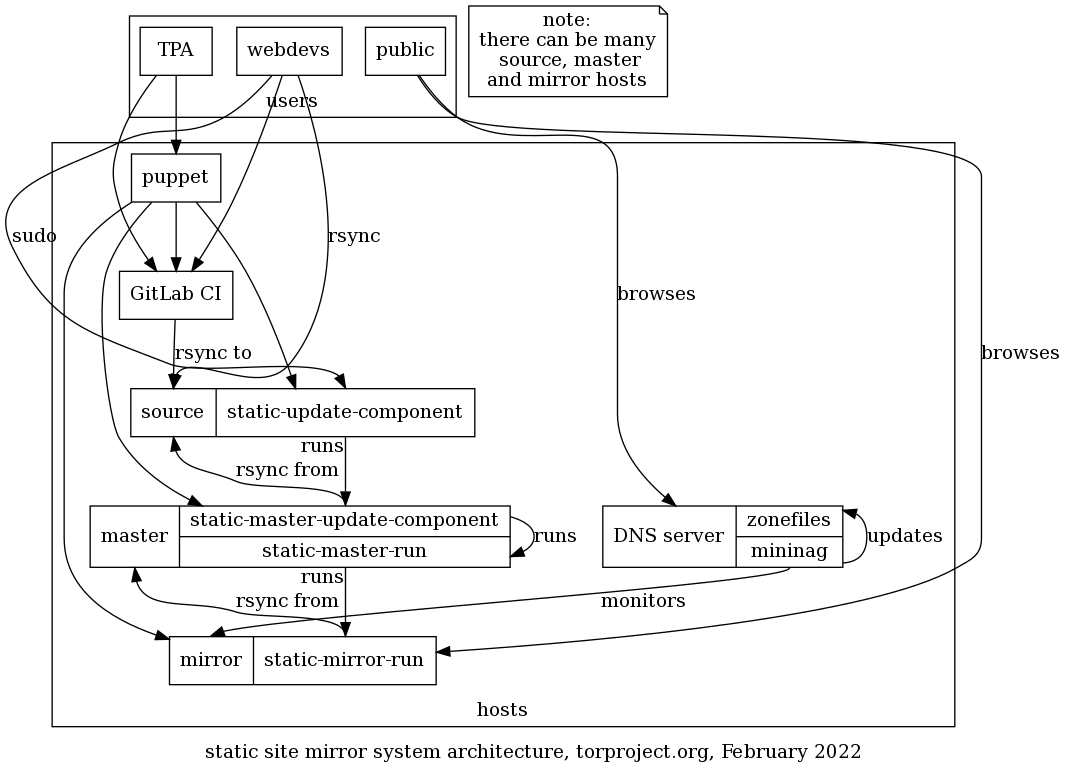
A narrative of how changes get propagated through the mirror network is detailed below.
A key advantage of that infrastructure is the higher availability it provides: whereas individual virtual machines are power-cycled for scheduled maintenance (e.g. kernel upgrades), static mirroring machines are removed from the DNS during their maintenance.
Change process
When data changes, the source is responsible for running
static-update-component, which instructs the master via SSH to run
static-master-update-component, transfers a new copy of the source
data to the master using rsync(1) and, upon successful copy, swaps
it with the current copy.
The current copy on the master is then distributed to all actual
mirrors, again placing a new copy alongside their current copy using
rsync(1).
Once the data successfully made it to all mirrors, the mirrors are instructed to swap the new copy with their current copy, at which point the updated data will be served to end users.
Source code inventory
The source code of the static mirror system is spread out in different
files and directories in the tor-puppet.git repository:
modules/staticsync/data/common.yamllists the "components"modules/roles/manifests/holds the different Puppet roles:roles::static_mirror- a generic mirror, seestaticsync::static_mirrorbelowroles::static_mirror_web- a web mirror, including most (but not necessarily all) components defined in the YAML configuration. configures Apache (which the above doesn't). includesroles::static_mirror(and thereforestaticsync::static_mirror)roles::static_mirror_onion- configures the hidden services for the web mirrors defined aboveroles::static_source- a generic static source, seestaticsync::static_source, belowroles::static_master- a generic static master, seestaticsync::static_masterbelow
modules/staticsync/is the core Puppet module holding most of the source code:staticsync::static_source- source, which:- exports the static user SSH key to the master, punching a hole in the firewall
- collects the SSH keys from the master(s)
staticsync::static_mirror- a mirror which does the above and:- deploys the
static-mirror-runandstatic-mirror-run-allscripts (see below) - configures a cron job for
static-mirror-run-all - exports a configuration snippet of
/etc/static-clients.conffor the master
- deploys the
staticsync::static_master- a master which:- deploys the
static-master-runandstatic-master-update-componentscripts (see below) - collects the
static-clients.confconfiguration file, which is the hostname ($::fqdn) of each of thestatic_sync::static_mirrorexports - configures the
basedir(currently/srv/static.torproject.org) anduserhome directory (currently/home/mirroradm) - collects the SSH keys from sources, mirrors and other masters
- exports the SSH key to the mirrors and sources
- deploys the
staticsync::base, included by all of the above, deploys:/etc/static-components.conf: a file derived from themodules/staticsync/data/common.yamlconfiguration file/etc/staticsync.conf: polyglot (bash and Python) configuration file propagating thebase(currently/srv/static.torproject.org,masterbase(currently$base/master) andstaticuser(currentlymirroradm) settingsstaticsync-ssh-wrapandstatic-update-component(see below)
TODO: try to figure out why we have /etc/static-components.conf and
not directly the YAML file shipped to hosts, in
staticsync::base. See the static-components.conf.erb Puppet
template.
NOTE: the modules/staticsync/data/common.yaml was previously known
as modules/roles/misc/static-components.yaml but was migrated into
Hiera as part of tpo/tpa/team#30020.
Scripts walk through
-
static-update-componentis run by the user on the source host.If not run under sudo as the
staticuseralready, itsudo's to thestaticuser, re-executing itself. It then SSH to thestatic-masterfor that component to runstatic-master-update-component.LOCKING: none, but see
static-master-update-component -
static-master-update-componentis run on the master hostIt
rsync's the contents from the source host to the static master, and then triggersstatic-master-runto push the content to the mirrors.The sync happens to a new
<component>-updating.incoming-XXXXXXdirectory. On sync success,<component>is replaced with that new tree, and thestatic-master-runtrigger happens.LOCKING: exclusive locks are held on
<component>.lock -
static-master-runtriggers all the mirrors for a component to initiate syncs.When all mirrors have an up-to-date tree, they are instructed to update the
cursymlink to the new tree.To begin with,
static-master-runcopies<component>to<component>-current-push.This is the tree all the mirrors then sync from. If the push was successful,
<component>-current-pushis renamed to<component>-current-live.LOCKING: exclusive locks are held on
<component>.lock -
static-mirror-runruns on a mirror and syncs components.There is a symlink called
curthat points to eithertree-aortree-bfor each component. thecurtree is the one that is live, the other one usually does not exist, except when a sync is ongoing (or a previous one failed and we keep a partial tree).During a sync, we sync to the
tree-<X>that is not the live one. When instructed bystatic-master-run, we update the symlink and remove the old tree.static-mirror-runrsync's either-current-pushor-current-livefor a component.LOCKING: during all of
static-mirror-run, we keep an exclusive lock on the<component>directory, i.e., the directory that holdstree-[ab]andcur. -
static-mirror-run-allRun
static-mirror-runfor all components on this mirror, fetching the-live-tree.LOCKING: none, but see
static-mirror-run. -
staticsync-ssh-wrapwrapper for ssh job dispatching on source, master, and mirror.
LOCKING: on master, when syncing
-live-trees, a shared lock is held on<component>.lockduring the rsync process.
The scripts are written in bash except static-master-run, written in
Python 2.
Authentication
The authentication between the static site hosts is entirely done through
SSH. The source hosts are accessible by normal users, which can sudo
to a "role" user which has privileges to run the static sync scripts
as sync user. That user then has privileges to contact the master
server which, in turn, can login to the mirrors over SSH as well.
The user's sudo configuration is therefore critical and that
sudoers configuration could also be considered part of the static
mirror system.
The GitLab runners have SSH access to the static-shim service infrastructure, so it can build and push websites, through a private key kept in the project, the public part of which is deployed by Puppet.
Jenkins build jobs
WARNING: Jenkins was retired in late 2021. This documentation is now irrelevant and is kept only for historical purposes. The static-shim with GitLab CI has replaced this.
Jenkins is used to build some websites and push them to the static
mirror infrastructure. The Jenkins jobs get triggered from git-rw
git hooks, and are (partially) defined in jenkins/tools.git and
jenkins/jobs.git. Those are fed into jenkins-job-builder to
build the actual job. Those jobs actually build the site with hugo or
lektor and package an archive that is then fetched by the static
source.
The build scripts are deployed on staticiforme, in the
~torwww home directory. Those get triggered through the
~torwww/bin/ssh-wrap program, hardcoded in
/etc/ssh/userkeys/torwww, which picks the right build job based on
the argument provided by the Jenkins job, for example:
- shell: "cat incoming/output.tar.gz | ssh torwww@staticiforme.torproject.org hugo-website-{site}"
Then the wrapper eventually does something like this to update the static component on the static source:
rsync --delete -v -r "${tmpdir}/incoming/output/." "${basedir}"
static-update-component "$component"
Issues
There is no issue tracker specifically for this project, File or search for issues in the team issue tracker with the ~static-component label.
Monitoring and testing
Static site synchronisation is monitored in Nagios, using a block in
nagios-master.cfg which looks like:
-
name: mirror static sync - extra
check: "dsa_check_staticsync!extra.torproject.org"
hosts: global
servicegroups: mirror
That script (actually called dsa-check-mirrorsync) actually makes an
HTTP request to every mirror and checks the timestamp inside a "trace"
file (.serial) to make sure everyone has the same copy of the site.
There's also a miniature reimplementation of Nagios called mininag which runs on the DNS server. It performs health checks on the mirrors and takes them out of the DNS zonefiles if they become unavailable or have a scheduled reboot. This makes it possible to reboot a server and have the server taken out of rotation automatically.
Logs and metrics
All tor webservers keep a minimal amount of logs. The IP address and
time (but not the date) are clear (00:00:00). The referrer is
disabled on the client side by sending the Referrer-Policy "no-referrer" header.
The IP addresses are replaced with:
0.0.0.0- HTTP request0.0.0.1- HTTPS request0.0.0.2- hidden service request
Logs are kept for two weeks.
Errors may be sent by email.
Metrics are scraped by Prometheus using the "Apache" exporter.
Backups
The source hosts are backed up with Bacula without any special
provision.
TODO: check if master / mirror nodes need to be backup. Probably not?
Other documentation
Discussion
Overview
The goal of this discussion section is to consider improvements to the static site mirror system at torproject.org. It might also apply to debian.org, but the focus is currently on TPO.
The static site mirror system has been designed for hosting Debian.org content. Interestingly, it is not used for the operating system mirrors itself, which are synchronized using another, separate system (archvsync).
The static mirror system was written for Debian.org by Peter Palfrader. It has also been patches by other DSA members (Stephen Gran and Julien Cristau both have more than 100 commits on the old code base).
This service is critical: it distributes the main torproject.org websites, but also software releases like the tor project source code and other websites.
Limitations
The maintenance status of the mirror code is unclear: while it is
still in use at Debian.org, it is made of a few sets of components
which are not bundled in a single package. This makes it hard to
follow "upstream", although, in theory, it should be possible to
follow the dsa-puppet repository. In practice, that's pretty
difficult because the dsa-puppet and tor-puppet repositories have
disconnected histories. Even if they would have a common ancestor, the
code is spread in multiple directories, which makes it hard to
track. There has been some refactoring to move most of the code in a
staticsync module, but we still have files strewn over other
modules.
The static site system has no unit tests, linting, release process, or CI. Code is deployed directly through Puppet, on the live servers.
There hasn't been a security audit of the system, as far as we could tell.
Python 2 porting is probably the most pressing issue in this project:
the static-master-run program is written in old Python 2.4
code. Thankfully it is fairly short and should be easy to port.
The YAML configuration duplicates the YAML parsing and data structures present in Hiera, see issue 30020 and puppet).
Jenkins integration
NOTE: this section is now irrelevant, because Jenkins was retired in favor of the static-shim to GitLab CI. A new site now requires only a change in GitLab and Puppet, successfully reducing this list to 2 services and 2 repositories.
For certain sites, the static site system requires Jenkins to build websites, which further complicates deployments. A static site deployment requiring Jenkins needs updates on 5 different repositories, across 4 different services:
- a new static component in the (private)
tor-puppet.gitrepository - a build script in the jenkins/tools.git repository
- a build job in the jenkins/jobs.git repository
- a new entry in the ssh wrapper in the admin/static-builds.git repository
- a new entry in the
gitolite-admin.gitrepository
Goals
Must have
- high availability: continue serving content even if one (or a few?) servers go down
- atomicity: the deployed content must be coherent
- high performance: should be able to saturate a gigabit link and withstand simple DDOS attacks
Nice to have
- cache-busting: changes to a CSS or JavaScript file must be propagated to the client reasonably quickly
- possibly host Debian and RPM package repositories
Non-Goals
- implement our own global content distribution network
Approvals required
Should be approved by TPA.
Proposed Solution
The static mirror system certainly has its merits: it's flexible, powerful and provides a reasonably easy to deploy, high availability service, at the cost of some level of obscurity, complexity, and high disk space requirements.
Cost
Staff, mostly. We expect a reduction in cost if we reduce the number of copies of the sites we have to keep around.
Alternatives considered
- GitLab pages could be used as a source?
- the cache system could be used as a replacement in the front-end
TODO: benchmark gitlab pages vs (say) apache or nginx.
GitLab pages replacement
It should be possible to replace parts or the entirety of the system progressively, however. A few ideas:
- the mirror hosts could be replaced by the cache system. this would possibly require shifting the web service from the mirror to the master or at least some significant re-architecture
- the source hosts could be replaced by some parts of the GitLab Pages system. unfortunately, that system relies on a custom webserver, but it might be possible to bypass that and directly access the on-disk files provided by the CI.
The architecture would look something like this:
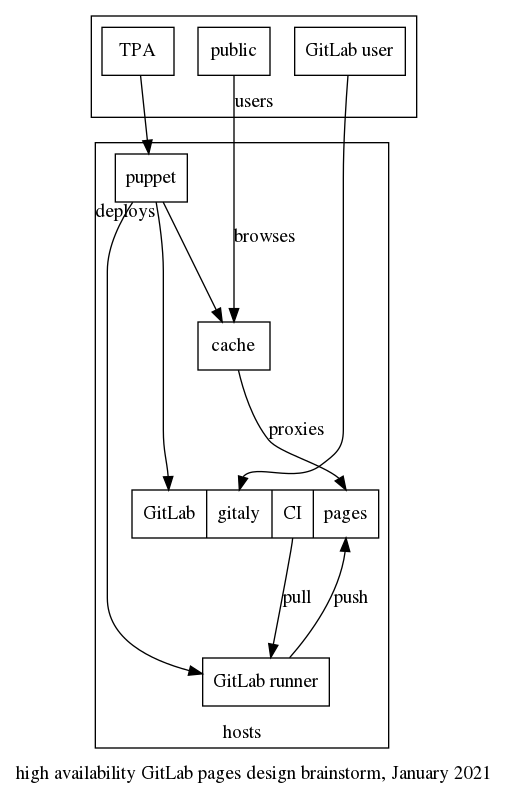
Details of the GitLab pages design and installation is available in our GitLab documentation.
Concerns about this approach:
- GitLab pages is a custom webserver which issues TLS certs for the custom domains and serves the content, it's unclear how reliable or performant that server is
- The pages design assumes the existence of a shared filesystem to deploy content, currently NFS, but they are switching to S3 (as explained above), which introduces significant complexity and moves away from the classic "everything is a file" approach
- The new design also introduces a dependency on the main GitLab rails API for availability, which could be a concern, especially since that is usually a "non-free" feature (e.g. PostgreSQL replication and failover, Database load-balancing, traffic load balancer, Geo disaster recovery and, generally, all of Geo and most availability components are non-free).
- In general, this increases dependency on GitLab for deployments
Next steps (OBSOLETE, see next section):
- check if the GitLab Pages subsystem provides atomic updates
- see how GitLab Pages can be distributed to multiple hosts and how scalable it actually is or if we'll need to run the cache frontend in front of it. update: it can, but with significant caveats in terms of complexity, see above
- setup GitLab pages to test with small, non-critical websites (e.g. API documentation, etc)
- test the GitLab pages API-based configuration and see how it handles outages of the main rails API
- test the object storage system and see if it is usable, debuggable, highly available and performant enough for our needs
- keep track of upstream development of the GitLab pages architecture, see this comment from anarcat outlining some of those concerns
GitLab pages and Minio replacement
The above approach doesn't scale easily: the old GitLab pages implementation relied on NFS to share files between the main server and the GitLab pages server, so it was hard to deploy and scale.
The newer implementation relies on "object storage" (ie. S3) for content, and pings the main GitLab rails app for configuration.
In this comment of the related architecture update, it was acknowledged that "the transition from NFS to API seems like something that eventually will reduce the availability of Pages" but:
it is not that simple because how Pages discovers configuration has impact on availability too. In environments operating in a high scale, NFS is actually a bottleneck, something that reduces the overall availability, and this is certainly true at GitLab. Moving to API allows us to simplify Pages <-> GitLab communication and optimize it beyond what would be possible with modeling communication using NFS.
[...] But requests to GitLab API are also cached so GitLab Pages can survive a short outage of GitLab API. Cache expiration policy is currently hard-coded in the codebase, but once we address issue #281 we might be able to make it configurable for users running their GitLab on-premises too. This can help with reducing the dependency on the GitLab API.
Object storage itself (typically implemented with minio) is itself scalable and highly available, including Active-Active replicas. Object storage could also be used for other artifacts like Docker images, packages, and so on.
That design would take an approach similar to the above, but possibly discarding the cache system in favor of GitLab pages as caching frontends. In that sense:
- the mirror hosts could be replaced by the GitLab pages and Minio
- the source hosts could be replaced by some parts of the GitLab Pages system. unfortunately, that system relies on a custom webserver, but it might be possible to bypass that and directly access the on-disk files provided by the CI.
- there would be no master intermediate service
The architecture would look something like this:
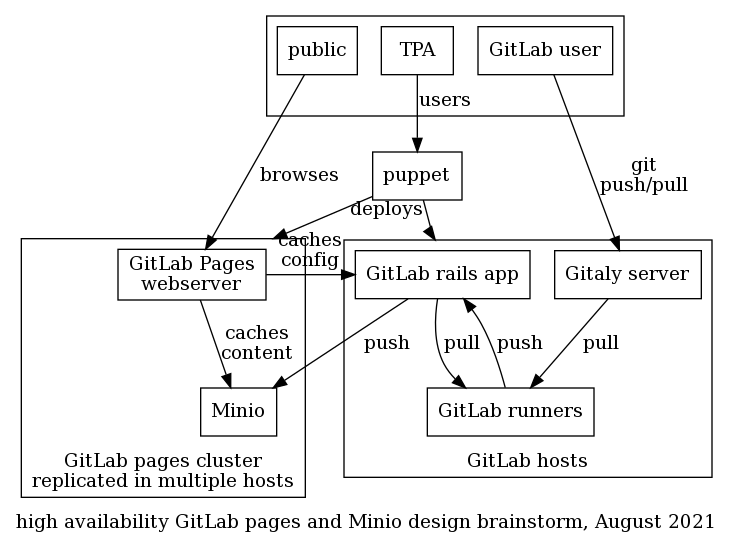
This would deprecate the entire static-component architecture, which would eventually be completely retired.
The next step is to figure out a plan for this. We could start by testing custom domains (see tpo/tpa/team#42197 for that request) in a limited way, to see how it behaves and if we're liking it. We would need to see how it interacts with torproject.org domains and there's automation we could do there. We would also need to scale GitLab first (tpo/tpa/team#40479) and possibly wait for the "webserver/website" stages of the Tails merge (TPA-RFC-73) before moving ahead.
This could look something like this:
- merge websites/web servers with Tails (tpo/tpa/team#41947)
- make an inventory of all static components and evaluate how they could migrate to GitLab pages
- limited custom domains tests (tpo/tpa/team#42197)
- figure out how to create/manage torproject.org custom domains
- scale gitlab (tpo/tpa/team#40479)
- scale gitlab pages for HA across multiple points of presence
- migrate test sites (e.g. status.tpo)
- migrate prod sites progressively
- retire static-components system
This implies a migration of all static sites into GitLab CI, by the
way. Many sites are currently hand-crafted through shell commands, so
that would need collaboration between multiple teams. dist.tpo might
be particularly challenging, but has been due for a refactoring for a
while anyways.
Note that the above roadmap is just a temporary idea written in June 2025 by anarcat. A version of that is being worked on in the tails website merge issue for 2026.
Replacing Jenkins with GitLab CI as a builder
NOTE: See also the Jenkins documentation and ticket 40364 for more information on the discussion on the different options that were considered on that front.
We have settled for the "SSH shim" design, which is documented in the static-shim page.
This is the original architecture design as it was before the migration:
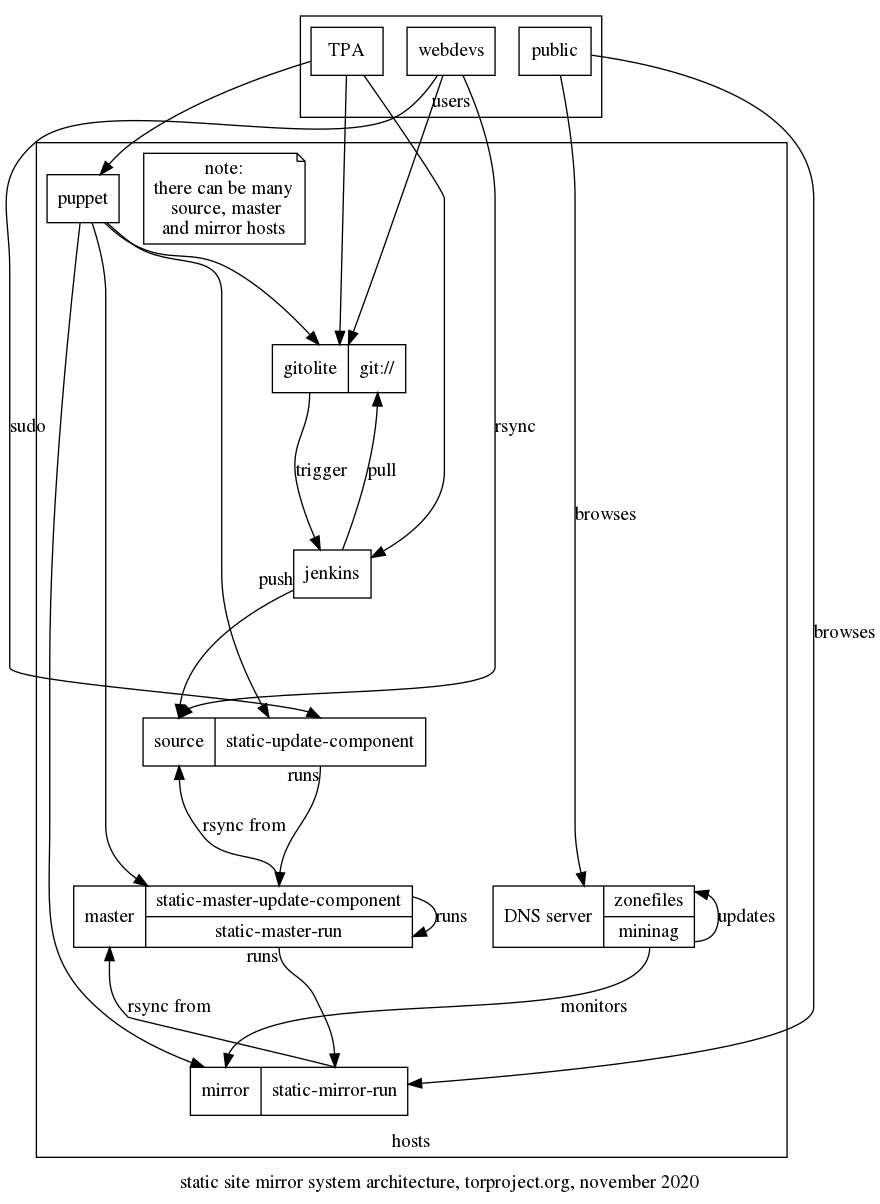
The static/GitLab shim allows GitLab CI to push updates on websites hosted in the static mirror system.
Tutorial
Deploying a static site from GitLab CI
First, make sure the site builds in GitLab CI. A build stage
MUST be used. It should produce the artifacts used by the jobs defined
in the deploy stage which are provided in the
static-shim-deploy.yml template. How to build the website will
vary according to the site, obviously. See the
Hugo build instructions below for that
specific generator.
TODO: link to documentation on how to build Lektor sites in GitLab CI.
A convenient way to preview website builds and ensure builds are working correctly in GitLab CI is to deploy to GitLab Pages. See the instructions on publishing GitLab pages within the GitLab documentation.
When the build stage is verified to work correctly, include the
static-shim-deploy.yml template in .gitlab-ci.yml with a snippet
like this:
variables:
SITE_URL: example.torproject.org
include:
project: tpo/tpa/ci-templates
file: static-shim-deploy.yml
The SITE_URL parameter must reflect the FQDN of the website as
defined in the static-components.yml file.
For example, for https://status.torproject.org, the .gitlab-ci.yml
file looks like this (build stage elided for simplicity):
variables:
SITE_URL: status.torproject.org
include:
project: tpo/tpa/ci-templates
file: static-shim-deploy.yml
First, create the production deployment environment. Navigate to the
project's Deploy -> Environments section (previously Settings ->
Deployments -> Environments) and click Create an environment. Enter production in the Name field and the
production URL in External URL
(eg. https://status.torproject.org). Leave the GitLab agent field
empty.
Next, you need to set an SSH key in the project. First, generate a password-less key locally:
ssh-keygen -f id_rsa -P "" -C "static-shim deploy key"
Then in Settings -> CI/CD -> Variables, pick Add variable, with the
following parameters:
- Key:
STATIC_GITLAB_SHIM_SSH_PRIVATE_KEY - Value: the content of the
id_rsafile, above (yes, it's the private key) - Type:
file - Environment scope:
production - Protect variable: checked
- Masked variable: unchecked
- Expand variable reference: unchecked (not really necessary, but a good precaution)
Then the public part of that key needs to be added in Puppet. This can only be done by TPA, so file a ticket there if you need assistance. For TPA, see below for the remaining instructions.
Once you have sent the public key to TPA, you MUST destroy your local copy of the key, to avoid any possible future leaks.
You can commit the above changes to the .gitlab-ci.yml file, but
TPA needs to do its magic for the deploy stage to work.
Once deployments to the static mirror system are working, the pages
job can be removed or disabled.
Working with Review Apps
Review Apps is a GitLab feature that facilitates previewing changes in project branches and Merge Requests.
When a new branch is pushed to the project, GitLab will automatically
run the build process on that branch and deploy the result, if
successful, to a special URL under review.torproject.net. If a MR
exists for the branch, a link to that URL is displayed in the MR page
header.
If additional commits are pushed to that branch, GitLab will rerun the
build process and update the deployment at the corresponding
review.torproject.net URL. Once the branch is deleted, which happens
for example if the MR is merged, GitLab automatically runs a job to
cleanup the preview build from review.torproject.net.
This feature is automatically enabled when static-shim-deploy.yml is
used. To opt-out of Review Apps, define SKIP_REVIEW_APPS: 1 in the
variables key of .gitlab-ci.yml.
Note that the
REVIEW_STATIC_GITLAB_SHIM_SSH_PRIVATE_KEYneeds to be populated in the project for this to work. This is the case for all projects undertpo/web. The public version of that key is stored in Puppet'shiera/common/staticsync.yaml, in thereview.torproject.netkey of thestaticsync::gitlab_shim::ssh::siteshash.
The active environments linked to Review Apps can be listed by
navigating to the project page in Deployments -> Environments.
An HTTP authentication is required to access these environments: the
username is tor-www and the password is blank. These credentials
should be automatically present in the URLs used to access Review Apps
from the GitLab interface.
Please note that Review Apps do not currently work for Merge Requests
created from personal forks. This is because personal forks do not have
access to the SSH private key required to deploy to the static mirror
system, for security reasons. Therefore, it's recommended that web
project contributors be granted Developer membership so they're
allowed to push branches in the canonical repository.
Finally, Review Apps are meant to be transient. As such, they are auto-stopped (deleted) after 1 week without being updated.
Working with a staging environment
Some web projects have a specific staging area that is separate from
GitLab Pages and review.torproject.net. Those sites are deployed as
subdomains of *.staging.torproject.net on the static mirror system.
For example, the staging URL for blog.torproject.org is
blog.staging.torproject.net.
Staging environments can be useful in various scenarios, such as when
the build job for the production environment is different than the one
for Review Apps, so a staging URL is useful to be able to preview a full
build before being deployed to production. This is especially
important for large websites like www.torproject.org and the
blog which use the "partial build" feature in Lego to speed up the
review stage. In that case, the staging site is a full build that
takes longer, but then allows prod to be launched quicker, after a
review of the full build.
For other sites, the above and automatic review.torproject.net
configuration is probably sufficient.
To enable a staging environment, first a DNS entry must be created
under *.staging.torproject.net and pointed to
static.torproject.org. Then some configuration changes are needed in
Puppet so the necessary symlinks and vhosts are created on the static
web mirrors. These steps must be done by TPA, so please open a
ticket. For TPA, look at commits
262f3dc19c55ba547104add007602cca52444ffc and
118a833ca4da8ff3c7588014367363e1a97d5e52 for examples on how to do this.
Lastly, a STAGING_URL variable must be added to .gitlab-ci.yml with
the staging domain name (eg. blog.staging.torproject.net) as its
value.
Once this is in place, commits added the the default (main) branch
will automatically trigger a deployment to the staging URL and a manual
job for deployment to production. This manual job must then be
triggered by hand after the staging deployment is QA-cleared.
An HTTP authentication is required to access staging environments: the
username is tor-www and the password is blank. These credentials
should be automatically present in the Open and View deployment
links in the GitLab interface.
How-to
Adding a new static site shim in Puppet
The public key mentioned above should be added in the tor-puppet.git repository, in the
hiera/common/staticsync.yaml file, in the staticsync::gitlab_shim::ssh::sites
hash.
There, the site URL is the key and the public key (only the key part,
no ssh-rsa prefix or comment suffix) is the value. For example, this
is the entry for status.torproject.org:
staticsync::gitlab_shim::ssh::sites:
status.torproject.org: "AAAAB3NzaC1yc2EAAAADAQABAAABgQC3mXhQENCbOKgrhOWRGObcfqw7dUVkPlutzHpycRK9ixhaPQNkMvmWMDBIjBSviiu5mFrc6safk5wbOotQonqq2aVKulC4ygNWs0YtDgCtsm/4iJaMCNU9+/78TlrA0+Sp/jt67qrvi8WpLF/M8jwaAp78s+/5Zu2xD202Cqge/43AhKjH07TOMax4DcxjEzhF4rI19TjeqUTatIuK8BBWG5vSl2vqDz2drbsJvaLbjjrfbyoNGuK5YtvI/c5FkcW4gFuB/HhOK86OH3Vl9um5vwb3DM2HVMTiX15Hw67QBIRfRFhl0NlQD/bEKzL3PcejqL/IC4xIJK976gkZzA0wpKaE7IUZI5yEYX3lZJTTGMiZGT5YVGfIUFQBPseWTU+cGpNnB4yZZr4G4o/MfFws4mHyh4OAdsYiTI/BfICd3xIKhcj3CPITaKRf+jqPyyDJFjEZTK/+2y3NQNgmAjCZOrANdnu7GCSSz1qkHjA2RdSCx3F6WtMek3v2pbuGTns="
At this point, the deploy job should be able to rsync the content to
the static shim, but the deploy will still fail because the
static-component configuration does not match and the
static-update-component step will fail.
To fix this, the static-component entry should be added (or
modified, if it already exists, in
modules/staticsync/data/common.yaml) to point to the shim. This, for
example, is how research is configured right now:
research.torproject.org:
master: static-master-fsn.torproject.org
source: static-gitlab-shim.torproject.org:/srv/static-gitlab-shim/research.torproject.org/public
It was migrated from Jenkins with a commit like this:
modified modules/staticsync/data/common.yaml
@@ -99,7 +99,7 @@ components:
source: staticiforme.torproject.org:/srv/research.torproject.org/htdocs-staging
research.torproject.org:
master: static-master-fsn.torproject.org
- source: staticiforme.torproject.org:/srv/research.torproject.org/htdocs
+ source: static-gitlab-shim.torproject.org:/srv/static-gitlab-shim/research.torproject.org/public
rpm.torproject.org:
master: static-master-fsn.torproject.org
source: staticiforme.torproject.org:/srv/rpm.torproject.org/htdocs
After commit and push, Puppet needs to run on the shim and master, in the above case:
for host in static-gitlab-shim static-master-fsn ; do
ssh $host.torproject.org puppet agent --test
done
The next pipeline should now succeed in deploying the site in GitLab.
If the site is migrated from Jenkins, make sure to remove the old Jenkins job and make sure the old site is cleared out from the previous static source:
ssh staticiforme.torproject.org rm -rf /srv/research.torproject.org/
Typically, you will also want to archive the git repository if it hasn't already been migrated to GitLab.
Building a Hugo site
Normally, you should be able to deploy a Hugo site by including the
template and setting a few variables. This .gitlab-ci.yml file,
taken from the status.tpo .gitlab-ci.yml, should be sufficient:
image: registry.gitlab.com/pages/hugo/hugo_extended:0.65.3
variables:
GIT_SUBMODULE_STRATEGY: recursive
SITE_URL: status.torproject.org
SUBDIR: public/
include:
project: tpo/tpa/ci-templates
file: static-shim-deploy.yml
build:
stage: build
script:
- hugo
artifacts:
paths:
- public
# we'd like to *not* rebuild hugo here, but pages fails with:
#
# jobs pages config should implement a script: or a trigger: keyword
pages:
stage: deploy
script:
- hugo
artifacts:
paths:
- public
only:
- merge_requests
See below if this is an old hugo site, however.
Building an old Hugo site
Unfortunately, because research.torproject.org was built a long time
ago, newer Hugo releases broke its theme and the newer versions
(tested 0.65, 0.80, and 0.88) all fail in one way or another. In this
case, you need to jump through some hoops to have the build work
correctly. I did this for research.tpo, but you might need a
different build system or Docker images:
# use an older version of hugo, newer versions fail to build on first
# run
#
# gohugo.io does not maintain docker images and the one they do
# recommend fail in GitLab CI. we do not use the GitLab registry
# either because we couldn't figure out the right syntax to get the
# old version from Debian stretch (0.54)
image: registry.hub.docker.com/library/debian:buster
include:
project: tpo/tpa/ci-templates
file: static-shim-deploy.yml
variables:
GIT_SUBMODULE_STRATEGY: recursive
SITE_URL: research.torproject.org
SUBDIR: public/
build:
before_script:
- apt update
- apt upgrade -yy
- apt install -yy hugo
stage: build
script:
- hugo
artifacts:
paths:
- public
# we'd like to *not* rebuild hugo here, but pages fails with:
#
# jobs pages config should implement a script: or a trigger: keyword
#
# and even if we *do* put a dummy script (say "true"), this fails
# because it runs in parallel with the build stage, and therefore
# doesn't inherit artifacts the way a deploy stage normally would.
pages:
stage: deploy
before_script:
- apt update
- apt upgrade -yy
- apt install -yy hugo
script:
- hugo
artifacts:
paths:
- public
only:
- merge_requests
Manually delete a review app
If, for some reason, a stop-review job did not run or failed to run,
the review environment will still be on the static-shim server. This
could use up precious disk space, so it's preferable to remove it by
hand.
The first thing is to find the review slug. If, for example, you have a URL like:
https://review.torproject.org/tpo/tpa/status-site/review-extends-8z647c
The slug will be:
review-extends-8z647c
Then you need to remove that directory on the static-gitlab-shim
server. Remember there is a subdir to squeeze in there. The above
URL would be deleted with:
rm -rf /srv/static-gitlab-shim/review.torproject.net/public/tpo/tpa/status-site/review-extends-8z647c/
Then sync the result to the mirrors:
static-update-component review.torproject.net
Converting a job from Jenkins
NOTE: this shouldn't be necessary anymore, as Jenkins was retired at the end of 2021. It is kept for historical purposes.
This is how to convert a given website from Jenkins to GitLab CI:
-
include ci-templates
lektor.ymljob - site builds and works in gitlab pages
- add the deploy-static job and SSH key to GitLab CI
- deploy the SSH key and static site in Puppet
-
run the deploy-static job, make sure the site still works and
was deployed properly (
curl -sI https://example.torproject.org/ | grep -i Last-Modified) - archive the repo on gitolite
- remove the old site on staticiforme
- fully retire the Jenkins jobs
- notify users about the migration
Upstream GitLab also has generic documentation on how to migrate from Jenkins which could be useful for us.
Pager playbook
A typical failure will be that users complains that their
deploy_static job fails. We have yet to see such a failure occur,
but if it does, users should provide a link to the Job log, which
should provide more information.
Disaster recovery
Revert a deployment mistake
It's possible to quickly revert to a previous version of a website via GitLab Environments.
Simply navigate to the project page -> Deployments -> Environments -> production. Shown here will be all past deployments to this environment. To the left of each deployment is a Rollback environment button. Clicking this button will redeploy this version of the website to the static mirror system, overwriting the current version.
It's important to note that the rollback will only work as long as the build artifacts are available in GitLab. By default, artifacts expire after two weeks, so its possible to rollback to any version within two weeks of the present day. Unfortunately, at the moment GitLab shows a rollback button even if the artifacts are unavailable.
Server lost
The service is "cattle" in that it can easily be rebuilt from scratch
if the server is completely lost. Naturally it strongly depends on
GitLab for operation. If GitLab would fail, it should still be
possible to deploy sites to the static mirror system by deploying them
by hand to the static shim and calling static-update-component
there. It would be preferable to build the site outside of the
static-shim server to avoid adding any extra packages we do not need
there.
The status site is particularly vulnerable to disasters here, see the status-site disaster recovery documentation for pointers on where to go in case things really go south.
GitLab server compromise
Another possible disaster that could happen is a complete GitLab compromise or hostile GitLab admin. Such an attacker could deploy any site they wanted and therefore deface or sabotage critical websites, introducing hostile code in thousands of users. If such an event would occur:
-
remove all SSH keys from the Puppet configuration, specifically in the
staticsync::gitlab_shim::ssh::sitesvariable, defined inhiera/common.yaml. -
restore sites from a known backup. the backup service should have a copy of the static-shim content
-
redeploy the sites manually (
static-update-component $URL)
The static shim server itself should be fairly immune to compromise as
only TPA is allowed to login over SSH, apart from the private keys
configured in the GitLab projects. And those are very restricted in
what they can do (i.e. only rrsync and static-update-component).
Deploy artifacts manually
If a site is not deploying normally, it's still possible to deploy a
site by hand by downloading and extracting the artifacts using the
static-gitlab-shim-pull script.
For example, given the Pipeline 13285 has job 38077, we can tell the puller to deploy in debugging mode with this command:
sudo -u static-gitlab-shim /usr/local/bin/static-gitlab-shim-pull --artifacts-url https://gitlab.torproject.org/tpo/tpa/status-site/-/jobs/38077/artifacts/download --site-url status.torproject.org --debug
The --artifacts-url is the Download link in the job page. This
will:
- download the artifacts (which is a ZIP file)
- extract them in a temporary directory
rsync --checksumthem to the actual source directory (to avoid spurious timestamp changes)- call
static-update-componentto deploy the site
Note that this script was part of the webhook implementation and might
eventually be retired if that implementation is completely
removed. This logic now lives in the static-shim-deploy.yml
template.
Reference
Installation
A new server can be built by installing a regular VM with the
staticsync::gitlab_shim class. The server also must have this line
in its LDAP host entry:
allowedGroups: mirroradm
SLA
There is no defined SLA for this service right now. Websites should keep working even if it goes down as it is only a static source, but, during downtimes, updates to websites are not possible.
Design
The static shim was built to allow GitLab CI to deploy content to the static mirror system.
They way it works is that GitLab CI jobs (defined in the
.gitlab-ci.yml file) build the site and then push it to a static
source (currently static-gitlab-shim.torproject.org) with rsync over
SSH. Then the CI job also calls the static-update-component script
for the master to pull the content just like any other static
component.
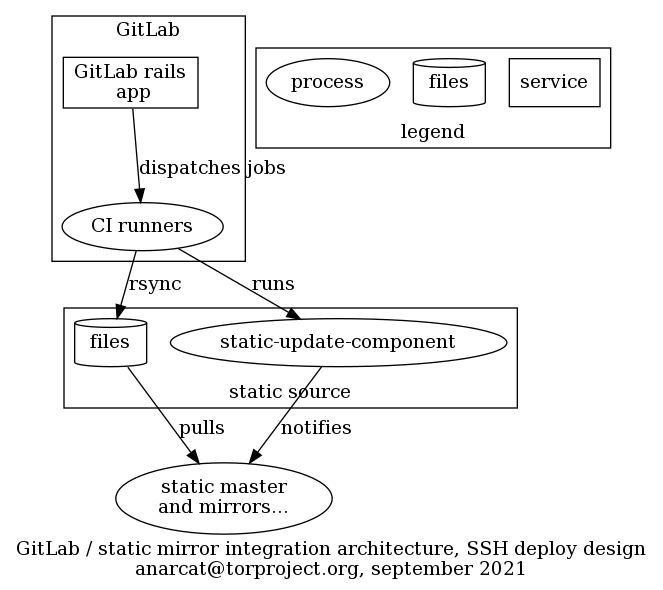
The sites are deployed on a separate static-source to avoid adding
complexity to the already complicated, general purpose static source
(staticiforme). This has the added benefit that the source can be
hardened in the sense that access is restricted to TPA (which is not
the case of staticiforme).
The mapping between webhooks and static components is established in
Puppet, which writes the SSH configuration, hard-coding the target
directory which corresponds to the source directory in the
modules/staticsync/data/common.yaml file of the tor-puppet.git
repository. This is done to ensure that a given
GitLab project only has access to a single site and cannot overwrite
other sites.
This involves that each site configured in this way must have a secret token (in GitLab) and configuration (in Hiera) created by TPA in Puppet. The secret token must also be configured in the GitLab project. This could be automated by the judicious use of the GitLab API using admin credentials, but considering that new sites are not created very frequently, it is currently be done by hand.
The SSH key is generated by the user, but that could also be managed by Trocla, although only the newer versions support that functionality, and that version is not currently available in Debian.
A previous design involved a webhook written in Python, but now most
of the business logic resides in a static-shim-deploy.yml template
template which is basically a shell script embedded in a YAML
file. (We have considered taking this out of the template and writing
a proper Python script, but then users would have to copy that script
over their repo, or clone a repo in CI, and that seems impractical.)
Another thing we considered is to set instance-level templates but it seems that feature is not available in GitLab's free software version.
The CI hooks are deployed by users, which will typically include the
above template in their own .gitlab-ci.yml file.
Template variables
Variables used in the static-shim-deploy.yml template which
projects can override:
-
STATIC_GITLAB_SHIM_SSH_PRIVATE_KEY: SSH private key for deployment to the static mirror system, required for deploying tostagingandproductionenvironments. This variable must be defined in each project's CI/CD variables settings and scoped to eitherstagingorproductionenvironments. -
REVIEW_STATIC_GITLAB_SHIM_SSH_PRIVATE_KEY: SSH private key for deployment to the reviews environment, AKAreviews.torproject.net. This variable is available by default to projects in the GitLab Web group. Projects outside of it must define it in their CI/CD variables settings and scoped to thereviews/*wildcard environment. -
SITE_URL: (required) Fully-qualified domain name of the production deployment (eg. without leadinghttps://). -
STAGING_URL: (optional) Fully-qualified domain name of the staging deployment. When a staging URL is defined, deployments to theproductionenvironment are manual. -
SUBDIR: (optional) Directory containing the build artifacts, by default this is set topublic/.
Storage
Files are generated in GitLab CI as artifacts and stored there, which
makes it possible for them to be deployed by hand as well. A copy
is also kept on the static-shim server to make future deployments
faster. We use rsync --checksum to avoid updating the timestamps
even if the source file were just regenerated from scratch.
Authentication
The shim assumes that GitLab projects host a private SSH key and can
access the shim server over SSH with it. Access is granted, by Puppet
(tor-puppet.git repository, hiera/common.yaml file, in the
staticsync::gitlab_shim::ssh::sites hash) only to a specific
site.
The restriction is defined in the authorized_keys file, with
restrict and command= options. The latter restricts the public key
to only a specific site update, with a wrapper that will call
static-update-component on the right component or rrsync which is
rsync but limited to a specific directory. We also allow connections
only from GitLab over SSH.
This implies that the SITE_URL provided by the GitLab CI job over
SSH, whether it is for the rsync or static-update-component
commands, is actually ignored by the backend. It is used in the job
definition solely to avoid doing two deploys in parallel to the same
site, through the GitLab resource_group mechanism.
The public part of that key should be set in the GitLab project, as a
File variable called STATIC_GITLAB_SHIM_SSH_PRIVATE_KEY. This way
the GitLab runners get access to the private key and can deploy those
changes.
The impact of this is that a compromise on GitLab or GitLab CI can compromise all web sites managed by GitLab CI. While we do restrict what individual keys can do, a total compromise of GitLab could, in theory, leak all those private keys and therefore defeat those mechanisms. See the disaster recovery section for how such a compromise could be recovered from.
The GitLab runners, in turn, authenticate the SSH server through a
instance-level CI/CD variable called
STATIC_GITLAB_SHIM_SSH_HOST_KEYS which declares the public SSH host
keys for the server. Those need to be updated if the server is
re-deployed, which is unfortunate. An alternative might be to sign
public keys with an SSH CA (e.g. this guide) but then the CA
would also need to be present, so it's unclear that would be a
benefit.
Issues
There is no issue tracker specifically for this project, File or search for issues in the team issue tracker with the ~static-shim label.
This service was designed in ticket 40364.
Maintainer, users, and upstream
The shim was written by anarcat and is maintained by TPA. It is used by all "critical" websites managed in GitLab.
Monitoring and testing
There is no specific monitoring for this service, other than the usual server-level monitoring. If the service should fail, users will notice because their pipelines start failing.
Good sites to test that the deployment works are https://research.torproject.org/ (pipeline link, not critical) or https://status.torproject.org/ (pipeline link, semi-critical).
Logs and metrics
Jobs in GitLab CI have their own logs and retention policies. The static shim should not add anything special to this, in theory. In practice it's possible some private key leakage occurs if a user would display the content of their own private SSH key in the job log. If they use the provided template, this should not occur.
We do not maintain any metrics on this service, other than the usual server-level metrics.
Backups
No specific backup procedure is necessary for this server, outside of the automated basics. In fact, data on this host is mostly ephemeral and could be reconstructed from pipelines in case of a total server loss.
As mentioned in the disaster recovery section, if the GitLab server gets compromised, the backup should still contain previous good copies of the websites, in any case.
Other documentation
- TPA-RFC-10: Jenkins retirement
- GitLab's CI deployment mechanism blog post
- Design and launch ticket
- our static mirror system documentation
- our GitLab CI documentation
- Webhook homepage
- GitLab webhook documentation
Discussion
Overview
The static shim was built to unblock the Jenkins retirement project (TPA-RFC-10). A key blocker was that the static mirror system was strongly coupled with Jenkins: many high traffic and critical websites are built and deployed by Jenkins. Unless we wanted to completely retire the static mirror system (in favor, say, of GitLab Pages), we had to create a way for GitLab CI to deploy content to the static mirror system.
This section contains more in-depth discussions about the reasoning behind the project, discarded alternatives, and other ideas.
Goals
Note that those goals were actually written down once the server was launched, but they were established mentally before and during the deployment.
Must have
- deploy sites from GitLab CI to the static mirror system
- site A cannot deploy to site B without being explicitly granted permissions
- server-side (i.e. in Puppet) access control (i.e. user X can only deploy site B)
Nice to have
- automate migration from Jenkins to avoid manually doing many sites
- reusable GitLab CI templates
Non-Goals
- static mirror system replacement
Approvals required
TPA, part of TPA-RFC-10: Jenkins retirement.
Proposed Solution
We have decided to deploy sites over SSH from GitLab CI, see below for a discussion.
Cost
One VM, 20-30 hours of work, see tpo/tpa/team#40364 for time tracking.
Alternatives considered
This shim was designed to replace Jenkins with GitLab CI. The various options considered are discussed here, see also the Jenkins documentation and ticket 40364.
CI deployment
We considered using GitLab's CI deployment mechanism instead of webhooks, but originally decided against it for the following reasons:
-
the complexity is similar: both need a shared token (webhook secret vs SSH private key) between GitLab and the static source (the webhook design, however, does look way more complex than the deploy design, when you compare the two diagrams)
-
however, configuring the deployment variables takes more click (9 vs 5 in my count), and is slightly more confusing (e.g. what's "Protect variable"?) and possibly insecure (e.g. private key leakage if user forgets to click "Mask variable")
-
the deployment also requires custom code to be added to the
.gitlab-ci.ymlfile. in the context where we are considering using GitLab pages to replace the static mirror system in the long term, we prefer to avoid adding custom stuff to the CI configuration file and "pretend" that this is "just like GitLab pages" -
we prefer to open a HTTPS port than an SSH port to GitLab, from a security perspective, even if the SSH user would be protected by an proper
authorized_keys. in the context where we could consider locking down SSH access to only jump boxes, it would require an exception and is more error prone (e.g. if we somehow forget thecommand=override, we open full shell access)
After trying the webhook deployment mechanism (below), we decided to go back to the deployment mechanism instead. See below for details on the reasoning, and above for the full design of the current deployment.
webhook deployment
A designed based on GitLab webhooks was established, with a workflow that goes something like this:
- user pushes a change to GitLab, which ...
- triggers a CI pipeline
- CI runner picks up the jobs and builds the website, pushes the artifacts back to GitLab
- GitLab fires a webhook, typically on pipeline events
- webhook receives the ping and authenticates against a
configuration, mapping to a given
static-component - after authentication, the webhook fires a script
(
static-gitlab-shim-pull) static-gitlab-shim-pullparses the payload from the webhook and finds the URL for the artifacts- it extracts the artifacts in a temporary directory
- it runs
rsync -cinto the local static source, to avoid resetting timestamps - it fires the static-update-component command to propagate changes to the rest of the static-component system
A subset of those steps can be seen in the following design:
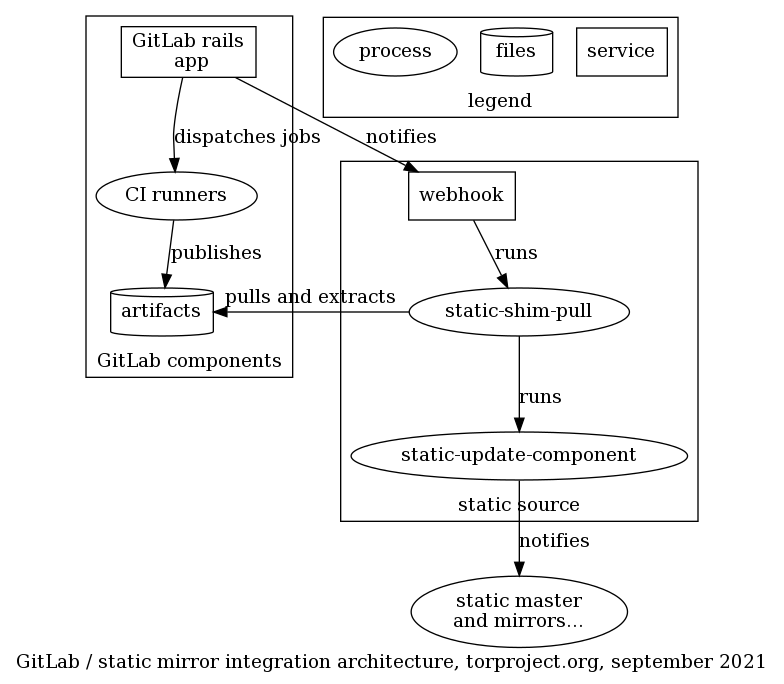
The shim components runs on a separate static-source, called
static-gitlab-shim-source. This is done to avoid adding complexity
to the already complicated, general purpose static source
(staticiforme). This has the added benefit that the source can be
hardened in the sense that access is restricted to TPA (which is not
the case of staticiforme).
The mapping between webhooks and static components is established in
Puppet, which generates the secrets and writes it to the webhook
configuration, along with the site_url which corresponds to the site
URL in the modules/staticsync/data/common.yaml file of the
tor-puppet.git repository. This is done to ensure that
a given GitLab project only has access to a single site and cannot
overwrite other sites.
This involves that each site configured in this way must have a secret token (in Trocla) and configuration (in Hiera) created by TPA in Puppet. The secret token must also be configured in the GitLab project. This could be automated by the judicious use of the GitLab API using admin credentials, but considering that new sites are not created very frequently, it could also be done by hand.
Unfortunately this design has two major flaws:
-
webhooks are designed to be fast and short-lived: most site deployments take longer than the pre-configured webhook timeout (10 seconds) and therefore cannot be deployed synchronously, which implies that...
-
webhook cannot propagate deployment errors back to the user meaningfully: even if they run synchronously, errors in webhooks do not show up in the CI pipeline, assuming the webhook manages to complete at all. if the webhook fails to complete in time, no output is available to the user at all. running asynchronously is even worse as deployment errors do not show up in GitLab at all and would require special monitoring by TPA, instead of delegating that management to users. It is possible to to see the list of recent webhook calls, in Settings -> Webhooks -> Edit -> Recent deliveries. But that is rather well-hidden.
Note that it may have been possible to change the 10 seconds timeout with:
gitlab_rails['webhook_timeout'] = 10
in the /etc/gitlab/gitlab.rb file (source). But static site
deployments can take a while, so it's not clear at all we can actually
wait for the full deployment.
In the short term, the webhook system has be used asynchronously (by
removing the include-command-output-in-response parameter in the
webhook config), but then the error reporting is even worse because
the caller doesn't even know if the deploy succeeds or fails.
We have since moved to the deployment system documented in the design section.
GitLab "Integrations"
Another approach we briefly considered is to write an integration into GitLab. We found the documentation for this was nearly nonexistent. It also meant maintaining a bundle of Ruby code inside GitLab, which seemed impractical, at best.
A "status" dashboard is a simple website that allows service admins to clearly and simply announce down times and recovery.
Note that this be considered part of the documentation system, but is documented separately.
The site is at https://status.torproject.org/ and the source at https://gitlab.torproject.org/tpo/tpa/status-site/.
Tutorial
Local development environment
To install the development environment for the status site, you should have a copy of the Hugo static site generator and the git repository:
sudo apt install hugo
git clone --recursive -b main https://gitlab.torproject.org/tpo/tpa/status-site.git
cd status-site
WARNING: the URL of the Git repository changed! It used to be hosted at GitLab, but is now hosted at Gitolite. The repository is mirrored to GitLab, but pushing there will not trigger build jobs.
Then you can start a local development server to preview the site with:
hugo serve --baseURL=http://localhost/
firefox http://localhost:1313/
The content can also be built in the public/ directory with, simply:
hugo
Creating new issues
Issues are stored in content/issues/. You can create a new issue
with hugo new, for example:
hugo new issues/2021-02-03-testing-cstate-again.md
This create the file from a pre-filled template (called an
archetype in Hugo)
and put it in content/issues/2021-02-03-testing-cstate-again.md.
If you do not have hugo installed locally, you can also copy the
template directly (from themes/cstate/archetypes/default.md), or
copy an existing issue and use it as a template.
Otherwise the upstream guide on how to create issues is fairly thorough and should be followed.
In general, keep in mind that the date field is when the issue
started, not when you posted the issue, see this feature
request asking for an explicit "update" field.
Also note that you can add draft: true to the front-matter (the
block on top) to keep the post from being published on the front page
before it is ready.
Uploading site to the static mirror system
Uploading the site is automated by continuous integration. So you simply need to commit and push:
git commit -a -myolo
git push
Note that only the TPA group has access to the repository for now,
but other users can request access as needed.
You can see the progress of build jobs in the GitLab CI pipelines. If all goes well, successful webhook deliveries should show up in this control panel as well.
If all goes well, the changes should propagate to the mirrors within a few seconds to a minute.
See also the disaster recovery options below.
Keep in mind that this is a public website. You might want to talk
with the comms@ people before publishing big or sensitive
announcements.
How-to
Changing categories
cState relies on "systems" which live inside a "category" For example,
the "v3 onion services" are in the "Tor network" category. Those are
defined in the config.yml file, and each issue (in content/issues)
refers to one or more "system" that is affected by it.
Theming
The logo lives in static/logo.png. Some colors are defined in
config.yml, search for Colors throughout cState.
Pager playbook
No monitoring specific to this service exists.
Disaster recovery
It should be possible to deploy the static website anywhere that supports plain HTML, assuming you have a copy of the git repository.
The instructions in all of the subsections below assume you have a copy of the git repository.
Important: make sure you follow the installation instructions to also clone the submodules!
If the git repository is not available, you could start from scratch using the example repository as well.
From here on, it is assumed you have a copy of the git repository (or the example one).
Those procedures were not tested.
Manual deployment to the static mirror system
If GitLab is down, you can upload the public/ folder content under
/srv/static-gitlab-shim/status.torproject.org/.
The canonical source for the static websites rotation is defined in
Puppet (in modules/staticsync/data/common.yaml) and is
currently set to static-gitlab-shim.torproject.org. This rsync command
should be enough:
rsync -rtP public/ static-gitlab-shim@static-gitlab-shim.torproject.org:/srv/static-gitlab-shim/status.torproject.org/public/
This might require adding your key to
/etc/ssh/userkeys/static-gitlab-shim.more.
Then the new source material needs to be synchronized to the mirrors, with:
sudo -u mirroradm static-update-component status.torproject.org
This requires access to the mirroradm group, although typically the
machine is only accessible to TPA anyways.
Don't forget to push the changes to the git repository, once that is available. It's important so that the next people can start from your changes:
git commit -a -myolo
git push
Netlify deployment
Upstream has instructions to deploy to Netlify, which, in our case, might be as simple as following this link and filling in those settings:
- Build command:
hugo - Publish directory:
public - Add one build environment variable
- Key:
HUGO_VERSION - Value:
0.48(or later)
- Key:
Then, of course, DNS needs to be updated to point there.
GitLab pages deployment
A site could also be deployed on another GitLab server with "GitLab pages" enabled. For example, if the repository is pushed to https://gitlab.com/, the GitLab CI/CD system there will automatically pick up the configuration and run it.
Unfortunately, due to the heavy customization we used to deploy the
site to the static mirror system, the stock .gitlab-ci.yml file will
likely not work on another system. An alternate .gitlab-ci-pages.yml
file should be available in the Git repository and can be activated in
the GitLab project in Settings -> CI/CD -> CI/CD configuration file.
That should give you a "test" GitLab pages site with a URL like:
https://user.gitlab.io/tpa-status/
To transfer the real site there, you need to go into the project's
Settings -> Pages section and hit New Domain.
Enter status.torproject.org there, which will ask you to add an
TXT record in the torproject.org zone.
Add the TXT record to domains.git/torproject.org, commit and push,
then hit the "Retry verification" button in the GitLab interface.
Once the domain is verified, point the status.torproject.org domain
to the new backend:
status CNAME user.gitlab.io
For example, in my case, it was:
status CNAME anarcat.gitlab.io
See also the upstream documentation for details.
Those are the currently known mirrors of the status site:
Reference
Installation
See the instructions on how to setup a local development environment and the design section for more information on how this is setup.
Upgrades
Upgrades to the software are performed by updating the cstate submodule.
Since November, the renovate-cron bot will pass through the project to make sure that submodule is up to date.
Hugo itself is managed through the Debian packages provided as part of
the bookworm container, and therefore benefit from the normal Debian
support policies. Major Debian upgrades need to be manually performed
in the .gitlab-ci.yml file and are not checked by renovate.
SLA
This service should be highly available. It should support failure from one or all point of presence: if all fail, it should be easy to deploy it to a third-party provider.
Design and architecture
The status site is part of the static mirror system and is built with cstate, which is a theme for the Hugo static site generator. The site is managed in a git repository on the GitLab server and uses GitLab CI to get built. The static-shim service propagates the builds to the static mirror system for high availability.
See the static-shim service design document for more information.
Services
No service other than the above external services are required to run this service.
Queues
There are no queues or schedulers for that service, although renovate-cron will pass by the project to check for updates once in a while.
Interfaces
Authentication
Implementation
Status is mostly written in Markdown, but the upstream code is written in Golang and its templating language.
Related services
Issues
File or search for issues in the status-site tracker.
Upstream issues can be found and filed in the GitHub issue tracker.
Users
TPA is the main maintainer of this service and therefore its most likely user, but the network health team are frequent users as well.
Naturally, any person interested in the Tor project and the health of the services is also a potential user.
Upstream
cState is a pretty collaborative and active upstream. It is seeing regular releases and is considered healthy, especially since most of the implementation is actually in hugo, another healthy project.
Monitoring and metrics
No metrics for this service are currently defined in Prometheus, outside of normal web server monitoring.
Tests
New changes to the site are manually checked by browsing a rendered version of the site and clicking around.
This can be done on a local copy before even committing, or it can be done with a review site by pushing a branch and opening a merge request.
Logs
There are no logs or metrics specific to this service, see the static site service for details.
A history of deployments and past version of the code is of course available in the Git repository history and the GitLab job logs.
Backups
Does not need special backups: backed up as part of the regular static site and git services.
Other documentation
- cState home page
- demo site
- cState wiki, see in particular the usage and configuration guides
Discussion
Overview
This project comes from two places:
-
during the 2020 TPA user survey, some respondents suggested to document "down times of 1h or longer" and better communicate about service statuses
-
separately, following a major outage in the Tor network due to a DDOS, the network team and network health teams asked for a dashboard to inform tor users about such problems in the future
This is therefore a project spanning multiple teams, with different stakeholders. The general idea is to have a site (say status.torproject.org) that simply shows users how things are going, in an easy to understand form.
Security and risk assessment
No security audit was performed of this service, but considering it only manages static content accessed by trusted users, its exposure is considered minimal.
It might be the target of denial of service attacks, as the rest of the static mirror system. A compromise of the GitLab infrastructure would also naturally give access to the status site.
Finally, if an outage affects the main domain name (torproject.org)
this site could suffer as well.
Technical debt and next steps
The service should probably be moved onto an entirely different domain, managed on a different registrar, using keys stored in a different password manager.
There used to be no upgrades performed on the site, but that was fixed in November 2023, during the Hackweek.
Goals
In general, the goal is to provide a simple interface to provide users with status updates.
Must have
- user-friendly: the public website must be easy to understand by the Tor wider community of users (not just TPI/TPA)
- status updates and progress: "post status problem we know about
so the world can learn if problems are known to the Tor team."
- example: "[recent] v3 outage where we could have put out a small FAQ right away (go static HTML!) and then update the world as we figure out the problem but also expected return to normal."
- multi-stakeholder: "easily editable by many of us namely likely the network health team and we could also have the network team to help out"
- simple to deploy and use: pushing an update shouldn't require complex software or procedures. editing a text file, committing and pushing, or building with a single command and pushing the HTML, for example, is simple enough. installing a MySQL database and PHP server, for example, is not simple enough.
- keep it simple
- free-software based
Nice to have
- deployment through GitLab (pages?), with contingency plans
- separate TLD to thwart DNS-based attacks against torproject.org
- same tool for multiple teams
- per-team filtering
- RSS feeds
- integration with social media?
- responsive design
Non-Goals
- automation: updating the site is a manual process. no automatic reports of sensors/metrics or Nagios, as this tends to complicate the implementation and cause false positives
Approvals required
TPA, network team, network health team.
Proposed Solution
We're experimenting with cstate because it's the only static website generator with such a nice template out of the box that we could find.
Cost
Just research and development time. Hosting costs are negligible.
Alternatives considered
Those are the status dashboards we know about and that are still somewhat in active development:
- Cachet
- PHP
- MySQL database
- demo site (test@test.com, test123)
- responsive
- not decentralized
- no Nagios support
- user-friendly
- publicly accessible
- fairly easy to use
- aims for LDAP support
- no Twitter, Identica, IRC or XMPP support for now
- dropped RSS support
- future of the project uncertain (4037, 3968)
- cstate, Hugo-based static site generator, tag-based RSS feeds, easy setup on Netlify, GitLab CI integration, badges, read only API
- Staytus
- ruby
- MySQL database
- responsive
- email notifications
- mobile-friendly
- not distributed
- no Nagios integration
- no Twitter notifications
- user-friendly - seems to be even nicer than Cachet, as there are links to individual announcements and notifications
- no LDAP support
- MIT-licensed
- similar performance problems than Cachet
- vigil-server
- tinystatus
- uptime kuma more of a monitoring platform
Abandonware
Those were previously evaluated in a previous life but ended up being abandoned upstream:
- Overseer - used at Disqus.com, Python/Django, user-friendly/simple, administrator non-friendly, twitter integration, Apache2 license, development stopped, Disqus replaced it with Statuspage.io
- Stashboard - used at Twilio, MIT license, demo, Twitter integration, REST API, abandon-ware, no authentication, no Unicode support, depends on Google App engine, requires daily updates
- Baobab - previously used at Gandi, replaced with
statuspage.io, Django based
Hacks
Those were discarded because they do not provide an "out of the box" experience:
- use Jenkins to run jobs that check a bunch of things and report a user-friendly status?
- just use a social network account (e.g. Twitter)
- "just use the wiki"
- use Drupal ("there's a module for that")
- roll our own with Lektor, e.g. using this template
- using GitHub issues
example sites
- Amazon Service Health Dashboard
- Disqus - based on statuspage.io
- GitLab - based on status.io
- Github - "Battle station fully operational", auto-refresh, twitter-connected, simple color coded (see this blog post for more details), not open-source (confirmed in personal email between GitHub support and anarcat on 2013-05-02)
- Potager.org - ikiwiki based
- Riseup.net - RSS feeds
- Signal - simple, plain HTML page
- sr.ht - cState
- Twilio - email, slack, RSS subscriptions, lots of services shown
- Wikimedia - based on proprietary nimsoft software, deprecated in favor of Grafana
Previous implementations
IRC bot
A similar service was ran by @weasel around 2014. It would bridge the
status comments on IRC into a website, see this archived
version
and the source code, which
is still available.
Jenkins jobs
The site used to be built with Jenkins jobs, from a git repository on the git server. This was setup this way because that is how every other static website was built back then.
This involved:
- a new static component owned by
torwww(in thetor-puppet.gitrepository) - a new build script in the jenkins/tools.git repository
- a new build job in the jenkins/jobs.git repository
- a new entry in the ssh wrapper in the admin/static-builds.git repository
- a new gitolite repository with hooks to ping the Jenkins server and mirror to GitLab
We also considered using GitLab CI for deployment but (a) GitLab pages was not yet setup and (b) it didn't integrate well with the static mirror system for now. See the broader discussion of the static site system improvements.
Both issues have now been fixed thanks to the static-shim service.
Styleguide
The Tor Styleguide is the living visual identity of Tor's software projects and an integral part of our user experience. The Styleguide is aimed at web applications, but i could be used in any projects that can use css.
The Tor Styleguide is based on Bootstrap, an open-source toolkit for developing with HTML, CSS, and JS. To use the Tor styleguide, you can download our css style and import it in your project. Please refer to the Styleguide getting started page for more information.
Tor Styleguide is based on Lektor. You can also check Styleguide repository.
The Styleguide is hosted at several computers for redundancy, and these computers are together called "the www rotation". Please check the static sites help page for more info.
Support Portal
Tor Support Portal is a static site based on Lektor. The code of the website is located at Support Portal repository and you can submit pull requests via github.
The Support Portal is hosted at several computers for redundancy, and these computers are together called "the www rotation". Please check the static sites help page for more info.
The support portal has a staging environment: support.staging.torproject.net/support/staging/
And a production environment: support.torproject.org
How to update the content
To update the content you need to:
- Install lektor and the lektor-i18n plugin
- Clone our repository
- Make your changes and verify they look OK on your local install
- Submit a pull request at our repository
-
Install lektor: https://www.getlektor.com/downloads/
-
Clone the repo: https://github.com/torproject/support/
-
The translations are imported by GitLab when building the page, but if you want to test them, clone the correct branch of the translations repo into the ./i18n/ folder:
git clone https://gitlab.torproject.org/tpo/translation.git i18n
cd i18n
git checkout support-portal
TODO: the above documentation needs to be updated to follow the Jenkins retirement.
- Install the i18n plugin:
lektor plugins add lektor-i18n
Content and Translations structure
The support portal takes the files at the the /content folder and creates html files with them. The website source language is English.
Inside the content folder, each subfolder represents a support topic. In this case the contents.lr is where the topic title is defined and the control key that decides the order of the topic within all the questions list.
Topics
For each topic folder there will be a number of subfolders representing a question each. For each question there is a .lr file and in your local install there will be locale files in the format contents+<locale>.lr. Dont edit the contents+<locale>.lr files, only the contents.lr file. The contents+<locale>.lr, for example contents+es.lr, are generated from the translation files automatically.
So for example, all the questions that appear at https://support.torproject.org/connecting/ can be seen at https://github.com/torproject/support/tree/master/content/connecting
Questions
Example: https://github.com/torproject/support/blob/master/content/connecting/connecting-2/contents.lr that becomes https://support.torproject.org/connecting/connecting-2/
Inside a contents file you will find question title and description in the format:
_model: question
---
title: Our website is blocked by a censor. Can Tor Browser help users access our website?
---
description:
Tor Browser can certainly help people access your website in places where it is blocked.
Most of the time, simply downloading the <a href="https://www.torproject.org/download/download-easy.html.en">Tor Browser</a> and then using it to navigate to the blocked site will allow access.
In places where there is heavy censorship we have a number of censorship circumvention options available, including <a href="https://www.torproject.org/docs/pluggable-transports.html.en">pluggable transports</a>.
For more information, please see the <a href="https://tb-manual.torproject.org/en-US/">Tor Browser User Manual</a> section on <a href="https://tb-manual.torproject.org/en-US/circumvention.html">censorship</a>.
When creating a document refer to the Writing content guide from the web team.
Then you can make changes to the contents.lr files, and then
lektor build
lektor server
You will be able to see your changes in your local server at http://127.0.0.1:5000/
Update translations
Similarly, if you want to get the last translations, you do:
cd i18n
git reset --hard HEAD # this is because lektor changes the .po files and you will get a merge conflict otherwise
git pull
Add a new language to the Support portal
This is usually done by emmapeel, but it is documented here just in case:
To add a new language, it should appear first here:
https://gitlab.torproject.org/tpo/translation/-/tree/support-portal_completed?ref_type=heads
You will need to edit this files:
- databags/alternatives.ini
- configs/i18n.ini
- portal.lektorproject
and then, create the files:
export lang=bn
cp databags/menu+en.ini databags/menu+$lang\.ini
cp databags/topics+en.ini databags/topics+$lang\.ini
Tor Project runs a self-hosted instance of LimeSurvey CE (community edition) to conduct user research and collect feedback.
The URL for this service is https://survey.torproject.org/
The onionv3 address is http://eh5esdnd6fkbkapfc6nuyvkjgbtnzq2is72lmpwbdbxepd2z7zbgzsqd.onion/
Tutorial
Create a new account
- Login to the admin interface (see
tor-passwordsrepo for credentials) - Navigate to
Configuration-> User management - Click the
Add userbutton on the top left corner - Fill in
Username,Full nameandEmailfields - If
Set password now?is left atNo, a welcome email will be sent to the email address - Select the appropriate roles in the
Edit permissionstable:
- For regular users who should be able to create and manage their own
surveys, there is a role called 'Survey Creator' that have "Permission to create surveys (for which all permissions are automatically given) and view, update and delete surveys from other users". Otherwise you can select the checkboxes under the
CreateandView/readcolumns in thePermission to create surveysrow. - For users that may want to edit or add themes, there is a role called 'Survey UXer' with permissions to create, edit or remove surveys as well as create or edit themes.
- Please remind the new user to draft a data retention policy for their survey and add an expiration date to the surveys they create.
Note: we don't want to use user groups since they do not have the effects that we would expect them to have.
How-to
Upgrades
We don't use the paid ComfortUpdate extension that is promoted and sold by LimeSurvey.
Instead, we deploy from the latest stable zip-file release using Puppet.
The steps to upgrade LimeSurvey are:
-
Review the LimeSurvey upstream changelog
-
Login to
survey-01, stop Puppet usingpuppet agent --disable "pending LimeSurvey upgrade" -
Open the LimeSurvey latest stable release page and note the version number and sha256 checksum
-
In the
tor-puppetrepository, edithiera/roles/survey.yamland update the version and checksum keys with above info -
Enable full maintenance mode
sudo -u postgres psql -d limesurvey -c "UPDATE lime_settings_global SET stg_value='hard' WHERE stg_name='maintenancemode'" -
Run the puppet agent on
survey-01:puppet agent --enable && pat: Puppet will unpack the new archive under/srv/www/survey.torproject.org/${version}, update the Apache vhost config and run the database update script -
Login to the admin interface and validate the new version is running
-
Disable maintenance mode:
sudo -u postgres psql -d limesurvey -c "UPDATE lime_settings_global SET stg_value='off' WHERE stg_name='maintenancemode'"
Because LimeSurvey does not make available previous release zip-files, the old code installation directory is kept on the server, along with previously downloaded release archives. This is intentional, to make rolling back easier in case of problems during an upgrade.
Pager playbook
Disaster recovery
In case of a disaster restoring both /srv and the PostgreSQL database on a
new server should be sufficient to get back up and running.
Reference
Installation
SLA
Design
This service runs on a standard Apache/PHP/PostgreSQL stack.
Self-hosting a LimeSurvey instance allows us to better safeguard user-submitted data as well as allowing us to make it accessible through an onion service.
Issues
There is no issue tracker specifically for this project, File or search for issues in the team issue tracker with the label ~Survey.
Maintainer, users, and upstream
Monitoring and testing
Logs and metrics
Backups
Other documentation
Discussion
Overview
Security and risk assessment
Technical debt and next steps
Proposed Solution
Other alternatives
How-to
Pager playbook
Failed update with 'Error running context: An error occured during authentication'
This occurs because the update goes on for too long and the digest
authentication expires. The solution is to extended both the Apache2 Timeout
parameter and add AuthDigestNonceLifetime 900 in the VirtualHost authentication
config.
Design
Access control
Multiple people have access to the SVN server, in order:
Layer 0: "the feds"
While the virtual machine is (now) hosted on a server with full disk encryption, it's technically possible that a hostile party with physical access to the machine (or a 0-day) would gain access to the machine using illegitimate means.
This attack vector exists for all of our infrastructure, to various extents and is mitigated by trust in our upstream providers, our monitoring infrastructure, timely security updates, and full disk encryption.
Layer 1: TPA sysadmins
TPA system administrators have access to all machines managed by TPA.
Layer 2: filesystem permissions
TPA admins can restrict access to repositories in an emergency by making
them unreadable. This was done on the svn-internal repository five
months ago, in ticket #15949 by anarcat.
Layer 3: SVN admins
SVN service admins have access to the svn-access-policy repository
which defines the other two access layers below. That repository is
protected, like other repositories, by HTTPS authentication and SVN
access controls.
Unfortunately, the svn-access-policy repository uses a shared HTTPS authentication database which means more users may have access to the repository and only SVN access control restrict which ones of those have actual access to the policy.
Layer 4: HTTPS authentication
The remaining SVN repositories can be protected by HTTPS-level
authentication, defined by the Apache webserver configuration. For
"corp-svn", that configuration file is
private/svn-access-passwords.corp.
The SVN repositories currently accessible include:
- /vidalia (public)
- /svn-access-policy (see layer 3)
- /corp (see above)
- /internal (deactivated in layer 2)
Layer 5: SVN access control
The last layer of defense is the SVN "group" level access control,
defined in the svn-access-policy.corp configuration file. In
practice, however, I believe that only Layer 4 HTTPS access controls
work for the corp repository.
Note that other repositories define other access controls, in particular
the svn-access-policy repository has its own configuration file, as
explained in layer 3.
Notes
The the above list, SVN configuration files are located in
/srv/svn.torproject.org/svn-access/wc/, the "working copy" of the
svn-access repository.
This document is a redacted version of a fuller audit provided internally in march 2020.
Discussion
SVN is scheduled for retirement, see TPA-RFC-11: SVN retirement and issue 17202.
Tutorial
How-to
Pager playbook
Disaster recovery
Reference
Installation
Upgrades
SLA
Design and architecture
Services
Storage
Queues
Interfaces
Authentication
Implementation
Related services
Issues
There is no issue tracker specifically for this project, File or search for issues in the team issue tracker with the label ~Foo.
Maintainer
Users
Upstream
Monitoring and metrics
Tests
Logs
Backups
Other documentation
Discussion
Overview
Security and risk assessment
Technical debt and next steps
Proposed Solution
Other alternatives
TLS is the Transport Layer Security protocol, previously known as SSL and also known as HTTPS on the web. This page documents how TLS is used across the TPA infrastructure and specifically how we manage the related X.509 certificates that make this work.
- Tutorial
- How-to
- Reference
- Discussion
Tutorial
How to get an X.509 certificate for a domain with Let's Encrypt
-
If not already done, clone git repos
letsencrypt-domains:git clone letsencrypt@nevii.torproject.org:/srv/letsencrypt.torproject.org/repositories/letsencrypt-domains -
Add your domain name and optional alternative names (
SAN) to thedomainsfile:$EDITOR domains -
Push the updated domain list to the letsencrypt-domains repo
git diff domains git add domains git commit git push
The last command will produce output from the dehydrated command on
the DNS primary (currently nevii) to fetch new keys and update old
ones.
The new keys and certs are being copied to the LDAP host
(currently pauli) under
/srv/puppet.torproject.org/from-letsencrypt/. Then Puppet pick
those up in the ssl module. Use the ssl::service resource to
deploy them.
See the "Design" section below for more information on how that works.
See also service/static-component for an example of how to deploy an encrypted virtual host and onion service.
Renewing a certificate before its expiry date
If a certificate has been revoked, it should be renewed before its
expiry date. To do so, you can drop a special file in the
per-domain-config directory to change the expiry date range and run
the script by hand.
Create a file matching the primary domain name of the certificate on the DNS master:
cat <<EOF > /srv/letsencrypt.torproject.org/repositories/letsencrypt-domains/per-domain-config/example.torproject.org
RENEW_DAYS="85"
EOF
Here we tell the ACME client (dehydrated) to renew the cert if it is 85 days or older (instead of the 30 days period).
Then run the script by hand (or wait for cron to do its thing):
letsencrypt@nevii:~$ /srv/letsencrypt.torproject.org/bin/dehydrated-wrap --cron
[...]
Processing example.torproject.org with alternative names: example.torproject.org
+ Using certificate specific config file!
+ RENEW_DAYS = 85
+ Checking domain name(s) of existing cert... unchanged.
+ Checking expire date of existing cert...
+ Valid till May 18 20:40:45 2020 GMT Certificate will expire
(Less than 85 days). Renewing!
+ Signing domains...
[..]
Then remove the file.
Renewing a Harica certificate
15 days before the certificate expiry, Harica sends an email notification to
torproject-admin@torproject.org. The procedure to renew the certificate is
as follows:
- Login to https://harica.gr using TPA credentials
- Follow the renewal procedure in the certificate manager
- Download the new certificate
- On the Puppet server, locate the old certificates at
/srv/puppet.torproject.org/from-harica - Update the
.crt,.crt-chainand.crt-chainedfiles with the new cert - Launch a Puppet agent run on the static mirrors
- Use Tor Browser to verify the new certificate is being offered
Currently (10-2022), the intermediate certificate is signed by "HARICA TLS RSA
Root CA 2021", but this CA is not trusted by Tor Browser. Until it does become
trusted (planned for TB v12) it's necessary to add a cross-signed version of the
CA to the certificate chain (.crt-chained).
The cross-signed CA is available at https://repo.harica.gr but it may be simply copied from the previous certificate bundle.
Retiring a certificate
Let's Encrypt
If a certificate is not in use, it needs to be destroyed. Monitoring will warn about the certificate expiring if it's not in use.
To destroy this certificate, first remove it from the
letsencrypt-domains.git repository, in the domains file.
Then login to the name server (currently nevii) and destroy the
repositories:
rm -r \
/srv/letsencrypt.torproject.org/var/result/tpa-bootstrap.torproject.org* \
/srv/letsencrypt.torproject.org/var/certs/tpa-bootstrap.torproject.org
When you push the letsencrypt-domains.git repository, this will sync
over to the pauli server and silence the warning.
Harica
To remove a no-longer needed Harica certificate, eg. for an onion service:
- On the Puppet server, locate the certificate at
/srv/puppet.torproject.org/from-harica - Delete the
<onion>.*files
How-to
Certificate management via puppet
We can request (LE-signed) SSL certificates using
dehydrated::certificate. Certificates can also be requested by adding
them to the dehydrated::certificates hiera key. Adding more hosts to
the SAN set is also supported.
The certificate will be issued and installed after a few puppet runs
on the requesting host and the dehydrated_host (nevii); The
upstream puppet module has documented this reasonably well.
On nevii, puppet-dehydrated runs a cron job to regularly request and
update the certificates that puppet wants. See
/opt/dehydrated/requests.json for the requested certs, status.json
for issuance status and potential errors and issues.
The glue between puppet and our dns building setup is in the hook
script we deploy in profile::dehydrated_host (it's the same le-hook
our letsencrypt-domain.git stuff uses, with a slightly different config).
Our zones need to include /srv/dehydrated/var/hook/snippet so we
publish the responses to the LE verification challenge in DNS.
We copied the previous LE account, so our old CAA record is still
appropriate.
Wait to configure a service in puppet until it has a cert
In puppet code, you can check whether the certificate is already
available and make various puppet code conditional on that. We
can use the ready_for_merge fact, which tells puppet-dehydrated it can
built the fullchain_with_key concat because all the parts are in place.
$dn = $trusted['certname']
dehydrated::certificate { $dn: }
$ready_for_config = $facts.dig('dehydrated_domains', $dn, 'ready_for_merge')
Once $ready_for_config evaluates to true, the cert is available in
/etc/dehydrated at (among other places)
/etc/dehydrated/certs/${dn}_fullchain.pem with its key in
/etc/dehydrated/private/${dn}.key. There also is a
/etc/dehydrated/private/${title}_fullchain_with_key.pem file.
Reload services on cert updates
If you want to refresh a service when its certificate got updated, you can use something like this for instance:
dehydrated::certificate { $service_name: }
~> Class['nginx::service']
Copy the key/cert to a different place
To copy the key and maybe also the to a different place and user, this works for weasel's home assistant setup at home:
$key_dir = $facts['dehydrated_config']['key_dir']
$key_file = "${key_dir}/${domain}.key"
$crt_dir = $facts['dehydrated_config']['crt_dir']
$crt_full_chain = "${crt_dir}/${domain}_fullchain.pem"
file { '/srv/ha-share/ssl':
ensure => directory,
owner => 'root',
group => 'ha-backup',
mode => '0750',
}
Dehydrated_key[ $key_file ]
-> file { "/srv/ha-share/ssl/${domain}.key":
ensure => file,
owner => 'root',
group => 'ha-backup',
mode => '0440',
source => $key_file,
}
Concat[ $crt_full_chain ]
-> file { "/srv/ha-share/ssl/${domain}.crt":
ensure => file,
owner => 'root',
group => 'ha-backup',
mode => '0440',
source => $crt_full_chain,
}
If this becomes a common pattern, we should abstract this into its own defined type.
Pager playbook
Digicert validation emails
If you get email from DigiCert Validation, ask the Tor Browser team, they use it to sign code (see "Design" below for more information about which CAs are in use)
Waiting for master to update
If a push to the Let's encrypt repository loops on a warning like:
remote: Waiting for master to update torproject.net (for _acme-challenge.pages.torproject.net) from 2021012804. Currently at 2021012804..
It might be because the Let's Encrypt hook is not really changing the zonefile, and not incrementing the serial number (as hinted above). This can happen if you force-push an empty change to the repository and/or a previous hook failed to get a cert or was interrupted.
The trick then is to abort the above push, then manually edit (yes)
the zonefile in (for the torproject.net domain, in the above
example):
$EDITOR /srv/dns.torproject.org/var/generated/torproject.net
... and remove the _acme-challenge line. Then you should somehow
update the zone with another, unrelated change, to trigger a serial
number change. For example, you could add a random A record:
ynayMF5xckel8uGpo0GdVEQjM7X9 IN TXT "random record to trigger a zone rebuild, should be removed"
And push that change (in dns/domains.git). Then the serial number
will change, and the infrastructure will notice the _acme-challenge
record is gone. Then you can re-do the certification process and it
should go through.
Don't forget to remove the random TXT record created above once
everything is done.
Challenge is invalid!
If you get an email that looks like:
Subject: Cron <letsencrypt@nevii> sleep $(( RANDOM % 3600 )) && chronic dehydrated-wrap --cron
[...]
Waiting for master to update torproject.org (for _acme-challenge.dip.torproject.org) from 2021021304. Currently at 2021021305..
Waiting for secondaries to update to match master at 2021021305..
Waiting for secondaries to update to match master at 2021021305..
Waiting for secondaries to update to match master at 2021021305..
Waiting for secondaries to update to match master at 2021021305..
Waiting for secondaries to update to match master at 2021021305..
Waiting for secondaries to update to match master at 2021021305..
Waiting for secondaries to update to match master at 2021021305..
Waiting for secondaries to update to match master at 2021021305..
SOA nevii.torproject.org. hostmaster.torproject.org. 2021021305 10800 3600 1814400 3601 from server 49.12.57.135 in 0 ms.
SOA nevii.torproject.org. hostmaster.torproject.org. 2021021304 10800 3600 1814400 3601 from server 194.58.198.32 in 11 ms.
SOA nevii.torproject.org. hostmaster.torproject.org. 2021021305 10800 3600 1814400 3601 from server 95.216.159.212 in 26 ms.
SOA nevii.torproject.org. hostmaster.torproject.org. 2021021305 10800 3600 1814400 3601 from server 89.45.235.22 in 29 ms.
SOA nevii.torproject.org. hostmaster.torproject.org. 2021021305 10800 3600 1814400 3601 from server 38.229.72.12 in 220 ms.
Waiting for secondaries to update to match master at 2021021305..
Waiting for secondaries to update to match master at 2021021305..
Waiting for secondaries to update to match master at 2021021305..
Waiting for secondaries to update to match master at 2021021305..
Waiting for master to update torproject.org (for _acme-challenge.gitlab.torproject.org) from 2021021304. Currently at 2021021305..
Waiting for secondaries to update to match master at 2021021305..
+ Responding to challenge for dip.torproject.org authorization...
+ Cleaning challenge tokens...
+ Challenge validation has failed :(
ERROR: Challenge is invalid! (returned: invalid) (result: ["type"] "dns-01"
["status"] "invalid"
["error","type"] "urn:ietf:params:acme:error:dns"
["error","detail"] "During secondary validation: DNS problem: query timed out looking up CAA for torproject.org"
["error","status"] 400
["error"] {"type":"urn:ietf:params:acme:error:dns","detail":"During secondary validation: DNS problem: query timed out looking up CAA for torproject.org","status":400}
It's because the DNS challenge took too long to deploy and it was refused. This is harmless: it will eventually succeed. Ignore the message, or, if you want to make sure, run the cron job by hand:
ssh -tt root@nevii.torproject.org sudo -u letsencrypt /srv/letsencrypt.torproject.org/bin/dehydrated-wrap --cron
db.torproject.org is WARNING: Certificate will expire
This message indicates the upcoming expiration of the OpenLDAP self-signed TLS certificate.
See service/ldap#server-certificate-renewal for instructions on how to renew it.
Disaster recovery
No disaster recovery plan yet (TODO).
Reference
Installation
There is no documentation on how to deploy this service from
scratch. To deploy a new cert, see the above section and the
ssl::service Puppet resource.
SLA
TLS is critical and should be highly available when relevant. It should fail closed, that is if it fails a security check, it should not allow a connection.
Design
TLS is one of two major transport security protocols used at TPA (the other being service/ipsec). It is used by web servers (Apache, HA Proxy, Nginx), backup servers (Bacula), mail servers (Postfix), and possibly more.
Certificate generation is done by git hooks for Let's Encrypt or by a
makefile and cron job for auto-ca, see below for details.
Certificate authorities in use at Tor
This documents mostly covers the Let's Encrypt certificates used by websites and other services managed by TPA.
But there are other certificate authorities in use inside TPA and, more broadly, at Tor. Here's the list of known CAs in operation at the time of writing (2020-04-15):
- Let's Encrypt: automatically issues certificates for most websites and domains, managed by TPA
- Globalsign: used by the Fastly CDN used to distribute
TBB updates (
cdn-fastly.torproject.org) - Digicert: used by other teams to sign software releases for Windows
- Harica: used for HTTPS on the donate.tpo onion service
- Puppet: our configuration management infrastructure has its own X.509 certificate authority which allows "Puppet agents" to authenticate and verify the "Puppet Master", see our documentation and upstream documentation for details
- LDAP: our OpenLDAP server uses a custom self-signed x.509 certificate authority that is distributed to clients via Puppet, see the documentation for instructions to renew this certificate manually
- internal "auto-ca": all nodes in Puppet get their own X.509 certificate signed by a standalone, self-signed X.509 certificate, documented below. it is used for backups (Bacula) and mail deliver (Postfix)
- Ganeti: each cluster has a set of self-signed TLS certificates in
/var/lib/ganeti/*.pem, used in the API and other. There is talk of having a cluster specific CA but it has so far not been implemented - contingency keys: three public/private RSA key pairs stored in the
TPA password manager (in
ssl-contingency-keys) that are part of the preloaded allow list shipped by Google Chrome (and therefore Firefox), see tpo/tpa/team#41154 for a full discussion on those
See also the alternative certificate authorities we could consider.
Certificate Authority Authorization (CAA)
torproject.org and torproject.net implement CAA records in DNS to restrict
which certificate authorities are allowed to issue certificates for these
domains and under what restrictions.
For Let's Encrypt domains, the CAA record also specifies which account is
allowed to request certificates. This is represented by an "account uri", and
is found among certbot and dehydrated configuration files. Typically, the
file is named account_id.json.
Internal auto-ca
The internal "auto-ca" is a standalone certificate authority running
on the Puppet master (currently pauli), in
/srv/puppet.torproject.org/auto-ca.
The CA runs based on a Makefile which takes care of creating,
revoking, and distributing certificates to all nodes. Certificates are
valid for a year (365 days, actually). If a certificate is going to
expire in less than 30 days, it gets revoked and removed.
The makefile then iterates over the known hosts (as per
/var/lib/misc/thishost/ssh_known_hosts, generated from service/ldap) to
create (two) certificates for each host. This makes sure certs get
renewed before their expiry. It will also remove certificates from
machines that are not known, which is the source of the revoked client emails TPA gets when a machine gets retired.
The Makefile then creates two certificates per host: a "clientcert"
(in clientcerts/) and a "server" (?) cert (in certs/). The former
is used by Bacula and Postfix clients to authenticate with the central
servers for backups and mail delivery, respectively. The latter is
used by those servers to authenticate to their clients but is also
used as default HTTPS certificates on new apache hosts.
Once all certs are created, revoked, and/or removed, they gets copied into Puppet's "$vardir", in the following locations:
/var/lib/puppetserver/auto-ca/certs/: server certs/var/lib/puppetserver/auto-ca/clientcerts/: client certs./var/lib/puppetserver/auto-ca/clientcerts/fingerprints: colon-separatedSHA256fingerprints of all "client certs", one per line/var/lib/puppetserver/auto-ca/certs/ca.crt: CA's certificate/var/lib/puppetserver/auto-ca/certs/ca.crl: certificate revocation list
In order for these paths to be available during catalog compilation, each
environment's modules/ssl/files is a symlink to
/var/lib/puppetserver/auto-ca.
This work gets run from the Puppet user's crontab, which calls make -s install every day.
Let's encrypt workflow
When you push to the git repository on the primary DNS server
(currently nevii.torproject.org:
-
the
post-receivehook runsdehydrated-wrap --cronwith a specialBASEvariable that points dehydrated at our configuration, in/srv/letsencrypt.torproject.org/etc/dehydrated-config -
Through that special configuration, the dehydrated command is configured to call a custom hook (
bin/le-hook) which implements logic around the DNS-01 authentication challenge, notably adding challenges, bumping serial numbers in the primary nameserver, and waiting for secondaries to sync. Note that there's a configuration file for that hook in/etc/dsa/le-hook.conf. -
The
le-hookalso pushes the changes around. The hook calls thebin/deployfile which installs the certificates files invar/result. -
CODE REMOVED: It also generates a Public Key Pin (PKP) hash with the
bin/get-pincommand and appends Diffie-Hellman paramets (dh-$size.pem) to the certificate chain. -
It finally calls the
bin/pushcommand which runsrsyncto the Puppet server, which in turns hardcodes the place where those files are dumped (inpauli:/srv/puppet.torproject.org/from-letsencrypt) through itsauthorized_keysfile. -
Finally, those certificates are collected by Puppet through the
sslmodule. Pay close attention to how thetor-puppet/modules/apache2/templates/ssl-key-pins.erbtemplate works: it will not deploy key pinning if the backup.pinfile is missing.
Note that by default, the dehydrated config includes
PRIVATE_KEY_RENEW="no" which means private keys are not regenerated
when a new cert is requested.
Issues
There is no issue tracker specifically for this project, File or search for issues in the team issue tracker with the ~TLS label.
Monitoring and testing
When a HTTPS certificate is configured on a host, it is automatically
monitored by default, through the ssl::service resource in Puppet.
Logs and metrics
Other documentation
TLS and X.509 is a vast application domain with lots of documentation.
TODO: identify key TLS docs that should be linked to here. RFCs? LE upstream docs?
The letsencrypt-domains.git repository is actually a fork of the
"upstream" project, from Debian System Administrators (DSA), see
the upstream git repository for more information.
Discussion
Overview
There are no plans to do major changes to the TLS configuration, although review of the cipher suites is in progress (as of April 2020). We should have mechanisms to do such audits on a more regular basis, and facilitate changes of those configurations over the entire infrastructure.
Goals
TODO: evaluate alternatives to the current letsencrypt deployment systems and see if we can reduce the number of CAs.
Must have
Nice to have
Non-Goals
Approvals required
Proposed Solution
Cost
Alternatives considered
Puppet for cert management
We could move more certificate management tasks to Puppet.
ACME issuance
For ACME-compatible certificate authorities (Let's Encrypt) really, we know about the following Puppet modules that could fit the bill:
-
bzed/dehydrated - from a Debian developer, uses dehydrated, weasel uses this for DNS-01 based issuance, creates CSR on client and cert on DNS server, converges over 4-6 runs
-
puppet/letsencrypt - from voxpupuli, certbot wrapper, issues certificates on clients
Worth noting is that currently, only certbot supports the onion-csr-01
challenge via the certbot-onion
plugin, although adding support for it to dehydrated is not expected to be
particularly difficult.
CA management
The auto-ca machinery could be replaced by Puppet code. Here are
modules that might be relevant:
-
mmack/cfssl: interfaces Cloudflare's cfssl "PKI/TLS swiss army knife", used at WMF
-
rehan/easyrsa: wrapper around easy-rsa, itself a wrapper around OpenSSL, not well documented
-
Aethylred/keymaster: handle X509 CAs, but also SSH host keys, which might be in conflict with our existing code
-
puppet/openssl: a bit bare-bones, no revocation support
Trocla also has support for x509 certs although it assumes there is already a CA present, and it does not support EC keys.
We could also leverage the ACME protocol designed by Let's Encrypt to run our own CA instead of just OpenSSL, although that might be overkill.
In general, it would be preferable to reuse an existing solution than maintain our own software in Make.
Other Certificate Authorities
There are actually a few other ACME-compatible certificate authorities which issue free certificates. The https.dev site lists a few alternatives which are, at the time of writing:
- Let's Encrypt - currently in use
- ZeroSSL - Sectigo reseller
- BuyPass - Norway CA
- Sectigo - formerly known as Comodo CA
- InCommon - also Sectigo?
HPKP
HPKP used to be used at Tor, but we expired it in March 2020 and completely stopped sending headers in October 2020. It is generally considered Deprecated, it has been disabled in Google Chrome in 2017 and should generally not be used anymore. See issue 33592 for details, and the history of this page for previous instructions.
Tor-weather is a web service that alerts relay operators about issues with their relays. It runs on the host weather-01.
- Tutorial
- How-to
- Reference
- Discussion
Tutorial
How-to
Pager playbook
Disaster recovery
Reference
Installation
the profile::weather class in the tor-puppet repository configures a systemd service to run the tor_weather app with gunicorn, as well as an apache site config to proxy requests to http://localhost:8000. tor-weather handles its own database schema creation, but database and database user creation are still manual.
add the profile::weather class to a node in puppet, then follow the instructions below to configure and deploy the application.
Creating the postgres database
First, follow the postgresql installation howto.
Run sudo -u postgres psql and enter the following commands. Make sure you generate a secure password for the torweather user. The password must be url safe (ASCII alphanumeric characters, -, _, ~) since we'll be using the password in a URI later.
CREATE DATABASE torweather;
CREATE USER torweather;
alter user torweather password '<password>';
GRANT ALL ON DATABASE torweather TO torweather;
Preparing a release
because tor-weather is managed using poetry, there are a few steps necessary to prepare a release before deploying:
- clone the tor-weather repo locally
- export the dependencies using poetry:
poetry export --output requirements.txt - note which dependencies are installable by apt using this list of packages in debian
- check out the latest release, and build a wheel:
poetry build --format=wheel scpthe wheel and requirements files to the server:scp requirements.txt dist/tor_weather-*.whl weather-01.torproject.org:/home/weather/
Installing on the server
- deploy the
role::weatherPuppet class to the server - create a virtual environment:
python3 -m venv tor-weather-venvand source it:. tor-weather-venv/bin/activate - install the remaining dependencies from requirements.txt:
pip install -r requirements.txt - enable and start the systemd user service units:
tor-weather.service tor-weather-celery.service tor-weather-celerybeat.service - the /home/weather/.tor-weather.env file configures the tor-weather application through environment variables. This file is managed by Puppet.
SMTP_HOST=localhost
SMTP_PORT=25
SMTP_USERNAME=weather@torproject.org
SMTP_PASSWORD=''
SQLALCHEMY_DATABASE_URI='postgresql+psycopg2://torweather:<database password>@localhost:5432/torweather'
BROKER_URL='amqp://torweather:<broker password>@localhost:5672'
API_URL='https://onionoo.torproject.org'
BASE_URL='https://weather.torproject.org'
ONIONOO_JOB_INTERVAL=15
# XXX: change this
# EMAIL_ENCRYPT_PASS is a 32 byte string that has been base64-encoded
EMAIL_ENCRYPT_PASS='Q0hBTkdFTUVDSEFOR0VNRUNIQU5HRU1FQ0hBTkdFTUU='
# XXX: change this
SECRET_KEY='secret'
SQLALCHEMY_TRACK_MODIFICATIONS=
CELERY_BIN=/home/weather/tor-weather-venv/bin/celery
CELERY_APP=tor_weather.celery.celery
CELERYD_NODES=worker1
CELERYD_LOG_FILE=logs/celery/%n%I.log
CELERYD_LOG_LEVEL=info
CELERYD_OPTS=
CELERYBEAT_LOG_FILE=logs/celery/beat.log
CELERYBEAT_LOG_LEVEL=info
Upgrades
- activate the tor-weather virtualenv
- install the latest tor-weather:
pip install tor-weather --index-url https://gitlab.torproject.org/api/v4/projects/1550/packages/pypi/simple --upgrade - restart the service:
sudo -u weather env XDG_RUNTIME_DIR=/run/user/$(id -u weather) systemctl --user restart tor-weather.service - restart the celery service:
sudo -u weather env XDG_RUNTIME_DIR=/run/user/$(id -u weather) systemctl --user restart tor-weather-celery.service - restart the celery beat service:
sudo -u weather env XDG_RUNTIME_DIR=/run/user/$(id -u weather) systemctl --user restart tor-weather-celerybeat.service
Migrating the database schema
After an upgrade or an initial deployment, you'll need to create or migrate the database schema. This script will activate the tor-weather virtual environment, export the tor-weather envvar settings, and then create/migrate the database schema. Note: the flask command might need to get updated dependent on the Python version running.
sudo -u weather bash
cd /home/weather
source tor-weather-venv/bin/activate
set -a
source .tor-weather.env
set +a
flask --app tor_weather.app db upgrade --directory /home/weather/tor-weather-venv/lib/python3.11/site-packages/tor_weather/migrations
exit
SLA
Design and architecture
Services
The tor-weather deployment consists of three main services:
- apache: configured in puppet. proxies requests to
http://localhost:8000 - gunicorn: started by a systemd service file configured in puppet. runs with 5 workers (recommended by gunicorn docs: (2 * nproc) + 1), listens on localhost port 8000
- postgres: a base postgres installation with a
torweatheruser and database
Additionally, there are three services related to task scheduling:
- rabbitmq: configured in puppet, a message broker (listening on
localhost:5672) - celery: task queue, started by a systemd service file configured in puppet
- celery beat: scheduler, started by a systemd service file configured in puppet
Storage
tor-weather is backed by a postgres database. the postgres database is configured in the /home/weather/.tor-weather.env file, using a sqlalchemy connection URI.
Queues
Onionoo Update Job
The tor-weather-celerybeat.service file triggers a job every 15 minutes to update tor-weather's onionoo metrics information.
Interfaces
Authentication
tor-weather handles its own user creation and authentication via the web interface.
Implementation
Related services
Issues
Issues can be filed on the tor-weather issue tracker.
Maintainer
tor-weather is maintained by the network-health team.
Users
Monitoring and metrics
Tests
Logs
Logs are kept in <working directory>/logs. In the current deployment this is /home/weather/tor-weather/logs.
Backups
Other documentation
Discussion
Overview
Security and risk assessment
Technical debt and next steps
Proposed Solution
Other alternatives
RETIRED
Important note: Trac was migrated to GitLab in June 2020. See service/gitlab for the details.
This documentation is kept for historical reference.
GitLab migration
GitLab was migrated from Trac in June 2020, after a few months of
testing. Tests were done first on a server called
dip.torproject.org, a reference to salsa.debian.org, the GitLab
server ran by the Debian project. We identified some problems with
merge requests during the test so the server was reinstalled with
the "GitLab Omnibus" package on the current server, gitlab-02 which
will enter production in the week of June 15th 2020.
Why migrate?
We're hoping gitlab will be a good fit because:
- Gitlab will allow us to collect our different engineering tools into a single application: Git repository handling, Wiki, Issue tracking, Code reviews, and project management tooling.
- Gitlab is well-maintained, while Trac plugins are not well maintained and Trac itself hasn't seen a release for over a year (since 2019)
- Gitlab will allow us to build a more modern approach to handling CI for our different projects. This is going to happen after the ticket and wiki migration.
(Note that we're only planning to install and use the freely licensed version of gitlab. There is an "enterprise" version with additional features, but we prefer to use free software whenever possible.)
Migrated content
The issues and wiki of the "Tor" project are migrated. There are no other projects in Trac.
- Trac wiki: https://gitlab.torproject.org/legacy/trac
- Trac issues: https://gitlab.torproject.org/legacy/trac/-/issues
Trac issues that remain are really legacy issues, others issues have been "moved" to the respective projects. @ahf, who did the migration, created a copy of the mapping for those looking for their old stuff.
All the tickets that were not moved to their respective projects have been closed in the first week of july.
Not migrated
We are not migrating away from Gitolite and Jenkins just yet. This means those services are still fully operational and their equivalent features in GitLab are not supported (namely Git hosting and CI). Those services might eventually be migrated to GitLab, but that's not part of the current migration plan. See issue 36 for the followup on that.
Again, the canonical copy for source code hosted by git is:
git-rw.torproject- writable git repositories over SSH- https://git.torproject.org/ - readonly clones
- https://gitweb.torproject.org/ - web interface
We also do not host "GitLab pages", the static site hosting provided by GitLab.
The priority of those features would be:
- gitolite replacement and migration
- CI deployment, with people migrating their own job from Jenkinks and TPA shutting down Jenkins on a flag date
- GitLab pages replacement and migration from the current static site hosting system
Those are each large projects and will be undertaken at a later stage, progressively.
Feature equivalence
| Feature | Trac | GitLab | Comments |
|---|---|---|---|
| Ticket relations | parent/child | checklists | checklists show up as "X of Y tasks completed"¹ |
| Milestones | yes | yes | |
| Estimates | points/actual | estimation/spending | requires conversion from days to hours |
| Private issues | no | yes | |
| Issue subscription | RSS, email, ML | Trac sends email to trac-bugs | |
| User projects | no | yes | if users can create projects |
| User registration | optional | disabled | ² |
| Search | advanced | basic | no support for custom queries in GitLab³ |
| Markup | WikiCreole | Markdown, GitHub-like | ⁴ |
| IRC bot | yes | yes | zwiebelbot has to be patched, other bots to be deployed for notifications⁵ |
| Git hosting | no, gitolite | yes, builtin | concerns about trusting GitLab with our code |
| CI | no, Jenkins | yes, builtin | maybe in the future |
| Upstream maintenance | slow | fast | Trac does not seem well maintained |
| Wikis | one big wiki | per-project | ⁶ |
| API | XML-RPC | REST, multiple clients | |
| Javascript | optional | required | Drag-and-drop boards seem not to work but the list of issues still can be used. |
Notes:
-
Trac parent/child issue relationships have been converted into a simple comment at the beginning of the ticket linking to the child/parent tickets. It was originally hoped to use the "checklists" features but this was not implemented for lack of time.
-
User registration is perfectly possible in GitLab but since GitLab instances are frequently attacked by spammers, it is disabled until we find an alternative. See missing features below for details).
-
GitLab, in particular, does not support inline searches, see Missing features below for details.
-
The wiki and issue formatting markup is different. Whereas Trac uses wiki formatting inspired by old wikis like MoinMoin, a subset of the somewhat standard Wikicreole markup, GitLab uses Markdown, specifically their own GitLab version of markdown inspired by GitHub's markdown extensions. The wiki and issues were automatically converted to Markdown, but when you file new issues, you will need to use Markdown, not Creole.
-
specifically, zwiebelbot now knows about
foo#Npointing to issue N in projectfooin GitLab. We need to update (or replace) thensabot in#tor-botsto broadcast announcements to projects. This could be done with the KGB bot for which we now have a Puppet module so it could easily be deployed here -
because Trac does not allow users to create projects, we have historically used one gigantic project for everything, which means we had only one wiki. technically, Trac also supports one wiki per project, but because project creation requires an admin intervention, this never concretized.
Ticket fields equivalence
| Trac | GitLab | Comments |
|---|---|---|
| id | id | keep the ticket id in legacy project, starts at 40000 in GitLab |
| Summary | ? | unused? |
| Reporter | Reporter | |
| Description | Body | |
| Type | Label | use templates to make sure those are filled |
| Milestone | Milestone, Label | |
| Version | Label | |
| Keywords | Label | |
| Points, in days | /estimate, in hours | requires conversion |
| Actual points | /spending | |
| Sponsor | Label | |
| Priority | Board, Label | boards can sort issues instead of assigning arbitrary keywords |
| Component | Subproject, Label | |
| Severity | Label | mark only blocker issues to resolve |
| Cc | @people | paid plans also have multiple assignees |
| Parent issue | #reference | issue mentions and checklists |
| Reviewer | Label | |
| Attachments | Attachments, per comment | |
| Status | Label | Kanban boards panels |
Notice how the Label field is used as a fallback when no equivalent
field exists.
Missing features
GitLab does not provide one-to-one feature parity with Trac, but it comes pretty close. It has issue tracking, wikis, milestones, keywords, time estimates, and much more.
But one feature it is missing is the advanced ticket query features of Trac. It's not possible to create "reports" in GitLab to have pre-cooked issue listings. And it's especially not possible to embed special searches in wiki pages the same way it is done in Trac.
We suggest people use the "dashboard" feature of GitLab instead. This features follows the Kanban development strategy which is implemented in GitLab as issue boards. It is also, of course, possible to link so specific searches from the wiki, but not embed those tickets in the output.
We do not have a anonymous account (AKA cypherpunks) for
now. GitLab will be in closed registration for now, with users
needing to request approval on a per-person basis for now. Eventually,
we're going to consider other options to work around this (human)
bottleneck.
Interesting new features
-
Using pull requests to your project repositories, and assigning reviewers on pull requests, rather than using
reviewerandneeds_reviewlabels on issues. Issues can refer to pull requests and vice versa. -
Your team can work on using Gitlab boards for handling the different stages of issue handling. All the way from selection to finalization with code in a PR. You can have as many boards as you like: per subproject, per sponsor, per week, all of this is something we can experiment with.
-
You can now use time estimation in Gitlab simply by adding a specially formatted comment in your issues/pull requests instead of using
pointsandactual_points. See the time tracking documentation for details -
Familiarize yourself with new interfaces such as the "to do" dashboard where you can see what needs your input since last visit
-
Create email filters for tickets: Gitlab adds a lot more email headers to each notification you receive (if you want it via email), which for example allows you split notifications in your mail program into different directories.
Bonus info: You will be able to reply via email to the notifications you receive from Gitlab, and Gitlab will put your responses into the system as notes on issues :-)
bugs.torproject.org redirections
The https://bugs.torproject.org redirection now points at GitLab. The following rules apply:
- legacy tickets:
bugs.torproject.org/Nredirects togitlab.torproject.org/legacy/trac/-/issues/N - new issues:
bugs.tpo/PROJECT/Nredirects togitlab.tpo/PROJECT/-/issues/N - merge requests:
bugs.tpo/PROJECT!Nredirects togitlab.tpo/PROJECT/-/merge_requests/N - catch all:
bugs.tpo/FOOredirects togitlab.tpo/FOO - ticket list: a bare
bugs.tporedirects tohttps://gitlab.torproject.org/tpo/-/issues
It used to be that bugs.tpo/N would redirect to issue N the Trac
"tor" project. But unfortunately, there's no global "number space" for
issues in GitLab (or at least not a user-visible one), so N is not
distinct across projects. We therefore need the prefix to
disambiguate.
We considered enforcing the tpo prefix there to shorten links, but
we decided against it because it would forbid pointers to
user-specific projects and would make it extremely hard to switch away
from the global tpo group if we ever decide to do that.
Content organisation
Projects are all stored under the over-arching tpo group. This is
done this way to allow project managers to have an overview of all
projects going on at TPO. It also allows us to host other
organisations on our GitLab in a different namespace.
Under the tpo group, each team has its own subgroup and they have
autonomy under that group to manage accesses and projects.
Permissions
Given the above Team/Group organization, users will be members in gitlab for the groups/teams they belong to.
Any projects that need to be shared between multiple groups should be shared using the “Share Project” functionality.
There should be a limited number of members in the Tor Project group, as these will have access to all subgroups and their projects. Currently this is limited to Project Managers and Services and Sysadmins.
A reminder of the GitLab permission system and types of users:
- Guests: anybody that may need to report issues on a project and/or make comments on an issue.
- Reporter: they can also manage labels
- Developer: they can create branches, manage merge requests, force push to non-protected branches
- Maintainer: edit projects, manage runners, edit comments, delete wiki pages.
- Owner: we are setting this role for every member in the TPO team. They can also transfer projects to other name spaces, switch visilbity level, delete issues.
Labels
At group level we have sponsor labels and state labels. The ones that
are used by the whole organization are in the tpo group. Each team
can decide which other labels they add for their projects.
- Kanban columns
- Icebox
- Backlog
- Next
- Doing
- Needs Review
- Types of Issue
- Defect
- Enhancement
- Task
- Related to a project
- Scalability
- UX
- Sponsors
- Sponsor X
- Keywords
- Other possible keywords needed at group level.
Note that those labels are being worked on ticket 4. We also have a lot more label than we would like (ticket 3) which makes GitLab hard to use. Because there are thousands of labels in some projects, loading the label list can take a second or more on slower links, and it's really hard to find the label you're looking for, which affects usability -- and especially discoverability -- quite a bit.
ahf performed a major label cleanup operation on 2020-06-27, following the specification in the label cleanup repository. It rewrote and deleted labels in one batch in all projects. When the job was done, empty labels were removed as well.
A dump of the previous state is available for historical purposes.
Project organisation
It is recommended that each team sets up a team project which can
welcome issues from outside contributors who might not otherwise know
where to file an issue.
That project is also where each team can have their own wiki. The Trac wiki was migrated into the legacy/trac project but that content will have to be manually migrated to the respective teams.
This organisation is still being discussed, see issue 28.
TODO: that issue is closed, stuff that is mentioned there might be documented here or in the GitLab docs?
Git repository migration
Migration from Gitolite is still being discussed, in ticket 36 and is not part of this migration.
What will break, and when will you fix it?
Most notably, we're going to have an interruption in the ability to open new accounts and new tickets. We did not want to migrate without a solution here; we'll try to have at least a stop-gap solution in place soon, and something better in the future. For now, we're planning for people that want to get a new account please send a mail to gitlab-admin@torproject.org. We hope to have something else in place once the migration is successful.
We're not going to migrate long-unused accounts.
Some wiki pages that contained automated listings of tickets will stop containing those lists: that's a trac feature that gitlab doesn't have. We'll have to adjust our workflows to work around this. In some cases, we can use gitlab milestone pages or projects that do not need a wiki page as a work around.
Actual migration process
The following repositories contain the source code that was used in the migration:
- https://gitlab.torproject.org/ahf/gitlab-migration-tool
- https://gitlab.torproject.org/ahf/gitlab-migration-utilities
- https://gitlab.torproject.org/ahf/label-cleanup
- https://gitlab.torproject.org/ahf/trac-migration
The migration process was done by @ahf but was never clearly documented (see issue 21).
Trac Archival
A copy of all Trac web pages were stored in the Internet Archive's Wayback machine, thanks to ArchiveBot, a tool developed by ArchiveTeam, of which anarcat is somewhat a part of.
First, a list of tickets was created:
seq 1 40000 | sed 's#^#https://trac.torproject.org/projects/tor/ticket/#'
This was uploaded to anarcat's pastebin (using pubpaste) and fed into archivebot with:
!ao < https://paste.anarc.at/publish/2020-06-17/trac.torproject.org-tickets-1-40000-final.txt
!ao https://paste.anarc.at/publish/2020-06-17/trac.torproject.org-tickets-1-40000-final.txt
This tells ArchiveBot to crawl each ticket individually, and then archive the list itself as well.
Simultaneously, a full crawl of the entire site (and first level outgoing links) was started, with:
!a https://trac.torproject.org --explain "migrated to gitlab, readonly" --delay 500
A list of excludes was added to ignore traps and infinite loops:
!ig bpu6j3ucrv87g4aix1zdrhb6k ^https?://trac\.torproject\.org/projects/tor/query.*[?&]order=(?!priority)
!ig bpu6j3ucrv87g4aix1zdrhb6k ^https?://trac\.torproject\.org/projects/tor/query.*[&?]desc=1
!ig bpu6j3ucrv87g4aix1zdrhb6k ^https?://gitweb\.torproject\.org/
!ig bpu6j3ucrv87g4aix1zdrhb6k ^https?://trac\.torproject\.org/projects/tor/timeline\?
!ig bpu6j3ucrv87g4aix1zdrhb6k ^https?://trac\.torproject\.org/projects/tor/query\?status=!closed&keywords=
!ig bpu6j3ucrv87g4aix1zdrhb6k ^https?://trac\.torproject\.org/projects/tor/query\?status=!closed&(version|reporter|owner|cc)=
!ig bpu6j3ucrv87g4aix1zdrhb6k ^https?://trac\.torproject\.org/projects/tor/query\?(.*&)?(reporter|priority|component|severity|cc|owner|version)=
!ig bpu6j3ucrv87g4aix1zdrhb6k ^https?://cdn\.media\.ccc\.de/
!ig bpu6j3ucrv87g4aix1zdrhb6k ^https?://www\.redditstatic\.com/desktop2x/
!ig bpu6j3ucrv87g4aix1zdrhb6k ^https?://trac\.torproject\.org/projects/tor/report/\d+.*[?&]sort=
!ig bpu6j3ucrv87g4aix1zdrhb6k ^https?://support\.stripe\.com/
!ig bpu6j3ucrv87g4aix1zdrhb6k ^https?://cdn\.cms-twdigitalassets\.com/
!ig bpu6j3ucrv87g4aix1zdrhb6k ^https?://cypherpunks\:writecode@trac\.torproject\.org/
!ig bpu6j3ucrv87g4aix1zdrhb6k ^https?://login\.blockchain\.com/
!ig bpu6j3ucrv87g4aix1zdrhb6k ^https?://dnsprivacy\.org/
The crawl was slowed down with a 500-1000ms delay to avoid hammering the server:
!d bpu6j3ucrv87g4aix1zdrhb6k 500 1000
The results will be accessible in the wayback machine a few days after the crawl. Another crawl was performed back in 2019, so the known full archives of Trac are as follows:
- june 2019 ticket crawl: 6h30, 29892 files, 1.9 GiB
- june 2020 ticket crawl: 4h30, 33582 files, 1.9GiB
- june 2019 and 2020 full crawls: 5 days, 7h30, 732488 files, 105.4 GiB; 5 days, 16h10, 837100 files, 137.6 GiB.
This information can be extracted back again from the *-meta.warc.gz
(text) files in the above URLs. This was done as part of ticket
40003. There has also been other, independent, crawls of Trac,
which are partly visible in the viewer.
History
- lost in the mists of time: migration from Bugzilla to Flyspray (40 tickets)
- 2010-04-23: migration from Flyspray to Trac completed (last Flyspray ticket is 1393, first Trac ticket is 2000)
- 2016-11-29: first request to setup a GitLab server
- ~2017: oniongit.eu (warning: squatted domain) deployed to test GitLab with the network team, considered as gitlab.torproject.net but ultimately abandoned
- 2019-02-28:
gitlab-01AKA dip.torproject.org test server setup (issue 29400), following the Brussels meeting - 2019-07-17: GitLab discussed again at the Stockholm meeting
- 2019-07-29: Formal proposal to deploy GitLab sent to tor-project, no objection
- 2020-03-05: GitLab migrated from
gitlab-01(AKA "dip") togitlab-02using the Omnibus package - 2020-04-27:
gitlab-01retired - 2020-06-13 19:00UTC: Trac readonly
- 2020-06-13 02:25UTC: Trac tickets migrated (32401 tickets, last ticket id is 34451, first GitLab legacy project ticket id is 40000)
- 2020-06-14 21:22UTC: Trac wiki migrated
- 2020-06-15 18:30UTC: bugs.torproject.org redirects to gitlab
- 2020-06-16 02:15UTC: GitLab launch announced to tor-internal
- 2020-06-17 12:33UTC: Archivebot starts crawling all tickets of, and the entire Trac website
- 2020-06-23: Archivebot completes the full Trac crawl, Trac is fully archived on the Internet Archive
FAQ
Q: Do we have a way planned for external people to make accounts? To report bugs and to interact with them.
Answer: We tried to do it the same way as we have it in trac but we ended up having to spend a lot of time moderating out the abuse in the account.
For gitlab, accounts need to be approved manually. There is an application deployed in https://gitlab.onionize.space for people to request gitlab accounts. There are a few people at Tor periodically looking at the accounts and approving them.
Q: Do we have a process for people who will sign up to approve accounts, and documentation for how the process works?
Answer: We had some discussions among the service admin team, and they will help with documentation. So far it is ahf, gaba, nick, arma, geko. Documentation on this process needs to be created.
The end goal is that gitlab has features like user support, which allows us to create tickets from anybody who wants to submit user support requests.
Q: Does gitlab allow restricting users to certain functionality? Like, only modifying or commenting on tickets but not create repositories, etc.
Answer: It has a permission system. Also you can have security issues on the issue tracker. We don't have the same "GRP_x" approach as we had in trac, so there are some limitations.
Q: What happens to our wiki?
Answer: The wiki has been transferred and integrated. Gitlab has wikis. Specifically, the wiki will be converted to markdown, and put in a git repo. Some queries, like being able to list queries of tickets, will not be converted automatically.
Q: Will we have url-stability?
Answer: For tickets, bugs.torproject.org continue working. trac.torproject.org is read only right now and will disappear in July 2021.
Q: Did we migrated closed tickets?
Answer: Yes. And all the metadata is copied in the same way. Like, the keywords we used are converted into gitlab labels.
Q: Abuse handling. How does gitlab compare to trac in abuse handling?
Answer: We don't have the same kind of finegrained access control for individual users. So new users will have access to most things. We can't do a cypherpunks style account, because we can't stop people from changing their passwords. The idea is to build a front-end in front of gitlab, with a team of people who will moderate incoming user interactions.
Commandline access
We use cartman, a "commandline trac client" which "allows you to create and manage your Trac tickets from the command-line, without the need to setup physical access to the Trac installation/database".
Install:
virtualenv --python=python3 --system-site-packages ~/.virtualenvs/cartman
~/.virtualenvs/cartman/bin/pip install cartman
alias cm=~/.virtualenvs/cartman/bin/cm
Config:
[trac]
base_url = https://trac.torproject.org/projects/tor
username = anarcat
password = ....
auth_type = basic
The password can be omitted and passed through the environment instead with this patch.
Template:
To: anarcat
Cc:
Milestone:
Component: Internal Services/Tor Sysadmin Team
Priority: Medium
Type: defect
Keywords:
Version:
Subject: test
test
Running:
TRAC_PASSWORD=$(pass trac.torproject.org) cm new
Other documentation
There's very little documentation on our Trac instance out there. This page was originally created to quickly jot down notes on how to batch-create tickets. There's also a Trac page in the Tor Trac wiki and the upstream documentation.
The vault service, based on Vaultwarden, serves as a secrets storage application for the whole organisation.
Individuals still may use their own password manager, but it is strongly encouraged that all users start using Vaultwarden for the TPO-related secrets storage. TPA still uses pass for now.
Tutorial
Welcome email
Hello,
You're receiving this email because you manage some credentials for Tor.
You need to read these instructions carefully -- there are two important actions detailed here that are required for your Vaultwarden account to work fully.
Getting Started
You'll soon receive an email from Vaultwarden <noreply@torproject.org>
with the subject, "Join The Tor Project". Please click the link in the
email to create your account.
After deciding on a password, you will be sent a verification code to your email address, please obtain that code and provide it to login for the first time.
Critical Steps (must be completed)
-
Set up Two-Factor Authentication (2FA) immediately after creating your account. Full functionality will not be available without 2FA. Go to Settings->Security->Two-step login to set this up.
-
Send me your account’s Fingerprint Phrase in a secure way. You can find this under Settings->My Account, there you will find "Your account's fingerprint phrase". Without this step, your account will remain limited.
Once I have received that fingerprint phrase, I will "confirm" your account. Until I have done that, you will not be able to view or add any passwords. Once confirmed, you'll receive another email titled "Invitation to The Tor Project confirmed."
How to use the vault
Vaultwarden is our self-hosted server version of Bitwarden. You can use any Bitwarden client to interact with the vault. Available clients are here: https://bitwarden.com/download/
You can interact with Vaultwarden using https://vault.torproject.org, but the web interface that you have used to setup your account is not the most useful way to use this tool!
The web extension (which you can find at https://bitwarden.com/download) is recommended as the primary method because it is most extensively audited for security and offers ease of use. Other client tools, including desktop applications, are also available. Choose the client that best suits your needs and workflow.
To use one of these clients, simply configure it to use the self-hosted server, and put https://vault.torproject.org as the location.
Adding Credentials
After confirmation, use the web interface:
-
Navigate to the collection under Collections in the left sidebar.
-
Click “New” (top right) and select "Item" to add credentials. Credentials added here are accessible by everyone who is part of that collection.
What Credentials to Include:
- Any third-party service credentials intended for shared access.
- Accounts managed on behalf of The Tor Project.
Do NOT include your OpenPGP private key passphrase.
If unsure, please contact me.
Organizing Credentials
- Folders are for organizing credentials hierarchically.
- Collections manage different access levels within or across teams.
Create new Folders or Collections using the "New" button.
Additional Documentation
Sharing a secret with other users
The primary way to share secrets with other users is through the Collections feature. A "Collection" is like a "Folder" in the sense that it organizes items in a nested structure, but contrarily to a Folder, it allows you to grant access for specific sets to specific groups or users.
Say you want to share a password with your team. The first step will be to create a new Collection for your team, if it doesn't already exist. For this, you:
- click the New (top right) button and select Collection
- pick a correct name for the collection (e.g. "Foo admins" for the admins of the service "Foo" or "Bar team" for everyone in the team "Bar")
- nest the collection under the right collection, typically, "Foo admins" would be nested under the "Bar team", for example, this will grant access to everyone under the parent collection!
- For more advanced access control, click the Access tab where you can grant users or groups the permission to "View items" by selecting them in the Select groups and members drop down
- Click save
The two crucial steps are steps 3 and 4, which determine who will have access to the secret. Typically, passwords should be shared with teams and simply picking the right Collection when creating a password.
It's only if you want to give access to a single user or a new, perhaps ad-hoc, team that you will need to create a new Collection.
How-to
Add a user
Note: this step cannot be done by a Vault "admin" (through the
/admin) interface, it needs to be done by an organization owner
(currently micah).
- sent the above "Welcome email"
- invite the user from the main vault interface (not the
/admininterface), make them part of "The Tor Project" organization - add the user to the right groups
- add a
Personal - <username>collection with the user given "Edit items, hidden passwords" access, and the "Manage collection" access should be given to the "Executive Leadership" group
Recover a user
The process for recovering a user may be needed if a user forgets their 'master' password, or has been offboarded from the organization and any access that they have needs to be cleaned up. Turning on the Account recovery administration policy will allow owners and admins to use password reset to reset the master password of enrolled users.
In order to recover a user, the organization policy "Account recovery administration" has been turned on. This policy requires that the "Single organization policy" must be enabled. We have also enabled the "automatic enrollment option" which will automatically enroll all new members, regardless of role, in password reset when their invitation to the organization is accepted and prevent them from withdrawing.
Note: Users already in the organization will not be retroactively enrolled in password reset, and will be required to self-enroll. Most users have not been enrolled in this configuration, but as of November 1st, they have been contacted to self-enroll. Enrollment in recovery can be determined by the key icon under the "Policies" column in the Members section of the Admin Console
Converting passwords from pass
If you want to move passwords from the old "pass" password manager, you can try to use anarcat's pass2rbw script, which requires the rbw command line tool.
We do not currently recommend TPA migrate from pass to Bitwarden,
but this might be useful for others.
Pager playbook
Check running version
It's possible to query version of Vaultwarven currently running inside the
container using the command podman exec vaultwarden /vaultwarden --version.
Disaster recovery
Reference
Installation
This service is installed using the upstream-provided container which runs under Podman.
To set it up, deploy the profile::vaultwarden Puppet profile. This will:
- install Podman
- deploy an unprivileged user/group pair
- manage this user's home directory under
/srv/vault.torproject.org - install systemd unit to instantiate and manage the container
- install the container configuration in
/srv/vault.torproject.org/container-env - create a directory for the container's persistent storage in
/srv/vault.torproject.org/data - deploy a cron job to create a database backup
The installation requirements are recorded in the GitLab ticket tpo/tpa/team#41541.
Manual
This procedure documents a manual installation performed in a lab, for testing purposes. It was also done manually because the environment is different than production (Apache vs Nginx, Docker vs Podman).
-
create system user
addgroup --system vaultwarden adduser --system vaultwarden -
create a Docker compose file, note how the
useris numeric below, it needs to match the UID and GID created above:
version: '3'
services:
vaultwarden:
image: vaultwarden/server:latest
container_name: vaultwarden
restart: always
environment:
DOMAIN: "https://vault.example.com"
SIGNUPS_ALLOWED: "false"
ROCKET_ADDRESS: "127.0.0.1"
ROCKET_PORT: 8086
IP_HEADER: "X-Forwarded-For"
SMTP_PORT: 25
SMTP_HOST: "localhost"
SMTP_FROM: "vault@example.com"
HELO_NAME: "vault.example.com"
SMTP_SECURITY: "off"
env_file: "admin-token.env"
volumes:
- data:/data:Z
restart: unless-stopped
network_mode: host
user: 108:127
volumes:
data:
-
create the secrets file:
# generate a strong secret and store it in your password manager tr -dc '[:alnum:]' < /dev/urandom | head -c 40 docker run --rm -it vaultwarden/server /vaultwarden hashcopy-paste the
ADMIN_TOKENline in the/etc/docker/admin-token.envfile. -
start the container, which will fail on a permission issue:
docker-compose up -
fix perms:
chown vaultwarden:vaultwarden /var/lib/docker/volumes/vaultwarden_data/_data -
start the container properly
docker-compose up -
setup DNS, webserver and TLS, see their proxy examples
-
setup backups, upgrades, fail2ban, etc
Assuming you setup the service on the domain vault.example.com, head
towards https://vault.example.com/admin to access the admin
interface.
Upgrades
Because the cintainer is started with label io.containers.autoupdate=registry
and the systemd unit is configured to create new containers on startup (--new
switch on the podman generate systemd command) the container will be
auto-upgraded daily from the upstream container registry via the
podman-auto-update service/timer unit pair (enabled by default on bookworm).
SLA
Design and architecture
Services
The service is set up using a single all-in-one container, pulled from
quay.io/vaultwarden/server:latest which listens for HTTP/1.1 connections on
port 8080. The container is started/stopped using the
container-vaultwarden.service systemd unit.
An nginx instance is installed in front of port 8080 to proxy connections from the standard web ports 80 and 443 and handle HTTPS termination.
Storage
All the Vaultwarden data, including SQlite3 database is stored below
/srv/vault.torproject.org/data.
Interfaces
Authentication
Vaultwarden has its own user database.
The instance is administered using a secret ADMIN_TOKEN which allows service
admins to login at https://vault.torproject.org/admin
Implementation
Related services
Issues
There is no issue tracker specifically for this project, File or search for issues in the team issue tracker with the label ~Foo.
Maintainer
Users
Upstream
The server is setup with vaultwarden, an "Unofficial Bitwarden
compatible server written in Rust, formerly known as
bitwarden_rs". It's active as of December 2025, with regular commits
and releases.
According to the vaultwarden README, "one of the active maintainers for Vaultwarden is employed by Bitwarden and is allowed to contribute to the project on their own time".
Monitoring and metrics
Tests
Logs
The logs for Vaultwarden can be read using
journalctl -u container-vaultwarden.service.
Backups
Other documentation
Vaultwarden has its own wiki but essentially links to the official Bitwarden help pages for most features.
Discussion
Overview
Security and risk assessment
Technical debt and next steps
Proposed Solution
Other alternatives
Web Key Directory
WKD is a protocol to ship PGP keys to users. GnuPG implements it as of at least 2019.
See WKD for details from upstream.
Torproject only implements key retrieval, which works using HTTPS GET requests, and not any of the update mechanisms.
The directory is populated from the tor account-keyring. When
updates are pushed to the repo on alberti, a hook will rebuild the keyring,
rebuild the wkd directory tree, and push updates to the static mirrors.
Note that only keys with @torproject.org UIDs are included.
To build the tree, we currently use Debian's update-keyrings script.
Key retrivals can be tested using gpg's wks client:
weasel@orinoco:~$ systemctl --user stop dirmngr.service
Warning: Stopping dirmngr.service, but it can still be activated by:
dirmngr.socket
weasel@orinoco:~$ /usr/lib/gnupg/gpg-wks-client --check al@torproject.org && echo yay || echo boo
yay
Note that we're evaluating alternatives to our homegrown system, see issue 29671.
There's a linter that got phased out in May 2024, but the source code is still available.
Note that OpenPGP.org provides WKD as a service provided that (a) we would accept trusting them with it and (b) we want like to get rid of this service.
Note: if you have a problem with email, make sure you follow the reporting email problems guide.
If you need help from the sysadmin team (or even if you're not sure which team!), please do contact us using one of the following mechanisms:
Quick question: chat
If you have "just a quick question" or some quick thing we can help
you with, ask us on IRC: you can find us in #tor-admin on
irc.oftc.net and in other tor channels.
That channel is also bridged with Matrix in #tor-admin:matrix.org.
It's possible we ask you to create a ticket if we're in a pinch. It's also a good way to bring your attention to some emergency or ticket that was filed elsewhere.
Bug reports, feature requests and others: issue tracker
Most requests and questions should go into the issue tracker, which is currently GitLab (direct link to a new ticket form). Try to find a good label describing the service you're having a problem with, but in doubt, just file the issue with as much details as you can.
You can also mark an issue as confidential, in which case only members of the team (and the larger "tpo" organisation on GitLab) will be able to read it.
Private question and fallback: email
If you want to discuss a sensitive matter that requires privacy or are unsure how to reach us, you can always write to us by email, at torproject-admin@torproject.org.
For details on those options and our support policy, including support levels, supported services and timelines, see the TPA-RFC-2: support policy.
This wiki contains the public documentation of the Tails Sysadmin team that is still valid. This documentation will be gradually superseded by the TPA doc during the merge process.
These is the content that still lives here for now:
Note: this wiki also contains non-markdown file, clone the corresponding repo to see them.
- decommission
- debian-upgrades
- grow-system-disks
- install-an-isoworker
- install-a-vm
- install-base-systems
- install-monitoring
- rm-qa-for-sysadmins
- spam
- working-with-puppet-and-git-for-dummies
Debian upgrades of Tails nodes
:warning: This page documents what i recall from the upgrade procedure which,
as far as i know, was undocumented until the moment of writing. It may be
incomplete and we may do something different for the bookworm → trixie
upgrades (see tpo/tpa/team#42071).
- Update the
profile::tails::aptclass to account for the new version. - For each node:
- Check that services are not currently running a non-interruptible task. For example jenkins workers should not be currently running a task. Disconnect the worker to avoid it getting a new task assigned during the upgrade.
- Start a
tmuxorscreensession on the host where the upgrade will be happening. - Set
profile::tails::apt::codenamein hiera for the node with the codename of the new debian version, commit, push. - Run Puppet once so the distro codename is updated.
- Run
apt full-upgradeandapt autopurgemanually. - Run Puppet in the node until it converges.
- Reboot the machine.
- Check that everything works fine.
- Once all nodes have been upgraded, update the
$codenameparameter in theprofile::tails::aptclass and remove the per-node configuration in hiera.
Decommission
:warning: This process is changing because of TPA-RFC-73: Tails infra merge roadmap and this page is being updated meanwhile.
To decommission a host, one should in general follow TPA's retire a host procedure. But, because Tails VMs are Libvirt guests (instead of Ganeti instances) and their backups are based on Borg (instead of Bacula), some parts of the retirement procedure are different:
-
The fabric task that should be used is
retire.revoke-puppet, for example:fab -H bittorrent.lizard retire.revoke-puppet -
Consider deleting backups
If you decide to delete backups, see "Deleting backups of a decommissioned system" in Backups.
-
Delete the VM definition in libvirt.
For example, for a VM hosted on lizard, run:
ssh lizard.tails.net virsh undefine "${HOSTNAME:?}" -
Delete the storage volumes formerly used by this VM.
Growing a VM's system disk
:warning: This process will change during TPA-RFC-73: Tails infra merge roadmap and this page should be updated when that happens.
These are instructions for growing the size of a VM's system disk. For these disks, there are 2 levels of LVM:
- A logical volume is defined in lizard as
/dev/lizard/[VM]-systemand maps to/dev/vdainside the VM. - The
/dev/vdais partitioned inside the VM and/dev/vda2is made an LVM physical volume. That physical volume is a part of the "vg1" volume group and a "root" logical volume is created in that group, providing/dev/vg1/root.
Attention: these instructions do not apply to data disks, as their partitioning scheme is different from system disks.
Instructions
Please, double check these instructions before running them to make sure the partitioning scheme makes sense for the case.
Resize the system disk in the host:
VM=www
AMOUNT=2G
sudo virsh shutdown ${VM}
# wait for VM to shutdown, then:
sudo lvresize -L+${AMOUNT} /dev/lizard/${VM}-system
sudo virsh start ${VM}
SSH into the VM:
ssh ${VM}.lizard
Resize the block device and LVM volumes from inside the VM:
sudo parted /dev/vda resizepart "2 -1s"
sudo pvresize /dev/vda2
sudo lvresize -l+100%FREE /dev/vg1/root
sudo resize2fs /dev/vg1/root
This should be enough!
Installing a VM
:warning: This process is changing because of TPA-RFC-73: tails infra merge roadmap and this page is being updated while that happens.
-
Copy the install-vm.sh script to the hypervisor.
-
Run
./install-vm.sh [-d disksize] [-v vcpu] [-r ram] -n hostname -i ip. This script starts by outputting the root password, be sure to copy that. -
Go through post-install configuration
Installing a Jenkins isoworker
:warning: This process will change during
TPA-RFC-73: Tails infra merge roadmap and this page should be updated when that happens.
-
Follow the instructions for installing a VM.
-
Create two XMPP accounts on https://jabber.systemli.org/register_web
-
Configure the accounts on your local client, make them friends, and generate an OTR key for the second account.
-
In puppet-hiera-node, create an eyaml file with tails::jenkins::slave::iso_tester::pidgin_config data, using the account and OTR key data created in steps 2 and 3.
-
Also in puppet-hiera-node, make sure you have the firewalling rules copied from one of the other isoworkers in your
$FQDN.yamlfile. -
In puppet-code, update the hieradata/node submodule and in manifests/nodes.pp add
include tails::profile::jenkins::isoworkerto the node definition. -
On the VM, run puppet agent -t once, this should generate an SSH key for user root.
-
Log in to gitlab.tails.boum.org as root and go to: https://gitlab.tails.boum.org/admin/users/role-jenkins-isotester . Click "Impersonate", go to "Edit profile" -> "SSH Keys", and add the public SSH key generated in step 6 (/root/.ssh/id_rsa.pub on the new node) to the to user's SSH keys. Make sure it never expires.
-
Go to https://jenkins.tails.net/computer and add the new node. If the node is running on our fastest hardware, make sure to set the Preference Score accordingly.
-
Under https://jenkins.tails.net/computer/(built-in)/configure , increase the 'Number of executors' by one.
-
Add the new node in our jenkins-jobs repository. To see where we hardcode the list of slaves:
git grep isoworker -
On the new node, run puppet agent -t several times and reboot. After this, you should have a functional isoworker.
Install new systems
:warning: This process is changing because of TPA-RFC-73: tails infra merge roadmap and this page is being updated while that happens.
This note covers the installation of a new system that is not a VM hosted on one of our physical machines.
In general, follow howto/new-machine. Then, for Tails-specific hosts:
-
If this system needs some trustworthy connection to lizard or one of our other system (eg. ecours, for monitoring), follow the VPN documentation.
-
Setup what is necessary to boot the host if its disk is encrypted: check that its manifest installs dropbear, put the right
ip=kernel boot option and add the necessary ssh keys to/etc/initramfs-tools/root/.ssh/authorized_keys. -
Setup mandos-client if the host is supposed to be unlocked automatically with the aid of Mandos.
-
Set up monitoring. Follow the monitoring installation notes.
-
Set up backups.
Install a new Icinga 2 node
:warning: This process will change with tpo/tpa/team#41946 and this page should be updated when that happens.
When you have deployed a new node with our puppetmaster, the system already has a basic Icinga2 service installed and managed, with a basic mostly disabled configuration.
In order to activate the monitoring of the your new node, you still have a few steps to go through.
Configure your node in Puppet
Most of the time the node you'll installed will just be a simple agent that will report somewhere.
To configure it, add
class { 'tails::profile::monitoragent': }
to your node definition in Puppet.
Also add your node to monitoring::agents in puppet-code:hieradata/common.yaml
At the bare minimum, you should add an address and vars.os for this node.
At this point, you can push your changes and run puppet agent -t on both ecours and your new node. This should get you 95% of the way.
Certificates
We still need icinga2 on ecours to sign the certificate of our new node.
In the new node, use the following command to see its certificate's fingerprint:
openssl x509 -noout -fingerprint -sha256 -in \
"/var/lib/icinga2/certs/$(hostname --fqdn).crt"
Then log in to ecours, and run:
sudo -u nagios icinga2 ca list
You should see an entry for your new node. Check the fingerprint and, finally, run:
sudo -u nagios icinga2 ca sign <fingerprint>
Now you should have monitoring of your new node up and running.
RM Q&A for Sysadmins
- Q: Do you use Gitolite repos at git.tails.net?
- Q: How are APT repos related to Git repos?
- Q: What are APT overlays?
- Q: What are the base APT repos of Tails?
- Q: What "freeze snapshot" does?
- Q: How to import tor browser?
- Q: What kind of APT snapshots we have?
- Q: Who actually builds images?
- Q: How's the website related to all this?
- Q: How are images distributed?
- Q: Which IUKs do we maintain at a certain point in time?
- Q: Where are torrent files generated?
- Q: Does Schleuder play a role somewhere?
- Q: When should Sysadmins be present to support the release process?
- Q: How do we know who'll be RM for a specific release?
This is the output of a session between Zen-Fu and Anonym where they quickly went through the Release Process documentation (https://tails.net/contribute/release_process/) and tried to pin point which parts of the Infra are used during the release process.
Q: Do you use Gitolite repos at git.tails.net?
A: Not anymore!
Q: How are APT repos related to Git repos?
A: Each branch and tag of tails.git generates a correspondent APT repo (even feature-branches).
Q: What are APT overlays?
A: They are APT repos made from feature branches. If there are files in config/APT_overlays.d named according to branches, those APT repos are included when Tails is built. Then, right before a release, we merge these feature branch APT suites into the "base" APT suite used for the release (stable or testing) by bin/merge-APT-overlays.
Example: applying patches from Tor --> create a branch feature/new-tor -->
Push repo --> APT repo is created --> touch file in config/APT_overlays.d -->
gets merged. If instead we merged into stable we wouldn't be able to revert.
It's like a soft merge.
Q: What are the base APT repos of Tails?
A: Stable (base, for releases), testing (when we freeze devel), development.
Q: What "freeze snapshot" does?
A: It's local, sets URLs from where to fetch.
Q: How to import tor browser?
A: There's a git-annex repo for it, which pushes to tor browser archive.
Q: What kind of APT snapshots we have?
A: Time-based snapshots include everything on a repo on a certain moment (based on timestamps); and tagged snapshots (related to Git tags) contain exactly the packages included in a release.
Q: Who actually builds images?
A: Jenkins, the RM, and trusted reproducers.
Q: How's the website related to all this?
A: It has to announce new releases.
Q: How are images distributed?
A: From jenkins, they go to rsync server which will seed mirrors.
Q: Which IUKs do we maintain at a certain point in time?
A: Only IUKs from all past versions (under the same major release) to the latest version. When there's a new Debian, older IUKs are deleted.
Q: Where are torrent files generated?
A: RM's system.
Q: Does Schleuder play a role somewhere?
A: Yes, it's used to send e-mail to manual testers.
Q: When should Sysadmins be present to support the release process?
A: Generally, the most intensive day is the day before the release, but RMs might do some work the days before. Check frequently with them to see if this eventually changes.
Q: How do we know who'll be RM for a specific release?
A: https://tails.net/contribute/calendar/
SPAM training guide
Schleuder messages are copied to the vmail system user mailbox and
automatically deleted after 3 days, so we have a chance to do manual training
of SPAM.
This happens in both mail servers:
mail.lizard: hosts old@boum.orgSchleuder lists and redirects mail sent to them to the new@tails.netlists.mta.chameleon: hosts new@tails.netSchleuder lists.
To manually train our antispam, SSH into one of the servers above and then:
sudo -u vmail mutt
Shortcuts:
sfor SPAMhfor HAM (no-SPAM)dto delete
Important: If you're in mta.tails.net, do not train mail from
@boum.org, but instead just delete them because we don't want to teach the
filter to think that encrypted mail is spam.
a n00b's guide to tails infra
or the tale of groente's travels in team-sysadmin wonderland...
get the right repo!
- git.tails.net is only accessible by sysadmins:
- hosts authoritative repositories for Puppet modules.
- is hosted in a VM in lizard.
- use these if you want to clone and push outside of the manifests repo's submodule tree.
- gitlab.tails.net:
- is hosted by immerda
- SSH fingerprint can be found at: https://tails.net/contribute/working_together/GitLab
- puppet- repos hosted there are mirrors of the ones hosted in git.tails.net and manual changes will be overridden.
make sure you pull your stuff from git.tails.net, don't push to the git repos on GitLab, anything you push there will be overwritten!
this page might help, or not: https://tails.net/contribute/git/
fixing stuff on lizard with puppet
so you found something wrong on lizard or one of it's vm's and want to change a configuration file somewhere? don't even think about opening vi on the server... fix it in puppet!
but first, create an issue in GitLab :)
then, find out which repo you need and clone that repo from git.tails.net into a local working dir. make a branch named after the GitLab issue, do your thing, commit & push. then ask for review on GitLab.
!! a little bit here on how to test your stuff would be really cool... !!
once your Git branch has passed review, you're good to go! go to your local working dir, checkout master, merge, delete your old branch & push!
but that's not all... you also need to update puppet-code. cd into there, cd into the submodule you've been working with and git pull origin master. then cd ../.. back to puppet-code and run git status, you should see your the directory of your submodule in the modifided list. git add modules/yoursubmodule, git commit, git push, and wait for the puppet magic to commence!
Improve the infrastructure behind Tails
:warning: This process became outdated with the Tails/Tor merge process. The process to contribute should now be the same as contributing to TPA, and we should probably just delete this page.
So you want to help improve the infrastructure behind Tails. Welcome aboard! Please read-on.
- Read this first
- Skills needed
- How to choose a task
- How to implement and propose changes
- Contact information
Read this first
First of all, please read about the Goals and Principles of the Tails system administration team.
Skills needed
Essential skills for participating in the Tails infrastructure include basic Unix system administration knowledge and good communication skills.
Depending on the task, you may also need to be knowledgeable in either Debian system administration, scripting in Perl, Python, Ruby or shell, or one of the services we run.
-
To complete most tasks, some amount of Puppet work must be done. However, it is possible to participate without knowing Puppet, at least for your first contributions.
-
Being an expert beforehand is not required, as long as you are ready to learn whatever you need to know :)
How to choose a task
We use GitLab to manage our list of tasks:
Here are a few tips to pick a task:
- Focus on the issues marked as Starter on GitLab.
- Choose something that matters for you.
- Choose something where your singular skills are put to work.
Do not hesitate to request our advice: tell us about your skills, and we will try to match it to a task.
If anything is unclear, ask us to specify the desired outcome in more details before you start working: this will save time to everybody involved.
How to implement and propose changes
Thanks to the tools we use, you can contribute usefully without having an account on the actual systems.
If you don't know Puppet
A few issues in GitLab can be fulfilled by testing something, and then reporting your results on the relevant issue.
However, most tasks are a bit more complicated. Follow these steps to contribute useful bits, that someone else can then integrate into Puppet:
- Prepare configuration, scripts and whatever is needed. During this
process:
- Write down every setup step needed to deploy the whole thing.
- In particular, take note of any dependency you install. Better work in a minimal Debian stable system to avoid missing some (hint: virtual machine, pbuilder chroot or alike).
- Document how the whole thing is supposed to be used.
- Test, hack, test, etc
- Publish your work somewhere, preferably in a Git repository to smooth any further iteration our first review pass may require. If you already know where to host your personal repositories, this is great; or else you may ask us to host your repository.
- Tell us what problem you tried to solve, and where we can find your solution.
If you know Puppet, or want to learn it
To solve a problem with Puppet, you need to:
- Either, improve a Puppet module. If we are not the original authors of this module, please contribute your changes upstream: we don't want to maintain forks forever.
- Or, create a new Puppet module. But first, try to find an existing module that can be adapted to our needs.
See the Puppet modules we already use.
Many Puppet modules can be found in the shared Puppet modules, the Puppet Forge, and on GitHub.
To smooth the reviewing and merging process: create atomic commits, document your changes in details, follow the Puppet style guide, and carefully test your changes.
Once ready, you can submit trivial changes over email, in the form of
Git patches prepared with git-format-patch(1).
For anything more substantial, please publish your work as a Git topic branch. If you already know where to host your personal repositories, this is great; or else you may ask us to host your repository.
Contact information
Email us at sysadmins@tails.net. We prefer receiving email encrypted with our OpenPGP key.
Onboarding new Tails sysadmins
This document describes the process to include a new person in the Tails sysadmin team.
:warning: This process should become obsolete at some point during the Tails/Tor merge process.
Documentation
Our documentation is stored in this wiki. See our role description as it gives insight on the way we currently organize. Check the pages linked from there for info about services and some important pages in GitLab which we need to keep an eye on.
Security policy
Ensure the new sysadmin complies with our team's security policy (Level B):
- https://gitlab.tails.boum.org/tails/summit/-/wikis/Security_policies/
Also, see the integration of Tails and TPA security policies in:
- https://gitlab.torproject.org/tpo/tpa/team/-/issues/41727
- https://gitlab.torproject.org/tpo/tpa/team/-/wikis/policy/tpa-rfc-18-security-policy
Accesses
Once we have the necessary information, there are some steps to do to get the new sysadmin in the team.
OpenPGP
- Have the new sysadmin to generate an authentication-capable subkey for their OpenPGP key.
- Have the new sysadmin upload their OpenPGP key, including the authentication subkey, to hkps://hkps.pool.sks-keyservers.net and hkps://keys.openpgp.org; the latter requires an email-based confirmation.
Git repositories
We have a meta-repository
that documents all important repositories. During the onboarding process, you
should receive a signed copy of the known_hosts file in that repository to
bootstrap trust on those SSH servers.
Onboarding steps:
- Add the new sysadmin to
.sysadminsingitlab-config.git. - Add the new sysadmin's SSH public key in the
keysdirectory ingitolite@git.tails.net:gitolite-admin, commit and push. - Add the new sysadmin to the
@sysadminsvariable inconf/gitolite.confingitolite@git.tails.net:gitolite-admin, commit and push. - Add her OpenPGP key to the list of git-remote-gcrypt recipients for sysadmin.git and update README accordingly.
- Password store: credentials are stored in TPA's password-store, see onboarding new staff.
- Send the new sysadmin a signed copy of the
known_hostsfile that contains the hashes for the SSHd host key for git.tails.net and also share the onboarding info with them.
GitLab
Sysadmin issues are tracked in Torproject's Gitlab
Onboarding steps:
- Create an account for the new sysadmin in our GitLab at: https://gitlab.tails.boum.org
- Make sure they know that the GitLab admin credentials live in our Password Store repository.
- Have them subscribe to the relevant labels in GitLab in the "tails" group level
(see https://gitlab.tails.boum.org/groups/tails/-/labels):
- C:Server
- C:Infrastructure
- Core Work:Sysadmin They might also want to subscribe to priority labels, at least in the project level for example for the "tails-sysadmin" and "tails/puppet-tails" projects (see https://gitlab.torproject.org/tpo/tpa/tails-sysadmin/-/labels?subscribed=&search=P%3A and the corresponding URL for the "tails/puppet-tails" project):
- P:Urgent
- P:High
- P:Elevated At the time of reading there might be others and this doc might be outdated, please check!
Mailing lists
We currently use the following mailing lists:
sysadmins at tails.net, a Schleuder list used for:- accounts in external services
- communication with upstream providers
- general requests (eg. GitLab accounts, occasional bug reports)
- cron reports which eventually need acting upon
tails-notifications at lists.puscii.nl, used for Icinga2 notifications
Onboarding steps:
- Add the new sysadmin's public OpenPGP key to the keyring of the sysadmins@tails.net list.
- Subscribe the new sysadmin to the sysadmins@tails.net list.
- Add the new sysadmin to the list of administrators of the sysadmins@puscii.nl list.
- Add the new sysadmin the the tails-notifications@lists.puscii.nl list and set her as an owner of that list.
Monitoring
We use Icinga2 with the Icingaweb2 web interface. The shared passphrase can be found in the Password Store (see the Git repositories section).
pass tor/services/icingaweb2.tails.boum.org/icingaadmin
Misc
- Send an email on assembly@tails.net to announce this new sysadmin if not already advertised.
- Point the new sysadmin to the admin account in pass for https://icingaweb2.tails.net/icingaweb2/
- Give access to the
tails-sysadmins@puscii.nlcalendar that we use for self-organizing and publishing info like who's on shift, meetings, sprint dates, etc. - Monitoring can be configured in Android using the aNag app with the following
configuration:
-
Instance type: Icinga 2 API
-
URL: https://w4whlrdxqh26l4frpyngcb36g66t7nbj2onspizlbcgk6z32c3kdhayd.onion:5665/
-
Username: icingaweb2
-
Password: See the value of
monitoring::master::apipasswdby executing the following command in thepuppet-codeGit repo:eyaml decrypt -e hieradata/node/ecours.tails.net.eyaml -
Check "Allow insecure certificate", because the cert doesn't include the onion address. (This can be further improved in the future)
-
Check "Enabled".
-
SSH and sudo
Once you have confirmed the known_hosts file (see the Git
repositories section), you can fetch a list of all hosts
from the Puppet Server:
ssh -p 3005 lizard.tails.net sudo puppetserver ca list --all
You can also fetch SSH fingerprints for know hosts:
mkdir -p ~/.ssh/tails
scp -P 3005 lizard.tails.net:/etc/ssh/ssh_known_hosts ~/.ssh/tails/known_hosts
An example SSH config file can be seen here.
All public systems are reachable via the tails.net namespace and, once
inside, all private VMs are accessible via their hostnames and FQDNs. TCP
forwarding works so you can use any public system as a jumphost.
Physical servers and VMs hosted by third-parties have OOB access, and such
instructions can be found in sysadmin-private.git:systems/.
Onboarding steps:
- Send the new sysadmin the SSH connection information (onion service, port, SSHd host key hashes) for all our systems.
- For
hieradata/common.eyamlandhieradata/node/stone.tails.net.eyaml:- Add the user name to the
sysadminsentry ofrbac::roles. - Add the user data to the
rbac::usershash, including the new sysadmin's SSH and OpenPGP public keys.
- Add the user name to the
- Commit these changes to our Puppet manifests repository and push.
- Check that the new sysadmin can SSH from the lizard.tails.net virtualization host to VMs hosted there and elsewhere, e.g. misc.lizard and isoworker1.dragon.
- Ensure the new sysadmin uses a UTF-8 locale when logged into our systems.
Otherwise, some Puppet facts (e.g.
jenkins_plugins) will return different values, and Puppet will do weird things. - Ask micah and taggart to add the new sysadmin's SSH public key to
~tails/.ssh/authorized_keyson magpie.riseup.net so she has access to lizard's IPMI interface. - Ask
tachanka-collective@lists.tachanka.orgto add the new sysadmin's OpenPGP key to the access list for ecours' OOB interface. - Ask
noc@lists.paulla.asso.frto add the new sysadmin to their OOB interface. - Login to service.coloclue.net and add the new sysadmin's SSH key to the OOB interface.
Tails Sysadmins role description
:warning: This page became outdated with the Tails/Tor merge process. Right now, TPA is operating in a hybrid way and this role description should be updated as part of tpo/tpa/team#41943.
- Goals
- Main responsibilities
- Principles
- Communication within Tails
- External relations
- Necessary and useful skills and competences
- Contact
Goals
The Tails system administrators set up and maintain the infrastructure that supports the development and operations of Tails. We aim at making the life of Tails contributors easier, and to improve the quality of the Tails releases.
Main responsibilities
These are the main responsibilities of Tails Sysadmins:
-
Deal with hardware purchase, upgrades and failures.
-
Install and upgrade operating systems and services.
-
Organize on shifts.
-
Discuss, support and implement requests from teams.
-
Have root access to all hosts.
Principles
When developing for and administering the Tails infrastructure, Sysadmins aim to:
-
Use Free Software, as defined by the Debian Free Software Guidelines. The firmware our systems might need are the only exception to this rule.
-
Treat system administration like a (free) software development project. This is why we try to publish as much as possible of our systems configuration, and to manage our whole infrastructure with configuration management tools. That is, without needing to log into hosts:
-
We want to enable people to participate without needing an account on the Tails servers.
-
We want to review the changes that are applied to our systems.
-
We want to be able to easily reproduce our systems via automatic deployment.
-
We want to share knowledge with other people.
-
Communication within Tails
In order to maintain good communication with the rest of Tails, Sysadmins should:
-
Report once a month in assembly@ about activities.
-
Maintain an up-to-date public shift calendar.
-
Read e-mail at least twice a week.
-
Triage and garden issues in the
tails-sysadminGitLab project.
External relations
These are the main relations Sysadmins have with the outside world:
-
Serve as an interface between Tails and hosting providers.
-
Relate to (server-side software) upstream according to the broader Tails principles.
-
Communicate with mirror operators.
Necessary and useful skills and competences
The main tools used to manage the Tails infrastructure are:
-
Debian GNU/Linux; in the vast majority of cases, we run the current stable release.
-
Puppet, a configuration management system.
-
Git to host and deploy configuration, including our Puppet code
Other useful skills:
-
Patience and diligence.
-
Ability to self-manage (by oneself and within the team), prioritize and plan.
Contact
In order to get in touch with Tails sysadmins, you can:
-
Create an issue in the project.
-
Ping all sysadmins anywhere in our GitLab by mentioning the
@sysadmin-teamgroup. -
See if one of us is on shift in one of our chat rooms.
-
Send an e-mail to the sysadmin's mailing list.
This directory contains some scripts that have become obsolete or will become soon. To see them, you need to clone this wiki's repository and look into this directory.
Other pages:
Managing mirrors
Mirrors are now managed directly via Puppet. See:
- the tails::profile::mirrors_json defined resource.
- the Mirror pools documentation.
Scripts
dns-pool
Dependencies:
sudo apt install \
python3-dns
geoip
Dependencies:
sudo apt install \
geoip-database-extra \
python3-geoip
stats
This script depends on the geoip one (see above).
Services managed by Tails Sysadmins
:warning: The documentation below is reasonably up-to-date, but the services described in this page have not yet been handled by the Tails/Tor merge process. Their descriptions should be updated as each service is merged, migrated, retired or kept.
- APT repositories
- DNS
- GitLab
- Gitolite
- git-annex
- Icinga2
- Jenkins
- Mirror pool
- rsync
- Schleuder
- VPN
- Web server
- Weblate
- WhisperBack relay
- Other pages
Below, importance level is evaluated based on:
- users' needs: e.g. if the APT repository is down, then the Additional Software feature is broken;
- developers' needs: e.g. if the ISO build fails, then developers cannot work;
- the release process' needs: we want to be able to do an emergency release at any time when critical security issues are published. Note that in order to release Tails, one needs to first build Tails, so any service that's needed to build Tails is also needed to release Tails.
APT repositories
Custom APT repository
- purpose: host Tails-specific Debian packages
- documentation
- access: anyone can read, Tails core developers can write
- tools: reprepro
- configuration:
tails::profile::reprepro::customclass- signing keys are managed with the
tails_secrets_aptPuppet module
- importance: critical (needed by users, and to build & release Tails)
Time-based snapshots of APT repositories
- purpose: host full snapshots of the upstream APT repositories we need, which provides the freezable APT repositories feature needed by the Tails development and QA processes
- documentation
- access: anyone can read, release managers have write access
- tools: reprepro
- configuration:
tails::profile::reprepro::snapshots::time_basedclass- signing keys are managed with the
tails_secrets_aptPuppet module
- importance: critical (needed to build Tails)
Tagged snapshots of APT repositories
- purpose: host partial snapshots of the upstream APT repositories we need, for historical purposes and compliance with some licenses
- documentation
- access: anyone can read, release managers can create and publish new snapshots
- tools: reprepro
- configuration:
tails::profile::reprepro::snapshots::taggedclass- signing keys are managed with the
tails_secrets_aptPuppet module
- importance: critical (needed by users and to release Tails)
DNS
- purpose: authoritative nameserver for the
tails.netandamnesia.boum.orgzones - documentation
- access:
- anyone can query this nameserver
- members of the mirrors team control some of the content of the
dl.amnesia.boum.orgsub-zone - Tails sysadmins can edit the zones with
pdnsutil edit-zone
- tools: pdns with its MySQL backend
- configuration:
- importance: critical (most of our other services are not available if this one is not working)
GitLab
- purpose:
- host Tails issues
- host most Tails Git repositories
- access: public + some data with more restricted access
- operations documentation:
- end-user documentation: GitLab
- configuration:
- immerda hosts our GitLab instance using this Puppet code.
- We don't have shell access.
- Tails system administrators have administrator credentials inside GitLab.
- Groups, projects, and access control:
- high-level documentation
- configuration: tails/gitlab-config
- importance: critical (needed to release Tails)
- Tails system administrators administrate this GitLab instance.
Gitolite
- purpose:
- host Git repositories used by the puppetmaster and other services
- host mirrors of various Git repositories needed on lizard, and whose canonical copy lives on GitLab
- access: Tails core developers only
- tools: gitolite3
- configuration:
tails::gitoliteclass - importance: high (needed to release Tails)
git-annex
- purpose: host the full history of Tails released images and Tor Browser tarballs
- access: Tails core developers only
- tools: git-annex
- configuration:
- importance: high (needed to release Tails)
Icinga2
- purpose: Monitor Tails online services and systems.
- access: only Tails core developers can read-only the Icingaweb2 interface, sysadmins are RW and receive notifications by email.
- tools: Icinga2, icingaweb2
- configuration: not documented
- documentation: currently none
- importance: critical (needed to ensure that other, critical services are working)
Jenkins
- purpose: continuous integration, e.g. build Tails ISO images from source and run test suites
- access: only Tails core developers can see the Jenkins web interface (#6270); anyone can download the built products
- tools: Jenkins, jenkins-job-builder
- design and implementation documentation:
- importance: critical (as a key component of our development process, needed to build IUKs during a Tails release)
- purpose: handle incoming and outgoing email for some of our Schleuder lists
- documentation:
- access: public MTA's listening on
mail.tails.netandmta.tails.net - tools: postfix, rspamd
- configuration:
tails::profile::mta,tails::profile::rspamd, andtails::profile::mtastsclasses - importance: high (at least because WhisperBack bug reports go through this MTA)
Mirror pool
- purpose: provide the HTTP and DNS mirror pools
- documentation:
- access: public
- tools: mirrorbits
- configuration:
- importance: critical (needed by users to download Tails)
- responsibilities:
- Process offers of new mirrors.
- Identify and process broken and slow mirrors.
- Identify general health problems.
rsync
- purpose: provide content to the public rsync server, from which all HTTP mirrors in turn pull
- access: read-only for those who need it, read-write for Tails core developers
- tools: rsync
- configuration:
tails::profile::rsync- users and credentials are managed with the
tails_secrets_rsyncPuppet module
- importance: critical (needed to release Tails)
Schleuder
- purpose: host some of our Schleuder mailing lists
- access: anyone can send email to these lists
- tools: schleuder
- configuration:
tails::profile::schleuderclasstails::profile::schleuder::listsHiera setting
- importance: high (at least because WhisperBack bug reports go through this service)
VPN
- purpose: flow through VPN traffic the connections between our different remote systems. Mainly used by the monitoring service.
- documentation: VPN
- access: private network.
- tools: tinc
- configuration:
- importance: transitively critical (as a dependency of our monitoring system)
Web server
- purpose: serve web content for any other service that need it
- access: depending on the service
- tools: nginx
- configuration:
- importance: transitively critical (as a dependency of Jenkins and APT repositories)
Weblate
- URL: https://translate.tails.net/
- purpose: web interface for translators
- documentation:
- usage documentation
- admins: to be defined (#17050)
- tools: Weblate
- configuration:
- importance: to be defined
WhisperBack relay
- purpose: forward bug reports sent with WhisperBack to
tails-bugs@boum.org - access: public; WhisperBack (and hence, any bug reporter) uses it
- tools: Postfix
- configuration:
- importance: high
Other pages
Backups
:warning: This service will change during policy/tpa-rfc-73-tails-infra-merge-roadmap and this page should be updated when that happens.
We user borgbackups: see https://borgbackup.readthedocs.io/en/stable/ for elaborate documentation.
- General
- Retrieving backups
- Garbage collecting backups
- Adding new backups
- Deleting backups of a decommissioned system
General
Backups are pushed to stone. Lizard uses LVM snapshots to backup both its own filesystem and the majority of the data on the virtual machines running on lizard (some temporary data is excluded). Buse and ecours simply push their root filesystem to stone. This means that lizard and its virtual machines have a good chance of database integrity as is on the backups (worst case, most databases are dumped daily to /var/backups/mysql by backupninja). For ecours, you will have to resort to the local database backups in /var/backups/mysql.
To be able to use the backups, install borgbackup locally:
sudo apt install borgbackup
Make sure you have the keys for all the repositories:
install -d -m 0700 ~/.config/borg
cp -r ./backups/keys ~/.config/borg/
Lizard, teels and ecours all use different passphrases, which can be found in their respective eyaml files in the git.tails.net:puppet-code repository.
Before attempting to access their backups, set the appropriate passphrase:
export BORG_PASSPHRASE=bladiblabidbla
Then you can check at which times a backup was made:
borg list borg@stone.tails.net:/srv/backups/reponame
In the above command, reponame is the name of the borg repository,
which defaults to the title of the corresponding @tails::borgbackup::{fs,lv}@
Puppet resource. For example:
borg list borg@stone.tails.net:/srv/backups/dns-system
Retrieving backups
To retrieve data from the backups, start by looking inside the repository at a
particular archive. Say the first column of the output of borg list tells
you there was a archive at 1907170854. You can then view the data inside the
archive by running:
borg list borg@stone.tails.net:/srv/backups/reponame::1907170854
You can retrieve a particular file by running:
borg extract borg@stone.tails.net:/srv/backups/reponame::1907170854 filename
You can retrieve the entire archive by running:
borg extract borg@stone.tails.net:/srv/backups/reponame::1907170854
For easier selection of files to retrieve, you can mount the archive locally:
mkdir ./mnt
borg mount borg@stone.tails.net:/srv/backups/reponame::1907170854 ./mnt
When you're done, unmount by running:
borg umount ./mnt
File ownership
If you wish to preserve the file ownership of files retrieved from backups, you will have to run the borg commands as root:
- be sure all the required key material is in /root/.config/borg
- be sure you've exported the BORG_PASSPHRASE
- be sure you have access to stone as root, by running:
- eval ssh-agent $SHELL
- ssh-add /home/amnesia/.ssh/id_rsa # replace with your tails sysadmin ssh key
Garbage collecting backups
Backups are written in append-only mode, meaning that lizard and ecours do not have the necessary rights to remove old backups. Eventually, our disks on stone will run full and we will need to manually prune old backups.
N.B.: although lizard and ecours have no rights to actually remove old backups, they are allowed to mark them for deletion! See this discussion for more details. Always be careful before removing old backups, especially if we suspect systems have been compromised!
If you want to remove old archives, after having verified that the integrity of
the backups is in order, ssh into stone and edit the file
/srv/backups/reponame/config, changing the value for append_only to 0.
Then to delete an old archive, for example archive 1812091627, run on your local machine:
borg delete borg@stone.tails.net:/srv/backups/reponame::1812091627
For easier mass deletion, use borg prune:
borg prune --keep-within 6m borg@stone.tails.net:/srv/backups/reponame
Will delete all archives older then 6 months.
After you are done, ssh into stone again and set the append_only value in the
config file back to 1.
Adding new backups
Adding new backups is mostly a matter of adding a line in the manifests/nodes.pp file in puppet-code.git.
You can call tails::borgbackup::lv to back up virtual machines on lizard by
snapshotting their logical volumes. Add the rawdisk => true parameter if the
logical volume is directly mountable in lizard (and not a virtual disk with
partitions).
You can call tails::borgbackup::fs to back up machines that are not on lizard
and don't use or have access to LVM. Be sure to exclude proc, dev, tmp, and sys.
See Install new systems for more detailed instructions.
Once the first backup has run, note that a key has been generated in
/root/.config/borg/keys. Be sure to copy this key into the password store
under tails-sysadmins/borg, without it we won't be able to access the
backups!
Deleting backups of a decommissioned system
To delete all backups of a decommissioned system,
for each borg archive ARCHIVE corresponding to that system:
-
SSH into
borg@stone.tails.netand setappend_only = 0in~/ARCHIVE/config. -
On your own system:
-
Set the borg passphrase for the decommissioned system (see the "General" section above for details):
export BORG_PASSPHRASE=bladiblabidbla -
Delete the backups:
borg delete borg@stone.tails.net:/srv/backups/ARCHIVE
-
DNS
:warning: This service will change during TPA-RFC-73: Tails infra merge roadmap and this page should be updated when that happens.
Zone creation is done manually using pdnsutil. We control the following zones:
amnesia.boum.org
We run the authoritative nameserver for this zone.
The Sysadmin Team is responsible for these records:
- dl.amnesia.boum.org
- *.dl.amnesia.boum.org
To change DNS records in this zone, on dns.lizard:
pdnsutil edit-zone amnesia.boum.org
tails.boum.org
We run the authoritative nameserver for this zone.
To change DNS records in this zone, on dns.lizard:
pdnsutil edit-zone tails.boum.org
tails.net
We run the authoritative nameserver for this zone.
To change DNS records in this zone, on dns.lizard:
pdnsutil edit-zone tails.net
This zone is secured with DNSSEC. In case of trouble, run:
pdnsutil rectify-zone tails.net
GitLab Runners
:warning: This service will change during TPA-RFC-73: Tails infra merge roadmap and this page should be updated when that happens.
Overview
Our GitLab Runners are configured via Puppet1 and run in VMs in our CI servers:
gitlab-runner.iguana(Currently disabled because of performance issues2)gitlab-runner2.dragon
Security concerns
The software stack we currently use for GitLab Runners is:
- Debian Libvirt host on top of physical hardware
- Debian VM
- GitLab Runner
- Docker
- Container images from
registry.gitlab.tails.boum.org - Containers
Because we give our GitLab Runners the privilege to push to protected branches of tails/tails> we have several security concerns:
-
Access Tokens: these should be "Protected" (i.e. only be made available to jobs run for protected branches) to make sure only users already authorized to modify those branches can have access to such powerful tokens.
-
The GitLab Runner binaries should be cryptographically verified and automatically upgraded. We currently install them from Debian repositories, but we may need to switch to upstream repositories in the near future depending on whether the one in Debian is upgraded by the time GitLab 18 is released3.
-
Having a trust path to container images: This is currently achieved by building our own container images and restricting our Runners to only use images from our own registry.
-
There are currently some non-human users with Maintainer privileges that can push to protected branches in tails/tails>:
-
@role-update-website: used to automatically push IkiWiki updates made via GitLab CI back to the repo. -
@role-weblate-gatekeeper: used to filter pushes from Weblate integration; has hooks in place (in Gitolite) to only allow pushes that modify.pofiles only. -
@role-branch-merger: used to create MRs via GitLab Scheduled Pipelines to automatically merge certain branches of the main Tails repo into one another.
Special care is needed with such users to mitigate potential attacks (protection of Access Tokens as described above, careful ACL configuration in GitLab projects, maybe extra mitigations as in the case of Weblate, etc).
-
GitLab for Tails sysadmins
:warning: This service will change during TPA-RFC-73: Tails infra merge roadmap and this page should be updated when that happens.
- Administration of GitLab
- Configuration of GitLab
- Access control
- Interactions with other parts of our infrastructure
This page documents what Tails syadmins need to know about our GitLab instance. The user documentation is kept in a separate page.
Tails previously used Redmine, and the migration was coordinated using Salsa.
Administration of GitLab
Our friends at https://www.immerda.ch/ host the Tails' GitLab instance. We usually contact them through e-mail or their Jabber channel (see their contact info).
The Tails system administrators administrate this GitLab instance. They don't have shell access to the VM hosting the service so, among many other things, using Server Hooks is not easy and would depend on coordination with the service provider.
Configuration of GitLab
The configuration of our GitLab instance lives in the private tails/gitlab-config GitLab project.
If you have access to that project, you can propose configuration changes: push a topic branch and submit a merge request.
This can be useful, for example:
-
to modify group membership when someone joins or leaves a team
-
to propose new labels shared by all our GitLab projects
-
to propose a new project under the
tails/namespace, ensuring our common project settings & permission model are applied
Note that GitLab's root user is an owner of all projects because that makes
sense for the way Tails currently manages user permissions for the different
groups and projects. Notifications are turned off for that user and it
shouldn't be used for communicating with other users.
Access control
Objects
-
Canonical Git repo: the authoritative tails/tails repository, hosted on GitLab
-
Major branches:
master,stable,testing,devel -
Release tags: a signed Git tag that identifies the source code used to build a specific Tails release; currently all tags in the authoritative
tails.gitrepository are release tags; the tag name is a version number, with '~' replaced by '-'. -
Particularly sensitive data: confidential data that specific teams like Fundraising and Accounting need to handle, but that other contributors generally don't need direct access to. This definitely include issues; this might include Git repositories at some point.
Note that as of 2020-03-29, it is undefined:
-
What subset of this data can go to a web-based issue tracker or not. This was already a problem with Redmine. Fixing this will require discussions between various stakeholders.
-
What subset of this data could live in a cleartext Git repository hosted here or there, as opposed to requiring end-to-end encryption between members of these teams. This is a hypothetical problem for now.
-
Subjects
-
An admin:
-
can configure GitLab
As a consequence, an admin can grant themselves any permission they want if an emergency requires it; in other situations, better follow due process to request such status or permissions :)
-
MUST comply with our "Level 3" security policy
-
-
A committer:
-
can push and force-push to any ref in the canonical Git repo, including major branches and release tags; incidentally, this ensures the following requirement is met:
-
their branches are picked up by Jenkins; it follows that they MUST comply with our "Infrastructure" security policy
-
can merge MRs into major branches
-
can modify issues metadata
-
is allowed to view confidential issues in the tails/tails GitLab project; that's OK, because particularly sensitive data lives somewhere else, with stricter access control
-
can edit other users' comments
-
MUST comply with our "Level 3" security policy
-
-
A regular, particularly trusted contributor:
-
can push and force-push to a subset of refs in the canonical Git repo; this subset MUST NOT include any major branch nor release tag;
this is required to ensure the following requirement is met: -
their branches are picked up by Jenkins; it follows that they MUST comply with our "Infrastructure" security policy
-
can modify issues metadata
-
is allowed to view confidential issues in the tails/tails GitLab project; that's OK, because particularly sensitive data lives somewhere else, with stricter access control
-
-
A regular contributor:
-
can fork the Git repositories and push changes to their own fork
-
can modify issues metadata
-
is allowed to view confidential issues in the tails/tails GitLab project; that's OK, because particularly sensitive data lives somewhere else, with stricter access control
-
-
Anybody with a GitLab account on the instance we use:
-
can view and submit issues in public projects
-
can submit MRs in public projects
-
Implementation
See: https://tails.net/contribute/working_together/GitLab#access-control
Interactions with other parts of our infrastructure
The following pieces of the Tails infrastructure interact with GitLab either directly or indirectly:
-
The Ticket Gardener queries GitLab for information about the state of issues and merge requests.
-
The Translation Platform constantly merges modifications made through Weblate and pushes them back to the Tails main repository (see the script for that). We use a local "gatekeeper" repository with a hook to prevent the Translation Platform from messing with more things than it should.
-
Ikiwiki is notified whenever there's a change in the
masterbranch of the main Tails repository and creates/updates.pofiles when new content was added to the Tails website. For this, GitLab was manually configured to mirror the main Tails repository to a local repository in the Tails infrastructure, and the local mirror pings Ikiwiki when its master branch was modified. Some other "underlay" repositories are also configured to cause Ikiwiki to refresh the main website. -
Our Jenkins master is also notified when there are relevant changes to the main Tails repository, and its Jenkins slaves query GitLab to determine whether to conduct reproducibility tests and whether to send notifications through e-mail.
Automated ISO/IMG builds and tests on Jenkins
:warning: This service will change during policy/tpa-rfc-73-tails-infra-merge-roadmap and this page should be updated when that happens.
- Access
- jenkins.lizard
- isoworker2.dragon
- isoworker3.dragon
- isoworker4.dragon
- isoworker5.dragon
- isoworker6.iguana
- isoworker7.iguana
- isoworker8.iguana
- isoworker9.fsn-libvirt-01
- isoworker10.fsn-libvirt-01
- isoworker11.fsn-libvirt-01
- isoworker12.fsn-libvirt-01
- isoworker13.fsn-libvirt-02
- isoworker14.fsn-libvirt-02
- isoworker15.fsn-libvirt-02
- isoworker16.fsn-libvirt-02
- Configuration
- Upgrades
- Agent to controller connections
- Generating jobs
- Passing parameters through jobs
- Builds
- Tests
Access
jenkins.lizard
- SSH onion service: fw4ntog3yqvtsjielgqhzqiync5p4gjz4t7hg2wp6glym23jwc6vedqd.onion
- SSH fingerprints:
- SHA256:EtL9m3hZGBPvu/iqrtwa4P/J86nE1at9LwymH66d1JI (ECDSA)
- SHA256:HEvr0mTfY4TU781SOb0xAqGa52lHPl00tI0mxH5okyE (ED25519)
- SHA256:sgH1SYzajDrChpu26h24W1C8l+IKYV2PsAxzSGxemGk (RSA)
isoworker2.dragon
- SSH onion service: xdgjizxtbx2nnpxvlv63wedp7ruiycxxd2onivt4u4xyfuhwgz33ikyd.onion
- SSH fingerprints:
- SHA256:/YUC5h2NM9mMIv8CDgvQff4F1lCcrJEH3eKzSFOMwDA (ECDSA)
- SHA256:dqHiHIPpgIkraIW8FjNsRxwH8is++/UOA8d8rGcwJd0 (ED25519)
- SHA256:FOOQTcVtParu2Tr9LT6i9pkXAOPZMLjO/HMmD7G3cQw (RSA)
isoworker3.dragon
- SSH onion service: 3iyrk76brjx3syp2d7etwgsnd7geeikoaowhrfdwn2gk3zax4xavigqd.onion
- SSH fingerprints:
- SHA256:IStnb3Nmi8Bg8KVjCFFdt1MHopbddEZmo5jxeEuYZf8 (ECDSA)
- SHA256:wZ3WQOc75f0WuCnoLtXREKuNLheLkAKRnQM2k5xd+X4 (ED25519)
- SHA256:yJuhwnDwq3pzyxJVQP1U3eXlSUb4xceORopDQhs3vMU (RSA)
isoworker4.dragon
- SSH onion service: 5wpwcpsoeunziylis45ax4zvr7dnwtini6y2id4ixktmlfbjdz4izkyd.onion
- SSH fingerprints:
- SHA256:IQ2cd5t7D4PigIlbDb50B33OvoWwavKOEmGbnz7gQZ0 (ECDSA)
- SHA256:bxqMdon5kYpu1/vsw8kYpSIXdsYh6rnDzPmP3j25+W4 (ED25519)
- SHA256:UYwTZVSqYOU1dpruXfZTs/AO7I7jYPFROd20Z5PeXWc (RSA)
isoworker5.dragon
- SSH onion service: dimld3wfazcimopetopeikrngqc6gzgxn5ozladbr5bwsoqtfj7fzaqd.onion
- SSH fingerprints:
- SHA256:7tF5FYunYVoFWwzDcShOPKrYqzSbKo56BWQjR++xXrw (ECDSA)
- SHA256:mT5q/FLyvm24FmRKCGafwaoEaJORYCjZu/3N0Q10X+o (ED25519)
- SHA256:7CPhM2zZZhTerlCyYLyDEnTltPv9nK7rAmVCRbg64Qg (RSA)
isoworker6.iguana
- SSH onion service: katl2wa6urkwtpkhr4y6z5vit2c3in6hhmvz4lsx3qw22p5px7ae4syd.onion
- SSH fingerprints:
- SHA256:KTzB+DufG+NISjYL35BjY4cF3ArPMl2iIm/+9pBO0LE (ECDSA)
- SHA256:t0OboSv/JFmViKKmv8oiFbpURMZdilNK3/LQ99pAQaM (ED25519)
- SHA256:UHdM8EZ8ZTAxbutXfZYQQLNrxItpmNAKEChreC/bl+o (RSA)
isoworker7.iguana
- SSH onion service: ooqzyfecxzbfram766hkcaf6u4pe4weaonbstz355phsiej4flus7myd.onion
- SSH fingerprints:
- SHA256:7HmibtchW6iu9+LS7f5bumONrzMIj1toSaYaPRq3FwU root@isoworker7 (ECDSA)
- SHA256:VSvGkrpw49ywmHrHtEOgHnpFVkUvlfBoxFswY3JeMpk root@isoworker7 (ED25519)
- SHA256:k+TeoXoEeF3yIFLHorHOKp9MlJWAjkojS3spbToW5/U root@isoworker7 (RSA)
isoworker8.iguana
- SSH onion service: j6slikp4fck5drnkkshjhtwvxbywuf5bruivteojt3b52conum6dskqd.onion
- SSH fingerprints:
- SHA256:cSLhbY3CSi6h5kQyseuAR64d0EPn0JE3o6rwfIXJqgQ root@isoworker8 (ECDSA)
- SHA256:iZT9WstFjoX93yphLNS062Vll5KjIQF6Y2FQbc1/prw root@isoworker8 (ED25519)
- SHA256:dzaWqWYO/4HERtFx2xBhv9S1Jnzv1GjGfHegusEK4X0 root@isoworker8 (RSA)
isoworker9.fsn-libvirt-01
- SSH onion service: c4d57ibn4qejn6lm7pl3l74fjuotg254qy5kr6acw7oor5kpcawswaad.onion
- SSH fingerprints:
- SHA256:7JedU9WOpshC8/zTikSOOM4QReXwIKbXQttDgWOc8dI root@isoworker9 (ECDSA)
- SHA256:3DZN3lI2DRU/FgEW5mdEq3azCAgxdQ9gIjzSA0NAbNY root@isoworker9 (ED25519)
- SHA256:s+M5MjzdkbO0UIt6epp55rJj2ZupR9FgMprEnCrkoi8 root@isoworker9 (RSA)
isoworker10.fsn-libvirt-01
- SSH onion service: ll7pqydikkegnierd43ai7qsca2ot3mmcwximcnjdsgnut64rlabjqad.onion
- SSH fingerprints:
- SHA256:YHvdxT/1dW00fZxlsH2n39uHFrlSpB1yH/vlhrD/6ys root@isoworker10 (ECDSA)
- SHA256:DavYFCzp1j3/U006hqN7MIPz7TWiF/XGfHxsdGCEyk8 root@isoworker10 (ED25519)
- SHA256:/kaC2sHHWnLlY8wYgx6b2lDabD6FLZhc4Y3tBP0mOK0 root@isoworker10 (RSA)
isoworker11.fsn-libvirt-01
- SSH onion service: omqd3fort2zqk7cvl5noabrsu6rraxayuckvyn676elfn7lkm6oow5id.onion
- SSH fingerprints:
- SHA256:vhQZ+USa+imx2u9qm9W9Ew+u36Iq945nfFtK+4Sr5gU root@isoworker11 (ED25519)
- SHA256:PJG7CxUH6dP/0V1JhhqJ2DdDKB+NyYcW3EcRRbzk3h8 root@isoworker11 (ECDSA)
- SHA256:bwk2X4U0GARV1uBE8KQtijvAaKKPOgacS6eRIByDlvM root@isoworker11 (RSA)
isoworker12.fsn-libvirt-01
- SSH onion service: aydh4cz4pljudiidzcayijesf2jbjewmevojud7qgmnjln74vzvaxyid.onion
- SSH fingerprints:
- SHA256:VKV6J2Yplw5nYmAUFICzbmLp12dg35uw/6MjOoHf68g root@isoworker12 (ECDSA)
- SHA256:GT7ycAz2TQCHX/hK17RhCfgcyMwAfXkAHz4RO24Jtus root@isoworker12 (ED25519)
- SHA256:++O4M4Ulu5Lfuk1RDR6GMb+lttxssMEqkhnezfhjFYU root@isoworker12 (RSA)
isoworker13.fsn-libvirt-02
- SSH onion service: 562c5bs5jnehnlc36ymocpd3nu7gdz43usmwz5c4w5qxbwt6oti46uyd.onion
- SSH fingerprints:
- SHA256:/KFzBNTLeIpJ2jLVGHpKzGnNXa/NpCPfxVLEfzFBq5Q root@isoworker13 (ECDSA)
- SHA256:enBTQXpDzQ7PNYFK+P+6ylEI9wDpMMNFiKkEdaOUC7Q root@isoworker13 (ED25519)
- SHA256:CHZGOHrXOGCECWIAvXTyMSTdyo19+SYAVJ2WNfb57dQ root@isoworker13 (RSA)
isoworker14.fsn-libvirt-02
- SSH onion service: 4yvipyvtrb7nmdsrnomrlrwasugcwabzpfyqucm5j2j3mr4y5xrkrdad.onion
- SSH fingerprints:
- SHA256:yPyC+3ho1DjrUBKXnQPah7VmXOi1xvh+ecNEZq0lT14 root@isoworker14 (ECDSA)
- SHA256:r/puMoK4v8riXkCnVcquHA9mCpNdduPYG5R6sGj2JRg root@isoworker14 (ED25519)
- SHA256:KfADgGhIHhHUCX5RX7jDwBNXKBbqIf9Bkkjw3mOrmoA root@isoworker14 (RSA)
isoworker15.fsn-libvirt-02
- SSH onion service: 5wspkgfoakkfv37tag243w6d52hzkzmr5uc74xzw2ydjvucykuwqgxid.onion
- SSH fingerprints:
- SHA256:dkl7h3S7SeBrYmoLjTo6US5KbqOMCDizpwzhaG3Jja8 root@isoworker15 (ECDSA)
- SHA256:gtrLSIO4Tv39SJ6DMGg8xVaumY9o7NnoSfGt0Wr5vko root@isoworker15 (ED25519)
- SHA256:M2wjro+aBFRBJoPc94G5e/pV0JIyuAfTu2e1RqtA4R0 root@isoworker15 (RSA)
isoworker16.fsn-libvirt-02
- SSH onion service: 2mnqjpzqaxw44ikdowpmw5oem3nwta2ydptoehecd44zyozklinjknqd.onion
- SSH fingerprints:
- SHA256:dGbyptYvItqEpQ1iO6nb+70lgMpbd+S0T4WeVQpDSJQ root@isoworker16 (ECDSA)
- SHA256:HWIoVUuw2ghzAzo/uxV6ehrpnoxnhXugsckyvAhi/P0 root@isoworker16 (ED25519)
- SHA256:I7Gvbgk66DFX5p4c4ELIcQ/7vx9PW4VXzjYR5f+c+fA root@isoworker16 (RSA)
Configuration
Controller
- Puppet code.
- YAML jobs configuration lives in a dedicated Git repository; Jenkins Job Builder uses it to configure Jenkins
- Manual configuration (not handled by Puppet):
- In the Jenkins web interface:
- Security → Agents → TCP port for inbound agents → Fixed: 42585
- System → # of executors: 8 (actually, set to the same number of configured agents)
- System → Git plugin → Global Config user.name Value: jenkins
- System → Git plugin → Global Config user.email Value: sysadmins@tails.net
- System → Priority Sorter → Only Admins can edit job priorities: checked
- Job Priorities → Add 2 job groups:
- Description: Top priority
- Jobs to include: Jobs marked for inclusion
- Job Group Name: 1
- Priority: 1
- Description: Test suite
- Jobs to include: Jobs marked for inclusion
- Job Name: 2
- Priority: 2
- Description: Top priority
- Create one node for each agent, in Nodes → New node:
- Node name: use the hostname of the agent (eg. "isoworker6.iguana")
- Number of executors: 1
- Remote root directory: /var/lib/jenkins
- Usage: Use this node as much as possible
- Launch method: Launch agent by connecting it to the controller
- Disable WorkDir: checked
- Internal data directory: remoting
- Availability: Keep this agent online as much as possible
- Preference of Node: choose a preference depending on the node specs
- In the Jenkins VM:
- For backups: Make sure there exists an SSH key for root and it's public
part is configured in
profile::tails::backupserver::backupagentsforstone.tails.net(or the current backup server). - Document the onion server address and SSH fingerprints for the VM.
- For backups: Make sure there exists an SSH key for root and it's public
part is configured in
- The configuration for the
build_IUKsjob is only stored in/var/lib/jenkinsand nowhere else. - Create 4 different "Views":
- RM:
- Use a regular expression to include jobs into the view
- Regular expression:
^(build_IUKs|(reproducibly_)?(test|build)_Tails_ISO_(devel|stable|testing|feature-trixie|experimental|feature-tor-nightly-master)(-force-all-tests)?)
- Regular expression:
- Use a regular expression to include jobs into the view
- Tails Build:
- Use a regular expression to include jobs into the view
- Regular expression:
build_Tails_ISO_.*
- Regular expression:
- Use a regular expression to include jobs into the view
- Tails Build Reproducibility:
- Use a regular expression to include jobs into the view
- Regular expression:
reproducibly_build_.*
- Regular expression:
- Use a regular expression to include jobs into the view
- Tails Test Suite:
- Use a regular expression to include jobs into the view
- Regular expression:
test_Tails_ISO_.*
- Regular expression:
- Use a regular expression to include jobs into the view
- RM:
- In the Jenkins web interface:
Manual controller reboots
Some times, the Jenkins controller needs to be manually rebooted
(example),
so we have sudo
config
in place that allows the jenkins user in the Jenkins controller VM to do
that.
When logged in to the controller as the jenkins user, this should work:
jenkins@jenkins:~$ sudo reboot
Agents
Web server
Upgrades
Upgrade policy
Here are some guidelines to triage security vulnerabilities in Jenkins and the plugins we have installed:
-
Protecting our infra from folks who have access to Jenkins
→ Upgrading quarterly is sufficient.
-
Protecting our infra from attacks against folks who have access to Jenkins
For example, XSS that could lead a legitimate user to perform unintended actions with Jenkins credentials (i.e. root in practice).
→ We should stay on top of security advisories and react more quickly than "in less than 3 months".
-
Protecting our infra from other 3rd-parties that affect Jenkins' security
For example, say some Jenkins plugin, that connects to remote services, has a TLS certificate checking bug. This could potentially allow a MitM to run arbitrary code with Jenkins controller or workers permissions, i.e. root.
→ We should stay on top of security advisories and react more quickly than "in less than 3 months".
Upgrade procedure
-
Preparation:
- Go through the changelog, paying attention to changes on how agents connect to controller, config changes that may need update, important changes in plugins, etc.
-
Deployment:
-
Take note of currently running builds before starting the upgrades.
-
Deploy Jenkins upgrade to latest version available using Puppet.
-
Generate a list of up-to-date plugins by running this Groovy script in the Jenkins Script Console. Make sure to update the initial list containing actively used plugins if there were changes.
-
Generate updated Puppet code for
tails::jenkins::masterusing this Python3 script and the output of the above script. -
Deploy plugin upgrades using the code generated above.
-
Restart all agents.
-
Manually run the Update jobs script (may be needed so XML is valid with current Jenkins):
sudo -u jenkins /usr/local/sbin/deploy_jenkins_jobs update
-
-
Wrap up:
- Go through warnings in Jenkins interface.
- Manually remove unneeded plugins from /var/lib/jenkins/plugins.
- Restart builds that were interrupted by Jenkins restart.
- Update the Jenkins upgrade steps documentation in case there were changes.
- Schedule next update.
Agent to controller connections
These are the steps a Jenkins agent does when connecting to the controller:
- Fetch connection info from
http://jenkins.dragon:8080(see thetails::jenkins::slavePuppet class). - Receive the connection URL
https://jenkins.tails.net("Jenkins URL", manually configured in Configure System). - Resolve
jenkins.tails.netto192.168.122.1(because of libvirt config). - Connect using HTTPS to
jenkins.tails.net:443. - Learn about port
42585(fixed "TCP port for inbound agents", manually configured in Configure Global Security). - Finally, connect using HTTP to
jenkins.tails.net:42585.
Generating jobs
We generate automatically a set of Jenkins jobs for branches that are active in the Tails main Git repository.
The first brick extracts the list of active branches and output the needed information:
- config/chroot_local-includes/usr/lib/python3/dist-packages/tailslib/git.py
- config/chroot_local-includes/usr/lib/python3/dist-packages/tailslib/jenkins.py
This list is parsed by the generate_tails_iso_jobs script run by
a cronjob and deployed by our puppet-tails
tails::jenkins::iso_jobs_generator manifest.
This script output YAML files compatible with
jenkins-job-builder.
It creates one project for each active branch, which in turn uses
several JJB job templates to create jobs for each branch:
build_Tails_ISO_*reproducibly_build_Tails_ISO_*test_Tails_ISO_*
This changes are pushed to our jenkins-jobs git
repo by the cronjob, and thanks to their automatic deployment in our
tails::jenkins::master and tails::gitolite::hooks::jenkins_jobs
manifests in our puppet-tails repo, these new
changes are applied to our Jenkins instance.
Passing parameters through jobs
We pass information from build job to follow-up jobs (reproducibility testing, test suite) via two means:
- the Parameterized Trigger plugin, whenever it's sufficient
- the EnvInject plugin, for more complex cases:
- In the build job, a script collects the needed information and writes it to a file that's saved as a build artifact.
- This file is used by the build job itself, to setup the variables it
needs (currently only
$NOTIFY_TO). - Follow-up jobs imported this file in the workspace along with the build artifacts, then use an EnvInject pre-build step to load it and set up variables accordingly.
Builds
See jenkins/automated-builds-in-jenkins.
Tests
See jenkins/automated-tests-in-jenkins.
Automated ISO/IMG builds on Jenkins
We reuse the Vagrant-based build system we have created for developers.
This system generates the needed Vagrant basebox before each build unless it is already available locally. By default such generated baseboxes are cached on each ISO builder forever, which is a waste of disk space: in practice only the most recent baseboxes are used. So we take advantage of the garbage collection mechanisms provided by the Tails Rakefile:
-
We use the
rake basebox:clean_oldtask to delete obsolete baseboxes older than some time. Given we switch to a new basebox at least for every major Tails release, we've set this expiration time to 4 months. -
We also use the
rake clean_up_libvirt_volumestask to remove baseboxes from the libvirt volumes partition. This way we ensure we only host one copy of a given basebox in the.vagrant.ddirectory of the Jenkins user$HOME.
The cleanup_build_job_leftovers
script ensures a failed basebox generation process
does not break the following builds due to leftovers.
However, now that we have moved from vmdebootstrap to vmdb2, which
seems way better at cleaning up after itself, we might need less clean
up, or maybe none at all.
For security reasons we use nested virtualization: Vagrant starts the desired ISO build environment in a virtual machine, all this inside a Jenkins "slave" virtual machine.
On lizard we set the Tails extproxy build option
and point http_proxy to our existing shared apt-cacher-ng.
Automated ISO/IMG tests on Jenkins
For developers
See: Automated test suite - Introduction - Jenkins.
For sysadmins
Old ISO used in the test suite in Jenkins
Some tests like upgrading Tails are done against a Tails installation made from the previously released ISO and USB images. Those images are retrieved using wget from https://iso-history.tails.net.
In some cases (e.g when the Tails Installer interface has changed), we need to temporarily change this behaviour to make tests work. To have Jenkins use the ISO being tested instead of the last released one:
-
Set
USE_LAST_RELEASE_AS_OLD_ISO=noin themacros/test_Tails_ISO.yamlfile in thejenkins-jobsGit repository (gitolite@git.tails.net:jenkins-jobs).See for example commit 371be73.
Treat the repositories on GitLab as read-only mirrors: any change pushed there does not affect our infrastructure and will be overwritten.Under the hood, once this change is applied Jenkins will pass the ISO being tested (instead of the last released one) to
run_test_suite's--old-isoargument. -
File an issue to ensure this temporarily change gets reverted in due time.
Restarting slave VMs between test suite jobs
For background, see #9486, #11295, and #10601.
Our test suite doesn't always clean after itself properly (e.g. when tests
simply hang and timeout), so we have to reboot isotesterN.lizard between ISO
test jobs. We have
ideas to solve
this problem, but that's where we're at.
We can't reboot these VMs as part of a test job itself: this would fail the test job even when the test suite has succeeded.
Therefore, each "build" of a test_Tail_ISO_* job runs the test suite,
and then:
-
Triggers a high priority "build" of the
keep_node_busy_during_cleanupjob, on the same node. That job will ensure the isotester is kept busy until it has rebooted and is ready for another test suite run. -
Gives Jenkins some time to add that
keep_node_busy_during_cleanupbuild to the queue. -
Gives the Jenkins Priority Sorter plugin some time to assign its intended priority to the
keep_node_busy_during_cleanupbuild. -
Does everything else it should do, such as cleaning up and moving artifacts around.
-
Finally, triggers a "build" of the
reboot_nodejob on the Jenkins controller, which will put the isotester offline, and reboot it. -
After the isotester has rebooted, when
jenkins-slave.servicestarts, it puts the node back online.
For more details, see the heavily commented implementation in jenkins-jobs:
macros/test_Tails_ISO.yamlmacros/keep_node_busy_during_cleanup.yamlmacros/reboot_node.yaml
Executors on the Jenkins controller
We need to ensure the Jenkins controller has enough executors configured
so it can run as many reboot_job concurrent builds as necessary.
This job can't run in parallel for a given test_Tails_ISO_* build,
so what we strictly need is: as many executors on the controller as we
have nodes allowed to run test_Tails_ISO_*. This currently means: as
many executors on the controller as we have isotesters.
Mirror pool
First, make sure you read https://tails.net/contribute/design/mirrors/.
We have 2 pools of mirror: a server-side HTTP redirector and a DNS round-robin. We also maintain a legacy JSON file for compatibility with older Tails versions and bits of the RM process.
See the "Updating" page below for instructions about how to update both pools.
HTTP redirector
- Maintained using Mirrorbits and configured via Puppet.
DNS
The entries in the DNS pool are maintained directly via PowerDNS using the
dl.amnesia.boum.org DNS record. Check the "Updating" page to see how to
change that.
Legacy JSON file
-
Managed by Puppet (tails::profile::mirrors_json).
-
Served from: https://tails.net/mirrors.json
-
Used by:
- Tails Upgrader (up to Tails 5.8)
- Bits of the RM process
Technical background
Mirror configuration
Mirror admins are requested to configure their mirror using the instructions on https://tails.net/contribute/how/mirror/.
rsync chain
- the one who prepares the final ISO image pushes to
rsync.tails.net (a VM on lizard, managed by the
tails::rsyncPuppet class):- over SSH
- files stored in
/srv/rsync/tails/tails - filesystem ACLs are setup to help, but beware of the permissions
and ownership of files put into there: the
rsync_tailsgroup must have read-only access
- all mirrors pull from our public rsync server every hour + a random time (manimum 40 minutes)
Other pages
Testing mirrors
check-mirrors.rb script
This script automates the testing of the content offered by all the mirrors in the poll. The code can be fetched from:
<git@gitlab-ssh.tails.boum.org:tails/check-mirrors.git>
It is currently run once a day on [misc.lizard] by https://gitlab.tails.boum.org/tails/puppet-tails/-/blob/master/manifests/profile/check_mirrors.pp.
The code used on [misc] is updated to the latest changes twice an hour automatically by Puppet.
Install the following dependencies:
ruby
ruby-nokogiri.
Usage
By URL, for the JSON pool
Quick check, verifying the availability and structure of the mirror:
ruby check-mirrors.rb --ip $IP --debug --fast --url-prefix=$URL
For example:
ruby check-mirrors.rb --ip $IP --debug --fast --url-prefix=https://mirrors.edge.kernel.org/tails/
Extended check, downloading and verifying the images:
ruby check-mirrors.rb --ip $IP --debug
By IP, for the DNS pool
Quick check, verifying the availability and structure of the mirror:
ruby check-mirrors.rb --ip $IP --debug --fast
Extended check, downloading and verifying the images:
ruby check-mirrors.rb --ip $IP --debug
Using check-mirrors from Tails
torsocks ruby check-mirrors.rb ...
Updating Mirrors
Analyzing failures
When the cron job returns an error:
-
If the error is about an URL or a DNS host, read on to disable it temporarily from the JSON pool. For example:
[https://tails.dustri.org/tails/] No version available. -
Else, if the error is about an IP address, refer instead to the section "Updating → DNS pool → Removing a mirror" below. For example:
[198.145.21.9] No route to host
-
Test the mirror:
ruby check-mirrors.rb --ip $IP --debug --fast --url-prefix=$URLIf the mirror is working now, it might have been a transient error, either on the mirror or on [lizard]. Depending on the error, it might make sense to still notify the admin.
If the mirror is still broken, continue.
-
Has the mirror failed already in the last 6 months?
If this is the second time this mirror failed in the last 6 months, and there's no indication the root cause of the problem will go away once for all, go to the "Removing a mirror completely" section below.
-
Is the problem a red flag?
If the problem is one of these:
- The mirror regularly delivers data slowly enough for our cronjob to report about it.
- We're faster than the mirror operator to notice breakage on their side.
- The mirror uses an expired TLS certificate.
- The web server does not run under a supervisor that would restart it if it crashes.
- Maintenance operations that take the server down are not announced in advance.
Then it is a red flag, that suggests the mirror is operated in a way that will cause recurring trouble. These red flags warrant removing the mirror permanently, using your judgment on a case-by-case basis. In which case, go to the "Removing a mirror completely" section below.
For context, see https://gitlab.tails.boum.org/tails/blueprints/-/wikis/HTTP_mirror_pool#improve-ux-and-lower-maintenance-cost-2021
-
Else, go to "Disabling a mirror temporarily".
JSON pool
Adding a mirror
-
Test the mirror:
ruby check-mirrors.rb --ip $IP --debug --fast --url-prefix=$URL -
Add the mirror to
mirrors.jsoninmirror-pool.git.Add a note in the "notes" field about when the mirror was added.
-
Commit and push to
mirror-pool.git.If you get an error on the size of the file, while committing:
mirrors.json too big (9041 >= 8192 B). Aborting...Then you need to remove some bits of the file before committing.
For example, consider removing some of the mirrors with the most notes about failures. See "Removing a mirror completely" below.
-
Answer to the mirror administrator. For example:
Hi, Your mirror seems to be configured correctly so we added it to our pool of mirrors. You should start serving downloads right away. Thanks for setting this up and contributing to Tails!
Disabling a mirror temporarily
-
Update
mirrors.jsoninmirror-pool.git:-
Change the weight of the mirror to 0 to disable it temporarily.
-
Add a note to document the failure, for example:
2020-05-21: No route to hostThe "notes" fields has no strict format. I find it easier to document the latest failure first in the string.
-
-
Commit and push to
mirror-pool.git. -
Notify the admin. For example:
Hi, Today, your mirror is $ERROR_DESCRIPTION: https://$MIRROR/tails/ Could you have a look? Thanks for operating this mirror! -
Keep track of the notification and ping the admin after a few weeks.
It's easy to miss one email, but let's not bother chasing those who don't answer twice.
Updating weights
To decrease the impact of unreliable mirrors in the pool, we give different weights to mirrors depending on their last failure:
-
We give a weight of:
-
10 to a few mirrors that haven't failed in the last 12 months and have a huge capacity.
-
5 to mirrors that haven't failed in the past 12 months.
-
2 to mirrors that haven't failed in the past 6 months.
-
2 to new mirrors.
-
1 to mirrors that have failed in the past 6 months.
-
-
We only keep notes of failures that happened less than 12 months ago.
We don't have a strict schedule to update these weights or remove notes on failures older than 12 months.
Removing a mirror completely
We remove mirrors and clean the JSON file either:
-
Sometimes proactively, from time to time, though we don't have a fixed schedule for that.
-
Mostly reactively, when the JSON file gets so big that we cannot commit changes to it.
The mirrors that can be completely removed are either:
-
Mirrors that expose red flags documented above.
-
Mirrors that had problems at least twice in the last 6 months.
-
Mirrors that have been disabled, notified, and pinged once.
-
Mirrors that have seen the most failures in the past year or so.
Template message for mirrors that are repeatedly broken:
Hi, Today your mirror is XXX: https://tails.XXX/ So I removed it from the pool for the time being. I also wanted to let you know that your mirror has been the most unreliable of the pool in the past year or so: - YYYY-MM-DD: XXX - etc. We have a lot of mirrors already and right now we are more worried about reliability and performance than about the raw number of mirrors. We have some ideas to make our setup more resilient to broken mirrors but we're not there yet. So right now, a broken mirror means a broken download or a broken upgrade for users. So unless, you think that the recent instability has a very good reason to go away once and for all, maybe you can also consider retiring your mirror, until our mirror pool management software can accommodate less reliable mirrors. How would you feel about that? It has been anyway very kind of you to host this mirror until now and we are very grateful to your contribution to Tails! Cheers,
DNS pool
Adding a mirror
On dns.lizard:
pdnsutil edit-zone amnesia.boum.org
Then add an A entry mapping dl.amnesia.boum.org to their IP.
Removing a mirror
On dns.lizard:
pdnsutil edit-zone amnesia.boum.org
Then remove the A entry mapping dl.amnesia.boum.org to their IP.
You probably want to compensate this loss by adding another mirror to the DNS pool, if the pool has four members or less after this removal.
VPN
:warning: This service will change during TPA-RFC-73: Tails infra merge roadmap and this page should be updated when that happens.
We're using a VPN between our different machines to interconnect them. This is especially important for machines that host VMs without public IPs, as this may be the most practical way of communicating with other systems.
:warning: this documentation does not take into account the changes done in puppet-tails commit da321073230f1feb3076d4296d6ab73f70cbca4f and friends.
Installation
Once you installed the system on a new machine, you'll need to setup the VPN by hand on it, right before you can go on with the puppet client setup and first run.
-
On the new system
apt-get install tinc -
Generate the SSL key pair for this host:
export VPN_NAME=tailsvpn export VPN_HOSTNAME=$(hostname) mkdir -p /etc/tinc/$VPN_NAME/hosts tincd -n $VPN_NAME -K4096 -
Mark the VPN as autostarting:
echo "$VPN_NAME" >> /etc/tinc/nets.boot systemctl enable tinc@tailsvpn.service -
Create a new host configuration file in Puppet (
site/profile/files/tails/vpn/tailsvpn/hosts/$VPN_HOSTNAME). Use another one as example. You just need to change theAddressfield, theSubnetone, and put the right RSA public key. -
Make sure that the node includes the profile::tails::vpn::instance class. Note that this profile is alreadyn included by the role::tails::physical class.
-
Run the Puppet agent.
-
Restart the
tinc@tailsvpnservice:systemctl restart tinc@tailsvpn
Mod_security on weblate
:warning: This service will change during TPA-RFC-73: Tails infra merge roadmap and this page should be updated when that happens.
This document is a work in progress description of our mod_sec configuration that is protecting weblate.
How to retrieve the rules and how to investigate whether to keep or remove them
To get a list of the rules that were triggered in the last 2 weeks you can, on translate.lizard, run:
sudo cat /var/log/apache2/error.log{,.1} > /tmp/errors
sudo zcat /var/log/apache2/error.log.{2,3,4,5,6,7,8,9,10,11,12,13,14}.gz >> /tmp/errors
grep '\[id ' /tmp/errors | sed -e 's/^.*\[id //' -e 's/\].*//' | sort | uniq > /tmp/rules
The file /tmp/rules will now contain all the rules you need to investigate.
Rules
Below is an overview of the mod_sec rules that were triggered when running weblate.
rule nr remove? investigate? reason/comment
"200002" no only triggered on calls to non-valid uri's
"911100" no only triggered by obvious scanners and bots
"913100" no we didn't ask for nmap and openvas scans
"913101" no only weird python scanners looking for svg images and testing for backup logfiles
"913102" no only bots
"913110" no only scanners
"913120" no only triggered on calls to invalid uri's
"920170" no only triggered on calls to invalid uri's
"920180" no the only valid uri was '/' and users shouldn't POST stuff there
"920220" no only triggered on calls to invalid uri's
"920230" yes no this rule triggers on calls to comments, which appear to be valid weblate traffic
"920270" no only malicious traffic
"920271" no only malicious traffic
"920300" no yes this block a call to /git/tails/index/info/refs that happens every minute ??
"920320" no only malicious traffic
"920340" no only bullshit uri's
"920341" no only bullshit uri's
"920420" no only bullshit uri's
"920440" no only scanners
"920450" no only scanners
"920500" no only scanners
"921120" no only bullshit
"921130" no JavaScript injection attempt: var elem = document.getelementbyid("pgp_msg");
"921150" no 480 blocks in < 10min with ARGS_NAMES:<?php exec('cmd.exe /C echo khjnr2ih2j2xjve9rulg',$colm);echo join("\\n",$colm);die();?>
"921151" no only malicious bullshit
"921160" no only malicious bullshit
"930100" no only malicious bullshit
"930110" no only malicious bullshit
"930120" no only malicious bullshit
"930130" no only malicious bullshit
"931130" no only bullshit
"932100" yes no causes false positives on /translate/tails/ip_address_leak_with_icedove/fr/
"932105" no only bullshit
"932110" no only bullshit
"932115" yes no unsure about some calls and we anyway don't need to worry about windows command injection
"932120" yes no again, unsure, but no need to worry about powershell command injection
"932130" yes no multiple false positives
"932150" yes no false positive on /translate/tails/wikisrcsecuritynoscript_disabled_in_tor_browserpo/fr/
"932160" no only bullshit
"932170" no only bullshit
"932171" no only bullshit
"932200" yes no multiple false positives
"933100" no only invalid uri's
"933120" no only invalid uri's
"933140" no only invalid uri's
"933150" no only invalid uri's
"933160" no only malicious bullshit
"933210" yes no multiple false positives
"941100" no only malicious bullshit
"941110" no only malicious bullshit
"941120" yes yes false positive on /translate/tails/faq/ru/
"941150" yes no multiple false positives
"941160" yes yes false positive on /translate/tails/wikisrcnewscelebrating_10_yearspo/fr/
"941170" no only bullshit
"941180" no only bullshit
"941210" no only bullshit
"941310" yes no multiple false positives
"941320" yes no multiple false positives
"941340" yes no multiple false positives
"942100" no only bullshit
"942110" no only bullshit
"942120" yes no multiple false positives
"942130" yes no multiple false positives
"942140" no only bullshit
"942150" yes no multiple false positives
"942160" no only bullshit
"942170" no only bullshit
"942180" yes no multiple false positives
"942190" no only bullshit
"942200" yes no multiple false positives
"942210" yes no multiple false positives
"942240" no only bullshit
"942260" yes no multiple false positives
"942270" no only malicious bullshit
"942280" no only bullshit
"942300" no only bullshit
"942310" no only bullshit
"942330" no only bullshit
"942340" yes no multiple false positives
"942350" no only bullshit
"942360" no only bullshit
"942361" no only bullshit
"942370" yes no multiple false positives
"942380" no only bullshit
"942400" no only bullshit
"942410" yes no multiple false positives
"942430" yes no multiple false positives
"942440" yes no multiple false positives
"942450" no only bullshit
"942470" no only bullshit
"942480" no only bullshit
"942510" yes no multiple false positives
"943120" no only bullshit
"944240" yes no unsure, but we don't need to worry about java serialisation
"949110" yes yes multiple false positives, unsure if this rule can work behind our proxy
"950100" no if weblate returns 500, we shouldn't show error messages to third parties
"951120" yes no Message says that the response body leaks info about Oracle, but we don't use Oracle.
"951240" yes no multiple false positives
"952100" no only bullshit
"953110" no only bullshit
"959100" yes yes multiple false positives, unsure if this rule can work behind our proxy (see 949110)
"980130" yes yes multiple false positives, unsure if this rule can work behind our proxy (see 949110)
"980140" yes yes multiple false positives, unsure if this rule can work behind our proxy (see 949110)
Website builds and deployments
:warning: This process will become outdated with tpo/tpa/team#41947 and this page should then be updated.
Since June 2024 our website is built in GitLab CI an deployed from there to all mirrors1.
Currently, some manual steps are needed so the machinery works:
- For building, a project access token must be manually created and configured as a CI environment variable.
- For deploying, the SSH known hosts and private key data must be manually configures as CI environment variables.
See below details on how to do those.
Manual configuration of a project access token for website builds
The website is built by Ikiwiki (see .gitlab-ci.yml in tails/tails>2)
which, in the case of build-website jobs run for the master branch, is
given the --rcs git option, which causes IkiWiki to automatically commit
updates to .po files and push them back to origin.
Because job tokens aren't allowed to push to the repository3, we instead use
a project access token4 with limited role and scope. In order for that to
work, the git-remote URL must have basic auth credentials: any value can be
used for user and the project access token must be set as the password. We
currently use an environment variable called $PROJECT_TOKEN_REPOSITORY_RW to
make that possible.
In order to configure that environment variable:
- Login as root in GitLab
- Impersonate the
role-update-websiteuser5 - Create a Personal Access Token for the
role-update-websiteuser6 with:- Token name:
WEBSITE_BUILD_PROJECT_ACCESS_TOKEN - Expiration date: 1 year from now
- Select scope:
write_repository
- Token name:
- Add a CI/CD variable to the tails/tails> project7 with:
- Type: Variable
- Environments: All
- Visibility: Masked
- Flags: Protect variable
- Description: Project Access Token with repository RW scope
- Key:
WEBSITE_BUILD_PROJECT_ACCESS_TOKEN - Value: The token created above.
Manual configuration of SSH credentials for website deployments
Once the website is built in the CI, the resulting static data is saved as an artifact and passed on to the next stage, which handles deployment.
Deployment is done via SSH to all mirrors and in order for that to work two environment variables must be set for the deploy jobs:
- SSH known hosts file:
- Type: File
- Environments: All
- Visibility: Visible
- Flags: Protect variable
- Key:
WEBSITE_DEPLOY_SSH_KNOWN_HOSTS - Value: The output of
ssh-keyscanfor all mirrors to which the website is deployed.
- SSH private key file:
- Type: File
- Environments: production
- Visibility: Visible
- Flags: Protect variable
- Key:
WEBSITE_DEPLOY_SSH_PRIVATE_KEY - Value: The content of the private SSH key created by the
tails::profile::websitePuppet class, which can be found in the SSH "keymaster" (currentlypuppet.torproject.org) at/var/lib/puppet-sshkeys/tails::profile::website/key.
Website redundancy
:warning: This process will become outdated with tpo/tpa/team#41947 and this page should then be updated.
Our website is served in more than one place and we use PowerDNS's LUA records
feature1 together with the ifurlextup LUA function2 to only serve the
mirrors that are up in a certain moment.
Health checks
Periodic health checks are conducted by the urlupd3 homegrown service: it
queries a set of IPs passed via the POOL environment variable and checks
whether they respond to the tails.net domain over HTTPS in port 443. State is
maintained and then served over HTTP in localhost's port 8000 in the format
ifurlextup understands.
DNS record
In the zone file, we need something like this:
tails.net 150 IN LUA A ("ifurlextup({{"
"['204.13.164.63']='http://127.0.0.1:8000/204.13.164.63',"
"['94.142.244.34']='http://127.0.0.1:8000/94.142.244.34'"
"}})")
Outages
Assuming at least one mirror is up, the duration of a website outage from a user's perspective should last no more than the sum of the period of health checks and the DNS record TTL. At the time of writing, this amounts to 180 seconds.
Website statistics
For sake of simplicity, we reuse our previous setup and website statistics are
sent by each mirror to tails-dev@boum.org by a script run by cron once a
month[4][]. Individual stats have to be summed to get the total number of boots
and OpenPGP signature downloads.
- systems/boot-times
- chameleon/notes
- dragon/boot
- dragon/notes
- ecours/notes
- fsn-libvirt-01
- fsn-libvirt-02
- gecko/notes
- iguana/notes
- lizard/boot
- lizard/hardware
- lizard/notes
- skink/notes
- skink/usage_policy
- stone/hardware
- stone/notes
- teels/notes
Boot times
The times below assume there's no VM running prior to execution of the reboot command:
sudo virsh list --name | xargs -l sudo virsh shutdown
Physical servers
- Chameleon: 2m
- Dragon: 1m
- Iguana: 1m
- Lizard: 3m
- Skink: 3m25s
- Stone: 1m
OOB access
Connect to the VPN
Chameleon doesn't have a serial console, but rather an IPMI interface which is available via ColoClue's VPN.
The first time you connect to the VPN, you first need to install openvpn on
your computer and then download the openvpn configuration from the provider:
wget http://sysadmin.coloclue.net/coloclue-oob.zip
unzip -e coloclue-oob.zip
Then start the VPN link:
# openvpn needs to run as root so that it can setup networking correctly
sudo make vpn
Note: you may need root for that.
Username is "groente" and the password is the ColoClue password stored in our password store:
pass tor/hosting/coloclue.net
Access the IPMI web interface
That command should show you the TLS certificate fingerprints to check when you access the IPMI interface via:
- https://94.142.243.34
Note: connect to the IPMI web interface using the IP, otherwise the browser may not allow you to proceed because of the self-signed certificate.
The IPMI username and password are also in the password-store:
pass tor/oob/chameleon.tails.net/ipmi
Launch the remote console
To access the console, choose "Remote Control" -> "iKVM/HTML5"
Rebooting Dragon
Dragon runs the Jenkins controller and a number of Jenkins Agents and thus rebooting it may cause inconveniences to developers in case thery're working on a release (check the release calendar) or even just waiting for job results.
When to avoid rebooting
-
During the weekend before a release (starting friday), as jobs that update Tor Browser are automatically run in that period (
*-tor-browser-*+force-all-testsjobs). -
During the 2 days a release takes (this could screw up the whole RM's schedule for these 2 days).
-
Until a couple of days after a release, as lots of users might be upgrading during this period.
Reboot steps
-
Make sure it is not an inconvenient moment to reboot Jenkins VM and agents (see "Restarting Jenkins" below if you're unsure).
-
Announce it in IRC 15 minutes in advance.
-
Take note of which jobs are running in Jenkins.
-
Reboot (see
notes.mdwnfor info about how to unlock LUKS). -
Once everything is back up, reschedule the aborted Jenkins jobs, replacing any
test_Tails_*by theirbuild_Tails_*counterparts. (Rationale: this is simpler than coming up with the parameters needed to correctly start thetest_Tails_*jobs).
Hardware
- 1U Asrock X470D4U AMD Ryzen Server short depth
- AMD 3900X 3.8ghz 12-core
- RAM 128GB DDR4 2666 ECC
- NVMe: 2TB Sabrent Rocket 4.0
- NVMe: 2TB Samsung 970 EVO Plus
Access
Network configuration
- IP: 204.13.164.64
- Gateway: 204.13.164.1
- Netmask: 255.255.255.0
- DNS 1: 204.13.164.4
LUKS prompt
- The Linux Kernel is unable to show the LUKS prompt in multiple outputs.
- Dragon is currently configured to show the LUKS prompt in its "console", which is accessible through the HTTPS web interface (see below), under "Remote Control" -> "Launch KVM".
- The reason for choosing console instead of serial for now is that only one serial connection is allowed and sometimes we lose access to the BMC through the serial console, and then need to access it through HTTPS anyway.
IPMI Access
IPMI access is made through Riseup's jumphost[1] using binaries from
freeipmi-tools[2].
[1] https://we.riseup.net/riseup+colo/ipmi-jumphost-user-docs [2] https://we.riseup.net/riseup+tech/ipmi-jumphost#jump-host-software-configuration
To access IPMI power menu:
make ipmi-power
To access IPMI console through the SoL interface:
make ipmi-console
To access IPMI through the web interface:
make ipmi-https
TLS Certificate of IPMI web interface
The certificate stored in ipmi-https-cert.pem is the one found when I fist
used the IPMI HTTPS interface (see the Makefile for more). We can eventually
replace it for our own certificate if we want.
SSH Fingerprints
To see fingerprints for the SSH server installed in the machine:
make ssh-fingerprints
Services
Jenkins
Jobs configuration lives in the jenkins-jobs repository:
- public mirror: https://gitlab-ssh.tails.boum.org:tails/jenkins-jobs
- production repository: git@gitlab-ssh.tails.boum.org:tails/jenkins-jobs.git
Then see README.mdwn in the jenkins-jobs repository.
Information
ecoursis a VM hosted at tachanka:tachanka-collective@lists.tachanka.org- We can pay with BitCoin, see
hosting/tachanka/btc-addressin Tor's password store.
SSH
SSHd
Hostname: ecours.tails.net
Host key:
RSA: 9e:0d:1b:c2:d5:68:71:70:2f:49:63:79:43:50:8a:ef
ed25519: 7f:90:ca:e1:d2:7c:32:54:3e:53:09:36:e8:54:43:6b
Serial console
Add to your ~/.ssh/config:
Host ecours-oob.tails.net
HostName anna.tachanka.org
User ecours
RequestTTY yes
Now you should be able to connect to the ecours serial console:
ssh ecours-oob.tails.net
The serial console server's host key is:
RSA SHA256:mleUUuQnVnGI3wIJpWDc+z1JQDS/O/ibVSwirUFS4Eg
ED25519 SHA256:aGxMMuxg8Nty8OgzJKnWSLwH7fmCJ+caqC+o1tRX1WM
Network
The kvm-manager instance managing the VMs on the host do not provide DHCP. We need to use static IP configuration:
FQDN: ecours.tails.net IP: 209.51.169.91 Netmask: 255.255.255.240 Gateway: 209.51.169.81
Nameservers
DNS servers reachable from ecours:
209.51.171.179 216.66.15.28 216.66.15.23
Install
It's running Debian Stretch.
The 20GB virtual disk, partitioned our usual way:
- /boot 255MB of ext2
- encrypted volume
vda2_crypt - VG called
vg1 - 5GB rootfs LV called
root* ext4 / with relatime and xattr attribute labeledroot
fsn-libvirt-01.tails.net
This is a CI machine hosted at Hetzner cloud.
Hardware:
- Product code: AX102
- Location: FSN
- CPU model: AMD Ryzen™ 9 7950X3D
- CPU specs: 16 cores / 32 threads @ 4.2 GHz
- Memory: 128 GB DDR5 ECC
- Disk: 2 x 1,92 TB NVMe SSD
IPv4 networking:
- IPv4 address: 91.98.185.167
- Gateway: 91.98.185.129
- Netmask: 255.255.255.192
- Broadcast: 91.98.185.191
- IPv6 subnet: 2a01:4f8:2210:2997::/64
- IPv6 address: 2a01:4f8:2210:2997::2
fsn-libvirt-02.tails.net
This is a CI machine hosted at Hetzner cloud.
Hardware:
- Product code: AX102
- Location: FSN
- CPU model: AMD Ryzen™ 9 7950X3D
- CPU specs: 16 cores / 32 threads @ 4.2 GHz
- Memory: 128 GB DDR5 ECC
- Disk: 2 x 1,92 TB NVMe SSD
IPv4 networking:
- IPv4 address: 91.98.185.168
- Gateway: 91.98.185.129
- Netmask: 255.255.255.192
- Broadcast: 91.98.185.191
- IPv6 subnet: 2a01:4f8:2210:2996::/64
- IPv6 address: 2a01:4f8:2210:2996::2
Information
geckois a VM hosted at tachanka:tachanka-collective@lists.tachanka.org- We can pay with BitCoin, see
hosting/tachanka/btc-addressin Tor's password store. - Internally, they call it
head.
SSH
SSHd
Hostname: gecko.tails.net
Host key:
256 SHA256:wTKsZrgeTZRS0RERgQJJsvQ2pp5g8HeuUsUyHaw0Bqc root@gecko (ECDSA)
256 SHA256:FtFHoGGTw7RUk8uhQTgt/JxYBmuC1EspPzFxmAT+WrI root@gecko (ED25519)
3072 SHA256:HD72IiZYhbRmQI3X3ft4WztLmhNE+Gub+vN8JTVGVZU root@gecko (RSA)
Serial console
Add to your ~/.ssh/config:
Host gecko-oob.tails.net
HostName ursula.tachanka.org
User head
RequestTTY yes
Now you should be able to connect to the head serial console:
ssh gecko-oob.tails.net
The serial console server's host key is:
ursula.tachanka.org ED25519 SHA256:9XglwKf0gPHffnhKlgDRLWTB6EuMBAaplBKxhK86JPE
ursula.tachanka.org RSA SHA256:w7P41LnClVfHf9Te2y3fDkc8YhDO5nSmfdYLtPrIfFs
ursula.tachanka.org ECDSA SHA256:rSBy7PUW9liNDBl/zjx52DG3nq+a3i4TsiiE5gAnfuE
Network
The kvm-manager instance managing the VMs on the host do not provide DHCP. We need to use static IP configuration:
FQDN: gecko.tails.net IP: 198.167.222.157 Netmask: 255.255.255.0 Gateway: 198.167.222.1
Hardware
- 1U Asrock X470D4U AMD Ryzen Server short depth
- AMD 3900X 3.8ghz 12-core
- RAM 128GB DDR4 2666 ECC
- NVMe: 2TB Sabrent Rocket
- NVMe: 2TB Samsung 970 EVO Plus Plus
Access
Network configuration
- IP: 204.13.164.62
- Gateway: 204.13.164.1
- Netmask: 255.255.255.0
- DNS 1: 204.13.164.4
- DNS 2: 198.252.153.253
LUKS prompt
- The Linux Kernel is unable to show the LUKS prompt in multiple outputs.
- Iguana is currently configured to show the LUKS prompt in its "console", which is accessible through the HTTPS web interface (see below), under "Remote Control" -> "Launch KVM".
- The reason for choosing console instead of serial for now is that only one serial connection is allowed and sometimes we lose access to the BMC through the serial console, and then need to access it through HTTPS anyway.
IPMI Access
IPMI access is made through Riseup's jumphost[1] using binaries from
freeipmi-tools[2].
[1] https://we.riseup.net/riseup+colo/ipmi-jumphost-user-docs [2] https://we.riseup.net/riseup+tech/ipmi-jumphost#jump-host-software-configuration
To access IPMI power menu:
make ipmi-power
To access IPMI console through the SoL interface:
make ipmi-console
To access IPMI through the web interface:
make ipmi-https
TLS Certificate of IPMI web interface
The certificate stored in ipmi-https-cert.pem is the one found when I fist
used the IPMI HTTPS interface (see the Makefile for more). We can eventually
replace it for our own certificate if we want.
Dropbear SSH access
You can unlock the LUKS device through SSH when Dropbear starts after grub boots.
To see Dropbear SSH fingerprints:
make dropbear-fingerprints
To connect to Dropbear and get a password prompt that redirects to the LUKS prompt automatically:
make dropbear-unlock
To open a shell using Dropbear SSH:
make dropbear-ssh
SSH Fingerprints
To see fingerprints for the SSH server installed in the machine:
make ssh-fingerprints
To reboot lizard, some steps are necessary to do before:
Check for convenience of rebooting lizard
Check the release calendar to know whether developers will be working on a release by the time you plan to reboot.
Avoid rebooting:
-
During the 2 days a release takes (this could screw up the whole RM's schedule for these 2 days).
-
Until a couple of days after a release, as lots of users might be upgrading during this period.
Icinga2
lizard has many systems and services observed by Icinga2. We don't want to receive hundreds of notifications because they are down for the reboot. Icinga2 has a way to set up Downtimes so that failures between a certain time are ignored.
XXX Setting downtimes as described above also causes a flood of messages.
If the Icinga2 master host (ecours) has to be rebooted too, the easier solution is then to reboot it first and wait that lizard's reboot is over before typing the ecours passphrase. But in the other case, if you have to set up a Downtime for lizard:
- Visit the list of hosts to find the ones that contain "lizard" in their names
- Select the first host with a left-click.
- In the left split of the main content (where the host list moved), scroll down and SHIFT+click the last service to select them all.
- In the right split of the main content, click Schedule downtime.
- Set the downtime start and end time.
- Enable "All Services".
- You can check results in Overview → Downtimes.
Now that the downtime is scheduled, you can proceed with the reboot.
Boot the machine
-
Start the machine. It usually takes ~2m30s for the Dropbear prompt to appear in the IPMI console and ~3m10s until Dropbear starts responding to pings.
-
Connect to the IPMI console if curious (see lizard/hardware).
-
Login as root to the initramfs SSHd (dropbear, see fingerprint in the notes):
ssh -o UserKnownHostsFile=/path/to/lizard-known_hosts.reboot
root@lizard.tails.net -
Get a LUKS passphrase prompt:
/lib/cryptsetup/askpass 'P: ' > /lib/cryptsetup/passfifo
-
Enter the LUKS passphrase.
-
Do the LUKS passphrase dance two more times (we have 3 PVs to unlock). If you need to wait a long time between each passphrase prompt, it means #12589 is still not fixed and then:
- report on the ticket
- kill all
pvscanprocesses
Note: It usually takes 35s after all LUKS passphrases were entered until the system starts responding to pings.
-
Reconnect to the real SSHd (as opposed to the initramfs' dropbear).
-
Make sure the libvirt guests start:
virsh list --all -
Make sure the various iso{builders,testers} Jenkins Agents are connected to the controller, restart the jenkins-slave service for those which aren't:
https://jenkins.tails.net/computer/ -
Check on our monitoring that everything looks good.
Parts details
v2
Bought by Riseup Networks at InterPRO, on 2014-12-12:
- motherboard: Supermicro X10DRi
- CPU: 2 * Intel E5-2650L v3 (1.8GHz, 12 cores, 30M, 65W)
- heatsink: 2 * Supermicro 1U Passive HS/LGA2011
- RAM: 16 * 8GB DDR4-2133MHz, ECC/Reg, 288-pin … later upgraded (#11010) to 16 * 16GB DDR4-2133MHz, ECC/Reg, 288-pin (Samsung M393A2G40DB0-CPB 16GB 2Rx4 PC4-2133P-RA0-10-DC0)
- hard drives (we can hot-swap them!):
- 2 * Samsung SSD 850 EVO 500GB
- 2 * Samsung SSD 850 EVO 2TB
- 2 * Samsung SSD 860 EVO 4TB (slots 1 and 2)
- case: Supermicro 1U RM 113TQ 600W, 8x HS 2.5" SAS/SATA
- riser card: Supermicro RSC-RR1U-E8
Power consumption
(this was before we upgraded RAM and added SSDs)
- 1.23A Peak
- 0.98A Idle
IPMI
Your system has an IPMI management processor that allows you to access it remotely. There is a virtual serial port (which is ttyS1 on the system) and ability to control power, both of which can be accessed via command line tools. There is a web interface from which you can access serial, power, and also if you have java installed you can access the VGA console and some other features.
Your IPMI network connection is directly connected to a Riseup machine that has the tools to access it and has an account for you with the ssh key you provided. The commands you can run from this SSH account are limited. If you want to get a console, run:
ssh -p 4422 -t tails@magpie.riseup.net console
To disconnect, use &.
To access the power menu:
ssh -p 4422 -t tails@magpie.riseup.net power
To disconnect, type quit
The RSA SSH host key fingerprint for this system is:
3e:0f:86:51:ce:de:69:db:e1:41:0f:2b:6b:95:29:2b (rsa)
0f:d4:71:2f:82:6f:0d:37:4d:a6:5c:f5:ed:e1:f8:d3 (ed25519)
More instructions and shell aliases can be found at
https://we.riseup.net/riseup+colo/ipmi-jumphost-user-docs
Instructions on how to use IPMI are available at
https://we.riseup.net/riseup+tech/using-ipmi
BIOS
Press <DEL> to enter BIOS.
Setup
Network
- IPv4: 198.252.153.59/24, gateway on .1
- SeaCCP nameservers:
- 204.13.164.2
- 204.13.164.3
Services
Gitolite
Gitolite runs on the puppet-git VM. It hosts our Puppet modules.
The Puppet manifests and modules are managed in the puppet-code Git
repository with submodules. See contribute/git on our website for details.
We use puppet-sync to deploy the configuration after pushing to Git:
manifests/nodes.pp(look forpuppet-sync)modules/site_puppet/files/git/post-receivemodules/site_puppet/files/master/puppet-syncmodules/site_puppet/files/master/puppet-sync-deploy
dropbear
SSH server, run only at initramfs time, used to enter the FDE passphrase.
DSS Fingerprint: md5 a3:2e:f8:b6:dd:0a:d1:a6:a8:90:3a:10:18:b7:82:4c RSA Fingerprint: md5 b4:83:59:1c:6c:12:da:10:d1:2a:a6:0b:8f:e1:49:9a
Services
SSH
1024 SHA256:tBJk1VUVZZvURMAftdNrZYc4D5RxLuTpu8M+L1jWzB4 root@lizard (DSA) 256 SHA256:E+EH+PkvOCxnVbO8rzDnxJwmO4rqINC3BNnfKPKNwpw root@lizard (ED25519) 2048 SHA256:DeEE4LLIknraA8GZbqMYDZL0CiBjCHWFtOeOhpai89w root@lizard (RSA)
HTTP
A HTTP server is running on www.lizard, and receives all HTTP requests sent to lizard. It plays the role of a reverse-proxy, that is it forwards requests to the web server that is actually able to answer the request (e.g. the web server on apt.lizard).
Automatically built ISO images
http://nightly.tails.net/
Virtualization
lizard runs libvirt.
Information about the guest VMs (hidden service name, SSHd fingerprint) lives in the internal Git repo, as non-sysadmins need it too.
Skink
It is a bare metal machine for dev/test purposes provided by PauLLA (https://paulla.asso.fr) free of charge.
Contact: noc@lists.paulla.asso.fr
Machine
- Intel(R) Xeon(R) CPU E5520 @ 2.27GHz
- 24 GB RAM
- 2x 512 GB SSD
Debian installation was made using https://netboot.xyz, with disks mirrored using software RAID 1 and then LUKS + LVM.
Network
IPv4:
- The subnet 45.67.82.168/29 is assigned to us
- The IPs from 45.67.82.169 to 45.67.82.171 are reserved for the PauLLA routers.
- We can use the IPs from 45.67.82.172 to 45.67.82.174 with 45.67.82.169 for gateway.
IPv6:
- The subnet 2a10:c704:8005::/48 is assigned to us.
- 2a10:c704:8005::/64 is provisioned for interconnection.
- IPs from 2a10:c704:8005::1 to 2a10:c704:8005::3 are reserved for PauLLA routers.
- We can use IPs from 2a10:c704:8005::4 with 2a10:c704:8005::1 for gateway.
- The rest of the /48 can be routed anywhere you want.
OOB access
- Hostname: telem.paulla.asso.fr
- Port: 22
- Account: tails
- SSH fingerprints: See
./known_hosts/telem.paulla.asso.fr/ssh - IPMI password:
pass tor/oob/skink.tails.net/ipmi - Example IPMI usage, see:
ipmi.txt
See Makefile for example OOB commands.
Dropbear access
See fingerprints in ./known_hosts/skink.tails.net/dropbear.
See Makefile for example Dropbear commands.
SSH access
See fingerprints in ./known_hosts/skink.tails.net/ssh.
See Makefile for example SSH commands.
Usage policy for skink.tails.net
-
This is a server for development and testing. This means it might break at anytime.
-
Avoid as much as possible touching VMs (and related firewall configs) that someone else created, and remember to cleanup once you're not using them anymore.
-
Warn other sysadmins as soon as possible when issues happen that can impact their work. (eg. if the host becomes inaccessible, or if you deleted the wrong VM by mistake)
-
Always have in mind that there are currently no backups in place for skink.
-
The server is currently configured by our production Puppet Server setup, because we want to have the host itself as stable as possible to avoid, for example, losing access.
-
Adding/configuring VMs might need modifying the host's firewall config. We'll try ad-hoc deliberation for configuration changes to VM and firewall, trying to keep it as simples as possible, and try to use Puppet only when that makes our work easier and simpler. Make sure you have a copy of any custom config you might need in case it gets overwritten.
- motherboard: PC Engines APU2C4 PRT90010A
- chassis: Supermicro CSE-512L-260B 14" Mini 1U 260W
- drives:
- WD80PUZX 8000GB SATA III
- Seagate NAS 3.5" 8TB ST8000NE0004 Ironwolf Pro
- HGST Ultrastar He10 8TB SATA III
- PCIe SATA controller: DeLOCK 95233
Information
stoneis a physical machine hosted at ColoClue in Amsterdam- It's where our backups are stored.
- ColoClue is a friendly, but not radical, network association that facilitates colocation and runs the AS: https://coloclue.net/en/
- The easiest contact is #coloclue on IRCnet (channel key: cluecolo)
- The physical datacenter is DCG: https://www.thedatacentergroup.nl/
Special notes
Since we don't want a compromise of lizard to be able to escalate to a compromise of our backups, stone must never become puppetised in our standard way, but always only in a masterless setup!
SSH
SSHd
Hostname: stone.tails.net IP: 94.142.244.35 Onion: slglcyvzp2h6bgj5.onion
Host key:
SHA256:p+TQ9IvEGqUMJ5twgb1UweOp6omH4/O1hjwdn4jVk6A root@stone (ED25519)
SHA256:K+V5AbCrVqWq9Sc1gP28mdXk37umWpFn1v/pYjxZie8 root@stone (ECDSA)
SHA256:H/Tw12mi2sVTy/dRhlxy6MTQD2xdI76PyG1RweKz9eM root@stone (RSA)
Rebooting
Dropbear listens on port 443, so:
ssh -p443 root@stone.tails.net
Host keys:
SHA256:t1yihiERodaFoW3aebWlXM/FxGTMllf5bqVgSFcjuRw (ECDSA)
SHA256:gUTcTz4cZhRlK/FiTEUnx+KQWsmzH7sFdAyfl0f8F40 (RSA)
SHA256:7dkq21tFlT8lWFuTXKSDe5Hl+XzWTCmsBOGQRSyptcU (DSS)
Once logged in, simply type:
cryptroot-unlock
If the machine is not up and running within a minute or two, connect to the serial console to have a look what's going on.
OOB
Out of band access goes through ColoClue's console server, which allows for remote power on/off and serial access:
ssh groente@service.coloclue.net
Host key:
SHA256:31K4uqPcMa91wy30pk3PJKfe865OZMrGDrfVXjiU0Ds (RSA)
Installation
Base debian install with RAID5, LVM and FDE
apt-get install linux-image-amd64 dropbear puppet git-core shorewall
configured dropbear manually
set up masterless puppet, all further changes are in there
Information
teelsis a VM hosted by PUSCII- It is our secondary DNS
SSH
- hidden service: npga4ltpyldfmvrz7wx4mbishysbkhn7elfzplp3zltx2cpfx4t3anid.onion
- SHA256:rrATheUrJTEPg1JN+CvTLzsL1dwIxE3I2/jutVxQbl4 (DSA)
- SHA256:hsD++jnCu9/+LD6Dp0X7W3hJzcbYRuhBrc5LV34Dgws (ECDSA)
- SHA256:C2cuuIFff1IWqeLY84k2iFJI8FdaUxTbQIxBZk90smw (ED25519)
- SHA256:4ninUlXylJUGa1oXBT0sMuu1S9x+zjGTbgNinOa0DI0 (RSA)
Kernel
The kernel is pinned by the hypervisor and has no module support, if you need a kernel upgrade or new features, contact admin@puscii.nl or ask in #puscii on irc.indymedia.org.
Rebooting
Nothing special is needed (storage encryption is done on the virtualization host).