This page documents how upgrades are performed across the fleet in the Tor project. Typically, we're talking about Debian package upgrades, both routine and major upgrades. Service-specific upgrades notes are in their own service, in the "Upgrades" section.
Note that reboot procedures have been moved to a separate page, in the reboot documentation.
Major upgrades
Major upgrades are done by hand, with a "cheat sheet" created for each major release. Here are the currently documented ones:
Upgrades have been automated using Fabric, but that could also have been done through Puppet Bolt, Ansible, or be built into Debian, see AutomedUpgrade in the Debian Wiki.
Team-specific upgrade policies
Before we perform a major upgrade, it might be advisable to consult with the team working on the box to see if it will interfere for their work. Some teams might block if they believe the major upgrade will break their service. They are not allowed to indefinitely block the upgrade, however.
Team policies:
- anti-censorship: TBD
- metrics: one or two work-day advance notice (source)
- funding: schedule a maintenance window
- git: TBD
- gitlab: TBD
- translation: TBD
Some teams might be missing from the list.
All time version graph
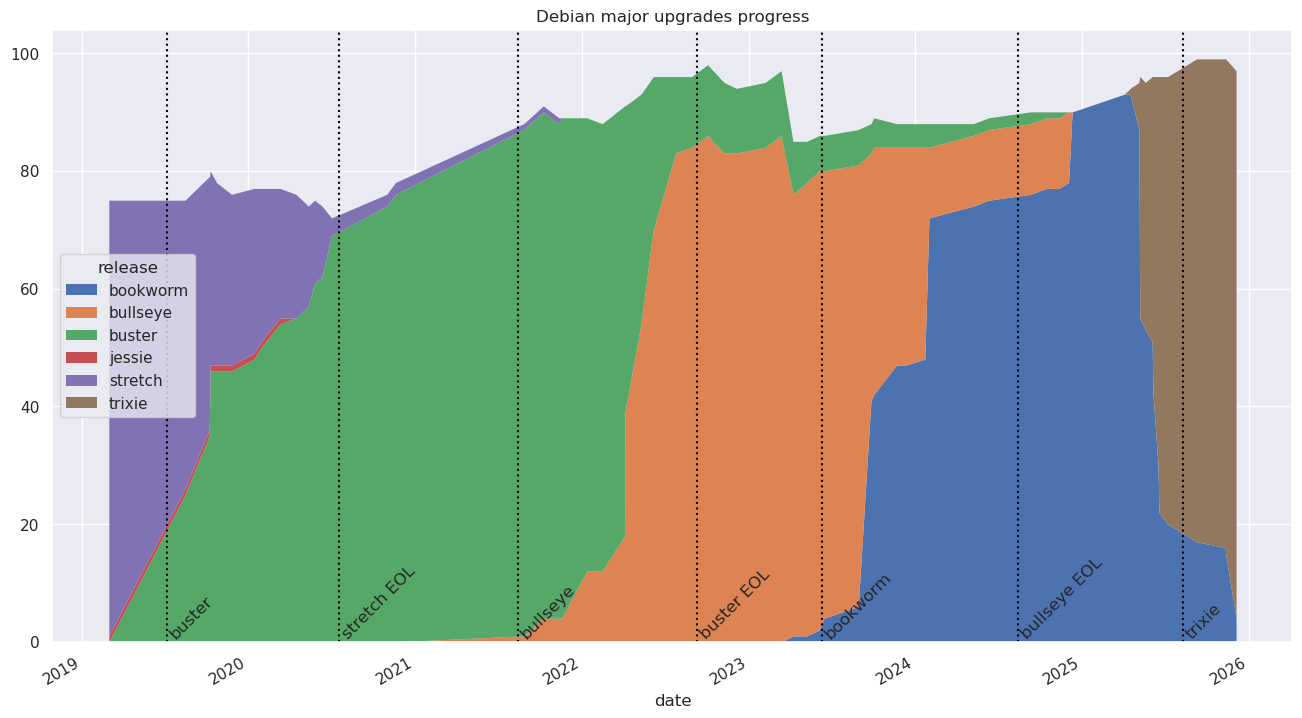
The above graph currently covers 5 different releases:
| Version | Suite | Start | End | Lifetime |
|---|---|---|---|---|
| 8 | jessie | N/A | 2020-04-15 | N/A |
| 9 | stretch | N/A | 2021-11-17 | 2 years (28 months) |
| 10 | buster | 2019-08-15 | 2024-11-14 | 5 years (63 months) |
| 11 | bullseye | 2021-08-26 | 2024-12-10 | 3 years (40 months) |
| 12 | bookworm | 2023-04-08 | TBD | 30 months and counting |
| 13 | trixie | 2025-04-16 | TBD | 6 months and counting |
We can also count the stretches of time we had to support multiple releases at once:
| Releases | Count | Date | Duration | Triggering event |
|---|---|---|---|---|
| 8 9 10 | 3 | 2019-08-15 | 8 months | Debian 10 start |
| 9 10 | 2 | 2020-04-15 | 18 months | Debian 8 retired |
| 9 10 11 | 3 | 2021-08-26 | 3 months | Debian 11 start |
| 10 11 | 2 | 2021-11-17 | 17 months | Debian 9 retired |
| 10 11 12 | 3 | 2023-04-08 | 19 months | Debian 12 start |
| 11 12 | 2 | 2024-11-14 | 1 month | Debian 10 retired |
| 12 | 1 | 2024-12-10 | 5 months | Debian 11 retired |
| 12 13 | 2 | 2025-04-16 | 6 months and counting | Debian 13 start |
| 13 | 1 | TBD | TBD | Debian 12 retirement |
Or, in total, as of 2025-10-09:
| Count | Duration |
|---|---|
| 3 | 30 months |
| 2 | 39 months and counting |
| 1 | 11 months and counting |
In other words, since we've started tracking those metrics, we've spend 30 months supporting 3 Debian releases in parallel, and 42 months with less, and only about 6 months with one.
We've supported at least two Debian releases for the overwhelming majority of time we've been performing upgrades, which means we're, effectively, constantly upgrading Debian. This is something we're hoping to fix starting in 2025, by upgrading only every other year (e.g. not upgrading at all in 2026).
Another way to view this is how long it takes to retire a release, which is, how long a release lives once we start installing a the release after:
| Releases | Date | Milestone | Duration | Triggering event |
|---|---|---|---|---|
| 8 9 10 | 2019-08-15 | N/A | N/A | Debian 10 start |
| 9 10 11 | 2021-08-26 | N/A | N/A | Debian 11 start |
| 10 11 | 2021-11-17 | Debian 10 upgrade | 27 months | Debian 9 retired |
| 10 11 12 | 2023-04-08 | N/A | N/A | Debian 12 start |
| 11 12 | 2024-11-14 | Debian 11 upgrade | 37 months | Debian 10 retirement |
| 12 | 2024-12-10 | Debian 12 upgrade | 32 months | Debian 11 retirement |
| 12 13 | 2025-04-16 | N/A | N/A | Debian 13 start |
| 13 | TBD | Debian 13 upgrade | < 12 months? | Debian 12 retirement |
If all goes to plan, the bookworm retirement (or trixie upgrade) will have been one of the shortest on record, at less than a year. It feels like having less releases maintained in parallel shortens that duration as well, although the data above doesn't currently corroborate that feeling.
Minor upgrades
Unattended upgrades
Most of the packages upgrades are handled by the unattended-upgrades package which is configured via puppet.
Unattended-upgrades writes logs to /var/log/unattended-upgrades/ but
also /var/log/dpkg.log.
The default configuration file for unattended-upgrades is at
/etc/apt/apt.conf.d/50unattended-upgrades.
Upgrades pending for too long are noticed by monitoring which warns loudly about them in its usual channels.
Note that unattended-upgrades is configured to upgrade packages
regardless of their origin (Unattended-Upgrade::Origins-Pattern { "origin=*" }). If a new sources.list entry is added, it
will be picked up and applied by unattended-upgrades unless it has a
special policy (like Debian's backports). It is strongly recommended
that new sources.list entries be paired with a "pin" (see
apt_preferences(5)). See also tpo/tpa/team#40771 for a
discussion and rationale of that change.
Blocked upgrades
If you receive an alert like:
Packages pending on test.example.com for a week
It's because unattended upgrades have failed to upgrade packages on the given host for over a week, which is a sign that the upgrade failed or, more likely, the package is not allowed to upgrade automatically.
The list of affected hosts and packages can be inspected with the following fabric command:
fab fleet.pending-upgrades --query='ALERTS{alertname="PackagesPendingTooLong",alertstate="firing"}'
Look at the list of packages to be upgraded, and inspect the output from
unattended-upgrade -v on the hosts themselves. In the output, watch out for
lines mentioning conffile prompt since those often end up blocking more
packages that depend on the one requiring a manual intervention because of the
prompt.
Consider upgrading the packages manually, with Cumin (see below), or individually, by logging into the host over SSH directly.
Once package upgrades have been dealt with on a host, the alert will clear after
the timer prometheus-node-exporter-apt.timer triggers. It currently runs every
15 minutes, so it's probably not necessary to trigger it by hand to speed things
up.
Alternatively, if you would like to list pending packages from all hosts, and
not just the ones that triggered an alert, you can use the --query parameter
to restrict to the alerting hosts instead:
fab fleet.pending-upgrades
Note that this will also catch hosts that have pending upgrade that may be upgraded automatically by unattended-upgrades, as it doesn't check for alerts, but for the metric directly.
Obsolete packages
Outdated packages are packages that don't currently relate to one of the configured package archives. Some causes for the presence of outdated packages might be:
- leftovers from an OS upgrade
- apt source got removed but not packages installed from it
- patched package was installed locally
If you want to know which packages are marked as obsolete and is triggering the
alert, you can call the command that exports the metrics for the apt_info
collector to get more information:
DEBUG=1 /usr/share/prometheus-node-exporter-collectors/apt_info.py >/dev/null
You can also use the following two commands to get more details on packages:
apt list "?obsolete"
apt list "?narrow(?installed, ?not(?codename($(lsb_release -c -s | tail -1))))"
Check the state of each package with apt policy $package to determine what
needs to be done with it. If most cases, the packages can just be purged, but
maybe not if they are obsolete because an apt source was lost.
In that latter case, you may want to check out why the source was
removed and make sure to bring it back. Sometimes it means downgrading
the package to an earlier version, in case we used an incorrect
backport (apt.postgresql.org packages, suffixed with pgdg are in
that situation, as their version is higher than debian.org
packages).
Out of date package lists
The AptUpdateLagging looks like this:
Package lists on test.torproject.org are out of date
It means that apt-get update has not ran recently enough. This could
be an issue with the mirrors, some attacker blocking updates, or more
likely a misconfiguration error of some sort.
You can reproduce the issue by running, by hand, the textfile collector responsible for this metrics:
/usr/share/prometheus-node-exporter-collectors/apt_info.py
Example:
root@perdulce:~# /usr/share/prometheus-node-exporter-collectors/apt_info.py
# HELP apt_upgrades_pending Apt packages pending updates by origin.
# TYPE apt_upgrades_pending gauge
apt_upgrades_pending{origin="",arch=""} 0
# HELP apt_upgrades_held Apt packages pending updates but held back.
# TYPE apt_upgrades_held gauge
apt_upgrades_held{origin="",arch=""} 0
# HELP apt_autoremove_pending Apt packages pending autoremoval.
# TYPE apt_autoremove_pending gauge
apt_autoremove_pending 21
# HELP apt_package_cache_timestamp_seconds Apt update last run time.
# TYPE apt_package_cache_timestamp_seconds gauge
apt_package_cache_timestamp_seconds 1727313209.2261558
# HELP node_reboot_required Node reboot is required for software updates.
# TYPE node_reboot_required gauge
node_reboot_required 0
The apt_package_cache_timestamp_seconds is the one triggering the
alert. It's the number of seconds since "epoch", compare it to the
output of date +%s.
Try to run apt update by hand to see if it fixes the issue:
apt update
/usr/share/prometheus-node-exporter-collectors/apt_info.py | grep timestamp
If it does, it means a job is missing or failing. The metrics
themselves are updated with a systemd unit (currently
prometheus-node-exporter-apt.service, provided by the Debian
package), so you can see the status of that with:
systemctl status prometheus-node-exporter-apt.service
If that works correctly (i.e. the metric in
/var/lib/prometheus/node-exporter/apt.prom matches the
apt_info.py output), then the problem is the package lists are not
being updated.
Normally, unattended upgrades should update the package list regularly, check if the service timer is properly configured:
systemctl status apt-daily.timer
You can see the latest output of that job with:
journalctl -e -u apt-daily.service
Normally, the package lists are updated automatically by that job, if
the APT::Periodic::Update-Package-Lists setting (typically in
/etc/apt/apt.conf.d/10periodic, but it could be elsewhere in
/etc/apt/apt.conf.d) is set to 1. See the config dump in:
apt-config dump | grep APT::Periodic::Update-Package-Lists
Note that 1 does not mean "true" in this case, it means "one day",
which could introduce extra latency in the reboot procedure. Use
always to run the updates every time the job runs. See issue
22.
Before the transition to Prometheus, NRPE checks were also running updates on package lists, it's possible the retirement might have broken this, see also #41770.
Manual upgrades with Cumin
It's also possible to do a manual mass-upgrade run with Cumin:
cumin -b 10 '*' 'apt update ; unattended-upgrade ; TERM=doit dsa-update-apt-status'
The TERM override is to skip the jitter introduced by the script
when running automated.
The above will respect the unattended-upgrade policy, which may
block certain upgrades. If you want to bypass that, use regular apt:
cumin -b 10 '*' 'apt update ; apt upgrade -yy ; TERM=doit dsa-update-apt-status'
Another example, this will upgrade all servers running bookworm:
cumin -b 10 'F:os.distro.codename=bookworm' 'apt update ; unattended-upgrade ; TERM=doit dsa-update-apt-status'
Special cases and manual restarts
The above covers all upgrades that are automatically applied, but some are blocked from automation and require manual intervention.
Others do upgrade automatically, but require a manual restart. Normally, needrestart runs after upgrades and takes care of restarting services, but it can't actually deal with everything.
Our alert in Alertmanager only shows a sum of how much hosts have pending restarts. To check the entire fleet and simultaneously discover which hosts are triggering the alert, run this command in Fabric:
fab fleet.pending-restarts
Note that you can run the above in debug mode with fab -d fleet.pending-restarts to learn exactly which service is affected on each host.
If you cannot figure out why the warning happens, you might want to
run needrestart on a particular host by hand:
needrestart -v
Important notes:
-
Some hosts get blocked from restarting certain services but they are known special cases:
- Ganeti instance (VM) processes (kvm) might show up as running with an
outdated library and
needrestartwill try to restart theganeti.serviceunit but that will not fix the issue. In this situation, you can reboot the whole node, which will cause a downtime for all instances on it.- An alternative that can limit the downtimes on instances but takes longer
to operate is to issue a series of instance migrations to their secondaries
and then back to their primaries. However, some instances with disks of
type 'plain' cannot be migrated and need to be rebooted instead with
gnt-instance stop $instance && gnt-instance start $instanceon the cluster's main server (issuing a reboot from within the instance e.g. with therebootfabric script might not stop the instance's KVM process on the ganeti node so is not enough)
- An alternative that can limit the downtimes on instances but takes longer
to operate is to issue a series of instance migrations to their secondaries
and then back to their primaries. However, some instances with disks of
type 'plain' cannot be migrated and need to be rebooted instead with
- carinatum.tpo runs some punctual jobs that can take a long time to run.
the
cronservice will then be blocked from restarting while those tasks are still running. If finding a gap in execution is too hard, a server reboot can clear out the alert. - forum-01 runs services in containers managed by containerd. If the
containers themselves are requiring a restart, you can either figure out
how to restart services using
ctr container ...or you can simply reboot the machine.
- Ganeti instance (VM) processes (kvm) might show up as running with an
outdated library and
-
Some services are blocked from automatic restarts in the needrestart configuration file. (look for
$nrconf{override_rc}inneedrestart.conf) Some of those are blocked in order to avoid killing needrestart itself, likecronandunattended-upgrades. Those services show up in the "deferred" service restart list in the output fromneedrestart -v. Those need to be manually restarted. If this touches many or most of the hosts you can do this service restart with cumin. -
There's a false alarm that occurs regularly here because there's lag between
needrestartrunning after upgrades (which is on adpkgpost-invoke hook) and the metrics updates (which are on a timer running daily and 2 minutes after boot).If a host is showing up in an alert and the above fabric task says:
INFO: no host found requiring a restartIt might be the timer hasn't ran recently enough, you can diagnose that with:
systemctl status tpa-needrestart-prometheus-metrics.timer tpa-needrestart-prometheus-metrics.serviceAnd, normally, fix it with:
systemctl start tpa-needrestart-prometheus-metrics.serviceSee issue
prometheus-alerts#20to get rid of that false positive.
Packages are blocked from upgrades when they cause significant
breakage during an upgrade run, enough to cause an outage and/or
require significant recovery work. This is done through Puppet, in the
profile::unattended_upgrades class, in the blacklist setting.
Packages can be unblocked if and only if:
- the bug is confirmed as fixed in Debian
- the fix is deployed on all servers and confirmed as working
- we have good confidence that future upgrades will not break the system again
This section documents how to do some of those upgrades and restarts by hand.
cron.service
This is typically services that should be ran under systemd --user
but instead are started with a @reboot cron job.
For this kind of service, reboot the server or ask the service admin to restart their services themselves. Ideally, this service should be converted to a systemd unit, see this documentation.
ud-replicate special case
Sometimes, userdir-ldap's ud-replicate leaves a multiplexing SSH
process lying around and those show up as part of
cron.service.
We can close all of those connections up at once, on one host, by logging into
the LDAP server (currently alberti) and killing all the ssh processes running
under the sshdist user:
pkill -u sshdist ssh
That should clear out all processes on other hosts.
systemd user manager services
The needrestart tool lacks
the ability to restart user-based systemd daemons and services. Example
below, when running needrestart -rl:
User sessions running outdated binaries:
 onionoo @ user manager service: systemd[853]
 onionoo-unpriv @ user manager service: systemd[854]
To restart these services, this command may be executed:
systemctl restart user@$(id -u onionoo) user@$(id -u onionoo-unpriv)
Sometimes an error message similar to this is shown:
Job for user@1547.service failed because the control process exited with error code.
The solution here is to run the systemctl restart command again, and
the error should no longer appear.
You can use this one-liner to automatically restart user sessions:
eval systemctl restart $(needrestart -r l -v 2>&1 | grep -P '^\s*\S+ @ user manager service:.*?\[\d+\]$' | awk '{ print $1 }' | xargs printf 'user@$(id -u %s) ')
Ganeti
The ganeti.service warning is typically an OpenSSL upgrade that
affects qemu, and restarting ganeti (thankfully) doesn't restart
VMs. to Fix this, migrate all VMs to their secondaries and back, see
Ganeti reboot procedures, possibly the instance-only restart
procedure.
Open vSwitch
This is generally the openvswitch-switch and openvswitch-common
services, which are blocked from upgrades because of bug 34185
To upgrade manually, empty the server, restart, upgrade OVS, then migrate the machines back. It's actually easier to just treat this as a "reboot the nodes only" procedure, see the Ganeti reboot procedures instead.
Note that this might be fixed in Debian bullseye, bug 961746 in Debian is marked as fixed, but will still need to be tested on our side first. Update: it hasn't been fixed.
Grub
grub-pc (bug 40042) has been known to have issues as well, so
it is blocked. to upgrade, make sure the install device is defined, by
running dpkg-reconfigure grub-pc. this issue might actually have
been fixed in the package, see issue 40185.
Update: this issue has been resolved and grub upgrades are now automated. This section is kept for historical reference, or in case the upgrade path is broken again.
user@ services
Services setup with the new systemd-based startup system documented in doc/services may not automatically restart. They may be (manually) restarted with:
systemctl restart user@1504.service
There's a feature request (bug #843778) to implement support for those services directly in needrestart.
Reboots
This section was moved to the reboot documentation.