Jenkins is a Continuous Integration server that we used to build websites and run tests from the legacy git infrastructure.
RETIRED
WARNING: Jenkins was retired at the end of 2021 and this documentation is now outdated.
This documentation is kept for historical reference.
Tutorial
How-to
Removing a job
To remove a job, you first need to build a list of currently available jobs on the Jenkins server:
sudo -u jenkins jenkins-jobs --conf /srv/jenkins.torproject.org//etc/jenkins_jobs.ini list -p /srv/jenkins.torproject.org/jobs > jobs-before
Then remove the job(s) from the YAML file (or the entire YAML file, if the file ends up empty) from jenkins/jobs.git and push the result.
Then, regenerate a list of jobs:
sudo -u jenkins jenkins-jobs --conf /srv/jenkins.torproject.org//etc/jenkins_jobs.ini list -p /srv/jenkins.torproject.org/jobs > jobs-after
And generate the list of jobs that were removed:
comm -23 jobs-before jobs-after
Then delete those jobs:
comm -23 jobs-before jobs-after | while read job; do
    sudo -u jenkins jenkins-jobs --conf /srv/jenkins.torproject.org//etc/jenkins_jobs.ini delete $job
done
Pager playbook
Disaster recovery
Reference
Installation
Jenkins is a Java application deployed through the upstream Debian
package repository. The app listens on localhost and is proxied
by Apache, which handles TLS.
Jenkins Job Builder is installed through the official Debian package.
Slaves are installed through the debian_build_box Puppet class and
must be added through the Jenkins web interface.
SLA
Jenkins is currently "low availability": it doesn't have any redundancy in the way it is deployed, and jobs are typically slow to run.
Design
Jenkins is mostly used to build websites but also run tests for certain software project. Configuration and data used for websites and test are stored in Git and, if published, generally pushed to the static site mirror system.
This section aims at explaining how Jenkins works. The following diagram should provide a graphical overview of the various components in play. Note that the static site mirror system is somewhat elided here, see the architecture diagram there for a view from that other end.
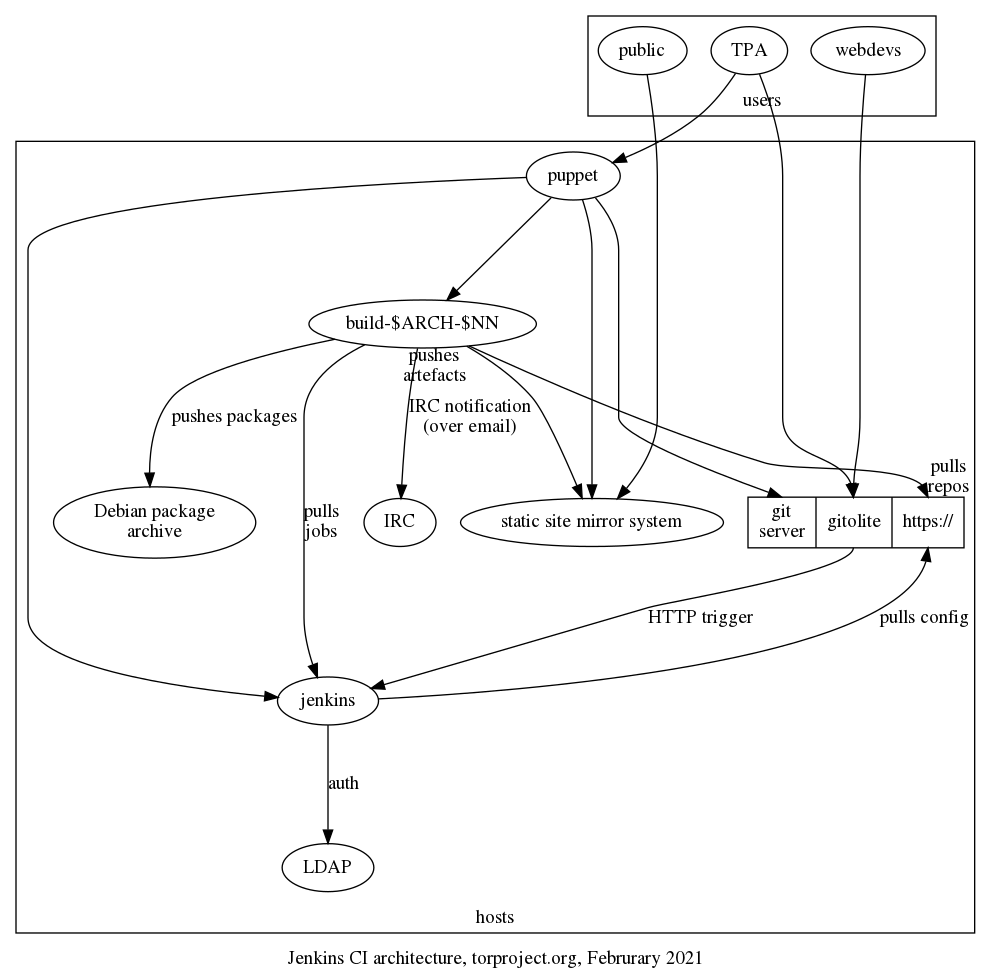
What follows should explain the above in narrative form, with more details.
Jobs configuration
Jenkins is configured using Jenkins Job Builder which is based a set of YAML configuration files. In theory, job definitions are usually written in a Java-based Apache Groovy domain-specific language, but in practice we only operate on the YAML files. Those define "pipelines" which run multiple "jobs".
In our configuration, the YAML files are managed in the
jenkins/jobs.git repository. When commits are pushed there, a
special hook on the git server (in
/srv/git.torproject.org/git-helpers/post-receive-per-repo.d/project%jenkins%jobs/trigger-jenkins)
kicks the /srv/jenkins.torproject.org/bin/update script on the
Jenkins server, over SSH, which, ultimately, runs:
jenkins-jobs --conf "$BASE"/etc/jenkins_jobs.ini update .
.. where the current directory is the root of jenkins/jobs.git
working tree.
This does depend on a jenkins_jobs.ini configuration file stored in
"$BASE"/etc/jenkins_jobs.ini (as stated above, which is really
/srv/jenkins.torproject.org/etc/jenkins_jobs.ini). That file has the
parameters to contact the Jenkins server, like username (jenkins),
password, and URL (https://jenkins.torproject.org/), so that the job
builder can talk to the API.
Storage
Jenkins doesn't use a traditional (ie. SQL) database. Instead, data
like jobs, logs and so on are stored on disk in /var/lib/jenkins/,
inside XML, plain text logfiles, and other files.
Builders also have copies of various Debian and Ubuntu "chroots",
managed through the schroot program. Those chroots are managed
through the debian_build_box Puppet class, which setup the Jenkins
slave but also the various chroots.
In practice, new chroots are managed in the
modules/debian_build_box/files/sbin/setup-all-dchroots script, in
tor-puppet.git.
Authentication
Jenkins authenticates against LDAP directly. That is configured in the
configureSecurity admin panel. Administrators are granted access
by being in the cn=Jenkins Administrator,ou=users,dc=torproject,dc=org groupOfNames.
But otherwise all users with an LDAP account can access the server and run basic commands like trigger and cancel builds, look at their workspace, and delete "Runs".
Queues
Jenkins keeps a queue of jobs to be built by "slaves". Slaves are
build servers (generally named build-$ARCH-$NN, e.g. build-arm-10
or build-x86-12) which run Debian and generally run the configured
jobs in schroots.
The actual data model of the Jenkins job queue is visible in this hudson.model.Queue API documentation. The exact mode of operation of the queue is not exactly clear.
Triggering jobs
Jobs can get triggered in various ways (web hook, cron, other builds), but in our environment, jobs are triggered through this hook, which runs on every push:
/srv/git.torproject.org/git-helpers/post-receive.d/xx-jenkins-trigger
That, in turns, runs this script:
/home/git/jenkins-tools/gitserver/hook "$tmpfile" "https://git.torproject.org/$reponame"
... where $tmpfile has the list of revs updated in the push, and the
latter is the path to the HTTP URL of the git repository being
updated.
The hook script is part of the jenkins-tools.git repository.
It depends on the ~git/.jenkins-config file which defines the
JENKINS_URL variable, which itself includes the username (git),
password, and URL of the jenkins server.
It seems, however, that this URL is not actually used, so in effect,
the hook simply does a curl on the following URL, for each of the
rev defined in the $tmpfile above, and the repo passed as an
argument to the hook above:
https://jenkins.torproject.org/git/notifyCommit?url=$repo&branches=$branch&sha1=$digest
In effect, this implies that the job queue can be triggered by anyone having access to that HTTPS endpoint, which is everyone online.
This also implies that every git repository triggers that
notifyCommit web hook. It's just that the hook is selective on which
repositories it accepts. Typically, it will refuse unknown
repositories with a message like:
No git jobs using repository: https://git.torproject.org/admin/tsa-misc.git and branches: master
No Git consumers using SCM API plugin for: https://git.torproject.org/admin/tsa-misc.git
Which comes straight out of the plain text output of the web hook.
Job execution
The actual job configuration defines what happens next. But in
general, the jenkins/tools.git repository has a lot of common code
that gets ran in jobs. In practice, we generally copy-paste a bunch of
stuff until things work.
NOTE: this is obviously incomplete, but it might not be worth walking
through the entire jenkins/tools.git repository... A job generally
will run a command line:
SUITE=buster ARCHITECTURE=amd64 /home/jenkins/jenkins-tools/slaves/linux/build-wrapper
... which then runs inside a buster_amd64.tar.gz chroot on the
builders. The build-wrapper takes care of unpacking the chroot and
find the right job script to run.
Scripts are generally the build command inside a directory, for
example Hugo websites are built with
slaves/linux/hugo-website/build, because the base name of the job
template is hugo-website.. The build ends up in
RESULT/output.tar.gz, which gets passed to the install job
(e.g. hugo-website-$site-install). That job then ships the files off
to the static source server for deployment.
See the static mirror jenkins docs for more information on how static sites are built.
Interfaces
Most of the work on Jenkins happens through the web interface, at https://jenkins.torproject.org although most of the configuration actually happens through git, see above.
Repositories
To recapitulate, the following Git repositories configure Jenkins job and how they operate:
- jenkins-tools.git: wrapper scripts and glue
- jenkins-jobs.git: YAML job definitions for Jenkins Job Builder
Also note the build scripts that are used to build static websites, as explained in the static site mirroring documentation.
Issues
There is no issue tracker specifically for this project, File or search for issues in the team issue tracker.
Maintainer, users, and upstream
Peter Palfrader setup the Jenkins service and is the main service admin.
Jenkins is an active project upstream, with regular releases. It was originally created by Kohsuke Kawaguchi, who stepped away from the project in 2020. It is a fork of Hudson, which was forked by Oracle, who claimed a trademark on the name and consequently abandoned the software, after donating it to the Eclipse foundation.
Jenkins is mostly written in Java, with about a million lines of code.
The Jenkins packages in Debian are not in a good shape: it was completely removed from Debian in 2016.
Configured jobs
The following jobs are currently configured in jenkins-jobs.git:
- hugo-website.yaml - builds websites with Hugo and
publishes them to the static mirror system. jobs based on this
template:
- hugo-website-research: builds https://research.torproject.org/
- hugo-website-status: builds https://status.torproject.org/ (see also the status service
- lektor-website.yaml - builds websites with Lektor and
publishes them to the static mirror system. jobs based on this
template:
- lektor-website-community: https://community.torproject.org
- lektor-website-donate: https://donate.torproject.org
- lektor-website-gettor: https://gettor.torproject.org
- lektor-website-newsletter: https://newsletter.torproject.org
- lektor-website-styleguide: https://styleguide.torproject.org
- lektor-website-support: https://support.torproject.org
- lektor-website-torbrowser-manual: https://tb-manual.torproject.org
- lektor-website-www: https://www.torproject.org
- lektor-website-dev: code for the future developer portal
- lektor-website-translation: this one is peculiar and holds translations for the above websites, one branch per project, according to the git repo
- onionperf-docs.yaml: builds the onionperf documentation using Sphinx and publishes them to the static mirror system
- stem.yaml: builds https://stem.torproject.org/ and pushes to static
- tor-extra-libs-windows.yaml: TBD
- tor.yaml: lots of jobs for the core tor repository,
notably builds:
tor-ci-linux-$version-$variant: various CI jobs (hardening, rust, basic CI, clang, fuzzing, windows, mingw, etc)- nightly debian package builds, shipped to https://deb.torproject.org
- doxygen docs at https://src-ref.docs.torproject.org
- torsocks.yaml: runs CI for tor socks
- website.yaml: old WebWML website build, deprecated
Another way to analyze this would be to group jobs by type:
- critical website builds: www.torproject.org, gettor.tpo, donate.tpo, status.tpo, etc. mostly lektor builds, but also some hugo (status)
- non-critical websites: mostly documentation sites: research.tpo, onionperf, stem, core tor API docs
- Linux CI tests: mostly core tor tests, but also torsocks
- Windows CI tests: some builds are done on Windows build boxes!
- Debian package builds: core tor
Users
From the above list, we can tentatively conclude the following teams are actively using Jenkins:
- web team: virtually all websites are built in Jenkins, and heavily depend on the static site mirror for proper performance
- network team: the core tor project is also a heavy user of Jenkins, mostly to run tests and checks, but also producing some artefacts (Debian packages and documentation)
- TPA: uses Jenkins to build the status website
- metrics team: onionperf's documentation is built in Jenkins
Monitoring and testing
Chroots are monitored for freshness by Nagios
(dsa-check-dchroots-current), but otherwise the service does not
have special monitoring.
Logs and metrics
There are logs in /var/log/jenkins/ but also in
/var/lib/jenkins/logs and probably elsewhere. Might be some PII like
usernames, IP addresses, email addresses, or public keys.
Backups
No special provision is made for backing up the Jenkins server, since it mostly uses plain text for storage.
Other documentation
- Jenkins home page and user guide
- Jenkins Job Builder documentation
Discussion
Overview
Proposed Solution
See TPA-RFC-10: Jenkins retirement.
Cost
probably just labour.
Alternatives considered
GitLab CI
We have informally started using GitLab CI, just by virtue of deploying GitLab in our infrastructure. It was just a matter of time before someone hooked in some runners and, when they failed, turn to us for help, which meant we actually deployed our own GitLab CI runners.
Installing GitLab runners is somewhat easier than maintaining the current Jenkins/buildbox infrastructure: it relies on Docker and therefore outsources chroot management to Docker, at the cost of security (although we could build, and allow only, our own images).
GitLab CI also has the advantage of being able to easily integrate with GitLab pages, making it easier for people to build static websites than the current combination of Jenkins and our static sites system. See the alternatives to the static site system for more information.
static site building
We currently use Jenkins to build some websites and push them to the static mirror infrastructure, as documented above. To use GitLab CI here, there are a few alternatives.
- trigger Jenkins jobs from GitLab CI: there is a GitLab plugin to trigger Jenkins jobs, but that doesn't actually replace Jenkins
- replace Jenkins by replicating the
sshpipeline: this involves shipping the private SSH key as a private environment variable which then is used by the runner to send the file and trigger the build. this is seen as a too broad security issue - replace Jenkins with a static source which would pull artifacts from GitLab when triggered by a new web hook server
- replace Jenkins with a static source running directly on GitLab and triggered by something to be defined (maybe a new web hook server as well, point is to skip pulling artifacts from GitLab)
The web hook, in particular, would run on "jobs" changes, and would perform the following:
- run as a (Python? WSGI?) web server (wrapped by Apache?)
- listen to webhooks from GitLab, and only GitLab (ip allow list, in Apache?)
- map given project to given static site component (or secret token?)
- pull artifacts from job (do the equivalent to
wgetandunzip) -- or just run on the GitLab server directly rsync -cinto a local static source, to avoid resetting timestamps- triggers
static-update-component
This would mean a new service, but would allow us to retire Jenkins without rearchitecturing the entire static mirroring system.
UPDATE: the above design was expanded in the static component documentation.