How to
Burn-in
Before we even install the machine, we should do some sort of stress-testing or burn-in so that we don't go through the lengthy install process and put into production fautly hardware.
This implies testing the various components to see if they support a moderate to high load. A tool like stressant can be used for that purpose, but a full procedure still needs to be established.
Example stressant run:
apt install stressant
stressant --email torproject-admin@torproject.org --overwrite --writeSize 10% --diskRuntime 120m --logfile $(hostname)-sda.log --diskDevice /dev/sda
This will wipe parts of /dev/sda, so be careful. If instead you
want to test inside a directory, use this:
stressant --email torproject-admin@torproject.org --diskRuntime 120m --logfile fsn-node-05-home-test.log --directory /home/test --writeSize 1024M
Stressant is still in development and currently has serious limitations (e.g. it tests one disk at a time and clunky UI) but should be a good way to get started.
Installation
This document assumes the machine is already installed with a Debian operating system. We preferably install stable or, when close to the release, testing. Here are site-specific installs:
- Hetnzer Cloud
- Hetzner Robot
- Ganeti clusters:
- new virtual machine: new instance procedure
- new nodes (which host virtual machines) new node procedure, normally done as a post-install configuration
- Sunet, Linaro and OSUOSL: service/openstack
- Cymru
- OVH cloud
- Quintex
The following sites are not documented yet:
- eclips.is: our account is marked as "suspended" but oddly enough we have 200 credits which would give us (roughly) 32GB of RAM and 8 vCPUs (yearly? monthly? how knows). it is (separately) used by the metrics team for onionperf, that said
The following sites are deprecated:
- KVM/libvirt (really at Hetzner) - replaced by Ganeti
- scaleway - see ticket 32920
Post-install configuration
The post-install configuration mostly takes care of bootstrapping Puppet and everything else follows from there. There are, however, still some unrelated manual steps but those should eventually all be automated (see ticket #31239 for details of that work).
Pre-requisites
The procedure below assumes the following steps have already been taken by the installer:
-
Any new expenses for physical hosting, cloud services and such, need to be approved by accounting and ops before we can move with the creation.
-
a minimal Debian install with security updates has been booted (note that Puppet will deploy unattended-upgrades later, but it's still a good idea to do those updates as soon as possible)
-
partitions have been correctly setup, including some (>=512M) swap file (or swap partition) and a
tmpfsin/tmpconsider expanding the swap file if memory requirements are expected to be higher than usual on this system, such a large database servers, GitLab instances, etc. the steps below will recreate a 1GiB
/swapfilevolume instead of the default (512MiB):swapoff -a && dd if=/dev/zero of=/swapfile bs=1M count=1k status=progress && chmod 0600 /swapfile && mkswap /swapfile && swapon -a -
a hostname has been set, picked from the doc/naming-scheme and the short hostname (e.g.
test) resolves to a fully qualified domain name (e.g.test.torproject.org) in thetorproject.orgdomain (i.e./etc/hostsis correctly configured). this can be fixed with:fab -H root@204.8.99.103 host.rewrite-hosts dal-node-03.torproject.org 204.8.99.103WARNING: The short hostname (e.g.
fooinfoo.example.com) MUST NOT be longer than 21 characters, as that will crash the backup server because its label will be too long:Sep 24 17:14:45 bacula-director-01 bacula-dir[1467]: Config error: name torproject-static-gitlab-shim-source.torproject.org-full.${Year}-${Month:p/2/0/r}-${Day:p/2/0/r}_${Hour:p/2/0/r}:${Minute:p/2/0/r} length 130 too long, max is 127TODO: this could be replaced by libnss-myhostname if we wish to simplify this, although that could negatively impact things that expect a real IP address from there (e.g. bacula).
-
a public IP address has been set and the host is available over SSH on that IP address. this can be fixed with:
fab -H root@204.8.99.103 host.rewrite-interfaces 204.8.99.103 24 --ipv4-gateway=204.8.99.254 --ipv6-address=2620:7:6002::3eec:efff:fed5:6ae8 --ipv6-subnet=64 --ipv6-gateway=2620:7:6002::1If the IPv6 address is not known, it might be guessable from the MAC address. Try this:
ipv6calc --action prefixmac2ipv6 --in prefix+mac --out ipv6 $SUBNET $MAC... where
$SUBNETis the (known) subnet from the upstream provider and$MACis the MAC address as found inip link show up.If the host doesn't have a public IP, reachability has to be sorted out somehow (eg. using a VPN) so Prometheus, our monitoring system, is able to scrape metrics from the host.
-
ensure reverse DNS is set for the machine. this can be done either in the upstream configuration dashboard (e.g. Hetzner) or in our zone files, in the
dns/domains.gitrepositoryTip:
sipcalc -rwill show you the PTR record for an IPv6 address. For example:$ sipcalc -r 2620:7:6002::466:39ff:fe3d:1e77 -[ipv6 : 2604:8800:5000:82:baca:3aff:fe5d:8774] - 0 [IPV6 DNS] Reverse DNS (ip6.arpa) - 4.7.7.8.d.5.e.f.f.f.a.3.a.c.a.b.2.8.0.0.0.0.0.5.0.0.8.8.4.0.6.2.ip6.arpa. -dig -xwill also show you an SOA record pointing at the authoritative DNS server for the relevant zone, and will even show you the right record to create.For example, the IP addresses of
chi-node-01are38.229.82.104and2604:8800:5000:82:baca:3aff:fe5d:8774, so the records to create are:$ dig -x 2604:8800:5000:82:baca:3aff:fe5d:8774 38.229.82.104 [...] ;; QUESTION SECTION: ;4.7.7.8.d.5.e.f.f.f.a.3.a.c.a.b.2.8.0.0.0.0.0.5.0.0.8.8.4.0.6.2.ip6.arpa. IN PTR ;; AUTHORITY SECTION: 2.8.0.0.0.0.0.5.0.0.8.8.4.0.6.2.ip6.arpa. 3552 IN SOA nevii.torproject.org. hostmaster.torproject.org. 2021020201 10800 3600 1814400 3601 [...] ;; QUESTION SECTION: ;104.82.229.38.in-addr.arpa. IN PTR ;; AUTHORITY SECTION: 82.229.38.in-addr.arpa. 2991 IN SOA ns1.cymru.com. noc.cymru.com. 2020110201 21600 3600 604800 7200 [...]In this case, you should add this record to
82.229.38.in-addr.arpa.:104.82.229.38.in-addr.arpa. IN PTR chi-node-01.torproject.org.And this to
2.8.0.0.0.0.0.5.0.0.8.8.4.0.6.2.ip6.arpa.:4.7.7.8.d.5.e.f.f.f.a.3.a.c.a.b.2.8.0.0.0.0.0.5.0.0.8.8.4.0.6.2.ip6.arpa. IN PTR chi-node-01.torproject.org.Inversely, say you need to add an IP address for Hetzner (e.g.
88.198.8.180), they will already have a dummy PTR allocated:180.8.198.88.in-addr.arpa. 86400 IN PTR static.88-198-8-180.clients.your-server.de.The
your-server.dedomain is owned by Hetzner, so you should update that record in their control panel. Hint: try https://robot.hetzner.com/vswitch/index -
DNS works on the machine (i.e.
/etc/resolv.confis configured to talk to a working resolver, but not necessarily ours, which Puppet will handle) -
a strong root password has been set in the password manager, this implies resetting the password for Ganeti instance installs the installed password was written to disk (TODO: move to trocla? #33332)
-
grub-pc/install_devicesdebconf parameter is correctly set, to allow unattended upgrades ofgrub-pcto function. The command below can be used to bring up an interactive prompt in case it needs to be fixed:debconf-show grub-pc | grep -qoP "grub-pc/install_devices: \K.*" || dpkg-reconfigure grub-pcWarning: this doesn't actually work for EFI deployments.
Main procedure
All commands to be run as root unless otherwise noted.
IMPORTANT: make sure you follow the pre-requisites checklist above! Some installers cover all of those steps, but most do not.
Here's a checklist you can copy in an issue to make sure the following procedure is followed:
- BIOS and OOB setup
- burn-in and basic testing
- OS install and security sources check
- partitions check
- hostname check
- ip address allocation
- reverse DNS
- DNS resolution
- root password set
- grub check
- Nextcloud spreadsheet update
-
hosters.yamlupdate (rare) - fabric-tasks install
- puppet bootstrap
- dnswl
-
/srvfilesystem - upgrade and reboot
- silence alerts
- restart bacula-sd
-
if the machine is not inside a ganeti cluster (which has its own inventory), allocate and document the machine in the Nextcloud spreadsheet, and the services page, if it's a new service
-
add the machine's IP address to
hiera/common/hosters.yamlif this is a machine in a new network. This is rare; Puppet will crash its catalog with this error when that's the case:Could not retrieve catalog from remote server: Error 500 on SERVER: Server Error: \ Evaluation Error: Error while evaluating a Function Call, \ IP 195.201.139.202 not found among hosters in hiera data! (file: /etc/puppet/code/environments/production/modules/profile/manifests/facter/hoster.pp, line: 13, column: 5) on node hetzner-nbg1-01.torproject.orgThe error was split over multiple lines to outline the IP address more clearly. When this happens, add the IP address and netmask from the main interface to the
hosters.yamlfile.In this case, the sole IP address (
195.201.139.202/32) was added to the file. -
make sure you have the
fabric-tasksgit repository on your machine, and verify its content. the repos meta-repository should have the necessary trust anchors. -
bootstrap puppet: on your machine, run the
puppet.bootstrap-clienttask from thefabric-tasksgit repository cloned above -
add the host to LDAP
The Puppet bootstrap script will show you a snippet to copy-paste to the LDAP server (
db.torproject.org). This needs to be done inldapvi, with:ldapvi -ZZ --encoding=ASCII --ldap-conf -h db.torproject.org -D "uid=$USER,ou=users,dc=torproject,dc=org"If you lost the blob, it can be generated from the
ldap.generate-entrytask in Fabric.Make sure you review all fields, in particular
location(l),physicalHost,descriptionandpurposewhich do not have good defaults. See the service/ldap page for a description on those, but, generally:physicalHost: where is this machine hosted, either parent host or cluster (e.g.gnt-fsn) or hoster (e.g.hetznerorhetzner-cloud)description: free form description of the hostpurpose: similar, but can[[link]]to a URL, also added to SSH known hosts, should be added to DNS as welll: physical location,
See the reboots section for information about the
rebootPolicyfield. See also the ldapvi manual for more information.IMPORTANT: the
ldap.generate-entrycommand needs to be ran after all the SSH keys on the host (and particularly the dropbear keys in the initramfs) have been generated, otherwise unlocking LUKS keys at boot might fail because the known hosts files will be missing those. -
... and if the machine is handling mail, add it to dnswl.org (password in tor-passwords,
hosts-extra-info) -
you will probably want to create a
/srvfilesystem to hold service files and data unless this is a very minimal system. Typically, installers may create the partition, but will not create the filesystem and configure it in/etc/fstab:mkfs -t ext4 -j /dev/sdb && printf 'UUID=%s\t/srv\text4\tdefaults\t1\t2\n' $(blkid --match-tag UUID --output value /dev/sdb) >> /etc/fstab && mount /srv -
once everything is done, reboot the new machine to make sure that still works. Before that you may want to run package upgrades in order to avoid getting a newer kernel the next day and needing to reboot again:
apt update && apt upgrade reboot -
if the machine was not installed from the Fabric installer (the
install.hetzner-robottask), schedule a silence for backup alerts with:fab silence.create \ --comment="machine waiting for first backup" \ --matchers job=bacula \ --matchers alias=test-01.torproject.org \ --ends-at "in 2 days"TODO: integrate this in other installers.
-
consider running
systemctl restart bacula-sdon the backup storage host so that it'll know about the new machine's backup volume- On
backup-storage-01.torproject.orgif the new machine is in Falkenstein - On
bungei.torproject.orgif the new machine is anywhere else then Falkenstein (so for example in Dallas)
- On
At this point, the machine has a basic TPA setup. You will probably need to assign it a "role" in Puppet to get it to do anything.
Rescuing a failed install
If the procedure above fails but in a way that didn't prevent it from completing the setup on disk -- for example if the install goes through to completion but after a reboot you're neither able to login via the BMC console nor able to reach the host via network -- here are some tricks that can help in making the install work correctly:
- on the grub menu, edit the boot entry and remove the kernel parameter
quietto see more meaningful information on screen during boot time. - in the boot output (without
quiet) take a look at what the network interface names are set to and which ones are reachable or not. - try exchanging the VLANs of the network interfaces to align the interface configured by the installer to where the public network is reachable
- if there's no meaningful output on the BMC console after just a handful of
kernel messages, try to remove all
console=kernel parameters. this sometimes brings back the output and prompt for crypto from dropbear onto the console screen. - if you boot into grml via PXE to modify files on disk (see below) and if you
want to update the initramfs, make sure that the device name used for the luks
device (the name supplied as last argument to
cryptsetup open) corresponds to what's set in the file/etc/crypttabinside the installed system.- When the device name differs, update-initramfs might fail to really update and only issue a warning about the device name.
- The device name usually looks like the example commands below, but if you're
unsure what name to use, you can unlock crypto, check the contents of
/etc/crypttaband then close things up again and reopen with the device name that's present in there.
- if you're unable to figure out which interface name is being used for the
public network but if you know which one it is from grml, you can try removing
the
net.ifnames=0kernel parameter and also changing the interface name in theip=kernel parameter, for example by modifying the entry in the grub menu during boot.- That might bring dropbear online. Note that you may also need to change the network configuration on disk for the installed system (see below) so that the host stays online after the crypt device was unlocked.
To change things on the installed system, mainly for fixing initramfs, grub config and network configuration, first PXE-boot into grml. Then open and mount the disks:
mdadm --assemble --scan
cryptsetup open /dev/md1 crypt_dev_md1
vgchange -a y
mount /dev/mapper/vg_system-root /mnt
grml-chroot /mnt
After the above, you should be all set for doing changes inside the disk and
then running update-initramfs and update-grub if necessary.
Reference
Design
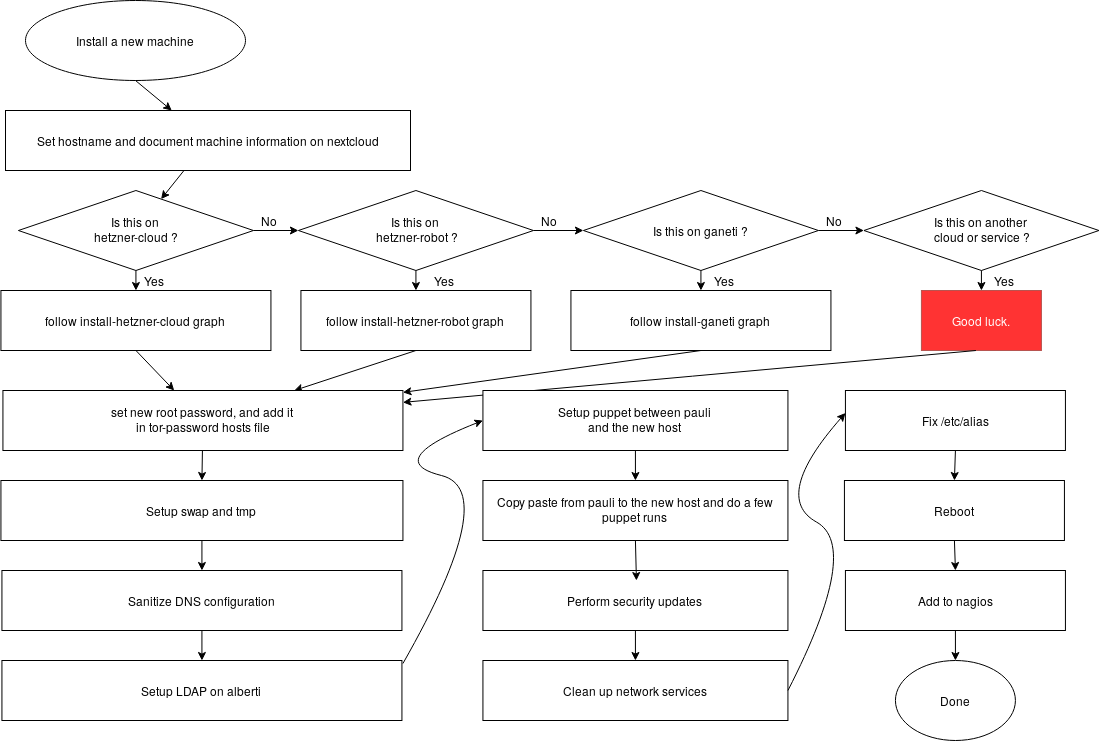
If you want to understand better the different installation procedures there is a install flowchart that was made on Draw.io.
There are also per-site install graphs:
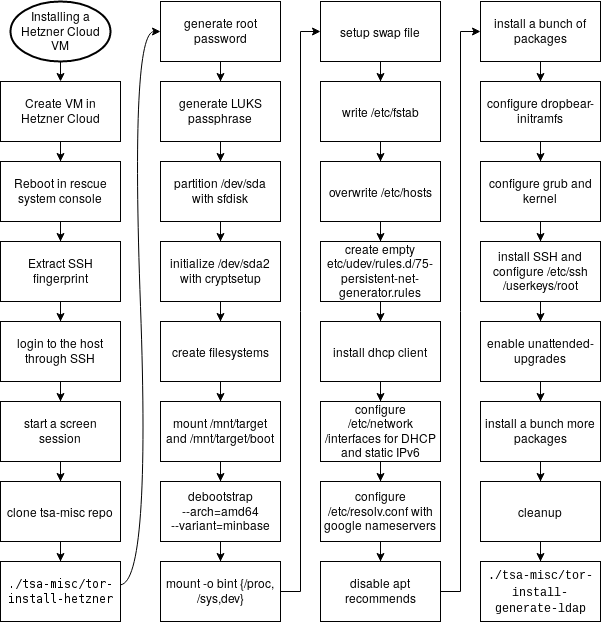
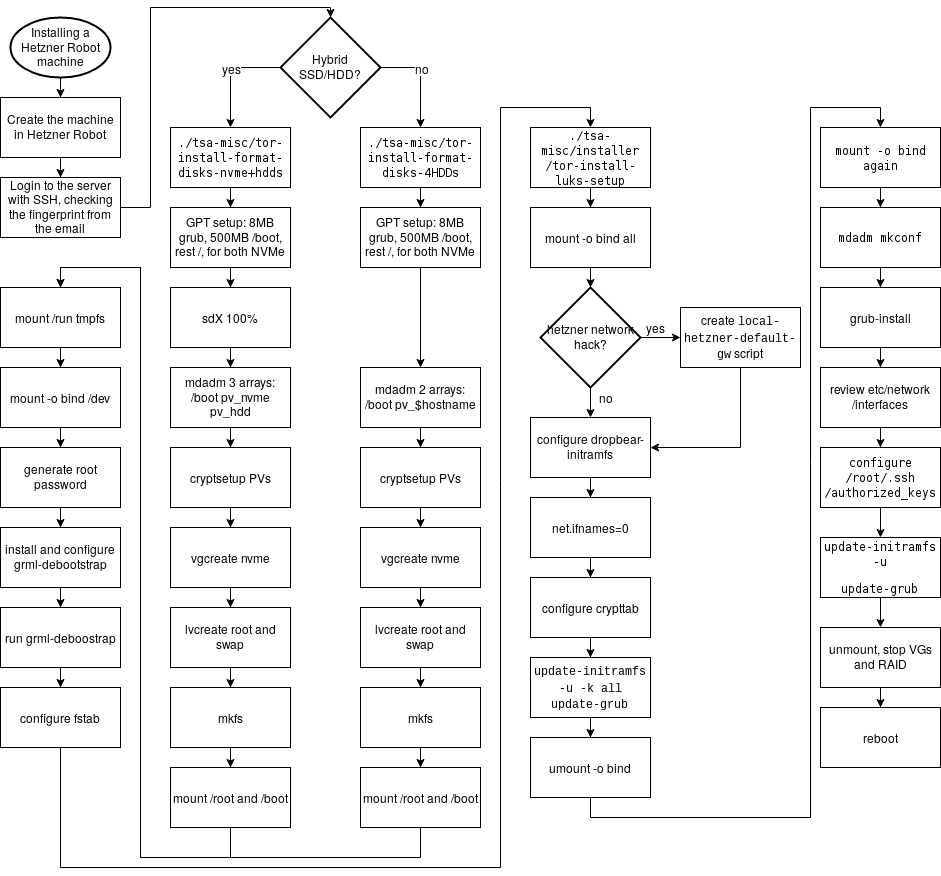
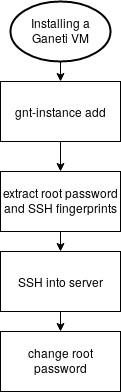
To edit those graphics, head to the https://draw.io website (or install their Electron desktop app) and load the install.drawio file.
Those diagrams were created as part of the redesign of the install process, to better understand the various steps of the process and see how they could be refactored. They should not be considered an authoritative version of how the process should be followed.
The text representation in this wiki remains the reference copy.
Issues
Issues regarding installation on new machines are far ranging and do not have a specific component.
The install system is manual and not completely documented for all sites. It needs to be automated, which is discussed below and in ticket 31239: automate installs.
A good example of the problems that can come up with variations in the install process is ticket 31781: ping fails as a regular user on new VMs.
Discussion
This section discusses background and implementation details of installation of machines in the project. It shouldn't be necessary for day to day operation.
Overview
The current install procedures work, but have only recently been formalized, mostly because we rarely setup machines. We do expect, however, to setup a significant number of machines in 2019, or at least significant enough to warrant automating the install process better.
Automating installs is also critical according to Tom Limoncelli, the author of the Practice of System and Network Administration. In their Ops report card, question 20 explains:
If OS installation is automated then all machines start out the same. Fighting entropy is difficult enough. If each machine is hand-crafted, it is impossible.
If you install the OS manually, you are wasting your time twice: Once when doing the installation and again every time you debug an issue that would have been prevented by having consistently configured machines.
If two people install OSs manually, half are wrong but you don't know which half. Both may claim they use the same procedure but I assure you they are not. Put each in a different room and have them write down their procedure. Now show each sysadmin the other person's list. There will be a fistfight.
In that context, it's critical to automate a reproducible install process. This gives us a consistent platform that Puppet runs on top of, with no manual configuration.
Goals
The project of automating the install is documented in ticket 31239.
Must have
- unattended installation
- reproducible results
- post-installer configuration (ie. not full installer, see below)
- support for running in our different environments (Hetzner Cloud, Robot, bare metal, Ganeti...)
Nice to have
- packaged in Debian
- full installer support:
- RAID, LUKS, etc filesystem configuration
- debootstrap, users, etc
Non-Goals
- full configuration management stack - that's done by service/puppet
Approvals required
TBD.
Proposed Solution
The solution being explored right now is assume the existence of a rescue shell (SSH) of some sort and use fabric to deploy everything on top of it, up to puppet. Then everything should be "puppetized" to remove manual configuration steps. See also ticket 31239 for the discussion of alternatives, which are also detailed below.
Cost
TBD.
Alternatives considered
- Ansible - configuration management that duplicates service/puppet but which we may want to use to bootstrap machines instead of yet another custom thing that operators would need to learn.
- cloud-init - builtin to many cloud images (e.g. Amazon), can
do rudimentary filesystem setup (no RAID/LUKS/etc but ext4
and disk partitioning is okay), config can be fetched over
HTTPS, assumes it runs on first boot, but could be coerced to
run manually (e.g.
fgrep -r cloud-init /lib/systemd/ | grep Exec), ganeti-os-interface backend - cobbler - takes care of PXE and boot, delegates to kickstart the autoinstall, more relevant to RPM-based distros
- curtin - "a "fast path" installer designed to install Ubuntu quickly. It is blunt, brief, snappish, snippety and unceremonious." ubuntu-specific, not in Debian, but has strong partitioning support with ZFS, LVM, LUKS, etc support. part of the larger MAAS project
- FAI - built by a debian developer, used to build live images since buster, might require complex setup (e.g. an NFS server), setup-storage(8) is used inside our fabric-based installer. uses tar archives hosted by FAI, requires a "server" (the fai-server package), control over the boot sequence (e.g. PXE and NFS) or a custom ISO, not directly supported by Ganeti, although there are hacks to make it work and there is a ganeti-os-interface backend now, basically its own Linux distribution
- himblick has some interesting post-install configure bits in Python, along with pyparted bridges
- list of debian setup tools, see also AutomatedInstallation
- livewrapper is also one of those installers, in a way
- vmdb2 - a rewrite of vmdeboostrap, which uses a YAML file to describe a set of "steps" to take to install Debian, should work on VM images but also disks, no RAID support and a significant number of bugs might affect reliability in production
- bdebstrap - yet another one of those tools, built on top of mmdebstrap, YAML
- MAAS - PXE-based, assumes network control which we don't have and has all sorts of features we don't want
- service/puppet - Puppet could bootstrap itself, with
puppet applyran from a clone of the git repo. could be extended as deep as we want. - terraform - config management for the cloud kind of thing,
supports Hetzner Cloud, but not
Hetzner Robot orGaneti (update: there is a Hetzner robot plugin now) - shoelaces - simple PXE / TFTP server
Unfortunately, I ruled out the official debian-installer because of the complexity of the preseeding system and partman. It also wouldn't work for installs on Hetzner Cloud or Ganeti.