 I     | f         | 2015-12-03 09:57:02 | 2015-12-03 09:57:02 | 00:00:00              |        0 |            0
 D     | f         | 2017-12-09 00:35:08 | 2017-12-09 00:35:08 | 00:00:00              |        0 |            0
 D     | f         | 2019-03-05 18:15:28 | 2019-03-05 18:15:28 | 00:00:00              |        0 |            0
 F     | f         | 2019-07-22 14:06:13 | 2019-07-22 14:06:13 | 00:00:00              |        0 |            0
 I     | f         | 2019-09-07 20:02:52 | 2019-09-07 20:02:52 | 00:00:00              |        0 |            0
 I     | f         | 2020-12-11 02:06:57 | 2020-12-11 02:06:57 | 00:00:00              |        0 |            0
 F     | T         | 2021-10-30 04:18:48 | 2021-10-31 05:32:59 | 1 day 01:14:11        |  2973523 | 409597402632
 F     | T         | 2021-12-10 06:06:18 | 2021-12-12 01:41:37 | 1 day 19:35:19        |  3404504 | 456273938172
 D     | E         | 2022-01-12 15:03:53 | 2022-01-14 21:57:32 | 2 days 06:53:39       |  5029124 | 123658942337
 D     | T         | 2022-01-15 01:57:38 | 2022-01-17 17:24:20 | 2 days 15:26:42       |  5457677 | 130269432219
 F     | T         | 2022-01-19 22:33:54 | 2022-01-22 14:41:49 | 2 days 16:07:55       |  4336473 | 516207537019
 I     | T         | 2022-01-26 14:12:52 | 2022-01-26 16:25:40 | 02:12:48              |   185016 |   7712392837
 I     | T         | 2022-01-27 14:06:35 | 2022-01-27 16:47:50 | 02:41:15              |   188625 |   8433225061
 D     | T         | 2022-01-28 06:21:56 | 2022-01-28 18:13:24 | 11:51:28              |  1364571 |  28815354895
 I     | T         | 2022-01-29 06:41:31 | 2022-01-29 10:12:46 | 03:31:15              |   178896 |  33790932680
 I     | T         | 2022-01-30 04:46:21 | 2022-01-30 07:10:41 | 02:24:20              |   177074 |   7298789209
 I     | T         | 2022-01-31 04:19:19 | 2022-01-31 13:18:59 | 08:59:40              |   203085 |  37604120762
 I     | T         | 2022-02-01 04:11:16 | 2022-02-01 07:11:08 | 02:59:52              |   195922 |  41592974842
 I     | T         | 2022-02-02 04:30:15 | 2022-02-02 06:39:15 | 02:09:00              |   190243 |   8548513453
 I     | T         | 2022-02-03 02:55:37 | 2022-02-03 06:25:57 | 03:30:20              |   186250 |   6138223644
 I     | T         | 2022-02-04 01:06:54 | 2022-02-04 04:19:46 | 03:12:52              |   187868 |   8892468359
 I     | T         | 2022-02-05 01:46:11 | 2022-02-05 04:09:50 | 02:23:39              |   194623 |   8754299644
 I     | T         | 2022-02-06 01:45:57 | 2022-02-06 08:02:29 | 06:16:32              |   208416 |   9582975941
 D     | T         | 2022-02-06 21:07:00 | 2022-02-11 12:31:37 | 4 days 15:24:37       |  3428690 |  57424284749
 I     | T         | 2022-02-11 12:38:30 | 2022-02-11 18:52:52 | 06:14:22              |   590289 |  18987945922
 I     | T         | 2022-02-12 14:03:10 | 2022-02-12 16:36:49 | 02:33:39              |   190798 |   6760825592
 I     | T         | 2022-02-13 13:45:42 | 2022-02-13 15:34:05 | 01:48:23              |   189130 |   7132469485
 I     | T         | 2022-02-14 15:19:05 | 2022-02-14 18:58:24 | 03:39:19              |   199895 |   6797607219
 I     | T         | 2022-02-15 15:25:05 | 2022-02-15 19:40:27 | 04:15:22              |   199052 |   8115940960
 D     | T         | 2022-02-15 20:24:17 | 2022-02-19 06:54:49 | 3 days 10:30:32       |  4967994 |  77854030910
 I     | T         | 2022-02-19 07:02:32 | 2022-02-19 18:23:59 | 11:21:27              |   496812 |  24270098875
 I     | T         | 2022-02-20 07:45:46 | 2022-02-20 10:45:13 | 02:59:27              |   174086 |   7179666980
 I     | T         | 2022-02-21 06:57:49 | 2022-02-21 11:51:18 | 04:53:29              |   182035 |  15512560970
 I     | T         | 2022-02-22 05:10:39 | 2022-02-22 07:57:01 | 02:46:22              |   172397 |   7210544658
 I     | T         | 2022-02-23 06:36:44 | 2022-02-23 13:17:10 | 06:40:26              |   211809 |  29150059606
 I     | T         | 2022-02-24 05:39:43 | 2022-02-24 09:57:25 | 04:17:42              |   179419 |   7469834934
 I     | T         | 2022-02-25 05:30:58 | 2022-02-25 12:32:09 | 07:01:11              |   202945 |  30792174057
 D     | f         | 2022-02-25 12:33:48 | 2022-02-25 12:33:48 | 00:00:00              |        0 |            0
 D     | R         | 2022-02-27 18:37:53 |                     | 4 days 03:04:58.45685 |        0 |            0
(39 rows)
Here's another query showing the last 25 "Full" jobs regardless of the host:
SELECT name, jobstatus, starttime, endtime,
       (CASE WHEN endtime IS NULL THEN NOW()
       ELSE endtime END)-starttime AS duration,
       jobfiles, pg_size_pretty(jobbytes)
       FROM job
       WHERE level='F'
       ORDER by starttime DESC
       LIMIT 25;
Listing files from backups
To see which files are in a given host, you can use:
echo list files jobid=210810 | bconsole > list
Note that sometimes, for some obscure reason, the file list is not actually generated and the job details are listed instead:
*list files jobid=206287
Automatically selected Catalog: MyCatalog
Using Catalog "MyCatalog"
+---------+--------------------------------+---------------------+------+-------+----------+-----------------+-----------+
| jobid   | name                           | starttime           | type | level | jobfiles | jobbytes        | jobstatus |
+---------+--------------------------------+---------------------+------+-------+----------+-----------------+-----------+
| 206,287 | hetzner-nbg1-01.torproject.org | 2022-08-31 12:42:46 | B    | F     |   81,173 | 133,449,382,067 | T         |
+---------+--------------------------------+---------------------+------+-------+----------+-----------------+-----------+
*
It's unclear why this happens. It's possible that inspecting the PostgreSQL database directly would work. Meanwhile, try the latest full backup instead, which, in this case, did work:
root@bacula-director-01:~# echo list files jobid=206287 | bconsole | wc -l
11
root@bacula-director-01:~# echo list files jobid=210810 | bconsole | wc -l
81599
root@bacula-director-01:~#
This query will list the jobs having the given file:
SELECT jobid, job.name,type,level,starttime, path.path || filename.name AS path FROM path
  JOIN file USING (pathid)
  JOIN filename USING (filenameid)
  JOIN job USING (jobid)
  WHERE path.path='/var/log/gitlab/gitlab-rails/'
    AND filename.name LIKE 'production_json.log%'
  ORDER BY starttime DESC
  LIMIT 10;
This would list 10 files out of the backup job 251481:
SELECT jobid, job.name,type,level,starttime, path.path || filename.name AS path FROM path
  JOIN file USING (pathid)
  JOIN filename USING (filenameid)
  JOIN job USING (jobid)
  WHERE jobid=251481
  ORDER BY starttime DESC
  LIMIT 10;
This will list the 10 oldest files backed up on host submit-01.torproject.org:
SELECT jobid, job.name,type,level,starttime, path.path || filename.name AS path FROM path
  JOIN file USING (pathid)
  JOIN filename USING (filenameid)
  JOIN job USING (jobid)
  WHERE job.name='submit-01.torproject.org'
  ORDER BY starttime ASC
  LIMIT 10;
Excluding files from backups
Bacula has a list of files excluded from backups, mostly things like
synthetic file systems (/dev, /proc, etc), cached files
(e.g. /var/cache/apt), and so on.
Other files or directories can be excluded in two ways:
-
drop a
.nobackupfile in a directory to exclude the entire directory (and subdirectories) -
add the file(s) to the
/etc/bacula/local-excludeconfiguration file (lines that start with#are comments, one file per line)
The latter is managed by Puppet, use a file_line resource to add
entries in there, for example see the profile::discourse class which
does something like:
file_line { "discourse_exclude_logs":
  path => '/etc/bacula/local-exclude',
  line => "/srv/discourse/shared/standalone/logs",
}
The .nobackup file should also be managed by Puppet. Use a
.nobackup file when you are deploying a host where you control the
directory, and a local-exclude when you do not. In the above
example, Discourse manages the /srv/discourse/shared/standalone
directory so we cannot assume a .nobackup file will survive upgrades
and reconfiguration by Discourse.
How include/exclude patterns work
The exclude configuration is made in the
modules/bacula/templates/bacula-dir.conf.erb Puppet template,
deployed in /etc/bacula/bacula-dir.conf on the director.
The files to be included in the backups are basically "any mounted
filesystem that is not a bind mount and one of ext{2,3,4}, xfs or
jfs". That logic is defined in the
modules/bacula/files/bacula-backup-dirs Puppet file, deployed in
/usr/local/sbin/bacula-backup-dirs on backup clients.
Retiring a client
Clients are managed by Puppet and their configuration will be automatically removed from the host is removed from Puppet. This is normally part of the host retirement procedure.
The procedure also takes care of removing the data from the backup
storage server (in /srv/backups/bacula/, currently on bungei), but
not PostgreSQL backups or the catalog on the director.
Incredibly, it seems like no one really knows how to remove a client
from the catalog on the director, once they are gone. Removing the
configuration is one thing, but the client is then still in the
database. There are many, many, many, many,
questions about this everywhere, and everyone gets it
wrong or doesn't care. Recommendations range from "doing
nothing" (takes a lot of disk space and slows down PostgreSQL) to
"dbcheck will fix this" (it didn't), neither of which worked in our
case.
Amazingly, the solution is simply to call this command in
bconsole:
delete client=$FQDN-fd
For example:
delete archeotrichon.torproject.org-fd
This will remove all jobs related to the client, and then the client itself. This is now part of the host retirement procedure.
Pager playbook
Hint: see also the PostgreSQL pager playbook documentation for the backup procedures specific to that database.
Out of disk scenario
The storage server disk space can (and has) filled up, which will lead to backup jobs failing. A first sign of this is Prometheus warning about disk about to fill up.
Note that the disk can fill up quicker than alerting can pick up. In October 2023, 5TB was filled up in less than 24 hours (tpo/tpa/team#41361), leading to a critical notification.
Then jobs started failing:
Date: Wed, 18 Oct 2023 17:15:47 +0000
From: bacula-service@torproject.org
To: bacula-service@torproject.org
Subject: Bacula: Intervention needed for archive-01.torproject.org.2023-10-18_13.15.43_59

18-Oct 17:15 bungei.torproject.org-sd JobId 246219: Job archive-01.torproject.org.2023-10-18_13.15.43_59 is waiting. Cannot find any appendable volumes.
Please use the "label" command to create a new Volume for:
    Storage:      "FileStorage-archive-01.torproject.org" (/srv/backups/bacula/archive-01.torproject.org)
    Pool:         poolfull-torproject-archive-01.torproject.org
    Media type:   File-archive-01.torproject.org
Eventually, an email with the following first line goes out:
18-Oct 18:15 bungei.torproject.org-sd JobId 246219: Please mount append Volume "torproject-archive-01.torproject.org-full.2023-10-18_18:10" or label a new one for:
At this point, space need to be made on the backup server. Normally,
there's extra space on the volume group available in LVM that can be
allocated to deal with such situation. See the output of the vgs
command and follow the resize procedures in the LVM docs in that
case.
If there isn't any space available on the volume group, it may be acceptable to manually remove old, large files from the storage server, but that is generally not recommended. That said, old
archive-01full backups were purged from the storage server in November 2021, without ill effects (see tpo/tpa/team/-/issues/40477), with a command like:find /srv/backups/bacula/archive-01.torproject.org-OLD -mtime +40 -delete
One disk space is available again, there will be pending jobs listed
in bconsole's status director:
JobId  Type Level     Files     Bytes  Name              Status
======================================================================
246219  Back Full    723,866    5.763 T archive-01.torproject.org is running
246222  Back Incr          0         0  dangerzone-01.torproject.org is waiting for a mount request
246223  Back Incr          0         0  ns5.torproject.org is waiting for a mount request
246224  Back Incr          0         0  tb-build-05.torproject.org is waiting for a mount request
246225  Back Incr          0         0  crm-ext-01.torproject.org is waiting for a mount request
246226  Back Incr          0         0  media-01.torproject.org is waiting for a mount request
246227  Back Incr          0         0  weather-01.torproject.org is waiting for a mount request
246228  Back Incr          0         0  neriniflorum.torproject.org is waiting for a mount request
246229  Back Incr          0         0  tb-build-02.torproject.org is waiting for a mount request
246230  Back Incr          0         0  survey-01.torproject.org is waiting for a mount request
In the above, the archive-01 job was the one which took up all free
space. The job was restarted and was then running, above, but all the
other ones were waiting for a mount request. The solution there is
to just do that mount, with their job ID, for example, for the
dangerzone-01 job above:
bconsole> mount jobid=24622
This should resume all jobs and eventually fix the warnings from monitoring.
Note that when that available space becomes too low (say less than 10% of the volume size), plans should be made to order new hardware, so in the emergency subsides, a ticket should be created for followup.
Out of date backups
If a job is behaving strangely, you can inspect its job log to see what's going on. First, you'll need to listing latest backups from a host for that host:
list job=FQDN
Then you can list the job log with (bconsole can output the JOBID values
with commas every 3 digits. you need to remove those in the command below):
list joblog jobid=JOBID
If this is a new server, it's possible the storage server doesn't know about it. In this case, the jobs will try to run but fail, and you will get warnings by email, see the unavailable storage scenario for details.
See below for more examples.
Slow jobs
Looking at the Bacula director status, it says this:
Console connected using TLS at 10-Jan-20 18:19
 JobId  Type Level     Files     Bytes  Name              Status
======================================================================
120225  Back Full    833,079    123.5 G colchicifolium.torproject.org is running
120230  Back Full  4,864,515    218.5 G colchicifolium.torproject.org is waiting on max Client jobs
120468  Back Diff     30,694    3.353 G gitlab-01.torproject.org is running
====
Which is strange because those JobId numbers are very low compared to
(say) the GitLab backup job. To inspect the job log, you use the
list command:
*list joblog jobid=120225
+----------------------------------------------------------------------------------------------------+
| logtext                                                                                              |
+----------------------------------------------------------------------------------------------------+
| bacula-director-01.torproject.org-dir JobId 120225: Start Backup JobId 120225, Job=colchicifolium.torproject.org.2020-01-07_17.00.36_03 |
| bacula-director-01.torproject.org-dir JobId 120225: Created new Volume="torproject-colchicifolium.torproject.org-full.2020-01-07_17:00", Pool="poolfull-torproject-colchicifolium.torproject.org", MediaType="File-colchicifolium.torproject.org" in catalog. |
[...]
| bacula-director-01.torproject.org-dir JobId 120225: Fatal error: Network error with FD during Backup: ERR=No data available |
| bungei.torproject.org-sd JobId 120225: Fatal error: append.c:170 Error reading data header from FD. n=-2 msglen=0 ERR=No data available |
| bungei.torproject.org-sd JobId 120225: Elapsed time=00:03:47, Transfer rate=7.902 M Bytes/second     |
| bungei.torproject.org-sd JobId 120225: Sending spooled attrs to the Director. Despooling 14,523,001 bytes ... |
| bungei.torproject.org-sd JobId 120225: Fatal error: fd_cmds.c:225 Command error with FD msg="", SD hanging up. ERR=Error getting Volume info: 1998 Volume "torproject-colchicifolium.torproject.org-full.2020-01-07_17:00" catalog status is Used, but should be Append, Purged or Recycle. |
| bacula-director-01.torproject.org-dir JobId 120225: Fatal error: No Job status returned from FD.     |
[...]
| bacula-director-01.torproject.org-dir JobId 120225: Rescheduled Job colchicifolium.torproject.org.2020-01-07_17.00.36_03 at 07-Jan-2020 17:09 to re-run in 14400 seconds (07-Jan-2020 21:09). |
| bacula-director-01.torproject.org-dir JobId 120225: Error: openssl.c:68 TLS shutdown failure.: ERR=error:14094123:SSL routines:ssl3_read_bytes:application data after close notify |
| bacula-director-01.torproject.org-dir JobId 120225: Job colchicifolium.torproject.org.2020-01-07_17.00.36_03 waiting 14400 seconds for scheduled start time. |
| bacula-director-01.torproject.org-dir JobId 120225: Restart Incomplete Backup JobId 120225, Job=colchicifolium.torproject.org.2020-01-07_17.00.36_03 |
| bacula-director-01.torproject.org-dir JobId 120225: Found 78113 files from prior incomplete Job.     |
| bacula-director-01.torproject.org-dir JobId 120225: Created new Volume="torproject-colchicifolium.torproject.org-full.2020-01-10_12:11", Pool="poolfull-torproject-colchicifolium.torproject.org", MediaType="File-colchicifolium.torproject.org" in catalog. |
| bacula-director-01.torproject.org-dir JobId 120225: Using Device "FileStorage-colchicifolium.torproject.org" to write. |
| bacula-director-01.torproject.org-dir JobId 120225: Sending Accurate information to the FD.          |
| bungei.torproject.org-sd JobId 120225: Labeled new Volume "torproject-colchicifolium.torproject.org-full.2020-01-10_12:11" on File device "FileStorage-colchicifolium.torproject.org" (/srv/backups/bacula/colchicifolium.torproject.org). |
| bungei.torproject.org-sd JobId 120225: Wrote label to prelabeled Volume "torproject-colchicifolium.torproject.org-full.2020-01-10_12:11" on File device "FileStorage-colchicifolium.torproject.org" (/srv/backups/bacula/colchicifolium.torproject.org) |
| bacula-director-01.torproject.org-dir JobId 120225: Max Volume jobs=1 exceeded. Marking Volume "torproject-colchicifolium.torproject.org-full.2020-01-10_12:11" as Used. |
| colchicifolium.torproject.org-fd JobId 120225:      /run is a different filesystem. Will not descend from / into it. |
| colchicifolium.torproject.org-fd JobId 120225:      /home is a different filesystem. Will not descend from / into it. |
+----------------------------------------------------------------------------------------------------+
+---------+-------------------------------+---------------------+------+-------+----------+---------------+-----------+
| jobid   | name                          | starttime           | type | level | jobfiles | jobbytes      | jobstatus |
+---------+-------------------------------+---------------------+------+-------+----------+---------------+-----------+
| 120,225 | colchicifolium.torproject.org | 2020-01-10 12:11:51 | B    | F     |   77,851 | 1,759,625,288 | R         |
+---------+-------------------------------+---------------------+------+-------+----------+---------------+-----------+
So that job failed three days ago, but now it's actually running. In this case, it might be safe to just ignore the warnings from monitoring and hope that the rescheduled backup will eventually go through. The duplicate job is also fine: worst case there is it will just run after the first one does, resulting in a bit more I/O than we'd like.
"waiting to reserve a device"
This can happen in two cases: if a job is hung and blocking the storage daemon, or if the storage daemon is not aware of the host to backup.
If the job is repeatedly outputting:
waiting to reserve a device
It's the first, "hung job" scenario.
If you have the error:
Storage daemon didn't accept Device "FileStorage-rdsys-test-01.torproject.org" command.
It's the second, "unavailable storage" scenario.
Hung job scenario
If a job is continuously reporting an error like:
07-Dec 16:38 bungei.torproject.org-sd JobId 146833: JobId=146833, Job colchicifolium.torproject.org.2020-12-07_15.18.44_05 waiting to reserve a device.
It is because the backup volume is already used by a job. Normally our scheduler should avoid overlapping jobs like this, but it can happen that a job is left over when the director is rebooted while jobs are still running.
In this case, we looked at the storage status for more information:
root@bacula-director-01:~# bconsole
Connecting to Director bacula-director-01.torproject.org:9101
1000 OK: 103 bacula-director-01.torproject.org-dir Version: 9.4.2 (04 February 2019)
Enter a period to cancel a command.
*status
Status available for:
     1: Director
     2: Storage
     3: Client
     4: Scheduled
     5: Network
     6: All
Select daemon type for status (1-6): 2
Automatically selected Storage: File-alberti.torproject.org
Connecting to Storage daemon File-alberti.torproject.org at bungei.torproject.org:9103

bungei.torproject.org-sd Version: 9.4.2 (04 February 2019) x86_64-pc-linux-gnu debian 10.5
Daemon started 21-Nov-20 17:58. Jobs: run=1280, running=2.
 Heap: heap=331,776 smbytes=3,226,693 max_bytes=943,958,428 bufs=1,008 max_bufs=5,349,436
 Sizes: boffset_t=8 size_t=8 int32_t=4 int64_t=8 mode=0,0 newbsr=0
 Res: ndevices=79 nautochgr=0

Running Jobs:
Writing: Differential Backup job colchicifolium.torproject.org JobId=146826 Volume="torproject-colchicifolium.torproject.org-diff.2020-12-07_04:52"
    pool="pooldiff-torproject-colchicifolium.torproject.org" device="FileStorage-colchicifolium.torproject.org" (/srv/backups/bacula/colchicifolium.torproject.org)
    spooling=0 despooling=0 despool_wait=0
    Files=585,044 Bytes=69,749,764,302 AveBytes/sec=1,691,641 LastBytes/sec=2,204,539
    FDReadSeqNo=4,517,231 in_msg=3356877 out_msg=6 fd=10
Writing: Differential Backup job corsicum.torproject.org JobId=146831 Volume="torproject-corsicum.torproject.org-diff.2020-12-07_15:18"
    pool="pooldiff-torproject-corsicum.torproject.org" device="FileStorage-corsicum.torproject.org" (/srv/backups/bacula/corsicum.torproject.org)
    spooling=0 despooling=0 despool_wait=0
    Files=2,275,005 Bytes=99,866,623,456 AveBytes/sec=25,966,360 LastBytes/sec=30,624,588
    FDReadSeqNo=15,048,645 in_msg=10505635 out_msg=6 fd=13
Writing: Differential Backup job colchicifolium.torproject.org JobId=146833 Volume="torproject-corsicum.torproject.org-diff.2020-12-07_15:18"
    pool="pooldiff-torproject-colchicifolium.torproject.org" device="FileStorage-colchicifolium.torproject.org" (/srv/backups/bacula/colchicifolium.torproject.org)
    spooling=0 despooling=0 despool_wait=0
    Files=0 Bytes=0 AveBytes/sec=0 LastBytes/sec=0
    FDSocket closed
====

Jobs waiting to reserve a drive:
   3611 JobId=146833 Volume max jobs=1 exceeded on File device "FileStorage-colchicifolium.torproject.org" (/srv/backups/bacula/colchicifolium.torproject.org).
====

[...]
The last line is the error we're getting (in the messages output of
the console, but also, more annoyingly, by email). The Running jobs
list is more interesting: it's telling us there are three jobs running
for the server, two of which are for the same host (JobId=146826 and
JobId=146833). We can look at those jobs' logs in more detail to
figure out what is going on:
*list joblog jobid=146826
+----------------------------------------------------------------------------------------------------+
| logtext                                                                                              |
+----------------------------------------------------------------------------------------------------+
| bacula-director-01.torproject.org-dir JobId 146826: Start Backup JobId 146826, Job=colchicifolium.torproject.org.2020-12-07_04.45.53_42 |
| bacula-director-01.torproject.org-dir JobId 146826: There are no more Jobs associated with Volume "torproject-colchicifolium.torproject.org-diff.2020-10-13_09:54". Marking it purged. |
| bacula-director-01.torproject.org-dir JobId 146826: New Pool is: poolgraveyard-torproject-colchicifolium.torproject.org |
| bacula-director-01.torproject.org-dir JobId 146826: All records pruned from Volume "torproject-colchicifolium.torproject.org-diff.2020-10-13_09:54"; marking it "Purged" |
| bacula-director-01.torproject.org-dir JobId 146826: Created new Volume="torproject-colchicifolium.torproject.org-diff.2020-12-07_04:52", Pool="pooldiff-torproject-colchicifolium.torproject.org", MediaType="File-colchicifolium.torproject.org" in catalog. |
| bacula-director-01.torproject.org-dir JobId 146826: Using Device "FileStorage-colchicifolium.torproject.org" to write. |
| bacula-director-01.torproject.org-dir JobId 146826: Sending Accurate information to the FD.          |
| bungei.torproject.org-sd JobId 146826: Labeled new Volume "torproject-colchicifolium.torproject.org-diff.2020-12-07_04:52" on File device "FileStorage-colchicifolium.torproject.org" (/srv/backups/bacula/colchicifolium.torproject.org). |
| bungei.torproject.org-sd JobId 146826: Wrote label to prelabeled Volume "torproject-colchicifolium.torproject.org-diff.2020-12-07_04:52" on File device "FileStorage-colchicifolium.torproject.org" (/srv/backups/bacula/colchicifolium.torproject.org) |
| bacula-director-01.torproject.org-dir JobId 146826: Max Volume jobs=1 exceeded. Marking Volume "torproject-colchicifolium.torproject.org-diff.2020-12-07_04:52" as Used. |
| colchicifolium.torproject.org-fd JobId 146826:      /home is a different filesystem. Will not descend from / into it. |
| colchicifolium.torproject.org-fd JobId 146826:      /run is a different filesystem. Will not descend from / into it. |
+----------------------------------------------------------------------------------------------------+
+---------+-------------------------------+---------------------+------+-------+----------+----------+-----------+
| jobid   | name                          | starttime           | type | level | jobfiles | jobbytes | jobstatus |
+---------+-------------------------------+---------------------+------+-------+----------+----------+-----------+
| 146,826 | colchicifolium.torproject.org | 2020-12-07 04:52:15 | B    | D     |        0 |        0 | f         |
+---------+-------------------------------+---------------------+------+-------+----------+----------+-----------+
This job is strange, because it is considered to be running in the
storage server, but marked as failed (jobstatus=f) on the
director. It doesn't have the normal trailing information logs get
when a job completes, so it was possibly interrupted. And indeed,
there was a reboot of the director on that day:
reboot system boot 4.19.0-13-amd64 Mon Dec 7 15:14 still running
As far as the director is concerned, the job failed and is completed:
*llist  jobid=146826
           jobid: 146,826
             job: colchicifolium.torproject.org.2020-12-07_04.45.53_42
            name: colchicifolium.torproject.org
     purgedfiles: 0
            type: B
           level: D
        clientid: 55
      clientname: colchicifolium.torproject.org-fd
       jobstatus: f
       schedtime: 2020-12-07 04:45:53
       starttime: 2020-12-07 04:52:15
         endtime: 2020-12-07 04:52:15
     realendtime:
        jobtdate: 1,607,316,735
    volsessionid: 0
  volsessiontime: 0
        jobfiles: 0
        jobbytes: 0
       readbytes: 0
       joberrors: 0
 jobmissingfiles: 0
          poolid: 221
        poolname: pooldiff-torproject-colchicifolium.torproject.org
      priorjobid: 0
       filesetid: 1
         fileset: Standard Set
         hasbase: 0
        hascache: 0
         comment:
That leftover job is what makes the next job hang. We can see the errors in that other job's logs:
*list joblog jobid=146833
+----------------------------------------------------------------------------------------------------+
| logtext                                                                                              |
+----------------------------------------------------------------------------------------------------+
| bacula-director-01.torproject.org-dir JobId 146833: Start Backup JobId 146833, Job=colchicifolium.torproject.org.2020-12-07_15.18.44_05 |
| bacula-director-01.torproject.org-dir JobId 146833: Created new Volume="torproject-colchicifolium.torproject.org-diff.2020-12-07_15:18", Pool="pooldiff-torproject-colchicifolium.torproject.org", MediaType="File-colchicifolium.torproject.org" in catalog. |
| bungei.torproject.org-sd JobId 146833: JobId=146833, Job colchicifolium.torproject.org.2020-12-07_15.18.44_05 waiting to reserve a device. |
| bungei.torproject.org-sd JobId 146833: JobId=146833, Job colchicifolium.torproject.org.2020-12-07_15.18.44_05 waiting to reserve a device. |
| bungei.torproject.org-sd JobId 146833: JobId=146833, Job colchicifolium.torproject.org.2020-12-07_15.18.44_05 waiting to reserve a device. |
| bungei.torproject.org-sd JobId 146833: JobId=146833, Job colchicifolium.torproject.org.2020-12-07_15.18.44_05 waiting to reserve a device. |
| bungei.torproject.org-sd JobId 146833: JobId=146833, Job colchicifolium.torproject.org.2020-12-07_15.18.44_05 waiting to reserve a device. |
| bungei.torproject.org-sd JobId 146833: JobId=146833, Job colchicifolium.torproject.org.2020-12-07_15.18.44_05 waiting to reserve a device. |
| bungei.torproject.org-sd JobId 146833: JobId=146833, Job colchicifolium.torproject.org.2020-12-07_15.18.44_05 waiting to reserve a device. |
| bungei.torproject.org-sd JobId 146833: JobId=146833, Job colchicifolium.torproject.org.2020-12-07_15.18.44_05 waiting to reserve a device. |
| bungei.torproject.org-sd JobId 146833: JobId=146833, Job colchicifolium.torproject.org.2020-12-07_15.18.44_05 waiting to reserve a device. |
| bungei.torproject.org-sd JobId 146833: JobId=146833, Job colchicifolium.torproject.org.2020-12-07_15.18.44_05 waiting to reserve a device. |
| bungei.torproject.org-sd JobId 146833: JobId=146833, Job colchicifolium.torproject.org.2020-12-07_15.18.44_05 waiting to reserve a device. |
| bungei.torproject.org-sd JobId 146833: JobId=146833, Job colchicifolium.torproject.org.2020-12-07_15.18.44_05 waiting to reserve a device. |
| bungei.torproject.org-sd JobId 146833: JobId=146833, Job colchicifolium.torproject.org.2020-12-07_15.18.44_05 waiting to reserve a device. |
| bungei.torproject.org-sd JobId 146833: JobId=146833, Job colchicifolium.torproject.org.2020-12-07_15.18.44_05 waiting to reserve a device. |
| bungei.torproject.org-sd JobId 146833: JobId=146833, Job colchicifolium.torproject.org.2020-12-07_15.18.44_05 waiting to reserve a device. |
| bungei.torproject.org-sd JobId 146833: JobId=146833, Job colchicifolium.torproject.org.2020-12-07_15.18.44_05 waiting to reserve a device. |
| bungei.torproject.org-sd JobId 146833: JobId=146833, Job colchicifolium.torproject.org.2020-12-07_15.18.44_05 waiting to reserve a device. |
+----------------------------------------------------------------------------------------------------+
+---------+-------------------------------+---------------------+------+-------+----------+----------+-----------+
| jobid   | name                          | starttime           | type | level | jobfiles | jobbytes | jobstatus |
+---------+-------------------------------+---------------------+------+-------+----------+----------+-----------+
| 146,833 | colchicifolium.torproject.org | 2020-12-07 15:18:46 | B    | D     |        0 |        0 | R         |
+---------+-------------------------------+---------------------+------+-------+----------+----------+-----------+
Curiously, the fix here is to cancel the job generating the warnings,
in bconsole:
cancel jobid=146833
It's unclear why this works: normally, the other blocking job should be stopped and cleaned up. But in this case, canceling the blocked job resolved the problem and the warning went away. It is assumed the problem will not return on the next job run. See issue 40110 for one example of this problem.
Unavailable storage scenario
If you see an error like:
Storage daemon didn't accept Device "FileStorage-rdsys-test-01.torproject.org" command.
It's because the storage server (currently bungei) doesn't know
about the host to backup. Restart the storage daemon on the storage
server to fix this:
service bacula-sd restart
Normally, Puppet is supposed to take care of those restarts, but it can happen the restarts don't work (presumably because the storage server doesn't do a clean restart when there's a backup already running.
Job disappeared
Another example is this:
*list job=metricsdb-01.torproject.org
Using Catalog "MyCatalog"
+---------+-----------------------------+---------------------+------+-------+-----------+----------------+-----------+
| jobid   | name                        | starttime           | type | level | jobfiles  | jobbytes       | jobstatus |
+---------+-----------------------------+---------------------+------+-------+-----------+----------------+-----------+
| 277,014 | metricsdb-01.torproject.org | 2024-09-08 09:00:26 | B    | F     |   240,183 | 66,850,988,860 | T         |
[...]
| 286,148 | metricsdb-01.torproject.org | 2024-12-11 19:15:46 | B    | I     |         0 |              0 | R         |
+---------+-----------------------------+---------------------+------+-------+-----------+----------------+-----------+
In this case, the job has been running since 2024-12-11 but we're a week after that, so it's probably just disappeared.
The first step to fix this is to cancel this job:
cancel jobid=JOBID
This, however, is likely to tell you the disappointing:
*cancel jobid=286148
Warning Job JobId=286148 is not running.
In that case, try to just run a new backup.
This should get rid of the alert, but not of the underlying problem, as the scheduler will still be confused by the stale job. For that you need to do some plumbing in the PostgreSQL database:
root@bacula-director-01:~# sudo -u postgres psql bacula
could not change directory to "/root": Permission denied
psql (15.10 (Debian 15.10-0+deb12u1))
Type "help" for help.
bacula=# BEGIN;
BEGIN
bacula=# update job set jobstatus='A' where name='metricsdb-01.torproject.org' and jobid=286148;
UPDATE 1
bacula=# COMMIT;
COMMIT
bacula=#
Then, in bconsole, you should see the backup job running within a
couple minutes at most:
Running Jobs:
Console connected using TLS at 21-Dec-24 15:52
 JobId  Type Level     Files     Bytes  Name              Status
======================================================================
287086  Back Diff          0         0  metricsdb-01.torproject.org is running
====
Bacula GDB traceback / Connection refused / Cannot assign requested address: Retrying
If you get an email from the directory stating that it can't connect to the file server on a machine:
09-Mar 04:45 bacula-director-01.torproject.org-dir JobId 154835: Fatal error: bsockcore.c:209 Unable to connect to Client: scw-arm-par-01.torproject.org-fd on scw-arm-par-01.torproject.org:9102. ERR=Connection refused
You can even receive an error like this:
root@forrestii.torproject.org (1 mins. ago) (rapports root tor) Subject: Bacula GDB traceback of bacula-fd on forrestii To: root@forrestii.torproject.org Date: Thu, 26 Mar 2020 00:31:44 +0000
/usr/sbin/btraceback: 60: /usr/sbin/btraceback: gdb: not found
In any case, go on the affected server (in the first case,
scw-arm-par-01.torproject.org) and look at the bacula-fd.service:
service bacula-fd status
If you see an error like:
Warning: Cannot bind port 9102: ERR=Cannot assign requested address: Retrying ...
It's Bacula that's being a bit silly and failing to bind on the
external interface. It might be an incorrect /etc/hosts. This
particularly happens "in the cloud", where IP addresses are in the
RFC1918 space and change unpredictably.
In the above case, it was simply a matter of adding the IPv4 and IPv6
addresses to /etc/hosts, and restarting bacula-fd:
vi /etc/hosts
service bacula-fd restart
The GDB errors were documented in issue 33732.
Disaster recovery
Restoring the directory server
If the storage daemon disappears catastrophically, there's nothing we can do: the data is lost. But if the director disappears, we can still restore from backups. Those instructions should cover the case where we need to rebuild the director from backups. The director is, essentially, a PostgreSQL database. Therefore, the restore procedure is to restore that database, along with some configuration.
This procedure can also be used to rotate a replace a still running director.
-
if the old director is still running, star a fresh backup of the old database cluster from the storage server:
sudo -tt bungei sudo -u torbackup postgres-make-base-backups dictyotum.torproject.org:5433 & -
disable puppet on the old director:
ssh dictyotum.torproject.org puppet agent --disable 'disabling scheduler -- anarcat 2019-10-10' -
disable scheduler, by commenting out the cron job, and wait for jobs to complete, then shutdown the old director:
sed -i '/dsa-bacula-scheduler/s/^/#/' /etc/cron.d/puppet-crontab
watch -c "echo 'status director' | bconsole "
service bacula-director stop
TODO: this could be improved:
<weasel> it's idle when there are no non-idle 'postgres: bacula bacula' processes and it doesn't have any open tcp connections? -
create a new-machine run Puppet with the
roles::backup::directorclass applied to the node, say inhiera/nodes/bacula-director-01.yaml:classes: - roles::backup::director bacula::client::director_server: 'bacula-director-01.torproject.org'This should restore a basic Bacula configuration with the director acting, weirdly, as its own director.
-
Run Puppet by hand on the new director and the storage server a few times, so their manifest converge:
ssh bungei.torproject.org puppet agent -t
ssh bacula-director-01.torproject.org puppet agent -t
ssh bungei.torproject.org puppet agent -t
ssh bacula-director-01.torproject.org puppet agent -t
ssh bungei.torproject.org puppet agent -t
ssh bacula-director-01.torproject.org puppet agent -t
ssh bungei.torproject.org puppet agent -t
ssh bacula-director-01.torproject.org puppet agent -t
The Puppet manifests will fail because PostgreSQL is not installed. And even if it would be, it will fail because it doesn't have the right passwords. For now, PostgreSQL is configured by hand.
TODO: Do consider deploying it with Puppet, as discussed in service/postgresql.
-
Install the right version of PostgreSQL.
It might be the case that backups of the director are from an earlier version of PostgreSQL than the version available in the new machine. In that case, an older
sources.listneeds to be added:cat > /etc/apt/sources.list.d/stretch.list <<EOF deb https://deb.debian.org/debian/ stretch main deb http://security.debian.org/ stretch/updates main EOF apt updateActually install the server:
apt install -y postgresql-9.6 -
Once the base backup from step one is completed (or if there is no old director left), restore the cluster on the new host, see the PostgreSQL Backup recovery instructions
-
You will also need to restore the file
/etc/dsa/bacula-reader-databasefrom backups (see "Getting files without a director", below), as that file is not (currently) managed through service/puppet (TODO). Alternatively, that file can be recreated by hand, using a syntax like this:user=bacula-dictyotum-reader password=X dbname=bacula host=localhostThe matching user will need to have its password modified to match
X, obviously:sudo -u postgres psql -c '\password bacula-dictyotum-reader' -
reset the password of the Bacula director, as it changed in puppet:
grep dbpassword /etc/bacula/bacula-dir.conf | cut -f2 -d\"
sudo -u postgres psql -c '\password bacula'
same for the
tor-backupuser:ssh bungei.torproject.org grep director /home/torbackup/.pgpass ssh bacula-director-01 -tt sudo -u postgres psql -c '\password bacula' -
copy over the
pg_hba.confandpostgresql.conf(nowconf.d/tor.conf) from the previous director cluster configuration (e.g./var/lib/postgresql/9.6/main) to the new one (TODO: put in service/puppet). Make sure that:- the cluster name (e.g.
mainorbacula) is correct in thearchive_command1 - the
ssl_cert_fileandssl_key_filepoint to valid SSL certs
- the cluster name (e.g.
-
Once you have the PostgreSQL database cluster restored, start the director:
systemctl start bacula-director -
Then everything should be fairies and magic and happiness all over again. Check that everything works with:
bconsoleRun a few of the "Basic commands" above, to make sure we have everything. For example,
list jobsshould show the latest jobs ran on the director. It's normal thatstatus directordoes not show those, however. -
Enable puppet on the director again.
puppet agent -tThis involves (optionally) keeping a lock on the scheduler so it doesn't immediately start at once. If you're confident (not tested!), this step might be skipped:
flock -w 0 -e /usr/local/sbin/dsa-bacula-scheduler sleep infinity -
to switch a single node, configure its director in
tor-puppet/hiera/nodes/$FQDN.yamlwhere$FQDNis the fully qualified domain name of the machine (e.g.tor-puppet/hiera/nodes/perdulce.torproject.org.yaml):bacula::client::director_server: 'bacula-director-01.torproject.org'Then run puppet on that node, the storage, and the director server:
ssh perdulce.torproject.org puppet agent -t
ssh bungei.torproject.org puppet agent -t
ssh bacula-director-01.torproject.org puppet agent -t
Then test a backup job for that host, in
bconsole, callrunand pick that server which should now show up. -
switch all nodes to the new director, in
tor-puppet/hiera/common.yaml:bacula::client::director_server: 'bacula-director-01.torproject.org' -
run service/puppet everywhere (or wait for it to run):
cumin -b 5 -p 0 -o txt '*' 'puppet agent -t'Then make sure the storage and director servers are also up to date:
ssh bungei.torproject.org puppet agent -t ssh bacula-director-01.torproject.org puppet agent -t -
if you held a lock on the scheduler, it can be removed:
killall sleep
-
you will also need to restore the password file for the Nagios check in
/etc/nagios/bacula-database -
switch the director in
/etc/dsa/bacula-reader-databaseor/etc/postgresql-common/pg_service.confto point to the new host
The new scheduler and director should now have completely taken over the new one, and backups should resume. The old server can now be decommissioned, if it's still around, when you feel comfortable the new setup is working.
TODO: some psql users still refer to host-specific usernames like
bacula-dictyotum-reader, maybe they should refer to role-specific
names instead?
Troubleshooting
If you get this error:
psycopg2.OperationalError: definition of service "bacula" not found
It's probably the scheduler failing to connect to the database server,
because the /etc/dsa/bacula-reader-database refers to a non-existent
"service", as defined in
/etc/postgresql-common/pg_service.conf. Either add something like:
[bacula]
dbname=bacula
port=5433
to that file, or specify the dbname and port manually in the
configuration file.
If the scheduler is sending you an email every three minutes with this error:
FileNotFoundError: [Errno 2] No such file or directory: '/etc/dsa/bacula-reader-database'
It's because you forgot to create that file, in step 8. Similar errors may occur if you forgot to change that password.
If the director takes a long time to start and ultimately fails with:
oct 10 18:19:41 bacula-director-01 bacula-dir[31276]: bacula-dir JobId 0: Fatal error: Could not open Catalog "MyCatalog", database "bacula".
oct 10 18:19:41 bacula-director-01 bacula-dir[31276]: bacula-dir JobId 0: Fatal error: postgresql.c:332 Unable to connect to PostgreSQL server. Database=bacula User=bac
oct 10 18:19:41 bacula-director-01 bacula-dir[31276]: Possible causes: SQL server not running; password incorrect; max_connections exceeded.
It's because you forgot to reset the director password, in step 9.
Recovering deleted files
This is not specific to the backup server, but could be seen as a (no)backup/restore situation, and besides, not sure where else this would fit.
If a file was deleted by mistake and it is gone from the backup server, not all is lost. This is the story of how an entire PostgreSQL cluster was deleted in production, then, 7 days later, from the backup servers. Files were completely gone from the filesystem, both on the production server and on the backup server, see issue 41388.
In the following, we'll assume you're working on files deleted multiple days in the past. For files deleted more recently, you might have better luck with ext4magic, which can tap into the journal to find recently deleted files more easily. Example commands you might try:
umount /srv/backup/pg
extundelete --restore-all /dev/mapper/vg_bulk-backups--pg
ext4magic /dev/vg_bulk/backups-pg -f weather-01-13
ext4magic /dev/vg_bulk/backups-pg -RQ -f weather-01-13
ext4magic /dev/vg_bulk/backups-pg -Lx -f weather-01-13
ext4magic /dev/mapper/vg_bulk-backups--pg -b $(date -d "2023-11-01 12:00:00" +%s) -a $(date -d "2023-10-30 12:00:00" +%s) -l
In this case, we're actually going to scrub the entire "free space" area of the disk to hunt for file signatures.
-
unmount the affected filesystem:
umount /srv/backup/pg -
start
photorec, part of the testdisk package:photorec /dev/mapper/vg_bulk-backups--pg -
this will get you into an interactive interface, there you should chose to inspect free space and leave most options as is, although you should probably only select
tarandgzfiles to restore. pick a directory with a lot of free space to restore to. -
start the procedure.
photorecwill inspect the entire disk looking for signatures. in this case we're assuming we will be able to restore the "BASE" backups. -
once
photorecstarts reporting it found.gzfiles, you can already start inspecting those, for example with this shell rune:for file in recup_dir.*/*gz; do tar -O -x -z -f $file backup_label 2>/dev/null \ | grep weather && ls -alh $file donehere we're iterating over all restored files in the current directory (
photorecputs files inrecup_dir.Ndirectories, whereNis some arbitrary-looking integer), trying to decompress the file, ignoring errors because restored files are typically truncated or padded with garbage, then extracting only thebackup_labelfile to stdout, and looking for the hostname (in this caseweather) and, if it match, list the file size (phew!) -
once the recovery is complete, you will end up with a ton of recovered files. using the above pipeline, you might be lucky and find a base backup that makes sense. copy those files over to the actual server (or a new one), e.g. (assuming you setup SSH keys right):
rsync --progress /srv/backups/bacula/recup_dir.20/f3005349888.gz root@weather-01.torproject.org:/srv -
then, on the target server, restore that file to a directory with enough disk space:
mkdir f1959051264 cd f1959051264/ tar zfx ../f1959051264.gz -
inspect the backup to verify its integrity (postgresql backups have a manifest that can be checked):
/usr/lib/postgresql/13/bin/pg_verifybackup -n .Here's an example of a working backup, even if
gzipandtarcomplain about the archive itself:root@weather-01:/srv# mkdir f1959051264 root@weather-01:/srv# cd f1959051264/ root@weather-01:/srv/f1959051264# tar zfx ../f1959051264.gz gzip: stdin: decompression OK, trailing garbage ignored tar: Child returned status 2 tar: Error is not recoverable: exiting now root@weather-01:/srv/f1959051264# cd ^C root@weather-01:/srv/f1959051264# du -sch . 39M . 39M total root@weather-01:/srv/f1959051264# ls -alh ../f1959051264.gz -rw-r--r-- 1 root root 3.5G Nov 8 17:14 ../f1959051264.gz root@weather-01:/srv/f1959051264# cat backup_label START WAL LOCATION: E/46000028 (file 000000010000000E00000046) CHECKPOINT LOCATION: E/46000060 BACKUP METHOD: streamed BACKUP FROM: master START TIME: 2023-10-08 00:51:04 UTC LABEL: bungei.torproject.org-20231008-005104-weather-01.torproject.org-main-13-backup START TIMELINE: 1 and it's quite promising, that thing, actually: root@weather-01:/srv/f1959051264# /usr/lib/postgresql/13/bin/pg_verifybackup -n . backup successfully verified -
disable Puppet. you're going to mess with stopping and starting services and you don't want it in the way:
puppet agent --disable 'keeping control of postgresql startup -- anarcat 2023-11-08 tpo/tpa/team#41388'
TODO split here?
-
install the right PostgreSQL server (we're entering the actual PostgreSQL restore procedure here, getting out of scope):
apt install postgresql-13
-
move the cluster out of the way:
mv /var/lib/postgresql/13/main{,.orig}
-
restore files:
rsync -a ./ /var/lib/postgresql/13/main/ chown postgres:postgres /var/lib/postgresql/13/main/ chmod 750 /var/lib/postgresql/13/main/
-
create a recovery.conf file and tweak the postgres configuration:
echo "restore_command = 'true'" > /etc/postgresql/13/main/conf.d/recovery.conf touch /var/lib/postgresql/13/main/recovery.signal rm /var/lib/postgresql/13/main/backup_label
echo max_wal_senders = 0 > /etc/postgresql/13/main/conf.d/wal.conf echo hot_standby = no >> /etc/postgresql/13/main/conf.d/wal.conf
-
reset the WAL (Write Ahead Log) since we don't have those (this implies possible data loss, but we're already missing a lot of WALs since we're restoring to a past base backup anyway):
sudo -u postgres /usr/lib/postgresql/13/bin/pg_resetwal -f /var/lib/postgresql/13/main/
-
cross your fingers, pray to the flying spaghetti monster, and start the server:
systemctl start postgresql@13-main.service & journalctl -u postgresql@13-main.service -f
-
if you're extremely lucky, it will start and then you should be able to dump the database and restore in the new cluster:
sudo -u postgres pg_dumpall -p 5433 | pv > /srv/dump/dump.sql sudo -u postgres psql < /srv/dump/dump.sql
DO NOT USE THE DATABASE AS IS! Only dump the content and restore in a new cluster.
-
if all goes well, clear out the old cluster, and restart Puppet
Reference
Installation
Upgrades
Bacula is packaged in Debian and automatically upgraded. Major Debian upgrades involve a PostgreSQL upgrade, however.
SLA
Design and architecture
This section documents how backups are setup at Tor. It should be useful if you wish to recreate or understand the architecture.
Backups are configured automatically by Puppet on all nodes, and use Bacula with TLS encryption over the wire.
Backups are pulled from machines to the backup server, which means a compromise on a machine shouldn't allow an attacker to delete backups from the backup server.
Bacula splits the different responsibilities of the backup system among multiple components, namely:
- Director (
bacula::directorin Puppet, currentlybacula-director-01, with a PostgreSQL server configured in Puppet), schedules jobs and tells the storage daemon to pull files from the file daemons - Storage daemon (
bacula::storagein Puppet, currentlybungei), pulls files from the file daemons - File daemon (
bacula::client, on all nodes), serves files to the storage daemon, also used to restore files to the nodes
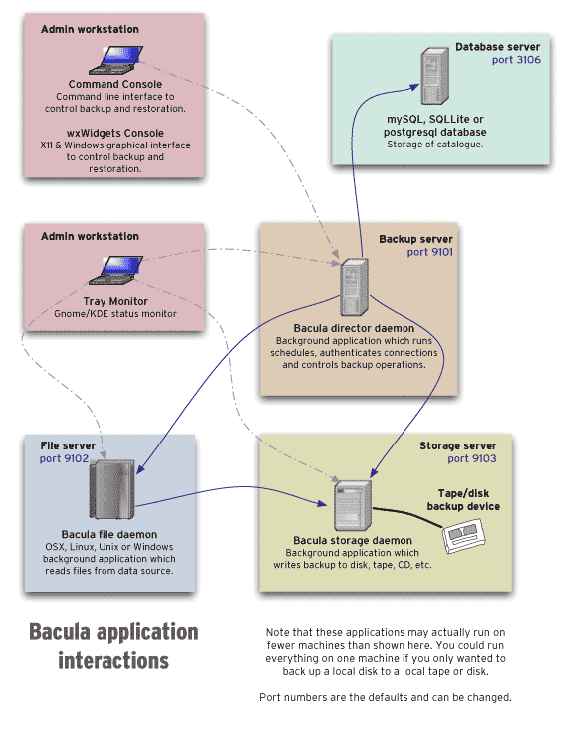
In our configuration, the Admin workstation, Database serverand
Backup server are all on the same machine, the bacula::director.
Servers are interconnected over TCP connections authenticated with TLS
client certificates. Each FD, on all servers, regularly pushes backups
to the central SD. This works because the FD has a certificate
(/etc/ssl/torproject-auto/clientcerts/thishost.crt) signed by the
auto-ca TLS certificate authority
(in/etc/ssl/torproject-auto/servercerts/ca.crt).
Volumes are stored in the storage daemon, in
/srv/backups/bacula/. Each client stores its volumes in a separate
directory, which makes it easier to purge offline clients and evaluate
disk usage.
We do not have a bootstrap file as advised by the upstream
documentation because we do not use tapes or tape libraries, which
make it harder to find volumes. Instead, our catalog is backed up in
/srv/backups/bacula/Catalog and each backup contains a single file,
the compressed database dump, which is sufficient to re-bootstrap the
director.
See the introduction to Bacula for more information on those distinctions.
PostgreSQL backup system
Database backups are handled specially. We use PostgreSQL everywhere apart from a few rare exceptions (currently only CiviCRM) and therefore use postgres-specific configurations to do backups of all our servers.
See PostgreSQL backups reference for those server's specific backup/restore instructions.
MySQL backup system
MySQL also requires special handling, and it's done in the
mariadb::server Puppet class. It deploys a script (tpa-backup-mysql-simple)
which runs every day and calls mysqldump to store plain text copies
of all databases in /var/backups/mysql.
Those backups then get included in the normal Bacula backups.
A more complicated backup system with multiple generations and expiry was previously implemented, but found to be too complicated, using up too much disk space, and duplicating the retention policies implemented in Bacula. It was retired in tpo/tpa/team#42177, in June 2025.
Scheduler
We do not use the builtin Bacula scheduler because it had
issues. Instead, jobs are queued by the dsa-bacula-scheduler started
from cron in /etc/cron.d/puppet-crontab.
TODO: expand on the problems with the original scheduler and how ours work.
Volume expiry
There is a /etc/bacula/scripts/volume-purge-action script which runs
daily (also from puppet-crontab) which will run the truncate allpools storage=%s command on all mediatype entities found in the
media table. TODO: what does that even mean?
Then the /etc/bacula/scripts/volumes-delete-old (also runs daily,
also from puppet-crontab which will:
- delete volumes with errors (
volstatus=Error), created earlier than two weeks and without change for 6 weeks - delete all volumes in "append" mode (
volstatus=Append) which are idle - delete purged volumes (
volstatus=Purged) without files (volfiles=0andvolbytes<1000), marked to be recycled (recycle=1) and older than 4 months
It doesn't actually seem to purge old volumes per say: something else
seems to be responsible from marking them as Purged. This is
(possibly?) accomplished by the Director, thanks to the Volume Retention settings in the storage jobs configurations.
All the above run on the Director. There's also a cron job
bacula-unlink-removed-volumes which runs daily on the storage server
(currently bungei) and will garbage-collect volumes that are not
referenced in the database. Volumes are removed from the storage
servers 60 days after they are removed from the director.
This seem to imply that we have a backup retention period of 6 months.
Issues
There is no issue tracker specifically for this project, File or search for issues in the team issue tracker with the ~Backup label.
Maintainer
This service is maintained by TPA, mostly by anarcat.
Monitoring and metrics
Tests
Logs
The Bacula director logs to /var/log/bacula/bacula.log. Logs can
take up a lot of space when a restore job fails. If that happens,
cancel the job and try to rotate logs with:
logrotate -f /etc/logrotate.d/bacula-common
Backups
This is the backup service, so it's a bit circular to talk about backups. But the Bacula director server is backed up to the storage server like any other server, disaster recovery procedures explain how to restore in catastrophic failure cases.
An improvement to the backup setup would be two have two storage servers, see tpo/tpa/team#41557 for followup.
Other documentation
- upstream manual (has formatting problems, the PDF looks better)
- console command manual (PDF)
- other bacula documentation
- bacula cheat sheet
Discussion
TODO: populate Discussion section.
Overview
Security and risk assessment
Bacula is pretty good, security-wise, as it "pulls" backups from servers. So even if a server is compromised, an attacker cannot move laterally to destroy the backups.
It is, however, vulnerable to a cluster-wide compromise: if, for example, the Puppet or Bacula director servers are compromised, all backups can be destroyed or tampered with, and there's no clear workaround for this problem.
There are concerns about the consistency of backups. During a GitLab incident, it was found that some log files couldn't be restored properly (tpo/tpa/team#41474). It's unclear what the cause of this problem was.
Technical debt and next steps
Bacula has been lagging behind upstream, in Debian, where we have been stuck with version 9 for three major releases (buster on 9.4 and bullseye/bookworm on 9.6). Version 13 was uploaded to unstable in January 2024 and may ship with Debian trixie (13). But Bacula 15 already came out, so it's possible we might lag behind.
Bacula was forked in 2013 into a project called BareOS but that was never widely adopted. BareOS is not, for example, packaged in Debian.
We have a significant amount of legacy built on top of Bacula. For example, we have our own scheduler, because the Bacula scheduler was perceived to be inadequate. It might be worth reconsidering this.
Bacula is old software, designed for when the state of the art in backups was tape archival. We do not use tape (see below) and are unlikely ever to. This tape-oriented design makes working with normal disks a bit awkward.
Bacula doesn't deduplicate between archives the way more modern backup software (e.g. Borg, Restic) do, which leads to higher disk usage, particularly when keeping longer retention periods.
Proposed Solution
Other alternatives
Tape medium
Last I (anarcat) checked, the latest (published) LTO tape standard stored a whopping 18TB of data, uncompressed, per cartridge and writes 400MB/s which means it takes 12h30m to fill up one tape.
LTO tapes are pretty cheap, e.g. here is a 12TB LTO8 tape from Fuji for 80$CAD. The LTO tape drives are however prohibitively expensive. For example, an "upgrade kit" for an HP tape library sells for a whopping 7k$CAD here. I can't actually find any LTO-8 tape drives on newegg.ca.
As a comparison, you can get a 18TB Seagate IronWolf drive for 410$CAD, which means for the price of that upgrade kit you can get a whopping 300TB worth of HDDs for the price of the tape drive. And you don't have any actual tape yet, you'd need to shell out another 2k$CAD to get 300TB of 12TB tapes.
(Of course, that abstracts away the cost of running those hard drives. You might dodge that issue by pretending you can use HDD "trays" and hot-swap those drives around though, since that is effectively how tapes work. So maybe for the cost of that 2k$ of tapes, you could buy a 4U server with a bunch of slots for the hard drive, which you would still need to do to host the tape drive anyway.)