The static/GitLab shim allows GitLab CI to push updates on websites hosted in the static mirror system.
Tutorial
Deploying a static site from GitLab CI
First, make sure the site builds in GitLab CI. A build stage
MUST be used. It should produce the artifacts used by the jobs defined
in the deploy stage which are provided in the
static-shim-deploy.yml template. How to build the website will
vary according to the site, obviously. See the
Hugo build instructions below for that
specific generator.
TODO: link to documentation on how to build Lektor sites in GitLab CI.
A convenient way to preview website builds and ensure builds are working correctly in GitLab CI is to deploy to GitLab Pages. See the instructions on publishing GitLab pages within the GitLab documentation.
When the build stage is verified to work correctly, include the
static-shim-deploy.yml template in .gitlab-ci.yml with a snippet
like this:
variables:
  SITE_URL: example.torproject.org

include:
  project: tpo/tpa/ci-templates
  file: static-shim-deploy.yml
The SITE_URL parameter must reflect the FQDN of the website as
defined in the static-components.yml file.
For example, for https://status.torproject.org, the .gitlab-ci.yml
file looks like this (build stage elided for simplicity):
variables:
  SITE_URL: status.torproject.org

include:
  project: tpo/tpa/ci-templates
  file: static-shim-deploy.yml
First, create the production deployment environment. Navigate to the
project's Deploy -> Environments section (previously Settings ->
Deployments -> Environments) and click Create an environment. Enter production in the Name field and the
production URL in External URL
(eg. https://status.torproject.org). Leave the GitLab agent field
empty.
Next, you need to set an SSH key in the project. First, generate a password-less key locally:
ssh-keygen -f id_rsa -P "" -C "static-shim deploy key"
Then in Settings -> CI/CD -> Variables, pick Add variable, with the
following parameters:
- Key:
STATIC_GITLAB_SHIM_SSH_PRIVATE_KEY - Value: the content of the
id_rsafile, above (yes, it's the private key) - Type:
file - Environment scope:
production - Protect variable: checked
- Masked variable: unchecked
- Expand variable reference: unchecked (not really necessary, but a good precaution)
Then the public part of that key needs to be added in Puppet. This can only be done by TPA, so file a ticket there if you need assistance. For TPA, see below for the remaining instructions.
Once you have sent the public key to TPA, you MUST destroy your local copy of the key, to avoid any possible future leaks.
You can commit the above changes to the .gitlab-ci.yml file, but
TPA needs to do its magic for the deploy stage to work.
Once deployments to the static mirror system are working, the pages
job can be removed or disabled.
Working with Review Apps
Review Apps is a GitLab feature that facilitates previewing changes in project branches and Merge Requests.
When a new branch is pushed to the project, GitLab will automatically
run the build process on that branch and deploy the result, if
successful, to a special URL under review.torproject.net. If a MR
exists for the branch, a link to that URL is displayed in the MR page
header.
If additional commits are pushed to that branch, GitLab will rerun the
build process and update the deployment at the corresponding
review.torproject.net URL. Once the branch is deleted, which happens
for example if the MR is merged, GitLab automatically runs a job to
cleanup the preview build from review.torproject.net.
This feature is automatically enabled when static-shim-deploy.yml is
used. To opt-out of Review Apps, define SKIP_REVIEW_APPS: 1 in the
variables key of .gitlab-ci.yml.
Note that the
REVIEW_STATIC_GITLAB_SHIM_SSH_PRIVATE_KEYneeds to be populated in the project for this to work. This is the case for all projects undertpo/web. The public version of that key is stored in Puppet'shiera/common/staticsync.yaml, in thereview.torproject.netkey of thestaticsync::gitlab_shim::ssh::siteshash.
The active environments linked to Review Apps can be listed by
navigating to the project page in Deployments -> Environments.
An HTTP authentication is required to access these environments: the
username is tor-www and the password is blank. These credentials
should be automatically present in the URLs used to access Review Apps
from the GitLab interface.
Please note that Review Apps do not currently work for Merge Requests
created from personal forks. This is because personal forks do not have
access to the SSH private key required to deploy to the static mirror
system, for security reasons. Therefore, it's recommended that web
project contributors be granted Developer membership so they're
allowed to push branches in the canonical repository.
Finally, Review Apps are meant to be transient. As such, they are auto-stopped (deleted) after 1 week without being updated.
Working with a staging environment
Some web projects have a specific staging area that is separate from
GitLab Pages and review.torproject.net. Those sites are deployed as
subdomains of *.staging.torproject.net on the static mirror system.
For example, the staging URL for blog.torproject.org is
blog.staging.torproject.net.
Staging environments can be useful in various scenarios, such as when
the build job for the production environment is different than the one
for Review Apps, so a staging URL is useful to be able to preview a full
build before being deployed to production. This is especially
important for large websites like www.torproject.org and the
blog which use the "partial build" feature in Lego to speed up the
review stage. In that case, the staging site is a full build that
takes longer, but then allows prod to be launched quicker, after a
review of the full build.
For other sites, the above and automatic review.torproject.net
configuration is probably sufficient.
To enable a staging environment, first a DNS entry must be created
under *.staging.torproject.net and pointed to
static.torproject.org. Then some configuration changes are needed in
Puppet so the necessary symlinks and vhosts are created on the static
web mirrors. These steps must be done by TPA, so please open a
ticket. For TPA, look at commits
262f3dc19c55ba547104add007602cca52444ffc and
118a833ca4da8ff3c7588014367363e1a97d5e52 for examples on how to do this.
Lastly, a STAGING_URL variable must be added to .gitlab-ci.yml with
the staging domain name (eg. blog.staging.torproject.net) as its
value.
Once this is in place, commits added the the default (main) branch
will automatically trigger a deployment to the staging URL and a manual
job for deployment to production. This manual job must then be
triggered by hand after the staging deployment is QA-cleared.
An HTTP authentication is required to access staging environments: the
username is tor-www and the password is blank. These credentials
should be automatically present in the Open and View deployment
links in the GitLab interface.
How-to
Adding a new static site shim in Puppet
The public key mentioned above should be added in the tor-puppet.git repository, in the
hiera/common/staticsync.yaml file, in the staticsync::gitlab_shim::ssh::sites
hash.
There, the site URL is the key and the public key (only the key part,
no ssh-rsa prefix or comment suffix) is the value. For example, this
is the entry for status.torproject.org:
staticsync::gitlab_shim::ssh::sites:
  status.torproject.org: "AAAAB3NzaC1yc2EAAAADAQABAAABgQC3mXhQENCbOKgrhOWRGObcfqw7dUVkPlutzHpycRK9ixhaPQNkMvmWMDBIjBSviiu5mFrc6safk5wbOotQonqq2aVKulC4ygNWs0YtDgCtsm/4iJaMCNU9+/78TlrA0+Sp/jt67qrvi8WpLF/M8jwaAp78s+/5Zu2xD202Cqge/43AhKjH07TOMax4DcxjEzhF4rI19TjeqUTatIuK8BBWG5vSl2vqDz2drbsJvaLbjjrfbyoNGuK5YtvI/c5FkcW4gFuB/HhOK86OH3Vl9um5vwb3DM2HVMTiX15Hw67QBIRfRFhl0NlQD/bEKzL3PcejqL/IC4xIJK976gkZzA0wpKaE7IUZI5yEYX3lZJTTGMiZGT5YVGfIUFQBPseWTU+cGpNnB4yZZr4G4o/MfFws4mHyh4OAdsYiTI/BfICd3xIKhcj3CPITaKRf+jqPyyDJFjEZTK/+2y3NQNgmAjCZOrANdnu7GCSSz1qkHjA2RdSCx3F6WtMek3v2pbuGTns="
At this point, the deploy job should be able to rsync the content to
the static shim, but the deploy will still fail because the
static-component configuration does not match and the
static-update-component step will fail.
To fix this, the static-component entry should be added (or
modified, if it already exists, in
modules/staticsync/data/common.yaml) to point to the shim. This, for
example, is how research is configured right now:
research.torproject.org:
  master: static-master-fsn.torproject.org
  source: static-gitlab-shim.torproject.org:/srv/static-gitlab-shim/research.torproject.org/public
It was migrated from Jenkins with a commit like this:
modified   modules/staticsync/data/common.yaml
@@ -99,7 +99,7 @@ components:
     source: staticiforme.torproject.org:/srv/research.torproject.org/htdocs-staging
   research.torproject.org:
     master: static-master-fsn.torproject.org
-    source: staticiforme.torproject.org:/srv/research.torproject.org/htdocs
+    source: static-gitlab-shim.torproject.org:/srv/static-gitlab-shim/research.torproject.org/public
   rpm.torproject.org:
     master: static-master-fsn.torproject.org
     source: staticiforme.torproject.org:/srv/rpm.torproject.org/htdocs
After commit and push, Puppet needs to run on the shim and master, in the above case:
for host in static-gitlab-shim static-master-fsn ; do
    ssh $host.torproject.org puppet agent --test
done
The next pipeline should now succeed in deploying the site in GitLab.
If the site is migrated from Jenkins, make sure to remove the old Jenkins job and make sure the old site is cleared out from the previous static source:
ssh staticiforme.torproject.org rm -rf /srv/research.torproject.org/
Typically, you will also want to archive the git repository if it hasn't already been migrated to GitLab.
Building a Hugo site
Normally, you should be able to deploy a Hugo site by including the
template and setting a few variables. This .gitlab-ci.yml file,
taken from the status.tpo .gitlab-ci.yml, should be sufficient:
image: registry.gitlab.com/pages/hugo/hugo_extended:0.65.3

variables:
  GIT_SUBMODULE_STRATEGY: recursive
  SITE_URL: status.torproject.org
  SUBDIR: public/

include:
  project: tpo/tpa/ci-templates
  file: static-shim-deploy.yml

build:
  stage: build
  script:
    - hugo
  artifacts:
    paths:
      - public

# we'd like to *not* rebuild hugo here, but pages fails with:
#
# jobs pages config should implement a script: or a trigger: keyword
pages:
  stage: deploy
  script:
    - hugo
  artifacts:
    paths:
      - public
  only:
    - merge_requests
See below if this is an old hugo site, however.
Building an old Hugo site
Unfortunately, because research.torproject.org was built a long time
ago, newer Hugo releases broke its theme and the newer versions
(tested 0.65, 0.80, and 0.88) all fail in one way or another. In this
case, you need to jump through some hoops to have the build work
correctly. I did this for research.tpo, but you might need a
different build system or Docker images:
# use an older version of hugo, newer versions fail to build on first
# run
#
# gohugo.io does not maintain docker images and the one they do
# recommend fail in GitLab CI. we do not use the GitLab registry
# either because we couldn't figure out the right syntax to get the
# old version from Debian stretch (0.54)
image: registry.hub.docker.com/library/debian:buster

include:
  project: tpo/tpa/ci-templates
  file: static-shim-deploy.yml

variables:
  GIT_SUBMODULE_STRATEGY: recursive
  SITE_URL: research.torproject.org
  SUBDIR: public/

build:
  before_script:
    - apt update
    - apt upgrade -yy
    - apt install -yy hugo
  stage: build
  script:
    - hugo
  artifacts:
    paths:
      - public

# we'd like to *not* rebuild hugo here, but pages fails with:
#
# jobs pages config should implement a script: or a trigger: keyword
#
# and even if we *do* put a dummy script (say "true"), this fails
# because it runs in parallel with the build stage, and therefore
# doesn't inherit artifacts the way a deploy stage normally would.
pages:
  stage: deploy
  before_script:
    - apt update
    - apt upgrade -yy
    - apt install -yy hugo
  script:
    - hugo
  artifacts:
    paths:
      - public
  only:
    - merge_requests
Manually delete a review app
If, for some reason, a stop-review job did not run or failed to run,
the review environment will still be on the static-shim server. This
could use up precious disk space, so it's preferable to remove it by
hand.
The first thing is to find the review slug. If, for example, you have a URL like:
https://review.torproject.org/tpo/tpa/status-site/review-extends-8z647c
The slug will be:
review-extends-8z647c
Then you need to remove that directory on the static-gitlab-shim
server. Remember there is a subdir to squeeze in there. The above
URL would be deleted with:
rm -rf /srv/static-gitlab-shim/review.torproject.net/public/tpo/tpa/status-site/review-extends-8z647c/
Then sync the result to the mirrors:
static-update-component review.torproject.net
Converting a job from Jenkins
NOTE: this shouldn't be necessary anymore, as Jenkins was retired at the end of 2021. It is kept for historical purposes.
This is how to convert a given website from Jenkins to GitLab CI:
-
include ci-templates
lektor.ymljob - site builds and works in gitlab pages
- add the deploy-static job and SSH key to GitLab CI
- deploy the SSH key and static site in Puppet
-
run the deploy-static job, make sure the site still works and
was deployed properly (
curl -sI https://example.torproject.org/ | grep -i Last-Modified) - archive the repo on gitolite
- remove the old site on staticiforme
- fully retire the Jenkins jobs
- notify users about the migration
Upstream GitLab also has generic documentation on how to migrate from Jenkins which could be useful for us.
Pager playbook
A typical failure will be that users complains that their
deploy_static job fails. We have yet to see such a failure occur,
but if it does, users should provide a link to the Job log, which
should provide more information.
Disaster recovery
Revert a deployment mistake
It's possible to quickly revert to a previous version of a website via GitLab Environments.
Simply navigate to the project page -> Deployments -> Environments -> production. Shown here will be all past deployments to this environment. To the left of each deployment is a Rollback environment button. Clicking this button will redeploy this version of the website to the static mirror system, overwriting the current version.
It's important to note that the rollback will only work as long as the build artifacts are available in GitLab. By default, artifacts expire after two weeks, so its possible to rollback to any version within two weeks of the present day. Unfortunately, at the moment GitLab shows a rollback button even if the artifacts are unavailable.
Server lost
The service is "cattle" in that it can easily be rebuilt from scratch
if the server is completely lost. Naturally it strongly depends on
GitLab for operation. If GitLab would fail, it should still be
possible to deploy sites to the static mirror system by deploying them
by hand to the static shim and calling static-update-component
there. It would be preferable to build the site outside of the
static-shim server to avoid adding any extra packages we do not need
there.
The status site is particularly vulnerable to disasters here, see the status-site disaster recovery documentation for pointers on where to go in case things really go south.
GitLab server compromise
Another possible disaster that could happen is a complete GitLab compromise or hostile GitLab admin. Such an attacker could deploy any site they wanted and therefore deface or sabotage critical websites, introducing hostile code in thousands of users. If such an event would occur:
-
remove all SSH keys from the Puppet configuration, specifically in the
staticsync::gitlab_shim::ssh::sitesvariable, defined inhiera/common.yaml. -
restore sites from a known backup. the backup service should have a copy of the static-shim content
-
redeploy the sites manually (
static-update-component $URL)
The static shim server itself should be fairly immune to compromise as
only TPA is allowed to login over SSH, apart from the private keys
configured in the GitLab projects. And those are very restricted in
what they can do (i.e. only rrsync and static-update-component).
Deploy artifacts manually
If a site is not deploying normally, it's still possible to deploy a
site by hand by downloading and extracting the artifacts using the
static-gitlab-shim-pull script.
For example, given the Pipeline 13285 has job 38077, we can tell the puller to deploy in debugging mode with this command:
sudo -u static-gitlab-shim /usr/local/bin/static-gitlab-shim-pull --artifacts-url https://gitlab.torproject.org/tpo/tpa/status-site/-/jobs/38077/artifacts/download --site-url status.torproject.org --debug
The --artifacts-url is the Download link in the job page. This
will:
- download the artifacts (which is a ZIP file)
- extract them in a temporary directory
rsync --checksumthem to the actual source directory (to avoid spurious timestamp changes)- call
static-update-componentto deploy the site
Note that this script was part of the webhook implementation and might
eventually be retired if that implementation is completely
removed. This logic now lives in the static-shim-deploy.yml
template.
Reference
Installation
A new server can be built by installing a regular VM with the
staticsync::gitlab_shim class. The server also must have this line
in its LDAP host entry:
allowedGroups: mirroradm
SLA
There is no defined SLA for this service right now. Websites should keep working even if it goes down as it is only a static source, but, during downtimes, updates to websites are not possible.
Design
The static shim was built to allow GitLab CI to deploy content to the static mirror system.
They way it works is that GitLab CI jobs (defined in the
.gitlab-ci.yml file) build the site and then push it to a static
source (currently static-gitlab-shim.torproject.org) with rsync over
SSH. Then the CI job also calls the static-update-component script
for the master to pull the content just like any other static
component.
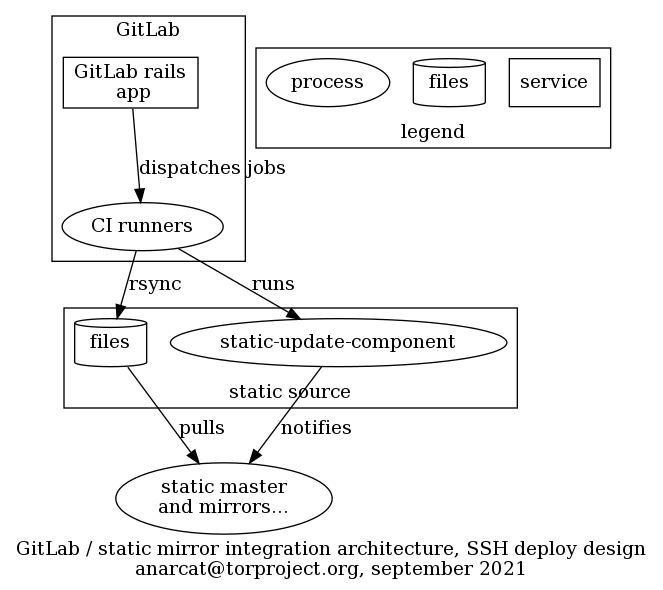
The sites are deployed on a separate static-source to avoid adding
complexity to the already complicated, general purpose static source
(staticiforme). This has the added benefit that the source can be
hardened in the sense that access is restricted to TPA (which is not
the case of staticiforme).
The mapping between webhooks and static components is established in
Puppet, which writes the SSH configuration, hard-coding the target
directory which corresponds to the source directory in the
modules/staticsync/data/common.yaml file of the tor-puppet.git
repository. This is done to ensure that a given
GitLab project only has access to a single site and cannot overwrite
other sites.
This involves that each site configured in this way must have a secret token (in GitLab) and configuration (in Hiera) created by TPA in Puppet. The secret token must also be configured in the GitLab project. This could be automated by the judicious use of the GitLab API using admin credentials, but considering that new sites are not created very frequently, it is currently be done by hand.
The SSH key is generated by the user, but that could also be managed by Trocla, although only the newer versions support that functionality, and that version is not currently available in Debian.
A previous design involved a webhook written in Python, but now most
of the business logic resides in a static-shim-deploy.yml template
template which is basically a shell script embedded in a YAML
file. (We have considered taking this out of the template and writing
a proper Python script, but then users would have to copy that script
over their repo, or clone a repo in CI, and that seems impractical.)
Another thing we considered is to set instance-level templates but it seems that feature is not available in GitLab's free software version.
The CI hooks are deployed by users, which will typically include the
above template in their own .gitlab-ci.yml file.
Template variables
Variables used in the static-shim-deploy.yml template which
projects can override:
-
STATIC_GITLAB_SHIM_SSH_PRIVATE_KEY: SSH private key for deployment to the static mirror system, required for deploying tostagingandproductionenvironments. This variable must be defined in each project's CI/CD variables settings and scoped to eitherstagingorproductionenvironments. -
REVIEW_STATIC_GITLAB_SHIM_SSH_PRIVATE_KEY: SSH private key for deployment to the reviews environment, AKAreviews.torproject.net. This variable is available by default to projects in the GitLab Web group. Projects outside of it must define it in their CI/CD variables settings and scoped to thereviews/*wildcard environment. -
SITE_URL: (required) Fully-qualified domain name of the production deployment (eg. without leadinghttps://). -
STAGING_URL: (optional) Fully-qualified domain name of the staging deployment. When a staging URL is defined, deployments to theproductionenvironment are manual. -
SUBDIR: (optional) Directory containing the build artifacts, by default this is set topublic/.
Storage
Files are generated in GitLab CI as artifacts and stored there, which
makes it possible for them to be deployed by hand as well. A copy
is also kept on the static-shim server to make future deployments
faster. We use rsync --checksum to avoid updating the timestamps
even if the source file were just regenerated from scratch.
Authentication
The shim assumes that GitLab projects host a private SSH key and can
access the shim server over SSH with it. Access is granted, by Puppet
(tor-puppet.git repository, hiera/common.yaml file, in the
staticsync::gitlab_shim::ssh::sites hash) only to a specific
site.
The restriction is defined in the authorized_keys file, with
restrict and command= options. The latter restricts the public key
to only a specific site update, with a wrapper that will call
static-update-component on the right component or rrsync which is
rsync but limited to a specific directory. We also allow connections
only from GitLab over SSH.
This implies that the SITE_URL provided by the GitLab CI job over
SSH, whether it is for the rsync or static-update-component
commands, is actually ignored by the backend. It is used in the job
definition solely to avoid doing two deploys in parallel to the same
site, through the GitLab resource_group mechanism.
The public part of that key should be set in the GitLab project, as a
File variable called STATIC_GITLAB_SHIM_SSH_PRIVATE_KEY. This way
the GitLab runners get access to the private key and can deploy those
changes.
The impact of this is that a compromise on GitLab or GitLab CI can compromise all web sites managed by GitLab CI. While we do restrict what individual keys can do, a total compromise of GitLab could, in theory, leak all those private keys and therefore defeat those mechanisms. See the disaster recovery section for how such a compromise could be recovered from.
The GitLab runners, in turn, authenticate the SSH server through a
instance-level CI/CD variable called
STATIC_GITLAB_SHIM_SSH_HOST_KEYS which declares the public SSH host
keys for the server. Those need to be updated if the server is
re-deployed, which is unfortunate. An alternative might be to sign
public keys with an SSH CA (e.g. this guide) but then the CA
would also need to be present, so it's unclear that would be a
benefit.
Issues
There is no issue tracker specifically for this project, File or search for issues in the team issue tracker with the ~static-shim label.
This service was designed in ticket 40364.
Maintainer, users, and upstream
The shim was written by anarcat and is maintained by TPA. It is used by all "critical" websites managed in GitLab.
Monitoring and testing
There is no specific monitoring for this service, other than the usual server-level monitoring. If the service should fail, users will notice because their pipelines start failing.
Good sites to test that the deployment works are https://research.torproject.org/ (pipeline link, not critical) or https://status.torproject.org/ (pipeline link, semi-critical).
Logs and metrics
Jobs in GitLab CI have their own logs and retention policies. The static shim should not add anything special to this, in theory. In practice it's possible some private key leakage occurs if a user would display the content of their own private SSH key in the job log. If they use the provided template, this should not occur.
We do not maintain any metrics on this service, other than the usual server-level metrics.
Backups
No specific backup procedure is necessary for this server, outside of the automated basics. In fact, data on this host is mostly ephemeral and could be reconstructed from pipelines in case of a total server loss.
As mentioned in the disaster recovery section, if the GitLab server gets compromised, the backup should still contain previous good copies of the websites, in any case.
Other documentation
- TPA-RFC-10: Jenkins retirement
- GitLab's CI deployment mechanism blog post
- Design and launch ticket
- our static mirror system documentation
- our GitLab CI documentation
- Webhook homepage
- GitLab webhook documentation
Discussion
Overview
The static shim was built to unblock the Jenkins retirement project (TPA-RFC-10). A key blocker was that the static mirror system was strongly coupled with Jenkins: many high traffic and critical websites are built and deployed by Jenkins. Unless we wanted to completely retire the static mirror system (in favor, say, of GitLab Pages), we had to create a way for GitLab CI to deploy content to the static mirror system.
This section contains more in-depth discussions about the reasoning behind the project, discarded alternatives, and other ideas.
Goals
Note that those goals were actually written down once the server was launched, but they were established mentally before and during the deployment.
Must have
- deploy sites from GitLab CI to the static mirror system
- site A cannot deploy to site B without being explicitly granted permissions
- server-side (i.e. in Puppet) access control (i.e. user X can only deploy site B)
Nice to have
- automate migration from Jenkins to avoid manually doing many sites
- reusable GitLab CI templates
Non-Goals
- static mirror system replacement
Approvals required
TPA, part of TPA-RFC-10: Jenkins retirement.
Proposed Solution
We have decided to deploy sites over SSH from GitLab CI, see below for a discussion.
Cost
One VM, 20-30 hours of work, see tpo/tpa/team#40364 for time tracking.
Alternatives considered
This shim was designed to replace Jenkins with GitLab CI. The various options considered are discussed here, see also the Jenkins documentation and ticket 40364.
CI deployment
We considered using GitLab's CI deployment mechanism instead of webhooks, but originally decided against it for the following reasons:
-
the complexity is similar: both need a shared token (webhook secret vs SSH private key) between GitLab and the static source (the webhook design, however, does look way more complex than the deploy design, when you compare the two diagrams)
-
however, configuring the deployment variables takes more click (9 vs 5 in my count), and is slightly more confusing (e.g. what's "Protect variable"?) and possibly insecure (e.g. private key leakage if user forgets to click "Mask variable")
-
the deployment also requires custom code to be added to the
.gitlab-ci.ymlfile. in the context where we are considering using GitLab pages to replace the static mirror system in the long term, we prefer to avoid adding custom stuff to the CI configuration file and "pretend" that this is "just like GitLab pages" -
we prefer to open a HTTPS port than an SSH port to GitLab, from a security perspective, even if the SSH user would be protected by an proper
authorized_keys. in the context where we could consider locking down SSH access to only jump boxes, it would require an exception and is more error prone (e.g. if we somehow forget thecommand=override, we open full shell access)
After trying the webhook deployment mechanism (below), we decided to go back to the deployment mechanism instead. See below for details on the reasoning, and above for the full design of the current deployment.
webhook deployment
A designed based on GitLab webhooks was established, with a workflow that goes something like this:
- user pushes a change to GitLab, which ...
- triggers a CI pipeline
- CI runner picks up the jobs and builds the website, pushes the artifacts back to GitLab
- GitLab fires a webhook, typically on pipeline events
- webhook receives the ping and authenticates against a
configuration, mapping to a given
static-component - after authentication, the webhook fires a script
(
static-gitlab-shim-pull) static-gitlab-shim-pullparses the payload from the webhook and finds the URL for the artifacts- it extracts the artifacts in a temporary directory
- it runs
rsync -cinto the local static source, to avoid resetting timestamps - it fires the static-update-component command to propagate changes to the rest of the static-component system
A subset of those steps can be seen in the following design:
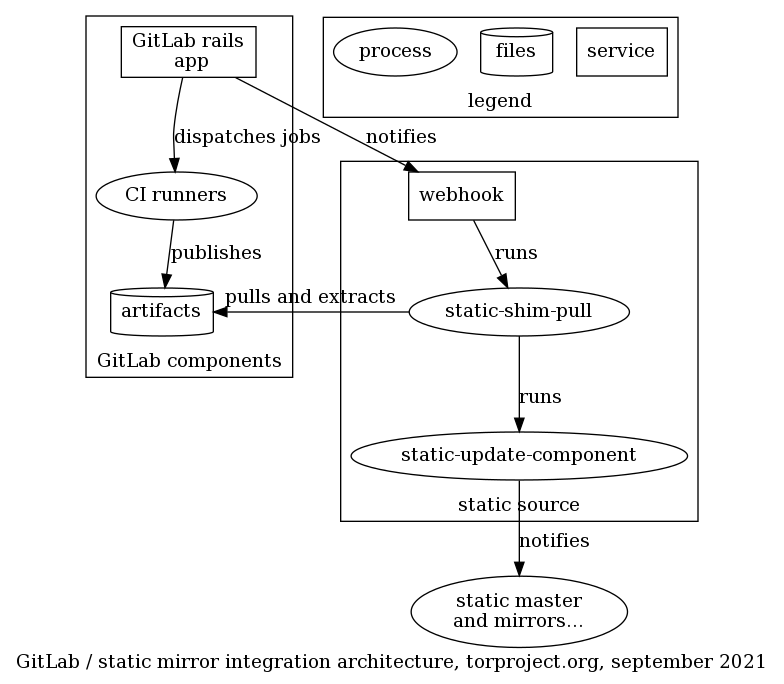
The shim components runs on a separate static-source, called
static-gitlab-shim-source. This is done to avoid adding complexity
to the already complicated, general purpose static source
(staticiforme). This has the added benefit that the source can be
hardened in the sense that access is restricted to TPA (which is not
the case of staticiforme).
The mapping between webhooks and static components is established in
Puppet, which generates the secrets and writes it to the webhook
configuration, along with the site_url which corresponds to the site
URL in the modules/staticsync/data/common.yaml file of the
tor-puppet.git repository. This is done to ensure that
a given GitLab project only has access to a single site and cannot
overwrite other sites.
This involves that each site configured in this way must have a secret token (in Trocla) and configuration (in Hiera) created by TPA in Puppet. The secret token must also be configured in the GitLab project. This could be automated by the judicious use of the GitLab API using admin credentials, but considering that new sites are not created very frequently, it could also be done by hand.
Unfortunately this design has two major flaws:
-
webhooks are designed to be fast and short-lived: most site deployments take longer than the pre-configured webhook timeout (10 seconds) and therefore cannot be deployed synchronously, which implies that...
-
webhook cannot propagate deployment errors back to the user meaningfully: even if they run synchronously, errors in webhooks do not show up in the CI pipeline, assuming the webhook manages to complete at all. if the webhook fails to complete in time, no output is available to the user at all. running asynchronously is even worse as deployment errors do not show up in GitLab at all and would require special monitoring by TPA, instead of delegating that management to users. It is possible to to see the list of recent webhook calls, in Settings -> Webhooks -> Edit -> Recent deliveries. But that is rather well-hidden.
Note that it may have been possible to change the 10 seconds timeout with:
gitlab_rails['webhook_timeout'] = 10
in the /etc/gitlab/gitlab.rb file (source). But static site
deployments can take a while, so it's not clear at all we can actually
wait for the full deployment.
In the short term, the webhook system has be used asynchronously (by
removing the include-command-output-in-response parameter in the
webhook config), but then the error reporting is even worse because
the caller doesn't even know if the deploy succeeds or fails.
We have since moved to the deployment system documented in the design section.
GitLab "Integrations"
Another approach we briefly considered is to write an integration into GitLab. We found the documentation for this was nearly nonexistent. It also meant maintaining a bundle of Ruby code inside GitLab, which seemed impractical, at best.