Debian 11 bullseye was released on August 14 2021). Tor started the upgrade to bullseye shortly after and hopes to complete the process before the buster EOL, one year after the stable release, so normally around August 2022.
It is an aggressive timeline, which might be missed. It is tracked in the GitLab issue tracker under the % Debian 11 bullseye upgrade milestone. Upgrades will be staged in batches, see TPA-RFC-20 for details.
Starting from now on however, no new Debian 10 buster machine will be created: all new machines will run Debian 11 bullseye.
This page aims at documenting the upgrade procedure, known problems and upgrade progress of the fleet.
- Procedure
- Service-specific upgrade procedures
- Notable changes
- Issues
- Troubleshooting
- References
- Fleet-wide changes
- Per host progress
- Post-mortem
Procedure
This procedure is designed to be applied, in batch, on multiple servers. Do NOT follow this procedure unless you are familiar with the command line and the Debian upgrade process. It has been crafted by and for experienced system administrators that have dozens if not hundreds of servers to upgrade.
In particular, it runs almost completely unattended: configuration changes are not prompted during the upgrade, and just not applied at all, which will break services in many cases. We use a clean-conflicts script to do this all in one shot to shorten the upgrade process (without it, configuration file changes stop the upgrade at more or less random times). Then those changes get applied after a reboot. And yes, that's even more dangerous.
IMPORTANT: if you are doing this procedure over SSH (I had the privilege of having a console), you may want to upgrade SSH first as it has a longer downtime period, especially if you are on a flaky connection.
See the "conflicts resolution" section below for how to handle
clean_conflicts output.
-
Preparation:
: reset to the default locale export LC_ALL=C.UTF-8 && : put server in maintenance && touch /etc/nologin && : install some dependencies apt install ttyrec screen debconf-utils apt-show-versions deborphan && : create ttyrec file with adequate permissions && touch /var/log/upgrade-bullseye.ttyrec && chmod 600 /var/log/upgrade-bullseye.ttyrec && ttyrec -a -e screen /var/log/upgrade-bullseye.ttyrec -
Backups and checks:
( umask 0077 && tar cfz /var/backups/pre-bullseye-backup.tgz /etc /var/lib/dpkg /var/lib/apt/extended_states /var/cache/debconf $( [ -e /var/lib/aptitude/pkgstates ] && echo /var/lib/aptitude/pkgstates ) && dpkg --get-selections "*" > /var/backups/dpkg-selections-pre-bullseye.txt && debconf-get-selections > /var/backups/debconf-selections-pre-bullseye.txt ) && ( puppet agent --test || true )&& apt-mark showhold && dpkg --audit && : look for dkms packages and make sure they are relevant, if not, purge. && ( dpkg -l '*dkms' || true ) && : look for leftover config files && /usr/local/sbin/clean_conflicts && : make sure backups are up to date in Nagios && printf "End of Step 2\a\n" -
Enable module loading (for ferm) and test reboots:
systemctl disable modules_disabled.timer && puppet agent --disable "running major upgrade" && shutdown -r +1 "bullseye upgrade step 3: rebooting with module loading enabled" export LC_ALL=C.UTF-8 && sudo ttyrec -a -e screen /var/log/upgrade-bullseye.ttyrec -
Perform any pending upgrade and clear out old pins:
apt update && apt -y upgrade && : Check for pinned, on hold, packages, and possibly disable && rm -f /etc/apt/preferences /etc/apt/preferences.d/* && rm -f /etc/apt/sources.list.d/backports.debian.org.list && rm -f /etc/apt/sources.list.d/backports.list && rm -f /etc/apt/sources.list.d/bullseye.list && rm -f /etc/apt/sources.list.d/buster-backports.list && rm -f /etc/apt/sources.list.d/experimental.list && rm -f /etc/apt/sources.list.d/incoming.list && rm -f /etc/apt/sources.list.d/proposed-updates.list && rm -f /etc/apt/sources.list.d/sid.list && rm -f /etc/apt/sources.list.d/testing.list && : purge removed packages && apt purge $(dpkg -l | awk '/^rc/ { print $2 }') && apt autoremove -y --purge && : possibly clean up old kernels && dpkg -l 'linux-image-*' && : look for packages from backports, other suites or archives && : if possible, switch to official packages by disabling third-party repositories && dsa-check-packages | tr -d , && printf "End of Step 4\a\n" -
Check free space (see this guide to free up space), disable auto-upgrades, and download packages:
systemctl stop apt-daily.timer && sed -i 's#buster/updates#bullseye-security#' $(ls /etc/apt/sources.list /etc/apt/sources.list.d/*) && sed -i 's/buster/bullseye/g' $(ls /etc/apt/sources.list /etc/apt/sources.list.d/*) && apt update && apt -y -d full-upgrade && apt -y -d upgrade && apt -y -d dist-upgrade && df -h && printf "End of Step 5\a\n" -
Actual upgrade run:
env DEBIAN_FRONTEND=noninteractive APT_LISTCHANGES_FRONTEND=none APT_LISTBUGS_FRONTEND=none UCF_FORCE_CONFFOLD=y \ apt full-upgrade -y -o Dpkg::Options::='--force-confdef' -o Dpkg::Options::='--force-confold' && printf "End of Step 6\a\n" -
Post-upgrade procedures:
apt-get update --allow-releaseinfo-change && puppet agent --enable && (puppet agent -t --noop || puppet agent -t --noop || puppet agent -t --noop ) && printf "Press enter to continue, Ctrl-C to abort." && read -r _ && (puppet agent -t || true) && (puppet agent -t || true) && (puppet agent -t || true) && rm -f /etc/apt/apt.conf.d/50unattended-upgrades.dpkg-dist /etc/bacula/bacula-fd.conf.ucf-dist /etc/ca-certificates.conf.dpkg-old /etc/cron.daily/bsdmainutils.dpkg-remove /etc/default/prometheus-apache-exporter.dpkg-dist /etc/default/prometheus-node-exporter.dpkg-dist /etc/ldap/ldap.conf.dpkg-dist /etc/logrotate.d/apache2.dpkg-dist /etc/nagios/nrpe.cfg.dpkg-dist /etc/ssh/ssh_config.dpkg-dist /etc/ssh/sshd_config.ucf-dist /etc/sudoers.dpkg-dist /etc/syslog-ng/syslog-ng.conf.dpkg-dist /etc/unbound/unbound.conf.dpkg-dist && printf "\a" && /usr/local/sbin/clean_conflicts && systemctl start apt-daily.timer && echo 'workaround for Debian bug #989720' && sed -i 's/^allow-ovs/auto/' /etc/network/interfaces && printf "End of Step 7\a\n" && shutdown -r +1 "bullseye upgrade step 7: removing old kernel image" -
Post-upgrade checks:
export LC_ALL=C.UTF-8 &&
sudo ttyrec -a -e screen /var/log/upgrade-bullseye.ttyrec

apt-mark manual bind9-dnsutils
apt purge libgcc1:amd64 gcc-8-base:amd64
apt purge $(dpkg -l | awk '/^rc/ { print $2 }') # purge removed packages
apt autoremove -y --purge
apt purge $(deborphan --guess-dummy | grep -v python-is-python2)
while deborphan -n | grep -v python-is-python2 | grep -q . ; do apt purge $(deborphan -n | grep -v python-is-python2); done
apt autoremove -y --purge
apt clean
# review and purge older kernel if the new one boots properly
dpkg -l 'linux-image*'
# review obsolete and odd packages
dsa-check-packages | tr -d ,
printf "End of Step 8\a\n"
shutdown -r +1 "bullseye upgrade step 8: testing reboots one final time"
Conflicts resolution
When the clean_conflicts script gets run, it asks you to check each
configuration file that was modified locally but that the Debian
package upgrade wants to overwrite. You need to make a decision on
each file. This section aims to provide guidance on how to handle
those prompts.
Those config files should be manually checked on each host:
     /etc/default/grub.dpkg-dist
     /etc/initramfs-tools/initramfs.conf.dpkg-dist
If other files come up, they should be added in the above decision
list, or in an operation in step 2 or 7 of the above procedure, before
the clean_conflicts call.
Files that should be updated in Puppet are mentioned in the Issues section below as well.
Service-specific upgrade procedures
PostgreSQL upgrades
Note: before doing the entire major upgrade procedure, it is worth
considering upgrading PostgreSQL to "backports". There are no officiel
"Debian backports" of PostgreSQL, but there is an
https://apt.postgresql.org/ repo which is supposedly compatible
with the official Debian packages. The only (currently known) problem
with that repo is that it doesn't use the tilde (~) version number,
so that when you do eventually do the major upgrade, you need to
manually upgrade those packages as well.
PostgreSQL is special and needs to be upgraded manually.
-
make a full backup of the old cluster:
ssh -tt bungei.torproject.org 'sudo -u torbackup postgres-make-one-base-backup $(grep ^meronense.torproject.org $(which postgres-make-base-backups ))'The above assumes the host to backup is
meronenseand the backup server isbungei. See service/postgresql for details of that procedure. -
Once the backup completes, on the database server, possibly stop users of the database, because it will have to be stopped for the major upgrade.
on the Bacula director, in particular, this probably means waiting for all backups to complete and stopping the director:
service bacula-director stopthis will mean other things on other servers! failing to stop writes to the database will lead to problems with the backup monitoring system. an alternative is to just stop PostgreSQL altogether:
service postgresql@11-main stopThis also involves stopping Puppet so that it doesn't restart services:
puppet agent --disable "PostgreSQL upgrade" -
On the storage server, move the directory out of the way and recreate it:
ssh bungei.torproject.org "mv /srv/backups/pg/meronense /srv/backups/pg/meronense-11 && sudo -u torbackup mkdir /srv/backups/pg/meronense" -
on the database server, do the actual cluster upgrade:
export LC_ALL=C.UTF-8 && printf "about to drop cluster main on postgresql-13, press enter to continue" && read _ && pg_dropcluster --stop 13 main && pg_upgradecluster -m upgrade -k 11 main && for cluster in `ls /etc/postgresql/11/`; do mv /etc/postgresql/11/$cluster/conf.d/* /etc/postgresql/13/$cluster/conf.d/ done -
change the cluster target in the backup system, in
tor-puppet, for example:--- a/modules/postgres/manifests/backup_source.pp +++ b/modules/postgres/manifests/backup_source.pp @@ -30,7 +30,7 @@ class postgres::backup_source { # this block is to allow different cluster versions to be backed up, # or to turn off backups on some hosts case $::hostname { - 'materculae': { + 'materculae', 'bacula-director-01': { postgres::backup_cluster { $::hostname: pg_version => '13', }... and run Puppet on the server and the storage server (currently
bungei). -
if services were stopped on step 3, restart them, e.g.:
service bacula-director startor:
service postgresql@13-main start -
change the postgres version in
tor-nagiosas well:--- a/config/nagios-master.cfg +++ b/config/nagios-master.cfg @@ -387,7 +387,7 @@ servers: materculae: address: 49.12.57.146 parents: gnt-fsn - hostgroups: computers, syslog-ng-hosts, apache2-hosts, apache-https-host, hassrvfs, postgres11-hosts + hostgroups: computers, syslog-ng-hosts, apache2-hosts, apache-https-host, hassrvfs, postgres13-hosts # bacula storage -
make a new full backup of the new cluster:
ssh -tt bungei.torproject.org 'sudo -u torbackup postgres-make-one-base-backup $(grep ^meronense.torproject.org $(which postgres-make-base-backups ))' -
make sure you check for gaps in the write-ahead log, see tpo/tpa/team#40776 for an example of that problem and the
WAL-MISSING-AFTERPostgreSQL playbook for recovery. -
once everything works okay, remove the old packages:
apt purge postgresql-11 postgresql-client-11 -
purge the old backups directory after a week:
ssh bungei.torproject.org "echo 'rm -r /srv/backups/pg/meronense-11/' | at now + 7day"
It is also wise to read the release notes for the relevant
release to see if there are any specific changes that are needed at
the application level, for service owners. In general, the above
procedure does use pg_upgrade so that's already covered.
RT upgrades
The version of RT shipped in bullseye, 4.4.4, requires no database upgrades
when migrated from the previous version released in buster, 4.4.3.
Ganeti upgrades
Ganeti has a major version change, from 2.16.0-5 in Debian 10 "buster" to 3.0.1-2 in Debian 11 "bullseye". There's a backport of 3.x in "buster-backports", so we can actually perform the upgrade to 3.0 prior to the bullseye upgrade, which allows cluster to add bullseye nodes without first having to upgrade all nodes in the cluster to bullseye.
Update: it might be mandatory to first upgrade to
bullseye-backports, then purge the old packages, before upgrading to
bullseye, see bug 993559.
Release notes
We upgrade from 2.15 to 3.0.1, the 3.0.1 NEWS file has the relevant release notes (including 2.16 changes). Notable changes:
- Automatic postcopy migration handling for KVM guests (AKA: execution switches over the other node immediately, memory is copied after!)
- Improved support for DRBD >= 8.4
- VLAN-aware bridging: support for multiple VLANs in a single bridge (previously possible only with Open vSwitch)
- Updated X.509 certificate signing algorithm (SHA-256)
- Python 3 support (see the Ganeti 3.0 design document)
- 2.16 design documents, specifically:
- support for "location tags" in the cluster rebalancer (hbal), see the design document Improving location awareness of Ganeti
- N+1 redundancy for shared storage and Redundancy for the plain disk template
- partial implementation of the Ganeti OS installation redesign
Procedure
This procedure should (ideally) MUST (see bug 993559) be
performed before the upgrade to bullseye, but can also be performed
after:
-
on all nodes, upgrade Ganeti to backports (obviously only necessary on buster):
apt install -y ganeti/buster-backportsOn the
gnt-chicluster, this was done by hand onchi-node-04, and then automatically on the other nodes, with clustershell:clush -w chi-node-01.torproject.org,chi-node-02.torproject.org,chi-node-03.torproject.orgThen type the
apt installcommand to interactively perform the upgrade.An alternative would have been to use
cumin:cumin 'C:roles::ganeti::chi' "apt install -y ganeti/buster-backports"but this actually FAILED in recent attempts, with:
E: The value 'buster-backports' is invalid for APT::Default-Release as such a release is not available in the sourcesThere may be a change on the
/etc/default/ganetifile. The diff was checked with:cumin 'C:roles::ganeti::chi' 'diff -u /etc/default/ganeti.dpkg-dist /etc/default/ganeti'And applied with:
cumin 'C:roles::ganeti::chi' 'mv /etc/default/ganeti.dpkg-dist /etc/default/ganeti' -
then, on the master server, run the cluster upgrade program:
gnt-cluster upgrade --to 3.0 -
on the master, renew the node certificates to switch from SHA-1 to SHA-256 in certificate signatures:
gnt-cluster renew-crypto --new-cluster-certificateThis step may fail to start daemons on the other nodes, something about the pid file not being owned by
root. We haven't figured out exactly what happens there but the current theory is that something may be starting the Ganeti daemons behind that process' back, which confuses the startup script. The workaround is to run the exact same command again. -
on the master, verify the cluster
gnt-cluster verify
That's it!
Important caveats:
-
as long as the entire cluster is not upgraded, live migrations will fail with a strange error message, for example:
Could not pre-migrate instance static-gitlab-shim.torproject.org: Failed to accept instance: Failed to start instance static-gitlab-shim.torproject.org: exited with exit code 1 (qemu-system-x86_64: -enable-kvm: unsupported machine type
Use -machine help to list supported machines
)
note that you can generally migrate to the newer nodes, just not back to the old ones. but in practice, it's safer to just avoid doing live migrations between Ganeti releases, state doesn't carry well across major Qemu and KVM versions, and you might also find that the entire VM does migrate, but is hung. For example, this is the console after a failed migration:
 root@chi-node-01:~# gnt-instance console static-gitlab-shim.torproject.org
 Instance static-gitlab-shim.torproject.org is paused, unpausing
ie. it's hung. the
qemuprocess had to be killed to recover from that failed migration, on the node.a workaround for this issue is to use
failoverinstead ofmigrate, which involves a shutdown. another workaround might be to upgrade qemu to backports. -
gnt-cluster verifymight warn about incompatible DRBD versions. if it's a minor version, it shouldn't matter and the warning can be ignored.
upgrade discussion
On the other hand, the upgrade instructions seem pretty confident that the upgrade should just go smoothly. The koumbit upgrade procedures (to 2.15, ie. to Debian buster) mention the following steps:
- install the new packages on all nodes
service ganeti restarton all nodesgnt-cluster upgrade --to 2.15on the master
I suspect we might be able to just do this instead:
- install the new packages on all nodes
gnt-cluster upgrade --to 3.0on the master
The official upgrade guide does say that we need to restart ganeti on all nodes, but I suspect that might be taken care of by the Debian package so the restart might be redundant. Still, it won't hurt: that doesn't restart the VMs.
It used to be that live migration between different versions of QEMU
would fail, but apparently that hasn't been a problem since 2018
(according to #ganeti on OFTC).
Notable changes
Here is a list of notable changes from a system administration perspective:
- new: driverless scanning and printing
- persistent systemd journal, which might have some privacy issues
(
rm -rf /var/log/journalto disable, see journald.conf(5)) - last release to support non-merged /usr
- security archive changed to
deb https://deb.debian.org/debian-security bullseye-security main contrib(covered by script above, also requires a change in unattended-upgrades) - password hashes have changed to yescrypt (recognizable
from its
$y$prefix), a major change from the previous default, SHA-512 (recognizable from its$6$prefix), see also crypt(5) (in bullseye), crypt(3) (in buster), andmkpasswd -m helpfor a list of supported hashes on whatever
There is a more exhaustive review of server-level changes from mikas as well. Notable:
kernel.unprivileged_userns_cloneenabled by default (bug 898446)- Prometheus hardering, initiated by anarcat
- Ganeti has a major upgrade! there were concerns about the upgrade path, not sure how that turned out
New packages
- podman, a Docker replacement
Updated packages
This table summarizes package version changes I find interesting.
| Package | Buster | Bullseye | Notes |
|---|---|---|---|
| Docker | 18 | 20 | Docker made it for a second release |
| Emacs | 26 | 27 | JSON parsing for LSP? ~/.config/emacs/? harfbuzz?? oh my! details |
| Ganeti | 2.16.0 | 3.0.1 | breaking upgrade? |
| Linux | 4.19 | 5.10 | |
| MariaDB | 10.3 | 10.5 | |
| OpenSSH | 7.9 | 8.4 | FIDO/U2F, Include, signatures, quantum-resistant key exchange, key fingerprint as confirmation |
| PHP | 7.3 | 7.4 | release notes, incompatibilities |
| Postgresql | 11 | 13 | |
| Python | 3.7 | 3.9 | walrus operator, importlib.metadata, dict unions, zoneinfo |
| Puppet | 5.5 | 5.5 | Missed the Puppet 6 (and 7!) releases |
Note that this table may not be up to date with the current bullseye release. See the official release notes for a more up to date list.
Removed packages
- most of Python 2 was removed, but not Python 2 itself
See also the noteworthy obsolete packages list.
Deprecation notices
usrmerge
It might be important to install usrmerge package as well,
considering that merged /usr will be the default in bullseye +
1. This, however, can be done after the upgrade but needs to be
done before the next major upgrade (Debian 12, bookworm).
In other words, in the bookworm upgrade instructions, we should
prepare the machines by doing:
apt install usrmerge
This can also be done at any time after the bullseye upgrade (and can even be done in buster, for what that's worth).
slapd
OpenLDAP dropped support for all backends but slapd-mdb. This will require a migration on the LDAP server.
apt-key
The apt-key command is deprecated and should not be used. Files
should be dropped in /etc/apt/trusted.gpg.d or (preferably) into an
outside directory (we typically use /usr/share/keyrings). It is
believed that we already do the correct thing here.
Python 2
Python 2 is still in Debian bullseye, but severely diminished: almost all packages outside of the standard library were removed. Most scripts that use anything outside the stdlib will need to be ported.
We clarified our Python 2 policy in TPA-RFC-27: Python 2 end of life.
Issues
See also the official list of known issues.
Pending
-
some config files should be updated in Puppet to reduce the diff with bullseye, see issue tpo/tpa/team#40723
-
many hosts had issues with missing Python 2 packages, as most of those were removed from bullseye, TPA-RFC-27: Python 2 end of life was written in response, and many scripts were ported to Python 3 on the fly, more probably remain, examples:
-
virtualenvs that have an hardcoded Python version (e.g.
lib/python3.7) must be rebuilt with the newer version (3.9), see for example tpo/anti-censorship/bridgedb#40049 -
there are concerns about performance regression in PostgreSQL, see materculae, rude
-
The official list of known issues
Resolved
Ganeti packages fail to upgrade
This was reported as bug 993559, which is now marked as
resolved. We nevertheless took care of upgrading to
bullseye-backports first in the gnt-fsn cluster, which worked fine.
Puppet configuration files updates
The following configuration files were updated in Puppet to follow the Debian packages more closely:
/etc/bacula/bacula-fd.conf
/etc/ldap/ldap.conf
/etc/nagios/nrpe.cfg
/etc/ntp.conf
/etc/ssh/ssh_config
/etc/ssh/sshd_config
Some of those still have site-specific configurations, but they were reduced as much as possible.
tor-nagios-checks tempfile
this patch was necessary to port from tempfile to mktemp in
that TPA-specific Debian package.
LVM failure on web-fsn-01
Systemd fails to bring up /srv on web-fsn-01:
[ TIME ] Timed out waiting for device /dev/vg_web-fsn-01/srv.
And indeed, LVM can't load the logical volumes:
root@web-fsn-01:~# vgchange -a y
  /usr/sbin/cache_check: execvp failed: No such file or directory
  WARNING: Check is skipped, please install recommended missing binary /usr/sbin/cache_check!
  1 logical volume(s) in volume group "vg_web-fsn-01" now active
Turns out that binary is missing! Fix:
apt install thin-provisioning-tools
Note that we also had to start unbound by hand as the rescue shell
didn't have unbound started, and telling systemd to start it brings us
back to the /srv mount timeout:
unbound -d -p &
onionbalance backport
lavamind had to upload a backport of onionbalance because we had it
patched locally to follow an upstream fix that wasn't shipped in
bullseye. Specifically, he uploaded onionbalance 0.2.2-1~bpo11+1 to bullseye-backports.
GitLab upgrade failure
During the upgrade of gitlab-02, we ran into problems in step 6
"Actual upgrade run".
The GitLab omnibus package was unexpectedly upgraded, and the upgrade failed at the "unpack" stage:
Preparing to unpack .../244-gitlab-ce_15.0.0-ce.0_amd64.deb ...
gitlab preinstall:
gitlab preinstall: This node does not appear to be running a database
gitlab preinstall: Skipping version check, if you think this is an error exit now
gitlab preinstall:
gitlab preinstall: Checking for unmigrated data on legacy storage
gitlab preinstall:
gitlab preinstall: Upgrade failed. Could not check for unmigrated data on legacy storage.
gitlab preinstall:
gitlab preinstall: Waiting until database is ready before continuing...
Failed to connect to the database...
Error: FATAL:  Peer authentication failed for user "gitlab"
gitlab preinstall:
gitlab preinstall: If you want to skip this check, run the following command and try again:
gitlab preinstall:
gitlab preinstall:  sudo touch /etc/gitlab/skip-unmigrated-data-check
gitlab preinstall:
dpkg: error processing archive /tmp/apt-dpkg-install-ODItgL/244-gitlab-ce_15.0.0-ce.0_amd64.deb (--unpack):
 new gitlab-ce package pre-installation script subprocess returned error exit status 1
Errors were encountered while processing:
 /tmp/apt-dpkg-install-ODItgL/244-gitlab-ce_15.0.0-ce.0_amd64.deb
Then, any attempt to connect to the Omnibux PostgreSQL instance yielded the error:
psql: FATAL: Peer authentication failed for user "gitlab-psql"
We attempted the following workarounds, with no effect:
- restore the Debian
/etc/postgresql/directory, which was purged in step 4: no effect - fix unbound/DNS resolution (restarting unbound,
dpkg --configure -a, adding1.1.1.1ortrust-adtoresolv.conf): no effect - run "gitlab-ctl reconfigure": also aborted with a pgsql connection failure
Note that the Postgresql configuration files were eventually
re-removed, alongside /var/lib/postgresql, as the production
database is vendored by gitlab-omnibus, in
/var/opt/gitlab/postgresql/.
This is what eventually fixed the problem: gitlab-ctl restart postgresql. Witness:
root@gitlab-02:/var/opt/gitlab/postgresql# gitlab-ctl restart postgresql
ok: run: postgresql: (pid 17501) 0s
root@gitlab-02:/var/opt/gitlab/postgresql# gitlab-psql
psql (12.10)
Type "help" for help.

gitlabhq_production=# ^D\q
Then when we attempted to resume the package upgrade:
Malformed configuration JSON file found at /opt/gitlab/embedded/nodes/gitlab-02.torproject.org.json.
This usually happens when your last run of `gitlab-ctl reconfigure` didn't complete successfully.
This file is used to check if any of the unsupported configurations are enabled,
and hence require a working reconfigure before upgrading.
Please run `sudo gitlab-ctl reconfigure` to fix it and try again.
dpkg: error processing archive /var/cache/apt/archives/gitlab-ce_15.0.0-ce.0_amd64.deb (--unpack):
 new gitlab-ce package pre-installation script subprocess returned error exit status 1
Errors were encountered while processing:
 /var/cache/apt/archives/gitlab-ce_15.0.0-ce.0_amd64.deb
needrestart is being skipped since dpkg has failed
After running gitlab-ctl reconfigure and apt upgrade once more,
the package was upgraded successfully and the procedure was resumed.
Go figure.
major Open vSwitch failures
The Open vSwitch upgrade completely broke the vswitches. This was
reported in Debian bug 989720. The workaround is to use auto
instead of allow-ovs but this is explicitly warned against in the
README.Debian file because of a race condition. It's unclear what
the proper fix is at this point, but a patch was provided to warn
about this in the the release notes and to tweak the README a
little.
The service names also changed, which led needrestart to coldly restart Open vSwitch on the entire gnt-fsn cluster. That brought down the host networking but, strangely, not the instances. The fix was to reboot of the nodes, see tpo/tpa/team#40816 for details.
Troubleshooting
Upgrade failures
Instructions on errors during upgrades can be found in the release notes troubleshooting section.
Reboot failures
If there's any trouble during reboots, you should use some recovery system. The release notes actually have good documentation on that, on top of "use a live filesystem".
References
- Official guide
- Release notes
- Koumbit guide (WIP, reviewed 2021-08-26)
- DSA guide (WIP, reviewed 2021-08-26)
- anarcat guide (WIP, last sync 2021-08-26)
- Solution proposal to automate this
Fleet-wide changes
The following changes need to be performed once for the entire fleet, generally at the beginning of the upgrade process.
installer changes
The installer need to be changed to support the new release. This includes:
- the Ganeti installers (add a
gnt-instance-debootstrapvariant,modules/profile/manifests/ganeti.ppintor-puppet.git, see commit 4d38be42 for an example) - the (deprecated) libvirt installer
(
modules/roles/files/virt/tor-install-VM, intor-puppet.git) - the wiki documentation:
- create a new page like this one documenting the process, linked from howto/upgrades
- make an entry in the
data.csvto start tracking progress (see below), copy theMakefileas well, changing the suite name - change the Ganeti procedure so that the new suite is used by default
- change the Hetzner robot install procedure
fabric-tasksand the fabric installer (TODO)
Debian archive changes
The Debian archive on db.torproject.org (currently alberti) need to
have a new suite added. This can be (partly) done by editing files
/srv/db.torproject.org/ftp-archive/. Specifically, the two following
files need to be changed:
apt-ftparchive.config: a new stanza for the suite, basically copy-pasting from a previous entry and changing the suiteMakefile: add the new suite to the for loop
But it is not enough: the directory structure need to be crafted by hand as well. A simple way to do so is to replicate a previous release structure:
cd /srv/db.torproject.org/ftp-archive
rsync -a --include='*/' --exclude='*' archive/dists/buster/  archive/dists/bullseye/
Per host progress
Note that per-host upgrade policy is in howto/upgrades.
When a critical mass of servers have been upgraded and only "hard" ones remain, they can be turned into tickets and tracked in GitLab. In the meantime...
A list of servers to upgrade can be obtained with:
curl -s -G http://localhost:8080/pdb/query/v4 --data-urlencode 'query=nodes { facts { name = "lsbdistcodename" and value != "bullseye" }}' | jq .[].certname | sort
Or in Prometheus:
count(node_os_info{version_id!="11"}) by (alias)
Or, by codename, including the codename in the output:
count(node_os_info{version_codename!="bullseye"}) by (alias,version_codename)
Update: situation as of 2023-06-05, after moly's retirement. 6 machines to upgrade, including:
Sunet cluster, to rebuild (3, tpo/tpa/team#40684)- High complexity upgrades (4):
- alberti (tpo/tpa/team#40693)
- eugeni (tpo/tpa/team#40694)
- hetzner-hel1-01 (tpo/tpa/team#40695)
- pauli (tpo/tpa/team#40696)
- to retire (TPA-RFC-36, tpo/tpa/team#40472)
- cupani
- vineale
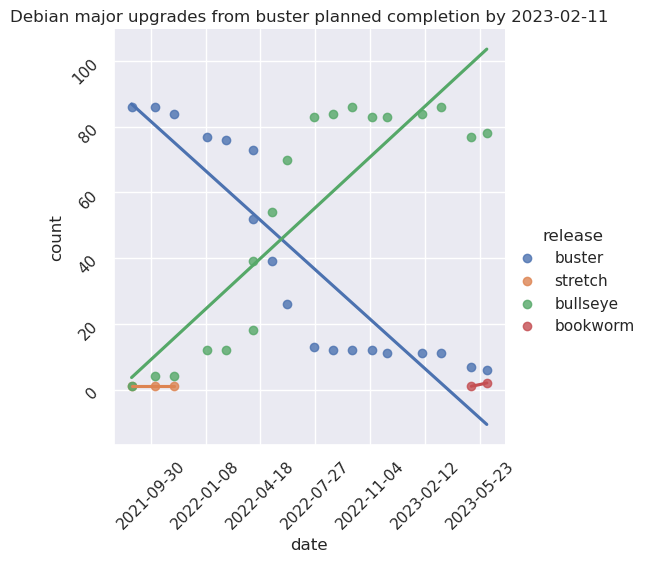
The above graphic shows the progress of the migration between major releases. It can be regenerated with the predict-os script. It pulls information from puppet to update a CSV file to keep track of progress over time.
WARNING: the graph may be incorrect or missing as the upgrade procedure ramps up. The following graph will be converted into a Grafana dashboard to fix that, see issue 40512.
Post-mortem
Note that the approach taken for bullseye was to "do the right thing" on many fronts, for example:
- for Icinga, we entered into a discussion about replacing it with Prometheus
- for the Sunet cluster, we waited to rebuild the VMs in a new location
- for Puppet, we actually updated the Debian packaging, even though that was going to be only usable in bookworm
- for gitolite/gitweb, we proposed a retirement instead
This wasn't the case for all servers, for example we just upgraded gayi and did not wait for the SVN retirement. But in general, this upgrade dragged on longer than the previous jessie to buster upgrade.
This can be seen in the following all-time upgrade graph:
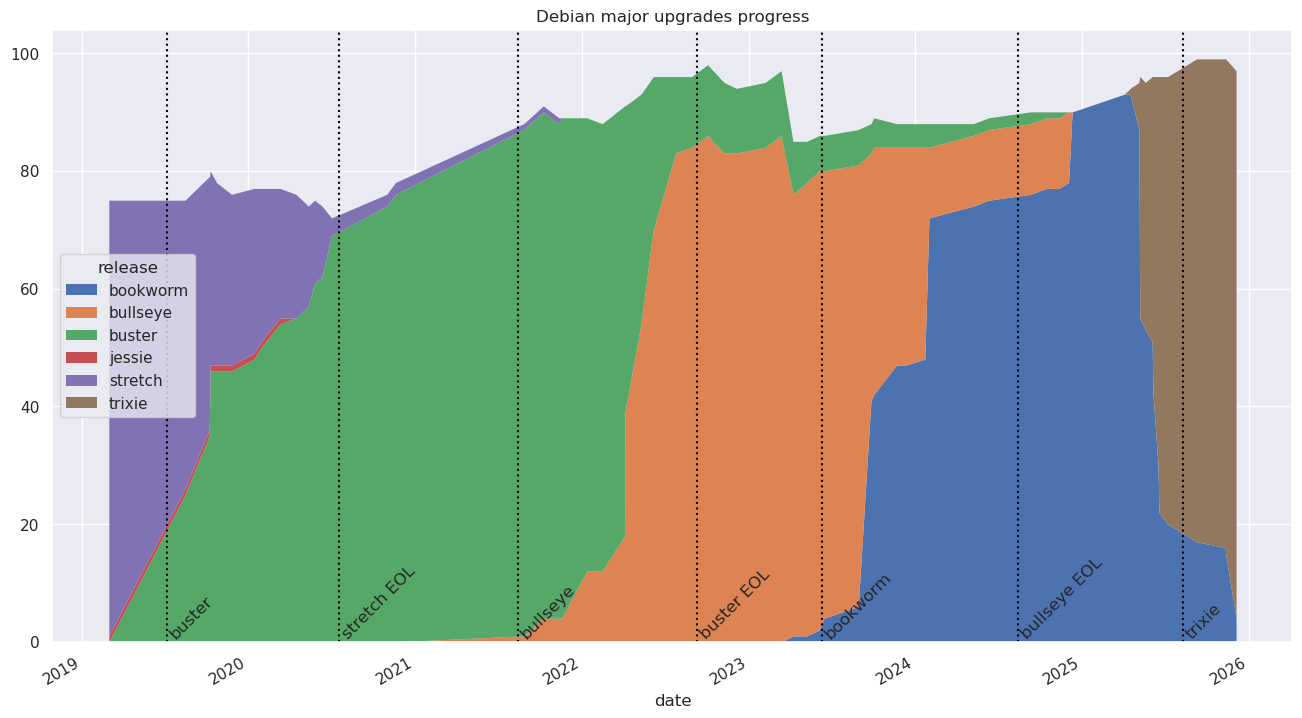
Here we see the buster upgrades we performed over a little over 14 months with a very long tail of 3 machines upgraded over another 14 months or so.
In comparison, the bulk of the bullseye upgrades were faster (10 months!) but then stalled at 12 machines for 10 more months. In terms of machines*time product, it's worse as we had 10 outdated machines over 12 months as opposed to 3 over 14 months... And it's not over yet.
That said, the time between the min and the max for bullseye was much shorter than buster. Taken this way, we could count the upgrade as:
| suite | start | end | diff |
|---|---|---|---|
| buster | 2019-03-01 | 2020-11-01 | 20 months |
| bullseye | 2021-08-01 | 2022-07-01 | 12 months |
In both cases, machines from the previous release remained to be upgraded, but the bulk of the machines was upgraded quickly, which is a testament to the "batch" system that was adopted for the bullseye upgrade.
In this upgrade phase, we also hope to spend less time with three suites to maintain at once, but that remains to be confirmed.
To sum up:
- the batch system and "work party" approach works!
- the "do it right" approach works less well: just upgrade and fix things, do the hard "conversion" things later if you can (e.g. SVN)